WO2024253147A1 - 端末装置およびゲーム画像表示方法 - Google Patents
端末装置およびゲーム画像表示方法 Download PDFInfo
- Publication number
- WO2024253147A1 WO2024253147A1 PCT/JP2024/020635 JP2024020635W WO2024253147A1 WO 2024253147 A1 WO2024253147 A1 WO 2024253147A1 JP 2024020635 W JP2024020635 W JP 2024020635W WO 2024253147 A1 WO2024253147 A1 WO 2024253147A1
- Authority
- WO
- WIPO (PCT)
- Prior art keywords
- operation area
- game
- terminal device
- display
- area
- Prior art date
- Legal status (The legal status is an assumption and is not a legal conclusion. Google has not performed a legal analysis and makes no representation as to the accuracy of the status listed.)
- Ceased
Links
Images




Classifications
-
- A—HUMAN NECESSITIES
- A63—SPORTS; GAMES; AMUSEMENTS
- A63F—CARD, BOARD, OR ROULETTE GAMES; INDOOR GAMES USING SMALL MOVING PLAYING BODIES; VIDEO GAMES; GAMES NOT OTHERWISE PROVIDED FOR
- A63F13/00—Video games, i.e. games using an electronically generated display having two or more dimensions
- A63F13/20—Input arrangements for video game devices
- A63F13/21—Input arrangements for video game devices characterised by their sensors, purposes or types
- A63F13/214—Input arrangements for video game devices characterised by their sensors, purposes or types for locating contacts on a surface, e.g. floor mats or touch pads
-
- A—HUMAN NECESSITIES
- A63—SPORTS; GAMES; AMUSEMENTS
- A63F—CARD, BOARD, OR ROULETTE GAMES; INDOOR GAMES USING SMALL MOVING PLAYING BODIES; VIDEO GAMES; GAMES NOT OTHERWISE PROVIDED FOR
- A63F13/00—Video games, i.e. games using an electronically generated display having two or more dimensions
- A63F13/20—Input arrangements for video game devices
- A63F13/21—Input arrangements for video game devices characterised by their sensors, purposes or types
- A63F13/214—Input arrangements for video game devices characterised by their sensors, purposes or types for locating contacts on a surface, e.g. floor mats or touch pads
- A63F13/2145—Input arrangements for video game devices characterised by their sensors, purposes or types for locating contacts on a surface, e.g. floor mats or touch pads the surface being also a display device, e.g. touch screens
-
- A—HUMAN NECESSITIES
- A63—SPORTS; GAMES; AMUSEMENTS
- A63F—CARD, BOARD, OR ROULETTE GAMES; INDOOR GAMES USING SMALL MOVING PLAYING BODIES; VIDEO GAMES; GAMES NOT OTHERWISE PROVIDED FOR
- A63F13/00—Video games, i.e. games using an electronically generated display having two or more dimensions
- A63F13/20—Input arrangements for video game devices
- A63F13/22—Setup operations, e.g. calibration, key configuration or button assignment
-
- A—HUMAN NECESSITIES
- A63—SPORTS; GAMES; AMUSEMENTS
- A63F—CARD, BOARD, OR ROULETTE GAMES; INDOOR GAMES USING SMALL MOVING PLAYING BODIES; VIDEO GAMES; GAMES NOT OTHERWISE PROVIDED FOR
- A63F13/00—Video games, i.e. games using an electronically generated display having two or more dimensions
- A63F13/20—Input arrangements for video game devices
- A63F13/23—Input arrangements for video game devices for interfacing with the game device, e.g. specific interfaces between game controller and console
- A63F13/235—Input arrangements for video game devices for interfacing with the game device, e.g. specific interfaces between game controller and console using a wireless connection, e.g. infrared or piconet
-
- A—HUMAN NECESSITIES
- A63—SPORTS; GAMES; AMUSEMENTS
- A63F—CARD, BOARD, OR ROULETTE GAMES; INDOOR GAMES USING SMALL MOVING PLAYING BODIES; VIDEO GAMES; GAMES NOT OTHERWISE PROVIDED FOR
- A63F13/00—Video games, i.e. games using an electronically generated display having two or more dimensions
- A63F13/20—Input arrangements for video game devices
- A63F13/24—Constructional details thereof, e.g. game controllers with detachable joystick handles
-
- A—HUMAN NECESSITIES
- A63—SPORTS; GAMES; AMUSEMENTS
- A63F—CARD, BOARD, OR ROULETTE GAMES; INDOOR GAMES USING SMALL MOVING PLAYING BODIES; VIDEO GAMES; GAMES NOT OTHERWISE PROVIDED FOR
- A63F13/00—Video games, i.e. games using an electronically generated display having two or more dimensions
- A63F13/25—Output arrangements for video game devices
- A63F13/26—Output arrangements for video game devices having at least one additional display device, e.g. on the game controller or outside a game booth
-
- A—HUMAN NECESSITIES
- A63—SPORTS; GAMES; AMUSEMENTS
- A63F—CARD, BOARD, OR ROULETTE GAMES; INDOOR GAMES USING SMALL MOVING PLAYING BODIES; VIDEO GAMES; GAMES NOT OTHERWISE PROVIDED FOR
- A63F13/00—Video games, i.e. games using an electronically generated display having two or more dimensions
- A63F13/30—Interconnection arrangements between game servers and game devices; Interconnection arrangements between game devices; Interconnection arrangements between game servers
- A63F13/32—Interconnection arrangements between game servers and game devices; Interconnection arrangements between game devices; Interconnection arrangements between game servers using local area network [LAN] connections
- A63F13/323—Interconnection arrangements between game servers and game devices; Interconnection arrangements between game devices; Interconnection arrangements between game servers using local area network [LAN] connections between game devices with different hardware characteristics, e.g. hand-held game devices connectable to game consoles or arcade machines
-
- A—HUMAN NECESSITIES
- A63—SPORTS; GAMES; AMUSEMENTS
- A63F—CARD, BOARD, OR ROULETTE GAMES; INDOOR GAMES USING SMALL MOVING PLAYING BODIES; VIDEO GAMES; GAMES NOT OTHERWISE PROVIDED FOR
- A63F13/00—Video games, i.e. games using an electronically generated display having two or more dimensions
- A63F13/30—Interconnection arrangements between game servers and game devices; Interconnection arrangements between game devices; Interconnection arrangements between game servers
- A63F13/35—Details of game servers
-
- A—HUMAN NECESSITIES
- A63—SPORTS; GAMES; AMUSEMENTS
- A63F—CARD, BOARD, OR ROULETTE GAMES; INDOOR GAMES USING SMALL MOVING PLAYING BODIES; VIDEO GAMES; GAMES NOT OTHERWISE PROVIDED FOR
- A63F13/00—Video games, i.e. games using an electronically generated display having two or more dimensions
- A63F13/30—Interconnection arrangements between game servers and game devices; Interconnection arrangements between game devices; Interconnection arrangements between game servers
- A63F13/35—Details of game servers
- A63F13/355—Performing operations on behalf of clients with restricted processing capabilities, e.g. servers transform changing game scene into an encoded video stream for transmitting to a mobile phone or a thin client
-
- A—HUMAN NECESSITIES
- A63—SPORTS; GAMES; AMUSEMENTS
- A63F—CARD, BOARD, OR ROULETTE GAMES; INDOOR GAMES USING SMALL MOVING PLAYING BODIES; VIDEO GAMES; GAMES NOT OTHERWISE PROVIDED FOR
- A63F13/00—Video games, i.e. games using an electronically generated display having two or more dimensions
- A63F13/40—Processing input control signals of video game devices, e.g. signals generated by the player or derived from the environment
-
- A—HUMAN NECESSITIES
- A63—SPORTS; GAMES; AMUSEMENTS
- A63F—CARD, BOARD, OR ROULETTE GAMES; INDOOR GAMES USING SMALL MOVING PLAYING BODIES; VIDEO GAMES; GAMES NOT OTHERWISE PROVIDED FOR
- A63F13/00—Video games, i.e. games using an electronically generated display having two or more dimensions
- A63F13/40—Processing input control signals of video game devices, e.g. signals generated by the player or derived from the environment
- A63F13/42—Processing input control signals of video game devices, e.g. signals generated by the player or derived from the environment by mapping the input signals into game commands, e.g. mapping the displacement of a stylus on a touch screen to the steering angle of a virtual vehicle
-
- A—HUMAN NECESSITIES
- A63—SPORTS; GAMES; AMUSEMENTS
- A63F—CARD, BOARD, OR ROULETTE GAMES; INDOOR GAMES USING SMALL MOVING PLAYING BODIES; VIDEO GAMES; GAMES NOT OTHERWISE PROVIDED FOR
- A63F13/00—Video games, i.e. games using an electronically generated display having two or more dimensions
- A63F13/40—Processing input control signals of video game devices, e.g. signals generated by the player or derived from the environment
- A63F13/42—Processing input control signals of video game devices, e.g. signals generated by the player or derived from the environment by mapping the input signals into game commands, e.g. mapping the displacement of a stylus on a touch screen to the steering angle of a virtual vehicle
- A63F13/426—Processing input control signals of video game devices, e.g. signals generated by the player or derived from the environment by mapping the input signals into game commands, e.g. mapping the displacement of a stylus on a touch screen to the steering angle of a virtual vehicle involving on-screen location information, e.g. screen coordinates of an area at which the player is aiming with a light gun
-
- A—HUMAN NECESSITIES
- A63—SPORTS; GAMES; AMUSEMENTS
- A63F—CARD, BOARD, OR ROULETTE GAMES; INDOOR GAMES USING SMALL MOVING PLAYING BODIES; VIDEO GAMES; GAMES NOT OTHERWISE PROVIDED FOR
- A63F13/00—Video games, i.e. games using an electronically generated display having two or more dimensions
- A63F13/50—Controlling the output signals based on the game progress
- A63F13/52—Controlling the output signals based on the game progress involving aspects of the displayed game scene
- A63F13/525—Changing parameters of virtual cameras
- A63F13/5255—Changing parameters of virtual cameras according to dedicated instructions from a player, e.g. using a secondary joystick to rotate the camera around a player's character
-
- A—HUMAN NECESSITIES
- A63—SPORTS; GAMES; AMUSEMENTS
- A63F—CARD, BOARD, OR ROULETTE GAMES; INDOOR GAMES USING SMALL MOVING PLAYING BODIES; VIDEO GAMES; GAMES NOT OTHERWISE PROVIDED FOR
- A63F13/00—Video games, i.e. games using an electronically generated display having two or more dimensions
- A63F13/50—Controlling the output signals based on the game progress
- A63F13/53—Controlling the output signals based on the game progress involving additional visual information provided to the game scene, e.g. by overlay to simulate a head-up display [HUD] or displaying a laser sight in a shooting game
-
- A—HUMAN NECESSITIES
- A63—SPORTS; GAMES; AMUSEMENTS
- A63F—CARD, BOARD, OR ROULETTE GAMES; INDOOR GAMES USING SMALL MOVING PLAYING BODIES; VIDEO GAMES; GAMES NOT OTHERWISE PROVIDED FOR
- A63F13/00—Video games, i.e. games using an electronically generated display having two or more dimensions
- A63F13/50—Controlling the output signals based on the game progress
- A63F13/53—Controlling the output signals based on the game progress involving additional visual information provided to the game scene, e.g. by overlay to simulate a head-up display [HUD] or displaying a laser sight in a shooting game
- A63F13/533—Controlling the output signals based on the game progress involving additional visual information provided to the game scene, e.g. by overlay to simulate a head-up display [HUD] or displaying a laser sight in a shooting game for prompting the player, e.g. by displaying a game menu
-
- A—HUMAN NECESSITIES
- A63—SPORTS; GAMES; AMUSEMENTS
- A63F—CARD, BOARD, OR ROULETTE GAMES; INDOOR GAMES USING SMALL MOVING PLAYING BODIES; VIDEO GAMES; GAMES NOT OTHERWISE PROVIDED FOR
- A63F13/00—Video games, i.e. games using an electronically generated display having two or more dimensions
- A63F13/50—Controlling the output signals based on the game progress
- A63F13/53—Controlling the output signals based on the game progress involving additional visual information provided to the game scene, e.g. by overlay to simulate a head-up display [HUD] or displaying a laser sight in a shooting game
- A63F13/537—Controlling the output signals based on the game progress involving additional visual information provided to the game scene, e.g. by overlay to simulate a head-up display [HUD] or displaying a laser sight in a shooting game using indicators, e.g. showing the condition of a game character on screen
- A63F13/5378—Controlling the output signals based on the game progress involving additional visual information provided to the game scene, e.g. by overlay to simulate a head-up display [HUD] or displaying a laser sight in a shooting game using indicators, e.g. showing the condition of a game character on screen for displaying an additional top view, e.g. radar screens or maps
-
- A—HUMAN NECESSITIES
- A63—SPORTS; GAMES; AMUSEMENTS
- A63F—CARD, BOARD, OR ROULETTE GAMES; INDOOR GAMES USING SMALL MOVING PLAYING BODIES; VIDEO GAMES; GAMES NOT OTHERWISE PROVIDED FOR
- A63F13/00—Video games, i.e. games using an electronically generated display having two or more dimensions
- A63F13/80—Special adaptations for executing a specific game genre or game mode
- A63F13/837—Shooting of targets
-
- A—HUMAN NECESSITIES
- A63—SPORTS; GAMES; AMUSEMENTS
- A63F—CARD, BOARD, OR ROULETTE GAMES; INDOOR GAMES USING SMALL MOVING PLAYING BODIES; VIDEO GAMES; GAMES NOT OTHERWISE PROVIDED FOR
- A63F13/00—Video games, i.e. games using an electronically generated display having two or more dimensions
- A63F13/80—Special adaptations for executing a specific game genre or game mode
- A63F13/843—Special adaptations for executing a specific game genre or game mode involving concurrently two or more players on the same game device, e.g. requiring the use of a plurality of controllers or of a specific view of game data for each player
-
- A—HUMAN NECESSITIES
- A63—SPORTS; GAMES; AMUSEMENTS
- A63F—CARD, BOARD, OR ROULETTE GAMES; INDOOR GAMES USING SMALL MOVING PLAYING BODIES; VIDEO GAMES; GAMES NOT OTHERWISE PROVIDED FOR
- A63F13/00—Video games, i.e. games using an electronically generated display having two or more dimensions
- A63F13/80—Special adaptations for executing a specific game genre or game mode
- A63F13/847—Cooperative playing, e.g. requiring coordinated actions from several players to achieve a common goal
-
- A—HUMAN NECESSITIES
- A63—SPORTS; GAMES; AMUSEMENTS
- A63F—CARD, BOARD, OR ROULETTE GAMES; INDOOR GAMES USING SMALL MOVING PLAYING BODIES; VIDEO GAMES; GAMES NOT OTHERWISE PROVIDED FOR
- A63F13/00—Video games, i.e. games using an electronically generated display having two or more dimensions
- A63F13/85—Providing additional services to players
- A63F13/86—Watching games played by other players
-
- A—HUMAN NECESSITIES
- A63—SPORTS; GAMES; AMUSEMENTS
- A63F—CARD, BOARD, OR ROULETTE GAMES; INDOOR GAMES USING SMALL MOVING PLAYING BODIES; VIDEO GAMES; GAMES NOT OTHERWISE PROVIDED FOR
- A63F13/00—Video games, i.e. games using an electronically generated display having two or more dimensions
- A63F13/90—Constructional details or arrangements of video game devices not provided for in groups A63F13/20 or A63F13/25, e.g. housing, wiring, connections or cabinets
- A63F13/92—Video game devices specially adapted to be hand-held while playing
-
- A—HUMAN NECESSITIES
- A63—SPORTS; GAMES; AMUSEMENTS
- A63F—CARD, BOARD, OR ROULETTE GAMES; INDOOR GAMES USING SMALL MOVING PLAYING BODIES; VIDEO GAMES; GAMES NOT OTHERWISE PROVIDED FOR
- A63F13/00—Video games, i.e. games using an electronically generated display having two or more dimensions
- A63F13/90—Constructional details or arrangements of video game devices not provided for in groups A63F13/20 or A63F13/25, e.g. housing, wiring, connections or cabinets
- A63F13/98—Accessories, i.e. detachable arrangements optional for the use of the video game device, e.g. grip supports of game controllers
-
- G—PHYSICS
- G06—COMPUTING OR CALCULATING; COUNTING
- G06F—ELECTRIC DIGITAL DATA PROCESSING
- G06F3/00—Input arrangements for transferring data to be processed into a form capable of being handled by the computer; Output arrangements for transferring data from processing unit to output unit, e.g. interface arrangements
- G06F3/01—Input arrangements or combined input and output arrangements for interaction between user and computer
- G06F3/03—Arrangements for converting the position or the displacement of a member into a coded form
- G06F3/033—Pointing devices displaced or positioned by the user, e.g. mice, trackballs, pens or joysticks; Accessories therefor
- G06F3/0354—Pointing devices displaced or positioned by the user, e.g. mice, trackballs, pens or joysticks; Accessories therefor with detection of two-dimensional [2D] relative movements between the device, or an operating part thereof, and a plane or surface, e.g. 2D mice, trackballs, pens or pucks
-
- G—PHYSICS
- G06—COMPUTING OR CALCULATING; COUNTING
- G06F—ELECTRIC DIGITAL DATA PROCESSING
- G06F3/00—Input arrangements for transferring data to be processed into a form capable of being handled by the computer; Output arrangements for transferring data from processing unit to output unit, e.g. interface arrangements
- G06F3/01—Input arrangements or combined input and output arrangements for interaction between user and computer
- G06F3/048—Interaction techniques based on graphical user interfaces [GUI]
- G06F3/0487—Interaction techniques based on graphical user interfaces [GUI] using specific features provided by the input device, e.g. functions controlled by the rotation of a mouse with dual sensing arrangements, or of the nature of the input device, e.g. tap gestures based on pressure sensed by a digitiser
- G06F3/0488—Interaction techniques based on graphical user interfaces [GUI] using specific features provided by the input device, e.g. functions controlled by the rotation of a mouse with dual sensing arrangements, or of the nature of the input device, e.g. tap gestures based on pressure sensed by a digitiser using a touch-screen or digitiser, e.g. input of commands through traced gestures
- G06F3/04886—Interaction techniques based on graphical user interfaces [GUI] using specific features provided by the input device, e.g. functions controlled by the rotation of a mouse with dual sensing arrangements, or of the nature of the input device, e.g. tap gestures based on pressure sensed by a digitiser using a touch-screen or digitiser, e.g. input of commands through traced gestures by partitioning the display area of the touch-screen or the surface of the digitising tablet into independently controllable areas, e.g. virtual keyboards or menus
-
- A—HUMAN NECESSITIES
- A63—SPORTS; GAMES; AMUSEMENTS
- A63F—CARD, BOARD, OR ROULETTE GAMES; INDOOR GAMES USING SMALL MOVING PLAYING BODIES; VIDEO GAMES; GAMES NOT OTHERWISE PROVIDED FOR
- A63F2300/00—Features of games using an electronically generated display having two or more dimensions, e.g. on a television screen, showing representations related to the game
- A63F2300/10—Features of games using an electronically generated display having two or more dimensions, e.g. on a television screen, showing representations related to the game characterized by input arrangements for converting player-generated signals into game device control signals
- A63F2300/1068—Features of games using an electronically generated display having two or more dimensions, e.g. on a television screen, showing representations related to the game characterized by input arrangements for converting player-generated signals into game device control signals being specially adapted to detect the point of contact of the player on a surface, e.g. floor mat, touch pad
- A63F2300/1075—Features of games using an electronically generated display having two or more dimensions, e.g. on a television screen, showing representations related to the game characterized by input arrangements for converting player-generated signals into game device control signals being specially adapted to detect the point of contact of the player on a surface, e.g. floor mat, touch pad using a touch screen
Definitions
- This disclosure relates to technology that allows a user to play a game at a location away from the game device.
- Patent Document 1 discloses a technique in which, when a user is visiting their parents' home, they can operate a game device at their parents' home to access a game device at home and play a game installed on the game device at home.
- the game device at the parents' home sends the user's input data to the game device at home
- the game device at home generates image data and sound data by reflecting the input data in the game progress, and transmits the generated image data and sound data via streaming to the game device at the parents' home.
- This play mode is called "remote play," and allows the user to play a game while being away from the game device.
- a user can remotely control a game device located in a remote location to play a game.
- the purpose of this disclosure is to provide a terminal device suitable for remote play.
- One aspect of the present disclosure is a terminal device operated by a user, comprising a display device having a rectangular display area, a first input unit having at least one operator provided on the outer left side of the display device, a second input unit having at least one operator provided on the outer right side of the display device, and one or more processors having hardware.
- the one or more processors set a first operation area on the left side of the display area, set a second operation area on the right side of the display area, accept input data in which a user operates the first operation area and/or the second operation area, accept input data in which a user operates an operator, transmit the input data to a game device that executes a game, receive game image data generated by the game device based on the input data, and display game images on the display device.
- Another aspect of the present disclosure relates to a method for displaying a game image on a terminal device that has a display device with a rectangular display area and controls on the outer left and right sides of the display device and is communicatively connected to a game device.
- This game image display method includes the steps of setting a first operation area on the left side of the display area and a second operation area on the right side of the display area, accepting input data in which a user operates the first operation area and/or the second operation area, accepting input data in which a user operates the controls, transmitting the input data to the game device, receiving game image data generated by the game device based on the input data, and displaying the game image on the display device.
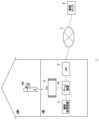
- FIG. 1 illustrates an example of an information processing system.
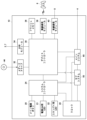
- FIG. 2 is a diagram illustrating a hardware configuration of the game device.
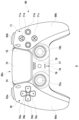
- FIG. 2 is a top view of the game controller.
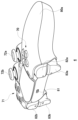
- FIG. 1 is a perspective view of a game controller.
- FIG. 13 is a diagram illustrating another aspect of the information processing system.
- FIG. FIG. 2 is a diagram illustrating functional blocks of a control device of the terminal device.
- FIG. 13 is a diagram illustrating an example of a home screen.
- FIG. 2 is a diagram showing functional blocks of the game device.
- FIG. 2 is a diagram showing an example of a home screen provided by the game device.
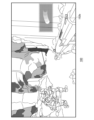
- FIG. 13 is a diagram showing an example of a game image being played remotely.
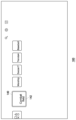
- 11A and 11B are diagrams showing two operation areas set in a display area.
- FIG. 1 is a perspective view of a game controller.
- FIG. 13 is a diagram illustrating another aspect of the information processing system.
- FIG. FIG. 2 is a
- FIG. 13 is a diagram showing an example of a displayed guide.
- FIG. 13 is a diagram showing an example of a setting screen for adjusting a vertical position.
- FIG. 13 is a diagram showing another example of a displayed guide.
- FIG. 13 is a diagram showing another example of a displayed guide.
- FIG. 13 is a diagram showing another example of a displayed guide.
- FIG. 1 shows one aspect of an information processing system 1 according to an embodiment.
- the information processing system 1 comprises a game device 10 operated by a user and a management server 5, which are connected via a network 3 such as the Internet or a LAN (Local Area Network).
- An access point (hereinafter referred to as "AP") 8 has the functions of a wireless access point and a router, and the game device 10 connects to the AP 8 wirelessly or via a wired connection to be able to communicate with the management server 5 on the network 3.
- AP Access Point
- the game controller 6 is an input device for the game device 10.
- the game device 10 is connected to the game controller 6 wirelessly or via a wired connection, and the game controller 6 transmits input data operated by the user to the game device 10.
- the game device 10 receives input data from the game controller 6, it reflects the data in the processing of the system software and application software, and causes the output device 4 to output the processing results.
- the auxiliary storage device 2 is a large-capacity storage device such as an HDD (hard disk drive) or SSD (solid state drive), and may be an internal storage device, or may be an external storage device connected to the game device 10 via a USB (Universal Serial Bus) or the like.
- the output device 4 may be a television having a display device for outputting images and a speaker for outputting sound.
- the output device 4 may be connected to the game device 10 by a wired cable, or may be connected wirelessly.
- the game device 10 is a stationary game console, and is placed on the first floor of the user's home together with the output device 4.
- the management server 5 is maintained and managed by the operating entity of the information processing system 1, and provides users with network services related to games. Users have a user account that uniquely identifies them, and use the user account to sign in to the network service.
- signing in to the network service may also be referred to as signing in to the management server 5.
- a user account may consist of an email address and a password.
- the user account is authenticated by the management server 5 and the user can sign in to the management server 5.
- logging in to a game device 10 means that the user can use the functions of that game device 10
- signing in to the management server 5 means that the user can use network services.
- the user can save game save data to the management server 5 and register any awards (trophies) acquired during game play to the management server 5.
- the user can engage in "remote play,” in which the user logs in to the game device 10 from a remote location and plays the game.
- FIG. 2 shows the hardware configuration of the game device 10.
- the game device 10 is configured with a main power button 20, a power ON LED 21, a standby LED 22, a system controller 24, a clock 26, a device controller 30, a media drive 32, a USB module 34, a flash memory 36, a wireless communication module 38, a wired communication module 40, a subsystem 50, and a main system 60.
- the main system 60 comprises a main CPU (Central Processing Unit), a memory and memory controller serving as the main storage device, a GPU (Graphics Processing Unit), etc.
- the GPU is mainly used for the calculation processing of the game program.
- the main CPU has the function of starting up the OS and executing the game program installed in the auxiliary storage device 2 in the environment provided by the OS.
- the subsystem 50 comprises a sub CPU, a memory and memory controller serving as the main storage device, etc., but does not comprise a GPU.
- the sub-CPU While the main CPU has the function of executing game programs installed in the auxiliary storage device 2 and ROM medium 44, the sub-CPU does not have such a function. However, the sub-CPU has the function of accessing the auxiliary storage device 2 and the function of sending and receiving data with the management server 5. The sub-CPU is configured with only these limited processing functions, and therefore can operate with less power consumption compared to the main CPU. These functions of the sub-CPU are executed when the main CPU is in standby mode.
- the main power button 20 is provided on the front of the housing of the game device 10, and is operated to turn on or off the power supply to the main system 60 of the game device 10.
- the power ON LED 21 lights up when the main power button 20 is turned on, and the standby LED 22 lights up when the main power button 20 is turned off.
- the system controller 24 detects when the user presses the main power button 20.
- the clock 26 is a real-time clock that generates current date and time information and supplies it to the system controller 24, the subsystem 50, and the main system 60.
- the device controller 30 is configured as an LSI (Large-Scale Integrated Circuit) that transfers information between devices like a south bridge. As shown in the figure, devices such as the system controller 24, media drive 32, USB module 34, flash memory 36, wireless communication module 38, wired communication module 40, subsystem 50, and main system 60 are connected to the device controller 30.
- the device controller 30 absorbs differences in the electrical characteristics and data transfer speeds of each device and controls the timing of data transfer.
- the media drive 32 is a drive device that operates by mounting a ROM medium 44 on which application software such as games and license information are recorded, and reads programs, data, and the like from the ROM medium 44.
- the ROM medium 44 is a read-only recording medium such as an optical disk, magneto-optical disk, or Blu-ray disk.
- the USB module 34 is a module that connects to an external device via a USB cable.
- the USB module 34 may also be connected to the auxiliary storage device 2 and the camera 7 via USB cables.
- the flash memory 36 is an auxiliary storage device that constitutes the internal storage.
- the wireless communication module 38 wirelessly communicates with the game controller 6 using a communication protocol such as the Bluetooth (registered trademark) protocol or the IEEE802.11 protocol.
- the wired communication module 40 communicates with an external device via a wired connection, and connects to the network 3 via, for example, the AP 8.
- FIG. 3 shows a top view of the game controller 6
- FIG. 4 shows a perspective view of the game controller 6.
- the game controller 6 has a housing 80 composed of a left grip portion 80a, a right grip portion 80b, and a housing main body portion 80c.
- the left grip portion 80a and the right grip portion 80b are provided on either side of the housing main body portion 80c, with the left grip portion 80a being held by the user's left hand and the right grip portion 80b being held by the user's right hand.
- the housing main body 80c has various controls that the user operates. On the top surface of the housing main body 80c, there are a directional key 70, an action button 71, a left analog stick 72a, a right analog stick 72b, a touchpad 73, a create button 74, an option button 75, a home button 76, a mute button 77, a speaker 78, and a microphone 79.
- the directional key 70 is made up of an up key 70a, a right key 70b, a down key 70c, and a left key 70d
- the action buttons 71 are made up of a ⁇ button 71a, an O button 71b, an X button 71c, and a ⁇ button 71d.
- the left analog stick 72a doubles as the L3 button that is turned on when pressed, and similarly, the right analog stick 72b doubles as the R3 button that is turned on when pressed.
- the touchpad 73 also functions as a touchpad button that is turned on when pressed.
- a USB terminal 81, an L1 button 82a, an R1 button 82b, an L2 button 83a, and an R2 button 83b are provided on the back of the housing main body 80c.
- the L2 button 83a and the R2 button 83b are trigger-type buttons, and an actuator is connected to them that dynamically changes the resistance when the user presses the trigger-type button with their finger.
- FIG. 5 shows another aspect of the information processing system 1 according to the embodiment.
- a user is on the second floor of his or her home and operates a terminal device 100 equipped with a display device and speakers to remotely play a game installed on a game device 10.
- the terminal device 100 of the embodiment does not have the functionality to execute games and may be a device dedicated to remote play. During remote play, the terminal device 100 and game device 10 are directly connected via AP8.
- the terminal device 100 transmits the user's input data to the game device 10 in real time.
- the game device 10 generates image data and sound data for the game by reflecting the user's input data in the progress of the game, and transmits the generated image data and sound data by streaming to the terminal device 100.
- the terminal device 100 displays game images on the display device and outputs game sounds from the speaker, allowing the user to play the game at a location away from the game device 10 and output device 4.
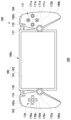
- FIG. 6 shows a top view of the terminal device 100.
- the terminal device 100 has a housing 180 composed of a left grip portion 180a, a right grip portion 180b, and a housing main body portion 180c.
- the left grip portion 180a and the right grip portion 180b are provided on both sides of the housing main body portion 180c, with the left grip portion 180a being held by the user's left hand and the right grip portion 180b being held by the user's right hand.
- the housing main body 180c is provided with a touch panel 160, a first input unit 163 arranged on the outer left side of the touch panel 160, and a second input unit 164 arranged on the outer right side of the touch panel 160.
- the touch panel 160 is configured to include a display device 161 having a rectangular display area, and a transparent touch pad 162 covering the surface of the rectangular display area.
- the display device 161 may be a display means such as a liquid crystal panel or an organic EL panel.
- a game image generated by the game device 10 is displayed in the display area of the display device 161.
- the display size (the diagonal length of the display area) is 7 inches or more, so it is difficult for the user to play a game by holding the terminal device 100 in one hand, and the user plays the game by holding it with both hands.
- the touch pad 162 is a multi-touch pad that has a function of detecting multiple points touched simultaneously, and the touch panel 160 is configured as a multi-touch screen.
- the first input unit 163 has at least one operator.
- the first input unit 163 has a directional key 170, a left analog stick 172a, a create button 174, and a home button 176.
- the directional key 170 is composed of an up key 170a, a right key 170b, a down key 170c, and a left key 170d.
- the left analog stick 172a also serves as the L3 button that is turned on when pressed.
- the second input unit 164 has at least one operator.
- the second input unit 164 has an action button 171, a right analog stick 172b, an option button 175, and a mute button 177.
- the action buttons 171 are made up of a ⁇ button 171a, a O button 171b, a X button 171c, and a ⁇ button 171d.
- the right analog stick 172b also serves as the R3 button, which is turned on when pressed in.
- a USB terminal, an L1 button 182a, an R1 button 182b, an L2 button, an R2 button, and a power button are provided on the rear of the housing main body 180c.
- the terminal device 100 starts up when the power button is turned on.
- the L2 button and the R2 button are trigger-type buttons, and are connected to actuators that dynamically change the resistance when the user presses the trigger-type button with their finger.
- a speaker and a microphone are provided on the front of the housing main body 180c. During remote play, game sounds generated by the game device 10 are output from the speaker.
- the terminal device 100 is equipped with all of the multiple controls provided on the game controller 6, except for the touchpad 73.
- the terminal device 100 of the embodiment emulates the function of the touchpad 73 of the game controller 6 on the display area of the touch panel 160, allowing the user to perform the same game input as when using the game controller 6.
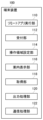
- FIG. 7 shows functional blocks of the control device of the terminal device 100.
- the terminal device 100 includes a remote application execution unit 110, a reception unit 112, an operation area setting unit 114, a guide display unit 116, an acquisition unit 118, an output processing unit 120, and a communication processing unit 122.
- the communication processing unit 122 is connected to the game device 10 via the AP 8 so as to be able to communicate with the game device 10.
- the user remotely plays the game on the second floor of his/her home, but it is also possible to remotely play the game at a location other than the home.
- the communication processing unit 122 may connect to the game device 10 via the network 3 by P2P communication, or may connect via the management server 5 via the network 3.
- the functions of the components in the terminal device 100 shown in FIG. 7 may be implemented in circuitry or processing circuitry including general purpose processors, application specific processors, integrated circuits, ASICs (Application Specific Integrated Circuits), a CPU (a Central Processing Unit), conventional circuits, and/or combinations thereof, configured or programmed to implement the functions described herein.
- a processor is considered to be a circuitry or processing circuitry including transistors and other circuits.
- a processor may be a programmed processor that executes a program stored in a memory.
- the hardware is a processor that is considered to be a type of circuitry
- the circuitry, means, or unit may be a combination of hardware and software used to configure the hardware and/or processor.
- the remote application execution unit 110 executes the remote application, and the output processing unit 120 displays the home screen on the touch panel 160.
- FIG. 8 shows an example of the home screen.
- the remote application starts a process for connecting to the game device 10.
- the remote application causes the communication processing unit 122 to send a connection request to the game device 10. If the game device 10 is in rest mode, the main system 60 of the game device 10 is started up based on the connection request, and the terminal device 100 and the game device 10 are connected so that they can communicate with each other, forming an environment in which remote play can be performed.
- connection destinations for remote play
- a GUI for selecting multiple connection destinations is displayed on the home screen. At this time, the user selects the desired connection destination to establish a connection between the terminal device 100 and the desired game device 10.
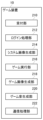
- FIG. 9 shows functional blocks of the game device 10.
- the game device 10 comprises a reception unit 210, a login processing unit 212, a system image generation unit 214, a game execution unit 216, a game image generation unit 218, a game sound generation unit 220, and a communication processing unit 222.
- the communication processing unit 222 represents the functions of the wireless communication module 38 and the wired communication module 40 shown in FIG. 2, and transmits and receives data to and from the communication processing unit 122.
- the functions of the components in the gaming device 10 shown in FIG. 9 may be implemented in circuitry or processing circuitry including general purpose processors, application specific processors, integrated circuits, ASICs (Application Specific Integrated Circuits), a CPU (a Central Processing Unit), conventional circuits, and/or combinations thereof, configured or programmed to implement the functions described herein.
- a processor is considered to be a circuitry or processing circuitry that includes transistors and other circuits.
- a processor may be a programmed processor that executes a program stored in a memory.
- a circuit, unit, or means is hardware that is programmed to realize or executes the described functions.
- the hardware may be any hardware disclosed in this specification or any hardware that is programmed to realize or known to execute the described functions.
- the hardware is a processor that is considered to be a type of circuitry
- the circuitry, means, or unit may be a combination of hardware and software used to configure the hardware and/or processor.
- the remote application transmits a user login request from the communication processing unit 122 to the game device 10. If a passcode for logging in to the game device 10 is set, the login request includes the passcode for logging in to the game device 10. Note that if a login passcode is not set to the game device 10, the login request does not include the login passcode.
- the communication processing unit 222 receives a user login request from the terminal device 100.
- the login processing unit 212 confirms that the passcode included in the login request is correct and allows the user to log in.
- the system image generation unit 214 generates home screen data for the user, and the communication processing unit 222 transmits the generated home screen data to the terminal device 100. Note that if the game device 10 is running before the start of remote play, the screen data displayed on the output device 4 will be transmitted to the terminal device 100, but in the embodiment, it is assumed that the game device 10 is not running before the start of remote play.
- the communication processing unit 122 receives the home screen data, and the acquisition unit 118 acquires the home screen data from the communication processing unit 122.
- the output processing unit 120 displays the home screen on the touch panel 160 based on the acquired home screen data.
- FIG. 10 shows an example of a home screen provided by the game device 10.
- the output processing unit 120 displays the home screen on the display device 161 in the touch panel 160.
- the display device 161 having a display function may also be referred to as the touch panel 160.
- the home screen provided by the game device 10 displays content icons such as games and applications installed in the auxiliary storage device 2. While the home screen is displayed, the reception unit 112 receives input data entered by the user operating a control, and the communication processing unit 122 transmits the input data to the game device 10. In the game device 10, when the communication processing unit 222 receives the input data, the reception unit 210 provides the input data to the system image generation unit 214.
- the system image generation unit 214 When the user operates the horizontal key (right key 170b or left key 170d) of the terminal device 100 on the home screen, the system image generation unit 214 generates home screen data in which the row of icons moves horizontally, and the communication processing unit 222 transmits the home screen data to the terminal device 100.
- the game execution unit 216 launches a game with the game title "Combat field”.
- the game image generation unit 218 generates a launch screen for the game, and the communication processing unit 222 streams the game image data to the terminal device 100.
- the acquisition unit 118 acquires the game image data
- the output processing unit 120 displays a game image on the touch panel 160 based on the game image data.
- the user When the game is started, the user operates the controls of the terminal device 100 to move the game character within the game space.
- the reception unit 112 receives input data as the user operates the controls, and the communication processing unit 122 transmits the input data to the game device 10 that is executing the game.
- the reception unit 210 accepts the input data from the communication processing unit 222 and supplies it to the game execution unit 216.
- the game execution unit 216 executes the game based on the input data
- the game image generation unit 218 generates game image data
- the game sound generation unit 220 generates game sound data based on the game execution results.
- the game image generation unit 218 includes a GPU (Graphics Processing Unit) that executes rendering processes and the like, and receives the results of calculations in the virtual space by the game execution unit 216, and generates game image data from a viewpoint position (virtual camera) in the virtual space.
- the communication processing unit 222 streams the game image data and game sound data to the terminal device 100.
- the communication processing unit 122 receives game image data and game sound data.
- the acquisition unit 118 acquires the game image data and game sound data from the communication processing unit 122 and supplies them to the output processing unit 120, which then displays the game image on the touch panel 160 and outputs the game sound from the speaker.
- FIG. 11 shows an example of a game image being played remotely by a user.
- the user is playing "Combat field" running on the game device 10
- the output processing unit 120 displays the game image transmitted from the game device 10 on the display device 161 of the touch panel 160.
- the terminal device 100 is equipped with all of the physical controls of the multiple controls provided on the game controller 6, except for the touchpad 73.
- the terminal device 100 of the embodiment emulates the function of the touchpad 73 of the game controller 6 on the display area of the touch panel 160, allowing the user to input game information using the exact same controls as those on the game controller 6.
- the operation area setting unit 114 sets an operation area on the display area of the touch panel 160 where the same inputs can be made as with the touch pad 73 of the game controller 6. Specifically, the operation area setting unit 114 sets a first operation area 150a on the left side of the display area, and a second operation area 150b on the right side of the display area.
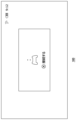
- FIG. 12 shows two operation areas set in the display area.
- the operation area setting unit 114 sets the first operation area 150a and the second operation area 150b during remote play.
- the operation area setting unit 114 does not set the first operation area 150a and the second operation area 150b unless remote play is in progress.
- the first operation area 150a and the second operation area 150b are areas that emulate the function of the touchpad 73 provided on the game controller 6 of the game device 10, and the first operation area 150a is operated by the fingers of the left hand (mainly the left thumb), and the second operation area 150b is operated by the fingers of the right hand (mainly the right thumb).
- the display size of the display device 161 is 7 inches or more, so it is difficult for the user to hold the terminal device 100 in one hand during remote play, and the user ends up holding two gripping parts with both hands. Therefore, in the embodiment, the operation function of one touch pad 73 in the game controller 6 is realized by two emulation areas on the left and right sides of the touch panel 160, allowing the user to operate the emulation areas (operation areas) with the fingers of both the left and right hands.
- the operation area setting unit 114 places the left end of the first operation area 150a at the left end of the display area, and the right end of the second operation area 150b at the right end of the display area.
- the operation area setting unit 114 may place the left end of the first operation area 150a slightly to the right of the left end of the display area, and the right end of the second operation area 150b slightly to the left of the right end of the display area.
- the distance between the left end of the first operation area 150a and the left end of the display area is shorter than the vertical width of the first operation area 150a
- the distance between the right end of the second operation area 150b and the right end of the display area is shorter than the vertical width of the second operation area 150b.
- the operation area setting unit 114 places the right end of the first operation area 150a to the left of the center of the display area, and the left end of the second operation area 150b to the right of the center of the display area. It is preferable that the operation area setting unit 114 sets the first operation area 150a and the second operation area 150b to have the same shape so that the operation ranges of the left hand and the right hand are the same.
- the operation area setting unit 114 may substantially match the shapes of the first operation area 150a and the second operation area 150b to the shape of the operation area of the touch pad 73 on the game controller 6.
- the reception unit 112 When the user operates (touches) the first operation area 150a and/or the second operation area 150b during remote play, the reception unit 112 receives input data resulting from the user's operation of the first operation area 150a and/or the second operation area 150b. Specifically, the reception unit 112 receives as input data the position coordinates touched by the left thumb in the first operation area 150a and/or the position coordinates touched by the right thumb in the second operation area 150b. These position coordinates are position coordinates in the two-dimensional coordinate system defined within each operation area, and correspond to position coordinates in the two-dimensional coordinate system defined on the touchpad 73.
- the reception unit 112 receives user operations in the first operation area 150a and the second operation area 150b as input data in one operation area.
- the first operation area 150a and the second operation area 150b are defined in the same two-dimensional coordinates, and therefore the reception unit 112 receives position coordinates in the common two-dimensional coordinates as input data.
- the reception unit 112 detects that two points are being touched simultaneously within one operation area, and receives the position coordinates of the two points as input data.
- the reception unit 112 receives user operations in the first operation area 150a and the second operation area 150b as input data for the touchpad 73 on the game controller 6.
- the reception unit 112 receives input data indicating that the touchpad 73 on the game controller 6 has been pressed.
- the communication processing unit 122 transmits input data obtained by the user operating the first operation area 150a and/or the second operation area 150b to the game device 10. This allows the user to perform game input using the terminal device 100 with an operation feel that is substantially the same as with a game controller 6.
- the game execution unit 216 executes the game based on the input data obtained by the user operating the controls and/or the input data obtained by the user operating the first operation area 150a and/or the second operation area 150b.
- the guide display unit 116 displays a guide to inform the user of the location of the first operation area 150a and/or the second operation area 150b.
- FIG. 13 shows an example of a guide displayed on the touch panel 160.
- the guidance display unit 116 displays the first guide 152a and/or the second guide 152b in accordance with the position of the first operation area 150a and/or the second operation area 150b.
- the first guide 152a and the second guide 152b each include at least an outer frame indicating the range of the first operation area 150a and the second operation area 150b.
- the area within the frame may be provided with an effect to make it easier for the user to notice the position of the operation area, but it is preferable that the range to which the effect is provided is limited to a degree that does not largely hide the game image within the frame. Therefore, it is preferable that the effect is displayed only in the area along the outer frame within the frame, and the game image is displayed near the center of the frame without being hidden by the effect.
- the guidance display unit 116 displays the first guide 152a and/or the second guide 152b when any position on the touch panel 160 is touched. Specifically, the guidance display unit 116 displays the first guide 152a and the second guide 152b when a position on the touch panel 160 other than the first operation area 150a and the second operation area 150b is touched. On the other hand, the guidance display unit 116 displays only the first guide 152a when the first operation area 150a on the touch panel 160 is touched, and displays only the second guide 152b when the second operation area 150b on the touch panel 160 is touched.
- the guidance display unit 116 hides the first guide 152a and/or the second guide 152b if there is no operation input from the user in the first operation area 150a and/or the second operation area 150b for a predetermined period of time. Note that even if the first guide 152a and the second guide 152b are not displayed, the reception unit 112 may receive input data when the first operation area 150a and/or the second operation area 150b is touch-operated.
- the operation area setting section 114 may be capable of adjusting the vertical positions of the first operation area 150a and the second operation area 150b.
- 14 shows an example of a setting screen for adjusting the vertical position. In this setting screen, the user can operate the up key 170a or the down key 170c to move the focus frame 154 vertically.
- the operation area setting unit 114 displays the first operation area 150a and the second operation area 150b at a height according to the focus frame 154.
- the user determines the vertical positions of the first operation area 150a and the second operation area 150b in consideration of the size of his/her hand, and presses a predetermined button to confirm the vertical positions of the first operation area 150a and the second operation area 150b.
- first operation area 150a and the second operation area 150b are positioned at the same height (vertical position), but in another example, the first operation area 150a and the second operation area 150b may be set to different heights.
- the guidance display unit 116 may change the display mode of the guide. By changing the display mode of the guide, the user can recognize that they are operating the operation area.
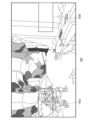
- FIG. 15 shows another example of a guide displayed on the touch panel 160.
- FIG. 15 shows the second guide 152b when the second operation area 150b is touched.
- the guidance display unit 116 displays the outer frame of the second operation area 150b as the second guide 152b (see FIG. 13).
- the guidance display unit 116 changes the display mode of the second guide 152b to inform the user that the second operation area 150b is being operated. Note that the guidance display unit 116 may change the display mode of the second guide 152b when the second operation area 150b is single-tapped.
- the guidance display unit 116 may highlight the inside of the outer frame of the second operation area 150b to inform the user that the second operation area 150b is being operated. By highlighting the inside of the outer frame, the user can easily recognize that the second operation area 150b is being operated.
- the guidance display unit 116 may also make the inside of the outer frame a predetermined semi-transparent color to inform the user that the second operation area 150b is being operated.
- a game image is displayed inside the outer frame. Therefore, when the second operation area 150b is operated, the display mode of the inside of the outer frame is changed, so that the user can confirm that the second operation area 150b is being effectively operated.
- the guidance display unit 116 may initially display the second guide 152b with the inside of the outer frame of the second operation area 150b highlighted to inform the user that the second operation area 150b is being operated.
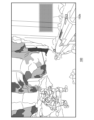
- FIG. 16 shows another example of a guide displayed on the touch panel 160.
- FIG. 16 shows the second guide 152b when the second operation area 150b is double-tapped.
- the reception unit 112 receives input data indicating that the touchpad 73 on the game controller 6 has been pressed.
- the guidance display unit 116 may display the outer frame as if it has been pressed into the depths of the touch panel 160. By displaying the outer frame as if it has been pressed during the double-tap operation, the user can confirm that the double-tap operation corresponding to the pressing operation of the touchpad 73 has been performed effectively.
- the guidance display unit 116 may notify the user that the second operation area 150b has been double-tapped by another method, while showing the user the double-tapped position.
- the guidance display unit 116 may display an effect in which a ring spreads like water ripples from the double-tapped position. This type of effect allows the user to visually recognize the double-tapped position.
- the water ripple effect when a double tap is performed may be displayed instead of the outer frame being displayed as if it is pressed into the back of the touch panel 160, or may be displayed when the outer frame is displayed as if it is pressed.
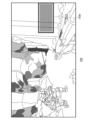
- FIG. 17 shows another example of a guide displayed on the touch panel 160.
- FIG. 17 shows the second guide 152b when the second operation area 150b is swiped.
- a swipe operation is an operation in which the user slides a finger over the second operation area 150b, and when the position touched by the user in the second operation area 150b is moved, the guide display unit 116 may display a movement trajectory of the touch position. By displaying the movement trajectory of the touch position during a swipe operation, the user can confirm that the swipe operation has been performed effectively on the second operation area 150b.
- the guidance display unit 116 controls the brightness so that the brightness of the touch position on the second operation area 150b is increased to a predetermined first brightness, and when the finger moves from the touch position, the brightness of the touch position is gradually returned to the original second brightness.
- the time required to decrease from the first brightness to the second brightness may be about 1 to 2 seconds.
- the guidance display unit 116 may display a movement trajectory of the touch position when the user performs a swipe operation on the second operation area 150b.
- the guidance display unit 116 changes the display mode of the second guide 152b when the second operation area 150b is operated, but similarly, when the first operation area 150a is operated, the guidance display unit 116 may change the display mode of the first guide 152a.
- the operation area setting unit 114 may be able to adjust the sizes of the first operation area 150a and the second operation area 150b.
- the terminal device 100 is a device dedicated to remote play, but it may also be connected to a server for cloud gaming and used as a device for performing cloud gaming.
- the operation area setting unit 114 may set the first operation area 150a and the second operation area 150b during cloud gaming.
- This disclosure relates to technology that allows a user to play a game at a location away from the game device.
- 1 Information processing system
- 6 Game controller
- 100 Terminal device
- 110 Remote application execution unit
- 112 Reception unit
- 114 Operation area setting unit
- 116 Guidance display unit
- 118 Acquisition unit
- 120 Output processing unit
- 122 Communication processing unit
- 150a First operation area
- 150b Second operation area
- 152a First guide
- 152b Second guide
- 154 Focus frame
- 160 Touch panel
- 161 Display device
- 162 Touch pad
- 163 First input unit
- 164 Second input unit
- 210 Reception unit
- 212 Login processing unit
- 214 System image generation unit
- 216 Game execution unit
- 218 Game image generation unit
- 220 Game sound generation unit
- 222 Communication processing unit.
Landscapes
- Engineering & Computer Science (AREA)
- Multimedia (AREA)
- Human Computer Interaction (AREA)
- Physics & Mathematics (AREA)
- Optics & Photonics (AREA)
- General Engineering & Computer Science (AREA)
- Theoretical Computer Science (AREA)
- General Physics & Mathematics (AREA)
- Computer Networks & Wireless Communication (AREA)
- Radar, Positioning & Navigation (AREA)
- User Interface Of Digital Computer (AREA)
Priority Applications (4)
| Application Number | Priority Date | Filing Date | Title |
|---|---|---|---|
| JP2025526138A JPWO2024253147A1 (cg-RX-API-DMAC7.html) | 2023-06-09 | 2024-06-06 | |
| EP24819375.7A EP4726521A1 (en) | 2023-06-09 | 2024-06-06 | Terminal device and game image display method |
| CN202480036040.3A CN121219669A (zh) | 2023-06-09 | 2024-06-06 | 终端装置及游戏图像显示方法 |
| US19/411,018 US20260091312A1 (en) | 2023-06-09 | 2025-12-05 | Terminal device and game image display method |
Applications Claiming Priority (2)
| Application Number | Priority Date | Filing Date | Title |
|---|---|---|---|
| JP2023095340 | 2023-06-09 | ||
| JP2023-095340 | 2023-06-09 |
Related Child Applications (1)
| Application Number | Title | Priority Date | Filing Date |
|---|---|---|---|
| US19/411,018 Continuation US20260091312A1 (en) | 2023-06-09 | 2025-12-05 | Terminal device and game image display method |
Publications (1)
| Publication Number | Publication Date |
|---|---|
| WO2024253147A1 true WO2024253147A1 (ja) | 2024-12-12 |
Family
ID=93795534
Family Applications (1)
| Application Number | Title | Priority Date | Filing Date |
|---|---|---|---|
| PCT/JP2024/020635 Ceased WO2024253147A1 (ja) | 2023-06-09 | 2024-06-06 | 端末装置およびゲーム画像表示方法 |
Country Status (5)
| Country | Link |
|---|---|
| US (1) | US20260091312A1 (cg-RX-API-DMAC7.html) |
| EP (1) | EP4726521A1 (cg-RX-API-DMAC7.html) |
| JP (1) | JPWO2024253147A1 (cg-RX-API-DMAC7.html) |
| CN (1) | CN121219669A (cg-RX-API-DMAC7.html) |
| WO (1) | WO2024253147A1 (cg-RX-API-DMAC7.html) |
Citations (3)
| Publication number | Priority date | Publication date | Assignee | Title |
|---|---|---|---|---|
| JP2017204046A (ja) * | 2016-05-09 | 2017-11-16 | 株式会社コーエーテクモゲームス | ユーザインターフェース処理プログラム及び記録媒体 |
| JP2022030870A (ja) | 2020-08-07 | 2022-02-18 | 株式会社ソニー・インタラクティブエンタテインメント | 情報処理装置および画像表示方法 |
| JP2023514103A (ja) * | 2020-02-14 | 2023-04-05 | バルブ コーポレーション | 選択可能なアイコンを含むディスプレイを有するコントローラ |
-
2024
- 2024-06-06 JP JP2025526138A patent/JPWO2024253147A1/ja active Pending
- 2024-06-06 EP EP24819375.7A patent/EP4726521A1/en active Pending
- 2024-06-06 CN CN202480036040.3A patent/CN121219669A/zh active Pending
- 2024-06-06 WO PCT/JP2024/020635 patent/WO2024253147A1/ja not_active Ceased
-
2025
- 2025-12-05 US US19/411,018 patent/US20260091312A1/en active Pending
Patent Citations (3)
| Publication number | Priority date | Publication date | Assignee | Title |
|---|---|---|---|---|
| JP2017204046A (ja) * | 2016-05-09 | 2017-11-16 | 株式会社コーエーテクモゲームス | ユーザインターフェース処理プログラム及び記録媒体 |
| JP2023514103A (ja) * | 2020-02-14 | 2023-04-05 | バルブ コーポレーション | 選択可能なアイコンを含むディスプレイを有するコントローラ |
| JP2022030870A (ja) | 2020-08-07 | 2022-02-18 | 株式会社ソニー・インタラクティブエンタテインメント | 情報処理装置および画像表示方法 |
Also Published As
| Publication number | Publication date |
|---|---|
| CN121219669A (zh) | 2025-12-26 |
| US20260091312A1 (en) | 2026-04-02 |
| EP4726521A1 (en) | 2026-04-15 |
| JPWO2024253147A1 (cg-RX-API-DMAC7.html) | 2024-12-12 |
Similar Documents
| Publication | Publication Date | Title |
|---|---|---|
| US11623142B2 (en) | Data processing method and mobile terminal | |
| RU2519059C2 (ru) | Способ и устройство компактного графического интерфейса пользователя | |
| JP4829856B2 (ja) | 入力制御装置を有するインタラクティブシステム | |
| US8184092B2 (en) | Simulation of writing on game consoles through the use of motion-sensing technology | |
| CN103019505B (zh) | 在多用户交互桌台上建立用户专用窗口的方法和装置 | |
| JP6495471B2 (ja) | 電子デバイス、入出力装置、およびその使用方法 | |
| US9001062B2 (en) | Method for controlling computer that is held and operated by user using a re-touch determination area | |
| US8035629B2 (en) | Hand-held computer interactive device | |
| WO2018113653A1 (zh) | 基于移动终端的场景切换方法及移动终端 | |
| US20090291759A1 (en) | Simulation of writing on game consoles through the use of motion-sensing technology | |
| CN106730819B (zh) | 一种基于移动终端的数据处理方法及移动终端 | |
| TW201337643A (zh) | 具有輔助觸碰控制器的內容系統 | |
| JP2002202843A (ja) | 情報処理装置及び方法、操作端末装置、情報伝送装置及び方法、情報通信システム、処理プログラム、及び処理プログラムが記録された記録媒体 | |
| JP7133742B2 (ja) | カスタマイズ可能なプリセットを備えたコントローラアドオンデバイス | |
| CN103782263A (zh) | 信息处理装置、信息处理方法、内容文件的数据结构、gui布局仿真器及gui布局设置辅助方法 | |
| TW200921469A (en) | System and method for key function switching | |
| KR101143096B1 (ko) | 문자 입력 방법 및 문자 입력 장치 | |
| CN108153475B (zh) | 一种对象位置切换方法以及移动终端 | |
| CN103157282B (zh) | 进行触控游戏的方法及相关娱乐系统 | |
| TW201212621A (en) | Method of modifying interface of a handheld device and related multimedia system | |
| CN109918012A (zh) | 一种移动终端的控制方法、装置、设备及存储介质 | |
| CN105854295B (zh) | 一种利用便携数码设备实现多人游戏的方法、装置及系统 | |
| WO2015063966A1 (ja) | 情報処理システムおよび情報処理装置 | |
| JP5845547B1 (ja) | ユーザ入力の操作性を向上させるプログラム、ゲームシステム、電子装置、サーバ及びゲーム制御方法 | |
| CN110052023A (zh) | 游戏控制方法、移动终端及计算机可读存储介质 |
Legal Events
| Date | Code | Title | Description |
|---|---|---|---|
| 121 | Ep: the epo has been informed by wipo that ep was designated in this application |
Ref document number: 24819375 Country of ref document: EP Kind code of ref document: A1 |
|
| ENP | Entry into the national phase |
Ref document number: 2025526138 Country of ref document: JP Kind code of ref document: A |
|
| WWE | Wipo information: entry into national phase |
Ref document number: 2025526138 Country of ref document: JP |
|
| WWE | Wipo information: entry into national phase |
Ref document number: 2024819375 Country of ref document: EP |
|
| NENP | Non-entry into the national phase |
Ref country code: DE |
|
| ENP | Entry into the national phase |
Ref document number: 2024819375 Country of ref document: EP Effective date: 20260109 |
|
| ENP | Entry into the national phase |
Ref document number: 2024819375 Country of ref document: EP Effective date: 20260109 |
|
| ENP | Entry into the national phase |
Ref document number: 2024819375 Country of ref document: EP Effective date: 20260109 |
|
| ENP | Entry into the national phase |
Ref document number: 2024819375 Country of ref document: EP Effective date: 20260109 |
|
| ENP | Entry into the national phase |
Ref document number: 2024819375 Country of ref document: EP Effective date: 20260109 |
|
| WWP | Wipo information: published in national office |
Ref document number: 2024819375 Country of ref document: EP |