WO2024252762A1 - プログラム及び情報処理装置 - Google Patents
プログラム及び情報処理装置 Download PDFInfo
- Publication number
- WO2024252762A1 WO2024252762A1 PCT/JP2024/012201 JP2024012201W WO2024252762A1 WO 2024252762 A1 WO2024252762 A1 WO 2024252762A1 JP 2024012201 W JP2024012201 W JP 2024012201W WO 2024252762 A1 WO2024252762 A1 WO 2024252762A1
- Authority
- WO
- WIPO (PCT)
- Prior art keywords
- item
- user
- virtual space
- image
- item object
- Prior art date
- Legal status (The legal status is an assumption and is not a legal conclusion. Google has not performed a legal analysis and makes no representation as to the accuracy of the status listed.)
- Ceased
Links
Images













Classifications
-
- A—HUMAN NECESSITIES
- A63—SPORTS; GAMES; AMUSEMENTS
- A63F—CARD, BOARD, OR ROULETTE GAMES; INDOOR GAMES USING SMALL MOVING PLAYING BODIES; VIDEO GAMES; GAMES NOT OTHERWISE PROVIDED FOR
- A63F13/00—Video games, i.e. games using an electronically generated display having two or more dimensions
- A63F13/50—Controlling the output signals based on the game progress
- A63F13/52—Controlling the output signals based on the game progress involving aspects of the displayed game scene
-
- A—HUMAN NECESSITIES
- A63—SPORTS; GAMES; AMUSEMENTS
- A63F—CARD, BOARD, OR ROULETTE GAMES; INDOOR GAMES USING SMALL MOVING PLAYING BODIES; VIDEO GAMES; GAMES NOT OTHERWISE PROVIDED FOR
- A63F13/00—Video games, i.e. games using an electronically generated display having two or more dimensions
- A63F13/60—Generating or modifying game content before or while executing the game program, e.g. authoring tools specially adapted for game development or game-integrated level editor
- A63F13/63—Generating or modifying game content before or while executing the game program, e.g. authoring tools specially adapted for game development or game-integrated level editor by the player, e.g. authoring using a level editor
-
- A—HUMAN NECESSITIES
- A63—SPORTS; GAMES; AMUSEMENTS
- A63F—CARD, BOARD, OR ROULETTE GAMES; INDOOR GAMES USING SMALL MOVING PLAYING BODIES; VIDEO GAMES; GAMES NOT OTHERWISE PROVIDED FOR
- A63F13/00—Video games, i.e. games using an electronically generated display having two or more dimensions
- A63F13/60—Generating or modifying game content before or while executing the game program, e.g. authoring tools specially adapted for game development or game-integrated level editor
- A63F13/69—Generating or modifying game content before or while executing the game program, e.g. authoring tools specially adapted for game development or game-integrated level editor by enabling or updating specific game elements, e.g. unlocking hidden features, items, levels or versions
-
- G—PHYSICS
- G06—COMPUTING OR CALCULATING; COUNTING
- G06F—ELECTRIC DIGITAL DATA PROCESSING
- G06F3/00—Input arrangements for transferring data to be processed into a form capable of being handled by the computer; Output arrangements for transferring data from processing unit to output unit, e.g. interface arrangements
- G06F3/01—Input arrangements or combined input and output arrangements for interaction between user and computer
- G06F3/048—Interaction techniques based on graphical user interfaces [GUI]
- G06F3/0481—Interaction techniques based on graphical user interfaces [GUI] based on specific properties of the displayed interaction object or a metaphor-based environment, e.g. interaction with desktop elements like windows or icons, or assisted by a cursor's changing behaviour or appearance
- G06F3/04815—Interaction with a metaphor-based environment or interaction object displayed as three-dimensional [3D], e.g. changing the user viewpoint with respect to the environment or object
-
- G—PHYSICS
- G06—COMPUTING OR CALCULATING; COUNTING
- G06F—ELECTRIC DIGITAL DATA PROCESSING
- G06F3/00—Input arrangements for transferring data to be processed into a form capable of being handled by the computer; Output arrangements for transferring data from processing unit to output unit, e.g. interface arrangements
- G06F3/01—Input arrangements or combined input and output arrangements for interaction between user and computer
- G06F3/048—Interaction techniques based on graphical user interfaces [GUI]
- G06F3/0484—Interaction techniques based on graphical user interfaces [GUI] for the control of specific functions or operations, e.g. selecting or manipulating an object, an image or a displayed text element, setting a parameter value or selecting a range
- G06F3/04842—Selection of displayed objects or displayed text elements
-
- G—PHYSICS
- G06—COMPUTING OR CALCULATING; COUNTING
- G06T—IMAGE DATA PROCESSING OR GENERATION, IN GENERAL
- G06T19/00—Manipulating three-dimensional [3D] models or images for computer graphics
Definitions
- the present invention relates to a program and an information processing device.
- a program is known that is configured to allow users to interact with each other using user objects (e.g., avatars, characters, etc.) that are their avatars in a virtual space (e.g., the metaverse, game field, etc.) and expand the community (e.g., Patent Document 1).
- user objects e.g., avatars, characters, etc.
- a virtual space e.g., the metaverse, game field, etc.
- expand the community e.g., Patent Document 1
- the present invention was made in consideration of these circumstances, and its purpose is to mitigate the adverse effects on the virtual space caused by leaving item objects in their original positions.
- the main invention of the present invention to solve the above problems is: Computer, an object control means for controlling a behavior of a user object, which is an avatar of the user, in a virtual space based on an operation by the user; an image generating means for generating, when an item object placed in a virtual space is an item object placed by the user object himself/herself, an image showing a state of the virtual space as seen by the user object, in which the item object is placed, an image generating means for generating, when an item object placed in the virtual space is another person's item object not placed by said user object, an image showing the state of the virtual space as seen from said user object, in which said other person's item object is not placed; It is a program that functions as a Other features of the present invention will become apparent from the following detailed description of the present invention and the accompanying drawings.
- FIG. 1 is a configuration diagram showing an example of an information processing system 1 according to an embodiment of the present invention.
- FIG. 2 is a hardware configuration diagram showing an example of a computer 50 according to the present embodiment.
- FIG. 2 is a functional block diagram illustrating an example of a server device 20 according to the present embodiment.
- FIG. 2 is a diagram illustrating an example of product information according to the present embodiment.
- FIG. 4 is a diagram illustrating an example of region information according to the embodiment.
- FIG. 4 is a diagram illustrating an example of user information according to the embodiment.
- FIG. 2 is a functional block diagram illustrating an example of a client terminal 10 according to the present embodiment.
- FIG. 1 is a diagram showing the relationship between a world coordinate system, a view coordinate system, and a screen coordinate system when generating an image of a virtual space viewed from a virtual viewpoint.
- 11 is a flowchart showing an example of an operation relating to an image generating method according to the presence or absence of an item of the user or another person;
- FIG. 2 is a diagram showing an example of the configuration of a first screen in a client terminal 10A.
- FIG. 11 is a diagram showing an example of the configuration of a second screen in the client terminal 10A.
- 13 is a flowchart showing an example of an operation relating to an image generating method according to the presence or absence of an item of the user or another person and the presence or absence of a special relationship.
- 13 is a diagram showing an example of the configuration of a third screen in the client terminal 10A.
- 13 is a flowchart showing an example of operation relating to an image generating method according to the presence or absence of one's own or another person's item, the presence or absence of a special relationship, and the presence or absence of a predetermined time period having elapsed.
- 13 is a flowchart showing an example of operation relating to an image generating method according to the presence or absence of an item of the user or another person and the rarity of the item.
- 13 is a flowchart showing an example of operation relating to an image generating method according to the presence or absence of an item of the user or another person, the rarity of the item, and whether or not a predetermined time has passed.
- 11 is a flowchart showing an example of an operation relating to an image generating method according to the presence or absence of an item of the user or another person and the size of the item.
- 13 is a flowchart showing an example of operation relating to an image generating method according to the presence or absence of an item of the user or another person, the size of the item, and whether or not a predetermined time has passed.
- 13 is a flowchart showing an example of operation relating to an image generating method according to the rarity of an item.
- 10 is a flowchart illustrating an example of an operation relating to an image generating method according to the size of an article.
- 13 is a flowchart showing an example of operation relating to an image generating method according to the rarity of an item and whether or not a predetermined time has elapsed. 13 is a flowchart showing an example of an operation relating to an image generating method according to the size of an article and whether or not a predetermined time has elapsed.
- an object control means for controlling a behavior of a user object, which is an avatar of the user, in a virtual space based on an operation by the user; an image generating means for generating, when an item object placed in a virtual space is an item object placed by the user object himself/herself, an image showing a state of the virtual space as seen from the user object, in which the item object is placed, an image generating means for generating, when an item object placed in the virtual space is another person's item object not placed by said user object, an image showing the state of the virtual space as seen from said user object, in which said other person's item object is not placed;
- the image showing the state of the virtual space as seen from the user object includes the user's own item object but does not include other people's item objects, so that even if other people's item objects are left behind in the virtual space, they are not
- Such a program includes:
- the image generating means may generate an image in which the other person's item object is not placed when the other person's item object is an item object after a predetermined time has passed, and may generate an image in which the other person's item object is placed when the other person's item object is an item object before the predetermined time has passed.
- the image showing the state of the virtual space as seen from the user object includes other people's item objects before the predetermined time has elapsed, but does not include other people's item objects after the predetermined time has elapsed, so even if other people's item objects are left behind in the virtual space, they will not be visible on the user's screen after the predetermined time has elapsed and will not become an annoying residue for the user. Therefore, it is possible to mitigate the adverse effects on the virtual space by leaving the item objects in their original position.
- Such a program includes:
- the image generation means may, when the other person's item object is a other person's item object that does not have a pre-defined relationship with the user, generate an image in which the other person's item object is not placed as an image showing the virtual space as seen from the user object, and when the other person's item object is a other person's item object that has a pre-defined relationship with the user, generate an image in which the other person's item object is placed.
- the image showing the state of the virtual space as seen from the user object includes item objects of other people with a preset relationship, but does not include item objects of other people with no preset relationship, so that even if other people's item objects are left in the virtual space, the related items of other people will be visible on the user's screen, and the unrelated items of other people will be treated as intrusive remains and will not be visible. Therefore, by leaving the item objects in their original positions, it is possible to mitigate the adverse effects on the virtual space.
- Such a program includes:
- the image generating means includes: When the other person's item object is an item object with a high rarity set, an image showing the state of the virtual space as seen from the user object is generated in which the other person's item object with a high rarity is not placed, and when the other person's item object is an item object with a low rarity set, an image showing the state of the virtual space as seen from the user object is generated in which the other person's item object with a low rarity is placed, or
- the other person's item object is an item object with a low rarity setting, an image showing the virtual space as seen from the user object is generated in which the other person's item object with a low rarity is not placed, and when the other person's item object is an item object with a high rarity setting, an image showing the virtual space as seen from the user object is generated in which the other person's item object with a high rarity is placed.
- the image showing the state of the virtual space as seen from the user object includes other people's item objects with low rarity, but does not include other people's item objects with high rarity, so even if other people's item objects are left in the virtual space, other people's items with low rarity will be visible on the user's screen, and other people's items with high rarity will not be visible. Therefore, by leaving the item objects in the arranged state, it is possible to mitigate the adverse effect that other people's items are easily seen by anyone in the virtual space, even if they are high rarity items.
- the image showing the state of the virtual space as seen from the user object includes other people's item objects with high rarity, but does not include other people's item objects with low rarity, so even if other people's item objects are left in the virtual space, other people's items with high rarity will be visible on the user's screen, and other people's items with low rarity will not be visible. Therefore, by leaving the item objects in the arranged state, it is possible to mitigate the adverse effect that the virtual space will be filled with items with low rarity and low attention.
- Such a program includes:
- the image generation means may, when the other person's item object is an item object set to a small size, generate an image in which the other person's small-sized item object is not placed as an image showing the appearance of the virtual space as seen by the user object, and, when the other person's item object is an item object set to a large size, generate an image in which the other person's large-sized item object is placed.
- the image showing the state of the virtual space as seen from the user object includes other people's large item objects but does not include other people's small item objects, so that even if other people's item objects are left in the virtual space, the large and conspicuous items of other people will be visible on the user's screen, and the small and inconspicuous items of other people will be treated as intrusive residue and will not be visible. Therefore, by leaving the item objects in their arranged state, it is possible to mitigate the adverse effect of the virtual space being filled with other people's small and inconspicuous items.
- the computer an object control means for controlling a behavior of a user object, which is an avatar of the user, in a virtual space based on an operation by the user;
- a low rarity level is set for an item object placed in a virtual space
- an image showing the state of the virtual space as seen from the user object is generated in which the item object of low rarity level is placed
- a high rarity level is set, an image showing the state of the virtual space as seen from the user object is generated in which the item object of high rarity level is not placed
- an image generating means for generating an image in which an item object of high rarity is placed in a virtual space as an image showing the appearance of the virtual space as seen from the user object when a high rarity is set for the item object placed in the virtual space, and for generating an image in which an item object of low rarity is not placed in a virtual space as an image showing the appearance of the virtual space as seen from the user object when a low rarity is set for the item object;
- the image showing the state of the virtual space as seen from the user object includes high rarity item objects but does not include low rarity item objects, so that even if the item objects are left in the virtual space, the items with high rarity value will be visible on the user's screen and the items with low rarity value will not be visible. Therefore, by leaving the item objects in the arranged state, it is possible to mitigate the adverse effect that the virtual space will be filled with items with low rarity value that do not attract attention.
- the computer an object control means for controlling a behavior of a user object, which is an avatar of the user, in a virtual space based on an operation by the user; an image generating means for generating, when a size of an article object placed in a virtual space is set to be large, an image in which the large-sized article object is placed as an image showing a state of the virtual space as seen from the user object, an image generating means for generating, when a size of an article object placed in a virtual space is set to a small size, an image showing a state of the virtual space as seen from the user object, in which the small-sized article object is not placed;
- an object control unit that controls a behavior of a user object that is an avatar of the user in the virtual space based on an operation by the user; an image generating unit that generates an image showing a state of the virtual space as seen from the user object, in which the user object's own item object is placed, when the item object placed in the virtual space is the user object's own item object placed by the user object himself/herself, an image generating unit that generates, when an item object placed in the virtual space is another person's item object that has not been placed by the user object, an image showing the state of the virtual space as seen from the user object, in which the other person's item object is not placed;
- the information processing device includes: According to such an information processing device, adverse effects on the virtual space can be mitigated by leaving the article object in its placed state.
- an object control unit that controls a behavior of a user object that is an avatar of the user in the virtual space based on an operation by the user;
- a low rarity level is set for an item object placed in a virtual space, an image showing the state of the virtual space as seen from the user object is generated in which the item object of low rarity level is placed, and when a high rarity level is set, an image showing the state of the virtual space as seen from the user object is generated in which the item object of high rarity level is not placed, or an image generating unit which generates an image showing the appearance of the virtual space when an item object placed in the virtual space is set to a high rarity, in which the item object of high rarity is placed, as an image showing the appearance of the virtual space when viewed from the user object, and generates an image showing the appearance of the virtual space when an item object of low rarity is set, in which the item object of low rarity is not placed, as an image showing the appearance of the virtual space when viewed from the user object;
- the information processing device includes
- an object control unit that controls a behavior of a user object that is an avatar of the user in the virtual space based on an operation by the user; an image generating unit configured to generate an image in which a large-sized article object is placed in a virtual space as an image showing a state of the virtual space as seen from the user object when the size of the article object placed in the virtual space is set to a large size, an image generating unit that generates, when a size of an article object placed in a virtual space is set to a small size, an image showing a state of the virtual space as seen from the user object, in which the small-sized article object is not placed;
- the information processing device includes: According to such an information processing device, adverse effects on the virtual space can be mitigated by leaving the article object in its placed state.
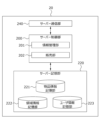
- Fig. 1 is a configuration diagram showing an example of an information processing system 1 according to the present embodiment. As shown in Fig. 1, the information processing system 1 according to the present embodiment has one or more client terminals 10 and a server device 20 connected via a network N.
- the client terminal 10 is a terminal device operated by a user, such as a smartphone, tablet, or PC, or a terminal device such as a dedicated gaming device for home or commercial use.
- the server device 20 manages and controls the virtual space providing service operated by the user on the client terminal 10, and handles billing within the virtual space providing service, etc.
- the network N is the Internet, etc., and includes a mobile wireless base station, etc.
- the information management unit 201 manages various information related to users who use the virtual space provision service, various information for forming a virtual space, etc.
- the information management unit 201 in this embodiment receives management requests for various information from the client terminal 10, stores the various information in the server storage unit 220, and transmits the various information obtained from the server storage unit 220 to the client terminal 10.
- the server storage unit 220 has a function of storing various information in the server device 20.
- the server storage unit 220 includes an item information storage unit 221, an area information storage unit 222, and a user information storage unit 223.
- FIG. 4 is a configuration diagram showing an example of item information according to this embodiment.
- the item information shown in FIG. 4 has items such as item ID, item name, rarity, size, luxury, sales price, and item setting information.
- the item ID is information for uniquely identifying various items.
- the item name is information indicating the name of the item.
- the rarity is information indicating the rarity value of the item. Here, five levels of rarity can be set from “1" to "5".
- the size is information indicating the size of the item.
- the luxury is information indicating the luxury of the item.
- the selling price is information indicating the selling price set for an item that can be used in the virtual space.
- the item setting information is information including model data and texture data for forming the item as a 3D model (item object) in the virtual three-dimensional space, and a placement cost set based on the number of polygons that make up the 3D model.
- the area information storage unit 222 stores area information related to areas in virtual space.
- the area information stored in the area information storage unit 222 is composed of the various data shown below.
- FIG. 5 is a configuration diagram showing an example of area information according to this embodiment.
- the area information shown in FIG. 5 has items such as a section ID, a section name, position information, size information, shape information, and area setting information.
- the section ID is information for uniquely identifying an area in a virtual space that is divided according to specific criteria.
- the section name is information that indicates the name of an area in a virtual space.
- the location information is information for specifying the location of an area in a virtual space.
- Size information is information for specifying the size of an area in virtual space.
- Shape information is information for specifying the shape of an area in virtual space.
- Area setting information is information that includes model data and texture data for forming an area as a 3D model (land object) in virtual three-dimensional space.
- the user information storage unit 223 stores user information about users who use the virtual space provision service.
- the user information stored in the user information storage unit 223 is composed of the various data listed below.
- FIG. 6 is a block diagram showing an example of user information according to this embodiment.
- the user information shown in FIG. 6 has items such as user ID, name, avatar setting information, money on hand, possessions, placement information, action history information, purchase history information, friends, etc.
- the user ID is information for uniquely identifying a user.
- the name is information indicating the user name.
- the avatar setting information is information about the avatar that the user uses in the virtual space. It includes model data and texture data for forming the avatar as a 3D model (user object) in the virtual three-dimensional space.
- the money on hand is information about the virtual currency owned by the user.
- the possessions are information for identifying the items owned by the user from among the items that can be used in the virtual space set in the item information shown in Figure 4.
- Placement information is information about the placement of possessions. Placement information includes information for identifying who placed which possession in which location within the possession area and when. Behavior history information is information about the behavior history of the avatar in the virtual space.
- Purchase history information is information about the purchase history of items that can be used in the virtual space. Friends is information that indicates other users (friend users) with whom a friend relationship has been established through mutual approval.
- the server communication unit 240 has the function of communicating with the client terminal 10 via the network N.
- ⁇ Client terminal> 7 is a functional block diagram showing an example of the client terminal 10 according to the present embodiment.
- the client terminal 10 according to the present embodiment is realized by, for example, the functional blocks shown in FIG.
- the client terminal 10 executes a program to realize a client control unit 100, a client storage unit 120, a client communication unit 140, an operation input reception unit 150, and a screen display unit 160.
- the client control unit 100 has a function of executing various processes in the client terminal 10.
- the client control unit 100 includes an object control unit 101, a virtual camera control unit 102, an image generation unit 103, a display control unit 104, and a purchase unit 105.
- the object control unit 101 controls objects in the virtual space.
- the object control unit 101 in this embodiment controls various behaviors, such as moving a user object that is an avatar in the virtual space and performing actions related to placing and removing an item object on a land object, based on user operations.
- Placing (placing) an item object by a user object that is an avatar in the virtual space includes not only cases where a motion for placing an item is set for the avatar (giving the avatar a motion for placing an item), but also cases where such a motion is not set (no motion for placing an item is given to the avatar).
- the virtual camera control unit 102 controls the virtual camera in the virtual space.
- the virtual camera control unit 102 in this embodiment places the virtual camera in three-dimensional coordinates expressed in the world coordinate system, and changes the appearance of the virtual space as seen by the virtual camera by controlling the viewpoint position, viewing direction, angle of view, zoom, movement path, movement speed, etc. of the virtual camera based on the virtual camera setting data.
- the virtual camera is controlled to follow the movement of the avatar.
- the image generation unit 103 generates a two-dimensional image of the state of the virtual space when an object placed in the virtual space is viewed from a virtual camera.
- the image generation unit 103 in this embodiment performs coordinate conversion of an object placed in three-dimensional coordinates expressed in a world coordinate system to a view coordinate system based on the virtual camera. Then, it performs perspective transformation etc. on the object placed in the view coordinate system to generate a two-dimensional image of the state of the virtual three-dimensional space when viewed from the virtual camera. At this time, it also performs geometry processing, texture mapping processing, hidden surface processing, alpha blending processing etc.
- the display control unit 104 controls the screen display of the client terminal 10.
- the display control unit 104 creates a two-dimensional image of an object placed in a virtual space as seen from a virtual camera for each frame (e.g., every 1/60th of a second), and outputs the state of the virtual space to the screen display unit 160.
- the purchasing unit 105 performs processing to allow the user to purchase items that can be used in the virtual space.
- the purchasing unit 105 transmits a purchase request for the selected item to the server device 20, and receives the purchased item from the server device 20 according to the results of the billing process.
- the operation input receiving unit 150 receives operation input from a user who operates the client terminal 10.
- the operation input receiving unit 150 receives operation input from the user via a touch panel when the user performs a touch operation on the screen.
- the client storage unit 120 stores various programs and information required by the client terminal 10.
- the various programs include programs that allow users to use the virtual space provision service.
- the various information includes all or part of item information, area information, user information, etc.
- the client storage unit 120 also functions as an item information storage unit, area information storage unit, and user information storage unit.
- the client communication unit 140 communicates with the server device 20 via the network N.
- the screen display unit 160 displays the screen of the client terminal 10 by receiving a control signal from the display control unit 104.
- the client terminal 10 performs object control, virtual camera control, image generation processing, display control, etc.
- the server device 20 may perform various controls and processes.
- the object control unit, virtual camera control unit, image generation unit, and display control unit may be configured not to be provided in the client control unit 100 of the client terminal 10, but to be provided in the server control unit 200 of the server device 20.
- the information processing system 1 is an application type in which the client control unit 100 of the client terminal 10 performs processing related to the virtual space providing service based on an installed program. That is, FIG. 7 shows the application type as an example.
- the information processing system 1 may be a browser type in which the client control unit 100 of the client terminal 10 receives page data written in HTML (Hyper Text Markup Language) or scripts contained in the page data from the server device 20 and performs processing related to the virtual space providing service.
- HTML Hyper Text Markup Language
- the information processing system 1 may be a cloud type in which the server device 20 or a server device dedicated to image processing (not shown) performs processing related to the virtual space providing service instead of the client terminal 10, the client terminal 10 receives the image data generated there, and displays a two-dimensional image showing the state of the virtual space on the screen based on the image data.
- users can act within the virtual space using their avatars (user objects) that represent them.
- This virtual space is configured with multiple areas in which the avatars can act.
- An "area" in the virtual space corresponds to a "land” in the real world.
- an avatar can move to an area corresponding to, for example, a "town square” or a “park” and communicate with other avatars and freely place their own items (item objects).
- an avatar moves to another area leaving behind an item that the avatar placed, it may have a negative effect on the virtual space, such as becoming an obstacle for other avatars or disrupting the worldview of the virtual space.
- an image showing the virtual space as seen from the avatar of a user operating an avatar is displayed on the screen
- an image is displayed on the screen that includes the user's own items but does not include items belonging to other people.
- an image showing the virtual space as seen from the avatar of a user operating an avatar is displayed on the screen
- an image that includes items of low rarity but does not include items of high rarity is displayed on the screen. This means that even if items are left behind in the virtual space, items with low rarity value will be displayed and visible on the user's screen, but items with high rarity value will not be displayed and cannot be seen, making it possible to mitigate the negative effects of rare items being easily seen by anyone in the virtual space.
- the three-dimensional coordinates (Xw, Yw, Zw) with the origin Ow as the reference point of the virtual space will be referred to as the world coordinate system
- the three-dimensional coordinates (Xc, Yc, Zc) with the origin Oc of the virtual camera will be referred to as the view coordinate system
- the two-dimensional coordinates (Xs, Ys) with the origin Os at the center of the screen surface (projection surface) corresponding to the screen of the client terminal 10 will be referred to as the screen coordinate system.
- the Zc axis direction of the view coordinate system is perpendicular to the screen surface (origin Os of the screen coordinate system) corresponding to the screen of the client terminal 10, and coincides with the viewing direction of the virtual camera.
- the Xc-Yc plane of the view coordinate system is parallel to the screen surface, and the distance from the origin Oc of the view coordinate system to the origin Os of the screen coordinate system coincides with the focal length of the virtual camera.
- the object control unit 101 places avatar A, which is a user object, on the Xw-Zw plane of the world coordinate system.
- the Xw-Zw plane of the world coordinate system coincides with the movement plane along which avatar A moves in the virtual space.
- the object control unit 101 can move avatar A on the movement plane by changing the coordinate position on the Xw-Zw plane of the world coordinate system over time in accordance with the user's operation.
- the image generation unit 103 generates an image of Avatar A on a plane of movement along which Avatar A moves in virtual space, viewed from a virtual camera positioned to look diagonally down on the plane of movement.
- avatar A placed in the world coordinate system (Xw, Yw, Zw) is transformed into the view coordinate system (Xc, Yc, Zc).
- avatar A placed in the view coordinate system (Xc, Yc, Zc) is transformed into the screen coordinate system (Xs, Ys) using a perspective projection technique or the like.
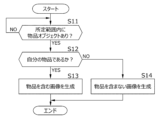
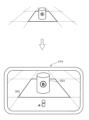
- Fig. 9 is a flowchart showing an example of an operation related to a method for generating an image depending on the presence or absence of an item of the user or another person.
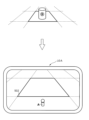
- Fig. 10 is a diagram showing an example of the configuration of a first screen in the client terminal 10A.
- Fig. 11 is a diagram showing an example of the configuration of a second screen in the client terminal 10A.
- the object control unit 101 of the client terminal 10A determines whether or not an item object is present within a predetermined range in the direction of travel based on the current position of avatar A in the virtual space (step S11).
- step S11 determines whether or not the item object exists within the specified range (step S11: YES)
- step S12 determines whether or not the item object is an item object that the user placed based on the placement information set in the user information shown in Figure 6 (step S12).
- step S12 determines that the present item object is the user's own item object (step S12: YES)
- it generates an image including the user's own item object as an image seen from the virtual camera associated with avatar A, as shown in FIG. 10 (step S13).
- FIG. 10 shows an example of a screen displayed on client terminal 10A, in which an item object 501, which is user A's item A, is placed in area 502 together with avatar A when the item object, which is user A's item A, is present within the specified range in the virtual space.
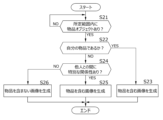
- Fig. 12 is a flowchart showing an example of the operation of the method for generating an image depending on the presence or absence of an item of the user or another person and the presence or absence of a special relationship.
- Fig. 13 is a diagram showing an example of the configuration of the third screen in the client terminal 10A.
- the object control unit 101 of the client terminal 10A determines whether or not an item object is present within a predetermined range in the direction of travel based on the current position of avatar A in the virtual space (step S21).
- step S21 determines whether or not the item object exists within the specified range (step S21: YES). If the object control unit 101 of the client terminal 10A determines that an item object exists within the specified range (step S21: YES), it determines whether or not the item object is an item object that the user placed based on the placement information set in the user information shown in FIG. 6 (step S22).
- step S22 determines that the present item object is the user's own item object (step S22: YES)
- it generates an image including the user's own item object as an image seen from the virtual camera associated with avatar A, as shown in FIG. 10 (step S23).
- step S22 determines whether or not there is a special relationship between the client and the other person.
- the object control unit 101 of the client terminal 10A refers to the user information shown in FIG. 6 and determines that there is a special relationship if a friend relationship has been established with the other person, and determines that there is no special relationship if a friend relationship has not been established with the other person.
- step S24 If it is determined that a special relationship exists between the client terminal 10A and the other person (step S24: YES), the image generating unit 103 of the client terminal 10A generates an image including the other person's item object as an image seen from the virtual camera associated with avatar A, as shown in FIG. 13 (step S25).
- FIG. 13 shows an example of a screen displayed on client terminal 10A, in which an item object 503, which is user B's item B, is placed in area 502 together with avatar A when the item object is within the specified range in the virtual space.
- step S24 determines that there is no special relationship with the other person.
- the object control unit 101 of the client terminal 10A determines that there is no special relationship with the other person (step S24: NO)
- it removes the other person's item object from the virtual space.
- the image generation unit 103 of the client terminal 10A generates an image that does not include the other person's item object as an image seen from the virtual camera associated with avatar A, as shown in FIG. 11 (step S26).
- Fig. 14 is a flowchart showing an example of the operation of the method for generating an image depending on the presence or absence of an item of the user or another person, the presence or absence of a special relationship, and the presence or absence of a predetermined time elapse.
- the object control unit 101 of the client terminal 10A determines whether or not an item object is present within a predetermined range in the direction of travel based on the current position of avatar A in the virtual space (step S31).
- step S31 determines whether or not the item object exists within the specified range (step S31: YES)
- step S32 determines whether or not the item object is an item object that the user placed based on the placement information set in the user information shown in FIG. 6 (step S32).
- step S32 determines that the present item object is the user's own item object (step S32: YES)
- it generates an image including the user's own item object as an image seen from the virtual camera associated with avatar A, as shown in FIG. 10 (step S33).
- step S32 determines whether or not there is a special relationship between the client terminal 10A and the other person (step S34).
- step S34 determines whether a predetermined time (e.g., 12 hours) has passed since the other person's item object was placed, based on the placement information set in the user information shown in Figure 6 (step S35).
- a predetermined time e.g. 12 hours
- step S35 If it is determined that a predetermined time has not elapsed since the other person's item object was placed (step S35: NO), the image generation unit 103 of the client terminal 10A generates an image including the other person's item object as an image seen from the virtual camera associated with avatar A, as shown in FIG. 13 (step S36).
- step S34 determines that there is no special relationship with the other person
- step S35 determines that a predetermined time has passed since the other person's item object was placed
- step S37 determines that the image generation unit 103 of the client terminal 10A generates an image that does not include the other person's item object as an image seen from the virtual camera associated with avatar A, as shown in FIG. 11 (step S37).
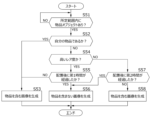
- Fig. 15 is a flowchart showing an example of the operation of the method for generating an image according to the presence or absence of an item of the player's own or another person and the rarity of the item.
- the object control unit 101 of the client terminal 10A determines whether or not an item object is present within a predetermined range in the direction of travel based on the current position of avatar A in the virtual space (step S41).
- step S41 determines whether or not the item object exists within the specified range (step S41: YES)
- step S42 determines whether or not the item object is an item object that the user placed based on the placement information set in the user information shown in FIG. 6 (step S42).
- step S42 determines that the present item object is the user's own item object (step S42: YES)
- it generates an image including the user's own item object as an image seen from the virtual camera associated with avatar A, as shown in FIG. 10 (step S43).
- the object control unit 101 of the client terminal 10A refers to the item information shown in FIG. 4 and the user information shown in FIG. 6, and determines that a high rarity level is set for another person's item object if a rarity level of "4" to "5" is set for that person's item object, and determines that a low rarity level is set for that person if a rarity level of "1" to "3" is set for that person's item object.
- step S44 determines that the other person's item object has a high rarity setting (step S44: YES)
- it removes the other person's item object from the virtual space.
- the image generation unit 103 of the client terminal 10A generates an image that does not include the other person's item object as an image seen from the virtual camera associated with avatar A, as shown in FIG. 11 (step S45).
- step S44 determines that the other person's item object is not set to a high rarity level, but is set to a low rarity level (step S44: NO)
- it generates an image including the other person's item object as an image seen from the virtual camera associated with avatar A, as shown in FIG. 13 (step S46).
- the object control unit 101 of the client terminal 10A determines whether or not an item object is present within a predetermined range in the direction of travel based on the current position of avatar A in the virtual space (step S51).
- step S51 determines whether or not the item object exists within the specified range (step S51: YES)
- step S52 determines whether or not the item object is an item object that the user placed based on the placement information set in the user information shown in FIG. 6 (step S52).
- step S52 determines that the present item object is the user's own item object (step S52: YES)
- it generates an image including the user's own item object as an image seen from the virtual camera associated with avatar A, as shown in FIG. 10 (step S53).
- step S52 determines whether the existing item object is not the user's own item object but someone else's item object.
- step S54 determines whether the other person's item object has a high rarity setting (step S54: YES). If a first time (e.g., one hour) has passed since the other person's high rarity item object was placed, based on the placement information set in the user information shown in FIG. 6 (step S55).
- a first time e.g., one hour
- step S55 NO
- the image generation unit 103 of the client terminal 10A When it is determined that the first time has not elapsed since the other person's high rarity item object was placed (step S55: NO), the image generation unit 103 of the client terminal 10A generates an image including the other person's high rarity item object as an image seen from the virtual camera associated with avatar A, as shown in FIG. 13 (step S53).
- step S55 YES
- the object control unit 101 of the client terminal 10A determines that a first time has elapsed since the other person's high rarity item object was placed (step S55: YES)
- it removes the other person's high rarity item object from the virtual space.
- the image generation unit 103 of the client terminal 10A generates an image that does not include the other person's item object as an image seen from the virtual camera associated with avatar A, as shown in FIG. 11 (step S56).
- step S54 determines whether the object control unit 101 of the client terminal 10A determines that the other person's item object is not set to a high rarity level but is set to a low rarity level (step S54: NO)
- step S57 If it is determined that the second time has not elapsed since the other person's low rarity item object was placed (step S57: NO), the image generation unit 103 of the client terminal 10A generates an image including the other person's low rarity item object as an image seen from the virtual camera associated with avatar A, as shown in FIG. 13 (step S58).
- step S57 YES
- the object control unit 101 of the client terminal 10A determines that a second time has elapsed since the other person's low-rarity item object was placed (step S57: YES)
- it removes the other person's low-rarity item object from the virtual space.
- the image generation unit 103 of the client terminal 10A generates an image that does not include the other person's item object as an image seen from the virtual camera associated with avatar A, as shown in FIG. 11 (step S56).
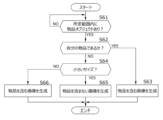
- Fig. 17 is a flowchart showing an example of the operation of the method for generating an image according to the presence or absence of an item of the user or another person and the size of the item.
- the object control unit 101 of the client terminal 10A determines whether or not an item object is present within a predetermined range in the direction of travel based on the current position of avatar A in the virtual space (step S61).
- step S61 determines whether or not the item object exists within the specified range (step S61: YES). If the object control unit 101 of the client terminal 10A determines that an item object exists within the specified range (step S61: YES), it determines whether or not the item object is an item object that the user placed based on the placement information set in the user information shown in FIG. 6 (step S62).
- step S62 determines that the present item object is the user's own item object (step S62: YES)
- it generates an image including the user's own item object as an image seen from the virtual camera associated with avatar A, as shown in FIG. 10 (step S63).
- step S62 determines whether the existing item object is not the user's own item object but someone else's item object.
- the object control unit 101 of the client terminal 10A refers to the item information shown in FIG. 4 and the user information shown in FIG. 6, and if the size "small” is set for another person's item object, it determines that a small size is set, and if the size "large” is set, it determines that a large size is set.
- step S64 YES
- the object control unit 101 of the client terminal 10A removes the other person's item object from the virtual space.
- the image generation unit 103 of the client terminal 10A generates an image that does not include the other person's item object as an image seen from the virtual camera associated with avatar A, as shown in FIG. 11 (step S65).
- step S64 determines that the other person's item object is not set to a small size but is set to a large size (step S64: NO), it generates an image including the other person's item object as an image seen from the virtual camera associated with avatar A, as shown in FIG. 13 (step S66).
- Fig. 18 is a flowchart showing an example of the operation of the method for generating an image depending on the presence or absence of an item of the user or another person, the size of the item, and whether or not a predetermined time has passed.
- the object control unit 101 of the client terminal 10A determines whether or not an item object is present within a predetermined range in the direction of travel based on the current position of avatar A in the virtual space (step S81).
- step S81 determines whether or not the item object exists within the specified range (step S81: YES)
- step S82 determines whether or not the item object is an item object that the user placed based on the placement information set in the user information shown in FIG. 6 (step S82).
- step S82 determines that the present item object is the user's own item object (step S82: YES)
- it generates an image including the user's own item object as an image seen from the virtual camera associated with avatar A, as shown in FIG. 10 (step S83).
- step S82 determines whether the existing item object is not the user's own item object but someone else's item object. If the object control unit 101 of the client terminal 10A determines that the existing item object is not the user's own item object but someone else's item object (step S82: NO), it determines whether the other person's item object is set to a small size (step S84).
- step S84 determines whether the other person's item object is set to a small size (step S84: YES). If a first time (e.g., one hour) has passed since the other person's small-sized item object was placed, based on the placement information set in the user information shown in FIG. 6 (step S85).
- a first time e.g., one hour
- step S85 NO
- the image generation unit 103 of the client terminal 10A If it is determined that the first time has not elapsed since the other person's small-sized item object was placed (step S85: NO), the image generation unit 103 of the client terminal 10A generates an image including the other person's small-sized item object as an image seen from the virtual camera associated with avatar A, as shown in FIG. 13 (step S83).
- step S85 YES
- the object control unit 101 of the client terminal 10A determines that a first time has elapsed since the other person's small-sized item object was placed (step S85: YES)
- it removes the other person's small-sized item object from the virtual space.
- the image generation unit 103 of the client terminal 10A generates an image that does not include the other person's item object as an image seen from the virtual camera associated with avatar A, as shown in FIG. 11 (step S86).
- step S84 determines whether the other person's item object is not set to a small size but is set to a large size. If the object control unit 101 of the client terminal 10A determines that the other person's item object is not set to a small size but is set to a large size (step S84: NO), it determines whether a second time (e.g., 12 hours) longer than the first time has passed since the other person's large-sized item object was placed based on the placement information set in the user information shown in FIG. 6 (step S87).
- a second time e.g., 12 hours
- step S87 If it is determined that the second time has not elapsed since the other person's large-sized item object was placed (step S87: NO), the image generation unit 103 of the client terminal 10A generates an image including the other person's large-sized item object as an image seen from the virtual camera associated with avatar A, as shown in FIG. 13 (step S88).
- step S87 YES
- the object control unit 101 of the client terminal 10A determines that a second time has elapsed since the other person's large-sized item object was placed (step S87: YES)
- it removes the other person's large-sized item object from the virtual space.
- the image generation unit 103 of the client terminal 10A generates an image that does not include the other person's item object as an image seen from the virtual camera associated with avatar A, as shown in FIG. 11 (step S86).
- Fig. 19 is a flowchart showing an example of an operation relating to a method for generating an image according to the rarity of an item.
- the object control unit 101 of the client terminal 10A determines whether or not an item object is present within a predetermined range in the direction of travel based on the current position of avatar A in the virtual space (step S91).
- step S91 determines whether or not a high rarity level is set for the item object. Note that here, whether or not a high rarity level is set is determined regardless of whether the item is the user's own item or someone else's item.
- the object control unit 101 of the client terminal 10A refers to the item information shown in FIG. 4 and the placement information of the user information shown in FIG. 6, and determines that a high rarity level is set for the item object if a rarity level of "4" to "5" is set for the item object, and determines that a low rarity level is set for the item object if a rarity level of "1" to "3" is set for the item object.
- step S92 If the object control unit 101 of the client terminal 10A determines that the item object has a high rarity setting (step S92: YES), it removes the high rarity item object from the virtual space. After that, the image generation unit 103 of the client terminal 10A generates an image that does not include the high rarity item object as an image seen from the virtual camera associated with avatar A (step S93).
- step S92 determines that the item object is not set to a high rarity level, but is set to a low rarity level (step S92: NO), it generates an image including an item object of low rarity level as an image seen from the virtual camera associated with avatar A (step S94).
- Fig. 20 is a flowchart showing an example of the operation of the method for generating an image depending on the rarity of an item and whether or not a predetermined time has passed.
- the object control unit 101 of the client terminal 10A determines whether or not an item object exists within a predetermined range in the traveling direction based on the current position of avatar A in the virtual space (step S101).
- step S101 determines whether or not a high rarity level is set for the item object (step S102). Note that here, whether or not a high rarity level is set is determined regardless of whether the item is the user's own item or someone else's item.
- step S102 determines whether the object control unit 101 of the client terminal 10A has a high rarity setting (step S102: YES). It determines whether a first time (e.g., one hour) has elapsed since the high rarity item object was placed, based on the placement information set in the user information shown in FIG. 6 (step S103).
- a first time e.g., one hour
- step S103 If it is determined that the first time has not elapsed since the high rarity item object was placed (step S103: NO), the image generation unit 103 of the client terminal 10A generates an image including the high rarity item object as an image seen from the virtual camera associated with avatar A (step S104).
- step S103 determines that a first time has elapsed since the high rarity item object was placed (step S103: YES), it removes the high rarity item object from the virtual space. After that, the image generation unit 103 of the client terminal 10A generates an image that does not include the high rarity item object as an image seen from the virtual camera associated with avatar A (step S105).
- step S102 determines whether the item object is not set to a high rarity level, but is set to a low rarity level (step S102: NO)
- a second time e.g., 12 hours
- step S106 If it is determined that the second time has not elapsed since the low-rarity item object was placed (step S106: NO), the image generation unit 103 of the client terminal 10A generates an image including the low-rarity item object as an image seen from the virtual camera associated with avatar A (step S107).
- step S106 determines that a second time has elapsed since the low-rarity item object was placed (step S106: YES), it removes the low-rarity item object from the virtual space.
- the image generation unit 103 of the client terminal 10A generates an image that does not include the low-rarity item object as an image seen from the virtual camera associated with avatar A (step S105).
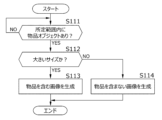
- Fig. 21 is a flowchart showing an example of operation relating to a method for generating an image according to the size of an article.
- the object control unit 101 of the client terminal 10A determines whether or not an item object is present within a predetermined range in the direction of travel based on the current position of avatar A in the virtual space (step S111).
- step S111 determines whether or not a large size is set for the item object. Note that here, whether or not a large size is set is determined regardless of whether the item is the user's own item or someone else's item.
- the object control unit 101 of the client terminal 10A refers to the item information shown in FIG. 4 and the user information shown in FIG. 6, and if the size "small” is set for the item object, it determines that a small size is set, and if the size "large” is set, it determines that a large size is set.
- step S112 determines that a large size is set for the item object (step S112: YES), it generates an image including the large-sized item object as an image seen from the virtual camera associated with avatar A (step S113).
- step S112 determines that a large size is not set for the item object, but a small size is set (step S112: NO), it generates an image that does not include the small size item object as the image seen from the virtual camera associated with avatar A (step S114).
- Fig. 22 is a flowchart showing an example of the operation of the method for generating an image depending on the size of an article.
- the object control unit 101 of the client terminal 10A determines whether or not an item object is present within a predetermined range in the direction of travel based on the current position of avatar A in the virtual space (step S121).
- step S121 determines whether or not a small size is set for the item object. Note that here, whether or not a small size is set is determined regardless of whether the item is the user's own item or someone else's item.
- step S122 determines whether a small size is set for the item object (step S122: YES). If the object control unit 101 of the client terminal 10A determines that a small size is set for the item object (step S122: YES), it determines whether a first time (e.g., one hour) has elapsed since the small-sized item object was placed based on the placement information set in the user information shown in FIG. 6 (step S123).
- a first time e.g., one hour
- step S122 If it is determined that the first time has not elapsed since the small-sized item object was placed (step S122: NO), the image generation unit 103 of the client terminal 10A generates an image including the small-sized item object as an image seen from the virtual camera associated with avatar A (step S125).
- the object control unit 101 of the client terminal 10A determines that a first time has elapsed since the small-sized item object was placed (step S123: YES), it removes the small-sized item object from the virtual space. After that, the image generation unit 103 of the client terminal 10A generates an image that does not include the small-sized item object as the image seen from the virtual camera associated with avatar A (step S124).
- step S122 determines whether a second time (e.g., 12 hours) longer than the first time has passed since the large-sized item object was placed, based on the placement information set in the user information shown in FIG. 6 (step S126).
- a second time e.g., 12 hours
- step S126 If it is determined that the second time has not elapsed since the large-sized item object was placed (step S126: NO), the image generation unit 103 of the client terminal 10A generates an image including the large-sized item object as an image seen from the virtual camera associated with avatar A (step S127).
- step S126 YES
- the object control unit 101 of the client terminal 10A determines that a second time has elapsed since the large-sized item object was placed (step S126: YES)
- it removes the large-sized item object from the virtual space.
- the image generation unit 103 of the client terminal 10A generates an image that does not include the large-sized item object as an image seen from the virtual camera associated with avatar A (step S124).
- an invention may be constructed by deleting some invention-specific matters from all of the invention-specific matters disclosed in the above-mentioned embodiments, or an invention may be constructed by appropriately combining all of the invention-specific matters disclosed in the above-mentioned embodiments with the invention-specific matters disclosed in the embodiments described below.
- ⁇ Item placement cost> it is possible to generate an image including items with low placement costs while generating an image not including items with high placement costs. As a result, even if an item object is left in the virtual space, if the item has a low placement cost, it will be visible on the user's screen, and if the item has a high placement cost, it will not be visible on the user's screen. Therefore, it is possible to mitigate the adverse effect of the virtual space being filled with items with high placement costs that require a high load of rendering processing, resulting in a decrease in image quality.
- images that do not include other people's items are generated in areas of the virtual space where many avatars tend to gather (for example, areas equivalent to town squares and parks, areas filled with many treasure chests, areas where many enemy characters appear, etc.), while images that include other people's items can be generated in areas of the virtual space where many avatars do not tend to gather (for example, areas deep in the mountains far from towns, etc.).
- images that include other people's items can be generated in areas of the virtual space where many avatars do not tend to gather (for example, areas deep in the mountains far from towns, etc.).
- blacklist that lists users who engage in nuisance behavior in a virtual space
- the determination of whether or not there is a "special relationship" is performed in two stages ("yes” and "no"), and a decision is made as to whether or not to generate an image that includes another person's items based on the result of that determination.
- the present invention is not limited to this.
- the "special relationship” is divided into five stages ("deep relationship”, “slightly deep relationship”, “normal relationship”, “slightly shallow relationship”, and “shallow relationship"), and the rank to which the user belongs is determined by a point system.
- a score is set for each evaluation item, such as 5 points for "friendship”, 3 points for “having had a conversation in virtual space”, and 2 points for "having participated in an event together in virtual space", and one of the five ranks is determined according to the total points acquired by the user and set for the user (for example, if the user's total points are 10 points, the user is set to a "deep relationship”, and if the user's total points are 5 points, the user is set to a "normal relationship").
- a modified example was given in which a small-sized item becomes invisible on the user's screen after a "first time” has elapsed since the placement of a small-sized item, and a large-sized item becomes invisible on the user's screen after a "second time” has elapsed since the placement of a large-sized item (wherein the "second time” is longer than the "first time”).
- the present invention is not limited to this.
- the "first time” may be set to be longer than the "second time.”
- the predetermined time is defined as the time that has elapsed since the item was placed, but the present invention is not limited to this. For example, if an avatar moves a predetermined distance away from an item after it has been placed, the predetermined time may be the time that has elapsed since that movement.
- a distributed network system using blockchain technology may be adopted instead of the centralized network system equipped with a server device.
- distributed network system various information stored in the server device in the centralized network system can be distributed and stored in each terminal connected by peer-to-peer (P2P).
- P2P peer-to-peer
- blockchain technology various information is managed in a mutual monitoring manner, making it possible to avoid unauthorized data tampering.
- objects items, avatars, etc.
- NFTs non-fungible Tokens
- VR Virtual Reality
- a head-mounted display or a head-up display
- an image of a virtual space can be displayed on the VR goggles or the like worn by the user.
- Information processing system 10 Client terminal 10A Client terminal 20 Server device 50 Computer 51 CPU 52 RAM 53 ROM 54 Communication interface 55 Input device 56 Display device 57 External interface 58 HDD 100 Client control unit 101 Object control unit 102 Virtual camera control unit 103 Image generation unit 104 Display control unit 105 Purchase unit 120 Client storage unit 140 Client communication unit 150 Operation input reception unit 160 Screen display unit 200 Server control unit 201 Information management unit 202 Sales unit 220 Server storage unit 221 Item information storage unit 222 Area information storage unit 223 User information storage unit 240 Server communication unit 501 Item object 502 Area 503 Item object B Bus line N Network
Landscapes
- Engineering & Computer Science (AREA)
- Multimedia (AREA)
- General Engineering & Computer Science (AREA)
- Theoretical Computer Science (AREA)
- Physics & Mathematics (AREA)
- General Physics & Mathematics (AREA)
- Human Computer Interaction (AREA)
- Computer Hardware Design (AREA)
- Software Systems (AREA)
- Computer Graphics (AREA)
- Processing Or Creating Images (AREA)
- Information Transfer Between Computers (AREA)
- User Interface Of Digital Computer (AREA)
Abstract
物品オブジェクトを配置したままの状態にすることで仮想空間に及ぼす悪影響を緩和する。本発明は、コンピュータを、ユーザの分身となるユーザオブジェクトの仮想空間での挙動を制御するオブジェクト制御手段、仮想空間に配置されている物品オブジェクトが、前記ユーザオブジェクト自ら配置した自分の物品オブジェクトである場合に、前記ユーザオブジェクトから見たときの仮想空間の様子を示す画像として、前記自分の物品オブジェクトが配置された画像を生成し、前記ユーザオブジェクトが配置していない他人の物品オブジェクトである場合には、前記ユーザオブジェクトから見たときの仮想空間の様子を示す画像として、前記他人の物品オブジェクトが配置されていない画像を生成する画像生成手段として機能させるプログラムである。
Description
本発明は、プログラム及び情報処理装置に関する。
仮想空間内(たとえば、メタバース、ゲームフィールドなど)でユーザ同士が自分の分身であるユーザオブジェクト(たとえば、アバター、キャラクタなど)を用いて互いに関わりながらコミュニティを広げていくように構成されたプログラムが知られている(たとえば、特許文献1)。
このような仮想空間では、ユーザオブジェクトは自由に移動したり、自分の物品オブジェクトを自由に配置したりすることができる。一方で、ユーザオブジェクトが配置した物品オブジェクトを、仮想空間に残したままの状態にすると、他人のユーザオブジェクトにとって邪魔な残留物になったり、仮想空間内の世界観を崩す要因となったりする等、仮想空間内に悪影響を及ぼすおそれがある。
本発明は、このような事情に鑑みてなされたものであり、その目的とするところは、物品オブジェクトを配置したままの状態にすることによって仮想空間に及ぼす悪影響を緩和することにある。
上記課題を解決するための本発明の主たる発明は、
コンピュータを、
ユーザの操作に基づき、前記ユーザの分身となるユーザオブジェクトの仮想空間での挙動を制御するオブジェクト制御手段、
仮想空間に配置されている物品オブジェクトが、前記ユーザオブジェクト自ら配置した自分の物品オブジェクトである場合に、前記ユーザオブジェクトから見たときの仮想空間の様子を示す画像として、前記自分の物品オブジェクトが配置された画像を生成する画像生成手段であって、
仮想空間に配置されている物品オブジェクトが、前記ユーザオブジェクトが配置していない他人の物品オブジェクトである場合には、前記ユーザオブジェクトから見たときの仮想空間の様子を示す画像として、前記他人の物品オブジェクトが配置されていない画像を生成する画像生成手段、
として機能させるプログラムである。
本発明の他の特徴については、本明細書及び添付図面の記載により明らかにする。
コンピュータを、
ユーザの操作に基づき、前記ユーザの分身となるユーザオブジェクトの仮想空間での挙動を制御するオブジェクト制御手段、
仮想空間に配置されている物品オブジェクトが、前記ユーザオブジェクト自ら配置した自分の物品オブジェクトである場合に、前記ユーザオブジェクトから見たときの仮想空間の様子を示す画像として、前記自分の物品オブジェクトが配置された画像を生成する画像生成手段であって、
仮想空間に配置されている物品オブジェクトが、前記ユーザオブジェクトが配置していない他人の物品オブジェクトである場合には、前記ユーザオブジェクトから見たときの仮想空間の様子を示す画像として、前記他人の物品オブジェクトが配置されていない画像を生成する画像生成手段、
として機能させるプログラムである。
本発明の他の特徴については、本明細書及び添付図面の記載により明らかにする。
本明細書及び添付図面の記載により、少なくとも以下の事項が明らかとなる。
即ち、コンピュータを、
ユーザの操作に基づき、前記ユーザの分身となるユーザオブジェクトの仮想空間での挙動を制御するオブジェクト制御手段、
仮想空間に配置されている物品オブジェクトが、前記ユーザオブジェクト自ら配置した自分の物品オブジェクトである場合に、前記ユーザオブジェクトから見たときの仮想空間の様子を示す画像として、前記自分の物品オブジェクトが配置された画像を生成する画像生成手段であって、
仮想空間に配置されている物品オブジェクトが、前記ユーザオブジェクトが配置していない他人の物品オブジェクトである場合には、前記ユーザオブジェクトから見たときの仮想空間の様子を示す画像として、前記他人の物品オブジェクトが配置されていない画像を生成する画像生成手段、
として機能させるプログラムである。
このようなプログラムによれば、ユーザオブジェクトから見たときの仮想空間の様子を示す画像に、自分の物品オブジェクトは含まれるが、他人の物品オブジェクトは含まれなくなるので、他人の物品オブジェクトが仮想空間に残されたままの状態であっても、ユーザの画面上ではそれが見えず、自分にとって邪魔な残留物にならない。そのため、物品オブジェクトを配置したままの状態にすることによって仮想空間に及ぼす悪影響を緩和することが可能となる。
即ち、コンピュータを、
ユーザの操作に基づき、前記ユーザの分身となるユーザオブジェクトの仮想空間での挙動を制御するオブジェクト制御手段、
仮想空間に配置されている物品オブジェクトが、前記ユーザオブジェクト自ら配置した自分の物品オブジェクトである場合に、前記ユーザオブジェクトから見たときの仮想空間の様子を示す画像として、前記自分の物品オブジェクトが配置された画像を生成する画像生成手段であって、
仮想空間に配置されている物品オブジェクトが、前記ユーザオブジェクトが配置していない他人の物品オブジェクトである場合には、前記ユーザオブジェクトから見たときの仮想空間の様子を示す画像として、前記他人の物品オブジェクトが配置されていない画像を生成する画像生成手段、
として機能させるプログラムである。
このようなプログラムによれば、ユーザオブジェクトから見たときの仮想空間の様子を示す画像に、自分の物品オブジェクトは含まれるが、他人の物品オブジェクトは含まれなくなるので、他人の物品オブジェクトが仮想空間に残されたままの状態であっても、ユーザの画面上ではそれが見えず、自分にとって邪魔な残留物にならない。そのため、物品オブジェクトを配置したままの状態にすることによって仮想空間に及ぼす悪影響を緩和することが可能となる。
また、かかるプログラムであって、
前記画像生成手段は、前記他人の物品オブジェクトが、所定時間が経過した後の物品オブジェクトである場合に、前記他人の物品オブジェクトが配置されていない画像を生成し、所定時間が経過する前の物品オブジェクトである場合には、前記他人の物品オブジェクトが配置された画像を生成することとしてもよい。
このようなプログラムによれば、ユーザオブジェクトから見たときの仮想空間の様子を示す画像に、所定時間経過前の他人の物品オブジェクトは含まれるが、所定時間経過後の他人の物品オブジェクトは含まれなくなるので、他人の物品オブジェクトが仮想空間に残されたままの状態であっても、所定時間経過後においてはユーザの画面上でそれが見えず、自分にとって邪魔な残留物にならない。そのため、物品オブジェクトを配置したままの状態にすることによって仮想空間に及ぼす悪影響を緩和することが可能となる。
前記画像生成手段は、前記他人の物品オブジェクトが、所定時間が経過した後の物品オブジェクトである場合に、前記他人の物品オブジェクトが配置されていない画像を生成し、所定時間が経過する前の物品オブジェクトである場合には、前記他人の物品オブジェクトが配置された画像を生成することとしてもよい。
このようなプログラムによれば、ユーザオブジェクトから見たときの仮想空間の様子を示す画像に、所定時間経過前の他人の物品オブジェクトは含まれるが、所定時間経過後の他人の物品オブジェクトは含まれなくなるので、他人の物品オブジェクトが仮想空間に残されたままの状態であっても、所定時間経過後においてはユーザの画面上でそれが見えず、自分にとって邪魔な残留物にならない。そのため、物品オブジェクトを配置したままの状態にすることによって仮想空間に及ぼす悪影響を緩和することが可能となる。
また、かかるプログラムであって、
前記画像生成手段は、前記他人の物品オブジェクトが、前記ユーザとの間に予め設定された関係性がない他人の物品オブジェクトである場合に、前記ユーザオブジェクトから見たときの仮想空間の様子を示す画像として、前記他人の物品オブジェクトが配置されていない画像を生成し、前記ユーザとの間に予め設定された関係性がある他人の物品オブジェクトである場合には、前記他人の物品オブジェクトが配置された画像を生成することとしてもよい。
このようなプログラムによれば、ユーザオブジェクトから見たときの仮想空間の様子を示す画像に、予め設定された関係性がある他人の物品オブジェクトは含まれるが、予め設定された関係性がない他人の物品オブジェクトは含まれなくなるので、他人の物品オブジェクトが仮想空間に残されたままの状態であっても、ユーザの画面上では、その関係のある他人の物品は見えることになり、その関係性のない他人の物品は邪魔な残留物として扱われて見えなくなる。そのため、物品オブジェクトを配置したままの状態にすることによって仮想空間に及ぼす悪影響を緩和することが可能となる。
前記画像生成手段は、前記他人の物品オブジェクトが、前記ユーザとの間に予め設定された関係性がない他人の物品オブジェクトである場合に、前記ユーザオブジェクトから見たときの仮想空間の様子を示す画像として、前記他人の物品オブジェクトが配置されていない画像を生成し、前記ユーザとの間に予め設定された関係性がある他人の物品オブジェクトである場合には、前記他人の物品オブジェクトが配置された画像を生成することとしてもよい。
このようなプログラムによれば、ユーザオブジェクトから見たときの仮想空間の様子を示す画像に、予め設定された関係性がある他人の物品オブジェクトは含まれるが、予め設定された関係性がない他人の物品オブジェクトは含まれなくなるので、他人の物品オブジェクトが仮想空間に残されたままの状態であっても、ユーザの画面上では、その関係のある他人の物品は見えることになり、その関係性のない他人の物品は邪魔な残留物として扱われて見えなくなる。そのため、物品オブジェクトを配置したままの状態にすることによって仮想空間に及ぼす悪影響を緩和することが可能となる。
また、かかるプログラムであって、
前記画像生成手段は、
前記他人の物品オブジェクトが、高いレア度が設定された物品オブジェクトである場合に、前記ユーザオブジェクトから見たときの仮想空間の様子を示す画像として、高いレア度の前記他人の物品オブジェクトが配置されていない画像を生成し、低いレア度が設定された物品オブジェクトである場合には、低いレア度の前記他人の物品オブジェクトが配置された画像を生成し、又は、
前記他人の物品オブジェクトが、低いレア度が設定された物品オブジェクトである場合に、前記ユーザオブジェクトから見たときの仮想空間の様子を示す画像として、低いレア度の前記他人の物品オブジェクトが配置されていない画像を生成し、高いレア度が設定された物品オブジェクトである場合には、高いレア度の前記他人の物品オブジェクトが配置された画像を生成することとしてもよい。
このようなプログラムによれば、ユーザオブジェクトから見たときの仮想空間の様子を示す画像に、低いレア度の他人の物品オブジェクトは含まれるが、高いレア度の他人の物品オブジェクトは含まれなくなるので、他人の物品オブジェクトが仮想空間に残されたままの状態であっても、ユーザの画面上では、希少価値が低い他人の物品は見えることになり、希少価値の高い他人の物品は見えなくなる。そのため、物品オブジェクトを配置したままの状態にすることによって、希少価値の高い他人の物品であるにもかかわらず、仮想空間内で誰にでも簡単に見られてしまうといった悪影響を緩和することが可能となる。又は、その逆の場合、ユーザオブジェクトから見たときの仮想空間の様子を示す画像に、高いレア度の他人の物品オブジェクトは含まれるが、低いレア度の他人の物品オブジェクトは含まれなくなるので、他人の物品オブジェクトが仮想空間に残されたままの状態であっても、ユーザの画面上では、希少価値が高い他人の物品は見えることになり、希少価値の低い他人の物品は見えなくなる。そのため、物品オブジェクトを配置したままの状態にすることによって、希少価値の低く注目されない物品で仮想空間内が埋め尽くされてしまうといった悪影響を緩和することが可能となる。
前記画像生成手段は、
前記他人の物品オブジェクトが、高いレア度が設定された物品オブジェクトである場合に、前記ユーザオブジェクトから見たときの仮想空間の様子を示す画像として、高いレア度の前記他人の物品オブジェクトが配置されていない画像を生成し、低いレア度が設定された物品オブジェクトである場合には、低いレア度の前記他人の物品オブジェクトが配置された画像を生成し、又は、
前記他人の物品オブジェクトが、低いレア度が設定された物品オブジェクトである場合に、前記ユーザオブジェクトから見たときの仮想空間の様子を示す画像として、低いレア度の前記他人の物品オブジェクトが配置されていない画像を生成し、高いレア度が設定された物品オブジェクトである場合には、高いレア度の前記他人の物品オブジェクトが配置された画像を生成することとしてもよい。
このようなプログラムによれば、ユーザオブジェクトから見たときの仮想空間の様子を示す画像に、低いレア度の他人の物品オブジェクトは含まれるが、高いレア度の他人の物品オブジェクトは含まれなくなるので、他人の物品オブジェクトが仮想空間に残されたままの状態であっても、ユーザの画面上では、希少価値が低い他人の物品は見えることになり、希少価値の高い他人の物品は見えなくなる。そのため、物品オブジェクトを配置したままの状態にすることによって、希少価値の高い他人の物品であるにもかかわらず、仮想空間内で誰にでも簡単に見られてしまうといった悪影響を緩和することが可能となる。又は、その逆の場合、ユーザオブジェクトから見たときの仮想空間の様子を示す画像に、高いレア度の他人の物品オブジェクトは含まれるが、低いレア度の他人の物品オブジェクトは含まれなくなるので、他人の物品オブジェクトが仮想空間に残されたままの状態であっても、ユーザの画面上では、希少価値が高い他人の物品は見えることになり、希少価値の低い他人の物品は見えなくなる。そのため、物品オブジェクトを配置したままの状態にすることによって、希少価値の低く注目されない物品で仮想空間内が埋め尽くされてしまうといった悪影響を緩和することが可能となる。
また、かかるプログラムであって、
前記画像生成手段は、前記他人の物品オブジェクトが、小さいサイズとして設定された物品オブジェクトである場合に、前記ユーザオブジェクトから見たときの仮想空間の様子を示す画像として、小さいサイズの前記他人の物品オブジェクトが配置されていない画像を生成し、大きいサイズとして設定された物品オブジェクトである場合には、大きいサイズの前記他人の物品オブジェクトが配置された画像を生成することとしてもよい。
このようなプログラムによれば、ユーザオブジェクトから見たときの仮想空間の様子を示す画像に、大きいサイズの他人の物品オブジェクトは含まれるが、小さいサイズの他人の物品オブジェクトは含まれなくなるので、他人の物品オブジェクトが仮想空間に残されたままの状態であっても、ユーザの画面上では、大きくて目立つような他人の物品は見えることになり、小さくて目立たない他人の物品は邪魔な残留物として扱われて見えなくなる。そのため、物品オブジェクトを配置したままの状態にすることによって、小さくて目立たない他人の物品で仮想空間内が埋め尽くされるといった悪影響を緩和することが可能となる。
前記画像生成手段は、前記他人の物品オブジェクトが、小さいサイズとして設定された物品オブジェクトである場合に、前記ユーザオブジェクトから見たときの仮想空間の様子を示す画像として、小さいサイズの前記他人の物品オブジェクトが配置されていない画像を生成し、大きいサイズとして設定された物品オブジェクトである場合には、大きいサイズの前記他人の物品オブジェクトが配置された画像を生成することとしてもよい。
このようなプログラムによれば、ユーザオブジェクトから見たときの仮想空間の様子を示す画像に、大きいサイズの他人の物品オブジェクトは含まれるが、小さいサイズの他人の物品オブジェクトは含まれなくなるので、他人の物品オブジェクトが仮想空間に残されたままの状態であっても、ユーザの画面上では、大きくて目立つような他人の物品は見えることになり、小さくて目立たない他人の物品は邪魔な残留物として扱われて見えなくなる。そのため、物品オブジェクトを配置したままの状態にすることによって、小さくて目立たない他人の物品で仮想空間内が埋め尽くされるといった悪影響を緩和することが可能となる。
また、コンピュータを、
ユーザの操作に基づき、前記ユーザの分身となるユーザオブジェクトの仮想空間での挙動を制御するオブジェクト制御手段、
仮想空間に配置されている物品オブジェクトに低いレア度が設定されている場合に、前記ユーザオブジェクトから見たときの仮想空間の様子を示す画像として、低いレア度の前記物品オブジェクトが配置された画像を生成し、高いレア度が設定されている場合には、前記ユーザオブジェクトから見たときの仮想空間の様子を示す画像として、高いレア度の前記物品オブジェクトが配置されていない画像を生成し、又は、
仮想空間に配置されている物品オブジェクトに高いレア度が設定されている場合に、前記ユーザオブジェクトから見たときの仮想空間の様子を示す画像として、高いレア度の前記物品オブジェクトが配置された画像を生成し、低いレア度が設定されている場合には、前記ユーザオブジェクトから見たときの仮想空間の様子を示す画像として、低いレア度の前記物品オブジェクトが配置されていない画像を生成する画像生成手段、
として機能させるプログラムである。
このようなプログラムによれば、ユーザオブジェクトから見たときの仮想空間の様子を示す画像に、低いレア度の物品オブジェクトは含まれるが、高いレア度の物品オブジェクトは含まれなくなるので、物品オブジェクトが仮想空間に残されたままの状態であっても、ユーザの画面上では、希少価値が低い物品は見えることになり、希少価値の高い物品は見えなくなる。そのため、物品オブジェクトを配置したままの状態にすることによって、希少価値の高い物品であるにもかかわらず、仮想空間内で誰にでも簡単に見られてしまうといった悪影響を緩和することが可能となる。又は、その逆の場合、ユーザオブジェクトから見たときの仮想空間の様子を示す画像に、高いレア度の物品オブジェクトは含まれるが、低いレア度の物品オブジェクトは含まれなくなるので、物品オブジェクトが仮想空間に残されたままの状態であっても、ユーザの画面上では、希少価値が高い物品は見えることになり、希少価値の低い物品は見えなくなる。そのため、物品オブジェクトを配置したままの状態にすることによって、希少価値の低く注目されない物品で仮想空間内が埋め尽くされてしまうといった悪影響を緩和することが可能となる。
ユーザの操作に基づき、前記ユーザの分身となるユーザオブジェクトの仮想空間での挙動を制御するオブジェクト制御手段、
仮想空間に配置されている物品オブジェクトに低いレア度が設定されている場合に、前記ユーザオブジェクトから見たときの仮想空間の様子を示す画像として、低いレア度の前記物品オブジェクトが配置された画像を生成し、高いレア度が設定されている場合には、前記ユーザオブジェクトから見たときの仮想空間の様子を示す画像として、高いレア度の前記物品オブジェクトが配置されていない画像を生成し、又は、
仮想空間に配置されている物品オブジェクトに高いレア度が設定されている場合に、前記ユーザオブジェクトから見たときの仮想空間の様子を示す画像として、高いレア度の前記物品オブジェクトが配置された画像を生成し、低いレア度が設定されている場合には、前記ユーザオブジェクトから見たときの仮想空間の様子を示す画像として、低いレア度の前記物品オブジェクトが配置されていない画像を生成する画像生成手段、
として機能させるプログラムである。
このようなプログラムによれば、ユーザオブジェクトから見たときの仮想空間の様子を示す画像に、低いレア度の物品オブジェクトは含まれるが、高いレア度の物品オブジェクトは含まれなくなるので、物品オブジェクトが仮想空間に残されたままの状態であっても、ユーザの画面上では、希少価値が低い物品は見えることになり、希少価値の高い物品は見えなくなる。そのため、物品オブジェクトを配置したままの状態にすることによって、希少価値の高い物品であるにもかかわらず、仮想空間内で誰にでも簡単に見られてしまうといった悪影響を緩和することが可能となる。又は、その逆の場合、ユーザオブジェクトから見たときの仮想空間の様子を示す画像に、高いレア度の物品オブジェクトは含まれるが、低いレア度の物品オブジェクトは含まれなくなるので、物品オブジェクトが仮想空間に残されたままの状態であっても、ユーザの画面上では、希少価値が高い物品は見えることになり、希少価値の低い物品は見えなくなる。そのため、物品オブジェクトを配置したままの状態にすることによって、希少価値の低く注目されない物品で仮想空間内が埋め尽くされてしまうといった悪影響を緩和することが可能となる。
また、コンピュータを、
ユーザの操作に基づき、前記ユーザの分身となるユーザオブジェクトの仮想空間での挙動を制御するオブジェクト制御手段、
仮想空間に配置されている物品オブジェクトのサイズが、大きいサイズとして設定されている場合に、前記ユーザオブジェクトから見たときの仮想空間の様子を示す画像として、大きいサイズの前記物品オブジェクトが配置された画像を生成する画像生成手段であって、
仮想空間に配置されている物品オブジェクトのサイズが、小さいサイズとして設定されている場合に、前記ユーザオブジェクトから見たときの仮想空間の様子を示す画像として、小さいサイズの前記物品オブジェクトが配置されていない画像を生成する画像生成手段、
として機能させるプログラムである。
このようなプログラムによれば、ユーザオブジェクトから見たときの仮想空間の様子を示す画像に、大きいサイズの物品オブジェクトは含まれるが、小さいサイズの物品オブジェクトは含まれなくなるので、物品オブジェクトが仮想空間に残されたままの状態であっても、ユーザの画面上では、大きくて目立つような物品は見えることになり、小さくて目立たない物品は邪魔な残留物として扱われて見えなくなる。そのため、物品オブジェクトを配置したままの状態にすることによって、小さくて目立たない物品で仮想空間内が埋め尽くされるといった悪影響を緩和することが可能となる。
ユーザの操作に基づき、前記ユーザの分身となるユーザオブジェクトの仮想空間での挙動を制御するオブジェクト制御手段、
仮想空間に配置されている物品オブジェクトのサイズが、大きいサイズとして設定されている場合に、前記ユーザオブジェクトから見たときの仮想空間の様子を示す画像として、大きいサイズの前記物品オブジェクトが配置された画像を生成する画像生成手段であって、
仮想空間に配置されている物品オブジェクトのサイズが、小さいサイズとして設定されている場合に、前記ユーザオブジェクトから見たときの仮想空間の様子を示す画像として、小さいサイズの前記物品オブジェクトが配置されていない画像を生成する画像生成手段、
として機能させるプログラムである。
このようなプログラムによれば、ユーザオブジェクトから見たときの仮想空間の様子を示す画像に、大きいサイズの物品オブジェクトは含まれるが、小さいサイズの物品オブジェクトは含まれなくなるので、物品オブジェクトが仮想空間に残されたままの状態であっても、ユーザの画面上では、大きくて目立つような物品は見えることになり、小さくて目立たない物品は邪魔な残留物として扱われて見えなくなる。そのため、物品オブジェクトを配置したままの状態にすることによって、小さくて目立たない物品で仮想空間内が埋め尽くされるといった悪影響を緩和することが可能となる。
また、ユーザの操作に基づき、前記ユーザの分身となるユーザオブジェクトの仮想空間での挙動を制御するオブジェクト制御部と、
仮想空間に配置されている物品オブジェクトが、前記ユーザオブジェクト自ら配置した自分の物品オブジェクトである場合に、前記ユーザオブジェクトから見たときの仮想空間の様子を示す画像として、前記自分の物品オブジェクトが配置された画像を生成する画像生成部であって、
仮想空間に配置されている物品オブジェクトが、前記ユーザオブジェクトが配置していない他人の物品オブジェクトである場合には、前記ユーザオブジェクトから見たときの仮想空間の様子を示す画像として、前記他人の物品オブジェクトが配置されていない画像を生成する画像生成部と、
を備える情報処理装置である。
このような情報処理装置によれば、物品オブジェクトを配置したままの状態にすることによって仮想空間に及ぼす悪影響を緩和することができる。
仮想空間に配置されている物品オブジェクトが、前記ユーザオブジェクト自ら配置した自分の物品オブジェクトである場合に、前記ユーザオブジェクトから見たときの仮想空間の様子を示す画像として、前記自分の物品オブジェクトが配置された画像を生成する画像生成部であって、
仮想空間に配置されている物品オブジェクトが、前記ユーザオブジェクトが配置していない他人の物品オブジェクトである場合には、前記ユーザオブジェクトから見たときの仮想空間の様子を示す画像として、前記他人の物品オブジェクトが配置されていない画像を生成する画像生成部と、
を備える情報処理装置である。
このような情報処理装置によれば、物品オブジェクトを配置したままの状態にすることによって仮想空間に及ぼす悪影響を緩和することができる。
また、ユーザの操作に基づき、前記ユーザの分身となるユーザオブジェクトの仮想空間での挙動を制御するオブジェクト制御部と、
仮想空間に配置されている物品オブジェクトに低いレア度が設定されている場合に、前記ユーザオブジェクトから見たときの仮想空間の様子を示す画像として、低いレア度の前記物品オブジェクトが配置された画像を生成し、高いレア度が設定されている場合には、前記ユーザオブジェクトから見たときの仮想空間の様子を示す画像として、高いレア度の前記物品オブジェクトが配置されていない画像を生成し、又は、
仮想空間に配置されている物品オブジェクトに高いレア度が設定されている場合に、前記ユーザオブジェクトから見たときの仮想空間の様子を示す画像として、高いレア度の前記物品オブジェクトが配置された画像を生成し、低いレア度が設定されている場合には、前記ユーザオブジェクトから見たときの仮想空間の様子を示す画像として、低いレア度の前記物品オブジェクトが配置されていない画像を生成する画像生成部と、
を備える情報処理装置である。
このような情報処理装置によれば、物品オブジェクトを配置したままの状態にすることによって仮想空間に及ぼす悪影響を緩和することができる。
仮想空間に配置されている物品オブジェクトに低いレア度が設定されている場合に、前記ユーザオブジェクトから見たときの仮想空間の様子を示す画像として、低いレア度の前記物品オブジェクトが配置された画像を生成し、高いレア度が設定されている場合には、前記ユーザオブジェクトから見たときの仮想空間の様子を示す画像として、高いレア度の前記物品オブジェクトが配置されていない画像を生成し、又は、
仮想空間に配置されている物品オブジェクトに高いレア度が設定されている場合に、前記ユーザオブジェクトから見たときの仮想空間の様子を示す画像として、高いレア度の前記物品オブジェクトが配置された画像を生成し、低いレア度が設定されている場合には、前記ユーザオブジェクトから見たときの仮想空間の様子を示す画像として、低いレア度の前記物品オブジェクトが配置されていない画像を生成する画像生成部と、
を備える情報処理装置である。
このような情報処理装置によれば、物品オブジェクトを配置したままの状態にすることによって仮想空間に及ぼす悪影響を緩和することができる。
また、ユーザの操作に基づき、前記ユーザの分身となるユーザオブジェクトの仮想空間での挙動を制御するオブジェクト制御部と、
仮想空間に配置されている物品オブジェクトのサイズが、大きいサイズとして設定されている場合に、前記ユーザオブジェクトから見たときの仮想空間の様子を示す画像として、大きいサイズの前記物品オブジェクトが配置された画像を生成する画像生成部であって、
仮想空間に配置されている物品オブジェクトのサイズが、小さいサイズとして設定されている場合に、前記ユーザオブジェクトから見たときの仮想空間の様子を示す画像として、小さいサイズの前記物品オブジェクトが配置されていない画像を生成する画像生成部と、
を備える情報処理装置である。
このような情報処理装置によれば、物品オブジェクトを配置したままの状態にすることによって仮想空間に及ぼす悪影響を緩和することができる。
仮想空間に配置されている物品オブジェクトのサイズが、大きいサイズとして設定されている場合に、前記ユーザオブジェクトから見たときの仮想空間の様子を示す画像として、大きいサイズの前記物品オブジェクトが配置された画像を生成する画像生成部であって、
仮想空間に配置されている物品オブジェクトのサイズが、小さいサイズとして設定されている場合に、前記ユーザオブジェクトから見たときの仮想空間の様子を示す画像として、小さいサイズの前記物品オブジェクトが配置されていない画像を生成する画像生成部と、
を備える情報処理装置である。
このような情報処理装置によれば、物品オブジェクトを配置したままの状態にすることによって仮想空間に及ぼす悪影響を緩和することができる。
===実施形態===
以下では、本発明の実施形態に係るプログラム、情報処理装置、情報処理方法、及び情報処理システムについて詳細に説明する。なお、本発明は仮想空間をユーザに提供する仮想空間提供サービスを採用するプログラム、情報処理装置、情報処理方法、及び情報処理システム等に広く適用できる。実施形態では、仮想空間が仮想3次元空間である場合を例に挙げて説明する。
以下では、本発明の実施形態に係るプログラム、情報処理装置、情報処理方法、及び情報処理システムについて詳細に説明する。なお、本発明は仮想空間をユーザに提供する仮想空間提供サービスを採用するプログラム、情報処理装置、情報処理方法、及び情報処理システム等に広く適用できる。実施形態では、仮想空間が仮想3次元空間である場合を例に挙げて説明する。
<<システム構成>>
図1は、本実施形態に係る情報処理システム1の一例を示す構成図である。図1に示すように、本実施形態に係る情報処理システム1は、1台以上のクライアント端末10とサーバー装置20とがネットワークNを介して接続されている。
図1は、本実施形態に係る情報処理システム1の一例を示す構成図である。図1に示すように、本実施形態に係る情報処理システム1は、1台以上のクライアント端末10とサーバー装置20とがネットワークNを介して接続されている。
クライアント端末10は、ユーザが操作するスマートフォン、タブレット、PCなどの端末装置や、家庭用や業務用のゲーム専用機器などの端末装置である。サーバー装置20は、クライアント端末10でユーザにより行われる仮想空間提供サービス内の管理や制御、仮想空間提供サービス内での課金処理等を行う。ネットワークNは、インターネット等であって、移動無線基地局などを含む。
なお、本発明は図1に示すクライアント・サーバー型の情報処理システム1の他、仮想空間内での課金処理を行う仕組みを別途設けることで単体のゲーム装置(情報処理装置)においても適用可能である。図1の情報処理システム1は一例であって用途や目的に応じて様々なシステム構成例があることは言うまでもない。例えば、図1のサーバー装置20は複数のコンピュータに分散して構成してもよい。
<<ハードウェア構成>>
<クライアント端末及びサーバー装置>
図2は、本実施形態に係るコンピュータ50の一例を示すハードウェア構成図である。本実施形態に係るクライアント端末10及びサーバー装置20は、例えば図2に示すハードウェア構成のコンピュータ50により実現される。なお、コンピュータ50は情報処理装置の一例である。
<クライアント端末及びサーバー装置>
図2は、本実施形態に係るコンピュータ50の一例を示すハードウェア構成図である。本実施形態に係るクライアント端末10及びサーバー装置20は、例えば図2に示すハードウェア構成のコンピュータ50により実現される。なお、コンピュータ50は情報処理装置の一例である。
コンピュータ50は、図2に示すように、CPU51、RAM52、ROM53、通信インタフェース54、入力装置55、表示装置56、外部インタフェース57、及びHDD58などを備えており、それぞれがバスラインBで相互に接続されている。なお、サーバー装置20においては、入力装置55及び表示装置56を必要なときに接続して利用する形態であってもよい。
CPU51は、ROM53やHDD58などの記憶装置からプログラムやデータをRAM52上に読み出し、読み出したプログラムやデータに基づく各種処理を実行することによって、コンピュータ全体の制御や機能を実現する演算装置である。
RAM52は、プログラムやデータを一時保持するための揮発性の半導体メモリ(記憶装置)の一例であり、CPU51が各種処理を実行する際のワークエリアとしても利用される。
ROM53は、電源を切ってもプログラムやデータを保持することができる不揮発性の半導体メモリ(記憶装置)の一例である。ROM53には、コンピュータ50の起動時に実行されるBIOS、OS設定、及びネットワーク設定などのプログラムやデータが格納されている。
通信インタフェース54は、コンピュータ50をネットワークNに接続するためのインタフェースである。これにより、コンピュータ50は通信インタフェース54を介してデータ通信を行うことができる。
入力装置55は、ユーザ又は管理者が各種信号を入力するのに用いる装置である。本実施形態における入力装置55は、例えば、タッチパネル、操作キーやボタン、キーボードやマウスなどの操作装置である。
表示装置56は、ユーザ又は管理者に対して各種情報を画面表示するための装置である。本実施形態における表示装置56は、例えば、液晶や有機ELなどのディスプレイである。
外部インタフェース57は、外部装置とデータ通信可能に接続するためのインタフェースである。これにより、コンピュータ50は外部インタフェース57を介して記録媒体の読み取り及び/又は書き込みを行うことができる。外部装置は、例えば、フレキシブルディスク、CD、DVD、SDメモリカード、USBメモリなどの記録媒体である。
HDD58は、プログラムやデータを格納している不揮発性の記憶装置の一例である。格納されるプログラムやデータには、コンピュータ全体を制御する基本ソフトウェアであるOS、及びOS上において各種機能を提供するアプリケーションなどがある。
なお、HDD58に替えて、記憶媒体としてフラッシュメモリを用いるドライブ装置(例えばソリッドステートドライブ:SSD)を利用してもよい。
本実施形態に係るクライアント端末10及びサーバー装置20は、前述したハードウェア構成のコンピュータ50においてプログラムを実行することにより、後述するような各種処理を実現できる。
<<ソフトウェア構成>>
<サーバー装置>
図3は、本実施形態に係るサーバー装置20の一例を示す機能ブロック図である。本実施形態に係るサーバー装置20は、例えば図3に示す機能ブロックにより実現される。
<サーバー装置>
図3は、本実施形態に係るサーバー装置20の一例を示す機能ブロック図である。本実施形態に係るサーバー装置20は、例えば図3に示す機能ブロックにより実現される。
本実施形態に係るサーバー装置20は、プログラムを実行することにより、サーバー制御部200、サーバー記憶部220、及びサーバー通信部240を実現する。
サーバー制御部200は、サーバー装置20における各種処理を実行する機能を有する。本実施形態におけるサーバー制御部200は、情報管理部201と、販売部202を含む。
情報管理部201は、仮想空間提供サービスを利用するユーザに関する各種情報や、仮想空間を形成するための各種情報などを管理する。本実施形態に係る情報管理部201は、クライアント端末10から各種情報の管理リクエストを受信して、各種情報をサーバー記憶部220に記憶したり、サーバー記憶部220から取得した各種情報をクライアント端末10に送信したりする。
販売部202は、仮想空間内で使用可能な物品を販売する。本実施形態に係る販売部202は、クライアント端末10から物品の購入リクエストを受信すると、ユーザの指定した物品(たとえば、仮想空間内の建物、乗り物、装飾物、道具、武器、箱など)の販売価格とユーザの所持金(たとえば、仮想通貨)に基づいて課金処理を行い、その購入された物品をクライアント端末10へ送信する。
サーバー記憶部220は、サーバー装置20における各種情報を記憶する機能を有する。本実施形態におけるサーバー記憶部220は、物品情報記憶部221、領域情報記憶部222、及びユーザ情報記憶部223を含む。
物品情報記憶部221は、仮想空間内で使用可能な物品に関する物品情報を記憶している。物品情報記憶部221が記憶する物品情報は、以下に示す各種データによって構成されている。
図4は、本実施形態に係る物品情報の一例を示す構成図である。図4に示す物品情報は、項目として物品ID、物品名、レア度、サイズ、豪華度、販売価格、物品設定情報等を有する。
物品IDは、各種物品を一意に識別するための情報である。物品名は、物品の名称を示す情報である。レア度は、物品の希少価値を示す情報である。ここでは、「1」~「5」まで5段階のレア度が設定可能になっている。サイズは、物品の大きさを示す情報である。豪華度は、物品の豪華さを示す情報である。
販売価格は、仮想空間内で使用可能な物品に対して設定された販売価格を示す情報である。物品設定情報は、物品を3Dモデル(物品オブジェクト)として仮想3次元空間に形成するためのモデルデータやテクスチャデータや、3Dモデルを構成するポリゴンの数量等に基づき設定された配置コスト等を含む情報である。ここでは、負荷の高い描画処理が必要になる物品オブジェクトであるほど、高い数値の配置コストが設定されている。
領域情報記憶部222は、仮想空間内の領域に関する領域情報を記憶している。領域情報記憶部222が記憶する領域情報は、以下に示す各種データによって構成されている。
図5は、本実施形態に係る領域情報の一例を示す構成図である。図5に示す領域情報は、項目として区画ID、区画名、位置情報、広さ情報、形状情報、領域設定情報等を有する。
区画IDは、所定基準で区切られた仮想空間内の領域を一意に識別するための情報である。区画名は、仮想空間内の領域の名称を示す情報である。位置情報は、仮想空間における領域の位置を特定するための情報である。
広さ情報は、仮想空間における領域の広さを特定するための情報である。形状情報は、仮想空間における領域の形状を特定するための情報である。領域設定情報は、領域を3Dモデル(土地オブジェクト)として仮想3次元空間に形成するためのモデルデータやテクスチャデータ等を含む情報である。
ユーザ情報記憶部223は、仮想空間提供サービスを利用するユーザに関するユーザ情報を記憶している。ユーザ情報記憶部223が記憶するユーザ情報は、以下に示す各種データによって構成されている。
図6は、本実施形態に係るユーザ情報の一例を示す構成図である。図6に示すユーザ情報は、項目としてユーザID、名称、アバター設定情報、所持金、所有物、配置情報、行動履歴情報、購入履歴情報、フレンド等を有する。
ユーザIDは、ユーザを一意に識別するための情報である。名称は、ユーザ名を示す情報である。アバター設定情報は、ユーザが仮想空間内で使用するアバターに関する情報である。アバターを3Dモデル(ユーザオブジェクト)として仮想3次元空間に形成するためのモデルデータやテクスチャデータ等が含まれる。
所持金は、ユーザが所有する仮想通貨に関する情報である。所有物は、図4に示す物品情報に設定された仮想空間内で使用可能な物品のうち、ユーザが所有する物品を特定するための情報である。
配置情報は、所有物の配置に関する情報である。配置情報には、所有領域内のどの位置にどの所有物を誰がいつ配置したかを特定するための情報が含まれる。行動履歴情報は、仮想空間におけるアバターの行動履歴に関する情報である
購入履歴情報は、仮想空間内で使用可能な物品の購入履歴に関する情報である。フレンドは、互いに承認し合うことでフレンド関係が設定されていた他のユーザ(フレンドユーザ)を示す情報である。
サーバー通信部240は、ネットワークNを介してクライアント端末10との通信を行う機能を有する。
<クライアント端末>
図7は、本実施形態に係るクライアント端末10の一例を示す機能ブロック図である。本実施形態に係るクライアント端末10は、例えば図7に示す機能ブロックにより実現される。
図7は、本実施形態に係るクライアント端末10の一例を示す機能ブロック図である。本実施形態に係るクライアント端末10は、例えば図7に示す機能ブロックにより実現される。
本実施形態に係るクライアント端末10は、プログラムを実行することにより、クライアント制御部100、クライアント記憶部120、クライアント通信部140、操作入力受付部150、画面表示部160を実現する。
クライアント制御部100は、クライアント端末10における各種処理を実行する機能を有する。本実施形態におけるクライアント制御部100は、オブジェクト制御部101、仮想カメラ制御部102、画像生成部103、表示制御部104、及び購入部105を含む。
オブジェクト制御部101は、仮想空間内のオブジェクトに関する制御を行う。本実施形態に係るオブジェクト制御部101は、ユーザの操作に基づいて、仮想空間においてアバターであるユーザオブジェクトを移動させたり、土地オブジェクトに対する物品オブジェクトの配置・撤去に関する動作させたりする等、各種の挙動を制御する。仮想空間においてアバターであるユーザオブジェクトが物品オブジェクトを置く(配置する)とは、物品を置くためのモーションをアバターに設定する(アバターに物品を置く動きを付ける)場合だけでなく、そのようなモーションを設定しない(アバターに物品を置く動きを付けない)場合も含まれる。
仮想カメラ制御部102は、仮想空間内の仮想カメラに関する制御を行う。本実施形態に係る仮想カメラ制御部102は、仮想カメラをワールド座標系で表現される3次元座標に配置し、仮想カメラ設定データに基づいて、仮想カメラの視点位置、視方向、画角、ズーム、移動経路、移動速度等を制御することにより、仮想カメラから見える仮想空間の様子を変化させる。また、ユーザの操作によって仮想空間内のアバターが移動すると、当該アバターの移動に追従するように仮想カメラを制御する。
画像生成部103は、仮想空間に配置されたオブジェクトを仮想カメラから見たときの仮想空間内の様子を2次元画像として生成する。本実施形態に係る画像生成部103は、ワールド座標系で表現される3次元座標に配置されたオブジェクトを、仮想カメラを基準とするビュー座標系への座標変換を行う。そして、ビュー座標系に配置されたオブジェクトに対して透視変換等を行って、その仮想カメラから見たときの仮想3次元空間の様子を2次元画像として生成する。なおこの際に、ジオメトリ処理、テクスチャマッピング処理、隠面処理、αブレンディング処理等も行う。
表示制御部104は、クライアント端末10の画面表示を制御する。本実施形態における表示制御部104は、仮想空間に配置されたオブジェクトを仮想カメラから見たときの2次元画像をフレーム毎(例えば、1/60秒毎)に構成して、仮想空間内の様子を画面表示部160に出力する。
購入部105は、仮想空間内で使用可能な物品をユーザに購入させるための処理を行う。本実施形態に係る購入部105は、クライアント端末10の画面表示部160に提示された販売品一覧の中から、ユーザの操作によって物品が指定されると、その指定された物品の購入リクエストをサーバー装置20へ送信し、課金処理の結果に従って、その購入された物品をサーバー装置20から受信する。
操作入力受付部150は、クライアント端末10を操作するユーザからの操作入力を受け付ける。本実施形態に係る操作入力受付部150は、ユーザによって画面に対するタッチ操作が行われると、タッチパネルを介してユーザからの操作入力を受け付ける。
クライアント記憶部120は、クライアント端末10において必要となる各種プログラムや各種情報を記憶する。各種プログラムには、ユーザが仮想空間提供サービスを利用するためのプログラムが含まれる。各種情報には、サーバー記憶部220と同様、物品情報、領域情報、ユーザ情報等の全部又は一部が含まれる。すなわち、クライアント記憶部120は、物品情報記憶部、領域情報記憶部、及びユーザ情報記憶部としても機能する。
クライアント通信部140は、ネットワークNを介してサーバー装置20との通信を行う。
画面表示部160は、表示制御部104からの制御信号を受信することによって、クライアント端末10の画面表示を行う。
なお、前述したように、本実施形態に係る情報処理システム1では、クライアント端末10がオブジェクト制御、仮想カメラ制御、画像生成処理、表示制御等を行うが、サーバー装置20が各種制御・処理を行ってもよい。具体的には、オブジェクト制御部、仮想カメラ制御部、画像生成部、及び表示制御部の少なくとも一部を、クライアント端末10のクライアント制御部100に設けない構成にする一方で、サーバー装置20のサーバー制御部200に設ける構成にしてもよい。
また、前述したように、本実施形態に係る情報処理システム1は、クライアント端末10のクライアント制御部100が、インストールされたプログラムに基づいて、仮想空間提供サービスに関する処理を行うアプリケーション型である。つまり、図7は一例としてアプリケーション型を示している。なお、クライアント端末10のクライアント制御部100が、HTML(Hyper Text Markup Language)等で記載されたページデータやページデータ内に含まれるスクリプトなどをサーバー装置20から受信して、仮想空間提供サービスに関する処理を行うブラウザ型であってもよい。また、クライアント端末10に代わって、サーバー装置20又は画像処理専用のサーバー装置(不図示)が仮想空間提供サービスに関する処理を行い、そこで生成された画像データをクライアント端末10が受信して、当該画像データに基づいて仮想空間内の様子を示す2次元画像を画面表示するクラウド型であってもよい。
<<システム概要>>
本実施形態における情報処理システム1の概要について説明する。本実施形態における情報処理システム1では、ユーザは仮想空間提供サービスを利用できる。
本実施形態における情報処理システム1の概要について説明する。本実施形態における情報処理システム1では、ユーザは仮想空間提供サービスを利用できる。
本実施形態における仮想空間提供サービスでは、ユーザは自分の分身となるアバター(ユーザオブジェクト)を用いて仮想空間内で行動することができる。この仮想空間には、アバターが行動可能に構成された複数の領域が設定されている。仮想空間の「領域」は、現実空間の「土地」に相当する。
本実施形態における仮想空間では、アバターは、例えば「街の広場」や「公園」に対応する領域に移動して、他人のアバターとコミュニケーションを取ったり、自分の物品(物品オブジェクト)を自由に置いたりすることができるようになっている。ところが、アバターが、その自ら置いた自分の物品をその場に残したままで別の領域へ移動してしまうと、他人のアバターにとって邪魔な残留物になったり、仮想空間内の世界観を崩す要因となったりする等、仮想空間内に悪影響を及ぼすおそれがある。
そこで、本実施形態における仮想空間提供サービスでは、アバターを操作するユーザに対して、そのアバターから見たときの仮想空間の様子を示す画像を画面表示する際に、一例として、自分の物品は含まれるが、他人の物品は含まれない画像を画面表示するようにした。これにより、他人のアバターが置いた物品が仮想空間に残されたままの状態であったとしても、ユーザの画面上ではそれが表示されず見えないことになり、他人の残留物が邪魔になるといった悪影響を緩和することが可能となる。
また、アバターを操作するユーザに対して、そのアバターから見たときの仮想空間の様子を示す画像を画面表示する際に、別の例として、低いレア度の物品は含まれるが、高いレア度の物品は含まれない画像を画面表示するようにした。これにより、仮想空間に物品が残されたままの状態であったとしても、ユーザの画面上では、希少価値が低い物品は表示されて見えるものの、希少価値の高い物品は表示されず見えないことになり、希少価値の高い物品であるにもかかわらず、仮想空間内で誰にでも簡単に見られてしまうといった悪影響を緩和することが可能となる。
また、アバターを操作するユーザに対して、そのアバターから見たときの仮想空間の様子を示す画像を画面表示する際に、別の例として、大きいサイズの物品は含まれるが、小さいサイズの物品は含まれない画像を画面表示するようにした。これにより、仮想空間に物品が残されたままの状態であったとしても、ユーザの画面上では、大きくて目立つような物品は表示されて見えるものの、小さくて目立たない物品は表示されず見えないことになり、比較的に簡単に置ける小さくて目立たない物品で仮想空間内が埋め尽くされてしまうといった悪影響を緩和することが可能となる。
<<システム動作>>
本実施形態では、ユーザAがクライアント端末10Aを用いて仮想空間提供サービスを利用するものとする。この場合、ユーザAは仮想空間の画像をクライアント端末10Aの画面表示部160で見ることができる。
本実施形態では、ユーザAがクライアント端末10Aを用いて仮想空間提供サービスを利用するものとする。この場合、ユーザAは仮想空間の画像をクライアント端末10Aの画面表示部160で見ることができる。
そして、アバターAは、ユーザAの分身となるユーザオブジェクトであるものとし、クライアント端末10Aを用いたユーザAのタッチ操作に従って仮想空間内で行動するものとする。また、物品Aは、ユーザAの所有する物品オブジェクトであるものとし、物品Bは、その仮想空間提供サービスを利用するユーザBの所有する物品オブジェクトであるものとする。
以下では、このような前提の下、クライアント端末10Aにおいて、アバターAに対応付けた仮想視点から仮想空間の様子を見たときの画像生成方法について、具体的に説明する。
<仮想空間の画像生成>
本実施形態における仮想空間の画像生成について、図8を用いて説明する。図8は、仮想空間を仮想視点から見た画像を生成するときのワールド座標系、ビュー座標系、及びスクリーン座標系の関係を示す図である。
本実施形態における仮想空間の画像生成について、図8を用いて説明する。図8は、仮想空間を仮想視点から見た画像を生成するときのワールド座標系、ビュー座標系、及びスクリーン座標系の関係を示す図である。
以下では、仮想空間の基準を原点Owとする3次元座標(Xw、Yw、Zw)をワールド座標系と表現し、仮想カメラを原点Ocとする3次元座標(Xc、Yc、Zc)をビュー座標系と表現し、クライアント端末10の画面に対応するスクリーン面(投影面)の中心を原点Osとする2次元座標(Xs、Ys)をスクリーン座標系と表現する。
仮想カメラ制御部102は、仮想カメラ(仮想視点)を、ワールド座標系のYw軸方向の高さからZw軸方向に対する俯角θでXw-Zw平面を斜めから見下ろすように配置する。このように仮想空間に仮想カメラを配置することによって、ワールド座標系に関連付けてビュー座標系が設定されることになる。
ビュー座標系のZc軸方向は、クライアント端末10の画面に対応するスクリーン面(スクリーン座標系の原点Os)に垂直に下した方向であり、仮想カメラの視方向と一致している。ビュー座標系のXc-Yc平面は、スクリーン面と平行であり、ビュー座標系の原点Ocからスクリーン座標系原点Osまでの距離は仮想カメラの焦点距離と一致している。
本実施形態におけるオブジェクト制御部101は、ユーザオブジェクトであるアバターAを、ワールド座標系のXw-Zw平面に配置する。ワールド座標系のXw-Zw平面は、仮想空間においてアバターAが移動する移動平面と一致している。オブジェクト制御部101は、ユーザの操作に従って、ワールド座標系のXw-Zw平面上での座標位置を時間経過に伴って変化させることにより、アバターAを移動平面上で移動させることができる。
この際、仮想カメラ制御部102は、アバターAの移動に合わせて、そのアバターAに対応付けた仮想カメラのワールド座標系での座標位置を時間経過に伴って変化させることにより、アバターAに追従するように仮想カメラを移動させることができる。
本実施形態における画像生成部103は、仮想空間においてアバターAが移動する移動平面を斜めから見下ろすように配置された仮想カメラから、その移動平面上のアバターAを見たときの画像を生成する。
具体的には、図8に示す仮想カメラとアバターAの位置関係から算出される座標変換行列等を用いることにより、ワールド座標系(Xw、Yw、Zw)に配置させたアバターAをビュー座標系(Xc、Yc、Zc)へ座標変換を行う。さらに、クリッピング処理を行った後に、透視投影手法等を用いることにより、ビュー座標系(Xc、Yc、Zc)に配置されたアバターAをスクリーン座標系(Xs、Ys)へ座標変換を行う。このように幾何学的な算出を行って座標変換を繰り返すことにより、仮想空間内に配置されるアバターAの2次元画像を生成することができる。
<自分又は他人の物品>
<<実施例>>
はじめに、自分又は他人の物品の有無に応じて仮想空間の様子を示す画像を生成する方法の実施例について、図9乃至図11を用いて説明する。図9は、自分又は他人の物品の有無に応じた画像生成方法に関する動作例を示すフローチャートである。図10は、クライアント端末10Aにおける第1画面の構成例を示す図である。図11は、クライアント端末10Aにおける第2画面の構成例を示す図である。
<<実施例>>
はじめに、自分又は他人の物品の有無に応じて仮想空間の様子を示す画像を生成する方法の実施例について、図9乃至図11を用いて説明する。図9は、自分又は他人の物品の有無に応じた画像生成方法に関する動作例を示すフローチャートである。図10は、クライアント端末10Aにおける第1画面の構成例を示す図である。図11は、クライアント端末10Aにおける第2画面の構成例を示す図である。
図9に示すように、先ず、クライアント端末10Aのオブジェクト制御部101は、仮想空間におけるアバターAの現在位置を基準とする進行方向の所定範囲内に、物品オブジェクトが存在するか否かを判定する(ステップS11)。
なお、これに限らず、アバターAに対応付けた仮想カメラを基準とする所定範囲内(例えば、四角錐台のビューボリュームに相当するクリッピング領域内)に物品オブジェクトが存在するか否かを判定してもよいし、アバターAを含む仮想空間を俯瞰する仮想カメラから見た所定視野範囲内に物品オブジェクトがあるか否かを判定してもよい。
次に、クライアント端末10Aのオブジェクト制御部101は、前記所定範囲内に物品オブジェクトが存在すると判定した場合に(ステップS11:YES)、図6に示すユーザ情報に設定された配置情報に基づいて、その物品オブジェクトが自ら配置した自分の物品オブジェクトであるか否かを判定する(ステップS12)。
そして、クライアント端末10Aの画像生成部103は、その存在する物品オブジェクトが自分の物品オブジェクトであると判定された場合に(ステップS12:YES)、図10に示すように、アバターAに対応付けた仮想カメラから見たときの画像として、自分の物品オブジェクトを含む画像を生成する(ステップS13)。
図10には、クライアント端末10Aに表示される画面例として、仮想空間の前記所定範囲内にユーザAの物品Aである物品オブジェクトが存在するときに、アバターAと共に、ユーザAの物品Aである物品オブジェクト501が領域502に配置された画像が示されている。
その一方で、クライアント端末10Aのオブジェクト制御部101は、その存在する物品オブジェクトが自分の物品オブジェクトではなく、他人の物品オブジェクトであると判定した場合に(ステップS12:NO)、他人の物品オブジェクトを仮想空間から撤去する。その後、クライアント端末10Aの画像生成部103は、図11に示すように、アバターAに対応付けた仮想カメラから見たときの画像として、他人の物品オブジェクトを含まない画像を生成する(ステップS14)。
図11には、クライアント端末10Aに表示される画面例として、仮想空間の前記所定範囲内にユーザBの物品Bである物品オブジェクトが存在するときに、領域502にユーザBの物品Bが配置されず、アバターAが配置された画像が示されている。
このように、他人であるユーザBによって配置された物品B(他人の物品オブジェクト)が仮想空間に残されたままの状態であっても、ユーザAの画面上においてそれが見えなくなる。そのため、他人の配置した物品が自分にとって邪魔な残留物にならない。
<<変形例1>>
次に、自分又は他人の物品の有無だけでなく、予め設定された特別な関係性の有無に応じて仮想空間の様子を示す画像を生成する方法の変形例について、図12乃至図13を用いて説明する。図12は、自分又は他人の物品の有無及び特別な関係性の有無に応じた画像生成方法に関する動作例を示すフローチャートである。図13は、クライアント端末10Aにおける第3画面の構成例を示す図である。
次に、自分又は他人の物品の有無だけでなく、予め設定された特別な関係性の有無に応じて仮想空間の様子を示す画像を生成する方法の変形例について、図12乃至図13を用いて説明する。図12は、自分又は他人の物品の有無及び特別な関係性の有無に応じた画像生成方法に関する動作例を示すフローチャートである。図13は、クライアント端末10Aにおける第3画面の構成例を示す図である。
図12に示すように、先ず、クライアント端末10Aのオブジェクト制御部101は、仮想空間におけるアバターAの現在位置を基準とする進行方向の所定範囲内に、物品オブジェクトが存在するか否かを判定する(ステップS21)。
なお、これに限らず、アバターAに対応付けた仮想カメラを基準とする所定範囲内(例えば、四角錐台のビューボリュームに相当するクリッピング領域内)に物品オブジェクトが存在するか否かを判定してもよいし、アバターAを含む仮想空間を俯瞰する仮想カメラから見た所定視野範囲内に物品オブジェクトがあるか否かを判定してもよい。
次に、クライアント端末10Aのオブジェクト制御部101は、前記所定範囲内に物品オブジェクトが存在すると判定した場合に(ステップS21:YES)、図6に示すユーザ情報に設定された配置情報に基づいて、その物品オブジェクトが自ら配置した自分の物品オブジェクトであるか否かを判定する(ステップS22)。
そして、クライアント端末10Aの画像生成部103は、その存在する物品オブジェクトが自分の物品オブジェクトであると判定された場合に(ステップS22:YES)、図10に示すように、アバターAに対応付けた仮想カメラから見たときの画像として、自分の物品オブジェクトを含む画像を生成する(ステップS23)。
その一方で、クライアント端末10Aのオブジェクト制御部101は、その存在する物品オブジェクトが自分の物品オブジェクトではなく、他人の物品オブジェクトであると判定した場合に(ステップS22:NO)、当該他人との間に特別な関係性があるか否かを判定する(ステップS24)。
具体的には、クライアント端末10Aのオブジェクト制御部101は、図6に示すユーザ情報を参照して、当該他人との間にフレンド関係が設定されている場合に、特別な関係性があるものと判定し、当該他人との間にフレンド関係が設定されていない場合には、特別な関係性が無いものと判定する。
そして、クライアント端末10Aの画像生成部103は、当該他人との間に特別な関係性があると判定された場合に(ステップS24:YES)、図13に示すように、アバターAに対応付けた仮想カメラから見たときの画像として、他人の物品オブジェクトを含む画像を生成する(ステップS25)。
図13には、クライアント端末10Aに表示される画面例として、仮想空間の前記所定範囲内にユーザBの物品Bである物品オブジェクトが存在するときに、アバターAと共に、ユーザBの物品Bである物品オブジェクト503が領域502に配置された画像が示されている。
このように、他人であるユーザBによって配置された物品B(他人の物品オブジェクト)であっても、特別な関係性が設定された他人が配置したものであれば、ユーザAの画面上においてそれが見えることになる。そのため、ユーザAは、その物品BをユーザBとの共通の話題にすることも可能となるため、ユーザ間のコミュニケーションを活性化することができる。
その一方で、クライアント端末10Aのオブジェクト制御部101は、当該他人との間に特別な関係性が無いと判定した場合には(ステップS24:NO)、他人の物品オブジェクトを仮想空間から撤去する。その後、クライアント端末10Aの画像生成部103は、図11に示すように、アバターAに対応付けた仮想カメラから見たときの画像として、他人の物品オブジェクトを含まない画像を生成する(ステップS26)。
このように、特別な関係性が設定されていない他人であるユーザBが配置した物品B(他人の物品オブジェクト)であれば、ユーザAにとって関心が低く邪魔な残留物と認識される可能性が高い。そのため、物品B(他人の物品オブジェクト)が仮想空間に残されたままの状態であっても、ユーザAの画面上においてそれが見えず、ユーザAにとって邪魔な残留物にならない。
<<変形例2>>
次に、自分又は他人の物品の有無、及び、特別な関係性の有無に加え、所定時間経過の有無に応じて仮想空間の様子を示す画像を生成する方法の変形例について、図14を用いて説明する。図14は、自分又は他人の物品の有無、特別な関係性の有無、及び所定時間経過の有無に応じた画像生成方法に関する動作例を示すフローチャートである。
次に、自分又は他人の物品の有無、及び、特別な関係性の有無に加え、所定時間経過の有無に応じて仮想空間の様子を示す画像を生成する方法の変形例について、図14を用いて説明する。図14は、自分又は他人の物品の有無、特別な関係性の有無、及び所定時間経過の有無に応じた画像生成方法に関する動作例を示すフローチャートである。
図14に示すように、先ず、クライアント端末10Aのオブジェクト制御部101は、仮想空間におけるアバターAの現在位置を基準とする進行方向の所定範囲内に、物品オブジェクトが存在するか否かを判定する(ステップS31)。
なお、これに限らず、アバターAに対応付けた仮想カメラを基準とする所定範囲内(例えば、四角錐台のビューボリュームに相当するクリッピング領域内)に物品オブジェクトが存在するか否かを判定してもよいし、アバターAを含む仮想空間を俯瞰する仮想カメラから見た所定視野範囲内に物品オブジェクトがあるか否かを判定してもよい。
次に、クライアント端末10Aのオブジェクト制御部101は、前記所定範囲内に物品オブジェクトが存在すると判定した場合に(ステップS31:YES)、図6に示すユーザ情報に設定された配置情報に基づいて、その物品オブジェクトが自ら配置した自分の物品オブジェクトであるか否かを判定する(ステップS32)。
そして、クライアント端末10Aの画像生成部103は、その存在する物品オブジェクトが自分の物品オブジェクトであると判定された場合に(ステップS32:YES)、図10に示すように、アバターAに対応付けた仮想カメラから見たときの画像として、自分の物品オブジェクトを含む画像を生成する(ステップS33)。
その一方で、クライアント端末10Aのオブジェクト制御部101は、その存在する物品オブジェクトが自分の物品オブジェクトではなく、他人の物品オブジェクトであると判定した場合に(ステップS32:NO)、当該他人との間に特別な関係性があるか否かを判定する(ステップS34)。
そして、クライアント端末10Aのオブジェクト制御部101は、当該他人との間に特別な関係性があると判定された場合に(ステップS34:YES)、図6に示すユーザ情報に設定された配置情報に基づいて、他人の物品オブジェクトが配置されてから所定時間(例えば、12時間)が経過したか否かを判定する(ステップS35)。
クライアント端末10Aの画像生成部103は、その他人の物品オブジェクトが配置されてから所定時間が経過していないと判定された場合に(ステップS35:NO)、図13に示すように、アバターAに対応付けた仮想カメラから見たときの画像として、他人の物品オブジェクトを含む画像を生成する(ステップS36)。
このように、特別な関係性が設定された他人であるユーザBによって配置された物品B(他人の物品オブジェクト)であっても、配置後に所定時間が経過する前であれば、ユーザAの画面上においてそれが見えることになる。そのため、ユーザAは、第三者への悪影響を考慮しつつ制限された期間内に、その物品BをユーザBとの共通の話題にすることも可能となるため、ユーザ間のコミュニケーションを活性化することができる。
その一方で、クライアント端末10Aのオブジェクト制御部101は、当該他人との間に特別な関係性がないと判定された場合(ステップS34:NO)、また、その他人の物品オブジェクトが配置されてから所定時間が経過したと判定された場合には(ステップS35:YES)、他人の物品オブジェクトを仮想空間から撤去する。その後、クライアント端末10Aの画像生成部103は、図11に示すように、アバターAに対応付けた仮想カメラから見たときの画像として、他人の物品オブジェクトを含まない画像を生成する(ステップS37)。
<<変形例3>>
次に、自分又は他人の物品の有無だけでなく、物品のレア度に応じて仮想空間の様子を示す画像を生成する方法の変形例について、図15を用いて説明する。図15は、自分又は他人の物品の有無及び物品のレア度に応じた画像生成方法に関する動作例を示すフローチャートである。
次に、自分又は他人の物品の有無だけでなく、物品のレア度に応じて仮想空間の様子を示す画像を生成する方法の変形例について、図15を用いて説明する。図15は、自分又は他人の物品の有無及び物品のレア度に応じた画像生成方法に関する動作例を示すフローチャートである。
図15に示すように、先ず、クライアント端末10Aのオブジェクト制御部101は、仮想空間におけるアバターAの現在位置を基準とする進行方向の所定範囲内に、物品オブジェクトが存在するか否かを判定する(ステップS41)。
なお、これに限らず、アバターAに対応付けた仮想カメラを基準とする所定範囲内(例えば、四角錐台のビューボリュームに相当するクリッピング領域内)に物品オブジェクトが存在するか否かを判定してもよいし、アバターAを含む仮想空間を俯瞰する仮想カメラから見た所定視野範囲内に物品オブジェクトがあるか否かを判定してもよい。
次に、クライアント端末10Aのオブジェクト制御部101は、前記所定範囲内に物品オブジェクトが存在すると判定した場合に(ステップS41:YES)、図6に示すユーザ情報に設定された配置情報に基づいて、その物品オブジェクトが自ら配置した自分の物品オブジェクトであるか否かを判定する(ステップS42)。
そして、クライアント端末10Aの画像生成部103は、その存在する物品オブジェクトが自分の物品オブジェクトであると判定された場合に(ステップS42:YES)、図10に示すように、アバターAに対応付けた仮想カメラから見たときの画像として、自分の物品オブジェクトを含む画像を生成する(ステップS43)。
その一方で、クライアント端末10Aのオブジェクト制御部101は、その存在する物品オブジェクトが自分の物品オブジェクトではなく、他人の物品オブジェクトであると判定した場合に(ステップS42:NO)、その他人の物品オブジェクトに高いレア度が設定されているか否かを判定する(ステップS44)。
具体的には、クライアント端末10Aのオブジェクト制御部101は、図4に示す物品情報及び図6に示すユーザ情報を参照して、その他人の物品オブジェクトにレア度「4」~「5」が設定されている場合に、高いレア度が設定されているものと判定し、レア度「1」~「3」が設定されている場合には、低いレア度が設定されているものと判定する。
そして、クライアント端末10Aのオブジェクト制御部101は、その他人の物品オブジェクトに高いレア度が設定されていると判定された場合に(ステップS44:YES)、他人の物品オブジェクトを仮想空間から撤去する。その後、クライアント端末10Aの画像生成部103は、図11に示すように、アバターAに対応付けた仮想カメラから見たときの画像として、他人の物品オブジェクトを含まない画像を生成する(ステップS45)。
このように、他人であるユーザBによって配置された物品B(他人の物品オブジェクト)が仮想空間に残されたままの状態であっても、高いレア度が設定された物品であれば、ユーザAの画面上においてそれが見えなくなる。そのため、希少価値の高い他人の物品であるにもかかわらず、誰にでも簡単に見られてしまうといった悪影響を緩和することができる。
その一方で、クライアント端末10Aのオブジェクト制御部101は、その他人の物品オブジェクトに高いレア度が設定されておらず、低いレア度が設定されていると判定された場合に(ステップS44:NO)、図13に示すように、アバターAに対応付けた仮想カメラから見たときの画像として、他人の物品オブジェクトを含む画像を生成する(ステップS46)。
<<変形例4>>
次に、自分又は他人の物品の有無、及び、物品のレア度に加え、所定時間経過の有無に応じて仮想空間の様子を示す画像を生成する方法の変形例について、図16を用いて説明する。図16は、自分又は他人の物品の有無、物品のレア度、及び所定時間経過の有無に応じた画像生成方法に関する動作例を示すフローチャートである。
次に、自分又は他人の物品の有無、及び、物品のレア度に加え、所定時間経過の有無に応じて仮想空間の様子を示す画像を生成する方法の変形例について、図16を用いて説明する。図16は、自分又は他人の物品の有無、物品のレア度、及び所定時間経過の有無に応じた画像生成方法に関する動作例を示すフローチャートである。
図16に示すように、先ず、クライアント端末10Aのオブジェクト制御部101は、仮想空間におけるアバターAの現在位置を基準とする進行方向の所定範囲内に、物品オブジェクトが存在するか否かを判定する(ステップS51)。
なお、これに限らず、アバターAに対応付けた仮想カメラを基準とする所定範囲内(例えば、四角錐台のビューボリュームに相当するクリッピング領域内)に物品オブジェクトが存在するか否かを判定してもよいし、アバターAを含む仮想空間を俯瞰する仮想カメラから見た所定視野範囲内に物品オブジェクトがあるか否かを判定してもよい。
次に、クライアント端末10Aのオブジェクト制御部101は、前記所定範囲内に物品オブジェクトが存在すると判定した場合に(ステップS51:YES)、図6に示すユーザ情報に設定された配置情報に基づいて、その物品オブジェクトが自ら配置した自分の物品オブジェクトであるか否かを判定する(ステップS52)。
そして、クライアント端末10Aの画像生成部103は、その存在する物品オブジェクトが自分の物品オブジェクトであると判定された場合に(ステップS52:YES)、図10に示すように、アバターAに対応付けた仮想カメラから見たときの画像として、自分の物品オブジェクトを含む画像を生成する(ステップS53)。
その一方で、クライアント端末10Aのオブジェクト制御部101は、その存在する物品オブジェクトが自分の物品オブジェクトではなく、他人の物品オブジェクトであると判定した場合に(ステップS52:NO)、その他人の物品オブジェクトに高いレア度が設定されているか否かを判定する(ステップS54)。
そして、クライアント端末10Aのオブジェクト制御部101は、その他人の物品オブジェクトに高いレア度が設定されていると判定された場合に(ステップS54:YES)、図6に示すユーザ情報に設定された配置情報に基づいて、他人の高いレア度の物品オブジェクトが配置されてから第1時間(例えば、1時間)が経過したか否かを判定する(ステップS55)。
クライアント端末10Aの画像生成部103は、その他人の高いレア度の物品オブジェクトが配置されてから第1時間が経過していないと判定された場合に(ステップS55:NO)、図13に示すように、アバターAに対応付けた仮想カメラから見たときの画像として、他人の高いレア度の物品オブジェクトを含む画像を生成する(ステップS53)。
このように、他人であるユーザBの、高いレア度が設定された物品B(他人の物品オブジェクト)であっても、配置後に第1時間(所定時間)が経過する前であれば、ユーザAの画面上においてそれが見えることになる。そのため、ユーザAは、第三者への悪影響を考慮しつつ制限された短い期間のみ、希少価値の高い他人の物品を見ることができる。
これに対して、クライアント端末10Aのオブジェクト制御部101は、その他人の高いレア度の物品オブジェクトが配置されてから第1時間が経過したと判定された場合に(ステップS55:YES)、その他人の高いレア度の物品オブジェクトを仮想空間から撤去する。その後、クライアント端末10Aの画像生成部103は、図11に示すように、アバターAに対応付けた仮想カメラから見たときの画像として、他人の物品オブジェクトを含まない画像を生成する(ステップS56)。
そして、クライアント端末10Aのオブジェクト制御部101は、その他人の物品オブジェクトに高いレア度が設定されておらず、低いレア度が設定されていると判定された場合に(ステップS54:NO)、図6に示すユーザ情報に設定された配置情報に基づいて、他人の低いレア度の物品オブジェクトが配置されてから、第1時間よりも長い第2時間(例えば、12時間)が経過したか否かを判定する(ステップS57)。
クライアント端末10Aの画像生成部103は、その他人の低いレア度の物品オブジェクトが配置されてから第2時間が経過していないと判定された場合に(ステップS57:NO)、図13に示すように、アバターAに対応付けた仮想カメラから見たときの画像として、他人の低いレア度の物品オブジェクトを含む画像を生成する(ステップS58)。
このように、他人であるユーザBの、低いレア度が設定された物品B(他人の物品オブジェクト)であっても、配置後に第2時間(所定時間)が経過する前であれば、ユーザAの画面上においてそれが見えることになる。そのため、ユーザAは、高いレア度の他人の物品よりも長い制限時間内に、低いレア度の他人の物品を見ることができる。
これに対して、クライアント端末10Aのオブジェクト制御部101は、その他人の低いレア度の物品オブジェクトが配置されてから第2時間が経過したと判定された場合に(ステップS57:YES)、その他人の低いレア度の物品オブジェクトを仮想空間から撤去する。その後、クライアント端末10Aの画像生成部103は、図11に示すように、アバターAに対応付けた仮想カメラから見たときの画像として、他人の物品オブジェクトを含まない画像を生成する(ステップS56)。
<<変形例5>>
次に、自分又は他人の物品の有無だけでなく、物品のサイズに応じて仮想空間の様子を示す画像を生成する方法の変形例について、図17を用いて説明する。図17は、自分又は他人の物品の有無及び物品のサイズに応じた画像生成方法に関する動作例を示すフローチャートである。
次に、自分又は他人の物品の有無だけでなく、物品のサイズに応じて仮想空間の様子を示す画像を生成する方法の変形例について、図17を用いて説明する。図17は、自分又は他人の物品の有無及び物品のサイズに応じた画像生成方法に関する動作例を示すフローチャートである。
図17に示すように、先ず、クライアント端末10Aのオブジェクト制御部101は、仮想空間におけるアバターAの現在位置を基準とする進行方向の所定範囲内に、物品オブジェクトが存在するか否かを判定する(ステップS61)。
なお、これに限らず、アバターAに対応付けた仮想カメラを基準とする所定範囲内(例えば、四角錐台のビューボリュームに相当するクリッピング領域内)に物品オブジェクトが存在するか否かを判定してもよいし、アバターAを含む仮想空間を俯瞰する仮想カメラから見た所定視野範囲内に物品オブジェクトがあるか否かを判定してもよい。
次に、クライアント端末10Aのオブジェクト制御部101は、前記所定範囲内に物品オブジェクトが存在すると判定した場合に(ステップS61:YES)、図6に示すユーザ情報に設定された配置情報に基づいて、その物品オブジェクトが自ら配置した自分の物品オブジェクトであるか否かを判定する(ステップS62)。
そして、クライアント端末10Aの画像生成部103は、その存在する物品オブジェクトが自分の物品オブジェクトであると判定された場合に(ステップS62:YES)、図10に示すように、アバターAに対応付けた仮想カメラから見たときの画像として、自分の物品オブジェクトを含む画像を生成する(ステップS63)。
その一方で、クライアント端末10Aのオブジェクト制御部101は、その存在する物品オブジェクトが自分の物品オブジェクトではなく、他人の物品オブジェクトであると判定した場合に(ステップS62:NO)、その他人の物品オブジェクトに小さいサイズが設定されているか否かを判定する(ステップS64)。
具体的には、クライアント端末10Aのオブジェクト制御部101は、図4に示す物品情報及び図6に示すユーザ情報を参照して、その他人の物品オブジェクトにサイズ「小」が設定されている場合に、小さいサイズが設定されているものと判定し、サイズ「大」が設定されている場合には、大きいサイズが設定されているものと判定する。
そして、クライアント端末10Aのオブジェクト制御部101は、その他人の物品オブジェクトに小さいサイズが設定されていると判定された場合に(ステップS64:YES)、他人の物品オブジェクトを仮想空間から撤去する。その後、クライアント端末10Aの画像生成部103は、図11に示すように、アバターAに対応付けた仮想カメラから見たときの画像として、他人の物品オブジェクトを含まない画像を生成する(ステップS65)。
このように、他人であるユーザBによって配置された物品B(他人の物品オブジェクト)が仮想空間に残されたままの状態であっても、小さくて目立たない物品であれば、ユーザAの画面上においてそれが見えなくなる。そのため、比較的に簡単に置けるような小さくて目立たない物品で仮想空間内が埋め尽くされてしまうといった悪影響を緩和することができる。
その一方で、クライアント端末10Aのオブジェクト制御部101は、その他人の物品オブジェクトに小さいサイズが設定されておらず、大きいサイズが設定されていると判定された場合に(ステップS64:NO)、図13に示すように、アバターAに対応付けた仮想カメラから見たときの画像として、他人の物品オブジェクトを含む画像を生成する(ステップS66)。
<<変形例6>>
次に、自分又は他人の物品の有無、及び、物品のサイズに加え、所定時間経過の有無に応じて仮想空間の様子を示す画像を生成する方法の変形例について、図18を用いて説明する。図18は、自分又は他人の物品の有無、物品のサイズ、及び所定時間経過の有無に応じた画像生成方法に関する動作例を示すフローチャートである。
次に、自分又は他人の物品の有無、及び、物品のサイズに加え、所定時間経過の有無に応じて仮想空間の様子を示す画像を生成する方法の変形例について、図18を用いて説明する。図18は、自分又は他人の物品の有無、物品のサイズ、及び所定時間経過の有無に応じた画像生成方法に関する動作例を示すフローチャートである。
図18に示すように、先ず、クライアント端末10Aのオブジェクト制御部101は、仮想空間におけるアバターAの現在位置を基準とする進行方向の所定範囲内に、物品オブジェクトが存在するか否かを判定する(ステップS81)。
なお、これに限らず、アバターAに対応付けた仮想カメラを基準とする所定範囲内(例えば、四角錐台のビューボリュームに相当するクリッピング領域内)に物品オブジェクトが存在するか否かを判定してもよいし、アバターAを含む仮想空間を俯瞰する仮想カメラから見た所定視野範囲内に物品オブジェクトがあるか否かを判定してもよい。
次に、クライアント端末10Aのオブジェクト制御部101は、前記所定範囲内に物品オブジェクトが存在すると判定した場合に(ステップS81:YES)、図6に示すユーザ情報に設定された配置情報に基づいて、その物品オブジェクトが自ら配置した自分の物品オブジェクトであるか否かを判定する(ステップS82)。
そして、クライアント端末10Aの画像生成部103は、その存在する物品オブジェクトが自分の物品オブジェクトであると判定された場合に(ステップS82:YES)、図10に示すように、アバターAに対応付けた仮想カメラから見たときの画像として、自分の物品オブジェクトを含む画像を生成する(ステップS83)。
その一方で、クライアント端末10Aのオブジェクト制御部101は、その存在する物品オブジェクトが自分の物品オブジェクトではなく、他人の物品オブジェクトであると判定した場合に(ステップS82:NO)、その他人の物品オブジェクトに小さいサイズが設定されているか否かを判定する(ステップS84)。
そして、クライアント端末10Aのオブジェクト制御部101は、その他人の物品オブジェクトに小さいサイズが設定されていると判定された場合に(ステップS84:YES)、図6に示すユーザ情報に設定された配置情報に基づいて、他人の小さいサイズの物品オブジェクトが配置されてから第1時間(例えば、1時間)が経過したか否かを判定する(ステップS85)。
クライアント端末10Aの画像生成部103は、その他人の小さいサイズの物品オブジェクトが配置されてから第1時間が経過していないと判定された場合に(ステップS85:NO)、図13に示すように、アバターAに対応付けた仮想カメラから見たときの画像として、他人の小さいサイズの物品オブジェクトを含む画像を生成する(ステップS83)。
このように、他人であるユーザBの、小さいサイズの他人の物品B(他人の物品オブジェクト)であっても、配置後に第1時間(所定時間)が経過する前であれば、ユーザAの画面上においてそれが見えることになる。そのため、ユーザAは、第三者への悪影響を考慮しつつ制限された短い期間のみ、小さくて目立たない他人の物品を見ることができる。
これに対して、クライアント端末10Aのオブジェクト制御部101は、その他人の小さいサイズの物品オブジェクトが配置されてから第1時間が経過したと判定された場合に(ステップS85:YES)、その他人の小さいサイズの物品オブジェクトを仮想空間から撤去する。その後、クライアント端末10Aの画像生成部103は、図11に示すように、アバターAに対応付けた仮想カメラから見たときの画像として、他人の物品オブジェクトを含まない画像を生成する(ステップS86)。
そして、クライアント端末10Aのオブジェクト制御部101は、その他人の物品オブジェクトに小さいサイズが設定されておらず、大きいサイズが設定されていると判定された場合に(ステップS84:NO)、図6に示すユーザ情報に設定された配置情報に基づいて、他人の大きいサイズの物品オブジェクトが配置されてから、第1時間よりも長い第2時間(例えば、12時間)が経過したか否かを判定する(ステップS87)。
クライアント端末10Aの画像生成部103は、その他人の大きいサイズの物品オブジェクトが配置されてから第2時間が経過していないと判定された場合に(ステップS87:NO)、図13に示すように、アバターAに対応付けた仮想カメラから見たときの画像として、他人の大きいサイズの物品オブジェクトを含む画像を生成する(ステップS88)。
このように、他人であるユーザBの、大きいサイズの物品B(他人の物品オブジェクト)であっても、配置後に第2時間(所定時間)が経過する前であれば、ユーザAの画面上においてそれが見えることになる。そのため、ユーザAは、小さいサイズの他人の物品よりも長い制限時間内に、大きいサイズの他人の物品を見ることができる。
これに対して、クライアント端末10Aのオブジェクト制御部101は、その他人の大きいサイズの物品オブジェクトが配置されてから第2時間が経過したと判定された場合に(ステップS87:YES)、その他人の大きいサイズの物品オブジェクトを仮想空間から撤去する。その後、クライアント端末10Aの画像生成部103は、図11に示すように、アバターAに対応付けた仮想カメラから見たときの画像として、他人の物品オブジェクトを含まない画像を生成する(ステップS86)。
<物品のレア度>
<<実施例>>
続いて、物品のレア度に応じて仮想空間の様子を示す画像を生成する方法の実施例について、図19を用いて説明する。図19は、物品のレア度に応じた画像生成方法に関する動作例を示すフローチャートである。
<<実施例>>
続いて、物品のレア度に応じて仮想空間の様子を示す画像を生成する方法の実施例について、図19を用いて説明する。図19は、物品のレア度に応じた画像生成方法に関する動作例を示すフローチャートである。
図19に示すように、先ず、クライアント端末10Aのオブジェクト制御部101は、仮想空間におけるアバターAの現在位置を基準とする進行方向の所定範囲内に、物品オブジェクトが存在するか否かを判定する(ステップS91)。
なお、これに限らず、アバターAに対応付けた仮想カメラを基準とする所定範囲内(例えば、四角錐台のビューボリュームに相当するクリッピング領域内)に物品オブジェクトが存在するか否かを判定してもよいし、アバターAを含む仮想空間を俯瞰する仮想カメラから見た所定視野範囲内に物品オブジェクトがあるか否かを判定してもよい。
次に、クライアント端末10Aのオブジェクト制御部101は、前記所定範囲内に物品オブジェクトが存在すると判定した場合に(ステップS91:YES)、その物品オブジェクトに高いレア度が設定されているか否かを判定する(ステップS92)。なお、ここでは、自分の物品又は他人の物品であるか否かに関わらず、高いレア度が設定されているか否かが判定されることになる。
具体的には、クライアント端末10Aのオブジェクト制御部101は、図4に示す物品情報及び図6に示すユーザ情報の配置情報を参照して、その物品オブジェクトにレア度「4」~「5」が設定されている場合に、高いレア度が設定されているものと判定し、レア度「1」~「3」が設定されている場合には、低いレア度が設定されているものと判定する。
そして、クライアント端末10Aのオブジェクト制御部101は、その物品オブジェクトに高いレア度が設定されていると判定された場合に(ステップS92:YES)、その高いレア度の物品オブジェクトを仮想空間から撤去する。その後、クライアント端末10Aの画像生成部103は、アバターAに対応付けた仮想カメラから見たときの画像として、高いレア度の物品オブジェクトを含まない画像を生成する(ステップS93)。
その一方で、クライアント端末10Aの画像生成部103は、その物品オブジェクトに高いレア度が設定されておらず、低いレア度が設定されていると判定された場合に(ステップS92:NO)、アバターAに対応付けた仮想カメラから見たときの画像として、低いレア度の物品オブジェクトを含む画像を生成する(ステップS94)。
このように、物品オブジェクトが仮想空間に残されたままの状態であっても、高いレア度が設定された物品であれば、ユーザAの画面上においてそれが見えなくなる。そのため、希少価値の高い物品であるにもかかわらず、誰にでも簡単に見られてしまうといった悪影響を緩和することができる。
<<変形例>>
次に、物品のレア度だけでなく、所定時間経過の有無に応じて仮想空間の様子を示す画像を生成する方法の変形例について、図20を用いて説明する。図20は、物品のレア度及び所定時間経過の有無に応じた画像生成方法に関する動作例を示すフローチャートである。
図20に示すように、先ず、クライアント端末10Aのオブジェクト制御部101は、仮想空間におけるアバターAの現在位置を基準とする進行方向の所定範囲内に、物品オブジェクトが存在するか否かを判定する(ステップS101)。
次に、物品のレア度だけでなく、所定時間経過の有無に応じて仮想空間の様子を示す画像を生成する方法の変形例について、図20を用いて説明する。図20は、物品のレア度及び所定時間経過の有無に応じた画像生成方法に関する動作例を示すフローチャートである。
図20に示すように、先ず、クライアント端末10Aのオブジェクト制御部101は、仮想空間におけるアバターAの現在位置を基準とする進行方向の所定範囲内に、物品オブジェクトが存在するか否かを判定する(ステップS101)。
なお、これに限らず、アバターAに対応付けた仮想カメラを基準とする所定範囲内(例えば、四角錐台のビューボリュームに相当するクリッピング領域内)に物品オブジェクトが存在するか否かを判定してもよいし、アバターAを含む仮想空間を俯瞰する仮想カメラから見た所定視野範囲内に物品オブジェクトがあるか否かを判定してもよい。
次に、クライアント端末10Aのオブジェクト制御部101は、前記所定範囲内に物品オブジェクトが存在すると判定した場合に(ステップS101:YES)、その物品オブジェクトに高いレア度が設定されているか否かを判定する(ステップS102)。なお、ここでは、自分の物品又は他人の物品であるか否かに関わらず、高いレア度が設定されているか否かが判定されることになる。
そして、クライアント端末10Aのオブジェクト制御部101は、その他人の物品オブジェクトに高いレア度が設定されていると判定された場合に(ステップS102:YES)、図6に示すユーザ情報に設定された配置情報に基づいて、高いレア度の物品オブジェクトが配置されてから第1時間(例えば、1時間)が経過したか否かを判定する(ステップS103)。
クライアント端末10Aの画像生成部103は、その高いレア度の物品オブジェクトが配置されてから第1時間が経過していないと判定された場合に(ステップS103:NO)、アバターAに対応付けた仮想カメラから見たときの画像として、高いレア度の物品オブジェクトを含む画像を生成する(ステップS104)。
このように、高いレア度が設定された物品であっても、配置後に第1時間(所定時間)が経過する前であれば、ユーザAの画面上においてそれが見えることになる。そのため、ユーザAは、第三者への悪影響を考慮しつつ制限された短い期間のみ、希少価値の高い物品を見ることができる。
これに対して、クライアント端末10Aのオブジェクト制御部101は、その高いレア度の物品オブジェクトが配置されてから第1時間が経過したと判定された場合に(ステップS103:YES)、その高いレア度の物品オブジェクトを仮想空間から撤去する。その後、クライアント端末10Aの画像生成部103は、アバターAに対応付けた仮想カメラから見たときの画像として、その高いレア度の物品オブジェクトを含まない画像を生成する(ステップS105)。
そして、クライアント端末10Aのオブジェクト制御部101は、その物品オブジェクトに高いレア度が設定されておらず、低いレア度が設定されていると判定された場合に(ステップS102:NO)、図6に示すユーザ情報に設定された配置情報に基づいて、その低いレア度の物品オブジェクトが配置されてから、第1時間よりも長い第2時間(例えば、12時間)が経過したか否かを判定する(ステップS106)。
クライアント端末10Aの画像生成部103は、その低いレア度の物品オブジェクトが配置されてから第2時間が経過していないと判定された場合に(ステップS106:NO)、アバターAに対応付けた仮想カメラから見たときの画像として、その低いレア度の物品オブジェクトを含む画像を生成する(ステップS107)。
このように、低いレア度が設定された物品であっても、配置後に第2時間(所定時間)が経過する前であれば、ユーザAの画面上においてそれが見えることになる。そのため、ユーザAは、高いレア度の他人の物品よりも長い制限時間内に、低いレア度の他人の物品を見ることができる。
これに対して、クライアント端末10Aのオブジェクト制御部101は、その低いレア度の物品オブジェクトが配置されてから第2時間が経過したと判定された場合に(ステップS106:YES)、その低いレア度の物品オブジェクトを仮想空間から撤去する。その後、クライアント端末10Aの画像生成部103は、アバターAに対応付けた仮想カメラから見たときの画像として、その低いレア度の物品オブジェクトを含まない画像を生成する(ステップS105)。
<物品のサイズ>
<<実施例>>
続いて、物品のサイズに応じて仮想空間の様子を示す画像を生成する方法の実施例について、図21を用いて説明する。図21は、物品のサイズに応じた画像生成方法に関する動作例を示すフローチャートである。
<<実施例>>
続いて、物品のサイズに応じて仮想空間の様子を示す画像を生成する方法の実施例について、図21を用いて説明する。図21は、物品のサイズに応じた画像生成方法に関する動作例を示すフローチャートである。
図21に示すように、先ず、クライアント端末10Aのオブジェクト制御部101は、仮想空間におけるアバターAの現在位置を基準とする進行方向の所定範囲内に、物品オブジェクトが存在するか否かを判定する(ステップS111)。
なお、これに限らず、アバターAに対応付けた仮想カメラを基準とする所定範囲内(例えば、四角錐台のビューボリュームに相当するクリッピング領域内)に物品オブジェクトが存在するか否かを判定してもよいし、アバターAを含む仮想空間を俯瞰する仮想カメラから見た所定視野範囲内に物品オブジェクトがあるか否かを判定してもよい。
次に、クライアント端末10Aのオブジェクト制御部101は、前記所定範囲内に物品オブジェクトが存在すると判定した場合に(ステップS111:YES)、その物品オブジェクトに大きいサイズが設定されているか否かを判定する(ステップS112)。なお、ここでは、自分の物品又は他人の物品であるか否かに関わらず、大きいサイズが設定されているか否かが判定されることになる。
具体的には、クライアント端末10Aのオブジェクト制御部101は、図4に示す物品情報及び図6に示すユーザ情報を参照して、その物品オブジェクトにサイズ「小」が設定されている場合に、小さいサイズが設定されているものと判定し、サイズ「大」が設定されている場合には、大きいサイズが設定されているものと判定する。
そして、クライアント端末10Aのオブジェクト制御部101は、その物品オブジェクトに大きいサイズが設定されていると判定された場合に(ステップS112:YES)、アバターAに対応付けた仮想カメラから見たときの画像として、大きいサイズの物品オブジェクトを含む画像を生成する(ステップS113)。
その一方で、クライアント端末10Aのオブジェクト制御部101は、その物品オブジェクトに大きいサイズが設定されておらず、小さいサイズが設定されていると判定された場合に(ステップS112:NO)、アバターAに対応付けた仮想カメラから見たときの画像として、小さいサイズ物品オブジェクトを含まない画像を生成する(ステップS114)。
このように、物品オブジェクトが仮想空間に残されたままの状態であっても、大きくて目立つ物品であれば、ユーザAの画面上においてそれが見えることになり、小さくて目立たない物品であれば、ユーザAの画面上においてそれが見えなくなる。そのため、仮想空間内で大きくて目立つ物品に注目させることができると共に、比較的に簡単に置けるような小さくて目立たない物品で仮想空間内が埋め尽くされてしまうといった悪影響を緩和することができる。
<<変形例>>
次に、物品のサイズだけでなく、所定時間経過の有無に応じて仮想空間の様子を示す画像を生成する方法の変形例について、図22を用いて説明する。図22は、物品のサイズに応じた画像生成方法に関する動作例を示すフローチャートである。
次に、物品のサイズだけでなく、所定時間経過の有無に応じて仮想空間の様子を示す画像を生成する方法の変形例について、図22を用いて説明する。図22は、物品のサイズに応じた画像生成方法に関する動作例を示すフローチャートである。
図22に示すように、先ず、クライアント端末10Aのオブジェクト制御部101は、仮想空間におけるアバターAの現在位置を基準とする進行方向の所定範囲内に、物品オブジェクトが存在するか否かを判定する(ステップS121)。
なお、これに限らず、アバターAに対応付けた仮想カメラを基準とする所定範囲内(例えば、四角錐台のビューボリュームに相当するクリッピング領域内)に物品オブジェクトが存在するか否かを判定してもよいし、アバターAを含む仮想空間を俯瞰する仮想カメラから見た所定視野範囲内に物品オブジェクトがあるか否かを判定してもよい。
次に、クライアント端末10Aのオブジェクト制御部101は、前記所定範囲内に物品オブジェクトが存在すると判定した場合に(ステップS121:YES)、その物品オブジェクトに小さいサイズが設定されているか否かを判定する(ステップS122)。なお、ここでは、自分の物品又は他人の物品であるか否かに関わらず、小さいサイズが設定されているか否かが判定されることになる。
そして、クライアント端末10Aのオブジェクト制御部101は、その物品オブジェクトに小さいサイズが設定されていると判定された場合に(ステップS122:YES)、図6に示すユーザ情報に設定された配置情報に基づいて、その小さいサイズの物品オブジェクトが配置されてから第1時間(例えば、1時間)が経過したか否かを判定する(ステップS123)。
クライアント端末10Aの画像生成部103は、その小さいサイズの物品オブジェクトが配置されてから第1時間が経過していないと判定された場合に(ステップS122:NO)、アバターAに対応付けた仮想カメラから見たときの画像として、その小さいサイズの物品オブジェクトを含む画像を生成する(ステップS125)。
このように、小さいサイズの物品であっても、配置後に第1時間(所定時間)が経過する前であれば、ユーザAの画面上においてそれが見えることになる。そのため、ユーザAは、第三者への悪影響を考慮しつつ制限された短い期間のみ、小さくて目立たない他人の物品を見ることができる。
これに対して、クライアント端末10Aのオブジェクト制御部101は、その小さいサイズの物品オブジェクトが配置されてから第1時間が経過したと判定された場合に(ステップS123:YES)、その小さいサイズの物品オブジェクトを仮想空間から撤去する。その後、クライアント端末10Aの画像生成部103は、アバターAに対応付けた仮想カメラから見たときの画像として、その小さいサイズの物品オブジェクトを含まない画像を生成する(ステップS124)。
そして、クライアント端末10Aのオブジェクト制御部101は、その物品オブジェクトに小さいサイズが設定されておらず、大きいサイズが設定されていると判定された場合に(ステップS122:NO)、図6に示すユーザ情報に設定された配置情報に基づいて、その大きいサイズの物品オブジェクトが配置されてから、第1時間よりも長い第2時間(例えば、12時間)が経過したか否かを判定する(ステップS126)。
クライアント端末10Aの画像生成部103は、その大きいサイズの物品オブジェクトが配置されてから第2時間が経過していないと判定された場合に(ステップS126:NO)、アバターAに対応付けた仮想カメラから見たときの画像として、その大きいサイズの物品オブジェクトを含む画像を生成する(ステップS127)。
このように、大きいサイズの物品であっても、配置後に第2時間(所定時間)が経過する前であれば、ユーザAの画面上においてそれが見えることになる。そのため、ユーザAは、小さいサイズの他人の物品よりも長い制限時間内に、大きいサイズの物品を見ることができる。
これに対して、クライアント端末10Aのオブジェクト制御部101は、その大きいサイズの物品オブジェクトが配置されてから第2時間が経過したと判定された場合に(ステップS126:YES)、その大きいサイズの物品オブジェクトを仮想空間から撤去する。その後、クライアント端末10Aの画像生成部103は、アバターAに対応付けた仮想カメラから見たときの画像として、その大きいサイズの物品オブジェクトを含まない画像を生成する(ステップS124)。
===その他の実施形態===
前述の実施形態は、本発明の理解を容易にするためのものであり、本発明を限定して解釈するためのものではない。本発明は、その趣旨を逸脱することなく、変更、改良され得ると共に、本発明にはその等価物も含まれる。特に、以下に述べる実施形態であっても、本発明に含まれるものである。すなわち、本発明は、前述の実施形態と以下に述べる実施形態を適宜組み合わせて構成することも可能である。
前述の実施形態は、本発明の理解を容易にするためのものであり、本発明を限定して解釈するためのものではない。本発明は、その趣旨を逸脱することなく、変更、改良され得ると共に、本発明にはその等価物も含まれる。特に、以下に述べる実施形態であっても、本発明に含まれるものである。すなわち、本発明は、前述の実施形態と以下に述べる実施形態を適宜組み合わせて構成することも可能である。
また、前述の実施形態に開示されている複数の発明特定事項の適宜組み合わせて、種々の発明を構成することも可能である。例えば、前述の実施形態に開示される全発明特定事項からいくつかの発明特定事項を削除して発明を構成してもよいし、前述の実施形態に開示される全発明特定事項に対して以下に述べる実施形態に開示される発明特定事項を適宜組み合わせて発明を構成してもよい。
<物品のレア度>
前述の実施形態では、変形例及び実施例において、低いレア度の物品を含む画像を生成する一方で、高いレア度の物品を含まない画像を生成する場合を例に挙げて説明したが、本発明はこれに限定されるものではない。
前述の実施形態では、変形例及び実施例において、低いレア度の物品を含む画像を生成する一方で、高いレア度の物品を含まない画像を生成する場合を例に挙げて説明したが、本発明はこれに限定されるものではない。
例えば、高いレア度の物品を含む画像を生成する一方で、低いレア度の物品を含まない画像を生成することも可能である。これにより、物品オブジェクトが仮想空間に残されたままの状態であっても、高いレア度の物品であれば、ユーザの画面上においてそれが見えることになり、低いレア度の物品であれば、ユーザの画面上においてそれが見えなくなる。そのため、仮想空間内で希少価値の高い物品に注目させることができると共に、比較的に簡単に入手できるような希少価値の低い物品で仮想空間内が埋め尽くされてしまうといった悪影響を緩和することができる。
<物品のサイズ>
前述の実施形態では、変形例及び実施例において、大きいサイズの物品を含む画像を生成する一方で、小さいサイズの物品を含まない画像を生成する場合を例に挙げて説明したが、本発明はこれに限定されるものではない。
前述の実施形態では、変形例及び実施例において、大きいサイズの物品を含む画像を生成する一方で、小さいサイズの物品を含まない画像を生成する場合を例に挙げて説明したが、本発明はこれに限定されるものではない。
例えば、小さいサイズの物品を含む画像を生成する一方で、大きいサイズの物品を含まない画像を生成することも可能である。これにより、物品オブジェクトが仮想空間に残されたままの状態であっても、小さいサイズの物品であれば、ユーザの画面上においてそれが見えることになり、大きいサイズの物品であれば、ユーザの画面上においてそれが見えなくなる。そのため、多くの面積を占有するような大きなサイズの物品によって仮想空間内が埋め尽くされてしまうといった悪影響を緩和することができる。
<物品の配置コスト>
前述の実施形態では、配置コストの低い物品を含む画像を生成する一方で、配置コストの高い物品を含まない画像を生成することも可能である。これにより、物品オブジェクトが仮想空間に残されたままの状態であっても、配置コストの低い物品であれば、ユーザの画面上においてそれが見えることになり、配置コストの高い物品であれば、ユーザの画面上においてそれが見えなくなる。そのため、負荷の高い描画処理が必要になる配置コストの高い物品で仮想空間内が埋め尽くされて、画質のクオリティが低下しまうといった悪影響を緩和することができる。
前述の実施形態では、配置コストの低い物品を含む画像を生成する一方で、配置コストの高い物品を含まない画像を生成することも可能である。これにより、物品オブジェクトが仮想空間に残されたままの状態であっても、配置コストの低い物品であれば、ユーザの画面上においてそれが見えることになり、配置コストの高い物品であれば、ユーザの画面上においてそれが見えなくなる。そのため、負荷の高い描画処理が必要になる配置コストの高い物品で仮想空間内が埋め尽くされて、画質のクオリティが低下しまうといった悪影響を緩和することができる。
<物品の配置領域>
前述の実施形態では、多くのアバターが集まりやすい仮想空間内の領域(たとえば、街の広場・公園に相当する領域、多くの宝箱が埋まっている領域、多くの敵キャラクタが出現する領域など)では、他人の物品を含まない画像を生成する一方で、多くのアバターが集まりにくい仮想空間内の領域(たとえば、街から遠く離れた山奥の領域など)では、他人の物品を含む画像を生成することも可能である。これにより、物品オブジェクトが仮想空間に残されたままの状態であっても、アバターが多く集まりやすい場所であれば、ユーザの画面上において他人の物品が見えなくなるため、邪魔な残留物として認識されなくなる。
前述の実施形態では、多くのアバターが集まりやすい仮想空間内の領域(たとえば、街の広場・公園に相当する領域、多くの宝箱が埋まっている領域、多くの敵キャラクタが出現する領域など)では、他人の物品を含まない画像を生成する一方で、多くのアバターが集まりにくい仮想空間内の領域(たとえば、街から遠く離れた山奥の領域など)では、他人の物品を含む画像を生成することも可能である。これにより、物品オブジェクトが仮想空間に残されたままの状態であっても、アバターが多く集まりやすい場所であれば、ユーザの画面上において他人の物品が見えなくなるため、邪魔な残留物として認識されなくなる。
<関係性>
また、前述の実施形態では、変形例において、予め設定された「特別な関係性」の一例として、ユーザ間にフレンド関係が設定される場合を例に挙げて説明したが、本発明はこれに限定されるものではない。
また、前述の実施形態では、変形例において、予め設定された「特別な関係性」の一例として、ユーザ間にフレンド関係が設定される場合を例に挙げて説明したが、本発明はこれに限定されるものではない。
例えば、仮想空間内で迷惑行為を行うユーザが列挙されたブラックリストが存在する場合、そのブラックリストに含まれるユーザに対して「特別な関係性」があるものとし、ブラックリスト外のユーザの物品を含む画像を生成する一方で、ブラックリスト内のユーザの物品を含まない画像を生成してもよい。
また、前述の実施形態では、変形例において、「特別な関係性」にあるか否かの判定は2段階(「ある」・「ない」)で行われ、その判定結果に基づいて他人の物品を含む画像を生成するか否かを決定する場合を例に挙げて説明したが、本発明はこれに限定されるものではない。
例えば、「特別な関係性」にあるか否かの判定を3段階以上の多段階で行うことも可能である。具体的には、「特別な関係性」を5段階(「深い関係」、「やや深い関係」、「普通の関係」、「やや浅い関係」、「浅い関係」)に区分けしておき、どの階級に属するかを点数制で評価して決定する。例えば、「フレンド関係にある」ことは5点、「仮想空間内で会話したことがある」ことは3点、「仮想空間内で一緒にイベントに参加したことがある」ことは2点など、評価項目ごとに点数が設定されており、ユーザが獲得した合計点数に応じて5段階のうちのいずれかの階級を決定し、そのユーザに対して設定する(たとえば、ユーザの合計点が10点である場合に、そのユーザに対して「深い関係」を設定し、また、ユーザの合計点が5点である場合には、そのユーザに対して「普通の関係」に設定する)。この前提の下で、他人と「深い関係」又は「やや深い関係」にある場合に、その他人の物品を含む画像を生成する一方で、「普通の関係」、「やや浅い関係」、「浅い関係」のいずれかである場合には、その他人の物品を含まない画像を生成してもよい。
また、前述の実施形態では、変形例において、「特別な関係性」にあるか否かの判定時期を複数パターン設定することも可能である。例えば、現時点において「特別な関係性」にあるか否かを判定してもよいし、物品配置時点において「特別な関係性」にあるか否かを判定してもよいし、現時点及び物品配置時点の両方において「特別な関係性」にあるか否かを判定してもよい。
<所定時間>
前述の実施形態では、変形例において、高いレア度の物品の配置後に「第1時間」が経過すると、ユーザの画面上において、高いレア度の物品が見えなくなり、低いレア度の物品の配置後に「第2時間」(ただし、「第2時間」の方が「第1時間」よりも長い)が経過すると、ユーザの画面上において、低いレア度の物品が見えなくなる場合を例に挙げて説明したが、本発明はこれに限定されるものではない。例えば、「第1時間」の方が「第2時間」よりも長くなるように設定してもよい。
前述の実施形態では、変形例において、高いレア度の物品の配置後に「第1時間」が経過すると、ユーザの画面上において、高いレア度の物品が見えなくなり、低いレア度の物品の配置後に「第2時間」(ただし、「第2時間」の方が「第1時間」よりも長い)が経過すると、ユーザの画面上において、低いレア度の物品が見えなくなる場合を例に挙げて説明したが、本発明はこれに限定されるものではない。例えば、「第1時間」の方が「第2時間」よりも長くなるように設定してもよい。
また、前述の実施形態では、変形例でにおいて、小さいサイズの物品の配置後に「第1時間」が経過すると、ユーザの画面上において、小さいサイズの物品が見えなくなり、大きいサイズの物品の配置後に「第2時間」(ただし、「第2時間」の方が「第1時間」よりも長い)が経過すると、ユーザの画面上において、大きいサイズの物品が見えなくなる場合を例に挙げて説明したが、本発明はこれに限定されるものではない。例えば、「第1時間」の方が「第2時間」よりも長くなるように設定してもよい。
また、前述の実施形態では、所定時間として、物品の配置後からの経過時間が予め定められている場合を例に挙げて説明したが、本発明はこれに限定されるものではない。例えば、物品の配置後にアバターがその物品から所定距離だけ離れた場合、その立去りからの経過時間を所定時間としてもよい。
<システム構成>
前述の実施形態では、サーバー装置を備えた集中型のネットワークシステムの代わりに、ブロックチェーン技術(分散型台帳技術)を用いた分散型のネットワークシステムを採用してもよい。分散型のネットワークシステムでは、集中型のネットワークシステムにおけるサーバー装置に記憶される各種情報を、ピア・ツー・ピア(P2P)で接続される各端末に分散して記憶させることができる。ブロックチェーン技術を用いることによって相互監視型で各種情報が管理されるため、不正なデータ改ざん等を回避することが可能となる。なお、分散型のネットワークシステムにおいて、ブロックチェーン技術を活用したオブジェクト(物品、アバター等)を、非代替性トークン(ノンファンジブルトークン:NFT)として発行し流通させてもよく、オブジェクトの資産価値を高めることが可能となる。
前述の実施形態では、サーバー装置を備えた集中型のネットワークシステムの代わりに、ブロックチェーン技術(分散型台帳技術)を用いた分散型のネットワークシステムを採用してもよい。分散型のネットワークシステムでは、集中型のネットワークシステムにおけるサーバー装置に記憶される各種情報を、ピア・ツー・ピア(P2P)で接続される各端末に分散して記憶させることができる。ブロックチェーン技術を用いることによって相互監視型で各種情報が管理されるため、不正なデータ改ざん等を回避することが可能となる。なお、分散型のネットワークシステムにおいて、ブロックチェーン技術を活用したオブジェクト(物品、アバター等)を、非代替性トークン(ノンファンジブルトークン:NFT)として発行し流通させてもよく、オブジェクトの資産価値を高めることが可能となる。
<仮想現実>
前述の実施形態では、クライアント端末10の一部として、VR(Virtual Reality)ゴーグル、ヘッドマウントディスプレイ、ヘッドアップディスプレイを含めることも可能である。この場合では、ユーザが装着したVRゴーグル等に仮想空間の画像を表示できる。
前述の実施形態では、クライアント端末10の一部として、VR(Virtual Reality)ゴーグル、ヘッドマウントディスプレイ、ヘッドアップディスプレイを含めることも可能である。この場合では、ユーザが装着したVRゴーグル等に仮想空間の画像を表示できる。
1 情報処理システム
10 クライアント端末
10A クライアント端末
20 サーバー装置
50 コンピュータ
51 CPU
52 RAM
53 ROM
54 通信インタフェース
55 入力装置
56 表示装置
57 外部インタフェース
58 HDD
100 クライアント制御部
101 オブジェクト制御部
102 仮想カメラ制御部
103 画像生成部
104 表示制御部
105 購入部
120 クライアント記憶部
140 クライアント通信部
150 操作入力受付部
160 画面表示部
200 サーバー制御部
201 情報管理部
202 販売部
220 サーバー記憶部
221 物品情報記憶部
222 領域情報記憶部
223 ユーザ情報記憶部
240 サーバー通信部
501 物品オブジェクト
502 領域
503 物品オブジェクト
B バスライン
N ネットワーク
10 クライアント端末
10A クライアント端末
20 サーバー装置
50 コンピュータ
51 CPU
52 RAM
53 ROM
54 通信インタフェース
55 入力装置
56 表示装置
57 外部インタフェース
58 HDD
100 クライアント制御部
101 オブジェクト制御部
102 仮想カメラ制御部
103 画像生成部
104 表示制御部
105 購入部
120 クライアント記憶部
140 クライアント通信部
150 操作入力受付部
160 画面表示部
200 サーバー制御部
201 情報管理部
202 販売部
220 サーバー記憶部
221 物品情報記憶部
222 領域情報記憶部
223 ユーザ情報記憶部
240 サーバー通信部
501 物品オブジェクト
502 領域
503 物品オブジェクト
B バスライン
N ネットワーク
Claims (10)
- コンピュータを、
ユーザの操作に基づき、前記ユーザの分身となるユーザオブジェクトの仮想空間での挙動を制御するオブジェクト制御手段、
仮想空間に配置されている物品オブジェクトが、前記ユーザオブジェクト自ら配置した自分の物品オブジェクトである場合に、前記ユーザオブジェクトから見たときの仮想空間の様子を示す画像として、前記自分の物品オブジェクトが配置された画像を生成する画像生成手段であって、
仮想空間に配置されている物品オブジェクトが、前記ユーザオブジェクトが配置していない他人の物品オブジェクトである場合には、前記ユーザオブジェクトから見たときの仮想空間の様子を示す画像として、前記他人の物品オブジェクトが配置されていない画像を生成する画像生成手段、
として機能させるプログラム。 - 前記画像生成手段は、前記他人の物品オブジェクトが、所定時間が経過した後の物品オブジェクトである場合に、前記他人の物品オブジェクトが配置されていない画像を生成し、所定時間が経過する前の物品オブジェクトである場合には、前記他人の物品オブジェクトが配置された画像を生成する、
請求項1に記載のプログラム。 - 前記画像生成手段は、前記他人の物品オブジェクトが、前記ユーザとの間に予め設定された関係性がない他人の物品オブジェクトである場合に、前記ユーザオブジェクトから見たときの仮想空間の様子を示す画像として、前記他人の物品オブジェクトが配置されていない画像を生成し、前記ユーザとの間に予め設定された関係性がある他人の物品オブジェクトである場合には、前記他人の物品オブジェクトが配置された画像を生成する、
請求項1又は2に記載のプログラム。 - 前記画像生成手段は、
前記他人の物品オブジェクトが、高いレア度が設定された物品オブジェクトである場合に、前記ユーザオブジェクトから見たときの仮想空間の様子を示す画像として、高いレア度の前記他人の物品オブジェクトが配置されていない画像を生成し、低いレア度が設定された物品オブジェクトである場合には、低いレア度の前記他人の物品オブジェクトが配置された画像を生成し、又は、
前記他人の物品オブジェクトが、低いレア度が設定された物品オブジェクトである場合に、前記ユーザオブジェクトから見たときの仮想空間の様子を示す画像として、低いレア度の前記他人の物品オブジェクトが配置されていない画像を生成し、高いレア度が設定された物品オブジェクトである場合には、高いレア度の前記他人の物品オブジェクトが配置された画像を生成する、
請求項1又は2に記載のプログラム。 - 前記画像生成手段は、前記他人の物品オブジェクトが、小さいサイズとして設定された物品オブジェクトである場合に、前記ユーザオブジェクトから見たときの仮想空間の様子を示す画像として、小さいサイズの前記他人の物品オブジェクトが配置されていない画像を生成し、大きいサイズとして設定された物品オブジェクトである場合には、大きいサイズの前記他人の物品オブジェクトが配置された画像を生成する、
請求項1又は2に記載のプログラム。 - コンピュータを、
ユーザの操作に基づき、前記ユーザの分身となるユーザオブジェクトの仮想空間での挙動を制御するオブジェクト制御手段、
仮想空間に配置されている物品オブジェクトに低いレア度が設定されている場合に、前記ユーザオブジェクトから見たときの仮想空間の様子を示す画像として、低いレア度の前記物品オブジェクトが配置された画像を生成し、高いレア度が設定されている場合には、前記ユーザオブジェクトから見たときの仮想空間の様子を示す画像として、高いレア度の前記物品オブジェクトが配置されていない画像を生成し、又は、
仮想空間に配置されている物品オブジェクトに高いレア度が設定されている場合に、前記ユーザオブジェクトから見たときの仮想空間の様子を示す画像として、高いレア度の前記物品オブジェクトが配置された画像を生成し、低いレア度が設定されている場合には、前記ユーザオブジェクトから見たときの仮想空間の様子を示す画像として、低いレア度の前記物品オブジェクトが配置されていない画像を生成する画像生成手段、
として機能させるプログラム。 - コンピュータを、
ユーザの操作に基づき、前記ユーザの分身となるユーザオブジェクトの仮想空間での挙動を制御するオブジェクト制御手段、
仮想空間に配置されている物品オブジェクトのサイズが、大きいサイズとして設定されている場合に、前記ユーザオブジェクトから見たときの仮想空間の様子を示す画像として、大きいサイズの前記物品オブジェクトが配置された画像を生成する画像生成手段であって、
仮想空間に配置されている物品オブジェクトのサイズが、小さいサイズとして設定されている場合に、前記ユーザオブジェクトから見たときの仮想空間の様子を示す画像として、小さいサイズの前記物品オブジェクトが配置されていない画像を生成する画像生成手段、
として機能させるプログラム。 - ユーザの操作に基づき、前記ユーザの分身となるユーザオブジェクトの仮想空間での挙動を制御するオブジェクト制御部と、
仮想空間に配置されている物品オブジェクトが、前記ユーザオブジェクト自ら配置した自分の物品オブジェクトである場合に、前記ユーザオブジェクトから見たときの仮想空間の様子を示す画像として、前記自分の物品オブジェクトが配置された画像を生成する画像生成部であって、
仮想空間に配置されている物品オブジェクトが、前記ユーザオブジェクトが配置していない他人の物品オブジェクトである場合には、前記ユーザオブジェクトから見たときの仮想空間の様子を示す画像として、前記他人の物品オブジェクトが配置されていない画像を生成する画像生成部と、
を備える情報処理装置。 - ユーザの操作に基づき、前記ユーザの分身となるユーザオブジェクトの仮想空間での挙動を制御するオブジェクト制御部と、
仮想空間に配置されている物品オブジェクトに低いレア度が設定されている場合に、前記ユーザオブジェクトから見たときの仮想空間の様子を示す画像として、低いレア度の前記物品オブジェクトが配置された画像を生成し、高いレア度が設定されている場合には、前記ユーザオブジェクトから見たときの仮想空間の様子を示す画像として、高いレア度の前記物品オブジェクトが配置されていない画像を生成し、又は、
仮想空間に配置されている物品オブジェクトに高いレア度が設定されている場合に、前記ユーザオブジェクトから見たときの仮想空間の様子を示す画像として、高いレア度の前記物品オブジェクトが配置された画像を生成し、低いレア度が設定されている場合には、前記ユーザオブジェクトから見たときの仮想空間の様子を示す画像として、低いレア度の前記物品オブジェクトが配置されていない画像を生成する画像生成部と、
を備える情報処理装置。 - ユーザの操作に基づき、前記ユーザの分身となるユーザオブジェクトの仮想空間での挙動を制御するオブジェクト制御部と、
仮想空間に配置されている物品オブジェクトのサイズが、大きいサイズとして設定されている場合に、前記ユーザオブジェクトから見たときの仮想空間の様子を示す画像として、大きいサイズの前記物品オブジェクトが配置された画像を生成する画像生成部であって、
仮想空間に配置されている物品オブジェクトのサイズが、小さいサイズとして設定されている場合に、前記ユーザオブジェクトから見たときの仮想空間の様子を示す画像として、小さいサイズの前記物品オブジェクトが配置されていない画像を生成する画像生成部と、
を備える情報処理装置。
Applications Claiming Priority (2)
| Application Number | Priority Date | Filing Date | Title |
|---|---|---|---|
| JP2023092400A JP7819674B2 (ja) | 2023-06-05 | 2023-06-05 | プログラム及び情報処理装置 |
| JP2023-092400 | 2023-06-05 |
Publications (1)
| Publication Number | Publication Date |
|---|---|
| WO2024252762A1 true WO2024252762A1 (ja) | 2024-12-12 |
Family
ID=93795691
Family Applications (1)
| Application Number | Title | Priority Date | Filing Date |
|---|---|---|---|
| PCT/JP2024/012201 Ceased WO2024252762A1 (ja) | 2023-06-05 | 2024-03-27 | プログラム及び情報処理装置 |
Country Status (2)
| Country | Link |
|---|---|
| JP (2) | JP7819674B2 (ja) |
| WO (1) | WO2024252762A1 (ja) |
Citations (10)
| Publication number | Priority date | Publication date | Assignee | Title |
|---|---|---|---|---|
| JPH07136341A (ja) * | 1993-11-15 | 1995-05-30 | Sega Enterp Ltd | ビデオゲーム機 |
| JP2002083320A (ja) * | 2000-09-07 | 2002-03-22 | Sony Corp | 仮想会話支援システム及び仮想会話支援、並びに記憶媒体 |
| JP3843242B2 (ja) * | 2002-02-28 | 2006-11-08 | 株式会社バンダイナムコゲームス | プログラム、情報記憶媒体、およびゲーム装置 |
| JP2009211528A (ja) * | 2008-03-05 | 2009-09-17 | Sega Corp | 仮想空間提供システム、仮想空間提供方法及び仮想空間提供プログラム |
| JP4441979B2 (ja) * | 2000-04-28 | 2010-03-31 | ソニー株式会社 | 情報処理装置および方法、並びに記録媒体 |
| JP4762504B2 (ja) * | 2004-05-07 | 2011-08-31 | 任天堂株式会社 | ゲーム装置、ゲームプログラム、ゲーム制御方法およびゲームシステム |
| JP6369361B2 (ja) * | 2015-03-13 | 2018-08-08 | 株式会社コナミデジタルエンタテインメント | ゲームシステム、ゲーム制御装置、及びプログラム |
| JP2019536131A (ja) * | 2016-10-04 | 2019-12-12 | フェイスブック,インク. | 仮想空間におけるユーザ・インタラクションのためのコントロールおよびインタフェース |
| JP6989325B2 (ja) * | 2017-09-06 | 2022-01-05 | 株式会社バンダイナムコエンターテインメント | プログラム及びサーバ装置 |
| JP7185670B2 (ja) * | 2020-09-02 | 2022-12-07 | 株式会社スクウェア・エニックス | ビデオゲーム処理プログラム、及びビデオゲーム処理システム |
Family Cites Families (2)
| Publication number | Priority date | Publication date | Assignee | Title |
|---|---|---|---|---|
| WO2018092384A1 (ja) * | 2016-11-21 | 2018-05-24 | ソニー株式会社 | 情報処理装置、情報処理方法、およびプログラム |
| US20230260235A1 (en) * | 2020-07-13 | 2023-08-17 | Sony Group Corporation | Information processing apparatus, information processing method, and information processing system |
-
2023
- 2023-06-05 JP JP2023092400A patent/JP7819674B2/ja active Active
-
2024
- 2024-03-27 WO PCT/JP2024/012201 patent/WO2024252762A1/ja not_active Ceased
-
2026
- 2026-02-04 JP JP2026016942A patent/JP2026065217A/ja active Pending
Patent Citations (10)
| Publication number | Priority date | Publication date | Assignee | Title |
|---|---|---|---|---|
| JPH07136341A (ja) * | 1993-11-15 | 1995-05-30 | Sega Enterp Ltd | ビデオゲーム機 |
| JP4441979B2 (ja) * | 2000-04-28 | 2010-03-31 | ソニー株式会社 | 情報処理装置および方法、並びに記録媒体 |
| JP2002083320A (ja) * | 2000-09-07 | 2002-03-22 | Sony Corp | 仮想会話支援システム及び仮想会話支援、並びに記憶媒体 |
| JP3843242B2 (ja) * | 2002-02-28 | 2006-11-08 | 株式会社バンダイナムコゲームス | プログラム、情報記憶媒体、およびゲーム装置 |
| JP4762504B2 (ja) * | 2004-05-07 | 2011-08-31 | 任天堂株式会社 | ゲーム装置、ゲームプログラム、ゲーム制御方法およびゲームシステム |
| JP2009211528A (ja) * | 2008-03-05 | 2009-09-17 | Sega Corp | 仮想空間提供システム、仮想空間提供方法及び仮想空間提供プログラム |
| JP6369361B2 (ja) * | 2015-03-13 | 2018-08-08 | 株式会社コナミデジタルエンタテインメント | ゲームシステム、ゲーム制御装置、及びプログラム |
| JP2019536131A (ja) * | 2016-10-04 | 2019-12-12 | フェイスブック,インク. | 仮想空間におけるユーザ・インタラクションのためのコントロールおよびインタフェース |
| JP6989325B2 (ja) * | 2017-09-06 | 2022-01-05 | 株式会社バンダイナムコエンターテインメント | プログラム及びサーバ装置 |
| JP7185670B2 (ja) * | 2020-09-02 | 2022-12-07 | 株式会社スクウェア・エニックス | ビデオゲーム処理プログラム、及びビデオゲーム処理システム |
Also Published As
| Publication number | Publication date |
|---|---|
| JP2026065217A (ja) | 2026-04-14 |
| JP7819674B2 (ja) | 2026-02-25 |
| JP2024174530A (ja) | 2024-12-17 |
Similar Documents
| Publication | Publication Date | Title |
|---|---|---|
| JP6905154B2 (ja) | 並行現実ゲーム内の活動を用いたプレイヤーの現実世界位置の検証 | |
| CN118176049A (zh) | 用于游戏相关数字资产的碎片化非同质化代币 | |
| US8593453B2 (en) | Monitoring user attention in a computer-simulated environment | |
| CN108686374B (zh) | 游戏系统 | |
| JP6464618B2 (ja) | プログラム及び情報処理装置 | |
| HK1245177A1 (zh) | 终端装置 | |
| US20130005481A1 (en) | Method and server system | |
| TW200822955A (en) | Game system, program, and information storage medium | |
| JP2024509719A (ja) | 連絡先情報表示方法、装置、電子機器、及びコンピュータープログラム | |
| JP7216493B2 (ja) | ゲームシステム及びプログラム | |
| JP6286152B2 (ja) | プログラム、端末及びゲームシステム | |
| JP2024100660A (ja) | ゲーム制御方法、プログラム、およびサーバ | |
| JP6637662B2 (ja) | ゲーム装置及びプログラム | |
| CN114404971A (zh) | 虚拟对象的互动方法、装置、设备、介质及产品 | |
| US20260011088A1 (en) | Video generation method and apparatus, device, and storage medium | |
| JP2016171873A (ja) | ゲーム装置及びプログラム | |
| JP7819674B2 (ja) | プログラム及び情報処理装置 | |
| JP6948809B2 (ja) | ゲームシステム及びプログラム | |
| JP6900208B2 (ja) | ゲームシステム及びプログラム | |
| JP6787968B2 (ja) | ゲームプログラム、方法、及び情報処理装置 | |
| KR20170135542A (ko) | 복수의 단말을 이용한 게임 유저인터페이스를 확장하는 방법 및 장치 | |
| JP7803711B2 (ja) | コンピュータシステムおよび反映制御方法 | |
| JP2017113170A (ja) | プログラム及びゲーム装置 | |
| CN117899470A (zh) | 游戏的显示控制方法、装置、存储介质及电子装置 | |
| CN110891661B (zh) | 游戏系统、处理方法以及信息存储介质 |
Legal Events
| Date | Code | Title | Description |
|---|---|---|---|
| 121 | Ep: the epo has been informed by wipo that ep was designated in this application |
Ref document number: 24819001 Country of ref document: EP Kind code of ref document: A1 |
|
| NENP | Non-entry into the national phase |
Ref country code: DE |