WO2024084555A1 - 加工シミュレーション支援装置およびコンピュータが読み取り可能な記憶媒体 - Google Patents
加工シミュレーション支援装置およびコンピュータが読み取り可能な記憶媒体 Download PDFInfo
- Publication number
- WO2024084555A1 WO2024084555A1 PCT/JP2022/038650 JP2022038650W WO2024084555A1 WO 2024084555 A1 WO2024084555 A1 WO 2024084555A1 JP 2022038650 W JP2022038650 W JP 2022038650W WO 2024084555 A1 WO2024084555 A1 WO 2024084555A1
- Authority
- WO
- WIPO (PCT)
- Prior art keywords
- machining
- range
- program
- simulation
- machining program
- Prior art date
- Legal status (The legal status is an assumption and is not a legal conclusion. Google has not performed a legal analysis and makes no representation as to the accuracy of the status listed.)
- Ceased
Links
Images





Classifications
-
- G—PHYSICS
- G05—CONTROLLING; REGULATING
- G05B—CONTROL OR REGULATING SYSTEMS IN GENERAL; FUNCTIONAL ELEMENTS OF SUCH SYSTEMS; MONITORING OR TESTING ARRANGEMENTS FOR SUCH SYSTEMS OR ELEMENTS
- G05B19/00—Program-control systems
- G05B19/02—Program-control systems electric
- G05B19/18—Numerical control [NC], i.e. automatically operating machines, in particular machine tools, e.g. in a manufacturing environment, so as to execute positioning, movement or co-ordinated operations by means of program data in numerical form
- G05B19/406—Numerical control [NC], i.e. automatically operating machines, in particular machine tools, e.g. in a manufacturing environment, so as to execute positioning, movement or co-ordinated operations by means of program data in numerical form characterised by monitoring or safety
- G05B19/4069—Simulating machining process on screen
-
- G—PHYSICS
- G05—CONTROLLING; REGULATING
- G05B—CONTROL OR REGULATING SYSTEMS IN GENERAL; FUNCTIONAL ELEMENTS OF SUCH SYSTEMS; MONITORING OR TESTING ARRANGEMENTS FOR SUCH SYSTEMS OR ELEMENTS
- G05B19/00—Program-control systems
- G05B19/02—Program-control systems electric
- G05B19/18—Numerical control [NC], i.e. automatically operating machines, in particular machine tools, e.g. in a manufacturing environment, so as to execute positioning, movement or co-ordinated operations by means of program data in numerical form
- G05B19/409—Numerical control [NC], i.e. automatically operating machines, in particular machine tools, e.g. in a manufacturing environment, so as to execute positioning, movement or co-ordinated operations by means of program data in numerical form characterised by using manual data input [MDI] or by using control panel, e.g. controlling functions with the panel; characterised by control panel details or by setting parameters
Definitions
- the present disclosure relates to a processing simulation support device and a computer-readable storage medium.
- a numerical control device controls a machine tool according to a program.
- the program of a numerical control device is called an NC program.
- Simulation software is used to check the operation of the machine when an NC program is executed.
- Simulation software expresses the operation of the machine tool when a machining program is executed in two-dimensional or three-dimensional animation.
- Simulation software is implemented in information processing devices such as PCs (personal computers) and numerical control devices. For example, see Patent Document 1.
- the machining simulation allows you to check animations of the machine tool's operation based on the machining program, the resulting positions of the tools and workpiece, and the workpiece machining process.
- the areas you check will vary depending on the user's purpose.
- the machining simulation support device which is one aspect of the present disclosure, includes a program range setting unit that accepts the setting of the range of the machining program, a drawing condition setting unit that accepts the setting of drawing conditions for the set range of the machining program, a simulation unit that generates a simulation image based on the machining program, and an image processing unit that performs image processing of the drawing conditions set for the range of the machining program on the simulation image generated based on the machining program of the set range.
- FIG. 13 is a diagram illustrating an example of a program range setting screen.
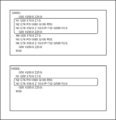
- FIG. 4 is a diagram showing an example of a machining program.
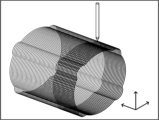
- FIG. 13 is a diagram showing an example of a processing path display.
- FIG. 13 is a diagram showing an example of a skeleton display.
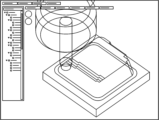
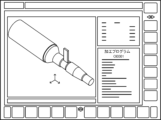
- FIG. 13 is a diagram showing an example of a simulation screen.
- FIG. 13 is a diagram for explaining differences in machining programs.
- FIG. 13 is a block diagram of a machining simulation support device according to a third embodiment.
- FIG. 13 is a block diagram of a machining simulation support device according to a fourth embodiment.
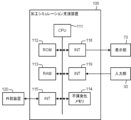
- FIG. 2 is a diagram illustrating a hardware configuration of the machining simulation support device.
- the machining simulation support device 100 receives settings of drawing conditions for a machining program, and supports the presentation of a simulation image according to a user's purpose.
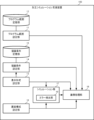
- the machining simulation support device 100 includes a program range setting unit 11, a program range storage unit 12, a display format setting unit 13, a drawing condition setting unit 14, a drawing condition storage unit 15, a screen configuration setting unit 16, a simulation unit 17, and an image processing unit 18.
- the machining simulation support device 100 is applied to information processing devices such as PCs (personal computers), servers, mobile terminals, numerical control devices, etc.
- the components of the machining simulation support device are classified by their functions, and do not necessarily have to be clearly distinguished in terms of physical configuration and program configuration.
- the program range storage unit 12 and the drawing condition storage unit 15 do not have to be included in the machining simulation support device 100.
- the program range storage unit 12 and the drawing condition storage unit 15 may be arranged on a network and referred to when the simulation is executed.
- the program range setting unit 11 accepts the setting of the range of the machining program.
- the program range storage unit 12 stores the set range of the machining program in association with the drawing conditions described later.
- the range of the machining program is set using sequence numbers, line numbers, tool types, NC codes, screen operations, etc.
- the range of the machining program can be set based on the sequence number.
- the sequence number is a number that the programmer assigns to the machining program, and serves as a marker to indicate the position of the program. In this embodiment, the sequence number is in the format of "N" + "number".
- the line number indicates the number of lines in the program.
- the scope of the machining program can be set based on the type of tool.
- NC codes include G codes and M codes. G codes are written in the machining program in the format of "G” + “number”, and M codes are written in the format of "M” + “number”.
- the range of the machining program is set by directly operating the display screen of the machining program. The range setting may be performed using a touch panel, a cross key, or a pointing device.
- FIG. 2 An example of a program range setting screen is shown in Fig. 2.
- the program name is identification information of the machining program.
- a file path may be input as the program name.
- machining programs designated by program names are arranged. The user may set the range of the machining programs using a pointing device or a touch panel.
- the program range setting screen in FIG. 2 is an example. On the program range setting screen, it is sufficient if the range of the machining programs can be selected from settings such as sequence numbers, line numbers, tools, and NC codes.
- the range setting of the machining program will be specifically described with reference to an example of the machining program in FIG. It is assumed that the program range setting unit 11 has received the settings of the machining program name "O0001", sequence numbers "N1, N2, N3", and tool type "T03" as the range of the machining programs.
- the program range setting unit 11 searches for blocks with sequence numbers "N1, N2, N3” and blocks that use the tool "T03" in the machining program "O0001". There is no block that uses the tool "T03" in the machining program "O0001". Therefore, the sequence numbers "N1, N2, N3" become the setting range of the drawing conditions.
- the program range setting unit 11 has received settings of a machining program name "O0002" and an NC code "G76".
- the program range setting unit 11 searches for a block with NC code "G76” in the machining program "O0002".
- the NC code "G76” is used in sequence numbers "N2, N3”. Therefore, the blocks with sequence numbers "N2, N3" become the setting range of the drawing conditions.
- the display format setting unit 13 accepts the setting of the display format of the simulation image.
- the display formats include two-dimensional display, three-dimensional display, thermograph, machining path display, solid (non-transparent) display, skeleton (transparent) display, etc.
- thermograph is a color display of temperature. For example, temperatures are expressed by colors such as "10-20°C: blue” and "20-30°C: yellow.”
- the machining path display shows the movement path of the machining point of the tool as shown in Figure 4.
- the solid display is an image that is close to the actual machining.
- the solid display displays the components of the simulation image without transparency.
- the components include the tool, work, arm, head, etc.
- components are displayed in a skeleton form as shown in Fig. 5.
- the movement of a tool that is blocked by other components can be confirmed.
- the drawing condition setting unit 14 accepts settings of drawing conditions for the simulation image.
- the drawing condition storage unit 15 stores the drawing conditions for the simulation image in association with the processing program.
- the drawing conditions include display speed, brightness, drawing color, resolution, frame rate, bit rate, enlargement/reduction ratio, light source direction/type/intensity, viewpoint, etc.
- the display speed is the speed at which an image advances over a certain period of time. For example, the normal display speed is "1," and "1/4x,”"1/2x,”"2x,””4x,” etc. are specified. Specifying a multiple less than "1" results in slow motion. Specifying a multiple greater than "1" results in fast forward. Specifying slow motion ensures that there is sufficient time to review the image. Specifying fast forward reduces the time required to review the image.
- the luminance is an index representing the brightness of the display unit 70. The higher the luminance, the brighter the screen.
- the drawing colors can be set for the components, uncut parts, cut parts, cut-in parts, remaining parts, parts in contact with the tool, etc. The drawing colors may be specified using a color palette or the like.
- Resolution is a number that indicates the density of pixels in a bitmap image. The higher the resolution, the more detailed the image will be, and the lower the resolution, the more grainy the image will be.
- the frame rate is the number of images that make up one second of video. A higher frame rate makes the image smoother, but the data volume increases. In the same way, if you increase the frame rate, the image quality will become rougher.
- Bitrate is the amount of data transferred or processed per second. It is determined by factors such as resolution and frame rate. The higher the bitrate, the higher the image quality, and the lower the bitrate, the lower the image quality.
- the area to be enlarged, the center point of the enlargement/reduction, etc. may be set.
- the direction of the light source includes the position of the light source and the direction of the light beam, etc.
- the types of light source include a parallel light source, a point light source, a spotlight, etc.
- the viewpoint sets the camera position, camera direction, etc.
- the viewpoint can also be set using a pointing device or touch panel.
- Fig. 6 is an example of a drawing condition setting screen.
- the drawing condition setting screen in Fig. 6 accepts display speed, brightness, drawing color, resolution, frame rate, bit rate, enlargement/reduction rate, enlargement area setting, light source setting, and viewpoint setting.
- drawing conditions can be set for two ranges, a range "D1" and an "unset range”.
- the range "D1” is the range of the machining program set by the program range setting unit 11.
- the "unset range” is the range that has not been set by the program range setting unit 11.
- the unset range may be set as the default to reduce the burden on the user.
- drawing conditions for the machining program range "D1" and drawing conditions for an unset range are set.
- a display speed of "0.5x” and a bit rate of "2Mbps” are set for the machining program range "D1".
- a display speed of "5.0x” and a bit rate of "2Mbps” are set for the unset range.
- range "D1" will be in slow motion.
- the display speed for the "unset range” is "5.0x", it will be in fast forward.
- the input items for drawing colors differ depending on the display format. For example, for a thermograph, a color is set for each temperature. For solid display/skeleton display, colors are set for components, uncut areas, cut areas, cut-in areas, remaining cut areas, etc. For machining path display, colors are set for components, machining paths, etc. It should be noted that the drawing condition setting screen in FIG. 6 is just an example, and the screen configuration is not limited to this.
- the screen layout setting unit 16 allows the user to set the screen layout.
- the drawing condition setting unit 14 accepts drawing conditions for each screen.
- a screen layout can be set in which the screen is divided into two, with the entire workpiece displayed on one screen and an enlarged view of the machining points displayed on the other screen.
- the simulation unit 17 analyzes the machining program and creates a simulation image. Existing technology is used to create the simulation image.
- the image processing unit 18 reads out the drawing conditions associated with that range and performs image processing according to the read drawing conditions. If multiple screens are set, the image processing unit 18 reads out the drawing conditions for each screen, performs image processing according to the read drawing conditions, and combines the screens in the layout set by the screen configuration setting unit 16. The simulation image created by the image processing unit 18 is displayed on the display unit 70.
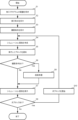
- machining simulation support device 100 The operation of the machining simulation support device 100 will be described with reference to FIG. 7. Note that the order of the steps in the following description does not necessarily have to be as described above. For example, as will be described later, drawing condition settings may be accepted while the machining simulation is being executed.
- the machining simulation support device 100 accepts the range setting of the machining program.
- the range is set using sequence numbers, line numbers, tool types, NC codes, screen operations, etc. (Step S1).
- the machining simulation support device 100 accepts the setting of the display format of the simulation image.
- Display formats include 2D display/3D display, thermograph, machining path display, solid display, skeleton display, cross-sectional view display, etc. (Step S2).
- the machining simulation support device 100 accepts the settings of drawing conditions.
- the drawing conditions include display speed, brightness, drawing color, resolution, frame rate, bit rate, enlargement/reduction ratio, light source direction/type/intensity, viewpoint, etc. (step S3).
- the simulation unit 17 executes the blocks of the machining program and creates a simulation image (step S4).
- the simulation image is an animation of the operation of the machine tool when the blocks of the machining program are executed.
- a block means a line of the machining program. Existing technology is used to create the simulation image.
- the simulation unit 17 notifies the image processing unit 18 of which block has been executed (step S5).
- the image processing unit 18 refers to the program range setting unit 11 and determines whether or not drawing conditions are set for the block that is the source of the simulation image. If no drawing conditions are set for the block (step S6; No), the created simulation image is displayed as is on the display unit 70 (step S7).
- step S6 If drawing conditions are set for the block (step S6; Yes), the drawing conditions are read out, image processing is performed on the simulation image in accordance with the drawing conditions (step S8), and the processed simulation image is displayed on the display unit 70 (step S7).
- image processing is performed on the multiple screens, an image combining the multiple screens is created, and the image is displayed on the display unit 70.
- step S9 the simulation unit 17 searches to see if the next block exists. If the next block exists (step S9; Yes), the simulation unit 17 reads the next block of the machining program (step S10) and proceeds to step S4. If all blocks have been executed (step S9; No), the simulation ends.
- the first form of the machining simulation support device 100 accepts the range setting of the machining program and the setting of the drawing conditions for the machining program, and performs image processing on the simulation image of the machining program that has been set according to the set drawing conditions.
- the drawing conditions can be set arbitrarily according to the user's purpose.
- the order of operations of the machining simulation support device 100 of the present embodiment is not limited to the above-mentioned flowchart.
- the simulation and the setting of the drawing conditions may be executed in parallel.
- a simulation image and a running machining program are displayed at the same time.
- the user can set drawing conditions while checking the simulation image. After setting the drawing conditions, if the simulation is run again, a simulation image with drawing conditions that meet the user's purpose will be drawn.
- the program range setting unit 11 calculates the range of the machining program based on the user's input.
- the two machining programs in FIG. 9 have different codes for sequence number "N3".
- the code for sequence number "N3” is "G76 X58.0 Z-53.0 P1732 Q500 F2.0;”
- the code for sequence number "N3” is "G76 X60.0 Z-50.0 P1732 Q500 F2.0;”.
- the program range setting unit 11 detects such differences between machining programs. In the process of creating a machining program, the program is frequently revised. By setting drawing conditions for the difference, the user can check the revisions under drawing conditions that suit their purpose.
- the range of the machining program is identified from the coordinate values of the component.
- the point of the target component is set as the "tool cutting edge” and the coordinate values are set as "-10 ⁇ x ⁇ 10, -10 ⁇ y ⁇ 10, 0 ⁇ z ⁇ 5".
- the simulation unit 17 calculates the tool coordinates from the machining program. Based on the tool coordinates calculated by the simulation unit 17, the program range setting unit 11 identifies the range of the machining program when the tool coordinates pass through the coordinate values.
- the drawing condition setting unit 14 accepts the setting of drawing conditions for the identified range of the machining program. Note that the coordinate values may be input by a touch panel or pointing device instead of numerically.
- Fig. 10 is a block diagram of a machining simulation support device 100 of the third embodiment.
- the simulation unit 17 of the third embodiment includes an error detection unit 19.
- the error detection unit 19 executes a simulation to detect an error and identifies the range of the machining program that causes the error.
- Existing technology is used to detect the error and identify the range of the machining program that causes the error.
- the drawing condition setting unit 14 accepts the setting of drawing conditions for the location where an error occurs in the processing program.
- the drawing conditions may be set in advance by the user before the simulation is executed. Also, when the simulation is executed and the simulation unit detects an error, it may present the user with a simulation image and the processing program at the time the error occurred and accept the drawing conditions.
- the drawing conditions include display speed, brightness, drawing color, resolution, frame rate, bit rate, zoom ratio, light source, viewpoint, etc.
- the simulation unit 17 identifies the machining program that caused the error.
- the image processing unit 18 reads out the drawing conditions from the drawing condition storage unit 15, and performs image processing on the simulation image generated based on the machining program that caused the error. If multiple screens are set, the image processing unit 18 reads out the drawing conditions for each screen, performs image processing according to the read drawing conditions, and combines the screens in the arrangement set by the screen configuration setting unit 16 to create a simulation image.
- the drawing conditions associated with the machining program to be simulated are read out and image processing is automatically performed.
- the range of the machining program stored in the program range storage unit 12 and the drawing conditions stored in the drawing condition storage unit 15 are associated with the identification information of the machining program.
- the machining simulation support device 100 of the fourth embodiment includes a drawing condition reading unit 20 as shown in Fig. 11.
- the drawing condition reading unit 20 reads out the range of the machining program and the drawing conditions associated with the identification information of the machining program, and causes the image processing unit 18 to execute image processing.
- previously set drawing conditions can be reused.
- the program range storage unit 12 and the drawing condition storage unit 15 are arranged on a network, the drawing conditions can be shared.
- FIG. 12 is a hardware configuration diagram of the machining simulation support device 100.
- the machining simulation support device 100 includes a CPU 111 that controls the entire machining simulation support device 100, a ROM 112 that records programs and data, and a RAM 113 for temporarily expanding data.
- the CPU 111 reads out the system program recorded in the ROM 112 via the bus, and executes the machining simulation support process according to the system program.
- the non-volatile memory 114 is backed up by, for example, a battery (not shown), and the memory state is maintained even when the machining simulation support device 100 is powered off.
- the non-volatile memory 114 stores various data such as programs read from the external device 120 via the interfaces 115, 118, and 119 and user operations input via the input unit 30.
- the non-volatile memory 114 may store programs and data for executing the machining simulation support process of the present disclosure.
- the display unit 70 displays various data, simulation images, and the like.
- the interface 115 is an interface for connecting the machining simulation support device 100 to an external device 120 such as an adapter. Programs, various parameters, etc. are read from the external device 120.
- the interface 118 is an interface for connecting the machining simulation support device 100 to a display unit 70 such as a liquid crystal display. The display unit 70 displays a simulation image and the like obtained as a result of executing each data, program, and the like loaded onto the memory.
- the interface 119 is an interface for connecting the machining simulation support device 100 to an input unit 30 such as a keyboard, a pointing device, etc. The input unit 30 passes instructions, data, etc. based on operations by an operator to the CPU 111 via the interface 119.
- the machining simulation support device (100) includes a program range setting unit (11) that accepts the setting of a machining program range, a drawing condition setting unit (14) that accepts the setting of drawing conditions for the set machining program range, a simulation unit (17) that generates a simulation image based on the machining program, and an image processing unit (18) that applies image processing of the drawing conditions set for the machining program range to the simulation image generated based on the machining program of the set range.
- the program range setting unit (11) accepts at least one of a sequence number, a line number, a tool type, an NC code, and a screen operation as a setting of the range of the machining program.
- the program range setting unit (11) detects a difference between two or more machining programs, and the drawing condition setting unit (14) accepts the setting of drawing conditions by taking the difference as the range of the machining programs.
- the program range setting unit (11) accepts settings of coordinate values of components of a machine tool that are the control target of a machining program, the simulation unit (17) specifies the range of the machining program when the components of the machine tool pass through the coordinate values, and the drawing condition setting unit (14) accepts settings of drawing conditions for the range of the machining program specified based on the coordinate values.
- the drawing condition setting unit (14) accepts at least one of display speed, brightness, drawing color, resolution, frame rate, bit rate, enlargement/reduction ratio, light source, and viewpoint as the drawing condition.
- the processing simulation support device (100) includes a display format setting unit (13) that accepts selection of a display format for the simulation image, and the drawing conditions are associated with display conditions.
- the drawing condition setting unit (14) accepts settings of drawing conditions for a machining program that has not been set yet.
- the simulation unit (17) detects an error occurring during execution of the machining program, and the drawing condition setting unit (14) accepts settings of drawing conditions for a location in the machining program where an error has occurred.
- processors CPUs
Landscapes
- Engineering & Computer Science (AREA)
- Human Computer Interaction (AREA)
- Manufacturing & Machinery (AREA)
- Physics & Mathematics (AREA)
- General Physics & Mathematics (AREA)
- Automation & Control Theory (AREA)
- Numerical Control (AREA)
Priority Applications (2)
| Application Number | Priority Date | Filing Date | Title |
|---|---|---|---|
| JP2024551069A JPWO2024084555A1 (https=) | 2022-10-17 | 2022-10-17 | |
| PCT/JP2022/038650 WO2024084555A1 (ja) | 2022-10-17 | 2022-10-17 | 加工シミュレーション支援装置およびコンピュータが読み取り可能な記憶媒体 |
Applications Claiming Priority (1)
| Application Number | Priority Date | Filing Date | Title |
|---|---|---|---|
| PCT/JP2022/038650 WO2024084555A1 (ja) | 2022-10-17 | 2022-10-17 | 加工シミュレーション支援装置およびコンピュータが読み取り可能な記憶媒体 |
Publications (1)
| Publication Number | Publication Date |
|---|---|
| WO2024084555A1 true WO2024084555A1 (ja) | 2024-04-25 |
Family
ID=90737141
Family Applications (1)
| Application Number | Title | Priority Date | Filing Date |
|---|---|---|---|
| PCT/JP2022/038650 Ceased WO2024084555A1 (ja) | 2022-10-17 | 2022-10-17 | 加工シミュレーション支援装置およびコンピュータが読み取り可能な記憶媒体 |
Country Status (2)
| Country | Link |
|---|---|
| JP (1) | JPWO2024084555A1 (https=) |
| WO (1) | WO2024084555A1 (https=) |
Citations (7)
| Publication number | Priority date | Publication date | Assignee | Title |
|---|---|---|---|---|
| JPS62224435A (ja) * | 1986-03-25 | 1987-10-02 | Anritsu Corp | 加工プログラム検査装置 |
| JPH0262607A (ja) * | 1988-08-29 | 1990-03-02 | Fanuc Ltd | プログラムチェック描画方式 |
| JP2002082704A (ja) * | 2000-09-05 | 2002-03-22 | Mori Seiki Co Ltd | Nc加工シミュレーション装置 |
| JP2003271215A (ja) * | 2002-03-13 | 2003-09-26 | Citizen Watch Co Ltd | 数値制御工作機械の加工プログラムチェック方法およびチェック装置ならびにそれを備えた数値制御工作機械 |
| JP2006085485A (ja) * | 2004-09-16 | 2006-03-30 | Yamazaki Mazak Corp | Nc加工シミュレーション装置 |
| JP2009053823A (ja) * | 2007-08-24 | 2009-03-12 | Okuma Corp | 加工シミュレーション装置 |
| JP2016018539A (ja) * | 2014-07-11 | 2016-02-01 | 三菱電機株式会社 | シミュレーション画像表示装置 |
-
2022
- 2022-10-17 JP JP2024551069A patent/JPWO2024084555A1/ja active Pending
- 2022-10-17 WO PCT/JP2022/038650 patent/WO2024084555A1/ja not_active Ceased
Patent Citations (7)
| Publication number | Priority date | Publication date | Assignee | Title |
|---|---|---|---|---|
| JPS62224435A (ja) * | 1986-03-25 | 1987-10-02 | Anritsu Corp | 加工プログラム検査装置 |
| JPH0262607A (ja) * | 1988-08-29 | 1990-03-02 | Fanuc Ltd | プログラムチェック描画方式 |
| JP2002082704A (ja) * | 2000-09-05 | 2002-03-22 | Mori Seiki Co Ltd | Nc加工シミュレーション装置 |
| JP2003271215A (ja) * | 2002-03-13 | 2003-09-26 | Citizen Watch Co Ltd | 数値制御工作機械の加工プログラムチェック方法およびチェック装置ならびにそれを備えた数値制御工作機械 |
| JP2006085485A (ja) * | 2004-09-16 | 2006-03-30 | Yamazaki Mazak Corp | Nc加工シミュレーション装置 |
| JP2009053823A (ja) * | 2007-08-24 | 2009-03-12 | Okuma Corp | 加工シミュレーション装置 |
| JP2016018539A (ja) * | 2014-07-11 | 2016-02-01 | 三菱電機株式会社 | シミュレーション画像表示装置 |
Also Published As
| Publication number | Publication date |
|---|---|
| JPWO2024084555A1 (https=) | 2024-04-25 |
Similar Documents
| Publication | Publication Date | Title |
|---|---|---|
| US10078484B2 (en) | Multivision display control device and multivision system | |
| JP6867457B2 (ja) | 情報処理装置 | |
| US20130338809A1 (en) | Simulation apparatus of numerical controller | |
| US10437229B2 (en) | Numerical controller | |
| JP5527521B2 (ja) | 階層構造表示装置、階層構造表示方法および階層構造表示制御プログラム | |
| US20200125245A1 (en) | Control device, communication terminal, and control system | |
| JP5379847B2 (ja) | 編集装置、編集方法およびプログラム | |
| US20210012501A1 (en) | Information processing method, storage medium, and information processing apparatus | |
| AU2019229348A1 (en) | Pre-filtering for visual object searching of documents | |
| JP6470323B2 (ja) | 情報表示システム | |
| WO2024084555A1 (ja) | 加工シミュレーション支援装置およびコンピュータが読み取り可能な記憶媒体 | |
| KR101951586B1 (ko) | 오브젝트 조정 툴 및 기록 매체 | |
| WO2023026490A1 (ja) | 教示装置 | |
| US20200293182A1 (en) | Information processing apparatus and non-transitory computer readable medium | |
| KR101926463B1 (ko) | 영상 처리를 위한 공정 관리장치 및 그 동작 방법 | |
| JP4692102B2 (ja) | 画像領域の指定 | |
| JP6574698B2 (ja) | 情報処理装置、情報処理装置のデータ処理方法、及びプログラム | |
| CN115048008B (zh) | 一种hmi画面中对象的可视化方法和设备 | |
| JP2009301273A (ja) | ガントチャート表示方法、データ処理装置及びプログラム | |
| KR102855749B1 (ko) | 공작기계 모니터 화면의 그래픽 기반 이미지 표현 방법 | |
| JP6188365B2 (ja) | 情報処理装置、情報処理装置の制御方法、コンピュータプログラム | |
| JP2025025416A (ja) | プログラム、情報処理装置、及び情報処理装置の制御方法 | |
| WO2024194990A1 (ja) | 加工情報表示装置 | |
| JP2707142B2 (ja) | 隠線部破線化処理方法 | |
| JP2013152603A (ja) | グラフィカルユーザインターフェース生成装置 |
Legal Events
| Date | Code | Title | Description |
|---|---|---|---|
| 121 | Ep: the epo has been informed by wipo that ep was designated in this application |
Ref document number: 22962667 Country of ref document: EP Kind code of ref document: A1 |
|
| WWE | Wipo information: entry into national phase |
Ref document number: 2024551069 Country of ref document: JP |
|
| NENP | Non-entry into the national phase |
Ref country code: DE |
|
| 122 | Ep: pct application non-entry in european phase |
Ref document number: 22962667 Country of ref document: EP Kind code of ref document: A1 |