WO2024053263A1 - 自動分析装置 - Google Patents
自動分析装置 Download PDFInfo
- Publication number
- WO2024053263A1 WO2024053263A1 PCT/JP2023/026697 JP2023026697W WO2024053263A1 WO 2024053263 A1 WO2024053263 A1 WO 2024053263A1 JP 2023026697 W JP2023026697 W JP 2023026697W WO 2024053263 A1 WO2024053263 A1 WO 2024053263A1
- Authority
- WO
- WIPO (PCT)
- Prior art keywords
- shortcut
- screen
- registration
- button
- data processing
- Prior art date
- Legal status (The legal status is an assumption and is not a legal conclusion. Google has not performed a legal analysis and makes no representation as to the accuracy of the status listed.)
- Ceased
Links
Images









Classifications
-
- G—PHYSICS
- G01—MEASURING; TESTING
- G01N—INVESTIGATING OR ANALYSING MATERIALS BY DETERMINING THEIR CHEMICAL OR PHYSICAL PROPERTIES
- G01N35/00—Automatic analysis not limited to methods or materials provided for in any single one of groups G01N1/00 - G01N33/00; Handling materials therefor
-
- G—PHYSICS
- G06—COMPUTING OR CALCULATING; COUNTING
- G06F—ELECTRIC DIGITAL DATA PROCESSING
- G06F3/00—Input arrangements for transferring data to be processed into a form capable of being handled by the computer; Output arrangements for transferring data from processing unit to output unit, e.g. interface arrangements
- G06F3/01—Input arrangements or combined input and output arrangements for interaction between user and computer
- G06F3/048—Interaction techniques based on graphical user interfaces [GUI]
- G06F3/0481—Interaction techniques based on graphical user interfaces [GUI] based on specific properties of the displayed interaction object or a metaphor-based environment, e.g. interaction with desktop elements like windows or icons, or assisted by a cursor's changing behaviour or appearance
- G06F3/0482—Interaction with lists of selectable items, e.g. menus
Definitions
- the present invention relates to an automatic analyzer.
- Patent Document 1 discloses that the number of times the operation menu is used and the order of the number of times of use are stored in a storage means for each operator who operates the analyzer, and the number of times the operation menu is used the most A method has been proposed in which the operation menus are displayed on the display unit in order from the upper level operation menu.
- the display priority order of the operation menu can be changed according to the frequency of use of each user who handles the analysis device.
- the display priority of the operation menu can be changed depending on the frequency of use, the layout of the operation menu cannot be changed. Therefore, even if operation menus with high priorities are displayed in order, it may be difficult for some users to recognize them. Further, the user cannot customize the display by displaying items separately from a wide variety of operation menus.
- An automatic analyzer that is an embodiment of the present invention is an automatic analyzer that includes one or more analysis modules for analyzing a sample, and has a data processing device that accepts operation instructions from a user. , it is possible to display on the display device an operation menu screen that displays operation menus for hierarchically defined automatic analyzers, and a shortcut screen that has multiple shortcut buttons for executing specific operations included in the operation menu.
- the data processing device executes the predetermined operation included in the operation menu screen, and the arrangement of the shortcut buttons on the shortcut screen is Determined by the user.
- the automatic analyzer can be operated from the shortcut screen, which has shortcut buttons for executing specific operations selected and laid out by the user, reducing operation time and improving the convenience of the automatic analyzer. can do.
- FIG. 1 is a schematic diagram of the basic configuration of an automatic analyzer.
- FIG. 1 is a schematic diagram of a data processing device. This is an example of the logon screen of the integrated software. This is an example of an operation menu screen of the integrated software. This is an example of an operation execution screen of the integrated software.
- This is an example of a shortcut screen after shortcut registration This is an example of the data structure of shortcut data.
- This is another example of a shortcut registration screen.
- FIG. 3 is a diagram for explaining a method of adding an operation to operation log registration data. This is another example of a shortcut registration screen. This is an example of a shortcut registration list screen. This is an example of a shortcut registration screen. It is a flowchart for generating a shortcut button (registered).
- the automatic analyzer 100 is a device that measures a reaction solution obtained by reacting a sample and a reagent, and mainly includes a sample transport mechanism 105, a reaction disk 112, a reagent disk 110, a sample dispensing mechanism 101, a reagent dispensing mechanism 107, and a stirring mechanism. It includes a mechanism 114, a measuring section (108, 109), a cleaning mechanism 106, a controller 102, a data processing device 103, and the like.
- the sample is a patient's blood, urine, or the like.
- Sample analysis processing by the automatic analyzer 100 is generally performed in the following order.
- the rack 104 is installed in a carry-in device or the like, and is carried to the sample collection position of the automatic analyzer 100 by the sample transport mechanism 105 according to instructions from the data processing device 103.
- the sample is dispensed by the sample dispensing mechanism 101 into a reaction container 113 on a reaction disk 112.
- the sample dispensing mechanism 101 performs sample dispensing as many times as necessary depending on the analysis item requested for the sample.
- the reagent dispensing mechanism 107 dispenses a reagent to be used for analysis from a reagent bottle 111 on a reagent disk 110 to a reaction container 113 into which a sample was previously dispensed.
- the stirring mechanism 114 stirs the reaction solution prepared by mixing the sample and reagent in the reaction container 113.
- light generated from the light source 108 is transmitted through the reaction container 113 containing the stirred reaction solution, and the intensity of the transmitted light is measured by the spectrophotometer 109.
- the light intensity measured by the spectrophotometer 109 is transmitted to the controller 102.
- the controller 102 performs calculations to determine the concentration of a predetermined component in the sample, and displays the results on a display device or the like or stores them in the data processing device 103.
- FIG. 2 shows a schematic diagram of the data processing device 103.
- a personal computer 201 is generally used as the data processing device 103.
- the personal computer 201 includes a CPU 202 that processes data, a RAM 203 that is a temporary data storage area, and a storage device 204 that is a data storage area, as well as a display 205 such as a liquid crystal monitor, a keyboard, a mouse, etc.
- An input device 206 is connected thereto.
- Integrated software is installed in the storage device 204.
- the integrated software is software for the user to operate the automatic analyzer, and displays a GUI (graphical user interface) on the display 205, allowing the user to operate the automatic analyzer using a mouse, keyboard, etc.
- One of its functions is to provide information.
- the user starts up the integrated software stored in the storage device 204 via the input device 206.
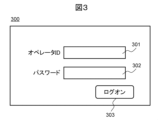
- a logon screen 300 shown in FIG. 3 is displayed on the display 205.
- the user operates the input device 206 to input the operator ID into the operator ID input box 301 and the password into the password input box 302.
- an operation menu for the data processing apparatus 103 is displayed.
- Users are mainly system administrators, method developers, operators, etc. Note that the reason for requesting the password entry on the logon screen 300 is to strengthen security, and the password entry is not necessarily required.
- the operation menu screen after logon can also be made different for each operator ID.
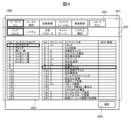
- FIG. 4 shows an example of the operation menu screen of the integrated software that is displayed after the user logs on.
- the operation menu screen 400 includes a main tab area 401, a subtab area 402, an operation menu area 403, and a selection button 404.
- the main tab area 401 and the sub-tab area 402 are toolbars in which operation menus are arranged.
- subtabs corresponding to the main tab selected in the main tab area 401 are displayed.
- an operation menu corresponding to the subtab selected in the subtab area 402 is displayed.
- the operation menu includes, for example, execution of maintenance and parameter settings for analysis conditions.
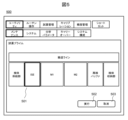
- the operation execution screen 500 displays an execution screen corresponding to the selected subtab.
- an execution module selection screen 501 is displayed. The user selects the module to be executed from the execution module selection screen 501 and selects the execution button 502.
- the electrolyte analysis module ISE
- a reagent prime operation is performed on the electrolyte analysis module.
- the cancel button 503 is selected, the module selection is canceled and the screen transitions to the operation menu screen 400.
- a shortcut tab 405 is provided in the main tab area 401 of the operation menu screen 400 (see FIG. 4).
- the user can create shortcuts for frequently used operations and use the shortcuts from the shortcut screen transitioned from the shortcut tab 405. This shortcut screen can be customized for each user to further enhance user convenience.
- FIG. 6 shows an example of a shortcut screen 600.
- the user registers/cancels shortcuts and performs operations registered as shortcuts from the shortcut screen 600.
- the shortcut screen 600 displays the toolbar that was displayed on the operation menu screen 400 and a group of shortcut buttons arranged in a matrix.
- the shortcut screen 600 includes toolbars 401 and 402, coordinate information 602, a shortcut button 603, a shortcut registration button 604, and a registration cancellation button 605.
- Sheet tabs 601 are displayed in the subtab area 402, and by selecting one of the sheet tabs 601, the matrix of shortcut buttons 603 arranged based on coordinate information 602 can be switched. Note that none of the shortcut buttons 603 in FIG. 6 have any shortcuts registered, so nothing is displayed on the shortcut buttons.
- By selecting the shortcut registration button 604 a transition is made to the shortcut registration screen shown in FIG. 7A.
- the shortcut registration screen 700 shown in FIG. 7A includes a registered shortcut display area 701, a first registration method selection button 702, a sheet name selection button 703, a coordinate information (X coordinate) selection button 704, a coordinate information (Y coordinate) selection button 705, A registration button 706 is provided.
- FIG. 7A shows the screen before detailed information is entered.
- the first registration method selection button 702 is a button for executing a registration method for selecting an operation to be registered as a shortcut from the operation menu. When the user selects the first registration method selection button 702, the shortcut shown in FIG. 8 is added. Transition to screen.
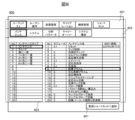
- the shortcut addition screen 800 is a screen for selecting an operation menu, and displays the same operation menu as the operation menu screen 400.
- the user selects an operation to be registered as a shortcut from the main tab area 401, sub tab area 402, and operation menu area 403, and selects the add button 801.
- the integrated software stores in the storage device 204 an operation log in which the user selects an operation menu performed by the user on the shortcut addition screen 800.
- the operation name ("Reagent Prime" in this example) selected on the shortcut addition screen 800 is displayed in the registered shortcut display area 701. After that, as shown in FIG.
- FIG. 9A By selecting the registration button 706 in FIG. 7B, the reagent prime operation is registered in the shortcut button at the coordinates (A, 1) of sheet 1. This situation is shown in FIG. 9A.
- the shortcut button (registered) 901 at the coordinates (A, 1) of sheet 1 an operation name indicating the registered content is displayed.
- the shortcut button (registered) 901 the user executes the process of the linked operation log and transitions to the execution screen shown in FIG. 5. That is, the series of operations described in FIG. 4, such as selecting an operation from the main tab area 401, sub-tab area 402, and operation menu area 403 and selecting the selection button 404, can be omitted.
- FIG. 9B shows the data structure of shortcut data 910 created by the above processing.
- Shortcut data 910 is stored in storage device 204.
- the operator ID of the user who created the shortcut is registered in the operator ID 911, and the sheet name selection button 703 and coordinate information (X).
- the selected contents are registered in the coordinate information (Y coordinate) selection button 704, the coordinate information (Y coordinate) selection button 705, and the registration shortcut display area 701.
- a corresponding operation log may be registered in the operation log 916, or an address of the storage device 204 in which the operation log is stored may be registered.
- FIG. 16 shows a flowchart for generating a shortcut button (registered) as described above.
- This flowchart is executed by integrated software.
- the operator ID input from the logon screen 300 (see FIG. 3) is determined (S01), and if the shortcut tab 405 is selected from the operation menu screen 400 (see FIG. 4), the shortcut screen 600 (see FIG. 6) is displayed. (S02).
- the shortcut registration button 604 When the shortcut registration button 604 is selected, the screen changes to a shortcut registration screen 700 (see FIG. 7A) (S03).
- the first registration method selection button 702 By selecting the first registration method selection button 702, a transition is made to the shortcut addition screen 800 (S04), and the operation to be registered is selected (S05).
- the operation log on the shortcut addition screen 800 is stored in the storage device 204 (S06), and the selected operation name is displayed in the registered shortcut display area 701 of the shortcut registration screen 700 (S07). Further, the user inputs the sheet name and coordinate information on the shortcut registration screen 700 (FIG. 7B) (S08 to S10). When the user selects the registration button 706, the display position of the shortcut button and the registered operation are determined (S11). In the shortcut screen 600, the registered operation name is displayed on the shortcut button (registered) (S12, see FIG. 9A).
- the shortcut button (registered) 901 by executing an operation from the shortcut button (registered) 901, it is possible to reduce the trouble of searching for an operation from the main tab area 401, subtab area 402, and operation menu area 403, and for users who are not accustomed to screen operations. For this purpose, the effect of time reduction can be obtained. Further, since the arrangement of the shortcut buttons can be specified based on the coordinate information 602, the shortcut buttons can be freely laid out. For example, the effect of improving visibility can be obtained by the user's efforts, such as arranging related buttons side by side. Further, as shown in the shortcut data 910 (see FIG. 9B), since shortcuts are created for each user, the shortcut screen can be displayed in a layout for each operator ID input on the logon screen.
- the shortcut registration method is not limited to the above method. Other shortcut registration methods will be explained below.
- FIG. 10 is another example of the shortcut registration screen.
- a second registration method selection button 1001 is provided on the shortcut registration screen shown in FIG. 7A.
- the user creates a registration list in which operation logs are registered in advance.
- the operations registered in the registration list are associated with the shortcut buttons.
- the screen changes to a shortcut registration list screen 1100 shown in FIG. 11A.
- the shortcut registration list screen 1100 includes a registration list 1101 and a selection button 1102, and the registration list 1101 displays a list of operations added by the user for shortcut registration.
- the operation list is displayed based on operation log registration data 1110 created in advance by the user.
- 11B shows the data structure of the operation log registration data 1110.
- the operator ID 1111 the operator ID of the user who created the operation log registration data, in the date and time 1112, the creation date and time, in the operation name 1113, the selected operation name, and in the operation log 1114, the corresponding operation log may be registered,
- the address of the storage device 204 in which the operation log is stored may be registered.
- the operation log stored in the RAM 203 is used here when the user selects an operation menu on the operation menu screen 400.
- the situation is shown in FIG.
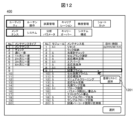
- the user When selecting an operation menu from the main tab area 401, subtab area 402, and operation menu area 403, the user performs a right-click operation with the mouse, which is the input device 206, on the operation menu. Select the registration addition button 1201 displayed by right-clicking.
- the operation log of the selected operation can be stored in the storage device 204, and the information can be added to the operation log registration data 1110. In this way, each time the user performs an operation from the operation menu screen 400, the user selectively adds an operation log to the operation log registration data 1110 for the operation for which shortcut registration is desired.
- FIG. 13 is another example of the shortcut registration screen.
- the shortcut registration screen 700c is provided with a third registration method selection button 1301 on the shortcut registration screen shown in FIG.
- the integrated software automatically stores an operation log related to the user's operation menu selection on the operation menu screen 400 in the storage device 204, and creates operation log registration data.
- the data structure of the operation log registration data may be the same as the data structure shown in FIG. 11B.
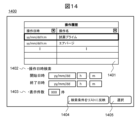
- the third registration method selection button 1301 is selected, the screen changes to a shortcut registration list screen 1400 shown in FIG. 14.
- the shortcut registration list screen 1400 includes an operation history list 1401, an operation date and time search 1402, a display number search 1403, a reflection button 1404, and a selection button 1405.
- the operation history list 1401 displays a list of user operation histories stored in the storage device 204 as operation log registration data. Thereafter, by selecting an operation to be registered as a shortcut from the operation history list 1401 and selecting a selection button 1405, the operation is displayed in the registered shortcut display area 701 of the shortcut registration screen 700c (see FIG. 13). Thereafter, by inputting the sheet name and coordinate information and selecting the registration button 706, registration of the shortcut button is completed.
- the operation history list 1401 of the shortcut registration list screen 1400 has a filter function. For example, by setting a filter on the operation name tab in FIG. 14, it is possible to display the information separately for each operation. This makes it possible to visualize which operations are used more frequently.
- an operation date and time search 1402 function is provided, and by inputting the start and end dates and times and selecting the reflect button 1404, the operation history of the specified time can be displayed. This makes it possible to extract and display operations that are frequently used by the user by time of day, making it possible to increase the number of shortcut options to be registered.
- a display number search 1403 that allows the user to specify the number of display items, and using it in combination with the filter function of the operation history list 1401 and the operation date and time search 1402, the user's search performance can be further improved.
- the number of operations that can be registered to one shortcut button 603 is one.
- Automatic analyzers require maintenance, management of measurement results, registration of remaining amounts of reagents, calibration measurements, control measurements, etc. before starting measurements, and the integrated software requires a wide range of operations. Depending on the operation, there may be items where it is desired to operate the device continuously without stopping the device. Therefore, it would be convenient to be able to perform multiple operations in sequence with a single shortcut button.
- FIG. 15 is an example of a shortcut registration screen that allows multiple operations to be performed continuously on one shortcut button.
- the shortcut registration screen 700d is provided with a registered shortcut list 1501 including the execution order and a cancel button 1502 on the shortcut registration screen shown in FIG.
- Operation names to be registered as shortcuts are added to the registered shortcut list 1501 using the first to third registration method selection buttons 702, 1001, and 1301. After that, select the operation name added to the registered shortcut list 1501, and specify the execution order on the execution order tab (1 for the first, 2 for the second).
- an operation added to the registered shortcut list 1501 can be canceled by selecting the name of the operation to be canceled and selecting the cancel button 1502. Thereafter, by inputting the sheet name and coordinate information and selecting the registration button 706, registration of the shortcut button that allows a series of operations to be executed continuously is completed.
- This registration method can save users the trouble of performing multiple operations from the main tab area 401, subtab area 402, and operation menu area 403, or selecting multiple shortcut buttons (registered) 901, and improves user operability. can be improved.
- the input screen transition method is not limited to the above method.
- the transition may be made to the shortcut registration screen 700 (see FIG. 7A).
- the coordinate information of the sheet tab 601 and the shortcut button (before registration) 603 is stored in the shortcut data 910 (see FIG. 9B), and the sheet name 703 and coordinate information 704 and 705 on the shortcut registration screen 700 are automatically input. It is better to make it .
- This modification allows the user to visually directly select a location (coordinates) to be registered and to register the shortcut while reducing the time required to operate the shortcut registration screen 700.
- FIG. 12 an example is shown in which, in order to add an operation log to the operation log registration data 1110, the user right-clicks the mouse and displays the add registration button 1201.
- This operation method may be replaced by a long press on the operation menu or by providing a button equivalent to the registration addition button 1201 on the operation menu itself.
- the input device 206 is not limited to a mouse, and a touch panel of a monitor may be used. Since the input device 206 used differs depending on the device and the user who operates it, by providing an easy-to-operate method according to each device, it is possible to obtain the effect of further improving the operability.
- the shortcut button is used to perform operations on the automatic analyzer such as maintenance.
- automatic analyzers there are cases where only the integrated software operation is required, such as managing measurement results, inputting request information for calibration and control, and registering sample measurement items, although the device itself is not operated. .
- Such operations can also be performed by opening the screen from the main tab area 401, sub tab area 402, and operation menu area 403, so shortcuts can be created in the same way.
- shortcut button (registered) 901 to be registered not only for the function of executing device operations but also for the function of transitioning to a screen, it is possible to reduce the time required to open a screen from the operation menu. It is.
- the color of the shortcut button (registered) 901 may be changeable. For example, the color scheme is changed depending on the frequency of use per month, per week, and per day. Thereby, visibility for the user can be improved.
- the names of the shortcut button (registered) 901 and sheet tab 601 may be changeable. Thereby, the shortcut selection screen can be customized, and the effect of improving the user's operability can be obtained.
- the present invention is not limited to the embodiments described above, and includes various modifications.
- the above-described embodiments and modifications are described in detail to make the present invention easier to understand, and the present invention is not necessarily limited to having all the configurations described.
Landscapes
- Engineering & Computer Science (AREA)
- Theoretical Computer Science (AREA)
- General Engineering & Computer Science (AREA)
- Physics & Mathematics (AREA)
- General Physics & Mathematics (AREA)
- Health & Medical Sciences (AREA)
- Human Computer Interaction (AREA)
- Life Sciences & Earth Sciences (AREA)
- Chemical & Material Sciences (AREA)
- Analytical Chemistry (AREA)
- Biochemistry (AREA)
- General Health & Medical Sciences (AREA)
- Immunology (AREA)
- Pathology (AREA)
- Automatic Analysis And Handling Materials Therefor (AREA)
Priority Applications (2)
| Application Number | Priority Date | Filing Date | Title |
|---|---|---|---|
| JP2024545481A JP7727857B2 (ja) | 2022-09-07 | 2023-07-20 | 自動分析装置 |
| CN202380056381.2A CN119604841A (zh) | 2022-09-07 | 2023-07-20 | 自动分析装置 |
Applications Claiming Priority (2)
| Application Number | Priority Date | Filing Date | Title |
|---|---|---|---|
| JP2022142090 | 2022-09-07 | ||
| JP2022-142090 | 2022-09-07 |
Publications (1)
| Publication Number | Publication Date |
|---|---|
| WO2024053263A1 true WO2024053263A1 (ja) | 2024-03-14 |
Family
ID=90192399
Family Applications (1)
| Application Number | Title | Priority Date | Filing Date |
|---|---|---|---|
| PCT/JP2023/026697 Ceased WO2024053263A1 (ja) | 2022-09-07 | 2023-07-20 | 自動分析装置 |
Country Status (3)
| Country | Link |
|---|---|
| JP (1) | JP7727857B2 (https=) |
| CN (1) | CN119604841A (https=) |
| WO (1) | WO2024053263A1 (https=) |
Citations (3)
| Publication number | Priority date | Publication date | Assignee | Title |
|---|---|---|---|---|
| JP2016062436A (ja) * | 2014-09-19 | 2016-04-25 | ブラザー工業株式会社 | 表示制御装置、表示制御方法、及び記録媒体 |
| JP2017085298A (ja) * | 2015-10-27 | 2017-05-18 | シャープ株式会社 | 情報処理装置及び画像形成装置 |
| JP2021532513A (ja) * | 2018-07-17 | 2021-11-25 | メソディカル マインド,エルエルシー. | グラフィカルユーザインターフェースシステム |
Family Cites Families (13)
| Publication number | Priority date | Publication date | Assignee | Title |
|---|---|---|---|---|
| JP2005309618A (ja) * | 2004-04-19 | 2005-11-04 | Canon Inc | 情報処理装置及びその制御方法 |
| JP4755874B2 (ja) * | 2005-09-27 | 2011-08-24 | シスメックス株式会社 | 検体分析装置、検体分析用処理コンピュータ、検体分析装置における操作用画面の表示方法、及び検体分析装置用処理コンピュータのためのコンピュータプログラム |
| JP2007327780A (ja) * | 2006-06-06 | 2007-12-20 | Olympus Corp | 自動分析装置のメニュー表示方法、自動分析装置、およびプログラム |
| KR20080054161A (ko) * | 2006-12-12 | 2008-06-17 | 주식회사 메디슨 | 초음파 진단 시스템의 터치 스크린에서 측정 메뉴의 단축버튼을 제공하는 방법 |
| JP4960144B2 (ja) * | 2007-04-27 | 2012-06-27 | シスメックス株式会社 | 検体測定装置 |
| JP4994184B2 (ja) * | 2007-10-22 | 2012-08-08 | 京セラドキュメントソリューションズ株式会社 | 画像処理装置 |
| JP2011203197A (ja) * | 2010-03-26 | 2011-10-13 | Sysmex Corp | 検体処理装置 |
| JP2012112843A (ja) * | 2010-11-25 | 2012-06-14 | Hitachi High-Technologies Corp | 分析装置の操作メニュー表示制御方法及び装置 |
| JP6374148B2 (ja) * | 2013-08-30 | 2018-08-15 | シスメックス株式会社 | 検体分析装置及び検体分析方法 |
| JP6812821B2 (ja) * | 2017-02-10 | 2021-01-13 | ブラザー工業株式会社 | 機能実行装置、機能実行方法および機能実行プログラム |
| JP7333216B2 (ja) * | 2019-07-01 | 2023-08-24 | 富士レビオ株式会社 | 表示装置、プログラム及び表示方法 |
| JP7808428B2 (ja) * | 2020-09-04 | 2026-01-29 | 株式会社島津製作所 | 自動分析装置 |
| JP2022061391A (ja) * | 2020-10-06 | 2022-04-18 | オリンパス株式会社 | 実験支援装置、実験支援システム、実験支援方法、プログラム |
-
2023
- 2023-07-20 CN CN202380056381.2A patent/CN119604841A/zh active Pending
- 2023-07-20 WO PCT/JP2023/026697 patent/WO2024053263A1/ja not_active Ceased
- 2023-07-20 JP JP2024545481A patent/JP7727857B2/ja active Active
Patent Citations (3)
| Publication number | Priority date | Publication date | Assignee | Title |
|---|---|---|---|---|
| JP2016062436A (ja) * | 2014-09-19 | 2016-04-25 | ブラザー工業株式会社 | 表示制御装置、表示制御方法、及び記録媒体 |
| JP2017085298A (ja) * | 2015-10-27 | 2017-05-18 | シャープ株式会社 | 情報処理装置及び画像形成装置 |
| JP2021532513A (ja) * | 2018-07-17 | 2021-11-25 | メソディカル マインド,エルエルシー. | グラフィカルユーザインターフェースシステム |
Also Published As
| Publication number | Publication date |
|---|---|
| JPWO2024053263A1 (https=) | 2024-03-14 |
| CN119604841A (zh) | 2025-03-11 |
| JP7727857B2 (ja) | 2025-08-21 |
Similar Documents
| Publication | Publication Date | Title |
|---|---|---|
| JP4755874B2 (ja) | 検体分析装置、検体分析用処理コンピュータ、検体分析装置における操作用画面の表示方法、及び検体分析装置用処理コンピュータのためのコンピュータプログラム | |
| US7146384B2 (en) | System and method for data analysis, manipulation, and visualization | |
| EP2333556B1 (en) | Automatic analyzer | |
| US6442440B1 (en) | Computer interface module having a flat menu | |
| US20120010899A1 (en) | Clinical test information system and non-transitory storage medium | |
| JP2008299870A (ja) | ユーザインターフェースのために受動的ルックアヘッドを供給するための方法と装置 | |
| JP6585338B2 (ja) | 生体試料の処理方法および分析システム | |
| US20110208536A1 (en) | Clinical test information managing apparatus and non-transitory storage medium | |
| JP5500861B2 (ja) | 自動分析装置 | |
| JPWO2019021625A1 (ja) | 自動分析装置 | |
| JP3232973B2 (ja) | 自動分析装置 | |
| JP6259663B2 (ja) | 自動分析装置 | |
| CN1908671B (zh) | 分析装置 | |
| WO2024053263A1 (ja) | 自動分析装置 | |
| JP2013167561A (ja) | 自動分析装置 | |
| JP3061963B2 (ja) | 自動分析装置 | |
| CN115346626A (zh) | 样本分析系统及样本信息搜索方法 | |
| JP2006138779A (ja) | 自動分析装置 | |
| JP2007327780A (ja) | 自動分析装置のメニュー表示方法、自動分析装置、およびプログラム | |
| JP2017125721A (ja) | 自動分析装置及び通知情報表示方法 | |
| EP4564008A1 (en) | Automatic analysis system | |
| JP2006084453A (ja) | 分析装置 | |
| JP2010271111A (ja) | 生化学自動分析装置 | |
| EP3517968B1 (en) | Automated analysis device | |
| JP2000258421A (ja) | 自動分析装置 |
Legal Events
| Date | Code | Title | Description |
|---|---|---|---|
| 121 | Ep: the epo has been informed by wipo that ep was designated in this application |
Ref document number: 23862807 Country of ref document: EP Kind code of ref document: A1 |
|
| WWE | Wipo information: entry into national phase |
Ref document number: 2024545481 Country of ref document: JP |
|
| WWE | Wipo information: entry into national phase |
Ref document number: 202380056381.2 Country of ref document: CN |
|
| WWP | Wipo information: published in national office |
Ref document number: 202380056381.2 Country of ref document: CN |
|
| NENP | Non-entry into the national phase |
Ref country code: DE |
|
| 122 | Ep: pct application non-entry in european phase |
Ref document number: 23862807 Country of ref document: EP Kind code of ref document: A1 |