WO2023153475A1 - プログラム、方法、およびシステム - Google Patents
プログラム、方法、およびシステム Download PDFInfo
- Publication number
- WO2023153475A1 WO2023153475A1 PCT/JP2023/004372 JP2023004372W WO2023153475A1 WO 2023153475 A1 WO2023153475 A1 WO 2023153475A1 JP 2023004372 W JP2023004372 W JP 2023004372W WO 2023153475 A1 WO2023153475 A1 WO 2023153475A1
- Authority
- WO
- WIPO (PCT)
- Prior art keywords
- deck
- game
- user
- attributes
- attribute
- Prior art date
- Legal status (The legal status is an assumption and is not a legal conclusion. Google has not performed a legal analysis and makes no representation as to the accuracy of the status listed.)
- Ceased
Links
Images





Classifications
-
- A—HUMAN NECESSITIES
- A63—SPORTS; GAMES; AMUSEMENTS
- A63F—CARD, BOARD, OR ROULETTE GAMES; INDOOR GAMES USING SMALL MOVING PLAYING BODIES; VIDEO GAMES; GAMES NOT OTHERWISE PROVIDED FOR
- A63F13/00—Video games, i.e. games using an electronically generated display having two or more dimensions
- A63F13/80—Special adaptations for executing a specific game genre or game mode
- A63F13/822—Strategy games; Role-playing games
-
- A—HUMAN NECESSITIES
- A63—SPORTS; GAMES; AMUSEMENTS
- A63F—CARD, BOARD, OR ROULETTE GAMES; INDOOR GAMES USING SMALL MOVING PLAYING BODIES; VIDEO GAMES; GAMES NOT OTHERWISE PROVIDED FOR
- A63F13/00—Video games, i.e. games using an electronically generated display having two or more dimensions
- A63F13/30—Interconnection arrangements between game servers and game devices; Interconnection arrangements between game devices; Interconnection arrangements between game servers
- A63F13/35—Details of game servers
-
- A—HUMAN NECESSITIES
- A63—SPORTS; GAMES; AMUSEMENTS
- A63F—CARD, BOARD, OR ROULETTE GAMES; INDOOR GAMES USING SMALL MOVING PLAYING BODIES; VIDEO GAMES; GAMES NOT OTHERWISE PROVIDED FOR
- A63F13/00—Video games, i.e. games using an electronically generated display having two or more dimensions
- A63F13/50—Controlling the output signals based on the game progress
- A63F13/52—Controlling the output signals based on the game progress involving aspects of the displayed game scene
-
- A—HUMAN NECESSITIES
- A63—SPORTS; GAMES; AMUSEMENTS
- A63F—CARD, BOARD, OR ROULETTE GAMES; INDOOR GAMES USING SMALL MOVING PLAYING BODIES; VIDEO GAMES; GAMES NOT OTHERWISE PROVIDED FOR
- A63F13/00—Video games, i.e. games using an electronically generated display having two or more dimensions
- A63F13/50—Controlling the output signals based on the game progress
- A63F13/53—Controlling the output signals based on the game progress involving additional visual information provided to the game scene, e.g. by overlay to simulate a head-up display [HUD] or displaying a laser sight in a shooting game
-
- A—HUMAN NECESSITIES
- A63—SPORTS; GAMES; AMUSEMENTS
- A63F—CARD, BOARD, OR ROULETTE GAMES; INDOOR GAMES USING SMALL MOVING PLAYING BODIES; VIDEO GAMES; GAMES NOT OTHERWISE PROVIDED FOR
- A63F13/00—Video games, i.e. games using an electronically generated display having two or more dimensions
- A63F13/50—Controlling the output signals based on the game progress
- A63F13/53—Controlling the output signals based on the game progress involving additional visual information provided to the game scene, e.g. by overlay to simulate a head-up display [HUD] or displaying a laser sight in a shooting game
- A63F13/533—Controlling the output signals based on the game progress involving additional visual information provided to the game scene, e.g. by overlay to simulate a head-up display [HUD] or displaying a laser sight in a shooting game for prompting the player, e.g. by displaying a game menu
-
- A—HUMAN NECESSITIES
- A63—SPORTS; GAMES; AMUSEMENTS
- A63F—CARD, BOARD, OR ROULETTE GAMES; INDOOR GAMES USING SMALL MOVING PLAYING BODIES; VIDEO GAMES; GAMES NOT OTHERWISE PROVIDED FOR
- A63F13/00—Video games, i.e. games using an electronically generated display having two or more dimensions
- A63F13/50—Controlling the output signals based on the game progress
- A63F13/53—Controlling the output signals based on the game progress involving additional visual information provided to the game scene, e.g. by overlay to simulate a head-up display [HUD] or displaying a laser sight in a shooting game
- A63F13/537—Controlling the output signals based on the game progress involving additional visual information provided to the game scene, e.g. by overlay to simulate a head-up display [HUD] or displaying a laser sight in a shooting game using indicators, e.g. showing the condition of a game character on screen
-
- A—HUMAN NECESSITIES
- A63—SPORTS; GAMES; AMUSEMENTS
- A63F—CARD, BOARD, OR ROULETTE GAMES; INDOOR GAMES USING SMALL MOVING PLAYING BODIES; VIDEO GAMES; GAMES NOT OTHERWISE PROVIDED FOR
- A63F13/00—Video games, i.e. games using an electronically generated display having two or more dimensions
- A63F13/60—Generating or modifying game content before or while executing the game program, e.g. authoring tools specially adapted for game development or game-integrated level editor
- A63F13/69—Generating or modifying game content before or while executing the game program, e.g. authoring tools specially adapted for game development or game-integrated level editor by enabling or updating specific game elements, e.g. unlocking hidden features, items, levels or versions
-
- A—HUMAN NECESSITIES
- A63—SPORTS; GAMES; AMUSEMENTS
- A63F—CARD, BOARD, OR ROULETTE GAMES; INDOOR GAMES USING SMALL MOVING PLAYING BODIES; VIDEO GAMES; GAMES NOT OTHERWISE PROVIDED FOR
- A63F13/00—Video games, i.e. games using an electronically generated display having two or more dimensions
- A63F13/80—Special adaptations for executing a specific game genre or game mode
-
- A—HUMAN NECESSITIES
- A63—SPORTS; GAMES; AMUSEMENTS
- A63F—CARD, BOARD, OR ROULETTE GAMES; INDOOR GAMES USING SMALL MOVING PLAYING BODIES; VIDEO GAMES; GAMES NOT OTHERWISE PROVIDED FOR
- A63F13/00—Video games, i.e. games using an electronically generated display having two or more dimensions
- A63F13/80—Special adaptations for executing a specific game genre or game mode
- A63F13/828—Managing virtual sport teams
-
- A—HUMAN NECESSITIES
- A63—SPORTS; GAMES; AMUSEMENTS
- A63F—CARD, BOARD, OR ROULETTE GAMES; INDOOR GAMES USING SMALL MOVING PLAYING BODIES; VIDEO GAMES; GAMES NOT OTHERWISE PROVIDED FOR
- A63F13/00—Video games, i.e. games using an electronically generated display having two or more dimensions
- A63F13/55—Controlling game characters or game objects based on the game progress
- A63F13/58—Controlling game characters or game objects based on the game progress by computing conditions of game characters, e.g. stamina, strength, motivation or energy level
Definitions
- the present disclosure relates to programs, methods, and systems.
- one of the problems to be solved by the present disclosure is to provide a program, method, and system capable of providing a competitive game with improved attribute-related strategy.
- a program as an example of the present disclosure causes a computer to provide a user with a battle game using a deck containing a predetermined number of game media selected from a plurality of game media each associated with an attribute.
- another example method of the present disclosure is a method for providing a user with a battle game using a deck containing a predetermined number of game media selected from a plurality of game media each associated with an attribute.
- a system as still another example of the present disclosure provides users with a battle game using a deck containing a predetermined number of game media selected from a plurality of game media each associated with an attribute.
- a system comprising: a reception processing unit that receives user selection of a plurality of attributes of game media to be included in a deck used in the competitive game before the start of the competitive game; A management processing unit that manages the deck so that the number of game media of each attribute is equal to or greater than a predetermined minimum number for each attribute; and a display processing unit that displays a plurality of attributes of a predetermined number of game contents included in the deck.
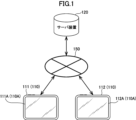
- FIG. 1 is an exemplary schematic diagram showing the configuration of a system according to an embodiment.
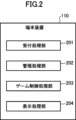
- FIG. 2 is an exemplary schematic block diagram showing the functional configuration of the terminal device according to the embodiment;
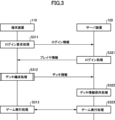
- FIG. 3 is an exemplary schematic sequence diagram showing the flow of processing executed by the terminal device and the server device according to the embodiment;
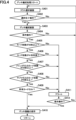
- FIG. 4 is an exemplary and schematic flow chart showing the flow of deck organization processing executed by the terminal device according to the embodiment.
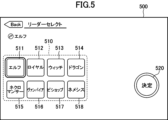
- FIG. 5 is an exemplary schematic diagram showing an example of a class selection screen according to the embodiment;
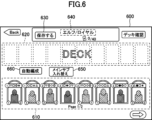
- FIG. 6 is an exemplary schematic diagram showing an example of a deck organization screen according to the embodiment.
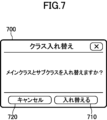
- FIG. 7 is an exemplary schematic diagram showing an example of a replacement confirmation image according to the embodiment;
- FIG. 8 is an exemplary and schematic diagram showing a deck organization screen in which the main class and subclass are exchanged with respect to the example shown in FIG. 6, according to the embodiment.
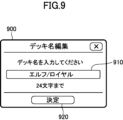
- FIG. 9 is an exemplary schematic diagram showing an example of a save confirmation image according to the embodiment;
- FIG. 10 is an exemplary schematic diagram showing an example of a stored alert image according to the embodiment;
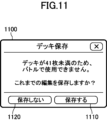
- FIG. 11 is an exemplary and schematic diagram showing an example of a saved alert image according to the embodiment, which is different from FIG.
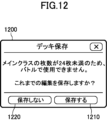
- FIG. 12 is an exemplary schematic diagram showing a different example of the saved alert image from FIGS. 10 and 11 according to the embodiment.
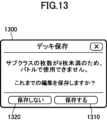
- FIG. 13 is an exemplary schematic diagram showing a different example of the stored alert image from FIGS. 10 to 12 according to the embodiment.
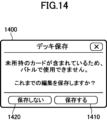
- FIG. 14 is an exemplary and schematic diagram showing a different example of the saved alert image from FIGS. 10 to 13 according to the embodiment.
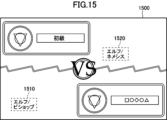
- FIG. 15 is an exemplary schematic diagram showing an example of a match start screen according to the embodiment;
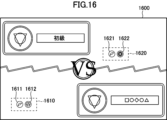
- FIG. 16 is an exemplary schematic diagram showing an example different from FIG. 15 of the battle start screen according to the embodiment.
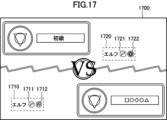
- FIG. 17 is an exemplary schematic diagram showing an example different from FIGS. 15 and 16 of the competition start screen according to the embodiment.
- FIG. 18 is an exemplary schematic diagram showing an example of a battle screen according to the embodiment;
- FIG. 19 is an exemplary schematic diagram showing an example different from FIG. 18 of the battle screen according to the embodiment.
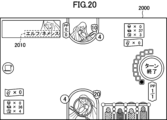
- FIG. 20 is an exemplary schematic diagram showing an example of the battle screen according to the embodiment, which is different from FIGS. 18 and 19.
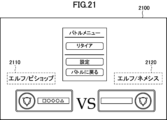
- FIG. 21 is an exemplary schematic diagram showing an example of an interruption screen according to the embodiment;
- FIG. 22 is an exemplary schematic block diagram showing an example of a hardware configuration of an information processing device that constitutes
- ordinal numbers such as “first” and “second” are used as necessary, but these ordinal numbers are used for convenience of identification, and a specific order of priority is used. not shown.
- FIG. 1 is an exemplary and schematic diagram showing the configuration of the system according to the embodiment.
- the system includes a plurality of terminal devices 110 each including a display 110A having a touch panel, and a server device 120.
- the terminal device 110 and the server device 120 are communicably connected to each other via a network 150 such as the Internet.
- FIG. 1 illustrates terminal devices 111 and 112 configured as tablet computers including displays 111A and 112A as an example of terminal device 110 including display 110A.
- the number of terminal devices 110 may be three or more, and the terminal devices 110 may have a configuration equivalent to that of a general computer (a specific example will be described later with reference to FIG. 22).
- it may be configured as an electronic device other than a tablet computer.
- a competitive game is realized between the users of the terminal devices 110 via the network 150 .
- the competitive game includes a predetermined number of cards selected from, for example, digital cards (hereinafter simply referred to as cards) as a plurality of game media each associated with an attribute (hereinafter referred to as a class). It is a battle game using a deck containing cards from
- each terminal device 110 owns a card provided by the operator of the competitive game by digitally acquiring it through a lottery or the like, and considers the class from the owned card.
- a deck is organized by selecting a predetermined number of cards, and a battle game is played with other users via the server device 120 using the organized deck.
- the server device 120 records, for example, player information regarding users (players) who play the competitive game for each user who participates in the competitive game.
- Player information is, for example, information about cards owned by the player, information about decks that the player has organized in the past, and the like. Then, the server device 120 updates the recorded player information and controls the progress of the competitive game based on the information output from the terminal device 110 according to the user's operation.
- the minimum number of cards that must be included in the deck (minimum number) is predetermined for each class, using the technique described in detail below.
- FIG. 2 is an exemplary and schematic block diagram showing the functional configuration of the terminal device 110 according to the embodiment.
- the terminal device 110 includes a reception processing unit 201, a management processing unit 202, a game control processing unit 203, and a display processing unit 204.
- the reception processing unit 201 receives input of various user operations using the terminal device 110 . For example, the reception processing unit 201 receives selection of the class of cards to be included in the deck used in the battle game before the start of the battle game, and receives selection of cards to be included in the deck after the class is selected. do.
- the management processing unit 202 manages the decks organized according to the user's operation. Since the specific content of management performed by the management processing unit 202 will be described in detail later, further description will be omitted here.
- the game control processing unit 203 controls the progress of the battle game while cooperating with the server device 120 through communication.
- the display processing unit 204 controls the output of images related to the competitive game to the display 110A.
- the terminal device 110 According to the embodiment cooperates with the server device 120 in the flow shown in FIG. process.
- FIG. 3 is an exemplary and schematic sequence diagram showing the flow of processing executed by the terminal device 110 and the server device 120 according to the embodiment.
- the terminal device 110 (for example, the game control processing unit 203) makes a login request for acquiring the player information of the user of the terminal device 110 from the server device 120. After executing the processing, the login information including the identification information of the user and the like is transmitted to the server device 120 .
- the process of S311 is executed, for example, when an application installed in the terminal device 110 is started to provide a competitive game.
- the server device 120 executes login processing based on the login information received from the terminal device 110, extracts the corresponding player information from the player information recorded by itself, and extracts the extracted player information. Information is transmitted to the terminal device 110 .
- the terminal device 110 executes deck organization processing for organizing the decks used in the battle game according to the user's operation, It transmits deck information about the organized decks to the server device 120 .
- the deck formation process is performed by the management processing unit 202 while receiving user operations by the reception processing unit 201 and displaying various images (screens) on the display 110A by the display processing unit 204 as necessary. This is processing for managing the deck.
- the server device 120 executes a deck information saving process of saving the deck information received from the terminal device 110 and updating the player information recorded by itself.
- terminal device 110 for example, reception processing unit 201, game control processing unit 203, and display processing unit 204 and server device 120 execute a game in which a competitive game is executed in cooperation with each other through communication. Execute the process.
- the game execution processing is processing in which the reception processing unit 201 receives a user's operation and the display processing unit 204 displays various images (screens) on the display 110A while the game control processing unit 203 controls the progress of the game. be.
- the above-described deck formation processing of S312 is, as described below, the processing for allowing the user to select the class of cards to be included in the deck to be used in the battle game, and the processing for allowing the user to select the cards for forming the deck. It includes processing for making selections, processing for saving organized decks, and processing for displaying various images used for these processings on display 110A.
- FIG. 4 is an exemplary and schematic flow chart showing the flow of deck organization processing executed by the terminal device 110 according to the embodiment.
- the display processing unit 204 performs processing for allowing the user to select the class of cards to be included in the deck to be used in the battle game. 5 is displayed on display 110A. Then, the reception processing unit 201 receives the input of the user's operation via the class selection screen.
- FIG. 5 is an exemplary and schematic diagram showing an example of the class selection screen according to the embodiment.
- An image 500 shown in FIG. 5 is an example of a class selection screen.
- This image 500 includes an area 510 for accepting the selection of a class to be included in the deck used in the competitive game, and an enter button 520 for confirming the selection.
- the user can select cards to be included in the deck by performing an operation on the area 510, for example, a touch operation via the touch panel of the display 110A. It is possible to select multiple classes. Selection of these classes is confirmed when a selection completion operation is performed as a touch operation on decision button 520 .
- the area 510 includes a selection button 511 that accepts selection of the class "elf”, a selection button 512 that accepts selection of the class "royal”, and a selection button 512 of the class "witch".
- a selection button 513 for accepting and a selection button 514 for accepting selection of the class "dragon” are displayed.
- a selection button 515 for receiving selection of the class "Necromancer” a selection button 516 for receiving selection of the class "Vampire”
- a selection button 517 for receiving selection of the class "Bishop”
- a selection button 518 for accepting the selection of the class "Nemesis” is also displayed.
- the user can select two of the cards to be included in the deck by operating desired two of the eight selection buttons 511 to 518. It is possible to select one class.
- the selection of these two classes is finalized when a selection completion operation using the enter button 520 is performed.
- the first selected class is, for example, a main class as a main attribute that is the main force of the deck, and the second selected class is, for example, a sub-class as a sub-attribute that assists the main force.
- a restriction is provided that said minimum number predetermined for the main class must be greater than said minimum number predetermined for the subclasses.
- the reception processing unit 201 determines whether or not a selection completion operation, for example, a touch operation on the decision button 520 described above has been performed. If it is determined in S402 that the selection completion operation has not been executed, the process returns to S401, and the reception processing unit 201 continues to receive the input of the user's operation via the class selection screen.
- a selection completion operation for example, a touch operation on the decision button 520 described above
- the process proceeds to S403. Then, in S403, the display processing unit 204 displays, on the display 110A, a deck organization screen, for example, as shown in FIG. Then, the reception processing unit 201 receives the input of the user's operation via the deck formation screen.
- FIG. 6 is an exemplary and schematic diagram showing an example of a deck organization screen according to the embodiment.
- An image 600 shown in FIG. 6 is an example of a deck organization screen. This image 600 includes a first area 610 , a second area 620 , a save button 630 , a third area 640 , a class replacement button 650 and an automatic organization button 660 .
- the cards of the class selected by the above class selection screen and the cards with no class (or corresponding to all classes) are displayed.
- a list of cards with a characteristic called "neutral" that is handled in the data is displayed.
- a list of cards in the deck is displayed. The user performs an operation (for example, a touch operation) to select a card displayed in first area 610, and performs an operation (for example, swipe operation) to move the selected card into second area 620. Assemble a deck.
- the organized deck receives a predetermined determination, which will be described later, for determining whether or not the number of cards in the deck satisfies a predetermined condition. stored after processing.
- the above display mode in which a list of main class, subclass, and "neutral" cards is displayed in the first area 610 is merely an example.
- a list of all cards owned by the user may be displayed by default in the first area 610 .
- the user extracts (searches) only the desired cards from all the cards by using the card filter function that can be called from the deck organization screen, so that only the desired cards are displayed in the first area. 610 may be displayed.
- the third area 640 displays the name of the deck currently being organized.
- the name of the deck can be arbitrarily changed by the user.
- As the name of the default deck for example, a name in which the main class and subclass are arranged in this order from the left with a slash symbol in between (“elf/royal” in the example shown in FIG. 6) is used. If you fix the order of the main class and subclass in the default deck name, you can determine which is the main class with a relatively large number of cards and which is a subclass with a relatively small number of cards in the default deck name. It becomes possible to easily identify from the name.
- the class swap button 650 accepts the operation of swapping the main class and subclass on the deck formation screen in order to reduce the trouble of returning to the class selection screen for the operation of swapping the main class and subclass.
- an operation for example, a touch operation
- a replacement confirmation image as shown in the following FIG. 7 is displayed in a pop-up manner on the deck organization screen.
- FIG. 7 is an exemplary schematic diagram showing an example of a replacement confirmation image displayed when main classes and subclasses are switched according to the embodiment.
- An image 700 shown in FIG. 7 is an example of a replacement confirmation image. This image 700 displays a message prompting the user to confirm whether there is no problem in executing the exchange of the main class and subclass.
- the image 700 also includes an execute button 710 and a cancel button 720 .
- an operation for example, a touch operation
- cancel button 720 When an operation (for example, a touch operation) on cancel button 720 is performed, the deck formation screen as shown in FIG. 6 is displayed again.
- an operation for example, a touch operation
- a deck formation screen as shown in FIG. 8 is displayed, in which the main class and subclass are exchanged with respect to the example shown in FIG. is displayed.
- FIG. 8 is an exemplary and schematic diagram showing a deck organization screen in which the main class and subclass are exchanged with respect to the example shown in FIG. 6, according to the embodiment.
- An image 800 shown in FIG. 8 is a deck formation screen in which the main class and subclass are exchanged with respect to the example shown in FIG.
- This image 800 has the same screen configuration as the image 600 shown in FIG. However, in this image 800, the name of the deck displayed in the third area 640 ("Royal/Elf") is changed to the third area 640 of the image 600 shown in FIG. The placement order of the main class and subclass is reversed with respect to the name of the deck displayed in ("Elf/Royal").
- the reception processing unit 201 determines whether or not a deck save operation via the deck formation screen, for example, a touch operation on the above save button 630 has been performed. If it is determined in S404 that the save operation has not been executed, the process returns to S403, and the reception processing unit 201 continues to receive the input of the user's operation via the deck formation screen.
- the management processing unit 202 determines whether or not the total number of cards included in the deck is 40 or more.
- the number 40 corresponds to the above predetermined number which is predetermined as the necessary and sufficient number of cards for constructing the deck.
- the number 40 is an example, and numbers other than 40 may be used as the predetermined number in the embodiment.
- the predetermined number may be set as a range of numbers having an arbitrary width with upper and lower limits, such as 39 to 41, for example.
- the process proceeds to S406. Then, in S406, the management processing unit 202 determines whether or not the total number of cards included in the deck is less than 41, that is, whether or not the deck includes exactly the predetermined number of cards.
- the management processing unit 202 determines whether or not the number of main class cards included in the deck is 24 or more.
- the number 24 corresponds to the minimum number of cards of the main class that must be included in the deck.
- the number 24 is an example, and embodiments may use numbers other than 24 as the minimum number of cards in the main class.
- the management processing unit 202 determines whether or not the number of subclass cards included in the deck is nine or more. Note that the number 9 corresponds to the predetermined minimum number of subclass cards that must be included in the deck. Of course, the number 9 is an example, and embodiments may use a number other than 9 as the minimum number of cards for the subclass, provided that the number is less than the minimum number of cards for the main class.
- the minimum number of cards in the main class is 24, the minimum number of cards in the subclass is 9, and the sum of the two (24+9), which is 33, is 40 as the predetermined number. smaller than a number.
- the embodiment is configured so that when a deck is organized, it is possible to divert a deck that has been organized by someone else and is open to the public on the Internet or the like.
- decks organized by others may contain cards that you do not own, and decks containing cards that you do not own cannot be used in a battle game. Therefore, it is desirable to check whether the deck is composed only of cards owned by the player.
- the management processing unit 202 determines whether or not the deck to be stored is composed only of owned cards.
- the management processing unit 202 saves deck information about the organized decks and shares the saved deck information with the server device 120 .
- the display processing unit 204 displays a saving confirmation image as shown in FIG. 9 below before saving the deck information. Then, the reception processing unit 201 receives the input of the user's operation via the storage confirmation image.
- FIG. 9 is an exemplary and schematic diagram showing an example of a storage confirmation image according to the embodiment.
- An image 900 shown in FIG. 9 is an example of a save confirmation image. This image 900 displays a message prompting the user to enter the name of the deck.
- the image 900 also includes an area 910 in which the input deck name is displayed, an enter button 920, and a cancel button 720.
- the user can enter the name of the deck while confirming the area 910 and then operate the enter button 920 (for example, touch operation) to confirm the storage of the deck information.
- the process proceeds to S411. Then, in S411, the display processing unit 204 notifies the user that a deck that does not meet the conditions is about to be saved by displaying save alert images as shown in FIGS. 10 to 14 below. Then, the reception processing unit 201 receives the input of the user's operation via the saved alert image.
- FIG. 10 is an exemplary and schematic diagram showing an example of a saved alert image according to the embodiment.
- An image 1000 shown in FIG. 10 is an example of a saved alert image that is displayed when the above conditions of S405 are not satisfied.
- This image 1000 includes a message notifying the user that the deck that does not satisfy the conditions of S405 is about to be saved, and a message asking the user whether or not to save the deck knowing that the conditions are not satisfied. A confirmation message will be displayed.
- the image 1000 also includes a save button 1010 and a cancel button 1020.
- the user can confirm the saving of the deck by operating the save button 1010 (for example, touch operation), knowing that the condition of S405 is not satisfied.
- the cancel button 1020 is operated (for example, a touch operation)
- the deck organization screen as shown in FIG. 6 is displayed again.
- FIG. 11 is an exemplary and schematic diagram showing an example different from FIG. 10 of the saved alert image according to the embodiment.
- An image 1100 shown in FIG. 11 is an example of a saved alert image that is displayed when the above condition of S406 is not satisfied.
- This image 1100 includes a message notifying the user that the deck that does not meet the conditions of S406 is about to be saved, and a message asking the user whether or not to save the deck knowing that the conditions are not met. A confirmation message will be displayed.
- the image 1100 also includes a save button 1110 and a cancel button 1120.
- the user can confirm saving of the deck by operating the save button 1110 (for example, touch operation), knowing that the condition of S406 is not satisfied.
- the cancel button 1120 is operated (for example, a touch operation)
- the deck organization screen as shown in FIG. 6 is displayed again.
- FIG. 12 is an exemplary and schematic diagram showing a different example of the stored alert image according to the embodiment from FIGS. 10 and 11.
- FIG. 12 is an exemplary and schematic diagram showing a different example of the stored alert image according to the embodiment from FIGS. 10 and 11.
- An image 1200 shown in FIG. 12 is an example of a saved alert image that is displayed when the above condition of S407 is not satisfied.
- This image 1200 includes a message notifying the user that the deck that does not satisfy the conditions of S407 is about to be saved, and a message asking the user whether or not to save the deck knowing that the conditions are not satisfied. A confirmation message will be displayed.
- the image 1200 also includes a save button 1210 and a cancel button 1220.
- the user can confirm the saving of the deck by operating the save button 1210 (for example, touch operation), knowing that the condition of S407 is not satisfied.
- the cancel button 1220 is operated (for example, a touch operation)
- the deck organization screen as shown in FIG. 6 is displayed again.
- FIG. 13 is an exemplary and schematic diagram showing a different example of the stored alert image according to the embodiment from FIGS. 10 to 12.
- FIG. 13 is an exemplary and schematic diagram showing a different example of the stored alert image according to the embodiment from FIGS. 10 to 12.
- An image 1300 shown in FIG. 13 is an example of a saved alert image that is displayed when the above condition of S408 is not satisfied.
- This image 1300 includes a message notifying the user that the deck that does not satisfy the conditions of S408 is about to be saved, and a message asking the user whether or not to save the deck knowing that the conditions are not satisfied. A confirmation message will be displayed.
- the image 1300 also includes a save button 1310 and a cancel button 1320. Accordingly, by performing an operation (for example, a touch operation) on the save button 1310, the user can confirm the saving of the deck, knowing that the condition of S408 is not satisfied. It should be noted that when the cancel button 1320 is operated (for example, a touch operation), the deck organization screen as shown in FIG. 6 is displayed again.
- an operation for example, a touch operation
- FIG. 14 is an exemplary and schematic diagram showing a different example of the stored alert image according to the embodiment from FIGS. 10 to 13.
- FIG. 14 is an exemplary and schematic diagram showing a different example of the stored alert image according to the embodiment from FIGS. 10 to 13.
- An image 1400 shown in FIG. 14 is an example of a saved alert image that is displayed when the above condition of S409 is not satisfied.
- This image 1400 includes a message notifying the user that the deck that does not satisfy the conditions of S409 is about to be saved, and a message asking the user whether or not to save the deck knowing that the conditions are not satisfied. A confirmation message will be displayed.
- the image 1400 also includes a save button 1410 and a cancel button 1420.
- the user can confirm the saving of the deck by operating the save button 1410 (for example, touch operation), knowing that the condition of S409 is not satisfied.
- the cancel button 1420 is operated (for example, a touch operation)
- the deck organization screen as shown in FIG. 6 is displayed again.
- the reception processing unit 201 determines whether or not a save operation, such as an operation (for example, a touch operation) of the save button 1010, 1110, 1210, 1310, or 1410, has been performed.
- a save operation such as an operation (for example, a touch operation) of the save button 1010, 1110, 1210, 1310, or 1410
- the above conditions of S405 to S409 can also be taken into consideration when the decks are automatically organized according to the operation (for example, touch operation) of the automatic formation button 660 on the deck formation screen shown in FIG. 6 or FIG. . That is, in the embodiment, when the automatic organization button 660 is operated, a predetermined number of cards are automatically selected from a plurality of owned cards so that all the conditions of S405 to S409 are satisfied, Assemble a deck. Which card is selected depends on the predetermined cost for each card as play points required to play the card in the battle game, and the usage rate of all cards by the operator of the battle game. A priority arbitrarily set for the card can also be considered.
- the deck contains cards with an expiration date
- the expiration date may cause the card to actually expire. It is also possible that the deck will become unusable when the competitive game is played.
- the determination of the above conditions in S405 to S409 can also be performed on the server device 120 side at the start of the competitive game, that is, prior to S313 and S323 shown in FIG. Then, when the deck is unusable, the server device 120 notifies the terminal device 110 to that effect. In this way, it is possible to avoid playing the battle game with an unusable deck.
- the display processing unit 204 can display the classes of cards included in the deck using images (screens) as shown in FIGS. 15 to 21 below.
- the display processing unit 204 displays a battle start screen as shown in the following FIG. and the classes of cards in the opponent's deck.
- FIG. 15 is an exemplary and schematic diagram showing an example of a battle start screen according to the embodiment.
- An image 1500 shown in FIG. 15 is an example of a battle start screen.
- This image 1500 includes a first area 1510 displaying the class of cards included in one's own deck and a second area 1520 displaying the class of cards included in the opponent's deck.
- the classes of the cards included in the deck are arranged in this order from left to right with a letter indicating the main class and a letter indicating the subclass (“elf/bishop”, “elf/bishop”, “elf/bishop”). / Nemesis”).
- the classes of cards included in the deck may not necessarily be represented as letters, as in the example shown in FIG. 16 below.
- FIG. 16 is an exemplary and schematic diagram showing an example different from FIG. 15 of the battle start screen according to the embodiment.
- An image 1600 shown in FIG. 16 is an example of a battle start screen in which the classes of cards included in the deck are displayed as information other than text.
- This image 1600 includes a first area 1610 displaying the classes of cards included in one's own deck and a second area 1620 displaying the classes of cards included in the opponent's deck.
- an image 1611 indicating "elf” as the main class of cards included in one's deck and an image 1612 indicating “bishop” as a subclass of cards included in one's deck are displayed on the left. are displayed in this order from Also, in the second area 1620, an image 1621 showing "elf” as the main class of the cards included in the opponent's deck, and an image 1622 showing "Nemesis” as the subclass of the cards included in the opponent's deck. and are displayed in this order from the left.
- the classes of cards included in the deck are graphically displayed.
- the classes of cards contained in the deck may be displayed as a combination of text and images, such as the example shown in FIG. 17 below.
- FIG. 17 is an exemplary and schematic diagram showing an example different from FIGS. 15 and 16 of the battle start screen according to the embodiment.
- An image 1700 shown in FIG. 17 is an example of a battle start screen in which the classes of cards included in the deck are displayed as information of a combination of characters and graphics.
- This image 1700 includes a first area 1710 displaying the class of cards included in one's own deck and a second area 1720 displaying the class of cards included in the opponent's deck.
- first area 1710 characters indicating "elf” as the main class of cards included in one's deck, an image 1711 indicating “elf” as the main class of cards included in one's deck, and one's own An image 1712 showing "Bishop” as a subclass of the cards included in the deck are displayed side by side in this order from the left.
- second area 1720 there are characters indicating "elf” as the main class of the cards included in the opponent's deck and an image 1721 indicating "elf” as the main class of the cards included in the opponent's deck.
- an image 1722 showing "Nemesis" as a subclass of a card included in the opponent's deck are displayed side by side in this order from the left.
- the display processing unit 204 displays a battle screen as shown in FIG.
- Displaying supplemental information may allow the user to identify the classes of cards included in the deck.
- Supplementary information is information indicating abilities and the like predetermined for each class.
- FIG. 18 is an exemplary and schematic diagram showing an example of a battle screen according to the embodiment.
- An image 1800 shown in FIG. 18 is an example of a battle screen.
- This image 1600 is associated with first information 1811 as supplementary information associated with "Necromancer” as the main class of cards included in one's deck, and "elf” as the subclass of cards included in one's deck. and second information 1812 as supplemental information. This allows the user to easily check the main classes and subclasses of the cards included in his deck and the abilities of the main classes and subclasses while playing the competitive game.
- the supplementary information of the class (main class and subclass) of the cards included in the opponent's deck is not displayed on the battle screen.
- supplemental information about the classes of cards in the opponent's deck may also be displayed on the battle screen. In this case, the user can (indirectly) grasp the classes included in the opponent's deck by checking the opponent's supplementary information.
- the embodiment can also display the classes of cards included in the opponent's deck on the battle screen, for example, in the manner shown in FIG. 19 below.
- FIG. 19 is an exemplary and schematic diagram showing an example different from FIG. 18 of the battle screen according to the embodiment.
- An image 1900 shown in FIG. 19 is an example of a battle screen displaying only the main class among the classes of cards included in the opponent's deck.
- This image 1900 includes an area 1910 displaying text indicating "elf" as the main class of cards in the opponent's deck. This allows the user to easily check the main class of the cards included in the opponent's deck while playing the competitive game.
- the subclasses of the cards included in the opponent's deck are not displayed on the battle screen.
- FIG. 20 is an exemplary and schematic diagram showing an example of the battle screen according to the embodiment, which is different from FIGS. 18 and 19.
- FIG. 20 is an exemplary and schematic diagram showing an example of the battle screen according to the embodiment, which is different from FIGS. 18 and 19.
- FIG. 20 is an exemplary and schematic diagram showing an example of the battle screen according to the embodiment, which is different from FIGS. 18 and 19.
- FIG. 20 is an exemplary and schematic diagram showing an example of the battle screen according to the embodiment, which is different from FIGS. 18 and 19.
- An image 2000 shown in FIG. 20 is an example of a battle screen displaying both the main class and subclass of cards included in the opponent's deck.
- This image 2000 shows, from the left, the characters indicating "elf” as the main class of the cards included in the opponent's deck and the characters indicating "Nemesis” as the subclass of the cards included in the opponent's deck. It includes a region 1910, which is labeled with slashes in order. This allows the user to easily check both the main class and subclass of the cards included in the opponent's deck while playing the competitive game.
- the interruption screen can be displayed in response to an operation (for example, a touch operation) of an interruption button (not shown) provided on the battle screen.
- FIG. 21 is an exemplary and schematic diagram showing an example of an interruption screen according to the embodiment.
- An image 2100 shown in FIG. 21 is an example of an interruption screen.
- This image 2100 includes a first area 2110 and a second area 2120 .
- characters indicating "elf” as the main class of cards included in one's deck and characters indicating "bishop” as the subclass of cards included in one's deck are displayed. They are displayed side by side with slash marks in between in order.
- characters indicating "elf” as the main class of the cards included in the opponent's deck characters indicating "Nemesis” as the subclass of the cards included in the opponent's deck, are displayed side by side in this order from the left with a slash symbol in between.
- the user can easily check all the main classes and subclasses of the cards included in his deck and the main classes and subclasses of the cards included in the opponent's deck while the battle game is suspended. It is possible.
- the terminal device 110 is configured to provide the user with a battle game using a deck containing a predetermined number of cards selected from a plurality of cards each associated with a class. be done.
- the terminal device 110 includes a reception processing unit 201 , a management processing unit 202 and a display processing unit 204 .
- the reception processing unit 201 is configured to receive selection by the user of a plurality of classes of cards to be included in the deck used in the battle game before the start of the battle game.
- the management processing unit 202 manages the deck so that the number of cards in each of the plurality of classes selected by the user is equal to or greater than a predetermined minimum number for each class.
- the display processor 204 is configured to display the classes selected by the user and the classes of the predetermined number of cards included in the deck used by the user's opponents.
- the user plays the competitive game while considering the multiple classes selected by the user and the multiple classes of the predetermined number of cards included in the deck used by the user's opponent. will do. Therefore, it is possible to provide a battle game with improved class strategy, unlike the case where a deck must be constructed using cards of a single class, for example.
- the plurality of classes includes a main class and subclasses, and the minimum number of main classes is greater than the minimum number of subclasses.
- the user needs to organize the deck strategically in consideration of the minimum number of main classes and subclasses, so that the strategic nature of the fighting game can be further improved.
- the display processing unit 204 displays a plurality of classes selected by the user and a predetermined number of cards included in the deck used by the opponent on the battle start screen displayed at the start of the battle game.
- a text or image may be displayed that indicates the classes that . According to such a configuration, it is possible to easily confirm, at the start of the battle game, between which decks the battle game will be played.
- the display processing unit 204 can display a plurality of pieces of supplementary information respectively associated with a plurality of classes selected by the user on the battle screen displayed after the start of the battle game (for example, FIG. 18 reference). According to such a configuration, it is possible to easily check the supplementary information regarding one's own deck while playing the battle game.
- the display processing unit 204 displays all of a plurality of classes of a predetermined number of cards included in the deck used by the opponent, or the predetermined number of classes, on the battle screen displayed after the start of the battle game.
- the display processing unit 204 displays a plurality of classes selected by the user and a predetermined class included in the deck used by the opponent on the interruption screen displayed when the competition game is temporarily interrupted after the start of the competition game. Multiple classes of number cards and text or images may be displayed (see, eg, FIG. 21). According to such a configuration, it is possible to easily confirm between which decks the competitive game is being played when the competitive game is interrupted.
- the display processing unit 204 can display a plurality of classes selected by the user in a manner that allows identification of the size relationship of the number of cards for each class, and the deck used by the opponent.
- a plurality of classes with a predetermined number of cards included may be displayed in a manner that allows identification of the magnitude of the number of cards in each class. According to such a configuration, it is possible to check the number of cards in each class in one's own deck, and to some extent predict the number of cards in each class in the opponent's deck while playing the battle game. can be done. Therefore, it is possible to further improve the strategy of the fighting game.
- the authentication module is configured as an information processing device 2200 having a hardware configuration equivalent to that of a general computer, such as shown in FIG. 22 below.
- FIG. 4 is an exemplary and schematic block diagram showing the hardware configuration of an information processing device 2200 that constitutes the terminal device 110 and the server device 120 according to the embodiment.
- FIG. 4 is an exemplary and schematic block diagram showing the hardware configuration of an information processing device 2200 that constitutes the terminal device 110 and the server device 120 according to the embodiment.
- FIG. 4 is an exemplary and schematic block diagram showing the hardware configuration of an information processing device 2200 that constitutes the terminal device 110 and the server device 120 according to the embodiment.
- the information processing device 2200 includes a processor 2210, a memory @220, a storage 2230, an input/output interface (I/F) 2240, and a communication interface (I/F) 2250. ing. These hardware are connected to bus 2260 .
- the processor 2210 is configured, for example, as a CPU (Central Processing Unit), and controls the operation of each part of the information processing device 2200 in an integrated manner.
- CPU Central Processing Unit
- Memory 2220 includes, for example, ROM (Read Only Memory) and RAM (Random Access Memory), volatile or non-volatile storage of various data such as programs executed by processor 2210, and processor 2210 executes programs.
- ROM Read Only Memory
- RAM Random Access Memory
- the storage 2230 includes, for example, an HDD (Hard Disk Drive) or an SSD (Solid State Drive), and stores various data in a non-volatile manner.
- HDD Hard Disk Drive
- SSD Solid State Drive
- the input/output interface 2240 inputs data from input devices such as a touch panel, keyboard, and mouse to the information processing device 2200, and inputs data from the information processing device 2200 to output devices such as a display and speakers. Control the output and .
- the communication interface 2250 enables the information processing device 2200 to communicate with other devices.
- the functional configuration of the terminal device 110 is a functional module by cooperation of hardware and software as a result of the processor 2210 executing a program pre-stored in the memory 2220 or the storage 2230. Realized as a group. However, in the embodiment, some or all of the functional modules shown in FIG. 2 may be realized only by hardware such as specially designed circuits. Furthermore, in the embodiment, at least part of the functional module group shown in FIG. 2 may be realized on the server device 120 side.
- the above-described programs do not necessarily have to be pre-stored in the memory 2220 or the storage 2230.
- the above-described program can be installed in a computer-readable medium such as various magnetic disks such as flexible disk (FD), or various optical disks such as DVD (Digital Versatile Disk), or can be executed. may be provided as a computer program product recorded in any form.
- the above-mentioned program may be provided or distributed via a network such as the Internet. That is, the above-described program may be provided in a form of being stored on a computer connected to a network such as the Internet and accepting download via the network.
Landscapes
- Engineering & Computer Science (AREA)
- Multimedia (AREA)
- Physics & Mathematics (AREA)
- Optics & Photonics (AREA)
- User Interface Of Digital Computer (AREA)
Priority Applications (2)
| Application Number | Priority Date | Filing Date | Title |
|---|---|---|---|
| CN202380021510.4A CN118695893A (zh) | 2022-02-14 | 2023-02-09 | 程序、方法以及系统 |
| US18/802,829 US20240399251A1 (en) | 2022-02-14 | 2024-08-13 | Program, method, and system |
Applications Claiming Priority (2)
| Application Number | Priority Date | Filing Date | Title |
|---|---|---|---|
| JP2022-020503 | 2022-02-14 | ||
| JP2022020503A JP7195465B1 (ja) | 2022-02-14 | 2022-02-14 | プログラム、方法、およびシステム |
Related Child Applications (1)
| Application Number | Title | Priority Date | Filing Date |
|---|---|---|---|
| US18/802,829 Continuation US20240399251A1 (en) | 2022-02-14 | 2024-08-13 | Program, method, and system |
Publications (1)
| Publication Number | Publication Date |
|---|---|
| WO2023153475A1 true WO2023153475A1 (ja) | 2023-08-17 |
Family
ID=84536970
Family Applications (1)
| Application Number | Title | Priority Date | Filing Date |
|---|---|---|---|
| PCT/JP2023/004372 Ceased WO2023153475A1 (ja) | 2022-02-14 | 2023-02-09 | プログラム、方法、およびシステム |
Country Status (4)
| Country | Link |
|---|---|
| US (1) | US20240399251A1 (enExample) |
| JP (2) | JP7195465B1 (enExample) |
| CN (1) | CN118695893A (enExample) |
| WO (1) | WO2023153475A1 (enExample) |
Families Citing this family (1)
| Publication number | Priority date | Publication date | Assignee | Title |
|---|---|---|---|---|
| JP7675489B1 (ja) | 2025-01-31 | 2025-05-13 | 株式会社セガ | プログラム、情報処理装置、及び情報処理方法 |
Family Cites Families (2)
| Publication number | Priority date | Publication date | Assignee | Title |
|---|---|---|---|---|
| JP6583357B2 (ja) * | 2017-07-20 | 2019-10-02 | 株式会社セガゲームス | 情報処理装置及びプログラム |
| JP6854012B2 (ja) * | 2018-07-24 | 2021-04-07 | 株式会社コナミデジタルエンタテインメント | ゲームシステム、ゲーム制御装置、及びプログラム |
-
2022
- 2022-02-14 JP JP2022020503A patent/JP7195465B1/ja active Active
- 2022-12-13 JP JP2022198488A patent/JP2023118062A/ja active Pending
-
2023
- 2023-02-09 CN CN202380021510.4A patent/CN118695893A/zh active Pending
- 2023-02-09 WO PCT/JP2023/004372 patent/WO2023153475A1/ja not_active Ceased
-
2024
- 2024-08-13 US US18/802,829 patent/US20240399251A1/en active Pending
Non-Patent Citations (4)
| Title |
|---|
| "Shadowverse Official Tactics Guide; 2nd ed.", 13 December 2016, KADOKAWA CO., LTD., JP, ISBN: 978-4-04-892695-9, article ANONYMOUS: "Passage; Competition rules and flow", pages: 8, XP009548715 * |
| ANONYMOUS: "New card game "LoR" now available! Delivering the play guide! ", GAME WIZ, 15 May 2020 (2020-05-15), XP093084599, Retrieved from the Internet <URL: https://gamewith.jp/gamedb/article/game/show/5511/8479?from=ios> [retrieved on 20230922] * |
| ANONYMOUS: "Prismatic", MTG WIKI, 29 April 2021 (2021-04-29), XP093084604, Retrieved from the Internet <URL:https://mtg.fandom.com/wiki/Prismatic?oldid=359437> [retrieved on 20230922] * |
| SMARTPHONE GAME INTRODUCTION CHANNEL: ""Legends of Runeterra" LoL battle card game - Interesting game information iOS, Android, PC", YOUTUBE, XP093084601, Retrieved from the Internet <URL:https://www.youtube.com/watch?v=eBRSQATH5KM> [retrieved on 20230922] * |
Also Published As
| Publication number | Publication date |
|---|---|
| JP2023117764A (ja) | 2023-08-24 |
| JP7195465B1 (ja) | 2022-12-23 |
| US20240399251A1 (en) | 2024-12-05 |
| CN118695893A (zh) | 2024-09-24 |
| JP2023118062A (ja) | 2023-08-24 |
Similar Documents
| Publication | Publication Date | Title |
|---|---|---|
| US9137322B2 (en) | System and method for providing electronic content | |
| JP5569274B2 (ja) | サーバシステム及びそのゲーム制御方法 | |
| KR20170089445A (ko) | 퍼즐 매칭 게임 진행 방법 및 이를 이용하여 퍼즐 매칭 게임을 진행시키는 게임 시스템 | |
| JP7242739B2 (ja) | プログラム、情報処理装置、及び制御方法 | |
| JP6787513B1 (ja) | 情報処理装置及びプログラム | |
| JP2023127574A (ja) | 情報処理装置、情報処理方法、およびプログラム | |
| JP7195465B1 (ja) | プログラム、方法、およびシステム | |
| US20110009183A1 (en) | Gaming method for playing an interactive slot game, and gaming apparatus for implementing the gaming method | |
| JP3726497B2 (ja) | コンピュータゲーム装置、ゲームプログラムを記録したコンピュータ読み取り可能な記録媒体及びゲーム処理方法 | |
| JP7784458B2 (ja) | ゲームプログラム、ゲームシステム、情報処理装置、サーバ、及びゲーム方法 | |
| JP7443589B1 (ja) | プログラム、方法、およびシステム | |
| JP7784279B2 (ja) | ゲームを提供するためのシステム、方法、及びプログラム | |
| JP7708527B1 (ja) | プログラム、システム、方法、情報処理装置、サーバ、及び演出情報の生成方法 | |
| WO2020044486A1 (ja) | ゲーム装置及びゲーム方法 | |
| JP7718443B2 (ja) | プログラム及び情報処理装置 | |
| WO2025164562A1 (ja) | ゲームプログラム、ゲームシステム、ゲーム方法、情報処理装置、サーバ、及びゲーム演出情報の生成方法 | |
| JP2014150981A (ja) | 複数のサービスを提供可能なプラットフォームを提供するシステム及び方法 | |
| JP2025009425A (ja) | プログラム、方法、およびシステム | |
| JP6778301B2 (ja) | プログラム、通信システム、及び制御方法 | |
| JP6732346B1 (ja) | ゲームシステム、それに用いるコンピュータプログラム、及び制御方法 | |
| JP2019136414A (ja) | ゲームシステム及びそれに用いるコンピュータプログラム | |
| JP2023024747A (ja) | ゲームシステム及びそれに用いるコンピュータプログラム | |
| JP2025076674A (ja) | 情報処理装置、情報処理方法、プログラム及びゲームシステム | |
| JP2025092298A (ja) | プログラム、方法、およびシステム | |
| JP2024145330A (ja) | プログラム、方法、およびシステム |
Legal Events
| Date | Code | Title | Description |
|---|---|---|---|
| 121 | Ep: the epo has been informed by wipo that ep was designated in this application |
Ref document number: 23752939 Country of ref document: EP Kind code of ref document: A1 |
|
| WWE | Wipo information: entry into national phase |
Ref document number: 202380021510.4 Country of ref document: CN |
|
| NENP | Non-entry into the national phase |
Ref country code: DE |
|
| 122 | Ep: pct application non-entry in european phase |
Ref document number: 23752939 Country of ref document: EP Kind code of ref document: A1 |