WO2023074900A1 - 情報処理プログラム、情報処理方法および情報処理システム - Google Patents
情報処理プログラム、情報処理方法および情報処理システム Download PDFInfo
- Publication number
- WO2023074900A1 WO2023074900A1 PCT/JP2022/040766 JP2022040766W WO2023074900A1 WO 2023074900 A1 WO2023074900 A1 WO 2023074900A1 JP 2022040766 W JP2022040766 W JP 2022040766W WO 2023074900 A1 WO2023074900 A1 WO 2023074900A1
- Authority
- WO
- WIPO (PCT)
- Prior art keywords
- game
- play mode
- player
- reward
- floor
- Prior art date
- Legal status (The legal status is an assumption and is not a legal conclusion. Google has not performed a legal analysis and makes no representation as to the accuracy of the status listed.)
- Ceased
Links
Images




Classifications
-
- A—HUMAN NECESSITIES
- A63—SPORTS; GAMES; AMUSEMENTS
- A63F—CARD, BOARD, OR ROULETTE GAMES; INDOOR GAMES USING SMALL MOVING PLAYING BODIES; VIDEO GAMES; GAMES NOT OTHERWISE PROVIDED FOR
- A63F13/00—Video games, i.e. games using an electronically generated display having two or more dimensions
- A63F13/60—Generating or modifying game content before or while executing the game program, e.g. authoring tools specially adapted for game development or game-integrated level editor
- A63F13/69—Generating or modifying game content before or while executing the game program, e.g. authoring tools specially adapted for game development or game-integrated level editor by enabling or updating specific game elements, e.g. unlocking hidden features, items, levels or versions
-
- A—HUMAN NECESSITIES
- A63—SPORTS; GAMES; AMUSEMENTS
- A63F—CARD, BOARD, OR ROULETTE GAMES; INDOOR GAMES USING SMALL MOVING PLAYING BODIES; VIDEO GAMES; GAMES NOT OTHERWISE PROVIDED FOR
- A63F13/00—Video games, i.e. games using an electronically generated display having two or more dimensions
- A63F13/40—Processing input control signals of video game devices, e.g. signals generated by the player or derived from the environment
- A63F13/44—Processing input control signals of video game devices, e.g. signals generated by the player or derived from the environment involving timing of operations, e.g. performing an action within a time slot
-
- A—HUMAN NECESSITIES
- A63—SPORTS; GAMES; AMUSEMENTS
- A63F—CARD, BOARD, OR ROULETTE GAMES; INDOOR GAMES USING SMALL MOVING PLAYING BODIES; VIDEO GAMES; GAMES NOT OTHERWISE PROVIDED FOR
- A63F13/00—Video games, i.e. games using an electronically generated display having two or more dimensions
- A63F13/45—Controlling the progress of the video game
-
- A—HUMAN NECESSITIES
- A63—SPORTS; GAMES; AMUSEMENTS
- A63F—CARD, BOARD, OR ROULETTE GAMES; INDOOR GAMES USING SMALL MOVING PLAYING BODIES; VIDEO GAMES; GAMES NOT OTHERWISE PROVIDED FOR
- A63F13/00—Video games, i.e. games using an electronically generated display having two or more dimensions
- A63F13/50—Controlling the output signals based on the game progress
- A63F13/53—Controlling the output signals based on the game progress involving additional visual information provided to the game scene, e.g. by overlay to simulate a head-up display [HUD] or displaying a laser sight in a shooting game
- A63F13/533—Controlling the output signals based on the game progress involving additional visual information provided to the game scene, e.g. by overlay to simulate a head-up display [HUD] or displaying a laser sight in a shooting game for prompting the player, e.g. by displaying a game menu
-
- A—HUMAN NECESSITIES
- A63—SPORTS; GAMES; AMUSEMENTS
- A63F—CARD, BOARD, OR ROULETTE GAMES; INDOOR GAMES USING SMALL MOVING PLAYING BODIES; VIDEO GAMES; GAMES NOT OTHERWISE PROVIDED FOR
- A63F13/00—Video games, i.e. games using an electronically generated display having two or more dimensions
- A63F13/70—Game security or game management aspects
- A63F13/79—Game security or game management aspects involving player-related data, e.g. identities, accounts, preferences or play histories
-
- A—HUMAN NECESSITIES
- A63—SPORTS; GAMES; AMUSEMENTS
- A63F—CARD, BOARD, OR ROULETTE GAMES; INDOOR GAMES USING SMALL MOVING PLAYING BODIES; VIDEO GAMES; GAMES NOT OTHERWISE PROVIDED FOR
- A63F13/00—Video games, i.e. games using an electronically generated display having two or more dimensions
- A63F13/80—Special adaptations for executing a specific game genre or game mode
- A63F13/822—Strategy games; Role-playing games
Definitions
- the present invention relates to an information processing program, an information processing method, and an information processing system.
- Patent Document 1 a game is known in which a plurality of game fields are provided and a different game field is selected each time the game is played. A player needs to play the game repeatedly in order to obtain desired items, experience points, and the like, but the fact that the game field changes each time the player plays the game can increase the willingness to play.
- An object of the present invention is to provide an information processing program, an information processing method, and an information processing system capable of suppressing a player's desire to play.
- the information processing program a process of determining a reward based on the game stage reached when the game is started in the first play mode in which the game stage advances based on the player's operation input while the game screen is displayed;
- the game is started in the second play mode in which the player's operation input and the display of the game screen are unnecessary and the game stage progresses with the passage of time, the elapsed time or the game stage reached determining the reward based on;
- a process of giving the determined reward to the player; is executed by a computer,
- the type of reward determined in the second play mode is common to the type of reward determined in the first play mode,
- the time required to reach the first game stage in the second play mode is longer than the time available to reach the first game stage in the first play mode.
- the information processing program When the game is started in the first play mode, a process of progressing the game based on the player's operation input; a process of accepting a player's skip operation in the first play mode; is further executed by the computer, When a skip operation is received in the first play mode, in the process of progressing the game based on the player's operation input, one or more stages of the game stage are skipped and the game is started from the second game stage.
- the information processing program a process of accepting a player's skip operation in the second play mode; is further executed by the computer, When a skip operation is accepted in the second play mode, the time required to reach a predetermined game stage is shortened.
- the information processing method includes: An information processing method performed by a computer, a process of determining a reward based on the game stage reached when the game is started in the first play mode in which the game stage advances based on the player's operation input while the game screen is displayed;
- the game is started in the second play mode in which the player's operation input and the display of the game screen are unnecessary and the game stage progresses with the passage of time, the elapsed time or the game stage reached determining the reward based on; a process of giving the determined reward to the player; including
- the type of reward determined in the first play mode and the type of reward determined in the second play mode are common, In the second play mode, the time required to reach the first game stage is longer than the shortest possible time to reach the first game stage in the first play mode.
- the information processing system a process of determining a reward based on the game stage reached when the game is started in the first play mode in which the game stage advances based on the player's operation input while the game screen is displayed;
- the game is started in the second play mode in which the player's operation input and the display of the game screen are unnecessary and the game stage progresses with the passage of time, the elapsed time or the game stage reached determining the reward based on; a process of giving the determined reward to the player; is performed by a computer,
- the type of reward determined in the first play mode and the type of reward determined in the second play mode are common, In the second play mode, the time required to reach the first game stage is longer than the shortest possible time to reach the first game stage in the first play mode.
- the player's motivation to play can be improved.
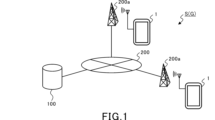
- FIG. 1 is an explanatory diagram showing a schematic configuration of an information processing system.
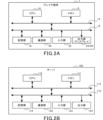
- FIG. 2A is a diagram for explaining the hardware configuration of the player terminal.
- FIG. 2B is a diagram for explaining the hardware configuration of the server.
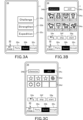
- FIG. 3A is a diagram illustrating an example of a Dungeon Quest top screen.
- FIG. 3B is a diagram illustrating an example of a character selection screen.
- FIG. 3C is a diagram illustrating an example of a skill selection screen.
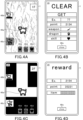
- FIG. 4A is a first diagram illustrating an example of a game screen.
- FIG. 4B is a diagram illustrating an example of a stage clear screen.
- FIG. 4C is a second diagram illustrating an example of the game screen.
- FIG. 4D is a diagram illustrating an example of a result screen.
- FIG. 4A is a first diagram illustrating an example of a game screen.
- FIG. 4B is a diagram illustrating an example of a stage clear screen.
- FIG. 5 is a diagram for explaining the relationship between floors and stages.
- FIG. 6A is a diagram illustrating an example of a skip floor selection screen.
- FIG. 6B is a diagram illustrating an example when the skip floor selection operation unit is operated.
- FIG. 6C is a diagram illustrating an example of a skip reward screen.
- FIG. 6D is a diagram illustrating an example of a game screen when using the skip function.
- FIG. 7 is a diagram illustrating the relationship between the maximum number of floors reached and the number of skippable floors.
- FIG. 8A is a diagram illustrating an example of an autoplay mode setting screen.
- FIG. 8B is a diagram illustrating an example of the top screen during Dungeon Quest play in the autoplay mode.
- FIG. 8A is a diagram illustrating an example of an autoplay mode setting screen.
- FIG. 8B is a diagram illustrating an example of the top screen during Dungeon Quest play in the autoplay mode.
- FIG. 8C is a diagram illustrating an example of the halfway termination dialogue 52. As shown in FIG. FIG. 8D is a diagram illustrating an example of a result screen in the autoplay mode.
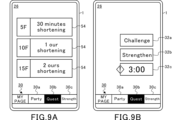
- FIG. 9A is a diagram illustrating an example of a skip floor selection screen for auto play mode.
- FIG. 9B is a diagram for explaining the remaining time when using the skip function in the autoplay mode.
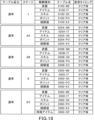
- FIG. 10 is a diagram illustrating an example of a normal remuneration table.
- FIG. 11 is a diagram illustrating an example of a skip reward table.
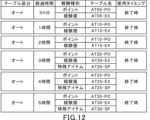
- FIG. 12 is a diagram illustrating an example of an auto reward table.
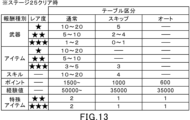
- FIG. 13 is a diagram illustrating an example of the breakdown of remuneration for each table division.
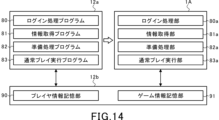
- FIG. 14 is a diagram for explaining the configuration of a memory in a player terminal and functions as a computer.
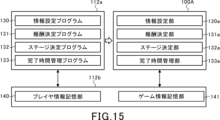
- FIG. 15 is a diagram for explaining the configuration of the memory in the server and the function as a computer.
- FIG. 16 is a sequence diagram illustrating basic processing in the player terminal and server.
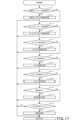
- FIG. 17 is a flowchart for explaining preparation processing in the player terminal.
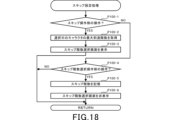
- FIG. 18 is a flowchart for explaining skip setting processing in the player terminal.
- FIG. 19 is a flowchart for explaining start processing in the server.
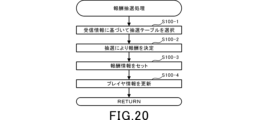
- FIG. 20 is a flowchart for explaining reward lottery processing in the server.
- FIG. 21 is a flowchart for explaining normal play execution processing in the player terminal.
- FIG. 22 is a flowchart for explaining autoplay end processing in the server.
- FIG. 1 is an explanatory diagram showing a schematic configuration of an information processing system S.
- the information processing system S is a so-called client-server system including a player terminal 1 (game terminal), a server 100, and a communication network 200 having a communication base station 200a.
- the player terminal 1 and the server 100 function as the game device G.
- the player terminal 1 and the server 100 are responsible for controlling the progress of the game, respectively.
- the player terminal 1 can establish communication with the server 100 via the communication network 200.
- the player terminal 1 includes a wide range of electronic devices that can be connected to the server 100 for wireless or wired communication. Examples of the player terminal 1 include smart phones, mobile phones, tablet devices, personal computers, game machines, and the like. In this embodiment, a case where a smart phone is used as the player terminal 1 will be described.
- the server 100 is connected to a plurality of player terminals 1 for communication.
- the server 100 accumulates various types of information (hereinafter referred to as player information) for each player identification information (hereinafter referred to as player ID) for identifying a player who plays the game. Also, the server 100 updates the accumulated information based on an operation input from the player terminal 1 .
- the communication base station 200a is connected to the communication network 200 and wirelessly transmits and receives information to and from the player terminal 1.
- the communication network 200 is composed of a mobile phone network, an Internet network, a LAN (Local Area Network), a dedicated line, etc., and realizes wireless or wired communication connection between the player terminal 1 and the server 100 .
- FIG. 2A is a diagram for explaining the hardware configuration of the player terminal 1.
- FIG. 2B is a diagram for explaining the hardware configuration of the server 100.
- the player terminal 1 includes a CPU (Central Processing Unit) 10, a memory 12, a bus 14, an input/output interface 16, a storage section 18, a communication section 20, an input section 22, and an output section 24. be done.
- CPU Central Processing Unit
- the server 100 includes a CPU 110, a memory 112, a bus 114, an input/output interface 116, a storage section 118, a communication section 120, an input section 122, and an output section .
- the configurations and functions of the CPU 110, the memory 112, the bus 114, the input/output interface 116, the storage unit 118, the communication unit 120, the input unit 122, and the output unit 124 of the server 100 are the same as those of the CPU 10, the memory 12, and the They are substantially the same as the bus 14 , input/output interface 16 , storage section 18 , communication section 20 , input section 22 and output section 24 . Therefore, the hardware configuration of the player terminal 1 will be described below, and the description of the server 100 will be omitted.
- the CPU 10 operates programs stored in the memory 12 to control the progress of the game.
- the memory 12 is composed of ROM (Read Only Memory) or RAM (Random Access Memory), and stores programs and various data necessary for controlling the progress of the game.
- Memory 12 is connected to CPU 10 via bus 14 .
- An input/output interface 16 is connected to the bus 14 .
- a storage unit 18 , a communication unit 20 , an input unit 22 and an output unit 24 are connected to the input/output interface 16 .
- the storage unit 18 is composed of a semiconductor memory such as a DRAM (Dynamic Random Access Memory), and stores various programs and data.
- the programs and data stored in the storage unit 18 are loaded by the CPU 10 into the memory 12 (RAM).
- the communication unit 20 is wirelessly connected to the communication base station 200 a and transmits and receives information such as various data and programs to and from the server 100 via the communication network 200 .
- the program or the like received from the server 100 is stored in the memory 12 or the storage section 18 .
- the input unit 22 is composed of, for example, a touch panel, buttons, a keyboard, a mouse, a cross key, an analog controller, etc., through which player's operations are input (accepts operations). Also, the input unit 22 may be a dedicated controller provided in the player terminal 1 or connected (externally attached) to the player terminal 1 . Furthermore, the input unit 22 may be configured with an acceleration sensor that detects the tilt or movement of the player terminal 1, or a microphone that detects the voice of the player. That is, the input unit 22 broadly includes a device capable of inputting the player's intention in an identifiable manner.
- the output unit 24 includes a display device and a speaker. Note that the output unit 24 may be a device connected (externally attached) to the player terminal 1 .
- the player terminal 1 includes a display 26 as the output unit 24 and a touch panel provided as an input unit 22 so as to overlap the display 26 .
- a player can own a character obtained by a lottery called gacha, or a character distributed by the management side.
- the player can play the quest using the owned character (hereinafter referred to as owned character).
- FIG. 3A is a diagram explaining an example of the Dungeon Quest top screen.
- a menu bar 30 is displayed at the bottom of the display 26 during the game.
- the menu bar 30 is provided with a plurality of selection sections including a party formation selection section 30a, a quest selection section 30b, and an enhancement selection section 30c.
- a party formation screen (not shown) is displayed.
- the player can organize a party by selecting four owned characters on the party organization screen. Further, although detailed explanation is omitted, on the party organization screen, it is possible to equip equipment such as weapons to owned characters organized in the party.
- an enhancement screen (not shown) is displayed.
- the player can enhance owned characters and equipment on the enhancement screen.
- a quest selection screen (not shown) is displayed. Multiple types of quests are displayed on the quest selection screen.
- the game device G of this embodiment provides an action RPG (Roll Playing Game) as a quest.
- RPG Roll Playing Game
- the player can move the character placed in the virtual game space imaged by the virtual camera or perform an attack action.
- Each quest is cleared by satisfying a clear condition such as annihilating enemy characters or defeating a predetermined boss character.
- multiple types of quests with different virtual game spaces and different degrees of difficulty are provided.
- quests include single-player only quests challenged by one player, multiplayer-only quests challenged by multiple players, and single-player and multiplayer quests. ing.
- quests are broadly divided into normal quests that are played using a party of four owned characters, and special quests that are played using only one owned character.
- normal quests you can use the owned characters and equipment that have been strengthened on the above strengthening screen.
- special quest it is possible to strengthen the possessed character dedicated to the special quest, and the parameters such as the possessed character for the normal quest are not carried over to the special quest. Also, equipment that has been strengthened for normal quests cannot be used in special quests.
- normal quests and special quests are completely different types of games.
- special items can be obtained in special quests.
- This special item can be used in normal quests or used to enhance equipment for normal quests. In this way, by making the special items acquired in the special quests usable in the normal quests, the relationship between the normal quests and the special quests increases, and the willingness to play both quests increases.
- dungeon quests are provided as special quests. Dungeon quests start on the 1st floor, and each time you clear a stage, the number of floors increases by one. And finally, when the stage on the 50th floor is cleared, the dungeon quest is completely cleared. In the dungeon quest, stages corresponding to floors that are multiples of 5 are set as boss stages, and stages corresponding to other floors are set as normal stages.
- a labyrinth is set as a virtual game space.
- a start point and a goal point are set in this labyrinth, and at the start of the game, one character (hereinafter referred to as a target character) selected by the player is placed at the start point. Then, when the player makes the target character reach the goal point, the normal stage is cleared, and the player can proceed to the next higher floor.
- HP is set for the target character, and the HP decreases due to the attack received from the enemy character. When the target character's HP becomes 0, the game is over.
- the conditions for clearing a normal stage are not limited to reaching the goal point.
- defeating all small fish characters placed in the labyrinth may be set as a clear condition.
- the clear condition may be different for each normal stage, or may be common to all normal stages.
- boss characters which are enemy characters
- the boss stage can be cleared by defeating all the arranged boss characters, and you can proceed to the next floor.
- the higher the floor the more powerful enemy characters are arranged, and the higher the floor, the higher the difficulty.
- rewards are given to the player according to the number of floors reached. The higher the floor you reach, the more rare rewards you will receive.
- the Dungeon Quest top screen is provided with a normal play mode selection operation section 32a, an enhanced operation section 32b, and an auto play mode selection operation section 32c.
- Dungeon Quest has two play modes: normal play mode (first play mode) and auto play mode (second play mode).
- the normal play mode is a play mode in which the game stage progresses based on the player's operation input while the game screen is being displayed.
- the auto-play mode is a play mode in which the player's operation input and game screen display are unnecessary, and the game stage advances as time elapses.
- the normal play mode selection operation section 32a corresponds to the normal play mode
- the auto play mode selection operation section 32c corresponds to the auto play mode.
- the player can select a play mode by tapping the normal play mode selection operation section 32a or the auto play mode selection operation section 32c.
- the normal play mode selection operation section 32a is tapped, a character selection screen is displayed and the normal play mode is ready.
- FIG. 3B is a diagram explaining an example of the character selection screen.
- a plurality of character icons 34a corresponding to owned characters are displayed on the character selection screen.
- the character icon 34a displays an identifiable image of the character and the maximum floor reached by the corresponding character in the dungeon quest.
- the player can select a target character by tapping the character icon 34a on the character selection screen.
- a character tab 34b and a skill tab 34c are provided above the character icon 34a. Note that the character tab 34b is highlighted while the character selection screen is being displayed. When the skill tab 34c is tapped on the character selection screen, a skill selection screen is displayed.
- FIG. 3C is a diagram explaining an example of the skill selection screen. While the skill selection screen is being displayed, the skill tab 34c is highlighted. A plurality of skill icons 34d are displayed on the skill selection screen. The skill icon 34d displays an identifiable image of the skill. The player can select a skill by tapping the skill icon 34d on the skill selection screen.
- skills are special abilities activated by the target character.
- Skills include, for example, offensive skills that can inflict more damage than normal attacks on enemy characters, defensive skills that increase the target character's defensive power, and recovery skills that restore the target character's HP.
- the player can select a skill to be used in the dungeon quest by tapping the skill icon 34d on the skill selection screen.
- the player can set multiple skills that can be used in the dungeon quest.
- the character selection screen is displayed on the display 26.
- the character selection screen and the skill selection screen are provided with a return operation section 34e, a skip operation section 34f, and a start operation section 34g.
- the return operation section 34e is tapped, the top screen shown in FIG. 3A is displayed on the display 26.
- FIG. When the skip operation portion 34f is tapped, a skip floor selection screen, which will be described later, is displayed.
- the start operation portion 34g is tapped, the dungeon quest in the normal play mode is started using the target character and skill selected by the player.
- FIG. 4A is the first diagram for explaining an example of the game screen.
- FIG. 4B is a diagram illustrating an example of a stage clear screen.
- FIG. 4C is a second diagram illustrating an example of the game screen.
- FIG. 4D is a diagram illustrating an example of a result screen.
- the player can move the target character image 40a in a desired direction by inputting a direction instruction operation on the touch panel.
- the direction instruction operation is an operation of continuously touching the touch panel for a predetermined time or longer. For example, when the touch panel is touched and the touched position is slid upward, the target character image 40a moves upward in the virtual game space. Since the target character image 40a is basically displayed near the center of the display 26, in this case, the screen is updated so that the virtual game space moves downward.
- the player can cause the target character image 40a to perform an attack action by inputting an attack operation on the touch panel.
- the attack operation is, for example, a tap operation on the touch panel.
- the target character image 40a performs an attack motion, it can damage surrounding enemy characters.
- a target character information display section 40b displays the icon of the target character and the HP of the target character.
- a dragon icon is displayed in the dragon display portion 40c.
- the dragon deals more damage to the enemy character than the normal target character, and the target character's HP does not decrease while transforming into a dragon. can be taken advantage of.
- the player can change the target character to a dragon by tapping the dragon display portion 40c.
- the conditions for transforming into a dragon are set in advance, and when the conditions are not met, the dragon display section 40c is grayed out as shown in FIG. 4A. In this state, the dragon display unit 40c does not accept any operation and cannot transform into a dragon.
- Icons corresponding to the skills possessed by the player are displayed in the skill operation section 40d.
- the player can activate a skill by tapping the skill operation section 40d. Note that the player can acquire skills while playing the dungeon quest. Therefore, the player can use skills acquired during play in addition to the skills set before the start of the dungeon quest.
- the activation condition of the skill is set in advance, and when the condition is not satisfied, the skill operation section 40d is grayed out as shown in FIG. 4A. In this state, the skill operation unit 40d does not accept any operation, and the skill cannot be activated.
- stage clear screen shown in FIG. 4B is displayed.
- the player is rewarded each time a stage is cleared.
- the reward given to the player each time the stage is cleared will be referred to as a stage reward.
- a stage reward is set for each stage, and when the stage is cleared, the stage reward given to the player is determined by lottery.
- Stage rewards include experience points, points, weapons, dragons, and skills.
- the experience value is given to the target character.
- the experience value obtained as a stage reward reaches a predetermined value, the target character's level rises.
- parameters such as attack power of the target character increase.
- Points earned as stage rewards can be used to strengthen the characters you own. Specifically, when the strengthening operation section 32b is tapped on the top screen shown in FIG. 3A, a character strengthening screen dedicated to the dungeon quest is displayed. On this character enhancement screen, you can increase the parameters of the owned character in the dungeon quest by consuming points.
- Weapons, dragons, and skills obtained as stage rewards can be used in the current dungeon quest.
- Weapons, dragons, and skills obtained as stage rewards can only be used in the dungeon quest currently being played, and the data will be deleted when the dungeon quest in play ends. In other words, weapons, dragons, and skills acquired as stage rewards cannot be carried over to subsequent dungeon quests.
- experience points and points earned as stage rewards are accumulated at the end of the current dungeon quest.
- the stages of each floor are determined as follows.
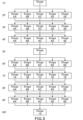
- FIG. 5 is a diagram explaining the relationship between floors and stages. Since only one type of normal stage, Stage 1, is provided on the first floor, the Dungeon Quest always starts from Stage 1. After clearing stage 1, the next stage starts on the second floor. Five types of normal stages, stages 2A, 2B, 2C, 2D, and 2E, are provided on the second floor, and one of these five types of normal stages is determined by lottery.
- floors other than multiples of 5 are normal stages.
- Five types of normal stages are provided on each floor except for the first floor, which are normal stages, and the stage to be played by the player is determined from among the five types of normal stages.
- the five normal stages corresponding to the same floor have slightly different degrees of difficulty.
- boss stage floor there is only one boss stage on the boss stage floor. Therefore, the player always plays the same boss stage on floors that are multiples of five.
- boss stages with different degrees of difficulty may be provided on floors serving as boss stages, similarly to floors serving as normal stages.
- the result screen displays a list of rewards given to the player.
- the results screen displays experience points, points and items earned during play.
- the weapons, dragons and skills acquired during play cannot be carried over to subsequent dungeon quests. Therefore, weapons, dragons and skills obtained as stage rewards during play will not be displayed on the result screen.
- stage rewards include special items such as normal quests that can be used outside of dungeon quests, and special items obtained during play will be displayed on the result screen.
- the close operation section 40e provided on the result screen is tapped, the top screen shown in FIG. 3A is displayed, and the dungeon quest in the normal play mode ends.
- the dungeon quest has a skip function.
- the dungeon quest can be played from the predetermined floor by skipping the floor selected by the player.
- the skip floor selection screen is displayed.
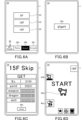
- FIG. 6A is a diagram illustrating an example of a skip floor selection screen.
- FIG. 6B is a diagram illustrating an example when the skip floor selection operation unit is operated.
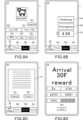
- FIG. 6C is a diagram illustrating an example of a skip reward screen.
- FIG. 6D is a diagram illustrating an example of a game screen when using the skip function.
- a skip floor selection operation section 42 is displayed on the skip floor selection screen. Skippable floors are displayed in the skip floor selection operation section 42 .
- three skip floor selection operation sections 42 labeled 5F, 10F, and 15F are displayed. The number of floors that can be skipped is set every five floors, and the player can set the number of floors to be skipped within the range of the maximum reachable floor of the selected target character.
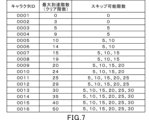
- FIG. 7 is a diagram explaining the relationship between the maximum number of floors reached and the number of floors that can be skipped. As shown in FIG. 7, characters that can be possessed by the player are associated with character IDs. Also, when the player selects a target character from the owned characters and plays the dungeon quest, the maximum reached floor among the floors reached by the target character, that is, the cleared floor is stored as the maximum reached floor.
- the player can set the number of floors to skip every five floors within the range of the maximum number of floors reached by the character selected as the target character.
- the maximum reachable floors of characters with character IDs "0001" and "0002” are the 0th floor and the 3rd floor, respectively. Therefore, the number of floors that can be skipped when these owned characters are selected as target characters is the 0th floor. That is, when the player selects owned characters with character IDs "0001" and "0002", the player cannot use the skip function.
- the maximum reachable floors of the owned characters with character IDs "0003" and “0004" are the 5th floor and the 9th floor, respectively. Therefore, the number of floors that can be skipped when these owned characters are selected as target characters is the fifth floor. Also, for example, the maximum reachable floors of the owned characters with character IDs “0005” and “0006” are the 10th floor and the 14th floor, respectively. Therefore, when these possessed characters are selected as target characters, the player can select the number of floors to be skipped from either the 5th floor or the 10th floor.
- the upper limit of the number of floors that can be skipped is set to the 30th floor. Therefore, the number of skippable floors for owned characters whose maximum number of floors reached is 30 or more is 5th, 10th, 15th, 20th, 25th, and 30th floors.
- the number of floors that can be skipped above is only an example.
- an upper bound on the number of skippable floors is not required.
- the number of skippable floors may be the same as the maximum number of floors to be reached, instead of every five floors.
- the number of skippable floors may be set based on the maximum number of floors reached by the player.
- the skip floor selection operation section 42 corresponding to the floors that the player can skip is displayed on the skip floor selection screen.
- a start operation portion 34g is displayed on the skip floor selection screen as shown in FIG. 6B, and when the start operation portion 34g is tapped, the skip reward screen shown in FIG. 6C is displayed. Is displayed.
- the skip reward is the same type of reward as the stage reward described above, and the obtained skip rewards are displayed in a list on the skip reward screen.
- the skip reward screen is hidden and the game screen is displayed as shown in FIG. 6D.
- the game screen of the 16th floor stage is displayed.
- skip rewards include weapons, dragons, and skills, and the player can use the weapons and the like acquired as skip rewards in subsequent dungeon quests.
- the auto-play mode selection operation section 32c is tapped on the top screen shown in FIG. 3A, the auto-play mode is ready.
- the character selection screen is displayed even in the preparation state of the autoplay mode, and the player can select one of the owned characters as the target character. Then, when a target character is selected on the character selection screen, an autoplay mode setting screen is displayed.
- FIG. 8A is a diagram explaining an example of the autoplay mode setting screen.
- the image of the character selected by the player as the target character is displayed on the autoplay mode setting screen.
- the auto-play mode setting screen is provided with a return operation section 34e, a skip operation section 34f, and a start operation section 34g, as well as a formation operation section 50a, an arrival floor display section 50b, and an arrival time display section 50c. is provided.
- the target character When the formation operation section 50a is tapped, the target character can be changed or the owned character can be strengthened.
- the reachable floor display section 50b displays the maximum floor that the target character can reach.
- the auto-play mode is a play mode in which the player's operation input and game screen display are unnecessary, and the game stage, that is, the number of floors, advances as time elapses. More specifically, in the autoplay mode, the number of floors reached by the target character is determined according to the elapsed time from the start. Therefore, the auto play mode gives the player the impression that the target character is proceeding with the dungeon quest automatically.
- the maximum floor that can be reached in auto play mode is set according to the maximum floor reached by the player in normal play mode.
- the 30th floor is set as the upper limit. Therefore, if the player has reached the 30th floor or higher in the normal play mode in the past, the target character can reach the 30th floor in the auto play mode.
- the maximum number of floors that can be reached in auto play mode is set every fifth floor. Therefore, for example, if the maximum number of floors reached by the player is 5 to 9 floors, the maximum number of floors that can be reached in the auto play mode is 5 floors. The maximum number of floors that can be reached is 10 floors.
- the target character's type does not affect the maximum number of floors that can be reached in autoplay mode. For example, if the maximum reachable floor of the player is the 30th floor, the maximum reachable floor in the auto play mode is the 30th floor regardless of which target character is selected. However, the maximum number of floors that can be reached in the autoplay mode may be set for each target character. For example, for a target character who has reached the 30th floor in the past, the maximum reachable floor is set to 30th floor, and for a target character who has reached only the 8th floor in the past, the maximum reachable floor is set to 5th floor. may be set to
- the upper limit is not essential. Also, here, the maximum floors that can be reached are set every five floors, but the maximum floors that can be reached in the auto play mode may completely match the maximum floors that the player can reach.
- the player cannot select the maximum floor that can be reached in the autoplay mode. That is, the maximum reachable floor is automatically set based on the maximum floor reached by the player in the past. However, in the auto play mode, the player may be able to arbitrarily set which floor the target character should reach.
- the time required for the target character to reach the maximum reachable floor is displayed in the arrival time display section 50c.
- 30F is displayed in the reached floor display section 50b
- 5 hours is displayed in the arrival time display section 50c. Therefore, in this case, it is shown that it takes five hours for the target character to reach the 30th floor.
- the time required to reach each floor is set in advance in autoplay mode. Specifically, the time required to reach the 5th floor is 30 minutes, the time required to reach the 10th floor is 1 hour, and thereafter, 1 hour is added every 5 floors.
- the dungeon quest in the auto-play mode will start.
- counting of the elapsed time is started with the start of the dungeon quest. While the elapsed time is being counted, the dungeon quest is being played in auto play mode.
- FIG. 8B is a diagram illustrating an example of the top screen during Dungeon Quest play in the autoplay mode.
- FIG. 8C is a diagram illustrating an example of the halfway termination dialogue 52.
- FIG. 8D is a diagram illustrating an example of a result screen in the autoplay mode.
- the remaining time is displayed in the auto-play mode selection operation section 32c on the top screen of the dungeon quest.
- the remaining time displayed in the auto-play mode selection operation section 32c is the remaining time until reaching the maximum reachable floor.
- the auto-play mode selection operation section 32c is tapped, the halfway end dialog 52 shown in FIG. 8C is displayed.
- the player can forcibly terminate the dungeon quest in the autoplay mode in the middle.
- the player is given a reward according to the elapsed time at that point.
- the time required to reach the 5th, 10th, 15th, 20th, 25th, and 30th floors is 30 minutes, 1 hour, 2 hours, 3 hours, 4 hours, and 5 hours, respectively. is.
- the reward given to the player is determined based on the time required to reach each floor. Specifically, if the elapsed time is less than 30 minutes at the time of forced termination, no reward is given to the player. In this case, a message indicating that no reward is given to the player is displayed in the premature end dialogue 52 .
- a reward equivalent to the 5th floor is given to the player.
- a reward equivalent to the 25th floor is given to the player. In this way, even if the game is forcibly terminated, the player can still obtain the reward, and the longer the elapsed time, the more advantageous the reward is given to the player.
- the halfway termination dialog 52 is provided with a cancel operation section 52a and an end operation section 52b.
- the halfway termination dialogue 52 is closed and the top screen shown in FIG. 8B is displayed.
- the end operation portion 52b is tapped, the dungeon quest in the autoplay mode is forcibly terminated, and the result screen of the autoplay mode is displayed.
- the auto-play mode selection operation section 32c is tapped when the remaining time is 0, that is, when the dungeon quest in the auto-play mode has ended, the result screen of the auto-play mode is displayed.
- the number of floors reached and a list of rewards are displayed on the autoplay mode result screen.
- rewards for dungeon quests in autoplay mode include experience points, points, and special items, and do not include weapons, skills, dragons, and the like.
- the rewards for dungeon quests in autoplay mode are limited to rewards that can be carried over to other games and subsequent dungeon quests.
- the close operation section 40e provided on the result screen is tapped, the result screen is hidden and the top screen shown in FIG. 3A is displayed. As a result, the dungeon quest in the autoplay mode can be restarted.
- Players can play dungeon quests in normal play mode even while playing dungeon quests in auto play mode.
- the player can simultaneously play the dungeon quest in the normal play mode and the dungeon quest in the auto play mode.
- the target characters cannot be duplicated.
- the character selection screen is displayed. At this time, the character selection screen is displayed so that the owned character selected as the target character in the auto play mode cannot be selected as the target character.
- FIG. 9A is a diagram explaining an example of the skip floor selection screen for the auto play mode.
- FIG. 9B is a diagram for explaining the remaining time when using the skip function in the autoplay mode.
- a skip floor selection operation section 54 is displayed on the skip floor selection screen for the auto play mode. Skippable floors are displayed in the skip floor selection operation section 54 .
- three skip floor selection operation sections 54 labeled 5F, 10F, and 15F are displayed.
- the number of floors that can be skipped is set every five floors, and the player can set the number of skip floors within the range of the maximum reached floor of the selected target character, as in the normal play mode. can.
- the skip function in autoplay mode has the effect of shortening the remaining time.
- using the skip function in autoplay mode reduces the time required to reach the maximum reachable floor.
- the time saved at this time is equal to the time required to reach each floor. For example, skipping to the 5th floor, the 10th floor, and the 15th floor reduces the required time by 30 minutes, 1 hour, and 2 hours, respectively.
- the required time to be shortened is described in the skip floor selection operation section 54 .
- the start operation portion 34g shown in FIG. 6B is displayed. Then, when the start operation portion 34g is tapped, a dungeon quest is started in an autoplay mode using a skip function. In this case, as shown in FIG. 9B, the auto-play mode selection operation section 32c displays the remaining time obtained by subtracting the time corresponding to the skipped floor from the time required to reach the maximum floor.
- a skip operation (a tap on the skip floor selection operation unit 42) is accepted in the normal play mode, the floor is skipped and the game starts from a predetermined floor.
- a skip operation (a tap of the skip floor selection operation unit 54) is received in the auto play mode, the time required to reach the predetermined floor is shortened.
- the skip function will have different benefits depending on the play mode used.
- the types of rewards determined in autoplay mode are the same as the types of rewards determined in normal play mode. Therefore, the provision of the auto play mode may reduce the motivation to play the dungeon quest in the normal play mode. Therefore, in the auto play mode, the time required to reach each floor is set longer than the time required to reach the same floor in the normal play mode.
- the time required to reach a given floor in auto play mode is longer than the shortest time and average time to reach the same floor in normal play mode is established for all floors. do.
- the time required to reach a predetermined floor in auto play mode may be longer than the expected time derived by simulation based on various parameters set by the developer or the arrival time based on AI simulation. .
- the types of rewards that can be obtained in the autoplay mode are the same as the types of rewards that can be obtained in the normal play mode.
- the normal play mode is set to be more advantageous for the player than the auto play mode.
- FIG. 10 is a diagram illustrating an example of a normal reward table.
- a reward given to a player is determined by lottery using a reward table.
- the remuneration table is roughly divided into three table divisions, a normal remuneration table, a skip remuneration table and an auto remuneration table.
- the normal reward table is a reward table used when playing a dungeon quest in the normal play mode.
- the skip reward table is a reward table used when using the skip function in the normal play mode.
- the auto reward table is a reward table used when playing a dungeon quest in auto play mode.
- FIG. 10 shows normal reward tables for stage 1, stage 2A, stage 2B, stage 5, and stage 20 as an example.
- the normal reward table for each stage is further provided for each type of reward.
- FIG. 10 shows normal reward tables for weapons, items, skills, points, experience points, and special items.
- the weapons that can be used while playing dungeon quests in normal play mode are determined as rewards.
- items items that can be used while playing a dungeon quest in the normal play mode are determined as rewards.
- the skills that can be used while playing Dungeon Quests in normal play mode are determined as rewards.
- the normal reward table for points points that can be used to strengthen owned characters are determined as rewards.
- the normal reward table for experience points the experience points for increasing the level of the owned character are determined as rewards.
- special items special items that can be used in normal quests different from dungeon quests are determined as rewards. Note that the normal reward table is not limited to the table shown in FIG. 10, and for example, a normal reward table for dragons in which a dragon is determined as a reward is provided.
- the stage reward is determined using the normal reward table corresponding to the cleared stage.
- the normal reward table For example, when stage 1 is cleared, a lottery is performed to determine the stage reward using normal reward tables for weapons, items, skills, points, and experience points.
- Each normal reward table may be designed so that one of the rewards is always determined, or designed so that no reward is determined, that is, no reward is determined depending on the result of the lottery. good too.
- the lottery ratio is designed so that the higher the normal reward table, the more powerful weapons, items, and skills you will win.
- the lottery ratio is designed so that the higher the normal reward table, the more experience points and points can be obtained.
- the normal reward table shown in FIG. 10 is used when clearing a stage, but apart from this, an in-game reward table (not shown) used during play may be provided.
- an in-game reward table (not shown) used during play may be provided. For example, if a treasure chest is placed in the virtual game space, the in-game reward table determines the reward given to the player when the treasure chest is opened. Also, when a predetermined enemy character is defeated, the reward given to the player is determined using the in-game reward table.
- the rewards given by lottery using the in-game reward table will only be given to the player when playing the dungeon quest in normal play mode. Therefore, the player can obtain more rewards by playing each stage in the normal play mode than by using the skip function or playing in the auto play mode.
- the normal play mode there are five normal stages corresponding to each floor above the second floor, and which normal stage is selected is determined by lottery. Since the normal reward table is different for each stage, the reward obtained by the player also differs depending on the result of the stage lottery.
- the player can acquire special items by clearing the boss stages on the 20th floor and above.
- the main purpose of dungeon quests is to acquire special items.
- FIG. 11 is a diagram illustrating an example of a skip reward table.
- a skip reward table is provided for each skip floor. As noted above, the player can select a skip floor every fifth floor. Therefore, as shown in FIG. 11, there are six types of skip reward tables for the 5th floor, the 10th floor, the 15th floor, the 20th floor, the 25th floor, and the 30th floor.
- a skip reward table for each floor is further provided for each type of reward.
- FIG. 11 shows skip reward tables for weapons, items, skills, points, experience points, and special items.
- the skip floor is the 15th floor
- a lottery will be held to determine the reward using the skip reward table for the 15th floor.
- Reward lottery using the skip reward table is performed at the time of skipping.
- the lottery ratio is designed so that the higher the skip reward table, the more powerful weapons, items, and skills you will win.
- the player when using the skip function in the normal play mode, the player needs to skip the skip floor number and play from the next floor stage. As the number of skip floors increases, more powerful weapons and the like can be acquired, so it is possible to avoid situations in which it becomes extremely difficult to clear subsequent stages when the skip function is used.
- the lottery ratio is designed so that the higher the skip reward table, the more experience points and points you can earn.
- the skip reward table for special items is used only when the number of skip floors is 20 or higher. In addition, it is designed so that the higher the number of floors skipped, the higher the winning rate of special items with high rarity.
- FIG. 12 is a diagram illustrating an example of an auto reward table.
- An auto reward table is provided for each elapsed time. As described above, in the auto play mode, the elapsed time is associated with the number of floors reached, so it can be said that the auto reward table is provided for each number of floors reached. As shown in FIG. 12, the auto reward table is provided with six types for 30 minutes, 1 hour, 2 hours, 3 hours, 4 hours, and 5 hours. In addition, an auto reward table for each elapsed time is further provided for each type of reward.
- FIG. 12 shows auto reward tables for points, experience points, and special items.
- the reward will be determined by lottery using the auto reward table corresponding to the elapsed time at that point. For example, when the elapsed time is 3 hours or more and less than 4 hours, a lottery is conducted using the auto reward table for 3 hours. Therefore, in this case, points, experience points and special items can be determined as rewards.
- a special item can be determined as a reward. As described above, in the autoplay mode, it takes three hours to reach the 20th floor. Therefore, even in the auto play mode, the player can acquire special items by reaching the 20th floor or above.
- the skip function can be used even in autoplay mode.
- the lottery using the skip reward table will not be performed.
- the skip function only shortens the remaining time until reaching a predetermined floor, and no skip reward is given. Therefore, in the autoplay mode, only the reward corresponding to the elapsed time is given to the player.
- a skip reward may be given to the player when using the skip function in the autoplay mode.
- FIG. 13 is a diagram explaining an example of the breakdown of remuneration for each table division.
- FIG. 13 shows an example of rewards obtained by the time the stage on the 25th floor is cleared. For example, if you play in normal play mode from the 1st floor without using the skip function, when you clear the stage on the 25th floor, you will have 10-20 1-star weapons and 5-10 2-star weapons. , you can acquire 1-2 3-star weapons.
- the number of stars for weapons, items, etc. indicates the degree of rarity, ie, rarity, and the greater the number of stars, the higher the degree of rarity. The higher the rarity of weapons and items, the more advantageous it is to proceed with the quest.
- the skip reward is determined by lottery using the skip reward table for the skip floor of the 25th floor.
- this table 5 1 star weapons, 2-4 2 star weapons, 0-1 3 star weapons, 3 3 star items, 4 skills, 1000 points. , you can get 35000 experience points, 1 special item with 2 stars, and 1 special item with 3 stars.
- the reward will be determined by lottery using the auto reward table for 4 hours elapsed time. According to this table, you can get 600 points, 35000 experience points, 1 special item with 2 stars, and 1 special item with 3 stars.
- the reward conditions (the number and content of rewards given to the player) in the normal play mode are set more favorable than the reward conditions in the auto play mode.
- the player is motivated to play in the normal play mode, and the desire to play the game can be enhanced.
- reward conditions are more advantageous when the skip function is not used than when the skip function is used. Therefore, even if the number of times the skip function is used is limited, the player will be motivated to play the game without using the skip function, and the player will be motivated to play the game.
- FIG. 14 is a diagram for explaining the configuration of the memory 12 in the player terminal 1 and the function as a computer.
- the memory 12 of the player terminal 1 is provided with a program storage area 12a and a data storage area 12b.
- the CPU 10 stores various programs (modules) in the program storage area 12a at the start of the game.
- the programs stored in the program storage area 12a include a login processing program 80, an information acquisition program 81, a preparation processing program 82, and a normal play execution program 83.
- the program shown in FIG. 14 is an example, and many other programs are provided in the programs stored in the program storage area 12a.
- a player information storage unit 90 and a game information storage unit 91 are provided in the data storage area 12b as storage units for storing data.
- the storage units described above are only examples, and the data storage area 12b is provided with a large number of other storage units.
- the CPU 10 operates each program stored in the program storage area 12a and updates data in each storage section in the data storage area 12b. Then, the CPU 10 causes the player terminal 1 to function as the game control section 1A by operating each program stored in the program storage area 12a.
- the game control section 1A includes a login processing section 80a, an information acquisition section 81a, a preparation processing section 82a, and a normal play execution section 83a.
- the CPU 10 operates the login processing program 80 to cause the computer to function as a login processing section 80a.
- the CPU 10 operates an information acquisition program 81, a preparation processing program 82, and a normal play execution program 83 to cause the computer to function as an information acquisition section 81a, a preparation processing section 82a, and a normal play execution section 83a, respectively.
- the login processing unit 80 a transmits login information to the server 100 when the player's login operation is input to the player terminal 1 .
- the information acquisition section 81a downloads various types of information set by the server 100, and stores them in the player information storage section 90 and the game information storage section 91 of the data storage area 12b.
- the preparation processing unit 82a executes processing in the dungeon quest preparation state.
- the normal play execution unit 83a performs processing for executing dungeon quests in the normal play mode.
- FIG. 15 is a diagram explaining the configuration of the memory 112 in the server 100 and the function as a computer.
- the memory 112 of the server 100 is provided with a program storage area 112a and a data storage area 112b.
- the CPU 110 stores various programs (modules) in the program storage area 112a.
- the programs stored in the program storage area 112a include an information setting program 130, a reward determination program 131, a stage determination program 132, and a completion time management program 133. Note that the program shown in FIG. 15 is only an example, and many other programs are provided in the programs stored in the program storage area 112a.
- a player information storage unit 140 and a game information storage unit 141 are provided in the data storage area 112b as storage units for storing data.
- the storage units described above are only examples, and the data storage area 112b is provided with a large number of other storage units.
- the CPU 110 operates each program stored in the program storage area 112a and updates the data in each storage section in the data storage area 112b. Then, the CPU 110 causes the server 100 to function as the game control unit 100A by operating each program stored in the program storage area 112a.
- the game control unit 100A includes an information setting unit 130a, a reward determination unit 131a, a stage determination unit 132a, and a completion time management unit 133a.
- the CPU 110 operates the information setting program 130 to cause the computer to function as an information setting section 130a.
- the CPU 110 operates a reward determination program 131, a stage determination program 132, and a completion time management program 133, and causes the computer to function as a reward determination unit 131a, a stage determination unit 132a, and a completion time management unit 133a, respectively.
- the information setting unit 130a sets information to be downloaded to the player terminal 1 based on the information received from the player terminal 1. Further, the information setting section 130 a updates various information in the player information storage section 140 and the game information storage section 141 .
- the reward determination unit 131a determines the reward given to the player in the dungeon quest.
- the stage determination unit 132a determines the stage that the player will play in the dungeon quest in the normal play mode.
- the completion time management unit 133a manages the time to reach the maximum reachable floor in the dungeon quest in the auto-play mode, that is, the completion time to complete the auto-play mode.
- FIG. 16 is a sequence diagram explaining basic processing in the player terminal 1 and the server 100.
- the login processing unit 80a of the player terminal 1 transmits login information to the server 100 (P1).
- the information setting unit 130a of the server 100 sets various player information stored in association with the player ID (S1).
- the information acquisition section 81a of the player terminal 1 stores the player information in the player information storage section 90 (P2).
- the preparation processing unit 82a executes the preparation processing (P3). do.
- FIG. 17 is a flow chart explaining the preparation process (P3) in the player terminal 1.
- FIG. 17 When the normal play mode selection operation (tapping the normal play mode selection operation section 32a in FIG. 3A) is input on the top screen (YES in P3-1), the preparation processing section 82a selects the normal play mode. Normal play mode information indicating that is stored in the game information storage unit 91 (P3-2).
- the preparation processing section 82a selects the auto-play mode.
- the game information storage unit 91 stores autoplay mode information indicating that the game is on (P3-4).
- the preparation processing unit 82a converts the character information indicating the selected character into the game information. Store in the storage unit 91 (P3-6).
- the preparation processing unit 82a stores skill information indicating the selected skill as game information. Store in the storage unit 91 (P3-8).
- the preparation processing unit 82a executes the skip setting process (P100).
- FIG. 18 is a flow chart explaining the skip setting process (P100) in the player terminal 1.
- FIG. When the skip operation unit 34f is operated (YES in P100-1), the preparation processing unit 82a acquires the maximum reached floor of the selected character stored in the game information storage unit 91 (P100-2), The skip floor selection screen shown in FIG. 6A or 9A is displayed (P100-3).
- the preparation processing unit 82a stores the selected skip floor in the game information storage unit 91 (P100-5). 6A or the skip floor selection screen shown in FIG. 9A is hidden (P100-6).
- the preparation processing portion 82a is set by the player.
- the setting information obtained is transmitted to the server 100 (P3-11).
- the setting information includes information indicating the play mode selected by the player, the character, the skill, and the number of floors to be skipped.
- the preparation processing unit 82a updates the screen of the display 26 (P3-13).
- the server 100 executes the start process (S2).
- FIG. 19 is a flowchart explaining the start processing (S2) in the server 100.
- the information setting unit 130a stores the game information such as the play mode, character, skill, and floors to be skipped selected by the player in the game information storage unit 141 based on the received setting information (S2-1).
- the reward determination unit 131a executes reward lottery processing (S100).
- FIG. 20 is a flow chart explaining the reward lottery process (S100) in the server 100.
- the remuneration determining unit 131a selects a lottery table to be used for determining remuneration based on the received information received from the player terminal 1 (S100-1). Then, the remuneration determination unit 131a uses the selected lottery table to determine a remuneration to be given to the player by lottery (S100-2).
- the information setting unit 130a sets reward information indicating the determined reward, and causes the player terminal 1 to receive it (S100-3). Further, the information setting section 130a updates the player information storage section 140 and gives the determined reward to the player (S100-4).
- the stage determination unit 132a executes stage determination processing (S2-4).
- the stage determination unit 132a determines and stores all stages that the player can play. For example, when the number of skip floors is 0, the stages to be played by the player are determined for all floors from the 1st floor to the 50th floor. Also, for example, when the number of skipped floors is 15, the stages from the 16th floor to the 50th floor are determined.
- the information setting unit 130a sets stage information indicating the stage, and causes the player terminal 1 to receive it.
- the reward determination unit 131a may determine only the next stage each time one stage is cleared.
- the stage is not determined for the skipped floor, but the stage may be determined for the skipped floor as well.
- a skip reward corresponding to the number of floors skipped is given to the player, and a stage reward corresponding to the skipped floor is not given to the player.
- the player may be given a stage reward corresponding to the skipped floor.
- the stages are determined for the floors to be skipped, and the rewards are preferably determined using the normal reward table for the determined stages.
- the stage is not determined when the auto-play mode is selected, but the stage may be determined even when the auto-play mode is selected.
- the player in the autoplay mode, the player is given rewards according to the elapsed time, and no stage rewards are given to the player.
- the stage reward may be given to the player even in the auto play mode. In this case, it is preferable that the stage of each floor is determined and the reward is determined using the normal reward table for the determined stage.
- the completion time management unit 133a acquires the maximum number of floors reached by the player (S2-5). Then, the completion time management unit 133a derives the maximum floor that can be reached in the current dungeon quest and the completion time from the obtained maximum floor to be reached, and stores them in the game information storage unit 141 (S2-6). Also, here, the completion time management unit 133a sets the completion time to the timer.
- the completion time management unit 133a derives the shortened time (S2-8).
- the shortened time is derived according to the number of floors skipped.
- the completion time management unit 133a subtracts the shortened time from the completion time stored in the game information storage unit 141 and the completion time set in the timer (S2-9).
- the information setting unit 130a sets the completion time information indicating the completion time, and causes the player terminal 1 to receive it (S2-10).
- the game control unit 1A executes the terminal side start process (P4).
- the information acquisition section 81a updates the information in the player information storage section 90 and the game information storage section 91 based on the received start information.
- the completion time is displayed in the auto-play mode selection operation section 32c as shown in FIG. 8B.
- a skip reward screen is displayed as shown in FIG. 6C.
- the game screen is displayed as shown in FIG. 4A, and the normal play execution process (P5) is started.
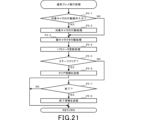
- FIG. 21 is a flowchart for explaining the normal play execution process (P5) on the player terminal 1.
- FIG. When an action operation is input to the target character (YES in P5-1), the normal play execution unit 83a executes action processing for causing the target character to act (P5-2).
- the action operation includes, for example, a movement operation for moving the target character, an attack operation for executing a normal attack, and a skill operation for activating a skill.
- a process corresponding to the input action operation is executed.
- the normal play execution unit 83a executes enemy character action processing for determining and executing the action of the enemy character (P5-3).
- the normal play executing section 83a executes parameter update processing for updating various parameters according to the actions of the target character and the enemy character (P5-4).
- the normal play execution unit 83a transmits clear information to the server 100 (P5-6). Further, when the player's HP becomes 0 or the like, and the end condition is met (YES in P5-7), the normal play executing section 83a transmits end information to the server 100 (P5-8).
- the player terminal 1 sends the server 100 the above clear information, end information, and drop request information when a treasure chest is opened or when an enemy character is defeated. is sent.
- the server 100 receives these pieces of information, the reward lottery process (S100) described above is executed.
- the player terminal 1 receives the reward information from the server 100 and updates the information in the player information storage unit 90 or the game information storage unit 91 .
- the remaining time is displayed in the auto-play mode selection operation section 32c during Dungeon Quest play in the auto-play mode.
- the game control portion 1A sends the end request information to the server 100. (P6).
- the server 100 executes autoplay end processing (S3).
- FIG. 22 is a flowchart for explaining the autoplay end processing (S3) in the server 100.
- the completion time management unit 133a derives the elapsed time by subtracting the remaining time from the completion time (S3-1). Also, the completion time management unit 133a derives the number of floors reached from the elapsed time, and stores it in the player information storage unit 140 (S3-2).
- the reward determination unit 131a executes the above-described reward lottery process (S100).
- the reward is determined by lottery using an auto lottery table corresponding to the elapsed time.
- the player terminal 1 receives the reward information, and the result screen shown in FIG. 8D is displayed on the player terminal 1.
- FIG. 8D is displayed on the player terminal 1.
- the sharing of processing performed by the player terminal 1 and the server 100 is merely an example.
- each of the above-described processes may be executed by at least one of the player terminal 1 and the server 100, and the execution timing and execution device are not particularly limited.
- the server 100 executes the reward lottery, but the player terminal 1 may execute the reward lottery.
- the game genre is action RPG, but the game genre is not particularly limited.
- the game genre is not particularly limited.
- the game when the game is started in the first play mode in which the game stage progresses based on the player's operation input while the game screen is displayed, the reward is determined based on the game stage reached.
- the game is started in the second play mode in which the player's operation input and game screen display are unnecessary and the game stage progresses with the passage of time, based on the elapsed time or the game stage reached It is sufficient that the reward is determined and the determined reward is given to the player. Therefore, the above technical matters may be applied to action games, puzzle games, rhythm games, and RPGs as long as a plurality of game stages are provided.
- the number of floors is provided as the game stage, but the game stage is not limited to this.
- the game stage is the number of floors, that is, the stage, and by clearing each game stage, it is possible to proceed to the next game stage. That is, in the above embodiment, each game stage is clearly distinguished.
- the game stages do not necessarily need to be clearly distinguished.
- the save point can be positioned as a game stage.
- a progress rate until one stage is cleared can be regarded as a game stage.
- the rewards in the above embodiment are only examples.
- the type of reward determined in the auto play mode (second play mode) is common to the type of reward determined in the normal play mode (first play mode).
- Reward types common to both play modes include points, experience points, and special items.
- one type of reward is provided with a plurality of rewards with different rarities. However, only one reward may be provided as one type of reward.
- the relationship that the time required to reach a predetermined floor in the auto play mode is longer than the shortest time and average time to reach the same floor in the normal play mode is established in all cases. It was decided to be established by the number of ranks. However, the above relationship may be established in some floors, for example, in the case of a predetermined floor or more.
- the time required to reach a predetermined floor in auto play mode (second play mode) is normal play mode (first play mode) may be set longer than the longest time required to reach the same floor in , that is, the total time of all time limits.
- the skip function can be used in both the normal play mode and the auto play mode.
- the skip function may be usable only in either one of the normal play mode and the auto play mode, or the skip function may not be provided.
- the information processing program for executing the processes in the above embodiments may be stored in a computer-readable non-temporary storage medium and provided as a storage medium. Furthermore, a game terminal device including this storage medium may be provided. Further, the above embodiment may be an information processing method that implements each function and the steps shown in the flowchart.
Landscapes
- Engineering & Computer Science (AREA)
- Multimedia (AREA)
- Physics & Mathematics (AREA)
- Optics & Photonics (AREA)
- Business, Economics & Management (AREA)
- Computer Security & Cryptography (AREA)
- General Business, Economics & Management (AREA)
- Management, Administration, Business Operations System, And Electronic Commerce (AREA)
- User Interface Of Digital Computer (AREA)
Priority Applications (2)
| Application Number | Priority Date | Filing Date | Title |
|---|---|---|---|
| CN202280072741.3A CN118176048A (zh) | 2021-10-29 | 2022-10-31 | 信息处理程序、信息处理方法和信息处理系统 |
| US18/647,882 US20240293750A1 (en) | 2021-10-29 | 2024-04-26 | Non-transitory computer readable medium, information processing method, and information processing system |
Applications Claiming Priority (2)
| Application Number | Priority Date | Filing Date | Title |
|---|---|---|---|
| JP2021-177027 | 2021-10-29 | ||
| JP2021177027A JP7136988B1 (ja) | 2021-10-29 | 2021-10-29 | 情報処理プログラム、情報処理方法および情報処理システム |
Related Child Applications (1)
| Application Number | Title | Priority Date | Filing Date |
|---|---|---|---|
| US18/647,882 Continuation US20240293750A1 (en) | 2021-10-29 | 2024-04-26 | Non-transitory computer readable medium, information processing method, and information processing system |
Publications (1)
| Publication Number | Publication Date |
|---|---|
| WO2023074900A1 true WO2023074900A1 (ja) | 2023-05-04 |
Family
ID=83271713
Family Applications (1)
| Application Number | Title | Priority Date | Filing Date |
|---|---|---|---|
| PCT/JP2022/040766 Ceased WO2023074900A1 (ja) | 2021-10-29 | 2022-10-31 | 情報処理プログラム、情報処理方法および情報処理システム |
Country Status (4)
| Country | Link |
|---|---|
| US (1) | US20240293750A1 (enExample) |
| JP (2) | JP7136988B1 (enExample) |
| CN (1) | CN118176048A (enExample) |
| WO (1) | WO2023074900A1 (enExample) |
Families Citing this family (2)
| Publication number | Priority date | Publication date | Assignee | Title |
|---|---|---|---|---|
| JP7326639B2 (ja) * | 2021-11-04 | 2023-08-15 | 株式会社あかつき | ゲームシステム、ゲームプログラム及び情報処理方法 |
| JP7760674B1 (ja) * | 2024-09-02 | 2025-10-27 | 株式会社Cygames | 情報処理プログラム、情報処理方法および情報処理システム |
Citations (5)
| Publication number | Priority date | Publication date | Assignee | Title |
|---|---|---|---|---|
| JP2014068758A (ja) * | 2012-09-28 | 2014-04-21 | Konami Digital Entertainment Co Ltd | ゲーム制御装置、ゲーム制御方法、プログラム、ゲームシステム |
| JP2014147558A (ja) * | 2013-02-01 | 2014-08-21 | Konami Digital Entertainment Co Ltd | ゲーム制御装置、ゲーム制御方法、プログラム、ゲームシステム |
| JP2014236907A (ja) * | 2013-06-10 | 2014-12-18 | 株式会社カプコン | ゲームプログラムおよびゲームシステム |
| JP2017012424A (ja) * | 2015-06-30 | 2017-01-19 | 株式会社バンダイナムコエンターテインメント | プログラム、ゲーム装置及びサーバシステム |
| JP2020124539A (ja) * | 2020-04-13 | 2020-08-20 | グリー株式会社 | ゲーム制御システム、ゲーム制御方法、通信端末及びゲーム制御プログラム |
Family Cites Families (2)
| Publication number | Priority date | Publication date | Assignee | Title |
|---|---|---|---|---|
| JP4855549B1 (ja) * | 2011-03-09 | 2012-01-18 | 株式会社コナミデジタルエンタテインメント | ゲーム制御装置、ゲームプログラム、ゲーム制御方法、ゲームシステム |
| JP6317600B2 (ja) * | 2014-03-03 | 2018-04-25 | 株式会社コナミデジタルエンタテインメント | ゲーム管理装置、ゲームシステム及びプログラム |
-
2021
- 2021-10-29 JP JP2021177027A patent/JP7136988B1/ja active Active
-
2022
- 2022-09-01 JP JP2022139402A patent/JP2023067755A/ja active Pending
- 2022-10-31 WO PCT/JP2022/040766 patent/WO2023074900A1/ja not_active Ceased
- 2022-10-31 CN CN202280072741.3A patent/CN118176048A/zh active Pending
-
2024
- 2024-04-26 US US18/647,882 patent/US20240293750A1/en active Pending
Patent Citations (5)
| Publication number | Priority date | Publication date | Assignee | Title |
|---|---|---|---|---|
| JP2014068758A (ja) * | 2012-09-28 | 2014-04-21 | Konami Digital Entertainment Co Ltd | ゲーム制御装置、ゲーム制御方法、プログラム、ゲームシステム |
| JP2014147558A (ja) * | 2013-02-01 | 2014-08-21 | Konami Digital Entertainment Co Ltd | ゲーム制御装置、ゲーム制御方法、プログラム、ゲームシステム |
| JP2014236907A (ja) * | 2013-06-10 | 2014-12-18 | 株式会社カプコン | ゲームプログラムおよびゲームシステム |
| JP2017012424A (ja) * | 2015-06-30 | 2017-01-19 | 株式会社バンダイナムコエンターテインメント | プログラム、ゲーム装置及びサーバシステム |
| JP2020124539A (ja) * | 2020-04-13 | 2020-08-20 | グリー株式会社 | ゲーム制御システム、ゲーム制御方法、通信端末及びゲーム制御プログラム |
Non-Patent Citations (1)
| Title |
|---|
| ANONYMOUS: "[Granblue VS] Thorough capture of RPG mode with auto play! | Haji's game life improvement blog", 23 April 2020 (2020-04-23), XP093061810, Retrieved from the Internet <URL:https%3A%2F%2Fweb.archive.org%2Fweb%2F20200423144217%2Fhttps%3A%2F%2Fhazi-gamelife.com%2Fgame%2Fgbvs%2Fgbvs-rpg-kouryaku%2F> * |
Also Published As
| Publication number | Publication date |
|---|---|
| CN118176048A (zh) | 2024-06-11 |
| JP2023067755A (ja) | 2023-05-16 |
| US20240293750A1 (en) | 2024-09-05 |
| JP7136988B1 (ja) | 2022-09-13 |
| JP2023066440A (ja) | 2023-05-16 |
Similar Documents
| Publication | Publication Date | Title |
|---|---|---|
| JP5165132B1 (ja) | ゲーム管理サーバ装置、ゲーム管理サーバ装置用プログラム、および、端末装置用プログラム | |
| JP7076614B1 (ja) | 情報処理プログラム、情報処理方法および情報処理システム | |
| JP7136988B1 (ja) | 情報処理プログラム、情報処理方法および情報処理システム | |
| JP7760466B2 (ja) | 情報処理プログラム、情報処理方法および情報処理システム | |
| JP2021090699A (ja) | 情報処理プログラム、情報処理方法および情報処理システム | |
| JP6752345B1 (ja) | 情報処理プログラム、情報処理方法、情報処理装置および情報処理システム | |
| KR20240155897A (ko) | 정보 처리 프로그램, 정보 처리 방법 및 정보 처리 시스템 | |
| JP2021122727A (ja) | プログラム、端末、ゲーム管理装置、ゲームシステム及びゲーム方法 | |
| JP7721418B2 (ja) | 情報処理プログラム、情報処理方法および情報処理システム | |
| WO2020158208A1 (ja) | プログラム、端末、ゲームシステム及びゲーム管理装置 | |
| JP2015173990A (ja) | ゲームプログラム、ゲーム処理方法、および、情報処理装置 | |
| JP7314375B1 (ja) | 情報処理プログラム、情報処理方法およびゲーム装置 | |
| JP6857766B1 (ja) | 情報処理プログラム、情報処理方法および情報処理システム | |
| JP2017202000A (ja) | ビデオゲーム処理プログラム、及びビデオゲーム処理システム | |
| JP7146039B1 (ja) | 情報処理方法、情報処理システムおよび情報処理プログラム | |
| JP2023026472A (ja) | 情報処理プログラム、情報処理方法および情報処理システム | |
| KR102900165B1 (ko) | 정보 처리 프로그램, 정보 처리 방법 및 정보 처리 시스템 | |
| JP7454730B1 (ja) | 情報処理プログラム、情報処理方法および情報処理システム | |
| JP7607158B1 (ja) | 情報処理プログラム、情報処理方法および情報処理システム | |
| JP7204978B1 (ja) | 情報処理プログラム、情報処理方法および情報処理システム | |
| JP7769046B1 (ja) | 情報処理プログラム、情報処理システム、情報処理方法およびゲーム装置 | |
| JP7238196B1 (ja) | 情報処理プログラム、情報処理方法およびゲーム装置 | |
| JP7684023B2 (ja) | 情報処理プログラム、情報処理方法および情報処理システム | |
| JP2018103053A (ja) | ビデオゲーム処理プログラム、及びビデオゲーム処理システム | |
| JP2025073363A (ja) | 情報処理プログラム、情報処理方法および情報処理システム |
Legal Events
| Date | Code | Title | Description |
|---|---|---|---|
| 121 | Ep: the epo has been informed by wipo that ep was designated in this application |
Ref document number: 22887225 Country of ref document: EP Kind code of ref document: A1 |
|
| WWE | Wipo information: entry into national phase |
Ref document number: 202280072741.3 Country of ref document: CN |
|
| 122 | Ep: pct application non-entry in european phase |
Ref document number: 22887225 Country of ref document: EP Kind code of ref document: A1 |