WO2023074301A1 - キャリブレーション方法、及び、投写型表示システム - Google Patents
キャリブレーション方法、及び、投写型表示システム Download PDFInfo
- Publication number
- WO2023074301A1 WO2023074301A1 PCT/JP2022/037363 JP2022037363W WO2023074301A1 WO 2023074301 A1 WO2023074301 A1 WO 2023074301A1 JP 2022037363 W JP2022037363 W JP 2022037363W WO 2023074301 A1 WO2023074301 A1 WO 2023074301A1
- Authority
- WO
- WIPO (PCT)
- Prior art keywords
- image
- feature points
- area
- projection display
- points
- Prior art date
- Legal status (The legal status is an assumption and is not a legal conclusion. Google has not performed a legal analysis and makes no representation as to the accuracy of the status listed.)
- Ceased
Links
Images





Classifications
-
- H—ELECTRICITY
- H04—ELECTRIC COMMUNICATION TECHNIQUE
- H04N—PICTORIAL COMMUNICATION, e.g. TELEVISION
- H04N9/00—Details of colour television systems
- H04N9/12—Picture reproducers
- H04N9/31—Projection devices for colour picture display, e.g. using electronic spatial light modulators [ESLM]
- H04N9/3191—Testing thereof
- H04N9/3194—Testing thereof including sensor feedback
-
- G—PHYSICS
- G03—PHOTOGRAPHY; CINEMATOGRAPHY; ANALOGOUS TECHNIQUES USING WAVES OTHER THAN OPTICAL WAVES; ELECTROGRAPHY; HOLOGRAPHY
- G03B—APPARATUS OR ARRANGEMENTS FOR TAKING PHOTOGRAPHS OR FOR PROJECTING OR VIEWING THEM; APPARATUS OR ARRANGEMENTS EMPLOYING ANALOGOUS TECHNIQUES USING WAVES OTHER THAN OPTICAL WAVES; ACCESSORIES THEREFOR
- G03B21/00—Projectors or projection-type viewers; Accessories therefor
-
- G—PHYSICS
- G03—PHOTOGRAPHY; CINEMATOGRAPHY; ANALOGOUS TECHNIQUES USING WAVES OTHER THAN OPTICAL WAVES; ELECTROGRAPHY; HOLOGRAPHY
- G03B—APPARATUS OR ARRANGEMENTS FOR TAKING PHOTOGRAPHS OR FOR PROJECTING OR VIEWING THEM; APPARATUS OR ARRANGEMENTS EMPLOYING ANALOGOUS TECHNIQUES USING WAVES OTHER THAN OPTICAL WAVES; ACCESSORIES THEREFOR
- G03B21/00—Projectors or projection-type viewers; Accessories therefor
- G03B21/14—Details
-
- G—PHYSICS
- G03—PHOTOGRAPHY; CINEMATOGRAPHY; ANALOGOUS TECHNIQUES USING WAVES OTHER THAN OPTICAL WAVES; ELECTROGRAPHY; HOLOGRAPHY
- G03B—APPARATUS OR ARRANGEMENTS FOR TAKING PHOTOGRAPHS OR FOR PROJECTING OR VIEWING THEM; APPARATUS OR ARRANGEMENTS EMPLOYING ANALOGOUS TECHNIQUES USING WAVES OTHER THAN OPTICAL WAVES; ACCESSORIES THEREFOR
- G03B21/00—Projectors or projection-type viewers; Accessories therefor
- G03B21/14—Details
- G03B21/26—Projecting separately subsidiary matter simultaneously with main image
-
- G—PHYSICS
- G06—COMPUTING OR CALCULATING; COUNTING
- G06T—IMAGE DATA PROCESSING OR GENERATION, IN GENERAL
- G06T7/00—Image analysis
- G06T7/70—Determining position or orientation of objects or cameras
- G06T7/73—Determining position or orientation of objects or cameras using feature-based methods
- G06T7/74—Determining position or orientation of objects or cameras using feature-based methods involving reference images or patches
-
- G—PHYSICS
- G09—EDUCATION; CRYPTOGRAPHY; DISPLAY; ADVERTISING; SEALS
- G09G—ARRANGEMENTS OR CIRCUITS FOR CONTROL OF INDICATING DEVICES USING STATIC MEANS TO PRESENT VARIABLE INFORMATION
- G09G5/00—Control arrangements or circuits for visual indicators common to cathode-ray tube indicators and other visual indicators
-
- H—ELECTRICITY
- H04—ELECTRIC COMMUNICATION TECHNIQUE
- H04N—PICTORIAL COMMUNICATION, e.g. TELEVISION
- H04N5/00—Details of television systems
- H04N5/74—Projection arrangements for image reproduction, e.g. using eidophor
-
- H—ELECTRICITY
- H04—ELECTRIC COMMUNICATION TECHNIQUE
- H04N—PICTORIAL COMMUNICATION, e.g. TELEVISION
- H04N9/00—Details of colour television systems
- H04N9/12—Picture reproducers
- H04N9/31—Projection devices for colour picture display, e.g. using electronic spatial light modulators [ESLM]
- H04N9/3141—Constructional details thereof
- H04N9/3147—Multi-projection systems
-
- H—ELECTRICITY
- H04—ELECTRIC COMMUNICATION TECHNIQUE
- H04N—PICTORIAL COMMUNICATION, e.g. TELEVISION
- H04N9/00—Details of colour television systems
- H04N9/12—Picture reproducers
- H04N9/31—Projection devices for colour picture display, e.g. using electronic spatial light modulators [ESLM]
- H04N9/3179—Video signal processing therefor
- H04N9/3185—Geometric adjustment, e.g. keystone or convergence
-
- G—PHYSICS
- G06—COMPUTING OR CALCULATING; COUNTING
- G06T—IMAGE DATA PROCESSING OR GENERATION, IN GENERAL
- G06T2207/00—Indexing scheme for image analysis or image enhancement
- G06T2207/20—Special algorithmic details
- G06T2207/20092—Interactive image processing based on input by user
- G06T2207/20104—Interactive definition of region of interest [ROI]
-
- G—PHYSICS
- G06—COMPUTING OR CALCULATING; COUNTING
- G06T—IMAGE DATA PROCESSING OR GENERATION, IN GENERAL
- G06T2207/00—Indexing scheme for image analysis or image enhancement
- G06T2207/30—Subject of image; Context of image processing
- G06T2207/30244—Camera pose
Definitions
- the present disclosure relates to a method of calibrating a projection display system.
- Patent Document 1 discloses a technique for detecting deviation of an imaging device using an image obtained by the imaging device.
- the present disclosure provides a calibration method capable of suppressing deterioration of calibration accuracy related to image projection.
- a calibration method acquires a first image captured by a camera at a first timing and showing an area where an image is projected by a projection display device, and detecting a plurality of feature points in the first image; superimposing the plurality of detected feature points on the first image and displaying them on a monitor; receives a user's operation to select as a reference point of the area, obtains a second image that is a second image captured by the camera at a second timing after the first timing and shows the area, and obtains a second image that is selected A shift in relative position between the camera and the area is detected using the plurality of reference points and the acquired second image.
- a calibration method can suppress deterioration in accuracy of calibration relating to image projection.
- FIG. 1 is a diagram showing the configuration of a projection display system according to an embodiment.
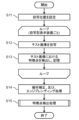
- FIG. 2 is a flowchart of initial calibration processing.
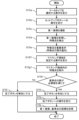
- FIG. 3 is a flowchart of an example 1 of feature point detection processing.
- FIG. 4 is a diagram showing an example of a graphical user interface used in Example 1 of feature point detection processing.
- FIG. 5 is a flowchart of example 2 of feature point detection processing.
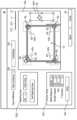
- FIG. 6 is a diagram showing an example of a graphical user interface used in Example 2 of feature point detection processing.
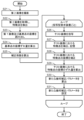
- FIG. 7 is a flowchart of calibration processing.
- FIG. 8 is a diagram showing the configuration of a projection display system according to Modification 1.
- FIG. 9 is a diagram showing the configuration of a projection display system according to Modification 2.
- FIG. 8 is a diagram showing the configuration of a projection display system according to Modification 1.
- each figure is a schematic diagram and is not necessarily strictly illustrated. Moreover, in each figure, the same code
- FIG. 1 is a diagram showing the configuration of a projection display system according to an embodiment.
- the projection display system 10 is a system compatible with multi-projection that constructs one image from images projected by two projection display devices 20 respectively.
- the projection display system 10 performs calibration processing using an image captured by the camera 30 in order to project an image in accordance with the screen 70 (along the area inside the frame 70a of the screen 70).
- a projection display system 10 includes two projection display devices 20 , a camera 30 and an information processing device 40 . It should be noted that the projection display system 10 only needs to include at least one projection display device 20, and does not necessarily support multi-projection. Also, the projection display device 20 may include a plurality of cameras 30 .
- the projection display device 20 projects an image on the screen 70 under the control of the information processing device 40 .
- the projection display device 20 is realized by an optical system such as a laser light source, a phosphor wheel, an image display element, and a projection lens, for example.
- the image display element is a digital micromirror device (DMD) or a reflective liquid crystal panel (LCOS: Liquid Crystal On Silicon).
- edge blending When multi-projection is realized by two projection display devices 20, for example, a technique called edge blending is used.
- the two images projected by the two projection display devices 20 have an overlapping portion 70b that overlaps with each other, and edge blending projects such that the brightness of the two images cross-fades in the overlapping portion 70b. This prevents the seam between the two images from becoming conspicuous.
- the camera 30 captures an image showing the entire screen 70.
- Screen 70 is an example of an area onto which an image is projected by projection display device 20 .
- Camera 30 is implemented by an image sensor, a lens, and the like.
- the information processing device 40 performs information processing for realizing the multi-projection described above. Such information processing includes calibration processing using an image captured by camera 30 in order to project the image in conformity with screen 70 .
- the information processing device 40 is, for example, a general-purpose device such as a PC (personal computer) installed with an application program for executing the above information processing, but may be a dedicated device for the projection display system 10 . Further, the information processing device 40 may be a server including application programs.
- the information processing device 40 specifically includes an input device 41 , a monitor 42 , a communication circuit 43 , a control circuit 44 and a storage device 45 .
- the input device 41 accepts user operations.
- the input device 41 is, for example, a keyboard and mouse, but may be a touch panel or the like.
- the monitor 42 displays an image.
- the monitor 42 is implemented by, for example, a display panel such as a liquid crystal panel or an organic EL (Electro Luminescence) panel. Note that the monitor 42 may be a separate device from the information processing device 40 .
- the communication circuit 43 is a communication circuit for the information processing device 40 to communicate with the two projection display devices 20 and the camera 30 .
- the communication circuit 43 communicates with the two projection display devices 20 and the camera 30, for example, through a local communication network.
- the communication performed by the communication circuit 43 is, for example, wired communication, but may be wireless communication.
- the communication standard used for communication is also not particularly limited.
- the communication circuit 43 may communicate with the two projection display devices 20 and the camera 30 through a WAN (Wide Area Network) or the Internet instead of the local communication network.
- the user can access the information processing apparatus 40, which is a server, from a PC via the network and control the information processing apparatus 40.
- the input device 41 and the monitor 42 do not have to be provided in the information processing device 40, and may be provided in the local user PC.
- the control circuit 44 performs the above information processing.
- the control circuit 44 is specifically implemented by a processor or microcomputer.
- the functions of the control circuit 44 are realized by executing a computer program stored in the storage device 45 by a processor or microcomputer that constitutes the control circuit 44 .
- the storage device 45 is a storage device that stores information necessary for the above information processing, such as computer programs executed by the control circuit 44 .
- the storage device 45 is specifically implemented by a semiconductor memory, HDD (Hard Disk Drive), or the like.
- FIG. 2 is a flow chart of initial calibration processing of the projection display system 10 .
- the control circuit 44 sets the projection positions so that the projection positions of the images of the two projection display devices 20 match the screen 70 (S11).
- the projection position is a rectangular area on the screen 70 on which the image projected by the projection display device 20 is displayed, and includes the coordinates of the four vertices of the rectangular area.
- the projection position is specified by coordinates including the four vertices of screen 70 .
- the position of the screen 70 is set as the projection position.
- control circuit 44 transmits a control signal to each of two projection display devices 20 via communication circuit 43, thereby causing each of two projection display devices 20 to project an image.
- control circuit 44 controls the direction of projection, the amount of lens shift, Adjust the zoom magnification and focal length.
- the control circuit 44 stores the projection positions of the test images of the two projection display devices 20 (specifically, the coordinates of the feature points in the test images). Processing for storing the projection position of the test image of one projection display device 20 will be described below, but this processing is performed for each of the two projection display devices 20 .
- the control circuit 44 causes the projection display device 20 to project a test image by transmitting a control signal to the projection display device 20 via the communication circuit 43 (S12).
- the test image may be an image suitable for detecting feature points in the next step S13, such as an image having a predetermined color pattern.
- the control circuit 44 detects feature points in the test image projected on the screen 70, and stores the coordinates of the detected feature points in the storage device 45 (S13).
- the feature point detection in step S13 is a process for specifying the projection position of the image of the projection display device 20.
- FIG. In other words, it is a process for identifying the relative position between the projection display device 20 and the screen 70 .
- control circuit 44 transmits a control signal to the camera 30 via the communication circuit 43 to cause the camera 30 to capture an image (still image) including the screen 70 on which the test image is projected. .
- the control circuit 44 acquires a captured image (more specifically, image information of the captured image) from the camera 30 via the communication circuit 43, and uses the acquired image as a processing target to determine a plurality of feature points. To detect.
- the control circuit 44 uses, for example, an algorithm optimized for detecting feature points appearing in the test image.
- intersections of regions of different colors are detected as feature points.
- FP(N) is stored in the storage device 45 .
- control circuit 44 performs geometric correction and edge blending processing (S14).
- the control circuit 44 performs geometric correction for each of the two images projected by the two projection display devices 20 so that the edges of the projected images are aligned with the frame 70a of the screen 70, if necessary.
- the control circuit 44 performs edge blending processing on the superimposed portion 70 b of the two images projected by the two projection display devices 20 .
- the control circuit 44 automatically executes this series of processes using an image captured by the camera 30 (more specifically, image information obtained from the camera 30 through the communication circuit 43).
- the control circuit 44 performs feature point detection processing (S15).
- the feature point detection processing is processing for specifying the relative position between the camera 30 and the screen 70 . Details of the feature point detection processing will be described later.
- FIG. 3 is a flowchart of an example 1 of feature point detection processing.
- FIG. 4 is a diagram showing an example of a graphical user interface (GUI) displayed on the monitor 42 by the control circuit 44 in Example 1 of the feature point detection process.
- GUI graphical user interface
- the image currently captured by the camera 30 is displayed in real time in the main area 42a of FIG.
- the user performs an operation to select a marker type, and the input device 41 accepts such an operation (S15a).
- the user operates the pull-down button 42b provided in the Type of Markers column of the GUI of FIG. (reflection)”, and the input device 41 accepts such a selection operation.
- Non-Luminous is selected when no markers are provided around the screen as shown in FIG. 1 and feature points are detected for the screen 70 . Further, as will be described later, when detecting feature points in a state in which non-luminous markers are provided around the screen 70, “Non-Luminous” is selected and luminous markers are placed around the screen 70. “Luminous” is selected when the feature point is detected in the provided state. Further, when detecting a feature point in a state where markers that reflect light are provided around the screen 70, "Reflective" is selected.
- the control circuit 44 sends a control signal to the camera 30 via the communication circuit 43 to cause the camera 30 to take an image (still image) (S15c).
- the image shooting conditions (white balance, shutter speed, ISO sensitivity, F-number, etc.) instructed from the information processing device 40 (control circuit 44) to the camera 30 by the control signal are the result of selection in step S15a. automatically set accordingly.
- the image captured in step S15c is also referred to as the first image.
- the user manually sets the imaging conditions by operating a plurality of pull-down buttons provided in the imaging condition setting section 42d instead of performing the operations in steps S15a and S15b, and then sets the imaging conditions provided in the imaging condition setting section 42d.
- the first image can also be captured by operating the captured capture button 42e.
- the control circuit 44 acquires the first image (more specifically, image information of the first image) from the camera 30 via the communication circuit 43, and A plurality of feature points are detected using the first image as a processing target (S15d).
- the control circuit 44 uses, for example, an algorithm for detecting feature points that appear at the four corners (vertices of the rectangle) of the rectangular screen 70 .
- the control circuit 44 may detect, as a feature point, a point with a large contrast difference, that is, a point with a relatively high spatial frequency, in the first image acquired by the camera 30 .
- any existing algorithm may be used for detection of feature points, and open source or the like may be used as appropriate.
- the control circuit 44 superimposes a plurality of objects 42j corresponding to the plurality of detected feature points on the first image and displays them on the main area 42a (monitor 42) (S15e).
- the object 42j indicating each feature point is a figure combining a circle and four lines, but any figure can be used for the object indicating each feature point.
- the control circuit 44 detects the four corners of the screen 70 appearing in the first image, and sets specific regions 42 f at each of the four corners of the screen 70 .
- the specific area 42f is set with the projection position of the image as a base point.
- each of the specific regions 42 f corresponding to the four corners of the screen 70 at least part of the specific region 42 f is located outside the corresponding vertex of the screen 70 .
- the specific area 42 f should include the vertex of the screen 70 and at least part of the specific area 42 f should be located outside the screen 70 .
- the point at which two diagonal lines of the screen 70 intersect is the center.
- Each specific area 42f is positioned so as to be adjacent to the outside of the vertex of the screen 70 .
- control circuit 44 displays the set specific area 42f in the first image in a manner distinguishable from other areas. Specifically, the control circuit 44 superimposes an object (indicator) indicating the specific region 42f on the first image.
- An object indicating the specific area 42f is, for example, a rectangular frame, which is indicated by broken lines in FIG.
- the specific aspect (shape, size, color, etc.) of the object indicating the specific region 42f is not particularly limited.
- control circuit 44 changes the display mode of the specific region 42f depending on whether or not a predetermined number or more of feature points are detected.
- the control circuit 44 colors the object (more specifically, the inside of the rectangular frame of the object) representing the specific region 42f (first region) in which a predetermined number or more of feature points are detected in translucent green (first region). 1 mode). Then, the control circuit 44 displays the object indicating the specific region 42f (second region) in which the predetermined number or more of feature points are not detected in translucent red (second mode). Thereby, the control circuit 44 can notify the user whether each of the four specific regions 42f satisfies the required number of feature points. That is, the control circuit 44 can notify the user of the number of feature points in each of the four specific regions 42f.
- the display mode of the object indicating the specific area 42f is changed based on the color.
- changing the display mode of the object indicating the specific area 42f may be realized by combining two or more of the color, shape, size, line type of the frame line, and blinking cycle of the object.
- the number of feature points included in the specific region 42f may be displayed numerically in the specific region 42f.
- the feature point is used to check the relative positional deviation between the camera 30 and the screen 70, but it may be detected at an unexpected position unrelated to the screen 70.
- the feature point may be detected at a position unrelated to the screen 70 depending on the lighting conditions when the first image is captured.
- the feature point may be detected at a position unrelated to the screen 70 .
- the use of feature points detected at positions unrelated to the screen 70 for calibration contributes to deterioration of calibration accuracy.
- the projection display system 10 has a function of excluding unnecessary feature points.
- the user operates the masking area specifying section 42g1, and the input device 41 receives such an operation (S15f1).
- the user can specify the masking area 42h1 at a desired position in the first image.
- the control circuit 44 excludes (invalidates) the feature points included in the designated masking area 42h1 from among the plurality of feature points detected in step S15d (S15g1).
- the feature points excluding one or more feature points belonging to the masking region 42h1 are selected as the final feature points from among the plurality of feature points detected in step S15d.
- the final feature point is also described as a reference point.
- control circuit 44 changes the display mode of the reference points and the excluded feature points. For example, the control circuit 44 does not display (cancel display) the excluded feature points in the main area 42a, but may display them in a manner different from the reference point.
- the mode different from the reference point means displaying with a color different from that of the reference point or displaying with an icon shape different from that of the reference point.
- the control circuit 44 determines whether each of the four specific regions 42f satisfies the required number of reference points (final feature points) (S15h).
- the control circuit 44 determines that each of the four specific regions 42f satisfies the required number of reference points (Yes in S15h)
- it enables the completion button 42i (S15i).
- the user operates the completion button 42i, and the input device 41 accepts such an operation (S15j).
- the control circuit 44 associates the first image with the coordinates of all the reference points in the first image and stores them in the storage device 45 (S15k). Note that identification information (ID) of the reference point is assigned to the coordinates of the reference point.
- control circuit 44 determines that at least one of the four specific areas 42f does not satisfy the required number of reference points (No in S15h), it disables the completion button 42i (S15l), and the user's response to the completion button is disabled. Do not accept any operation. In this case, the user changes the photographing conditions and redoes photographing of the first image (step S15c).
- the projection display system 10 detects the area (the screen 70 area surrounded by a frame 70a) is acquired, and a plurality of feature points are detected in the acquired first image. Further, the projection display system 10 superimposes the plurality of detected feature points on the first image and displays them on the monitor 42, and when the plurality of feature points are superimposed and displayed on the first image, the first image is displayed. Accepts an operation to specify the masking area 42h1 in the image. As a result, feature points excluding one or more feature points belonging to the designated masking region 42h1 are selected as the plurality of reference points from among the plurality of feature points.
- Such a projection display system 10 has a function of excluding unnecessary feature points from the reference points, thereby suppressing deterioration in accuracy of calibration processing and failure of calibration processing.
- step S15f1 an operation of specifying the masking region 42h1 was performed as the operation of selecting only some of the plurality of feature points as the plurality of reference points.
- the user may perform an operation of directly specifying a feature point that the user wants to exclude using a pointer or the like. That is, in step S15f1, an operation of directly designating some of the plurality of feature points may be performed as the operation of selecting some of the plurality of feature points as the plurality of reference points. In this case, feature points other than one or more designated feature points are selected as the plurality of reference points from among the plurality of feature points.
- the projection display system 10 performs an operation of specifying the masking area 42h1 as an operation of selecting only some of the plurality of feature points as a plurality of reference points, and directly specifying a feature point to be excluded using a pointer or the like. Both operations may be accepted.
- FIG. 5 is a flowchart of example 2 of feature point detection processing.
- FIG. 6 is a diagram showing an example of a graphical user interface displayed on the monitor 42 by the control circuit 44 in Example 2 of the feature point detection process.
- steps S15a to S15e are the same as in example 1 of the feature point detection processing, so the description is omitted.
- the user operates the effective area specifying section 42g2, and the input device 41 accepts such an operation (S15f2).
- the user can specify the effective area 42h2 at a desired position in the first image.
- the control circuit 44 excludes (invalidates) feature points that are not included in the designated valid area 42h2 from among the plurality of feature points detected in step S15d (S15g2).
- S15g2 the plurality of feature points detected in step S15d
- control circuit 44 determines whether each of the four specific areas 42f satisfies the required number of reference points (S15h). Since the subsequent steps S15i to S15l are the same as those in example 1 of the feature point detection process, description thereof will be omitted.
- the projection display system 10 projects the first image captured by the camera 30 by the projection display device 20 (screen 70). area surrounded by a frame 70a) is acquired, and a plurality of feature points are detected in the acquired first image. Further, the projection display system 10 superimposes the plurality of detected feature points on the first image and displays them on the monitor 42, and when the plurality of feature points are superimposed and displayed on the first image, the first image is displayed. Accepts an operation to specify the effective area 42h2 in the image. As a result, only the feature points belonging to the designated effective area 42h2 are selected as the plurality of reference points from among the plurality of feature points.
- the projection display system 10 has the function of excluding unnecessary feature points from the reference points, thereby suppressing deterioration in accuracy of calibration processing and failure of calibration processing.
- step S15f2 the operation of specifying the effective area 42h2 was performed as the operation of selecting only some of the plurality of feature points as the plurality of reference points.
- the user may perform an operation of directly specifying a feature point to be selected as a reference point using a pointer or the like. That is, in step S15f2, an operation of directly specifying a plurality of feature points may be performed as the operation of selecting some of the plurality of feature points as the plurality of reference points. In this case, only specified feature points are selected as the plurality of reference points from among the plurality of feature points.
- the projection display system 10 performs an operation of designating the effective area 42h2 as an operation of selecting only some of the plurality of feature points as a plurality of reference points, and an operation of specifying the feature point to be selected as a reference point with a pointer or the like. You may accept both operations directly specified by .
- FIG. 7 is a flowchart of calibration processing.
- the control circuit 44 transmits a control signal to the camera 30 via the communication circuit 43 with this as a trigger, thereby transmitting an image (still image) to the camera 30 . is photographed (S21).
- the control circuit 44 stores the shooting conditions in the storage device 45 at the time of the initial calibration processing, and refers to the storage device 45 to set the camera to the same shooting conditions as when the initial calibration processing was performed. Have an image taken.
- the image captured in step S21 is also referred to as a second image.
- the control circuit 44 manages schedule information for calibration processing (once in a predetermined period such as one day, one week, or one month), and periodically captures the second image based on the schedule information. do.
- the schedule information is stored (registered) in advance in the storage device 45 by, for example, a user's operation on the input device 41 .
- the shooting schedule is managed by a device higher than the information processing device 40, such as a cloud server (not shown). You can take pictures.
- the shooting of the second image may be performed based on the user's operation. For example, when the user sees the image projected on the screen 70 and determines that calibration is necessary, the user performs a predetermined operation on the input device 41 to input a shooting command for the second image. , a second image may be taken.
- the control circuit 44 acquires the second image (more specifically, image information of the second image) from the camera 30 via the communication circuit 43, and A plurality of feature points are detected using the second image as a processing target (S22).
- a method for detecting a plurality of feature points is the same as the method described in step S15d, except that the processing target is the second image.
- control circuit 44 reads the coordinates of the first image and the plurality of reference points stored in the storage device 45 in step S15k (S23). Then, the control circuit 44 calculates the amount of coordinate deviation at the present time point (second timing) for each of the plurality of read reference points (S24). Specifically, the control circuit 44 identifies the feature amount of each of the plurality of read reference points by matching the coordinates of each of the plurality of reference points with the first image. For each of the plurality of reference points, the control circuit 44 determines one of the plurality of feature points detected in step S22 as the feature point having the feature quantity most similar to the feature quantity of the reference point.
- control circuit 44 selects some of the plurality of feature points of the second image as the plurality of reference points of the second image. Then, the coordinates of the reference point and the coordinates of the determined feature point are calculated as the coordinate deviation amount.
- the coordinate deviation amount of each of the plurality of reference points indicates the deviation (change) of the relative position between the camera 30 and the screen 70 . That is, in step S23, it can be said that the displacement of the relative position between the camera 30 and the screen 70 is detected. That is, the deviation (change) in the relative position between the camera 30 and the screen 70 is detected based on the deviation (coordinate deviation amount) between the reference point of the first image and the reference point of the second image.
- the control circuit 44 calculates correction coefficients for the coordinate system of the camera 30 based on the coordinate deviation amounts of each of the plurality of reference points (S25).
- the control circuit 44 converts the coordinate system of the camera 30 at the present time (second timing) to the coordinate system of the camera 30 at the time when the initial calibration process is executed (first timing) based on the coordinate deviation amounts of each of the plurality of reference points.
- a homography matrix H for conversion to the coordinate system is calculated as a correction coefficient.
- the homography matrix H is represented by the following formula.
- control circuit 44 performs image projection position correction processing for each of the two projection display devices 20 .
- Processing for correcting the projection position of the image of one projection display device 20 will be described below, but this processing is performed for each of the two projection display devices 20 .
- control circuit 44 causes the projection display device 20 to project a test image by transmitting a control signal to the projection display device 20 via the communication circuit 43 (S26).
- the test image is the same as the test image projected in step S12 of the initial calibration process.
- control circuit 44 detects feature points in the test image projected on the screen 70, and stores the coordinates FP'(N) of the detected feature points in the storage device 45 (S27). This process is the same as step S13 of the initial calibration process.
- control circuit 44 corrects the coordinates FP'(N) of the feature points detected in step S27 based on the correction coefficients (homography matrix H) calculated in step S25 (S28). In other words, the control circuit 44 converts the coordinates of the feature points detected in the current positional relationship between the camera 30 and the screen 70 to those detected in the positional relationship between the camera 30 and the screen 70 when the initial calibration process was executed. Correct to the coordinates obtained when Specifically, the control circuit 44 calculates the post-correction coordinates FP''(N) using the following equation.
- the control circuit 44 determines the amount of deviation between the feature point coordinates FP(N) stored in step S13 of the initial calibration process and the feature point coordinates FP''(N) obtained in step S28. Calculate (S29).
- the amount of deviation between the coordinate FP(N) and the coordinate FP′′(N) indicates the deviation (change) of the relative position between the projection display device 20 and the screen 70 . That is, in step S29, it can be said that the displacement of the relative position between the projection display device 20 and the screen 70 is detected.
- control circuit 44 sets the new geometric correction parameters calculated in step S30 in the projection display device 20 (S31). Specifically, the control circuit 44 transmits a setting command including new geometric correction parameters to the projection display device 20 via the communication circuit 43 . As a result, the geometric correction parameters in the projection display device 20 are changed. In other words, the image projected by the projection display device 20 is corrected.
- control circuit 44 may omit the processing of steps S30 and S31 when it determines that the amount of deviation calculated in step S29 is smaller than the predetermined value. For example, when the coordinates FP''(N) and the coordinates FP(N) are substantially the same and there is no relative positional deviation between the projection display device 20 and the screen 70, the projection display device 20 There is no need to correct the image projected by the .
- the projection display system 10 acquires the second image captured by the camera 30 and showing the area surrounded by the frame 70a of the screen 70, and performs the initial calibration. A shift in relative position between the camera 30 and the area is detected using the plurality of reference points selected in the calibration process and the acquired second image. Further, the projection display system 10 corrects the image projected by the projection display device 20 based on the detected relative positional deviation.
- the calibration process is performed periodically without requiring user's operation, it is possible to suppress the deviation of the projected positions of the images of the two projection display devices 20 without manpower. .
- the projection display system 10 can suppress deterioration in accuracy of the calibration process. By excluding unnecessary feature points from the reference points, the possibility of failure in the calibration process is reduced, so that the automation of the calibration process is facilitated.
- the calibration process is not automated, there is an advantage that a user who is not accustomed to the operation can instruct the calibration process with a small number of operations.
- FIG. 8 is a diagram showing the configuration of a projection display system according to Modification 1. As shown in FIG.
- the projection display system 10a differs from the projection display system 10 in that the image is projected onto the wall surface 80 instead of the screen 70, and the rest of the configuration is the same as that of the projection display system 10, so the description is omitted.
- the wall surface 80 is used as an area where images are projected by the projection display device 20 .
- Four non-light-emitting markers 81 are provided on the wall surface 80 .
- the number and arrangement of the non-light-emitting markers 81 are not particularly limited.
- feature points appearing in a plurality of non-light-emitting markers 81 (or their surroundings) appearing in the first image are detected, and the control circuit 44 detects such feature points.
- the process of detecting feature points in the second image is also the same as the feature point detection process (the process of detecting feature points in the first image).
- the projection display system 10a also has a function of excluding unnecessary feature points from the reference points in the initial calibration process (feature point detection process). Therefore, the projection display system 10a can suppress the deterioration of the precision of the calibration process.
- FIG. 9 is a diagram showing the configuration of a projection display system according to Modification 2. As shown in FIG.
- the projection display system 10b projects an image onto the screen 90.
- the screen 90 does not have a frame 70a, and instead of the frame 70a, light-emitting markers 91 are provided at positions corresponding to four corners of the screen 90 respectively.
- the projection display system 10b includes a marker control device 50.
- the marker control device 50 turns on and off the light emitting marker 91 under the control of the information processing device 40 .
- the light-emitting marker 91 is implemented by, for example, an LED (Light Emitting Diode) element.
- the number and arrangement of the light-emitting markers 91 are not particularly limited.
- the marker control device 50 captures a first image while the plurality of luminous markers 91 are lit, and the plurality of luminous markers 91 ( or its surroundings) are detected.
- Control circuit 44 employs a suitable algorithm to detect such feature points. It should be noted that "Luminous" is selected in the selection of the marker type in step S15a.
- the process of detecting feature points in the second image is also the same as the feature point detection process (the process of detecting feature points in the first image).
- the projection display system 10b also has a function of excluding unnecessary feature points from the reference points in the initial calibration process (feature point detection process). Therefore, the projection display system 10b can suppress the deterioration of the precision of the calibration process.
- the projection display system according to Modification 3 differs from that according to Modification 1 in that a reflective marker is used instead of the non-luminous marker 81 in that according to Modification 1.
- FIG. 3 In the feature point detection process executed by the projection display system according to Modification 3, the projection display apparatus projects a full-white image and detects light reflected by the reflective markers.
- an all-white image is an image having a pixel value of 255 in the case of a grayscale image, and having a pixel value of 255 in all colors in the case of an RGB image.
- the calibration method executed by a computer such as the projection display system 10 is the first image photographed by the camera 30 at the first timing and the projection display device 20 acquires a first image showing an area onto which the image is projected, detects a plurality of characteristic points in the acquired first image, and displays the detected plurality of characteristic points on the first image on the monitor 42.
- the operation is an operation of specifying an area in the first image when a plurality of feature points are superimposed and displayed on the first image.
- Feature points other than one or more feature points belonging to are selected as a plurality of reference points.
- Such an area is, for example, the masking area 42h1 of the above embodiment.
- the user can exclude unnecessary feature points from the reference points by specifying the masking area 42h1.
- the operation is an operation of specifying an area in the first image when a plurality of feature points are superimposed and displayed on the first image. are selected as a plurality of reference points.
- Such an area is, for example, the effective area 42h2 of the above embodiment.
- the user can exclude unnecessary feature points from the reference points by specifying the effective area 42h2.
- the operation is an operation of specifying one or more of the plurality of feature points when the plurality of feature points are superimposed and displayed on the first image.
- Feature points other than the one or more feature points are selected as a plurality of reference points.
- the user can exclude unnecessary feature points from the reference points by directly specifying the unnecessary feature points.
- the operation is an operation of specifying a part of the plurality of feature points when the plurality of feature points are superimposed and displayed on the first image.
- a point is selected as a plurality of reference points.
- the user can exclude unnecessary feature points from the reference points by directly specifying the required feature points.
- the calibration method further displays on the monitor 42 a specific area 42f within the first image where feature points need to be detected.
- the user can grasp the specific area 42f in which feature points need to be detected.
- the calibration method further notifies the user of the number of feature points detected within the specific region 42f.
- the user can grasp the number of feature points within the specific region 42f.
- the number of feature points detected in the specific area 42f is notified to the user by the display mode of the object indicating the specific area 42f.
- the user can grasp the number of feature points within the specific region 42f.
- the calibration method further corrects the image projected by the projection display device 20 based on the detected relative positional deviation.
- the projection display device 20 can project an image along the area, taking into account the detected relative positional deviation.
- the projection display system 10 also includes a projection display device 20 , a camera 30 and an information processing device 40 .
- the information processing device 40 acquires a first image captured by the camera 30 at a first timing and showing an area where the image is projected by the projection display device 20, and in the acquired first image
- operation is received, a second image captured by the camera 30 at a second timing after the first timing and showing the area is obtained, and the plurality of selected reference points are obtained. Using the second image, the displacement of the relative position between the camera 30 and the area is detected.
- Such a projection display system 10 can exclude unnecessary feature points from the reference points, it is possible to suppress deterioration in accuracy of calibration (the above-described calibration process) related to image projection.
- a screen frame, a marker, or the like was used to detect feature points, but other objects may be used to detect feature points.
- the object is not particularly limited as long as the relative position between the camera and the surface on which the image is projected can be identified.
- the projection display system was implemented by a plurality of devices, but it may be implemented as a single device.
- the projection display system may be implemented as a single device corresponding to the information processing device.
- each component included in the projection display system may be distributed to the plurality of devices in any way.
- processing executed by a specific processing unit may be executed by another processing unit.
- order of multiple processes may be changed, and multiple processes may be executed in parallel.
- each component may be realized by executing a software program suitable for each component.
- Each component may be realized by reading and executing a software program recorded in a recording medium such as a hard disk or a semiconductor memory by a program execution unit such as a CPU or processor.
- each component may be realized by hardware.
- each component may be a circuit (or integrated circuit). These circuits may form one circuit as a whole, or may be separate circuits. These circuits may be general-purpose circuits or dedicated circuits.
- general or specific aspects of the present disclosure may be implemented in a system, apparatus, method, integrated circuit, computer program, or recording medium such as a computer-readable CD-ROM.
- any combination of systems, devices, methods, integrated circuits, computer programs and recording media may be implemented.
- the present disclosure may be implemented as the projection display system or information processing device 40 of the above embodiments.
- the present disclosure may be realized as a program (computer program product) for causing a computer to execute the calibration method of the above embodiments, or a computer-readable non-temporary program storing such a program. It may be implemented as a recording medium.
- the calibration method of the present disclosure can suppress the deterioration of the calibration accuracy of the projection display system.
Landscapes
- Engineering & Computer Science (AREA)
- Multimedia (AREA)
- Signal Processing (AREA)
- Physics & Mathematics (AREA)
- General Physics & Mathematics (AREA)
- Geometry (AREA)
- Theoretical Computer Science (AREA)
- Computer Vision & Pattern Recognition (AREA)
- Computer Hardware Design (AREA)
- Projection Apparatus (AREA)
Priority Applications (2)
| Application Number | Priority Date | Filing Date | Title |
|---|---|---|---|
| JP2023556258A JPWO2023074301A1 (https=) | 2021-10-27 | 2022-10-06 | |
| US18/632,997 US20240259539A1 (en) | 2021-10-27 | 2024-04-11 | Calibration method and projection-type display system |
Applications Claiming Priority (2)
| Application Number | Priority Date | Filing Date | Title |
|---|---|---|---|
| JP2021-175578 | 2021-10-27 | ||
| JP2021175578 | 2021-10-27 |
Related Child Applications (1)
| Application Number | Title | Priority Date | Filing Date |
|---|---|---|---|
| US18/632,997 Continuation US20240259539A1 (en) | 2021-10-27 | 2024-04-11 | Calibration method and projection-type display system |
Publications (1)
| Publication Number | Publication Date |
|---|---|
| WO2023074301A1 true WO2023074301A1 (ja) | 2023-05-04 |
Family
ID=86159290
Family Applications (1)
| Application Number | Title | Priority Date | Filing Date |
|---|---|---|---|
| PCT/JP2022/037363 Ceased WO2023074301A1 (ja) | 2021-10-27 | 2022-10-06 | キャリブレーション方法、及び、投写型表示システム |
Country Status (3)
| Country | Link |
|---|---|
| US (1) | US20240259539A1 (https=) |
| JP (1) | JPWO2023074301A1 (https=) |
| WO (1) | WO2023074301A1 (https=) |
Families Citing this family (1)
| Publication number | Priority date | Publication date | Assignee | Title |
|---|---|---|---|---|
| JP2026049332A (ja) * | 2024-09-06 | 2026-03-18 | セイコーエプソン株式会社 | 表示方法、プログラム、及び情報処理装置 |
Citations (5)
| Publication number | Priority date | Publication date | Assignee | Title |
|---|---|---|---|---|
| WO2006025191A1 (ja) * | 2004-09-01 | 2006-03-09 | Olympus Corporation | マルチプロジェクションシステムにおける幾何補正方法 |
| JP2011180251A (ja) * | 2010-02-26 | 2011-09-15 | Seiko Epson Corp | 補正情報算出装置、画像処理装置、画像表示システム、および画像補正方法 |
| JP2014060611A (ja) * | 2012-09-18 | 2014-04-03 | Ricoh Co Ltd | 画像処理装置、映像投影システムおよびプログラム |
| JP2014179698A (ja) * | 2013-03-13 | 2014-09-25 | Ricoh Co Ltd | プロジェクタ及びプロジェクタの制御方法、並びに、その制御方法のプログラム及びそのプログラムを記録した記録媒体 |
| JP2018207373A (ja) * | 2017-06-07 | 2018-12-27 | パナソニックIpマネジメント株式会社 | 投写型表示装置の較正装置、較正方法、プログラム、投写型表示装置、及び投写型表示システム |
Family Cites Families (1)
| Publication number | Priority date | Publication date | Assignee | Title |
|---|---|---|---|---|
| JP2010197541A (ja) * | 2009-02-24 | 2010-09-09 | Seiko Epson Corp | プロジェクター、画像補正方法、画像補正装置及びプロジェクションシステム |
-
2022
- 2022-10-06 WO PCT/JP2022/037363 patent/WO2023074301A1/ja not_active Ceased
- 2022-10-06 JP JP2023556258A patent/JPWO2023074301A1/ja active Pending
-
2024
- 2024-04-11 US US18/632,997 patent/US20240259539A1/en active Pending
Patent Citations (5)
| Publication number | Priority date | Publication date | Assignee | Title |
|---|---|---|---|---|
| WO2006025191A1 (ja) * | 2004-09-01 | 2006-03-09 | Olympus Corporation | マルチプロジェクションシステムにおける幾何補正方法 |
| JP2011180251A (ja) * | 2010-02-26 | 2011-09-15 | Seiko Epson Corp | 補正情報算出装置、画像処理装置、画像表示システム、および画像補正方法 |
| JP2014060611A (ja) * | 2012-09-18 | 2014-04-03 | Ricoh Co Ltd | 画像処理装置、映像投影システムおよびプログラム |
| JP2014179698A (ja) * | 2013-03-13 | 2014-09-25 | Ricoh Co Ltd | プロジェクタ及びプロジェクタの制御方法、並びに、その制御方法のプログラム及びそのプログラムを記録した記録媒体 |
| JP2018207373A (ja) * | 2017-06-07 | 2018-12-27 | パナソニックIpマネジメント株式会社 | 投写型表示装置の較正装置、較正方法、プログラム、投写型表示装置、及び投写型表示システム |
Also Published As
| Publication number | Publication date |
|---|---|
| US20240259539A1 (en) | 2024-08-01 |
| JPWO2023074301A1 (https=) | 2023-05-04 |
Similar Documents
| Publication | Publication Date | Title |
|---|---|---|
| KR100571175B1 (ko) | 화상 처리 시스템, 프로젝터, 정보 기억 매체 및 화상처리 방법 | |
| JP6369810B2 (ja) | 投写画像表示システム、投写画像表示方法及び投写型表示装置 | |
| CN108989777B (zh) | 投影设备、投影设备的控制方法和非暂时性存储介质 | |
| JP2018207373A (ja) | 投写型表示装置の較正装置、較正方法、プログラム、投写型表示装置、及び投写型表示システム | |
| JP2019168546A (ja) | 投影制御装置、投影装置、投影制御方法及びプログラム | |
| WO2006025191A1 (ja) | マルチプロジェクションシステムにおける幾何補正方法 | |
| CN110324593B (zh) | 投影仪和投影仪的控制方法 | |
| CN115348428B (zh) | 投射系统的控制方法、投射系统以及投影仪 | |
| CN112752080A (zh) | 显示系统的控制方法和控制装置 | |
| CN104660946A (zh) | 投影机及其控制方法 | |
| JP2011248205A (ja) | 制御装置および投写型映像表示装置 | |
| CN110012274A (zh) | 投影仪、多投影系统和投影仪的控制方法 | |
| KR20160023837A (ko) | 정보 처리 장치, 화상 투영 시스템 및 컴퓨터 프로그램 | |
| JP2020134882A (ja) | 投射制御装置、画像投射装置および投射制御方法 | |
| JP2020092337A (ja) | 表示装置の制御方法、表示装置、及び、表示システム | |
| US10812764B2 (en) | Display apparatus, display system, and method for controlling display apparatus | |
| US20080292304A1 (en) | Projection Type Image Display Apparatus And Projection Type Image Display System | |
| US20240259539A1 (en) | Calibration method and projection-type display system | |
| US10411800B2 (en) | Information processing apparatus, information processing method, and non-transitory recording medium | |
| US12549692B2 (en) | Notification method and notification system | |
| JP2019169915A (ja) | 投影制御装置、投影装置、投影方法及びプログラム | |
| JP6714833B2 (ja) | プロジェクター及びプロジェクターの制御方法 | |
| WO2023203984A1 (ja) | 情報処理システム、調整方法、およびプログラム | |
| JP2017138472A (ja) | 画像供給装置、プログラム、投影システムおよび画像供給方法 | |
| JP2020123867A (ja) | 画像投射システム及び投射領域の検出方法 |
Legal Events
| Date | Code | Title | Description |
|---|---|---|---|
| 121 | Ep: the epo has been informed by wipo that ep was designated in this application |
Ref document number: 22886632 Country of ref document: EP Kind code of ref document: A1 |
|
| ENP | Entry into the national phase |
Ref document number: 2023556258 Country of ref document: JP Kind code of ref document: A |
|
| NENP | Non-entry into the national phase |
Ref country code: DE |
|
| 122 | Ep: pct application non-entry in european phase |
Ref document number: 22886632 Country of ref document: EP Kind code of ref document: A1 |