WO2022137356A1 - 書類管理システム、電子デバイス、書類管理方法、方法、及びプログラム - Google Patents
書類管理システム、電子デバイス、書類管理方法、方法、及びプログラム Download PDFInfo
- Publication number
- WO2022137356A1 WO2022137356A1 PCT/JP2020/048019 JP2020048019W WO2022137356A1 WO 2022137356 A1 WO2022137356 A1 WO 2022137356A1 JP 2020048019 W JP2020048019 W JP 2020048019W WO 2022137356 A1 WO2022137356 A1 WO 2022137356A1
- Authority
- WO
- WIPO (PCT)
- Prior art keywords
- document
- entity
- file
- documents
- images
- Prior art date
- Legal status (The legal status is an assumption and is not a legal conclusion. Google has not performed a legal analysis and makes no representation as to the accuracy of the status listed.)
- Ceased
Links
Images







Classifications
-
- G—PHYSICS
- G06—COMPUTING OR CALCULATING; COUNTING
- G06Q—INFORMATION AND COMMUNICATION TECHNOLOGY [ICT] SPECIALLY ADAPTED FOR ADMINISTRATIVE, COMMERCIAL, FINANCIAL, MANAGERIAL OR SUPERVISORY PURPOSES; SYSTEMS OR METHODS SPECIALLY ADAPTED FOR ADMINISTRATIVE, COMMERCIAL, FINANCIAL, MANAGERIAL OR SUPERVISORY PURPOSES, NOT OTHERWISE PROVIDED FOR
- G06Q10/00—Administration; Management
- G06Q10/10—Office automation; Time management
Definitions
- the present invention relates to a document management system, an electronic device, a document management method, a method, and a program.
- Patent Document 1 discloses an accounting information processing device that supports a tax accountant's data input.
- a tax accountant may receive a file (for example, PDF file) in which documents related to tax affairs of multiple entities (organizations such as companies) are mixed from a client. This can happen, for example, if the client is an entity group containing multiple entities (eg, a corporate group containing a parent company and one or more subsidiaries). In this case, the tax accountant needs to visually identify, for example, which entity each document corresponds to, and classify the plurality of documents by entity.
- This classification work is a relatively time-consuming work. Since Patent Document 1 does not give special consideration to such classification work, it cannot deal with the problem related to the classification work.
- the present invention has been made in view of such a situation, and provides a technique for reducing the user's trouble in the work of classifying a plurality of documents by entity.
- the present invention is an acquisition means for acquiring a plurality of images, each of the plurality of images being an image representing a document corresponding to an individual entity, and the plurality of acquisition means. Based on the entity identification information contained in each image, the identification means for identifying the entity corresponding to each document and the document data for associating each document with the corresponding entity identified by the identification means are recorded.
- a document management system characterized by comprising a recording means.
- a conceptual diagram of a document management system 100 for managing documents in electronic data format The functional block diagram of the user terminal 200.
- the functional block diagram of the document management apparatus 300 The figure which shows the entity DB 400.
- the figure which shows the document file 500 The figure which shows the document file 500.
- the figure which shows the group selection screen 600 The figure which shows the entity selection screen 700.
- the figure which shows the function selection screen 800 The figure which shows the file display screen 900A.
- the figure which shows the file selection dialog 1000 Flowchart of process to classify documents included in document file by entity.
- the figure which shows the classification completion dialog 1300 The figure which shows the classification completion dialog 1300.
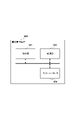
- FIG. 1 is a conceptual diagram of a document management system 100 for managing documents (documents) in electronic data format.
- the type of document managed by the document management system 100 is not particularly limited, and examples thereof include a bank statement, an invoice, a quotation, and an interest income notice.
- the configuration and operation of the document management system 100 will be described by taking as an example a case where a user who is a tax accountant manages documents related to tax affairs of a client such as a company.
- the document management system 100 includes one or more user terminals and a document management device 300. Each user terminal and the document management device 300 are connected to each other via a communication network such as a LAN or the Internet.
- a communication network such as a LAN or the Internet.
- FIG. 1 three user terminals (user terminals 200A, 200B, 200C) are shown, but the number of user terminals is not particularly limited. In the following description, when it is not necessary to distinguish between individual user terminals, the notation "user terminal 200" is used to refer to any one user terminal.
- the user terminal 200 is an electronic device such as a personal computer (PC), a smartphone, or a tablet. By operating the user terminal 200, the user can upload a file (document file) containing one or more documents to the document management device 300, or manage documents stored in the document management device 300. can.
- a file document file
- the document management device 300 processes the document file uploaded from the user terminal 200 and manages the documents included in the document file. Although the document management device 300 is shown as one block in FIG. 1, the document management device 300 can be implemented by a plurality of computers capable of communicating with each other.
- the process executed by the user terminal 200 and the process executed by the document management device 300 will be described separately, but the division of roles between the user terminal 200 and the document management device 300 is not limited to the following description.
- some or all of the processing described as being performed by the user terminal 200 may be performed by the document management device 300.
- some or all of the processing described as being performed by the document management device 300 may be performed by the user terminal 200.
- the user terminal 200 and the document management device 300 are shown as separate blocks, but a configuration in which the user terminal 200 and the document management device 300 are integrated is adopted. You may.
- the specific hardware configuration of the document management system 100 is not particularly limited, and the division of roles between the hardware constituting the document management system 100 is not particularly limited. Whatever the configuration, it is sufficient that the document management system 100 has the functions described below as a whole and can execute the processes described below.
- FIG. 2 is a functional block diagram of the user terminal 200.
- the control unit 201 controls the entire user terminal 200 by executing various programs including an operating system (OS), including, for example, a CPU, a ROM, and a RAM.
- the operation unit 202 includes an input device such as a keyboard and a mouse, and accepts an input operation by a user.
- the storage unit 203 includes a recording medium such as an HDD and an SDD, and stores various programs including an OS.
- the display unit 204 includes, for example, a liquid crystal display, and displays a user interface, various information, and the like.
- the network I / F 205 is an interface for the user terminal 200 to communicate with an external device (such as a document management device 300).
- FIG. 3 is a functional block diagram of the document management device 300.
- the control unit 301 controls the entire document management device 300 by executing various programs including an OS, including, for example, a CPU, a ROM, and a RAM.
- the storage unit 303 includes a recording medium such as an HDD and an SDD, and stores various programs including an OS.
- the storage unit 303 also stores the uploaded document file, the information for managing the document included in the document file, the entity DB, and the like.
- the entity DB will be described later with reference to FIG.
- the network I / F 305 is an interface for the document management device 300 to communicate with an external device (user terminal 200 or the like).
- FIG. 4 is a diagram showing Entity DB 400 which is an example of Entity DB.
- the entity DB includes an entity group and data (entity data) that associates an entity with an entity identification information.
- Entity identification information is information used to identify the entity corresponding to the document.
- the configuration of the entity identification information is not particularly limited, but may be included in a type of document that is supposed to be handled by the document management system 100, and is composed of information that can uniquely identify the entity.
- the entity DB 400 shown in FIG. 4 is configured such that the entity identification information includes a bank name, a branch name, and an account number, based on the assumption that the document management system 100 handles a bank deposit / withdrawal statement (bank statement). ing.
- the entity group “GR1” includes three entities “ET11”, “ET12”, and “ET13".
- the entity “ET11” is a bank account with a bank name "BK1", a branch name "BR1”, and an account number "0123ABCD”, and a bank account with a bank name "BK1", a branch name "BR2”, and an account number "4567EFGH”. And own.
- the document management device 300 will use this document management device 300. It can be determined that the bank statement corresponds to the entity "ET11".
- the entity DB may include a single entity that does not belong to the entity group.
- a single entity is registered in the entity DB as an entity group containing only one entity.
- the same name as the entity name may be registered in the group name.
- the document management device 300 acquires a document to be managed by acquiring a plurality of images uploaded by the user terminal 200.
- Each of the plurality of images is an image representing a document corresponding to an individual entity.
- the plurality of images are included, for example, in a document file having a file format capable of storing a page containing the images. Therefore, the document management device 300 can acquire a plurality of images via a document file having a file format capable of storing pages including images.
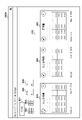
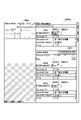
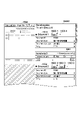
- FIGS. 5A and 5B are diagrams showing a document file 500 which is an example of a document file.
- the file format of the document file is not particularly limited, and examples thereof include a PDF file and an Excel file. If the file format can store multiple pages, the document file may contain multiple pages. In the example of FIGS. 5A and 5B, the document file 500 is assumed to be a PDF file containing 6 pages.
- Each page of the document file 500 contains an image of a bank deposit / withdrawal statement (bank statement).
- the branch name and account number vary from page to page. Therefore, the document file 500 may contain documents of a plurality of entities.
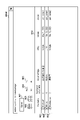
- page 6 is a continuation of page 5, and that one document is composed of two pages.
- a five-page document and a six-page document are fragments of one document divided into two pages, and a combination of two documents (document fragments) obtained from pages 5 and 6 (a fragment of a document). From the document set), one document divided into two pages is composed.
- one page of the document file may contain a plurality of documents, or a plurality of pages of the document file may constitute one document.
- the control unit 201 starts the document management application in response to an instruction from the user, and displays the group selection screen, which is the initial screen of the document management application, on the display unit 204.
- FIG. 6 is a diagram showing a group selection screen 600 which is an example of a group selection screen.
- a group selection screen 600 On the group selection screen 600, a plurality of entity groups that are clients of the user (or the tax accountant group to which the user belongs) are displayed in tiles.
- the user selects the tile of the entity group that he / she is in charge of.
- the tile of the entity group "GR1" is selected.
- the entity selection screen is displayed.
- selecting an item such as a tile, a button, an icon, or a character string included in various screens (user interface) means that the user clicks the item according to the configuration of the operation unit 202. It means to touch.
- the specific configuration of the selectable items is not particularly limited. For example, in a screen including a button as a selectable item, a character string may be used instead of the button.
- FIG. 7 is a diagram showing an entity selection screen 700 which is an example of the entity selection screen.
- entity selection screen 700 On the entity selection screen 700, a plurality of entities included in the selected entity group are displayed in tiles.
- a circular badge is displayed in the upper right corner of each tile.
- the badge has a number on it.
- the number on the badge indicates the number of processed document files or processed documents.
- the processed document file may be, for example, a document file for which upload has been completed or a document file for which journal entry has been completed.
- the processed document may be, for example, the number of documents included in the document file for which upload has been completed, or the number of documents for which journal entry has been completed.
- the user selects the tile of the entity he / she is in charge of.
- the tile of the entity "ET11" is selected.
- the function selection screen is displayed.
- FIG. 8 is a diagram showing a function selection screen 800 which is an example of a function selection screen.
- Two selectable functions (file manager and journal entry) are displayed in tiles on the function selection screen 800.
- the file manager is a function for uploading, downloading, and deleting document files, and managing documents.
- Journal entry is a function related to the journal entry of transactions.
- a notification icon 801 may be displayed in the upper left of the file manager, which will be described later.
- the user selects the tile of the function to be used.
- the file manager tile is selected.
- the file display screen of the file manager is displayed.
- FIGS. 9A and 9B are diagrams showing file display screens 900A and 900B, which are examples of file display screens.
- the file display screens 900A and 900B include an upload button 901, a list view icon 902, a tile view icon 903, a From field 904, a To field 905, and a file pane 910.
- the document file currently being uploaded and the document file that has already been uploaded are displayed in tile format or list format.
- At least one of one or more documents in each of the plurality of document files displayed in the file pane 910 corresponds to the entity selected in the entity selection screen 700 (here, the entity "ET11").
- the entity "ET11" the entity selected in the entity selection screen 700
- the document files related to the selected entity are displayed in the file pane 910.
- the list view icon 902 and the tile view icon 903 are used to switch the display format of the file pane 910.
- the document file is displayed in list format as shown in FIG. 9B
- the tile view icon 903 the document file is displayed in tile format as shown in FIG. 9A. ..
- a preview of the corresponding document file (for example, the image of the first page) is displayed for each tile.
- a status indicator is displayed at the upper left of each tile
- a badge is displayed at the upper right of each tile
- the file name and upload date are displayed below each tile.
- the status indicator shows the upload status of the document file.
- the status indicator of the document file 921 indicates that the document file 921 is currently being uploaded
- the status indicator of the document files 922 and 923 successfully uploads the document files 922 and 923. Indicates that it has been completed.
- a status indicator for example, a mark of "x" indicating the upload failure is displayed.
- the number on the badge indicates the number of journals processed.
- a status indicator, a file name, a number of documents, a document type, an entity name, an upload date, and an uploader are displayed in each line.
- the upload of all the document files including "Bank.pdf" is successfully completed. If all the document types contained in the document file are the same, the type is displayed in the "Document Type” column.
- a predetermined symbol indicating the mixture for example, "Multiple” is displayed in the "Document type” column.
- the display mode of the "document type” column differs depending on whether all the document types included in the document file are the same type or when a plurality of types of documents are mixed in the document file. Also, if all the documents contained in the document file correspond to the same entity, the name of that entity is displayed in the "Entity” column. On the other hand, when the documents of a plurality of entities are mixed in the document file, a predetermined symbol indicating the mixture, for example, "Multiple" is displayed in the "entity” column. That is, the display mode of the "entity” column differs depending on whether all the documents included in the document file correspond to the same entity or when the documents of a plurality of entities are mixed in the document file.
- the uploader indicates information that identifies the user who uploaded the document file, for example, the name of the user. For example, consider a case where the user "user_name1" is a tax accountant in charge of the entity "ET11" and the user “user_name2" is a tax accountant in charge of the entity "ET12".
- the entity is different from the entity "ET11” (for example, in the same entity group as the entity "ET11”. Since the bank statement of the entity "ET12") to which it belongs was mixed in, "Multiple" is displayed in the entity name of the document file 921.
- the document file 923 is a document file uploaded after the user "user_name2" selects the entity “ET12" on the entity selection screen 700, but the invoice of the entity “ET11” is mixed in. Therefore, the document file 923 is displayed on the file display screen 900B displayed after the user "user_name1” selects the entity “ET11” on the entity selection screen 700, and "user_name2” is displayed on the uploader. This allows the user "user_name1" to understand at a glance that the document file 923 was uploaded by someone other than himself.
- the information items displayed in the tile format and the list format are different, but a configuration is adopted in which the information of the same items is displayed regardless of the display format. You may.
- From field 904 and To field 905 are used to filter the document files displayed in the file pane 910 based on the upload date.
- the user enters a date in the From field 904 and To field 905 only the document files uploaded between the date in the From field 904 and the date in the To field 905 are displayed in the file pane 910.
- the upload button 901 is used by the user to upload a document file.
- a file selection dialog is displayed in front of the file display screen.
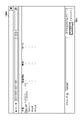
- FIG. 10 is a diagram showing a file selection dialog 1000 which is an example of a file selection dialog.
- the user selects a desired document file using the operation unit 202.
- FIG. 10 shows a state in which a document file having the file name “Bank.pdf” is selected. After that, when the user selects the upload button 1001, the file selection dialog 1000 is closed and the upload process of the selected document file is started.
- the file display screen 900A described above corresponds to a case where "Bank.pdf" is newly selected as an upload target in the file selection dialog 1000 after the upload of "Invoice.xlsx” and "Mix.pdf" is completed.
- the status indicator of the document file 921 changes to the state indicating that the upload is completed successfully as in the case of the document files 922 and 923.
- the uploaded document file is stored in the storage unit 303 of the document management device 300.
- the user may select a plurality of document files. In this case, multiple selected document files will be uploaded.
- the document management device 300 performs a process of classifying the documents included in the document file by entity.
- the classification process will be described by taking the case where the document file 500 shown in FIGS. 5A and 5B is uploaded as an example.
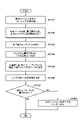
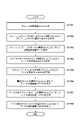
- FIG. 11 is a flowchart of the process of classifying the documents included in the document file by entity.
- the document management device 300 performs classification processing for each of the plurality of document files.
- control unit 301 performs character recognition processing for each of the plurality of images included in the document file 500.
- the existing OCR (optical character recognition) technique can be used for the character recognition process.
- the character recognition process recognizes the characters included in the document file 500 as image data.
- control unit 301 detects the plurality of page information, the document type information, and the entity identification information from each image of the document file 500 based on the recognition result of S1101.
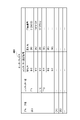
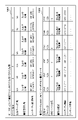
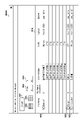
- Table 1201 of FIG. 12 shows an example of information detected from the document file 500.
- the page numbers included in Table 1201 are information specified by the file structure of the document file 500, and do not refer to information detected based on the result of the character recognition process of S1101.
- the multi-page information is information used for detecting a document that spans a plurality of pages, and is included in pages 5 and 6 of the document file 500 shown in FIG. 5B, "1/2" and "2".
- the character string "/ 2" corresponds to the information on multiple pages.
- "N / A" indicates that the multi-page information was not detected.
- Document type information is information indicating the type of document. As shown in Table 1201, the character string "deposit / withdrawal details" is detected from each page of the document file 500.
- a table for associating the document type with the document type information is stored in advance. In this table, for example, character strings such as “deposit / withdrawal statement” and "bank statement” are associated with the bank statement, and character strings such as "invoice” are associated with the invoice. There is.
- the control unit 301 can detect the document type information by referring to the character string registered in this table.
- Entity identification information is information used to identify an entity. As shown in Table 1201, the character strings of the bank name, the branch name, and the account number are detected from each page of the document file 500.
- the control unit 301 can detect the entity identification information by referring to the entity DB (such as the entity DB 400 shown in FIG. 4) stored in the storage unit 303.
- page 4 of the document file 500 contains two images representing the document, two document type information and two entity identification information are detected.
- the method for determining the number of images contained in the page is not particularly limited, but as an example, in the character recognition process of S1101, one or more processing unit areas (bounding box) based on the continuity of the images in the page. Is set, and the number of set processing unit areas is treated as the number of images (one processing unit area is treated as one image).
- control unit 301 identifies the entity of each document based on the entity identification information included in each document and the entity DB (such as the entity DB 400 shown in FIG. 4) stored in the storage unit 303. For example, for the document detected from page 1 of the document file 500, the entity "ET11" belonging to the entity group "GR1" is identified.
- the control unit 301 may include various types of entity identification information (eg, account name, company name, company logo, seal, address, document format, header, and footer) that may be contained in each image of the document file. Or any combination of these) can be used to identify the entity.
- entity identification information eg, account name, company name, company logo, seal, address, document format, header, and footer
- the control unit 301 may perform the image recognition process instead of the character recognition process.
- the control unit 301 may identify the entity by inference using a machine learning model generated based on various entity identification information that can be included in each image of the document file.
- control unit 301 identifies the entity corresponding to each document based on the entity identification information included in each of the plurality of images. Then, the control unit 301 can detect the entity identification information included in each of the plurality of images by performing the recognition process including at least one of the character recognition process and the image recognition process for each of the plurality of images.
- the control unit 301 detects a document set (combination of two or more documents (document fragments)) constituting one document divided into two or more pages, and two or more documents included in the document set. Combine documents into one document.
- the detection of such a document set can be performed using the plurality of page information detected in S1102. For example, from pages 5 and 6, a plurality of page information suggesting continuity of pages "1/2" and "2/2", respectively, is detected. Further, common document type information and entity identification information are detected from pages 5 and 6. Therefore, the control unit 301 determines that one document spans pages 5 and 6, and divides the two documents obtained from pages 5 and 6 into one document divided into two or more pages. Can be detected as a set of documents that make up.
- the method for detecting a document set that constitutes one document divided into two or more pages is not particularly limited.
- the control unit 301 may detect a document set by performing a recognition process including at least one of a character recognition process and an image recognition process for each of a plurality of images. can.
- the control unit 301 In S1105, the control unit 301 generates document data that correlates each document with the entity identified in S1103.
- Table 1202 of FIG. 12 shows an example of document data generated based on the document file 500. In Table 1202, one column corresponds to one document.
- the document data includes a document ID, a file ID, a corresponding page number, a document type, an entity, and content information.
- the document ID is information that identifies the document, and a unique value is assigned to each document.
- the file ID is information for identifying the document file in which the document was included, and a unique value is assigned to each file. Since the six documents shown in Table 1202 are contained in the same document file, all the documents have the same file ID. The corresponding page number is information indicating how many pages the document was contained in the document file.
- the type of document is determined based on the document type information (see Table 1201) and the above table. As described in S1102, since the character string "deposit / withdrawal statement" is associated with the bank statement in the above table, "bank statement” is described as the type of each document in Table 1202.
- the control unit 301 searches for the character string predefined in the above table from the result of the character recognition process of S1101. When the character string is found by the search, the control unit 301 acquires the character string as the document type information. The control unit 301 determines the type of document by referring to the above table and specifying the type of document corresponding to the acquired document type information.
- a separate classifier may be provided to determine the type of document from each image using a machine learning model or a rule-based algorithm.
- the entity information is information indicating the entity identified in S1104.
- the document data includes the entity information indicating the entity corresponding to the document. Therefore, by generating the document data in S1105, the classification of the documents included in the document file for each entity is realized.
- Content information is information that indicates the specific content of each document.
- the composition of the content information differs depending on the type of document.
- the transaction information (details of each transaction) shown in tabular form corresponds to the content information.
- the generated document data is stored in the storage unit 303.
- the control unit 301 may store the document data in a storage area (for example, a database file) secured for each entity, or may store the document data in a common storage area. In the former case, the control unit 301 stores the document data of the four documents corresponding to the entity "ET11" in the storage area for the entity "ET11” in Table 1202, and stores the document data of the two documents corresponding to the entity "ET12". Document data of is stored in the storage area for the entity "ET12".
- a storage area for example, a database file
- the control unit 301 transmits the classification result to the user terminal 200.
- the classification result includes, for example, information indicating the type and number of documents for each entity.
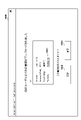
- the user terminal 200 can display a dialog such as the classification completion dialog 1300 shown in FIG. 13 on the display unit 204.
- "Multiple" is displayed in the "Document Type” column of the classification completion dialog 1300.
- the control unit 301 determines whether or not a document of another entity exists based on the document data generated in S1105.
- the other entity is an entity other than the entity selected by the user on the entity selection screen 700 (FIG. 7).
- the entity "ET11" is the selected entity and the entity "ET12" is another entity. If the document of another entity exists, the processing step proceeds to S1108, and if not, the processing of this flowchart ends. It should be noted that the content of the operation performed by the user on the screen of the document management application including the operation of selecting the entity on the entity selection screen 700 shall be appropriately notified from the user terminal 200 to the document management device 300.
- control unit 301 notifies the user in charge of the entity "ET12", which is another entity, that the document of the entity "ET12" has been uploaded.
- the notification method is not particularly limited, but for example, the notification can be performed by automatically sending an e-mail or a chat message.
- the user is supposed to upload the document file from the file display screen 900A or 900B of the file manager.
- the document management application may be configured to allow uploading of document files from other screens.
- the user terminal 200 may display an upload button on at least one of the group selection screen 600, the entity selection screen 700, and the function selection screen 800.
- the control unit 301 of the document management device 300 asks each user in charge of each entity corresponding to the document included in the document file to the document. May be notified that has been uploaded.
- “Multiple” may be displayed in the column of document type and entity name on the file display screen 900B (FIG. 9B).
- the user can expand the list of documents contained in the corresponding document file by selecting the "Multiple" area.
- the information of the documents included in the document file 921 is expanded in a list format, and the display state of the file display screen 900B is changed to the state shown in FIG. Change.
- the document file 921 corresponds to the document file 500 shown in FIGS. 5A and 5B, and information indicating an entity corresponding to each document included in the document file 500 is displayed.
- the user can confirm which entity is specifically the plurality of entities related to the document file 921.
- the "Multiple" area in the entity name of the document file 921 is selected again, the list of documents is closed and the display state of the file display screen 900B returns to the state shown in FIG. 9B.
- ⁇ Displaying the file details screen and processing documents The user can select the tile of a specific document file on the file display screen 900A (Fig. 9A), or select the file name of a specific document file on the file display screen 900B (Fig. 9B). By selecting an area (or any area other than "Multiple"), the user terminal 200 can display the file details screen.
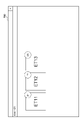
- FIG. 15A is a diagram showing a file detail screen 1500A which is an example of a file detail screen.
- a document file having a file name of "Bank2.pdf" which is different from the three document files shown in FIGS. 9A and 9B, is shown.
- a preview of one page selected from the document files is displayed.
- one page of the document file is displayed.
- the detailed information of the documents included in the document file is displayed vertically side by side for each document.
- the detailed information of each document includes the document ID, the document type, the document subtype, and the entity name.
- the document subtype contains different information depending on the type of document, for example, in the case of a bank statement, the bank name.
- the document type, document subtype, and entity name display area are configured as text fields, and the user can directly edit the displayed text.
- a pull-down button is displayed at the right end of each field, and when the user selects the pull-down button, a pull-down menu including input candidates (for example, an entity candidate in the case of an entity name field) is displayed.
- input candidates for example, an entity candidate in the case of an entity name field
- the user can replace the display content of the text field by selecting an input candidate from the pull-down menu. Therefore, when erroneous information is displayed in the text field due to, for example, a recognition error in the character recognition process (S1101 in FIG. 11) described above, the user can directly edit the information or correct the information by the drop-down menu. can.
- the character recognition process (S1101 in FIG. 11) described above may be performed by inference using a machine learning model. In this case, the correction of the information by the user may be fed back to the machine learning model.
- journal entry generation button 1501 is displayed in the detailed information display area of the document.
- document 1511 corresponds to the entity "ET11", which matches the selected entity, so that the journal entry generation button 1501 is displayed in the lower right corner of the detailed information display area of document 1511. ing.
- journal entry generation button 1501 When the user selects the journal entry generation button 1501, a journal entry (journal) is generated based on the transaction information included in the corresponding document. On the left side of the journal entry generation button 1501, the number of journal entries created at the present time (“0” in the example of FIG. 15A) is displayed. When the user changes the entity name of the document 1511 from "ET11" to another entity name, the journal entry generation button 1501 is displayed and / or the information of the journal entry created at the present time is displayed according to the change. Stops.
- the documents 1512 and 1513 correspond to the entity "ET12", which does not match the selected entity, so that the journal entry generation button 1501 is displayed in the detailed information display area of the documents 1512 and 1513. Not. This prevents the user from accidentally journalizing transactions for unrelated entities. Instead of hiding the journal entry generation button 1501 corresponding to the documents 1512 and 1513, the journal entry generation button 1501 corresponding to the document 1511 may be displayed in a different color or grayed out. good. Alternatively, for documents corresponding to entities other than the selected entity, such as documents 1512 and 1513, the entire detailed information may be hidden on the file detail screen 1500A. When the user changes the entity name of the document 1512 from "ET12" to "ET11", the display of the journal entry generation button for the document 1512 is started in response to the change.
- the corresponding page icon 1502 displays information indicating how many pages of the document file the document was contained in.
- a preview of the page indicated by that icon is displayed in the left pane of the file detail screen 1500A.
- a preview of one page of the document file is displayed, and "1/6" is displayed in the area indicated by reference numeral 1504, but when the user selects the corresponding page icon 1502-2.
- the preview display is switched to two pages, and the display of the area indicated by reference numeral 1504 is changed to "2/6".
- the page addition icon 1503 is used to combine multiple documents into one document. For example, consider a case where one document spanning pages 2 to 3 is not correctly detected in the process of S1104 of FIG. 11 described above, and is detected separately in two documents (documents 1512 and 1513).
- the user selects the page addition icon 1503-2 corresponding to the document 1512.
- the page candidate icons 1521 and 1522 are displayed instead of the page addition icon 1503-2.
- the page candidate icons 1521 and 1522 correspond to the pages (that is, pages 1 and 3) before and after the page (that is, page 2) corresponding to the document 1512.
- the user selects the page candidate icon 1522 corresponding to the third page.
- the document 1513 corresponding to page 3 is integrated into the document 1512 corresponding to page 2.
- the detailed information of the document 1512 and the detailed information of the document 1513 are replaced with the detailed information of the document 1512 and the detailed information of one document (document 1532) generated by integrating the document 1513. Be done.
- the corresponding page icons 1502-2 and 1502-3 are displayed side by side in the detailed information display area of the document 1532. That is, it is shown that the document 1532 corresponds to pages 2 and 3 of the document file. Further, the page candidate icons 1521 and 1522 disappear, and the page addition icon 1503-2 is displayed again.
- documents can be integrated by dragging and dropping the corresponding page icon 1502.
- the user drags and drops the corresponding page icon 1502-3 of the document 1513 to the position of the page addition icon 1503-2 of the document 1512.
- the document 1513 is integrated into the document 1512.
- the detailed information of the document 1512 and the detailed information of the document 1513 are replaced with the detailed information of the document 1512 and the detailed information of one document (document 1532) generated by integrating the document 1513.
- the corresponding page icons 1502-2 and 1502-3 are displayed side by side in the detailed information display area of the document 1532. That is, it is shown that the document 1532 corresponds to pages 2 and 3 of the document file.
- the above-mentioned divided document (document set) detection process (S1104 in FIG. 11) may be performed by inference using a machine learning model.
- the document integration operation manually performed by the user on the file detail screen 1500A may be fed back to the machine learning model.
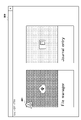
- FIG. 16 is a diagram showing a file display screen 1600, which is another example of a file display screen.
- the file display screen 1600 includes a date button 1601 and an upload button 1602.
- the date button 1601 When the date button 1601 is selected, the plurality of uploaded document files are grouped according to the upload date and displayed on the file display screen 1600.
- FIG. 16 shows a state in which the date button 1601 is selected. Since the document files 1621, 1622, and 1623 were uploaded in the same year (last year), they are grouped and displayed in the display area of last year. Also, since the only document file uploaded this year is the document file 1624, only the document file 1624 is displayed in this year's display area.
- a plurality of uploaded document files are grouped in units of each upload and displayed on the file display screen 1600.
- a display area corresponding to this upload is provided on the file display screen 1600, and these two document files are grouped and displayed in this display area.
- each document file is displayed in a tile shape, and the file name and the upload date are displayed on each tile.
- each tile has a preview that shows how multiple pages contained in the document file are stacked. This preview allows the user to intuitively understand that the document file contains multiple pages (and thus multiple documents).
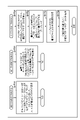
- FIG. 17A is a flowchart of a first processing example of a document management application executed by the user terminal 200. It should be noted that the present specification describes a configuration in which some second processing (for example, display of the entity selection screen 700) is performed in response to some first processing (for example, selection of tiles on the group selection screen 600). If so, the embodiment also includes a configuration in which some other process is performed between the first process and the second process.
- some second processing for example, display of the entity selection screen 700
- some first processing for example, selection of tiles on the group selection screen 600
- the control unit 201 of the user terminal 200 displays the group selection screen 600 (S1701).
- the control unit 201 displays the entity selection screen 700 including a plurality of tiles (selectable items) each representing an individual entity. (S1702).
- the control unit 201 displays the function selection screen 800 in response to the selection of the tile corresponding to the entity "ET11" on the entity selection screen 700 (S1703).
- the control unit 201 displays a file display screen 900A including a plurality of tiles (selectable items) each representing an individual document file (S1704).
- the control unit 201 displays a file display screen 900B including a plurality of list items (selectable items) each representing an individual document file (selectable items). S1705).
- Each of the plurality of tiles and the plurality of document files corresponding to the plurality of list items included in the file display screens 900A and 900B includes one or more documents corresponding to individual entities. At least one of one or more documents in each of the plurality of document files corresponds to the entity "ET11" selected on the entity selection screen 700.
- the control unit 201 displays the file detail screen 1500A including the detailed information of each of the one or more documents included in the selected document file. (S1706).
- a document file having a file name of "Bank2.pdf" and having a file format capable of storing a plurality of pages (not shown on the file display screen 900B) is selected.
- Each of the one or more documents contained in the document file contains transaction information.
- the detailed information of the document 1511 corresponding to the entity "ET11" selected on the entity selection screen 700 indicates the creation of a journal based on the transaction information included in the document 1511. Includes journal entry generation button 1501 (selectable item) for.
- Detailed information for each of the one or more documents contained in the document file includes a page add icon 1503 (selectable item for document integration).
- the control unit 201 In response to the selection of the page addition icon 1503-2 corresponding to the document 1512 on the file detail screen 1500A, the control unit 201, as shown on the file detail screen 1500B, each indicates an individual page of the document file1
- the above page candidate icon (selectable item for page specification) is displayed (S1707).
- the control unit 201 sets the detailed information of the document 1512 and the detailed information of the document 1513 included in the file detail screen 1500B to the document 1512.
- the file detail screen 1500C is displayed by replacing it with the detailed information of one document 1532 generated by integrating with the document 1513 (S1708).
- FIG. 17B is a flowchart of the second to fourth processing examples of the document management application executed by the user terminal 200.
- S1701 to S1706 are the same as the first processing example.
- the detailed information of each of the one or more documents included in the document file includes the page addition icon 1503 and the corresponding page icon 1502 indicating the corresponding page.
- the control unit 201 moves the file detail screen 1500A.
- the file detail screen 1500C is displayed by replacing the detailed information of the document 1512 and the detailed information of the document 1513 contained in the document 1512 with the detailed information of one document 1532 generated by integrating the document 1512 and the document 1513. S1711).
- the detailed information of the document 1532 includes a corresponding page icon 1502-2 indicating a page corresponding to the document 1512 and a corresponding page icon 1502-3 indicating a page corresponding to the document 1513.
- S1701 to S1705 are the same as the first processing example.
- the file display screen 900B displayed in S1705 is a document file when a document file 921 including a document corresponding to an entity other than the entity "ET11" selected in the entity selection screen 700 exists in a plurality of document files. Includes the string "Multiple" (selectable item) indicating that 921 corresponds to two or more entities. As shown in FIG.
- control unit 201 responds to the selection of the area of the character string “Multiple” indicating that the document file 921 corresponds to two or more entities on the file display screen 900B, and the document file 921 Information indicating the entity corresponding to each document included in is displayed on the file display screen 900B (S1721).
- S1701 to S1705 are the same as the first processing example.
- the file display screen 900B displayed in S1705 includes an upload button 901.
- the control unit 201 displays the file selection dialog 1000 (S1731).
- the control unit 201 uploads the selected document file (S1732).
- the control unit 201 receives the classification result (S1733).
- the control unit 201 displays the classification completion dialog 1300 based on the received classification result.
- Notification center function Like the document file 923 shown in FIG. 9B, a user other than the current user uploads a document file containing a document corresponding to the entity in charge of the current user (the entity selected on the entity selection screen 700). In some cases. In such a case, the user terminal 200 can notify the current user that the document uploaded by another user exists.
- the user terminal 200 displays the notification icon 801 on the upper left of the file manager tile on the function selection screen 800 (FIG. 8).
- the notification icon 801 describes the number of documents uploaded by other users.
- the user terminal 200 displays the notification center screen.
- FIG. 18 is a diagram showing a notification center screen 1800, which is an example of the notification center screen.
- the Notification Center screen 1800 displays detailed information about one of the documents uploaded by another user. The details include the uploader (the name of the user who uploaded the current document), the uploader entity, the document type, and the file name (the name of the document file that contains the current document).
- the entity of the uploader is the entity in charge of the tax accountant who is the uploader (that is, the entity selected by the uploader on the entity selection screen).
- the file name is displayed in a format with hyperlink 1801.
- hyperlink 1801 at the location of the file name is selected, the location where the corresponding document file is stored is displayed.
- the notification center screen 1800 includes an acceptance button 1802 and a discard button 1803.
- the current user can notify the document management device 300 that the document uploaded by another user is accepted by selecting the consent button 1802. Further, the current user can notify the document management device 300 that the document uploaded by another user is to be discarded without being accepted by selecting the discard button 1803. In this case, the target document is deleted from the storage unit 303 of the document management device 300.
- the notification center screen 1800 displays detailed information on the following documents.
- the character string "1/2" displays the detailed information of the first document of the two documents.
- the character string "1/2" changes to "2/2" and the detailed information of the second document of the two documents is displayed.
- the notification center screen 1800 is closed and the file display screen 900A is displayed.
- FIG. 19 is a flowchart of the process for realizing the notification center function. Prior to the processing of this flowchart, it is assumed that the document file 923 (FIG. 9B) uploaded by the user in charge of the entity "ET12" is classified according to the flowchart of FIG. Further, in S1108 of FIG. 11, the control unit 301 of the document management device 300 provides predetermined information indicating that one or more documents corresponding to the entity "ET11" have been recorded by the user associated with the entity "ET12". , Record in the storage unit 303.
- the control unit 201 displays the group selection screen 600 (S1901).
- the control unit 201 displays the entity selection screen 700 including a plurality of tiles (selectable items) each representing an individual entity. (S1902).
- the control unit 201 detects predetermined information recorded in the storage unit 303 of the document management device 300 (S1903).
- the control unit 201 displays the function selection screen 800, and in the upper left of the tile of the file manager, a document corresponding to the entity "ET11" recorded by another user is displayed.
- the notification icon 801 indicating the existence is displayed (S1904).
- the control unit 201 displays a notification center screen 1800 indicating that there is a document corresponding to the entity "ET11” recorded by another user (S1905).
- the Notification Center screen 1800 does not accept the detailed information of one or more documents corresponding to the entity "ET11", the consent button 1802 (selectable item) indicating acceptance of this document, and this document. Includes a discard button 1803 (selectable item) to indicate that.
- the control unit 201 controls to delete this document from the document data stored in the storage unit 303 (S1906).
- 100 ... Document management system, 200 ... User terminal, 201 ... Control unit, 202 ... Operation unit, 203 ... Storage unit, 204 ... Display unit, 205 ... Network I / F, 300 ... Document management device, 301 ... Control unit, 303 ... Memory unit, 305... Network I / F
Landscapes
- Engineering & Computer Science (AREA)
- Business, Economics & Management (AREA)
- Strategic Management (AREA)
- Entrepreneurship & Innovation (AREA)
- Human Resources & Organizations (AREA)
- Operations Research (AREA)
- Economics (AREA)
- Marketing (AREA)
- Data Mining & Analysis (AREA)
- Quality & Reliability (AREA)
- Tourism & Hospitality (AREA)
- Physics & Mathematics (AREA)
- General Business, Economics & Management (AREA)
- General Physics & Mathematics (AREA)
- Theoretical Computer Science (AREA)
- Management, Administration, Business Operations System, And Electronic Commerce (AREA)
- Information Retrieval, Db Structures And Fs Structures Therefor (AREA)
Priority Applications (2)
| Application Number | Priority Date | Filing Date | Title |
|---|---|---|---|
| PCT/JP2020/048019 WO2022137356A1 (ja) | 2020-12-22 | 2020-12-22 | 書類管理システム、電子デバイス、書類管理方法、方法、及びプログラム |
| JP2022563995A JP7244158B2 (ja) | 2020-12-22 | 2020-12-22 | 書類管理システム、電子デバイス、書類管理方法、方法、及びプログラム |
Applications Claiming Priority (1)
| Application Number | Priority Date | Filing Date | Title |
|---|---|---|---|
| PCT/JP2020/048019 WO2022137356A1 (ja) | 2020-12-22 | 2020-12-22 | 書類管理システム、電子デバイス、書類管理方法、方法、及びプログラム |
Publications (1)
| Publication Number | Publication Date |
|---|---|
| WO2022137356A1 true WO2022137356A1 (ja) | 2022-06-30 |
Family
ID=82158649
Family Applications (1)
| Application Number | Title | Priority Date | Filing Date |
|---|---|---|---|
| PCT/JP2020/048019 Ceased WO2022137356A1 (ja) | 2020-12-22 | 2020-12-22 | 書類管理システム、電子デバイス、書類管理方法、方法、及びプログラム |
Country Status (2)
| Country | Link |
|---|---|
| JP (1) | JP7244158B2 (enExample) |
| WO (1) | WO2022137356A1 (enExample) |
Cited By (1)
| Publication number | Priority date | Publication date | Assignee | Title |
|---|---|---|---|---|
| CN116992496A (zh) * | 2023-09-28 | 2023-11-03 | 武汉彤新科技有限公司 | 一种用于企业服务管理的数据资源安全监督系统 |
Citations (5)
| Publication number | Priority date | Publication date | Assignee | Title |
|---|---|---|---|---|
| JPH07168849A (ja) * | 1993-12-16 | 1995-07-04 | Toshiba Corp | 画像情報処理装置 |
| JP2014038561A (ja) * | 2012-08-20 | 2014-02-27 | Obic Business Consultants Ltd | 情報処理装置、情報処理方法、およびプログラム |
| JP2016194802A (ja) * | 2015-03-31 | 2016-11-17 | 株式会社日本デジタル研究所 | 会計入力システム、端末装置、サーバー装置、方法およびプログラム |
| JP2018194971A (ja) * | 2017-05-15 | 2018-12-06 | 株式会社クラビス | 仕訳データ作成サービス提供システム |
| WO2020136778A1 (ja) * | 2018-12-26 | 2020-07-02 | ファーストアカウンティング株式会社 | 書類分類システム、書類分類装置、書類分類方法、書類分類プログラム |
-
2020
- 2020-12-22 WO PCT/JP2020/048019 patent/WO2022137356A1/ja not_active Ceased
- 2020-12-22 JP JP2022563995A patent/JP7244158B2/ja active Active
Patent Citations (5)
| Publication number | Priority date | Publication date | Assignee | Title |
|---|---|---|---|---|
| JPH07168849A (ja) * | 1993-12-16 | 1995-07-04 | Toshiba Corp | 画像情報処理装置 |
| JP2014038561A (ja) * | 2012-08-20 | 2014-02-27 | Obic Business Consultants Ltd | 情報処理装置、情報処理方法、およびプログラム |
| JP2016194802A (ja) * | 2015-03-31 | 2016-11-17 | 株式会社日本デジタル研究所 | 会計入力システム、端末装置、サーバー装置、方法およびプログラム |
| JP2018194971A (ja) * | 2017-05-15 | 2018-12-06 | 株式会社クラビス | 仕訳データ作成サービス提供システム |
| WO2020136778A1 (ja) * | 2018-12-26 | 2020-07-02 | ファーストアカウンティング株式会社 | 書類分類システム、書類分類装置、書類分類方法、書類分類プログラム |
Cited By (2)
| Publication number | Priority date | Publication date | Assignee | Title |
|---|---|---|---|---|
| CN116992496A (zh) * | 2023-09-28 | 2023-11-03 | 武汉彤新科技有限公司 | 一种用于企业服务管理的数据资源安全监督系统 |
| CN116992496B (zh) * | 2023-09-28 | 2023-12-29 | 武汉彤新科技有限公司 | 一种用于企业服务管理的数据资源安全监督系统 |
Also Published As
| Publication number | Publication date |
|---|---|
| JPWO2022137356A1 (enExample) | 2022-06-30 |
| JP7244158B2 (ja) | 2023-03-22 |
Similar Documents
| Publication | Publication Date | Title |
|---|---|---|
| US7636898B2 (en) | File management program | |
| JP4266225B2 (ja) | 文書管理ワークステーション、文書管理方法及び記録媒体 | |
| US10664650B2 (en) | Slide tagging and filtering | |
| EP3221803B1 (en) | Relevant file identification using automated queries to disparate data storage locations | |
| US7822759B2 (en) | Query-driven sharing and syndication | |
| US20080040690A1 (en) | Directory Management Program, Object Display Program, Directory Management Method, And Directory Management Apparatus | |
| US10114821B2 (en) | Method and system to access to electronic business documents | |
| JP2000090156A (ja) | スケジュール表示方法、スケジュール変更方法、スケジュール管理システム、スケジュール管理プログラムを格納した記憶媒体 | |
| JP7494086B2 (ja) | 情報処理装置、およびその制御方法とプログラム | |
| JPWO2008152823A1 (ja) | 文書管理装置、方法およびプログラム | |
| US9087053B2 (en) | Computer-implemented document manager application enabler system and method | |
| CN111656316A (zh) | 信息处理系统、信息处理方法和信息处理装置 | |
| US20140143701A1 (en) | Visualizing related business activities in an interactive timeline | |
| US8375324B1 (en) | Computer-implemented document manager application enabler system and method | |
| US20060069690A1 (en) | Electronic file system graphical user interface | |
| CN112541330B (zh) | 信息处理装置、计算机程序产品及记录媒体 | |
| JP7244158B2 (ja) | 書類管理システム、電子デバイス、書類管理方法、方法、及びプログラム | |
| JP5352225B2 (ja) | データ再利用方法、データ再利用システム、データ再利用装置およびデータ再利用プログラム | |
| AU2024203202A1 (en) | Systems and methods for performing bulk design edits | |
| US20230306032A1 (en) | Information processing apparatus, non-transitory computer readable medium, and information processing method | |
| JP2023069816A (ja) | 書類保存支援システム、書類保存支援方法、およびコンピュータプログラム | |
| US20250298967A1 (en) | Online real-time interactive collaborative annotation system | |
| JP2005216129A (ja) | コンピュータシステム、ファイル管理方法及びファイル管理プログラム | |
| US8566313B1 (en) | Computer-implemented document manager application enabler system and method | |
| JP2020009025A (ja) | 情報処理装置、情報処理システム及びプログラム |
Legal Events
| Date | Code | Title | Description |
|---|---|---|---|
| 121 | Ep: the epo has been informed by wipo that ep was designated in this application |
Ref document number: 20966847 Country of ref document: EP Kind code of ref document: A1 |
|
| ENP | Entry into the national phase |
Ref document number: 2022563995 Country of ref document: JP Kind code of ref document: A |
|
| NENP | Non-entry into the national phase |
Ref country code: DE |
|
| 122 | Ep: pct application non-entry in european phase |
Ref document number: 20966847 Country of ref document: EP Kind code of ref document: A1 |