WO2022064705A1 - 情報処理装置、情報処理方法、およびプログラム - Google Patents
情報処理装置、情報処理方法、およびプログラム Download PDFInfo
- Publication number
- WO2022064705A1 WO2022064705A1 PCT/JP2020/036659 JP2020036659W WO2022064705A1 WO 2022064705 A1 WO2022064705 A1 WO 2022064705A1 JP 2020036659 W JP2020036659 W JP 2020036659W WO 2022064705 A1 WO2022064705 A1 WO 2022064705A1
- Authority
- WO
- WIPO (PCT)
- Prior art keywords
- ticket
- information processing
- information
- service information
- procedure
- Prior art date
- Legal status (The legal status is an assumption and is not a legal conclusion. Google has not performed a legal analysis and makes no representation as to the accuracy of the status listed.)
- Ceased
Links
Images






Classifications
-
- G—PHYSICS
- G06—COMPUTING OR CALCULATING; COUNTING
- G06Q—INFORMATION AND COMMUNICATION TECHNOLOGY [ICT] SPECIALLY ADAPTED FOR ADMINISTRATIVE, COMMERCIAL, FINANCIAL, MANAGERIAL OR SUPERVISORY PURPOSES; SYSTEMS OR METHODS SPECIALLY ADAPTED FOR ADMINISTRATIVE, COMMERCIAL, FINANCIAL, MANAGERIAL OR SUPERVISORY PURPOSES, NOT OTHERWISE PROVIDED FOR
- G06Q50/00—Information and communication technology [ICT] specially adapted for implementation of business processes of specific business sectors, e.g. utilities or tourism
- G06Q50/40—Business processes related to the transportation industry
-
- G—PHYSICS
- G06—COMPUTING OR CALCULATING; COUNTING
- G06F—ELECTRIC DIGITAL DATA PROCESSING
- G06F3/00—Input arrangements for transferring data to be processed into a form capable of being handled by the computer; Output arrangements for transferring data from processing unit to output unit, e.g. interface arrangements
- G06F3/01—Input arrangements or combined input and output arrangements for interaction between user and computer
- G06F3/048—Interaction techniques based on graphical user interfaces [GUI]
- G06F3/0481—Interaction techniques based on graphical user interfaces [GUI] based on specific properties of the displayed interaction object or a metaphor-based environment, e.g. interaction with desktop elements like windows or icons, or assisted by a cursor's changing behaviour or appearance
- G06F3/0482—Interaction with lists of selectable items, e.g. menus
-
- G—PHYSICS
- G06—COMPUTING OR CALCULATING; COUNTING
- G06Q—INFORMATION AND COMMUNICATION TECHNOLOGY [ICT] SPECIALLY ADAPTED FOR ADMINISTRATIVE, COMMERCIAL, FINANCIAL, MANAGERIAL OR SUPERVISORY PURPOSES; SYSTEMS OR METHODS SPECIALLY ADAPTED FOR ADMINISTRATIVE, COMMERCIAL, FINANCIAL, MANAGERIAL OR SUPERVISORY PURPOSES, NOT OTHERWISE PROVIDED FOR
- G06Q20/00—Payment architectures, schemes or protocols
- G06Q20/30—Payment architectures, schemes or protocols characterised by the use of specific devices or networks
- G06Q20/32—Payment architectures, schemes or protocols characterised by the use of specific devices or networks using wireless devices
- G06Q20/326—Payment applications installed on the mobile devices
- G06Q20/3267—In-app payments
-
- G—PHYSICS
- G06—COMPUTING OR CALCULATING; COUNTING
- G06Q—INFORMATION AND COMMUNICATION TECHNOLOGY [ICT] SPECIALLY ADAPTED FOR ADMINISTRATIVE, COMMERCIAL, FINANCIAL, MANAGERIAL OR SUPERVISORY PURPOSES; SYSTEMS OR METHODS SPECIALLY ADAPTED FOR ADMINISTRATIVE, COMMERCIAL, FINANCIAL, MANAGERIAL OR SUPERVISORY PURPOSES, NOT OTHERWISE PROVIDED FOR
- G06Q20/00—Payment architectures, schemes or protocols
- G06Q20/30—Payment architectures, schemes or protocols characterised by the use of specific devices or networks
- G06Q20/32—Payment architectures, schemes or protocols characterised by the use of specific devices or networks using wireless devices
- G06Q20/327—Short range or proximity payments by means of M-devices
- G06Q20/3274—Short range or proximity payments by means of M-devices using a pictured code, e.g. barcode or QR-code, being displayed on the M-device
-
- G—PHYSICS
- G06—COMPUTING OR CALCULATING; COUNTING
- G06Q—INFORMATION AND COMMUNICATION TECHNOLOGY [ICT] SPECIALLY ADAPTED FOR ADMINISTRATIVE, COMMERCIAL, FINANCIAL, MANAGERIAL OR SUPERVISORY PURPOSES; SYSTEMS OR METHODS SPECIALLY ADAPTED FOR ADMINISTRATIVE, COMMERCIAL, FINANCIAL, MANAGERIAL OR SUPERVISORY PURPOSES, NOT OTHERWISE PROVIDED FOR
- G06Q20/00—Payment architectures, schemes or protocols
- G06Q20/30—Payment architectures, schemes or protocols characterised by the use of specific devices or networks
- G06Q20/32—Payment architectures, schemes or protocols characterised by the use of specific devices or networks using wireless devices
- G06Q20/327—Short range or proximity payments by means of M-devices
- G06Q20/3276—Short range or proximity payments by means of M-devices using a pictured code, e.g. barcode or QR-code, being read by the M-device
-
- G—PHYSICS
- G06—COMPUTING OR CALCULATING; COUNTING
- G06Q—INFORMATION AND COMMUNICATION TECHNOLOGY [ICT] SPECIALLY ADAPTED FOR ADMINISTRATIVE, COMMERCIAL, FINANCIAL, MANAGERIAL OR SUPERVISORY PURPOSES; SYSTEMS OR METHODS SPECIALLY ADAPTED FOR ADMINISTRATIVE, COMMERCIAL, FINANCIAL, MANAGERIAL OR SUPERVISORY PURPOSES, NOT OTHERWISE PROVIDED FOR
- G06Q20/00—Payment architectures, schemes or protocols
- G06Q20/38—Payment protocols; Details thereof
- G06Q20/389—Keeping log of transactions for guaranteeing non-repudiation of a transaction
Definitions
- the present invention relates to an information processing device, an information processing method, and a program, and more particularly to an information processing device, an information processing method, and a program that support the sale and use of tickets.
- Patent Document 1 describes a system that provides route guidance in consideration of the information of the free pass owned by the user.
- This free pass is a pass that can be used free of charge in a predetermined area or section within a predetermined validity period, and the pass is also associated with incidental information such as discounts and free of charge at restaurants and the like. .. It is described that the free pass information may be electronically recorded in a memory in a terminal device such as a user's smartphone.
- Patent Document 2 describes a configuration in which a privilege is given to a user who uses code payment and information about the privilege is transmitted to a user terminal.
- the use of the privilege is accepted by pressing the use button, and the privilege information is embedded in the code information.
- Patent Document 3 describes an electronic ticket system using a two-dimensional code.
- the present invention has been made in view of the above circumstances, and an object thereof is to support the sale and use of tickets that allow businesses to use a plurality of different means of transportation and facilities.
- the first aspect relates to an information processing device.
- the information processing device related to the first aspect is A memory control means that associates and stores the service information received when the ticket is purchased with the ticket, and It has a display control means for displaying a screen that accepts a user's operation on the display means.
- the display control means is When the selection for purchasing the ticket is accepted, the display means is displayed with a selection screen for accepting the selection of the service information associated with the ticket.
- the selected service information and the settlement amount of the ticket are calculated, and the settlement screen is displayed on the display means.
- the storage control means stores the ticket and the service information for which the settlement procedure is completed in association with the user.
- the second aspect relates to information processing methods performed by at least one computer.
- the information processing method related to the second aspect is Information processing equipment
- the service information received when the ticket is purchased is associated with the ticket and stored in the storage device.
- the display means displays the selection screen for accepting the selection of the service information associated with the ticket.
- the selected service information and the settlement amount of the ticket are calculated, and the settlement screen is displayed on the display means. This includes storing the ticket and the service information for which the settlement procedure has been completed in association with the user after the settlement procedure for the settlement amount is completed.
- this invention may be a program that causes at least one computer to execute the method of the second aspect, or it is a recording medium that can be read by a computer that records such a program. You may.
- This recording medium includes a non-temporary tangible medium.
- This computer program includes computer program code that causes the computer to perform its information processing method on an information processing device when executed by the computer.
- the various components of the present invention do not necessarily have to be individually independent, and a plurality of components are formed as one member, and one component is formed of a plurality of members. It may be that a certain component is a part of another component, a part of a certain component overlaps with a part of another component, and the like.
- the order of description does not limit the order in which the plurality of procedures are executed. Therefore, when implementing the method and computer program of the present invention, the order of the plurality of procedures can be changed within a range that does not hinder the contents.
- the method of the present invention and the plurality of procedures of the computer program are not limited to being executed at different timings. Therefore, another procedure may occur during the execution of a certain procedure, a part or all of the execution timing of the certain procedure and the execution timing of the other procedure may overlap, and the like.
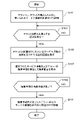
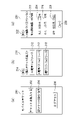
- FIG. 1 It is a figure for demonstrating the system outline of the digital ticketing system which concerns on embodiment of this invention. It is a figure which shows the example of the data structure of the user account information. It is a block diagram which illustrates the hardware configuration of the computer which realizes the server of FIG. It is a functional block diagram which logically shows the configuration of the server which concerns on this embodiment. It is a figure which shows the data structure example of the ticket information. It is a figure which shows the example of the data structure of the ticket information and the service information. It is a flowchart which shows the operation example of the server about the ticket purchase. It is a figure which shows the screen example which is displayed on the user terminal at the time of a ticket purchase procedure. It is a figure which shows the example of the option selection screen.
- acquisition means that the own device retrieves data or information stored in another device or storage medium (active acquisition), and is output to the own device from the other device. Includes at least one of entering data or information (passive acquisition).
- active acquisition include requesting or inquiring about other devices and receiving the reply, and accessing and reading other devices or storage media.
- passive acquisition may be receiving information to be delivered (or transmitted, push notification, etc.).
- acquisition may be to select and acquire the received data or information, or to select and receive the delivered data or information.
- FIG. 1 is a diagram for explaining a system outline of the digital ticketing system 1 according to the embodiment of the present invention.
- the digital ticketing system 1 allows a user (also referred to as a user 4) to purchase a transportation ticket for a specific area using a user terminal 40 such as a smartphone, or allows the user to purchase an admission ticket for a tourist facility in the area. Offering services such as discounts and gifts of souvenirs.
- the digital ticketing system 1 is purchased by combining a one-day ticket (one-day free pass), which is a plan that combines multiple means of transportation, such as railroads, buses, and ferries, with a discounted admission ticket for local tourist facilities. Providing services that can be done.
- the former ticket is also referred to as "this ticket”
- the latter service is also referred to as "option ticket”.
- the digital ticketing system 1 includes a server 100.
- the server 100 includes a storage device 120.
- the storage device 120 may be a device separate from the server 100, a device included inside the server 100, or a combination thereof.
- Transportation crew members, tourist facility employees, etc. use a business terminal 80 such as a tablet terminal and a code reader 90 to present a ticket or admission ticket to the user 4.
- a code reader 90 to present a ticket or admission ticket to the user 4.
- Visually or read a two-dimensional code such as a QR code (registered trademark) to manage the entrance and exit of the user 4.
- the ticket purchased by the user 4 can be output to the touch panel 42 of the user terminal 40 in a usable state.
- the touch panel 42 of the user terminal 40 may display the face of the purchased ticket and show it to the operator 8, and the operator 8 may visually confirm the face of the ticket.
- the QR code recording the information of the purchased ticket may be displayed on the touch panel 42 of the user terminal 40 and may be read by holding it over the code reader 90. Details will be described in the third embodiment described later.
- the administrator 6 of the digital ticketing system 1 can make various settings of the digital ticketing system 1, for example, settings such as usage conditions of a special ticket, using a management console 60 such as a personal computer.
- the digital ticketing system 1 may be built, for example, on the platform of a cloud computing service.
- the digital ticketing system 1 uses a cloud computing service to construct, manage, and manage the contents of a website accessed by a user terminal 40, a management console 60, and a business terminal 80 connected via a network 2 such as the Internet. It is possible to realize a function of delivering, a data management function of the digital ticketing system 1, a function of sending and receiving mail (or a message) between each terminal and the server 100, and the like. Further, it may be possible to perform payment processing of the ticket purchased by the user 4 in cooperation with an external payment agency system.
- the digital ticketing system 1 starts providing the service when the user 4 logs in to a predetermined website via a browser using the user terminal 40.
- the application program may be installed in the user terminal 40 of the user 4 and the application may log in to the server 100. In the following explanation, the configuration for accessing the former website will be described.
- FIG. 2 is a diagram showing an example of a data structure of user account information 160.
- the user account information 160 stores identification information (user ID), account name, and password for each user 4.
- the server 100 includes an authentication unit (not shown) that accepts the input of the account information of the user 4 as a login request to the digital ticketing system 1 and performs an authentication process based on the information of the user account information 160.
- the authentication unit automatically disconnects the session due to logout or the elapse of a predetermined time (due to timeout processing when there is no response for a predetermined time or more). , It is preferable not to accept other sessions. Therefore, for example, the authentication unit may monitor the session ID given for each login request. If a login request is received from another terminal for the account of the user 4 during the ticket purchase process with the account of the user 4, the session ID changes.
- the authentication unit detects that the session ID of the account has changed during the ticket purchase process for the account of one user 4, the login of the session ID is regarded as a login from another terminal, and the login received later is accepted. The request may be rejected. Further, the operation of the authentication unit is not limited to the above. For example, when the authentication unit receives a login request from another terminal for the account of the user 4 during the ticket purchase process with the account of the user 4, the authentication unit accepts the login request from the other terminal and has already logged in. You may force the terminal to log out.
- FIG. 3 is a block diagram illustrating a hardware configuration of a computer 1000 that realizes the server 100 of FIG.
- the user terminal 40, the management console 60, and the business terminal 80 of FIG. 1 are also realized by the computer 1000.
- the computer 1000 has a bus 1010, a processor 1020, a memory 1030, a storage device 1040, an input / output interface 1050, and a network interface 1060.
- the bus 1010 is a data transmission path for the processor 1020, the memory 1030, the storage device 1040, the input / output interface 1050, and the network interface 1060 to transmit and receive data to and from each other.
- the method of connecting the processors 1020 and the like to each other is not limited to the bus connection.
- the processor 1020 is a processor realized by a CPU (Central Processing Unit), a GPU (Graphics Processing Unit), or the like.
- the memory 1030 is a main storage device realized by a RAM (RandomAccessMemory) or the like.
- the storage device 1040 is an auxiliary storage device realized by an HDD (Hard Disk Drive), SSD (Solid State Drive), memory card, ROM (Read Only Memory), or the like.
- the storage device 1040 stores a program module that realizes each function of the server 100 (for example, a control unit 101, a storage control unit 102, a display control unit 104, a determination unit 106, a reception unit 110, a setting unit 112, etc., which will be described later). There is.
- the processor 1020 reads each of these program modules into the memory 1030 and executes them, each function corresponding to the program module is realized. Further, the storage device 1040 may also store each data of the storage device 120 of the server 100.
- the program module may be recorded on a recording medium.
- the recording medium for recording the program module includes a medium that can be used by the non-temporary tangible computer 1000, and the program code readable by the computer 1000 (processor 1020) may be embedded in the medium.
- the input / output interface 1050 is an interface for connecting the computer 1000 and various input / output devices.
- the input / output interface 1050 also functions as a communication interface for performing short-range wireless communication such as Bluetooth (registered trademark) and NFC (Near Field Communication).
- the network interface 1060 is an interface for connecting the computer 1000 to the communication network.
- This communication network is, for example, LAN (Local Area Network) or WAN (Wide Area Network).
- the method of connecting the network interface 1060 to the communication network may be a wireless connection or a wired connection.
- the computer 1000 is an output device such as a display, a touch panel, a keyboard, a mouse, etc. of a necessary device (for example, a user terminal 40, a management console 60, and a business terminal 80) via an input / output interface 1050 or a network interface 1060.
- a necessary device for example, a user terminal 40, a management console 60, and a business terminal 80
- an input / output interface 1050 or a network interface 1060 The input device, the camera, the speaker, and the microphone, and the code reader 90 connected to the business terminal 80, etc.).
- FIG. 4 is a functional block diagram that logically shows the configuration of the server 100 according to the present embodiment.
- the server 100 includes a control unit 101.
- the control unit 101 may include a storage control unit 102 and a display control unit 104.
- the storage control unit 102 associates the ticket with the service information received when the ticket is purchased and stores it in the storage device 120.
- the display control unit 104 causes the display unit (for example, the touch panel 42 of the user terminal 40) to display a screen that accepts the user's operation.
- the ticket is a ticket for transportation, for example, a train, a bus, and a ferry, or a boarding ticket, and may be a ticket for a single transportation or a ticket that can use a plurality of transportations.
- the number of days, hours, times, etc. that can be used for the ticket are preset. For example, a 1-day free pass, a half-day free pass, an 8-hour free pass, a 48-hour free pass, a 72-hour free pass, etc. Tickets that can be used N times can be set for a predetermined number of days after the purchase of the ticket.
- Various settings related to the ticket can be made using the management console 60. The ticket setting will be described in the fourth embodiment described later.
- the ticket may be a combination of a plurality of means of transportation, and may include, for example, a ticket that is a combination of a plurality of available railway and bus routes, ferry sea routes, and the like.
- the price of each ticket may be a discounted price from the normal ticket price.
- the ticket price may also be set using the management console 60.
- Service information is information on services that can be additionally purchased or used as an option when a ticket is purchased.
- Services include, for example, high-speed bus tickets from the station or bus stop where the purchased ticket line is located, admission tickets to tourist facilities around the purchased ticket line, ropeways, cable cars, and other discount tickets. It is a service that allows you to purchase tickets for sightseeing boats and ferries, tickets for parking lots, tickets that can be used at specific stores, etc. at a discounted price or receive them for free.
- FIG. 5 is a diagram showing an example of the data structure of the ticket information 130.
- the ticket information 130 is associated with information on services that can be additionally purchased or used as an option when the ticket is purchased for each ticket.
- the ticket information includes the ticket identification information (ticket ID), the ticket name (ticket name), and the identification information of at least one business operator that sells the ticket (for example, railway, bus, ferry, etc.). Information such as the identification information of the business operator) and the selling price of the ticket by category (classification of adults, students, children, persons with disabilities, license returners only, etc.) is included.
- the service information includes information on at least one optional service. In this example, information on three services (options 1 to 3) that can be used or purchased by purchasing the ticket is associated with the ticket.
- An option ID is assigned to each of the service information options (service information 140 in FIG. 6), and the service information can be associated with the ticket (ticket ID) in FIG. 5 by the option ID.
- FIG. 6A is a diagram showing an example of a data structure of service information 140 associated with the ticket information of FIG.
- the service information includes a second ticket (ticket information 130 in FIG. 6B) different from the ticket in FIG.
- FIG. 6B is a diagram showing an example of a data structure of at least one ticket information 130 associated with the service information 140 of FIG. 6A.
- the ticket information 130 is associated with an option ticket (service information) that can be purchased together with the ticket, as shown in FIG.
- the ticket information 130 is not associated with the option ticket (service information) as shown in FIG. 6B.
- an identification information (option ID), an option name (option name), and at least one ticket are associated with each option ticket (service information). That is, a plurality of tickets may be associated with the option ticket, and the service information is also referred to as an "option group" hereafter.
- the option group of the airport limousine ticket with the option ID "OP0001” includes the round-trip discount ticket for the airport limousine bus with the ticket ID "TB3001".
- the option group of tourist facility discount admission tickets with option ID "OP2001” includes two tickets, a museum discount admission ticket with ticket ID "TB4012” and a park admission ticket with "TB4021”.
- FIG. 7 is a flowchart showing an operation example of the server 100 regarding ticket purchase.
- 8 to 10 are diagrams showing an example of a screen displayed on the user terminal 40 during the ticket purchase procedure.
- the storage control unit 102 associates the ticket with the service information received when the ticket is purchased and stores it in the storage device 120 as the ticket information 130 (FIG. 5) (step S101). Further, the storage control unit 102 also stores the service information 140 of FIG. 6A and the ticket information 130 of the option ticket of FIG. 6B in the storage device 120.
- FIG. 8A is a diagram showing an example of the menu screen 200.
- the menu screen 200 includes a ticket purchase button 202, a purchased ticket confirmation / use button 204, and a logout button 206.
- the display control unit 104 Upon receiving the pressing of the ticket purchase button 202, the display control unit 104 causes the ticket selection screen 210 of FIG. 8B to be displayed on the touch panel 42 of the user terminal 40.
- the display control unit 104 Upon receiving confirmation of the purchased ticket and pressing of the use button 204, the display control unit 104 causes the purchased ticket list screen 280 of FIG. 10 to be displayed on the touch panel 42 of the user terminal 40.
- the purchased ticket list screen 280 will be described later.
- the digital ticketing system 1 logs out, and the display control unit 104 closes the menu screen 200.
- the ticket selection screen 210 of FIG. 8B includes at least one ticket purchase button 212 and a back button 214. Upon receiving the press of the back button 214, the display control unit 104 returns the display screen from the ticket selection screen 210 to the menu screen 200.
- the ticket selection screen 210 displays three ticket purchase buttons 212, but the present invention is not limited to this.
- a UI User Interface
- a limited-time ticket, an area-limited ticket, a transportation-limited ticket, a regular ticket, or the like may be selected.
- the user 4 selects the "book ticket” to be purchased.
- the display control unit 104 Upon receiving the pressing of the ticket purchase button 212, the display control unit 104 displays the number of selected tickets designation screen 220 (FIG. 8 (c)) corresponding to the pressed ticket purchase button 212 on the touch panel 42 of the user terminal 40. Display.
- the number specification screen 220 has a number input unit 224 and 226 that accepts designation of the number of purchased tickets selected on the ticket selection screen 210, and a deadline display indicating the expiration date of the ticket. It includes a unit 222, an amount display unit 228 showing the total amount of the designated number of sheets, and a next button 230 for proceeding to the next procedure after the number of sheets is specified.
- the number input unit 224, 226 may be, for example, a text box, a drum roll, or a list.
- the number-of-sheets input units 224 and 226 include, but are not limited to, two input units for adults and children.
- the amount of money and the input field for each category according to the ticket are displayed. For example, if there is a student discount ticket, an input field for the amount and number of one student discount ticket may be further displayed. Alternatively, in the case of a ticket in which there is no distinction between an adult and a child, only the input fields for the amount and number of sheets for one person may be displayed.
- the price information of the ticket may display the amount before the discount, the discount rate, etc. together with the price information.
- the total amount displayed on the amount display unit 228 may be updated every time the input of the number input unit 224 or 226 is confirmed, or when the recalculation button (not shown) is pressed, the number input unit 224, The total amount may be recalculated with the number of sheets specified in 226 to update the display.
- step S103 when the display control unit 104 accepts the selection to purchase the ticket (YES in step S103), the display control unit 104 accepts the selection of the service information associated with the selected ticket (option in FIG. 9).
- the selection screen 250) is displayed on the touch panel 42 (step S105).
- FIG. 9 shows an option selection when "A train bus 1-day free pass" is selected on the ticket selection screen 210 of FIG. 8 (b) and one adult is designated on the number specification screen 220 of FIG. 8 (c).
- a display example of the screen 250 is shown.
- the option selection screen 250 has a ticket expiration date display unit 252, a message display unit 254 prompting the selection of service information, a selectable service information display unit 256, a selected service information display unit 258, and a check for specifying an option. It includes a box 260 and a selection confirmation button 262. In this example, of the three option tickets, the A course boarding ticket is selected (check box 260 is checked) and designated.
- the display control unit 104 sets the settlement amount of the selected ticket and the service information.
- the calculation is performed and the settlement screen (not shown) is displayed on the touch panel 42 (step S107 in FIG. 7).
- the settlement screen includes the purchase content for confirmation and the settlement amount.
- the display control unit 104 shifts to the settlement procedure screen (not shown).
- the payment procedure screen includes, for example, a UI for inputting information necessary for payment by credit card, and when a payment confirmation operation is received, the payment information is passed to the system of an external payment agency.
- the payment processing may use the system environment of the external payment agency, and when the confirmation operation is accepted, the screen transitions to the payment procedure screen of the system of the external payment agency, and the payment processing is completed by the external system. May be good.
- the storage control unit 102 associates the ticket and the service information for which the settlement procedure is completed with the user, and stores the ticket and the service information in the storage device 120 as the ticket purchase information 150. (Step S111). Completion of the settlement procedure can be determined, for example, by receiving the result of settlement completion from the settlement agency system.
- FIG. 11 is a diagram showing an example of the data structure of the ticket purchase information 150.
- the ticket purchase information 150 stores information on purchased tickets for each user 4. For example, a serial ID uniquely assigned to each ticket is given to the ticket purchased by the user 4.
- the ticket purchase information 150 includes information indicating the current status of the ticket, for example, "before", "in use", and "after use", respectively. In the example of FIG. 11, the information of the ticket before use is included.
- the storage control unit 102 updates the status of the ticket purchase information 150.
- the storage control unit 102 associates the ticket with the service information received when the ticket is purchased and stores it in the storage device 120. Then, when the display control unit 104 accepts the selection of the ticket to be purchased, the display control unit 104 causes the user terminal 40 to display the option selection screen 250 of the service information (option ticket) associated with the ticket. Then, the display control unit 104 calculates the settlement amount of the selected ticket (main ticket) and the option ticket, and displays the settlement screen on the user terminal 40. After the settlement procedure is completed, the storage control unit 102 stores the ticket (main ticket) for which the settlement procedure is completed and the option ticket in association with each other in the ticket purchase information 150.
- the server 100 of the present embodiment it is possible for a business operator to combine and purchase tickets for a plurality of different transportation facilities and facilities by a simple operation. Since the ticket sales side can also propose to the user by combining a plurality of tickets and services, it is possible to provide the user with a more attractive and appealing service.
- the service can be used by entering the user ID and password from the user terminal 40 of the user 4 to the digital ticketing system 1 to log in, and the service cannot be used simultaneously from a plurality of terminals. You can prevent double purchases.
- FIG. 12 is a functional block diagram showing a functional configuration example of the server 100 of the present embodiment.
- the present embodiment is the same as the above embodiment except that at least one of the validity period and the number of times the ticket can be used is set for each ticket, and the availability is determined when the ticket is used.
- the server 100 shown in this figure has a determination unit 106 in addition to the configuration of the server 100 of the first embodiment of FIG.
- the configurations of the present embodiment may be combined within a range that does not cause a contradiction with at least one of the configurations of the other embodiments.
- the determination unit 106 sets the start time of the valid period of the ticket or counts the number of times of use, and determines whether or not the ticket can be used.
- the determination unit 106 further uses whether or not it is possible to start using the ticket for the availability determination.
- FIG. 13 is a flowchart showing an operation example of the server 100 at the time of determining whether or not the ticket can be used.
- the determination unit 106 detects the use of the ticket (YES in step S131)
- the determination unit 106 sets the start time of the valid period of the ticket or counts the number of times of use (step S133). The procedure for starting the use of the ticket and the method for detecting the use of the ticket will be described in detail in the third embodiment described later.
- FIG. 14 is a diagram showing an example of a data structure of ticket information 130 in which a valid period from the start of ticket use is set.
- FIG. 15 is a diagram showing an example of a data structure of the ticket purchase information 150 when the ticket is started to be used.
- the ticket purchase information 150 of FIG. 15 further includes information indicating the current status of the ticket, in addition to the data structure of the ticket information 130.
- the storage control unit 102 stores the usage start time set in step S133 and the counted number of usages in the ticket purchase information 150.
- the usage start time is recorded. For example, if a 48-hour free pass or the like is used, different transportation means will be used multiple times, and this process is executed for each use.
- the determination unit 106 refers to the ticket purchase information 150 and determines whether or not the current time is within the ticket validity period (48 hours) from the start time of the ticket validity period. Alternatively, the determination unit 106 determines whether or not the device has been used more than the number of times it has been used.
- step S135 the display control unit 104 causes the touch panel 42 of the user terminal 40 to display a message notifying the user 4 that the ticket cannot be used (step S137).
- the server 100 further includes an output unit (not shown) for displaying a message, outputting a warning sound or voice from a speaker (not shown) of the user terminal 40, or outputting a vibration to a vibrator of the user terminal 40 (not shown). May be good.
- the determination unit 106 determines whether or not the ticket can be used, and if it is not available, notifies that the ticket cannot be used. Let me.
- FIG. 16 is a functional block diagram showing a functional configuration example of the server 100 of the present embodiment. This embodiment is the same as any of the above embodiments except that the method of accepting the usage start request is set for each ticket.
- the server 100 of FIG. 16 further includes a reception unit 110 in addition to the configuration of the server 100 of the first embodiment of FIG.
- the configurations of the present embodiment may be combined within a range that does not cause a contradiction with at least one of the configurations of the other embodiments.
- the reception unit 110 receives a request to start using the ticket.
- the reception unit 110 receives a ticket usage start request by a reception method corresponding to each ticket.
- FIG. 10 is a diagram showing an example of the purchased ticket list screen 280.
- the user 4 can select the ticket to be used from the ticket list on the purchased ticket list screen 280.
- the purchased ticket list screen 280 includes a pre-use tab 282 for displaying a pre-use ticket list, a in-use tab 284 for displaying a used ticket list, and a history tab 286 for displaying a post-use ticket list. ..
- FIG. 10 shows a state in which the pre-use tab 282 is selected, and detailed information on the two tickets is displayed.
- the purchased ticket list screen 280 further includes a ticket detailed information display unit 290 for each ticket.
- the ticket detailed information display unit 290 includes a ticket name display unit 292, a ticket purchase date display unit 293, a usable start date display unit 294, a ticket division number display unit 295, a ticket selection button 297, and a refund link 298. ,including.
- the refund procedure screen includes a UI that presents the user 4 a refund fee preset for each ticket and accepts an operation for confirming the execution of the refund.
- the settlement information is passed to the settlement agency system that performs the refund procedure, and the refund procedure is instructed.
- the purchased ticket list screen 280 includes the option ticket information display unit 296 for the ticket to which the option is associated.
- the display control unit 104 When the user 4 uses the ticket, he / she presses the selection button 297 of the ticket to be used from the list of tickets before use. When the display control unit 104 receives the press of the selection button 297, the display control unit 104 shifts to the ticket detail screen 300 of FIG. 17 (a).
- FIG. 17 is a diagram showing an example of a screen displayed on the touch panel 42 of the user terminal 40 when using a ticket.
- the ticket detail screen 300 of FIG. 17A is a screen showing the details of the ticket for which the selection button 297 is accepted from the tickets before use on the purchased ticket list screen 280 of FIG.
- the ticket detail screen 300 includes a ticket detail information display unit 302, a use start button 308, and a back button 309.
- the ticket detailed information display unit 302 shows the ticket name of the ticket selected to be used, the expiration date (expiration date display unit 304), and the icon indicating the target business operator of the ticket (here, the railway and ferry icons). And the target category of the ticket and the number of tickets 306 (here, one adult).
- the display control unit 104 Upon receiving the press of the use start button 308, the display control unit 104 causes the use start screen 320 of FIG. 17B to pop up on the touch panel 42.
- the display control unit 104 Upon receiving the press of the back button 309, the display control unit 104 returns the screen to the purchased ticket list screen 280 of FIG.
- the use start screen 320 of FIG. 17B includes a display unit 322 that displays a message inquiring whether or not to start using the ticket, a cancel button 324, and a use start button 326.
- the display control unit 104 closes the pop-up display start screen 320 and returns to the ticket details screen 300.
- the display control unit 104 causes the ticket face screen 330 of FIG. 17C to be displayed on the touch panel 42.
- the ticket face screen 330 has a usage start time display unit 332, a usage ticket name display unit 333, an expiration date display unit 334, a ticket classification number display unit 336, a QR code display unit 338, and a ticket usage method display unit 340. And, including.
- the use start time display unit 332 displays, for example, the time when the use start button 326 on the use start screen 320 is pressed.
- the used ticket name display unit 333 displays the ticket name of the ticket that has started to be used.
- the expiration date display unit 334 displays a predetermined expiration date for each ticket.
- the ticket classification number display unit 336 displays the ticket classification (for example, classification of adults, children, etc.) and the number of tickets.
- the QR code display unit 338 displays a QR code including ticket information. The details of the QR code will be described later.
- the ticket usage method display unit 340 displays a message indicating a predetermined ticket usage method for each ticket.
- the method of accepting the ticket usage start request accepted by the reception unit 110 is exemplified below, but is not limited thereto.
- the operator 8 of the facility to use visually confirms the face of the ticket (main ticket) or service information (option ticket) displayed on the user terminal 40. On the screen on which the face of the ticket is displayed, an animation or the like for preventing fraud using a screenshot or the like may be displayed together with the image of the face of the ticket.
- the QR code (registered trademark) is displayed on the user terminal 40, and the QR code is read by the code reader 90 of the business terminal 80.
- This QR code contains ticket information (at least a user ID and a ticket ID). Details will be described later with reference to FIG.
- the QR code presented at the facility is read by using the camera of the user terminal 40.
- the QR code includes identification information (for example, a business code or facility ID) of the business operator of the facility to be used, and a URL for accessing the user terminal 40. Details will be described later with reference to FIG.
- the storage control unit 102 updates the status of the ticket of the ticket purchase information 150 from before use to during use. Further, the storage control unit 102 stores the ticket purchase start time in the ticket purchase information 150.
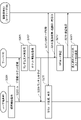
- FIG. 18 is a flowchart showing an operation example of the server 100 when the user terminal 40 of the user 4 is displayed with a QR code to enter.
- the user terminal 40 has already logged in to the digital ticketing system 1 with the account of the user 4, and presses the use start button 326 on the ticket use start screen 320 (FIG. 17 (b)) selected on the purchased ticket list screen 280. (Step S201).
- the user terminal 40 transmits the ticket ID (or serial ID) of the ticket and the user ID of the user 4 to the server 100 (step S203).
- the display control unit 104 displays the ticket face screen 330 (FIG. 17 (c)) on which the QR code (QR code display unit 338) is not displayed on the touch panel 42 of the user terminal 40.
- the server 100 generates a random character string for generating the QR code (step S205). Then, the storage control unit 102 stores the random character string generated in step S205 and the expiration date information of the QR code in the ticket purchase information 150 in association with the user ID (step S207). The server 100 transmits the generated random character string to the user terminal 40 (step S209).
- the user terminal 40 generates a QR code including a random character string received from the server 100 and displays it on the touch panel 42 (step S211).
- the code reader 90 of the business terminal 80 is held over the QR code to read it (step S213), the business terminal 80 receives the reading result, the identification information (facility ID) of the facility where the business terminal 80 is installed, and the business.
- the identification information (terminal ID) of the terminal 80 is returned to the server 100 (step S215).
- the server 100 verifies the QR code based on the reading result of the QR code received by the business terminal 80 received from the business terminal 80 (step S217). When the verification result satisfies the standard, the server 100 transmits the verification result to the business terminal 80 (step S219). Then, the storage control unit 102 of the server 100 changes the status of the ticket of the ticket purchase information 150 from before use to during use (step S221). Then, the user 4 is admitted. If the verification result does not meet the criteria, the use of the ticket is not authenticated and the user 4 cannot enter.
- the display control unit 104 may display the usage date and expiration date of the ticket for which admission is permitted on the touch panel 42.
- the operator 8 may visually confirm that the usage date displayed on the user terminal 40 is the same day.
- the determination unit 106 uses the date and time when the use start operation is accepted before step S205. It may be determined whether or not it is within the start period. If it is within the available period, the process proceeds to step S205.
- the display control unit 104 may display on the user terminal 40 that the ticket is out of the available period, and this flow may be terminated.
- FIG. 19 is a flowchart showing an operation example of the server 100 when the QR code posted on the facility is read by the user terminal 40 of the user 4 and entered.
- the user terminal 40 reads the QR code posted on the facility using, for example, a camera, and acquires the URL (step S231). Then, the user terminal 40 accesses the acquired URL (step S233) and logs in to the digital ticketing system 1 (step S235). However, if the user terminal 40 has already logged in to the digital ticketing system 1, the login process in step S235 can be omitted.
- the server 100 acquires the user information (user ID) and the business operator code from the user terminal 40 (step S237). Then, the server 100 extracts the ticket information of the ticket corresponding to the acquired business code from the tickets before and during use from the ticket purchase information 150 of the acquired user ID (step S239).
- the display control unit 104 of the server 100 transmits the ticket information of the extracted ticket to the user terminal 40 (step S241), and the touch panel 42 of the user terminal 40 displays a list of tickets that can be used at the facility (not shown). Is displayed (step S243).
- the format of this screen can be the same as that of the purchased ticket list screen 280 of FIG.
- step S245 when the press of the selection button 297 of the ticket of the facility is accepted (step S245), the contents of the ticket for which the selection button 297 is accepted, the message confirming that the ticket is to be used, and the start button of use are received. Display the start screen (not shown) including and. Then, upon receiving the press of the use start button on the screen, the server 100 acquires the ticket information (at least the ticket ID or the serial ID) of the ticket and the user information from the user terminal 40 (step S247). Here, a message confirming that the ticket is to be used may be displayed after the use start button is pressed. The storage control unit 102 changes the status of the acquired ticket information from "before use” to "in use” (step S249). Then, the display control unit 104 causes the touch panel 42 of the user terminal 40 to display the face of the ticket (step S251).
- the operator 8 visually confirms the face of the ticket, and the user 4 can enter the facility.
- the reception unit 110 receives a ticket usage start request by a reception method corresponding to each ticket. For example, (1) display the QR code on the user terminal 40 and read it with the code reader 90 to start using it, or (2) start using it when the user 4 presses the use start button 326 on the use start screen 320. Or (3) whether to read the QR code posted on the facility and start using it is determined in advance for each ticket.
- the use start request can be received by a method corresponding to the method of accepting the ticket use start request different for each facility.
- This function is highly convenient for both the user and the facility side.
- FIG. 20 is a functional block diagram showing a functional configuration example of the server 100 of the present embodiment.
- This embodiment is the same as any of the above embodiments except that it has a configuration for setting the association between the ticket and the service information.
- the server 100 of FIG. 20 further includes a setting unit 112 in addition to the configuration of the server 100 of the first embodiment of FIG.
- the configurations of the present embodiment may be combined within a range that does not cause a contradiction with at least one of the configurations of the other embodiments.
- the setting unit 112 sets the association between the ticket and the service information. Specifically, the setting unit 112 causes the management console 60 operated by the administrator 6 to display a setting screen (FIGS. 21 and 22) for associating the ticket with the service information. Then, the setting unit 112 accepts the setting operation by the administrator 6, generates the ticket information 130 and the service information 140, and stores them in the storage device 120.
- the management ticket list screen 350 of FIG. 21 includes a list of tickets scheduled to be sold or being sold. Further, as shown in FIG. 21, various menus 352 may be prepared on the screen for the administrator 6. For example, various information such as price classification, business operator, facility, holiday, ticket classification, ticket group, option group, and ticket can be registered as master information.
- the management ticket list screen 350 can include a GUI (Graphical User Interface) such as various icons and operation buttons that accept operations such as new creation, update, duplication, and deletion of ticket information.
- the management ticket list screen 350 includes information such as a ticket name, a business operator, an available option group name, a memo, information on whether the product is before or during sales, a sales start date, and a sales end date for each ticket. Display the ticket list.
- Ticket information may be read from the file (import) or saved in a file (export) by specifying a file name.
- FIG. 22 shows a screen example relating to “(1) basic setting” and “(2) display” among the plurality of setting items shown below.
- the items and UI that can be set by the setting unit 112 are exemplified below, but are not limited thereto.
- (1) Basic setting The ticket sales form can be selected from (a) this ticket, (b) option ticket, (c) pack ticket, and (d) set ticket. You can select multiple with. Further, the function of the ticket can be specified by either (a) a free ticket or (b) a coupon ticket with a radio button. If a free ticket is specified, the available period (hours or days) can be further specified.
- the set ticket is a free ticket attached to this ticket or the option ticket as a set, for example, a parking ticket, a coupon ticket for receiving souvenirs or benefits at a specific facility, etc. Is.
- a pack ticket is a package that combines multiple set tickets, and can be a book ticket or an option ticket. For example, a special package for a specific period of time (Golden Week, summer vacation, etc.).
- a ticket name can be set for each ticket. Notation in languages other than Japanese (for example, English, Chinese, etc.) may be further set. Further, (b) a description of each ticket, (c) a link to a ticket usage guide, and (d) a link to a usage guide can be set. You can also (e) upload an animation file to be displayed on the face of the ticket.
- (4) Usage start condition It is possible to specify whether or not to specify the period during which the ticket can be used. For example, a check box can be used to specify the period. When the period is specified, the input of the specified startable period (for example, start date and end date) is accepted in the text box or pull-down menu.
- the specified startable period for example, start date and end date
- Specifying the day of the week You can specify the day of the week when you can start using the ticket. (A) Can be used on weekdays (other than Saturdays, Sundays, and holidays), (b) Can be started on Saturdays, (c) Can be started on Sundays, (d) Starts on holidays You can select multiple from the possible check boxes.
- Time specification It is possible to specify whether or not to specify the period during which the ticket can be used. For example, you can specify the time with a check box. When it is specified to specify the time, the input of the specified start time (start time and end time) is accepted in the text box or pull-down menu.
- End-of-use conditions You can specify end-of-use conditions for tickets.
- the expiration date can be specified by the number of days, and the input of the number of days is accepted in the text box or pull-down menu.
- the radio button can be used to select whether the expiration date setting unit is hours or days.
- input is accepted in the text box or pull-down menu in the unit selected in (b).
- D Accept the end-of-use time (or end-of-business time) in a text box or pull-down menu.
- Price information (a) Multiple ticket operators can be selected with check boxes. For example, a business operator of transportation such as a railroad or a bus, a business operator of a tourist facility, etc. are registered as master information as business information in advance in association with a business code. The business name registered in the business information is displayed in a list, a check box is provided for each business name, and selection is accepted. (B) Accept the distribution ratio between multiple businesses in a text box. In the case of a ticket for a project that uses multiple means of transportation or facilities from different businesses, payment can be made between businesses based on a preset distribution ratio. (C) For each price category (d) Accept the price input in the text box.
- the price category of (c) is limited to adults, students, children, license returners, etc., and these may be registered as master information in advance. From the preset price categories, you can specify the category supported by the ticket with the check box and enter the price of the specified category. (E) You can specify whether the ticket can be refunded with a check box. (F) Enter the ticket refund fee in the text box.
- Service information (option ticket) that can be associated with the option group ticket can be specified. Separately, display a list of registered option groups. By selecting the check box provided for each option group, the service information to be associated with the ticket can be specified. The list of option groups shows the name of the option group and the names of available tickets.
- Set ticket Service information (set ticket) that can be associated with the ticket can be specified. Separately, display a list of registered set tickets. By selecting the check box provided for each set ticket, you can specify the set ticket to be associated with the ticket.
- the setting unit 112 stores various setting information of the above tickets received on the setting screen in the ticket information 130 and the service information 140.
- the setting unit 112 accepts the setting of the association between the ticket and the service information and stores it in the ticket information 130 and the service information 140. According to this configuration, tickets and service information sold or provided by different businesses can be systematically managed. Since the administrator 6 can freely set the settings on the setting screen using the management console 60, the operability is good and setting omissions and mistakes can be prevented.
- a memory control means that associates and stores the service information received when the ticket is purchased with the ticket, and It is equipped with a display control means for displaying a screen that accepts user operations on the display means.
- the display control means is When the selection for purchasing the ticket is accepted, the display means is displayed with a selection screen for accepting the selection of the service information associated with the ticket. The selected service information and the settlement amount of the ticket are calculated, and the settlement screen is displayed on the display means.
- the storage control means is an information processing device that stores the ticket and the service information for which the settlement procedure has been completed in association with the user after the settlement procedure for the settlement amount is completed.
- the service information includes an information processing device including a second ticket different from the ticket.
- Each ticket is associated with at least one of the validity period and the number of times it can be used.
- An information processing device further comprising a determination means for setting a start time of the validity period or counting the number of times the ticket can be used when the ticket is used, and determining whether or not the ticket can be used.
- 4. 3. 3. In the information processing apparatus described in When the ticket is associated with the validity period, the available time zone for starting the use of the ticket is set.
- the determination means is an information processing device that further uses whether or not the ticket can be used in the available time zone for the availability determination. 5. 1. 1. From 4.
- the method of accepting the usage start request is set for each ticket.
- the reception means is an information processing device that receives the usage start request of the ticket by the reception method corresponding to each ticket. 6. 1. 1. From 5.
- An information processing device comprising a setting means for setting an association between the ticket and the service information.
- the service information received when the ticket is purchased is associated with the ticket and stored in the storage device.
- the display means displays the selection screen for accepting the selection of the service information associated with the ticket.
- the selected service information and the settlement amount of the ticket are calculated, and the settlement screen is displayed on the display means.
- An information processing method for storing the ticket and the service information for which the settlement procedure has been completed in association with the user after the settlement procedure for the settlement amount is completed.
- the service information is an information processing method including a second ticket different from the ticket.
- 9. 8. In the information processing method described in Each ticket is associated with at least one of the validity period and the number of times it can be used.
- the information processing device further An information processing method in which when the ticket is used, the start time of the valid period is set, or the number of times the ticket can be used is counted, and the availability of the ticket is determined. 10. 9. In the information processing method described in When the ticket is associated with the validity period, the available time zone for starting the use of the ticket is set. An information processing method in which the information processing apparatus further uses whether or not the ticket can be used in the available time zone for the availability determination. 11. 7. From 10. In the information processing method described in any one of The information processing device further Accepting the request to start using the ticket, The method of accepting the usage start request is set for each ticket. The information processing device An information processing method for accepting the usage start request of the ticket by the acceptance method corresponding to each ticket. 12. 7. From 11. In the information processing method described in any one of The information processing device An information processing method for setting an association between the ticket and the service information.
- a procedure for associating a ticket with service information received when the ticket is purchased and storing it in a storage device A procedure for displaying a selection screen for accepting selection of the service information associated with the ticket on the display means when the selection for purchasing the ticket is accepted.
- a procedure for calculating the selected service information and the settlement amount of the ticket and displaying the settlement screen on the display means A program for executing a procedure of associating and storing the ticket and the service information for which the settlement procedure has been completed after the settlement procedure of the settlement amount is completed.
- the service information is a program including a second ticket separate from the ticket. 15. 14.
- Each ticket is associated with at least one of the validity period and the number of times it can be used.
Landscapes
- Business, Economics & Management (AREA)
- Engineering & Computer Science (AREA)
- Theoretical Computer Science (AREA)
- Physics & Mathematics (AREA)
- General Physics & Mathematics (AREA)
- Accounting & Taxation (AREA)
- Strategic Management (AREA)
- General Business, Economics & Management (AREA)
- Computer Networks & Wireless Communication (AREA)
- General Engineering & Computer Science (AREA)
- Tourism & Hospitality (AREA)
- Finance (AREA)
- Human Resources & Organizations (AREA)
- Economics (AREA)
- General Health & Medical Sciences (AREA)
- Health & Medical Sciences (AREA)
- Marketing (AREA)
- Primary Health Care (AREA)
- Human Computer Interaction (AREA)
- Management, Administration, Business Operations System, And Electronic Commerce (AREA)
- Operations Research (AREA)
Priority Applications (3)
| Application Number | Priority Date | Filing Date | Title |
|---|---|---|---|
| PCT/JP2020/036659 WO2022064705A1 (ja) | 2020-09-28 | 2020-09-28 | 情報処理装置、情報処理方法、およびプログラム |
| JP2022551105A JPWO2022064705A1 (https=) | 2020-09-28 | 2020-09-28 | |
| US18/026,995 US20230368323A1 (en) | 2020-09-28 | 2020-09-28 | Information processing apparatus, information processing method, and non-transitory computer-readable storage medium |
Applications Claiming Priority (1)
| Application Number | Priority Date | Filing Date | Title |
|---|---|---|---|
| PCT/JP2020/036659 WO2022064705A1 (ja) | 2020-09-28 | 2020-09-28 | 情報処理装置、情報処理方法、およびプログラム |
Publications (1)
| Publication Number | Publication Date |
|---|---|
| WO2022064705A1 true WO2022064705A1 (ja) | 2022-03-31 |
Family
ID=80845131
Family Applications (1)
| Application Number | Title | Priority Date | Filing Date |
|---|---|---|---|
| PCT/JP2020/036659 Ceased WO2022064705A1 (ja) | 2020-09-28 | 2020-09-28 | 情報処理装置、情報処理方法、およびプログラム |
Country Status (3)
| Country | Link |
|---|---|
| US (1) | US20230368323A1 (https=) |
| JP (1) | JPWO2022064705A1 (https=) |
| WO (1) | WO2022064705A1 (https=) |
Cited By (5)
| Publication number | Priority date | Publication date | Assignee | Title |
|---|---|---|---|---|
| JP2022161395A (ja) * | 2021-04-09 | 2022-10-21 | 東日本旅客鉄道株式会社 | 情報処理プログラム、情報処理方法及び情報処理装置 |
| JP2023159643A (ja) * | 2022-04-20 | 2023-11-01 | グレートインフォメーション株式会社 | 電子チケットシステム |
| JP2023176354A (ja) * | 2022-05-31 | 2023-12-13 | Toppanホールディングス株式会社 | 印刷物、およびその使用証明のために使用される配置体 |
| WO2024134772A1 (ja) * | 2022-12-20 | 2024-06-27 | 日本電気株式会社 | サーバ装置、情報処理方法、及び記録媒体 |
| JP2025051698A (ja) * | 2023-09-22 | 2025-04-04 | ソフトバンクグループ株式会社 | システム |
Families Citing this family (2)
| Publication number | Priority date | Publication date | Assignee | Title |
|---|---|---|---|---|
| US12556896B2 (en) * | 2023-04-07 | 2026-02-17 | International Business Machines Corporation | Caching a data payload on a peripheral device for delivery to a target device |
| US12578792B1 (en) * | 2024-11-19 | 2026-03-17 | Korea Electronics Technology Institute | Method and apparatus for real-time eye tracking of kiosk userand by performing inference on calibration model |
Citations (1)
| Publication number | Priority date | Publication date | Assignee | Title |
|---|---|---|---|---|
| JP2017004488A (ja) * | 2014-11-26 | 2017-01-05 | 株式会社ジェイティービー | 電子チケット管理装置及び電子チケット管理方法 |
Family Cites Families (4)
| Publication number | Priority date | Publication date | Assignee | Title |
|---|---|---|---|---|
| JP3800010B2 (ja) * | 2001-01-26 | 2006-07-19 | 株式会社デンソー | 携帯電話装置並びにicタグ |
| JP4003523B2 (ja) * | 2001-04-25 | 2007-11-07 | オムロン株式会社 | 電子チケット配信システムおよびその方法 |
| JP2003122876A (ja) * | 2001-08-01 | 2003-04-25 | Atsushi Matsushita | 携帯型端末を用いた電子チケットの取扱い方法及び発行・購入・管理システム |
| JP2019164691A (ja) * | 2018-03-20 | 2019-09-26 | 株式会社AliveCast | 電子チケット処理装置、電子チケット処理システム、電子チケット処理プログラムおよび電子チケット処理方法 |
-
2020
- 2020-09-28 JP JP2022551105A patent/JPWO2022064705A1/ja active Pending
- 2020-09-28 US US18/026,995 patent/US20230368323A1/en not_active Abandoned
- 2020-09-28 WO PCT/JP2020/036659 patent/WO2022064705A1/ja not_active Ceased
Patent Citations (1)
| Publication number | Priority date | Publication date | Assignee | Title |
|---|---|---|---|---|
| JP2017004488A (ja) * | 2014-11-26 | 2017-01-05 | 株式会社ジェイティービー | 電子チケット管理装置及び電子チケット管理方法 |
Cited By (7)
| Publication number | Priority date | Publication date | Assignee | Title |
|---|---|---|---|---|
| JP2022161395A (ja) * | 2021-04-09 | 2022-10-21 | 東日本旅客鉄道株式会社 | 情報処理プログラム、情報処理方法及び情報処理装置 |
| JP7598282B2 (ja) | 2021-04-09 | 2024-12-11 | 東日本旅客鉄道株式会社 | 情報処理プログラム、情報処理方法及び情報処理装置 |
| JP2023159643A (ja) * | 2022-04-20 | 2023-11-01 | グレートインフォメーション株式会社 | 電子チケットシステム |
| JP7814029B2 (ja) | 2022-04-20 | 2026-02-16 | グレートインフォメーション株式会社 | 電子チケットシステム |
| JP2023176354A (ja) * | 2022-05-31 | 2023-12-13 | Toppanホールディングス株式会社 | 印刷物、およびその使用証明のために使用される配置体 |
| WO2024134772A1 (ja) * | 2022-12-20 | 2024-06-27 | 日本電気株式会社 | サーバ装置、情報処理方法、及び記録媒体 |
| JP2025051698A (ja) * | 2023-09-22 | 2025-04-04 | ソフトバンクグループ株式会社 | システム |
Also Published As
| Publication number | Publication date |
|---|---|
| US20230368323A1 (en) | 2023-11-16 |
| JPWO2022064705A1 (https=) | 2022-03-31 |
Similar Documents
| Publication | Publication Date | Title |
|---|---|---|
| WO2022064705A1 (ja) | 情報処理装置、情報処理方法、およびプログラム | |
| US20220277245A1 (en) | Systems and methods for providing on demand business resources | |
| CN112150106B (zh) | 一种订单任务处理、提供差旅服务的方法及装置 | |
| US11170323B2 (en) | Generating and managing group reservations of travel resources | |
| JP7432219B2 (ja) | 情報処理システム、情報処理プログラムおよび情報処理方法 | |
| US11023872B2 (en) | Systems for collecting retailer-specific data | |
| JP2004192357A (ja) | 結合サーバーを用いた旅行商品検索・予約システム | |
| US20190318276A1 (en) | Automated Booking System | |
| JP2024163164A (ja) | 経費検査装置、経費検査方法、およびプログラム | |
| JP2000331098A (ja) | 切符の予約発券方法及び予約発券システム | |
| US20050234749A1 (en) | System for developing custom group tours | |
| CN120952893A (zh) | 一种ai驱动的航班动态定价与智能议价系统及其实现方法 | |
| JP6646008B2 (ja) | 精算システム、ホスト端末、精算方法、プログラム及び車両 | |
| US20170039504A1 (en) | Systems and methods to administer a dispatch platform affiliate program | |
| JP7414470B2 (ja) | サーバー装置、プログラム、利用者端末装置、およびシステム | |
| JP2004005499A (ja) | 情報管理サーバ及び情報管理方法 | |
| JP5969085B1 (ja) | 販売処理システム、販売処理プログラムおよびサーバ装置 | |
| JP6145200B2 (ja) | 販売処理システムおよび販売処理プログラム | |
| TWM529236U (zh) | 線上旅遊服務預訂系統 | |
| JP2016115290A (ja) | 予約受付装置及び予約システム | |
| JP5918842B1 (ja) | 予約システム、予約受付装置及び券売機 | |
| US20070244728A1 (en) | System and method for comprehensive customized umrah travel planning | |
| JP3617512B2 (ja) | 情報配信サービス方法及びシステム | |
| JP6027938B2 (ja) | 交通費支払システム及び交通費支払方法 | |
| WO2020045047A1 (ja) | 旅行支援装置、旅行支援方法、プログラム及び記録媒体 |
Legal Events
| Date | Code | Title | Description |
|---|---|---|---|
| 121 | Ep: the epo has been informed by wipo that ep was designated in this application |
Ref document number: 20955298 Country of ref document: EP Kind code of ref document: A1 |
|
| ENP | Entry into the national phase |
Ref document number: 2022551105 Country of ref document: JP Kind code of ref document: A |
|
| NENP | Non-entry into the national phase |
Ref country code: DE |
|
| 122 | Ep: pct application non-entry in european phase |
Ref document number: 20955298 Country of ref document: EP Kind code of ref document: A1 |