WO2021084763A1 - 管理装置、管理方法及び管理プログラム - Google Patents
管理装置、管理方法及び管理プログラム Download PDFInfo
- Publication number
- WO2021084763A1 WO2021084763A1 PCT/JP2019/043168 JP2019043168W WO2021084763A1 WO 2021084763 A1 WO2021084763 A1 WO 2021084763A1 JP 2019043168 W JP2019043168 W JP 2019043168W WO 2021084763 A1 WO2021084763 A1 WO 2021084763A1
- Authority
- WO
- WIPO (PCT)
- Prior art keywords
- operation content
- screen
- manual
- content
- user
- Prior art date
- Legal status (The legal status is an assumption and is not a legal conclusion. Google has not performed a legal analysis and makes no representation as to the accuracy of the status listed.)
- Ceased
Links
Images





Classifications
-
- G—PHYSICS
- G06—COMPUTING OR CALCULATING; COUNTING
- G06Q—INFORMATION AND COMMUNICATION TECHNOLOGY [ICT] SPECIALLY ADAPTED FOR ADMINISTRATIVE, COMMERCIAL, FINANCIAL, MANAGERIAL OR SUPERVISORY PURPOSES; SYSTEMS OR METHODS SPECIALLY ADAPTED FOR ADMINISTRATIVE, COMMERCIAL, FINANCIAL, MANAGERIAL OR SUPERVISORY PURPOSES, NOT OTHERWISE PROVIDED FOR
- G06Q10/00—Administration; Management
- G06Q10/06—Resources, workflows, human or project management; Enterprise or organisation planning; Enterprise or organisation modelling
- G06Q10/063—Operations research, analysis or management
- G06Q10/0631—Resource planning, allocation, distributing or scheduling for enterprises or organisations
-
- G—PHYSICS
- G06—COMPUTING OR CALCULATING; COUNTING
- G06F—ELECTRIC DIGITAL DATA PROCESSING
- G06F3/00—Input arrangements for transferring data to be processed into a form capable of being handled by the computer; Output arrangements for transferring data from processing unit to output unit, e.g. interface arrangements
- G06F3/01—Input arrangements or combined input and output arrangements for interaction between user and computer
- G06F3/048—Interaction techniques based on graphical user interfaces [GUI]
- G06F3/0484—Interaction techniques based on graphical user interfaces [GUI] for the control of specific functions or operations, e.g. selecting or manipulating an object, an image or a displayed text element, setting a parameter value or selecting a range
-
- G—PHYSICS
- G06—COMPUTING OR CALCULATING; COUNTING
- G06F—ELECTRIC DIGITAL DATA PROCESSING
- G06F9/00—Arrangements for program control, e.g. control units
- G06F9/06—Arrangements for program control, e.g. control units using stored programs, i.e. using an internal store of processing equipment to receive or retain programs
- G06F9/44—Arrangements for executing specific programs
- G06F9/451—Execution arrangements for user interfaces
- G06F9/453—Help systems
-
- G—PHYSICS
- G06—COMPUTING OR CALCULATING; COUNTING
- G06Q—INFORMATION AND COMMUNICATION TECHNOLOGY [ICT] SPECIALLY ADAPTED FOR ADMINISTRATIVE, COMMERCIAL, FINANCIAL, MANAGERIAL OR SUPERVISORY PURPOSES; SYSTEMS OR METHODS SPECIALLY ADAPTED FOR ADMINISTRATIVE, COMMERCIAL, FINANCIAL, MANAGERIAL OR SUPERVISORY PURPOSES, NOT OTHERWISE PROVIDED FOR
- G06Q10/00—Administration; Management
- G06Q10/06—Resources, workflows, human or project management; Enterprise or organisation planning; Enterprise or organisation modelling
- G06Q10/063—Operations research, analysis or management
- G06Q10/0633—Workflow analysis
Definitions
- the present invention relates to a management device, a management method, and a management program.
- the user can acquire the work trail while operating according to the manual using the above technology, and the manual creator can refer to the operation log and give feedback to the manual as appropriate while checking the actual work situation.
- the conventional technology has a problem that the manual may not be updated efficiently.
- the operation content of the application may change according to the change of the environment or the like.
- operations and operation mistakes that were not expected when the manual was created may occur.
- the user can operate the application while referring to the content corresponding to the manual.
- the technique described in Patent Document 2 functions effectively when closed in the screen, but cannot cover the case where the operation content deviates from the manual at the time of screen transition or the update of the manual. This is because even if you operate according to the manual halfway, there may be branching conditions after that, you may press the back button to start over, or you may refer to another document or system to determine the input value. Because.
- the user may not know how far the operation has been completed or how far he must return.
- the user may not know which screen in the manual corresponds to the screen currently being operated.
- the user may move to another setting screen or skip the setting without completing the operation.
- work lacking in a manual may be performed, such as referencing another system and a document, or surveying a map or the like on the WEB.
- the management device includes the first operation content which is the content of the operation described in the manual of the operation procedure of the application and the content of the user's operation on the application.
- the acquisition unit for acquiring the second operation content, the determination unit for determining whether or not the first operation content and the second operation content match, and the first operation by the determination unit.
- the display control unit for displaying a confirmation screen for confirming that the operation contents do not match is provided. ..
- the manual can be updated efficiently.
- FIG. 1 is a diagram showing a configuration example of a management device according to the first embodiment.
- FIG. 2 is a diagram for explaining a method of acquiring screens of manuals to be compared.
- FIG. 3 is a diagram for explaining a method of determining whether or not the operation log matches the manual.
- FIG. 4 is a diagram showing an example of a screen transition display screen.
- FIG. 5 is a diagram showing an example of a confirmation screen.
- FIG. 6 is a diagram showing an example of a comment input screen.
- FIG. 7 is a flowchart showing a processing flow of the management device according to the first embodiment.
- FIG. 8 is a diagram showing an example of a computer that executes a management program.
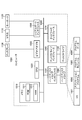
- FIG. 9 is a diagram showing a conventional technique.
- the management device of this embodiment manages the manual of the application.
- the application is a program executed by a computer, and includes a program that performs a predetermined process according to a user operation.
- an application displays a screen provided with various objects for displaying information, inputting values, and the like, and searches and registers predetermined data in response to user input to the screen. May be good.
- the application can change the screen to be displayed according to the operation of the user or automatically.
- the management device may execute internal processing of the application, output data to the user, and accept operations by the user. Further, the management device may output data to the user and accept operations by the user, and another device capable of communicating data with the management device may execute the internal processing.
- the manual is a document for explaining the procedure for operating the application.
- the manual includes a runbook.
- the procedure manual the transition order of each screen displayed by the application, rules regarding input values, etc. are defined as operation contents.
- the application may be used in the business of a company.
- the manual is created according to the content of the business.
- One of the purposes of the management device of the present embodiment is to automate at least a part of the work related to updating the manual.
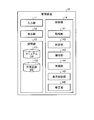
- FIG. 1 is a diagram showing an example of the configuration of the management device according to the first embodiment.
- the management device 10 includes an input unit 11, a display unit 12, a storage unit 13, and a control unit 14.
- the input unit 11 accepts data input from the user.
- the input unit 11 is, for example, an input device such as a mouse or a keyboard.
- the display unit 12 outputs data by displaying the screen or the like.
- the display unit 12 is, for example, a display device such as a display.
- the storage unit 13 is a storage device for HDD (Hard Disk Drive), SSD (Solid State Drive), optical disk, and the like.
- the storage unit 13 may be a semiconductor memory in which data such as RAM (Random Access Memory), flash memory, and NVSRAM (Non Volatile Static Random Access Memory) can be rewritten.
- the storage unit 13 stores the OS (Operating System) and various programs executed by the management device 10. Further, the storage unit 13 has a manual DB 131 and a work trail DB 132.
- Manual DB131 stores the application manual.
- a manual is a file in a predetermined format such as a document file, a text file, or an image file. As described above, the manual defines rules regarding the transition order and input values of each screen displayed by the application. In addition, the captured image of each screen may be pasted in the procedure manual for each screen included in the manual.
- the work trail DB 132 stores the operation contents of the user.
- the work trail DB 132 stores information that identifies the application, information that identifies each screen displayed in the execution of the application, the transition order of each screen, the input value, the pressed button, the operation date and time, and the like. .. Further, the information stored in the work trail DB 132 may be the same as the procedure manual included in the manual.
- the control unit 14 controls the entire management device 10.
- the control unit 14 is, for example, an electronic circuit such as a CPU (Central Processing Unit) and an MPU (Micro Processing Unit), and an integrated circuit such as an ASIC (Application Specific Integrated Circuit) and an FPGA (Field Programmable Gate Array).
- the control unit 14 has an internal memory for storing programs and control data that define various processing procedures, and executes each process using the internal memory.
- the control unit 14 functions as various processing units by operating various programs.
- the control unit 14 includes an acquisition unit 141, a determination unit 142, a storage unit 143, a reproduction unit 144, and a display control unit 145.
- the acquisition unit 141 acquires the first operation content, which is the content of the operation described in the manual of the operation procedure of the application, and the second operation content, which is the content of the user's operation on the application.
- the acquisition unit 141 can acquire the first operation content by referring to the manual DB131.
- the acquisition unit 141 can acquire the second operation content by referring to the operation screen log.
- the operation screen log shall be a log related to screen operations collected by the OS or application.
- the first operation content can be said to be a manual operation content.
- the second operation content can be said to be the actual operation content by the user.
- the determination unit 142 determines whether or not the first operation content and the second operation content match. Specifically, the determination unit 142 determines whether or not the order of screen transitions is the same for the first operation content and the second operation content, and whether or not a predetermined operation is commonly included. To judge.
- the determination unit 142 may make a determination by comparing the manual with the actual operation based on the tree structure data acquired by the acquisition unit 141.
- FIG. 2 is a diagram for explaining a method of acquiring a manual screen to be compared with the operation screen log.
- the acquisition unit 141 generates tree-structured data representing the relationship between sets in which operation screens are grouped in predetermined units based on the table of contents extracted from the manual. Predetermined units are, for example, chapters, sections and sections.
- the acquisition unit 141 can order each set according to the order of publication in the table of contents or the page number in the section to obtain tree structure data. Further, the acquisition unit 141 assigns a page number as attribute information to each node of the tree structure data.
- the acquisition unit 141 acquires the data in which the image of the operation screen published in the manual is associated with the tree structure data as the first operation content.
- the acquisition unit 141 can collate the page number on which each image is posted with the page number which is the attribute information of the tree structure data, and embed the image in each node.
- the tree structure data in which the image is embedded by the acquisition unit 141 is referred to as a screen transition diagram.
- the determination unit 142 compares the tree structure data of the operation screen obtained from the manual with the tree structure data of the operation screen obtained based on the actual user's operation, and the user's operation content is described in the manual. By identifying a portion that deviates from the operation content, it is determined whether or not the first operation content and the second operation content match. For example, when the node existing in one tree structure data does not exist at the corresponding position in the other tree structure data, the determination unit 142 identifies the node as a place where the operation contents deviate, and performs the first operation. It can be determined that the content and the content of the second operation do not match.
- the management device 10 When the determination unit 142 determines that the first operation content and the second operation content do not match, the management device 10 notifies the user 20 who operates the application, and the manual DB 131 is notified. You can give feedback. Feedback is provided, for example, by modifying the manual.
- the acquisition unit 141 extracts operation information by referring to the table of contents of the manual in which the work progress is displayed. Further, the acquisition unit 141 acquires the screen transition of the procedure manual and the screen transition of the actual operation log in synchronization with the operation by the user 20. Then, the determination unit 142 collates each operation content and determines whether the necessary operations are performed without omission and whether the order relation is correct. Further, since the second operation content is saved in the work trail DB 132, the validity can be verified later.
- FIG. 3 is a diagram for explaining a method of determining whether or not the operation log matches the manual.
- the display control unit 145 displays each screen via the display unit 12. As shown in FIG. 3, the display control unit 145 displays the screen transition diagram. Further, the display control unit 145 highlights the position (node) of the operation screen that matches the operation screen being operated by the user in the screen transition diagram. As a result, the user can grasp which part of the manual the operation screen currently being operated corresponds to.
- the display control unit 145 displays the table of contents of the manual and the check boxes corresponding to each section of the table of contents. Then, when the operation is completed, the user can check the corresponding check box.
- the display control unit 145 may specify the operation screen being operated by the user depending on which check box has been checked. In this way, the display control unit 145 can display the worked portion in the manual based on the comparison result of the tree structure data by the determination unit 142.
- the user can input the fact to the management device 10 by a predetermined method to call attention. For example, the user calls attention by filling out an application form prepared in advance.
- the determination unit 142 can determine that the first operation content and the second operation content do not match.
- the user may manually add the operation screen to be alerted to the manual.
- the display control unit 145 accepts an operation of adding the operation screen to the screen transition diagram being displayed.
- the correction unit 146 updates the manual DB 131 so that the screen is added to the manual.
- the storage unit 143 stores the second operation content in the work trail DB 132. This makes it possible to verify the validity later.
- the user 20 may add a comment to the second operation content. In that case, the storage unit 143 saves the second operation content together with the comment. Further, the storage unit 143 may capture the screen of the application by using a capture tool or the like and save the screen of the application in the work trail DB 132.
- the reproduction unit 144 reproduces the first screen of the application in which the operation based on the first operation content is performed and the second screen of the application in which the operation based on the second operation content is performed. For example, the reproduction unit 144 acquires the information for specifying the screen and the input value for each item of the screen from the manual DB 131 or the work trail DB, and arranges the acquired value in an object such as a text box after the operation. Reproduce the screen of.
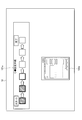
- the display control unit 145 may display the manual in the manner shown in FIG. That is, as shown in FIG. 4, the display control unit 145 displays both the application screen and the manual on the desktop screen. Then, the display control unit 145 manually or automatically displays the corresponding procedure manual of the manual according to the screen transition of the application.
- FIG. 4 is a diagram showing an example of a screen transition display screen. As shown in FIG. 4, the display control unit 145 can display the application execution screen 122a in conjunction with the screen transition diagram 121a described in the manual.
- FIG. 5 is a diagram showing an example of a confirmation screen.
- the display control unit 145 displays the first screen 121b and the second screen 122b reproduced by the reproduction unit 144 side by side on the confirmation screen.
- the first screen 121b is a screen reproduced by the reproduction unit 144 based on the manual.
- the second screen 122b is a screen reproduced by the reproduction unit 144 based on the operation of the user 20.
- the first screen 121b and the second screen 122b may be screens of the same form but have different input values.
- the user 20 refers to the confirmation screen and confirms the consistency between the content of the operation performed by the user 20 and the content of the operation described in the manual. Further, when the operation contents do not match, the user 20 can confirm whether or not the difference is as intended.
- the display control unit 145 displays the operation explanation 123b on the confirmation screen. It is assumed that the operation description 123b is stored in the manual DB 131 together with the procedure manual. Further, the display control unit 145 displays the button 124b and the button 125b on the confirmation screen. Button 124b is labeled "Redo”. Further, the button 125b is labeled "Next”. As a result, the management device 10 can warn the user 20 that an operation different from the manual operation content has been performed.
- the application redisplays the screen on which the operation was performed. Then, the user 20 can redo the operation on the redisplayed screen.
- the storage unit 143 may store the second operation content in the work trail DB 132.
- the application displays the next screen.
- the display control unit 145 can display the comment input screen.
- the display control unit 145 displays a comment input screen including a comment input field when the user performs an operation indicating that the operation for the second operation content is not to be redone on the confirmation screen. That is, when the button 125b is pressed, the management device 10 determines that the operation content is different from that described in the manual, but the user 20 acknowledges that it is appropriate. Then, using the comment input screen, the user 20 can record the intention or the like that the operation content is valid as a comment.
- FIG. 6 is a diagram showing an example of a comment input screen.
- the display control unit 145 displays the application execution screen 121c, the application procedure manual 122c, the first screen 123c and the second screen 124c similar to the confirmation screen on the comment input screen. Further, the display control unit 145 displays a comment input field on the second screen 124c.
- the user 20 can input an arbitrary comment in the comment input field on the second screen 124c. Then, the storage unit 143 stores the second operation content together with the comment input in the input field in the storage unit.
- the storage unit 143 can associate the second operation content with the first operation content of the corresponding manual by a link.
- the storage unit 143 stores the second operation content in the work trail DB 132 together with the information specifying the procedure manual of the corresponding manual.
- the save unit 143 saves the second operation content that does not match the first operation content in the work trail DB 132.
- the correction unit 146 reflects such a second operation content in the manual. Specifically, when the determination unit 142 determines that the first operation content and the second operation content do not match, the correction unit 146 is described in the manual according to the second operation content. Correct the first operation content.
- the correction unit 146 identifies the manual procedure manual according to the link and performs the second operation. It is possible to correct the part where the content and the specified procedure manual are different.
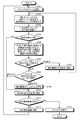
- FIG. 7 is a flowchart showing a processing flow of the management device according to the first embodiment.
- the user 20 executes the application on the management device 10.
- the application execution screen and the manual page can be displayed on the desktop screen of the management device 10.
- each page of the manual corresponds to the procedure manual of each screen of the application.
- the user 20 opens the manual page (step S101). Then, the user 20 inputs a value on the operation screen corresponding to the opened manual page (step S102). Then, the user 20 executes an operation indicating that the input is completed (step S103).
- the operation indicating that the input is completed may be to click the confirmation button in the manual, or to check the check box described with reference to FIG.
- the operation screen is an application screen.
- the management device 10 determines whether or not the operation content of the manual matches the operation content of the actual user 20 in response to the click of the confirmation button (step S104).
- the management device 10 acquires and saves the operation screen log (step S110).
- the management device 10 displays a confirmation screen. That is, the management device 10 displays a screen comparing the contents of the procedure manual corresponding to the input operation screen with the input operation screen, and displays a screen for confirming the input contents (step S105).
- step S106 the user 20 selects whether to continue or redo the operation via the confirmation screen.
- step S106 redo
- the management device 10 acquires and saves the operation screen log (step S107), and returns to step S102.
- the management device 10 asks the user 20 whether or not to add a comment.
- the management device 10 may display the comment input screen when the user 20 operates a predetermined button or the like, or when the user 20 inputs a comment in the comment input field, the user 20 may display the comment input screen. You may decide that you want to add a comment.
- step S108 If the user 20 does not add a comment (step S108, no addition), the management device 10 proceeds to step S110. On the other hand, when the user 20 adds a comment (step S108, adding), the management device 10 overwrites the comment on the operation screen log (step S109), and then acquires and saves the operation screen log (step S110). .. As a result, the management device 10 can save the operation content together with the comment.
- step S111 if the application has the next operation screen (step S111, Yes), the management device 10 proceeds to the next operation screen (step S112), returns to step S101, and repeats the process.
- step S111, No when the application has the following operation screen (step S111, No), the management device 10 modifies the manual according to the operation content of the user 20 (step S113).
- the acquisition unit 141 includes the first operation content, which is the content of the operation described in the manual of the operation procedure of the application, and the second operation content, which is the content of the user's operation on the application. To get. Further, the determination unit 142 determines whether or not the first operation content and the second operation content match. Further, when the determination unit 142 determines that the first operation content and the second operation content do not match, the display control unit 145 confirms that the operation content does not match. Is displayed. In this way, the management device 10 can automatically determine whether or not the manual needs to be updated, and prompt the user to confirm. Therefore, according to the management device 10, the manual can be updated efficiently.
- the acquisition unit 141 generates tree-structured data representing the relationship between the sets in which the operation screens are grouped in predetermined units based on the table of contents of the manual, and the image of the operation screen published in the manual is displayed in the tree structure.
- the data associated with the data is acquired as the first operation content.
- the tree structure data generated based on the manual is compared with the tree structure data generated based on the actual user operation, and the part where the actual operation deviates from the manual is identified. Will be possible. Therefore, according to the management device 10, the manual can be updated efficiently.
- the determination unit 142 compares the tree structure data of the operation screen obtained from the manual with the tree structure data of the operation screen obtained based on the actual user's operation, and the user's operation content is described in the manual. By identifying a portion that deviates from the operation content, it is determined whether or not the first operation content and the second operation content match. For example, the management device 10 can compare differences in the structure of the tree structure data and identify a location where the user's operation deviates from the manual. Therefore, according to the management device 10, the manual can be updated efficiently.
- the display control unit 145 displays the work-completed parts in the manual based on the comparison result of the tree structure data by the determination unit 142. As a result, the user can intuitively grasp the progress of the current work in comparison with the manual.
- the display control unit 145 can display a comment input screen including a comment input field when the user performs an operation indicating that the operation for the second operation content is not to be redone on the confirmation screen.
- the storage unit 143 stores the second operation content together with the comment input in the input field in the storage unit. In this way, the management device 10 can record a comment of the user when the user recognizes that the operation procedure has been changed. This streamlines the update of the manual and the examination for the update.
- the reproduction unit 144 can reproduce the first screen of the application in which the operation based on the first operation content is performed and the second screen of the application in which the operation based on the second operation content is performed. ..
- the display control unit 145 displays the first screen and the second screen reproduced by the reproduction unit 144 side by side on the confirmation screen. As a result, the user can intuitively confirm the difference between the operation content of the manual and the actual operation content.
- the correction unit 146 has the first operation content described in the manual according to the second operation content. Can be modified. In this way, the management device 10 can automatically correct the manual to improve efficiency.
- each component of each of the illustrated devices is a functional concept, and does not necessarily have to be physically configured as shown in the figure. That is, the specific form of distribution and integration of each device is not limited to the one shown in the figure, and all or part of the device may be functionally or physically dispersed or physically distributed in arbitrary units according to various loads and usage conditions. Can be integrated and configured. Further, each processing function performed by each device may be realized by a CPU and a program analyzed and executed by the CPU, or may be realized as hardware by wired logic.
- the management device 10 can be implemented by installing a management program that executes the above management process as package software or online software on a desired computer.
- the information processing device can function as the management device 10.
- the information processing device referred to here includes a desktop type or notebook type personal computer.
- information processing devices include smartphones, mobile communication terminals such as mobile phones and PHS (Personal Handyphone System), and slate terminals such as PDAs (Personal Digital Assistants).
- the management device 10 can be implemented as a management server device in which the terminal device used by the user is a client and the service related to the above management process is provided to the client.
- the management server device is implemented as a server device that provides a management service that inputs graph data and outputs graph signal processing or graph data analysis results.
- the management server device may be implemented as a Web server, or may be implemented as a cloud that provides services related to the above management processing by outsourcing.
- FIG. 8 is a diagram showing an example of a computer that executes a management program.
- the computer 1000 has, for example, a memory 1010 and a CPU 1020.
- the computer 1000 also has a hard disk drive interface 1030, a disk drive interface 1040, a serial port interface 1050, a video adapter 1060, and a network interface 1070. Each of these parts is connected by a bus 1080.
- the memory 1010 includes a ROM (Read Only Memory) 1011 and a RAM 1012.
- the ROM 1011 stores, for example, a boot program such as a BIOS (BASIC Input Output System).
- BIOS BASIC Input Output System
- the hard disk drive interface 1030 is connected to the hard disk drive 1090.
- the disk drive interface 1040 is connected to the disk drive 1100.
- a removable storage medium such as a magnetic disk or an optical disk is inserted into the disk drive 1100.
- the serial port interface 1050 is connected to, for example, a mouse 1110 and a keyboard 1120.
- the video adapter 1060 is connected to, for example, the display 1130.
- the hard disk drive 1090 stores, for example, OS1091, application program 1092, program module 1093, and program data 1094. That is, the program that defines each process of the management device 10 is implemented as a program module 1093 in which a code that can be executed by a computer is described.
- the program module 1093 is stored in, for example, the hard disk drive 1090.
- the program module 1093 for executing the same processing as the functional configuration in the management device 10 is stored in the hard disk drive 1090.
- the hard disk drive 1090 may be replaced by an SSD.
- the setting data used in the processing of the above-described embodiment is stored as program data 1094 in, for example, a memory 1010 or a hard disk drive 1090. Then, the CPU 1020 reads the program module 1093 and the program data 1094 stored in the memory 1010 and the hard disk drive 1090 into the RAM 1012 as needed, and executes the processing of the above-described embodiment.
- the program module 1093 and the program data 1094 are not limited to those stored in the hard disk drive 1090, but may be stored in, for example, a removable storage medium and read by the CPU 1020 via the disk drive 1100 or the like. Alternatively, the program module 1093 and the program data 1094 may be stored in another computer connected via a network (LAN (Local Area Network), WAN (Wide Area Network), etc.). Then, the program module 1093 and the program data 1094 may be read by the CPU 1020 from another computer via the network interface 1070.
- LAN Local Area Network
- WAN Wide Area Network
- Management device 11
- Input unit 12
- Display unit 13 Storage unit 14
- Control unit 131 Manual DB 132 Work Trail DB 141
- Judgment unit 143
- Preservation unit 144
- Reproduction unit 145
Landscapes
- Engineering & Computer Science (AREA)
- Business, Economics & Management (AREA)
- Human Resources & Organizations (AREA)
- Theoretical Computer Science (AREA)
- Economics (AREA)
- Entrepreneurship & Innovation (AREA)
- Software Systems (AREA)
- Strategic Management (AREA)
- Physics & Mathematics (AREA)
- General Physics & Mathematics (AREA)
- General Engineering & Computer Science (AREA)
- Educational Administration (AREA)
- Tourism & Hospitality (AREA)
- Quality & Reliability (AREA)
- General Business, Economics & Management (AREA)
- Operations Research (AREA)
- Marketing (AREA)
- Game Theory and Decision Science (AREA)
- Development Economics (AREA)
- Human Computer Interaction (AREA)
- User Interface Of Digital Computer (AREA)
- Stored Programmes (AREA)
Priority Applications (3)
| Application Number | Priority Date | Filing Date | Title |
|---|---|---|---|
| US17/773,460 US12086740B2 (en) | 2019-11-01 | 2019-11-01 | Management device, management method, and management program |
| PCT/JP2019/043168 WO2021084763A1 (ja) | 2019-11-01 | 2019-11-01 | 管理装置、管理方法及び管理プログラム |
| JP2021554046A JP7359218B2 (ja) | 2019-11-01 | 2019-11-01 | 管理装置、管理方法及び管理プログラム |
Applications Claiming Priority (1)
| Application Number | Priority Date | Filing Date | Title |
|---|---|---|---|
| PCT/JP2019/043168 WO2021084763A1 (ja) | 2019-11-01 | 2019-11-01 | 管理装置、管理方法及び管理プログラム |
Publications (1)
| Publication Number | Publication Date |
|---|---|
| WO2021084763A1 true WO2021084763A1 (ja) | 2021-05-06 |
Family
ID=75715905
Family Applications (1)
| Application Number | Title | Priority Date | Filing Date |
|---|---|---|---|
| PCT/JP2019/043168 Ceased WO2021084763A1 (ja) | 2019-11-01 | 2019-11-01 | 管理装置、管理方法及び管理プログラム |
Country Status (3)
| Country | Link |
|---|---|
| US (1) | US12086740B2 (https=) |
| JP (1) | JP7359218B2 (https=) |
| WO (1) | WO2021084763A1 (https=) |
Citations (5)
| Publication number | Priority date | Publication date | Assignee | Title |
|---|---|---|---|---|
| JPH10222506A (ja) * | 1997-02-12 | 1998-08-21 | Fuji Xerox Co Ltd | 文書作成支援装置 |
| JP2002123786A (ja) * | 2000-10-16 | 2002-04-26 | Hitachi Ltd | 建設又は建造工程計画システムおよび方法 |
| JP2003016156A (ja) * | 2001-06-29 | 2003-01-17 | Toshiba Corp | 運用支援システム |
| JP2011215838A (ja) * | 2010-03-31 | 2011-10-27 | Nec Corp | 操作内容管理装置、操作内容管理方法、及び操作内容管理プログラム |
| JP2015109001A (ja) * | 2013-12-05 | 2015-06-11 | 日本電信電話株式会社 | 操作ログ管理装置及び方法 |
Family Cites Families (18)
| Publication number | Priority date | Publication date | Assignee | Title |
|---|---|---|---|---|
| JP2001337825A (ja) * | 2000-05-25 | 2001-12-07 | Hitachi Ltd | オンラインマニュアル表示方法を備えたストレージシステム |
| JP2004310317A (ja) * | 2003-04-04 | 2004-11-04 | Hitachi Ltd | 業務支援装置 |
| JP2006215893A (ja) * | 2005-02-04 | 2006-08-17 | Fumitaka Murayama | 電子マニュアル編集装置 |
| JP2006227730A (ja) * | 2005-02-15 | 2006-08-31 | Nec Corp | 操作マニュアル作成装置、方法、及びプログラム |
| JP2010160613A (ja) * | 2009-01-07 | 2010-07-22 | Hitachi Ltd | 過失による情報漏えいを防止する計算機システム及び方法 |
| JP2011123700A (ja) * | 2009-12-11 | 2011-06-23 | Prime Japan Co Ltd | 決算業務評価システム |
| JP5578508B2 (ja) * | 2009-12-11 | 2014-08-27 | プライムジャパン株式会社 | 決算資料修正促進システム |
| JP2012173868A (ja) * | 2011-02-18 | 2012-09-10 | Hitachi Systems Ltd | 保守作業支援システム |
| JP2012221146A (ja) * | 2011-04-07 | 2012-11-12 | Mitsubishi Electric Corp | 設計手順ナビゲーションシステム |
| JP5509175B2 (ja) * | 2011-10-21 | 2014-06-04 | 株式会社日立製作所 | 設備・装置の運用マニュアル動的維持管理方式 |
| JP6056263B2 (ja) * | 2012-08-24 | 2017-01-11 | 大日本印刷株式会社 | 端末装置、電子ペンシステム及びプログラム |
| JP5984215B2 (ja) * | 2013-02-26 | 2016-09-06 | 日本電信電話株式会社 | 動的マニュアル作成装置及びその方法並びにコンピュータプログラム |
| JP5936138B2 (ja) * | 2013-06-19 | 2016-06-15 | インターナショナル・ビジネス・マシーンズ・コーポレーションInternational Business Machines Corporation | 操作手順書を生成する装置及び方法 |
| JP5931806B2 (ja) * | 2013-06-24 | 2016-06-08 | 日本電信電話株式会社 | 画像認識による自動操作装置、その方法及びプログラム |
| JP6434435B2 (ja) * | 2016-02-16 | 2018-12-05 | 日本電信電話株式会社 | 情報処理装置、操作支援方法および操作支援プログラム |
| JP2019032719A (ja) * | 2017-08-08 | 2019-02-28 | 株式会社エス・エム・エス・データテック | 情報処理システム、情報処理方法及びプログラム |
| US11145130B2 (en) * | 2018-11-30 | 2021-10-12 | Apprentice FS, Inc. | Method for automatically capturing data from non-networked production equipment |
| US20200273552A1 (en) * | 2019-02-21 | 2020-08-27 | Theator inc. | System for Detecting an Omitted Event During a Surgical Procedure |
-
2019
- 2019-11-01 WO PCT/JP2019/043168 patent/WO2021084763A1/ja not_active Ceased
- 2019-11-01 JP JP2021554046A patent/JP7359218B2/ja active Active
- 2019-11-01 US US17/773,460 patent/US12086740B2/en active Active
Patent Citations (5)
| Publication number | Priority date | Publication date | Assignee | Title |
|---|---|---|---|---|
| JPH10222506A (ja) * | 1997-02-12 | 1998-08-21 | Fuji Xerox Co Ltd | 文書作成支援装置 |
| JP2002123786A (ja) * | 2000-10-16 | 2002-04-26 | Hitachi Ltd | 建設又は建造工程計画システムおよび方法 |
| JP2003016156A (ja) * | 2001-06-29 | 2003-01-17 | Toshiba Corp | 運用支援システム |
| JP2011215838A (ja) * | 2010-03-31 | 2011-10-27 | Nec Corp | 操作内容管理装置、操作内容管理方法、及び操作内容管理プログラム |
| JP2015109001A (ja) * | 2013-12-05 | 2015-06-11 | 日本電信電話株式会社 | 操作ログ管理装置及び方法 |
Also Published As
| Publication number | Publication date |
|---|---|
| JP7359218B2 (ja) | 2023-10-11 |
| JPWO2021084763A1 (https=) | 2021-05-06 |
| US20220383215A1 (en) | 2022-12-01 |
| US12086740B2 (en) | 2024-09-10 |
Similar Documents
| Publication | Publication Date | Title |
|---|---|---|
| KR101999409B1 (ko) | 예시에 의한 데이터 포매팅 기법 | |
| US9026984B2 (en) | Integrated design application system | |
| AU2011213842B2 (en) | A system and method of managing mapping information | |
| US10782961B2 (en) | Analyzing components related to a software application in a software development environment | |
| CN110941629B (zh) | 元数据处理方法、装置、设备及计算机可读存储介质 | |
| CN106033388A (zh) | 测试用例库管理方法及系统 | |
| CN112069073A (zh) | 测试用例的管理方法、终端和存储介质 | |
| US20220414066A1 (en) | Data management system, management method, and storage medium | |
| JP7587781B2 (ja) | プログラム、方法、情報処理装置、及びシステム | |
| CN115049365B (zh) | 应用投产信息处理方法、装置、计算机设备 | |
| US8106903B2 (en) | System and method for visually representing a project using graphic elements | |
| CN115617780A (zh) | 数据导入方法、装置、设备及存储介质 | |
| JP7246301B2 (ja) | プログラム開発支援システム及びプログラム開発支援方法 | |
| CN110990055B (zh) | 一种基于程序分析的Pull Request功能分类方法 | |
| CN112131022A (zh) | 开放api管理方法、装置、系统与计算机可读存储介质 | |
| US20040230822A1 (en) | Security specification creation support device and method of security specification creation support | |
| JP7359218B2 (ja) | 管理装置、管理方法及び管理プログラム | |
| CN113656022B (zh) | 软件开发方法、装置、计算机设备和存储介质 | |
| CN118820094A (zh) | 异常测试用例生成方法、装置、计算机设备及存储介质 | |
| JP2013127656A (ja) | 運用手順作成支援システム、及び作成方法 | |
| CN114547327A (zh) | 时空大数据关系图谱生成方法、装置、设备及存储介质 | |
| CN112256365A (zh) | 一种自动化管理多语言版本的方法及终端 | |
| US20260111619A1 (en) | Systems and methods for providing collaborative visualization of design data | |
| CN111557004B (zh) | Cad数据检查系统以及装置 | |
| CN113052463B (zh) | 工作流核验方法、装置、计算机设备及存储介质 |
Legal Events
| Date | Code | Title | Description |
|---|---|---|---|
| 121 | Ep: the epo has been informed by wipo that ep was designated in this application |
Ref document number: 19951098 Country of ref document: EP Kind code of ref document: A1 |
|
| ENP | Entry into the national phase |
Ref document number: 2021554046 Country of ref document: JP Kind code of ref document: A |
|
| NENP | Non-entry into the national phase |
Ref country code: DE |
|
| 122 | Ep: pct application non-entry in european phase |
Ref document number: 19951098 Country of ref document: EP Kind code of ref document: A1 |