WO2019139081A1 - 画像形成装置、該画像形成装置の制御方法 - Google Patents
画像形成装置、該画像形成装置の制御方法 Download PDFInfo
- Publication number
- WO2019139081A1 WO2019139081A1 PCT/JP2019/000537 JP2019000537W WO2019139081A1 WO 2019139081 A1 WO2019139081 A1 WO 2019139081A1 JP 2019000537 W JP2019000537 W JP 2019000537W WO 2019139081 A1 WO2019139081 A1 WO 2019139081A1
- Authority
- WO
- WIPO (PCT)
- Prior art keywords
- setting
- printing
- job
- setting value
- Prior art date
- Legal status (The legal status is an assumption and is not a legal conclusion. Google has not performed a legal analysis and makes no representation as to the accuracy of the status listed.)
- Ceased
Links
Images





Classifications
-
- G—PHYSICS
- G06—COMPUTING OR CALCULATING; COUNTING
- G06F—ELECTRIC DIGITAL DATA PROCESSING
- G06F3/00—Input arrangements for transferring data to be processed into a form capable of being handled by the computer; Output arrangements for transferring data from processing unit to output unit, e.g. interface arrangements
- G06F3/12—Digital output to print unit, e.g. line printer, chain printer
- G06F3/1201—Dedicated interfaces to print systems
- G06F3/1202—Dedicated interfaces to print systems specifically adapted to achieve a particular effect
- G06F3/1203—Improving or facilitating administration, e.g. print management
- G06F3/1205—Improving or facilitating administration, e.g. print management resulting in increased flexibility in print job configuration, e.g. job settings, print requirements, job tickets
-
- B—PERFORMING OPERATIONS; TRANSPORTING
- B41—PRINTING; LINING MACHINES; TYPEWRITERS; STAMPS
- B41J—TYPEWRITERS; SELECTIVE PRINTING MECHANISMS, i.e. MECHANISMS PRINTING OTHERWISE THAN FROM A FORME; CORRECTION OF TYPOGRAPHICAL ERRORS
- B41J29/00—Details of, or accessories for, typewriters or selective printing mechanisms not otherwise provided for
- B41J29/38—Drives, motors, controls or automatic cut-off devices for the entire printing mechanism
-
- G—PHYSICS
- G06—COMPUTING OR CALCULATING; COUNTING
- G06F—ELECTRIC DIGITAL DATA PROCESSING
- G06F3/00—Input arrangements for transferring data to be processed into a form capable of being handled by the computer; Output arrangements for transferring data from processing unit to output unit, e.g. interface arrangements
- G06F3/12—Digital output to print unit, e.g. line printer, chain printer
- G06F3/1201—Dedicated interfaces to print systems
- G06F3/1202—Dedicated interfaces to print systems specifically adapted to achieve a particular effect
- G06F3/1203—Improving or facilitating administration, e.g. print management
- G06F3/1204—Improving or facilitating administration, e.g. print management resulting in reduced user or operator actions, e.g. presetting, automatic actions, using hardware token storing data
-
- G—PHYSICS
- G06—COMPUTING OR CALCULATING; COUNTING
- G06F—ELECTRIC DIGITAL DATA PROCESSING
- G06F3/00—Input arrangements for transferring data to be processed into a form capable of being handled by the computer; Output arrangements for transferring data from processing unit to output unit, e.g. interface arrangements
- G06F3/12—Digital output to print unit, e.g. line printer, chain printer
- G06F3/1201—Dedicated interfaces to print systems
- G06F3/1202—Dedicated interfaces to print systems specifically adapted to achieve a particular effect
- G06F3/1222—Increasing security of the print job
-
- G—PHYSICS
- G06—COMPUTING OR CALCULATING; COUNTING
- G06F—ELECTRIC DIGITAL DATA PROCESSING
- G06F3/00—Input arrangements for transferring data to be processed into a form capable of being handled by the computer; Output arrangements for transferring data from processing unit to output unit, e.g. interface arrangements
- G06F3/12—Digital output to print unit, e.g. line printer, chain printer
- G06F3/1201—Dedicated interfaces to print systems
- G06F3/1223—Dedicated interfaces to print systems specifically adapted to use a particular technique
- G06F3/1237—Print job management
- G06F3/1238—Secure printing, e.g. user identification, user rights for device usage, unallowed content, blanking portions or fields of a page, releasing held jobs
-
- G—PHYSICS
- G06—COMPUTING OR CALCULATING; COUNTING
- G06F—ELECTRIC DIGITAL DATA PROCESSING
- G06F3/00—Input arrangements for transferring data to be processed into a form capable of being handled by the computer; Output arrangements for transferring data from processing unit to output unit, e.g. interface arrangements
- G06F3/12—Digital output to print unit, e.g. line printer, chain printer
- G06F3/1201—Dedicated interfaces to print systems
- G06F3/1223—Dedicated interfaces to print systems specifically adapted to use a particular technique
- G06F3/1237—Print job management
- G06F3/1239—Restricting the usage of resources, e.g. usage or user levels, credit limit, consumables, special fonts
-
- G—PHYSICS
- G06—COMPUTING OR CALCULATING; COUNTING
- G06F—ELECTRIC DIGITAL DATA PROCESSING
- G06F3/00—Input arrangements for transferring data to be processed into a form capable of being handled by the computer; Output arrangements for transferring data from processing unit to output unit, e.g. interface arrangements
- G06F3/12—Digital output to print unit, e.g. line printer, chain printer
- G06F3/1201—Dedicated interfaces to print systems
- G06F3/1223—Dedicated interfaces to print systems specifically adapted to use a particular technique
- G06F3/1237—Print job management
- G06F3/1253—Configuration of print job parameters, e.g. using UI at the client
- G06F3/1257—Configuration of print job parameters, e.g. using UI at the client by using pre-stored settings, e.g. job templates, presets, print styles
-
- G—PHYSICS
- G06—COMPUTING OR CALCULATING; COUNTING
- G06F—ELECTRIC DIGITAL DATA PROCESSING
- G06F3/00—Input arrangements for transferring data to be processed into a form capable of being handled by the computer; Output arrangements for transferring data from processing unit to output unit, e.g. interface arrangements
- G06F3/12—Digital output to print unit, e.g. line printer, chain printer
- G06F3/1201—Dedicated interfaces to print systems
- G06F3/1278—Dedicated interfaces to print systems specifically adapted to adopt a particular infrastructure
- G06F3/1285—Remote printer device, e.g. being remote from client or server
- G06F3/1288—Remote printer device, e.g. being remote from client or server in client-server-printer device configuration
Definitions
- the present invention relates to an image forming apparatus that processes a job, and a control method of the image forming apparatus.
- a printing apparatus which is connected to a network and receives printing data from an information processing apparatus via the network and performs printing.
- the information processing apparatus it is conventionally known to generate print data to be transmitted to a printing apparatus using a printer driver (or print application) designed to use individual printing apparatuses.
- print data is generated by a general-purpose print service provided as a function of an operating system (OS) of an information processing apparatus or a general-purpose print service provided by a print server on a cloud, etc.
- OS operating system
- print server a general-purpose print service provided by a print server on a cloud, etc.
- a network protocol IPP: Internet Printing Protocol
- the printing process is realized by communication between the printing apparatus and the information processing apparatus according to this protocol.
- Non-Patent Document 1 describes means for returning the non-supporting attribute of the job attribute (without entering a job) when issuing a validate job operation in IPP printing.
- Non-Patent Document 2 describes means for returning recommended settings from a job submission target to a job submission source when using the validate job of Non-Patent Document 1.
- Non-Patent Document 2 describes that as the "preferred-attributes", alternative settings that can be used to resolve conflicts and be used are returned.
- a printer driver corresponding to a general printing apparatus provides a plurality of setting items such as selection of paper type, setting of image quality, selection of finishing process, etc., but there are cases where plural functions can not be used simultaneously depending on the setting for each function. These are usually called “prohibition conditions” and feed back combinations that can not be specified to the user. Furthermore, the printing apparatus may be provided with “per-user function restriction” which restricts available functions for each user. However, in the verification of setting values, if functional restrictions or prohibition conditions are met, it is possible to provide appropriate recommended setting values or alternative setting values even if notification regarding restriction conditions or functional restrictions can be made, from the user's viewpoint or / And it was difficult from an implementation point of view. Furthermore, the complexity in implementing services using imaging devices has increased.
- An image forming apparatus has the following configuration.
- a receiving unit that receives a setting value of a job from an information processing apparatus and a print setting received by the receiving unit correspond to a prohibition condition, and the prohibition condition is based on the print authority of the job issuing source.
- the image forming apparatus is provided with a notification unit that notifies the information processing apparatus of the combination of the setting values that are the subject of the prohibition and does not notify the alternative setting that does not correspond to the prohibition condition.
- another aspect of the present embodiment is a receiving unit that receives a setting value of a job from a communication apparatus, and a setting value that the setting value received by the receiving unit corresponds to a prohibition of the printing authority of the job issuing source.
- the setting that can be further substitute for the substitution setting value is It is an image forming apparatus characterized by comprising notification means for notifying information on the predetermined prohibition condition without notifying.
- the complexity in the implementation of services using an imaging device can be reduced.
- FIG. 6 is a diagram illustrating an example of a sequence from the portable terminal 103 to the printing apparatus.
- FIG. 6 is a diagram showing an example of verification request / response of IPP print setting exchanged between the portable terminal 103 and the printing apparatus.
- FIG. 6 is a diagram showing an example of a flowchart for explaining processing of the printing apparatus regarding verification processing of print settings based on prohibition and function restriction.
- FIG. 6 is a diagram showing an example of a user management table on the authentication server that restricts the function of the printing apparatus for each user.
- FIG. 7 is a diagram showing an example of a recommended setting management table of a forced function of the printing apparatus. It is a figure which shows an example of the printing setting screen of a portable terminal.
- FIG. 1 is a diagram showing an example of the configuration of a printing system according to an embodiment of the present invention.
- a printing apparatus 101 and an AP (access point) 102 are communicably connected to each other on a LAN (Local Area Network) 100.
- LAN Local Area Network
- mobile terminals 103 and 104 such as a tablet and a smartphone will be described as an example.
- the portable terminal 103 can communicate with the printing apparatus 101 on the LAN 100 via the AP 102.
- the print setting management server 105 manages information on print functions that can be set by each user of the portable terminals 103 and 104 when the printing apparatus 101 processes a print job.
- the printing apparatus 101 inquires of the authentication server 105 whether printing is possible or not based on the result, and performs printing processing based on the result.
- the printing apparatus 101 is an example of an image forming apparatus.
- the print job is an example of the job.
- the user is an example of a job issuing source.
- the job issuing source may be a department corresponding to the department ID.
- the job issuer may be referred to as a job creator.
- the present invention is not limited to this, and at least one or more information processing apparatuses and a printing apparatus can communicate via a network. It just needs to be connected to The network may be wireless or wired.
- the print setting management server is not required to be separated from the printing apparatus 101, and the user DB may be held inside the printing apparatus.
- the printing apparatus 101 will be described.
- the printing apparatus 101 has a printing function of printing an image on a sheet (recording medium).
- the printing apparatus 101 can execute print processing based on print data received via a network.
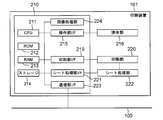
- FIG. 2 is a diagram showing an example of the hardware configuration of the printing apparatus 101 according to the present embodiment.
- the printing apparatus 101 has a printing function of printing an image on a sheet.
- the printing apparatus will be described as an example, but the printing apparatus may be a printing apparatus such as an MFP (Multi Function Peripheral) including a scanner and a FAX function.
- MFP Multi Function Peripheral
- a control unit 210 including a CPU (central processing unit) 211 controls the overall operation of the MFP 101.
- the CPU 211 loads a program stored in a ROM (Read Only Memory) 212 or a storage 214 in the RAM 213 and executes the program to perform various controls such as print control and read control.
- the ROM 212 stores control programs and boot programs that can be executed by the CPU 211.
- a random access memory (RAM) 213 is a main storage memory of the CPU 211, and is used as a work area or a temporary storage area for developing various control programs.
- the storage 214 stores print data, image data, various programs, and various setting information.
- an auxiliary storage device such as a hard disk drive (HDD) is assumed as the storage 214, but a non-volatile memory such as a solid state drive (SSD) may be used.
- HDD hard disk drive
- SSD solid state drive
- one CPU 211 executes each process shown in the flowchart to be described later using one memory (RAM 213), but may be in another mode.
- RAM 213 random access memory
- a plurality of CPUs, RAMs, ROMs, and storages may be cooperated to execute each process shown in the flowchart to be described later.
- a part of the processing may be performed using a hardware circuit such as an application specific integrated circuit (ASIC) or a field-programmable gate array (FPGA).
- ASIC application specific integrated circuit
- FPGA field-programmable gate array
- An operation unit interface (I / F) 215 connects the operation unit 216 and the control unit 210.
- the operation unit 216 includes a display unit having a touch panel function, various hard keys, and the like, and functions as a display unit that displays information and a reception unit that receives a user's instruction.
- the printing unit I / F 219 connects the printing unit (printer engine) 220 and the control unit 210. Image data generated by analyzing a print job received from the portable terminal 103 is transferred from the control unit 210 to the printing unit 220 via the printing unit I / F 219.
- the printing unit 220 receives a control command and a print job to be printed via the control unit 210, and prints an image on a sheet fed from a sheet feeding cassette (not shown) based on the print job.
- the printing method of the printing unit 220 may be an electrophotographic method or an inkjet method. Other printing methods such as a thermal transfer method can also be applied.
- the control unit 210 is also connected to the LAN 100 via the communication unit I / F 223.
- the communication unit I / F 223 transmits image data and information to the portable terminal 103 on the LAN 100, and receives a print job and information from the portable terminal 103 on the LAN 100.
- the image processing unit 224 has a function of a RIP (Raster Image Processor) which develops a print job received via the LAN 100 and generates image data used for printing.
- the image processing unit 224 can also perform resolution conversion and correction processing of image data obtained by expanding a print job.
- the image processing unit 224 is realized by a hardware circuit (ASIC, FPGA or the like), but the present invention is not limited to this.
- the MFP 101 may further include a processor for image processing applications, and the processor may execute an image processing program to realize image processing and expansion processing to print data.
- the processor and the CPU 211 cooperate to realize a flowchart to be described later.
- the CPU 211 may execute a program for performing image processing, and perform image processing and print data expansion processing. Further, image processing may be performed by any combination of these.
- the sheet processing unit I / F 221 connects the control unit 210 and the sheet processing unit 222.
- the sheet processing unit 222 receives a control command from the control unit 210, and performs post-processing on the sheet printed by the printing unit 220 according to the control command.
- FIG. 3 is a functional block diagram for explaining the software configuration of the MFP 101 according to the first embodiment.
- each functional block shown in FIG. 3 is achieved by the CPU 211 executing a program developed in the RAM 213.
- the IPP print service control unit 315 notifies the portable terminal 103 of printer configuration information acquired from the engine control unit 314.
- Configuration information includes detailed specifications to be displayed on the normal print setting screen, such as available paper sizes and types, paper color and monochrome print modes, settings related to print imposition such as single-sided / double-sided, N-up, etc. .
- the portable terminal 103 generates a print screen based on the configuration information received from the printing apparatus 101.
- the user makes print settings in the print screen created based on the configuration information, and presses the print button.
- the portable terminal 103 When the print button is pressed, the portable terminal 103 generates job setting information, and requests the printing apparatus 101 to verify the user setting (Validate-Job request described later).
- the IPP print service control unit 315 passes the print setting information to the mobile job setting storage / verification unit 303.
- the mobile job setting storage / verification unit (303) acquires, from the server apparatus 105, restriction information of the print function for each user through the print authority verification unit 304. Then, based on the job attribute set by each user, the printing function permitted to be used, and the prohibition condition determined from the capability of the printer, as a result of verification, if printing is possible, via the IPP print service control unit 315 , And notify the portable terminal 103 of "print available". If the user has set up a printing function that is not permitted to be used, a setting recommended is notified not to use the function for which use is prohibited. If print settings that can not be combined are made as the capabilities of the printing apparatus 101, the user is requested to review the print settings. The details of these processes will be described with reference to a flowchart regarding confirmation of prohibition conditions and notification of recommended settings in FIG. 6 described later.
- the IPP client control unit of the portable terminal 103 generates a print job and transmits the print job to the printing apparatus 101 only when the printing apparatus 101 receives a notification of “printable” as a result of verification. If the verification result is “non-printable”, only “recommended setting” or both “recommended setting” and “prohibition notification” are received from the printing apparatus 101. When notified of “recommended setting” from the printing apparatus 101, the IPP client of the portable terminal 103 overwrites the print setting item included in “recommended setting” with “recommended value”, and displays a confirmation screen to the user. The IPP client of the portable terminal 103 transmits the print data with the new print setting only when the user approves the updated setting value.
- the IPP client of the portable terminal 103 When the IPP client of the portable terminal 103 receives an error notification from the printing apparatus 101 indicating that the prohibition condition is satisfied, the IPP client urges the user to change the setting item, which corresponds to the restriction condition. When the user changes the print setting and presses the print button again, the IPP client control unit of the portable terminal 103 requests the printing apparatus 101 to re-verify the print setting.
- the IPP print service control unit 315 When the IPP print service control unit 315 receives an IPP print job from the portable terminal 103, the IPP print service control unit 315 passes received data to the print job generation unit 302. Further, the print job setting information is passed to the mobile job setting storage / verification unit 303.
- the UI control unit 301 acquires, from the job control unit 307, information on the status of the print job being processed, and displays the processing status of the print job on the UI screen.
- the print job generation unit 302 receives a print job from the portable terminal 103 via the IPP print service control unit 315, writes drawing data to the data reception control unit 305, and registers it as a new job in the job control unit 307 to print Request to start processing. Furthermore, print setting information to be applied to the print job is passed to the job attribute storage unit 308 via the mobile job setting update unit 303.
- the data reception control unit 305 is a reception buffer area of the print job received by the print job generation unit 302, and temporarily stores the print job in the storage 214.
- the job control unit 307 instructs the PDL analysis unit 306 to perform PDL analysis processing of a print job
- the PDL analysis unit 306 requests the data reception control unit 305 for the print job.
- the data reception control unit 305 transfers the data of the print job to the PDL analysis unit 306.
- the job control unit 307 instructs the PDL analysis unit 306 to analyze the print job.
- the page control unit 309 stores image data in the page storage unit 310 and page attribute information in the page attribute storage unit 311 regarding page data generated by the PDL analysis unit 306.
- a job attribute storage unit 308 stores attribute information of the print job. This attribute information is set as an IPP job attribute or document attribute such as "number of copies”, “Nup (aggregate printing)”, “print side (one side / double side) setting”, “color / monochrome mode”, “finishing setting”, etc. It is a thing.
- the page control unit 309 controls page analysis processing of the PDL analysis unit 306, RIP processing of the RIP control unit 313, and print control processing of the print control unit 312.
- the print control unit 312 acquires RIP-completed image data from the page storage unit 310, separates the image data into CMYK, and transfers the color separation data to the engine control unit 314.
- the engine control unit 314 receives the image data for each CMYK in page units from the print control unit 312, and controls the printing unit 220 to print each page.
- FIG. 4 is a sequence diagram for explaining the overall processing such as verification of print settings when printing from the portable terminal 103 to the printing apparatus 101, and resetting according to the verification result in the printing system of this embodiment.
- the application in the mobile terminals 103 and 104 receives an instruction to open the print screen in the print application of the user's mobile terminal 103 in S4001. At this time, a search request for printer search is transmitted to the printing apparatus 101 on the same network 100, and the printers that responded are listed on the printer of the display of the portable terminal 103.
- An example of the information processing apparatus is the portable terminals 103 and 104.
- the portable terminal 103 receives an instruction to select one specific printer from the user.
- the print screen opens in response to the printer selection instruction.
- the IPP client which is a program in the portable terminal 103, issues a request (Get-Printer-Attribute-Request) to the printing apparatus 101 selected by the user.
- the printing apparatus 101 sends, to the portable terminal 103, capability information (Get-Printer-Attribute-Response) of the printing apparatus.
- the capability information notified in S4003 includes preferred-attribute-supported information for determining whether notification of a recommended setting notification can be made for the print setting by satisfying the prohibition condition from the printer.
- the portable terminal 103 generates a print setting screen of the printing apparatus 101 based on the printing capability information notified in S4003.
- the user makes print settings on this print screen, and presses the print button.
- the mobile terminal 103 generates only print settings (does not include print data) from the print screen and requests the printing apparatus 101 to verify the print settings before generating and transmitting the print job (Validate-Job) -Request). This verification process may be performed each time the user changes one item on the print setting screen, or may be collectively performed at the timing when the series of setting changes is finished and the print button is pressed.
- the printing apparatus 101 inquires the user authority management server 105 for user information of the portable terminal 103 that has requested verification.
- An inquiry is sending a request for inquiry.
- the management server notifies the printing apparatus 101 of setting items (mandatory setting items in the specification) that require setting of the corresponding user and their setting values.
- the printing apparatus 101 verifies whether the print setting requested in step S4005 can be executed from the print function available to the user, the print setting, and the prohibition information of the printer.
- step S4101 the printing apparatus 101 notifies the portable terminal 103 that "the print is possible" in response to the verification request in step S4008.
- the portable terminal 103 transmits print data to the printing apparatus 101 in S4102. In this case, no user operation occurs in the printing process after S4004. This corresponds to the process flow of Case 1 of FIG. 4 and S602, S610 and S608 in the flowchart of FIG. 6 described later.
- S4201 to S4206 show a sequence in the case where the setting value of the user corresponds to the prohibition condition of the printing apparatus 101 as a result of the verification in S4008, and notification of the setting item subject to prohibition and resetting of the object item by the user are necessary. .
- step S ⁇ b> 4201 the portable device 103 is notified by the printing apparatus 101 that printing can not be performed under the prohibition condition, and setting items corresponding to the prohibition condition and their setting values.
- the portable terminal 103 extracts the information of the attribute corresponding to the prohibition condition based on the response result.
- the user is notified of the prohibition information (9401, 9402).
- the notification to the user is, for example, displaying on the display of the portable terminal 103 or notifying remotely via mail or web service via the network.
- step S ⁇ b> 4204 the user performs print setting change for avoiding the prohibition condition of the printing apparatus 101 based on the display information on the portable terminal 103.
- the portable terminal 103 receives the print setting change.
- step S4205 the portable terminal 103 receives the pressing of the print button (9103) by the user.
- the portable terminal 103 issues a print setting verification request to the printing apparatus 101 again in S4206. This corresponds to the process flow of S602, S610, and 611 in case 2 of FIG. 4 and the flowchart of FIG. 6 described later.
- the portable terminal 103 Based on this, the portable terminal 103 generates a print screen in which setting items are changed in accordance with the recommended setting value notified from the printing apparatus 101 in S4302 corresponding to the prohibition condition (9601, 9602, 9603).
- the user confirms this screen and confirms that it is necessary to change the setting item corresponding to the prohibition condition (S4303).
- the user confirms the changed print screen (9600), and presses the print button (9103) again to approve the recommended setting (S4304). Thereby, the user gives priority to the later setting. Or, reset the setting. For example, the user gives priority to the former setting and gives up the latter setting.
- the portable terminal 103 receives the approval of the recommended setting, and issues a print setting verification request to the printing apparatus 101 again. This corresponds to the process flow of case 3 of FIG. 4 and in the flowchart of FIG. 6 to be described later, S601, S602, S603, S605, S606, and S607.
- FIG. 5 shows a message sample of print setting validation (Validate-Job).
- the setting verification request message 5100 is a message example (S4005) in which the portable terminal 103 requests the printing apparatus 101 to verify the print setting.
- the portable terminal 103 notifies the printing apparatus 101 of the verification result (S4101, S4201, S4301).
- 5200, 5300, 5400, and 5500 are examples of responses in the respective notifications.
- the user has issued a verification request relating to the OHP sheet as the sheet type and the single-sided print setting (5101).
- a verification request relating to the OHP sheet as the sheet type and the single-sided print setting (5101).
- “printing is possible” (5201) shown in 5200 is notified from the printing apparatus 101 to the portable terminal 103.
- the printing apparatus 101 issues a print job (case 1 in FIG. 4).
- the portable terminal 103 receives the setting verification instruction. Then, since the printing condition can not be advanced, which corresponds to the prohibition condition of the printing apparatus 101, the user is notified that the printing device 101 corresponds to the prohibition restriction.
- a message 5300 informs that the user setting corresponds to the printer's restriction.
- 5301 client-error-conflicting-attributes indicates the following.
- 5400 is an error notification that the printing apparatus 101 returns to the portable terminal 103 when a request for verification of job settings including a function to be restricted is received in a state where functions available to each user are limited by management information of the management server 105. It is an example.
- the status code indicates a prohibition error as shown in 5401.
- a prohibition target attribute accompanying a function restriction for each user is described in 5402 as an unsupported attribute, and a recommended setting value in the function restriction for each user is described in 5403.
- the portable terminal 103 replaces the attribute which needs to be changed with the recommended value of 5403 based on the information of 5402 and displays it, and asks the user for approval (case 3 in FIG. 4).
- the portable terminal 103 receives an input from the user. Then, the setting item on the print setting screen is confirmed, and the portable terminal 103 receives the pressing of the print button (9103).
- the portable terminal 103 transmits a Validate Job Request to the printing apparatus 101 in response to pressing of the print button (9103).
- the Validate Job Request includes the setting items set on the print setting screen.
- the printing apparatus 101 receives the print setting.
- the print setting screen (9300) displayed on the portable terminal 103 is generated based on notification (GetPrinterAttributeResponse) of the capability information from the printing apparatus 101.
- the process starts in response to the printing apparatus 101 receiving the Validate Job Request.
- the printing apparatus 101 confirms the print setting item included in the Validate Job Request. Specifically, the print setting item (9300-9500) is passed to the mobile job setting storage / verification unit 303 of the printing apparatus 101 in the form of a setting verification request (ValidateJob) via the network. This print setting item is confirmed and identified.
- the printing apparatus 101 recognizes the user of the portable terminal 103 that issues the verification request. Then, the print authority verification unit (304) is inquired about the setting presence / absence of the print function restriction applied to the user (S602). If the printing apparatus 101 determines that there is no function restriction setting for the user, the process advances to step S610. If the printing apparatus 101 determines that there is a function restriction setting, the process advances to step S603.
- step S603 based on the information acquired by the setting storage / verification unit 303 from the print authority verification unit 304, it is determined whether the print setting requested for verification is within the function restriction range for the user. If the setting storage / verification unit 303 determines that the print setting is within the range of the function restriction, the process advances to step S605, and if it is determined that the setting exceeds the range of the restriction function, the process advances to step S604.
- the setting value is forcibly changed so that the setting of the target item of the restriction function falls within the restriction. Specifically, a user who is prohibited from single-sided printing is set to double-sided printing, a user who is prohibited from color printing is set to monochrome printing, and a user who is obliged to reduce printing of 2 in 1 or more is set to 2 in 1. Then, the process proceeds to step S606.
- step S606 the setting storage / verification unit 303 notifies the IPP client of the portable terminal 103 of the following. That is, the print attribute (the value of the duplex setting in the above example) replaced with the recommended value in S604 is notified as a recommended set value through the IPP print service control unit 315.
- the recommended setting value here is a preferred-attribute.
- the error notification code of 5401, the prohibition target attribute of 5402, and the recommended setting value for the prohibition target attribute of 5403 correspond.
- step S607 the printing apparatus 101 waits to receive a cancellation notification from the portable terminal 103 by the user or a print setting approved by the user. If the printing apparatus 101 receives a cancellation notification from the portable terminal 103 in step S607, the processing for canceling the job is completed in step S612, and the process ends. If the print setting is received in step S607, the process advances to step S605.
- step S605 as a result of replacing the setting item in step S604, it is verified whether the attribute that restricts the setting value for the user and the other attribute newly correspond to the prohibition specification of the printing apparatus. If the combination of the new setting values does not correspond to the prohibition specification, the process advances to step S608. If the specification is a prohibition specification, the process advances to step S609.
- double-sided printing is temporarily enabled in S604, but a conflict with other print setting items may occur.
- the paper size depends on the model, it is a case such as B5 that can not be printed due to the circumstances of the printing machine, or a paper type that can not be printed on both sides.
- the check is made in S605 and becomes NO.
- the process advances to step S609, and the setting storage / verification unit 303 changes the prohibition condition of the setting item of forced print setting to a value that can be avoided. For example, return from both sides to single-sided printing. Then, it progresses to S610.
- the IPP client in the portable terminal 103 that has received the notification including the recommended setting value (preferred-attribute) from the printing apparatus 101 in S606 performs the following processing.
- the recommended setting value (preferred-attribute) received from the printing apparatus 101 is redisplayed (9600) on the display of the portable terminal 103 for the user in the form that the update item of the setting item (9500) on the print setting screen is known.
- the portable terminal 103 requests the user to approve the changed portion.
- the user depresses the print button (9103) of the print setting screen again (advances to step S605).
- a recommended setting value (preferred-attribute) received from the printing apparatus 101 by the IPP client of the portable terminal 103 that has received the notification of S606 may be automatically displayed on the print setting screen as a later effective setting.
- the setting items previously set may be cleared or invalidated, and may be redisplayed to the user in a manner that indicates the relevant part.
- the display may be made understandable based on the user's icon operation.
- step S610 the setting storage and verification unit 303 of the printing apparatus 101 verifies whether the setting value of the IPP print job includes the prohibition restriction item of the printing apparatus 101. If the setting of the prohibition target based on the capability of the printing apparatus 101 is not included, the processing proceeds to step S608. If the setting includes a setting subject to prohibition, the process advances to step S611. A part of the prohibition rule of the printing apparatus 101 is shown in FIG.
- step S608 the setting that has been verified by the setting storage / verification unit 303 is stored in the job attribute storage unit (308), and the printing apparatus 101 executes the PDL analysis processing / RIP processing described above according to this setting. Perform print processing.
- step S611 the setting storage / verification unit 303 transmits the setting error of the verification error (5301) based on the prohibition condition and the setting value of the attribute corresponding to the prohibition condition as the verification result to the portable terminal 103 via the IPP print service control unit (315). It notifies 103 (5302).
- the IPP client on the side of the portable terminal 103 receiving this notification notifies the user that the attribute notified in (5302) corresponds to the prohibition condition and that the setting value needs to be reviewed. (9403).
- the user changes the print settings in accordance with the instruction, and presses the print button (9103) again. Then, the process returns to S611 again.
- a recommended setting that does not become prohibited may be sought, and a screen may be displayed in which the recommended setting is automatically set as a subsequent setting to the user.
- recommended settings that do not become prohibited may be presented to the user as post-settings, and setting execution may be performed based on the user's approval. If the post-setting user's approval is denied, the process may be ended. However, this process is not essential.
- FIG. 7 shows a management table and specific data examples held by the user authority management server 105 in the present embodiment.
- the rows of the table show the settings for each user, and the columns show the functions of the printing apparatus available for each user.
- step S603 the printing apparatus 101 specifies the user of the print job. Then, the management server 105 is notified of the user.
- the management server 105 receives an inquiry of the forced setting items of each user from the printing apparatus 101 in step S4006.
- the management server searches for the corresponding user and notifies the printing apparatus 101 of ON / OFF of the forced setting item (S4007).
- usable print functions of four persons of Mr. Sato, Mr. Suzuki, a guest user, and a manager are registered.
- a specific user is obliged to specify specifications of double-sided printing, monochrome printing, and Nup printing functions. For example, Mr.
- the printing apparatus 101 may determine whether the set content corresponds to the prohibition condition regarding the user's authority.
- the single-sided setting is made for Mr. Sato's job, the single-sided setting will be replaced with the double-sided setting (S604).
- FIG. 8 will be described.
- the printing apparatus 101 provides "double-sided printing", “monochrome printing”, and “2 in 1 printing” as printing functions to be applied forcibly.
- Tables 8100 and 8200 show alternative settings of attribute combinations (8110 and 8210) to which double-sided printing can not be forcibly applied and applicable combinations (8120 and 8220), respectively. Treat the alternative settings (812 1/8221) when the forced attribute is applicable as preferred settings (preferred-attributes).
- FIG. 8 is referred to in S606.
- the single-sided setting is made for Mr. Sato's job, the single-sided setting will be replaced with the double-sided setting (S604).
- Table 8300 shows combinations of attributes to which monochrome printing can not be applied forcibly (shows that there is no particular restriction because there is no corresponding field).
- an alternate setting (8311) to which the BW specification can be applied is treated as a preferred setting (preferred-attributes) because a forced attribute can always be provided.
- Table 8400 shows combinations of attributes for which 2in1 printing can not be forcibly applied.
- FIG. 9 shows a print screen of the IPP client in this embodiment.
- 9100 in FIG. 9 is a basic print screen
- 9200 in FIG. 9 is a printer selection screen on the same network.
- the user calls the print screen (9100) from the application, presses the printer selection button 9101, opens the screen 9200, and selects a printer from 9201. At this time, printer capability information is acquired, and printer option information is acquired. As a result, the option setting 9300 of the selected printer can be displayed.
- 9300 in FIG. 9 there are paper size (9301), paper type (9302), color mode (9303), double-sided printing (9304), and Nup (9305) as examples of items that can be set.
- FIG. 9 is an example of a user notification screen when setting items set by the user correspond to prohibition setting.
- “OHP” is specified in the sheet type 9302 and “both sides” is specified in the both sides setting 9304.
- the printing apparatus side setting verification is performed.
- it is displayed on the display of the portable terminal 103 as the icons 9401 and 9402 and the message 9403 that the paper type and the duplex setting are the prohibition attributes as the prohibition attributes.
- the IPP client of the portable terminal 103 changes the warning display on the screen of 9601, changes the duplex setting of 9602 set previously from OFF to ON, and displays a guidance message on 9603.
- a message may be displayed asking whether the duplex setting of the 9602 can be changed from OFF to ON. Thereafter, the process proceeds to step S607.
- the print setting falls under the prohibition condition based on the specification of the printing apparatus, only the attribute corresponding to the prohibition condition and its value are displayed, and the specific attribute value is displayed. It does not indicate alternative settings that have been changed.
- the print setting includes a limited function / setting value set for each user, the setting value of the setting item which violates the restriction and the recommended value as an alternative setting instead of it are shown.
- a means called "ValidateJob” is provided in which only the print setting is confirmed in advance from the host terminal before transfer of the print job.
- the printing apparatus 101 falls under the “Prohibited condition” or “Function restriction per user” (1) If the result of verification is “Print not possible”, (2) Which setting value is the reason Is it the cause, (3) It should be notified how to change it.
- -Size A4 size-Paper type: OHP ⁇ Double-sided printing: ON
- the sheet size may be changed to a sheet capable of double-sided printing, or double-sided printing may be invalidated and single-sided printing may be performed.
- the appropriate recommendation settings differ from user to user.
- some users may prefer alternative settings to change the OHP to plain paper and continue duplex printing.
- Other users may prefer the alternative setting of maintaining OHP and switching duplex printing to simplex printing.
- cancellation may be desired by the user if printing can not be made with the desired settings. In this way, it is not possible to uniquely define the correct setting for the recommended setting / alternative setting. In such a case, it is also a good idea to just show the prohibition condition.
- “Restriction of functions for each user” can be selected on the print screen of the IPP client, and can be specified as the capability of the printing apparatus 101, but it is set at printing (verification of print settings). It is assumed that a verification error will occur. This makes it difficult for the user to understand the cause of the error. For this reason, it is desirable that the printing apparatus 101 indicates the cause of the error and its alternative setting to the user in the notification of the result of the pre-verification of the print setting (Validate-Job) for the error associated with the “functional restriction per user”.
- the “proposed alternative setting” is not performed.
- changing the setting value of the restriction function to the recommended value from the printing apparatus ensures that printing is possible. Feed back the settings for the "Function restriction” target and appropriate settings.
- the printing apparatus 101 can suppress the complexity of product implementation for the user of the host terminal. Furthermore, it is possible to notify an error display for a normal prohibition condition, an error display for a function limitation per user, and a recommendation setting.
- the printing apparatus 101 includes a communication unit I / F 223 that receives a setting value of a print job from the portable terminal 103.
- the communication unit I / F 223 performs the following. That is, the mobile terminal 103 is notified of the combination of setting values that are subject to prohibition, and the communication unit I / F 223 does not notify of alternative settings that do not fall under the prohibition condition.
- the printing apparatus 101 has such a communication unit I / F 223.
- the printing apparatus 101 may have a communication unit I / F 223 that receives job setting values from the communication apparatus. Further, in the case where the setting value received by the communication unit I / F 223 includes the setting value corresponding to the prohibition of the printing authority of the job issuing source, the following may be performed. If an alternative setting value that can substitute for the setting value corresponding to the print job prohibition rule of the job issuing source falls under a predetermined prohibition condition regarding the job setting value, the setting that can be a substitute for the alternative setting value is the communication unit I / F 223 does not notify. Further, the communication unit I / F 223 notifies information on the predetermined prohibition condition.
- the recommended setting values described so far are examples of alternative setting values.
- the communication unit I / F 223 is notified of the setting value corresponding to the authority prohibition as the prohibition object. Furthermore, the communication unit I / F 223 may notify a setting value that does not correspond to the prohibition of the authority as the alternative setting value.
- the prohibition conditions based on the print authority of the job issuer may include settings regarding at least one of settings regarding duplex printing and settings regarding color printing and attributes regarding Nup printing. All of these three settings may be included in the setting conditions, or two may be included. Also, one of these three settings may be included as a setting condition.
Landscapes
- Engineering & Computer Science (AREA)
- Theoretical Computer Science (AREA)
- Human Computer Interaction (AREA)
- Physics & Mathematics (AREA)
- General Engineering & Computer Science (AREA)
- General Physics & Mathematics (AREA)
- Computer Security & Cryptography (AREA)
- Accessory Devices And Overall Control Thereof (AREA)
- Facsimiles In General (AREA)
Priority Applications (2)
| Application Number | Priority Date | Filing Date | Title |
|---|---|---|---|
| US16/925,604 US11354077B2 (en) | 2018-01-12 | 2020-07-10 | Image forming apparatus using print setting values, and controlling method of image forming apparatus |
| US17/739,294 US11714587B2 (en) | 2018-01-12 | 2022-05-09 | Image forming apparatus using print setting values and controlling method of image forming apparatus |
Applications Claiming Priority (2)
| Application Number | Priority Date | Filing Date | Title |
|---|---|---|---|
| JP2018-003774 | 2018-01-12 | ||
| JP2018003774A JP7497135B2 (ja) | 2018-01-12 | 2018-01-12 | 画像形成装置、該画像形成装置の制御方法 |
Related Child Applications (1)
| Application Number | Title | Priority Date | Filing Date |
|---|---|---|---|
| US16/925,604 Continuation US11354077B2 (en) | 2018-01-12 | 2020-07-10 | Image forming apparatus using print setting values, and controlling method of image forming apparatus |
Publications (1)
| Publication Number | Publication Date |
|---|---|
| WO2019139081A1 true WO2019139081A1 (ja) | 2019-07-18 |
Family
ID=67218619
Family Applications (1)
| Application Number | Title | Priority Date | Filing Date |
|---|---|---|---|
| PCT/JP2019/000537 Ceased WO2019139081A1 (ja) | 2018-01-12 | 2019-01-10 | 画像形成装置、該画像形成装置の制御方法 |
Country Status (3)
| Country | Link |
|---|---|
| US (2) | US11354077B2 (https=) |
| JP (1) | JP7497135B2 (https=) |
| WO (1) | WO2019139081A1 (https=) |
Families Citing this family (10)
| Publication number | Priority date | Publication date | Assignee | Title |
|---|---|---|---|---|
| JP7192562B2 (ja) * | 2019-02-20 | 2022-12-20 | ブラザー工業株式会社 | プリンタ、及び、プリンタのためのコンピュータプログラム |
| JP2021133512A (ja) * | 2020-02-21 | 2021-09-13 | キヤノン株式会社 | 画像形成装置 |
| JP2021177320A (ja) * | 2020-05-08 | 2021-11-11 | 京セラドキュメントソリューションズ株式会社 | 設定装置、設定プログラム、電子機器、操作画面制御プログラムおよび情報処理システム |
| JP7497691B2 (ja) * | 2021-02-12 | 2024-06-11 | コニカミノルタ株式会社 | 情報処理装置、情報処理方法、およびプログラム |
| JP7751807B2 (ja) * | 2021-11-29 | 2025-10-09 | ブラザー工業株式会社 | サポートプログラム及び印刷システム |
| JP7814897B2 (ja) * | 2021-12-01 | 2026-02-17 | キヤノン株式会社 | 情報処理装置、情報処理装置の制御方法及びプログラム |
| US12067303B2 (en) * | 2022-07-21 | 2024-08-20 | Sharp Kabushiki Kaisha | Image forming system and image forming method |
| JP2024035905A (ja) * | 2022-09-05 | 2024-03-15 | 富士フイルムビジネスイノベーション株式会社 | 情報処理システムおよびプログラム |
| JP7831208B2 (ja) * | 2022-09-20 | 2026-03-17 | コニカミノルタ株式会社 | 処理装置、設定システム、設定方法、および設定プログラム |
| JP2024097264A (ja) * | 2023-01-05 | 2024-07-18 | キヤノン株式会社 | プログラムおよび情報処理装置の制御方法 |
Citations (5)
| Publication number | Priority date | Publication date | Assignee | Title |
|---|---|---|---|---|
| JP2004234510A (ja) * | 2003-01-31 | 2004-08-19 | Kyocera Mita Corp | 印刷装置 |
| JP2005043981A (ja) * | 2003-07-23 | 2005-02-17 | Konica Minolta Business Technologies Inc | 画像形成装置 |
| US20090217268A1 (en) * | 2008-02-26 | 2009-08-27 | Konica Minolta Systems Laboratory, Inc. | Multi-tiered constraint checking for managing print jobs |
| JP2016091044A (ja) * | 2014-10-29 | 2016-05-23 | 京セラドキュメントソリューションズ株式会社 | 情報処理システム及び情報処理方法 |
| JP2017084027A (ja) * | 2015-10-27 | 2017-05-18 | コニカミノルタ株式会社 | 印刷システム、印刷制御装置、印刷方法、およびコンピュータプログラム |
Family Cites Families (12)
| Publication number | Priority date | Publication date | Assignee | Title |
|---|---|---|---|---|
| JP2006110861A (ja) | 2004-10-14 | 2006-04-27 | Canon Inc | 画像形成装置、画像形成方法及びそのプログラム |
| JP2007042015A (ja) * | 2005-08-05 | 2007-02-15 | Brother Ind Ltd | 周辺電子機器制御システム及び機能制限制御プログラム |
| JP2007261172A (ja) * | 2006-03-29 | 2007-10-11 | Canon Inc | 画像形成装置及び画像形成方法 |
| JP5015128B2 (ja) | 2008-09-30 | 2012-08-29 | キヤノンマーケティングジャパン株式会社 | ネットワークインタフェース装置、画像形成装置、およびその制御方法、プログラム |
| JP5011367B2 (ja) | 2009-11-30 | 2012-08-29 | 京セラドキュメントソリューションズ株式会社 | ジョブ管理システム、ジョブ管理プログラム、及びコンピュータ |
| JP6458598B2 (ja) * | 2015-03-30 | 2019-01-30 | ブラザー工業株式会社 | 画像処理装置および情報処理装置 |
| JP2017177428A (ja) * | 2016-03-29 | 2017-10-05 | 富士ゼロックス株式会社 | データ処理装置及びプログラム |
| JP7022558B2 (ja) | 2017-06-27 | 2022-02-18 | キヤノン株式会社 | 印刷システム、印刷装置と情報処理装置とその制御方法、及びプログラム |
| JP7057642B2 (ja) | 2017-10-27 | 2022-04-20 | キヤノン株式会社 | 情報処理装置とその制御方法、及びプログラム |
| JP7512007B2 (ja) | 2017-12-28 | 2024-07-08 | キヤノン株式会社 | 画像形成装置、通信装置、制御方法及びプログラム |
| JP7175618B2 (ja) | 2018-03-27 | 2022-11-21 | キヤノン株式会社 | 印刷システム、印刷装置とその制御方法、及びプログラム |
| JP7208744B2 (ja) | 2018-08-30 | 2023-01-19 | キヤノン株式会社 | サーバとその制御方法、並びにプログラム |
-
2018
- 2018-01-12 JP JP2018003774A patent/JP7497135B2/ja active Active
-
2019
- 2019-01-10 WO PCT/JP2019/000537 patent/WO2019139081A1/ja not_active Ceased
-
2020
- 2020-07-10 US US16/925,604 patent/US11354077B2/en active Active
-
2022
- 2022-05-09 US US17/739,294 patent/US11714587B2/en active Active
Patent Citations (5)
| Publication number | Priority date | Publication date | Assignee | Title |
|---|---|---|---|---|
| JP2004234510A (ja) * | 2003-01-31 | 2004-08-19 | Kyocera Mita Corp | 印刷装置 |
| JP2005043981A (ja) * | 2003-07-23 | 2005-02-17 | Konica Minolta Business Technologies Inc | 画像形成装置 |
| US20090217268A1 (en) * | 2008-02-26 | 2009-08-27 | Konica Minolta Systems Laboratory, Inc. | Multi-tiered constraint checking for managing print jobs |
| JP2016091044A (ja) * | 2014-10-29 | 2016-05-23 | 京セラドキュメントソリューションズ株式会社 | 情報処理システム及び情報処理方法 |
| JP2017084027A (ja) * | 2015-10-27 | 2017-05-18 | コニカミノルタ株式会社 | 印刷システム、印刷制御装置、印刷方法、およびコンピュータプログラム |
Also Published As
| Publication number | Publication date |
|---|---|
| JP2019123106A (ja) | 2019-07-25 |
| US20200341708A1 (en) | 2020-10-29 |
| US11714587B2 (en) | 2023-08-01 |
| US20220269462A1 (en) | 2022-08-25 |
| JP7497135B2 (ja) | 2024-06-10 |
| US11354077B2 (en) | 2022-06-07 |
Similar Documents
| Publication | Publication Date | Title |
|---|---|---|
| WO2019139081A1 (ja) | 画像形成装置、該画像形成装置の制御方法 | |
| JP7361875B2 (ja) | 印刷システムとコンピュータプログラム | |
| US10956095B2 (en) | Server system that improves availability of a plurality of printers, print controller, information processing apparatus, and print service system | |
| JP7175618B2 (ja) | 印刷システム、印刷装置とその制御方法、及びプログラム | |
| JP7362855B2 (ja) | 画像形成装置、画像形成装置の制御方法、及びプログラム | |
| US11087190B2 (en) | Information processing apparatus, control method thereof, and storage medium for controlling an image forming apparatus | |
| US10956105B2 (en) | Printing apparatus, control method therefor, and non-transitory computer-readable storage medium | |
| US11340842B2 (en) | Server system | |
| JP7362384B2 (ja) | 情報処理装置、その制御方法、及びプログラム | |
| US11252288B2 (en) | Information processing apparatus for communicating with image forming apparatus and control method for controlling the same | |
| US20240427530A1 (en) | Printing apparatus capable of improving operability when selecting print setting by using information processing apparatus, control method for printing apparatus, and storage medium | |
| JP2025049949A (ja) | 印刷装置、印刷装置の制御方法、およびプログラム | |
| JP7324009B2 (ja) | 情報処理装置、印刷装置、それらの制御方法、及びプログラム | |
| JP2025148063A (ja) | 印刷装置、印刷システム、およびプログラム |
Legal Events
| Date | Code | Title | Description |
|---|---|---|---|
| 121 | Ep: the epo has been informed by wipo that ep was designated in this application |
Ref document number: 19738364 Country of ref document: EP Kind code of ref document: A1 |
|
| NENP | Non-entry into the national phase |
Ref country code: DE |
|
| 122 | Ep: pct application non-entry in european phase |
Ref document number: 19738364 Country of ref document: EP Kind code of ref document: A1 |