WO2017193588A1 - 分屏显示方法及装置 - Google Patents
分屏显示方法及装置 Download PDFInfo
- Publication number
- WO2017193588A1 WO2017193588A1 PCT/CN2016/111041 CN2016111041W WO2017193588A1 WO 2017193588 A1 WO2017193588 A1 WO 2017193588A1 CN 2016111041 W CN2016111041 W CN 2016111041W WO 2017193588 A1 WO2017193588 A1 WO 2017193588A1
- Authority
- WO
- WIPO (PCT)
- Prior art keywords
- application
- partition
- management interface
- display
- control
- Prior art date
- Legal status (The legal status is an assumption and is not a legal conclusion. Google has not performed a legal analysis and makes no representation as to the accuracy of the status listed.)
- Ceased
Links
Images




Classifications
-
- G—PHYSICS
- G06—COMPUTING OR CALCULATING; COUNTING
- G06F—ELECTRIC DIGITAL DATA PROCESSING
- G06F3/00—Input arrangements for transferring data to be processed into a form capable of being handled by the computer; Output arrangements for transferring data from processing unit to output unit, e.g. interface arrangements
- G06F3/01—Input arrangements or combined input and output arrangements for interaction between user and computer
- G06F3/048—Interaction techniques based on graphical user interfaces [GUI]
- G06F3/0481—Interaction techniques based on graphical user interfaces [GUI] based on specific properties of the displayed interaction object or a metaphor-based environment, e.g. interaction with desktop elements like windows or icons, or assisted by a cursor's changing behaviour or appearance
-
- G—PHYSICS
- G06—COMPUTING OR CALCULATING; COUNTING
- G06F—ELECTRIC DIGITAL DATA PROCESSING
- G06F3/00—Input arrangements for transferring data to be processed into a form capable of being handled by the computer; Output arrangements for transferring data from processing unit to output unit, e.g. interface arrangements
- G06F3/01—Input arrangements or combined input and output arrangements for interaction between user and computer
- G06F3/048—Interaction techniques based on graphical user interfaces [GUI]
- G06F3/0481—Interaction techniques based on graphical user interfaces [GUI] based on specific properties of the displayed interaction object or a metaphor-based environment, e.g. interaction with desktop elements like windows or icons, or assisted by a cursor's changing behaviour or appearance
- G06F3/0483—Interaction with page-structured environments, e.g. book metaphor
-
- G—PHYSICS
- G06—COMPUTING OR CALCULATING; COUNTING
- G06F—ELECTRIC DIGITAL DATA PROCESSING
- G06F3/00—Input arrangements for transferring data to be processed into a form capable of being handled by the computer; Output arrangements for transferring data from processing unit to output unit, e.g. interface arrangements
- G06F3/01—Input arrangements or combined input and output arrangements for interaction between user and computer
- G06F3/048—Interaction techniques based on graphical user interfaces [GUI]
- G06F3/0484—Interaction techniques based on graphical user interfaces [GUI] for the control of specific functions or operations, e.g. selecting or manipulating an object, an image or a displayed text element, setting a parameter value or selecting a range
- G06F3/04845—Interaction techniques based on graphical user interfaces [GUI] for the control of specific functions or operations, e.g. selecting or manipulating an object, an image or a displayed text element, setting a parameter value or selecting a range for image manipulation, e.g. dragging, rotation, expansion or change of colour
-
- G—PHYSICS
- G06—COMPUTING OR CALCULATING; COUNTING
- G06F—ELECTRIC DIGITAL DATA PROCESSING
- G06F3/00—Input arrangements for transferring data to be processed into a form capable of being handled by the computer; Output arrangements for transferring data from processing unit to output unit, e.g. interface arrangements
- G06F3/01—Input arrangements or combined input and output arrangements for interaction between user and computer
- G06F3/048—Interaction techniques based on graphical user interfaces [GUI]
- G06F3/0487—Interaction techniques based on graphical user interfaces [GUI] using specific features provided by the input device, e.g. functions controlled by the rotation of a mouse with dual sensing arrangements, or of the nature of the input device, e.g. tap gestures based on pressure sensed by a digitiser
- G06F3/0488—Interaction techniques based on graphical user interfaces [GUI] using specific features provided by the input device, e.g. functions controlled by the rotation of a mouse with dual sensing arrangements, or of the nature of the input device, e.g. tap gestures based on pressure sensed by a digitiser using a touch-screen or digitiser, e.g. input of commands through traced gestures
- G06F3/04883—Interaction techniques based on graphical user interfaces [GUI] using specific features provided by the input device, e.g. functions controlled by the rotation of a mouse with dual sensing arrangements, or of the nature of the input device, e.g. tap gestures based on pressure sensed by a digitiser using a touch-screen or digitiser, e.g. input of commands through traced gestures for inputting data by handwriting, e.g. gesture or text
-
- G—PHYSICS
- G06—COMPUTING OR CALCULATING; COUNTING
- G06F—ELECTRIC DIGITAL DATA PROCESSING
- G06F3/00—Input arrangements for transferring data to be processed into a form capable of being handled by the computer; Output arrangements for transferring data from processing unit to output unit, e.g. interface arrangements
- G06F3/01—Input arrangements or combined input and output arrangements for interaction between user and computer
- G06F3/048—Interaction techniques based on graphical user interfaces [GUI]
- G06F3/0487—Interaction techniques based on graphical user interfaces [GUI] using specific features provided by the input device, e.g. functions controlled by the rotation of a mouse with dual sensing arrangements, or of the nature of the input device, e.g. tap gestures based on pressure sensed by a digitiser
- G06F3/0488—Interaction techniques based on graphical user interfaces [GUI] using specific features provided by the input device, e.g. functions controlled by the rotation of a mouse with dual sensing arrangements, or of the nature of the input device, e.g. tap gestures based on pressure sensed by a digitiser using a touch-screen or digitiser, e.g. input of commands through traced gestures
- G06F3/04886—Interaction techniques based on graphical user interfaces [GUI] using specific features provided by the input device, e.g. functions controlled by the rotation of a mouse with dual sensing arrangements, or of the nature of the input device, e.g. tap gestures based on pressure sensed by a digitiser using a touch-screen or digitiser, e.g. input of commands through traced gestures by partitioning the display area of the touch-screen or the surface of the digitising tablet into independently controllable areas, e.g. virtual keyboards or menus
-
- G—PHYSICS
- G09—EDUCATION; CRYPTOGRAPHY; DISPLAY; ADVERTISING; SEALS
- G09G—ARRANGEMENTS OR CIRCUITS FOR CONTROL OF INDICATING DEVICES USING STATIC MEANS TO PRESENT VARIABLE INFORMATION
- G09G5/00—Control arrangements or circuits for visual indicators common to cathode-ray tube indicators and other visual indicators
- G09G5/14—Display of multiple viewports
-
- G—PHYSICS
- G06—COMPUTING OR CALCULATING; COUNTING
- G06F—ELECTRIC DIGITAL DATA PROCESSING
- G06F2203/00—Indexing scheme relating to G06F3/00 - G06F3/048
- G06F2203/048—Indexing scheme relating to G06F3/048
- G06F2203/04803—Split screen, i.e. subdividing the display area or the window area into separate subareas
Definitions
- the present disclosure relates to the field of electronic devices, and in particular, to a split screen display method and apparatus.
- An electronic device loaded with a smart operating system only supports one application running in the foreground, that is, only one running application can be displayed on the display of the electronic device.
- the present disclosure provides a split screen display method and apparatus.
- the technical solution is as follows:
- a split screen display method for use in an electronic device, the method comprising: receiving an operation signal for triggering display of a multitasking management interface; acquiring an operation on the electronic device Each application; displaying a first application in a primary partition of the multitasking management interface, and displaying at least one second application in the secondary partition of the multitasking management interface, the first application and the second
- the application is an application that is running on the electronic device.
- the displaying, by the primary partition of the multi-tasking management interface, the first application includes: acquiring an application that is run in the foreground, and using the last application running in the foreground as the first An application, displaying the first application in a primary partition of the multitasking management interface; An application running in the foreground defaults to the first application, which is displayed in the main partition, which simplifies the operation process of obtaining the first application and improves the efficiency of the split screen display.
- the displaying, by the sub-partition of the multi-tasking management interface, the at least one second application comprises: displaying, in the secondary partition, a preview interface of an application that is running and not the last one running in the foreground Obtaining a selected preview interface in the secondary partition, using an application corresponding to the selected preview interface as the second application, displaying the second application in a secondary partition of the multitasking management interface;
- the program displays the application corresponding to the preview interface selected by the user in the secondary partition by displaying the preview interface of each application that is running and not the last one running in the foreground for the user to select.
- the method further includes: acquiring a selected third application in the secondary partition; receiving an exchange instruction for indicating that the third application is displayed to the primary partition; The application moves to the primary partition for presentation, moving the first application to the location of the third application in the secondary partition for display; enabling the user to select an application from the secondary partition to the primary partition Show.
- the method further includes: displaying, on the multi-task management interface, the running each application and a split screen control; when the split screen control is triggered, the multitasking management interface is The display mode is switched to a split screen mode, and the multitasking management interface in the split screen mode includes the primary partition and the secondary partition.
- the multitasking management interface in the split screen mode is provided with a split control line that allows movement, and the split control line divides the multitasking management interface into the primary partition and the secondary partition; This allows the user to adjust the size of the primary and secondary partitions by controlling the split control line movement.
- the primary partition or the secondary partition includes a multi-function virtual button, and the multi-function virtual button is used to guide at least one of displaying a split screen exit control, an exchange control, and a switch control group;
- the split screen exit control is triggered, the multitasking management interface is controlled to exit the split screen mode;
- the displayed exchange control is triggered, the application that controls the primary partition and the secondary partition to exchange display is controlled.
- the switching control group includes a first switching control that switches an application displayed on the primary partition and a second switching control that switches an application displayed in the secondary partition; when the first switching control is triggered Displaying another running application in the primary partition; displaying another running application in the secondary partition when the second switching control is triggered; causing the user to trigger by providing a split screen to exit the control
- the split screen exit control controls the multitasking management interface to exit the split screen mode; by providing the exchange control and switching the control group, the user utilizes these controls In other applications displayed in the primary partition and secondary partition.
- a split screen display device for use in an electronic device, the device comprising: a first receiving module configured to receive an operation signal for triggering display of a multitasking management interface; a first obtaining module configured to acquire respective applications running on the electronic device; a first display module configured to display a first application in a primary partition of the multitasking management interface, in the multitasking Management
- the secondary partition of the interface displays at least one second application, the first application and the second application being both running applications on the electronic device.
- the first display module includes: an obtaining submodule configured to obtain a last application running in the foreground, and using the last application running in the foreground as the first application, The primary partition of the multitasking management interface displays the first application.
- the first display module further includes a first display submodule configured to display a preview interface of the running application that is not running in the foreground in the secondary partition; the second display a sub-module configured to acquire a selected preview interface in the secondary partition, and use an application corresponding to the selected preview interface as the second application, and display the sub-partition of the multi-task management interface The second application.
- a first display submodule configured to display a preview interface of the running application that is not running in the foreground in the secondary partition
- the second display a sub-module configured to acquire a selected preview interface in the secondary partition, and use an application corresponding to the selected preview interface as the second application, and display the sub-partition of the multi-task management interface The second application.
- the device further includes: a second acquiring module configured to acquire a selected third application in the secondary partition; and a second receiving module configured to receive to indicate that the third application is to be used a program displaying an exchange instruction to the primary partition; a presentation module configured to move the third application to the primary partition for presentation, moving the first application to the second partition The location of the three applications is displayed.
- a second acquiring module configured to acquire a selected third application in the secondary partition
- a second receiving module configured to receive to indicate that the third application is to be used a program displaying an exchange instruction to the primary partition
- a presentation module configured to move the third application to the primary partition for presentation, moving the first application to the second partition The location of the three applications is displayed.
- the device further includes: a second display module configured to display the running each application and a split screen control on the multitasking management interface; and the switching module configured to be the When the screen control is triggered, the display mode of the multitasking management interface is switched to the split screen mode, and the multitasking management interface in the split screen mode includes the primary partition and the secondary partition.
- the multitasking management interface in the split screen mode is provided with a split control line that allows movement, and the split control line divides the multitasking management interface into the primary partition and the secondary partition.
- the primary partition or the secondary partition includes a multi-function virtual button, and the multi-function virtual button is used to guide at least one of displaying a split screen exit control, an exchange control, and a switch control group
- the device The method further includes: a first control module configured to control the multitasking management interface to exit the split screen mode when the displayed split screen exit control is triggered; and the second control module configured to display the When the exchange control is triggered, controlling the primary partition and the secondary partition to exchange an displayed application;
- the switching control group includes switching a first switching control of the application displayed on the primary partition and switching in the a second switching control of the application displayed by the secondary partition;
- the third control module is configured to display another running application in the primary partition when the first switching control is triggered;
- the fourth control module It is configured to display another running application in the secondary partition when the second switching control is triggered.
- a split screen display device for use in an electronic device, the device comprising: a processor; a memory for storing the processor executable instructions; wherein the processing Device The method is configured to: receive an operation signal for triggering display of the multitasking management interface; acquire each application running on the electronic device; display a first application in a primary partition of the multitasking management interface, where The secondary partition of the task management interface displays at least one second application, the first application and the second application being both running applications on the electronic device.
- FIG. 1 is a flowchart of a split screen display method according to an exemplary embodiment
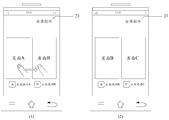
- FIG. 2A is a flowchart of a split screen display method according to another exemplary embodiment
- FIG. 2B is a schematic diagram showing a triggering multitasking management interface display according to an exemplary embodiment
- 2C is a schematic diagram of an interface of a multitasking management interface according to an exemplary embodiment
- 2D is an illustration of a multitasking management interface including primary and secondary partitions, according to an exemplary embodiment
- 2E is a schematic diagram of an interface of a multitasking management interface in a split screen mode according to an exemplary embodiment
- 2F is a schematic diagram showing an application corresponding to a selected preview interface in a secondary partition in a secondary partition, according to an exemplary embodiment
- FIG. 2G is a flowchart illustrating a method for selecting a third application from a secondary partition to replace a first application for display on a primary partition, according to an exemplary embodiment
- 2H is a schematic diagram showing selection of a third application from a secondary partition to replace a first application for display on a primary partition, according to an exemplary embodiment.
- FIG. 2I is a schematic diagram showing displaying a multi-function virtual button in a secondary partition according to an exemplary embodiment
- FIG. 3 is a block diagram of a split screen display device according to an exemplary embodiment
- FIG. 4 is a block diagram of a split screen display device according to another exemplary embodiment
- FIG. 5 is a block diagram of an apparatus for split screen display, according to an exemplary embodiment.
- FIG. 1 is a flowchart of a split screen display method, which is applied to an electronic device including a touch screen, and the split screen display method may include the following steps, according to an exemplary embodiment.
- step 101 an operation signal for triggering display of the multitasking management interface is received.
- step 102 various applications running on the electronic device are acquired.
- a first application is displayed in a primary partition of the multitasking management interface, and at least one second application is displayed in a secondary partition of the multitasking management interface, the first application and the second application are both electronic The application that is running on the device.
- the split screen display method displays the first application in the main partition of the multitasking management interface by receiving an operation signal for triggering display of the multitasking management interface, in the multitasking management interface.
- the secondary partition displays at least one second application, the first application and the second application are both running applications on the electronic device; by dividing the task management interface into primary partition and secondary partition, in the primary partition and secondary Different applications are displayed in the partitions, so that the user can use at least two different applications at the same time, which solves the problem that the method for displaying the applications on the electronic device in the related art is too single, and achieves the effect of improving the user experience.
- FIG. 2A is a flowchart of a split screen display method applied to an electronic device including a touch screen, which may include the following steps, according to another exemplary embodiment.
- step 201 an operation signal for triggering display of the multitasking management interface is received.
- the operation signal mentioned herein may be generated when a physical button on the electronic device is triggered, or may be a gesture input by the user on the touch screen on the electronic device, or may be generated when the electronic device is shaken according to a predetermined trajectory. .
- the operation signal is not specifically limited in this embodiment, and may be determined according to actual conditions.
- a physical button on the electronic device is triggered as an operation signal.
- the electronic device 21 includes a multitasking button 22 for triggering display of the multitasking management interface.
- the electronic device receives an operation signal for triggering the display of the multitasking management interface.
- the multitasking management interface is generally used to display various applications that are running.
- Each application in the multitasking management interface can be displayed in the form of a preview interface of the application.
- the preview interface described here can be the page that the application displays on the display of the electronic device before exiting the foreground.
- the application's preview interface can also be the main interface of the application.
- step 202 various applications running on the electronic device are acquired, and each running application and the split screen control are displayed on the multitasking management interface.
- each application is displayed in the form of a preview interface of the application.
- the preview interfaces of the respective applications are arranged in a horizontal row in a first predetermined order.
- the preview interfaces of the respective applications are arranged in a horizontal row in a first predetermined order.
- the first predetermined sequence mentioned here may be the order in which the application is recently opened, and may also be the order of the frequency at which the application is opened, and may be determined according to the actual situation, which is not specifically limited in this embodiment.
- the split screen control can be displayed at any position within the multitasking management interface.
- the split screen control setting is displayed in the upper right corner of the multitasking management interface for illustration.
- the split screen control 23 is displayed in the upper right corner of the multitasking management interface.
- preview interfaces can be displayed in the display of an electronic device. If the user needs to view the preview interface of more running applications, a predetermined gesture can be input to trigger the display of more running applications.
- Preview interface For example, the running application includes application A, application B, and application C. As shown in FIG. 2C (1), the preview interface of each application is displayed in a single row and horizontally, due to the size of the display. The limitation of the application C is not displayed in the display. At this time, the user can trigger the display interface of the application C by inputting a right-slip gesture, as shown in Fig. 2C(2).
- step 203 when the split screen control is triggered, the display mode of the multitasking management interface is switched to the split screen mode, and the multitasking management interface in the split screen mode includes the primary partition and the secondary partition.
- the multi-tasking management interface displays the running application and the split screen control.
- the display mode of the multi-tasking management interface is switched to the split screen mode, which will be more
- the task management community is divided into primary and secondary partitions.
- the multitasking management interface in split screen mode contains only one primary partition, but can contain one or more secondary partitions.
- the multi-task management interface includes a primary partition and a secondary partition.
- the implementation of the multi-task management interface includes a primary partition and multiple secondary partitions.
- the multitasking management interface in the split screen mode includes only one primary partition 24 and one secondary partition 25.
- the multitasking management interface in the split screen mode includes a schematic diagram of a primary partition 24 and at least two secondary partitions 25.
- a first application is displayed in a primary partition of the multitasking management interface, the first application being an application running on the electronic device.
- the primary partition can be placed in any area within the multitasking management interface. Typically, the primary partition is placed in the multitasking management interface near the top of the display. For example, still see Figure 2D (1), multitasking management The main partition 23 of the interface is displayed at the top of the display.
- the specific application may be implemented by: obtaining the last application running in the foreground, and using the last application running in the foreground as the first application.
- the first application is displayed in the primary partition of the multitasking management interface.
- the user triggers the multi-task key on the electronic device to trigger the display of the multi-tasking management interface, clicks the split-screen control provided in the multi-tasking management interface, and displays the multi-tasking management interface.
- the mode is switched to the split screen mode.
- the application A is used as the first application, and the application A is displayed on the main partition 24 of the multitasking management interface.
- the page A displayed by the application A may be before the application A exits from the foreground.
- the page displayed on the display of the electronic device can also be the main interface of the application A.
- the user triggers the multitasking button on the electronic device to trigger the display of the multitasking management interface, clicks the split screen control provided in the multitasking management interface, and the multitasking management interface
- the display mode is switched to the split screen mode.
- the application A running on the electronic device last time is used as the first application, and the application A is displayed on the main partition 24 of the multitasking management interface.
- the page A displayed by the application A may be
- the page displayed by the application A on the display of the electronic device before exiting the foreground operation may also be the main interface of the application A.
- step 205 the preview interface of the running application that is not running in the foreground is displayed in the secondary partition.
- the preview interface of each application When the preview interface of each application is displayed in the secondary partition, it can be displayed in a variety of arrangements.
- the preview interfaces of the respective applications are displayed in a horizontal row in a second predetermined order.
- the preview interfaces of the respective applications are arranged in a horizontal row in a second predetermined order.
- the second predetermined sequence mentioned herein may be the order in which the application is recently opened, and may also be the order of the frequency at which the application is opened, which may be determined according to the actual situation, which is not specifically limited in this embodiment.
- the last application running in the foreground is application A
- the application running on the electronic device includes application B, application C, and application B.
- the preview interface 26 and the preview interface 27 of the application C are displayed in the secondary partition 25.
- preview interfaces can be displayed in the secondary partition. If the user needs to view the preview interface of more running applications in the secondary partition, you can trigger the display of more running applications by inputting a predetermined gesture. Preview interface.
- step 206 the selected preview interface in the secondary partition is obtained, and the application corresponding to the selected preview interface is used as the second application, and the second application is displayed in the secondary partition of the multitasking management interface.
- the preview interface 26 of the application B is displayed in the secondary partition 25. Face B and application C's preview interface 27 page C, the user can click on application B's preview interface 26 page B.
- the application B corresponding to the page B of the preview interface 26 is used as the second application, and the application B is displayed in the secondary partition 25 of the multitasking management interface, and the preview interface is displayed in the application B. Page B.
- the first application is displayed in the foreground, the user can operate on the first application; the second application displayed in the secondary partition is also run in the foreground, and the user can also access the second application.
- the first application displayed on the primary partition and the second application displayed on the secondary partition are both running in the foreground, and the user can operate on the application in any partition.
- a user can play a game using a game application displayed in the primary partition, and can also use a communication application to chat with other people in the secondary partition.
- the split screen display method displays the first application in the main partition of the multitasking management interface by receiving an operation signal for triggering display of the multitasking management interface, in the multitasking management interface.
- the secondary partition displays at least one second application, the first application and the second application are both running applications on the electronic device; by dividing the task management interface into primary partition and secondary partition, in the primary partition and secondary Different applications are displayed in the partitions, so that the user can use at least two different applications at the same time, which solves the problem that the method for displaying the applications on the electronic device in the related art is too single, and achieves the effect of improving the user experience.
- the application corresponding to the preview interface selected by the user is displayed in the secondary partition.
- the split control line divides the multitasking management interface into a primary partition and a secondary partition; so that the user can control the split control line to move. Adjust the size of the primary and secondary partitions.
- the user may select the third application to replace the first application from the secondary partition.
- the program is displayed in the main partition, specifically, in several steps as shown in FIG. 2G.
- step 207a the selected third application in the secondary partition is acquired, and an exchange instruction for indicating the presentation of the third application to the primary partition is received.
- the user can select the application in the partition in various ways, for example, by long pressing the preview interface of the application to select the application as the third application, and then input the predetermined hand in the preview interface of the application. Potential to select the application as a third application.
- the exchange instructions described herein are typically predetermined gestures entered by the user.
- step 207b the third application is moved to the primary partition for presentation, and the first application is moved to the location of the third application in the secondary partition for display.
- the first application application A is displayed in the primary partition 24, which shows the preview interface 26 of the running application B, page B, and the running application C.
- the preview interface is 27 pages C.
- the user selects the application C as the third application by long pressing the preview interface 27 of the application C, and inputs the upward sliding hand as the exchange instruction for displaying the application C on the primary partition.
- the application C is determined to move the third application to the primary partition 24 for presentation, and the first application application A is moved to the location of the third application in the secondary partition 25 for presentation.
- the multitasking management interface in the split screen mode is provided with a split control line that allows movement, and the split control line divides the multitasking management interface into a primary partition and a secondary partition.
- the multitasking management interface is provided with a split control line 28 that allows movement, and the user can adjust the size of the primary and secondary partitions by moving the split control line 28.
- the primary partition or the secondary partition includes a multi-function virtual button, and the multi-function virtual button is used to guide at least one of the split screen exit control, the exchange control, and the switch control group.
- the secondary partition 25 includes a multi-function virtual button 29, and when the virtual button is triggered, at least one of the split screen exit control, the exchange control, and the switch control group is displayed.
- the component includes a first switching control and a second switching control.
- the multitasking management interface When the displayed split screen exit control is triggered, the multitasking management interface is controlled to exit the split screen mode.
- the multitasking management interface including the running application and the split screen control can be normally displayed, and the application of the primary partition can be run in the foreground (that is, displayed). This embodiment does not specifically limit this, and can be determined according to actual conditions.
- the application that controls the primary partition and the secondary partition are exchanged for display.
- application A is displayed in the primary partition and application B is displayed in the secondary partition.
- application A displays in the secondary partition and application B displays in the primary partition.
- the switching control group includes switching a first switching control of the application displayed in the primary partition and switching a second switching control of the application displayed in the secondary partition; when the first switching control is triggered, displaying another running in the primary partition Application; when the second toggle control is triggered, another running application is displayed in the secondary partition.
- Switching to display another application in the primary partition or the secondary partition may be switched in a predetermined sorting order, which may be the order in which the applications are recently opened, or the order in which the applications are opened, in accordance with the actual The situation is determined, and the embodiment does not specifically limit this.
- FIG. 3 is a block diagram of a split screen display device applied to an electronic device including a touch screen
- the split screen display device may include: a first receiving module 310, first, according to an exemplary embodiment.
- the module 320 and the first display module 330 are obtained.
- the first receiving module 310 is configured to receive an operation signal for triggering display of the multitasking management interface.
- the first obtaining module 320 is configured to acquire various applications running on the electronic device.
- the first display module 330 is configured to display the first application in the primary partition of the multitasking management interface, and display the at least one second application in the secondary partition of the multitasking management interface, where the first application and the second application are both An application that is running on an electronic device.
- the split screen display device displays the first application in the main partition of the multitasking management interface by receiving an operation signal for triggering display of the multitasking management interface, in the multitasking management interface.
- the secondary partition displays at least one second application, the first application and the second application are both running applications on the electronic device; by dividing the task management interface into primary partition and secondary partition, in the primary partition and secondary Different applications are displayed in the partitions, so that the user can use at least two different applications at the same time, which solves the problem that the method for displaying the applications on the electronic device in the related art is too single, and achieves the effect of improving the user experience.
- FIG. 4 is a block diagram of a split screen display device applied to an electronic device including a touch screen
- the split screen display device may include: a first receiving module 401, a first embodiment, according to another exemplary embodiment An acquisition module 402 and a first display module 403.
- the first receiving module 401 is configured to receive an operation signal for triggering display of the multitasking management interface.
- the operation signal mentioned herein may be generated when a physical button on the electronic device is triggered, or may be a gesture input by the user on the touch screen on the electronic device, or may be generated when the electronic device is shaken according to a predetermined trajectory. .
- the operation signal is not specifically limited in this embodiment, and may be determined according to actual conditions.
- the multitasking management interface is generally used to display each application that is running, each in the multitasking management interface.
- the application can be displayed in the form of a preview interface for the application.
- the preview interface described here can be the page that the application displays on the display of the electronic device before exiting the foreground.
- the application's preview interface can also be the main interface of the application.
- the first obtaining module 402 is configured to acquire various applications running on the electronic device.
- the first display module 403 is configured to display a first application in a primary partition of the multitasking management interface, and display at least one second application in a secondary partition of the multitasking management interface, where the first application and the second application are both An application that is running on an electronic device.
- each application is displayed in the form of a preview interface of the application.
- the preview interfaces of the respective applications are arranged in a horizontal row in a first predetermined order.
- the preview interfaces of the respective applications are arranged in a horizontal row in a first predetermined order.
- the first predetermined sequence mentioned here may be the order in which the application is recently opened, and may also be the order of the frequency at which the application is opened, and may be determined according to the actual situation, which is not specifically limited in this embodiment.
- the first application is displayed in the foreground, the user can operate on the first application; the second application displayed in the secondary partition is also run in the foreground, and the user can also access the second application.
- the first application displayed on the primary partition and the second application displayed on the secondary partition are both running in the foreground, and the user can operate on the application in any partition.
- a user can play a game using a game application displayed in the primary partition, and can also use a communication application to chat with other people in the secondary partition.
- the first display module 403 includes:
- the obtaining submodule 403a is configured to obtain the last application running in the foreground, and the last application running in the foreground as the first application, displaying the main partition in the multitasking management interface The first application.
- the primary partition can be placed in any area within the multitasking management interface. Typically, the primary partition is placed in the multitasking management interface near the top of the display.
- a first display submodule 403b configured to display a preview interface of an application that is running and not the last one running in the foreground in the secondary partition;
- the preview interface of each application When the preview interface of each application is displayed in the secondary partition, it can be displayed in a variety of arrangements.
- the preview interfaces of the respective applications are displayed in a horizontal row in a second predetermined order.
- the preview interfaces of the respective applications are arranged in a horizontal row in a second predetermined order.
- the second predetermined order mentioned here may be the order in which the applications are recently opened, and may also be the order in which the applications are opened. It is determined according to the actual situation, and the embodiment does not specifically limit this.
- preview interfaces can be displayed in the secondary partition. If the user needs to view the preview interface of more running applications in the secondary partition, you can trigger the display of more running applications by inputting a predetermined gesture. Preview interface.
- the second display sub-module 403c is configured to acquire the selected preview interface in the secondary partition, and use the application corresponding to the selected preview interface as the second application, in the multi-task management interface.
- the partition displays the second application.
- the split screen display device comprises:
- the second obtaining module is configured to acquire the selected third application in the secondary partition.
- the second receiving module is configured to receive an exchange instruction for instructing the third application to display to the primary partition.
- the user can select the application in the partition in a plurality of ways, for example, by long pressing the application preview interface to select the application as the third application, and then inputting a predetermined gesture in the preview interface of the application to select the application.
- the program acts as a third application.
- the exchange instructions described herein are typically predetermined gestures entered by the user.
- the display module is configured to move the third application to the primary partition for display, and move the first application to the location of the third application in the secondary partition for display.
- the split screen display device comprises:
- the second display module 404 is configured to display each of the running applications and the split screen control on the multitasking management interface.
- the split screen control can be displayed at any position within the multitasking management interface.
- the split screen control setting is displayed in the upper right corner of the multitasking management interface for illustration.
- preview interfaces can be displayed in the display of an electronic device. If the user needs to view the preview interface of more running applications, a predetermined gesture can be input to trigger the display of more running applications. Preview interface.
- the switching module 405 is configured to switch the display mode of the multitasking management interface to the split screen mode when the split screen control is triggered, and the multitask management interface in the split screen mode includes the primary partition and the secondary partition.
- the multi-tasking management interface displays the running application and the split screen control.
- the display mode of the multi-tasking management interface is switched to the split screen mode, which will be more
- the task management community is divided into primary and secondary partitions.
- the multitasking management interface in split screen mode contains only one primary partition, but can contain one or more secondary partitions.
- the multi-task management interface includes a primary partition and a secondary partition.
- the implementation of the multi-task management interface includes a primary partition and multiple secondary partitions. The method provided.
- the multitasking management interface in the split screen mode is provided with a split control line that allows movement, and the split control line divides the multitasking management interface into a primary partition and a secondary partition.
- the primary partition or the secondary partition includes a multi-function virtual button, and the multi-function virtual button is used to guide at least one of the split screen exit control, the exchange control, and the switch control group.
- the split screen display device further includes:
- the first control module 406 is configured to control the multitasking management interface to exit the split screen mode when the displayed split screen exit control is triggered.
- the multitasking management interface When the displayed split screen exit control is triggered, the multitasking management interface is controlled to exit the split screen mode.
- the multitasking management interface including the running application and the split screen control can be normally displayed, and the application of the primary partition can be run in the foreground (that is, displayed). This embodiment does not specifically limit this, and can be determined according to actual conditions.
- the second control module 407 is configured to control the application that the primary partition and the secondary partition exchange display when the displayed exchange control is triggered.
- the switching control group includes a first switching control that switches the application displayed in the primary partition and a second switching control that switches the application displayed in the secondary partition.
- the third control module 408 is configured to display another running application in the primary partition when the first switching control is triggered.
- the fourth control module 409 is configured to display another running application in the secondary partition when the second switching control is triggered.
- the split screen display device displays the first application in the main partition of the multitasking management interface by receiving an operation signal for triggering display of the multitasking management interface, in the multitasking management interface.
- the secondary partition displays at least one second application, the first application and the second application are both running applications on the electronic device; by dividing the task management interface into primary partition and secondary partition, in the primary partition and secondary Different applications are displayed in the partitions, so that the user can use at least two different applications at the same time, which solves the problem that the method for displaying the applications on the electronic device in the related art is too single, and achieves the effect of improving the user experience.
- the application corresponding to the preview interface selected by the user is displayed in the secondary partition.
- the split control line divides the multitasking management interface into a primary partition and a secondary partition; so that the user can control the split control line to move. Adjust the size of the primary and secondary partitions.
- the user triggers the split screen exit control to control the multitasking management interface to exit the split screen mode; by providing the exchange control and the switch control group, the user uses these controls to switch between the display in the primary partition and the secondary partition. application.
- An exemplary embodiment of the present disclosure provides a split screen display device capable of implementing the split screen display method provided by the present disclosure, the split screen display device comprising: a processor, a memory for storing processor executable instructions;
- processor is configured to:
- FIG. 5 is a block diagram of an apparatus for split screen display, according to an exemplary embodiment.
- device 500 can be a mobile phone, a computer, a digital broadcast terminal, a messaging device, a gaming console, a tablet device, a medical device, a fitness device, a personal digital assistant, and the like.
- apparatus 500 can include one or more of the following components: processing component 502, memory 504, power component 506, multimedia component 508, audio component 510, input/output (I/O) interface 512, sensor component 514, And a communication component 516.
- Processing component 502 typically controls the overall operation of device 500, such as operations associated with display, telephone calls, data communications, camera operations, and recording operations.
- Processing component 502 can include one or more processors 520 to execute instructions to perform all or part of the steps of the above described methods.
- processing component 502 can include one or more modules to facilitate interaction between component 502 and other components.
- processing component 502 can include a multimedia module to facilitate interaction between multimedia component 508 and processing component 502.
- Memory 504 is configured to store various types of data to support operation at device 500. Examples of such data include instructions for any application or method operating on device 500, contact data, phone book data, messages, pictures, videos, and the like.
- the memory 504 can be implemented by any type of volatile or non-volatile storage device, or a combination thereof, such as static random access memory (SRAM), electrically erasable programmable read only memory (EEPROM), erasable.
- SRAM static random access memory
- EEPROM electrically erasable programmable read only memory
- EPROM Programmable Read Only Memory
- PROM Programmable Read Only Memory
- ROM Read only memory
- magnetic memory flash memory, disk or optical disk.
- Power component 506 provides power to various components of device 500.
- Power component 506 can include a power management system, one or more power sources, and other components associated with generating, managing, and distributing power for device 500.
- the multimedia component 508 includes a screen between the device 500 and the user that provides an output interface.
- the screen can include a liquid crystal display (LCD) and a touch panel (TP). If the screen includes a touch panel, the screen can be implemented as a touch screen to receive input signals from the user.
- the touch panel includes one or more touch sensors to sense touches, slides, and gestures on the touch panel. The touch sensor may sense not only the boundary of the touch or sliding action, but also the duration and pressure associated with the touch or slide operation.
- the multimedia component 508 includes a front camera and/or a rear camera. When the device 500 is in an operation mode, such as a shooting mode or a video mode, the front camera and/or the rear camera can receive external multimedia data. Each front and rear camera can be a fixed optical lens system or have focal length and optical zoom capabilities.
- the audio component 510 is configured to output and/or input an audio signal.
- audio component 510 includes a microphone (MIC) that is configured to receive an external audio signal when device 500 is in an operational mode, such as a call mode, a recording mode, and a voice recognition mode.
- the received audio signal may be further stored in memory 504 or transmitted via communication component 516.
- audio component 510 also includes a speaker for outputting an audio signal.
- the I/O interface 512 provides an interface between the processing component 502 and the peripheral interface module, which may be a keyboard, a click wheel, a button, or the like. These buttons may include, but are not limited to, a home button, a volume button, a start button, and a lock button.
- Sensor assembly 514 includes one or more sensors for providing device 500 with various aspects of status assessment.
- sensor assembly 514 can detect an open/closed state of device 500, a relative positioning of components, such as the display and keypad of device 500, and sensor component 514 can also detect a change in position of one component of device 500 or device 500. The presence or absence of user contact with device 500, device 500 orientation or acceleration/deceleration, and temperature variation of device 500.
- Sensor assembly 514 can include a proximity sensor configured to detect the presence of nearby objects without any physical contact.
- Sensor assembly 514 may also include a light sensor, such as a CMOS or CCD image sensor, for use in imaging applications.
- the sensor component 514 can also include an acceleration sensor, a gyro sensor, a magnetic sensor, a pressure sensor, or a temperature sensor.
- Communication component 516 is configured to facilitate wired or wireless communication between device 500 and other devices.
- the device 500 can access a wireless network based on a communication standard, such as WiFi, 2G or 3G, or a combination thereof.
- communication component 516 receives a broadcast message from an external broadcast management system via a broadcast channel. Number or broadcast related information.
- the communication component 516 also includes a near field communication (NFC) module to facilitate short range communication.
- NFC near field communication
- the NFC module can be implemented based on radio frequency identification (RFID) technology, infrared data association (IrDA) technology, ultra-wideband (UWB) technology, Bluetooth (BT) technology, and other technologies.
- RFID radio frequency identification
- IrDA infrared data association
- UWB ultra-wideband
- Bluetooth Bluetooth
- apparatus 500 may be implemented by one or more application specific integrated circuits (ASICs), digital signal processors (DSPs), digital signal processing devices (DSPDs), programmable logic devices (PLDs), field programmable A gate array (FPGA), controller, microcontroller, microprocessor or other electronic component implementation for performing the above-described split screen display method.
- ASICs application specific integrated circuits
- DSPs digital signal processors
- DSPDs digital signal processing devices
- PLDs programmable logic devices
- FPGA field programmable A gate array
- controller microcontroller, microprocessor or other electronic component implementation for performing the above-described split screen display method.
- non-transitory computer readable storage medium comprising instructions, such as a memory 504 comprising instructions executable by processor 520 of apparatus 500 to perform the above-described split screen display method.
- the non-transitory computer readable storage medium may be a ROM, a random access memory (RAM), a CD-ROM, a magnetic tape, a floppy disk, and an optical data storage device.
- a non-transitory computer readable storage medium that, when executed by a processor of apparatus 500, enables apparatus 500 to perform the method illustrated in Figures 1, 2A, 2G.
Landscapes
- Engineering & Computer Science (AREA)
- Theoretical Computer Science (AREA)
- General Engineering & Computer Science (AREA)
- Physics & Mathematics (AREA)
- General Physics & Mathematics (AREA)
- Human Computer Interaction (AREA)
- Computer Hardware Design (AREA)
- User Interface Of Digital Computer (AREA)
- Digital Computer Display Output (AREA)
- Controls And Circuits For Display Device (AREA)
Abstract
Description
Claims (15)
- 一种分屏显示方法,其特征在于,应用于电子设备中,所述方法包括:接收用于触发显示多任务管理界面的操作信号;获取所述电子设备上正在运行的各个应用程序;在所述多任务管理界面的主分区显示第一应用程序,在所述多任务管理界面的次分区显示至少一个第二应用程序,所述第一应用程序和所述第二应用程序均为所述电子设备上正在运行的应用程序。
- 根据权利要求1所述的方法,其特征在于,所述在所述多任务管理界面的主分区显示第一应用程序,包括:获取最后一个在前台运行的应用程序,将所述最后一个在前台运行的应用程序作为所述第一应用程序,在所述多任务管理界面的主分区显示所述第一应用程序。
- 根据权利要求1所述的方法,其特征在于,所述在所述多任务管理界面的次分区显示至少一个第二应用程序,包括:将正在运行的且非最后一个在前台运行的应用程序的预览界面显示在所述次分区中;获取所述次分区中被选中的预览界面,将所述被选中的预览界面所对应的应用程序作为所述第二应用程序,在所述多任务管理界面的次分区显示所述第二应用程序。
- 根据权利要求1所述的方法,其特征在于,所述方法还包括:获取所述次分区中被选中的第三应用程序;接收用于指示将所述第三应用程序展示至所述主分区的交换指令;将所述第三应用程序移动至所述主分区进行展示,将所述第一应用程序移动至所述次分区中所述第三应用程序所在位置进行展示。
- 根据权利要求1所述的方法,其特征在于,所述方法还包括:在所述多任务管理界面上显示所述正在运行的各个应用程序以及分屏控件;当所述分屏控件被触发时,将所述多任务管理界面的显示模式切换为分屏模式,分屏模式下的所述多任务管理界面包含所述主分区和所述次分区。
- 根据权利要求1所述的方法,其特征在于,所述分屏模式下的所述多任务管理界面设置有允许移动的分割控制线,所述分割控制线将所述多任务管理界面分割为所述主分区和所述次分区。
- 根据权利要求1至6中任一所述的方法,其特征在于,所述主分区或者所述次分区中包含多功能虚拟按键,所述多功能虚拟按键用于引导展示分屏退出控件、交换控件以及切换控件组中的至少一种;当展示出的所述分屏退出控件被触发时,控制所述多任务管理界面退出分屏模式;当展示出的所述交换控件被触发时,控制所述主分区与所述次分区相互交换显示的应用程序;所述切换控件组包括切换在所述主分区显示的应用程序的第一切换控件和切换在所述次分区显示的应用程序的第二切换控件;当所述第一切换控件被触发时,在所述主分区显示另一个正在运行的应用程序;当所述第二切换控件被触发时,在所述次分区显示另一个正在运行的应用程序。
- 一种分屏显示装置,其特征在于,应用于电子设备中,所述装置包括:第一接收模块,被配置为接收用于触发显示多任务管理界面的操作信号;第一获取模块,被配置为获取所述电子设备上正在运行的各个应用程序;第一显示模块,被配置为在所述多任务管理界面的主分区显示第一应用程序,在所述多任务管理界面的次分区显示至少一个第二应用程序,所述第一应用程序和所述第二应用程序均为所述电子设备上正在运行的应用程序。
- 根据权利要求8所述的装置,其特征在于,所述第一显示模块,包括:获取子模块,被配置为获取最后一个在前台运行的应用程序,将所述最后一个在前台运行的应用程序作为所述第一应用程序,在所述多任务管理界面的主分区显示所述第一应用程序。
- 根据权利要求8所述的装置,其特征在于,所述第一显示模块,还包括第一显示子模块,被配置为将正在运行的且非最后一个在前台运行的应用程序的预览界面显示在所述次分区中;第二显示子模块,被配置为获取所述次分区中被选中的预览界面,将所述被选中的预览界面所对应的应用程序作为所述第二应用程序,在所述多任务管理界面的次分区显示所述第二应用程序。
- 根据权利要求8所述的装置,其特征在于,所述装置还包括:第二获取模块,被配置为获取所述次分区中被选中的第三应用程序;第二接收模块,被配置为接收用于指示将所述第三应用程序展示至所述主分区的交换指令;展示模块,被配置为将所述第三应用程序移动至所述主分区进行展示,将所述第一应用程序移动至所述次分区中所述第三应用程序所在位置进行展示。
- 根据权利要求8所述的装置,其特征在于,所述装置还包括:第二显示模块,被配置为在所述多任务管理界面上显示所述正在运行的各个应用程序以及分屏控件;切换模块,被配置为当所述分屏控件被触发时,将所述多任务管理界面的显示模式切换为分屏模式,分屏模式下的所述多任务管理界面包含所述主分区和所述次分区。
- 根据权利要求8所述的装置,其特征在于,所述分屏模式下的所述多任务管理界面设置有允许移动的分割控制线,所述分割控制线将所述多任务管理界面分割为所述主分区和所述次分区。
- 根据权利要求8至13中任一所述的装置,其特征在于,所述主分区或者所述次分区中包含多功能虚拟按键,所述多功能虚拟按键用于引导展示分屏退出控件、交换控件以及切换控件组中的至少一种,所述装置还包括:第一控制模块,被配置为当展示出的所述分屏退出控件被触发时,控制所述多任务管理界面退出分屏模式;第二控制模块,被配置为当展示出的所述交换控件被触发时,控制所述主分区与所述次分区相互交换显示的应用程序;所述切换控件组包括切换在所述主分区显示的应用程序的第一切换控件和切换在所述次分区显示的应用程序的第二切换控件;第三控制模块,被配置为当所述第一切换控件被触发时,在所述主分区显示另一个正在运行的应用程序;第四控制模块,被配置为当所述第二切换控件被触发时,在所述次分区显示另一个正在运行的应用程序。
- 一种分屏显示装置,其特征在于,应用于电子设备中,所述装置包括:处理器;用于存储所述处理器可执行指令的存储器;其中,所述处理器被配置为:接收用于触发显示多任务管理界面的操作信号;获取所述电子设备上正在运行的各个应用程序;在所述多任务管理界面的主分区显示第一应用程序,在所述多任务管理界面的次分区显示至少一个第二应用程序,所述第一应用程序和所述第二应用程序均为所述电子设备上正在运行的应用程序。
Priority Applications (2)
| Application Number | Priority Date | Filing Date | Title |
|---|---|---|---|
| RU2017146168A RU2685039C1 (ru) | 2016-05-09 | 2016-12-20 | Способ и устройство полиэкранного отображения |
| JP2017559432A JP6543733B2 (ja) | 2016-05-09 | 2016-12-20 | 分割スクリーン表示方法及び装置 |
Applications Claiming Priority (2)
| Application Number | Priority Date | Filing Date | Title |
|---|---|---|---|
| CN201610304861.8A CN106020592A (zh) | 2016-05-09 | 2016-05-09 | 分屏显示方法及装置 |
| CN201610304861.8 | 2016-05-09 |
Publications (1)
| Publication Number | Publication Date |
|---|---|
| WO2017193588A1 true WO2017193588A1 (zh) | 2017-11-16 |
Family
ID=57098905
Family Applications (1)
| Application Number | Title | Priority Date | Filing Date |
|---|---|---|---|
| PCT/CN2016/111041 Ceased WO2017193588A1 (zh) | 2016-05-09 | 2016-12-20 | 分屏显示方法及装置 |
Country Status (6)
| Country | Link |
|---|---|
| US (1) | US20170322709A1 (zh) |
| EP (1) | EP3244396A1 (zh) |
| JP (1) | JP6543733B2 (zh) |
| CN (1) | CN106020592A (zh) |
| RU (1) | RU2685039C1 (zh) |
| WO (1) | WO2017193588A1 (zh) |
Families Citing this family (44)
| Publication number | Priority date | Publication date | Assignee | Title |
|---|---|---|---|---|
| KR20000030111A (ko) * | 1999-12-22 | 2000-06-05 | 정영만 | 히트파이프 방식 이미지 정착용 가열 롤러의 작동액순환구조 |
| CN106020592A (zh) * | 2016-05-09 | 2016-10-12 | 北京小米移动软件有限公司 | 分屏显示方法及装置 |
| CN106537319A (zh) * | 2016-10-31 | 2017-03-22 | 北京小米移动软件有限公司 | 分屏显示方法及装置 |
| CN108132736B (zh) * | 2016-12-01 | 2020-10-20 | 腾讯科技(深圳)有限公司 | 窗口中的显示控制方法和装置 |
| CN107045541A (zh) * | 2017-02-23 | 2017-08-15 | 北京小米移动软件有限公司 | 数据显示方法和装置 |
| CN106909387A (zh) * | 2017-02-27 | 2017-06-30 | 宇龙计算机通信科技(深圳)有限公司 | 分屏显示方法及装置 |
| CN106933471A (zh) * | 2017-03-28 | 2017-07-07 | 宇龙计算机通信科技(深圳)有限公司 | 一种后台进程管理方法、装置和终端 |
| CN107219992A (zh) * | 2017-05-27 | 2017-09-29 | 北京小米移动软件有限公司 | 开启分屏功能的方法及装置 |
| CN107329766A (zh) * | 2017-07-05 | 2017-11-07 | 深圳市泰衡诺科技有限公司 | 一种组件信息的显示方法及显示装置 |
| CN107423063A (zh) * | 2017-07-25 | 2017-12-01 | 北京小米移动软件有限公司 | 多窗口处理方法、装置及设备 |
| CN107589900A (zh) * | 2017-09-06 | 2018-01-16 | 广东欧珀移动通信有限公司 | 分屏显示方法、装置、终端及存储介质 |
| CN108614655B (zh) * | 2018-04-19 | 2020-01-14 | Oppo广东移动通信有限公司 | 分屏显示方法、装置、存储介质及电子设备 |
| CN108549575B (zh) | 2018-04-19 | 2020-01-14 | Oppo广东移动通信有限公司 | 退出分屏的处理方法、装置、存储介质及电子设备 |
| CN108932094A (zh) * | 2018-07-03 | 2018-12-04 | Oppo广东移动通信有限公司 | 分屏应用切换方法、装置、存储介质和电子设备 |
| CN109067981B (zh) * | 2018-07-11 | 2020-08-04 | Oppo广东移动通信有限公司 | 分屏应用切换方法、装置、存储介质和电子设备 |
| KR102577051B1 (ko) * | 2018-07-17 | 2023-09-11 | 삼성전자주식회사 | 분할 화면을 제공하기 위한 전자 장치 및 방법 |
| CN109101164B (zh) * | 2018-07-30 | 2021-03-02 | Oppo广东移动通信有限公司 | 应用显示方法、装置、存储介质及电子设备 |
| CN109358929A (zh) * | 2018-09-26 | 2019-02-19 | 北京小米移动软件有限公司 | 分屏显示方法、装置及存储介质 |
| KR102599383B1 (ko) * | 2018-10-26 | 2023-11-08 | 삼성전자 주식회사 | 분할된 화면 상에서 실행 가능한 어플리케이션 리스트를 디스플레이하는 전자 장치 및 전자 장치의 동작 방법 |
| CN109410761B (zh) * | 2018-10-30 | 2021-04-30 | 武汉天马微电子有限公司 | 显示面板和显示装置 |
| CN109542320B (zh) * | 2018-11-13 | 2021-03-16 | Oppo(重庆)智能科技有限公司 | 一种显示方法、终端及计算机存储介质 |
| DK180317B1 (en) | 2019-04-15 | 2020-11-09 | Apple Inc | Systems, methods, and user interfaces for interacting with multiple application windows |
| CN112068907A (zh) * | 2019-05-25 | 2020-12-11 | 华为技术有限公司 | 一种界面显示方法和电子设备 |
| CN112019893B (zh) * | 2019-05-30 | 2023-09-12 | 北京小米移动软件有限公司 | 终端的投屏方法和终端的投屏装置 |
| CN110203786A (zh) * | 2019-06-05 | 2019-09-06 | 上海三菱电梯有限公司 | 一种电梯显示装置和电梯设备 |
| CN110191238B (zh) * | 2019-07-15 | 2020-10-30 | 珠海格力电器股份有限公司 | 一种短信息查看方法 |
| CN114168047B (zh) * | 2019-08-22 | 2022-08-26 | 华为技术有限公司 | 一种应用窗口处理方法及装置 |
| US11138912B2 (en) | 2019-10-01 | 2021-10-05 | Microsoft Technology Licensing, Llc | Dynamic screen modes on a bendable computing device |
| CN110780969B (zh) * | 2019-10-31 | 2022-12-30 | 抖音视界有限公司 | 操作电子设备的方法、装置、电子设备及存储介质 |
| CN111176764B (zh) * | 2019-12-10 | 2022-04-05 | 华为技术有限公司 | 显示控制方法和终端设备 |
| CN111399959B (zh) | 2020-03-17 | 2024-08-16 | Oppo广东移动通信有限公司 | 多任务操作方法、装置、电子设备以及存储介质 |
| CN111596836A (zh) * | 2020-04-14 | 2020-08-28 | 维沃移动通信有限公司 | 一种分屏显示方法及电子设备 |
| CN113296674B (zh) * | 2020-06-24 | 2024-07-02 | 优酷文化科技(北京)有限公司 | 对象显示方法、装置、电子设备及计算机可读存储介质 |
| KR102885918B1 (ko) | 2020-08-04 | 2025-11-13 | 삼성전자주식회사 | 멀티 윈도우 모드를 지원하는 전자 장치 및 그의 제어 방법 |
| WO2022062188A1 (en) * | 2020-09-22 | 2022-03-31 | Guangdong Oppo Mobile Telecommunications Corp., Ltd. | Split-screen display implementation in computing device |
| CN114327105A (zh) * | 2020-09-29 | 2022-04-12 | 华为技术有限公司 | 分屏显示控制方法及装置、电子设备、存储介质 |
| CN120196261A (zh) | 2021-02-04 | 2025-06-24 | Oppo广东移动通信有限公司 | 分屏方法、装置、电子设备以及存储介质 |
| CN112925600A (zh) * | 2021-03-22 | 2021-06-08 | 深圳市康冠科技股份有限公司 | 一种屏幕异显方法及其相关设备 |
| CN115480629A (zh) * | 2021-05-28 | 2022-12-16 | 华为技术有限公司 | 一种多界面显示的方法和电子设备 |
| US12579209B2 (en) | 2021-06-06 | 2026-03-17 | Apple Inc. | Devices, methods, and graphical user interfaces for interacting with a web-browser |
| CN115454312A (zh) * | 2021-06-08 | 2022-12-09 | 北京小米移动软件有限公司 | 应用程序的处理方法、装置及存储介质 |
| CN114764365B (zh) * | 2022-06-15 | 2022-09-27 | 统信软件技术有限公司 | 一种窗口呈现方法、计算设备及可读存储介质 |
| CN117311580A (zh) * | 2022-06-22 | 2023-12-29 | 华为技术有限公司 | 分屏方法和可折叠电子设备 |
| KR20250081538A (ko) | 2023-11-29 | 2025-06-05 | 주식회사 닷 | 스크린 스플릿 기능을 구비한 전자표시장치, 라이브 커서 제어 기능을 가진 장치, 촉각 디스플레이 분할 기반 확대장치, 점자 콘텐츠 오브젝트 확대시 해상도 조절 장치, 핑거 트레이싱 정보제공 장치, 멀티모달에 의한 컬러 제공 장치 및 이들의 서버, 시스템 및 방법 |
Citations (5)
| Publication number | Priority date | Publication date | Assignee | Title |
|---|---|---|---|---|
| CN103324435A (zh) * | 2013-05-24 | 2013-09-25 | 华为技术有限公司 | 分屏显示的方法、装置及其电子设备 |
| CN103809845A (zh) * | 2012-11-13 | 2014-05-21 | 上海斐讯数据通信技术有限公司 | 一种支持多应用显示的移动终端及多应用显示方法 |
| CN104035704A (zh) * | 2013-03-07 | 2014-09-10 | 北京三星通信技术研究有限公司 | 分屏操作的方法及装置 |
| US20150186024A1 (en) * | 2014-01-02 | 2015-07-02 | Samsung Electronics Co., Ltd. | Multi-window control method and electronic device supporting the same |
| CN106020592A (zh) * | 2016-05-09 | 2016-10-12 | 北京小米移动软件有限公司 | 分屏显示方法及装置 |
Family Cites Families (21)
| Publication number | Priority date | Publication date | Assignee | Title |
|---|---|---|---|---|
| TW347518B (en) * | 1997-03-06 | 1998-12-11 | Samsung Electronics Co Ltd | Display screen split method of a computer system |
| US20130024812A1 (en) * | 2011-07-13 | 2013-01-24 | Z124 | Foreground/background assortment of hidden windows |
| JP4555538B2 (ja) * | 2002-04-30 | 2010-10-06 | 株式会社ケンウッド | 操作コマンド処理プログラムおよびナビゲーションシステム |
| JP4700539B2 (ja) * | 2006-03-22 | 2011-06-15 | パナソニック株式会社 | 表示装置 |
| US8099332B2 (en) * | 2008-06-06 | 2012-01-17 | Apple Inc. | User interface for application management for a mobile device |
| KR101640460B1 (ko) * | 2009-03-25 | 2016-07-18 | 삼성전자 주식회사 | 휴대 단말기의 분할 화면 운용 방법 및 이를 지원하는 휴대 단말기 |
| EP3907593B1 (en) * | 2010-01-19 | 2025-03-26 | LG Electronics, Inc. | Mobile terminal and control method thereof |
| JP5305039B2 (ja) * | 2010-03-25 | 2013-10-02 | アイシン・エィ・ダブリュ株式会社 | 表示装置、表示方法、及び表示プログラム |
| CN103842943A (zh) * | 2011-06-20 | 2014-06-04 | 亚历山大·布宁 | 设有触摸显示屏的设备的应用程序管理系统及其方法 |
| US10394441B2 (en) * | 2011-10-15 | 2019-08-27 | Apple Inc. | Device, method, and graphical user interface for controlling display of application windows |
| KR101417318B1 (ko) * | 2012-08-17 | 2014-07-09 | 주식회사 팬택 | 멀티태스킹이 가능한 사용자 인터페이스 제공방법, 이동 단말기, 컴퓨터 판독 가능 매체 |
| KR101957173B1 (ko) * | 2012-09-24 | 2019-03-12 | 삼성전자 주식회사 | 터치 디바이스에서 멀티윈도우 제공 방법 및 장치 |
| KR102069014B1 (ko) * | 2012-09-25 | 2020-02-12 | 삼성전자 주식회사 | 휴대단말기의 분리화면 제어장치 및 방법 |
| US10282088B2 (en) * | 2012-12-06 | 2019-05-07 | Samsung Electronics Co., Ltd. | Configuration of application execution spaces and sub-spaces for sharing data on a mobile tough screen device |
| EP2741192A3 (en) * | 2012-12-06 | 2016-09-14 | Samsung Electronics Co., Ltd | Display device for executing a plurality of applications and method for controlling the same |
| JP2015053020A (ja) * | 2013-09-09 | 2015-03-19 | 株式会社リコー | 情報表示装置、情報表示方法およびプログラム |
| JP2015125567A (ja) * | 2013-12-26 | 2015-07-06 | 株式会社東芝 | 電子機器、方法及びプログラム |
| JP6251072B2 (ja) * | 2014-02-05 | 2017-12-20 | シャープ株式会社 | 表示装置及び表示方法 |
| US10678412B2 (en) * | 2014-07-31 | 2020-06-09 | Microsoft Technology Licensing, Llc | Dynamic joint dividers for application windows |
| KR20160026141A (ko) * | 2014-08-29 | 2016-03-09 | 삼성전자주식회사 | 윈도우 운용 방법 및 이를 지원하는 전자 장치 |
| CN105468272A (zh) * | 2014-09-03 | 2016-04-06 | 中兴通讯股份有限公司 | 界面显示方法及装置 |
-
2016
- 2016-05-09 CN CN201610304861.8A patent/CN106020592A/zh active Pending
- 2016-12-20 JP JP2017559432A patent/JP6543733B2/ja active Active
- 2016-12-20 WO PCT/CN2016/111041 patent/WO2017193588A1/zh not_active Ceased
- 2016-12-20 RU RU2017146168A patent/RU2685039C1/ru active
-
2017
- 2017-05-04 US US15/586,299 patent/US20170322709A1/en not_active Abandoned
- 2017-05-09 EP EP17170225.1A patent/EP3244396A1/en not_active Ceased
Patent Citations (5)
| Publication number | Priority date | Publication date | Assignee | Title |
|---|---|---|---|---|
| CN103809845A (zh) * | 2012-11-13 | 2014-05-21 | 上海斐讯数据通信技术有限公司 | 一种支持多应用显示的移动终端及多应用显示方法 |
| CN104035704A (zh) * | 2013-03-07 | 2014-09-10 | 北京三星通信技术研究有限公司 | 分屏操作的方法及装置 |
| CN103324435A (zh) * | 2013-05-24 | 2013-09-25 | 华为技术有限公司 | 分屏显示的方法、装置及其电子设备 |
| US20150186024A1 (en) * | 2014-01-02 | 2015-07-02 | Samsung Electronics Co., Ltd. | Multi-window control method and electronic device supporting the same |
| CN106020592A (zh) * | 2016-05-09 | 2016-10-12 | 北京小米移动软件有限公司 | 分屏显示方法及装置 |
Also Published As
| Publication number | Publication date |
|---|---|
| CN106020592A (zh) | 2016-10-12 |
| JP2018518752A (ja) | 2018-07-12 |
| JP6543733B2 (ja) | 2019-07-10 |
| EP3244396A1 (en) | 2017-11-15 |
| US20170322709A1 (en) | 2017-11-09 |
| RU2685039C1 (ru) | 2019-04-16 |
Similar Documents
| Publication | Publication Date | Title |
|---|---|---|
| WO2017193588A1 (zh) | 分屏显示方法及装置 | |
| JP6553719B2 (ja) | 画面分割表示方法および装置 | |
| CN107037949B (zh) | 一种分屏显示方法及装置 | |
| CN105955607B (zh) | 内容分享方法和装置 | |
| US10099146B2 (en) | Method, terminal device, and storage medium for playing game in chatting interface | |
| CN105204846B (zh) | 多人视频中视频画面的显示方法、装置及终端设备 | |
| RU2630189C1 (ru) | Способ управления функциями кнопок в режиме работы одной рукой, устройство и электронное устройство | |
| WO2020057327A1 (zh) | 信息列表显示方法、装置及存储介质 | |
| EP3242204B1 (en) | Method and device for multi-task management | |
| US10078422B2 (en) | Method and device for updating a list | |
| CN105955579A (zh) | 音乐播放控制方法及装置 | |
| US20180039403A1 (en) | Terminal control method, terminal, and storage medium | |
| US20150113475A1 (en) | Method and device for providing an image preview | |
| CN105511777B (zh) | 触控显示屏上的会话显示方法及装置 | |
| CN111488107A (zh) | 多任务交互控制方法、多任务交互控制装置及存储介质 | |
| CN104216525B (zh) | 相机应用的模式控制方法及装置 | |
| WO2019006768A1 (zh) | 一种基于无人机的停车占位方法及装置 | |
| US10225387B2 (en) | Call processing method and device | |
| CN110321042B (zh) | 界面信息展示方法、装置及电子设备 | |
| CN112269525A (zh) | 小屏窗口显示方法、装置及存储介质 | |
| CN110737373B (zh) | 一种应用界面控制方法、装置、终端及存储介质 | |
| US20240036803A1 (en) | Screen projection method, screen projection apparatus, electronic device, storage medium, and chip | |
| CN115396712A (zh) | 视频播放方法、装置、电子设备及存储介质 |
Legal Events
| Date | Code | Title | Description |
|---|---|---|---|
| ENP | Entry into the national phase |
Ref document number: 2017559432 Country of ref document: JP Kind code of ref document: A |
|
| WWE | Wipo information: entry into national phase |
Ref document number: 2017146168 Country of ref document: RU |
|
| NENP | Non-entry into the national phase |
Ref country code: DE |
|
| 121 | Ep: the epo has been informed by wipo that ep was designated in this application |
Ref document number: 16901543 Country of ref document: EP Kind code of ref document: A1 |
|
| 122 | Ep: pct application non-entry in european phase |
Ref document number: 16901543 Country of ref document: EP Kind code of ref document: A1 |