WO2016189742A1 - 情報処理装置、情報処理方法、プログラム、記憶媒体 - Google Patents
情報処理装置、情報処理方法、プログラム、記憶媒体 Download PDFInfo
- Publication number
- WO2016189742A1 WO2016189742A1 PCT/JP2015/065444 JP2015065444W WO2016189742A1 WO 2016189742 A1 WO2016189742 A1 WO 2016189742A1 JP 2015065444 W JP2015065444 W JP 2015065444W WO 2016189742 A1 WO2016189742 A1 WO 2016189742A1
- Authority
- WO
- WIPO (PCT)
- Prior art keywords
- content
- synchronization
- user
- information
- group
- Prior art date
- Legal status (The legal status is an assumption and is not a legal conclusion. Google has not performed a legal analysis and makes no representation as to the accuracy of the status listed.)
- Ceased
Links
Images








Classifications
-
- G—PHYSICS
- G06—COMPUTING OR CALCULATING; COUNTING
- G06F—ELECTRIC DIGITAL DATA PROCESSING
- G06F12/00—Accessing, addressing or allocating within memory systems or architectures
-
- G—PHYSICS
- G06—COMPUTING OR CALCULATING; COUNTING
- G06F—ELECTRIC DIGITAL DATA PROCESSING
- G06F13/00—Interconnection of, or transfer of information or other signals between, memories, input/output devices or central processing units
-
- G—PHYSICS
- G06—COMPUTING OR CALCULATING; COUNTING
- G06F—ELECTRIC DIGITAL DATA PROCESSING
- G06F16/00—Information retrieval; Database structures therefor; File system structures therefor
-
- G—PHYSICS
- G06—COMPUTING OR CALCULATING; COUNTING
- G06F—ELECTRIC DIGITAL DATA PROCESSING
- G06F40/00—Handling natural language data
- G06F40/10—Text processing
- G06F40/12—Use of codes for handling textual entities
-
- G—PHYSICS
- G06—COMPUTING OR CALCULATING; COUNTING
- G06Q—INFORMATION AND COMMUNICATION TECHNOLOGY [ICT] SPECIALLY ADAPTED FOR ADMINISTRATIVE, COMMERCIAL, FINANCIAL, MANAGERIAL OR SUPERVISORY PURPOSES; SYSTEMS OR METHODS SPECIALLY ADAPTED FOR ADMINISTRATIVE, COMMERCIAL, FINANCIAL, MANAGERIAL OR SUPERVISORY PURPOSES, NOT OTHERWISE PROVIDED FOR
- G06Q50/00—Information and communication technology [ICT] specially adapted for implementation of business processes of specific business sectors, e.g. utilities or tourism
- G06Q50/10—Services
Definitions
- the present invention relates to an information processing apparatus, an information processing method, a program, and a storage medium.
- a book browsing form in which a user purchases an electronic book via a network such as the Internet and downloads and browses the electronic book content on his / her terminal has become widespread.
- a user can use contents with different versions or different formats by acquiring the right of the contents.
- the server manages the content purchased by the user, and the user can confirm the list (library image) provided from the server on his / her terminal with the content owned by the user, that is, the content having browsing authority. Like that.
- the user can arbitrarily download and browse the content that he / she wants to browse by setting “synchronization on”. In this way, through the server management, the user does not need to save all the purchased content data in his / her terminal, and can cope with changing the terminal. It becomes easy to manage a large amount of content.
- an object of the present invention is to facilitate on / off of synchronization with a server for content.
- An information processing apparatus includes: a library management unit that manages registered library information including synchronization information that allows each user to use content in a user terminal for each content; A presentation processing unit that performs processing for presenting content owned by the user and a synchronization state thereof based on the library information; The library management unit sets a content group by performing a grouping process for a plurality of contents for each user registered in the library information, and the presentation control unit is a content of content owned by the user in a user terminal.
- the library management unit performs a process of executing a content group presentation that enables a synchronization operation in units of groups, and the library management unit outputs synchronization information for each content included in the content group to be operated according to the synchronization operation in units of content groups. Perform group synchronous update processing to be updated.
- the content purchased by the user and used for browsing or the like is managed by the library information in the information processing apparatus, and the user can check the content managed by the library information at the user terminal. At this time, the user can also confirm on / off of synchronization for each content, and can arbitrarily operate.
- the information processing apparatus sets a content group by grouping processing, and provides an environment in which a user can perform a synchronization operation in units of groups. As a result, the user can instruct synchronous on or synchronous off for a plurality of related contents.
- the library management unit performs a grouping process for owned content including purchased content every time the user purchases content information. That is, grouping is performed in response to content being added by purchase.
- the presentation control unit selects at least the content group including the purchased content. It is conceivable to perform a process for causing the user terminal to execute a content group presentation that enables a synchronization operation in units of content groups. That is, when a group including purchased content is set at the time of content purchase, an environment in which the content group can be collectively synchronized is provided to the user.
- the library management unit may perform a grouping process on the owned content for a user whose owned content number is greater than or equal to a predetermined value.
- the number of owned contents is small, the usefulness is small even if group synchronization operations can be performed by grouping. Therefore, content grouping is performed for users with a large number of owned content.
- the library management unit may perform the grouping process by extracting content corresponding to any of the content title condition, the content attribute condition, the keyword condition, and the content purchase time condition. Conceivable. Appropriate conditions are used for content grouping that is a target of synchronous operation in a batch. In other words, grouping that is easy for the user to perform batch operation is performed.
- the library management unit may set the latest predetermined number of contents in the content group with reference to the content purchase time as the grouping process.
- the most recently purchased content is grouped as an appropriate condition for grouping content items to be synchronized in a batch.
- the library management unit manages the information on the usage status of each content in the user information in the user terminal and updates the group synchronization when there is a synchronization off operation in units of content groups
- processing it is conceivable to perform different processing depending on the presence or absence of unused content in the target content group. That is, the processing content is changed depending on whether there is no unused content in the content group to be synchronized off. For example, when there is no unused content, the synchronization of each content is turned off as it is, and when there is an unused content, user confirmation, exclusion of unused content synchronization off, and the like are performed.
- the library management unit manages the synchronization protection setting of each content in the library information, and in the group synchronization update process when there is a synchronization off operation for each content group, It is conceivable to perform different processing depending on the presence or absence of content for which synchronization protection is set in the content group. That is, the processing contents are changed depending on whether or not there is a synchronization protection content in the content group to be synchronized off. For example, when there is no synchronization protection content, the synchronization of each content is performed as it is, and when there is synchronization protection content, user confirmation, exclusion of synchronization protection content synchronization off, and the like are performed.
- the library management unit manages the use completion date and time at the user terminal of each content in the library information, and automatically synchronizes synchronization information for the content after a predetermined period has elapsed from the use completion date and time. It is conceivable to perform automatic synchronization off processing for updating to off. Content that has passed a predetermined period of time after completion of use (for example, reading) is automatically turned off to save the user from having to turn off synchronization.
- the library management unit may provide that, if the content that is the target of the automatic synchronization off process belongs to a certain content group, all other content in the content group is synchronized off. It is conceivable to update the synchronization information of the content to synchronization off.
- the synchronization is not unconditionally turned off in accordance with the completion of the use, but is synchronized with the other content in the group.
- the library management unit performs notification processing for the user with respect to the content to be updated to synchronization off, and updates the synchronization information of the content to synchronization off in response to receiving a response to the notification. Can be considered.
- content that is subject to automatic synchronization off processing occurs, it notifies the user whether or not synchronization off can be performed. The synchronization is turned off according to the answer.
- the library management unit manages user settings relating to automatic synchronization off processing for each user, and the content that is the target of the automatic synchronization off processing is turned off based on the user settings. It is conceivable to update.
- the user can make the automatic synchronization off process function arbitrarily by performing user settings for enabling / disabling the automatic synchronization off process.
- the library management unit when the library management unit updates the synchronization information of the content in the library information to synchronization off by a synchronization operation from the user terminal, the library management unit deletes the corresponding content from the user terminal. It is possible to give instructions. When the synchronization is turned off, the content data in the user terminal is deleted, so that the content data does not press the user terminal capacity.
- the information processing apparatus described above may include an evaluation processing unit that refers to the period length of the synchronization on state of each content registered in the library information and sets content evaluation information according to the period length.
- the period length for example, the continuation period of the synchronization ON state and the accumulation period are managed. These period lengths are used as an index for content evaluation by the user.
- An information processing method includes a step of managing library information in which owned content for each user is registered including synchronization information that enables use of each content in a user terminal; Performing a process of presenting owned content and its synchronization state based on the library information; and performing a grouping process on a plurality of contents for each user registered in the library information to set a content group;
- Each content included a step of performing a group synchronization update process for updating the synchronization information about.
- the program according to the present invention is a program that causes an information processing apparatus to execute the processing as each of the above information processing methods.
- a storage medium according to the present invention is a storage medium storing each of the above programs. The above information processing apparatus is realized by these programs and storage media.
- a content group is set for each user, and the user can perform a synchronization operation in units of groups.
- the synchronization operation of each content can be made more efficient, and the synchronization operability is particularly improved for a user who owns many contents.
- a specific example of the content referred to in the claims of the present invention is an electronic book content
- an electronic book server that provides and manages an electronic book is cited as an example of the information processing device described in the claims of the present invention.
- the electronic book server is realized by one or a plurality of information processing apparatuses. Therefore, the information processing apparatus referred to in the claims of the present invention is realized by one information processing apparatus or a plurality of information processing apparatuses in cooperation.
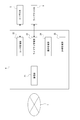
- FIG. 1 shows a system configuration example for realizing an electronic book service.
- an electronic book server 2 and a plurality of user terminals 5 are connected via a network 1 so that they can communicate with each other.
- the electronic book server 2 includes a content store server 3, a library server 4, a content database 6, a product management database 7, a user database 8, and a library database 9.
- database is referred to as “DB”.
- the configuration of the network 1 is assumed.
- the Internet, intranet, extranet, LAN (Local Area Network), CATV (Community Antenna TeleVision) communication network, virtual private network, telephone line network, mobile communication network, satellite communication network, etc. are assumed.
- the Various examples of transmission media that constitute all or part of the network 1 are also assumed.
- IEEE Institute of Electrical and Electronics Engineers 1394, USB (Universal Serial Bus), power line carrier, telephone line etc. wired, infrared such as IrDA (Infrared Data Association), Bluetooth (registered trademark), 802.11 wireless It can also be used by radio such as a mobile phone network, satellite line, and digital terrestrial network.
- the user terminal 5 is a terminal device of a user who purchases and downloads electronic book content (hereinafter also simply referred to as “content”) using the electronic book server 2 and uses (views) the downloaded content.
- the user terminal 5 is realized by an information processing apparatus such as a personal computer, a mobile phone, or a portable information terminal.
- the user terminal 5 browses a content sales site provided by the content store server 3 by browsing a web page using a browser, searches and purchases, and browses own library information by a web page provided by the library server 4. You can do it.
- the content downloaded to the user terminal 5 is browsed by starting the electronic book content browsing software on the user terminal 5.
- a request for downloading to the electronic book server 2 and a notification of the number of browsing pages are made by the browsing software.
- the content store server 3 is a server that provides a user with a website for selling electronic book content.
- the content store server 3 provides a web page as an electronic book store in response to an access from the user terminal 5 and provides an environment for book search, purchase, and download by the user.
- the library server 4 manages owned contents for each user using the library DB 9 and provides a management screen (library screen) to the user terminal 5. Also, necessary information such as user purchase information is acquired from the electronic book server 2 for these managements.
- the content DB 6 is a DB that stores content data as various electronic books sold by the content store server 3.
- the content store server 3 downloads content owned by the user from the content DB 6 in response to a request from the user terminal 5.
- the product management DB 7 is a DB that stores various data for product management by the content store server 3. That is, the product title, price, data size, author, publisher, and other attribute information, sales history information, sales management information, etc. are stored for each content that is a product.
- data related to users who use the electronic book server 2 is registered.
- a user ID identification
- the purchase history of each user the history of transactions performed via the content store server 3, that is, data relating to the user's content purchase history is registered.
- the content ID, purchase date and time, purchase price, etc. of the purchase content are registered.
- a book search history on each user's electronic book sales website, a book introduction page browsing history, favorite registration information, and the like are also stored.
- the “owned content” here is content that the user has usage authority (viewing authority) due to the purchase action or some service of the user. That is, “owned” does not indicate a state in which content data is downloaded to the user terminal 5, but a state in which the user has authority to download and view the content data.
- the content is registered as owned content of the user A in the library DB 9.
- the user A can access a management page (a library page 40, which will be described later) provided by the library server 4 from his / her user terminal 5, and can confirm the contents owned by the user A.
- the user A can arbitrarily switch between “synchronization on” and “synchronization off” between the electronic book server 2 and his / her user terminal 5 for each owned content.
- the synchronization may be turned on, or the synchronization may be turned off.
- the content can be browsed. That is, the user terminal 5 can download and browse the content sequentially from the electronic book server 2.
- the browsing enabled state is canceled by turning off synchronization.
- the library DB 9 manages the contents owned by each user and their synchronization status.
- the content store server 3 and the library server 4 in the electronic book server 2 may be configured as separate information processing apparatuses or may be configured as an integrated information processing apparatus.
- the content DB 6, the product management DB 7, the user DB 8, and the library DB 9 may be constructed in a server computer different from the content store server 3 and the library server 4, or in a local system as the electronic book server 2. It may be constructed.
- the content DB 6, the product management DB 7, the user DB 8, and the library DB 9 are shown. However, these DBs are realized in any form as long as the content store server 3 and the library DB 9 are accessible. It may be.
- each DB does not need to be formed in one device (for example, one HDD).
- Each DB does not need to be configured as one DB.
- information stored as the library DB 9 will be described later, but they may be stored and managed by a plurality of DBs.
- Each DB described in the embodiment is merely an example of a storage unit for information related to the processing of the embodiment in the form of one DB.
- FIG. 2 shows a hardware configuration of the information processing apparatus that constitutes the content store server 3, the library server 4, and the user terminal 5 shown in FIG.
- Each device shown as the content store server 3, the library server 4, and the user terminal 5 can be realized as a computer device as shown in FIG. 2 capable of information processing and information communication.
- a CPU (Central Processing Unit) 101 of a computer apparatus performs various processes according to a program stored in a ROM (Read Only Memory) 102 or a program loaded from a storage unit 108 to a RAM (Random Access Memory) 103. Execute the process.
- the RAM 103 also appropriately stores data necessary for the CPU 101 to execute various processes.
- the CPU 101, ROM 102, and RAM 103 are connected to each other via a bus 104.
- An input / output interface 105 is also connected to the bus 104.
- the input / output interface 105 includes an input unit 106 composed of a keyboard, mouse, touch panel, etc., an output unit composed of a display or speaker composed of an LCD (Liquid Crystal Display), a CRT (Cathode Ray Tube), an organic EL (Electroluminescence) panel, etc. 107, a storage unit 108 composed of an HDD (Hard Disk Drive), a flash memory device, and the like, and a communication unit 109 for performing communication processing and inter-device communication via the network 1 are connected.
- an input unit 106 composed of a keyboard, mouse, touch panel, etc.
- an output unit composed of a display or speaker composed of an LCD (Liquid Crystal Display), a CRT (Cathode Ray Tube), an organic EL (Electroluminescence) panel, etc.
- a storage unit 108 composed of an HDD (Hard Disk Drive), a flash memory device, and the like
- a communication unit 109 for performing communication processing and inter-device communication via the network 1
- a media drive 110 is also connected to the input / output interface 105 as necessary, and a removable medium 111 such as a magnetic disk, an optical disk, a magneto-optical disk, or a semiconductor memory is appropriately mounted, and information can be written to the removable medium 111. Reading is performed.
- a removable medium 111 such as a magnetic disk, an optical disk, a magneto-optical disk, or a semiconductor memory is appropriately mounted, and information can be written to the removable medium 111. Reading is performed.
- the communication unit 109 it is possible to upload and download data and programs through communication by the communication unit 109, and to transfer data and programs via the removable medium 111.
- the CPU 101 performs processing operations based on various programs, whereby necessary information processing and communication as the content store server 3, the library server 4, and the user terminal 5 are executed.
- the information processing apparatus constituting the content store server 3, the library server 4, and the user terminal 5 is not limited to a single computer apparatus as shown in FIG. 2, and a plurality of computer apparatuses are systemized. It may be configured.
- the plurality of computer devices may be systemized by a LAN or the like, or may be arranged at a remote place by a VPN using the Internet or the like.
- FIG. 3 shows a functional configuration as the library server 4 configured by one or a plurality of information processing apparatuses.
- Each function as the library server 4 is a function realized by processing executed by the CPU 101 according to the program in the information processing apparatus. However, all or a part of the processing described below may be realized by hardware. Further, when each function is realized by software, each function need not be realized by an independent program. Processing of a plurality of functions may be executed by one program, or one function may be realized by cooperation of a plurality of program modules.
- the library server 4 includes a communication unit 21, a user management unit 22, a library management unit 23, a presentation processing unit 24, and an evaluation processing unit 25.
- the communication unit 21 performs various communications with the user terminal 5 or other information processing apparatuses via the network 1. For example, the communication unit 21 transmits HTML data constituting a web page presented on the browser in the user terminal 5, receives input information on the web screen performed on the user terminal 5, and the like. The communication unit 21 also includes a function of performing e-mail transmission to the user terminal 5 and the like. The user management unit 22 performs login processing for the user, information acquisition from the user DB 8, updating, and the like.
- the library management unit 23 mainly manages update of the library DB 9.
- the library DB 9 stores library information in which owned content for each user is registered including synchronization information that enables use of each content at the user terminal.
- the library management unit 23 performs processing for updating the user's library information at a timing corresponding to the user's content purchase, updating of the synchronization setting of each content according to the user's operation, and the like.
- the library management unit 23 also performs a process of setting a content group by performing a grouping process on a plurality of contents for each user registered in the library information, and a process corresponding to a synchronization operation in units of groups. Further, an automatic synchronization-off process is also performed in response to reading of content on the user terminal 5.
- the presentation processing unit 24 performs a process of providing a user with a web page as an electronic book service management screen. For example, a web page for generating a login user's library display is generated (HTML data generation) for a logged-in user terminal. As the library display, a list of owned contents, a content group display, and the like are displayed, and a display that allows the user to perform a synchronization operation on these displays is performed.
- the evaluation processing unit 25 refers to the period length of the synchronized on state of each content registered as library information for each user in the library DB 9 and performs an evaluation process for setting content evaluation information according to the period length.
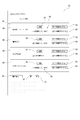
- the library DB 9 has a structure for managing the library information LIF for each user as shown in FIG. 4, for example.
- a data area as a user field UF, a content field CF, and a group field GF is provided.
- Information about the user is registered in the user field UF.
- the user is specified by the user ID.
- This user ID is preferably the same as or associated with the user ID managed by the user DB 8.
- user attribute information login password, address, name, attribute information such as gender and age, and e-mail address are registered.
- terminal information information (model, type, IP address, etc.) of one or a plurality of user terminals 5 used by the user is registered.
- As DL (download) capacity information information on the capacity (data size) of the content downloaded to the user terminal 5 is registered. For users who use a plurality of user terminals 5, the download capacity for each user terminal 5 may be registered.
- automatic synchronization off setting information setting information related to automatic synchronization off processing according to reading, which will be described later, is registered. For example, information such as permission setting for automatic synchronization off and setting of the number of days since reading is completed.
- the content field CF electronic book content owned by the user is registered.
- the content is identified by the content ID.
- the synchronization state (synchronization on / off) is stored for each content.
- For each content a content title and a data size as electronic data are registered. Further, information such as an author, a publisher, a release date, the number of pages, a price, a genre, and a book type is stored as a content attribute.
- Date / time information on the purchase of the content by the user is registered as purchase date / time information.
- As DL (download) history information the date and time of downloading the content to the user terminal, the number of times, the information of the downloaded page in the case of partial download, the identification information of the user terminal 5 of the download destination, etc. are stored.
- Date / time information when the user terminal 5 has read the content is stored as information on the date / time of reading.
- the date and time when the information of the browsing page provided by the browsing software in the user terminal 5 reaches the last page of the content may be set as the reading date and time.
- the reception date and time of the read completion information may be set.
- bookmark information information on the current browsing page of the content (a page where reading is interrupted) is stored. This information is also provided by browsing software in the user terminal 5.
- the unread flag a flag indicating that no content is being browsed by the user is stored.
- the unread flag is turned on when the content is first downloaded, and then the unread flag is turned off when the browsing page information is first transmitted from the user terminal 5. .
- the protection flag information indicating whether or not the user desires to maintain the synchronization on state for the content is indicated.
- the protection flag is turned on when the user selects that the synchronization is not turned off by a group unit synchronization operation described later.
- the evaluation information information on the user's evaluation level is stored for the content.
- information that can grasp the period length of the content in the synchronization-on state for example, the number of days for which synchronization is on and the cumulative number of days is stored.
- the start / end dates of the synchronization on state are registered each time, and when grasping the number of continuous days, the latest information on the start date of synchronization on may be stored.
- the group field GF stores information on the result of grouping the contents registered in the content field CF. That is, the set content group (hereinafter also simply referred to as “group”) is registered by the group ID. For each group, group attribute and corresponding content information is stored.
- the group attribute includes information such as grouping conditions, group title, number of belonging contents, group setting / update date and time.
- the grouping condition is a condition for selecting contents for grouping. For example, when registering content with the same title as one group, the grouping condition is “same title”. When registering the contents of the same author as one group, the grouping condition is “same author”.
- the group title is, for example, a name used when presenting a group to the user, and may be set according to grouping conditions and belonging contents.
- the library server 4 may automatically set the group title when grouping.
- the library management unit 23 sequentially updates the information of the various library DBs 9 as described above as necessary.
- This library display is a display screen provided to the user terminal 5 by the library server 4 by accessing a website provided by the library server 4 while the user is logged in to the electronic book server 2. Then, the user can check a list of electronic book contents owned by the user, check their synchronization state, and perform a synchronization operation through the library display.
- Fig. 5 shows an example of the library page 40.
- this library page 40 for example, “Your Library” or “... 's Library” is displayed as a display screen of contents owned by the individual of the login user.
- the content list 41 a list of owned content is displayed.
- a book search box 42 is prepared, and a search keyword can be input.
- a search button 43 for a search execution instruction is displayed.
- the content listed in the list display 41 is only the content hit in the search. The user can easily search for contents that the user wants to confirm the synchronization state among the contents that the user owns.
- a group search box 44 and a search button 45 are displayed.
- the content group corresponding to the keyword is displayed by the user.
- the content group corresponding to the keyword may be a group that has already been grouped and registered in the group field GF of the library DB 9, or may be a group that is newly set based on the keyword.
- a group display button 53 is prepared.
- the screen changes to a screen for displaying a group. In this case, for example, a list of each content group registered in the group field GF of the library DB 9 for the user is displayed.
- a case where the user operates the search button 45 without inputting a keyword in the group search box 44 may be handled in the same manner as the operation of the group display button 53.
- An example of a screen for displaying a group will be described later with reference to FIG.
- the content owned by the user is displayed as a list as a content list 41.
- book information 46 for example, information such as a book cover image, title, author, and publisher is displayed according to the registered contents of the library DB 9.
- library addition date 47 the date (purchase date) when the content was added to the content field CF of the library DB 9 is displayed.
- the evaluation level 54 of the user for the book is displayed by, for example, the number of ⁇ marks. This evaluation level 54 is displayed based on the evaluation information in the library DB 9.
- a synchronization button 48 and a synchronization protection button 49 are displayed.
- the synchronization button 48 functions as an operation button for displaying the current synchronization state for the content registered in the library DB 9 and changing the synchronization state. For example, that a certain synchronization button 48 is set to “synchronization ON” indicates that the synchronization is currently on, that is, the user terminal can be browsed.
- the synchronization button 48 functions as an operator that can be turned off by an operation (for example, click or tap).
- the fact that a certain synchronization button 48 is set to “synchronization OFF” indicates that the synchronization is currently off, that is, that synchronization must be turned on for browsing.
- the synchronization button 48 functions as an operator that can be changed to synchronization on by an operation (for example, click or tap).
- the synchronization protection button 49 is an operation element for designating synchronization protection or canceling protection designation for content that the user does not want to cancel the synchronization on state, and is a display indicating the synchronization protection state. This displays the state of the synchronization flag in the library DB 9. In the drawing, a solid line indicates a protection-on state, and a broken line indicates a protection-off state. When group collective synchronization is turned off, which will be described later, it is possible to perform processing in consideration of content for which synchronization protection is designated.
- a previous button 50 and a next button 51 are displayed, and the user can perform page advance / return of the content list 41 by these operations.
- an automatic synchronization off setting button 52 is prepared, and by setting the automatic synchronization off setting button 52, settings relating to an automatic synchronization off process described later can be performed.
- FIG. 6 shows an example of a group page 60 that displays groups.
- a list of groups set for the contents owned by the user is displayed as the group list 61.
- each content group registered in the group field GF of the library information LIF is displayed in a list.
- the group list 61 when a group search is instructed and a transition is made to the group page 60, a content group corresponding to the search or a content group newly set based on the search keyword is displayed.
- a previous button 66 and a next button 67 are displayed, and the user can perform page advance / return of the group list 61 by these operations. Further, an individual display button 69 is displayed, and the user can return to the display of the content list 41 (library page 40) of FIG. 5 by this operation.
- Information of each group is displayed as the group list 61.
- a detail button 62, a group synchronization on button 63, a group synchronization off button 64, synchronization state information 65, and the like are displayed together with the group title 68.
- the group title 68 for example, the group title registered in the group field GF is used.
- the group synchronization on button 63 an operator for turning on synchronization for a plurality of contents belonging to the group is displayed.
- the group synchronization off button 64 an operator for collectively turning off synchronization for a plurality of contents belonging to the group is displayed.
- the synchronization status information 65 the synchronization status of a plurality of contents belonging to the group is displayed.
- “all synchronized”, “all asynchronous”, and “partially synchronized” are displayed.
- the user can perform a collective sync on or collective sync off operation for content belonging to an arbitrary group by using the group sync on button 63 and the group sync off button 64.
- the group synchronization on button 63 is inactive (inoperable state: indicated by a broken line in the figure), and the group synchronization off button 64 is active (operable state: in a solid line in the figure). Show).
- the group synchronization on button 63 is active and the group synchronization off button 64 is inactive.
- both the group synchronization on button 63 and the group synchronization off button 64 are activated.
- the detail button 62 is an operator for confirming details of contents belonging to the group. For example, by operating the detail button 62 for the group name “BBB (1) to (15)”, a detail page 70 as shown in FIG. 7 is displayed.
- a group title 68 is displayed, and a group synchronization on button 63 and a group synchronization off button 64 for the group are displayed.
- Each affiliated content list 72 belonging to the group is displayed.
- a library addition date 47, a synchronization button 48, and a synchronization protection button 49 are displayed together with a content title and the like.
- the return button 73 enables an operation to return to the group page 60 in FIG. With this detail page 70, the user can check the synchronization status of each content belonging to a certain group, and can also perform a synchronization operation individually.
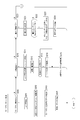
- FIG. 1 shows the main exchanges performed between the user terminal 5 and the library server 4.
- the user terminal 5 is assumed to be in a state where login to the website provided by the electronic book server 2 (or the library server 4) has been completed.
- a user using the user terminal 5 can request library display in order to confirm the content owned by the user by an operation on the website displayed on the user terminal 5 (S1).
- the library server 4 receives the library display request, the library server 4 reads the library information LIF for the user from the library DB 9 (S11).
- library presentation control display data for executing display of the library page 40 as shown in FIG. 5 is generated, and the display data is transmitted to the user terminal 5 (S12). Thereby, the library page 40 as shown in FIG. 5 is displayed on the user terminal 5 (S2).
- a user viewing the library page 40 on the user terminal 5 can perform a synchronization operation (synchronization on operation or synchronization off operation) on each content owned by the user by an operation on the user terminal 5 (S3).
- the library server 4 that has received the information on the synchronization operation updates the library DB 9 so as to change the synchronization state of the content to be operated in the library information LIF of the user (S13).
- the library page 40 corresponding to the update is generated and transmitted to the user terminal 5 so that the change of the synchronization setting is reflected on the user terminal 5 (S14). Accordingly, the library page 40 in which the display state of the operated synchronization button 48 is updated is presented on the user terminal 5 (S4).
- a user viewing the library page 40 on the user terminal 5 can request group display by an operation on the user terminal 5 (S5).
- the library server 4 reads the content group information registered in the group field GF in the library information LIF of the user from the library DB 9 (S15).
- grouping processing using the library information LIF is performed according to the search keyword designation.
- the display data which perform the display of the group page 60 like FIG. 6 are produced
- a group page 60 as shown in FIG. 6 is presented on the user terminal 5 (S6).
- a user browsing the group page 60 on the user terminal 5 performs a group synchronization operation (in a group synchronization setting of belonging contents collectively for the content group set for each content owned by the user terminal 5).
- Group synchronization ON operation or group synchronization OFF operation can be performed (S7).
- the library server 4 updates the library DB 9 so as to change the synchronization state of the content included in the operation target group in the library information LIF of the user (S17).
- the group page 60 or the library page 40 corresponding to the update is generated and transmitted to the user terminal 5 so that the change of the synchronization setting is reflected on the user terminal 5 (S18).
- the library page 40 in which the display state of the synchronization button 48 is updated for each content of the operated group is presented on the user terminal 5.
- the group page 60 in which the display state of the synchronization state information 65, the group synchronization on button 63, and the group synchronization off button 64 reflects the update is presented (S8).
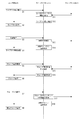
- the library server 4 performs a grouping process as shown in FIG. 9 for each user (registered user) whose owned content is registered in the library DB 9 for every predetermined period, for example.
- a grouping process may be performed by adding the newly purchased content to the user. To do. It is sufficient that at least one of the grouping process in FIG. 9 and the purchase handling process to be described later is performed, but performing the process in FIG. 9 in the background for each user in advance reduces the processing burden at the time of purchase or the like. Effective for reduction.
- the library server 4 selects a user in step S101 of FIG. That is, one registered user is selected for processing.
- the library server 4 acquires the library information LIF of the selected user from the library DB 9.
- step S103 the library server 4 confirms the acquired library information LIF and confirms whether or not the number of registered contents is equal to or greater than a predetermined number N. If the number of contents is less than the predetermined number N, the grouping process for the user is terminated. In other words, content grouping is not performed for users who have only a small number.
- the library server 4 checks in step S104 whether or not grouping processing has already been performed in the past. If even one group information is registered in the group field GF of the library information LIF, the grouping process has been performed at least once. If the grouping process has been executed in the past, the grouping process for the user is terminated. This is because when the user newly purchases content, grouping processing including newly purchased content is performed in the purchase handling processing described later, and thus it is not necessary to repeat the grouping in the processing of FIG. However, the grouping may be performed periodically regardless of whether or not the grouping is performed at the time of purchase without performing the determination in step S104.
- step S105 a group condition is selected in step S105.
- the group condition used in the process of FIG. 9 one or a plurality of conditions may be set in advance. For example, the same title, the same author, the same publisher, the same purchase time, the same release time, and the most recently purchased n books are set as group conditions.
- the library server 4 extracts one group condition.
- step S106 the library server 4 extracts a plurality of contents that match the conditions among the contents owned by the processing target user.
- group information is generated as content obtained by grouping a plurality of contents extracted in step S107 under a certain group condition, and temporarily stored as, for example, processing process information. That is, one group is entered in the group field GF. Whether or not the condition is satisfied may be determined by referring to the information of each content in the content field CF in the library information LIF. The group information may be each data written to the group field GF in the library information LIF.
- group information is generated with these as one group. For example, when the contents 1 to 15 of the content titled “BBB” are owned, these are determined as one group. In addition, there may be cases where a plurality of other contents of the “same title” are owned. For example, if the user owns the first to third volumes of the content titled “AAA”, the three contents are also grouped with the same title “AAA” and are different from the above “BBB”. Group information is generated as one group.
- step S108 when the processing of steps S106 and S107 is performed under the condition of “same title” and one or a plurality of group information is generated, or when the corresponding plurality of contents do not exist and the group information is not generated, the library is determined in step S108.
- the server 4 confirms other unprocessed group conditions. If grouping is performed using a plurality of group conditions, if there are still unprocessed group conditions, the process returns from step S108 to S105, and other conditions are selected and the processes of steps S106 and S107 are performed. For example, as described above, when grouping processing is performed under the conditions of the same author, the same publisher, the same purchase time, the same release time, and the most recently purchased n volumes, grouping (group information Generation).
- step S108 the process proceeds from step S108 to S109.
- one or more group information may be generated, or no group information may be generated.
- the library server 4 proceeds to step S110 and updates the library information LIF of the user on the library DB 9. That is, the information of the group field GF is added based on the generated group information. This completes the grouping process for one user. If group information has not been generated, the process for the user ends from step S109. That is, the library DB 9 for the user is not updated.
- step S111 it is confirmed whether or not the above process has been completed for all users. If not, the process returns to step S101 and the same process is performed for the next user. When the process is completed for all users, the process in FIG. 9 is terminated.
- group setting of owned content is executed for each user.
- efficiency is improved as a periodic process.
- grouping is performed under a plurality of group conditions, the number of group conditions may be one. Alternatively, the user may be able to select group conditions in advance. Further, not limited to the number of owned contents, grouping may be performed.
- FIGS. 10, 11, and 12 show processing in the following cases.
- step S200 the library server 4 acquires the library information LIF of the specified user from the library DB 9.
- step S203 the library server 4 generates display data for the library page 40 as shown in FIG. 5 using the acquired library information LIF, and transmits it to the user terminal 5 in step S204. As a result, the library page 40 is displayed on the user terminal 5.
- step S210 When a synchronization operation at the user terminal 5 is detected, the library server 4 proceeds from step S210 to S211 in FIG. 10, and first identifies the user who performed the synchronization operation and the content that was the target of the synchronization operation. . Since the synchronization operation is performed on the library page 40 in FIG. 5 or the detail page 70 in FIG. 7, the login user and what content is the operation information are confirmed. Next, in step S212, the library server 4 updates the synchronization information of the corresponding content in the library information LIF of the identified user in the library DB 9.
- step S214 If the current operation is a change to synchronization off, the library server 4 proceeds from step S213 to S214, and instructs the user terminal 5 to delete the data of the synchronized content. In response to this, the user terminal 5 deletes the content data from the storage area in the user terminal 5. If the current operation is a change to synchronous on, step S214 is naturally not performed.
- step S ⁇ b> 215 the library server 4 generates display data of the library page 40 corresponding to the synchronization setting update, and transmits it to the user terminal 5. Accordingly, the library page 40 in which the display state of the operated synchronization button 48 is updated is presented on the user terminal 5.
- step S ⁇ b> 301 the library server 4 identifies a user who is a target of notification from the content store server 3.
- the library information LIF of the corresponding user is acquired from the library DB 9. If the target user is the user who first purchased the content and the library information LIF of the user is not registered in the library DB 9, the library information LIF is newly generated.
- the information of the user field UF is acquired from the user DB 8, and the library information LIF in the initial state of the user is generated.
- step S303 the library server 4 enters information on the current purchase content as information in the content field CF in the library information LIF read (or newly generated) from the library DB 9 for the corresponding user. Specifically, the content ID, content title, data size, content attribute, purchase date / time, and unread flag are set for the purchased content.
- the synchronization information is, for example, synchronization on or synchronization off.
- step S304 the library server 4 confirms whether or not the number of contents registered in the library information LIF is equal to or greater than a predetermined number N in a state where newly purchased contents are entered. If the number of contents is less than the predetermined number N, the process proceeds to step S314 without performing the grouping process for the user, and the library DB 9 is updated. That is, the library information LIF of the user to which the purchase content is added is written in the library DB 9. This completes the purchase handling process.
- step S305 it is confirmed whether the owned content has been grouped in the past for the user. For example, whether the grouping has been performed in the process described with reference to FIG. 9 or whether the grouping has been performed in the process of FIG. 13 according to the content purchase before. If group information is registered in the group field GF of the library information LIF, it means that the grouping process has been performed at least once.
- step S306 group condition selection
- S307 corresponding content search
- S309 group information generation
- S309 confirmation of other group conditions. Processing is performed. Since these processes are the same as steps S105, S106, S107, and S108 in FIG. By this process, group information of one or a plurality of content groups is generated, or no group information is generated without a plurality of contents corresponding to the group condition.
- the library server 4 proceeds from step S309 to S314, and updates the library DB 9 for the user. That is, when purchased content is added to the content field CF and group information is generated, the library information LIF of the user in which the group information is added to the group field GF is written in the library DB 9. This completes the purchase handling process.
- step S305 If it is determined in step S305 that grouping has been performed for the user in the past, the library server 4 performs grouping processing with less processing load in steps S310 to S313.
- step S310 a grouping condition is selected.
- step S306 one of the group conditions such as the same title, the same author, the same publisher, the same purchase time, the same release time, and the most recently purchased n volumes is selected.
- step S311 the current purchase content is applied to the selected group condition to determine whether or not grouping including the purchase content is possible. For example, in the case of the condition of the same title, it is determined whether or not other content having the same title as the current purchase content is owned. In the case of the condition of the same author, it is determined whether or not other contents of the same author as the current purchase content are owned. The same applies to conditions such as the same publisher, the same purchase time, and the same release time. In the case of the condition of n books most recently purchased, the purchase contents of this time are included.
- step S312 group information is generated in step S312.
- the above processing is repeated until it is confirmed in step S313 that the processing has been completed for all the group conditions.
- group information of one or a plurality of content groups is generated, or no group information is generated without a plurality of contents corresponding to the group condition.
- the library server 4 proceeds from step S313 to S314, and updates the library DB 9 for the user. That is, when the purchase content information is added to the content field CF and the group information is generated, the library information LIF of the user in which the group information is added to the group field GF is written into the library DB 9. This completes the purchase handling process.
- steps S310 to S313 is less burdensome than steps S306 to S309 and steps S105 to S108 in FIG. This is because in steps S306 to S309 and steps S105 to S108, the amount of processing is increased by searching for the existence of other content that matches the conditions with each of the owned content in turn as a reference. Note that the processing in steps S305 and S310 to S313 is not performed, and the grouping in steps S306 to S309 may always be performed if the number of contents is N or more in step S304.
- step S222 the library server 4 confirms whether or not there is a content group including the purchased content. If it does not exist, the process according to the purchase information acquisition is ended from step S222. If there is a content group that includes the current purchase content due to the above grouping, the library server 4 proceeds to step S223, generates data for displaying the content group that includes the purchase content, and in step S224, The display data is transmitted to the user terminal 5.
- the user terminal 5 displays, for example, the group page 60 accordingly. For example, only the content group including the purchased content is the group page 60 shown in the group list 61.
- the display may be such that the group including the current purchase content can be confirmed.
- the user who has purchased the content can check the information of the group including the purchased content, and the related content belonging to the group can be easily turned on synchronously.
- step S230 of FIG. 11 the library server 4 proceeds from step S230 of FIG. 11 to S231, and first specifies the login user who requested the group display.
- step S232 the library server 4 checks whether or not search information is attached to the group display request. This is, for example, whether the request was made by operating the search button 45 after inputting a keyword in the group search box 44 of FIG.
- step S233 the library server 4 confirms whether or not one or more content groups are entered in the group field GF. If there is no content group, the library server 4 proceeds to step S237 to send information indicating that the group cannot be presented to the user terminal. Send to 5. In this case, the display of the group page 60 as shown in FIG. 6 is not performed, or a display including “no group” is performed. If one or more content groups exist, the library server 4 proceeds from step S234 to S235, and generates display data for the group page 60 as shown in FIG. 6 using the information in the group field GF in the library information LIF. In step S236, the data is transmitted to the user terminal 5. As a result, a group page 60 as shown in FIG.
- step S232 If it is determined in step S232 that there is search information, the library server 4 performs a search request response process in step S238.
- FIG. 14 shows the search request handling process in detail.
- the library server 4 acquires search information in step S401. That is, the search keyword input in the group search box 44 is acquired.
- step S402 the library server 4 acquires the library information LIF of the identified user from the library DB 9.
- step S403 it is confirmed whether or not a content group that matches the current search condition (keyword) is registered in the group field GF in the library information LIF of the user. For example, when a user uses a book title, author name, etc. as keywords, the group attribute information (group name, group condition information, etc.) of each content group registered in the group field GF is confirmed. Check if it exists.
- step S404 the display data of the group page 60 as shown in FIG. 6 is generated using the information of the corresponding group in the group field GF, and is transmitted to the user terminal 5 in step S405.
- the group page 60 in which the content group corresponding to the search keyword is presented is displayed. This operation is convenient when the user wants to search only a specific content group.
- step S406 searches each content registered in the content field CF using the search keyword. For example, it is confirmed whether or not a keyword is included in the title, author name, publisher name, etc. of each content.
- the library server 4 proceeds from step S407 to S408 and newly registers a group. That is, it is assumed that the plurality of searched contents are newly grouped based on the user search information, and group information is generated and newly entered in the group field GF. Then, the library information LIF of the user is updated in the library DB 9.
- step S409 the library server 4 generates display data for the group page 60 as shown in FIG. 6 using the newly generated group information, and transmits it to the user terminal 5 in step S405.
- a new content group corresponding to the search keyword is generated on the user terminal 5 and displayed on the group page 60.
- the user can set a content group using a specific keyword. For example, if a user who has a lot of content related to psychology uses “psychology” as a keyword, “Psychology lecture”, “Promotion of psychology”, “Easy psychology” and “Easy psychology” ”And the like can be grouped, and can be a target of group synchronization operation.
- step S407 If the library server 4 confirms that there are not a plurality of corresponding contents in step S407, the library server 4 transmits information indicating that group presentation is impossible to the user terminal 5 in step S410. In this case, the display of the group page 60 as shown in FIG. 6 is not performed, or a display including “no corresponding group” is performed.
- the above processing of FIG. 14 is performed in step S238 of FIG. Steps S230 to S238 in FIG. 11 are detailed processing examples of steps S15 and S16 in FIG.
- step S501 the library server 4 identifies the user who performed the group synchronization operation and the content group that is the target of the operation. Since the group synchronization operation is performed on the group page 60 in FIG. 6 or the details page 70 in FIG. 7, the identification of the login user and the operation information about which group is confirmed.
- step S502 the library server 4 acquires the library information LIF of the identified user from the library DB 9.
- step S503 If the group synchronization operation detected this time is an operation of the group synchronization ON button 63, the library server 4 proceeds from step S503 to S511, and updates the synchronization information of each content of the operation target group to synchronization ON on the library DB 9. To do. This is a process of determining the content belonging to the target group from the information in the group field GF and updating the synchronization information of each content belonging. Information on the synchronization period of each content is also updated. In step S512, the library server 4 generates display data of the group page 60 corresponding to the update of the synchronization setting, and transmits the display data to the user terminal 5.
- the group page 60 in which the display related to the group synchronization state (active / inactive of the group synchronization on button 63 and the group synchronization off button 64 and the synchronization state information 64) is updated is presented on the user terminal 5.
- the library server 4 proceeds from step S503 to S504, and determines whether or not the synchronization protection content exists in the content belonging to the operation target group. Confirm by the registered protection flag. If there is no synchronization protection content, the library server 4 checks whether or not there is an unused (unread) content in the affiliated content in step S505 based on the unread flag. If the synchronization protection content and the unread content are not included, the library server 4 proceeds to step S506 and updates the synchronization information of each content of the operation target group on the library DB 9 to be synchronized off. Information on the synchronization period of each content is also updated.
- step S507 the library server 4 instructs the user terminal 5 to delete the data of the synchronized content.
- the content data belonging to the mode group is deleted from the storage area in the user terminal 5.
- step S512 the library server 4 generates display data of the library page 40 corresponding to the synchronization setting update, and transmits the display data to the user terminal 5. Thereby, the user terminal 5 presents the group page 60 in which the display related to the group synchronization state is updated.
- step S ⁇ b> 508 the library server 4 transmits confirmation screen data to the user terminal 5. For example, a screen including a message such as “Contains synchronization protected content or unread content. Is it possible to turn off synchronization including these?” And a reply button, etc.
- the library server 4 waits for a user's reply in step S509. Then, when it is detected that the user who has viewed the confirmation screen on the user terminal 5 has transmitted an OK response, the process proceeds from step S509 to S506 to perform batch synchronization off processing.
- step S510 If the user transmits a reply to cancel the operation, or if the time is up without reply, the library server 4 proceeds to step S510, and the operation of the current group synchronization off button 64 is canceled, and the user Cancel information is transmitted to the terminal 5. In the user terminal 5, it is presented that the operation has been canceled.
- This group synchronization operation handling process is a detailed process example of steps S17 and S18 in FIG.
- the group synchronization operation corresponding process in FIG. 15 can be modified in various ways such as the following (a) to (f) as a process in the case of the operation of the group synchronization off button 64.
- Step S504, S505, S508, S509, and S510 are deleted, and the process proceeds from step S503 to S506 as indicated by a broken line in FIG. That is, when there is an operation for turning off the group synchronization, the affiliated content is unconditionally set to the synchronization off state. In this way, processing can be simplified. Even for the user, the content ownership state does not change when the synchronization is turned off, and can be changed to the synchronization on at any time.
- (B) Sync off except for sync protection / unread content If the group to be operated contains sync protection content or unread content, all other content except these will be batched without confirmation from the user. Update to sync off state. The process can be simplified without the need for confirmation processing or user response, and it is preferable for the user to assume that the user wants to turn off related content in a batch while keeping unread content or specific content in a synchronized state. It becomes processing.
- (D) Confirmation of unread content without providing a synchronization protection function Checking for unread content is performed, and if it exists, confirmation processing as shown in FIG. 15 is performed. Alternatively, collective synchronization off except for unread content as in (b) above is performed.
- (E) Supports synchronization protection without checking unread content. The synchronization protected content is checked, and if it exists, a confirmation process as shown in FIG. 15 is performed. Alternatively, collective synchronization is turned off except for the synchronization protection content as in (b) above. Or you may confirm whether a synchronization protection is cancelled
- F) When a confirmation screen is transmitted as shown in FIG. 15, in addition to “OK” and “Cancel”, an answer “Exclude and execute” is provided. That is, the user can instruct to turn off the synchronization of all the contents of the target group except for the synchronization protection contents and the unread contents.
- step S251 the library server 4 updates the library DB 9 to reflect the current download execution. That is, the DL history information of the corresponding content is updated in the specified user library information LIF. Also, the DL capacity information in the user field UF is updated.
- step S262 the library server 4 updates the protection flag of the corresponding content in the library information LIF of the specified user in the library DB 9. That is, if the operation is from the protection-on state, the operation is changed to the protection-off state, and if the operation is from the protection-off state, the operation is changed to the protection-on state.
- step S263 the library server 4 generates display data of the library page 40 and the detail page 70 corresponding to the update of the synchronization protection setting, and transmits the display data to the user terminal 5.
- the user can confirm the change of the synchronization protection setting by the display state of the synchronization protection button 49.
- the bookmark information When the bookmark information is received from the user terminal 5 When the browsing software is activated in the user terminal 5 and the electronic book content is being browsed, the bookmark information indicating the pages being sequentially browsed by the browsing software is displayed. Will be sent. When such bookmark information is received, the library server 4 proceeds from step S270 to S271 in FIG. 12, and specifies the user and the target content. In step S272, the library server 4 updates the bookmark information of the corresponding content in the library information LIF of the specified user in the library DB 9. In step S273, the library server 4 checks whether or not the unread flag of the content is currently turned on, and if so, updates the unread flag to off in step S274. In step S275, the library server 4 confirms whether the current bookmark information indicates the last page of the content. If the last page, the library server 4 determines that the user has read and proceeds to step S276. The current date and time is registered as information on the date and time when the content is read.
- the number of days can be designated by inputting a numerical value in the number of days designation box 82.
- This setting is for selecting that the synchronization is automatically turned off when a specified number of days elapses after the user has read.
- the number of days can be specified by inputting a numerical value in the number of days specification box 83.
- This setting selects that the user wishes to notify whether or not the synchronization is turned off when a specified number of days have elapsed after reading.
- Do not execute automatic synchronization off it is selected not to execute automatic synchronization off processing.
- the user makes these selections on the setting screen 80 and operates the OK button 84, so that setting information for automatic synchronization off processing is transmitted to the library server 4.
- the cancel button 85 is for canceling the setting screen 80.
- step S280 the library server 4 proceeds from step S280 to step S281 in FIG. 12, and identifies the user.
- the library DB 9 is updated. That is, the automatic synchronization OFF setting information of the user field UF in the specified user library information LIF is updated.
- the update content is the content selected by the user on the setting screen 80 of FIG. This automatic synchronization OFF setting information is used for automatic synchronization OFF processing described below.
- the library management unit 23 manages the use completion date and time at the user terminal 5 for each content of each user based on the information on the completion date and time in the library information LIF of the library DB 9.
- the read content is automatically turned off and the content data is deleted from the storage area in the user terminal 5.
- the library server 4 performs automatic synchronization off processing for automatically updating the synchronization information to synchronization off for the content after a predetermined period of time (including immediately after) from the date and time of reading.
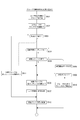
- FIG. 17 shows an automatic synchronization off process executed by the library server 4 mainly by the function of the library management unit 23. For example, the library server 4 periodically performs the process of FIG. 17 for each user registered in the library DB 9.
- the library server 4 selects a user in step S601 in FIG. That is, one registered user is selected for processing.
- the library server 4 reads out and acquires the library information LIF of the selected user from the library DB 9.
- step S603 the library server 4 confirms the automatic synchronization off setting of the user from the user field UF of the acquired library information LIF.
- This is information set by the user on the setting screen 80 as shown in FIG.
- the state before setting by the user may be, for example, “automatic synchronization off is not executed” by default, or “notify 30 days after reading” for a specific number of days (for example, 30 days). Or “Synchronization off 30 days after reading” may be set.
- step S605 the library server 4 confirms the yth content information in the content field CF. Specifically, whether the synchronization is on in step S606, whether it has been read in step S607 (whether the reading date / time is registered), whether it is a series content in step S608, or the number of days x from the reading date / time in step S609 make sure that If the synchronization information of the y-th content is synchronization off, it is naturally excluded from the automatic synchronization off target, and therefore the process proceeds from step S606 to S612. The process returns to step S605. That is, the process proceeds to the next content process.
- step S608 If the synchronization-on-state y-th content has been read, it is checked in step S608 whether the content is series content.
- the series content here means content belonging to a specific content group. For example, contents belonging to a content group whose group condition is “same title” (for example, volumes 1 to 15 of “BBB”) are set as series content.
- the series content here may be group content grouped under other group conditions, or grouped content may be treated as series content regardless of group conditions. .
- step S608 the library server 4 proceeds from step S608 to S611, and confirms synchronization information of other content belonging to the same group. Then, only when all other contents belonging to the same group are synchronized off, the process proceeds to step S609 as being subject to automatic synchronization off. If even one of the other contents is synchronized on, it is not subject to automatic synchronization off. Then, the process proceeds to step S612.
- step S609 the library server 4 confirms whether or not x days have passed since the completion of reading of the y-th content. That is, the elapse of x days is determined by comparing the information of the current date and time with the completion date of reading. If x days have passed, the process proceeds to step S610. In step S610, the library server 4 designates the y-th content as a synchronization-off candidate.
- step S614 the library server 4 confirms whether or not there is content that has been set as a synchronization-off candidate in the process of step S610. If not, the process for the user being processed is terminated, and the process proceeds to step S619. If there is an unprocessed user, the process returns from step S619 to S601, and the process for the next user is performed.
- step S615 If there is content that is a synchronization-off candidate for a certain user, the library server 4 proceeds to step S615 and checks whether or not the user wants to be notified. If the automatic synchronization OFF setting is “notify on day (x) after reading”, a notification process is performed in step S616. That is, the user is notified of the content name specified as the synchronization-off candidate and the request for permission of synchronization-off. This notification may be displayed when the corresponding user logs in to the library page 40 at the user terminal 5, or may be notified separately by e-mail or the like. In the image based on this notification (or the page transitioned by the link attached to the notification), the user can perform the synchronization off permission operation.
- the synchronization off permission operation is detected by the library server 4 in step S200 of FIG. 10, for example, and the processing of steps S201 to S204 may be performed on one or a plurality of contents that are candidates for automatic synchronization off. .
- the processing of steps S201 to S204 may be performed on one or a plurality of contents that are candidates for automatic synchronization off.
- the designation of the synchronization-off candidate is canceled.
- step S615 the library server 4 proceeds from step S615 to S617, and one or a plurality of contents determined as automatic synchronization off candidates Turn off synchronization for. That is, the library DB 9 is updated so that the synchronization information of the content field CF is changed to the synchronization off state.
- step S618 the library server 4 instructs the user terminal 5 of the user to be processed to delete the data of the synchronized content. In response to this, the user terminal 5 deletes the content data from the storage area in the user terminal 5. However, at this time, it is assumed that the user terminal 5 is not logged in to the web page provided by the library server 4 or the browsing software is not activated. If the user terminal 5 is not in a situation where the content data can be deleted, the deletion instruction may be issued after waiting for a state where the content data can be deleted.
- the content for which automatic synchronization is turned off can be confirmed by the user logging in to the library page 40 after that.
- notification of execution of automatic synchronization off or notification by e-mail is sent. You may make it do.
- step S618 When the process is completed for all users, the process of FIG. 17 is terminated from step S618.
- the automatic synchronization off process is performed, and the read content is processed according to the automatic synchronization off setting selected by the user.
- the process of FIG. 17 is an example. For example, a processing example that does not consider the conditions of the series content in steps S608 and S611 is also assumed. Further, various conditions for step S611 are conceivable. For example, if the majority of other content in the same group is synchronized off, the process proceeds to step S609.
- Evaluation information update processing> In the library page 40 of FIG. 5, an example is shown in which the evaluation level 54 is displayed for each content listed in the content list 41.
- the evaluation level 54 (for example, the number of ⁇ marks) is set by, for example, user input, etc.
- the evaluation level 54 can be automatically set using the period of the synchronous on state as an evaluation index. That is, the evaluation information is automatically updated in accordance with the synchronization period information for each content of the library data LIF.
- the library server 4 sequentially performs the processing of FIG. 18 mainly by the function of the evaluation processing unit 25.
- the library server 4 selects a user in step S701 in FIG. That is, one registered user is selected for processing.
- the library server 4 reads out and acquires the library information LIF of the selected user from the library DB 9.
- the number of contents Y is the number of contents registered in the content field CF for the user.
- step S704 the library server 4 confirms the y-th content information in the content field CF. Specifically, it is confirmed whether or not the y-th content is in a synchronization-on state. If the synchronization information of the y-th content is off, the library server 4 proceeds from step S705 to S708 as out of the evaluation information update target. If the variable y has not reached the content number Y, the variable y is incremented at step S709. Then, the process returns to step S704. That is, the process proceeds to the next content process.
- the library server 4 proceeds to step S706 and confirms the information on the synchronization period of the content.
- the synchronization period is a synchronization-on continuation period or a cumulative period of synchronization-on days.
- the library server 4 updates the evaluation information according to the number of days in the synchronization period. For example, a threshold value for each step is set as the evaluation level, and the evaluation information is updated so that the evaluation level is increased by one step if the number of days in the synchronization period exceeds a certain threshold value.
- step S708 After performing the processes of steps S704 to S709 for each content owned by the target user while incrementing the variable y, the process proceeds from step S708 to S710.
- the process of FIG. 18 is terminated from step S710.
- the library server 4 (information processing apparatus) according to the embodiment manages the library information LIF registered in the library DB 9 so that the owned content for each user includes synchronization information that enables use of each content at the user terminal.
- a library management unit 23 is included.
- the logged-in user terminal 5 includes a presentation processing unit 24 that performs processing for presenting the content owned by the logged-in user and the synchronization state based on the library information LIF.
- the library management unit 23 sets a content group by performing a grouping process on a plurality of contents for each user registered in the library information LIF.
- the presentation control unit 24 performs a process of causing the logged-in user terminal 5 to execute content group presentation (display of the group page 60) that enables synchronization operations in units of content groups of content owned by the logged-in user.
- the library management unit 23 performs group synchronization update processing (S241 in FIG. 11 and FIG. 15) for updating the synchronization information for each content included in the content group to be operated in accordance with the synchronization operation in units of content groups.
- the content purchased by the user and used for browsing or the like is managed by the library information LIF, and the user can check the content managed by the library information LIF on the user terminal 5. At this time, the user can also confirm and arbitrarily operate synchronization on / off for each content.
- the content can be downloaded to the user terminal and viewed.
- the library server 4 sets the content group by the grouping process, and provides the user with an environment capable of performing the synchronization operation in units of groups.
- the user can instruct synchronous on or synchronous off for a plurality of related contents. Therefore, it is easy for the user to manage content synchronization.
- the synchronization operation is remarkably easy for a user who owns a large amount of content. As the amount of purchased e-book contents increases, it becomes easier for users to select what they want to read at the present time and what they do not want to read at the present time. This is a convenient function for the user.
- the library server 4 performs a grouping process for the owned content including the purchased content every time the user purchases the content purchase information (S221 in FIG. 10, FIG. 13). That is, since grouping is performed in response to content being added by purchase, content newly added by purchase can be appropriately grouped each time.
- the library server 4 performs grouping processing for owned content including purchased content, and when a content group including purchased content is set, at least a content group including purchased content is synchronized in units of content groups.
- the user terminal 5 is caused to execute the content group presentation (display of the group page 60) to be enabled (S222 to S224 in FIG. 10).
- the content group presentation display of the group page 60
- an environment in which the content group can be collectively synchronized can be provided to the user.
- the related book can be easily read by collectively bringing the purchased item and the related book into a state where the synchronization operation is possible. For example, when the purchased content is volume 15 titled “BBB”, it is very easy for the user to synchronize volumes 1 to 15 of “BBB” owned so far.
- the library server 4 performs a grouping process on the owned contents for users whose number of owned contents is greater than or equal to a predetermined number (S103 in FIG. 9 and S304 in FIG. 13).
- a predetermined number S103 in FIG. 9 and S304 in FIG. 13.
- the library server 4 performs the grouping process by extracting the content corresponding to any of the content title condition, the content attribute condition, the keyword condition, and the content purchase time condition (S105 to S108 in FIG. 9, FIG. 13).
- These group conditions are conditions suitable for content grouping to be collectively synchronized operation targets, that is, conditions for performing grouping that is easy for the user to perform batch operation targets. For example, depending on the content title condition, continuous content such as volume 1 to volume n can be grouped.
- grouping by the same author, the same publisher, the same translator, the same genre, the same language, etc. can be performed.
- grouping that makes it easy for the user to use the collective synchronization operation based on the keyword specified by the user becomes possible. For example, by grouping a plurality of ungrouped contents by specifying keywords (S406 to S409 in FIG. 14), it is possible to set a group convenient for the user. Depending on the content purchase time condition, for example, grouping as content purchased at a specific time becomes possible.
- the library server 4 sets the latest predetermined number of contents to the content group with reference to the content purchase time (S105 to S108 in FIG. 9, S306 to S309, S310 to S313 in FIG. 13, FIG. 14 S406 to S409).
- the latest predetermined number of contents can be grouped in the grouping process in the purchase handling process, so that the latest contents can be synchronized at the time of purchase.
- the library server 4 manages information (unread flag) on the use status of each content in the user terminal 5 in the library information LIF.
- group synchronization update process when the synchronization off operation is performed in units of content groups, different processes are performed depending on the presence of unused content in the target content group (FIG. 15 and its modifications).
- the library server 4 manages the synchronization protection setting (protection flag) of each content in the library information LIF.
- group synchronization update process when the synchronization off operation is performed in units of content groups, different processes are performed depending on the presence or absence of content for which synchronization protection is set in the target content group (FIG. 15 and FIG. 15).
- B) (c) (e) (f))
- the processing contents when there is no synchronized protection content in the content group subject to batch synchronization off for example, when there is no synchronized protection content, the synchronization of each content is turned off as it is, and there is synchronization protected content In this case, it is possible to perform user confirmation, exclusion of synchronization protection content synchronization off, and the like.
- the library server 4 manages the use completion date and time (reading date and time) of each content in the user information 5 in the library information LIF. Then, automatic synchronization off processing is performed for automatically updating the synchronization information to synchronization off for content after a predetermined period has elapsed since the date and time of reading (FIG. 17). As described above, content that has passed a predetermined period from the date and time of reading can be automatically turned off to save the user from having to turn off synchronization.
- the synchronization information of the content is updated to synchronization off on condition that all other content in the content group is synchronized off. (S608 and S611 in FIG. 17).
- the synchronization is not unconditionally turned off in accordance with the completion of the use, but is synchronized with the other content in the group. For example, when other contents in the same group are synchronized, it is assumed that it is desirable for the user not to automatically turn off the synchronization even when the use is completed.
- the library server 4 performs notification processing for the content to be updated to synchronization off by the automatic synchronization off processing, and updates the synchronization information of the content to synchronization off in response to receiving a response to the notification. (S616 in FIG. 17).
- content that is subject to automatic synchronization off processing is generated, the user is inquired about whether or not the synchronization can be turned off, and if the synchronization is turned off according to the answer, the content that does not require the user to turn off the synchronization. Can be prevented from being turned off when becomes a candidate for automatic synchronization off.
- the library server 4 manages the user setting (automatic synchronization off setting) related to the automatic synchronization off processing for each user, and updates the content subjected to the automatic synchronization off processing to the synchronization off based on the user setting. (S603, S615 in FIG. 17). Accordingly, the user can arbitrarily make the automatic synchronization off process function by performing user settings for enabling or disabling the automatic synchronization off process.
- the library server 4 updates the content synchronization information in the library information by synchronization operation from the user terminal 5 to synchronization off, it is possible to instruct the user terminal 5 to delete the content ( (S214 in FIG. 10, S507 in FIG. 15) In this way, when the synchronization is turned off, the content data in the user terminal is deleted, so that the content data does not press the user terminal capacity.
- the synchronization operation is facilitated by the processing of the present embodiment, so that the synchronization setting can be used more effectively, thereby easily dealing with the capacity situation of the user terminal. Note that, as in S618 of FIG. 17, even in the case of the automatic synchronization off setting, the user terminal 5 is instructed to delete the corresponding content.
- the automatic synchronization off setting is also useful for securing the capacity of the user terminal.
- the library server 4 also includes an evaluation processing unit 25 that refers to the period length (synchronization period) of the synchronization on state of each content registered in the library information LIF and sets content evaluation information according to the period length. .
- the period length As the period length, the duration and cumulative period of the synchronization-on state are managed, and these period lengths are used as an index for evaluating the content by the user. It is a possible period. It is assumed that the user often keeps important content in a synchronized on state. Therefore, the synchronization on period length is an index of content evaluation for the user. Therefore, the content evaluation information can be easily generated by using the continuous period or the cumulative period of the synchronization ON state.
- the processing of the information processing apparatus of the present invention is not limited to the one shown in the embodiment, and various modifications are assumed. For example, when there is content that belongs to the group and has not been read in the group synchronization off operation, similarly to the case of the unread content in FIG. Exclusion, operation cancellation, etc.). Since the DL capacity information is managed in the user field UF of the library data LIF, a process of instructing or recommending deletion of asynchronous and content data according to the DL capacity information is also conceivable.
- the content group is set by the grouping process, but the user may be allowed to designate and belong to an arbitrary content to a certain group.
- the group to be subjected to the batch synchronization operation can be customized so that it can be used easily.
- the user may arbitrarily select content and instruct grouping.
- the user may be able to perform an operation of removing any content from the grouped content from the group affiliation. This is effective when the group contains contents that the user does not want to perform the batch synchronization operation.
- the operation by the library server 4 can be applied to a content management system other than the electronic book.
- the present invention can be applied to management of contents as music, still images, moving images, and other file data.
- the program according to the embodiment is a program that causes an information processing apparatus (such as a CPU) to execute processing of the library server 4.
- the program according to the embodiment includes a function for managing library information LIF in which the owned content for each user is registered including synchronization information that enables use of each content in the user terminal 5.
- this program is a program that causes the information processing apparatus to execute the processing described with reference to FIGS. Further, there is a case where the information processing apparatus is caused to execute the processes of FIGS.
- Such a program can be stored in advance in an HDD as a storage medium built in a device such as a computer device, a ROM in a microcomputer having a CPU, or the like. Alternatively, it can be stored (stored) temporarily or permanently in a removable storage medium such as a semiconductor memory, memory card, optical disk, magneto-optical disk, or magnetic disk. Such a removable storage medium can be provided as so-called package software. Further, such a program can be installed from a removable storage medium to a personal computer or the like, or can be downloaded from a download site via a network such as a LAN or the Internet.
Landscapes
- Engineering & Computer Science (AREA)
- Theoretical Computer Science (AREA)
- General Physics & Mathematics (AREA)
- Physics & Mathematics (AREA)
- General Engineering & Computer Science (AREA)
- Business, Economics & Management (AREA)
- General Health & Medical Sciences (AREA)
- Tourism & Hospitality (AREA)
- Health & Medical Sciences (AREA)
- Human Resources & Organizations (AREA)
- Economics (AREA)
- Marketing (AREA)
- Primary Health Care (AREA)
- Strategic Management (AREA)
- General Business, Economics & Management (AREA)
- Artificial Intelligence (AREA)
- Audiology, Speech & Language Pathology (AREA)
- Computational Linguistics (AREA)
- Data Mining & Analysis (AREA)
- Databases & Information Systems (AREA)
- Management, Administration, Business Operations System, And Electronic Commerce (AREA)
- Information Transfer Between Computers (AREA)
Abstract
ユーザ毎の所有コンテンツが、各コンテンツについてのユーザ端末における使用(閲覧)を可能とする同期情報を含んで登録されたライブラリ情報を管理する。そしてライブラリ情報に基づいてユーザ端末において、ユーザが所有するコンテンツとその同期状態を提示させる処理を行う。またライブラリ情報に登録されたユーザ毎の複数のコンテンツについてグループ化処理を行ってコンテンツグループを設定し、ユーザ端末においてユーザが所有するコンテンツのコンテンツグループ単位での同期操作を可能とするコンテンツグループ提示を実行させる。そしてコンテンツグループ単位の同期操作に応じて、操作対象のコンテンツグループに含まれる各コンテンツについて同期情報を更新するグループ同期更新処理を行う。
Description
本発明は情報処理装置、情報処理方法、プログラム、記憶媒体に関し、例えば電子書籍等のコンテンツのサーバとユーザ端末での同期管理についての技術分野に関する。
ユーザがインターネット等のネットワークを介して電子書籍を購入し、自己の端末に電子書籍コンテンツをダウンロードして閲覧するような書籍閲覧形態が普及している。
上記特許文献1では、ユーザがコンテンツの権利を取得することで、バージョン違いやフォーマット違いのコンテンツを利用できることが言及されている。
上記特許文献1では、ユーザがコンテンツの権利を取得することで、バージョン違いやフォーマット違いのコンテンツを利用できることが言及されている。
電子書籍の利用の際、ユーザは必ずしも購入した全てのコンテンツを端末にダウンロードし、コンテンツデータを保存しておく必要はないようにするシステムがある。この場合、ユーザが購入したコンテンツをサーバが管理し、ユーザは自己が所有するコンテンツ、つまり閲覧権限を有するコンテンツを、サーバから提供される一覧(ライブラリ画像)を自己の端末で確認することができるようにする。
そしてユーザは、閲覧したいコンテンツについては「同期オン」とすることで、任意にダウンロードし、閲覧することが可能となる。
このようにサーバ管理を介することで、ユーザは購入コンテンツのデータを自己の端末に全て保存しておく必要もなく、また端末を変更しても対応できる。大量のコンテンツの管理も容易となる。
そしてユーザは、閲覧したいコンテンツについては「同期オン」とすることで、任意にダウンロードし、閲覧することが可能となる。
このようにサーバ管理を介することで、ユーザは購入コンテンツのデータを自己の端末に全て保存しておく必要もなく、また端末を変更しても対応できる。大量のコンテンツの管理も容易となる。
但し、このような利用形態においては、特に所有するコンテンツ数が多くなると、各コンテンツの同期状態を操作することがユーザにとって面倒になる。またダウンロードした状態のコンテンツデータが増えることにより、端末容量を圧迫することもある。
そこで本発明は、コンテンツについてのサーバとの同期のオン/オフを容易化することを目的とする。
そこで本発明は、コンテンツについてのサーバとの同期のオン/オフを容易化することを目的とする。
本発明に係る情報処理装置は、ユーザ毎の所有コンテンツが、各コンテンツについてのユーザ端末における使用を可能とする同期情報を含んで登録されたライブラリ情報を管理するライブラリ管理部と、ユーザ端末において、ユーザが所有するコンテンツとその同期状態を前記ライブラリ情報に基づいて提示させる処理を行う提示処理部とを備える。前記ライブラリ管理部は、前記ライブラリ情報に登録されたユーザ毎の複数のコンテンツについて、グループ化処理を行ってコンテンツグループを設定し、前記提示制御部は、ユーザ端末において、ユーザが所有するコンテンツのコンテンツグループ単位での同期操作を可能とするコンテンツグループ提示を実行させる処理を行い、前記ライブラリ管理部は、コンテンツグループ単位の同期操作に応じて、操作対象のコンテンツグループに含まれる各コンテンツについて同期情報を更新するグループ同期更新処理を行う。
ユーザが購入し、閲覧等の使用権限を取得したコンテンツについては、情報処理装置においてライブラリ情報によって管理され、ユーザはユーザ端末においてライブラリ情報で管理されたコンテンツを確認できる。このときに、ユーザは各コンテンツについて同期オン/オフも確認でき、また任意に操作できる。同期オンとすることで、そのコンテンツをユーザ端末にダウンロードして使用(閲覧等)ができる。
ここで情報処理装置は、グループ化処理により、コンテンツグループを設定し、ユーザに対して、グループ単位での同期操作を可能な環境を提供する。これによりユーザは、何らかの関連性のある複数コンテンツについて一括した同期オン又は同期オフを指示することが可能となる。
ユーザが購入し、閲覧等の使用権限を取得したコンテンツについては、情報処理装置においてライブラリ情報によって管理され、ユーザはユーザ端末においてライブラリ情報で管理されたコンテンツを確認できる。このときに、ユーザは各コンテンツについて同期オン/オフも確認でき、また任意に操作できる。同期オンとすることで、そのコンテンツをユーザ端末にダウンロードして使用(閲覧等)ができる。
ここで情報処理装置は、グループ化処理により、コンテンツグループを設定し、ユーザに対して、グループ単位での同期操作を可能な環境を提供する。これによりユーザは、何らかの関連性のある複数コンテンツについて一括した同期オン又は同期オフを指示することが可能となる。
上記した情報処理装置においては、前記ライブラリ管理部は、ユーザのコンテンツ購入の情報を取得する毎に、購入コンテンツを含む所有コンテンツを対象としたグループ化処理を行うことが考えられる。
即ち購入によりコンテンツが追加されることに応じて、グループ化が行われるようにする。
即ち購入によりコンテンツが追加されることに応じて、グループ化が行われるようにする。
上記した情報処理装置においては、前記提示制御部は、購入コンテンツを含む所有コンテンツを対象としたグループ化処理で、購入コンテンツを含むコンテンツグループが設定された場合は、少なくとも購入コンテンツを含むコンテンツグループをコンテンツグループ単位での同期操作を可能とするコンテンツグループ提示をユーザ端末に実行させる処理を行うことが考えられる。
即ちコンテンツ購入時に、購入コンテンツを含むグループが設定された場合、そのコンテンツグループを一括同期操作可能な環境をユーザに提供する。
即ちコンテンツ購入時に、購入コンテンツを含むグループが設定された場合、そのコンテンツグループを一括同期操作可能な環境をユーザに提供する。
上記した情報処理装置においては、前記ライブラリ管理部は、所有コンテンツ数が所定以上のユーザについて、所有コンテンツを対象としたグループ化処理を行うことが考えられる。
所有コンテンツ数が少数の場合は、グループ化して一括同期操作を可能としても有用性は小さい。そこで所有コンテンツ数が多いユーザについて、コンテンツのグループ化を行うようにする。
所有コンテンツ数が少数の場合は、グループ化して一括同期操作を可能としても有用性は小さい。そこで所有コンテンツ数が多いユーザについて、コンテンツのグループ化を行うようにする。
上記した情報処理装置においては、前記ライブラリ管理部は、グループ化処理を、コンテンツタイトル条件、コンテンツ属性条件、キーワード条件、コンテンツ購入時期条件のいずれかの条件で該当するコンテンツを抽出して行うことが考えられる。
一括での同期操作対象とするコンテンツグループ化として適切な条件を用いる。即ちユーザが一括操作対象としやすいグループ化を行う。
一括での同期操作対象とするコンテンツグループ化として適切な条件を用いる。即ちユーザが一括操作対象としやすいグループ化を行う。
上記した情報処理装置においては、前記ライブラリ管理部は、グループ化処理として、コンテンツ購入時期を参照して直近の所定数のコンテンツをコンテンツグループに設定することが考えられる。
一括での同期操作対象となるコンテンツグループ化として適切な条件として、直近の購入コンテンツをグループ化する。
一括での同期操作対象となるコンテンツグループ化として適切な条件として、直近の購入コンテンツをグループ化する。
上記した情報処理装置においては、前記ライブラリ管理部は、前記ライブラリ情報における各コンテンツのユーザ端末での使用状況の情報を管理するとともに、コンテンツグループ単位の同期オフ操作があった場合の前記グループ同期更新処理においては、対象のコンテンツグループ内での未使用のコンテンツの有無に応じて異なる処理を行うことが考えられる。
即ち同期オフ対象のコンテンツグループ内に未使用のコンテンツがない場合とある場合で処理内容を変更する。例えば未使用のコンテンツがない場合は、そのまま各コンテンツの同期オフを行い、未使用のコンテンツがある場合は、ユーザ確認、未使用コンテンツの同期オフの除外などを行う。
即ち同期オフ対象のコンテンツグループ内に未使用のコンテンツがない場合とある場合で処理内容を変更する。例えば未使用のコンテンツがない場合は、そのまま各コンテンツの同期オフを行い、未使用のコンテンツがある場合は、ユーザ確認、未使用コンテンツの同期オフの除外などを行う。
上記した情報処理装置においては、前記ライブラリ管理部は、前記ライブラリ情報における各コンテンツの同期保護設定を管理するとともに、コンテンツグループ単位の同期オフ操作があった場合の前記グループ同期更新処理においては、対象のコンテンツグループ内で同期保護が設定されたコンテンツの有無に応じて異なる処理を行うことが考えられる。
即ち同期オフ対象のコンテンツグループ内に同期保護コンテンツがない場合とある場合で処理内容を変更する。例えば同期保護コンテンツがない場合は、そのまま各コンテンツの同期オフを行い、同期保護コンテンツがある場合は、ユーザ確認、同期保護コンテンツの同期オフの除外などを行う。
即ち同期オフ対象のコンテンツグループ内に同期保護コンテンツがない場合とある場合で処理内容を変更する。例えば同期保護コンテンツがない場合は、そのまま各コンテンツの同期オフを行い、同期保護コンテンツがある場合は、ユーザ確認、同期保護コンテンツの同期オフの除外などを行う。
上記した情報処理装置においては、前記ライブラリ管理部は、前記ライブラリ情報における各コンテンツのユーザ端末における使用完了日時を管理するとともに、使用完了日時から所定期間経過後のコンテンツについて自動的に同期情報を同期オフに更新する自動同期オフ処理を行うことが考えられる。
使用完了(例えば読了)から所定期間を経過したコンテンツについては、自動的に同期オフとすることで、ユーザの同期オフの手間を省く。
使用完了(例えば読了)から所定期間を経過したコンテンツについては、自動的に同期オフとすることで、ユーザの同期オフの手間を省く。
上記した情報処理装置においては、前記ライブラリ管理部は、前記自動同期オフ処理の対象になったコンテンツが或るコンテンツグループに属する場合、当該コンテンツグループの他のコンテンツが全て同期オフであることを条件として、当該コンテンツの同期情報を同期オフに更新することが考えられる。
使用完了したコンテンツがコンテンツグループに属するコンテンツの場合、使用完了に応じて無条件に同期オフとはせず、グループ内の他のコンテンツと同期状態を合わせるようにする。
使用完了したコンテンツがコンテンツグループに属するコンテンツの場合、使用完了に応じて無条件に同期オフとはせず、グループ内の他のコンテンツと同期状態を合わせるようにする。
上記した情報処理装置においては、前記ライブラリ管理部は、同期オフに更新するコンテンツについて、ユーザに対する通知処理を行い、通知に対する回答の受信に応じて、当該コンテンツの同期情報を同期オフに更新することが考えられる。
自動同期オフ処理対象のコンテンツが発生した場合、ユーザに通知して同期オフを行って良いか否かを問い合わせる。そしてその回答に応じて同期オフとする。
自動同期オフ処理対象のコンテンツが発生した場合、ユーザに通知して同期オフを行って良いか否かを問い合わせる。そしてその回答に応じて同期オフとする。
上記した情報処理装置においては、前記ライブラリ管理部は、ユーザ毎に自動同期オフ処理に関するユーザ設定を管理し、前記自動同期オフ処理の対象になったコンテンツについて、前記ユーザ設定に基づいて同期オフへの更新を行うことが考えられる。
ユーザは自動同期オフ処理を有効/無効とするユーザ設定を行っておくことで、任意に自動同期オフ処理を機能させることができる。
ユーザは自動同期オフ処理を有効/無効とするユーザ設定を行っておくことで、任意に自動同期オフ処理を機能させることができる。
上記した情報処理装置においては、前記ライブラリ管理部は、ユーザ端末からの同期操作によりライブラリ情報におけるコンテンツの同期情報を同期オフに更新する場合には、前記ユーザ端末に対して、該当コンテンツの削除を指示することが考えられる。
同期オフ状態とされた際に、ユーザ端末におけるコンテンツデータを削除させることで、コンテンツデータがユーザ端末容量を圧迫しないようにする。
同期オフ状態とされた際に、ユーザ端末におけるコンテンツデータを削除させることで、コンテンツデータがユーザ端末容量を圧迫しないようにする。
上記した情報処理装置においては、前記ライブラリ情報に登録された各コンテンツの同期オン状態の期間長を参照し、期間長に応じてコンテンツの評価情報を設定する評価処理部を備えることが考えられる。
期間長として例えば同期オン状態の継続期間や、累積期間を管理する。そしてこれらの期間長をユーザによるコンテンツ評価の指標とする。
期間長として例えば同期オン状態の継続期間や、累積期間を管理する。そしてこれらの期間長をユーザによるコンテンツ評価の指標とする。
本発明に係る情報処理方法は、ユーザ毎の所有コンテンツが、各コンテンツについてのユーザ端末における使用を可能とする同期情報を含んで登録されたライブラリ情報を管理するステップと、ユーザ端末において、ユーザが所有するコンテンツとその同期状態を前記ライブラリ情報に基づいて提示させる処理を行うステップと、前記ライブラリ情報に登録されたユーザ毎の複数のコンテンツについて、グループ化処理を行ってコンテンツグループを設定するステップと、ユーザ端末において、ユーザが所有するコンテンツのコンテンツグループ単位での同期操作を可能とするコンテンツグループ提示を実行させる処理を行うステップと、コンテンツグループ単位の同期操作に応じて、操作対象のコンテンツグループに含まれる各コンテンツについて同期情報を更新するグループ同期更新処理を行うステップとを備える。
これにより情報処理装置(サーバ)においてユーザ毎にコンテンツグループを設定し、ユーザに対して、グループ単位での同期操作を可能な環境を提供する。
本発明に係るプログラムは、上記の各情報処理方法としての処理を情報処理装置に実行させるプログラムである。
本発明に係る記憶媒体は、上記の各プログラムを記憶した記憶媒体である。これらのプログラムや記憶媒体により上記の情報処理装置を実現する。
これにより情報処理装置(サーバ)においてユーザ毎にコンテンツグループを設定し、ユーザに対して、グループ単位での同期操作を可能な環境を提供する。
本発明に係るプログラムは、上記の各情報処理方法としての処理を情報処理装置に実行させるプログラムである。
本発明に係る記憶媒体は、上記の各プログラムを記憶した記憶媒体である。これらのプログラムや記憶媒体により上記の情報処理装置を実現する。
本発明によれば、ユーザ毎にコンテンツグループが設定され、ユーザはグループ単位での同期操作が可能となる。これにより各コンテンツの同期操作が効率化でき、特に多数のコンテンツを所有するユーザにとって同期操作性が格段に向上する。
以下、実施の形態を次の順序で説明する。
<1.システム構成>
<2.ライブラリサーバの機能構成及びデータベース>
<3.ユーザ端末でのライブラリ表示>
<4.システム動作概要>
<5.グループ化及びグループ単位の同期処理>
<6.自動同期オフ処理>
<7.評価情報更新処理>
<8.まとめ及び変形例>
<9.プログラム及び記憶媒体>
<1.システム構成>
<2.ライブラリサーバの機能構成及びデータベース>
<3.ユーザ端末でのライブラリ表示>
<4.システム動作概要>
<5.グループ化及びグループ単位の同期処理>
<6.自動同期オフ処理>
<7.評価情報更新処理>
<8.まとめ及び変形例>
<9.プログラム及び記憶媒体>
なお実施の形態では、本発明請求項にいうコンテンツの具体例は電子書籍コンテンツとし、本発明請求項にいう情報処理装置の例として、電子書籍の提供及び管理を行う電子書籍サーバを挙げる。電子書籍サーバは1又は複数の情報処理装置によって実現されるものであり、従って本発明請求項にいう情報処理装置は、1つの情報処理装置或いは複数の情報処理装置が連携して実現される。
<1.システム構成>
図1に電子書籍サービスを実現するシステム構成例を示している。
このシステムは、電子書籍サーバ2と複数のユーザ端末5がネットワーク1により相互に通信可能に接続されている。
また電子書籍サーバ2は、コンテンツストアサーバ3、ライブラリサーバ4、コンテンツデータベース6、商品管理データベース7、ユーザデータベース8、ライブラリデータベース9を備える。なお、以下では「データベース」を「DB」と表記する。
図1に電子書籍サービスを実現するシステム構成例を示している。
このシステムは、電子書籍サーバ2と複数のユーザ端末5がネットワーク1により相互に通信可能に接続されている。
また電子書籍サーバ2は、コンテンツストアサーバ3、ライブラリサーバ4、コンテンツデータベース6、商品管理データベース7、ユーザデータベース8、ライブラリデータベース9を備える。なお、以下では「データベース」を「DB」と表記する。
ネットワーク1の構成は多様な例が想定される。例えば、インターネット、イントラネット、エキストラネット、LAN(Local Area Network)、CATV(Community Antenna TeleVision)通信網、仮想専用網(Virtual Private Network)、電話回線網、移動体通信網、衛星通信網等が想定される。
またネットワーク1の全部又は一部を構成する伝送媒体についても多様な例が想定される。例えばIEEE(Institute of Electrical and Electronics Engineers)1394、USB(Universal Serial Bus)、電力線搬送、電話線等の有線でも、IrDA(Infrared Data Association)のような赤外線、ブルートゥース(登録商標)、802.11無線、携帯電話網、衛星回線、地上波デジタル網等の無線でも利用可能である。
またネットワーク1の全部又は一部を構成する伝送媒体についても多様な例が想定される。例えばIEEE(Institute of Electrical and Electronics Engineers)1394、USB(Universal Serial Bus)、電力線搬送、電話線等の有線でも、IrDA(Infrared Data Association)のような赤外線、ブルートゥース(登録商標)、802.11無線、携帯電話網、衛星回線、地上波デジタル網等の無線でも利用可能である。
ユーザ端末5は、電子書籍サーバ2を利用して電子書籍コンテンツ(以下、単に「コンテンツ」ともいう)の購入、ダウンロードを行い、ダウンロードしたコンテンツの使用(閲覧)を行うユーザの端末装置である。ユーザ端末5は例えばパーソナルコンピュータ、携帯電話機、又は携帯情報端末等の情報処理装置により実現される。
ユーザ端末5においては、ブラウザを用いたウェブページ閲覧によりコンテンツストアサーバ3が提供するコンテンツ販売サイトを閲覧し、検索や購入を行ったり、ライブラリサーバ4が提供するウェブページにより自己のライブラリ情報を閲覧したりすることができる。
またユーザ端末5にダウンロードしたコンテンツについては、ユーザ端末5で電子書籍コンテンツの閲覧ソフトウエアが起動されることで閲覧が行われる。また閲覧ソフトウエアによって電子書籍サーバ2へのダウンロードの要求や、閲覧ページ数の通知なども行われる。
ユーザ端末5においては、ブラウザを用いたウェブページ閲覧によりコンテンツストアサーバ3が提供するコンテンツ販売サイトを閲覧し、検索や購入を行ったり、ライブラリサーバ4が提供するウェブページにより自己のライブラリ情報を閲覧したりすることができる。
またユーザ端末5にダウンロードしたコンテンツについては、ユーザ端末5で電子書籍コンテンツの閲覧ソフトウエアが起動されることで閲覧が行われる。また閲覧ソフトウエアによって電子書籍サーバ2へのダウンロードの要求や、閲覧ページ数の通知なども行われる。
電子書籍サーバ2において、コンテンツストアサーバ3は、ユーザに電子書籍コンテンツを販売するウェブサイトを提供するサーバである。
コンテンツストアサーバ3は、ユーザ端末5からのアクセスに応じて電子書籍ストアとしてのウェブページを提供し、ユーザによる書籍検索、購入、ダウンロードの環境を提供する。
ライブラリサーバ4は、ライブラリDB9を用いてのユーザ毎の所有コンテンツの管理や、ユーザ端末5への管理画面(ライブラリ画面)の提供等を行う。またこれらの管理のために電子書籍サーバ2からユーザの購入情報など必要な情報を取得する。
コンテンツストアサーバ3は、ユーザ端末5からのアクセスに応じて電子書籍ストアとしてのウェブページを提供し、ユーザによる書籍検索、購入、ダウンロードの環境を提供する。
ライブラリサーバ4は、ライブラリDB9を用いてのユーザ毎の所有コンテンツの管理や、ユーザ端末5への管理画面(ライブラリ画面)の提供等を行う。またこれらの管理のために電子書籍サーバ2からユーザの購入情報など必要な情報を取得する。
コンテンツDB6は、コンテンツストアサーバ3によって販売される各種電子書籍としてのコンテンツデータを格納するDBである。コンテンツストアサーバ3は、ユーザ端末5からの要求に応じて、ユーザが所有するコンテンツをコンテンツDB6からダウンロードさせる。
商品管理DB7は、コンテンツストアサーバ3による商品管理のための各種データが記憶されるDBである。即ち商品とする各コンテンツについての商品タイトル、価格、データサイズ、著作者、出版社その他の属性情報や、販売履歴情報、販売管理情報等が記憶される。
商品管理DB7は、コンテンツストアサーバ3による商品管理のための各種データが記憶されるDBである。即ち商品とする各コンテンツについての商品タイトル、価格、データサイズ、著作者、出版社その他の属性情報や、販売履歴情報、販売管理情報等が記憶される。
ユーザDB8には、電子書籍サーバ2を利用するユーザに関するデータが登録される。例えば登録されたユーザ毎に、ユーザ識別情報であるユーザID(identification)、ログインのパスワード、住所、氏名、性別や年齢等の属性情報、決済情報、電子メールアドレスなどが登録される。また各ユーザの購入履歴として、コンテンツストアサーバ3を介して行われた取引の履歴、つまりユーザのコンテンツ購入履歴に関するデータが登録される。例えばユーザID毎に、購入コンテンツのコンテンツID、購入日時、購入価格等が登録される。さらに各ユーザの電子書籍販売ウェブサイトでの書籍検索履歴、書籍紹介ページの閲覧履歴、お気に入り登録情報なども記憶される。
ライブラリDB9は、ユーザ毎に所有するコンテンツ及びその同期状態が登録される。
ここでいう「所有するコンテンツ」とは、ユーザの購入行為や何らかのサービスによって、そのユーザが使用権限(閲覧権限)を有することになったコンテンツである。即ち「所有」とはコンテンツデータをユーザ端末5にダウンロードしている状態を指すものではなく、ダウンロードして閲覧できる権限を持った状態をいう。
本システムでは、或るユーザAが電子書籍コンテンツを購入した場合、そのコンテンツが、ライブラリDB9において、そのユーザAの所有コンテンツとして登録される。
ユーザAは、自己のユーザ端末5によりライブラリサーバ4が提供する管理ページ(後述するライブラリページ40等)にアクセスでき、自己が所有するコンテンツを確認することができる。
この管理ページ上でユーザAは、所有する各コンテンツについて任意に、電子書籍サーバ2と自己のユーザ端末5間での「同期オン」「同期オフ」を切換設定できる。購入時のデフォルトでは例えば同期オンとされていてもよいし、同期オフでもよい。
同期オンとすることで、そのコンテンツを閲覧することが可能な状態となる。即ちユーザ端末5において電子書籍サーバ2から逐次コンテンツをダウンロードして閲覧することが可能な状態となる。
同期オフとすることで閲覧可能状態が解除される。但し同期オフとしても、それは単にそのままでは閲覧できないというだけのもので、所有状態は維持され、その後再び同期オンとすれば、閲覧することができる。
このような使用形態にために、ライブラリDB9では各ユーザの所有コンテンツ及びそれらの同期状態を管理する。
ここでいう「所有するコンテンツ」とは、ユーザの購入行為や何らかのサービスによって、そのユーザが使用権限(閲覧権限)を有することになったコンテンツである。即ち「所有」とはコンテンツデータをユーザ端末5にダウンロードしている状態を指すものではなく、ダウンロードして閲覧できる権限を持った状態をいう。
本システムでは、或るユーザAが電子書籍コンテンツを購入した場合、そのコンテンツが、ライブラリDB9において、そのユーザAの所有コンテンツとして登録される。
ユーザAは、自己のユーザ端末5によりライブラリサーバ4が提供する管理ページ(後述するライブラリページ40等)にアクセスでき、自己が所有するコンテンツを確認することができる。
この管理ページ上でユーザAは、所有する各コンテンツについて任意に、電子書籍サーバ2と自己のユーザ端末5間での「同期オン」「同期オフ」を切換設定できる。購入時のデフォルトでは例えば同期オンとされていてもよいし、同期オフでもよい。
同期オンとすることで、そのコンテンツを閲覧することが可能な状態となる。即ちユーザ端末5において電子書籍サーバ2から逐次コンテンツをダウンロードして閲覧することが可能な状態となる。
同期オフとすることで閲覧可能状態が解除される。但し同期オフとしても、それは単にそのままでは閲覧できないというだけのもので、所有状態は維持され、その後再び同期オンとすれば、閲覧することができる。
このような使用形態にために、ライブラリDB9では各ユーザの所有コンテンツ及びそれらの同期状態を管理する。
ライブラリDB9で所有コンテンツが管理されることで、ユーザにとっては自己の複数のユーザ端末5でコンテンツを閲覧する場合や、ユーザ端末5を変更する場合に便利となる。また必ずしもダウンロードしたコンテンツデータ自体を常に保存しておく必要はないため、ユーザ端末5でのデータ容量を電子書籍コンテンツによって圧迫しないようにすることもできる。
なお電子書籍サーバ2におけるコンテンツストアサーバ3、ライブラリサーバ4は、別体の情報処理装置で構成されてもよいし、一体の情報処理装置で構成されても良い。
またコンテンツDB6、商品管理DB7、ユーザDB8、ライブラリDB9は、コンテンツストアサーバ3やライブラリサーバ4とは別のサーバコンピュータ内に構築されていてもよいし、電子書籍サーバ2としてのローカルなシステム内に構築されていてもよい。
また図示及び説明の便宜上、コンテンツDB6、商品管理DB7、ユーザDB8、ライブラリDB9を示したが、これらのDBはコンテンツストアサーバ3やライブラリDB9がアクセス可能とされていればどのような形態で実現されていてもよい。
もちろん各DBが一つの装置(例えば一つのHDD等)内に形成されている必要はない。また各DBのそれぞれが、それぞれ1つのDBとして構成される必要もない。例えばライブラリDB9として記憶される情報について後述するが、それらが複数のDBにより記憶管理されてもよい。実施の形態で説明する各DBは、実施の形態の処理に関連する情報の記憶部を、それぞれ1つのDBの形態で例示したものに過ぎない。
またコンテンツDB6、商品管理DB7、ユーザDB8、ライブラリDB9は、コンテンツストアサーバ3やライブラリサーバ4とは別のサーバコンピュータ内に構築されていてもよいし、電子書籍サーバ2としてのローカルなシステム内に構築されていてもよい。
また図示及び説明の便宜上、コンテンツDB6、商品管理DB7、ユーザDB8、ライブラリDB9を示したが、これらのDBはコンテンツストアサーバ3やライブラリDB9がアクセス可能とされていればどのような形態で実現されていてもよい。
もちろん各DBが一つの装置(例えば一つのHDD等)内に形成されている必要はない。また各DBのそれぞれが、それぞれ1つのDBとして構成される必要もない。例えばライブラリDB9として記憶される情報について後述するが、それらが複数のDBにより記憶管理されてもよい。実施の形態で説明する各DBは、実施の形態の処理に関連する情報の記憶部を、それぞれ1つのDBの形態で例示したものに過ぎない。
続いて図1に示したコンテンツストアサーバ3、ライブラリサーバ4、ユーザ端末5を構成する情報処理装置のハードウエア構成を図2に示す。コンテンツストアサーバ3、ライブラリサーバ4、ユーザ端末5として示した各装置は、情報処理および情報通信が可能な図2に示すようなコンピュータ装置として実現できる。
図2において、コンピュータ装置のCPU(Central Processing Unit)101は、ROM( Read Only Memory)102に記憶されているプログラム、または記憶部108からRAM( Random Access Memory )103にロードされたプログラムに従って各種の処理を実行する。RAM103にはまた、CPU101が各種の処理を実行する上において必要なデータなども適宜記憶される。
CPU101、ROM102、およびRAM103は、バス104を介して相互に接続されている。このバス104には、入出力インターフェース105も接続されている。
入出力インターフェース105には、キーボード、マウス、タッチパネルなどよりなる入力部106、LCD(Liquid Crystal Display)、CRT(Cathode Ray Tube)、有機EL(Electroluminescence)パネルなどよりなるディスプレイやスピーカなどよりなる出力部107、HDD(Hard Disk Drive)やフラッシュメモリ装置などより構成される記憶部108、ネットワーク1を介しての通信処理や機器間通信を行う通信部109が接続されている。
入出力インターフェース105にはまた、必要に応じてメディアドライブ110が接続され、磁気ディスク、光ディスク、光磁気ディスク、或いは半導体メモリなどのリムーバブルメディア111が適宜装着され、リムーバブルメディア111に対する情報の書込や読出が行われる。
CPU101、ROM102、およびRAM103は、バス104を介して相互に接続されている。このバス104には、入出力インターフェース105も接続されている。
入出力インターフェース105には、キーボード、マウス、タッチパネルなどよりなる入力部106、LCD(Liquid Crystal Display)、CRT(Cathode Ray Tube)、有機EL(Electroluminescence)パネルなどよりなるディスプレイやスピーカなどよりなる出力部107、HDD(Hard Disk Drive)やフラッシュメモリ装置などより構成される記憶部108、ネットワーク1を介しての通信処理や機器間通信を行う通信部109が接続されている。
入出力インターフェース105にはまた、必要に応じてメディアドライブ110が接続され、磁気ディスク、光ディスク、光磁気ディスク、或いは半導体メモリなどのリムーバブルメディア111が適宜装着され、リムーバブルメディア111に対する情報の書込や読出が行われる。
このようなコンピュータ装置では、通信部109による通信によりデータやプログラムのアップロード、ダウンロードが行われたり、リムーバブルメディア111を介したデータやプログラムの受け渡しをしたりすることが可能である。
CPU101が各種のプログラムに基づいて処理動作を行うことで、コンテンツストアサーバ3、ライブラリサーバ4、ユーザ端末5としての必要な情報処理や通信が実行される。
なお、コンテンツストアサーバ3、ライブラリサーバ4、ユーザ端末5を構成する情報処理装置は、図2のようなコンピュータ装置が単一で構成されることに限らず、複数のコンピュータ装置がシステム化されて構成されてもよい。複数のコンピュータ装置は、LAN等によりシステム化されていてもよいし、インターネット等を利用したVPN等により遠隔地に配置されたものでもよい。
CPU101が各種のプログラムに基づいて処理動作を行うことで、コンテンツストアサーバ3、ライブラリサーバ4、ユーザ端末5としての必要な情報処理や通信が実行される。
なお、コンテンツストアサーバ3、ライブラリサーバ4、ユーザ端末5を構成する情報処理装置は、図2のようなコンピュータ装置が単一で構成されることに限らず、複数のコンピュータ装置がシステム化されて構成されてもよい。複数のコンピュータ装置は、LAN等によりシステム化されていてもよいし、インターネット等を利用したVPN等により遠隔地に配置されたものでもよい。
<2.ライブラリサーバの機能構成及びデータベース>
図3に1又は複数の情報処理装置で構成されるライブラリサーバ4としての機能構成を示す。ライブラリサーバ4としての各機能は、情報処理装置においてCPU101でプログラムに応じて実行される処理により実現される機能である。但し以下説明する全部又は一部の各構成の処理をハードウエアにより実現してもよい。
また各機能をソフトウエアで実現する場合に、各機能がそれぞれ独立したプログラムで実現される必要はない。1つのプログラムにより複数の機能の処理が実行されてもよいし、1つの機能が複数のプログラムモジュールの連携で実現されてもよい。
ライブラリサーバ4は、通信部21、ユーザ管理部22、ライブラリ管理部23、提示処理部24、評価処理部25を有する。
図3に1又は複数の情報処理装置で構成されるライブラリサーバ4としての機能構成を示す。ライブラリサーバ4としての各機能は、情報処理装置においてCPU101でプログラムに応じて実行される処理により実現される機能である。但し以下説明する全部又は一部の各構成の処理をハードウエアにより実現してもよい。
また各機能をソフトウエアで実現する場合に、各機能がそれぞれ独立したプログラムで実現される必要はない。1つのプログラムにより複数の機能の処理が実行されてもよいし、1つの機能が複数のプログラムモジュールの連携で実現されてもよい。
ライブラリサーバ4は、通信部21、ユーザ管理部22、ライブラリ管理部23、提示処理部24、評価処理部25を有する。
通信部21は、ネットワーク1を介してのユーザ端末5或いは他の情報処理装置との各種通信を行う。例えば通信部21は、ユーザ端末5においてブラウザ上で提示されるウェブページを構成するHTMLデータの送信や、ユーザ端末5において行われたウェブ画面上での入力情報の受信等を行う。また通信部21は、ユーザ端末5に対する電子メール送信等を行う機能も含む。
ユーザ管理部22は、ユーザについてのログイン処理や、ユーザDB8からの情報取得、更新等を行う。
ユーザ管理部22は、ユーザについてのログイン処理や、ユーザDB8からの情報取得、更新等を行う。
ライブラリ管理部23は、主にライブラリDB9の更新管理を行う。ライブラリDB9にはユーザ毎の所有コンテンツが、各コンテンツについてのユーザ端末における利用を可能とする同期情報を含んで登録されたライブラリ情報が記憶されている。ライブラリ管理部23は、ユーザのコンテンツ購入に応じたタイミングで、そのユーザのライブラリ情報を更新する処理や、ユーザの操作等に応じての各コンテンツの同期設定の更新等を行う。
またライブラリ管理部23はライブラリ情報に登録されたユーザ毎の複数のコンテンツについて、グループ化処理を行ってコンテンツグループを設定する処理や、グループ単位での同期操作に対応した処理も行う。さらにユーザ端末5でのコンテンツの読了に応じた自動的な同期オフ処理も行う。
またライブラリ管理部23はライブラリ情報に登録されたユーザ毎の複数のコンテンツについて、グループ化処理を行ってコンテンツグループを設定する処理や、グループ単位での同期操作に対応した処理も行う。さらにユーザ端末5でのコンテンツの読了に応じた自動的な同期オフ処理も行う。
提示処理部24は、電子書籍サービスの管理画面としてのウェブページをユーザに提供する処理を行う。例えばログイン状態のユーザ端末に対し、そのログインユーザのライブラリ表示を実行させるためのウェブページの生成(HTMLデータ生成)を行う。ライブラリ表示としては、所有コンテンツの一覧表示、コンテンツグループ表示などを行うとともに、それらの表示上でユーザが同期操作を可能とする表示を行う。
評価処理部25は、ライブラリDB9にいてユーザ毎のライブラリ情報として登録された各コンテンツの同期オン状態の期間長を参照し、期間長に応じてコンテンツの評価情報を設定する評価処理を行う。
続いて図4によりライブラリDB9の構造例を説明する。
ライブラリDB9は、例えば図4のようにユーザ毎にライブラリ情報LIFを管理する構造とされている。
一人のユーザに対するライブラリ情報LIFとしては、ユーザフィールドUF、コンテンツフィールドCF、グループフィールドGFとしてのデータ領域が設けられる。
ライブラリDB9は、例えば図4のようにユーザ毎にライブラリ情報LIFを管理する構造とされている。
一人のユーザに対するライブラリ情報LIFとしては、ユーザフィールドUF、コンテンツフィールドCF、グループフィールドGFとしてのデータ領域が設けられる。
ユーザフィールドUFには、ユーザに関する情報が登録される。ユーザIDによりユーザが特定される。このユーザIDはユーザDB8が管理するユーザIDと共通か、又は紐づけられていることが望ましい。
ユーザ属性の情報として、ログインのパスワード、住所、氏名、性別や年齢等の属性情報、電子メールアドレスなどが登録される。
端末情報として、当該ユーザが用いる1又は複数のユーザ端末5の情報(機種、種別、IPアドレス等)が登録される。
DL(ダウンロード)容量情報として、ユーザ端末5にダウンロードした状態となっているコンテンツの容量(データサイズ)の情報が登録される。複数のユーザ端末5を使用するユーザに対しては、ユーザ端末5毎のダウンロード容量が登録されるようにするとよい。
自動同期オフ設定の情報として、後述する読了に応じた自動同期オフ処理に関する設定情報が登録される。例えば自動同期オフの許可設定や、読了からの日数設定などの情報である。
ユーザ属性の情報として、ログインのパスワード、住所、氏名、性別や年齢等の属性情報、電子メールアドレスなどが登録される。
端末情報として、当該ユーザが用いる1又は複数のユーザ端末5の情報(機種、種別、IPアドレス等)が登録される。
DL(ダウンロード)容量情報として、ユーザ端末5にダウンロードした状態となっているコンテンツの容量(データサイズ)の情報が登録される。複数のユーザ端末5を使用するユーザに対しては、ユーザ端末5毎のダウンロード容量が登録されるようにするとよい。
自動同期オフ設定の情報として、後述する読了に応じた自動同期オフ処理に関する設定情報が登録される。例えば自動同期オフの許可設定や、読了からの日数設定などの情報である。
コンテンツフィールドCFには、そのユーザが所有する電子書籍コンテンツが登録される。
コンテンツは、コンテンツIDにより識別される。そして各コンテンツについて同期状態(同期オン/オフ)が記憶される。
また、各コンテンツについては、コンテンツタイトルや電子データとしてのデータサイズが登録される。またコンテンツ属性として、その電子書籍についての著者、出版社、発売日、ページ数、価格、ジャンル、書籍種別等の情報が記憶される。
購入日時の情報として、当該ユーザが当該コンテンツを購入した日時情報が登録される。
DL(ダウンロード)履歴の情報として、当該コンテンツをユーザ端末にダウンロードした日時、回数、部分的なダウンロードの場合のダウンロード済みページの情報、ダウンロード先のユーザ端末5の識別情報などが記憶される。
読了日時の情報として、当該コンテンツをユーザ端末5において読了したときの日時情報が記憶される。例えばユーザ端末5における閲覧ソフトウエアによって提供される閲覧ページの情報が、そのコンテンツの最終ページに達した日時を読了日時とすれば良い。あるいは、読了情報がユーザ端末5から送信される場合は、その読了情報の受信日時とすればよい。
しおり情報として、当該コンテンツの現在の閲覧ページ(読書中断箇所のページ)の情報が記憶される。この情報もユーザ端末5における閲覧ソフトウエアによって提供される。
未読フラグとして、コンテンツが全くユーザで閲覧されていないことを示すフラグが記憶される。例えば同期オン状態のコンテンツについて、最初にダウンロードした時点で未読フラグがオンとされ、その後ユーザ端末5から閲覧ページの情報が最初に送信されてきた時点で、未読フラグがオフとされるものとする。これにより、ユーザが全く閲覧していない状況であるか、一部分でも閲覧した状況かを未読フラグで判定できる。
保護フラグとして、ユーザが当該コンテンツについて同期オン状態の維持を希望しているか否かの情報が示される。例えば後述するグループ単位の同期操作により同期オフとされないことをユーザが選択した場合に保護フラグがオンとされる。
評価情報として、当該コンテンツについてユーザの評価レベルの情報が記憶される。
同期期間の情報として、当該コンテンツの同期オン状態の期間長、例えば同期オンの継続日数や累積日数が把握できる情報が記憶される。例えば累積日数を把握する場合、同期オン状態の開始/終了日が都度登録され、継続日数を把握する場合は最新の同期オンの開始日の情報が記憶されればよい。
コンテンツは、コンテンツIDにより識別される。そして各コンテンツについて同期状態(同期オン/オフ)が記憶される。
また、各コンテンツについては、コンテンツタイトルや電子データとしてのデータサイズが登録される。またコンテンツ属性として、その電子書籍についての著者、出版社、発売日、ページ数、価格、ジャンル、書籍種別等の情報が記憶される。
購入日時の情報として、当該ユーザが当該コンテンツを購入した日時情報が登録される。
DL(ダウンロード)履歴の情報として、当該コンテンツをユーザ端末にダウンロードした日時、回数、部分的なダウンロードの場合のダウンロード済みページの情報、ダウンロード先のユーザ端末5の識別情報などが記憶される。
読了日時の情報として、当該コンテンツをユーザ端末5において読了したときの日時情報が記憶される。例えばユーザ端末5における閲覧ソフトウエアによって提供される閲覧ページの情報が、そのコンテンツの最終ページに達した日時を読了日時とすれば良い。あるいは、読了情報がユーザ端末5から送信される場合は、その読了情報の受信日時とすればよい。
しおり情報として、当該コンテンツの現在の閲覧ページ(読書中断箇所のページ)の情報が記憶される。この情報もユーザ端末5における閲覧ソフトウエアによって提供される。
未読フラグとして、コンテンツが全くユーザで閲覧されていないことを示すフラグが記憶される。例えば同期オン状態のコンテンツについて、最初にダウンロードした時点で未読フラグがオンとされ、その後ユーザ端末5から閲覧ページの情報が最初に送信されてきた時点で、未読フラグがオフとされるものとする。これにより、ユーザが全く閲覧していない状況であるか、一部分でも閲覧した状況かを未読フラグで判定できる。
保護フラグとして、ユーザが当該コンテンツについて同期オン状態の維持を希望しているか否かの情報が示される。例えば後述するグループ単位の同期操作により同期オフとされないことをユーザが選択した場合に保護フラグがオンとされる。
評価情報として、当該コンテンツについてユーザの評価レベルの情報が記憶される。
同期期間の情報として、当該コンテンツの同期オン状態の期間長、例えば同期オンの継続日数や累積日数が把握できる情報が記憶される。例えば累積日数を把握する場合、同期オン状態の開始/終了日が都度登録され、継続日数を把握する場合は最新の同期オンの開始日の情報が記憶されればよい。
グループフィールドGFには、コンテンツフィールドCFに登録されたコンテンツについてグループ化が行われた結果の情報が記憶される。即ち設定されたコンテンツグループ(以下、単に「グループ」ともいう)がグループIDによって登録される。
各グループについては、グループ属性や該当コンテンツの情報が記憶される。
グループ属性とは、グループ化の条件、グループタイトル、所属コンテンツ数、グループ設定/更新の日時などの情報が含まれる。
グループ化の条件とは、グループ化のためのコンテンツ選択の条件である。例えば同一タイトルのコンテンツを1つのグループとして登録する場合、グループ化の条件とは「同一タイトル」となる。同一の著者のコンテンツを1つのグループとして登録する場合、グループ化の条件とは「同一著者」となる。
グループタイトルは、例えばユーザにグループを提示する場合に使用する名称であり、グループ化の条件や所属コンテンツに応じて設定されれば良い。例えばタイトル「BBB」というコンテンツの第1巻から第15巻が「同一タイトル」の条件で1つのグループとされた場合、グループタイトルは「BBB(1)~(15)」とすればよい。或いは「同一著者」の条件で○○氏著作のコンテンツのグループの場合、グループタイトルは「著者○○」とすればよい。例えばこのような例により、グループ化の際にグループタイトルをライブラリサーバ4が自動設定すればよい。
各グループについては、グループ属性や該当コンテンツの情報が記憶される。
グループ属性とは、グループ化の条件、グループタイトル、所属コンテンツ数、グループ設定/更新の日時などの情報が含まれる。
グループ化の条件とは、グループ化のためのコンテンツ選択の条件である。例えば同一タイトルのコンテンツを1つのグループとして登録する場合、グループ化の条件とは「同一タイトル」となる。同一の著者のコンテンツを1つのグループとして登録する場合、グループ化の条件とは「同一著者」となる。
グループタイトルは、例えばユーザにグループを提示する場合に使用する名称であり、グループ化の条件や所属コンテンツに応じて設定されれば良い。例えばタイトル「BBB」というコンテンツの第1巻から第15巻が「同一タイトル」の条件で1つのグループとされた場合、グループタイトルは「BBB(1)~(15)」とすればよい。或いは「同一著者」の条件で○○氏著作のコンテンツのグループの場合、グループタイトルは「著者○○」とすればよい。例えばこのような例により、グループ化の際にグループタイトルをライブラリサーバ4が自動設定すればよい。
ライブラリ管理部23は、以上のような各種のライブラリDB9の情報について、必要に応じて逐次更新を行う。
<3.ユーザ端末でのライブラリ表示>
ユーザ端末5におけるライブラリ表示について説明する。このライブラリ表示は、ユーザが電子書籍サーバ2にログインした状態でライブラリサーバ4が提供するウェブサイトにアクセスすることで、ライブラリサーバ4によってユーザ端末5に提供される表示画面である。そしてユーザはこのライブラリ表示によって自己が所有する電子書籍コンテンツの一覧と、それらの同期状態の確認及び同期操作が可能とされる。
ユーザ端末5におけるライブラリ表示について説明する。このライブラリ表示は、ユーザが電子書籍サーバ2にログインした状態でライブラリサーバ4が提供するウェブサイトにアクセスすることで、ライブラリサーバ4によってユーザ端末5に提供される表示画面である。そしてユーザはこのライブラリ表示によって自己が所有する電子書籍コンテンツの一覧と、それらの同期状態の確認及び同期操作が可能とされる。
図5にライブラリページ40の例を示す。このライブラリページ40では、例えば「あなたのライブラリ」や、「・・・さんのライブラリ」などとして、ログインユーザの個人が所有するコンテンツの表示画面であることが示される。そしてコンテンツリスト41として、所有コンテンツの一覧が表示される。
ライブラリページ40では書籍検索ボックス42が用意され、検索キーワード入力が可能とされる。また検索実行指示のための検索ボタン43が表示される。ユーザが書籍検索ボックス42にキーワードを入力して検索ボタン43を操作することで、リスト表示41に挙げられるコンテンツは検索にヒットしたコンテンツのみとされる。ユーザは所有するコンテンツの中で同期状態を確認したいコンテンツを容易に探索できる。
ライブラリページ40では、グループ検索ボックス44及び検索ボタン45が表示される。ユーザが、キーワードに該当するコンテンツグループが表示される。キーワードに該当するコンテンツグループとは、既にグループ化されてライブラリDB9のグループフィールドGFに登録されているグループでもよいし、キーワードに基づいてその際に新規設定されたグループでもよい。
またライブラリページ40ではグループ表示ボタン53が用意される。ユーザがグループ表示ボタン53を操作することで、グループを表示する画面に遷移する。この場合、例えば当該ユーザについてライブラリDB9のグループフィールドGFに登録されている各コンテンツグループが一覧表示される。
なお、ユーザがグループ検索ボックス44にキーワードを入力せずに検索ボタン45を操作した場合を、グループ表示ボタン53の操作と同様に扱うようにしてもよい。
グループを表示する画面の例は図6で後述する。
またライブラリページ40ではグループ表示ボタン53が用意される。ユーザがグループ表示ボタン53を操作することで、グループを表示する画面に遷移する。この場合、例えば当該ユーザについてライブラリDB9のグループフィールドGFに登録されている各コンテンツグループが一覧表示される。
なお、ユーザがグループ検索ボックス44にキーワードを入力せずに検索ボタン45を操作した場合を、グループ表示ボタン53の操作と同様に扱うようにしてもよい。
グループを表示する画面の例は図6で後述する。
ライブラリページ40では、コンテンツリスト41として当該ユーザの所有コンテンツが一覧表示される。コンテンツリスト41に挙げられた各コンテンツについては、例えば書籍情報46、ライブラリ追加日時47、及びライブラリ同期に関する情報などが表示される。
書籍情報46としては、例えば書籍のカバー画像、タイトル、作者、出版社などの情報がライブラリDB9の登録内容に応じて表示される。
ライブラリ追加日時47として、そのコンテンツがライブラリDB9のコンテンツフィールドCFに追加された日時(購入日時)が表示される。
また各コンテンツについては、そのユーザの当該書籍に対する評価レベル54が例えば☆マークの数などにより表示される。この評価レベル54はライブラリDB9の評価情報に基づいて表示される。
書籍情報46としては、例えば書籍のカバー画像、タイトル、作者、出版社などの情報がライブラリDB9の登録内容に応じて表示される。
ライブラリ追加日時47として、そのコンテンツがライブラリDB9のコンテンツフィールドCFに追加された日時(購入日時)が表示される。
また各コンテンツについては、そのユーザの当該書籍に対する評価レベル54が例えば☆マークの数などにより表示される。この評価レベル54はライブラリDB9の評価情報に基づいて表示される。
ライブラリ同期に関しては、同期ボタン48と同期保護ボタン49が表示される。
同期ボタン48は、ライブラリDB9に登録されたそのコンテンツについての現在の同期状態を表示するとともに、同期状態を変更する操作ボタンとして機能する。
例えば或る同期ボタン48が「同期ON」とされていることは、現在同期オン状態であること、つまりユーザ端末で閲覧可能状態であることを示す。その上で、その同期ボタン48は操作(例えばクリックやタップ)により同期オフに変更できる操作子として機能する。
また或る同期ボタン48が「同期OFF」とされていることは、現在同期オフ状態であること、つまり閲覧するには同期オンが必要であることを示す。その上で、その同期ボタン48は操作(例えばクリックやタップ)により同期オンに変更できる操作子として機能する。
同期ボタン48は、ライブラリDB9に登録されたそのコンテンツについての現在の同期状態を表示するとともに、同期状態を変更する操作ボタンとして機能する。
例えば或る同期ボタン48が「同期ON」とされていることは、現在同期オン状態であること、つまりユーザ端末で閲覧可能状態であることを示す。その上で、その同期ボタン48は操作(例えばクリックやタップ)により同期オフに変更できる操作子として機能する。
また或る同期ボタン48が「同期OFF」とされていることは、現在同期オフ状態であること、つまり閲覧するには同期オンが必要であることを示す。その上で、その同期ボタン48は操作(例えばクリックやタップ)により同期オンに変更できる操作子として機能する。
同期保護ボタン49は、ユーザが同期オン状態を解除させたくないコンテンツについて同期保護を指定又は保護指定解除をするための操作子であり、かつ同期保護状態を示す表示である。これはライブラリDB9における同期フラグの状態を表示するものとなる。図面においては実線を保護オンの状態、破線は保護オフの状態を示すものとしている。
後述するグループ一括同期オフの際には、同期保護が指定されたコンテンツについて考慮した処理が行われるようにすることができる。
後述するグループ一括同期オフの際には、同期保護が指定されたコンテンツについて考慮した処理が行われるようにすることができる。
ライブラリページ40では、前ボタン50、次ボタン51が表示され、これらの操作によりユーザはコンテンツリスト41のページ送り/戻しを行うことができる。
また自動同期オフ設定ボタン52が用意され、この自動同期オフ設定ボタン52の操作により、後述する自動同期オフ処理に関する設定が可能となる。
また自動同期オフ設定ボタン52が用意され、この自動同期オフ設定ボタン52の操作により、後述する自動同期オフ処理に関する設定が可能となる。
以上の図5のライブラリページ40では、ユーザが所有する個別のコンテンツの一覧が表示されるが、ユーザは上述のグループ検索操作やグループ表示ボタン53の操作を行うことにより表示画面を遷移させることができる。
図6はグループ単位の表示を行うグループページ60の例を示している。
グループページ60では、グループリスト61としてそのユーザの所有するコンテンツについて設定されたグループの一覧が表示される。例えばライブラリ情報LIFのグループフィールドGFに登録された各コンテンツグループが一覧表示される。
或いはグループリスト61では、グループ検索が指示されてグループページ60に遷移した場合には、その検索に該当するコンテンツグループ、もしくはその検索キーワードに基づいて新たに設定されたコンテンツグループが表示される。
図6はグループ単位の表示を行うグループページ60の例を示している。
グループページ60では、グループリスト61としてそのユーザの所有するコンテンツについて設定されたグループの一覧が表示される。例えばライブラリ情報LIFのグループフィールドGFに登録された各コンテンツグループが一覧表示される。
或いはグループリスト61では、グループ検索が指示されてグループページ60に遷移した場合には、その検索に該当するコンテンツグループ、もしくはその検索キーワードに基づいて新たに設定されたコンテンツグループが表示される。
グループページ60では、前ボタン66、次ボタン67が表示され、これらの操作によりユーザはグループリスト61のページ送り/戻しを行うことができる。
また個別表示ボタン69が表示され、この操作によりユーザは図5のコンテンツリスト41の表示(ライブラリページ40)に戻すことができる。
また個別表示ボタン69が表示され、この操作によりユーザは図5のコンテンツリスト41の表示(ライブラリページ40)に戻すことができる。
グループリスト61として、各グループの情報が表示される。例えばグループタイトル68とともに、詳細ボタン62、グループ同期オンボタン63、グループ同期オフボタン64、同期状態情報65などが表示される。
グループタイトル68の表示としては、例えばグループフィールドGFに登録されているグループタイトルが用いられる。
グループ同期オンボタン63として、そのグループに所属する複数のコンテンツについて、一括して同期オンとするための操作子が表示される。
グループ同期オフボタン64として、そのグループに所属する複数のコンテンツについて、一括して同期オフとするための操作子が表示される。
同期状態情報65として、そのグループに属する複数のコンテンツの同期状態が表示される。例えば「全て同期」「全て非同期」「一部同期」の別が表示される。
ユーザは、グループ同期オンボタン63、グループ同期オフボタン64により、任意のグループに所属するコンテンツを対象として、一括同期オン又は一括同期オフの操作を行うことができる。
グループタイトル68の表示としては、例えばグループフィールドGFに登録されているグループタイトルが用いられる。
グループ同期オンボタン63として、そのグループに所属する複数のコンテンツについて、一括して同期オンとするための操作子が表示される。
グループ同期オフボタン64として、そのグループに所属する複数のコンテンツについて、一括して同期オフとするための操作子が表示される。
同期状態情報65として、そのグループに属する複数のコンテンツの同期状態が表示される。例えば「全て同期」「全て非同期」「一部同期」の別が表示される。
ユーザは、グループ同期オンボタン63、グループ同期オフボタン64により、任意のグループに所属するコンテンツを対象として、一括同期オン又は一括同期オフの操作を行うことができる。
なお、所属コンテンツが全て同期オン状態のグループについては、グループ同期オンボタン63は非アクティブ(操作不能状態:図では破線で示す)、グループ同期オフボタン64はアクティブ(操作可能状態:図では実線で示す)とされる。
所属コンテンツが全て同期オフ状態のグループについては、グループ同期オンボタン63はアクティブ、グループ同期オフボタン64は非アクティブとされる。
所属コンテンツの一部が同期オン状態のグループについては、グループ同期オンボタン63とグループ同期オフボタン64は共にアクティブとされる。
所属コンテンツが全て同期オフ状態のグループについては、グループ同期オンボタン63はアクティブ、グループ同期オフボタン64は非アクティブとされる。
所属コンテンツの一部が同期オン状態のグループについては、グループ同期オンボタン63とグループ同期オフボタン64は共にアクティブとされる。
詳細ボタン62は、そのグループに所属するコンテンツの詳細を確認するための操作子である。例えばグループ名“BBB(1)~(15)”についての詳細ボタン62を操作することで、図7のような詳細ページ70が表示される。
詳細ページ70では、グループタイトル68が表示され、また当該グループについてのグループ同期オンボタン63、グループ同期オフボタン64が表示される。
そしてグループに所属するそれぞれの所属コンテンツリスト72が表示される。所属コンテンツリスト72の各コンテンツについては、例えばコンテンツタイトル等とともに、ライブラリ追加日時47、同期ボタン48、同期保護ボタン49が表示される。
また戻りボタン73により、図6のグループページ60に戻る操作が可能とされている。
この詳細ページ70により、ユーザは或るグループに所属する各コンテンツの同期状態を確認でき、また個別に同期操作を行うことも可能となる。
そしてグループに所属するそれぞれの所属コンテンツリスト72が表示される。所属コンテンツリスト72の各コンテンツについては、例えばコンテンツタイトル等とともに、ライブラリ追加日時47、同期ボタン48、同期保護ボタン49が表示される。
また戻りボタン73により、図6のグループページ60に戻る操作が可能とされている。
この詳細ページ70により、ユーザは或るグループに所属する各コンテンツの同期状態を確認でき、また個別に同期操作を行うことも可能となる。
<4.システム動作概要>
続いて図8でシステム動作概要を説明する。これはユーザ端末5とライブラリサーバ4の間で行われる主なやりとりを示したものである。なお、ユーザ端末5は、電子書籍サーバ2(又はライブラリサーバ4)が提供するウェブサイトに対してログインを完了している状態であるとする。
続いて図8でシステム動作概要を説明する。これはユーザ端末5とライブラリサーバ4の間で行われる主なやりとりを示したものである。なお、ユーザ端末5は、電子書籍サーバ2(又はライブラリサーバ4)が提供するウェブサイトに対してログインを完了している状態であるとする。
ユーザ端末5を使用するユーザ(ログイン状態のユーザ)は、ユーザ端末5で表示されるウェブサイト上の操作により、自己が所有するコンテンツを確認するためライブラリ表示を要求できる(S1)。
当該ライブラリ表示要求を受けたライブラリサーバ4は、そのユーザについてのライブラリ情報LIFをライブラリDB9から読み出す(S11)。そしてライブラリ提示制御として、図5のようなライブラリページ40の表示を実行させる表示データを生成し、表示データをユーザ端末5に送信する(S12)。これによりユーザ端末5において図5のようなライブラリページ40が表示される(S2)。
当該ライブラリ表示要求を受けたライブラリサーバ4は、そのユーザについてのライブラリ情報LIFをライブラリDB9から読み出す(S11)。そしてライブラリ提示制御として、図5のようなライブラリページ40の表示を実行させる表示データを生成し、表示データをユーザ端末5に送信する(S12)。これによりユーザ端末5において図5のようなライブラリページ40が表示される(S2)。
ユーザ端末5でライブラリページ40を閲覧しているユーザは、ユーザ端末5での操作により、自己が所有する各コンテンツについての同期操作(同期オン操作又は同期オフ操作)を行うことができる(S3)。
同期操作の情報を受けたライブラリサーバ4は、そのユーザのライブラリ情報LIFにおいて、操作対象のコンテンツの同期状態を変更するようにライブラリDB9の更新を行う(S13)。更新後は、同期設定の変更がユーザ端末5に反映されるように、更新に対応したライブラリページ40を生成し、ユーザ端末5に送信する(S14)。これによりユーザ端末5において、操作した同期ボタン48の表示状態が更新されたライブラリページ40が提示される(S4)。
同期操作の情報を受けたライブラリサーバ4は、そのユーザのライブラリ情報LIFにおいて、操作対象のコンテンツの同期状態を変更するようにライブラリDB9の更新を行う(S13)。更新後は、同期設定の変更がユーザ端末5に反映されるように、更新に対応したライブラリページ40を生成し、ユーザ端末5に送信する(S14)。これによりユーザ端末5において、操作した同期ボタン48の表示状態が更新されたライブラリページ40が提示される(S4)。
ユーザ端末5でライブラリページ40を閲覧しているユーザは、ユーザ端末5での操作により、グループ表示を要求できる(S5)
グループ表示の要求を受けたライブラリサーバ4は、そのユーザのライブラリ情報LIFにおいてグループフィールドGFに登録されているコンテンツグループの情報をライブラリDB9から読み出す(S15)。或いは検索キーワード指定に応じて、ライブラリ情報LIFを用いたグループ化処理を行う。そしてグループ提示制御として、図6のようなグループページ60の表示を実行させる表示データを生成し、表示データをユーザ端末5に送信する(S16)。これによりユーザ端末5において図6のようなグループページ60が提示される(S6)。
グループ表示の要求を受けたライブラリサーバ4は、そのユーザのライブラリ情報LIFにおいてグループフィールドGFに登録されているコンテンツグループの情報をライブラリDB9から読み出す(S15)。或いは検索キーワード指定に応じて、ライブラリ情報LIFを用いたグループ化処理を行う。そしてグループ提示制御として、図6のようなグループページ60の表示を実行させる表示データを生成し、表示データをユーザ端末5に送信する(S16)。これによりユーザ端末5において図6のようなグループページ60が提示される(S6)。
ユーザ端末5でグループページ60を閲覧しているユーザは、ユーザ端末5での操作により、自己が所有する各コンテンツについて設定されたコンテンツグループについて、所属コンテンツの一括した同期設定を行うグループ同期操作(グループ同期オン操作又はグループ同期オフ操作)を行うことができる(S7)。
グループ同期操作の情報を受けたライブラリサーバ4は、そのユーザのライブラリ情報LIFにおいて、操作対象のグループに含まれるコンテンツの同期状態を変更するようにライブラリDB9の更新を行う(S17)。更新後は、同期設定の変更がユーザ端末5に反映されるように、更新に対応したグループページ60又はライブラリページ40を生成し、ユーザ端末5に送信する(S18)。これによりユーザ端末5において、操作したグループの各コンテンツについて同期ボタン48の表示状態が更新されたライブラリページ40が提示される。または、同期状態情報65やグループ同期オンボタン63、グループ同期オフボタン64の表示状態が、更新を反映したものとされたグループページ60が提示される(S8)。
グループ同期操作の情報を受けたライブラリサーバ4は、そのユーザのライブラリ情報LIFにおいて、操作対象のグループに含まれるコンテンツの同期状態を変更するようにライブラリDB9の更新を行う(S17)。更新後は、同期設定の変更がユーザ端末5に反映されるように、更新に対応したグループページ60又はライブラリページ40を生成し、ユーザ端末5に送信する(S18)。これによりユーザ端末5において、操作したグループの各コンテンツについて同期ボタン48の表示状態が更新されたライブラリページ40が提示される。または、同期状態情報65やグループ同期オンボタン63、グループ同期オフボタン64の表示状態が、更新を反映したものとされたグループページ60が提示される(S8)。
<5.グループ化及びグループ単位の同期処理>
以上のようなシステム動作を実現するためのライブラリサーバ4の処理を説明していく。
まず図9で、ライブラリサーバ4が逐次各ユーザについて実行するグループ化処理を説明する。
なお以下、図9~図18で説明していく処理は、ライブラリサーバ4が図3の機能構成により実行する処理となる。まず図9のグループ化処理は、ライブラリサーバ4において主にライブラリ管理部23の機能によって実行される。
以上のようなシステム動作を実現するためのライブラリサーバ4の処理を説明していく。
まず図9で、ライブラリサーバ4が逐次各ユーザについて実行するグループ化処理を説明する。
なお以下、図9~図18で説明していく処理は、ライブラリサーバ4が図3の機能構成により実行する処理となる。まず図9のグループ化処理は、ライブラリサーバ4において主にライブラリ管理部23の機能によって実行される。
ライブラリサーバ4は、例えば所定期間毎に、ライブラリDB9に所有コンテンツが登録されている各ユーザ(登録ユーザ)を対象として図9のようなグループ化処理を行う。
なお後述の購入対応処理で述べるが、本実施の形態ではユーザが或る電子書籍コンテンツを購入した際に、そのユーザに対して新たに購入したコンテンツを加えてのグループ化処理を行うようにもする。
図9のグループ化処理と、後述の購入対応処理は、少なくとも一方が行われれば良いが、予め、各ユーザについてバックグラウンドで図9の処理を行っておくことが、購入時等の処理負担の削減に有効である。
なお後述の購入対応処理で述べるが、本実施の形態ではユーザが或る電子書籍コンテンツを購入した際に、そのユーザに対して新たに購入したコンテンツを加えてのグループ化処理を行うようにもする。
図9のグループ化処理と、後述の購入対応処理は、少なくとも一方が行われれば良いが、予め、各ユーザについてバックグラウンドで図9の処理を行っておくことが、購入時等の処理負担の削減に有効である。
ライブラリサーバ4は図9のステップS101でユーザを選択する。即ち登録ユーザの一人を選択して処理対象とする。
ステップS102でライブラリサーバ4は、選択したユーザのライブラリ情報LIFをライブラリDB9から取得する。
ステップS102でライブラリサーバ4は、選択したユーザのライブラリ情報LIFをライブラリDB9から取得する。
ライブラリサーバ4はステップS103で、取得したライブラリ情報LIFを確認し、登録されているコンテンツの数が所定数N以上であるか否かを確認する。
コンテンツ数が所定数N未満であれば、当該ユーザについてのグループ化処理を終了する。つまり少数しか所有しないユーザについては、コンテンツのグループ化を行わない。
コンテンツ数が所定数N未満であれば、当該ユーザについてのグループ化処理を終了する。つまり少数しか所有しないユーザについては、コンテンツのグループ化を行わない。
コンテンツ数がN以上のユーザについては、ライブラリサーバ4はステップS104で、過去に既にグループ化処理が行われているか否かを確認する。
当該ライブラリ情報LIFのグループフィールドGFにグループ情報が1つでも登録されていれば、少なくとも1回以上、グループ化処理が行われていたことになる。過去にグループ化処理が実行済みであれば、当該ユーザについてのグループ化処理を終了する。ユーザが新規にコンテンツ購入を行った場合は、後述する購入対応処理で、新規購入コンテンツを含めたグループ化処理が行われるため、繰り返し図9の処理でグループ化を行う必要はないためである。ただしステップS104の判断を行わず、購入時のグループ化の実行の有無等にかかわらず、定期的にグループ化が実行されるようにしてもよい。
当該ライブラリ情報LIFのグループフィールドGFにグループ情報が1つでも登録されていれば、少なくとも1回以上、グループ化処理が行われていたことになる。過去にグループ化処理が実行済みであれば、当該ユーザについてのグループ化処理を終了する。ユーザが新規にコンテンツ購入を行った場合は、後述する購入対応処理で、新規購入コンテンツを含めたグループ化処理が行われるため、繰り返し図9の処理でグループ化を行う必要はないためである。ただしステップS104の判断を行わず、購入時のグループ化の実行の有無等にかかわらず、定期的にグループ化が実行されるようにしてもよい。
現在処理対象のユーザが、所有コンテンツ数がN以上で、過去にグループ化が行われていないユーザであった場合、ライブラリサーバ4はステップS105に進み、グループ化処理を実行する。
まずステップS105でグループ条件を選択する。この図9の処理で用いるグループ条件としては、1又は複数の条件を予め設定しておけば良い。例えば、同一タイトル、同一著者、同一出版社、同一購入時期、同一発売時期、直近購入n冊などをグループ条件とする。
ライブラリサーバ4は、ステップS105で1つのグループ条件を抽出し、ステップS106では処理対象のユーザが所有するコンテンツのうちで条件に合致した複数のコンテンツを抽出する。
そして、ステップS107で抽出した複数のコンテンツを或るグループ条件でグループ化されたコンテンツとしてのグループ情報を生成し、例えば処理過程の情報として一時的に記憶する。つまりグループフィールドGFにエントリする1つのグループとする。条件に該当するか否かは、ライブラリ情報LIFにおけるコンテンツフィールドCFの各コンテンツの情報を参照して判断すればよい。
グループ情報とは、ライブラリ情報LIFにおけるグループフィールドGFに書き込む各データとすればよい。
まずステップS105でグループ条件を選択する。この図9の処理で用いるグループ条件としては、1又は複数の条件を予め設定しておけば良い。例えば、同一タイトル、同一著者、同一出版社、同一購入時期、同一発売時期、直近購入n冊などをグループ条件とする。
ライブラリサーバ4は、ステップS105で1つのグループ条件を抽出し、ステップS106では処理対象のユーザが所有するコンテンツのうちで条件に合致した複数のコンテンツを抽出する。
そして、ステップS107で抽出した複数のコンテンツを或るグループ条件でグループ化されたコンテンツとしてのグループ情報を生成し、例えば処理過程の情報として一時的に記憶する。つまりグループフィールドGFにエントリする1つのグループとする。条件に該当するか否かは、ライブラリ情報LIFにおけるコンテンツフィールドCFの各コンテンツの情報を参照して判断すればよい。
グループ情報とは、ライブラリ情報LIFにおけるグループフィールドGFに書き込む各データとすればよい。
例えば、グループ条件として「同一タイトル」が選択されたときの処理では、同一タイトルの複数のコンテンツが存在する場合、それらを1つのグループとしたグループ情報を生成する。例えば「BBB」というタイトルのコンテンツの第1巻から第15巻を所有する場合、これらは1つのグループと判断される。
また他の「同一タイトル」の複数のコンテンツを所有する場合もある。例えば当該ユーザが、「AAA」というタイトルのコンテンツの第1巻から第3巻を所有していたとすると、その3つのコンテンツも「AAA」という同一タイトルのグループとして、上記「BBB」とは別の1つのグループとしてグループ情報を生成する。
また他の「同一タイトル」の複数のコンテンツを所有する場合もある。例えば当該ユーザが、「AAA」というタイトルのコンテンツの第1巻から第3巻を所有していたとすると、その3つのコンテンツも「AAA」という同一タイトルのグループとして、上記「BBB」とは別の1つのグループとしてグループ情報を生成する。
例えば「同一タイトル」の条件でステップS106,S107の処理を行い、1又は複数のグループ情報を生成した場合、或いは該当する複数コンテンツが存在せずグループ情報が生成されなかった場合、ステップS108でライブラリサーバ4は未処理の他のグループ条件を確認する。
複数のグループ条件でグループ化を行うものとしている場合、まだ未処理のグループ条件があればステップS108からS105に戻り、他の条件を選択してステップS106,S107の処理を行う。
例えば上記のように同一著者、同一出版社、同一購入時期、同一発売時期、直近購入n冊のそれぞれの条件でグループ化処理を行うものとしている場合、それぞれの条件で順次グループ化(グループ情報の生成)を行っていく。
もちろんグループ条件は上記以外にも各種考えられる。
例えば「同一ジャンル」として、「小説」「漫画」「ノンフィクション」「スポーツ」「歴史」・・・等のグループ化を行うことが考えられる。
また「同一書籍種別」として「雑誌」「写真集」「新聞」等のグループ化を行うことも考えられる。
さらに「同一翻訳者」「同一使用言語」など、他の各種の属性を用いたグループ条件は多様である。
複数のグループ条件でグループ化を行うものとしている場合、まだ未処理のグループ条件があればステップS108からS105に戻り、他の条件を選択してステップS106,S107の処理を行う。
例えば上記のように同一著者、同一出版社、同一購入時期、同一発売時期、直近購入n冊のそれぞれの条件でグループ化処理を行うものとしている場合、それぞれの条件で順次グループ化(グループ情報の生成)を行っていく。
もちろんグループ条件は上記以外にも各種考えられる。
例えば「同一ジャンル」として、「小説」「漫画」「ノンフィクション」「スポーツ」「歴史」・・・等のグループ化を行うことが考えられる。
また「同一書籍種別」として「雑誌」「写真集」「新聞」等のグループ化を行うことも考えられる。
さらに「同一翻訳者」「同一使用言語」など、他の各種の属性を用いたグループ条件は多様である。
このような処理を全てのグループ条件で実行したらステップS108からS109に進む。この時点で1又は複数のグループ情報が生成されている場合もあれば、1つもグループ情報が生成されていない場合もある。
1以上のグループ情報が生成されていた場合は、ライブラリサーバ4はステップS110に進み、当該ユーザのライブラリ情報LIFをライブラリDB9上で更新する。即ち生成したグループ情報に基づいて、グループフィールドGFの情報が追加されるようにする。
以上で一人のユーザを対象としたグループ化処理を終える。
またグループ情報が生成されなかった場合は、ステップS109から当該ユーザについての処理を終える。つまり当該ユーザについてのライブラリDB9の更新は行わない。
1以上のグループ情報が生成されていた場合は、ライブラリサーバ4はステップS110に進み、当該ユーザのライブラリ情報LIFをライブラリDB9上で更新する。即ち生成したグループ情報に基づいて、グループフィールドGFの情報が追加されるようにする。
以上で一人のユーザを対象としたグループ化処理を終える。
またグループ情報が生成されなかった場合は、ステップS109から当該ユーザについての処理を終える。つまり当該ユーザについてのライブラリDB9の更新は行わない。
ステップS111では全てのユーザについて以上の処理を終えたか否かを確認し、終えていなければステップS101に戻って、次のユーザを対象として同様の処理を行う。
全ユーザについて処理を完了したら、図9の処理を終了する。
全ユーザについて処理を完了したら、図9の処理を終了する。
ライブラリサーバ4が例えばこのような処理を定期的に実行することで、各ユーザについて、所有コンテンツのグループ設定が実行されることになる。
また過去にグループ化を実行したユーザについてはステップS104から処理をバイパスすることや、所有コンテンツ数がN未満のユーザについてもステップS103から処理をバイパスすることで、定期的な処理として効率化される。
なお複数のグループ条件でグループ化を行うものとしたが、グループ条件は1つでもよい。あるいは、ユーザがグループ条件をあらかじめ選択できるようにしてもよい。
また、所有コンテンツ数に限らず、グループ化を行うようにしたてもよい。
また過去にグループ化を実行したユーザについてはステップS104から処理をバイパスすることや、所有コンテンツ数がN未満のユーザについてもステップS103から処理をバイパスすることで、定期的な処理として効率化される。
なお複数のグループ条件でグループ化を行うものとしたが、グループ条件は1つでもよい。あるいは、ユーザがグループ条件をあらかじめ選択できるようにしてもよい。
また、所有コンテンツ数に限らず、グループ化を行うようにしたてもよい。
続いてライブラリサーバ4の処理として、ユーザ操作や各種情報入力に応じた処理を説明する。は図8で説明したユーザ端末5からの要求(ユーザ操作)や、コンテンツストアサーバ3からの情報入力に応じてライブラリサーバ4が実行する主な処理を示している。ライブラリサーバ4は主にライブラリ管理部23と提示処理部24の機能により図10、図11、図12の処理を実行する。
この図10、図11、図12では、以下の場合の処理を示している。
(1)ユーザ端末5からライブラリ表示の要求があった場合
(2)ユーザ端末5での同期操作を検知した場合
(3)コンテンツストアサーバ3からユーザのコンテンツ購入の通知があった場合
(4)ユーザ端末5からグループ表示の要求があった場合
(5)ユーザ端末5でのグループ同期操作を検知した場合
(6)ユーザ端末5へのコンテンツデータのダウンロードがあった場合
(7)ユーザ端末5での同期保護操作を検知した場合
(8)ユーザ端末5からしおり情報を受信した場合
(9)ユーザ端末5での自動同期オフ設定操作を検知した場合
ライブラリサーバ4は図10、図11、図12のステップS200,S210,S220,S230,S240,S250,S260,S270,S280でこれら(1)~(9)の検知を繰り返して行い、それぞれ該当の場合に次のように所定の処理を行う。
この図10、図11、図12では、以下の場合の処理を示している。
(1)ユーザ端末5からライブラリ表示の要求があった場合
(2)ユーザ端末5での同期操作を検知した場合
(3)コンテンツストアサーバ3からユーザのコンテンツ購入の通知があった場合
(4)ユーザ端末5からグループ表示の要求があった場合
(5)ユーザ端末5でのグループ同期操作を検知した場合
(6)ユーザ端末5へのコンテンツデータのダウンロードがあった場合
(7)ユーザ端末5での同期保護操作を検知した場合
(8)ユーザ端末5からしおり情報を受信した場合
(9)ユーザ端末5での自動同期オフ設定操作を検知した場合
ライブラリサーバ4は図10、図11、図12のステップS200,S210,S220,S230,S240,S250,S260,S270,S280でこれら(1)~(9)の検知を繰り返して行い、それぞれ該当の場合に次のように所定の処理を行う。
(1)ユーザ端末5からライブラリ表示の要求があった場合
この場合、ライブラリサーバ4は図10のステップS200からS201に進み、まずライブラリ表示を要求したユーザを特定する。ライブラリページ40の閲覧にはユーザがログインすることを必要とすることで、ユーザ特定はログイン情報により可能である。
次にステップS202でライブラリサーバ4は、特定したユーザのライブラリ情報LIFをライブラリDB9から取得する。
そしてステップS203でライブラリサーバ4は、取得したライブラリ情報LIFを用いて図5のようなライブラリページ40の表示用データを生成し、ステップS204でユーザ端末5に送信する。
これによりユーザ端末5においてライブラリページ40が表示される。以上は図8のステップS11,S12の詳細な処理例となる。
この場合、ライブラリサーバ4は図10のステップS200からS201に進み、まずライブラリ表示を要求したユーザを特定する。ライブラリページ40の閲覧にはユーザがログインすることを必要とすることで、ユーザ特定はログイン情報により可能である。
次にステップS202でライブラリサーバ4は、特定したユーザのライブラリ情報LIFをライブラリDB9から取得する。
そしてステップS203でライブラリサーバ4は、取得したライブラリ情報LIFを用いて図5のようなライブラリページ40の表示用データを生成し、ステップS204でユーザ端末5に送信する。
これによりユーザ端末5においてライブラリページ40が表示される。以上は図8のステップS11,S12の詳細な処理例となる。
(2)ユーザ端末5での同期操作を検知した場合
この場合、ライブラリサーバ4は図10のステップS210からS211に進み、まず同期操作を行ったユーザ及び同期操作の対象となったコンテンツを特定する。同期操作は図5のライブラリページ40又は図7の詳細ページ70上で行われるため、ログインユーザ及びどのコンテンツについての操作情報であるかを確認することになる。
次にステップS212でライブラリサーバ4は、ライブラリDB9において、特定したユーザのライブラリ情報LIFにおける該当のコンテンツの同期情報を更新する。即ち同期オン状態からの操作であれば同期オフ状態に変更し、同期オフ状態からの操作であれば同期オン状態に変更する。各コンテンツの同期期間の情報を更新する場合もある。
ライブラリサーバ4は、今回の操作が、同期オフへの変更であった場合は、ステップS213からS214に進み、ユーザ端末5に同期オフしたコンテンツのデータ削除を指示する。ユーザ端末5では、これに応じてコンテンツデータをユーザ端末5内の記憶領域から削除する。
今回の操作が同期オンへの変更であった場合は、当然ステップS214は行われない。その後、同期オンとされたコンテンツデータは、例えば実際の閲覧時などにおいて、逐次必要に応じて一括又は部分的にユーザ端末5にダウンロードされていく。
ライブラリサーバ4はステップS215では、同期設定の更新に対応したライブラリページ40の表示データを生成し、ユーザ端末5に送信する。これによりユーザ端末5において、操作した同期ボタン48の表示状態が更新されたライブラリページ40が提示される。以上は図8のステップS13,S14の詳細な処理例となる。
この場合、ライブラリサーバ4は図10のステップS210からS211に進み、まず同期操作を行ったユーザ及び同期操作の対象となったコンテンツを特定する。同期操作は図5のライブラリページ40又は図7の詳細ページ70上で行われるため、ログインユーザ及びどのコンテンツについての操作情報であるかを確認することになる。
次にステップS212でライブラリサーバ4は、ライブラリDB9において、特定したユーザのライブラリ情報LIFにおける該当のコンテンツの同期情報を更新する。即ち同期オン状態からの操作であれば同期オフ状態に変更し、同期オフ状態からの操作であれば同期オン状態に変更する。各コンテンツの同期期間の情報を更新する場合もある。
ライブラリサーバ4は、今回の操作が、同期オフへの変更であった場合は、ステップS213からS214に進み、ユーザ端末5に同期オフしたコンテンツのデータ削除を指示する。ユーザ端末5では、これに応じてコンテンツデータをユーザ端末5内の記憶領域から削除する。
今回の操作が同期オンへの変更であった場合は、当然ステップS214は行われない。その後、同期オンとされたコンテンツデータは、例えば実際の閲覧時などにおいて、逐次必要に応じて一括又は部分的にユーザ端末5にダウンロードされていく。
ライブラリサーバ4はステップS215では、同期設定の更新に対応したライブラリページ40の表示データを生成し、ユーザ端末5に送信する。これによりユーザ端末5において、操作した同期ボタン48の表示状態が更新されたライブラリページ40が提示される。以上は図8のステップS13,S14の詳細な処理例となる。
(3)コンテンツストアサーバ3からユーザのコンテンツ購入の通知があった場合
或るユーザがコンテンツストアサーバ3にアクセスしてコンテンツを購入した場合、その購入コンテンツ及びユーザの情報がコンテンツストアサーバ3から通知される。ライブラリサーバ4はこの通知に応じてライブラリDB9の更新を行う。
この場合、ライブラリサーバ4はステップS220からS221に進み、購入対応処理を実行する。購入対応処理を図13に詳細に示す。
或るユーザがコンテンツストアサーバ3にアクセスしてコンテンツを購入した場合、その購入コンテンツ及びユーザの情報がコンテンツストアサーバ3から通知される。ライブラリサーバ4はこの通知に応じてライブラリDB9の更新を行う。
この場合、ライブラリサーバ4はステップS220からS221に進み、購入対応処理を実行する。購入対応処理を図13に詳細に示す。
ステップS301でライブラリサーバ4はコンテンツストアサーバ3からの通知の対象となったユーザを特定する。そしてステップS302で該当ユーザのライブラリ情報LIFをライブラリDB9から取得する。
なお、対象のユーザが今回初めてコンテンツ購入を行ったユーザであり、ライブラリDB9にそのユーザのライブラリ情報LIFが登録されていない場合、新たにライブラリ情報LIFを生成することになる。例えばユーザフィールドUFの情報をユーザDB8から取得して、当該ユーザの初期状態のライブラリ情報LIFを生成する。
ステップS303でライブラリサーバ4は該当ユーザについてライブラリDB9から読み出してきた(又は新たに生成した)ライブラリ情報LIFにおいて、コンテンツフィールドCFの情報として今回の購入コンテンツの情報をエントリする。具体的には購入コンテンツについて、コンテンツID、コンテンツタイトル、データサイズ、コンテンツ属性、購入日時、未読フラグを設定する。同期情報はデフォルトで例えば同期オン又は同期オフとする。
なお、対象のユーザが今回初めてコンテンツ購入を行ったユーザであり、ライブラリDB9にそのユーザのライブラリ情報LIFが登録されていない場合、新たにライブラリ情報LIFを生成することになる。例えばユーザフィールドUFの情報をユーザDB8から取得して、当該ユーザの初期状態のライブラリ情報LIFを生成する。
ステップS303でライブラリサーバ4は該当ユーザについてライブラリDB9から読み出してきた(又は新たに生成した)ライブラリ情報LIFにおいて、コンテンツフィールドCFの情報として今回の購入コンテンツの情報をエントリする。具体的には購入コンテンツについて、コンテンツID、コンテンツタイトル、データサイズ、コンテンツ属性、購入日時、未読フラグを設定する。同期情報はデフォルトで例えば同期オン又は同期オフとする。
ライブラリサーバ4はステップS304で、購入コンテンツを新たにエントリした状態で、ライブラリ情報LIFに登録されているコンテンツの数が所定数N以上であるか否かを確認する。コンテンツ数が所定数N未満であれば、当該ユーザについてのグループ化処理を行わずにステップS314に進んで、ライブラリDB9の更新を行う。つまり購入コンテンツを加えた当該ユーザのライブラリ情報LIFをライブラリDB9に書き込む。以上で購入対応処理を終える。
一方、購入コンテンツを加えた状態でコンテンツ数がN以上となっているユーザであった場合は、ライブラリサーバ4はステップS304からS305に進み、グループ化処理を行う。まずステップS305では、当該ユーザについて過去に所有コンテンツのグループ化が行われていたか否かを確認する。例えば先の図9で説明した処理でグループ化が行われたか、或いは以前にコンテンツ購入に応じて、この図13の処理でグループ化が行われていたかである。ライブラリ情報LIFのグループフィールドGFにグループ情報が登録されていれば、少なくとも1回以上、グループ化処理が行われていたことになる。
一度もグループ化が行われていないユーザであった場合は、ステップS306(グループ条件選択),S307(該当コンテンツ検索),S309(グループ情報生成),S309(他のグループ条件の確認)でグループ化処理が行われる。これらの処理は図9のステップS105,S106,S107,S108と同様であるため重複説明を避ける。
この処理によって1又は複数のコンテンツグループのグループ情報が生成されるか、或いはグループ条件に該当する複数のコンテンツが存在せずにグループ情報は1つも生成されないこととなる。
ライブラリサーバ4はステップS309からS314に進み、当該ユーザについてのライブラリDB9の更新を行う。つまりコンテンツフィールドCFに購入コンテンツが加わり、またグループ情報が生成された場合はそのグループ情報をグループフィールドGFに加えた当該ユーザのライブラリ情報LIFを、ライブラリDB9に書き込む。以上で購入対応処理を終える。
この処理によって1又は複数のコンテンツグループのグループ情報が生成されるか、或いはグループ条件に該当する複数のコンテンツが存在せずにグループ情報は1つも生成されないこととなる。
ライブラリサーバ4はステップS309からS314に進み、当該ユーザについてのライブラリDB9の更新を行う。つまりコンテンツフィールドCFに購入コンテンツが加わり、またグループ情報が生成された場合はそのグループ情報をグループフィールドGFに加えた当該ユーザのライブラリ情報LIFを、ライブラリDB9に書き込む。以上で購入対応処理を終える。
ステップS305において、当該ユーザについて過去にグループ化が行われていたと判断した場合は、ライブラリサーバ4は、より処理負担の少ないグループ化処理をステップS310~S313で行う。
ステップS310でグループ化条件を選択する。これはステップS306(S105)と同様に、同一タイトル、同一著者、同一出版社、同一購入時期、同一発売時期、直近購入n冊などのグループ条件の1つを選択する。
ステップS310でグループ化条件を選択する。これはステップS306(S105)と同様に、同一タイトル、同一著者、同一出版社、同一購入時期、同一発売時期、直近購入n冊などのグループ条件の1つを選択する。
ステップS311では、今回の購入コンテンツを選択したグループ条件に当てはめて、購入コンテンツを含むグループ化が可能であるか否かを判断する。
例えば同一タイトルの条件の場合、今回の購入コンテンツと同一タイトルの他のコンテンツを所有しているか否かを判断する。
同一著者の条件の場合、今回の購入コンテンツと同一著者の他のコンテンツを所有しているか否かを判断する。同一出版社、同一購入時期、同一発売時期等の条件の場合も同様である。
直近購入n冊という条件の場合、今回の購入コンテンツは含まれることになる。
例えば同一タイトルの条件の場合、今回の購入コンテンツと同一タイトルの他のコンテンツを所有しているか否かを判断する。
同一著者の条件の場合、今回の購入コンテンツと同一著者の他のコンテンツを所有しているか否かを判断する。同一出版社、同一購入時期、同一発売時期等の条件の場合も同様である。
直近購入n冊という条件の場合、今回の購入コンテンツは含まれることになる。
このように購入コンテンツを基準にして各条件でのグループ化を判断し、購入コンテンツを含むグループ化ができる場合は、ステップS312でグループ情報を生成する。
以上の処理をステップS313で、全てのグループ条件について処理を終えたと確認するまで繰り返す。
この処理によって1又は複数のコンテンツグループのグループ情報が生成されるか、或いはグループ条件に該当する複数のコンテンツが存在せずにグループ情報は1つも生成されないこととなる。
ライブラリサーバ4はステップS313からS314に進み、当該ユーザについてのライブラリDB9の更新を行う。つまりコンテンツフィールドCFに購入コンテンツの情報が加わり、またグループ情報が生成された場合はそのグループ情報をグループフィールドGFに加えた当該ユーザのライブラリ情報LIFを、ライブラリDB9に書き込む。以上で購入対応処理を終える。
以上の処理をステップS313で、全てのグループ条件について処理を終えたと確認するまで繰り返す。
この処理によって1又は複数のコンテンツグループのグループ情報が生成されるか、或いはグループ条件に該当する複数のコンテンツが存在せずにグループ情報は1つも生成されないこととなる。
ライブラリサーバ4はステップS313からS314に進み、当該ユーザについてのライブラリDB9の更新を行う。つまりコンテンツフィールドCFに購入コンテンツの情報が加わり、またグループ情報が生成された場合はそのグループ情報をグループフィールドGFに加えた当該ユーザのライブラリ情報LIFを、ライブラリDB9に書き込む。以上で購入対応処理を終える。
このステップS310~S313の処理は、購入コンテンツを基準にして同一のタイトル、著者等の条件を判断すればよいため、ステップS306~S309や図9のステップS105~S108より処理負担が小さい。ステップS306~S309やステップS105~S108では、所有コンテンツのそれぞれを順次基準にして条件に合致する他のコンテンツの存在を探索することで処理量が多くなっているためである。
なお、ステップS305,S310~S313の処理は行わず、ステップS304でコンテンツ数がN以上であれば常にステップS306~S309でのグループ化が行われるようにしてもよい。
なお、ステップS305,S310~S313の処理は行わず、ステップS304でコンテンツ数がN以上であれば常にステップS306~S309でのグループ化が行われるようにしてもよい。
例えば以上の図13のように、図10のステップS221としての購入対応処理が実行される。続いてステップS222でライブラリサーバ4は、購入コンテンツを含むコンテンツグループが存在するか否かを確認する。
存在しなければステップS222から、購入情報取得に応じた処理を終える。
上述のグループ化により、今回の購入コンテンツを含むコンテンツグループが存在することとなった場合、ライブラリサーバ4はステップS223に進み、購入コンテンツを含むコンテンツグループの表示用のデータを生成し、ステップS224で表示用データをユーザ端末5に送信する。ユーザ端末5ではそれに応じて例えばグループページ60の表示を行う。例えば購入コンテンツが含まれるコンテンツグループのみがグループリスト61に示されたグループページ60である。もちろん全てのコンテンツグループを提示した上で、今回の購入コンテンツを含むグループが確認できるような表示でもよい。
これにより、コンテンツ購入を行ったユーザが、その購入コンテンツを含むグループの情報を確認でき、グループに所属する関連コンテンツを一括で同期オン状態にすることも容易となる。
存在しなければステップS222から、購入情報取得に応じた処理を終える。
上述のグループ化により、今回の購入コンテンツを含むコンテンツグループが存在することとなった場合、ライブラリサーバ4はステップS223に進み、購入コンテンツを含むコンテンツグループの表示用のデータを生成し、ステップS224で表示用データをユーザ端末5に送信する。ユーザ端末5ではそれに応じて例えばグループページ60の表示を行う。例えば購入コンテンツが含まれるコンテンツグループのみがグループリスト61に示されたグループページ60である。もちろん全てのコンテンツグループを提示した上で、今回の購入コンテンツを含むグループが確認できるような表示でもよい。
これにより、コンテンツ購入を行ったユーザが、その購入コンテンツを含むグループの情報を確認でき、グループに所属する関連コンテンツを一括で同期オン状態にすることも容易となる。
(4)ユーザ端末5からグループ表示の要求があった場合
この場合、ライブラリサーバ4は図11のステップS230からS231に進み、まずグループ表示を要求したログインユーザを特定する。
次にステップS232でライブラリサーバ4は、グループ表示要求に検索情報が付随しているか否かを確認する。これは例えば図5のグループ検索ボックス44へキーワード入力があったうえでの検索ボタン45の操作による要求であったのか、グループ表示ボタン53の操作による要求であったかの別である。
この場合、ライブラリサーバ4は図11のステップS230からS231に進み、まずグループ表示を要求したログインユーザを特定する。
次にステップS232でライブラリサーバ4は、グループ表示要求に検索情報が付随しているか否かを確認する。これは例えば図5のグループ検索ボックス44へキーワード入力があったうえでの検索ボタン45の操作による要求であったのか、グループ表示ボタン53の操作による要求であったかの別である。
検索情報がない通常のグループ表示要求(グループ表示ボタン53の操作)であった場合はステップS233に進み、特定したユーザのライブラリ情報LIFをライブラリDB9から取得する。
そしてステップS233でライブラリサーバ4は、グループフィールドGFに1以上のコンテンツグループがエントリされているか否かを確認し、コンテンツグループが存在しなければステップS237に進んで、グループ提示不能の情報をユーザ端末5に送信する。この場合図6のようなグループページ60の表示は行われないか、或いは「グループがありません」等を含む表示が行われる。
1以上のコンテンツグループが存在する場合は、ライブラリサーバ4はステップS234からS235に進み、ライブラリ情報LIFにおけるグループフィールドGFの情報を用いて図6のようなグループページ60の表示用データを生成し、ステップS236でユーザ端末5に送信する。これによりユーザ端末5において図6のようなグループページ60が提示される。
そしてステップS233でライブラリサーバ4は、グループフィールドGFに1以上のコンテンツグループがエントリされているか否かを確認し、コンテンツグループが存在しなければステップS237に進んで、グループ提示不能の情報をユーザ端末5に送信する。この場合図6のようなグループページ60の表示は行われないか、或いは「グループがありません」等を含む表示が行われる。
1以上のコンテンツグループが存在する場合は、ライブラリサーバ4はステップS234からS235に進み、ライブラリ情報LIFにおけるグループフィールドGFの情報を用いて図6のようなグループページ60の表示用データを生成し、ステップS236でユーザ端末5に送信する。これによりユーザ端末5において図6のようなグループページ60が提示される。
ステップS232で検索情報があると判断した場合、ライブラリサーバ4はステップS238の検索要求対応処理を行う。
図14に検索要求対応処理を詳細に示す。
ライブラリサーバ4はステップS401で検索情報を取得する。即ちグループ検索ボックス44に入力された検索用のキーワードを取得する。
ステップS402でライブラリサーバ4は、特定したユーザのライブラリ情報LIFをライブラリDB9から取得する。
ステップS403では、当該ユーザのライブラリ情報LIFにおけるグループフィールドGFに、今回の検索条件(キーワード)に合致するコンテンツグループが登録されているか否かを確認する。
例えばユーザが書籍のタイトル、著者名等をキーワードとした場合に、グループフィールドGFに登録された各コンテンツグループのグループ属性の情報(グループ名やグループ条件の情報など)を確認し、該当するグループがあるか否かを確認する。
図14に検索要求対応処理を詳細に示す。
ライブラリサーバ4はステップS401で検索情報を取得する。即ちグループ検索ボックス44に入力された検索用のキーワードを取得する。
ステップS402でライブラリサーバ4は、特定したユーザのライブラリ情報LIFをライブラリDB9から取得する。
ステップS403では、当該ユーザのライブラリ情報LIFにおけるグループフィールドGFに、今回の検索条件(キーワード)に合致するコンテンツグループが登録されているか否かを確認する。
例えばユーザが書籍のタイトル、著者名等をキーワードとした場合に、グループフィールドGFに登録された各コンテンツグループのグループ属性の情報(グループ名やグループ条件の情報など)を確認し、該当するグループがあるか否かを確認する。
該当グループが登録されていた場合、ステップS404に進み、グループフィールドGFの該当するグループの情報を用いて図6のようなグループページ60の表示用データを生成し、ステップS405でユーザ端末5に送信する。
これによりユーザ端末5において、検索キーワードに該当するコンテンツグループが提示されるグループページ60が表示される。ユーザが特定のコンテンツグループのみを検索したい場合に便利な動作となる。
これによりユーザ端末5において、検索キーワードに該当するコンテンツグループが提示されるグループページ60が表示される。ユーザが特定のコンテンツグループのみを検索したい場合に便利な動作となる。
一方、ステップS403で検索キーワードに該当するコンテンツグループが存在しないと判断した場合、ライブラリサーバ4はステップS406に進んで、検索キーワードを用いてコンテンツフィールドCFに登録されている各コンテンツを検索する。例えば各コンテンツのタイトルや著者名、出版社名等にキーワードが含まれているか否かを確認する。
該当のコンテンツが複数検出された場合、ライブラリサーバ4はステップS407からS408に進み、グループを新たに登録する。即ち検索された複数のコンテンツは、ユーザの検索情報に基づいて新たにグループ化されたものとし、グループ情報を生成してグループフィールドGFに新規エントリする。そしてライブラリDB9において当該ユーザのライブラリ情報LIFを更新する。
そしてライブラリサーバ4はステップS409で、新たに生成したグループ情報を用いて図6のようなグループページ60の表示用データを生成し、ステップS405でユーザ端末5に送信する。
これによりユーザ端末5において、検索キーワードに該当するコンテンツグループが新たに生成され、グループページ60において表示される。この動作によればユーザが特定のキーワードを用いてコンテンツグループを設定できることになる。例えば心理学関係のコンテンツを多数有するユーザが「心理学」をキーワードとすると、出版社もタイトルも著者が異なってグループがされていなかった「心理学講義」「心理学のすすめ」「やさしい心理学」などといったコンテンツをグループ化でき、グループ同期操作の対象とすることができる。
該当のコンテンツが複数検出された場合、ライブラリサーバ4はステップS407からS408に進み、グループを新たに登録する。即ち検索された複数のコンテンツは、ユーザの検索情報に基づいて新たにグループ化されたものとし、グループ情報を生成してグループフィールドGFに新規エントリする。そしてライブラリDB9において当該ユーザのライブラリ情報LIFを更新する。
そしてライブラリサーバ4はステップS409で、新たに生成したグループ情報を用いて図6のようなグループページ60の表示用データを生成し、ステップS405でユーザ端末5に送信する。
これによりユーザ端末5において、検索キーワードに該当するコンテンツグループが新たに生成され、グループページ60において表示される。この動作によればユーザが特定のキーワードを用いてコンテンツグループを設定できることになる。例えば心理学関係のコンテンツを多数有するユーザが「心理学」をキーワードとすると、出版社もタイトルも著者が異なってグループがされていなかった「心理学講義」「心理学のすすめ」「やさしい心理学」などといったコンテンツをグループ化でき、グループ同期操作の対象とすることができる。
ライブラリサーバ4は、ステップS407で該当コンテンツが複数存在しないことを確認した場合は、ステップS410でグループ提示不能の情報をユーザ端末5に送信する。この場合図6のようなグループページ60の表示は行われないか、或いは「該当グループがありません」等を含む表示が行われる。
以上の図14の処理が図11のステップS238で行われる。
そして図11のステップS230~S238は図8のステップS15,S16の詳細な処理例となる。
以上の図14の処理が図11のステップS238で行われる。
そして図11のステップS230~S238は図8のステップS15,S16の詳細な処理例となる。
(5)ユーザ端末5でのグループ同期操作を検知した場合
この場合、ライブラリサーバ4は図11のステップS240からS241に進み、グループ同期操作対応処理を行う。図15にグループ同期操作対応処理の詳細を示す。
ライブラリサーバ4はステップS501で、グループ同期操作を行ったユーザ及び操作の対象となったコンテンツグループを特定する。グループ同期操作は図6のグループページ60又は図7の詳細ページ70上で行われるため、ログインユーザの識別及びどのグループについての操作情報であるかを確認することになる。
ステップS502でライブラリサーバ4は、特定したユーザのライブラリ情報LIFをライブラリDB9から取得する。
この場合、ライブラリサーバ4は図11のステップS240からS241に進み、グループ同期操作対応処理を行う。図15にグループ同期操作対応処理の詳細を示す。
ライブラリサーバ4はステップS501で、グループ同期操作を行ったユーザ及び操作の対象となったコンテンツグループを特定する。グループ同期操作は図6のグループページ60又は図7の詳細ページ70上で行われるため、ログインユーザの識別及びどのグループについての操作情報であるかを確認することになる。
ステップS502でライブラリサーバ4は、特定したユーザのライブラリ情報LIFをライブラリDB9から取得する。
今回検知したグループ同期操作がグループ同期オンボタン63の操作であった場合、ライブラリサーバ4はステップS503からS511に進み、ライブラリDB9上で、操作対象のグループの各コンテンツの同期情報を同期オンに更新する。これは、対象のグループに所属するコンテンツをグループフィールドGFの情報から判定し、所属する各コンテンツの同期情報を更新する処理となる。各コンテンツの同期期間の情報も更新する。
そしてステップS512でライブラリサーバ4は、同期設定の更新に対応したグループページ60の表示データを生成し、ユーザ端末5に送信する。これによりユーザ端末5において、グループ同期状態に関する表示(グループ同期オンボタン63、グループ同期オフボタン64のアクティブ/非アクティブや、同期状態情報64)が更新されたグループページ60が提示される。
そしてステップS512でライブラリサーバ4は、同期設定の更新に対応したグループページ60の表示データを生成し、ユーザ端末5に送信する。これによりユーザ端末5において、グループ同期状態に関する表示(グループ同期オンボタン63、グループ同期オフボタン64のアクティブ/非アクティブや、同期状態情報64)が更新されたグループページ60が提示される。
今回検知した操作がグループ同期オフボタン64の操作であった場合、ライブラリサーバ4はステップS503からS504に進み、操作対象のグループに所属するコンテンツに同期保護コンテンツが存在するか否かを、各コンテンツについて登録されている保護フラグにより確認する。
また同期保護コンテンツが存在しない場合、ライブラリサーバ4はステップS505で所属コンテンツに未使用(未読)のコンテンツが存在するか否かを未読フラグにより確認する。
同期保護コンテンツや未読コンテンツが含まれていなければ、ライブラリサーバ4はステップS506に進み、ライブラリDB9上で、操作対象のグループの各コンテンツの同期情報を同期オフに更新する。各コンテンツの同期期間の情報も更新する。
またライブラリサーバ4はステップS507で、ユーザ端末5に同期オフしたコンテンツのデータ削除を指示する。ユーザ端末5では、これに応じて態様のグループに所属する各コンテンツデータをユーザ端末5内の記憶領域から削除する。
そしてライブラリサーバ4はステップS512では、同期設定の更新に対応したライブラリページ40の表示データを生成し、ユーザ端末5に送信する。これによりユーザ端末5において、グループ同期状態に関する表示が更新されたグループページ60が提示される。
また同期保護コンテンツが存在しない場合、ライブラリサーバ4はステップS505で所属コンテンツに未使用(未読)のコンテンツが存在するか否かを未読フラグにより確認する。
同期保護コンテンツや未読コンテンツが含まれていなければ、ライブラリサーバ4はステップS506に進み、ライブラリDB9上で、操作対象のグループの各コンテンツの同期情報を同期オフに更新する。各コンテンツの同期期間の情報も更新する。
またライブラリサーバ4はステップS507で、ユーザ端末5に同期オフしたコンテンツのデータ削除を指示する。ユーザ端末5では、これに応じて態様のグループに所属する各コンテンツデータをユーザ端末5内の記憶領域から削除する。
そしてライブラリサーバ4はステップS512では、同期設定の更新に対応したライブラリページ40の表示データを生成し、ユーザ端末5に送信する。これによりユーザ端末5において、グループ同期状態に関する表示が更新されたグループページ60が提示される。
この図15の例では、ステップS504,S505で同期保護コンテンツ又は未読コンテンツが含まれている場合は、ステップS508に進む例としている。
ステップS508ではライブラリサーバ4は、ユーザ端末5に対して確認画面データを送信する。例えば「同期保護コンテンツ又は未読コンテンツが含まれています。これらも含めて同期オフしてよいですか?」等のメッセージ及び回答ボタンを含む画面などとする。
ライブラリサーバ4はステップS509でユーザの回答を待機する。そして、ユーザ端末5で確認画面をみたユーザが、OKの回答を送信したことを検知した場合に、ステップS509からS506に進んで、一括同期オフの処理を行う。
ユーザが操作キャンセルの回答を送信した場合、或いは回答なしでタイムアップとなった場合は、ライブラリサーバ4はステップS510に進んで、今回のグループ同期オフボタン64の操作はキャンセルされたものとし、ユーザ端末5にキャンセル情報を送信する。ユーザ端末5では、操作がキャンセルされたことが提示される。
ステップS508ではライブラリサーバ4は、ユーザ端末5に対して確認画面データを送信する。例えば「同期保護コンテンツ又は未読コンテンツが含まれています。これらも含めて同期オフしてよいですか?」等のメッセージ及び回答ボタンを含む画面などとする。
ライブラリサーバ4はステップS509でユーザの回答を待機する。そして、ユーザ端末5で確認画面をみたユーザが、OKの回答を送信したことを検知した場合に、ステップS509からS506に進んで、一括同期オフの処理を行う。
ユーザが操作キャンセルの回答を送信した場合、或いは回答なしでタイムアップとなった場合は、ライブラリサーバ4はステップS510に進んで、今回のグループ同期オフボタン64の操作はキャンセルされたものとし、ユーザ端末5にキャンセル情報を送信する。ユーザ端末5では、操作がキャンセルされたことが提示される。
以上の図15のグループ同期操作対応処理が図11のステップS241で行われる。そしてこのグループ同期操作対応処理が、図8のステップS17,S18の詳細な処理例となる。
ところで図15のグループ同期操作対応処理は、グループ同期オフボタン64の操作の場合の処理として、次の(a)~(f)のような多様な変形例が考えられる。
(a)強制オフ
ステップS504,S505,S508,S509,S510を削除し、図15に破線で示すようにステップS503からS506に進むようにする。即ち、グループ同期オフの操作があった場合、所属コンテンツは無条件で同期オフ状態とする。
このようにすれば処理の簡略化ができる。ユーザにとっても同期オフによってコンテンツ所有状態が変化するわけではなく、いつでも同期オンに変更できるため、大きな弊害は生じない。
ステップS504,S505,S508,S509,S510を削除し、図15に破線で示すようにステップS503からS506に進むようにする。即ち、グループ同期オフの操作があった場合、所属コンテンツは無条件で同期オフ状態とする。
このようにすれば処理の簡略化ができる。ユーザにとっても同期オフによってコンテンツ所有状態が変化するわけではなく、いつでも同期オンに変更できるため、大きな弊害は生じない。
(b)同期保護/未読コンテンツを除いて同期オフ
操作対象のグループに同期保護コンテンツや未読コンテンツが含まれていた場合、特にユーザに確認することなく、それらを除いた他のコンテンツを一括して同期オフ状態に更新する。確認処理やユーザの回答の手間もなく、処理が簡略化できるとともに、ユーザにとっては未読コンテンツや特定のコンテンツを同期状態にしておきつつ、関連コンテンツを一括同期オフしたいような場合を想定すると、好適な処理となる。
操作対象のグループに同期保護コンテンツや未読コンテンツが含まれていた場合、特にユーザに確認することなく、それらを除いた他のコンテンツを一括して同期オフ状態に更新する。確認処理やユーザの回答の手間もなく、処理が簡略化できるとともに、ユーザにとっては未読コンテンツや特定のコンテンツを同期状態にしておきつつ、関連コンテンツを一括同期オフしたいような場合を想定すると、好適な処理となる。
(c)同期保護コンテンツについては同期オン状態を維持とし、未読コンテンツについては確認処理を行う
同期保護コンテンツは、あえてユーザが同期保護指定したものであるからグループ同期オフボタン64が操作されても同期オフの対象外とする。未読コンテンツについてはユーザが認識していないことも考えられるため、確認画面を送信し、回答に応じて処理する。
同期保護コンテンツは、あえてユーザが同期保護指定したものであるからグループ同期オフボタン64が操作されても同期オフの対象外とする。未読コンテンツについてはユーザが認識していないことも考えられるため、確認画面を送信し、回答に応じて処理する。
(d)同期保護機能を設けず、未読コンテンツに確認する
未読コンテンツについてチェックを行い、存在する場合は、図15のような確認処理を行う。或いは上記(b)のような未読コンテンツを除いた一括同期オフを行う。
(e)未読コンテンツの確認を行わず、同期保護に対応する。
同期保護コンテンツについてチェックを行い、存在する場合は、図15のような確認処理を行う。或いは上記(b)のような同期保護コンテンツを除いた一括同期オフを行う。或いは確認処理においてユーザに同期保護を解除するか否かを確認してもよい。
(f)図15のように確認画面を送信する場合に、“OK”“キャンセル”に加え“除いて実行”の回答を設ける。即ち、ユーザが同期保護コンテンツや未読コンテンツを除いて対象のグループの各コンテンツを一括して同期オフを指示できるようにする。
未読コンテンツについてチェックを行い、存在する場合は、図15のような確認処理を行う。或いは上記(b)のような未読コンテンツを除いた一括同期オフを行う。
(e)未読コンテンツの確認を行わず、同期保護に対応する。
同期保護コンテンツについてチェックを行い、存在する場合は、図15のような確認処理を行う。或いは上記(b)のような同期保護コンテンツを除いた一括同期オフを行う。或いは確認処理においてユーザに同期保護を解除するか否かを確認してもよい。
(f)図15のように確認画面を送信する場合に、“OK”“キャンセル”に加え“除いて実行”の回答を設ける。即ち、ユーザが同期保護コンテンツや未読コンテンツを除いて対象のグループの各コンテンツを一括して同期オフを指示できるようにする。
(6)ユーザ端末5へのコンテンツデータのダウンロードがあった場合
或るユーザがユーザ端末5でコンテンツ閲覧を行う場合、ユーザ端末5で起動された閲覧ソフトウエアがコンテンツストアサーバ3にダウンロードを要求する。このダウンロードの実行の際、そのダウンロードコンテンツ及びユーザの情報がコンテンツストアサーバ3から通知される。ライブラリサーバ4はこの通知に応じてライブラリDB9の更新を行う。
この場合、ライブラリサーバ4は図12のステップS250からS251に進み、コンテンツストアサーバ3からの通知によりダウンロードしたコンテンツとユーザを特定する。
次にステップS251でライブラリサーバ4は、今回のダウンロード実行を反映させるようにライブラリDB9を更新する。
即ち特定したユーザのライブラリ情報LIFにおいて該当のコンテンツのDL履歴の情報を更新する。またユーザフィールドUFにおけるDL容量情報も更新する。
或るユーザがユーザ端末5でコンテンツ閲覧を行う場合、ユーザ端末5で起動された閲覧ソフトウエアがコンテンツストアサーバ3にダウンロードを要求する。このダウンロードの実行の際、そのダウンロードコンテンツ及びユーザの情報がコンテンツストアサーバ3から通知される。ライブラリサーバ4はこの通知に応じてライブラリDB9の更新を行う。
この場合、ライブラリサーバ4は図12のステップS250からS251に進み、コンテンツストアサーバ3からの通知によりダウンロードしたコンテンツとユーザを特定する。
次にステップS251でライブラリサーバ4は、今回のダウンロード実行を反映させるようにライブラリDB9を更新する。
即ち特定したユーザのライブラリ情報LIFにおいて該当のコンテンツのDL履歴の情報を更新する。またユーザフィールドUFにおけるDL容量情報も更新する。
(7)ユーザ端末5での同期保護操作を検知した場合
ユーザは図5のライブラリページ40や図7の詳細ページ70等で、任意のコンテンツについて同期保護ボタン49を操作して同期保護設定(同期保護のオン又はオフ)を行うことができる。
或るユーザ端末5での同期保護ボタン49の操作を検知した場合、ライブラリサーバ4は図12のステップS260からS261に進み、まず同期保護操作を行ったユーザ及び操作の対象となったコンテンツを特定する。
次にステップS262でライブラリサーバ4は、ライブラリDB9において、特定したユーザのライブラリ情報LIFにおける該当のコンテンツの保護フラグを更新する。即ち保護オン状態からの操作であれば保護オフ状態に変更し、保護オフ状態からの操作であれば保護オン状態に変更する。
ライブラリサーバ4はステップS263では、同期保護設定の更新に対応したライブラリページ40や詳細ページ70の表示データを生成し、ユーザ端末5に送信する。ユーザは同期保護ボタン49の表示状態により同期保護設定の変更を確認できる。
ユーザは図5のライブラリページ40や図7の詳細ページ70等で、任意のコンテンツについて同期保護ボタン49を操作して同期保護設定(同期保護のオン又はオフ)を行うことができる。
或るユーザ端末5での同期保護ボタン49の操作を検知した場合、ライブラリサーバ4は図12のステップS260からS261に進み、まず同期保護操作を行ったユーザ及び操作の対象となったコンテンツを特定する。
次にステップS262でライブラリサーバ4は、ライブラリDB9において、特定したユーザのライブラリ情報LIFにおける該当のコンテンツの保護フラグを更新する。即ち保護オン状態からの操作であれば保護オフ状態に変更し、保護オフ状態からの操作であれば保護オン状態に変更する。
ライブラリサーバ4はステップS263では、同期保護設定の更新に対応したライブラリページ40や詳細ページ70の表示データを生成し、ユーザ端末5に送信する。ユーザは同期保護ボタン49の表示状態により同期保護設定の変更を確認できる。
(8)ユーザ端末5からしおり情報を受信した場合
ユーザ端末5において閲覧ソフトウエアが起動されて電子書籍コンテンツの閲覧が行われている場合、閲覧ソフトウエアによって逐次閲覧中のページを示すしおり情報が送信されてくる。
このようなしおり情報を受信した場合、ライブラリサーバ4は図12のステップS270からS271に進み、ユーザ及び対象のコンテンツを特定する。
次にステップS272でライブラリサーバ4は、ライブラリDB9において、特定したユーザのライブラリ情報LIFにおける該当のコンテンツのしおり情報を更新する。
ステップS273でライブラリサーバ4は、現時点で当該コンテンツの未読フラグがオンであるか否かを確認し、オンであれば、ステップS274で未読フラグをオフに更新する。
またステップS275でライブラリサーバ4は、今回のしおり情報が、当該コンテンツの最終ページを示すものであるか否かを確認し、もし最終ページであればユーザは読了したと判断してステップS276に進み、現在日時を当該コンテンツの読了日時の情報として登録する。
ユーザ端末5において閲覧ソフトウエアが起動されて電子書籍コンテンツの閲覧が行われている場合、閲覧ソフトウエアによって逐次閲覧中のページを示すしおり情報が送信されてくる。
このようなしおり情報を受信した場合、ライブラリサーバ4は図12のステップS270からS271に進み、ユーザ及び対象のコンテンツを特定する。
次にステップS272でライブラリサーバ4は、ライブラリDB9において、特定したユーザのライブラリ情報LIFにおける該当のコンテンツのしおり情報を更新する。
ステップS273でライブラリサーバ4は、現時点で当該コンテンツの未読フラグがオンであるか否かを確認し、オンであれば、ステップS274で未読フラグをオフに更新する。
またステップS275でライブラリサーバ4は、今回のしおり情報が、当該コンテンツの最終ページを示すものであるか否かを確認し、もし最終ページであればユーザは読了したと判断してステップS276に進み、現在日時を当該コンテンツの読了日時の情報として登録する。
(9)ユーザ端末5での自動同期オフ設定操作を検知した場合
ユーザは、読了後の自動同期オフ処理について設定を行うことができる。例えば図5のライブラリページ40における自動同期オフ設定ボタン52を操作すると、ユーザ端末5において図16のような設定画面80が表示されるようにしている。
例えば図16の設定画面80では、次の3つの設定をチェックボックス81により選択できるようにしている。
・読了後( )日で同期オフ
・読了後( )日に通知希望
・自動同期オフは実行しない
ユーザは、読了後の自動同期オフ処理について設定を行うことができる。例えば図5のライブラリページ40における自動同期オフ設定ボタン52を操作すると、ユーザ端末5において図16のような設定画面80が表示されるようにしている。
例えば図16の設定画面80では、次の3つの設定をチェックボックス81により選択できるようにしている。
・読了後( )日で同期オフ
・読了後( )日に通知希望
・自動同期オフは実行しない
「読了後( )日で同期オフ」の場合、日数指定ボックス82に数値を入力することで、日数を指定できる。この設定は、ユーザが読了後、指定日数を経過したら、自動的に同期オフとすることを選択するものである。
「読了後( )日に通知希望」の場合、日数指定ボックス83に数値を入力することで、日数を指定できる。この設定は、ユーザが読了後、指定日数を経過したら、同期オフとするか否かの通知を希望するということを選択するものである。
「自動同期オフは実行しない」の場合、自動同期オフ処理を実行しないことを選択するものである。
ユーザは設定画面80によりこれらの選択を行い、OKボタン84の操作を行うことで、自動同期オフ処理の設定情報がライブラリサーバ4に送信される。
なおキャンセルボタン85は設定画面80のキャンセル操作のためである。
「読了後( )日に通知希望」の場合、日数指定ボックス83に数値を入力することで、日数を指定できる。この設定は、ユーザが読了後、指定日数を経過したら、同期オフとするか否かの通知を希望するということを選択するものである。
「自動同期オフは実行しない」の場合、自動同期オフ処理を実行しないことを選択するものである。
ユーザは設定画面80によりこれらの選択を行い、OKボタン84の操作を行うことで、自動同期オフ処理の設定情報がライブラリサーバ4に送信される。
なおキャンセルボタン85は設定画面80のキャンセル操作のためである。
設定画面80のOKボタン84の操作によりユーザが選択した設定情報が送信されてきた場合、ライブラリサーバ4は図12のステップS280からS281に進み、ユーザを特定する。そしてステップS282でライブラリDB9の更新を行う。即ち特定したユーザのライブラリ情報LIFにおけるユーザフィールドUFの自動同期オフ設定の情報を更新する。更新内容は、ユーザが図16の設定画面80で選択した内容である。
この自動同期オフ設定の情報は、次に説明する自動同期オフ処理に用いられる。
この自動同期オフ設定の情報は、次に説明する自動同期オフ処理に用いられる。
<6.自動同期オフ処理>
ライブラリ管理部23は、ライブラリDB9のライブラリ情報LIFにおける読了日時の情報により、各ユーザの各コンテンツについて、ユーザ端末5における使用完了日時を管理している。ユーザ端末5においてむやみにコンテンツデータによる容量圧迫をおこさないようにするには、読了したコンテンツについては自動的に同期オフとし、かつユーザ端末5における記憶領域からコンテンツデータを削除させるようにすることが望ましい。
そこで本実施の形態ではライブラリサーバ4は読了日時から所定期間経過後(直後も含む)のコンテンツを、自動的に同期情報を同期オフに更新する自動同期オフ処理を行うようにしている。
図17は主にライブラリ管理部23の機能によりライブラリサーバ4が実行する自動同期オフ処理を示している。例えばライブラリサーバ4は、定期的に、ライブラリDB9に登録された各ユーザを対象として図17の処理を行う。
ライブラリ管理部23は、ライブラリDB9のライブラリ情報LIFにおける読了日時の情報により、各ユーザの各コンテンツについて、ユーザ端末5における使用完了日時を管理している。ユーザ端末5においてむやみにコンテンツデータによる容量圧迫をおこさないようにするには、読了したコンテンツについては自動的に同期オフとし、かつユーザ端末5における記憶領域からコンテンツデータを削除させるようにすることが望ましい。
そこで本実施の形態ではライブラリサーバ4は読了日時から所定期間経過後(直後も含む)のコンテンツを、自動的に同期情報を同期オフに更新する自動同期オフ処理を行うようにしている。
図17は主にライブラリ管理部23の機能によりライブラリサーバ4が実行する自動同期オフ処理を示している。例えばライブラリサーバ4は、定期的に、ライブラリDB9に登録された各ユーザを対象として図17の処理を行う。
ライブラリサーバ4は図17のステップS601でユーザを選択する。即ち登録ユーザの一人を選択して処理対象とする。
ステップS602でライブラリサーバ4は、選択したユーザのライブラリ情報LIFをライブラリDB9から読み出して取得する。
ステップS602でライブラリサーバ4は、選択したユーザのライブラリ情報LIFをライブラリDB9から読み出して取得する。
ライブラリサーバ4はステップS603で、取得したライブラリ情報LIFのユーザフィールドUFから、そのユーザの自動同期オフ設定を確認する。上述の図16のような設定画面80でユーザが設定した情報である。なお、ユーザが設定を行う前の状態はデフォルトで例えば「自動同期オフは実行しない」とされているようにしても良いし、特定の日数(例えば30日)で「読了後30日に通知希望」或いは「読了後30日で同期オフ」が設定されているようにしてもよい。
ライブラリサーバ4は、自動同期オフ設定が「自動同期オフは実行しない」である場合は、自動同期オフ設定が有効ではないとしてステップS603からS619に進み、全ユーザについて処理が完了していなければステップS601に戻って次のユーザを対象とする処理を行う。
自動同期オフ設定が「読了後(x)日に通知希望」或いは「読了後(x)日で同期オフ」である場合は、ライブラリサーバ4は自動同期オフ設定が有効であるとし、ステップS603からS604に進み、処理のための変数y=1,Y=コンテンツ数、x=日数とする。コンテンツ数Yは、そのユーザについてコンテンツフィールドCFに登録されているコンテンツの数である。日数xは、設定画面80の日数指定ボックス82又は83でユーザが指定した日数、もしくはデフォルト設定の日数である。
自動同期オフ設定が「読了後(x)日に通知希望」或いは「読了後(x)日で同期オフ」である場合は、ライブラリサーバ4は自動同期オフ設定が有効であるとし、ステップS603からS604に進み、処理のための変数y=1,Y=コンテンツ数、x=日数とする。コンテンツ数Yは、そのユーザについてコンテンツフィールドCFに登録されているコンテンツの数である。日数xは、設定画面80の日数指定ボックス82又は83でユーザが指定した日数、もしくはデフォルト設定の日数である。
ステップS605でライブラリサーバ4はコンテンツフィールドCFにおける第yのコンテンツ情報を確認する。具体的にはステップS606で同期オン状態であるか、ステップS607で読了しているか(読了日時が登録されているか)、ステップS608でシリーズコンテンツであるか、ステップS609で読了日時から日数xを経過しているかを確認する。
第yのコンテンツの同期情報が同期オフであれば、当然自動同期オフの対象外であるためステップS606からS612に進み、変数yがコンテンツ数Yに達していなければステップS613で変数yをインクリメントしてステップS605に戻る。つまり次のコンテンツの処理に進む。
第yのコンテンツの同期情報が同期オンであっても、読了日時が登録されていなければ、まだ読了していないため自動同期オフの対象外とし、ステップS607からS612に進む。
同期オン状態の第yのコンテンツが読了している場合、ステップS608でシリーズコンテンツであるか否かを確認する。ここでいうシリーズコンテンツとは、或る特定のコンテンツグループに属するコンテンツという意味とする。例えばグループ条件が「同一タイトル」のコンテンツグループに属するコンテンツ(例えば「BBB」の第1巻~第15巻)をシリーズコンテンツとする。
なお、ここでいうシリーズコンテンツは、他のグループ条件でグループ化されたグループのコンテンツとしてもよいし、グループ条件に関わらず、グループ化されたコンテンツについてはシリーズコンテンツとして扱うようにすることも考えられる。
第yのコンテンツの同期情報が同期オフであれば、当然自動同期オフの対象外であるためステップS606からS612に進み、変数yがコンテンツ数Yに達していなければステップS613で変数yをインクリメントしてステップS605に戻る。つまり次のコンテンツの処理に進む。
第yのコンテンツの同期情報が同期オンであっても、読了日時が登録されていなければ、まだ読了していないため自動同期オフの対象外とし、ステップS607からS612に進む。
同期オン状態の第yのコンテンツが読了している場合、ステップS608でシリーズコンテンツであるか否かを確認する。ここでいうシリーズコンテンツとは、或る特定のコンテンツグループに属するコンテンツという意味とする。例えばグループ条件が「同一タイトル」のコンテンツグループに属するコンテンツ(例えば「BBB」の第1巻~第15巻)をシリーズコンテンツとする。
なお、ここでいうシリーズコンテンツは、他のグループ条件でグループ化されたグループのコンテンツとしてもよいし、グループ条件に関わらず、グループ化されたコンテンツについてはシリーズコンテンツとして扱うようにすることも考えられる。
第yのコンテンツがシリーズコンテンツである場合にはライブラリサーバ4はステップS608からS611に進み、同グループに所属する他のコンテンツの同期情報を確認する。そして同グループ所属の全ての他のコンテンツが同期オフの場合のみ、自動同期オフの対象とすることとしてステップS609に進み、他のコンテンツが1つでも同期オンであったら、自動同期オフの対象外としてステップS612に進む。
ステップS609ではライブラリサーバ4は第yのコンテンツが読了からx日を経過しているか否かを確認する。即ち現在日時と読了日時の情報を比較してx日経過を判断する。そしてx日経過が確認できたら、ステップS610に進む。
そしてライブラリサーバ4はステップS610で当該第yのコンテンツを同期オフ候補に指定する。
そしてライブラリサーバ4はステップS610で当該第yのコンテンツを同期オフ候補に指定する。
以上のステップS605からS613の処理を、変数yをインクリメントしながら対象ユーザが所有する各コンテンツについて行った後、ステップS612からS614に進む。ライブラリサーバ4はステップS614で、ステップS610の処理で同期オフ候補とされたコンテンツの有無を確認し、なければ処理中のユーザについての処理を終えてステップS619に進む。まだ未処理のユーザがあればステップS619からS601に戻って次のユーザを対象とする処理にうつる。
或るユーザについて同期オフ候補のコンテンツが存在した場合、ライブラリサーバ4はステップS615に進み、通知希望のユーザか否かを確認する。
自動同期オフ設定が「読了後(x)日に通知希望」であった場合、ステップS616において通知処理を行う。即ち当該ユーザに対して、同期オフ候補に指定したコンテンツ名と同期オフの許可を求める通知を行う。
なおこの通知は、該当のユーザがユーザ端末5においてライブラリページ40にログインした際に表示されるようにするものでもよいし、別途電子メール等で通知するものでも良い。この通知に基づく画像(もしくは通知に付したリンクで遷移されたページ)においてユーザは同期オフの許可操作を行うことができるようにする。その同期オフ許可の操作については、ライブラリサーバ4は例えば図10のステップS200で検知するものとし、自動同期オフ候補とされた1又は複数のコンテンツを対象としてステップS201からS204の処理をおこなえばよい。また図示していないが、同期オフの許可操作がなされなかった場合、同期オフ候補の指定を解除する。
自動同期オフ設定が「読了後(x)日に通知希望」であった場合、ステップS616において通知処理を行う。即ち当該ユーザに対して、同期オフ候補に指定したコンテンツ名と同期オフの許可を求める通知を行う。
なおこの通知は、該当のユーザがユーザ端末5においてライブラリページ40にログインした際に表示されるようにするものでもよいし、別途電子メール等で通知するものでも良い。この通知に基づく画像(もしくは通知に付したリンクで遷移されたページ)においてユーザは同期オフの許可操作を行うことができるようにする。その同期オフ許可の操作については、ライブラリサーバ4は例えば図10のステップS200で検知するものとし、自動同期オフ候補とされた1又は複数のコンテンツを対象としてステップS201からS204の処理をおこなえばよい。また図示していないが、同期オフの許可操作がなされなかった場合、同期オフ候補の指定を解除する。
処理対象のユーザの自動同期オフ設定が「読了後(x)日で同期オフ」で合った場合は、ライブラリサーバ4はステップS615からS617に進み、自動同期オフ候補とされた1又は複数のコンテンツを対象として同期オフとする。即ちコンテンツフィールドCFの同期情報が同期オフに変更された状態とするようにライブラリDB9を更新する。
そしてライブラリサーバ4はステップS618で処理対象のユーザのユーザ端末5に対して、同期オフしたコンテンツのデータの削除指示を行う。ユーザ端末5では、これに応じてコンテンツデータをユーザ端末5内の記憶領域から削除する。但しこの時点ではユーザ端末5がライブラリサーバ4の提供するウェブページにログインしていない状況や、閲覧ソフトウエアが起動していない状態が想定される。ユーザ端末5においてコンテンツデータの削除を行い得る状況ではない場合には、削除を行い得る状態となることを待機して削除指示を行うようにすればよい。
そしてライブラリサーバ4はステップS618で処理対象のユーザのユーザ端末5に対して、同期オフしたコンテンツのデータの削除指示を行う。ユーザ端末5では、これに応じてコンテンツデータをユーザ端末5内の記憶領域から削除する。但しこの時点ではユーザ端末5がライブラリサーバ4の提供するウェブページにログインしていない状況や、閲覧ソフトウエアが起動していない状態が想定される。ユーザ端末5においてコンテンツデータの削除を行い得る状況ではない場合には、削除を行い得る状態となることを待機して削除指示を行うようにすればよい。
なお、この場合の自動同期オフとされたコンテンツは、その後ユーザがライブラリページ40にログインすることで確認できるが、その表示画面上で、自動同期オフの実行通知を行ったり、電子メールで通知したりするようにしてもよい。
全ユーザを対象として処理を終えたら、ステップS618から当該図17の処理を終える。
以上の図17のように、自動同期オフ処理が行われ、読了したコンテンツについては、ユーザの選択した自動同期オフ設定に応じて処理される。
図17の処理は一例である。例えばステップS608,S611でのシリーズコンテンツの条件を考慮しない処理例も想定される。さらにステップS611の条件も多様に考えられる。例えば他の同一グループのコンテンツの過半数が同期オフであればステップS609に進むなどである。
以上の図17のように、自動同期オフ処理が行われ、読了したコンテンツについては、ユーザの選択した自動同期オフ設定に応じて処理される。
図17の処理は一例である。例えばステップS608,S611でのシリーズコンテンツの条件を考慮しない処理例も想定される。さらにステップS611の条件も多様に考えられる。例えば他の同一グループのコンテンツの過半数が同期オフであればステップS609に進むなどである。
<7.評価情報更新処理>
図5のライブラリページ40では、コンテンツリスト41に挙げる各コンテンツについて評価レベル54が表示される例を示した。
この評価レベル54(例えば☆マークの数)は例えばユーザ入力などによって設定されるが、本実施の形態では評価の指標として同期オン状態の期間を用いて自動設定できるようにしている。即ちライブラリデータLIFの各コンテンツについての同期期間の情報に応じて評価情報が自動的に更新されるようにする。
図5のライブラリページ40では、コンテンツリスト41に挙げる各コンテンツについて評価レベル54が表示される例を示した。
この評価レベル54(例えば☆マークの数)は例えばユーザ入力などによって設定されるが、本実施の形態では評価の指標として同期オン状態の期間を用いて自動設定できるようにしている。即ちライブラリデータLIFの各コンテンツについての同期期間の情報に応じて評価情報が自動的に更新されるようにする。
このためにライブラリサーバ4は主に評価処理部25の機能により図18の処理を逐次行うようにする。
ライブラリサーバ4は図18のステップS701でユーザを選択する。即ち登録ユーザの一人を選択して処理対象とする。
ステップS702でライブラリサーバ4は、選択したユーザのライブラリ情報LIFをライブラリDB9から読み出して取得する。
ライブラリサーバ4は図18のステップS701でユーザを選択する。即ち登録ユーザの一人を選択して処理対象とする。
ステップS702でライブラリサーバ4は、選択したユーザのライブラリ情報LIFをライブラリDB9から読み出して取得する。
ライブラリサーバ4はステップS703で処理のための変数y=1,Y=コンテンツ数とする。コンテンツ数Yは、そのユーザについてコンテンツフィールドCFに登録されているコンテンツの数である。
ステップS704でライブラリサーバ4はコンテンツフィールドCFにおける第yのコンテンツ情報を確認する。具体的には第yのコンテンツが同期オン状態であるか否かを確認する。
ライブラリサーバ4は第yのコンテンツの同期情報が同期オフであれば、評価情報更新の対象外としてステップS705からS708に進み、変数yがコンテンツ数Yに達していなければステップS709で変数yをインクリメントしてステップS704に戻る。つまり次のコンテンツの処理に進む。
ステップS704でライブラリサーバ4はコンテンツフィールドCFにおける第yのコンテンツ情報を確認する。具体的には第yのコンテンツが同期オン状態であるか否かを確認する。
ライブラリサーバ4は第yのコンテンツの同期情報が同期オフであれば、評価情報更新の対象外としてステップS705からS708に進み、変数yがコンテンツ数Yに達していなければステップS709で変数yをインクリメントしてステップS704に戻る。つまり次のコンテンツの処理に進む。
ライブラリサーバ4は第yのコンテンツの同期情報が同期オンであれば、ステップS706に進み、そのコンテンツの同期期間の情報を確認する。上述のように同期期間とは同期オンの継続期間、又は同期オン日数の累積期間である。
そしてステップS707でライブラリサーバ4は、同期期間の日数に応じて評価情報を更新する。例えば評価レベルとして各段階の閾値を設定しておき、同期期間の日数が或る閾値を超えていたら評価レベルを1段階上げるような評価情報の更新を行う。
そしてステップS707でライブラリサーバ4は、同期期間の日数に応じて評価情報を更新する。例えば評価レベルとして各段階の閾値を設定しておき、同期期間の日数が或る閾値を超えていたら評価レベルを1段階上げるような評価情報の更新を行う。
以上のステップS704からS709の処理を、変数yをインクリメントしながら対象ユーザが所有する各コンテンツについて行った後、ステップS708からS710に進む。
全ユーザを対象として処理を終えたら、ステップS710から当該図18の処理を終える。
このような処理が逐次行われることで、ユーザの各コンテンツに対する評価情報が逐次更新される。
全ユーザを対象として処理を終えたら、ステップS710から当該図18の処理を終える。
このような処理が逐次行われることで、ユーザの各コンテンツに対する評価情報が逐次更新される。
<8.まとめ及び変形例>
以上の実施の形態では次のような効果が得られる。
実施の形態のライブラリサーバ4(情報処理装置)は、ユーザ毎の所有コンテンツが、各コンテンツについてのユーザ端末における使用を可能とする同期情報を含んでライブラリDB9に登録されたライブラリ情報LIFを管理するライブラリ管理部23を有する。またログイン状態のユーザ端末5において、ログインユーザが所有するコンテンツとその同期状態をライブラリ情報LIFに基づいて提示させる処理を行う提示処理部24とを備える。そしてライブラリ管理部23は、ライブラリ情報LIFに登録されたユーザ毎の複数のコンテンツについて、グループ化処理を行ってコンテンツグループを設定する。提示制御部24は、ログイン状態のユーザ端末5において、ログインユーザが所有するコンテンツのコンテンツグループ単位での同期操作を可能とするコンテンツグループ提示(グループページ60の表示)を実行させる処理を行う。ライブラリ管理部23は、コンテンツグループ単位の同期操作に応じて、操作対象のコンテンツグループに含まれる各コンテンツについて同期情報を更新するグループ同期更新処理(図11のS241,図15)を行う。
この場合、ユーザが購入し、閲覧等の使用権限を取得したコンテンツについては、ライブラリ情報LIFによって管理され、ユーザはユーザ端末5においてライブラリ情報LIFで管理されたコンテンツを確認できる。このときに、ユーザは各コンテンツについて同期オン/オフも確認及び任意に操作できる。同期オンとすることで、そのコンテンツをユーザ端末にダウンロードして閲覧できる。
ここでライブラリサーバ4は、グループ化処理により、コンテンツグループを設定し、ユーザに対して、グループ単位での同期操作を可能な環境を提供する。これによりユーザは、何らかの関連性のある複数コンテンツについて一括した同期オン又は同期オフを指示することが可能となる。
従ってユーザにとっては、コンテンツの同期管理が容易となる。特に大量のコンテンツを所有するユーザにとっては同期操作が著しく容易となる。購入した電子書籍コンテンツが大量になっていくほど、ユーザにとっては現時点で読みたいもの、現時点では読みたくないものを手軽に取捨選択したくなるが、1つのコンテンツ毎の同期操作を行わなくてもよいことで、ユーザにとって便利な機能となる。
例えば同一タイトルの1巻~89巻などのシリーズをグループで指定し、一括同期オンしたり、読み終わった際に一括同期オフしたりすることが容易となる。
或いは著者/出版社/発売時期等の条件でグループ化されることで、関連する複数のコンテンツの一括同期オン/一括同期オフが容易となる。
以上の実施の形態では次のような効果が得られる。
実施の形態のライブラリサーバ4(情報処理装置)は、ユーザ毎の所有コンテンツが、各コンテンツについてのユーザ端末における使用を可能とする同期情報を含んでライブラリDB9に登録されたライブラリ情報LIFを管理するライブラリ管理部23を有する。またログイン状態のユーザ端末5において、ログインユーザが所有するコンテンツとその同期状態をライブラリ情報LIFに基づいて提示させる処理を行う提示処理部24とを備える。そしてライブラリ管理部23は、ライブラリ情報LIFに登録されたユーザ毎の複数のコンテンツについて、グループ化処理を行ってコンテンツグループを設定する。提示制御部24は、ログイン状態のユーザ端末5において、ログインユーザが所有するコンテンツのコンテンツグループ単位での同期操作を可能とするコンテンツグループ提示(グループページ60の表示)を実行させる処理を行う。ライブラリ管理部23は、コンテンツグループ単位の同期操作に応じて、操作対象のコンテンツグループに含まれる各コンテンツについて同期情報を更新するグループ同期更新処理(図11のS241,図15)を行う。
この場合、ユーザが購入し、閲覧等の使用権限を取得したコンテンツについては、ライブラリ情報LIFによって管理され、ユーザはユーザ端末5においてライブラリ情報LIFで管理されたコンテンツを確認できる。このときに、ユーザは各コンテンツについて同期オン/オフも確認及び任意に操作できる。同期オンとすることで、そのコンテンツをユーザ端末にダウンロードして閲覧できる。
ここでライブラリサーバ4は、グループ化処理により、コンテンツグループを設定し、ユーザに対して、グループ単位での同期操作を可能な環境を提供する。これによりユーザは、何らかの関連性のある複数コンテンツについて一括した同期オン又は同期オフを指示することが可能となる。
従ってユーザにとっては、コンテンツの同期管理が容易となる。特に大量のコンテンツを所有するユーザにとっては同期操作が著しく容易となる。購入した電子書籍コンテンツが大量になっていくほど、ユーザにとっては現時点で読みたいもの、現時点では読みたくないものを手軽に取捨選択したくなるが、1つのコンテンツ毎の同期操作を行わなくてもよいことで、ユーザにとって便利な機能となる。
例えば同一タイトルの1巻~89巻などのシリーズをグループで指定し、一括同期オンしたり、読み終わった際に一括同期オフしたりすることが容易となる。
或いは著者/出版社/発売時期等の条件でグループ化されることで、関連する複数のコンテンツの一括同期オン/一括同期オフが容易となる。
またライブラリサーバ4は、ユーザのコンテンツ購入の情報を取得する毎に、購入コンテンツを含む所有コンテンツを対象としたグループ化処理を行う(図10のS221、図13)。
即ち購入によりコンテンツが追加されることに応じて、グループ化が行われるようにしているため、購入により新たに追加されたコンテンツも、その都度適切にグループ化されるようにすることができる。
即ち購入によりコンテンツが追加されることに応じて、グループ化が行われるようにしているため、購入により新たに追加されたコンテンツも、その都度適切にグループ化されるようにすることができる。
またライブラリサーバ4は、購入コンテンツを含む所有コンテンツを対象としたグループ化処理で、購入コンテンツを含むコンテンツグループが設定された場合は、少なくとも購入コンテンツを含むコンテンツグループをコンテンツグループ単位での同期操作を可能とするコンテンツグループ提示(グループページ60の表示)をユーザ端末5に実行させる(図10のS222~S224)。
これにより購入時において、購入コンテンツを含むグループが設定された場合、そのコンテンツグループを一括同期操作可能な環境をユーザに提供できる。
このように購入品と関連書籍をまとめて同期操作可能状態とすることで、関連本を読みやすくできる。例えば購入コンテンツが“BBB”というタイトルの第15巻の場合、これまで所有する“BBB”の第1巻~第15巻をまとめて同期させることがユーザにとって非常に容易となる。
これにより購入時において、購入コンテンツを含むグループが設定された場合、そのコンテンツグループを一括同期操作可能な環境をユーザに提供できる。
このように購入品と関連書籍をまとめて同期操作可能状態とすることで、関連本を読みやすくできる。例えば購入コンテンツが“BBB”というタイトルの第15巻の場合、これまで所有する“BBB”の第1巻~第15巻をまとめて同期させることがユーザにとって非常に容易となる。
またライブラリサーバ4は、所有コンテンツ数が所定以上のユーザについて、所有コンテンツを対象としたグループ化処理を行う(図9のS103、図13のS304)。
所有コンテンツ数が少数の場合は、グループ化して一括同期操作を可能としても操作効率はさほど変わらない。そこで所有コンテンツ数が多いユーザについてのみ、コンテンツのグループ化を行うようにすることで、ライブラリサーバ4の処理を効率化できる。
所有コンテンツ数が少数の場合は、グループ化して一括同期操作を可能としても操作効率はさほど変わらない。そこで所有コンテンツ数が多いユーザについてのみ、コンテンツのグループ化を行うようにすることで、ライブラリサーバ4の処理を効率化できる。
またライブラリサーバ4は、グループ化処理を、コンテンツタイトル条件、コンテンツ属性条件、キーワード条件、コンテンツ購入時期条件のいずれかの条件で該当するコンテンツを抽出して行う(図9のS105~S108、図13のS306~S309、S310~S313、図14のS406~S409)。
これらのグループ条件は一括での同期操作対象とするコンテンツグループ化として適切な条件、即ちユーザが一括操作対象としやすいグループ化を行う条件となる。
例えばコンテンツタイトル条件によっては、第1巻~第n巻という連続もののコンテンツをグループ化できる。
コンテンツ属性条件によっては、同一著作者、同一出版社、同一翻訳者、同一ジャンル、同一使用言語等によるグループ化ができる。
キーワード条件によっては、ユーザが指定したキーワードに基づいたユーザにとって一括同期操作を用いやすいグループ化が可能となる。例えばグループ化されていない複数のコンテンツをキーワード指定でグループ化することで(図14のS406~S409)、ユーザにとって便利なグループ設定が可能となる。
コンテンツ購入時期条件により、例えば特定の時期に購入したコンテンツとしてのグループ化が可能となる。
これらのグループ条件は一括での同期操作対象とするコンテンツグループ化として適切な条件、即ちユーザが一括操作対象としやすいグループ化を行う条件となる。
例えばコンテンツタイトル条件によっては、第1巻~第n巻という連続もののコンテンツをグループ化できる。
コンテンツ属性条件によっては、同一著作者、同一出版社、同一翻訳者、同一ジャンル、同一使用言語等によるグループ化ができる。
キーワード条件によっては、ユーザが指定したキーワードに基づいたユーザにとって一括同期操作を用いやすいグループ化が可能となる。例えばグループ化されていない複数のコンテンツをキーワード指定でグループ化することで(図14のS406~S409)、ユーザにとって便利なグループ設定が可能となる。
コンテンツ購入時期条件により、例えば特定の時期に購入したコンテンツとしてのグループ化が可能となる。
またライブラリサーバ4は、グループ化処理として、コンテンツ購入時期を参照して直近の所定数のコンテンツをコンテンツグループに設定する(図9のS105~S108、図13のS306~S309、S310~S313、図14のS406~S409)。
直近の所定数の購入コンテンツをグループ化することで、ユーザにとって最近取得したものというコンテンツグループを一括同期操作の対象とできる。特に図13のように購入対応処理におけるグループ化処理で直近の所定数のコンテンツをグループ化できることで、購入したタイミングで直近のものをまとめて同期操作できる。
直近の所定数の購入コンテンツをグループ化することで、ユーザにとって最近取得したものというコンテンツグループを一括同期操作の対象とできる。特に図13のように購入対応処理におけるグループ化処理で直近の所定数のコンテンツをグループ化できることで、購入したタイミングで直近のものをまとめて同期操作できる。
またライブラリサーバ4は、ライブラリ情報LIFにおける各コンテンツのユーザ端末5での使用状況の情報(未読フラグ)を管理する。そしてコンテンツグループ単位の同期オフ操作があった場合のグループ同期更新処理においては、対象のコンテンツグループ内での未使用のコンテンツの有無に応じて異なる処理を行うようにしている(図15及びその変形例(b)(c)(d)(f))。
一括同期オフ対象のコンテンツグループ内に未読コンテンツがない場合とある場合で処理内容を変更することで、例えば未使用のコンテンツがない場合は、そのまま各コンテンツの同期オフを行い、未使用のコンテンツがある場合は、ユーザ確認、未使用コンテンツの同期オフの除外などを行うことができる。
このようにグループ化されたコンテンツの一括同期オフ操作がされても、未使用(未読)のコンテンツを考慮した処理が行われることでユーザの便宜を図ることができ、またユーザは、未読コンテンツを気にせずに、一括同期オフ操作ができることになる。
一括同期オフ対象のコンテンツグループ内に未読コンテンツがない場合とある場合で処理内容を変更することで、例えば未使用のコンテンツがない場合は、そのまま各コンテンツの同期オフを行い、未使用のコンテンツがある場合は、ユーザ確認、未使用コンテンツの同期オフの除外などを行うことができる。
このようにグループ化されたコンテンツの一括同期オフ操作がされても、未使用(未読)のコンテンツを考慮した処理が行われることでユーザの便宜を図ることができ、またユーザは、未読コンテンツを気にせずに、一括同期オフ操作ができることになる。
またライブラリサーバ4は、ライブラリ情報LIFにおける各コンテンツの同期保護設定(保護フラグ)を管理する。そしてコンテンツグループ単位の同期オフ操作があった場合のグループ同期更新処理においては、対象のコンテンツグループ内で同期保護が設定されたコンテンツの有無に応じて異なる処理を行うようにしている(図15及びその変形例(b)(c)(e)(f))。
一括同期オフ対象のコンテンツグループ内に同期保護コンテンツがない場合とある場合で処理内容を変更することで、例えば同期保護コンテンツがない場合は、そのまま各コンテンツの同期オフを行い、同期保護コンテンツがある場合は、ユーザ確認、同期保護コンテンツの同期オフの除外などを行うことができる。
このようにグループ化されたコンテンツの一括同期オフ操作がされても、同期保護コンテンツを考慮した処理が行われることでユーザの便宜を図ることができ、ユーザは、同期保護設定をしておくことで、グループ内で同期にしておきたいコンテンツを気にせずに一括同期オフ操作ができる。
一括同期オフ対象のコンテンツグループ内に同期保護コンテンツがない場合とある場合で処理内容を変更することで、例えば同期保護コンテンツがない場合は、そのまま各コンテンツの同期オフを行い、同期保護コンテンツがある場合は、ユーザ確認、同期保護コンテンツの同期オフの除外などを行うことができる。
このようにグループ化されたコンテンツの一括同期オフ操作がされても、同期保護コンテンツを考慮した処理が行われることでユーザの便宜を図ることができ、ユーザは、同期保護設定をしておくことで、グループ内で同期にしておきたいコンテンツを気にせずに一括同期オフ操作ができる。
またライブラリサーバ4は、ライブラリ情報LIFにおける各コンテンツのユーザ端末5における使用完了日時(読了日時)を管理する。そして読了日時から所定期間経過後のコンテンツについて自動的に同期情報を同期オフに更新する自動同期オフ処理を行うようにしている(図17)
このように読了日時から所定期間を経過したコンテンツについては、自動的に同期オフとすることで、ユーザの同期オフの手間を省くことができる。
このように読了日時から所定期間を経過したコンテンツについては、自動的に同期オフとすることで、ユーザの同期オフの手間を省くことができる。
また自動同期オフ処理の対象になったコンテンツが或るコンテンツグループに属する場合、当該コンテンツグループの他のコンテンツが全て同期オフであることを条件として、当該コンテンツの同期情報を同期オフに更新するようにしている(図17のS608,S611)。
使用完了したコンテンツがコンテンツグループに属するコンテンツの場合、使用完了に応じて無条件に同期オフとはせず、グループ内の他のコンテンツと同期状態を合わせるようにする。例えば同一グループの他のコンテンツが同期している場合、ユーザにとっては、使用完了に応じても自動的に同期オフとはしないことが望ましい場合が想定されるためである。
使用完了したコンテンツがコンテンツグループに属するコンテンツの場合、使用完了に応じて無条件に同期オフとはせず、グループ内の他のコンテンツと同期状態を合わせるようにする。例えば同一グループの他のコンテンツが同期している場合、ユーザにとっては、使用完了に応じても自動的に同期オフとはしないことが望ましい場合が想定されるためである。
またライブラリサーバ4は、自動同期オフ処理により同期オフに更新しようとするコンテンツについて、ユーザに対する通知処理を行い、通知に対する回答の受信に応じて、当該コンテンツの同期情報を同期オフに更新するようにしている(図17のS616)。
自動同期オフ処理対象のコンテンツが発生した場合、ユーザに通知して同期オフを行って良いか否かを問い合わせ、回答に応じて同期オフとするようにすれば、ユーザにとって同期オフを求めないコンテンツが自動同期オフ候補となった場合に、同期オフを行わないようにすることができる。
自動同期オフ処理対象のコンテンツが発生した場合、ユーザに通知して同期オフを行って良いか否かを問い合わせ、回答に応じて同期オフとするようにすれば、ユーザにとって同期オフを求めないコンテンツが自動同期オフ候補となった場合に、同期オフを行わないようにすることができる。
またライブラリサーバ4は、ユーザ毎に自動同期オフ処理に関するユーザ設定(自動同期オフ設定)を管理し、自動同期オフ処理の対象になったコンテンツについて、ユーザ設定に基づいて同期オフへの更新を行う(図17のS603,S615)。
これによりユーザは、自動同期オフ処理を有効又は無効とするユーザ設定を行っておくことで、任意に自動同期オフ処理を機能させることができる。
これによりユーザは、自動同期オフ処理を有効又は無効とするユーザ設定を行っておくことで、任意に自動同期オフ処理を機能させることができる。
またライブラリサーバ4は、ユーザ端末5からの同期操作によりライブラリ情報におけるコンテンツの同期情報を同期オフに更新する場合には、ユーザ端末5に対して、該当コンテンツの削除を指示することが考えられる(図10のS214、図15のS507)
このように同期オフ状態とされた際に、ユーザ端末におけるコンテンツデータを削除させることで、コンテンツデータがユーザ端末容量を圧迫しないようにできる。
また本実施の形態の処理により同期操作が容易化されることで、より同期設定を有効に使用し、これによってユーザ端末の容量事情にも対応しやすくできる。
なお図17のS618のように、自動同期オフ設定の場合にも、ユーザ端末5に対して、該当コンテンツの削除を指示するようにしている。これにより自動同期オフ設定が、ユーザ端末の容量確保の点でも有用となる。
このように同期オフ状態とされた際に、ユーザ端末におけるコンテンツデータを削除させることで、コンテンツデータがユーザ端末容量を圧迫しないようにできる。
また本実施の形態の処理により同期操作が容易化されることで、より同期設定を有効に使用し、これによってユーザ端末の容量事情にも対応しやすくできる。
なお図17のS618のように、自動同期オフ設定の場合にも、ユーザ端末5に対して、該当コンテンツの削除を指示するようにしている。これにより自動同期オフ設定が、ユーザ端末の容量確保の点でも有用となる。
またライブラリサーバ4は、ライブラリ情報LIFに登録された各コンテンツの同期オン状態の期間長(同期期間)を参照し、期間長に応じてコンテンツの評価情報を設定する評価処理部25を備えている。
期間長として同期オン状態の継続期間や累積期間を管理し、これらの期間長をユーザによるコンテンツ評価の指標とするものであるが、同期オンの期間は、ユーザがユーザ端末5でそのコンテンツを閲覧できる期間である。そしてユーザは大事なコンテンツは同期オン状態を維持していることが多いと想定される。従って同期オンの期間長はユーザにとってのコンテンツ評価の指標となる。そこで同期オン状態の継続期間や累積期間を用いることで、コンテンツ評価情報を簡易に生成できる。
期間長として同期オン状態の継続期間や累積期間を管理し、これらの期間長をユーザによるコンテンツ評価の指標とするものであるが、同期オンの期間は、ユーザがユーザ端末5でそのコンテンツを閲覧できる期間である。そしてユーザは大事なコンテンツは同期オン状態を維持していることが多いと想定される。従って同期オンの期間長はユーザにとってのコンテンツ評価の指標となる。そこで同期オン状態の継続期間や累積期間を用いることで、コンテンツ評価情報を簡易に生成できる。
本発明の情報処理装置の処理としては、実施の形態で示したものに限られず、多様な変形例が想定される。
例えばグループ同期オフ操作の際に、グループに所属するコンテンツで読了していないコンテンツが存在する場合は、図15の未読コンテンツの場合と同様に、存在しない場合とは異なる処理(通知、同期オフからの除外、操作キャンセル等)を行うようにしてもよい。
またライブラリデータLIFのユーザフィールドUFではDL容量情報を管理しているため、DL容量情報に応じて非同期及びコンテンツデータの削除の指示又は推奨をするような処理も考えられる。
さらにはユーザ端末5の端末情報で把握される記憶容量とDL容量情報を比較して、ユーザ端末5において記憶容量が圧迫されていると判断した場合に、非同期及びコンテンツデータの削除の指示又は推奨をするような処理も考えられる。
また同期オフとした際のユーザ端末5へのコンテンツデータの削除の指示は行わない例も考えられる。
例えばグループ同期オフ操作の際に、グループに所属するコンテンツで読了していないコンテンツが存在する場合は、図15の未読コンテンツの場合と同様に、存在しない場合とは異なる処理(通知、同期オフからの除外、操作キャンセル等)を行うようにしてもよい。
またライブラリデータLIFのユーザフィールドUFではDL容量情報を管理しているため、DL容量情報に応じて非同期及びコンテンツデータの削除の指示又は推奨をするような処理も考えられる。
さらにはユーザ端末5の端末情報で把握される記憶容量とDL容量情報を比較して、ユーザ端末5において記憶容量が圧迫されていると判断した場合に、非同期及びコンテンツデータの削除の指示又は推奨をするような処理も考えられる。
また同期オフとした際のユーザ端末5へのコンテンツデータの削除の指示は行わない例も考えられる。
グループ化処理によってコンテンツグループが設定されるが、或るグループにユーザが任意のコンテンツを指定して所属させることができるようにしてもよい。ユーザにとっては一括同期操作対象とするグループを、自分が使いやすいようにカスタマイズできることになる。
またユーザが任意にコンテンツを選択してグループ化を指示できるようにしてもよい。
またグループ化されたコンテンツのうち任意のコンテンツについて、ユーザがグループの所属から外す操作を可能としてもよい。ユーザにとって一括同期操作の対象としたくないコンテンツがグループに含まれている場合に有効である。
またユーザが任意にコンテンツを選択してグループ化を指示できるようにしてもよい。
またグループ化されたコンテンツのうち任意のコンテンツについて、ユーザがグループの所属から外す操作を可能としてもよい。ユーザにとって一括同期操作の対象としたくないコンテンツがグループに含まれている場合に有効である。
実施の形態では電子書籍コンテンツの例で述べたが、ライブラリサーバ4による動作は、電子書籍以外のコンテンツの管理システムにも適用できる。例えば音楽、静止画、動画、その他のファイルデータとしてのコンテンツの管理に適用できる。
<9.プログラム及び記憶媒体>
実施の形態のプログラムは、ライブラリサーバ4の処理を情報処理装置(CPU等)に実行させるプログラムである。
実施の形態のプログラムは、ユーザ毎の所有コンテンツが、各コンテンツについてのユーザ端末5における使用を可能とする同期情報を含んで登録されたライブラリ情報LIFを管理する機能と、ユーザ端末5において、ユーザが所有するコンテンツとその同期状態をライブラリ情報LIFに基づいて提示させる処理を行う機能を情報処理装置に実行させる。またライブラリ情報に登録されたユーザ毎の複数のコンテンツについて、グループ化処理を行ってコンテンツグループを設定する機能と、ユーザ端末5において、ユーザが所有するコンテンツのコンテンツグループ単位での同期操作を可能とするコンテンツグループ提示を実行させる処理を行う機能と、コンテンツグループ単位の同期操作に応じて、操作対象のコンテンツグループに含まれる各コンテンツについて同期情報を更新するグループ同期更新処理を行う機能とを情報処理装置に実行させる。
即ちこのプログラムは、図10~図15で説明した処理を情報処理装置に実行させるプログラムである。また情報処理装置に図17,図18の処理を実行させる場合もある。
実施の形態のプログラムは、ライブラリサーバ4の処理を情報処理装置(CPU等)に実行させるプログラムである。
実施の形態のプログラムは、ユーザ毎の所有コンテンツが、各コンテンツについてのユーザ端末5における使用を可能とする同期情報を含んで登録されたライブラリ情報LIFを管理する機能と、ユーザ端末5において、ユーザが所有するコンテンツとその同期状態をライブラリ情報LIFに基づいて提示させる処理を行う機能を情報処理装置に実行させる。またライブラリ情報に登録されたユーザ毎の複数のコンテンツについて、グループ化処理を行ってコンテンツグループを設定する機能と、ユーザ端末5において、ユーザが所有するコンテンツのコンテンツグループ単位での同期操作を可能とするコンテンツグループ提示を実行させる処理を行う機能と、コンテンツグループ単位の同期操作に応じて、操作対象のコンテンツグループに含まれる各コンテンツについて同期情報を更新するグループ同期更新処理を行う機能とを情報処理装置に実行させる。
即ちこのプログラムは、図10~図15で説明した処理を情報処理装置に実行させるプログラムである。また情報処理装置に図17,図18の処理を実行させる場合もある。
このようなプログラムにより、上述したライブラリサーバ4としての情報処理装置を実現できる。
そしてこのようなプログラムはコンピュータ装置等の機器に内蔵されている記憶媒体としてのHDDや、CPUを有するマイクロコンピュータ内のROM等に予め記憶しておくことができる。あるいはまた、半導体メモリ、メモリカード、光ディスク、光磁気ディスク、磁気ディスクなどのリムーバブル記憶媒体に、一時的あるいは永続的に格納(記憶)しておくことができる。またこのようなリムーバブル記憶媒体は、いわゆるパッケージソフトウェアとして提供することができる。
また、このようなプログラムは、リムーバブル記憶媒体からパーソナルコンピュータ等にインストールする他、ダウンロードサイトから、LAN、インターネットなどのネットワークを介してダウンロードすることもできる。
そしてこのようなプログラムはコンピュータ装置等の機器に内蔵されている記憶媒体としてのHDDや、CPUを有するマイクロコンピュータ内のROM等に予め記憶しておくことができる。あるいはまた、半導体メモリ、メモリカード、光ディスク、光磁気ディスク、磁気ディスクなどのリムーバブル記憶媒体に、一時的あるいは永続的に格納(記憶)しておくことができる。またこのようなリムーバブル記憶媒体は、いわゆるパッケージソフトウェアとして提供することができる。
また、このようなプログラムは、リムーバブル記憶媒体からパーソナルコンピュータ等にインストールする他、ダウンロードサイトから、LAN、インターネットなどのネットワークを介してダウンロードすることもできる。
1 ネットワーク、2 電子書籍サーバ、3 コンテンツストアサーバ、4 ライブラリサーバ、5 ユーザ端末、9 ライブラリDB、23 ライブラリ管理部、24 提示処理部、25 評価処理部
Claims (17)
- ユーザ毎の所有コンテンツが、各コンテンツについてのユーザ端末における利用を可能とする同期情報を含んで登録されたライブラリ情報を管理するライブラリ管理部と、
ユーザ端末において、ユーザが所有するコンテンツとその同期状態を前記ライブラリ情報に基づいて提示させる処理を行う提示処理部と、
を備え、
前記ライブラリ管理部は、前記ライブラリ情報に登録されたユーザ毎の複数のコンテンツについて、グループ化処理を行ってコンテンツグループを設定し、
前記提示制御部は、ユーザ端末において、ユーザが所有するコンテンツのコンテンツグループ単位での同期操作を可能とするコンテンツグループ提示を実行させる処理を行い、
前記ライブラリ管理部は、コンテンツグループ単位の同期操作に応じて、操作対象のコンテンツグループに含まれる各コンテンツについて同期情報を更新するグループ同期更新処理を行う
情報処理装置。 - 前記ライブラリ管理部は、ユーザのコンテンツ購入の情報を取得する毎に、購入コンテンツを含む所有コンテンツを対象としたグループ化処理を行う
請求項1に記載の情報処理装置。 - 前記提示制御部は、購入コンテンツを含む所有コンテンツを対象としたグループ化処理で、購入コンテンツを含むコンテンツグループが設定された場合は、少なくとも購入コンテンツを含むコンテンツグループをコンテンツグループ単位での同期操作を可能とするコンテンツグループ提示をユーザ端末に実行させる処理を行う
請求項2に記載の情報処理装置。 - 前記ライブラリ管理部は、所有コンテンツ数が所定以上のユーザについて、所有コンテンツを対象としたグループ化処理を行う
請求項1乃至請求項3のいずれかに記載の情報処理装置。 - 前記ライブラリ管理部は、グループ化処理を、コンテンツタイトル条件、コンテンツ属性条件、キーワード条件、コンテンツ購入時期条件のいずれかの条件で該当するコンテンツを抽出して行う
請求項1乃至請求項4のいずれかに記載の情報処理装置。 - 前記ライブラリ管理部は、グループ化処理として、コンテンツ購入時期を参照して直近の所定数のコンテンツをコンテンツグループに設定する
請求項1乃至請求項4のいずれかに記載の情報処理装置。 - 前記ライブラリ管理部は、前記ライブラリ情報における各コンテンツのユーザ端末での使用状況の情報を管理するとともに、
コンテンツグループ単位の同期オフ操作があった場合の前記グループ同期更新処理においては、対象のコンテンツグループ内での未使用のコンテンツの有無に応じて異なる処理を行う
請求項1乃至請求項6のいずれかに記載の情報処理装置。 - 前記ライブラリ管理部は、前記ライブラリ情報における各コンテンツの同期保護設定を管理するとともに、
コンテンツグループ単位の同期オフ操作があった場合の前記グループ同期更新処理においては、対象のコンテンツグループ内で同期保護が設定されたコンテンツの有無に応じて異なる処理を行う
請求項1乃至請求項7のいずれかに記載の情報処理装置。 - 前記ライブラリ管理部は、前記ライブラリ情報における各コンテンツのユーザ端末における使用完了日時を管理するとともに、
使用完了日時から所定期間経過後のコンテンツについて自動的に同期情報を同期オフに更新する自動同期オフ処理を行う
請求項1乃至請求項8のいずれかに記載の情報処理装置。 - 前記ライブラリ管理部は、前記自動同期オフ処理の対象になったコンテンツが或るコンテンツグループに属する場合、当該コンテンツグループの他のコンテンツが全て同期オフであることを条件として、当該コンテンツの同期情報を同期オフに更新する
請求項9に記載の情報処理装置。 - 前記ライブラリ管理部は、同期オフに更新するコンテンツについて、ユーザに対する通知処理を行い、通知に対する回答の受信に応じて、当該コンテンツの同期情報を同期オフに更新する
請求項9に記載の情報処理装置。 - 前記ライブラリ管理部は、ユーザ毎に自動同期オフ処理に関するユーザ設定を管理し、前記自動同期オフ処理の対象になったコンテンツについて、前記ユーザ設定に基づいて同期オフへの更新を行う
請求項9に記載の情報処理装置。 - 前記ライブラリ管理部は、ユーザ端末からの同期操作によりライブラリ情報におけるコンテンツの同期情報を同期オフに更新する場合には、前記ユーザ端末に対して、該当コンテンツの削除を指示する
請求項1乃至請求項12のいずれかに記載の情報処理装置。 - 前記ライブラリ情報に登録された各コンテンツの同期オン状態の期間長を参照し、期間長に応じてコンテンツの評価情報を設定する評価処理部を備えた
請求項1乃至請求項13のいずれかに記載の情報処理装置。 - ユーザ毎の所有コンテンツが、各コンテンツについてのユーザ端末における使用を可能とする同期情報を含んで登録されたライブラリ情報を管理するステップと、
ユーザ端末において、ユーザが所有するコンテンツとその同期状態を前記ライブラリ情報に基づいて提示させる処理を行うステップと、
前記ライブラリ情報に登録されたユーザ毎の複数のコンテンツについて、グループ化処理を行ってコンテンツグループを設定するステップと、
ユーザ端末において、ユーザが所有するコンテンツのコンテンツグループ単位での同期操作を可能とするコンテンツグループ提示を実行させる処理を行うステップと、
コンテンツグループ単位の同期操作に応じて、操作対象のコンテンツグループに含まれる各コンテンツについて同期情報を更新するグループ同期更新処理を行うステップと
を備えた情報処理方法。 - ユーザ毎の所有コンテンツが、各コンテンツについてのユーザ端末における使用を可能とする同期情報を含んで登録されたライブラリ情報を管理する機能と、
ユーザ端末において、ユーザが所有するコンテンツとその同期状態を前記ライブラリ情報に基づいて提示させる処理を行う機能と、
前記ライブラリ情報に登録されたユーザ毎の複数のコンテンツについて、グループ化処理を行ってコンテンツグループを設定する機能と、
ユーザ端末において、ユーザが所有するコンテンツのコンテンツグループ単位での同期操作を可能とするコンテンツグループ提示を実行させる処理を行う機能と、
コンテンツグループ単位の同期操作に応じて、操作対象のコンテンツグループに含まれる各コンテンツについて同期情報を更新するグループ同期更新処理を行う機能と
を情報処理装置に実行させるプログラム。 - ユーザ毎の所有コンテンツが、各コンテンツについてのユーザ端末における使用を可能とする同期情報を含んで登録されたライブラリ情報を管理する機能と、
ユーザ端末において、ユーザが所有するコンテンツとその同期状態を前記ライブラリ情報に基づいて提示させる処理を行う機能と、
前記ライブラリ情報に登録されたユーザ毎の複数のコンテンツについて、グループ化処理を行ってコンテンツグループを設定する機能と、
ユーザ端末において、ユーザが所有するコンテンツのコンテンツグループ単位での同期操作を可能とするコンテンツグループ提示を実行させる処理を行う機能と、
コンテンツグループ単位の同期操作に応じて、操作対象のコンテンツグループに含まれる各コンテンツについて同期情報を更新するグループ同期更新処理を行う機能と
を情報処理装置に実行させるプログラムを記憶した記憶媒体。
Priority Applications (2)
| Application Number | Priority Date | Filing Date | Title |
|---|---|---|---|
| PCT/JP2015/065444 WO2016189742A1 (ja) | 2015-05-28 | 2015-05-28 | 情報処理装置、情報処理方法、プログラム、記憶媒体 |
| JP2015544266A JP5836545B1 (ja) | 2015-05-28 | 2015-05-28 | 情報処理装置、情報処理方法、プログラム、記憶媒体 |
Applications Claiming Priority (1)
| Application Number | Priority Date | Filing Date | Title |
|---|---|---|---|
| PCT/JP2015/065444 WO2016189742A1 (ja) | 2015-05-28 | 2015-05-28 | 情報処理装置、情報処理方法、プログラム、記憶媒体 |
Publications (1)
| Publication Number | Publication Date |
|---|---|
| WO2016189742A1 true WO2016189742A1 (ja) | 2016-12-01 |
Family
ID=54933209
Family Applications (1)
| Application Number | Title | Priority Date | Filing Date |
|---|---|---|---|
| PCT/JP2015/065444 Ceased WO2016189742A1 (ja) | 2015-05-28 | 2015-05-28 | 情報処理装置、情報処理方法、プログラム、記憶媒体 |
Country Status (2)
| Country | Link |
|---|---|
| JP (1) | JP5836545B1 (ja) |
| WO (1) | WO2016189742A1 (ja) |
Families Citing this family (1)
| Publication number | Priority date | Publication date | Assignee | Title |
|---|---|---|---|---|
| JP2017219780A (ja) * | 2016-06-10 | 2017-12-14 | 株式会社半導体エネルギー研究所 | 表示装置、入出力装置、情報処理装置、表示方法 |
Citations (3)
| Publication number | Priority date | Publication date | Assignee | Title |
|---|---|---|---|---|
| JP2001337684A (ja) * | 2000-05-26 | 2001-12-07 | Oricon Globalentertainment Inc | 音楽再生データ送信装置、音楽再生データ受信装置、音楽再生データ受信処理プログラムを記録したコンピュータ読み取り可能な媒体 |
| JP2006107191A (ja) * | 2004-10-06 | 2006-04-20 | Olympus Imaging Corp | 情報管理装置、情報管理プログラム、及び記録媒体 |
| JP2009301202A (ja) * | 2008-06-11 | 2009-12-24 | Hitachi Ltd | ダウンロード制御装置 |
-
2015
- 2015-05-28 WO PCT/JP2015/065444 patent/WO2016189742A1/ja not_active Ceased
- 2015-05-28 JP JP2015544266A patent/JP5836545B1/ja active Active
Patent Citations (3)
| Publication number | Priority date | Publication date | Assignee | Title |
|---|---|---|---|---|
| JP2001337684A (ja) * | 2000-05-26 | 2001-12-07 | Oricon Globalentertainment Inc | 音楽再生データ送信装置、音楽再生データ受信装置、音楽再生データ受信処理プログラムを記録したコンピュータ読み取り可能な媒体 |
| JP2006107191A (ja) * | 2004-10-06 | 2006-04-20 | Olympus Imaging Corp | 情報管理装置、情報管理プログラム、及び記録媒体 |
| JP2009301202A (ja) * | 2008-06-11 | 2009-12-24 | Hitachi Ltd | ダウンロード制御装置 |
Also Published As
| Publication number | Publication date |
|---|---|
| JPWO2016189742A1 (ja) | 2017-06-15 |
| JP5836545B1 (ja) | 2015-12-24 |
Similar Documents
| Publication | Publication Date | Title |
|---|---|---|
| JP5686934B1 (ja) | 情報処理装置、情報処理方法、プログラム、記憶媒体 | |
| KR20170091142A (ko) | 웹 콘텐츠 태깅 및 필터링 | |
| JP6254752B2 (ja) | 情報処理装置、情報処理方法、プログラム、記憶媒体 | |
| JP5506104B2 (ja) | 情報処理装置、情報処理方法、及び情報処理プログラム | |
| JP5345582B2 (ja) | シソーラス構築システム、シソーラス構築方法およびシソーラス構築プログラム | |
| JP6169288B1 (ja) | 情報処理装置、情報処理方法、プログラム、記憶媒体 | |
| JP5836545B1 (ja) | 情報処理装置、情報処理方法、プログラム、記憶媒体 | |
| JP2005202714A (ja) | 文書検索システム | |
| TWI573032B (zh) | Information processing device, information processing method, memory media | |
| JP2005352980A (ja) | 文書差分表示システム、文書差分表示サーバ、文書差分表示方法及びそのプログラム | |
| JP6001191B2 (ja) | コンテンツ管理システム、コンテンツ管理方法及びコンテンツ管理装置 | |
| CN114528486B (zh) | 书籍推荐方法、服务器、系统及存储介质 | |
| CN110532459A (zh) | 检索方法 | |
| JP6349466B2 (ja) | 情報処理装置、情報処理方法、プログラム及び記憶媒体 | |
| JP6069261B2 (ja) | 端末装置、電子マガジン作成装置、サーバ装置、電子マガジン作成システム、電子マガジン作成方法およびコンピュータプログラム | |
| KR101517916B1 (ko) | Url 치환 시스템, 이와 교신 가능한 이용자 단말 및 url 치환 방법 | |
| JP6797618B2 (ja) | 検索装置、検索方法、プログラムおよび検索システム | |
| JP5416054B2 (ja) | コンテンツ設定装置、コンテンツ設定方法 | |
| JP7502540B1 (ja) | 検索装置、検索方法及びプログラム | |
| KR101462002B1 (ko) | 모바일 정보 관리시스템 및 그 방법 | |
| JP7232741B2 (ja) | 情報処理システム、サーバ、情報処理方法 | |
| JP2018205915A (ja) | 情報処理装置、情報処理システム、制御方法、及びプログラム | |
| JP2007087224A (ja) | 構成管理システム、構成管理方法及び構成管理プログラム | |
| JP2015043131A (ja) | サーバ装置、ファイル管理方法、およびファイル管理プログラム | |
| CN117215687A (zh) | 微件中展示其他微件的方法、装置及存储介质 |
Legal Events
| Date | Code | Title | Description |
|---|---|---|---|
| ENP | Entry into the national phase |
Ref document number: 2015544266 Country of ref document: JP Kind code of ref document: A |
|
| 121 | Ep: the epo has been informed by wipo that ep was designated in this application |
Ref document number: 15893376 Country of ref document: EP Kind code of ref document: A1 |
|
| NENP | Non-entry into the national phase |
Ref country code: DE |
|
| 122 | Ep: pct application non-entry in european phase |
Ref document number: 15893376 Country of ref document: EP Kind code of ref document: A1 |