WO2015015595A1 - 保険申込システム、保険申込方法、プログラムおよび情報記憶媒体 - Google Patents
保険申込システム、保険申込方法、プログラムおよび情報記憶媒体 Download PDFInfo
- Publication number
- WO2015015595A1 WO2015015595A1 PCT/JP2013/070760 JP2013070760W WO2015015595A1 WO 2015015595 A1 WO2015015595 A1 WO 2015015595A1 JP 2013070760 W JP2013070760 W JP 2013070760W WO 2015015595 A1 WO2015015595 A1 WO 2015015595A1
- Authority
- WO
- WIPO (PCT)
- Prior art keywords
- input
- applicant
- date
- screens
- information
- Prior art date
- Legal status (The legal status is an assumption and is not a legal conclusion. Google has not performed a legal analysis and makes no representation as to the accuracy of the status listed.)
- Ceased
Links
Images






Classifications
-
- G—PHYSICS
- G06—COMPUTING OR CALCULATING; COUNTING
- G06Q—INFORMATION AND COMMUNICATION TECHNOLOGY [ICT] SPECIALLY ADAPTED FOR ADMINISTRATIVE, COMMERCIAL, FINANCIAL, MANAGERIAL OR SUPERVISORY PURPOSES; SYSTEMS OR METHODS SPECIALLY ADAPTED FOR ADMINISTRATIVE, COMMERCIAL, FINANCIAL, MANAGERIAL OR SUPERVISORY PURPOSES, NOT OTHERWISE PROVIDED FOR
- G06Q40/00—Finance; Insurance; Tax strategies; Processing of corporate or income taxes
- G06Q40/08—Insurance
Definitions
- the present invention relates to an insurance application system, an insurance application method, a program, and an information storage medium.
- Patent Document 1 describes that a support e-mail in which an advice sentence corresponding to a learner's learning progress is written is transmitted.
- the text of the remind mail sent to the user who interrupted the input work was not always appropriate for each user to resume input.
- the message suitable for the reminder differs depending on how far the input work has been completed and where the work was interrupted. For example, if it is interrupted at the stage of inputting the contractor / insured person information, it is necessary to explain again from the necessity of insurance purchase. Moreover, when it interrupts at the stage of payment method input, there is no such need and it only needs to prompt completion of work.
- the present invention has been made in view of the above problems, and its purpose is to make the text of a remind mail to be transmitted to a user who interrupted input work more appropriate for the user to resume input. is there.
- an insurance application system includes an input screen presenting means for sequentially presenting a plurality of input screens each having an input item and presented to an applicant, Acquisition means for acquiring information to be input to any one of the input screens, and an input screen that has been input by the applicant and is one of the plurality of input screens based on the acquired information Based on the input status information and the date and time associated with the applicant, the input status recording means for storing the input status information and the date and time when the input is completed in association with the applicant.
- the last one of the input screens entered by the applicant Characterized in that it comprises a reminding means for transmitting the e-mail containing a reminding mail wording corresponding to the template surface in the applicant's email address, the.
- the insurance application method has input items, presents a plurality of input screens presented to the applicant in order, and the applicant inputs to any of the plurality of input screens.
- the information is acquired, and based on the acquired information, the input status information indicating the input screen that has been input by any of the plurality of input screens and the date and time when the input has been completed
- the reminder period from the date and time the applicant last entered on any of the plurality of input screens is stored in association with the applicant. If an e-mail containing a reminder message corresponding to the template of the text associated with the last input screen entered by the applicant is passed, the applicant's email To send to the dress, characterized in that.
- the program according to the present invention has each input item, presents a plurality of input screens presented to the applicant in order, and information that the applicant inputs to any of the plurality of input screens.
- the applicant obtains the input status information indicating the input screen that has been input by the applicant and the date and time when the input has been completed, from any of the plurality of input screens based on the acquired information.
- the reminder period has elapsed from the date and time the applicant last entered on any of the plurality of input screens.
- an e-mail including a reminder mail text corresponding to the text template associated with the last input screen entered by the applicant is sent to the applicant's mail address. Sends to less, characterized in that to execute the process to the computer.
- the computer-readable storage medium according to the present invention stores the above program.
- the text of the remind mail transmitted to the user who interrupted the input work can be made more appropriate for the user to resume input.
- the reminding means associates with one of the input screens last input by the applicant from the date and time when the applicant last inputs to any of the plurality of input screens.
- An e-mail including the remind mail text may be transmitted to the applicant's mail address when the specified remind period elapses.
- a remind mail can be transmitted to the user at a time when it is easier to restart.
- the reminding means acquires information indicating the input speed of the applicant based on the time input by the applicant to each input screen, and indicates the speed.
- a reminder mail text may be generated further based on the information, and an e-mail including the generated remind mail text may be transmitted to the applicant's mail address.
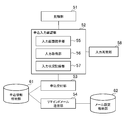
- FIG. 1 It is a figure which shows an example of a structure of the insurance application system concerning embodiment of this invention. It is a figure which shows an example of the hardware constitutions of an insurance application server. It is a functional block diagram which shows the function which an insurance application server implement
- FIG. 1 is a diagram showing an example of the configuration of an insurance application system according to an embodiment of the present invention.
- This insurance application system includes an insurance application server 1 and a client device 2. These are connected via the network 3.
- the network 3 is, for example, a local area network or the Internet.
- the insurance application server 1 is a server computer.
- the insurance application server 1 acquires information from a database or the like in response to a request from the client device 2 and transmits the acquired information to the client device 2.
- the client device 2 is a computer such as a smartphone or a personal computer.
- the insurance application server 1 executes a web server program (such as httpd), and a request input by the user is transmitted to the insurance application server 1 by the client device 2 that executes the browser program. A screen corresponding to the information is presented to the user.
- FIG. 2 is a diagram illustrating an example of a hardware configuration of the insurance application server 1.
- the insurance application server 1 includes a processor 11, a storage unit 12, a communication unit 13, and an input / output unit 14.
- the processor 11 operates according to a program stored in the storage unit 12.
- the processor 11 controls the communication unit 13 and the input / output unit 14.
- the program may be provided via the Internet or the like, or may be provided by being stored in a computer-readable storage medium such as a flash memory or a DVD-ROM. .
- the storage unit 12 includes a memory element such as a RAM or a flash memory, and a hard disk drive.
- the storage unit 12 stores the program.
- the storage unit 12 stores information input from each unit and calculation results.
- the communication unit 13 realizes a function of communicating with other devices, and includes, for example, a wired LAN communication integrated circuit and connector, a wireless LAN integrated circuit, an antenna, and the like. Based on the control of the processor 11, the communication unit 13 inputs information received from another device to the processor 11 or the storage unit 12 and transmits the information to the other device.
- the input / output unit 14 includes a video controller that controls display output means, a controller that acquires data from an input device, and the like. Examples of input devices include a keyboard, a mouse, and a touch panel. Based on the control of the processor 11, the input / output unit 14 outputs display data to the display output device, and acquires data input by the user operating the input device.
- the display output device is, for example, a display device connected to the outside.
- the client device 2 includes a processor, a storage unit, a communication unit, and an input / output unit in the same manner as the insurance application server 1.
- the input / output unit included in the client device 2 outputs display data to, for example, a display built in the smartphone.
- FIG. 3 is a functional block diagram showing the functions realized by the insurance application server 1.
- the insurance application server functionally includes an estimation unit 51, an application input confirmation unit 52, an application reception unit 53, a remind mail transmission unit 54, an input resume unit 58, an application information storage unit 61, and an email setting storage. Part 62.
- the application input confirmation unit 52 functionally includes an input screen presentation unit 55, an input acquisition unit 56, and an input status recording unit 57. These functions are realized by the processor 11 included in the insurance application server 1 executing a program stored in the storage unit 12 and controlling the communication unit 13 and the like.
- the application information storage unit 61 is a database that stores contractor (user) information (contractor information) input by the user, insurance plan information and notification information applied by the user, and the like. Is a database for storing mail setting information and mail text.
- the application information storage unit 61 and the mail setting storage unit 62 are each realized mainly by the storage unit 12 of the insurance application server 1, but are realized by another server computer that is independent from the insurance application server 1 and that executes a database program. May be.
- the client device 2 executes a browser program, causes the display output device to output an image based on the data received from the insurance application server 1, and presents information to the user.
- the client device 2 transmits information input from the user via a touch panel, a keyboard, or the like to the insurance application server 1.
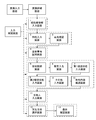
- FIG. 4 is a diagram showing an example of screen types used for insurance application.
- Each of the solid-line rectangles shown in FIG. 4 indicates a screen that the insurance application server 1 outputs when applying for insurance, and a solid-line arrow continues to be input without correcting the content that the user has input on the previous screen.
- the screen transition is shown.
- the estimate input screen and the estimate detail screen are screens for introducing and proposing insurance products before the user starts an application, and the estimation unit 51 performs processing related to these screens.
- the application input confirmation unit 52 performs application input processing using the 13 screens from the contractor information input screen to the final confirmation screen in order.
- serial numbers are shown at the upper left of the square on the input screen.
- the screen used for the application input process is divided into seven groups depending on the nature of the content input or confirmed on the screen. In FIG. 4, each one-dot chain surrounding one or a plurality of screens indicates the group.
- FIG. 5 is a diagram illustrating an example of a processing flow of the estimation unit 51.
- the estimation unit 51 is realized centering on the processor 11, the storage unit 12, and the communication unit 13, and presents an insurance plan according to the estimation condition input by the user.
- the estimation unit 51 transmits information on an estimate input screen to the client device 2 operated by the user who accesses the insurance application server 1 (step S101).
- the information on each screen is HTML data, and this information includes information on a script to be executed by the client apparatus 2.
- the estimate input screen is a screen for inputting the estimate conditions.
- the estimate conditions whether the user's family structure, whether or not he / she has already been insured, whether the life insurance will focus on the insurance premium or the compensation amount, It has an area for inputting the date. Further, when the estimate conditions are input to these areas on the estimate input screen, the client device 2 that executes the script included in the information on the estimate input screen transmits the estimate conditions to the insurance application server 1.
- the estimation unit 51 receives the estimation condition transmitted from the client device 2 (step S102). Then, the estimation unit 51 determines a proposed insurance plan according to the estimated condition (step S103), and calculates an insurance premium for the determined insurance plan and estimated condition (step S104). Then, information on the estimated detail screen including information on the determined insurance plan and the calculated insurance premium is transmitted to the client device 2 (step S105).
- FIG. 6 is a diagram showing an example of the estimate detail screen.
- the estimate detail screen an insurance plan and an insurance premium in the insurance plan are arranged.
- the estimate detail screen also includes an input area for correcting gender and date of birth, and an application button 33 for instructing start of insurance application when the user is satisfied with the insurance plan.
- the estimate detail screen displays the fields of multiple life insurance products as an insurance plan, and each column shows the name of the product and whether or not the product is subject to quotation and application.
- the estimate detail screen also includes a column for displaying the insurance premium calculated based on the date of birth of the user and the total insurance premium totaled for each product.
- the client device 2 transmits information input by the user.
- the estimation unit 51 receives the information input by the user (step S106), and if the input information indicates that the user has pressed the application button 33 (application instruction) (Y in step S107). Then, the estimating unit 51 starts a process for causing the application input confirming unit 52 to display the first input screen (contractor information input screen) (step S108).
- an insurance premium is calculated according to the input information (for example, the date of birth or the changed guarantee amount) (step S109), and the estimate detail screen in step S105 Transition to the process of transmitting the information of, and the subsequent processes are repeated.
- the application input confirmation unit 52 is realized centering on the processor 11, the storage unit 12, and the communication unit 13.
- the application input confirmation unit 52 sequentially presents a plurality of input screens to a user who applies for insurance, acquires information input on the presented input screen, and stores the acquired information in the application information storage unit 61.
- the process of the application input confirmation part 52 and the input screen presentation part 55 contained in it, the input acquisition part 56, and the input condition recording part 57 is demonstrated.
- the input screen presentation unit 55 sequentially presents a plurality of input screens to the user.
- the input screen presenting unit 55 transmits the information on the first input screen (contractor information input screen) to the user's client device 2, and in response to the user's input. Subsequent input screens are sequentially transmitted to the client device 2 of the user.
- the input acquisition unit 56 acquires information to be input on the input screen presented by the user, and the input status recording unit 57 associates the information input by the user and the date and time when the input has been completed with the user. It is stored in the storage unit 61.
- FIG. 7 is a diagram illustrating an example of a processing flow when a user inputs an input screen.
- the input acquisition unit 56 acquires information input by the user on the displayed input screen (step S201).
- the input information includes an instruction to transition to the next screen (Y in step S202)
- the input status recording unit 57 does not include information on essential items in the information input in the input form or check box. It is checked whether there is an input item and whether there is an error such as a contradiction between input items (step S203). If the required item is not input or there is an error (N in step S203), information on the same screen as the current input screen is transmitted for re-input (step S204). On the other hand, if all required items have been input for the input information and there is no error (Y in step S203), the input status recording unit 57 has input the information of the input item.
- the date and time are stored in the application information storage unit 61 in association with the user (step S205).
- the input status recording unit 57 stores or updates the last input date stored in the application information storage unit 61 in association with the user (step S206). This last input date is newly stored when an input is made on the first input screen, and is updated thereafter. Then, if there is a next input screen, the input screen presentation unit 55 transmits information on the input screen (step S207).
- the application reception unit 53 performs application reception processing instead of step S207, and the application reception unit 53 transmits information on the screen indicating that the application has been accepted. If the instruction to transition to the next screen is not included in step S202 (N in step S202), the input screen presenting unit 55 determines that the instruction to transition to the previous screen is included, Information is transmitted (step S208).
- FIG. 8 is a diagram illustrating an example of user information stored in the application information storage unit 61.
- the user information is also contractor information of a user who applies for insurance.
- the user information includes a user ID for identifying the user, an e-mail address, information indicating user attributes such as name, date of birth, and address, an input date and time when the information is input, and an input screen. Including the date of input (last input date).
- the input status recording unit 57 stores information input by the user on the contractor information input screen in the application information storage unit 61 as user information.
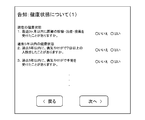
- FIG. 9 is a diagram showing an example of the first health condition input screen.
- the first health status input screen is a screen that allows the user to input information related to the health status among the notification items necessary for the life insurance contract. In FIG. 9, there are three items to be input, but actually, more than 10 items are input.
- the client apparatus 2 transmits information on an instruction for the user to enter the input screen and proceed to the next input screen, and information on the input item.
- the client apparatus 2 transmits information on an instruction for the user to return to the previous input screen.
- FIG. 10 is a diagram illustrating an example of the application information stored in the application information storage unit 61.
- the application information is information related to the insurance application other than the user information, and includes information on the insurance plan (product) applied by the user and information on notification items.
- the application information includes a plurality of input items for a certain user, and values are recorded for the respective input items.
- the application information also records the date and time (input date and time) when the information was input for each input item.
- the application information for a certain user consists of a plurality of records, and each record corresponds to one input item. Further, for each input item, screen information for inputting the input item is also added.
- the application information is not limited to the information itself entered by the user in the input form, radio button, or the like.
- the application information includes information indicating that the user has confirmed the explanation of important matters presented on the input screen and then pressed the button for proceeding with the input operation.
- the user information and application information stored in the application information storage unit 61 is information input by the user in the items on the input screen. These information indicate the input status of the input screen up to which the user has completed the input. It is also information to show. This is because it is possible to determine which input screen has been input by examining up to which input item the value is stored in the application information storage unit 61.
- Application information does not have to be in the format shown in FIG. For example, one record may be set for each user, and the values of the input items may be listed. In that case, the input date and time may be recorded in the application information for each input screen.
- the input status recording unit 57 may store the application information in the application information storage unit 61 separately for insurance product information applied by the user and notification item information.
- the application receiving unit 53 is realized centering on the processor 11, the storage unit 12, and the communication unit 13.
- the application reception unit 53 applies the information stored in the application information storage unit 61 for the user to the application for insurance.
- the core processing system which is a system for processing The core processing system informs the person in charge of the insurance company that there has been an application for insurance, and proceeds with subsequent application processing, such as examination of the contents.
- the remind mail transmission unit 54 is realized centering on the processor 11, the storage unit 12, and the communication unit 13.
- the remind mail transmission unit 54 uses, as the user's mail address, an email including a text corresponding to the text template associated with the last of the input screens input by the user when the condition regarding the remind period is satisfied for the user.
- the condition regarding the remind period is that the remind period elapses from the last input date and time stored in association with the user.
- the remind period may be determined according to the input screen last input by the user.
- the remind mail transmission unit 54 acquires information indicating the speed of the user's input based on the time input by the user on each input screen, and further displays the remind mail text based on the information indicating the speed. It may be generated.
- these processes will be described in detail.
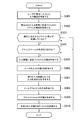
- FIG. 11 is a diagram illustrating an example of a processing flow of the remind mail transmission unit 54.
- the processing flow shown in FIG. 11 is processing for a certain user. Actually, this processing shown in FIG. 11 is executed every day for all users whose input is interrupted.
- the remind mail transmission unit 54 first identifies the input screen last input by the user (step S301). More specifically, the remind mail transmission unit 54 acquires a list of input items that have been input and a list of input screens in which those input items exist, from the application information and user information stored in the application information storage unit 61. Then, the input screen that ranks last in the list of input screens is identified as the input screen last input by the user. Next, the remind mail transmission unit 54 acquires the remind period and day of the week conditions (if set) associated with the specified screen from the mail setting storage unit 62 that stores the mail setting information (step S302). .
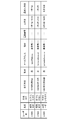
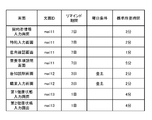
- FIG. 12 is a diagram illustrating an example of the mail setting information stored in the mail setting storage unit 62.
- Mail setting information is entered by a general user on a text ID indicating the template of the mail text associated with each input screen, a reminder period and day of the week conditions indicating the transmission timing of the mail associated with the input screen, and the input screen. Including the standard time required for input.
- the remind period indicates an interval from when the user last inputs to the input screen until the mail is transmitted.
- the day-of-week condition indicates a day of the week when a remind mail may be transmitted.
- the reminding mail transmission unit 54 determines whether the reminding period has elapsed from the last input date (step S303). More precisely, it is determined whether or not the date (processing date) when this processing is executed has passed the reminder period from the last input date. If the day of the week condition is specified, it is determined whether the processing date has passed the reminder period from the last input date and the day of the processing day is the day indicated in the day of the week condition.
- the remind mail transmission unit 54 determines whether a remind mail for the user has not been transmitted (step S304). If the remind mail has not been transmitted (Y in step S304), the remind mail transmitting unit 54 performs the process of transmitting the remind mail in steps S305 to S310. If no day condition is specified, the remind mail is transmitted on the day when the remind period has elapsed from the last input date.
- the remind mail transmission unit 54 acquires a text associated with the specified input screen (step S305).
- the remind mail transmission unit 54 acquires the input speed of the user by using the input time of each input screen acquired from the user information and application information (step S306). More specifically, the remind mail transmission unit 54 acquires the input time of the input screen and the previous input screen for the input screen belonging to the list of input screens acquired from the application information and the like and input by the user. The difference from the input time is acquired as the required input time on the input screen.
- the remind mail transmission unit 54 acquires, for each input screen, a ratio between the input required time and the standard required time associated with the input screen.
- a value obtained by averaging the ratios of the respective input screens that are less than the threshold value is calculated based on the input speed of the user.
- the threshold is used in order to avoid an unrealistic slow calculation of the user's input when it takes time due to some interruption during the user's input work. It is.
- the remind mail transmission unit 54 predicts the required input time on the remaining input screen based on the input speed of the user (step S307). More specifically, the remind mail transmission unit 54 acquires a time obtained by multiplying the calculated ratio by the sum of the standard required times of input screens that have not been input as the predicted required input time.
- the remind mail transmission unit 54 acquires the user's name and mail address from the user information (step S308). Note that the remind mail transmission unit 54 does not have to acquire the mail address or name from the information input on the input screen of the festival for this application. If the insurance application system is linked to another user authentication system and the input on the input screen is performed after logging in to the user authentication system, the logged-in user is identified by the user ID of the user authentication system, An email address or the like associated with the user ID may be acquired from the user authentication system.
- the reminder mail transmission unit 54 sends a template of a sentence associated with the specified input screen, more precisely a template of a sentence having a sentence ID associated with the specified input screen, and the acquired name and predicted value. Using the input required time, a text of a remind mail for transmission is created (step S309).
- the remind mail transmission unit 54 creates a text of the remind mail, and then transmits an email including the generated text of the remind mail to the user's mail address (step S310).
- FIG. 13 is a diagram showing an example of a reminder mail text.
- This text is an example of a text of a remind mail to be transmitted when the input screen last input by the user is a contractor information input screen or a special contract input screen.
- the text ID of the model of the text is “mail11”, and in the model, the part of the name “Rakuten Taro” is another character string indicating that it should be replaced with the user's name.
- the text of the reminder mail is mainly based on the text that advances the insurance product itself. Yes.
- the timing for sending the remind mail is not short of the input interruption, the mail is sent seven days after the input interruption.
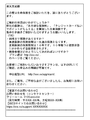
- FIG. 14 is a diagram showing another example of the text of the remind mail.
- This text is an example of a text of a remind mail transmitted when the input screen last input by the user is the first health status input screen or the second health status input screen.
- the text ID of the model of this text is “mail13”, and in the model, the name “Rakuten Taro” and “5 minutes” are parts that should be replaced with the user's name and required input time. It is a character string. If the user is in the process of entering notification items, the user is likely to apply for insurance, so it is not an explanation of the insurance product.
- the text shows answers to questions that users can easily hold. Further, since the possibility of forgetting the application increases as the number of days elapses, the remind mail is transmitted in a shorter period than the mail shown in FIG. 13 such as one day.
- the remind mail transmission unit 54 may further transmit a remind mail including other texts at the end of the month before the birth month.
- the client device 2 accesses the destination of the URL using the browser program, and acquires information on the input resume screen from the insurance application server 1.
- the input resuming unit 58 is realized centering on the processor 11, the storage unit 12, and the communication unit 13. When there is an access from the user based on the remind mail or the like, the input resuming unit 58 transmits information on an input resumption screen for confirming whether or not to resume the input to the user, and the input is not performed. The user input is resumed from the previous input screen.
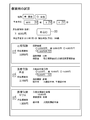
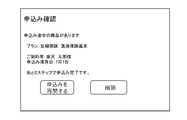
- FIG. 15 is a diagram showing an example of the input resume screen.
- insurance products for which the user has suspended the application work, the date of suspension, and information indicating the prospects of the remaining work are arranged.
- the application input confirmation unit 52 causes the application input confirmation unit 52 to perform processing subsequent to the input screen next to the input screen.
- the user presses the “delete” button the user information stored in the application information storage unit 61 is deleted. By doing so, the user can skip the input screen that has been input and input the remaining input screen. As a result, the input load on the user is reduced as compared with the case where the user cannot resume.
- 1 insurance application server 1 client device, 3 network, 11 processor, 12 storage unit, 13 communication unit, 14 input / output unit, 33 application button, 51 estimation unit, 52 application input confirmation unit, 53 application reception unit, 54 remind mail Transmission unit, 55 input screen presentation unit, 56 input acquisition unit, 57 input status recording unit, 58 input resume unit, 61 application information storage unit, 62 mail setting storage unit.
Landscapes
- Business, Economics & Management (AREA)
- Accounting & Taxation (AREA)
- Finance (AREA)
- Engineering & Computer Science (AREA)
- Technology Law (AREA)
- Economics (AREA)
- Marketing (AREA)
- Strategic Management (AREA)
- Development Economics (AREA)
- Physics & Mathematics (AREA)
- General Business, Economics & Management (AREA)
- General Physics & Mathematics (AREA)
- Theoretical Computer Science (AREA)
- Financial Or Insurance-Related Operations Such As Payment And Settlement (AREA)
- Management, Administration, Business Operations System, And Electronic Commerce (AREA)
- Information Transfer Between Computers (AREA)
- User Interface Of Digital Computer (AREA)
Abstract
Description
Claims (6)
- それぞれ入力項目を有し、申込者に提示される複数の入力画面を順に提示する入力画面提示手段と、
前記申込者が前記複数の入力画面のいずれかに対して入力する情報を取得する取得手段と、
前記取得された情報に基づいて、前記複数の入力画面のいずれかであって前記申込者が入力を済ませた入力画面を示す入力状況情報と当該入力を済ませた日時とを前記申込者に関連づけて記憶させる入力状況記録手段と、
前記申込者に関連づけられた前記入力状況情報と前記日時とに基づいて、前記申込者が最後に前記複数の入力画面のいずれかに対して入力した日時からリマインド期間を経過した場合に、前記申込者により入力された入力画面のうち最後のものに関連づけられた文面のひな型に応じたリマインドメール文面を含む電子メールを前記申込者のメールアドレスに送信するリマインド手段と、
を含むことを特徴とする保険申込システム。 - 前記リマインド手段は、前記申込者が前記複数の入力画面のいずれかに対して最後に入力した日時から、前記申込者が最後に入力した前記いずれかの入力画面に関連づけられたリマインド期間が経過した場合に、前記リマインドメール文面を含む電子メールを前記申込者のメールアドレスに送信する、
ことを特徴とする請求項1に記載の保険申込システム。 - 前記リマインド手段は、前記申込者が前記各入力画面に対して入力した時刻に基づいて、当該申込者の入力の速さを示す情報を取得し、前記速さを示す情報にさらに基づいてリマインドメール文面を生成し、生成されたリマインドメール文面を含む電子メールを前記申込者のメールアドレスに送信する、
ことを特徴とする請求項1または2のいずれかに記載の保険申込システム。 - それぞれ入力項目を有し、申込者に提示される複数の入力画面を順に提示し、
前記申込者が前記複数の入力画面のいずれかに対して入力する情報を取得し、
前記取得された情報に基づいて、前記複数の入力画面のいずれかであって前記申込者が入力を済ませた入力画面を示す入力状況情報と当該入力を済ませた日時とを前記申込者に関連づけて記憶させ、
前記申込者に関連づけられた前記入力状況情報と前記日時とに基づいて、前記申込者が最後に前記複数の入力画面のいずれかに対して入力した日時からリマインド期間を経過した場合に、前記申込者により入力された入力画面のうち最後のものに関連づけられた文面のひな型に応じたリマインドメール文面を含む電子メールを前記申込者のメールアドレスに送信する、
ことを特徴とする保険申込方法。 - それぞれ入力項目を有し、申込者に提示される複数の入力画面を順に提示し、
前記申込者が前記複数の入力画面のいずれかに対して入力する情報を取得し、
前記取得された情報に基づいて、前記複数の入力画面のいずれかであって前記申込者が入力を済ませた入力画面を示す入力状況情報と当該入力を済ませた日時とを前記申込者に関連づけて記憶させ、
前記申込者に関連づけられた前記入力状況情報と前記日時とに基づいて、前記申込者が最後に前記複数の入力画面のいずれかに対して入力した日時からリマインド期間を経過した場合に、前記申込者により入力された入力画面のうち最後のものに関連づけられた文面のひな型に応じたリマインドメール文面を含む電子メールを前記申込者のメールアドレスに送信する、
処理をコンピュータに実行させるプログラム。 - それぞれ入力項目を有し、申込者に提示される複数の入力画面を順に提示し、
前記申込者が前記複数の入力画面のいずれかに対して入力する情報を取得し、
前記取得された情報に基づいて、前記複数の入力画面のいずれかであって前記申込者が入力を済ませた入力画面を示す入力状況情報と当該入力を済ませた日時とを前記申込者に関連づけて記憶させ、
前記申込者に関連づけられた前記入力状況情報と前記日時とに基づいて、前記申込者が最後に前記複数の入力画面のいずれかに対して入力した日時からリマインド期間を経過した場合に、前記申込者により入力された入力画面のうち最後のものに関連づけられた文面のひな型に応じたリマインドメール文面を含む電子メールを前記申込者のメールアドレスに送信する、
処理をコンピュータに実行させるプログラムを格納するコンピュータ読取り可能な情報記憶媒体。
Priority Applications (3)
| Application Number | Priority Date | Filing Date | Title |
|---|---|---|---|
| JP2014510999A JP5599537B1 (ja) | 2013-07-31 | 2013-07-31 | 保険申込システム、保険申込方法、プログラムおよび情報記憶媒体 |
| US14/908,610 US20160210698A1 (en) | 2013-07-31 | 2013-07-31 | Insurance application system, insurance application method, program, and information storage medium |
| PCT/JP2013/070760 WO2015015595A1 (ja) | 2013-07-31 | 2013-07-31 | 保険申込システム、保険申込方法、プログラムおよび情報記憶媒体 |
Applications Claiming Priority (1)
| Application Number | Priority Date | Filing Date | Title |
|---|---|---|---|
| PCT/JP2013/070760 WO2015015595A1 (ja) | 2013-07-31 | 2013-07-31 | 保険申込システム、保険申込方法、プログラムおよび情報記憶媒体 |
Publications (1)
| Publication Number | Publication Date |
|---|---|
| WO2015015595A1 true WO2015015595A1 (ja) | 2015-02-05 |
Family
ID=51840320
Family Applications (1)
| Application Number | Title | Priority Date | Filing Date |
|---|---|---|---|
| PCT/JP2013/070760 Ceased WO2015015595A1 (ja) | 2013-07-31 | 2013-07-31 | 保険申込システム、保険申込方法、プログラムおよび情報記憶媒体 |
Country Status (3)
| Country | Link |
|---|---|
| US (1) | US20160210698A1 (ja) |
| JP (1) | JP5599537B1 (ja) |
| WO (1) | WO2015015595A1 (ja) |
Families Citing this family (1)
| Publication number | Priority date | Publication date | Assignee | Title |
|---|---|---|---|---|
| US10671954B2 (en) | 2015-02-23 | 2020-06-02 | Google Llc | Selective reminders to complete interrupted tasks |
Citations (2)
| Publication number | Priority date | Publication date | Assignee | Title |
|---|---|---|---|---|
| JP2006048087A (ja) * | 2004-06-28 | 2006-02-16 | Tokio Marine & Nichido Fire Insurance Co Ltd | 更新処理方法及び装置 |
| JP2013502651A (ja) * | 2009-08-17 | 2013-01-24 | メトロポリタン ライフ インシュアランス カンパニー | 保険引受用オンラインシステムおよび方法 |
Family Cites Families (7)
| Publication number | Priority date | Publication date | Assignee | Title |
|---|---|---|---|---|
| US5027395A (en) * | 1990-06-20 | 1991-06-25 | Metropolitan Life Insurance Company | Data-locking system |
| TW509858B (en) * | 2000-10-31 | 2002-11-11 | Trustmed Com Corp | Statistical method and system for tracking diagnosis records |
| US7904366B2 (en) * | 2005-09-02 | 2011-03-08 | General Electric Capital Corporation | Method and system to determine resident qualifications |
| US7847686B1 (en) * | 2006-01-06 | 2010-12-07 | Avaya Inc. | Location-and direction-enhanced automatic reminders of appointments |
| US20080086399A1 (en) * | 2006-09-28 | 2008-04-10 | Charles Wood | Auto credit scanner pre-approval process |
| US9990466B2 (en) * | 2011-09-01 | 2018-06-05 | Deroyal Industries, Inc. | Automated system for medical item dispensing, billing, and inventory management |
| AU2013205850A1 (en) * | 2012-07-02 | 2014-01-16 | Bliip Ip Pty Ltd | Assessment method and apparatus |
-
2013
- 2013-07-31 US US14/908,610 patent/US20160210698A1/en not_active Abandoned
- 2013-07-31 WO PCT/JP2013/070760 patent/WO2015015595A1/ja not_active Ceased
- 2013-07-31 JP JP2014510999A patent/JP5599537B1/ja active Active
Patent Citations (2)
| Publication number | Priority date | Publication date | Assignee | Title |
|---|---|---|---|---|
| JP2006048087A (ja) * | 2004-06-28 | 2006-02-16 | Tokio Marine & Nichido Fire Insurance Co Ltd | 更新処理方法及び装置 |
| JP2013502651A (ja) * | 2009-08-17 | 2013-01-24 | メトロポリタン ライフ インシュアランス カンパニー | 保険引受用オンラインシステムおよび方法 |
Also Published As
| Publication number | Publication date |
|---|---|
| JPWO2015015595A1 (ja) | 2017-03-02 |
| JP5599537B1 (ja) | 2014-10-01 |
| US20160210698A1 (en) | 2016-07-21 |
Similar Documents
| Publication | Publication Date | Title |
|---|---|---|
| US8626547B2 (en) | Work support method, work support apparatus and computer-readable storage medium | |
| US20080229407A1 (en) | Information processing apparatus, information processing method, and media storing a program therefor | |
| JP2017117375A (ja) | 求人マッチングシステム、求人マッチング方法、サーバ装置、及びプログラム | |
| JP2024162955A (ja) | 情報処理装置、方法、プログラム、およびシステム | |
| JP6742125B2 (ja) | 業務管理装置、情報処理方法及び業務管理プログラム | |
| JP5599537B1 (ja) | 保険申込システム、保険申込方法、プログラムおよび情報記憶媒体 | |
| JP6539432B2 (ja) | 解析サーバ装置、解析プログラム、ヒートマップ解析システム | |
| JP6750412B2 (ja) | 作業支援システムおよびプログラム | |
| JP6440833B2 (ja) | 端末装置、サーバ装置、表示制御方法、および、表示制御プログラム | |
| JP7250905B2 (ja) | チャットサーバおよびクライアント制御プログラム | |
| JP2006178718A (ja) | 作業指示機能付き情報処理装置およびプログラム | |
| Yan et al. | Design and evaluation of a prototype ‘hibaby’for pregnancy assistance | |
| JP2015132952A (ja) | 保全情報管理システム | |
| JP6552162B2 (ja) | 情報処理装置、情報処理方法、およびプログラム | |
| WO2021199146A1 (ja) | 予約受付システム、プログラムおよび方法 | |
| WO2017002249A1 (ja) | ワークフロー管理プログラム、ワークフロー管理方法、およびワークフロー管理装置 | |
| JP6551018B2 (ja) | 作業支援システムおよび作業支援方法 | |
| JP7684529B1 (ja) | 情報処理システム、情報処理方法及びプログラム | |
| JP7627980B1 (ja) | 求人を管理するためのシステム、方法、及びプログラム | |
| US20250037085A1 (en) | Shift generation system, shift generation method, and non-transitory recording medium storing computer-readable shift generation program | |
| JP6362775B2 (ja) | 空き時間管理装置、空き時間管理方法、コンピュータープログラム、及び記憶媒体 | |
| Mesquita | Theia: A Mobile Application for Detection and Reporting of Urban Events | |
| JP4762087B2 (ja) | 画面遷移制御方法、画面提供システム、遷移実行装置及びコンピュータプログラム | |
| Shawon et al. | Design and Evaluation of CareLine: mHealth Service App for Elder Citizens Connecting with Caregivers Within Bangladesh | |
| JP6135442B2 (ja) | 文書管理装置及び文書管理プログラム |
Legal Events
| Date | Code | Title | Description |
|---|---|---|---|
| ENP | Entry into the national phase |
Ref document number: 2014510999 Country of ref document: JP Kind code of ref document: A |
|
| 121 | Ep: the epo has been informed by wipo that ep was designated in this application |
Ref document number: 13890854 Country of ref document: EP Kind code of ref document: A1 |
|
| WWE | Wipo information: entry into national phase |
Ref document number: 14908610 Country of ref document: US |
|
| NENP | Non-entry into the national phase |
Ref country code: DE |
|
| 122 | Ep: pct application non-entry in european phase |
Ref document number: 13890854 Country of ref document: EP Kind code of ref document: A1 |