WO2013168382A1 - 画像表示システム、移動端末、サーバ、持続的有形コンピュータ読み取り媒体 - Google Patents
画像表示システム、移動端末、サーバ、持続的有形コンピュータ読み取り媒体 Download PDFInfo
- Publication number
- WO2013168382A1 WO2013168382A1 PCT/JP2013/002762 JP2013002762W WO2013168382A1 WO 2013168382 A1 WO2013168382 A1 WO 2013168382A1 JP 2013002762 W JP2013002762 W JP 2013002762W WO 2013168382 A1 WO2013168382 A1 WO 2013168382A1
- Authority
- WO
- WIPO (PCT)
- Prior art keywords
- image
- image display
- server
- images
- mobile terminal
- Prior art date
- Legal status (The legal status is an assumption and is not a legal conclusion. Google has not performed a legal analysis and makes no representation as to the accuracy of the status listed.)
- Ceased
Links
Images



Classifications
-
- G—PHYSICS
- G09—EDUCATION; CRYPTOGRAPHY; DISPLAY; ADVERTISING; SEALS
- G09B—EDUCATIONAL OR DEMONSTRATION APPLIANCES; APPLIANCES FOR TEACHING, OR COMMUNICATING WITH, THE BLIND, DEAF OR MUTE; MODELS; PLANETARIA; GLOBES; MAPS; DIAGRAMS
- G09B29/00—Maps; Plans; Charts; Diagrams, e.g. route diagram
- G09B29/10—Map spot or coordinate position indicators; Map reading aids
- G09B29/106—Map spot or coordinate position indicators; Map reading aids using electronic means
-
- G—PHYSICS
- G01—MEASURING; TESTING
- G01C—MEASURING DISTANCES, LEVELS OR BEARINGS; SURVEYING; NAVIGATION; GYROSCOPIC INSTRUMENTS; PHOTOGRAMMETRY OR VIDEOGRAMMETRY
- G01C21/00—Navigation; Navigational instruments not provided for in groups G01C1/00 - G01C19/00
- G01C21/26—Navigation; Navigational instruments not provided for in groups G01C1/00 - G01C19/00 specially adapted for navigation in a road network
- G01C21/34—Route searching; Route guidance
- G01C21/36—Input/output arrangements for on-board computers
- G01C21/3605—Destination input or retrieval
-
- G—PHYSICS
- G01—MEASURING; TESTING
- G01C—MEASURING DISTANCES, LEVELS OR BEARINGS; SURVEYING; NAVIGATION; GYROSCOPIC INSTRUMENTS; PHOTOGRAMMETRY OR VIDEOGRAMMETRY
- G01C21/00—Navigation; Navigational instruments not provided for in groups G01C1/00 - G01C19/00
- G01C21/20—Instruments for performing navigational calculations
-
- G—PHYSICS
- G01—MEASURING; TESTING
- G01C—MEASURING DISTANCES, LEVELS OR BEARINGS; SURVEYING; NAVIGATION; GYROSCOPIC INSTRUMENTS; PHOTOGRAMMETRY OR VIDEOGRAMMETRY
- G01C21/00—Navigation; Navigational instruments not provided for in groups G01C1/00 - G01C19/00
- G01C21/26—Navigation; Navigational instruments not provided for in groups G01C1/00 - G01C19/00 specially adapted for navigation in a road network
- G01C21/34—Route searching; Route guidance
- G01C21/36—Input/output arrangements for on-board computers
- G01C21/3605—Destination input or retrieval
- G01C21/362—Destination input or retrieval received from an external device or application, e.g. PDA, mobile phone or calendar application
-
- G—PHYSICS
- G01—MEASURING; TESTING
- G01C—MEASURING DISTANCES, LEVELS OR BEARINGS; SURVEYING; NAVIGATION; GYROSCOPIC INSTRUMENTS; PHOTOGRAMMETRY OR VIDEOGRAMMETRY
- G01C21/00—Navigation; Navigational instruments not provided for in groups G01C1/00 - G01C19/00
- G01C21/26—Navigation; Navigational instruments not provided for in groups G01C1/00 - G01C19/00 specially adapted for navigation in a road network
- G01C21/34—Route searching; Route guidance
- G01C21/36—Input/output arrangements for on-board computers
- G01C21/3605—Destination input or retrieval
- G01C21/3623—Destination input or retrieval using a camera or code reader, e.g. for optical or magnetic codes
-
- G—PHYSICS
- G06—COMPUTING OR CALCULATING; COUNTING
- G06F—ELECTRIC DIGITAL DATA PROCESSING
- G06F16/00—Information retrieval; Database structures therefor; File system structures therefor
-
- G—PHYSICS
- G06—COMPUTING OR CALCULATING; COUNTING
- G06F—ELECTRIC DIGITAL DATA PROCESSING
- G06F16/00—Information retrieval; Database structures therefor; File system structures therefor
- G06F16/50—Information retrieval; Database structures therefor; File system structures therefor of still image data
- G06F16/58—Retrieval characterised by using metadata, e.g. metadata not derived from the content or metadata generated manually
-
- G—PHYSICS
- G06—COMPUTING OR CALCULATING; COUNTING
- G06F—ELECTRIC DIGITAL DATA PROCESSING
- G06F16/00—Information retrieval; Database structures therefor; File system structures therefor
- G06F16/50—Information retrieval; Database structures therefor; File system structures therefor of still image data
- G06F16/58—Retrieval characterised by using metadata, e.g. metadata not derived from the content or metadata generated manually
- G06F16/5866—Retrieval characterised by using metadata, e.g. metadata not derived from the content or metadata generated manually using information manually generated, e.g. tags, keywords, comments, manually generated location and time information
-
- G—PHYSICS
- G06—COMPUTING OR CALCULATING; COUNTING
- G06F—ELECTRIC DIGITAL DATA PROCESSING
- G06F16/00—Information retrieval; Database structures therefor; File system structures therefor
- G06F16/50—Information retrieval; Database structures therefor; File system structures therefor of still image data
- G06F16/58—Retrieval characterised by using metadata, e.g. metadata not derived from the content or metadata generated manually
- G06F16/587—Retrieval characterised by using metadata, e.g. metadata not derived from the content or metadata generated manually using geographical or spatial information, e.g. location
-
- G—PHYSICS
- G06—COMPUTING OR CALCULATING; COUNTING
- G06F—ELECTRIC DIGITAL DATA PROCESSING
- G06F3/00—Input arrangements for transferring data to be processed into a form capable of being handled by the computer; Output arrangements for transferring data from processing unit to output unit, e.g. interface arrangements
- G06F3/01—Input arrangements or combined input and output arrangements for interaction between user and computer
- G06F3/048—Interaction techniques based on graphical user interfaces [GUI]
- G06F3/0484—Interaction techniques based on graphical user interfaces [GUI] for the control of specific functions or operations, e.g. selecting or manipulating an object, an image or a displayed text element, setting a parameter value or selecting a range
- G06F3/04842—Selection of displayed objects or displayed text elements
-
- G—PHYSICS
- G06—COMPUTING OR CALCULATING; COUNTING
- G06F—ELECTRIC DIGITAL DATA PROCESSING
- G06F3/00—Input arrangements for transferring data to be processed into a form capable of being handled by the computer; Output arrangements for transferring data from processing unit to output unit, e.g. interface arrangements
- G06F3/01—Input arrangements or combined input and output arrangements for interaction between user and computer
- G06F3/048—Interaction techniques based on graphical user interfaces [GUI]
- G06F3/0484—Interaction techniques based on graphical user interfaces [GUI] for the control of specific functions or operations, e.g. selecting or manipulating an object, an image or a displayed text element, setting a parameter value or selecting a range
- G06F3/04847—Interaction techniques to control parameter settings, e.g. interaction with sliders or dials
-
- G—PHYSICS
- G09—EDUCATION; CRYPTOGRAPHY; DISPLAY; ADVERTISING; SEALS
- G09G—ARRANGEMENTS OR CIRCUITS FOR CONTROL OF INDICATING DEVICES USING STATIC MEANS TO PRESENT VARIABLE INFORMATION
- G09G5/00—Control arrangements or circuits for visual indicators common to cathode-ray tube indicators and other visual indicators
- G09G5/36—Control arrangements or circuits for visual indicators common to cathode-ray tube indicators and other visual indicators characterised by the display of a graphic pattern, e.g. using an all-points-addressable [APA] memory
-
- G—PHYSICS
- G09—EDUCATION; CRYPTOGRAPHY; DISPLAY; ADVERTISING; SEALS
- G09G—ARRANGEMENTS OR CIRCUITS FOR CONTROL OF INDICATING DEVICES USING STATIC MEANS TO PRESENT VARIABLE INFORMATION
- G09G2320/00—Control of display operating conditions
- G09G2320/10—Special adaptations of display systems for operation with variable images
-
- G—PHYSICS
- G09—EDUCATION; CRYPTOGRAPHY; DISPLAY; ADVERTISING; SEALS
- G09G—ARRANGEMENTS OR CIRCUITS FOR CONTROL OF INDICATING DEVICES USING STATIC MEANS TO PRESENT VARIABLE INFORMATION
- G09G2354/00—Aspects of interface with display user
-
- G—PHYSICS
- G09—EDUCATION; CRYPTOGRAPHY; DISPLAY; ADVERTISING; SEALS
- G09G—ARRANGEMENTS OR CIRCUITS FOR CONTROL OF INDICATING DEVICES USING STATIC MEANS TO PRESENT VARIABLE INFORMATION
- G09G2380/00—Specific applications
- G09G2380/10—Automotive applications
Definitions
- the present disclosure relates to an image display system, a mobile terminal, a server, and a persistent tangible computer-readable medium including a server that stores images and a mobile terminal that displays a plurality of images acquired from the server.
- a photo information providing service is provided in which images such as photographs are stored on a server connected to a network, and the images can be used by an individual or a plurality of people.
- a photo information providing service for example, Patent Document 1 describes that a server stores point information such as an image and a shooting position of the image and provides point information at a specified point to a navigation device. Yes. According to such a configuration, the user can correctly move to the shooting position, for example.
- the present disclosure provides an image display system, a mobile terminal, a server, and a continuous tangible computer-readable medium that can narrow down to a desired image and determine a destination to be visited from without specifying a specific point. For the purpose.
- the image display system includes a server having a storage device that stores a plurality of images, and a mobile terminal having a display device that displays the plurality of images acquired from the server.
- the mobile terminal is selected by the operation input device and an operation input device that performs an operation of inputting a narrowing condition indicating an image type and an operation of selecting at least one of a plurality of images displayed on the display device.
- a control device that sets a position related to the image as a destination.
- the server includes an extraction device that extracts a plurality of images based on the narrowing-down conditions acquired from the mobile terminal.
- the narrowed image always includes the image desired by the user, and the user can narrow down the desired image without specifying a specific point, and wants to visit from among them. You can decide the destination.
- the mobile terminal is used in the image display system of the first aspect.
- the narrowed image always includes the image desired by the user, and the user can narrow down the desired image without specifying a specific point. You can decide the destination you want.
- the server is used in the image display system of the first aspect.
- the narrowed image always includes the image desired by the user, and the user can narrow down the desired image without specifying a specific point, and wants to visit from among them You can decide the destination.
- a persistent tangible computer readable medium comprises instructions implemented by a computer, the instructions having a plurality of images stored in a storage device of a server and acquired from the server.
- An image is displayed on a display device of a mobile terminal, and in the mobile terminal, a filtering condition indicating a type of image is input, and at least one of a plurality of images displayed on the display device is selected.
- the position relating to at least one selected image is set as a destination, and the server includes extracting a plurality of images based on the narrowing-down conditions acquired from the mobile terminal, Includes computer-implemented methods of displaying.
- the narrowed image always includes the image desired by the user, and the user can narrow down the desired image without specifying a specific point. You can decide the destination you want to visit.
- FIG. 1 is a diagram schematically illustrating a configuration of an image display system according to the first embodiment of the present disclosure.
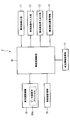
- FIG. 2 is a diagram schematically showing the configuration of the image display device
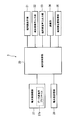
- FIG. 3 is a diagram schematically illustrating the configuration of the mobile communication terminal.
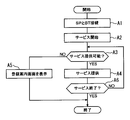
- FIG. 4 is a diagram schematically showing the main flow of control in the image display device.
- FIG. 5 is a diagram schematically showing a home screen of the image display device.
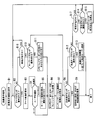
- FIG. 6 is a diagram showing a flow of image display processing by the image display device.
- FIG. 7 is a diagram illustrating an example of an image display screen of the image display device.
- FIG. 8 is a diagram illustrating an example of a theme selection screen of the image display device.
- FIG. 9 is a diagram illustrating an example of a history search screen of the image display device.
- FIG. 10 is a diagram showing a flow of extraction processing by the content server,
- FIG. 11 is a diagram illustrating an example of a history search result screen of the image display device,
- FIG. 12 is a diagram illustrating an example of a list display screen of the image display device,
- FIG. 13 is a diagram illustrating an example of a map setting screen of the image display device,
- FIG. 14 is a diagram illustrating an example of a theme selection screen of the image display device according to the second embodiment of the present disclosure.
- FIG. 15 is a diagram illustrating an example of a search screen of the image display device,
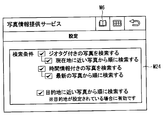
- FIG. 16 is a diagram illustrating an example of a setting screen of the image display device.
- the image display system 1 includes an image display device 2, a mobile communication terminal 3, an intermediate server 5, and a content server 6.
- the image display device 2 and the mobile communication terminal 3 constitute a mobile terminal.
- the intermediate server 5 and the content server 6 constitute a server.
- the mobile terminal in this embodiment, the image display device 2 and the mobile communication terminal 3
- the server in this embodiment, the intermediate server 5 and the content server 6
- the content server 6 is composed of a content server 6a and a content server 6b.
- the content server 6a corresponds to the first server
- the content server 6b corresponds to the second server.
- the description of “first” and “second” means that the image display system 1 can be connected to different servers, and does not limit the number of servers. That is, the image display system 1 may include three or more content servers 6.
- the image display device 2 is mounted on a vehicle (not shown).
- the image display device 2 of the mobile terminals is a vehicle mobile terminal used as a vehicle device in the present embodiment.
- the image display device 2 is not limited to being fixedly provided in the vehicle interior of the vehicle, for example, and may be provided so as to be movable.
- the image display system 1 can use various contents provided by the content server 6.
- Examples of usable content include a photo information providing service, a POI (Point Of Interest) search service, an SNS (Social Networking Service), and a music streaming service.
- these contents are not limited to those provided by one content provider, and may be provided by a plurality of content providers. That is, the content server 6a and the content server 6b described above may be managed by different content providers, or may be managed by the same content provider.
- the description is common to the content servers 6a and 6b, it is simply referred to as the content server 6.
- an intermediate server 5 is provided between the mobile terminal and the content server 6 to convert content provided in various data formats from each content provider into a unified data format.
- the photo information providing service is a service in which a photo (image) posted by a user is stored on the content server 6 side and can be used by a user or a third party.
- the photo information providing service may be a service that can provide not only still images such as photos and CG but also moving images taken by the user.
- the image display device 2 includes a vehicle-side control unit 10, a vehicle-side display unit 11, a vehicle-side operation input unit 12, a vehicle-side audio input / output unit 13, a vehicle-side position acquisition unit 14, and a vehicle-side memory.
- Unit 15 vehicle-side connection unit 16, and vehicle information acquisition unit 17.
- the vehicle-side control unit 10 is configured by a microcomputer having a CPU, a ROM, a RAM, and the like (not shown), and controls the entire image display device 2 according to a program stored in the ROM.
- the vehicle-side control unit 10 is an application for using various contents, and can execute an application that operates in cooperation with the mobile communication terminal 3.
- the vehicle side control part 10 can also perform the setting of the destination and the navigation function to the set destination as mentioned later.
- the vehicle side control unit 10 constitutes a control device.
- the vehicle-side display unit 11 is composed of, for example, a liquid crystal display capable of color display, an organic EL display, or a plasma display.
- the vehicle side display unit 11 displays, for example, an operation screen of the image display device 2 or a map screen when the navigation function is used.
- the vehicle side display part 11 also displays the operation screen for a user to input at the time of a search request
- the vehicle-side display unit 11 displays the acquired images in a list format in which two or more images are displayed simultaneously or in a slide show format in which one image is sequentially switched and displayed.
- the vehicle side display unit 11 constitutes a display device.
- the vehicle-side operation input unit 12 includes a touch panel provided corresponding to the vehicle-side display unit 11 and a contact-type switch disposed around the vehicle-side display unit 11. The user inputs an operation to the image display device 2 from these vehicle-side operation input units 12.
- a touch panel the thing of arbitrary systems, such as a pressure sensitive system, an electromagnetic induction system, or an electrostatic induction system, is employable, for example.
- the vehicle-side operation input unit 12 and the vehicle-side display unit 11 constitute an operation input device.
- the vehicle-side voice input / output unit 13 has a speaker and a microphone (not shown).
- the vehicle side voice input / output unit 13 outputs, for example, music stored in the vehicle side storage unit 15 and guide voice from the image display device 2.
- the vehicle-side voice input / output unit 13 receives a user's voice operation on the image display device 2.
- the vehicle-side position acquisition unit 14 includes a so-called GPS unit, a gyro sensor, and the like, and acquires the current position of the image display device 2, more specifically, the current position of the vehicle in which the image display device 2 is provided. To do.
- the vehicle side position acquisition unit 14 constitutes a current position acquisition device.
- the method of acquiring the current position by a GPS unit or the like is well known, detailed description thereof is omitted here.
- the vehicle-side control unit 10 executes navigation processing for guiding the vehicle to the destination as described above. That is, in this embodiment, a so-called navigation device is used as the image display device 2.
- the vehicle-side storage unit 15 stores music data, map data used for the navigation function, various applications executed by the image display device 2, and the like.
- the vehicle side connection unit 16 communicates with the mobile communication terminal 3.
- a wireless communication system based on Bluetooth is adopted.
- Bluetooth registered trademark
- BT connection by BT is referred to as BT connection.
- the vehicle side connection unit 16 has, for example, a data communication profile 16a (in the case of BT, SPP, DUN, and the like correspond), and connects to the mobile communication terminal 3 using these profiles.
- the vehicle information acquisition unit 17 is connected to the ECU 7 and acquires various information related to the vehicle.
- the vehicle information acquisition unit 17 acquires information about the vehicle such as the speed of the vehicle (hereinafter referred to as the vehicle speed) and the set temperature of the air conditioner.
- information that can specify whether or not the vehicle is running corresponds to the vehicle information.
- information indicating the vehicle speed or the running state of the vehicle for example, data indicating that the vehicle is stopped when the parking brake is on and data indicating that the vehicle is stopped when the shift range is parked
- the vehicle information acquisition unit 17 constitutes a vehicle information acquisition device.
- the mobile communication terminal 3 includes a terminal-side control unit 20, a terminal-side display unit 21, a terminal-side operation input unit 22, a terminal-side voice input / output unit 23, a communication unit 24, and a terminal-side position acquisition unit 25.
- the terminal-side control unit 20 is configured by a microcomputer having a CPU, ROM, RAM, and the like (not shown), and controls the entire mobile communication terminal 3 according to a program stored in the ROM.
- the terminal-side control unit 20 executes an application that is communicably connected to the image display device 2 and can operate in cooperation with the image display device 2.
- the mobile communication terminal 3 acquires an image from the content server 6 as will be described later, and transmits the acquired image to the image display device 2.
- the terminal side control unit 20 corresponds to a control device.
- the terminal-side display unit 21 is configured by, for example, a liquid crystal display capable of color display, an organic EL display, or the like.
- the terminal-side display unit 21 displays, for example, phone book data and, for example, images and videos stored in the terminal-side storage unit 26.
- the terminal-side operation input unit 22 includes a touch panel provided corresponding to the terminal-side display unit 21, a contact-type switch disposed around the terminal-side display unit 21, and the like. An operation for the mobile communication terminal 3 is input to the mobile communication terminal 3 from these terminal side operation input units 22.
- a touch panel the thing of arbitrary systems, such as a pressure sensitive system, an electromagnetic induction system, or an electrostatic induction system, is employable, for example.
- the terminal side operation input unit 22 corresponds to an operation input device.
- the terminal-side voice input / output unit 23 has a microphone and a speaker (not shown), and inputs uttered voice and outputs received voice during a call.
- the terminal-side audio input / output unit 23 also outputs, for example, music or video audio stored in the terminal-side storage unit 26.
- the communication unit 24 performs wide area communication connected to the public line network or the network 4.
- the communication unit 24 performs a call or data transmission / reception with the network 4.
- the terminal side position acquisition unit 25 includes a so-called GPS unit, a gyro sensor, and the like, and acquires the current position of the mobile communication terminal 3. In addition, since the method of acquiring the current position by a GPS unit or the like is well known, detailed description thereof is omitted here.
- the terminal-side storage unit 26 stores telephone book data, music, and the like, as well as various applications executed by the mobile communication terminal 3, data saved by the user, and the like.
- the terminal side position acquisition unit 25 corresponds to a current position acquisition device.
- the terminal side connection unit 27 communicates with the image display device 2.
- the wireless communication method using BT is adopted, and the mobile communication terminal 3 is BT-connected to the image display device 2.
- the terminal side connection unit 27 has a data communication profile 27 a (SPP, DUN, etc. in the present embodiment), and connects to the image display device 2 using these profiles.
- the profile is not limited to the data communication profile, and may include a hands-free call profile (HFP in the case of BT), for example.
- the content server 6 includes a control unit 60, a storage unit 61, an extraction unit 62, and an external communication unit 63.
- the control unit 60 is configured by a computer having a CPU, a ROM, a RAM, and the like (not shown), and controls the entire content server 6 based on a computer program stored in the ROM, the storage unit 61, or the like.
- the storage unit 61 stores data of each service provided by the content server 6 such as an image provided by a photo information providing service described later.
- the extraction unit 62 extracts an image that has been narrowed down based on the narrowing-down conditions from among the images stored in the storage unit 61.
- the extraction unit 62 is realized by software by a program executed by the control unit 60.
- the extraction unit 62 corresponds to an extraction device.
- the external communication unit 63 is connected to the network 4 and transmits / receives data to / from the mobile terminal side and the intermediate server 5 via the mobile communication terminal 3.
- the mobile communication terminal 3 is described as SP, and the image display device 2 will be mainly described.
- the image display device 2 starts a service when it makes a BT connection with the mobile communication terminal 3 (SP) (A1) after the start (turns on the ACC of the vehicle) (A2).
- the start of the service in step A2 is to start the operation in cooperation with the mobile communication terminal 3 in order to use the service (content) provided from the content server 6 via the mobile communication terminal 3.
- the image display device 2 displays a home screen on which icons I1 to I8 corresponding to the services A to H to be used are arranged on the vehicle side display unit 11.
- an icon I1 is provided corresponding to the service A
- an icon I2 is provided corresponding to the service B
- an icon I3 is provided corresponding to the service C, and the like. Note that the type of content is not limited to this.
- the image display device 2 determines whether or not the selected service can be provided (A3). More specifically, in step A3, it is determined whether or not the setting for using the service provided from the content server 6 has been performed. For example, prior to using the service, it is determined whether initial settings such as registration of account information have been performed. If the period setting has not been completed (A3: NO), the image display device 2 displays a registration guidance screen for inputting account information, for example (A5).
- the image display device 2 sets the mobile communication terminal 3 in accordance with the user operation.
- the content is acquired from the content server 6 through the service and the service is provided (A4).
- the image display device 2 continues to provide the service until the user gives an instruction to end the service being provided (A6: NO).
- the image display device 2 ends the process when an end instruction is given by the user (A6: YES).
- the image display device 2 provides the service selected by the user.
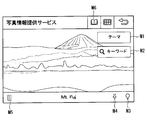
- the image display device 2 executes the image display process shown in FIG. 6 and when the icon I3 corresponding to the photo information providing service (for example, service C shown in FIG. 5) is operated, the image display shown in FIG. A screen is displayed (B1). Note that the image display device 2 ends the image display process when an end operation is performed during the execution of the image display process illustrated in FIG. 7 or when a user performs an activation operation of another application. On the image display screen shown in FIG. 7, as an example, an image acquired last time and a title (“Mt. Fuji” in FIG. 7) attached to this image are displayed. Note that, when the photo information providing service is started, a sample image or the like stored in advance in the vehicle-side storage unit 15 may be displayed. In addition, a theme button M1, a keyword button M2, a destination button M3, a point keep button M4, a play button M5, and a favorite button M6 are displayed on the image display screen.
- a theme button M1 a keyword button M2, a destination button M3, a point keep button
- the theme button M1 is a button for inputting a selection operation for selecting a theme for narrowing down images in the content server 6 among images stored in the content server 6.
- the theme is information indicating a keyword set in advance for an image, that is, a type of the image, such as a title, a tag set in the image, or a category managed by the content server 6.
- the keyword button M2 is a button for the user to input an arbitrary keyword. The input keyword becomes a keyword for narrowing down images in the content server 6. These themes or keywords correspond to the narrowing down conditions.
- the destination button M3 is a button for setting the position specified in the displayed image as the vehicle destination in the navigation function.
- the point keep button M4 is a button for storing the position specified in the displayed image as a so-called favorite point. Note that the destination button M3 and the point keep button M4 are used when the additional information that can specify the position of the image is added to the displayed image, that is, the additional information is associated with the image in the content server. 6 is displayed when it is stored.
- the image on which the destination button M3 and the point keep button M4 are displayed is an image that can specify the position indicated by the image content, the position where the image is captured, and the like.
- the position indicated by the image content is, for example, the position of Mt. Fuji in the image, not the position where the image was captured, in the case of an image captured of Mt. Fuji.
- the additional information includes, for example, the category of the image content, the keyword set for the image, the name of the image content, the user identification name that provided the image, the title set for the image, and the imaged image.
- the date and time and the registration date and time when the image was registered are included.
- the additional information that can specify the position includes the position of the image content, the position of the provider of the image content, the shooting position where the image was shot, and the like. More specifically, as the position of the image content, “GPS attached information” (so-called geotag) of the Exif standard (Exchangeable image file format standard) which is information including mainly latitude and longitude added to the photo data Can be used.
- a method of adding this geotag to an image a) a method of adding a geotag at the time of shooting using a digital camera or a camera-equipped mobile phone with a built-in GPS, and b) recording a movement path by a single GPS receiver.
- a method of adding GPS receiver position information corresponding to the imaging time when an image was captured using dedicated software on a personal computer and c) a map for each image later using dedicated software or web services
- the playback button M5 is a button for inputting a slide show execution and stop operation for sequentially switching and displaying a plurality of acquired images.
- the favorite button M6 is a button for displaying information stored as a point registered in the point keep, that is, a so-called favorite point.
- the image display device 2 determines whether the theme button M1 is operated (B2) or the vehicle is traveling (B16) in the image display process shown in FIG. As described above, the image display device 2 acquires vehicle information from the ECU 7 that can specify whether the vehicle is running by the vehicle information acquisition unit 17. If the image display device 2 determines that the vehicle is traveling (B16: YES), the image display device 2 does not input a keyword (step B10) described later. That is, the image display device 2 performs travel restriction that restricts the operation of the keyword button M2. As a result, the image display device 2 is intended to ensure safety while the vehicle is traveling. In this case, the travel restriction may be performed by not displaying the keyword button M2 (restricting the display) or making a tone down. Note that if the travel restriction is not performed, the user can input a keyword, that is, a narrowing-down condition.
- the image display device 2 When the user operates the theme button M1 on the image display screen shown in FIG. 7, the image display device 2 operates in the image display process shown in FIG. 6 because the theme button M1 is operated (B2: YES).
- a theme screen is displayed (B3).
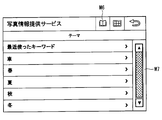
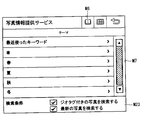
- this theme screen for example, “car”, “spring”, “summer”, “autumn”, “winter” and the like are preset as themes that can be set as keywords.
- the theme screen also displays “recently used keywords” for displaying a history of recently used keywords by the user. Note that the type and number of themes are not limited to this, and other themes can be selected by scrolling with the scroll bar M7. However, the operation of the scroll bar M7 is subject to the travel regulation described above.
- the image display device 2 In the image display process shown in FIG. 6, since the theme is selected (B4: Theme), the selected theme is transmitted to the content server 6 (B6).
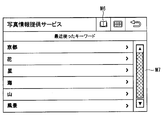
- the image display device 2 selects the keyword in the image display processing shown in FIG. 6 (B4: keyword). 9 is displayed and the selection of the keyword is accepted (B5). In this step B5, the user does not input a keyword, but selects one of the displayed keywords (in FIG. 9, for example, “Kyoto”, “flower”, “star”, etc.). Then, the image display device 2 transmits the selected keyword to the content server 6 (B6). More specifically, in the case of the present embodiment, the image display device 2 transmits a keyword to the mobile communication terminal 3 and causes the mobile communication terminal 3 to execute a process of transmitting the keyword to the content server 6. ing. Then, as will be described later, the image acquired by the mobile communication terminal 3 is displayed on the image display device 2.
- the image display device 2 when the user operates the keyword button M2 on the image display screen shown in FIG. 7, the image display device 2 operates the keyword button M2 in the image display process shown in FIG. 6 (B10: YES). ) Displays a software keyboard and accepts keyword input (B11). In this case, the user inputs an arbitrary keyword. However, as described above, keyword input is subject to travel restrictions. When a keyword is input, the image display device 2 transmits the input keyword to the content server 6 (B6).
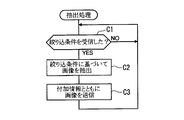
- the content server 6 repeatedly executes the extraction process shown in FIG. 10, and determines whether the narrowing condition has been received, that is, whether the theme or keyword selected by the user has been received (C1).
- the content server 6 extracts an image that matches the narrowing condition from the images stored in the storage unit 61 based on the received narrowing condition (C2).
- the content server 6 transmits the image extracted together with the additional information to the mobile terminal side (C3). In this way, the content server 6 (or the intermediate server 5) narrows down the stored many images based on the narrowing conditions.
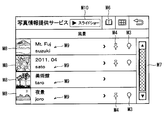
- the image display device 2 displays the acquired image in the image display process shown in FIG. 6 (B7). More specifically, when acquiring an image, the image display device 2 first displays a list display screen as shown in FIG. FIG. 10 is an example when “landscape” is selected as a keyword in FIG. 9.
- the list display screen includes a reduced display portion M8 that displays thumbnails (reduced display) of images, a title display portion M9 that displays titles and poster names (user identification names) as additional information added to the images, and A slide show button M10 for displaying the acquired images as a slide show is displayed.
- the list display screen also displays a destination button M3 and a point keep button M4 for images to which additional information capable of specifying the position is assigned. Registration to the point keep is also possible.
- the image display device 2 displays the image as shown in FIG.
- the image display device 2 sequentially displays the acquired images in a slide show format.
- the operation of the slide show button M10 is subject to travel regulation, and the operation is restricted when travel regulation is performed.
- the image display device 2 acquires images narrowed down to images that the user is interested in based on the theme or keyword selected by the user among the images stored in the content server 6. In addition, the image is displayed.
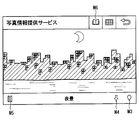
- the image display device 2 When the destination button M3 is operated in the image display process shown in FIG. 6 (B8: YES), the image display device 2 displaying the image specifies a position related to the image based on the additional information described above, The specified position is set as the destination, and a map screen around the destination as shown in FIG. 12 is displayed (B9). Similar to the known navigation function, the vehicle position M11 and the destination position M12 are displayed on the map screen.
- the image display device 2 searches for a route to the destination and executes a navigation function for guiding the vehicle to the destination.
- the image display device 2 is configured to have a navigation function. However, when the navigation device is configured separately from the image display device 2, information on the destination is passed to the navigation device and the navigation is performed. It is good also as a structure which performs route guidance on the apparatus side.
- the image display device 2 can set the destination based on the image selected by the user, more strictly based on the additional image added to the image. In other words, the image display device 2 does not search for an image after setting a position such as the destination, but sets the image selected by the user as the destination. As a result, it is possible to easily set the scenery or facility desired by the user among the images stored in the content server 6 as the destination.
- the image display device 2 registers the position relating to the image in the point keep based on the additional information (B13).
- an image and other additional information may be stored as favorite point information.
- the image display device 2 can display images in the slide show format as described above, but does not accept the operation of the playback button M5 if the vehicle is running (B17: YES). That is, the playback button M5 is subject to travel regulation. On the other hand, if the vehicle is not running (B17: NO), the image display device 2 accepts an operation of the playback button M5 by the user (B14: YES), stops if the slide show is executed or is in an execution state, and finally An image is displayed (B15).
- the image display device 2 acquires an image and sets a destination based on the acquired image.
- a narrowing condition indicating the type of image designated by the user is transmitted from the image display device 2 to the content server 6.
- the content server 6 extracts a plurality of images that match the narrowing condition based on the narrowing condition transmitted from the image display device 2, and transmits the extracted image to the image display device 2.
- the position regarding the image selected by the user is set as a destination. That is, in the image display system 1, an image desired by the user is first extracted (narrowed down), and a position related to an image selected from images narrowed down according to the user's wish is set as a destination.
- the image desired by the user is always included in the narrowed-down image, and the user can narrow down the desired image without specifying a specific point. You can decide the destination you want to visit from inside.
- the content server 6 includes a category of the image content, a keyword set for the image, a name of the image content, a user identification name that provided the image, a title set for the image, an imaging date and time when the image was captured, and At least one of the registration dates and times when the image is registered is associated with the image and stored as additional information. Then, the image display device 2 sets a destination based on the additional information. This eliminates the need for the user to check where the image was taken and the convenience is improved. In addition, the user can quickly search not only the type of image that he is interested in, but also an image shared by, for example, friends or groups.
- the image display system 1 enables the image display device 2 to identify, among the acquired images, an image to which additional information is added and an image to which no additional information is added based on the presence / absence of the destination button M3 and the point keep button M4. Yes. Thereby, it is possible to immediately grasp an image that cannot be set as the destination.
- the image display system 1 displays a plurality of acquired images in a list format and / or a slide show format, it is possible to easily grasp what images exist. At this time, if it is displayed in a slide show format, it can be used like a so-called BGV (Back Ground Video) or a promotion video corresponding to a specific keyword.
- BGV Back Ground Video
- the image display system 1 is set by a category used when managing images in the content server 6, a keyword designated by the user, a name of a facility, a name of a spot, a user name who posted an image, and a user who posted the image.
- the title is set as the theme. Thereby, the user can narrow down an image not only for the kind of image in which he was interested, but for example, a friend and a group.
- the image display system 1 displays a plurality of acquired images in a list format and / or a slide show format, it is possible to easily grasp what images exist. At this time, if it is displayed in a slide show format, it can be used like a so-called BGV (Back Ground Video) or a promotion video corresponding to a specific keyword.
- BGV Back Ground Video
- the image display system 1 uses the image display device 2 as a vehicle device.
- the image display device 2 determines that the vehicle is traveling based on vehicle information that can identify the traveling state of the vehicle, the image display device 2 displays the vehicle-side display unit 11 and displays the vehicle-side operation input unit 12. Regulates part of the operation input. As a result, it is possible to prevent the driver from gazing at the screen during traveling, for example, and it is possible to ensure safety during traveling and to perform comfortable traveling.
- FIGS. 14 to 16 a second embodiment of the present disclosure will be described with reference to FIGS. 14 to 16.
- the second embodiment is different from the first embodiment in that the images to be displayed are rearranged.
- the configurations of the image display system, the image display device, and the mobile communication terminal are the same as those in the first embodiment, and thus detailed description thereof is omitted.
- the image display device 2 of the second embodiment can rearrange displayed images.
- the image display device 2 displays the destination button M3 and the point keep button M4 together for the image to which the additional information capable of specifying the position is added.
- an image in which the destination button M3 and the point keep button M4 are not displayed is an image that cannot be set as the destination because its position cannot be specified. Therefore, the image display device 2 can change the display order of the images when displaying a plurality of acquired images as a list.
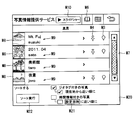
- the image display device 2 displays the condition display area M20 and allows the user to input the sorting condition. Then, the images are rearranged based on the rearrangement condition input from the condition display area M20.
- the user checks by touching the corresponding check box portion. If the user wants to display in order from the current position, check the check box corresponding to “in order from the current position”. In this case, the rearrangement condition is in order of geotagging and closer to the current position.
- the user may check the check box corresponding to “photo with time information” or “in order of the set date and time”. At this time, if the set date / time button M21 is touched, a more detailed date / time setting screen is displayed, although not shown.
- the image display device 2 sorts and displays the images based on the sort condition. Thereby, for example, images with geotags are displayed in a list in order from the current position. That is, images that can be set as the destination are displayed at the top of the list. Therefore, when an image is selected and a destination is set, an image desired by the user is displayed at the top of the list, and usability is improved.
- the image display device 2 displays a condition display area M23 that displays search conditions such as “search for photos with geotags” and “search for latest photos”. .
- search conditions such as “search for photos with geotags” and “search for latest photos”.
- the user is caused to set a search condition, and the search condition is transmitted to the content server 6 together with the category.
- the content server 6 can extract only images that meet the rearrangement conditions. In this case, for example, an image to which no geotag is added is not acquired from the beginning, so that it is possible to reduce the processing load when rearranging.
- This search condition corresponds to a narrow-down condition.
- the image display device 2 may be individually provided with setting screens for setting “search for geotagged photos” and “search for latest photos” in more detail.
- a search condition such as an order close to the set destination may be added instead of the current location.
- search conditions are merely examples, and other search conditions can of course be set.
- combination of search conditions may be set arbitrarily. For example, when “image with geotag” is included in the search condition, it may be combined with other search conditions such as “exclude foreign images” and “exclude places that cannot be reached by vehicle”.
- the processing load on the image display device 2 and the mobile communication terminal 3 can be reduced. Further, since unnecessary images are omitted, the amount of data to be communicated is reduced, and in the case of a pay-as-you-go communication fee, the communication fee can also be reduced.
- the mobile terminal In the first embodiment, an example in which the mobile terminal is configured by the image processing apparatus and the mobile communication terminal 3 has been described, but the mobile terminal may be configured by only the mobile communication terminal 3 as the mobile terminal.
- the same narrowing-down condition as in the first embodiment is input from the terminal-side operation input unit 22 of the mobile communication terminal 3, the narrowing-down condition is transmitted to the content server 6, the image is extracted on the content server 6 side, and acquired.
- An image is displayed on the terminal side display unit 21, and a position related to the selected one image is set as a destination.
- you may comprise so that the destination set by the mobile communication terminal 3 may be transmitted to the image display apparatus 2 by BT communication, and the image display apparatus 2 may perform the navigation function mentioned above.
- the navigation function to the destination set in the mobile communication terminal 3 may be performed in the mobile communication terminal 3. Furthermore, it is good also as a structure which transmits the information of the set destination to the external server which has a navigation function, makes an external server perform a navigation function, and performs only a display in the portable communication terminal 3.
- FIG. That is, the mobile terminal of the present disclosure is not limited to a vehicle device.
- the content server 6 from which images are acquired may be changed according to the narrowing conditions.
- the content provider A has a database of images specialized for cooking
- the content provider B has a database of images specialized for landscape images.
- the mobile terminal acquires the content of the acquisition destination according to the filtering condition, such as acquiring an image from the content provider A or acquiring an image from the content provider B according to the details of the filtering condition such as a theme or a keyword.
- the intermediate server 5 may be configured to switch the acquisition content server 6 according to the narrowing-down conditions transmitted from the mobile terminal. This increases the possibility of acquiring more images or more specialized images.
- the distance from the current position and the expected time from the current position to arrival may be further settable.
- the current position is transmitted from the mobile terminal to the content server 6 in addition to the narrowing condition, and the content server 6 extracts an image that matches the acquired current position and narrowing condition.
- the server compares the stored additional information of the image with the received current position, calculates the distance from the current position, or calculates the expected arrival time from the current position to the position specified by the image. For example, an image that matches the narrowing-down condition is extracted.
- the content server 6 may calculate the estimated arrival time based on the vehicle speed if the mobile terminal is the image display device 2 (that is, a vehicle device).
- the content server 6 may calculate the estimated arrival time when walking or using public transportation. For example, when the image display device 2 is used when going for a walk or a drive, even if an image at a position far away from the current position (for example, a foreign country) is displayed, it may not be possible to move to that position. Therefore, by adding the distance from the current position to the narrowing-down condition, it is possible to further narrow down to images at positions within a movable range, and the usefulness is improved. In this case, it may be possible to set within a preset range based on the destination when using the navigation function or the route to the destination.
- the content server 6 extracts an image that matches the narrowing condition regardless of whether or not additional information is added. However, for the image to which no additional information is added, the content server 6 It may not be extracted at. As a result, it is possible to exclude from the extraction target an image that is difficult to specify a position regarding the image, that is, an image that is difficult to set as a destination.
- rearrangement is performed by the image display device 2, but rearrangement is performed by the mobile communication terminal 3 that operates in cooperation with the image display device 2, and the result is displayed on the image display device 2. Also good. Moreover, it is good also as a structure which transmits rearrangement conditions to the content server 6, makes the content server 6 side perform rearrangement, and acquires the rearranged image. According to such a configuration, it is possible to further reduce the addition of processing in the image display device 2 and the mobile communication terminal 3.
- an image acquired on the mobile communication terminal 3 side is transferred to the image display device 2, or an image acquired by the image display device 2 is transferred to the mobile communication terminal.
- 3 may be transferred. For example, it is useful when moving to a destination by car and walking from there, or when the owner of the mobile communication terminal 3 uses a rental car.
- Bluetooth registered trademark
- WiFi Wireless USB that wirelessly converts USB
- wired communication method such as USB
Landscapes
- Engineering & Computer Science (AREA)
- Theoretical Computer Science (AREA)
- Remote Sensing (AREA)
- Radar, Positioning & Navigation (AREA)
- Physics & Mathematics (AREA)
- General Physics & Mathematics (AREA)
- General Engineering & Computer Science (AREA)
- Automation & Control Theory (AREA)
- Data Mining & Analysis (AREA)
- Databases & Information Systems (AREA)
- Library & Information Science (AREA)
- Human Computer Interaction (AREA)
- Educational Administration (AREA)
- Business, Economics & Management (AREA)
- Educational Technology (AREA)
- Mathematical Physics (AREA)
- Computer Hardware Design (AREA)
- Navigation (AREA)
- User Interface Of Digital Computer (AREA)
- Information Retrieval, Db Structures And Fs Structures Therefor (AREA)
- Instructional Devices (AREA)
Priority Applications (2)
| Application Number | Priority Date | Filing Date | Title |
|---|---|---|---|
| US14/397,543 US9958286B2 (en) | 2012-05-07 | 2013-04-24 | Image display system, mobile terminal, server, non-transitory physical computer-readable medium |
| DE112013002357.1T DE112013002357T5 (de) | 2012-05-07 | 2013-04-24 | Bildanzeigesystem, mobiles Endgerät, Server, nicht-flüchtiges physikalisches computerlesbares Medium |
Applications Claiming Priority (4)
| Application Number | Priority Date | Filing Date | Title |
|---|---|---|---|
| JP2012106051 | 2012-05-07 | ||
| JP2012-106051 | 2012-05-07 | ||
| JP2013013487A JP2013253961A (ja) | 2012-05-07 | 2013-01-28 | 画像表示システム |
| JP2013-013487 | 2013-01-28 |
Publications (1)
| Publication Number | Publication Date |
|---|---|
| WO2013168382A1 true WO2013168382A1 (ja) | 2013-11-14 |
Family
ID=49550450
Family Applications (1)
| Application Number | Title | Priority Date | Filing Date |
|---|---|---|---|
| PCT/JP2013/002762 Ceased WO2013168382A1 (ja) | 2012-05-07 | 2013-04-24 | 画像表示システム、移動端末、サーバ、持続的有形コンピュータ読み取り媒体 |
Country Status (4)
| Country | Link |
|---|---|
| US (1) | US9958286B2 (enExample) |
| JP (1) | JP2013253961A (enExample) |
| DE (1) | DE112013002357T5 (enExample) |
| WO (1) | WO2013168382A1 (enExample) |
Cited By (1)
| Publication number | Priority date | Publication date | Assignee | Title |
|---|---|---|---|---|
| WO2020121558A1 (ja) * | 2018-12-10 | 2020-06-18 | 株式会社Jvcケンウッド | ナビゲーション制御装置、ナビゲーション方法およびプログラム |
Families Citing this family (10)
| Publication number | Priority date | Publication date | Assignee | Title |
|---|---|---|---|---|
| USD745894S1 (en) * | 2013-09-03 | 2015-12-22 | Samsung Electronics Co., Ltd. | Display screen or portion thereof with icon |
| JP6230435B2 (ja) * | 2014-02-03 | 2017-11-15 | キヤノン株式会社 | データ処理装置、その制御方法及びプログラム |
| WO2015121991A1 (ja) * | 2014-02-14 | 2015-08-20 | 楽天株式会社 | 表示制御装置、表示制御装置の制御方法、プログラム、及び情報記憶媒体 |
| JP2016194843A (ja) * | 2015-04-01 | 2016-11-17 | ファナック株式会社 | 複数画像を用いたプログラム表示機能を有する数値制御装置 |
| KR102023996B1 (ko) * | 2017-12-15 | 2019-09-23 | 엘지전자 주식회사 | 차량에 구비된 차량 제어 장치 및 차량의 제어방법 |
| US11700357B2 (en) * | 2021-02-03 | 2023-07-11 | Toyota Motor Engineering & Manufacturing North America, Inc. | Connected camera system for vehicles |
| EP4464985A4 (en) * | 2022-01-14 | 2025-10-22 | Pioneer Corp | INFORMATION PROCESSING DEVICE, METHOD AND PROGRAM |
| WO2023176529A1 (ja) * | 2022-03-18 | 2023-09-21 | 株式会社リアルディア | 情報検索サービスに適合された情報通信端末装置及び該装置における表示制御方法並びに該方法を実行するためのコンピュータプログラム |
| US12367773B2 (en) * | 2022-03-24 | 2025-07-22 | Honda Motor Co., Ltd. | Control system, control method, and storage medium for storing program to control the operation of a mobile device |
| KR20240111696A (ko) * | 2023-01-10 | 2024-07-17 | 얀마 홀딩스 주식회사 | 위치 정보 표시 방법, 위치 정보 표시 시스템 및 위치 정보 표시 프로그램 |
Citations (4)
| Publication number | Priority date | Publication date | Assignee | Title |
|---|---|---|---|---|
| JP2002228470A (ja) * | 2001-02-01 | 2002-08-14 | Fujitsu Ten Ltd | ナビゲーション装置 |
| JP2002530658A (ja) * | 1998-11-16 | 2002-09-17 | ローベルト ボツシユ ゲゼルシヤフト ミツト ベシユレンクテル ハフツング | ナビゲーション装置に走行目的地を入力するための装置 |
| JP2004333233A (ja) * | 2003-05-02 | 2004-11-25 | Alpine Electronics Inc | ナビゲーション装置 |
| JP2011133230A (ja) * | 2009-12-22 | 2011-07-07 | Canvas Mapple Co Ltd | ナビゲーション装置 |
Family Cites Families (28)
| Publication number | Priority date | Publication date | Assignee | Title |
|---|---|---|---|---|
| JPH1188866A (ja) * | 1997-07-18 | 1999-03-30 | Pfu Ltd | 高精細画像表示装置及びそのプログラム記憶媒体 |
| US20030016781A1 (en) * | 2001-05-18 | 2003-01-23 | Huang Wen C. | Method and apparatus for quantitative stereo radiographic image analysis |
| JP3622913B2 (ja) * | 2002-03-25 | 2005-02-23 | ソニー株式会社 | 情報画像利用システム、情報画像管理装置、情報画像管理方法、ユーザ情報画像、及び、プログラム、記録媒体 |
| WO2006013613A1 (ja) * | 2004-08-02 | 2006-02-09 | Mitsubishi Denki Kabushiki Kaisha | 放送受信装置および放送受信方法 |
| US7865236B2 (en) * | 2004-10-20 | 2011-01-04 | Nervonix, Inc. | Active electrode, bio-impedance based, tissue discrimination system and methods of use |
| US20060085048A1 (en) * | 2004-10-20 | 2006-04-20 | Nervonix, Inc. | Algorithms for an active electrode, bioimpedance-based tissue discrimination system |
| US9691098B2 (en) * | 2006-07-07 | 2017-06-27 | Joseph R. Dollens | Method and system for managing and displaying product images with cloud computing |
| JP4833817B2 (ja) * | 2006-12-15 | 2011-12-07 | 富士フイルム株式会社 | 画像合成用サーバおよびその制御方法 |
| JP2008249428A (ja) * | 2007-03-29 | 2008-10-16 | Clarion Co Ltd | ナビゲーション装置及びその制御方法 |
| US8358964B2 (en) * | 2007-04-25 | 2013-01-22 | Scantron Corporation | Methods and systems for collecting responses |
| JP4928346B2 (ja) * | 2007-05-08 | 2012-05-09 | キヤノン株式会社 | 画像検索装置および画像検索方法ならびにそのプログラムおよび記憶媒体 |
| US9305027B2 (en) * | 2007-08-03 | 2016-04-05 | Apple Inc. | User configurable quick groups |
| KR100849420B1 (ko) * | 2007-10-26 | 2008-07-31 | 주식회사지앤지커머스 | 이미지 기반 검색 시스템 및 방법 |
| KR101432593B1 (ko) * | 2008-08-20 | 2014-08-21 | 엘지전자 주식회사 | 이동단말기 및 그 지오태깅 방법 |
| US20100082684A1 (en) * | 2008-10-01 | 2010-04-01 | Yahoo! Inc. | Method and system for providing personalized web experience |
| JP2010266410A (ja) | 2009-05-18 | 2010-11-25 | Alpine Electronics Inc | サーバシステム、車載ナビゲーション装置及び写真画像配信方法 |
| US9417312B2 (en) * | 2009-11-18 | 2016-08-16 | Verizon Patent And Licensing Inc. | System and method for providing automatic location-based imaging using mobile and stationary cameras |
| US9749823B2 (en) * | 2009-12-11 | 2017-08-29 | Mentis Services France | Providing city services using mobile devices and a sensor network |
| JP5503728B2 (ja) * | 2010-03-01 | 2014-05-28 | 本田技研工業株式会社 | 車両の周辺監視装置 |
| JP2012037475A (ja) | 2010-08-11 | 2012-02-23 | Clarion Co Ltd | サーバ装置、ナビゲーションシステム、ナビゲーション装置 |
| JP2012064200A (ja) * | 2010-08-16 | 2012-03-29 | Canon Inc | 表示制御装置、表示制御装置の制御方法、プログラム及び記録媒体 |
| JP2012068133A (ja) * | 2010-09-24 | 2012-04-05 | Aisin Aw Co Ltd | 地図画像表示装置、地図画像の表示方法及びコンピュータプログラム |
| JP2012122778A (ja) * | 2010-12-06 | 2012-06-28 | Fujitsu Ten Ltd | ナビゲーション装置 |
| US20120179531A1 (en) * | 2011-01-11 | 2012-07-12 | Stanley Kim | Method and System for Authenticating and Redeeming Electronic Transactions |
| CN103210380B (zh) * | 2011-02-15 | 2016-08-10 | 松下知识产权经营株式会社 | 信息显示系统、信息显示控制装置和信息显示装置 |
| US20120239494A1 (en) * | 2011-03-14 | 2012-09-20 | Bo Hu | Pricing deals for a user based on social information |
| JP2013095268A (ja) * | 2011-11-01 | 2013-05-20 | Toyota Motor Corp | 車載表示装置とサーバとシステム |
| KR20140044237A (ko) * | 2012-10-04 | 2014-04-14 | 삼성전자주식회사 | 플렉서블 장치 및 그의 제어 방법 |
-
2013
- 2013-01-28 JP JP2013013487A patent/JP2013253961A/ja active Pending
- 2013-04-24 US US14/397,543 patent/US9958286B2/en active Active
- 2013-04-24 WO PCT/JP2013/002762 patent/WO2013168382A1/ja not_active Ceased
- 2013-04-24 DE DE112013002357.1T patent/DE112013002357T5/de not_active Withdrawn
Patent Citations (4)
| Publication number | Priority date | Publication date | Assignee | Title |
|---|---|---|---|---|
| JP2002530658A (ja) * | 1998-11-16 | 2002-09-17 | ローベルト ボツシユ ゲゼルシヤフト ミツト ベシユレンクテル ハフツング | ナビゲーション装置に走行目的地を入力するための装置 |
| JP2002228470A (ja) * | 2001-02-01 | 2002-08-14 | Fujitsu Ten Ltd | ナビゲーション装置 |
| JP2004333233A (ja) * | 2003-05-02 | 2004-11-25 | Alpine Electronics Inc | ナビゲーション装置 |
| JP2011133230A (ja) * | 2009-12-22 | 2011-07-07 | Canvas Mapple Co Ltd | ナビゲーション装置 |
Cited By (3)
| Publication number | Priority date | Publication date | Assignee | Title |
|---|---|---|---|---|
| WO2020121558A1 (ja) * | 2018-12-10 | 2020-06-18 | 株式会社Jvcケンウッド | ナビゲーション制御装置、ナビゲーション方法およびプログラム |
| JP2020094815A (ja) * | 2018-12-10 | 2020-06-18 | 株式会社Jvcケンウッド | ナビゲーション制御装置、ナビゲーション方法およびプログラム |
| JP7081468B2 (ja) | 2018-12-10 | 2022-06-07 | 株式会社Jvcケンウッド | ナビゲーション制御装置、ナビゲーション方法およびプログラム |
Also Published As
| Publication number | Publication date |
|---|---|
| DE112013002357T5 (de) | 2015-01-29 |
| US9958286B2 (en) | 2018-05-01 |
| JP2013253961A (ja) | 2013-12-19 |
| US20150134236A1 (en) | 2015-05-14 |
Similar Documents
| Publication | Publication Date | Title |
|---|---|---|
| WO2013168382A1 (ja) | 画像表示システム、移動端末、サーバ、持続的有形コンピュータ読み取り媒体 | |
| JP5676147B2 (ja) | 車載用表示装置、表示方法および情報表示システム | |
| JP5984685B2 (ja) | 表示システム、サーバ、端末装置、表示方法およびプログラム | |
| JP6045354B2 (ja) | 案内システム、サーバ、端末装置、案内方法およびプログラム | |
| JP5994659B2 (ja) | 車両用装置、情報表示プログラム、車両用システム | |
| WO2010109836A1 (ja) | 通知装置、通知システム、通知装置の制御方法、制御プログラム、及び該プログラムを記録したコンピュータ読み取り可能な記録媒体 | |
| JP2008250474A (ja) | カメラ付き情報検索装置 | |
| TW201741860A (zh) | 媒體處理方法、裝置、設備和系統 | |
| JP6260084B2 (ja) | 情報検索システム、車両用装置、携帯通信端末、情報検索プログラム | |
| JP5979771B1 (ja) | 経路検索システム、経路検索装置、経路検索方法、プログラム、及び情報記憶媒体 | |
| JP2015018421A (ja) | 端末装置、投稿情報送信方法、投稿情報送信プログラムおよび投稿情報共有システム | |
| US20140280090A1 (en) | Obtaining rated subject content | |
| US9706349B2 (en) | Method and apparatus for providing an association between a location and a user | |
| JP6082519B2 (ja) | 案内経路決定装置および案内経路決定システム | |
| JP2016009450A (ja) | 情報提供システム、投稿者端末、閲覧者端末、および情報公開装置 | |
| KR20140118569A (ko) | 여행정보 서비스 시스템 및 그 제공방법 | |
| JP5510494B2 (ja) | 移動端末、車両用装置、携帯通信端末 | |
| JP2011124936A (ja) | 撮像装置及び撮影案内システム並びにプログラム | |
| JP2014194710A (ja) | 利用者属性に依存した情報配信システム | |
| JP2013096969A (ja) | 情報処理装置及び制御方法 | |
| US20140273993A1 (en) | Rating subjects | |
| WO2014064886A1 (ja) | 車両用コンテンツ提供システムおよびその方法 | |
| KR102371987B1 (ko) | 내비게이션의 경유지 검색 및 추가 방법과 장치 | |
| JP2014016274A (ja) | 情報処理装置 | |
| JP6024394B2 (ja) | アプリケーション間連携システムおよび通信端末 |
Legal Events
| Date | Code | Title | Description |
|---|---|---|---|
| 121 | Ep: the epo has been informed by wipo that ep was designated in this application |
Ref document number: 13788491 Country of ref document: EP Kind code of ref document: A1 |
|
| WWE | Wipo information: entry into national phase |
Ref document number: 14397543 Country of ref document: US |
|
| WWE | Wipo information: entry into national phase |
Ref document number: 1120130023571 Country of ref document: DE Ref document number: 112013002357 Country of ref document: DE |
|
| 122 | Ep: pct application non-entry in european phase |
Ref document number: 13788491 Country of ref document: EP Kind code of ref document: A1 |