WO2011122129A1 - 制御装置および投写型映像表示装置 - Google Patents
制御装置および投写型映像表示装置 Download PDFInfo
- Publication number
- WO2011122129A1 WO2011122129A1 PCT/JP2011/052914 JP2011052914W WO2011122129A1 WO 2011122129 A1 WO2011122129 A1 WO 2011122129A1 JP 2011052914 W JP2011052914 W JP 2011052914W WO 2011122129 A1 WO2011122129 A1 WO 2011122129A1
- Authority
- WO
- WIPO (PCT)
- Prior art keywords
- screen frame
- projection
- unit
- image
- control device
- Prior art date
- Legal status (The legal status is an assumption and is not a legal conclusion. Google has not performed a legal analysis and makes no representation as to the accuracy of the status listed.)
- Ceased
Links
Images

Classifications
-
- G—PHYSICS
- G03—PHOTOGRAPHY; CINEMATOGRAPHY; ANALOGOUS TECHNIQUES USING WAVES OTHER THAN OPTICAL WAVES; ELECTROGRAPHY; HOLOGRAPHY
- G03B—APPARATUS OR ARRANGEMENTS FOR TAKING PHOTOGRAPHS OR FOR PROJECTING OR VIEWING THEM; APPARATUS OR ARRANGEMENTS EMPLOYING ANALOGOUS TECHNIQUES USING WAVES OTHER THAN OPTICAL WAVES; ACCESSORIES THEREFOR
- G03B21/00—Projectors or projection-type viewers; Accessories therefor
- G03B21/14—Details
-
- G—PHYSICS
- G03—PHOTOGRAPHY; CINEMATOGRAPHY; ANALOGOUS TECHNIQUES USING WAVES OTHER THAN OPTICAL WAVES; ELECTROGRAPHY; HOLOGRAPHY
- G03B—APPARATUS OR ARRANGEMENTS FOR TAKING PHOTOGRAPHS OR FOR PROJECTING OR VIEWING THEM; APPARATUS OR ARRANGEMENTS EMPLOYING ANALOGOUS TECHNIQUES USING WAVES OTHER THAN OPTICAL WAVES; ACCESSORIES THEREFOR
- G03B17/00—Details of cameras or camera bodies; Accessories therefor
- G03B17/48—Details of cameras or camera bodies; Accessories therefor adapted for combination with other photographic or optical apparatus
- G03B17/54—Details of cameras or camera bodies; Accessories therefor adapted for combination with other photographic or optical apparatus with projector
-
- H—ELECTRICITY
- H04—ELECTRIC COMMUNICATION TECHNIQUE
- H04N—PICTORIAL COMMUNICATION, e.g. TELEVISION
- H04N9/00—Details of colour television systems
- H04N9/12—Picture reproducers
- H04N9/31—Projection devices for colour picture display, e.g. using electronic spatial light modulators [ESLM]
- H04N9/3179—Video signal processing therefor
- H04N9/3185—Geometric adjustment, e.g. keystone or convergence
-
- H—ELECTRICITY
- H04—ELECTRIC COMMUNICATION TECHNIQUE
- H04N—PICTORIAL COMMUNICATION, e.g. TELEVISION
- H04N9/00—Details of colour television systems
- H04N9/12—Picture reproducers
- H04N9/31—Projection devices for colour picture display, e.g. using electronic spatial light modulators [ESLM]
- H04N9/3191—Testing thereof
- H04N9/3194—Testing thereof including sensor feedback
Definitions
- the present invention relates to a trapezoidal distortion correction technique in a projection display apparatus.
- a projection video display device (hereinafter referred to as a projector as appropriate) equipped with a camera has been put into practical use.
- Some projectors equipped with a camera have a so-called easy setting function in which a projected test pattern is captured by the camera, and autofocus adjustment is performed based on the captured image.
- trapezoidal distortion may occur in the image projected and displayed on the screen depending on the relative angle between the projector and the screen. In such a case, it is preferable to correct the trapezoidal distortion.
- the projection surface is a screen, four corners or four sides of the screen are detected, and the image is corrected so that the projected image fits the screen.
- the projection surface is a simple wall surface, there is no target for fitting the projection image, so it is necessary to perform keystone correction.
- Patent Document 1 discloses an image projector that corrects a trapezoidal distortion or the like of a projected image.
- the projector takes a projected keystone image with an imaging device, and executes keystone correction based on the image.
- fitting correction Whether to perform image correction to fit the screen (hereinafter referred to as “fitting correction”) or keystone correction is determined based on whether a screen frame is detected in the image captured by the camera. Is called. However, when an image is projected onto the wall surface from the projection display apparatus, the outer periphery of the projected image may be erroneously detected as a screen frame, and fitting correction may be selected.
- the present invention has been made in view of such circumstances, and an object of the present invention is to provide a technique for preventing erroneous detection of the outer periphery of a projected image as a screen frame when an image is projected onto a wall surface by a projection display apparatus. There is.
- An aspect of the present invention is a control device mounted on a projection display apparatus that includes a projection unit that projects an image on a projection surface via a lens and an imaging unit that images the projection surface.
- a screen frame detection unit that detects the screen frame from an image captured by the imaging unit
- a projection area is estimated by the projection unit Whether or not the projection area estimation unit for calculating the outer shape of the projection area from the image captured by the imaging unit and the outer shape of the screen frame and the projection area substantially coincide with each other when a predetermined pattern is projected
- a determination unit that determines that the screen frame is erroneously detected when substantially matching.
- This apparatus includes a projection unit that projects an image on a projection surface via a lens, an imaging unit for imaging the projection surface, and the control device described above.
- the present invention when projecting an image on a wall surface with a projection display apparatus, it is possible to prevent erroneous detection of the outer periphery of the projected image as a screen frame.
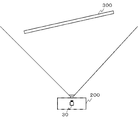
- FIG. 1 is a diagram showing a positional relationship between a projection display apparatus 200 and a projection plane 300 according to an embodiment of the present invention.
- the projection display apparatus 200 according to the embodiment includes an imaging unit 30 for photographing the direction of the projection plane 300.
- the imaging unit 30 is installed such that the optical axis center thereof and the optical axis center of the projection light projected from the projection display apparatus 200 have a parallel relationship, for example.
- the projection plane 300 does not face the projection display apparatus 200 and the right side is inclined toward the eyelid.
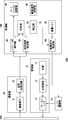
- FIG. 2 is a diagram showing a configuration of the projection display apparatus 200.
- the projection display apparatus 200 includes a projection unit 10, a lens driving unit 20, an imaging unit 30, and a control unit 100.
- the control unit 100 includes a screen frame detection unit 40, a projection area estimation unit 50, a determination unit 60, a correction unit 70, an image memory 82, a video signal setting unit 84, a drive signal setting unit 86, and an autofocus adjustment unit 90.
- the configuration of the control unit 100 can be realized in terms of hardware by a CPU, memory, or other LSI of an arbitrary computer, and can be realized in terms of software by a program loaded in the memory. Depicts functional blocks realized by. Therefore, those skilled in the art will understand that these functional blocks can be realized in various forms by hardware only, software only, or a combination thereof.
- Projection unit 10 projects an image on projection surface 300.
- the projection unit 10 includes a light source 11, a light modulation unit 12, and a focus lens 13.
- a halogen lamp having a filament-type electrode structure a metal halide lamp having an electrode structure for generating arc discharge, a xenon short arc lamp, a high-pressure mercury lamp, an LED lamp, or the like can be employed.
- the light modulator 12 modulates the light incident from the light source 11 in accordance with the video signal set by the video signal setting unit 84.
- DMD Digital Micromirror Device
- the DMD includes a plurality of micromirrors corresponding to the number of pixels, and generates desired video light by controlling the direction of each micromirror according to each pixel signal.
- the focus lens 13 adjusts the focal position of the light incident from the light modulator 12.
- the lens position of the focus lens 13 is moved on the optical axis by the lens driving unit 20.
- the image light generated by the light modulation unit 12 is projected onto the projection plane 300 via the focus lens 13.
- the lens driving unit 20 moves the position of the focus lens 13 in accordance with the driving signal set from the driving signal setting unit 86.
- a stepping motor for the lens driving unit 20, a stepping motor, a voice coil motor (VCM), a piezoelectric element, or the like can be employed.
- VCM voice coil motor
- the imaging unit 30 captures the projection plane 300 and the projection image projected on the projection plane 300 as a main subject.
- the imaging unit 30 includes a solid-state imaging device 31 and a signal processing circuit 32.
- a solid-state imaging device 31 As the solid-state imaging device 31, a CMOS (Complementary Metal Oxide Semiconductor) image sensor, a CCD (Charge Coupled Devices) image sensor, or the like can be employed.
- the signal processing circuit 32 performs various signal processing such as A / D conversion and conversion from the RGB format to the YUV format on the signal output from the solid-state imaging device 31, and outputs the signal to the control unit 100.
- the screen frame detection unit 40 detects a frame of the screen that appears in the image captured by the imaging unit 30. More specifically, the screen frame detection unit 40 detects the positions of the four sides (upper side, lower side, left side, and right side) of the screen shown in the captured image by extracting the edges in the captured image.
- the detected screen frame is specified by, for example, vertex coordinates of four corners.
- the screen frame detection unit 40 often detects the screen frame correctly.
- the screen frame detection unit 40 may erroneously detect the outer periphery of the image projected on the wall surface as a screen frame.
- the projection area estimation unit 50 estimates the shape of the projection area of the projector based on the specific pattern captured in the image captured by the imaging unit 30.
- the video signal setting unit 84 reads a specific pattern for projection area estimation from the image memory 82 and causes the projection unit 10 to project the specific pattern.
- the specific pattern is formed by a figure such as a rhombus.
- the projection area estimation unit 50 can detect a specific pattern from the captured image, and calculate the outer peripheral shape of the projection area by the projector from the size and shape of the specific pattern.
- the determination unit 60 acquires the screen frame detected from the screen frame detection unit 40 and the outer peripheral shape of the projection region estimated from the projection region estimation unit 50, respectively. Then, it is determined whether or not the shapes of both are substantially the same. For example, if both the screen frame and the projection area are general quadrilaterals, it is determined whether or not the distance between the coordinates of the four corners of the screen frame and the coordinates of the four corners of the projection area is a predetermined value (for example, 1 cm). judge. Alternatively, it is determined whether or not the distance between the line segments on the four sides of the screen frame and the projection area is a predetermined value (for example, 1 cm) or less.
- the screen frame and the outer periphery of the projection area are substantially coincident. If any one of the coordinates of the four corners or the distance between the line segments of the four sides is larger than the predetermined value, it is determined that the screen frame and the outer periphery of the projection area do not substantially match.
- the determination unit 60 determines that the outer periphery of the image projected by the projector is erroneously detected as the screen frame.
- the determination unit 60 determines that the screen frame is correctly detected.
- the determination of whether or not they substantially match each other includes a plurality of theoretical errors determined by the resolutions of the projection display apparatus and the imaging unit, specifications of the projection display apparatus, tolerances for human deviation, and the like. It is preferable to adjust the determination condition based on the parameter.
- the resolution of the imaging unit is lower than the display resolution of the projection display apparatus, for example, when the display resolution is XGA but the imaging resolution is VGA, the screen frame and the projection area are Even if it is shifted by several pixels on the display, it appears that there is almost no shift in the captured image.
- the resolution of the imaging unit is higher than the display resolution of the projection display apparatus, even if the deviation in the captured image is very small, the deviation on the projection plane may not be corrected for convenience of resolution. Considering this, it is preferable to set a substantially coincidence determination condition.
- the correction unit 70 executes trapezoidal distortion correction of either fitting correction or keystone correction according to the determination result by the determination unit 60.
- the correction unit 70 performs keystone correction. That is, the video signal setting unit 84 reads out a trapezoidal distortion adjustment test pattern from the image memory 82 and causes the projection unit 10 to project it.
- the test pattern is formed, for example, as a quadrangle (square, rectangle, parallelogram, rhombus, etc.).
- the imaging unit 30 images the test pattern projected on the projection plane 300.
- the correction unit 70 detects trapezoidal distortion based on the shape of the test pattern shown in the captured image, and corrects the video signal to be set in the video signal setting unit 84 so that the trapezoidal distortion is canceled.
- the video signal setting unit 84 sets the video signal after the trapezoidal distortion correction supplied from the correction unit 70 in the light modulation unit 12.
- the correction unit 70 performs fitting correction. That is, image conversion that matches the coordinates of the four corners of the outer periphery of the projection area with the coordinates of the four corners of the screen frame is performed on the video signal to be set in the video signal setting unit 84.
- the video signal setting unit 84 sets the video signal after the trapezoidal distortion correction supplied from the correction unit 70 in the light modulation unit 12.
- the correction unit 70 does not perform image conversion so that the coordinates of the four corners of the outer periphery of the projection area coincide with the coordinates of the four corners of the screen frame, but the projected image has a predetermined aspect ratio such as 4: 3 or 16: 9.
- Image conversion may be executed so that
- the autofocus adjustment unit 90 adjusts the focus using a known method such as a contrast detection method.
- the video signal setting unit 84 reads out a test pattern for autofocus adjustment from the image memory 82 and causes the projection unit 10 to project it.
- the test pattern is formed by, for example, a stripe pattern or a checker flag pattern.
- the imaging unit 30 images the test pattern projected on the projection plane 300.
- the autofocus adjustment unit 90 is configured to determine the position of the lens based on the sharpness of the detection area set by the screen frame detection unit 40 in a plurality of images respectively captured by the imaging unit 30 at a plurality of lens positions. To decide.
- the configuration of the autofocus adjustment unit 90 will be described more specifically.
- the autofocus adjustment unit 90 includes a high-pass filter, an integration unit, and a lens position determination unit (not shown).
- the high-pass filter extracts a high-frequency component exceeding a predetermined threshold value of the image signal in the detection region, and supplies the extracted high-frequency component to the integrating unit.
- the high pass filter may extract a high frequency component in the horizontal direction, or may extract a high frequency component in both the horizontal direction and the vertical direction.
- the integrating unit integrates the high frequency components extracted by the high-pass filter at each lens position, and supplies them to the lens position determining unit. Note that when high-frequency components are extracted in both the horizontal direction and the vertical direction by the high-pass filter, the accumulating unit adds both high-frequency components.
- the lens position determination unit determines the position of the focus lens from which the maximum integration value is detected among the plurality of integration values supplied from the integration unit as the focus position.
- the autofocus adjustment unit 90 instructs the video signal setting unit 84 to project a test pattern, and moves the focus lens 13 from the near side to the far side or from the far side to the near side.
- a control signal for sequentially moving in a predetermined step width is set in the drive signal setting unit 86.
- the video signal setting unit 84 sets the video signal of the test pattern in the light modulation unit 12, and the drive signal setting unit 86 sets the drive signal corresponding to the control signal in the lens driving unit 20.
- the autofocus adjustment unit 90 calculates the sharpness (the above integrated value can be used) included in the test pattern imaged at each lens position of the focus lens 13. This sharpness increases as the focus lens 13 approaches the in-focus position. When the rise peaks and falls, the autofocus adjustment unit 90 determines the previous lens position as the focus position.
- the image memory 82 holds image data to be projected on the projection plane 300.
- the image data is supplied from a PC or the like via an external interface (not shown).
- a test pattern projected during autofocus adjustment is also held.
- the video signal setting unit 84 sets a video signal based on the image data held in the image memory 82 in the light modulation unit 12.
- the drive signal setting unit 86 sets a drive signal for moving the focus lens 13 to the lens position designated by the autofocus adjustment unit 90 in the lens drive unit 20.
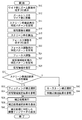
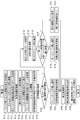
- FIG. 3 is a flowchart of trapezoidal distortion correction according to an embodiment of the present invention.
- the projection unit 10 displays an OSD (on-screen display) message that prompts the user to move the zoom lens of the projection display apparatus 200 to the wide side (S10).
- OSD on-screen display
- the user moves the zoom lens to the wide side (S12). This is performed in order to make maximum use of the resolution of the projection display apparatus 200, but S10 and S12 may be omitted. Further, when the zoom lens is motor driven and can automatically move to the wide side, S10 and S12 are not necessary.
- the projection unit 10 projects and displays a specific pattern for screen frame detection, for example, a white image on the entire screen on the projection plane 300 (S14).
- the imaging unit 30 captures the projected image (S16).
- the screen frame detection unit 40 detects a screen frame from the captured image (S18).
- the projection unit 10 After detecting the screen frame, the projection unit 10 displays an OSD message prompting the user to adjust the focus (S20), and a specific pattern for focus adjustment is projected and displayed on the projection plane 300 (S22). The user adjusts the focus while looking at the projected focus adjustment specific pattern (S24). If the focus lens 13 can be automatically adjusted by the lens driving unit 20, S20 to S24 are not necessary.
- the projection unit 10 projects and displays a specific pattern for projection area estimation on the projection plane 300 (S26).
- the imaging unit 30 images the projection plane 300, and the projection area estimation unit 50 estimates the outer peripheral shape of the projection area based on the captured image (S28).
- the determination unit 60 determines whether or not the difference between the screen frame detected in S18 and the outer peripheral shape of the projection area estimated in S28 substantially match (S30). When the screen frame and the projection area do not match (N in S30), the determination unit 60 determines that the screen frame is properly detected, and selects fitting correction (S32).
- the correction unit 70 refers to the projection area estimation result in S28, and acquires information necessary for fitting correction, such as the coordinates of the four corners of the projection area (S34).
- the determination unit 60 determines that the screen frame is erroneously detected, and selects keystone correction (S42).
- the correction unit 70 acquires information necessary for keystone correction from the specific pattern for projection area estimation captured in S28 (S44). For example, feature points in a specific pattern are detected, and horizontal and vertical inclinations are acquired.
- the correction unit 70 performs either fitting correction or keystone correction based on the acquired information (S36). Thereafter, information indicating which one of fitting correction and keystone correction is selected and executed is projected and displayed on the projection plane 300 by the projection unit 10 (S38). Furthermore, an adjustment indicator corresponding to each correction process may be displayed on the OSD so that the user can perform further fine adjustment (S40). For example, when fitting correction is performed, buttons for finely adjusting the positions of the four corners of the trapezoid may be displayed. When the keystone correction is executed, buttons for finely adjusting the horizontal and vertical lengths of the specific pattern for projection area estimation may be displayed. The user can make fine adjustments by clicking these buttons displayed on the OSD using a device such as a laser pointer or a mouse.
- the screen frame erroneous detection may not be determined correctly. For example, even if the projection plane 300 is not a wall but a screen, if the screen frame coincides with the projection area by chance, it is determined that the screen frame is erroneously detected, and keystone correction is executed. there is a possibility.
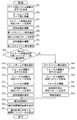
- FIG. 4 is a flowchart of trapezoidal distortion correction according to another embodiment of the present invention in consideration of the above possibility.
- S50 and S52 are the same as S10-S12 in the embodiment of FIG.
- the projection unit 10 projects and displays a specific pattern for screen frame detection, for example, an entire white image on the projection plane 300 (S54).
- the imaging unit 30 captures the projected image (S56).
- the screen frame detection unit 40 detects a screen frame (hereinafter referred to as “first screen frame”) from the captured image (S58).
- the projection unit 10 reduces and projects the screen frame detection specific pattern used in S54 on the projection plane 300 (S60).
- the imaging unit 30 captures the projected image (S62).
- the screen frame detection unit 40 detects the screen frame (hereinafter referred to as “second screen frame”) again from the captured image (S64).
- the specific pattern for detecting the screen frame may be enlarged and projected on the projection plane 300 instead of being reduced. In this case, the process of moving the zoom lens to the wide side in S50-S52 becomes unnecessary.
- Such enlargement / reduction of the specific pattern may be specified in percentage display with respect to the original specific pattern (for example, minus 20%), or may be specified by the number of pixels (for example, to 640 pixels). Reduced to the corresponding size).
- Such enlargement / reduction of the specific pattern may be performed by software processing on the video signal, or may be performed by operating an optical zoom lens.
- the operation of the optical zoom lens may be performed in one or both of S54 and S60. A combination of the operation of the optical zoom lens and software processing may realize enlargement / reduction of a specific pattern.
- the determining unit 60 determines whether or not the first screen frame detected in S58 substantially matches the outer peripheral shape of the second screen frame detected in S64 (S66). When the first screen frame and the second screen frame substantially match (Y in S66), the determination unit 60 determines that the screen frame is properly detected, and selects fitting correction (S68). At this time, the projection area fitting target is the first screen frame. If the first screen frame and the second screen frame do not match (N in S66), the determination unit 60 determines that the screen frame is erroneously detected and selects keystone correction (S88).
- the determination in S66 is, for example, whether or not the coordinates of the four corners of the first screen frame and the coordinates of the four corners of the second screen frame are equal to or less than a predetermined value, or the first screen frame and the second screen frame. What is necessary is just to determine whether the distance between the line segments of the four sides of a screen frame is below a predetermined value (for example, 1 cm). If the coordinates of the four corners or the distances between the line segments of the four sides are all equal to or less than the predetermined value, it is determined that the first screen frame and the second screen frame are substantially coincident. If any one of the coordinates of the four corners or the distance between the line segments of the four sides is larger than the predetermined value, it is determined that the first screen frame and the second screen frame do not substantially match.
- a predetermined value for example, 1 cm
- a message prompting the user to adjust the focus is displayed in OSD (S70, S90), as in S20-S24 of FIG.
- the specific pattern is projected and displayed on the projection plane 300 (S72, S92), and the user adjusts the focus while viewing the projected specific pattern for focus adjustment (S74, S94).
- the projection unit 10 projects and displays a specific pattern for projection area estimation on the projection plane 300 (S76, S96).
- the imaging unit 30 captures the projection plane 300, and the correction unit 70 acquires information necessary for fitting correction from the captured projection area estimation specific pattern (S78) or information necessary for keystone correction. Is acquired (S98).
- S80 to S84 are the same as S36 to S40 in FIG.
- the determination of erroneous detection of the screen frame may not be successful.
- the specific pattern for screen frame detection is reduced and projected in S60.
- the projection area may be inside the screen frame in the second projection in S60.
- the keystone correction is selected. Further, since the keystone correction is performed based on the first screen frame, there is a problem that the corrected projection area protrudes from the screen frame.
- FIG. 5 is a flowchart of trapezoidal distortion correction according to still another embodiment of the present invention in consideration of the above possibility.
- S100 to S130 are the same as S10 to S40 in the embodiment of FIG. If it is determined in S120 that the screen frame matches the projection area (Y in S120), the projection unit 10 enlarges the screen frame detection specific pattern used in S104 and displays it on the projection plane 300 (see FIG. 12). S132). The imaging unit 30 captures the projected image (S134). The screen frame detection unit 40 detects the screen frame (second screen frame) again from the captured image (S136).
- the determination unit 60 determines whether or not the first screen frame detected in S108 substantially matches the outer peripheral shape of the second screen frame detected in S136 (S138). When the first screen frame and the second screen frame do not match (N in S138), the determination unit 60 determines that the screen frame is erroneously detected and selects keystone correction (S140). The correction unit 70 acquires information necessary for keystone correction from the specific pattern for projection area estimation captured in S116 (S142). When the first screen frame and the second screen frame substantially coincide with each other (Y in S138), the determination unit 60 determines that the screen frame and the projection area overlap, and reduces the projection area and restores the original ( S144), correction processing is not performed (S146). In this case, in S130, the same adjustment indicator as when fitting correction is selected is displayed.
- FIGS. 6A to 6C are diagrams for explaining a determination method of screen frame erroneous detection by the determination unit.
- FIG. 6A shows a screen frame (indicated by a dotted line in the figure) detected by the screen frame detection unit 40 and an outer periphery of the projection area estimated by the projection area estimation unit 50 in the flowchart of FIG. (Shown by a solid line in FIG. 4) is almost the same.
- the determination unit 60 determines that the screen frame is erroneously detected.
- FIG. 6B and 6C show examples of the first screen frame (indicated by a dotted line in the figure) and the second screen frame (indicated by a solid line in the figure) in the flowchart of FIG.
- first screen frame when a specific pattern for screen frame detection is projected and displayed in a normal size (first screen frame), and when it is projected and displayed at a reduced size (second screen frame),
- second screen frame When the size of the detected screen frame changes, it can be seen that the outer periphery of the projected image is erroneously detected as the screen frame. Therefore, keystone correction is executed at this time.
- a specific pattern for detecting a screen frame is projected and displayed in a normal size (first screen frame), and is reduced and projected (second screen frame). If the size of the detected screen frame does not change, it can be seen that the screen frame is correctly detected. Therefore, fitting correction is executed at this time.
- both the horizontal trapezoidal distortion generated when the projection plane 300 is tilted in the left-right direction and the vertical trapezoidal distortion generated when the projection plane 300 is tilted in the vertical direction can be corrected.
Landscapes
- Physics & Mathematics (AREA)
- General Physics & Mathematics (AREA)
- Engineering & Computer Science (AREA)
- Multimedia (AREA)
- Signal Processing (AREA)
- Geometry (AREA)
- Projection Apparatus (AREA)
- Transforming Electric Information Into Light Information (AREA)
Abstract
【課題】投写型映像表示装置で壁面に画像を投写するとき、投写画像の外周をスクリーン枠と誤検出することを防止する。 【解決手段】投写部10は、投影面300にレンズを介して映像を投写する。撮像部30は、投影面を撮像する。スクリーン枠検出部40は、投写部10によりスクリーン枠を検出するための所定のパターンが投写されているとき、撮像部30により撮像された画像からスクリーン枠を検出する。投写領域推定部50は、投写領域を推定するための所定のパターンが投写されているとき、撮像部により撮像された画像から投写領域の外周形状を算出する。判定部60は、スクリーン枠と投写領域の外周形状とが略一致するか否かを判定し、略一致するとき、スクリーン枠が誤検出されたと判定する。
Description
本発明は、投写型映像表示装置における台形歪み補正技術に関する。
近年、カメラを搭載した投写型映像表示装置(以下適宜、プロジェクタと表記する)が実用化されている。カメラを搭載したプロジェクタのなかには、投写されたテストパターンをそのカメラで撮像し、撮像された画像をもとにオートフォーカス調整を行う、いわゆるイージーセッティング機能を備えているものもある。
プロジェクタを用いて投影面に画像を投写させるとき、プロジェクタとスクリーンとの相対的な角度によって、スクリーンに投写表示される画像に台形歪みが生ずることがある。このような場合、台形歪みを補正することが好ましい。投影面がスクリーンの場合には、スクリーンの四隅または四辺を検出し、投写画像をスクリーンにフィットするように画像を補正する。これに対し、投影面が単なる壁面の場合には、投写画像をフィットさせる目標が存在しないので、キーストーン補正を行う必要がある。
特許文献1には、投影された画像の台形歪みなどを修正する画像プロジェクタが開示されている。このプロジェクタは、投影されたキーストーン画像をイメージングデバイスで撮影し、これに基づいてキーストーン補正を実行する。
スクリーンにフィットさせる画像補正(以下「フィッティング補正」という)を行うか、あるいはキーストーン補正を行うかの判断は、カメラにより撮像された画像内でスクリーン枠が検出されるか否かに基づいて行われる。しかしながら、投写型映像表示装置から壁面に画像を投写した場合、投写画像の外周をスクリーン枠と誤検出し、フィッティング補正を選択してしまうことがある。
本発明はこうした状況に鑑みなされたものであり、その目的は、投写型映像表示装置で壁面に画像を投写するとき、投写画像の外周をスクリーン枠と誤検出することを防止する技術を提供することにある。
本発明のある態様は、投影面にレンズを介して映像を投写する投写部と、前記投影面を撮像するための撮像部と、を備える投写型映像表示装置に搭載される制御装置である。この装置は、投写部によりスクリーン枠を検出するための所定のパターンが投写されているとき、撮像部により撮像された画像からスクリーン枠を検出するスクリーン枠検出部と、投写部により投写領域を推定するための所定のパターンが投写されているとき、撮像部により撮像された画像から投写領域の外周形状を算出する投写領域推定部と、スクリーン枠と投写領域の外周形状とが略一致するか否かを判定し、略一致するとき、スクリーン枠が誤検出されたと判定する判定部と、を備える。
本発明の別の態様は、投写型映像表示装置である。この装置は、投影面にレンズを介して映像を投写する投写部と、投影面を撮像するための撮像部と、上述した制御装置と、を備える。
本発明によれば、投写型映像表示装置で壁面に画像を投写するとき、投写画像の外周をスクリーン枠と誤検出することを防止することができる。
図1は、本発明の一実施形態に係る投写型映像表示装置200と、投影面300との位置関係を示す図である。実施の形態に係る投写型映像表示装置200は、投影面300方向を撮影するための撮像部30を備える。撮像部30は、その光軸中心と、投写型映像表示装置200から投写される投写光の光軸中心とが例えば平行な関係になるよう、設置される。図1では、投影面300が投写型映像表示装置200に対して正対せずに、右側が奧に傾いている。
図2は、投写型映像表示装置200の構成を示す図である。投写型映像表示装置200は、投写部10、レンズ駆動部20、撮像部30および制御部100を備える。制御部100は、スクリーン枠検出部40、投写領域推定部50、判定部60、補正部70、画像メモリ82、映像信号設定部84、駆動信号設定部86およびオートフォーカス調整部90を備える。
制御部100の構成は、ハードウェア的には、任意のコンピュータのCPU、メモリ、その他のLSIで実現でき、ソフトウェア的にはメモリにロードされたプログラムなどによって実現されるが、ここではそれらの連携によって実現される機能ブロックを描いている。したがって、これらの機能ブロックがハードウェアのみ、ソフトウェアのみ、またはそれらの組み合わせによっていろいろな形で実現できることは、当業者には理解されるところである。
投写部10は、投影面300に映像を投写する。投写部10は、光源11、光変調部12およびフォーカスレンズ13を含む。光源11には、フィラメント型の電極構造を有するハロゲンランプ、アーク放電を発生させる電極構造を有するメタルハライドランプ、キセノンショートアークランプ、高圧型の水銀ランプ、LEDランプなどを採用することができる。
光変調部12は、映像信号設定部84から設定される映像信号に応じて、光源11から入射される光を変調する。例えば、光変調部12にはDMD(Digital Micromirror Device)を採用することができる。DMDは、画素数に対応した複数のマイクロミラーを備え、各マイクロミラーの向きが各画素信号に応じて制御されることにより、所望の映像光を生成する。
フォーカスレンズ13は、光変調部12から入射される光の焦点位置を調整する。フォーカスレンズ13は、レンズ駆動部20によりそのレンズ位置が光軸上で移動される。光変調部12により生成された映像光は、フォーカスレンズ13を介して、投影面300に投写される。
レンズ駆動部20は、駆動信号設定部86から設定される駆動信号に応じて、フォーカスレンズ13の位置を移動させる。レンズ駆動部20には、ステッピングモータ、ボイスコイルモータ(VCM)、ピエゾ素子などを採用することができる。
撮像部30は、投影面300および投影面300に投影された投影画像を、主な被写体として、撮像する。撮像部30は、固体撮像素子31および信号処理回路32を含む。固体撮像素子31には、CMOS(Complementary Metal Oxide Semiconductor)イメージセンサやCCD(Charge Coupled Devices)イメージセンサなどを採用することができる。信号処理回路32は、固体撮像素子31から出力される信号に対して、A/D変換や、RGBフォーマットからYUVフォーマットへの変換などの各種信号処理を施し、制御部100に出力する。
スクリーン枠検出部40は、撮像部30により撮像された画像内に写ったスクリーンの枠を検出する。より具体的には、スクリーン枠検出部40は、撮像画像内のエッジを抽出することにより、当該撮像画像内に写ったスクリーンの四辺(上辺、下辺、左辺および右辺)の位置を検出する。検出されたスクリーン枠は、例えば、四隅の頂点座標で特定される。投影面300がスクリーンである場合、スクリーン枠検出部40によりスクリーン枠が正しく検出されることが多い。しかし、投影面300が単なる壁面である場合、スクリーン枠検出部40は、壁面に投写された画像の外周をスクリーン枠と誤検出してしまう場合がある。
投写領域推定部50は、撮像部30により撮像された画像内に写された特定パターンに基づき、プロジェクタの投写領域の形状を推定する。映像信号設定部84は、画像メモリ82から投写領域推定用の特定パターンを読み出し、投写部10に投写させる。特定パターンは、例えば菱形等の図形で形成される。投写領域推定部50は、撮像画像から特定パターンを検出し、この特定パターンの大きさおよび形状から、プロジェクタによる投写領域の外周形状を算出することができる。
判定部60は、スクリーン枠検出部40から検出されたスクリーン枠を、投写領域推定部50から推定された投写領域の外周形状をそれぞれ取得する。そして、両者の形状が略一致しているか否かを判定する。例えば、スクリーン枠と投写領域とがともに一般的な四辺形であれば、スクリーン枠の四隅の座標と投写領域の四隅の座標との間の距離が所定値(例えば1cm)であるか否かを判定する。または、スクリーン枠および投写領域の四辺の線分同士の間の距離が所定値(例えば1cm)以下であるか否かを判定する。そして、四隅の座標または四辺の線分間の距離が全て所定値以下であれば、スクリーン枠と投写領域の外周とが略一致すると判定する。四隅の座標または四辺の線分間の距離のいずれか一つでも所定値より大きければ、スクリーン枠と投写領域の外周とが略一致しないと判定する。
スクリーン枠と投写領域の外周が略一致する場合、判定部60は、プロジェクタによる投写画像の外周がスクリーン枠と誤検出されていると判定する。スクリーン枠と投写領域が略一致しない場合、判定部60は、スクリーン枠が正しく検出されていると判定する。
なお、略一致するか否かの判定は、投写型映像表示装置および撮像部の解像度により決定される理論的な誤差、投写型映像表示装置の仕様、人間のずれに対する許容範囲などの、複数のパラメータに基づき、判定条件を調整することが好ましい。一例として、投写型映像表示装置の表示解像度に対して撮像部の解像度が低い場合、例えば表示解像度がXGAであるのに対し撮像解像度がVGAであるような場合は、スクリーン枠と投写領域とが表示上は数画素分ずれていても、撮像画像内ではほとんどずれていないように見える。反対に、投写型映像表示装置の表示解像度に対して撮像部の解像度が高い場合、撮像画像内でのずれが微小でも、解像度の都合上、投影面上でのずれを修正できないことがある。このようなことを考慮して、略一致の判定条件を設定するとよい。
補正部70は、判定部60による判定結果に応じて、フィッティング補正またはキーストーン補正のいずれかの台形歪み補正を実行する。
判定部60によってスクリーン枠が誤検出されていると判定された場合、補正部70はキーストーン補正を実施する。すなわち、映像信号設定部84は、画像メモリ82から台形歪み調整用のテストパターンを読み出し、投写部10に投写させる。当該テストパターンは、例えば、四角形(正方形、長方形、平行四辺形、菱形など)で形成される。撮像部30は、投影面300に投影されたテストパターンを撮像する。補正部70は、撮像画像に写ったテストパターンの形状をもとに台形歪みを検出し、その台形歪みがキャンセルされるよう、映像信号設定部84に設定すべき映像信号を補正する。映像信号設定部84は、補正部70から供給される台形歪み補正後の映像信号を光変調部12に設定する。
判定部60によってスクリーン枠が正しく検出されていると判定された場合、補正部70はフィッティング補正を実施する。すなわち、投写領域の外周の四隅の座標をスクリーン枠の四隅の座標に一致させるような画像変換を、映像信号設定部84に設定すべき映像信号に対して実行する。映像信号設定部84は、補正部70から供給される台形歪み補正後の映像信号を光変調部12に設定する。なお、補正部70は、投写領域の外周の四隅の座標をスクリーン枠の四隅の座標に一致させるような画像変換をする代わりに、投写画像が4:3や16:9などの所定のアスペクト比になるように画像変換を実行してもよい。
なお、フィッティング補正およびキーストーン補正のいずれも周知であるため、本明細書ではこれ以上の詳細な説明を省略する。
オートフォーカス調整部90は、例えばコントラスト検出法等の周知の手法を用いて、フォーカスを合わせる。投写型映像表示装置200の起動時や、ユーザ操作によりオートフォーカス調整が指示されたとき、映像信号設定部84は、画像メモリ82からオートフォーカス調整用のテストパターンを読み出し、投写部10に投写させる。当該テストパターンは、例えば、ストライプパターンやチェッカーフラグパターンで形成される。撮像部30は、投影面300に投影されたテストパターンを撮像する。
オートフォーカス調整部90は、複数のレンズ位置にて、撮像部30によりそれぞれ撮像された複数の画像内における、スクリーン枠検出部40により設定された検出領域の鮮明度をもとに、レンズの位置を決定する。以下、オートフォーカス調整部90の構成をより具体的に説明する。
オートフォーカス調整部90は、ハイパスフィルタ、積算部およびレンズ位置決定部(図示せず)を含む。ハイパスフィルタは、上記検出領域内の画像信号の、所定の閾値を超える高周波成分を抽出して、その抽出した高周波成分を積算部に供給する。ハイパスフィルタは、水平方向に高周波成分を抽出してもよいし、水平方向および垂直方向の両方向に高周波成分を抽出してもよい。
積算部は、それぞれのレンズ位置にて、ハイパスフィルタにより抽出された高周波成分を積算し、レンズ位置決定部に供給する。なお、ハイパスフィルタにより水平方向および垂直方向の両方向に高周波成分が抽出されている場合、積算部は、両者の高周波成分を合算する。レンズ位置決定部は、積算部から供給される複数の積算値のうち、最大積算値が検出されたフォーカスレンズの位置を、合焦位置に決定する。
オートフォーカス機能が有効化されると、オートフォーカス調整部90は、映像信号設定部84にテストパターンの投写を指示するとともに、フォーカスレンズ13をニア側からファー側へまたはファー側からニア側へ、所定のステップ幅で順次、移動させるための制御信号を駆動信号設定部86に設定する。映像信号設定部84は、当該テストパターンの映像信号を光変調部12に設定し、駆動信号設定部86は、上記制御信号に応じた駆動信号をレンズ駆動部20に設定する。
オートフォーカス調整部90は、フォーカスレンズ13の各レンズ位置において撮像された、テストパターンに含まれるシャープネス(上記積算値を用いることができる)を算出する。このシャープネスは、フォーカスレンズ13が合焦位置に近づくにつれ、上昇する。その上昇がピークをうち、下降に転換したとき、オートフォーカス調整部90は、その一つ前のレンズ位置を合焦位置に決定する。
画像メモリ82は、投影面300に投写すべき画像データを保持する。当該画像データは、図示しない外部インタフェースを介して、PCなどから供給される。本実施の形態では、オートフォーカス調整時に投写されるテストパターンも保持する。映像信号設定部84は、画像メモリ82に保持される画像データに基づく映像信号を光変調部12に設定する。駆動信号設定部86は、フォーカスレンズ13を、オートフォーカス調整部90から指示されるレンズ位置に移動させるための駆動信号をレンズ駆動部20に設定する。
図3は、本発明の一実施形態に係る台形歪み補正のフローチャートである。まず、投写部10により、ユーザに対して投写型映像表示装置200のズームレンズをワイド側に移動するように促すメッセージがOSD(オン・スクリーン・ディスプレイ)表示される(S10)。ユーザは、これに応じてズームレンズをワイド側に移動する(S12)。これは、投写型映像表示装置200の解像度を最大限に活用するために行われるが、S10およびS12は省略されてもよい。また、ズームレンズがモータ駆動であってワイド側に自動で移動できる場合は、S10、S12は不要である。
続いて、投写部10により、スクリーン枠検出用の特定パターン、例えば全面白色の画像が投影面300に投写表示される(S14)。撮像部30は、投写された画像を撮像する(S16)。スクリーン枠検出部40は、撮像画像からスクリーン枠を検出する(S18)。
スクリーン枠の検出後、投写部10により、ユーザに対してフォーカスを調整するように促すメッセージがOSD表示され(S20)、フォーカス調整用の特定パターンが投影面300に投写表示される(S22)。ユーザは、投写表示されたフォーカス調整用の特定パターンを見ながら、フォーカスを調整する(S24)。なお、フォーカスレンズ13をレンズ駆動部20によって自動で調整できる場合は、S20-S24は不要である。
続いて、投写部10により投写領域推定用の特定パターンが投影面300に投写表示される(S26)。撮像部30が投影面300を撮像し、投写領域推定部50は撮像画像に基づき投写領域の外周形状を推定する(S28)。
判定部60は、S18で検出されたスクリーン枠と、S28で推定された投写領域の外周形状との差が略一致するか否かを判定する(S30)。スクリーン枠と投写領域とが一致しない場合(S30のN)、判定部60はスクリーン枠は適切に検出されていると判定し、フィッティング補正を選択する(S32)。補正部70は、S28における投写領域の推定結果を参照して、フィッティング補正に必要な情報、例えば投写領域の四隅の座標等を取得する(S34)。スクリーン枠と投写領域とが一致する場合(S30のY)、判定部60はスクリーン枠が誤検出されていると判定し、キーストーン補正を選択する(S42)。補正部70は、S28で撮像された投写領域推定用の特定パターンから、キーストーン補正に必要な情報を取得する(S44)。例えば、特定パターン中の特徴点を検出して、水平方向および垂直方向の傾きを取得する。
補正部70は、取得した情報に基づき、フィッティング補正またはキーストーン補正のいずれかを実行する(S36)。その後、フィッティング補正とキーストーン補正のいずれを選択して実行したかの情報が投写部10により投影面300に投写表示される(S38)。さらに、各補正処理に対応した調整インジケータをOSD表示して、ユーザにさらなる微調整を行わせるようにしてもよい(S40)。例えば、フィッティング補正が実行された場合は、台形の四隅の位置を微調整するためのボタンを表示してもよい。キーストーン補正が実行された場合は、投写領域推定用の特定パターンの水平方向および垂直方向の長さを微調整するためのボタンを表示してもよい。ユーザは、OSD表示されたこれらのボタンをレーザポインタやマウス等のデバイスを用いてクリックすることで、微調整を行うことができる。
図3のフローチャートにしたがったとしても、スクリーン枠誤検出の判定がうまくいかない場合がある。例えば、投影面300が壁面でなくスクリーンであったとしても、偶然スクリーン枠と投写領域とがほぼ一致した場合には、スクリーン枠が誤検出されていると判定され、キーストーン補正が実行される可能性がある。
図4は、上記の可能性に配慮した、本発明の別の実施形態に係る台形歪み補正のフローチャートである。
S50およびS52は、図3の実施形態におけるS10-S12と同様である。続いて、まず、投写部10により、スクリーン枠検出用の特定パターン、例えば全面白色の画像が投影面300に投写表示される(S54)。撮像部30は、投写された画像を撮像する(S56)。スクリーン枠検出部40は、撮像画像からスクリーン枠(以下、「第1スクリーン枠」という)を検出する(S58)。
S50およびS52は、図3の実施形態におけるS10-S12と同様である。続いて、まず、投写部10により、スクリーン枠検出用の特定パターン、例えば全面白色の画像が投影面300に投写表示される(S54)。撮像部30は、投写された画像を撮像する(S56)。スクリーン枠検出部40は、撮像画像からスクリーン枠(以下、「第1スクリーン枠」という)を検出する(S58)。
次に、投写部10により、S54で用いたスクリーン枠検出用の特定パターンが縮小されて投影面300に投写表示される(S60)。撮像部30は、投写された画像を撮像する(S62)。スクリーン枠検出部40は、撮像画像から再びスクリーン枠(以下、「第2スクリーン枠」という)を検出する(S64)。
なお、S60において、スクリーン枠検出用の特定パターンを縮小する代わりに拡大して投影面300に投写表示してもよい。この場合、S50-S52におけるズームレンズをワイド側に移動させる処理は不要になる。このような特定パターンの拡大・縮小は、元の特定パターンに対してパーセント表示で指定されてもよいし(例えば、マイナス20%など)、画素数で指定されてもよい(例えば、640画素に相当する大きさまで縮小など)。さらに、このような特定パターンの拡大・縮小は、映像信号に対するソフトウェア処理で行われてもよいし、光学ズームレンズの操作によって実施されてもよい。光学ズームレンズの操作は、S54とS60のいずれか一方、または両方で行われてもよい。光学ズームレンズの操作とソフトウェア処理とを組み合わせて、特定パターンの拡大・縮小を実現してもよい。
判定部60は、S58で検出された第1スクリーン枠と、S64で検出された第2スクリーン枠の外周形状とが略一致するか否かを判定する(S66)。第1スクリーン枠と第2スクリーン枠が略一致する場合(S66のY)、判定部60はスクリーン枠が適切に検出されていると判定し、フィッティング補正を選択する(S68)。このとき、投写領域のフィッティングの対象は、第1スクリーン枠となる。第1スクリーン枠と第2スクリーン枠とが一致しない場合(S66のN)、判定部60はスクリーン枠が誤検出されていると判定し、キーストーン補正を選択する(S88)。
なお、S66の判定は、例えば、第1スクリーン枠の四隅の座標と第2スクリーン枠の四隅の座標とが所定値以下であるか否かを判定するか、または、第1スクリーン枠および第2スクリーン枠の四辺の線分同士の間の距離が所定値(例えば1cm)以下であるか否かを判定すればよい。そして、四隅の座標または四辺の線分間の距離が全て所定値以下であれば、第1スクリーン枠と第2スクリーン枠とが略一致すると判定する。四隅の座標または四辺の線分間の距離のいずれか一つでも所定値より大きければ、第1スクリーン枠と第2スクリーン枠とが略一致しないと判定する。
フィッティング補正とキーストーン補正のいずれが選択された場合も、図3のS20-S24と同様に、ユーザに対してフォーカスを調整するように促すメッセージがOSD表示され(S70、S90)、フォーカス調整用の特定パターンが投影面300に投写表示され(S72、S92)、ユーザは、投写表示されたフォーカス調整用の特定パターンを見ながら、フォーカスを調整する(S74、S94)。
その後、投写部10により投写領域推定用の特定パターンが投影面300に投写表示される(S76、S96)。撮像部30が投影面300を撮像し、補正部70は、撮像された投写領域推定用の特定パターンから、フィッティング補正に必要な情報を取得するか(S78)、またはキーストーン補正に必要な情報を取得する(S98)。以降のS80-S84は、図3におけるS36-S40と同様である。
図3および図4のフローチャートで説明した実施形態を実行したとしても、特定のケースにおいてはスクリーン枠誤検出の判定がうまくいかない場合がある。例えば、図4の実施形態では、S60においてスクリーン枠検出用の特定パターンを縮小して投写する。このため、S54における一回目の投写では、投写領域がスクリーン枠の外側にあっても、S60における二回目の投写では、投写領域がスクリーン枠の内側に入ってしまうことがあり得る。この場合、S66において第1スクリーン枠と第2スクリーン枠とが不一致と判定されるため、キーストーン補正が選択されてしまうことになる。さらに、キーストーン補正が第1スクリーン枠に基づいて行われるので、補正後の投写領域がスクリーン枠をはみ出てしまうという問題もある。
図5は、上記の可能性に配慮した、本発明のさらに別の実施形態に係る台形歪み補正のフローチャートである。
S100-S130は、図3の実施形態におけるS10-S40と同様である。S120の判定において、スクリーン枠と投写領域とが一致する場合(S120のY)、投写部10により、S104で用いたスクリーン枠検出用の特定パターンが拡大されて投影面300に投写表示される(S132)。撮像部30は、投写された画像を撮像する(S134)。スクリーン枠検出部40は、撮像画像から再びスクリーン枠(第2スクリーン枠)を検出する(S136)。
S100-S130は、図3の実施形態におけるS10-S40と同様である。S120の判定において、スクリーン枠と投写領域とが一致する場合(S120のY)、投写部10により、S104で用いたスクリーン枠検出用の特定パターンが拡大されて投影面300に投写表示される(S132)。撮像部30は、投写された画像を撮像する(S134)。スクリーン枠検出部40は、撮像画像から再びスクリーン枠(第2スクリーン枠)を検出する(S136)。
判定部60は、S108で検出された第1スクリーン枠と、S136で検出された第2スクリーン枠の外周形状とが略一致するか否かを判定する(S138)。第1スクリーン枠と第2スクリーン枠とが一致しない場合(S138のN)、判定部60はスクリーン枠が誤検出されていると判定し、キーストーン補正を選択する(S140)。補正部70は、S116で撮像された投写領域推定用の特定パターンから、キーストーン補正に必要な情報を取得する(S142)。第1スクリーン枠と第2スクリーン枠が略一致する場合(S138のY)、判定部60は、スクリーン枠と投写領域とが重なっているものと判断し、投写領域を縮小して元に戻し(S144)、補正処理を行わない(S146)。この場合、S130では、フィッティング補正が選択されたときと同じ調整インジケータが表示される。
図6(a)~(c)は、判定部によるスクリーン枠誤検出の判定方法を説明するための図である。
図6(a)は、図3のフローチャートにおいて、スクリーン枠検出部40により検出されたスクリーン枠(図中に点線で示す)と、投写領域推定部50により推定された投写領域の外周(図中に実線で示す)とがほぼ一致している様子を示す。このとき、判定部60はスクリーン枠が誤検出されていると判定する。
図6(b)および(c)は、図4のフローチャートにおける第1スクリーン枠(図中に点線で示す)と第2スクリーン枠(図中に実線で示す)の一例を示す。図6(b)のように、スクリーン枠検出用の特定パターンを通常の大きさで投写表示した場合(第1スクリーン枠)と、縮小して投写表示した場合(第2スクリーン枠)とで、検出されるスクリーン枠の大きさが変化する場合は、投写画像の外周がスクリーン枠と誤検出されていることが分かる。したがって、このときにはキーストーン補正が実行される。
これに対し、図6(c)のように、スクリーン枠検出用の特定パターンを通常の大きさで投写表示した場合(第1スクリーン枠)と、縮小して投写表示した場合(第2スクリーン枠)とで、検出されるスクリーン枠の大きさが変わらない場合は、スクリーン枠が正しく検出されていることが分かる。したがって、このときにはフィッティング補正が実行される。
以上説明したように、上述の実施形態によれば、投写型映像表示装置を用いて壁面に画像を投写表示したとき、投写画像の外周をスクリーン枠と誤検出することを防止することができる。したがって、フィッティング補正とキーストーン補正とを適切に使い分けることができ、正確な台形歪み補正が実現される。
以上、本発明を実施の形態をもとに説明した。この実施の形態は例示であり、それらの各構成要素や各処理プロセスの組合せにいろいろな変形例が可能なこと、またそうした変形例も本発明の範囲にあることは当業者に理解されるところである。
上述の各実施形態では、投影面300が左右方向に傾斜することで発生する水平台形歪みと、投影面300が上下方向に傾斜することで発生する垂直台形歪みのいずれも補正することができる。
10 投写部、 30 撮像部、 40 スクリーン枠検出部、 50 投写領域推定部、 60 判定部、 70 補正部、 82 画像メモリ、 84 映像信号設定部、 90 オートフォーカス調整部、 100 制御部、 200 投写型映像表示装置、 300 投影面。
Claims (8)
- 投影面にレンズを介して映像を投写する投写部と、前記投影面を撮像するための撮像部と、を備える投写型映像表示装置に搭載される制御装置であって、
前記投写部によりスクリーン枠を検出するための所定のパターンが投写されているとき、前記撮像部により撮像された画像からスクリーン枠を検出するスクリーン枠検出部と、
前記投写部により投写領域を推定するための所定のパターンが投写されているとき、前記撮像部により撮像された画像から投写領域の外周形状を算出する投写領域推定部と、
前記スクリーン枠と前記投写領域の外周形状とが略一致するか否かを判定し、略一致するとき前記スクリーン枠が誤検出されたと判定する判定部と、
を備えることを特徴とする制御装置。 - 投影面にレンズを介して映像を投写する投写部と、前記投影面を撮像するための撮像部と、を備える投写型映像表示装置に搭載される制御装置であって、
前記投写部によりスクリーン枠を検出するための所定のパターンが投写されているとき、前記撮像部により撮像された画像から第1のスクリーン枠を検出し、前記投写部により前記所定のパターンが縮小されて投写されているとき、前記撮像部により撮像された画像から第2のスクリーン枠を検出するスクリーン枠検出部と、
前記第1のスクリーン枠と前記第2のスクリーン枠とが略一致するか否かを判定し、両者が一致しないとき前記スクリーン枠が誤検出されたと判定する判定部と、
を備えることを特徴とする制御装置。 - 前記判定部は、前記スクリーン枠の四隅の座標と、該スクリーン枠の四隅の座標のそれぞれに対応する前記投写領域の外周形状の四隅の座標との間の距離が全ての座標の組み合わせにおいて所定値以下であるとき、前記スクリーン枠と前記投写領域の外周形状とが略一致すると判定することを特徴とする請求項1に記載の制御装置。
- 前記判定部は、前記スクリーン枠を構成する線分と、該スクリーン枠を構成する線分のそれぞれに対応する前記投写領域の外周形状を構成する線分との間の距離が全ての線分の組み合わせにおいて所定値以下であるとき、前記スクリーン枠と前記投写領域の外周形状とが略一致すると判定することを特徴とする請求項1に記載の制御装置。
- 前記判定部は、前記第1スクリーン枠の四隅の座標と、該第1スクリーン枠の四隅の座標のそれぞれに対応する前記第2スクリーン枠の四隅の座標との間の距離が全ての座標の組み合わせにおいて所定値以下であるとき、前記第1スクリーン枠と前記第2スクリーン枠とが略一致すると判定することを特徴とする請求項2に記載の制御装置。
- 前記判定部は、前記第1スクリーン枠を構成する線分と、該第1スクリーン枠を構成する線分のそれぞれに対応する前記第2スクリーン枠を構成する線分との間の距離が全ての線分の組み合わせにおいて所定値以下であるとき、前記第1スクリーン枠と前記第2スクリーン枠とが略一致すると判定することを特徴とする請求項2に記載の制御装置。
- 前記スクリーン枠が誤検出されたと判定されたとき、台形歪み補正としてキーストーン補正を実行し、それ以外のときは前記スクリーン枠または前記第1スクリーン枠に前記投写領域を合わせるフィッティング補正を実行する補正部をさらに備えることを特徴とする請求項1ないし6のいずれかに記載の制御装置。
- 投影面にレンズを介して映像を投写する投写部と、
前記投影面を撮像するための撮像部と、
請求項1ないし7のいずれかに記載の制御装置と、
を備えることを特徴とする投写型映像表示装置。
Applications Claiming Priority (4)
| Application Number | Priority Date | Filing Date | Title |
|---|---|---|---|
| JP2010082782 | 2010-03-31 | ||
| JP2010-082782 | 2010-03-31 | ||
| JP2011016139A JP5461452B2 (ja) | 2010-03-31 | 2011-01-28 | 制御装置および投写型映像表示装置 |
| JP2011-016139 | 2011-01-28 |
Publications (1)
| Publication Number | Publication Date |
|---|---|
| WO2011122129A1 true WO2011122129A1 (ja) | 2011-10-06 |
Family
ID=44711869
Family Applications (1)
| Application Number | Title | Priority Date | Filing Date |
|---|---|---|---|
| PCT/JP2011/052914 Ceased WO2011122129A1 (ja) | 2010-03-31 | 2011-02-10 | 制御装置および投写型映像表示装置 |
Country Status (2)
| Country | Link |
|---|---|
| JP (1) | JP5461452B2 (ja) |
| WO (1) | WO2011122129A1 (ja) |
Families Citing this family (3)
| Publication number | Priority date | Publication date | Assignee | Title |
|---|---|---|---|---|
| JP6232695B2 (ja) * | 2012-10-19 | 2017-11-22 | カシオ計算機株式会社 | 投影装置、投影制御装置、投影システム及び投影状態調整方法 |
| JP6711271B2 (ja) * | 2014-07-01 | 2020-06-17 | ソニー株式会社 | 画像処理装置および方法 |
| CN110798670A (zh) | 2019-11-11 | 2020-02-14 | 成都极米科技股份有限公司 | 超短焦画幕对齐方法、装置和超短焦投影设备及介质 |
Citations (4)
| Publication number | Priority date | Publication date | Assignee | Title |
|---|---|---|---|---|
| JP2005229282A (ja) * | 2004-02-12 | 2005-08-25 | Seiko Epson Corp | プロジェクタおよびマルチプロジェクションディスプレイ |
| JP2006060447A (ja) * | 2004-08-19 | 2006-03-02 | Seiko Epson Corp | スクリーンの一部の辺を用いたキーストーン補正 |
| JP2007013810A (ja) * | 2005-07-01 | 2007-01-18 | Sharp Corp | 画像投射方法、プロジェクタ、及びコンピュータプログラム |
| JP2007181146A (ja) * | 2005-12-28 | 2007-07-12 | Casio Comput Co Ltd | 画像投影装置、画像投影装置の投影画像補正方法及びプログラム |
-
2011
- 2011-01-28 JP JP2011016139A patent/JP5461452B2/ja not_active Expired - Fee Related
- 2011-02-10 WO PCT/JP2011/052914 patent/WO2011122129A1/ja not_active Ceased
Patent Citations (4)
| Publication number | Priority date | Publication date | Assignee | Title |
|---|---|---|---|---|
| JP2005229282A (ja) * | 2004-02-12 | 2005-08-25 | Seiko Epson Corp | プロジェクタおよびマルチプロジェクションディスプレイ |
| JP2006060447A (ja) * | 2004-08-19 | 2006-03-02 | Seiko Epson Corp | スクリーンの一部の辺を用いたキーストーン補正 |
| JP2007013810A (ja) * | 2005-07-01 | 2007-01-18 | Sharp Corp | 画像投射方法、プロジェクタ、及びコンピュータプログラム |
| JP2007181146A (ja) * | 2005-12-28 | 2007-07-12 | Casio Comput Co Ltd | 画像投影装置、画像投影装置の投影画像補正方法及びプログラム |
Also Published As
| Publication number | Publication date |
|---|---|
| JP2011229121A (ja) | 2011-11-10 |
| JP5461452B2 (ja) | 2014-04-02 |
Similar Documents
| Publication | Publication Date | Title |
|---|---|---|
| US10681320B2 (en) | Projection apparatus, method for controlling projection apparatus, and non-transitory storage medium | |
| WO2011102299A1 (ja) | 制御装置および投写型映像表示装置 | |
| JP4232042B2 (ja) | 投写制御システム、プロジェクタ、プログラム、情報記憶媒体および投写制御方法 | |
| CN102457692B (zh) | 投影仪以及投影仪的控制方法 | |
| US8434879B2 (en) | Control device and projection-type video-image display device | |
| CN102404537B (zh) | 投影仪以及投影仪的控制方法 | |
| US20110279738A1 (en) | Control device and projection video display device | |
| JP2007078821A (ja) | 投影装置、投影方法及びプログラム | |
| JP2011176629A (ja) | 制御装置および投写型映像表示装置 | |
| JP3741119B2 (ja) | 投射型画像表示装置の設置調整システム | |
| US20200007837A1 (en) | Display system and information processing method | |
| US9794536B2 (en) | Projector, and method of controlling projector | |
| US20190096298A1 (en) | Display apparatus and control method therefor | |
| JP5461452B2 (ja) | 制御装置および投写型映像表示装置 | |
| CN116471467A (zh) | 信息处理设备、信息处理方法、摄像设备、存储介质 | |
| JP4689948B2 (ja) | プロジェクタ | |
| US20140118386A1 (en) | Projection system, projector, and control method | |
| WO2011142197A1 (ja) | 制御装置および投写型映像表示装置 | |
| JP5845566B2 (ja) | プロジェクター、及び、プロジェクターの制御方法 | |
| JP2011199717A (ja) | 投写型表示装置および画像表示方法 | |
| JP5845565B2 (ja) | プロジェクター、及び、プロジェクターの制御方法 | |
| JP5309827B2 (ja) | プロジェクタ | |
| JP2008242087A (ja) | 前面投影型プロジェクタの設置位置調整システム | |
| TWI678926B (zh) | 投影方法及投影系統 | |
| JP7858807B2 (ja) | 投影装置、補正装置、投影システム、補正方法及びコンピュータプログラム |
Legal Events
| Date | Code | Title | Description |
|---|---|---|---|
| 121 | Ep: the epo has been informed by wipo that ep was designated in this application |
Ref document number: 11762370 Country of ref document: EP Kind code of ref document: A1 |
|
| NENP | Non-entry into the national phase |
Ref country code: DE |
|
| 122 | Ep: pct application non-entry in european phase |
Ref document number: 11762370 Country of ref document: EP Kind code of ref document: A1 |