EP4170476B1 - Übersetzungsverfahren und elektronische vorrichtung - Google Patents
Übersetzungsverfahren und elektronische vorrichtung Download PDFInfo
- Publication number
- EP4170476B1 EP4170476B1 EP22839626.3A EP22839626A EP4170476B1 EP 4170476 B1 EP4170476 B1 EP 4170476B1 EP 22839626 A EP22839626 A EP 22839626A EP 4170476 B1 EP4170476 B1 EP 4170476B1
- Authority
- EP
- European Patent Office
- Prior art keywords
- window
- state
- floating window
- floating
- user
- Prior art date
- Legal status (The legal status is an assumption and is not a legal conclusion. Google has not performed a legal analysis and makes no representation as to the accuracy of the status listed.)
- Active
Links
Images

























Classifications
-
- G—PHYSICS
- G06—COMPUTING OR CALCULATING; COUNTING
- G06F—ELECTRIC DIGITAL DATA PROCESSING
- G06F3/00—Input arrangements for transferring data to be processed into a form capable of being handled by the computer; Output arrangements for transferring data from processing unit to output unit, e.g. interface arrangements
- G06F3/01—Input arrangements or combined input and output arrangements for interaction between user and computer
- G06F3/048—Interaction techniques based on graphical user interfaces [GUI]
- G06F3/0484—Interaction techniques based on graphical user interfaces [GUI] for the control of specific functions or operations, e.g. selecting or manipulating an object, an image or a displayed text element, setting a parameter value or selecting a range
- G06F3/04842—Selection of displayed objects or displayed text elements
-
- G—PHYSICS
- G06—COMPUTING OR CALCULATING; COUNTING
- G06F—ELECTRIC DIGITAL DATA PROCESSING
- G06F3/00—Input arrangements for transferring data to be processed into a form capable of being handled by the computer; Output arrangements for transferring data from processing unit to output unit, e.g. interface arrangements
- G06F3/01—Input arrangements or combined input and output arrangements for interaction between user and computer
- G06F3/048—Interaction techniques based on graphical user interfaces [GUI]
- G06F3/0481—Interaction techniques based on graphical user interfaces [GUI] based on specific properties of the displayed interaction object or a metaphor-based environment, e.g. interaction with desktop elements like windows or icons, or assisted by a cursor's changing behaviour or appearance
- G06F3/0482—Interaction with lists of selectable items, e.g. menus
-
- G—PHYSICS
- G06—COMPUTING OR CALCULATING; COUNTING
- G06F—ELECTRIC DIGITAL DATA PROCESSING
- G06F3/00—Input arrangements for transferring data to be processed into a form capable of being handled by the computer; Output arrangements for transferring data from processing unit to output unit, e.g. interface arrangements
- G06F3/01—Input arrangements or combined input and output arrangements for interaction between user and computer
- G06F3/048—Interaction techniques based on graphical user interfaces [GUI]
- G06F3/0487—Interaction techniques based on graphical user interfaces [GUI] using specific features provided by the input device, e.g. functions controlled by the rotation of a mouse with dual sensing arrangements, or of the nature of the input device, e.g. tap gestures based on pressure sensed by a digitiser
- G06F3/0488—Interaction techniques based on graphical user interfaces [GUI] using specific features provided by the input device, e.g. functions controlled by the rotation of a mouse with dual sensing arrangements, or of the nature of the input device, e.g. tap gestures based on pressure sensed by a digitiser using a touch-screen or digitiser, e.g. input of commands through traced gestures
-
- G—PHYSICS
- G06—COMPUTING OR CALCULATING; COUNTING
- G06F—ELECTRIC DIGITAL DATA PROCESSING
- G06F40/00—Handling natural language data
- G06F40/40—Processing or translation of natural language
- G06F40/58—Use of machine translation, e.g. for multi-lingual retrieval, for server-side translation for client devices or for real-time translation
-
- G—PHYSICS
- G06—COMPUTING OR CALCULATING; COUNTING
- G06F—ELECTRIC DIGITAL DATA PROCESSING
- G06F9/00—Arrangements for program control, e.g. control units
- G06F9/06—Arrangements for program control, e.g. control units using stored programs, i.e. using an internal store of processing equipment to receive or retain programs
- G06F9/46—Multiprogramming arrangements
- G06F9/54—Interprogram communication
-
- G—PHYSICS
- G06—COMPUTING OR CALCULATING; COUNTING
- G06F—ELECTRIC DIGITAL DATA PROCESSING
- G06F2203/00—Indexing scheme relating to G06F3/00 - G06F3/048
- G06F2203/048—Indexing scheme relating to G06F3/048
- G06F2203/04803—Split screen, i.e. subdividing the display area or the window area into separate subareas
Definitions
- This application relates to the field of computer technologies, and specifically, to a translation method and an electronic device.
- WO 2021/052458 A1 discloses a machine translation method and electronic device.
- CN 107153541 A discloses a browse interaction processing method.
- CN 108595445 A discloses a translation method, device and terminal.
- This application provides a translation method and an electronic device.
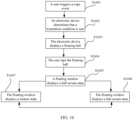
- a user may select a to-be-translated word, so that a floating window is displayed on a current page of the current application, and a translation result of the word selected by the user is presented in the floating window.
- the floating window does not preempt a focus with a page window of the current application. Therefore, after querying the word, the user can continue to browse the original text without closing the floating window.
- the user may further select the to-be-translated word, so that a floating window is displayed on the current page of the current application, and a translation result of the newly selected word is displayed in the floating window. This is particularly applicable to a scenario in which the user requires continuous translation. In a process in which the user uses the application, experience of browsing the original text by the user is not affected.
- the floating window is displayed, the foregoing first floating ball control and the first control are hidden.
- a quantity of icons whose functions are repeated on the current page of the current application can be reduced as much as possible, to reduce disturbance to the user.
- the floating window necessary for the translation operation of the user can be displayed, so that user experience is improved.
- a size of the first region is variable, and a size change of the region varies with a form of the floating window. It may be understood that when the floating window is in the bottom state, an area of the first region of the floating window is larger than an area of the first region of the floating window in the half-screen state. It may be understood that when the floating window is in the half-screen state, an area of the first region of the floating window is larger than an area of the first region of the floating window in the full-screen state. In this way, the first region and a region size adaptively adjusted for different forms of the floating window are set to meet a requirement that the user can conveniently browse or slide content in the first interface of the current application at any time in a process of using the floating window.
- the third operation includes any one of a touch operation, a tap operation, a slide operation, or a touch and hold operation on the first region.
- the first interface further includes a second text
- the first control is displayed in response to a fourth operation performed by the user on the second text
- the fourth operation includes any one of a selection operation, a touch operation, a tap operation, a slide operation, a touch and hold operation, or a double-tap operation on the second text
- the second text is the same as or different from the first text
- the second text does not include a web address, an email address, or a password generated by using a machine
- the second text is different from a system language of the electronic device.
- a real-time translation query can be implemented on the current page of the current application, and a translation result is obtained without switching between the current application and the translation application, so that translation efficiency is improved.
- the second text is written into the clipboard of the electronic device, the floating window is displayed in the first interface, the floating window is displayed in a fourth state, the floating window includes the second text and a second translation corresponding to the second text, the floating window includes neither the first text nor the first translation, and the fourth state is the same as or different from the third state.
- the user may further continue to query a new word, that is, the second text. Then, the system places the most recently selected word of the user into the clipboard and requests a translation server for a translation result. Because the clipboard reserves the most recently copied or cut text of the user, when the second text is written into the clipboard, the first text is overwritten.
- the user triggers to display the floating window the second text and the translation corresponding to the second text are displayed in the floating window. In this case, the first text and the translation corresponding to the first text are not displayed. In this way, the user does not need to exit the current application and switch to a third-party translation application to query the word.
- a real-time translation query can be implemented on the current page of the current application, and a translation result is obtained without switching between the current application and the translation application, so that translation efficiency is improved.
- a state of the floating window may be the half-screen state. Therefore, in this state, the user can obtain a translation result of the queried word in the floating window, and can conveniently operate the first interface of the current page, so that selection of the user is more flexible, and user experience is better.
- the floating window is displayed in the first interface in response to a translation operation performed by the user on the translation option, the floating window is displayed in a fifth state, the floating window includes the second text and a second translation corresponding to the second text, the floating window includes neither the first text nor the first translation, and the fifth state is the same as or different from the third state.
- the user may further continue to query a new word, that is, the second text.
- a new word that is, the second text.
- the system places the most recently selected word of the user into the clipboard and requests a translation server for a translation result.
- the clipboard reserves the most recently copied or cut text of the user, when the second text is written into the clipboard, the first text is overwritten.
- the user triggers to display the floating window the second text and the translation corresponding to the second text are displayed in the floating window. In this case, the first text and the translation corresponding to the first text are not displayed.
- a real-time translation query can be implemented on the current page of the current application, and a translation result is obtained without switching between the current application and the translation application, so that translation efficiency is improved.
- a state of the floating window may be set according to a habit of the user to be the same as or different from a state of the floating window displayed last time. This improves user experience of using the floating window by the user.
- a state of the floating window may be the half-screen state. Therefore, in this state, the user can obtain a translation result of the queried word in the floating window, and can conveniently operate the first interface of the current page, so that selection of the user is more flexible, and user experience is better.
- the floating window is slidable, the floating window has any one or more of a bottom state, a half-screen state, or a full-screen state, and the floating window is slid in or between any one or more of the bottom state, the half-screen state, or the full-screen state.
- the floating window may display different forms according to different operations of the user. In this way, different requirements of the user for a floating window display form are met.
- the user chooses, according to different scenarios, whether to display more translation content, thereby enriching user experience.
- the floating window in response to a first slide operation performed by the user on the floating window in the first state, after it is determined that the slide operation meets a sliding condition, the floating window is displayed in a sixth state, where the sixth state is different from the first state, and the sixth state includes any one of the bottom state, the half-screen state, or the full-screen state; or after it is determined that the slide operation does not meet a sliding condition, the floating window is displayed in a seventh state, where the seventh state is the same as the first state, and the seventh state includes any one of the bottom state, the half-screen state, or the full-screen state.
- sliding of the floating window has a determining condition.
- the sliding condition is set, so that random movement of the floating window caused by a user's accidental touch is prevented, thereby improving user experience.
- the floating window in the first state is a floating window displayed after the user performs a copy operation on the first text.
- the floating window in response to a second slide operation performed by the user on the floating window in the second state, after it is determined that the slide operation meets a sliding condition, the floating window is displayed in an eighth state, where the eighth state is different from the second state; or after it is determined that the slide operation does not meet a sliding condition, the floating window is displayed in a ninth state, where the ninth state is the same as the second state, the eighth state includes any one of the bottom state, the half-screen state, or the full-screen state, and the ninth state includes any one of the bottom state, the half-screen state, or the full-screen state.
- sliding of the floating window has a determining condition.
- the sliding condition is set, so that random movement of the floating window caused by a user's accidental touch is prevented, thereby improving user experience.
- the floating window in the second state is a floating window displayed after the user performs a translation operation on the first text.
- the sliding condition includes meeting any one or more of a sliding distance, a sliding speed, or a sliding direction. In this way, the sliding condition is set, so that random movement of the floating window caused by a user's accidental touch is prevented, thereby improving user experience.
- determining that the sliding distance meets a condition includes determining that the sliding distance is greater than one quarter of a screen height of the electronic device.
- the floating window in the half-screen state of the floating window, when the sliding speed meets a condition, if the user slides the floating window upward, and a sliding distance is greater than one quarter of the screen height of the electronic device, the floating window is displayed in the full-screen state.
- the sliding condition is set, so that random movement of the floating window caused by a user's accidental touch is prevented, thereby improving user experience.
- the floating window when the sliding distance is greater than one quarter of the screen height of the electronic device and less than three quarters of the screen height, the floating window is switched between the bottom state and the half-screen state or the half-screen state and the full-screen state; or when the sliding distance is greater than three quarters of the screen height of the electronic device, the floating window is switched between the bottom state and the full-screen state.
- the floating window in the bottom state of the floating window, when the sliding speed meets a condition, if the user slides the floating window upward, and a sliding distance is greater than three quarters of the screen height of the electronic device, the floating window is displayed in the full-screen state. In this way, the sliding condition is set, so that random movement of the floating window caused by a user's accidental touch is prevented, thereby improving user experience.
- the method further includes: pre-loading a first detailed translation corresponding to the first translation before the floating ball is slid from the half-screen state to the full-screen state, where the first detailed translation includes content that is of the first translation and that is displayed in the floating window in the full-screen state but not displayed in the floating window in the half-screen state.
- the system pre-loads a part of translation result content that is not displayed in the floating window in the half-screen state and that is displayed in the floating window in the full-screen state.
- the floating window further includes a first internal window, and the first internal window includes the first translation and/or the first detailed translation.
- the floating window includes a first internal window that is used to display a translation result.
- the first internal window is slidable and configured to display content corresponding to the first translation.
- the floating window includes a first internal window. Different from sliding logic of the floating window in three states, due to display of an Android bottom layer, sliding logic also needs to be separately designed for the first internal window in the floating window. Therefore, when using the floating window, the user may slide the first internal window in the floating window to display more translation content, thereby improving user experience.
- a floating ball and a floating window that are set in a system window do not have an activity function.
- an effect similar to that of the activity in the application window that is, display content, based on an operation performed by the user on the floating ball and the floating window, a slide operation, a slide conflict, and the like need to be additionally set in the system window, and a focus of a response window is determined based on an operation such as a tap of the user.
- the floating window when the floating window is in the full-screen state, in response to a second slide operation performed by the user on the first internal window, the first internal window displays a second detailed translation, and the second detailed translation includes a part of the first detailed translation.
- the floating window includes a first internal window. Different from sliding logic of the floating window in three states, due to display of an Android bottom layer, sliding logic also needs to be separately designed for the first internal window in the floating window. Therefore, when using the floating window, the user may slide the first internal window in the floating window to display more translation content, thereby improving user experience.
- both the second detailed translation and the first detailed translation are translation result content corresponding to the first translation
- a complete translation result of the first text includes the first translation, the first detailed translation, and the second detailed translation.
- the first translation is a simple Chinese translation result of a word corresponding to the first text
- the first detailed translation is some example sentences corresponding to the first text.
- the second detailed translation is used to display the foregoing first translation and translation result content that is not displayed in the first detailed translation, for example, more example sentences in a dictionary.
- the method before the first interface that is of the application and that includes the first floating ball control is displayed, the method further includes: displaying a second control in the first interface in response to a fifth operation performed by the user on a third text, where the first interface further includes the third text, the fifth operation includes any one of a selection operation, a touch operation, a tap operation, a slide operation, a touch and hold operation, or a double-tap operation on the third text, the third text is the same as or different from the first text, the third text does not include a web address, an email address, or a password generated by using a machine, and the third text is different from a system language of the electronic device.
- an option in the second control includes a copy option or a cut option.
- a second floating ball control is displayed in the first interface in response to a sixth operation performed by the user on the second control, and the sixth operation includes either of a copy operation on the copy option in the second control or a cut operation on the cut option.
- the second floating ball control is set to an entry for displaying a translation result to the user. After the user taps or touches the second floating ball control, a floating window with a translation result is displayed. Optionally, after the floating window is displayed, the second floating ball control disappears or continues to be displayed. This is not limited in this application.
- the first floating ball control is set to display the first floating ball control when the user does not trigger any tap or touch operation on the second floating ball control within a preset time. In this case, it is determined that the user does not need to perform the translation operation. Therefore, when the user triggers the copy operation, the copy behavior of the user is determined as normal text copy behavior, and the first floating ball control continues to be displayed.
- the system determines that the user has a translation intention in this case, and therefore a floating ball is displayed on a current page of the current application. If the user has a requirement for continuing to display a translation result in this case, the user may continue to tap the foregoing second floating ball control to display the translation result in the floating window.
- the translation intention of the user is identified by determining the intention of the user, to display the second floating ball control that is used to prompt to display the translation result, and whether to display the floating window to display the translation result is selected according to an operation of the user.
- a real-time translation query can be implemented on the current page of the current application, and a translation result is obtained without switching between the current application and the translation application, so that translation efficiency is improved.
- the method further includes: displaying the floating window in response to a seventh operation performed by the user on the second floating ball control, where the floating window includes the third text and a third translation corresponding to the third text, and the seventh operation includes any one of a touch operation, a tap operation, or a touch and hold operation.
- the system determines that the user has a translation intention in this case, and therefore a floating ball is displayed on a current page of the current application. If the user has a requirement for continuing to display a translation result in this case, the user may continue to tap the foregoing second floating ball control to display the translation result in the floating window.
- the translation intention of the user is identified by determining the intention of the user, to display the second floating ball control that is used to prompt to display the translation result, and whether to display the floating window to display the translation result is selected according to an operation of the user.
- a real-time translation query can be implemented on the current page of the current application, and a translation result is obtained without switching between the current application and the translation application, so that translation efficiency is improved.
- the method further includes: displaying a floating ball sign before the second floating ball control is displayed, where after a first preset time period, the floating ball sign disappears, and the second floating ball control is displayed.
- the floating ball sign is used to display that the system is recognizing or determining an intention of the user.
- the second floating ball control is displayed.
- the floating ball sign is used to display a waiting sign that the electronic device requests a translation result from the translation server.
- the first preset time period is a short period in a unit of second, and a specific time length is not limited in this application.
- the floating ball sign is used to determine that the sixth operation meets a translation condition
- the translation condition includes any one or more of a language type of the third text, content of the third text, or a type of the application.
- determining whether the translation condition is met includes: determining whether the copied text includes a current non-system language of the mobile phone; determining whether the non-system language included in the copied text is a preset language supported by the mobile phone system; determining whether the copied text conforms to a specific text type; and determining whether the source application of the copied text meets a specific application type.
- the second floating ball control and the first floating ball control are displayed on a same side of the first interface of the application on the electronic device, and locations at which the second floating ball control and the first floating ball control are displayed on the same side are the same or different.
- the first floating ball control and the second floating ball control are slidable, and may be displayed in different regions of the first interface of the electronic device based on a user operation.
- the first floating ball control and the second floating ball control are disposed on a same side of the electronic device, for example, on the right side of the first interface of the electronic device, and a location relationship thereof may include an up-and-down relationship.
- the first floating ball control is displayed on an upper right side of the first interface
- the second floating ball control is displayed on a lower right side of the first interface.
- the first floating ball control and the second floating ball control are displayed in a same location. In this way, a common user habit is met, and user experience is improved.
- the method further includes: canceling display of the second floating ball control and displaying the first floating ball control when determining that none of a touch operation, a tap operation, a slide operation, or a touch and hold operation performed by the user on the second floating ball control is detected within a second preset time period.
- the second preset time period is a short period in a unit of second, and a specific time length is not limited in this application.
- the floating ball is changed from a state of the second floating ball control to a state of the first floating ball control for display and is displayed on a side of the first interface.
- the user may perform a translation operation by operating the first floating ball control. This is convenient, and user experience is improved.
- the floating window is displayed in the first interface in response to an eighth operation performed by the user on the first floating ball control, the floating window includes the third text and a third translation corresponding to the third text, and the eighth operation includes any one of a touch operation, a tap operation, or a touch and hold operation.
- the floating ball is changed from a state of the second floating ball control to a state of the first floating ball control for display and is displayed on a side of the first interface.
- the user may perform a translation operation by operating the first floating ball control. This is convenient, and user experience is improved.
- the first interface further includes a fourth text, if the first floating ball control is displayed in the first interface, the second control is displayed in the first interface in response to a ninth operation performed by the user on the fourth text, and the first floating ball control continues to be displayed in the first interface in response to a tenth operation performed by the user on the second control, where the ninth operation includes any one of a selection operation, a touch operation, a tap operation, a slide operation, a touch and hold operation, or a double-tap operation on the fourth text, the tenth operation includes either of a copy operation on the copy option in the second control or a cut operation on the cut option, the fourth text is the same as or different from the third text, the fourth text does not include a web address, an email address, or a password generated by using a machine, and the fourth text is different from the system language of the electronic device.
- the ninth operation includes any one of a selection operation, a touch operation, a tap operation, a slide operation, a touch and hold operation, or a double-
- the system determines that the user temporarily does not have a translation intention
- the system does not trigger the translation operation to display the floating window
- the electronic device continues to display the first floating ball control, that is, the copy operation of the user on the fourth text is determined by the system as a common text copy operation.
- the user may understand when translation needs to be performed and when a common text copy operation is displayed.
- the user may immediately perform an operation on the first floating ball control, to display a floating window and display translation result content. This reduces interference to the user and helps the user quickly obtain translation result content, thereby improving user experience.
- the floating window is displayed in the first interface in response to an eleventh operation performed by the user on the first floating ball control, the floating window includes the fourth text and a fourth translation corresponding to the fourth text, and the eleventh operation includes any one of a touch operation, a tap operation, or a touch and hold operation on the first floating ball control.
- the first floating ball control may be immediately operated, to display a floating window and display translation result content. This reduces interference to the user and helps the user quickly obtain translation result content, thereby improving user experience.
- the floating window is a system window, and the system window is different from an application window of the application.
- the floating ball and the floating window in the implementation of this application are system windows, the floating ball and the floating window cannot be disposed in the application window.
- the floating ball and the floating window do not belong to any application, are created by the system, and belong to only the system.
- the floating window is a modeless dialog box, and when the floating window is displayed in the first interface, either of the first interface or the floating window is slidable.
- the modeless dialog box has the advantage of not preempting the focus of the window.
- the user may return the floating window to the bottom state by touching or tapping a region outside the floating window, to continue to browse content of the current application, thereby improving user experience.
- a window attribute of the floating window is set to including FLAG_NOT_TOUCH_MODAL, and the floating window does not preempt a window focus with the first interface of the application, where when the floating window is displayed in the first interface, if the first interface is slid, the floating window does not disappear, and in response to a fact that the floating window is slid, the first interface does not disappear; and if the floating window is slid, the first interface does not disappear, and in response to a fact that the first interface is slid, the floating window does not disappear.
- the window attribute of the floating window is set to FLAG_NOT_TOUCH_MODAL. Therefore, in this mode, the system transfers a touch/tap event outside the current window region to an underlying window, and a tap event in the current window region is processed in the current window.
- the mobile phone detects a touch or tap event in the region outside the floating window, the mobile phone transfers the window to the current read application, so that the user can continue to browse the page of the current read application.
- the floating window continues to be used to process the touch or tap event of the user.
- the first floating ball control is displayed in the first interface.
- an "X" icon on the floating window is tapped or touched, to close the floating window.
- the floating window is closed, and is still displayed on a side of the first interface of the electronic device in a form of the first floating ball control.
- the first floating ball control may be immediately operated, to display a floating window and display translation result content. This reduces interference to the user and helps the user quickly obtain translation result content, thereby improving user experience.
- an embodiment of this application provides an electronic device.
- the electronic device includes a memory configured to store computer program instructions and a processor configured to execute the program instructions.
- the computer program instructions When executed by the processor, the electronic device is triggered to perform any method in the first aspect.
- the second aspect and any implementation of the second aspect are respectively corresponding to the first aspect and any implementation of the first aspect.
- For technical effects corresponding to the second aspect and any implementation of the second aspect refer to the technical effects corresponding to the first aspect and any implementation of the first aspect. Details are not described herein again.
- an embodiment of this application provides a computer-readable storage medium.
- the computer-readable storage medium stores a computer program, and when the computer program is run on a computer, the computer is enabled to perform any method in the first aspect.
- the third aspect and any implementation of the third aspect are respectively corresponding to the first aspect and any implementation of the first aspect.
- For technical effects corresponding to the third aspect and any implementation of the third aspect refer to the technical effects corresponding to the first aspect and any implementation of the first aspect. Details are not described herein again.
- a and/or B may indicate the following three cases: Only A exists, both A and B exist, and only B exists.
- the character "/" in this specification usually indicates an "or” relationship between the associated objects.
- the term “include” indicates the presence of a described feature, entirety, step, operation, element, and/or component, but does not exclude the presence or addition of one or more other features, entireties, steps, operations, elements, components, and/or sets thereof.
- the terms “first”, “second”, “third”, “fourth”, and the like are merely used for distinguishing, but cannot be construed as indicating or implying relative importance.
- to-be-translated chat content may be selected, and after the text is tapped or touched and held, a "translate" button is selected, to display a translation result of the chat content in real time.
- the translation result is presented near the chat content.
- a current application does not support a translation function in the application, for example, a read application
- the user needs to copy or memorize a text that needs to be translated, for example, an English word, switch out of the current application, open a translation application, paste or manually enter the English word into an input box, and tap a translate button, to display a translation result, so as to complete a translation operation. It is clear that steps in the foregoing operation manner are cumbersome, and translation efficiency is low, affecting user experience.
- an improvement manner is to capture a word on a screen by using a read application, a browser plug-in, or a plug-in provided by translation software, to perform text translation.
- the read application, the browser plug-in, or the plug-in provided by the translation software is enabled in the background, and when a user selects a text that needs to be translated, an immediate translation result is presented, and a translation web page or the translation software does not need to be opened.
- the user still needs to install an extra plug-in. This increases a use threshold for the user.
- implementation is difficult due to limitation of underlying control logic of a mobile phone system.
- Another improvement manner is to actively monitor content on a clipboard of a system by using a translation application, so that when a user switches from a current read application to the translation application, the translation application can automatically obtain the content on the clipboard and display a translation result of the content, thereby avoiding manual input.
- the user still needs to leave the current application and switch to the translation application to obtain the translation result. Therefore, the operation manner is relatively cumbersome, and translation efficiency is reduced.
- the foregoing manner is translation at an application level.
- the former uses a translation plug-in integrated in an application
- the latter uses a complete independent translation application
- neither the former nor the latter relates to translation implemented by using an underlying function of a mobile phone system, for example, translation implemented at an underlying mobile phone system level based on the Android system.
- embodiments of this application provide a translation method and an electronic device, to improve user experience through improvement at an underlying layer of a mobile phone system.
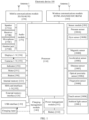
- FIG. 1 is a schematic diagram of a structure of an electronic device according to an embodiment of this application.
- the electronic device 100 may include a processor 110, an external memory interface 120, an internal memory 121, a universal serial bus (universal serial bus, USB) interface 130, a charging management module 140, a power management module 141, a battery 142, an antenna 1, an antenna 2, a mobile communications module 150, a wireless communications module 160, an audio module 170, a speaker 170A, a receiver 170B, a microphone 170C, a headset jack 170D, a sensor module 180, a button 190, a motor 191, an indicator 192, a camera 193, a display 194, a subscriber identification module (subscriber identification module, SIM) card interface 195, and the like.
- SIM subscriber identification module
- the sensor module 180 may include a pressure sensor 180A, a gyro sensor 180B, a magnetic sensor 180D, an acceleration sensor 180E, a distance sensor 180F, an optical proximity sensor 180G, a fingerprint sensor 180H, a touch sensor 180K, an ambient light sensor 180L, and the like.
- the structure shown in this embodiment of this application does not constitute a specific limitation on the electronic device 100.
- the electronic device 100 may include more or fewer components than those shown in the figure, or combine some components, or split some components, or have different component arrangements.
- the components shown in the figure may be implemented by hardware, software, or a combination of software and hardware.
- the processor 110 may include one or more processing units.
- the processor 110 may include an application processor (application processor, AP), a modem processor, a graphics processing unit (graphics processing unit, GPU), an image signal processor (image signal processor, ISP), a controller, a memory, a video codec, a digital signal processor (digital signal processor, DSP), a baseband processor, and/or a neural-network processing unit (neural-network processing unit, NPU).
- Different processing units may be independent components, or may be integrated into one or more processors.
- the processor 110 is configured to perform an ambient light detection method in embodiments of this application.
- the controller may be a nerve center and a command center of the electronic device 100.
- the controller may generate an operation control signal based on instruction operation code and a time sequence signal, to complete control of instruction fetching and instruction execution.
- a memory may further be disposed in the processor 110, to store instructions and data.
- the memory in the processor 110 is a cache.
- the memory may store instructions or data just used or cyclically used by the processor 110. If the processor 110 needs to use the instructions or data again, the instructions or data may be directly invoked from the memory. This avoids repeated access, and reduces waiting time of the processor 110, so that system efficiency is improved.
- the electronic device 100 implements a display function by using the GPU, the display 194, the application processor, and the like.
- the GPU is a microprocessor for image processing, and is connected to the display 194 and the application processor.
- the GPU is configured to perform mathematical and geometric calculation and render graphics.
- the processor 110 may include one or more GPUs that execute program instructions to generate or change display information.
- the display 194 is configured to display an image, a video, and the like.
- the display 194 includes a display panel.
- the display panel may use an organic light-emitting diode (organic light-emitting diode, OLED).
- OLED organic light-emitting diode
- the electronic device 100 may include one or N displays 194, where N is a positive integer greater than 1.
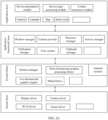
- an Android system may be divided into five layers: an application (applications) layer, an application framework (application framework) layer, an Android runtime (Android runtime) and system library, a hardware abstraction layer (hardware abstract layer, HAL, not shown in the figure), and a kernel (kernel) layer.
- an application applications
- an application framework application framework
- an Android runtime Android runtime
- system library system library
- hardware abstraction layer hardware abstract layer, HAL, not shown in the figure
- HAL hardware abstract layer
- kernel kernel
- the application layer may include a series of application packages.
- the application layer may include application programs (the application program may be referred to as an application for short) such as Camera, Gallery, Calendar, Phone, Map, Navigation, WLAN, Bluetooth, Music, Video, and Messages. This is not limited in this embodiment of this application.
- the application layer may further include a context awareness module, a service logic processing module, a service presentation module, and the like.
- the context awareness module, the service logic processing module, and the service presentation module may be independent APPs, or may be separately integrated into different APPs, or may be integrated into a same APP. This is not limited in this application.
- the context awareness module is resident or runs in a form of low power consumption, and has a capability of perceiving an external fact or an environment.
- the context awareness module may detect a related event and obtain a status of the event from another application at the application layer, the application framework layer, the system layer, or the kernel layer by using an API (application interface), such as detecting a Bluetooth connection or a network connection, monitoring a user's SMS message, and customizing a timer.
- an API application interface
- the context awareness module mainly monitors whether a clipboard has a copy event, and notifies the service logic processing module of a copy event when monitoring that the clipboard has the copy event.
- the context awareness module may be further configured to obtain a source application (APP) of cut content in the clipboard, that is, an application package name. That is, the context awareness module recognizes that the content in the clipboard is copied from a specific application.
- the context awareness module may further detect whether an operation of exiting the current page is performed. When an operation of exiting the current page is detected, the context awareness module notifies the service logic processing module.
- APP source application
- the service logic processing module (for example, a computing engine) has a service logic processing capability, and is configured to display and disappear various floating balls or floating windows. For example, the service logic processing module receives a copy event triggered by the user and clipboard content sent by the context awareness module, and determines whether a translation condition is met, to determine whether to display a floating ball. The service logic processing module may further determine, based on a floating ball tap event triggered by the user and translation result content obtained from a third-party server, whether to display a floating window and display a translation result in the floating window. In addition, the service logic processing module may be further configured to determine, based on a floating ball or floating window disappear event triggered by the user, whether to display or disappear the floating ball or the floating window on the electronic device.
- the service logic processing module may further recognize a copy text or a text extracted by using the OCR technology. For example, it may be identified that the text is at least one of a schedule, a to-be-shared link, a Taobao password, a web address, and the like. For another example, a language of a text may also be identified.
- the clipboard manager is configured to manage the clipboard.
- the clipboard is a temporary storage region for temporarily storing exchanged information.
- the activity manager is configured to manage a lifecycle of each application and a navigation fallback function, and is responsible for main thread creation of Android and maintenance of the lifecycle of each application.
- the resource manager provides various resources for the application, such as a localized string, an icon, a picture, a layout file, and a video file.
- the notification manager enables the application to display notification information in a status bar, and may be configured to transfer a message of a notification type.
- the information may automatically disappear after a short stay without user interaction.
- the notification manager is configured to notify a download completion, a message reminder, and the like.
- the notification manager may alternatively be a notification that appears in a form of a graph or a scroll bar text in a status bar at the top of the system, for example, a notification of an application running in the background, or may be a notification that appears in a form of a dialog window on a screen.
- the status bar shows text information, a prompt tone is made, the electronic device vibrates, and an indicator flickers.
- the application layer and the application framework layer run in the virtual machine.
- the virtual machine executes a binary file of a Java file at the application layer and the application framework layer.
- the virtual machine is configured to perform functions such as object lifecycle management, stack management, thread management, security and abnormity management, and garbage collection.
- the window manager includes an application window, a child window (not shown), and a system window.
- the child window is attached to a parent window, that is, cannot exist independently, and needs to rely on an application, for example, an application input method window or an application prompt box window.
- an application for example, an application input method window or an application prompt box window.
- an interface of each application includes an activity and any activity belongs to an application process
- a floating ball and a floating window that are set in a system window do not have an activity function.
- To enable the floating ball and the floating window to obtain an effect similar to that of the activity in the application window that is, display content, based on an operation performed by the user on the floating ball and the floating window, a slide operation, a slide conflict, and the like need to be additionally set in the system window, and a focus of a response window is determined based on an operation such as a tap of the user.
- the following content is extended to be clearer.
- an option switch such as "copy to trigger translation” does not need to be set in a setting interface of the mobile phone.
- the mobile phone determines a possible intention of the user according to an operation of copying a text by the user, for example, one or more of adding a schedule, adding a memo, sharing to an application, adding to favorites, adding to a dictionary, and opening map navigation.
- a type of the possible user intention determined by the mobile phone after the user copies the text is not limited.
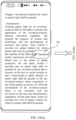
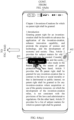
- the floating ball 303 in the first state is used to provide the user with an entry for displaying a translation result.
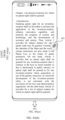
- a floating window 304 is displayed in FIG. 3(d) and the translation result of "patent" is displayed in the floating window 304.
- the translation result displayed in the floating window 304 includes the to-be-queried English word "patent” copied by the user, and a translation result of a Chinese meaning of the word, that is, "Zhuan Li".
- An interface displayed in the floating window 304 further includes voice reading, copying the text of the translation result, translation language switching, and the like.
- the floating ball and the floating window in the implementation of this application are system windows, and cannot be set in an application window.
- Android has strict control over the floating ball and the floating window. Therefore, permission needs to be applied for dynamically to pop to a customized system-level window.
- whether the text copied on the mobile phone triggers translation is related to the default language set by the system and the language of the copied text. If the mobile phone recognizes that the language of the text copied by the user is not a current system language of the mobile phone (that is, the default language set by the mobile phone), it can be recognized that an intention of the user includes translation. Specifically, for example, when the default language set by the system in the mobile phone is simplified Chinese, the following combinations may be included.
- the copied text includes both a text in the system language and a text in a non-system language.
- the copied text includes both Chinese and French
- a translation operation is still triggered, that is, the pop-up floating ball sign 302 shown in FIG. 3(b) is displayed and the floating ball 303 in the first state in FIG. 3(c) is automatically displayed after a period of time.
- the copied text is a text in a non-system language set by the application.
- the application language set by the current application is English
- the user copies an English text in the application because the mobile phone recognizes that the copied text includes a non-Chinese text, after the user copies the text, a translation operation is still triggered, that is, the pop-up floating ball sign 302 shown in FIG. 3(b) is displayed and the floating ball 303 in the first state in FIG. 3(c) is automatically displayed after a period of time.
- the mobile phone further needs to recognize that a language of the copied text is a preset language, where the preset language is a language in which the system of the mobile phone or a translation application on the mobile phone supports translation, so that it can be recognized that an intention of the user includes translation. If the mobile phone does not support translation of the language of the copied text, the translation result cannot be obtained. In this case, it is recognized that there is no translation intention.
- the mobile phone further needs to recognize that the copied text needs to meet a specific text type. For example, only when the copied text is not a character string that has a specific meaning, such as a web address link, an email address, or a password generated by a machine (such as a Taobao password), it can be recognized that the intention of the user includes translation.
- a specific meaning such as a web address link, an email address, or a password generated by a machine (such as a Taobao password)
- the foregoing character strings with a specific meaning are usually identifiers, for example, used to distinguish between different web pages, different mailboxes, or different Taobao commodities, but not having language meanings. Therefore, there is no translation requirement.
- a specific manner in which the mobile phone performs intention recognition on an operation of the user is not limited.
- the mobile phone may determine, based on a current application type, a type of the text copied by the user, and a context displayed by the current application, a translation intention existing after the user copies the text.
- the mobile phone may use natural language processing (Natural Language Processing, NLP) to comprehensively analyze and predict a behavior habit of the user, a status of using an APP, and the like.
- natural language processing Natural Language Processing, NLP
- a copy operation is mainly used as an example to trigger the mobile phone to recognize an intention.
- actual implementation is not limited thereto.
- an operation such as a selection operation, a touch and hold operation, a scribe operation, or a double-tap operation on the text may be used to trigger the mobile phone to recognize an intention.
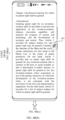
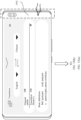
- FIG. 4A(a) if the user does not trigger any tap or touch operation on a floating ball 401 in a first state, that is, the floating ball 303 in FIG. 3(c) , within a preset time period, it is determined that the user does not require a translation operation in this case, the floating ball 401 presents a second state, that is, a floating ball 402 in the second state in FIG. 4A(b) , to improve user experience.
- the preset time period is a short period in a unit of second, and a specific time length is not limited in this application.
- the copy behavior of the user is determined as normal text copy behavior, and the floating ball 401 in the first state in FIG. 4A(a) is not displayed. That is, in this case, the copy behavior of the user does not trigger the translation operation. For example, after the user selects a word in FIG. 4A(c) , for example, "law", and taps "copy", because the mobile phone determines that the user does not need to perform the translation operation in this case, the mobile phone does not display the floating ball 401 in the first state in FIG. 4A(a) , and continues to display the floating ball 402 in the second state, as shown in FIG. 4A(d). That is, in FIG. 4A(a) to FIG.
- the clipboard of the mobile phone stores the most recently copied word by default. Therefore, in FIG. 4A(c) , if the user selects a word such as "law”, taps "copy”, and then taps the floating ball 402, because it is determined that the user has a translation intention, the floating window in FIG. 3(d) is displayed. However, the translated word changes from the original "patent” to "law” latest copied by the user, and a translation result of "law” is displayed in the floating window. That is, the clipboard of the mobile phone stores the most recently copied word by default. Therefore, in a state of the floating ball 402, if the user taps the floating ball 402 to perform a translation operation, the floating window displays a corresponding translation result of a text stored by the clipboard last time before the user taps the floating ball 402.
- the floating ball in the second state is set to display the floating ball in the second state when the user does not trigger any tap or touch operation on the floating ball in the first state within a preset time period. In this case, it is determined that the user does not need to perform the translation operation. Therefore, when the user triggers the copy operation, the copy behavior of the user is determined as normal text copy behavior, and the floating ball in the second state continues to be displayed.
- the first floating ball control corresponds to the floating ball in the second state
- the second floating ball control corresponds to the floating ball in the first state
- the user does not trigger any tap or touch operation on the floating ball 401 in the first state within a preset time period in FIG. 4B(a) , and the floating ball 402 in the second state in FIG. 4B(b) is displayed. If the user needs to perform the translation operation in the state of displaying the floating ball in the second state, as shown in FIG. 4B(c) , the user needs to trigger an operation of tapping or touching the floating ball 402 in the second state. In this case, the mobile phone has buffered the translation result of the word "patent" selected by the user in FIG.
- a slide operation, a slide conflict, and the like need to be additionally set in the system window, and a focus of a response window is determined based on an operation such as a tap of the user.
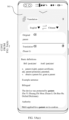
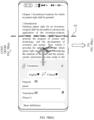
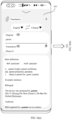
- the floating window has three forms based on different screen occupation heights, that is, a bottom state, a half-screen state, and a full-screen state.
- the floating window in the bottom state is located at the bottom of the screen of the current application, and does not display any translation result content. This helps the user continue to access content in the current application, to improve user experience.
- the floating window in the half-screen state occupies about half of the size of the screen of the current application, and displays a part of translation result content.
- the floating window in the half-screen state may also be used as a default floating window form, that is, a floating window in a first form displayed after the user copies a text.
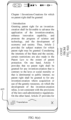
- the floating window in the full-screen state may occupy the entire screen of the current application, is expanded based on a drag operation of the user, and is used to display more translation result content than the floating window in the half-screen state, to improve user experience.
- F IG. 5A(a) to FIG. 5A(c) to FIG. 9(a) and FIG. 9(b) show a sliding effect of the floating window and change logic of the floating window between three different forms in the implementation of this application. The following describes the implementation of this application.
- a focus window is a window that is currently interacting with a user, and the window is responsible for receiving a key event and a touch event.
- a new activity is started, a new window is added, an old window is removed, and a split-screen operation is performed back and forth, update of the focus window is related.
- window attributes of the floating ball and the floating window are processed. Specifically, when the floating window is in the half-screen state and the full-screen state, the window attribute of the floating window is set to FLAG_NOT_TOUCH_MODAL to control focus event processing. When the floating window is in the bottom state, the window attribute of the floating window is set to FLAG_NOT_FOCUSABLE to deliver the focus event to processing of the original text of the current application.
- the current application is a read application that is being used by the user in the implementation of this application.
- FLAG_NOT_FOCUSABLE indicates that the current window does not need to obtain the focus or receive various input events.
- FLAG_NOT_TOUCH_MODAL is enabled for this flag at the same time, and the final event is directly transferred to the window of the specific focus at a lower layer.
- FLAG_NOT_TOUCH_MODAL indicates that in this mode, the system transfers a touch/tap event outside the current window region to an underlying window, and a tap event in the current window region is processed in the current window. This flag is important. Usually, this mark needs to be enabled. Otherwise, another window cannot receive a touch/tap event.
- the floating ball and the floating window in the implementation of this application are system windows, and do not have an activity function.
- an activity function that is, display content, based on an operation performed by the user on the floating ball and the floating window, a slide operation, a slide conflict, and the like need to be additionally set in the system window.
- ontouch and oninterceptTouch events of a content container of the window manager need to be rewritten, to control sliding and specific event distribution.
- the activity of the application window is encapsulated by Android, and the corresponding activity may be directly invoked during use.
- the floating ball and the floating window in the implementation of this application are system windows, and the Android architecture does not provide a corresponding activity for management and invoking. Therefore, to achieve, in the system window, an effect similar to the activity in the application window, an additional set of sliding logic implementation needs to be designed, which specifically includes:
- a sliding effect in the implementation of this application has different response events based on different sliding speeds of the user on the screen.
- Specific implementation logic is disclosed in the following descriptions of FIG. 5A(a) to FIG. 5A(c) and FIG. 5B(a) to FIG. 5B(c) , and details are not described herein again.
- an implementation of this application provides implementation of preventing an accidental touch.
- the user's finger touches the screen, the user's finger jitters when touching the screen. Therefore, it is necessary to distinguish whether an operation of the user is a slide, touch, or tap event.
- the activity of the application window has a function of preventing an accidental touch.
- the floating ball and the floating window in the implementation of this application are system windows, and the Android architecture does not provide a corresponding function implementation. Therefore, to implement, in the system window, an accidental touch prevention effect similar to that of the activity in the application window, an additional set of sliding logic implementation needs to be designed, which specifically includes: setting a movement threshold, and when the user's finger touches the floating window, determining whether a move event is triggered. To be specific, if a movement distance of the user's finger on the mobile phone screen is less than the movement threshold, it is determined that this operation is a tap event. If a movement distance of the user's finger on the mobile phone screen exceeds the movement threshold, it is determined that this operation is a slide event.
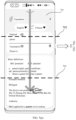
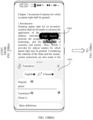
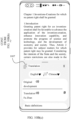
- a change implementation of switching the floating window from the half-screen state to the full-screen state is specifically described.
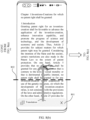
- the change of the state of the floating window is related to a speed at which the user drags the floating window to slide and whether the dragging exceeds a division line.
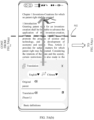
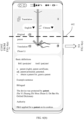
- a floating window 501 in the half-screen state is presented.
- a division line 502 is an intermediate division line of a region outside the floating window 501 on the mobile phone screen, that is, the division line 502 is a division line between a half-screen height and a full-screen height of the floating window.
- the division line 502 may be a division line between the half-screen height and the full-screen height, or may be a division line between the half-screen height and a bottom-state height. Different division lines are selected based on different current heights of the floating window and different directions in which the user drags the floating window to slide.
- the state of the floating window is related to a speed of dragging the floating window by the user in addition to whether the user drags the floating window beyond a middle line between two states.
- the floating window 501 presents the full-screen state in FIG. 5A(c) .
- the user may drag the floating window 501 to slide upward rapidly without exceeding the division line 502, and the full-screen state in FIG. 5A(c) can be presented, provided that a fast sliding condition is met.
- the full-screen state in FIG. 5A(c) can be presented.
- FIG. 5B(a) to FIG. 5B(c) when the user drags the floating window 501 in 5B(a) to slide upward slowly, if the user drags the floating window 501 upward beyond the division line 502, the floating window presents the full-screen state in FIG. 5A(c) . In this case, if the user does not drag the floating window 501 upward beyond the division line 502, that is, the state in FIG. 5B(b) , the floating window maintains or restores to the half-screen state in FIG. 5B(c) .
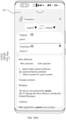
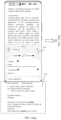
- a continuous change implementation of switching the floating window from the full-screen state to the half-screen state and then switching to the bottom state is specifically described.
- the change of the state of the floating window is related to a speed at which the user drags the floating window to slide and whether the dragging exceeds a division line.
- a floating window 601 in the full-screen state is presented.
- the division line 602 is a division line between the half-screen height and the full-screen height of the floating window.
- a floating window 603 in the half-screen state in FIG. 6(c) is presented.
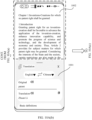
- the user may further continue to drag the floating window 603 in the half-screen state downward to present the floating window in different states.
- a division line 604 is a division line between the half-screen height and the bottom-state height of the floating window.
- the state of the floating window is related to a speed of dragging the floating window by the user in addition to whether the user drags the floating window beyond a middle line between two states.
- An implementation is similar to the foregoing implementation process in FIG. 5A(a) to FIG. 5A(c) and FIG. 5B(a) to FIG. 5B(c) , and details are not described herein again.
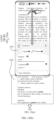
- a change implementation of directly switching the floating window from the full-screen state to the bottom state is specifically described.
- a process of switching from the full-screen state to the half-screen state and then switching from the half-screen state to the bottom state is not required, but the full-screen state is directly switched to the bottom state based on a user operation.
- the change of the state of the floating window is related to a speed at which the user drags the floating window to slide and whether the dragging exceeds a division line.
- FIG. 7(a) a floating window 701 in the full-screen state is presented.
- a division line 702 is a division line between the half-screen height and the full-screen height of the floating window.
- a division line 704 is a division line between the half-screen height and the bottom-state height of the floating window.
- the state of the floating window is related to a speed of dragging the floating window by the user in addition to whether the user drags the floating window beyond a middle line between two states.
- An implementation is similar to the foregoing implementation process in FIG. 5A(a) to FIG. 5A(c) and FIG. 5B(a) to FIG. 5B(c), and details are not described herein again.
- a continuous change implementation of switching the floating window from the bottom state to the half-screen state and then switching to the full-screen state is specifically described.
- the change of the state of the floating window is related to a speed at which the user drags the floating window to slide and whether the dragging exceeds a division line.
- a floating window 801 in the bottom state is presented.
- a division line 802 is a division line between the half-screen height and the bottom-state height of the floating window.
- a division line 804 is a division line between the half-screen height and the full-screen height of the floating window.
- the state of the floating window is related to a speed of dragging the floating window by the user in addition to whether the user drags the floating window beyond a middle line between two states.
- An implementation is similar to the foregoing implementation process in FIG. 5A(a) to FIG. 5A(c) and FIG. 5B(a) to FIG. 5B(c), and details are not described herein again.
- a floating window 1101 in FIG. 11(a) presents the half-screen state.
- a region 1102 outside the floating window is a region on the mobile phone screen other than the floating window 1101.
- the floating window in the implementation of this application does not preempt the focus of the current application, and the user can still slide the original text of the current application. Therefore, when a touch or tap operation of the user is detected in the region 1102 outside the floating window, it is determined that an intention of the user in this case is to browse the original text of the current application rather than to translate, and the floating window displays the bottom state in FIG. 11(b) , so that the user can browse the original text of the current application.
- An implementation is shown in FIG. 10A(b) , and details are not described herein again.
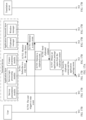
- the context awareness module obtains the text copied by the user from the clipboard manager, and obtains an application package name from the clipboard content.
- the service presentation module displays the floating ball
- the translation result content corresponding to the copied text of the user exists in the service logic processing module. Therefore, when the user needs to display the translation result content, that is, touch or tap the floating ball, the translation result may be displayed.
- S1717 The service logic processing module determines to display the translation result.
- the service logic processing module determines, based on a floating ball touch or tap event of the user, whether to display the received translation result content. If the service logic processing module determines to display the translation result content, the service logic processing module determines to display the floating window.
- the floating window and the floating ball may be displayed at the same time, or one of the two may be displayed.
- S1720 The window manager returns an instruction for displaying the floating window to the service presentation module.
- the service logic processing module sends an instruction for displaying the translation result to the service presentation module.
- the floating window has three forms based on different screen occupation heights, that is, a bottom state, a half-screen state, and a full-screen state.
- the three forms of the floating window can be switched to each other according to the operation of the user.
- the floating window is a modeless dialog box.
- the user may implement continuous text copying without closing the floating window after copying a new text and triggering translation manually.
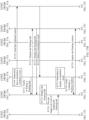
- S1723 The user triggers an event of touching or tapping a region outside the floating window.
- the service presentation module sends an instruction for displaying the floating window in a bottom state to the window manager.
- the window manager returns an instruction for displaying the floating window in the bottom state to the service presentation module.
- S1726 The service presentation module displays the floating window in the bottom state.
- FIG. 18(a) and FIG. 18(b) are provided for illustrative purposes.
- an option bar 1801 includes at least an operation option such as "translation".
- the option bar 301 includes the "copy” option, used by the mobile phone to trigger recognition of the text copy intention of the user after a content change in the clipboard is monitored.
- the option "translation” directly describes a text translation intention of the user, the option can be used to directly trigger a translation operation.
- the mobile phone directly displays a floating window 1802 in FIG. 18(b) .
- the floating window 1802 is the same as the floating window 304 shown in FIG. 3(d) , and the same translation result is displayed.
- an initial state of the floating window is a half-screen state, or may be a bottom state or a full-screen state.
- the mobile phone directly displays the floating window 1802 after the user selects and taps the "translation" option in the option bar 1801. Therefore, in this implementation of this application, for example, the floating ball sign 302 shown in FIG. 3(b) , the floating ball 303 in the first state in FIG. 3(c) , and the floating ball 402 in the second state in FIG. 4A(b) are not displayed.
- FIG. 19(a) and FIG. 19(b) are provided for illustrative purposes.
- an option bar 1901 includes both a "copy” option and a "translation” option. This is different from FIG. 3(a) in which the option bar 301 includes the "copy” option, and FIG. 18(a) in which the option bar 1801 includes at least an operation option such as "translation”. Therefore, in the implementation of FIG. 19(a) and FIG. 19(b) in this application, the implementations in FIG. 1 to FIG. 17A to FIG. 17C and FIG. 18(a) and FIG. 18(b) are included.
- the user may trigger translation in the implementation of "copy” in FIG. 1 to FIG. 17A to FIG. 17C , or may trigger translation in the implementation of "translation” in FIG. 18(a) and FIG. 18(b) . Therefore, the user can flexibly select one or both of the two implementations according to user preferences.
- FIG. 19(a) the user triggers translation of the word "patent” in the implementation of "copy” in FIG. 3(a) .
- the mobile phone interface displays the interface in FIG. 4A(b) . If the user needs to perform translation in this case, for example, the user needs to translate the word "development", optionally, there are the following manners.
- the user may touch or tap a floating ball 1902 to trigger translation, and corresponding translation result content is displayed in a floating window 1903 in FIG. 19(b) .
- a floating ball 1902 corresponds to the floating ball 402 in FIG. 4A(a) to FIG. 4A(d)
- an implementation of the floating window 1903 is the same as that in FIG. 1 to FIG. 18(a) and FIG. 18(b) .
- the user may touch or tap a "translation" option in an option bar 1901, and corresponding translation result content is displayed in a floating window 1903 in FIG. 19(b) .
- the implementation in which the "translation" option triggers translation is the same as that in FIG. 18(a) and FIG. 18(b)
- the implementation of the floating window 1903 is the same as that in FIG. 1 to FIG. 18(a) and FIG. 18(b) .
Landscapes
- Engineering & Computer Science (AREA)
- Theoretical Computer Science (AREA)
- General Engineering & Computer Science (AREA)
- Physics & Mathematics (AREA)
- General Physics & Mathematics (AREA)
- Human Computer Interaction (AREA)
- Health & Medical Sciences (AREA)
- Artificial Intelligence (AREA)
- Audiology, Speech & Language Pathology (AREA)
- Computational Linguistics (AREA)
- General Health & Medical Sciences (AREA)
- Software Systems (AREA)
- User Interface Of Digital Computer (AREA)
Claims (15)
- Ein Übersetzungsverfahren, angewendet auf ein elektronisches Gerät (100) und eine Anwendung, wobei das Verfahren Folgendes umfasst:Anzeigen einer ersten Schnittstelle der Anwendung, wobei die erste Schnittstelle einen ersten Text und eine schwebende Kugel umfasst, und die schwebende Kugel einen ersten schwebenden Kugelzustand (303, 401) und einen zweiten schwebenden Kugelzustand (402) umfasst, wobei der erste Zustand ein erweiterter Zustand und der zweite Zustand ein zusammengezogener Zustand ist;Anzeigen einer ersten Steuerung als Reaktion auf eine erste Operation, die von einem Benutzer auf dem ersten Text ausgeführt wird, wobei die erste Steuerung eine Kopieroption umfasst, und die erste Operation eine beliebige der folgenden Operationen umfasst: eine Auswahloperation, eine Berührungsoperation, eine Tippoperation, eine Wischoperation, eine Berühren-und-Halten-Operation oder eine Doppeltippoperation auf dem ersten Text;Schreiben des ersten Textes in eine Zwischenablage des elektronischen Geräts als Reaktion auf eine Kopieroperation, die vom Benutzer auf der Kopieroption ausgeführt wird, und nach der Kopieroperation:Beim Erkennen, dass der erste Text in der Zwischenablage eine Sprache umfasst, die sich von der Systemsprache des elektronischen Geräts unterscheidet, Anzeigen der schwebenden Kugel im ersten schwebenden Kugelzustand; undAnzeigen eines schwebenden Fensters (304) in der ersten Schnittstelle als Reaktion auf eine Übersetzungsoperation, die vom Benutzer auf der schwebenden Kugel im ersten schwebenden Kugelzustand ausgeführt wird, wobei das schwebende Fenster den ersten Text und eine erste Übersetzung, die dem ersten Text entspricht, umfasst, und das schwebende Fenster in einem ersten schwebenden Fensterzustand angezeigt wird.
- Das Übersetzungsverfahren nach Anspruch 1, wobei der erste schwebende Fensterzustand einen beliebigen der folgenden Zustände umfasst: einen unteren Zustand, einen Halbbildschirmzustand oder einen Vollbildschirmzustand.
- Das Übersetzungsverfahren nach Anspruch 1, wobei nach der Anzeige des schwebenden Fensters die erste Schnittstelle ferner einen ersten Bereich umfasst, und der erste Bereich ist ein Bereich außerhalb des schwebenden Fensters in der ersten Schnittstelle; als Reaktion auf eine dritte Operation, die vom Benutzer im ersten Bereich ausgeführt wird, wird das schwebende Fenster in einem dritten schwebenden Fensterzustand angezeigt, der dritte schwebende Fensterzustand umfasst einen beliebigen Zustand aus einem unteren Zustand, einem Halbbildschirmzustand oder einem Vollbildschirmzustand; die dritte Operation umfasst eine beliebige Operation aus einer Berührungsoperation, einer Tippoperation, einer Wischoperation oder einer Berührungs- und Halteoperation im ersten Bereich; die erste Schnittstelle umfasst ferner einen zweiten Text, die erste Steuerung wird als Reaktion auf eine vierte Operation angezeigt, die vom Benutzer am zweiten Text ausgeführt wird, die vierte Operation umfasst eine beliebige Operation aus einer Auswahloperation, einer Berührungsoperation, einer Tippoperation, einer Wischoperation, einer Berührungs- und Halteoperation oder einer Doppeltippoperation am zweiten Text, der zweite Text umfasst weder eine Webadresse, eine E-Mail-Adresse noch ein maschinell generiertes Passwort, und der zweite Text umfasst eine Sprache, die sich von der Systemsprache des elektronischen Geräts unterscheidet; und der erste Text umfasst eine Sprache, die sich von der Systemsprache des elektronischen Geräts unterscheidet.
- Das Übersetzungsverfahren nach Anspruch 3, wobei als Reaktion auf eine Kopieroperation, die vom Benutzer an der Kopieroption ausgeführt wird, der zweite Text in die Zwischenablage des elektronischen Geräts geschrieben wird, das schwebende Fenster in der ersten Schnittstelle angezeigt wird, das schwebende Fenster in einem vierten schwebenden Fensterzustand angezeigt wird, das schwebende Fenster den zweiten Text und eine zweite Übersetzung enthält, die dem zweiten Text entspricht, das schwebende Fenster weder den ersten Text noch die erste Übersetzung enthält; das schwebende Fenster wird in der ersten Schnittstelle als Reaktion auf eine Übersetzungsoperation angezeigt, die vom Benutzer am schwebenden Ball im ersten schwebenden Ballzustand ausgeführt wird, das schwebende Fenster wird in einem fünften schwebenden Fensterzustand angezeigt, das schwebende Fenster enthält den zweiten Text und eine zweite Übersetzung, die dem zweiten Text entspricht, und das schwebende Fenster enthält weder den ersten Text noch die erste Übersetzung.
- Das Übersetzungsverfahren gemäß Anspruch 1, wobei das schwebende Fenster verschiebbar ist, das schwebende Fenster einen beliebigen oder mehrere der Zustände Boden, Halb-Bildschirm oder Vollbildschirm aufweist und das schwebende Fenster in oder zwischen einem oder mehreren der Zustände Boden, Halb-Bildschirm oder Vollbildschirm verschoben wird; als Reaktion auf eine erste Verschiebeoperation, die vom Benutzer am schwebenden Fenster im ersten schwebenden Fensterzustand durchgeführt wird, wird nach Feststellung, dass die Verschiebeoperation eine Verschiebebedingung erfüllt, das schwebende Fenster in einem sechsten schwebenden Fensterzustand angezeigt, wobei der sechste schwebende Fensterzustand sich vom ersten schwebenden Fensterzustand unterscheidet und der sechste schwebende Fensterzustand einen beliebigen der Zustände Boden, Halb-Bildschirm oder Vollbildschirm umfasst; oder nach Feststellung, dass die Verschiebeoperation keine Verschiebebedingung erfüllt, wird das schwebende Fenster in einem siebten schwebenden Fensterzustand angezeigt, wobei der siebte schwebende Fensterzustand mit dem ersten schwebenden Fensterzustand identisch ist und der siebte schwebende Fensterzustand einen beliebigen der Zustände Boden, Halb-Bildschirm oder Vollbildschirm umfasst.
- Das Übersetzungsverfahren gemäß Anspruch 5, wobei die Verschiebebedingung das Erfüllen eines oder mehrerer der Kriterien Verschiebestrecke, Verschiebegeschwindigkeit oder Verschieberichtung umfasst; die Feststellung, dass die Verschiebestrecke eine Bedingung erfüllt, umfasst die Feststellung, dass die Verschiebestrecke größer als ein Viertel der Bildschirmhöhe des elektronischen Geräts ist; wenn die Verschiebestrecke größer als ein Viertel der Bildschirmhöhe des elektronischen Geräts und kleiner als drei Viertel der Bildschirmhöhe ist, wird das schwebende Fenster zwischen dem Boden- und dem Halb-Bildschirmzustand oder dem Halb-Bildschirm- und dem Vollbildschirmzustand umgeschaltet; oder wenn die Verschiebestrecke größer als drei Viertel der Bildschirmhöhe des elektronischen Geräts ist, wird das schwebende Fenster zwischen dem Boden- und dem Vollbildschirmzustand umgeschaltet.
- Das Übersetzungsverfahren nach Anspruch 5, ferner umfassend: Vorladen einer ersten detaillierten Übersetzung, die der ersten Übersetzung entspricht, bevor das schwebende Fenster vom Halbbildschirmzustand in den Vollbildschirmzustand verschoben wird, wobei die erste detaillierte Übersetzung Inhalte umfasst, die Teil der ersten Übersetzung sind und die im schwebenden Fenster im Vollbildschirmzustand angezeigt werden, jedoch nicht im Halbbildschirmzustand; das schwebende Fenster umfasst ferner ein erstes internes Fenster, und das erste interne Fenster umfasst die erste Übersetzung und/oder die erste detaillierte Übersetzung; das erste interne Fenster ist verschiebbar und konfiguriert, Inhalte anzuzeigen, die der ersten Übersetzung entsprechen; wenn sich das schwebende Fenster im Vollbildschirmzustand befindet, zeigt das erste interne Fenster in Reaktion auf eine zweite vom Benutzer durchgeführte Verschiebeoperation eine zweite detaillierte Übersetzung an, und die zweite detaillierte Übersetzung umfasst einen Teil der ersten detaillierten Übersetzung.
- Das Übersetzungsverfahren nach Anspruch 1, wobei vor der Anzeige der ersten Schnittstelle der Anwendung, die die schwebende Kugel umfasst, das Verfahren ferner umfasst: Anzeigen einer zweiten Steuerung in der ersten Schnittstelle als Reaktion auf eine fünfte vom Benutzer durchgeführte Operation an einem dritten Text, wobei die erste Schnittstelle ferner den dritten Text umfasst, die fünfte Operation eine beliebige der folgenden Operationen umfasst: eine Auswahloperation, eine Berührungsoperation, eine Tippoperation, eine Verschiebeoperation, eine Berührungs- und Halteoperation oder eine Doppeltippoperation am dritten Text, der dritte Text keine Webadresse, E-Mail-Adresse oder ein maschinell generiertes Passwort umfasst und der dritte Text eine Sprache umfasst, die sich von der Systemsprache des elektronischen Geräts unterscheidet; eine Option in der zweiten Steuerung umfasst eine Kopieroption oder eine Ausschneideoption.
- Das Übersetzungsverfahren nach Anspruch 8, wobei die schwebende Kugel im ersten Zustand der schwebenden Kugel in der ersten Schnittstelle als Reaktion auf eine sechste vom Benutzer durchgeführte Operation an der zweiten Steuerung angezeigt wird, und die sechste Operation entweder eine Kopieroperation an der Kopieroption in der zweiten Steuerung oder eine Ausschneideoperation an der Ausschneideoption umfasst; wobei die schwebende Kugel im ersten Zustand der schwebenden Kugel und die schwebende Kugel im zweiten Zustand der schwebenden Kugel auf derselben Seite der ersten Schnittstelle der Anwendung auf dem elektronischen Gerät angezeigt werden; und das Übersetzungsverfahren umfasst ferner: Anzeigen des schwebenden Fensters als Reaktion auf eine siebte vom Benutzer durchgeführte Operation an der schwebenden Kugel im ersten Zustand der schwebenden Kugel, wobei das schwebende Fenster den dritten Text und eine dritte Übersetzung umfasst, die dem dritten Text entspricht, und die siebte Operation eine beliebige der folgenden Operationen umfasst: eine Berührungsoperation, eine Tippoperation oder eine Berührungs- und Halteoperation.
- Das Übersetzungsverfahren nach Anspruch 9, ferner umfassend: Anzeigen eines schwebenden Kugelsymbols, bevor die schwebende Kugel im zweiten Zustand der schwebenden Kugel angezeigt wird, wobei nach einem ersten voreingestellten Zeitraum das schwebende Kugelsymbol verschwindet und die schwebende Kugel im zweiten Zustand angezeigt wird; das schwebende Kugelsymbol wird verwendet, um zu bestimmen, dass die sechste Operation eine Übersetzungsbedingung erfüllt, wobei die Übersetzungsbedingung eine oder mehrere der folgenden umfasst: einen Sprachtyp des dritten Textes, den Inhalt des dritten Textes oder einen Typ der Anwendung.
- Das Übersetzungsverfahren nach Anspruch 9, ferner umfassend: Abbrechen der Anzeige der schwebenden Kugel im ersten Zustand der schwebenden Kugel und Anzeigen der schwebenden Kugel im zweiten Zustand der schwebenden Kugel, wenn festgestellt wird, dass innerhalb eines zweiten voreingestellten Zeitraums keine Berührungsoperation, Tippoperation, Wischoperation oder Berühren-und-Halten-Operation des Benutzers an der schwebenden Kugel im ersten Zustand der schwebenden Kugel erkannt wird.
- Das Übersetzungsverfahren nach einem der Ansprüche 1 bis 11, wobei das schwebende Fenster ein Systemfenster ist und das Systemfenster sich von einem Anwendungsfenster der Anwendung unterscheidet, das schwebende Fenster umfasst ein modelloses Dialogfeld, und wenn das schwebende Fenster in der ersten Schnittstelle angezeigt wird, ist entweder die erste Schnittstelle oder das schwebende Fenster verschiebbar.
- Das Übersetzungsverfahren nach einem der Ansprüche 1 bis 11, wobei ein Fenstereigenschaft des schwebenden Fensters auf FLAG_NOT_TOUCH_MODAL gesetzt ist und das schwebende Fenster keinen Fensterfokus mit der ersten Schnittstelle der Anwendung vorwegnimmt, wobeiwenn das schwebende Fenster in der ersten Schnittstelle angezeigt wird, verschwindet das schwebende Fenster nicht, wenn die erste Schnittstelle verschoben wird, und als Reaktion auf die Tatsache, dass das schwebende Fenster verschoben wird, verschwindet die erste Schnittstelle nicht; undwenn das schwebende Fenster verschoben wird, verschwindet die erste Schnittstelle nicht, und als Reaktion auf die Tatsache, dass die erste Schnittstelle verschoben wird, verschwindet das schwebende Fenster nicht.
- Ein elektronisches Gerät (100), wobei das elektronische Gerät einen Speicher (120, 121) umfasst, der konfiguriert ist, Computerprogrammanweisungen zu speichern, und einen Prozessor (110), der konfiguriert ist, die Programmanweisungen auszuführen, und wenn die Computerprogrammanweisungen vom Prozessor ausgeführt werden, wird das elektronische Gerät ausgelöst, das Verfahren nach einem der Ansprüche 1 bis 13 auszuführen.
- Ein computerlesbares Speichermedium, wobei das computerlesbare Speichermedium ein Computerprogramm speichert, und wenn das Computerprogramm auf einem Computer ausgeführt wird, wird der Computer aktiviert, das Verfahren nach einem der Ansprüche 1 bis 13 auszuführen.
Applications Claiming Priority (3)
| Application Number | Priority Date | Filing Date | Title |
|---|---|---|---|
| CN202111028829 | 2021-09-02 | ||
| CN202210023045.5A CN115756269A (zh) | 2021-09-02 | 2022-01-10 | 翻译方法及电子设备 |
| PCT/CN2022/113390 WO2023030030A1 (zh) | 2021-09-02 | 2022-08-18 | 翻译方法及电子设备 |
Publications (3)
| Publication Number | Publication Date |
|---|---|
| EP4170476A1 EP4170476A1 (de) | 2023-04-26 |
| EP4170476A4 EP4170476A4 (de) | 2024-01-24 |
| EP4170476B1 true EP4170476B1 (de) | 2025-03-26 |
Family
ID=85348991
Family Applications (1)
| Application Number | Title | Priority Date | Filing Date |
|---|---|---|---|
| EP22839626.3A Active EP4170476B1 (de) | 2021-09-02 | 2022-08-18 | Übersetzungsverfahren und elektronische vorrichtung |
Country Status (4)
| Country | Link |
|---|---|
| US (1) | US12481842B2 (de) |
| EP (1) | EP4170476B1 (de) |
| CN (1) | CN115756269A (de) |
| WO (1) | WO2023030030A1 (de) |
Families Citing this family (5)
| Publication number | Priority date | Publication date | Assignee | Title |
|---|---|---|---|---|
| CN116185245B (zh) * | 2023-04-28 | 2023-09-26 | 荣耀终端有限公司 | 一种页面显示方法及电子设备 |
| CN116204093B (zh) * | 2023-04-28 | 2023-10-20 | 荣耀终端有限公司 | 一种页面显示方法及电子设备 |
| WO2025251267A1 (zh) * | 2024-06-06 | 2025-12-11 | 北京字跳网络技术有限公司 | 用于内容创作的方法和装置 |
| CN118796065B (zh) * | 2024-06-20 | 2026-02-10 | 华为技术有限公司 | 一种交互控件的显示方法、装置、电子设备及存储介质 |
| CN121900648A (zh) * | 2024-10-21 | 2026-04-21 | 荣耀终端股份有限公司 | 服务提供方法和电子设备 |
Family Cites Families (54)
| Publication number | Priority date | Publication date | Assignee | Title |
|---|---|---|---|---|
| US6772110B2 (en) * | 2001-06-28 | 2004-08-03 | Microsoft Corporation | Method and system for converting and plugging user interface terms |
| JP2008527524A (ja) * | 2005-01-10 | 2008-07-24 | メリンゴ リミテッド | 埋め込み型翻訳強化検索 |
| US20090132257A1 (en) * | 2007-11-19 | 2009-05-21 | Inventec Corporation | System and method for inputting edited translation words or sentence |
| CN101609403B (zh) | 2009-07-29 | 2013-04-17 | 金蝶软件(中国)有限公司 | 一种页面布局动态切换方法及系统 |
| CN102722479B (zh) | 2011-03-30 | 2015-11-04 | 腾讯科技(深圳)有限公司 | 一种实现语言翻译的方法及装置 |
| US9149591B2 (en) | 2012-11-14 | 2015-10-06 | Shenzhen Mindray Bio-Medical Electronics Co. Ltd. | Valve assembly for controlling the flow rate of a fluid |
| US20150227509A1 (en) | 2014-02-13 | 2015-08-13 | Kobo Inc. | Providing translation of a text item from a displayed portion of text content |
| EP2916183B1 (de) | 2014-03-06 | 2016-11-09 | dSPACE digital signal processing and control engineering GmbH | Verfahren zur Erzeugung eines auf einem Steuerungssystem ausführbaren Steuerungsprogramms |
| US20160004315A1 (en) | 2014-07-03 | 2016-01-07 | PACSPoint Inc. | System and method of touch-free operation of a picture archiving and communication system |
| CN105677178B (zh) | 2015-12-30 | 2019-02-05 | Oppo广东移动通信有限公司 | 一种调整控件所属图层的方法及移动终端 |
| CN107870711A (zh) | 2016-09-27 | 2018-04-03 | 阿里巴巴集团控股有限公司 | 页面导航方法、提供用户界面的方法及客户端 |
| US10241789B2 (en) | 2016-12-27 | 2019-03-26 | Intel Corporation | Method to do control speculation on loads in a high performance strand-based loop accelerator |
| US20180135325A1 (en) | 2017-01-17 | 2018-05-17 | Aquatron Robotic Technology Ltd. | Method and device for remotely controlling robotic pool cleaner |
| CN107153541B (zh) | 2017-04-20 | 2020-07-03 | 北京小米移动软件有限公司 | 浏览交互处理方法及装置 |
| US11044358B2 (en) * | 2017-06-14 | 2021-06-22 | Naver Corporation | Mobile terminal and method for providing user interface using the same, server and method for providing mobile service using the same |
| CN107608652B (zh) | 2017-08-28 | 2020-05-22 | 三星电子(中国)研发中心 | 一种语音控制图形界面的方法和装置 |
| CN107992346B (zh) | 2017-10-19 | 2021-09-03 | 用友网络科技股份有限公司 | 应用程序的界面显示方法、界面显示系统 |
| CN107818163B (zh) | 2017-11-01 | 2019-03-29 | 平安科技(深圳)有限公司 | 页面展示方法、装置、计算机设备和存储介质 |
| CN107943796B (zh) | 2017-11-17 | 2022-03-04 | 珠海市魅族科技有限公司 | 一种翻译方法和装置、终端、可读存储介质 |
| CN108073398A (zh) | 2017-12-22 | 2018-05-25 | 华北计算技术研究所(中国电子科技集团公司第十五研究所) | 一种可配置的通知单实现引擎及方法 |
| CN108491127B (zh) * | 2018-03-12 | 2020-02-07 | Oppo广东移动通信有限公司 | 输入法界面显示方法、装置、终端及存储介质 |
| CN108415752A (zh) * | 2018-03-12 | 2018-08-17 | 广东欧珀移动通信有限公司 | 用户界面显示方法、装置、设备及存储介质 |
| CN108600848A (zh) | 2018-03-15 | 2018-09-28 | 聚好看科技股份有限公司 | 智能电视以及在用户界面上显示内容的方法 |
| CN108664475A (zh) | 2018-03-28 | 2018-10-16 | 广东欧珀移动通信有限公司 | 翻译显示方法、装置、移动终端及存储介质 |
| CN108595445A (zh) * | 2018-04-23 | 2018-09-28 | Oppo广东移动通信有限公司 | 翻译方法、装置及终端 |
| US10838754B2 (en) | 2018-04-27 | 2020-11-17 | Nutanix, Inc. | Virtualized systems having hardware interface services for controlling hardware |
| CN108628521A (zh) | 2018-05-14 | 2018-10-09 | 维沃移动通信有限公司 | 一种屏幕操作方法及移动终端 |
| CN109359280B (zh) | 2018-09-12 | 2023-12-05 | 深圳市卡牛科技有限公司 | 数据展示方法、装置、计算机设备和存储介质 |
| CN114879925A (zh) | 2018-09-21 | 2022-08-09 | Oppo(重庆)智能科技有限公司 | 显示控制方法及相关装置 |
| CN109669742A (zh) | 2018-09-26 | 2019-04-23 | 深圳壹账通智能科技有限公司 | 网站的展示方法、装置、终端设备及存储介质 |
| CN109543193B (zh) | 2018-11-12 | 2023-08-29 | 维沃移动通信有限公司 | 一种翻译方法、装置及终端设备 |
| CN109561149B (zh) | 2018-11-28 | 2019-10-15 | 腾讯科技(深圳)有限公司 | 数据处理方法、装置及存储介质 |
| CN109782920A (zh) | 2019-01-30 | 2019-05-21 | 上海趣虫科技有限公司 | 一种用于扩展现实的人机交互方法及处理终端 |
| CN110032318A (zh) | 2019-04-15 | 2019-07-19 | 珠海格力电器股份有限公司 | 基于折叠屏移动终端的显示方法、系统及折叠屏移动终端 |
| CN110058778A (zh) | 2019-04-17 | 2019-07-26 | 网易(杭州)网络有限公司 | 输入面板切换方法及装置 |
| CN110166586B (zh) | 2019-04-18 | 2021-01-08 | 维沃移动通信(深圳)有限公司 | 一种内容显示方法及终端设备 |
| CN110442879B (zh) | 2019-04-30 | 2024-02-13 | 华为技术有限公司 | 一种内容翻译的方法和终端 |
| CN110286816A (zh) | 2019-06-12 | 2019-09-27 | 努比亚技术有限公司 | 移动终端页面切换方法、移动终端及计算机可读存储介质 |
| US11429779B2 (en) * | 2019-07-01 | 2022-08-30 | Microsoft Technology Licensing, Llc | Method and system for intelligently suggesting paraphrases |
| CN112183121B (zh) | 2019-09-20 | 2022-02-25 | 华为技术有限公司 | 机器翻译的方法和电子设备 |
| CN110806831A (zh) | 2019-09-30 | 2020-02-18 | 华为技术有限公司 | 一种触摸屏的响应方法及电子设备 |
| CN110837406B (zh) | 2019-11-11 | 2024-02-20 | 青岛海信移动通信技术有限公司 | 一种悬浮球视图的显示方法以及终端 |
| US11315246B2 (en) * | 2019-11-27 | 2022-04-26 | Shanghai United Imaging Intelligence Co., Ltd. | Cardiac feature tracking |
| CN113138915A (zh) | 2020-01-20 | 2021-07-20 | 腾讯科技(深圳)有限公司 | 一种页面测试方法、装置及介质 |
| CN111310482A (zh) | 2020-01-20 | 2020-06-19 | 北京无限光场科技有限公司 | 实时翻译方法、装置、终端及存储介质 |
| CN113253880B (zh) | 2020-02-11 | 2024-03-08 | 腾讯科技(深圳)有限公司 | 互动场景的页面的处理方法、装置及存储介质 |
| CN111401323A (zh) | 2020-04-20 | 2020-07-10 | Oppo广东移动通信有限公司 | 文字翻译方法、装置、存储介质及电子设备 |
| CN111680521B (zh) | 2020-05-19 | 2024-09-17 | 北京搜狗科技发展有限公司 | 一种翻译处理方法、装置和用于翻译处理的装置 |
| CN111967275B (zh) | 2020-08-07 | 2023-06-30 | 广州新视展投资咨询有限公司 | 页面内容翻译方法和装置 |
| CN113157906B (zh) | 2021-01-19 | 2023-08-08 | 北京达佳互联信息技术有限公司 | 推荐信息展示方法、装置、设备及存储介质 |
| CN112764834A (zh) | 2021-01-21 | 2021-05-07 | 乐聚(深圳)机器人技术有限公司 | 控件的动作绑定方法、装置、设备及存储介质 |
| CN112764615B (zh) | 2021-01-22 | 2022-06-10 | 维沃移动通信有限公司 | 悬浮球控制方法及装置 |
| CN113010162B (zh) | 2021-03-02 | 2024-03-29 | 中国工商银行股份有限公司 | 一种页面构建方法、装置及设备 |
| CN112905093B (zh) | 2021-03-10 | 2022-11-15 | Oppo广东移动通信有限公司 | 内容显示方法、装置、存储介质及电子设备 |
-
2022
- 2022-01-10 CN CN202210023045.5A patent/CN115756269A/zh active Pending
- 2022-08-18 EP EP22839626.3A patent/EP4170476B1/de active Active
- 2022-08-18 WO PCT/CN2022/113390 patent/WO2023030030A1/zh not_active Ceased
- 2022-08-18 US US18/004,797 patent/US12481842B2/en active Active
Also Published As
| Publication number | Publication date |
|---|---|
| WO2023030030A9 (zh) | 2023-08-31 |
| CN115756269A (zh) | 2023-03-07 |
| EP4170476A4 (de) | 2024-01-24 |
| US12481842B2 (en) | 2025-11-25 |
| WO2023030030A1 (zh) | 2023-03-09 |
| EP4170476A1 (de) | 2023-04-26 |
| US20240127007A1 (en) | 2024-04-18 |
Similar Documents
| Publication | Publication Date | Title |
|---|---|---|
| EP4170476A1 (de) | Übersetzungsverfahren und elektronische vorrichtung | |
| EP4414833B1 (de) | Fensterumschaltverfahren, elektronische vorrichtung und lesbares speichermedium | |
| EP3356922B1 (de) | Verfahren zur darstellung eines transienten grafischen objekts und vorrichtung | |
| US20170325196A1 (en) | Electronic device and method of providing notification by electronic device | |
| CN113805743A (zh) | 切换显示窗口的方法和电子设备 | |
| CN114997186B (zh) | 翻译控件的控制方法及电子设备 | |
| EP3757739B1 (de) | Verfahren zur anzeige beim verlassen einer anwendung und endgerät | |
| TW201606631A (zh) | 利用關聯指示器及浮動選單列的關聯選單 | |
| EP4468690B1 (de) | Fensteranzeigeverfahren und zugehörige vorrichtung | |
| CN113805744A (zh) | 窗口的显示方法和电子设备 | |
| US20260126904A1 (en) | Window interaction method and electronic device | |
| WO2025060580A1 (zh) | 界面显示方法、电子设备及存储介质 | |
| EP4462238B1 (de) | Fensteranzeigeverfahren, elektronische vorrichtung und computerlesbares speichermedium | |
| CN116456020B (zh) | 窗口交互方法、电子设备、存储介质和计算机程序产品 | |
| US20260037098A1 (en) | Two-Dimensional Code Display Method and Related Electronic Device | |
| CN116149530A (zh) | 翻译方法及电子设备 | |
| WO2023131313A9 (zh) | 窗口交互方法和电子设备 | |
| US20250156048A1 (en) | Window display method, electronic device, and computer-readable storage medium | |
| CN114461312A (zh) | 切换应用及应用中任务的方法、电子设备 | |
| CN116456019B (zh) | 窗口交互方法、电子设备、计算机可读存储介质及程序产品 | |
| US20250348193A1 (en) | Devices, Methods, and Graphical User Interfaces for Interacting with Controls | |
| CN113612822B (zh) | 显示设备及自适应内存的网络资源下载方法 | |
| WO2024001871A1 (zh) | 一种操控方法和电子设备 | |
| WO2025092106A1 (zh) | 界面显示方法、电子设备及存储介质 | |
| CN120215772A (zh) | 应用功能的响应方法、电子设备及可读存储介质 |
Legal Events
| Date | Code | Title | Description |
|---|---|---|---|
| STAA | Information on the status of an ep patent application or granted ep patent |
Free format text: STATUS: UNKNOWN |
|
| STAA | Information on the status of an ep patent application or granted ep patent |
Free format text: STATUS: THE INTERNATIONAL PUBLICATION HAS BEEN MADE |
|
| PUAI | Public reference made under article 153(3) epc to a published international application that has entered the european phase |
Free format text: ORIGINAL CODE: 0009012 |
|
| STAA | Information on the status of an ep patent application or granted ep patent |
Free format text: STATUS: REQUEST FOR EXAMINATION WAS MADE |
|
| 17P | Request for examination filed |
Effective date: 20230118 |
|
| AK | Designated contracting states |
Kind code of ref document: A1 Designated state(s): AL AT BE BG CH CY CZ DE DK EE ES FI FR GB GR HR HU IE IS IT LI LT LU LV MC MK MT NL NO PL PT RO RS SE SI SK SM TR |
|
| A4 | Supplementary search report drawn up and despatched |
Effective date: 20240102 |
|
| RIC1 | Information provided on ipc code assigned before grant |
Ipc: G06F 40/58 20200101ALI20231219BHEP Ipc: G06F 3/04842 20220101AFI20231219BHEP |
|
| STAA | Information on the status of an ep patent application or granted ep patent |
Free format text: STATUS: EXAMINATION IS IN PROGRESS |
|
| 17Q | First examination report despatched |
Effective date: 20240702 |
|
| GRAP | Despatch of communication of intention to grant a patent |
Free format text: ORIGINAL CODE: EPIDOSNIGR1 |
|
| STAA | Information on the status of an ep patent application or granted ep patent |
Free format text: STATUS: GRANT OF PATENT IS INTENDED |
|
| DAV | Request for validation of the european patent (deleted) | ||
| DAX | Request for extension of the european patent (deleted) | ||
| INTG | Intention to grant announced |
Effective date: 20241017 |
|
| GRAS | Grant fee paid |
Free format text: ORIGINAL CODE: EPIDOSNIGR3 |
|
| GRAA | (expected) grant |
Free format text: ORIGINAL CODE: 0009210 |
|
| STAA | Information on the status of an ep patent application or granted ep patent |
Free format text: STATUS: THE PATENT HAS BEEN GRANTED |
|
| AK | Designated contracting states |
Kind code of ref document: B1 Designated state(s): AL AT BE BG CH CY CZ DE DK EE ES FI FR GB GR HR HU IE IS IT LI LT LU LV MC MK MT NL NO PL PT RO RS SE SI SK SM TR |
|
| REG | Reference to a national code |
Ref country code: GB Ref legal event code: FG4D |
|
| REG | Reference to a national code |
Ref country code: CH Ref legal event code: EP |
|
| REG | Reference to a national code |
Ref country code: DE Ref legal event code: R096 Ref document number: 602022012383 Country of ref document: DE |
|
| REG | Reference to a national code |
Ref country code: IE Ref legal event code: FG4D |
|
| REG | Reference to a national code |
Ref country code: NL Ref legal event code: FP |
|
| PG25 | Lapsed in a contracting state [announced via postgrant information from national office to epo] |
Ref country code: RS Free format text: LAPSE BECAUSE OF FAILURE TO SUBMIT A TRANSLATION OF THE DESCRIPTION OR TO PAY THE FEE WITHIN THE PRESCRIBED TIME-LIMIT Effective date: 20250626 |
|
| PG25 | Lapsed in a contracting state [announced via postgrant information from national office to epo] |
Ref country code: FI Free format text: LAPSE BECAUSE OF FAILURE TO SUBMIT A TRANSLATION OF THE DESCRIPTION OR TO PAY THE FEE WITHIN THE PRESCRIBED TIME-LIMIT Effective date: 20250326 |
|
| REG | Reference to a national code |
Ref country code: LT Ref legal event code: MG9D |
|
| PG25 | Lapsed in a contracting state [announced via postgrant information from national office to epo] |
Ref country code: NO Free format text: LAPSE BECAUSE OF FAILURE TO SUBMIT A TRANSLATION OF THE DESCRIPTION OR TO PAY THE FEE WITHIN THE PRESCRIBED TIME-LIMIT Effective date: 20250626 |
|
| PG25 | Lapsed in a contracting state [announced via postgrant information from national office to epo] |
Ref country code: HR Free format text: LAPSE BECAUSE OF FAILURE TO SUBMIT A TRANSLATION OF THE DESCRIPTION OR TO PAY THE FEE WITHIN THE PRESCRIBED TIME-LIMIT Effective date: 20250326 |
|
| PG25 | Lapsed in a contracting state [announced via postgrant information from national office to epo] |
Ref country code: LV Free format text: LAPSE BECAUSE OF FAILURE TO SUBMIT A TRANSLATION OF THE DESCRIPTION OR TO PAY THE FEE WITHIN THE PRESCRIBED TIME-LIMIT Effective date: 20250326 |
|
| PG25 | Lapsed in a contracting state [announced via postgrant information from national office to epo] |
Ref country code: BG Free format text: LAPSE BECAUSE OF FAILURE TO SUBMIT A TRANSLATION OF THE DESCRIPTION OR TO PAY THE FEE WITHIN THE PRESCRIBED TIME-LIMIT Effective date: 20250326 Ref country code: GR Free format text: LAPSE BECAUSE OF FAILURE TO SUBMIT A TRANSLATION OF THE DESCRIPTION OR TO PAY THE FEE WITHIN THE PRESCRIBED TIME-LIMIT Effective date: 20250627 |
|
| PGFP | Annual fee paid to national office [announced via postgrant information from national office to epo] |
Ref country code: NL Payment date: 20250704 Year of fee payment: 4 |
|
| PG25 | Lapsed in a contracting state [announced via postgrant information from national office to epo] |
Ref country code: SE Free format text: LAPSE BECAUSE OF FAILURE TO SUBMIT A TRANSLATION OF THE DESCRIPTION OR TO PAY THE FEE WITHIN THE PRESCRIBED TIME-LIMIT Effective date: 20250326 |
|
| REG | Reference to a national code |
Ref country code: AT Ref legal event code: MK05 Ref document number: 1779570 Country of ref document: AT Kind code of ref document: T Effective date: 20250326 |
|
| PG25 | Lapsed in a contracting state [announced via postgrant information from national office to epo] |
Ref country code: SM Free format text: LAPSE BECAUSE OF FAILURE TO SUBMIT A TRANSLATION OF THE DESCRIPTION OR TO PAY THE FEE WITHIN THE PRESCRIBED TIME-LIMIT Effective date: 20250326 |
|
| PG25 | Lapsed in a contracting state [announced via postgrant information from national office to epo] |
Ref country code: ES Free format text: LAPSE BECAUSE OF FAILURE TO SUBMIT A TRANSLATION OF THE DESCRIPTION OR TO PAY THE FEE WITHIN THE PRESCRIBED TIME-LIMIT Effective date: 20250326 Ref country code: PT Free format text: LAPSE BECAUSE OF FAILURE TO SUBMIT A TRANSLATION OF THE DESCRIPTION OR TO PAY THE FEE WITHIN THE PRESCRIBED TIME-LIMIT Effective date: 20250728 |
|
| PGFP | Annual fee paid to national office [announced via postgrant information from national office to epo] |
Ref country code: DE Payment date: 20250702 Year of fee payment: 4 |
|
| PG25 | Lapsed in a contracting state [announced via postgrant information from national office to epo] |
Ref country code: PL Free format text: LAPSE BECAUSE OF FAILURE TO SUBMIT A TRANSLATION OF THE DESCRIPTION OR TO PAY THE FEE WITHIN THE PRESCRIBED TIME-LIMIT Effective date: 20250326 Ref country code: IT Free format text: LAPSE BECAUSE OF FAILURE TO SUBMIT A TRANSLATION OF THE DESCRIPTION OR TO PAY THE FEE WITHIN THE PRESCRIBED TIME-LIMIT Effective date: 20250326 |
|
| PG25 | Lapsed in a contracting state [announced via postgrant information from national office to epo] |
Ref country code: AT Free format text: LAPSE BECAUSE OF FAILURE TO SUBMIT A TRANSLATION OF THE DESCRIPTION OR TO PAY THE FEE WITHIN THE PRESCRIBED TIME-LIMIT Effective date: 20250326 |
|
| PG25 | Lapsed in a contracting state [announced via postgrant information from national office to epo] |
Ref country code: EE Free format text: LAPSE BECAUSE OF FAILURE TO SUBMIT A TRANSLATION OF THE DESCRIPTION OR TO PAY THE FEE WITHIN THE PRESCRIBED TIME-LIMIT Effective date: 20250326 |
|
| PG25 | Lapsed in a contracting state [announced via postgrant information from national office to epo] |
Ref country code: RO Free format text: LAPSE BECAUSE OF FAILURE TO SUBMIT A TRANSLATION OF THE DESCRIPTION OR TO PAY THE FEE WITHIN THE PRESCRIBED TIME-LIMIT Effective date: 20250326 |
|
| PG25 | Lapsed in a contracting state [announced via postgrant information from national office to epo] |
Ref country code: SK Free format text: LAPSE BECAUSE OF FAILURE TO SUBMIT A TRANSLATION OF THE DESCRIPTION OR TO PAY THE FEE WITHIN THE PRESCRIBED TIME-LIMIT Effective date: 20250326 |
|
| PG25 | Lapsed in a contracting state [announced via postgrant information from national office to epo] |
Ref country code: IS Free format text: LAPSE BECAUSE OF FAILURE TO SUBMIT A TRANSLATION OF THE DESCRIPTION OR TO PAY THE FEE WITHIN THE PRESCRIBED TIME-LIMIT Effective date: 20250726 |
|
| REG | Reference to a national code |
Ref country code: DE Ref legal event code: R097 Ref document number: 602022012383 Country of ref document: DE |
|
| PG25 | Lapsed in a contracting state [announced via postgrant information from national office to epo] |
Ref country code: DK Free format text: LAPSE BECAUSE OF FAILURE TO SUBMIT A TRANSLATION OF THE DESCRIPTION OR TO PAY THE FEE WITHIN THE PRESCRIBED TIME-LIMIT Effective date: 20250326 |
|
| PG25 | Lapsed in a contracting state [announced via postgrant information from national office to epo] |
Ref country code: CZ Free format text: LAPSE BECAUSE OF FAILURE TO SUBMIT A TRANSLATION OF THE DESCRIPTION OR TO PAY THE FEE WITHIN THE PRESCRIBED TIME-LIMIT Effective date: 20250326 |
|
| PLBE | No opposition filed within time limit |
Free format text: ORIGINAL CODE: 0009261 |
|
| STAA | Information on the status of an ep patent application or granted ep patent |
Free format text: STATUS: NO OPPOSITION FILED WITHIN TIME LIMIT |
|
| REG | Reference to a national code |
Ref country code: CH Ref legal event code: L10 Free format text: ST27 STATUS EVENT CODE: U-0-0-L10-L00 (AS PROVIDED BY THE NATIONAL OFFICE) Effective date: 20260211 |
|
| 26N | No opposition filed |
Effective date: 20260105 |
|
| REG | Reference to a national code |
Ref country code: CH Ref legal event code: H13 Free format text: ST27 STATUS EVENT CODE: U-0-0-H10-H13 (AS PROVIDED BY THE NATIONAL OFFICE) Effective date: 20260324 |
|
| PG25 | Lapsed in a contracting state [announced via postgrant information from national office to epo] |
Ref country code: MC Free format text: LAPSE BECAUSE OF FAILURE TO SUBMIT A TRANSLATION OF THE DESCRIPTION OR TO PAY THE FEE WITHIN THE PRESCRIBED TIME-LIMIT Effective date: 20250326 |
|
| PG25 | Lapsed in a contracting state [announced via postgrant information from national office to epo] |
Ref country code: LU Free format text: LAPSE BECAUSE OF NON-PAYMENT OF DUE FEES Effective date: 20250818 |
|
| PG25 | Lapsed in a contracting state [announced via postgrant information from national office to epo] |
Ref country code: CH Free format text: LAPSE BECAUSE OF NON-PAYMENT OF DUE FEES Effective date: 20250831 |