EP4064694B1 - Fernbedienungsunterstützungssystem - Google Patents
Fernbedienungsunterstützungssystem Download PDFInfo
- Publication number
- EP4064694B1 EP4064694B1 EP20891306.1A EP20891306A EP4064694B1 EP 4064694 B1 EP4064694 B1 EP 4064694B1 EP 20891306 A EP20891306 A EP 20891306A EP 4064694 B1 EP4064694 B1 EP 4064694B1
- Authority
- EP
- European Patent Office
- Prior art keywords
- support
- image
- worker
- wearable device
- unit
- Prior art date
- Legal status (The legal status is an assumption and is not a legal conclusion. Google has not performed a legal analysis and makes no representation as to the accuracy of the status listed.)
- Active
Links
Images


Classifications
-
- G—PHYSICS
- G06—COMPUTING OR CALCULATING; COUNTING
- G06F—ELECTRIC DIGITAL DATA PROCESSING
- G06F3/00—Input arrangements for transferring data to be processed into a form capable of being handled by the computer; Output arrangements for transferring data from processing unit to output unit, e.g. interface arrangements
- G06F3/01—Input arrangements or combined input and output arrangements for interaction between user and computer
- G06F3/011—Arrangements for interaction with the human body, e.g. for user immersion in virtual reality
-
- G—PHYSICS
- G06—COMPUTING OR CALCULATING; COUNTING
- G06F—ELECTRIC DIGITAL DATA PROCESSING
- G06F3/00—Input arrangements for transferring data to be processed into a form capable of being handled by the computer; Output arrangements for transferring data from processing unit to output unit, e.g. interface arrangements
- G06F3/01—Input arrangements or combined input and output arrangements for interaction between user and computer
- G06F3/048—Interaction techniques based on graphical user interfaces [GUI]
- G06F3/0481—Interaction techniques based on graphical user interfaces [GUI] based on specific properties of the displayed interaction object or a metaphor-based environment, e.g. interaction with desktop elements like windows or icons, or assisted by a cursor's changing behaviour or appearance
-
- G—PHYSICS
- G02—OPTICS
- G02B—OPTICAL ELEMENTS, SYSTEMS OR APPARATUS
- G02B27/00—Optical systems or apparatus not provided for by any of the groups G02B1/00 - G02B26/00, G02B30/00
- G02B27/01—Head-up displays
- G02B27/017—Head mounted
-
- G—PHYSICS
- G05—CONTROLLING; REGULATING
- G05B—CONTROL OR REGULATING SYSTEMS IN GENERAL; FUNCTIONAL ELEMENTS OF SUCH SYSTEMS; MONITORING OR TESTING ARRANGEMENTS FOR SUCH SYSTEMS OR ELEMENTS
- G05B19/00—Program-control systems
- G05B19/02—Program-control systems electric
- G05B19/04—Program control other than numerical control, i.e. in sequence controllers or logic controllers
- G05B19/042—Program control other than numerical control, i.e. in sequence controllers or logic controllers using digital processors
-
- G—PHYSICS
- G06—COMPUTING OR CALCULATING; COUNTING
- G06F—ELECTRIC DIGITAL DATA PROCESSING
- G06F1/00—Details not covered by groups G06F3/00 - G06F13/00 and G06F21/00
- G06F1/16—Constructional details or arrangements
- G06F1/1613—Constructional details or arrangements for portable computers
- G06F1/163—Wearable computers, e.g. on a belt
-
- G—PHYSICS
- G06—COMPUTING OR CALCULATING; COUNTING
- G06F—ELECTRIC DIGITAL DATA PROCESSING
- G06F3/00—Input arrangements for transferring data to be processed into a form capable of being handled by the computer; Output arrangements for transferring data from processing unit to output unit, e.g. interface arrangements
- G06F3/01—Input arrangements or combined input and output arrangements for interaction between user and computer
- G06F3/017—Gesture based interaction, e.g. based on a set of recognized hand gestures
-
- G—PHYSICS
- G06—COMPUTING OR CALCULATING; COUNTING
- G06F—ELECTRIC DIGITAL DATA PROCESSING
- G06F3/00—Input arrangements for transferring data to be processed into a form capable of being handled by the computer; Output arrangements for transferring data from processing unit to output unit, e.g. interface arrangements
- G06F3/01—Input arrangements or combined input and output arrangements for interaction between user and computer
- G06F3/048—Interaction techniques based on graphical user interfaces [GUI]
- G06F3/0484—Interaction techniques based on graphical user interfaces [GUI] for the control of specific functions or operations, e.g. selecting or manipulating an object, an image or a displayed text element, setting a parameter value or selecting a range
-
- G—PHYSICS
- G06—COMPUTING OR CALCULATING; COUNTING
- G06F—ELECTRIC DIGITAL DATA PROCESSING
- G06F3/00—Input arrangements for transferring data to be processed into a form capable of being handled by the computer; Output arrangements for transferring data from processing unit to output unit, e.g. interface arrangements
- G06F3/16—Sound input; Sound output
- G06F3/167—Audio in a user interface, e.g. using voice commands for navigating, audio feedback
-
- H—ELECTRICITY
- H04—ELECTRIC COMMUNICATION TECHNIQUE
- H04N—PICTORIAL COMMUNICATION, e.g. TELEVISION
- H04N7/00—Television systems
- H04N7/14—Systems for two-way working
- H04N7/141—Systems for two-way working between two video terminals, e.g. videophone
- H04N7/142—Constructional details of the terminal equipment, e.g. arrangements of the camera and the display
-
- H—ELECTRICITY
- H04—ELECTRIC COMMUNICATION TECHNIQUE
- H04N—PICTORIAL COMMUNICATION, e.g. TELEVISION
- H04N7/00—Television systems
- H04N7/14—Systems for two-way working
- H04N7/141—Systems for two-way working between two video terminals, e.g. videophone
- H04N7/147—Communication arrangements, e.g. identifying the communication as a video-communication, intermediate storage of the signals
-
- H—ELECTRICITY
- H04—ELECTRIC COMMUNICATION TECHNIQUE
- H04N—PICTORIAL COMMUNICATION, e.g. TELEVISION
- H04N7/00—Television systems
- H04N7/14—Systems for two-way working
- H04N7/15—Conference systems
-
- G—PHYSICS
- G02—OPTICS
- G02B—OPTICAL ELEMENTS, SYSTEMS OR APPARATUS
- G02B27/00—Optical systems or apparatus not provided for by any of the groups G02B1/00 - G02B26/00, G02B30/00
- G02B27/01—Head-up displays
- G02B27/0101—Head-up displays characterised by optical features
- G02B2027/0138—Head-up displays characterised by optical features comprising image capture systems, e.g. camera
-
- G—PHYSICS
- G02—OPTICS
- G02B—OPTICAL ELEMENTS, SYSTEMS OR APPARATUS
- G02B27/00—Optical systems or apparatus not provided for by any of the groups G02B1/00 - G02B26/00, G02B30/00
- G02B27/01—Head-up displays
- G02B27/0101—Head-up displays characterised by optical features
- G02B2027/014—Head-up displays characterised by optical features comprising information/image processing systems
-
- G—PHYSICS
- G02—OPTICS
- G02B—OPTICAL ELEMENTS, SYSTEMS OR APPARATUS
- G02B27/00—Optical systems or apparatus not provided for by any of the groups G02B1/00 - G02B26/00, G02B30/00
- G02B27/01—Head-up displays
- G02B27/0179—Display position adjusting means not related to the information to be displayed
- G02B2027/0187—Display position adjusting means not related to the information to be displayed slaved to motion of at least a part of the body of the user, e.g. head, eye
-
- G—PHYSICS
- G05—CONTROLLING; REGULATING
- G05B—CONTROL OR REGULATING SYSTEMS IN GENERAL; FUNCTIONAL ELEMENTS OF SUCH SYSTEMS; MONITORING OR TESTING ARRANGEMENTS FOR SUCH SYSTEMS OR ELEMENTS
- G05B2219/00—Program-control systems
- G05B2219/20—Pc systems
- G05B2219/24—Pc safety
- G05B2219/24019—Computer assisted maintenance
-
- G—PHYSICS
- G05—CONTROLLING; REGULATING
- G05B—CONTROL OR REGULATING SYSTEMS IN GENERAL; FUNCTIONAL ELEMENTS OF SUCH SYSTEMS; MONITORING OR TESTING ARRANGEMENTS FOR SUCH SYSTEMS OR ELEMENTS
- G05B2219/00—Program-control systems
- G05B2219/30—Nc systems
- G05B2219/32—Operator till task planning
- G05B2219/32014—Augmented reality assists operator in maintenance, repair, programming, assembly, use of head mounted display with 2-D 3-D display and voice feedback, voice and gesture command
-
- G—PHYSICS
- G05—CONTROLLING; REGULATING
- G05B—CONTROL OR REGULATING SYSTEMS IN GENERAL; FUNCTIONAL ELEMENTS OF SUCH SYSTEMS; MONITORING OR TESTING ARRANGEMENTS FOR SUCH SYSTEMS OR ELEMENTS
- G05B2219/00—Program-control systems
- G05B2219/30—Nc systems
- G05B2219/32—Operator till task planning
- G05B2219/32226—Computer assisted repair, maintenance of system components
-
- G—PHYSICS
- G10—MUSICAL INSTRUMENTS; ACOUSTICS
- G10L—SPEECH ANALYSIS TECHNIQUES OR SPEECH SYNTHESIS; SPEECH RECOGNITION; SPEECH OR VOICE PROCESSING TECHNIQUES; SPEECH OR AUDIO CODING OR DECODING
- G10L15/00—Speech recognition
- G10L15/22—Procedures used during a speech recognition process, e.g. man-machine dialogue
- G10L2015/221—Announcement of recognition results
-
- H—ELECTRICITY
- H04—ELECTRIC COMMUNICATION TECHNIQUE
- H04M—TELEPHONIC COMMUNICATION
- H04M11/00—Telephonic communication systems specially adapted for combination with other electrical systems
- H04M11/10—Telephonic communication systems specially adapted for combination with other electrical systems with dictation recording and playback systems
-
- H—ELECTRICITY
- H04—ELECTRIC COMMUNICATION TECHNIQUE
- H04M—TELEPHONIC COMMUNICATION
- H04M2203/00—Aspects of automatic or semi-automatic exchanges
- H04M2203/05—Aspects of automatic or semi-automatic exchanges related to OAM&P
- H04M2203/053—Aspects of automatic or semi-automatic exchanges related to OAM&P remote terminal provisioning, e.g. of applets
-
- H—ELECTRICITY
- H04—ELECTRIC COMMUNICATION TECHNIQUE
- H04M—TELEPHONIC COMMUNICATION
- H04M2203/00—Aspects of automatic or semi-automatic exchanges
- H04M2203/10—Aspects of automatic or semi-automatic exchanges related to the purpose or context of the telephonic communication
- H04M2203/1016—Telecontrol
Definitions
- the present disclosure relates to a remote work support system for allowing a support operator located in a remote location to support a worker at a work site.
- a remote work support system is known in which a worker is equipped with a camera terminal and a support operator in a remote location operates the camera terminal to support the worker.
- PTL 1 Japanese Unexamined Patent Publication No. 2018-207420 discloses a work support system that enables a worker to check an object to work via voice communication without using a display device. Further examples of known remote work support systems are disclosed by patent documents US2019205010A , US2016269631A and EP1914998A .
- An eyeglass-type device is capable of displaying information in or near portions corresponding to lenses of eyeglasses.
- display of an image or the like transmitted from a support operator on eyeglass lenses reduces the field of vision of the worker, which may reduce work efficiency and cause danger.
- a worker terminal (wearable device) without a display faces a dilemma in that the worker is not allowed to check the image transmitted from the support operator.
- Aim of the present invention is to provide a remote work support system, a support operator terminal and a server which improve the state of the art indicated above. This aim is achieved by the remote work support system, the support operator terminal and the server according to the corresponding appended claims.
- a remote work support system includes a wearable device, a mobile terminal, and a support operator terminal.
- the wearable device is to be worn by a site worker.
- the wearable device includes an image capturing unit, a voice input unit, and a voice output unit.
- the wearable device transmits an image and transmits and receives voice.
- the mobile terminal is to be carried by the site worker separately from the wearable device.
- the mobile terminal includes a display unit that displays a received image.
- the support operator terminal is to be used by a support operator who remotely supports the site worker.
- the support operator terminal includes a voice input unit, a voice output unit, and a display unit. The support operator terminal transmits and receives voice to and from the wearable device, receives an image from the wearable device, and transmits an image to the mobile terminal.
- the wearable device includes no display, and the site worker is able to secure a sufficient field of view and perform work safely.
- an image can be displayed on the mobile terminal when necessary. This enables the site worker to view the content of an instruction from the remote support operator on a screen of the display unit.
- a remote work support system is the system according to the first aspect, in which the wearable device is a neck-mounted device.
- the wearable device is a neck-mounted device, which enables the site worker to work with both hands free and to also perform work efficiently without interference with the field of view.
- a remote work support system is the system according to the first aspect or the second aspect, in which the display unit of the support operator terminal displays a moving image and a still image that are captured with the image capturing unit of the wearable device.
- the use of the remote work support system according to the fourth aspect enables the site worker to receive support by using an image of the site that is processed and additionally provided with information, without capturing an image with particular consciousness. Thus, work efficiency is increased.
- a remote work support system is the system according to any of the first aspect to the fourth aspect, in which an utterance of the site worker and an utterance of the support operator are subjected to voice recognition and are displayed on the display unit of the support operator terminal as text information.
- the support operator is able to perform support while checking a telephone conversation with the site worker by using text information.
- the support operator can work efficiently without having to take a note.
- a remote work support system is the system according to the eleventh aspect, in which the server acquires environment information of a work site of the site worker.
- the server calls at least one or more devices among the plurality of devices on the basis of the environment information.
- a remote work support system is the system according to the eleventh aspect, in which the server performs voice recognition of an utterance of the site worker and an utterance of the support operator.
- the server calls at least one or more devices among the plurality of devices on the basis of a keyword acquired through the voice recognition.
- a support operator terminal is to be used by a support operator who remotely supports a site worker.
- the support operator terminal includes a voice input unit, a voice output unit, and a display unit.
- the support operator terminal transmits and receives voice to and from a wearable device and receives an image from the wearable device.
- the wearable device is to be worn by the site worker and includes an image capturing unit, a voice input unit, and a voice output unit.
- the wearable device transmits an image and transmits and receives voice.
- the support operator terminal transmits an image to the mobile terminal.
- the mobile terminal is to be carried by the site worker separately from the wearable device.
- the mobile terminal includes a display unit that displays an image received by an image reception unit.
- a server is a server to be connected to a plurality of devices.
- the plurality of devices include a wearable device, a mobile terminal, and a support operator terminal.
- the wearable device is to be worn by a site worker, includes an image capturing unit, a voice input unit, and a voice output unit, transmits an image, and transmits and receives voice.
- the mobile terminal is to be carried by the site worker separately from the wearable device and includes a display unit that displays an image received by an image reception unit.
- the support operator terminal is to be used by a support operator who remotely supports the site worker and includes a voice input unit, a voice output unit, and a display unit.
- the server designates at least one or more devices among the plurality of devices in accordance with a predetermined condition, and calls a communication target device in accordance with the designation.
- a remote work support system 1 includes a wearable device 10, a mobile terminal 20, a server 30, a support operator terminal 40, and a database 50.
- the wearable device 10 and the mobile terminal 20 are held by each of site workers "AAA_aaa”, “BBB_bbb”, and "CCC_ccc".
- the site workers are a plurality of workers dispatched to a plurality of separate sites. In Fig. 2 , three workers are dispatched to three sites. However, the number of sites and the number of workers are not limited to those.
- the support operator terminal 40 is arranged so as to be used by a support operator located remotely from the site workers.
- the wearable device 10, the mobile terminal 20, the server 30, the support operator terminal 40, and the database 50 are connected to a common network and are capable of communicating with each other.
- site workers are sometimes referred to as workers, and both are the same in meaning.
- work refers to any of repair and maintenance of a device, site investigation for installation of a device, and installation and mounting of a device.
- the wearable device 10 is a neck-mounted device.
- the wearable device 10 is shaped into a loop, a portion of which is open.
- the wearable device 10 is worn on the neck of a worker using the open portion such that the open portion is located at the front of the body of the worker.
- the wearable device 10 is a neck-mounted device, which allows the worker to work with both hands free even while wearing the wearable device 10.
- the field of vision is not affected.
- the wearable device 10 includes a main body 19, an image capturing unit 11, a voice input unit 12, a voice output unit 13, a gesture sensor 14, a control unit 15, a communication unit 16, and a power switch (not illustrated).
- the main body 19 has both ends at which the image capturing unit 11 and the gesture sensor 14 are arranged.
- the image capturing unit 11 is a camera.
- the camera continuously captures images of an area in front of the worker while the worker works.
- the captured images are moving images.
- the images may be still images.
- the captured images are sent to the server 30 from the communication unit 16 via the network.
- the images sent to the server 30 are saved in a storage unit 32 of the server 30.
- the images sent to the server 30 are simultaneously displayed on a display unit 43 of the support operator terminal 40.
- the gesture sensor 14 has a function of a switch.
- the wearer (worker) shows a sign in front of the gesture sensor, thereby being able to operate the wearable device.
- the operation may be, for example, to turn on or off capturing an image with the image capturing unit 11.
- the gesture sensor 14 may be used by the worker to call a support operator who uses the support operator terminal 40.
- the wearable device 10 may include a mechanical or electronic switch instead of the gesture sensor 14 or together with the gesture sensor 14.
- the voice input unit 12 is a microphone.
- the microphone has directivity and preferentially collects voice generated by the wearer.
- the voice input unit 12 may be used by the worker, instead of the gesture sensor 14 or together with the gesture sensor 14, to call the support operator who use the support operator terminal 40.
- the worker speaks the utterance "Help, please”.
- the utterance reaches the server 30 and is subjected to voice recognition and converted into text by the server 30.
- the server 30 identifies that the worker requests support from text-converted voice data, and blinks the name of the worker, "AAA aaa", in worker identification information 112 in the support operator terminal 40. Accordingly, the support operator is informed that the worker "AAA aaa" requests support.
- the voice output unit 13 is a speaker.
- the voice output unit 13 is arranged in a portion of the wearable device 10 behind the body of the wearer (worker).
- the wearable device 10 includes the voice input unit 12, the voice output unit 13, and the communication unit 16 that transmits and receives voice. This enables the worker wearing the wearable device 10 to have a telephone conversation with the support operator by using the device as a telephone.
- the communication unit 16 is connected to the network via a first line T1. Voice input through the voice input unit 12 and an image captured with the image capturing unit 11 can be transmitted to the network as electronic data. Further, the communication unit 16 receives voice as electronic data from the network.
- the control unit 15 is a computer.
- the control unit 15 includes a processor and a storage unit.
- the control unit 15 controls the image capturing unit 11, the voice input unit 12, the voice output unit 13, the gesture sensor 14, and the communication unit 16.
- the control unit 15 receives a control command input to the gesture sensor 14 and executes the control command.
- the control unit 15 executes a command from the server 30 and a command input by the support operator operating the support operator terminal 40.
- the mobile terminal 20 is carried or held by the worker.
- the mobile terminal 20 may be a smartphone, a tablet, a PC, or the like.
- the mobile terminal 20 includes a display unit 21, a communication unit 22, and a control unit 23.
- the mobile terminal 20 is connected to the network via a second line T2.
- the communication unit 22 receives an image from the network.
- the image may be a moving image or a still image.
- the display unit 21 is a display.
- the display unit 21 displays an image received from the network.
- An image processed by the support operator using the support operator terminal 40 is transmitted to the mobile terminal 20 via the network and is displayed on the display unit 21.
- the image may be a moving image or a still image.
- the control unit 23 is a computer.
- the control unit 23 includes a processor and a storage unit.
- the control unit 23 controls the display unit 21 and the communication unit 22.
- the mobile terminal 20 does not need to be always connected to the support operator terminal 40 (or the server 30) while the worker works.
- the mobile terminal 20 may connect to the support operator terminal 40 only when an image (including text information) is sent from the support operator terminal 40 to the mobile terminal 20.
- the server 30 is a computer.
- the server 30 includes a processor 31 and a storage unit 32.
- the storage unit 32 saves applications and data.
- an application for the remote work support system 1 which is stored in the storage unit 32, is read and executed by the processor 31.
- the application for the remote work support system 1 is a web application.
- the support operator terminal 40 and the mobile terminal 20 each activate a browser and access the application for the remote work support system 1 through the browser.
- the wearable device 10 When the worker activates the wearable device 10, the wearable device 10 connects to the server 30 and transmits an image captured with the image capturing unit 11 of the wearable device 10 to the server 30.
- the captured image is accumulated in the storage unit 32 of the server 30.
- the captured image is simultaneously viewable on the display unit 43 of the support operator terminal 40 in response to activation of the browser of the support operator terminal 40.
- the application for the remote work support system 1 enables a two-way telephone conversation to be established between the worker and the support operator in response to a connection request from the wearable device 10 or a connection request from the support operator terminal 40 while the worker works.
- the server 30 converts voice acquired from the wearable device 10 and voice acquired from the support operator terminal 40 into text information by voice recognition.
- the text information is stored in the storage unit 32 for each item of work. Further, the text information is transmitted to the support operator terminal 40 and displayed on the display unit 43 of the support operator terminal 40. The text information is also transmitted to the mobile terminal 20 and displayed on the display unit 21 of the mobile terminal 20, as necessary.
- the server 30 collects voice data of all the wearable devices 10 that are in communication and saves the voice data in the storage unit 32 as text information. If the voice of the worker "BBB bbb", who is currently connected to the support operator terminal 40 but is not supported, includes wording that requests support, the server 30 blinks the name of the worker, "BBB bbb", in the worker identification information 112 in the support operator terminal 40.
- the server 30 may also have an automatic translation function.
- the voice data subjected to voice recognition is translated into another language. For example, when the site worker speaks in English and the support operator in the remote location speaks in Japanese, the words spoken by the site worker in English may be communicated to the support operator by voice in Japanese. Alternatively, the words may be displayed in Japanese in an utterance record 116 on the display unit 43 of the support operator terminal 40. English text and Japanese text may be displayed together.
- An image and text-converted voice information, which are generated during work support, and an image processed by the support operator are saved in the storage unit 32 of the server 30. These pieces of information may be stored in any other location. For example, these pieces of information may be saved in the database 50. These pieces of information may be saved in a storage unit of the support operator terminal 40.
- the database 50 includes a storage unit that saves electronic data.
- the database 50 is connected to the network.
- the database 50 stores site work support information used for repair or maintenance of devices.
- the storage of the site work support information is not limited to the database 50.
- the site work support information may be stored in the storage unit 32 of the server 30.
- the site work support information may be stored in the storage unit of the support operator terminal 40.
- the support operator terminal 40 is used by the support operator who remotely supports the site worker.
- the support operator terminal 40 may be a PC.
- the support operator terminal 40 includes a voice input unit 41, a voice output unit 42, a display unit 43, a communication unit 44, and a control unit 45.
- the voice input unit 41 is a microphone.
- the voice output unit 42 is a speaker.
- the support operator terminal 40 includes the voice input unit 41, the voice output unit 42, and the communication unit 44 that transmits and receives voice. This enables the support operator to have a telephone conversation with the site worker by using the support operator terminal 40 as a telephone.
- the communication unit 44 is connected to the network.
- the communication unit 44 receives voice as electronic data from the network.
- the communication unit 44 further receives text information, which is obtained by the server 30 subjecting the voice to voice recognition and converting the voice into text.
- the communication unit 44 receives an image captured with the image capturing unit 11 of the wearable device 10.
- the communication unit 44 is capable of transmitting voice input through the voice input unit 41 and an image processed by the support operator using the support operator terminal 40 to the network as electronic data.
- the control unit 45 is a computer.
- the control unit 45 includes a processor and a storage unit.
- the control unit 45 controls the voice input unit 41, the voice output unit 42, the display unit 43, and the communication unit 44.
- the storage unit of the control unit 45 stores a browser (program).
- the control unit 45 reads and executes a browser program. If the application for the remote work support system 1 has been executed by the server 30, the control unit 45 of the support operator terminal 40 is capable of using the browser to support work using the support operator terminal 40.
- the screen on the display unit 43 displays a work progress 111, worker identification information 112, a live image 113 of the site, a support-operator-processed image 114, a reference document list 115, and an utterance record 116.
- the work progress 111 represents the number of work sites (or the number of workers) in which the support operator using the support operator terminal is engaged "today". The example indicates that two items of work have been completed "today”.
- the work progress 111 may display the state of progress of the work (which may be expressed as %) or the predicted end time of the work.
- the server 30 may automatically estimate the state of progress of the work or the end time of the work.
- the worker identification information 112 describes "currently online novice". This means a worker who is currently using the wearable device 10 connected to the support operator terminal 40. Here, an icon (photograph) of the worker and the name of the worker, "AAA aaa”, are displayed. Then, the sign “LIVE” is displayed along with the icon of the worker "AAA aaa”. The display of the sign “LIVE” indicates that the connection between the support operator terminal 40 and the wearable device 10 is active.
- the term “being active” refers to a state in which the live image 113 of the worker "AAA aaa” is being displayed on the screen and a voice connection has been established between the support operator and the worker "AAA aaa” so that a telephone conversation can be established therebetween.
- While the worker identification information 112 in Fig. 3 shows five workers, some of the workers who are not active may be hidden and may be displayable by scrolling. Alternatively, the worker who is active may be displayed in large size, and some or all of the names of the other workers may be hidden.
- the worker identification information 112 is not limited to the icon or the name of the worker, and may include the ID number of the worker, the address of the site, the model number or ID number of a device (here, an air conditioner) on which the worker is working, the ID of the work, and so on.
- the worker identification information 112 is information by which the support operator can identify the worker or the work.
- the live image 113 indicates live video regarding the worker who is active, which is being captured with the image capturing unit 11 of the wearable device 10 of the worker, namely, the worker "AAA aaa”.
- Fig. 3 illustrates an image of an outdoor unit of the air conditioner. In the active state, a voice connection has been established with the worker "AAA aaa", and thus the support operator can provide instructions by voice to instruct the worker to consequently move the position of the image capturing unit 11 of the wearable device 10 to switch to a different image.
- the support-operator-processed image 114 is obtained by extracting and processing an image from the live image 113.
- a center portion of a diagram showing a fan is marked with a circle, as well as the "Open the fan from here" instruction given by handwriting.
- the instruction is given by the support operator inputting characters or symbols on the support operator terminal 40 using a touch pen.
- the support-operator-processed image 114 is transmitted to the mobile terminal 20 of the worker and displayed on the display unit 21, thereby being able to efficiently support the worker.
- the reference document list 115 is a list of reference documents (site work support information) that are referred to by the support operator to provide support.
- the site work support information may include site investigation check items, a construction work procedure manual, or maintenance information.
- the support operator can extract a document necessary for construction from within the site work support information saved in the database 50, further extract a necessary portion from within the document, mark the extracted portion, as necessary, and then transmit the portion to the mobile terminal 20 of the worker.
- the utterance record 116 displays the text of an utterance of the worker "AAA aaa", who is active, and the text of an utterance of the support operator in a distinguishable manner.
- the worker arrives at the site and starts work for repair or maintenance of a device.
- the device is assumed here to be an air conditioner.
- the site worker wears the wearable device 10 on their body and turns on the power switch.
- the worker shows a sign in front of the gesture sensor 14 to activate the image capturing unit 11.
- the image capturing unit 11 starts capturing an image.
- the wearable device 10 is connected to the application for the remote work support system 1 in the server 30.
- the captured image is sent from the communication unit 16 to the server 30 via the network and accumulated in the storage unit 32 of the server 30.
- the support operator activates the browser on the support operator terminal 40 and connects the support operator terminal 40 to the application for the remote work support system 1 in the server 30.
- the power-on of the wearable device 10 and the connection of the support operator terminal 40 to the application for the remote work support system 1 in the server 30 does not need to be performed simultaneously. Either of them may be performed first.
- the image capturing unit 11 of the wearable device 10 being activated and the support operator terminal 40 being connected to the application for the remote work support system 1 in the server 30 through the browser, both are connected.
- the support operator who uses the support operator terminal 40 appropriately selects a worker and starts support.
- the worker shows a gesture in front of the gesture sensor 14 to indicate that the worker desires to be supported.
- the request for support may be made by another method such as voice.
- the support request from the worker is made by blinking the name of the worker, "AAA aaa”, in the worker identification information 112 on the screen of the display unit 43 of the support operator terminal 40.
- the support operator clicks on the name "AAA aaa” to make the connection with the worker "AAA aaa” active.
- the worker "AAA aaa” in the worker identification information 112 is marked with the sign "Live”, an image captured by the wearable device 10 is displayed live in the live image 113, and a telephone conversation can be established between the worker "AAA aaa” and the support operator.
- the support operator checks the moving image transmitted from the wearable device 10 of the worker "AAA aaa” and examines the content of the work support while having a telephone conversation with the worker "AAA aaa”.
- the support operator clicks on the worker name "AAA aaa” in the worker identification information 112 to make the connection with the worker "AAA aaa” active to display an image captured by the wearable device 10 live in the live image 113, and a telephone conversation between worker "AAA aaa” and the support operator can be established.
- the support operator provides advice to the worker while having a telephone conversation with the worker "AAA aaa".
- the content of the utterances of the worker and the support operator is subjected to voice recognition and converted into text by the server 30, and is stored in the storage unit 32 of the server 30.
- the content of the utterances is simultaneously displayed in the utterance record 116 on the display unit 43 of the support operator terminal 40.
- the support operator reviews the content of the support and provides advice while checking the content of the utterances in the utterance record 116.
- the content of the utterance of the support operator or the content of the telephone conversation may be converted into text, which is transmitted to the mobile terminal 20 of the worker "AAA aaa" and displayed on the display unit 21, to perform support.
- the support operator appropriately selects (cuts) an image from the live image 113 as a still image (snapshot), and displays the still image in the support-operator-processed image 114.
- the support operator further processes the displayed image. Specifically, the support operator cuts out a necessary portion, marks the portion, or writes characters on the portion.
- the image on which characters are written by the support operator is transmitted to the mobile terminal 20 of the worker "AAA aaa".
- the worker "AAA aaa" checks the display unit 21 of the mobile terminal 20 to check the image transmitted by the support operator. In this way, the worker proceeds with the work while being supported by the support operator.
- the support-operator-processed image created by the support operator is a still image
- the support-operator-processed image may be a moving image
- Support information provided by the support operator may be not only an image captured at the wearable device 10 and processed as described above, but also an image or characters (snapshot) extracted from a reference document (site work support information) or processed.
- the site work support information may be displayed in the reference document list 115 on the screen or may be obtained by search from a window in the reference document list 115. What is obtained by searching the reference document list 115 is stored in the database 50. For example, when the support operator determines that the instruction manual needs to be checked for support, the support operator clicks the instruction manual in the reference document list 115. Then, a new window pops up, and a page of the instruction manual is displayed.
- the support operator selects a predetermined page of the instruction manual, cuts out a necessary portion, and displays the cut out image (snapshot) in the support-operator-processed image 114.
- the support operator processes an image (snapshot) of the predetermined page of the instruction manual to by marking the image (snapshot), writing characters on the image (snapshot), or performing other operation.
- the processed image is transmitted to the mobile terminal 20 of the worker as a support-operator-processed image in a way similar to that for an image captured by the wearable device 10 and selected and processed. The worker can proceed with the work with reference to the support-operator-processed image.
- the site work support information may be saved in the storage unit 32 of the server 30.
- the site work support information may be saved in the storage unit of the support operator terminal 40.
- the site work support information may be obtained from any other source.
- the site work support information may be information on a web site.
- the support operator proceeds with support work for the worker "AAA aaa”.
- a support request is made by the worker "BBB bbb” after the support for the worker "AAA aaa” is completed or while the support for the worker "AAA aaa” is being performed
- the name of the worker, "BBB bbb” in the worker identification information 112 on the display screen on the browser of the support operator terminal 40 blinks.
- the support operator viewing the blinking name clicks on the name of the worker, "BBB bbb", if the support operator is ready to start supporting the worker "BBB bbb". Then, the connection with the worker "BBB bbb" is made active.
- the worker "BBB bbb" in the worker identification information 112 is marked with the sign "Live”, an image captured by the wearable device 10 is displayed live in the live image 113, and a telephone conversation between the worker "BBB bbb" and the support operator can be established.
- the support by characters obtained by converting an utterance of the support operator into text is support in which an utterance of the support operator is converted into text and text-converted information is sent to the mobile terminal 20 of the worker.
- the worker may fail to hear the utterance of the support operator or forget the utterance of the support operator. Accordingly, an important utterance is converted into text, and the text is transmitted, which may lead to effective support.
- voice is subjected to voice recognition and converted into text by the server 30.
- voice recognition and conversion into text are performed by the wearable device 10 or the support operator terminal 40. Accordingly, the wearable device 10 or the support operator terminal 40 transmits both voice audio data and voice text data to the network. Further, the wearable device 10 or the support operator terminal 40 may have a translation function in addition to the voice recognition function.
- the wearable device 10 is a neck-mounted device.
- the wearable device 10 may be of any other type.
- the wearable device 10 is preferably a device that is worn on the body while leaving both hands free.
- the wearable device 10 according to Modification 1C is worn on the head.
- the wearable device 10 is of a helmet type, a hat type, or a hairband type.
- the site worker holds and uses the wearable device 10 and the mobile terminal 20.
- the remote work support system 1 may further use another device.
- the other device may be connected to the support operator terminal 40 via the network.
- the other device may be connected to the server 30.
- the other device is a network camera different from the image capturing unit 11 of the wearable device 10, which is used by the site worker.
- the network camera transmits a captured image of a location different from that of the image capturing unit 11 of the wearable device 10 or an image of the same location, which is captured from a different angle, to the support operator terminal via the network.
- the wearable device 10 and the mobile terminal 20 are each independently connected to the network via the first line (T1) or the second line (T2).
- the wearable device 10 and the mobile terminal 20 are connected to each other via P2P.
- the wearable device 10 may be connected to the network (or the support operator terminal 40) via the first line, or the wearable device 10 and the mobile terminal 20 may communicate with each other via P2P and then the mobile terminal 20 may be connected to the network via the second line.
- the short-range wireless communication technology may be Bluetooth (registered trademark), infrared communication, or Wi-Fi.
- voice generated by the support operator is transmitted to the wearable device 10, and an image that is transmitted from the support operator terminal 40 is transmitted to the mobile terminal 20.
- the site worker can use the wearable device 10, the mobile terminal 20, which is a smartphone, and a PC as a different device.
- the support operator may select the mobile terminal 20 or a PC and transmit the image.
- a configuration may be provided in which the server 30 controls the transmission of an image from the support operator terminal 40 to the worker, the support operator terminal 40 issues a command for designating a device of the worker to which the image is to be transmitted, and the server 30 accepts the command.
- the worker support system according to this embodiment can be used for other purposes, for example, for training purposes.
- the content of the training relates to site work such as repair or maintenance of a device.
- a trainee participates as a worker.
- the number of trainees (workers) is preferably one or two.
- the training is preferably performed by a minimum number of people required to perform skilled work.
- the trainer of the training is a support operator.
- a plurality of trainers teach each trainee from different ways of views.
- the trainers check different points or check an identical point from different angles.
- a trainer who is familiar with the work itself desires to check the work done with the trainee's hands.
- a person who is specialized in equipment desires to generally check the state of the entire equipment, including the trainee, or to also check a measuring device such as a meter included in the equipment.
- the trainer prompts the trainee (worker) to switch to the wearable device 10 or the mobile terminal 20 such as a smartphone capable of capturing an image of a location desired to be checked or an image of the field of view, or to add such a device. Accordingly, the trainee (worker) can be supported and trained by the trainers for the work to be performed by the trainee (worker) from different viewpoints or angles.
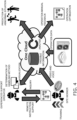
- Fig. 4 is a diagram schematically describing a remote work support system according to a second embodiment.
- the server 30 is connected to the plurality of devices, and information collected by the plurality of devices is collected by the server and accumulated in the storage unit 32.
- the information is, for example, an image captured by the wearable device 10 and voice collected by the wearable device 10 or the support operator terminal 40.
- the server 30 designates at least one or more devices among the plurality of devices under a predetermined condition and calls a connection target device in accordance with the designation.
- the server 30 may use AI technology to perform determination of the predetermined condition.
- the server 30 acquires environment information of the work site of the site worker and accumulates the environment information in the storage unit 32.
- the environment information is information such as the illumination of the work site, the level of noise in the work site, the temperature and the humidity of the work site, and whether the work is work in a high place.
- the server 30 may prompt the worker to use or select a device in accordance with the environment information and may call the selected device.
- the server 30 acquires information indicating that the worker is in a noisy environment, such as a factory, by using voice information transmitted from the wearable device 10. In this case, the server 30 prompts the worker to use a device including a directional microphone, other than the wearable device 10. In response to the worker turning on the power to the device including a directional microphone, the server 30 calls the device including a directional microphone.
- the server 30 acquires information indicating that the worker is in a dark place by using image information transmitted from the wearable device 10.
- the server 30 prompts the worker to use a light-equipped camera (such as the mobile terminal 20 or another digital camera) other than the wearable device 10.
- the worker prepares a light-equipped camera, and the server 30 calls the light-equipped camera.
- the server 30 manages the progress of work performed by a site worker and stores the progress of the work in the storage unit 32.
- the server 30 calls at least one or more devices among the plurality of devices described above in accordance with the progress of the work.
- the server 30 prompts the worker to remove the smart glasses because the worker with the smart glasses has a narrow field of view.
- the server 30 upon determining that the work requires checks from two or more viewpoints from the progress of the work, the server 30 prompts the worker to use two cameras, namely, a camera that captures the entire area and a camera that moves the area around the hands. When the worker is ready to the two cameras, the server 30 calls the two cameras.
- the server 30 performs voice recognition of utterances of the site worker and the support operator.
- the server 30 calls at least one or more devices among the plurality of devices on the basis of a keyword acquired by the voice recognition.
- the server 30 prompts the worker to use a headset.
- the server 30 calls the headset.
- the server 30 When the conversation between the worker and the support operator includes words “cannot hear” or "low voice”, the server 30 prompts the worker to use a device equipped with a directional microphone. When the worker is ready to use the device equipped with a directional microphone, the server 30 calls the device equipped with a directional microphone.
- the remote work support system 1 is used for training purposes.
- the server 30 accepts, from the support operator terminal 40, designation of at least one or more devices among a plurality of devices used by the site worker.
Landscapes
- Engineering & Computer Science (AREA)
- Theoretical Computer Science (AREA)
- General Engineering & Computer Science (AREA)
- Physics & Mathematics (AREA)
- General Physics & Mathematics (AREA)
- Human Computer Interaction (AREA)
- Computer Hardware Design (AREA)
- Multimedia (AREA)
- Signal Processing (AREA)
- Audiology, Speech & Language Pathology (AREA)
- General Health & Medical Sciences (AREA)
- Health & Medical Sciences (AREA)
- Optics & Photonics (AREA)
- Automation & Control Theory (AREA)
- User Interface Of Digital Computer (AREA)
- Closed-Circuit Television Systems (AREA)
- Telephonic Communication Services (AREA)
- Management, Administration, Business Operations System, And Electronic Commerce (AREA)
- Lifting Devices For Agricultural Implements (AREA)
- Selective Calling Equipment (AREA)
- Jib Cranes (AREA)
- Emergency Alarm Devices (AREA)
- Alarm Systems (AREA)
Claims (19)
- Fernarbeitsunterstützungssystem, umfassend:ein tragbares Gerät (10), das von einem vor-Ort-Arbeiter getragen werden soll, eine Bilderfassungseinheit (11), eine Spracheingabeeinheit (12) und eine Sprachausgabeeinheit (13), eine Kommunikationseinheit (16), die über eine erste Kommunikationsleitung (T1) zum Übertragen von einem von der Bilderfassungseinheit erfasstem Bild mit einem Netzwerk verbunden ist, und um Sprache zu übertragen und zu empfangen, einschließt, wobei das tragbare Gerät keine Bildanzeigen aufweist;ein mobiles Terminal (20), das von dem vor-Ort-Arbeiter getrennt von dem tragbaren Gerät getragen werden soll und eine Bildempfangseinheit (22), die über eine zweite Kommunikationsleitung (T2), die sich von der ersten Kommunikationsleitung unterscheidet, mit dem Netzwerk verbunden ist, wobei die Bildempfangseinheit dazu konfiguriert ist, ein Bild zu empfangen, und eine Anzeigeeinheit (21), die dazu konfiguriert ist, das empfangene Bild anzuzeigen, einschließt; undein Unterstützungsbedienterminal (40), das von einem Unterstützungsbediener verwendet werden soll, der den vor-Ort-Arbeiter aus der Ferne unterstützt, eine Spracheingabeeinheit (41), eine Sprachausgabeeinheit (42) und eine Anzeigeeinheit (43) einschließt, wobei das Unterstützungsbedienterminal dazu konfiguriert ist, Sprache zu und von dem tragbaren Gerät zu übertragen und zu empfangen und ein Bild von dem tragbaren Gerät über die erste Kommunikationsleitung zu empfangen und ein Bild über die zweite Kommunikationsleitung an das mobile Terminal zu übertragen.
- Fernarbeitsunterstützungssystem nach Anspruch 1, wobei
das tragbare Gerät ein am Hals montiertes Gerät ist. - Fernarbeitsunterstützungssystem nach Anspruch 1 oder 2, wobei
die Anzeigeeinheit des Unterstützungsbedienterminals ein bewegtes Bild und ein Standbild anzeigt, die mit der Bilderfassungseinheit des tragbaren Geräts erfasst werden. - Fernarbeitsunterstützungssystem nach einem der Ansprüche 1 bis 3, wobei
ein mit der Bilderfassungseinheit des tragbaren Geräts erfasstes Bild unter Nutzung vom Unterstützungsbedienterminal ausgewählt, verarbeitet wird oder zusätzlich mit Informationen versehen ist, an das mobile Terminal übertragen und auf der Anzeigeeinheit des mobilen Terminals angezeigt wird. - Fernarbeitsunterstützungssystem nach einem der Ansprüche 1 bis 4, wobei
eine Äußerung des vor-Ort-Arbeiters und eine Äußerung des Unterstützungsbedieners einer Spracherkennung unterzogen werden und auf der Anzeigeeinheit des Unterstützungsbedienterminals als Textinformation angezeigt werden. - Fernarbeitsunterstützungssystem nach Anspruch 5, wobei
die Textinformationen ferner auf der Anzeigeeinheit des mobilen Terminals angezeigt werden. - Fernarbeitsunterstützungssystem nach einem der Ansprüche 1 bis 6,wobei die erste Leitung (T1) das Unterstützungsbedienterminal und das tragbare Gerät verbindet, unddie zweite Leitung (T2) das Unterstützungsbedienterminal und das mobile Terminal verbindet, wobeidie erste Leitung kontinuierlich verwendet wird, während der vor-Ort-Arbeiter arbeitet, unddie zweite Leitung bei Bedarf verbunden wird, während der vor-Ort-Arbeiter arbeitet.
- Fernarbeitsunterstützungssystem nach einem der Ansprüche 1 bis 7, wobei
der Fortschritt der von dem vor-Ort-Arbeiter durchgeführten Arbeit automatisch aus einem mit der Bilderfassungseinheit erfassten Bild und/oder aus einer Äußerung des vor-Ort-Arbeiters und einer Äußerung des Unterstützungsbedieners extrahiert wird, ein Status des Fortschritts der Arbeit oder eine Endzeit der Arbeit wird geschätzt und der Status des Fortschritts oder die Endzeit wird auf der Anzeigeeinheit des Unterstützungsbedienterminals angezeigt. - Fernarbeitsunterstützungssystem nach einem der Ansprüche 1 bis 8, wobei
das Unterstützungsbedienterminal auf eine Datenbank (50) zugreift, die Standortarbeitsunterstützungsinformationen speichert, die Standortarbeitsunterstützungsinformationen extrahiert und verarbeitet und die extrahierten und verarbeiteten Standortarbeitsunterstützungsinformationen an das mobile Terminal überträgt. - Fernarbeitsunterstützungssystem nach einem der Ansprüche 1 bis 9, wobei
die Unterstützung des vor-Ort-Arbeiters durch das Unterstützungsbedienterminal eine beliebige oder eine Kombination aus Unterstützung durch Sprache, Unterstützung mit einem verarbeiteten Bild, Unterstützung durch Zeichen, die vom Unterstützungsbedienterminal eingegeben werden, und Unterstützung durch Zeichen, die durch Umwandeln einer Äußerung des Unterstützungsbedieners in Text erhalten werden, einschließt. - Fernarbeitsunterstützungssystem nach einem der Ansprüche 1 bis 10, wobeidas Fernarbeitsunterstützungssystem eine Vielzahl von Geräten umfasst, die mit einem identischen Server verbunden sind,die Vielzahl von Geräten das tragbare Gerät, das mobile Terminal und das Unterstützungsbedienterminal einschließt, undder Server mindestens eines oder mehrere Geräte aus der Vielzahl von Geräten gemäß einer vorbestimmten Bedingung bezeichnet und ein Verbindungszielgerät gemäß der Bezeichnung aufruft.
- Fernarbeitsunterstützungssystem nach Anspruch 11, wobeider Server Umgebungsinformationen von einem Arbeitsplatz des vor-Ort-Arbeiters aufnimmt, undder Server mindestens eine oder mehrere Geräte aus der Vielzahl von Geräten auf Grundlage der Umgebungsinformationen aufruft.
- Fernarbeitsunterstützungssystem nach Anspruch 11, wobeider Server den Fortschritt der vom vor-Ort-Arbeiter durchgeführten Arbeit verwaltet, undder Server auf Grundlage des Fortschritts der Arbeit mindestens eine oder mehrere Geräte aus der Vielzahl von Geräten aufruft.
- Fernarbeitsunterstützungssystem nach Anspruch 11, wobeider Server eine Spracherkennung einer Äußerung des vor-Ort-Arbeiters und einer Äußerung des Unterstützungsbedieners durchführt, undder Server mindestens eine oder mehrere Geräte aus der Vielzahl von Geräten auf Grundlage eines durch die Spracherkennung aufgenommenen Schlüsselworts aufruft.
- Fernarbeitsunterstützungssystem nach einem der Ansprüche 11 bis 14, wobei
der Server ferner von dem Unterstützungsbedienterminal die Bezeichnung von mindestens einem oder mehreren Geräten aus der Vielzahl von Geräten akzeptiert, die von dem vor-Ort-Arbeiter verwendet werden. - Fernarbeitsunterstützungssystem (1) nach einem der Ansprüche 1 bis 15, wobei
die Vielzahl von Geräten in der Lage ist, miteinander zu kommunizieren. - Fernarbeitsunterstützungssystem (1) nach Anspruch 1, wobei das tragbare Gerät ferner eine Steuereinheit (15) umfasst, die dazu konfiguriert ist, die Kommunikationseinheit zu steuern, die Bilder einschließlich bewegter Bilder, die von der Bilderfassungseinheit erfasst wurden, an das Unterstützungsbedienterminal überträgt.
- Fernarbeitsunterstützungssystem (1) nach einem der vorhergehenden Ansprüche, wobei das tragbare Gerät ferner einen Hauptkörper (19), einen Gestensensor und einen Leistungsschalter einschließt, wobei die Erfassungseinheit und der Gestensensor an Enden des Hauptkörpers angeordnet sind, wobei der Gestensensor eine Funktion eines Schalters aufweist.
- Unterstützungsbedienterminal (40), das von einem Unterstützungsbediener verwendet werden soll, der einen vor-Ort-Arbeiter aus der Ferne unterstützt, wobei das Unterstützungsbedienterminal (40) eine Spracheingabeeinheit (41), eine Sprachausgabeeinheit (42) und eine Anzeigeeinheit (43) umfasst, wobei das Unterstützungsbedienterminal (40) konfiguriert ist, um über eine erste Kommunikationsleitung (T1) Sprache zu und von einem tragbaren Gerät (10), das von dem vor-Ort-Arbeiter getragen werden soll, zu übertragen und zu empfangen, wobei das tragbare Gerät eine Bilderfassungseinheit (11), eine Spracheingabeeinheit (12) und eine Sprachausgabeeinheit (13), eine Kommunikationseinheit (16), die über die erste Kommunikationsleitung (T1) zum Übertragen von einem von der Bilderfassungseinheit erfasstes Bild mit einem Netzwerk verbunden ist, und um Sprache zu übertragen und zu empfangen, einschließt, wobei das tragbare Gerät keine Bildanzeigen aufweist, das Unterstützungsbedienterminal konfiguriert ist, um ein Bild von dem tragbaren Gerät über die erste Kommunikationsleitung (T1) zu empfangen, und
wobei das Unterstützungsbedienterminal (40) dazu konfiguriert ist, ein Bild über eine zweite Kommunikationsleitung (T2), die sich von der ersten Kommunikationsleitung (T1) unterscheidet, an ein mobiles Terminal (20), das getrennt von dem tragbaren Gerät von dem vor-Ort-Arbeiter getragen werden soll, zu übertragen, wobei das mobile Terminal eine Bildempfangseinheit (22), die über die zweite Kommunikationsleitung mit dem Netzwerk verbunden ist, wobei die Bildempfangseinheit dazu konfiguriert ist, ein Bild zu empfangen, und eine Anzeigeeinheit (21), die dazu konfiguriert ist, das von der Bildempfangseinheit (22) empfangene Bild anzuzeigen, einschließt.
Applications Claiming Priority (2)
| Application Number | Priority Date | Filing Date | Title |
|---|---|---|---|
| JP2019209987 | 2019-11-20 | ||
| PCT/JP2020/037310 WO2021100331A1 (ja) | 2019-11-20 | 2020-09-30 | 遠隔作業支援システム |
Publications (3)
| Publication Number | Publication Date |
|---|---|
| EP4064694A1 EP4064694A1 (de) | 2022-09-28 |
| EP4064694A4 EP4064694A4 (de) | 2023-01-11 |
| EP4064694B1 true EP4064694B1 (de) | 2025-04-09 |
Family
ID=75966362
Family Applications (1)
| Application Number | Title | Priority Date | Filing Date |
|---|---|---|---|
| EP20891306.1A Active EP4064694B1 (de) | 2019-11-20 | 2020-09-30 | Fernbedienungsunterstützungssystem |
Country Status (6)
| Country | Link |
|---|---|
| US (1) | US12223102B2 (de) |
| EP (1) | EP4064694B1 (de) |
| JP (2) | JP7270154B2 (de) |
| AU (1) | AU2020385740B2 (de) |
| ES (1) | ES3023569T3 (de) |
| WO (1) | WO2021100331A1 (de) |
Families Citing this family (7)
| Publication number | Priority date | Publication date | Assignee | Title |
|---|---|---|---|---|
| JP7382372B2 (ja) * | 2021-09-27 | 2023-11-16 | 株式会社 日立産業制御ソリューションズ | 作業支援装置、作業支援システム及び作業支援プログラム |
| WO2023068275A1 (ja) * | 2021-10-18 | 2023-04-27 | Fairy Devices株式会社 | 情報処理システム |
| WO2023188951A1 (ja) * | 2022-03-28 | 2023-10-05 | 株式会社サンタ・プレゼンツ | 遠隔指示システム |
| JP7482459B2 (ja) * | 2022-09-05 | 2024-05-14 | ダイキン工業株式会社 | システム、支援方法、サーバ装置及び通信プログラム |
| TWI845192B (zh) * | 2023-03-06 | 2024-06-11 | 國立臺灣大學 | 操作輔助系統 |
| WO2024190673A1 (ja) * | 2023-03-16 | 2024-09-19 | パナソニックIpマネジメント株式会社 | 情報処理方法、情報処理装置、及び情報処理プログラム |
| JP2024171573A (ja) | 2023-05-30 | 2024-12-12 | 株式会社Screenホールディングス | 作業支援方法および作業支援システム |
Family Cites Families (27)
| Publication number | Priority date | Publication date | Assignee | Title |
|---|---|---|---|---|
| JPH11110034A (ja) | 1997-09-30 | 1999-04-23 | Hitachi Ltd | 遠隔地プラントの作業支援方法及びその支援システム |
| JPH11345021A (ja) | 1998-06-01 | 1999-12-14 | Mori Seiki Co Ltd | 工作機械の保守支援システム |
| JP3680269B2 (ja) | 2001-07-25 | 2005-08-10 | 株式会社トーエネック | 設備保守システム |
| JP4275459B2 (ja) | 2003-05-27 | 2009-06-10 | 株式会社タムラ製作所 | マイクセット |
| JP2008096868A (ja) | 2006-10-16 | 2008-04-24 | Sony Corp | 撮像表示装置、撮像表示方法 |
| JP2008123366A (ja) | 2006-11-14 | 2008-05-29 | Nec Corp | 遠隔作業支援システム、遠隔作業支援プログラム、及びサーバ |
| JP2011034180A (ja) | 2009-07-30 | 2011-02-17 | Idemitsu Kosan Co Ltd | プラント等の運転操作支援システム |
| JP2011039996A (ja) * | 2009-08-18 | 2011-02-24 | Chugoku Electric Power Co Inc:The | 作業支援システム |
| JP2015228009A (ja) | 2014-06-03 | 2015-12-17 | セイコーエプソン株式会社 | 頭部装着型表示装置、頭部装着型表示装置の制御方法、情報送受信システム、および、コンピュータープログラム |
| FR3024583B1 (fr) | 2014-07-29 | 2017-12-08 | Airbus | Surveillance d'une intervention de maintenance sur un aeronef |
| WO2016063587A1 (ja) | 2014-10-20 | 2016-04-28 | ソニー株式会社 | 音声処理システム |
| KR101662689B1 (ko) | 2014-11-26 | 2016-10-17 | 아바드(주) | 원활하게 커뮤니케이션할 수 있는 넥 밴드 타입의 단말기 |
| JP6540108B2 (ja) * | 2015-03-09 | 2019-07-10 | 富士通株式会社 | 画像生成方法、システム、装置、及び端末 |
| JP2016181767A (ja) * | 2015-03-23 | 2016-10-13 | パナソニックIpマネジメント株式会社 | ウェアラブルカメラ及びウェアラブルカメラシステム |
| JP6585929B2 (ja) * | 2015-06-02 | 2019-10-02 | キヤノン株式会社 | システム、システムの制御方法 |
| JPWO2017169909A1 (ja) | 2016-03-29 | 2019-02-14 | 日本電気株式会社 | 作業支援装置、ウェアラブル端末、作業支援方法およびコンピュータプログラム |
| JP2018067773A (ja) * | 2016-10-18 | 2018-04-26 | キヤノン株式会社 | 撮像装置とその制御方法、プログラム及び記憶媒体 |
| JP2018092478A (ja) * | 2016-12-06 | 2018-06-14 | 矢崎総業株式会社 | 作業指示システム |
| EP3333688B1 (de) * | 2016-12-08 | 2020-09-02 | LG Electronics Inc. | Mobiles endgerät und verfahren zur steuerung davon |
| JP7171990B2 (ja) * | 2017-04-24 | 2022-11-16 | トーヨーカネツ株式会社 | 遠隔支援システム |
| JP2018207420A (ja) | 2017-06-09 | 2018-12-27 | キヤノン株式会社 | 遠隔作業支援システム |
| US11051120B2 (en) | 2017-07-31 | 2021-06-29 | Sony Corporation | Information processing apparatus, information processing method and program |
| CN107862760A (zh) | 2017-12-22 | 2018-03-30 | 国网湖南省电力有限公司 | 用于变电检修移动巡检作业的可穿戴装备及其应用方法 |
| CN108156033A (zh) | 2017-12-22 | 2018-06-12 | 成都才智圣有科技有限责任公司 | 无人机穿戴式维修保障支持系统 |
| JP7080636B2 (ja) * | 2017-12-28 | 2022-06-06 | Dynabook株式会社 | システム |
| US11326886B2 (en) * | 2018-04-16 | 2022-05-10 | Apprentice FS, Inc. | Method for controlling dissemination of instructional content to operators performing procedures at equipment within a facility |
| CN110166752A (zh) | 2019-06-05 | 2019-08-23 | 南昌百瑞实业有限公司 | 远程支持系统 |
-
2020
- 2020-09-30 ES ES20891306T patent/ES3023569T3/es active Active
- 2020-09-30 JP JP2020165496A patent/JP7270154B2/ja active Active
- 2020-09-30 AU AU2020385740A patent/AU2020385740B2/en active Active
- 2020-09-30 EP EP20891306.1A patent/EP4064694B1/de active Active
- 2020-09-30 WO PCT/JP2020/037310 patent/WO2021100331A1/ja not_active Ceased
-
2022
- 2022-05-19 US US17/748,805 patent/US12223102B2/en active Active
- 2022-07-19 JP JP2022115125A patent/JP2022145707A/ja active Pending
Also Published As
| Publication number | Publication date |
|---|---|
| ES3023569T3 (en) | 2025-06-02 |
| WO2021100331A1 (ja) | 2021-05-27 |
| AU2020385740B2 (en) | 2023-05-25 |
| US12223102B2 (en) | 2025-02-11 |
| CN114731389A (zh) | 2022-07-08 |
| JP2021083079A (ja) | 2021-05-27 |
| EP4064694A1 (de) | 2022-09-28 |
| AU2020385740A1 (en) | 2022-07-07 |
| EP4064694A4 (de) | 2023-01-11 |
| US20220276701A1 (en) | 2022-09-01 |
| JP2022145707A (ja) | 2022-10-04 |
| JP7270154B2 (ja) | 2023-05-10 |
Similar Documents
| Publication | Publication Date | Title |
|---|---|---|
| EP4064694B1 (de) | Fernbedienungsunterstützungssystem | |
| US9369760B2 (en) | Wireless hands-free computing head mounted video eyewear for local/remote diagnosis and repair | |
| EP2842055B1 (de) | Ohne verzögerung arbeitendes übersetzungssystem | |
| JP6231362B2 (ja) | プラント監視サーバーおよびプラント監視方法 | |
| US10673788B2 (en) | Information processing system and information processing method | |
| US20130231937A1 (en) | Context Sensitive Overlays In Voice Controlled Headset Computer Displays | |
| JP2000242367A (ja) | プロセス制御システム環境で用いられる装着型コンピュータ | |
| CN111145093A (zh) | 图像显示方法、装置、电子设备及存储介质 | |
| CN110913067A (zh) | 一种信息发送方法及电子设备 | |
| US20250164787A1 (en) | Linked display system and head-mounted display | |
| CN110933494A (zh) | 一种画面共享方法及电子设备 | |
| EP4068750A1 (de) | Objektanzeigeverfahren und elektronische vorrichtung | |
| US20190095867A1 (en) | Portable information terminal and information processing method used in the same | |
| JP2021082295A (ja) | 遠隔作業支援システム | |
| CN210093385U (zh) | 一种监测开关通断状态的装置 | |
| WO2019119022A1 (en) | Augmented visual assistance system for assisting a person working at a remote workplace, method and headwear for use therewith | |
| CN112416927A (zh) | 一种数据处理方法、装置、电子设备及存储介质 | |
| US20150220506A1 (en) | Remote Document Annotation | |
| CN114731389B (zh) | 远程作业辅助系统 | |
| CN109348066A (zh) | 一种来电意图识别方法及终端 | |
| JP2012141651A (ja) | 点呼システム | |
| CN110955817A (zh) | 一种小区推荐方法及电子设备 | |
| Dogan et al. | Trial of a special end user terminal that aids field operators during emergency rescue operations | |
| EP4492801A1 (de) | System zum senden/empfangen von bewegten bildern, übertragungsendgerät, programm und verfahren | |
| CN115102930B (zh) | 会议图谱的生成方法、装置、电子设备和可读存储介质 |
Legal Events
| Date | Code | Title | Description |
|---|---|---|---|
| STAA | Information on the status of an ep patent application or granted ep patent |
Free format text: STATUS: THE INTERNATIONAL PUBLICATION HAS BEEN MADE |
|
| PUAI | Public reference made under article 153(3) epc to a published international application that has entered the european phase |
Free format text: ORIGINAL CODE: 0009012 |
|
| STAA | Information on the status of an ep patent application or granted ep patent |
Free format text: STATUS: REQUEST FOR EXAMINATION WAS MADE |
|
| 17P | Request for examination filed |
Effective date: 20220617 |
|
| AK | Designated contracting states |
Kind code of ref document: A1 Designated state(s): AL AT BE BG CH CY CZ DE DK EE ES FI FR GB GR HR HU IE IS IT LI LT LU LV MC MK MT NL NO PL PT RO RS SE SI SK SM TR |
|
| A4 | Supplementary search report drawn up and despatched |
Effective date: 20221214 |
|
| RIC1 | Information provided on ipc code assigned before grant |
Ipc: H04N 7/15 20060101ALI20221208BHEP Ipc: H04M 3/56 20060101ALI20221208BHEP Ipc: H04M 3/42 20060101ALI20221208BHEP Ipc: G10L 15/00 20130101ALI20221208BHEP Ipc: G09G 5/22 20060101ALI20221208BHEP Ipc: G09G 5/00 20060101ALI20221208BHEP Ipc: G06Q 10/00 20120101ALI20221208BHEP Ipc: G06F 3/16 20060101ALI20221208BHEP Ipc: H04N 7/18 20060101AFI20221208BHEP |
|
| RAP3 | Party data changed (applicant data changed or rights of an application transferred) |
Owner name: FAIRY DEVICES INC. Owner name: DAIKIN INDUSTRIES, LTD. |
|
| DAV | Request for validation of the european patent (deleted) | ||
| DAX | Request for extension of the european patent (deleted) | ||
| P01 | Opt-out of the competence of the unified patent court (upc) registered |
Effective date: 20230525 |
|
| STAA | Information on the status of an ep patent application or granted ep patent |
Free format text: STATUS: EXAMINATION IS IN PROGRESS |
|
| 17Q | First examination report despatched |
Effective date: 20230824 |
|
| GRAP | Despatch of communication of intention to grant a patent |
Free format text: ORIGINAL CODE: EPIDOSNIGR1 |
|
| STAA | Information on the status of an ep patent application or granted ep patent |
Free format text: STATUS: GRANT OF PATENT IS INTENDED |
|
| INTG | Intention to grant announced |
Effective date: 20241104 |
|
| GRAS | Grant fee paid |
Free format text: ORIGINAL CODE: EPIDOSNIGR3 |
|
| GRAA | (expected) grant |
Free format text: ORIGINAL CODE: 0009210 |
|
| STAA | Information on the status of an ep patent application or granted ep patent |
Free format text: STATUS: THE PATENT HAS BEEN GRANTED |
|
| AK | Designated contracting states |
Kind code of ref document: B1 Designated state(s): AL AT BE BG CH CY CZ DE DK EE ES FI FR GB GR HR HU IE IS IT LI LT LU LV MC MK MT NL NO PL PT RO RS SE SI SK SM TR |
|
| REG | Reference to a national code |
Ref country code: GB Ref legal event code: FG4D |
|
| REG | Reference to a national code |
Ref country code: CH Ref legal event code: EP |
|
| REG | Reference to a national code |
Ref country code: DE Ref legal event code: R096 Ref document number: 602020049320 Country of ref document: DE |
|
| REG | Reference to a national code |
Ref country code: IE Ref legal event code: FG4D |
|
| REG | Reference to a national code |
Ref country code: ES Ref legal event code: FG2A Ref document number: 3023569 Country of ref document: ES Kind code of ref document: T3 Effective date: 20250602 |
|
| REG | Reference to a national code |
Ref country code: NL Ref legal event code: MP Effective date: 20250409 |
|
| PG25 | Lapsed in a contracting state [announced via postgrant information from national office to epo] |
Ref country code: NL Free format text: LAPSE BECAUSE OF FAILURE TO SUBMIT A TRANSLATION OF THE DESCRIPTION OR TO PAY THE FEE WITHIN THE PRESCRIBED TIME-LIMIT Effective date: 20250409 |
|
| REG | Reference to a national code |
Ref country code: AT Ref legal event code: MK05 Ref document number: 1784627 Country of ref document: AT Kind code of ref document: T Effective date: 20250409 |
|
| PG25 | Lapsed in a contracting state [announced via postgrant information from national office to epo] |
Ref country code: PT Free format text: LAPSE BECAUSE OF FAILURE TO SUBMIT A TRANSLATION OF THE DESCRIPTION OR TO PAY THE FEE WITHIN THE PRESCRIBED TIME-LIMIT Effective date: 20250811 Ref country code: FI Free format text: LAPSE BECAUSE OF FAILURE TO SUBMIT A TRANSLATION OF THE DESCRIPTION OR TO PAY THE FEE WITHIN THE PRESCRIBED TIME-LIMIT Effective date: 20250409 |
|
| PGFP | Annual fee paid to national office [announced via postgrant information from national office to epo] |
Ref country code: DE Payment date: 20250919 Year of fee payment: 6 |
|
| REG | Reference to a national code |
Ref country code: LT Ref legal event code: MG9D |
|
| PG25 | Lapsed in a contracting state [announced via postgrant information from national office to epo] |
Ref country code: NO Free format text: LAPSE BECAUSE OF FAILURE TO SUBMIT A TRANSLATION OF THE DESCRIPTION OR TO PAY THE FEE WITHIN THE PRESCRIBED TIME-LIMIT Effective date: 20250709 Ref country code: GR Free format text: LAPSE BECAUSE OF FAILURE TO SUBMIT A TRANSLATION OF THE DESCRIPTION OR TO PAY THE FEE WITHIN THE PRESCRIBED TIME-LIMIT Effective date: 20250710 |
|
| PG25 | Lapsed in a contracting state [announced via postgrant information from national office to epo] |
Ref country code: PL Free format text: LAPSE BECAUSE OF FAILURE TO SUBMIT A TRANSLATION OF THE DESCRIPTION OR TO PAY THE FEE WITHIN THE PRESCRIBED TIME-LIMIT Effective date: 20250409 |
|
| PGFP | Annual fee paid to national office [announced via postgrant information from national office to epo] |
Ref country code: IT Payment date: 20250923 Year of fee payment: 6 |
|
| PG25 | Lapsed in a contracting state [announced via postgrant information from national office to epo] |
Ref country code: BG Free format text: LAPSE BECAUSE OF FAILURE TO SUBMIT A TRANSLATION OF THE DESCRIPTION OR TO PAY THE FEE WITHIN THE PRESCRIBED TIME-LIMIT Effective date: 20250409 |
|
| PGFP | Annual fee paid to national office [announced via postgrant information from national office to epo] |
Ref country code: GB Payment date: 20250919 Year of fee payment: 6 |
|
| PG25 | Lapsed in a contracting state [announced via postgrant information from national office to epo] |
Ref country code: HR Free format text: LAPSE BECAUSE OF FAILURE TO SUBMIT A TRANSLATION OF THE DESCRIPTION OR TO PAY THE FEE WITHIN THE PRESCRIBED TIME-LIMIT Effective date: 20250409 |
|
| PG25 | Lapsed in a contracting state [announced via postgrant information from national office to epo] |
Ref country code: AT Free format text: LAPSE BECAUSE OF FAILURE TO SUBMIT A TRANSLATION OF THE DESCRIPTION OR TO PAY THE FEE WITHIN THE PRESCRIBED TIME-LIMIT Effective date: 20250409 |
|
| PGFP | Annual fee paid to national office [announced via postgrant information from national office to epo] |
Ref country code: FR Payment date: 20250922 Year of fee payment: 6 |
|
| PG25 | Lapsed in a contracting state [announced via postgrant information from national office to epo] |
Ref country code: RS Free format text: LAPSE BECAUSE OF FAILURE TO SUBMIT A TRANSLATION OF THE DESCRIPTION OR TO PAY THE FEE WITHIN THE PRESCRIBED TIME-LIMIT Effective date: 20250709 |
|
| PG25 | Lapsed in a contracting state [announced via postgrant information from national office to epo] |
Ref country code: IS Free format text: LAPSE BECAUSE OF FAILURE TO SUBMIT A TRANSLATION OF THE DESCRIPTION OR TO PAY THE FEE WITHIN THE PRESCRIBED TIME-LIMIT Effective date: 20250809 |
|
| PG25 | Lapsed in a contracting state [announced via postgrant information from national office to epo] |
Ref country code: LV Free format text: LAPSE BECAUSE OF FAILURE TO SUBMIT A TRANSLATION OF THE DESCRIPTION OR TO PAY THE FEE WITHIN THE PRESCRIBED TIME-LIMIT Effective date: 20250409 |
|
| REG | Reference to a national code |
Ref country code: DE Ref legal event code: R097 Ref document number: 602020049320 Country of ref document: DE |
|
| PG25 | Lapsed in a contracting state [announced via postgrant information from national office to epo] |
Ref country code: DK Free format text: LAPSE BECAUSE OF FAILURE TO SUBMIT A TRANSLATION OF THE DESCRIPTION OR TO PAY THE FEE WITHIN THE PRESCRIBED TIME-LIMIT Effective date: 20250409 Ref country code: SM Free format text: LAPSE BECAUSE OF FAILURE TO SUBMIT A TRANSLATION OF THE DESCRIPTION OR TO PAY THE FEE WITHIN THE PRESCRIBED TIME-LIMIT Effective date: 20250409 |
|
| PG25 | Lapsed in a contracting state [announced via postgrant information from national office to epo] |
Ref country code: CZ Free format text: LAPSE BECAUSE OF FAILURE TO SUBMIT A TRANSLATION OF THE DESCRIPTION OR TO PAY THE FEE WITHIN THE PRESCRIBED TIME-LIMIT Effective date: 20250409 |
|
| PG25 | Lapsed in a contracting state [announced via postgrant information from national office to epo] |
Ref country code: EE Free format text: LAPSE BECAUSE OF FAILURE TO SUBMIT A TRANSLATION OF THE DESCRIPTION OR TO PAY THE FEE WITHIN THE PRESCRIBED TIME-LIMIT Effective date: 20250409 |
|
| PG25 | Lapsed in a contracting state [announced via postgrant information from national office to epo] |
Ref country code: SK Free format text: LAPSE BECAUSE OF FAILURE TO SUBMIT A TRANSLATION OF THE DESCRIPTION OR TO PAY THE FEE WITHIN THE PRESCRIBED TIME-LIMIT Effective date: 20250409 |
|
| PGFP | Annual fee paid to national office [announced via postgrant information from national office to epo] |
Ref country code: ES Payment date: 20251030 Year of fee payment: 6 |
|
| PG25 | Lapsed in a contracting state [announced via postgrant information from national office to epo] |
Ref country code: RO Free format text: LAPSE BECAUSE OF FAILURE TO SUBMIT A TRANSLATION OF THE DESCRIPTION OR TO PAY THE FEE WITHIN THE PRESCRIBED TIME-LIMIT Effective date: 20250409 |
|
| PLBE | No opposition filed within time limit |
Free format text: ORIGINAL CODE: 0009261 |
|
| STAA | Information on the status of an ep patent application or granted ep patent |
Free format text: STATUS: NO OPPOSITION FILED WITHIN TIME LIMIT |
|
| REG | Reference to a national code |
Ref country code: CH Ref legal event code: L10 Free format text: ST27 STATUS EVENT CODE: U-0-0-L10-L00 (AS PROVIDED BY THE NATIONAL OFFICE) Effective date: 20260218 |
|
| 26N | No opposition filed |
Effective date: 20260112 |