EP3429162B1 - Information processing apparatus capable of easily configuring setting on infrastructure to be used, control method therefor, and storage medium - Google Patents
Information processing apparatus capable of easily configuring setting on infrastructure to be used, control method therefor, and storage medium Download PDFInfo
- Publication number
- EP3429162B1 EP3429162B1 EP18182838.5A EP18182838A EP3429162B1 EP 3429162 B1 EP3429162 B1 EP 3429162B1 EP 18182838 A EP18182838 A EP 18182838A EP 3429162 B1 EP3429162 B1 EP 3429162B1
- Authority
- EP
- European Patent Office
- Prior art keywords
- setting
- interface
- address
- network
- enabled
- Prior art date
- Legal status (The legal status is an assumption and is not a legal conclusion. Google has not performed a legal analysis and makes no representation as to the accuracy of the status listed.)
- Active
Links
Images



Classifications
-
- H—ELECTRICITY
- H04—ELECTRIC COMMUNICATION TECHNIQUE
- H04L—TRANSMISSION OF DIGITAL INFORMATION, e.g. TELEGRAPHIC COMMUNICATION
- H04L69/00—Network arrangements, protocols or services independent of the application payload and not provided for in the other groups of this subclass
- H04L69/18—Multiprotocol handlers, e.g. single devices capable of handling multiple protocols
-
- H—ELECTRICITY
- H04—ELECTRIC COMMUNICATION TECHNIQUE
- H04N—PICTORIAL COMMUNICATION, e.g. TELEVISION
- H04N1/00—Scanning, transmission or reproduction of documents or the like, e.g. facsimile transmission; Details thereof
- H04N1/00127—Connection or combination of a still picture apparatus with another apparatus, e.g. for storage, processing or transmission of still picture signals or of information associated with a still picture
- H04N1/00278—Connection or combination of a still picture apparatus with another apparatus, e.g. for storage, processing or transmission of still picture signals or of information associated with a still picture with a printing apparatus, e.g. a laser beam printer
-
- G—PHYSICS
- G06—COMPUTING OR CALCULATING; COUNTING
- G06F—ELECTRIC DIGITAL DATA PROCESSING
- G06F3/00—Input arrangements for transferring data to be processed into a form capable of being handled by the computer; Output arrangements for transferring data from processing unit to output unit, e.g. interface arrangements
-
- G—PHYSICS
- G06—COMPUTING OR CALCULATING; COUNTING
- G06F—ELECTRIC DIGITAL DATA PROCESSING
- G06F3/00—Input arrangements for transferring data to be processed into a form capable of being handled by the computer; Output arrangements for transferring data from processing unit to output unit, e.g. interface arrangements
- G06F3/12—Digital output to print unit, e.g. line printer, chain printer
- G06F3/1201—Dedicated interfaces to print systems
- G06F3/1223—Dedicated interfaces to print systems specifically adapted to use a particular technique
- G06F3/1229—Printer resources management or printer maintenance, e.g. device status, power levels
- G06F3/1231—Device related settings, e.g. IP address, Name, Identification
-
- H—ELECTRICITY
- H04—ELECTRIC COMMUNICATION TECHNIQUE
- H04L—TRANSMISSION OF DIGITAL INFORMATION, e.g. TELEGRAPHIC COMMUNICATION
- H04L12/00—Data switching networks
- H04L12/02—Details
- H04L12/12—Arrangements for remote connection or disconnection of substations or of equipment thereof
-
- H—ELECTRICITY
- H04—ELECTRIC COMMUNICATION TECHNIQUE
- H04L—TRANSMISSION OF DIGITAL INFORMATION, e.g. TELEGRAPHIC COMMUNICATION
- H04L12/00—Data switching networks
- H04L12/54—Store-and-forward switching systems
- H04L12/56—Packet switching systems
- H04L12/5691—Access to open networks; Ingress point selection, e.g. ISP selection
- H04L12/5692—Selection among different networks
-
- H—ELECTRICITY
- H04—ELECTRIC COMMUNICATION TECHNIQUE
- H04L—TRANSMISSION OF DIGITAL INFORMATION, e.g. TELEGRAPHIC COMMUNICATION
- H04L41/00—Arrangements for maintenance, administration or management of data switching networks, e.g. of packet switching networks
- H04L41/22—Arrangements for maintenance, administration or management of data switching networks, e.g. of packet switching networks comprising specially adapted graphical user interfaces [GUI]
-
- H—ELECTRICITY
- H04—ELECTRIC COMMUNICATION TECHNIQUE
- H04L—TRANSMISSION OF DIGITAL INFORMATION, e.g. TELEGRAPHIC COMMUNICATION
- H04L61/00—Network arrangements, protocols or services for addressing or naming
- H04L61/50—Address allocation
- H04L61/5007—Internet protocol [IP] addresses
-
- H—ELECTRICITY
- H04—ELECTRIC COMMUNICATION TECHNIQUE
- H04L—TRANSMISSION OF DIGITAL INFORMATION, e.g. TELEGRAPHIC COMMUNICATION
- H04L61/00—Network arrangements, protocols or services for addressing or naming
- H04L61/50—Address allocation
- H04L61/5007—Internet protocol [IP] addresses
- H04L61/5014—Internet protocol [IP] addresses using dynamic host configuration protocol [DHCP] or bootstrap protocol [BOOTP]
-
- H—ELECTRICITY
- H04—ELECTRIC COMMUNICATION TECHNIQUE
- H04L—TRANSMISSION OF DIGITAL INFORMATION, e.g. TELEGRAPHIC COMMUNICATION
- H04L61/00—Network arrangements, protocols or services for addressing or naming
- H04L61/50—Address allocation
- H04L61/5038—Address allocation for local use, e.g. in LAN or USB networks, or in a controller area network [CAN]
-
- H—ELECTRICITY
- H04—ELECTRIC COMMUNICATION TECHNIQUE
- H04L—TRANSMISSION OF DIGITAL INFORMATION, e.g. TELEGRAPHIC COMMUNICATION
- H04L61/00—Network arrangements, protocols or services for addressing or naming
- H04L61/50—Address allocation
- H04L61/5046—Resolving address allocation conflicts; Testing of addresses
-
- H—ELECTRICITY
- H04—ELECTRIC COMMUNICATION TECHNIQUE
- H04N—PICTORIAL COMMUNICATION, e.g. TELEVISION
- H04N1/00—Scanning, transmission or reproduction of documents or the like, e.g. facsimile transmission; Details thereof
- H04N1/00002—Diagnosis, testing or measuring; Detecting, analysing or monitoring not otherwise provided for
- H04N1/00026—Methods therefor
- H04N1/00037—Detecting, i.e. determining the occurrence of a predetermined state
-
- H—ELECTRICITY
- H04—ELECTRIC COMMUNICATION TECHNIQUE
- H04W—WIRELESS COMMUNICATION NETWORKS
- H04W24/00—Supervisory, monitoring or testing arrangements
- H04W24/04—Arrangements for maintaining operational condition
-
- H—ELECTRICITY
- H04—ELECTRIC COMMUNICATION TECHNIQUE
- H04W—WIRELESS COMMUNICATION NETWORKS
- H04W8/00—Network data management
- H04W8/26—Network addressing or numbering for mobility support
-
- H—ELECTRICITY
- H04—ELECTRIC COMMUNICATION TECHNIQUE
- H04W—WIRELESS COMMUNICATION NETWORKS
- H04W88/00—Devices specially adapted for wireless communication networks, e.g. terminals, base stations or access point devices
- H04W88/02—Terminal devices
- H04W88/06—Terminal devices adapted for operation in multiple networks or having at least two operational modes, e.g. multi-mode terminals
-
- G—PHYSICS
- G06—COMPUTING OR CALCULATING; COUNTING
- G06F—ELECTRIC DIGITAL DATA PROCESSING
- G06F3/00—Input arrangements for transferring data to be processed into a form capable of being handled by the computer; Output arrangements for transferring data from processing unit to output unit, e.g. interface arrangements
- G06F3/12—Digital output to print unit, e.g. line printer, chain printer
- G06F3/1201—Dedicated interfaces to print systems
- G06F3/1202—Dedicated interfaces to print systems specifically adapted to achieve a particular effect
- G06F3/121—Facilitating exception or error detection and recovery, e.g. fault, media or consumables depleted
-
- H—ELECTRICITY
- H04—ELECTRIC COMMUNICATION TECHNIQUE
- H04L—TRANSMISSION OF DIGITAL INFORMATION, e.g. TELEGRAPHIC COMMUNICATION
- H04L2101/00—Indexing scheme associated with group H04L61/00
- H04L2101/60—Types of network addresses
- H04L2101/695—Types of network addresses using masks or ranges of addresses
Definitions
- the present invention relates to an information processing apparatus, a control method therefor, and a storage medium.
- a plurality of LANs local area networks
- An information processing apparatus employed in an office and the like needs to offer a service with respect to a plurality of LANs, and thus an information processing apparatus equipped with a plurality of communication interfaces is produced (for example, see, Japanese Laid-Open Patent Publication (Kokai) No. 2003-319461 ).
- the information processing apparatus comprises a communication interface for performing wired LAN communication and a communication interface for performing wireless LAN communication in a wireless LAN infrastructure mode.
- Whether to use the wired LAN or the wireless LAN infrastructure mode in the information processing apparatus varies depending on a usage of the information processing apparatus and a security policy of an environment where the information processing apparatus is used. Therefore, an administrator of the information processing apparatus needs to configure a setting on which communication interface is to be used among the plurality of communication interfaces of the information processing apparatus, and thus the setting is desired to be configured by an intuitive operation in terms of usability.
- Document US 2004/266424 A1 discloses a method and apparatus for interfacing wired and wireless data. It is determined whether connections to both a wired network and a wireless network are required for interfacing wired data and wireless data. Subsequently, the user or the network manager determines whether connection to both a wired network and a wireless network is required for the designated network electronic device. The user or the network manager allocates a service set identification (SSID) to a wireless network while determining whether there is a need for connection to both the wired network and the wireless network. The result concerning whether connection is required, which is determined by the user, is transmitted to the designated network electronic device. The result of transmission is used as determination data on whether connection to both a wired network and a wireless network is required. For example, a printer corresponding to the network electronic device determines whether connection to both a wired network and a wireless network transmitted from the computer is required.
- SSID service set identification
- Document US 2015/195161 A1 discloses a communication apparatus that is capable of preventing data erroneous transmission without disturbing communication with a networking device.
- the present invention provides a solution which enables a user to intuitively configure a setting on an infrastructure to be used and is capable of notifying an error corresponding to the setting.
- the present invention is defined by the appended claims.
- a first aspect of the present invention provides an information processing apparatus as specified in claims 1 to 6.
- a second aspect of the present invention provides a control method as specified in claim 7.
- a third aspect of the present invention provides a non-transitory computer-readable storage medium as specified in claim 8.
- the user is able to intuitively configure the setting on the infrastructure to be used, and the error corresponding to the setting is notified.
- FIG. 1 is a block diagram schematically showing an arrangement of the MFP 101 as an information processing apparatus according to the embodiment of the present invention.
- the MFP 101 is connected with a client PC 103 and a DHCP (dynamic host configuration protocol) server 104 as communication apparatuses constituting a LAN 102 in a wired infrastructure by a wired cable, not shown.
- the MFP 101 performs wired LAN communication with the client PC 103 and the DHCP server 104.
- the DHCP server 104 allocates an IP address to each of the MFP 101 and the client PC 103.
- the client PC 103 designates an IP address of the MFP 101 allocated by the DHCP server 104 to access to the MFP 101 and starts data communication with the MFP 101.
- the MFP 101 performs wireless LAN communication with a client PC 107 as a communication apparatus constituting a LAN 106 in a wireless infrastructure via an access point 105 communicatively connected to the MFP 101. Further, the MFP 101 itself functions as an access point and directly performs wireless communication with a client PC 109 as a communication apparatus constituting a LAN 108.
- the MFP 101 has a plurality of lines, and in the present embodiment, an explanation will be given of an arrangement in which the MFP 101 has one main line and one sub line as an example.
- the MFP 101 is able to concurrently operate the wired infrastructure and the wireless infrastructure, and in this embodiment, one of the wired infrastructure and the wireless infrastructure is used as the main line, and the other is used as the sub line.
- the MFP 101 has a controller unit 110, a printer unit 111, a scanner unit 112, and an operating unit 113, and the controller unit 110 is connected with the printer unit 111, the scanner unit 112, and the operating unit 113.
- the controller unit 110 collectively controls overall operation of the MFP 101.
- the printer unit 111 performs printing on a sheet based on print data received from the communication apparatuses such as the client PCs 103, 107, and 109.
- the scanner unit 112 scans an original and generates image data.
- the operating unit 113 has a display unit and a plurality of operation keys, not shown. For example, the operating unit 113 displays an operation screen for configuring settings on the MFP 101 on the display unit and receives an instruction input by a user operating the operation keys.
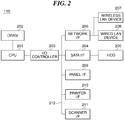
- FIG. 2 is a block diagram schematically showing an arrangement of the controller unit 110 appearing in FIG. 1 .
- the controller unit 110 has a CPU 201, a DRAM 202, an I/O controller 202, a SATA I/F 204, an HDD 205, a network I/F 206, a wired LAN device 208, and a wireless LAN device 207.
- the controller unit 110 also has a panel I/F 209, a printer I/F 210, and a scanner I/F 211.
- the CPU 201 is connected with the DRAM 202 and the I/O controller 203.
- the I/O controller 203, the SATA I/F 204, the network I/F 206, the panel I/F 209, the printer I/F 210, and the scanner I/F 211 are connected with one another via a bus 212.
- the SATA I/F 204 is connected with the HDD 205.
- the network I/F 206 is connected with the wired LAN device 208 and the wireless LAN device 207 which are communication interfaces.
- the CPU 201 carries out a computation process for performing various controls in the controller unit 110 and transmits various control instructions to the I/O controller 203.
- the DRAM 202 is used as a work area for the CPU 201 and as a temporal storage area of various types of data.
- the I/O controller 203 transfers a control instruction by the CPU 201 to component elements connected via the bus 212.
- the SATA I/F 204 performs control to write data in the HDD 205 and performs controls to read out data stored in the HDD 205 in accordance with the control instruction by the CPU 201.
- the HDD 205 stores programs for implementing functions of the MFP 101, image data, and the like.
- the network I/F 206 controls each of the wired LAN device 208 and the wireless LAN device 207 in accordance with the control instruction by the CPU 201.
- the wired LAN device 208 controls wired LAN communication performed with the client PC 103 and the like constituting the LAN 102 in the wired infrastructure.
- the wireless LAN device 207 has a wireless infrastructure mode and a wireless access point mode. In the wireless infrastructure mode, wireless LAN communication is performed via the client PC 107 and the access point 105 constituting the LAN 106 in the wireless infrastructure. In the wireless access point mode, the MFP 101 functions as an access point and directly performs the wireless communication with the client PC 109 constituting the LAN 108.
- the wireless communication in the wireless access point mode is defined as "a Wireless Direct".
- the panel I/F 209 performs display control in the operating unit 113 in accordance with the control instruction by the CPU 201 and transfers a content input by the user operating the operating unit 113 to the CPU 201.
- the printer I/F 210 causes the printer unit 111 to carry out a printing process in accordance with the control instruction by the CPU 201.
- the scanner I/F 211 causes the scanner unit 112 to carry out a scanning process in accordance with the control instruction by the CPU 201.
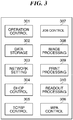
- FIG. 3 is a block diagram schematically showing an arrangement of software modules controlled by the controller unit 110 appearing in FIG. 1 .
- the MFP 101 has an operation control module 301, a data storage module 302, a network setting module 303, a DHCP control module 304, and a TCP/IP control module 305.
- the MFP 101 also has a WPA (Wi-Fi protected access) control module 306, a job control module 307, an image processing module 308, a print processing module 309, and a readout processing module 310. Controls on the above-described modules are performed by the CPU 201 implementing programs stored in the HDD 205.
- WPA Wi-Fi protected access
- the operation control module 301 performs display control on the display screen and the like in the operating unit 113 and receives operations by the user on the operation screen and the operation keys.
- the data storage module 302 performs controls to write data such as a setting value into the HDD 205 and read out data stored in the HDD 205.
- the network setting module 303 performs control on network settings of the MFP 101 and requests the DHCP control module 304 and the WPA control module 306 and the like to carry out processing. For example, when the user configures a setting to use the IP address allocated by the DHCP server 104 as address information of the MFP 101, the network setting module 303 requests the DHCP control module 304 to carry out the following processing.
- the DHCP control module 304 controls a process of allocating an IP address in accordance with a protocol defined as a DHCP by RFC 2131.
- the TCP/IP control module 305 carries out a process of sending/receiving a network packet.
- the WPA control module 306 carries out a wireless access authentication process in accordance with a predetermined encryption method, for example, a WPA protocol.
- a WPA protocol for example, a WPA protocol.
- the job control module 307 performs control on execution of a job and issues an execution instruction relating to a job with respect to the image processing module 308, the print processing module 309 and the readout processing module 310.
- the image processing module 308 carries out image processing such as processing of image data into data formats suitable for respective usages.
- the print processing module 309 controls the printer unit 111 to carry out the printing process.
- the readout processing module 310 controls the scanner unit 112 to carry out the scanning process.
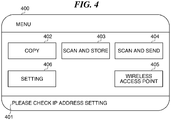
- the menu screen 400 is an operation screen for the user to select functions of the MFP 101.
- the menu screen 400 has an information notifying area 401, a copy button 402, a scan and store button 403, a scan and send button 404, a wireless access point button 405, and a setting button 406.
- a notification to the user is displayed.
- the copy button 402 is selected when the user uses the copying function.
- the scan and store button 403 is selected when the user uses a function to store image data obtained by the MFP 101 performing scanning.
- the scan and send button 404 is selected when the user uses a function to send the image data obtained by the MFP 101 performing scanning to the communication apparatus.
- the wireless access point button 405 is selected when the MFP 101 is to sifted into the wireless access point mode.
- the wireless access point button 405 is displayed on the menu screen 400 when a wireless access point mode enabling setting 1301 in FIG. 13 , to be described later, is set to ON.
- a start setting screen 500 in FIG. 5A to be described later, is displayed on the operating unit 113.
- the setting button 406 is selected when the user changes settings on the MFP 101.
- a setting screen 600 in FIG. 6 is displayed on the operating unit 113.
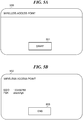
- the start setting screen 500 in FIG. 5A is a setting screen for instructing start of the Wireless Direct.
- a user selects a start button 501 in the start setting screen 500, an instruction to start shifting to the wireless access point mode is issued to the network setting module 303.
- the MFP 101 operates as an access point and becomes ready to start the Wireless Direct with the client PC 109 and the like.
- the user can instruct to start shifting to the wireless access point mode by an easy operation of merely selecting the wireless access point button 405 in the menu screen 400 and selecting the start button 501 in the start setting screen 500.
- a setting information screen 502 in FIG. 5B is displayed on the operating unit 113.
- setting information such as an SSID, PSK, or the like required for communicatively connecting the client PC 109 and the like with the MFP 101 as the access point is displayed.
- an end button 503 in the setting information screen 502 an instruction to end the wireless access point mode is issued to the network setting module 303.
- the MFP 101 ends the Wireless Direct with the client PC 109.
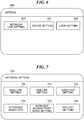
- the setting screen 600 in FIG. 6 is an operation screen for guiding the user to a setting screen for configuring detailed information of each setting and has a device setting button 601, a user setting button 602, and a network line setting button 603.
- the device setting button 601 is an operation button for displaying a device setting screen, not shown, for configuring setting on devices of the MFP 101.
- the user setting button 602 is an operation button for displaying a user setting screen, not shown, for configuring settings on users of the MFP 101.
- the network line setting button 603 is an operation button for displaying a network setting screen in FIG. 7 for configuring network settings on the MFP 101.
- the network setting screen 700 in FIG. 7 is an operation screen for guiding the user to a setting screen for configuring a setting on detailed information of the network settings.
- the network setting screen 700 has an interface selection button 701, a main line setting button 702, a sub line setting button 703, a wireless setting button 704, a wireless access point setting button 705, and a setting reflection button 706.
- the interface selection button 701 is an operation button for displaying an interface selection screen 800 in FIG. 8 , to be described later.
- the main line setting button 702 is an operation button for displaying a main line setting screen 900 in FIG. 9 , to be described later.
- the sub line setting button 703 is an operation button for displaying a sub line setting screen 1000 in FIG. 10 , to be described later.
- the wireless setting button 704 is an operation button for displaying a wireless setting screen 1100 in FIG. 11 , to be described later.
- the wireless access point setting button 705 is an operation button for displaying a wireless access point setting screen 1300 in FIG. 13 , to be described later.
- the setting reflection button 706 is an operation button for storing a setting value set by the user in the HDD 205 and instructing reflection of the settings to the network setting module 303.
- the interface selection screen 800 in FIG. 8 is a setting screen for configuring a setting on the wired infrastructure and the wireless infrastructure in the MFP 101.
- Settings in the interface selection screen 800 are configured by an administrator or the like of the MFP 101, and the settings are not changed frequently.
- the interface selection screen 800 is displayed on the operating unit 113 when a plurality of operations is performed, for example, when the user selects the setting button 406, the network line setting button 603, and the interface selection button 701 in this order.
- wired-only 801 is set to ON
- the MFP 101 uses the wired infrastructure only.
- wireless-only 802 is set to ON, the MFP 101 uses the wireless infrastructure only.
- the MFP 101 uses both the wired infrastructure and the wireless infrastructure. Specifically, the MFP 101 uses the wired infrastructure as a main line and uses the wireless infrastructure as a sub line. In the interface selection screen 800, only one of the wired-only 801, the wireless-only 802, and the wired (main) + wireless (sub) 803 can be set to ON. When an OK button 804 is selected, a setting value set in the interface selection screen 800 is stored in the DD 205. It should be noted that in the present embodiment, the setting on the wireless infrastructure is not associated with the setting on the Wireless Direct, and the setting value set in the interface selection screen 800 does not affects the setting on the Wireless Direct.
- the main line setting screen 900 in FIG. 9 is an operation screen for setting address information of the main line of the MFP 101.
- an IP address input section 901 a subnet mask input section 902, and a default gateway input section 903, the user is able to input an arbitral IP address, subnet mask, and default gateway, respectively.
- a DHCP selection section 904 is set ON, a setting to obtain an IP address included in the address information of the main line from the DHCP server on the main line network is configured.
- an Auto IP (automatic private IP addressing) selection section 905 is set to ON, a setting to determine an IP address included in the address information of the main line by an Auto IP protocol is configured.
- an OK button 906 is selected, the setting values set in the main line setting screen 900 are stored in the HDD 205.
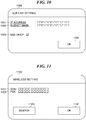
- the sub line setting screen 1000 in FIG. 10 is an operation screen for setting address information of the sub line of the MFP 101.
- the user is able to input arbitral IP address and subnet mask in an IP address input section 1001 and a subnet mask input section 1002.
- a DHCP selection section 1003 is set to ON, a setting to obtain an IP address included in the address information of the sub line from the DHCP server on the network of the subline is configured.
- an OK button 1004 is selected, setting values set in the sub line setting screen 1000 are stored in the HDD 205. It should be noted that in the present embodiment, in order to concurrently use the plurality of lines, a part of functions on the sub line side is limited; for example, the sub line cannot use a default gateway and an Auto IP.
- the sub line is used, for example, as a line with which communication is performed within a network set in advance.
- the main line is used as a line with which communication is performed via a plurality of networks including an external network by using the default gateway other than the network set in advance.
- the sub line setting screen 1000 does not have a setting item for using the default gateway and the Auto IP.
- functions such as DNS, 802.1x, IPsec, IP filter, port filter, MAC address filter, SMB, HTTP, WebDAV, and FTP cannot be used on the subline side.
- the wireless setting screen 1100 in FIG. 11 is an operation screen for configuring a authentication setting in the wireless infrastructure mode.
- An SSID of an access point to which the user wish to access and a key corresponding to the SSID is input to an SSID input section 1101 and a PSK input section 1102, respectively.
- an access point selection screen 1200 in FIG. 12 for selecting an access point is displayed on the operating unit 113.
- an OK button 1104 is selected, setting values set in the wireless setting screen 1100 are stored in the HDD 205.
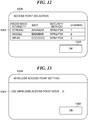
- the access point selection screen 1200 in FIG. 12 is an operation screen for setting an access point to be used by the MFP 101.
- a list of access points which can be used by the MFP 101 is displayed on a search result display section 1201.
- the access point 105 for example, is selected from the list of the access points displayed on the search result display section 1201, and information indicative of the access point 105 is stored in the HDD 205.
- the wireless setting screen 1100 with the SSID of the access point 105 is set in the SSID input unit 101 is then displayed on the operating unit 113.
- An wireless access point setting screen 1300 in FIG. 13 is a setting screen for configuring a setting on the wireless access point mode.
- the settings in the wireless access point setting screen 1300 are also configured by the administrator of the MFP 101 and are not frequently changed.
- a wireless access point mode enabling setting 1301 is set to ON, the wireless access point mode of the MFP 101 is enabled.
- the menu screen 400 displayed on the operating unit 113 with the wireless access point mode enabled includes the wireless access point button 405 for displaying the start setting screen 500 for instructing shifting to the wireless access point mode.
- the wireless access point mode enabling setting 1301 is set to OFF, the wireless access point mode of the MFP 101 is disabled.
- the menu screen 400 displayed on the operating unit 113 with the wireless access point mode disabled does not include the wireless access point button 405.
- an OK button 1302 is selected, setting values set in the wireless access point setting screen 1300 are stored in the HDD 205, and a screen on the operating unit 113 is switched to the network setting screen 700.
- the user selects any one of the "wired-only 801", “wireless-only 802", and “wired (main) + wireless (sub) 803" on the interface selection screen 800. Accordingly, the user is able to intuitively configure a setting on an infrastructure to be used.
- the main line uses the default gateway, and the sub line does not use the default gateway. Accordingly, the user is able to intuitively configure a setting on an infrastructure to be used under an environment in which the main line which performs communication using a variety of networks constituted by using the default gateway and the sub line which performs communication within a network set in advance only are used properly.
- the interface selection screen 800 is displayed on the operation screen 113 by the user performing a plurality of operations on the MFP 101.
- the settings in the interface selection screen 800 are to be configured by the administrator of the MFP 101, and it is necessary to manage the MFP 101 so that a general user cannot change the settings easily.
- a user authentication is performed to authenticate a user who operates the interface selection screen 800, however, in this case, user information required for the user authentication is necessary to be registered in advance, which takes labor.
- the interface selection screen 800 is displayed on the operating unit 113 by the user performing the plurality of operations on the MFP 101. As a result, it is possible to manage the MFP 101 so that the general user cannot change the settings in the interface selection screen 800 easily without registering in advance the user information required for the user authentication for operating the interface selection screen 800.
- the interface selection screen 800 includes only the setting items set by the administrator of the MFP 101. This eliminates necessity for the general user to operate the interface selection screen 800, and at least, eliminates a fear that the general user intentionally displays the interface selection screen 800 on the operation screen 113. As a result, an erroneous operation of the general user on the interface selection screen 800 can be prevented.
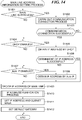
- FIG. 14 is a flowchart showing a procedure of an address information setting process for the main line carried out by the network setting module 303 appearing in FIG. 3 .
- the process in FIG. 14 is carried out by the CPU 201 implementing a program stored in the HDD 205.
- the process in FIG. 14 is also carried out when a system of the MFP 101 is started or when the setting reflection button 706 in the network setting screen 700 is selected.
- the process in FIG. 14 is carried out on an assumption that at least the settings on the screens in FIGS. 8, 9 and 11 are already configured.
- the network setting module 303 determines whether the main line is wireless (step S1401). In step S1401, when the setting value indicative of the "wireless-only 802" is stored in the HDD 205, the network setting module 303 determines that the main line is wireless. on the other hand, when the setting value indicative of either of the "wired-only 801" or “wired (main) + wireless (sub) 803" is stored in the HDD 205, the network setting module 303 determines that the main line is not wireless.
- the network setting module 303 carries out a communication connecting process with an access point set on the wireless setting screen 1100, for example, the access point 105 (step S1402).
- the network setting module 303 requests the WPA control module 306 to carry out the process.
- the WPA control module 306 obtains an SSID and a PSK of the access point 105 from the data storage module 320 and transmits an authentication request generated based on the obtained PSK to the access point 105.
- the WPA control module 306 receives a determination result as to connection possible/impossible from the access point 105.
- the network setting module 303 determines whether the communication connection with the access point 105 was successful (step S1403). In step S1403, when the received determination result indicates connection possible, the network setting module 303 determines that the communication connection with the access point 105 was successful. On the other hand, when the received determination result indicates connection impossible, the network setting module 303 determines that the communication connection with the access point 105 was unsuccessful.
- step 1403 As a result of the determination in step 1403, when the communication connection with the access point 105 was unsuccessful, the network setting module 303 terminates the present process.
- the network setting module 303 determines whether the DHCP is enabled (step S1404).
- step S1404 when a setting value indicating that the DHCP selection section 904 is ON is stored in the HDD 205, the network setting module 303 determines that the DHCP is enabled.
- the network setting module 303 determines that the DHCP is disabled.
- the network setting module 303 obtains an IP address by the DHCP (step S1405).
- the network setting module 303 requests the DHCP control module 304 to carry out the process.
- the DHCP module 304 searches the DHCP server on the network of the main line of the MFP 101 in accordance with the DHCP protocol.
- the DHCP control module 304 obtains an IP address allocated by the searched DHCP server and registers usage of the obtained IP address to the DHCP server.
- the network setting module 303 determines whether the obtainment of the IP address by the DHCP was successful (step S1406).
- step S1406 when the obtainment of the IP address by the DHCP was successful, the network setting module 303 carries out a process in step S1409, to be described later.
- step S1407 when a setting value indicating that the Auto IP selection section 905 is ON is stored in the HDD 205, the network setting module 303 determines that the Auto IP is enabled. On the other hand, when a setting value indicating that the Auto IP selection section 905 is OFF is stored in the HDD 205, the network setting module 303 determines that the Auto IP is disabled.
- the network setting module 303 obtains an IP address by the Auto IP (step S1408).
- the network setting module 303 carries out a selection process in which it selects in a random manner one IP address from an IP address range prescribed in advance for the Auto IP.
- the network setting module 303 also carries out a confirmation process in which it confirms that no communication apparatus to which the IP address is set exists on the network of the main line by using the ARP protocol.
- the network setting module 303 repeats the above selection process and the above confirmation process until an IP address which is not used by all communication apparatus on the network of the main lime.
- the network setting module 303 decides the address information of the main line of the MFP 101 (step 1409).
- the network setting module 303 decides the IP address obtained by the searched DHCP server, a subnet mask corresponding to the IP address, and the default gateway as the address information of the main line.
- the network setting module 303 decides that the IP address obtained by the Auto IP, a subnet mask corresponding to the IP address, and the default gateway as the address information of the main line.
- the network setting module 303 decides a disabled address (0. 0. 0.
- the network setting module 303 decides the setting values input to the IP address input section 901, the subnet mask input section 902, and the default gateway input section 903 as the address information of the main line.
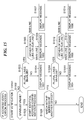
- the network setting module 303 then carries out an IP address verification process in FIG. 15 , to be described later (S1410) to verify the IP address of the decided address information.
- the network setting module 303 sets the IP address and the subnet mask of the decided address information to the TCP/IP control module 305 (step S1411).
- the network setting module 303 sets the default gateway of the decided address information to the TCP/IP control module 305 (step S1412) and terminates the present process.
- FIG. 15 is a flowchart showing a procedure of the IP address verification process in step S1410 in FIG. 14 .
- the network setting module 303 start verification of the IP address of the decided address information (step S1501) and determines whether the IP address is an enabled value (step S1502). In step S1502, when the IP address is the disabled address (0. 0. 0. 0), the network setting module 303 determines that the IP address is not the enabled value. On the other hand, when the IP address is not the disabled address, the network setting module 303 determines that the IP address is the enabled value.
- step S1503 when the IP address is not the enabled value, the network setting module 303 determines whether the plurality of lines is enabled (step S1503).
- step S1503 when the setting value indicative of a plural line mode, specifically, a setting indicative of the "wired (main) + wireless (sub) 803" is stored in the HDD 205, the network setting module 303 determines that the plurality of lines is enabled.
- the setting value indicative of a single line mode specifically, the setting value indicative of either of the "wired-only 801" or “wireless-only 802" is stored in the HDD 205, the network setting module 303 determines that the plurality of lines is not enabled.
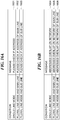
- the network setting module 303 displays a massage 1601 in FIG. 16A prompting the user to check the IP address on the operating unit 113 (step S1504). Accordingly, the user is able to easily grasp that a defects occurs in the IP address set in the single line mode. Thereafter, the network setting module 303 terminates the present process.
- the network setting module 303 determines whether the IP address is either of an IP address of the main line or an IP address of the sub line (step S1505).
- step S1505 when the IP address is the IP address of the main line, the network setting module 303 displays a massage 1602 in FIG. 16A prompting the user to check the IP address of the main line (step S1506). Accordingly, the user is able to easily grasp that a defect occurs in the IP address set for the main line in the plural line mode. Thereafter, the network setting module 303 terminates the present process.
- step S1505 when the IP address is the IP address of the sub line, the network setting module 303 displays a massage 1603 in FIG. 16A prompting the user to check the IP address of the sub line. Accordingly, the user is able to easily grasp that a defect occurs in the IP address set for the sub line in the plural line mode. Thereafter, the network setting module 303 terminates the present process.
- the network setting module 303 starts an identical IP address confirmation process (step S1508).
- the identical IP address confirmation process it is confirmed that apparatuses to each of which the same IP address is allocated exist on the network which uses IP addresses.
- the network setting module 303 determines whether the IP address matches with an IP address of another apparatus on the network which uses IP addresses (step S1509).
- the network setting module 303 uses the ARP protocol to inquire existence of the IP address to the network which uses IP addresses.
- the network setting module 303 determines that the another apparatus to which the same IP address is allocated as the IP address exists, that is, the IP address matches with the IP address of the another apparatus.
- a reply to the inquiry is not received, the network setting module 303 determines that another apparatus to which the same IP address is allocated as the IP address does not exist and the IP address does not match the IP address of the another apparatus.
- step S1509 when the IP address docs not match the IP address of the another apparatus, the network setting module 303 terminates the present process.
- the network setting module 303 determines whether the plurality of lines is enabled (step S1510).
- step S1510 when the plurality of lines is not enabled, the network setting module 303 displays a massage 1604 in FIG. 16B indicating that the IP address overlaps on the network on the operating unit 113 (step S1511). As a result, the user is able to easily grasp that the IP address set in the single line mode matches with the IP address of the another apparatus. Thereafter, the network setting module 303 terminates the present process.
- the network setting module 303 determines whether the IP address is either of the IP address of the main line or the IP address of the sub line (step S1512).
- the network setting module 303 displays a message 1605 in FIG. 16B on the operating unit 113 (step S1513).
- the message 1605 indicates that the IP address of the main line matches with the IP address of the another apparatus on the network.
- the network setting module 303 terminates the present process.
- the network setting module 303 displays a message 1606 in FIG. 16B on the operating unit 113 (step S1514).
- the message 1606 indicates that the IP address of the sub line matches with the IP address of the another apparatus on the network.
- the network setting module 303 terminates the present process.
- FIG. 17 is a flowchart showing a procedure of a sub line address information setting process carried out by the network setting module 303 appearing in FIG. 3 .
- the process in FIG. 17 is carried out by the CPU 201 implementing a program stored in the HDD 205, and carried out when the setting value indicative of the "wired (main) + wireless (sub) 803" was selected is store in the HDD 205, and the process in FIG. 14 was completed.
- the network setting module 303 carries out the above described communication connection process with an access point set on the wireless setting screen 1100, for example, the access point 105 (step S1701). The network setting module 303 then determines whether the communication connection with the access point 105 was successful (step S1702).
- step S1702 As a result of the determination in step S1702, when the communication connection with the access point 105 was unsuccessful, the network setting module 303 terminates the present process. On the other hand, as a result of the determination in step S1702, when the communication connection with the access point 105 was successful, the network setting module 303 determines whether the DHCP is enabled based on the setting value set for the DHCP selection section 904 stored in the HDD 205 (step S1703).
- step S1703 As a result of the determination in step S1703, when the DHCP is disabled, the network setting module 303 carries out a process in step S1705, to be described later.
- the network setting module 303 obtains an IP address by the DHCP (step S1704).
- the network setting module 303 accesses to the DHCP server on the network of the sub line and obtains the IP address from the DHCP server.
- the network setting module 303 decides the address information of the sub line of the MFP 101 (step S1705).
- the network setting module 303 carries out the IP address verification process in FIG. 15 (step S1706).
- the network setting module 303 sets the IP address and the subnet mask in the decided address information of the sub line to the TCP/IP control module 305 (step S1707) and terminates the present process.
- FIG. 18 is a flowchart showing a procedure of a wireless access point mode starting process carried out by the network setting module 303 appearing in FIG. 3 .
- the process in FIG. 18 is carried out by the CPU 201 implementing a program stored in the HDD 205, and carried out when the user selects the start button 501 on the start setting screen 500.
- address information for the wireless access point mode specifically, an IP address and a subnet mask are allocated in advance.
- the network setting module 303 requests the WPA control module 306 to generate an SSID and a PSK of the MFP 101 as an access point (step S1801).
- the network setting module 303 requests the WPA control module 306 to set the SSID and the PSK (step s1802).
- the network setting module 303 requests the WPA control module 306 to enable the wireless LAN device 207 to which the wireless access point mode is set (step S1803).
- the network setting module 303 sets address information for the wireless access point mode. Specifically, the network setting module 303 sets an IP address and a subnet mask in the address information for the wireless access point mode to the TCP/IP control module 305 (step S1804). Accordingly, the MPF 101 is able to perform the Wireless Direct. Subsequently, the network setting module 303 terminates the present process.
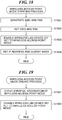
- FIG. 19 is a flowchart showing a procedure of a wireless access point mode ending process carried out by the network setting module 303 appearing in FIG. 3 .
- the process in FIG. 19 is carried out by the CPU 201 implementing a program stored in the HDD 205.
- the process in FIG. 19 is also carried out when the user selects the end button 503 on the setting information screen 502 while the MFP 101 is in the wireless access point mode.
- the network setting module 303 clears address information of the set wireless access point mode, specifically, the IP address and the subnet mask for the wireless access point mode (step S1901).
- the network setting module 303 requests the WPA control module 306 to disable the wireless LAN device 207 set to the wireless access point mode (step S1902). Subsequently, the network setting module 303 terminates the present process.
- a name of the main line may be replaced with a name such as a primary line and a priority line
- a name of the sub line may be replaced with a name such as a secondary line and an auxiliary line.
- a name of the line may be replaced with a name such as an infrastructure.
- Embodiment(s) of the present invention can also be realized by a computer of a system or apparatus that reads out and executes computer executable instructions (e.g., one or more programs) recorded on a storage medium (which may also be referred to more fully as a 'non-transitory computer-readable storage medium') to perform the functions of one or more of the above-described embodiment(s) and/or that includes one or more circuits (e.g., application specific integrated circuit (ASIC)) for performing the functions of one or more of the above-described embodiment(s), and by a method performed by the computer of the system or apparatus by, for example, reading out and executing the computer executable instructions from the storage medium to perform the functions of one or more of the above-described embodiment(s) and/or controlling the one or more circuits to perform the functions of one or more of the above-described embodiment(s).
- computer executable instructions e.g., one or more programs
- a storage medium which may also be referred to more fully as
- the computer may comprise one or more processors (e.g., central processing unit (CPU), micro processing unit (MPU)) and may include a network of separate computers or separate processors to read out and execute the computer executable instructions.
- the computer executable instructions may be provided to the computer, for example, from a network or the storage medium.
- the storage medium may include, for example, one or more of a hard disk, a random-access memory (RAM), a read only memory (ROM), a storage of distributed computing systems, an optical disk (such as a compact disc (CD), digital versatile disc (DVD), or Blu-ray Disc (BD)TM), a flash memory device, a memory card, and the like.
- An information processing apparatus in which a user is able to intuitively configure setting on an interface to be used.
- An interface to be enabled in the information processing apparatus is set in accordance with an instruction by a user.
- Statuses of a wired interface and a wireless interface are sets as any one of followings: enabling the wired interface without enabling a wireless interface, enabling the wireless interface without enabling the wired interface, and enabling both the wired interface and the wireless interface is set. An error corresponding to the setting is notified.
Landscapes
- Engineering & Computer Science (AREA)
- Signal Processing (AREA)
- Computer Networks & Wireless Communication (AREA)
- Human Computer Interaction (AREA)
- Theoretical Computer Science (AREA)
- Multimedia (AREA)
- Health & Medical Sciences (AREA)
- Biomedical Technology (AREA)
- General Health & Medical Sciences (AREA)
- Computer Security & Cryptography (AREA)
- General Physics & Mathematics (AREA)
- General Engineering & Computer Science (AREA)
- Physics & Mathematics (AREA)
- Databases & Information Systems (AREA)
- Small-Scale Networks (AREA)
- Facsimiles In General (AREA)
- Accessory Devices And Overall Control Thereof (AREA)
- Mobile Radio Communication Systems (AREA)
- Telephonic Communication Services (AREA)
- Computer And Data Communications (AREA)
Applications Claiming Priority (1)
| Application Number | Priority Date | Filing Date | Title |
|---|---|---|---|
| JP2017137594A JP7080595B2 (ja) | 2017-07-14 | 2017-07-14 | 情報処理装置及びその制御方法、並びにプログラム |
Publications (2)
| Publication Number | Publication Date |
|---|---|
| EP3429162A1 EP3429162A1 (en) | 2019-01-16 |
| EP3429162B1 true EP3429162B1 (en) | 2021-06-23 |
Family
ID=63047105
Family Applications (1)
| Application Number | Title | Priority Date | Filing Date |
|---|---|---|---|
| EP18182838.5A Active EP3429162B1 (en) | 2017-07-14 | 2018-07-11 | Information processing apparatus capable of easily configuring setting on infrastructure to be used, control method therefor, and storage medium |
Country Status (6)
| Country | Link |
|---|---|
| US (2) | US20190020502A1 (enExample) |
| EP (1) | EP3429162B1 (enExample) |
| JP (1) | JP7080595B2 (enExample) |
| KR (1) | KR102306337B1 (enExample) |
| CN (1) | CN109257452B (enExample) |
| RU (1) | RU2703340C1 (enExample) |
Families Citing this family (2)
| Publication number | Priority date | Publication date | Assignee | Title |
|---|---|---|---|---|
| JP2024063812A (ja) * | 2022-10-27 | 2024-05-14 | キヤノン株式会社 | プログラム及び設定システム |
| JP2025007246A (ja) * | 2023-06-30 | 2025-01-17 | キヤノン株式会社 | 電子機器、その制御方法、プログラム、記憶媒体 |
Family Cites Families (32)
| Publication number | Priority date | Publication date | Assignee | Title |
|---|---|---|---|---|
| US6957274B2 (en) * | 2001-06-27 | 2005-10-18 | Microsoft Corporation | System adds additional new routes and default routes to a routing table to allow concurrent access to two different network connections |
| JP4032814B2 (ja) | 2002-04-25 | 2008-01-16 | 株式会社デンソー | 通信端末、ルータ、端末局、および固定端末 |
| KR100453516B1 (ko) * | 2002-05-21 | 2004-10-20 | 주식회사 이노티브 | 네트워크상의 고품질 거대 영상 전송 시스템 및 전송방법 |
| JP2004120213A (ja) | 2002-09-25 | 2004-04-15 | Murata Mach Ltd | 通信端末装置及びそのプログラム |
| TWI329262B (en) * | 2003-01-21 | 2010-08-21 | Lenovo Singapore Pte Ltd | Information processing apparatus, communication control method, and communication control program |
| US7290067B2 (en) * | 2003-06-20 | 2007-10-30 | Canon Kabushiki Kaisha | Information processing apparatus control method for external device having both a wire interface and a wireless interface settings |
| KR100472495B1 (ko) * | 2003-06-26 | 2005-03-14 | 삼성전자주식회사 | 유무선 데이터 인터페이스방법 및 장치 |
| JP3891167B2 (ja) * | 2003-10-24 | 2007-03-14 | ブラザー工業株式会社 | ネットワーク装置管理システム、ネットワーク装置管理装置、およびネットワーク装置管理プログラム |
| US7676798B2 (en) | 2003-10-24 | 2010-03-09 | Microsoft Corporation | Mechanism for obtaining and applying constraints to constructs within an interactive environment |
| US8467377B2 (en) | 2005-08-24 | 2013-06-18 | Qualcomm Incorporated | Interleaving VoIP/VIP transmission in multiple sessions to increase quality of service in mobile devices having multiple interfaces |
| US20070239860A1 (en) * | 2006-04-07 | 2007-10-11 | Kyocera Mita Corporation | Information processing device, network connection method, and program recording medium |
| US20080040489A1 (en) * | 2006-07-10 | 2008-02-14 | International Business Machines Corporation | Method of assigning applications to specific network interfaces |
| US8312152B2 (en) | 2008-12-01 | 2012-11-13 | Lenovo (Singapore) Pte. Ltd. | Method, apparatus, and system for reassigning a network address |
| US9480092B2 (en) | 2009-04-23 | 2016-10-25 | Qualcomm Incorporated | Establishing packet data network connectivity for local internet protocol access traffic |
| JP5312308B2 (ja) | 2009-12-17 | 2013-10-09 | キヤノン株式会社 | 複数の通信インタフェースを有する情報処理装置及び制御方法 |
| JP2012029139A (ja) * | 2010-07-26 | 2012-02-09 | Brother Ind Ltd | ネットワークに接続されるデバイス |
| US20120131197A1 (en) | 2010-11-23 | 2012-05-24 | Sensormatic Electronics, LLC | Method and apparatus for automatically resolving conflicting devices on a network |
| KR101975992B1 (ko) | 2012-09-26 | 2019-05-08 | 에이치피프린팅코리아 유한회사 | WiFi Direct를 지원하는 화상형성장치 및 그것의 인터넷 접속 제어 방법 |
| JP2014086880A (ja) * | 2012-10-23 | 2014-05-12 | Toshiba Corp | 電子機器及び接続テスト方法 |
| JP6448173B2 (ja) * | 2013-03-14 | 2019-01-09 | キヤノン株式会社 | 通信装置及びその制御方法、プログラム |
| US8937927B1 (en) | 2013-10-03 | 2015-01-20 | Cisco Technology, Inc. | Seamless mobility handover |
| JP2015079432A (ja) * | 2013-10-18 | 2015-04-23 | シャープ株式会社 | 画像形成装置 |
| JP2015102946A (ja) | 2013-11-22 | 2015-06-04 | キヤノン株式会社 | 情報処理装置、情報処理装置の制御方法、およびプログラム |
| JP6252172B2 (ja) | 2013-12-27 | 2017-12-27 | ブラザー工業株式会社 | 通信システム、通信装置、および情報処理プログラム |
| JP6381211B2 (ja) | 2014-01-07 | 2018-08-29 | キヤノン株式会社 | 画像形成装置及びその制御方法 |
| JP6860279B2 (ja) * | 2014-05-23 | 2021-04-14 | キヤノン株式会社 | 画像形成装置、及び画像形成装置の制御方法 |
| KR102001486B1 (ko) * | 2015-04-22 | 2019-07-18 | 캐논 가부시끼가이샤 | 복수의 외부 장치와 통신을 행하는 화상 형성장치, 이 장치의 제어방법, 및 기억매체 |
| JP2017074724A (ja) * | 2015-10-15 | 2017-04-20 | 京セラドキュメントソリューションズ株式会社 | 画像形成装置 |
| JP6784136B2 (ja) | 2015-11-26 | 2020-11-11 | 株式会社リコー | プログラム、情報処理装置、及び情報処理システム |
| CN205281471U (zh) * | 2015-12-24 | 2016-06-01 | 北京三快在线科技有限公司 | 一种打印终端和系统 |
| CN205354003U (zh) * | 2016-01-15 | 2016-06-29 | 广州市大枣信息科技有限公司 | 智能打印机 |
| JP6904826B2 (ja) | 2017-07-14 | 2021-07-21 | キヤノン株式会社 | 情報処理装置及びその制御方法、並びにプログラム |
-
2017
- 2017-07-14 JP JP2017137594A patent/JP7080595B2/ja active Active
-
2018
- 2018-07-10 KR KR1020180079746A patent/KR102306337B1/ko active Active
- 2018-07-11 RU RU2018125454A patent/RU2703340C1/ru active
- 2018-07-11 US US16/032,205 patent/US20190020502A1/en not_active Abandoned
- 2018-07-11 EP EP18182838.5A patent/EP3429162B1/en active Active
- 2018-07-11 CN CN201810757567.1A patent/CN109257452B/zh active Active
-
2020
- 2020-07-16 US US16/930,704 patent/US11646910B2/en active Active
Non-Patent Citations (1)
| Title |
|---|
| None * |
Also Published As
| Publication number | Publication date |
|---|---|
| US20190020502A1 (en) | 2019-01-17 |
| EP3429162A1 (en) | 2019-01-16 |
| CN109257452B (zh) | 2023-03-28 |
| RU2703340C1 (ru) | 2019-10-16 |
| KR20190008115A (ko) | 2019-01-23 |
| US20200351122A1 (en) | 2020-11-05 |
| CN109257452A (zh) | 2019-01-22 |
| JP2019022037A (ja) | 2019-02-07 |
| JP7080595B2 (ja) | 2022-06-06 |
| US11646910B2 (en) | 2023-05-09 |
| KR102306337B1 (ko) | 2021-09-30 |
Similar Documents
| Publication | Publication Date | Title |
|---|---|---|
| JP7472256B2 (ja) | 情報処理装置及びその制御方法、並びにプログラム | |
| US8913280B2 (en) | Communication apparatus, method for controlling the same, storage medium, and printing apparatus | |
| US10359978B2 (en) | Image processing apparatus, control method thereof, and storage medium | |
| US11646910B2 (en) | Information processing apparatus capable of easily configuring setting on infrastructure to be used and notifying errors according to the setting on infrastructure, control method therefor, and storage medium | |
| CN109428983B (zh) | 信息处理装置及其控制方法和存储介质 | |
| CN110022382B (zh) | 信息处理设备及其控制方法和存储介质 | |
| JP2014238790A (ja) | 通信システム、情報通信端末、および情報処理装置 | |
| JP7322220B2 (ja) | 情報処理装置 | |
| US10747476B2 (en) | Printing apparatus, method for controlling the same, and storage medium having a wireless communication interface that performs an access point operation to cause the printing apparatus to operate as an access point, and an operation conforming to Wi-Fi® direct | |
| JP2019047274A (ja) | 情報処理装置及びその制御方法、並びにプログラム | |
| JP6241296B2 (ja) | 情報処理装置およびプログラム | |
| EP2843927B1 (en) | Image forming system, image forming apparatus, and non-transitory computer readable recording medium storing a setup program |
Legal Events
| Date | Code | Title | Description |
|---|---|---|---|
| PUAI | Public reference made under article 153(3) epc to a published international application that has entered the european phase |
Free format text: ORIGINAL CODE: 0009012 |
|
| STAA | Information on the status of an ep patent application or granted ep patent |
Free format text: STATUS: THE APPLICATION HAS BEEN PUBLISHED |
|
| AK | Designated contracting states |
Kind code of ref document: A1 Designated state(s): AL AT BE BG CH CY CZ DE DK EE ES FI FR GB GR HR HU IE IS IT LI LT LU LV MC MK MT NL NO PL PT RO RS SE SI SK SM TR |
|
| AX | Request for extension of the european patent |
Extension state: BA ME |
|
| STAA | Information on the status of an ep patent application or granted ep patent |
Free format text: STATUS: REQUEST FOR EXAMINATION WAS MADE |
|
| 17P | Request for examination filed |
Effective date: 20190716 |
|
| RBV | Designated contracting states (corrected) |
Designated state(s): AL AT BE BG CH CY CZ DE DK EE ES FI FR GB GR HR HU IE IS IT LI LT LU LV MC MK MT NL NO PL PT RO RS SE SI SK SM TR |
|
| REG | Reference to a national code |
Ref country code: DE Ref legal event code: R079 Ref document number: 602018018877 Country of ref document: DE Free format text: PREVIOUS MAIN CLASS: H04L0029060000 Ipc: H04N0001000000 |
|
| RIC1 | Information provided on ipc code assigned before grant |
Ipc: H04L 29/06 20060101ALI20201106BHEP Ipc: H04N 1/00 20060101AFI20201106BHEP |
|
| GRAP | Despatch of communication of intention to grant a patent |
Free format text: ORIGINAL CODE: EPIDOSNIGR1 |
|
| STAA | Information on the status of an ep patent application or granted ep patent |
Free format text: STATUS: GRANT OF PATENT IS INTENDED |
|
| INTG | Intention to grant announced |
Effective date: 20210122 |
|
| GRAS | Grant fee paid |
Free format text: ORIGINAL CODE: EPIDOSNIGR3 |
|
| GRAA | (expected) grant |
Free format text: ORIGINAL CODE: 0009210 |
|
| STAA | Information on the status of an ep patent application or granted ep patent |
Free format text: STATUS: THE PATENT HAS BEEN GRANTED |
|
| AK | Designated contracting states |
Kind code of ref document: B1 Designated state(s): AL AT BE BG CH CY CZ DE DK EE ES FI FR GB GR HR HU IE IS IT LI LT LU LV MC MK MT NL NO PL PT RO RS SE SI SK SM TR |
|
| REG | Reference to a national code |
Ref country code: GB Ref legal event code: FG4D |
|
| REG | Reference to a national code |
Ref country code: CH Ref legal event code: EP |
|
| REG | Reference to a national code |
Ref country code: DE Ref legal event code: R096 Ref document number: 602018018877 Country of ref document: DE Ref country code: AT Ref legal event code: REF Ref document number: 1405310 Country of ref document: AT Kind code of ref document: T Effective date: 20210715 |
|
| REG | Reference to a national code |
Ref country code: IE Ref legal event code: FG4D |
|
| REG | Reference to a national code |
Ref country code: LT Ref legal event code: MG9D |
|
| PG25 | Lapsed in a contracting state [announced via postgrant information from national office to epo] |
Ref country code: FI Free format text: LAPSE BECAUSE OF FAILURE TO SUBMIT A TRANSLATION OF THE DESCRIPTION OR TO PAY THE FEE WITHIN THE PRESCRIBED TIME-LIMIT Effective date: 20210623 Ref country code: HR Free format text: LAPSE BECAUSE OF FAILURE TO SUBMIT A TRANSLATION OF THE DESCRIPTION OR TO PAY THE FEE WITHIN THE PRESCRIBED TIME-LIMIT Effective date: 20210623 Ref country code: LT Free format text: LAPSE BECAUSE OF FAILURE TO SUBMIT A TRANSLATION OF THE DESCRIPTION OR TO PAY THE FEE WITHIN THE PRESCRIBED TIME-LIMIT Effective date: 20210623 Ref country code: BG Free format text: LAPSE BECAUSE OF FAILURE TO SUBMIT A TRANSLATION OF THE DESCRIPTION OR TO PAY THE FEE WITHIN THE PRESCRIBED TIME-LIMIT Effective date: 20210923 |
|
| REG | Reference to a national code |
Ref country code: AT Ref legal event code: MK05 Ref document number: 1405310 Country of ref document: AT Kind code of ref document: T Effective date: 20210623 |
|
| PG25 | Lapsed in a contracting state [announced via postgrant information from national office to epo] |
Ref country code: LV Free format text: LAPSE BECAUSE OF FAILURE TO SUBMIT A TRANSLATION OF THE DESCRIPTION OR TO PAY THE FEE WITHIN THE PRESCRIBED TIME-LIMIT Effective date: 20210623 Ref country code: NO Free format text: LAPSE BECAUSE OF FAILURE TO SUBMIT A TRANSLATION OF THE DESCRIPTION OR TO PAY THE FEE WITHIN THE PRESCRIBED TIME-LIMIT Effective date: 20210923 Ref country code: SE Free format text: LAPSE BECAUSE OF FAILURE TO SUBMIT A TRANSLATION OF THE DESCRIPTION OR TO PAY THE FEE WITHIN THE PRESCRIBED TIME-LIMIT Effective date: 20210623 Ref country code: RS Free format text: LAPSE BECAUSE OF FAILURE TO SUBMIT A TRANSLATION OF THE DESCRIPTION OR TO PAY THE FEE WITHIN THE PRESCRIBED TIME-LIMIT Effective date: 20210623 Ref country code: GR Free format text: LAPSE BECAUSE OF FAILURE TO SUBMIT A TRANSLATION OF THE DESCRIPTION OR TO PAY THE FEE WITHIN THE PRESCRIBED TIME-LIMIT Effective date: 20210924 |
|
| REG | Reference to a national code |
Ref country code: NL Ref legal event code: MP Effective date: 20210623 |
|
| PG25 | Lapsed in a contracting state [announced via postgrant information from national office to epo] |
Ref country code: NL Free format text: LAPSE BECAUSE OF FAILURE TO SUBMIT A TRANSLATION OF THE DESCRIPTION OR TO PAY THE FEE WITHIN THE PRESCRIBED TIME-LIMIT Effective date: 20210623 Ref country code: PT Free format text: LAPSE BECAUSE OF FAILURE TO SUBMIT A TRANSLATION OF THE DESCRIPTION OR TO PAY THE FEE WITHIN THE PRESCRIBED TIME-LIMIT Effective date: 20211025 Ref country code: RO Free format text: LAPSE BECAUSE OF FAILURE TO SUBMIT A TRANSLATION OF THE DESCRIPTION OR TO PAY THE FEE WITHIN THE PRESCRIBED TIME-LIMIT Effective date: 20210623 Ref country code: AT Free format text: LAPSE BECAUSE OF FAILURE TO SUBMIT A TRANSLATION OF THE DESCRIPTION OR TO PAY THE FEE WITHIN THE PRESCRIBED TIME-LIMIT Effective date: 20210623 Ref country code: CZ Free format text: LAPSE BECAUSE OF FAILURE TO SUBMIT A TRANSLATION OF THE DESCRIPTION OR TO PAY THE FEE WITHIN THE PRESCRIBED TIME-LIMIT Effective date: 20210623 Ref country code: SM Free format text: LAPSE BECAUSE OF FAILURE TO SUBMIT A TRANSLATION OF THE DESCRIPTION OR TO PAY THE FEE WITHIN THE PRESCRIBED TIME-LIMIT Effective date: 20210623 Ref country code: SK Free format text: LAPSE BECAUSE OF FAILURE TO SUBMIT A TRANSLATION OF THE DESCRIPTION OR TO PAY THE FEE WITHIN THE PRESCRIBED TIME-LIMIT Effective date: 20210623 Ref country code: EE Free format text: LAPSE BECAUSE OF FAILURE TO SUBMIT A TRANSLATION OF THE DESCRIPTION OR TO PAY THE FEE WITHIN THE PRESCRIBED TIME-LIMIT Effective date: 20210623 Ref country code: ES Free format text: LAPSE BECAUSE OF FAILURE TO SUBMIT A TRANSLATION OF THE DESCRIPTION OR TO PAY THE FEE WITHIN THE PRESCRIBED TIME-LIMIT Effective date: 20210623 |
|
| PG25 | Lapsed in a contracting state [announced via postgrant information from national office to epo] |
Ref country code: PL Free format text: LAPSE BECAUSE OF FAILURE TO SUBMIT A TRANSLATION OF THE DESCRIPTION OR TO PAY THE FEE WITHIN THE PRESCRIBED TIME-LIMIT Effective date: 20210623 |
|
| REG | Reference to a national code |
Ref country code: CH Ref legal event code: PL |
|
| REG | Reference to a national code |
Ref country code: DE Ref legal event code: R097 Ref document number: 602018018877 Country of ref document: DE |
|
| PG25 | Lapsed in a contracting state [announced via postgrant information from national office to epo] |
Ref country code: MC Free format text: LAPSE BECAUSE OF FAILURE TO SUBMIT A TRANSLATION OF THE DESCRIPTION OR TO PAY THE FEE WITHIN THE PRESCRIBED TIME-LIMIT Effective date: 20210623 |
|
| REG | Reference to a national code |
Ref country code: BE Ref legal event code: MM Effective date: 20210731 |
|
| PG25 | Lapsed in a contracting state [announced via postgrant information from national office to epo] |
Ref country code: LI Free format text: LAPSE BECAUSE OF NON-PAYMENT OF DUE FEES Effective date: 20210731 Ref country code: DK Free format text: LAPSE BECAUSE OF FAILURE TO SUBMIT A TRANSLATION OF THE DESCRIPTION OR TO PAY THE FEE WITHIN THE PRESCRIBED TIME-LIMIT Effective date: 20210623 Ref country code: CH Free format text: LAPSE BECAUSE OF NON-PAYMENT OF DUE FEES Effective date: 20210731 |
|
| PLBE | No opposition filed within time limit |
Free format text: ORIGINAL CODE: 0009261 |
|
| STAA | Information on the status of an ep patent application or granted ep patent |
Free format text: STATUS: NO OPPOSITION FILED WITHIN TIME LIMIT |
|
| 26N | No opposition filed |
Effective date: 20220324 |
|
| PG25 | Lapsed in a contracting state [announced via postgrant information from national office to epo] |
Ref country code: LU Free format text: LAPSE BECAUSE OF NON-PAYMENT OF DUE FEES Effective date: 20210711 Ref country code: AL Free format text: LAPSE BECAUSE OF FAILURE TO SUBMIT A TRANSLATION OF THE DESCRIPTION OR TO PAY THE FEE WITHIN THE PRESCRIBED TIME-LIMIT Effective date: 20210623 |
|
| PG25 | Lapsed in a contracting state [announced via postgrant information from national office to epo] |
Ref country code: IT Free format text: LAPSE BECAUSE OF FAILURE TO SUBMIT A TRANSLATION OF THE DESCRIPTION OR TO PAY THE FEE WITHIN THE PRESCRIBED TIME-LIMIT Effective date: 20210623 Ref country code: IE Free format text: LAPSE BECAUSE OF NON-PAYMENT OF DUE FEES Effective date: 20210711 Ref country code: FR Free format text: LAPSE BECAUSE OF NON-PAYMENT OF DUE FEES Effective date: 20210823 Ref country code: BE Free format text: LAPSE BECAUSE OF NON-PAYMENT OF DUE FEES Effective date: 20210731 |
|
| GBPC | Gb: european patent ceased through non-payment of renewal fee |
Effective date: 20220711 |
|
| PG25 | Lapsed in a contracting state [announced via postgrant information from national office to epo] |
Ref country code: GB Free format text: LAPSE BECAUSE OF NON-PAYMENT OF DUE FEES Effective date: 20220711 |
|
| PG25 | Lapsed in a contracting state [announced via postgrant information from national office to epo] |
Ref country code: CY Free format text: LAPSE BECAUSE OF FAILURE TO SUBMIT A TRANSLATION OF THE DESCRIPTION OR TO PAY THE FEE WITHIN THE PRESCRIBED TIME-LIMIT Effective date: 20210623 |
|
| PG25 | Lapsed in a contracting state [announced via postgrant information from national office to epo] |
Ref country code: HU Free format text: LAPSE BECAUSE OF FAILURE TO SUBMIT A TRANSLATION OF THE DESCRIPTION OR TO PAY THE FEE WITHIN THE PRESCRIBED TIME-LIMIT; INVALID AB INITIO Effective date: 20180711 |
|
| PG25 | Lapsed in a contracting state [announced via postgrant information from national office to epo] |
Ref country code: MK Free format text: LAPSE BECAUSE OF FAILURE TO SUBMIT A TRANSLATION OF THE DESCRIPTION OR TO PAY THE FEE WITHIN THE PRESCRIBED TIME-LIMIT Effective date: 20210623 |
|
| PG25 | Lapsed in a contracting state [announced via postgrant information from national office to epo] |
Ref country code: TR Free format text: LAPSE BECAUSE OF FAILURE TO SUBMIT A TRANSLATION OF THE DESCRIPTION OR TO PAY THE FEE WITHIN THE PRESCRIBED TIME-LIMIT Effective date: 20210623 |
|
| PG25 | Lapsed in a contracting state [announced via postgrant information from national office to epo] |
Ref country code: MT Free format text: LAPSE BECAUSE OF FAILURE TO SUBMIT A TRANSLATION OF THE DESCRIPTION OR TO PAY THE FEE WITHIN THE PRESCRIBED TIME-LIMIT Effective date: 20210623 |
|
| PGFP | Annual fee paid to national office [announced via postgrant information from national office to epo] |
Ref country code: DE Payment date: 20250620 Year of fee payment: 8 |