EP3008564B1 - Display control device, display control method, and program - Google Patents
Display control device, display control method, and program Download PDFInfo
- Publication number
- EP3008564B1 EP3008564B1 EP14727946.7A EP14727946A EP3008564B1 EP 3008564 B1 EP3008564 B1 EP 3008564B1 EP 14727946 A EP14727946 A EP 14727946A EP 3008564 B1 EP3008564 B1 EP 3008564B1
- Authority
- EP
- European Patent Office
- Prior art keywords
- region
- content
- displayed
- display
- scrolling
- Prior art date
- Legal status (The legal status is an assumption and is not a legal conclusion. Google has not performed a legal analysis and makes no representation as to the accuracy of the status listed.)
- Active
Links
Images





Classifications
-
- G—PHYSICS
- G06—COMPUTING OR CALCULATING; COUNTING
- G06F—ELECTRIC DIGITAL DATA PROCESSING
- G06F3/00—Input arrangements for transferring data to be processed into a form capable of being handled by the computer; Output arrangements for transferring data from processing unit to output unit, e.g. interface arrangements
- G06F3/01—Input arrangements or combined input and output arrangements for interaction between user and computer
- G06F3/048—Interaction techniques based on graphical user interfaces [GUI]
- G06F3/0484—Interaction techniques based on graphical user interfaces [GUI] for the control of specific functions or operations, e.g. selecting or manipulating an object, an image or a displayed text element, setting a parameter value or selecting a range
- G06F3/0485—Scrolling or panning
-
- G—PHYSICS
- G06—COMPUTING OR CALCULATING; COUNTING
- G06F—ELECTRIC DIGITAL DATA PROCESSING
- G06F3/00—Input arrangements for transferring data to be processed into a form capable of being handled by the computer; Output arrangements for transferring data from processing unit to output unit, e.g. interface arrangements
- G06F3/01—Input arrangements or combined input and output arrangements for interaction between user and computer
- G06F3/048—Interaction techniques based on graphical user interfaces [GUI]
- G06F3/0481—Interaction techniques based on graphical user interfaces [GUI] based on specific properties of the displayed interaction object or a metaphor-based environment, e.g. interaction with desktop elements like windows or icons, or assisted by a cursor's changing behaviour or appearance
-
- G—PHYSICS
- G06—COMPUTING OR CALCULATING; COUNTING
- G06F—ELECTRIC DIGITAL DATA PROCESSING
- G06F3/00—Input arrangements for transferring data to be processed into a form capable of being handled by the computer; Output arrangements for transferring data from processing unit to output unit, e.g. interface arrangements
- G06F3/01—Input arrangements or combined input and output arrangements for interaction between user and computer
- G06F3/048—Interaction techniques based on graphical user interfaces [GUI]
- G06F3/0481—Interaction techniques based on graphical user interfaces [GUI] based on specific properties of the displayed interaction object or a metaphor-based environment, e.g. interaction with desktop elements like windows or icons, or assisted by a cursor's changing behaviour or appearance
- G06F3/0482—Interaction with lists of selectable items, e.g. menus
-
- G—PHYSICS
- G06—COMPUTING OR CALCULATING; COUNTING
- G06F—ELECTRIC DIGITAL DATA PROCESSING
- G06F3/00—Input arrangements for transferring data to be processed into a form capable of being handled by the computer; Output arrangements for transferring data from processing unit to output unit, e.g. interface arrangements
- G06F3/01—Input arrangements or combined input and output arrangements for interaction between user and computer
- G06F3/048—Interaction techniques based on graphical user interfaces [GUI]
- G06F3/0487—Interaction techniques based on graphical user interfaces [GUI] using specific features provided by the input device, e.g. functions controlled by the rotation of a mouse with dual sensing arrangements, or of the nature of the input device, e.g. tap gestures based on pressure sensed by a digitiser
- G06F3/0488—Interaction techniques based on graphical user interfaces [GUI] using specific features provided by the input device, e.g. functions controlled by the rotation of a mouse with dual sensing arrangements, or of the nature of the input device, e.g. tap gestures based on pressure sensed by a digitiser using a touch-screen or digitiser, e.g. input of commands through traced gestures
-
- G—PHYSICS
- G06—COMPUTING OR CALCULATING; COUNTING
- G06F—ELECTRIC DIGITAL DATA PROCESSING
- G06F3/00—Input arrangements for transferring data to be processed into a form capable of being handled by the computer; Output arrangements for transferring data from processing unit to output unit, e.g. interface arrangements
- G06F3/01—Input arrangements or combined input and output arrangements for interaction between user and computer
- G06F3/048—Interaction techniques based on graphical user interfaces [GUI]
- G06F3/0487—Interaction techniques based on graphical user interfaces [GUI] using specific features provided by the input device, e.g. functions controlled by the rotation of a mouse with dual sensing arrangements, or of the nature of the input device, e.g. tap gestures based on pressure sensed by a digitiser
- G06F3/0488—Interaction techniques based on graphical user interfaces [GUI] using specific features provided by the input device, e.g. functions controlled by the rotation of a mouse with dual sensing arrangements, or of the nature of the input device, e.g. tap gestures based on pressure sensed by a digitiser using a touch-screen or digitiser, e.g. input of commands through traced gestures
- G06F3/04883—Interaction techniques based on graphical user interfaces [GUI] using specific features provided by the input device, e.g. functions controlled by the rotation of a mouse with dual sensing arrangements, or of the nature of the input device, e.g. tap gestures based on pressure sensed by a digitiser using a touch-screen or digitiser, e.g. input of commands through traced gestures for inputting data by handwriting, e.g. gesture or text
-
- G—PHYSICS
- G06—COMPUTING OR CALCULATING; COUNTING
- G06F—ELECTRIC DIGITAL DATA PROCESSING
- G06F9/00—Arrangements for program control, e.g. control units
- G06F9/06—Arrangements for program control, e.g. control units using stored programs, i.e. using an internal store of processing equipment to receive or retain programs
- G06F9/44—Arrangements for executing specific programs
- G06F9/451—Execution arrangements for user interfaces
Definitions
- the present disclosure relates to a display control device, a display control method, and a program.
- US2013/007665 A1 discloses systems and methods for displaying notifications received from multiple applications.
- an electronic device can monitor notifications that are received from the multiple applications.
- WO 2012/087939 relates to a method for displaying one or more views of a view hierarchy, and executing software elements associated with a particular view.
- Scrolling on a touchscreen display as above may realize a function of moving a portion of content to display on the display, and in addition, a function of moving an operable item displayed on the display.
- an interface element such as a link or button included in content on a web page may be moved by scrolling to a position easily reached by a user's finger.
- the utility of such an operation is increasing as the displays in recent mobile client devices become larger, for example.
- the present disclosure proposes a new and improved display control device, display control method, and program enabling further improvement in the usability of a touchscreen display using scrolling movement.
- the usability of a touchscreen display using scrolling movement may be further improved.
- FIG. 1 is a block diagram illustrating a schematic functional configuration of a client device according to the first embodiment of the present disclosure.
- a client device 100 includes a touchscreen display 110, a controller 120, a storage unit 130, and a communication unit 140.
- This functional configuration may be realized by the hardware configuration of an information processing device discussed later, for example.
- the present advancements are described herein using a client device 100 that is operated using a touchscreen display, such as a smartphone, tablet, portable game console, or media player, for example.
- a client device 100 that is operated using a touchscreen display, such as a smartphone, tablet, portable game console, or media player, for example.
- the present advancements may be on other devices using other input methods which do not fall within the scope of the claims.
- the present advancements may be used in conjunction with a user interface that projects a graphical user interface onto a surface and which receives user input by recognizing user movement in a captured image of the surface.
- the present advancements can also be used in conjunction with a user interface that receives user input based on a user's proximity thereto rather than based on a user touch of the interface.
- the following descriptions are merely exemplary and not limiting upon the scope of the advancements presented herein.
- the touchscreen display 110 includes a display unit 112 and an operating unit 114.
- the display unit 112 is a display device such as a liquid crystal display (LCD) or an organic electroluminescent (EL) display, for example, that displays and presents various images to a user under control by the controller 120.
- the operating unit 114 is a touch sensor of various types, for example, that detects and provides user-given contact with the screen of the display unit 112 to the controller 120 as operating input.
- the client device 100 is capable of providing a user with, for example, web pages and content such as images, video, and music by displaying images with the display unit 112 and/or outputting audio with a speaker (not illustrated).
- the display unit 112 may also display a content list in which are arranged character strings, thumbnail images, icons, or the like that indicate such content.
- the display unit 112 may also display an interface element in an image.
- An interface element is a graphical user interface (GUI) component that is displayed together with content and is capable of receiving an operation on the content such as play, stop, or move, or a component that is displayed together with a content list and is capable of receiving an operation on respective content such as play, delete, or move, for example.
- GUI graphical user interface
- content or a content list is displayed while being scrolled on the display unit 112, for example. More specifically, in the case in which the entirety of a web page does not fit within the size of the display unit 112, a portion of the web page is displayed on the display unit 112, and the displayed portion may be moved as a result of a user's drag operation, flick operation, or the like. As another example, in the case in which a content list displaying all content does not fit within the size of the display unit 112, a portion of the content list is displayed on the display unit 112, and the range of content displayed on the content list moves as a result of a user's drag operation, flick operation, or the like.
- the controller 120 is a processor such as a central processing unit (CPU) that controls respective components of the client device 100 by operating according to a program stored in the storage unit 130.
- the controller 120 controls the display on the touchscreen display 110.
- the controller 120 controls the display of content or a content list acquired from the storage unit 130 or the communication unit 140 discussed later on the display unit 112.
- the controller 120 may also generate a content list on the basis of information acquired from the storage unit 130 or the communication unit 140, and cause the generated content list to be displayed on the display unit 112.
- the controller 120 may perform operations on the data of content stored in the storage unit 130, or perform operations on the data of content on a network via the communication unit 140.
- the controller 120 executes a first scrolling control that scrolls a document displayed on the touchscreen display 110 within a display region that includes the document.
- the controller 120 executes a second scrolling control that causes scrolling movement of the display region itself.
- the second scrolling control may be a control that causes temporary scrolling movement of the display region.
- a spacer that differs from a document may be displayed in a blank display part produced by the scrolling movement of the display region. Note that in the second scrolling control, at least some of the interface elements included in the display region remain operable.
- the storage unit 130 is semiconductor memory, a hard disk drive (HDD), or the like, for example, and stores various data used by the client device 100. Furthermore, the storage unit 130 may also include a removable recording medium connected to the client device 100.
- the storage unit 130 stores a program by which a processor functions as the controller 120, for example.
- the storage unit 130 may also store the data of content to be played back by the controller 120 and output from the display unit 112 and/or an audio output unit.
- the communication unit 140 is a communication device connected to a network by various wired or wireless communication schemes. For example, the communication unit 140 downloads the data of content to be output from the display unit 112 and/or an audio output unit from another device on the network. The communication unit 140 may also add another operation, such as delete or move, to content on another device on the network, according to operating input that the controller 120 acquires from the operating unit 114. Also, the communication unit 140 may download a program by which a processor functions as the controller 120 from another device on the network, and provide the program to the storage unit 130.
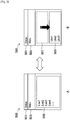
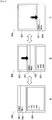
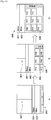
- FIG. 2 is a diagram illustrating a first display example by a client device according to the first embodiment of the present disclosure.
- a status bar 501, a menu bar 503, and a content region 505 are included on a screen 500 being displayed on the touchscreen display 110 of the client device 100.
- a web page is being displayed in the content region 505.
- Content such as a web page is one example of that which is referred to as a document in this specification.
- a web page is being displayed in the content region 505 starting from the first part (Line1). Since later parts of the web page are not being displayed in the content region 505 at this time, the user causes these parts to be displayed by scrolling the content upwards inside the content region 505 with a drag operation or flick operation on the touchscreen display 110. On the other hand, since the first part (Line1) of the web page is already being displayed in the state illustrated in FIG. 2A , from the perspective of viewing content, there is no need to scroll the content downwards any farther.
- the web page is displayed as Line1, Line2, and so on in the example illustrated in the drawing, this does not mean that the web page contains only text.
- the web page may also include images as well as interface elements such as links or buttons, which may be displayed in the parts illustrated in the drawing as Line1 and the like.
- the content region 505 itself undergoes scrolling movement under control by the controller 120, as illustrated in FIG. 2B .
- the content region 505 undergoes scrolling movement downward, moving away from the menu bar 503 that was being displayed adjacent above.
- This scrolling movement although temporary, is not transient.
- the state of scrolling movement undergone by the content region 505 as illustrated in FIG. 2B may be maintained until the next operation is given by the user, for example.
- interface elements such as links and buttons on the web page included in the content region 505 remain operable.
- a spacer 507 is displayed in the blank part between the menu bar 503 and the content region 505 produced by the scrolling movement of the content region 505.
- the spacer 507 is displayed distinguished from the content displayed in the content region 505, for example, and may express that downward scrolling of the content has already ended.
- a simple graphic or other image may be displayed, or separate content such as an advertisement may be displayed, for example.
- the image or content displayed as the spacer 507 may also appear to slide down from above in conjunction with the downward scrolling movement of the content region 505, for example.
- the image or content displayed as the spacer 507 may be positioned behind the content region 505, and displayed as a hidden part that appears as a result of the downward scrolling movement of the content region 505.
- the scrolling movement of the content region 505 as illustrated in FIG. 2B may be implemented separately from the scrolling of content displayed in the content region 505 (realized with the first scrolling control by the controller 120).
- the controller 120 may execute the second scrolling control that causes scrolling movement of the content region 505 in the case in which the operating unit 114 of the touchscreen display 110 acquires a second user operation that differs from a first user operation for scrolling content.
- the above first user operation and second user operation are mutually different operations.
- the first user operation and the second user operation are mutually different touch operations with respect to a display region (for example, the content region 505) on the touchscreen display 110.
- the second user operation for causing scrolling movement of the content region 505 may be, for example, flicking on the second tap of a double tap, performing a long press with the pad of a finger, flicking after performing a long press with the pad of a finger, dragging with the pad of a finger, flicking after moving a finger up and down several times while tapping.
- the second user operation may be, operating a touch sensor (additionally) provided on the rear face of the client device 100, operating a touch sensor (additionally) provided on a side face of the client device 100 or at the edge of the display, or shaking the client device 100 while tapping.
- a touch sensor (additionally) provided on the rear face of the client device 100
- a touch sensor (additionally) provided on a side face of the client device 100 or at the edge of the display
- shaking the client device 100 while tapping may be, a touch sensor (additionally) provided on a side face of the client device 100 or at the edge of the display, or shaking the client device 100 while tapping.
- a long press or a drag performed with the pad of a finger may be distinguished from a long press or a drag performed with a fingertip according to differences in contact surface area, for example, in this specification these operations may all be described as touch operations.
- the first user operation may be a simple operation compared to the second user operation, like the several examples
- a designated operation for the purpose of scrolling movement may also include an operation with respect to a region on the touchscreen display 110 other than the content region 505, and, according to examples not covered by the claims, may also include an operation with respect to an operating unit disposed on the case surrounding the touchscreen display 110 (for example, a touch sensor provided on the rear or side face of the client device 100, or at the edge of the display).
- an operating unit disposed on the case surrounding the touchscreen display 110 (for example, a touch sensor provided on the rear or side face of the client device 100, or at the edge of the display).
- subsequent drag operations and flick operations may be treated as operations controlling the magnitude of scrolling movement of the content region 505, until a later-discussed operation that reverts the scrolling movement of the content region 505 is acquired, for example.
- the controller 120 may switch the display control mode of the screen 500 from a mode that scrolls content inside the content region 505 to a mode that causes scrolling movement of the content region 505 itself. As a result, it may become easy for the user to place the content region 505 at a desired position via scrolling movement.
- the controller 120 may execute the scrolling of content followed by scrolling movement of the content region 505 in response to an operation for scrolling content acquired by the operating unit 114.
- scrolling movement of the content region 505 may be executed automatically in the case in which the operation for scrolling content, such as a drag operation or a flick operation, for example, is continually acquired even though the content displayed in the content region 505 has reached the edge (the top edge at which Line1 is being displayed in the example illustrated in the drawing).
- the user does not need to switch operation from the case of scrolling content up to that point in order to cause scrolling movement of the content region 505.
- a content region 505 that has undergone scrolling movement may be reverted in the case in which the user executes the above designated operation one more time or in the opposite direction, or executes an operation with respect to an interface element on the web page displayed while the content region 505 has undergone scrolling movement, for example.
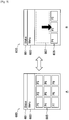
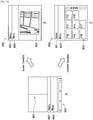
- FIG. 3 is a diagram illustrating a second display example by a client device according to the first embodiment of the present disclosure.
- a status bar 601, a menu bar 603, and a content list region 605 are included on a screen 600 being displayed on the touchscreen display 110 of the client device 100.
- thumbnails of image content are being displayed in the content list region 605.
- the thumbnails are displayed with scrolling, since the thumbnails do not fit in the content list region 605 provided by the display unit 112 of the touchscreen display 110.
- Such a content list is another example of that which is referred to as a document in this specification.
- the first part of the thumbnails (P1 to P9) are being displayed in the content list region 605. Since later parts of the thumbnails (P10 onwards) are not being displayed in the content list region 605 at this time, the user causes these thumbnails to be displayed by scrolling the content list upwards with a drag operation or flick operation on the touchscreen display 110. On the other hand, since the first thumbnail (PI) is being displayed in the state illustrated in FIG. 3A , from the perspective of viewing thumbnails, there is no need to scroll the content list downwards any farther.
- thumbnails of image content there may occur operations such as selecting a thumbnail to display, delete, or tag image content.
- operations such as selecting a title or image to play, delete, or tag music content.
- the content list region 605 itself undergoes scrolling movement under control by the controller 120, as illustrated in FIG. 3B .
- the content list region 605 undergoes scrolling movement downward, moving away from the menu bar 603 that was being displayed adjacent above.
- this scrolling movement although temporary, is not transient.
- the state of scrolling movement undergone by the content list region 605 as illustrated in FIG. 3B may be maintained until the next operation is given by the user, for example.
- thumbnails included in the content list region 605 remain operable (since various operations related to image content are possible, thumbnails may be said to be one type of interface element).
- a spacer 607 is displayed in the blank part between the menu bar 603 and the content list region 605 produced by the scrolling movement of the content list region 605.
- the spacer 607 is displayed distinguished from the thumbnails displayed in the content list region 605, for example, and may express that downward scrolling of the content list has already ended.
- a simple graphic or other image may be displayed, or separate content such as an advertisement may be displayed, for example.
- the image or content displayed as the spacer 607 may also appear to slide down from above in conjunction with the downward scrolling movement of the content list region 605, for example.
- the image or content displayed as the spacer 607 may be positioned behind the content list region 605, and displayed as a hidden part that appears as a result of the downward scrolling movement of the content list region 605.
- the scrolling movement of the content list region 605 as illustrated in FIG. 3B may also be executed separately from the scrolling of a content list displayed in the content list region 605.
- the controller 120 may execute scrolling movement of the content list region 605 in the case in which the operating unit 114 of the touchscreen display 110 acquires a designated operation that differs from an operation for scrolling the content list. Since an example of an operation for the scrolling of a content list and an operation for the scrolling movement of a content list region is similar to the example of an operation for the scrolling of content and an operation for the scrolling movement of a content region in the first display example above, duplicate description thereof will be omitted herein.
- subsequent drag operations and flick operations may be treated as operations controlling the magnitude of scrolling movement of the content list region 605, until a later-discussed operation that reverts the scrolling movement of the content list region 605 is acquired, for example.
- the controller 120 may switch the display control mode of the screen 600 from a mode that scrolls thumbnails or the like inside the content list region 605 to a mode that causes scrolling movement of the content list region 605 itself. As a result, it may become easy to make adjustments so that the content list region 605 moves to a desired position by scrolling movement.
- the controller 120 may execute the scrolling of a content list followed by scrolling movement of the content list region 605 in response to an operation for scrolling a content list acquired by the operating unit 114.
- scrolling movement of the content list region 605 may be executed automatically in the case in which the operation for scrolling the content list, such as a drag operation or a flick operation, for example, is continually acquired even though the thumbnails displayed in the content list region 605 have reached the beginning (P1 in the example illustrated in the drawing).
- the user does not need to switch operation from the case of a scrolling content list up to that point in order to cause scrolling movement of the content list region 605.
- a content list region 605 that has undergone scrolling movement may be reverted in the case in which the user executes the above designated operation one more time or in the opposite direction, or executes an operation with respect to a thumbnail displayed while the content list region 605 has undergone scrolling movement, for example.
- the present embodiment differs from the foregoing first embodiment in that a content region or a content list region undergoes scrolling movement together with a menu bar. Note that since all other points are similar to the first embodiment, duplicate description thereof will be omitted.
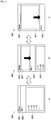
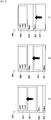
- FIG. 4 is a diagram illustrating a first display example by a client device according to the second embodiment of the present disclosure.
- a status bar 501, a menu bar 503, and a content region 505 are included on a screen 500 being displayed on the touchscreen display 110 of the client device 100.
- a web page is being displayed in the content region 505.
- a web page is being displayed in the content region 505.
- Operations performed on the web page displayed in the content region 505, such as back, forward, reload, stop, and add bookmark, for example, may be acquired by interface elements such as buttons placed on the menu bar 503.
- the menu bar 503 may be referred to as an interface element placement region in which are placed interface elements that accept operations related to the web page.
- the user is holding and operating the client device 100 with one hand, and the user's finger that operates the touchscreen display 110 is positioned at the bottom of the content region 505, for example, it may not be easy in some cases to perform an operation on an interface element placed on the menu bar 503 above.
- the menu bar 503 undergoes scrolling movement together with the content region 505 under control by the controller 120, as illustrated in FIGS. 4B and 4C .
- the menu bar 503 undergoes scrolling movement downward, moving away from the status bar 501 that was being displayed adjacent above.
- This scrolling movement although temporary, is not transient.
- the scrolled state of the menu bar 503 as illustrated in FIG. 4B or FIG. 4C may be maintained until the next operation is given by the user, for example. In this state, interface elements such as buttons included on the menu bar 503 remain operable.
- a spacer 507 is displayed in the blank part between the status bar 501 and the menu bar 503 produced by the scrolling movement of the menu bar 503 and the content region 505.
- a simple graphic or other image may be displayed, or separate content such as an advertisement may be displayed, for example.
- additional interface elements not included on the menu bar 503 may be displayed as the spacer 507.
- the image, content, or interface elements displayed as the spacer 507 may also appear to slide down from above in conjunction with the downward scrolling movement of the menu bar 503, for example.
- the image, content, or interface elements displayed as the spacer 507 may be positioned behind the menu bar 503 and the content region 505, and displayed as a hidden part that appears as a result of the downward scrolling movement of the menu bar 503.
- the scrolling movement of the menu bar 503 as illustrated in FIGS. 4B and 4C may also be executed separately from the scrolling of content displayed in the content region 505.
- the controller 120 may execute scrolling movement of the menu bar 503 in the case in which the operating unit 114 of the touchscreen display 110 acquires a designated operation that differs from an operation for scrolling the content. Since an example of an operation for the scrolling of content and an operation for the scrolling movement of a menu bar is similar to the example of an operation for the scrolling of content and an operation for the scrolling movement of a content region in the foregoing first embodiment, duplicate description thereof will be omitted herein.
- the controller 120 may respectively set an operation for causing scrolling movement of the content region 505 and an operation for causing scrolling movement of the menu bar 503, and selectively execute scrolling movement of these regions. For example, the controller 120 may set an operation of flicking after a double tap as the operation for scrolling movement of the content region 505, and set an operation of flicking after a long press with the pad of a finger as the operation for scrolling movement of the menu bar 503.
- subsequent drag operations and flick operations may be treated as operations controlling the magnitude of scrolling movement of the menu bar 503, until a later-discussed operation that reverts the scrolling movement of the menu bar 503 is acquired, for example.
- the controller 120 may switch the display control mode of the screen 500 from a mode that scrolls content inside the content region 505 to a mode that causes scrolling movement of the menu bar 503 and the content region 505. As a result, it may become easy for the user to place the menu bar 503 at a desired position via scrolling movement.
- the user's next operation may be acquired in a state in which the menu bar 503 is displayed at the bottom edge of the screen 500, and the content region 505 is no longer displayed, as in FIG. 4C .
- the user's next operation may be acquired in a state in which the menu bar 503 is displayed in the approximate center of the screen 500, and the content region 505 is displayed below, as in FIG. 4B .
- interface elements being displayed in the content region 505 may also be disabled.
- interface elements displayed in the content region 505 may also remain operable in order to raise the user's freedom of operation.
- a menu bar 503 that has undergone scrolling movement may be reverted together with the content region 505 in the case in which the user executes the above designated operation one more time or in the opposite direction, or executes an operation with respect to an interface element included on the menu bar 503 while the menu bar 503 has undergone scrolling movement, for example.
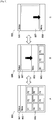
- FIG. 5 is a diagram illustrating a second display example by a client device according to the second embodiment of the present disclosure.
- a status bar 601, a menu bar 603, and a content list region 605 are included on a screen 600 being displayed on the touchscreen display 110 of the client device 100.
- thumbnails of image content are being displayed in the content list region 605.
- the first part of the thumbnails (P1 to P9) are being displayed in the content list region 605.
- Operations performed on these thumbnails such as play, delete, and move, for example, may be acquired by interface elements such as buttons displayed on the menu bar 603.
- interface elements such as buttons displayed on the menu bar 603.
- the user's finger that operates the touchscreen display 110 is positioned at the bottom of the content list region 605, for example, it may not be easy in some cases to perform an operation on an interface element placed on the menu bar 603 above.
- the menu bar 603 undergoes scrolling movement together with the content list region 605 under control by the controller 120, as illustrated in FIGS. 5B and 5C .
- the menu bar 603 undergoes scrolling movement downward, moving away from the status bar 601 that was being displayed adjacent above.
- this scrolling movement although temporary, is not transient.
- the scrolled state of the menu bar 603 as illustrated in FIG. 5B and FIG. 5C may be maintained until the next operation is given by the user, for example. In this state, interface elements such as buttons displayed on the menu bar 603 remain operable.
- a spacer 607 is displayed in the blank part between the status bar 601 and the menu bar 603 produced by the scrolling movement of the content list region 605 and the menu bar 603.
- a simple graphic or other image may be displayed, or separate content such as an advertisement may be displayed, for example.
- additional interface elements not included on the menu bar 603 may be displayed as the spacer 607.
- the image, content, or interface elements displayed as the spacer 607 may also appear to slide down from above in conjunction with the downward scrolling movement of the menu bar 603, for example.
- the image, content, or interface elements displayed as the spacer 607 may be positioned behind the menu bar 603 and the content list region 605, and displayed as a hidden part that appears as a result of the downward scrolling movement of the menu bar 603.
- the scrolling movement of the menu bar 603 as illustrated in FIGS. 5B and 5C may also be executed separately from the scrolling of a content list displayed in the content list region 605.
- the controller 120 may execute scrolling movement of the menu bar 603 in the case in which the operating unit 114 of the touchscreen display 110 acquires a designated operation that differs from an operation for scrolling the content list. Since an example of an operation for the scrolling of content and an operation for the scrolling movement of a menu bar is similar to the example of an operation for the scrolling of content and an operation for the scrolling movement of a content region in the foregoing first embodiment, duplicate description thereof will be omitted herein.
- the controller 120 may respectively set an operation for causing scrolling movement of the content list region 605 and an operation for causing scrolling movement of the menu bar 603, and selectively execute scrolling movement of these regions. Also, in the case in which scrolling movement of the menu bar 603 starts as a result of a designated operation, subsequent drag operations and flick operations may be treated as operations controlling the magnitude of scrolling movement of the menu bar 603, until a later-discussed operation that reverts the scrolling movement of the menu bar 603 is acquired, for example.
- the user's next operation may be acquired in a state in which the menu bar 603 is displayed at the bottom edge of the screen 600, and the content list region 605 is no longer displayed, as in FIG. 5C .
- the user's next operation may be acquired in a state in which the menu bar 603 is displayed in the approximate center of the screen 600, and the content list region 605 is displayed below, as in FIG. 5B .
- operations on thumbnails being displayed in the content list region 605 may also be disabled.
- thumbnails displayed in the content list region 605 may also remain operable in order to raise the user's freedom of operation.
- a menu bar 603 that has undergone scrolling movement may be reverted in the case in which the user executes the above designated operation one more time or in the opposite direction, or executes an operation with respect to an interface element included on the menu bar 603 while the menu bar 603 has undergone scrolling movement, for example.
- the present embodiment differs from the foregoing first and second embodiments in that a content region or a content list region undergoes scrolling movement together with a menu bar and a status bar. Note that since all other points are similar to the first or second embodiment, duplicate description thereof will be omitted.
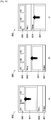
- FIG. 6 is a diagram illustrating a first display example by a client device according to the third embodiment of the present disclosure.
- a status bar 501, a menu bar 503, and a content region 505 are included on a screen 500 being displayed on the touchscreen display 110 of the client device 100.
- a web page is being displayed in the content region 505.
- a web page is being displayed in the content region 505.
- Operations performed on the web page displayed in the content region 505, such as back, forward, reload, stop, and add bookmark, for example, may be acquired by interface elements such as buttons placed on the menu bar 503.
- status notifications indicating received messages, software updates, and the like regarding the overall system of the client device 100 may be referenced by selecting the status bar 501, for example.
- the status bar 501 undergoes scrolling movement together with the menu bar 503 and the content region 505 under control by the controller 120, as illustrated in FIGS. 6B and 6C .
- the status bar 501 undergoes scrolling movement downward, moving away from the top edge of the screen 500.
- This scrolling movement although temporary, is not transient.
- the scrolled state of the status bar 501 as illustrated in FIG. 6B or FIG. 6C may be maintained until the next operation is given by the user, for example. While in this state, the status bar 501 remains selectable.
- interface elements such as buttons included on the menu bar 503 may also remain operable.
- the user after moving the status bar 501 and the menu bar 503 to the bottom of the screen 500, it is possible for the user to select the status bar 501 to display a notification, or perform a desired operation on an interface element included on the menu bar 503. In other words, the user is able to easily operate an interface element on the menu bar 503 or select the status bar 501, without changing his or her grip on the client device 100, for example.
- a spacer 507 is displayed in the blank part above the status bar 501 produced by the scrolling movement of the status bar 501, the menu bar 503, and the content region 505.
- a simple graphic or other image may be displayed, or separate content such as an advertisement may be displayed, for example.
- additional interface elements not included on the menu bar 503 may be displayed as the spacer 507.
- the image, content, or interface elements displayed as the spacer 507 may also appear to slide down from above in conjunction with the downward scrolling movement of the status bar 501, for example.
- the image, content, or interface elements displayed as the spacer 507 may be positioned behind the status bar 501, the menu bar 503, and the content region 505, and displayed as a hidden part that appears as a result of the downward scrolling movement of the status bar 501.
- the scrolling movement of the status bar 501 as illustrated in FIGS. 6B and 6C may also be executed separately from the scrolling of content displayed in the content region 505.
- the controller 120 may execute scrolling movement of the status bar 501 in the case in which the operating unit 114 of the touchscreen display 110 acquires a designated operation that differs from an operation for scrolling the content. Since an example of an operation for the scrolling of content and an operation for the scrolling movement of a status bar is similar to the example of an operation for the scrolling of content and an operation for the scrolling movement of a content region in the foregoing first embodiment, duplicate description thereof will be omitted herein.
- the controller 120 may respectively set an operation for causing scrolling movement of the content region 505 and an operation for causing scrolling movement of the status bar 501, and selectively execute scrolling movement of these regions. For example, the controller 120 may set an operation of flicking after a double tap as the operation for scrolling movement of the content region 505, and set an operation of flicking after a long press with the pad of a finger as the operation for scrolling movement of the status bar 501.
- subsequent drag operations and flick operations may be treated as operations controlling the magnitude of scrolling movement of the status bar 501, until a later-discussed operation that reverts the scrolling movement of the status bar 501 is acquired, for example.
- the controller 120 may switch the display control mode of the screen 500 from a mode that scrolls content inside the content region 505 to a mode that causes scrolling movement of the status bar 501, the menu bar 503, and the content region 505. As a result, it may become easy for the user to place the status bar 501 or the menu bar 503 at a desired position via scrolling movement.
- the user's next operation may be acquired in a state in which the status bar 501 and the menu bar 503 are displayed at the bottom edge of the screen 500, and the content region 505 is no longer displayed, as in FIG. 6C .
- the user's next operation may be acquired in a state in which the status bar 501 and the menu bar 503 are displayed in the approximate center of the screen 500, and the content region 505 is displayed below, as in FIG. 6B .
- interface elements being displayed in the content region 505 may also be disabled.
- interface elements displayed in the content region 505 may also remain operable in order to raise the user's freedom of operation.
- a status bar 501 and a menu bar 503 that have undergone scrolling movement may be reverted together with the content region 505 in the case in which the user executes the above designated operation one more time or in the opposite direction, or ends viewing of a notification displayed in the status bar 501 or executes an operation with respect to an interface element included on the menu bar 503 while the status bar 501 and the menu bar 503 have undergone scrolling movement, for example.
- FIG. 7 is a diagram illustrating a second display example by a client device according to the third embodiment of the present disclosure.
- a status bar 601, a menu bar 603, and a content list region 605 are included on a screen 600 being displayed on the touchscreen display 110 of the client device 100.
- thumbnails of image content are being displayed in the content list region 605.
- the first part of the thumbnails (P1 to P9) are being displayed in the content list region 605.
- Operations performed on these thumbnails such as play, delete, and move, for example, may be acquired by interface elements such as buttons displayed on the menu bar 603.
- notifications indicating received messages, software updates, and the like regarding the overall system of the client device 100 may be referenced by selecting the status bar 601, for example.
- the user's finger that operates the touchscreen display 110 is positioned at the bottom of the content list region 605, for example, it may not be easy in some cases to perform an operation on an interface element placed on the menu bar 603 above, or select the status bar 601 placed even farther above.
- the status bar 601 undergoes scrolling movement together with the menu bar 603 and the content list region 605 under control by the controller 120, as illustrated in FIGS. 7B and 7C .
- the status bar 601 undergoes scrolling movement downward, moving away from the top edge of the screen 600.
- this scrolling movement although temporary, is not transient.
- the scrolled state of the status bar 601 as illustrated in FIG. 7B or FIG. 7C may be maintained until the next operation is given by the user, for example. While in this state, the status bar 601 remains selectable.
- interface elements such as buttons included on the menu bar 603 may also remain operable.
- the user after moving the status bar 601 and the menu bar 603 to the bottom of the screen 600, it is possible for the user to select the status bar 601 to display a notification, or perform a desired operation on an interface element included on the menu bar 603. In other words, the user is able to easily operate an interface element on the menu bar 603 or select the status bar 601, without changing his or her grip on the client device 100, for example.
- a spacer 607 is displayed in the blank part above the status bar 601 produced by the scrolling movement of the status bar 601, the menu bar 603, and the content list region 605.
- a simple graphic or other image may be displayed, or separate content such as an advertisement may be displayed, for example.
- additional interface elements not included on the menu bar 603 may be displayed as the spacer 607.
- the image, content, or interface elements displayed as the spacer 607 may also appear to slide down from above in conjunction with the downward scrolling movement of the status bar 601, for example.
- the image, content, or interface elements displayed as the spacer 607 may be positioned behind the status bar 601, the menu bar 603, and the content list region 605, and displayed as a hidden part that appears as a result of the downward scrolling movement of the status bar 601.
- the scrolling movement of the status bar 601 as illustrated in FIGS. 7B and 7C may also be executed separately from the scrolling of a content list displayed in the content list region 605.
- the controller 120 may execute scrolling movement of the status bar 601 in the case in which the operating unit 114 of the touchscreen display 110 acquires a designated operation that differs from an operation for scrolling the content list. Since an example of an operation for the scrolling of a content list and an operation for the scrolling movement of a status bar is similar to the example of an operation for the scrolling of content and an operation for the scrolling movement of a content region in the foregoing first embodiment, duplicate description thereof will be omitted herein.
- the controller 120 may respectively set an operation for causing scrolling movement of the content list region 605 and an operation for causing scrolling movement of the status bar 601, and selectively execute scrolling movement of these regions. Also, in the case in which scrolling movement of the status bar 601 starts as a result of a designated operation, subsequent drag operations and flick operations may be treated as operations controlling the magnitude of scrolling movement of the status bar 601, until a later-discussed operation that reverts the scrolling movement of the status bar 601 is acquired, for example.
- the user's next operation may be acquired in a state in which the status bar 601 and the menu bar 603 are displayed at the bottom edge of the screen 600, and the content list region 605 is no longer displayed, as in FIG. 7C .
- the user's next operation may be acquired in a state in which the status bar 601 and the menu bar 603 are displayed in the approximate center of the screen 600, and the content list region 605 is displayed below, as in FIG. 7B .
- thumbnails displayed in the content list region 605 may also be disabled.
- thumbnails displayed in the content list region 605 may also remain operable in order to raise the user's freedom of operation.
- a status bar 601 and a menu bar 603 that have undergone scrolling movement may be reverted together with the content list region 605 in the case in which the user executes the above designated operation one more time or in the opposite direction, or ends viewing of a notification displayed in the status bar 601 or executes an operation with respect to an interface element included on the menu bar 603 while the status bar 601 and the menu bar 603 have undergone scrolling movement, for example.
- the scrolling movement starting from a content region (or a content list region), the scrolling movement starting from a menu bar, and the scrolling movement starting from a status bar in the foregoing first through third embodiments are used differently according to the support state of the operating system (OS) of the client device 100 or an application displayed on-screen.
- OS operating system
- FIG. 8 is a flowchart illustrating an example of a process by a client device according to the fourth embodiment of the present disclosure.
- the operating unit 114 of the client device 100 acquires a designated operation indicating scrolling movement that is not the scrolling of content (or a content list) (step S101).
- the designated operation may be, as discussed earlier, flicking on the second tap of a double tap, performing a long press with the pad of a finger, flicking after performing a long press with the pad of a finger, dragging with the pad of a finger, flicking after moving a finger up and down several times while tapping, operating a touch sensor (additionally) provided on the rear face of the client device 100, operating a touch sensor (additionally) provided on a side face of the client device 100 or at the edge of the display, or shaking the client device 100 while tapping, for example.
- the controller 120 may control the display unit 112 to display an effect indicating that a separate scrolling display mode has started.
- an effect like peeling paper may be displayed in the portions undergoing scrolling movement on-screen (for example, the content region 505 in the example of FIG. 2 , the menu bar 503 in the example of FIG. 4 , or the status bar 501 in the example of FIG. 6 ).
- an effect may be displayed in which these portions are reduced slightly and appear to be floating. These effects may be displayed not only at the start, but also during the scrolling movement.
- step S103 a determination of whether or not the OS supports a scrolling movement function is made (step S103), and if the OS supports the function (YES), scrolling movement starting from the status bar like in the third embodiment is executed (step S105).
- OS support of a scrolling movement function may be a condition for realizing scrolling movement starting from the status bar.
- scrolling movement starting from the menu bar or scrolling movement starting from the content region (or content list region) may also be executed, even in the case in which the OS supports the function.
- step S107 a determination of whether or not the application being displayed on-screen supports a scrolling movement function is made.
- step S107 a determination of whether or not the application being displayed on-screen supports a scrolling movement function is made.
- step S109 scrolling movement starting from the menu bar like in the second embodiment is executed.
- application support of a scrolling movement function may be a condition for realizing scrolling movement starting from the menu bar.
- scrolling movement starting from the content region may also be executed, even in the case in which the application supports the function.
- step S111 scrolling movement starting from the content region (or content list region) like in the first embodiment is executed (step S111).
- the controller 120 adds a dummy content portion, advertising, or the like to be displayed as a spacer at the beginning of the content (or content list), for example, such that this content portion or advertising is displayed following the ordinary scrolling of the content (or content list).
- FIGS. 9 and 10 are diagrams illustrating examples of upward scrolling movement according to another embodiment of the present disclosure.
- FIGS. 9A to 9C illustrate an example of a content display
- FIGS. 10A to 10C illustrate an example of a content list display.
- the foregoing first through third embodiments are described by taking as an example the case in which the user's finger operating the touchscreen display 110 is positioned at the bottom of the content region 505 (or the content list region 605).
- usability improvement using upward scrolling movement may also be attempted in the case in which the user's finger is positioned at the top of the content region 505 (or the content list region 605).
- the content region 505 may undergo upward scrolling movement to place interface elements or thumbnails closer to a range easily operated by the user.
- the menu bar 503 or 603 may also undergo upward scrolling movement in the case in which the menu bar 503 or 603 is displayed at the bottom edge rather than the top edge of the screen 500 or 600.
- the status bar 501 or 601 may also undergo upward scrolling movement in the case in which the status bar 501 or 601 is displayed at the bottom edge of the screen 500 or 600.
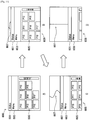
- FIG. 11 is a diagram illustrating an example of automatic stopping and spacer display according to another embodiment of the present disclosure.
- scrolling movement starting from the status bar 601 is executed.
- thumbnails (P10 to P17) of image content displayed in the content list region 605 are scrolled, without starting a mode for scrolling movement of the status bar 601.
- the controller 120 starts the mode for scrolling movement of the status bar 601.
- FIG. 11B is a display example of when the mode for scrolling movement of the status bar 601 is started.
- the status bar 601, the menu bar 603, and the content list region 605 move slightly downward while keeping the displayed content (like when captured).
- the spacer 607 is displayed in the blank part produced by the movement.
- the spacer 607 may be an image like a string by which the status bar 601 hangs from the top edge of the screen 600. At the time of FIG. 11B , this string is very slack.
- FIG. 11C is a display example while scrolling movement of the status bar 601 is in progress.
- the status bar 601, the menu bar 603, and the content list region 605 are moving downward while continuing to keep the displayed content at the time of FIG. 11A .
- the string being displayed as the spacer 607 is gradually losing slack to reflect that the distance has widened between the top edge of the screen 600 and the status bar 601.
- FIG. 11D is a display example of when scrolling movement of the status bar 601 has stopped.
- the status bar 601 and the menu bar 603 have moved close to the bottom edge of the screen 600, and are estimated to be at a position that is sufficiently easily to operate with a user's finger positioned at the bottom of the screen 600, for example. Consequently, the controller 120 may also set this position as a limit point for the scrolling movement of the status bar 601.
- the string being displayed as the spacer 607 is being displayed in a taut state to reflect that the downward movement of the status bar 601 has reached the limit.
- the scrolling movement of the status bar 601 and the menu bar 603 may be stopped at a suitable position without user adjustment, as a result of the controller 120 of the client device 100 automatically determining a travel amount for the scrolling movement of the status bar 601.
- the travel amount of the scrolling movement may be determined according to the display size of interface elements that remain operable, or in other words, the display size of the status bar 601 or interface elements displayed on the menu bar 603 in the above example.
- the user is able to intuitively recognize how far the scrolling movement has advanced.
- similar control and display is likewise possible for scrolling movement of the menu bar 603 or the content list region 605, as well as the scrolling movement of respective regions on the screen 500.
- FIG. 12 is a diagram illustrating a display example when reverting the scrolling movement illustrated in FIG. 11 .
- FIG. 12A is the same display as FIG. 11D , but if at this point a designated operation for reverting scrolling movement is acquired, such as an operation of tapping and then flicking upward, for example, the controller 120 starts a control for reverting the scrolling movement of the status bar 601. In the illustrated example, the scrolling movement is automatically reverted by the above designated operation.
- FIG. 12B illustrates a midway state. Unlike the example of FIG. 11C , for example, the string displayed as the spacer 607 remains in a taut state, and movement may be expressed as though the status bar 601 is being dragged upward, for example.
- the scrolling movement is automatically reverted by the operation in FIG. 12A
- the scrolling movement may be reverted manually by the user executing an upward drag operation or flick operation until reaching the state in FIG. 12C .
- the display of the spacer 607 in FIG. 12B may be a somewhat slack string similar to FIG. 11C to express that the status bar 601 is movable both upwards and downwards.
- FIG. 13 is a diagram illustrating a another display example when reverting the scrolling movement illustrated in FIG. 11 .
- FIG. 13A is the same display as FIG. 11D , but at this point an operation selecting the status bar 601 is acquired.
- a status screen 609 as illustrated in FIG. 13B may be referenced.
- the display of the status screen 609 ends, and in addition, the display position of the status bar 601 reverts back as illustrated in FIG. 13C , and the scrolling movement mode ends.
- FIG. 14 is a diagram illustrating yet another display example when reverting the scrolling movement illustrated in FIG. 11 .
- FIG. 14A is the same display as FIG. 11D , but at this point an operation via an interface element included on the menu bar 603 produces a screen transition within an application, or in other words, a change in the display of a document.
- a transition to a map display screen 650 as illustrated in FIG. 14B is being executed, and at this point the scrolling movement of the status bar 601 is reverted back.
- the position of the status bar 601 may revert back immediately, or revert over a designated amount of time while displaying an animation or the like.
- a screen transition is not produced in the display of FIG.
- FIG. 15 is a diagram illustrating a display example of a horizontal screen according to another embodiment of the present disclosure.
- a contact region (Touch) exists on the right side of a horizontal screen 700
- the displayed content undergoes scrolling movement to the right, and a spacer 707 is displayed in the emptied part.
- a contact region (Touch) exists on the left side of the horizontal screen 700
- the displayed content undergoes scrolling movement to the left, and a spacer 707 is displayed in the emptied part.
- the embodiment of the present disclosure discussed above is also applicable to a horizontal screen similarly to a vertical screen in a client device 100 such as a smartphone.
- FIG. 16 is a diagram illustrating a display example of a large screen according to another embodiment of the present disclosure.
- a contact region (Touch) exists in the lower-right of a large screen 800
- the displayed content undergoes scrolling movement down and to the right
- a spacer 807 is displayed in the emptied L-shaped part.
- FIG. 16B when a contact region (Touch) exists in the lower-left of the large screen 800, the displayed content undergoes scrolling movement down and to the left, and a spacer 807 is displayed in the emptied L-shaped part.
- the embodiment of the present disclosure discussed above is also applicable to a large screen the may be scrolled both vertically and horizontally in a client device 100 such as a tablet.
- the travel direction of the scrolling movement may be determined according to a position on a touchscreen display or on a case near a touchscreen display at which a designated user operation was executed, as in the above examples.
- display control for a client device is executed internally within the client device, such that the client device functions as the display control device.
- a server that communicates with a client device via a network may also provide the function of display control for the client device.
- one or multiple server devices constituting the server function as the display control device.
- Embodiments of the present disclosure encompass a display control device (a client device or a server device) as described in the foregoing, a system, an information processing method executed by a display device or system, a program for causing a display control device to function, and a non-transient tangible medium storing a program, for example.
Landscapes
- Engineering & Computer Science (AREA)
- Theoretical Computer Science (AREA)
- General Engineering & Computer Science (AREA)
- Human Computer Interaction (AREA)
- Physics & Mathematics (AREA)
- General Physics & Mathematics (AREA)
- Software Systems (AREA)
- User Interface Of Digital Computer (AREA)
- Controls And Circuits For Display Device (AREA)
Priority Applications (2)
| Application Number | Priority Date | Filing Date | Title |
|---|---|---|---|
| EP21197646.9A EP3944064B1 (en) | 2013-06-11 | 2014-04-17 | Display control device, display control method, and program |
| EP24212211.7A EP4524735A3 (en) | 2013-06-11 | 2014-04-17 | Display control device, display control method, and program |
Applications Claiming Priority (2)
| Application Number | Priority Date | Filing Date | Title |
|---|---|---|---|
| JP2013122746A JP6155869B2 (ja) | 2013-06-11 | 2013-06-11 | 表示制御装置、表示制御方法およびプログラム |
| PCT/JP2014/002193 WO2014199548A1 (en) | 2013-06-11 | 2014-04-17 | Display control device, display control method, and program |
Related Child Applications (2)
| Application Number | Title | Priority Date | Filing Date |
|---|---|---|---|
| EP21197646.9A Division EP3944064B1 (en) | 2013-06-11 | 2014-04-17 | Display control device, display control method, and program |
| EP24212211.7A Division EP4524735A3 (en) | 2013-06-11 | 2014-04-17 | Display control device, display control method, and program |
Publications (2)
| Publication Number | Publication Date |
|---|---|
| EP3008564A1 EP3008564A1 (en) | 2016-04-20 |
| EP3008564B1 true EP3008564B1 (en) | 2021-09-22 |
Family
ID=50884441
Family Applications (3)
| Application Number | Title | Priority Date | Filing Date |
|---|---|---|---|
| EP24212211.7A Pending EP4524735A3 (en) | 2013-06-11 | 2014-04-17 | Display control device, display control method, and program |
| EP21197646.9A Active EP3944064B1 (en) | 2013-06-11 | 2014-04-17 | Display control device, display control method, and program |
| EP14727946.7A Active EP3008564B1 (en) | 2013-06-11 | 2014-04-17 | Display control device, display control method, and program |
Family Applications Before (2)
| Application Number | Title | Priority Date | Filing Date |
|---|---|---|---|
| EP24212211.7A Pending EP4524735A3 (en) | 2013-06-11 | 2014-04-17 | Display control device, display control method, and program |
| EP21197646.9A Active EP3944064B1 (en) | 2013-06-11 | 2014-04-17 | Display control device, display control method, and program |
Country Status (5)
| Country | Link |
|---|---|
| US (6) | US10387026B2 (enExample) |
| EP (3) | EP4524735A3 (enExample) |
| JP (1) | JP6155869B2 (enExample) |
| CN (2) | CN110658972B (enExample) |
| WO (1) | WO2014199548A1 (enExample) |
Families Citing this family (16)
| Publication number | Priority date | Publication date | Assignee | Title |
|---|---|---|---|---|
| JP6155869B2 (ja) | 2013-06-11 | 2017-07-05 | ソニー株式会社 | 表示制御装置、表示制御方法およびプログラム |
| US9310988B2 (en) * | 2013-09-10 | 2016-04-12 | Google Inc. | Scroll end effects for websites and content |
| USD882582S1 (en) * | 2014-06-20 | 2020-04-28 | Google Llc | Display screen with animated graphical user interface |
| JP6399834B2 (ja) * | 2014-07-10 | 2018-10-03 | キヤノン株式会社 | 情報処理装置、情報処理装置の制御方法、及びプログラム |
| US10671275B2 (en) * | 2014-09-04 | 2020-06-02 | Apple Inc. | User interfaces for improving single-handed operation of devices |
| KR102351317B1 (ko) * | 2015-01-07 | 2022-01-14 | 삼성전자 주식회사 | 전자문서 표시 방법 및 전자 장치 |
| JP6430841B2 (ja) * | 2015-01-27 | 2018-11-28 | 京セラ株式会社 | 電子機器、制御方法、及び制御プログラム |
| JP6918444B2 (ja) * | 2015-07-17 | 2021-08-11 | ヤフー株式会社 | 情報表示プログラム、情報表示装置、情報表示方法、および配信装置 |
| JP6096853B1 (ja) * | 2015-09-18 | 2017-03-15 | ヤフー株式会社 | 情報表示プログラム、情報表示方法、および情報表示装置 |
| JP6380341B2 (ja) * | 2015-11-12 | 2018-08-29 | 京セラドキュメントソリューションズ株式会社 | 操作入力装置及び操作入力方法 |
| CN109871170A (zh) * | 2017-12-05 | 2019-06-11 | 北京嘀嘀无限科技发展有限公司 | 信息展示方法、装置、计算机设备和存储介质 |
| CN110297579B (zh) * | 2018-03-21 | 2022-05-20 | 腾讯科技(深圳)有限公司 | 任务栏的展示方法和装置、存储介质、电子装置 |
| JP7077182B2 (ja) * | 2018-08-27 | 2022-05-30 | シャープ株式会社 | 表示装置、表示方法及びプログラム |
| US11237716B2 (en) | 2019-10-14 | 2022-02-01 | Sling TV L.L.C. | Devices, systems and processes for facilitating user adaptive progressions through content |
| CN111427504A (zh) * | 2020-04-02 | 2020-07-17 | 北京达佳互联信息技术有限公司 | 内容获取方法、装置、电子设备及存储介质 |
| JP2022086076A (ja) * | 2020-11-30 | 2022-06-09 | キヤノン株式会社 | 表示装置、表示装置の制御方法、及びプログラム |
Family Cites Families (52)
| Publication number | Priority date | Publication date | Assignee | Title |
|---|---|---|---|---|
| US6199080B1 (en) | 1996-08-30 | 2001-03-06 | Sun Microsystems, Inc. | Method and apparatus for displaying information on a computer controlled display device |
| US7469381B2 (en) * | 2007-01-07 | 2008-12-23 | Apple Inc. | List scrolling and document translation, scaling, and rotation on a touch-screen display |
| JP2001083950A (ja) | 1999-09-09 | 2001-03-30 | Garireo:Kk | タッチパネル式ディスプレイの動画表示方法 |
| JP2005242689A (ja) | 2004-02-26 | 2005-09-08 | Koken:Kk | 壁紙提供システム |
| JP2005266589A (ja) * | 2004-03-19 | 2005-09-29 | Sharp Corp | 携帯情報機器、その制御方法、および、その制御プログラム |
| DE112007001968A5 (de) * | 2006-06-29 | 2009-05-28 | Luk Lamellen Und Kupplungsbau Beteiligungs Kg | Method and tool for fastening the connecting plates of a chain, using connecting |
| JP4699955B2 (ja) | 2006-07-21 | 2011-06-15 | シャープ株式会社 | 情報処理装置 |
| JP4931538B2 (ja) | 2006-09-29 | 2012-05-16 | ヤフー株式会社 | コンテンツ配信装置、コンテンツ配信方法、およびコンテンツ配信プログラム |
| US7966578B2 (en) * | 2007-01-07 | 2011-06-21 | Apple Inc. | Portable multifunction device, method, and graphical user interface for translating displayed content |
| CN101617288A (zh) * | 2007-01-07 | 2009-12-30 | 苹果公司 | 用于平移显示内容的便携式多功能设备、方法和图形用户界面 |
| KR20090008045A (ko) * | 2007-07-16 | 2009-01-21 | 삼성전자주식회사 | 디스플레이장치, 호스트 장치 및 그 제어방법 |
| KR101185634B1 (ko) | 2007-10-02 | 2012-09-24 | 가부시키가이샤 아쿠세스 | 단말 장치, 링크 선택 방법 및 표시 프로그램이 기록된 컴퓨터 판독가능한 기록 매체 |
| JP4364273B2 (ja) * | 2007-12-28 | 2009-11-11 | パナソニック株式会社 | 携帯端末装置及び表示制御方法並びに表示制御プログラム |
| WO2009097555A2 (en) | 2008-01-30 | 2009-08-06 | Google Inc. | Notification of mobile device events |
| JP5371002B2 (ja) * | 2008-04-23 | 2013-12-18 | シャープ株式会社 | 携帯情報端末、コンピュータ読取可能なプログラムおよび記録媒体 |
| JP2009284468A (ja) * | 2008-04-23 | 2009-12-03 | Sharp Corp | 携帯情報端末、コンピュータ読取可能なプログラムおよび記録媒体 |
| JP2010079442A (ja) * | 2008-09-24 | 2010-04-08 | Toshiba Corp | 携帯端末 |
| US20100269038A1 (en) | 2009-04-17 | 2010-10-21 | Sony Ericsson Mobile Communications Ab | Variable Rate Scrolling |
| US20100315326A1 (en) | 2009-06-10 | 2010-12-16 | Le Chevalier Vincent | Electronic paper display whitespace utilization |
| JP5037571B2 (ja) * | 2009-07-08 | 2012-09-26 | パナソニック株式会社 | 携帯端末装置及び表示制御方法並びに表示制御プログラム |
| JP5669169B2 (ja) | 2009-07-28 | 2015-02-12 | Necカシオモバイルコミュニケーションズ株式会社 | 端末装置及びプログラム |
| CN101661376A (zh) * | 2009-09-21 | 2010-03-03 | 宇龙计算机通信科技(深圳)有限公司 | 一种窗口信息显示方法、系统及显示终端 |
| KR20110037657A (ko) | 2009-10-07 | 2011-04-13 | 삼성전자주식회사 | 모션을 이용한 gui 제공방법 및 이를 적용한 디스플레이 장치 |
| US8624925B2 (en) * | 2009-10-16 | 2014-01-07 | Qualcomm Incorporated | Content boundary signaling techniques |
| JP2011113512A (ja) | 2009-11-30 | 2011-06-09 | Sharp Corp | 電子書籍コンテンツ生成装置、及び、電子書籍コンテンツ生成方法 |
| JP2012008827A (ja) | 2010-06-25 | 2012-01-12 | Fujitsu Toshiba Mobile Communications Ltd | 情報処理装置 |
| JP5561043B2 (ja) | 2010-09-07 | 2014-07-30 | 日本電気株式会社 | 携帯端末装置及びプログラム |
| JP2012108674A (ja) | 2010-11-16 | 2012-06-07 | Ntt Docomo Inc | 表示端末 |
| JP6258035B2 (ja) * | 2010-11-18 | 2018-01-10 | グーグル エルエルシー | スクロールバー上での直交ドラッギング |
| JP5747235B2 (ja) * | 2010-12-20 | 2015-07-08 | アップル インコーポレイテッド | 事象認識 |
| CN119292722A (zh) * | 2011-06-05 | 2025-01-10 | 苹果公司 | 用于显示从多个应用接收到的通知的系统和方法 |
| US9285976B2 (en) * | 2011-07-22 | 2016-03-15 | Kddi Corporation | User interface device capable of image scrolling not accompanying finger movement, image scrolling method, and program |
| JP5220898B2 (ja) * | 2011-07-22 | 2013-06-26 | Kddi株式会社 | 押圧によるスクロール制御が可能なユーザインタフェース装置、画像スクロール方法及びプログラム |
| WO2013035229A1 (ja) | 2011-09-05 | 2013-03-14 | Necカシオモバイルコミュニケーションズ株式会社 | 携帯端末装置、携帯端末制御方法及びプログラム |
| JP5779064B2 (ja) | 2011-09-28 | 2015-09-16 | 京セラ株式会社 | 装置、方法、及びプログラム |
| JP5754340B2 (ja) * | 2011-10-13 | 2015-07-29 | コニカミノルタ株式会社 | 情報処理装置 |
| CN102520860B (zh) * | 2011-12-09 | 2018-01-19 | 中兴通讯股份有限公司 | 一种进行桌面显示控制的方法及移动终端 |
| KR101496512B1 (ko) * | 2012-03-08 | 2015-02-26 | 엘지전자 주식회사 | 이동 단말기 및 그 제어방법 |
| JP2013218428A (ja) | 2012-04-05 | 2013-10-24 | Sharp Corp | 携帯型電子機器 |
| WO2013169845A1 (en) * | 2012-05-09 | 2013-11-14 | Yknots Industries Llc | Device, method, and graphical user interface for scrolling nested regions |
| KR101979666B1 (ko) * | 2012-05-15 | 2019-05-17 | 삼성전자 주식회사 | 표시부에 출력되는 입력 영역 운용 방법 및 이를 지원하는 단말기 |
| CN102819394B (zh) * | 2012-07-27 | 2016-06-08 | 东莞宇龙通信科技有限公司 | 终端和终端操作方法 |
| KR101250821B1 (ko) | 2012-10-24 | 2013-04-05 | (주)지란지교소프트 | 휴대전자기기에서의 입력 모드에 따른 인터페이스 처리 방법 및 그 휴대전자기기 |
| CN103019545B (zh) * | 2012-12-10 | 2015-08-12 | 广东欧珀移动通信有限公司 | 电子设备触摸屏显示界面的放缩方法 |
| CN103049184A (zh) * | 2012-12-11 | 2013-04-17 | 中兴通讯股份有限公司 | 一种调整显示内容在屏幕中显示的区域的方法及装置 |
| JP2014126949A (ja) | 2012-12-25 | 2014-07-07 | Kyocera Corp | 携帯端末装置、画面制御方法およびプログラム |
| JP6157885B2 (ja) | 2013-03-15 | 2017-07-05 | 中国電力株式会社 | 携帯端末装置の表示制御方法 |
| CN104102422B (zh) * | 2013-04-03 | 2018-05-01 | 阿里巴巴集团控股有限公司 | 页面返回操作的方法及装置 |
| JP2014211720A (ja) * | 2013-04-17 | 2014-11-13 | 富士通株式会社 | 表示装置および表示制御プログラム |
| US9274695B2 (en) * | 2013-04-19 | 2016-03-01 | Jive Software | Parallax scrolling of multiple information panels in a graphical user interface |
| US20140362119A1 (en) * | 2013-06-06 | 2014-12-11 | Motorola Mobility Llc | One-handed gestures for navigating ui using touch-screen hover events |
| JP6155869B2 (ja) | 2013-06-11 | 2017-07-05 | ソニー株式会社 | 表示制御装置、表示制御方法およびプログラム |
-
2013
- 2013-06-11 JP JP2013122746A patent/JP6155869B2/ja active Active
-
2014
- 2014-04-17 EP EP24212211.7A patent/EP4524735A3/en active Pending
- 2014-04-17 EP EP21197646.9A patent/EP3944064B1/en active Active
- 2014-04-17 WO PCT/JP2014/002193 patent/WO2014199548A1/en not_active Ceased
- 2014-04-17 CN CN201910789969.4A patent/CN110658972B/zh active Active
- 2014-04-17 US US14/888,814 patent/US10387026B2/en active Active
- 2014-04-17 EP EP14727946.7A patent/EP3008564B1/en active Active
- 2014-04-17 CN CN201480032215.XA patent/CN105264475B/zh active Active
-
2019
- 2019-06-28 US US16/455,778 patent/US10852932B2/en active Active
-
2020
- 2020-11-27 US US17/105,670 patent/US11157157B2/en active Active
-
2021
- 2021-09-27 US US17/485,509 patent/US11573692B2/en active Active
-
2022
- 2022-12-29 US US18/147,729 patent/US12050767B2/en active Active
-
2024
- 2024-06-25 US US18/752,852 patent/US20240345716A1/en active Pending
Also Published As
| Publication number | Publication date |
|---|---|
| US20160085401A1 (en) | 2016-03-24 |
| CN105264475B (zh) | 2019-09-24 |
| US11157157B2 (en) | 2021-10-26 |
| US10387026B2 (en) | 2019-08-20 |
| EP3944064A1 (en) | 2022-01-26 |
| US20240345716A1 (en) | 2024-10-17 |
| JP6155869B2 (ja) | 2017-07-05 |
| CN110658972A (zh) | 2020-01-07 |
| US10852932B2 (en) | 2020-12-01 |
| US12050767B2 (en) | 2024-07-30 |
| US20210081091A1 (en) | 2021-03-18 |
| CN110658972B (zh) | 2023-04-11 |
| US20220011912A1 (en) | 2022-01-13 |
| EP3944064B1 (en) | 2024-11-13 |
| US20190324618A1 (en) | 2019-10-24 |
| EP4524735A2 (en) | 2025-03-19 |
| US11573692B2 (en) | 2023-02-07 |
| US20230136838A1 (en) | 2023-05-04 |
| JP2014241026A (ja) | 2014-12-25 |
| CN105264475A (zh) | 2016-01-20 |
| EP3008564A1 (en) | 2016-04-20 |
| WO2014199548A1 (en) | 2014-12-18 |
| EP4524735A3 (en) | 2025-06-18 |
Similar Documents
| Publication | Publication Date | Title |
|---|---|---|
| US12050767B2 (en) | Apparatus, method, computer-readable storage medium, and smartphone for causing scrolling of content in response to touch operations | |
| US20250028429A1 (en) | Devices and Methods for Navigating Between User Interfaces | |
| US20230359349A1 (en) | Portable multifunction device with interface reconfiguration mode | |
| US12086399B2 (en) | Device, method, and graphical user interface for media playback | |
| US11592923B2 (en) | Systems and methods for resizing applications in a multitasking view on an electronic device with a touch-sensitive display | |
| US9841887B2 (en) | Anchoring viewport | |
| CN115269087A (zh) | 用于在带有触敏显示器的电子设备上进行多任务处理的系统和方法 | |
| US11086489B2 (en) | Information processing device and information processing method for moving or advancing a display region | |
| JP7692392B2 (ja) | 情報処理システム、情報処理方法、およびプログラム | |
| JP6358363B2 (ja) | 表示制御装置、表示制御方法およびプログラム | |
| JP6604400B2 (ja) | 情報処理装置、情報処理方法およびプログラム | |
| JP6998351B2 (ja) | 情報処理装置、情報処理方法およびプログラム |
Legal Events
| Date | Code | Title | Description |
|---|---|---|---|
| PUAI | Public reference made under article 153(3) epc to a published international application that has entered the european phase |
Free format text: ORIGINAL CODE: 0009012 |
|
| 17P | Request for examination filed |
Effective date: 20151230 |
|
| AK | Designated contracting states |
Kind code of ref document: A1 Designated state(s): AL AT BE BG CH CY CZ DE DK EE ES FI FR GB GR HR HU IE IS IT LI LT LU LV MC MK MT NL NO PL PT RO RS SE SI SK SM TR |
|
| AX | Request for extension of the european patent |
Extension state: BA ME |
|
| DAX | Request for extension of the european patent (deleted) | ||
| STAA | Information on the status of an ep patent application or granted ep patent |
Free format text: STATUS: EXAMINATION IS IN PROGRESS |
|
| 17Q | First examination report despatched |
Effective date: 20190710 |
|
| REG | Reference to a national code |
Ref country code: DE Ref legal event code: R079 Ref document number: 602014080245 Country of ref document: DE Free format text: PREVIOUS MAIN CLASS: G06F0003048500 Ipc: G06F0003048800 |
|
| GRAP | Despatch of communication of intention to grant a patent |
Free format text: ORIGINAL CODE: EPIDOSNIGR1 |
|
| STAA | Information on the status of an ep patent application or granted ep patent |
Free format text: STATUS: GRANT OF PATENT IS INTENDED |
|
| RIC1 | Information provided on ipc code assigned before grant |
Ipc: G06F 9/451 20180101ALN20210322BHEP Ipc: G06F 3/0485 20130101ALI20210322BHEP Ipc: G06F 3/0488 20130101AFI20210322BHEP |
|
| RIC1 | Information provided on ipc code assigned before grant |
Ipc: G06F 9/451 20180101ALN20210408BHEP Ipc: G06F 3/0485 20130101ALI20210408BHEP Ipc: G06F 3/0488 20130101AFI20210408BHEP |
|
| INTG | Intention to grant announced |
Effective date: 20210420 |
|
| RAP3 | Party data changed (applicant data changed or rights of an application transferred) |
Owner name: SONY GROUP CORPORATION |
|
| GRAS | Grant fee paid |
Free format text: ORIGINAL CODE: EPIDOSNIGR3 |
|
| GRAA | (expected) grant |
Free format text: ORIGINAL CODE: 0009210 |
|
| STAA | Information on the status of an ep patent application or granted ep patent |
Free format text: STATUS: THE PATENT HAS BEEN GRANTED |
|
| AK | Designated contracting states |
Kind code of ref document: B1 Designated state(s): AL AT BE BG CH CY CZ DE DK EE ES FI FR GB GR HR HU IE IS IT LI LT LU LV MC MK MT NL NO PL PT RO RS SE SI SK SM TR |
|
| REG | Reference to a national code |
Ref country code: GB Ref legal event code: FG4D |
|
| REG | Reference to a national code |
Ref country code: DE Ref legal event code: R096 Ref document number: 602014080245 Country of ref document: DE |
|
| REG | Reference to a national code |
Ref country code: IE Ref legal event code: FG4D |
|
| REG | Reference to a national code |
Ref country code: CH Ref legal event code: EP Ref country code: AT Ref legal event code: REF Ref document number: 1432844 Country of ref document: AT Kind code of ref document: T Effective date: 20211015 |
|
| REG | Reference to a national code |
Ref country code: NL Ref legal event code: FP |
|
| REG | Reference to a national code |
Ref country code: LT Ref legal event code: MG9D |
|
| PG25 | Lapsed in a contracting state [announced via postgrant information from national office to epo] |
Ref country code: BG Free format text: LAPSE BECAUSE OF FAILURE TO SUBMIT A TRANSLATION OF THE DESCRIPTION OR TO PAY THE FEE WITHIN THE PRESCRIBED TIME-LIMIT Effective date: 20211222 Ref country code: LT Free format text: LAPSE BECAUSE OF FAILURE TO SUBMIT A TRANSLATION OF THE DESCRIPTION OR TO PAY THE FEE WITHIN THE PRESCRIBED TIME-LIMIT Effective date: 20210922 Ref country code: FI Free format text: LAPSE BECAUSE OF FAILURE TO SUBMIT A TRANSLATION OF THE DESCRIPTION OR TO PAY THE FEE WITHIN THE PRESCRIBED TIME-LIMIT Effective date: 20210922 Ref country code: NO Free format text: LAPSE BECAUSE OF FAILURE TO SUBMIT A TRANSLATION OF THE DESCRIPTION OR TO PAY THE FEE WITHIN THE PRESCRIBED TIME-LIMIT Effective date: 20211222 Ref country code: RS Free format text: LAPSE BECAUSE OF FAILURE TO SUBMIT A TRANSLATION OF THE DESCRIPTION OR TO PAY THE FEE WITHIN THE PRESCRIBED TIME-LIMIT Effective date: 20210922 Ref country code: SE Free format text: LAPSE BECAUSE OF FAILURE TO SUBMIT A TRANSLATION OF THE DESCRIPTION OR TO PAY THE FEE WITHIN THE PRESCRIBED TIME-LIMIT Effective date: 20210922 Ref country code: HR Free format text: LAPSE BECAUSE OF FAILURE TO SUBMIT A TRANSLATION OF THE DESCRIPTION OR TO PAY THE FEE WITHIN THE PRESCRIBED TIME-LIMIT Effective date: 20210922 |
|
| REG | Reference to a national code |
Ref country code: AT Ref legal event code: MK05 Ref document number: 1432844 Country of ref document: AT Kind code of ref document: T Effective date: 20210922 |
|
| PG25 | Lapsed in a contracting state [announced via postgrant information from national office to epo] |
Ref country code: LV Free format text: LAPSE BECAUSE OF FAILURE TO SUBMIT A TRANSLATION OF THE DESCRIPTION OR TO PAY THE FEE WITHIN THE PRESCRIBED TIME-LIMIT Effective date: 20210922 Ref country code: GR Free format text: LAPSE BECAUSE OF FAILURE TO SUBMIT A TRANSLATION OF THE DESCRIPTION OR TO PAY THE FEE WITHIN THE PRESCRIBED TIME-LIMIT Effective date: 20211223 |
|
| PG25 | Lapsed in a contracting state [announced via postgrant information from national office to epo] |
Ref country code: AT Free format text: LAPSE BECAUSE OF FAILURE TO SUBMIT A TRANSLATION OF THE DESCRIPTION OR TO PAY THE FEE WITHIN THE PRESCRIBED TIME-LIMIT Effective date: 20210922 |
|
| PG25 | Lapsed in a contracting state [announced via postgrant information from national office to epo] |
Ref country code: IS Free format text: LAPSE BECAUSE OF FAILURE TO SUBMIT A TRANSLATION OF THE DESCRIPTION OR TO PAY THE FEE WITHIN THE PRESCRIBED TIME-LIMIT Effective date: 20220122 Ref country code: SK Free format text: LAPSE BECAUSE OF FAILURE TO SUBMIT A TRANSLATION OF THE DESCRIPTION OR TO PAY THE FEE WITHIN THE PRESCRIBED TIME-LIMIT Effective date: 20210922 Ref country code: RO Free format text: LAPSE BECAUSE OF FAILURE TO SUBMIT A TRANSLATION OF THE DESCRIPTION OR TO PAY THE FEE WITHIN THE PRESCRIBED TIME-LIMIT Effective date: 20210922 Ref country code: PT Free format text: LAPSE BECAUSE OF FAILURE TO SUBMIT A TRANSLATION OF THE DESCRIPTION OR TO PAY THE FEE WITHIN THE PRESCRIBED TIME-LIMIT Effective date: 20220124 Ref country code: PL Free format text: LAPSE BECAUSE OF FAILURE TO SUBMIT A TRANSLATION OF THE DESCRIPTION OR TO PAY THE FEE WITHIN THE PRESCRIBED TIME-LIMIT Effective date: 20210922 Ref country code: ES Free format text: LAPSE BECAUSE OF FAILURE TO SUBMIT A TRANSLATION OF THE DESCRIPTION OR TO PAY THE FEE WITHIN THE PRESCRIBED TIME-LIMIT Effective date: 20210922 Ref country code: EE Free format text: LAPSE BECAUSE OF FAILURE TO SUBMIT A TRANSLATION OF THE DESCRIPTION OR TO PAY THE FEE WITHIN THE PRESCRIBED TIME-LIMIT Effective date: 20210922 Ref country code: CZ Free format text: LAPSE BECAUSE OF FAILURE TO SUBMIT A TRANSLATION OF THE DESCRIPTION OR TO PAY THE FEE WITHIN THE PRESCRIBED TIME-LIMIT Effective date: 20210922 Ref country code: AL Free format text: LAPSE BECAUSE OF FAILURE TO SUBMIT A TRANSLATION OF THE DESCRIPTION OR TO PAY THE FEE WITHIN THE PRESCRIBED TIME-LIMIT Effective date: 20210922 |
|
| REG | Reference to a national code |
Ref country code: DE Ref legal event code: R097 Ref document number: 602014080245 Country of ref document: DE |
|
| PG25 | Lapsed in a contracting state [announced via postgrant information from national office to epo] |
Ref country code: DK Free format text: LAPSE BECAUSE OF FAILURE TO SUBMIT A TRANSLATION OF THE DESCRIPTION OR TO PAY THE FEE WITHIN THE PRESCRIBED TIME-LIMIT Effective date: 20210922 |
|
| PLBE | No opposition filed within time limit |
Free format text: ORIGINAL CODE: 0009261 |
|
| STAA | Information on the status of an ep patent application or granted ep patent |
Free format text: STATUS: NO OPPOSITION FILED WITHIN TIME LIMIT |
|
| 26N | No opposition filed |
Effective date: 20220623 |
|
| PG25 | Lapsed in a contracting state [announced via postgrant information from national office to epo] |
Ref country code: SI Free format text: LAPSE BECAUSE OF FAILURE TO SUBMIT A TRANSLATION OF THE DESCRIPTION OR TO PAY THE FEE WITHIN THE PRESCRIBED TIME-LIMIT Effective date: 20210922 |
|
| REG | Reference to a national code |
Ref country code: CH Ref legal event code: PL |
|
| REG | Reference to a national code |
Ref country code: BE Ref legal event code: MM Effective date: 20220430 |
|
| PG25 | Lapsed in a contracting state [announced via postgrant information from national office to epo] |
Ref country code: MC Free format text: LAPSE BECAUSE OF FAILURE TO SUBMIT A TRANSLATION OF THE DESCRIPTION OR TO PAY THE FEE WITHIN THE PRESCRIBED TIME-LIMIT Effective date: 20210922 Ref country code: LU Free format text: LAPSE BECAUSE OF NON-PAYMENT OF DUE FEES Effective date: 20220417 Ref country code: LI Free format text: LAPSE BECAUSE OF NON-PAYMENT OF DUE FEES Effective date: 20220430 Ref country code: IT Free format text: LAPSE BECAUSE OF FAILURE TO SUBMIT A TRANSLATION OF THE DESCRIPTION OR TO PAY THE FEE WITHIN THE PRESCRIBED TIME-LIMIT Effective date: 20210922 Ref country code: FR Free format text: LAPSE BECAUSE OF NON-PAYMENT OF DUE FEES Effective date: 20220430 Ref country code: CH Free format text: LAPSE BECAUSE OF NON-PAYMENT OF DUE FEES Effective date: 20220430 |
|
| PG25 | Lapsed in a contracting state [announced via postgrant information from national office to epo] |
Ref country code: BE Free format text: LAPSE BECAUSE OF NON-PAYMENT OF DUE FEES Effective date: 20220430 |
|
| PG25 | Lapsed in a contracting state [announced via postgrant information from national office to epo] |
Ref country code: IE Free format text: LAPSE BECAUSE OF NON-PAYMENT OF DUE FEES Effective date: 20220417 |
|
| P01 | Opt-out of the competence of the unified patent court (upc) registered |
Effective date: 20230527 |
|
| PG25 | Lapsed in a contracting state [announced via postgrant information from national office to epo] |
Ref country code: HU Free format text: LAPSE BECAUSE OF FAILURE TO SUBMIT A TRANSLATION OF THE DESCRIPTION OR TO PAY THE FEE WITHIN THE PRESCRIBED TIME-LIMIT; INVALID AB INITIO Effective date: 20140417 |
|
| PG25 | Lapsed in a contracting state [announced via postgrant information from national office to epo] |
Ref country code: SM Free format text: LAPSE BECAUSE OF FAILURE TO SUBMIT A TRANSLATION OF THE DESCRIPTION OR TO PAY THE FEE WITHIN THE PRESCRIBED TIME-LIMIT Effective date: 20210922 Ref country code: MK Free format text: LAPSE BECAUSE OF FAILURE TO SUBMIT A TRANSLATION OF THE DESCRIPTION OR TO PAY THE FEE WITHIN THE PRESCRIBED TIME-LIMIT Effective date: 20210922 Ref country code: CY Free format text: LAPSE BECAUSE OF FAILURE TO SUBMIT A TRANSLATION OF THE DESCRIPTION OR TO PAY THE FEE WITHIN THE PRESCRIBED TIME-LIMIT Effective date: 20210922 |
|
| PG25 | Lapsed in a contracting state [announced via postgrant information from national office to epo] |
Ref country code: TR Free format text: LAPSE BECAUSE OF FAILURE TO SUBMIT A TRANSLATION OF THE DESCRIPTION OR TO PAY THE FEE WITHIN THE PRESCRIBED TIME-LIMIT Effective date: 20210922 |
|
| PG25 | Lapsed in a contracting state [announced via postgrant information from national office to epo] |
Ref country code: MT Free format text: LAPSE BECAUSE OF FAILURE TO SUBMIT A TRANSLATION OF THE DESCRIPTION OR TO PAY THE FEE WITHIN THE PRESCRIBED TIME-LIMIT Effective date: 20210922 |
|
| PGFP | Annual fee paid to national office [announced via postgrant information from national office to epo] |
Ref country code: NL Payment date: 20250319 Year of fee payment: 12 |
|
| PGFP | Annual fee paid to national office [announced via postgrant information from national office to epo] |
Ref country code: GB Payment date: 20250319 Year of fee payment: 12 |
|
| PGFP | Annual fee paid to national office [announced via postgrant information from national office to epo] |
Ref country code: DE Payment date: 20250319 Year of fee payment: 12 |