EP2328064A2 - Informationsverarbeitungsvorrichtung, Informationsverarbeitungsverfahren und Programm - Google Patents
Informationsverarbeitungsvorrichtung, Informationsverarbeitungsverfahren und Programm Download PDFInfo
- Publication number
- EP2328064A2 EP2328064A2 EP20100175128 EP10175128A EP2328064A2 EP 2328064 A2 EP2328064 A2 EP 2328064A2 EP 20100175128 EP20100175128 EP 20100175128 EP 10175128 A EP10175128 A EP 10175128A EP 2328064 A2 EP2328064 A2 EP 2328064A2
- Authority
- EP
- European Patent Office
- Prior art keywords
- item
- hierarchy
- information processing
- displayed
- display screen
- Prior art date
- Legal status (The legal status is an assumption and is not a legal conclusion. Google has not performed a legal analysis and makes no representation as to the accuracy of the status listed.)
- Withdrawn
Links
Images





Classifications
-
- G—PHYSICS
- G06—COMPUTING OR CALCULATING; COUNTING
- G06F—ELECTRIC DIGITAL DATA PROCESSING
- G06F3/00—Input arrangements for transferring data to be processed into a form capable of being handled by the computer; Output arrangements for transferring data from processing unit to output unit, e.g. interface arrangements
- G06F3/01—Input arrangements or combined input and output arrangements for interaction between user and computer
- G06F3/048—Interaction techniques based on graphical user interfaces [GUI]
- G06F3/0481—Interaction techniques based on graphical user interfaces [GUI] based on specific properties of the displayed interaction object or a metaphor-based environment, e.g. interaction with desktop elements like windows or icons, or assisted by a cursor's changing behaviour or appearance
- G06F3/0482—Interaction with lists of selectable items, e.g. menus
-
- G—PHYSICS
- G06—COMPUTING OR CALCULATING; COUNTING
- G06F—ELECTRIC DIGITAL DATA PROCESSING
- G06F1/00—Details not covered by groups G06F3/00 - G06F13/00 and G06F21/00
- G06F1/16—Constructional details or arrangements
- G06F1/1613—Constructional details or arrangements for portable computers
- G06F1/1626—Constructional details or arrangements for portable computers with a single-body enclosure integrating a flat display, e.g. Personal Digital Assistants [PDAs]
-
- G—PHYSICS
- G06—COMPUTING OR CALCULATING; COUNTING
- G06F—ELECTRIC DIGITAL DATA PROCESSING
- G06F3/00—Input arrangements for transferring data to be processed into a form capable of being handled by the computer; Output arrangements for transferring data from processing unit to output unit, e.g. interface arrangements
- G06F3/01—Input arrangements or combined input and output arrangements for interaction between user and computer
- G06F3/03—Arrangements for converting the position or the displacement of a member into a coded form
- G06F3/033—Pointing devices displaced or positioned by the user, e.g. mice, trackballs, pens or joysticks; Accessories therefor
- G06F3/0354—Pointing devices displaced or positioned by the user, e.g. mice, trackballs, pens or joysticks; Accessories therefor with detection of 2D relative movements between the device, or an operating part thereof, and a plane or surface, e.g. 2D mice, trackballs, pens or pucks
- G06F3/03547—Touch pads, in which fingers can move on a surface
-
- G—PHYSICS
- G06—COMPUTING OR CALCULATING; COUNTING
- G06F—ELECTRIC DIGITAL DATA PROCESSING
- G06F3/00—Input arrangements for transferring data to be processed into a form capable of being handled by the computer; Output arrangements for transferring data from processing unit to output unit, e.g. interface arrangements
- G06F3/01—Input arrangements or combined input and output arrangements for interaction between user and computer
- G06F3/048—Interaction techniques based on graphical user interfaces [GUI]
- G06F3/0484—Interaction techniques based on graphical user interfaces [GUI] for the control of specific functions or operations, e.g. selecting or manipulating an object, an image or a displayed text element, setting a parameter value or selecting a range
- G06F3/04847—Interaction techniques to control parameter settings, e.g. interaction with sliders or dials
-
- G—PHYSICS
- G06—COMPUTING OR CALCULATING; COUNTING
- G06F—ELECTRIC DIGITAL DATA PROCESSING
- G06F3/00—Input arrangements for transferring data to be processed into a form capable of being handled by the computer; Output arrangements for transferring data from processing unit to output unit, e.g. interface arrangements
- G06F3/01—Input arrangements or combined input and output arrangements for interaction between user and computer
- G06F3/048—Interaction techniques based on graphical user interfaces [GUI]
- G06F3/0484—Interaction techniques based on graphical user interfaces [GUI] for the control of specific functions or operations, e.g. selecting or manipulating an object, an image or a displayed text element, setting a parameter value or selecting a range
- G06F3/0485—Scrolling or panning
-
- G—PHYSICS
- G06—COMPUTING OR CALCULATING; COUNTING
- G06F—ELECTRIC DIGITAL DATA PROCESSING
- G06F3/00—Input arrangements for transferring data to be processed into a form capable of being handled by the computer; Output arrangements for transferring data from processing unit to output unit, e.g. interface arrangements
- G06F3/01—Input arrangements or combined input and output arrangements for interaction between user and computer
- G06F3/048—Interaction techniques based on graphical user interfaces [GUI]
- G06F3/0484—Interaction techniques based on graphical user interfaces [GUI] for the control of specific functions or operations, e.g. selecting or manipulating an object, an image or a displayed text element, setting a parameter value or selecting a range
- G06F3/0485—Scrolling or panning
- G06F3/04855—Interaction with scrollbars
-
- G—PHYSICS
- G06—COMPUTING OR CALCULATING; COUNTING
- G06F—ELECTRIC DIGITAL DATA PROCESSING
- G06F3/00—Input arrangements for transferring data to be processed into a form capable of being handled by the computer; Output arrangements for transferring data from processing unit to output unit, e.g. interface arrangements
- G06F3/01—Input arrangements or combined input and output arrangements for interaction between user and computer
- G06F3/048—Interaction techniques based on graphical user interfaces [GUI]
- G06F3/0487—Interaction techniques based on graphical user interfaces [GUI] using specific features provided by the input device, e.g. functions controlled by the rotation of a mouse with dual sensing arrangements, or of the nature of the input device, e.g. tap gestures based on pressure sensed by a digitiser
- G06F3/0488—Interaction techniques based on graphical user interfaces [GUI] using specific features provided by the input device, e.g. functions controlled by the rotation of a mouse with dual sensing arrangements, or of the nature of the input device, e.g. tap gestures based on pressure sensed by a digitiser using a touch-screen or digitiser, e.g. input of commands through traced gestures
- G06F3/04886—Interaction techniques based on graphical user interfaces [GUI] using specific features provided by the input device, e.g. functions controlled by the rotation of a mouse with dual sensing arrangements, or of the nature of the input device, e.g. tap gestures based on pressure sensed by a digitiser using a touch-screen or digitiser, e.g. input of commands through traced gestures by partitioning the display area of the touch-screen or the surface of the digitising tablet into independently controllable areas, e.g. virtual keyboards or menus
-
- G—PHYSICS
- G06—COMPUTING OR CALCULATING; COUNTING
- G06F—ELECTRIC DIGITAL DATA PROCESSING
- G06F2203/00—Indexing scheme relating to G06F3/00 - G06F3/048
- G06F2203/033—Indexing scheme relating to G06F3/033
- G06F2203/0339—Touch strips, e.g. orthogonal touch strips to control cursor movement or scrolling; single touch strip to adjust parameter or to implement a row of soft keys
Definitions
- the present invention relates to an information processing apparatus, an information processing method, and a program.
- GUI graphical user interface
- the touch panel since a finger operating the touch panel and the GUI to be operated are not separately located, the intuitive operation becomes possible.
- the touch panel should be tapped (a finger is in contact with the touch panel and then separated), and thus a quick operation may be hindered.
- an information processing apparatus which facilitates a selection and determination operation of a GUI object, an information processing method, and a program.
- an information processing apparatus including a display unit which displays a plurality of items on one side of a display screen, a detection unit which detects an operation input to the one side of the display screen, and a control unit which, when contact operation is detected, selects the item displayed near the detection position of the contact operation, and when pressing operation with a predetermined pressure is detected in such a state that the item is selected, determines the selection of the item.
- a plurality of items are displayed on one side of a display screen, and an operation input to the one side of the display screen is detected.
- the item displayed near the detection position of the contact operation is selected.
- pressing operation with a predetermined pressure is detected in such a state that the item is selected, the selection of the item is determined.
- the item is intuitively selected by the contact operation near the item, and the selected item can be quickly determined by the pressing operation without changing a position of a finger.
- an information processing method including the steps of displaying a plurality of items on one side of a display screen, detecting an operation input to the one side of the display screen, and when contact operation is detected, selecting the item displayed near the detection position of the contact operation, and when pressing operation with a predetermined pressure is detected in such a state that the item is selected, determining the selection of the item.
- a program for causing a computer to execute the above information processing method may be provided using a computer-readable recording medium or may be provided through communication means.
- an information processing apparatus which can facilitate the selection and determination operation of the GUI object, an information processing method, and a program.
- FIG 1 is an external view of the information processing apparatus
- FIG. 2 is a block diagram showing the main configuration of the information processing apparatus.
- an information processing apparatus 100 has a display 101 and a sensor 103.
- the information processing apparatus 100 is a portable information processing apparatus, such as a PDA, a cell phone, a camera, a game machine, and a music player.
- the display 101 displays thereon a plurality of items I on one side (for example, the right side) of a display screen 101a.
- the sensor 103 is provided along at least one side of the display screen 101a and detects an operation input (contact operation, pressing operation, and the like) to one side of the display screen 101a performed by a finger F of a user.
- the item I displayed near for example, the left side of
- the selection of the item I is determined. According to this configuration, a user can intuitively select the item I by the contact operation performed near the item I and can quickly determine the selection by the pressing operation without changing the position of the finger F.
- the information processing apparatus 100 includes the display 101 (display unit), the sensor 103 (detection unit), a controller 105 (control unit), a memory 107, and a display memory 109.
- the information processing apparatus 100 may include an operation interface, a communication interface, a speaker, a vibrator, and an acceleration sensor (not shown).
- the display 101 displays a selection menu of the items I on the display screen 101a.
- a selection menu a plurality of items I including the GUI object are displayed on the right side of the display screen 101a.
- the display 101 may be configured as a resistive touch panel, a capacitance touch panel, an optical touch panel, and the like. In this case, the display 101 can substitute for some functions (a contact sensor) of the sensor 103.
- the sensor 103 detects the operation input (such as contact operation and pressing operation) to the right side of the display screen 101a.
- the senor 103 has an operating surface.
- the sensor 103 detects a contact state and contact position of a finger to the operating surface, and, at the same time, detects a pressing force of a finger applied to the sensor 103 from the depression of the operating surface.
- the sensor 103 then supplies the detection result to the controller 105.
- the sensor 103 may be configured so that the operating surface is provided on the hardware key. In this case, the sensor 103 may detect the pressing force of a finger applied to the sensor 103 from the depression of the hardware key instead of the depression of the operating surface.
- the senor 103 is provided outside the display 101 so as to be provided along the right side of the display screen 101a. According to this configuration, it is possible to prevent or at least inhibit a reduction in visibility of the display screen 101a, contamination of the display screen 101a, and the like due to the operation to the display screen 101a.
- the sensor 103 may be provided inside the display 101 so as to serve as part of the touch panel or may be provided on any other side than the right side of the display screen 101a.
- the controller 105 includes a CPU, a ROM, and a RAM, and performs calculation processing and control processing necessary for the operation of the information processing apparatus 100.
- the memory 107 stores programs, data, and the like necessary for the operation of the information processing apparatus 100.
- the programs include a program for use in performing an information processing method to be described later. More particularly, the memory 107 stores configuration data of a selection menu configured of a plurality of items I having a hierarchical structure and data of the item I configuring each menu.
- the display memory 109 receives, from the controller 105, data for use in performing various displays on the display screen 101a to hold the received data.
- the controller 105 controls the display 101 so that a plurality of the items I are displayed on the right side of the display screen 101a.
- the controller 105 performs processing for selecting the item I displayed near the contact position.
- the controller 105 performs processing for determining the selection of the item I.
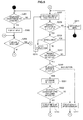
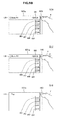
- FIG. 3 is a flow chart showing a procedure of the selection processing of the item I.
- FIGS. 4 and 5 are views for explaining the selection processing of the item I.
- the controller 105 determines whether or not an operation start trigger is present (step S101).
- the trigger is detected in response to, for example, a predetermined operation to the sensor 103, a predetermined operation to the GUI on the display screen 101a, and a predetermined operation to the information processing apparatus 100 (such as, tilting of the information processing apparatus 100).
- a predetermined operation to the sensor 103 a predetermined operation to the GUI on the display screen 101a
- a predetermined operation to the information processing apparatus 100 such as, tilting of the information processing apparatus 100.
- the controller 105 controls the display 101 so that the display 141 displays a menu based on configuration data of a selection menu (S103).
- the strip-shaped item I is displayed on the right side of the display screen 101a, and a hierarchical display bar LB is displayed on the upper side of the display screen 101a.
- the hierarchical display bar LB in order to specify the hierarchy of the displayed item I (the selected hierarchy), the name of the item I located in the upper hierarchy of the displayed item I is shown.
- a menu of a hierarchy A1B including four items IB1 to IB4 is displayed.
- the hierarchy A1B is located in the lower layer of the item Al of a hierarchy A.
- the four items IB1 to IB4 and the hierarchical display bar LB are displayed (state S1).
- the hierarchy A "Item A1" that is the upper hierarchy of the displayed hierarchy A1B is displayed, and, at the same time, a back button BB " ⁇ BACK" for use in performing movement processing to the upper hierarchy is displayed.
- the controller 105 determines whether the item I on the menu can be scrolled to select the following processing (S105). When all of the items I configuring the menu may not be simultaneously displayed on the display screen 101a, it is determined that the item I can be scrolled.
- step S107 is selected.
- the number of times I that can be simultaneously displayed on the display screen 101a is not limited to four, but is set according to the size of the display screen 101 a, the size of the item I, and the like.
- the controller 105 controls the display 101 so as to focus and display the selected item I (selected item) (S107).
- the selected item means the item I displayed near the detection position of the contact operation by the finger F.
- the item IB1 displayed near (for example, on the left side of) the detection position of the contact operation that becomes a trigger is focused and displayed (state S1).
- the selected item IB1 is displayed while being extended to the left side to have an extended width W1.
- the non-selected items IB2 to IB4 are displayed with an initial width W0.
- the controller 105 determines whether or not the contact operation to the sensor 103 is present (S109). When the contact operation is not present, the controller 105 controls the display 101 so that the menu is not displayed (state S2) (S111) to return to the processing of step S 101.
- the controller 105 determines whether or not the contact position is changed (S113). When the contact position is changed, the controller 105 returns to the processing of step S107 to focus and display the item I (selected item) displayed near the changed contact position.
- the width of the selected item IB2 is gradually increased to the extended width W1
- the width of the prior selected item IB1 is gradually reduced to the initial width W0 (state S3).
- the controller 105 determines whether or not the pressing operation with a predetermined pressure to the sensor 103 is present (S117). When the pressing operation is present, the controller 105 shifts to the processing of step S 119. When the pressing operation is not present, the controller 105 returns to the processing of step S107.
- the controller 105 determines whether the item I or the back button BB is selected (S119).
- the back button BB is selected when the contact operation is performed near the hierarchical display bar LB in such a state that the back button BB is displayed.
- the controller 105 determines the selection of the item I (S121).
- the controller 105 determines whether the selected determined item I (selected determined item) has the item I of the lower hierarchy (S123). When the selected determined item I has the item I of the lower hierarchy, the controller 105 displays a menu including the item I of the lower hierarchy instead of the currently displayed menu and updates the display of the hierarchical display bar LB (S125).
- the item IB2 having the lower hierarchy is selected in the hierarchy A1B, and the pressing operation is performed (state S4).
- a menu including items IC1 to IC4 of a hierarchy A1B2C is displayed instead of the hierarchy A1B, and the display of the hierarchical display bar LB is changed to the display of the hierarchy A1B2C ("Item B2") (state S5).
- the controller 105 When the selected determined item I does not have the item I of the lower hierarchy, the controller 105 performs processing corresponding to the selected determined item I to display a menu including the item I of the upper hierarchy instead of the currently displayed menu, and, thus, to update the display of the hierarchical display bar LB (S127).
- step S119 when the back button BB is selected in the processing of step S119, the controller 105 shifts to the processing of step S127 to display a menu including the item I of the upper hierarchy instead of the currently displayed menu, and, thus, to update the display of the hierarchical display bar LB.
- the back button BB is selected in the hierarchy A1B, the pressing operation is performed (state S6).
- a menu including items IA1 to IA4 of the hierarchy A is displayed instead of the hierarchy A1B, and the display of the hierarchical display bar LB is changed to "Top" (the highest hierarchy) (state S7).
- the item I can be intuitively selected by the contact operation near the item I, and the selection can be quickly determined by the pressing operation without changing the position of the finger F. Further, by virtue of the pressing operation to the item I and the back button BB, it is possible to easily perform the selection and determination operation of the item I on the selection menu including a plurality of the items I having a hierarchical structure.
- the selection of the item I or the back button BB is determined by the pressing operation; however, instead of the pressing operation, when the item I or the back button BB is maintained in the selected state over a predetermined period of time, the selection may be determined. In this case, before the elapse of the predetermined period of time, the execution of the selection and determination of the item I of the back button BB may be notified to a user beforehand through, for example, visual means, auditory means, or tactile means.
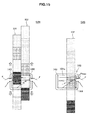
- FIG. 6 is a flow chart showing a procedure of the scroll processing of the item I.
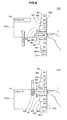
- FIGS. 7 to 9 are views for explaining the scroll processing of the item I.
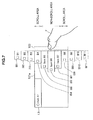
- the menu in the hierarchy A1B including eleven items IB1 to IB11 is displayed.
- the display area of the hierarchical display bar LB is reduced on the left side of the display screen 101a, and the five items I can be displayed on the display screen 101 a.
- the upper and lower ends of the sensor 103 provided along the right side of the display screen 101a are set as scroll areas, and the center of the sensor 103 is set as a non-scroll area.
- the controller 105 determines the contact operation to the scroll area as the input of the scroll operation.
- the items IB4 to IB8 are displayed on the display screen 101a.
- the sensor areas provided along the display areas of the items IB4 and IB8 are set as the scroll areas, and the sensor area provided along the display area of the items IB5 to IB7 is set as the non-scroll area.
- steps S201 and S203 Since the processing of steps S201 and S203 is similar to the selection processing of steps S101 and S103, the processing of step S205 and the subsequent steps will be hereinafter described.
- the controller 105 determines whether the item I on the menu can be scrolled to select the following processing (S205). In FIG. 7 , since the eleven items IB1 to IB11 may not be simultaneously displayed on the display screen 101a, the processing of step S207 is selected.
- the controller 105 focuses and displays the selected item I (S207).
- the controller 105 determines whether or not the contact operation to the sensor 103 is present (S209). When the contact operation is not present, the controller 105 hides the menu (S211). When the contact operation is present, the controller 105 determines whether the contact position is in the scroll area (S213).
- the controller 105 When the contact position is in the scroll area, the controller 105 performs the scroll processing (S215). In the scroll processing, a plurality of the items I are scroll-displayed along the right side of the display screen 101a. As shown in FIG. 8 , when the contact position is in the scroll area at the lower end of the sensor 103, the controller 105 controls the display 101 so that the items IB1 to IB11 are scroll-displayed upward (state S11). When the contact position is in the scroll area at the upper end of the sensor 103, the controller 105 controls the display 101 so that the items IB1 to IB11 are scroll-displayed downward (state S 12).
- the items IB2 to IB6 are first displayed according to the contact operation to the lower end scroll area.
- the items IB7 to IB11 are finally displayed.
- a plurality of the items I are displayed in an undulating manner according to the change of the selected item I.
- the controller 105 may regulate the speed of scrolling the items I in accordance with the detection result (the contact position and the pressing force) of the sensor 103.
- the scrolling speed may be regulated so as to become higher as the contact position to the scroll area is closer to the end of the scroll area.
- the end of the scroll area means the upper end portion of the upper end scroll area and the lower end portion of the lower end scroll area.
- the scrolling speed may be regulated so as to become higher as the pressure applied to the scroll area is increased.
- the pressure should be less than a predetermined pressure. According to this condition, the degree of pressing is gradually increased to reduce the scrolling speed, and pressing with a predetermined pressure is finally performed, whereby the item I can be smoothly selected and determined.
- the controller 105 selects the item I displayed near the contact position (the scroll area) as in the case of the selection processing and controls the display 101 so that the selected item I is displayed while increasing in size.
- the controller 105 determines whether or not the pressing operation with a predetermined pressure to the scroll area or the non-scroll area is present (S217). Since the processing from step S219 to S227 is similar to the selection processing from step S 119 to S 127, the description will be omitted.
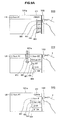
- FIGS. 9A and 9B show a relation between the scroll processing and the movement processing to the upper hierarchy.
- the hierarchical display bar LB is reduced in size, the five items I are displayed (state S14).
- the items I are scroll-displayed in the lower direction in response to the contact operation to the upper end scroll area.
- the scrolling reaches the upper end to display the item I1
- the hierarchical display bar LB returns, and the four items (the items IB1 to IB4) are displayed under the hierarchical display bar LB (state S 15).
- the item I for example, the item IA1 of the hierarchy A selected and determined for the purpose of selecting the last menu (for example, the hierarchy A1B) is displayed under the hierarchical display bar LB.
- the movement processing is started (state S 16), and when the contact operation to the item I is detected following the contact operation to the back button BB, the transition to the scroll processing is performed (state S 14).
- a plurality of the items I are scroll-displayed by the contact operation to the scroll area, whereby the selection and determination operation of the item I can be easily performed.
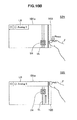
- FIGS. 10A and 10B are views for explaining a variation 1 of the information processing method (application of the selection processing).
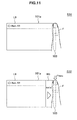
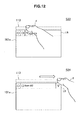
- FIGS. 11 to 13 are views for explaining a variation 2 of the information processing method (improvement of the movement processing).
- FIGS. 14 and 15 are views for explaining a variation 3 of the information processing method (application of the scroll processing).
- FIGS. 10A and 10B show a variation in which the selection processing is applied to the setting of an analog value.
- the operating knob SN When the contact operation is detected near the operating knob SN, the operating knob SN is in the selection state, and setting processing is started.
- the operating knob SN When a change of the contact position is detected while the operating knob SN is in the selection state, the operating knob SN is moved and displayed in synchronism with the change of the contact position (state S23).
- the detection position is changed according to the inclination and posture of the finger F, and therefore, a setting value can be fine-adjusted.
- the slider 8L may be scroll-displayed as in the scroll processing.
- the setting of the analog value is temporarily determined according to the position of the operating knob SN.
- the temporarily determined value is determined as the setting value.
- the operating knob SN is in a non-selection state.
- the setting value returns to the value before the start of the setting processing, and the operating knob SN is displayed while moving to a position corresponding to the setting value (state S25).
- FIGS. 11 to 13 show a variation in which the movement processing to the upper hierarchy is improved.
- the start of the movement processing is instructed in response to operation of covering the sensor 103 (detection of not less than a predetermined value of a contact/proximity area) instead of the pressing operation to the back button BB (state S31).
- a message BD showing the start of the processing (“BACK") is displayed over a predetermined period of time.
- the pressing operation to the sensor 103 is detected in such a state that the message BD is displayed, the movement processing is performed (state S32).
- the movement processing is performed according to operation of changing the contact position to a sensor 113 which is provided above the display screen 101 a and along the hierarchical display bar LB. Namely, while the finger F is in a state of being contact with the display area of each hierarchy on or near the display area of the hierarchical display bar LB (state S33), when the operation of shifting the contact position to the right side is performed, the movement processing is performed (state S34).
- the contact position is shifted to the right side in such a state that the finger F is in contact with the display area of the hierarchy A1B2C "Item C1"
- the menu of the hierarchy A1B (not shown) is displayed instead of the hierarchy A1B2C.
- the movement processing is performed according to the pressing operation to a sensor 123 provided on the other side (for example, the left side) of the display screen 101a.
- the selection of the item I is determined by the pressing operation to the sensor 103 (state S35)
- the movement processing to the upper hierarchy is performed by the pressing operation to the sensor 123 (state S36).
- the sensor 123 may be provided not only on the left side of the display screen but also on the upper or lower side thereof.
- FIGS. 14 and 15 show a variation in which the scroll processing is applied to another object.
- five items I1 to I5 are horizontally arranged and displayed on the display screen 101a.
- a sensor 133 is provided along the lower side of the display screen 101a.
- the scroll areas are set at the left and right ends, and the non-scroll area is set at the center.
- the item I near the contact position is selected according to the contact operation to the non-scroll area, and the selection of the item I is determined according to the pressing operation (state S41).
- a selection cursor C is displayed on the selected item I.
- the contact operation to the scroll area at the left end is performed, the item I is displayed while being scrolled in the right direction according to the contact operation to the scroll area at the left end (state S42).
- the contact operation to the scroll area at the right end is performed, the item I is displayed while being scrolled in the left direction according to the contact operation to the scroll area at the right end (state S43).
- item columns IG1 and IG2 are arranged and displayed respectively on the left and right sides of the display screen 101a.
- the item columns IG1 and IG2 are configured of a plurality of items I.
- Sensors 143 and 144 are provided along the left and right sides of the display screen 101a.
- the items I included in the item columns IG1 and IG2 are, for example, color filters for use in confirmation of visual effects of image processing.
- the left item column IG1 is scroll-displayed in the down/up direction according to the contact operation to the upper/lower portion of the left sensor 143 (state S44).
- the right item column IG2 is scroll-displayed in the down/up direction according to the contact operation to the upper/lower portion of the right sensor 144 (state S44).
- the selection of the items included in the item columns IG1 and IG2 displayed on the left/right side is determined according to the pressing operation to the left/right sensors 143 and 144 (state S45).
Landscapes
- Engineering & Computer Science (AREA)
- Theoretical Computer Science (AREA)
- General Engineering & Computer Science (AREA)
- Human Computer Interaction (AREA)
- Physics & Mathematics (AREA)
- General Physics & Mathematics (AREA)
- Computer Hardware Design (AREA)
- User Interface Of Digital Computer (AREA)
- Position Input By Displaying (AREA)
- Input From Keyboards Or The Like (AREA)
Applications Claiming Priority (1)
| Application Number | Priority Date | Filing Date | Title |
|---|---|---|---|
| JP2009206462A JP2011059820A (ja) | 2009-09-07 | 2009-09-07 | 情報処理装置、情報処理方法、およびプログラム |
Publications (2)
| Publication Number | Publication Date |
|---|---|
| EP2328064A2 true EP2328064A2 (de) | 2011-06-01 |
| EP2328064A3 EP2328064A3 (de) | 2011-12-07 |
Family
ID=43530071
Family Applications (1)
| Application Number | Title | Priority Date | Filing Date |
|---|---|---|---|
| EP20100175128 Withdrawn EP2328064A3 (de) | 2009-09-07 | 2010-09-02 | Informationsverarbeitungsvorrichtung, Informationsverarbeitungsverfahren und Programm |
Country Status (4)
| Country | Link |
|---|---|
| US (1) | US20110057957A1 (de) |
| EP (1) | EP2328064A3 (de) |
| JP (1) | JP2011059820A (de) |
| CN (1) | CN102012781A (de) |
Cited By (1)
| Publication number | Priority date | Publication date | Assignee | Title |
|---|---|---|---|---|
| WO2019160639A1 (en) * | 2018-02-14 | 2019-08-22 | Microsoft Technology Licensing, Llc | Layout for a touch input surface |
Families Citing this family (50)
| Publication number | Priority date | Publication date | Assignee | Title |
|---|---|---|---|---|
| JP5446624B2 (ja) * | 2009-09-07 | 2014-03-19 | ソニー株式会社 | 情報表示装置、情報表示方法及びプログラム |
| JP5158987B2 (ja) * | 2010-05-21 | 2013-03-06 | パナソニック株式会社 | 携帯端末、情報処理方法、及びプログラム |
| JP5782810B2 (ja) | 2011-04-22 | 2015-09-24 | ソニー株式会社 | 情報処理装置、情報処理方法およびプログラム |
| EP2715500A4 (de) * | 2011-05-25 | 2015-04-29 | Nokia Corp | Vorrichtung, verfahren, computerprogramm und benutzerschnittstelle |
| JP2013025567A (ja) | 2011-07-21 | 2013-02-04 | Sony Corp | 情報処理装置、情報処理方法、及びプログラム |
| CA144697S (en) * | 2011-09-12 | 2012-11-22 | Microsoft Corp | Display screen |
| USD664558S1 (en) | 2011-09-12 | 2012-07-31 | Microsoft Corporation | Display screen with animated graphical user interface |
| USD664556S1 (en) | 2011-09-12 | 2012-07-31 | Microsoft Corporation | Display screen with graphical user interface |
| USD664980S1 (en) | 2011-09-12 | 2012-08-07 | Microsoft Corporation | Display screen with graphical user interface |
| US20130179827A1 (en) * | 2011-10-17 | 2013-07-11 | Marcus Eriksson | Electronic device interface |
| KR20130058300A (ko) * | 2011-11-25 | 2013-06-04 | 엘지전자 주식회사 | 전자 기기 |
| USD677269S1 (en) | 2012-01-06 | 2013-03-05 | Microsoft Corporation | Display screen with graphical user interface |
| USD693839S1 (en) | 2012-01-06 | 2013-11-19 | Microsoft Corporation | Display screen with a graphical user interface |
| USD683356S1 (en) | 2012-01-06 | 2013-05-28 | Microsoft Corporation | Display screen with graphical animated user interface |
| CN104137037A (zh) * | 2012-01-29 | 2014-11-05 | 内奥诺德公司 | 触摸屏用的用户接口 |
| US9235318B2 (en) * | 2012-02-01 | 2016-01-12 | Facebook, Inc. | Transitions among hierarchical user-interface layers |
| JP5911321B2 (ja) | 2012-02-02 | 2016-04-27 | キヤノン株式会社 | 表示制御装置および表示制御装置の制御方法 |
| CN103309584A (zh) * | 2012-03-12 | 2013-09-18 | 联想(北京)有限公司 | 一种控制显示屏显示内容的方法、系统及一种电子设备 |
| WO2013137455A1 (ja) * | 2012-03-16 | 2013-09-19 | 株式会社エヌ・ティ・ティ・ドコモ | 情報端末及び実行制御方法 |
| USD723057S1 (en) | 2012-08-07 | 2015-02-24 | Microsoft Corporation | Display screen with animated graphical user interface |
| US8732613B2 (en) | 2012-09-06 | 2014-05-20 | Google Inc. | Dynamic user interface for navigating among GUI elements |
| JP6004855B2 (ja) * | 2012-09-14 | 2016-10-12 | キヤノン株式会社 | 表示制御装置及びその制御方法 |
| KR102121021B1 (ko) * | 2012-11-12 | 2020-06-09 | 삼성전자주식회사 | 세팅 값을 변경하는 전자 장치 및 방법 |
| JP5874625B2 (ja) * | 2012-12-20 | 2016-03-02 | カシオ計算機株式会社 | 入力装置、入力操作方法及び制御プログラム並びに電子機器 |
| US9934523B1 (en) | 2013-03-05 | 2018-04-03 | Square, Inc. | On-device directory search |
| USD788152S1 (en) * | 2013-03-15 | 2017-05-30 | Square, Inc. | Display screen or portion thereof with a graphical user interface |
| US10909590B2 (en) | 2013-03-15 | 2021-02-02 | Square, Inc. | Merchant and item ratings |
| USD730941S1 (en) * | 2013-06-09 | 2015-06-02 | Apple Inc. | Display screen or portion thereof with icon |
| JP6152730B2 (ja) * | 2013-07-18 | 2017-06-28 | 富士ゼロックス株式会社 | 情報処理装置及び情報処理プログラム |
| KR102189451B1 (ko) | 2013-12-27 | 2020-12-14 | 삼성디스플레이 주식회사 | 전자 기기 |
| USD738900S1 (en) * | 2014-03-19 | 2015-09-15 | Wargaming.Net Llp | Display screen with animated graphical user interface |
| CN104020875A (zh) * | 2014-05-13 | 2014-09-03 | 小米科技有限责任公司 | 触控组件、设备控制方法、控制器及电子设备 |
| JP5873131B2 (ja) * | 2014-05-15 | 2016-03-01 | 俊之 増井 | 情報検索装置、情報検索プログラム及び情報検索方法 |
| US10156967B2 (en) * | 2014-05-31 | 2018-12-18 | Apple Inc. | Device, method, and graphical user interface for tabbed and private browsing |
| JP6813254B2 (ja) * | 2014-07-15 | 2021-01-13 | ソニー株式会社 | 情報処理装置、情報処理方法、及びプログラム |
| US10345967B2 (en) * | 2014-09-17 | 2019-07-09 | Red Hat, Inc. | User interface for a device |
| EP3223129B1 (de) * | 2014-11-21 | 2019-09-11 | KYOCERA Document Solutions Inc. | Betriebsvorrichtung und betriebsverfahren |
| US20180065558A1 (en) * | 2015-03-09 | 2018-03-08 | Sharp Kabushiki Kaisha | Mirror, in-vehicle operation device, and vehicle |
| SG10201507782WA (en) * | 2015-09-18 | 2017-04-27 | Paul Michael Whiten | User interface for searching a large data set |
| USD778941S1 (en) | 2016-01-08 | 2017-02-14 | Apple Inc. | Display screen or portion thereof with graphical user interface |
| JP6759094B2 (ja) * | 2016-12-28 | 2020-09-23 | キヤノン株式会社 | 電子機器及びその制御方法 |
| EP3418839B1 (de) * | 2017-06-22 | 2021-10-13 | Enisco by Forcam GmbH | Verfahren zur überwachung einer automatisierungsanlage |
| USD846594S1 (en) | 2017-07-10 | 2019-04-23 | Apple Inc. | Display screen or portion thereof with icon |
| JP6961451B2 (ja) * | 2017-10-12 | 2021-11-05 | キヤノン株式会社 | 電子機器、その制御方法およびプログラム |
| CN109710162B (zh) * | 2018-09-03 | 2021-06-04 | 天翼电子商务有限公司 | 一种利用压力感应触摸屏快速操作选择器组的方法 |
| TWI825383B (zh) * | 2021-01-15 | 2023-12-11 | 華碩電腦股份有限公司 | 電子裝置之控制方法 |
| CN114840131B (zh) * | 2021-01-15 | 2024-09-17 | 华硕电脑股份有限公司 | 电子装置的控制方法 |
| JP2023175426A (ja) * | 2022-05-30 | 2023-12-12 | 株式会社タムロン | レンズシステム、及びプログラム |
| JP7752094B2 (ja) * | 2022-06-22 | 2025-10-09 | 株式会社東海理化電機製作所 | ユーザインタフェース装置、制御装置、およびコンピュータプログラム |
| JP7297174B1 (ja) * | 2023-01-31 | 2023-06-23 | スズキ株式会社 | 自動車用ディスプレイ |
Citations (1)
| Publication number | Priority date | Publication date | Assignee | Title |
|---|---|---|---|---|
| JP2007280461A (ja) | 2006-04-04 | 2007-10-25 | Sony Corp | 再生装置、ユーザインターフェイス制御方法、プログラム |
Family Cites Families (44)
| Publication number | Priority date | Publication date | Assignee | Title |
|---|---|---|---|---|
| US5398045A (en) * | 1990-08-24 | 1995-03-14 | Hughes Aircraft Company | Touch control panel |
| US6131047A (en) * | 1997-12-30 | 2000-10-10 | Ericsson Inc. | Radiotelephones having contact-sensitive user interfaces and methods of operating same |
| US9292111B2 (en) * | 1998-01-26 | 2016-03-22 | Apple Inc. | Gesturing with a multipoint sensing device |
| US6799201B1 (en) * | 2000-09-19 | 2004-09-28 | Motorola, Inc. | Remotely configurable multimedia entertainment and information system for vehicles |
| US6828992B1 (en) * | 1999-11-04 | 2004-12-07 | Koninklijke Philips Electronics N.V. | User interface with dynamic menu option organization |
| JP4631150B2 (ja) * | 2000-10-31 | 2011-02-16 | ソニー株式会社 | 情報処理装置及び方法、並びに記録媒体 |
| US6690365B2 (en) * | 2001-08-29 | 2004-02-10 | Microsoft Corporation | Automatic scrolling |
| US7345671B2 (en) * | 2001-10-22 | 2008-03-18 | Apple Inc. | Method and apparatus for use of rotational user inputs |
| GB2382292A (en) * | 2001-11-17 | 2003-05-21 | Oliver Wallington | Digital display with scrolling means |
| JP2003296015A (ja) * | 2002-01-30 | 2003-10-17 | Casio Comput Co Ltd | 電子機器 |
| US7333092B2 (en) * | 2002-02-25 | 2008-02-19 | Apple Computer, Inc. | Touch pad for handheld device |
| US7126581B2 (en) * | 2002-06-13 | 2006-10-24 | Panasonic Automotive Systems Company Of America | Multimode multizone interface |
| US7126580B2 (en) * | 2002-06-13 | 2006-10-24 | Panasonic Automotive Systems Company Of America | Interface for a multifunctional system |
| US7739597B2 (en) * | 2003-02-24 | 2010-06-15 | Microsoft Corporation | Interactive media frame display |
| JP4161814B2 (ja) * | 2003-06-16 | 2008-10-08 | ソニー株式会社 | 入力方法および入力装置 |
| US8373660B2 (en) * | 2003-07-14 | 2013-02-12 | Matt Pallakoff | System and method for a portable multimedia client |
| JP4179269B2 (ja) * | 2004-05-07 | 2008-11-12 | ソニー株式会社 | 携帯型電子機器、表示方法、そのプログラム及び表示操作装置 |
| JP2008507060A (ja) * | 2004-07-19 | 2008-03-06 | クリエイティブ テクノロジー リミテッド | タッチスクロール方法及び装置 |
| KR100594456B1 (ko) * | 2004-11-15 | 2006-07-03 | 엘지전자 주식회사 | 전자장치의 메뉴 리스트 검색 방법 |
| US20060232554A1 (en) * | 2005-04-14 | 2006-10-19 | Creative Technology Ltd. | Scrolling interface for media player |
| CN100583012C (zh) * | 2005-09-21 | 2010-01-20 | 鸿富锦精密工业(深圳)有限公司 | 交叉式菜单显示装置及其显示控制方法 |
| CN100592247C (zh) * | 2005-09-21 | 2010-02-24 | 鸿富锦精密工业(深圳)有限公司 | 多层次菜单显示装置及其显示控制方法 |
| US7683918B2 (en) * | 2006-03-17 | 2010-03-23 | Motorola, Inc. | User interface and method therefor |
| US9395905B2 (en) * | 2006-04-05 | 2016-07-19 | Synaptics Incorporated | Graphical scroll wheel |
| US7556204B2 (en) * | 2006-04-19 | 2009-07-07 | Nokia Corproation | Electronic apparatus and method for symbol input |
| US8564543B2 (en) * | 2006-09-11 | 2013-10-22 | Apple Inc. | Media player with imaged based browsing |
| TWI324474B (en) * | 2006-09-28 | 2010-05-01 | Htc Corp | Item navigation and selection methods, and machine readable medium thereof |
| JP5191115B2 (ja) * | 2006-10-04 | 2013-04-24 | イーストマン コダック カンパニー | ユーザインタフェース装置およびデジタルカメラ |
| US20080158164A1 (en) * | 2006-12-27 | 2008-07-03 | Franklin Electronic Publishers, Inc. | Portable media storage and playback device |
| KR100867957B1 (ko) * | 2007-01-22 | 2008-11-11 | 엘지전자 주식회사 | 이동통신 단말기 및 그 제어방법 |
| US20080186287A1 (en) * | 2007-02-05 | 2008-08-07 | Nokia Corporation | User input device |
| US20080192059A1 (en) * | 2007-02-09 | 2008-08-14 | Microsoft Corporation | Multi-user display |
| US20080204412A1 (en) * | 2007-02-22 | 2008-08-28 | Peter On | User interface navigation mechanism and method of using the same |
| JP2008204402A (ja) * | 2007-02-22 | 2008-09-04 | Eastman Kodak Co | ユーザインターフェース装置 |
| KR20080079007A (ko) * | 2007-02-26 | 2008-08-29 | 삼성전자주식회사 | 사용자 명령이 입력가능한 전자장치 |
| US8350815B2 (en) * | 2007-06-20 | 2013-01-08 | Sony Mobile Communications | Portable communication device including touch input with scrolling function |
| US7941758B2 (en) * | 2007-09-04 | 2011-05-10 | Apple Inc. | Animation of graphical objects |
| US9767681B2 (en) * | 2007-12-12 | 2017-09-19 | Apple Inc. | Handheld electronic devices with remote control functionality and gesture recognition |
| KR101453914B1 (ko) * | 2008-01-16 | 2014-10-24 | 삼성전자주식회사 | 복수의 리스트를 표시하기 위한 gui 제공방법 및 이를적용한 멀티미디어 기기 |
| US20100008031A1 (en) * | 2008-07-08 | 2010-01-14 | Emblaze Mobile Ltd | Ergonomic handheld device |
| US20100073303A1 (en) * | 2008-09-24 | 2010-03-25 | Compal Electronics, Inc. | Method of operating a user interface |
| JP5446624B2 (ja) * | 2009-09-07 | 2014-03-19 | ソニー株式会社 | 情報表示装置、情報表示方法及びプログラム |
| JP2011205562A (ja) * | 2010-03-26 | 2011-10-13 | Sony Corp | 画像表示装置および画像表示方法 |
| US8351993B2 (en) * | 2010-10-08 | 2013-01-08 | Research In Motion Limited | Device having side sensor |
-
2009
- 2009-09-07 JP JP2009206462A patent/JP2011059820A/ja not_active Withdrawn
-
2010
- 2010-08-30 US US12/871,496 patent/US20110057957A1/en not_active Abandoned
- 2010-08-31 CN CN2010102715782A patent/CN102012781A/zh active Pending
- 2010-09-02 EP EP20100175128 patent/EP2328064A3/de not_active Withdrawn
Patent Citations (1)
| Publication number | Priority date | Publication date | Assignee | Title |
|---|---|---|---|---|
| JP2007280461A (ja) | 2006-04-04 | 2007-10-25 | Sony Corp | 再生装置、ユーザインターフェイス制御方法、プログラム |
Cited By (2)
| Publication number | Priority date | Publication date | Assignee | Title |
|---|---|---|---|---|
| WO2019160639A1 (en) * | 2018-02-14 | 2019-08-22 | Microsoft Technology Licensing, Llc | Layout for a touch input surface |
| US10761569B2 (en) | 2018-02-14 | 2020-09-01 | Microsoft Technology Licensing Llc | Layout for a touch input surface |
Also Published As
| Publication number | Publication date |
|---|---|
| CN102012781A (zh) | 2011-04-13 |
| JP2011059820A (ja) | 2011-03-24 |
| EP2328064A3 (de) | 2011-12-07 |
| US20110057957A1 (en) | 2011-03-10 |
Similar Documents
| Publication | Publication Date | Title |
|---|---|---|
| EP2328064A2 (de) | Informationsverarbeitungsvorrichtung, Informationsverarbeitungsverfahren und Programm | |
| JP5532174B2 (ja) | スライドバー表示制御装置及びスライドバー表示制御方法 | |
| CN101650634B (zh) | 显示设备和显示方法 | |
| US8775966B2 (en) | Electronic device and method with dual mode rear TouchPad | |
| JP4880304B2 (ja) | 情報処理装置および表示方法 | |
| CN104520798B (zh) | 便携电子设备及其控制方法和程序 | |
| EP2696270B1 (de) | Berührungsbildschirmvorrichtung, anzeigeverfahren dafür und anzeigeprogramm | |
| US20070013672A1 (en) | Method and apparatus for providing touch screen user interface, and electronic devices including the same | |
| JP5780438B2 (ja) | 電子機器、位置指定方法及びプログラム | |
| EP2282257B1 (de) | Anzeigevorrichtung, Informationseingabeverfahren und Programm | |
| KR20110041915A (ko) | 데이터 표시 방법 및 그를 수행하는 단말기 | |
| JP2003330613A (ja) | 携帯型情報端末装置、表示制御情報、及び表示制御方法 | |
| CN102160025A (zh) | 通过操作多点触摸屏幕上的图形对象来控制电子设备的装置 | |
| KR20140117469A (ko) | 시선 상호작용을 위한 시스템 | |
| JP2012208645A (ja) | 電子機器 | |
| US9274702B2 (en) | Drawing device, drawing control method, and drawing control program for drawing graphics in accordance with input through input device that allows for input at multiple points | |
| JPWO2009031213A1 (ja) | 携帯端末装置及び表示制御方法 | |
| JP2011134273A (ja) | 情報処理装置、情報処理方法およびプログラム | |
| JP6691426B2 (ja) | 携帯端末装置 | |
| JP5628991B2 (ja) | 表示装置、表示方法、及び表示プログラム | |
| JP6133554B2 (ja) | 電子機器、機器及び方法 | |
| KR101661890B1 (ko) | 휴대 단말기의 사용자 인터페이스 제공 방법 | |
| JP6112147B2 (ja) | 電子機器、及び位置指定方法 | |
| JP2021064330A (ja) | 表示制御装置、画像表示システムおよびプログラム | |
| CN113424143A (zh) | 滚动以选择一个实体 |
Legal Events
| Date | Code | Title | Description |
|---|---|---|---|
| PUAI | Public reference made under article 153(3) epc to a published international application that has entered the european phase |
Free format text: ORIGINAL CODE: 0009012 |
|
| 17P | Request for examination filed |
Effective date: 20100923 |
|
| AK | Designated contracting states |
Kind code of ref document: A2 Designated state(s): AL AT BE BG CH CY CZ DE DK EE ES FI FR GB GR HR HU IE IS IT LI LT LU LV MC MK MT NL NO PL PT RO SE SI SK SM TR |
|
| AX | Request for extension of the european patent |
Extension state: BA ME RS |
|
| PUAL | Search report despatched |
Free format text: ORIGINAL CODE: 0009013 |
|
| AK | Designated contracting states |
Kind code of ref document: A3 Designated state(s): AL AT BE BG CH CY CZ DE DK EE ES FI FR GB GR HR HU IE IS IT LI LT LU LV MC MK MT NL NO PL PT RO SE SI SK SM TR |
|
| AX | Request for extension of the european patent |
Extension state: BA ME RS |
|
| RIC1 | Information provided on ipc code assigned before grant |
Ipc: G06F 3/048 20060101ALI20111103BHEP Ipc: G06F 1/16 20060101ALI20111103BHEP Ipc: G06F 3/033 20060101AFI20111103BHEP |
|
| 17Q | First examination report despatched |
Effective date: 20121122 |
|
| RIC1 | Information provided on ipc code assigned before grant |
Ipc: G06F 3/0488 20130101ALI20150512BHEP Ipc: G06F 3/0485 20130101ALI20150512BHEP Ipc: G06F 1/16 20060101ALI20150512BHEP Ipc: G06F 3/0484 20130101ALI20150512BHEP Ipc: G06F 3/0354 20130101ALI20150512BHEP Ipc: G06F 3/0482 20130101AFI20150512BHEP |
|
| GRAP | Despatch of communication of intention to grant a patent |
Free format text: ORIGINAL CODE: EPIDOSNIGR1 |
|
| RIC1 | Information provided on ipc code assigned before grant |
Ipc: G06F 3/0354 20130101ALI20150826BHEP Ipc: G06F 3/0488 20130101ALI20150826BHEP Ipc: G06F 3/0485 20130101ALI20150826BHEP Ipc: G06F 3/0482 20130101AFI20150826BHEP Ipc: G06F 3/0484 20130101ALI20150826BHEP Ipc: G06F 1/16 20060101ALI20150826BHEP |
|
| INTG | Intention to grant announced |
Effective date: 20150909 |
|
| STAA | Information on the status of an ep patent application or granted ep patent |
Free format text: STATUS: THE APPLICATION IS DEEMED TO BE WITHDRAWN |
|
| 18D | Application deemed to be withdrawn |
Effective date: 20160120 |