EP2169542A2 - Computerlesbares Speichermedium mit darauf gespeichertem Aktivierungssteuerungsprogramm und Aktivierungssteuerung - Google Patents
Computerlesbares Speichermedium mit darauf gespeichertem Aktivierungssteuerungsprogramm und Aktivierungssteuerung Download PDFInfo
- Publication number
- EP2169542A2 EP2169542A2 EP08021814A EP08021814A EP2169542A2 EP 2169542 A2 EP2169542 A2 EP 2169542A2 EP 08021814 A EP08021814 A EP 08021814A EP 08021814 A EP08021814 A EP 08021814A EP 2169542 A2 EP2169542 A2 EP 2169542A2
- Authority
- EP
- European Patent Office
- Prior art keywords
- software
- see
- predetermined number
- display
- objects
- Prior art date
- Legal status (The legal status is an assumption and is not a legal conclusion. Google has not performed a legal analysis and makes no representation as to the accuracy of the status listed.)
- Ceased
Links
Images






Classifications
-
- G—PHYSICS
- G06—COMPUTING OR CALCULATING; COUNTING
- G06F—ELECTRIC DIGITAL DATA PROCESSING
- G06F3/00—Input arrangements for transferring data to be processed into a form capable of being handled by the computer; Output arrangements for transferring data from processing unit to output unit, e.g. interface arrangements
- G06F3/01—Input arrangements or combined input and output arrangements for interaction between user and computer
- G06F3/048—Interaction techniques based on graphical user interfaces [GUI]
- G06F3/0481—Interaction techniques based on graphical user interfaces [GUI] based on specific properties of the displayed interaction object or a metaphor-based environment, e.g. interaction with desktop elements like windows or icons, or assisted by a cursor's changing behaviour or appearance
- G06F3/0482—Interaction with lists of selectable items, e.g. menus
-
- A—HUMAN NECESSITIES
- A63—SPORTS; GAMES; AMUSEMENTS
- A63F—CARD, BOARD, OR ROULETTE GAMES; INDOOR GAMES USING SMALL MOVING PLAYING BODIES; VIDEO GAMES; GAMES NOT OTHERWISE PROVIDED FOR
- A63F13/00—Video games, i.e. games using an electronically generated display having two or more dimensions
- A63F13/20—Input arrangements for video game devices
-
- A—HUMAN NECESSITIES
- A63—SPORTS; GAMES; AMUSEMENTS
- A63F—CARD, BOARD, OR ROULETTE GAMES; INDOOR GAMES USING SMALL MOVING PLAYING BODIES; VIDEO GAMES; GAMES NOT OTHERWISE PROVIDED FOR
- A63F13/00—Video games, i.e. games using an electronically generated display having two or more dimensions
- A63F13/20—Input arrangements for video game devices
- A63F13/21—Input arrangements for video game devices characterised by their sensors, purposes or types
- A63F13/214—Input arrangements for video game devices characterised by their sensors, purposes or types for locating contacts on a surface, e.g. floor mats or touch pads
- A63F13/2145—Input arrangements for video game devices characterised by their sensors, purposes or types for locating contacts on a surface, e.g. floor mats or touch pads the surface being also a display device, e.g. touch screens
-
- A—HUMAN NECESSITIES
- A63—SPORTS; GAMES; AMUSEMENTS
- A63F—CARD, BOARD, OR ROULETTE GAMES; INDOOR GAMES USING SMALL MOVING PLAYING BODIES; VIDEO GAMES; GAMES NOT OTHERWISE PROVIDED FOR
- A63F13/00—Video games, i.e. games using an electronically generated display having two or more dimensions
- A63F13/25—Output arrangements for video game devices
- A63F13/26—Output arrangements for video game devices having at least one additional display device, e.g. on the game controller or outside a game booth
-
- G—PHYSICS
- G06—COMPUTING OR CALCULATING; COUNTING
- G06F—ELECTRIC DIGITAL DATA PROCESSING
- G06F3/00—Input arrangements for transferring data to be processed into a form capable of being handled by the computer; Output arrangements for transferring data from processing unit to output unit, e.g. interface arrangements
- G06F3/01—Input arrangements or combined input and output arrangements for interaction between user and computer
- G06F3/048—Interaction techniques based on graphical user interfaces [GUI]
- G06F3/0481—Interaction techniques based on graphical user interfaces [GUI] based on specific properties of the displayed interaction object or a metaphor-based environment, e.g. interaction with desktop elements like windows or icons, or assisted by a cursor's changing behaviour or appearance
- G06F3/04817—Interaction techniques based on graphical user interfaces [GUI] based on specific properties of the displayed interaction object or a metaphor-based environment, e.g. interaction with desktop elements like windows or icons, or assisted by a cursor's changing behaviour or appearance using icons
-
- G—PHYSICS
- G06—COMPUTING OR CALCULATING; COUNTING
- G06F—ELECTRIC DIGITAL DATA PROCESSING
- G06F3/00—Input arrangements for transferring data to be processed into a form capable of being handled by the computer; Output arrangements for transferring data from processing unit to output unit, e.g. interface arrangements
- G06F3/01—Input arrangements or combined input and output arrangements for interaction between user and computer
- G06F3/048—Interaction techniques based on graphical user interfaces [GUI]
- G06F3/0484—Interaction techniques based on graphical user interfaces [GUI] for the control of specific functions or operations, e.g. selecting or manipulating an object, an image or a displayed text element, setting a parameter value or selecting a range
-
- G—PHYSICS
- G06—COMPUTING OR CALCULATING; COUNTING
- G06F—ELECTRIC DIGITAL DATA PROCESSING
- G06F3/00—Input arrangements for transferring data to be processed into a form capable of being handled by the computer; Output arrangements for transferring data from processing unit to output unit, e.g. interface arrangements
- G06F3/01—Input arrangements or combined input and output arrangements for interaction between user and computer
- G06F3/048—Interaction techniques based on graphical user interfaces [GUI]
- G06F3/0484—Interaction techniques based on graphical user interfaces [GUI] for the control of specific functions or operations, e.g. selecting or manipulating an object, an image or a displayed text element, setting a parameter value or selecting a range
- G06F3/0485—Scrolling or panning
-
- G—PHYSICS
- G06—COMPUTING OR CALCULATING; COUNTING
- G06F—ELECTRIC DIGITAL DATA PROCESSING
- G06F3/00—Input arrangements for transferring data to be processed into a form capable of being handled by the computer; Output arrangements for transferring data from processing unit to output unit, e.g. interface arrangements
- G06F3/01—Input arrangements or combined input and output arrangements for interaction between user and computer
- G06F3/048—Interaction techniques based on graphical user interfaces [GUI]
- G06F3/0484—Interaction techniques based on graphical user interfaces [GUI] for the control of specific functions or operations, e.g. selecting or manipulating an object, an image or a displayed text element, setting a parameter value or selecting a range
- G06F3/0485—Scrolling or panning
- G06F3/04855—Interaction with scrollbars
-
- G—PHYSICS
- G06—COMPUTING OR CALCULATING; COUNTING
- G06F—ELECTRIC DIGITAL DATA PROCESSING
- G06F3/00—Input arrangements for transferring data to be processed into a form capable of being handled by the computer; Output arrangements for transferring data from processing unit to output unit, e.g. interface arrangements
- G06F3/01—Input arrangements or combined input and output arrangements for interaction between user and computer
- G06F3/048—Interaction techniques based on graphical user interfaces [GUI]
- G06F3/0487—Interaction techniques based on graphical user interfaces [GUI] using specific features provided by the input device, e.g. functions controlled by the rotation of a mouse with dual sensing arrangements, or of the nature of the input device, e.g. tap gestures based on pressure sensed by a digitiser
- G06F3/0488—Interaction techniques based on graphical user interfaces [GUI] using specific features provided by the input device, e.g. functions controlled by the rotation of a mouse with dual sensing arrangements, or of the nature of the input device, e.g. tap gestures based on pressure sensed by a digitiser using a touch-screen or digitiser, e.g. input of commands through traced gestures
- G06F3/04883—Interaction techniques based on graphical user interfaces [GUI] using specific features provided by the input device, e.g. functions controlled by the rotation of a mouse with dual sensing arrangements, or of the nature of the input device, e.g. tap gestures based on pressure sensed by a digitiser using a touch-screen or digitiser, e.g. input of commands through traced gestures for inputting data by handwriting, e.g. gesture or text
-
- G—PHYSICS
- G06—COMPUTING OR CALCULATING; COUNTING
- G06F—ELECTRIC DIGITAL DATA PROCESSING
- G06F3/00—Input arrangements for transferring data to be processed into a form capable of being handled by the computer; Output arrangements for transferring data from processing unit to output unit, e.g. interface arrangements
- G06F3/01—Input arrangements or combined input and output arrangements for interaction between user and computer
- G06F3/048—Interaction techniques based on graphical user interfaces [GUI]
- G06F3/0487—Interaction techniques based on graphical user interfaces [GUI] using specific features provided by the input device, e.g. functions controlled by the rotation of a mouse with dual sensing arrangements, or of the nature of the input device, e.g. tap gestures based on pressure sensed by a digitiser
- G06F3/0488—Interaction techniques based on graphical user interfaces [GUI] using specific features provided by the input device, e.g. functions controlled by the rotation of a mouse with dual sensing arrangements, or of the nature of the input device, e.g. tap gestures based on pressure sensed by a digitiser using a touch-screen or digitiser, e.g. input of commands through traced gestures
- G06F3/04886—Interaction techniques based on graphical user interfaces [GUI] using specific features provided by the input device, e.g. functions controlled by the rotation of a mouse with dual sensing arrangements, or of the nature of the input device, e.g. tap gestures based on pressure sensed by a digitiser using a touch-screen or digitiser, e.g. input of commands through traced gestures by partitioning the display area of the touch-screen or the surface of the digitising tablet into independently controllable areas, e.g. virtual keyboards or menus
-
- G—PHYSICS
- G06—COMPUTING OR CALCULATING; COUNTING
- G06F—ELECTRIC DIGITAL DATA PROCESSING
- G06F9/00—Arrangements for program control, e.g. control units
- G06F9/06—Arrangements for program control, e.g. control units using stored programs, i.e. using an internal store of processing equipment to receive or retain programs
- G06F9/44—Arrangements for executing specific programs
- G06F9/451—Execution arrangements for user interfaces
-
- A—HUMAN NECESSITIES
- A63—SPORTS; GAMES; AMUSEMENTS
- A63F—CARD, BOARD, OR ROULETTE GAMES; INDOOR GAMES USING SMALL MOVING PLAYING BODIES; VIDEO GAMES; GAMES NOT OTHERWISE PROVIDED FOR
- A63F2300/00—Features of games using an electronically generated display having two or more dimensions, e.g. on a television screen, showing representations related to the game
- A63F2300/20—Features of games using an electronically generated display having two or more dimensions, e.g. on a television screen, showing representations related to the game characterised by details of the game platform
- A63F2300/206—Game information storage, e.g. cartridges, CD ROM's, DVD's, smart cards
-
- G—PHYSICS
- G06—COMPUTING OR CALCULATING; COUNTING
- G06F—ELECTRIC DIGITAL DATA PROCESSING
- G06F3/00—Input arrangements for transferring data to be processed into a form capable of being handled by the computer; Output arrangements for transferring data from processing unit to output unit, e.g. interface arrangements
- G06F3/01—Input arrangements or combined input and output arrangements for interaction between user and computer
- G06F3/048—Interaction techniques based on graphical user interfaces [GUI]
- G06F3/0481—Interaction techniques based on graphical user interfaces [GUI] based on specific properties of the displayed interaction object or a metaphor-based environment, e.g. interaction with desktop elements like windows or icons, or assisted by a cursor's changing behaviour or appearance
Definitions
- Japanese Laid-Open Patent Publication No. 2004-348601 discloses an information processing apparatus in which a curvature slider which can be slid by a user is displayed, and the number of application icons which can be simultaneously displayed in a normal display area can be increased in accordance with the curvature slider being slid from left to right, without reducing the size of each application icon.
- An activation control program (240) is an activation control program executed by a predetermined information processing apparatus (10) which selects and activates one of a first predetermined number (for example, 40) of pieces of software, and the first predetermined number of pieces of software is greater than or equal to two.
- An activation control program is the activation control program based on the third aspect, and thefirstdisplaycontrolmeans (218) displays a first object (871c, 881c: see FIG. 24 , FIG. 25 ) corresponding to the subject software, in a manner depending on a determination result obtained from the enablement determination means (211, 214), and the first object corresponding to the subject software is among the first objects corresponding to the first predetermined number of pieces of software. Therefore, it is possible to easily determine, in a visual manner, whether or not the predetermined function is able to be used, based on the display state of the first object (871c, 881c: see FIG. 24 , FIG. 25 ) displayed in the first display area.
- the second objects represent the respective software, and displayed in the second display area.
- the respective software may not be identified by the second obj ects (for example, one object may correspond to different pieces of software). However, the respective software may be identified by the second objects.
- a certain second object corresponding to the subject software may be the "position designation image", all the second objects do not correspond to the "position designation image".
- the second object corresponds to, for example, the objects, 802a and 802b, and, among them, the second object 802b corresponds to the position designation image, and the second object 802a and the third object 802c do not correspond to the position designation image.
- An activation control program is the activation control program based on the sixth aspect, and, when an operation input for selecting the second object (832b: see FIG. 20 ) which corresponds to the subject software and is displayed by the second display control means (219) is received, the display change means (214,217) displays, in the first display area, a first object (841c: see FIG. 21 ) which corresponds to the subject software and is among the first objects corresponding to the first predetermined number of pieces of software, by means of the first display control means (218). Therefore, it is possible to easily activate the subject software by using the second predetermined number of first objects displayed in the first display area.
- the activation control program according to a sixteenth aspect is the activation control program based on the first aspect, and the display change means (214, 217) receives an operation input from outside by displaying the position designation image (842b: see FIG. 21 ) in the second display area (842: see FIG. 21 ), and displays, based on the operation input having been received, a first object (841c: see FIG. 21 ) which corresponds to the subject software and is among the first objects corresponding to the first predetermined number of pieces of software, in the first display area (841: see FIG. 21 ). Therefore, it is possible to easily activate the subject software.
- the activation control program is the activation control program based on the first aspect, and, when the computer (21) performs a predetermined process, the second display control means (219) sets, as the subject software, software corresponding to the predetermined process, and displays the position designation image at a position which corresponds to a position, of the software corresponding to the predetermined process, in the order set for the first predetermined number of pieces of software. Therefore, it is possible to easily activate software associated with a predetermined process (for example, detection as to whether or not the storage medium (17) is mounted) performed by the computer (21).
- a predetermined process for example, detection as to whether or not the storage medium (17) is mounted
- the third object is an object which does not correspond to any of the first predeterminednumber (for example, 16) of pieces of software, and, in an example shown in FIG. 20 , the third object corresponds to objects (832a) which are displayed, when the memory card 17 (see FIG. 2 ) is not mounted, at positions (the third position from the left) corresponding to positions-in-order for card programs (programs stored in the memory card 17) to be displayed when the memory card 17 is mounted.
- the activation control program according to a thirtieth aspect is the activation control program based on the first aspect, and at least one of the display change means (214, 217) and the activation execution means (220) receives an operation input through a touch panel (15) which is integrated with the monitor (12). Therefore, it is possible to improve operability.
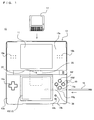
- FIG. 1 is an external view of a game apparatus according to an embodiment of the present invention.
- the present invention is applicable not only to a hand-held game apparatus but also to a stationary game apparatus. Further, the present invention is applicable not only to a game apparatus but also to an information processing apparatus (for example, personal computer, a mobile telephone, a television receiver, a DVD (Digital Versatile Disc) player, and the like) having a function for selecting and executing software such as an application program.
- an information processing apparatus for example, personal computer, a mobile telephone, a television receiver, a DVD (Digital Versatile Disc) player, and the like
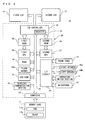
- a cross switch 14a On the lower housing 13b, a cross switch 14a, a start switch 14b, a select switch 14c, an A button 14d, a B button 14e, an X button 14f, and a Y button 14g are provided as input devices. Further, on a side surface of the lower housing 13b, an L button and an R button, which are not shown, are provided. Further, as another input device, a touch panel 15 is provided on a screen of the second LCD 12. On side surfaces of the lower housing 13b, a power switch 19, an insertion opening 35 (indicated by a dashed-dotted line shown in FIG. 1 ) for inserting a memory card 17, and an insertion opening 36 (indicated by a dashed-line shown in FIG. 1 ) for accommodating a stick 16 are provided.
- the touch panel 15 may be of any type including, for example, a resistive film type, an optical type (infrared type), or a capacitive coupling type.
- the touch panel 15 may be operated by using a finger or the like instead of the stick 16.
- the touch panel 15 also has a resolution (detection accuracy) of 256 dots ⁇ 192 dots so as to correspond to the resolution of the second LCD 12.
- the resolution of the touch panel 15 may not necessarily be the same as the resolution of the second LCD 12.
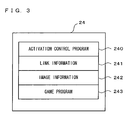
- FIG. 3 shows a memory map of the RAM 24.
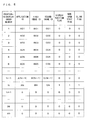
- the RAM 24 stores the activation control program 240 of the present invention, link information, and the image information. Further, the game program information is read from the flash memory 24a and stored in the RAM 24.
- the link information, the image information, and the game program information are stored in a link information storage section 241, an image storage section 242, and a software storage section 243, respectively (see FIG. 4 ).
- the link information is used for associating each game program stored in the flash memory 24a, with the image information, position-in-display-order number information, and the like.
- the image information represents a first object, a second object, and a third object, which will be described below.
- the game program information represents, for example, a game program downloaded through the Internet or the like, and the game program information is read from the flash memory 24a and stored as described above.
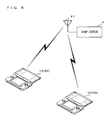
- FIG. 6 is a diagram illustrating an exemplary manner in which communication with a shop server is made.
- the shop server 4 is connected to the game apparatus 10 (the wireless communication section 34) through an antenna 41 so as to enable wireless communication therebetween.
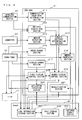
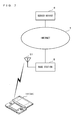
- the software acquisition section 212 (corresponding to acquisition determination means) is a functional section for receiving an operation input from a user through the touch panel 15 or the like, and downloading and acquiring a game program from the server device 6 through the Internet 7 and the base station 5 (see FIG. 7 ) based on the received operation input, and storing the game program in the flash memory 24a (or the software storage section 243), when the communication enablement determination section 211 determines that the communication with the server device 6 (see FIG. 7 ) is enabled. Further, the software acquisition section 212 determines whether or not a game program has been acquired from the server device 6.
- the order change section 215 (corresponding to order change means) is a functional section for receiving an operation input from a user through the touch panel 15 or the like, and changing display order in which the first objects are to be displayed in the first display area 801 (see FIG. 17 ) based on the received operation input.
- the order change section 215 receives an operation input from a user through the touch panel 15 or the like, and changes, based on the received operation input, the positions-in-display order by changing the position-in-display-order numbers, as shown in FIG. 5 , each of which is associated with the application ID information, the first image information, and the like.
- the display order in which the first objects are displayed in the first display area is changed based on the operation input, and therefore the display order in which the first objects are displayed can be changed as desired by a user.
- the number increasing section 216 increase, by one, the third predetermined number which is a maximum number of pieces of software which can be activated, that is, the third predetermined number is increased from 39 to 40.
- the display change section 217 (corresponding to a portion of display change means) is a functional section for receiving, through the touch panel 15 or the like, an operation input made by a user by using the second object 802b (corresponding to a "position designation image") displayed in the second display area 802 (see FIG. 17 ), and for operating so as to cause the first display control section 218 to display the first object 801c in the first display area 801 (see FIG. 17 ), based on the received operation input.
- the display change section 217 operates so as to cause the first display control section 218 to display, in the first display area 841 (see FIG. 21 ), the first object 841c (see FIG. 21 ) corresponding to the predetermined game program.
- the display change section 217 scrolls the first display area 801 so as to cause the first display control section 218 to display the second predetermined number of first objects. For example, when the slide frame 803 is touched by using the stick 16 and slid rightward, the display change section 217 scrolls leftward the first display area 801 in which the second predetermined number of first objects are displayed, and displays the scrolled first display area.
- the slide frame 803 see FIG. 17
- the second display control section 219 displays the second object 802b (see FIG. 17 ) corresponding to the subj ect software so as to be blinked.
- the first display control section 219 may display the second object in such a manner as to enable determination as to whether or not each second object corresponds to the subject software.
- the second display control section 219 may display the second object corresponding to the subject software by using a specific color (for example, red color).
- the second display control section 219 may display the second object corresponding to the subject software so as to have a specific size (for example, so as to have a size which is 1.5 times larger than the size of the second object of a game program which does not correspond to the subject software).
- the second display control section 219 may display, as an animation, the second object corresponding to the subject software.
- the activation execution section 220 activates, when a position of the first object 801c on the touched panel 15 is touched by using the stick 16, a game program corresponding to the first object 801c. Further, when a position of the first object 801b on the touch panel 15 is touched by using the stick 16, the activation execution section 220 scrolls rightward the first display area 801 in which the second predetermined number of the first objects are displayed, by a distance corresponding to one obj ect, by means of the first display control section 218, so as to display the first object 801b at almost the center of the screen.
- the activation execution section 220 scrolls leftward the first display area 801 in which the second predetermined number of the first objects are displayed, by a distance corresponding to one object, by means of the first display control section 218, so as to display the first object 801d at almost the center of the screen.
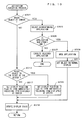
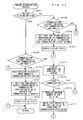
- step S117 the display change section 217 or the like performs a second scrolling process for scrolling and displaying the first objects based on an operation input made on the slide frame.
- step S119 the communication enablement determination section 211 or the like performs a beacon determination process which is a process based on a state of a communication with the shop server 4 (see FIG. 6 ).
- step S121 the medium detection section 213 or the like performs a card determination process which is a process based on whether or not the memory card 17 is mounted.
- step S123 the order change section 215 or the like performs order change determination process which is a process based on the order change operation for the first objects, and the process is returned to step S103, and step S103 and the process steps subsequent thereto are repeated.
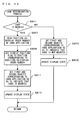
- step S303 the activation execution section 220 selects, as a game program to be executed, a game program corresponding to the first object having been touched in step S301.
- the process advances to step S307.
- step S313 the activation execution section 220 determines whether or not the first object displayed to the right of the center is touched by using the stick 16. When it is determined that the first obj ect displayed to the right of the center is touched (YES in S313), the process advances to step S315. When it is determined that the first object displayed to the left of the center is touched (NO in S313), the process advances to step S317. In step S315, the activation execution section 220 sets, to "1", the display position flag (see FIG.
- step S319 the first display control section 218 and the second display control section 219 update display states of the first object and the second object, respectively, based on the link information stored in the link information storage section 241.
- step S319 the process is returned to step S103 shown in the flow chart of FIG. 8 .
- step S405 the first display control section 218 and the second display control section 219 update display states of the first object and the second object, respectively, based on the link information stored in the link information storage section 241.
- step S405 the process is returned to step S103 shown in the flow chart of FIG. 8 .
- step S607 the display change section 217 detects for a position of the slide frame.
- step S609 the display change section 217 reads, from the link information storage section 241, the position-in-display-order number of the second object positioned at the center of the slide frame detected in step S607.
- step S611 the display change section 217 sets, to "1", the display position flag of an item which has the position-in-display-order number having been read in step S609, and which is included in the link information stored in the link information storage section 241, and sets, to "0", the display position flag of each of the other items which are included in the link information stored in the link information storage section 241.
- step S613 the first display control section 218 and the second display control section 219 update display states of the first object and the second object, respectively, based on the link information stored in the link information storage section 241.
- step S617 the display change section 217 returns the display state of the slide frame to a normal display state by means of the second display control section 219. When the process step of step S617 is ended, the process is returned to step S103 shown in the flow chart of FIG. 8 .
- step S705 the subject software determination section 214 writes, in the link information stored in the link information storage section 241, an image ID indicating that the communication is not enabled, as the first image ID representing identification information of image data of the first object corresponding to the communication software for executing the communication with the shop server 4, and sets, to "0", the blink flag for the communication software for executing the communication with the shop server 4 (see FIG. 5 and FIG. 24 ).
- step S707 the first display control section 218 and the second display control section 219 update display states of the first obj ect and the second obj ect, respectively, based on the link information stored in the link information storage section 241.
- the process step of step S707 is ended, the process is returned to step S121 shown in the flow chart of FIG. 8 .
- the process is returned to step S121 shown in the flow chart of FIG. 8 .
- the process advances to step S715.
- step S715 the number increasing section 216 increases, by one, the third predetermined number which is a maximum number of pieces of software which can be activated, that is, the number increasing section 216 increases the third predetermined number from 39 to 40.
- step S717 the number increasing section 216 writes, in the link information stored in the link information storage section 241, the application ID corresponding to the communication software for executing the communication with the shop server 4 (see FIG. 5 ).
- the process advances to step S719.
- step S719 the subj ect software determination section 214 reads, from the link information stored in the link information storage section 241, the position-in-display-order number of the application ID corresponding to the communication software for executing the communication with the shop server 4.
- step S721 the subject software determination section 214 writes, in the link information stored in the link information storage section 241, an image ID indicating that the communication is enabled, as the first image ID representing the identification information of image data of the first object corresponding to the communication software for executing the communication with the shop server 4, and sets, to "1", the blink flag for the communication software for executing the communication with the shop server 4 (see FIG. 5 and FIG. 24 ).
- FIG. 15 is a flow chart showing in detail an example of the card determination process performed in step S121 shown in the flow chart of FIG. 8 .
- the medium detection section 213 determines whether or not the memory card 17 is mounted to the game apparatus 10. When it is determined that the memory card 17 is not mounted (NO in S801), the process advances to step S803. When it is determined that the memory card 17 is mounted (YES in S801), the process advances to step S807.
- step S803 the subj ect software determination section 214 writes, in the link information shown in FIG. 5 , an image ID indicating a state where the memory card 17 is not mounted, as the first image ID of an item having the card application identification flag set to "1", and sets, to "0", the blink flag of the item which has the card application identification flag set to "1", and which is included in the link information shown in FIG. 5 (see FIG. 5 and FIG. 20 ).
- step S805 the first display control section 218 and the second display control section 219 update display states of the first object and the second object, respectively, based on the link information stored in the link information storage section 241.
- the process step of step S805 is ended, the process is returned to step S123 shown in the flow chart of FIG. 8 .
- step S807 the position-in-display-order number of the item having the card application identification flag set to "1" is read from the link information shown in FIG. 5 .
- step S809 the subject software determination section 214 sets, to "1", the display position flag of an item which has the position-in-display-order number having been read in step S807, and is included in the link information stored in the link information storage section 241, and sets, to "0", the display position flag of each of the other items which are included in the link information stored in the link information storage section 241.
- step S811 the subject software determination section 214 writes the first image ID representing the identification information of image data of the first object corresponding to the game program which is read from the memory card 17 and written in the software storage section 243, as the first image ID of the link information corresponding to the position-in-display-order number having been read in step S807, and sets, to "1", the blink flag of the link information corresponding to the position-in-display-order number having been read in step S807 (see FIG. 5 and FIG. 22 ).
- step S813 the first display control section 218 and the second display control section 219 update display states of the first object and the second object, respectively, based on the link information stored in the link information storage section 241.
- the process step of step S813 is ended, the process is returned to step S123 shown in the flow chart of FIG. 8 .
- FIG. 16 is a flow chart showing in detail an example of the order change process performed in step S123 shown in the flow chart of FIG. 8 .
- the order change section 215 determines whether or not an operation for changing the display order of the first objects is received. When it is determined that the operation for changing the display order is not received (NO in S901), the process is returned to step S103 shown in the flow chart of FIG. 8 . When it is determined that the operation for changing the display order is received (YES in S901), the process advances to step S903.
- step S907 the order change section 215 reads, from the link information stored in the link information storage section 241, the position-in-display-order number of an item representing a desired position-in-display-order number.
- the process advances to step S911.
- step S913 When it is determined that the first object of which the position in display order is to be changed is moved leftward (YES in S909), the process advances to step S913.
- step S913 the order change section 215 increases, by one, each of the position-in-display-order number having been read in step S907, to the position-in-display-order number immediately preceding the position-in-display-order number having been read in step S905, among the link information stored in the link information storage section 241, which are associated with the application ID and the like (see FIG. 5 ).
- step S911 or step S913 the process advances to step S915.
- step S915 the order change section 215 writes, in the link information stored in the link information storage section 241, the application ID and the like which are read in step S903 so as to be associated with the item of the position-in-display-order number which has been read in step S907 as the desired position-in-display-order number.
- step S917 the first display control section 218 and the second display control section 219 update display states of the first object and the second object, respectively, based on the link information stored in the link information storage section 241.
- the process step of step S917 is ended, the process is returned to step S103 shown in the flow chart of FIG. 8 .
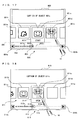
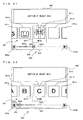
- FIG. 17 is a diagram illustrating an exemplary operation reception screen displayed on the second LCD 12 before the display state is updated in step S319 shown in the flow chart of FIG. 10 .
- the operation reception screen 800 the first objects 801a to 801e are displayed in the first display area 801 at almost the center of the screen, and the second objects, 802a and 802b, and the third object 802c are displayed in the second display area 802 in the lower part of the screen, and a balloon section 805 is displayed in the upper part of the screen.
- the scroll buttons, 804a and 804b are displayed on the both ends of the second display area 802, respectively, and the slide frame 803 is displayed in the second display area 802.
- a portion (the half in the present embodiment) of each of the first object 801a and the first object 801e among the first objects 801a to 801e is displayed, and the first object 801b, the first object 801c, and the first object 801d are displayed such that a selection input for touching and selecting one of the first object 801b, the first object 801c, and the first object 801d through the touch panel 15 by using the stick 16 can be received.
- the first object 801c displayed at the center has its outer edge enclosed by an operation content display frame 801f.
- the operation content display frame 801f represents a content of a process to be performed when a position of the first object 801c is touched by using the stick 16 through the touch panel 15.
- start is displayed, and it is indicated that the game program corresponding to the first object 801c is executed when the position of the first object 801c is touched by using the stick 16.
- the total number of the second objects 802a each displayed as a black outlined square, and the second object 802b displayed as a black solid square, among the second objects, 802a and 802b, and the third object 802c, correspond to the first predetermined number (for example, 16) of the game programs stored in the flash memory 24a (see FIG. 2 ).
- the slide frame 803 is a frame which visually indicates a position of each of the game programs corresponding to the second predetermined number (3 in the present embodiment) of the first objects, 801b, 801c and 801d, in order of the first predetermined number (16 in the present embodiment) of game programs. Further, the slide frame 803 is displayed so as to receive a scroll operation input for scrolling, by sliding the stick 16 on the touch panel 15, the first display area 801 in which the first objects are displayed.
- the scroll buttons, 804a and 804b are displayed so as to receive a scroll operation input for scrolling the first display area 801 in which the first objects are displayed, by performing touch operation by using the stick 16 on the touch panel 15.
- the balloon section 805 is used for displaying a caption (for example, a game name or the like) of the first object 801c displayed at the center, among the first objects, 801a to 801e.
- FIG. 18 is a diagram illustrating an exemplary operation reception screen displayed on the second LCD 12 after the display state is updated in step S319 shown in the flow chart of FIG. 10 .
- FIG. 17 when the touch operation for touching, by using the stick 16, a position of the first object 801d displayed on the operation reception screen 800 is received through the touch panel 15, the first object 801d displayed on the right side of the operation reception screen 800 shown in FIG. 17 is moved to the center of the first display area 811 on the operation reception screen 810, and displayed as the first object 811c.
- opening is indicated in the operation content display frame 811f, and when the touch operation for touching a position of the first object 811c by using the stick 16 is received, the opening process (the process step of step S309 shown in the flow chart of FIG. 10 ) for opening the game program corresponding to the first object 811c is performed.
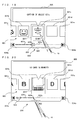
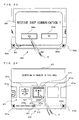
- FIG. 19 is a diagram illustrating an exemplary operation reception screen displayed on the second LCD 12 after the display state is updated in step S319 shown in the flow chart of FIG. 10 .
- the opening process (the process step of step S309 shown in the flow chart of FIG. 10 ) for opening the game program corresponding to the first object 801c is performed.
- An icon image representing a content of the game program corresponding to the first object 821c is displayed as the first object 821c on the operation reception screen 820. Further, "start" is indicated in the operation content display frame 821f, and it is indicated that the game program corresponding to the first object 801c is executed when the touch operation for touching a position of the first object 821c by using the stick 16 is received.
- FIG. 22 is a diagram illustrating an exemplary operation reception screen displayed on the second LCD 12 after the display state is updated in step S813 shown in the flow chart of FIG. 15 .
- the memory card 17 is mounded in a state where the operation reception screen 830 shown in FIG. 20 is displayed, the first obj ect 851c corresponding to the game program stored in the memory card 17 is displayed as shown in FIG. 22 .
- a caption for example, a game name of the game program stored in the memory card 17 or the like
- the first object 851c is displayed in a balloon section 855.
- the activation control apparatus includes the CPU core 21, the RAM 24, and the flash memory 24a of the present embodiment, the present invention is not limited thereto.
- the present invention may have the following configuration.
Landscapes
- Engineering & Computer Science (AREA)
- Theoretical Computer Science (AREA)
- General Engineering & Computer Science (AREA)
- Human Computer Interaction (AREA)
- Physics & Mathematics (AREA)
- General Physics & Mathematics (AREA)
- Multimedia (AREA)
- Software Systems (AREA)
- User Interface Of Digital Computer (AREA)
- Studio Devices (AREA)
Applications Claiming Priority (1)
| Application Number | Priority Date | Filing Date | Title |
|---|---|---|---|
| JP2008255354A JP5140538B2 (ja) | 2008-09-30 | 2008-09-30 | 起動制御プログラム、起動制御装置、起動制御システム、及び、起動制御方法 |
Publications (2)
| Publication Number | Publication Date |
|---|---|
| EP2169542A2 true EP2169542A2 (de) | 2010-03-31 |
| EP2169542A3 EP2169542A3 (de) | 2012-12-05 |
Family
ID=41352225
Family Applications (1)
| Application Number | Title | Priority Date | Filing Date |
|---|---|---|---|
| EP08021814A Ceased EP2169542A3 (de) | 2008-09-30 | 2008-12-16 | Computerlesbares Speichermedium mit darauf gespeichertem Aktivierungssteuerungsprogramm und Aktivierungssteuerung |
Country Status (3)
| Country | Link |
|---|---|
| US (5) | US8726192B2 (de) |
| EP (1) | EP2169542A3 (de) |
| JP (1) | JP5140538B2 (de) |
Cited By (2)
| Publication number | Priority date | Publication date | Assignee | Title |
|---|---|---|---|---|
| JP2014056395A (ja) * | 2012-09-12 | 2014-03-27 | Brother Ind Ltd | 画像表示制御装置、画像表示制御方法およびプログラム |
| EP2874052A4 (de) * | 2012-07-12 | 2016-08-10 | Hitachi Appliances Inc | Maschinenverwaltungsvorrichtung |
Families Citing this family (49)
| Publication number | Priority date | Publication date | Assignee | Title |
|---|---|---|---|---|
| JP4871373B2 (ja) | 2009-06-19 | 2012-02-08 | 任天堂株式会社 | 情報処理システムおよび情報処理装置 |
| JP5674296B2 (ja) | 2009-09-09 | 2015-02-25 | 任天堂株式会社 | 情報処理システムおよび情報処理装置 |
| JP5581757B2 (ja) * | 2010-03-18 | 2014-09-03 | コニカミノルタ株式会社 | 画像処理装置、インターフェイス画面表示方法およびコンピュータプログラム |
| JP2011250874A (ja) | 2010-05-31 | 2011-12-15 | Nintendo Co Ltd | 情報処理プログラム、情報処理装置、情報処理システム及び情報処理方法 |
| JP5593566B2 (ja) | 2010-06-10 | 2014-09-24 | 任天堂株式会社 | 情報処理システム、情報処理装置、情報処理装置の制御方法および情報処理装置の制御プログラム |
| JP2012018657A (ja) | 2010-06-11 | 2012-01-26 | Nintendo Co Ltd | 情報処理端末、情報処理システム、情報処理プログラム |
| JP5677811B2 (ja) * | 2010-06-11 | 2015-02-25 | 任天堂株式会社 | 携帯型情報端末、携帯情報システム、携帯型情報端末制御プログラム |
| JP4999213B2 (ja) | 2010-09-17 | 2012-08-15 | 任天堂株式会社 | 情報処理プログラム、携帯端末装置、システム、情報処理方法及び通信システム |
| KR101781129B1 (ko) | 2010-09-20 | 2017-09-22 | 삼성전자주식회사 | 어플리케이션을 다운로드받아 설치하는 단말장치 및 그 방법 |
| JP5246231B2 (ja) * | 2010-09-21 | 2013-07-24 | コニカミノルタビジネステクノロジーズ株式会社 | 画像形成装置、表示方法、および表示プログラム |
| JP4882022B1 (ja) | 2010-12-28 | 2012-02-22 | 任天堂株式会社 | 通信システム、情報処理プログラム、情報処理方法、情報処理装置、情報処理システム |
| JP5781394B2 (ja) * | 2011-08-12 | 2015-09-24 | 株式会社ソニー・コンピュータエンタテインメント | 電子機器 |
| AU343991S (en) * | 2012-02-03 | 2012-08-21 | Lg Electronics Inc | Television receiver |
| USD765680S1 (en) * | 2012-06-01 | 2016-09-06 | Nintendo Co., Ltd. | Display screen with computer-generated icon images |
| JP5934045B2 (ja) * | 2012-07-13 | 2016-06-15 | 株式会社コナミデジタルエンタテインメント | 端末装置、及びプログラム |
| US9591339B1 (en) | 2012-11-27 | 2017-03-07 | Apple Inc. | Agnostic media delivery system |
| US9774917B1 (en) | 2012-12-10 | 2017-09-26 | Apple Inc. | Channel bar user interface |
| US10200761B1 (en) | 2012-12-13 | 2019-02-05 | Apple Inc. | TV side bar user interface |
| US9532111B1 (en) | 2012-12-18 | 2016-12-27 | Apple Inc. | Devices and method for providing remote control hints on a display |
| US10521188B1 (en) | 2012-12-31 | 2019-12-31 | Apple Inc. | Multi-user TV user interface |
| US12149779B2 (en) | 2013-03-15 | 2024-11-19 | Apple Inc. | Advertisement user interface |
| JP6173786B2 (ja) * | 2013-06-12 | 2017-08-02 | 任天堂株式会社 | 情報処理装置、情報処理システム、情報処理プログラム及び情報処理方法 |
| JP6081409B2 (ja) * | 2014-06-16 | 2017-02-15 | 富士フイルム株式会社 | プリント注文受付機とその作動方法および作動プログラム |
| TWI585673B (zh) | 2014-06-24 | 2017-06-01 | 蘋果公司 | 輸入裝置與使用者介面互動 |
| JP6482578B2 (ja) | 2014-06-24 | 2019-03-13 | アップル インコーポレイテッドApple Inc. | ユーザインタフェースにおけるナビゲートのためのカラムインタフェース |
| US10481645B2 (en) | 2015-09-11 | 2019-11-19 | Lucan Patent Holdco, LLC | Secondary gesture input mechanism for touchscreen devices |
| DK201670582A1 (en) | 2016-06-12 | 2018-01-02 | Apple Inc | Identifying applications on which content is available |
| JP6747095B2 (ja) * | 2016-06-24 | 2020-08-26 | ブラザー工業株式会社 | 情報処理プログラムおよび情報処理装置 |
| CN107015721A (zh) | 2016-10-20 | 2017-08-04 | 阿里巴巴集团控股有限公司 | 一种应用界面的管理方法和装置 |
| US11966560B2 (en) | 2016-10-26 | 2024-04-23 | Apple Inc. | User interfaces for browsing content from multiple content applications on an electronic device |
| JP6589844B2 (ja) * | 2016-12-21 | 2019-10-16 | 京セラドキュメントソリューションズ株式会社 | 表示制御装置、及び表示制御方法 |
| US12307082B2 (en) | 2018-02-21 | 2025-05-20 | Apple Inc. | Scrollable set of content items with locking feature |
| AU2019100574B4 (en) | 2018-06-03 | 2020-02-20 | Apple Inc. | Setup procedures for an electronic device |
| CN109701263B (zh) * | 2018-11-30 | 2021-10-22 | 腾讯科技(深圳)有限公司 | 操作的控制方法及操作控制器 |
| CN109542328B (zh) * | 2018-11-30 | 2021-04-06 | 北京小米移动软件有限公司 | 用户界面显示方法、装置、终端及存储介质 |
| CN113940088A (zh) | 2019-03-24 | 2022-01-14 | 苹果公司 | 用于查看和访问电子设备上的内容的用户界面 |
| US11683565B2 (en) | 2019-03-24 | 2023-06-20 | Apple Inc. | User interfaces for interacting with channels that provide content that plays in a media browsing application |
| US11445263B2 (en) * | 2019-03-24 | 2022-09-13 | Apple Inc. | User interfaces including selectable representations of content items |
| CN114297620A (zh) | 2019-03-24 | 2022-04-08 | 苹果公司 | 用于媒体浏览应用程序的用户界面 |
| US11863837B2 (en) | 2019-05-31 | 2024-01-02 | Apple Inc. | Notification of augmented reality content on an electronic device |
| WO2020243645A1 (en) | 2019-05-31 | 2020-12-03 | Apple Inc. | User interfaces for a podcast browsing and playback application |
| US11843838B2 (en) | 2020-03-24 | 2023-12-12 | Apple Inc. | User interfaces for accessing episodes of a content series |
| US11314395B2 (en) | 2020-05-29 | 2022-04-26 | Apple Inc. | Sharing and using passes or accounts |
| US11899895B2 (en) | 2020-06-21 | 2024-02-13 | Apple Inc. | User interfaces for setting up an electronic device |
| US11934640B2 (en) | 2021-01-29 | 2024-03-19 | Apple Inc. | User interfaces for record labels |
| CN121861749A (zh) | 2021-04-19 | 2026-04-14 | 苹果公司 | 用于电子钥匙的用户界面 |
| US12619705B2 (en) | 2021-06-06 | 2026-05-05 | Apple Inc. | Digital identification credential user interfaces |
| CN114925336A (zh) * | 2022-05-06 | 2022-08-19 | 统信软件技术有限公司 | 一种激活软件的方法及系统 |
| US12400503B2 (en) | 2022-06-04 | 2025-08-26 | Apple Inc. | User interfaces for sharing an electronic key |
Citations (2)
| Publication number | Priority date | Publication date | Assignee | Title |
|---|---|---|---|---|
| JP2004348601A (ja) | 2003-05-23 | 2004-12-09 | Sony Corp | 情報処理装置および方法、並びにプログラム |
| JP2008255354A (ja) | 2007-04-02 | 2008-10-23 | Jenoptik Automatisierungstechnik Gmbh | 粘着性セイフティーストラップおよびその製造方法 |
Family Cites Families (25)
| Publication number | Priority date | Publication date | Assignee | Title |
|---|---|---|---|---|
| JP2516287B2 (ja) * | 1990-05-31 | 1996-07-24 | インターナショナル・ビジネス・マシーンズ・コーポレイション | デ―タ表示方法及び装置 |
| EP0820000B1 (de) | 1996-07-17 | 2002-10-09 | International Business Machines Corporation | Mechanismus zum Steuern der sichtbaren Anwesenheit von Desktop-Objekten in einer graphischen Benutzerschnittstelle |
| US6757716B1 (en) | 1999-07-09 | 2004-06-29 | Microsoft Corporation | Method and system for modifying host application functionality based upon downloaded content |
| US6711715B1 (en) * | 1999-08-27 | 2004-03-23 | Microsoft Corporation | Method and system for efficient storage and restoration of display state data |
| US6436068B1 (en) | 2000-08-24 | 2002-08-20 | Gust H. Bardy | Instrument for implanting sensors and solid materials in a subcutaneous location and method thereof |
| US6816174B2 (en) | 2000-12-18 | 2004-11-09 | International Business Machines Corporation | Method and apparatus for variable density scroll area |
| US7127678B2 (en) | 2000-12-21 | 2006-10-24 | Microsoft Corporation | System and method to specify device specific user interface information in the firmware of a USB device |
| US20020186252A1 (en) | 2001-06-07 | 2002-12-12 | International Business Machines Corporation | Method, apparatus and computer program product for providing context to a computer display window |
| US7546548B2 (en) * | 2002-06-28 | 2009-06-09 | Microsoft Corporation | Method and system for presenting menu commands for selection |
| US7100119B2 (en) | 2002-11-01 | 2006-08-29 | Microsoft Corporation | Page bar control |
| US6990637B2 (en) * | 2003-10-23 | 2006-01-24 | Microsoft Corporation | Graphical user interface for 3-dimensional view of a data collection based on an attribute of the data |
| US7437005B2 (en) * | 2004-02-17 | 2008-10-14 | Microsoft Corporation | Rapid visual sorting of digital files and data |
| JP4509612B2 (ja) * | 2004-03-18 | 2010-07-21 | パナソニック株式会社 | 電子機器及びアイコン表示制御方法 |
| US7765334B2 (en) * | 2004-05-12 | 2010-07-27 | Canon Kabushiki Kaisha | Electronic apparatus for use with removable storage medium, control method therefor, and program for implementing the method |
| JP4982994B2 (ja) | 2005-09-09 | 2012-07-25 | 株式会社セガ | プログラム |
| JP3866752B1 (ja) * | 2005-09-12 | 2007-01-10 | 株式会社コナミデジタルエンタテインメント | ゲームプログラム、ゲーム装置及びゲーム方法 |
| JP2007179168A (ja) | 2005-12-27 | 2007-07-12 | Sony Corp | 情報処理装置および方法、並びにプログラム |
| US20070186177A1 (en) * | 2006-02-03 | 2007-08-09 | Yahoo! Inc. | Content navigation interfaces and associated methods |
| US8397171B2 (en) * | 2006-03-31 | 2013-03-12 | Reaearch In Motion Limited | User interface methods and apparatus for controlling the visual display of maps having selectable map elements in mobile communication devices |
| JP2008033853A (ja) | 2006-08-01 | 2008-02-14 | Denden:Kk | 給食方法 |
| US8564544B2 (en) | 2006-09-06 | 2013-10-22 | Apple Inc. | Touch screen device, method, and graphical user interface for customizing display of content category icons |
| US10313505B2 (en) | 2006-09-06 | 2019-06-04 | Apple Inc. | Portable multifunction device, method, and graphical user interface for configuring and displaying widgets |
| US8564543B2 (en) | 2006-09-11 | 2013-10-22 | Apple Inc. | Media player with imaged based browsing |
| KR101496451B1 (ko) | 2007-01-19 | 2015-03-05 | 엘지전자 주식회사 | 단말기 및 이를 이용한 스크롤 바의 표시방법 |
| US8473860B2 (en) | 2010-02-12 | 2013-06-25 | Microsoft Corporation | Multi-layer user interface with flexible parallel and orthogonal movement |
-
2008
- 2008-09-30 JP JP2008255354A patent/JP5140538B2/ja active Active
- 2008-10-07 US US12/246,822 patent/US8726192B2/en active Active
- 2008-12-16 EP EP08021814A patent/EP2169542A3/de not_active Ceased
-
2013
- 2013-11-22 US US14/087,109 patent/US8972896B2/en active Active
-
2014
- 2014-07-03 US US14/323,458 patent/US8977985B2/en active Active
-
2015
- 2015-01-26 US US14/604,990 patent/US10248288B2/en active Active
-
2016
- 2016-06-06 US US15/174,546 patent/US9864488B2/en active Active
Patent Citations (2)
| Publication number | Priority date | Publication date | Assignee | Title |
|---|---|---|---|---|
| JP2004348601A (ja) | 2003-05-23 | 2004-12-09 | Sony Corp | 情報処理装置および方法、並びにプログラム |
| JP2008255354A (ja) | 2007-04-02 | 2008-10-23 | Jenoptik Automatisierungstechnik Gmbh | 粘着性セイフティーストラップおよびその製造方法 |
Cited By (2)
| Publication number | Priority date | Publication date | Assignee | Title |
|---|---|---|---|---|
| EP2874052A4 (de) * | 2012-07-12 | 2016-08-10 | Hitachi Appliances Inc | Maschinenverwaltungsvorrichtung |
| JP2014056395A (ja) * | 2012-09-12 | 2014-03-27 | Brother Ind Ltd | 画像表示制御装置、画像表示制御方法およびプログラム |
Also Published As
| Publication number | Publication date |
|---|---|
| US20140082556A1 (en) | 2014-03-20 |
| US20160357369A1 (en) | 2016-12-08 |
| EP2169542A3 (de) | 2012-12-05 |
| US10248288B2 (en) | 2019-04-02 |
| US9864488B2 (en) | 2018-01-09 |
| US8972896B2 (en) | 2015-03-03 |
| US20100083181A1 (en) | 2010-04-01 |
| US8726192B2 (en) | 2014-05-13 |
| US8977985B2 (en) | 2015-03-10 |
| JP5140538B2 (ja) | 2013-02-06 |
| US20140317571A1 (en) | 2014-10-23 |
| JP2010086327A (ja) | 2010-04-15 |
| US20150141146A1 (en) | 2015-05-21 |
Similar Documents
| Publication | Publication Date | Title |
|---|---|---|
| US9864488B2 (en) | Computer-readable storage medium having activation control program stored therein and activation control apparatus | |
| JP5708644B2 (ja) | 情報処理端末およびその制御方法 | |
| US8647204B2 (en) | Game device and game program that performs scroll and move processes | |
| JP4134008B2 (ja) | 画像処理装置および画像処理プログラム | |
| US7825904B2 (en) | Information processing apparatus and storage medium storing item selecting program | |
| US10739985B2 (en) | Computer-readable storage medium having stored thereon display control program, display control system, display control apparatus, and display control method | |
| US20120086650A1 (en) | Computer-readable storage medium having stored thereon display control program, display control system, display control apparatus, and display control method | |
| US20120066627A1 (en) | Computer-readable storage medium having stored thereon display control program, display control system, display control apparatus, and display control method | |
| JP2006146556A (ja) | 画像表示処理プログラムおよび画像表示処理装置 | |
| US7934168B2 (en) | Storage medium storing program and information processing apparatus | |
| EP1645949B1 (de) | Informationsverarbeitungsvorrichtung und Informationseingabeprogramm | |
| US20220121357A1 (en) | Electronic device and method for operating keypad thereof | |
| US10915301B2 (en) | Programming support device, programming support method, and non-transitory recording medium | |
| JP6039739B2 (ja) | 起動制御プログラム、情報処理装置、情報処理システム、及び、情報処理方法 | |
| JP7566964B2 (ja) | プログラム | |
| JP2012190081A (ja) | 電子機器、オブジェクトの表示方法及びオブジェクトの表示プログラム。 | |
| JP5744989B2 (ja) | 実行制御プログラム、実行制御装置、実行制御システム、及び、実行制御方法 | |
| CN115004133B (zh) | 移动设备、用于视觉增强系统的交互方法以及存储介质 | |
| JP2013054752A (ja) | 実行制御プログラム、実行制御装置、実行制御システム、及び、実行制御方法 | |
| JP4679107B2 (ja) | ゲーム装置およびゲームプログラム | |
| JP7331901B2 (ja) | 電子機器、表示方法、およびプログラム | |
| KR200354482Y1 (ko) | 아동용 이미지 표시 장치 | |
| CN119829170A (zh) | 信息显示方法及装置、存储介质及电子设备 | |
| JP2004221658A (ja) | 携帯無線端末装置 |
Legal Events
| Date | Code | Title | Description |
|---|---|---|---|
| PUAI | Public reference made under article 153(3) epc to a published international application that has entered the european phase |
Free format text: ORIGINAL CODE: 0009012 |
|
| AK | Designated contracting states |
Kind code of ref document: A2 Designated state(s): AT BE BG CH CY CZ DE DK EE ES FI FR GB GR HR HU IE IS IT LI LT LU LV MC MT NL NO PL PT RO SE SI SK TR |
|
| AX | Request for extension of the european patent |
Extension state: AL BA MK RS |
|
| RAP1 | Party data changed (applicant data changed or rights of an application transferred) |
Owner name: NINTENDO CO., LTD. |
|
| RIC1 | Information provided on ipc code assigned before grant |
Ipc: G06F 9/44 20060101AFI20120615BHEP Ipc: G06F 3/048 20060101ALI20120615BHEP |
|
| PUAL | Search report despatched |
Free format text: ORIGINAL CODE: 0009013 |
|
| AK | Designated contracting states |
Kind code of ref document: A3 Designated state(s): AT BE BG CH CY CZ DE DK EE ES FI FR GB GR HR HU IE IS IT LI LT LU LV MC MT NL NO PL PT RO SE SI SK TR |
|
| AX | Request for extension of the european patent |
Extension state: AL BA MK RS |
|
| RIC1 | Information provided on ipc code assigned before grant |
Ipc: G06F 9/44 20060101AFI20121031BHEP Ipc: G06F 3/048 20060101ALI20121031BHEP |
|
| 17P | Request for examination filed |
Effective date: 20130605 |
|
| RBV | Designated contracting states (corrected) |
Designated state(s): AT BE BG CH CY CZ DE DK EE ES FI FR GB GR HR HU IE IS IT LI LT LU LV MC MT NL NO PL PT RO SE SI SK TR |
|
| AKX | Designation fees paid |
Designated state(s): AT BE BG CH CY CZ DE DK EE ES FI FR GB GR HR HU IE IS IT LI LT LU LV MC MT NL NO PL PT RO SE SI SK TR |
|
| 17Q | First examination report despatched |
Effective date: 20170118 |
|
| 18R | Application refused |
Effective date: 20180703 |