EP2026554A1 - Kamera mit änderbaren Prioritäten für das Sichern von Bildern in einem externen Gerät - Google Patents
Kamera mit änderbaren Prioritäten für das Sichern von Bildern in einem externen Gerät Download PDFInfo
- Publication number
- EP2026554A1 EP2026554A1 EP08161661A EP08161661A EP2026554A1 EP 2026554 A1 EP2026554 A1 EP 2026554A1 EP 08161661 A EP08161661 A EP 08161661A EP 08161661 A EP08161661 A EP 08161661A EP 2026554 A1 EP2026554 A1 EP 2026554A1
- Authority
- EP
- European Patent Office
- Prior art keywords
- image
- image data
- specified
- transmission
- Prior art date
- Legal status (The legal status is an assumption and is not a legal conclusion. Google has not performed a legal analysis and makes no representation as to the accuracy of the status listed.)
- Granted
Links
Images





Classifications
-
- H—ELECTRICITY
- H04—ELECTRIC COMMUNICATION TECHNIQUE
- H04N—PICTORIAL COMMUNICATION, e.g. TELEVISION
- H04N1/00—Scanning, transmission or reproduction of documents or the like, e.g. facsimile transmission; Details thereof
- H04N1/00127—Connection or combination of a still picture apparatus with another apparatus, e.g. for storage, processing or transmission of still picture signals or of information associated with a still picture
- H04N1/00204—Connection or combination of a still picture apparatus with another apparatus, e.g. for storage, processing or transmission of still picture signals or of information associated with a still picture with a digital computer or a digital computer system, e.g. an internet server
-
- H—ELECTRICITY
- H04—ELECTRIC COMMUNICATION TECHNIQUE
- H04N—PICTORIAL COMMUNICATION, e.g. TELEVISION
- H04N1/00—Scanning, transmission or reproduction of documents or the like, e.g. facsimile transmission; Details thereof
- H04N1/00127—Connection or combination of a still picture apparatus with another apparatus, e.g. for storage, processing or transmission of still picture signals or of information associated with a still picture
- H04N1/00132—Connection or combination of a still picture apparatus with another apparatus, e.g. for storage, processing or transmission of still picture signals or of information associated with a still picture in a digital photofinishing system, i.e. a system where digital photographic images undergo typical photofinishing processing, e.g. printing ordering
- H04N1/00137—Transmission
- H04N1/0014—Transmission via e-mail
-
- H—ELECTRICITY
- H04—ELECTRIC COMMUNICATION TECHNIQUE
- H04N—PICTORIAL COMMUNICATION, e.g. TELEVISION
- H04N1/00—Scanning, transmission or reproduction of documents or the like, e.g. facsimile transmission; Details thereof
- H04N1/00127—Connection or combination of a still picture apparatus with another apparatus, e.g. for storage, processing or transmission of still picture signals or of information associated with a still picture
- H04N1/00132—Connection or combination of a still picture apparatus with another apparatus, e.g. for storage, processing or transmission of still picture signals or of information associated with a still picture in a digital photofinishing system, i.e. a system where digital photographic images undergo typical photofinishing processing, e.g. printing ordering
- H04N1/00148—Storage
-
- H—ELECTRICITY
- H04—ELECTRIC COMMUNICATION TECHNIQUE
- H04N—PICTORIAL COMMUNICATION, e.g. TELEVISION
- H04N1/00—Scanning, transmission or reproduction of documents or the like, e.g. facsimile transmission; Details thereof
- H04N1/00127—Connection or combination of a still picture apparatus with another apparatus, e.g. for storage, processing or transmission of still picture signals or of information associated with a still picture
- H04N1/00204—Connection or combination of a still picture apparatus with another apparatus, e.g. for storage, processing or transmission of still picture signals or of information associated with a still picture with a digital computer or a digital computer system, e.g. an internet server
- H04N1/00244—Connection or combination of a still picture apparatus with another apparatus, e.g. for storage, processing or transmission of still picture signals or of information associated with a still picture with a digital computer or a digital computer system, e.g. an internet server with a server, e.g. an internet server
-
- H—ELECTRICITY
- H04—ELECTRIC COMMUNICATION TECHNIQUE
- H04N—PICTORIAL COMMUNICATION, e.g. TELEVISION
- H04N1/00—Scanning, transmission or reproduction of documents or the like, e.g. facsimile transmission; Details thereof
- H04N1/0035—User-machine interface; Control console
- H04N1/00405—Output means
- H04N1/00408—Display of information to the user, e.g. menus
- H04N1/00413—Display of information to the user, e.g. menus using menus, i.e. presenting the user with a plurality of selectable options
-
- H—ELECTRICITY
- H04—ELECTRIC COMMUNICATION TECHNIQUE
- H04N—PICTORIAL COMMUNICATION, e.g. TELEVISION
- H04N1/00—Scanning, transmission or reproduction of documents or the like, e.g. facsimile transmission; Details thereof
- H04N1/0035—User-machine interface; Control console
- H04N1/00405—Output means
- H04N1/00408—Display of information to the user, e.g. menus
- H04N1/0044—Display of information to the user, e.g. menus for image preview or review, e.g. to help the user position a sheet
- H04N1/00442—Simultaneous viewing of a plurality of images, e.g. using a mosaic display arrangement of thumbnails
- H04N1/00453—Simultaneous viewing of a plurality of images, e.g. using a mosaic display arrangement of thumbnails arranged in a two dimensional array
-
- H—ELECTRICITY
- H04—ELECTRIC COMMUNICATION TECHNIQUE
- H04N—PICTORIAL COMMUNICATION, e.g. TELEVISION
- H04N1/00—Scanning, transmission or reproduction of documents or the like, e.g. facsimile transmission; Details thereof
- H04N1/0035—User-machine interface; Control console
- H04N1/00405—Output means
- H04N1/00408—Display of information to the user, e.g. menus
- H04N1/0044—Display of information to the user, e.g. menus for image preview or review, e.g. to help the user position a sheet
- H04N1/00458—Sequential viewing of a plurality of images, e.g. browsing or scrolling
-
- H—ELECTRICITY
- H04—ELECTRIC COMMUNICATION TECHNIQUE
- H04N—PICTORIAL COMMUNICATION, e.g. TELEVISION
- H04N1/00—Scanning, transmission or reproduction of documents or the like, e.g. facsimile transmission; Details thereof
- H04N1/0035—User-machine interface; Control console
- H04N1/00405—Output means
- H04N1/00408—Display of information to the user, e.g. menus
- H04N1/0044—Display of information to the user, e.g. menus for image preview or review, e.g. to help the user position a sheet
- H04N1/00461—Display of information to the user, e.g. menus for image preview or review, e.g. to help the user position a sheet marking or otherwise tagging one or more displayed image, e.g. for selective reproduction
-
- H—ELECTRICITY
- H04—ELECTRIC COMMUNICATION TECHNIQUE
- H04N—PICTORIAL COMMUNICATION, e.g. TELEVISION
- H04N2101/00—Still video cameras
-
- H—ELECTRICITY
- H04—ELECTRIC COMMUNICATION TECHNIQUE
- H04N—PICTORIAL COMMUNICATION, e.g. TELEVISION
- H04N2201/00—Indexing scheme relating to scanning, transmission or reproduction of documents or the like, and to details thereof
- H04N2201/0008—Connection or combination of a still picture apparatus with another apparatus
- H04N2201/0034—Details of the connection, e.g. connector, interface
- H04N2201/0037—Topological details of the connection
- H04N2201/0039—Connection via a network
-
- H—ELECTRICITY
- H04—ELECTRIC COMMUNICATION TECHNIQUE
- H04N—PICTORIAL COMMUNICATION, e.g. TELEVISION
- H04N2201/00—Indexing scheme relating to scanning, transmission or reproduction of documents or the like, and to details thereof
- H04N2201/0008—Connection or combination of a still picture apparatus with another apparatus
- H04N2201/0034—Details of the connection, e.g. connector, interface
- H04N2201/0048—Type of connection
- H04N2201/0055—By radio
-
- H—ELECTRICITY
- H04—ELECTRIC COMMUNICATION TECHNIQUE
- H04N—PICTORIAL COMMUNICATION, e.g. TELEVISION
- H04N2201/00—Indexing scheme relating to scanning, transmission or reproduction of documents or the like, and to details thereof
- H04N2201/0008—Connection or combination of a still picture apparatus with another apparatus
- H04N2201/0034—Details of the connection, e.g. connector, interface
- H04N2201/0048—Type of connection
- H04N2201/0058—Docking-station, cradle or the like
-
- H—ELECTRICITY
- H04—ELECTRIC COMMUNICATION TECHNIQUE
- H04N—PICTORIAL COMMUNICATION, e.g. TELEVISION
- H04N2201/00—Indexing scheme relating to scanning, transmission or reproduction of documents or the like, and to details thereof
- H04N2201/0077—Types of the still picture apparatus
- H04N2201/0084—Digital still camera
Definitions
- the present invention relates to a camera for photography.
- a digital camera has a function of uploading image data to a server and a function of transmitting an e-mail to a user of the camera when transmission of image data specified by a user to the server is completed in order to inform the user of this being the case.
- the digital camera is configured to upload both of image data specified by the user and image data not specified by the user by a single connection to the server. In this case, however, it is not configured to give priority to uploading the image data specif iedby the user. Accordingly, a plurality of connections to the server have to be performed in order to upload the image data specified by the user and subsequently to upload the image data not specified by the user, so that the efficiency of transmission is low.
- a camera comprises: an image-capturing means that captures an image of a subject to acquire image data; an image storing means that stores a plurality of image data acquired by the image-capturing means in a storage medium; an image specifying means that specifies image data designated by a user from among the plurality of image data stored in the the storage medium; and a transmission controlling means that when transmitting the plurality of image data to an external device using a wireless communication device, identifies specified image data specified by the image specifying means and non-specified image data that are not specified by the image specifying means from each other and transmits the specified image data to the external device in priority to the non-specified image data.
- the camera according to the first aspect may further comprises: an information storing means that stores information for identifying the specified image data to the storage medium.
- the image specifying means specifies image data to which information about destination is related as the specified image data.
- the image specifying means specifies image data that are designated to create a back up copy thereof in the external device as the specified image data.
- the transmission controlling means starts transmission of the non-specified image data when transmission of the specified image data is suspended according to instruction by the user.
- the transmission controlling means resumes the transmissionof the specified image dataafter the transmission of the non-specified image data is completed.
- the transmission controlling means changes transmission priority between the specified image data and the non-specified image data such that the non-specified image data are transmitted in priority to the specif ied image data according to instruction by the user.
- a camera comprises: an image-capturing means that captures an image of a subject to acquire image data; an image storing means that stores a plurality of image data acquired by the image-capturing means in a storage medium; an image specifying means that specifies image data to which information about destination is related from among the plurality of image data stored in the storage medium; and a transmission controlling means connected to an external device through an external wireless device of which wireless communication is established that when transmitting the plurality of image data to the external device, identifies specified image data specified by the image specifying means and non-specified image data that are not specified by the image specifying means from each other and transmits the specified image data to the external device through the wireless communication in priority to the non-specified image data.
- the camera according to the eighth aspect may further comprises: an information storing means that stores information for identifying the specified image data to the storage medium.
- the transmission controlling means starts transmission of the non-specified image data when transmission of the specified image data is suspended according to instruction by the user.
- the transmission controlling means resumes the transmission of the specified image data after the transmission of the non-specified image data is completed.
- the transmission controlling means changes transmission priority between the specified image data and the non-specif ied image data such that the non-specified image data are transmitted in priority to the specified image data according to instruction by the user.
- FIG. 1 is a diagram showing the configuration of an image transfer system according to an embodiment of the present invention.
- An image transfer system 100 includes a camera 200, an image storage server 300, a mail server 400, a personal computer (PC) 500, and an access point 600, which is a wireless base station. These are connected to each other through a communication network such as the Internet.
- FIG. 1 schematically illustrates outline actions of the image transfer system including the following three stages.
- the image storage server 300 receives the image file and the destination list transmitted by the camera 200 and stores the received image file on a storage medium such as a hard disk drive and prepares an e-mail to notify that the image file has been uploaded to the specified destination or destinations of the image based on the destination list.
- a storage medium such as a hard disk drive
- the image storage server 300 transmits the prepared notification e-mail to the mail server 400.
- the e-mail is delivered to a mail box of the mail server 400 according to the destination e-mail address.
- the owner of the destination can receive the notification e-mail from the mail server 400 using an e-mail client program installed in the PC 500 to browse the content of the notification e-mail on a monitor of the PC 500.
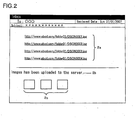
- links 2a that provide URLs for making access to image files stored in the image storage server 300 as anchor texts
- message sentence 2b that notifies that an image has been uploaded in the image storage server 300
- thumbnail images 2c consisting of a predetermined number of frames, for example, three frames of images out of images on which a specified e-mail address.
- An addressee of the e-mail can click the links 2a or the thumbnails 2c to download the linked image files and browse them on the screen of the PC 500.
- the operation member 201 includes various inputting members to be operated by a user, for example, a power button, a release button, zoom buttons (a zoom up button and a zoom down button), a rotary multi-selector, a replay button, a deletion button, and a mail setting button.
- a power button for example, a power button, a release button, zoom buttons (a zoom up button and a zoom down button), a rotary multi-selector, a replay button, a deletion button, and a mail setting button.
- the rotary multi-selector is constituted, for example, by a rotation section 4a and an OK button 4b in the center as shown in FIG. 4 .
- the user can select an item or an image by rotating the rotation section 4a rightward (clockwise) or leftward (counterclockwise), or treating the rotation section 4a like a 4-way directional pad button and pressing any one of upper, lower, left, and right portions thereof.
- the selected item can be fixed by pressing down the OK button 4b.
- the lens 202 is constituted by a plurality of optical lenses, it is represented by a single lens in FIG. 3 .
- the image sensor 203 which is, for example, a CCD or a CMOS, captures an image of a subject formed by the lens 202 to acquire image data.
- the acquired image data are output to the control device 204.
- the control device 204 is constituted by a CPU and other peripheral circuits, and performs image processing on the image data input from the image sensor 203 using the SDRAM 205 to be detailed later on as a working area. For example, after image data are subjected to gradation correction processing and color conversion processing, the processed image data are compressed into a predetermined image format, for example, a JPEG format to create an image file of a predetermined format such as Exif (Exchangeable Image File Format for Digital Still Camera). Then, the created image file is output to the memory card slot 207 to be detailed later on.
- a predetermined image format for example, a JPEG format to create an image file of a predetermined format such as Exif (Exchangeable Image File Format for Digital Still Camera).
- Exif Exchangeable Image File Format for Digital Still Camera
- the SDRAM 205 which is a volatile memory, is used as a work memory for expanding a program when the CPU executes the program or as a buffer memory for temporarily storing data.
- the flash memory 206 which is a nonvolatile memory, stores therein data of a program that is executed by the CPU and various parameters to be read in upon execution of the program and the like data.
- the memory card slot 207 is a slot in which a memory card, which is a detachable storage medium, for example, an SD card is inserted, and writes the image file output from the control device 204 into amemorycardto store it as mentioned above.
- the memory card slot reads out the image file stored in the memory card and output it to the control device or delete the image file stored according to the instruction from the control device 204.
- the monitor 208 is a liquid crystal monitor mounted on the rear side of the camera 200 and displays various types of information such as images stored in the memory card and a menu for setting the camera 200.
- the control device 204 outputs images that are acquired by the image sensor 203 in chronological order as frames to the monitor 208.
- the monitor 208 displays each frame in chronological order at a predetermined time interval to constitute a video.
- the communication module 209 is a wireless LAN module through which the camera 200 performs wireless communication with the access point 600.
- the communication module 209 is controlled by the control device 204.
- the communication module 209 establishes wireless communication with the access point 600 to connect to the Internet through the access point 600. Processing to start wireless communication with the access point 600 will be described later on.
- the control device 204 functionally includes an e-mail setting unit 204a and a data transmission unit 204b.
- the e-mail setting unit 204a displays an e-mail setting screen shown in FIG. 5 on the monitor 208 when the mode of the camera 200 is changed to an e-mail setting mode according to an operation on menu by the user.
- the e-mail setting mode is a mode in which the user sets destination of the above-mentioned notification e-mail on an image selected by the user to be shown to other persons.
- the user can change the mode of the camera 200 to the e-mail setting mode by pressing down the mail setting button contained in the operation member 201 when the above-mentioned video is displayed on the monitor 208 or an image stored in the memory card is displayed on the monitor 208.
- the e-mail setting screen includes an image displaying area 5a, a destination setting displaying area 5b, and a destination information displaying area 5c.
- the image displaying area 5a is an area for displaying one or more images stored in the memory card.
- the e-mail setting unit 204a displays any one of image frames in the image file read in from the memory card. For example, it initially displays an uppermost image when images are arranged in ascending order. The user can switch the image displayed in the image displaying area 5a from the currently displayed image to the image of a next order by pressing the right part of the rotary multi-selector. Also, the user can switch the image displayed in the image displaying area 5a from the currently displayed image to the image displayed immediately before by pressing the left side of the rotary multi-selector.
- the destination setting displaying area 5b is an area for displaying destination setting status containing addresses to which the user is to notify that the image displayed in the image displaying area 5a has been uploaded.
- the e-mail setting unit 204a reads in data in an address book in which destination information has been stored in advance by the user from the flash memory 206 and displays icon representing the destination information in the destination setting displaying area 5b.
- the destination information includes, for example, an e-mail address and a group consisting of a plurality of e-mail addresses. In an example shown in FIG.
- an icon 5d representing an e-mail address and an address number assigned to the e-mail address (for example, 01, 02, ...), or an icon 5e representing a group and a group number assigned to the group (for example, 01).
- an icon 5f representing a group and a group number assigned to the group (for example, 01).
- a NEW item icon 5f to be selected by the user in order to instruct new registration of an e-mail address or a group to the address book and a destination setting completion icon 5g to be detailed later on.
- the icon 5d and the address number, the icon 5e and the group number, the destination setting completion icon 5g detailed later on, and the NEW item icon 5f displayed in the destination setting displaying area 5b are displayed such that their position slides to the up or down when the user turns the rotary multi-selector the right or left, respectively.
- the icon and the number displayed on the left side of the destination information displaying area 5c represent the currently selected destination information and the content of the destination information is displayed in the destination information displaying area 5c.
- a group 01 is currently selected and a group name (niko) assigned to the group is displayed in the destination information displaying area 5c.
- the user can switch the destination information under selection by turning the rotary multi-selector to the right or left.
- the destination information currently selected is switched to the address 01 and name and e-mail address of the owner of the address are displayed in the destination information displaying area 5c .
- the user wants to set the destination information currently selected in the destination displaying area 5b to be set as the destination of a notification e-mail on the image displayed in the image displaying area 5a the user presses down the OKbutton4b of the rotary multi-selector. This enables the user to set the destination of the notification e-mail on each image on the e-mail setting screen.
- the user can set destinations of the notification e-mail for each of a plurality of images while switching the image displayed on the image displaying area 5a to another one. Also, it may be configured such that for one image displayed on the image displaying area 5a, one or more e-mail addresses are selected from the destination information displayed in the destination setting displaying area 5b and the selected one or more e-mail addresses are set as a destination or destinations of the notification e-mail. It may be configured such that a group is set as a destination of a notification e-mail and the notification e-mail is transmitted to all of the e-mail addresses contained in the group.
- the e-mail setting unit 204a registers the image and the destination in relation to each other in an e-mail notification target image list.
- the e-mail notification target image list is a list for use in administrating images and destinations set therefor in relation to each other.
- the data file of the list is stored in the flash memory 206. For example, as shown in FIG.
- the e-mail notification target image list administers a file name of image file on which destination of the notification e-mail is set, a destination ID for identifying the set destination, and time and date of transmission completion of the image file on which the destination list prepared based on the e-mail notification target image list is transmitted to the image storage server 300 in relation to each other.
- the destination ID is an ID for uniquely identifying the e-mail address or group registered in the address book.
- the image files and the destinations are related to each other using the destination IDs.
- the time and date of transmission of the image file and the destination list to the image storage server 300 are registered by the data transmission processing to be detailed later on. Before completion of the transmission, nothing is registered.
- jpg In the example shown in FIG. 6 , records on five image files DSCN0001. jpg through DSCN0005. jpg are registered in the e-mail notification target image list but no data on the time and date of transmission completion for any image file is recorded. This indicates that the image file and the destination list have not yet been transmitted to the image storage server 300 for all the images.
- the e-mail notification target image list shown in FIG. 6 indicates that e-mail addresses having destination IDs A01 and A02, respectively, and the group having destination ID G01 are set for DSCN0001.jpg.
- the e-mail setting unit 204a displays the destination setting completion icon 5g in the destination setting displaying area 5b based on the e-mail notification target image list. For example, the e-mail setting unit 204a specifies an e-mail address or a group set as a destination for the image currently displayed in the image displaying area 5a. In relation to the icon 5d or 5e representing the specified e-mail addressorgroup, respectively, thedestinationsetting completion icon 5g, which indicates that the e-mail address or the group is set as a destination for an image displayed in the image displaying area 5a, is displayed. With the displayed icon 5g, the user can confirm the destination set for the image displayed in the image displaying area 5a.
- the e-mail setting unit 204a is configured to use different display formats between the destination setting completion icon 5g for an image file on which data of time and data of transmission completion has not been registered in the e-mail notification target image list and the destination setting completion icon 5g for an image file on which data of time and date of transmission completion has been registered.
- a display color for the destination setting completion icon 5g for the image file on which no data of time and date of transmission completion has been registered is set white.
- a display color for the destination setting completion icon 5g for the image file on which data of time and date of transmission completion has been registered is set red. The user can conf irm whether or not the transmission of image file and destination list has been completed for each destination according to the display color of the icon 5g.
- the user can newly register an e-mail address or a group that the user wants to designate as a destination in the address book.
- the user operates the rotary multi-selector to locate the NEW item icon 5f on the left of the destination information displaying area 5c and selects the NEW item icon 5f by pressing down the OK button 4b.
- the e-mail setting unit 204a displays a new registration screen on the monitor 208 and additionally registers the designated e-mail address or group in the address book according to the operation by the user.
- the user can confirm setting status of destination, that is, setting status of notification e-mail on each image on the monitor 208.
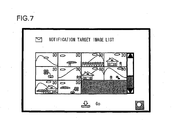
- the user presses down a zoom down button in a state in which the e-mail setting screen is displayed to display a notification target image list screen as shown in FIG. 7 . That is, the e-mail settingunit 204adisplays thenotificationtarget image list screen shown in FIG. 7 on the monitor 208 when it is detected that the zoom down button is pressed down by the user while the e-mail setting screen is being displayed.
- the e-mail setting unit 204a extracts only those images for which the user has set destinations based on the above-mentioned e-mail notification target image list and displays a list of the extracted images.
- the e-mail setting unit 204a calculates the number of destinations set for each image and displays the result of the calculation in relation to each image.
- FIG. 7 shows an example in which 30 destinations have been set for each image.
- the e-mail setting unit 204a may be configured to determine whether or not transmission of the image file and the destination list to the image storage server 300 has been completed according to the e-mail notification target image list and to use different display formats corresponding to the number of destinations to be displayed in relation to each image. For example, for an image of which transmission to the image storage server 300 has not been completed, the number of destinations is displayed with a black figure whereas for an image of which transmission to the image storage server 300 has been completed, the number of destinations is displayed with a red figure.
- the e-mail setting unit 204a When it is detected that the user has selected a frame of image on the notification target image list screen and pressed down the zoom up button, the e-mail setting unit 204a displays a list of the destinations set for the image on the monitor 208 referring to the e-mail notification target image list and the address book. With the above-mentioned operation, all the setting of destinations for the image for which it is desired to transmit a notification e-mail is completed and the e-mail setting screen or the notification target image list screen is displayed on the monitor 208. In this state, when it is detected by the e-mail setting unit 204a that the user has pressed down the release button, the display of the e-mail setting screen or the notification target image list screen is ended to end the e-mail setting mode.
- the e-mail setting unit 204a displays on the monitor 208 a message to confirm to the user whether or not it is necessary to transmit to the image storage server 300 the image for which the notification e-mail is set to be transmitted by the above-mentioned operation and the destination list that relates the image and the destination or destinations to each other.
- the data transmission unit 204b performs data transmission processing to be detailed later on whereas when it is instructed by the user not to transmit the above, the data transmission unit 204b does not perform data transmission processing.
- a step S10 the e-mail setting unit 204a reads in an image file from the memory card and an address book and an e-mail notification target image list from the flash memory 206.
- the e-mail setting unit 204a displays the e-mail setting screen shown in FIG. 5 on the monitor 208 based on the information read in the step S10.
- the e-mail setting unit 204a displays the destination setting completion icon 5g in the destination setting displaying area 5b referring to the e-mail notification target image list.
- a step S40 the e-mail setting unit 204a determines whether or not new registration in the address book has been instructed by selection of the NEW item icon 5f by the user as mentioned above. If the result of the determination in the step S40 is NO, the process is advanced to a step S70 to be detailed later on. If the result of the determination in the step S40 is YES, the process is advanced to a step S50. In the step S50, the e-mail setting unit 204a displays a registration screen of a new destination on the monitor 208 and receives registration of the new destination by the user. In a step S60, the e-mail setting unit 204a adds the new destination in the address book according to the operation by the user.
- the e-mail setting unit 204a determines whether or not it has been instructed to switch the image to be displayed in the image displaying area 5a by pressing down of the right or left part of the rotary multi-selector by the user. If the result of the determination in the step S70 is NO, the process is advanced to a step 590. If the result of the determination in the step S70 is YES, the process is advanced to a step S80. In the step S80, the e-mail setting unit 204a switches the image to be displayed in the image displaying area 5a according to the operation of the rotary multi-selector by the user.
- the e-mail setting unit 204a determines whether or not it has been instructed to switch the destination to be selected in the destination setting displaying area 5b by turning the rotary multi-selector to the right or left by the user. If the result of the determination in the step S90 is NO, the process is advanced to a step S110 to be detailed later on. If the result of the determination in the step S90 is YES, the process is advanced to a step S100. In the step S100, the e-mail setting unit 204a switches the destination to be selected according to the operation of the rotary multi-selector by the user
- the e-mail setting unit 204a determines whether or not it has been instructed to set the destination selected in the destination setting displaying area 5b for the image displayed in the image displaying area 5a by pressing down the OK button 4b of the rotary multi-selector by the user. If the result of the determination in the step S110 is NO, the process is advanced to a step S130 to be detained later on. If the result of the determination in the step S110 is YES, the process is advanced to a step S120.
- the e-mail setting unit 204a relates the image file of the image displayed in the image displaying area 5a and the destination ID of the destination selected in the destination setting displaying area 5b to each other and register them in the e-mail notification target image list shown in FIG. 6 .
- the e-mail setting unit 204a determines whether or not it has been instructed to display the notification target image list screen by pressing down the zoom down button by the user. If the result of the determination in the step S130 is NO, the process is advanced to a step S170 to be detailed later on. If the result of the determination in the step S130 is YES, the process is advanced to the step S140. In the step S140, the e-mail setting unit 204a displays the notification target image list screen shown in FIG. 7 on the monitor 208. On this occasion, the e-mail setting unit 204a calculates the number of destinations set for each image according to the e-mail notification target image list and displays the result of calculation in relation to each image.
- a step S150 the e-mail setting unit 204a determines whether or not it has been instructed to display an e-mail address list set for each image by selecting a frame of image on the notification target image list screen and pressing down the zoom up button by the user. If the result of the determination in the step S150 is NO, the process is advanced to a step S170. If the result of the determination in the step S150 is YES, the process is advanced to a step S160. In the step S160, the e-mail setting unit 204a displays a list of the destinations set for the image on the monitor 208 referring to the e-mail notification target image list and the address book.
- the e-mail setting unit 204a determines whether or not it has been instructed to end the e-mail setting mode by pressing down the release button by the user while the e-mail setting screen or the notification target image list screen is being displayed. If the determination in the step S170 is NO, the process is returned to the step S40 to repeat the processing. If the result of the determination in the step S170 is YES, the process is advanced to a step S180. In the step S180, the e-mail setting unit 204a ends the e-mail setting mode.
- a step S190 the e-mail setting unit 204a displays on the monitor 208 a message to confirm to the user whether or not it is necessary to transmit to the image storage server 300 the image for which a notification e-mail is set to be transmitted and the destination list in which the image and a destination or destinations are related to each other.
- the e-mail setting unit 204a determines whether or not it has been instructed by the user to perform data transmission processing. If the result of the determination in the step S200 is YES, the process is advanced to a step S210.
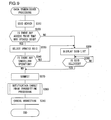
- the data transmission unit 204b performs the data transmission processing to be detailed later on referring to FIG. 9 and ends the processing. If the result of the processing in the step S200 is NO, the processing is immediately ended.
- the data transmission unit 204b transmits the target image, and the destination list in which the file name of an image file and its destination are related to each other to the image storage server 300 based on the e-mail notification target image list when it is instructed by the user to transmit to the image storage server 300 the image for which a destination is set by the above-mentioned e-mail setting processing in order for the notification e-mail to be transmitted.
- the user can instruct the data transmission unit 204b to perform the data transmission processing in response to the confirmation message displayed in the step S190 in FIG. 8 .
- the user can instruct the data transmission unit 204b to perform the data transmission processing by a menu operation.
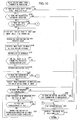
- the data transmission unit 204b determines whether or not an operation to suspend the data transmission is performed by the user. If the result of the determination in the step S420 is YES, the process is advanced to a step S550 to set a suspension flag to be detailed later on.
- the suspension flag which is a flag indicating that the notification target image transmission processing has been suspended on the way, is stored in the SDRAM 205.
- the suspension flag is configured to be used in the second and third embodiments to be detailed later on and it may be omitted in the first embodiment.
- step S430 the data transmission unit 2 04b determines whether or not there is an image for which no destination list has been transmitted to the image storage server 300 based on the e-mail notification target image list, that is, an image for which data of time and date of transmission completion has not been registered in the e-mail notification target image list. If the result of the determination in the step S430 is NO, the process is advanced to the step S560 and then returned to the processing illustrated in FIG. 9 . If the result of the determination in the step S430 is YES, the process is advanced to a step S440.
- the data transmission unit 204b selects a specified frame of image from among non-transmitted images.
- the data transmission unit 204b extracts all destinations related to the specified frame of image referring to the e-mail notification target image list.
- the data transmission unit 204b specifies other images to which destinations that completely coincide with all the destinations extracted in the step s450 from among the images contained in the e-mail notification target image list.
- a step S470 the data transmission unit 204b prepares a destination list by grouping the images specified in the step S460 based on their destinations and stores the destination list in the SDRAM 205.
- the data transmission unit 204b instructs the image storage server 300 to transmit a notification e-mail for which image to which destination by transmitting the destination list to the image storage server 300.
- the image storage server 300 When the combination of all the destinations set for each image is different, the image storage server 300 must set each combination of all the destinations as destinations, and prepare and transmit a notification e-mail for each combination. When all the destinations are identical for a plurality of images, it is sufficient to prepare a single notification e-mail for notifying that the plurality of images have been uploaded and broadcast the e-mail to all the matching destinations.
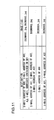
- FIG. 11 shows a specific example of the destination list prepared based on the e-mail notification target image list shown in FIG. 6 .
- DSCN0001. jpg and DSCN0003.jpg match each other in all the destinations related thereto. Therefore, there is added in the destination list a record which is constituted by the e-mail address having a destination ID of A01, the e-mail address having a destination ID of A02, and all the e-mail addresses contained in G03 that are selected as the destinations of the notification e-mail and the notification target images to be notified by the notification e-mail including DSCN0001.jpg and DSCN0003.jpg.
- the other images have no matched destinations to each other, so that there are added to the destination list those records that are constituted by destinations related to each image that are used as destinations of the notification e-mail and each image as the notification target image to be notified by the notification e-mail.
- a step S475 the data transmission unit 204b determines whether or not all the non-transmitted images specified in the step S430 have been registered in the destination list. If the result of the determination in the step S475 is NO, the process is returned to the step s440. If the result of the determination in the step S430 is YES, the process is advanced to a step S480.
- the data transmission unit 204b transmits the prepared destination list to the image storage server 300.
- the image storage server 300 analyses a notification e-mail for which image is to be transmitted to which destination based on the received destination list and the notification e-mails shown in FIG. 2 to their corresponding destinations, respectively.
- a step S485 the data transmission unit 204b determines whether or not an operation to suspend the data transmission has been performed by the user. If the result of the determination in the step S485 is YES, the process is advanced to the above-mentioned step S550 to set the suspension flag to be detailed later on. As mentioned above, the suspension flag is for use in the second and third embodiments, so that it does not have to be set in the first embodiment.
- a step S490 the data transmission unit 204b selects a specified frame of image and transmits image management information on the image to the image storage server 300.
- the image management information includes a file name of the image file, time and date of preparing the file, and a file size.
- the data transmission unit 204b determines whether or not the image file scheduled to be transmitted has already been registered in the image storage server 300 based on the received image management information. When all of the file name, the time and date of preparing the file, and the file size coincide with those of the image file already registered, the result of the determination in the step S490 is YES.
- the image storage server 300 determines that it is unnecessary to receive the image file from the camera 200 and notifies to the camera 200 that transmission of the image file is unnecessary.
- the image storage server 300 determines that it is necessary to receive the image from the camera 200 and sends a request for transmission of the file to the camera 200.
- a step S500 the data transmission unit 204b determines whether or not the request for transmission has been received from the image storage server 300. If the result of the determination in the step S500 is NO, the process is advanced to a step S540. In the step S540, the data transmission unit 204b determines whether or not it has been notified that the transmission is unnecessary from the image storage server 300. If the result of the determination in the step S540 is NO, the process is returned to the step S500 to repeat the processing. If the result of the determination in the step S540 is YES, the process is returned to the step S490.
- the process is advanced to a step S510 and the data transmission unit 204b starts transmission of the specified one frame of image selected in the step S490 to the image storage server 300.
- the image storage server 300 transmits a notification of reception to the camera 200.
- the data transmission unit 204b determines whether or not the notification of reception is received from the image storage server 300. If the result of the determination in the step S520 is YES, the process is advanced to a step S530.
- the data transmission unit 204b records current time and date as time and date of transmission completion for a specified image file in the e-mail notification target image list, and the process is returned to the step S490.
- the image for which it is set to transmit a notification e-mail and a destination list together with the image file to be backed up are transmitted to the image storage server 300.
- FIGS. 1 to 8 , 10 , and 11 are the same as those in the first embodiment, and the descriptions thereof are omitted.
- the user is supposed to perform operations to transmit the notification e-mail in advance using the e-mail setting screen in the same manner as that in the first embodiment, and it is assumed that the e-mail notification target image list has already been prepared in the flash memory 206.
- the image files to which the notification e-mail is to be transmitted can be efficiently transmitted by transmitting them in priority to the image files to be backed up.
- the data transmission unit 204b identifies the image files for which it is set by the user to transmit the notification e-mail as specified images and the other image files to be backed up as non-specified images.
- the specified images are transmitted to the image storage server 300 in priority to the non-specified images.
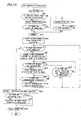
- the data transmission unit 204b performs data transmission processing shown in FIG. 12 .
- the processing shown in FIG. 12 is executed by a program that is started up when it is instructed by the user to back up images in the image storage server 300.
- the processing is executed by a program that is started up when power is supplied to the camera 200 from an external power source through an AC adapter.
- FIG. 12 the same step numbers are assigned to the same processing as the data transmission process in the first embodiment explained referring to FIG. 9 , and explanation is focused on differences.
- step S340 If the result of the determination in the step S340 is YES, the process is advanced to a step S390.
- step S390 the data transmission unit 204b cancels connection with the access point 600.
- step S610 the data transmission unit 204b turns the power of the camera 200 OFF to end the processing.
- a step S620 the data transmission unit 204b determines whether or not there is in the memory card an image file to be backed up of which transmission to the image storage server 300 has not been completed. To be concrete, the data transmission unit 204b determines that an image file on which a back up attribute is set ON is determined to have not been completed of backing up. If the result of the determination in the step S620 is YES, the process is advanced to a step S630. In the step S630, the data transmission unit 204b transmits image management information, that is, file name, time and date of preparing, and file size of one specified frame of image out of those images whose backing up has not been completed to the image storage server 300.
- image management information that is, file name, time and date of preparing, and file size of one specified frame of image out of those images whose backing up has not been completed to the image storage server 300.
- a step S640 the data transmission unit 204b determines whether or not it receives a request to transmit data from the image storage server 300. If the result of the determination in the step S640 is NO, the process is advanced to a step S680 and the data transmission unit 204b determines whether or not it has been notified from the image storage server 300 that transmission is unnecessary. If the result of the determination in the step S680 is NO, the process is returned to the step S640 to repeat the processing. If the result of the determination in the step S680 is YES, the process is returned to the step S620.
- step S640 If the result of the determination in the step S640 is YES, the process is advanced to a step S650 and transmission of the specified one frame of image selected in the step S630 to the image storage server 300 is started.
- step S660 the data transmission unit 204b determines whether or not an acknowledgment of receipt has been received from the image storage server 300. If the result of the determination in the step S660 is YES, the process is advanced to a step S670 and the data transmission unit 204b sets OFF the back up attribute of the transmitted specified one frame of image file.
- step S660 If the result of the determination in the step S660 is NO, the process is advanced to a step S690.
- the data transmission unit 204b displays a message indicating that the transmission of the image file to which the notification e-mail is to be transmitted, thedestinationlist, and the image file to be backed up has been completed, such as "Uploading has been completed.”, on the monitor 208.
- a step S700 the data transmission unit 204b determines whether or not the suspension flag set by the notification target image transmission processing explained referring to FIG. 10 is stored in the SDRAM 205. If the result of the determination in the step S700 is NO, the process is advanced to the step S390. If the result of the determination in the step S700 is YES, the process is advanced to the step S381 to perform the notification target image transmission processing again.
- image files on which a notification e-mail is to be transmitted are transmitted in priority to the selected image files.
- the data transmission unit 204b identifies the image files on which the notification e-mail is set by the user to be transmitted as specified images and the image files selected by the user in advance as non-specified images.
- the specified images are transmitted to the image storage server 300 in priority to the non-specified images.
- FIGS. 1 to 8 , 10 , and 11 are the same as those in the first embodiment, and explanation thereof is omitted.
- the user is supposed to perform operations to transmit the notification e-mail in advance using the e-mail setting screen in the same manner as that in the first embodiment, and it is assumed that the e-mail notification target image list has already been prepared in the flash memory 206. It is also assumed that the images to be transmitted to the image storage server 300 have already been selected by the user and a list of file names of the image files has already been stored as transmission target list in the flash memory 206.
Landscapes
- Engineering & Computer Science (AREA)
- Multimedia (AREA)
- Signal Processing (AREA)
- Human Computer Interaction (AREA)
- Computing Systems (AREA)
- General Engineering & Computer Science (AREA)
- Information Transfer Between Computers (AREA)
- Facsimiles In General (AREA)
Applications Claiming Priority (2)
| Application Number | Priority Date | Filing Date | Title |
|---|---|---|---|
| JP2007202563 | 2007-08-03 | ||
| JP2008173248A JP5055582B2 (ja) | 2007-08-03 | 2008-07-02 | カメラ及びシステム |
Publications (2)
| Publication Number | Publication Date |
|---|---|
| EP2026554A1 true EP2026554A1 (de) | 2009-02-18 |
| EP2026554B1 EP2026554B1 (de) | 2015-05-27 |
Family
ID=39767127
Family Applications (1)
| Application Number | Title | Priority Date | Filing Date |
|---|---|---|---|
| EP08161661.7A Active EP2026554B1 (de) | 2007-08-03 | 2008-08-01 | Kamera mit änderbaren Prioritäten für das Sichern von Bildern in einem externen Gerät |
Country Status (2)
| Country | Link |
|---|---|
| US (2) | US20090033749A1 (de) |
| EP (1) | EP2026554B1 (de) |
Cited By (2)
| Publication number | Priority date | Publication date | Assignee | Title |
|---|---|---|---|---|
| EP2437472A1 (de) * | 2010-10-04 | 2012-04-04 | Lg Electronics Inc. | Tragbares Endgerät und Bildübertragungsverfahren darin |
| GB2561440A (en) * | 2017-02-22 | 2018-10-17 | Canon Kk | Communication apparatus and control method for the same |
Families Citing this family (13)
| Publication number | Priority date | Publication date | Assignee | Title |
|---|---|---|---|---|
| US8422550B2 (en) * | 2007-07-27 | 2013-04-16 | Lagavulin Limited | Apparatuses, methods, and systems for a portable, automated contractual image dealer and transmitter |
| EP2175378A1 (de) * | 2008-10-13 | 2010-04-14 | Vodafone Holding GmbH | Bereitstellung von auf einer Speicherkarte gespeicherten Daten für eine Benutzervorrichtung |
| US9338515B2 (en) | 2009-09-03 | 2016-05-10 | At&T Intellectual Property I, L.P. | Real-time and secured picture/video upload via a content delivery network |
| US9531844B2 (en) * | 2009-10-01 | 2016-12-27 | Sony Corporation | Automatic internet connection sharing among related devices |
| JP2011204314A (ja) * | 2010-03-25 | 2011-10-13 | Sony Corp | 受信装置、受信方法、プログラムおよび送信装置 |
| JP5843143B2 (ja) * | 2011-09-26 | 2016-01-13 | ブラザー工業株式会社 | 端末装置及びプログラム |
| JP5907599B2 (ja) * | 2011-11-16 | 2016-04-26 | キヤノン株式会社 | 情報処理装置、その制御方法、並びにプログラム |
| KR20140027826A (ko) * | 2012-08-27 | 2014-03-07 | 삼성전자주식회사 | 휴대 단말기에서 컨텐츠를 표시하는 장치 및 방법 |
| CN103838622B (zh) * | 2012-11-27 | 2017-09-29 | 联想(北京)有限公司 | 信息处理方法及电子设备 |
| JP6115127B2 (ja) * | 2012-12-27 | 2017-04-19 | リコーイメージング株式会社 | デジタルカメラおよび携帯機器の通信システム |
| TW201501519A (zh) * | 2013-06-21 | 2015-01-01 | Ability Entpr Co Ltd | 攝像裝置與影像串流輸出方法 |
| CN105100829B (zh) * | 2015-06-29 | 2019-07-02 | 小米科技有限责任公司 | 视频内容截取方法及装置 |
| JP7426540B2 (ja) * | 2021-03-31 | 2024-02-01 | 株式会社Fuji | データ保存システム |
Citations (12)
| Publication number | Priority date | Publication date | Assignee | Title |
|---|---|---|---|---|
| US5276867A (en) | 1989-12-19 | 1994-01-04 | Epoch Systems, Inc. | Digital data storage system with improved data migration |
| US5649196A (en) | 1993-07-01 | 1997-07-15 | Legent Corporation | System and method for distributed storage management on networked computer systems using binary object identifiers |
| US5751997A (en) | 1993-01-21 | 1998-05-12 | Apple Computer, Inc. | Method and apparatus for transferring archival data among an arbitrarily large number of computer devices in a networked computer environment |
| US20010012066A1 (en) | 1997-11-24 | 2001-08-09 | Parulski Kenneth A. | Capturing digital images to be transferred to a service provider for storage |
| US20030103144A1 (en) | 2001-12-04 | 2003-06-05 | Robert Sesek | Digital camera having image transfer method and system |
| US20040064488A1 (en) | 2002-09-30 | 2004-04-01 | Dinesh Sinha | Real time optimized backup of computer data |
| US20040201711A1 (en) | 2001-04-30 | 2004-10-14 | Lopaz Patricia D. | Method for setting image intent |
| EP1694065A1 (de) | 2004-12-06 | 2006-08-23 | Sony Corporation | Bildvorrichtung |
| US20060245739A1 (en) | 2005-04-27 | 2006-11-02 | Kabushiki Kaisha Toshiba | Electronic camera device and method of creating history file |
| US20060262346A1 (en) | 2005-05-23 | 2006-11-23 | Takashi Goto | Image processing apparatus having a mechanism for backing up image data |
| WO2007018832A1 (en) | 2005-07-22 | 2007-02-15 | Eastman Kodak Company | Creation of dpof files adapted to the capabilities of one or more printers using printer capability profiles |
| EP1760593A1 (de) | 2004-03-25 | 2007-03-07 | Softbank BB Corp. | Backup-system und backup-verfahren |
Family Cites Families (14)
| Publication number | Priority date | Publication date | Assignee | Title |
|---|---|---|---|---|
| JPH10214241A (ja) | 1997-01-29 | 1998-08-11 | Canon Inc | 画像転送方法及びシステム |
| US6573927B2 (en) * | 1997-02-20 | 2003-06-03 | Eastman Kodak Company | Electronic still camera for capturing digital image and creating a print order |
| US6043837A (en) * | 1997-05-08 | 2000-03-28 | Be Here Corporation | Method and apparatus for electronically distributing images from a panoptic camera system |
| JP4232208B2 (ja) | 1997-10-14 | 2009-03-04 | 株式会社ニコン | 電子カメラ |
| JP2001045178A (ja) | 1999-08-03 | 2001-02-16 | Fuji Photo Film Co Ltd | 画像送信方法、画像送信システム、並びに電子カメラ及び画像送信装置 |
| JP2004140641A (ja) | 2002-10-18 | 2004-05-13 | Sadao Takeda | 画像通信装置および画像蓄積システム |
| US7116833B2 (en) * | 2002-12-23 | 2006-10-03 | Eastman Kodak Company | Method of transmitting selected regions of interest of digital video data at selected resolutions |
| JP2004356826A (ja) | 2003-05-28 | 2004-12-16 | Kyocera Mita Corp | 画像送信装置 |
| KR100608835B1 (ko) * | 2004-12-09 | 2006-08-08 | 엘지전자 주식회사 | 휴대단말기의 이미지 전송방법 |
| US7688379B2 (en) * | 2005-12-09 | 2010-03-30 | Hewlett-Packard Development Company, L.P. | Selecting quality images from multiple captured images |
| JP5130421B2 (ja) * | 2006-06-18 | 2013-01-30 | 雅英 田中 | 通信機能を有するデジタルカメラ |
| US20080060032A1 (en) * | 2006-09-02 | 2008-03-06 | Nico Toutenhoofd | Communication and remote editing of digital photographs |
| US7917853B2 (en) * | 2007-03-21 | 2011-03-29 | At&T Intellectual Property I, L.P. | System and method of presenting media content |
| US8803980B2 (en) * | 2007-05-29 | 2014-08-12 | Blackberry Limited | System and method for selecting a geographic location to associate with an object |
-
2008
- 2008-07-31 US US12/222,019 patent/US20090033749A1/en not_active Abandoned
- 2008-08-01 EP EP08161661.7A patent/EP2026554B1/de active Active
-
2011
- 2011-04-12 US US13/064,734 patent/US8902317B2/en active Active
Patent Citations (12)
| Publication number | Priority date | Publication date | Assignee | Title |
|---|---|---|---|---|
| US5276867A (en) | 1989-12-19 | 1994-01-04 | Epoch Systems, Inc. | Digital data storage system with improved data migration |
| US5751997A (en) | 1993-01-21 | 1998-05-12 | Apple Computer, Inc. | Method and apparatus for transferring archival data among an arbitrarily large number of computer devices in a networked computer environment |
| US5649196A (en) | 1993-07-01 | 1997-07-15 | Legent Corporation | System and method for distributed storage management on networked computer systems using binary object identifiers |
| US20010012066A1 (en) | 1997-11-24 | 2001-08-09 | Parulski Kenneth A. | Capturing digital images to be transferred to a service provider for storage |
| US20040201711A1 (en) | 2001-04-30 | 2004-10-14 | Lopaz Patricia D. | Method for setting image intent |
| US20030103144A1 (en) | 2001-12-04 | 2003-06-05 | Robert Sesek | Digital camera having image transfer method and system |
| US20040064488A1 (en) | 2002-09-30 | 2004-04-01 | Dinesh Sinha | Real time optimized backup of computer data |
| EP1760593A1 (de) | 2004-03-25 | 2007-03-07 | Softbank BB Corp. | Backup-system und backup-verfahren |
| EP1694065A1 (de) | 2004-12-06 | 2006-08-23 | Sony Corporation | Bildvorrichtung |
| US20060245739A1 (en) | 2005-04-27 | 2006-11-02 | Kabushiki Kaisha Toshiba | Electronic camera device and method of creating history file |
| US20060262346A1 (en) | 2005-05-23 | 2006-11-23 | Takashi Goto | Image processing apparatus having a mechanism for backing up image data |
| WO2007018832A1 (en) | 2005-07-22 | 2007-02-15 | Eastman Kodak Company | Creation of dpof files adapted to the capabilities of one or more printers using printer capability profiles |
Cited By (5)
| Publication number | Priority date | Publication date | Assignee | Title |
|---|---|---|---|---|
| EP2437472A1 (de) * | 2010-10-04 | 2012-04-04 | Lg Electronics Inc. | Tragbares Endgerät und Bildübertragungsverfahren darin |
| US8760553B2 (en) | 2010-10-04 | 2014-06-24 | Lg Electronics Inc. | Mobile terminal and image transmitting method therein |
| GB2561440A (en) * | 2017-02-22 | 2018-10-17 | Canon Kk | Communication apparatus and control method for the same |
| US10218891B2 (en) | 2017-02-22 | 2019-02-26 | Canon Kabushiki Kaisha | Communication apparatus, control method for the same, and storage medium for priority image transfer |
| GB2561440B (en) * | 2017-02-22 | 2021-08-25 | Canon Kk | Communication apparatus and control method for the same |
Also Published As
| Publication number | Publication date |
|---|---|
| EP2026554B1 (de) | 2015-05-27 |
| US8902317B2 (en) | 2014-12-02 |
| US20090033749A1 (en) | 2009-02-05 |
| US20110193973A1 (en) | 2011-08-11 |
Similar Documents
| Publication | Publication Date | Title |
|---|---|---|
| EP2026554B1 (de) | Kamera mit änderbaren Prioritäten für das Sichern von Bildern in einem externen Gerät | |
| JP5110805B2 (ja) | 有線及び無線通信可能な通信端末、通信方法、プログラム | |
| US8553104B2 (en) | Image capture device | |
| JP5055582B2 (ja) | カメラ及びシステム | |
| US20080260294A1 (en) | Image storage device, photographing apparatus, and image storage device control method | |
| JP3781017B2 (ja) | 画像管理システム及び画像管理方法、デジタルカメラ | |
| EP1553770A1 (de) | Mobiles endgerät, druckeinrichtung, bilddrucksystem und thumbnail-erzeugungseinrichtung | |
| JP5629468B2 (ja) | 情報処理装置及びその制御方法 | |
| JP2001094745A (ja) | 画像記録装置 | |
| JP4621298B2 (ja) | 撮像装置 | |
| JP4957447B2 (ja) | 電子機器、およびカメラ | |
| JP5309491B2 (ja) | カメラ | |
| JP4677504B2 (ja) | 撮像装置 | |
| JP5008282B2 (ja) | 撮像装置及びその制御方法、コンピュータプログラム及び記憶媒体 | |
| JP2002204414A (ja) | データ転送方法および画像撮影装置 | |
| JP2000188710A (ja) | 画像通信方法、画像通信装置、及び画像通信システム | |
| JP2006086596A (ja) | 無線通信装置 | |
| JP2001111734A (ja) | 画像通信方法及び画像通信装置 | |
| JP5518127B2 (ja) | 撮像装置及びその制御方法、コンピュータプログラム及び記憶媒体 | |
| JP5972085B2 (ja) | データ転送制御装置、その制御方法およびプログラム | |
| JP2008193219A (ja) | カメラ | |
| JP2021176220A (ja) | 通信装置、通信装置の制御方法及びそのプログラム | |
| JP2007049632A (ja) | デジタルカメラ | |
| JP2006319497A (ja) | 撮像装置及び記録方法 | |
| JP2008263351A (ja) | 画像送信装置、および撮像装置 |
Legal Events
| Date | Code | Title | Description |
|---|---|---|---|
| PUAI | Public reference made under article 153(3) epc to a published international application that has entered the european phase |
Free format text: ORIGINAL CODE: 0009012 |
|
| AK | Designated contracting states |
Kind code of ref document: A1 Designated state(s): AT BE BG CH CY CZ DE DK EE ES FI FR GB GR HR HU IE IS IT LI LT LU LV MC MT NL NO PL PT RO SE SI SK TR |
|
| AX | Request for extension of the european patent |
Extension state: AL BA MK RS |
|
| 17P | Request for examination filed |
Effective date: 20090818 |
|
| AKX | Designation fees paid |
Designated state(s): AT BE BG CH CY CZ DE DK EE ES FI FR GB GR HR HU IE IS IT LI LT LU LV MC MT NL NO PL PT RO SE SI SK TR |
|
| 17Q | First examination report despatched |
Effective date: 20100121 |
|
| RAP1 | Party data changed (applicant data changed or rights of an application transferred) |
Owner name: NIKON CORPORATION |
|
| GRAP | Despatch of communication of intention to grant a patent |
Free format text: ORIGINAL CODE: EPIDOSNIGR1 |
|
| INTG | Intention to grant announced |
Effective date: 20141209 |
|
| RIN1 | Information on inventor provided before grant (corrected) |
Inventor name: MOTOKI, YASUYUKI Inventor name: NAKAMURA, TOSHIYUKI |
|
| GRAS | Grant fee paid |
Free format text: ORIGINAL CODE: EPIDOSNIGR3 |
|
| GRAA | (expected) grant |
Free format text: ORIGINAL CODE: 0009210 |
|
| AK | Designated contracting states |
Kind code of ref document: B1 Designated state(s): AT BE BG CH CY CZ DE DK EE ES FI FR GB GR HR HU IE IS IT LI LT LU LV MC MT NL NO PL PT RO SE SI SK TR |
|
| REG | Reference to a national code |
Ref country code: GB Ref legal event code: FG4D |
|
| REG | Reference to a national code |
Ref country code: CH Ref legal event code: EP |
|
| REG | Reference to a national code |
Ref country code: AT Ref legal event code: REF Ref document number: 729368 Country of ref document: AT Kind code of ref document: T Effective date: 20150615 |
|
| REG | Reference to a national code |
Ref country code: IE Ref legal event code: FG4D |
|
| REG | Reference to a national code |
Ref country code: DE Ref legal event code: R096 Ref document number: 602008038305 Country of ref document: DE |
|
| REG | Reference to a national code |
Ref country code: FR Ref legal event code: PLFP Year of fee payment: 8 |
|
| RAP2 | Party data changed (patent owner data changed or rights of a patent transferred) |
Owner name: NIKON CORPORATION |
|
| REG | Reference to a national code |
Ref country code: AT Ref legal event code: MK05 Ref document number: 729368 Country of ref document: AT Kind code of ref document: T Effective date: 20150527 |
|
| REG | Reference to a national code |
Ref country code: LT Ref legal event code: MG4D |
|
| PG25 | Lapsed in a contracting state [announced via postgrant information from national office to epo] |
Ref country code: NO Free format text: LAPSE BECAUSE OF FAILURE TO SUBMIT A TRANSLATION OF THE DESCRIPTION OR TO PAY THE FEE WITHIN THE PRESCRIBED TIME-LIMIT Effective date: 20150827 Ref country code: FI Free format text: LAPSE BECAUSE OF FAILURE TO SUBMIT A TRANSLATION OF THE DESCRIPTION OR TO PAY THE FEE WITHIN THE PRESCRIBED TIME-LIMIT Effective date: 20150527 Ref country code: ES Free format text: LAPSE BECAUSE OF FAILURE TO SUBMIT A TRANSLATION OF THE DESCRIPTION OR TO PAY THE FEE WITHIN THE PRESCRIBED TIME-LIMIT Effective date: 20150527 Ref country code: HR Free format text: LAPSE BECAUSE OF FAILURE TO SUBMIT A TRANSLATION OF THE DESCRIPTION OR TO PAY THE FEE WITHIN THE PRESCRIBED TIME-LIMIT Effective date: 20150527 Ref country code: PT Free format text: LAPSE BECAUSE OF FAILURE TO SUBMIT A TRANSLATION OF THE DESCRIPTION OR TO PAY THE FEE WITHIN THE PRESCRIBED TIME-LIMIT Effective date: 20150928 Ref country code: LT Free format text: LAPSE BECAUSE OF FAILURE TO SUBMIT A TRANSLATION OF THE DESCRIPTION OR TO PAY THE FEE WITHIN THE PRESCRIBED TIME-LIMIT Effective date: 20150527 |
|
| REG | Reference to a national code |
Ref country code: NL Ref legal event code: MP Effective date: 20150527 |
|
| PG25 | Lapsed in a contracting state [announced via postgrant information from national office to epo] |
Ref country code: IS Free format text: LAPSE BECAUSE OF FAILURE TO SUBMIT A TRANSLATION OF THE DESCRIPTION OR TO PAY THE FEE WITHIN THE PRESCRIBED TIME-LIMIT Effective date: 20150927 Ref country code: AT Free format text: LAPSE BECAUSE OF FAILURE TO SUBMIT A TRANSLATION OF THE DESCRIPTION OR TO PAY THE FEE WITHIN THE PRESCRIBED TIME-LIMIT Effective date: 20150527 Ref country code: BG Free format text: LAPSE BECAUSE OF FAILURE TO SUBMIT A TRANSLATION OF THE DESCRIPTION OR TO PAY THE FEE WITHIN THE PRESCRIBED TIME-LIMIT Effective date: 20150827 Ref country code: GR Free format text: LAPSE BECAUSE OF FAILURE TO SUBMIT A TRANSLATION OF THE DESCRIPTION OR TO PAY THE FEE WITHIN THE PRESCRIBED TIME-LIMIT Effective date: 20150828 Ref country code: LV Free format text: LAPSE BECAUSE OF FAILURE TO SUBMIT A TRANSLATION OF THE DESCRIPTION OR TO PAY THE FEE WITHIN THE PRESCRIBED TIME-LIMIT Effective date: 20150527 |
|
| PG25 | Lapsed in a contracting state [announced via postgrant information from national office to epo] |
Ref country code: DK Free format text: LAPSE BECAUSE OF FAILURE TO SUBMIT A TRANSLATION OF THE DESCRIPTION OR TO PAY THE FEE WITHIN THE PRESCRIBED TIME-LIMIT Effective date: 20150527 Ref country code: EE Free format text: LAPSE BECAUSE OF FAILURE TO SUBMIT A TRANSLATION OF THE DESCRIPTION OR TO PAY THE FEE WITHIN THE PRESCRIBED TIME-LIMIT Effective date: 20150527 |
|
| PG25 | Lapsed in a contracting state [announced via postgrant information from national office to epo] |
Ref country code: PL Free format text: LAPSE BECAUSE OF FAILURE TO SUBMIT A TRANSLATION OF THE DESCRIPTION OR TO PAY THE FEE WITHIN THE PRESCRIBED TIME-LIMIT Effective date: 20150527 Ref country code: SK Free format text: LAPSE BECAUSE OF FAILURE TO SUBMIT A TRANSLATION OF THE DESCRIPTION OR TO PAY THE FEE WITHIN THE PRESCRIBED TIME-LIMIT Effective date: 20150527 Ref country code: CZ Free format text: LAPSE BECAUSE OF FAILURE TO SUBMIT A TRANSLATION OF THE DESCRIPTION OR TO PAY THE FEE WITHIN THE PRESCRIBED TIME-LIMIT Effective date: 20150527 Ref country code: RO Free format text: LAPSE BECAUSE OF NON-PAYMENT OF DUE FEES Effective date: 20150527 |
|
| REG | Reference to a national code |
Ref country code: DE Ref legal event code: R097 Ref document number: 602008038305 Country of ref document: DE |
|
| PG25 | Lapsed in a contracting state [announced via postgrant information from national office to epo] |
Ref country code: MC Free format text: LAPSE BECAUSE OF FAILURE TO SUBMIT A TRANSLATION OF THE DESCRIPTION OR TO PAY THE FEE WITHIN THE PRESCRIBED TIME-LIMIT Effective date: 20150527 Ref country code: LU Free format text: LAPSE BECAUSE OF FAILURE TO SUBMIT A TRANSLATION OF THE DESCRIPTION OR TO PAY THE FEE WITHIN THE PRESCRIBED TIME-LIMIT Effective date: 20150801 |
|
| REG | Reference to a national code |
Ref country code: CH Ref legal event code: PL |
|
| PLBE | No opposition filed within time limit |
Free format text: ORIGINAL CODE: 0009261 |
|
| STAA | Information on the status of an ep patent application or granted ep patent |
Free format text: STATUS: NO OPPOSITION FILED WITHIN TIME LIMIT |
|
| PG25 | Lapsed in a contracting state [announced via postgrant information from national office to epo] |
Ref country code: CH Free format text: LAPSE BECAUSE OF NON-PAYMENT OF DUE FEES Effective date: 20150831 Ref country code: LI Free format text: LAPSE BECAUSE OF NON-PAYMENT OF DUE FEES Effective date: 20150831 Ref country code: IT Free format text: LAPSE BECAUSE OF FAILURE TO SUBMIT A TRANSLATION OF THE DESCRIPTION OR TO PAY THE FEE WITHIN THE PRESCRIBED TIME-LIMIT Effective date: 20150527 |
|
| 26N | No opposition filed |
Effective date: 20160301 |
|
| PG25 | Lapsed in a contracting state [announced via postgrant information from national office to epo] |
Ref country code: SI Free format text: LAPSE BECAUSE OF FAILURE TO SUBMIT A TRANSLATION OF THE DESCRIPTION OR TO PAY THE FEE WITHIN THE PRESCRIBED TIME-LIMIT Effective date: 20150527 |
|
| REG | Reference to a national code |
Ref country code: IE Ref legal event code: MM4A |
|
| REG | Reference to a national code |
Ref country code: FR Ref legal event code: PLFP Year of fee payment: 9 |
|
| PG25 | Lapsed in a contracting state [announced via postgrant information from national office to epo] |
Ref country code: IE Free format text: LAPSE BECAUSE OF NON-PAYMENT OF DUE FEES Effective date: 20150801 |
|
| PG25 | Lapsed in a contracting state [announced via postgrant information from national office to epo] |
Ref country code: BE Free format text: LAPSE BECAUSE OF FAILURE TO SUBMIT A TRANSLATION OF THE DESCRIPTION OR TO PAY THE FEE WITHIN THE PRESCRIBED TIME-LIMIT Effective date: 20150527 |
|
| PG25 | Lapsed in a contracting state [announced via postgrant information from national office to epo] |
Ref country code: MT Free format text: LAPSE BECAUSE OF FAILURE TO SUBMIT A TRANSLATION OF THE DESCRIPTION OR TO PAY THE FEE WITHIN THE PRESCRIBED TIME-LIMIT Effective date: 20150527 |
|
| PG25 | Lapsed in a contracting state [announced via postgrant information from national office to epo] |
Ref country code: HU Free format text: LAPSE BECAUSE OF FAILURE TO SUBMIT A TRANSLATION OF THE DESCRIPTION OR TO PAY THE FEE WITHIN THE PRESCRIBED TIME-LIMIT; INVALID AB INITIO Effective date: 20080801 |
|
| PG25 | Lapsed in a contracting state [announced via postgrant information from national office to epo] |
Ref country code: CY Free format text: LAPSE BECAUSE OF FAILURE TO SUBMIT A TRANSLATION OF THE DESCRIPTION OR TO PAY THE FEE WITHIN THE PRESCRIBED TIME-LIMIT Effective date: 20150527 Ref country code: NL Free format text: LAPSE BECAUSE OF FAILURE TO SUBMIT A TRANSLATION OF THE DESCRIPTION OR TO PAY THE FEE WITHIN THE PRESCRIBED TIME-LIMIT Effective date: 20150527 Ref country code: SE Free format text: LAPSE BECAUSE OF FAILURE TO SUBMIT A TRANSLATION OF THE DESCRIPTION OR TO PAY THE FEE WITHIN THE PRESCRIBED TIME-LIMIT Effective date: 20150527 |
|
| REG | Reference to a national code |
Ref country code: FR Ref legal event code: PLFP Year of fee payment: 10 |
|
| PG25 | Lapsed in a contracting state [announced via postgrant information from national office to epo] |
Ref country code: TR Free format text: LAPSE BECAUSE OF FAILURE TO SUBMIT A TRANSLATION OF THE DESCRIPTION OR TO PAY THE FEE WITHIN THE PRESCRIBED TIME-LIMIT Effective date: 20150527 |
|
| REG | Reference to a national code |
Ref country code: FR Ref legal event code: PLFP Year of fee payment: 11 |
|
| REG | Reference to a national code |
Ref country code: DE Ref legal event code: R082 Ref document number: 602008038305 Country of ref document: DE Representative=s name: VENNER SHIPLEY GERMANY LLP, DE Ref country code: DE Ref legal event code: R082 Ref document number: 602008038305 Country of ref document: DE Representative=s name: VENNER SHIPLEY LLP, DE |
|
| P01 | Opt-out of the competence of the unified patent court (upc) registered |
Effective date: 20230517 |
|
| PGFP | Annual fee paid to national office [announced via postgrant information from national office to epo] |
Ref country code: DE Payment date: 20250702 Year of fee payment: 18 |
|
| PGFP | Annual fee paid to national office [announced via postgrant information from national office to epo] |
Ref country code: GB Payment date: 20250703 Year of fee payment: 18 |
|
| PGFP | Annual fee paid to national office [announced via postgrant information from national office to epo] |
Ref country code: FR Payment date: 20250703 Year of fee payment: 18 |