EP1770549A2 - Inhaltseditor und Verfahren zur Inhaltsbearbeitung damit - Google Patents
Inhaltseditor und Verfahren zur Inhaltsbearbeitung damit Download PDFInfo
- Publication number
- EP1770549A2 EP1770549A2 EP06255029A EP06255029A EP1770549A2 EP 1770549 A2 EP1770549 A2 EP 1770549A2 EP 06255029 A EP06255029 A EP 06255029A EP 06255029 A EP06255029 A EP 06255029A EP 1770549 A2 EP1770549 A2 EP 1770549A2
- Authority
- EP
- European Patent Office
- Prior art keywords
- input
- items
- user interface
- text box
- item
- Prior art date
- Legal status (The legal status is an assumption and is not a legal conclusion. Google has not performed a legal analysis and makes no representation as to the accuracy of the status listed.)
- Withdrawn
Links
Images


Classifications
-
- G—PHYSICS
- G06—COMPUTING OR CALCULATING; COUNTING
- G06Q—INFORMATION AND COMMUNICATION TECHNOLOGY [ICT] SPECIALLY ADAPTED FOR ADMINISTRATIVE, COMMERCIAL, FINANCIAL, MANAGERIAL OR SUPERVISORY PURPOSES; SYSTEMS OR METHODS SPECIALLY ADAPTED FOR ADMINISTRATIVE, COMMERCIAL, FINANCIAL, MANAGERIAL OR SUPERVISORY PURPOSES, NOT OTHERWISE PROVIDED FOR
- G06Q50/00—Information and communication technology [ICT] specially adapted for implementation of business processes of specific business sectors, e.g. utilities or tourism
- G06Q50/10—Services
-
- G—PHYSICS
- G06—COMPUTING OR CALCULATING; COUNTING
- G06F—ELECTRIC DIGITAL DATA PROCESSING
- G06F40/00—Handling natural language data
- G06F40/10—Text processing
- G06F40/166—Editing, e.g. inserting or deleting
- G06F40/174—Form filling; Merging
Definitions
- the present invention relates to a contents editor and a method of editing contents using the same.
- an apparatus for editing characters while displaying an image such as a cellular phone
- a standard character input UI user interface
- functions determined by its specifications for example, text control
- the input UI is activated by an instruction to start editing characters in connection with a specific item. Characters are input in the input UI, and the content thereof is settled.
- Such a technique is disclosed in, for example, Japanese Patent Publication No. 2003-122746A .
- an input UI for inputting the content is provided on a display without showing the name of the item.
- content e.g., text of a mail
- an input UI for inputting the content is provided on a display without showing the name of the item.
- a method of editing contents of a plurality of items on a single display comprising:
- the method may further comprise:
- the editorial information may receive in response to the operation of a user, and corresponds to various input devices, such as a vibration detecting device, and a button or a dial of a cellular phone.
- various input devices such as a vibration detecting device, and a button or a dial of a cellular phone.
- Various types of display devices such as a liquid crystal display device and an organic EL display device, can be used as the display.
- the input user interface having an identical appearance with the input section corresponding to the selected item is superposed on the input section and displayed, it is possible to start input without changing the screen. Therefore, even when only one input user interface can be displayed on one screen, it is possible to perform input with respect to a plurality of items without changing the screen.
- the item input sections may be arranged side by side on the screen, and the item to be edited may be changed in response to the operation of a button.
- a user interface that sequentially changes editing objects displayed on one screen in response to the operation of a button to perform input a desired editing object, and thus it is possible to easily perform input to a plurality of items.
- the display of an editorial screen display may be controlled such that the screen is scrolled in response to the operation of a button.
- the name of each of the items may be obtained from layout data indicative of how to arrange the contents when the contents are output.
- the method may further comprise:
- the method may further comprise:
- a program product comprising a computer-readable medium having recorded a program operable to cause a computer to execute the above method.
- a device for editing contents of a plurality of items comprising:
- a cellular phone is capable of performing various functions, such as talking, data communication and data editing.
- the cellular phone 10 includes a removable memory interface 11a, a display 12, input buttons 13, a communicator 14, a CPU 15, a ROM 16, and a RAM 17.
- the CPU 15 is connected to the components through a bus, and performs a predetermined program in cooperation with the ROM 16 and the RAM 17.
- the display 12 is capable of displaying, for example, various images or a UI under the control of the CPU 15.
- the CPU 15 can acquire various input information items when at least one of the input buttons 13 are operated.
- the communicator 14 performs wireless communication with a base station (not shown) under the control of the CPU 15 to provide a call service and a data communication service.
- a removable memory 11 is detachably provided in the removable memory interface 11 a.
- the CPU 15 can store data in the removable memory 11 or read out data from the removable memory 11.
- package data 11 b composed of a packet of data for forming a layout at the time of printing is stored in the removable memory 11.
- the package data 11 b includes a script file 11b1, a display data file 11 b2, and a printing data file 11 b3.
- Text data indicating the layout is described in the script file 11 b1.
- the text data indicating the layout may include a plurality of parameters for specifying the layout at the time of printing, and can adopt various data formats.
- the parameters include: the type of printing sheet such as the size of a sheet (e.g., A4, L size, post card) and the quality of a printing sheet (e.g., coated paper, uncoated paper); the position of a text box; the size of a text box; the maximum number of characters capable of being included in a text box (the number of characters in a text box); the size of a character; and attributes of a text box. Data indicating characters which have been input into each text box may be described.
- the type of printing sheet such as the size of a sheet (e.g., A4, L size, post card) and the quality of a printing sheet (e.g., coated paper, uncoated paper); the position of a text box; the size of a text box; the maximum number of characters capable of being included in a text box (the number of characters in a text box); the size of a character; and attributes of a text box.
- the attributes of a text box indicate the content of characters to be input to each text box, and has a one-to-one correspondence to an item name of each text box.
- the item name of a text box to which a zip code will be input is a "zip code”
- the attribute of the text box is information indicating that the text box is for the "zip code”.
- it is possible to easily perform display with a plurality of languages by associating the text box with the attribute and converting the attribute to the item name on the basis of item name data 16a stored in the ROM 16.
- an attribute that has a common definition to various languages is associated with the text box, and in the actual display, the attribute is converted into an item name corresponding to the language of a user on the basis of the item name data 16a corresponding to each language in the cellular phone 10.
- the item name may associate with the text box.
- the printing data file 11 b3 is data indicating an image to be printed
- the display data file 11 b2 is thumbnail data for displaying the image on a screen. Therefore, when a computer or a printer (not shown) acquires the package data 11 b and analyzes the acquired package data, it is possible to obtain the printing result obtained by laying out characters and the image indicated by the printing data file 11 b3 according to the layout described in the script file 11b1.
- a plurality of characters arranged on the layout are uses as printing objects, a plurality of item names converted from the attributes are displayed on the display 12 for editing, and one of the item name is edited.
- This editorial processing is sequentially performed on the other item names.
- an editorial program 18 is included in various programs capable of being executed by the CPU 15.
- the editorial program 18 includes an image processor 18a, an editorial controller 18b, and an input controller 18c.
- the image processor 18a is a module for processing images, and displays an image on the display 12 on the basis of the package data 11 b.
- the editorial controller 18b analyzes layout data included in the package data 11 b to acquire item names, and receives input content corresponding to each item.
- the input controller 18c acquires data indicating the operation executed by the input buttons 13.
- the editorial program 18 having the above-mentioned configuration allows an image to be displayed, on the basis of the package data 11b, and performs a processing for editing each item.
- the user of the cellular phone 10 operates the input buttons 13 of the cellular phone 10 to execute the editorial program 18.
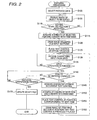
- the editorial program 18 is executed, as shown in Fig. 2, the user operates the input buttons 13 to select the package data 11 b (step S100).
- the image processor 18a accesses the removable memory 11 to acquire a plurality of package data 11b stored in the removable memory 11, and controls the display 12 to provide alternatives such that the user can select any one of the plurality of package data.
- the user uses the input buttons 13 to designate a desired one of the plurality of package data 11b.
- the input controller 18c acquires the content designated by the-user, the selection of the package data 11b is definitely settled.
- the layout of the selected package data 11b will be edited.
- the image processor 18a extracts data indicating an image to be displayed from the display data file 11b2 of the selected package data 11b, and displays an image on the display 12 on the basis of the data (step S105).
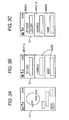
- Fig. 3A shows an example of the image displayed in step S105. More specifically, Fig. 3A shows an image of characters "Happy New Year” overlapping the background of a sunrise image, and an "edit" button for receiving an item editing start instruction is displayed at the lower left side of the screen. Since the content of the item is unsettled before the item is edited, no characters are displayed in the text boxes represented by dashed lines in Fig. 3A.
- the text boxes are represented by dashed lines in Fig. 3A. However, in the actual display screen, the text boxes are not represented by dashed lines.
- the "edit" button displayed at lower left side in Fig. 3A corresponds to any one of the input buttons of the input buttons 13, and the input controller 18c determines whether the editing start instruction is received through the "edit” button (step S110). That is, the input controller 18c determines whether one of the input buttons of the input buttons 13 corresponding to the "edit” button in the screen displayed in Fig. 3A is operated.
- step S110 When it is determined in step S110 that the editing start instruction is received, the screen is changed to the editorial screen shown in Fig. 3B to start editing. Therefore, first, the editorial controller 18b analyzes the script file 11 b1 to acquire the attribute of each text box, and converts the attribute into an item name (step S115). In this embodiment, as described above, since the attribute and the item name are associated with each other by the item name data 16a, the editorial controller 18b converts the attribute of each text box into an item name on the basis of the item name data 16a.
- the image processor 18a Since the above-mentioned processing enables the item name of the text box to be acquired, the image processor 18a forms an image displaying each item name and the character input box corresponding to the item name, and displays the editorial screens as shown in Figs. 3B and 3C on the display 12 (step S120). At that time, when content which has been input exists in connection with a certain item, the image processor 18a reads out the input content of the item from the script file 11b1 and draws a character string in the associated input box. A plurality of item input sections, each composed of the item name and the input box, are displayed on a single screen. When the item input sections corresponding to the entire screen are drawn, it is possible to easily return to the screen before interruption even when the cellular phone 10 receives a phone call and the editorial processing shown in Fig. 2 is interrupted.
- an input UI of each item is displayed by a standard text control function (for example, ITEXTCTL in BREW which is a registered trademark of Qualcomm Incorporated) provided in the cellular phone 10, and a text control is set to the item located at a default position (step S125). That is, the editorial controller 18b acquires the item name of the item at the default position to generate an input UI in which both the item name and the input box thereof are written, and displays the input UI at the default position.
- a standard text control function for example, ITEXTCTL in BREW which is a registered trademark of Qualcomm Incorporated
- the editorial controller 18b analyzes the script file 11b1 to acquire the number of characters of the item and makes a UI capable of inputting characters using the number of characters as the maximum number.
- the editorial controller 18b reads out the character string from the script file 11b1 and displays the character string in the input box.
- the image processor 18a draws the item input section such that the appearance of the item input section is the same as that of the input UI.
- the appearance of the item name is the same as that of the input box, but the input contents in the input boxes are not necessarily identical to each other.
- the input content is displayed in the input box.
- text is input after step S130, the input text is displayed in the input box. Therefore, content can be arbitrarily displayed in the input box.
- the item name "zip code” and the input box therefor are provided as an input UI, and a caret is displayed in the input box.
- item input sections composed of item names "address” and "name” and input boxes therefor are drawn as the bitmap image.
- characters cannot be input to these item input sections.
- the text control function must be used.
- the editorial controller 18b receives the input characters (step S130). That is, the input controller 18c receives signals input through the input buttons 13, and the editorial controller 18b acquires the content of the input signals and sequentially displays characters in the input box of the input UI.
- the editorial controller 18b determines whether the input controller 18c receives the input finish instruction (step S135).
- step S135 when it is determined that the input finish instruction is received, the editorial controller 18b associates the input character string with the item name by the text control function and stores the association in the RAM 17. Further, it is determined whether an editing-item changing instruction is received (step S140). For example, a button (not shown) of the input buttons 13 may be operated to move the input UI upward or downward, thereby changing an item to be edited.
- step S140 when it is determined that the editing-item changing instruction is received, a processing of changing the position of the input UI is performed.
- the editorial controller 18b acquires the character string input by the text control function performed in the previous editing stage from the RAM 17 (step S145). Then, in order to construct the input UI after editing, the editorial controller 18b analyzes the script file 11b1 to acquire the attribute of the next text box and converts the attribute into an item name (step S150). For example, in Fig. 3B, when an item below the item "zip code" is edited, the editorial controller 18b acquires the attribute of the item below the item "zip code" and converts the attribute into an item name, thereby acquiring a character string "address". Any method of acquiring an item name may be used. Therefore, the item name acquired in step S115 may be used.
- the editorial controller 18b places a text control for an item to be edited at a position where the item input section of the item to be edited is displayed (step S155). That is, the editorial controller 18b generates an input UI in which both the item name acquired in step S150 and the input box thereof are written, and displays the input UI so as to overlap the item input section of the item to be edited. At that time, the editorial controller 18b analyzes the script file 11b1 to acquire the number of characters of the item to be edited, and makes a UI capable of inputting characters using the number of characters as the maximum value. When input content previously input to the item exists, the editorial controller 18b reads out the character string from the RAM 17 and displays the character string in the input box.
- the image processor 18a draws the item input section, and displays it at the original text control position (a potion where the input UI of the item "zip code” is displayed in Fig. 3B)(step S160). In this case, the image processor 18a forms an image, with the input character string being displayed in the input box. That is, the editorial controller 18b acquires from the RAM 17 the character string input before the editing-item changing instruction is issued in step S145, and forms an image of the input box having the character string displayed therein and an image of the input box having the item name of the item written therein.
- the position of the input UI is changed in response to the editing-item changing instruction, and the input content of the original item is displayed. Therefore, even in the cellular phone 10 capable of displaying only one input UI on one screen, it is possible to provide such an input UI as if a plurality of items are freely changed and the contents thereof are input. For example, when the input of the item "zip code” is finished and then the editing item changes to the item "address", to edit the item "address”, the input Ul for the item "zip code” is changed to an input Ul for the item "address", with numbers (for example, 123-4567) indicating the zip code being displayed in the item "zip code", as shown in Figs. 3B and 3C.
- steps S130 processes after step S130 are repetitively performed on the changed item to be edited, thereby editing the content of a plurality of items. Therefore, in a case where the content of a plurality of item are edited, when an item to be edited is input, it is possible to continue to display items other than the item to be edited, and it is also possible to input content to the item to be edited while viewing the content of the items other than the item to be edited. As a result, it is possible to simply perform input to a plurality of items, without feeling uncertainness.
- step S140 when it is determined that the editing-item changing instruction is not received, the editorial controller 18b determines whether an editing finish instruction is issued (step S165). For example, one of the input buttons 13 may be operated to issue the editing finish instruction, and the editorial controller 18b receives the instruction.
- the editorial controller 18b updates the script file 11b1 on the basis of the input content (step S170). That is, the editorial controller 18b acquires the character string input in each item with reference to the RAM 17 and describes text data indicating the input content in the script file 11b1, thereby updating the script file 11b1.
- printing is performed on the basis of the package data 11b to obtain a print where the edited character string is laid out.
- three items are displayed on the display 12 such that they can be edited.
- four or more items may be displayed on the display 12 such that they can be edited.
- three items may be displayed on one screen and the screen may be scrolled when items other than the displayed items are edited.
- step S140 after data is input to the lowest or uppermost input box, items not displayed on the screen may be designated as editing objects in step S140.
- the text control of the designated items is set without changing the position of the text control in step S155.
- step S160 the image of the item input section is drawn at a position after the scroll of one item.
- the information related to the printing layout is edited.
- information to be edited is not limited thereto.
- the cellular phone serves as the editor.
- any apparatus having a display capable of displaying only one input UI on one screen may be serve as the editor.
- the invention can be applied to a digital camera, a PDA or the like having such a display.
Landscapes
- Engineering & Computer Science (AREA)
- Theoretical Computer Science (AREA)
- Business, Economics & Management (AREA)
- General Health & Medical Sciences (AREA)
- Physics & Mathematics (AREA)
- General Physics & Mathematics (AREA)
- Health & Medical Sciences (AREA)
- Audiology, Speech & Language Pathology (AREA)
- Computational Linguistics (AREA)
- General Engineering & Computer Science (AREA)
- Artificial Intelligence (AREA)
- Tourism & Hospitality (AREA)
- Human Resources & Organizations (AREA)
- Economics (AREA)
- Marketing (AREA)
- Primary Health Care (AREA)
- Strategic Management (AREA)
- General Business, Economics & Management (AREA)
- User Interface Of Digital Computer (AREA)
- Input From Keyboards Or The Like (AREA)
- Processing Or Creating Images (AREA)
- Document Processing Apparatus (AREA)
- Telephone Function (AREA)
Applications Claiming Priority (1)
| Application Number | Priority Date | Filing Date | Title |
|---|---|---|---|
| JP2005284877A JP2007094853A (ja) | 2005-09-29 | 2005-09-29 | 編集装置、携帯電話、編集方法および編集プログラム |
Publications (2)
| Publication Number | Publication Date |
|---|---|
| EP1770549A2 true EP1770549A2 (de) | 2007-04-04 |
| EP1770549A3 EP1770549A3 (de) | 2008-08-06 |
Family
ID=37633625
Family Applications (1)
| Application Number | Title | Priority Date | Filing Date |
|---|---|---|---|
| EP06255029A Withdrawn EP1770549A3 (de) | 2005-09-29 | 2006-09-28 | Inhaltseditor und Verfahren zur Inhaltsbearbeitung damit |
Country Status (5)
| Country | Link |
|---|---|
| US (1) | US20070083811A1 (de) |
| EP (1) | EP1770549A3 (de) |
| JP (1) | JP2007094853A (de) |
| KR (1) | KR100886044B1 (de) |
| CN (1) | CN1940845B (de) |
Families Citing this family (8)
| Publication number | Priority date | Publication date | Assignee | Title |
|---|---|---|---|---|
| JP4665933B2 (ja) * | 2006-07-04 | 2011-04-06 | セイコーエプソン株式会社 | 文書編集支援装置、プログラムおよび記憶媒体 |
| JP4337867B2 (ja) * | 2006-12-01 | 2009-09-30 | セイコーエプソン株式会社 | 文書編集支援装置、文書編集装置、プログラムおよび記憶媒体 |
| US8572474B1 (en) | 2007-05-03 | 2013-10-29 | Adobe Systems Incorporated | Printing non-visible, overflowing content by placing an indicator in a text box and printing the content outside the boundaries of the text box |
| KR101414612B1 (ko) * | 2007-10-01 | 2014-07-03 | 엘지전자 주식회사 | 휴대 단말기 및 그 제어 방법 |
| US8527897B2 (en) * | 2009-01-26 | 2013-09-03 | International Business Machines Corporation | System, method, and computer program product for toggling back and forth between unformatted and formatted editable views of data |
| JP5219928B2 (ja) * | 2009-06-03 | 2013-06-26 | キヤノン株式会社 | 編集装置及び編集方法、プログラム |
| US10565301B2 (en) * | 2012-08-17 | 2020-02-18 | Microsoft Technology Licensing, Llc | Stateful editing of rich content using a basic text box |
| CN104375814A (zh) * | 2013-08-14 | 2015-02-25 | 腾讯科技(深圳)有限公司 | 接口文档的生成方法及装置 |
Family Cites Families (13)
| Publication number | Priority date | Publication date | Assignee | Title |
|---|---|---|---|---|
| JPH06195334A (ja) * | 1992-12-22 | 1994-07-15 | Matsushita Electric Ind Co Ltd | 文書編集支援装置 |
| GB2347822B (en) * | 1999-02-22 | 2003-09-03 | Nokia Mobile Phones Ltd | Display function in a mobile telephone |
| CN1520127A (zh) * | 1999-12-08 | 2004-08-11 | ��ʽ����Ntt����Ħ | 便携式电话和终端 |
| SE519356C2 (sv) * | 2000-04-05 | 2003-02-18 | Anoto Ab | Förfarande och anordning för informationshantering |
| JP2002288160A (ja) * | 2001-03-28 | 2002-10-04 | Tsubasa System Co Ltd | 書類処理方法、書類処理プログラム及び書類処理装置 |
| JP2003122746A (ja) * | 2001-10-15 | 2003-04-25 | Hitachi Ltd | 携帯電話機及びその文字入力方法 |
| JP2003141027A (ja) * | 2001-10-31 | 2003-05-16 | Toshiba Corp | 要約作成方法および要約作成支援装置およびプログラム |
| JP3832326B2 (ja) * | 2001-11-29 | 2006-10-11 | 日本電気株式会社 | 携帯端末装置 |
| EP1387291A3 (de) * | 2002-07-30 | 2005-10-19 | Canon Kabushiki Kaisha | Anordnung, Verfahren, Datenträger und Programm zur Formularbearbeitung |
| US8484551B2 (en) * | 2002-09-05 | 2013-07-09 | Adobe Systems Incorporated | Creating input fields in electronic documents |
| US7305612B2 (en) * | 2003-03-31 | 2007-12-04 | Siemens Corporate Research, Inc. | Systems and methods for automatic form segmentation for raster-based passive electronic documents |
| JP2004312418A (ja) * | 2003-04-08 | 2004-11-04 | Konica Minolta Photo Imaging Inc | 画像編集加工サービス提供システム、及び画像編集加工サービス提供方法 |
| US7203699B2 (en) * | 2004-06-28 | 2007-04-10 | Bellamy Robert E | Computerized system for automated completion of forms |
-
2005
- 2005-09-29 JP JP2005284877A patent/JP2007094853A/ja active Pending
-
2006
- 2006-09-28 EP EP06255029A patent/EP1770549A3/de not_active Withdrawn
- 2006-09-29 US US11/540,896 patent/US20070083811A1/en not_active Abandoned
- 2006-09-29 CN CN2006101414601A patent/CN1940845B/zh not_active Expired - Fee Related
- 2006-09-29 KR KR1020060095520A patent/KR100886044B1/ko not_active Expired - Fee Related
Also Published As
| Publication number | Publication date |
|---|---|
| JP2007094853A (ja) | 2007-04-12 |
| US20070083811A1 (en) | 2007-04-12 |
| CN1940845A (zh) | 2007-04-04 |
| EP1770549A3 (de) | 2008-08-06 |
| KR100886044B1 (ko) | 2009-02-26 |
| CN1940845B (zh) | 2011-05-25 |
| KR20070036719A (ko) | 2007-04-03 |
Similar Documents
| Publication | Publication Date | Title |
|---|---|---|
| US20030197894A1 (en) | Method and apparatus for processing an image, and storage medium | |
| US6831752B1 (en) | Setting method for device driver | |
| KR20040048933A (ko) | 사용자 인터페이스를 스타일링하는 방법 및 적응성 사용자인터페이스를 구비한 디바이스 | |
| JP2005108041A (ja) | 携帯端末のメニュー画面表示方法及び携帯端末 | |
| EP1770549A2 (de) | Inhaltseditor und Verfahren zur Inhaltsbearbeitung damit | |
| CN101512465A (zh) | 便携式终端、显示方法、显示方式确定程序和计算机可读取的记录介质 | |
| US20060075362A1 (en) | Image processing apparatus, method, and recording medium on which program is recorded for displaying thumbnail/preview image | |
| CN110100233B (zh) | 绘图辅助装置、显示系统及绘图辅助方法 | |
| JP5055068B2 (ja) | 印刷装置、その制御方法及びプログラム | |
| JP6962352B2 (ja) | 情報処理装置、記録システム、及びプログラム | |
| JP6330488B2 (ja) | 情報処理装置、記録システム、及びプログラム | |
| US20060071903A1 (en) | Interface | |
| JP2006155356A (ja) | 画像形成システム、画像形成装置の各種情報表示方法および画像形成装置の各種情報表示プログラム | |
| JP4419316B2 (ja) | データ出力装置、及び記録媒体 | |
| JP6810719B2 (ja) | 情報処理装置、記録システム、及びプログラム | |
| JP6292044B2 (ja) | 画面生成装置、画面生成方法、および画面生成プログラム | |
| JP6394270B2 (ja) | 情報処理装置、記録システム、及びプログラム | |
| JP2018067856A (ja) | 情報処理端末で実行されるプログラム及び情報処理端末 | |
| KR101114036B1 (ko) | 이동통신 단말기의 편지지 배경 화면 설정 방법 | |
| KR100595282B1 (ko) | 이동통신 단말기의 디스플레이 화면 제어 방법 | |
| JP5209102B2 (ja) | プリンタ | |
| JP3845326B2 (ja) | 操作用画面作成方法およびプログラム並びに記録媒体 | |
| JP2004062354A (ja) | データ表示処理装置及びプログラム | |
| JP2015203973A (ja) | ロゴ作成装置およびロゴ作成方法 | |
| JPH09231228A (ja) | ファイル検索装置 |
Legal Events
| Date | Code | Title | Description |
|---|---|---|---|
| PUAI | Public reference made under article 153(3) epc to a published international application that has entered the european phase |
Free format text: ORIGINAL CODE: 0009012 |
|
| AK | Designated contracting states |
Kind code of ref document: A2 Designated state(s): AT BE BG CH CY CZ DE DK EE ES FI FR GB GR HU IE IS IT LI LT LU LV MC NL PL PT RO SE SI SK TR |
|
| AX | Request for extension of the european patent |
Extension state: AL BA HR MK YU |
|
| RIN1 | Information on inventor provided before grant (corrected) |
Inventor name: ARAKI, MIEKOC/O SEIKO EPSON CORPORATION Inventor name: MATSUO, HIROSHIC/O SEIKO EPSON CORPORATION |
|
| PUAL | Search report despatched |
Free format text: ORIGINAL CODE: 0009013 |
|
| AK | Designated contracting states |
Kind code of ref document: A3 Designated state(s): AT BE BG CH CY CZ DE DK EE ES FI FR GB GR HU IE IS IT LI LT LU LV MC NL PL PT RO SE SI SK TR |
|
| AX | Request for extension of the european patent |
Extension state: AL BA HR MK RS |
|
| RIC1 | Information provided on ipc code assigned before grant |
Ipc: G06F 17/30 20060101ALI20080702BHEP Ipc: G06F 17/24 20060101AFI20070122BHEP |
|
| AKX | Designation fees paid | ||
| REG | Reference to a national code |
Ref country code: DE Ref legal event code: 8566 |
|
| STAA | Information on the status of an ep patent application or granted ep patent |
Free format text: STATUS: THE APPLICATION IS DEEMED TO BE WITHDRAWN |
|
| 18D | Application deemed to be withdrawn |
Effective date: 20090207 |