EP1647875A2 - Mobiles Endgerät und Anzeigesteuerungsverfahren dafür - Google Patents
Mobiles Endgerät und Anzeigesteuerungsverfahren dafür Download PDFInfo
- Publication number
- EP1647875A2 EP1647875A2 EP05022450A EP05022450A EP1647875A2 EP 1647875 A2 EP1647875 A2 EP 1647875A2 EP 05022450 A EP05022450 A EP 05022450A EP 05022450 A EP05022450 A EP 05022450A EP 1647875 A2 EP1647875 A2 EP 1647875A2
- Authority
- EP
- European Patent Office
- Prior art keywords
- mobile terminal
- tilt
- pointer
- tilt sensor
- display
- Prior art date
- Legal status (The legal status is an assumption and is not a legal conclusion. Google has not performed a legal analysis and makes no representation as to the accuracy of the status listed.)
- Withdrawn
Links
Images




Classifications
-
- G—PHYSICS
- G06—COMPUTING OR CALCULATING; COUNTING
- G06F—ELECTRIC DIGITAL DATA PROCESSING
- G06F1/00—Details not covered by groups G06F3/00 - G06F13/00 and G06F21/00
- G06F1/16—Constructional details or arrangements
- G06F1/1613—Constructional details or arrangements for portable computers
-
- G—PHYSICS
- G06—COMPUTING OR CALCULATING; COUNTING
- G06F—ELECTRIC DIGITAL DATA PROCESSING
- G06F1/00—Details not covered by groups G06F3/00 - G06F13/00 and G06F21/00
- G06F1/16—Constructional details or arrangements
- G06F1/1613—Constructional details or arrangements for portable computers
- G06F1/1615—Constructional details or arrangements for portable computers with several enclosures having relative motions, each enclosure supporting at least one I/O or computing function
- G06F1/1616—Constructional details or arrangements for portable computers with several enclosures having relative motions, each enclosure supporting at least one I/O or computing function with folding flat displays, e.g. laptop computers or notebooks having a clamshell configuration, with body parts pivoting to an open position around an axis parallel to the plane they define in closed position
-
- G—PHYSICS
- G06—COMPUTING OR CALCULATING; COUNTING
- G06F—ELECTRIC DIGITAL DATA PROCESSING
- G06F1/00—Details not covered by groups G06F3/00 - G06F13/00 and G06F21/00
- G06F1/16—Constructional details or arrangements
- G06F1/1613—Constructional details or arrangements for portable computers
- G06F1/1633—Constructional details or arrangements of portable computers not specific to the type of enclosures covered by groups G06F1/1615 - G06F1/1626
- G06F1/1684—Constructional details or arrangements related to integrated I/O peripherals not covered by groups G06F1/1635 - G06F1/1675
-
- G—PHYSICS
- G06—COMPUTING OR CALCULATING; COUNTING
- G06F—ELECTRIC DIGITAL DATA PROCESSING
- G06F2200/00—Indexing scheme relating to G06F1/04 - G06F1/32
- G06F2200/16—Indexing scheme relating to G06F1/16 - G06F1/18
- G06F2200/163—Indexing scheme relating to constructional details of the computer
- G06F2200/1637—Sensing arrangement for detection of housing movement or orientation, e.g. for controlling scrolling or cursor movement on the display of an handheld computer
Definitions
- the present invention relates to a pointing system for a mobile terminal such as a mobile phone or a personal digital assistant (PDA), and more particularly, to a pointing system which senses the degree of tilt of a mobile terminal, thus enabling pointer manipulation on a display.
- a mobile terminal such as a mobile phone or a personal digital assistant (PDA)
- PDA personal digital assistant
- Pointing devices are known as means of inputting information by a simple operation without keystrokes.
- a mobile terminal with a pointing device such as a mouse or a light pen
- the user have to hold the mobile terminal with one hand and operate the pointing device with the other. As such, both his/ her hands are tied up, which impairs the usability of the mobile terminal.
- pointing devices which allow the user to manipulate the pointer on a display screen with a single hand.
- Examples of the pointing devices include a touch panel, a trackball, a trackpoint, and a trackpad.
- the mobile terminal is characterized by the small size and compactness such that the user can hold it one-handed. Consequently, the display, keys, buttons, etc. are necessitated to be miniaturized.
- the mobile phone especially, has a smaller body, and therefore, the size of its display is too small for user's fingers to touch-input.
- the pointing device in order to provide the mobile terminal with a pointing device such as a trackball, a trackpoint or a trackpad, the pointing device needs reduction in size to suit the size of the mobile terminal. Thus, the user operability of the mobile terminal is deteriorated.
- the pointer may be manipulated by the movement of the terminal itself.
- techniques have been proposed in which the pointer moves according to the degree of the tilt of the mobile terminal to allow the user to manipulate the pointer without a pointing device as for example a touch panel, a trackball or a trackpoint.
- a pointing device as for example a touch panel, a trackball or a trackpoint.
- Japanese Patent Application laid open No. 2002-082773 pp. 3 - 6, Fig. 1
- Japanese Patent Application laid open No. 2002-082773 pp. 3 - 6, Fig. 1
- the conventional technique when a mobile terminal is rotated, the rotation is detected to move a cursor on a display screen.
- the mobile terminal comprises a 3D (three-dimensional) vibration gyro sensor, a CPU (Central Processing Unit), a display and an operation key.
- the vibration gyro uses the principle of mechanics that when a rotational angular velocity is applied to a vibrator, Coriolis force is developed in a direction perpendicular to the direction of vibration. The stress generated in the vibrator by the Coriolis force is converted to a voltage through the piezoelectric effect. The voltage value is proportional to the applied rotational angular velocity. The angular velocity is detected and time-integrated by an electric circuit mounted in the sensor with the vibration gyro. Thereby, the angular velocity is converted to a rotation angle to be output.
- the position of the cursor or pointer on the display screen changes relative to the rotation angle of the terminal body.
- the pointer becomes stationary on the display screen.
- the pointer is provided with a variety of movement characteristics and moves as if a marble rolling on a plate according to, for example, the degree of the tilt of the terminal or display, the operability (human interface) can be imploded. Further, it is possible that the pointer has a much broader range of applications and may be applied to software games or the like. However, such movement cannot be realized by the conventional techniques.
- a mobile terminal comprising a tilt sensor for detecting the tilt of the mobile terminal and a controller for controlling the moving speed or velocity of a pointer on the display screen of the mobile terminal toward the direction of the tilt according to the degree of the tilt.
- a mobile terminal comprising a tilt sensor for detecting the tilt of the mobile terminal and a controller for changing the moving speed of a pointer on the display screen of the mobile terminal when the tilt sensor has detected a change in the tilt of the mobile terminal.
- a mobile terminal comprising a tilt sensor for detecting the tilt of the mobile terminal and a controller for changing the moving speed or the moving position of a pointer on the display screen of the mobile terminal toward the direction of the tilt when the tilt sensor has detected a change in the tilt of the mobile terminal.
- a display control method applied to a mobile terminal comprising the steps of detecting the tilt of the mobile terminal and controlling the moving speed of a pointer on the display screen of the mobile terminal toward the direction of the tilt according to the degree of the tilt.
- a display control method applied to a mobile terminal comprising the steps of detecting the tilt of the mobile terminal and changing the moving speed of a pointer on the display screen of the mobile terminal when a change in the tilt of the mobile terminal has been detected.
- a display control method applied to a mobile terminal having a display and a tilt sensor comprising the steps of detecting the tilt of the mobile terminal and changing the moving speed or the moving position of a pointer displayed on the screen of the display toward the direction of the tilt when the tilt sensor has detected a change in the tilt of the mobile terminal.
- the moving speed or the moving position may be calculated based on the output of the tilt sensor corresponding to the tilt from the horizontal.
- the moving speed or the moving position may be calculated based on the comparison between the output data of the tilt sensor at a predetermined time point as a reference and that when the tilt sensor detects a change in the tilt of the mobile terminal.
- the tilt sensor may be an absolute tilt sensor.
- the tilt sensor may be an incremental tilt sensor.
- a display control method applied to a mobile terminal having a display and a tilt sensor comprising the steps of displaying icons each corresponding to a specific operation including specific application software on the screen of the display, displaying a pointer on the screen of the display, changing the moving speed or the moving position of the pointer toward the direction of the tilt when the tilt sensor has detected a change in the tilt of the mobile terminal, when the pointer has moved to reside on the icon on the screen of the display, activating a specific operation including specific application software corresponding to the icon, and after the activation, deleting the icons from the screen of the display.
- the mobile terminal may further have input keys.
- the pointer may be displayed on the screen of the display when a specific key of the input keys is depressed.
- the movement of the pointer may be controlled while the specific key is being depressed.
- a specific operation including specific application software may be activated when the specific key is released.
- the display control method of the seventh aspect may further comprise the step of displaying a specific area on the edge of the screen of the display.
- the operation of the mobile terminal performing the display control method may be canceled.
- a mobile terminal comprises a tilt sensor for detecting the tilt of the mobile terminal and a controller for controlling the moving speed of a pointer on the display screen of the mobile terminal toward the direction of the tilt according to the degree of the tilt. Consequently, the movement of the pointer on the display screen is further diversified, and the operability of the mobile terminal can be improved.
- Fig. 1 is a block diagram showing the construction of a mobile terminal according to an embodiment of the present invention.
- the mobile terminal comprises a processor 1, a storage 2, an input unit 3, a display 4, and a tilt sensor 5.
- the processor 1 controls all the components: the storage 2, the input unit 3, the display 4, and the tilt sensor 5.
- the input unit 3 includes keys, buttons, etc. by which the mobile terminal is provided with input.
- the tilt sensor 5 detects the tilt of the body of the mobile terminal.
- a triaxial accelerometer is employed as the tilt sensor 5.
- Fig. 2 (A) shows the construction of the triaxial accelerometer in ground plan.
- Fig. 2 (B) shows the construction of the triaxial accelerometer in section.
- the triaxial accelerometer includes a mass 5-1, bridges 5-2, a frame 5-3, and piezoresistive elements 5-4 to have a movable structure.
- a silicon diaphragm is fabricated by etching to obtain the movable structure.
- each Wheatstone bridge consists of a combination of four piezoresistive elements 5-4 on the respective bridges 5-2 with the mass 5-1 therebetween, which are selected so that the stress can be detected most sensitively. With the electrical bridges, changes in the resistance of each piezoresistive element 5-4 can be extracted as a voltage change Vout.
- the piezoresistive accelerometer is capable of detecting static acceleration as, for example, "tilt relative to gravity".
- the piezoresistive accelerometer absolute sensor
- the piezoresistive accelerometer is substantially differs from the vibration gyro (incremental sensor) of the conventional technique in that the piezoresistive accelerometer can detect tilt with respect to an absolute reference: the direction of gravity, while the vibration gyro detects only relative angle changes.
- Fig. 3 (A) shows the output characteristics of the triaxial accelerometer rotated about the X-axis under gravity.
- Fig. 3 (B) shows the output characteristics of the triaxial accelerometer rotated about the Y-axis under gravity.
- the bridge circuits formed of the piezoresistive elements 5-4 on the bridges 5-2 on the Y-axis each provide the output that changes cosine-functionally with respect to angles. Because of the cosine-functional change, there are obtained the same level of outputs at angles of 45° and 135°. This, however, causes no problem since the angles range is ⁇ 90° in the triaxial accelerometer of the present invention.
- the bridge circuits on the X-axis produce no output.
- the bridge circuits on the Y-axis each provide the output that also changes cosine-functionally with respect to angles.
- a built-in A/D (Analog to Digital) converter converts the analog output from the bridge circuit to a digital signal, and outputs it to the processor 1 as a digital detection signal indicating the tilt of each axis.
- the tilt sensor 5 is approximately 5 mm square with a thickness of 1.2 mm. That is, the size of the tilt sensor 5 is sufficiently small to be mounted on the circuit board of the small-size mobile terminal.
- Fig. 4 shows the keys and buttons of the input unit 3.
- a button in the center of buttons to move the cursor up, down, left, and right is defined as "select key” (enter key or button).
- the processor 1 requests the tilt sensor 5 to detect the tilt of the mobile terminal.
- the tilt sensor 5 detects the initial tilt state of the mobile terminal to inform the processor 1 of data as to the degree of the tilt.
- the processor 1 stores the data received from the tilt sensor 5 in the storage 2 as "reference tilt data".
- the processor 1 determines the display state or an application currently displayed on the display 4 to start displaying the pointer in response to the depression of the "select key". After determining the suitable position where the pointer is to be displayed, the processor 1 displays the pointer on the display 4.
- the processor 1 detects the release of the "select key" in the input unit 3, it regularly requests the tilt sensor 5 to detect the tilt of the mobile terminal.
- the processor 1 uses pointer movement modes as follows:
- the processor 1 switches the pointer movement modes based on single or double click.
- the processor 1 determines the present position of the pointer on the display 4 as well as the icon, etc. on which the pointer is residing. If the icon, etc. is selectable, the processor 1 activates an application corresponding to it.
- the processor 1 clears the "reference tilt data" stored in the storage 2, and removes the pointer from the display 4.
- Fig. 4 shows the case of moving a pointer on the display screen of, for example, a mobile phone to the lower left corner.
- Fig. 4 shows the case of moving a pointer on the display screen to the upper right corner.
- the user tilts the body of the mobile terminal to the lower left.
- the user tilts the body of the mobile terminal to the upper right to move the pointer in the upper right direction.
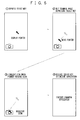
- Fig. 6 shows screen images when the pointer is displayed and moved, and subsequently, a function or an application indicated by the pointer is executed.
- the pointer Upon depression of the "select key" of the mobile terminal by the user, the pointer is displayed on the screen. In order to move the pointer, the user tilts the body of the mobile terminal in the direction in which it is desired to move the pointer while depressing the "select key". At the time the pointer moves over an icon to be selected, the user releases the "select key".
- Fig. 7 shows the moving speeds of the pointer according to the degree of the tilt of the mobile terminal.
- the moving speed of the pointer can be changed according to the degree of the tilt of the mobile terminal.
- the pointer moves quickly.
- the mobile terminal is slightly tilted from a reference point, the pointer moves slowly.
- the tilt of the mobile terminal is returned to the initial state or the reference point, the movement of the pointer is terminated.
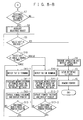
- Figs. 8-A and Fig. 8-B are flowcharts showing an example of the operation of the mobile terminal from when the user depresses the "select key" to when he/ she releases it. Referring to Figs. 8-A and Fig. 8-B, a description will be given of the operation of the mobile terminal according to the embodiment.
- Fig. 8-A shows the process from the depression of the "select key" to the display of the pointer on the display screen.
- the user who holds the mobile terminal one-handed depresses the "select key" in the input unit 3 of the mobile terminal.
- the processor 1 detects the depression of the "select key” (step S1).
- the tilt sensor 5 built in the mobile terminal detects the tilt of the body of the mobile terminal at present (step S2).
- the tilt sensor 5 informs the processor 1 of data as to the degree of the tilt at the time of the depression of the "select key".
- the processor 1 stores the data received from the tilt sensor 5 in the storage 2 as "reference tilt data” (step S3).
- the processor 1 determines an application currently displayed on the display 4 to display the pointer (step S4).
- the processor 1 determines the suitable position on the screen where the pointer is to be displayed (step S5).
- the processor 1 displays the pointer on the display 4 (step S6).
- Fig. 8-B shows the process after the display of the pointer on the display screen, such as moving the pointer, until the release of the "select key".
- the processor 1 determines whether or not there is a selectable object (icon, anchor, etc.) at the position where the pointer is residing (step S7).
- step S7 If there is a selectable object (step S7, YES), the processor 1 highlights the selectable object to inform the user that the object is selectable (step S8). If not, the processor 1 does not change the display on the screen.
- the processor 1 determines whether or not the user releases the "select key” to select the object (step S9).
- step S9, NO the processor 1 determines the pointer movement mode.
- the tilt sensor 5 detects the tilt of the body of the mobile terminal (step S10-1).
- the tilt sensor 5 informs the processor 1 of current data as to the degree of the tilt.
- the processor 1 calculates the moving position of the pointer (step S11-1).
- the processor 1 updates the pointer position on the display 4, thereby displaying the pointer at the updated position (step S12-1).
- the processor 1 determines whether or not there is a selectable object (icon, anchor, etc.) at the updated pointer position (step S13-1).
- step S13-1 If there is a selectable object (step S13-1, YES), the process returns to step S9. If not, the process returns to step S10-1 so that the movement of the pointer proceeds.
- the tilt sensor 5 detects the tilt of the body of the mobile terminal (step S10-2).
- the tilt sensor 5 informs the processor 1 of current data as to the degree of the tilt.
- the processor 1 determines the moving direction and speed of the pointer (step S11-2).
- the processor 1 Based on the determined moving direction and speed of the pointer, the processor 1 updates the pointer position on the display 4, thereby displaying the pointer at the updated position (step S12-2).
- the processor 1 determines whether or not there is a selectable object (icon, anchor, etc.) at the updated pointer position (step S13-2).
- step S13-2 If there is a selectable object (step S13-2, YES), the process returns to step S9. If not, the process returns to step S10-2 so that the movement of the pointer proceeds.
- step S9 When detecting the release of the "select key" (step S9, YES), the processor 1 executes an application corresponding to the selectable object, and displays the application on the screen (step S14).
- the processor 1 clears the "reference tilt data" stored in the storage 2 (step S15), and removes the pointer from the screen of the display 4 (step S16).
- the processor 1 when the "select key" is depressed first, the processor 1 obtains data about the degree of the tilt of the mobile terminal from the tilt sensor 5 as "reference tilt data", and calculates the moving position and speed of the pointer based on the data. This operation is essential for an incremental tilt sensor.
- an absolute triaxial accelerometer used herein can define the horizontal state of the mobile terminal (the main surface of the terminal is perpendicular to the direction of gravity) as a reference.
- the absolute triaxial accelerometer also needs to perform the above operation if consideration is given to the temperature drift of the accelerometer or the output temperature stability.
- the user may wish to cancel the operation.
- the user has to move the pointer to the position where there is no selectable object (icon, anchor, etc.) on the screen, and release the "select key".
- the areas where no selectable object exists are few or small, the operability of the mobile terminal is deteriorated.
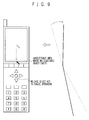
- Fig. 9 illustrates the method of solving the problem.
- the bottom area of the screen is defined as an unselectable area where no selectable object (icon, anchor, etc.) exists and no function or application can be selected.
- the user can perform the canceling operation by moving the pointer to the unselectable area and releasing the "select key".
- the user can manipulate the pointer on the display screen while holding the mobile terminal one-handed.
- the pointer moves according to the degree of the tilt of the mobile terminal, the user can manipulate the pointer of the small mobile terminal without a pointing device as for example a touch panel, a trackball, a trackpoint, and a trackpad.
- the same operability can be achieved regardless of the shape and size of the mobile terminal.
- the accelerometer since the accelerometer is employed instead of the vibration gyro as a tilt sensor, the tilt sensor can be easily mounted in the small and thin body of a mobile terminal. Moreover, the accelerometer is capable of detecting static acceleration as, for example, "static tilt with respect to gravity". Thus, the user can sense the tilt of the mobile terminal quite naturally, which improves the operability of the mobile terminal.
- pointer movement modes such as constant speed, speedup and slowdown can be selected, which further improves the operability of the mobile terminal.
- various physical phenomena of a moving object such as “friction”, “resistance” and “rebound” may be applied to the movement of the pointer.
- a number of computer or electronic games can be implemented on the mobile terminal.
- the mobile terminal enables a ball game in which a player enjoys hitting a ball, such as golf putting, baseball pitching or batting, shooting, or billiards including four-ball billiards, three-cushion billiards and pocket billiards.
Landscapes
- Engineering & Computer Science (AREA)
- Theoretical Computer Science (AREA)
- Computer Hardware Design (AREA)
- Physics & Mathematics (AREA)
- Human Computer Interaction (AREA)
- General Engineering & Computer Science (AREA)
- General Physics & Mathematics (AREA)
- Mathematical Physics (AREA)
- Position Input By Displaying (AREA)
- Telephone Function (AREA)
- User Interface Of Digital Computer (AREA)
Applications Claiming Priority (1)
| Application Number | Priority Date | Filing Date | Title |
|---|---|---|---|
| JP2004301400A JP2006113859A (ja) | 2004-10-15 | 2004-10-15 | 携帯情報端末及びその表示制御方法 |
Publications (2)
| Publication Number | Publication Date |
|---|---|
| EP1647875A2 true EP1647875A2 (de) | 2006-04-19 |
| EP1647875A3 EP1647875A3 (de) | 2010-02-03 |
Family
ID=35506625
Family Applications (1)
| Application Number | Title | Priority Date | Filing Date |
|---|---|---|---|
| EP05022450A Withdrawn EP1647875A3 (de) | 2004-10-15 | 2005-10-14 | Mobiles Endgerät und Anzeigesteuerungsverfahren dafür |
Country Status (4)
| Country | Link |
|---|---|
| US (1) | US20060094480A1 (de) |
| EP (1) | EP1647875A3 (de) |
| JP (1) | JP2006113859A (de) |
| CN (1) | CN100394370C (de) |
Cited By (2)
| Publication number | Priority date | Publication date | Assignee | Title |
|---|---|---|---|---|
| EP2166427A1 (de) * | 2008-09-10 | 2010-03-24 | LG Electronics | Mobiles Endgerät und Objektanzeigeverfahren damit |
| CN103083909A (zh) * | 2013-01-31 | 2013-05-08 | 廖明忠 | 模拟重力球游戏装置跳跃处理方法及模拟重力球游戏装置 |
Families Citing this family (70)
| Publication number | Priority date | Publication date | Assignee | Title |
|---|---|---|---|---|
| US20080129552A1 (en) * | 2003-10-31 | 2008-06-05 | Iota Wireless Llc | Concurrent data entry for a portable device |
| CA2531524A1 (en) * | 2003-10-31 | 2005-05-12 | Iota Wireless Llc | Concurrent data entry for a portable device |
| RU2007146172A (ru) * | 2005-05-17 | 2009-06-27 | Гестуретэк, Инк. (Us) | Вывод сигнала, чувствительный к ориентации |
| US7988558B2 (en) * | 2006-04-27 | 2011-08-02 | Nintendo Co., Ltd. | Game apparatus and storage medium storing game program |
| KR100773553B1 (ko) * | 2006-05-17 | 2007-11-07 | 삼성전자주식회사 | 디스플레이 기능을 갖는 버튼을 구비한 단말기 및 이를위한 디스플레이 방법 |
| US8139026B2 (en) | 2006-08-02 | 2012-03-20 | Research In Motion Limited | System and method for adjusting presentation of text and images on an electronic device according to an orientation of the device |
| US8493323B2 (en) | 2006-08-02 | 2013-07-23 | Research In Motion Limited | System and method for adjusting presentation of moving images on an electronic device according to an orientation of the device |
| EP2090974B1 (de) * | 2006-08-02 | 2011-12-21 | Research In Motion Limited | System und Verfahren zur Anpassung der Darstellung von Text und Bildern auf einer elektronischen Vorrichtung an eine Ausrichtung der Vorrichtung |
| JP5173174B2 (ja) * | 2006-09-13 | 2013-03-27 | 任天堂株式会社 | ゲーム装置、ゲームプログラム、ゲームシステム、およびゲーム処理方法 |
| KR100911145B1 (ko) * | 2006-10-02 | 2009-08-06 | 삼성전자주식회사 | 단말기 및 이를 위한 디스플레이 방법 |
| US8726154B2 (en) * | 2006-11-27 | 2014-05-13 | Sony Corporation | Methods and apparatus for controlling transition behavior of graphical user interface elements based on a dynamic recording |
| JP4979474B2 (ja) * | 2007-06-07 | 2012-07-18 | 株式会社タイトー | モニタ連動形操作装置 |
| US8994658B2 (en) | 2007-07-04 | 2015-03-31 | Sony Corporation | Input apparatus, control apparatus, control method, and handheld apparatus |
| KR100915127B1 (ko) * | 2008-06-20 | 2009-09-03 | 주식회사 인프라웨어 | 터치 및 기울기를 이용한 스크롤 기능을 제공하는프로그램을 담은 매체 |
| TWI457793B (zh) * | 2008-08-08 | 2014-10-21 | Ind Tech Res Inst | 即時動作辨識方法及其慣性感測與軌跡重建裝置 |
| US8863038B2 (en) * | 2008-09-08 | 2014-10-14 | Qualcomm Incorporated | Multi-panel electronic device |
| US8860632B2 (en) * | 2008-09-08 | 2014-10-14 | Qualcomm Incorporated | Multi-panel device with configurable interface |
| US8947320B2 (en) * | 2008-09-08 | 2015-02-03 | Qualcomm Incorporated | Method for indicating location and direction of a graphical user interface element |
| US8933874B2 (en) * | 2008-09-08 | 2015-01-13 | Patrik N. Lundqvist | Multi-panel electronic device |
| US8803816B2 (en) * | 2008-09-08 | 2014-08-12 | Qualcomm Incorporated | Multi-fold mobile device with configurable interface |
| US9009984B2 (en) * | 2008-09-08 | 2015-04-21 | Qualcomm Incorporated | Multi-panel electronic device |
| US8836611B2 (en) | 2008-09-08 | 2014-09-16 | Qualcomm Incorporated | Multi-panel device with configurable interface |
| US8860765B2 (en) * | 2008-09-08 | 2014-10-14 | Qualcomm Incorporated | Mobile device with an inclinometer |
| US8645871B2 (en) | 2008-11-21 | 2014-02-04 | Microsoft Corporation | Tiltable user interface |
| WO2010080820A2 (en) * | 2009-01-07 | 2010-07-15 | Knowles Electronics, Llc | Microphone and orientation sensor assembly |
| CN102301319B (zh) * | 2009-01-29 | 2014-11-12 | 意美森公司 | 用于解释与图形用户界面的物理交互的系统和方法 |
| CN101989170A (zh) * | 2009-07-29 | 2011-03-23 | 深圳富泰宏精密工业有限公司 | 便携式电子装置 |
| KR101622632B1 (ko) * | 2009-08-26 | 2016-05-20 | 엘지전자 주식회사 | 이동 단말기 |
| JP5446624B2 (ja) * | 2009-09-07 | 2014-03-19 | ソニー株式会社 | 情報表示装置、情報表示方法及びプログラム |
| KR20110026809A (ko) * | 2009-09-08 | 2011-03-16 | 엘지전자 주식회사 | 휴대 단말기 및 그 제어방법 |
| CN104932687A (zh) * | 2009-09-30 | 2015-09-23 | 联想(北京)有限公司 | 一种移动终端、和在移动终端上显示信息的方法 |
| KR20110055088A (ko) * | 2009-11-19 | 2011-05-25 | 삼성전자주식회사 | 휴대 단말기의 표시부 운용 방법 및 장치 |
| US20120256959A1 (en) * | 2009-12-30 | 2012-10-11 | Cywee Group Limited | Method of controlling mobile device with touch-sensitive display and motion sensor, and mobile device |
| JP5292509B2 (ja) * | 2010-03-16 | 2013-09-18 | 京セラ株式会社 | 携帯電子機器、表示制御方法および表示制御プログラム |
| CN102375669B (zh) * | 2010-08-26 | 2016-01-06 | 深圳富泰宏精密工业有限公司 | 电子装置及其解锁方法 |
| KR101308475B1 (ko) * | 2010-08-26 | 2013-09-16 | 엘지디스플레이 주식회사 | 입체 영상 표시 장치 및 이의 구동 방법 |
| JP5732792B2 (ja) * | 2010-09-17 | 2015-06-10 | 富士ゼロックス株式会社 | 情報処理装置及び情報処理プログラム |
| US9298362B2 (en) | 2011-02-11 | 2016-03-29 | Nokia Technologies Oy | Method and apparatus for sharing media in a multi-device environment |
| JP4966421B1 (ja) * | 2011-03-31 | 2012-07-04 | 株式会社東芝 | 情報処理装置及び情報処理方法 |
| TWI490768B (zh) * | 2011-04-25 | 2015-07-01 | Chiun Mai Comm Systems Inc | 虛擬鍵盤控制系統和方法 |
| CN102353351B (zh) * | 2011-06-28 | 2014-01-15 | 惠州Tcl移动通信有限公司 | 偏侧拍摄角度检测方法、倾斜拍摄角度检测方法及手机 |
| CN102508560B (zh) * | 2011-10-28 | 2015-07-22 | 优视科技有限公司 | 一种基于移动终端的应用程序切换方法和装置 |
| JP5797095B2 (ja) * | 2011-11-10 | 2015-10-21 | ヤマハ発動機株式会社 | 小型船舶 |
| CN103186255B (zh) * | 2011-12-27 | 2016-08-10 | 中国电信股份有限公司 | 基于陀螺仪对光标的移动处理方法与系统、用户终端 |
| KR101951480B1 (ko) * | 2012-01-09 | 2019-02-22 | 엘지전자 주식회사 | 전자 기기 및 전자 기기의 제어 방법 |
| CN103218144A (zh) * | 2012-01-20 | 2013-07-24 | 展讯通信(上海)有限公司 | 显示屏状态的控制装置及方法、预设目标点的装置及方法 |
| US8807430B2 (en) * | 2012-03-05 | 2014-08-19 | James Allen Millett | Dscope aiming device |
| CN103200304A (zh) * | 2012-10-09 | 2013-07-10 | 深圳市金立通信设备有限公司 | 一种移动终端智能光标控制系统及方法 |
| CN103021434B (zh) * | 2012-11-22 | 2016-01-20 | 广东欧珀移动通信有限公司 | 一种移动终端及其播放多媒体信号的控制方法 |
| CN103019549A (zh) * | 2012-11-28 | 2013-04-03 | 深圳市中兴移动通信有限公司 | 移动终端内容滚动的方法和装置 |
| EP2975607A4 (de) * | 2013-03-14 | 2016-08-03 | Nec Corp | Anzeigesteuerungsvorrichtung, informationsvorrichtung, anzeigesteuerungsverfahren und aufzeichnungsmedium |
| CN103162666B (zh) * | 2013-03-25 | 2015-07-01 | 成都西可科技有限公司 | 一种修正智能终端位置偏角的方法 |
| CN103197772B (zh) * | 2013-04-15 | 2015-12-23 | 沈正达 | 基于角度值的键盘/鼠标信息传输显示方法及装置 |
| EP2996020A4 (de) * | 2013-05-08 | 2016-05-25 | Fujitsu Ltd | Eingabevorrichtung und eingabeprogramm |
| CN104427122B (zh) * | 2013-09-09 | 2017-08-29 | 联想(北京)有限公司 | 便携式电子设备及其对象选择方法 |
| CN104516495A (zh) * | 2013-09-30 | 2015-04-15 | 中兴通讯股份有限公司 | 快捷进入终端应用的方法及终端 |
| US9632655B2 (en) * | 2013-12-13 | 2017-04-25 | Amazon Technologies, Inc. | No-touch cursor for item selection |
| US9383818B2 (en) | 2013-12-27 | 2016-07-05 | Google Technology Holdings LLC | Method and system for tilt-based actuation |
| TWI584154B (zh) * | 2014-07-08 | 2017-05-21 | 拓連科技股份有限公司 | 以角度為基礎之項目決定方法及系統,及相關電腦程式產品 |
| CN105528978B (zh) * | 2014-10-15 | 2018-09-28 | 阿自倍尔株式会社 | 区段显示装置 |
| CN104777959B (zh) * | 2015-03-23 | 2016-05-11 | 努比亚技术有限公司 | 移动终端光标定位方法及装置 |
| JP6569546B2 (ja) * | 2016-01-28 | 2019-09-04 | 富士通コネクテッドテクノロジーズ株式会社 | 表示装置、表示制御方法、および表示制御プログラム |
| CN106406532A (zh) * | 2016-09-22 | 2017-02-15 | 宇龙计算机通信科技(深圳)有限公司 | 一种运动显示方法、装置及移动终端 |
| CN107995410A (zh) * | 2016-10-27 | 2018-05-04 | 珠海格力电器股份有限公司 | 一种终端倾斜拍摄提示的方法和装置 |
| CN106774854A (zh) * | 2016-11-29 | 2017-05-31 | 惠州Tcl移动通信有限公司 | 一种移动终端显示屏旋转时自动振动的系统及方法 |
| CN107203726A (zh) * | 2017-05-17 | 2017-09-26 | 东南大学 | 一种抗侧信道攻击的智能终端安全输入方法 |
| WO2019071468A1 (zh) * | 2017-10-11 | 2019-04-18 | 深圳市柔宇科技有限公司 | 一种智能终端的信息交互方法及智能终端 |
| CN111562877A (zh) * | 2020-04-30 | 2020-08-21 | 联想(北京)有限公司 | 一种图像处理方法及装置 |
| CN113076053A (zh) * | 2021-05-07 | 2021-07-06 | 北京字节跳动网络技术有限公司 | 光标遥控方法、装置、电子设备和存储介质 |
| US11550404B2 (en) * | 2021-05-14 | 2023-01-10 | Microsoft Technology Licensing, Llc | Tilt-responsive techniques for sharing content |
Family Cites Families (15)
| Publication number | Priority date | Publication date | Assignee | Title |
|---|---|---|---|---|
| JPH0764754A (ja) * | 1993-08-24 | 1995-03-10 | Hitachi Ltd | 小型情報処理装置 |
| KR100371456B1 (ko) * | 1995-10-09 | 2004-03-30 | 닌텐도가부시키가이샤 | 삼차원화상처리시스템 |
| US6624824B1 (en) * | 1996-04-30 | 2003-09-23 | Sun Microsystems, Inc. | Tilt-scrolling on the sunpad |
| JPH1049290A (ja) * | 1996-08-05 | 1998-02-20 | Sony Corp | 情報処理装置および方法 |
| US7358956B2 (en) * | 1998-09-14 | 2008-04-15 | Microsoft Corporation | Method for providing feedback responsive to sensing a physical presence proximate to a control of an electronic device |
| FI20001506A7 (fi) * | 1999-10-12 | 2001-04-13 | Myorigo Oy | Kädessäpidettävän laitteen toimintamenetelmä |
| JP2002073247A (ja) * | 2000-08-29 | 2002-03-12 | Sanyo Electric Co Ltd | 携帯情報端末 |
| US20020109614A1 (en) * | 2000-12-22 | 2002-08-15 | Ericsson Inc. | Multi-function key |
| JP2002341991A (ja) * | 2001-05-17 | 2002-11-29 | Sony Corp | 情報表示装置 |
| GB2378878B (en) * | 2001-06-28 | 2005-10-05 | Ubinetics Ltd | A handheld display device |
| JP4604423B2 (ja) * | 2001-08-03 | 2011-01-05 | 日本電気株式会社 | 入力装置、それを備えた電子装置、および入力方法 |
| US6847351B2 (en) * | 2001-08-13 | 2005-01-25 | Siemens Information And Communication Mobile, Llc | Tilt-based pointing for hand-held devices |
| JP2003140815A (ja) * | 2001-11-06 | 2003-05-16 | Nec Corp | 携帯端末 |
| WO2004036851A2 (en) * | 2002-10-18 | 2004-04-29 | Research In Motion Limited | Message settings selection |
| US7301529B2 (en) * | 2004-03-23 | 2007-11-27 | Fujitsu Limited | Context dependent gesture response |
-
2004
- 2004-10-15 JP JP2004301400A patent/JP2006113859A/ja active Pending
-
2005
- 2005-10-14 US US11/249,518 patent/US20060094480A1/en not_active Abandoned
- 2005-10-14 EP EP05022450A patent/EP1647875A3/de not_active Withdrawn
- 2005-10-17 CN CNB2005101092529A patent/CN100394370C/zh not_active Expired - Fee Related
Cited By (4)
| Publication number | Priority date | Publication date | Assignee | Title |
|---|---|---|---|---|
| EP2166427A1 (de) * | 2008-09-10 | 2010-03-24 | LG Electronics | Mobiles Endgerät und Objektanzeigeverfahren damit |
| CN101673179B (zh) * | 2008-09-10 | 2012-07-04 | Lg电子株式会社 | 移动终端和使用该移动终端的对象显示方法 |
| US8542110B2 (en) | 2008-09-10 | 2013-09-24 | Lg Electronics Inc. | Mobile terminal and object displaying method using the same |
| CN103083909A (zh) * | 2013-01-31 | 2013-05-08 | 廖明忠 | 模拟重力球游戏装置跳跃处理方法及模拟重力球游戏装置 |
Also Published As
| Publication number | Publication date |
|---|---|
| JP2006113859A (ja) | 2006-04-27 |
| US20060094480A1 (en) | 2006-05-04 |
| EP1647875A3 (de) | 2010-02-03 |
| CN1760822A (zh) | 2006-04-19 |
| CN100394370C (zh) | 2008-06-11 |
Similar Documents
| Publication | Publication Date | Title |
|---|---|---|
| EP1647875A2 (de) | Mobiles Endgerät und Anzeigesteuerungsverfahren dafür | |
| EP2353065B1 (de) | Steuerung und abruf von inhalten mithilfe von bewegungsverarbeitungen auf mobilgeräten | |
| US6690358B2 (en) | Display control for hand-held devices | |
| TWI408572B (zh) | Information processing device, input device, information processing system, information processing method and computer readable storage medium | |
| US20090262074A1 (en) | Controlling and accessing content using motion processing on mobile devices | |
| JP5440167B2 (ja) | 入力装置、制御装置、制御方法及びハンドヘルド装置 | |
| EP0864958B1 (de) | Steuervorrichtung für Informationsverarbeitungsgeräte | |
| CN101606120B (zh) | 控制装置、输入装置、控制系统、控制方法和手持装置 | |
| US20060164382A1 (en) | Image manipulation in response to a movement of a display | |
| USRE46076E1 (en) | Input apparatus, control apparatus, control system, control method, and handheld apparatus | |
| JP2010152761A (ja) | 入力装置、制御装置、制御システム、電子機器及び制御方法 | |
| JP2009534690A (ja) | 磁場センサーを用いて偏揺れを感知するためのシステム、および、前記システムを用いた携帯用の電子装置 | |
| US20110134029A1 (en) | Electronic device and a pointer motion control method thereof | |
| TWI502471B (zh) | 游標控制方法與電腦程式產品 | |
| TW200934212A (en) | Mobile digital device with intuitive browsing and operating method thereof | |
| JP5007835B2 (ja) | 端末装置 | |
| JP4962741B2 (ja) | 端末装置 | |
| CN200987211Y (zh) | 一种手机 | |
| JP5007836B2 (ja) | 端末装置 | |
| US20070159456A1 (en) | Navigation system |
Legal Events
| Date | Code | Title | Description |
|---|---|---|---|
| PUAI | Public reference made under article 153(3) epc to a published international application that has entered the european phase |
Free format text: ORIGINAL CODE: 0009012 |
|
| AK | Designated contracting states |
Kind code of ref document: A2 Designated state(s): AT BE BG CH CY CZ DE DK EE ES FI FR GB GR HU IE IS IT LI LT LU LV MC NL PL PT RO SE SI SK TR |
|
| AX | Request for extension of the european patent |
Extension state: AL BA HR MK YU |
|
| PUAL | Search report despatched |
Free format text: ORIGINAL CODE: 0009013 |
|
| AK | Designated contracting states |
Kind code of ref document: A3 Designated state(s): AT BE BG CH CY CZ DE DK EE ES FI FR GB GR HU IE IS IT LI LT LU LV MC NL PL PT RO SE SI SK TR |
|
| AX | Request for extension of the european patent |
Extension state: AL BA HR MK YU |
|
| 17P | Request for examination filed |
Effective date: 20100803 |
|
| AKX | Designation fees paid |
Designated state(s): DE FR GB IT |
|
| RAP1 | Party data changed (applicant data changed or rights of an application transferred) |
Owner name: LENOVO INNOVATIONS LIMITED (HONG KONG) |
|
| STAA | Information on the status of an ep patent application or granted ep patent |
Free format text: STATUS: REQUEST FOR EXAMINATION WAS MADE |
|
| STAA | Information on the status of an ep patent application or granted ep patent |
Free format text: STATUS: THE APPLICATION IS DEEMED TO BE WITHDRAWN |
|
| 18D | Application deemed to be withdrawn |
Effective date: 20170503 |