EP1643751A2 - Dispositif et produit logiciel de reproduction d'image - Google Patents
Dispositif et produit logiciel de reproduction d'image Download PDFInfo
- Publication number
- EP1643751A2 EP1643751A2 EP05108969A EP05108969A EP1643751A2 EP 1643751 A2 EP1643751 A2 EP 1643751A2 EP 05108969 A EP05108969 A EP 05108969A EP 05108969 A EP05108969 A EP 05108969A EP 1643751 A2 EP1643751 A2 EP 1643751A2
- Authority
- EP
- European Patent Office
- Prior art keywords
- image
- display effect
- zoom
- subject
- main subject
- Prior art date
- Legal status (The legal status is an assumption and is not a legal conclusion. Google has not performed a legal analysis and makes no representation as to the accuracy of the status listed.)
- Withdrawn
Links
- 230000000694 effects Effects 0.000 claims abstract description 79
- 238000004590 computer program Methods 0.000 claims description 11
- 238000000034 method Methods 0.000 description 15
- 238000010586 diagram Methods 0.000 description 9
- 238000004891 communication Methods 0.000 description 8
- 238000001514 detection method Methods 0.000 description 7
- 238000001228 spectrum Methods 0.000 description 6
- 238000000605 extraction Methods 0.000 description 2
- 238000004422 calculation algorithm Methods 0.000 description 1
- 238000004364 calculation method Methods 0.000 description 1
- 239000012141 concentrate Substances 0.000 description 1
- 238000005516 engineering process Methods 0.000 description 1
- 239000000284 extract Substances 0.000 description 1
- 230000006870 function Effects 0.000 description 1
- 238000010191 image analysis Methods 0.000 description 1
- 238000012986 modification Methods 0.000 description 1
- 230000004048 modification Effects 0.000 description 1
- 230000008569 process Effects 0.000 description 1
- 230000004044 response Effects 0.000 description 1
Images




Classifications
-
- H—ELECTRICITY
- H04—ELECTRIC COMMUNICATION TECHNIQUE
- H04N—PICTORIAL COMMUNICATION, e.g. TELEVISION
- H04N1/00—Scanning, transmission or reproduction of documents or the like, e.g. facsimile transmission; Details thereof
- H04N1/00127—Connection or combination of a still picture apparatus with another apparatus, e.g. for storage, processing or transmission of still picture signals or of information associated with a still picture
- H04N1/00132—Connection or combination of a still picture apparatus with another apparatus, e.g. for storage, processing or transmission of still picture signals or of information associated with a still picture in a digital photofinishing system, i.e. a system where digital photographic images undergo typical photofinishing processing, e.g. printing ordering
-
- H—ELECTRICITY
- H04—ELECTRIC COMMUNICATION TECHNIQUE
- H04N—PICTORIAL COMMUNICATION, e.g. TELEVISION
- H04N1/00—Scanning, transmission or reproduction of documents or the like, e.g. facsimile transmission; Details thereof
- H04N1/00127—Connection or combination of a still picture apparatus with another apparatus, e.g. for storage, processing or transmission of still picture signals or of information associated with a still picture
- H04N1/00132—Connection or combination of a still picture apparatus with another apparatus, e.g. for storage, processing or transmission of still picture signals or of information associated with a still picture in a digital photofinishing system, i.e. a system where digital photographic images undergo typical photofinishing processing, e.g. printing ordering
- H04N1/00185—Image output
- H04N1/00198—Creation of a soft photo presentation, e.g. digital slide-show
Definitions
- the present invention relates to an image reproduction apparatus and an image reproduction program product that may be adopted when reproducing an image.
- Japanese Laid Open Patent Publication No. 2003-209809 of the known art discloses an image reproduction apparatus that shows only specific images in a slide show display as desired by excluding images that the user does not wish to be displayed.
- This apparatus in the related art which simply displays still images in sequence, gives rise to a problem in that the user may find it tedious to continuously view images over an extended period of time.
- the present invention is characterized in that a display effect for each of a plurality of images to be sequentially reproduced and displayed is set based upon image data of each image stored in a storage device and each image is reproduced and displayed based upon the display effect thus set.
- a shifting direction for the image reproduced for display may be determined based upon the directionality of the subject present in the image having been judged and a shifting display of the image along the image shifting direction thus determined be selected as the display effect for the image.
- a focus position in the image may be ascertained and zoom-in and/or zoom-out relative to a subject present at the ascertained focus position may be selected as the display effect for the image.
- a person's face present in the image may be detected, the face may then be ascertained as a main subject and zoom-in and/or zoom-out relative to the ascertained main subject may be selected as the display effect for the image.
- a subject present in the image at a closest position may be identified as the main subject, or the focus distance of the image may be ascertained and a subject present at a distance closest to the determined focus distance may be identified as the main subject.
- alphanumeric characters present in the image maybe detected and may be identified as the main subject, the main subject may be identified in correspondence to the image photographing mode setting, or the main subject may be identified based upon a title assigned to the image.
- FIG. 1 is a block diagram showing the structure adopted in the first embodiment of the image reproduction apparatus.
- An image reproduction apparatus 100 comprises a memory card slot 101 through which image data saved in a memory card are taken in, an input device 102 operated by the user, a CPU 103 that executes an image slide show as detailed later, an HDD 104 into which the image data having been taken in and an image reproduction program to be detailed later are saved, and a monitor 105 at which images are displayed.
- the CPU 103 executes a slide show with the image data stored in the HDD 104 by executing the image reproduction program read from the HDD 104 having the image reproduction program stored therein. In other words, it sequentially displays at the monitor 105 a plurality of images read from the HDD 104. At this time, a display effect for each image is set based upon the directionality of a subject present in the image. Namely, the CPU 103 detects the orientation of a subject present in each image through directionality detection processing to be detailed later and executes the slide show by shifting the image based upon the directionality of the subject thus detected.
- the image display is shifted along the lateral direction (horizontal direction) as explained later in reference to FIGS . 2A through 2C. If, on the other hand, the subject is detected to contain numerous vertical edges, the subject is judged to have vertical directionality and accordingly, the image display is shifted along the longitudinal direction (vertical direction) .
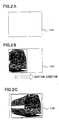
- FIGS. 2A through 2C present a specific example in which an image containing a subject with horizontal directionality is shifted along the horizontal direction for display. If the image having been read is detected to contain a subject having horizontal directionality while no display is up at the monitor 105 as shown in FIG. 2A, e.g., at the start of a slide show or while awaiting the display of the next image after the display of a given image has been finished during a slide show, the image display is gradually shifted along the horizontal direction from the left to the right at the monitor 105, as shown in FIG. 2B.
- FIG. 2C the entire image is displayed on the screen of the monitor 105, as shown in FIG. 2C, and once a preset display time period allocated for each image elapses, the image is cleared from the monitor 105 and the monitor display returns to the state shown in FIG. 2A. Then, the next image is read and the image display is then shifted based upon the directionality of a subject present in the image.
- FIGS. 2A through 2C show an example in which the image is shifted along the horizontal direction from the left to the right at the monitor 105 for display, the image may insteadbe shifted from the right to the left.
- an image display may be shifted along the vertical direction, either from the top to the bottom or from the bottom to the top at the monitor 105.
- the directionality detection processing executed to detect the directionality of a subj ect present in each image is explained. It is to be noted that the directionality detection processing is executed for the next image while the current image is on display at the monitor 105 during a slide show.
- the spatial frequency is calculated by executing a two-dimensional Fourier transform over the entirety of the image being processed (target image). Then, the intensity of the spatial frequency, i.e., the power spectrum, is calculated, the direction along which the power spectrum concentrates most strongly is detected and the subject present in the image is judged to have directionality along the detected direction. It is to be noted that since the two-dimensional Fourier transform and the power spectrum calculation can be executed by adopting methods of the known art, their explanation is omitted.
- the image display is shifted along a predetermined direction, e.g., along the horizontal direction from the left to the right, at the monitor 105.
- the directionality detection processing may be executed in advance prior to the slide show start and, in such a case, the directionality detected for each image may be stored in memory at a database or the like.
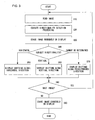
- FIG. 3 presents a flowchart of the processing executed in conformance to the image reproduction program achieved in the first embodiment.
- the processing in FIG. 3 is executed by the CPU 103 as the user operates the input device 102 to issue an instruction for slide show execution.
- step S10 image data are read from the HDD 104, and then the operation proceeds to step S20.
- step S20 the directionality detection processing described earlier is executed and the directionality of a subject present in the image is detected. Then, the operation proceeds to step S30. If an image is currently on display at the monitor 105, the preset display time period allocated for each image is allowed to elapse and then the image is cleared from the monitor 105 to clear the display at the monitor 105 in step S30.
- step S40 the operationproceeds to step S40 to judge the directionality of the subject having been detected. If the directionality of the subject is judged to be horizontal, the operation proceeds to step S50 to display the image at the monitor 105 by shifting it along the horizontal direction. If the subject directionality is judged to be vertical, the operation proceeds to step S60 to display the image at the monitor 105 by shifting the image along the vertical direction. If, on the other hand, no subject directionality has been detected, the operation proceeds to step S70 to display the image at the monitor 105 by shifting the image along the predetermined direction.
- step S80 The operation then proceeds to step S80 to make a decision as to whether or not there is another image to be displayed in the slide show. If it is decided that there is an image to be displayed next, the operation returns to step S10 to execute the processing described above for the next image. If, on the other hand, it is decided that there are no more images to be displayed, the operation proceeds to step S90. Once the image currently on display at the monitor 105 is erased in step S90 after the preset display time period allocated for each image elapses, before the processing ends.
- the focus position in the image is ascertained based upon image information such as Exif information, i.e., image information indicating the photographing conditions and the like stored as part of the image data in correspondence to the particular image, and the main subject is judged to be present at this focus position. Then, the image is displayed by zooming in on the focus position and then zooming out from the focus position as the display effect. More specifically, the main subject is first displayed in an enlargement by zooming in on a subject identified at the ascertained focus position and then the initial state, i.e., the state in which the main subject is not displayed in an enlargement, is restored through zooming out. It is to be noted that since the image reproduction apparatus 100 assumes a structure similar to that of the first embodiment having been explained in reference to the block diagram in FIG. 1, its explanation is omitted.
- FIGS. 4A and 4B present a specific example in which an image is displayed by zooming in on the subject present at the focus position. If the focus position in the image is at the position indicated by reference numeral 4a, i.e., around the front windshield of the bus at the center of the image plane, while the image is on display at the monitor 105, as shown in FIG. 4A, a zoom-in on the focus position 4a (windshield) is executed. As a result, the image is displayed in an enlargement around the focus position 4a at the monitor 105, as shown in FIG. 4B.
- reference numeral 4a i.e., around the front windshield of the bus at the center of the image plane
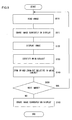
- FIG. 5 presents a flowchart of the processing executed in conformance to the image reproduction program achieved in the second embodiment.
- the processing in FIG. 5 is executed by the CPU 103 as the user operates the input device 102 to issue an instruction for slide show execution.
- step S110 image data are read from the HDD 104, and then the operation proceeds to step S111. If an image is currently on display at the monitor 105, the preset display time period allocated for each image is allowed to elapse and then the image is cleared from the monitor 105 to clear the display at the monitor 105 in step S111. Subsequently, the operation proceeds to step S120 to display the image having been read at the monitor 105 before the operation proceeds to step S130. In step S130, a main subject in the image is identified by ascertaining a focus position in the image based upon the image information such as Exif information and judging that the main subject is present at the ascertained focus position. Then the operation proceeds to step S140.
- step S140 the main subject is displayed in an enlargement by zooming in relative to the subject present at the focus position having been ascertained, i.e., the main subject, and then the initial display state is restored through a zoom-out. Subsequently, the operation proceeds to step S150 to make a decision as to whether or not there is an image to be displayed next. If it is decided that there is another image to be displayed, the operation returns to step S110 to execute the processing described above for the next image. If, on the other hand, it is decided that there are no more images to be displayed, the operation proceeds to step S160. In step S160, the image currently on display at the monitor 105 is cleared after the preset display time period allocated for each image elapses, and then the processing ends.
- the focus position in the image is ascertained based upon image information and the image is displayed by zooming in and/or zooming out relative to the subject present at the ascertained the focus position.
- the third embodiment differs from the second embodiment in that while a given image is on display at the monitor 105 during a slide show, the faces of any persons present in the image are detected through face recognition processing executed on the image on display by adopting the person's face recognition technology in the known art and one of the faces having been detected is identified as the main subject through main subject identification processing to be detailed later. It is to be noted that since the image reproduction apparatus 100 assumes a structure similar to that of the first embodiment having been explained in reference to the block diagram in FIG. 1, its explanation is omitted.
- the main subject identification processing is described. If one person's face is detected in the image through the person's face recognition processing, the person's face of the person is identified as the main subject. If, on the other hand, a plurality of faces is detected in the image, the area occupied by each of the faces having been detected in the image is calculated. Then, the person's face occupying the greatest area in the image is identified as the main subject. It is to be noted that if no face is detected in the image, the subject present at the focus position of the image is determined as the main subject, as in the second embodiment.
- zoom-in and/or zoom-out relative to the main subject having been ascertained through the main subject identification processing explained above is executed as the image display effect, as in the second embodiment. For instance, if a person's face 6a is identified as the main subject in the image shown in FIG. 6A through the main subject identification processing, a zoom-in relative to the identifiedmain subj ect, i.e., the person's face 6a is executed as shown in FIG. 6B.
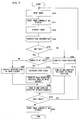
- FIG. 7 presents a flowchart of the processing executed in conformance to the image reproduction program achieved in the third embodiment.
- the processing in FIG. 7 is executed by the CPU 103 as the user operates the input device 102 to issue an instruction for slide show execution.
- step S210 image data are read from the HDD 104, and then the operation proceeds to step S211. If an image is currently on display at the monitor 105, the preset display time period allocated for each image is allowed to elapse and then the image is cleared from the monitor 105 to clear the display at the monitor 105 in step S211. Subsequently, the operation proceeds to step S220 to display the image having been read at the monitor 105 before the operation proceeds to step S230. In step S230, the person's face recognition processing is executed on the image on display at the monitor 105 to detect the faces of persons present in the image.
- step S240 to make a decision as to whether or not a person's face has been detected in the image. If it is decided that no face has been detected in the image, the operation proceeds to step S300 to ascertain the focus position in the image based upon the image information, as in the second embodiment, before the operation proceeds to step S310.
- step S310 the main subject is first displayed in an enlargement by zooming in relative to the subject present at the ascertained focus position and then the initial display state is restored through a zoom-out, before the operation proceeds to step S320, which is to be detailed later. If, on the other hand, it is decided that a face has been detected in the image, the operation proceeds to step S250.
- step S250 a decision is made as to whether or not a plurality of faces has been detected in the image. If it is decided that a plurality of faces has not been detected in the image, i.e., if it is decided that only one face has been detected, the operation proceeds to step S260 to identify the detected face as the main subject. If, on the other hand, it is decided that a plurality of faces has been detected in the image, the operation proceeds to step S270. In step S270, the areas occupied in the image by the individual faces having been detected are calculated and then the operation proceeds to step S280 to identify the person's face occupying the greatest area in the image as the main subj ect. Subsequently, the operation proceeds to step S290.
- step S290 the main subject is displayed in an enlargement by zooming in relative to the person's face having been identified as the main subject and then the initial display state is restored through a zoom-out.
- the operation then proceeds to step S320 to make a decision as to whether or not there is an image to be displayed next. If it is decided that there is another image to be displayed, the operation returns to step S210 to execute the processing described above for the next image. If, on the other hand, it is decided that there are no more images to be displayed, the operation proceeds to step S330.
- step S330 the image currently on display at the monitor 105 is erased after the preset display time period allocated for each image elapses, and then the processing ends.
- the distance information included in the Exif information which is of the known art, is not provided, the distance information, each set thereof indicating the distance to a subject photographed in one of a plurality of areas of a predetermined size obtained by dividing the entire image and generated when the shutter button is pressed all the way down, is stored in units of the individual areas. It is to be noted that since a block diagram of the image reproduction apparatus 100 will be similar to that for the image reproduction apparatus achieved in the first embodiment explained in reference to figure 1, its explanation is omitted.
- the CPU 103 obtains the distance information by reading the Exif information for the image currently on display at the monitor 105. Based upon the distance information thus obtained, an area in the image, containing the subject present at the smallest distance, is ascertained. Namely, the area containing the closest subj ect present in the image is detected. Then, the subject present inside the ascertained area is identified as the main subject. It is to be noted that while the main subject is judged to be present in the area containing the closest subject in the image in this embodiment, the main subject may instead be judged to be present in the area containing the farthest subject in the image.
- a zoom-in and/or a zoom-out is executed relative to the identified main subject as the image display effect.
- step S130 the area containing a subject at the smallest distance in the image is detected based upon the distance information included in the Exif information for the image and the subject present in the detected area is identified as the main subject.
- the area containing a subject at the smallest distance in the image is detected and the subject present in the area is identified as the main subject. Then, a zoom-in and/or a zoom-out is executed relative to the ascertained main subject. Since the main subject in a given image is highly likely to be the closest under normal circumstances, this embodiment allows the main subject to be identified appropriately for enlarged display.
- the distance information indicating the distance at the focus position measured when the shutter button is pressed halfway down is stored as part of the Exif information.
- the CPU 103 compares the distance at the focus position measured when the shutter button was pressed halfway down, which is obtained from the Exif information, and the distances to the various areas photographed in the image, which are obtained from the Exif information, and identifies the area in the image with the smallest distance difference. Then, it judges that the main subject is present in the area and identifies the subject present in the area as the main subject.
- the main subject may not necessarily be present at the focus position stored in memory as part of the Exif information.
- a zoom-in and/or a zoom-out is executed relative to the main subj ect thus ascertained as the image display effect, as in the second through fourth embodiments.
- step S130 the distance information indicating the distance at the focus position measured when the shutter button was pressed halfway down and the distance information indicating the distances to the individual areas in the image and generated when the shutter button was pressed all the way down are obtained from the Exif information for the image. Then, the area in the image manifesting the smallest difference relative to the distance at the focus position measured when the shutter button was pressed halfway down is ascertained and a subject present in this area is identified as the main subject.
- the area in the image manifesting the smallest difference relative to the distance at the focus position measured when the shutter button was pressed halfway down is ascertained, a subject present inside this area is identified as the main subject and a zoom-in and/or zoom-out is executed relative to the ascertained main subject.
- the main subject is not always present at the focus position stored as part of the Exif information, particularly if the user shifts the camera while the AF point is locked during an image capturing operation, the embodiment enables identification of the subject an image of which the user originally wished to capture as the main subject even under such circumstances.
- the CPU 103 recognizes characters in the image through character recognition processing of the known art by adopting a character recognition method used in, for instance, OCR software. It then identifies the characters as the main subject. If a plurality of characters are recognized, the largest character among them is identified as the main subj ect. In addition, if the sizes of the plurality of characters are all equal, the character present at the lowest position in the image is identified as the main subject.
- a zoom-in and/or a zoom-out is executed relative to the main subj ect thus ascertained as the image display effect, as in the second through fifth embodiments.
- step S130 character recognition processing of the known art is executed as described above to detect characters in the image and the characters thus detected are identified as the main subject.
- a character present in the image is detected, the detected character is identified as the main subject and a zoom-in and/or a zoom-out is executed relative to the main subject.
- a subject carrying information indicating the geographical location at which the image was captured such as a sign photographed in the image, being the main subject of the image if it was captured at a tourist attraction or the like
- the main subj ect is ascertained appropriately for enlarged display.
- the CPU 103 reads the Exif information for the image currently on display at the monitor 105 and obtains scene mode information.
- the scene mode information indicates a specific scene mode setting selected at the camera for the image capturing operation.
- the term "scene mode" refers to a mode setting that can be selected in a standard digital camera, and may be, for instance, a portrait mode or a sports mode.
- the CPU 103 Based upon the scene mode information having been read, the CPU 103 identifies the main subject in the image.
- An explanation is given below on an example in which the scene mode setting selected for the image capturing operation is judged to be the portrait mode based upon the scene mode information.
- the characteristics of the portrait mode indicate that when this mode is selected as the scene mode, a person is likely to be the main subject. Accordingly, face recognition processing is executed to detect the person's face of a person present in the image, as has been described in reference to the third embodiment. Then, the person's face of the person thus detected is identified as the main subject.
- the main subject is a person engaged in a sport and accordingly, the person's face of a person present in the image may be identified as the main subject. It is to be noted that a human shape instead of the person's face of a person may be recognized to identify the body of the person as the main subject.
- a zoom-in and/or a zoom-out is executed relative to the main subj ect thus ascertained as the image display effect, as in the second through sixth embodiments. For instance, if a person's face is identified as the main subject, a zoom-in relative to the person's face 6a having been identified as the main subject is executed as in the third embodiment explained in reference to FIGS. 6A and 6B.
- step S130 the scene mode set at the camera for the image capturing operation is determined based upon the Exif information for the image, as described earlier. Then, the main subject of the image is ascertained in correspondence to the scene mode.
- the main subject is ascertained based upon the scene mode setting selected at the camera for the image capturing operation and a zoom-in and/or a zoom-out is executed relative to the main subject.
- the main subject can be ascertained with a high degree of accuracy based upon the scene mode indicated in the image data by taking into consideration the fact that different types of photographic subjects are selected as main subjects in different scene modes.
- the image title can be entered by the user via an input member mounted at the camera, the image reproduction apparatus or the like, either at the time of the image capturing operation or after the image capturing operation. Once the user appends a title to the image, the camera, the image reproduction apparatus or the like is able to store the title as part of the Exif information. It is to be noted that since a block diagram of the image reproduction apparatus 100 will be similar to that of the image reproduction apparatus achieved in the first embodiment having been explained in reference to FIG. 1, its explanation is omitted.
- the CPU 103 reads the Exif information for the image currently on display at the monitor 105 and obtains the image title. Then, it extracts a noun contained in the image title.
- a noun contained in the image title can be extracted by preparing in advance a database having stored therein noun keywords at the HDD 104, executing matching processing for the words contained in the image title and the keywords in the database and extracting a noun achieving a match with a keyword or a noun similar to a keyword.
- a zoom-in and/or a zoom-out is executed relative to the main subj ect thus ascertained as the image display effect, as in the second through seventh embodiments.
- step S130 the image title is extracted from the Exif information for the image as described earlier. Then, a noun contained in the title is extracted and a subject present in the image which matches the noun, is identified as the main subject.
- a noun contained in the image title is extracted, a subject present in the image which matches the noun is identified as the main subject and a zoom-in and/or a zoom-out is executed relative to the main subject.
- the main subject of the image can be accurately ascertained by taking into consideration the likelihood of the image title containing information related to the main subject.
- the image reproduction program executed on the personal computer may be provided in a recording medium such as a CD-ROM or as a data signal on the Internet or the like.
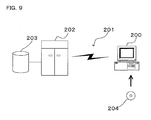
- FIG. 9 shows how the program may be provided through such media.
- a personal computer 200 receives the program via a CD-ROM 204.
- the personal computer 200 has a function which enables it to achieve a connection with a communication line 201.
- a computer 202 is a server computer that provides the program stored in a recording medium such as a hard disk 203.
- the communication line 201 may be a communication line for Internet communication, personal computer communication or the like, or it may be a dedicated communication line.
- the computer 202 reads out the program from the hard disk 203 and transmits the program to the personal computer 200 via the communication line 201.
- the program embodied as a data signal on a carrier wave is transmitted via the communication line 201.
- the program can be distributed as a computer-readable computer program product adopting any of various modes such as a recording medium and a carrier wave.
Landscapes
- Engineering & Computer Science (AREA)
- Multimedia (AREA)
- Signal Processing (AREA)
- Image Processing (AREA)
- Television Signal Processing For Recording (AREA)
- Studio Devices (AREA)
- Controls And Circuits For Display Device (AREA)
- Image Analysis (AREA)
Applications Claiming Priority (2)
| Application Number | Priority Date | Filing Date | Title |
|---|---|---|---|
| JP2004284034 | 2004-09-29 | ||
| JP2005255206A JP4581924B2 (ja) | 2004-09-29 | 2005-09-02 | 画像再生装置、および画像再生プログラム |
Publications (2)
| Publication Number | Publication Date |
|---|---|
| EP1643751A2 true EP1643751A2 (fr) | 2006-04-05 |
| EP1643751A3 EP1643751A3 (fr) | 2006-09-13 |
Family
ID=35466446
Family Applications (1)
| Application Number | Title | Priority Date | Filing Date |
|---|---|---|---|
| EP05108969A Withdrawn EP1643751A3 (fr) | 2004-09-29 | 2005-09-28 | Dispositif et produit logiciel de reproduction d'image |
Country Status (3)
| Country | Link |
|---|---|
| US (1) | US8176426B2 (fr) |
| EP (1) | EP1643751A3 (fr) |
| JP (1) | JP4581924B2 (fr) |
Cited By (1)
| Publication number | Priority date | Publication date | Assignee | Title |
|---|---|---|---|---|
| WO2009013025A1 (fr) * | 2007-07-20 | 2009-01-29 | Sony Ericsson Mobile Communications Ab | Système et procédé pour améliorer les présentations d'images |
Families Citing this family (30)
| Publication number | Priority date | Publication date | Assignee | Title |
|---|---|---|---|---|
| EP1980992A4 (fr) * | 2006-01-24 | 2011-06-01 | Nec Corp | Système de reproduction d image, méthode de reproduction d image et programme de reproduction d image |
| JP4110178B2 (ja) * | 2006-07-03 | 2008-07-02 | キヤノン株式会社 | 撮像装置及びその制御方法及びプログラム及び記憶媒体 |
| JP2008061032A (ja) * | 2006-08-31 | 2008-03-13 | Sony Corp | 画像再生装置及び画像再生方法、並びにコンピュータ・プログラム |
| JP4388939B2 (ja) | 2006-09-25 | 2009-12-24 | 富士フイルム株式会社 | 画像再生装置ならびにその制御方法およびその制御プログラム |
| JP5053731B2 (ja) * | 2007-07-03 | 2012-10-17 | キヤノン株式会社 | 画像表示制御装置及び画像表示制御方法及びプログラム及び記録媒体 |
| WO2009090804A1 (fr) * | 2008-01-18 | 2009-07-23 | Nikon Corporation | Dispositif d'attribution de titre à un groupe d'images, dispositif de groupement d'images, dispositif de détermination d'image représentative pour le groupe d'images, dispositif d'affichage d'image, caméra et programme d'affichage d'image |
| US8180788B2 (en) * | 2008-06-05 | 2012-05-15 | Enpulz, L.L.C. | Image search engine employing image correlation |
| US8190623B2 (en) * | 2008-06-05 | 2012-05-29 | Enpulz, L.L.C. | Image search engine using image analysis and categorization |
| KR101467871B1 (ko) * | 2008-05-29 | 2014-12-02 | 삼성전자주식회사 | 자동 줌 기능을 구비하는 디지털 영상 처리장치 및 그제어방법 |
| JP2010130039A (ja) * | 2008-11-25 | 2010-06-10 | Casio Computer Co Ltd | 情報分類システム及び情報分類方法 |
| JP5144487B2 (ja) * | 2008-12-15 | 2013-02-13 | キヤノン株式会社 | 主顔選択装置、その制御方法、撮像装置及びプログラム |
| JP2010187372A (ja) * | 2009-01-16 | 2010-08-26 | Panasonic Corp | 表示制御装置および撮像装置 |
| US20100214321A1 (en) * | 2009-02-24 | 2010-08-26 | Nokia Corporation | Image object detection browser |
| US8860865B2 (en) * | 2009-03-02 | 2014-10-14 | Burning Moon, Llc | Assisted video creation utilizing a camera |
| JP4952739B2 (ja) * | 2009-04-01 | 2012-06-13 | 株式会社ニコン | 画像ファイル生成装置および画像再生装置 |
| KR101206132B1 (ko) * | 2010-02-16 | 2012-11-28 | 인하대학교 산학협력단 | 영상 합성 방법 및 장치 |
| JP5740822B2 (ja) * | 2010-03-04 | 2015-07-01 | ソニー株式会社 | 情報処理装置、情報処理方法およびプログラム |
| JP2011188065A (ja) * | 2010-03-05 | 2011-09-22 | Sony Corp | 撮像制御装置、被写体検出方法、プログラム |
| JP2011193386A (ja) * | 2010-03-16 | 2011-09-29 | Toshiba Corp | 電子機器及び画像処理方法 |
| JP4892074B2 (ja) | 2010-03-31 | 2012-03-07 | 株式会社東芝 | 電子機器、画像出力方法及びプログラム |
| JP2012053710A (ja) * | 2010-09-01 | 2012-03-15 | Toshiba Tec Corp | 店舗システム、売上登録装置及びプログラム |
| US8437497B2 (en) * | 2011-01-27 | 2013-05-07 | Seiko Epson Corporation | System and method for real-time image retensioning and loop error correction |
| JP2014170979A (ja) * | 2011-05-12 | 2014-09-18 | Nec Corp | 情報処理装置、情報処理方法および情報処理プログラム |
| JP5594305B2 (ja) * | 2012-02-17 | 2014-09-24 | カシオ計算機株式会社 | 画像処理装置、制御方法及びプログラム |
| DE112012007137T5 (de) * | 2012-11-15 | 2015-08-06 | Mitsubishi Electric Corporation | Anwenderschnittstellenvorrichtung |
| KR102120864B1 (ko) * | 2013-11-06 | 2020-06-10 | 삼성전자주식회사 | 영상 처리 방법 및 장치 |
| CN106101540B (zh) * | 2016-06-28 | 2019-08-06 | 北京旷视科技有限公司 | 对焦点确定方法及装置 |
| CN110083418A (zh) * | 2019-04-04 | 2019-08-02 | 上海掌门科技有限公司 | 信息流中图片的处理方法、设备及计算机可读存储介质 |
| CN111556248B (zh) * | 2020-05-09 | 2021-09-03 | Tcl移动通信科技(宁波)有限公司 | 拍摄方法、装置、存储介质及移动终端 |
| US12108140B2 (en) * | 2022-10-26 | 2024-10-01 | Adobe Inc. | Updating zoom properties of corresponding salient objects |
Family Cites Families (59)
| Publication number | Priority date | Publication date | Assignee | Title |
|---|---|---|---|---|
| EP0461577B1 (fr) * | 1990-06-11 | 1998-12-02 | Hitachi, Ltd. | Appareil pour générer le trajet du mouvement d'un objet |
| JPH0698255A (ja) * | 1992-08-10 | 1994-04-08 | Minolta Camera Co Ltd | フィルム画像再生装置 |
| US5500936A (en) * | 1993-03-12 | 1996-03-19 | Asymetrix Corporation | Multi-media slide presentation system with a moveable, tracked popup menu with button and title bars |
| US6037936A (en) * | 1993-09-10 | 2000-03-14 | Criticom Corp. | Computer vision system with a graphic user interface and remote camera control |
| US5805733A (en) * | 1994-12-12 | 1998-09-08 | Apple Computer, Inc. | Method and system for detecting scenes and summarizing video sequences |
| US5572639A (en) * | 1995-05-08 | 1996-11-05 | Gantt; Brian D. | Method and apparatus for interactively manipulating and displaying presumptive relationships between graphic objects |
| US6985172B1 (en) * | 1995-12-01 | 2006-01-10 | Southwest Research Institute | Model-based incident detection system with motion classification |
| TR199700058A2 (xx) * | 1997-01-29 | 1998-08-21 | Onural Levent | Kurallara dayalı hareketli nesne bölütlemesi. |
| JPH11243484A (ja) * | 1997-07-03 | 1999-09-07 | Canon Inc | 画像処理装置、画像処理方法、フィルム画像表示システム、フィルム画像表示方法、フィルム画像表示装置、フィルム画像読み取り装置、再生装置、再生方法及び記憶媒体 |
| US6111590A (en) * | 1997-07-18 | 2000-08-29 | International Business Machines Corp. | Method and system for a true scale motion path editor to create motion paths as independent entities |
| US6091427A (en) * | 1997-07-18 | 2000-07-18 | International Business Machines Corp. | Method and system for a true-scale motion path editor using time segments, duration and synchronization |
| JPH11308513A (ja) * | 1998-04-17 | 1999-11-05 | Casio Comput Co Ltd | 画像再生装置及び画像再生方法 |
| US6307550B1 (en) * | 1998-06-11 | 2001-10-23 | Presenter.Com, Inc. | Extracting photographic images from video |
| US6362850B1 (en) * | 1998-08-04 | 2002-03-26 | Flashpoint Technology, Inc. | Interactive movie creation from one or more still images in a digital imaging device |
| US6697569B1 (en) * | 1998-09-11 | 2004-02-24 | Telefonaktiebolaget Lm Ericsson (Publ) | Automated conversion of a visual presentation into digital data format |
| US6574419B1 (en) * | 1999-03-12 | 2003-06-03 | Matsushita Electric Industrial Co., Ltd. | Optical disk, reproduction apparatus reproduction method, and recording medium |
| US6396500B1 (en) * | 1999-03-18 | 2002-05-28 | Microsoft Corporation | Method and system for generating and displaying a slide show with animations and transitions in a browser |
| US6369835B1 (en) * | 1999-05-18 | 2002-04-09 | Microsoft Corporation | Method and system for generating a movie file from a slide show presentation |
| JP4733245B2 (ja) * | 1999-09-21 | 2011-07-27 | 富士フイルム株式会社 | ズーム・データ記録装置ならびにその方法およびそのプログラム |
| JP4281189B2 (ja) * | 1999-12-27 | 2009-06-17 | セイコーエプソン株式会社 | 画像データ処理方法およびプリンタ並びに画像データ処理プログラムを記録した記録媒体 |
| US6717591B1 (en) * | 2000-08-31 | 2004-04-06 | International Business Machines Corporation | Computer display system for dynamically controlling the pacing of sequential presentation segments in response to user variations in the time allocated to specific presentation segments |
| GB2372658A (en) * | 2001-02-23 | 2002-08-28 | Hewlett Packard Co | A method of creating moving video data from a static image |
| US6829384B2 (en) * | 2001-02-28 | 2004-12-07 | Carnegie Mellon University | Object finder for photographic images |
| US7046914B2 (en) * | 2001-05-01 | 2006-05-16 | Koninklijke Philips Electronics N.V. | Automatic content analysis and representation of multimedia presentations |
| US6836870B2 (en) * | 2001-06-15 | 2004-12-28 | Cubic Corporation | Method and system for incorporating a dynamic situation display in a powerpoint slide show presentation |
| US6961912B2 (en) * | 2001-07-18 | 2005-11-01 | Xerox Corporation | Feedback mechanism for use with visual selection methods |
| US7133070B2 (en) * | 2001-09-20 | 2006-11-07 | Eastman Kodak Company | System and method for deciding when to correct image-specific defects based on camera, scene, display and demographic data |
| JP2003108979A (ja) * | 2001-09-27 | 2003-04-11 | Fuji Photo Film Co Ltd | 顔領域抽出方法および装置並びにプログラム |
| JP2003125251A (ja) * | 2001-10-16 | 2003-04-25 | Minolta Co Ltd | デジタルカメラおよび再生プログラム |
| JP2003143444A (ja) * | 2001-11-06 | 2003-05-16 | Canon Inc | 撮像装置及びその制御方法、プログラム並びに記憶媒体 |
| US7102643B2 (en) * | 2001-11-09 | 2006-09-05 | Vibe Solutions Group, Inc. | Method and apparatus for controlling the visual presentation of data |
| JP3970029B2 (ja) | 2002-01-11 | 2007-09-05 | キヤノン株式会社 | 画像再生装置 |
| US20030160814A1 (en) * | 2002-02-27 | 2003-08-28 | Brown David K. | Slide show presentation and method for viewing same |
| JP4542301B2 (ja) * | 2002-02-27 | 2010-09-15 | ホットアルバムコム株式会社 | 動画データ生成システム及び動画データ生成方法 |
| US8285111B2 (en) * | 2002-04-19 | 2012-10-09 | Tivo Inc. | Method and apparatus for creating an enhanced photo digital video disc |
| US20040091232A1 (en) * | 2002-05-31 | 2004-05-13 | Appling Thomas C. | Method and apparatus for effecting a presentation |
| US7383509B2 (en) * | 2002-09-13 | 2008-06-03 | Fuji Xerox Co., Ltd. | Automatic generation of multimedia presentation |
| EP1422668B1 (fr) * | 2002-11-25 | 2017-07-26 | Panasonic Intellectual Property Management Co., Ltd. | Appareil et procédé de génération et reproduction d'un court métrage |
| US20040130566A1 (en) * | 2003-01-07 | 2004-07-08 | Prashant Banerjee | Method for producing computerized multi-media presentation |
| US7149961B2 (en) * | 2003-04-30 | 2006-12-12 | Hewlett-Packard Development Company, L.P. | Automatic generation of presentations from “path-enhanced” multimedia |
| JP2005012674A (ja) | 2003-06-20 | 2005-01-13 | Canon Inc | 画像表示方法及びそれを実行するプログラム並びに画像表示装置 |
| US7587068B1 (en) * | 2004-01-22 | 2009-09-08 | Fotonation Vision Limited | Classification database for consumer digital images |
| US7904815B2 (en) * | 2003-06-30 | 2011-03-08 | Microsoft Corporation | Content-based dynamic photo-to-video methods and apparatuses |
| JP4519531B2 (ja) * | 2003-07-11 | 2010-08-04 | パナソニック株式会社 | 画像表示装置、画像表示方法およびプログラム |
| US7372991B2 (en) * | 2003-09-26 | 2008-05-13 | Seiko Epson Corporation | Method and apparatus for summarizing and indexing the contents of an audio-visual presentation |
| US7050072B2 (en) * | 2003-09-29 | 2006-05-23 | Galleryplayer, Inc. | Method and system for specifying a pan path |
| US6956589B2 (en) * | 2003-09-29 | 2005-10-18 | Beon Media Inc. | Method and system for specifying zoom size |
| US6989848B2 (en) * | 2003-09-29 | 2006-01-24 | Beon Media Inc. | Method and system for specifying zoom speed |
| US8904267B2 (en) * | 2003-10-14 | 2014-12-02 | International Business Machines Corporation | Retrieving slide show content from presentation documents |
| US7471827B2 (en) * | 2003-10-16 | 2008-12-30 | Microsoft Corporation | Automatic browsing path generation to present image areas with high attention value as a function of space and time |
| JP2005182196A (ja) * | 2003-12-16 | 2005-07-07 | Canon Inc | 画像表示方法および画像表示装置 |
| US7564994B1 (en) * | 2004-01-22 | 2009-07-21 | Fotonation Vision Limited | Classification system for consumer digital images using automatic workflow and face detection and recognition |
| US8411902B2 (en) * | 2004-04-07 | 2013-04-02 | Hewlett-Packard Development Company, L.P. | Providing a visual indication of the content of a video by analyzing a likely user intent |
| JP2005354332A (ja) * | 2004-06-10 | 2005-12-22 | Casio Comput Co Ltd | 画像再生装置およびプログラム |
| JP2005354333A (ja) * | 2004-06-10 | 2005-12-22 | Casio Comput Co Ltd | 画像再生装置およびプログラム |
| US7454077B1 (en) * | 2004-06-28 | 2008-11-18 | Microsoft Corporation | Slideshow animation algorithms |
| JP4345608B2 (ja) * | 2004-08-10 | 2009-10-14 | カシオ計算機株式会社 | 画像データ再生装置、及び、プログラム |
| US7848566B2 (en) * | 2004-10-22 | 2010-12-07 | Carnegie Mellon University | Object recognizer and detector for two-dimensional images using bayesian network based classifier |
| US7505051B2 (en) * | 2004-12-16 | 2009-03-17 | Corel Tw Corp. | Method for generating a slide show of an image |
-
2005
- 2005-09-02 JP JP2005255206A patent/JP4581924B2/ja not_active Expired - Fee Related
- 2005-09-27 US US11/235,050 patent/US8176426B2/en not_active Expired - Fee Related
- 2005-09-28 EP EP05108969A patent/EP1643751A3/fr not_active Withdrawn
Cited By (1)
| Publication number | Priority date | Publication date | Assignee | Title |
|---|---|---|---|---|
| WO2009013025A1 (fr) * | 2007-07-20 | 2009-01-29 | Sony Ericsson Mobile Communications Ab | Système et procédé pour améliorer les présentations d'images |
Also Published As
| Publication number | Publication date |
|---|---|
| JP4581924B2 (ja) | 2010-11-17 |
| JP2006129453A (ja) | 2006-05-18 |
| US20060069999A1 (en) | 2006-03-30 |
| US8176426B2 (en) | 2012-05-08 |
| EP1643751A3 (fr) | 2006-09-13 |
Similar Documents
| Publication | Publication Date | Title |
|---|---|---|
| US8176426B2 (en) | Image reproduction apparatus and image reproduction program product | |
| JP4274233B2 (ja) | 撮影装置、画像処理装置、および、これらにおける画像処理方法ならびに当該方法をコンピュータに実行させるプログラム | |
| EP1986128B1 (fr) | Dispositif de traitement d'images, dispositif d'acquisition d'images, procédé de traitement d'images, et programme d'ordinateur | |
| JP5831193B2 (ja) | 利用者検知装置、方法及びプログラム | |
| JP4924742B2 (ja) | 画像処理装置及び方法、並びにプログラム | |
| EP2059024A2 (fr) | Dispositif de traitement d'images, procédé de traitement d'images et produit de programme informatique | |
| US8934759B2 (en) | Video editing apparatus and video editing method | |
| EP2164027A1 (fr) | Dispositif de détection d'objets, appareil d'imagerie, procédé de détection d'objets, et programme | |
| US8009204B2 (en) | Image capturing apparatus, image capturing method, image processing apparatus, image processing method and computer-readable medium | |
| US20150055824A1 (en) | Method of detecting a main subject in an image | |
| US8175335B2 (en) | Content adaptive detection of images with stand-out object | |
| US8577098B2 (en) | Apparatus, method and program for designating an object image to be registered | |
| CN105531988A (zh) | 从连拍照片捕获集合中自动选择保存者图像 | |
| JP2004236120A (ja) | 写真画像選別装置およびプログラム | |
| IES20080161A2 (en) | Face detection in mid-shot digital images | |
| CN103945109A (zh) | 摄像装置及其控制方法、远程控制装置及其控制方法 | |
| WO2006130542A1 (fr) | Utilisation de l'identite d'un photographe pour classer des images | |
| US20110007191A1 (en) | Apparatus and method for processing digital image | |
| JP2011040993A (ja) | 被写体追尾プログラム、およびカメラ | |
| JP2014050022A (ja) | 画像処理装置、撮像装置、およびプログラム | |
| US20110304644A1 (en) | Electronic apparatus and image display method | |
| JP2006079460A (ja) | 電子アルバム表示システム、電子アルバム表示方法、電子アルバム表示プログラム、画像分類装置、画像分類方法、及び画像分類プログラム | |
| EP1988405A2 (fr) | Procédé de suivi d'un sujet photographique, programme informatique et dispositif de suivi d'un sujet photographique | |
| JP2012039210A (ja) | 被写体特定用プログラム、およびカメラ | |
| JP6554820B2 (ja) | 画像処理プログラム、画像処理装置、及び画像処理方法 |
Legal Events
| Date | Code | Title | Description |
|---|---|---|---|
| PUAI | Public reference made under article 153(3) epc to a published international application that has entered the european phase |
Free format text: ORIGINAL CODE: 0009012 |
|
| AK | Designated contracting states |
Kind code of ref document: A2 Designated state(s): AT BE BG CH CY CZ DE DK EE ES FI FR GB GR HU IE IS IT LI LT LU LV MC NL PL PT RO SE SI SK TR |
|
| AX | Request for extension of the european patent |
Extension state: AL BA HR MK YU |
|
| PUAL | Search report despatched |
Free format text: ORIGINAL CODE: 0009013 |
|
| AK | Designated contracting states |
Kind code of ref document: A3 Designated state(s): AT BE BG CH CY CZ DE DK EE ES FI FR GB GR HU IE IS IT LI LT LU LV MC NL PL PT RO SE SI SK TR |
|
| AX | Request for extension of the european patent |
Extension state: AL BA HR MK YU |
|
| AKX | Designation fees paid | ||
| 17P | Request for examination filed |
Effective date: 20070313 |
|
| RBV | Designated contracting states (corrected) |
Designated state(s): DE FR GB |
|
| REG | Reference to a national code |
Ref country code: DE Ref legal event code: 8566 |
|
| 17Q | First examination report despatched |
Effective date: 20070620 |
|
| RAP1 | Party data changed (applicant data changed or rights of an application transferred) |
Owner name: NIKON CORPORATION |
|
| STAA | Information on the status of an ep patent application or granted ep patent |
Free format text: STATUS: THE APPLICATION HAS BEEN WITHDRAWN |
|
| 18W | Application withdrawn |
Effective date: 20150709 |