EP1291757A2 - Bilderzeugungssystem mit einer grafischen Benutzerschnittstelle zur Darstellung von Druckoptionen - Google Patents
Bilderzeugungssystem mit einer grafischen Benutzerschnittstelle zur Darstellung von Druckoptionen Download PDFInfo
- Publication number
- EP1291757A2 EP1291757A2 EP02019141A EP02019141A EP1291757A2 EP 1291757 A2 EP1291757 A2 EP 1291757A2 EP 02019141 A EP02019141 A EP 02019141A EP 02019141 A EP02019141 A EP 02019141A EP 1291757 A2 EP1291757 A2 EP 1291757A2
- Authority
- EP
- European Patent Office
- Prior art keywords
- page
- management functionality
- options
- user interface
- thumbnail
- Prior art date
- Legal status (The legal status is an assumption and is not a legal conclusion. Google has not performed a legal analysis and makes no representation as to the accuracy of the status listed.)
- Withdrawn
Links
Images



Classifications
-
- G—PHYSICS
- G06—COMPUTING OR CALCULATING; COUNTING
- G06F—ELECTRIC DIGITAL DATA PROCESSING
- G06F3/00—Input arrangements for transferring data to be processed into a form capable of being handled by the computer; Output arrangements for transferring data from processing unit to output unit, e.g. interface arrangements
- G06F3/12—Digital output to print unit, e.g. line printer, chain printer
- G06F3/1201—Dedicated interfaces to print systems
- G06F3/1202—Dedicated interfaces to print systems specifically adapted to achieve a particular effect
- G06F3/1203—Improving or facilitating administration, e.g. print management
- G06F3/1204—Improving or facilitating administration, e.g. print management resulting in reduced user or operator actions, e.g. presetting, automatic actions, using hardware token storing data
-
- G—PHYSICS
- G06—COMPUTING OR CALCULATING; COUNTING
- G06F—ELECTRIC DIGITAL DATA PROCESSING
- G06F3/00—Input arrangements for transferring data to be processed into a form capable of being handled by the computer; Output arrangements for transferring data from processing unit to output unit, e.g. interface arrangements
- G06F3/12—Digital output to print unit, e.g. line printer, chain printer
- G06F3/1201—Dedicated interfaces to print systems
- G06F3/1202—Dedicated interfaces to print systems specifically adapted to achieve a particular effect
- G06F3/1203—Improving or facilitating administration, e.g. print management
- G06F3/1205—Improving or facilitating administration, e.g. print management resulting in increased flexibility in print job configuration, e.g. job settings, print requirements, job tickets
-
- G—PHYSICS
- G06—COMPUTING OR CALCULATING; COUNTING
- G06F—ELECTRIC DIGITAL DATA PROCESSING
- G06F3/00—Input arrangements for transferring data to be processed into a form capable of being handled by the computer; Output arrangements for transferring data from processing unit to output unit, e.g. interface arrangements
- G06F3/12—Digital output to print unit, e.g. line printer, chain printer
- G06F3/1201—Dedicated interfaces to print systems
- G06F3/1223—Dedicated interfaces to print systems specifically adapted to use a particular technique
- G06F3/1224—Client or server resources management
- G06F3/1225—Software update, e.g. print driver, modules, plug-ins, fonts
-
- G—PHYSICS
- G06—COMPUTING OR CALCULATING; COUNTING
- G06F—ELECTRIC DIGITAL DATA PROCESSING
- G06F3/00—Input arrangements for transferring data to be processed into a form capable of being handled by the computer; Output arrangements for transferring data from processing unit to output unit, e.g. interface arrangements
- G06F3/12—Digital output to print unit, e.g. line printer, chain printer
- G06F3/1201—Dedicated interfaces to print systems
- G06F3/1223—Dedicated interfaces to print systems specifically adapted to use a particular technique
- G06F3/1237—Print job management
- G06F3/125—Page layout or assigning input pages onto output media, e.g. imposition
-
- G—PHYSICS
- G06—COMPUTING OR CALCULATING; COUNTING
- G06F—ELECTRIC DIGITAL DATA PROCESSING
- G06F3/00—Input arrangements for transferring data to be processed into a form capable of being handled by the computer; Output arrangements for transferring data from processing unit to output unit, e.g. interface arrangements
- G06F3/12—Digital output to print unit, e.g. line printer, chain printer
- G06F3/1201—Dedicated interfaces to print systems
- G06F3/1223—Dedicated interfaces to print systems specifically adapted to use a particular technique
- G06F3/1237—Print job management
- G06F3/1253—Configuration of print job parameters, e.g. using UI at the client
-
- G—PHYSICS
- G06—COMPUTING OR CALCULATING; COUNTING
- G06F—ELECTRIC DIGITAL DATA PROCESSING
- G06F3/00—Input arrangements for transferring data to be processed into a form capable of being handled by the computer; Output arrangements for transferring data from processing unit to output unit, e.g. interface arrangements
- G06F3/12—Digital output to print unit, e.g. line printer, chain printer
- G06F3/1201—Dedicated interfaces to print systems
- G06F3/1278—Dedicated interfaces to print systems specifically adapted to adopt a particular infrastructure
- G06F3/1284—Local printer device
Definitions
- the present invention relates to the field of imaging systems with a graphical user interface.
- the invention relates Imaging devices and methods with a graphical user interface, which enables the display of print options of a print job at page level.
- An image forming device transfers images from originals to paper or another Medium to a finished product, e.g. a brochure, leaflet or notebook To produce registers.
- the template can be in printed form (on paper or another Medium) or electronically (on a floppy disk, a CD, etc.) or via a Network such as the Internet are transmitted.
- a "print job" is composed from the templates and instructions for making the finished product.
- GUI graphical user interface
- the GUI enables relationships to be created and changed and associations between various components of the imaging device and the print job. These relationships and assignments are e.g. by means of a hierarchical Approach, e.g. in the form of a tree structure or a file folder structure or another kind of visualization.
- the instructions for a print job include print options for the entire job Print job and page options for specific pages of the print job.
- the page options make an exception to that associated with the entire print job Print options.
- the print and page options determine e.g. the paper or Media type (color, format, register, etc.), booklet positions, perforations, image shifts, Folding processes, offset stacking, pages to be printed, edge trimming, rotation etc.
- the GUI usually displays a list of symbols or icons that summarize of the page options.
- the icons usually indicate that one side Page options are assigned, but do not give the specific options of the page again. According to one approach, an icon is displayed that is a tabbed page indicates, but no other page options. To get more information about that To get specific page options, a user usually needs the properties open and review each page.
- the icons are usually assigned when the print job is compiled, and cannot be changed when a Assigns users new page options.
- the present invention provides an imaging system with a graphic User interface, which is a representation of print options of a print job Allows page level.
- the display of the print options includes at least one graphic Representation of the selected or a corresponding page for each individual page associated page options.
- the graphical representations include the page options rendering icons or thumbnails for the page.
- the imaging device includes a graphic one User interface with an imaging management functionality and one Document management functionality.
- the imaging and Document management functionality provide at least one graphical representation in response a print option for a print job.
- An imaging device user interface becomes one or more pages of a Print job selected. One or more page options are assigned to the pages. An icon is generated in response to the at least one page option. The icon becomes the Pages assigned to the print job.
- An imaging device user interface becomes one or more pages of a Print job selected.
- One or more page options are assigned to the pages.
- a list of predefined icons becomes an icon in response to the page options selected. The icon is assigned to the pages of the print job.
- An imaging device user interface becomes one or more pages of a Print job selected.
- One or more page options are assigned to the pages. It is determined whether the pages have a thumbnail. If this is not the case, then in Response to the pages creates a thumbnail.
- the page options become the thumbnail assigned.
- the thumbnail is saved with the at least one page.
- GUI graphic User interface
- FIG. 1 shows a block diagram of an image forming device 100 with a graphic User interface (GUI) 110, which is a representation according to a first embodiment printing options of a print job at page level.
- GUI graphic User interface
- the display of the print options for each page includes at least one graphic representation of the selected pages or the individual pages associated page options.
- the graphic representations can e.g. than the page options displaying icon or thumbnail of the page.
- the imaging device 100 may e.g. as an electrophotographic device be trained, e.g. as a Digimaster® digital printer manufactured by Heidelberg Digital L.L.C. in Rochester, New York.
- the imaging device 100 can also be another electrophotographic machine can be designed as a photocopier, a Printing device or the like
- the imaging device 100 includes a feed station 102, a marking device 104, a further processing device 106 and a printer user interface 108.
- Imaging device 100 can also include other elements.
- the feed station 102, the marking device 104, the Processing device 106 and printer user interface 108 can be configured as separate or integrated components can be formed.
- the printer user interface 108 can be designed as a display unit, the buttons or other activation mechanisms for entering control parameters into the image forming device 100.
- the feed station 102 feeds the print or copy sheets to the printing device 104 the sheet can be paper, foil or other media as well as a combination hold multiple media.
- the sheets can also be pre-punched or a register or similar. exhibit.
- the marking device 104 comprises a (not shown) Photoconductor element, at least one charging device (not shown), one (not shown) Exposure device, a toner station (not shown) and a (not shown) Fuser.
- the photoconductor element is selectively charged and optically exposed that a latent electrostatic image is formed on the surface. On the surface of the Toner is applied to the photoconductor element. This is loaded and therefore liable in the latent electrostatic image corresponding areas on the surface of the Photoconductor element.
- the toner image is transferred to the sheet.
- the sheet In the fuser the sheet is heated so that the toner is fixed on the paper or other medium or liable.
- the sheet leaves the marking device 104 and runs into the A further processing device 106 which can lay out the sheet as it is, or a or carries out several further processing operations, e.g. the sheet staples, folds or one Inserts bow.
- GUI 110 is formed as a separate component, e.g. one on the device tailored desktop or other PC that is in operational connection with of the image forming apparatus 100.
- the GUI 110 can also be used in the Printer user interface 108 or other components of the imaging device 100 be integrated.
- the GUI 110 is operationally connected to the (not shown) logic control unit of the imaging device 100.
- An operational link means that means of transmission or communication are provided, e.g. a electrical connection, a radio connection, a network connection or similar
- the GUI 110 and the logic control unit can be integrated in the same component.
- the Logical control unit is for controlling the feed station 102, the marking device 104, the further processing device 106 and the printer user interface 108 connected to this.
- the GUI 110 comprises a screen and an interface element, e.g. a touchscreen (not shown), a keyboard (not shown), a mouse (not shown), a trackball (not shown) or a combination of several of these elements.
- the GUI 110 can alternate tear-off menus, floating buttons, dialog boxes and keyboard shortcuts with mouse shortcuts and other alternative physical input devices.
- the GUI 110 enables visual interaction with the imaging device 100 via a document management functionality and an imaging management functionality, which are integrated into the GUI 110 in one aspect.
- the document and Imaging management functionality can be partially or fully in the logical Control unit or another component of the image forming device 100 integrated his.
- the document and Imaging management functionality implemented via a plug-in architecture.
- a plug-in architecture offers the possibility of simple and efficient extensions and extensions To carry out updates without the program codes executing the functionalities being new need to be compiled. However, other architectures can be used.
- the document management functionality provides display via a central display window electronic images of the original template of a print job ready.
- the imaging management functionality integrates applications for execution, Control or management of the imaging device 100 ready.
- the Imaging management functionality provides objects (documents, tickets, other Units, processes, etc.), in the form of icons, tree structures and pull-down menus, visually
- a user can use various means of interaction such as a touchscreen, a Mouse, trackball and keyboard with the imaging management functionality to interact. Every interaction with the visual representations leads to a change in the underlying objects.
- the imaging management functionality is one can have an object-oriented appearance, the implementation of the functionality through an object-oriented programming language or through a non-object-oriented one Programming language.
- the Imaging management functionality through ImageSmart® Document Mastering SmartBoard TM provided in Digimaster® digital printers from Heidelberg Digital L.L.C. in Rochester, New York. However, others can Imaging management software applications are used.
- the GUI 110 enables a print option representation with one or more graphical Representations of the page options selected for each page or assigned to each page.
- the graphic representations can e.g. as icons, thumbnails or as a combination be formed from both.
- the icons and thumbnails are used by the imaging and Document management functionality provided. Icons are software generated images for Original documents are available. Thumbnails are smaller views of an original document in an electronic file format.
- the Imaging management functionality the icons and the Document management functionality the thumbnails.
- the GUI generates 110 an icon and / or thumbnail for each page to which a page option is assigned. According to In another aspect, GUI 110 creates an icon and / or thumbnail for each page.
- the icons shown represent the following Side options: no special option, red medium, blue medium, triple perforation, Double stitching, register medium and red register medium with double stitching. Every icon can represent one or more page options. There may be other or additional Page options are used. Due to size restrictions, each icon can be on the display of a page option can be restricted. Each icon can also be one Property group can be limited (e.g. displaying an assigned Staple setting, but not the specific staple setting).
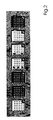
- thumbnail 3 shows an embodiment of thumbnails.
- the thumbnails give the following Side options again: no special option, triple perforation, blue medium, red Medium, double stitching, register medium, triple perforation with double stitching when printing on the back side.
- Other or additional page options can also be used.
- the imaging management functionality changes in the GUI 110 Thumbnails of document management functionality based on the page options for the print job.
- the Imaging management functionality the thumbnails.
- Different page options can be represented as follows: colored background for a specific Paper color, dark circles for perforations, black markings for stapling positions, on the paper attached overhang for register inserts, and a generic marker for everyone other page-level printing options (e.g., image shift, folding, offset Stacking, side to be printed on, edge trimming, rotation and another output device etc.).
- the modified thumbnails are generated when the Print options can be assigned or changed at the page level.
- the thumbnail can too be generated again before the change for a better reproduction of the Obtain original document.
- the automatic generation of Thumbnails can also be turned off to improve performance.
- the system keeps a copy of the unchanged thumbnail that is used to generate the visual representation of the Page level printing options is used.
- the special ones Markers and their position on the thumbnail can be changed so that they are in the correct position for the back of the page. If the software determines that a page will be printed on the back of a sheet of paper, the hole and Stitch marks are moved to the right edge of the thumbnail. The Register mark can be moved to the left edge.
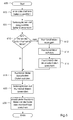
- FIG. 4 shows a flowchart of a first method for representing print options in a graphical user interface of an imaging device.
- the document management functionality opens a file for in a step 400 a print job.
- the imaging management functionality selects one or more pages.
- the imaging management functionality is assigned to the selected page (s) in a step 404 to one or more page options.
- the Imaging management functionality uses the page options to generate an Icons in a step 406. For example, dark circles and black lines added that indicate a punch and a stitch. The color of the background will be changed to indicate the color of the paper to be used.
- the Imaging management functionality links the icon to the one (s) in a step 408 selected page / s.
- the graphical user interface includes a Imaging management functionality and document management functionality.
- the document management functionality opens a file for in a step 500 a print job.
- the imaging management functionality selects one or more pages.
- the imaging management functionality is assigned to the selected page (s) in a step 504 one or more page options.
- one Step 506 selects the imaging management functionality based on the assigned one Page options an icon corresponding to the page options from a list.
- the list includes predefined icons that correspond to the page options.
- the page color is applied to display the color of the paper to be used.
- the Imaging management functionality links the icon to the one or more in a step 508 selected page / s.
- the graphical user interface includes a Imaging management functionality and document management functionality.
- the document management functionality opens a file for in a step 600 a print job.
- the imaging management functionality selects one or more pages.
- the imaging management functionality points in one Step 604 assign one or more page options to the selected page (s).
- one Step 610 determines the document management functionality whether the selected page (s) contain original thumbnails. If it is not, the generates Document management functionality in a step 612 an original thumbnail of the selected page / s.
- the document management functionality calls the in a step 614 Thumbnails and saves them in a step 616 with the selected page (s).
- the Imaging management functionality calls the original in step 618 Thumbnails and has the page options in a step 620 the original Thumbnails too.
- the imaging management functionality stores the new / changed thumbnails with the file of the print job.
Landscapes
- Engineering & Computer Science (AREA)
- Theoretical Computer Science (AREA)
- Human Computer Interaction (AREA)
- Physics & Mathematics (AREA)
- General Engineering & Computer Science (AREA)
- General Physics & Mathematics (AREA)
- User Interface Of Digital Computer (AREA)
Abstract
Description
- Fig. 1
- ein Blockdiagramm einer Bilderzeugungsvorrichtung mit einer grafischen Benutzerschnittstelle, an der gemäß einer Ausführungsform der vorliegenden Erfindung Druckoptionen eines Druckauftrags auf Seitenebene dargestellt werden;
- Fig. 2
- Darstellungen einer Ausführungsform von Icons;
- Fig. 3
- Darstellungen einer Ausführungsform von Thumbnails;
- Fig. 4
- ein Ablaufdiagramm eines ersten Verfahrens zur Darstellung von Druckoptionen an einer grafischen Benutzerschnittstelle einer Bilderzeugungsvorrichtung;
- Fig. 5
- ein Ablaufdiagramm eines zweiten Verfahrens zur Darstellung von Druckoptionen an einer grafischen Benutzerschnittstelle einer Bilderzeugungsvorrichtung; und
- Fig. 6
- ein Ablaufdiagramm eines dritten Verfahrens zur Darstellung von Druckoptionan an einer grafischen Benutzerschnittstelle einer Bilderzeugungsvorrichtung.
- 100
- Bilderzeugungsvorrichtung
- 102
- Zuführstation
- 104
- Druckvorrichtung
- 106
- Weiterverarbeitungsvorrichtung
- 108
- Druckerbenutzerschnittstelle
- 110
- grafische Benutzerschnittstelle
- 400
- Verfahrensschritt
- 402
- Verfahrensschritt
- 404
- Verfahrensschritt
- 406
- Verfahrensschritt
- 408
- Verfahrensschritt
- 500
- Verfahrensschritt
- 502
- Verfahrensschritt
- 504
- Verfahrensschritt
- 506
- Verfahrensschritt
- 508
- Verfahrensschritt
- 600
- Verfahrensschritt
- 602
- Verfahrensschritt
- 604
- Verfahrensschritt
- 610
- Verfahrensschritt
- 612
- Verfahrensschritt
- 614
- Verfahrensschritt
- 616
- Verfahrensschritt
- 618
- Verfahrensschritt
- 620
- Verfahrensschritt
- 622
- Verfahrensschritt
Claims (10)
- Bilderzeugungsvorrichtung (100) mit einer grafischen Benutzerschnittstelle (110), einer Bilderzeugungsmanagementfunktionalität und einer Dokumentmanagementfunktionalität,
dadurch gekennzeichnet, dass die Bilderzeugungsmanagementfunktionalität und/oder die Dokumentmanagementfunktionalität in Reaktion auf eine Seitenoption für einen Druckauftrag an der grafischen Benutzerschnittstelle (110) mindestens eine grafische Repräsentation bereitstellen. - Vorrichtung nach Anspruch 1,
dadurch gekennzeichnet, dass es sich bei der grafischen Repräsentation um einen Icon handelt. - Vorrichtung nach Anspruch 1,
dadurch gekennzeichnet, dass es sich bei der grafischen Repräsentation um einen Thumbnail handelt. - Verfahren zur Darstellung von Druckoptionen an einer grafischen Benutzerschnittstelle (110) einer Bilderzeugungsvorrichtung (100) mit den folgenden Schritten:Auswählen mindestens einer Seite;Zuweisen mindestens einer Seitenoption zu der mindestens einen Seite;Bereitstellen einer grafischen Repräsentation in Reaktion auf die mindestens eine Seite; undZuweisen der mindestens eine Seitenoption zu der grafischen Repräsentation;
- Verfahren nach Anspruch 4,
dadurch gekennzeichnet, dass es sich bei der grafischen Repräsentation um einen Icon handelt. - Verfahren nach Anspruch 5,
dadurch gekennzeichnet, dass der Verfahrensschritt des Bereitstellenes das Erzeugen des Icons umfasst. - Verfahren nach Anspruch 5,
dadurch gekennzeichnet, dass der Verfahrensschritt des Bereitstellenes das Auswählen eines Icons entsprechend der Seitenoptionen aus einer Liste vorbestimmter Icons umfasst. - Verfahren nach Anspruch 4,
dadurch gekennzeichnet, dass es sich bei der grafischen Repräsentation um einen Thumbnail handelt. - Verfahren nach Anspruch 8,
dadurch gekennzeichnet, dass der Verfahrensschritt des Bereitstellenes folgende Verfahrensschritte umfasst:Bestimmen, ob die mindestens eine Seite ein Thumbnail aufweist;Erzeugen eines Thumbnails in Reaktion auf die mindestens eine Seite, wenn die mindestens eine Seite kein Thumbnail aufweist; - Verfahren nach Anspruch 9,
dadurch gekennzeichnet, dass das Verfahren zusätzlich folgende Verfahrensschritte umfasst:Verändern des Thumbnails in Reaktion auf die mindestens eine Seitenoption; undSpeichern des Thumbnails mit der mindestens einen Seite.
Applications Claiming Priority (4)
| Application Number | Priority Date | Filing Date | Title |
|---|---|---|---|
| US31753501P | 2001-09-05 | 2001-09-05 | |
| US31767401P | 2001-09-05 | 2001-09-05 | |
| US317674P | 2001-09-05 | ||
| US317535P | 2001-09-05 |
Publications (2)
| Publication Number | Publication Date |
|---|---|
| EP1291757A2 true EP1291757A2 (de) | 2003-03-12 |
| EP1291757A3 EP1291757A3 (de) | 2006-08-02 |
Family
ID=26981010
Family Applications (1)
| Application Number | Title | Priority Date | Filing Date |
|---|---|---|---|
| EP02019141A Withdrawn EP1291757A3 (de) | 2001-09-05 | 2002-08-30 | Bilderzeugungssystem mit einer grafischen Benutzerschnittstelle zur Darstellung von Druckoptionen |
Country Status (2)
| Country | Link |
|---|---|
| EP (1) | EP1291757A3 (de) |
| DE (1) | DE10239922A1 (de) |
Family Cites Families (1)
| Publication number | Priority date | Publication date | Assignee | Title |
|---|---|---|---|---|
| JP3798170B2 (ja) * | 1999-02-08 | 2006-07-19 | シャープ株式会社 | グラフィカル・ユーザ・インターフェイスを備えた情報処理システム |
-
2002
- 2002-08-30 EP EP02019141A patent/EP1291757A3/de not_active Withdrawn
- 2002-08-30 DE DE2002139922 patent/DE10239922A1/de not_active Withdrawn
Also Published As
| Publication number | Publication date |
|---|---|
| EP1291757A3 (de) | 2006-08-02 |
| DE10239922A1 (de) | 2003-03-20 |
Similar Documents
| Publication | Publication Date | Title |
|---|---|---|
| EP1573505B1 (de) | Verfahren, anordnung und computersoftware zum bedrucken eines trennblattes mit hilfe eines elektrofotografischen druckers oder kopierers | |
| DE69222659T2 (de) | Reproduktionsmethode und Reproduktionsapparat mit verbesserter Anzeige | |
| DE60001439T2 (de) | Druckersteuerungsfilter sowie Verfahren zum Drucken | |
| DE69230547T2 (de) | Dialogfilterung | |
| EP1179201B1 (de) | Verfahren und system zum ausschiessen von druckdaten | |
| EP1388042B1 (de) | Verfahren, gerätesystem und computerprogrammsystem zum visuellen überprüfen eines druckdatenstroms | |
| US20030043211A1 (en) | Image-forming system having a graphic user interface with print option representation using thumbnail images | |
| DE10309241A1 (de) | Drucken mit variablen Daten unter Verwendung einer dynamischen Ausschießvorlage | |
| EP1389329B1 (de) | Verfahren, system und computerprogramm zum erstellen eines elektronischen dokuments aus gerasterten bilddaten | |
| EP1359514A2 (de) | Drucken mit variablen Daten unter Verwendung von Varianten | |
| EP1155850A2 (de) | System und Verfahren zur Darstellung und Steuerung des Druckproduktions-Workflows in der Hochleistungsdruckproduktion | |
| DE19607291A1 (de) | Verbessertes System und Verfahren für die zusammenfassende Darstellung auftragsbezogener Maschinen-Einrichtungen bei reprografischen Geräten | |
| EP1156437A2 (de) | Schnittstelle und Verfahren zur Handhabung von zusammengesetzten Dokumenten | |
| DE10161886A1 (de) | Späte Anbindung von Registerbildinhalten an geordnete Registerbogen | |
| DE112006003239T5 (de) | System zum Drucken einer Druckvorlage bzw. Illustration, die überlappte Druckfarben enthält | |
| DE102007037032B4 (de) | Verfahren zum Erzeugen eines Templates | |
| EP1199182A2 (de) | Verfahren zum automatischen Festlegen des Layouts | |
| US20030043212A1 (en) | Image-forming system having a graphic user interface with print option representation using icons | |
| DE69411869T2 (de) | Bildwiedergabegerät mit Eingabe alpha-numerischer Zeichen | |
| DE102019008097A1 (de) | Steuerverfahren und computerprogramm | |
| DE69505419T2 (de) | Druckersystem, das eine reihe von druckbefehlen hat | |
| DE102007036985B4 (de) | Verfahren, System und Computerprogrammprodukt zum automatischen Aufbereiten von Dokumentenbearbeitungsdaten | |
| DE10335124B4 (de) | Drucksystem, Druckdatenerzeugungsvorrichtung des Drucksystems, Druckverfahren, Programm zum Betreiben der Druckdatenerzeugungsvorrichtung | |
| EP1805592A2 (de) | Varfahren, system und computerprogramm zum automatischen bearbeiten eines jobtickets für einen druckprozess | |
| DE10239922A1 (de) | Bilderzeugungssystem mit einer grafischen Benutzerschnittstelle zur Darstellung von Druckoptionen |
Legal Events
| Date | Code | Title | Description |
|---|---|---|---|
| PUAI | Public reference made under article 153(3) epc to a published international application that has entered the european phase |
Free format text: ORIGINAL CODE: 0009012 |
|
| AK | Designated contracting states |
Kind code of ref document: A2 Designated state(s): AT BE BG CH CY CZ DE DK EE ES FI FR GB GR IE IT LI LU MC NL PT SE SK TR Designated state(s): AT BE BG CH CY CZ DE DK EE ES FI FR GB GR IE IT LI LU MC NL PT SE SK TR |
|
| AX | Request for extension of the european patent |
Extension state: AL LT LV MK RO SI |
|
| RAP1 | Party data changed (applicant data changed or rights of an application transferred) |
Owner name: EASTMAN KODAK COMPANY |
|
| PUAL | Search report despatched |
Free format text: ORIGINAL CODE: 0009013 |
|
| AK | Designated contracting states |
Kind code of ref document: A3 Designated state(s): AT BE BG CH CY CZ DE DK EE ES FI FR GB GR IE IT LI LU MC NL PT SE SK TR |
|
| AX | Request for extension of the european patent |
Extension state: AL LT LV MK RO SI |
|
| 17P | Request for examination filed |
Effective date: 20061211 |
|
| AKX | Designation fees paid |
Designated state(s): DE FR GB |
|
| STAA | Information on the status of an ep patent application or granted ep patent |
Free format text: STATUS: THE APPLICATION HAS BEEN WITHDRAWN |
|
| 18W | Application withdrawn |
Effective date: 20090302 |