EP1069505B1 - Remotestützsystem - Google Patents
Remotestützsystem Download PDFInfo
- Publication number
- EP1069505B1 EP1069505B1 EP99113929A EP99113929A EP1069505B1 EP 1069505 B1 EP1069505 B1 EP 1069505B1 EP 99113929 A EP99113929 A EP 99113929A EP 99113929 A EP99113929 A EP 99113929A EP 1069505 B1 EP1069505 B1 EP 1069505B1
- Authority
- EP
- European Patent Office
- Prior art keywords
- computer
- user computer
- support
- data
- screen
- Prior art date
- Legal status (The legal status is an assumption and is not a legal conclusion. Google has not performed a legal analysis and makes no representation as to the accuracy of the status listed.)
- Expired - Lifetime
Links
Images


Classifications
-
- G—PHYSICS
- G06—COMPUTING OR CALCULATING; COUNTING
- G06F—ELECTRIC DIGITAL DATA PROCESSING
- G06F11/00—Error detection; Error correction; Monitoring
- G06F11/22—Detection or location of defective computer hardware by testing during standby operation or during idle time, e.g. start-up testing
- G06F11/2294—Detection or location of defective computer hardware by testing during standby operation or during idle time, e.g. start-up testing by remote test
Definitions
- the present invention relates to a remote supporting system, device, and memory medium which enables a computer in a support center to support a user operating a computer smoothly by remote controlling the user's computer.
- the communication line connects a user computer at a customer site and a remote customer service center.
- a customer service representative at the remote customer service center is able to control the user computer by remote control. Voice and other data communications are possible during remote control.
- Document D1 does not disclose the features of a support computer transmitting command data to a user computer for requiring transmission of a list of application programs which are started in the user computer or are not started yet and a user computer responding to such command by transmitting the required list.
- a first object of the present invention is, therefore, to solve those problems by enabling a supporter computer and a user computer to hold the identical screen in common.
- Still another object of the present invention is to transmit aural data in both directions through the circuit at the same time.
- a further object of the present invention is to enable the user to receive troubleshooting countermeasure from supporters rapidly and properly.
- the present invention provides a remote support system as defined in claim 5, and comprising a user computer as defined in claim 1 and a support computer as defined in independent claim 3.
- a remote support system as defined in claim 5, and comprising a user computer as defined in claim 1 and a support computer as defined in independent claim 3.
- Corresponding method claims are defined in independent claims 12, 8 and 10, respectively.
- the user computer connects to an internet
- the support computer in the support center connects to an internet.
- the circuit can be connected through a local area network (LAN hereinafter) or a wide area network (WAN hereinafter).
- LAN local area network
- WAN wide area network
- the program may provide a process in which the support computer in the support center displays the screen identical to that of the user computer through the circuit, and also a process in which the operation input data is transmitted from the support computer to the user computer through the circuit.
- the present invention also provides a process in which the operation priority is changed to a side click operation with a mouse to be carried out between two screens of the user computer and the support computer.
- the present invention also provides a process in which a command data is transmitted from one computer to the other computer to hold an application program in common, which is already started or not started yet in the other computer.
- a support computer in a support center can display the screen identical to that of a user computer, and an operation data inputted in the support computer is identical to that inputted in the user computer. Accordingly, a supporter can see the screen of the user computer in the screen of the support computer and at once understand the condition of trouble in the user computer. Because the supporter can receive the condition of trouble by aural data from the user, the faster troubleshooting becomes possible. The supporter can at once understand what the user wants to do, and can send a command data directly to the user computer to setup its parameter or to switch the screen. Thus troubleshooting of the user computer becomes easier for the supporter.
- the user can inform the supporter of the condition of trouble by aural data, checking in the screen of the user's own computer, the supporter and the user can communicate smoothly. And the user can see and understand the operation inputted by the supporter in the screen, informing the supporter of each steps of the user's understandings.
- supporting users becomes easier for supporters, and understanding of users become faster.
- a program stored in a memory medium which can carry out the process described above, is used on condition that it is installed in both the user computer and the support computer.
- the supporting program is installed in the support computer in the support center. Further, in all these aspects, terms like “support center” or “user” are prescribed relatively. So reversely the screen of the support computer can be operated by the user in the screen of the user computer.
- the user and the supporter can alternately operate in each screens of their computers. Accordingly, the user can, for example, operate in the way identical to that of the supporter operation as a review, and transmit the degree of the understanding through the identical screen, while he or she can have a troubleshooting countermeasure in the screen. Thus the supporter can confirm whether the user understands the operation precisely or not.
- one computer can command the other computer to hold the identical application program in common which is already started or not been started yet. And that enables the supporter to hold the application in common which is already started in the user computer. Moreover, the supporter can select an application program, which the user has not started yet, start and hold it in common in the user computer with the user.
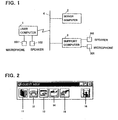
- FIG. 1 is a view of showing a connection of computers in a network.
- a user computer 1 is installed in a office or in a house.
- the user computer 1 is connected to a server computer 2, with which an internet service provider provides internet service, through a telephone circuit 4.
- a support computer 3 installed in a support center of a support service company which provides support service so as to support many users operating their computers, connects to the server computer 2 in the telephone network 4.
- a support program of the present invention is to be used by installing in the user computer 1 and the support computer 3.
- This support program is operated under any OS, e.g. Windows 95, though it is not limited to it.
- the support program is operated on condition that Windows 95 as OS is installed in a computer.
- a user uses the computer 1 and has a trouble in operating it or setting its environment, the user selects and clicks an icon button in the computer 1 to connect to the server computer 2.
- a dial-up adapter in which a telephone number is set up in advance to connect to the server computer 2 of a internet service provider in the telephone network, is started, and the user computer 1 is connected to the server computer 2.
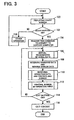
- FIG. 3 shows a view of operating process of the support program in the user computer 1.
- a menu window shown in FIG. 2 appears.
- the menu window comprises six icon buttons.
- An icon button 11 is a button to set the environment of the user computer 1, e.g. a telephone number of a support center, passwords to access the center, and so on.
- An icon button 12 is a start button to connect the user computer 1 to the support computer 3.
- An icon button 13 is a button to command the user computer 1 and the support computer 3 to start up an application which is not started in common.
- An icon button 14 is a button to command the user computer 1 and the support computer 3 to hold an application to be operated in common which is already started.
- An icon button 15 is a button to command the user computer 1 to transfer its file.
- an icon button 16 is a button to command the user computer 1 to exit the support program.
- step 102 of FIG. 3 when the icon button 12 is judged to be clicked with a mouse, a command is made to the server computer 2, which has already been connected to the user computer 1, to connect to the support computer 3 at step 104.
- the support computer 3 has already started the support program and is in a state of waiting. That is, the support computer 3 is showing a initial screen at step 200 shown in FIG. 4.
- the circuit connection process at step 204 is carried out. Accordingly, the telephone circuit is connected between the server computer 2 and the support computer 3. And when the circuit between the server computer 2 and the support compute 3 is connected, the user computer 1 is connected to the support computer 3 through the server computer 2.
- the menu window shown in FIG. 2 also appears in the screen of the support computer 3 (step 206).
- the receiving treatment of aural data is carried out in the user computer 1 and the support computer 3 at step 106 (aural data transmitting device) and step 208, respectively.
- the aural signal inputted from a microphone 101 of the user computer 1 is sampled, transmitted to the support computer 3, and outputted from its speaker 302.
- the aural signal inputted from a microphone 301 of the support computer 3 is sampled, transmitted to the user computer 1, and outputted from its speaker 102.
- the microphone 101 and the speaker 102 are parts of an aural data transmitter-receiver device. Under this condition, talking by aural data transmission becomes possible.
- This half duplex process enables the aural data to be transmitted with other data. Because the aural data is sampled, there is a large quantities of idle time. And even a continuous aural signal can be transmitted by so little data that other data can be transmitted by using the idle time. Because such transmitting process is a well-known prior art, its explanation is omitted.
- a supporter who provides support service to computer users, is informed from a user of the condition of trouble.
- the supporter tells the user not to operate any program but wait until the support computer 3 displays the identical screen as the user computer 1.
- a list of application programs which the user has already started in the user computer 1 is shown in the support computer 3.
- the supporter selects which application program to start and transmit a command data to the user computer 1.
- the user computer 1 receives the command data and transmits its own screen data to the support computer 3.
- the support computer 3 receives the screen data and displays the identical screen as that of the user computer 1 at step 212. Accordingly, both the support computer 3 and the user computer 1 display the identical screen.
- operation input hereinafter
- the support computer 3 when there were any input by a keyboard or operation with a mouse (called operation input hereinafter) in the support computer 3, its operation data is transmitted to the user computer 1. Then the user computer 1 receives the operation data at step 110 (remote control input means), and controls its own screen.
- step 112 It is also possible to control its own screen when there is any operation input in the user computer 1 (step 112). Operations at steps 106 to 112 described above are carried out in the user computer 1 repeatedly at certain small amount of intervals, until it judges that the exit button 16 is clicked at step 114. Similarly, the support computer 3 carries out the operations at steps 208 to 214 repeatedly at certain small quantity of intervals.
- a mutual transmission of aural data between the user computer 1 and the support computer 3, a transmission of the own screen data from the user computer 1 to the support computer 3, and a transmission of operation input data from the support computer 3 to the user computer 1 are carried out in real time bases.
- the user computer 1 and the support computer 3 hold the identical screen in common, and their mutual operation input can be effective.
- the operation input operated by clicking with a mouse is carried out preferentially.
- the supporter can give an operation input to the user computer 1 on condition that the support computer 3 holds the identical screen as that of the user computer 1, and similarly the screen of the support computer 3 is controlled identically as that of the user computer 1.
- the circuit cutting treatment is carried out at steps 116 and 218, respectively.
- the icon button 13 is clicked in the screen of the support computer 3
- the user computer 1 receives the command data and transmits a list of its application programs to the support computer 3.
- the support computer 3 selects and starts one application program from the list, holding the identical screen as the user computer 1 in common.
- the support staffs can carry out treatment steps directly in computers of many users, who need support in operating their computers, only by remote controlling in each of their own computers. Because the aural data is transmitted in both directions, supporters can indicate precise way of troubleshooting and user computers can recover from their trouble rapidly and precisely.
- supporters and users are connected through internet; however, users may directly connect to the support computers through a network. Further, users may connect to support computers in a support center placed in a company through the LAN.
- the supporter can setup an environment of the user computer in place of the user.
- an internet service provider 20b to which the support computer connects should not always the same as that of the user computer 1.
- the support computer 3 and the user computer 1 can transmit data directly and mutually through internet 4b by specifying the address of the user computer 1 and the support computer 3, respectively.
- the server computer 2 controls an address, a condition, and a connecting time of each user computers 1. In short, the user computer 1 should not always pass the server computer 2 to connect to the support computer 3 except when it begins and cuts the connection of the circuit.
- a remote support system by which a support computer in a support center supports a user computer by holding an identical screen as that of the user computer in common is disclosed.
- the remote support system wherein a user computer connects to a support computer in a circuit, the support computer in a support center holds the identical screen as that of the user computer in common, an aural data of the user computer and the support computer are transmitted in both directions in the circuit, and a supporter supports a user by operating in the identical screen as that of the user computer displayed on support computer and sending the aural data enables the user to understand through the identical screen and the aural data from the supporter.
Landscapes
- Engineering & Computer Science (AREA)
- General Engineering & Computer Science (AREA)
- Theoretical Computer Science (AREA)
- Computer Hardware Design (AREA)
- Quality & Reliability (AREA)
- Physics & Mathematics (AREA)
- General Physics & Mathematics (AREA)
- Computer And Data Communications (AREA)
- Digital Computer Display Output (AREA)
Claims (17)
- Benutzercomputer (1), der für ein Fernunterstützungssystem verwendet wird, das es einem Unterstützer ermöglicht, Unterstützung für einen Benutzercomputer mit Bezug auf den Betrieb eines Anwendungsprogramms in dem Benutzercomputer bereitzustellen, indem ein Bildschirm des Benutzercomputers und eines Unterstützungscomputers (3) gemeinsam gehalten wird, mit:einer Verbindungseinrichtung (12, 104) zum Verbinden des Benutzercomputers mit dem Unterstützungscomputer über eine Schaltung (2, 4);einer Einrichtung (108) zum Ansprechen auf Befehlsdaten (13, 14) von dem Unterstützungscomputer, Senden einer Liste von Anwendungsprogrammen, die gestartet oder noch nicht gestartet sind, und gemeinsamen Halten eines Anwendungsprogramms, das aus der Liste von gestarteten Anwendungsprogrammen selektiv bestimmt: wird, oder Starten und gemeinsamen Halten des Anwendungsprogramms, das noch nicht gestartet ist;einer Betriebseingabeeinrichtung (112) zum Eingeben von Betriebsdaten in einen das Anwendungsprogramm des Benutzercomputers, das durch den Unterstützungscomputer bestimmt und gestartet wird, anzeigenden Bildschirm;einer Sendeeinrichtung (108) zum Senden von Bildschirmdaten des in dem Benutzercomputer gestarteten Anwendungsprogramms, damit der Unterstützungscomputer und der Benutzercomputer einen Bildschirm gemeinsam halten;einer Fernbetriebseingabeeinrichtung (110) zum Empfangen von Betriebsdaten, die durch den Unterstützer in einen Bildschirm in dem Unterstützungscomputer eingegeben und über die Schaltung (2, 4) von dem Unterstützungscomputer zu dem Benutzercomputer übertragen werden, und zum Eingeben der Betriebsdaten als einen Befehl für das Anwendungsprogramm, das gestartet und gemeinsam gehalten wird; undeiner Sende-/Empfangsvorrichtung für akustische Daten (101, 102) zum Eingeben von akustischen Daten des Benutzers und Übertragen der akustischen Daten zu dem Unterstützungscomputer, und zum Empfangen von von dem Unterstützungscomputer übertragenen akustischen Daten des Unterstützers und Ausgeben der akustischen Daten.
- Benutzercomputer nach Anspruch 1, wobei die Betriebseingabeeinrichtung in einem Bildschirm des Unterstützungscomputers oder des Benutzercomputers im Ansprechen auf eine Mausclickeingabe wirksam ausgebildet wird.
- Unterstützungscomputer (3), der für ein Fernunterstützungssystem verwendet wird, das es einem Unterstützer ermöglicht, Unterstützung für einen Benutzercomputer (1) mit Bezug auf den Betrieb eines Anwendungsprogramms in dem Benutzercomputer bereitzustellen, indem ein Bildschirm des Benutzercomputers und des Unterstützungscomputers gemeinsam gehalten wird, mit:einer Befehlseinrichtung (210) zum Starten und gemeinsamen Halten eines Anwendungsprogramms, die Befehlsdaten (14) zu dem Benutzercomputer sendet, um eine Übertragung einer Liste von Anwendungsprogrammen, die in dem Benutzercomputer gestartet sind, anzufordern und ein Anwendungsprogramm, das gestartet ist, aus der von dem Benutzercomputer empfangenen Liste selektiv bestimmt, um ein gemeinsames Halten des Anwendungsprogramms zu befehlen, oder die Befehlsdaten (13) zu dem Benutzercomputer sendet, um eine Übertragung einer Liste von Anwendungsprogrammen, die in dem Benutzercomputer noch nicht gestartet sind, anzufordern und ein Anwendungsprogramm, das noch nicht gestartet ist, aus der Liste selektiv bestimmt, um Befehlsdaten zum Starten und gemeinsamen Halten des Anwendungsprogramms, das noch nicht gestartet ist, zu senden;einer Bildschirmdatenempfangseinrichtung (206) zum Empfangen von Bildschirmdaten des durch die Befehlseinrichtung bestimmten Anwendungsprogramms in dem Benutzercomputer und Anzeigen der Bildschirmdaten des Benutzercomputers auf einem Bildschirm des Unterstützungscomputers;einer Eingabeeinrichtung (214) zum Eingeben von Betriebseingabedaten für das gemeinsam gehaltene Anwendungsprogramm in den durch die Bildschirmdatenempfangseinrichtung angezeigten Bildschirm;einer Sendeeinrichtung (214) zum Senden der Betriebseingabedaten, die durch die Eingabeeinrichtung eingegeben werden, als Betriebseingabedaten zu dem durch den Benutzercomputer und den Unterstützungscomputer gemeinsam gehaltenen Anwendungsprogramm; undeiner Sende-/Empfangseinrichtung für akustische Daten (301, 302) zum Eingeben von akustischen Daten des Unterstützers und Übertragen der akustischen Daten zu dem Benutzercomputer, und zum Empfangen von von dem Benutzercomputer übertragenen akustischen Daten des Benutzers und Ausgeben der akustischen Daten.
- Unterstützungscomputer nach Anspruch 3, wobei die Betriebseingabeeinrichtung in einem Bildschirm des Unterstützungscomputers oder des Benutzercomputers im Ansprechen auf eine Mausclickeingabe wirksam ausgebildet wird.
- Fernunterstützungssystem mit einem Benutzercomputer nach Anspruch 1 und einem Unterstützungscomputer nach Anspruch 3.
- Fernunterstützungssystem nach Anspruch 5, wobei die Schaltung (2, 4) zwischen dem Benutzercomputer und dem Unterstützungscomputer verbunden wird, wenn der Benutzercomputer mit einem Verbund mehrerer Netze in Verbindung tritt und der Unterstützungscomputer mit einem Verbund mehrerer Netze in Verbindung tritt.
- Fernunterstützungssystem nach Anspruch 5 oder Anspruch 6, wobei die Betriebseingabeeinrichtung in einem Bildschirm des Unterstützungscomputers oder des Benutzercomputers im Ansprechen auf eine Mausclickeingabe wirksam ausgebildet wird.
- Verfahren für einen Benutzercomputer (1), der für ein Fernunterstützungssystem verwendet wird, das es einem Unterstützer ermöglicht, Unterstützung für einen Benutzercomputer (1) mit Bezug auf den Betrieb eines Anwendungsprogramms in dem Benutzercomputer bereitzustellen, indem ein Bildschirm des Benutzercomputers und eines Unterstützungscomputers gemeinsam gehalten wird, mit:einem Verbindungsschritt zum Verbinden des Benutzercomputers mit dem Unterstützungscomputer über eine Schaltung (2, 4);einem Schritt (108) zum Ansprechen auf Befehlsdaten von dem Unterstützungscomputer, Senden einer Liste von Anwendungsprogrammen, die gestartet oder noch nicht gestartet sind, und gemeinsamen Halten eines Anwendungsprogramms, das aus der Liste von gestarteten Anwendungsprogrammen selektiv bestimmt wird, oder Starten und gemeinsamen Halten des Anwendungsprogramms, das noch nicht gestartet ist;einem Betriebseingabeschritt (112) zum Eingeben von Betriebsdaten in einen das Anwendungsprogramm des Benutzercomputers, das durch den Unterstützungscomputer bestimmt und gestartet wird, anzeigenden Bildschirm;einem Sendeschritt (108) zum Senden von Bildschirmdaten des in dem Benutzercomputer gestarteten Anwendungsprogramms, damit der Unterstützungscomputer und der Benutzercomputer einen Bildschirm gemeinsam halten;einem Fernbetriebseingabeschritt (110) zum Empfangen von Betriebsdaten, die durch den Unterstützer in einen Bildschirm in dem Unterstützungscomputer eingegeben und über die Schaltung von dem Unterstützungscomputer zu dem Benutzercomputer übertragen werden, und zum Eingeben der Betriebsdaten als einen Befehl für das Anwendungsprogramm, das gestartet und gemeinsam gehalten wird; undeinem Sende-/Empfangsschritt für akustische Daten (106) zum Eingeben von akustischen Daten des Benutzers und Übertragen der akustischen Daten zu dem Unterstützungscomputer, und zum Empfangen von von dem Unterstützungscomputer übertragenen akustischen Daten des Unterstützers und Ausgeben der akustischen Daten.
- Verfahren nach Anspruch 8, ferner mit einem Schritt zum wirksam Ausbilden der Betriebseingabe in einem Bildschirm des Unterstützungscomputers oder des Benutzercomputers im Ansprechen auf eine Mausclickeingabe.
- Verfahren für einen Unterstützungscomputer (3), der für ein Fernunterstützungssystem verwendet wird, das es einem Unterstützer ermöglicht, Unterstützung für einen Benutzercomputer (1) mit Bezug auf den Betrieb eines Anwendungsprogramms in dem Benutzercomputer bereitzustellen, indem ein Bildschirm des Benutzercomputers und des Unterstützungscomputers (3) gemeinsam gehalten wird, mit:einem Befehlsschritt (210) zum Starten und gemeinsamen Halten eines Anwendungsprogramms, der Befehlsdaten zu dem Benutzercomputer sendet, um eine. Übertragung einer Liste von Anwendungsprogrammen, die in dem Benutzercomputer gestartet sind, anzufordern und ein Anwendungsprogramm, das gestartet ist, aus der von dem Benutzercomputer empfangenen Liste selektiv bestimmt, um ein gemeinsames Halten des Anwendungsprogramms zu befehlen, oder der Befehlsdaten zu dem Benutzercomputer sendet, um eine Übertragung einer Liste von Anwendungsprogrammen, die in dem Benutzercomputer noch nicht gestartet sind, anzufordern und ein Anwendungsprogramm, das noch nicht gestartet ist, aus der Liste selektiv bestimmt, um Befehlsdaten zum Starten und gemeinsamen Halten des Anwendungsprogramms, das noch nicht gestartet ist, zu senden;einem Bildschirmdatenempfangsschritt (206) zum Empfangen von Bildschirmdaten des durch den Befehlsschritt bestimmten Anwendungsprogramms in dem Benutzercomputer und Anzeigen der Bildschirmdaten des Benutzercomputers auf einem Bildschirm des Unterstützungscomputers;einem Eingabeschritt (214) zum Eingeben von Betriebseingabedaten für das gemeinsam gehaltene Anwendungsprogramm in den durch den Bildschirmdatenempfangsschritt angezeigten Bildschirm;einem Sendeschritt (214) zum Senden der Betriebseingabedaten, die durch den Eingabeschritt eingegeben werden, als Betriebseingabedaten zu dem durch den Benutzercomputer und den Unterstützungscomputer gemeinsam gehaltenen Anwendungsprogramm; undeinem Sende-/Empfangsschritt für akustische Daten (208) zum Eingeben von akustischen Daten des Unterstutzers und Übertragen der akustischen Daten zu dem Benutzercomputer, und zum Empfangen von von dem Benutzercomputer übertragenen akustischen Daten des Benutzers und Ausgeben der akustischen Daten.
- Verfahren nach Anspruch 10, ferner mit einem Schritt zum wirksam Ausbilden der Betriebseingabe in einem Bildschirm des Unterstützungscomputers oder des Benutzercomputers im Ansprechen auf eine Mausclickeingabe.
- Fernunterstützungsverfahren mit den Schritten eines Verfahrens nach Anspruch 8 und den Schritten eines Verfahrens nach Anspruch 10.
- Verfahren nach Anspruch 12, wobei die Schaltung (2, 4) zwischen dem Benutzercomputer und dem Unterstützungscomputer verbunden wird, wenn der Benützercomputer mit einem Verbund mehrerer Netze in Verbindung tritt und der Unterstützungscomputer mit einem Verbund mehrerer Netze in Verbindung tritt.
- Verfahren nach Anspruch 12 oder Anspruch 13, ferner mit einem Schritt zum wirksam Ausbilden der Betriebseingabe in einem Bildschirm des Unterstützungscomputers oder des Benutzercomputers im Ansprechen auf eine Mausclickeingabe.
- Programm für einen Benutzercomputer (1), der für ein Fernunterstützungssystem verwendet wird, das es einem Unterstützer ermöglicht, Unterstützung für einen Benutzercomputer (1) mit Bezug auf den Betrieb eines Anwendungsprogramms in dem Benutzercomputer bereitzustellen, indem ein Bildschirm des Benutzercomputers und eines Unterstützungscomputers (3) gemeinsam gehalten wird, wobei das Programm zur Ausführung der Schritte eines Verfahrens nach Anspruch 8 oder Anspruch 9 eingerichtet ist.
- Programm für einen Unterstützungscomputer (3), der für ein Fernunterstützungssystem verwendet wird, das es einem Unterstützer ermöglicht, Unterstützung für einen Benutzercomputer (1) mit Bezug auf den Betrieb eines Anwendungsprogramms in dem Benutzercomputer bereitzustellen, indem ein Bildschirm des Benutzercomputers und eines Unterstützungscomputers gemeinsam gehalten wird, wobei das Programm zur Ausführung der Schritte eines Verfahrens nach Anspruch 10 oder Anspruch 11 eingerichtet ist.
- Programm für ein Fernunterstützungssystem, das es einem Unterstützer ermöglicht, Unterstützung für einen Benutzercomputer (1) mit Bezug auf den Betrieb eines Anwendungsprogramms in dem Benutzercomputer bereitzustellen, indem ein Bildschirm des Benutzercomputers und eines Unterstützungscomputers (3) gemeinsam gehalten wird, wobei das Programm zur Ausführung der Schritte eines Verfahrens nach einem der Ansprüche 12 bis 14 eingerichtet ist.
Priority Applications (7)
| Application Number | Priority Date | Filing Date | Title |
|---|---|---|---|
| JP36809697A JP3223256B2 (ja) | 1997-12-26 | 1997-12-26 | 遠隔支援システム及びその装置 |
| JP9368076A JPH11192839A (ja) | 1997-12-29 | 1997-12-29 | ドアライニングにおけるセンターパッドの取付構造 |
| CA002277624A CA2277624A1 (en) | 1997-12-26 | 1999-07-16 | Remote supporting system |
| DE69907659T DE69907659T2 (de) | 1999-07-16 | 1999-07-16 | Remotestützsystem |
| AT99113929T ATE239941T1 (de) | 1999-07-16 | 1999-07-16 | Remotestützsystem |
| EP99113929A EP1069505B1 (de) | 1997-12-26 | 1999-07-16 | Remotestützsystem |
| EP03004538A EP1318455A3 (de) | 1999-07-16 | 1999-07-16 | Remotestützsystem |
Applications Claiming Priority (4)
| Application Number | Priority Date | Filing Date | Title |
|---|---|---|---|
| JP36809697A JP3223256B2 (ja) | 1997-12-26 | 1997-12-26 | 遠隔支援システム及びその装置 |
| JP9368076A JPH11192839A (ja) | 1997-12-29 | 1997-12-29 | ドアライニングにおけるセンターパッドの取付構造 |
| CA002277624A CA2277624A1 (en) | 1997-12-26 | 1999-07-16 | Remote supporting system |
| EP99113929A EP1069505B1 (de) | 1997-12-26 | 1999-07-16 | Remotestützsystem |
Related Child Applications (1)
| Application Number | Title | Priority Date | Filing Date |
|---|---|---|---|
| EP03004538A Division EP1318455A3 (de) | 1999-07-16 | 1999-07-16 | Remotestützsystem |
Publications (2)
| Publication Number | Publication Date |
|---|---|
| EP1069505A1 EP1069505A1 (de) | 2001-01-17 |
| EP1069505B1 true EP1069505B1 (de) | 2003-05-07 |
Family
ID=27427527
Family Applications (1)
| Application Number | Title | Priority Date | Filing Date |
|---|---|---|---|
| EP99113929A Expired - Lifetime EP1069505B1 (de) | 1997-12-26 | 1999-07-16 | Remotestützsystem |
Country Status (2)
| Country | Link |
|---|---|
| EP (1) | EP1069505B1 (de) |
| CA (1) | CA2277624A1 (de) |
Families Citing this family (1)
| Publication number | Priority date | Publication date | Assignee | Title |
|---|---|---|---|---|
| CN100359849C (zh) * | 2004-12-03 | 2008-01-02 | 北京帮助在线信息技术有限公司 | 网络援助系统及其实现方法 |
Family Cites Families (1)
| Publication number | Priority date | Publication date | Assignee | Title |
|---|---|---|---|---|
| US5983369A (en) * | 1996-06-17 | 1999-11-09 | Sony Corporation | Online simultaneous/altering-audio/video/voice data based service and support for computer systems |
-
1999
- 1999-07-16 CA CA002277624A patent/CA2277624A1/en not_active Abandoned
- 1999-07-16 EP EP99113929A patent/EP1069505B1/de not_active Expired - Lifetime
Also Published As
| Publication number | Publication date |
|---|---|
| EP1069505A1 (de) | 2001-01-17 |
| CA2277624A1 (en) | 2001-01-16 |
Similar Documents
| Publication | Publication Date | Title |
|---|---|---|
| US6693999B2 (en) | Remote operating system | |
| US6263365B1 (en) | Browser controller | |
| JP4278711B2 (ja) | 電気通信ネットワーク内のサービスに関する加入者の管理システム | |
| JP3223256B2 (ja) | 遠隔支援システム及びその装置 | |
| US20070005607A1 (en) | Interface control program, interface control method, interface control apparatus, plug-in program and information processing apparatus | |
| JP3057046B2 (ja) | データを送信する方法および分散データ処理システム | |
| EP1786186A2 (de) | Ausführen einer Anwendung abhängig der Anwendereingabe | |
| US20050097197A1 (en) | Web browser control for customer support | |
| EP1361733A2 (de) | Verfahren zum Erzeugen und Verteilen von grafischen Darstellungen für mobile Kommunikationsendgeräte | |
| EP1069505B1 (de) | Remotestützsystem | |
| JP2003303172A (ja) | 入力支援システム | |
| EP1318455A2 (de) | Remotestützsystem | |
| KR100463513B1 (ko) | 온라인상의 각종 부품 원격 제어 시스템 및 이 시스템의운영방법 | |
| JP3662492B2 (ja) | 遠隔操作システム、その装置及び記録媒体 | |
| JP2001034577A (ja) | 遠隔支援方法 | |
| JP2003196407A (ja) | サポートサービス管理システム | |
| JP3248120B2 (ja) | 顧客対応サービス実行管理方法およびその装置 | |
| JPH09259083A (ja) | 仮想端末制御システム | |
| JPH11312131A (ja) | ネットワーク管理システム | |
| KR100313277B1 (ko) | 단축아이콘에 의한 화면선택기능을 갖는 pc통신 서비스 수신장치 및 그 방법 | |
| EP0181880A1 (de) | Vorrichtung zur schnittstellenbildung mit x21-einrichtung. | |
| JP2024076328A (ja) | プログラム、通信装置、情報処理システムおよび情報処理方法 | |
| JP2003110706A (ja) | インターネット通話システム、インターネット通話方法 | |
| JPH04239949A (ja) | 通信センター接続方法 | |
| JPH05334216A (ja) | 通信機能付画面制御装置 |
Legal Events
| Date | Code | Title | Description |
|---|---|---|---|
| PUAI | Public reference made under article 153(3) epc to a published international application that has entered the european phase |
Free format text: ORIGINAL CODE: 0009012 |
|
| AK | Designated contracting states |
Kind code of ref document: A1 Designated state(s): AT BE CH CY DE DK ES FI FR GB GR IE IT LI LU MC NL PT SE |
|
| AX | Request for extension of the european patent |
Free format text: AL;LT;LV;MK;RO;SI |
|
| 17P | Request for examination filed |
Effective date: 20010717 |
|
| AKX | Designation fees paid |
Free format text: AT BE CH CY DE DK ES FI FR GB GR IE IT LI LU MC NL PT SE |
|
| RAP1 | Party data changed (applicant data changed or rights of an application transferred) |
Owner name: CAST CO., INC. |
|
| 17Q | First examination report despatched |
Effective date: 20020513 |
|
| GRAH | Despatch of communication of intention to grant a patent |
Free format text: ORIGINAL CODE: EPIDOS IGRA |
|
| GRAH | Despatch of communication of intention to grant a patent |
Free format text: ORIGINAL CODE: EPIDOS IGRA |
|
| GRAA | (expected) grant |
Free format text: ORIGINAL CODE: 0009210 |
|
| AK | Designated contracting states |
Designated state(s): AT BE CH CY DE DK ES FI FR GB GR IE IT LI LU MC NL PT SE |
|
| PG25 | Lapsed in a contracting state [announced via postgrant information from national office to epo] |
Ref country code: NL Free format text: LAPSE BECAUSE OF FAILURE TO SUBMIT A TRANSLATION OF THE DESCRIPTION OR TO PAY THE FEE WITHIN THE PRESCRIBED TIME-LIMIT Effective date: 20030507 Ref country code: LI Free format text: LAPSE BECAUSE OF FAILURE TO SUBMIT A TRANSLATION OF THE DESCRIPTION OR TO PAY THE FEE WITHIN THE PRESCRIBED TIME-LIMIT Effective date: 20030507 Ref country code: IT Free format text: LAPSE BECAUSE OF FAILURE TO SUBMIT A TRANSLATION OF THE DESCRIPTION OR TO PAY THE FEE WITHIN THE PRE;WARNING: LAPSES OF ITALIAN PATENTS WITH EFFECTIVE DATE BEFORE 2007 MAY HAVE OCCURRED AT ANY TIME BEFORE 2007. THE CORRECT EFFECTIVE DATE MAY BE DIFFERENT FROM THE ONE RECORDED.SCRIBED TIME-LIMIT Effective date: 20030507 Ref country code: FI Free format text: LAPSE BECAUSE OF FAILURE TO SUBMIT A TRANSLATION OF THE DESCRIPTION OR TO PAY THE FEE WITHIN THE PRESCRIBED TIME-LIMIT Effective date: 20030507 Ref country code: CH Free format text: LAPSE BECAUSE OF FAILURE TO SUBMIT A TRANSLATION OF THE DESCRIPTION OR TO PAY THE FEE WITHIN THE PRESCRIBED TIME-LIMIT Effective date: 20030507 Ref country code: BE Free format text: LAPSE BECAUSE OF FAILURE TO SUBMIT A TRANSLATION OF THE DESCRIPTION OR TO PAY THE FEE WITHIN THE PRESCRIBED TIME-LIMIT Effective date: 20030507 Ref country code: AT Free format text: LAPSE BECAUSE OF FAILURE TO SUBMIT A TRANSLATION OF THE DESCRIPTION OR TO PAY THE FEE WITHIN THE PRESCRIBED TIME-LIMIT Effective date: 20030507 |
|
| REG | Reference to a national code |
Ref country code: GB Ref legal event code: FG4D |
|
| REG | Reference to a national code |
Ref country code: CH Ref legal event code: EP |
|
| REG | Reference to a national code |
Ref country code: IE Ref legal event code: FG4D |
|
| REF | Corresponds to: |
Ref document number: 69907659 Country of ref document: DE Date of ref document: 20030612 Kind code of ref document: P |
|
| PG25 | Lapsed in a contracting state [announced via postgrant information from national office to epo] |
Ref country code: LU Free format text: LAPSE BECAUSE OF NON-PAYMENT OF DUE FEES Effective date: 20030716 Ref country code: IE Free format text: LAPSE BECAUSE OF NON-PAYMENT OF DUE FEES Effective date: 20030716 Ref country code: CY Free format text: LAPSE BECAUSE OF FAILURE TO SUBMIT A TRANSLATION OF THE DESCRIPTION OR TO PAY THE FEE WITHIN THE PRESCRIBED TIME-LIMIT Effective date: 20030716 |
|
| PG25 | Lapsed in a contracting state [announced via postgrant information from national office to epo] |
Ref country code: MC Free format text: LAPSE BECAUSE OF NON-PAYMENT OF DUE FEES Effective date: 20030731 |
|
| PG25 | Lapsed in a contracting state [announced via postgrant information from national office to epo] |
Ref country code: SE Free format text: LAPSE BECAUSE OF FAILURE TO SUBMIT A TRANSLATION OF THE DESCRIPTION OR TO PAY THE FEE WITHIN THE PRESCRIBED TIME-LIMIT Effective date: 20030807 Ref country code: PT Free format text: LAPSE BECAUSE OF FAILURE TO SUBMIT A TRANSLATION OF THE DESCRIPTION OR TO PAY THE FEE WITHIN THE PRESCRIBED TIME-LIMIT Effective date: 20030807 Ref country code: GR Free format text: LAPSE BECAUSE OF FAILURE TO SUBMIT A TRANSLATION OF THE DESCRIPTION OR TO PAY THE FEE WITHIN THE PRESCRIBED TIME-LIMIT Effective date: 20030807 Ref country code: DK Free format text: LAPSE BECAUSE OF FAILURE TO SUBMIT A TRANSLATION OF THE DESCRIPTION OR TO PAY THE FEE WITHIN THE PRESCRIBED TIME-LIMIT Effective date: 20030807 |
|
| PG25 | Lapsed in a contracting state [announced via postgrant information from national office to epo] |
Ref country code: ES Free format text: LAPSE BECAUSE OF FAILURE TO SUBMIT A TRANSLATION OF THE DESCRIPTION OR TO PAY THE FEE WITHIN THE PRESCRIBED TIME-LIMIT Effective date: 20030818 |
|
| NLV1 | Nl: lapsed or annulled due to failure to fulfill the requirements of art. 29p and 29m of the patents act | ||
| REG | Reference to a national code |
Ref country code: CH Ref legal event code: PL |
|
| ET | Fr: translation filed | ||
| PLBE | No opposition filed within time limit |
Free format text: ORIGINAL CODE: 0009261 |
|
| STAA | Information on the status of an ep patent application or granted ep patent |
Free format text: STATUS: NO OPPOSITION FILED WITHIN TIME LIMIT |
|
| 26N | No opposition filed |
Effective date: 20040210 |
|
| REG | Reference to a national code |
Ref country code: IE Ref legal event code: MM4A |
|
| PGFP | Annual fee paid to national office [announced via postgrant information from national office to epo] |
Ref country code: GB Payment date: 20050704 Year of fee payment: 7 |
|
| PGFP | Annual fee paid to national office [announced via postgrant information from national office to epo] |
Ref country code: FR Payment date: 20050719 Year of fee payment: 7 |
|
| PGFP | Annual fee paid to national office [announced via postgrant information from national office to epo] |
Ref country code: DE Payment date: 20050830 Year of fee payment: 7 |
|
| PG25 | Lapsed in a contracting state [announced via postgrant information from national office to epo] |
Ref country code: GB Free format text: LAPSE BECAUSE OF NON-PAYMENT OF DUE FEES Effective date: 20060716 |
|
| PG25 | Lapsed in a contracting state [announced via postgrant information from national office to epo] |
Ref country code: DE Free format text: LAPSE BECAUSE OF NON-PAYMENT OF DUE FEES Effective date: 20070201 |
|
| GBPC | Gb: european patent ceased through non-payment of renewal fee |
Effective date: 20060716 |
|
| REG | Reference to a national code |
Ref country code: FR Ref legal event code: ST Effective date: 20070330 |
|
| PG25 | Lapsed in a contracting state [announced via postgrant information from national office to epo] |
Ref country code: FR Free format text: LAPSE BECAUSE OF NON-PAYMENT OF DUE FEES Effective date: 20060731 |