WO2024204530A1 - 情報処理システム、情報処理装置、情報処理方法及びコンピュータプログラム - Google Patents
情報処理システム、情報処理装置、情報処理方法及びコンピュータプログラム Download PDFInfo
- Publication number
- WO2024204530A1 WO2024204530A1 PCT/JP2024/012621 JP2024012621W WO2024204530A1 WO 2024204530 A1 WO2024204530 A1 WO 2024204530A1 JP 2024012621 W JP2024012621 W JP 2024012621W WO 2024204530 A1 WO2024204530 A1 WO 2024204530A1
- Authority
- WO
- WIPO (PCT)
- Prior art keywords
- tactile
- information processing
- data
- lottery
- operator
- Prior art date
- Legal status (The legal status is an assumption and is not a legal conclusion. Google has not performed a legal analysis and makes no representation as to the accuracy of the status listed.)
- Ceased
Links
Images






Classifications
-
- A—HUMAN NECESSITIES
- A63—SPORTS; GAMES; AMUSEMENTS
- A63F—CARD, BOARD, OR ROULETTE GAMES; INDOOR GAMES USING SMALL MOVING PLAYING BODIES; VIDEO GAMES; GAMES NOT OTHERWISE PROVIDED FOR
- A63F13/00—Video games, i.e. games using an electronically generated display having two or more dimensions
- A63F13/25—Output arrangements for video game devices
- A63F13/28—Output arrangements for video game devices responding to control signals received from the game device for affecting ambient conditions, e.g. for vibrating players' seats, activating scent dispensers or affecting temperature or light
- A63F13/285—Generating tactile feedback signals via the game input device, e.g. force feedback
-
- A—HUMAN NECESSITIES
- A63—SPORTS; GAMES; AMUSEMENTS
- A63F—CARD, BOARD, OR ROULETTE GAMES; INDOOR GAMES USING SMALL MOVING PLAYING BODIES; VIDEO GAMES; GAMES NOT OTHERWISE PROVIDED FOR
- A63F13/00—Video games, i.e. games using an electronically generated display having two or more dimensions
- A63F13/50—Controlling the output signals based on the game progress
- A63F13/53—Controlling the output signals based on the game progress involving additional visual information provided to the game scene, e.g. by overlay to simulate a head-up display [HUD] or displaying a laser sight in a shooting game
- A63F13/537—Controlling the output signals based on the game progress involving additional visual information provided to the game scene, e.g. by overlay to simulate a head-up display [HUD] or displaying a laser sight in a shooting game using indicators, e.g. showing the condition of a game character on screen
- A63F13/5375—Controlling the output signals based on the game progress involving additional visual information provided to the game scene, e.g. by overlay to simulate a head-up display [HUD] or displaying a laser sight in a shooting game using indicators, e.g. showing the condition of a game character on screen for graphically or textually suggesting an action, e.g. by displaying an arrow indicating a turn in a driving game
-
- A—HUMAN NECESSITIES
- A63—SPORTS; GAMES; AMUSEMENTS
- A63F—CARD, BOARD, OR ROULETTE GAMES; INDOOR GAMES USING SMALL MOVING PLAYING BODIES; VIDEO GAMES; GAMES NOT OTHERWISE PROVIDED FOR
- A63F13/00—Video games, i.e. games using an electronically generated display having two or more dimensions
- A63F13/60—Generating or modifying game content before or while executing the game program, e.g. authoring tools specially adapted for game development or game-integrated level editor
- A63F13/69—Generating or modifying game content before or while executing the game program, e.g. authoring tools specially adapted for game development or game-integrated level editor by enabling or updating specific game elements, e.g. unlocking hidden features, items, levels or versions
-
- A—HUMAN NECESSITIES
- A63—SPORTS; GAMES; AMUSEMENTS
- A63F—CARD, BOARD, OR ROULETTE GAMES; INDOOR GAMES USING SMALL MOVING PLAYING BODIES; VIDEO GAMES; GAMES NOT OTHERWISE PROVIDED FOR
- A63F13/00—Video games, i.e. games using an electronically generated display having two or more dimensions
- A63F13/90—Constructional details or arrangements of video game devices not provided for in groups A63F13/20 or A63F13/25, e.g. housing, wiring, connections or cabinets
- A63F13/98—Accessories, i.e. detachable arrangements optional for the use of the video game device, e.g. grip supports of game controllers
-
- G—PHYSICS
- G06—COMPUTING OR CALCULATING; COUNTING
- G06F—ELECTRIC DIGITAL DATA PROCESSING
- G06F3/00—Input arrangements for transferring data to be processed into a form capable of being handled by the computer; Output arrangements for transferring data from processing unit to output unit, e.g. interface arrangements
- G06F3/01—Input arrangements or combined input and output arrangements for interaction between user and computer
Definitions
- the present invention relates to an information processing system, an information processing device, an information processing method, and a computer program that effectively utilize tactile presentation by a tactile presentation device.
- Patent Document 1 discloses a system that outputs a combination of tactile presentation by a tactile presentation device and visual presentation (image output).
- tactile presentation devices are expected to provide more realistic perception and new functions when combined with visual and auditory output.
- the present invention aims to provide an information processing system, an information processing device, an information processing method, and a computer program that effectively output tactile presentation by a tactile presentation device in combination with other sensory presentations.
- An information processing system includes a tactile presentation device that presents a tactile sensation to an operation unit that receives an operation from an operator by generating a force sensation corresponding to the operation, and an information processing device that executes processing related to the tactile presentation in the tactile presentation device, and the information processing device executes a lottery when it receives a request operation for a lottery from the operator, determines tactile data, which is control data for generating a tactile sensation in the operation unit, based on the type or rarity of the lottery result, and outputs the tactile data to the tactile presentation device before notifying the operator of the lottery result.
- a confirmation effect for the lottery result is presented tactilely before the lottery result is output on a screen, by voice, or the like.
- the tactile presentation by the tactile presentation device is effectively output through a new usage method. Not only does the operator experience changes in images and sounds, but the tactile sensations presented by the tactile presentation device also allow the operator to obtain more diverse information from more multifaceted perspectives.
- FIG. 1 is a schematic diagram showing a game system according to an embodiment of the present invention.
- 1 is a block diagram showing an internal configuration of an information processing device
- FIG. 2 is an explanatory diagram showing an example of the contents of a sensory DB
- FIG. 11 is an explanatory diagram showing an example of the contents of a set table.
- FIG. 1 is a block diagram showing a configuration of a tactile presentation device.
- FIG. 2 is a block diagram showing an internal configuration of a server device.
- FIG. 13 is a diagram showing an example of the content of a game screen.
- 13 is a flowchart showing an example of a processing procedure for a game screen of an information processing device.
- 13 is a flowchart illustrating an example of a processing procedure in the tactile presentation device.
- FIG. 13 is a flowchart showing an example of a processing procedure related to the progress of a game.
- 13 is a flowchart showing an example of a processing procedure related to the progress of a game.
- FIG. 13 is a diagram showing an example of an "item get” screen.
- FIG. 13 is a diagram showing an example of an "item get” screen.
- FIG. 13 is a diagram showing an example of an "item get” screen.
- FIG. 13 is a diagram showing an example of an "item get” screen.
- FIG. 13 is a diagram showing an example of an "item get" screen.
- FIG. 1 is a schematic diagram showing a game system 100 in this embodiment.
- the game system 100 includes an information processing device 1, a tactile presentation device 2, and a server device 3.
- the information processing device 1 and the tactile presentation device 2 are connected via short-range wireless communication and transmit and receive data between them.
- the information processing device 1 and the server device 3 transmit and receive data between them via a network N, which includes the so-called Internet.
- the network N includes the Internet N1, a carrier network N2, a base station BS, and an access point AP.
- the information processing device 1 is a smartphone.
- the information processing device 1 is not limited to a smartphone, and may be a tablet terminal.
- the information processing device 1 may be a laptop PC (Personal Computer).
- the information processing device 1 may be a dedicated gaming device.
- the information processing device 1 may be a dedicated gaming device integrated with the tactile presentation device 2, that is, a gaming machine that includes the tactile presentation device 2 in the controller portion.
- the tactile presentation device 2 is a device that allows an operator to operate the device by moving his/her finger while holding the finger along the displacement unit 202.
- the tactile presentation device 2 reads the position of the displacement unit 202, which is displaced by the operator's finger movement, and controls the built-in MRF (Magneto-Rheological Fluid) device 24 (see FIG. 5) according to the position to generate a force sensation due to a reaction force (rotational resistance) against the operator's operation of the displacement unit 202, thereby presenting a tactile sensation.
- the form of the displacement unit 202 of the tactile presentation device 2 is not limited to that shown in FIG. 1, and may be a button, a stick, or a cushion-like object covered with a cover.
- the tactile presentation device 2 may employ a motor or a piezoelectric element instead of the MRF device 24, and may generate a force sensation due to a rotational force or vibration in response to the operator's operation, and may be combined with a device that presents vibration, a warm sensation, a cold sensation, or an electrical stimulation in addition to the displacement unit 202. It can also be installed on the ground or a wall and operated by the operator's palm, foot, etc.
- the tactile presentation device 2 is a device that allows an operator to operate the device by moving his/her finger while holding the finger along the displacement unit 202.
- the tactile presentation device 2 reads the position of the displacement unit 202, which is displaced by the operator's finger movement, and controls the built-in MRF (Magneto-Rheological Fluid) device 24 according to the position to generate a force sensation due to a reaction force (rotational resistance) against the operator's operation of the displacement unit 202, thereby presenting a tactile sensation.
- the form of the displacement unit 202 of the tactile presentation device 2 is not limited to that shown in FIG. 1, and may be a stick-shaped device or a cushion-shaped device covered with a cover.
- the tactile presentation device 2 may employ a motor or a piezoelectric element instead of the MRF device 24, and may generate a force sensation due to a rotational force or vibration in response to the operator's operation, and may be combined with a device that presents vibration, warmth, or coldness in addition to the displacement unit 202. It may be a ring-shaped device or other structure that is worn on the operator's finger and operated with another finger. Furthermore, the tactile presentation device 2 may be one that generates vibrations using a motor or a piezoelectric element on a touch panel built into the information processing device 1, or one that uses technology to modulate friction using ultrasonic vibrations or electrostatic force.
- the information processing device 1 which has a game application program (hereinafter referred to as a game app) installed, communicates with the server device 3 according to a selection, and is able to execute a game.
- the information processing device 1 acquires game content, including data to be exchanged between the tactile presentation device 2, from the content database (DB: Data Base) 311 of the server device 3 via the network N as appropriate.
- the information processing device 1 presents an image (visual) from the built-in display unit 14, a sound (auditory) from the audio output unit 15, and a tactile sensation from the connected tactile presentation device 2. For example, as shown in FIG.
- the information processing device 1 displays a character C on the display unit 14, and when an operator presses the displacement unit 202 of the tactile presentation device 2 with a finger, the information processing device 1 changes the image of the displayed character while outputting a tactile sensation according to the type and level of the character C, and outputs a sound or sound effect according to the change from the audio output unit 15. Furthermore, in the game system 100, the information processing device 1 can progress games such as mini-games and games for acquiring items (item get) according to the displacement of the displacement unit 202 of the tactile presentation device 2.
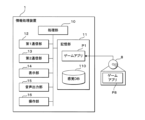
- FIG. 2 is a block diagram showing the internal configuration of the information processing device 1.
- the information processing device 1 includes a processing unit 10, a memory unit 11, a first communication unit 12, a second communication unit 13, a display unit 14, an audio output unit 15, and an operation unit 16.
- the processing unit 10 is a processor that uses a CPU (Central Processing Unit) and/or a GPU (Graphics Processing Unit).
- the processing unit 10 executes game-related processing based on a game application P1 stored in the memory unit 11.
- the storage unit 11 uses a non-volatile memory such as a flash memory or SSD.
- the storage unit 11 stores the game application P1, a sensory DB 110 described below, and other data referenced by the processing unit 10.
- the game application P1 may be a game application P8 stored in the storage medium 8 that has been read by the processing unit 10 and copied to the storage unit 11.
- the game application P1 is downloaded from the server device 3 or another program server device via the first communication unit 12 and stored in an executable manner.
- the storage unit 11 stores the user ID of the game application P1 (an ID that identifies the operator of the tactile presentation device 2).
- the storage unit 11 stores, in association with the user ID, content IDs that identify characters, items, etc. owned by the operator on the game application P1 and the number of such items.
- the relationship between the user ID and the content ID and number stored in the storage unit 11 is the same as the content ID and number stored in association with the user ID in the server device 3.
- the storage unit 11 stores a sensory DB 110 that includes tactile data, visual (images, videos, text) data, and auditory (audio, sound effects) data corresponding to characters.
- the sensory DB 110 stores multiple patterns of tactile data, visual data, and auditory data to be output for each displacement data of the displacement unit 202 in the tactile presentation device 2, in association with a content ID that identifies a character or item.
- the patterns of tactile data, visual data, and auditory data may differ depending on the level of the character or item, or may differ depending on the rarity of the character or item.
- the sensory DB 110 may be sequentially obtained for each character from the content DB 311 of the server device 3, or may be pre-stored.
- the first communication unit 12 realizes communication with the server device 3 via a network N including the Internet or a carrier network.
- the first communication unit 12 may be a wireless communication device that connects to a carrier network, or may be a wireless communication device for WiFi.
- the processing unit 10 can transmit and receive data to and from the server device 3 via the first communication unit 12.
- the second communication unit 13 is a communication module for short-range wireless communication, for example Bluetooth (registered trademark).
- the processing unit 10 can transmit and receive data to and from the tactile presentation device 2 via the second communication unit 13.
- the display unit 14 is a display such as a liquid crystal display or an organic EL (Electro Luminescence) display.
- the display unit 14 is, for example, a display with a built-in touch panel.
- the processing unit 10 displays on the display unit 14 game content stored in the memory unit 11 or game content such as images and text provided by the server device 3 based on the game application P1.
- the audio output unit 15 includes a speaker, etc.
- the processing unit 10 outputs game content stored in the storage unit 11 or game content such as sound and music provided by the server device 3 from the audio output unit 15 based on the game application P1.
- the operation unit 16 is a physical UI capable of inputting and outputting with the processing unit 10.
- the operation unit 16 is, for example, a touch panel built into the display unit 14.
- the operation unit 16 may be a wirelessly connected mouse.
- the operation unit 16 may be a button, stick, jog dial, etc. of a game controller.
- the operation unit 16 may include a physical button.
- the operation unit 16 may include a tilt sensor of the information processing device 1, and an acceleration sensor or gyro sensor provided in the tactile presentation device 2.
- the operation unit 16 may use a voice input unit.
- the sensory DB 110 stores tactile data, visual data, and auditory data, each associated with a data ID.
- the tactile data is the current value of the current to the MRF device 24 for each displacement amount (angle) of the displacement unit 202 of the tactile presentation device 2.
- the visual data is an image or a video (frame image).
- the visual data may be a single piece of data, or may be a frame image to be displayed for each displacement amount (angle) of the displacement unit 202 of the tactile presentation device 2.
- FIG. 3 is an explanatory diagram showing an example of the contents of the sensory DB 110.
- the sensory DB 110 stores tactile data, visual data, and auditory data, each associated with a data ID.
- the tactile data is the current value of the current to the MRF device 24 for each displacement amount (angle) of the displacement unit 202 of the tactile presentation device 2.
- the visual data is an image or a video (frame image).
- the visual data may be a single piece of data, or may be a frame image to be displayed for each displacement amount (
- the visual data with the data ID "S001” is video data (animation) that is played regardless of the displacement amount of the displacement unit 202
- the visual data with the data ID "S002” is data that changes the image depending on the displacement amount of the displacement unit 202.
- the auditory data is waveform data of voice or sound effects.
- the auditory data like the visual data, may be a single data, or may be waveform data (pitch, rhythm) of a sound to be output according to the amount of displacement (angle) of the displacement unit 202 of the tactile presentation device 2.
- the sensory DB 110 includes tactile data (also called a zero table) in which the current value is zero or very small for all amounts of displacement.
- the zero table may be created sequentially when the information processing device 1 uses it in the processing described below. As described below, the zero table is used to stop the presentation of tactile sensation in the tactile presentation device 2 (no sensation) and to maintain the connection between the information processing device 1 and the tactile presentation device 2.
- the tactile data may be control data such as a voltage value or current value for generating vibration.
- a motor or piezoelectric element is used in the touch panel to present tactile sensation through vibration, ultrasonic vibration, or modulation of electrostatic force, the voltage value, current value, phase of the modulation signal, etc. may be stored as tactile data.
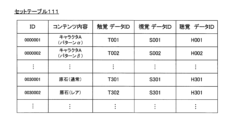
- the sensory DB 110 includes a set table 111 that predefines which tactile sensations are to be combined with which images and sounds for each piece of content.
- FIG. 4 is an explanatory diagram showing an example of the contents of the set table 111.
- the set table 111 stores the correspondence between the data IDs of the tactile data, visual data, and audio data to be combined, in association with an ID that identifies the set.
- FIG. 4 describes the contents of the set to which each ID is associated as the content.
- the tactile data, visual data, and audio data are different between pattern ⁇ and pattern ⁇ .
- the tactile data, visual data, and audio data for each content shown in Figure 4 can be used to present haptics, images, and sounds in a linked manner for each character, item, and specific effects, for example.
- different visual data and different tactile data may be associated with the same visual data. This allows for different haptics and sounds to be produced for the same image when the target characters or items are at different levels, have different set emotions, or are of different rarity.
- the combination of tactile data, visual data, and audio data may be freely changed for each record in set table 111.
- the sensory DB 110 may be entirely or mostly stored in advance in the memory unit 11 of the information processing device 1, or may be stored in the server device 3 and appropriately acquired by the information processing device 1 and stored in the memory unit 11.
- the tactile presentation device 2 is configured by providing a flat, bottomed, cylindrical gripper 200 with a belt-like flat plate-like displacement section 202 having a curved section that partially follows the circumferential direction.
- the displacement section 202 is made of a material that is itself flexible, but may be made of a highly rigid material and rotatably supported by the gripper 200 via a support shaft.
- a cloth tape-like binding device 203 is provided on the outer surface of the tip of the displacement section 202.
- a link mechanism 204 that connects to the rotating shaft of the rotor of the MRF device 24 housed inside the gripper 200 is provided on the inner surface of the tip of the displacement section 202.
- the displacement section 202 may be provided with a material that adds a variety of textures, such as silicone rubber or a material with fur on its surface.
- the operator holds the gripping body 200 with, for example, the thumb and middle finger, and inserts the index finger and other fingers into the fastener 203 along the displacement portion 202.
- the operator can move the displacement portion 202 by pushing the index finger in, and can also move the displacement portion 202 away from the gripping body 200 by extending the index finger.
- the tactile presentation device 2 includes a gripping body 200 as shown in FIG. 1, a control unit 20, a memory unit 21, a communication unit 22, a power supply unit 23, an MRF device 24, and a sensor 25.
- the gripping body 200 has an internal MRF device 24.
- the control unit 20, the memory unit 21, the communication unit 22, and the power supply unit 23 may be provided integrally with the gripping body 200, or may be provided separately and connected to the gripping body 200 wirelessly or via a wire.
- the control unit 20 includes a processor such as a CPU or an MPU (Micro-Processing Unit), and memories such as a ROM (Read Only Memory) and a RAM (Random Access Memory).
- the control unit 20 is, for example, a microcontroller.
- the control unit 20 controls each component based on a control program P2 stored in the built-in ROM, and realizes tactile presentation.
- the storage unit 21 is an auxiliary memory for the control unit 20, and stores the control data (haptic data) of the MRF device 24 in a rewritable manner.
- the communication unit 22 is a communication module for short-range wireless communication, such as Bluetooth (registered trademark).
- the control unit 20 can transmit and receive data to and from the information processing device 1 via the communication unit 22.
- the control unit 20 is connected to the power supply unit 23, the MRF device 24, and the sensor 25 via I/O, and exchanges signals with each other.
- the power supply unit 23 includes a rechargeable battery. When the power supply unit 23 is turned on, it supplies power to each component and the MRF device 24.
- the MRF device 24 has a yoke that is arranged to sandwich a disk-shaped rotor with a gap between them, and generates a magnetic field by passing a control current through a coil attached to the yoke, and controls the viscosity (shear stress) of the magnetorheological fluid sealed in the gap to provide rotational resistance to the rotor.
- the control unit 20 adjusts the magnitude of the control current to the MRF device 24, the rotational resistance is immediately changed.
- the sensor 25 measures the position (angle) of the displacement unit 202 and outputs it to the control unit 20.
- the sensor 25 measures the displacement of the displacement unit 202 as an angle and outputs it.
- the sensor 25 may be composed of multiple sensors such as a gyro sensor and an acceleration sensor.
- the displacement unit 202 when the displacement unit 202 is operated by the operator, the displacement of the displacement unit 202 is transmitted in the rotational direction to the rotation shaft of the rotor of the MRF device 24 via the link mechanism 204.
- the MRF device 24 When the MRF device 24 is not operating, that is, while the control current is zero, the rotation shaft rotates freely, so the displacement unit 202 fluctuates without resistance.
- the viscosity (shear stress) of the magnetorheological fluid inside the MRF device 24 is changed according to the magnitude of the current flowing to the MRF device 24.
- the control unit 20 can change the force of resistance to the displacement unit 202 and the way in which it appears by continuously changing the magnitude of the current to the MRF device 24 or vibrating the current value at a predetermined frequency.
- the tactile presentation device 2 can present a slippery sensation by varying the resistance (current value) according to the amount of pressure applied to the displacement section 202, or a firm sensation by increasing the resistance as the pressure increases, or a crunchy sensation by repeatedly varying the resistance or by repeatedly switching on and off in a square wave pattern.
- FIG. 6 is a block diagram showing the internal configuration of the server device 3.
- the server device 3 is a game server capable of transmitting and receiving data to and from the information processing device 1.
- the server device 3 is explained as a single game server, but it may also be an embodiment in which multiple server computers are connected to each other via a network for communication and distributed processing.
- the server device 3 includes a processing unit 30, a storage unit 31, and a communication unit 32.
- the processing unit 30 is a processor that uses a CPU and/or a GPU.
- the processing unit 30 executes processing as a game server based on a server program P3 stored in the storage unit 31.
- the storage unit 31 uses a non-volatile memory such as a hard disk, flash memory, or SSD (Solid State Drive).
- the storage unit 31 stores data referenced by the processing unit 30.
- the storage unit 31 stores a server program P3.
- the server program P3 may be a server program P9 stored in the storage medium 9 that is read by the processing unit 30 and copied to the storage unit 31.
- the server program P3 may be a program downloaded by the processing unit 30 from another program server device via the communication unit 32 and stored therein.
- the storage unit 31 stores game content used in the game.
- the game content stored in the storage unit 31 includes character data, item data, etc.
- the storage area of the storage unit 31 that stores the game content data may be an external storage medium connected for communication via a network.
- Character data is data about characters that appear in the game. Character data includes a name (identification data), haptic data to be included in the sensory DB 110, visual data (images, videos, text, etc.), and auditory data (audio, sound effects). The haptic data, visual data, and auditory data may differ depending on the character's level.
- Item data is data on items related to each character. Items can be obtained through a game called "Item Get,” which will be described later. Item data includes name and image data. Item data may include tactile data, similar to character data. Item data includes rarity.
- the game content also includes exchange items or exchange points for each character that can be exchanged for items, etc.
- the storage unit 31 stores the actual game content (image data, etc.) in association with content identification data (hereinafter referred to as content ID).
- content ID content identification data
- the storage unit 31 stores the content IDs of game content available to each operator on each information processing device 1 in association with a user ID that identifies the operator.
- the storage unit 31 stores the content IDs and numbers that identify characters, items, etc. that the operator can use on the game application P1 in association with the user ID.
- the processing unit 30 reads a copy of the game content data from the content table and provides it to the requester.
- the storage area that stores the data associated with these user IDs may be an external storage medium that is connected for communication via a network.
- the communication unit 32 realizes communication with the information processing device 1 via the network N.
- the communication unit 32 is a network card.
- the communication unit 32 may be a wireless communication module that connects to the carrier network N2, or a wireless communication module for WiFi.
- the processing unit 30 can transmit and receive data between the information processing device 1 and the communication unit 32.
- the processing unit 10 of the information processing device 1 displays a game screen on the display unit 14.
- FIG. 7 is a diagram showing an example of the content of the game screen 410.
- the game screen 410 includes an image 411 of character C who appears in the game, and selection buttons 412 for selecting a first game (get item), a second game (mini-game), or a third game (item encyclopedia).
- the game screen 410 displays an icon 413 indicating that the tactile presentation in the tactile presentation device 2 is active.
- the icon 413 is not always present, and is displayed when the game screen 410 is displayed and at the arrival of a predetermined cycle if no action is being taken.
- FIG. 8 is a flowchart showing an example of the processing procedure for the game screen 410 of the information processing device 1.
- the processing unit 10 displays the game screen 410 (step S101).
- the processing unit 10 reads out tactile data for the character C to be displayed on the game screen 410 from the storage unit 11 (step S102) and transmits (outputs) it to the tactile presentation device 2 (step S103).
- the tactile presentation device 2 subsequently executes the processing procedure shown in FIG. 9 based on the transmitted tactile data. If the information processing device 1 is integrated with the tactile presentation device 2, the transmission of data from the information processing device 1 to the tactile presentation device 2 is interpreted as the output of data, or the reading or acquisition of data from the tactile presentation device 2. In addition, some or all of the data stored in the sensory DB 110 may be pre-stored in the storage unit 21 of the tactile presentation device 2. In this case, in steps S102 and S103, the same processing is realized by outputting the identification data of the target tactile data.
- the processing unit 10 displays an icon indicating that tactile presentation to the tactile presentation device 2 is available near the image of character C displayed on the game screen 410 (step S104). In subsequent screens that are displayed, if tactile presentation to the tactile presentation device 2 is available, the processing unit 10 displays a similar icon when the screen is displayed and when a predetermined period has elapsed while the screen is displayed.
- the processing unit 10 receives the amount of displacement transmitted from the tactile presentation device 2 (step S105), and the processing unit 10 references the image and sound corresponding to the received amount of displacement from the visual data and auditory data in the memory unit 11 (step S106), and outputs them from the display unit 14 and the sound output unit 15, respectively (step S107).
- the information processing device 1 outputs the corresponding image and sound.
- step S105 if an element that generates vibration or friction on a touch panel built into the display unit 14 is used as the tactile presentation device 2 instead of the MRF device 24, the processing unit 10 acquires the operation state (operation position, operation pressure, operation length, etc.) from the operation unit 16.
- the processing unit 10 outputs tactile data (voltage, current, or phase data that changes vibration, etc.) corresponding to the acquired operation position to the tactile presentation device 2, and presents a tactile sensation according to the operation state.
- the processing unit 10 references images and sounds from the visual data and audio data in the memory unit 11 according to the acquired operation position (S106), and outputs them from the display unit 14 and audio output unit 15, respectively (S107).
- the processing unit 10 determines whether or not a selection of a game from among multiple games has been accepted on the game screen 410 shown in FIG. 7 (step S108). If it is determined that a game selection has been accepted (S108: YES), the processing unit 10 executes processing according to the selected game (step S109) and determines whether or not game application P1 has ended (step S110).
- step S108 If it is determined in step S108 that a game selection has not been accepted (S108: NO), the processing unit 10 advances the process to step S110.
- the processing unit 10 returns the process to step S105 and continues to execute the game each time it is executed while outputting images and sounds corresponding to the amount of displacement received from the tactile presentation device 2.
- the processing unit 10 disconnects the communication connection with the tactile presentation device 2 (step S111) and ends the processing.
- FIG. 9 is a flowchart showing an example of a processing procedure in the tactile presentation device 2.
- step S201 When the tactile presentation device 2 receives tactile data from the information processing device 1 with which it is connected for communication (step S201), it stores the data in the memory unit 21 (step S202).
- the tactile data received in step S201 is a list table of current values for each amount of displacement as described above, and may be a zero table.
- step S201 can be interpreted as the control unit 20 receiving identification information that indicates which tactile data to use.
- the control unit 20 of the tactile presentation device 2 samples a signal corresponding to the displacement amount (angle) of the displacement unit 202 output from the sensor 25 (step S203).
- the control unit 20 transmits the displacement amount obtained by sampling to the information processing device 1 (step S204).
- the displacement amount (angle) may be a relative displacement amount from the upper end, or may be an absolute position detected by the sensor 25.
- the control unit 20 references the current value corresponding to the amount of displacement obtained by sampling from the tactile data stored in the memory unit 21 (step S205), and outputs the referenced current to the MRF device 24 (step S206).
- the control unit 20 determines whether other new tactile data (including the zero table) has been received (step S207), and if it is determined that no other new tactile data has been received (S207: NO), the process returns to step S203.
- control unit 20 determines that new haptic data has been received (S207: YES)
- the control unit 20 returns the process to step S202, stores the new haptic data in the storage unit 21 (S202), and repeats the process of steps S203-S206.
- FIGS. 10 and 11 are flowcharts showing an example of a processing procedure related to game progress.
- the processing procedure shown in FIGS. 10 and 11 corresponds to the details of step S109 when "Get Item” is selected in step S108 of the processing procedure shown in FIG. 8. Note that, in this disclosure, a description of the processing when a game other than "Get Item” is selected will be omitted.
- the processing unit 10 displays a screen for "get item” on the display unit 14 (step S401).
- the processing unit 10 accepts the selection of the number of lottery points (which may also be in-game currency, tickets, or specific items for the lottery) to be consumed to get the item (step S402), and reduces the number of lottery points for the user stored in the memory unit 11 according to the selected number (step S403).
- the processing unit 10 sends a lottery processing request specifying the selected quantity to the server device 3 (step S404).
- the lottery request includes the quantity specification and the user ID.
- the processing unit 10 may display a lottery in progress image on the display unit 14 to indicate that the lottery is in progress (step S405).
- the processing unit 30 of the server device 3 receives the lottery request (step S301), it subtracts the number of lottery points of the user associated with the user ID on the server device 3 side according to the number specified in the lottery request (step S302).
- the processing unit 30 determines the content ID of the character or item to be selected by lottery using the lottery probability distribution according to the specified number (step S303).
- step S303 if rarity is associated with the content ID, the processing unit 30 executes a lottery so that the higher the rarity of the content, the lower the lottery probability.
- the lottery probability distribution used is set so that the larger the quantity of lottery points specified, the higher the lottery probability of content with a higher rarity.
- the quantity of lottery points in step S402 can be specified as "1", "5", or "10".
- the lottery probability for three levels of rarity is “low: 95%, medium: 4.5%, high: 0.5%
- the probability distribution is “low: 90%, medium: 9%, high: 1%
- the processing unit 30 may use a random number to determine the content ID for which the rarity of "high” is set.
- the processing unit 30 may assign different weights to each character or item to be selected according to the quantity, and perform a weighted selection.
- the processing unit 30 may determine multiple content IDs for the characters or items to be selected in the lottery according to the specified quantity.
- the server device 3 may increase the number of characters or items to be won as the specified quantity increases, or may make it easier to win rare characters or items, as described above.
- the processing unit 30 stores (adds) the determined content ID and the number of pieces in association with the user ID (step S304), and transmits the determined content ID and number of pieces to the information processing device 1 (step S305).
- the processing unit 10 of the information processing device 1 receives the content ID and the number determined in response to the lottery request and stores (updates) them (step S406).
- the processing unit 10 determines a combination of tactile data, visual data, and auditory data based on the determined content ID (step S407).
- the processing unit 10 selects a combination of tactile data, visual data, and auditory data stored in the set table 111.
- the processing unit 10 selects a combination of tactile data, visual data, and auditory data, for example, according to the rarity associated with the character or item identified by the determined content ID.
- the processing unit 10 may obtain an ID that identifies the combination of tactile data, visual data, and auditory data from the server device 3.
- the processing unit 10 transmits the tactile data included in the determined combination to the tactile presentation device 2 (step S408).
- the processing unit 10 displays a lottery presentation screen including an image based on the visual data of the determined combination and an operation guide showing the operation content of the tactile presentation device 2 for the object represented by the image on the display unit 14 (step S409), and outputs a sound based on the auditory data from the sound output unit 15 (step S410).
- the processing unit 10 displays a lottery presentation screen including an image of a "rough stone" on the display unit 14.
- the operation guide included in the lottery presentation screen displayed in step S409 is a screen that prompts the operator to operate the tactile presentation device 2.
- the operation guide includes, for example, a message such as "Split the rough stone multiple times with a hammer” and a message regarding the operation of the displacement unit 202 of the tactile presentation device 2, such as "Press it three times with your finger.”
- the processing unit 10 also resets the number of times (the number of taps) that the displacement of the tactile presentation device 2 reaches a predetermined amount to zero (step S411).
- the tactile presentation device 2 then executes the processing steps shown in FIG. 9 based on the transmitted tactile data.
- step S412 the processing unit 10 of the information processing device 1 receives the amount of displacement from the tactile presentation device 2 (step S412).
- step S412 the processing unit 10 sequentially receives the multiple displacement amounts transmitted in succession in response to the operation of the displacement unit 202.
- the processing unit 10 determines whether the displacement amount reaches a predetermined amount within a predetermined time from the start of the displacement (step S413).
- the predetermined amount corresponds to a predetermined position (e.g., 80 degrees) slightly above the bottom end (e.g., 90 degrees) of the displacement unit 202 on the tactile presentation device 2.
- the processing unit 10 determines that the displacement amount has reached a predetermined amount within a predetermined time from the start of the displacement (S413: YES), it outputs an image and sound corresponding to the number of times reached during counting from the display unit 14 and the sound output unit 15, respectively, based on the visual data and auditory data of the determined combination (step S414).
- the processing unit 10 may not only transmit an image and sound corresponding to the number of times reached, but may also sequentially transmit different tactile data according to the number of times reached to the tactile presentation device 2 to present different tactile sensations, or may control the tactile presentation device 2 to switch to different tactile data depending on the number of times reached.
- the processing unit 10 adds "1" (predetermined unit) to the reached number of times (step S415), and judges whether the reached number of times has reached a predetermined number of times related to the lottery (step S416). If it is judged that the reached number of times has not reached the predetermined number of times (S416: NO), the processing unit 10 returns the process to step S412.
- step S413 If it is determined in step S413 that the displacement amount has not reached the predetermined amount within the predetermined time from the start of the displacement (S413: NO), the processing unit 10 returns the process to step S412 to start over.
- step S413 even if the displacement amount reaches a predetermined amount (predetermined position), if the starting point of the change in the displacement amount, i.e., the displacement amount (position) of the displacement unit 202 at the start of the displacement, is not at the top end, it is preferable for the processing unit 10 to determine that the predetermined amount has not been reached within the predetermined time from the start of the displacement.
- a predetermined amount predetermined position
- the processing unit 10 does not determine that the displacement amount has reached the predetermined amount within the predetermined time (S413: NO), and may output a message encouraging the user to return the displacement unit 202 to the top end and then operate it again.
- step S416 If it is determined in step S416 that the number of hits has reached the predetermined value (S416: YES), the processing unit 10 transmits tactile data with a current value of zero (zero table) to the tactile presentation device 2 (step S417). After this, the tactile presentation device 2 maintains a communication connection with the information processing device 1, and no force sensation is generated for the operator even if the displacement unit 202 is displaced.
- the processing unit 10 displays the lottery result on the display unit 14 (step S418).
- the processing unit 10 determines whether or not returning to the game screen 410 has been selected (step S419), and if it determines that it has not been selected (S419: NO), returns the process to step S401.
- the processing unit 10 If it is determined that returning to the game screen 410 has been selected (S419: YES), the processing unit 10 returns the process to step S110 of the processing procedure shown in FIG. 8.
- step S413 can be interpreted as obtaining the operation state (operation position, operation speed, etc.) of the operation unit 16.
- the process of step S414 can be interpreted as determining whether the operation state has become another predetermined state within a predetermined time from the start of operation.
- the processing unit 10 may determine whether an operation such as rubbing the "rough stone” has been performed with the operation unit 16, or whether an operation such as drawing a circle has been performed on the portion displaying the image of the "rough stone".
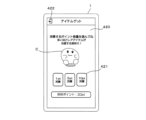
- the selection screen 420 shown in FIG. 12 includes a character C appearing in the game and a selection button 421 for the amount of lottery points.
- the selection screen 420 displays the lottery points stored in association with the operator's user ID.
- the selection screen 420 includes a back button 422 for returning to the game screen 410 of FIG. 7.
- the processing unit 10 does not proceed to the process of step S402 in the processing procedure of FIG. 10 and FIG. 11. In this case, the processing unit 10 does not execute the item get game, and returns the process to step S110 in the processing procedure of FIG. 8.
- the processing unit 10 accepts the selection of the amount in accordance with the selection button 421 (S402) and requests a lottery from the server device 3.
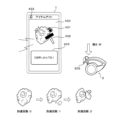
- the lottery presentation screen 430 shown in FIG. 13 is displayed when the selection button 421 is selected on the selection screen 420 in FIG. 12 (S409 onward).
- an image of a gemstone is displayed, which corresponds to the presentation content that can be obtained by consuming lottery points.
- the processing unit 10 of the information processing device 1 transmits a lottery request to the server device 3 and receives the content ID of the lottery result.
- the lottery presentation screen 430 in FIG. 13 displays an icon 431 indicating that the tactile presentation in the tactile presentation device 2 is active.
- the lottery presentation screen 430 displays an operation guide message 433.
- the processing unit 10 has already transmitted the tactile data included in the combination determined based on the content ID of the lottery result to the tactile presentation device 2 (S408).
- tactile data for presenting "the tactile sensation of breaking a rough stone with a hammer" has been transmitted from the information processing device 1 to the tactile presentation device 2.
- the lottery presentation screen 430 may display a cursor icon 432 indicating the operator's operating position.
- the cursor icon 432 uses an image of a hammer.
- the hammer image of the cursor icon 432 may be output as an animation in which the angle changes and the stone is broken, or a "crack" sound of breaking the stone may be output from the audio output unit 15.
- a tactile presentation device 2 of the type that generates vibrations using a touch panel built into the display unit 14 when the operator traces and moves the cursor icon 432, vibrations are generated in accordance with the movement.
- the image of the rough stone changes as if it is being chipped away depending on the number of times the displacement unit 202 of the tactile presentation device 2 is pressed from the top end to a specified position.
- haptic data that is medium hardness is selected for the "tactile sensation of breaking a gemstone with a hammer" (set in FIG. 4: 0030001), which creates a tactile sensation of the gemstone breaking more smoothly than when the lottery presentation screen 430 in FIG. 15 described below is displayed.
- FIG. 14 is an example of the contents of a screen 440 showing the lottery results of an item.
- FIG. 14 is a screen displayed when the number of hits reaches three on the lottery performance screen 430 of FIG. 13.
- the screen 440 shown in FIG. 14 includes an image 441 of the item of the total lottery result and an icon 442 indicating that the tactile presentation in the tactile presentation device 2 is active.
- the rough stone which is the content for the performance, is broken easily with a medium hardness, and an item "Item 3" with a rarity level of two (two stars) is won. Note that the more stars there are, the higher the rarity.
- FIG. 14 is an example of the contents of a screen 440 showing the lottery results of an item.
- FIG. 14 is a screen displayed when the number of hits reaches three on the lottery performance screen 430 of FIG. 13.
- the screen 440 shown in FIG. 14 includes an image 441 of the item of the total lottery result and an icon 442 indicating that the tactile presentation in the tactile presentation device 2 is active.
- a screen 440 shown in FIG. 14 shows a list of characters or items that have been selected by lottery.
- the lottery result screen 440 in FIG. 14 further includes a button 443 for returning to the game screen 410 in FIG. 7 and a button 444 for returning to the "Get Item" selection screen 420 in FIG. 12.
- the lottery presentation screen 430 shown in FIG. 15 is the same as the lottery presentation screen 430 shown in FIG. 13, but the tactile data transmitted from the information processing device 1 to the tactile presentation device 2 when the lottery presentation screen 430 shown in FIG. 15 is displayed is different.
- tactile data that is hard enough to require a large force to be applied to break a rough stone is selected (set: 0030002 in FIG. 4), which creates a tactile sensation accompanied by a large reaction force compared to when the lottery presentation screen 430 in FIG. 13 is displayed.
- the image of the rough stone displayed on the lottery presentation screen 430 in FIG. 15 may be different from the image of the rough stone displayed on the lottery presentation screen 430 in FIG. 13.
- FIG. 16 is an example of the content of a screen 440 showing the results of a lottery for an item. Similar to FIG. 14, the screen 440 shown in FIG. 16 includes an image 441 of the item in the combined lottery result, an icon 442 indicating that the tactile presentation in the tactile presentation device 2 is enabled, and buttons 443 and 444.
- the screen 440 shown in FIG. 16 is a screen that is displayed when the number of hits reaches three on the lottery presentation screen 430 in FIG. 15. In FIG. 16, the rough stone breaks with a much harder feel than in the lottery presentation screen 430 shown in FIG. 14, and the item "Item 90", which has a rarity level of five (five stars), has been won.
- the difference can be felt not only visually and audibly, but also in touch, giving the operator a sense of elation.
- a variety of expressions are possible by combining senses including touch, and the ability to present touch can also create a sense of expectation by creating a texture of the material of the won item.
- the higher the rarity the harder the touch is presented, but this is not limited to this.
- the higher the rarity the higher the frequency of the touch may be.
- an example in which rarity is in two stages is described, but it may be in three or more stages, and the touch, etc., can be changed for each stage.
- an example was described in which an information processing system was applied to a game system 100 that outputs images and sounds on a so-called smartphone while presenting tactile sensations with the tactile presentation device 2.
- Control in which tactile sensations change depending on the lottery results of the information processing system is not limited to games that run on a smartphone.
- the tactile presentation device 2 may be used in an application (e.g., a prize application) that simply executes a lottery on an information processing device 1 equipped with a display unit 14 and an audio output unit 15, or may be applied to a prize application in a web application provided by a server device 3.
- tactile sensations may be presented to the operation unit during a lottery on a food and drink vending machine or a vending machine at a gas station, or the winning result may be notified by tactile sensation in a so-called prize game machine in which prizes are actually won.
- Game system information processing system
- Reference Signs List 1 Information processing device
- Processing unit 11
- Storage unit 110
- Feeling DB 111
- Display unit 410
- Game screen 420
- Selection screen 430
- Lottery performance screen 15
- Audio output unit P1
- Game application computer program
- Tactile presentation device 20
- Control unit 202
- Displacement unit operation unit
- Storage unit 22
- Communication unit 24
- Sensor 3 Server device
Landscapes
- Engineering & Computer Science (AREA)
- Multimedia (AREA)
- Physics & Mathematics (AREA)
- Human Computer Interaction (AREA)
- General Engineering & Computer Science (AREA)
- Theoretical Computer Science (AREA)
- Optics & Photonics (AREA)
- General Physics & Mathematics (AREA)
- User Interface Of Digital Computer (AREA)
Priority Applications (1)
| Application Number | Priority Date | Filing Date | Title |
|---|---|---|---|
| JP2025511140A JPWO2024204530A1 (https=) | 2023-03-29 | 2024-03-28 |
Applications Claiming Priority (2)
| Application Number | Priority Date | Filing Date | Title |
|---|---|---|---|
| JP2023053929 | 2023-03-29 | ||
| JP2023-053929 | 2023-03-29 |
Publications (1)
| Publication Number | Publication Date |
|---|---|
| WO2024204530A1 true WO2024204530A1 (ja) | 2024-10-03 |
Family
ID=92906755
Family Applications (1)
| Application Number | Title | Priority Date | Filing Date |
|---|---|---|---|
| PCT/JP2024/012621 Ceased WO2024204530A1 (ja) | 2023-03-29 | 2024-03-28 | 情報処理システム、情報処理装置、情報処理方法及びコンピュータプログラム |
Country Status (2)
| Country | Link |
|---|---|
| JP (1) | JPWO2024204530A1 (https=) |
| WO (1) | WO2024204530A1 (https=) |
Citations (10)
| Publication number | Priority date | Publication date | Assignee | Title |
|---|---|---|---|---|
| JP2012520137A (ja) * | 2009-03-12 | 2012-09-06 | イマージョン コーポレイション | テクスチャエンジン用のシステム及び方法 |
| WO2013111557A1 (ja) * | 2012-01-24 | 2013-08-01 | パナソニック株式会社 | 電子機器 |
| JP2018000735A (ja) * | 2016-07-06 | 2018-01-11 | 株式会社ソニー・インタラクティブエンタテインメント | 拡縮装置及び操作装置 |
| WO2018042718A1 (ja) * | 2016-08-31 | 2018-03-08 | アルプス電気株式会社 | 操作装置および前記操作装置を使用した触覚再現装置 |
| JP2019130292A (ja) * | 2018-12-12 | 2019-08-08 | 株式会社コロプラ | プログラム、情報処理装置、および方法 |
| JP2021109015A (ja) * | 2020-01-14 | 2021-08-02 | 京セラ株式会社 | 動作情報呈示装置および動作情報呈示方法 |
| JP2022031922A (ja) * | 2019-04-26 | 2022-02-22 | 株式会社カプコン | ゲームプログラムならびにゲームシステム |
| WO2022118748A1 (ja) * | 2020-12-04 | 2022-06-09 | ソニーグループ株式会社 | 情報処理装置、情報処理方法、プログラム及び情報処理システム |
| JP7197820B1 (ja) * | 2022-03-16 | 2022-12-28 | 株式会社Mixi | 情報処理装置、情報処理方法及びプログラム |
| JP7431316B1 (ja) * | 2022-12-28 | 2024-02-14 | 株式会社バンダイ | プログラム、ゲーム装置及びゲームシステム |
-
2024
- 2024-03-28 JP JP2025511140A patent/JPWO2024204530A1/ja active Pending
- 2024-03-28 WO PCT/JP2024/012621 patent/WO2024204530A1/ja not_active Ceased
Patent Citations (10)
| Publication number | Priority date | Publication date | Assignee | Title |
|---|---|---|---|---|
| JP2012520137A (ja) * | 2009-03-12 | 2012-09-06 | イマージョン コーポレイション | テクスチャエンジン用のシステム及び方法 |
| WO2013111557A1 (ja) * | 2012-01-24 | 2013-08-01 | パナソニック株式会社 | 電子機器 |
| JP2018000735A (ja) * | 2016-07-06 | 2018-01-11 | 株式会社ソニー・インタラクティブエンタテインメント | 拡縮装置及び操作装置 |
| WO2018042718A1 (ja) * | 2016-08-31 | 2018-03-08 | アルプス電気株式会社 | 操作装置および前記操作装置を使用した触覚再現装置 |
| JP2019130292A (ja) * | 2018-12-12 | 2019-08-08 | 株式会社コロプラ | プログラム、情報処理装置、および方法 |
| JP2022031922A (ja) * | 2019-04-26 | 2022-02-22 | 株式会社カプコン | ゲームプログラムならびにゲームシステム |
| JP2021109015A (ja) * | 2020-01-14 | 2021-08-02 | 京セラ株式会社 | 動作情報呈示装置および動作情報呈示方法 |
| WO2022118748A1 (ja) * | 2020-12-04 | 2022-06-09 | ソニーグループ株式会社 | 情報処理装置、情報処理方法、プログラム及び情報処理システム |
| JP7197820B1 (ja) * | 2022-03-16 | 2022-12-28 | 株式会社Mixi | 情報処理装置、情報処理方法及びプログラム |
| JP7431316B1 (ja) * | 2022-12-28 | 2024-02-14 | 株式会社バンダイ | プログラム、ゲーム装置及びゲームシステム |
Also Published As
| Publication number | Publication date |
|---|---|
| JPWO2024204530A1 (https=) | 2024-10-03 |
Similar Documents
| Publication | Publication Date | Title |
|---|---|---|
| KR101702193B1 (ko) | 카지노 게이밍 햅틱을 위한 시스템 및 방법 | |
| CN106339169B (zh) | 用于纹理引擎的系统和方法 | |
| US8992324B2 (en) | Position sensing gesture hand attachment | |
| CN102165391A (zh) | 多致动手持设备 | |
| JP2020110451A (ja) | ゲームプログラム、方法、および情報処理装置 | |
| JP2015104522A (ja) | プログラムおよびサーバシステム | |
| WO2024204530A1 (ja) | 情報処理システム、情報処理装置、情報処理方法及びコンピュータプログラム | |
| JP2024143025A (ja) | 情報処理方法、情報処理システム、情報処理装置、及びコンピュータプログラム | |
| US8678925B1 (en) | Method and apparatus to provide a dice application | |
| JP2024140851A (ja) | 触覚提示システム、情報処理装置、情報処理方法、及びコンピュータプログラム | |
| JP7724759B2 (ja) | プログラム、情報処理装置 | |
| WO2023189422A1 (ja) | 制御装置、制御方法、触覚提示システム及びプログラム製品 | |
| JP2024137188A (ja) | 仮想オブジェクト触覚提示システム、視覚提示装置、仮想オブジェクト触覚提示方法、及びコンピュータプログラム | |
| WO2024166646A1 (ja) | 情報処理システム、情報処理装置、情報処理方法及びコンピュータプログラム | |
| JP2023148854A (ja) | 制御装置、制御方法、触覚提示システム及びコンピュータプログラム | |
| JP2003284870A (ja) | ゲームシステム、ゲーム情報提供システム、プログラムおよび情報記憶媒体 | |
| JP2024135065A (ja) | 仮想オブジェクト触覚提示システム、視覚提示装置、触覚提示装置、仮想オブジェクト触覚提示方法、コンピュータプログラム及び制御プログラム | |
| JP7759364B2 (ja) | プログラム | |
| JP7741229B1 (ja) | プログラム、及び情報処理システム | |
| JP2025152654A (ja) | 情報処理装置、触覚提示方法及びコンピュータプログラム | |
| WO2024204546A1 (ja) | 触覚提示システム | |
| US20250208713A1 (en) | Control Device, Control Method, Haptic Feedback System, and Program for Haptic Feedback Control | |
| JP2025147757A (ja) | 触覚提示システム | |
| AU2013100859A4 (en) | Touch enabled random number generator | |
| JP2025018157A (ja) | プログラム及び情報処理システム |
Legal Events
| Date | Code | Title | Description |
|---|---|---|---|
| 121 | Ep: the epo has been informed by wipo that ep was designated in this application |
Ref document number: 24780630 Country of ref document: EP Kind code of ref document: A1 |
|
| WWE | Wipo information: entry into national phase |
Ref document number: 2025511140 Country of ref document: JP |
|
| NENP | Non-entry into the national phase |
Ref country code: DE |
|
| 122 | Ep: pct application non-entry in european phase |
Ref document number: 24780630 Country of ref document: EP Kind code of ref document: A1 |