WO2024034393A1 - 情報処理プログラム、情報処理方法およびゲーム装置 - Google Patents
情報処理プログラム、情報処理方法およびゲーム装置 Download PDFInfo
- Publication number
- WO2024034393A1 WO2024034393A1 PCT/JP2023/027241 JP2023027241W WO2024034393A1 WO 2024034393 A1 WO2024034393 A1 WO 2024034393A1 JP 2023027241 W JP2023027241 W JP 2023027241W WO 2024034393 A1 WO2024034393 A1 WO 2024034393A1
- Authority
- WO
- WIPO (PCT)
- Prior art keywords
- player
- screen
- game
- battle
- displayed
- Prior art date
- Legal status (The legal status is an assumption and is not a legal conclusion. Google has not performed a legal analysis and makes no representation as to the accuracy of the status listed.)
- Ceased
Links
Images







Classifications
-
- A—HUMAN NECESSITIES
- A63—SPORTS; GAMES; AMUSEMENTS
- A63F—CARD, BOARD, OR ROULETTE GAMES; INDOOR GAMES USING SMALL MOVING PLAYING BODIES; VIDEO GAMES; GAMES NOT OTHERWISE PROVIDED FOR
- A63F13/00—Video games, i.e. games using an electronically generated display having two or more dimensions
- A63F13/50—Controlling the output signals based on the game progress
- A63F13/53—Controlling the output signals based on the game progress involving additional visual information provided to the game scene, e.g. by overlay to simulate a head-up display [HUD] or displaying a laser sight in a shooting game
- A63F13/533—Controlling the output signals based on the game progress involving additional visual information provided to the game scene, e.g. by overlay to simulate a head-up display [HUD] or displaying a laser sight in a shooting game for prompting the player, e.g. by displaying a game menu
-
- A—HUMAN NECESSITIES
- A63—SPORTS; GAMES; AMUSEMENTS
- A63F—CARD, BOARD, OR ROULETTE GAMES; INDOOR GAMES USING SMALL MOVING PLAYING BODIES; VIDEO GAMES; GAMES NOT OTHERWISE PROVIDED FOR
- A63F13/00—Video games, i.e. games using an electronically generated display having two or more dimensions
- A63F13/60—Generating or modifying game content before or while executing the game program, e.g. authoring tools specially adapted for game development or game-integrated level editor
- A63F13/69—Generating or modifying game content before or while executing the game program, e.g. authoring tools specially adapted for game development or game-integrated level editor by enabling or updating specific game elements, e.g. unlocking hidden features, items, levels or versions
-
- A—HUMAN NECESSITIES
- A63—SPORTS; GAMES; AMUSEMENTS
- A63F—CARD, BOARD, OR ROULETTE GAMES; INDOOR GAMES USING SMALL MOVING PLAYING BODIES; VIDEO GAMES; GAMES NOT OTHERWISE PROVIDED FOR
- A63F13/00—Video games, i.e. games using an electronically generated display having two or more dimensions
- A63F13/40—Processing input control signals of video game devices, e.g. signals generated by the player or derived from the environment
- A63F13/44—Processing input control signals of video game devices, e.g. signals generated by the player or derived from the environment involving timing of operations, e.g. performing an action within a time slot
-
- A—HUMAN NECESSITIES
- A63—SPORTS; GAMES; AMUSEMENTS
- A63F—CARD, BOARD, OR ROULETTE GAMES; INDOOR GAMES USING SMALL MOVING PLAYING BODIES; VIDEO GAMES; GAMES NOT OTHERWISE PROVIDED FOR
- A63F13/00—Video games, i.e. games using an electronically generated display having two or more dimensions
- A63F13/45—Controlling the progress of the video game
-
- A—HUMAN NECESSITIES
- A63—SPORTS; GAMES; AMUSEMENTS
- A63F—CARD, BOARD, OR ROULETTE GAMES; INDOOR GAMES USING SMALL MOVING PLAYING BODIES; VIDEO GAMES; GAMES NOT OTHERWISE PROVIDED FOR
- A63F13/00—Video games, i.e. games using an electronically generated display having two or more dimensions
- A63F13/70—Game security or game management aspects
- A63F13/75—Enforcing rules, e.g. detecting foul play or generating lists of cheating players
-
- A—HUMAN NECESSITIES
- A63—SPORTS; GAMES; AMUSEMENTS
- A63F—CARD, BOARD, OR ROULETTE GAMES; INDOOR GAMES USING SMALL MOVING PLAYING BODIES; VIDEO GAMES; GAMES NOT OTHERWISE PROVIDED FOR
- A63F13/00—Video games, i.e. games using an electronically generated display having two or more dimensions
- A63F13/70—Game security or game management aspects
- A63F13/79—Game security or game management aspects involving player-related data, e.g. identities, accounts, preferences or play histories
-
- A—HUMAN NECESSITIES
- A63—SPORTS; GAMES; AMUSEMENTS
- A63F—CARD, BOARD, OR ROULETTE GAMES; INDOOR GAMES USING SMALL MOVING PLAYING BODIES; VIDEO GAMES; GAMES NOT OTHERWISE PROVIDED FOR
- A63F13/00—Video games, i.e. games using an electronically generated display having two or more dimensions
- A63F13/85—Providing additional services to players
-
- A—HUMAN NECESSITIES
- A63—SPORTS; GAMES; AMUSEMENTS
- A63F—CARD, BOARD, OR ROULETTE GAMES; INDOOR GAMES USING SMALL MOVING PLAYING BODIES; VIDEO GAMES; GAMES NOT OTHERWISE PROVIDED FOR
- A63F2300/00—Features of games using an electronically generated display having two or more dimensions, e.g. on a television screen, showing representations related to the game
- A63F2300/60—Methods for processing data by generating or executing the game program
- A63F2300/63—Methods for processing data by generating or executing the game program for controlling the execution of the game in time
- A63F2300/638—Methods for processing data by generating or executing the game program for controlling the execution of the game in time according to the timing of operation or a time limit
Definitions
- the present invention relates to an information processing program, an information processing method, and a game device.
- Patent Document 1 discloses a game in which so-called daily missions are set for players.
- a player can acquire predetermined benefits by completing daily missions.
- the right to receive benefits by completing daily missions will be reset at the same time every day. Therefore, the player can repeatedly acquire benefits by completing the daily mission every day. In this way, the daily mission motivates the player to play the game.
- An object of the present invention is to provide an information processing program, an information processing method, and a game device that can suppress the possibility that a player's desire to play will decrease.
- the information processing program A process of providing a reward to a player based on a first predetermined task, which is a task for a preset content among a plurality of provided contents, being executed within a predetermined period; a process of limiting the number of times a second predetermined task, which is a predetermined task for the content, can be executed within the predetermined period; a process of setting one of a plurality of predetermined tasks, including the first predetermined task and the second predetermined task, as a notification target based on a player's operation; a process of displaying a list display screen on which the predetermined work designated as the notification target is displayed; Let the computer carry out the task.
- the computer may further perform the steps.
- the computer may further perform the steps.
- the information processing method is An information processing method performed by one or more computers, the method comprising: The computer, A process of providing a reward to a player based on a first predetermined task, which is a task for a preset content among a plurality of provided contents, being executed within a predetermined period; a process of limiting the number of times a second predetermined task, which is a predetermined task for the content, can be executed within the predetermined period; a process of setting one of a plurality of predetermined tasks, including the first predetermined task and the second predetermined task, as a notification target based on a player's operation; a process of displaying a list display screen on which the predetermined work designated as the notification target is displayed; carry out.
- the game device A game device comprising one or more computers, The computer, A process of providing a reward to a player based on a first predetermined task, which is a task for a preset content among a plurality of provided contents, being executed within a predetermined period; a process of limiting the number of times a second predetermined task, which is a predetermined task for the content, can be executed within the predetermined period; a process of setting one of a plurality of predetermined tasks, including the first predetermined task and the second predetermined task, as a notification target based on a player's operation; a process of displaying a list display screen on which the predetermined work designated as the notification target is displayed; carry out.
- FIG. 1 is an explanatory diagram showing a schematic configuration of an information processing system.
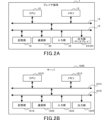
- FIG. 2A is a diagram illustrating the hardware configuration of the player terminal.
- FIG. 2B is a diagram illustrating the hardware configuration of the server.
- FIG. 3 is a diagram illustrating an example of the home screen.
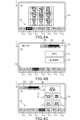
- FIG. 4A is a diagram illustrating an example of an ally character confirmation screen.
- FIG. 4B is a diagram illustrating an example of a story screen.
- FIG. 4C is a diagram illustrating an example of a quest screen.
- FIG. 5A is a diagram illustrating an example of the main quest screen.
- FIG. 5B is a diagram illustrating an example of the main quest selection screen.
- FIG. 5C is a diagram illustrating an example of a party selection screen.
- FIG. 5A is a diagram illustrating an example of the main quest screen.
- FIG. 5B is a diagram illustrating an example of the main quest selection screen.
- FIG. 5C is a diagram illustrating
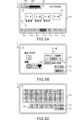
- FIG. 6A is a diagram illustrating an example of a battle game screen.
- FIG. 6B is a diagram illustrating an example of the first result screen.
- FIG. 6C is a diagram illustrating an example of the second result screen.
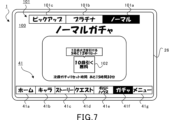
- FIG. 7 is a diagram illustrating an example of a gacha screen.
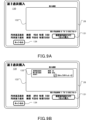
- FIG. 8A is a diagram illustrating an example of a normal shop screen.
- FIG. 8B is a diagram illustrating an example of a limited shop screen.
- FIG. 9A is a first diagram illustrating an example of the first currency purchase screen.
- FIG. 9B is a second diagram illustrating an example of the first currency purchase screen.
- FIG. 10A is a diagram illustrating an example of a daily mission screen.
- FIG. 10B is a diagram illustrating an example of a reward receiving screen.
- FIG. 10A is a diagram illustrating an example of a daily mission screen.
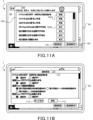
- FIG. 11A is a first diagram illustrating an example of a schedule screen.
- FIG. 11B is a diagram illustrating an example of a notification setting screen.
- FIG. 12 is a diagram illustrating an example of notification setting content display.
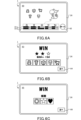
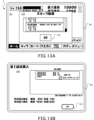
- FIG. 13A is a diagram illustrating an example of the first execution system result screen.
- FIG. 13B is a diagram illustrating an example of the second execution system result screen.
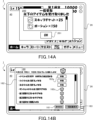
- FIG. 14A is a diagram illustrating an example of the third execution system result screen.
- FIG. 14B is a second diagram illustrating an example of the schedule screen.
- FIG. 15 is a diagram illustrating the memory configuration and computer functions in the player terminal.
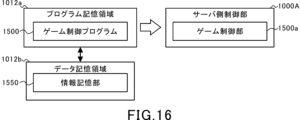
- FIG. 16 is a diagram illustrating the memory configuration and computer functions in the server.
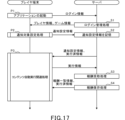
- FIG. 17 is a sequence diagram illustrating the basic processing of the player terminal and the server.
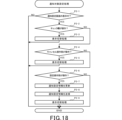
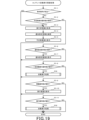
- FIG. 18 is a flowchart illustrating notification target setting processing at the player terminal.
- FIG. 19 is a flowchart illustrating content automatic execution related processing at the player
- FIG. 1 is an explanatory diagram showing a schematic configuration of an information processing system S.
- the information processing system S is a so-called client-server system that includes a player terminal 1 functioning as a client, that is, a game terminal, a server 1000, and a communication network N having a communication base station Na.
- the player terminal 1 and the server 1000 function as a game device G.
- the player terminal 1 and the server 1000 are each assigned the role of controlling the progress of the game, and the game can progress through cooperation between the player terminal 1 and the server 1000.
- the player terminal 1 can establish communication with the server 1000 via the communication network N.
- the player terminal 1 includes a wide range of electronic devices that can be connected to the server 1000 for wireless or wired communication. Examples of the player terminal 1 include a smartphone, a mobile phone, a tablet device, a personal computer, and a game device. In this embodiment, a case where a smartphone is used as the player terminal 1 will be described.
- the server 1000 is communicatively connected to a plurality of player terminals 1.
- the server 1000 accumulates various types of information for each player who plays the game. Furthermore, the server 1000 performs processes such as updating accumulated information and causing the player terminal 1 to download images and various information based on operations input from the player terminal 1.
- the communication base station Na is connected to the communication network N and transmits and receives information to and from the player terminal 1 wirelessly.
- the communication network N is composed of a mobile phone network, an Internet network, a LAN (Local Area Network), a dedicated line, etc., and realizes a wireless or wired communication connection between the player terminal 1 and the server 1000.
- FIG. 2A is a diagram illustrating the hardware configuration of the player terminal 1.
- FIG. 2B is a diagram illustrating the hardware configuration of the server 1000.
- the player terminal 1 includes a CPU (Central Processing Unit) 10, a memory 12, a bus 14, an input/output interface 16, a storage section 18, a communication section 20, an input section 22, and an output section 24. be done.
- CPU Central Processing Unit
- the server 1000 includes a CPU 1010, a memory 1012, a bus 1014, an input/output interface 1016, a storage section 1018, a communication section 1020, an input section 1022, and an output section 1024.
- the configurations and functions of the CPU 1010, memory 1012, bus 1014, input/output interface 1016, storage section 1018, communication section 1020, input section 1022, and output section 1024 of the server 1000 are the same as those of the CPU 10, memory 12, and output section 1024 of the player terminal 1, respectively.
- the bus 14, input/output interface 16, storage section 18, communication section 20, input section 22, and output section 24 are substantially the same. Therefore, below, the hardware configuration of the player terminal 1 will be explained, and the explanation of the server 1000 will be omitted.
- the CPU 10 operates a program stored in the memory 12 and controls the progress of the game.
- the memory 12 is composed of a ROM (Read Only Memory) or a RAM (Random Access Memory), and stores programs and various data necessary for controlling the progress of the game.
- Memory 12 is connected to CPU 10 via bus 14.
- An input/output interface 16 is connected to the bus 14.
- a storage section 18 , a communication section 20 , an input section 22 , and an output section 24 are connected to the input/output interface 16 .
- the storage unit 18 is composed of a semiconductor memory such as DRAM (Dynamic Random Access Memory), and stores various programs and data.
- DRAM Dynamic Random Access Memory
- programs and data stored in the storage unit 18 are loaded into the memory 12 (RAM) by the CPU 10.
- the communication unit 20 is wirelessly connected to the communication base station Na, and sends and receives information such as various data and programs to and from the server 1000 via the communication network N.
- programs and the like received from the server 1000 are stored in the memory 12 or the storage unit 18.
- the input unit 22 includes, for example, a touch panel into which player operations are input (accepts operations), buttons, a keyboard, a mouse, a cross key, an analog controller, and the like. Further, the input unit 22 may be a dedicated controller provided in the player terminal 1 or connected (externally attached) to the player terminal 1. Furthermore, the input unit 22 may be configured with an acceleration sensor that detects the tilt or movement of the player terminal 1, or a microphone that detects the player's voice. That is, the input unit 22 broadly includes devices that can input the player's intention in a discernible manner.
- the output unit 24 includes a display device and a speaker. Note that the output unit 24 may be a device connected (externally attached) to the player terminal 1.
- the player terminal 1 includes a display 26 as the output section 24 and a touch panel provided to overlap the display 26 as the input section 22.
- Game content Next, the content of the game provided by the information processing system S (game device G) of this embodiment will be explained using an example.
- a so-called battle game is provided in which one or more ally characters are formed and pitted against enemy characters.
- a plurality of ally characters are provided to the player by the game management side.
- a player can own a plurality of ally characters acquired through a lottery called gacha or ally characters distributed by the management side.
- a player can form a party by selecting one or more of the ally characters they own.
- the player can play a battle game using the formed party.
- the objective is for friendly characters formed in a party to defeat (clear) enemy characters and obtain rewards.
- the player can play multiple types of battle games with different enemy characters and difficulty levels.
- FIG. 3 is a diagram showing an example of the home screen 40.
- the home screen 40 shown in FIG. 3 is the first screen displayed after the player taps the display 26 on the title screen (not shown) (that is, after starting the game).
- a menu bar 41 is displayed at the bottom of the display 26.
- the menu bar 41 is displayed at the bottom of the display 26 on normal screens other than the title screen (not shown).
- the menu bar 41 is provided with a plurality of operation units that can be operated (tapped) by the player.
- the menu bar 41 is provided with a home screen selection operation section 41a labeled "Home”. Further, the menu bar 41 is provided with an ally character confirmation screen selection operation section 41b labeled "Character”. Further, the menu bar 41 is provided with a story screen selection operation section 41c labeled "Story”. Further, the menu bar 41 is provided with a quest screen selection operation section 41d labeled "Quest”. Further, the menu bar 41 is provided with a guild house screen selection operation section 41e labeled "Guild House.” Further, the menu bar 41 is provided with a gacha screen selection operation section 41f labeled "Gacha”. Further, the menu bar 41 is provided with a menu screen selection operation section 41g labeled "Menu”. Note that in the menu bar 41, the operation units corresponding to each screen are highlighted so that the screen currently displayed on the display 26 can be identified.
- the home screen 40 shown in FIG. 3 is displayed on the display 26.
- an ally character confirmation screen 50 (FIG. 4A, which will be described later) is displayed on the display 26.
- a story screen 60 (FIG. 4B, which will be described later) is displayed on the display 26.
- a quest screen 70 (FIG. 4C, which will be described later) is displayed on the display 26.
- a guild house screen (not shown) is displayed on the display 26.
- a game space serving as the player's own room is displayed on the guild house screen (not shown).
- a gacha screen 100 (FIG. 7, which will be described later) is displayed on the display 26.
- a gacha lottery can be held in which ally characters and items can be won by lottery.
- menu screen selection operation section 41g when operated (tapped) by the player, a menu screen (not shown) is displayed on the display 26. Also, on the menu screen, you can check game settings and various information.
- a header display area 42 is provided at the top of the home screen 40. At least part of the player information associated with the player ID is displayed in the header display area 42.
- the header display area 42 displays level information 42a indicating the player level and a stamina display bar 42b indicating the player's stamina. Further, as shown in FIG. 3, the player's stamina is displayed numerically at the bottom of the stamina display bar 42b.
- the player information includes a player ID, ally character identification information for identifying ally characters owned by the player (hereinafter referred to as ally character ID), level information 42a, stamina information displayed on the stamina display bar 42b, and a story to be described later. It includes progress information, battle game clear information, in-game currency information indicating the amount of in-game currency owned by the player, item information indicating the type and amount of items owned by the player, and the like.
- stamina is a parameter necessary for the player to play the battle game.
- multiple types of battle games are provided, and each battle game has a stamina consumption value required for play and a preset period (for example, from 5:00 to 4:59 the next day). The maximum number of times the process can be executed (duration) is set.
- a consumption value of stamina required for play is set, the player will play the battle game by consuming stamina. Therefore, if the player lacks stamina, the player cannot play the battle game.
- the player wins the battle game he or she can obtain a predetermined value as player experience value. Then, each time the player's experience value reaches a certain value, the player level increases. An upper limit value of stamina is set for the player level. As the player level increases, the upper limit of stamina increases.
- Stamina is recovered by a predetermined value (for example, 1 point) at regular intervals (for example, 5 minutes) within the upper limit.
- the stamina display bar 42b displays the current remaining amount of stamina with respect to the upper limit of stamina so that it can be visually grasped.
- some of the battle games include battle games that can be played without requiring the consumption of stamina.
- "Dungeon Battle”, “Exploration Battle”, “1V1 Battle”, and “3V3 Battle”, which will be described later, are provided as battle games that can be played without consuming stamina.
- Each of these battle games has a maximum number of times it can be executed within a preset period (for example, between 5:00 and 4:59 the next day). Therefore, if the player has already played the maximum possible number of times within a preset period (for example, between 5:00 and 4:59 the next day), the player cannot play these battle games.
- the header display area 42 displays the amount of first currency and second currency owned that are associated with the player ID.
- the first currency and the second currency are currencies that can only be used within the game.
- a predetermined amount of the first currency can be acquired depending on the cleared battle game.
- the second currency can be acquired for free or for a fee.
- a first currency purchase screen operation section 42c is displayed on the right side of the display of the amount of first currency owned on the display 26.
- a first currency purchase screen 130 (FIG. 9A), which will be described later, is displayed on the display 26.
- the player can acquire (purchase) the first currency by consuming the second currency on the first currency purchase screen 130.
- a second currency purchase screen operation section 42d is displayed on the right side of the display of the amount of second currency owned on the display 26.
- a second currency purchase screen (not shown) is displayed on the display 26. The player can acquire (purchase) the second currency for a fee on the second currency purchase screen (not shown).
- a home menu 43 is displayed at the top of the menu bar 41 of the home screen 40.
- the home menu 43 includes a shop screen selection operation section 43a labeled "Shop”, a guild screen selection operation section 43b labeled “Guild”, and a mission screen selection operation section 43c labeled "Mission”. ing.
- shop screen selection operation section 43a When the shop screen selection operation section 43a is operated (tapped), a normal shop screen 110 (FIG. 8A to be described later) from which items can be purchased is displayed. Further, when the guild screen selection operation section 43b is operated (tapped), a guild screen (not shown) is displayed on the display 26. Further, when the mission screen selection operation section 43c is operated (tapped), a daily mission screen 140 (FIG. 10A, which will be described later) is displayed on the display 26.
- a schedule screen selection operation section 45 labeled "Schedule” is displayed on the left side of the home screen 40.
- an icon resembling a notebook is displayed on the schedule screen selection operation section 45.
- the schedule screen selection operation section 45 When the player operates (tap) the schedule screen selection operation section 45, the schedule screen selection operation section 45 is hidden from display on the display 26, and a schedule screen 160 (FIG. 11A), which will be described later, is displayed on the display 26. Ru. On the schedule screen 160, an automatic execution function and a notification function, which will be described in detail later, can be used.
- an identification display 45a in which "! is written is attached to the schedule screen selection operation section 45 when a predetermined condition set in advance is satisfied. Specifically, when at least one of the movement operation section 162a and the execution operation section 162b is displayed in the notification target display section 162 (FIG. 11A), which will be described later, a predetermined condition is set in advance. is established, and the identification display 45a is displayed.
- FIG. 3 shows a case where "## is written as the identification display 45a, the content of the identification display 45a is not limited to this. For example, numbers may be displayed.
- FIG. 4A is a diagram illustrating an example of the ally character confirmation screen 50.
- the player operates (tap) the ally character confirmation screen selection operation section 41b of the menu bar 41
- the ally character confirmation screen 50 shown in FIG. 4A is displayed on the display 26.
- the ally character confirmation screen 50 all images of ally characters corresponding to the ally character ID associated with the player ID are displayed.
- the ally character confirmation screen 50 all ally characters owned by the player are displayed. Note that the ally character ID is assigned a different ID for each ally character. Then, when the player acquires a new ally character through a gacha lottery or the like, the ally character ID of the acquired ally character is associated with the player ID of the player.
- Stars (ranks), experience points, and levels are stored in association with the ally characters.
- Experience points increase when you win a battle game (described later) or when you use a predetermined item.
- the level is set corresponding to the experience value, and the level increases each time the experience value reaches a predetermined value. Note that an upper limit value of the level is set for each ally character, and the level increases only within the range up to the upper limit value.
- base values of strength such as life points, attack power, defense power, etc. are set for the ally characters based on stars (ranks) and levels. The player can advance the battle game more advantageously as the fighting power of the ally character becomes higher. Furthermore, each base value set for an ally character increases as the number of stars (rank) increases and as the level increases.
- ally character confirmation screen 50 it is possible to equip (set) equipment such as weapons and armor to the ally character. For each piece of equipment, an additional value for attack power, defense power, etc. is set. When equipment is equipped, the additional value of each equipment is added to the above base value, and the fighting power of the ally character can be increased. Information regarding equipment such as weapons and armor is also associated with the ally character ID and constituted as part of the player information.
- FIG. 4B is a diagram illustrating an example of the story screen 60.
- a story screen 60 shown in FIG. 4B is displayed on the display 26.
- the story screen 60 displays a menu bar 41, a header display area 42, a main story selection operation section 61, and a character story selection operation section 62.
- main story selection operation section 61 in the story screen 60 When the main story selection operation section 61 in the story screen 60 is operated (tapped) by the player, a main story screen (not shown) is displayed on the display 26.
- the main story screen displays multiple main stories that will be released depending on the progress of the "main quest” described below.
- main story screen When a new main story is released by the player progressing through a "main quest” to be described later, the player can view the released main story from a main story screen (not shown).
- the intimacy level of an ally character increases when winning a battle game to be described later or when using a predetermined item.
- the rank of the degree of intimacy increases.
- an upper limit value of the rank of intimacy is set for the ally character, and the rank increases only within the range up to the upper limit value.
- FIG. 4C is a diagram illustrating an example of the quest screen 70.
- a quest screen 70 shown in FIG. 4C is displayed on the display 26.
- the quest screen 70 displays a menu bar 41, a header display area 42, and a plurality of game type selection operation sections 71 in which types of games being provided are described. Here, five types of games are provided, and six game type selection operation sections 71 are displayed.
- the game type selection operation section 71 includes a main quest selection operation section 71a labeled "Main Quest”.
- the game type selection operation section 71 also includes a dungeon battle selection operation section 71c labeled “Dungeon Battle.”
- the game type selection operation section 71 includes a search battle selection operation section 71d labeled "exploration battle”.
- the game type selection operation section 71 also includes a 1V1 battle selection operation section 71e labeled "1V1 Battle.”
- the game type selection operation section 71 also includes a 3V3 battle selection operation section 71f labeled "3V3 Battle.”
- a main quest screen 72 (FIG. 5A, which will be described later) is displayed on the display 26.
- a dungeon battle screen (not shown) is displayed on the display 26.
- search battle selection operation section 71d is operated (tapped) by the player, a search battle screen (not shown) is displayed on the display 26.
- release conditions include that the player level is a predetermined value or higher, that another predetermined game is completed (cleared), and the like. Moreover, a plurality of games (layers or rounds) belong to each game type. Each of these games also has release conditions. Then, when the release condition is satisfied, the game release information included in the player information is updated.
- the player terminal 1 it is determined whether the game is released based on the game release information, and only the game type selection operation unit 71 of the game that satisfies the release conditions accepts the player's operation (tap). Therefore, the player can only play games that satisfy the release conditions.
- main quest selection operation section 71a in the quest screen 70 shown in FIG. 4B is operated (tapped) by the player, a main quest screen 72 (FIG. 5A to be described later) for executing the "main quest" appears on the display 26. Is displayed.
- FIG. 5A is a diagram illustrating an example of the main quest screen 72.
- FIG. 5B is a diagram illustrating an example of the main quest selection screen 74.
- FIG. 5C is a diagram illustrating an example of the party selection screen 77.
- the main quest screen 72 displays a menu bar 41, a header display area 42, and a main quest operation section 73 for selecting a plurality of battle games (layers) belonging to the main quest.
- the main quest operation section 73 also displays clear information for each battle game. Clear information is indicated by three stars, for example.
- a battle game that belongs to the main quest when the battle game is completed (cleared), stars are acquired according to the number of ally characters whose life points are 0 at the time of completion (cleared). For example, if there is no ally character whose life points are 0, three stars are obtained. Further, for example, if there is one ally character whose life points are 0, two stars are obtained. Further, for example, if there are two or more ally characters whose life points are 0, one star is obtained.
- the release condition is to complete (clear) the previous battle game.
- the battle game "1-4" is released by completing (clearing) up to the battle game "1-3", but after that (not shown "1-4"), the battle game "1-4” is released. 5" and later) battle games have not yet been released.
- the main quest selection screen 74 shown in FIG. 5B is displayed on the display 26.
- the main quest selection screen 74 displays enemy characters appearing in the battle game and items (rewards) that can be obtained in the battle game.
- the main quest selection screen 74 displays stamina after consuming stamina when challenging a battle game by consuming stamina. Here, it is displayed that the current stamina of 260 changes to 252 as the stamina is consumed.
- the main quest selection screen 74 also includes a challenge operation section 75 marked with "Challenge” for challenging the battle game, and a "Cancel” button for canceling the process corresponding to the currently displayed screen.
- a cancel operation section 76 marked with is displayed.
- the cancel operation unit 76 When the cancel operation unit 76 is operated (tapped), the main quest screen 72 shown in FIG. 5A is displayed on the display 26, and the challenge to the selected battle game "1-4" is canceled.
- a party selection screen 77 shown in FIG. 5C is displayed on the display 26.
- the party selection screen 77 displays all the ally characters possessed by the player, and also displays a selected ally character display area 78 below which displays the selected ally characters.
- a cancel operation section 76 and a battle start operation section 79 labeled "Battle Start” are displayed.
- the party selection screen 77 when the player operates (tap) a displayed ally character, the operated (tapped) ally character is displayed in the selected ally character display area 78. That is, here, the ally character ID for use in the battle game (for determining the party) is selected from among the plurality of ally character IDs associated with the player ID. A party is formed by the player selecting a plurality of ally characters. Note that when forming a party, the same ally character cannot be set twice.
- FIG. 6A is a diagram illustrating an example of the battle game screen 80.
- FIG. 6B is a diagram illustrating an example of the first result screen 83.
- FIG. 6C is a diagram illustrating an example of the second result screen 85.
- a battle game screen 80 is displayed as shown in FIG. 6A.
- an ally character and an enemy character are displayed on the display 26.
- the ally character operates under computer control and deals damage to or receives damage from the enemy character.
- the enemy character operates under computer control and damages or receives damage from the ally character.
- damage points When damage points are given to an enemy character, the damage points are subtracted from the enemy character's life points. Similarly, when damage points are given to an ally character, the damage points are subtracted from the ally character's life points. When the life points of all enemy characters become 0, the player wins (clear), and when all the ally characters' life points become 0 (defeat), the player loses.
- an ally character display area 81 is provided.
- the ally character display area 81 displays a life point 81a and a special move gauge 81b for each ally character.
- the special move gauge 81b increases when an ally character receives damage from an enemy character or deals damage to an enemy character.
- the special move gauge 81b reaches a predetermined maximum value, the ally character becomes able to use the special move.
- a special move deals more damage points to the enemy character than a normal attack, restores the life points of an ally character, or gives a special effect to the enemy character.
- One method is for the player to operate (tap) an ally character displayed in the ally character display area 81 whose special move gauge 81b has reached its maximum value.
- the other method is for an ally character to use a special move under computer control when the special move gauge 81b reaches its maximum value in the automatic activation state.
- an auto selection operation section 82 is displayed on the battle game screen 80, and by operating the auto selection operation section 82, the player can switch between an automatic activation state and a manual activation state.
- the automatic selection operation section 82 is operated (tapped) in the manual activation state, the automatic activation state is entered in which the special move is automatically used.
- the auto selection operation section 82 when the auto selection operation section 82 is operated (tapped) in the auto activation state, the player enters a manual activation state in which the special move is manually used. Even in the automatic activation state, if the player operates (tap) an ally character when the special move gauge 81b has reached its maximum value and no special move is being used under computer control, the special move will be activated. It is possible to use.
- FIG. 6B shows, as an example, the first result screen 83 when the ally character wins.
- At least a part of the game result information of the battle game is displayed on the first result screen 83. Further, on the first result screen 83, a next operation section 84 labeled "Next" is displayed.
- the second result screen 85 On the second result screen 85, at least a part of the game result information of the battle game is displayed. Further, on the second result screen 85, a next operation section 86 labeled "Next" is displayed. Furthermore, when the next operation section 86 is operated (tapped), the display on the display 26 is switched from the battle screen to the normal screen. That is, the first result screen 83 and the second result screen 85 are part of the battle screen. In this embodiment, when the next operation unit 86 is operated (tapped), a main quest screen 72 shown in FIG. 5A is displayed on the display 26.
- the game result information includes the ally character ID (party) of the ally character.
- the game result information also includes the enemy character ID of the enemy character.
- the game result information also includes information on the remaining status of the ally characters and enemy characters at the end of the battle (whether or not their life points are 0 at the end of the battle game).
- the game result information includes the damage points (total value) given.
- the game result information also includes player operation information (manual activation state or automatic activation state).
- the game result information also includes a battle log ID.
- the game result information also includes battle game type information (main quest, guild battle, etc.).
- the game result information also includes information associated with each type of battle game (clear information, battle game hierarchy, etc.). Furthermore, the game result information includes information on the given item and the like.
- the battle game is in the auto activation state from the start to the end and the special move is not used manually by the player, it will be in the auto activation state, otherwise it will be in the manual activation state.
- a battle log ID is uniquely assigned to each battle game. Further, the information associated with each type of battle game has different contents depending on the type of battle game.
- the main quest selection screen 74 displays the number of tickets owned by the player (the number of tickets associated with the player ID), and also displays the ticket use operation section 74a, minus An operating section 74b and a plus operating section 74c are provided.
- a dungeon battle screen (not shown) for executing a "dungeon battle" is displayed on the display 26.
- a player can play one dungeon selected from among a plurality of dungeons once per preset period (for example, between 5:00 and 4:59 the next day).
- Each dungeon consists of multiple floors, and is a solo play type content in which the player aims to defeat the enemy characters on each floor and defeat the boss enemy character on the top floor.
- Each floor is provided with a treasure chest, and a battle game is played against enemy characters on each floor. The basic parts of the battle game are the same as the main quest.
- a battle game in a dungeon battle is a battle game that can be played without requiring the consumption of stamina.
- each dungeon is completed (cleared) by defeating the boss enemy character present on the top floor.
- the difficulty levels include “NORMAL,” “HARD,” “VERY HARD,” and “EXTREME.”
- the difficulty level of the strategy increases in the order of "NORMAL” ⁇ "HARD” ⁇ “VERY HARD” ⁇ “EXTREME” ⁇ “EXTREME II” ⁇ “EXTREME III” ⁇ “EXTREME IV”.
- Each dungeon has different release conditions depending on its difficulty level, and each dungeon is unlocked by clearing a specific "main quest".
- the use of the skip function is permitted from the next time onwards.
- the player can obtain rewards by skipping the battle game with enemy characters and boss enemy characters on each floor in the dungeon.
- search battle selection operation section 71d when operated (tapped) by the player, a search battle screen (not shown) for executing a "search battle" is displayed on the display 26.
- search battles of a plurality of search types are provided. Specifically, a first search battle and a second search battle are provided as the plurality of search types.
- a battle game with enemy characters is executed.
- the player wins the battle game the player can obtain a "potion" as a reward, which is an item for increasing the experience value of an ally character.
- the basic parts of the battle game are the same as the main quest.
- a battle game with enemy characters is executed. If the player wins the battle game, the player can earn the first currency as a reward.
- the basic parts of the battle game are the same as the main quest.
- the player can play each search type a predetermined number of times (for example, twice) within a preset period (for example, between 5:00 and 4:59 the next day). .
- the first search battle and the second search battle each have multiple levels with different levels of difficulty.
- the player can select any hierarchy and play a battle game corresponding to the selected hierarchy.
- the basic parts of the battle game are the same as the main quest.
- the battle game in the exploration battle is a battle game that can be played without requiring the consumption of stamina.
- the use of the skip function is permitted from the next time by consuming a skip ticket.
- the player can omit the execution of the battle game in the exploration battle and obtain a reward.
- 1V1 Battle is a battle game in which you compete against 1V1 parties associated with other player IDs in advance. That is, each player has set a party for 1V1 in advance.
- a plurality of parties of other players are displayed on the 1V1 battle screen (not shown), and the player selects the party with which to compete.
- the player determines his own party and starts the battle game, similarly to the main quest.
- the basic parts of the battle game that are executed are the same as the main quest, except that the player is preset to not be able to switch between automatic mode and manual mode. .
- the player can receive predetermined in-game currency (1V1 battle coins) that are produced at regular intervals. For example, a predetermined number of 1V1 battle coins are produced every hour, and the produced 1V1 battle coins are accumulated on a 1V1 battle screen (not shown). The player can purchase predetermined items using 1V1 battle coins.
- predetermined in-game currency (1V1 battle coins) that are produced at regular intervals. For example, a predetermined number of 1V1 battle coins are produced every hour, and the produced 1V1 battle coins are accumulated on a 1V1 battle screen (not shown).
- the player can purchase predetermined items using 1V1 battle coins.
- an upper limit is set for the number of 1V1 battle coins that can be accumulated on the 1V1 battle screen (not shown).
- the number of accumulated 1V1 battle coins reaches the upper limit value, no new 1V1 battle coins will be produced until the player receives the 1V1 battle coins. Therefore, it is desirable to receive the accumulated 1V1 battle coins before reaching the upper limit. That is, the player is required to periodically perform an in-game task of receiving 1V1 battle coins.
- 3V3 Battle is a battle game in which you compete against three 3V3 parties associated with other player IDs in advance. That is, each player has preset three parties for 3V3.
- a plurality of parties of other players are displayed on the 3V3 battle screen (not shown), and the player selects the party with which to compete. Furthermore, the player selects three of his or her own parties to compete against each other.
- the basic parts of the battle game that are executed are the same as the main quest, except that the player is preset to not be able to switch between automatic mode and manual mode. .
- the player can receive predetermined in-game currency (3V3 battle coins) that are produced at regular intervals. For example, a predetermined number of 3V3 battle coins are produced every hour, and the produced 3V3 battle coins are accumulated on a 3V3 battle screen (not shown). The player can purchase predetermined items using 3V3 battle coins.
- predetermined in-game currency 3V3 battle coins
- an upper limit is set for the number of 3V3 battle coins that can be accumulated on the 3V3 battle screen (not shown).
- the number of accumulated 3V3 battle coins reaches the upper limit value, no new 3V3 battle coins will be produced until the player receives the 3V3 battle coins. Therefore, it is desirable to receive the accumulated 3V3 battle coins before reaching the upper limit. That is, the player is required to periodically perform an in-game task of receiving 3V3 battle coins.
- a guild house screen (not shown) is displayed on the display 26.
- the player can freely arrange his/her favorite ally characters on the guild house screen and enjoy various motions of the ally characters.
- the player can place furniture on the guild house screen.
- Some furniture has special effects that can advantageously advance the game.
- the furniture includes potion production furniture, stamina production furniture, skip ticket production furniture, and first currency production furniture.
- Potion production furniture produces potions at regular intervals.
- potions are used to increase the experience points of ally characters. For example, a predetermined number of potions are produced every hour, and the produced potions are accumulated in the potion production furniture. By tapping the potion production furniture placed on the guild house screen, the player can obtain the potion produced from the potion production furniture.
- stamina-producing furniture produces stamina at regular intervals. For example, a predetermined number of stamina is produced every hour, and the produced stamina is accumulated in the stamina production furniture. The player can recover the player's stamina by tapping the stamina producing furniture placed on the guild house screen and acquiring the stamina produced by the stamina producing furniture.
- stamina if stamina is not accumulated, the player cannot receive stamina. In other words, it can be said that there is a limit (for example, a maximum of 24 times per day) on the number of times that stamina can be received.
- the skip ticket production furniture produces skip tickets at regular intervals. For example, a predetermined number of skip tickets are produced every hour, and the produced skip tickets are accumulated in the skip ticket production furniture. The player can obtain a skip ticket produced from the skip ticket production furniture by tapping the ticket production furniture placed on the guild house screen.
- the first currency producing furniture produces the first currency every fixed period. For example, a predetermined number of first currencies are produced every hour, and the produced first currencies are accumulated in the first currency producing furniture. The player can obtain the first currency produced from the first currency producing furniture by tapping the first currency producing furniture placed on the guild house screen.
- each of the products produced and accumulated by potion production furniture, stamina production furniture, skip ticket production furniture, and first currency production furniture has an upper limit value for the number that can be accumulated.
- the product will no longer be produced until the player receives the products that have reached the upper limit. Therefore, it is desirable to receive the accumulated products before reaching the upper limit. That is, the player is required to perform an in-game task of receiving products periodically.
- FIG. 7 is a diagram illustrating an example of the gacha screen 100. As described above, when the gacha screen selection operation section 41f of the menu bar 41 is operated (tapped) by the player, the gacha screen 100 shown in FIG. 7 is displayed on the display 26.
- the gacha types include a "normal gacha” where you can acquire items, a "pickup gacha” and a "platinum gacha” where you can acquire ally characters.
- a gacha type selection bar 101 is displayed at the top of the gacha screen 100.
- the gacha type selection bar 101 includes a normal gacha screen operation section 101a marked “Normal”, a platinum gacha selection operation section 101b marked “Platinum”, and a pickup gacha selection operation section 101c marked “Pickup”. Is displayed.
- the operation unit corresponding to the currently selected gacha type is highlighted so that the currently selected gacha type can be identified.
- platinum gacha selection operation section 101b When the player operates (tap) the platinum gacha selection operation section 101b, a platinum gacha screen (not shown) corresponding to "platinum gacha” is displayed on the display 26.
- gacha types that allow you to acquire ally characters, you can participate in a lottery by consuming a predetermined amount of the second currency. Furthermore, in each gacha type, at least one of the ally characters to be selected for lottery or the lottery probability (winning probability) of each ally character is different from each other.
- the "normal gacha” allows players to obtain items for free twice within a preset period (for example, between 5:00 and 4:59 the next day). Specifically, for example, items can be acquired for free once between 05:00 and 11:59, and once between 12:00 and 04:59 the next day.
- the server 1000 stores, for each gacha type, a lottery table in which the lottery probability of an item or an ally character is set, and holding period information (information indicating the period during which the lottery table can be referenced).
- a lottery is performed by referring to the lottery table of the gacha type.
- the gacha screen 100 displays a lottery operation section 102 for executing a lottery.
- the lottery operation unit 102 is operated (tapped) by the player, a lottery is performed in the server 1000 with reference to the corresponding lottery table. Then, the item or ally character determined by lottery will be given to the player.
- FIG. 8A is a diagram illustrating an example of the normal shop screen 110.
- FIG. 8B is a diagram illustrating an example of the limited shop screen 120.
- a normal selection operation section 111 labeled "Normal” is displayed on the normal shop screen 110. Further, on the normal shop screen 110, a plurality of item purchase display areas 112 are displayed. The item purchase display area 112 is provided with purchasable items, first currency required to purchase the items, and a purchase operation section 113 for purchasing.
- the purchase operation section 113 When the purchase operation section 113 is operated (tapped) by the player, the item displayed in the item purchase display area 112 where the purchase operation section 113 is provided can be purchased.
- the item purchase display area 112 normally displayed on the shop screen 110 changes the contents of items at a predetermined period within a preset period (for example, between 5:00 and 4:59 the next day). It has been made available for purchase again.
- the server 1000 determines by lottery whether or not a limited shop will appear. Further, in the server 1000, when a decision is made to make a limited shop appear, items that can be purchased at the limited shop are determined.
- a limited shop has an upper limit (for example, 5 times) on the number of times it can appear within a preset period (for example, between 5:00 and 4:59 the next day). However, there is no need to set an upper limit for the number of times a limited shop can appear. Further, the limited shop that appears is closed at a preset timing (for example, 5:00 every day). Note that the limited shop that has appeared may be closed at any timing within a preset period (for example, between 5:00 and 4:59 the next day) according to the player's operation.
- a limited shop screen 120 shown in FIG. 8B can be displayed. As shown in FIG. 8B, on the limited shop screen 120, a limited selection operating section 121 labeled "limited" is displayed along with a normal selection operating section 111.
- a plurality of item purchase display areas 122 are also displayed on the limited shop screen 120. However, on the limited shop screen 120, items that are at least partially different from those on the normal shop screen 110 can be purchased.
- FIG. 9A is a first diagram illustrating an example of the first currency purchase screen 130.
- FIG. 9B is a second diagram illustrating an example of the first currency purchase screen 130.
- the first currency purchase screen 130 is displayed on the display 26.
- a purchase operation section 131 is displayed on the first currency purchase screen 130.
- the purchase operation unit 131 When the purchase operation unit 131 is operated (tapped) by the player, the player can acquire (purchase) the first currency by consuming a predetermined number of second currencies. Furthermore, in this embodiment, when the first currency is purchased, an item (for example, a skip ticket) is given to the player as a bonus.
- a purchase history display section 132 is displayed on the first currency purchase screen 130.
- the purchase history display section 132 displays a list of purchase history 133 of the first currency purchased within a preset period (for example, between 5:00 and 4:59 the next day).
- a limit for example, 70 times is set on the number of times the first currency can be purchased within a preset period (for example, from 5:00 to 4:59 the next day).
- the purchase operation unit 131 when the purchase operation unit 131 is operated (tapped) by the player, the second currency owned by the player is subtracted in the server 1000. Furthermore, the purchased first currency is given to the player.
- the purchase history 133 displays the amount of second currency consumed, the amount of first currency purchased, and the bonus item provided.
- a cancellation operation section 134 labeled "Cancel” is displayed on the first currency purchase screen 130.
- the cancel operation unit 134 is operated (tapped) by the player, the display of the first currency purchase screen 130 on the display 26 ends.
- a guild screen (not shown) is displayed on the display 26.
- a player can belong to a group called a guild.
- players (guild members) belonging to the same guild can temporarily borrow support characters (ally characters) that can be used in a battle game from other guild members.
- the player can communicate in-game with other players belonging to the guild. For example, a player can send a "like" to other players belonging to the guild, indicating liking or sympathy. In this embodiment, a player who receives a "like” from another player can obtain a predetermined item as a reward. Note that there is a limit (for example, once) on the number of times that "like" can be sent within a preset period (for example, from 5:00 to 4:59 the next day).
- FIG. 10A is a diagram illustrating an example of the daily mission screen 140. As described above, when the mission screen selection operation section 43c of the home screen 40 (FIG. 3) is operated (tapped), the daily mission screen 140 shown in FIG. 10A is displayed on the display 26.
- a so-called daily mission is imposed on the player.
- Players receive predetermined benefits (rewards) by completing predetermined in-game tasks assigned as daily missions within a preset period (for example, between 5:00 and 4:59 the next day). can be obtained.
- a menu bar 41 is displayed on the daily mission screen 140. Additionally, a list display section 141 is displayed on the daily mission screen 140.
- the list display section 141 displays a list of mission display sections 142 showing daily missions assigned to the player. Note that the player can check all the mission display sections 142 by sliding the list display section 141.
- the daily missions include, for example, logging in between 12:00 and 4:59, logging in between 18:00 and 04:59, and clearing the main quest 10 times.
- Clear the main quest 20 times clear the exploration battle 4 times, clear the dungeon battle once, play the 1V1 battle once, play the 3V3 battle once, and play the normal gacha once.
- In-game tasks such as performing tasks and sending "likes" to guild members are assigned to the player as daily missions.
- each mission display section 142 As shown in FIG. 10A, the above daily missions are displayed on each mission display section 142. Further, as shown in FIG. 10A, a challenge operation section 142a labeled "Challenge" is displayed on the mission display section 142 corresponding to the daily mission that has not yet been completed.
- a screen (referred to as an execution screen) for executing the corresponding unachieved daily mission is displayed on the display 26.
- the execution screens include the ally character confirmation screen 50 (FIG. 4A), the quest screen 70 (FIG. 4C), the main quest screen 72 (FIG. 5A), the guild house screen (not shown), and the gacha screen as described above.
- 100 Figure 7
- first currency purchase screen 130 Figure 9A
- 1V1 battle screen not shown
- 3V3 battle screen not shown
- dungeon battle screen not shown
- exploration battle screen not shown
- normal A shop screen 110 FIG. 8A
- a limited shop screen 120 FIG. 8B
- a receiving operation section 142b marked with "receive” is displayed on the mission display section 142 corresponding to the completed daily mission.
- a reward receiving screen 150 (FIG. 10B), which will be described later, is displayed on the display 26, and the player can receive the reward corresponding to the completed daily mission.
- FIG. 10B is a diagram illustrating an example of the reward receiving screen 150. As shown in FIG. 10B, the reward receiving screen 150 displays a list of rewards corresponding to the completed daily missions.
- a close operation section 151 labeled "Close” is displayed on the reward receiving screen 150. Then, when the player operates (tap) the close operation section 151, the display of the reward receiving screen 150 ends.
- the mission display section 142 corresponding to the daily mission for which the reward has been received is grayed out.
- the daily mission screen 140 displays a bulk receipt operation section 143 labeled "Bulk Receipt.”
- the player When the player operates (tap) the batch receipt operation section 143, the player can receive all the rewards corresponding to the completed daily missions at once.
- the right to earn rewards by completing daily missions is reset at the same time (for example, 5:00) every day. Therefore, the player can repeatedly earn rewards by completing the daily mission every day. In this way, the daily mission motivates the player to play the game.
- a notification function is provided that allows management of in-game tasks assigned to daily missions and in-game tasks that are performed daily as part of a daily routine. Furthermore, in the present embodiment, an automatic execution function is provided to simplify the execution of in-game tasks assigned to daily missions and in-game tasks that are routinely performed every day. These functions make it possible to improve the player's convenience and suppress the possibility that the player's desire to play will decrease.
- FIG. 11A is a first diagram illustrating an example of the schedule screen 160.
- the schedule screen 160 is displayed on the display 26.
- preset display conditions are met, the schedule screen 160 is displayed on the display 26.
- the schedule screen 160 is displayed on the display 26 assuming that the preset display conditions are met. Note that the player may be able to arbitrarily set the display timing and display frequency of the schedule screen 160 on a menu screen (not shown).
- a notification setting operation section 161 labeled "Notification Settings” is displayed on the schedule screen 160.
- a notification setting screen 170 (FIG. 11B), which will be described later, is displayed on the display 26.
- FIG. 11B is a diagram illustrating an example of the notification setting screen 170.
- a notification setting content display 171 is displayed on the notification setting screen 170.
- the notification setting content display 171 displays a list of in-game tasks to which the notification function can be applied. Note that by sliding the notification setting content display 171, the player can check all in-game tasks to which the notification function can be applied.
- FIG. 12 is a diagram illustrating an example of the notification setting content display 171.
- the notification function is roughly divided into a notification system and an execution system, depending on the content of the in-game work to which the notification function can be applied. Specifically, in this embodiment, in-game tasks for which only the notification function can be used are classified into the notification system. Further, in-game tasks that can use both the notification function and the automatic execution function are classified into the execution system.
- the execution system includes a first execution system, a second execution system, and a third execution system.
- in-game work that involves the execution of a battle game is mainly classified into the first execution system.
- in-game tasks that mainly involve purchasing tasks using in-game currency are classified into the second execution system.
- in-game work that does not involve the execution of a battle game but involves receiving some kind of item or in-game currency is classified into the third execution system.
- the notification system includes (1) the in-game task of defeating one event boss VERY HARD, (2) the in-game task of purchasing items at the regular shop, and (3) the limited shop in Figure 12. (7) in-game task of playing 1V1 battle once, and (9) in-game task of playing 3V3 battle once.
- the player can set either the check box labeled "Notifications ON” or the checkbox labeled "Notifications OFF.” In-game tasks set to "notification ON” are displayed (notified) on the schedule screen 160. On the other hand, in-game tasks set to "notification OFF" are not displayed (notified) on the schedule screen 160.
- notification is provided when there is one or more products that the player can purchase
- notification is provided when there is one or more predetermined products that the player can purchase
- the player It can be set to notify when there is one or more other predetermined products that can be purchased.
- notification is provided when there is one or more products that the player can purchase
- notification is provided when there is one or more predetermined products that the player can purchase
- the player It can be set to notify when there is one or more other predetermined products that can be purchased.
- the first execution system includes (4) the in-game task of clearing the dungeon battle once in Figure 12, (5) the in-game task of clearing the first exploration battle twice, and (6) the second exploration. This includes the in-game task of clearing the battle twice.
- the player can check the checkbox marked "Execute”, the checkbox marked “Notifications ON”, or the checkbox marked “Notifications OFF”. It is possible to set any item.
- In-game tasks set to "Execute” are displayed (notified) on the schedule screen 160, and use of the automatic execution function is permitted.
- in-game tasks for which "notifications are ON” are displayed (notified) on the schedule screen 160. Further, in-game tasks set to "notification OFF" are not displayed (notified) on the schedule screen 160.
- the automatic execution function when used for dungeons, the automatic execution function is used for the most difficult dungeon for which the skip function can be used. You can also do it.
- the automatic execution function when used for the first exploration battle and the second exploration battle, the skip function will be applied to the most difficult of the first exploration battle and second exploration battle for which the skip function can be used. It is also possible to use an automatic execution function.
- the special dungeon is a type of floor in a dungeon, and can be selected by the player only within a preset period.
- the in-game task of (7) playing a 1V1 battle once and (9) the in-game task of playing a 3V3 battle once in FIG. 12 may be included in the first execution system.
- the automatic execution function when used for a 1V1 battle or a 3V3 battle, the automatic execution function may be used without requiring the player to select a party to compete against. For example, among the other players who can compete against each other, another player from the strongest party or another player from the weakest party may be automatically selected as the opponent.
- the second execution system includes the in-game task of (14) purchasing the first currency in FIG.
- the player can check the box marked "Execute”, the check box marked “Notifications ON”, or the checkbox marked “Notifications OFF”. It is possible to set any item.
- the third execution system includes (8) the in-game task of collecting 1V1 battle coins, (10) the in-game task of collecting 3V3 battle coins, and (11) the in-game task of pulling a normal gacha. (12) In-game task of "liking" guild members, (13) In-game task of receiving items from the guild house, (15) In-game task of receiving event daily mission rewards, (16) Daily This includes in-game tasks such as receiving mission rewards.
- the player can check the box marked "Execute”, the check box marked “Notifications ON”, or the checkbox marked “Notifications OFF”. It is possible to set any item.
- the normal gacha allows you to receive items for free, for example, once between 05:00 and 11:59, and once between 12:00 and 04:59 the next day. It is possible to obtain. Therefore, as shown in FIG. 12, detailed setting items shown in (11a) of FIG. 12 are further provided for the in-game task of drawing a normal gacha (11) of FIG. 12.
- the player can play the event quest only during a preset period (for example, 10 days).
- the player can obtain a boss battle challenge ticket by clearing the battle game of the event quest. Then, by consuming a predetermined number of boss battle challenge tickets, the player can execute a battle game with the event boss.
- the basic parts of the battle game in the event quest are the same as in the main quest.
- in-game content that players can play only during a preset period (for example, 10 days) as described above, participation in the event during the event period is prohibited. The in-game task of doing so may be included in the notification system.
- the battle game with the event boss has multiple levels of difficulty.
- the number of times the battle game with the event boss VERY HARD corresponding to the higher difficulty level can be executed is limited within a preset period (for example, between 5:00 and 4:59 the next day). (for example, once).
- a daily mission (hereinafter referred to as an event daily mission) at the time of an event quest is required to execute a battle game with the event boss VERY HARD once a day. That is, by playing a battle game with the event boss VERY HARD once a day, the player can accomplish the event daily mission and acquire predetermined benefits (rewards).
- the notification setting screen 170 displays a setting operation section 172 labeled “Set” and a cancel operation section 173 labeled “Cancel.”
- the cancel operation unit 134 is operated (tapped) by the player, the display of the notification setting screen 170 on the display 26 ends, and the setting contents are discarded.
- the player terminal 1 when the player performs an operation (tap) on the setting operation section 172, the settings in the check boxes corresponding to each setting item on the notification setting content display 171 are saved. At this time, the player terminal 1 generates notification target setting information based on the setting contents and transmits it to the server 1000.
- the schedule screen 160 is provided with a notification target display section 162.
- the notification target display section 162 displays a list of setting items set to "notification ON” or “execute” based on the notification target setting information.
- a movement operation section 162a labeled "Move” is displayed correspondingly.
- an execution screen for executing the corresponding in-game task is displayed on the display 26.
- an execution screen in a state where the execution screen is displayed may be displayed on the display 26.
- an execution screen (event top screen) provided with an operation unit capable of displaying a predetermined execution screen may be displayed on the display 26.
- a batch automatic execution operation section 163 labeled "Batch automatic execution” is displayed on the schedule screen 160.
- the batch automatic execution operation unit 163 When the player operates (tap) the batch automatic execution operation unit 163, all executable in-game tasks among the in-game tasks corresponding to the setting items set to "execute" are automatically executed.
- in-game tasks are automatically executed for each of the above-mentioned systems. Specifically, within a preset period (for example, from 5:00 to 4:59 the next day), in-game tasks that have not yet been executed can be made executable in-game tasks.
- first, in-game tasks classified in the first execution system are automatically executed all at once. is executed.
- execution information indicating each in-game task classified into the first execution system to be executed is transmitted from the player terminal 1 to the server 1000.
- the execution information sent at this time includes in-game tasks that are classified into the first execution system among the in-game tasks that are to be executed with a check entered in the "Execute" check box. Contains information indicating that each is to be executed.
- the server 1000 Based on the received execution information, the server 1000 generates reward list information indicating rewards for each in-game task classified into the first execution system to be executed.
- the player terminal 1 acquires the reward list information generated by the server 1000.
- FIG. 13A is a diagram illustrating an example of the first execution system result screen 180.
- the first execution system result screen 180 displays a list of rewards for in-game tasks for each execution target classified into the first execution system.
- an OK operation section 181 labeled "OK” is displayed on the first execution system result screen 180.
- the OK operation unit 181 is operated (tapped) by the player, the display of the first execution system result screen 180 ends.
- the execution information sent at this time includes in-game tasks that are classified into the second execution system among the in-game tasks to be executed that have been checked in the "Execute" check box. Contains information indicating that each is to be executed.
- the server 1000 Based on the received execution information, the server 1000 generates reward list information indicating rewards for each in-game task classified into the second execution system to be executed.
- the player terminal 1 acquires the reward list information generated by the server 1000.
- FIG. 13B is a diagram illustrating an example of the second execution system result screen 190.
- the second execution system result screen 190 displays a list of rewards for in-game tasks for each execution target classified into the second execution system.
- an OK operation section 191 labeled "OK” is displayed on the second execution system result screen 190.
- the player operates (tap) the OK operation section 191 the display of the second execution system result screen 190 ends.
- the execution information sent at this time includes in-game tasks that are classified into the third execution system among the in-game tasks that are to be executed with a check entered in the "Execute" check box. Contains information indicating that each is to be executed.
- the server 1000 Based on the received execution information, the server 1000 generates reward list information indicating rewards for each in-game task classified into the third execution system to be executed.
- the player terminal 1 acquires the reward list information generated by the server 1000.
- FIG. 14A is a diagram illustrating an example of the third execution system result screen 200.
- the third execution system result screen 2000 displays a list of rewards for in-game tasks for each execution target classified into the third execution system.
- the third execution system result screen 200 displays an OK operation section 201 labeled "OK".
- OK operation unit 201 is operated (tapped) by the player, the display of the third execution system result screen 200 ends.
- the schedule screen 160 (FIG. 14B) is displayed on the display 26.
- an identification display 162c is displayed that notifies the player that the in-game work automatically executed as described above has been completed. Furthermore, even when the movement operation unit 162a is operated (tapped) by the player and a corresponding in-game task is executed, an identification is provided to notify the player that the executed in-game task has been completed. Display 162c is displayed.
- a case is shown in which a predetermined icon of a predetermined ally character is displayed as the identification display 162c.
- the display content of the identification display 162c is not limited to this.
- an identification display 162c or a symbol such as a check mark indicating to inform the player that the execution has been completed may be displayed.
- the batch automatic execution operation section 163 is displayed in an inoperable manner.
- an execution operation section 162b labeled "Execute” is displayed correspondingly, as shown in FIG. 11A.
- the execution operation section 162b When the execution operation section 162b is operated (tapped) by the player, the corresponding in-game task is automatically executed. That is, when the execution operation section 162b is operated (tapped) by the player, only one in-game task corresponding to the operated (tapped) execution operation section 162b is automatically executed.
- the first execution system result screen 180, the second execution system result screen 190, or the third execution system result screen 200 will be displayed on the display 26 depending on the system of the executed in-game work. .
- these functions can improve convenience for the player and suppress the possibility that the player's desire to play will decrease.
- in-game tasks that are not required in daily missions but are recommended to be performed every day, in other words, in-game tasks that are not actively encouraged to be performed.
- the execution it is possible to freely set whether or not to remind the player to execute the execution (notify him/her so that he/she does not forget) according to the player's preference.
- FIG. 15 is a diagram illustrating the configuration of the memory 12 in the player terminal 1 and its function as a computer.
- a game control program 500 is stored in the program storage area 12a. Note that the above program stored in the program storage area 12a is just an example, and the program storage area 12a is provided with many other programs.
- the data storage area 12b is provided with an information storage section 550 that stores various information regarding automatic execution functions and notification functions. Note that the above-mentioned storage section provided in the data storage area 12b is an example, and the data storage area 12b is provided with many other storage sections.
- the CPU 10 operates each program stored in the program storage area 12a and updates the data in each storage section of the data storage area 12b. Then, the CPU 10 causes the player terminal 1 (computer) to function as the terminal-side control unit 1A by operating each program stored in the program storage area 12a.
- the terminal side control section 1A includes a game control section 500a.
- the CPU 10 operates the game control program 500 and causes the computer to function as the game control section 500a.
- FIG. 16 is a diagram illustrating the configuration of memory 1012 in server 1000 and its functions as a computer.
- a game control program 1500 is stored in the program storage area 1012a. Note that the above program stored in the program storage area 1012a is just an example, and the program storage area 1012a is provided with many other programs.
- the data storage area 1012b is provided with an information storage section 1550 that stores various information regarding automatic execution functions and notification functions. Note that the above-mentioned storage section provided in the data storage area 1012b is an example, and the data storage area 1012b is provided with many other storage sections.
- the CPU 1010 operates each program stored in the program storage area 1012a and updates the data in each storage section of the data storage area 1012b. Then, the CPU 1010 causes the server 1000 (computer) to function as the server-side control unit 1000A by operating each program stored in the program storage area 1012a.
- the server-side control unit 1000A includes a game control unit 1500a.
- the CPU 1010 operates the game control program 1500 to cause the computer to function as the game control section 1500a.
- the processing related to the above-mentioned notification function and batch automatic execution function performed by the terminal-side control unit 1A and the server-side control unit 1000A will be explained. Note that a description of processes related to other functions performed by the terminal-side control unit 1A and the server-side control unit 1000A will be omitted.
- FIG. 17 is a sequence diagram illustrating the basic processing of the player terminal 1 and the server 1000. Note that in the following explanation, the processing at the player terminal 1 will be referred to as Pn (n is an arbitrary integer). Further, processing in the server 1000 is denoted by Sn (n is an arbitrary integer).
- the terminal-side control unit 1A transmits login information to the server 1000 (P1).
- the server-side control unit 1000A When the server 1000 receives the login information, the server-side control unit 1000A performs a login management process to cause the player terminal 1 to receive (acquire) the player information and game information stored in the server 1000 (S1 ).
- the terminal-side control unit 1A stores the received player information and game information in the information storage unit 550.
- FIG. 18 is a flowchart illustrating the notification target setting process (P2) in the player terminal 1. As shown in FIG. 18, the game control unit 500a determines whether the notification setting screen 170 (FIG. 11B) is being displayed on the display 26 (P2-1).
- the game control unit 500a ends the notification target setting process.
- the game control unit 500a determines whether or not the player's operation (tap) on the check field on the notification setting screen 170 is detected (P2-1). 2). If the player's operation (tap) on the check field on the notification setting screen 170 is detected (YES in P2-2), the game control unit 500a executes display switching processing to highlight the operated (tapped) check field. (P2-3), and the notification target setting process ends.
- the game control unit 500a detects the player's operation (tap) on the cancel operation section 173 on the notification settings screen 170. It is determined whether or not it has been detected (P2-4).
- the game control section 500a When the player's operation (tap) on the cancel operation section 173 of the notification setting screen 170 is detected (YES in P2-4), the game control section 500a performs display switching processing to end the display of the notification setting screen 170 on the display 26. is executed (P2-5), and the notification target setting process ends.
- the game control section 500a detects the player's operation (tap) on the setting operation section 172 of the notification setting screen 170. It is determined whether a tap) is detected (P2-6).
- the game control section 500a ends the notification target setting process.
- the game control section 500a controls the operation (tap) of the notification setting screen 170 immediately before the operation (tap) is detected.
- the notification setting information stored in the information storage section 550 is updated based on the setting contents displayed on the notification setting contents display 171 (P2-7).
- the game control unit 500a transmits the notification setting information updated in P2-7 above to the server 1000 (P2-8).
- the game control unit 500a also performs display switching processing to display the schedule screen 160 on the display 26 based on the notification setting information updated in P2-7 above and the executed information acquired in P3-3 described below. Execute and end the notification target setting process.
- the game control unit 1500a of the server 1000 stores the received notification setting information in the information storage unit 1550 (S2).
- FIG. 19 is a flowchart illustrating automatic content execution related processing (P3) in the player terminal 1.
- the game control unit 500a determines whether the display conditions are satisfied (P3-1). Specifically, the game control unit 500a determines that the preset display condition is satisfied when the home screen 40 (FIG. 3) is first displayed on the display 26 after the game application is started.
- the game control unit 500a moves the process to P3-3, which will be described later.
- the game control unit 500a determines whether the schedule screen selection operation unit 45 of the home screen 40 has been operated (tapped) by the player (P3-1). 2). When the schedule screen selection operation section 45 is operated (tapped) by the player (YES at P3-2), the game control section 500a moves the process to P3-3, which will be described later. If the schedule screen selection operation section 45 is not operated (tapped) by the player (NO at P3-2), the game control section 500a moves the process to P3-6, which will be described later.
- the game control unit 500a obtains the executed information stored in the information storage unit 1550 of the server 1000 (P3-3).
- the executed information includes all information belonging to the notification system, the first execution system, the second execution system, and the third execution system within a preset period (for example, between 5:00 and 4:59 the next day). Contains information on whether in-game tasks have been performed and the number of times they have been performed.
- the game control unit 500a obtains notification setting information stored in the information storage unit 1550 of the server 1000 (P3-4). Note that the present invention is not limited to this, and the game control section 500a may check the notification setting information stored in the information storage section 550 of the player terminal 1.
- the game control unit 500a displays the schedule screen 160 on the display 26 based on the execution information acquired in P3-3 above and the notification setting information acquired in P3-4 above (P3-5), and Ends content automatic execution related processing.
- the executed information acquired by the player includes the above-described notification system, first execution system, and first execution system within a preset period (for example, between 5:00 and 4:59 the next day).
- a preset period for example, between 5:00 and 4:59 the next day.
- the game control unit 500a when displaying the schedule screen 160, the game control unit 500a confirms the settings and execution status of each in-game task. Then, the game control section 500a displays a notification target display section 162, a movement operation section 162a, an execution operation section 162b, and an identification display 162c on the schedule screen 160 according to the confirmed contents.
- the game control unit 500a determines whether the notification setting operation unit 161 of the schedule screen 160 has been operated (tapped) by the player (P3-6).
- the game control unit 500a displays the notification setting screen 170 on the display 26 (P3-7), and displays information related to automatic execution of the content. Finish the process.
- the game control section 500a determines whether the batch automatic execution operation section 163 of the schedule screen 160 has been operated (tapped) by the player. It is determined whether or not (P3-8).
- the game control unit 500a executes automatic execution processing (P30), which will be described later, and Finish the setting process.
- the game control section 500a controls whether the movement operation section 162a of the schedule screen 160 is operated (tapped) by the player. (P3-9).
- the game control section 500a When the movement operation section 162a of the schedule screen 160 is operated (tapped) by the player (YES on P3-9), the game control section 500a performs the in-game task corresponding to the operation (tap) of the movement operation section 162a.
- An execution screen for execution is displayed on the display 26 (P3-10), and the content automatic execution related processing is ended.
- the game control section 500a allows the execution operation section 162b of the schedule screen 160 to be operated (tapped) by the player. It is determined whether or not it has been performed (P3-11).
- the game control section 500a executes an automatic execution process (P30), which will be described later, and performs the notification target setting process. end.
- the game control section 500a ends the notification target setting process.
- the game control unit 1500a of the server 1000 automatically executes each in-game task to be executed based on the received execution information.
- processing such as consuming a skip ticket and adding the number of executions is performed.
- processing related to stamina subtraction is performed.
- a reward receiving process (S3) is executed in which rewards for these in-game tasks are given to the player.
- the game control unit 1500a generates reward list information that includes a list of rewards given to the player in the reward receiving process (S3), and sets it so that the player terminal 1 can acquire it (S4).
- the game control unit 1500a generates executed information including information indicating that the in-game work has been executed for the in-game work executed in the reward receiving process (S3), and the player terminal 1 can obtain the executed information. (S4). Specifically, in the executed information, the number of times each in-game task belonging to each execution system can be executed is managed, even if there is a limit to the number of times it can be executed.
- the game control unit 1500a performs processing to limit the execution of an in-game task whose executable number of times has become "0" until the executable number of times is restored.
- the corresponding in-game task may not be displayed on the notification target display section 162 until the number of times it can be executed is restored.
- FIG. 20 is a flowchart illustrating the automatic execution process (P30) in the player terminal 1.
- the game control unit 500a confirms the in-game task to be automatically executed (P30-1).
- the execution operation section 162b is operated (tapped) by the player, one in-game task corresponding to the operated (tapped) execution operation section 162b becomes the in-game task to be automatically executed.
- the game control unit 500a transfers the in-game work to be automatically executed confirmed in P30-1 above to one of the preset systems (first execution system, second execution system, third execution system). Allocate (P30-2).
- the game control unit 500a sets a system to be processed from among the systems sorted in P30-2 above (P30-3).
- the game control unit 500a transmits to the server 1000 execution information for executing the in-game work to be automatically executed included in the system set in P30-3 above (P30-4).
- the game control unit 500a obtains the reward list information set in the information storage unit 1550 of the server 1000, and stores it in the information storage unit 550 of the player terminal 1 (P30-5).
- the game control unit 500a executes a display switching process to display a result screen corresponding to the system to be processed on the display 26 based on the reward list information acquired in P30-5 above (P30-6).
- the first execution system result screen 180 is displayed on the display 26 based on the reward list information.
- the second execution system result screen 190 is displayed on the display 26 based on the reward list information.
- the third execution system result screen 200 is displayed on the display 26 based on the reward list information.
- the game control unit 500a has an OK operation unit (OK It is determined whether the operation section 181, OK operation section 191, or OK operation section 201) has been operated by the player (P30-7).
- the game control unit 500a When the OK operation unit is operated by the player (YES in P30-7), the game control unit 500a performs each of the processes from P30-3 to P30-7 for all the systems sorted in P30-2 above. It is determined whether the process has been executed (P30-8).
- the game control unit 500a moves the process to P30-3 above, and processes the unprocessed systems from P30-3 to P30-7 above. Execute each process.
- the game control unit 500a acquires the executed information set in the information storage unit 1550 of the server 1000, and stores it in the information storage unit 550 of the player terminal 1. Memorize (P30-9).
- the game control unit 500a displays the schedule screen 160 (FIG. 14B) on the display 26 based on the executed information stored in P30-9 above and the notification setting information confirmed in P3-4 above, and End the execution process.
- the information processing program may be one that causes a computer (in the embodiment, one or both of the player terminal 1 and the server 1000) to perform the following processing.
- a first predetermined task (in the embodiment, as an example, an in-game task imposed as a daily mission), which is a task for a preset content among the plurality of provided contents, is performed within a predetermined period (in the embodiment, As an example, the process of giving a reward to the player based on the process executed between 5:00 and 4:59 the next day (in the embodiment, as an example, S3).
- a process of limiting the number of times a second predetermined task, which is a task for preset content, can be executed within a predetermined period (in the embodiment, as an example, S4).
- a process of setting one of a plurality of predetermined tasks including a first predetermined task and a second predetermined task as a notification target based on a player's operation (in the embodiment, as an example, P2).
- a process of displaying a list display screen in which predetermined tasks designated as notification targets are displayed (in the embodiment, as an example, P3-5).
- a process of displaying an execution screen for executing a predetermined task based on the player's operation on the currently displayed list display screen (in the embodiment, as an example, P3-10).
- the game control unit 500a may automatically set each item listed in the notification setting content display 171.
- each item listed in the notification setting content display 171 may be automatically set by AI (Artificial Intelligence) (not shown) installed in the player terminal 1 or the server 1000.
- AI Artificial Intelligence
- the AI may learn from the play status of the player and other players, and automatically set each item listed in the notification setting content display 171 according to the learning results.
- a so-called battle game is provided as an example of the game, but the specific content of the game and the game genre are not limited to the above embodiment.
- the present invention is applicable to all game genres such as roll playing games, shooting games, puzzle games, and rhythm games.
- the information processing program for executing the processes in the above embodiment and various modifications may be stored in a computer-readable non-temporary storage medium and provided as the storage medium. Furthermore, a game terminal device (game device) including this storage medium may be provided. Further, the above embodiment and various modified examples may be an information processing method that implements each function and the steps shown in the flowchart.
Landscapes
- Engineering & Computer Science (AREA)
- Multimedia (AREA)
- Business, Economics & Management (AREA)
- Computer Security & Cryptography (AREA)
- General Business, Economics & Management (AREA)
- Physics & Mathematics (AREA)
- Optics & Photonics (AREA)
- Management, Administration, Business Operations System, And Electronic Commerce (AREA)
Priority Applications (2)
| Application Number | Priority Date | Filing Date | Title |
|---|---|---|---|
| CN202380058707.5A CN119677569A (zh) | 2022-08-12 | 2023-07-25 | 信息处理程序、信息处理方法以及游戏装置 |
| US19/049,684 US20250177860A1 (en) | 2022-08-12 | 2025-02-10 | Non-transitory computer readable medium, information processing method, and game apparatus |
Applications Claiming Priority (2)
| Application Number | Priority Date | Filing Date | Title |
|---|---|---|---|
| JP2022129123A JP7314375B1 (ja) | 2022-08-12 | 2022-08-12 | 情報処理プログラム、情報処理方法およびゲーム装置 |
| JP2022-129123 | 2022-08-12 |
Related Child Applications (1)
| Application Number | Title | Priority Date | Filing Date |
|---|---|---|---|
| US19/049,684 Continuation US20250177860A1 (en) | 2022-08-12 | 2025-02-10 | Non-transitory computer readable medium, information processing method, and game apparatus |
Publications (1)
| Publication Number | Publication Date |
|---|---|
| WO2024034393A1 true WO2024034393A1 (ja) | 2024-02-15 |
Family
ID=87428100
Family Applications (1)
| Application Number | Title | Priority Date | Filing Date |
|---|---|---|---|
| PCT/JP2023/027241 Ceased WO2024034393A1 (ja) | 2022-08-12 | 2023-07-25 | 情報処理プログラム、情報処理方法およびゲーム装置 |
Country Status (4)
| Country | Link |
|---|---|
| US (1) | US20250177860A1 (enExample) |
| JP (2) | JP7314375B1 (enExample) |
| CN (1) | CN119677569A (enExample) |
| WO (1) | WO2024034393A1 (enExample) |
Families Citing this family (1)
| Publication number | Priority date | Publication date | Assignee | Title |
|---|---|---|---|---|
| JP7778829B2 (ja) * | 2024-02-16 | 2025-12-02 | 株式会社バンダイ | プログラム、提供管理装置、及びゲーム装置 |
Citations (1)
| Publication number | Priority date | Publication date | Assignee | Title |
|---|---|---|---|---|
| JP7076614B1 (ja) * | 2021-06-23 | 2022-05-27 | 株式会社Cygames | 情報処理プログラム、情報処理方法および情報処理システム |
-
2022
- 2022-08-12 JP JP2022129123A patent/JP7314375B1/ja active Active
-
2023
- 2023-07-12 JP JP2023114467A patent/JP2024025675A/ja active Pending
- 2023-07-25 CN CN202380058707.5A patent/CN119677569A/zh active Pending
- 2023-07-25 WO PCT/JP2023/027241 patent/WO2024034393A1/ja not_active Ceased
-
2025
- 2025-02-10 US US19/049,684 patent/US20250177860A1/en active Pending
Patent Citations (1)
| Publication number | Priority date | Publication date | Assignee | Title |
|---|---|---|---|---|
| JP7076614B1 (ja) * | 2021-06-23 | 2022-05-27 | 株式会社Cygames | 情報処理プログラム、情報処理方法および情報処理システム |
Non-Patent Citations (1)
| Title |
|---|
| ANONYMOUS: "Let's start the daily routine", 21 May 2022 (2022-05-21), XP093138584, Retrieved from the Internet <URL:https://web.archive.org/web/20220521144358/https://jitan-game.com/tips/dailywork-start/> [retrieved on 20240306] * |
Also Published As
| Publication number | Publication date |
|---|---|
| JP2024025581A (ja) | 2024-02-26 |
| US20250177860A1 (en) | 2025-06-05 |
| JP2024025675A (ja) | 2024-02-26 |
| JP7314375B1 (ja) | 2023-07-25 |
| CN119677569A (zh) | 2025-03-21 |
Similar Documents
| Publication | Publication Date | Title |
|---|---|---|
| JP7760466B2 (ja) | 情報処理プログラム、情報処理方法および情報処理システム | |
| JP7200350B1 (ja) | 情報処理プログラム、情報処理方法および情報処理システム | |
| US20250177860A1 (en) | Non-transitory computer readable medium, information processing method, and game apparatus | |
| JP2025118960A (ja) | 情報処理プログラム、情報処理方法および情報処理システム | |
| JP2023007410A (ja) | 情報処理プログラム、情報処理方法、および、情報処理システム | |
| JP7341296B1 (ja) | 情報処理プログラム、情報処理方法およびゲーム装置 | |
| JP7267489B1 (ja) | 情報処理プログラム、情報処理方法および情報処理システム | |
| JP7146039B1 (ja) | 情報処理方法、情報処理システムおよび情報処理プログラム | |
| JP7196252B1 (ja) | 情報処理プログラム、情報処理方法および情報処理システム | |
| JP7454730B1 (ja) | 情報処理プログラム、情報処理方法および情報処理システム | |
| JP2023004649A (ja) | 情報処理プログラム、情報処理方法および情報処理システム | |
| JP7769090B1 (ja) | 情報処理プログラム、情報処理方法および情報処理システム | |
| JP7336609B1 (ja) | 情報処理プログラム、ゲーム装置および情報処理方法 | |
| JP7449902B2 (ja) | 情報処理プログラム、情報処理方法および情報処理システム | |
| JP7399253B1 (ja) | 情報処理プログラム、情報処理方法および情報処理システム | |
| JP7408756B1 (ja) | 情報処理プログラム、情報処理方法および情報処理システム | |
| JP7721476B2 (ja) | 情報処理プログラム、情報処理方法および情報処理システム | |
| JP7765591B1 (ja) | 情報処理プログラム、情報処理方法、情報処理システムおよびゲーム装置 | |
| JP2025168345A (ja) | 情報処理プログラム、情報処理方法、ゲーム装置および情報処理システム |
Legal Events
| Date | Code | Title | Description |
|---|---|---|---|
| 121 | Ep: the epo has been informed by wipo that ep was designated in this application |
Ref document number: 23852369 Country of ref document: EP Kind code of ref document: A1 |
|
| WWE | Wipo information: entry into national phase |
Ref document number: 202380058707.5 Country of ref document: CN |
|
| NENP | Non-entry into the national phase |
Ref country code: DE |
|
| WWP | Wipo information: published in national office |
Ref document number: 202380058707.5 Country of ref document: CN |
|
| 122 | Ep: pct application non-entry in european phase |
Ref document number: 23852369 Country of ref document: EP Kind code of ref document: A1 |