WO2023139983A1 - 操作装置及び操作装置の制御方法 - Google Patents
操作装置及び操作装置の制御方法 Download PDFInfo
- Publication number
- WO2023139983A1 WO2023139983A1 PCT/JP2022/045973 JP2022045973W WO2023139983A1 WO 2023139983 A1 WO2023139983 A1 WO 2023139983A1 JP 2022045973 W JP2022045973 W JP 2022045973W WO 2023139983 A1 WO2023139983 A1 WO 2023139983A1
- Authority
- WO
- WIPO (PCT)
- Prior art keywords
- mode
- rotary switch
- rotation
- control unit
- display
- Prior art date
- Legal status (The legal status is an assumption and is not a legal conclusion. Google has not performed a legal analysis and makes no representation as to the accuracy of the status listed.)
- Ceased
Links
Images




Classifications
-
- G—PHYSICS
- G05—CONTROLLING; REGULATING
- G05B—CONTROL OR REGULATING SYSTEMS IN GENERAL; FUNCTIONAL ELEMENTS OF SUCH SYSTEMS; MONITORING OR TESTING ARRANGEMENTS FOR SUCH SYSTEMS OR ELEMENTS
- G05B19/00—Program-control systems
- G05B19/02—Program-control systems electric
- G05B19/18—Numerical control [NC], i.e. automatically operating machines, in particular machine tools, e.g. in a manufacturing environment, so as to execute positioning, movement or co-ordinated operations by means of program data in numerical form
- G05B19/409—Numerical control [NC], i.e. automatically operating machines, in particular machine tools, e.g. in a manufacturing environment, so as to execute positioning, movement or co-ordinated operations by means of program data in numerical form characterised by using manual data input [MDI] or by using control panel, e.g. controlling functions with the panel; characterised by control panel details or by setting parameters
-
- G—PHYSICS
- G05—CONTROLLING; REGULATING
- G05G—CONTROL DEVICES OR SYSTEMS INSOFAR AS CHARACTERISED BY MECHANICAL FEATURES ONLY
- G05G5/00—Means for preventing, limiting or returning the movements of parts of a control mechanism, e.g. locking controlling member
- G05G5/05—Means for returning or tending to return controlling members to an inoperative or neutral position, e.g. by providing return springs or resilient end-stops
-
- G—PHYSICS
- G05—CONTROLLING; REGULATING
- G05G—CONTROL DEVICES OR SYSTEMS INSOFAR AS CHARACTERISED BY MECHANICAL FEATURES ONLY
- G05G5/00—Means for preventing, limiting or returning the movements of parts of a control mechanism, e.g. locking controlling member
- G05G5/06—Means for preventing, limiting or returning the movements of parts of a control mechanism, e.g. locking controlling member for holding members in one or a limited number of definite positions only
-
- G—PHYSICS
- G05—CONTROLLING; REGULATING
- G05G—CONTROL DEVICES OR SYSTEMS INSOFAR AS CHARACTERISED BY MECHANICAL FEATURES ONLY
- G05G1/00—Controlling members, e.g. knobs or handles; Assemblies or arrangements thereof; Indicating position of controlling members
- G05G1/08—Controlling members for hand actuation by rotary movement, e.g. hand wheels
Definitions
- the present invention relates to an operating device and a control method for the operating device.
- An operating device is used when a worker manually operates each element that constitutes an industrial machine.
- the operating device includes a rotary switch (handle) that is gripped and operated by an operator.
- a configuration has been proposed in which the magnification of the driving amount of the element with respect to the operation amount of the rotary switch is set, and the notch feel (click feeling) of the rotary switch is changed according to the magnification (see Patent Document 1).
- An object of the present invention is to provide an operating device and a control method for the operating device that can easily realize a rotary switch suitable for operating elements of industrial machinery.
- An operating device is an operating device comprising a rotary switch for driving an element of an industrial machine, comprising: a rotary drive device for rotating the rotary switch; a brake device for applying a load to or restricting the rotation of the rotary switch; a setting unit for setting a first mode that defines the rotation range of the rotary switch or a second mode that does not define the rotation range of the rotary switch; In the first mode, the part controls at least one of the rotary drive device and the braking device so as to restrict rotation of the rotary switch beyond the rotation range.
- a control method for an operating device is a method for controlling an operating device provided with a rotary switch for driving elements of an industrial machine, wherein the operating device comprises a rotary drive device for rotating the rotary switch and a braking device for applying a load to or restricting the rotation of the rotary switch, setting the mode to a first mode that defines the rotation range of the rotary switch or a second mode that does not define the rotation range of the rotary switch, and restricts rotation of the rotary switch that exceeds the rotation range when set to the first mode. and controlling at least one of the rotary drive and the braking device so as to do so.
- the rotation range of the rotary switch is defined by at least one of the rotary drive device and the braking device. Therefore, in the first mode, the operator cannot turn the rotation switch beyond the rotation range, so it is possible to prevent excessive settings for the elements.
- a rotary switch suitable for each element can be easily realized by setting the first mode or the second mode. Furthermore, by switching between modes, a plurality of elements can be operated with a single rotary switch, and the space for arranging the switches in the operating device can be reduced. In addition, even if some or all of the elements are replaced, it can be dealt with by changing the setting of the first mode or the second mode, so there is no need to replace parts, and versatility can be enhanced.
- control unit may control at least one of the rotary drive device and the brake device so that when the rotary switch is rotated, a load is applied to the rotation of the rotary switch each time a predetermined angle is reached.
- the operator receives a notch sensation at every predetermined angle, so that the operator can easily recognize the amount of rotation of the rotary switch.
- control unit may control at least one of the rotation drive device and the brake device so that, in the first mode, when one end of the rotation range is set as the origin and the rotation switch is rotated from the origin toward the other end, a load is applied to the rotation of the rotation switch within a predetermined rotation range from the middle position of the rotation to the other end.
- the rotation of the rotary switch becomes heavy in the predetermined rotation range near the end of the rotation range, so the worker can easily recognize that the rotation range is near the end.
- control unit may control the rotary drive device so that when the rotary switch is rotated from the origin with the middle portion of the rotation range set as the origin in the first mode, the rotary switch is returned to the origin.
- the rotary switch since the rotary switch returns to the origin when the operator releases the rotary switch after turning it from the origin, it is possible to prevent the rotary switch from being kept in the turned state.
- control unit may control at least one of the rotary drive device and the braking device so that when the rotary switch is rotated from the origin, the load is applied to the rotation of the rotary switch in each of predetermined rotation ranges from a midway position to one end of the rotation range and from a midway position to the other end of the rotation range.
- the rotation of the rotary switch becomes heavy in a predetermined rotation range near both ends of the rotation range, so that the operator can easily recognize that the rotation range is near the end.
- the operation device may include a display that displays a button for switching between the first mode and the second mode, and the setting unit may change the setting from the first mode to the second mode or from the second mode to the first mode based on the input of pressing the button displayed on the display.
- the mode can be easily changed to the first mode or the second mode by pressing the button displayed on the display.
- at least one of the first mode and the second mode may be set in a plurality, and the button may be capable of setting either the plurality of first modes or the plurality of second modes. According to this aspect, either the plurality of first modes or the plurality of second modes can be easily set by pressing the button.
- the display may display the amount of rotation or the position of rotation of the rotary switch in the form of a graphic
- the control unit may change the length or the position of the figure in accordance with the amount of rotation or the position of rotation of the rotary switch and cause the display to display the graphic.
- control unit may cause the display to display a plurality of panels corresponding to the plurality of elements when displaying the plurality of elements on the display, and the setting unit may set each of the plurality of elements to a predetermined first mode or second mode by selecting one of the plurality of panels.
- the first mode or the second mode having the predetermined contents is set, so that the operation burden on the operator can be reduced.
- FIG. 10 is a diagram showing a state in which a panel displayed on the display is selected;
- FIG. 10 is a diagram showing a state in which a panel is selected;
- (A) is a diagram showing a figure displayed on the display, and
- (B) is a diagram for explaining a rotary switch.
- (A), (B), and (C) are diagrams showing examples of notch feel in a rotary switch. It is a figure which shows the state set to 2nd mode.
- (A) is a diagram showing a panel displayed on the display
- (B) is a diagram explaining a rotary switch.
- FIG. 4 is a flow chart showing an example of a method for controlling the operating device according to the embodiment; 8 is a flow chart showing another example of the control method of the operating device;
- FIG. 1 is a diagram showing an example of an industrial machine S.
- FIG. 1 shows a machine tool system SYS having a lathe M, which is an industrial machine S, and a loader device G.
- the machine tool system SYS includes a controller C that controls a lathe M and a loader device G.
- the lathe M is a parallel twin-screw lathe.
- a parallel twin-screw lathe is described as an example of the lathe M, but it may be an opposed twin-screw lathe.
- the lathe M has a loading section 210 , two first processing sections 220A and a second processing section 220B, and an unloading section 230 .
- the carry-in part 210 has a mounting table 211 on which the workpiece W to be processed is mounted. An unprocessed workpiece W is held on the mounting table 211 .
- the mounting table 211 is configured so that the unprocessed work W can be passed to the loader device G. As shown in FIG.
- the first processing unit 220A and the second processing unit 220B each process the workpiece W with the tools TL.
- the first processing section 220A has a main shaft H1 and a turret T1.
- the second processing section 220B has a main shaft H2 and a turret T2.
- the main shafts H1 and H2 are arranged side by side in the X direction, and are rotatably supported by bearings (not shown) or the like around axes parallel to the Z direction.
- Chucks 221 and 222 are provided at the +Z side ends of the spindles H1 and H2, respectively.
- the chucks 221 and 222 are opened and closed by a chuck drive unit (not shown) to grip or release the workpiece W. As shown in FIG.
- the turrets T1 and T2 are arranged out of the axial direction of the main shafts H1 and H2.
- the turret T1 is arranged on the -X side of the main axis H1.
- the turret T2 is arranged on the +X side of the main axis H2.
- Each of the turrets T1 and T2 is rotatable around an axis parallel to the Z direction by a rotation drive device (not shown).
- the peripheral surfaces of the turrets T1 and T2 are provided with a plurality of holding portions for holding the tool TL, and the tool TL is held by all or part of these holding portions. Therefore, the tool TL used for machining the workpiece W is selected by rotating the turrets T1 and T2.
- the tool TL is interchangeable for each holding part.
- a turning tool such as a drill or an end mill may be used in addition to a cutting tool for cutting the work W.
- FIG. Further, the turrets T1 and T2 are movable in the X direction and the Z direction by a driving device (not shown).
- the first element E1A is configured by the first processing section 220A including the spindle H1 and the turret T1.
- a second element E2A is configured by the second processing portion 220B including the spindle H2 and the turret T2.
- the first element E1A and the second element E2A are arranged side by side in the X direction.
- the first element E1A is arranged on the left side in the X direction, and the second element E2A is arranged on the right side in the X direction.
- the reference numerals of the spindles H1 and H2 and the turrets T1 and T2 are shown in the display 10 together.
- the unloading section 230 mounts the work W processed by the first processing section 220A or the second processing section 220B.
- the unloading section 230 has a mounting table 231 that holds the workpiece W that has been machined. A machined workpiece W is held on the mounting table 231 .
- the mounting table 231 is configured to receive the work W from the loader device G. As shown in FIG.
- the loader device G has two first transport units G1 and a second transport unit G2.
- the first transport section G1 and the second transport section G2 have the same configuration.
- the first transport section G1 is arranged on the left side in the X direction.
- the second transport section G2 is arranged on the right side in the X direction.
- Each of the first transport section G1 and the second transport section G2 can transport the work W between the loading section 210, the first processing section 220A, the second processing section 220B, and the unloading section 230.
- the first transport section G1 and the second transport section G2 are provided with an X slider 241 , a Z slider 242 , an elevating rod 243 , a loader head 244 and two loader chucks 245 .
- the X slider 241 is movable in the X direction along a rail 246 extending in the X direction by an X drive section (not shown).
- the Z slider 242 is movable in the Z direction along a Z guide (not shown) provided on the X slider 241 by a Z drive section (not shown).
- the lifting rod 243 can be moved up and down (movable in the Y direction) along a lifting guide (not shown) provided in the Z slider 242 by a lifting drive section (not shown).
- the loader head 244 is provided at the lower end of the lifting rod 243 and moves up and down together with the lifting rod 243 .
- the two loader chucks 245 are provided on the loader head 244 and are capable of gripping the work W, respectively.
- the two loader chucks 245 hold the work W by, for example, a swivel joint or the like, and can move between a posture in which the work W is oriented in the -Z direction (a posture in which the work W is oriented toward the main axes H1 and H2) and a posture in which the work W is oriented downward (-Y direction).
- the first transport section G1 constitutes the first element E1B
- the second transport section G2 constitutes the second element E2B.
- the first element E1B is arranged on the left side in the X direction.
- the second element E2B is arranged on the right side in the X direction.
- the reference numerals of the first transport section G1 and the second transport section G2 of the loader device G are shown together on the display 10 .
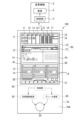
- FIG. 2 is a diagram showing an example of the operating device 100 according to the embodiment.
- the operating device 100 is used to operate the industrial machine S.
- the industrial machine S includes an element E and a controller C that controls the element E.
- the operating device 100 is used for operating the element E by an operator.
- the operation device 100 includes a display 10, a rotary switch 20, a rotary drive device 30, a brake device 40, a control section 50, a setting section 60, and a case 70 that supports or houses them.
- the display 10 displays images. For example, an information area 11, a setting area 12, and an operation area 13 are set in advance on the display 10.
- the information area 11 is arranged in the upper region of the display 10 in the vertical direction (vertical direction).
- the setting area 12 is arranged in the middle region of the display 10 in the vertical direction.
- the operation area 13 is arranged in the lower region of the display 10 in the vertical direction.
- the arrangement of the information area 11, the setting area 12, and the operation area 13 on the display 10 is arbitrary, and is not limited to the illustrated form.
- the operation area 13 may be arranged above the information area 11 in the vertical direction, or may be arranged between the information area 11 and the setting area 12 .
- Information about a plurality of elements E of the industrial machine S is displayed in the information area 11 .
- the information area 11 displays a panel I1 about the counter C1, panels I2, I3, and I4 about the spindles H1, H2, and H3, panels I5, I6, and I7 about a plurality of tools (for example, the tool TL shown in FIG. 1) mounted on the turrets T1, T2, and T3, and panels I8 and I9 about the first transport unit G1 and the second transport unit G2 of the loader device G.
- the setting area 12 a screen for the operator to set the elements E of the industrial machine S is displayed.
- a plurality of panels P1 and P2 are displayed side by side in the horizontal direction of the setting area 12.
- the panels P1 and P2 displayed in the setting area 12 can be switched by selecting the panels I1 to I9 in the information area 11.
- FIG. Also, the setting area 12 is not limited to displaying the two panels P1 and P2, and may display one or three or more panels.
- the operation area 13 panels Q1, Q2, and Q3 for the operator to operate the elements E of the industrial machine S are displayed.
- the operation area 13 displays panels Q1, Q2, and Q3 for operating the main shaft (for example, the main shaft H1 shown in FIG. 1).
- the panels Q1, Q2, and Q3 are displayed side by side in the operation area 13 in the same manner as the plurality of elements E are arranged.
- the operator can easily recognize the corresponding relationship between the plurality of elements E and the panels Q1, Q2 and Q3, and erroneous operations such as operation errors by the operator can be suppressed.
- Information for operating the main axis H1 included in the element E or the turret T1 corresponding to the main axis H1 is displayed on the panel Q1.
- Information for operating the main axis H2 included in the element E or the turret T2 corresponding to the main axis H2 is displayed on the panel Q2.
- Panel Q3 is displayed when industrial machine S has a corresponding element E (eg, spindle H3, or turret T3 corresponding to spindle H3, etc.).
- the display contents in the panels Q1, Q2, and Q3 are set according to the operation of each element, and information necessary for the operation of each element E is displayed.
- a panel related to information for operating the loader device G may be displayed in the operation area 13 . Note that the operation area 13 is not limited to displaying the three panels Q1, Q2, and Q3, and may display one, two, or four or more panels.
- a touch pad 21 is formed in the area overlapping the display 10 .
- the display 10 constitutes a touch panel together with the touch pad 21 .
- a setting unit 60 is configured by the display 10 and the touch pad 21 (touch panel).
- the operation device 100 becomes a state in which the operator can operate the element E corresponding to the panels Q1, Q2, and Q3 when the operator touches any one of the panels Q1, Q2, and Q3. An operator can operate the element E by rotating the rotary switch 20 .
- the rotary switch 20 is set to, for example, the first mode or the second mode.
- a first mode is a mode that defines the rotation range (or angle range) of the rotary switch 20 . That is, in the first mode, even if the operator rotates the rotary switch 20, the rotary switch 20 can only rotate within a predetermined rotation range in one rotation. Examples of the first mode include an override mode in which the operation is overwritten without rewriting the setting program for driving the element E of the industrial machine S, and a jog mode in which the rotary switch 20 is automatically returned to the initial position when rotated.
- a second mode is a mode in which the rotation range of the rotary switch 20 is not defined. That is, in the second mode, the operator can rotate the rotary switch 20 one or more times. As the second mode, for example, there is a handle mode in which the rotary switch 20 can be rotated one or more turns. Note that specific operations in the first mode and the second mode will be described later.
- either the first mode or the second mode may be set in advance as an initial setting. Also, at the timing when the operator selects one of the panels Q1, Q2, Q3, the display 10 may display a panel for selecting either the first mode or the second mode. In this case, when the operator selects the first mode or the second mode, the rotation mode of the rotary switch 20 is selected.
- Mode switching buttons 14 are displayed on each of panels Q1, Q2, and Q3. The operator can switch the rotation mode of the rotary switch 20 between the first mode and the second mode by touching the mode switching button 14 .
- the display 10 and the touch pad 21 described above function as a setting section 60 for setting the first mode or the second mode.
- the setting unit 60 is not limited to using the display 10 and the touch pad 21 .
- the setting unit 60 may be configured such that a mouse, a keyboard, a jog dial, or the like is connected to the operation device 100 instead of the touch pad 21 .
- a gauge panel 15 is displayed in the operation area 13 .
- the gauge panel 15 graphically displays the rotation amount (operation amount), rotation position (rotation angle), and the like of the rotary switch 20 .
- the display contents of the gauge panel 15 are switched according to the panel Q1, Q2, Q3 selected by the operator.
- the gauge panel 15 is changed in scale, rotation range, color, shape, etc. according to the selected panel Q1, Q2, Q3.
- the gauge panel 15 displays the increase and decrease of the bar indicating the amount of rotation, the movement of the mark indicating the rotation position, and the like.
- the gauge panel 15 may also display numerical values such as the rotation amount and rotation position of the rotary switch 20 . The operator can easily grasp the rotation amount and rotation position of the rotary switch 20 by looking at the display on the gauge panel 15 .
- the rotary switch 20 is rotatably provided on the lower portion 70A of the case 70.
- a rotary switch 20 is arranged below the display 10 . With this arrangement, the display 10 is not hidden by the hand operating the rotary switch 20 , so the operator can operate the rotary switch 20 while viewing the display on the display 10 .
- various buttons such as an emergency stop button may be provided on the lower portion 70A of the case 70 along with the rotary switch 20 .
- the rotary drive device 30 is provided inside the case 70 .
- the rotary drive device 30 applies a rotary drive force to the rotary switch 20 .
- a servomotor or the like is used as the rotary drive device 30 .
- the rotary drive device 30, for example, has a rotary drive shaft connected to the shaft portion of the rotary switch 20, and is provided so as to apply a rotary force to the rotary switch 20 in either clockwise or counterclockwise direction in FIG. Further, when a servomotor is used as the rotation drive device 30, the rotation switch 20 can be held at a predetermined rotation position (rotation angle).
- the braking device 40 is provided inside the case 70 .
- the brake device 40 applies a load to the rotation of the rotary switch 20 or regulates the rotation.
- the brake device 40 applies a load to the rotation of the rotary switch 20 or regulates the rotation, for example, by sandwiching the shaft portion of the rotary switch 20 or the rotary drive shaft of the rotary drive device 30 .
- a load to the rotation of the rotary switch 20 By applying a load to the rotation of the rotary switch 20, a worker can feel a state of feeling resistance to rotation, a state of being difficult to turn, a state of requiring a strong force to turn, etc., when rotating the rotary switch 20. ⁇
- the brake device 40 can restrict the rotation of the rotary switch 20 by strongly pinching the shaft portion or the rotary drive shaft. By restricting the rotation of the rotary switch 20, the operator cannot rotate the rotary switch 20 from that position.
- the brake device 40 can allow the rotation switch 20 to rotate counterclockwise from a predetermined rotation position while restricting rotation in the clockwise direction, and can allow rotation in the clockwise direction while restricting rotation in the counterclockwise direction from other rotation positions. As a result, the rotary switch 20 becomes rotatable within a range from a predetermined rotational position to another rotational position.
- the control unit 50 controls the rotary drive device 30 and the brake device 40 according to the first mode or the second mode set by the setting unit 60 (touch pad 21). In the first mode, the control unit 50 controls at least one of the rotary drive device 30 and the brake device 40 so as to restrict the rotation of the rotary switch 20 beyond a preset rotation range (that is, to allow the rotary switch 20 to rotate within the preset rotation range). Specific contents of control of the rotation drive device 30 and the brake device 40 by the control unit 50 will be described later.
- control unit 50 controls the display content displayed on the display 10 .
- the control unit 50 changes, for example, the length of the figure displayed on the gauge panel 15 or the position of the mark according to the amount of rotation or the position of rotation of the rotary switch 20 .
- the rotation amount or rotation position of the rotary switch 20 is displayed on the gauge panel 15 by changing the length of the figure or the position of the mark. Therefore, the operator can easily recognize the rotation amount or rotation position of the rotary switch 20 .
- the control unit 50 When displaying a plurality of elements E in the information area 11, the control unit 50 displays a plurality of panels Q1 and the like corresponding to the plurality of elements E. As described above, the operator touch-inputs and selects one of the plurality of panels Q1, etc., so that the control unit 50 can operate the element E corresponding to the selected panel Q1, etc. by the rotary switch 20. As described above, when the operator selects one of the plurality of panels Q1 or the like, the control unit 50 may set the predetermined first mode or second mode. In this way, when there are a plurality of elements E, simply selecting one of the panels Q1 or the like sets the first mode or second mode with predetermined contents, so that the operator's operation burden can be reduced. For example, in an initial state in which the panel Q1 or the like is selected, the control unit 50 can set the rotation mode of the rotary switch 20 to the first mode (for example, override mode or the like).
- the first mode for example, override mode or the like
- the control unit 50 also determines whether or not the operator has touched the mode switching button 14 displayed on the panel Q1 or the like. When determining that the operator touches the mode switching button 14, the controller 50 switches the rotation mode of the rotary switch 20 from the first mode to the second mode or from the second mode to the first mode.
- the control unit 50 may switch between the plurality of first modes and second modes each time the operator touches the mode switching button 14, or may display a list for selecting one of the plurality of first modes and second modes when the operator touches the mode switching button 14.
- the control unit 50 switches to one of the plurality of first modes selected by the operator or to the second mode.
- the operation device 100 can apply a plurality of second modes, the operator can select one.
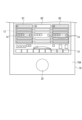
- FIG. 3 is a diagram showing a state in which one of the panels Q1, Q2, and Q3 displayed on the display 10 is selected. As shown in FIG. 3, when the operator touches a part of panel Q2 among panels Q1, Q2, and Q3 displayed in operation area 13 of display 10, control unit 50 determines that panel Q2 has been selected. Although FIG. 3 shows the state in which the panel Q2 is selected, the same is true when the panels Q1 and Q3 are selected. Further, FIG. 3 shows an example in which the operator touches the upper portion of the panel Q2 in the vertical direction, but the present invention is not limited to this configuration, and the operator may select the central portion or the lower portion of the panel Q2 in the vertical direction by touch input.
- FIG. 4 is a diagram showing a state in which panel Q2 is selected.
- the control unit 50 darkens or blurs the panels Q1 and Q3 that have not been selected in the operation area 13 .
- This display allows the operator to easily understand that panel Q2 has been selected.
- the control unit 50 is not limited to darkening or blurring the unselected panels Q1 and Q3.
- the control unit 50 may hide the unselected panels Q1 and Q3 in the operation area 13 and display the selected panel Q2 over the entire operation area 13 .
- the control unit 50 displays the gauge panel 15 corresponding to the panel Q2.
- the panel Q2 is preset to the override mode, which is the first mode, as an initial setting at the time of selection, for example.
- the control unit 50 switches the gauge panel 15 to display corresponding to the override mode according to the selection of the panel Q2.
- the control unit 50 may change the state of the gauge panel 15 from the state before the selection when the panel Q1 or the like is selected. For example, when the panel Q2 is selected, the control section 50 may be switched so that the gauge panel 15 as a whole is made larger than before the selection.
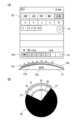
- FIG. 5 is a diagram showing the panel Q2 displayed on the display 10
- (B) is a diagram explaining the rotary switch 20 in the first mode.
- the control unit 50 changes the numerical value displayed in the panel Q2 according to the operation of the rotary switch 20 by the operator.
- the control unit 50 displays the level gauge 16 corresponding to the override mode, which is the first mode, within the panel Q2.
- This level gauge 16 indicates, for example, a scale indicating which set value (%) is to be overridden in a preset operation program.
- the level gauge 16 shown in FIG. 5(A) allows overriding between 0% and 150%.
- a selection button for selecting a plurality of driving units that configure the element E may be displayed in the panel Q2. The operator can specify and operate the driving section of the element E by touching and selecting the selection button.
- the control unit 50 causes the level gauge 16 to display a bar 16a indicating the override set value (%).
- the operator can adjust the override set value (%) by rotating the rotary switch 20 .
- the control unit 50 changes the length of the bar 16a and changes the position of the right end of the bar 16a according to the rotational position of the rotary switch 20 .
- the operator can easily recognize the override set value (%) by checking the length of the bar 16a of the level gauge 16 on the scale.
- the gauge panel 15 is provided with a notch display 15a indicating the provision of a notch feel and a level gauge 15b.
- the notch display 15a is displayed in a sawtooth shape (jagged shape, zigzag shape) along an arc to indicate that the rotation of the rotary switch 20 is given a notch feel.
- the level gauge 15b is provided in an arc shape along the arc-shaped notch display 15a. Similar to the level gauge 16 of the panel Q2, the level gauge 15b displays a bar 15c in the level gauge 15b along with a scale indicating which set value (%) the override is set to.
- the control unit 50 causes the gauge panel 15 to display a numerical value display 15d indicating the override set value (%) within the arc-shaped area. The operator can accurately grasp the override set value (%) by looking at the numerical display 15d.
- the form of the gauge panel 15 described above is an example, and other display forms may be used for the notch display 15a and the level gauge 15b.
- the control unit 50 defines the rotation range R of the rotary switch 20.
- the controller 50 sets the rotation range R of the rotary switch 20 to be rotatable from one end 22 to the other end 23, as shown in FIG. 5(B).
- the control unit 50 regulates the rotation of the rotary switch 20 by operating the brake device 40 or by applying a rotational force to the rotary switch 20 in the direction opposite to the direction in which the operator intends to turn the rotary switch 20.
- the operator cannot turn the rotary switch 20 beyond the rotary range R in the first mode, so that excessive setting of the element E can be prevented.
- the operator cannot set the override set value (%) over 150%.
- control unit 50 can control at least one of the rotary drive device 30 and the braking device 40 so that when the rotary switch 20 is rotated from the end 22 toward the other end 23 with one end 22 of the rotation range R as the origin, as shown in FIG.
- the intermediate position 24 is set at a position where the degree of override (%) is 100%.
- the override setting value (%) is set to be changeable between 0% and 150% as the rotation range R.
- the rotation range R1 is set to a range from 0% to 100% of the override set value (%).
- the rotation range R2 is set to a range from 100% to 150% with an override set value (%). That is, the intermediate position 24 is set at a position where the set value (%) of override is 100%. In this case, when the operator rotates the rotary switch 20, if the override set value (%) is set to a value exceeding 100%, the rotation becomes slow. Therefore, the operator can easily recognize that the override set value (%) is about to be set to a value exceeding 100%.
- the rotation range R is initially set in advance according to the mode, the rotation range R can be changed after the initial setting.
- the control unit 50 can control at least one of the rotary drive device 30 and the brake device 40 so that when the rotary switch 20 is rotated, a load is applied to the rotation of the rotary switch 20 each time a predetermined angle is reached. With this control, the operator feels a notch at every predetermined angle when the rotary switch 20 is rotated, so that the operator can easily recognize that the rotary switch 20 is being rotated.
- the notch feel is realized by one or both of applying a driving force in the direction opposite to the rotation of the rotary switch 20 by the rotary driving device 30 and by applying a load to the rotation of the rotary switch 20 by the brake device 40.
- the rotary switch 20 is held at a predetermined rotary position by at least one of the rotary drive device 30 and the brake device 40, but the worker further rotates the rotary switch 20 to release the load on the rotary switch 20, thereby imparting a notch feel to the operator.
- the strength of the load at the predetermined rotational position may be changed depending on the set mode. For example, by increasing the load at a predetermined rotational position, it is possible to make the rotary switch 20 feel like a selector switch.
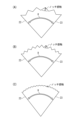
- FIGS. 6(A), (B), and (C) are diagrams showing examples of notch feel in the rotary switch 20.
- the control unit 50 switches a predetermined rotational position (angular position) at which a notch feel is received when the rotary switch 20 is rotated, according to the set mode.
- the rotation range R may be divided into five, and the notch feeling may be obtained four times by the time the rotary switch 20 rotates from one end 22 to the other end 23 .
- the operator obtains the same feel as a switch with five steps.
- the rotation range R of the rotary switch 20 may be divided into 10 so that the notch feeling is obtained nine times while the rotary switch 20 rotates from one end 22 to the other end 23.
- FIG. Good shows the same rotation range R of the rotary switch 20
- the rotation range R is set individually according to the mode as described above.
- the operator can change the default notch feel.
- the control unit 50 may give the same notch feel to the entire rotation range R, or may make the notch feel stronger or weaker for a part of the rotation range R.
- FIG. 7 is a diagram showing a state in which the second mode is set.
- the controller 50 switches the rotation mode of the rotary switch 20 from the first mode to the second mode.
- the control unit 50 switches the gauge panel 15 to display corresponding to the override mode according to the selection of the panel Q2.
- the "AUTO" button in panel Q2 is highlighted.
- FIG. 8(A) is a diagram showing the panel Q2 displayed on the display 10 in the second mode.
- FIG. 8B is a diagram illustrating the rotary switch 20 in the second mode.
- the control unit 50 sets a handle mode in which the rotation range R of the rotary switch 20 is not defined.
- the control unit 50 controls the rotary switch 20 so that it can rotate one or more turns in each of the clockwise direction and the counterclockwise direction.
- the handle mode may be, for example, a mode in which the drive section of the element E is driven by rotating the rotary switch 20, or a mode in which the speed of the drive section of the element E is set by rotating the rotary switch 20.
- the control unit 50 switches the gauge panel 15 to display corresponding to the second mode (handle mode) in accordance with the second mode.
- the "HND" button in the panel Q2 is highlighted.
- the control unit 50 displays the gauge panel 15 corresponding to the second mode on the display 10 .
- the notch display 15a is displayed on the gauge panel 15 to indicate that the notch feel is being given.
- the notch display 15a is displayed in a sawtooth shape (jagged shape, zigzag shape) along the circular arc.
- the second mode is set in advance so as to provide a greater notch feel than the above-described first mode (override mode).
- the notch display 15a shown in FIG. 8(A) has a larger serrated shape than the notch display 15a in the first mode (see FIG. 5(A)).
- the gauge panel 15 displays coordinate information 15e of the selected axis. The coordinate information 15e is displayed in the same decimal unit as the set feed speed "0.01".
- the current coordinate value is displayed in the center, numerical values are displayed in ascending order from the current coordinate value on the left side, and numerical values are displayed in ascending order from the current coordinate value on the right side.
- the current coordinate value “0.30” of the selected X-axis is displayed, “0.29” and “0.28” are displayed side by side on the left side, and “0.31” and “0.32” are displayed side by side on the right side.
- the control unit 50 can control at least one of the rotary drive device 30 and the brake device 40 so that when the rotary switch 20 is rotated in the second mode, a load is applied to the rotation of the rotary switch 20 each time a predetermined angle is reached.
- the control unit 50 can control at least one of the rotary drive device 30 and the brake device 40 so that when the rotary switch 20 is rotated in the second mode, a load is applied to the rotation of the rotary switch 20 each time a predetermined angle is reached.
- the control unit 50 can control at least one of the rotary drive device 30 and the brake device 40 so that when the rotary switch 20 is rotated in the second mode, a load is applied to the rotation of the rotary switch 20 each time a predetermined angle is reached.
- the current X-axis coordinate value of "0.29” is displayed in the center.
- “0.28” and “0.27” are displayed side by side on the left side of "0.29”
- "0.30” and “0.31” are displayed side by side on the right side.
- the current coordinate value is displayed in the center, and the left and right numerical values are similarly displayed in accordance with the center coordinate value.
- FIG. 9 is a diagram showing a state in which another first mode is set.
- the controller 50 switches the rotation mode of the rotary switch 20 from the second mode to the first mode.
- the operator can easily switch from the second mode to the first mode by pressing the mode switching button 14 .
- the mode switching button 14 is touch-input after switching to the first mode (override mode) shown in FIG. 5 and the second mode (handle mode) shown in FIG.
- the mode switching button 14 is used not only for switching between the first mode and the second mode as described above, but also as a button for selecting one of a plurality of modes in the first mode or the second mode.
- FIG. 10(A) is a diagram showing the panel Q2 displayed on the display 10 in another first mode.
- FIG. 10B is a diagram illustrating rotary switch 20 in another first mode.
- the control section 50 defines the rotation range R of the rotary switch 20 in the same manner as in the first mode shown in FIG.
- the jog mode is shown in the following description.
- the jog mode may, for example, be in the form of increasing or decreasing the speed of the drive of element E by rotating rotary switch 20 .
- the control unit 50 displays the level gauge 16 corresponding to the jog mode, which is the first mode, within the panel Q2. At this time, as shown in FIG. 10A, the "JOG" button in panel Q2 is highlighted.
- the control unit 50 displays the gauge panel 15 corresponding to the jog mode.
- a bar 15f arranged in the center as an initial position "-" is displayed on the left side of the bar 15f, and "+” is displayed on the right side of the bar.
- "+” and "-” displayed on the left and right of the bar 15f indicate the moving direction of the axis.
- the notch display 15a does not have a sawtooth shape but an arcuate curve because it does not give a notch feel. Therefore, the operator can easily grasp that the notch feel is not given in the jog mode.
- the control unit 50 rotates the rotary switch 20 to move the target axis in the "+” or "-" direction. For example, rotating the rotary switch 20 clockwise moves the axis of interest in the "+” direction, or rotating the rotary switch 20 counterclockwise moves the axis of interest in the "-” direction.
- the control unit 50 causes the bar 15f on the gauge panel 15 to shift to the "+" side or the "-" side in accordance with the rotation angle of the rotary switch 20 and display. This display allows the operator to easily recognize how much the rotary switch 20 is being rotated.
- the control unit 50 defines the rotation range R of the rotary switch 20 .
- the controller 50 sets the rotation range R' of the rotary switch 20 to be rotatable from one end 25 to the other end 26, as shown in FIG. 10B.
- the control unit 50 regulates the rotation of the rotary switch 20 by operating the brake device 40 or by applying a rotational force to the rotary switch 20 in the direction opposite to the direction in which the operator intends to turn the rotary switch 20.
- the control unit 50 controls the rotary drive device 30 so that the rotary switch 20 is returned to the initial position 27 when the rotary switch 20 is rotated from the initial position 27 with the intermediate portion of the rotation range R′ as the initial position (or origin) 27.
- the bar 15f is arranged in the center of the gauge panel 15 corresponding to the initial position 27, and by rotating the rotary switch 20, the bar 15f is displayed by transitioning to the "+" side or the "-" side as described above.
- the control unit 50 controls at least one of the rotary drive device 30 and the brake device 40 so that when the rotary switch 20 is rotated from the origin 27, a load is applied to the rotation of the rotary switch 20 in a rotation range R4 from the midway position 28 to one end 25 of the rotation range R' and from the midway position 29 to the other end 26 of the rotation range R'.
- the control unit 50 does not apply a load to the rotation of the rotary switch 20 in the rotation range R3, which is the intermediate portion of the rotation range R'.
- the control unit 50 controls to apply a load to the rotation of the rotary switch 20 in the rotation range R4 from the intermediate position 28 to the end 25.
- the control unit 50 controls to apply a load to the rotation of the rotary switch 20 in the rotation range R5 from the intermediate position 29 to the end 26 when the rotary switch 20 is rotated clockwise.
- the same load or different loads may be applied to the rotation of the rotary switch 20 in the rotation range R4 and the rotation range R5.
- the operator can rotate the rotary switch 20 while feeling the force that causes the rotary switch 20 to return to the origin 27 from the origin 27 to the intermediate position 28 to the end 25 and to the intermediate position 29 from the origin 27 to the end 26 (that is, the rotation range R3).
- the operator turns the rotary switch 20 beyond the middle position 28 toward the end portion 25 (that is, the rotation range R4), and when the worker turns the rotary switch 20 beyond the middle position 29 toward the end portion 26 (that is, the rotation range R5), in addition to the force that causes the rotary switch 20 to return to the origin 27, a load is applied to the rotation of the rotary switch 20.
- the operator feels that the rotation of the rotary switch 20 is heavier in the rotation ranges R4 and R5 than in the rotation range R3. That is, since the rotation of the rotary switch 20 becomes heavy in the rotation ranges R4 and R5 near the ends 25 and 26 on both sides of the rotation range R', the operator can easily recognize that the ends 25 and 26 of the rotation range R' are near.
- a notch feel may be given to the rotation of the rotary switch 20 as in the first mode (override mode) shown in FIG. 5 and the second mode (handle mode) shown in FIG. Further, in the above-described first mode (override mode) shown in FIG. 5 and second mode (handle mode) shown in FIG. In the first mode shown in FIG. 5 and the second mode shown in FIG. 8, the rotation of the rotary switch 20 may not be given a notch feel.
- FIG. 11 is a flow chart showing an example of a control method for the operating device 100 according to the embodiment.
- the control unit 50 determines whether or not the panel Q1 or the like has been selected by the operator (step S01). As described above, the panel Q1 and the like are displayed in the operation area 13 of the display 10 of the operation device 100. FIG. In addition, in the flow shown in FIG. 11, one or a plurality of panels Q1 or the like are displayed in the operation area 13 of the display 10. FIG. When the operator touches the panel Q1 or the like, the control unit 50 determines that the panel Q1 or the like is selected. Further, when determining that the panel Q1 or the like is not selected (NO in step S01), the control unit 50 repeats step S01.
- step S02 determines whether or not the first mode is set. If the controller 50 determines that the first mode is not set (NO in step S02), the process ends. In step S02, the control unit 50 determines whether or not the initial setting of the selected panel Q1 or the like is the first mode. If the first mode is not set in step S02, that is, if the initial setting is the second mode, the control unit 50 does not perform the processes after step S03 in the flow shown in FIG. 11, and executes the contents of the second mode.
- step S03 when the control unit 50 determines that the first mode is set (YES in step S02), it defines the rotation ranges R, R' of the rotary switch 20 (step S03).
- the control unit 50 defines the rotation ranges R, R' of the rotary switch 20 according to the first mode (override mode, jog mode) corresponding to the panel Q1 and the like.
- the controller 50 controls the rotary drive device 30 and the brake device 40 (step S04).
- step S04 the control unit 50 controls at least one of the rotation drive device 30 and the brake device 40 so as to restrict the rotation of the rotary switch 20 when the rotation ranges R, R' are exceeded.
- the controller 50 executes the first mode (override mode, jog mode) while the rotation of the rotary switch 20 is restricted to the rotation ranges R, R'.
- FIG. 12 is a flowchart showing another example of the control method of the operating device 100.
- the control unit 50 when the operating device 100 can operate a plurality of elements E, the control unit 50 causes the display 10 to display information corresponding to the plurality of elements E (step S11).
- the control unit 50 causes the information area 11 of the display 10 to display a plurality of panels I ⁇ b>1 etc. as information corresponding to the plurality of elements E.
- the control unit 50 causes the operation area 13 of the display 10 to display a plurality of panels Q1 and the like corresponding to the plurality of elements E (step S12).
- the control unit 50 arranges and displays a plurality of panels Q1 and the like in the operation area 13 so as to correspond to a plurality of operable elements E.
- the control unit 50 determines whether or not the panel Q1 etc. has been selected from the plurality of panels Q1 etc. (step S13).
- the controller 50 determines that one of the panels Q1 and the like is selected.
- the control unit 50 repeats the process of step S13.
- the control unit 50 sets the rotation mode of the rotary switch 20 to a predetermined first mode or second mode (step S14). As described above, the panel Q1 and the like are set to the rotation mode in advance as an initial setting.
- the control unit 50 sets the predetermined first mode or second mode according to the panel Q1 and the like.
- step S15 the control unit 50 determines whether or not there is an input for mode switching.
- step S15 for example, the control unit 50 determines whether or not the operator touches the mode switching button 14 of the panel Q1 or the like.
- the control unit 50 repeats the process of step S14. If the controller 50 determines that there is a mode switching input (YES in step S15), it changes the rotation mode of the rotary switch 20 from the first mode to the second mode or from the second mode to the first mode (step S16).
- the control unit 50 switches from the first mode to the second mode. Further, for example, if the rotation mode of the rotary switch 20 at the time when the mode switching button 14 is touch-inputted is the second mode, the control unit 50 switches from the second mode to the first mode.
- the control unit 50 ends the series of processes by executing step S16.
- the control unit 50 controls the display of the display 10, the rotary drive device 30, and the brake device 40 according to the set first mode or second mode.
- the operating device 100 and the method for controlling the operating device 100 when the first mode is set, at least one of the rotary drive device 30 and the brake device 40 defines the rotation range R of the rotary switch 20. Therefore, in the first mode, the operator cannot turn the rotary switch 20 beyond the rotation range R, so that excessive setting of the element E can be prevented. Further, when one of the plurality of elements E is selected and operated, the rotary switch 20 suitable for each element E can be easily realized by setting the first mode or the second mode. Furthermore, by switching modes, a plurality of elements E can be operated with one rotary switch 20, and the space for arranging switches in the operating device 100 can be reduced. Further, even if part or all of the element E is replaced, it can be dealt with by changing the setting of the first mode or the second mode, so there is no need to replace parts, and versatility can be enhanced.
- the information when the operator turns the rotary switch 20 is displayed on the gauge panel 15 such as the panel Q1 as changes in numerical values and figures, but it is not limited to this form.
- the operation device 100 has a speaker, in addition to the display on the display 10, numerical values and the like may be output by voice.
- the speaker may output a warning sound or the like when the rotation of the rotary switch 20 approaches the end of the rotation range R in the first mode.
Landscapes
- Engineering & Computer Science (AREA)
- Physics & Mathematics (AREA)
- General Physics & Mathematics (AREA)
- Automation & Control Theory (AREA)
- Human Computer Interaction (AREA)
- Manufacturing & Machinery (AREA)
- Rotary Switch, Piano Key Switch, And Lever Switch (AREA)
Priority Applications (2)
| Application Number | Priority Date | Filing Date | Title |
|---|---|---|---|
| JP2023575126A JPWO2023139983A1 (https=) | 2022-01-24 | 2022-12-14 | |
| EP22922134.6A EP4471518A4 (en) | 2022-01-24 | 2022-12-14 | ACTUATING DEVICE AND METHOD FOR CONTROLLING THE ACTUATING DEVICE |
Applications Claiming Priority (2)
| Application Number | Priority Date | Filing Date | Title |
|---|---|---|---|
| JP2022-008934 | 2022-01-24 | ||
| JP2022008934 | 2022-01-24 |
Publications (1)
| Publication Number | Publication Date |
|---|---|
| WO2023139983A1 true WO2023139983A1 (ja) | 2023-07-27 |
Family
ID=87348090
Family Applications (1)
| Application Number | Title | Priority Date | Filing Date |
|---|---|---|---|
| PCT/JP2022/045973 Ceased WO2023139983A1 (ja) | 2022-01-24 | 2022-12-14 | 操作装置及び操作装置の制御方法 |
Country Status (3)
| Country | Link |
|---|---|
| EP (1) | EP4471518A4 (https=) |
| JP (1) | JPWO2023139983A1 (https=) |
| WO (1) | WO2023139983A1 (https=) |
Citations (6)
| Publication number | Priority date | Publication date | Assignee | Title |
|---|---|---|---|---|
| JP2005019113A (ja) * | 2003-06-25 | 2005-01-20 | Alps Electric Co Ltd | 力覚付与型入力装置 |
| JP2007069896A (ja) * | 2005-09-02 | 2007-03-22 | Valeo Systemes Thermiques | 自動車のダッシュボード用制御ユニット |
| JP2009069931A (ja) * | 2007-09-11 | 2009-04-02 | Alps Electric Co Ltd | 回転式入力装置 |
| JP2010211270A (ja) * | 2009-03-06 | 2010-09-24 | Alps Electric Co Ltd | 操作感触付与型入力装置 |
| JP2016062309A (ja) | 2014-09-18 | 2016-04-25 | オークマ株式会社 | 手動パルスハンドル |
| JP2022008934A (ja) | 2017-10-25 | 2022-01-14 | マスターカード インターナシヨナル インコーポレーテツド | ネットワークを介して機械可読コードデータを伝送する方法及びシステム |
Family Cites Families (1)
| Publication number | Priority date | Publication date | Assignee | Title |
|---|---|---|---|---|
| JP6738580B2 (ja) * | 2016-09-16 | 2020-08-12 | アルプスアルパイン株式会社 | 操作感触付与型入力装置 |
-
2022
- 2022-12-14 WO PCT/JP2022/045973 patent/WO2023139983A1/ja not_active Ceased
- 2022-12-14 JP JP2023575126A patent/JPWO2023139983A1/ja active Pending
- 2022-12-14 EP EP22922134.6A patent/EP4471518A4/en not_active Withdrawn
Patent Citations (6)
| Publication number | Priority date | Publication date | Assignee | Title |
|---|---|---|---|---|
| JP2005019113A (ja) * | 2003-06-25 | 2005-01-20 | Alps Electric Co Ltd | 力覚付与型入力装置 |
| JP2007069896A (ja) * | 2005-09-02 | 2007-03-22 | Valeo Systemes Thermiques | 自動車のダッシュボード用制御ユニット |
| JP2009069931A (ja) * | 2007-09-11 | 2009-04-02 | Alps Electric Co Ltd | 回転式入力装置 |
| JP2010211270A (ja) * | 2009-03-06 | 2010-09-24 | Alps Electric Co Ltd | 操作感触付与型入力装置 |
| JP2016062309A (ja) | 2014-09-18 | 2016-04-25 | オークマ株式会社 | 手動パルスハンドル |
| JP2022008934A (ja) | 2017-10-25 | 2022-01-14 | マスターカード インターナシヨナル インコーポレーテツド | ネットワークを介して機械可読コードデータを伝送する方法及びシステム |
Non-Patent Citations (1)
| Title |
|---|
| See also references of EP4471518A4 |
Also Published As
| Publication number | Publication date |
|---|---|
| JPWO2023139983A1 (https=) | 2023-07-27 |
| EP4471518A1 (en) | 2024-12-04 |
| EP4471518A4 (en) | 2025-12-24 |
Similar Documents
| Publication | Publication Date | Title |
|---|---|---|
| CN104932419B (zh) | 使用手动操作工作机械的模拟装置 | |
| JP6144582B2 (ja) | Nc工作機械の操作装置 | |
| US10456880B2 (en) | Processing machine and processing machine line | |
| JP2009028871A (ja) | ロボット制御装置 | |
| EP4357052A1 (en) | Vibration-cutting condition setting device for machine tool | |
| US10315305B2 (en) | Robot control apparatus which displays operation program including state of additional axis | |
| WO2017149667A1 (ja) | 工作機械管理装置 | |
| CN105938411B (zh) | 控制面板 | |
| JP6359026B2 (ja) | 加工機械ライン | |
| WO2023139983A1 (ja) | 操作装置及び操作装置の制御方法 | |
| KR102205034B1 (ko) | 표시 장치 | |
| WO2016185948A1 (ja) | 工作機械の操作盤 | |
| JP6713042B2 (ja) | 工作機械管理システム | |
| JP7474581B2 (ja) | 操作盤 | |
| JP5871372B2 (ja) | アーク溶接装置 | |
| WO2021161737A1 (ja) | 表示制御装置 | |
| JPH06202724A (ja) | 数値制御装置 | |
| CN115708023A (zh) | 用于计算机数控系统的操作设备 | |
| JP4770076B2 (ja) | 数値制御装置 | |
| WO2022107822A1 (ja) | 制御装置 | |
| JP6629918B2 (ja) | 案内表示方法 | |
| JP7700883B2 (ja) | 操作装置及び表示方法 | |
| JP7436796B2 (ja) | ロボットのプログラム作成支援装置 | |
| JPH05282047A (ja) | 手動送り運転処理装置 | |
| WO2022107818A1 (ja) | 制御装置 |
Legal Events
| Date | Code | Title | Description |
|---|---|---|---|
| 121 | Ep: the epo has been informed by wipo that ep was designated in this application |
Ref document number: 22922134 Country of ref document: EP Kind code of ref document: A1 |
|
| WWE | Wipo information: entry into national phase |
Ref document number: 2023575126 Country of ref document: JP |
|
| NENP | Non-entry into the national phase |
Ref country code: DE |
|
| ENP | Entry into the national phase |
Ref document number: 2022922134 Country of ref document: EP Effective date: 20240826 |
|
| WWW | Wipo information: withdrawn in national office |
Ref document number: 2022922134 Country of ref document: EP |