WO2023136032A1 - 情報処理装置、方法及びプログラム - Google Patents
情報処理装置、方法及びプログラム Download PDFInfo
- Publication number
- WO2023136032A1 WO2023136032A1 PCT/JP2022/045980 JP2022045980W WO2023136032A1 WO 2023136032 A1 WO2023136032 A1 WO 2023136032A1 JP 2022045980 W JP2022045980 W JP 2022045980W WO 2023136032 A1 WO2023136032 A1 WO 2023136032A1
- Authority
- WO
- WIPO (PCT)
- Prior art keywords
- information
- distribution
- flaw
- severity
- information processing
- Prior art date
- Legal status (The legal status is an assumption and is not a legal conclusion. Google has not performed a legal analysis and makes no representation as to the accuracy of the status listed.)
- Ceased
Links
Images


Classifications
-
- G—PHYSICS
- G06—COMPUTING OR CALCULATING; COUNTING
- G06T—IMAGE DATA PROCESSING OR GENERATION, IN GENERAL
- G06T7/00—Image analysis
- G06T7/0002—Inspection of images, e.g. flaw detection
- G06T7/0004—Industrial image inspection
-
- G—PHYSICS
- G06—COMPUTING OR CALCULATING; COUNTING
- G06T—IMAGE DATA PROCESSING OR GENERATION, IN GENERAL
- G06T7/00—Image analysis
- G06T7/0002—Inspection of images, e.g. flaw detection
- G06T7/0004—Industrial image inspection
- G06T7/0008—Industrial image inspection checking presence/absence
-
- G—PHYSICS
- G01—MEASURING; TESTING
- G01N—INVESTIGATING OR ANALYSING MATERIALS BY DETERMINING THEIR CHEMICAL OR PHYSICAL PROPERTIES
- G01N23/00—Investigating or analysing materials by the use of wave or particle radiation, e.g. X-rays or neutrons, not covered by groups G01N3/00 – G01N17/00, G01N21/00 or G01N22/00
- G01N23/02—Investigating or analysing materials by the use of wave or particle radiation, e.g. X-rays or neutrons, not covered by groups G01N3/00 – G01N17/00, G01N21/00 or G01N22/00 by transmitting the radiation through the material
- G01N23/04—Investigating or analysing materials by the use of wave or particle radiation, e.g. X-rays or neutrons, not covered by groups G01N3/00 – G01N17/00, G01N21/00 or G01N22/00 by transmitting the radiation through the material and forming images of the material
-
- G—PHYSICS
- G06—COMPUTING OR CALCULATING; COUNTING
- G06T—IMAGE DATA PROCESSING OR GENERATION, IN GENERAL
- G06T5/00—Image enhancement or restoration
- G06T5/40—Image enhancement or restoration using histogram techniques
-
- G—PHYSICS
- G06—COMPUTING OR CALCULATING; COUNTING
- G06T—IMAGE DATA PROCESSING OR GENERATION, IN GENERAL
- G06T7/00—Image analysis
- G06T7/50—Depth or shape recovery
-
- G—PHYSICS
- G06—COMPUTING OR CALCULATING; COUNTING
- G06T—IMAGE DATA PROCESSING OR GENERATION, IN GENERAL
- G06T7/00—Image analysis
- G06T7/60—Analysis of geometric attributes
- G06T7/62—Analysis of geometric attributes of area, perimeter, diameter or volume
-
- G—PHYSICS
- G06—COMPUTING OR CALCULATING; COUNTING
- G06V—IMAGE OR VIDEO RECOGNITION OR UNDERSTANDING
- G06V10/00—Arrangements for image or video recognition or understanding
- G06V10/40—Extraction of image or video features
- G06V10/42—Global feature extraction by analysis of the whole pattern, e.g. using frequency domain transformations or autocorrelation
- G06V10/422—Global feature extraction by analysis of the whole pattern, e.g. using frequency domain transformations or autocorrelation for representing the structure of the pattern or shape of an object therefor
- G06V10/426—Graphical representations
-
- G—PHYSICS
- G01—MEASURING; TESTING
- G01N—INVESTIGATING OR ANALYSING MATERIALS BY DETERMINING THEIR CHEMICAL OR PHYSICAL PROPERTIES
- G01N2223/00—Investigating materials by wave or particle radiation
- G01N2223/60—Specific applications or type of materials
- G01N2223/646—Specific applications or type of materials flaws, defects
-
- G—PHYSICS
- G01—MEASURING; TESTING
- G01N—INVESTIGATING OR ANALYSING MATERIALS BY DETERMINING THEIR CHEMICAL OR PHYSICAL PROPERTIES
- G01N2223/00—Investigating materials by wave or particle radiation
- G01N2223/60—Specific applications or type of materials
- G01N2223/652—Specific applications or type of materials impurities, foreign matter, trace amounts
-
- G—PHYSICS
- G06—COMPUTING OR CALCULATING; COUNTING
- G06T—IMAGE DATA PROCESSING OR GENERATION, IN GENERAL
- G06T2200/00—Indexing scheme for image data processing or generation, in general
- G06T2200/24—Indexing scheme for image data processing or generation, in general involving graphical user interfaces [GUIs]
-
- G—PHYSICS
- G06—COMPUTING OR CALCULATING; COUNTING
- G06T—IMAGE DATA PROCESSING OR GENERATION, IN GENERAL
- G06T2207/00—Indexing scheme for image analysis or image enhancement
- G06T2207/10—Image acquisition modality
- G06T2207/10072—Tomographic images
- G06T2207/10081—Computed x-ray tomography [CT]
-
- G—PHYSICS
- G06—COMPUTING OR CALCULATING; COUNTING
- G06T—IMAGE DATA PROCESSING OR GENERATION, IN GENERAL
- G06T2207/00—Indexing scheme for image analysis or image enhancement
- G06T2207/10—Image acquisition modality
- G06T2207/10116—X-ray image
-
- G—PHYSICS
- G06—COMPUTING OR CALCULATING; COUNTING
- G06T—IMAGE DATA PROCESSING OR GENERATION, IN GENERAL
- G06T2207/00—Indexing scheme for image analysis or image enhancement
- G06T2207/20—Special algorithmic details
- G06T2207/20081—Training; Learning
-
- G—PHYSICS
- G06—COMPUTING OR CALCULATING; COUNTING
- G06T—IMAGE DATA PROCESSING OR GENERATION, IN GENERAL
- G06T2207/00—Indexing scheme for image analysis or image enhancement
- G06T2207/20—Special algorithmic details
- G06T2207/20084—Artificial neural networks [ANN]
-
- G—PHYSICS
- G06—COMPUTING OR CALCULATING; COUNTING
- G06T—IMAGE DATA PROCESSING OR GENERATION, IN GENERAL
- G06T2207/00—Indexing scheme for image analysis or image enhancement
- G06T2207/30—Subject of image; Context of image processing
- G06T2207/30108—Industrial image inspection
- G06T2207/30164—Workpiece; Machine component
-
- G—PHYSICS
- G06—COMPUTING OR CALCULATING; COUNTING
- G06V—IMAGE OR VIDEO RECOGNITION OR UNDERSTANDING
- G06V2201/00—Indexing scheme relating to image or video recognition or understanding
- G06V2201/06—Recognition of objects for industrial automation
Definitions
- the present disclosure relates to an information processing device, method and program, and more particularly to an information processing device, method and program for processing information obtained by non-destructive inspection.
- Nondestructive testing is known as a technology for detecting harmful flaws on a target without destroying the target.
- radiographic testing is known as one of the non-destructive inspections.
- Patent Document 1 describes a technique for automatically detecting and displaying defects from radiographic images. Further, Japanese Patent Application Laid-Open No. 2002-200002 describes displaying a distribution of detection frequencies for each defect size.
- Patent Document 1 By displaying the distribution of the detection frequency for each defect size, as in Patent Document 1, it is possible to grasp the occurrence status of defects. However, it is not possible to grasp the state of manufactured parts before a defect occurs.
- One embodiment of the technology of the present disclosure provides an information processing device, method, and program capable of accurately grasping the state of manufactured parts.
- a processor acquires first information including information on the severity of the flaw obtained by analyzing an image of the object, and based on the first information, determines the severity of the flaw. , acquires threshold information for determining a defect, generates second information in which the distribution of severity of flaws and the threshold are displayed, and displays the second information.
- the processor acquires the first information of a plurality of objects, receives the designation of the object for which the second information is to be displayed, and displays the second information of the designated object, (1) to (5) ) any one information processing device.
- the first information includes the date and time when the object was inspected or manufactured, or the information of the number identifying the object, and the processor receives the designation of the object for which the second information is displayed by the date and time or number.
- the information processing device according to (6) or (7).
- the processor estimates a distribution of severity of flaws at a specific future time based on the first information of a plurality of objects, and estimates the severity of flaws at a specific future time.
- the information processing device according to (8) or (9), which generates the second information in which the distribution of is displayed.
- the first information includes severity information for each type of flaw with respect to a plurality of types of flaws, and the processor calculates a severity distribution for each flaw type based on the first information. and receives designation of the type of flaw to be displayed, and generates second information in which the severity distribution and threshold value of the designated type of flaw are displayed. Information according to any one of (1) to (11) processing equipment.
- the first information has information on a plurality of types of severity
- the processor acquires information on a threshold for determining a defect for each type of severity, and based on the first information, determines the severity Calculate the distribution for each type, accept the designation of the type of severity to be displayed, and generate the second information in which the distribution and threshold of the designated type of severity are displayed, (1) to (12 ) any one information processing device.
- a computer realizes a function, a function of acquiring information on a threshold value for a defect, a function of generating second information in which the distribution of severity of flaws and the threshold value are displayed, and a function of displaying the second information.
- (22) A non-temporary computer-readable recording medium in which the program described in (21) is recorded.
- a diagram showing an example of the system configuration of an X-ray inspection system A diagram showing an example of an X-ray transmission image
- Conceptual diagram of flaw length measurement Diagram showing an example of flaw extraction results
- Diagram showing an example of flaw detection results
- a diagram showing an example of a hardware configuration of an information processing device.
- Block diagram of main functions possessed by an information processing device A diagram showing an example of a histogram and a distribution curve Diagram showing an example of display data
- a diagram showing an example of changes in the distribution graph A diagram showing an example of display data when an automatic playback function is provided
- a diagram showing an example of display data when a function for displaying distribution data for each type of flaw is provided.
- a diagram showing an example of display data when displaying an inspection image The figure which shows another example of the display data in the case of displaying an inspection image.
- a diagram showing an example of display data in the case of having a function of displaying the occurrence area for each type of flaw A diagram showing an example of display data when there is a function to select the distribution to be displayed
- Conceptual diagram of the process of calculating the distribution curve of the partial data closest to the defect reference value A diagram showing an example of display data when a function of displaying distribution data for each type of severity of flaw is provided.
- FIG. 1 is a diagram showing an example of the system configuration of an X-ray inspection system.
- the X-ray inspection system 1 of the present embodiment has an X-ray imaging system 2, an image processing device 3, and an information processing device 10.
- the X-ray imaging system 2 captures an X-ray transmission image of a subject.
- An X-ray transmission image is an example of a radiographic image.
- the X-ray transmission image capturing itself is a well-known technique, and therefore a detailed description thereof will be omitted.
- FPD flat panel detector
- DDA digital detector array
- imaging imaging plate
- imaging a configuration in which imaging is performed using an X-ray film, and the like.
- IP imaging plate
- an image recorded in IP is converted into digital data by a scanner (IP scanner).
- the image recorded on the film is converted into digital data by a film digitizer or the like.
- the photographed image is obtained as digital data.
- FIG. 2 is a diagram showing an example of an X-ray transmission image.
- the X-ray transmission image IM shown in the figure is a photograph of the turbine housing of the turbocharger.
- imaging is performed in the order in which the subjects are manufactured.
- the captured X-ray transmission image (inspection image) is provided to the image processing apparatus 3 in association with information for identifying the subject.
- Information for identifying a subject includes a part number, a serial number, date and time of manufacture, and the like.
- the part number is a number that identifies the type of product (mechanical part). Therefore, products of the same type are given the same part number.
- a serial number is a unique identification number assigned to each product of the same type. Serial numbers are assigned in order of manufacture. Therefore, the smaller the number, the older the date of manufacture.
- the method of providing image data to the image processing device 3 is not particularly limited.
- the X-ray imaging system 2 and the image processing device 3 may be communicably connected and the image data obtained by imaging may be sequentially transmitted, or the image data may be stored in a medium and provided. good.
- the image processing device 3 analyzes the inspection image and detects flaws present in the object. In addition, the detected flaws are individually measured, and the pass/fail judgment is made.
- flaw in this specification means an imperfect part or a discontinuity judged from the result of inspection.
- Imperfection means a deviation from the intended quality characteristics.
- discontinuity means a break in the continuity of structure, material, or shape; Flaws include passing flaws and failing flaws. Defects that do not satisfy acceptance criteria stipulated in defect standards, specifications, etc., and are rejected are called “defects.”
- the image processing device 3 is realized by, for example, a combination of a computer and software.
- Software is synonymous with program.
- the computer may be a workstation, a personal computer, or a tablet terminal.
- flaws are detected from inspection images and their lengths are measured.
- a region that is presumed to be a flaw is extracted from the inspection image.
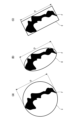
- FIG. 3 is a conceptual diagram of measuring the length of a flaw.
- FIG. 1A is a conceptual diagram of measurement when the diameter of a circle circumscribing the flaw is the length of the flaw.
- FIG. 1B is a conceptual diagram of measurement when the major axis of an ellipse circumscribing the flaw is the length of the flaw.
- FIG. 1C is a conceptual diagram of measurement when the length of the long side of the rectangle circumscribing the flaw is the length of the flaw.
- a circle C circumscribing the flaw F is obtained and its diameter is measured, as shown in Fig. 3(A).
- a circumscribing circle C is obtained by circle fitting.
- a well-known image measurement method is adopted for measuring the diameter.
- an ellipse R circumscribing the flaw F is obtained and its major diameter is measured, as shown in FIG.
- a circumscribing ellipse R is determined by ellipse fitting.
- a well-known image measurement method is adopted for the measurement of the major diameter.
- the length of the long side of the rectangle circumscribing the flaw is the so-called maximum Feret diameter.
- a rectangle E circumscribing the flaw is obtained and the length of the long side is measured.
- a circumscribing rectangle E is obtained by fitting a rectangle.
- a well-known image measurement method is adopted for measuring the length of the long side.
- the length (width) in a specific direction can also be measured as the length of the flaw.
- the length in the horizontal direction (horizontal direction) of the image or the length in the vertical direction (vertical direction) of the image can be measured and used as the length of each flaw.
- the major axis of an ellipse circumscribing the flaw is measured as the length of the flaw.
- the length of the flaw is an example of severity of the flaw.
- the length of the measured flaw is compared with a threshold value (defect reference value), and flaws exceeding the threshold value are judged to be failure flaws, that is, "defects”.
- a flaw is detected by specifying its position in the inspection image.
- flaws are detected by identifying their types.
- the position of the flaw is specified, for example, by the position of the center of gravity of the area detected as the flaw. In addition, it can also be identified by the position of the center of a circle, ellipse, or rectangle that circumscribes the area detected as the flaw. Also, the position within the inspection image is specified by the coordinates (x, y) set in the inspection image. The coordinates are set, for example, with the upper left corner of the inspection image as the origin (0, 0), the horizontal direction as the x-axis direction, and the vertical direction as the y-axis direction.
- Types of flaws are, for example, gas holes, porosity, FMLD (foreign material less dense), and FMMD (foreign material more dense).
- a gas hole is a spherical cavity.
- Porosity is a cavity created by gas entrainment.
- FMLD is a general term for low-density contaminants. Low-density foreign matter appears black in an X-ray transmission image. For example, chipped areas, insufficient cast metal flow, and damaged and chipped areas appear darker (blacker) than their surroundings. Also, a portion where air bubbles, gas, etc. are mixed in appears darker than the surroundings.
- FMMD is a general term for high-density foreign matter. High-density foreign matter appears white in an X-ray transmission image.
- Flaw detection can be performed using, for example, artificial intelligence (AI). As an example, it can be done using a segmentation model.
- a segmentation model is a learning model trained using machine learning to perform the task of image segmentation. The segmentation model classifies an input image as to whether the entire image (all pixels) is an area where one pixel unit cannot be formed, and divides the input image into areas.
- a model is used to classify the type of flaw for each pixel and divide it into regions.
- the segmentation model is constructed using, for example, a convolutional neural network (CNN) with convolutional layers.
- CNN convolutional neural network
- FCN fully convolutional network
- the parameters of the segmentation model are optimized by machine learning using the training dataset.
- the segmentation model includes a large amount of training data in which training images are associated with correct data for the training images.
- the “correct data” here is data indicating the area of the flaw existing in the image.
- the correct data is composed of, for example, a mask image in which the flaw area is filled.
- the segmentation model For the input image, the segmentation model generates a score that indicates the likelihood of classification for each pixel in the image, that is, the degree of flawiness.
- a segmentation mask is generated based on the scores generated by this segmentation model.
- a segmentation mask is a mask image that fills in the flaw area in the image. The segmentation mask represents the shape of the extracted flaw in units of pixels.
- FIG. 4 is a diagram showing an example of flaw extraction results.
- the figure is an enlarged part of the inspection image IM.
- the black area in the image is the segmentation mask SM and indicates the extracted flaw area.
- FIG. 5 is a diagram showing an example of flaw detection results.
- an ID number (identification number) is individually assigned to each detected flaw, and the detection result of "type”, “length”, and “position (coordinates)" for each flaw, And the judgment result of "pass/fail” is shown.
- Fig. 5 shows an example in which a total of 1057 flaws are detected. Moreover, the figure shows an example in which the reference value of the defect is 4 mm or more in length. In this case, flaws of 4 mm or more are determined to be reject flaws, that is, defects.
- the processing by the image processing device 3 is, in principle, performed in the order in which the subject is photographed. As a general rule, photographing is performed in the order of manufacture, so processing by the image processing device 3 is also performed in the order of manufacture as a general rule.
- the processing result (flaw detection result) by the image processing device 3 is associated with information identifying the subject (part number, serial number, manufacturing date and time, etc.), information identifying the inspection, and the inspection image.
- a device 10 is provided.
- Information for identifying an examination includes information such as an examination number and an examination date and time.
- a test number is a unique identification number that can identify a subject.
- the inspection date and time is, for example, the date and time when image analysis was performed on the inspection image.
- the flaw detection results include segmentation mask data.
- the information provided to the information processing apparatus 10 also includes information on pass/fail judgment criteria (defect reference values).
- information provided from the image processing device 3 to the information processing device 10 (hereinafter referred to as "inspection data") is an example of the first information.
- the method of providing inspection data to the information processing device 10 is not particularly limited.
- the image processing device 3 and the information processing device 10 may be communicably connected and the inspection data may be sequentially transmitted, or the inspection data may be stored in a medium and provided.
- the information processing apparatus 10 acquires inspection data for flaws, processes the data into a format that facilitates understanding of the state of the manufactured part, and presents the data to the user.
- the information processing device 10 is realized by, for example, a combination of a computer and software.
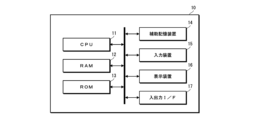
- FIG. 6 is a diagram showing an example of the hardware configuration of the information processing device.
- the information processing apparatus 10 has a hardware configuration of a CPU (central processing unit) 11, a RAM (random access memory) 12, a ROM (read only memory) 13, an auxiliary storage device 14, an input device 15, a display device 16, an input/output interface (I/F) 17, and the like.
- a CPU central processing unit
- RAM random access memory
- ROM read only memory
- auxiliary storage device 14 an input device 15, a display device 16, an input/output interface (I/F) 17, and the like.
- the auxiliary storage device 14 is composed of, for example, an HDD (hard disk drive), an SSD (solid state drive), or the like. Programs executed by the CPU 11 and data necessary for processing are stored in the auxiliary storage device 14 .
- the input device 15 is composed of, for example, a keyboard, mouse, touch panel, and the like.
- the display device 16 is configured by, for example, a display such as a liquid crystal display (LCD) or an organic electro-luminescence (OEL) display. The inspection data is taken into the information processing device 10 via the input/output interface 17 .
- LCD liquid crystal display
- OEL organic electro-luminescence
- the CPU 11 is an example of a processor.
- the RAM 12, ROM 13, and auxiliary storage device 14 are examples of memory.
- FIG. 7 is a block diagram of the main functions of the information processing device.
- the information processing device 10 has functions such as an inspection data acquisition unit 10A, a distribution calculation unit 10B, a recording control unit 10C, and a display control unit 10D. Each function is realized by the CPU 11 executing a predetermined program (information processing program).
- the inspection data acquisition unit 10A acquires inspection data.
- inspection data includes information on flaw detection results obtained by analyzing inspection images (flaw type, flaw length, position (coordinates), pass/fail judgment results, segmentation mask data, etc.). ), information identifying the subject (part number, serial number, manufacturing date and time, etc.), information identifying the inspection (inspection date and time, etc.), inspection image, and pass/fail judgment criteria (defect reference value), etc. included.
- the inspection data is acquired via the input/output interface 17, for example.
- the distribution calculation unit 10B calculates the distribution of the severity of flaws based on the acquired inspection data.
- the distribution is the distribution of the frequency of detection (the number of detections) for each severity of flaw.
- the severity of the flaw is obtained as information on the length of the flaw. Therefore, the distribution of the frequency of detection for each flaw length is calculated.
- a histogram and a distribution curve showing the frequency distribution for each flaw length are calculated.
- FIG. 8 is a diagram showing an example of a histogram and a distribution curve.
- Histogram H is one of the graphs showing the frequency distribution.
- the horizontal axis indicates the length of the flaw
- the vertical axis indicates the frequency of detection for each flaw length.
- the minimum flaw size that can be detected by the image processing device 3 is taken as the section on the horizontal axis.
- the width of the interval can be set arbitrarily.
- the distribution curve DC is calculated by regression analysis of the detection frequency for each flaw length. As an example, it is calculated by curve regression (curve fitting). For example, it is calculated by fitting to a known distribution.
- a known distribution is, for example, a normal distribution, a Poisson distribution, a Bernoulli distribution, or the like. A mixed distribution of these may also be used. Since the method of calculating the distribution curve by curve regression is well known, the detailed description thereof will be omitted.
- FIG. 8 is an example of a case where the distribution curve DC is calculated by fitting to a normal distribution.
- the recording control unit 10C records, in the auxiliary storage device 14, the inspection data acquired by the inspection data acquisition unit 10A and the distribution data (distribution data) of the severity of flaws calculated based on the inspection data.
- the inspection data are organized systematically and recorded in the auxiliary storage device 14 . Thereby, a database of inspection data is constructed.
- the distribution data is recorded in the auxiliary storage device 14 in association with the inspection data from which it is calculated.
- the display control unit 10D controls display on the display device 16.
- the display control unit 10 ⁇ /b>D generates image data (display data) to be displayed on the display device based on an operation input from the input device 15 and outputs the generated display data to the display device 16 .
- display data is an example of second information.
- FIG. 9 is a diagram showing an example of display data.
- the display data 100 includes subject information 110, distribution graph 120, range designation box 130, time slider 140, display button 145, etc., and has a configuration in which each piece of display information is arranged in a predetermined layout within the screen.
- the subject information 110 is subject information.
- the object information 110 includes information such as a part number, a serial number, date and time of manufacture, and date and time of inspection.
- the distribution graph 120 is a graph showing the distribution of the severity of flaws.
- a histogram H and a distribution curve DC indicating the frequency of detection for each flaw length are displayed. As shown in FIG. 9, the histogram H and the distribution curve DC are superimposed and displayed within the same graph.
- Information on the distribution curve DC is also displayed in the graph.
- Information of the distribution curve DC is displayed in a box 121 set in the graph.
- the average ⁇ , the number of samples N, and the standard deviation ⁇ are displayed as the information of the distribution curve DC.
- the number of samples N is the total number of flaws detected.
- the distribution graph 120 further displays the defect reference value (threshold). Specifically, a straight line Lth is displayed at the position of the defect reference value, and the defect reference value is clearly indicated on the graph. Thus, by displaying the defect reference value in a form that can be compared with the graph, it is possible to easily grasp the occurrence state and occurrence tendency of the flaw.
- an arrow AR indicating the defect range from the straight line Lth indicating the defect reference value is displayed, and the characters "defect" are displayed within the arrow. This makes it possible to clarify the range of flaws that become defects.
- the range specification box 130 is a widget (component of GUI (graphical user interface)) that specifies the range of the subject to be displayed.
- An item selection portion 131 and range input portions 132A and 132B are displayed in the range designation box 130.
- FIG. 1 A widget (component of GUI (graphical user interface)) that specifies the range of the subject to be displayed.
- the item selection portion 131 is a portion for selecting items for specifying a range on the screen, and is configured with a drop-down list.
- two items “manufacturing date and time” and “inspection date and time”, are displayed in the drop-down list as items for specifying the range.
- FIG. 9 shows an example when manufacturing date and time is selected. One of the date of manufacture and the date of inspection is selected by default in the drop-down list.
- the range input sections 132A and 132B are sections for inputting the starting date and ending date of the range on the screen, and both are composed of text boxes.
- a date as the starting point of the range is entered in the range input section 132A on the left side of the figure.
- the date to be the end point of the range is input to the range input section 132B on the right side of the drawing.
- FIG. 9 shows an example in which a range is specified with "2020/01/01" as the start point and "2020/12/31" as the end point. In this case, the display range is set from 2020/01/01 to 2020/12/31.
- the time slider 140 is a widget for selecting display targets. By sliding the handle 141 along the track 142, the subjects to be displayed are switched in chronological order. A movement span of the handle 141 is set according to the number of subjects. For example, if there are 100 subjects to be displayed, the range is divided by 100 and the movement span of the handle 141 is set. In this embodiment, as shown in FIG. 9, information on the date and time of manufacture of the selected subject is displayed by balloon 143 from handle 141 . Time slider 140 is an example of a slider.
- the display control unit 10D reads the inspection data and distribution data of the subject specified by the time slider 140 from the auxiliary storage device 14, generates display data 100, and outputs the display data 100 to the display device 16.
- Handle 141 is operated with, for example, a mouse. Specifically, the mouse is operated to move the cursor 101 onto the handle, and the mouse is slid left and right while being clicked. Alternatively, the handle can be slid by rotating a wheel provided on the mouse.
- the display control unit 10D displays the oldest display data of the subject within the specified range. Therefore, the handle 141 of the time slider 140 is positioned at the left end of the track 142 .
- the display button 145 is a button for instructing execution of display. When the display button 145 is clicked, display is started under the specified range conditions.
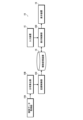
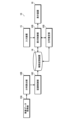
- the information processing apparatus 10 first acquires test data of a subject (corresponding to a step of acquiring first information).
- inspection data inspection data of a plurality of subjects manufactured in chronological order is acquired.
- the information processing device 10 individually generates distribution data from the acquired inspection data (corresponding to a step of calculating the distribution of the severity of flaws). Then, the generated distribution data is recorded in the auxiliary storage device 14 together with the inspection data. The distribution data is recorded in the auxiliary storage device 14 in association with the inspection data. Thereby, a database of inspection data is constructed.
- the inspection data includes information on the reference value (threshold value) of the defect. Therefore, by acquiring the inspection data, the defect reference value information is also acquired (corresponding to the step of acquiring the threshold information).
- the information processing apparatus 10 causes the display device 16 to display the distribution data generated from the acquired inspection data based on the operation input from the user.
- the information processing device 10 accepts designation of the display range.
- the user selects an item (manufacturing date and time or inspection date and time) for specifying a range in a range specifying box 130 displayed on the screen of the display device 16 . Also, enter the range of dates and times to be displayed.
- the range is not specified, all subject data recorded in the database will be set as the display target. It is also possible to specify only the start point or only the end point of the date and time range. If only the starting point is specified, all data after the specified date and time are set to be displayed. On the other hand, if only the end point is specified, all data before the specified date and time are set to be displayed.
- the information processing apparatus 10 starts display processing under specified conditions.
- the oldest inspection data and distribution data of the subject within the specified date range are read to generate display data (corresponding to the step of generating second information). Then, the generated display data is displayed on the screen of the display device 16 (corresponding to the step of displaying the second information). After that, according to the operation of the time slider 140, the display data of the specified subject is generated and the generated display data is displayed on the screen.
- the distribution graph 120 included in the display data is switched in order from the newest date of manufacture by sliding the handle 141 of the time slider 140 rightward in FIG. In other words, they are switched chronologically according to the date and time of manufacture.
- FIG. 10 is a diagram showing an example of changes in the distribution graph.
- the figure shows an example of a case where the number and size of flaws occurring in the subject increase over time.
- (A) of the figure shows the distribution graph at the beginning of the display. In this case, a distribution graph of subjects with the oldest date and time of manufacture within the specified range is displayed.
- FIG. 4B shows a case where the time slider 140 is moved to switch the display object to the one with the newer date and time of manufacture.
- FIG. 4C shows a case where the time slider 140 is further moved.
- the displayed objects are switched in chronological order.
- the distribution graph 120 includes information (straight line Lth and arrow AR) of the reference value (threshold value) of the defect, which serves as the acceptance/rejection criterion, it is possible to compare the relationship with the reference value of the defect to see how it changes. can be grasped.
- the information processing apparatus 10 of the present embodiment while comparing the distribution of the severity of flaws with the pass/fail judgment reference value (defect reference value), the change along the time series can be observed. Observable. As a result, the state of the manufactured parts can be accurately grasped, leading to improvements in manufacturing processes, design processes, and the like.
- the display target and display range are designated by the date and time of manufacture or inspection of the subject, but the method of designating the display target and display range is not limited to this.
- the inspection data includes a serial number
- the serial number may be used to specify the display target and display range.
- the display target and the display range are specified by a number such as a serial number, the display target is switched in numerical order according to the operation of the time slider 140 .
- the display target is manually switched by operating the time slider 140, but the display target can also be switched automatically. That is, a so-called automatic reproduction function may be provided.
- FIG. 11 is a diagram showing an example of display data when an automatic playback function is provided.
- a controller box 150 for playback is additionally displayed.
- the playback controller box 150 includes a playback button 151 , a stop button 152 , a pause button 153 , a Brevias button 154 and a next button 155 .
- the playback button 151 is a button for instructing the start of automatic playback of playback.
- the stop button 152 is a button for instructing the end of automatic reproduction.
- the pause button 153 is a button for instructing pause of automatic reproduction.
- the brevias button 154 is a button for instructing reproduction of the display data of the immediately previous subject.
- the next button 155 is a button for instructing display of display data of the next subject.
- time slider 140 also moves in conjunction with the switching of the display target. More specifically, handle 141 of time slider 140 moves.
- Playback is performed at a constant speed. That is, after being displayed for a certain period of time, the display data of the next subject is switched to. It is preferable that the playback speed can be arbitrarily set by the user.
- the stop button 152 When the stop button 152 is pressed during playback, playback ends.
- the first display data (the oldest display data of the subject within the specified range) is displayed on the screen.
- pause button 153 when the pause button 153 is pressed during playback, playback is paused.
- Brevias button 154 is pressed during the pause, display data of the previous subject is displayed on the screen.
- the next button 155 displays the display data of the next subject on the screen.
- the type of flaw is also determined when detecting flaws from an image. In this way, when the types of flaws are also discriminated, it is more preferable to generate and display a distribution for each type.
- FIG. 12 is a diagram showing an example of display data when a function of displaying distribution data for each type of flaw is provided.
- a type selection section 160 is further displayed.
- the type selection section 160 is a section for selecting the type of flaw for which distribution data is to be displayed, and is configured by a drop-down list.
- the drop-down list displays a list of selectable flaw types.
- the figure shows an example in which selectable flaw types are "porosity", "gas hole”, “FMMD”, “FMLD” and "ALL". "ALL” is a selection item when all types of flaws are collectively displayed.
- FIG. 12 shows an example when "porosity" is selected.
- the selected types of flaws can be displayed in one graph at the same time with their distribution color-coded and/or line-typed.
- the distribution curve When simultaneously displaying the distribution of a plurality of types of flaws in this way, it is preferable to display only the distribution curve.
- the display data may include the inspection image.
- FIG. 13 is a diagram showing an example of display data when displaying an inspection image.
- the screen has an inspection image display section 170, and the inspection image IM of the subject being displayed is displayed on the inspection image display section 170.
- FIG. 170 the inspection image IM of the subject being displayed is displayed on the inspection image display section 170.
- a zoom button 171 may be displayed adjacent to the inspection image display section 170 to receive a zoom operation.
- the zoom button 171 is composed of a zoom-in button 171A and a zoom-out button 171B.
- the zoom-in button 171A instructs image enlargement
- the zoom-out button 171B instructs image reduction. More specifically, each time the zoom-in button 171A is pressed, the image is enlarged by a predetermined magnification. Also, each time the zoom-out button 171B is pressed, the image is reduced by a predetermined magnification.
- the image expands and contracts around the specified position (eg, clicked position). Also, the display position of the enlarged image is changed by, for example, a drag operation. In addition to this, the zoom operation may be performed by, for example, a wheel operation of a mouse.
- the data of the segmentation mask may be superimposed on the inspection image IM and displayed. Also, the display of the segmentation mask data may be turned on and off at will.
- FIG. 14 is a diagram showing another example of display data when displaying an inspection image.
- the figure shows an example in which individual flaws are aggregated and a flaw occurrence area 172 is displayed on the inspection image IM.
- a known method can be used to calculate and display the area where the flaw occurs. For example, a method of displaying the frequency by density (continuous display), a method of displaying the boundary of the occurrence area (discrete display), or the like can be adopted.
- the image of the flaw detection result (for example, segmentation mask data) is divided into multiple sections, and the frequency of each section is converted to density.
- a method of convolving a filter such as a Gaussian filter on a pixel-by-pixel basis can be employed.
- a method of displaying the boundary of the occurrence area for example, a method of grouping the flaw areas together by expansion processing or the like can be adopted.
- a method of enclosing a group containing flaws within a specified distance with a polygon a method of enclosing with a convex hull using the Quickhull method or the like for visibility, and a boundary line using the level set method, method can be adopted.
- the flaw occurrence area 172 it is preferable to display in a manner that can be easily identified on the inspection image IM. For example, it is preferable to display with color.
- FIG. 15 is a diagram showing an example of display data when having a function of displaying the occurrence area for each type of flaw.
- FIG. 15 shows an example when "porosity" and "gas hole” are selected.
- the occurrence area is displayed in different display modes for each type. For example, they are displayed with different colors, line types, patterns, and the like. This makes it possible to grasp the occurrence area for each type of flaw.
- the type selection unit 173 is configured to select the type of failure, but the type selection unit 160 may be configured to select.
- the type of flaw displayed on the distribution graph 120 matches the type of flaw whose occurrence area is displayed on the inspection image.
- the histogram H and the distribution curve DC are displayed as the distribution of the degree of severity of flaws. However, it is possible to display only one of them.
- the distribution curve DC When displaying only one, it is preferable to display the distribution curve DC. This is because the generation distribution can be grasped at a glance by displaying the distribution curve DC. In addition, it is possible to easily grasp the state of change when switching and displaying in chronological order.
- the distribution to be displayed may be arbitrarily selected by the user.
- FIG. 16 is a diagram showing an example of display data when having a function of selecting the distribution to be displayed.
- the distribution selection section 122 is a section for selecting the type of distribution to be displayed, and is composed of check boxes.
- the check boxes list the types of distributions that can be selected.
- the figure shows an example in which the selectable types of distribution are "histogram" and "distribution curve".
- FIG. 16 shows an example when "distribution curve" is selected. In this case only the distribution curve DC is displayed.
- FIG. 17 is a conceptual diagram of the process of calculating the distribution curve of the partial data closest to the defect reference value.
- the figure shows an example of a bimodal distribution.
- the distribution curve DC1 of the partial data closest to the defect reference value is calculated, for example, by the following procedure.
- Step 1 First, a distribution curve DC0 of the severity of flaws is calculated.
- the distribution curve DC0 is calculated by fitting to a known distribution. It should be noted that it may be calculated using a histogram, kernel density estimation method, or the like, which is the frequency for each severity interval.
- the tail may recalculate the distribution, such as fitting a known distribution, centered on the selected extreme value.
- calculation method is just an example, and calculation can also be performed using other known methods.
- the most important thing in understanding the state of manufactured parts is the change in the distribution of defects in the area closest to the reference value. Therefore, as in this example, by calculating the distribution curve of the partial data that is closest to the defect reference value and displaying only that distribution curve, it is possible to present the state of the manufactured part in a form that is easier to grasp.
- the display method of the distribution curve may be such that the user can arbitrarily select between the display form of this example and the normal display form.
- Examples of the degree of severity of flaws include the length of flaws described in the above embodiment, the area of flaws, the degree of distortion of flaws, the sharpness of the shape of flaws, and the degree of density of flaws. ” etc. can be exemplified.
- the "distortion degree of a flaw” is calculated, for example, by the ratio between the major axis and the minor axis of the flaw, or the ratio between the long side and the short side of the flaw.
- the major axis and minor axis of the flaw are obtained by obtaining an ellipse that circumscribes the flaw and measuring the major axis and minor axis (see FIG. 3B).
- the long side and short side of the flaw are obtained by obtaining a rectangle circumscribing the flaw and measuring its long side (so-called maximum Feret diameter) and short side (so-called minimum Feret diameter) (see FIG. 3C).
- the sharpness of the shape of the flaw means the sharpness represented by the aspect ratio.
- the “sharpness of the flaw shape” is calculated, for example, by the ratio of the major axis and the minor axis of the flaw, or the ratio of the long side and the short side of the flaw. It should be noted that when the “sharpness of the flaw shape" is calculated in this way, the calculation method may be the same as the calculation method of the "degree of distortion of the flaw". In this case, the degree of severity is calculated as including both the "degree of distortion of the flaw” and the "sharpness of the shape of the flaw".
- the "density of flaws" is calculated, for example, as the density of flaws within a specific test field of view.
- the average value of the distances between flaws, or the minimum or maximum value of the distances between flaws can be calculated as the "density of flaws.”
- the distance between flaws may be obtained, for example, from the distance between centers or from the distance between outer shells.
- the information processing apparatus 10 can be configured to calculate a distribution for each type of severity of flaws and display a graph of the distribution.
- the designation of the type to be displayed is accepted, and the severity distribution graph of the accepted type is displayed.
- the pass/fail judgment standard (defect standard value) differs for each type of severity. Therefore, when displaying a distribution graph corresponding to a plurality of types of severity, the information of the pass/fail judgment criteria (threshold information) is acquired for each type of severity.
- an evaluation target selection section 180 is further displayed.
- the evaluation target selection unit 180 is a part for selecting the type of severity of the flaw to be evaluated, and is configured by a drop-down list.
- the drop-down list lists the types of flaw severities that can be selected.
- the figure shows an example in which selectable types of severity of flaws are "length", “degree of distortion", and “density”.
- FIG. 18 shows an example when "Length" is selected.
- FIG. 18 displays only one type of severity distribution graph, it is also possible to display multiple types of severity distribution graphs at the same time. In this case, for example, multiple types of severity distribution graphs and defect reference value information are displayed in one graph with different colors and/or line types.
- the distribution data of two subjects may be displayed on the distribution graph 120 so that the two can be observed in comparison.
- the figure shows an example of specifying two display targets using the time slider 140 .
- the time slider 140 is provided with two handles (first handle 141A and second handle 141B).
- One first handle 141A is a handle for selecting the first subject.
- the first subject is the main subject.
- the first handle 141A By sliding the first handle 141A along the track 142, the first subject to be displayed is switched in chronological order. Further, information on the date and time of manufacture of the selected subject is displayed by a balloon 143A from the first handle 141A.
- the other second handle 141B is a handle for selecting the second subject.
- the second subject is a subject to be compared with the main subject. By sliding the second handle 141B along the track 142, the second subject to be displayed is switched in chronological order. Further, information on the date and time of manufacture of the selected subject is displayed by a balloon 143B from the second handle 141B.
- the distribution graph 120 displays the distribution data of the two specified subjects.
- a graph of the distribution selected by the distribution selection unit 122 is displayed.
- FIG. 19 shows an example in which both a histogram and a distribution curve are selected in the distribution selection section 122.
- both the histogram HA and the distribution curve DCA are displayed for the first subject.
- only the distribution curve DCB is displayed for the second object to be compared.
- the distribution curve DCB of the second subject is displayed in a manner distinguishable from the distribution curve DCA of the first subject.
- the distribution curve DCA of the first subject is indicated by a solid line
- the distribution curve DCB of the second subject is indicated by a broken line.
- the two can be displayed in a distinguishable manner by displaying them in different colors.
- the information processing apparatus 10 of the present embodiment further has the function of a distribution estimating section 10E.
- This function is realized by the CPU 11 executing a predetermined program (information processing program).
- FIG. 21 is a diagram showing an example of display data.
- display data 100 displayed on the screen includes a prediction time selection section 190 and a prediction button 191 .
- the prediction time selection unit 190 is a part that selects a time to predict.
- the prediction time selection section 190 is composed of a dropdown list.
- the drop-down list displays a list of selection candidates for the predicted time.
- the prediction button 191 is a button for instructing prediction on and off.
- prediction is turned on, a prediction process is performed and the results are displayed on distribution graph 120 . Also, when the prediction is turned off, the result display is turned off.
- the prediction process is performed based on the inspection data stored in the auxiliary storage device 14. That is, a future distribution curve is predicted based on past data.
- Various methods including known methods can be employed for the prediction processing. For example, a method such as calculating the center of the distribution at regular intervals and calculating the future center of the distribution for a specified time from the amount of movement can be adopted.
- a model suitable for the object of analysis may be assumed, such as acceleration and deceleration as well as constant velocity.
- the hardware configuration of a processing unit that performs various processes is realized by various processors.
- Various processors include a CPU, which is a general-purpose processor that executes programs and functions as various processing units, a GPU (graphics processing unit), a processor specialized for image processing, and an FPGA (field programmable gate array).
- Programmable logic device PLD
- ASIC application specific integrated circuit
- a single processing unit may be composed of one of these various processors, or may be composed of two or more processors of the same type or different types.
- one processing unit may be configured by a plurality of FPGAs, a combination of CPU and FPGA, or a combination of CPU and GPU.
- a plurality of processing units may be configured by one processor.
- a single processor is configured by combining one or more CPUs and software. There is a form in which a processor functions as multiple processing units.
- SoC system on chip
Landscapes
- Engineering & Computer Science (AREA)
- Physics & Mathematics (AREA)
- General Physics & Mathematics (AREA)
- Theoretical Computer Science (AREA)
- Computer Vision & Pattern Recognition (AREA)
- Quality & Reliability (AREA)
- Multimedia (AREA)
- Geometry (AREA)
- Life Sciences & Earth Sciences (AREA)
- Chemical & Material Sciences (AREA)
- Analytical Chemistry (AREA)
- Biochemistry (AREA)
- General Health & Medical Sciences (AREA)
- Immunology (AREA)
- Pathology (AREA)
- Health & Medical Sciences (AREA)
- Analysing Materials By The Use Of Radiation (AREA)
- Image Processing (AREA)
- Investigating Materials By The Use Of Optical Means Adapted For Particular Applications (AREA)
Priority Applications (4)
| Application Number | Priority Date | Filing Date | Title |
|---|---|---|---|
| EP22920550.5A EP4465028A4 (en) | 2022-01-14 | 2022-12-14 | INFORMATION PROCESSING DEVICE, METHOD AND PROGRAM |
| CN202280088664.0A CN118541598A (zh) | 2022-01-14 | 2022-12-14 | 信息处理装置、方法及程序 |
| JP2023573920A JPWO2023136032A1 (https=) | 2022-01-14 | 2022-12-14 | |
| US18/770,085 US20240362769A1 (en) | 2022-01-14 | 2024-07-11 | Information processing apparatus, information processing method, and information processing program |
Applications Claiming Priority (2)
| Application Number | Priority Date | Filing Date | Title |
|---|---|---|---|
| JP2022-004406 | 2022-01-14 | ||
| JP2022004406 | 2022-01-14 |
Related Child Applications (1)
| Application Number | Title | Priority Date | Filing Date |
|---|---|---|---|
| US18/770,085 Continuation US20240362769A1 (en) | 2022-01-14 | 2024-07-11 | Information processing apparatus, information processing method, and information processing program |
Publications (1)
| Publication Number | Publication Date |
|---|---|
| WO2023136032A1 true WO2023136032A1 (ja) | 2023-07-20 |
Family
ID=87278935
Family Applications (1)
| Application Number | Title | Priority Date | Filing Date |
|---|---|---|---|
| PCT/JP2022/045980 Ceased WO2023136032A1 (ja) | 2022-01-14 | 2022-12-14 | 情報処理装置、方法及びプログラム |
Country Status (5)
| Country | Link |
|---|---|
| US (1) | US20240362769A1 (https=) |
| EP (1) | EP4465028A4 (https=) |
| JP (1) | JPWO2023136032A1 (https=) |
| CN (1) | CN118541598A (https=) |
| WO (1) | WO2023136032A1 (https=) |
Citations (8)
| Publication number | Priority date | Publication date | Assignee | Title |
|---|---|---|---|---|
| JPH11352073A (ja) * | 1998-06-11 | 1999-12-24 | Hitachi Ltd | 異物検査方法および装置 |
| JP2001015566A (ja) * | 1999-06-28 | 2001-01-19 | Hitachi Ltd | 半導体装置の製造方法 |
| JP2002269109A (ja) * | 2001-03-12 | 2002-09-20 | Hitachi Ltd | 薄膜デバイス製造工程管理システムおよび薄膜デバイス製造工程管理方法 |
| JP2007234798A (ja) * | 2006-02-28 | 2007-09-13 | Hitachi High-Technologies Corp | 回路パターンの検査装置及び検査方法 |
| JP2010014635A (ja) * | 2008-07-07 | 2010-01-21 | Hitachi High-Technologies Corp | 欠陥検査方法及び欠陥検査装置 |
| JP2013093027A (ja) * | 2011-10-24 | 2013-05-16 | Fisher Rosemount Systems Inc | 予測された欠陥分析 |
| WO2020003917A1 (ja) | 2018-06-29 | 2020-01-02 | 富士フイルム株式会社 | 欠陥表示装置及び方法 |
| JP2021140739A (ja) * | 2020-02-28 | 2021-09-16 | 株式会社Pros Cons | プログラム、学習済みモデルの生成方法、情報処理方法及び情報処理装置 |
Family Cites Families (1)
| Publication number | Priority date | Publication date | Assignee | Title |
|---|---|---|---|---|
| JP4910888B2 (ja) * | 2007-05-30 | 2012-04-04 | ブラザー工業株式会社 | 画像処理装置 |
-
2022
- 2022-12-14 WO PCT/JP2022/045980 patent/WO2023136032A1/ja not_active Ceased
- 2022-12-14 CN CN202280088664.0A patent/CN118541598A/zh active Pending
- 2022-12-14 JP JP2023573920A patent/JPWO2023136032A1/ja active Pending
- 2022-12-14 EP EP22920550.5A patent/EP4465028A4/en active Pending
-
2024
- 2024-07-11 US US18/770,085 patent/US20240362769A1/en active Pending
Patent Citations (8)
| Publication number | Priority date | Publication date | Assignee | Title |
|---|---|---|---|---|
| JPH11352073A (ja) * | 1998-06-11 | 1999-12-24 | Hitachi Ltd | 異物検査方法および装置 |
| JP2001015566A (ja) * | 1999-06-28 | 2001-01-19 | Hitachi Ltd | 半導体装置の製造方法 |
| JP2002269109A (ja) * | 2001-03-12 | 2002-09-20 | Hitachi Ltd | 薄膜デバイス製造工程管理システムおよび薄膜デバイス製造工程管理方法 |
| JP2007234798A (ja) * | 2006-02-28 | 2007-09-13 | Hitachi High-Technologies Corp | 回路パターンの検査装置及び検査方法 |
| JP2010014635A (ja) * | 2008-07-07 | 2010-01-21 | Hitachi High-Technologies Corp | 欠陥検査方法及び欠陥検査装置 |
| JP2013093027A (ja) * | 2011-10-24 | 2013-05-16 | Fisher Rosemount Systems Inc | 予測された欠陥分析 |
| WO2020003917A1 (ja) | 2018-06-29 | 2020-01-02 | 富士フイルム株式会社 | 欠陥表示装置及び方法 |
| JP2021140739A (ja) * | 2020-02-28 | 2021-09-16 | 株式会社Pros Cons | プログラム、学習済みモデルの生成方法、情報処理方法及び情報処理装置 |
Non-Patent Citations (1)
| Title |
|---|
| See also references of EP4465028A4 |
Also Published As
| Publication number | Publication date |
|---|---|
| EP4465028A1 (en) | 2024-11-20 |
| EP4465028A4 (en) | 2025-05-21 |
| US20240362769A1 (en) | 2024-10-31 |
| JPWO2023136032A1 (https=) | 2023-07-20 |
| CN118541598A (zh) | 2024-08-23 |
Similar Documents
| Publication | Publication Date | Title |
|---|---|---|
| US12488574B2 (en) | Information processing device, determination method, and information processing program | |
| JP7807439B2 (ja) | 製造ラインの異常予兆検知装置、方法及びプログラム並びに製造装置及び検品装置 | |
| US8526710B2 (en) | Defect review method and apparatus | |
| KR102083706B1 (ko) | 반도체 검사 레시피 생성, 결함 리뷰 및 계측을 위한 적응적 샘플링 | |
| JP2023521379A (ja) | 溶接品質のin-situ検査のための方法 | |
| US20100138801A1 (en) | System and Method for Detecting a Defect | |
| JP4317805B2 (ja) | 欠陥自動分類方法及び装置 | |
| US12529684B2 (en) | Inspection device, inspection method, and inspection program | |
| JP2009250645A (ja) | 欠陥レビュー方法およびその装置 | |
| JPWO2020003917A1 (ja) | 欠陥表示装置及び方法 | |
| US20240331339A1 (en) | Information processing apparatus, information processing method, and program | |
| US20240221343A1 (en) | Display processing device, display processing method, and display processing program | |
| WO2023136032A1 (ja) | 情報処理装置、方法及びプログラム | |
| US20240362888A1 (en) | Information processing apparatus, information processing method, and information processing program | |
| CN113205479B (zh) | 用于评估资产健康状况的系统和方法 | |
| JP2004294120A (ja) | X線検査装置、x線検査方法およびx線検査装置の制御プログラム | |
| WO2024043190A1 (ja) | 検査装置、検査システムおよび検査方法 | |
| WO2023053768A1 (ja) | 情報処理装置、情報処理方法及びプログラム | |
| JP2013019866A (ja) | 走査電子顕微鏡、欠陥検査システム、および欠陥検査装置 | |
| CN120031870B (zh) | 一种电子电路板的ai图像检测方法及系统 | |
| EP4465027A1 (en) | Information processing device, information processing method, and program | |
| US20240242330A1 (en) | Image processing apparatus, processing system, image display method, and program | |
| Kulkarni et al. | Detection and Identification of Welding Defects Through Deep Learning Models | |
| WO2025199865A1 (zh) | 流程控制方法及装置、计算设备、存储介质和程序产品 |
Legal Events
| Date | Code | Title | Description |
|---|---|---|---|
| 121 | Ep: the epo has been informed by wipo that ep was designated in this application |
Ref document number: 22920550 Country of ref document: EP Kind code of ref document: A1 |
|
| ENP | Entry into the national phase |
Ref document number: 2023573920 Country of ref document: JP Kind code of ref document: A |
|
| WWE | Wipo information: entry into national phase |
Ref document number: 202280088664.0 Country of ref document: CN |
|
| WWE | Wipo information: entry into national phase |
Ref document number: 2022920550 Country of ref document: EP |
|
| NENP | Non-entry into the national phase |
Ref country code: DE |
|
| ENP | Entry into the national phase |
Ref document number: 2022920550 Country of ref document: EP Effective date: 20240814 |