WO2023017576A1 - 介護支援プログラム、介護用支援装置及び介護用支援システム - Google Patents
介護支援プログラム、介護用支援装置及び介護用支援システム Download PDFInfo
- Publication number
- WO2023017576A1 WO2023017576A1 PCT/JP2021/029614 JP2021029614W WO2023017576A1 WO 2023017576 A1 WO2023017576 A1 WO 2023017576A1 JP 2021029614 W JP2021029614 W JP 2021029614W WO 2023017576 A1 WO2023017576 A1 WO 2023017576A1
- Authority
- WO
- WIPO (PCT)
- Prior art keywords
- care
- information
- display
- display area
- input
- Prior art date
- Legal status (The legal status is an assumption and is not a legal conclusion. Google has not performed a legal analysis and makes no representation as to the accuracy of the status listed.)
- Ceased
Links
Images







Classifications
-
- G—PHYSICS
- G16—INFORMATION AND COMMUNICATION TECHNOLOGY [ICT] SPECIALLY ADAPTED FOR SPECIFIC APPLICATION FIELDS
- G16H—HEALTHCARE INFORMATICS, i.e. INFORMATION AND COMMUNICATION TECHNOLOGY [ICT] SPECIALLY ADAPTED FOR THE HANDLING OR PROCESSING OF MEDICAL OR HEALTHCARE DATA
- G16H10/00—ICT specially adapted for the handling or processing of patient-related medical or healthcare data
-
- G—PHYSICS
- G16—INFORMATION AND COMMUNICATION TECHNOLOGY [ICT] SPECIALLY ADAPTED FOR SPECIFIC APPLICATION FIELDS
- G16H—HEALTHCARE INFORMATICS, i.e. INFORMATION AND COMMUNICATION TECHNOLOGY [ICT] SPECIALLY ADAPTED FOR THE HANDLING OR PROCESSING OF MEDICAL OR HEALTHCARE DATA
- G16H80/00—ICT specially adapted for facilitating communication between medical practitioners or patients, e.g. for collaborative diagnosis, therapy or health monitoring
Definitions
- the present invention relates to a care support program, a care support device, and a care support system.
- efficient information for effective care service planning for maintenance and improvement of activities of daily living (ADL) and cooperation among specialists which leads to the outcome of independence support and prevention of aggravation of care recipients.
- the present invention relates to a care support program, a care support device, and a care support system that support sharing.
- the evaluation of long-term care compensation is mainly determined by the "level of long-term care required", that is, the length of time required for living assistance for the person receiving care.
- the nursing care fee also rises. Therefore, if the care recipient becomes more severe and the "level of care required” rises, the remuneration for the long-term care service provider (hereinafter referred to as the operator) will also rise, and the type and content of the long-term care service that the care recipient can receive will increase. It is stipulated to be
- evaluation of medical fees in the medical field requires treatment based on evidence (grounds, evidence). In other words, the reward is evaluated based on the outcome of the treatment.
- ADL physical condition and activities of daily living
- Non-Patent Document 1 As a method, we will submit data to the Ministry of Health, Labor and Welfare using LIFE (Long-term Care Information system For Evidence) and promote efforts to improve PCDA cycle care by utilizing feedback. ” was made (see, for example, Non-Patent Document 1).
- ADL maintenance addition is a performance-based reward type that evaluates outcomes for changes in ADL of care recipients at facilities, and the reward rate for such outcome evaluations is It is said that it will expand with each revision of long-term care insurance.
- PDCA should be run for each individual professional regarding assistance, health management, rehabilitation, functional training, oral management, nutrition management, etc. While sharing the latest physical condition, medical care, and nursing care information of care recipients among various occupations, effective independence support and prevention of severity cannot be achieved unless a comprehensive PDCA cycle is implemented as a framework for the entire facility. can not be realized, the inventors of the present invention considered from a medical point of view. (See, eg, FIG. 2).
- the necessary information sharing and utilization among professional occupations means, for example, sharing information on nutrition for each care recipient from a nutritionist, Provide meals with sufficient quantity and protein, and call attention if the required intake falls below 75%. Rehabilitation workers perform swallowing rehabilitation.”
- the conventional “nursing care record system” currently operated by business operators has a background that was mainly developed for billing work of nursing care fees, and the functions of nursing care records used by caregivers and care plans related to billing Even if the function of is complete, in most cases, only the forms related to nursing care fees are installed for professional occupations such as nurses, doctors, rehabilitation, and nutrition.
- the previous nursing care record system consisted of specialists, nurses (health management, medication management, pressure ulcer management), doctors (health management), rehabilitation (functional training), nutritionists (nutrition management), dentists and dental hygienists. (oral care management), clerical staff (staffing management), etc., and these specialists did not operate their work centering on the care record system in their work. . Therefore, information sharing among multiple occupations was also insufficient.
- a care manager creates a care plan for a person receiving care
- a meeting called a service staff meeting is held to discuss the care manager, caregivers, Nurses, primary care physicians, rehabilitation staff, nutritional advisors, care recipients, and their families participate, and create and examine care plans for each care recipient.
- the evaluation of the newly introduced scientific nursing care information system is applied monthly, and the ADL evaluation is also done three months and six months after each resident's move-in month. Therefore, it is desirable to hold a monthly service staff meeting to assess and consider the care recipient.
- LIFE scientific nursing care information system
- the Scientific Long-Term Care Information System requires monthly monitoring and evaluation of the independence support and prevention of aggravation of each care recipient. It is difficult for many operators to hold regular service personnel meetings every month instead of once every three months.
- ADL advanced human immunodeficiency
- FIM evaluate ADL level actually performed in daily life
- BI ADL level likely to be performed in daily life
- FIM evaluate ADL level actually performed in daily life
- LIFE scientific nursing care information system
- the BI indicating the physical condition of the care recipient is used for evaluation.
- care content is determined from different viewpoints such as time and efficiency, and "Is there any risk at the site?"
- the content does not necessarily match the BI (Possible ADL) evaluation.
- the present invention was invented in view of the above points, and plans for effective nursing care services for maintaining and improving activities of daily living (ADL) that lead to the outcome of supporting the care recipient's independence and preventing aggravation. , and to provide a care support program, a care support device, and a care support system that support efficient information sharing for cooperation among professionals.
- ADL daily living
- the care support program of the present invention provides information on services provided to the care recipient, information on various records and plans related to at least care among care, nursing, medical care, rehabilitation, and nutrition,
- a care support program that causes a computer to process each information in order to be shared by a plurality of professionals, and includes display control means for executing processing for displaying an image for inputting or displaying information on a display; input control means for executing processing for inputting; and storage control means for executing processing for storing the inputted information, wherein the images are used by the plurality of professionals for each occupation.
- the professional image is configured to be displayable on the same screen as the occupational specialty information display area used for each occupation and on the same screen as the occupational specialty information display area.
- a target care-receiver selection display for selecting one care-receiver from among; personal information about the selected care-receiver selected in the target care-receiver selection display, including the name, sex, and date of birth; and a shared user information display area configured from a caregiver's physical condition display that displays information representing the care-relevant physical condition of the person being cared for along with the update date of the information, wherein the support progress record image includes a plurality of A plurality of care recipient information display areas for selecting one care recipient, and a care recipient selected from among the care recipients displayed in the plurality of care recipient information display areas.
- the information on the content of the support provided or the content of the physical condition confirmed along with information on the time of entry or any date and time, and information on the person who entered it, including the type of profession.
- a progress information input operation display area, and a referral information destination display area for selecting a type from among the professional job images as a transmission destination of the information input in the progress information input operation display area.
- information indicating the occurrence of the change is included, and the information on the transfer In the professional image selected in the destination display area, the information indicating the physical condition related to care in the shared user information display area includes information indicating the occurrence of the change.
- a change occurrence indication based on the information is configured to be displayed in a distinguishable manner from non-change information.
- an image for inputting or displaying information on each occupation for a plurality of nursing-related occupations by including an individual occupation image that is used by each occupation by a plurality of occupations and displayed individually. can be provided.
- the plurality of specialists referred to here includes, for example, care managers, caregivers, rehabilitation workers, nutritionists, nurses, doctors, dentists, dental hygienists, office workers, and the like.
- a support progress recording image that is a different image from the professional image and that inputs or displays the progress information of the support content for the care recipient or the progress information of the body condition of the care recipient
- Information to pass on information on the content of support for care recipients in their respective work by multiple professionals and information obtained by observing care recipients to other occupations and the next person in charge can be entered or displayed in one type of image as a support progress note.
- the "progress information on the content of support for the care recipient” here means, for example, the amount of energy and protein taken by the caregiver's meals, the content of individual rehabilitation training, oral care, and pressure ulcer care, respectively. This is information on the progress of support provided by the occupation to the care recipient.
- the progress information of the physical condition of the care-receiver referred to here is information regarding the physical condition of the care-receiver, such as measured values of vital signs and symptoms of the care-receiver.
- the shared user information display area of the professional image is selected by the target care-receiver selection display for selecting one care-receiver from a plurality of care-receivers and the target care-receiver selection display.
- personal information about the selected care recipient including name, gender, date of birth, and nursing care physical condition display that displays information showing the physical condition related to nursing care of the selected care recipient along with the update date of the information.
- one person is selected from a plurality of care recipients, and personal information such as the name of the selected care recipient and information representing the physical condition related to care are updated. It is possible to check the date along with the information on the date.
- the "information representing physical condition related to nursing care” is information about the degree of daily living activities or living activities of the care recipient (the degree of independence or the degree of need for assistance).
- the professional image includes an occupational specialty information display area used for each occupation and a shared user information display area configured to be displayable on the same screen as the occupational specialty information display area.
- specialized information that is used for each job type and handled individually in each job type is displayed or entered in the job type specialized information display area, and posted in the shared user information display area on the same screen. You can check the information. That is, for example, while confirming the content of the information representing the physical condition related to nursing care for a selected care recipient, the rehabilitation worker can perform functional training for rehabilitation in the occupation specialized information display area. It is possible to make a plan and to revise the draft plan.
- “configured to be able to be displayed on the same screen as the occupation-specific information display area” means that the shared user information display area can be selectively displayed or hidden on the same screen as the occupation-specific information display area. means.
- the support progress recording image displays the names of a plurality of care recipients, and is displayed in a plurality of care recipient information display areas for selecting one care recipient and a plurality of care recipient information display areas.
- information on the content of the support provided or the content of the physical condition confirmed, at the time of input or at any date and time, and information on the specialist By including a progress information input operation display area that can be input together with the input person's information including the type, each professional worker can input one from a plurality of care recipients at the support progress record image , and the content of support provided to the selected care recipient, information on the content of the confirmed physical condition, information on the date and time, and information on the source of the information are summarized and transmitted to other occupations. It can be input and recorded as information (transfer information).
- the support progress record image includes a referral information destination display area for selecting the type from the professional job image as the destination of the information input in the progress information input operation display area.
- the worker who has input the information to the support progress record or any worker can select and transfer the information input to the support progress record to the specialist. That is, for example, the caregiver inputs the information of the support progress record, selects the type of professional image according to the professional, such as a nurse or a rehabilitation worker, and uses the information of the support progress record as transfer information, can be sent. Needless to say, it is also possible to transmit the information of the support progress record as the transfer information between the same professionals such as caregivers.
- the information representing the physical condition related to nursing care has a change occurrence display based on information indicating the occurrence of change, distinguishing it from information without change.
- the information in the support progress record includes information about changes in the content of assistance or rehabilitation, or changes in the physical condition of the target care recipient, the information will be displayed. The fact that a change has occurred can be explicitly displayed as a change occurrence display in the shared user information display area, distinguishing it from other information.
- the shared user information display area of the professional image as information representing the physical condition related to nursing care, information on each evaluation item and evaluation results of the specific Barthel Index, and information on the total score based on the evaluation results, can be easily shared among multiple professionals. Become.
- the evaluation items and evaluation results of the Barthel Index change in the support progress record the information on the change can be clearly displayed in the shared user information display area, distinguishing it from other information. .
- the occupation-specialized information display area includes care plan planning information created by the care manager for the care receiver
- the physical condition related to care of the selected care receiver may be displayed. While confirming the contents of the information representing the care plan, it is possible to efficiently create a care plan.
- each specialist evaluates independence support and prevention of aggravation and develops an improvement plan for the user, referring to the job-specific information display area, and then conveys the plan to the care manager, who then refers to it. Even if the care manager himself/herself lacks knowledge of each area, and even if the monthly service staff meeting cannot be held, a plan that leads to independence support and prevention of aggravation can be established. be able to stand up.
- nursing care schedule information which is information about the content of the nursing care service scheduled to be provided to the person receiving care
- nursing care implementation information which is information about the content of the nursing care service provided to the person being cared for
- the care record image to be input or displayed it is possible to efficiently input, view, and confirm the details of the care service. That is, in one type of image, it is possible to confirm the details of the care service to be provided to the care receiver, and to input and record the care service provided to the care receiver on the same screen.
- nursing care schedule information which is information about the details of the nursing care service scheduled to be provided to the person receiving care
- nursing care implementation information which is information about the details of the nursing care service provided to the person being cared for
- the care implementation information input or display alert information, which is information on the results of the analyzed care receiver leading to abnormalities, on the same screen. It is possible to efficiently check the alert information, which is the information about the result of the care-receiver's abnormality, which is confirmed from the analysis result.
- the screen for confirming the nursing care service scheduled to be implemented the screen for entering the nursing care service that has been implemented, and the screen for confirming and browsing the contents of the input nursing care service after implementation are separated. screen. That is, depending on the purpose, the worker needs to open different screens to perform the work of confirming the schedule, the work of inputting data, and the work of confirming the details of implementation after the care service is provided.
- care schedule information which is information about the content of the care service scheduled to be provided to the care recipient
- care execution information which is information about the content of the care service provided to the care recipient
- the nursing care record image includes a nursing care information input operation display area, a care receiver information display area extending in the horizontal or vertical direction of the display, a time display area extending in a direction orthogonal to the care receiver information display area, and a care receiver information display area.
- a selection display area adjacent to both the caregiver information display area and the time display area, wherein the care information input operation display area includes at least one input operation display operated to input care implementation information;
- the care-receiver information display area includes a plurality of care-receiver information displays for specifying each of the care-receivers who receive the care service, and the time display area indicates the time at which the care service is provided.
- the selection display area includes a plurality of selection displays arranged in a matrix so as to correspond to both one of the cared person information displays and one of the time displays, A display in which information of a plurality of care recipients and information of time display are displayed in one type of image, and a selection display area is provided at a position corresponding to each care recipient for each time. Become. As a result, it is possible to input care implementation information in an image in which the cared person and the time are unified.
- care plan information when care plan information is input by the care manager, the input information is associated as care schedule information with the selected display corresponding to the target cared person and implementation time.
- the content of the planned care service is displayed on the care record image as care implementation information according to the corresponding care recipient and time. , can be displayed.
- the nursing care information input operation display is composed of a plurality of buttons operated to input different nursing care service information, and by selecting any one of the buttons constituting the nursing care information input operation display, the selection is performed.
- the input care service information assigned to the button is enabled, and the input care service information is associated with one or more selected displays as care implementation information, the operator can perform By selecting the button corresponding to the content of the nursing care service and inputting the nursing care service information assigned to the button, the nursing care implementation information is input and displayed on the selection display for each care recipient. can be done.
- it includes information determination means for executing information determination processing to determine whether or not the input information satisfies a predetermined condition. Determining whether or not there is an abnormality related to at least one of constipation and dehydration, and when an abnormality determination result is obtained, the information indicating the physical condition related to nursing care in the shared user information display area is displayed as an abnormality.
- an alert display based on the information indicating the judgment result is displayed, under predetermined conditions, based on the content of the information entered and displayed on the selection display regarding the nursing care implementation information, malnutrition, constipation, and dehydration If there is an abnormality in at least one of the above, the presence of the abnormality can be clearly indicated as an alarm display in the shared user information display area.
- a plurality of professionals can efficiently grasp that the care-receiver has an abnormality such as malnutrition, constipation, or dehydration in each professional image.
- the calculation processing means includes calculation processing means for executing predetermined calculation processing based on the input information, and the calculation processing means performs calculation based on the inputted height of the care receiver, the date on which the weight was measured, and the weight information.
- the BMI of the care-receiver is calculated when the BMI of the caregiver and the change in body weight are calculated, and the information determination means determines the presence or absence of abnormal malnutrition based on the information of the calculation result and a predetermined condition. Also, calculations are automatically made based on changes in body weight, and each worker can confirm the presence or absence of abnormal malnutrition in the care-receiver.
- the calculation processing means includes standard weight reference information such as the amount of energy intake per standard body weight, estimated energy requirement information estimated from the care recipient's sex, age, and physical activity level, and the malnutrition Based on the information on the risk level, the required intake information, which is information on the amount of energy that the care recipient needs to take in from meals, is calculated.
- the dietary nutrient amount information which is information such as the amount of energy contained in the meal, is input, and for each care recipient, based on the required intake information and the dietary nutrient amount information, at each meal timing, If the ratio of meals that need to be taken is calculated and the selection display shows the ratio of meals that need to be taken as nursing care schedule information, the daily nutritional status of the care recipient and the meal menu Based on the information such as calories, the caregiver can numerically ascertain what proportion of each meal the care-receiver needs to eat. That is, for example, even if the caregiver does not have the specialized knowledge of a nutritionist, he or she can make the care recipient take an appropriate amount of food by simply checking the numerical values in the care schedule information. It becomes possible. It should be noted that the term "intake energy amount, etc.” as used herein may include not only the amount of energy, but also the amount of protein, and the like.
- the ratio of meals provided to the care receiver is associated with the selection display, and the calculation processing means calculates the ratio of the provided meal and the meal content for each input care receiver for the last three days.
- Calculates nutrient intake information based on the nutrient information calculates the ratio of the nutrient intake information to the required intake information for each care recipient, and when the ratio is equal to or less than a certain value, the information determining means.
- the care record image The nursing care implementation information input in 1 is reflected in the support progress record, and the work of inputting and creating the support result record can be performed efficiently.
- the information representing the physical condition related to nursing care includes information on the symptoms of the care recipient, not only specific evaluation items of the Barthel Index, but also specific illnesses, etc. It is possible to share information on the presence or absence of such a condition among multiple professionals.
- symptoms as used herein relates to, for example, coughing, malaise, changes in the color of the face or skin, the presence or absence of abnormal breathing, and the presence or absence of abnormal urinary conditions.
- information representing physical conditions related to nursing care includes (1) disease information (previous history), (2) alert information such as vital signs and malnutrition, and (3) medication intake. information, and (4) ADL information.
- ADL information in addition to BI (ADL level that can be done in daily life), FIM (ADL level actually performed in daily life) sent from the site can also be displayed. Both are displayed and information can be shared among multiple professionals.
- the image includes an evaluation result calculation image for calculating or displaying an evaluation result of the Barthel index and a predetermined addition result for all care recipients in nursing facility units
- the evaluation result calculation image is the nursing facility
- a name display area for displaying the names of all care recipients
- an individual evaluation point display area for inputting or displaying the current evaluation score and the previous evaluation score for individual evaluation items of the Barthel index for each care recipient.
- an evaluation score display area an evaluation result display area for automatically calculating and displaying the score obtained by subtracting the previous evaluation total score from the current evaluation total score for each cared person, and the above-mentioned
- a point display area that automatically calculates and displays a predetermined addition result, and automatically calculates the score after adding the points in the evaluation result display area and the points in the previous point display area for each care recipient.
- a facility total score display area that automatically calculates and displays the total score of the individual score display areas for all care recipients in the nursing facility; and all care recipients in the nursing facility. automatically calculates and displays the total points of the individual score display areas of the remaining care-receivers excluding the care-receivers with the highest and lowest scores in the individual score display areas.
- the score of the facility average score display area is automatically recalculated and displayed, if it is displayed, it affects nursing care fees, ADL maintenance for each facility It is possible to efficiently grasp the score of equal addition and the tendency of its fluctuation. In other words, the results of maintenance and improvement of ADl for each user need to be managed by the entire facility as an outcome evaluation of independence support and prevention of aggravation related to nursing care fees.
- the nursing care support device of the present invention is installed with the care support program described in any one of claims 1 to 11.
- the nursing care support system of the present invention includes: A plurality of care recording devices according to claim 12 are connected to a server through the Internet, various information input to one care recording device is stored in a database of the server, and other devices sharing the database are stored. It is configured to be received by the care recording device.
- the care support program, care support device, and care support system according to the present invention are effective in maintaining and improving activities of daily living (hereinafter referred to as ADL), leading to the outcome of supporting the independence of the care recipient and preventing aggravation. It supports efficient information sharing for the planning of long-term care services and collaboration among specialists.
- ADL daily living
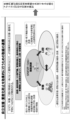
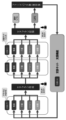
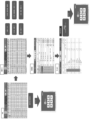
- FIG. 4 is a conceptual diagram showing the flow of creating and modifying a care plan centered on a care manager when using a care support program to which the present invention is applied; It is a schematic diagram showing the flow of various work in each professional through the care support program.
- (a) is a block diagram showing a computer in which a care support program is installed, and
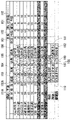
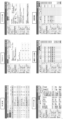
- (b) is a block diagram showing the care support program. 4 shows an image forming a care support top screen; 4 is a block diagram showing transition of a plurality of screens displayed by the care support program;
- FIG. 4 shows an image forming a care support top screen; 4 is a block diagram showing transition of a plurality of screens displayed by the care support program; FIG.
- FIG. 4 shows an image that constitutes an assistance progress recording screen; 4 shows an image that constitutes a shared user information field.
- Fig. 10 shows images that make up a weekly service plan screen; 4 shows an image that constitutes a care package screen corresponding to the first input operation display;
- FIG. 11 shows an image forming a care package screen corresponding to the second input operation display;
- FIG. 11 shows an image forming a care package screen corresponding to the third input operation display;
- FIG. (a) to (d) show the first input operation display.
- (a) shows a state in which a button for inputting information on "moisture" is selected from among the buttons constituting the first input operation display.
- FIG. 10 shows images constituting respective screens of a referral table screen, a rehabilitation implementation list screen, and a BI evaluation screen in a group of specialized screens for a rehabilitation job.
- FIG. 10 shows images constituting respective screens of a referral table screen, a rehabilitation implementation list screen, and a BI evaluation screen in a group of specialized screens for a rehabilitation job.
- FIG. 11 shows an image forming a calculation result display screen for addition such as ADL maintenance;
- FIG. FIG. 4 is a schematic diagram showing the types of various screens that make up the group of professional screens for care managers. 11 shows images constituting each screen of an assessment screen, a care plan 1 table screen, a care plan 2 table screen, a weekly service plan screen, and a daily schedule table screen in a group of professional job screens for a care manager. 4 shows images that make up a service representative conference screen. It is a schematic diagram showing the types of various screens that constitute a group of professional job screens for caregivers. It is a schematic diagram showing a simple flow of work of a caregiver. FIG.
- FIG. 4 is a schematic diagram showing types of various screens that constitute a group of professional screens for a nursing job; 4 shows images constituting a vital measurement screen.
- FIG. 4 is a schematic diagram showing the types of various screens that make up a group of professional job screens for a rehabilitation job; (a) and (b) show images constituting each screen of an example of an individual functional training plan screen. (a) and (b) show images constituting each screen of an example of an individual functional training plan screen.
- FIG. 2 is a schematic diagram showing the types of various screens that make up a group of professional screens for dieticians. 4 shows an image that constitutes a user information screen. 4 shows an image that constitutes a caution/warning list screen.
- Figure 3 shows the images that make up the thermal surface.
- the first is not only a support system for caregivers and care managers in nursing care facilities, but also a specialized system that supports the work of other professionals, such as nurses, doctors, rehabilitation, nutrition, etc., and a system that integrates them. (see Figures 6 and 7). Specifically, by adding a support function (details will be described later) that complements medical know-how, PDCA can be circulated within each professional. At the same time, a function (see FIG. 8) is added to allow easy transfer of content to be shared with other occupations.
- the second function is to support the PDCA cycle of the facility as a whole by making it easier for each specialist to grasp the current situation of care recipients and future predictions, even if service staff meetings are not held frequently.
- each care recipient's disease previous history
- health condition vitamin triage, symptoms, etc.
- medical risk malnutrition, etc.
- independence support and severity such as ADL (Berthel index: BI and FIM)
- a function that collects and analyzes the data necessary to prevent malpractice and always displays it on each professional screen see Fig. 9) and a function that displays detailed care recipient information on a single screen (see Fig. 28) are added. Also, if you want to refer to the details of each professional, you can view them from the same terminal.
- the third is a support function that allows caregivers, etc. to implement scientific nursing care without specialized knowledge of scientific nursing care.
- the "care plan" is displayed with a blue stamp on the screens of FIGS. , the time (breakfast at 7 o'clock) is known.
- the stamp turns green, and when an analysis of the input data results in an alert (for example, malnutrition), the stamp turns red.
- on-site staff such as caregivers can provide meal assistance based on scientific nursing care without knowing specialized knowledge (e.g., required intake and formulas for malnutrition).
- the field staff may implement the plan (see FIG. 12) and implementation (see FIG. 13) made by rehabilitation staff and care managers.
- nursing care services are provided to care recipients mainly according to the following flow.
- Creation of a care plan which is a care plan for each care recipient, by a care manager.
- a care plan is created for each care recipient (Plan: P), care services are provided based on the care plan (Implementation: D), and care records are created for the care services provided (Record: C).
- the care plan is revised (improvement: A), and nursing care services are provided.
- the care support program 10 of the present invention in a plurality of professionals involved in care, input, recording, monitoring, and creation of support progress records and information sharing of plans and implemented care services in each profession are efficiently performed. It is configured to do so. As a result, when creating or modifying a care plan, the care manager can refer to the records of each professional and formulate a more appropriate care plan for the care recipient (see Figure 3). .
- FIG. 4 shows the flow of various operations and information processing through the care support program 10 .
- care managers (described as care managers in FIG. 4), caregivers, nurses, occupational therapists, and nutritionists are examples of professionals who perform work using the care support program 10.
- Nurses include nurses, dental hygienists and pharmacists.
- An occupational therapist is also an example of a rehabilitation occupation.
- the care manager creates a care plan as a plan for providing specific nursing care services to individual care recipients.
- a weekly service plan is displayed as one type of care plan, and based on the content of this weekly service plan, it is provided to each cared person on the care batch screen 52 (see FIGS. 11 to 13).
- a schedule of care service contents is displayed (reference A1).
- each professional from caregivers to nutritionists, provides care recipients with their own care services based on the content displayed on the care package screen.
- each specialist inputs the details of each nursing care service provided via the nursing care package screen, and the information is recorded (symbol A1 in FIG. 4).
- symbol A1 in FIG. 4 the detail of a care package screen is mentioned later.
- each professional from a caregiver to a nutritionist observes the content of the support provided (for example, the content of the care service) and the care recipient through the support progress record screen 12 (see FIG. 9) described later. Then, regarding the information on the content of the confirmed physical condition, the information to be transmitted to other occupations (transfer information) is input and recorded (reference A2 in FIG. 4). The details of this assistance progress record image will be described later.
- the worker of each professional occupation selects the occupation of the transmission destination for the information to be transferred to other occupations, and transfers the information (code A3 in FIG. 4). ).
- the transfer information will be reflected and displayed in the column of the shared user information in the professional image of the occupation selected as the destination of the transfer information (reference A4 in FIG. 4). Details of shared user information will be described later.
- the care manager can easily check changes that have occurred in the care recipient, and can use the information to revise the care plan.
- a transfer table (see FIGS. 15, 18, and 21) summarizing various types of information is automatically created, and each professional By referring to this handover table, it is possible to confirm the handover (reference A4 in FIG. 4).
- each worker can confirm and view the contents of the support progress record screen 12, that is, the multiple transfer information that is input and recorded by multiple workers for one cared person. .
- another specialist can confirm and confirm (ratify) the already described contents. The details of this point will be described later.
- each professional reviews the daily nursing care record, etc. (nursing care batch screen, etc.) and evaluates from the perspective of how the details of the nursing care service that has been implemented affect the person being cared for. It is entered and recorded on the monitoring screen (monitoring sheet) included in one of the professional images.
- each specialist In addition to monitoring, each specialist also conducts surveys, interviews, etc. with care recipients or their families in order to analyze care issues for care recipients and to know the details of care necessary for care recipients. to perform evaluation/assessment (reference A6 in FIG. 4).
- each specialist will use the "transfer (see Fig. 8)" to provide care.
- the manager By notifying the manager, he or she is made aware of the necessity of changing the assessment (screening) (reference A6 in FIG. 4).
- This assessment is entered and recorded by each professional on the assessment screen (assessment sheet) included in one of the professional images (see Fig. 18) while interviewing the care recipient himself.
- the information obtained through assessment and screening is input into the work plan of each professional (e.g. rehabilitation plan for occupational therapists), or used to correct the information provided. (reference A6 in FIG. 4).
- rehabilitation plan for occupational therapists e.g. rehabilitation plan for occupational therapists
- the monitoring sheet and assessment sheet for each professional will be the information to be referenced at the service staff meeting together with the shared user information (reference A7 in FIG. 4).
- the ADL evaluation (BI evaluation) input and created by the occupational therapist is also referred to. Details of the ADL evaluation (BI evaluation) will be described later.
- the care manager updates the assessment based on the monitoring sheet and assessment sheet created by each professional and the shared user information (reference A10 in Figure 4). That is, when starting to provide care services to a care recipient, an initial assessment (preparation of an initial assessment sheet) is performed based on interviews with the care recipient or his/her family.
- each patient Assess caregivers and update assessment sheets.
- the assessment by the care manager may be conducted together with each professional.
- the care support program 10 to which the present invention is applied is used in the main flow explained above.
- the configuration of the care support program 10 and the configuration and functions of main screens displayed by the care support program 10 will be described in detail below with reference to the drawings.
- FIG. 5(a) shows the configuration of the nursing support device 1 of this embodiment.
- the nursing support device 1 has a configuration in which the nursing support program 10 of this embodiment is installed in a general-purpose computer.
- a general-purpose computer executes the care support program 10 to implement the care support device 1 .
- the form of the general-purpose computer that constitutes the nursing support device 1 is not particularly limited, and may be, for example, various personal computers such as a desktop type, a notebook type, a tablet type, or a smart phone. In this embodiment, a doublet personal computer having a touch panel display 4 is used.
- the nursing support device 1 mainly includes a control unit 2, a storage unit 3, a touch panel display 4, a user interface 5, an audio input unit 6, an audio output unit 7, and a wireless communication unit 8. include.
- the control unit 2 is a CPU (central processing unit) and executes control processing of the entire computer.
- the storage unit 3 is a general term for storage means including RAM (Random Access Memory) and ROM (Read Only Memory) built into the computer, and external memory such as an SD card.
- the storage unit 3 stores an operating system (OS) 9 and a care support program 10 .
- OS operating system
- the touch panel display 4 mainly has a configuration in which a position input section is laminated on the surface of a liquid crystal display, and intuitive operation is possible by touching the image displayed on the screen.
- the user interface 5 includes input devices other than the touch panel display 4, such as a keyboard and a mouse.
- the voice input section 6 includes a microphone and a microphone input terminal.
- the audio output section 7 includes a speaker and a headphone input terminal.
- the wireless communication unit 8 includes wireless communication means that enables Wi-Fi communication, Bluetooth (registered trademark), etc., for example.
- wireless communication part 8 contains the radio
- the care support program 12 to which the present invention is applied is downloaded to a general-purpose computer via the wireless communication unit 8, for example.
- the care support program 10 is application software operated by the operating system 9 and executed by the control unit 2 .
- the care support program 10 is used by care managers, caregivers, rehabilitation workers, nutritionists, nurses, clerical workers, doctors, dentists, and other professionals in various occupations involved in nursing care. build a system to manage the health condition of care recipients.
- the care support program 10 includes display control means 10A, input control means 10B, storage control means 10C, information record creation means 10D, communication control means 10E, authentication control means 10F, data calculation means. 10G and determination processing means 10H.
- the display control means 10A also executes a process of displaying an image for inputting information on the display.
- the input control means 10B executes processing for inputting information.
- the storage control means 10C executes processing for storing input information.
- the information record creating means 10D executes a process for creating an information record relating to nursing care for the care recipient.
- Communication control means 10E transmits and receives data to and from the server through the Internet.
- the authentication control means 10F controls login processing for starting use of the care record program 10 .
- the care record program 10 is started when the user selects the "care support program" icon displayed on the top page (not shown). Also, when starting work from the top page, it is possible to adopt a mode of logging in by inputting the worker's name (user name), an ID assigned to the worker, and the like.
- Nursing care support program 10 can input a wide variety of information about care services, can automatically create records about multiple types of care services based on the input information, Recorded information can be viewed. In order to input a wide variety of care service information and to display records related to a plurality of types of care services, including care records, the care support program 10 switches between a plurality of screens described later, Displayed on the touch panel display 4.
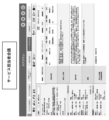
- the care support top screen 11 of FIG. 6 is displayed.
- the care support top screen 11 includes buttons 20 to 90 for transitioning to a group of screens (see FIG. 7) for each specialist related to care (see FIG. 6).
- buttons 20 to 90 for transitioning to a group of screens (see FIG. 7) for each specialist related to care (see FIG. 6).
- the display on the touch panel display 4 switches to one of the screen groups of each specialist involved in nursing care.
- the care support top screen 11 includes a care plan button 20, a rehabilitation job button 30, a nutritionist button 40, a care record button 50, a nursing record button 60, a management button 70, a doctor button 80, A request button 90 is arranged. Each professional selects various buttons as required.
- each button 20 to 90 it is configured to transition to the screen group of each professional.
- a professional screen group 21 for care managers Associated with the care support top screen 11 are a professional screen group 21 for care managers, a professional screen group 31 for rehabilitation jobs, a professional screen group 41 for nutritionists, and a professional screen for caregivers.
- FIG. 8 shows an assistance progress recording screen 12 as an example of an assistance progress recording image.
- This support progress record screen 12 is a screen on which each specialist can input and record, and is one of screen groups for each specialist, and is configured to be selectable from each screen group and transitionable.
- the support progress record screen 12 displays the content of support provided by each professional worker (for example, the content of nursing care service) and the physical condition confirmed by observing the care recipient. This is a screen for inputting and recording information (transfer information) to be transmitted to other occupations (symbol A2 in FIG. 4).
- the support progress record screen 12 includes a care receiver selection display 12A, an input date and time display 12B, a classification/type display 12C, a support content display 12D, a recorder display 12E, a referral destination selection display 12F, and an individual nursing record.
- a display 12G, a new input display 12H, and a transmission confirmation display 12I are provided (see FIG. 8).
- the cared person selection display 12A is a portion where the names of a plurality of cared people are described, and one cared person is selected from among them.
- various information about the selected cared person is displayed, and various information can be input, recorded, or confirmed.
- the selected cared person is indicated by a frame (see FIG. 8). For example, all care recipients who reside in one care facility are displayed in the care recipient selection display 12A.
- the input date and time display 12B displays the date and time information at the time of input in the area of the support content display 12D when the worker inputs new information or corrects information that has already been input and recorded. and the part to be entered.
- the date and time information here, the date and time at the time of input is automatically displayed, but it is also possible for the operator to input and record any date and time.
- classification/type display 12C is a part where information on the classification and type is displayed and input corresponding to the content of information such as care service input by the operator.
- the classification column you can select and enter items such as caution, request, accident, complaint, near miss, care, nursing, care management, rehabilitation, nutrition, oral cavity, rehabilitation, and others.
- items such as caution, request, accident, complaint, near miss, care, nursing, care management, rehabilitation, nutrition, oral cavity, rehabilitation, and others.
- individual assistance contents such as eating, grooming, bathing, excretion, etc., rehabilitation, ADL (BI item), living movement, vital measurement of care recipient, symptoms, regular medicine, other support progress
- items such as caution, request, accident, complaint, near miss, care, nursing, care management, rehabilitation, nutrition, oral cavity, rehabilitation, and others.
- individual assistance contents such as eating, grooming, bathing, excretion, etc., rehabilitation, ADL (BI item), living movement, vital measurement of care recipient, symptoms, regular medicine, other support progress
- You can select and input from items such as a memo.
- the support content display 12D is a specific support content corresponding to the content selected and displayed in the classification/type display 12C, and displays and inputs information that the worker wants to convey to other professionals. This is the part where
- the support content display portion 12D can be input by selecting information items set in advance, and the operator can also freely input text arbitrarily.
- select a button for reflecting support progress on the screen at the time of the input (not shown), and the information entered on another screen is transferred to the support progress record screen 12.
- the support content display 12D when inputting as information that a change has occurred in the state of assistance or the body with the type "ADL" or "living movement", it is necessary to set in advance for each situation before and after the change. It is possible to employ a mode in which the selected items are selected, and the specific items and the degree of change are input while selecting hierarchical information.
- a preset item is selected for each of the situations before and after the change.
- a mode of selecting and inputting hierarchical information about specific items and degree of change For example, it is also possible for the operator to optionally freely enter text regarding the changes that have occurred.
- a mode is adopted in which preset items are selected for each of the situations before and after the change, and hierarchical information is selected and input for specific items and the degree of change. preferably.
- the recorder display 12E is a portion where the name information of the worker who has input one support content display 12D is displayed and input.
- the name and the type of professional are linked, registered in advance, and selected from the registered contents configuration.
- the worker who enters the support content display 12D selects his/her own name from among the registered names, thereby entering the information of the recorder.
- this makes it possible to record the input support content information in association with the input person's name and the type of profession.
- the recorder display 12E preliminarily registers the names and types of specialists associated with each specialist belonging to one care facility, and selects from the registered contents. It need not be configured. For example, it is also possible to employ a configuration in which the input person inputs his or her own name and information on the type of profession in text form each time. However, since the input work in the record person table 12E is facilitated, the names and types of specialists of each specialist who belong to one nursing care facility are linked in advance and registered. It is preferable that the configuration be such that the content is selected from the contents.
- the transfer destination selection display 12F is a portion for selecting a specialist to be the transfer destination of the information input in the support content display 12D as transfer information to be transferred to another specialist.
- the transfer destination selection display 12F it is possible to employ a configuration in which the transfer information is transmitted not only to individual specialists, but also to all specialists. As a result, information on the transferred items can be easily shared among specialists in the entire facility. Further, the transfer information can be reflected not only in the shared user information column, but also in the caution/warning list screen, the heat type table screen, and the like.
- the transmission can be completed by selecting the icon 12J imitating a paper airplane under the item "Careful care report" (see FIG. 8).
- an icon 12K that resembles a paper airplane is displayed in the transmission confirmation display 12I.
- an icon 12L resembling a pen is displayed in the transmission confirmation display 12I.
- the individual nursing record display 12G is a portion in which the latest nursing record information separately input on the nursing record screen is displayed for the selected care recipient in the care recipient selection display 12A.
- the new input display 12H is a portion that is selected when the worker wishes to newly input information on support content.
- a new line that can be input for each item of the input date and time display 12B, the classification/type display 12C, the support content display 12D, the recorder display 12E, and the transfer destination selection display 12F is displayed. will appear below the information already entered, allowing you to enter new information.
- Such a case is, for example, a case in which a caregiver inputs a change in assistance content to the support content display 12D for a certain care recipient, and an occupational therapist confirms this content to indicate that the change has been approved. is a case.
- the caregiver inputs and records information indicating that the content of assistance has changed from full assistance to partial assistance for the category "ADL" for the item of climbing stairs, and this information is displayed. It is assumed that
- the occupational therapist confirms the contents of the input line, and if the change is approved, the occupational therapist who confirmed the name of the caregiver displayed in the recorder display 12E for the information displayed in the same line change to the name of Mr.
- the transmission destination of other professional screens such as a caregiver or a care manager is selected.
- the worker selects the new input display 12H each time, and new input date and time display 12B, classification/type display 12C, support content display 12D, and recorder display 12E are displayed.
- new input date and time display 12B, classification/type display 12C, support content display 12D, and recorder display 12E are displayed.
- new input date and time display 12B, classification/type display 12C, support content display 12D, and recorder display 12E are displayed.
- the information entered on the support progress record screen 12 also functions as a screen for checking and viewing the support progress record. That is, it is possible to check and browse the information on the content of support for a certain period of time in a list on the support progress recording screen 12 for a certain care recipient. In this way, each professional can use the support progress record screen 12 as a reference for grasping the care-receiver's condition in detail.
- This "shared user information” is information about individual care recipients for reference by each professional when performing the work of each occupation, and is information shared among other occupations.
- the shared user information mainly consists of personal information of the care recipient, information on changes in the care recipient's physical condition, and information on changes in the content of assistance and rehabilitation for the care recipient. Configured.
- the reference information for each professional when performing the work of each occupation (1) when there is a change in the care recipient, attention is paid by changing the color of the characters that display the information. (2) Notify when the mandatory period for assessment (for example, every six months for BI) comes, (3) If there are any deficiencies in the contents of the LIFE application, identify what is incomplete Inform, display or notification can be performed.
- each specialist can efficiently check information on changes in the physical condition of the care recipient and information on changes in the content of assistance and rehabilitation for the care recipient. is provided with a display of shared user information.
- Fig. 9 shows an example of shared user information display.
- An action indicator 13H is provided.
- the cared person selection display 13A is a portion for selecting one cared person from the name information of a plurality of cared people who have moved into one nursing care facility.
- the cared person selection display 13A is a portion for selecting one cared person from the name information of a plurality of cared people who have moved into one nursing care facility.
- various information about the selected care recipient is displayed, enabling confirmation of various information.
- the cared person selection display 13A before selecting one cared person, a building having a room of the cared person to be confirmed is selected from the building selection display 13I, and the cared person selection range is displayed. can be narrowed down.
- the personal information display 13B is a portion where personal information about the care recipient selected in the care recipient selection display 13A is displayed.
- personal information such as gender, date of birth, age, user number, height, and weight is displayed as personal information.
- the user number is an arbitrary number set by the nursing facility.
- the past history display 13C is a portion where information on the past history of the care recipient selected in the care recipient selection display 13A is displayed.
- the symptom display 13D is a portion where information on symptoms observed for the care recipient selected in the care recipient selection display 13A is displayed. Further, in the symptom display 13D, posted information is displayed in red, and is displayed in a manner that is more conspicuous than other written information such as personal information.
- the symptom information displayed in the symptom display 13D reflects information from the following aspects.
- the symptom information input by the worker (nurse, caregiver, etc.) to the support content display 12D is transmitted as the information to be passed on, the mode displayed in the symptom display 13D.
- the mode displayed in the symptom display 13D There is In addition to this, when information on symptoms observed by the care-receiver is input in the nursing record or weekly nursing record on the nurse's professional screen, there is a mode in which it is displayed in the symptom display 13D. .
- the alert display 13E is based on the information recorded in the nursing care record (nursing collective screen), nursing record, or weekly nursing record for the care recipient selected in the care recipient selection display 13A. This is the portion that indicates an abnormal state when a judgment of "Caution” or “Warning” is made. The details of the determination of "caution” or “warning” will be described later.
- this alert display 13E when the care-receiver is in a condition that is determined to be abnormal regarding "malnutrition”, “constipation”, and “dehydration”, “malnutrition”, “constipation” , “Dehydration”, “Others”, “Bath stop”, “Rehab stop”, etc. are displayed.
- a memo column for life records is provided on the nursing care collective screen described later, and each worker such as a caregiver can enter malnutrition, constipation, dehydration, etc., stop bathing, etc. in this memo column.
- the alert display 13E is displayed as information that should be noted regarding the care recipient.
- posted information is displayed in red and displayed in a manner that is more conspicuous than other written information such as personal information.
- the medication information display 13F displays information about medicines that the care receiver is taking, based on the information recorded in the nursing record or the weekly nursing record for the care receiver selected in the care receiver selection display 13A. This is the part to display.
- the ADL display 13G shows each evaluation item of the Barthel index as an index representing the physical condition of the care recipient selected in the care recipient selection display 13A, the degree thereof, the presence or absence of change in the degree, and the Barthel index. This is the part that displays the total score of all evaluations of the index.
- the Barthel index is an index that conventionally represents the physical condition related to rehabilitation, and has 10 evaluation items shown in Table 1 below, and each evaluation item is given a score from 2 to 4 according to the stage.
- This is an ADL (activities of daily living) evaluation method in which the total score of all items is evaluated.
- the Barthel index is used not only as an index representing the physical condition related to rehabilitation, but also as an index representing the physical condition of the cared person.
- the evaluation level is displayed in a fine black font (for example, the location indicated by reference numeral 13J in FIG. 9).
- the degree of evaluation before the change is displayed in a black fine font
- the degree of evaluation after change is displayed in a purple bold font (for example, the location indicated by reference numeral 13K in FIG. 9).
- the changed information is displayed in a bold and conspicuous manner.
- the type of the professional who is the source of the information is displayed with the content that shows the type (for example, the part indicated by reference numeral 13L in FIG. 9).
- the degree of evaluation after the change is displayed in a bold red font (for example, the location indicated by reference numeral 13M in FIG. 9).
- the changed information is displayed in bold red letters in a more conspicuous manner.
- the type of professional (rehabilitation) that is the source of the information is displayed with the content that shows the type (for example, the part indicated by reference numeral 13N in FIG. 9).
- the content of the displayed information is changed based on the information input from the worker and the transmission as transfer information on the support progress record screen 12 described above. That is, in the item of the assistance content display 12D of the assistance progress recording screen 12, when information indicating that there has been a change in the content of assistance or rehabilitation regarding ADL is input, the ADL of the shared user information column 13 is entered. The information is reflected on the display 13G as a change occurrence display.
- the shared user information column 13 is an image portion that occupies a part of each specialist job screen, and the information is reflected as a change occurrence display in the ADL display 13G.
- the screen is the screen of the specialist selected in the column of the referral destination selection display 12F of the support progress record screen 12.
- the change occurrence display related to the evaluation items of the Barthel index is reflected.
- the change occurrence display is not reflected in the shared user information column 13 on the screen of professionals such as care managers and rehabilitation workers, which has not been selected as a transmission destination.
- the change occurrence display is reflected in some screens and not reflected. Screens can be distinguished. As a result, the worker can efficiently convey information about changes in the physical condition of the care recipient only to specialists who need the information.
- a screen that reflects the change occurrence display and a screen that does not reflect the change occurrence display can be distinguished from the information of the symptom display 13D, which will be described below.
- the information of the living action display 13H is handled in the same manner.
- the ADL display 13G displays the total score of the content of the degree of evaluation for each evaluation item of the Barthel index for the selected cared person (the place indicated by symbol 13O in FIG. 9). In addition, the ADL display 13G displays information on the update date and time when the information was most recently modified (reference numerals omitted).
- the living motion display 13H is a portion that displays each evaluation item of the living motion for the care recipient selected in the cared person selection display 13A, the degree thereof, and whether or not the degree has changed.
- the evaluation items for the sitting motion were five items, ⁇ rolling over'', ⁇ sitting'', ⁇ getting up'', ⁇ standing'', and ⁇ standing''. It is divided into three stages: part assistance and watching over.
- each evaluation item of the sitting motion and the degree of evaluation are used as indices representing the care-receiver's physical condition.
- the living movement display 13H as in the ADL display 13G, information is displayed as a change occurrence display if there is a change in the degree of evaluation for each of the five evaluation items, and if there is a change in the degree. ing.
- the display method is the same as the ADL display 13G.
- FIG. 9 there is a display of “items with no change in the degree of evaluation” (reference numeral 13P in FIG. 9), there is a change in the degree of evaluation, and the source of information is other than rehabilitation workers (for example, caregivers or Display of the degree of evaluation after change in information (nurse, etc.) (mark 13Q in FIG. 9), display of the specialist (mark R in FIG. 9), evaluation items, there is a change in the degree of evaluation, rehabilitation Shows the degree of evaluation after change (mark S in FIG. 9) and the display of the profession (mark T in FIG. 9) for those whose content of change has been confirmed by the occupation (occupational therapist, etc.). ing.
- the living motion display 13H if there is no change in the degree of evaluation for each evaluation item of the five living motions, information on the current state (recorded from the past) is displayed. In addition, when there is a change in the degree of evaluation, the method of display is changed depending on whether the information is derived from rehabilitation work or not, so that the state after the change is easy to understand. display).
- the contents of the displayed information are changed based on the information input from the worker and the transmission as the transfer information on the support progress recording screen 12 described above. be. Since this part is the same as the ADL display 13G, the description is omitted.
- the display of the shared user information column 13 described above is a display used by each professional to efficiently share the necessary information regarding the provision of nursing care services to the care recipient among other occupations.
- the shared user information column 13 is displayed as a part of the screen information on the specialist screen of each specialist.
- the feature of the shared user information column 13 shown in FIG. By distinguishing between BI (ADL level that can be achieved in daily life) and collecting, analyzing, and displaying information such as malnutrition risk information and abnormal symptoms, The point is that the latest physical information and its changes can be easily grasped.
- BI ADL level that can be achieved in daily life
- the content of the referral (see FIG. 8) from each professional (eg, caregiver) is transmitted mainly by FIM (change of assistance content).
- FIM change of assistance content
- the shared user information column 13 the information on the change of FIM (contents of assistance) is displayed in purple (indicating FIM), and the change in information on BI (indicating in red) are configured to be distinguishable from each other.
- the rehabilitation worker sees the purple information indicating the change in FIM (contents of assistance) and confirms the BI, so that the information on the change in FIM (contents of assistance) changes from purple to red (with BI change). turns into
- the shared user information column 13 is also displayed on the weekly service plan screen 22, which is one of the professional screens used by the care manager (see FIG. 10).
- This weekly service plan screen 22 is a screen for the care manager to input/record a weekly care plan (care plan) for each care receiver and to confirm the contents. Care service is provided to the cared person according to the contents of this weekly service plan.
- a plan information display 220 for the selected cared person is provided from the center to the right side of the entire screen, and the shared user information column 13 is provided on the left side thereof.
- plan information display 220 is based on the information obtained by the care manager at the service staff meeting, the specialist screen of other specialists, or the information displayed on the nursing care record (nursing care collective screen). This is a screen for inputting the contents of the care service for one week for the selected care receiver together with the information on the time period to be provided.
- nursing care services include, for example, meal assistance for breakfast, lunch and dinner, hydration assistance, regular medication administration, medicine application, excretion assistance, dressing assistance, bathing assistance, oral care, position change, rehabilitation/functional training, There are recreation and other nursing care services.
- Such various care services are input to the display unit 221, and a service plan schedule for one week is created.
- the daily schedule table is a screen for inputting/recording a daily care plan (care plan) for each cared person and for confirming the contents.
- the daily schedule is also referred to when providing care services to the care receiver.
- This daily schedule screen displays the time zone of the day, information on the details of nursing care services, and the types of specialists in charge of nursing care services. For example, information such as 15:00, dressing assistance, and caregiver are displayed.
- the care manager can It is possible to easily grasp information on changes in the physical condition and information on changes in the content of assistance/rehabilitation for the care recipient.
- the shared user information column 13 is configured so that the display/emergencies on the screen can be selected with a dedicated button (not shown) on the screen. By doing so, the shared user information column 13 can be displayed as needed, and the usability of the specialist job screen can be improved.
- the shared user information column 13 is displayed not only on the weekly service plan screen 22 for care managers, but also on various other professional screens.
- professional screens on which the shared user information column 13 is displayed include an assessment screen for care managers, a daily schedule schedule screen, screens related to other care plans (see FIG. 18), and screens for service staff meetings (see FIG. 19). See), weekly nursing record screen for nurses, care plan screen for excretion, bedsores, oral care, etc., rehabilitation schedule/implementation list screen for rehabilitation workers, BI evaluation screen, individual functional training plan screen (see FIGS. 25 and 26), a nutrition summary screen for dietitians, and a nutrition care plan screen.
- the type of specialist screen on which the shared user information column 13 is displayed is not particularly limited, and can be set as appropriate.
- the nursing care batch screen is mainly used by a caregiver to confirm the details of the nursing care service to be provided to the care recipient and to enter a record of the implementation of the nursing care service provided to the care recipient. is the screen. Further, the collective care screen is a screen for confirming/viewing a record of implementation of care services provided to the care receiver.
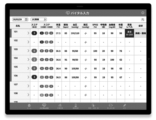
- FIG. 11 to 13 show images that constitute the collective care screen 52.
- the care package screen 52 has an input operation display area 52A, a cared person information display area 52B, a time display area 52C, and a selection display area 52D.
- cared person information display area 52B and the selection display area 52D can be scrolled horizontally. Also, the time display area 52C and the selection display area 52D can be scrolled vertically.
- the input operation display area 52A is located above the collective care screen 52 and extends in the horizontal direction.
- first to third input operation displays 520A to 520C, a save button 520D, a cancel button 520E, a support progress record button 520F, and a date display 520G are arranged along the longitudinal direction.
- the first input operation display 520A is composed of four buttons that are operated to input and display information on “water”, “medicine”, “staple food”, and “side food”.
- the second input operation display 520B is composed of four buttons operated to input and display information on "urine”, “feces”, “bathing”, and “free comment”.
- the third input operation display 520C is a button operated to input and display “other” care service information, and can be assigned any four care service information entered by the operator.
- the care package screen 52 shown in FIG. 11 shows a state in which the first input operation display 520A is selected. 12 shows a state in which the second input operation display 520B is selected. Further, the care package screen 52 shown in FIG. 13 shows a state in which the third input operation display 520C is selected.
- the selected first input operation display 520A is conspicuously displayed with a dark outline and a color different from the background color.
- the second and third input operation indications 520B and 520C that are not selected are displayed inconspicuously with a light outline and the same color as the background.
- the save button 520D is operated to save the data of the input information.
- the care support program 12 of the present embodiment performs normal operations such as input and browsing in an offline state, and enters an online state only when transmitting and receiving data to and from a server connected to the Internet.
- the care support program 12 brings the computer online and transmits data to a server connected to the Internet.
- the transmitted data is stored in the database of the server.
- cancel button 520E is operated to erase the entered information before saving.
- support progress record button 520F is operated to display the support progress record screen 12 (see FIG. 8) described above.
- the date display 520G is operated to select the date.
- the care service information entered on that date is displayed in the cared person information display area 52B and the selection display area 52D.
- cared person information display area 52B is positioned directly below the above-described input operation display area 52A and extends in the horizontal direction of the care package screen 52.
- a plurality of cared person information displays (names and room numbers of cared persons) for specifying each of a plurality of cared persons are arranged along the longitudinal direction of cared person information display area 52B.
- the cared person information display area 52B shown in FIG. 11 is configured to display the cared person information display for 12 people.
- the cared person information display area 52B and the selection display area 52D are scrolled in the horizontal direction, the cared person information display for the thirteenth and subsequent persons not displayed in FIG. 11 is displayed in the cared person information display area 52B.
- time display area 52C is located below the cared person information display area 52B described above and extends in the vertical direction of the care package screen 52 .
- a plurality of time displays are arranged along the longitudinal direction of the time display area 52C. Each time display indicates a time at which care services are provided.
- the time display area 52C shown in FIG. 11 is configured to display the time display for nine hours (8:00 to 16:00). By vertically scrolling the time display area 52C and the selection display area 52D, the time display area 52C can display a time display for 24 hours every hour.
- the selection display area 52D is defined by the cared person information display area 52B and the time display area 52C described above, and is adjacent to both of them.
- a plurality of selection displays 52E are arranged in a matrix in the selection display area 52D. Each selection display 52E corresponds to both one cared person information display and one time display.
- care batch screen 52 shown in FIG. 11 is in a state where the first input operation display 520A is selected, and each selection display 52E includes "moisture”, " Symbols indicating "medication”, “staple food”, and "side food” are displayed.
- each selection display 52E switches according to the selection of the first to third input operation displays 520A to 520C.
- the care service information input by the first to third input operation displays 520A-520C are associated with one or more selected selection displays 52E.
- each selection display 52E care schedule information, which is care service information scheduled to be provided to the care receiver, and care implementation information, which is care service information (already performed services) provided to the care receiver, are displayed. be.
- care schedule information which is care service information scheduled to be provided to the care receiver
- care implementation information which is care service information (already performed services) provided to the care receiver
- the nursing care schedule information includes icons of staple food and side dish in the selection display 52E of each care recipient in the time zone of 12:00, indicated by symbol B1 in FIG. is displayed as a colored icon (here, displayed in blue) as shown in the drinking water icon of the selection display 52E of each care recipient during the time period of .
- the icon of the other selection display 52 without plans is displayed in light gray, while the icon of the care service content corresponding to the selection display 52E with plans is colored blue to display the care schedule information. It is configured so that it can be confirmed that
- numbers are displayed on the staple food and side dish icons related to meals. For example, in the selection display 52E indicated by symbols S1 and S2 in FIG. 11, numbers "8, 8" are displayed on icons of staple food and side dish.
- This number represents the ratio of food intake required for each care recipient. If the cared person corresponding to this symbol S takes 80% of the staple food and 80% of the side dish for lunch at this time, it means that the cared person can take the necessary dietary intake. The caregiver can confirm that it is sufficient to provide meal assistance using the number displayed in the care schedule information selection display 52E as a guide. The details of the calculation of the dietary intake and the like will be described later.
- the nursing care implementation information is colored (here, displayed in green) as indicated by the staple food/side dish icon in the selection display 52E of each care recipient in the 8 o'clock time slot indicated by symbol G in FIG. 11 . icon.
- the icon of the other selection display 52E with no schedule is displayed in light gray, while the content of the nursing care service that has already been performed is entered and recorded in the selection display 52E corresponding to the content of the care service. icon is colored in green so that it can be confirmed that it is care implementation information. Further, since the care schedule information is displayed in blue, it can be clearly distinguished from the green care execution information.
- numbers are displayed on the staple food and side dish icons that are related to meals. For example, in the selection display 52E indicated by symbol E1 in FIG. 11, the numbers "10, 8" are input and displayed on the staple food/side dish icon. Similarly, in the selection display 52E indicated by symbol E2 in FIG. 11, the numbers "5, 4" are input and displayed.
- This number indicates the ratio of staple food and side dish eaten by the care recipient. For example, if the caregiver assists with eating and the care recipient eats 100% of the staple food, the caregiver can select the selection display 52E on the care batch screen 52 and enter a number. Details of the input will be described later. In this way, the caregiver or the like can select the selection display 52E to input and display information about the implementation of the nursing care service and the implementation of the nursing care service.
- the care support program 10 of the present invention based on the dietary intake required for the care recipient (required intake) and the dietary intake calculated from the actual dietary intake by the care recipient (actual intake) If the actual amount of intake does not satisfy a predetermined condition, it is configured to display an alert indicating that there is a risk of "undernutrition". Note that the predetermined conditions and the like will be described later.
- the selection display 52E in which information on care services related to meals is input as the care implementation information is displayed as a staple food and a side dish. Icons and numbers are displayed in color (here, red), and configured to display an alert indicating that there is a risk of malnutrition (see, for example, symbol E2 in FIG. 11).
- the selection display 52E of the nursing care implementation information that does not correspond to malnutrition is displayed in green, but if there is a risk of malnutrition, the icon and number of the selection display 52E are displayed in red, and an alert displayed.
- the alert display colored information is also displayed on the caution/warning list screen and the heat type table screen, which will be described later.
- the alert display including malnutrition is reflected in the alert display 13E of the shared user information described above, and the characters such as "undernutrition" are displayed in conspicuous red. In this way, the alert display of the shared user information and the input of the care implementation information on the collective care screen 52 are interlocked. In addition, the alert display including malnutrition is reflected and displayed on the caution/warning list screen for each cared person (see FIG. 29) and the heat type table screen (see FIG. 30).
- This caution/warning list screen includes the score value of scoring based on vital sign measurement, symptoms, alert display of malnutrition, dehydration, constipation, etc., and the degree of abnormality regarding the physical condition of the care recipient.
- This screen displays related items in descending order of risk (see FIG. 29). Here, for example, an item with a high degree of abnormality is displayed in red as “warning”, and a state judged to be abnormal although the degree of abnormality is lower than the warning is displayed in yellow as "caution”. In addition, malnutrition, dehydration, and constipation alerts are displayed in red.
- the worker can easily check any abnormalities such as the physical condition of each care recipient.
- the heat type table screen includes chronological data of vital sign values measured from the care recipient, score values for scoring based on the measurement of vital signs, and abnormal judgment results (red, yellow , the degree of abnormality is displayed in green), medical history, and medical/nursing records are displayed (see FIG. 30).
- the worker can check the changes in the vital signs of each care recipient, the score values, etc., and can easily check changes in physical condition based on the vital signs. .
- the display of the care schedule information on the care package screen 52 is configured so that the care plan information entered in the weekly service plan or the daily plan can be reflected and displayed.
- the contents of the schedule of the care service plan input by the care manager on the weekly service plan screen 22 or the daily schedule screen are reflected and displayed in the care schedule information on the collective care screen 52.
- the information of the care plan entered in the weekly service plan or the daily plan is reflected as the display of care schedule information on the care batch screen 52, so that caregivers, nurses, etc. can
- the work of inputting the care execution information to the care collective screen 52 can be saved, and the work can be proceeded efficiently.
- the content of the care implementation information can be individually input to the care collective screen 52 and displayed by the input operation described later.
- the display of care implementation information on the care package screen 52 is performed by a caregiver, a nurse, etc., after each care service is provided to the care recipient, by inputting and displaying it on the care package screen 52 by the input operation described later. It has a form.
- the collective care screen 52 described above allows information to be input to each of a plurality of care recipients using the first to third input operation displays 520A to 520C and a plurality of selection displays 52E. Also, the explanation here will be made by taking as an example a case of inputting care execution information after providing care service to a care recipient. The same method can be used to input individual care schedule information.
- the first input operation display 520A When entering information on "moisture”, “medicine”, “staple food”, and “side food” on the care batch screen 52 shown in FIG. 11, the first input operation display 520A is selected. When the first input operation display 520A is selected, all the selection displays 52E arranged in a matrix in the selection display area 52D are switched to the same pattern as the first input operation display 520A.
- selection display 52E selects the selection display 52E corresponding to both the care recipient (care recipient information display 52B) for whom the care service information is to be entered and the time at which the care service was provided (time display 52C).
- one or more selection displays 52E can be individually selected.
- time displays 52C e.g. "12 o'clock"
- all of the selection displays 52E in the horizontal row corresponding to this time display 52C can be selected.
- the first input operation display 520A includes a water input button 521, a medication input button 522, a staple food input button 523, and a side dish input button 524.
- These four buttons 521 to 524 display icons (patterns) indicating "moisture”, “medicine”, “staple food” and "side food”.
- the operator selects any one of the four buttons 521 to 524 to input information on "water”, “medicine”, “staple food” or “side food”.
- the input care service information is associated with one or more selection displays 52E selected in FIG. 11, and the information is displayed on the selection display 52E.
- a water input window 5210 is displayed.
- the water input window 5210 includes four buttons “low”, “medium”, “high”, and “0” for inputting the percentage of the amount of water ingested by the cared person. The operator selects any one of the four buttons of "low”, “medium”, “high”, and “0” and inputs the percentage of the amount of water taken by the care-receiver.
- the water input window 5210 also includes a numerical value input field 5210a for inputting the numerical value (ml) of the amount of water ingested by the cared person.
- a numeric keypad display 5211 is displayed.
- the operator can operate the ten-key display 5211 to input any numerical value (ml) in the numerical input field 5210a.
- the numerical value (ml) entered in the numerical value input field 5210a is converted into one of the ratios of “small”, “medium”, “large”, and “0”, and any one of the four buttons is used for input. state.
- a medication input window 5220 is displayed.
- the medication entry window 5220 includes a person-in-charge name entry field 5220a for entering the name of the person who took care of the care-receiver's medication.
- a drop-down list (not shown) containing a plurality of names of persons in charge is displayed. The operator selects the name of the person who took care of the care recipient from this drop-down list.
- Staple food input window 5230 includes buttons for inputting the ratio of the amount of staple food eaten by the care-receiver on a scale of '0' to '10'.
- a staple food refers to a food that is a main part of a daily meal, and includes, for example, rice and bread. The operator selects any button from “0" to "10” and inputs the ratio of the amount of staple food eaten by the care-receiver.
- a side dish input window 5240 is displayed.
- the side dish input window 5240 includes buttons for inputting the ratio of the amount of the side dish eaten by the care-receiver on a scale of "0" to "10".
- a side dish is something that is eaten together with a main dish, and corresponds to side dishes and side dishes. The operator selects any button from “0" to "10” and inputs the ratio of the amount of side dishes eaten by the care-receiver.
- the selection display 52E is divided into first to fourth areas 521A to 524A.
- the first to fourth areas 521A to 524A correspond to the four buttons 521 to 524 constituting the first input operation display 520A, respectively, and are used to select "water”, “medicine”, “staple food” and “side food”. icon (design) is displayed.
- the color of the first area 521A of the selection display 52E shown in FIG. 15(e) is changed.
- the color of the first area 521A is changed, for example, from white to green (the color indicating the completion of care implementation information).
- the second regions 522A to 524A described below.
- the numerical value (text information) of the moisture content input in the numerical value input field 5210a of the moisture input window 5210 is displayed in the first area 512A of the selection display 52E.
- the second input operation display 520B When entering information on "feces”, “urine”, “bathing”, and “free comment” on the nursing care collective screen 52 shown in FIG. 12, the second input operation display 520B is selected.
- the second input operation display 520B When the second input operation display 520B is selected, all the selection displays 52E arranged in a matrix in the selection display area 52D are switched to patterns similar to those of the second input operation display 520B.
- the basic work contents are the same as the input procedure by the first input operation display 520A described above.
- buttons and displays relating to "feces”, “urine”, “bathing”, and “free comment” are used, and the information input by the operator is reflected in the selection display 52E. .
- the operator can input arbitrary text information in the input regarding "free comment”.
- the third input operation display 520C is selected.
- the third input operation display 520C has an appearance of only a frame line with no pattern, and the characters "Other" are displayed in the center of the frame line.
- the third input operation display 520C is not an aggregate of four buttons like the first and second input operation displays 520A and 520B, but is a single button as a whole.
- the selection displays 52E arranged in a matrix in the selection display area 52D are switched to have the same appearance as the third input operation display 520C. That is, the selection display 52E has an appearance of only a frame line with no pattern, like the third input operation display 520C. That is, the first to fourth areas of selection display 520C are all blank.
- a care service item input window (not shown) is displayed.
- the care service item input window is composed of a plurality of item selection check boxes and a plurality of blank check boxes.
- multiple pieces of nursing care service information are assigned in advance to the selection checkboxes. For example, “personal care”, “oral care”, “dressing assistance”, “transfer/movement assistance”, “sheet changing and cleaning”, “recreation”, and “patrol” are assigned.
- the user can assign any care service information to the blank check boxes.
- a blank check box allows you to enter any textual information. For example, when "posture change" is entered, the blank check box changes to the item selection check box for "posture change”.
- arbitrary care service information assigned to this box can be edited by using the item edit button.
- each display is displayed with shortened two characters.
- the operator can select a plurality of care services using the third input operation display 520C, reflect them in the selection display 52E, and input and record them as care implementation information.
- rehabilitation records and bedsore records can be assigned to the third input operation display 520C, and input/recorded.
- a memo column for life records is provided, and each worker such as a caregiver can freely comment on this memo column, various abnormal information such as malnutrition, constipation, dehydration, etc. It is possible to input and record information such as stop bathing, decubitus, and stop rehabilitation.
- the input information is not only reflected in the alert display 13E as attention information for the care receiver, but is also transcribed on the support progress recording screen (see FIG. 8).
- the BMI Body Mass Index
- weight change rate of each care receiver are automatically calculated from the input data of height information and daily weight information of each care receiver. can automatically determine the “risk level of malnutrition (high/medium/low risk)”.
- the height information of the care receiver can be registered in advance as information included in the user information of the care receiver, for example.
- information on the weight of the care recipient is obtained by measuring the weight of the care recipient as appropriate (for example, every day) by caregivers and nurses, and sharing the measurement result information with the user's vital information, nursing It can be entered in a record or the like.
- the BMI value and the calculation of weight increase/decrease can be automatically calculated by the data calculation means 10G executing the calculation process based on the input/recorded information. Further, the determination of the risk level of malnutrition with respect to the calculated BMI value and body weight increase/decrease rate is performed by the determination processing means 10H executing determination processing.
- the determination processing means 10H automatically determines the risk level of malnutrition based on the care-receiver's BMI value and body weight increase/decrease rate calculated by the data calculation means 10G and the contents of Table 2 below. to judge.
- the determined result is recorded in the user's vital information, nursing record, or the like.
- alert display As a form of alert display, the characters "undernutrition" are displayed in red in the alert display 13E as the display of the shared user information described above.
- the nursing care support program 10 of the present invention can automatically calculate the amount of food intake required for each person to be cared for in a day's meals (breakfast, lunch, and dinner).
- level 2 corresponds to those who are independent
- level 1 corresponds to those who stay at home and rarely go out.
- Level 1 is a value that can also be applied to people who live in a facility for the elderly in a state close to being independent.
- the required intake calculated by the data calculation means 10G can be automatically calculated as the amount of food provided, as the calorie per meal, for example, "lunch: 800 kcal". Food expenses are displayed separately for main meals and side dishes. For meals, in addition to breakfast, lunch, and dinner, items corresponding to "snacks" can be provided at intervals between meals.
- the nursing care support program 10 of the present invention can automatically calculate the meal provision rate, which is the percentage of the meal (staple food/side dish) that the care-receiver needs to take at each meal. .
- the data calculation means 10G calculates the amount of energy intake per body weight, the amount of protein intake per body weight, and the amount of protein intake per body weight calculated from the contents of the meal eaten by the care recipient and the contents of Table 4 below, Based on the necessary intake amount for each caregiver, a calculation process is executed for the target provision ratio of the staple food and the side dish to the care-receiver for each meal.
- a nutritionist or other person sets and inputs the calorie and protein amounts for each meal (breakfast, lunch, dinner, and staple and side dishes) for each meal provided at the nursing facility.
- a professional screen for a nutritionist can enter and record this information.
- the data calculation means 10G calculates the amount of energy intake (kcal) per body weight and Calculate the amount of protein intake (g).
- the data calculation means 10G calculates the calorie and protein values set for each meal, the energy intake per body weight (kcal), and the protein intake per body weight (kcal) required for each care-receiver. Based on g) and the value of the required intake amount for each meal for each care-receiver described above, the target ratio of intake for the care-receiver at each meal is calculated.
- the target ratio of the care-receiver to take in the meal, calculated in this way, is represented for each meal, for example, as a staple food of "8" and a side dish of "8".
- blue numbers are displayed on icons of staple foods and side dishes as care schedule information.
- the caregiver or the like can confirm the ratio of meals to be eaten during meal assistance only by confirming the numerical value displayed on the selection display 52E, and can make the care-receiver take an appropriate amount of meals. It becomes possible.
- the amount of food taken by the care recipient during meal assistance can be input, and the nutritional status and nutrient intake of the care recipient can be automatically calculated.
- the caregiver provides meal assistance to the care recipient at each meal, and uses the selection display 52E of the care batch screen 52 to input the intake ratio of the meal taken by the care recipient.
- the rate of intake of the staple food and the side food in one meal is recorded for each care-receiver.
- the data calculation means 10G automatically calculates the intake rate for the most recent three days based on the ratio of the cared person's ingestion of staple food and side dish in one meal.
- the intake rate for the most recent three days is registered in the LIFE ledger system as information indicating the nutritional status of the care-receiver (reference A8 in FIG. 4).
- the data calculation means 10G calculates, based on the calorie and protein values set for each meal and the intake rate of the care receiver for the last three days, the nutritional intake the care receiver has taken in the last three days. Quantity (energy and protein) and quantity per actual body weight are calculated.
- the data calculation means 10G calculates the ratio of the value of the nutrient intake taken in the last three days to the value of the required intake in the last three days, and if the ratio is 75% or less, the determination process Means 10H determines that there is a risk of "undernutrition”. Along with this, it is configured to display an alert of "undernutrition”.
- the determination of "malnutrition” is performed in the same way as before, as a form of alert display, as the display of the shared user information described above, in the alert display 13E, the characters “malnutrition” are displayed in red. become a thing.
- the caution/warning list screen for each care recipient see Fig. 29
- the heat type table screen see Fig. 30
- the intake rate of the care receiver for the last three days is automatically calculated, and the intake rate is less than the constant condition. is also deficient, it can be automatically determined that there is a risk of malnutrition. Since the risk of malnutrition is displayed as an alert in each mode, each specialist can easily grasp care recipients who need attention.
- the above-mentioned content is a function related to nutrition, but similarly, by inputting and recording the excretion (presence or absence of stool) of the care recipient, it is possible to display an alert for the risk of "constipation". there is for example, if there is no excretion (stool) recorded for the same care recipient for three days or more on the care batch screen 52, an alert indicating the risk of "constipation" is displayed for that care recipient. .
- the nursing care support program 10 of the present invention can provide appropriate meal assistance and sufficiently confirm the risk of malnutrition of the care recipient through various functions related to nutrition.
- rehabilitation workers judge each of 10 evaluation items for BI evaluation (evaluation of Barthel index) of each care recipient. Then, there is a BI evaluation screen for inputting the degree of evaluation (see the right figure in FIG. 15). On this BI evaluation screen, the degree of evaluation of each care-receiver is input, and individual scores and total points corresponding to the degree of evaluation are displayed.
- BI evaluation evaluation of Barthel index
- the present invention is equipped with a function to collect information for each facility and perform automatic calculation for each facility regarding the results of BI evaluations input by rehabilitation workers.
- the screen shown in FIG. 16 is an example for explaining the automatic calculation function of the points for the addition of ADL maintenance, etc. in nursing care facilities, and is a calculation result display screen 100 for the addition of ADL maintenance, etc.
- the calculation result display screen 100 in FIG. 16 summarizes information about all care recipients living in the target care facility.
- 10 care recipients are illustrated as all residents of the care facility.
- individual scores corresponding to the degree of evaluation are displayed for each of the 10 evaluation items of the Barthel Index for each care recipient.
- individual scores indicate a score of 101 at the previous evaluation and a score of 102 at the current evaluation.
- time of the previous evaluation here means, for example, the evaluation results at the timing of one month before, starting from the time of the current evaluation.
- FIG. 16 shows some of the 10 evaluation items, on the actual screen, by scrolling the screen to the right, the scores of all 10 evaluation items can be displayed.
- settings for "previous evaluation” and "current evaluation” in this section can be changed as appropriate. For example, setting the evaluation half a year ago as the “previous evaluation” and the current evaluation as the “current evaluation”, or setting the current evaluation as the "previous evaluation” and the future plan (planned) evaluation as the "current evaluation”. It is also possible to set
- a previous evaluation total score display 101A for each cared person, a previous evaluation total score display 101A, a current evaluation total score display 102A, a BI evaluation result display 103, an additional point display 104, an individual score display 105, It has an admission progress information display 106 (see FIG. 16).
- a facility total score display 107 for the target nursing care facility, a facility total score display 107, a facility calculation point display 108, a facility average score display 109, a comparison information display 110, a change required information display 111, It has a facility average score result display 112 (see FIG. 16).
- the previous evaluation total score display 101A is a portion that displays the total score of the previous evaluation of all evaluation items of the Barthel index for each individual care recipient.
- the current evaluation total score display 102A is a portion that displays the total score of the current evaluation of all evaluation items of the Barthel index of each individual care-receiver.
- the BI evaluation result display 103 is a portion that displays the score obtained by subtracting the previous evaluation total score display 101A from the current evaluation total score display 102A for each care-receiver.
- the additional point display 104 is a portion that displays the additional points for each cared person based on the contents of Table 5 below.
- the additional points are the points set based on the period from the month of the first certification of need for long-term care, the ADL value (BI value) measured in the month when the evaluation of the ADL value was started, and the type of nursing facility.
- the individual score display 105 is a display portion of the total score of the BI evaluation result display 103 and the additional score display 104 for each cared person.
- the admission progress information display 106 is a portion that displays the period after each care recipient entered the care facility.
- the facility total score display 107 is a portion that displays the total score of the individual score display 105 of all care recipients (10 persons) in the target nursing facility.
- the facility calculation point display 108 shows the points of the individual score display 105 among all the care-receivers in the target nursing care facility, excluding the highest care-receiver and the lowest care-receiver. This is a portion for displaying the total score of the individual score display 105 of the person (8 persons).
- the facility average score display 109 is a portion that displays the average score obtained by dividing the score of the facility calculation score display 108 by the number of people (8 people) that is the basis of the score.
- comparison information display 110 is a portion that displays changes in the points of the facility calculation point display 108 and the facility average point display 109 from the points at the time of the previous evaluation.
- the change required information display 111 is a portion that displays the points required to improve the evaluation result of the facility average score result display 112. Specifically, it is a portion that indicates how many more points than the points displayed on the facility calculation point display 108 are required to change the evaluation result of the facility average point result display 112 to a good evaluation.
- facility average score result display 112 is a portion that displays the degree of the evaluation result for determining the nursing care reward for the result of addition such as ADL maintenance.
- Each score of 109 and change required information display 111 is configured to be automatically calculated and displayed by the data calculation means 10G.
- the addition point display 104 is configured so that the points are calculated and transferred based on the content of the user information registered for each cared person.
- each automatically calculated score is configured so that each score can be changed and displayed by changing the individual score 102 of the current evaluation for each care recipient.
- the worker can easily grasp the status of points related to the current addition of ADL maintenance, etc. for each facility.
- the points of the individual score display 105 are calculated by excluding the highest cared person and the lowest cared person, so that the BI value etc. of the same facility is extreme. With the exception of the resulting care-receiver, a more average and current ADL assessment on a facility-by-facility basis can be identified.
- calculation result display screen 100 it is possible to grasp the degree of change from the previous evaluation to the current evaluation. In addition, it becomes easier to extract improvement points in the entire facility and care recipients to be treated.
- calculation method of the addition point display 104 may be different from the regulation, so the calculation method of the points can be set as appropriate.
- FIG. 17 lists the types of various screens that constitute the professional screen group 21 for the care manager.
- the professional screen group 21 for the care manager includes, for example, a transfer table screen, a user information screen (see FIG. 28), an assessment screen, a care plan 1 table screen, a care plan 2 table screen, and a weekly service plan screen (see FIG. 28). 10), daily schedule plan screen, service staff meeting screen (see Fig. 19), support progress record screen (see Fig. 8), monitoring screen, independence support promotion screen, scientific care promotion system addition screen, self-room support promotion screen An example is the evaluation/support plan screen.
- These professional screens for care managers are configured so that the information in the shared user information column 13 can be displayed simultaneously on various screens as needed.
- FIG. 20 lists the types of various screens that constitute the professional job screen group 51 for caregivers.
- the professional screen group 51 for caregivers includes, for example, a nursing care batch screen (see FIGS. 11 to 13), a transfer table screen, a weekly service plan screen (see FIG. 10), a measurement value list screen, a file list screen, A support progress record screen (see FIG. 8) and a 24-hour sheet screen can be cited.
- These professional screens are configured so that the information in the shared user information column 13 can be displayed simultaneously on various screens as needed.
- Fig. 21 shows a simple flow of caregiver work.
- the caregiver confirms the information about the care implementation schedule on the care package screen 52 .
- the provision ratio (percentage) for each meal is displayed on the selection display 52E via the function related to nutrition described above (see the left side of FIG. 21).
- the content is entered as a result, and the referral information to be transmitted to other specialists is transmitted on the support progress record screen 12 (see the center of FIG. 21).
- the referral information is reflected in the shared user information column 13, the referral table screen, and the user information screen (see Fig. 28).
- the information can be shared.
- the user information screen is a screen on which various detailed information about each cared person is input/recorded and displayed.
- each specialist can input and You can grasp the detailed information recorded.
- FIG. 22 lists the types of various screens forming the specialist screen group 61 for the nursing staff.
- the professional screen group 61 for the nursing staff includes, for example, a warning/caution list screen (see FIG. 29), a weekly nursing record screen, a referral table screen, an admission/discharge nursing summary screen, a measurement value list screen, and a support progress record screen (see FIG. 29). 8) and various screens linked to the individual registration screen, for example, vital measurement screen (see FIG. 23), health care record screen, nutrition screen, screening/support plan screen regarding excretion status, screening/support plan screen regarding pressure ulcer measures Examples include a care plan screen, an oral hygiene management addition screen, and an information provision screen related to family one-cooperation drug adjustment addition, drug guidance management, drug change, and the like. An example of the transfer table screen is shown in FIG. 18 as well.
- These professional screens for nursing staff are configured so that the information in the shared user information column 13 can be displayed simultaneously on various screens as needed.
- FIG. 24 lists the types of various screens that constitute the professional job screen group 31 for the rehabilitation job.
- the specialist screen group 31 for rehabilitation jobs includes, for example, a transfer table screen, a rehabilitation implementation list screen, a BI evaluation screen, a support progress record screen (see FIG. 8), an interest check sheet screen, a life function check sheet screen, an individual A functional training plan screen (see FIGS. 25 and 26), a rehabilitation plan screen, a rehabilitation meeting recording screen, a process management table screen in rehabilitation management, and a living activity improvement rehabilitation implementation plan screen.
- These professional job screens for rehabilitation jobs are configured so that the information in the shared user information column 13 can be displayed simultaneously on various screens as needed.
- FIG. 27 lists the types of various screens forming the professional screen group 41 for nutritionists.
- the professional screen group 41 for dieticians includes, for example, a transfer table screen, a support progress record screen (see FIG. 8), a nutrition information input screen linked to the nutrition summary screen, and a nutrition/eating/swallowing screening/assessment/monitoring screen. , oral post-oral maintenance plan screen linked to nutrition care plan screen.
- These professional screens for nutritionists are configured so that the information in the shared user information column 13 can be displayed simultaneously on various screens as needed.
- various screens constituting the professional screen group 71 for management, the specialist screen group 81 for doctors, and the screen group 91 for billing may also be displayed as necessary.
- the information in the shared user information column 13 can be displayed at the same time.
- each specialist will be able to plan and revise care plans and set and implement the content of individual nursing care services in accordance with the actual situation of the care recipient. .
- the nursing care support program of the present invention enables cooperation and efficient information sharing among professionals related to nursing care, and results in maintaining and improving activities of daily living (ADL) in the care recipient are easy to obtain, and more It is possible to provide nursing care services that lead to effective independence support and prevention of aggravation.
- the nursing care support device of the present invention enables cooperation and efficient information sharing among professionals related to nursing care, and results in maintenance and improvement of activities of daily living (ADL) in the care recipient are easy to obtain and more effective. It is possible to provide nursing care services that lead to independent support and prevention of aggravation.
- the nursing care support system of the present invention enables cooperation and efficient information sharing among professionals related to nursing care, and results in maintenance and improvement of activities of daily living (ADL) in the care recipient are easy to obtain, and more effective. It is possible to provide nursing care services that lead to independent support and prevention of aggravation.
- ADL daily living
Landscapes
- Health & Medical Sciences (AREA)
- Engineering & Computer Science (AREA)
- Medical Informatics (AREA)
- Epidemiology (AREA)
- General Health & Medical Sciences (AREA)
- Primary Health Care (AREA)
- Public Health (AREA)
- Biomedical Technology (AREA)
- Pathology (AREA)
- Medical Treatment And Welfare Office Work (AREA)
Priority Applications (2)
| Application Number | Priority Date | Filing Date | Title |
|---|---|---|---|
| JP2021562181A JP7036484B1 (ja) | 2021-08-11 | 2021-08-11 | 介護支援プログラム、介護用支援装置及び介護用支援システム |
| PCT/JP2021/029614 WO2023017576A1 (ja) | 2021-08-11 | 2021-08-11 | 介護支援プログラム、介護用支援装置及び介護用支援システム |
Applications Claiming Priority (1)
| Application Number | Priority Date | Filing Date | Title |
|---|---|---|---|
| PCT/JP2021/029614 WO2023017576A1 (ja) | 2021-08-11 | 2021-08-11 | 介護支援プログラム、介護用支援装置及び介護用支援システム |
Publications (1)
| Publication Number | Publication Date |
|---|---|
| WO2023017576A1 true WO2023017576A1 (ja) | 2023-02-16 |
Family
ID=81213499
Family Applications (1)
| Application Number | Title | Priority Date | Filing Date |
|---|---|---|---|
| PCT/JP2021/029614 Ceased WO2023017576A1 (ja) | 2021-08-11 | 2021-08-11 | 介護支援プログラム、介護用支援装置及び介護用支援システム |
Country Status (2)
| Country | Link |
|---|---|
| JP (1) | JP7036484B1 (https=) |
| WO (1) | WO2023017576A1 (https=) |
Cited By (1)
| Publication number | Priority date | Publication date | Assignee | Title |
|---|---|---|---|---|
| WO2025028188A1 (ja) * | 2023-08-01 | 2025-02-06 | Sompoケア株式会社 | 方法、情報処理装置、及び非一時的なコンピュータ読取可能な媒体 |
Families Citing this family (3)
| Publication number | Priority date | Publication date | Assignee | Title |
|---|---|---|---|---|
| JP2023183536A (ja) * | 2022-06-16 | 2023-12-28 | コニカミノルタ株式会社 | 情報処理装置、プログラム、コンピューター読取可能な記録媒体、情報処理システム、および情報処理方法 |
| JP2024057928A (ja) * | 2022-10-13 | 2024-04-25 | パラマウントベッド株式会社 | 情報処理装置及び情報処理方法 |
| WO2024116242A1 (ja) * | 2022-11-28 | 2024-06-06 | 芙蓉開発株式会社 | ソフトウェア、データ処理装置及びデータ処理方法 |
Citations (4)
| Publication number | Priority date | Publication date | Assignee | Title |
|---|---|---|---|---|
| JP2014215687A (ja) * | 2013-04-23 | 2014-11-17 | 日本電信電話株式会社 | 情報管理システム、装置、方法およびプログラム |
| JP2019057283A (ja) * | 2017-09-20 | 2019-04-11 | メディア株式会社 | 情報処理システム、情報処理システムの制御方法、プログラム、及び記録媒体 |
| JP2020135125A (ja) * | 2019-02-14 | 2020-08-31 | エンブレース株式会社 | 医療・介護分野における多職種連携支援方法及びシステム |
| JP2020135401A (ja) * | 2019-02-19 | 2020-08-31 | 芙蓉開発株式会社 | ソフトウェア及び診断支援装置 |
-
2021
- 2021-08-11 JP JP2021562181A patent/JP7036484B1/ja active Active
- 2021-08-11 WO PCT/JP2021/029614 patent/WO2023017576A1/ja not_active Ceased
Patent Citations (4)
| Publication number | Priority date | Publication date | Assignee | Title |
|---|---|---|---|---|
| JP2014215687A (ja) * | 2013-04-23 | 2014-11-17 | 日本電信電話株式会社 | 情報管理システム、装置、方法およびプログラム |
| JP2019057283A (ja) * | 2017-09-20 | 2019-04-11 | メディア株式会社 | 情報処理システム、情報処理システムの制御方法、プログラム、及び記録媒体 |
| JP2020135125A (ja) * | 2019-02-14 | 2020-08-31 | エンブレース株式会社 | 医療・介護分野における多職種連携支援方法及びシステム |
| JP2020135401A (ja) * | 2019-02-19 | 2020-08-31 | 芙蓉開発株式会社 | ソフトウェア及び診断支援装置 |
Non-Patent Citations (1)
| Title |
|---|
| ANONYMOUS: ""Anshin Net One" new function release for nursing care facilities and development policy presentation - A DX system with a proven track record in self-reliance support and prevention of aggravation -", FUYO DEVELOPMENT CO., LTD., 28 May 2021 (2021-05-28), XP093035322, Retrieved from the Internet <URL:https://prtimes.jp/a/?f=d61307-20210528-7830.pdf> [retrieved on 20230328] * |
Cited By (1)
| Publication number | Priority date | Publication date | Assignee | Title |
|---|---|---|---|---|
| WO2025028188A1 (ja) * | 2023-08-01 | 2025-02-06 | Sompoケア株式会社 | 方法、情報処理装置、及び非一時的なコンピュータ読取可能な媒体 |
Also Published As
| Publication number | Publication date |
|---|---|
| JP7036484B1 (ja) | 2022-03-15 |
| JPWO2023017576A1 (https=) | 2023-02-16 |
Similar Documents
| Publication | Publication Date | Title |
|---|---|---|
| JP7036484B1 (ja) | 介護支援プログラム、介護用支援装置及び介護用支援システム | |
| Moulaei et al. | The development and usability assessment of an mhealth application to encourage self‐care in pregnant women against COVID‐19 | |
| US20220020458A1 (en) | Patient state representation architectures and uses thereof | |
| Hutt et al. | Case managing long term conditions | |
| Watkins et al. | Hospital to home: a transition program for frail older adults | |
| Conroy et al. | New horizons: urgent care for older people with frailty | |
| CN116504373A (zh) | 数智病房综合管理信息平台 | |
| Tai-Seale et al. | Technology-enabled consumer engagement: promising practices at four health care delivery organizations | |
| Cherry et al. | Experiences with electronic health records: early adopters in long-term care facilities | |
| JP6963824B2 (ja) | 介護記録プログラム、介護記録装置及び介護記録システム | |
| Ong et al. | House staff team workload and organization effects on patient outcomes in an academic general internal medicine inpatient service | |
| US20080301571A1 (en) | System and Method for Administration and Documentation of Health Care Services | |
| JP7228884B2 (ja) | ソフトウェア及び診断支援装置 | |
| JP6608491B2 (ja) | 医療支援システム及び医療支援方法 | |
| Van Cleave et al. | Child health, vulnerability, and complexity: use of telehealth to enhance care for children and youth with special health care needs | |
| US20180068407A1 (en) | Elder Care Assessment and Interactive Case Management System | |
| JP5379923B1 (ja) | 被介護者情報分析支援装置およびプログラム | |
| Lindberg | Implementation of in-home telemedicine in rural Kansas: answering an elderly patient's needs | |
| JP2020077062A (ja) | 情報処理装置、情報処理方法、およびプログラム | |
| JPH11161725A (ja) | ケアプラン策定支援システムとそれに用いられる評価フォーム | |
| Arcilla et al. | Transitioning patients to independence | |
| Suter et al. | Review series: examples of chronic care model: the home-based chronic care model: redesigning home health for high quality care delivery | |
| Abraham et al. | Combining pharmacy expertise with asthma educator certification: assessing the impact on inner-city asthma patients | |
| Canter et al. | Best Practices Recommendations for Microtransitions in Care—An Emerging Classification of Care Transitions: A Consensus Statement | |
| Chan et al. | The Royal Berkshire NHS Foundation Trust outpatient services transformation programme to improve quality and effectiveness of patient care |
Legal Events
| Date | Code | Title | Description |
|---|---|---|---|
| ENP | Entry into the national phase |
Ref document number: 2021562181 Country of ref document: JP Kind code of ref document: A |
|
| 121 | Ep: the epo has been informed by wipo that ep was designated in this application |
Ref document number: 21953472 Country of ref document: EP Kind code of ref document: A1 |
|
| NENP | Non-entry into the national phase |
Ref country code: DE |
|
| 122 | Ep: pct application non-entry in european phase |
Ref document number: 21953472 Country of ref document: EP Kind code of ref document: A1 |