WO2022244705A1 - プログラム、方法、情報処理装置、システム - Google Patents
プログラム、方法、情報処理装置、システム Download PDFInfo
- Publication number
- WO2022244705A1 WO2022244705A1 PCT/JP2022/020289 JP2022020289W WO2022244705A1 WO 2022244705 A1 WO2022244705 A1 WO 2022244705A1 JP 2022020289 W JP2022020289 W JP 2022020289W WO 2022244705 A1 WO2022244705 A1 WO 2022244705A1
- Authority
- WO
- WIPO (PCT)
- Prior art keywords
- user
- objects
- list
- owned
- control unit
- Prior art date
- Legal status (The legal status is an assumption and is not a legal conclusion. Google has not performed a legal analysis and makes no representation as to the accuracy of the status listed.)
- Ceased
Links
Images




Classifications
-
- A—HUMAN NECESSITIES
- A63—SPORTS; GAMES; AMUSEMENTS
- A63F—CARD, BOARD, OR ROULETTE GAMES; INDOOR GAMES USING SMALL MOVING PLAYING BODIES; VIDEO GAMES; GAMES NOT OTHERWISE PROVIDED FOR
- A63F13/00—Video games, i.e. games using an electronically generated display having two or more dimensions
- A63F13/50—Controlling the output signals based on the game progress
- A63F13/53—Controlling the output signals based on the game progress involving additional visual information provided to the game scene, e.g. by overlay to simulate a head-up display [HUD] or displaying a laser sight in a shooting game
-
- A—HUMAN NECESSITIES
- A63—SPORTS; GAMES; AMUSEMENTS
- A63F—CARD, BOARD, OR ROULETTE GAMES; INDOOR GAMES USING SMALL MOVING PLAYING BODIES; VIDEO GAMES; GAMES NOT OTHERWISE PROVIDED FOR
- A63F13/00—Video games, i.e. games using an electronically generated display having two or more dimensions
- A63F13/70—Game security or game management aspects
- A63F13/79—Game security or game management aspects involving player-related data, e.g. identities, accounts, preferences or play histories
-
- A—HUMAN NECESSITIES
- A63—SPORTS; GAMES; AMUSEMENTS
- A63F—CARD, BOARD, OR ROULETTE GAMES; INDOOR GAMES USING SMALL MOVING PLAYING BODIES; VIDEO GAMES; GAMES NOT OTHERWISE PROVIDED FOR
- A63F13/00—Video games, i.e. games using an electronically generated display having two or more dimensions
- A63F13/80—Special adaptations for executing a specific game genre or game mode
-
- G—PHYSICS
- G06—COMPUTING OR CALCULATING; COUNTING
- G06F—ELECTRIC DIGITAL DATA PROCESSING
- G06F3/00—Input arrangements for transferring data to be processed into a form capable of being handled by the computer; Output arrangements for transferring data from processing unit to output unit, e.g. interface arrangements
- G06F3/01—Input arrangements or combined input and output arrangements for interaction between user and computer
- G06F3/048—Interaction techniques based on graphical user interfaces [GUI]
- G06F3/0481—Interaction techniques based on graphical user interfaces [GUI] based on specific properties of the displayed interaction object or a metaphor-based environment, e.g. interaction with desktop elements like windows or icons, or assisted by a cursor's changing behaviour or appearance
- G06F3/0482—Interaction with lists of selectable items, e.g. menus
-
- G—PHYSICS
- G06—COMPUTING OR CALCULATING; COUNTING
- G06F—ELECTRIC DIGITAL DATA PROCESSING
- G06F3/00—Input arrangements for transferring data to be processed into a form capable of being handled by the computer; Output arrangements for transferring data from processing unit to output unit, e.g. interface arrangements
- G06F3/01—Input arrangements or combined input and output arrangements for interaction between user and computer
- G06F3/048—Interaction techniques based on graphical user interfaces [GUI]
- G06F3/0484—Interaction techniques based on graphical user interfaces [GUI] for the control of specific functions or operations, e.g. selecting or manipulating an object, an image or a displayed text element, setting a parameter value or selecting a range
- G06F3/04845—Interaction techniques based on graphical user interfaces [GUI] for the control of specific functions or operations, e.g. selecting or manipulating an object, an image or a displayed text element, setting a parameter value or selecting a range for image manipulation, e.g. dragging, rotation, expansion or change of colour
Definitions
- the present disclosure relates to programs, methods, information processing devices, and systems.
- the player checks from the card list whether or not he/she possesses a card that can be incorporated into the card deck. At this time, it is important for the player to have cards that can be incorporated into the card deck, and in many cases it is not important to have all the cards. In such a case, the list display of the cards is designed so that the player can easily reach the desired card, for example, a flat display (see Cited Document 1).
- the list display of cards is a specification, for example, a flat display, so that a player can easily reach a desired card.
- a flat display so that a player can easily reach a desired card.
- the purpose is to enable intuitive recognition of the whole picture of the card.
- a program to be executed by a computer equipped with a processor and memory stores, in the processor, information about a plurality of objects including whether or not the user owns them; and presenting them to the user in a three-dimensional arrangement so that they can be comprehended by .
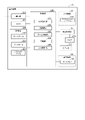
- FIG. 1 is a block diagram showing the overall configuration of a system
- FIG. 2 is a block diagram showing the configuration of the terminal device shown in FIG. 1
- FIG. It is a figure which shows the functional structure of a server.
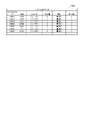
- 4 is a diagram showing the data structure of object data stored in the terminal device;
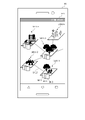
- FIG. 4 is a schematic diagram showing an area selection screen displayed on the display;
- FIG. 4 is a schematic diagram showing an area detail screen displayed on the display; It is a figure showing the list displayed on a display.
- 8 is a diagram showing an example in which the cylindrical list shown in FIG. 7 is rotated;
- FIG. 8 is a diagram showing an example in which the cylindrical list shown in FIG. 7 is switched for each series;
- the information processing apparatus presents to the user a list of objects owned by the user among the objects in the game such as characters or cards in a manner that allows the user to grasp the whole picture of the objects for each predetermined unit.
- an information processing apparatus presents a list of objects owned by a user to the user by sterically arranging the objects so that the entire object can be displayed on one screen.
- FIG. 1 is a block diagram showing an example of the overall configuration of system 1.
- a system 1 shown in FIG. 1 includes a plurality of terminal devices 10 and a server 20 .
- the terminal device 10 and the server 20 are connected for communication via a network 80, for example.
- the network 80 is implemented by, for example, the Internet and/or a communication network provided by a telecommunications carrier.
- FIG. 1 shows an example in which the system 1 includes three terminal devices 10, the number of terminal devices 10 included in the system 1 is not limited to three. The number of terminal devices 10 may be less than three, or may be three or more.
- a collection of multiple devices may be used as one server. How to distribute a plurality of functions required to realize the server 20 according to the present embodiment to one or a plurality of pieces of hardware takes into account the processing capability of each piece of hardware and/or the specifications required for the server 20. can be determined as appropriate.
- the terminal device 10 is, for example, a device operated by a user who plays a game.
- a user operates the terminal device 10 and plays a game provided by the server 20, for example.
- the terminal device 10 is realized by, for example, a mobile terminal such as a smart phone or a tablet. Also, the terminal device 10 may be realized by a stationary PC (Personal Computer), a laptop PC, or the like.
- the terminal device 10 includes a communication IF (Interface) 12, an input device 13, an output device 14, a memory 15, a storage 16, and a processor 19.
- IF Interface
- the communication IF 12 is an interface for inputting and outputting signals for the terminal device 10 to communicate with an external device.
- the input device 13 is a device (for example, a touch panel, a touch pad, a pointing device such as a mouse, a keyboard, etc.) for receiving input operations from the user.
- a device for example, a touch panel, a touch pad, a pointing device such as a mouse, a keyboard, etc.
- the output device 14 is a device (display, speaker, etc.) for presenting information to the user.
- the memory 15 is for temporarily storing programs, data processed by the programs, etc., and is, for example, a volatile memory such as a DRAM (Dynamic Random Access Memory).
- DRAM Dynamic Random Access Memory
- the storage 16 is for storing data, and is, for example, a flash memory or HDD (Hard Disc Drive).
- HDD Hard Disc Drive
- the processor 19 is hardware for executing an instruction set described in a program, and is composed of arithmetic units, registers, peripheral circuits, and the like.
- the server 20 is, for example, a device that provides games played by users using the terminal devices 10 .
- the server 20 manages, for example, data related to the game to be provided, information on players who play the game to be provided, and the like. Note that the server 20 may provide the terminal device 10 with the game via a predetermined management server.
- the server 20 includes a communication IF 22, an input/output IF 23, a memory 25, a storage 26, and a processor 29.
- the communication IF 22 is an interface for inputting and outputting signals for the server 20 to communicate with external devices.
- the input/output IF 23 functions as an interface with an input device for accepting input operations from the user and an output device for presenting information to the user.
- the memory 25 is for temporarily storing programs and data processed by the programs, and is a volatile memory such as DRAM.
- the storage 26 is for storing data, such as flash memory or HDD.
- the processor 29 is hardware for executing an instruction set described in a program, and is composed of arithmetic units, registers, peripheral circuits, and the like.
- FIG. 2 is a block diagram showing a configuration example of the terminal device 10 shown in FIG.
- the terminal device 10 includes a communication unit 120, an input device 13, an output device 14, an audio processing unit 17, a microphone 171, a speaker 172, a camera 160, a storage unit 180, and a control unit 190 .
- Each block included in the terminal device 10 is electrically connected by, for example, a bus.
- the communication unit 120 performs processing such as modulation/demodulation processing for the terminal device 10 to communicate with other devices.
- the communication unit 120 performs transmission processing on the signal generated by the control unit 190 and transmits the signal to the outside (for example, the server 20).
- Communication unit 120 performs reception processing on a signal received from the outside and outputs the signal to control unit 190 .
- the input device 13 is a device for the user who operates the terminal device 10 to input instructions or information.
- the input device 13 is implemented by, for example, a touch-sensitive device 131 or the like that inputs an instruction by touching an operation surface.
- Input device 13 may include a keyboard.
- the input device 13 converts an instruction or information input by a user into an electrical signal and outputs the electrical signal to the control unit 190 .
- the input device 13 may include, for example, a receiving port for receiving an electrical signal input from an external input device.
- the output device 14 is a device for presenting information to the user who operates the terminal device 10 .
- the output device 14 is implemented by, for example, the display 141 or the like.
- the display 141 displays data under the control of the controller 190 .
- the display 141 is implemented by, for example, an LCD (Liquid Crystal Display) or an organic EL (Electro-Luminescence) display.
- the audio processing unit 17 performs, for example, digital-analog conversion processing of audio signals.
- the audio processing unit 17 converts the signal supplied from the microphone 171 into a digital signal and supplies the converted signal to the control unit 190 .
- the audio processing unit 17 provides an audio signal to the speaker 172 .
- the audio processing unit 17 is realized by, for example, a processor for audio processing.
- the microphone 171 receives an audio input and provides an audio signal corresponding to the audio input to the audio processing section 17 .
- the speaker 172 converts the audio signal given from the audio processing unit 17 into audio and outputs the audio to the outside of the terminal device 10 .
- the camera 160 is a device for receiving light with a light receiving element and outputting it as a photographing signal.
- the storage unit 180 is implemented by, for example, the memory 15 and the storage 16, and stores data and programs used by the terminal device 10.
- the storage unit 180 stores game data 181, play data 182, and object data 183, for example.
- the game data 181 is data related to the game played by the user.
- the game data 181 is provided from the server 20, for example.
- the game data 181 is updated with data provided from the server 20, for example, when the content is updated.
- the play data 182 is data related to game play information. Specifically, the play data 182 includes information such as cleared events, cleared fields, user strength, play time, owned items, in-game currency, and the like.
- the object data 183 is data relating to objects appearing in the game.
- the objects are, for example: ⁇ Card ⁇ Character ⁇ Item
- the object data 183 stores, for example, data related to all current objects.
- the object data 183 stores, for example, objects that can be used by the user. Whether or not an object can be used can be rephrased as whether or not the user owns it.
- the object data 183 stores, for example, series in which objects are contained. A new object is added, for example, every preset period. A series represents, for example, information corresponding to when an object was added.
- the object data 183 will be described later.
- the control unit 190 is implemented by the processor 19 reading a program stored in the storage unit 180 and executing instructions included in the program.
- the control unit 190 controls operations of the terminal device 10 .
- the control unit 190 functions as an operation reception unit 191, a transmission/reception unit 192, a game control unit 193, a management unit 194, and a display control unit 195 by operating according to programs.
- the operation reception unit 191 performs processing for receiving instructions or information input from the input device 13 . Specifically, for example, the operation accepting unit 191 accepts information based on an instruction input from the touch sensitive device 131 or the like.
- the transmission/reception unit 192 performs processing for the terminal device 10 to transmit and receive data to and from an external device such as the server 20 according to a communication protocol.
- the game control unit 193 controls progress of the game based on the game data 181 .
- the game control unit 193 starts the game according to the user's operation.
- the game control unit 193 advances the game according to the user's operation.
- Game progression includes, for example: ⁇ Selecting a game stage ⁇ Selecting a game element (for example, selecting a mini-game, selecting a battle with an opponent, etc.) ⁇ Playing game elements (e.g., playing mini-games, playing battles with opponents, etc.) ⁇ Receipt of rewards at the end of game elements
- a battle with an opponent is carried out, for example, using an object deck made up of a preset number of objects.
- the game control unit 193 recognizes the objects as a deck.
- the game control unit 193 pits the objects between the user and the opponent against each other in a battle using the object deck. In a battle, the game control unit 193 receives from the user a battle instruction for the objects that make up the object deck.
- the management unit 194 manages data about objects that can be used by the user in the game. Specifically, for example, when an object is given to a user by satisfying a predetermined condition, the management unit 194 stores in the object data 183 that the object has become available for the user.
- Predetermined conditions include, for example, the following. ⁇ Purchase of packs containing objects ⁇ Purchase of objects ⁇ Distribution of objects ⁇ Clear game elements
- the management unit 194 manages the object assuming that the user owns the object.
- the display control unit 195 controls presentation of information to the user. Specifically, for example, the display control unit 195 causes the display 141 to display an image regarding the progress of the game.
- the display control unit 195 causes the display 141 to display an image related to the object. For example, when the following requirements are satisfied, the display control unit 195 displays a list of objects owned by the user based on the object data 183 in such a manner that the user can grasp the entirety of the objects owned by each predetermined unit. Present. ⁇ When there is an instruction from the user ⁇ When the number of possessed new objects exceeds a preset number ⁇ When the number of cleared game elements exceeds a preset number ⁇ A preset unit (for example, an area ) when clearing the game elements set to
- Instructions from the user are input as follows, for example. ⁇ Input from the home screen ⁇ If the home screen is a list display, input an instruction to start the game
- Objects of a predetermined unit are, for example, the following. - All objects - Objects having the same predetermined element (for example, series, rarity, attribute, number of sheets, etc.) Each element may be combined in the predetermined unit.
- a predetermined unit of object may be an object of a predetermined rarity level in a predetermined series.
- the display control unit 195 presents the user with a list of objects owned by the user in a three-dimensional arrangement so that the entirety of the objects in each predetermined unit can be grasped on one screen. More specifically, for example, the display control unit 195 presents a list of objects owned by the user to the user by arranging the objects included in the predetermined unit in a cylindrical shape in which the front faces face the outer circumference.
- the display control unit 195 causes the display 141 to display a list of objects owned by the user so that only the objects owned by the user are included. Further, the display control unit 195 may cause the display 141 to display, for example, a list of objects owned by the user so as to include owned objects and non-owned objects. For example, the display control unit 195 displays objects owned by the user with solid lines and objects not owned by the user with dashed lines. It should be noted that the display of objects not owned by the user is not limited to dashed lines, and may be displayed with an increased transmittance, or may be displayed with the contents painted out.
- the display control unit 195 moves the list in a manner corresponding to the input. Specifically, for example, in a list in which objects are three-dimensionally arranged, when the user inputs to trace the outer periphery of a three-dimensional shape in the circumferential direction, the display control unit 195 displays the list around the axis of the three-dimensional shape. rotate to Further, for example, when the user inputs to trace a three-dimensional shape in the axial direction with respect to a list in which objects are three-dimensionally arranged, the display control unit 195 switches the units of the objects included in the list.
- the display control section 195 may control the speaker 172 .
- the display control unit 195 controls the speaker 172 so as to generate a rotation sound according to a predetermined requirement when rotating the list in which the objects are three-dimensionally arranged around the axis of the three-dimensional shape.
- the predetermined requirements are as follows. ⁇ Number of owned objects ⁇ Ownership ratio of owned objects ⁇ Number of cleared game elements ⁇ Number of logins
- the display control unit 195 sets, for example, the direction in which the list is first displayed in the front as follows. ⁇ A direction in which an object with a given identification number is positioned in the center ⁇ A direction in which an object with a given name is positioned in the center ⁇ A direction in which the filling rate of objects is high or low
- the display control unit 195 enlarges or reduces and displays a partial area of the list according to an instruction from the user. Specifically, for example, when the user inputs an instruction (for example, a pinch-in operation) to enlarge a partial area of the list, the display control unit 195 enlarges the area specified by the user. indicate. When the user inputs an instruction (for example, a pinch-out operation, etc.) to reduce a part of the list, the display control unit 195 reduces and displays the area specified by the user.
- an instruction for example, a pinch-in operation
- the display control unit 195 arranges the objects owned by the user in the list according to a preset rule.
- Preset rules are, for example, the following. Note that the following rules may be combined. ⁇ Order according to identification number ⁇ Order according to name ⁇ Order for each predetermined element (for example, rarity, attribute, number of possessions, etc.)
- FIG. 3 is a diagram showing a functional configuration of the server 20. As shown in FIG. 3 , the server 20 functions as a communication section 201 , a storage section 202 and a control section 203 .
- the communication unit 201 performs processing for the server 20 to communicate with an external device.
- the storage unit 202 is realized by, for example, the memory 25 and the storage 26, and stores data and programs used by the server 20.
- the storage unit 202 has game data 2021 and a player information database 2022, for example.
- the game data 2021 is data related to the game played by the user.
- the game data 2021 also includes data regarding objects appearing in the game.
- the game data 2021 is provided to the terminal device 10, for example.
- the game data 2021 is provided to the terminal device 10, for example, when the content is updated.
- the player information database 2022 is a database for holding information about each player in the game.
- the control unit 203 is implemented by the processor 29 reading a program stored in the storage unit 202 and executing instructions included in the program.
- the control unit 203 operates according to a program to exhibit functions shown as a reception control module 2031, a transmission control module 2032, and a management module 2033.
- FIG. 1 A reception control module 2031, a transmission control module 2032, and a management module 2033.
- the reception control module 2031 controls the process by which the server 20 receives signals from external devices according to the communication protocol.
- the transmission control module 2032 controls the processing by which the server 20 transmits signals to external devices according to the communication protocol.
- the management module 2033 manages the player information database 2022. For example, when the management module 2033 receives data related to game play information from the terminal device 10, the management module 2033 updates the player information database 2022 based on the received data. Management module 2033 manages game data 2021 . For example, the management module 2033 manages updates of the game data 2021 .
- FIG. 4 is a diagram showing the data structure of the object data 183 stored in the terminal device 10. As shown in FIG. Note that FIG. 4 is an example and does not exclude data that is not described.
- each record of the object data 183 includes an item "object ID”, an item “name”, an item “series”, an item “rarity”, an item “attribute”, and an item " number of possessions”.
- the item "object ID” indicates information for identifying an object.
- the item "name” indicates the name of the object. Specifically, the item “name” is the name of the thing represented in the card, the name of the character, the name of the item, or the like.
- the item “series” indicates information for identifying the series in which the corresponding object is stored.
- the item “series” may be, for example, the name of a concept representing a series.
- a new object is added, for example, every preset period.
- Objects with the same series represent objects added within the same period.
- the item "Rarity” indicates the rarity of the corresponding object. For example, the higher the rarity, the harder it is to obtain an object.
- the item "attribute” indicates the property to which the corresponding object belongs.
- the item "number of possessions” indicates the number of possessions of the same object. For example, the item “number of possessions” is 0 for an object that is not owned.
- the operation of the control unit 190 when displaying a list of objects owned by the user on the display 141 will be described.
- the card includes a rear image (common surface) common to each card and a front image (unique surface) unique to each card.
- the front image includes, for example, a pattern that indicates the type of card and text information describing an explanation about the card.
- the user selects an area where cards will be awarded as rewards for clearing game elements.
- the display control unit 195 causes the display 141 to display an area selection screen for selecting an area in which game elements are set.
- FIG. 5 is a schematic diagram showing an example of the area selection screen displayed on the display 141.
- FIG. 5 In the example shown in FIG. 5, five areas 1411-1 to 1411-5 are displayed. Among the areas, there are areas that cannot be selected unless a predetermined condition is satisfied.
- areas that are selectable by the user are represented by solid lines, and areas that are not selectable by the user are represented by dashed lines.
- areas 1411-1 to 1411-4 are areas that can be selected by the user, and area 1411-5 is an area that cannot be selected by the user.
- connection destination area Any adjacent area is connected by a line 1412 .
- the game control unit 193 enables the connection destination area to be selected when the game element of the connection source area is cleared.
- Attached to the area are cards 30-1 to 30-3 that are given as rewards when clearing.
- FIG. 5 shows a case where cards 30-1 to 30-3 are attached, the number of cards attached to an area is not limited to three, and may be as many as possible.
- the attached card may display the card itself. That is, the card given as a reward may be identified from the attached card.
- the back side of the attached card may be displayed.
- the display on the back side indicates, for example, that there is a card that is to be granted but has not yet been granted to the user.
- the user refers to the attached card and selects an area.
- the game control section 193 moves the user to the selected area.
- the display control section 195 causes the display 141 to display the details of the selected area.
- FIG. 6 is a schematic diagram showing an example of an area detail screen displayed on the display 141.
- FIG. The example shown in FIG. 6 shows the case where the area 1411-1 is selected by the user. Any of the objects placed within the area is marked to indicate the presence of the game element.
- a caution mark 1413 is attached as a mark indicating the presence of game elements. Note that the mark indicating the presence of game elements is not limited to the caution mark 1413 .
- the attention mark may be attached when the detailed area screen is displayed, or may be attached by touching an object on the detailed area screen.
- the game control unit 193 When the user presses the caution mark 1413, the game control unit 193 starts the game element assigned to the caution mark 1413, such as a mini game or a battle. When the user clears the game element, the game control unit 193 gives the user a card as a reward. For example, the game control unit 193 gives the user a card as a reward when the user clears the mini-game or wins the battle.
- the management unit 194 associates the card with the user so that it can be used.
- the display control unit 195 causes the display 141 to display a list of cards owned by the user based on the object data 183 .
- the display control unit 195 presents a list of cards owned by the user in a three-dimensional arrangement so that the entirety of the cards owned by the user can fit on one screen. Specifically, for example, the display control unit 195 arranges the cards arranged in a circular or rectangular shape so that the front side faces outward, and arranges them in a predetermined number of stages in the vertical direction of the circular or rectangular shape formed by the cards.
- a list of cards owned by the user is displayed three-dimensionally by stacking only the cards. For example, if the cards form a circle, the list of cards is displayed by the cards arranged in a cylinder (tower).
- the shape of the cylinder is set in advance for each card group of a predetermined unit to be displayed.
- the number of cards included in one round, the number of stacked cards, and the display magnification of each card are set in advance so that a group of cards to be displayed can be displayed within a predetermined area of one screen.
- the position where each card is arranged in the cylinder is determined in advance.
- the display control unit 195 displays the cards owned by the user in a cylinder representing a list of cards in a manner that makes it clear that the user owns them, and displays the cards that the user does not own so that the cards that the user does not own are not owned. Display in a manner that is easy to understand.
- the display control unit 195 refers to the object data 183 and grasps how many cards to be displayed are owned by the user.
- the display control unit 195 sets a cylinder suitable for arranging the number of cards owned by the user. For example, the display control unit 195 sets the number of cards in one cycle, the number of stacked cards, the display magnification of each card, and the like, so that the cards owned by the user can be displayed within a predetermined area of one screen.
- the display control unit 195 displays a list of cards owned by the user in the set cylinder.
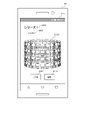
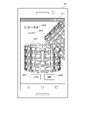
- FIG. 7 is a diagram showing an example of a list displayed on the display 141 according to this embodiment.
- the display control unit 195 displays field objects 1414 to 1418 on the display 141.
- FIG. 7 is a diagram showing an example of a list displayed on the display 141 according to this embodiment.
- the display control unit 195 displays field objects 1414 to 1418 on the display 141.
- FIG. 7 is a diagram showing an example of a list displayed on the display 141 according to this embodiment.
- the display control unit 195 displays field objects 1414 to 1418 on the display 141.
- a field object 1414 displays cards arranged in a cylindrical shape.
- a predetermined number of cards are arranged with the front side facing in the outer peripheral direction, and are arranged in four stages in the axial direction of the formed circle.
- the display control unit 195 arranges the cards in the field object 1414 so that the user can visually recognize the cards arranged in a cylindrical shape from obliquely above or obliquely below.
- the display control unit 195 displays the back image of the card whose front faces the back of the cylinder.
- the display control unit 195 displays the cards that are not in possession among the cards positioned on the back side of the cylinder in a manner that makes it clear that they are not in possession.
- the display control unit 195 displays the cards arranged in a cylindrical shape at predetermined intervals.
- the display control unit 195 displays the rear image of the card positioned at the back through the gap between the cards.
- the display control unit 195 displays, from the gaps between the cards, the cards that are not in possession among the cards positioned on the back side of the cylinder in such a manner that the cards are not in possession.
- the display control unit 195 displays the back image of the card located behind the card unpossessed area located in front of the cylinder.
- the display control unit 195 displays, from the unpossessed area of the cards positioned on the front side of the cylinder, the cards positioned on the back side of the cylinder that the player does not possess, out of the cards positioned on the back side of the cylinder, in a manner that makes it clear that the player does not possess them.
- the cards contained in the cylinder are, for example, cards accommodated in one series.
- the places where the cards are placed are set in advance, and the cards not owned by the user are indicated by dashed lines.
- a field object 1415 represents the series to which the cards contained in the cylinder belong.
- the field object 1415 displays "series 1". That is, the cards included in the cylinder are cards belonging to Series 1.
- the display control unit 195 does not have to display the field object 1415 when the cards included in the cylinder are not limited to a predetermined series, such as when all the cards are included.
- a field object 1416 represents the number of cards actually possessed by the user with respect to the number of cards to be displayed.
- field object 1416 displays "xxxx/100".
- the number of cards to be displayed is 100, and the user has xxxx cards.
- the number of cards to be displayed is switched based on the series to which the cards belong or the unit to be displayed.
- a field object 1417 represents a button for switching the unit to be displayed.
- the field object 1417 displays "rarity".
- the field object 1417 represents a button for switching the display target of the card to display according to the rarity level.
- the display control unit 195 displays a window for selecting a rarity level, and receives rarity selection from the user.
- the display control unit 195 displays on the display 141 a cylinder containing cards of the rarity level selected by the user.
- a field object 1418 represents a button for switching the unit to be displayed.
- the field object 1418 is labeled "Attribute".
- the field object 1418 represents a button for switching the display target of the card to display by attribute.
- the display control unit 195 displays a window for selecting attributes and accepts selection of attributes from the user.
- the display control unit 195 displays on the display 141 a cylinder containing cards of the attribute selected by the user.
- the display control unit 195 displays, for example, a field object displaying a button for returning the display target below the field object 1414 (not shown). ). For example, “undo”, “cancel sort”, or “whole” is displayed in the field object.
- the display control unit 195 restores the display range when the field object is pressed.
- the display control unit 195 When the display control unit 195 receives an input from the user to slide the finger in the circumferential direction of the cylinder displayed on the field object 1414, the cylinder is rotated around the axis of the cylinder.
- FIG. 8 is a diagram showing an example in which the cylindrical list shown in FIG. 7 is rotated.
- the display control unit 195 when the display control unit 195 receives an input from the user to slide the finger to the left side in the circumferential direction of the cylinder displayed on the field object 1414, the display control unit 195 rotates the cylinder clockwise around the axis of the cylinder. rotate.
- the display control unit 195 determines the rotation speed of the cylinder according to, for example, the speed at which the finger is slid. By rotating the cylinder, it is possible to move the card displayed on the back side of the cylinder with respect to the display 141 to the side visible to the user.
- the display control unit 195 When the display control unit 195 receives an input from the user to slide the finger in the axial direction of the cylinder displayed on the field object 1414, the display control unit 195 switches, for example, the series to be displayed. Specifically, for example, when the display control unit 195 receives an input from the user to slide the finger upward in the axial direction of the cylinder displayed on the field object 1414, the display control unit 195 changes the card group to be displayed as follows. Switch to a series of cards. Further, for example, when the display control unit 195 receives an input from the user to slide the finger downward in the axial direction of the cylinder displayed on the field object 1414, the display control unit 195 changes the card group to be displayed to the cards of the previous series. Switch to group.
- FIG. 9 is a diagram showing an example in which the cylindrical list shown in FIG. 7 is switched for each series.
- the display control unit 195 receives an input from the user to slide the finger upward in the axial direction of the cylinder displayed on the field object 1414, the display control unit 195 displays the list represented by the cylinder for series 2. Switch to list view. Also, the display control unit 195 switches the display of the field object 1415 to "series 2". Since it switches to a different cylinder when the series is switched, it is possible to enjoy the collection for each series.
- the terminal device 10 causes the management unit 194 to store information regarding a plurality of objects in the storage unit 180, including whether or not the user owns the objects.
- the terminal device 10 uses the display control unit 195 to present a list of objects owned by the user for each predetermined unit in a three-dimensional arrangement to the user so that the entirety of the owned objects can be grasped on one screen. I am trying to As a result, the terminal device 10 can allow the user to view the entirety of the owned objects for each predetermined unit. Therefore, the user can check the collected objects at a glance. Furthermore, the user can grasp the progress of the collection at a glance.
- the terminal device 10 According to the terminal device 10 according to the present embodiment, it is possible for the user to intuitively recognize the whole picture of the card for each predetermined unit.
- the display control unit 195 stacks the objects circularly arranged so that the front faces the outer surface, and stacks them in a plurality of stages to three-dimensionally arrange the list of objects. More specifically, the display control unit 195 arranges the objects in a cylindrical shape, displays the front side of the object placed on the front side of the cylinder, and displays the back side of the object placed on the back side of the cylinder. I am trying to This makes it easier for the terminal device 10 to grasp the whole picture of the object for each predetermined unit. In addition, the terminal device 10 can display the list of objects in a manner that looks better as the collection is enriched. Therefore, the user can find more interest in collecting objects.
- the display control unit 195 presents a list of objects owned by the user and objects not owned by the user so that they can be identified. Therefore, depending on the number of objects owned by the user, many objects may be missing from the list. As a result, the terminal device 10 can improve the user's motivation for collecting objects.
- the display control unit 195 enlarges or reduces the display of the list of three-dimensionally arranged objects according to the user's instruction. Thereby, the terminal device 10 can improve the visibility of the displayed list.
- the display control unit 195 rotates the display of the list of three-dimensionally arranged objects about the axis of the three-dimensional shape according to the user's instruction.
- the terminal device 10 can present the user with an arbitrary surface of the list in which the objects are three-dimensionally arranged.
- the display control unit 195 generates a sound during rotation according to a predetermined requirement regarding the object.
- the terminal device 10 can provide the user with more interest when collecting objects.
- the display control unit 195 presents the user with a list of three-dimensionally arranged objects with the direction corresponding to the number of objects owned by the user facing forward.
- the terminal device 10 can improve the user's motivation for collecting objects.
- the management unit 194 stores information about a plurality of objects including the elements of the objects. Then, the display control unit 195 presents a list of objects of predetermined elements to the user by arranging them three-dimensionally so that the entire picture of the corresponding objects can be grasped on one screen. As a result, the terminal device 10 can present the progress of the collection to the user for each element.
- the display control unit 195 switches and presents the list of objects for each element to the user according to the user's instruction.
- the terminal device 10 can present the user with a list of objects in the range desired by the user.
- the management unit 194 stores the elements of the object, including the time when the object is added. Then, the display control unit 195 switches the list of objects for each period and presents it to the user according to the user's instruction. As a result, the terminal device 10 can present the user with a list including the added objects for each period. Therefore, the user can confirm the added collection for each period.
- the display control unit 195 displays the back image of the card with the front facing the back of the cylindrical card.
- the display control unit 195 may display an image other than the back image of the card for the card whose front is cylindrical and which faces the back.
- the display control unit 195 may display the front image instead of the back image for the card moved to the back side of the cylinder.
- the display control unit 195 displays the card in the front image instead of the back image.
- the front image is displayed even for the card that is moved to the back side, and it is possible to grasp the card as a whole more intuitively.
- Appendix 1 A program to be executed by a computer comprising a processor 19 and a memory 15, wherein the program stores, in the processor 19, information on a plurality of objects including whether or not a user owns them (management (194) a step of presenting a list of objects owned by the user to the user by arranging them in a three-dimensional manner so that the whole picture of the objects in each predetermined unit can be grasped on one screen (display control unit 195); program to run.
- Management (194) a step of presenting a list of objects owned by the user to the user by arranging them in a three-dimensional manner so that the whole picture of the objects in each predetermined unit can be grasped on one screen (display control unit 195); program to run.
- the plurality of objects have a common surface on the back surface and a unique surface on the front surface.
- (Appendix 3) In the step of presenting, the objects are arranged in a cylindrical shape, the object arranged on the front side of the cylinder displays the front side, and the object arranged on the back side of the cylinder displays the back side (Appendix 2) program.
- (Appendix 4) The program according to any one of (Appendix 1) to (Appendix 3), wherein, in the presenting step, a list of objects owned by the user and objects not owned by the user are presented in a identifiable manner.
- (Appendix 5) The program according to any one of (Appendix 1) to (Appendix 4), wherein, in the step of presenting, the display of the list of three-dimensionally arranged objects is enlarged or reduced in accordance with an instruction from the user.
- the element of the object corresponds to the period when the object is added, and in the step of presenting, the list of objects for each period is switched and presented to the user according to the user's instruction (described in Supplementary Note 9) program.
- Appendix 12 A computer-implemented method comprising a processor 19 and a memory 15, the processor 19 storing information about a plurality of objects, including whether they are owned by a user; and presenting to the user a list of objects that are arranged in a three-dimensional manner so that the whole picture of the objects in each predetermined unit can be grasped on one screen.
- An information processing apparatus 10 including a control unit 190 and a storage unit 180, wherein the control unit 190 stores information about a plurality of objects including whether or not the user owns them; presenting to a user a list of the objects that are displayed in a three-dimensional manner so that the whole picture of the objects in each predetermined unit can be grasped on one screen.
- Appendix 14 means for storing information about a plurality of objects including whether or not they are owned by a user; and means for presenting them to the user.
Landscapes
- Engineering & Computer Science (AREA)
- Multimedia (AREA)
- General Engineering & Computer Science (AREA)
- Theoretical Computer Science (AREA)
- Physics & Mathematics (AREA)
- Human Computer Interaction (AREA)
- General Physics & Mathematics (AREA)
- Business, Economics & Management (AREA)
- Computer Security & Cryptography (AREA)
- General Business, Economics & Management (AREA)
- Optics & Photonics (AREA)
- User Interface Of Digital Computer (AREA)
Applications Claiming Priority (2)
| Application Number | Priority Date | Filing Date | Title |
|---|---|---|---|
| JP2021-083462 | 2021-05-17 | ||
| JP2021083462A JP7798486B2 (ja) | 2021-05-17 | 2021-05-17 | プログラム、方法、情報処理装置、システム |
Publications (1)
| Publication Number | Publication Date |
|---|---|
| WO2022244705A1 true WO2022244705A1 (ja) | 2022-11-24 |
Family
ID=84140483
Family Applications (1)
| Application Number | Title | Priority Date | Filing Date |
|---|---|---|---|
| PCT/JP2022/020289 Ceased WO2022244705A1 (ja) | 2021-05-17 | 2022-05-13 | プログラム、方法、情報処理装置、システム |
Country Status (2)
| Country | Link |
|---|---|
| JP (2) | JP7798486B2 (https=) |
| WO (1) | WO2022244705A1 (https=) |
Families Citing this family (1)
| Publication number | Priority date | Publication date | Assignee | Title |
|---|---|---|---|---|
| JP7731457B2 (ja) * | 2024-02-01 | 2025-08-29 | 株式会社 ディー・エヌ・エー | プログラム、システム、方法、情報処理装置、サーバ、及び演出情報の生成方法 |
Citations (7)
| Publication number | Priority date | Publication date | Assignee | Title |
|---|---|---|---|---|
| JP2001038047A (ja) * | 1999-07-30 | 2001-02-13 | Nintendo Co Ltd | 三次元パズルゲーム装置及び三次元パズルゲーム用記憶媒体 |
| JP2003093738A (ja) * | 2001-09-26 | 2003-04-02 | Mibunri:Kk | クロスワードパズルとその遊戯機および遊戯方法 |
| JP2007080231A (ja) * | 2005-09-09 | 2007-03-29 | Sega Corp | 画像処理装置及び、コンテンツ選択方法及び記憶媒体 |
| JP2012068871A (ja) * | 2010-09-22 | 2012-04-05 | Bandai Co Ltd | 物品販売装置 |
| JP2013176451A (ja) * | 2012-02-28 | 2013-09-09 | Dna:Kk | ゲームを提供する装置 |
| JP2018191906A (ja) * | 2017-05-16 | 2018-12-06 | 株式会社コナミアミューズメント | ゲーム装置およびプログラム |
| JP2019150214A (ja) * | 2018-02-28 | 2019-09-12 | 株式会社バンダイ | ゲーム装置、ゲームシステム及びプログラム |
Family Cites Families (2)
| Publication number | Priority date | Publication date | Assignee | Title |
|---|---|---|---|---|
| JP4642928B1 (ja) * | 2010-04-27 | 2011-03-02 | 株式会社バンダイナムコゲームス | コンピュータシステムおよびプログラム |
| JP7071742B2 (ja) * | 2019-02-19 | 2022-05-19 | 株式会社コナミデジタルエンタテインメント | ゲーム装置、ゲームシステム、制御方法、及びプログラム |
-
2021
- 2021-05-17 JP JP2021083462A patent/JP7798486B2/ja active Active
-
2022
- 2022-05-13 WO PCT/JP2022/020289 patent/WO2022244705A1/ja not_active Ceased
-
2025
- 2025-09-16 JP JP2025153548A patent/JP2025170151A/ja not_active Withdrawn
Patent Citations (7)
| Publication number | Priority date | Publication date | Assignee | Title |
|---|---|---|---|---|
| JP2001038047A (ja) * | 1999-07-30 | 2001-02-13 | Nintendo Co Ltd | 三次元パズルゲーム装置及び三次元パズルゲーム用記憶媒体 |
| JP2003093738A (ja) * | 2001-09-26 | 2003-04-02 | Mibunri:Kk | クロスワードパズルとその遊戯機および遊戯方法 |
| JP2007080231A (ja) * | 2005-09-09 | 2007-03-29 | Sega Corp | 画像処理装置及び、コンテンツ選択方法及び記憶媒体 |
| JP2012068871A (ja) * | 2010-09-22 | 2012-04-05 | Bandai Co Ltd | 物品販売装置 |
| JP2013176451A (ja) * | 2012-02-28 | 2013-09-09 | Dna:Kk | ゲームを提供する装置 |
| JP2018191906A (ja) * | 2017-05-16 | 2018-12-06 | 株式会社コナミアミューズメント | ゲーム装置およびプログラム |
| JP2019150214A (ja) * | 2018-02-28 | 2019-09-12 | 株式会社バンダイ | ゲーム装置、ゲームシステム及びプログラム |
Also Published As
| Publication number | Publication date |
|---|---|
| JP7798486B2 (ja) | 2026-01-14 |
| JP2025170151A (ja) | 2025-11-14 |
| JP2022176823A (ja) | 2022-11-30 |
Similar Documents
| Publication | Publication Date | Title |
|---|---|---|
| JP6043672B2 (ja) | 制御プログラム、制御方法及びサーバ装置 | |
| CN103226646A (zh) | 内容提供的控制方法 | |
| JP5749838B1 (ja) | ゲームアイテムを提供するシステム、方法及びプログラム | |
| JP2013176451A (ja) | ゲームを提供する装置 | |
| JP5926424B2 (ja) | 制御方法、コンピュータ及び制御プログラム | |
| JP6596471B2 (ja) | 制御プログラム、制御方法及びコンピュータ | |
| JP2019198526A (ja) | ゲームシステム、およびゲームプログラム | |
| JP5223031B1 (ja) | ゲームを提供する装置 | |
| JP2025170151A (ja) | プログラム、方法、情報処理装置、システム | |
| JP6854843B2 (ja) | ゲームシステム、およびゲームプログラム | |
| JP7394284B2 (ja) | プログラム、情報処理方法、及び情報処理装置 | |
| JP2019107255A (ja) | 情報処理方法、サーバ装置、プログラム、情報端末、及び情報処理システム | |
| JP2025533315A (ja) | 仮想対局のインタフェース表示方法及び装置、コンピュータ機器、並びにコンピュータプログラム | |
| JP7174125B2 (ja) | 制御プログラム、制御方法、コンピュータ及び端末装置 | |
| JP7837261B2 (ja) | プログラム、方法、情報処理装置、システム | |
| JP2022022356A (ja) | コンピュータプログラム、およびコンピュータ装置 | |
| JP6724193B2 (ja) | コンピュータプログラム、およびコンピュータ装置 | |
| TWI912082B (zh) | 程式及遊戲裝置 | |
| JP2020199096A (ja) | ゲームプログラム、ゲーム処理方法、情報処理装置 | |
| JP7650096B2 (ja) | 制御プログラム、制御方法及びコンピュータ | |
| JP6854842B2 (ja) | ゲームシステム、およびゲームプログラム | |
| JP6783345B2 (ja) | ゲームシステム、およびゲームプログラム | |
| JP6724191B2 (ja) | コンピュータプログラム、およびコンピュータ装置 | |
| JP6724192B2 (ja) | コンピュータプログラム、およびコンピュータ装置 | |
| JP6724190B2 (ja) | コンピュータプログラム、およびコンピュータ装置 |
Legal Events
| Date | Code | Title | Description |
|---|---|---|---|
| 121 | Ep: the epo has been informed by wipo that ep was designated in this application |
Ref document number: 22804617 Country of ref document: EP Kind code of ref document: A1 |
|
| NENP | Non-entry into the national phase |
Ref country code: DE |
|
| 122 | Ep: pct application non-entry in european phase |
Ref document number: 22804617 Country of ref document: EP Kind code of ref document: A1 |