WO2022158201A1 - 画像処理装置、画像処理方法、プログラム - Google Patents
画像処理装置、画像処理方法、プログラム Download PDFInfo
- Publication number
- WO2022158201A1 WO2022158201A1 PCT/JP2021/046765 JP2021046765W WO2022158201A1 WO 2022158201 A1 WO2022158201 A1 WO 2022158201A1 JP 2021046765 W JP2021046765 W JP 2021046765W WO 2022158201 A1 WO2022158201 A1 WO 2022158201A1
- Authority
- WO
- WIPO (PCT)
- Prior art keywords
- image
- image processing
- interest
- subject
- processing
- Prior art date
- Legal status (The legal status is an assumption and is not a legal conclusion. Google has not performed a legal analysis and makes no representation as to the accuracy of the status listed.)
- Ceased
Links
Images





Classifications
-
- G—PHYSICS
- G06—COMPUTING OR CALCULATING; COUNTING
- G06V—IMAGE OR VIDEO RECOGNITION OR UNDERSTANDING
- G06V10/00—Arrangements for image or video recognition or understanding
- G06V10/70—Arrangements for image or video recognition or understanding using pattern recognition or machine learning
- G06V10/764—Arrangements for image or video recognition or understanding using pattern recognition or machine learning using classification, e.g. of video objects
-
- G—PHYSICS
- G06—COMPUTING OR CALCULATING; COUNTING
- G06T—IMAGE DATA PROCESSING OR GENERATION, IN GENERAL
- G06T3/00—Geometric image transformations in the plane of the image
- G06T3/40—Scaling of whole images or parts thereof, e.g. expanding or contracting
-
- G—PHYSICS
- G06—COMPUTING OR CALCULATING; COUNTING
- G06T—IMAGE DATA PROCESSING OR GENERATION, IN GENERAL
- G06T7/00—Image analysis
- G06T7/10—Segmentation; Edge detection
- G06T7/11—Region-based segmentation
-
- G—PHYSICS
- G06—COMPUTING OR CALCULATING; COUNTING
- G06V—IMAGE OR VIDEO RECOGNITION OR UNDERSTANDING
- G06V10/00—Arrangements for image or video recognition or understanding
- G06V10/94—Hardware or software architectures specially adapted for image or video understanding
- G06V10/945—User interactive design; Environments; Toolboxes
-
- G—PHYSICS
- G06—COMPUTING OR CALCULATING; COUNTING
- G06V—IMAGE OR VIDEO RECOGNITION OR UNDERSTANDING
- G06V10/00—Arrangements for image or video recognition or understanding
- G06V10/94—Hardware or software architectures specially adapted for image or video understanding
- G06V10/955—Hardware or software architectures specially adapted for image or video understanding using specific electronic processors
-
- H—ELECTRICITY
- H04—ELECTRIC COMMUNICATION TECHNIQUE
- H04N—PICTORIAL COMMUNICATION, e.g. TELEVISION
- H04N23/00—Cameras or camera modules comprising electronic image sensors; Control thereof
- H04N23/60—Control of cameras or camera modules
-
- H—ELECTRICITY
- H04—ELECTRIC COMMUNICATION TECHNIQUE
- H04N—PICTORIAL COMMUNICATION, e.g. TELEVISION
- H04N23/00—Cameras or camera modules comprising electronic image sensors; Control thereof
- H04N23/60—Control of cameras or camera modules
- H04N23/61—Control of cameras or camera modules based on recognised objects
- H04N23/611—Control of cameras or camera modules based on recognised objects where the recognised objects include parts of the human body
-
- H—ELECTRICITY
- H04—ELECTRIC COMMUNICATION TECHNIQUE
- H04N—PICTORIAL COMMUNICATION, e.g. TELEVISION
- H04N5/00—Details of television systems
- H04N5/222—Studio circuitry; Studio devices; Studio equipment
- H04N5/262—Studio circuits, e.g. for mixing, switching-over, change of character of image, other special effects ; Cameras specially adapted for the electronic generation of special effects
- H04N5/2628—Alteration of picture size, shape, position or orientation, e.g. zooming, rotation, rolling, perspective, translation
-
- H—ELECTRICITY
- H04—ELECTRIC COMMUNICATION TECHNIQUE
- H04N—PICTORIAL COMMUNICATION, e.g. TELEVISION
- H04N23/00—Cameras or camera modules comprising electronic image sensors; Control thereof
- H04N23/80—Camera processing pipelines; Components thereof
Definitions
- This technology relates to image processing devices, image processing methods, and programs, and to image processing technology for displaying captured images.
- Patent Literature 1 describes a digital camera in which the focal position can be accurately confirmed from the captured image reproduced after shooting.
- a storage area for image data is assigned to a storage area of a storage unit of a digital camera, and data related to image data can be stored in the image data storage area. It is disclosed that the storage area is composed of an area for storing the image data of the captured image and an additional information area for storing focus position data, called a tag, which defines the focus position on the image at the time of photographing. ing.
- an image pickup device is connected to a personal computer (PC) or the like, the camera photographs the image, and the photographed image is displayed in real time on the PC, or after the photographing, is reproduced and displayed.
- PC personal computer
- a cameraman takes pictures of products and people (models) in a studio or the like, sequentially displays the captured images on a PC, and the cameraman, stylists, sponsors, clients, etc. check the images.
- a large number of images are checked while photographing, and there are various points to be noted particularly in the captured images.
- points of interest such as whether the model's expression, make-up, costume, hairstyle, pose, etc. have been completed according to the image.
- product photography there are questions such as whether the product is dusty, dirty, scratched, or reflected, and whether the lighting and layout are correct.
- the points to be noted when checking these images differ depending on the person in charge. For example, when a model is photographed holding a product, a stylist may pay attention to the costume and hairstyle, and a staff member of a product sales company may pay attention to how the model holds the product.
- the present technology provides an image processing device that facilitates the task of confirming a notable subject in a plurality of images.
- An image processing apparatus includes an image processing unit that identifies a pixel region of interest including a subject of interest from an image to be processed, and performs image processing using the identified pixel region of interest.
- a subject of interest is a subject that is set to be of common interest across a plurality of images, and includes a person, human parts such as a face and hands, a specific person, a specific type of article, a specific article, and the like. Then, for example, when a certain subject of interest is specified in advance or can be specified by some condition such as an in-focus position, in an image to be processed, a pixel range of interest related to the subject of interest is specified, Perform processing such as enlargement and synthesis.
- the image processing unit determines the subject of interest set on the first image by image analysis of the second image to be processed, and It is conceivable to perform image processing using the pixel region of interest specified based on the determination of the subject of interest in the image of . After a subject of interest is set in one image (first image), when another image (second image) is set as a processing target, the subject of interest is identified in the second image by image analysis. is determined so that the target pixel region is specified.
- the image analysis may be object recognition processing.
- an object recognition algorithm such as semantic segmentation is used to determine the presence or absence of a subject of interest and its position (pixel region) within an image.
- the image analysis may be personal identification processing. For example, an individual person who is a subject is identified, and a specific person is set as a subject of interest. Then, the presence or absence of the specific person and the pixel area in the second image are determined.
- the image analysis may be posture estimation processing. For example, the posture of a person who is a subject is estimated, and the pixel area of the subject of interest is determined according to the posture.
- the image processing may be processing for enlarging the image of the pixel region of interest. That is, once the target pixel region is specified as the region of the target subject, the processing for enlarging the target pixel region is performed.
- the image processing may be synthesis processing for synthesizing the image of the pixel region of interest with another image. That is, when a target pixel area is specified as a target object area, a process of synthesizing the target pixel area with another image is performed.
- the second image may be a plurality of images that are input as processing targets after the first image.
- the subject of interest is set in the first image, for example, when photographed images are input sequentially, or when images are input sequentially by image feed of reproduced images, these images are sequentially input.
- a plurality of images in the image analysis are set as the second images, respectively.
- the image processing apparatus includes a setting unit that sets a subject of interest based on a designation input for the first image.
- a subject of interest is set according to the user's designation of the subject of interest in the first image.
- the designation input by voice is possible as the designation input.
- the type of the subject is recognized and set as the target subject.
- the image processing unit may perform image processing using a target pixel region specified based on a focus position in an image to be processed.
- a focused position is determined, and a target pixel area is specified, for example, around the focused position.
- the image processing may be processing for enlarging the image of the target pixel region based on the in-focus position. That is, once the target pixel area is specified based on the in-focus position, processing for enlarging the target pixel area is performed.
- the image processing unit performs image processing using the target pixel range specified based on the object recognition result of the subject related to the focus position in the image to be processed.
- the in-focus position is determined, for example, the object at the in-focus position is recognized, and the range of the object is set as the target pixel area.
- the image processing may be processing for enlarging the image of the target pixel region based on the object recognition of the subject related to the in-focus position. After specifying the target pixel region based on the in-focus position and the object recognition result, processing for enlarging the target pixel region is performed.
- the image processing unit determines a change in the subject of interest or a change in scene by image analysis, and changes the image processing content according to the determination of the change.
- the content of image processing is changed when the pose or costume of the subject of interest changes, the person changes, or a scene change is detected by changing the person or background.
- the image processed by the image processing unit and the entire image including the target pixel region subjected to the image processing are displayed together. It is conceivable to provide a controller. For example, an image that has undergone image processing such as enlargement or synthesis, and the entire image before these processings are displayed within one screen.
- a display indicating a pixel region of interest which is a target of image processing, is performed in the entire image. That is, the user is presented with a target pixel area that has been enlarged or synthesized by, for example, displaying a frame within the entire image.
- An image processing method is an image processing method in which an image processing apparatus identifies a pixel region of interest including a subject of interest from an image to be processed, and performs image processing using the identified pixel region of interest. . This allows the target pixel region to be specified for each image.
- a program according to the present technology is a program that causes an information processing apparatus to execute this image processing. This makes it possible to easily realize the image processing apparatus described above.
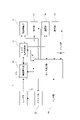
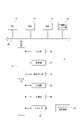
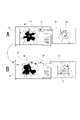
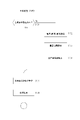
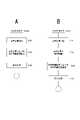
- FIG. 1 is an explanatory diagram of a device connection configuration according to an embodiment of the present technology
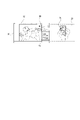
- FIG. 1 is a block diagram of an imaging device according to an embodiment
- FIG. 1 is a block diagram of an information processing device according to an embodiment
- FIG. 3 is an explanatory diagram of functions of the information processing apparatus according to the embodiment
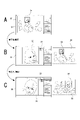
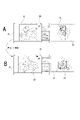
- FIG. 10 is an explanatory diagram of a display example when focusing attention on a face in the first embodiment
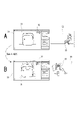
- FIG. 10 is an explanatory diagram of a display example when focusing on an article in the first embodiment
- FIG. 10 is an explanatory diagram of a display example when focusing on an article in the first embodiment
- FIG. 10 is an explanatory diagram of a display example when focusing on a specific person in the first embodiment
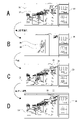
- FIG. 7 is an explanatory diagram of a display example when focusing on a specific part of a person in the first embodiment
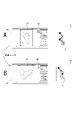
- FIG. 11 is an explanatory diagram of a display example according to the second embodiment
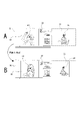
- FIG. 11 is an explanatory diagram of a display example according to the third embodiment
- FIG. 12 is an explanatory diagram of a display example of the fourth embodiment
- FIG. 10 is an explanatory diagram of a display example applicable to the embodiment
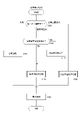
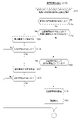
- 10 is an explanatory diagram of a display example applicable to the embodiment; 8 is a flowchart of an example of image display processing according to the embodiment; 4 is a flowchart of setting processing according to the embodiment; 9 is a flowchart of subject enlargement processing according to the embodiment; 4 is a flowchart of synthesis processing according to the embodiment; 7 is a flowchart of focus position enlargement processing according to the embodiment;
- FIG. 1 shows a system configuration example of the embodiment.
- the imaging device 1 and the information processing device 70 can communicate with each other through the transmission line 3 .
- the imaging device 1 is assumed to be, for example, a camera used by a photographer for tethered photography in a studio or the like, but the specific type, model, specifications, etc. of the imaging device 1 are not limited. In the description of the embodiments, a camera capable of capturing still images is assumed, but a camera capable of capturing moving images may also be used.
- the information processing device 70 functions as an image processing device referred to in the present disclosure.
- the information processing device 70 itself is a device that displays an image transferred from the imaging device 1 or a reproduced image, or a device that can cause a connected display device to display an image.
- the information processing device 70 is a device such as a computer device capable of information processing, particularly image processing.
- the information processing device 70 is assumed to be a personal computer (PC), a mobile terminal device such as a smart phone or a tablet, a mobile phone, a video editing device, a video reproducing device, or the like.
- the information processing device 70 can perform various analysis processes using machine learning by an AI (artificial intelligence) engine.
- the AI engine can perform image content determination, scene determination, object recognition (including face recognition, person recognition, etc.), personal identification, and posture estimation by image analysis as AI processing for an input image. can.
- the transmission line 3 may be a wired transmission line using a video cable, a USB (Universal Serial Bus) cable, a LAN (Local Area Network) cable, or the like, or may be a Bluetooth (registered trademark), Wi-Fi (registered trademark). ) may be a wireless transmission path for communication or the like. It may also be a transmission path between remote locations using Ethernet, satellite communication lines, telephone lines, or the like. For example, it is conceivable that the captured image is confirmed at a place away from the photography studio. A captured image obtained by the imaging device 1 through such a transmission line 3 is input to the information processing device 70 .
- the captured image may be recorded in a portable recording medium such as a memory card in the imaging device 1, and the image may be transferred in such a manner that the memory card is provided to the information processing device 70.
- a portable recording medium such as a memory card in the imaging device 1
- the image may be transferred in such a manner that the memory card is provided to the information processing device 70.
- the information processing device 70 can display the captured image transmitted from the imaging device 1 at the time of shooting in real time, or can store it in a storage medium once and reproduce and display it later.
- the image transferred from the imaging device 1 to the information processing device 70 may be filed in a format such as JPEG (Joint Photographic Experts Group), or may be binary information such as RGB data that is not filed. good too. Its data format is not particularly limited.
- a captured image obtained by a photographer using the imaging device 1 can be displayed by the information processing device 70 and can be checked by various staff members.
- the imaging apparatus 1 includes, for example, a lens system 11, an imaging element section 12, a camera signal processing section 13, a recording control section 14, a display section 15, a communication section 16, an operation section 17, a camera control section 18, a memory section 19, a driver section 22, and a , and a sensor unit 23 .
- the lens system 11 includes lenses such as a zoom lens and a focus lens, an aperture mechanism, and the like.
- the lens system 11 guides the light (incident light) from the object and converges it on the imaging element section 12 .
- the imaging device unit 12 is configured by having an image sensor 12a (imaging device) such as a CMOS (Complementary Metal Oxide Semiconductor) type or a CCD (Charge Coupled Device) type.
- image sensor 12a imaging device
- CDS Correlated Double Sampling
- AGC Automatic Gain Control
- the imaging signal as digital data is output to the camera signal processing section 13 and the camera control section 18 in the subsequent stage.
- the camera signal processing unit 13 is configured as an image processing processor such as a DSP (Digital Signal Processor).
- the camera signal processing section 13 performs various signal processing on the digital signal (captured image signal) from the imaging element section 12 .
- the camera signal processing unit 13 performs preprocessing, synchronization processing, YC generation processing, resolution conversion processing, file formation processing, and the like.
- a clamping process for clamping the black levels of R, G, and B to a predetermined level, a correction process between the R, G, and B color channels, etc. are performed on the captured image signal from the image sensor unit 12. conduct.
- color separation processing is performed so that the image data for each pixel has all of the R, G, and B color components. For example, in the case of an imaging device using a Bayer array color filter, demosaic processing is performed as color separation processing.
- YC generation process a luminance (Y) signal and a color (C) signal are generated (separated) from R, G, and B image data.
- resolution conversion processing resolution conversion processing is performed on image data that has been subjected to various signal processing.
- the image data that has been subjected to the various processes described above is subjected to compression encoding for recording or communication, formatting, generation or addition of metadata, etc. to generate a file for recording or communication.
- a file for recording or communication I do.
- an image file in a format such as JPEG, TIFF (Tagged Image File Format), or GIF (Graphics Interchange Format) is generated as a still image file.
- an image file in the MP4 format which is used for recording MPEG-4 compliant moving images and audio.
- RAW raw
- the camera signal processing unit 13 includes information on processing parameters in the camera signal processing unit 13, various control parameters acquired from the camera control unit 18, and information indicating the operating states of the lens system 11 and the image sensor unit 12. , mode setting information, imaging environment information (date and time, location, etc.), focus mode information, focus position information in the captured image (for example, coordinate values in the image), zoom magnification information, identification information of the imaging device itself, mounting It is generated as including lens information, etc.
- the recording control unit 14 performs recording and reproduction on a recording medium such as a non-volatile memory.
- the recording control unit 14 performs a process of recording metadata including image files such as moving image data and still image data, thumbnail images, screen nail images, etc. on a recording medium, for example.
- a recording control unit 14 may be configured as a flash memory built in the imaging device 1 and its writing/reading circuit.
- the recording control unit 14 may be configured by a card recording/reproducing unit that performs recording/reproducing access to a recording medium detachable from the imaging apparatus 1, such as a memory card (portable flash memory, etc.).
- the recording control unit 14 may be implemented as an HDD (Hard Disk Drive) or the like as a form incorporated in the imaging device 1 .
- HDD Hard Disk Drive
- the display unit 15 is a display unit that performs various displays for the photographer, and is a display such as a liquid crystal panel (LCD: Liquid Crystal Display) or an organic EL (Electro-Luminescence) display arranged in the housing of the imaging device 1, for example. It is assumed to be a display panel or viewfinder depending on the device.
- the display unit 15 executes various displays on the display screen based on instructions from the camera control unit 18 . For example, the display unit 15 displays a reproduced image of image data read from the recording medium by the recording control unit 14 .
- the display unit 15 is supplied with the image data of the captured image whose resolution has been converted for display by the camera signal processing unit 13, and the display unit 15 responds to an instruction from the camera control unit 18 to display the image data of the captured image.
- a so-called through image (monitoring image of the subject), which is an image captured while confirming the composition or recording a moving image, is displayed.
- the display unit 15 displays various operation menus, icons, messages, etc., that is, as a GUI (Graphical User Interface) on the screen based on instructions from the camera control unit 18 .
- GUI Graphic User Interface
- the communication unit 16 performs wired or wireless data communication and network communication with external devices. For example, captured image data (still image files and moving image files) and metadata are transmitted and output to external information processing devices, display devices, recording devices, playback devices, and the like.
- the communication unit 16 performs communication via various networks such as the Internet, a home network, and a LAN (Local Area Network), and can transmit and receive various data to and from servers, terminals, etc. on the network. can.
- the imaging device 1 performs mutual information communication with, for example, a PC, a smartphone, a tablet terminal, etc., by means of the communication unit 16, for example, by short-range wireless communication such as Bluetooth, Wi-Fi communication, NFC, and infrared communication. may also be possible.
- the imaging device 1 and other equipment may be able to communicate with each other through wired connection communication. Therefore, the communication unit 16 can transmit captured images and metadata to the information processing device 70 via the transmission line 3 in FIG.
- the operation unit 17 collectively indicates an input device for a user to perform various operation inputs. Specifically, the operation unit 17 indicates various operators (keys, dials, touch panels, touch pads, etc.) provided on the housing of the imaging device 1 . A user's operation is detected by the operation unit 17 , and a signal corresponding to the input operation is sent to the camera control unit 18 .
- the camera control unit 18 is configured by a microcomputer (arithmetic processing unit) having a CPU (Central Processing Unit).
- the memory unit 19 stores information and the like that the camera control unit 18 uses for processing.
- a ROM Read Only Memory
- RAM Random Access Memory
- flash memory and the like are comprehensively illustrated.
- the memory section 19 may be a memory area built into a microcomputer chip as the camera control section 18, or may be configured by a separate memory chip.
- the camera control unit 18 controls the entire imaging apparatus 1 by executing programs stored in the ROM of the memory unit 19, flash memory, or the like.
- the camera control unit 18 controls the shutter speed of the image sensor unit 12, instructs various signal processing in the camera signal processing unit 13, performs image capturing and recording operations in response to user operations, reproduces recorded image files, performs lens It controls the operations of necessary units for operations of the lens system 11 such as zoom, focus, and aperture adjustment in the lens barrel, user interface operations, and the like.
- the RAM in the memory unit 19 is used as a work area for the CPU of the camera control unit 18 to perform various data processing, and is used for temporary storage of data, programs, and the like.
- the ROM and flash memory (nonvolatile memory) in the memory unit 19 store an OS (Operating System) for the CPU to control each unit, content files such as image files, application programs for various operations, and firmware. , and used to store various setting information.
- Various setting information includes communication setting information, exposure setting, shutter speed setting, and mode setting as setting information related to imaging operation, white balance setting, color setting, and image effect setting as setting information related to image processing. , custom key settings and display settings as setting information related to operability.
- the driver unit 22 includes, for example, a motor driver for the zoom lens drive motor, a motor driver for the focus lens drive motor, a motor driver for the motor of the aperture mechanism, and the like. These motor drivers apply drive currents to the corresponding drivers in accordance with instructions from the camera control unit 18 to move the focus lens and zoom lens, open and close the diaphragm blades of the diaphragm mechanism, and the like.
- the sensor unit 23 comprehensively indicates various sensors mounted on the imaging device.
- an IMU intial measurement unit
- an acceleration sensor detects acceleration. be able to.
- a position information sensor, an illuminance sensor, a range sensor, etc. may be mounted.
- Various types of information detected by the sensor unit 23, such as position information, distance information, illuminance information, and IMU data, are added as metadata to the captured image together with date and time information managed by the camera control unit 18.
- the CPU 71 of the information processing device 70 executes various programs according to a program stored in a ROM 72 or a non-volatile memory unit 74 such as an EEP-ROM (Electrically Erasable Programmable Read-Only Memory), or a program loaded from the storage unit 79 to the RAM 73. process.
- the RAM 73 also appropriately stores data necessary for the CPU 71 to execute various processes.
- the CPU 71 , ROM 72 , RAM 73 and nonvolatile memory section 74 are interconnected via a bus 83 .
- An input/output interface 75 is also connected to this bus 83 .
- the information processing device 70 of the present embodiment performs image processing and AI processing, instead of the CPU 71 or together with the CPU 71, a GPU (Graphics Processing Unit), a GPGPU (General-purpose computing on graphics processing units), an AI-dedicated processor, or the like may be provided.
- a GPU Graphics Processing Unit
- GPGPU General-purpose computing on graphics processing units
- AI-dedicated processor or the like
- the input/output interface 75 is connected to an input section 76 including operators and operating devices.
- various operators and operation devices such as a keyboard, mouse, key, dial, touch panel, touch pad, remote controller, etc. are assumed.
- a user's operation is detected by the input unit 76 , and a signal corresponding to the input operation is interpreted by the CPU 71 .
- a microphone is also envisioned as input 76 .
- a voice uttered by the user can also be input as operation information.
- the input/output interface 75 is connected integrally or separately with a display unit 77 such as an LCD or an organic EL panel, and an audio output unit 78 such as a speaker.
- the display unit 77 is a display unit that performs various displays, and is configured by, for example, a display device provided in the housing of the information processing device 70, a separate display device connected to the information processing device 70, or the like.
- the display unit 77 displays images for various types of image processing, moving images to be processed, etc. on the display screen based on instructions from the CPU 71 . Further, the display unit 77 displays various operation menus, icons, messages, etc., ie, as a GUI (Graphical User Interface), based on instructions from the CPU 71 .
- GUI Graphic User Interface
- the input/output interface 75 may be connected to a storage unit 79 made up of a hard disk, a solid-state memory, etc., and a communication unit 80 made up of a modem or the like.
- the communication unit 80 performs communication processing via a transmission line such as the Internet, and communication by wired/wireless communication with various devices, bus communication, and the like.
- the communication unit 80 performs communication with the imaging device 1 , particularly reception of captured images and the like.
- a drive 81 is also connected to the input/output interface 75 as required, and a removable recording medium 82 such as a magnetic disk, optical disk, magneto-optical disk, or semiconductor memory is appropriately loaded.
- Data files such as image files and various computer programs can be read from the removable recording medium 82 by the drive 81 .
- the read data file is stored in the storage unit 79 , and the image and sound contained in the data file are output by the display unit 77 and the sound output unit 78 .
- Computer programs and the like read from the removable recording medium 82 are installed in the storage unit 79 as required.
- software for the processing of the present embodiment can be installed via network communication by the communication unit 80 or via the removable recording medium 82.
- the software may be stored in advance in the ROM 72, the storage unit 79, or the like.
- the information processing device 70 functions as an image processing device that processes an input image
- processing for image display including target subject setting processing, enlargement processing, composition processing, etc. which will be described below
- software will be installed.
- the CPU 71 which may be an AI-dedicated processor, GPU, etc.
- the CPU 71 functions to perform necessary processing.
- FIG. 4 shows the functions performed by the CPU 71 in blocks.
- the CPU 71 is provided with a display control section 50 and an image processing section 51 as illustrated.
- the image processing unit 51 is provided with functions such as a setting unit 52, an object recognition unit 53, an individual identification unit 54, an orientation estimation unit 55, and a focus position determination unit 56. It should be noted that not all of these functions are necessary for the processing of each embodiment to be described later, and some functions may not be provided.
- the display control unit 50 has a function of controlling to display an image on the display unit 77 . Particularly in the case of this embodiment, display processing is performed when an image is transferred from the imaging device 1, or when an image stored in the storage unit 79 is reproduced after transfer, for example. In this case, the display control unit 50 performs control to display the image processed by the image processing unit 51 (enlarged image, composite image, etc.) in a display format specified by software as an application program for image confirmation. conduct. Further, in this case, the display control unit 50 performs image processing such as enlargement and synthesis by the image processing unit 51, and an entire image (original captured image) including the pixel region of interest subjected to the image processing. , to be displayed together.
- the image processing unit 51 has a function of specifying a target pixel region including a target subject from an image to be processed, and performing image processing using the specified target pixel region.
- Image processing includes enlargement processing, synthesis processing (including enlargement and reduction associated with synthesis processing), and the like.
- the image processing unit 51 includes a setting unit 52 for specifying the target pixel region, an object recognition unit 53, an individual identification unit 54, an orientation estimation unit 55, a focus The position determination section 56 functions.
- the setting unit 52 has a function of setting a subject of interest.
- the target subject is set according to the user's operation, or the target subject is set by automatic determination by recognizing the user's voice.
- the object recognition unit 53 has a function of recognizing an object as a subject in an image by an object recognition algorithm such as semantic segmentation.
- the individual identification unit 54 has a function of identifying a specific person among the persons in the subject by an algorithm for determining the person in the subject by referring to a database that manages the characteristics of each person.
- the posture estimation unit 55 is a function of determining the position of each part of the person (head, body, hands, feet, etc.) in the image using a posture estimation algorithm of the subject person.
- the focus position determination unit 56 has a function of determining the focus position (focused pixel area) in the image. The in-focus position may be determined based on the metadata, or may be determined by image analysis, such as edge determination in the image.
- First Embodiment> An embodiment of image display performed by the information processing apparatus 70 as described above will be described. As a first embodiment, by setting a subject of interest in a certain image, a pixel area (pixel area of interest) in which the subject of interest exists is enlarged and displayed in a plurality of subsequent images. An example is given.
- subject of interest means a subject that is commonly set as an object of interest over a plurality of images.
- Subjects that can be targeted are subjects that can be recognized by image analysis, such as people, human parts such as faces and hands, specific people, specific types of goods, and specific goods. Among these, a subject desired to be noticed (an image to be checked) is set as a subject of interest.
- the "target pixel area” is a range of pixels in the original image that includes the target subject, and in particular, pixels in one image that are extracted as targets for image processing such as enlargement processing and synthesis processing. It's about territory.
- the confirmation screen 30 is a screen for displaying images that are sequentially input to the information processing device 70 as the cameraman takes pictures so that the staff can confirm the contents of the images. For example, an image may be displayed on such a confirmation screen each time a still image is shot, and a plurality of images stored in the storage unit 79 or the removable recording medium 82 after being shot may be sequentially displayed. It may be played and displayed.
- the original image 31 is displayed as it is on the confirmation screen 30 of FIG. 5A.
- the original image 31 here is a captured image transferred from the imaging device 1 or a reproduced image read from the storage unit 79 or the like.
- FIG. 5A exemplifies a state in which no subject of interest is set.
- the user performs an operation of specifying a subject or pixel area to be enlarged on the original image 31 by a drag-and-drop operation using a mouse or a touch operation.
- a range designated by the user is shown as an enlargement frame 34, and this is an example in which the "face" of the model is the subject of interest, for example.
- the CPU 71 sets the area designated by the user's operation, ie, the area designated by the enlargement frame 34, as the pixel area of interest, and also recognizes the subject in the pixel area by object recognition processing and sets it as the subject of interest. In this case, the "face" of the person is set as the object of interest.
- the CPU 71 may recognize the subject at that place in the object recognition process and set it as the subject of interest, and may set the range of the subject as the pixel area of interest. . For example, when the user designates the face portion of the model by touching or the like on the screen, the "face" is set as the object of interest.
- the user may specify the subject of interest by voice.
- the CPU 71 can analyze the voice using the function of the setting unit 52, recognize it as “face”, and set the "face” as the subject of interest.
- the "face" area in the object recognition of the original image 31 the area where the face is located in the image, that is, the target pixel area can be determined, and the enlargement frame 34 is displayed as shown in the figure. can be made
- the user may designate a subject of interest by inputting characters such as "face” instead of vocalizing.
- icons such as face, hairstyle, hands, feet, and objects may be displayed on the confirmation screen. 30, and the user may specify an icon to specify the subject of interest.
- a specification operation mode is also conceivable in which a face, an article, or the like is displayed as a target subject candidate according to the type of subject recognized by analyzing the original image 31, and the user can select one.
- Such an interface for setting the subject of interest may be executed by the CPU 71 as a function of the setting unit 52 in FIG.
- the CPU 71 After the target subject is set in the above example, the CPU 71 performs enlargement processing on the target pixel area and displays an enlarged image 32 as shown in FIG. 5B. The CPU 71 also displays the entire original image 31 as the entire image 33 .
- the enlarged image 32 is displayed large and the whole image 33 is displayed small, but the size ratio between the enlarged image 32 and the whole image 33 is not limited to the example shown in the figure.
- the overall image 33 may be made larger.
- the size ratio between the enlarged image 32 and the entire image 33 may be changed by user operation. However, since the user wants to confirm the object of interest specified by mouse operation or voice, at least in the initial display state, the enlarged image 32 of the object of interest (strictly speaking, the pixel area of interest) is displayed on the confirmation screen 30. Large display is appropriate.
- an enlargement frame 34 is displayed as shown enlarged on the right side of the figure. This allows the user to easily grasp which part of the entire image 33 is enlarged and displayed by the enlarged image 32 .
- the image to be processed for display is switched. For example, it is assumed that the next image is taken by the cameraman and a new image is input to the information processing device 70, or the reproduced image is advanced. In that case, the image of the confirmation screen 30 becomes as shown in FIG. 5C. In the case of FIG. 5C, the enlarged image 32 and the entire image 33 of the "face", which is the object of interest, are displayed from the beginning, even if the user does not bother to specify the range to be enlarged.
- the CPU 71 when displaying the next image, searches for the subject of interest by image analysis of that image, and sets the pixel area in which the subject of interest is shown as the pixel area of interest. do. Then, enlargement processing of the target pixel area is performed. As a result, as shown in FIG. 5C, the entire image 33 and the enlarged image 32 are displayed from the beginning. As for the entire image 33, as shown enlarged on the right side, an enlargement frame 34 is displayed so that the subject of interest (and the pixel area of interest) can be seen. As a result, the user can easily recognize which range in the entire image 33 the pixel area of interest that has been inherited from the setting of the subject of interest and that has been enlarged for an image in which the designation operation of the subject of interest is not performed. .
- the user can view enlarged images of a portion of a plurality of images that the user wants to pay particular attention to and check, simply by specifying a subject of interest (or a pixel region of interest) first.
- the size of the target pixel area is not constant. For example, as can be seen by comparing the entire images 33 of FIGS. 5B and 5C, the sizes of the enlargement frames 34 that indicate the pixel regions of interest are different. That is, the target pixel area to be enlarged varies according to the size of the target object in each image.
- FIGS. 6A and 6B are examples in which a "bag” is identified as a subject of interest from images with different scenes and brightness, and enlarged and displayed.
- FIG. 6A shows an example in which an enlarged image 32 of a bag and an entire image 33 are displayed on the confirmation screen 30 in a state where "a bag" is set as a subject of interest.
- An enlarged frame 34 including the bag portion is displayed in the entire image 33 . Even if the displayed image is switched, the enlarged image 32 of the bag and the entire image 33 are displayed on the confirmation screen 30 as shown in FIG. 6B.
- the bag can be recognized by, for example, a semantic segmentation algorithm, and the target pixel region including the bag can be identified. is determined, enlargement processing is performed, and an enlarged image 32 is displayed.
- FIGS. 7A and 7B are examples in which even if part of the object of the subject of interest appears in the image, that part is enlarged as long as it can be determined by object recognition.
- FIG. 7A shows an example in which an enlarged image 32 of a stuffed animal and an entire image 33 are displayed on the confirmation screen 30 in a state where a "stuffed animal" is set as a subject of interest.
- An enlarged frame 34 including a portion of the stuffed animal is displayed in the entire image 33 .
- the enlarged image 32 of the stuffed toy and the whole image 33 are displayed on the confirmation screen 30 as shown in FIG. 7B.
- FIG. 7B shows the case where the stuffed animal is recognized by, for example, a semantic segmentation algorithm for an image in which the feet of the stuffed animal are hidden. Even if a part of the subject of interest does not appear in the image, if it can be recognized, the pixel region of interest including the subject of interest is determined, enlarged, and an enlarged image 32 is displayed.
- FIGS. 8A and 8B an example using a personal identification algorithm is shown in FIGS. 8A and 8B.
- a target pixel region including a specific person 41 as a target subject is enlarged and displayed as an enlarged image 32, and an entire image 33 is displayed.
- An enlarged frame 34 including a portion of the specific person 41 is displayed in the entire image 33 . Even if the displayed image is switched, the enlarged image 32 of the specific person 41 and the entire image 33 are displayed on the confirmation screen 30 as shown in FIG. 8B.
- the specific person 41 is first set as the subject of interest, person identification processing is performed on subsequent images, the subject as the specific person 41 is determined, and the pixel area of interest including the specific person 41 is specified. . Then, the enlarged image 32 is displayed after the target pixel area is enlarged.
- FIGS. 9A and 9B an example using the pose estimation algorithm is shown in FIGS. 9A and 9B.
- a certain part of a person for example, "legs" is set as a subject of interest.
- FIG. 9A shows an example in which a target pixel region including the target subject "leg” is enlarged and displayed as an enlarged image 32 on the confirmation screen 30, and an entire image 33 is displayed.
- An enlarged frame 34 including the leg portion is displayed in the entire image 33 . Even if the displayed image is switched, the enlarged image 32 of the foot portion and the entire image 33 are displayed on the confirmation screen 30 as shown in FIG. 9B.
- posture estimation processing of the person is performed in subsequent images, the leg portion is determined from the posture, and the pixel region of interest including that portion is specified. Then, the enlarged image 32 is displayed after the target pixel area is enlarged.
- posture estimation can be performed in the same way.
- the subject of interest may be determined based on.
- a pixel region of interest including the set subject of interest is automatically specified in images sequentially displayed after that, and enlargement processing is performed. displayed through Therefore, even if the user does not specify the area to be enlarged each time for many images, the part that the user wants to pay attention to (that is, to check) is automatically enlarged, so the confirmation work of each image is extremely efficient. become. Even if each staff member has a different point to check, each staff member can check it simply by designating a subject of interest and displaying the images in order.
- Second Embodiment> An example of combining processing will be described as a second embodiment. For example, by setting a background image and setting a subject of interest, the subject of interest in each image displayed sequentially is displayed in a state of being synthesized with the background image.
- FIG. 10A shows the background image 35 specified by the user.
- the user designates a position where another image is to be superimposed within the background image 35 as indicated by a superimposition position frame 37 .
- an operation such as specifying a range on the screen is assumed by a mouse operation, a touch operation, or the like.
- FIG. 10B shows the original image 36 to be processed according to shooting and playback.
- the user performs an operation of designating a subject of interest.
- various methods for specifying a subject of interest such as mouse operation, voice input, icon selection, selection from candidates, and so on. is assumed to be
- a pixel area of interest is specified in accordance with designation of a subject of interest, or a subject of interest is set by a user specifying a pixel area of interest by a range specification operation or the like.
- FIG. 10B shows a state in which a person is designated as a subject of interest, a pixel region of interest including the subject of interest is set, and the pixel region of interest is indicated as a superimposition target frame 38 .
- FIG. 10C shows a state in which the CPU 71 performs synthesis processing for superimposing the target pixel area on the background image 35 and displays a synthesized image 39 .
- the CPU 71 also displays the entire original image 36 as the entire image 33 .
- the synthesized image 39 is displayed large and the whole image 33 is displayed small, but the size ratio between the synthesized image 39 and the whole image 33 is not limited to the example shown in the drawing.
- the overall image 33 may be made larger.
- the size ratio between the synthesized image 39 and the entire image 33 may be changed by user operation.
- the user wants to check the composite image 39 it is appropriate to display the composite image 39 in a large size within the confirmation screen 30, at least in the initial display state.
- a superimposition target frame 38 is displayed. Thereby, the user can easily grasp which part of the whole image 33 is combined with the background image 35 .
- the image to be processed for display is switched. For example, it is assumed that a new image obtained by the next photographing is input to the information processing device 70, or that a reproduced image is advanced. In that case, the image of the confirmation screen 30 becomes as shown in FIG. 10D. In the case of FIG. 10D, even if the user does not specify the target object or the target pixel area, the composite image 39 in which the target object is combined with the background image 35 and the entire image 33 are displayed from the beginning.
- the CPU 71 when displaying the next image, searches for the subject of interest by image analysis of that image, and sets the pixel area in which the subject of interest is shown as the pixel area of interest. do. Then, a process of synthesizing the target pixel area so as to be superimposed on the superimposition position frame 37 set in the background image 35 is performed. As a result, as shown in FIG. 10D, the entire image 33 and the synthesized image 39 are displayed from the beginning.
- the CPU 71 may perform an enlargement process or a reduction process on the target pixel area so as to match the size of the superimposition position frame 37, and then perform the synthesis process.
- a superimposition target frame 38 is displayed so that the subject of interest (and the pixel area of interest) can be seen.
- the user can easily determine in which range within the entire image 33 the pixel area of interest that has been inherited from the setting of the subject of interest and that has been combined with the background image 35 for an image in which the designation operation of the subject of interest has not been performed. will be able to recognize
- Third Embodiment> As a third embodiment, an example of performing image processing using a pixel-of-interest region specified based on a focus position in an image to be processed will be described.
- FIG. 11A shows an example in which an enlarged image 32 and a full image 33 are displayed on the confirmation screen 30.
- FIG. The magnified image 32 in this case is not based on the user's designation of the subject of interest in advance, but on the basis of the in-focus position in the original image, the pixel region of interest is specified and enlarged.
- the original image to be processed is an image focused on the pupil of the model as the subject.
- the CPU 71 automatically sets a pixel area within a predetermined range centering on, for example, the pupil portion which is the in-focus position, as the pixel area of interest. Then, the target pixel area is subjected to enlargement processing and displayed as an enlarged image 32 as shown in FIG. 11A.
- the CPU 71 causes the target pixel area around the pupil to be indicated by the enlargement frame 34 in the entire image 33 .
- the user can easily recognize which range within the entire image 33 is the enlarged pixel region of interest for an image in which the user does not perform an operation to designate an enlarged portion.
- the CPU 71 displays the focus frame 40 in the enlarged image 32 . By displaying the focusing frame 40 , it becomes easy to understand that the enlarged image 32 is enlarged around the focused portion indicated by the focusing frame 40 .
- FIG. 11B shows a case where the displayed image to be processed is switched. Also in this case, the CPU 71 specifies the pixel area of interest according to the in-focus position and performs enlargement processing. Then, the enlarged image 32 and the entire image 33 are displayed on the confirmation screen 30 .
- the user can view the magnified image 32 that is magnified based on the in-focus position as the image to be sequentially confirmed on the confirmation screen 30 . Since the in-focus position is a point that the photographer wants to focus on, it is a point that the photographer wants to check the most.
- the focus frame 40 is focused on the eyes, the focus frame 40 may be used to focus other than the eyes, such as the face, or to focus on other objects. It is of course conceivable to display the frame 40 as well.
- the fourth embodiment is an example of performing image processing using a target pixel range specified based on the result of object recognition of a subject related to a focus position in an image to be processed.
- FIG. 12A shows an example in which an enlarged image 32 and a full image 33 are displayed on the confirmation screen 30.
- the enlarged image 32 in this case is also not based on the user's designation of the subject of interest in advance.
- the magnified image 32 is obtained by magnifying a pixel region of interest including the recognized object after the CPU 71 recognizes the object based on the focused position in the original image.
- the original image to be processed is an image focused on the pupil of the model as the subject.
- the CPU 71 determines the focus position in the original image.
- the focus position is the pupil portion of the model person.
- the CPU 71 performs object recognition processing for the area including the focus position. As a result, for example, facial regions are determined.
- the CPU 71 sets the pixel area including the face portion as the pixel area of interest. Then, the target pixel area is subjected to enlargement processing and displayed as an enlarged image 32 as shown in FIG. 12A.
- the CPU 71 causes the target pixel area based on object recognition to be indicated by the enlargement frame 34 in the entire image 33 .
- the user can easily recognize which range within the entire image 33 is the enlarged pixel region of interest for an image in which the user does not perform an operation to designate an enlarged portion.
- the range of the face is specified more accurately as the target pixel area.
- the enlarged image 32 is obtained by cutting out and enlarging only the face portion.
- the CPU 71 displays the focusing frame 40 in the enlarged image 32 .
- the enlarged image 32 includes the focused portion indicated by the focusing frame 40 .
- the focusing frame 40 does not necessarily become the center of the enlarged image 32 . This is because the range of the recognized object (for example, face) is set as the target pixel area based on the object recognition processing.
- FIG. 12B shows a case where the displayed image to be processed is switched. Also in this case, the CPU 71 specifies the target pixel region based on the object recognition processing of the subject including the focus position, and performs the enlargement processing. Then, the enlarged image 32 and the entire image 33 are displayed on the confirmation screen 30 .
- the user can see the enlarged image 32 in which the range of the focused subject is enlarged with high precision.
- Such a display is also effective when confirming the image.
- the focus frame 40 when focused on the eyes has been exemplified, in the fourth embodiment as well, the focus frame 40 when focused on other than the eyes, for example, the face, and other It is naturally envisioned to display a focus frame 40 that is in focus on the article. Also in these cases, the pixel region of interest is identified based on object recognition at the in-focus position.
- the target pixel region is enlarged and displayed based on the in-focus position as in the third embodiment
- the target pixel region is enlarged and displayed based on the object recognition result at the in-focus position in the fourth embodiment.
- the user may be allowed to switch between the cases.
- the processing of the fourth embodiment is suitable for staff who check people and products
- the processing of the third embodiment is suitable for staff who check focus positions. Therefore, it is useful for the user to be able to switch arbitrarily.
- the processes of the third embodiment and the process of the fourth embodiment may be automatically selected depending on the subject type, product, person, and the like.
- 13A and 13B are examples in which the ratio between the subject and the blank space is maintained regardless of the size of the subject of interest. 7A and 7B, a case where a stuffed animal is the subject of interest is described.
- the range of the stuffed animal, which is the subject of interest is enlarged and displayed as the pixel area of interest. ratio should be maintained.
- the blank area R2 here refers to an area in which the subject of interest is not captured. That is, for each image to be processed, the enlargement ratio when enlarging the target pixel region is varied so that the ratio between the target subject region R1 and the blank region R2 is constant. As a result, the subject of interest can always be displayed in the same area on the confirmation screen 30 that displays each image, and it is expected that the user can easily check.
- FIG. 14 shows an example of providing an interface on the confirmation screen 30 that allows designation of another target subject other than the target subject being set.
- FIG. 14 shows an enlarged image 32 and an entire image 33 , and an enlarged frame 34 indicating the area of the enlarged image 32 is shown in the entire image 33 .
- the history image 42 is displayed. It is assumed that this is an image showing a subject that has been set as a subject of interest in the past. Of course, there may be a plurality of history images 42 .
- the setting of the target subject is switched to the setting corresponding to the history image, and thereafter, for each image, the pixel region of interest based on the switched target subject is set.
- Enable enlarged display it is convenient when a plurality of staff check each image at different attention points. For example, suppose that a certain staff member A operates a subject of interest and confirms a part of the image, and then staff member B designates another subject of interest and confirms the image. This is because when the staff member A again tries to check the remaining images or further captured images, his/her designation is reflected in the history image 42 . You will have to select it.
- the history image 42 may be a reduced thumbnail image of an object of interest (face, article, etc.) that has been enlarged in the past, or may be an enlarged frame 34 (pixel area of interest) at that time within the entire image.
- the left half of the confirmation screen 30 displays an enlarged image based on the focus position (or the focusing frame 40), and the right half displays an enlarged image of an object as a subject of interest. be.
- magnification or change the display mode may be changed according to recognition of the subject, pose, or scene through object recognition processing or orientation estimation processing. For example, whether or not to maintain the enlargement ratio is switched according to the presence or absence of a person, a change in subject, a change in pose, a change in clothes, etc. in the image to be processed. For example, when the subject changes, the magnification rate is returned to the default state, or the magnification rate is set to a predetermined value according to the type of the recognized subject.
- the presence or absence of display of the focusing frame 40 may be switched according to the presence or absence of a person, a change in subject, a change in pose, a change in clothing, and the like. For example, if the image to be processed does not include a person, the focusing frame 40 is not displayed.
- FIG. 15 shows an example of processing by the CPU 71 when one image to be processed is input due to the progress of shooting or image feed of a reproduced image.
- the finish confirmation mode is a mode for how to confirm the photographed image. Specifically, there is a "subject enlargement mode" for enlarging the target subject as in the first embodiment, and a “subject enlargement mode” for synthesizing the target subject with another image such as the background image 35 as in the second embodiment. and a "focus position enlargement mode” that performs enlargement using focus position determination as in the third or fourth embodiment. For example, these modes are selected by user operation.
- the CPU 71 advances from step S101 to step S102 to confirm whether or not the subject of interest has been set. If the subject of interest has already been set, that is, if the subject of interest has been previously set in the image as a processing target, the CPU 71 proceeds to subject enlargement processing in step S120. If the subject of interest has not yet been set, the CPU 71 performs processing of subject of interest setting in step S110, and then proceeds to step S120. In step S120, the CPU 71 performs enlargement processing of the target pixel area including the target object as described in the first embodiment. Then, in step S160, the CPU 71 performs control processing for displaying the confirmation screen 30 on the display section 77. FIG. In this case, as described with reference to FIGS. 5 to 9, a process of displaying both the enlarged image 32 and the entire image 33 is performed.
- step S101 the CPU 71 proceeds from step S101 to step S130 and performs the processing described in the second embodiment. That is, the setting of the background image 35 and the frame 38 to be superimposed, the setting of the subject of interest, the composition processing, and the like. Then, in step S160, the CPU 71 performs control processing for displaying the confirmation screen 30 on the display section 77.
- FIG. In this case, as described with reference to FIG. 10, processing is performed to display both the composite image 39 and the entire image 33 .
- the CPU 71 proceeds from step S101 to step S140 and performs the processing described in the third or fourth embodiment. That is, the CPU 71 performs determination of the focus position, specification of the target pixel region using the focus position or object recognition at the focus position, enlargement processing, and the like. Then, in step S160, the CPU 71 performs control processing for displaying the confirmation screen 30 on the display section 77. FIG. In this case, as described with reference to FIG. 11 or 12, the process of displaying both the enlarged image 32 and the entire image 33 is performed.
- FIG. 16 shows an example of processing for target subject setting in step S110 of FIG.
- the CPU 71 detects user input in step S111 of FIG. As described above, the user can perform an operation of designating a subject of interest by operating a mouse or the like, inputting voice, selecting an icon or the like, selecting from presented candidates, or the like. At step S111, the CPU 71 detects these inputs.
- step S112 the CPU 71 recognizes which object is the object of interest designated in the current image to be processed, based on the user's input.
- step S113 the CPU 71 sets the subject recognized in step S112 as a target subject to be reflected in the current image and subsequent images.
- the object of interest is set according to the type of person, human part, article, etc. such as "face”, “person”, “person's leg”, “person's hand”, “bag”, and "stuffed toy”.
- personal identification is performed and the characteristic information of a specific person is added to the setting information of the subject of interest.
- the original image is displayed in step S160. It is conceivable that it will be done.
- step S121 the CPU 71 identifies the type and position of the object that is the subject in the image that is currently being processed in object recognition processing based on semantic segmentation.
- step S122 the CPU 71 determines whether or not the subject of interest exists in the image. In other words, it is whether or not a subject corresponding to the subject of interest has been recognized as a result of object recognition. If the subject of interest does not exist, the CPU 71 ends the processing of FIG. 17 and proceeds to step S160 of FIG. In this case, since no enlargement processing is performed, the input original image is displayed as it is on the confirmation screen 30 .
- step S122 advances from step S122 to step S123 to confirm whether the subject of interest is a specific person and whether or not there are a plurality of persons in the image.
- step S124 the CPU 71 advances to step S124 to perform personal identification processing to determine which person in the image is the subject of interest. If the specific person as the subject of interest cannot be specified among the plurality of persons in the image, the CPU 71 terminates the processing in FIG. 17 from step S125 and proceeds to step S160 in FIG. In this case as well, since no enlargement processing is performed, the input original image is displayed as it is on the confirmation screen 30 . On the other hand, if the specific person serving as the subject of interest can be specified among the plurality of persons in the image, the CPU 71 proceeds from step S125 to step S126. If the subject of interest is not a specific person, or if a plurality of persons do not exist in the image, the CPU 71 proceeds from step S123 to step S126.
- step S126 the CPU 71 branches the process depending on whether or not a specific part of a person, such as a foot or a hand, is designated as the subject of interest.
- the CPU 71 performs posture estimation processing in step S127 to identify the part of the person. If the part of the subject person cannot be identified, the CPU 71 terminates the processing of FIG. 17 from step S128 and proceeds to step S160 of FIG. In this case as well, since no enlargement processing is performed, the input original image is displayed as it is on the confirmation screen 30 . On the other hand, if the part of the subject person can be specified, the CPU 71 proceeds from step S128 to step S129.
- step S126 the CPU 71 proceeds from step S126 to step S129.
- the "face” is also a part of a person, but if the face part can be identified by object recognition (face recognition) processing without performing posture estimation, the processing of step S127 is unnecessary.
- step S129 the CPU 71 identifies a pixel area of interest based on the position of the subject of interest within the image. That is, the area including the determined subject of interest is set as the pixel area of interest. Then, in step S150, the CPU 71 performs enlargement processing on the target pixel area.
- step S120 the CPU 71 proceeds to step S160 of FIG. In this case, the CPU 71 performs display control so that both the enlarged image 32 and the entire image 33 are displayed on the confirmation screen 30 .
- step S131 the CPU 71 confirms whether or not the settings for combined display have been completed.
- the settings in this case are the setting of the background image 35, the setting of the superimposition position (the range of the superimposition position frame 37), and the setting of the subject of interest.
- the CPU 71 performs the processes of steps S132, S133, and S134. That is, the CPU 71 performs background image selection processing in step S132. For example, a certain image is set as a background image according to the user's image designation operation. Note that a foreground image may be set.
- step S ⁇ b>133 the CPU 71 sets the superimposition position on the background image 35 . For example, a specific range on the background image 35 is set as the superimposition position according to a user's range specifying operation. In this setting, the superimposition position frame 37 is displayed so that the user can recognize the superimposition position while performing the range specifying operation.
- step S134 the CPU 71 sets a subject of interest in the image currently being processed. That is, the CPU 71 recognizes the user's input to the image to be processed and specifies the subject of interest. Specifically, the CPU 71 may perform the same processing as in FIG. 16 in step S134. Although not shown in the flowchart, during a period in which the processing of steps S132, S133, and S134 is not performed even once, for example, after the start of tethered photography (or after switching to the composite mode), the processing of the original image is performed in step S160. is displayed.
- the CPU 71 sets a target pixel area in step S135 of FIG. 18, and performs synthesis processing in step S136. That is, in step S135, a subject of interest is identified in the current image to be processed, and a pixel region of interest including the subject of interest is identified. Then, in step S136, enlargement or reduction is performed to adjust the size of the target pixel region and the size of the superimposed position in the background image 35, and the image of the target pixel region is combined with the background image 35.
- the CPU 71 proceeds to step S160 in FIG. In this case, the CPU 71 performs display control so that both the composite image 39 and the entire image 33 are displayed on the confirmation screen 30 .
- FIG. 19A shows the case where the processing of the third embodiment is adopted as the focus position enlargement mode
- FIG. 19B shows the case where the processing of the fourth embodiment is adopted as the focus position enlargement mode.
- step S141 the CPU 71 determines the in-focus position for the current processing target image.
- the in-focus position may be determined by metadata or may be determined by image analysis.
- step S142 the CPU 71 sets an area to be enlarged based on the in-focus position, that is, a target pixel area. For example, a predetermined pixel range centered on the in-focus position is set as the pixel-of-interest region.
- step S143 the CPU 71 performs enlargement processing for the target pixel area.
- step S140 After completing the processing of step S140 shown in FIG. 19A, the CPU 71 proceeds to step S160 of FIG. In this case, the CPU 71 performs display control so that both the enlarged image 32 and the entire image 33 are displayed on the confirmation screen 30 .
- step S141 the CPU 71 determines the in-focus position for the current processing target image.
- step S145 the subject at the in-focus position is recognized by object recognition processing. For example, "face", "bag”, etc. are recognized. This is to specify the subject that the cameraman focused on when taking the picture.
- step S146 the CPU 71 sets an area to be enlarged based on the recognized subject, that is, a target pixel area. For example, when a "face" is recognized as an object including the in-focus position, a pixel range that includes the range of the face is set as the target pixel area.
- step S143 the CPU 71 performs enlargement processing for the target pixel area.
- step S140 the CPU 71 proceeds to step S160 of FIG.
- the CPU 71 performs display control so that both the enlarged image 32 and the entire image 33 are displayed on the confirmation screen 30 .
- the enlarged image 32 is obtained by enlarging the range of the recognized object.
- the information processing apparatus 70 has a function of performing the above-described display processing on an input image (the function of FIG. 3), and corresponds to an "image processing apparatus" described below. .
- An image processing apparatus (information processing apparatus 70) that performs the processing described in the first, second, third, and fourth embodiments identifies a pixel region of interest including a subject of interest from an image to be processed. , and an image processing unit 51 that performs image processing using the specified target pixel area. As a result, an image is displayed using the pixel area of the subject of interest, and for example, an image suitable for confirming the image of the subject of interest can be automatically displayed.
- the image processing unit 51 converts the object of interest set on the first image into an image corresponding to the second image to be processed.
- image processing is performed using a pixel region of interest determined by analysis and specified based on the determination of a subject of interest in the second image.
- first image when another image (second image) is set as a processing target, the second image is focused on by image analysis. A subject is determined and a target pixel area is specified.
- image processing based on the determination of the subject of interest in a second image to be processed thereafter without a user performing a setting operation of the subject of interest. can be made to take place.
- An image processed in such a manner can be an image suitable for image display when it is desired to sequentially confirm a specific subject in a plurality of images.
- extremely efficient image confirmation can be realized, which in turn can improve the efficiency of commercial photography and improve the quality of captured images.
- object recognition processing is performed as image analysis. For example, by semantic segmentation, a person, face, article, etc. set as a subject of interest on the first image is determined on the second image. As a result, a person, parts of a person (face, hands, feet), an article, etc. can be automatically set as a target pixel area for enlargement processing or synthesis processing for each input image.
- the image processing apparatus (information processing apparatus 70) of the first embodiment an example in which personal identification processing is performed as image analysis has been described.
- the pixel area of the specific person can be automatically set as a target pixel area for enlargement processing or synthesis processing for each input image.
- a specific person may be set as the object of interest and individual identification may be performed. As a result, even when a plurality of persons are included in the image to be processed, the specific person can be synthesized with the background image.
- posture estimation processing is performed as image analysis.
- the pixel area can be specified by the posture of the model.
- posture estimation processing may be performed when determining a subject of interest such as body parts.
- specific parts in the image to be processed can be recognized according to the pose estimation and synthesized with the background image.
- the image processing is an example of enlarging the image of the target pixel region.
- an example has been described in which image processing is synthesizing processing for synthesizing an image of a pixel region of interest with another image.
- image processing is synthesizing processing for synthesizing an image of a pixel region of interest with another image.
- a synthesized image is generated in which a plurality of images of a subject of interest, for example, can be sequentially applied to a specific background image for confirmation. Therefore, it is possible to provide a very convenient function when it is desired to sequentially confirm the state of image composition using the subject of interest.
- the synthesizing process is not only synthesizing the target pixel area with the background image as it is, but also enlarging the target pixel area and synthesizing it with the background image, or reducing the target pixel area and synthesizing it with the background image.
- the image to be synthesized is not limited to the background image, and may be the foreground image.
- the above-described second image is the above-described first image (image for which the target subject is set).
- the subject of interest is set in the first image, for example, when photographed images are input sequentially, or when images are input sequentially by image feed of reproduced images, these images are sequentially input.
- a plurality of images in the image analysis are set as the second images, respectively.
- the pixel area of the target subject is automatically enlarged or synthesized without specifying the target subject. processing takes place. Therefore, it is extremely convenient for confirming a large number of images, such as when it is desired to confirm the subject of interest while photographing is progressing, or when it is desired to confirm the subject of interest while advancing the reproduced image.
- the setting unit 52 is provided for setting the subject of interest based on the designation input for the above-described first image.
- enlargement processing and composition processing are performed on subsequent images reflecting the setting of the subject of interest.
- a user can arbitrarily specify a person, a face, a hand, hair, a leg, an article, or the like as a subject to be noticed for confirming an image, and an enlarged image or a synthesized image is provided according to the user's needs. This is suitable for confirmation work in tethered photography. In particular, even if the subject to be noticed differs for each staff member, it can be easily dealt with.
- voice designation input is possible as designation input of a subject of interest.
- the designation input may be performed by a range designation operation on the image, or may be voice input, for example.
- the image analysis makes the "face” the subject of interest and sets the pixel region of interest. This facilitates designation input by the user.
- the CPU 71 (image processing unit 51) performs image processing using the target pixel region specified based on the focus position in the image to be processed. Accordingly, a pixel area of interest is set based on the subject in focus, and image processing can be performed based on the pixel area of interest.
- An image processed in this manner can be an image suitable for image display when it is desired to sequentially confirm the focused subject in a plurality of images. There is no need for the user to specify the subject of interest.
- the image processing is enlarging the image of the target pixel region based on the focus position.
- an enlarged image centered on the in-focus position can be displayed, and a convenient function can be provided when it is desired to sequentially check the in-focus subject for a plurality of images.
- the CPU 71 image processing unit 51 performs image processing using the target pixel range specified based on the result of object recognition of the subject related to the in-focus position in the image to be processed. I decided to do it.
- the target pixel area is set based on the object recognition of the subject related to the in-focus position. This can be said to specify the range of the subject photographed at the in-focus position. Therefore, by performing image processing based on the pixel region of interest, image processing is performed on the subject in focus, and the images processed in this way are combined into a plurality of images. It is possible to make an image suitable for image display when one wants to check the focused objects one by one. Also, in this case, the user does not need to specify the subject of interest.
- the image processing is the enlargement processing of the image of the target pixel area based on the object recognition of the subject related to the in-focus position.
- an enlarged image can be displayed for the range of the object to be recognized such as the face, body, and article, without necessarily centering on the focus position.
- the image processing unit 51 determines a change in the subject of interest or a change in scene by image analysis, and changes the image processing content according to the determination of the change. For example, in the process of sequentially inputting images, the content of image processing is changed when the pose or costume of the subject of interest changes, the person changes, or a scene change is detected by changing the person or background. . Specifically, the magnification ratio of the enlargement process is changed, and the presence/absence of display of the focus frame 40 is switched. This makes it possible to appropriately set the display mode according to the content of the image.
- the image processing device performs image processing by the image processing unit 51 (enlarged image 32 or synthesized image 39),
- a display control unit 50 is provided for controlling to display together the entire image 33 including the target pixel area which is the object of image processing.
- the user can confirm the enlarged image 32, the composite image 39, etc. while confirming the whole image 33, and an interface with good usability can be provided.
- the synthetic image 39 may be displayed without displaying the entire image 33 .
- a frame display (enlargement frame 34, superimposition target frame 38 ) is performed. This allows the user to easily recognize which part of the entire image 33 is enlarged or synthesized.
- the display indicating the target pixel area is not limited to the frame display format, and can be variously conceived, such as changing the color of the relevant portion, changing the luminance, highlighting, and the like.
- each processing of the subject enlargement mode, synthetic enlargement mode, and focusing position enlargement mode can be selectively executed.
- a processor 70 is also envisioned.
- an information processing apparatus 70 configured to selectively execute processing in any two modes is also assumed.
- the information processing device 70 displays the confirmation screen 30, but the technology of the present disclosure can also be applied to the imaging device 1.
- the imaging device 1 can also be the image processing device referred to in the present disclosure.
- the processing described in the embodiment may be applied to moving images. If the processing power of the CPU 71 or the like is high, the object of interest designated for a certain frame of the moving image is analyzed and determined for each subsequent frame, a pixel area of interest is set, and an enlarged image or image of the pixel area of interest is produced. It is also possible to display a composite image. Therefore, it is possible to see an enlarged image of the subject of interest together with the entire image when shooting or reproducing a moving image.
- the program of the embodiment is a program that causes a CPU, DSP, GPU, GPGPU, AI processor, etc., or a device including these to execute the processes shown in FIGS. 15 to 19 described above. That is, the program according to the embodiment is a program that specifies a target pixel region including a target object from an image to be processed and causes an information processing apparatus to perform image processing using the specified target pixel region. With such a program, the image processing device referred to in the present disclosure can be realized by various computer devices.
- a HDD as a recording medium built in equipment such as a computer device, or in a ROM or the like in a microcomputer having a CPU.
- a flexible disc a CD-ROM (Compact Disc Read Only Memory), an MO (Magneto Optical) disc, a DVD (Digital Versatile Disc), a Blu-ray disc (Blu-ray Disc (registered trademark)), a magnetic disc, a semiconductor memory
- a removable recording medium such as a memory card.
- Such removable recording media can be provided as so-called package software.
- a program from a removable recording medium to a personal computer or the like, it can also be downloaded from a download site via a network such as a LAN (Local Area Network) or the Internet.
- LAN Local Area Network
- Such a program is suitable for widely providing the image processing apparatus of the present disclosure.
- a mobile terminal device such as a smartphone or tablet, a mobile phone, a personal computer, a game device, a video device, a PDA (Personal Digital Assistant), etc.
- these devices function as the image processing device of the present disclosure. be able to.
- An image processing apparatus comprising an image processing unit that specifies a target pixel region including a target object from an image to be processed and performs image processing using the specified target pixel region.
- the image processing unit The subject of interest set on the first image is determined by image analysis of the second image to be processed, and the target pixel region specified based on the determination of the subject of interest in the second image is used.
- the image processing device according to (1) above, which performs image processing.
- the image processing device according to (2), wherein the image analysis is object recognition processing.
- the image processing device according to any one of (1) to (5) above, wherein the image processing is processing for enlarging an image of a pixel region of interest.
- the image processing apparatus according to any one of (1) to (5) above, wherein the image processing is synthesis processing for synthesizing an image of a pixel region of interest with another image.
- the image processing apparatus according to any one of (2) to (7) above, wherein the second image is a plurality of images to be processed after the first image.
- the image processing apparatus according to any one of (2) to (8) above, further comprising a setting unit that sets a subject of interest based on a designation input for the first image.
- the designation input can be a voice designation input.
- the image processing unit The image processing apparatus according to (1) above, wherein image processing is performed using a target pixel region specified based on a focus position in an image to be processed.
- the image processing is processing for enlarging an image of a target pixel region based on an in-focus position.
- the image processing unit The image processing apparatus according to (1) above, wherein, in the image to be processed, image processing is performed using a pixel range of interest specified based on a result of object recognition of a subject related to a focus position.
- the image processing device according to (13) above, wherein the image processing is processing for enlarging an image of a target pixel region based on object recognition of a subject related to a focus position.
- the image processing unit The image processing apparatus according to any one of (1) to (14) above, wherein a change in a subject of interest or a change in scene is determined by image analysis, and image processing content is changed according to the determination of the change.
- the image processing device According to (16) above, wherein a display indicating a pixel area of interest that has been subjected to image processing is performed in the entire image.
- the image processing device An image processing method, comprising: specifying a target pixel region including a target object from an image to be processed; and performing image processing using the specified target pixel region.
- Imaging device Transmission path 18 Camera control unit 30 Confirmation screen 31 Original image 32 Enlarged image 33 Overall image 34 Enlarged frame 35 Background image 36 Original image 37 Superimposed position frame 38 Superimposed target frame 39 Composite image 40 In-focus frame 41 Specific person 42 History image 50 Display control unit 51 Image processing unit 52 Setting unit 53 Object recognition unit 54 Personal identification unit 55 Posture estimation unit 56 In-focus position determination unit 70 Information processing device, 71 CPUs
Landscapes
- Engineering & Computer Science (AREA)
- Theoretical Computer Science (AREA)
- Multimedia (AREA)
- Physics & Mathematics (AREA)
- General Physics & Mathematics (AREA)
- Software Systems (AREA)
- Signal Processing (AREA)
- Computer Vision & Pattern Recognition (AREA)
- Health & Medical Sciences (AREA)
- Artificial Intelligence (AREA)
- Computing Systems (AREA)
- Databases & Information Systems (AREA)
- Evolutionary Computation (AREA)
- General Health & Medical Sciences (AREA)
- Medical Informatics (AREA)
- Image Processing (AREA)
- Apparatus For Radiation Diagnosis (AREA)
- Studio Devices (AREA)
Priority Applications (2)
| Application Number | Priority Date | Filing Date | Title |
|---|---|---|---|
| JP2022577047A JPWO2022158201A1 (enExample) | 2021-01-22 | 2021-12-17 | |
| US18/261,341 US20240303981A1 (en) | 2021-01-22 | 2021-12-17 | Image processing device, image processing method, and program |
Applications Claiming Priority (2)
| Application Number | Priority Date | Filing Date | Title |
|---|---|---|---|
| JP2021-008713 | 2021-01-22 | ||
| JP2021008713 | 2021-01-22 |
Publications (1)
| Publication Number | Publication Date |
|---|---|
| WO2022158201A1 true WO2022158201A1 (ja) | 2022-07-28 |
Family
ID=82548227
Family Applications (1)
| Application Number | Title | Priority Date | Filing Date |
|---|---|---|---|
| PCT/JP2021/046765 Ceased WO2022158201A1 (ja) | 2021-01-22 | 2021-12-17 | 画像処理装置、画像処理方法、プログラム |
Country Status (3)
| Country | Link |
|---|---|
| US (1) | US20240303981A1 (enExample) |
| JP (1) | JPWO2022158201A1 (enExample) |
| WO (1) | WO2022158201A1 (enExample) |
Citations (5)
| Publication number | Priority date | Publication date | Assignee | Title |
|---|---|---|---|---|
| JP2011130384A (ja) * | 2009-12-21 | 2011-06-30 | Canon Inc | 被写体追跡装置及びその制御方法 |
| JP2012028949A (ja) * | 2010-07-21 | 2012-02-09 | Canon Inc | 画像処理装置及びその制御方法 |
| JP2017073704A (ja) * | 2015-10-08 | 2017-04-13 | キヤノン株式会社 | 画像処理装置及び方法 |
| JP2019106631A (ja) * | 2017-12-12 | 2019-06-27 | セコム株式会社 | 画像監視装置 |
| JP2020149642A (ja) * | 2019-03-15 | 2020-09-17 | オムロン株式会社 | 物体追跡装置および物体追跡方法 |
Family Cites Families (4)
| Publication number | Priority date | Publication date | Assignee | Title |
|---|---|---|---|---|
| JP4274665B2 (ja) * | 2000-03-03 | 2009-06-10 | オリンパス株式会社 | 電子ビューファインダ付き電子カメラ |
| JP2006191408A (ja) * | 2005-01-07 | 2006-07-20 | Hitachi Kokusai Electric Inc | 画像表示プログラム |
| JP4909840B2 (ja) * | 2007-08-21 | 2012-04-04 | 株式会社東芝 | 映像処理装置、プログラムおよび方法 |
| US9282399B2 (en) * | 2014-02-26 | 2016-03-08 | Qualcomm Incorporated | Listen to people you recognize |
-
2021
- 2021-12-17 US US18/261,341 patent/US20240303981A1/en active Pending
- 2021-12-17 JP JP2022577047A patent/JPWO2022158201A1/ja active Pending
- 2021-12-17 WO PCT/JP2021/046765 patent/WO2022158201A1/ja not_active Ceased
Patent Citations (5)
| Publication number | Priority date | Publication date | Assignee | Title |
|---|---|---|---|---|
| JP2011130384A (ja) * | 2009-12-21 | 2011-06-30 | Canon Inc | 被写体追跡装置及びその制御方法 |
| JP2012028949A (ja) * | 2010-07-21 | 2012-02-09 | Canon Inc | 画像処理装置及びその制御方法 |
| JP2017073704A (ja) * | 2015-10-08 | 2017-04-13 | キヤノン株式会社 | 画像処理装置及び方法 |
| JP2019106631A (ja) * | 2017-12-12 | 2019-06-27 | セコム株式会社 | 画像監視装置 |
| JP2020149642A (ja) * | 2019-03-15 | 2020-09-17 | オムロン株式会社 | 物体追跡装置および物体追跡方法 |
Also Published As
| Publication number | Publication date |
|---|---|
| JPWO2022158201A1 (enExample) | 2022-07-28 |
| US20240303981A1 (en) | 2024-09-12 |
Similar Documents
| Publication | Publication Date | Title |
|---|---|---|
| CN103384304B (zh) | 显示控制设备、显示控制方法 | |
| JP4640456B2 (ja) | 画像記録装置、画像記録方法、画像処理装置、画像処理方法、プログラム | |
| US9251765B2 (en) | Image processing device, image processing method, and program for generating composite image | |
| CN102469244B (zh) | 用于对被摄体进行连续摄像的摄像装置 | |
| US20120098946A1 (en) | Image processing apparatus and methods of associating audio data with image data therein | |
| JP2015126388A (ja) | 画像再生装置及びその制御方法 | |
| KR20120055860A (ko) | 디지털 촬영 장치 및 그의 사진 제공 방법 | |
| JP6381892B2 (ja) | 画像処理装置、画像処理方法及び画像処理プログラム | |
| CN102611835B (zh) | 数字拍摄设备及其控制方法 | |
| US20150036020A1 (en) | Method for sharing original photos along with final processed image | |
| CN115412714B (zh) | 数据处理方法、控制终端、ar终端、ar系统及存储介质 | |
| JP4989362B2 (ja) | 撮像装置、及び、そのスルー画像の表示方法、並びに、撮影画像の記録方法 | |
| CN101076086B (zh) | 场景选择画面生成装置 | |
| WO2022019171A1 (ja) | 情報処理装置、情報処理方法、プログラム | |
| JP2006339784A (ja) | 撮像装置、画像処理方法及びプログラム | |
| WO2022158201A1 (ja) | 画像処理装置、画像処理方法、プログラム | |
| CN103167238B (zh) | 用于再现图像的方法和设备 | |
| JP2009088749A (ja) | 撮像装置、シナリオによる画像撮影方法、およびプログラム | |
| JP2022187301A (ja) | 撮像装置、制御方法、プログラム | |
| JP2007226606A (ja) | 撮像装置、画像出力方法、再生装置、プログラム、及び記憶媒体 | |
| JPWO2020162320A1 (ja) | 撮影装置、撮影方法、及びプログラム | |
| JP6249771B2 (ja) | 画像処理装置、画像処理方法、プログラム | |
| WO2025100249A1 (ja) | 撮像装置およびその制御方法 | |
| JP2024089343A (ja) | ファイル転送装置およびファイル転送方法 | |
| JP5067213B2 (ja) | 撮像装置、記録制御方法及びプログラム |
Legal Events
| Date | Code | Title | Description |
|---|---|---|---|
| 121 | Ep: the epo has been informed by wipo that ep was designated in this application |
Ref document number: 21921302 Country of ref document: EP Kind code of ref document: A1 |
|
| ENP | Entry into the national phase |
Ref document number: 2022577047 Country of ref document: JP Kind code of ref document: A |
|
| WWE | Wipo information: entry into national phase |
Ref document number: 18261341 Country of ref document: US |
|
| NENP | Non-entry into the national phase |
Ref country code: DE |
|
| 122 | Ep: pct application non-entry in european phase |
Ref document number: 21921302 Country of ref document: EP Kind code of ref document: A1 |