WO2021131981A1 - 情報処理装置、制御方法およびプログラム - Google Patents
情報処理装置、制御方法およびプログラム Download PDFInfo
- Publication number
- WO2021131981A1 WO2021131981A1 PCT/JP2020/047014 JP2020047014W WO2021131981A1 WO 2021131981 A1 WO2021131981 A1 WO 2021131981A1 JP 2020047014 W JP2020047014 W JP 2020047014W WO 2021131981 A1 WO2021131981 A1 WO 2021131981A1
- Authority
- WO
- WIPO (PCT)
- Prior art keywords
- print job
- job
- printing device
- identification information
- Prior art date
- Legal status (The legal status is an assumption and is not a legal conclusion. Google has not performed a legal analysis and makes no representation as to the accuracy of the status listed.)
- Ceased
Links
Images




Classifications
-
- G—PHYSICS
- G06—COMPUTING OR CALCULATING; COUNTING
- G06F—ELECTRIC DIGITAL DATA PROCESSING
- G06F3/00—Input arrangements for transferring data to be processed into a form capable of being handled by the computer; Output arrangements for transferring data from processing unit to output unit, e.g. interface arrangements
- G06F3/12—Digital output to print unit, e.g. line printer, chain printer
- G06F3/1201—Dedicated interfaces to print systems
- G06F3/1223—Dedicated interfaces to print systems specifically adapted to use a particular technique
- G06F3/1237—Print job management
- G06F3/1253—Configuration of print job parameters, e.g. using UI at the client
- G06F3/1256—User feedback, e.g. print preview, test print, proofing, pre-flight checks
-
- B—PERFORMING OPERATIONS; TRANSPORTING
- B41—PRINTING; LINING MACHINES; TYPEWRITERS; STAMPS
- B41J—TYPEWRITERS; SELECTIVE PRINTING MECHANISMS, i.e. MECHANISMS PRINTING OTHERWISE THAN FROM A FORME; CORRECTION OF TYPOGRAPHICAL ERRORS
- B41J29/00—Details of, or accessories for, typewriters or selective printing mechanisms not otherwise provided for
- B41J29/38—Drives, motors, controls or automatic cut-off devices for the entire printing mechanism
-
- G—PHYSICS
- G06—COMPUTING OR CALCULATING; COUNTING
- G06F—ELECTRIC DIGITAL DATA PROCESSING
- G06F3/00—Input arrangements for transferring data to be processed into a form capable of being handled by the computer; Output arrangements for transferring data from processing unit to output unit, e.g. interface arrangements
- G06F3/12—Digital output to print unit, e.g. line printer, chain printer
- G06F3/1201—Dedicated interfaces to print systems
- G06F3/1202—Dedicated interfaces to print systems specifically adapted to achieve a particular effect
- G06F3/1203—Improving or facilitating administration, e.g. print management
- G06F3/1204—Improving or facilitating administration, e.g. print management resulting in reduced user or operator actions, e.g. presetting, automatic actions, using hardware token storing data
-
- G—PHYSICS
- G06—COMPUTING OR CALCULATING; COUNTING
- G06F—ELECTRIC DIGITAL DATA PROCESSING
- G06F3/00—Input arrangements for transferring data to be processed into a form capable of being handled by the computer; Output arrangements for transferring data from processing unit to output unit, e.g. interface arrangements
- G06F3/12—Digital output to print unit, e.g. line printer, chain printer
- G06F3/1201—Dedicated interfaces to print systems
- G06F3/1202—Dedicated interfaces to print systems specifically adapted to achieve a particular effect
- G06F3/1203—Improving or facilitating administration, e.g. print management
- G06F3/1205—Improving or facilitating administration, e.g. print management resulting in increased flexibility in print job configuration, e.g. job settings, print requirements, job tickets
-
- G—PHYSICS
- G06—COMPUTING OR CALCULATING; COUNTING
- G06F—ELECTRIC DIGITAL DATA PROCESSING
- G06F3/00—Input arrangements for transferring data to be processed into a form capable of being handled by the computer; Output arrangements for transferring data from processing unit to output unit, e.g. interface arrangements
- G06F3/12—Digital output to print unit, e.g. line printer, chain printer
- G06F3/1201—Dedicated interfaces to print systems
- G06F3/1223—Dedicated interfaces to print systems specifically adapted to use a particular technique
- G06F3/1237—Print job management
- G06F3/1253—Configuration of print job parameters, e.g. using UI at the client
- G06F3/1258—Configuration of print job parameters, e.g. using UI at the client by updating job settings at the printer
-
- G—PHYSICS
- G06—COMPUTING OR CALCULATING; COUNTING
- G06F—ELECTRIC DIGITAL DATA PROCESSING
- G06F3/00—Input arrangements for transferring data to be processed into a form capable of being handled by the computer; Output arrangements for transferring data from processing unit to output unit, e.g. interface arrangements
- G06F3/12—Digital output to print unit, e.g. line printer, chain printer
- G06F3/1201—Dedicated interfaces to print systems
- G06F3/1223—Dedicated interfaces to print systems specifically adapted to use a particular technique
- G06F3/1237—Print job management
- G06F3/126—Job scheduling, e.g. queuing, determine appropriate device
- G06F3/1262—Job scheduling, e.g. queuing, determine appropriate device by grouping or ganging jobs
-
- G—PHYSICS
- G06—COMPUTING OR CALCULATING; COUNTING
- G06F—ELECTRIC DIGITAL DATA PROCESSING
- G06F3/00—Input arrangements for transferring data to be processed into a form capable of being handled by the computer; Output arrangements for transferring data from processing unit to output unit, e.g. interface arrangements
- G06F3/12—Digital output to print unit, e.g. line printer, chain printer
- G06F3/1201—Dedicated interfaces to print systems
- G06F3/1278—Dedicated interfaces to print systems specifically adapted to adopt a particular infrastructure
- G06F3/1285—Remote printer device, e.g. being remote from client or server
Definitions
- the present invention relates to an information processing device, a control method and a program.
- Patent Document 1 discloses a job combining function of combining a plurality of print jobs and treating them as one print job.
- the information processing apparatus of the present invention for solving the above-mentioned problems includes a first printing job generated by designating the first printing apparatus and a second printing apparatus different from the first printing apparatus.
- a storage control means for storing the second print job specified and generated in the storage area, and identification information corresponding to the first printing device in a state where the first and second print jobs are stored in the storage area.
- the third print job including the above is received, the job name information of the received third print job and the job name information of the first print job are included, and the job name information of the second print job is included.
- a display control means for displaying a screen that is not included is provided.
- FIG. Schematic diagram of the user interface of the print preview function. The figure which shows an example of the print queue identification information. The figure which shows an example of the print queue identification information.
- the flowchart of the preview unit processing in Embodiment 1. The flowchart of the job saving process in Embodiment 1.
- the schematic diagram which shows an example of the job saving method The schematic diagram which shows an example of the job saving method.
- the flowchart of the preview process in Embodiment 1. Schematic diagram of the print preview screen after changing the print settings.
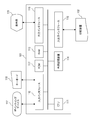
- FIG. 1 is a block diagram showing a hardware configuration of a printing system.
- the host computer 101 is an example of an information processing device, and has an input interface 110, a CPU 111, a ROM 112, a RAM 113, an external storage device 114, an output interface 115, and an input / output interface 116. Further, an input device such as a keyboard 118 and a pointing device 117 is connected to the input interface 110, and a display device such as a display unit 119 is connected to the output interface 115.
- the initialization program is stored in the ROM 112, and the application program group, the operating system (OS), the print data generation application, and various other data are stored in the external storage device 114.
- the RAM 113 is used as a work memory or the like when executing various programs stored in the external storage device 114.
- Windows registered trademark
- WSDA Windows Store Device App
- Vendors that provide printing devices can customize the print setting screen when printing from a specific application by providing WSDA.
- the Print Workflow App can be activated by triggering a print instruction to the printer driver to provide a function accompanied by a GUI or a function accompanied by editing print data.
- the CPU 111 executes the processing according to the procedure of the program stored in the ROM 112, thereby executing the processing related to the function described later and the flowchart described later in the host computer 101.
- the printing device 102 which is a device, is connected to the host computer 101 via the input / output interface 116.
- the host computer 101 and the printing device 102 are separately configured, but these may be configured as one information processing device.
- the printing device 102 will be described by taking an inkjet printer that prints by ejecting ink onto a paper surface as an example, but printing may be executed by another method (for example, an electrophotographic method).
- the host computer 101 may be a desktop computer, a smartphone, or a notebook computer.
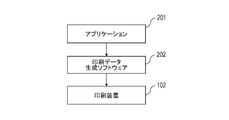
- FIG. 2 is a diagram showing a data flow in printing.
- FIG. 2A is a diagram showing a data flow when the extended application 203 described later in FIG. 2B is not associated with the application 201, the print data generation software 202, and the printing device 102.
- the user instructs printing from the application 201.
- the application 201 is software for creating printed contents, and corresponds to, for example, a document creation application or a spreadsheet application.
- the user performs the setting process using the OS or the print setting screen provided by the print data generation software 202.
- the print data generation software generates print setting information.
- the print setting information includes setting information corresponding to the setting value set by using the print setting screen.
- the print setting information may be referred to as PrintTtaket.
- the OS generates intermediate data (also called input data) based on the application data output from the application based on the print instruction, and passes it to the print data generation software 202.
- the data output by the application for printing is Graphic Device Interface format data (GDI format data) or XML Paper Specification format data (XPS format data).
- the print data generation software 202 generates print data that can be interpreted by the printing device from the intermediate data based on the print setting information set by the user, and transmits the print data to the printing device 102.
- the printing device 102 prints on a paper surface based on the print data sent from the print data generation software 202.
- the print data generation software 202 is common software used in association with a plurality of printing devices. That is, the printing device A can print using the print data generated by the print data generation software 202. Further, the printing device B can print using the print data generated by the print data generation software 202.
- the print data generation software 202 is associated with the printing device 102, the print data generation software 202 generates a print queue corresponding to the printing device 102.
- the print queue is generated, the user can select a desired print queue from the print queue selection item 1501 on the screen provided by the application 201 as shown in FIG. 15, for example.
- the print data generation software 202 acquires the capacity information of the associated printing device 102 when generating the print queue.
- the ability information acquired by the print data generation software 202 from the printing device 102 includes information such as the paper size and type supported by the printing device, and whether or not borderless printing is supported.
- the print data generation software 202 saves the ability information acquired from the printing device 102 as its own interpretable ability information data.
- the stored ability information data corresponds to what is called GPD (Generic Printer Documentation) or PDC (Print Device Capabilities), but other formats may be used.
- the print data generation software 202 determines the print settings that can be set by the user according to the generated ability information data. As a result, the print data generation software 202 can operate according to the capabilities of the printing device 102 associated with each print queue, even though the software is commonly used for a plurality of printing devices. For example, borderless printing can be set only for printing devices that support borderless printing.
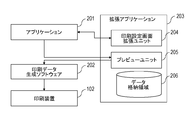
- FIG. 2B is a diagram showing a data flow when the extended application 203 is associated with the print data generation software 202.
- the extended application 203 described in the present embodiment has a configuration having the above-mentioned WSDA and Print Workflow App functions, but is not limited thereto.
- the print data generation software 202 is software included in the OS in advance. That is, the print data generation software can also be used when the OS is installed in the device.
- the extended application 203 is software that is not included in the OS in advance. Therefore, it is necessary for the user to operate the host computer to download and install the extended application 203 from the server via the network. Further, when the printing device 102 is connected to the host computer 101, the CPU 111 acquires the device identification information from the printing device 102.
- the CPU 111 may acquire and install the extended application 203 corresponding to the acquired device identification information from the server via the network. That is, the print data generation software 202 and the extended application 203 are held in the host computer 101 as separate files.
- the print data generation software 202 and the extended application 203 may be updated and upgraded, but this update process is also performed at different timings. That is, the timing at which the print data generation software 202 is acquired by the host computer 101 and the timing at which the extended application 203 is acquired are different. Further, the trigger for acquiring the print data generation software 202 by the host computer 101 and the trigger for acquiring the extended application 203 are also different.
- the OS associates the print data generation software 202 with the extended application 203.
- the extended application 203 described in this embodiment includes a print setting screen expansion unit 204 and a preview unit 205. Further, the extended application 203 includes an application-specific data storage area 206. The data stored in the data storage area 206 is generally stored separately for each user who uses the extended application 203.
- the user instructs printing from the application 201. Specifically, when the print button 1502 on the screen of FIG. 15 is pressed by the user, printing is instructed. Further, the user presses the "printer property" 1503 on the screen of FIG. 15 while the extended application 203 is associated with the print data generation software 202. In that case, the print setting screen expansion unit 204 displays the print setting screen described later in FIG. At that time, the user performs the setting process using the print setting screen of FIG. By this setting process, the print setting screen expansion unit 204 generates print setting information. The details of the print setting function will be described later with reference to FIG.
- the OS generates intermediate data based on the application data based on the print instruction issued by pressing the print button 1502 of FIG. 15 and the print setting information set using the print setting screen of FIG. 3 described later. , Output to the extended application 203.
- the extension application 203 activates the preview unit 205 by receiving the intermediate data.
- the intermediate data includes drawing data and print setting information corresponding to the content to be printed.
- the OS generates XPS format data as intermediate data based on the GDI data output from the application 201, for example. Further, when the application 201 outputs the XPS format data as the application data, the OS may pass the XPS format data to the preview unit 205 as it is. Further, when the application 201 outputs the XPS format data as the application data, the OS may generate the XPS format data obtained by modifying the XPS format data which is the application data as the intermediate data.
- the preview unit 205 acquires the intermediate data generated by the OS and displays the print preview. After confirming that the desired print result is obtained by the print preview, the user instructs the print start using the print preview UI.
- the preview unit 205 receives a print start instruction from the user, the preview unit 205 outputs the intermediate data to the print data generation software 202.
- the print data generation software 202 generates and outputs print data that can be interpreted by the printing apparatus based on the intermediate data.
- the print data output from the print data generation software 202 is sent to the printing device 102.
- the printing device 102 prints on a paper surface based on the print data sent from the host computer 101.
- the preview unit 205 is described as operating before the processing of the print data generation software 202, a configuration that operates after the processing of the print data generation software is also conceivable. In that case, the preview unit 205 will process the print data generated by the print data generation software. In a configuration in which the preview unit 205 operates after the processing of the print data generation software 202, if it is desired to process the intermediate data, it is conceivable to skip the processing of the print data generation software 202. In that case, the extension application 203 operates before the processing of the print data generation software 202 to give an instruction to skip the processing of the print data generation software 202. Further, it is conceivable that the preview unit 205 can operate both before and after the processing of the print data generation software.
- the extended application 203 detects that printing is instructed based on the user pressing the print button 1502 of FIG. Then, the extended application 203 determines whether or not to skip the process of the print data generation software 202 based on the print setting information output from the application 201. For example, when the print setting information includes setting information such as 2in1 that requires editing of the page, the extended application 203 determines that the page should be edited using the intermediate data. When it is determined that the processing of the print data generation software 202 is skipped, the extension application 203 instructs the OS to skip the processing of the print data generation software 202.
- the OS In response to the instruction from the extended application 203, the OS generates intermediate data including a skip instruction based on the application data output from the application 201 and the print setting information. Then, when the print data generation software 202 receives the intermediate data including the skip instruction, the received intermediate data is sent to the extended application 203 without generating the print data from the intermediate data.
- the extended application 203 processes the intermediate data in the configuration that operates after the processing of the print data generation software 202.
- the OS may send the intermediate data to the extended application 203 without sending the intermediate data to the print data generation software 202.
- the extended application 203 processes the intermediate data based on the print setting information, and then sends the intermediate data to the print data generation software 202. Then, the print data generation software 202 generates print data based on the intermediate data.
- the extended application 203 may generate print data by itself after processing the intermediate data based on the print setting information.
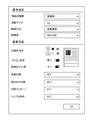
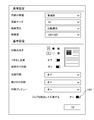
- FIG. 3 is an example of the print setting screen provided by the print setting screen expansion unit 204 of the extension application 203.
- the user sets print setting information using this screen when issuing a print instruction from the application 201.
- the print setting information is set using the standard print setting screen provided by the OS or the print data generation software 202.
- the standard print setting screen only the print setting information corresponding to the function provided by the print data generation software 202 can be set. That is, when the printer property 1503 of FIG. 15 is pressed while the extended application 203 is not associated with the print data generation software 202 or the like, a standard print setting screen having simpler setting items than that of FIG. 3 is displayed. To.
- the print setting screen as shown in FIG. 3 is not displayed.
- print setting information corresponding to the extended function provided by the extended application 203 can also be set.
- the user can set the print preview function provided by the preview unit 205 and the print job save function by using the print setting screen of FIG.
- the print preview function and the print job save function are setting items that are not included in the standard print setting screen. Since the print preview function and the print job save function cannot be operated at the same time, it is conceivable that the extended application 203 is controlled so that the print job save function cannot be set when the print preview function is enabled. .. On the contrary, it is conceivable that the extended application 203 is controlled so that the print preview function cannot be set when the print job save function setting is enabled.
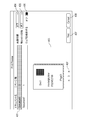
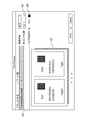
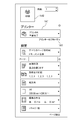
- FIG. 4 is an example of a print preview screen provided by the preview unit 205 of the extended application 203.
- Display item 401 is a list of print jobs. In the list, the job names of the print jobs that can be processed on the preview screen of FIG. 4 are displayed.
- the extended application 203 provides a job combination function through the print preview function provided by the preview unit 205. Therefore, the print preview screen includes a list of print jobs so that a plurality of print jobs can be processed on the print preview, and the print jobs to be processed are listed in the list.
- Display item 402 is used to change the page to be displayed on the print preview. The user can change the page to be displayed by operating the display item 402. In the print preview area 403, a print preview showing an image of the print result of the designated page is displayed.
- the display item 404 receives the setting of double-sided printing from the user.
- the display item 405 receives the layout printing setting from the user.
- the layout printing is used when arranging data of a specified number of pages on the surface of one sheet of paper. For example, when the user specifies "2in1" using the display item 405, two pages of data are arranged on one sheet of paper.
- Display item 406 is used to indicate whether or not to perform job join.
- the preview unit 205 treats the print jobs listed in display item 401 as one print job. When three or more print jobs are displayed on the display item 401, the print job selected by the user from the display item 401 is the combination target.
- the display item 407 is a button for starting printing.
- the preview unit 205 outputs the intermediate data of the print job selected in the display item 401 to the print data generation software 202.
- the preview unit 205 does not output the intermediate data of the print job not selected by the display item 401 to the print data generation software 202. That is, only the print job selected in the display item 401 is the print target.
- the display item 408 is a cancel button, and when the user presses this button, the subsequent printing process is cancelled.
- the preview image displayed in FIG. 4 corresponds to the content generated by the application. Further, a preview image reflecting the setting contents of the display items 404 to 406 is displayed.
- FIG. 4 shows an example in which a plurality of print jobs are displayed on the display item 401 by executing the process of the present embodiment described later.
- the extended application 203 is activated by using a print instruction for the print queue associated with the extended application 203 as a trigger, and ends when the print job corresponding to the print instruction is processed. That is, since the extension application 203 is started for each print job, it cannot handle a plurality of print jobs. As a result, there is a possibility that a plurality of print jobs cannot be combined in the printing system of FIG. 2B. Therefore, in the first embodiment, in order to combine the print jobs, the extended application 203 saves the print jobs to be combined.
- the extended application 203 saves the print job in the data storage area 206 based on the job saving of FIG. 3 being set to on. Further, the extension application 203 displays the print job in the data storage area 206 based on the fact that the job save setting item is displayed on the preview screen of FIG. 4 and the job save setting item is set to ON. You may save it. Then, the extended application 203 started by a print instruction different from the saved print job can handle a plurality of print jobs by reading the saved print job.
- the print data generation software 202 is associated with the plurality of printing devices 102, and a print queue is generated for each associated printing device.
- the extended application 203 can also be associated with a plurality of printing devices. That is, the extended application 203 is also used in association with a plurality of print queues.
- the extended application 203 can access the print job generated by designating a specific print queue saved in the data storage area 206 even if it is started from another print queue. That is, it is unlikely that a plurality of print jobs generated by designating different print queues will be combined, but if the processing of the present embodiment described later is not performed, separate print queues are specified and generated.
- a plurality of print jobs may be displayed in FIG. 4 as a combination target. This point will be described with a specific example.
- the user operates the application 201, specifies the printer A using the print queue selection item 1501 of FIG. 15, and instructs the display of the print setting screen of FIG. Then, when the user enables saving of the print job and instructs printing using the print setting screen of FIG. 3, the extended application 203 data the first intermediate data generated based on the application data and the print setting information. Store in storage area 206. Subsequently, the user operates the application 201 to specify the printer B using the print queue selection item of FIG. 15 and instructs the display of the print setting screen of FIG. Then, the user enables the print preview function using the print setting screen of FIG. 3 and instructs printing.
- the extended application 203 displays a preview image based on the second intermediate data generated based on the application data and the print setting information in the print preview area 403 of FIG.
- the extended application 203 can acquire the first intermediate data stored in the data storage area 206 and list it in the display item 401 of FIG. 4 as a combination target.
- intermediate data generated by specifying separate print queues is unlikely to be combined. The reason will be explained with an example.
- the usable paper sizes may differ between the printer A and the printer B.
- the first intermediate data is combined with the second intermediate data and the print data is transmitted to the printer B, printing that appropriately reflects the setting contents of the print setting information of the first intermediate data is not performed. There is a risk. Therefore, in this case, when the user specifies the printer B in the print queue selection item 1501 of FIG. 15, the first intermediate data should not be displayed in the display item 401.
- the extended application 203 displays a preview image based on the third intermediate data generated based on the application data and the print setting information in the print preview area 403 of FIG.
- the extended application 203 acquires the second intermediate data stored in the data storage area 206 and displays it on the display item 401 of FIG. 4 as a combination target. On the other hand, the extended application 203 does not display the first intermediate data on the display item 401 of FIG.
- the extended application 203 needs to save the print job in the data storage area 206 in association with the information that identifies the print queue.
- the name of the print queue can be considered as the information that identifies the print queue.
- the name of the print queue can be changed by the user. If the name of the print queue is changed, the saved data may not be available, or the print job saved corresponding to another print queue may be loaded. Therefore, the extended application 203 adds the print queue identification information for uniquely identifying the associated print queue to the above-mentioned ability information data. Then, the extended application 203 stores the print queue identification information and the print job in the data storage area 206 in association with each other. As a result, the extended application 203 can read only the print job corresponding to the target print queue.
- the extension application 203 adds the print queue identification information to the capability information data at the timing when the print data generation software 202 is associated with the printing device 102 to generate the print queue, but is limited to this. is not it. Any timing may be sufficient as long as the extended application 203 can be operated, such as when the extended application 203 is started for the first time triggered by printing, or when the user starts the extended application 203 independently. Further, the ability information data to which the extended application 203 adds the identification information of the print queue is described as GPD or PDC in the present embodiment, but is not limited thereto.
- FIG. 5 is a diagram showing identification information of the print queue added by the extended application 203.
- FIG. 5A is a diagram showing print queue identification information to be added to the PDC. A function and options that can be set by the function can be described in the PDC.
- the extended application 203 adds a function called Queue ID to the PDC. For the added Queue ID, the extension application 203 optionally adds a unique ID to be used as the print queue identification information.
- the ability information data for adding the print queue identification information is not limited to the PDC, and follows the ability information data generated by the print data generation software 202.
- FIG. 5B is a diagram showing information added to PrintTicket, which is print setting information, due to the addition of the description of FIG. 5A.
- One option “8yte6p24" is set for the function called Queue ID added in PDC. Since only one option that can be set by Queue ID is defined in PDC, this setting cannot be changed. Therefore, this option is always set in PrintTicket. That is, the extended application 203 generates print setting information (PrintTicket) based on the contents set on the screen of FIG. The extended application 203 adds the three lines of FIG. 5B to the print setting information generated here based on the description contents of FIG. 5A. Then, the application 201 is notified of the print setting information in which the three lines of FIG.
- the extension application 203 is notified of the intermediate data including the application data (drawing data) and the print setting information to which the three lines of FIG. 5B are added. It is described that the extended application 203 adds the three lines of FIG. 5B to the print setting information based on the description contents of FIG. 5A, but this is not the case.
- the extended application 203 generates print setting information based on the contents set on the screen of FIG.
- the print setting information that does not include the three lines of FIG. 5B is output to the OS.
- the OS may add the three lines of FIG.
- the OS acquires the default print setting information corresponding to the print queue selected by the print queue selection item 1501 of FIG. 15, and uses the three lines of FIG. 5B as the print setting information based on the description contents of FIG. 5A. You may add it.
- the extended application 203 can acquire the print queue identification information by acquiring the setting value of the Queue ID from the print setting information in S702 described later.
- the print queue identification information does not necessarily have to be unique to the print queue. If you want to handle save jobs in common in multiple print queues, you can add common identification information to multiple print queues. To determine whether to assign common identification information, a method of referring to the ability information data and targeting a print queue associated with a printing device having a common ability can be considered.
- the extended application 203 adds the same print queue identification information as the print queue identification information given to the reference printing device to the capability information data of the new printing device. Note that this method is an example, and other methods may be used.
- FIG. 8 is a diagram showing an example of a method in which the extended application 203 saves a print job in the data storage area 206.
- FIG. 8A is a diagram showing an example of information to be stored for one print job.
- the extended application 203 associates and saves the print queue identification information for identifying the print queue to which the print instruction is given, and the intermediate data including the document name and the print contents.
- the data in which the print queue identification information is associated with the intermediate data including the document name and the print contents may be referred to as a print job.
- the document name and intermediate data are acquired in the process of the preview unit 205 of the extension application 203. Further, the print queue identification information is acquired from the print setting information (PrintTicket) in the process of the preview unit 205 of the extended application 203.
- a method of associating and saving the above-mentioned information a method of converting the above-mentioned information into one binary data including all the above-mentioned information in a predetermined format, a method of associating by using a file name according to a naming rule, or a method of associating the above-mentioned information.
- a method of managing with a separate file can be considered. However, it is not limited to these. Further, the information to be saved is not limited to these, and the information of the printed application may be saved together.
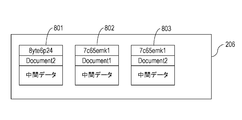
- FIG. 8B is a schematic diagram showing a state in which a print job is saved in the data storage area 206.
- Three print jobs 801 to 803 are stored in the data storage area 206 of the extended application 203.
- the print queue identification information, the document name, and the intermediate data are stored in association with each print job. Since the print job 802 and the print job 803 have the same print queue identification information, it can be seen that the print job is a print job generated by a print instruction for the same print queue.
- the extended application 203 saves the print job in the data storage area 206 in the form of FIG.
- FIG. 4 includes a setting item for the job save function
- the job save function is enabled on the screen of FIG. 4
- the display item 407 is pressed
- the extended application 203 is in the form of FIG.
- the print job may be saved in the data storage area 206.
- FIG. 6 is a flowchart relating to the display control process of the extended application 203 according to the first embodiment.
- the extended application 203 may be described as the main body of each process, but in reality, each step of the flowchart is executed by the CPU 111 executing the program corresponding to the flowchart.
- the print queue associated with the extended application 203 is selected in the print queue selection item 1501 of FIG. 15, the print setting screen of FIG. 3 is displayed. ..
- a print job is generated when the user instructs printing on the screen of FIG. 15 of the application 201 which is displayed after the OK button of FIG. 3 is pressed (when the print button 1502 is pressed).
- FIG. 6 is started when the extended application 203 receives this print job.
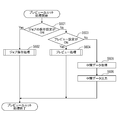
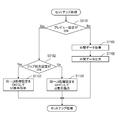
- the extended application 203 refers to the print setting information set by the user and determines whether the print job save function is turned on (S601). As described above, the process of FIG. 6 is started by receiving the print job.
- the print setting information included in the intermediate data of the print job received at this time is referred to in S601.
- the extended application 203 When it is determined that the print job save function is on, the extended application 203 performs the job save process (S602).
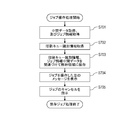
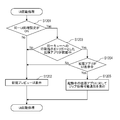
- FIG. 7 is a flowchart relating to the job saving process of S602.
- the extended application 203 acquires intermediate data and job information from the print job (S701).
- the job information corresponds to the document name displayed by the display item 401 on the preview screen.
- the extended application 203 acquires the print queue identification information from the print setting information included in the intermediate data (S702).
- the extended application 203 acquires the PrintTicket which is the print setting information, and acquires the print queue identification information from the setting value of the Queue ID in FIG. 5B.
- "8yte6p24" is acquired as the print queue identification information.
- the extended application 203 associates the intermediate data, the job information, and the print queue identification information acquired in S701 to S702 and saves them in the data storage area 206 of the extended application 203 (S703).
- the print job is saved in the state as shown in FIG. 8B.
- the extended application 203 notifies the user that the print job has been saved (S704), instructs the OS print system to cancel the print job, and ends the processing of the print job (S705).
- the extended application 203 determines whether the print preview function is turned on (S603). When the print preview function is turned on, the extended application 203 performs the preview process (S604).
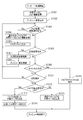
- FIG. 9 is a flowchart relating to the preview process of S604.
- the extended application 203 acquires the intermediate data and the job information of the print job generated by the print instruction which is the trigger of activation (S901).
- the print instruction that triggers the activation of the extended application 203 is issued when the user instructs the print button 1502 on the screen of the application 201 that is displayed after the OK button of FIG. 3 is pressed.
- the extended application 203 acquires the queue identification information from the print setting information included in the intermediate data (S902).
- the extended application 203 refers to the data storage area 206 of the extended application 203, searches for a save job that matches the print queue identification information acquired in S902, and acquires job information and intermediate data of the corresponding save job. (S903). That is, the extended application 203 acquires a save job that matches the print queue identification information acquired in S902, and executes an acquisition control process that does not acquire a save job that does not match the print queue identification information acquired in S902.
- the print queue identification information of the save job 801 matches the print queue identification information “8yte6p24” acquired in S902. That is, the print queue selected when the print job acquired in S901 is generated is the same as the print queue selected when the save job 801 is generated. On the other hand, the print queue selected when the print job acquired in S901 is generated is different from the print queue selected when the save jobs 802 and 803 are generated.
- the extended application 203 displays the print preview screen based on the data acquired in S901 to S903 (S904).
- the display item 401 of the print preview screen lists the job information of the print job acquired in S901 and the job information of the save job acquired in S903.
- the extended application 203 operates based on a user instruction received via the displayed print preview screen. Examples of the user instruction include changing the print setting using the display items 404 to 406, a print instruction using the display item 407, and a cancel instruction using the display item 408.
- the extended application 203 changes the print setting information based on the user's print setting change instruction (S906).
- the extended application 203 updates the preview screen based on the changed print setting information (S907).
- the user changes the allocation setting from off to 2in1 using the display item 405, selects Units 1 and 2 displayed on the display item 401, and uses the display item 406 to perform the print job. Enable the join settings.
- FIG. 10 shows a preview screen updated based on the acceptance of the above change instruction.
- the extended application 203 combines the print jobs selected in the display item 401 of FIG. 4 to generate one combined job in response to the job combination setting being changed to on (408 in FIG. 10). Therefore, only one combined job is displayed in the display item 401 of FIG. Further, in FIG. 10, the number of pages of the combined job is a value obtained by adding the number of pages of the two print jobs to be combined. Further, the extended application 203 updates the preview image displayed in the print preview area 403 to a preview image reflecting the 2in1 setting in response to the allocation setting being changed to 2in1 (407 in FIG. 10). .. In the print preview area 403 of FIG. 10, a preview image in which the final page of Document 1 before joining and the first page of Document 2 before joining are laid out is displayed.
- the extended application 203 determines that the cancellation instruction has been received from the user (S908-Yes)
- the extended application 203 instructs the OS print system to cancel the print job (S909).
- the print job acquired in S901 ends without printing, and the preview screen is erased.
- the extended application 203 determines that the print instruction has been received from the user (S910-Yes)
- the extended application 203 confirms whether or not the job combination setting is on (S911).
- the extended application 203 generates one intermediate data based on the intermediate data of the plurality of print jobs selected in the display item 401 of FIG. 4 (S912).
- the extended application 203 outputs the generated intermediate data to the print data generation software 202 (S913).
- the extended application 203 transmits the intermediate data corresponding to the print job selected in the display item 401 to the print data generation software (S914).
- the extended application 203 acquires the intermediate data (S605) and outputs it to the print data generation software 202 (S606). As described above, the process of FIG. 6 is started by receiving the print job. The intermediate data of the print job received at this time is acquired in S605.
- a plurality of print jobs can be collectively printed as one print job.
- the print job generated by designating the same print queue is acquired as the print job to be combined, so that the convenience of the user can be improved.
- This configuration can be similarly realized even if the preview unit 205 operates after the processing of the print data generation software 202. In that case, the print data generated by the print data generation software 202 is used instead of the intermediate data. Further, in a configuration in which the preview unit 205 is operated after the processing of the print data generation software 202, if it is desired to handle intermediate data, a method of skipping the processing of the print data generation software 202 can be considered.
- the print data generation software 202 generates the final print data.
- the extended application 203 generates the combined intermediate data based on the plurality of intermediate data to be combined. Then, the extended application 203 outputs the combined intermediate data to the print data generation software 202. In response to this output, the print data generation software 202 generates print data based on the combined intermediate data.
- the extended application 203 saves the save job in the data storage area 206. Then, the extended application 203 started by receiving another print job as a trigger can handle a plurality of print jobs by acquiring the save job saved in the data storage area 206, and job combination is realized.
- the user specifies the print queue of the printer A, enables the print preview function, and instructs printing.
- intermediate data A is generated, and a preview screen based on the intermediate data A is displayed.
- the user wants to combine the intermediate data A with the subsequent intermediate data B.
- the user instructs to save the job on the preview screen of FIG. 4, and presses the print button 407 to close the preview screen.
- the processing of the extended application 203 is terminated.
- the user specifies the print queue of the printer A, enables the print preview function, and instructs printing.
- intermediate data B is generated, and a preview screen based on the intermediate data B is displayed.
- the job information of the intermediate data A is also displayed on the display item 401 of the preview screen based on the intermediate data B. That is, when the user desires the join process after displaying the preview screen, the information processing device needs to perform complicated control of temporarily ending the process of the extended application 203 and then starting it again.
- the present embodiment aims to improve this point.
- FIG. 14 is an example of the print setting screen provided by the print setting screen expansion unit 204 of the expansion application 203 in the second embodiment.
- the setting 1401 for job combination is provided as a setting accompanying the setting of the print preview function provided by the preview unit 205.
- the job combination function is performed in combination with the print preview function, and the job combination setting 1401 can be set only when the print preview function is set to ON.
- FIG. 11 is a diagram showing the processing of the extended application 203 in the second embodiment. Note that FIG. 11 starts when the user presses the print button 1502 of FIG. 15 to instruct printing.
- the extended application 203 confirms whether the preview setting is turned on by using the print setting information in the intermediate data generated based on the pressing of the print button 1502 (S1101).
- the extension application 203 confirms whether the job combination setting is on (S1102).
- S1102 is also performed using the print setting information.
- the user instructs the setting of the print preview function and the job combination function via the print setting screen of FIG. That is, the print setting information is generated based on the setting contents of FIG. Therefore, the extended application 203 can execute S1101 and S1102 using the print setting information.
- the extended application 203 When the job combination function and the print preview function are set (corresponding to the case where S1102 is Yes), the extended application 203 turns on the same UI processing setting indicating that the print job is handled by one UI. Then, the extended application 203 transmits the UI display request to the OS (S1103).
- the same UI processing setting may be called a display maintenance function.
- the extended application 203 turns off the same UI processing setting indicating that the print job is handled by one UI. To. Then, the extended application 203 transmits the UI display request to the OS (S1104).
- S1105 and S1106 are executed. Since S1105-S1106 is the same process as S606-S606, detailed description thereof will be omitted.
- the OS receives the UI display request transmitted from the extended application 203 by S1103 or S1104, and performs the UI activation process.
- FIG. 12 is a diagram showing a flowchart of the UI activation process of the OS.
- the OS determines whether the same UI processing setting specified together with the UI display request is on (S1201). When the same UI processing setting is off, the print preview is to be displayed for each print job, so a new UI is started (S1202). As a result, the extended application 203 displays the screen of FIG.
- the OS confirms whether or not the extended application 203 started by the print instruction to the same print queue is running (S1203).
- the OS When the extended application 203 that is running by the print instruction to the same print queue exists (S1203-Yes), the OS enables the same UI processing setting and confirms whether the extended application 203 is displaying the UI (S1204). ). Even if the extended application is running, if the process that does not display the UI is performed, or if the extended application 203 does not perform the process for a plurality of print jobs, it becomes a trigger to start the process of FIG. There is no launched extension application that can handle the print job. Therefore, when No is determined in S1204, the OS newly starts the UI (S1202).
- the OS notifies the running extension application 203 of job acquisition availability so that the running extension application 203 can process the print job that triggered the start of the process shown in FIG. Issue (S1205).
- FIG. 13 is a diagram showing a flowchart executed by the extended application 203. This is a process performed by the extended application 203 when a new UI is started in the UI startup process.
- the extended application 203 acquires the intermediate data and job information of the print job that triggered the startup (S1301).
- the extended application 203 displays the print preview screen based on the intermediate data acquired in S1301 (S1302). At this point, only one print job is displayed in the job list on the preview screen.
- the extended application 203 performs the process according to the user instruction after the preview screen is displayed, but in the second embodiment, the process is performed by the job acquisition availability notification by the OS in addition to the user instruction.
- the job acquisition availability notification is issued by the OS in S1205.
- the extended application 203 When the extended application 203 receives the job acquisition availability notification in S1303, the extended application 203 acquires the intermediate data and the job information of the notified print job (S1304). Specifically, when the extended application 203 executes the process based on the job acquisitionable notification, the OS passes the intermediate data and the job information of the print job that triggered the issuance of the job acquisitionable notification to the extended application 203.
- the extended application 203 adds the print job acquired in S1304 to the job list. Further, when the extended application 203 receives the job acquisition availability notification triggered by another print job, the extended application 203 repeats S1303 to S1305 to add the print job to the job list. This makes it possible to handle an arbitrary number of print jobs in the print preview. Since S1306 to S1315 are the same processes as S905 to S914 of the first embodiment, the description thereof will be omitted.
- the extended application 203 receives a print instruction from the user, generates intermediate data in which intermediate data of a plurality of print jobs in the list are combined, and outputs the intermediate data to the print data generation software 202.
- the above-described embodiment is also realized by executing the following processing. That is, software (program) that realizes the functions of the above-described embodiment is supplied to the system or device via a network or various storage media. Then, the computer (CPU, MPU, processor, etc.) of the system or device reads and executes the program. Further, the program may be executed on one computer or may be executed in conjunction with a plurality of computers. Further, it is not necessary to realize all of the above-mentioned processing by software, and a part or all of the processing may be realized by hardware such as ASIC.
- the CPU is not limited to one that performs all processing by one CPU, and a plurality of CPUs may perform processing while appropriately coordinating with each other.
Landscapes
- Engineering & Computer Science (AREA)
- Theoretical Computer Science (AREA)
- Human Computer Interaction (AREA)
- Physics & Mathematics (AREA)
- General Engineering & Computer Science (AREA)
- General Physics & Mathematics (AREA)
- Facsimiles In General (AREA)
- Accessory Devices And Overall Control Thereof (AREA)
Priority Applications (2)
| Application Number | Priority Date | Filing Date | Title |
|---|---|---|---|
| US17/849,088 US12061828B2 (en) | 2019-12-27 | 2022-06-24 | Information processing apparatus, control method, and storage medium |
| US18/774,394 US20240370214A1 (en) | 2019-12-27 | 2024-07-16 | Information processing apparatus, control method, and storage medium |
Applications Claiming Priority (2)
| Application Number | Priority Date | Filing Date | Title |
|---|---|---|---|
| JP2019239036A JP7443056B2 (ja) | 2019-12-27 | 2019-12-27 | 情報処理装置、制御方法およびプログラム |
| JP2019-239036 | 2019-12-27 |
Related Child Applications (2)
| Application Number | Title | Priority Date | Filing Date |
|---|---|---|---|
| US17/849,088 Continuation US12061828B2 (en) | 2019-12-27 | 2022-06-24 | Information processing apparatus, control method, and storage medium |
| US18/774,394 Continuation US20240370214A1 (en) | 2019-12-27 | 2024-07-16 | Information processing apparatus, control method, and storage medium |
Publications (1)
| Publication Number | Publication Date |
|---|---|
| WO2021131981A1 true WO2021131981A1 (ja) | 2021-07-01 |
Family
ID=76573250
Family Applications (1)
| Application Number | Title | Priority Date | Filing Date |
|---|---|---|---|
| PCT/JP2020/047014 Ceased WO2021131981A1 (ja) | 2019-12-27 | 2020-12-16 | 情報処理装置、制御方法およびプログラム |
Country Status (3)
| Country | Link |
|---|---|
| US (2) | US12061828B2 (enExample) |
| JP (3) | JP7443056B2 (enExample) |
| WO (1) | WO2021131981A1 (enExample) |
Cited By (1)
| Publication number | Priority date | Publication date | Assignee | Title |
|---|---|---|---|---|
| US20240036783A1 (en) * | 2022-07-29 | 2024-02-01 | Canon Kabushiki Kaisha | Information processing apparatus, information processing method, and storage medium |
Families Citing this family (5)
| Publication number | Priority date | Publication date | Assignee | Title |
|---|---|---|---|---|
| JP7443056B2 (ja) * | 2019-12-27 | 2024-03-05 | キヤノン株式会社 | 情報処理装置、制御方法およびプログラム |
| JP7726050B2 (ja) * | 2021-12-09 | 2025-08-20 | セイコーエプソン株式会社 | 処理システム、情報処理装置、制御プログラム、及び、画像形成装置 |
| JP7673024B2 (ja) * | 2022-07-26 | 2025-05-08 | キヤノン株式会社 | 情報処理装置、プログラム |
| JP7604601B1 (ja) | 2023-11-07 | 2024-12-23 | キヤノン株式会社 | アプリケーションおよび情報処理装置の制御方法 |
| JP2026061535A (ja) * | 2024-09-30 | 2026-04-09 | ブラザー工業株式会社 | サポートプログラム |
Citations (3)
| Publication number | Priority date | Publication date | Assignee | Title |
|---|---|---|---|---|
| JP2001159961A (ja) * | 1999-12-01 | 2001-06-12 | Canon Inc | 印刷制御装置、方法および印刷システム |
| JP2009188505A (ja) * | 2008-02-04 | 2009-08-20 | Sharp Corp | 画像形成装置 |
| JP2010218338A (ja) * | 2009-03-18 | 2010-09-30 | Konica Minolta Business Technologies Inc | 画像形成装置、情報処理装置、画像形成システムおよび結合ジョブ実行方法 |
Family Cites Families (14)
| Publication number | Priority date | Publication date | Assignee | Title |
|---|---|---|---|---|
| JPH11243463A (ja) | 1997-12-26 | 1999-09-07 | Ricoh Co Ltd | デジタル画像形成装置 |
| JP3848053B2 (ja) * | 2000-05-09 | 2006-11-22 | キヤノン株式会社 | 印刷制御方法及び装置と記憶媒体並びに印刷システム |
| JP4546298B2 (ja) * | 2005-03-18 | 2010-09-15 | キヤノン株式会社 | 情報処理装置及びそのジョブ結合方法、プログラム、並びに記憶媒体 |
| EP2506136A4 (en) * | 2009-11-26 | 2013-05-01 | Canon Kk | DOCUMENT PROCESSING DEVICE, CONTROL METHOD, AND PROGRAM |
| US8559036B1 (en) * | 2010-03-26 | 2013-10-15 | Open Invention Networks, Llc | Systems and methods for managing the execution of print jobs |
| JP2014174951A (ja) * | 2013-03-13 | 2014-09-22 | Canon Inc | 情報処理装置、情報処理方法及びプログラム |
| JP2019164446A (ja) * | 2018-03-19 | 2019-09-26 | 株式会社リコー | 情報処理装置、情報処理方法、プログラム、及び印刷システム |
| JP2019179503A (ja) * | 2018-03-30 | 2019-10-17 | 理想科学工業株式会社 | 印刷制御装置及び印刷キュー管理装置 |
| JP7147261B2 (ja) * | 2018-05-16 | 2022-10-05 | ブラザー工業株式会社 | プログラム |
| JP7392261B2 (ja) * | 2018-12-12 | 2023-12-06 | セイコーエプソン株式会社 | 印刷システム、印刷装置、印刷システムの制御方法、およびプログラム |
| JP7479121B2 (ja) * | 2019-02-01 | 2024-05-08 | ブラザー工業株式会社 | サポートプログラム、情報処理装置、および印刷方法 |
| JP7298189B2 (ja) * | 2019-02-28 | 2023-06-27 | 富士フイルムビジネスイノベーション株式会社 | 工程管理装置、工程管理システム、およびプログラム |
| JP7443056B2 (ja) * | 2019-12-27 | 2024-03-05 | キヤノン株式会社 | 情報処理装置、制御方法およびプログラム |
| JP7487498B2 (ja) * | 2020-03-06 | 2024-05-21 | 富士フイルムビジネスイノベーション株式会社 | グルーピングシステム、第1グルーピング装置、第2グルーピング装置、グルーピング管理装置、及びグルーピング管理プログラム |
-
2019
- 2019-12-27 JP JP2019239036A patent/JP7443056B2/ja active Active
-
2020
- 2020-12-16 WO PCT/JP2020/047014 patent/WO2021131981A1/ja not_active Ceased
-
2022
- 2022-06-24 US US17/849,088 patent/US12061828B2/en active Active
-
2024
- 2024-02-14 JP JP2024019980A patent/JP2024052771A/ja active Pending
- 2024-07-16 US US18/774,394 patent/US20240370214A1/en active Pending
-
2025
- 2025-11-25 JP JP2025203078A patent/JP2026015616A/ja active Pending
Patent Citations (3)
| Publication number | Priority date | Publication date | Assignee | Title |
|---|---|---|---|---|
| JP2001159961A (ja) * | 1999-12-01 | 2001-06-12 | Canon Inc | 印刷制御装置、方法および印刷システム |
| JP2009188505A (ja) * | 2008-02-04 | 2009-08-20 | Sharp Corp | 画像形成装置 |
| JP2010218338A (ja) * | 2009-03-18 | 2010-09-30 | Konica Minolta Business Technologies Inc | 画像形成装置、情報処理装置、画像形成システムおよび結合ジョブ実行方法 |
Cited By (2)
| Publication number | Priority date | Publication date | Assignee | Title |
|---|---|---|---|---|
| US20240036783A1 (en) * | 2022-07-29 | 2024-02-01 | Canon Kabushiki Kaisha | Information processing apparatus, information processing method, and storage medium |
| US12282693B2 (en) * | 2022-07-29 | 2025-04-22 | Canon Kabushiki Kaisha | Information processing apparatus, information processing method, and storage medium |
Also Published As
| Publication number | Publication date |
|---|---|
| JP2021107999A (ja) | 2021-07-29 |
| JP2026015616A (ja) | 2026-01-29 |
| JP2024052771A (ja) | 2024-04-12 |
| US20240370214A1 (en) | 2024-11-07 |
| JP7443056B2 (ja) | 2024-03-05 |
| US12061828B2 (en) | 2024-08-13 |
| US20220317958A1 (en) | 2022-10-06 |
Similar Documents
| Publication | Publication Date | Title |
|---|---|---|
| US12591400B2 (en) | Print processing system and control method | |
| JP7443056B2 (ja) | 情報処理装置、制御方法およびプログラム | |
| JP7086754B2 (ja) | 情報処理装置、情報処理装置の制御方法及びコンピュータプログラム | |
| JP2024055891A (ja) | サポートプログラム、印刷方法、情報処理装置 | |
| JP6249753B2 (ja) | 情報処理装置、情報処理方法及びプログラム | |
| US9122428B2 (en) | Information processing apparatus allowing a user certain print setting operations in an environment where an image processing apparatus is undetermined | |
| US12481467B2 (en) | Information processing apparatus, control method of information processing apparatus, and non-transitory computer-readable storage medium to display an object for receiving a print setting | |
| JP2024147746A (ja) | 情報処理装置及びプログラム | |
| JP5704834B2 (ja) | 情報処理装置および制御方法およびプログラム | |
| JP7732120B2 (ja) | 情報処理装置、情報処理装置の制御方法ならびにプログラム | |
| JP2023034958A (ja) | 情報処理装置、情報処理装置の制御方法およびプログラム | |
| US20240256199A1 (en) | Information processing apparatus capable of implementing mixed-sheet printing in which predetermined print setting is different among pages, control method for information processing apparatus, and storage medium | |
| JP2025107754A (ja) | アプリケーションプログラム、情報処理装置及びその制御方法 | |
| US12073137B2 (en) | Information processing apparatus, control method for controlling information processing apparatus, and storage medium for displaying a print setting screen | |
| US20250355604A1 (en) | Information processing apparatus, method, and non-transitory computer-readable storage medium storing program | |
| JP2020087297A (ja) | プログラム及び制御方法 | |
| JP2020004241A (ja) | 情報処理装置、制御方法およびプログラム | |
| US20240329890A1 (en) | Information processing apparatus and method of controlling the same, and storage medium | |
| JP2026016996A (ja) | アプリケーションプログラム、情報処理装置の制御方法及び情報処理装置 | |
| JP7110631B2 (ja) | 情報処理装置、情報処理システム、及びプログラム | |
| US20250053355A1 (en) | Storage medium, application program, control method for information processing apparatus, and information processing apparatus | |
| JP7350525B2 (ja) | 情報処理装置、情報処理装置の制御方法、及びプログラム | |
| JP2024159147A (ja) | 拡張アプリケーションプログラム、情報処理装置及び記憶媒体 | |
| JP2026110345A (ja) | サポートプログラム | |
| JP2024016352A (ja) | 情報処理装置、プログラム |
Legal Events
| Date | Code | Title | Description |
|---|---|---|---|
| 121 | Ep: the epo has been informed by wipo that ep was designated in this application |
Ref document number: 20904640 Country of ref document: EP Kind code of ref document: A1 |
|
| NENP | Non-entry into the national phase |
Ref country code: DE |
|
| 122 | Ep: pct application non-entry in european phase |
Ref document number: 20904640 Country of ref document: EP Kind code of ref document: A1 |