WO2021064877A1 - 作業管理装置、作業管理方法、及び記録媒体 - Google Patents
作業管理装置、作業管理方法、及び記録媒体 Download PDFInfo
- Publication number
- WO2021064877A1 WO2021064877A1 PCT/JP2019/038810 JP2019038810W WO2021064877A1 WO 2021064877 A1 WO2021064877 A1 WO 2021064877A1 JP 2019038810 W JP2019038810 W JP 2019038810W WO 2021064877 A1 WO2021064877 A1 WO 2021064877A1
- Authority
- WO
- WIPO (PCT)
- Prior art keywords
- work
- information
- package
- time
- terminal device
- Prior art date
- Legal status (The legal status is an assumption and is not a legal conclusion. Google has not performed a legal analysis and makes no representation as to the accuracy of the status listed.)
- Ceased
Links
Images








Classifications
-
- G—PHYSICS
- G06—COMPUTING OR CALCULATING; COUNTING
- G06Q—INFORMATION AND COMMUNICATION TECHNOLOGY [ICT] SPECIALLY ADAPTED FOR ADMINISTRATIVE, COMMERCIAL, FINANCIAL, MANAGERIAL OR SUPERVISORY PURPOSES; SYSTEMS OR METHODS SPECIALLY ADAPTED FOR ADMINISTRATIVE, COMMERCIAL, FINANCIAL, MANAGERIAL OR SUPERVISORY PURPOSES, NOT OTHERWISE PROVIDED FOR
- G06Q10/00—Administration; Management
- G06Q10/06—Resources, workflows, human or project management; Enterprise or organisation planning; Enterprise or organisation modelling
- G06Q10/063—Operations research, analysis or management
- G06Q10/0631—Resource planning, allocation, distributing or scheduling for enterprises or organisations
-
- G—PHYSICS
- G06—COMPUTING OR CALCULATING; COUNTING
- G06Q—INFORMATION AND COMMUNICATION TECHNOLOGY [ICT] SPECIALLY ADAPTED FOR ADMINISTRATIVE, COMMERCIAL, FINANCIAL, MANAGERIAL OR SUPERVISORY PURPOSES; SYSTEMS OR METHODS SPECIALLY ADAPTED FOR ADMINISTRATIVE, COMMERCIAL, FINANCIAL, MANAGERIAL OR SUPERVISORY PURPOSES, NOT OTHERWISE PROVIDED FOR
- G06Q10/00—Administration; Management
- G06Q10/06—Resources, workflows, human or project management; Enterprise or organisation planning; Enterprise or organisation modelling
- G06Q10/063—Operations research, analysis or management
- G06Q10/0631—Resource planning, allocation, distributing or scheduling for enterprises or organisations
- G06Q10/06311—Scheduling, planning or task assignment for a person or group
- G06Q10/063114—Status monitoring or status determination for a person or group
-
- G—PHYSICS
- G06—COMPUTING OR CALCULATING; COUNTING
- G06Q—INFORMATION AND COMMUNICATION TECHNOLOGY [ICT] SPECIALLY ADAPTED FOR ADMINISTRATIVE, COMMERCIAL, FINANCIAL, MANAGERIAL OR SUPERVISORY PURPOSES; SYSTEMS OR METHODS SPECIALLY ADAPTED FOR ADMINISTRATIVE, COMMERCIAL, FINANCIAL, MANAGERIAL OR SUPERVISORY PURPOSES, NOT OTHERWISE PROVIDED FOR
- G06Q10/00—Administration; Management
- G06Q10/06—Resources, workflows, human or project management; Enterprise or organisation planning; Enterprise or organisation modelling
- G06Q10/063—Operations research, analysis or management
- G06Q10/0631—Resource planning, allocation, distributing or scheduling for enterprises or organisations
- G06Q10/06311—Scheduling, planning or task assignment for a person or group
- G06Q10/063118—Staff planning in a project environment
-
- G—PHYSICS
- G06—COMPUTING OR CALCULATING; COUNTING
- G06Q—INFORMATION AND COMMUNICATION TECHNOLOGY [ICT] SPECIALLY ADAPTED FOR ADMINISTRATIVE, COMMERCIAL, FINANCIAL, MANAGERIAL OR SUPERVISORY PURPOSES; SYSTEMS OR METHODS SPECIALLY ADAPTED FOR ADMINISTRATIVE, COMMERCIAL, FINANCIAL, MANAGERIAL OR SUPERVISORY PURPOSES, NOT OTHERWISE PROVIDED FOR
- G06Q10/00—Administration; Management
- G06Q10/06—Resources, workflows, human or project management; Enterprise or organisation planning; Enterprise or organisation modelling
- G06Q10/063—Operations research, analysis or management
- G06Q10/0631—Resource planning, allocation, distributing or scheduling for enterprises or organisations
- G06Q10/06314—Calendaring for a resource
-
- G—PHYSICS
- G06—COMPUTING OR CALCULATING; COUNTING
- G06Q—INFORMATION AND COMMUNICATION TECHNOLOGY [ICT] SPECIALLY ADAPTED FOR ADMINISTRATIVE, COMMERCIAL, FINANCIAL, MANAGERIAL OR SUPERVISORY PURPOSES; SYSTEMS OR METHODS SPECIALLY ADAPTED FOR ADMINISTRATIVE, COMMERCIAL, FINANCIAL, MANAGERIAL OR SUPERVISORY PURPOSES, NOT OTHERWISE PROVIDED FOR
- G06Q50/00—Information and communication technology [ICT] specially adapted for implementation of business processes of specific business sectors, e.g. utilities or tourism
- G06Q50/08—Construction
-
- G—PHYSICS
- G07—CHECKING-DEVICES
- G07C—TIME OR ATTENDANCE REGISTERS; REGISTERING OR INDICATING THE WORKING OF MACHINES; GENERATING RANDOM NUMBERS; VOTING OR LOTTERY APPARATUS; ARRANGEMENTS, SYSTEMS OR APPARATUS FOR CHECKING NOT PROVIDED FOR ELSEWHERE
- G07C1/00—Registering, indicating or recording the time of events or elapsed time, e.g. time-recorders for work people
- G07C1/10—Registering, indicating or recording the time of events or elapsed time, e.g. time-recorders for work people together with the recording, indicating or registering of other data, e.g. of signs of identity
-
- Y—GENERAL TAGGING OF NEW TECHNOLOGICAL DEVELOPMENTS; GENERAL TAGGING OF CROSS-SECTIONAL TECHNOLOGIES SPANNING OVER SEVERAL SECTIONS OF THE IPC; TECHNICAL SUBJECTS COVERED BY FORMER USPC CROSS-REFERENCE ART COLLECTIONS [XRACs] AND DIGESTS
- Y04—INFORMATION OR COMMUNICATION TECHNOLOGIES HAVING AN IMPACT ON OTHER TECHNOLOGY AREAS
- Y04S—SYSTEMS INTEGRATING TECHNOLOGIES RELATED TO POWER NETWORK OPERATION, COMMUNICATION OR INFORMATION TECHNOLOGIES FOR IMPROVING THE ELECTRICAL POWER GENERATION, TRANSMISSION, DISTRIBUTION, MANAGEMENT OR USAGE, i.e. SMART GRIDS
- Y04S10/00—Systems supporting electrical power generation, transmission or distribution
- Y04S10/50—Systems or methods supporting the power network operation or management, involving a certain degree of interaction with the load-side end user applications
Definitions
- This disclosure relates to a work management device, a work management method, and a recording medium.
- Patent Document 1 is a project in which the type and quantity of labor resources required to process a task are assigned to the task based on the labor resource allocation standard, and the allocation of the labor resource is changed according to the progress rate of the task. The management system is described.
- Productivity may change depending on the time of the beginning, middle, and end of construction.
- productivity may change depending on the construction object.
- high accuracy is required for the work record information including the time actually required for the work by the worker.
- This disclosure describes a work management device, a work management method, and a recording medium capable of improving the accuracy of work record information.
- the work management device is a device that manages work for carrying out a project for constructing a construction object.
- This work management device includes a display control unit that displays a work permit of a work package, which is a work unit for constructing a construction object, on a display device, and a registration unit that registers one or more workers in the work package.
- the first acquisition unit that acquires the work time information indicating the work time required to complete the work package, the generation unit that generates the work record information including the work package identification information and the work time information, and the work record. It includes an output unit that outputs information.
- the work management method is a method of managing the work for carrying out the project for constructing the construction object.
- the work permit of the work package which is a work unit for constructing the construction object
- the work package is completed.
- the work time information indicating the work time required for is acquired, the work result information including the work package identification information and the work time information is generated, and the work result information is output.
- the recording medium is a computer-readable recording medium that records a work management program that operates a computer to manage the work for carrying out a project for constructing a construction object.
- the work management program displays the work permit of the work package, which is a work unit for constructing the construction object, on the display device, registers one or more workers in the work package, and completes the work package.
- It is a program for making a computer execute a process that acquires work time information indicating the required work time, generates work record information including work package identification information and work time information, and outputs work record information. ..
- the work permit of the work package is displayed, and one or more workers are registered in the work package. Since it is necessary to confirm the work permit before the start of the work, the worker can be registered more reliably by performing the worker registration work together with the work permit confirmation work. Then, the work time information indicating the work time required to complete the work package is acquired, and the work record information is generated. For example, when the work start time and work end time of the work package are acquired, the accurate work time cannot be obtained unless the number of workers engaged in the work package can be accurately grasped. Further, when the work start time and the work end time are acquired for each worker, the accurate work time cannot be obtained unless all the workers engaged in the work package are registered. In this way, the accuracy of the working time can be improved by more reliably registering the worker in the work package. As a result, it is possible to improve the accuracy of the work record information.
- the work management device may further include a second acquisition unit for acquiring worker information about the worker.
- the registration unit may register by associating the worker information with the identification information of the work package. In this case, the work of registering the worker in the work package can be simplified.
- the second acquisition unit may acquire the worker information while the display device is displaying the screen for confirming the work permit.
- the worker information can be acquired while confirming the work permit. As a result, the worker can be registered more reliably.
- the work time information may include the work start time and work end time of the work package and the number of workers registered in the work package. In this case, by multiplying the time from the work start time to the work end time by the number of workers, the man-hour required to complete the work package can be obtained. As described above, since the worker is registered in the work package more reliably, it is possible to improve the accuracy of the work time required to complete the work package.
- the work time information may include the work start time and work end time of each of one or more workers.
- the work start time and work end time may differ for each worker. Even in such a case, by acquiring the work start time and the work end time of each worker, the time each worker has been engaged in the work package can be calculated individually. This makes it possible to improve the accuracy of the work time required to complete the work package.
- the work time information may further include an exit time, which is the time when the worker leaves the work site, and a return time, which is the time when the worker returns to the work site.
- an exit time which is the time when the worker leaves the work site
- a return time which is the time when the worker returns to the work site.
- the time the worker was actually engaged in the work package can be calculated as the working time. This makes it possible to further improve the accuracy of the work time required to complete the work package.
- the work management device may further include a creation unit that creates a work permit based on the information about the work content input by the user.
- the work permit may differ depending on the work content. According to the above configuration, a work permit can be created according to the work content.
- the accuracy of work record information can be improved.
- FIG. 1 is a configuration diagram schematically showing a project management system including a work management device according to an embodiment.
- FIG. 2 is a hardware configuration diagram of the terminal device shown in FIG.
- FIG. 3 is a hardware configuration diagram of another terminal device shown in FIG.
- FIG. 4 is a diagram showing a configuration example of a work package DB included in the server device shown in FIG.
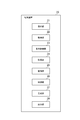
- FIG. 5 is a functional block diagram of the terminal device shown in FIG.
- FIG. 6 is a functional block diagram of another terminal device shown in FIG.
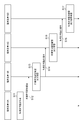
- FIG. 7 is a sequence diagram showing a series of processes of the work permit preparation method in the project management system shown in FIG.
- FIG. 8 is a diagram showing an example of a display screen for creating a work permit.
- FIG. 1 is a configuration diagram schematically showing a project management system including a work management device according to an embodiment.
- FIG. 2 is a hardware configuration diagram of the terminal device shown in FIG.
- FIG. 3 is a hardware configuration diagram of another terminal device shown in FIG
- FIG. 9 is a diagram showing an example of a display screen for creating a work permit.
- FIG. 10 is a diagram showing an example of a display screen for creating a work permit.
- FIG. 11 is a diagram showing an example of a display screen for creating a work permit.
- FIG. 12 is a diagram showing an example of a display screen for creating a work permit.
- FIG. 13 is a diagram showing an example of a display screen for creating a work permit.
- FIG. 14 is a diagram showing an example of a display screen for creating a work permit.
- FIG. 15 is a diagram showing an example of a display screen for creating a work permit.
- FIG. 16 is a diagram showing an example of a display screen for creating a work permit.
- FIG. 10 is a diagram showing an example of a display screen for creating a work permit.
- FIG. 11 is a diagram showing an example of a display screen for creating a work permit.
- FIG. 12 is a diagram showing an example of a display
- FIG. 17 is a flowchart showing a series of processes of the work management method performed by the terminal device shown in FIG.
- FIG. 18 is a diagram showing an example of acquiring worker information.
- FIG. 19 is a diagram showing an example of a display screen for managing an operator.
- FIG. 20 is a diagram showing the configuration of a work permit creation program recorded on a recording medium.
- FIG. 21 is a diagram showing a configuration of a work management program recorded on a recording medium.
- FIG. 22 is a diagram showing an example of time-varying productivity.
- FIG. 1 is a configuration diagram schematically showing a project management system including a work management device according to an embodiment.
- the project management system 1 shown in FIG. 1 is a system for managing a project for constructing a construction object.
- construction objects include plants in the oil and gas field and plants in the infrastructure field.
- plants in the oil and gas field include petroleum refining plants, gas treatment plants, natural gas liquefaction plants, petrochemical plants, and chemical product manufacturing plants.
- plants in the infrastructure sector include thermal power plants, nuclear power plants, and renewable energy power plants.
- a project can include three phases: Engineering, Procurement, and Construction.
- the project management system 1 manages the project by, for example, AWP (Advanced Work Packaging).
- AWP is a method of managing a project using a work package.
- a work package is a unit of work for constructing a construction object. Work contents, man-hours, costs, resources, schedules, etc. are assigned to work packages.
- EWP Engineing Work Package
- PWP Procurement Work Package
- CWP Construction Work Package
- IWP Installation Work Package
- the IWP is a unit of work for a work supervisor to manage on-site work, and is, for example, a work that can be completed within 4 weeks.
- the project management system 1 includes a terminal device 10A, a terminal device 10B, a terminal device 10C, a terminal device 10D, a terminal device 20 (work management device), and a server device 50.
- the terminal device 10A, the terminal device 10B, the terminal device 10C, the terminal device 10D, the terminal device 20, and the server device 50 are communicatively connected to each other by a network NW.
- the network NW may be configured by either wired or wireless. Examples of network NWs include the Internet, mobile communication networks, and WANs (Wide Area Networks).
- the terminal device 10A is a device for creating a work permit (Permit to Work; PTW).
- the terminal device 10A is used by the supervisor of the team (Performing Party) that performs the actual work.
- Examples of the terminal device 10A include a desktop PC (Personal Computer), a notebook PC, a tablet terminal, and a smartphone.
- FIG. 2 is a hardware configuration diagram of the terminal device shown in FIG.
- the terminal device 10A physically includes hardware such as one or more processors 101, a main storage device 102, an auxiliary storage device 103, a communication device 104, an input device 105, and an output device 106. It can be configured as a computer with hardware.
- An example of the processor 101 is a CPU (Central Processing Unit).
- the main storage device 102 is composed of a RAM (Random Access Memory), a ROM (Read Only Memory), and the like.
- Examples of the auxiliary storage device 103 include a semiconductor memory and a hard disk device.
- the auxiliary storage device 103 stores the work permit creation program P1 (see FIG. 20).
- the communication device 104 is a device that transmits / receives data to / from another device via the network NW.
- the communication device 104 is composed of, for example, a network interface card (NIC) or a wireless communication module. Encryption may be used to send and receive data via the network NW.
- the input device 105 is a device used when the supervisor operates the terminal device 10A.
- the input device 105 is composed of, for example, a touch panel, a keyboard, and a mouse.
- the output device 106 is a device that outputs various types of information.
- the output device 106 is composed of, for example, a display and a speaker.
- each hardware operates under the control of the processor 101, and the main memory is stored. Data is read and written in the device 102 and the auxiliary storage device 103. As a result, each functional unit shown in FIG. 5 of the terminal device 10A is realized.
- the terminal device 10B is a device for primary approval of the work permit created by the terminal device 10A.
- the terminal device 10B is used by the issuing authority of the work permit.
- the work permit issuer includes, for example, a supervisor who supervises the Performing Party. Examples of the terminal device 10B include desktop PCs, notebook PCs, tablet terminals, and smartphones.
- the terminal device 10B has the same hardware configuration as the terminal device 10A.
- the terminal device 10C is a device that secondarily approves the work permit approved by the terminal device 10B.
- the terminal device 10C is used by a coordinator (PTW Coordinator).
- the coordinator mainly confirms the appearance of the work permit. Examples of the terminal device 10C include desktop PCs, notebook PCs, tablet terminals, and smartphones.
- the terminal device 10C has the same hardware configuration as the terminal device 10A.
- the terminal device 10D is a device that finally approves the work permit approved by the terminal device 10C.
- the terminal device 10D is used by the chief executive officer of the construction site. Examples of chief executive officers include site supervisors (Site Managers) and construction managers (Construction Managers). The Chief Executive Officer will review and approve the interrelationships of all submitted work permits. Examples of the terminal device 10D include desktop PCs, notebook PCs, tablet terminals, and smartphones.
- the terminal device 10D has the same hardware configuration as the terminal device 10A.
- the terminal device 20 is a portable device used at a work site and is a device that manages work for carrying out a project.
- the terminal device 20 is used to confirm the approved work permit before starting the work.
- the terminal device 20 registers the worker in the work package.
- the terminal device 20 is used by the supervisor of the Performing Party. Examples of the terminal device 20 include a tablet terminal, a smartphone, and a notebook PC.
- FIG. 3 is a hardware configuration diagram of another terminal device shown in FIG.
- the terminal device 20 physically includes one or more processors 201, a main storage device 202, an auxiliary storage device 203, a communication device 204, an input device 205, an output device 206, and an image pickup device. It can be configured as a computer with hardware such as 207.
- An example of the processor 201 is a CPU.
- the main storage device 202 is composed of a RAM, a ROM, and the like.
- Examples of the auxiliary storage device 203 include a semiconductor memory and a hard disk device.
- the auxiliary storage device 203 stores the work management program P2 (see FIG. 21).
- the communication device 204 is a device that transmits / receives data to / from another device via the network NW.
- the communication device 204 is composed of, for example, a network interface card (NIC) or a wireless communication module. Encryption may be used to send and receive data via the network NW.
- the input device 205 is a device used when the supervisor operates the terminal device 20.
- the input device 205 is composed of, for example, a touch panel.
- the output device 206 is a device that outputs various types of information.
- the output device 206 includes, for example, a display and a speaker.
- the image pickup device 207 is a device for taking an image (imaging).
- the image pickup device 207 is, for example, a camera module.
- the image pickup device 207 transmits a plurality of optical system components such as a lens and an image pickup element, a plurality of control system circuits for driving and controlling them, and an electric signal representing an image captured image generated by the image pickup element. It includes a circuit unit of a signal processing system that converts an image signal which is a digital signal.
- each hardware operates under the control of the processor 201, and the main storage device 202 And the data in the auxiliary storage device 203 is read and written. As a result, each functional unit shown in FIG. 6 of the terminal device 20 is realized.
- the server device 50 is a device that functions as a database that stores various types of information.
- the server device 50 has the same hardware configuration as the terminal device 10A.
- the server device 50 does not have to include the input device 105 and the output device 106.
- the server device 50 includes a work package DB.
- the work package DB stores a plurality of work package information.
- Work package information is set for each work package.
- each work package information includes a work package ID (identifier), an area ID, a task ID, a scheduled schedule information, an actual schedule information, a status information, and a workload information. Including.
- the work package ID is identification information that can uniquely identify the work package.
- the area ID is identification information that can uniquely identify the area where the work of the work package identified by the work package ID is executed.
- the task ID is identification information that can uniquely identify the work content (work type) of the work package identified by the work package ID.
- Scheduled schedule information includes a scheduled start date, a scheduled end date, and a scheduled period.
- the scheduled start date is the date on which the work package identified by the work package ID is scheduled to start.
- the scheduled end date is the date on which the work package identified by the work package ID is scheduled to end.
- the scheduled period is the number of scheduled days required for the work package identified by the work package ID.
- the actual schedule information includes the work start date, the work end date, and the work period.
- the work start date is the actual date when the work package identified by the work package ID is started.
- the work end date is the actual date when the work package identified by the work package ID was completed.
- the work period is the actual number of days required for the work package identified by the work package ID.
- the status information is information indicating the progress status of the work package identified by the work package ID. Progressive states include, for example, before, during, and completed.
- the work amount information is information indicating the work amount of the work package identified by the work package ID.
- the configuration of the work package DB is not limited to the configuration shown in FIG.
- the structure of the work package DB can be changed by a known method.
- the reception unit 11 is a functional unit that accepts the operation of the user (supervisor) of the terminal device 10A.
- the reception unit 11 outputs operation information indicating the operation content of the user to the acquisition unit 12, the display control unit 13, and the creation unit 14.
- the acquisition unit 12 is a functional unit that acquires work package information.
- the acquisition unit 12 acquires one or a plurality of work package information from, for example, the server device 50.
- the acquisition unit 12 outputs the work package information to the display control unit 13.
- the display control unit 13 is a functional unit that displays various images on the display device (display) of the output device 106.
- the display control unit 13 outputs display information for displaying the predetermined information to the display device of the terminal device 10A, and the display device of the terminal device 10A displays the predetermined information based on the display information.
- the display control unit 13 causes each screen to be displayed on the display device of the terminal device 10A based on the operation of the user. For example, the display control unit 13 causes the display device of the terminal device 10A to display a screen for creating a work permit.
- the creation unit 14 is a functional unit that creates a work permit.
- the creation unit 14 creates a work permit based on the information about the work content input by the user.
- the creation unit 14 creates a certificate, which will be described later, as needed.
- the procedure for creating a work permit will be described later.
- the creation unit 14 outputs the PTW information indicating the work permit and the certificate to the output unit 15.
- the output unit 15 is a functional unit that outputs PTW information.
- the output unit 15 receives the PTW information from the creation unit 14, it transmits (outputs) the PTW information to the server device 50, stores the PTW information in the server device 50, and sends a work permit approval request to the terminal device 10B. Send.
- the output unit 15 may transmit (output) PTW information to the terminal device 10B together with a request for approval of the work permit.
- the terminal device 20 functionally includes a reception unit 21, an acquisition unit 22, a display control unit 23, an acquisition unit 24 (second acquisition unit), a registration unit 25, and the like. It includes an acquisition unit 26 (first acquisition unit), a generation unit 27, and an output unit 28.
- the reception unit 21 is a functional unit that accepts the operation of the user (supervisor) of the terminal device 20.
- the reception unit 21 outputs operation information indicating the user's operation content to the acquisition unit 22, the display control unit 23, the acquisition unit 24, the registration unit 25, the acquisition unit 26, and the generation unit 27.
- the acquisition unit 22 is a functional unit that acquires PTW information.
- the acquisition unit 22 acquires, for example, a list of work permits from the server device 50, and controls the display control unit 23 so that the display device of the terminal device 20 displays the list.
- the acquisition unit 22 acquires the PTW information of the work permit selected by the user from the server device 50.
- the acquisition unit 22 may acquire a plurality of work package information from the server device 50 and control the display control unit 23 so that the display device of the terminal device 20 displays the list of work packages. In this case, the acquisition unit 22 may acquire the PTW information of the work package selected by the user from the server device 50.
- the acquisition unit 22 outputs PTW information to the display control unit 23.
- the display control unit 23 is a functional unit that displays various images on the display device (display) of the output device 206.
- the display control unit 23 outputs display information for displaying the predetermined information to the display device of the terminal device 20, and the display device of the terminal device 20 displays the predetermined information based on the display information.
- the display control unit 23 causes each screen to be displayed on the display device of the terminal device 20 based on the operation of the user. For example, the display control unit 23 causes the display device of the terminal device 20 to display the work permit of the work package. Specifically, when the display control unit 23 receives the PTW information from the acquisition unit 22, the display control unit 23 causes the display device of the terminal device 20 to display the work permit based on the PTW information.
- the acquisition unit 24 is a functional unit that acquires worker information about the worker.
- the worker information includes, for example, a worker ID, a worker name, and a company name.
- the worker ID is identification information that can uniquely identify the worker.
- the worker name is the name of the worker identified by the worker ID.
- the company name is the name of the company to which the worker identified by the worker ID belongs.
- the acquisition unit 24 acquires worker information, for example, while the display device of the terminal device 20 is displaying a screen for confirming a work permit.
- the acquisition unit 24 outputs the worker information to the registration unit 25.
- the registration unit 25 is a functional unit that registers one or more workers in the work package.
- the registration unit 25 registers the worker indicated by the worker information in the selected work package. For example, when the display device of the terminal device 20 displays a screen for confirming the work permit of the work package, it is considered that the work package is selected. One work package may be selected from the list of work packages.
- the registration unit 25 registers the worker in the work package by creating the registration information in which the work package ID of the selected work package and the worker information (for example, the worker ID) are associated with each other.
- the registration unit 25 outputs the registration information to the acquisition unit 26.
- the acquisition unit 26 is a functional unit that acquires work time information indicating the work time required to complete the work package.
- the work time information includes, for example, the work start time and work end time of the work package, and the number of workers registered in the work package.
- the work start time of the work package is the time when the work package is started.
- the work end time of the work package is the time when the work package is completed (completed).
- the acquisition unit 26 acquires the pressed time as the work start time of the work package.
- the acquisition unit 26 sets the pressed time. Obtained as the work end time of the work package.
- the acquisition unit 26 acquires the number of workers registered in the work package based on the registration information.
- the work time information may include, for example, the work start time and work end time of each worker.
- the work start time of the worker is the time when the worker starts the work.
- the work end time of the worker is the time when the worker finishes the work.
- the acquisition unit 26 acquires the pressed time as the work start time of the worker.
- the acquisition unit 26 acquires the pressed time as the work end time of the worker.
- the working time information may further include the exit time and the return time.
- the exit time is the time when the worker leaves the work site for a break or the like.
- the return time is the time when the worker returns to the work site.
- a gate is installed between the work site and the outside, and the gate is provided with a card reader on the work site side and the outside side, respectively. The gate opens when the operator holds the ID card over the card reader.
- the acquisition unit 26 acquires the time when the card reader on the work site side reads the worker information from the ID card as the exit time.
- the acquisition unit 26 acquires the time when the external card reader reads the worker information from the ID card as the return time.
- the generation unit 27 is a functional unit that generates work record information.
- the work record information includes the work package ID and the work time information.
- the generation unit 27 receives the work time information from the acquisition unit 26, the generation unit 27 generates the work record information in which the work package ID and the work time information are associated with each other.
- the generation unit 27 outputs the work record information to the output unit 28.
- the output unit 28 is a functional unit that outputs work record information.
- the output unit 28 receives the work record information from the generation unit 27, for example, the output unit 28 transmits (outputs) the work record information to the server device 50.
- FIG. 7 is a sequence diagram showing a series of processes of the work permit preparation method in the project management system shown in FIG. 8 to 16 are views showing an example of a display screen for creating a work permit.
- the series of processes shown in FIG. 7 is carried out, for example, in a field office.
- step S11 the terminal device 10A creates a work permit (step S11).
- step S11 an application for performing an operation (creation and confirmation) related to the work permit is started in the terminal device 10A.
- the user (supervisor) of the terminal device 10A selects to newly create a work permit on the display screen (not shown) displayed on the terminal device 10A.
- the user of the terminal device 10A sets the work (target work) for which the work permit is created.
- the acquisition unit 12 acquires work package information from the server device 50.
- the acquisition unit 12 may acquire the work package information of all the work packages included in the project, or may acquire only the work package information of the work packages that match the conditions specified by the user.
- the acquisition unit 12 outputs the work package information to the display control unit 13.
- the display control unit 13 controls the display device of the terminal device 10A so as to display the work packages in a list format based on the work package information. ..
- the user of the terminal device 10A selects a work package to which the Performing Party of the user is scheduled to engage from the plurality of displayed work packages. In this way, the selected work package is set as the target work.
- Types of work permits include work permits for hot work and work permits for cold work.
- Hot work is work that produces heat or sparks. Examples of hot work include grinding, cutting, and welding.
- Cold work is work that does not generate heat or sparks.
- certificates include a certificate that permits closed work, a certificate that permits excavation work, a certificate that permits LOTO (Lock Out Tag Out), and a certificate that permits radiography. Be done.
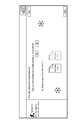
- the display control unit 13 causes the display device of the terminal device 10A to display a screen for selecting whether the work of the work package is hot work or cold work.
- the question "Does your work generate heat or sparks (grinding, cutting or welding)?" Is displayed.
- hot work is selected
- the user presses the "No” button cold work is selected.
- a work permit for cold work is selected.
- the work package ID, work type, and detailed work contents of the selected work package are displayed at the left end of the screen.
- the work package (IWP) whose work package ID is "IWP-1600-A400-001" is selected.
- the work type of this work package is general civil work, and the detailed work content is the work of installing underground drainage pipes.
- Civil works include drainage work (Sewer & Drainage), site survey (Site Investigation), construction work (Site Development), soil improvement work (Subsoil Improvement), piling work (Piling), and pavement work (Road & Pave). ), And construction of fences and gates (Fence & Gate), etc. If the work package information does not include the work type and detailed work contents, the user of the terminal device 10A may set the work type and detailed work contents.
- the display control unit 13 causes the display device of the terminal device 10A to display a detailed question regarding the work content. For example, yes-no-style questions are used. Examples of detailed questions include questions about the depth of excavation.
- the creation unit 14 determines whether or not a certificate is required for the work permit based on the user's answers to these questions. In the example shown in FIG. 11, the creating unit 14 determines that, in addition to the work permit, a certificate permitting the closed work and a certificate permitting the excavation work are further required.
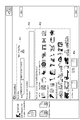
- the display control unit 13 has an area R1 for selecting an area, an area R2 for entering the details of the work content, and an area for selecting a tool and a construction machine used for the work.
- a screen including R3 and an area R4 for setting a scheduled start date (scheduled start date and time) and a scheduled end date (scheduled end date and time) is displayed on the display device of the terminal device 10A.
- the area ID of the selected work package is set.
- the user of the terminal device 10A inputs the details of the work contents in the text box of the area R2.
- the user of the terminal device 10A selects the icon of the tool and the construction machine used for the work from the plurality of icons indicating the tool or the construction machine in the area R3.
- the user of the terminal device 10A further sets the scheduled start date and time and the scheduled end date and time in the area R4.
- the display control unit 13 causes the display device of the terminal device 10A to display a screen for setting a department where the work may affect.
- the user of the terminal device 10A selects whether or not consent needs to be obtained, that is, whether or not the work may affect other departments. Then, when it is necessary to obtain consent, the user of the terminal device 10A further selects a specific area and department.
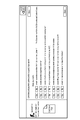
- the display control unit 13 displays a list of confirmation items performed before the start of the work, a list of confirmation items performed during the work, and a list of confirmation items performed after the work is completed. It is displayed on the display device of 10A. The user of the terminal device 10A selects necessary confirmation items from each list.
- the creation unit 14 creates the work permit by reflecting the detailed information input by the user of the terminal device 10A in the template of the work permit.
- FIG. 15 shows a work permit template for cold work.
- the creation unit 14 reflects the information input on the screens shown in FIGS. 12 to 14 in this template. As described above, the work permit is created.
- the display control unit 13 causes the display device of the terminal device 10A to display a screen for inputting detailed information for creating the certificate.
- the creation unit 14 creates a certificate by reflecting the detailed information input by the user of the terminal device 10A in the certificate template.
- the display control unit 13 causes the display device of the terminal device 10A to display a screen for confirming the work permit and the certificate.
- the user of the terminal device 10A confirms the work permit and the certificate, and if it is determined that there is no problem, presses the submit button B1.
- the output unit 15 submits (outputs) the work permit and the certificate to the terminal device 10B (step S12).
- the output unit 15 transmits (outputs) PTW information to the server device 50, stores the PTW information in the server device 50, and transmits a work permit approval request to the terminal device 10B.
- the terminal device 10B receives an approval request from the terminal device 10A.
- the terminal device 10B reads the PTW information from the server device 50 based on the approval request and displays the same screen as in FIG. To do.
- the user of the terminal device 10B confirms the work permit and the certificate.
- the terminal device 10B rejects the work permit and the certificate and returns them to the terminal device 10A.
- the user of the terminal device 10B presses the submit button when it is determined that there is no problem with the work permit and the certificate.
- the terminal device 10B approves the work permit and the certificate (step S13), and submits the work permit and the certificate to the terminal device 10C (step S14).
- the terminal device 10B transmits a work permit approval request to the terminal device 10C.
- the terminal device 10C receives an approval request from the terminal device 10B.
- the terminal device 10C reads the PTW information from the server device 50 based on the approval request and displays the same screen as in FIG. To do.
- the user of the terminal device 10C confirms the work permit and the certificate.
- the terminal device 10C rejects the work permit and the certificate and returns them to the terminal device 10A.
- the user of the terminal device 10C presses the submit button when it is determined that there is no problem with the work permit and the certificate.
- the terminal device 10C approves the work permit and the certificate (step S15), and submits the work permit and the certificate to the terminal device 10D (step S16).
- the terminal device 10C transmits a work permit approval request to the terminal device 10D.
- the terminal device 10D receives an approval request from the terminal device 10C.
- the terminal device 10D reads the PTW information from the server device 50 based on the approval request and displays the same screen as in FIG. To do.
- the user of the terminal device 10D confirms the work permit and the certificate.
- the terminal device 10D rejects the work permit and the certificate and returns them to the terminal device 10A.
- the user of the terminal device 10D presses the submit button when it is determined that there is no problem with the work permit and the certificate.
- the terminal device 10D finally approves the work permit and the certificate (step S17). This completes a series of processes for preparing a work permit.
- FIG. 17 is a flowchart showing a series of processes of the work management method performed by the terminal device shown in FIG.
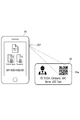
- FIG. 18 is a diagram showing an example of acquiring worker information.
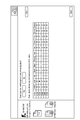
- FIG. 19 is a diagram showing an example of a display screen for managing an operator. The series of processes shown in FIG. 17 is carried out, for example, at a work site.
- the acquisition unit 22 acquires a work permit (step S21).
- step S21 an application for performing an operation related to the work permit is started in the terminal device 20.
- the user (supervisor) of the terminal device 20 selects to confirm the approved work permit on the display screen (not shown) displayed on the terminal device 20.
- the acquisition unit 22 acquires the PTW information of the approved work permit and certificate from the server device 50.
- the acquisition unit 22 outputs the PTW information to the display control unit 23.
- the display control unit 23 causes the display device of the terminal device 20 to display a screen on which the work permit and the certificate can be confirmed, as in FIG. Then, when the user of the terminal device 20 selects the work permit, the display control unit 23 displays the work permit on the display device of the terminal device 20 (step S22). Then, the user of the terminal device 20 has all the workers of the Performing Party confirm the contents of the work permit. Similarly, when the user of the terminal device 20 selects the certificate, the display control unit 23 causes the display device of the terminal device 20 to display the certificate. Then, the user of the terminal device 20 has all the workers of the Performing Party confirm the contents of the certificate.
- step S23 the acquisition unit 24 acquires the worker information (step S23).
- step S23 as shown in FIG. 18, the user of the terminal device 20 uses the image pickup device 207 of the terminal device 20 to perform a performing party while the screen on which the work permit and the certificate can be confirmed is displayed.
- the QR code 30a attached to the ID card 30 includes the worker information of the worker who is the owner of the ID card 30. Therefore, the acquisition unit 24 can acquire the worker information of the worker from the QR code 30a.
- the user of the terminal device 20 sequentially reads the QR code 30a attached to the ID cards 30 of all the workers of the Performing Party, and the acquisition unit 24 acquires the worker information for all the workers. Then, the acquisition unit 24 outputs the worker information to the registration unit 25.
- the registration unit 25 registers the worker in the work package (step S24). Specifically, when the registration unit 25 receives a plurality of worker information from the acquisition unit 24, the work package ID and the worker information (work package ID and worker information corresponding to the work permit on the screen displayed on the display device of the terminal device 20). For example, the worker is registered in the work package by associating with the worker ID). As a result, all workers engaged in the work package are registered in the work package.
- step S25 the user of the terminal device 20 starts an application for performing work management.
- information including a work package ID, a task ID, an area ID, a status, a number of workers, a work amount, a unit, a work start time, a work end time, and the like is displayed. Displayed for each work package. The user of the terminal device 20 selects a work package in which the Performing Party of the user is engaged.
- the acquisition unit 26 acquires the time when the start button SB is pressed as the work start time of the selected work package. To do. Further, when the user of the terminal device 20 presses the end button FB while the work package is selected, the acquisition unit 26 sets the time when the end button FB is pressed as the work end time of the selected work package. Get as. Although the acquisition unit 26 acquires the work start time and the work end time for each work package, the work start time and the work end time for each worker are replaced with the work start time and the work end time for each work package. You may get the time. In addition to the work start time and work end time for each work package, the acquisition unit 26 may further acquire the work start time and work end time for each worker.
- the acquisition unit 26 may further acquire the exit time and the return time as work time information. For example, the acquisition unit 26 acquires the time when the card reader on the work site side reads the worker information from the ID card 30 as the exit time. The acquisition unit 26 acquires the time when the external card reader reads the worker information from the ID card 30 as the return time. The acquisition unit 26 may acquire the time when the worker's position information leaves the work site as the exit time, and acquires the time when the worker's position information returns from the outside to the work site as the return time. May be good. Then, the acquisition unit 26 outputs the work time information to the generation unit 27.
- step S26 when the generation unit 27 receives the work time information from the acquisition unit 26, the generation unit 27 generates the work record information by associating the work package ID with the work time information. Then, the generation unit 27 outputs the work record information to the output unit 28.
- the output unit 28 outputs work record information (step S27).
- the output unit 28 receives the work record information from the generation unit 27, for example, the output unit 28 transmits (outputs) the work record information to the server device 50.
- FIG. 20 is a diagram showing the configuration of a work permit creation program recorded on a recording medium.
- the work permit creation program P1 includes a main module P10, a reception module P11, an acquisition module P12, a display control module P13, a creation module P14, and an output module P15.
- the main module P10 is a part that comprehensively controls the processing related to the creation of the work permit.
- the functions realized by executing the reception module P11, the acquisition module P12, the display control module P13, the creation module P14, and the output module P15 are the reception unit 11, the acquisition unit 12, and the display control unit 13, respectively, in the above-described embodiment.
- the functions are the same as those of the creation unit 14 and the output unit 15.
- the work permit creation program P1 is provided by a computer-readable recording medium MD1 such as a CD-ROM (Compact Disc Read Only Memory), a DVD-ROM (Digital Versatile Disc Read Only Memory), and a semiconductor memory.
- the work permit creation program P1 may be provided as a data signal via the network NW.
- the work management program P2 is provided by a computer-readable recording medium MD2 such as a CD-ROM, a DVD-ROM, and a semiconductor memory.
- the work management program P2 may be provided as a data signal via the network NW.
- the work permit of the work package is displayed, and one or more workers are registered in the work package. Since it is necessary to confirm the work permit before the start of the work, the worker can be registered more reliably by performing the worker registration work together with the work permit confirmation work. Then, the work time information indicating the work time required to complete the work package is acquired, and the work record information is generated. For example, when the work start time and work end time of the work package are acquired, the accurate work time cannot be obtained unless the number of workers engaged in the work package can be accurately grasped.
- the accurate work time cannot be obtained unless all the workers engaged in the work package are registered. In this way, the accuracy of the working time can be improved by more reliably registering the worker in the work package. As a result, it is possible to improve the accuracy of the work record information.
- the registration unit 25 registers the worker in the work package by associating the worker information with the work package ID. According to this configuration, the work of registering a worker in the work package can be simplified.
- the acquisition unit 24 acquires the worker information while the display device of the terminal device 20 is displaying the screen for confirming the work permit. According to this configuration, worker information can be acquired while confirming the work permit. As a result, the worker can be registered more reliably.
- the work time information further includes the exit time and the return time
- the time when the worker was actually engaged in the work package can be calculated as the work time. This makes it possible to further improve the accuracy of the work time required to complete the work package.
- the number of welders is determined on the assumption that the amount of welds per welder is constant at 20 ID / Welder over the entire period, there will be an excess of welders in the early stages of construction and a shortage of welders in the middle of construction. ..
- the work record information of the work packages of the same work type and the same amount of work is extracted from the plurality of work record information stored in the server device 50, and the average value of the values indicating their productivity is calculated. By calculating every predetermined period, an appropriate number of welders can be obtained.
- the amount of work per worker may differ depending on the shape (size) of the work object.
- work packages of the same work type, the same amount of work, and similar shapes (sizes) of construction objects By extracting work record information and calculating the average value of the values indicating their productivity, an appropriate number of welders can be obtained.
- the work management device, work management method, and recording medium according to the present disclosure are not limited to the above embodiments.
- each of the terminal devices 10A to 10D, the terminal device 20, and the server device 50 may be composed of one physically or logically connected device, and are physically or logically separated from each other. It may be composed of a plurality of devices.
- each of the terminal devices 10A to 10D, the terminal device 20, and the server device 50 may be realized by a plurality of computers distributed on a network as in cloud computing.
- terminal devices 10B to 10D are used to approve the work permit created by the terminal device 10A, but the number of terminal devices for approving the work permit is It may be one, two, or four or more. Further, in the above embodiment, the description has been focused on one Performing Party, but when there are a plurality of Performing Party, the terminal devices 10A and 20 are assigned to each Performing Party.
- the terminal device 10A is a computer different from the terminal device 20, but the terminal device 10A may be the same computer as the terminal device 20.
- the terminal device 20 includes a creation unit 14 in addition to the reception unit 21, the acquisition unit 22, the display control unit 23, the acquisition unit 24, the registration unit 25, the acquisition unit 26, the generation unit 27, and the output unit 28. obtain.
- the work permit may differ depending on the work content, but according to the above configuration, the work permit can be created according to the work content by using the terminal device 20.
- the terminal device 20 may store PTW information in advance. In this case, the terminal device 20 does not have to include the acquisition unit 22.
- the terminal device 20 may store the worker information in advance. In this case, the terminal device 20 does not have to include the acquisition unit 24.
- the user of the terminal device 20 may select a work package and register the worker in the selected work package. For example, in the screen shown in FIG. 19, the user of the terminal device 20 selects a work package, and the user of the terminal device 20 uses the imaging device 207 of the terminal device 20 to perform in a state where the work package is selected. Read the QR code 30a attached to the ID card 30 of the Party worker. As a result, the acquisition unit 24 acquires the worker information, and the registration unit 25 works on the work package by associating the work package ID of the selected work package with the worker information (for example, the worker ID). Register a person.
- the user of the terminal device 20 sets conditions, searches for workers, and registers them in the work package from a list of workers that match the conditions. Workers may be added.
- the registration unit 25 registers the worker in the work package by associating the work package ID of the selected work package with the worker information (for example, the worker ID).
- 1 ... project management system, 14 ... creation unit, 20 ... terminal device, 22 ... acquisition unit, 23 ... display control unit, 24 ... acquisition unit (second acquisition unit), 25 ... registration unit, 26 ... acquisition unit (first) Acquisition unit), 27 ... Generation unit, 28 ... Output unit, 206 ... Output device (display device), MD2 ... Recording medium, P2 ... Work management program.
Landscapes
- Business, Economics & Management (AREA)
- Human Resources & Organizations (AREA)
- Engineering & Computer Science (AREA)
- Economics (AREA)
- Strategic Management (AREA)
- Entrepreneurship & Innovation (AREA)
- Tourism & Hospitality (AREA)
- Theoretical Computer Science (AREA)
- General Physics & Mathematics (AREA)
- Marketing (AREA)
- General Business, Economics & Management (AREA)
- Physics & Mathematics (AREA)
- Educational Administration (AREA)
- Quality & Reliability (AREA)
- Operations Research (AREA)
- Game Theory and Decision Science (AREA)
- Development Economics (AREA)
- Health & Medical Sciences (AREA)
- General Health & Medical Sciences (AREA)
- Primary Health Care (AREA)
- Management, Administration, Business Operations System, And Electronic Commerce (AREA)
Priority Applications (4)
| Application Number | Priority Date | Filing Date | Title |
|---|---|---|---|
| US17/638,178 US20220300889A1 (en) | 2019-10-01 | 2019-10-01 | Work management apparatus, work management method, and recording medium |
| EP19947954.4A EP4040354A4 (en) | 2019-10-01 | 2019-10-01 | WORK MANAGEMENT DEVICE, WORK MANAGEMENT METHOD AND RECORDING MEDIA |
| PCT/JP2019/038810 WO2021064877A1 (ja) | 2019-10-01 | 2019-10-01 | 作業管理装置、作業管理方法、及び記録媒体 |
| JP2021550824A JP7142790B2 (ja) | 2019-10-01 | 2019-10-01 | 作業管理装置、作業管理方法、及び記録媒体 |
Applications Claiming Priority (1)
| Application Number | Priority Date | Filing Date | Title |
|---|---|---|---|
| PCT/JP2019/038810 WO2021064877A1 (ja) | 2019-10-01 | 2019-10-01 | 作業管理装置、作業管理方法、及び記録媒体 |
Publications (1)
| Publication Number | Publication Date |
|---|---|
| WO2021064877A1 true WO2021064877A1 (ja) | 2021-04-08 |
Family
ID=75337861
Family Applications (1)
| Application Number | Title | Priority Date | Filing Date |
|---|---|---|---|
| PCT/JP2019/038810 Ceased WO2021064877A1 (ja) | 2019-10-01 | 2019-10-01 | 作業管理装置、作業管理方法、及び記録媒体 |
Country Status (4)
| Country | Link |
|---|---|
| US (1) | US20220300889A1 (https=) |
| EP (1) | EP4040354A4 (https=) |
| JP (1) | JP7142790B2 (https=) |
| WO (1) | WO2021064877A1 (https=) |
Cited By (1)
| Publication number | Priority date | Publication date | Assignee | Title |
|---|---|---|---|---|
| WO2022269584A1 (en) * | 2021-06-24 | 2022-12-29 | Samsung Engineering Co.,Ltd. | Method and device for managing project |
Families Citing this family (1)
| Publication number | Priority date | Publication date | Assignee | Title |
|---|---|---|---|---|
| US11556867B2 (en) * | 2019-10-16 | 2023-01-17 | Caterpillar Inc. | System and method for worksite project tracking |
Citations (2)
| Publication number | Priority date | Publication date | Assignee | Title |
|---|---|---|---|---|
| JP2002117097A (ja) * | 2000-10-10 | 2002-04-19 | Toyota Motor Corp | 工事情報管理方法及び管理システム |
| WO2017130446A1 (ja) | 2016-01-29 | 2017-08-03 | 日揮株式会社 | プロジェクト管理装置、プロジェクト管理システム、プロジェクト管理方法およびプログラム |
Family Cites Families (25)
| Publication number | Priority date | Publication date | Assignee | Title |
|---|---|---|---|---|
| JPH08313633A (ja) * | 1995-05-22 | 1996-11-29 | Matsushita Electric Ind Co Ltd | 放射線作業管理システム |
| JP3792913B2 (ja) * | 1997-11-17 | 2006-07-05 | 株式会社東芝 | 保守点検支援装置 |
| JP2000293642A (ja) * | 1999-04-02 | 2000-10-20 | Toshiba Corp | 認証システム、媒体処理装置、認証方法、入退出管理システム、及び入退出管理方法 |
| WO2005006138A2 (en) * | 2003-06-30 | 2005-01-20 | Idocuments, Llc | Worker and document management system |
| CA2476636A1 (en) * | 2004-07-30 | 2006-01-30 | Gerald Vikse | Automated permit-to-work system |
| US20070027732A1 (en) * | 2005-07-28 | 2007-02-01 | Accu-Spatial, Llc | Context-sensitive, location-dependent information delivery at a construction site |
| US20070245300A1 (en) * | 2006-03-22 | 2007-10-18 | Benjamin Chan | Apparatus, system, and method for presenting project scheduling information in combination with workflow information |
| JP2008071242A (ja) * | 2006-09-15 | 2008-03-27 | Sekisui Chem Co Ltd | 施工現場管理システム |
| JP5704537B2 (ja) * | 2011-06-17 | 2015-04-22 | 株式会社日立製作所 | 入退場ゲート管理装置 |
| US20130054307A1 (en) * | 2011-08-26 | 2013-02-28 | Daphoria, Inc. | Labor and Materials Purchasing System for the Construction Industry |
| US9152934B2 (en) * | 2011-11-22 | 2015-10-06 | Ebidletting.Com | Arrangements for administrating and managing a construction project |
| WO2013126866A1 (en) * | 2012-02-24 | 2013-08-29 | B3, Llc | Systems and methods for comprehensive insurance loss management and loss minimization |
| JP6444494B2 (ja) * | 2014-05-23 | 2018-12-26 | データロボット, インコーポレイテッド | 予測データ分析のためのシステムおよび技術 |
| US9424545B1 (en) * | 2015-01-15 | 2016-08-23 | Hito Management Company | Geospatial construction task management system and method |
| US10990927B2 (en) * | 2015-01-22 | 2021-04-27 | SYNCrew, Inc. | Systems and methods for managing mobile workers |
| AU2016228971A1 (en) * | 2015-03-12 | 2017-10-26 | Repipe Pty Ltd | Methods and systems for providing and receiving information for risk management in the field |
| KR101631980B1 (ko) * | 2015-09-23 | 2016-06-20 | 주식회사 유투엔지 | 사물인터넷 기반 지능형 무선 피폭 선량 안전 관리 시스템 |
| JP5973095B1 (ja) * | 2016-01-12 | 2016-08-23 | 株式会社A−スタイル | 現場作業員管理システム |
| WO2018026968A1 (en) * | 2016-08-02 | 2018-02-08 | Prescient Systems, Inc. | Real-time trade resource management system |
| WO2018112478A1 (en) * | 2016-12-16 | 2018-06-21 | Headstream Technologies, LLC | Construction project management systems and methods |
| JP2019045921A (ja) * | 2017-08-30 | 2019-03-22 | 株式会社日立情報通信エンジニアリング | 労働時間管理システム |
| US20190333170A1 (en) * | 2018-04-27 | 2019-10-31 | Moda Holdings, LLC | System and method for construction project administration |
| US11314780B2 (en) * | 2018-10-26 | 2022-04-26 | Built Data LLC | Audit logging and chronologizing tool |
| CN113795855A (zh) * | 2019-05-07 | 2021-12-14 | 株式会社管理解决方案 | 项目管理系统 |
| US11386364B1 (en) * | 2019-10-24 | 2022-07-12 | Eci Software Solutions, Inc. | Construction project information and document access system |
-
2019
- 2019-10-01 WO PCT/JP2019/038810 patent/WO2021064877A1/ja not_active Ceased
- 2019-10-01 EP EP19947954.4A patent/EP4040354A4/en not_active Withdrawn
- 2019-10-01 JP JP2021550824A patent/JP7142790B2/ja active Active
- 2019-10-01 US US17/638,178 patent/US20220300889A1/en not_active Abandoned
Patent Citations (2)
| Publication number | Priority date | Publication date | Assignee | Title |
|---|---|---|---|---|
| JP2002117097A (ja) * | 2000-10-10 | 2002-04-19 | Toyota Motor Corp | 工事情報管理方法及び管理システム |
| WO2017130446A1 (ja) | 2016-01-29 | 2017-08-03 | 日揮株式会社 | プロジェクト管理装置、プロジェクト管理システム、プロジェクト管理方法およびプログラム |
Non-Patent Citations (1)
| Title |
|---|
| See also references of EP4040354A4 |
Cited By (2)
| Publication number | Priority date | Publication date | Assignee | Title |
|---|---|---|---|---|
| WO2022269584A1 (en) * | 2021-06-24 | 2022-12-29 | Samsung Engineering Co.,Ltd. | Method and device for managing project |
| US12159263B2 (en) | 2021-06-24 | 2024-12-03 | Samsung E&A Co., Ltd. | Method and device for managing project |
Also Published As
| Publication number | Publication date |
|---|---|
| JPWO2021064877A1 (https=) | 2021-04-08 |
| EP4040354A4 (en) | 2023-06-14 |
| US20220300889A1 (en) | 2022-09-22 |
| JP7142790B2 (ja) | 2022-09-27 |
| EP4040354A1 (en) | 2022-08-10 |
Similar Documents
| Publication | Publication Date | Title |
|---|---|---|
| Kassem et al. | BIM in facilities management applications: a case study of a large university complex | |
| JP2023053244A (ja) | 現場におけるリスク管理のための情報を提供および受信するシステムおよびポータブル装置 | |
| Chen et al. | Bridging BIM and building (BBB) for information management in construction: The underlying mechanism and implementation | |
| Hanna et al. | State of practice of building information modeling in the electrical construction industry | |
| KR101462109B1 (ko) | 모바일에 기반한 현장관리 솔루션 제공방법 | |
| US20120221379A1 (en) | Facility control system (fcs) to manage assets and products | |
| KR102180377B1 (ko) | 통합 업무 관리 솔루션 시스템 | |
| JP6795866B1 (ja) | 施工支援クラウドシステムおよびプログラム | |
| Peiris et al. | Digitalising modular construction: Enhancement of off-site manufacturing productivity via a manufacturing execution & control (MEC) system | |
| KR101674101B1 (ko) | Ict 기반의 공정관리 시스템 | |
| Gurmu et al. | Survey of management practices enhancing labor productivity in multi-storey building construction projects | |
| KR101675034B1 (ko) | 건물에 대한 실시간 공사 감리를 지원하기 위한 방법, 장치 및 컴퓨터 판독 가능한 기록 매체 | |
| KR101628318B1 (ko) | 건설 프로젝트 관리 방법 | |
| CN117557239A (zh) | 铁路建设业务数字化协同管理方法和协同管理系统 | |
| JP7142790B2 (ja) | 作業管理装置、作業管理方法、及び記録媒体 | |
| Lasni et al. | Implementing construction planning and control software: A specialized contractor perspective | |
| Wang et al. | An integrated BIM-IoT framework for real-time quality monitoring in construction site | |
| Kasprzak et al. | Aligning BIM with FM: streamlining the process for future projects | |
| Jowett et al. | Field BIM and mobile BIM technologies: a requirements taxonomy and its interactions with construction management functions | |
| WO2022091265A1 (ja) | プロジェクト管理装置、プロジェクト管理方法、及び記録媒体 | |
| Brinda et al. | Developments of facility management using building information modelling | |
| JP7111909B2 (ja) | プロジェクト管理装置、プロジェクト管理方法、及び記録媒体 | |
| CN112395476A (zh) | 一种工程资料管理的方法 | |
| Cao et al. | Blockchain-based change management in engineering, procurement and construction projects | |
| US20130205224A1 (en) | Electronic data plate system for collaboration amongst multiple disparate parties |
Legal Events
| Date | Code | Title | Description |
|---|---|---|---|
| 121 | Ep: the epo has been informed by wipo that ep was designated in this application |
Ref document number: 19947954 Country of ref document: EP Kind code of ref document: A1 |
|
| ENP | Entry into the national phase |
Ref document number: 2021550824 Country of ref document: JP Kind code of ref document: A |
|
| NENP | Non-entry into the national phase |
Ref country code: DE |
|
| ENP | Entry into the national phase |
Ref document number: 2019947954 Country of ref document: EP Effective date: 20220502 |