WO2020195332A1 - サポートプログラム、情報処理装置、および印刷方法 - Google Patents
サポートプログラム、情報処理装置、および印刷方法 Download PDFInfo
- Publication number
- WO2020195332A1 WO2020195332A1 PCT/JP2020/006092 JP2020006092W WO2020195332A1 WO 2020195332 A1 WO2020195332 A1 WO 2020195332A1 JP 2020006092 W JP2020006092 W JP 2020006092W WO 2020195332 A1 WO2020195332 A1 WO 2020195332A1
- Authority
- WO
- WIPO (PCT)
- Prior art keywords
- setting
- program
- data
- image data
- Prior art date
- Legal status (The legal status is an assumption and is not a legal conclusion. Google has not performed a legal analysis and makes no representation as to the accuracy of the status listed.)
- Ceased
Links
Images


Classifications
-
- G—PHYSICS
- G06—COMPUTING OR CALCULATING; COUNTING
- G06F—ELECTRIC DIGITAL DATA PROCESSING
- G06F3/00—Input arrangements for transferring data to be processed into a form capable of being handled by the computer; Output arrangements for transferring data from processing unit to output unit, e.g. interface arrangements
- G06F3/12—Digital output to print unit, e.g. line printer, chain printer
- G06F3/1201—Dedicated interfaces to print systems
- G06F3/1202—Dedicated interfaces to print systems specifically adapted to achieve a particular effect
- G06F3/1203—Improving or facilitating administration, e.g. print management
- G06F3/1208—Improving or facilitating administration, e.g. print management resulting in improved quality of the output result, e.g. print layout, colours, workflows, print preview
-
- G—PHYSICS
- G06—COMPUTING OR CALCULATING; COUNTING
- G06F—ELECTRIC DIGITAL DATA PROCESSING
- G06F3/00—Input arrangements for transferring data to be processed into a form capable of being handled by the computer; Output arrangements for transferring data from processing unit to output unit, e.g. interface arrangements
- G06F3/12—Digital output to print unit, e.g. line printer, chain printer
- G06F3/1201—Dedicated interfaces to print systems
- G06F3/1223—Dedicated interfaces to print systems specifically adapted to use a particular technique
- G06F3/1237—Print job management
- G06F3/1242—Image or content composition onto a page
-
- G—PHYSICS
- G06—COMPUTING OR CALCULATING; COUNTING
- G06K—GRAPHICAL DATA READING; PRESENTATION OF DATA; RECORD CARRIERS; HANDLING RECORD CARRIERS
- G06K15/00—Arrangements for producing a permanent visual presentation of the output data, e.g. computer output printers
- G06K15/02—Arrangements for producing a permanent visual presentation of the output data, e.g. computer output printers using printers
- G06K15/18—Conditioning data for presenting it to the physical printing elements
- G06K15/1894—Outputting the image data to the printing elements
- G06K15/1897—Outputting the image data to the printing elements while merging on-the-fly with other data
-
- G—PHYSICS
- G06—COMPUTING OR CALCULATING; COUNTING
- G06F—ELECTRIC DIGITAL DATA PROCESSING
- G06F3/00—Input arrangements for transferring data to be processed into a form capable of being handled by the computer; Output arrangements for transferring data from processing unit to output unit, e.g. interface arrangements
- G06F3/12—Digital output to print unit, e.g. line printer, chain printer
- G06F3/1201—Dedicated interfaces to print systems
- G06F3/1223—Dedicated interfaces to print systems specifically adapted to use a particular technique
- G06F3/1224—Client or server resources management
- G06F3/1228—Printing driverless or using generic drivers
-
- G—PHYSICS
- G06—COMPUTING OR CALCULATING; COUNTING
- G06F—ELECTRIC DIGITAL DATA PROCESSING
- G06F3/00—Input arrangements for transferring data to be processed into a form capable of being handled by the computer; Output arrangements for transferring data from processing unit to output unit, e.g. interface arrangements
- G06F3/12—Digital output to print unit, e.g. line printer, chain printer
- G06F3/1201—Dedicated interfaces to print systems
- G06F3/1223—Dedicated interfaces to print systems specifically adapted to use a particular technique
- G06F3/1275—Print workflow management, e.g. defining or changing a workflow, cross publishing
- G06F3/1277—Print workflow management, e.g. defining or changing a workflow, cross publishing using filter pipeline, e.g. outside the driver, adding traps
Definitions
- the technical fields disclosed in this specification relate to support programs, information processing devices, and printing methods that support printer control.
- a printer driver As a technique for controlling a printer from an information processing device such as a personal computer, a configuration in which a printer driver is installed in the information processing device, print data is generated by the printer driver, and the print data is transmitted to the printer is widely known (for example, Japanese Patent Application Laid-Open No. 2017-134718).
- the printer driver is provided by the manufacturer of the printer, supports various functions of the printer, and can fully utilize the printer.
- the setting items that can be selected when selecting the print parameters are general ones registered in the OS standard general-purpose printing program. Therefore, the setting items specific to the printer or the printer driver are not supported, which is inconvenient for the user and there is room for improvement.
- This specification discloses a technique for realizing a synthetic process of synthesizing a specific object with an image to be printed according to a print instruction in an information processing device incorporating an OS standard general-purpose printing program.
- the support program made for the purpose of solving the above-mentioned problems is a support program that can be executed by a computer of the information processing device and corresponds to a printer connected to the information processing device, and prints an image on the computer.
- a print instruction to be given to the printer is given to a general-purpose print program preliminarily incorporated in the operating system of the information processing apparatus
- a reception process for accepting a print parameter setting for the print instruction is executed, and the print parameter is executed.
- the setting item of includes the setting of the compositing process for synthesizing a specific object with the image to be printed according to the print instruction, and further, when the computer accepts the compositing process setting in the reception process. It is characterized in that the data generated by the printing program is subjected to a generation process for generating specific data for performing the compositing process in response to the image to be printed.
- the support program with the above configuration accepts the setting of compositing processing that synthesizes a specific object with the image to be printed when printing with a general-purpose printing program.
- the support program When the synthetic processing setting is accepted, the support program generates specific specific data for performing the synthetic processing. Therefore, according to this support program, even when printing is performed via a general-purpose printing program, it is possible to execute compositing processing, which is a function peculiar to the printer or the support program.
- a control method for realizing the functions of the above device, a computer program, and a computer-readable storage medium for storing the computer program are also new and useful.
- an information processing apparatus incorporating an OS standard general-purpose printing program there is a technology for realizing a compositing process for synthesizing a specific object with an image to be printed according to a print instruction. It will be realized.
- This embodiment discloses an embodiment embodying a printing system including a personal computer (hereinafter referred to as "PC”) and a printer.
- PC personal computer
- FIG. 1 shows an example of the configuration of a printing system in which the program of this embodiment is executed.
- the system shown in FIG. 1 includes a PC 1, a printer 2, and a printer 3.
- PC1 is an example of an information processing device.
- the printer 2 and the printer 3 are devices having a printing function, and can communicate with the PC 1 via local communication or network communication.
- a plurality of printers 2 may be connected to the PC 1.
- the PC 1 includes a controller 10, a user interface (hereinafter referred to as "UI") 20, and a communication interface (hereinafter referred to as "communication IF”) 30.
- the UI 20 and the communication IF 30 are electrically connected to the controller 10.
- the UI 20 includes hardware that displays various displays and accepts user's instruction input.
- the UI 20 may be a touch panel having both a display function and an input reception function, or may be a combination of a display having a display function and a keyboard, a mouse, or the like having an input reception function.
- the communication IF30 includes hardware for communicating with the printer 2 and printer 3 and hardware for accessing the Internet.
- the communication IF 30 may include a plurality of interfaces having different communication methods.
- the communication method includes, for example, network communication and USB communication. Further, it may be wired communication or wireless communication.
- the controller 10 includes a CPU 11 and a memory 12.
- the CPU 11 is an example of a computer.
- the memory 12 includes a ROM, a RAM, a non-volatile memory, and a buffer of the CPU 11, and stores programs such as various application programs (hereinafter referred to as “applications”) and various data. In this specification, the details of the memory are not distinguished.
- the CPU 11 executes various processes according to the program read from the memory 12 and based on the user's instruction.
- the controller 10 in FIG. 1 is a general term for hardware and software used for controlling the PC 1, and does not necessarily represent a single hardware that actually exists in the PC 1.
- An example of the memory 12 may be a storage medium that can be read by a computer.
- a computer-readable storage medium is a non-transitory medium.
- the non-transitory medium also includes a recording medium such as a CD-ROM or a DVD-ROM.
- the non-transitory medium is also a tangible medium.
- an electric signal that carries a program downloaded from a server on the Internet is a computer-readable signal medium, which is a kind of computer-readable medium, but is a storage that can be read by a non-transitory computer. Not included in the medium.
- the memory 12 stores an operating system (hereinafter referred to as “OS”) 21 including a general-purpose printing program 41, an auxiliary program 42, and an editing application 43.
- the auxiliary program 42 is an example of a support program.
- the auxiliary program 42 is, for example, a hardware support application (abbreviation, HSA) created by a printer vendor based on a specification published by Microsoft Corporation.
- OS21 is, for example, Microsoft Windows (registered trademark), MacOS (registered trademark), Linux (registered trademark).
- the memory 12 stores various data including information on the connected printer and various programs such as a browser.
- the general-purpose printing program 41 is an application for executing printing from the PC 1 to various printers such as the printer 2, and is an OS standard printing program pre-installed in the OS 21.
- the general-purpose print program 41 of the present embodiment is a program that generates print data compatible with the printer based on the image data to be printed.
- the general-purpose printing program 41 is a general-purpose application that can be applied to printers of a plurality of types of models provided by the vendor of each printer, and is a program that causes each printer to perform operations common to each model.
- the general-purpose print program 41 may be a kind of program provided by the vendor of each printer to the vendor of OS21 in order to be incorporated in OS21 in advance, for example, a type of printer driver provided to be incorporated in OS21 in advance.
- the auxiliary program 42 is a program that executes processing based on an instruction from the OS 21 when the general-purpose printing program 41 is started, and is an application that supports control of the target hardware, for example, the printer 2.
- the auxiliary program 42 is started from, for example, the general-purpose printing program 41.
- the auxiliary program 42 is a program prepared for each type of printer by a vendor such as the printer 2. For example, an auxiliary program 42 for an inkjet printer and an auxiliary program 42 for a laser printer are prepared. There may be an auxiliary program 42 prepared not only for each printer type but also for each printer model and each printer model series.
- the printer vendor registers the auxiliary program 42 in the platform provided by the OS21 vendor according to the procedure specified by the OS21 vendor.
- the OS 21 downloads the auxiliary program 42 from the server in which the auxiliary program 42 is stored. Incorporate into PC1.
- the OS 21 associates the identification information of the incorporated auxiliary program 42 with the printer information of the newly connected printer and stores it in the memory 12.
- the respective auxiliary programs corresponding to the types of each model are incorporated, and the information for associating each printer with each auxiliary program is stored in the memory 12. That is, in the memory 12, as the printer information of each printer connected to the PC 1, the information of the corresponding auxiliary program 42 is stored together with the model information and access information of the printer.
- the editing application 43 is, for example, an application for creating and editing image data and document data.
- the editing application 43 is, for example, Microsoft Word (registered trademark) or PowerPoint (registered trademark). Further, the application may be provided by the vendor of the printer 2 or the printer 3.
- the editing application 43 accepts a user operation including an instruction to cause the printer 2 to perform a predetermined operation. Specifically, the editing application 43 receives, for example, a selection of an image to be printed, a setting of print parameters, and a print instruction for causing the printer 2 to execute printing via the UI 20.
- each process step of the process and the sequence diagram in the embodiment basically indicates the process of the CPU 11 according to the instruction described in the program such as the auxiliary program 42. That is, the processing of "judgment”, “extraction”, “selection”, “calculation”, “decision”, “specification”, “acquisition”, “acceptance”, “control”, etc. in the following description is the processing of the CPU 11. Represents.
- the processing by the CPU 11 also includes hardware control using the API of the OS 21.
- the operation of each program will be described by omitting the detailed description of the OS 21. That is, in the following description, the description to the effect that "program B controls hardware C” may refer to “program B controls hardware C using the API of OS21".
- the processing of the CPU 11 according to the instruction described in the program may be described in abbreviated wording.
- the program may be omitted, such as "CPU 11 performs”.
- the processing of the CPU 11 according to the instruction described in the program may be described by a wording that omits the CPU, such as "the program A performs”.
- acquisition is used as a concept that does not require a request. That is, the process of receiving data without the CPU 11 requesting is also included in the concept of "the CPU 11 acquires the data".
- data in the present specification is represented by a computer-readable bit string. Then, data having the same substantial meaning and content but different formats are treated as the same data. The same applies to "information” in the present specification.
- requesting and “instructing” are concepts indicating that information indicating that a request is being made or information indicating that an instruction is being given is output to the other party. Further, the information indicating that the request is made or the information indicating that the instruction is given is simply described as “request” or "instruction”.
- the process of determining whether or not the information A indicates that it is the matter B by the CPU 11 is conceptually described as "determining whether or not the information A is the matter B from the information A". There is.
- the process of determining whether the information A indicates that it is the matter B or the matter C by the CPU 11 is "determined from the information A whether it is the matter B or the matter C". It may be described conceptually as ".
- the auxiliary program 42 is executed from the general-purpose print program 41 when a print instruction for printing using the general-purpose print program 41 is received in a state where a printer corresponding to the auxiliary program 42 is specified via the editing application 43 or the like.
- the PC 1 receives an instruction to execute printing on the printer 2 via the general-purpose printing program 41 in a state where the image data to be printed is specified by the editing application 43, for example, via the UI 20.
- the auxiliary program 42 corresponding to the model type of the printer 2 is incorporated in the PC 1 will be described.
- the editing application 43 receives the designation of the image to be printed and the input of the instruction for printing execution via the UI 20 (arrow A).
- the image displayed by the editing application 43 is an example of an image to be printed.
- the editing application 43 displays, for example, a document edited by the editing application 43, a photo read by the editing application 43, or the like as an image.
- the editing application 43 displays, for example, a print setting screen while displaying an image, and accepts print parameter settings.
- the editing application 43 passes a print execution notification indicating the content of the received print instruction to the OS 21. Note that, in FIG. 2, the operation of the OS 21 is omitted.
- the general-purpose print program 41 indicates various information included in the print instruction, for example, information indicating a printer to be printed, information indicating print parameters set by the application, and image data to be printed in the print execution notification. Information and information that identifies the user who instructed printing can be acquired. As will be described later, this information can also be used in the auxiliary program 42.
- the general-purpose print program 41 generates intermediate image data by converting the image data format included in the print execution notification into the intermediate image data format, and generates a print job including the intermediate image data (arrow C).
- the image data included in the editing application 43 is of various types, and the general-purpose printing program 41 converts the received image data into intermediate image data suitable for generating print data. If the image data included in the print execution notification is data suitable for generating the print data, the generation of the intermediate image data may be omitted and the intermediate image data may be used as it is.
- the intermediate image data is, for example, XPS data.
- the general-purpose printing program 41 identifies a printer designated as a device for executing printing based on the information included in the print execution notification. For example, when the printer 2 is specified, the general-purpose printing program 41 identifies the model of the printer 2 based on the model information of the printer included in the printer information stored in the memory 12. Then, since the auxiliary program 42 corresponding to the printer 2 which is the printer specified by the print instruction is stored in the memory 12, the general-purpose print program 41 outputs an execution command for processing of the auxiliary program 42 and assists. The program 42 is operated (arrow D).
- the auxiliary program 42 When the auxiliary program 42 acquires the intermediate image data in response to the execution command (arrow D), the auxiliary program 42 displays the print parameter edit screen for accepting the print parameter setting on the UI 20 and accepts the print parameter setting (arrow E).
- Arrow E is an example of reception processing.
- the print parameters include general-purpose parameters that the general-purpose print program 41 can handle and unique parameters that the general-purpose print program 41 cannot support.
- General-purpose parameters include, for example, paper size and color / monochrome settings.
- the unique parameter is, for example, the setting of the watermark.
- the watermark is an image that is composited with the image to be printed at a predetermined density and printed. For example, an image attached to prevent information leakage (for example, a logo such as a secret mark) or COPY Such as characters.
- the concentration may be arbitrarily changed.
- the auxiliary program 42 may accept only the unique parameter or both the unique parameter and the general-purpose parameter on the print parameter edit screen.
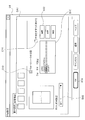
- the auxiliary program 42 displays the watermark setting screen DA1 on the UI 20 when the watermark is selected from the extended function of the print parameter editing screen D1.
- the watermark setting screen DA1 is provided with check boxes C10 and C14, a watermark selection field B10, a watermark setting field B12, an OK button A14, and an edit button A12.
- the check box C10 is set not to print the watermark when the check box is unchecked, and is set to print the watermark G2 when the check box C10 is checked, for example, as shown in FIG.
- the watermark G2 is set to be printed as a hollow character.
- the hollow character is a character that borders the character and prints it without filling the inside.
- the watermark registered in the auxiliary program 42 is displayed so that it can be selected.
- a watermark editing screen (not shown) is displayed, and the auxiliary program 42 can edit the watermark selected in the watermark selection field B10 via the watermark editing screen.
- the display content of the watermark, the font, the color, the position in the image to be printed, the size, the inclination, the watermark placement surface, and the like are set.
- the density at the time of printing the watermark can be set. As for the density, the lower the set value, the lighter the watermark is printed.
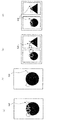
- the watermark setting field B12 is a field for selecting a page on which the watermark is printed. For example, when all pages are selected, as shown in FIG. 4D, each page is executed even when 2in1 printing is executed. One watermark G2 is printed on the.
- the settings related to the watermarks can be individually set.
- the watermark setting is an example of the synthetic processing setting
- the watermark G2 is an example of a specific object.
- the auxiliary program 42 receives the print parameters input via the UI 20 and stores them in the memory 12.
- the watermark is set between the first setting used to realize the watermark by changing the content of the intermediate image data (for example, changing the content of the intermediate image data in XPS format). There is a second setting used to realize the watermark in a way different from changing the content of the image data.
- the first setting is a setting when the watermark G2 is printed in standard characters as shown in FIG. 4A.
- the first setting is a value of "arranging in the foreground of the image to be printed" on the watermark arrangement surface, a value of "arranging standard characters” among the setting values indicating that characters are arranged.
- the remaining values for that standard character eg, where to place it in the image to be printed, size, tilt, font).
- the setting of the watermark arrangement surface is set to "arrange in the foreground of the image to be printed” instead of "arranged in the foreground of the image to be printed".
- the value "Place on the back of the image” is set.
- the setting of the image is an example of the first setting.
- the first setting is, for example, a value for setting the watermark placement surface, a setting value indicating that the image is to be placed, and the remaining values related to the image (for example, at which position in the image to be printed). Information indicating the size, tilt, and location of the image).
- the second setting is, for example, a setting that does not apply to the above example of the first setting.
- this is a setting for printing the watermark G2 shown in FIG. 4A with hollow characters.
- the second setting is the value for setting the watermark placement surface, the value of "arranging the hollow character" among the setting values indicating that the character is to be placed, and the remaining value related to the hollow character (for example,). The position in the image to be printed, size, tilt, font).
- the second setting is a value of "arranging between specific layers of the image to be printed", that is, an arrangement between the first layer and the second layer of the watermark arrangement surface, and the value is set. It may be the remaining value when it is. Further, when the image registered in the storage area for the auxiliary program 42 is used for the watermark, the second setting may be the setting of the image.
- the print parameter of the image to be printed is set with respect to the standard character "COPY", that is, .
- the first setting and the setting related to the hollow character "COPY", that is, the second setting are included.
- the auxiliary program 42 that has received the print parameter setting checks whether or not the received print parameter has a watermark setting (arrow F).
- the auxiliary program 42 is OK in a state where the check box C10 of the watermark setting screen DA1 is checked by, for example, arrow E, and the standard character "COPY" and the hollow character “COPY” are specified as the watermark.
- the auxiliary program 42 checks whether the watermark setting includes the first setting (arrow G).
- the arrow G is an example of the determination process.
- the auxiliary program 42 When the first setting is included in the watermark setting, the auxiliary program 42 generates intermediate composite image data (arrow H).
- the intermediate composite image data is, for example, XPS data.
- the arrow H is an example of the generation process.
- the auxiliary program 42 synthesizes the watermark with the intermediate image data by generating a command based on the first setting by XPS and adding it to the intermediate image data attached to the execution instruction (arrow H). It should be noted that determining that the watermark setting includes the first setting is an example of determining that a specific condition is not set.
- the print parameter is, for example, of the water mark placement surface for the standard character "COPY”.
- the value "Place in front of the image to be printed”, the value “Place standard characters” among the setting values indicating that characters are placed, and the remaining values related to the standard characters (for example, print target) are set as to where to place the image.
- the hollow character "COPY” for example, the value "place in the foreground of the image to be printed” on the water mark placement surface and the "hollow character” among the setting values indicating that the character is placed.
- the value "place” and the remaining values related to the hollow characters are set.
- the setting of the standard character "COPY" corresponds to the first setting
- the setting of the hollow character "COPY” corresponds to the second setting.
- the auxiliary program 42 generates intermediate image data for the standard character "COPY" including the first setting. That is, the auxiliary program 42 generates an XPS command "place in the foreground of the image to be printed” and adds it to the intermediate image data in the XPS format. Then, the XPS command indicating the character string "COPY” to be arranged, the XPS command indicating the position of the character string in the image to be printed, and the XPS command indicating the size, inclination, and font of the character string are used. It is generated and added to the intermediate image data in XPS format. As a result, the image of the standard character "COPY" is combined with the intermediate image data.
- the intermediate image data to which the XPS command is added is the intermediate composite image data.
- the auxiliary program 42 issues a value indicating an image to be arranged, that is, a path of an image file for saving the image, an XPS command indicating a position in the image to be printed, a size, and an inclination. It is generated and added to the intermediate image data in XPS format.
- the auxiliary program 42 When the auxiliary program 42 generates the intermediate composite image data, it outputs a completion notification (arrow I).
- the general-purpose print program 41 generates print data in response to the end notification (arrow J). Since the intermediate composite image data is attached to the end notification, the general-purpose printing program 41 generates print data based on the intermediate composite image data.
- the print data is, for example, raster image data in a bitmap format.
- the print data generated by the arrow J based on the intermediate composite image data is an example of the second image data.
- the general-purpose print program 41 that generated the print data outputs an execution command (arrow K).
- the execution command includes print data generated by the general-purpose print program 41 based on the intermediate composite image data, and print parameters.
- This print parameter includes a setting not processed by the arrow H, that is, a second setting. Specifically, the setting of the hollow character "COPY" is included.
- the auxiliary program 42 can acquire print data in response to an execution command (arrow L).
- the arrow L is an example of the acquisition process.
- the print data acquired by the arrow L is an example of the second image data.
- the auxiliary program 42 that has acquired the print data checks whether or not the print parameter attached to the print data has a watermark set (arrow M). If there is a watermark setting, it is determined whether or not the watermark setting includes the second setting (arrow N).
- the arrow N is an example of the judgment process. Determining that the watermark setting includes the second setting is an example of determining that a specific condition is set.
- the auxiliary program 42 includes the second setting, the auxiliary program 42 generates composite data which is raster image data of the image indicating the watermark based on the second setting (arrow O).
- the arrow O is an example of the generation process.
- the auxiliary program 42 generates composite image data by synthesizing the composite data with the print data (arrow P).
- the arrow P is an example of the synthesis process.
- the composite data is an example of specific data and first image data.
- the auxiliary program 42 is, for example, as shown in FIG.
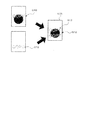
- Raster image data G10 including the character "COPY” and the image to be printed is acquired from the general-purpose printing program 41 (arrow M).
- the print data includes the setting of the hollow character "COPY", that is, the second setting, which is not processed by the arrow H.
- the auxiliary program 42 acquires the font image data used for the character string "COPY” from the font image data indicated by the font setting, processes the acquired font image data, and indicates a hollow character image.
- Generate data G12 (arrow O).
- the auxiliary program 42 sets the value of "arrange in the foreground of the image to be printed” and the position of the character string of the hollow character in the image to be printed according to the setting of "COPY" of the hollow character.
- the composite image data G15 is generated by arranging in the raster image data G10 or by synthesizing the hollow character image data G12 with the raster image data G10 according to the values of the size and the inclination (arrow P).
- the auxiliary program 42 acquires the font image data used for the character string among the font image data indicated by the font setting (arrow O). In this case, if necessary, a hollowing process may be performed. Then, the font image data is combined with the print data according to the value of "arranged between specific layers of the image to be printed” and the value of the position of the character string to be printed, the size, and the inclination. (Arrow P).
- the character string may be an image.
- the auxiliary program 42 that generated the composite image data outputs a termination notification (arrow Q).
- the general-purpose print program 41 outputs a print command to the printer 2 in response to the end notification (arrow R).
- the general-purpose printing program 41 When the standard character "COPY” and the hollow character “COPY” are specified as water marks and the processing of the arrows H, O, and P is executed, the general-purpose printing program 41 , The print data corresponding to the standard character "COPY” generated by the processing of the arrows H and I, and the composite image data corresponding to the hollow character "COPY” generated by the processing of the arrows O and P. Output with a print command.
- the auxiliary program 42 receives the intermediate image attached to the execution command based on the print parameters.
- the data is edited and the print data is edited, and the print data is output to the printer 2. That is, the processes of arrows G, H, and N to P are not executed.
- the auxiliary program 42 of this embodiment accepts the setting of the compositing process for synthesizing the watermark when printing by the general-purpose printing program 41.
- the auxiliary program 42 When the setting of the synthetic processing is accepted, the auxiliary program 42 generates specific specific data for performing the synthetic processing. Therefore, according to the auxiliary program 42, even when printing is performed via the general-purpose printing program 41, it is possible to execute the compositing process which is a function peculiar to the printer 2 or the auxiliary program 42.
- the print parameter includes both the first setting and the second setting.
- the processing of arrows K to Q is omitted, the print data is generated by the arrow J, and then the print data generated by the arrow R is sent to the printer 2. You may send it.
- the processing of the arrow H may be omitted, and the composite image data generated by the arrows O and P may be transmitted to the printer 2 as print data. ..
- the auxiliary program 42 creates an image file indicating an image corresponding to the second setting, for example, an image of hollow characters with an arrow H, and registers the image file in a storage area that can be used by the general-purpose printing program 41. If it has a function, the setting of the hollow character may be treated as the first setting. In this case, when the auxiliary program 42 generates the intermediate composite image data, the auxiliary program 42 generates an XPS command including the path of the image file indicating the image of the hollow character and adds it to the intermediate image data.
- the general-purpose printing program 41 acquires an image of hollow characters according to the path of the image file and generates print data.
- the second embodiment of the present invention will be described.
- This embodiment is different from the first embodiment in that the auxiliary program 42 transmits a command to the printer 2 according to the setting of the watermark.
- the process of synthesizing the watermark will be described with reference to the sequence diagram of FIG. In FIG. 6, the same reference numerals are used for the processes common to those in FIG. 2, and the description thereof will be omitted as appropriate.
- the auxiliary program 42 of the present embodiment will be described as not performing the process of synthesizing the watermark before generating the print data, that is, the process of the arrows F to H in FIG.
- Some printers have a function to add a watermark depending on the model and model.
- the printer information stored in the memory 12 is flagged when the corresponding printer has a function of adding a watermark.
- the auxiliary program 42 acquires the print data generated by the general-purpose print program 41 (arrow L)
- the auxiliary program 42 determines whether or not the water mark is set in the print parameter (arrow M). Then, when the watermark is set in the print parameter, it is checked whether or not the printer 2 supports the function of adding the watermark (arrow U). That is, it is determined whether or not there is a flag in the printer information of the printer 2.
- the auxiliary program 42 determines that the printer 2 supports the function of adding a water mark, and generates a command for synthesizing the water mark with the print data (arrow V). .. That is, the same command as the arrow H of the first embodiment is generated. Also, the command corresponding to the second setting used by the arrow O is generated. Then, the auxiliary program 42 adds the generated command to the print data (arrow W), and outputs a end notification (arrow X).
- the general-purpose printing program 41 outputs the print data to which the command is added to the printer 2 (arrow Y).
- the printer 2 prints print data according to a command. That is, the printer 2 adds a watermark to the image by its own device and executes printing.
- the printer 2 generates print data in the same manner as the arrows J of the first embodiment according to a command, or generates synthetic data by the same processing as the arrows O and P of the first embodiment, and the general-purpose print program 41. Is added to the print data generated by. That is, the printer 2 can print the image with the watermark as in the first embodiment.
- the auxiliary program 42 determines that the printer 2 does not support the function of adding a watermark, executes the above-mentioned processing of arrows MP to P, and executes the composite image.
- the data is transmitted to the printer 2.
- the auxiliary program 42 executes the processes of the arrows O and P even when the print parameter includes the first setting. That is, when the printer 2 does not have the function of adding a watermark, the auxiliary program 42 generates composite data regardless of whether the watermark is a watermark or a watermark that is not a watermark, and the composite data is used as print data. Synthesize.
- the printer 2 since the printer 2 synthesizes and processes the watermark according to the command, the synthetic processing can be realized even if the printing instruction is given to the general-purpose printing program 41.
- watermarks such as special fonts and special images supported by the printer 2, that is, preset objects may not be edited by XPS in the general-purpose printing program 41 or the auxiliary program 42.
- a command is sent to the printer 2 to synthesize the preset objects, even the watermark that cannot be edited by XPS can be combined and printed by the printer 2.
- the device connected to the PC 1 is not limited to a printer, and may be a device having a printing function such as a multifunction device, a copying machine, or a fax machine.
- the printer connected to the PC 1 is not limited to the illustrated example, and may be one printer or three or more printers.
- the module that executes each process of this embodiment is not limited to the auxiliary program 42, and may be a program that receives instructions from the OS 21 when printing is performed by the general-purpose print program 41 of the OS 21.
- a print workflow application Print workflow
- Microsoft may be used.
- the processing of arrows H and I in FIG. 2 may not be executed, and all the watermark composition may be performed by the processing of arrows P and Q. According to this, the watermark can be combined with the image even in the printing instruction to the general-purpose printing program 41 as in the above embodiment. However, it may take time to combine the watermark image data of the watermark with the raster image data to be printed. Therefore, for example, when the watermark is synthesized with characters as in the above embodiment, the processes of arrows H and I in FIG. 2 are executed, and when the watermark is processed with hollow characters, the arrows P and Q By executing the process of, the process related to the composition of the watermark can be terminated at an early stage.
- a watermark is given as an example of synthetic printing for convenience.
- another synthetic printing process may be performed in the same manner as the above process.
- it may be used in a tint block printing process in which a plurality of images such as a company logo are thinly arranged on the back surface of an image to be printed, and the image is printed as a tint block.
- the processing of GI in FIG. 2 is performed after the arrow F.
- the processing of arrows U, arrows Q to T, and arrows V to Y in FIG. 6 may be performed.
- the fact that the watermark setting includes the second setting is an example of a specific condition. For some watermarks, it may take a long time to synthesize in the compositing process by the printer 2. Even in this case, when the auxiliary program 42 can execute the image, the printing can be completed at an early stage by synthesizing the watermarks in the auxiliary program 42.
- the auxiliary program 42 may perform processing such as editing of intermediate image data and editing of print data in addition to the compositing process.
- the acceptance of print parameters may have various variations other than the above form.
- the print parameters input by the editing application 43 may be transmitted to the auxiliary program 42 via the general-purpose printing program 41.
- the auxiliary program 42 may accept the print parameters included in the execution command received by the arrow D and perform the determination process by the arrows G and N.
- the auxiliary program 42 may accept the print parameter included in the execution command received by the arrow K and perform the determination process by the arrow N.
- the same processing as the arrow E that is, the print parameter edit screen is displayed on the UI20 to accept the print parameter, and the accepted print parameter is judged by the arrow N. Processing may be performed. Further, the processing of the arrow E may be performed after the print data is acquired by the arrow L.
- the plurality of processes in the arbitrary plurality of steps can be arbitrarily changed in the execution order or executed in parallel as long as the processing contents do not conflict with each other. ..
- the process disclosed in the embodiment may be executed by a single CPU, a plurality of CPUs, hardware such as an ASIC, or a combination thereof.
- the process disclosed in the embodiment can be realized in various aspects such as a recording medium or a method in which a program for executing the process is recorded.
Landscapes
- Engineering & Computer Science (AREA)
- Theoretical Computer Science (AREA)
- Physics & Mathematics (AREA)
- General Engineering & Computer Science (AREA)
- General Physics & Mathematics (AREA)
- Human Computer Interaction (AREA)
- Quality & Reliability (AREA)
- Accessory Devices And Overall Control Thereof (AREA)
- Editing Of Facsimile Originals (AREA)
- Facsimiles In General (AREA)
Abstract
画像の印刷をプリンタ2に行わせる印刷指示が汎用印刷プログラム41に対してなされた場合に、中間画像データの加工に用いる印刷パラメータを受け付け、受け付けた印刷パラメータに、印刷指示による印刷対象となった画像にウォータマークを合成する合成加工の設定が含まれている場合に、印刷対象の画像に対応する印刷データに合成するウォータマークを生成する処理を、補助プログラム42を用いてPC1に実行させる。
Description
本明細書に開示される技術分野は、プリンタの制御をサポートするサポートプログラム、情報処理装置、および印刷方法に関する。
パーソナルコンピュータ等の情報処理装置からプリンタを制御する技術として、情報処理装置にプリンタドライバをインストールし、プリンタドライバによって印刷データを生成し、その印刷データをプリンタに送信する構成が広く知られている(例えば、特開2017-134718号公報)。プリンタドライバは、プリンタのメーカから提供され、そのプリンタが有する各種の機能に対応しており、そのプリンタを十分に利用することができる。
近年、前述したプリンタドライバを利用せず、オペレーティングシステム(OS)に標準に組み込まれている汎用印刷プログラムによってプリンタを制御する技術が実用化されている。この技術では、OSがプリンタを検知するとOS標準の汎用印刷プログラムとの関連付けを行い、以後、そのプリンタに対する印刷指示を受け付けた場合に、プリンタドライバを用いずに、OS標準の汎用印刷プログラムによる印刷が可能になる。
しかしながら、OS標準の汎用印刷プログラムによる印刷では、印刷パラメータの選択の際、選択可能な設定項目がOS標準の汎用印刷プログラムに登録されている一般的なものになる。そのため、プリンタないしプリンタドライバに固有の設定項目がサポートされず、ユーザにとって不便であり、改善の余地がある。
本明細書は、OS標準の汎用印刷プログラムが組み込まれた情報処理装置において、印刷指示による印刷対象となった画像に特定のオブジェクトを合成する合成加工を実現する技術を開示する。
上述した課題の解決を目的としてなされたサポートプログラムは、情報処理装置のコンピュータによって実行可能であり、前記情報処理装置と接続するプリンタに対応するサポートプログラムであって、前記コンピュータに、画像の印刷を前記プリンタに行わせる印刷指示が前記情報処理装置のオペレーティングシステムにあらかじめ組み込まれた汎用印刷プログラムに対してなされた場合に、前記印刷指示に対する印刷パラメータの設定を受け付ける受付処理を実行させ、前記印刷パラメータの設定項目には、前記印刷指示による印刷対象となった画像に特定のオブジェクトを合成する合成加工の設定が含まれ、さらに前記コンピュータに、前記受付処理にて前記合成加工の設定を受け付けた場合に、前記印刷対象となった画像に対応して前記印刷プログラムが生成したデータに前記合成加工を行うための特定データを生成する生成処理を実行させる、ことを特徴とする。
上記構成のサポートプログラムは、汎用印刷プログラムによる印刷の際、印刷対象の画像に特定のオブジェクトを合成する合成加工の設定を受け付ける。その合成加工の設定を受け付けた場合に、サポートプログラムが、その合成加工を行うための固有の特定データを生成する。よって、本サポートプログラムによれば、汎用印刷プログラムを介して印刷を行う場合でも、プリンタないしサポートプログラムに固有の機能である合成加工の実行が可能になる。
上記装置の機能を実現するための制御方法、コンピュータプログラム、および当該コンピュータプログラムを格納するコンピュータにて読取可能な記憶媒体も、新規で有用である。
本明細書に開示される技術によれば、OS標準の汎用印刷プログラムが組み込まれた情報処理装置において、印刷指示による印刷対象となった画像に特定のオブジェクトを合成する合成加工を実現する技術が実現される。
(第1実施形態)
以下、実施の形態のプログラムを利用する印刷システムについて、添付図面を参照しつつ詳細に説明する。本形態は、パーソナルコンピュータ(以下、「PC」とする)とプリンタとを含む印刷システムを具体化した実施の形態を開示するものである。
以下、実施の形態のプログラムを利用する印刷システムについて、添付図面を参照しつつ詳細に説明する。本形態は、パーソナルコンピュータ(以下、「PC」とする)とプリンタとを含む印刷システムを具体化した実施の形態を開示するものである。
本形態のプログラムが実行される印刷システムの構成の例を、図1に示す。図1に示すシステムには、PC1と、プリンタ2と、プリンタ3と、が含まれる。PC1は、情報処理装置の一例である。プリンタ2およびプリンタ3は、印刷機能を有する装置であり、ローカル通信またはネットワーク通信を介して、PC1と通信可能である。なお、PC1には、複数のプリンタ2が接続されてもよい。
PC1は、例えば、図1に示すように、コントローラ10と、ユーザインタフェース(以下、「UI」とする)20と、通信インタフェース(以下、「通信IF」とする)30と、を備えている。UI20及び通信IF30は、コントローラ10に電気的に接続されている。
UI20は、各種の表示を行い、ユーザの指示入力を受け付けるハードウェアを含む。UI20は、表示機能と入力受付機能との両方の機能を有するタッチパネルであっても良いし、表示機能を有するディスプレイと入力受付機能を有するキーボードやマウス等との組合せであっても良い。
通信IF30は、プリンタ2やプリンタ3との通信を行うためのハードウェアや、インターネットへのアクセスを行うためのハードウェアを含む。通信IF30は、通信方式の異なる複数のインタフェースを含んでいても良い。通信方式としては、例えば、ネットワーク通信、USB通信がある。また、有線通信であっても無線通信であってもよい。
コントローラ10は、CPU11と、メモリ12と、を含む。CPU11は、コンピュータの一例である。メモリ12は、ROMと、RAMと、不揮発性メモリと、CPU11のバッファと、を含み、各種のアプリケーションプログラム(以下、「アプリ」とする)などのプログラムや各種のデータなどを記憶する。なお、本明細書では、メモリの詳細を区別しない。CPU11は、メモリ12から読み出したプログラムに従って、また、ユーザの指示に基づいて、各種の処理を実行する。なお、図1中のコントローラ10は、PC1の制御に利用されるハードウェアやソフトウェアを纏めた総称であって、実際にPC1に存在する単一のハードウェアを表すとは限らない。
メモリ12の一例は、コンピュータが読み取り可能なストレージ媒体であってもよい。コンピュータが読み取り可能なストレージ媒体とは、non-transitoryな媒体である。non-transitoryな媒体には、上記の例の他に、CD-ROM、DVD-ROM等の記録媒体も含まれる。また、non-transitoryな媒体は、tangibleな媒体でもある。一方、インターネット上のサーバなどからダウンロードされるプログラムを搬送する電気信号は、コンピュータが読み取り可能な媒体の一種であるコンピュータが読み取り可能な信号媒体であるが、non-transitoryなコンピュータが読み取り可能なストレージ媒体には含まれない。
メモリ12には、例えば、図1に示すように、汎用印刷プログラム41を含むオペレーティングシステム(以下、「OS」とする)21と、補助プログラム42と、編集アプリ43と、が記憶されている。補助プログラム42は、サポートプログラムの一例である。補助プログラム42は、例えば、マイクロソフト社が公開した仕様に基づいてプリンタベンダによって作成された、ハードウェアサポートアプリ(略称、HSA)である。OS21は、例えば、マイクロソフトウィンドウズ(登録商標)、MacOS(登録商標)、Linux(登録商標)である。なお、メモリ12には、図示したもの以外にも、接続されているプリンタの情報を含む各種のデータや、ブラウザ等の各種のプログラムが記憶されている。
汎用印刷プログラム41は、PC1からプリンタ2等の各種のプリンタで印刷を実行させるためのアプリであり、OS21にあらかじめ組み込まれているOS標準の印刷プログラムである。本形態の汎用印刷プログラム41は、印刷対象の画像データに基づいて、プリンタが対応可能な印刷データを生成するプログラムである。
汎用印刷プログラム41は、各プリンタのベンダによって提供される複数種類のモデルのプリンタに適用可能な汎用のアプリであり、各モデルに共通する動作を各プリンタに行わせるプログラムである。あるいは、汎用印刷プログラム41は、OS21にあらかじめ組み込むために、各プリンタのベンダによってOS21のベンダに提供されるプログラム、例えば、OS21にあらかじめ組み込むために提供されるプリンタドライバの一種であっても良い。
補助プログラム42は、汎用印刷プログラム41の起動に付随してOS21からの指示に基づいて処理を実行するプログラムであり、対象のハードウェア、例えばプリンタ2等の制御をサポートするアプリである。補助プログラム42は、例えば、汎用印刷プログラム41から起動される。補助プログラム42は、プリンタ2等のベンダによってプリンタのタイプごとに用意されるプログラムである。例えば、インクジェットプリンタ用の補助プログラム42やレーザプリンタ用の補助プログラム42が用意される。プリンタのタイプごとに限らず、プリンタのモデルごとやプリンタのモデルのシリーズごとに用意される補助プログラム42が有っても良い。
プリンタのベンダは、OS21のベンダが指定する手順に従って、補助プログラム42をOS21のベンダが提供するプラットフォームに登録する。OS21は、PC1に新たにプリンタ2が接続され、そのプリンタ2に対応する補助プログラム42がプラットフォームに登録されている場合には、当該補助プログラム42を補助プログラム42が格納されているサーバからダウンロードしてPC1に組み込む。
そして、OS21は、組み込んだ補助プログラム42の識別情報を新たに接続されたプリンタのプリンタ情報に対応付けて、メモリ12に記憶させる。複数のモデルのプリンタが接続されているPC1では、各モデルのタイプに対応するそれぞれの補助プログラムが組み込まれ、各プリンタと各補助プログラムとを対応付ける情報がメモリ12に記憶される。つまり、メモリ12には、PC1に接続されている各プリンタのプリンタ情報として、当該プリンタのモデル情報やアクセス情報とともに、対応する補助プログラム42の情報が記憶される。
編集アプリ43は、例えば、画像データや文書データの作成や編集を行うためのアプリである。編集アプリ43は、例えば、マイクロソフト ワード(登録商標)、パワーポイント(登録商標)である。また、プリンタ2やプリンタ3のベンダから提供されるアプリであってもよい。編集アプリ43は、プリンタ2に所定の動作を行わせる指示を含むユーザ操作を受け付ける。具体的には、編集アプリ43は、UI20を介して、例えば、印刷対象となる画像の選択、印刷パラメータの設定、プリンタ2に印刷を実行させる印刷指示を受け付ける。
なお、実施の形態における処理およびシーケンス図の各処理ステップは、基本的に、補助プログラム42などのプログラムに記述された命令に従ったCPU11の処理を示す。すなわち、以下の説明における「判断」、「抽出」、「選択」、「算出」、「決定」、「特定」、「取得」、「受付」、「制御」等の処理は、CPU11の処理を表している。CPU11による処理は、OS21のAPIを用いたハードウェア制御も含む。本明細書では、OS21の詳細な記載を省略して各プログラムの動作を説明する。すなわち、以下の説明において、「プログラムBがハードウェアCを制御する」という趣旨の記載は、「プログラムBがOS21のAPIを用いてハードウェアCを制御する」ことを指してもよい。また、プログラムに記述された命令に従ったCPU11の処理を、省略した文言で記載することがある。例えば、「CPU11が行う」のようにプログラムを省略して記載することがある。また、プログラムに記述された命令に従ったCPU11の処理を、「プログラムAが行う」のようにCPUを省略した文言で記載することがある。
なお、「取得」は要求を必須とはしない概念で用いる。すなわち、CPU11が要求することなくデータを受信するという処理も、「CPU11がデータを取得する」という概念に含まれる。また、本明細書中の「データ」とは、コンピュータに読取可能なビット列で表される。そして、実質的な意味内容が同じでフォーマットが異なるデータは、同一のデータとして扱われるものとする。本明細書中の「情報」についても同様である。また、「要求する」、「指示する」とは、要求していることを示す情報や、指示していることを示す情報を相手に出力することを示す概念である。また、要求していることを示す情報や指示していることを示す情報のことを、単に、「要求」、「指示」とも記載する。
また、CPU11による、情報Aは事柄Bであることを示しているか否かを判断する処理を、「情報Aから、事柄Bであるか否かを判断する」のように概念的に記載することがある。CPU11による、情報Aが事柄Bであることを示しているか、事柄Cであることを示しているか、を判断する処理を、「情報Aから、事柄Bであるか事柄Cであるかを判断する」のように概念的に記載することがある。
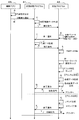
次に、本形態の補助プログラム42の構成、および補助プログラム42の動作を含む印刷手順の一例について、図2のシーケンス図を参照して説明する。補助プログラム42は、編集アプリ43等を介して、補助プログラム42に対応するプリンタが指定された状態で汎用印刷プログラム41を使用して印刷する印刷指示を受け付けた場合に、汎用印刷プログラム41から実行指示されるプログラムである。以下では、PC1がUI20を介して、例えば、編集アプリ43にて、印刷対象の画像データが指定された状態で、汎用印刷プログラム41を介してのプリンタ2での印刷実行の指示を受け付けた場合であって、プリンタ2のモデルのタイプに対応する補助プログラム42がPC1に組み込まれている場合について説明する。
まず、編集アプリ43は、UI20を介して、印刷対象の画像の指定と、印刷実行の指示入力を受け付ける(矢印A)。編集アプリ43が表示した画像は、印刷対象の画像の例である。編集アプリ43は、例えば、編集アプリ43にて編集された文書や、編集アプリ43にて読み込んだ写真などを画像として表示する。編集アプリ43は、例えば、画像を表示する状態で印刷設定画面を表示し、印刷パラメータの設定を受け付ける。そして、編集アプリ43は、印刷指示を受け付けると、受け付けた印刷指示の内容を示す印刷実行通知をOS21に渡す。なお、図2では、OS21の動作を省略して示している。
OS21は、汎用印刷プログラム41を使用する印刷実行通知を受け付けた場合、汎用印刷プログラム41を実行させ、汎用印刷プログラム41に印刷実行通知を渡す(矢印B)。汎用印刷プログラム41は、印刷実行通知にて、印刷指示に含まれる各種の情報、例えば、印刷させるプリンタを示す情報、アプリにて設定された印刷パラメータを示す情報、印刷対象となる画像データを示す情報、印刷を指示したユーザを識別する情報を、取得できる。なお、後述するように、これらの情報は、補助プログラム42でも使用可能とされる。
汎用印刷プログラム41は、印刷実行通知に含まれる画像データの形式を中間画像データの形式に変換することで中間画像データを生成し、中間画像データを含む印刷ジョブを生成する(矢印C)。編集アプリ43に含まれる画像データは種々のタイプのものであり、汎用印刷プログラム41は、受け取った画像データを、印刷データの生成に適した中間画像データに変換する。なお、印刷実行通知に含まれる画像データが印刷データの生成に適したデータであれば、中間画像データの生成を省略し、そのまま中間画像データとしても良い。中間画像データは、例えば、XPSデータである。
さらに、汎用印刷プログラム41は、印刷実行通知に含まれる情報に基づいて、印刷を実行させる装置として指定されているプリンタを特定する。汎用印刷プログラム41は、例えば、プリンタ2が指定されている場合、メモリ12に記憶されているプリンタ情報に含まれるプリンタのモデル情報に基づいて、プリンタ2のモデルを特定する。そして、印刷指示にて指定されたプリンタであるプリンタ2に対応する補助プログラム42がメモリ12に記憶されていることから、汎用印刷プログラム41は、補助プログラム42の処理の実行命令を出力し、補助プログラム42を動作させる(矢印D)。
補助プログラム42は、実行命令に応じて、中間画像データを取得すると(矢印D)、印刷パラメータの設定を受け付ける印刷パラメータ編集画面をUI20に表示させ、印刷パラメータの設定を受け付ける(矢印E)。矢印Eは受付処理の一例である。
印刷パラメータには、汎用印刷プログラム41が対応可能な汎用パラメータと、汎用印刷プログラム41が対応できない固有パラメータとがある。汎用パラメータは、例えば、用紙サイズやカラー/モノクロの設定などである。固有パラメータは、例えば、ウォータマークの設定である。ウォータマークとは、印刷対象の画像に所定の濃度で合成して印刷される画像であって、例えば、情報漏洩防止のために付される画像(例えば、マル秘マークなどのロゴ)や、COPYなどの文字である。濃度は、任意に変更できるようにしてもよい。補助プログラム42は、印刷パラメータ編集画面にて、固有パラメータのみを受け付けてもよいし、固有パラメータと汎用パラメータの両方を受け付けてもよい。
例えば、図3に示すように、補助プログラム42は、印刷パラメータ編集画面D1の拡張機能からウォータマークを選択すると、ウォータマーク設定画面DA1をUI20に表示させる。ウォータマーク設定画面DA1には、チェックボックスC10、C14と、ウォータマーク選択欄B10と、ウォータマーク設定欄B12と、OKボタンA14と、編集ボタンA12が設けられている。
チェックボックスC10は、チェックが外された場合、ウォータマークを印刷しない設定が行われ、チェックが入れられた場合、例えば、図4に示すように、ウォータマークG2を印刷する設定が行われる。チェックボックスC14は、チェックが入れられた場合、ウォータマークG2を中抜き文字で印刷する設定が行われる。中抜き文字は、文字を縁取りし、中を塗りつぶさずに印刷する文字である。
ウォータマーク選択欄B10は、補助プログラム42に登録されているウォータマークが選択可能に表示される。編集ボタンA12が操作されると、図示しないウォータマーク編集画面が表示され、そのウォータマーク編集画面を介して補助プログラム42はウォータマーク選択欄B10で選択されたウォータマークを編集することができる。図示しないウォータマーク編集画面では、例えば、ウォータマークの表示内容、フォント、色、印刷対象の画像内のどの位置に配置するか、サイズ、傾き、ウォータマーク配置面などが設定される。また、図示しないウォータマーク編集画面では、ウォータマークを印刷する際の濃度を設定できる。濃度は、設定値が低いほど、ウォータマークが薄く印刷される。ウォータマーク設定欄B12は、ウォータマークを印刷するページを選択する欄であり、例えば、全ページが選択されると、図4(d)に示すように、2in1印刷を実行する場合でも、各ページに1個のウォータマークG2が印刷される。
なお、図4(c)に示すように、2in1印刷を実行する場合に、1ページに1個のウォータマークG2を合成して印刷する設定も行うことができる。さらに、例えば、1ページに複数のウォータマークを配置する場合、ウォータマークに関する設定を個別に行うことができる。なお、ウォータマークの設定は、合成加工の設定の一例であり、ウォータマークG2は特定のオブジェクトの一例である。
OKボタンA14がUI20を介して操作されると、補助プログラム42は、UI20を介して入力された印刷パラメータを受け付け、メモリ12に記憶する。
なお、ウォータマークの設定には、中間画像データの内容を変更すること(例えば、XPS形式の中間画像データの内容を変更すること)でウォータマークを実現するために用いられる第1設定と、中間画像データの内容の変更とは異なる方法でウォータマークを実現するために用いられる第2設定とがある。
具体的に例えば、第1設定は、図4(a)に示すように、ウォータマークG2を標準の文字で印刷する場合の設定である。例えば、第1設定は、ウォータマーク配置面のうち「印刷対象の画像の最前面に配置する」という値、文字を配置することを示す設定値のうち「標準の文字を配置する」という値、その標準の文字に関する残りの値(例えば、印刷対象の画像内のどの位置に配置するか、サイズ、傾き、フォント)である。
なお、例えば図4(b)に示すようにウォータマークG2を配置する場合、ウォータマーク配置面の設定は、「印刷対象の画像の最前面に配置する」という値に代えて、「印刷対象の画像の最背面に配置する」という値が設定される。また、例えば、汎用印刷プログラム41が使用可能な記憶領域にマル秘マーク等の画像が登録されている場合、その画像の設定は第1設定の一例となる。この場合、第1設定は、例えば、ウォータマーク配置面を設定する値と、画像を配置することを示す設定値と、その画像に関する残りの値(例えば、印刷対象の画像内のどの位置に配置するか、サイズ、傾き、画像の保存場所を示す情報)である。
一方、第2設定は、例えば、上記第1設定の例に当てはまらない設定である。例えば、図4(a)に示すウォータマークG2を、中抜き文字で印刷する場合の設定である。この場合、第2設定は、ウォータマーク配置面を設定する値、文字を配置することを示す設定値のうち「中抜き文字を配置する」という値、その中抜き文字に関する残りの値(例えば、印刷対象の画像内のどの位置に配置するか、サイズ、傾き、フォント)である。
なお、第2設定は、ウォータマーク配置面のうち「印刷対象の画像の特定レイヤ間に配置する」、つまり、第1レイヤと第2レイヤとの間に配置するという値と、その値が設定されているときの残りの値であってもよい。また、補助プログラム42用の記憶領域に登録されている画像をウォータマークに使用する場合、第2設定は、その画像の設定であってもよい。
更に、例えば、標準の文字の「COPY」と、中抜き文字の「COPY」を同じページに配置する場合、印刷対象となる画像の印刷パラメータには、標準の文字の「COPY」に関する設定、つまり、第1設定と、中抜き文字の「COPY」に関する設定、つまり、第2設定とが、含まれる。
図2に戻り、印刷パラメータの設定を受け付けた補助プログラム42は、受け付けた印刷パラメータにウォータマークの設定があるか否かをチェックする(矢印F)。補助プログラム42は、例えば矢印Eにて、ウォータマーク設定画面DA1のチェックボックスC10にチェックが入れられ、標準の文字の「COPY」と中抜き文字の「COPY」をウォータマークとして指定する状態でOKボタンA14の操作を受け付けた場合、印刷パラメータにウォータマークの設定があると判断する(矢印F)。この場合、補助プログラム42は、ウォータマークの設定に第1設定が含まれているかをチェックする(矢印G)。矢印Gは、判断処理の一例である。
ウォータマークの設定に第1設定が含まれている場合、補助プログラム42は、中間合成画像データを生成する(矢印H)。中間合成画像データは、例えば、XPSデータである。矢印Hは生成処理の一例である。例えば、補助プログラム42は、XPSによって、第1設定に基づくコマンドを生成し、実行命令に付された中間画像データに付加することによって、ウォータマークを中間画像データに合成する(矢印H)。なお、ウォータマークの設定が第1設定を含むと判断することは、特定の条件が設定されていないと判断する場合の一例である。
例えば、標準の文字の「COPY」と中抜き文字の「COPY」が、ウォータマークとして指定されている場合、印刷パラメータは、標準の文字の「COPY」に関しては、例えば、ウォータマーク配置面のうち「印刷対象の画像の最前面に配置する」という値、文字を配置することを示す設定値のうち「標準の文字を配置する」という値、その標準の文字に関する残りの値(例えば、印刷対象の画像内のどの位置に配置するか、サイズ、傾き、フォント)が設定される。そして、中抜き文字の「COPY」については、例えば、ウォータマーク配置面のうち「印刷対象の画像の最前面に配置する」という値、文字を配置することを示す設定値のうち「中抜き文字を配置する」という値、その中抜き文字に関する残りの値(例えば、印刷対象の画像内のどの位置に配置するか、サイズ、傾き、フォント)が設定される。標準の文字「COPY」の設定が第1設定に該当し、中抜き文字「COPY」の設定が第2設定に該当する。
この場合、補助プログラム42は、第1設定を含む標準の文字「COPY」について、中間画像データを生成する。すなわち、補助プログラム42は、「印刷対象の画像の最前面に配置する」というXPSコマンドを生成し、XPS形式の中間画像データに追加する。そして、配置する文字列「COPY」を示すXPSコマンドと、当該文字列を印刷対象の画像内のどの位置に配置するかのXPSコマンドと、当該文字列のサイズ、傾き、フォントを示すXPSコマンドを生成し、XPS形式の中間画像データに付加する。これにより、標準の文字の「COPY」の画像が中間画像データに合成される。XPSコマンドを付加された中間画像データが、中間合成画像データである。
尚、例えば、汎用印刷プログラム41が使用可能な記憶領域に登録された画像がウォータマークとして設定されている場合、当該画像の設定は第1設定に該当する。この場合、補助プログラム42は、配置する画像を示す値、つまり、当該画像を保存する画像ファイルのパス、画像を印刷対象の画像内のどの位置に配置するか、サイズ、傾きを示すXPSコマンドを生成し、XPS形式の中間画像データに付加する。
なお、中抜き文字「COPY」の設定は、第1設定に該当しないので、矢印Hの処理を施されない。つまり、矢印Hでは、中抜き文字の中間画像データを生成しない。
補助プログラム42は、中間合成画像データを生成すると、終了通知を出力する(矢印I)。汎用印刷プログラム41は、終了通知に応じて、印刷データを生成する(矢印J)。終了通知には、中間合成画像データが付されているので、汎用印刷プログラム41は、中間合成画像データに基づいて、印刷データを生成する。印刷データは、例えば、ビットマップ形式のラスタ画像データである。矢印Jにて、中間合成画像データに基づいて生成される印刷データは、第2画像データの一例である。
印刷データを生成した汎用印刷プログラム41は、実行命令を出力する(矢印K)。実行命令には、汎用印刷プログラム41が中間合成画像データに基づいて生成した印刷データと、印刷パラメータが含まれている。この印刷パラメータには、矢印Hにて処理されなかった設定、つまり、第2設定が含まれる。具体的には、中抜き文字「COPY」の設定が含まれる。
補助プログラム42は、実行命令に応じて、印刷データを取得できる(矢印L)。矢印Lは取得処理の一例である。矢印Lにて取得した印刷データは第2画像データの一例である。印刷データを取得した補助プログラム42は、印刷データに付された印刷パラメータにウォータマークの設定があるか否かをチェックする(矢印M)。ウォータマークの設定がある場合、そのウォータマークの設定が第2設定を含むか否かを判断する(矢印N)。矢印Nは判断処理の一例である。ウォータマークの設定が第2設定を含むと判断することは、特定の条件が設定されていると判断する場合の一例である。補助プログラム42は、第2設定を含む場合、その第2設定に基づいてウォータマークを示す画像のラスタ画像データである合成データを生成する(矢印O)。矢印Oは生成処理の一例である。補助プログラム42は、合成データを印刷データに合成することにより、合成画像データを生成する(矢印P)。矢印Pは合成処理の一例である。合成データは、特定データ、第1画像データの一例である。
例えば、上述したように、例えば、標準の文字の「COPY」と中抜き文字の「COPY」が、ウォータマークとして指定されている場合、補助プログラム42は、例えば図5に示すように、標準の文字の「COPY」と印刷対象の画像とを含むラスタ画像データG10を、汎用印刷プログラム41から取得する(矢印M)。印刷データは、矢印Hにて処理されなかった中抜き文字の「COPY」の設定、つまり、第2設定を含んでいる。この場合、補助プログラム42は、フォント設定が示すフォント画像データのうち、文字列「COPY」に用いるフォント画像データを取得し、取得したフォント画像データを加工して中抜き文字を示す中抜き文字画像データG12を生成する(矢印O)。そして、補助プログラム42は、中抜き文字の「COPY」の設定に応じて、「印刷対象の画像の最前面に配置する」という値、中抜き文字の文字列を印刷対象の画像内のどの位置に配置するか、サイズ、傾き、の値に従って、ラスタ画像データG10に中抜き文字画像データG12を合成することにより、合成画像データG15を生成する(矢印P)。
なお、例えば、ウォータマーク配置面のうち、「印刷対象の画像の特定のレイヤ間に配置する」という値と、その値が設定されているときの残りの値は、第2設定に該当する。このような第2設定を含む場合、補助プログラム42は、フォント設定が示すフォント画像データのうち、文字列に用いるフォント画像データを取得する(矢印O)。この場合、必要に応じて、中抜き加工処理を施してもよい。そして、「印刷対象の画像の特定のレイヤ間に配置する」という値と、文字列を印刷対象のどの位置に配置するか、サイズ、傾き、の値に従って、印刷データにフォント画像データを合成する(矢印P)。なお、文字列は、画像であってもよい。
合成画像データを生成した補助プログラム42は、終了通知を出力する(矢印Q)。汎用印刷プログラム41は、終了通知に応じて、印刷命令をプリンタ2に出力する(矢印R)。上記のように、例えば、標準の文字の「COPY」と中抜き文字の「COPY」が、ウォータマークとして指定され、矢印H、O、Pの処理を実行している場合、汎用印刷プログラム41は、矢印H、Iの処理によって生成された標準の文字の「COPY」に対応する印刷データと、矢印O、Pの処理によって生成された中抜き文字の「COPY」に対応する合成画像データを、印刷命令に付して出力する。
なお、例えば、ウォータマーク設定画面DA1のチェックボックスC10からチェックが外された状態でOKボタンA14の操作を受け付けた場合、補助プログラム42は、印刷パラメータに基づいて、実行命令に付された中間画像データの編集や印刷データの編集を行い、印刷データをプリンタ2に出力する。つまり、矢印G、H、N~Pの処理を実行しない。
以上説明したように、本形態の補助プログラム42は、汎用印刷プログラム41による印刷の際、ウォータマークを合成する合成加工の設定を受け付ける。その合成加工の設定を受け付けた場合に、補助プログラム42が、その合成加工を行うための固有の特定データを生成する。よって、本補助プログラム42によれば、汎用印刷プログラム41を介して印刷を行う場合でも、プリンタ2ないし補助プログラム42に固有の機能である合成加工の実行が可能になる。
なお、上記説明では、印刷パラメータが第1設定と第2設定の両方を含む場合について説明した。例えば、ウォータマークの設定が第1設定のみを含む場合には、矢印K~Qの処理を省略し、矢印Jにて印刷データを生成した後、矢印Rにて生成した印刷データをプリンタ2に送信してもよい。また例えば、ウォータマークの設定が第2設定のみを含む場合には、矢印Hの処理を省略し、矢印O,Pにて生成された合成画像データを印刷データとしてプリンタ2に送信してもよい。
また例えば、補助プログラム42が、例えば矢印Hにて、第2設定に対応する画像、例えば、中抜き文字の画像を示す画像ファイルを作って、汎用印刷プログラム41が使用可能な記憶領域に登録する機能を有する場合には、その中抜き文字の設定を第1設定として扱ってもよい。この場合、補助プログラム42は、中間合成画像データを生成する際に、中抜き文字の画像を示す画像ファイルのパスを含むXPSコマンドを生成し、中間画像データに付加する。汎用印刷プログラム41は、画像ファイルのパスに従って中抜き文字の画像を取得し、印刷データを生成する。
(第2実施形態)
続いて、本発明の第2実施形態について説明する。本形態は、補助プログラム42がウォータマークの設定に応じてコマンドをプリンタ2に送信する点が、第1実施形態と相違している。図6のシーケンス図を参照して、ウォータマークを合成する処理を説明する。なお、図6のうち、図2と共通する処理には同じ符号を使用し、説明を適宜省略する。本形態の補助プログラム42は、印刷データを生成する前にウォータマークを合成する処理、つまり、図2の矢印F~Hの処理を行わないものとして説明する。
続いて、本発明の第2実施形態について説明する。本形態は、補助プログラム42がウォータマークの設定に応じてコマンドをプリンタ2に送信する点が、第1実施形態と相違している。図6のシーケンス図を参照して、ウォータマークを合成する処理を説明する。なお、図6のうち、図2と共通する処理には同じ符号を使用し、説明を適宜省略する。本形態の補助プログラム42は、印刷データを生成する前にウォータマークを合成する処理、つまり、図2の矢印F~Hの処理を行わないものとして説明する。
プリンタには、モデルや機種などによって、ウォータマークを付加する機能を有するものがある。メモリ12に記憶されるプリンタ情報には、対応するプリンタがウォータマークを付加する機能を有する場合、フラグを立てられている。
補助プログラム42は、汎用印刷プログラム41が生成した印刷データを取得すると(矢印L)、印刷パラメータにウォータマークの設定があるか否かを判断する(矢印M)。そして、印刷パラメータにウォータマークの設定がある場合、プリンタ2がウォータマークを付加する機能に対応しているか否かをチェックする(矢印U)。つまり、プリンタ2のプリンタ情報にフラグがあるか否かを判断する。
プリンタ2のプリンタ情報にフラグがある場合、補助プログラム42は、プリンタ2がウォータマークを付加する機能に対応していると判断し、ウォータマークを印刷データに合成するコマンドを生成する(矢印V)。つまり、第1実施形態の矢印Hと同様のコマンドを生成する。また、矢印Oにて使用した第2設定に対応するコマンドを生成する。そして、補助プログラム42は、生成したコマンドを印刷データに付加し(矢印W)、終了通知を出力する(矢印X)。汎用印刷プログラム41は、コマンドを付加した印刷データをプリンタ2に出力する(矢印Y)。プリンタ2は、コマンドに従って印刷データを印刷する。つまり、プリンタ2は、自装置でウォータマークを画像に付加し、印刷を実行する。プリンタ2は、コマンドに従って、第1実施形態の矢印Jと同様に印刷データを生成したり、第1実施形態の矢印O、Pと同様の処理により、合成データを生成して、汎用印刷プログラム41が生成した印刷データに付加したりする。つまり、プリンタ2は、第1実施形態と同様にウォータマークを付した画像を印刷できる。
なお、プリンタ2のプリンタ情報にフラグがない場合、補助プログラム42は、プリンタ2がウォータマークを付加する機能に対応していないと判断し、上述した矢印M~Pの処理を実行し、合成画像データをプリンタ2に送信する。この場合、補助プログラム42は、印刷パラメータが第1設定を含む場合も、矢印O,Pの処理を実行する。つまり、プリンタ2がウォータマークを付加する機能を有しない場合、中抜き文字のウォータマークでも、中抜き文字でないウォータマークでも、補助プログラム42は、合成データを生成し、その合成データを印刷データに合成する。
本形態によれば、プリンタ2がコマンドに従ってウォータマークを合成加工するので、汎用印刷プログラム41に対する印刷指示であっても、合成加工を実現することができる。例えば、プリンタ2がサポートする特殊フォントや特殊画像などのウォータマーク、つまり、プリセットオブジェクトは、汎用印刷プログラム41や補助プログラム42では、XPSにより編集できないことがある。このような場合、プリンタ2にコマンドを送信してプリセットオブジェクトを合成するようにすれば、XPS編集できないウォータマークでも、プリンタ2で合成して印刷することが可能になる。
なお、本実施の形態は単なる例示にすぎず、本発明を何ら限定するものではない。したがって本発明は当然に、その要旨を逸脱しない範囲内で種々の改良、変形が可能である。例えば、PC1に接続される装置は、プリンタに限らず、複合機、複写機、FAX装置、等印刷機能を有する装置であればよい。また、PC1に接続されるプリンタは、図示の例に限らず、1台でも良いし、3台以上でもよい。
また、本形態の各処理を実行するモジュールは、補助プログラム42に限らず、OS21の汎用印刷プログラム41にて印刷を行う際に、OS21から指示を受け付けるプログラムであればよい。例えば、マイクロソフト社が仕様公開した印刷ワークフローアプリ(Print workflow)でも良い。
図2の矢印H,Iの処理は実行せず、ウォータマークの合成を全て、矢印P,Qの処理にて行ってもよい。これによれば、上記実施形態と同様、汎用印刷プログラム41に対する印刷指示であっても、ウォータマークを画像に合成することができる。ただし、ウォータマークのラスタ画像データと、印刷対象のラスタ画像データとの合成に時間がかかる場合がある。そこで、例えば上記形態のように、ウォータマークを文字で合成する場合には、図2の矢印H,Iの処理を実行し、ウォータマークを中抜き文字で加工する場合には、矢印P,Qの処理を実行することで、ウォータマークの合成に関する処理を早期に終了させることができる。
上記形態では、合成印刷の例として、便宜上ウォータマークを例に挙げた。ウォータマークに代えて、他の合成印刷の処理を、上記処理と同様に行ってもよい。例えば、印刷対象の画像の最背面に会社のロゴなどの画像を、複数、薄く配置するための設定を受け付け、画像を地紋として印刷する地紋印刷の処理に用いてもよい。
図6に示すシーケンス図において、ウォータマークの設定が第1設定を含む場合、つまり、ウォータマークの設定が第2の設定を含まない場合、矢印Fの後、図2のG~Iの処理を行い、ウォータマークの設定が第2設定を含む場合、図6の矢印U、矢印Q~T、矢印V~Yの処理を行うようにしてもよい。なお、ウォータマークの設定が第2設定を含むことは、特定の条件の一例である。ウォータマークの中には、プリンタ2での合成処理では合成に時間がかかる場合がある。この場合でも、補助プログラム42が画像を実行できるときには、補助プログラム42でウォータマークの合成を行うことで、印刷を早期に完了させることができる。
図2、図6では、補助プログラム42による合成処理を説明したが、補助プログラム42は、合成処理以外に中間画像データの編集や印刷データの編集などの処理を行ってもよい。
印刷パラメータの受け付けは、上記形態以外に、様々なバリエーションがあってもよい。編集アプリ43で入力された印刷パラメータが、汎用印刷プログラム41を介して補助プログラム42に伝えられることにより、行ってもよい。例えば、補助プログラム42は、矢印Dにて受け付けた実行命令に含まれる印刷パラメータを受け付け、矢印G、Nにて判断処理を行ってもよい。また、補助プログラム42は、矢印Kにて受け付けた実行命令に含まれる印刷パラメータを受け付け、矢印Nにて判断処理を行ってもよい。また例えば、矢印Lにて印刷データを取得した後に、矢印Eと同様の処理、つまり、印刷パラメータ編集画面をUI20に表示させて印刷パラメータを受け付け、受け付けた印刷パラメータに対して矢印Nにて判断処理を行ってもよい。さらに、矢印Eの処理は、矢印Lにて印刷データを取得した後に、行ってもよい。
また、実施の形態に開示されている任意のシーケンス図において、任意の複数のステップにおける複数の処理は、処理内容に矛盾が生じない範囲で、任意に実行順序を変更できる、または並列に実行できる。
また、実施の形態に開示されている処理は、単一のCPU、複数のCPU、ASICなどのハードウェア、またはそれらの組み合わせで実行されてもよい。また、実施の形態に開示されている処理は、その処理を実行するためのプログラムを記録した記録媒体、または方法等の種々の態様で実現することができる。
1 PC
2 プリンタ
11 CPU
20 UI
21 OS
30 通信IF
41 汎用印刷プログラム
42 補助プログラム
2 プリンタ
11 CPU
20 UI
21 OS
30 通信IF
41 汎用印刷プログラム
42 補助プログラム
Claims (11)
- 情報処理装置のコンピュータによって実行可能であり、前記情報処理装置と接続するプリンタに対応するサポートプログラムであって、
前記コンピュータに、
画像の印刷を前記プリンタに行わせる印刷指示が前記情報処理装置のオペレーティングシステムにあらかじめ組み込まれた汎用印刷プログラムに対してなされた場合に、前記印刷指示に対する印刷パラメータの設定を受け付ける受付処理を実行させ、前記印刷パラメータの設定項目には、前記印刷指示による印刷対象となった画像に特定のオブジェクトを合成する合成加工の設定が含まれ、
さらに前記コンピュータに、
前記受付処理にて前記合成加工の設定を受け付けた場合に、前記印刷対象となった画像に対応して前記印刷プログラムが生成したデータに前記合成加工を行うための特定データを生成する生成処理を実行させる、
ことを特徴とするサポートプログラム。 - 請求項1に記載するサポートプログラムにおいて、
前記生成処理では、
前記受付処理にて受け付けた前記合成加工の設定に基づいて、前記特定のオブジェクトのラスタ画像データである第1画像データを、前記特定データとして生成し、
さらに前記コンピュータに、
前記印刷指示による印刷対象となった画像を示す画像データに基づいて前記汎用印刷プログラムが生成したラスタ画像データである第2画像データを取得する取得処理と、
前記生成処理にて生成された前記第1画像データと、前記取得処理にて取得した前記第2画像データと、を合成した合成画像データを生成する合成処理と、
を実行させ、前記汎用印刷プログラムは、前記合成処理にて生成された前記合成画像データを前記プリンタに送信する、
ことを特徴とするサポートプログラム。 - 請求項2に記載するサポートプログラムにおいて、
前記コンピュータに、
前記受付処理にて受け付けた前記合成加工の設定として、特定の条件が設定されているか否かを判断する判断処理を実行させ、
前記判断処理にて前記特定の条件が設定されていると判断した場合、
前記生成処理では、前記第1画像データを前記特定データとして生成し、
さらに前記コンピュータに、前記取得処理と、前記合成処理と、を実行させ、
前記判断処理にて前記特定の条件が設定されていないと判断した場合、
前記生成処理では、
前記印刷指示による印刷対象となった画像に前記特定のオブジェクトを合成した画像を示す中間合成画像データを、前記特定データとして生成し、前記汎用印刷プログラムは、前記中間合成画像データに基づくラスタ画像データである第3画像データを生成し、生成した前記第3画像データを前記プリンタに送信する、
ことを特徴とするサポートプログラム。 - 請求項3に記載するサポートプログラムにおいて、
前記受付処理にて受け付け可能な前記合成加工の設定には、前記中間合成画像データのデータ形式で対応可能な第1設定と、前記中間合成画像データのデータ形式で対応不可能な第2設定とがあり、
前記特定の条件は、前記受付処理にて受け付けた前記合成加工の設定に、前記第2設定が含まれることである、
ことを特徴とするサポートプログラム。 - 請求項4に記載するサポートプログラムにおいて、
前記特定のオブジェクトはテキストであり、
前記第2設定は、前記特定のオブジェクトに含まれる文字の中抜きである、
ことを特徴とするサポートプログラム。 - 請求項1に記載するサポートプログラムにおいて、
前記生成処理では、
前記受付処理にて受け付けた前記合成加工の設定に基づいて、前記印刷指示による印刷対象となった画像に前記特定のオブジェクトを合成するコマンドを生成し、さらに前記汎用印刷プログラムによって生成されたラスタ画像データである合成前画像データに前記コマンドを付加したデータである印刷データを、前記特定データとして生成し、前記汎用印刷プログラムは、前記生成処理にて生成された前記印刷データを前記プリンタに送信し、前記プリンタは、前記印刷データに付加された前記コマンドに基づいて、前記特定のオブジェクトの画像と、前記合成前画像データによって示される画像と、を合成した合成画像データを生成する機能を有している、
ことを特徴とするサポートプログラム。 - 請求項6に記載するサポートプログラムにおいて、
前記コンピュータに、
前記受付処理にて受け付けた前記合成加工の設定として、特定の条件が設定されているか否かを判断する判断処理を実行させ、
前記判断処理にて前記特定の条件が設定されていると判断した場合、
前記生成処理では、
前記汎用印刷プログラムによって生成されたラスタ画像データである合成前画像データに前記コマンドを付加したデータである印刷データを、前記特定データとして生成し、前記汎用印刷プログラムは、前記生成処理にて生成された前記印刷データを前記プリンタに送信し、
前記判断処理にて前記特定の条件が設定されていないと判断した場合、
前記生成処理では、
前記印刷指示による印刷対象となった画像に前記特定のオブジェクトを合成した画像を示す中間合成画像データを、前記特定データとして生成し、前記汎用印刷プログラムは、前記中間合成画像データに基づくラスタ画像データである合成後画像データを生成し、生成した前記合成後画像データを前記プリンタに送信する、
ことを特徴とするサポートプログラム。 - 請求項7に記載するサポートプログラムにおいて、
前記受付処理にて受け付け可能な前記合成加工の設定には、前記中間合成画像データのデータ形式で対応可能な第1設定と、前記中間合成画像データのデータ形式で対応不可能な第2設定とがあり、
前記特定の条件は、前記受付処理にて受け付けた前記合成加工の設定に、前記第2設定が含まれることである、
ことを特徴とするサポートプログラム。 - 請求項8に記載するサポートプログラムにおいて、
前記第2設定は、前記プリンタにあらかじめ記憶されているプリセットオブジェクトを、前記特定のオブジェクトとする設定である、
ことを特徴とするサポートプログラム。 - コンピュータを備える情報処理装置であって、
前記情報処理装置のオペレーティングシステムは、あらかじめ組み込まれたプログラムである汎用印刷プログラムを有しており、
前記情報処理装置には、前記情報処理装置と接続するプリンタに対応するサポートプログラムが組み込まれており、
前記コンピュータは、
画像の印刷を前記プリンタに行わせる印刷指示が前記汎用印刷プログラムに対してなされた場合に、前記印刷指示に対する印刷パラメータの設定を受け付ける受付処理を実行し、前記印刷パラメータの設定項目には、前記印刷指示による印刷対象となった画像に特定のオブジェクトを合成する合成加工の設定が含まれ、
さらに前記コンピュータは、
前記受付処理にて前記合成加工の設定を受け付けた場合に、前記印刷対象となった画像に対応して前記印刷プログラムが生成したデータに前記合成加工を行うための特定データを生成する生成処理を実行する、
ことを特徴とする情報処理装置。 - 情報処理装置にプリンタが接続され、
前記情報処理装置のオペレーティングシステムは、あらかじめ組み込まれたプログラムである汎用印刷プログラムを有しており、
前記情報処理装置には、前記情報処理装置と接続するプリンタに対応するサポートプログラムが組み込まれており、
前記情報処理装置で生成された印刷データに基づく印刷を、前記プリンタに実行させる印刷方法において、
画像の印刷を前記プリンタに行わせる印刷指示が前記汎用印刷プログラムに対してなされた場合に、前記サポートプログラムによって、前記印刷指示に対する印刷パラメータの設定を受け付ける受付ステップを含み、前記印刷パラメータの設定項目には、前記印刷指示による印刷対象となった画像に特定のオブジェクトを合成する合成加工の設定が含まれ、
さらに、
前記受付ステップにて前記合成加工の設定を受け付けた場合に、前記印刷対象となった画像に対応して前記印刷プログラムが生成したデータに前記合成加工を行うための特定データを生成する生成ステップを含む、
ことを特徴とする印刷方法。
Priority Applications (1)
| Application Number | Priority Date | Filing Date | Title |
|---|---|---|---|
| CN202080021508.3A CN113574499B (zh) | 2019-03-28 | 2020-02-17 | 存储器、信息处理装置、以及印刷方法 |
Applications Claiming Priority (2)
| Application Number | Priority Date | Filing Date | Title |
|---|---|---|---|
| JP2019-064939 | 2019-03-28 | ||
| JP2019064939A JP7293804B2 (ja) | 2019-03-28 | 2019-03-28 | サポートプログラム、情報処理装置、および印刷方法 |
Publications (2)
| Publication Number | Publication Date |
|---|---|
| WO2020195332A1 true WO2020195332A1 (ja) | 2020-10-01 |
| WO2020195332A8 WO2020195332A8 (ja) | 2020-11-19 |
Family
ID=72606185
Family Applications (1)
| Application Number | Title | Priority Date | Filing Date |
|---|---|---|---|
| PCT/JP2020/006092 Ceased WO2020195332A1 (ja) | 2019-03-28 | 2020-02-17 | サポートプログラム、情報処理装置、および印刷方法 |
Country Status (4)
| Country | Link |
|---|---|
| US (2) | US10970013B2 (ja) |
| JP (1) | JP7293804B2 (ja) |
| CN (1) | CN113574499B (ja) |
| WO (1) | WO2020195332A1 (ja) |
Families Citing this family (6)
| Publication number | Priority date | Publication date | Assignee | Title |
|---|---|---|---|---|
| JP7739720B2 (ja) * | 2021-01-26 | 2025-09-17 | ブラザー工業株式会社 | サポートプログラム |
| JP7739721B2 (ja) * | 2021-01-26 | 2025-09-17 | ブラザー工業株式会社 | サポートプログラム |
| JP7718285B2 (ja) * | 2022-01-27 | 2025-08-05 | ブラザー工業株式会社 | サポートプログラム |
| CN114510686A (zh) * | 2022-02-23 | 2022-05-17 | 合肥高维数据技术有限公司 | 兼容新打印机设备的文档隐形水印嵌入方法及系统 |
| JP7710494B2 (ja) * | 2023-08-14 | 2025-07-18 | キヤノン株式会社 | プログラム、記録媒体、制御方法および情報処理装置 |
| JP2025029420A (ja) * | 2023-08-21 | 2025-03-06 | キヤノン株式会社 | プログラム、記録媒体、制御方法および情報処理装置 |
Citations (5)
| Publication number | Priority date | Publication date | Assignee | Title |
|---|---|---|---|---|
| JP2017068304A (ja) * | 2015-09-28 | 2017-04-06 | 富士ゼロックス株式会社 | 情報処理装置およびプログラム |
| JP2018049579A (ja) * | 2016-09-15 | 2018-03-29 | 株式会社リコー | 情報処理装置、情報処理方法、及びプログラム |
| JP2019008546A (ja) * | 2017-06-23 | 2019-01-17 | キヤノン株式会社 | 情報処理装置およびドライバーカスタマイズ方法およびドライバーインストール方法 |
| JP2019012952A (ja) * | 2017-06-30 | 2019-01-24 | キヤノン株式会社 | 情報処理装置、情報処理方法、およびプログラム |
| JP2019175330A (ja) * | 2018-03-29 | 2019-10-10 | キヤノン株式会社 | 印刷処理システム、および制御方法 |
Family Cites Families (9)
| Publication number | Priority date | Publication date | Assignee | Title |
|---|---|---|---|---|
| US20040258277A1 (en) * | 2003-06-17 | 2004-12-23 | Naofumi Ueda | Information processing apparatus and computer program product |
| KR100906628B1 (ko) * | 2007-05-14 | 2009-07-10 | (주)와우소프트 | 프린터 출력물 모니터링 시스템 |
| JP2012098821A (ja) * | 2010-10-29 | 2012-05-24 | Brother Ind Ltd | デバイス制御プログラム、及びデバイス |
| JP5800579B2 (ja) * | 2011-05-31 | 2015-10-28 | キヤノン株式会社 | 情報処理装置、印刷制御方法及びコンピュータプログラム |
| JP2014041599A (ja) * | 2012-07-27 | 2014-03-06 | Ricoh Co Ltd | プログラム、情報処理装置、システム |
| JP6631278B2 (ja) | 2016-01-29 | 2020-01-15 | ブラザー工業株式会社 | ドライバプログラム、及びドライバプログラムとプリンタとのセット |
| US10104249B2 (en) | 2016-09-15 | 2018-10-16 | Ricoh Company, Ltd. | Information processing apparatus using a plurality of setting screens, information processing method using the same, and information processing system using the same |
| JP6950239B2 (ja) * | 2017-03-31 | 2021-10-13 | ブラザー工業株式会社 | プログラム及び情報処理端末 |
| JP7129842B2 (ja) * | 2018-08-01 | 2022-09-02 | キヤノン株式会社 | システム、画像形成装置、及びその制御方法、並びにプログラム |
-
2019
- 2019-03-28 JP JP2019064939A patent/JP7293804B2/ja active Active
-
2020
- 2020-02-17 WO PCT/JP2020/006092 patent/WO2020195332A1/ja not_active Ceased
- 2020-02-17 CN CN202080021508.3A patent/CN113574499B/zh active Active
- 2020-02-20 US US16/795,737 patent/US10970013B2/en active Active
-
2021
- 2021-04-01 US US17/219,966 patent/US11609727B2/en active Active
Patent Citations (5)
| Publication number | Priority date | Publication date | Assignee | Title |
|---|---|---|---|---|
| JP2017068304A (ja) * | 2015-09-28 | 2017-04-06 | 富士ゼロックス株式会社 | 情報処理装置およびプログラム |
| JP2018049579A (ja) * | 2016-09-15 | 2018-03-29 | 株式会社リコー | 情報処理装置、情報処理方法、及びプログラム |
| JP2019008546A (ja) * | 2017-06-23 | 2019-01-17 | キヤノン株式会社 | 情報処理装置およびドライバーカスタマイズ方法およびドライバーインストール方法 |
| JP2019012952A (ja) * | 2017-06-30 | 2019-01-24 | キヤノン株式会社 | 情報処理装置、情報処理方法、およびプログラム |
| JP2019175330A (ja) * | 2018-03-29 | 2019-10-10 | キヤノン株式会社 | 印刷処理システム、および制御方法 |
Also Published As
| Publication number | Publication date |
|---|---|
| US20200310708A1 (en) | 2020-10-01 |
| JP7293804B2 (ja) | 2023-06-20 |
| US11609727B2 (en) | 2023-03-21 |
| CN113574499A (zh) | 2021-10-29 |
| US10970013B2 (en) | 2021-04-06 |
| WO2020195332A8 (ja) | 2020-11-19 |
| JP2020166433A (ja) | 2020-10-08 |
| US20210216258A1 (en) | 2021-07-15 |
| CN113574499B (zh) | 2024-11-01 |
Similar Documents
| Publication | Publication Date | Title |
|---|---|---|
| JP7293804B2 (ja) | サポートプログラム、情報処理装置、および印刷方法 | |
| CN113396385B (zh) | 存储器、信息处理装置、以及印刷方法 | |
| JP7405217B2 (ja) | サポートプログラム、情報処理装置、および印刷方法 | |
| JP5413061B2 (ja) | 画像形成システム及び画像形成方法 | |
| CN113383305B (zh) | 存储器、信息处理装置、以及印刷方法 | |
| JP7172672B2 (ja) | アプリケーションプログラム、情報処理装置、および印刷方法 | |
| JP4960900B2 (ja) | 情報処理装置および画像形成装置 | |
| JP2023073347A (ja) | サポートプログラム、情報処理装置、および印刷方法 | |
| JP2005063099A (ja) | 画像処理装置 | |
| JP6558165B2 (ja) | 情報処理装置、情報処理方法およびプログラム | |
| JP2025105826A (ja) | サポートプログラム | |
| JP2020129221A (ja) | サポートプログラム、情報処理装置、および印刷方法 | |
| JP6163961B2 (ja) | プログラム、情報処理装置および画像処理システム | |
| JP2011034268A (ja) | プリンタドライバ、プリンタ、及び印刷方法 | |
| JP2009251835A (ja) | 情報処理装置、出力制御装置およびプログラム | |
| JP5042926B2 (ja) | 印刷設定装置,プログラム,および記録媒体 | |
| JP2014056424A (ja) | 印刷制御装置、印刷制御方法及び印刷制御システム | |
| JP7651998B2 (ja) | プログラム | |
| JP2006092100A (ja) | 印刷サーバ、印刷原稿校正システム、及び印刷原稿校正方法 | |
| JP2006087042A (ja) | 画像処理装置 | |
| JP2005092696A (ja) | 画像処理装置 | |
| JP2024129683A (ja) | サポートプログラム | |
| JP2016184265A (ja) | コンピュータプログラム及び制御装置 | |
| KR20050122306A (ko) | 영역별 인쇄옵션 설정방법 | |
| JP2006044056A (ja) | 印刷制御装置および方法およびプログラム |
Legal Events
| Date | Code | Title | Description |
|---|---|---|---|
| 121 | Ep: the epo has been informed by wipo that ep was designated in this application |
Ref document number: 20779281 Country of ref document: EP Kind code of ref document: A1 |
|
| NENP | Non-entry into the national phase |
Ref country code: DE |
|
| 122 | Ep: pct application non-entry in european phase |
Ref document number: 20779281 Country of ref document: EP Kind code of ref document: A1 |