WO2015129558A1 - 情報処理装置、情報処理システム、補正方法、制御方法、補正プログラム、制御プログラム及び記録媒体 - Google Patents
情報処理装置、情報処理システム、補正方法、制御方法、補正プログラム、制御プログラム及び記録媒体 Download PDFInfo
- Publication number
- WO2015129558A1 WO2015129558A1 PCT/JP2015/054711 JP2015054711W WO2015129558A1 WO 2015129558 A1 WO2015129558 A1 WO 2015129558A1 JP 2015054711 W JP2015054711 W JP 2015054711W WO 2015129558 A1 WO2015129558 A1 WO 2015129558A1
- Authority
- WO
- WIPO (PCT)
- Prior art keywords
- information
- conversion
- information processing
- input
- unit
- Prior art date
- Legal status (The legal status is an assumption and is not a legal conclusion. Google has not performed a legal analysis and makes no representation as to the accuracy of the status listed.)
- Ceased
Links
Images














Classifications
-
- A—HUMAN NECESSITIES
- A63—SPORTS; GAMES; AMUSEMENTS
- A63F—CARD, BOARD, OR ROULETTE GAMES; INDOOR GAMES USING SMALL MOVING PLAYING BODIES; VIDEO GAMES; GAMES NOT OTHERWISE PROVIDED FOR
- A63F13/00—Video games, i.e. games using an electronically generated display having two or more dimensions
- A63F13/40—Processing input control signals of video game devices, e.g. signals generated by the player or derived from the environment
- A63F13/42—Processing input control signals of video game devices, e.g. signals generated by the player or derived from the environment by mapping the input signals into game commands, e.g. mapping the displacement of a stylus on a touch screen to the steering angle of a virtual vehicle
-
- A—HUMAN NECESSITIES
- A63—SPORTS; GAMES; AMUSEMENTS
- A63F—CARD, BOARD, OR ROULETTE GAMES; INDOOR GAMES USING SMALL MOVING PLAYING BODIES; VIDEO GAMES; GAMES NOT OTHERWISE PROVIDED FOR
- A63F13/00—Video games, i.e. games using an electronically generated display having two or more dimensions
- A63F13/20—Input arrangements for video game devices
- A63F13/22—Setup operations, e.g. calibration, key configuration or button assignment
-
- A—HUMAN NECESSITIES
- A63—SPORTS; GAMES; AMUSEMENTS
- A63F—CARD, BOARD, OR ROULETTE GAMES; INDOOR GAMES USING SMALL MOVING PLAYING BODIES; VIDEO GAMES; GAMES NOT OTHERWISE PROVIDED FOR
- A63F13/00—Video games, i.e. games using an electronically generated display having two or more dimensions
- A63F13/20—Input arrangements for video game devices
- A63F13/24—Constructional details thereof, e.g. game controllers with detachable joystick handles
-
- A—HUMAN NECESSITIES
- A63—SPORTS; GAMES; AMUSEMENTS
- A63F—CARD, BOARD, OR ROULETTE GAMES; INDOOR GAMES USING SMALL MOVING PLAYING BODIES; VIDEO GAMES; GAMES NOT OTHERWISE PROVIDED FOR
- A63F13/00—Video games, i.e. games using an electronically generated display having two or more dimensions
- A63F13/25—Output arrangements for video game devices
-
- A—HUMAN NECESSITIES
- A63—SPORTS; GAMES; AMUSEMENTS
- A63F—CARD, BOARD, OR ROULETTE GAMES; INDOOR GAMES USING SMALL MOVING PLAYING BODIES; VIDEO GAMES; GAMES NOT OTHERWISE PROVIDED FOR
- A63F13/00—Video games, i.e. games using an electronically generated display having two or more dimensions
- A63F13/30—Interconnection arrangements between game servers and game devices; Interconnection arrangements between game devices; Interconnection arrangements between game servers
- A63F13/33—Interconnection arrangements between game servers and game devices; Interconnection arrangements between game devices; Interconnection arrangements between game servers using wide area network [WAN] connections
- A63F13/335—Interconnection arrangements between game servers and game devices; Interconnection arrangements between game devices; Interconnection arrangements between game servers using wide area network [WAN] connections using Internet
-
- A—HUMAN NECESSITIES
- A63—SPORTS; GAMES; AMUSEMENTS
- A63F—CARD, BOARD, OR ROULETTE GAMES; INDOOR GAMES USING SMALL MOVING PLAYING BODIES; VIDEO GAMES; GAMES NOT OTHERWISE PROVIDED FOR
- A63F13/00—Video games, i.e. games using an electronically generated display having two or more dimensions
- A63F13/70—Game security or game management aspects
- A63F13/79—Game security or game management aspects involving player-related data, e.g. identities, accounts, preferences or play histories
-
- G—PHYSICS
- G06—COMPUTING OR CALCULATING; COUNTING
- G06F—ELECTRIC DIGITAL DATA PROCESSING
- G06F3/00—Input arrangements for transferring data to be processed into a form capable of being handled by the computer; Output arrangements for transferring data from processing unit to output unit, e.g. interface arrangements
- G06F3/01—Input arrangements or combined input and output arrangements for interaction between user and computer
- G06F3/011—Arrangements for interaction with the human body, e.g. for user immersion in virtual reality
-
- G—PHYSICS
- G06—COMPUTING OR CALCULATING; COUNTING
- G06F—ELECTRIC DIGITAL DATA PROCESSING
- G06F3/00—Input arrangements for transferring data to be processed into a form capable of being handled by the computer; Output arrangements for transferring data from processing unit to output unit, e.g. interface arrangements
- G06F3/01—Input arrangements or combined input and output arrangements for interaction between user and computer
- G06F3/03—Arrangements for converting the position or the displacement of a member into a coded form
- G06F3/033—Pointing devices displaced or positioned by the user, e.g. mice, trackballs, pens or joysticks; Accessories therefor
- G06F3/0338—Pointing devices displaced or positioned by the user, e.g. mice, trackballs, pens or joysticks; Accessories therefor with detection of limited linear or angular displacement of an operating part of the device from a neutral position, e.g. isotonic or isometric joysticks
-
- G—PHYSICS
- G06—COMPUTING OR CALCULATING; COUNTING
- G06F—ELECTRIC DIGITAL DATA PROCESSING
- G06F3/00—Input arrangements for transferring data to be processed into a form capable of being handled by the computer; Output arrangements for transferring data from processing unit to output unit, e.g. interface arrangements
- G06F3/01—Input arrangements or combined input and output arrangements for interaction between user and computer
- G06F3/03—Arrangements for converting the position or the displacement of a member into a coded form
- G06F3/033—Pointing devices displaced or positioned by the user, e.g. mice, trackballs, pens or joysticks; Accessories therefor
- G06F3/0354—Pointing devices displaced or positioned by the user, e.g. mice, trackballs, pens or joysticks; Accessories therefor with detection of two-dimensional [2D] relative movements between the device, or an operating part thereof, and a plane or surface, e.g. 2D mice, trackballs, pens or pucks
- G06F3/03547—Touch pads, in which fingers can move on a surface
-
- G—PHYSICS
- G06—COMPUTING OR CALCULATING; COUNTING
- G06F—ELECTRIC DIGITAL DATA PROCESSING
- G06F3/00—Input arrangements for transferring data to be processed into a form capable of being handled by the computer; Output arrangements for transferring data from processing unit to output unit, e.g. interface arrangements
- G06F3/01—Input arrangements or combined input and output arrangements for interaction between user and computer
- G06F3/03—Arrangements for converting the position or the displacement of a member into a coded form
- G06F3/033—Pointing devices displaced or positioned by the user, e.g. mice, trackballs, pens or joysticks; Accessories therefor
- G06F3/038—Control and interface arrangements therefor, e.g. drivers or device-embedded control circuitry
-
- G—PHYSICS
- G06—COMPUTING OR CALCULATING; COUNTING
- G06F—ELECTRIC DIGITAL DATA PROCESSING
- G06F3/00—Input arrangements for transferring data to be processed into a form capable of being handled by the computer; Output arrangements for transferring data from processing unit to output unit, e.g. interface arrangements
- G06F3/01—Input arrangements or combined input and output arrangements for interaction between user and computer
- G06F3/048—Interaction techniques based on graphical user interfaces [GUI]
- G06F3/0481—Interaction techniques based on graphical user interfaces [GUI] based on specific properties of the displayed interaction object or a metaphor-based environment, e.g. interaction with desktop elements like windows or icons, or assisted by a cursor's changing behaviour or appearance
- G06F3/04815—Interaction with a metaphor-based environment or interaction object displayed as three-dimensional [3D], e.g. changing the user viewpoint with respect to the environment or object
-
- G—PHYSICS
- G06—COMPUTING OR CALCULATING; COUNTING
- G06F—ELECTRIC DIGITAL DATA PROCESSING
- G06F3/00—Input arrangements for transferring data to be processed into a form capable of being handled by the computer; Output arrangements for transferring data from processing unit to output unit, e.g. interface arrangements
- G06F3/01—Input arrangements or combined input and output arrangements for interaction between user and computer
- G06F3/02—Input arrangements using manually operated switches, e.g. using keyboards or dials
-
- G—PHYSICS
- G06—COMPUTING OR CALCULATING; COUNTING
- G06F—ELECTRIC DIGITAL DATA PROCESSING
- G06F3/00—Input arrangements for transferring data to be processed into a form capable of being handled by the computer; Output arrangements for transferring data from processing unit to output unit, e.g. interface arrangements
- G06F3/01—Input arrangements or combined input and output arrangements for interaction between user and computer
- G06F3/03—Arrangements for converting the position or the displacement of a member into a coded form
- G06F3/033—Pointing devices displaced or positioned by the user, e.g. mice, trackballs, pens or joysticks; Accessories therefor
- G06F3/0354—Pointing devices displaced or positioned by the user, e.g. mice, trackballs, pens or joysticks; Accessories therefor with detection of two-dimensional [2D] relative movements between the device, or an operating part thereof, and a plane or surface, e.g. 2D mice, trackballs, pens or pucks
- G06F3/03543—Mice or pucks
-
- G—PHYSICS
- G06—COMPUTING OR CALCULATING; COUNTING
- G06F—ELECTRIC DIGITAL DATA PROCESSING
- G06F3/00—Input arrangements for transferring data to be processed into a form capable of being handled by the computer; Output arrangements for transferring data from processing unit to output unit, e.g. interface arrangements
- G06F3/01—Input arrangements or combined input and output arrangements for interaction between user and computer
- G06F3/048—Interaction techniques based on graphical user interfaces [GUI]
- G06F3/0481—Interaction techniques based on graphical user interfaces [GUI] based on specific properties of the displayed interaction object or a metaphor-based environment, e.g. interaction with desktop elements like windows or icons, or assisted by a cursor's changing behaviour or appearance
- G06F3/04817—Interaction techniques based on graphical user interfaces [GUI] based on specific properties of the displayed interaction object or a metaphor-based environment, e.g. interaction with desktop elements like windows or icons, or assisted by a cursor's changing behaviour or appearance using icons
-
- G—PHYSICS
- G06—COMPUTING OR CALCULATING; COUNTING
- G06F—ELECTRIC DIGITAL DATA PROCESSING
- G06F3/00—Input arrangements for transferring data to be processed into a form capable of being handled by the computer; Output arrangements for transferring data from processing unit to output unit, e.g. interface arrangements
- G06F3/01—Input arrangements or combined input and output arrangements for interaction between user and computer
- G06F3/048—Interaction techniques based on graphical user interfaces [GUI]
- G06F3/0481—Interaction techniques based on graphical user interfaces [GUI] based on specific properties of the displayed interaction object or a metaphor-based environment, e.g. interaction with desktop elements like windows or icons, or assisted by a cursor's changing behaviour or appearance
- G06F3/0482—Interaction with lists of selectable items, e.g. menus
-
- G—PHYSICS
- G06—COMPUTING OR CALCULATING; COUNTING
- G06F—ELECTRIC DIGITAL DATA PROCESSING
- G06F3/00—Input arrangements for transferring data to be processed into a form capable of being handled by the computer; Output arrangements for transferring data from processing unit to output unit, e.g. interface arrangements
- G06F3/01—Input arrangements or combined input and output arrangements for interaction between user and computer
- G06F3/048—Interaction techniques based on graphical user interfaces [GUI]
- G06F3/0487—Interaction techniques based on graphical user interfaces [GUI] using specific features provided by the input device, e.g. functions controlled by the rotation of a mouse with dual sensing arrangements, or of the nature of the input device, e.g. tap gestures based on pressure sensed by a digitiser
- G06F3/0489—Interaction techniques based on graphical user interfaces [GUI] using specific features provided by the input device, e.g. functions controlled by the rotation of a mouse with dual sensing arrangements, or of the nature of the input device, e.g. tap gestures based on pressure sensed by a digitiser using dedicated keyboard keys or combinations thereof
Definitions
- the present invention relates to an information processing apparatus, an information processing system, a correction method, a control method, a correction program, a control program, and a recording medium.
- a game system including a game device, a controller for operating the game device, and a display device is known (see, for example, Patent Document 1).
- an operation signal corresponding to a player's operation is transmitted from the controller to the game device, and the game device executes a game program according to the received operation signal to progress the game.
- the game device transmits a game screen indicating the progress status of the game in progress to the display device to display the game screen.
- the controller has an operation device called an analog stick on the left and right.
- These analog sticks have an orthogonal two-axis joystick structure, and have an operating body provided so as to be tiltable with respect to the controller housing.
- a controller outputs the operation signal containing the coordinate value according to the direction of the tilting operation with respect to the said operation body.
- the controller is provided with direction keys that can be input vertically and horizontally, and a plurality of buttons, and an operation signal corresponding to the input of these keys and buttons is output.
- the game device is a so-called stationary game device, and when the operation signal is received from the controller, advances the game in accordance with the received operation signal.
- a portable terminal in which a processing device provided in a housing, in which a controller and a display device are integrated, advances a game according to an operation signal input from the controller (for example, Patent Document 2) reference).
- key assignment is set in advance for the game to be executed by the information processing apparatus such as the game apparatus and the portable terminal.
- the key assignment is to assign a function to each key or button. For example, when the controller outputs an operation signal in response to an input of a certain button, the game device receives the button input based on the operation signal. It identifies and recognizes that the said button was input by this.
- the player character moves the player character by operating the controller and the operating device such as the mouse
- the player character feels the difficulty of the operation if the player character does not move by the player's favorite movement amount.
- Cheap For example, even if the analog stick and mouse are operated by the player's favorite input amount so that the viewpoint of the player character arranged in the virtual three-dimensional space goes around, the rotation processing amount (operation amount) of the viewpoint is , May be less than one lap, or may exceed one lap. In such a case, it is necessary for the player to play the game by changing the input operation of the operating device from his / her desired input amount according to the setting of the game or system, which causes a problem of difficulty in operation.
- key assignments often do not always match the preferences of the user (ie, the player of the game). In such a case, the user needs to operate in accordance with the key assignment set for the game. Furthermore, depending on the usage condition of the controller and the portable terminal, it may occur that the controller and the portable terminal can be operated only with one hand. Such a situation is often not assumed in a general game, and even in a game configured to be selectable from a plurality of types of key assignments, an operation to advance the game may not be performed. For this reason, there has been a demand for a configuration that facilitates the operation of the information processing apparatus by the operating device.
- An information processing apparatus corresponds to the acquired input value based on an operation acquisition unit that acquires an input value according to an input operation from an operating device, and a correction value held in advance.
- the operation correction unit may be configured to correct a rotation angle
- a processing unit may be configured to rotate a viewpoint of rendering in a virtual space according to the corrected rotation angle.
- the rotation angle (rotation angle of the viewpoint) corresponding to the input value acquired from the controller device according to the input operation is corrected based on the correction value held in advance. Then, the viewpoint of rendering in the virtual space is rotated in accordance with the corrected rotation angle. According to this, by using the correction value that corrects the rotation angle corresponding to the acquired input value to be the rotation angle preferred by the user as the correction value, the input amount preferred by the user of the operating device Can rotate the viewpoint by the user's favorite angle. Therefore, the rotation angle of the viewpoint can be corrected to the rotation angle preferred by the user, and the input operation for the rotation of the viewpoint can be facilitated.
- the input amount which is the integrated value of the input value acquired when the input operation for rotating the viewpoint by a predetermined angle is performed, and the input amount for rotating the viewpoint by the predetermined angle are preset.
- a correction value calculation unit that calculates the correction value based on the reference amount, and the operation correction unit determines the input value acquired by the operation acquisition unit based on the calculated correction value. It is preferable to correct the corresponding rotation angle.
- the correction value is a reference amount set by the user as a rotation amount according to the input operation for rotating the viewpoint by a predetermined angle and a rotation amount for rotating the viewpoint by a predetermined angle.
- the predetermined angle is 360 °, which is a rotation angle for one rotation
- the correction value is an input amount acquired by the user actually performing an input operation to make the viewpoint go around, and the viewpoint It is calculated based on a reference amount set in advance as an input amount for one rotation.
- the correction value is calculated based on the actual input operation of the user, so that the rotation angle corresponding to the input value acquired according to the input operation can be reliably corrected to the rotation angle preferred by the user. . Therefore, the user can easily perform the input operation.
- the operation device detects an acceleration value associated with an input operation, the operation acquisition unit acquires the acceleration value as the input value, and the correction value calculation unit determines the viewpoint as the predetermined value. It is preferable to acquire the integral value of the velocity based on the acceleration value acquired in the period of the input operation to rotate the angle as the input amount when the input operation to rotate the viewpoint by the predetermined angle is performed.
- pointing devices such as a mouse and a motion sensor for detecting an acceleration value acting along with the movement operation of the operation device itself as the above-mentioned operation device
- a pointing device such as a trackball that detects an acceleration value acting on the configuration can be exemplified.
- the detected acceleration value and the velocity calculated from the acceleration value are largely different for each user who uses the operating device. Therefore, even if it is intended to correct the rotation angle corresponding to the input value using a correction value set in advance, it is difficult to correct the rotation angle according to the user's preference.
- the correction value is calculated according to the user's actual input operation, the rotation according to the user's favorite input value is performed regardless of the operating device used. We can correct to corner surely.
- the operating device includes an operating body provided to be tiltable, detects a coordinate value indicating a position after tilting of the operating body, and the operation acquisition unit detects the coordinate value by the operating device.
- the correction value calculation unit acquires the coordinate value corresponding to the coordinate value in a period in which the coordinate value indicating the position after tilting of the operating body is acquired.
- the value is used as the input amount when the input operation to rotate the viewpoint by the predetermined angle is performed, the correction value is calculated based on the input amount and the reference amount, and the operation correction unit It is preferable to correct the rotation angle according to the coordinate value acquired from the controller based on the correction value.
- the correction value calculation unit acquires, as the input amount, the integral value of the rotation angle corresponding to the coordinate value acquired when the input operation for rotating the viewpoint by a predetermined angle is performed, and the input A correction value is calculated based on the amount and the predetermined angle as a reference amount.
- the predetermined angle is 360 °, which is the rotation angle for one rotation
- the correction value calculation unit integrates the rotation angle according to the input operation actually performed by the user as the input operation for one rotation.
- the correction value is calculated based on the value and the rotation angle of 360 degrees that is the one rotation.
- the operation correction unit corrects the rotation angle corresponding to the coordinate value acquired from the operation device based on the correction value. According to this, since the rotation angle corresponding to the coordinate value is corrected, it is possible to surely correct the rotation angle according to the user's favorite input value.
- the correction value acquisition unit acquires the correction value from an external device, and the operation correction unit uses the correction value acquired by the correction value acquisition unit.
- the external device may be an external storage directly or indirectly connected to the information processing apparatus, or may be a server connected by wired or wireless communication.
- the correction processing of the rotation angle can be executed using the acquired correction value without repeatedly executing the calculation processing of the correction value again (including the case where the OS is reinstalled in the information processing apparatus).
- An information processing system is characterized by comprising: the information processing apparatus; and an operation apparatus which transmits an input value according to an input operation to the information processing apparatus. According to the second aspect, the same effect as the information processing apparatus according to the first aspect can be achieved.
- An information processing apparatus is an operation acquisition unit that acquires, from an operation device, operation information according to an input operation, and pre-conversion operation information that is operation information according to the pre-conversion operation that is the input operation.
- An operation conversion unit that converts the information into converted operation information that is operation information according to a post-conversion operation different from the pre-conversion operation, an execution unit that executes a predetermined process based on the converted operation information, and
- a display control unit configured to display a screen indicating the post-conversion operation.
- pointing devices such as a control pad (controller) and a mouse
- input operations to the operating device include input operations such as buttons provided on the pointing device and tilting operations such as a stick. It can be illustrated.
- processing according to the input operation (post-conversion operation) different from the predetermined input operation (pre-conversion operation) is performed. be able to.
- an input operation that can be performed only by the other hand can be performed by the one hand. Therefore, the operation of the information processing apparatus by the operating device can be facilitated.
- the input operation (pre-conversion operation) actually performed is converted into any input operation (post-conversion operation) by confirming the screen.
- the user can know if it has been Therefore, the operation of the information processing apparatus by the operating device can be facilitated.
- the screen has a symbol imitating the controller device set, and a pre-conversion operation display area indicating the pre-conversion operation, a post-conversion operation display area indicating the post-conversion operation, and the execution It is preferable to include an execution screen display area in which an execution screen of the process by a unit is displayed.
- the screen includes the execution screen display area in addition to the pre-conversion operation display area and the post-conversion operation display area in which the pre-conversion operation and the post-conversion operation are indicated. According to this, in addition to the contents of each of the pre-conversion operation and the post-conversion operation, it is possible to observe an execution screen of a process to be executed according to the post-conversion operation. Therefore, since the execution screen of the process can be observed while confirming the contents of the post-conversion operation and the post-conversion operation, the information processing apparatus can be further easily operated by the operation device.
- the pre-conversion operation display area and the post-conversion operation display area are the same display area, and each of the pre-conversion operation and the post-conversion operation is displayed in the display area.
- the user of the information processing apparatus executing the conversion process of the input operation as described above is a process executed as a result of the input operation according to the contents of the pre-conversion operation and the post-conversion operation as the user gets used to the operation by the operating device. Tends to emphasize the execution screen of
- the pre-conversion operation and the post-conversion operation are shown in one display area, it is possible to reduce the proportion of the display area where the respective operations are shown on the screen. . Therefore, since the ratio occupied by the execution screen display area on the screen can be increased, it is possible to easily grasp the status and the result of the process obtained as a result of the input operation on the operating device.
- the display control unit further includes a conversion information generation unit configured to generate conversion information for converting the pre-conversion operation information into the post-conversion operation information, and the display control unit is configured to perform the pre-conversion operation.
- the operation registration screen and the post-conversion operation registration screen in which the post-conversion operation is performed are displayed, and the conversion information generation unit is configured to acquire the pre-conversion operation information acquired when the pre-conversion operation registration screen is displayed;
- the conversion information is generated based on the post-conversion operation information acquired when the post-conversion operation registration screen is displayed, and the operation conversion unit performs the post-conversion operation information on the pre-conversion operation information based on the conversion information. It is preferable to convert it into information.
- the pre-conversion operation information is obtained according to the input operation at the time of display of the pre-conversion operation registration screen
- the post-conversion operation information is according to the input operation at the display of the post-conversion operation registration screen Will be acquired. That is, the pre-conversion operation and the post-conversion operation are actually performed by the user using the operating device.
- the conversion information generation unit since the conversion information generation unit generates conversion information based on the operation information acquired when the pre-conversion operation and the post-conversion operation are performed, the operation conversion unit generates the pre-conversion operation information. It is possible to reliably and appropriately convert the converted operation information.
- the pre-conversion operation and the post-conversion operation are actually performed to generate the conversion information and convert the input operation according to the generated conversion information, it is executed according to the input operation on the controller device.
- the contents of the process in other words, the method of operating the information processing apparatus using the operating device
- the information processing apparatus can be more easily operated by the operating device.
- the communication device further includes a communication unit that communicates with an external device that holds conversion information for converting the pre-conversion operation information into the post-conversion operation information, and the operation conversion unit converts the conversion acquired from the external device
- the pre-conversion operation information is converted to the post-conversion operation information based on information.
- the external device may be an external storage directly or indirectly connected to the information processing apparatus, or may be a server connected by wired or wireless communication.
- the conversion information can be acquired from the external device, the case where a new information processing apparatus or another information processing apparatus is used, or the conversion information stored in the information processing apparatus is deleted
- the conversion processing by the operation conversion unit is executed using the acquired conversion information without repeatedly executing the conversion information generation processing again (including the case where the OS is reinstalled in the information processing apparatus). it can.
- a main control unit that controls the information processing apparatus by executing a control program that controls the information processing apparatus, and an application execution unit that executes a predetermined application under the control of the main control unit.
- the main control unit includes the operation acquisition unit, the operation conversion unit, and the display control unit
- the application execution unit includes the execution unit.
- An OS Operating System
- the main control unit that executes the control program includes the operation acquisition unit, the operation conversion unit, and the display control unit, so the conversion process of the input operation is performed by the main control unit. It becomes.
- the application execution unit obtains a processing result by the main control unit and executes a predetermined application. According to this, it is not necessary to incorporate a program for executing the conversion process for each application. Therefore, the application development process can be simplified.
- An information processing apparatus is an information processing apparatus for displaying a list screen in which application information indicating an application is set, and an operation apparatus connected to the information processing apparatus among the application information. And information of an application that can use a connectable operation device that is at least one of the operation devices registered in advance in the information processing device, and information of an application that can not use the connectable operation device. It is characterized by displaying the said distinguishable said list screen.
- game devices and portable terminals capable of communicating with a server via a network have become widespread, and these game devices and portable terminals can download and execute an application from the server.
- the user generally selects and downloads a desired application from a list screen provided and displayed from the server.
- the operation device such as the controller possessed by the user can be used for the desired application or not until it is downloaded and executed.
- the connectable operating device which is at least one of the operating device connected to the information processing device and the operating device registered in advance to the information processing device is used
- a list screen capable of identifying information on possible applications and information on applications that can not use the connectable operation device is displayed. According to this, it is possible to identify an application that can use the operation device possessed by the user. Therefore, it is possible to make it easy to understand available applications.
- the list screen includes information of an application that can use an operating device connected to the information processing device, and information of an application that can use an operating device registered in advance in the information processing device. , Are displayed in a discriminable manner, and according to a predetermined input operation to the connected operating device, information of an application that can use the connected operating device and an operating device registered in advance can be used It is preferable to display the list screen in which filtering of one of the application information and one of sorting of each is performed.
- filtering extracts only one of information on applications that can use the operating device connected to the information processing device and information on applications that can use the operating device registered in advance to the information processing device. Indicates processing. Also, sorting indicates a process of distinguishing the former application information from the latter application information. According to the fourth aspect, the list screen on which either the filtering or the sorting has been performed is displayed by a predetermined input operation on the operating device, so that the application can be operated by the operating device possessed by the user Can be easily identified.
- An information processing system is characterized by comprising: the information processing apparatus; and an operation apparatus which transmits operation information corresponding to an input operation to the information processing apparatus. According to the fifth aspect, the same effect as the information processing apparatus according to the third aspect can be obtained.
- a correction method is a correction method that is performed using an information processing apparatus that executes rendering processing of a virtual space, and corrects a rotation angle of a viewpoint according to an input operation on an operation device.
- a control method is a control method that is performed using an information processing apparatus that acquires operation information according to an input operation from an operating device, and causes the information processing apparatus to execute predetermined processing.
- the seventh aspect by performing the control method with the information processing device, the same effect as the information processing device according to the third aspect can be achieved.
- a correction program is a correction program that is executed by an information processing apparatus that executes rendering processing of a virtual space and corrects a rotation angle of a viewpoint according to an input operation on an operating device.
- a recording medium is characterized in that the correction program is recorded in a computer readable manner.
- the information processing apparatus can provide the same effect as the information processing apparatus according to the first aspect.
- the recording medium a magnetic tape, a disk type recording medium, an HDD (Hard Disk Drive), a semiconductor memory, etc. can be used, and the correction program can be installed and executed using these, and the correction program Distribution can be easily implemented.
- a control program is a control program that is executed by an information processing apparatus that acquires operation information corresponding to an input operation from an operating device, and causes the information processing apparatus to execute predetermined processing,
- the same effect as the information processing device according to the third aspect can be achieved.
- a recording medium according to an eleventh aspect of the present invention is characterized in that the control program is computer-readably recorded.
- the control program is computer-readably recorded.
- the recording medium a magnetic tape, a disk type recording medium, a hard disk drive (HDD), a semiconductor memory, etc. can be used, and the control program can be installed and executed using them Distribution can be easily implemented.
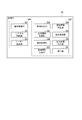
- FIG. 2 is a block diagram showing the configuration of the information processing apparatus in the first embodiment.
- FIG. 2 is a block diagram showing a configuration of a control unit in the first embodiment.
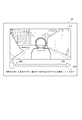
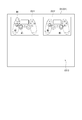
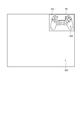
- FIG. 6 is a view showing an example of an adjustment screen at the time of mouse connection in the first embodiment.
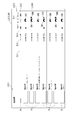
- FIG. 8 is a view showing an example of increase and decrease of an acceleration value input at the time of moving operation of the mouse in the first embodiment.
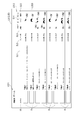
- FIG. 8 is a view showing an example of the relationship between a reference amount required to make one rotation of the viewpoint of the player character at the time of the movement operation of the mouse in the first embodiment, and the acquired input amount.
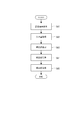
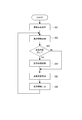
- FIG. 7 is a flowchart showing correction value calculation processing in the first embodiment.
- 7 is a flowchart showing an operation correction process in the first embodiment.
- the block diagram showing the composition of the control part of the information processor which the information processing system which is a modification of the information processing system in a 1st embodiment has.
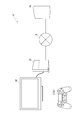
- the schematic diagram which shows the structure of the information processing system in 2nd Embodiment.
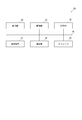
- FIG. 2 is a block diagram showing the configuration of an information processing apparatus in the embodiment.
- the block diagram which shows the structure of the control part in the said embodiment.
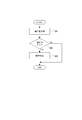
- FIG. 7 is a flowchart showing conversion information generation processing in the embodiment.
- the flowchart which shows the operation conversion process in the said embodiment.
- the block diagram which shows the structure of the server in the said embodiment.
- FIG. 8 is a block diagram showing a modification of the control unit of the information processing device in the embodiment.
- the schematic diagram which shows the structure of the information processing system in 3rd Embodiment.
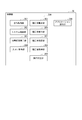
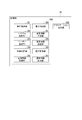
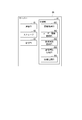
- the figure which shows an example of the list screen by which the menu in the said embodiment was displayed.
- the figure which shows an example of the list screen by which the several icon in the said embodiment was set.
- the figure which shows the other example of the list screen in the said embodiment The figure which shows the other example of the list screen in the said embodiment.
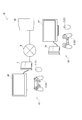
- FIG. 1 is a schematic view showing a configuration of an information processing system 1 according to the present embodiment.
- the information processing system 1 according to the present embodiment includes, as shown in FIG. 1, an operation device 2, an information processing device 3 that executes a predetermined process according to an operation signal received from the operation device 2, and the information And a display device DP for displaying an image received from the processing device 3.
- the information processing device 3 executes a predetermined application (for example, a game application) in accordance with an operation signal received from the controller device 2.
- a predetermined application for example, a game application
- the information processing device 3 corrects the input value of the operating device 2 using the correction value calculated according to the user's input operation to the operating device 2, and the sensitivity of the mouse 21 and the controller 22, that is, the operation The amount of processing of a predetermined process performed in response to an input operation of the apparatus is adjusted. Furthermore, by registering and acquiring the calculated correction value, the information processing device 3 is configured to be able to adjust to the same sensitivity even when the above-mentioned predetermined application is executed by another information processing device 3.
- each configuration of the information processing system 1 will be described.
- the controller device 2 includes the mouse 21 and the controller 22.
- the mouse 21 and the controller 22 transmit an operation signal according to the user's operation to the information processing device 3 by wire or wirelessly.
- the mouse 21 is a pointing device generally used as a computer operation device.
- the mouse 21 has a plurality of buttons (for example, left and right buttons), and transmits an operation signal indicating the type of the input button.
- the mouse 21 has a sensor (not shown) for detecting the acceleration, detects the acceleration value associated with the moving operation of the mouse 21 at a predetermined sampling rate, and detects the detected acceleration value and the acting direction of the acceleration value. Is transmitted as an input value to the mouse 21.
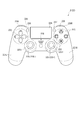
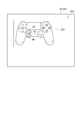
- FIG. 2 is a front view showing the controller 22.
- the controller 22 is a control pad configured in an inverted U shape as viewed from the front side as shown in FIG. 2 and is a type of pointing device.
- the controller 22 has grips 221L and 221R at the left end and the right end respectively gripped by the left and right hands of the player.
- Such a controller 22 has a plurality of operation targets that can be input. Specifically, on the left side of the front portion 22A of the controller 22, a direction key 222 which can be input vertically and horizontally is disposed, and four buttons 223 are disposed on the right side.
- a two-point detection touch pad 224 and left and right sticks 225 are sandwiched between the arrangement area of the direction key 222 and the arrangement area of the button 223. And are arranged.
- These sticks 225 have an orthogonal two-axis joystick structure similar to that of the above-mentioned analog sticks, and have an operation body 2251 which can be tilted with respect to the front part 22A.
- Buttons 226 and 227 are disposed on the left and right of the touch pad 224, and a speaker 228 is disposed on the lower side.
- two buttons 229L are disposed in the depth direction, and two buttons 229R (the back The operation buttons on the side are not shown).
- the controller 22 outputs a voice corresponding to the voice information received from the information processing device 3 through the speaker 28. Further, the controller 22 transmits operation information indicating the type of the input key and button in response to the input of the direction key 222 and the various buttons 223, 226, 227, 229L, 229R. Further, the controller 22 detects the operation position of the player on the touch pad 224 at a predetermined sampling rate, and transmits operation information including coordinates corresponding to the detected operation position.
- FIG. 3 is a view showing coordinates at which the tilting position of the operating body 251 is shown. Furthermore, the controller 22 detects the tilt position of the operation body 2251 of the stick 225 at a predetermined sampling rate, and transmits the coordinate according to the tilt position. Specifically, as shown in FIG. 3, the controller 22 is a two-dimensional coordinate value indicating the planar position of the operating body 2251 after tilting from the reference position (center position) when the operating body 2251 is not tilted. (X coordinate value and y coordinate value) are detected, and the detected coordinate value is transmitted as an input value. The x coordinate value and the y coordinate value in this two-dimensional coordinate are each represented by a value of 0 or more and 255 or less.
- the origin (0, 0) is set at the upper left end in the two-dimensional coordinates, and the coordinate value of the reference position is (128, 128).
- the coordinate value obtained when the operating body 2251 is turned to the rightmost is (255, 128)
- the coordinate value obtained when the operating body 2251 is turned to the uppermost side is (128, 0) .
- the present invention is not limited to this.
- the upper left end point in FIG. 3 as the origin (0, 0)
- the upper left end point is represented by (+128, +128)
- the lower right end point is represented by ( ⁇ 127, ⁇ 127).
- the x coordinate and the y coordinate are indicated by values of -127 or more and 128 or less.
- the range of the x coordinate value and the y coordinate value may be 0 or more and 127 or less, or may be ⁇ 63 or more and +64 or less.
- the above-mentioned coordinate value is included as an input value, in addition to the type information indicating the type of and the identification information indicating the type of the controller 22.
- FIG. 4 is a block diagram showing the configuration of the information processing device 3.
- the information processing device 3 executes an OS and an application, and can be configured by, for example, a PC (Personal Computer) or a game device.
- a PC Personal Computer
- FIG. 4 such an information processing apparatus 3 includes a transmitting / receiving unit 31, a communication unit 32, a storage 33, a storage unit 34, a drawing unit 35, and a control unit 36, which are mutually connected by a bus line BL. It is done.
- the transmission / reception unit 31 is an interface connected to the display device DP and the controller device 2.
- the transmission / reception unit 31 transmits the image drawn by the drawing unit 35 described later to the display device DP. Further, the transmission / reception unit 31 communicates with the operation device 2, and the operation information includes identification information indicating the type of the mouse 21, the controller 22, etc., type information indicating the type of the operation target, and the input value.
- the controller 22 corresponding to the audio signal is Send to
- the communication unit 32 communicates with the server 4 (see FIG. 1) on the network N under the control of the control unit 36. Then, the communication unit 32 downloads various programs (for example, an update program and a game program) and various data from the server 4 and causes the storage 33 to hold them.
- the data transmitted and received by the communication unit 32 includes content data such as moving images, sounds, and applications.
- the communication unit 32 uploads the data held in the storage 33 to the server 4.
- Such data include, in the present embodiment, correction information used for adjustment processing described later. Then, such correction information is associated with the account of the player who is the user of the information processing apparatus 3 and stored in the server 4 in a predetermined file format.
- the communication unit 32 can also transmit an image (for example, a game execution screen) drawn by the drawing unit 35 to be described later to the server 4.
- the storage 33 holds programs and data such as an operating system (OS) that controls the operation of the information processing device 3 and a game application.
- OS operating system
- a reader capable of reading at least data from a disk type recording medium or a memory card, and a storage device such as an HDD (Hard Disk Drive) and an SSD (Solid State Drive) can be exemplified.
- HDD Hard Disk Drive
- SSD Solid State Drive
- the storage unit 34 includes a RAM (Random Access Memory), a VRAM (Video RAM), and the like, and provides a work area for the drawing unit 35 and the control unit 36.
- RAM Random Access Memory
- VRAM Video RAM
- the storage unit 34 at least a part of the program and data held in the storage 33 is expanded. For example, when the information processing device 3 is activated, a part of the program of the OS is expanded in the storage unit 34, and at the time of executing the game application, at least a part of the program of the game application is expanded.
- the drawing unit 35 includes a GPU (Graphics Processing Unit) and the like, and draws an image to be displayed on the display device DP in the storage unit 34 under the control of the control unit 36.
- the drawing unit 35 draws an operation screen of the information processing device 3 such as an execution screen of an OS and an application.
- the drawing unit 35 draws an image at a preset frame rate, for example, a frame rate set by the OS or the game application.
- the drawing unit 35 When drawing the execution time screen of the application, the drawing unit 35 draws the execution time screen based on drawing information generated by the application execution unit 36B described later. For example, the drawing unit 35 draws an image within the field of view of the player character disposed in a virtual three-dimensional space (hereinafter referred to as a virtual space) based on the drawing information. Furthermore, the drawing unit 35 decodes the content including the image data (still image or moving image) acquired from the network N via the communication unit 32, and draws an image according to the decoded content.
- a virtual space virtual three-dimensional space
- FIG. 5 is a block diagram showing the configuration of the control unit 36.
- the control unit 36 includes a CPU (Central Processing Unit) and the like, and controls the operation of the information processing device 3.
- the control unit 36 includes an OS execution unit 36A that executes an OS and an application execution unit 36B that executes an application.
- the application execution unit 36B corresponds to a processing unit in the present embodiment, and executes an application or the like specified by the system control unit 362.
- the application execution unit 36B manages the progress of the game based on the game application, constructs a virtual space of the game, sets and moves the viewpoint (virtual camera) in the virtual space, It performs rotation, and generation and output of drawing information that causes the drawing unit 35 to draw a game screen.
- an application of an FPS (First Person Shooter) game in which a viewpoint in a virtual space is rotated according to a moving operation of the mouse 21 and a tilting operation of the stick 225 Can be illustrated.
- Such an application execution unit 36B is operated by an operation correction unit 369 described later based on an input value input according to the moving operation of the mouse 21 and an input value input according to the tilting operation of the stick 225.
- the calculated rotation angle and rotation direction of the viewpoint are input from the OS execution unit 36A.
- the application execution unit 36B outputs drawing information including the rotation angle and the rotation direction of the viewpoints to the drawing unit 35 according to the request signal input from the drawing unit 35 according to the frame rate.
- the drawing unit 35 draws the game screen obtained by rotating the viewpoint immediately before in the virtual space in the rotation direction included in the drawing information by the rotation angle included in the drawing information.
- the game screen is displayed on the display device DP.
- the OS execution unit 36A includes an operation acquisition unit 361 and a system control unit 362.
- the operation acquisition unit 361 acquires an operation signal and an input value received by the transmission and reception unit 31.
- an operation signal is a signal including the type of the input button in addition to the information indicating the type of the mouse 21 and the controller 22.
- the input value includes the acceleration value according to the moving operation of the mouse 21 and the acting direction of the acceleration value, or the coordinate value according to the tilting operation of the stick 225 (that is, the tilting operation of the operation body 2251).
- Such an input value is the sampling rate of the mouse 21 that detects the acceleration value or the transmission rate of information by the mouse 21, and the sampling rate of the stick 225 that detects the tilting of the operating body 2251 or the transmission rate of information by the controller 22 Are received and obtained according to the
- the system control unit 362 autonomously controls the information processing device 3 based on the OS. In addition, the system control unit 362 executes a process according to the information (the operation signal and the input value) acquired by the operation acquisition unit 361. For example, when the operation acquisition unit 361 acquires an operation signal indicating that the application held in the storage 33 is to be executed, the system control unit 362 causes the application execution unit 36B to execute the corresponding application. When the system control unit 362 outputs a sound from the controller 22 in accordance with the execution of the OS and the application, the system control unit 362 outputs a sound signal to the corresponding controller 22 via the transmission / reception unit 31.
- the OS execution unit 36A also performs adjustment processing (correction value calculation processing and operation correction processing) for adjusting the processing amount of processing to be performed according to the input operation of the controller device 2.
- This adjustment process is a process of adjusting the processing amount according to the input value of the operating device 2 by the player (user) in accordance with the preference of the player.
- the adjustment process is a process of adjusting the rotation angle of the viewpoint according to the input operation on the operation device 2 by the player (user) in accordance with the preference of the player.
- an adjustment program for executing the adjustment processing is incorporated in the OS as a driver for operating the controller device 2.
- the OS execution unit 36A executes the adjustment program, and the adjustment screen display unit 363, the input amount acquisition unit 364, the correction value calculation unit 365, the correction value storage unit 366, and the correction value transmission unit 367 are realized.
- a correction value acquisition unit 368 and an operation correction unit 369 are provided as functional units.
- FIG. 6 is a view showing an example of the adjustment screen displayed when the mouse 21 is connected.
- the adjustment screen display unit 363 causes the drawing unit 35 to draw the adjustment screen displayed on the display device DP when the correction value calculation process is performed.
- the adjustment screen differs between when the mouse 21 is connected to the information processing device 3 and when the controller 22 is connected.
- the adjustment screen display unit 363 draws, for example, the adjustment screen AP shown in FIG.
- an image setting area AP1 in which an example (still image) of a play screen of a game being executed is set, a symbol AP2 indicating a mouse 21 to be operated, and a direction for moving the mouse 21
- the arrow AP3 which shows and the description AP4 of the said adjustment screen AP are contained.
- the adjustment screen display portion 363 when the controller 22 is connected, although the illustration is omitted, in the adjustment screen display portion 363, the above-mentioned symbol AP2 in the above-mentioned adjustment screen AP is replaced with a symbol indicating the controller 22, However, the adjustment screen is drawn and displayed with an explanatory note that "Please tilt the stick in the direction of the arrow by the amount that the field of vision goes around.”
- the adjustment screen to be drawn and displayed is not limited to the format of the adjustment screen.
- a moving image in which the player's viewpoint in the virtual space (viewpoint of the image rendered in the virtual space and set on the play screen) makes a round is set in the image setting area AP1, and The user may draw and display an adjustment screen including an explanatory note that “move the mouse to make the field of vision go around”.
- the symbol AP2 in the adjustment screen is replaced with a symbol indicating the controller 22.
- the moving direction of the mouse 21 moved by the player may be indicated by an arrow or the like, and the detected moving amount of the mouse 21 may be displayed.
- the controller 22 is connected.
- the input amounts of the mouse 21 and the stick 225 acquired at the time of displaying the adjustment screen do not coincide with the speed at which the player character rotates the visual field in the moving image set in the image setting area AP1.
- the input amount acquisition unit 364 acquires the input amount of the controller device 2 acquired by the operation acquisition unit 361 when the adjustment screen is displayed. Specifically, when the mouse 21 is connected, the input amount acquisition unit 364 performs a process (a process of rotating the viewpoint by a predetermined angle of 360 °) of rotating the viewpoint once when the adjustment screen is displayed. As the input amount to be executed, the integrated value of the input value in the period in which the moving operation of the mouse 21 is performed and the input value is acquired, that is, the integral value of the velocity based on the acceleration in the period is acquired. When the mouse 21 is connected, the input amount corresponds to the integral value of the rotation angle of the viewpoint rotated according to the input value, that is, the processing amount for rotating the viewpoint according to the input operation.
- FIG. 7 is a diagram showing an example of increase and decrease of an acceleration value input at the time of moving operation of the mouse 21.
- the acceleration value in the moving direction of the mouse 21 becomes constant after rapidly increasing and decreasing.
- the acceleration value in the direction opposite to the moving direction of the mouse 21 rapidly increases and decreases and then becomes constant.
- FIG. 8 is a diagram showing an example of the input amount of the mouse 21.
- the input amount acquisition unit 364 acquires the integral value of the velocity during a period in which the acceleration value is constant at the time of the movement operation of the mouse 21 as an input amount for causing the viewpoint to go around using the mouse 21.
- the input amount acquisition unit 364 acquires the integral value of the speed in the period T in FIG. 8 as the input amount.
- the input amount acquisition unit 364 acquires, as the input amount, the integral value of the speed during a period in which the acceleration value is constant in the movement operation of the mouse 21. That is, the input amount does not include the speed at which the acceleration value suddenly changes.
- the input amount acquisition unit 364 determines the period during which the operation body of the stick 225 operated by the player is tilted (operation period) and the period An input amount for causing the viewpoint to go around is acquired based on the rotation angle of the viewpoint according to the coordinate value acquired. Specifically, the input amount acquisition unit 364 sets a rotation amount which is an angle obtained by integrating the rotation angle of the viewpoint based on the coordinate value acquired and the operation period of the stick 225 when the adjustment screen is displayed. The rotation amount is calculated and acquired as the input amount of the stick 225. This input amount corresponds to the player's favorite input amount when the viewpoint is made to go around.
- the input amount acquisition unit 364 acquires the rotation amount of the viewpoint, which is rotated by the player actually operating the stick 225 when the adjustment screen is displayed, as the input amount for rotating the viewpoint around. Even when the controller 22 is connected, the input amount acquisition unit 364 operates on the input values at the initial movement and at the final movement of the tilting operation of the stick 225 (the operating unit 2251 operates with the tilting of the operating unit 2251 The input value when the acceleration value changes rapidly is ignored.
- the correction value calculation unit 365 corrects the rotation angle of the viewpoint, which is the processing amount according to the moving operation of the mouse 21 and the tilting operation of the stick 225 based on the input amount acquired by the input amount acquiring unit 364 Calculate the correction value.
- the correction value calculation unit 365 is a reference amount set in advance for the game being executed, and is set in advance as an input amount required to rotate the viewpoint by moving the mouse 21.
- a result obtained by dividing the reference amount by the input amount acquired by the input amount acquisition unit 364 is acquired as a correction value.
- the correction value calculation unit 365 is calculated from the input value (coordinate value) according to the tilting operation of the stick 225 based on the rotation amount which is the input amount acquired by the input amount acquisition unit 364 A correction value for correcting the rotation angle of the viewpoint is calculated.
- the correction value calculation unit 365 calculates 360 ° (a reference amount that is a rotation amount for one rotation of the viewpoint of the player character) from the acquired rotation amount (the input amount acquired at the time of displaying the adjustment screen) The result of division by the rotation amount which is an angle is acquired as a correction value.
- the calculation process of the said correction value is performed for every selectable Fov value.
- the player may execute the moving operation of the mouse 21 and the tilting operation of the stick 225 a plurality of times, and the correction value calculation unit 365 may calculate the correction value based on the average value of the input amount. Alternatively, the average value of the correction values may be calculated as the correction value. Furthermore, the correction value calculation unit 365 may calculate the correction value by another method without being limited to these methods.
- the correction value storage unit 366 causes the storage 33 to hold correction information including the correction value calculated by the correction value calculation unit 365. Specifically, the correction value storage unit 366 sets the calculated correction value, the identification information of the game application being executed, the above-mentioned Fov value if selectable, and the correction information in which the player's account is associated to a predetermined file. Hold in the form.
- the correction value transmission unit 367 uploads the correction information to the server 4 on the network N via the communication unit 32, and causes the server 4 to store the correction information.
- the server 4 holds the correction value for each game application and each Fov value in association with the player's account.
- the correction value acquisition unit 368 and the operation correction unit 369 function at the time of execution of the operation correction process in the adjustment process.
- the operation correction process is a process of correcting the rotation angle of the viewpoint according to the input value acquired from the controller device 2 to the rotation angle preferred by the user based on the correction value.
- the correction value acquisition unit 368 acquires, from the correction information held in the storage 33, a correction value corresponding to the account of the current player, the application currently being executed, and the Fov value.
- the correction value acquisition unit 368 communicates with the server 4 as an external device through the communication unit 32, and the corresponding correction value from the server 4 To get When the corresponding correction value is not held in either the storage 33 or the server 4, the correction value acquisition unit 368 notifies the operation correction unit 369 that the correction value could not be acquired.
- the operation correction unit 369 corrects the rotation angle of the viewpoint according to the input value based on the correction value, and the sensitivity of the operation device 2 (response Correction).
- FIG. 9 is a diagram showing an example of the relationship between the reference amount required to make the viewpoint go around at the time of moving operation of the mouse 21 and the input amount acquired by the input amount acquiring unit 364.
- the player's favorite input amount an input amount acquired by the input amount acquiring unit 364 for rotating the viewpoint one round is the reference amount indicated by an alternate long and short dash line in FIG. It may be smaller. In this case, the viewpoint does not go around with the input amount.
- the viewpoint rotates more than one round.
- the rotation of the viewpoint is small or large, which makes it difficult to point the viewpoint in the desired direction, and the player plays the game while feeling stressed. It will be done.
- FIG. 10 is a diagram showing an example of the relationship between the reference amount, the input amount acquired by the input amount acquisition unit 364 and the input amount after correction by the operation correction unit 369.
- the operation correction unit 369 can make the input amount after correction and the reference amount coincide by correcting the input value using the correction value. For example, by correcting the input amount shown by the solid line in FIGS. 9 and 10, it is possible to make the input amount (integral value) and the reference amount (integral value) after the correction shown by the dotted line in FIG. As a result, the player can move the mouse 21 by the amount of input desired by the player, thereby making it possible to go around the viewpoint.
- the operation correction unit 369 corrects the input value using the correction value each time the operation acquisition unit 361 acquires an input value corresponding to the movement operation of the mouse 21. Then, the operation correction unit 369 calculates the rotation angle and the rotation direction of the viewpoint from the corrected input value. Then, the application execution unit 36B receives the rotation angle and the rotation direction from the OS execution unit 36A, and outputs the drawing information including the rotation angle and the rotation direction to the drawing unit 35, whereby the viewpoint is in the rotation direction. An image rotated by the rotation angle is drawn and displayed on the display device DP. Note that, as described above, the operation correction unit 369 ignores the rapid change in the acceleration value in the acquired input value, and performs the above correction on the integral value of the velocity when the acceleration value is considered constant. So, the sudden rotation of the viewpoint is suppressed.
- FIG. 11 is a view showing an example of a rotation angle based on the input amount acquired by the input amount acquisition unit 364 when the player operates the stick 225 at the time of display of the adjustment screen in order to make the viewpoint of the player character go around.
- an input amount acquired when the player operates the stick 225 as an operation for rotating the viewpoint in the virtual space that is, a rotation amount corresponding to the player's favorite input amount is a solid line in FIG.
- the reference amount may be smaller than 360 °. In this case, the viewpoint does not go around with the input amount.
- the viewpoint rotates more than one round.
- the rotation amount which is a rotation angle corresponding to the input amount
- 360 ° which is a reference amount
- the operation correction unit 369 first calculates the rotation angle and the rotation direction of the viewpoint from the acquired input value. Then, the operation correction unit 369 corrects the calculated rotation angle using the correction value. As a result, as shown by dotted arrows in FIG. 11, the corrected amount of rotation can be made to coincide with the reference amount of 360 °. Therefore, the player can match the rotation amount of the viewpoint with the reference amount of 360 ° by the input amount of his / her preference to the stick 225, thereby making it possible to go around the viewpoint.
- FIG. 12 is a diagram showing an example of the relationship between the rotation angle corresponding to the input value obtained in accordance with the operation on the stick 225 and the rotation angle after correction.
- the operation correction unit 369 calculates the rotation angle and the rotation direction from the input value each time the operation acquisition unit 361 acquires an input value according to the tilting operation of the stick 225, and uses the above correction value. And correct the rotation angle. For this reason, as shown by a solid arrow in FIG. 12, the rotation angle corresponding to the input value is corrected to the rotation angle shown by a dotted arrow in FIG. Then, the application execution unit 36B outputs the drawing information including the rotation angle and the rotation direction to the drawing unit 35, so that the image in which the viewpoint is rotated in the rotation direction is drawn, and the display device is displayed. Displayed on DP.
- Such an operation correction unit 369 does not correct the input value and the rotation angle corresponding to the input value when the correction value acquisition unit 368 can not obtain the correction value. Therefore, the operation correction unit 369 calculates the rotation angle and the rotation direction from the acquired input value, and the application execution unit 36B outputs the drawing information including the rotation angle and the rotation direction to the drawing unit 35.
- the application execution unit 36B outputs the drawing information in accordance with the request signal input according to the frame rate of the drawing unit 35. Therefore, there are cases where the frequency of acquisition and correction processing of input values is higher than the output frequency of drawing information by the application execution unit 36B. That is, there are cases where the input value acquisition and correction processing is performed multiple times between the time when the request signal is input to the application execution unit 36B and the time when a new request signal is input. In this case, the application execution unit 36B processes each of the input values acquired between the time when the request signal is input and the time when the new request signal is input, and the rotation angle and rotation obtained by adding up the processing results Output drawing information including the direction. As a result, even when the frequency of receiving and acquiring the operation signal is higher than the frame rate of the drawing unit 35 or the frame rate is variable, it is possible to realize rotation of the viewpoint according to the operation of the mouse 21 and the stick 225.
- FIG. 13 is a flowchart showing the correction value calculation process included in the adjustment process.
- the control unit 36 performs the adjustment process including the correction value calculation process and the operation correction process.
- the correction value calculation process is performed, for example, in the following procedure.
- the adjustment screen display unit 363 causes the adjustment screen to be displayed (step SA1).
- the input amount acquisition unit 364 acquires the input amount of the controller device 2 (mouse 21 or controller 22) when the adjustment screen is displayed (step SA2).
- the correction value calculation unit 365 calculates the correction value based on the acquired input amount or the rotation amount which is a rotation angle corresponding to the input amount and the reference amount (step SA3).
- the correction value storage unit 366 stores the calculated correction value (step SA4), and the correction value transmission unit 367 transmits the correction value to the server 4 for storage (step SA5).
- the correction value calculation process ends.
- FIG. 14 is a flowchart showing an operation correction process included in the adjustment process.
- the correction value acquisition unit 368 acquires the corresponding correction value from the storage 33 or the server 4 (step SB1).
- the operation correction unit 369 determines whether a correction value has been acquired based on the acquisition result by the correction value acquisition unit 368 (step SB2).
- the operation correction unit 369 calculates the rotation angle and the rotation direction from the input values acquired by the operation acquisition unit 361 without executing the correction processing, and outputs these to the application execution unit 36B.
- the application execution unit 36B generates drawing information including the rotation angle and the rotation direction, and the drawing information is output to the drawing unit 35 in accordance with the request signal.
- the operation correction unit 369 processes the input value acquired by the operation acquisition unit 361 as described above to correct the rotation angle of the viewpoint (step SB3 ). That is, the operation correction unit 369 corrects the input value acquired according to the movement operation of the mouse 21 based on the correction value, and the rotation angle according to the input value acquired according to the tilting operation of the stick 225 , Based on the above correction value. Thus, the operation correction process ends.
- the generation of drawing information by the application execution unit 36B is the same as that described above.
- the operation correction unit 369 responds to the input operation on the controller device 2
- the viewpoint can be rotated by the user's desired rotation angle. Therefore, the rotation angle of the viewpoint according to the input operation to the operation device 2 can be corrected to the rotation angle desired by the user.
- the correction value calculation unit 365 has an input amount or a rotation amount according to an input operation actually performed by the player to make the viewpoint go around, and a reference amount set in advance as an input amount or rotation amount to go around the viewpoint.
- the correction value is calculated based on According to this, since the correction value is calculated based on the actual player's input operation, the rotation angle according to the input value acquired according to the input operation can be reliably corrected to the rotation angle preferred by the user. . Therefore, the input operation for rotating the viewpoint can be facilitated.
- the acceleration value detected by the mouse 21 at the time of input operation is largely different for each user who operates the mouse 21. Therefore, even if it is intended to correct the rotation angle according to the integral value of the velocity calculated based on the acceleration value using the correction value set in advance, the rotation angle according to the user's preference may be corrected. difficult. On the other hand, since the correction value is calculated according to the user's actual input operation, even in the case of the operating device which detects the acceleration value, the rotation angle according to the user's favorite input value is assured for each user Can be corrected.
- the correction value calculation unit 365 acquires, as an input amount, a rotation amount which is an integral value of a rotation angle corresponding to a coordinate value by a tilt operation of the stick 225 performed as an operation for rotating the viewpoint one round.
- the correction value is calculated based on the amount of 360 °.
- the operation correction unit 369 corrects the rotation angle corresponding to the coordinate value acquired from the controller 22 based on the correction value. According to this, since the rotation angle corresponding to the coordinate value is corrected, it is possible to surely correct the rotation angle according to the user's favorite input value.
- the correction value acquisition unit 368 acquires the correction value from the server 4 as an external device. Then, the operation correction unit 369 executes the above-described correction processing based on the acquired correction value. According to this, when a new information processing apparatus 3 or another information processing apparatus 3 is used, or when the correction value stored in the information processing apparatus 3 is deleted (re-installing the OS on the information processing apparatus) It is possible to execute the operation correction process using the acquired correction value without repeatedly executing the calculation process of the correction value again, etc.).
- the operability of the controller device 2 can be easily shared between the applications that the application execution unit 36B executes.
- the development process of the application can be simplified.
- the OS execution unit 36A has the above-described function units 363 to 369, and the adjustment processing (correction value calculation processing and operation correction processing) is processed by the OS execution unit 36A and is a processing result
- the rotation angle and the rotation direction are output to the application execution unit 36B.
- the present invention is not limited to this, and the application execution unit 36B may have these functional units 363 to 369.
- FIG. 15 is a block diagram showing a configuration of a control unit 37 of an information processing apparatus included in an information processing system which is a modification of the information processing system 1 described above.
- An information processing system which is a modification of the information processing system 1 has the same configuration as the information processing system 1 except that the information processing system 3 has a control unit 37 in place of the control unit 36.
- the control unit 37 includes an OS execution unit 36A and an application execution unit 36B, and has the same function as the control unit 36.
- the OS execution unit 36A of the control unit 37 includes the operation acquisition unit 361 and the system control unit 362, and the application execution unit 36B includes an adjustment screen display unit 363 and an input amount acquisition unit.
- the 364 includes a correction value calculation unit 365, a correction value storage unit 366, a correction value transmission unit 367, a correction value acquisition unit 368, and an operation correction unit 369, and further includes a processing unit 370 that performs the same processing as the application execution unit 36B. . That is, in the present embodiment, the adjustment processing is performed by the application execution unit 36B that executes an application. According to the information processing system according to the embodiment described above, the same effects as those of the information processing system 1 can be obtained, and the following effects can be obtained.
- the application execution unit 36B that executes the application executes the processing of the configuration of the virtual space, the rotation of the viewpoint in the virtual space, and the like.
- the OS execution unit 36A (for example, the system control unit 362) may execute rotation of the viewpoint of the player character based on the configuration of the virtual space and the processing result of the operation correction unit 369.
- the application execution unit 36B may be configured to execute the application by acquiring the processing result of the OS execution unit 36A (for example, the coordinates in the virtual space indicating the viewpoint of the player character after rotation).
- the information processing device 3 corrects the input value from the controller device 2 based on the correction value.
- the information processing apparatus converts the operation information corresponding to the operation on the operating device into operation information corresponding to another operation.
- the information processing system according to the present embodiment is different from the information processing system 1.
- FIG. 16 is a schematic view showing a configuration of the information processing system 1A according to the present embodiment.
- the information processing system 1A according to the present embodiment is communicably connected to the information processing device 3A via the network N with the controller device 2 (controller 22), the information processing device 3A and the display device DP, as shown in FIG. And a server 4A.
- the information processing device 3A executes a predetermined application (for example, a game application) in accordance with the operation information received from the controller device 2.
- a predetermined application for example, a game application
- the information processing device 3A uses the operation information as the other input operation set in advance. It converts into corresponding operation information and executes processing according to the converted operation information.
- a predetermined application for example, a game application
- FIG. 17 is a block diagram showing the configuration of the information processing device 3A.
- the information processing device 3A executes an OS and an application as in the case of the information processing device 3, and executes processing according to operation information received from the operation device 2.
- a PC Personal Computer
- Such an information processing apparatus 3A includes a transmission / reception unit 31, a communication unit 32, a storage 33, a storage unit 34, a drawing unit 35, and a control unit 38, which are mutually connected by a bus line BL. It is done.
- FIG. 18 is a block diagram showing the configuration of the control unit 38.
- the control unit 38 includes a CPU (Central Processing Unit) and the like, and controls the operation of the information processing device 3A.
- the control unit 38 includes an OS execution unit 38A (corresponding to a main control unit) that executes an OS as a control program, and an application execution unit 38B (corresponding to an execution unit) that executes an application.
- the OS execution unit 38A includes, as functional units, an operation acquisition unit 381, a system control unit 382, and a user registration unit 383 which are realized by the CPU executing the OS.
- the operation acquisition unit 381 acquires the operation information received by the transmission / reception unit 31. Such operation information is received from the controller 22 in response to the input (depression) of the direction key 222 and the buttons 223, 226, 227, 229L and 229R, and in response to the operation of the touch pad 224 and the stick 225. And acquired.
- the system control unit 382 autonomously controls the information processing device 3 based on the OS, and executes processing according to the acquired operation information. For example, when the operation information for executing the application held in the storage 33 is acquired, the system control unit 382 causes the application execution unit 38B to execute the corresponding application. Further, the system control unit 382 outputs voice information to the corresponding operation device 2 via the transmission / reception unit 31 when the voice is output from the operation device 2 (controller 22) in accordance with the execution of the OS and the application. .
- the user registration unit 383 causes the storage 33 to hold user information that is information about a user, and thereby registers the user information.
- the user registration unit 383 transmits user information to the server 4A connected via the communication unit 32, and registers the user information in the server 4A.
- Such user information includes, in addition to the account of the user, information indicating the type of the operating device possessed by the user and the type of the operating device 2 currently connected to the information processing device 3A.
- the OS execution unit 38A When causing the application execution unit 38B to execute a predetermined application, the OS execution unit 38A causes the predetermined input operation performed on the operation device 2 to be recognized and processed as another input operation.
- the operation conversion process is performed to convert the operation information received from 2 and output the converted information to the application execution unit 38B. Therefore, the OS execution unit 38A is an acquisition determination unit 384 realized by the CPU executing the operation conversion program included in the OS, a conversion information acquisition unit 385, a display control unit 386, a conversion information generation unit 387, conversion An information transmission unit 388, an operation conversion unit 389, and an operation information output unit 390 are included as functional units.
- the operation conversion process is not performed when the user performs a setting operation that does not execute the operation conversion process, or when the application executed by the application execution unit 38B does not correspond to the operation conversion process.
- the acquisition determination unit 384 determines whether conversion information used for the operation conversion process by the operation conversion unit 389 described later is held in the storage 33. When the acquisition determination unit 384 determines that the conversion information is not held in the storage 33, the acquisition determination unit 384 communicates with the server 4A through the communication unit 32, and uses the information processing device 3A for the server 4A. It is determined whether conversion information corresponding to the account of the current user is held. Further, the acquisition determination unit 384 determines whether the acquired conversion information includes conversion information corresponding to identification information of the application being executed. That is, conversion information is created and held for each user account and each application.
- the conversion information acquisition unit 385 is determined by the acquisition determination unit 384 that the conversion information corresponding to the application executed by the application execution unit 38B is not held in the storage 33, and corresponds to the account of the user. When it is determined that the conversion information corresponding to the application is held in the server 4A, the corresponding conversion information is acquired and held in the storage 33.
- FIG. 19 is a view showing an example of the pre-conversion operation registration screen RS1.
- the display control unit 386 causes the drawing unit 35 to draw images of various screens to be displayed on the display device DP.
- the display control unit 386 causes the drawing unit 35 to draw the pre-conversion operation registration screen RS1 shown in FIG. 6, for example, when executing the conversion information generation process of generating the conversion information.
- the display control unit 386 causes the drawing unit 35 to draw conversion screens CS1 and CS2 (see FIGS. 21 and 22) described later.
- the conversion screens CS1 and CS2 will be described in detail later.
- the pre-conversion operation registration screen RS1 is a screen for registering the input operation (pre-conversion operation) of the controller device 2 to be converted, and is displayed overlapping the execution screen of the OS and the application.
- a display area RS11 in which a symbol imitating the controller device 2 is set and an explanatory note RS12 of the screen RS1 are set.
- Other than the display area RS11 and the explanatory sentence RS12 Is a transmission region RS13. That is, the transmission area R13 is an execution screen display area in which the execution screen is displayed, and the screen RS1 is displayed to allow observation of the execution screen via the transmission area RS13.
- FIG. 20 is a diagram showing an example of the converted operation registration screen RS2.
- the display control unit 386 causes the drawing unit 35 to draw a post-conversion operation registration screen RS2 shown in FIG.
- the post-conversion operation registration screen RS2 is a screen for registering an input operation (a post-conversion operation) to which the pre-conversion operation is converted, and is displayed so as to overlap the execution screen as the screen RS1.
- a display area RS21 in which the shape of the controller device 2 is set and an explanatory note RS22 of the screen RS2 are set in the converted operation registration screen RS2.
- An area other than the sentence RS22 is a transmission area RS23 similar to the transmission area RS13.
- markers indicating the operation targets of the pre-conversion operation and the post-conversion operation performed on the controller device 2 are attached to the display regions RS11 and RS21 in the respective screens RS1 and RS2.
- a circle marker is added at a position corresponding to the button 229L and the stick 225L in the display area RS11.
- a circle marker is provided at a position corresponding to the stick 225R in the display area RS21.
- the marker indicating the operation target of the pre-conversion operation and the post-conversion operation is not limited to such a marker, but may be another marker.
- the operation target may be displayed in a color different from that of the other part.
- the display control unit 386 sets an image corresponding to the input operation (that is, the pre-conversion operation and the post-conversion operation) actually performed on the controller 22 when displaying the screens RS1 and RS2 to the display areas RS11 and RS21. It may be displayed.
- the display control unit 386 causes the button 229L in the controller 22 drawn in the display area RS11 to be input, and the stick 225L is tilted.
- the displayed image may be displayed.
- the conversion information generation unit 387 and the conversion information transmission unit 388 function at the time of execution of conversion information generation processing for generating the conversion information.
- the conversion information generation unit 387 generates conversion information. Specifically, the conversion information generation unit 387 acquires the operation information acquired by the operation acquisition unit 381 when the screen RS1 is displayed as pre-conversion operation information according to the pre-conversion operation. Further, the conversion information generation unit 387 acquires the operation information acquired by the operation acquisition unit 381 at the time of displaying the screen RS2 as operation information according to the converted operation. Then, the conversion information generation unit 387 generates conversion information for converting the pre-conversion operation information into the post-conversion operation information.
- the conversion information generation unit 387 causes the storage 33 to store the conversion information in association with the user's account and the identification information of the application that performs input conversion based on the conversion information. Register That is, the conversion information is generated for each account of the user and identification information of the application to which the conversion process is performed.
- the conversion information generation process including the display of the screens RS1 and RS may be executed a plurality of times, and may be associated with the identification information of the application to generate a plurality of conversion information including the pre-conversion operation and the post-conversion operation. .
- the conversion information transmission unit 388 transmits the conversion information generated by the conversion information generation unit 387 to the server 4A, and holds the conversion information.
- the transmitted conversion information is held by the server 4A in association with the identification information of the user's account and application.
- the operation conversion unit 389 and the operation information output unit 390 function at the time of execution of an operation conversion process of converting the operation information based on the conversion information.
- the operation conversion unit 389 uses the input operation different from the pre-conversion operation indicated by the pre-conversion operation information, based on the conversion information held in the storage 33, by the pre-conversion operation information Convert to post-conversion operation information according to a given post-conversion operation.
- the conversion information when the operation conversion unit 389 corresponds to the account of the current user and the conversion information associated with the identification information of the application executed by the application execution unit 38B is held, the conversion information When the pre-conversion operation information included in is acquired, the pre-conversion operation information is converted into post-conversion operation information based on the conversion information.
- the conversion information includes the pre-conversion operation information indicating the input of the button 229L and the operation of the stick 225L, and the post-conversion operation information indicating the operation of the stick 225R
- the pre-conversion operation When the information is acquired, the operation conversion unit 389 generates post-conversion operation information indicating the operation of the stick 225R based on the conversion information.
- the conversion information includes operation information corresponding to one input operation of the button 223 as pre-conversion operation information, and the operation information corresponding to another input operation of the button 223 is converted.
- the operation conversion unit 389 When the post-operation information is included as the post-operation information and the operation information corresponding to the pre-conversion operation is acquired, the operation conversion unit 389 generates the post-conversion operation information based on the conversion information. Note that the conversion information corresponding to the account of the user using the information processing device 3A and the identification information of the application being executed is not held, or the pre-conversion operation of the held conversion information. If a different operation is performed, the operation conversion unit 389 does not convert the acquired operation information.
- the operation information output unit 390 outputs the operation information processed by the operation conversion unit 389 (operation information not converted as well as converted operation information) to the application execution unit 38B. Thereby, the application execution unit 38B executes the process according to the operation information in the application being executed.
- FIG. 21 is a diagram showing a conversion screen CS1 which is an example of the conversion screen CS.
- the display control unit 386 causes the drawing unit 35 to draw the conversion screen CS1 shown in FIG. 21, for example, and the conversion screen CS1 is displayed. Display on the display device DP.
- the conversion screen CS1 is a screen displayed superimposed on the execution screen of the OS and the application, and the contents of the input operation on the controller device 2 (controller 22) and the operation conversion unit 389 It is a screen which shows the contents of the processing result by.
- the conversion screen CS1 has a pre-conversion operation display area CS11 and a post-conversion operation display area CS12 in which a symbol imitating the controller 22 is set, and the areas other than the display areas CS11 and CS12
- the transmission area CS13 is the same as the transmission areas RS13 and RS23. That is, the transmissive area CS13 corresponds to an execution screen display area in which the execution screen is displayed.
- the pre-conversion operation display area CS11 is an area where the operation content indicated by the acquired operation information is displayed.
- the operation content indicated by the operation information is the input of the lower part of the direction key 222, the input of the button 229L, and the operation of the stick 225L, as shown in FIG.
- a marker indicating an operation target indicated by the operation information is set at the lower portion 222, the position of the button 229L and the stick 225L.
- the display control unit 386 selects an operation target corresponding to the pre-conversion operation included in the held conversion information among the operation contents indicated by the acquired operation information, and an operation target not included in the conversion information.
- the corresponding conversion information includes the operation information according to the input of the button 229L and the operation of the stick 225L as the pre-conversion operation information, and the operation information according to the input of the lower part of the direction key 222 is before the conversion
- the display control unit 386 does not include the operation information
- the marker set at the position of the button 229L and the stick 225L in the display area CS11 is different from the marker set at the lower part of the direction key 222.
- the conversion screen CS1 is drawn.
- the operation target corresponding to the pre-conversion operation is indicated by a marker M1 which is a circle of dotted line, and the operation target not corresponding to the pre-conversion operation is indicated by a solid circle. It is indicated by a certain marker M2.
- the present invention is not limited to this, and other operation targets may be distinguished by other markers and displays.
- the converted operation display area CS12 is an area where the operation content indicated by the operation information processed by the operation conversion unit 389 is displayed. Specifically, in the display area CS12, among the acquired operation information, the operation target indicated by the operation information converted by the operation conversion unit 389 differs from the operation target indicated by the operation information not converted. It is an area shown by.
- the operation information indicating the input of the button 229L and the operation of the stick 225L Is converted into operation information according to the operation of the stick 225R by the operation conversion unit 389, so the position of the stick 225R in the display area CS12 is set to the position of the button 229L and the stick 225L in the display area CS11.
- the same marker M1 as the marker M1 is set. At this time, the marker M1 is not set at the positions of the button 229L and the stick 225L in the display area CS12.
- the lower part of the display area CS11 is the lower part of the display area CS12.
- the same marker M2 as the marker M2 set to is set.
- the positions of the markers in the display areas CS11 and CS12 are sequentially updated each time new operation information is acquired.
- the user can easily confirm the pre-conversion operation and the post-conversion operation and the input operation that is not converted.
- the pre-conversion operation display area CS11 is located on the left side of the post-conversion operation display area CS12, it may be located on the upper side. That is, if the display areas CS11 and CS12 can be distinguished, the layout of the display areas CS11 and CS12 in the conversion screen CS1 can be changed as appropriate.
- the display control unit 386 performs an operation for converting an image according to an input operation (an operation before conversion) actually performed on the controller 22 when the conversion screen CS1 is displayed.
- the display area CS11 may be displayed, and an image corresponding to the post-conversion operation may be displayed on the post-conversion operation display area CS12.
- the input of the button 229L and the tilting of the stick 225L are performed as a pre-conversion operation, and the display before the conversion operation is converted to the tilting of the stick 225R as a post-conversion operation.
- the control unit 386 displays an image in which the button 229L in the controller 22 drawn in the pre-conversion operation display area CS11 is input and the stick 225L is tilted, and the controller 22 drawn in the post-conversion operation display area CS12 An image in which the stick 225R is tilted may be displayed.
- the converted operation amount may be displayed as a numerical value such as a ratio.
- the pre-conversion operation is performed when the pre-conversion operation that tilts the stick 225L most to the right is converted to a post-conversion operation that tilts left by half the amount of tilting when the stick 225R is most tilted.
- the display control unit 386 may display a ratio of “50%”, which is the input amount of the stick 225R, in accordance with the converted operation display area CS12.
- FIG. 22 is a view showing a conversion screen CS2 which is another example of the conversion screen CS.
- the conversion screen CS indicating the conversion state of the operation information (in other words, the conversion state of the input operation) is not limited to the form of the conversion screen CS1.
- the display control unit 386 may draw and display the conversion screen CS2 shown in FIG. Similar to the conversion screen CS1, the conversion screen CS2 is a screen displayed overlapping the execution screen of the OS and the application, and the conversion screen CS2 has a symbol imitating the operation device 2 (controller 22).
- the set operation display area CS21 is set, and an area other than the operation display area CS21 is set as a transmission area CS22 (corresponding to an execution screen display area) as in the transmission area CS13.
- the operation display area CS21 corresponds to the operation display area before conversion and the operation display area after conversion, and is indicated by the operation content indicated by the acquired operation information and the operation information processed by the operation conversion unit 389. This is an area where the operation content is displayed. Specifically, in the display area CS21, the operation indicated by the operation content indicated by the acquired operation information (the same as the operation content indicated by the operation information not converted) and the operation indicated by the operation information converted by the operation conversion unit 389 It is an area showing the content and a different marker.
- the display control unit 386 when the operation content indicated by the acquired operation information is the upward tilt of the stick 225L and the operation information is converted into the operation information indicating the downward tilt of the stick 225L, the display control unit 386. As shown in FIG. 22, a marker M3 which is a dotted circle is set at the upper position of the stick 225L in the operation display area CS21, and a marker M4 which is a circle denoted by a dashed dotted line is set at the lower position of the stick 225L.
- the converted screen CS2 is drawn and displayed.
- a different marker (for example, a marker that is a solid circle) may be set at the position of the operation target indicated by the operation information that is not converted by the operation conversion unit 389.
- an image corresponding to the pre-conversion operation and the post-conversion operation may be displayed on the operation display area CS21.
- the pre-conversion operation and the post-conversion operation may be shown in different colors, or the timing of displaying each operation may be shifted.
- the converted operation amount may be displayed as a numerical value such as a ratio, as in the case of the conversion screen CS1. Even when such a conversion screen CS2 is displayed, the user can grasp the contents of each of the pre-conversion operation and the post-conversion operation.
- FIG. 23 is a flowchart showing conversion information generation processing.
- the control unit 38 does not hold the corresponding conversion information in the storage 33. If it is determined, or if the user performs an input operation to generate conversion information anew, the conversion information generation program incorporated in the OS is read out, and conversion information generation processing shown below is executed.
- the display control unit 386 first draws and displays the pre-conversion operation registration screen RS1 (step SC1). Then, the operation acquisition unit 381 acquires the operation information received when the screen RS1 is displayed as the pre-conversion operation information (step SC2).
- the display control unit 386 draws and displays the post-conversion operation registration screen RS2 (step SC3).
- the operation acquisition unit 381 acquires the operation information received at the time of display of the screen RS2 as post-conversion operation information (step SC4).
- the conversion information generation unit 387 generates conversion information for converting the pre-conversion operation information into the post-conversion operation information, associates the conversion information with the user's account and the identification information of the target application, and stores the information in the storage 33. It is held (step SC5).
- the conversion information transmission unit 388 transmits the generated conversion information to the server 4A, and causes the server 4A to hold the conversion information in association with the user's account and the identification information of the target application (step SC6).
- the conversion information generation process is completed.
- FIG. 24 is a flowchart showing operation conversion processing.
- the control unit 38 performs the specific application by the application execution unit 38B in a state where the setting operation for converting the input operation (operation information according to the input operation) is performed when the specific application is executed.
- the operation conversion program includes a control program related to the operation, and the operation conversion process includes a control method related to the operation.
- the display control unit 386 draws and displays the conversion screen CS (conversion screens CS1 and CS2) (step SD1).
- the operation acquisition unit 381 acquires the operation information received from the controller device 2 (controller 22) (step SD2).
- the operation conversion unit 389 determines whether the acquired operation information includes operation information to be converted (operation information before conversion) (step SD3). At this time, when the conversion information corresponding to the account of the current user and the application being executed is not held in the storage 33, the operation conversion unit 389 determines that the acquired operation information is not a conversion target. . In addition, even when the corresponding conversion information is held, when it is determined that the operation information acquired in the conversion information is not included as the pre-conversion operation information, the operation conversion unit 389 is acquired The operation information is determined not to be converted.
- step SD3 If it is determined in the determination process of step SD3 that the operation information to be converted is not included, the control unit 38 shifts the process to step SD5. On the other hand, if it is determined in the determination process of step SD3 that the operation information to be converted is included, the operation conversion unit 389 converts the operation information to be converted into post-conversion operation information based on the corresponding conversion information ( Step SD4). After this, the control unit 38 shifts the processing to step SD5.
- step SD5 the display control unit 386 performs the conversion screen based on the acquired operation information and the operation information processed by the operation conversion unit 389 (including the operation information not converted and the converted operation information).
- the CS is updated (step SD5).
- the operation information output unit 390 outputs the operation information processed by the operation conversion unit 389 to the application execution unit 38B, and causes the application execution unit 38B to execute processing according to the operation information (step SD6).
- the control unit 38 returns the process to step SD2 and repeatedly executes the operation conversion process until the operation conversion process is ended by the user or the application being executed is ended.
- FIG. 25 is a block diagram showing the configuration of the server 4A.
- the server 4A communicates with the information processing device 3A via the network N in the same manner as the server 4 and provides data such as various programs and various contents.
- a server 4A includes a communication unit 41, a storage 42, a storage unit 43, and a control unit 44, as shown in FIG.
- the communication unit 41 communicates with an external device such as the information processing apparatus 3A via the network N under the control of the control unit 44.
- the communication unit 41 outputs, for example, the information received from the information processing apparatus 3A to the control unit 44, and also corresponds to the information input from the control unit 44 to be transmitted to the information processing apparatus 3A. Send to 3A.
- the storage 42 has the same configuration as the storage 33, and stores programs such as an OS necessary for the operation of the server 4A, and also stores data of various contents such as applications, audio and images.
- the storage 42 is, for each account of the user, identification information of an application other than user information including the type of the operating device possessed by the user and the type of the operating device currently connected to the information processing device 3A
- a database is stored that associates and holds the conversion information.
- the storage unit 43 is configured by a RAM or the like, and provides a work area of the control unit 44.
- the control unit 44 is configured to include a CPU, and the CPU executes programs such as the OS to autonomously control the server 4A, and according to the information received from the external device by the communication unit 41. Execute the process
- the control unit 44 has an information acquisition unit 441, a user information registration unit 442, a conversion information registration unit 443, a transmission information generation unit 444, and an information transmission unit 445, which are realized by the OS processing the program. It has as a functional part.
- the information acquisition unit 441 acquires the information received from the external device by the communication unit 41.
- the user information registration unit 442 registers the user information in the database of the storage 42.
- the conversion information registration unit 443 associates the conversion information with the database of the storage 42 in association with the identification information of the user account and the application included in the information. sign up.
- the transmission information generation unit 444 generates information to be transmitted to an external device such as the information processing device 3A. For example, when the request information for requesting transmission of conversion information is acquired from the information processing device 3A, the transmission information generation unit 444 transmits, from the storage 42, conversion information corresponding to the user account included in the request information. Acquire and generate transmission information including the conversion information. At this time, when the request information includes identification information of the application, the transmission information generation unit 444 may generate transmission information including only the user's account and conversion information according to the identification information.
- the information transmission unit 445 transmits the transmission information generated by the transmission information generation unit 444 to the external device such as the corresponding information processing apparatus 3 via the communication unit 41. For example, when the request information for requesting the conversion information is acquired, the information transmission unit 445 transmits transmission information including the corresponding conversion information to the information processing device 3A that has transmitted the request information.
- the operation conversion unit 389 converts the operation information into the corresponding post-conversion operation information. Be done.
- the operation on the stick 225R disposed on the right in the controller 22 can be alternatively performed by the input on the button 229L disposed on the left and the operation on the stick 225L.
- the input operation according to the operation on the stick 225R can be performed with only the left hand holding the controller 22.
- the operation of the information processing device 3A can be facilitated by the operation device 2.
- the contents of the post-conversion operation are shown on the above-mentioned conversion screen CS (CS1, CS2). According to this, by confirming the conversion screen CS, it is possible to grasp how the pre-conversion operation actually performed is converted. Therefore, the controller 2 can further facilitate the operation of the information processing device 3A.
- the conversion screen CS1 includes a transmissive area CS13 which is an execution screen display area where the execution screen can be observed.
- the conversion screen CS2 includes a transmission area CS22 similar to the transmission area CS13.
- the user of the information processing device 3A gets used to the operation by the operation device 2, the user tends to emphasize the status and result of the process obtained as a result of the input operation from the contents of the pre-conversion operation and the post-conversion operation.
- the conversion screen CS2 the pre-conversion operation and the post-conversion operation are shown in one operation display area CS21. According to this, compared with the conversion screen CS1, the ratio of the operation display area CS21 indicating the pre-conversion operation and the post-conversion operation in the display screen can be reduced. Therefore, since it is possible to increase the ratio occupied by the transmissive region CS22 which is the execution screen display region, it is possible to easily grasp the status and the result of the process obtained as a result of the input operation on the controller device 2.
- the display control unit 386 causes the pre-conversion operation registration screen RS1 and the post-conversion operation registration screen RS2 to be displayed.
- conversion information generation part 387 acquires operation information acquired at the time of display of operation registration screen RS1 before conversion as operation information before conversion, and converts operation information acquired at the time of display of operation registration screen RS2 after conversion. Acquire as information. That is, the pre-conversion operation and the post-conversion operation are actually performed by the user using the controller 22, and the pre-conversion operation information and the post-conversion operation information are in accordance with the pre-conversion operation and the post-conversion operation actually performed by the user. It is acquired.
- the conversion information generation unit 387 since the conversion information generation unit 387 generates conversion information based on the pre-conversion operation information and the post-conversion operation information, the conversion processing by the operation conversion unit 389 can be reliably and appropriately performed based on the conversion information. . Further, conversion information is generated based on the pre-conversion operation information and the post-conversion operation information acquired according to the pre-conversion operation and the post-conversion operation actually performed, and the operation information is converted according to the conversion information. Therefore, the content of the process executed in response to the input operation to the controller device 2 (in other words, the method of operating the information processing device 3A using the controller device 2) can be customized to the user's preference. Therefore, the information processing device 3A can be further easily operated.
- the conversion information acquisition unit 385 can acquire conversion information from the server 4A, when using a new information processing device 3A or another information processing device 3A, or the conversion information held in the information processing device 3A is deleted.
- the conversion information generation process including the display process of the registration screens RS1 and RS2
- the conversion information generation unit 387 is executed again. There is no need. Therefore, since the conversion process can be executed using the acquired conversion information, the convenience of the information processing system 1A can be improved.
- the OS execution unit 38A that executes the OS as the control program includes the operation acquisition unit 381, the display control unit 386, and the operation conversion unit 389, the operation conversion process is performed by the OS execution unit 38A. Then, the application execution unit 38B obtains a processing result by the OS execution unit 38A, and executes a predetermined application. According to this, it is not necessary to incorporate a program for executing the operation conversion process for each application. Therefore, the application development process can be simplified.
- the OS execution unit 38A includes the function units 384 to 390, and the application execution unit 38B executes a process according to the operation information input from the operation information output unit 390.
- the present invention is not limited to this.
- FIG. 26 is a block diagram showing a control unit 39 which is a modification of the control unit 38.
- the control unit 39 includes an operation acquisition unit 381, a system control unit 382, and a user registration unit 383 as the OS execution unit 38A, and the application execution unit 38B performs the conversion information generation process and A functional unit 384 to 390 for executing operation conversion processing, and an execution unit 391 for executing an application instructed by the system control unit 382 and executing processing according to operation information input from the operation information output unit 390.
- the control unit 39 includes an operation acquisition unit 381, a system control unit 382, and a user registration unit 383 as the OS execution unit 38A, and the application execution unit 38B performs the conversion information generation process and A functional unit 384 to 390 for executing operation conversion processing, and an execution unit 391 for executing an application instructed by the system control unit 382 and executing processing according to operation information input from the operation information output unit 390.
- the control unit 39 includes an operation acquisition unit 381, a system control unit 382, and a
- An information processing apparatus including such a control unit 39, the transmission / reception unit 31, the communication unit 32, the storage 33, the storage unit 34, and the drawing unit 35 can also achieve the same effect as the information processing apparatus 3A. That is, a program that executes the above-described operation conversion process may be included in the application.
- the server has a function similar to that of the server 4A and distributes, to the information processing apparatus, a list screen in which information on applications that can be provided to the information processing apparatus is set.
- the server has a function similar to that of the server 4A and distributes, to the information processing apparatus, a list screen in which information on applications that can be provided to the information processing apparatus is set.
- FIG. 27 is a schematic view showing a configuration of an information processing system 1B according to the present embodiment.
- An information processing system 1B according to the present embodiment includes, as shown in FIG. 17, a unit U1 having an operating device 2, an information processing device 3 and a display device DP, an operating device 2, an information processing device 3A and a display device DP.
- a unit U2 and a server 4B communicably connected to the information processing devices 3 and 3A via the network N, and has the same function as the information processing system 1 and 1A.
- the server 4B has the configuration and function of the servers 4 and 4A.
- the server 4B communicates with the information processing devices 3 and 3A via the network N, and transmits and receives data such as various programs and various contents.
- the server 4B is a list suitable for the information processing device 3, 3A that has transmitted the request information It has a function to send a screen.
- the server 4B transmits the list screen in a format that can be browsed by the Web browser. That is, the server 4B also functions as a web server.
- Such a server 4 ⁇ / b> B includes a communication unit 41, a storage 42, a storage unit 43, and a control unit 44.
- the information transmission unit 445 transmits the transmission information generated by the transmission information generation unit 444 to the external device such as the corresponding information processing device 3 or 3A via the communication unit 41. For example, when the request information for requesting the list of contents is acquired, the information transmission unit 445 transmits the transmission information including the list screen LS generated by the transmission information generation unit 444 as the information processing for transmitting the request information. Send to device 3, 3A. Then, the information processing device 3, 3A receives and processes the transmission information, and the list screen LS is displayed.
- FIG. 28 is a diagram showing a list screen LS1 which is an example of a list screen LS of an application which is content which can be provided to the information processing devices 3 and 3A.
- the transmission information generation unit 444 generates, for example, the list screen LS1 shown in FIG.
- a genre display area LS11 indicating a genre of the application
- a page display area LS12 for displaying page numbers and a table LS13 are set.
- the table LS13 has a plurality of rows R including a title row TR and five columns CL1 to CL5, and the title row TR includes “title”, “release date”, and the like according to the respective columns CL1 to CL5, It is written as "evaluation”, "type” and "price”. Then, in each column CL1 to CL5 in each row R, the title information of the application, the release date, the evaluation point, the type of usable operation device, and the price are set. Specifically, in the column CL1 described as "title”, a title name, a logo, and tag information are set as title information of the corresponding application. In the present embodiment, when title information in each row R is selected, a screen including a detailed description of the corresponding application or a screen showing key assignment (a screen showing which function is assigned to which button) Is displayed.
- a column CL4 described as “type” is a column indicating by an icon the type of the operating device that can be used by the application set in each row.
- an icon CN1 imitating a controller indicates that the controller can be used in the corresponding application.
- an icon CN2 imitating a mouse which is a pointing device indicates that the mouse can be used by the corresponding application.
- the information shown in the columns CL1 to CL3 and CL5 among the columns CL1 to CL5 can be sorted in ascending order and descending order. For example, although illustration is omitted, when the column CL5 is selected in the title line TR, a context menu including selection items described as "ascending order” and “descending order” is displayed, and one of these selection items is selected Then, the contents of the table LS13 are sorted by the selected contents.
- FIG. 29 is a diagram showing the list screen LS1 on which the context menu MN corresponding to the selection of the column CL4 is displayed.
- FIG. 29 shows a list screen LS1 in which the cursor CR is set to the selection item MN1 among the selection items MN1 to MN3 included in the context menu MN.
- the context menu MN including the selection items MN1 to MN3 is displayed.
- the selection item MN1 described as "the connected controller" is selected by the user-operable cursor CR, the operating device currently connected to the corresponding information processing device 3, 3A is used.
- a list screen LS1 in which only information of possible applications is set in the row R of the table LS13 is displayed.
- the list screen LS 1 including only the row R in which the icon CN 1 imitating the controller is set is Acquired and displayed. That is, when the selection item MN1 is selected, the list screen LS1 in which only the information of the application that can use the currently connected operation device 2 is filtered (extracted) is displayed.
- a list screen LS1 is displayed in which only the information in the table is set in the row of the table LS13.
- a list screen LS1 including only the row R in which at least one of the icons CN1 and CN2 is set is displayed. . That is, when the selection item MN2 is selected, the list screen LS1 is displayed in which only the information of the application that can use the operation device 2 registered in advance is filtered (extracted).
- filtering so as to display the information of the application corresponding to the above condition, it may be configured to be sortable by the name of the application or the like.
- Such filtering and sorting of the table LS13 may be performed with reference to user information by the server 4, or may be performed by the information processing apparatus 3 or 3A that has received transmission information including the list screen LS.
- FIG. 30 is a diagram showing the list screen LS1 when a plurality of icons are set in the column CL4 in one row R in which application information is set.
- the transmission information generation unit 444 sets an icon imitating each of the available operation devices 2.
- the controller 22 and the mouse 21 can be used, respectively.
- the icon CN1 imitating the icon and the icon CN2 imitating the mouse 21 are respectively set.
- the maximum number of rows R in the list screen LS1 shown in FIGS. 28 to 30 is eight, and when the number of corresponding applications exceeds the maximum value, the list is displayed in the page display area LS12.
- the page number of the screen LS1 is displayed.
- a link is set to the number of pages, and by selecting the link, it is possible to display the corresponding page.
- the maximum value is not limited to eight, and may be another number, and the list screen LS1 may be generated in which the table LS13 including the row R corresponding to the number of all the corresponding applications is set.
- FIG. 31 is a view showing a list screen LS2 which is another example of the list screen LS.
- the transmission information generation unit 444 may generate the list screen LS2 illustrated in FIG. 31 as the list screen LS.
- the list screen LS2 distinguishes between an application that can be operated by the currently connected operating device or a registered operating device and an application that can be operated by an operating device that is not registered (an operating device that the user does not possess). It is a list screen to be displayed.
- a table LS23 having the same configuration as the table LS13 is set.
- the column CL4 described as “type” is a column indicating by an icon the type of the operating device 2 that can be used by the application set in each row R, as described above.
- the icon CN3 imitating the controller 22 to which the cable is connected indicates that the application can use the controller device 2 (controller 22) currently connected to the information processing devices 3 and 3A.
- an icon CN4 imitating the controller 22 to which the cable is not connected is an application that can use the operation device 2 that is registered as being possessed by the user but is not currently connected to the information processing device 3 or 3A.
- an application capable of using the operating device 2 currently connected and the operating device 2 registered as possessed by the user although not connected is available. It shows that there is.
- an icon CN5 described as "N / A" indicates that the application is an application using an operating device not possessed by the user.
- the icon CN5 is set to the link of the home page of the store from which the operating device used by the application can be purchased, and the icon CN5 is selected by the cursor CR.
- the display content switches to the store's home page.
- the list screen LS2 includes information on applications that can use the controller device 2 (controller 22) currently connected to the information processing apparatus 3 or 3A, and information processing of information registered as possessed by the user. Identify information on applications that can use the operating device 2 that is not currently connected to the devices 3 and 3A, and information on applications that can not use these operating devices (that is, applications that use operating devices not owned by the user) It is a possible list screen. Also in such a list screen LS2, filtering or sorting according to the contents set in the columns CL1 to CL5 can be performed by performing an input operation on the columns CL1 to CL5 of the title row TR. The same applies to the following list screens LS3 to LS5.
- FIG. 32 is a view showing a list screen LS3 which is another example of the list screen LS.
- the transmission information generation unit 444 may generate the list screen LS3 illustrated in FIG. 32 as the list screen LS.
- the list screen LS3 in addition to the genre display area LS11 and the page display area LS12, a table LS33 having the same configuration as the table LS13 is set.
- a column CL4 described as "type" indicates the type of the operating device 2 available in the application set in each row and the operation content by the operating device 2 by an icon.
- the icon CN6 is set in the column CL4 in addition to the icons CN1 and CN2 indicating that the application can use the controller 22 and the mouse 21.
- the icon CN6 is an icon that imitates the controller 22, the left portion of the icon CN6 is shown in dark tone, and the right portion is shown in light tone.
- Such an icon CN6 is an icon indicating an application capable of mainly advancing an input operation on an operation target such as a key, a button, and a stick arranged on the left side of the controller 22.
- these operation targets for example, the direction key 222, the button 229L, and the stick 225L of the operating device 2 can be mentioned.
- the user can not only understand the type of the usable operating device 2 before purchasing and executing the application, but also the operation content necessary for the progress of the application I can understand.
- illustration is omitted, when there is an application that can be advanced only by an input operation on the operation target disposed on the right side of the controller 22, even if the gradation in the above-mentioned icon CN6 is reversed on the left and right Good.
- the design of the icon indicating the operation content can be changed as appropriate.
- FIG. 33 is a view showing a list screen LS4 which is another example of the list screen LS.
- the transmission information generation unit 444 may generate the list screen LS4 shown in FIG. 33 as the list screen LS.
- the list screen LS4 in addition to the genre display area LS11 and the page display area LS12, a table LS43 having the same configuration as the table LS13 is set.
- the type of the operating device 2 available in the application set in each row and the operation content by the operating device 2 are indicated by icons, or the adjustment process or
- the application corresponding to the above-described operation conversion processing, and the application that can be advanced without operating a part of the operation target whose part of the function is restricted are indicated by icons.
- the icons CN1, CN2 and CN6 are set in the column CL4.
- the icon CN7 is an icon imitating a wrench (spanner), and indicates that the application corresponds to the adjustment processing or the operation conversion processing. That is, the application of the row R in which the icon CN 7 is set is an application that can receive the operation information converted by the operation correction unit 369 or the operation conversion unit 389 when the application is executed. Further, the icon CN8 is an icon imitating a downward arrow, and is set along with an icon (for example, an icon CN1 indicating the controller 22) indicating the type of the usable operating device 2. The icon CN8 indicates an application that can be progressed without operating a part of the operation targets provided in the controller device 2 although part of the functions is restricted.
- the icon CN8 when the icon CN8 is set to accompany the icon CN1, although some functions are limited, some operation targets of the controller 22 (for example, disposed on the left side or the right side of the controller 22) Indicates an application that can proceed without using a button or the like. That is, the icon CN8 can be used, for example, as an icon indicating an application that can be advanced by operating the controller 22 with one hand.
- the icon CN7 indicates that the application corresponds to the adjustment process or the operation conversion process.
- an application that can acquire the operation conversion settings of another user for example, the correction value acquired by the correction value acquisition unit 368 and the conversion information acquired by the conversion information acquisition unit 385) from the server
- An icon indicating that is may be further set in the list screen LS.
- the icon is selected by the cursor CR or the like, a screen indicating the operation conversion setting of another user is displayed, and the information processing device 3, 3A operates the screen to operate the information processing device 3, 3A.
- the operation conversion setting may be acquired from the server, and the operation conversion setting may be held available.
- the list screen LS shows a list screen including information on an application such as a game as content
- the list screen generated by the transmission information generation unit 444 is not limited to this.
- the transmission information generation unit 444 when request information for requesting a list of contents such as music and video is received from the information processing device 3 or 3A, the transmission information generation unit 444 generates transmission information including a list screen of the contents, The information transmission unit 445 transmits the transmission information.
- FIG. 34 is a diagram showing an example of the operation screen PS displayed overlapping the execution screen of the OS and the application when a gaze input device which is another operation device is used.
- a gaze input device can be connected to the information processing device 3A as an operation device.
- This eye gaze input device detects the direction of the eye gaze of the user on the operation screen PS displayed on the display device DP, but also detects a predetermined operation such as wink, for example.
- the operation information including the direction and information indicating that the operation has been performed is transmitted.
- the display control unit 386 causes the drawing unit 35 to draw and display an operation screen PS as shown in FIG. .
- the operation acquisition unit 381 acquires a designated position indicated by the line of sight on the operation screen PS from the direction of the line of sight included in the acquired operation information.
- the operation screen PS is a screen which causes the information processing apparatus 3A to execute a predetermined process by the line-of-sight input device, and is displayed overlapping the execution screen.
- the operation screen PS has an operation area PS1 in which a symbol imitating the controller 22 is set, and an area other than the operation area PS1 on the operation screen PS is a transmission area PS2 which is an execution screen display area.
- the designated position is indicated by the cross hair cursor CCR.
- the operation conversion unit 389 generates operation information according to the input operation on the operation target.
- the operation information output unit 390 outputs the newly generated operation information to the application execution unit 38B. In this way, it is possible to cause the information processing device 3A to execute predetermined processing in response to an input operation using the line-of-sight input device on the operation screen PS.
- the symbol set in the operation area PS1 is not limited to the symbol imitating the controller 22, but may be the symbol imitating the mouse 21.
- the operation conversion unit 389 may generate operation information of the mouse 21 in accordance with an operation on the operation area PS1 using the line-of-sight input device. Also, as in the above, conversion information may be used to generate new operation information.
- the operation area PS1 may be non-displayed when a predetermined input operation is performed. For example, in a state where the line of sight of the user is located outside the display device DP, the display control unit 386 hides the operation area PS1 when operation information indicating that a predetermined input operation has been performed is acquired.
- the operation screen PS may be displayed again.
- the arrangement position of the operation area PS1 may not be at the upper right of the operation screen PS, and may be any position in the operation screen PS.
- the display device DP may be an HMD (Head Mounted Display).
- FIG. 35 is a view showing a list screen LS5 showing a list of applications corresponding to the line-of-sight input device in the list screen LS generated by the transmission information generation unit 444.
- the transmission information generation unit 444 can generate a list screen LS5 shown in FIG. 35 as the list screen LS.
- the list screen LS5 is a screen showing a list of applications corresponding to the operation conversion at the time of connection of the line-of-sight input device.
- a table LS53 having the same configuration as the table LS13 is set.
- a column CL4 described as "type" indicates by an icon whether or not the application set in each row corresponds to the operation conversion at the time of connection of the line-of-sight input device.
- the icon CN9 is set in the column CL4 in addition to the icons CN1 and CN2 indicating that the application can use the controller 22 and the mouse 21.
- the icon CN9 is an icon resembling an eye, and is set along with the icons CN1 and CN2. Then, for example, when the icon CN9 is set to accompany the icon CN1, the icon CN9 indicates that the corresponding application is an application capable of converting the input operation by the sight line into the input operation of the controller. .
- the operation screen PS is displayed in which the symbol imitating the controller 22 is set in the operation area PS1 when the application is executed.
- the icon CN9 is set to be attached to the icon CN2, it indicates that the corresponding application is an application capable of converting an input operation by a line of sight into an input operation of the mouse 21.
- the information processing apparatus 3A acquires transmission information including such a list screen LS5 from the server 4B and causes the display device DP to display the list screen LS5, thereby allowing the user to input a line-of-sight input device before purchasing and executing an application. It is possible to make it easy to determine the application corresponding to.
- the correction value calculation unit 365 calculates the correction value based on the input amount which is the integral value of the acquired input value and the reference amount set in advance.
- the present invention is not limited to this.
- the amount of rotation which is the integral value of the rotation angle corresponding to the input value acquired when the user moves the mouse 21 to make one turn around the viewpoint
- the correction value may be calculated based on the input amount and 360 ° which is a reference amount.
- the operation correction unit 369 may be configured to correct the rotation angle according to the acquired input value using the correction value. Furthermore, when any of the keys and buttons provided on operation device 2 is replaced with another key or another button, and an operation signal corresponding to the input of the key or button is input. It may be configured to execute processing in response to the input of the corresponding other key or other button.
- the process is performed when an application such as an FPS game is executed, and the process of rotating the viewpoint in the virtual space of the game is mentioned.
- the present invention is not limited to this.
- the moving amount of the character may be adjusted according to the pressing time. That is, the process to be adjusted can be changed as appropriate.
- the present invention is not limited to the configuration for correcting the processing amount according to the input value obtained according to the movement operation of the mouse 21 and the tilting operation of the stick 225, but also the direction key provided in the controller 22, the controller 22
- the processing amount may be corrected according to the operation signal (input value) acquired according to the input operation of the button disposed on the mouse 21.
- the direction in which the field of view in the virtual space of the game is rotated is assumed to be rotation in the horizontal direction in the virtual space, but may be rotation in the vertical direction.
- the reference amount is the input amount when the viewpoint in the virtual space goes around, but the present invention is not limited to this.
- the rotation angle of the viewpoint rotated by the input of the reference amount may be a half turn, and can be appropriately changed. In this case, the player may be caused to perform an input operation of rotating the viewpoint of the player by the angle on the adjustment screen.
- the player may be caused to perform an input operation of rotating the player's viewpoint by different angles, and a correction value corresponding to each angle may be calculated.
- the player performs an input operation for rotating the viewpoint by a first angle (for example, 90 °) and an input operation for rotating a second angle (for example, 180 °), and the correction value corresponding to each angle is It may be calculated.
- the correction value calculation unit 365 calculates the correction value calculated based on the input amount for rotating the viewpoint by the first angle and the correction value calculated based on the input amount for rotating the viewpoint by the second angle.
- a curve (correction curve) of the correction value may be calculated and generated, and the operation correction unit 369 may be configured to correct the input value based on the curve. That is, the player performs each input operation for rotating the player's viewpoint by different angles, and the correction curve is calculated from the plurality of correction values calculated based on the acquired input amount and the reference amount according to the angle. The input value may be corrected using the correction curve.
- an image of an example of the play screen of the game being executed by the application execution unit 36B is set in the image setting area AP1 of the adjustment screen AP.
- the present invention is not limited to this.
- an image (including a moving image) set in the image setting area AP1 may be an image unrelated to the game being executed.
- a moving image in which the viewpoint rotates may be set and displayed in the image setting area AP1.
- the adjustment screen (for example, the adjustment screen AP) may be displayed while the application execution unit 36B is executing an application, and a correction value calculation process including acquisition of the input amount may be performed.
- the OS execution unit 36A has the adjustment screen display unit 363, the game being executed is advanced if the input value at the time of display of the adjustment screen is not passed to the application execution unit 36B. Can be suppressed.
- the configuration as described below is performed when the correction value calculation process is performed.
- the application execution unit 36B stores the direction of the viewpoint at the time of interruption, and allows only the rotation operation of the viewpoint (a state in which time in the game does not flow). Then, the player is caused to execute an input operation of rotating the viewpoint by a predetermined angle, and the correction value calculation unit 365 calculates the correction value based on the acquired input value and the reference value. At this time, the viewpoint is rotated according to the input operation, and a screen corresponding to the rotated viewpoint is drawn and displayed.
- the viewpoint returns to the viewpoint before the interruption, and a screen corresponding to the viewpoint is drawn and displayed, and so on.
- the acquired input value is corrected by the operation correction process, whereby the viewpoint in the game is operated.
- the operation correction unit 369 corrects the input value or the correction of the rotation angle of the viewpoint according to the input value. Assumed to be executed.
- the present invention is not limited to this.
- the operation correction process may be executed only when a specific application (for example, a game application) is executed.
- the controller device 2 and the display device DP are separately configured, but the present invention is not limited to this.
- the controller and the display may be integrally configured.
- the detection result by the sensor that detects the movement of the head of the user may be acquired as an input value.
- the display device DP is not necessarily essential as long as the processing result by the information processing devices 3 and 3A can be confirmed.
- the controller device 2 is configured to include the mouse 21 and the controller 22 having the stick 225.
- the present invention is not limited to this. That is, when either the mouse 21 or the controller 22 is connected, the adjustment process may be executed.
- the controller device 2 connected to the information processing device 3 or 3A is not limited to the mouse 21 and the controller 22, and may be another controller device such as a pointing device of another type.
- the correction value acquisition unit 368 obtains the correction value from the server 4, 4B.
- the present invention is not limited to this. That is, there is no need to have the function of acquiring the correction value from the servers 4 and 4B, and if it is possible to always communicate with the servers 4 and 4B and the correction values are held in the servers 4 and 4B, the storage 33
- the correction value may not be held in In this case, there may not be a functional unit associated with the correction value calculation process.
- the operation correction unit 369 does not execute the operation correction process when the correction value can not be acquired. It may be configured such that the player (user) can select whether or not to execute such operation correction processing.
- the conversion screen CS1 includes the pre-conversion operation display area CS11, and the operation display area CS21 of the conversion screen CS2 indicates the pre-conversion operation.
- the present invention is not limited to this.
- the pre-conversion operation display area CS11 may not be set, and the operation display area CS21 may not indicate the pre-conversion operation. That is, the pre-conversion operation may not be displayed on the screen.
- the pre-conversion operation registration screen RS1, the post-conversion operation registration screen RS2, the conversion screens CS1 and CS2, and the operation screen PS are displayed superimposed on the execution screens of the OS and the application.
- the present invention is not limited to this. That is, in each screen, an execution screen display area in which the entire execution screen is displayed may be set individually.
- the conversion screen CS may be a screen in which an execution screen display area in which the entire execution screen is displayed is set in an area other than the pre-conversion operation display area CS11 and the post-conversion operation display area CS12.
- the pre-conversion operation display area CS11 and the post-conversion operation display area CS12 in the conversion screen CS1 are always displayed, and the operation display area CS21 in the conversion screen CS2 is always displayed.
- the present invention is not limited to this. That is, when the operation information corresponding to the input operation not converted by the operation conversion unit 389 is acquired, the display areas CS11, CS12, and CS21 may not be displayed.
- the conversion information is generated by the conversion information generation unit 387, transmitted by the conversion information transmission unit 388 to the servers 4A and 4B, and registered.
- the present invention is not limited to this. That is, the conversion information may be provided from the servers 4A and 4B as an update program of the OS or the application even if the conversion information is not generated and held in advance according to the user's input operation.
- the conversion information can be acquired from the servers 4A and 4B in the above embodiment, the conversion information may be acquired from an external device such as an external storage connected to the information processing apparatus 3A.
- an external device such as an external storage connected to the information processing apparatus 3A.
- an external storage device such as an HDD or a flash memory can be exemplified.
- the conversion information may not be held in the storage 33, and may be held in the external device as long as it can constantly communicate with the external device such as the server 4A, 4B.
- the input of the button 229L converted into the operation information corresponding to the tilting operation of the stick 225R and the operation information corresponding to the tilting operation of the stick 225L;
- the operation information according to the upward tilting operation of the stick 225 ⁇ / b> L to be converted into the operation information according to the downward tilting operation of the stick 225 ⁇ / b> L is mentioned.
- the present invention is not limited to this. That is, the operation content mentioned in the above-mentioned embodiment is illustrated so that it may be easy to understand the present invention, and the present invention is not limited to the operation content. That is, the pre-conversion operation and the post-conversion operation are not limited to the above operation contents, and may be other operation contents.
- the operation conversion processing based on conversion information may include sensitivity adjustment of the stick 225 or the touch pad 224.
- the operation for tilting the operating body 2251 in the predetermined direction to the maximum is a pre-conversion operation
- the operation information corresponding to the pre-conversion operation is an operation for tilting the operating body 2251 in the same direction by approximately half the tilting amount
- the sensitivity of the stick 225 may be adjusted by converting the operation information according to the post-conversion operation).
- the operation information is converted so that a state where the button is continuously input is maintained when the button is continuously input. May be
- the operation conversion unit 389 when the operation conversion unit 389 acquires operation information corresponding to the same input operation as the pre-conversion operation included in the conversion information, the operation conversion unit 389 converts the operation information into the post-conversion operation corresponding to the pre-conversion operation. It is assumed that an operation conversion process is performed to convert the corresponding operation information. However, the present invention is not limited to this. That is, as described above, the user may select whether or not to execute the operation conversion process.
- the layout of each screen shown in the above embodiment and the design of the marker, the icon and the like can be changed as appropriate.
- the program for executing the adjustment process, the conversion information generation process, and the operation conversion process is held in the storage 33, but the present invention is not limited to this.
- these processes when executing these processes, they may be acquired from a server or the like via the network N, or may be recorded in another format.
- the present invention can be suitably applied to an information processing apparatus connected to an operating device. Further, the present invention can be suitably used for an information processing apparatus such as a game apparatus or a PC.
Landscapes
- Engineering & Computer Science (AREA)
- Multimedia (AREA)
- General Engineering & Computer Science (AREA)
- Theoretical Computer Science (AREA)
- Human Computer Interaction (AREA)
- Physics & Mathematics (AREA)
- General Physics & Mathematics (AREA)
- Business, Economics & Management (AREA)
- Computer Security & Cryptography (AREA)
- General Business, Economics & Management (AREA)
- User Interface Of Digital Computer (AREA)
- Processing Or Creating Images (AREA)
Abstract
情報処理装置は、入力操作に応じた入力値を操作装置から取得する操作取得部(361)と、予め保持された補正値に基づいて、取得された入力値に対応する回転角を補正する操作補正部(369)と、補正された回転角に応じて、仮想空間におけるレンダリングの視点を回転させる処理部(アプリケーション実行部(36B))と、を有する。これにより、上記視点の回転角を、ユーザーの好みの回転角に補正できる。
Description
本発明は、情報処理装置、情報処理システム、補正方法、制御方法、補正プログラム、制御プログラム及び記録媒体に関する。
従来、ゲーム装置と、当該ゲーム装置を操作するコントローラーと、表示装置とを備えたゲームシステムが知られている(例えば、特許文献1参照)。
この特許文献1に記載のゲームシステムでは、プレイヤーの操作に応じた操作信号がコントローラーからゲーム装置に送信され、当該ゲーム装置は、受信される操作信号に応じてゲームプログラムを実行し、ゲームを進行させる。また、ゲーム装置は、進行中のゲームの進捗状況を示すゲーム画面を表示装置に送信して、当該ゲーム画面を表示させる。
この特許文献1に記載のゲームシステムでは、プレイヤーの操作に応じた操作信号がコントローラーからゲーム装置に送信され、当該ゲーム装置は、受信される操作信号に応じてゲームプログラムを実行し、ゲームを進行させる。また、ゲーム装置は、進行中のゲームの進捗状況を示すゲーム画面を表示装置に送信して、当該ゲーム画面を表示させる。
なお、上記コントローラーは、アナログスティックと呼ばれる操作デバイスを左右に有する。これらアナログスティックは、直交二軸のジョイスティック構造を有し、コントローラーの筐体に対して傾倒自在に設けられた操作体を有する。そして、コントローラーは、当該操作体に対する傾倒操作の方向に応じた座標値を含む操作信号を出力する。
一方、近年のゲーム装置には、上記特許文献1に記載の方向キー及び操作ボタン等を有するコントローラーに限らず、いわゆるマウス等のポインティングデバイスも接続可能に構成されている。そして、当該ゲーム装置は、接続されたポインティングデバイスから受信される操作信号に応じてゲームを進行させることも可能である。
また、特許文献1に記載のゲームシステムでは、コントローラーには、上下左右に入力可能な方向キーや、複数のボタンが配設されており、これらキー及びボタンの入力に応じた操作信号を出力する。また、ゲーム装置は、いわゆる据置き型のゲーム装置であり、コントローラーから上記操作信号が受信されると、受信された操作信号に応じてゲームを進行させる。
さらに、コントローラーと表示装置とが一体化され、筐体内に設けられた処理装置が、当該コントローラーから入力される操作信号に応じてゲームを進行させる携帯端末が知られている(例えば、特許文献2参照)。
さらに、コントローラーと表示装置とが一体化され、筐体内に設けられた処理装置が、当該コントローラーから入力される操作信号に応じてゲームを進行させる携帯端末が知られている(例えば、特許文献2参照)。
ところで、上記ゲーム装置及び携帯端末等の情報処理装置にて実行されるゲームには、予めキーアサインが設定されている。このキーアサインとは、キーやボタンごとに機能を割り当てることであり、例えば、あるボタンの入力に応じてコントローラーが操作信号を出力すると、ゲーム装置は、当該操作信号に基づいて入力されたボタンを特定し、これにより、当該ボタンが入力されたと認識する。
ところで、ゲームのプレイヤーにとって、上記コントローラー及びマウス等の操作装置を操作してプレイヤーキャラクターを移動させる際に、当該プレイヤーキャラクターがプレイヤーの好みの移動量、移動しないと、操作のしづらさを実感しやすい。例えば、仮想の3次元空間に配置されたプレイヤーキャラクターの視点が一周するように、プレイヤーの好みの入力量だけ上記アナログスティック及びマウスを操作しても、当該視点の回転処理量(操作量)が、一周未満であったり、一周を超過したりする場合がある。このような場合、プレイヤーは、ゲームやシステムの設定に応じて、操作装置の入力操作を自分の好みの入力量から変更して当該ゲームをプレイする必要があり、操作しづらいという問題がある。
また、キーアサインは、ユーザー(すなわち、ゲームのプレイヤー)の好みに必ずしも合致しない場合が多い。このような場合には、ユーザーは、ゲームに設定されたキーアサインに対応して操作する必要がある。
さらに、上記コントローラーや携帯端末の使用状況によっては、これらコントローラー及び携帯端末を片手でしか操作できない事態も生じうる。このような事態は、一般的なゲームでは想定されていないことが多く、複数種類のキーアサインから選択可能に構成されたゲームであっても、当該ゲームを進行させる操作を行えない場合がある。
このため、操作装置による情報処理装置の操作を実施しやすくする構成が要望されてきた。
さらに、上記コントローラーや携帯端末の使用状況によっては、これらコントローラー及び携帯端末を片手でしか操作できない事態も生じうる。このような事態は、一般的なゲームでは想定されていないことが多く、複数種類のキーアサインから選択可能に構成されたゲームであっても、当該ゲームを進行させる操作を行えない場合がある。
このため、操作装置による情報処理装置の操作を実施しやすくする構成が要望されてきた。
本発明は、視点をユーザーの好みの回転角に補正できる情報処理装置、情報処理システム、補正方法、補正プログラム及び記録媒体を提供することを目的の1つとする。
また、本発明は、操作装置により操作しやすくすることができる情報処理装置、情報処理システム、制御方法、制御プログラム及び記録媒体を提供することを目的の1つとする。
また、本発明は、操作装置により操作しやすくすることができる情報処理装置、情報処理システム、制御方法、制御プログラム及び記録媒体を提供することを目的の1つとする。
本発明の第1態様に係る情報処理装置は、入力操作に応じた入力値を操作装置から取得する操作取得部と、予め保持された補正値に基づいて、取得された前記入力値に対応する回転角を補正する操作補正部と、補正された前記回転角に応じて、仮想空間におけるレンダリングの視点を回転させる処理部と、を有することを特徴とする。
上記第1態様によれば、入力操作に応じて操作装置から取得される入力値に応じた回転角(視点の回転角)は、予め保持された補正値に基づいて補正される。そして、補正された回転角に応じて、仮想空間におけるレンダリングの視点が回転される。
これによれば、補正値として、取得される入力値に応じた回転角が、ユーザーの好みの回転角となるように補正する補正値を用いることで、操作装置に対するユーザーの好みの入力量で、ユーザーの好みの角度だけ視点を回転させることができる。従って、上記視点の回転角を、ユーザーの好みの回転角に補正でき、当該視点の回転のための入力操作を実施しやすくすることができる。
これによれば、補正値として、取得される入力値に応じた回転角が、ユーザーの好みの回転角となるように補正する補正値を用いることで、操作装置に対するユーザーの好みの入力量で、ユーザーの好みの角度だけ視点を回転させることができる。従って、上記視点の回転角を、ユーザーの好みの回転角に補正でき、当該視点の回転のための入力操作を実施しやすくすることができる。
上記第1態様では、前記視点を所定角度回転させる入力操作が行われた際に取得される前記入力値の積算値である入力量と、前記視点を前記所定角度回転させる入力量として予め設定された基準量とに基づいて、前記補正値を算出する補正値算出部を有し、前記操作補正部は、算出された前記補正値に基づいて、前記操作取得部により取得された前記入力値に対応する回転角を補正することが好ましい。
上記第1態様によれば、補正値は、ユーザーによって行われ、かつ、視点を所定角度回転させる入力操作に応じた回転量と、当該視点を所定角度回転させる回転量として予め設定された基準量とに基づいて算出される。例えば、上記所定角度が一周分の回転角である360°である場合に、上記補正値は、当該視点を一周させる入力操作をユーザーが実際に行うことで取得される入力量と、当該視点を一周させる入力量として予め設定された基準量とに基づいて算出される。これによれば、実際のユーザーの入力操作に基づいて補正値が算出されるので、入力操作に応じて取得される入力値に応じた回転角を、ユーザーの好みの回転角に確実に補正できる。従って、ユーザーが入力操作を実施しやすくすることができる。
上記第1態様では、前記操作装置は、入力操作に伴う加速度値を検出し、前記操作取得部は、前記加速度値を前記入力値として取得し、前記補正値算出部は、前記視点を前記所定角度回転させる入力操作の期間において取得される前記加速度値に基づく速度の積分値を、前記視点を前記所定角度回転させる入力操作が行われた際の前記入力量として取得することが好ましい。
なお、上記操作装置としては、当該操作装置自体の移動操作に伴って作用する加速度値を検出するマウス及びモーションセンサー等のポインティングデバイスを例示できる他、一部の構成に対する入力操作によって当該一部の構成に作用する加速度値を検出するトラックボール等のポインティングデバイスを例示できる。
これら操作装置では、検出される加速度値、及び、当該加速度値から算出される速度は、当該操作装置を使用するユーザー毎に大きく異なる。このため、予め設定された補正値を用いて、上記入力値に対応する回転角を補正しようとしても、ユーザーの好みに応じた回転角に補正することが難しい。
これに対し、上記第1態様によれば、ユーザーの実際の入力操作に応じて上記補正値が算出されるので、使用される操作装置によらずに、ユーザーの好みの入力値に応じた回転角に確実に補正できる。
これら操作装置では、検出される加速度値、及び、当該加速度値から算出される速度は、当該操作装置を使用するユーザー毎に大きく異なる。このため、予め設定された補正値を用いて、上記入力値に対応する回転角を補正しようとしても、ユーザーの好みに応じた回転角に補正することが難しい。
これに対し、上記第1態様によれば、ユーザーの実際の入力操作に応じて上記補正値が算出されるので、使用される操作装置によらずに、ユーザーの好みの入力値に応じた回転角に確実に補正できる。
上記第1態様では、前記操作装置は、傾倒自在に設けられた操作体を有し、前記操作体の傾倒後の位置を示す座標値を検出し、前記操作取得部は、前記操作装置により検出される前記座標値を前記入力値として取得し、前記補正値算出部は、前記操作体の傾倒後の位置を示す前記座標値が取得されている期間における前記座標値に対応する回転角の積分値を、前記視点を前記所定角度回転させる入力操作が行われた際の前記入力量とし、当該入力量と前記基準量とに基づいて、前記補正値を算出し、前記操作補正部は、前記操作装置から取得される前記座標値に応じた回転角を前記補正値に基づいて補正することが好ましい。
なお、上記操作装置としては、上記アナログスティック及びポインティングスティックを有するコントローラーや、ジョイスティックを例示できる。
上記第1態様によれば、補正値算出部は、視点を所定角度回転させる入力操作が行われた際に取得される座標値に応じた回転角の積分値を入力量として取得し、当該入力量と、基準量としての上記所定角度とに基づいて補正値を算出する。例えば、例えば、上記所定角度が一周分の回転角である360°である場合に、補正値算出部は、一周分の入力操作としてユーザーが実際に行った入力操作に応じた上記回転角の積分値と、当該一周分の回転角である360°とに基づいて補正値を算出する。そして、操作補正部は、操作装置から取得される座標値に応じた回転角を当該補正値に基づいて補正する。これによれば、座標値に応じた回転角が補正されるので、ユーザーの好みの入力値に応じた回転角に確実に補正できる。
上記第1態様によれば、補正値算出部は、視点を所定角度回転させる入力操作が行われた際に取得される座標値に応じた回転角の積分値を入力量として取得し、当該入力量と、基準量としての上記所定角度とに基づいて補正値を算出する。例えば、例えば、上記所定角度が一周分の回転角である360°である場合に、補正値算出部は、一周分の入力操作としてユーザーが実際に行った入力操作に応じた上記回転角の積分値と、当該一周分の回転角である360°とに基づいて補正値を算出する。そして、操作補正部は、操作装置から取得される座標値に応じた回転角を当該補正値に基づいて補正する。これによれば、座標値に応じた回転角が補正されるので、ユーザーの好みの入力値に応じた回転角に確実に補正できる。
上記第1態様では、外部機器から前記補正値を取得する補正値取得部を有し、前記操作補正部は、前記補正値取得部により取得された前記補正値を用いることが好ましい。
なお、外部機器としては、情報処理装置に直接又は間接的に接続される外部ストレージを例示できる他、有線又は無線で通信接続されるサーバーを例示できる。
上記第1態様によれば、外部機器から補正値を取得できるので、新たな情報処理装置又は別の情報処理装置を使用する場合や、情報処理装置に保存されていた補正値が削除された場合(当該情報処理装置にOSを再インストールした場合を含む)等に、上記補正値の算出処理を再度繰り返し実行することなく、取得された補正値を用いて、上記回転角の補正処理を実行できる。
上記第1態様によれば、外部機器から補正値を取得できるので、新たな情報処理装置又は別の情報処理装置を使用する場合や、情報処理装置に保存されていた補正値が削除された場合(当該情報処理装置にOSを再インストールした場合を含む)等に、上記補正値の算出処理を再度繰り返し実行することなく、取得された補正値を用いて、上記回転角の補正処理を実行できる。
本発明の第2態様に係る情報処理システムは、上記情報処理装置と、入力操作に応じた入力値を前記情報処理装置に送信する操作装置と、を備えることを特徴とする。
上記第2態様によれば、上記第1態様に係る情報処理装置と同様の効果を奏することができる。
上記第2態様によれば、上記第1態様に係る情報処理装置と同様の効果を奏することができる。
本発明の第3態様に係る情報処理装置は、入力操作に応じた操作情報を操作装置から取得する操作取得部と、前記入力操作である変換前操作に応じた操作情報である変換前操作情報を、前記変換前操作とは異なる変換後操作に応じた操作情報である変換後操作情報に変換する操作変換部と、前記変換後操作情報に基づいて所定の処理を実行する実行部と、少なくとも前記変換後操作を示す画面を表示させる表示制御部と、を備えることを特徴とする。
なお、操作装置としては、コントロールバッド(コントローラー)及びマウス等のポインティングデバイスを例示でき、操作装置に対する入力操作としては、当該ポインティングデバイスに設けられたボタン等の入力操作や、スティック等の傾倒操作を例示できる。
上記第3態様によれば、操作装置に対して所定の入力操作を実施した場合に、当該所定の入力操作(変換前操作)とは異なる入力操作(変換後操作)に応じた処理を実行させることができる。例えば、一方の手でコントローラーを操作している場合に、他方の手でしか実施できない入力操作を、当該一方の手で実施することも可能となる。従って、操作装置による情報処理装置の操作を実施しやすくすることができる。
また、変換後操作は、表示制御部により画面に表示されるので、当該画面を確認することで、実際の行った入力操作(変換前操作)がどのような入力操作(変換後操作)に変換されたのかをユーザーが把握できる。従って、操作装置による情報処理装置の操作をより実施しやすくすることができる。
上記第3態様によれば、操作装置に対して所定の入力操作を実施した場合に、当該所定の入力操作(変換前操作)とは異なる入力操作(変換後操作)に応じた処理を実行させることができる。例えば、一方の手でコントローラーを操作している場合に、他方の手でしか実施できない入力操作を、当該一方の手で実施することも可能となる。従って、操作装置による情報処理装置の操作を実施しやすくすることができる。
また、変換後操作は、表示制御部により画面に表示されるので、当該画面を確認することで、実際の行った入力操作(変換前操作)がどのような入力操作(変換後操作)に変換されたのかをユーザーが把握できる。従って、操作装置による情報処理装置の操作をより実施しやすくすることができる。
上記第3態様では、前記画面は、前記操作装置を模した図柄が設定され、前記変換前操作を示す変換前操作表示領域、及び、前記変換後操作を示す変換後操作表示領域と、前記実行部による前記処理の実行画面が表示される実行画面表示領域と、を含むことが好ましい。
上記第3態様によれば、上記画面には、それぞれ変換前操作及び変換後操作が示される変換前操作表示領域及び変換後操作表示領域の他、実行画面表示領域が含まれる。これによれば、変換前操作及び変換後操作のそれぞれの内容の他、当該変換後操作に応じて実行される処理の実行画面を観察できる。従って、これら変換後操作及び変換後操作の内容を確認しながら、当該処理の実行画面も観察できるので、操作装置により情報処理装置をより一層操作しやすくすることができる。
上記第3態様によれば、上記画面には、それぞれ変換前操作及び変換後操作が示される変換前操作表示領域及び変換後操作表示領域の他、実行画面表示領域が含まれる。これによれば、変換前操作及び変換後操作のそれぞれの内容の他、当該変換後操作に応じて実行される処理の実行画面を観察できる。従って、これら変換後操作及び変換後操作の内容を確認しながら、当該処理の実行画面も観察できるので、操作装置により情報処理装置をより一層操作しやすくすることができる。
上記第3態様では、前記変換前操作表示領域及び前記変換後操作表示領域は、同じ表示領域であり、当該表示領域に、前記変換前操作及び前記変換後操作のそれぞれが示されることが好ましい。
ここで、上記のような入力操作の変換処理を実行する情報処理装置のユーザーは、操作装置による操作に慣れるに従って、変換前操作及び変換後操作の内容より、入力操作の結果として実行される処理の実行画面を重視する傾向にある。
これに対し、上記第3態様によれば、変換前操作及び変換後操作は、1つの表示領域にて示されるので、画面において当該各操作が示される表示領域が占める割合を小さくすることができる。従って、当該画面において実行画面表示領域が占める割合を大きくすることができるので、操作装置に対する入力操作の結果として得られる処理の状況及び結果を把握しやすくすることができる。
ここで、上記のような入力操作の変換処理を実行する情報処理装置のユーザーは、操作装置による操作に慣れるに従って、変換前操作及び変換後操作の内容より、入力操作の結果として実行される処理の実行画面を重視する傾向にある。
これに対し、上記第3態様によれば、変換前操作及び変換後操作は、1つの表示領域にて示されるので、画面において当該各操作が示される表示領域が占める割合を小さくすることができる。従って、当該画面において実行画面表示領域が占める割合を大きくすることができるので、操作装置に対する入力操作の結果として得られる処理の状況及び結果を把握しやすくすることができる。
上記第3態様では、前記変換前操作情報を、前記変換後操作情報に変換する変換情報を生成する変換情報生成部を有し、前記表示制御部は、前記変換前操作が実施される変換前操作登録画面と、前記変換後操作が実施される変換後操作登録画面とを表示させ、前記変換情報生成部は、前記変換前操作登録画面の表示時に取得される前記変換前操作情報と、前記変換後操作登録画面の表示時に取得される前記変換後操作情報とに基づいて前記変換情報を生成し、前記操作変換部は、前記変換情報に基づいて、前記変換前操作情報を前記変換後操作情報に変換することが好ましい。
上記第3態様によれば、変換前操作情報は、変換前操作登録画面の表示時の入力操作に応じて取得され、変換後操作情報は、変換後操作登録画面の表示時の入力操作に応じて取得される。すなわち、変換前操作及び変換後操作は、実際に操作装置を用いてユーザーにより実施される。これによれば、変換情報生成部により、これら変換前操作及び変換後操作が行われた際に取得される操作情報に基づく変換情報が生成されるので、操作変換部により、変換前操作情報を変換後操作情報に確実かつ適切に変換できる。
また、このように変換前操作と変換後操作を実際に行わせて上記変換情報を生成し、生成された変換情報に応じて入力操作を変換するので、操作装置に対する入力操作に応じて実行される処理の内容(換言すると、操作装置を用いた情報処理装置の操作方法)を、ユーザーの好みにカスタマイズできる。従って、操作装置により情報処理装置をより一層操作しやすくすることができる。
また、このように変換前操作と変換後操作を実際に行わせて上記変換情報を生成し、生成された変換情報に応じて入力操作を変換するので、操作装置に対する入力操作に応じて実行される処理の内容(換言すると、操作装置を用いた情報処理装置の操作方法)を、ユーザーの好みにカスタマイズできる。従って、操作装置により情報処理装置をより一層操作しやすくすることができる。
上記第3態様では、前記変換前操作情報を前記変換後操作情報に変換する変換情報を保持する外部機器と通信する通信部を備え、前記操作変換部は、前記外部機器から取得される前記変換情報に基づいて、前記変換前操作情報を前記変換後操作情報に変換することが好ましい。
なお、外部機器としては、情報処理装置に直接又は間接的に接続される外部ストレージを例示できる他、有線又は無線で通信接続されるサーバーを例示できる。
上記第3態様によれば、外部機器から変換情報を取得できるので、新たな情報処理装置又は別の情報処理装置を使用する場合や、情報処理装置に保存されていた変換情報が削除された場合(当該情報処理装置にOSを再インストールした場合を含む)等に、上記変換情報の生成処理を再度繰り返し実行することなく、取得された変換情報を用いて、上記操作変換部による変換処理を実行できる。
なお、外部機器としては、情報処理装置に直接又は間接的に接続される外部ストレージを例示できる他、有線又は無線で通信接続されるサーバーを例示できる。
上記第3態様によれば、外部機器から変換情報を取得できるので、新たな情報処理装置又は別の情報処理装置を使用する場合や、情報処理装置に保存されていた変換情報が削除された場合(当該情報処理装置にOSを再インストールした場合を含む)等に、上記変換情報の生成処理を再度繰り返し実行することなく、取得された変換情報を用いて、上記操作変換部による変換処理を実行できる。
上記第3態様では、当該情報処理装置を制御する制御プログラムを実行して、当該情報処理装置を制御する主制御部と、前記主制御部による制御下で、所定のアプリケーションを実行するアプリケーション実行部と、を備え、前記主制御部は、前記操作取得部、前記操作変換部及び前記表示制御部を有し、前記アプリケーション実行部は、前記実行部を有することが好ましい。
なお、制御プログラムとしては、OS(Operating System)を例示でき、アプリケーションとしては、ゲームアプリケーション等の各種アプリケーションを例示できる。
上記第3態様によれば、制御プログラムを実行する主制御部が、操作取得部、操作変換部及び表示制御部を有するので、上記入力操作の変換処理は、当該主制御部にて行われることとなる。そして、アプリケーション実行部は、当該主制御部による処理結果を得て、所定のアプリケーションを実行する。これによれば、上記変換処理を実行するプログラムを、アプリケーション毎に組み込む必要がない。従って、アプリケーションの開発工程を簡略化できる。
なお、制御プログラムとしては、OS(Operating System)を例示でき、アプリケーションとしては、ゲームアプリケーション等の各種アプリケーションを例示できる。
上記第3態様によれば、制御プログラムを実行する主制御部が、操作取得部、操作変換部及び表示制御部を有するので、上記入力操作の変換処理は、当該主制御部にて行われることとなる。そして、アプリケーション実行部は、当該主制御部による処理結果を得て、所定のアプリケーションを実行する。これによれば、上記変換処理を実行するプログラムを、アプリケーション毎に組み込む必要がない。従って、アプリケーションの開発工程を簡略化できる。
本発明の第4態様に係る情報処理装置は、アプリケーションを示すアプリケーション情報が設定されたリスト画面を表示する情報処理装置であって、前記アプリケーション情報のうち、当該情報処理装置に接続された操作装置、及び、当該情報処理装置に予め登録された操作装置の少なくともいずれかの操作装置である接続可能操作装置を利用可能なアプリケーションの情報と、前記接続可能操作装置を利用できないアプリケーションの情報と、をそれぞれ識別可能な前記リスト画面を表示することを特徴とする。
近年、ネットワークを介してサーバーと通信可能なゲーム装置及び携帯端末が普及しており、これらゲーム装置及び携帯端末は、当該サーバーからアプリケーションをダウンロードして実行可能である。この際、ユーザーは、サーバーから提供されて表示されるリスト画面から所望のアプリケーションを選択してダウンロードすることが一般的である。しかしながら、ユーザーが所持しているコントローラー等の操作装置を、当該所望のアプリケーションで利用可能か否か、ダウンロードして実行するまで判別できないという問題がある。
これに対し、上記第4態様によれば、情報処理装置に接続された操作装置、及び、当該情報処理装置に予め登録された操作装置の少なくともいずれかの操作装置である接続可能操作装置を利用可能なアプリケーションの情報と、当該接続可能操作装置を利用できないアプリケーションの情報と、を識別可能なリスト画面が表示される。これによれば、ユーザーが所持している操作装置を利用可能なアプリケーションを識別できる。従って、利用可能なアプリケーションを把握しやすくすることができる。
上記第4態様では、前記リスト画面には、当該情報処理装置に接続された操作装置を利用可能なアプリケーションの情報と、当該情報処理装置に予め登録された操作装置を利用可能なアプリケーションの情報と、がそれぞれ識別可能に表示され、前記接続された操作装置に対する所定の入力操作に応じて、前記接続された操作装置を利用可能なアプリケーションの情報と、前記予め登録された操作装置を利用可能なアプリケーションの情報とのうち、一方のフィルタリング、及び、それぞれのソートのいずれかを実施した前記リスト画面を表示することが好ましい。
なお、フィルタリングとは、情報処理装置に接続された操作装置を利用可能なアプリケーションの情報と、情報処理装置に予め登録された操作装置を利用可能なアプリケーションの情報とのうち、一方のみを抽出する処理を示す。また、ソートとは、前者のアプリケーションの情報と、後者のアプリケーションの情報とを区別する処理を示す。
上記第4態様によれば、操作装置に対する所定の入力操作により、上記フィルタリング及び上記ソートのいずれかが実施されたリスト画面が表示されるので、ユーザーが所持している操作装置により操作可能なアプリケーションを容易に識別できる。
上記第4態様によれば、操作装置に対する所定の入力操作により、上記フィルタリング及び上記ソートのいずれかが実施されたリスト画面が表示されるので、ユーザーが所持している操作装置により操作可能なアプリケーションを容易に識別できる。
本発明の第5態様に係る情報処理システムは、上記情報処理装置と、入力操作に応じた操作情報を前記情報処理装置に送信する操作装置と、を備えることを特徴とする。
上記第5態様によれば、上記第3態様に係る情報処理装置と同様の効果を奏することができる。
上記第5態様によれば、上記第3態様に係る情報処理装置と同様の効果を奏することができる。
本発明の第6態様に係る補正方法は、仮想空間のレンダリング処理を実行する情報処理装置を用いて行われ、操作装置に対する入力操作に応じた視点の回転角を補正する補正方法であって、入力操作に応じた入力値を前記操作装置から取得する取得ステップと、予め保持された補正値に基づいて、取得された前記入力値に対応する回転角を補正する補正ステップと、補正された前記回転角に応じて前記視点を回転させる視点回転ステップと、を含むことを特徴とする。
上記第6態様によれば、情報処理装置により上記補正方法が実施されることで、上記第1態様に係る情報処理装置と同様の効果を奏することができる。
上記第6態様によれば、情報処理装置により上記補正方法が実施されることで、上記第1態様に係る情報処理装置と同様の効果を奏することができる。
本発明の第7態様に係る制御方法は、入力操作に応じた操作情報を操作装置から取得する情報処理装置を用いて行われ、前記情報処理装置に所定の処理を実行させる制御方法であって、前記入力操作である変換前操作に応じた操作情報である変換前操作情報を取得する操作取得ステップと、前記変換前操作情報を、前記変換前操作とは異なる変換後操作に応じた操作情報である変換後操作情報に変換する操作変換ステップと、前記変換後操作情報に応じた処理を実行する実行ステップと、少なくとも前記変換後操作を示す画面を表示する表示制御ステップと、を含むことを特徴とする。
上記第7態様によれば、情報処理装置により上記制御方法が実施されることで、上記第3態様に係る情報処理装置と同様の効果を奏することができる。
上記第7態様によれば、情報処理装置により上記制御方法が実施されることで、上記第3態様に係る情報処理装置と同様の効果を奏することができる。
本発明の第8態様に係る補正プログラムは、仮想空間のレンダリング処理を実行する情報処理装置により実行され、操作装置に対する入力操作に応じた視点の回転角を補正する補正プログラムであって、前記情報処理装置に、入力操作に応じた入力値を前記操作装置から取得する取得ステップと、予め保持された補正値に基づいて、取得された前記入力値に対応する回転角を補正する補正ステップと、補正された前記回転角に応じて前記視点を回転させる視点回転ステップと、を実行させることを特徴とする。
上記第8態様によれば、情報処理装置が当該補正プログラムを実行することで、上記第1態様に係る情報処理装置と同様の効果を奏することができる。
上記第8態様によれば、情報処理装置が当該補正プログラムを実行することで、上記第1態様に係る情報処理装置と同様の効果を奏することができる。
本発明の第9態様に係る記録媒体は、上記補正プログラムをコンピューター読取可能に記録したことを特徴とする。
上記第9態様によれば、情報処理装置が記録媒体に記録された上記補正プログラムを読み取って実行することで、上記第1態様に係る情報処理装置と同様の効果を奏することが可能となる。また、記録媒体として、磁気テープ、ディスク型記録媒体、HDD(Hard Disk Drive)、及び、半導体メモリー等を用いることができ、これらを利用して上記補正プログラムをインストール及び実行できる他、当該補正プログラムの配布を容易に実施できる。
上記第9態様によれば、情報処理装置が記録媒体に記録された上記補正プログラムを読み取って実行することで、上記第1態様に係る情報処理装置と同様の効果を奏することが可能となる。また、記録媒体として、磁気テープ、ディスク型記録媒体、HDD(Hard Disk Drive)、及び、半導体メモリー等を用いることができ、これらを利用して上記補正プログラムをインストール及び実行できる他、当該補正プログラムの配布を容易に実施できる。
本発明の第10態様に係る制御プログラムは、入力操作に応じた操作情報を操作装置から取得する情報処理装置により実行され、前記情報処理装置に所定の処理を実行させる制御プログラムであって、前記情報処理装置に、前記入力操作である変換前操作に応じた操作情報である変換前操作情報を取得する操作取得ステップと、前記変換前操作情報を、前記変換前操作とは異なる変換後操作に応じた操作情報である変換後操作情報に変換する操作変換ステップと、前記変換後操作情報に応じた処理を実行する実行ステップと、少なくとも前記変換後操作を示す画面を表示する表示制御ステップと、を実行させることを特徴とする。
上記第10態様によれば、情報処理装置により上記制御プログラムが実行されることで、上記第3態様に係る情報処理装置と同様の効果を奏することができる。
上記第10態様によれば、情報処理装置により上記制御プログラムが実行されることで、上記第3態様に係る情報処理装置と同様の効果を奏することができる。
本発明の第11態様に係る記録媒体は、上記制御プログラムをコンピューター読取可能に記録したことを特徴とする。
上記第11態様によれば、情報処理装置が記録媒体に記録された上記制御プログラムを読み取って実行することで、上記第3態様に係る情報処理装置と同様の効果を奏することが可能となる。また、記録媒体として、磁気テープ、ディスク型記録媒体、HDD(Hard Disk Drive)、及び、半導体メモリー等を用いることができ、これらを利用して上記制御プログラムをインストール及び実行できる他、当該制御プログラムの配布を容易に実施できる。
上記第11態様によれば、情報処理装置が記録媒体に記録された上記制御プログラムを読み取って実行することで、上記第3態様に係る情報処理装置と同様の効果を奏することが可能となる。また、記録媒体として、磁気テープ、ディスク型記録媒体、HDD(Hard Disk Drive)、及び、半導体メモリー等を用いることができ、これらを利用して上記制御プログラムをインストール及び実行できる他、当該制御プログラムの配布を容易に実施できる。
[第1実施形態]
以下、本発明の第1実施形態について、図面に基づいて説明する。
[情報処理システムの構成]
図1は、本実施形態に係る情報処理システム1の構成を示す模式図である。
本実施形態に係る情報処理システム1は、図1に示すように、操作装置2と、当該操作装置2から受信される操作信号に応じて所定の処理を実行する情報処理装置3と、当該情報処理装置3から受信される画像を表示する表示装置DPと、を備える。
本実施形態に係る情報処理システム1では、情報処理装置3は、操作装置2から受信される操作信号に応じて所定のアプリケーション(例えば、ゲームアプリケーション)を実行する。また、情報処理装置3は、操作装置2に対するユーザーの入力操作に応じて算出された補正値を用いて操作装置2の入力値を補正して、当該マウス21及びコントローラー22の感度、すなわち、操作装置の入力操作に応じて実行される所定の処理の処理量を調整する。更に、情報処理装置3は、算出された補正値を登録及び取得することで、上記所定のアプリケーションを他の情報処理装置3で実行する場合でも、同じ感度に調整できるように構成されている。
以下、情報処理システム1の各構成について説明する。
以下、本発明の第1実施形態について、図面に基づいて説明する。
[情報処理システムの構成]
図1は、本実施形態に係る情報処理システム1の構成を示す模式図である。
本実施形態に係る情報処理システム1は、図1に示すように、操作装置2と、当該操作装置2から受信される操作信号に応じて所定の処理を実行する情報処理装置3と、当該情報処理装置3から受信される画像を表示する表示装置DPと、を備える。
本実施形態に係る情報処理システム1では、情報処理装置3は、操作装置2から受信される操作信号に応じて所定のアプリケーション(例えば、ゲームアプリケーション)を実行する。また、情報処理装置3は、操作装置2に対するユーザーの入力操作に応じて算出された補正値を用いて操作装置2の入力値を補正して、当該マウス21及びコントローラー22の感度、すなわち、操作装置の入力操作に応じて実行される所定の処理の処理量を調整する。更に、情報処理装置3は、算出された補正値を登録及び取得することで、上記所定のアプリケーションを他の情報処理装置3で実行する場合でも、同じ感度に調整できるように構成されている。
以下、情報処理システム1の各構成について説明する。
[マウスの構成]
操作装置2は、本実施形態では、マウス21及びコントローラー22を有し、これらマウス21及びコントローラー22は、ユーザーの操作に応じた操作信号を、有線又は無線にて情報処理装置3に送信する。
これらのうち、マウス21は、コンピューターの操作装置として一般的に用いられるポインティングデバイスである。このマウス21は、複数のボタン(例えば、左右のボタン)を有し、入力されたボタンの種別を示す操作信号を送信する。また、マウス21は、加速度を検出するセンサー(図示省略)を有し、当該マウス21の移動操作に伴う加速度値を所定のサンプリングレートで検出し、検出された加速度値及び当該加速度値の作用方向を、マウス21に対する入力値として送信する。
操作装置2は、本実施形態では、マウス21及びコントローラー22を有し、これらマウス21及びコントローラー22は、ユーザーの操作に応じた操作信号を、有線又は無線にて情報処理装置3に送信する。
これらのうち、マウス21は、コンピューターの操作装置として一般的に用いられるポインティングデバイスである。このマウス21は、複数のボタン(例えば、左右のボタン)を有し、入力されたボタンの種別を示す操作信号を送信する。また、マウス21は、加速度を検出するセンサー(図示省略)を有し、当該マウス21の移動操作に伴う加速度値を所定のサンプリングレートで検出し、検出された加速度値及び当該加速度値の作用方向を、マウス21に対する入力値として送信する。
[コントローラーの構成]
図2は、コントローラー22を示す正面図である。
コントローラー22は、図2に示すように、正面側から見て逆U字状に構成されたコントロールパッドであり、ポインティングデバイスの一種である。このコントローラー22は、左側端部及び右側端部に、それぞれプレイヤーの左手及び右手によって把持される把持部221L,221Rを有する。このようなコントローラー22は、入力可能な操作対象を複数有する。
具体的に、コントローラー22の正面部22Aにおける左側には、上下左右に入力可能な方向キー222が配設され、右側には4つのボタン223が配設されている。また、正面部22Aには、方向キー222の配置領域及びボタン223の配置領域に挟まれるように、2点検出式のタッチパッド224と、左右のスティック225(左右のスティックを、それぞれ225L,225Rとする)とが配設されている。これらスティック225は、上記アナログスティックと同様の直交二軸のジョイスティック構造を有し、正面部22Aに対して傾倒可能な操作体2251を有する。
図2は、コントローラー22を示す正面図である。
コントローラー22は、図2に示すように、正面側から見て逆U字状に構成されたコントロールパッドであり、ポインティングデバイスの一種である。このコントローラー22は、左側端部及び右側端部に、それぞれプレイヤーの左手及び右手によって把持される把持部221L,221Rを有する。このようなコントローラー22は、入力可能な操作対象を複数有する。
具体的に、コントローラー22の正面部22Aにおける左側には、上下左右に入力可能な方向キー222が配設され、右側には4つのボタン223が配設されている。また、正面部22Aには、方向キー222の配置領域及びボタン223の配置領域に挟まれるように、2点検出式のタッチパッド224と、左右のスティック225(左右のスティックを、それぞれ225L,225Rとする)とが配設されている。これらスティック225は、上記アナログスティックと同様の直交二軸のジョイスティック構造を有し、正面部22Aに対して傾倒可能な操作体2251を有する。
タッチパッド224の左右にはボタン226,227が配設され、下側にはスピーカー228が配設されている。
コントローラー22の上面部22Uにおける左端近傍には、奥行方向に2つのボタン229L(奥側の操作ボタンは図示省略)が配設され、右端近傍にも、同様に奥行方向に2つのボタン229R(奥側の操作ボタンは図示省略)が配設されている。
コントローラー22の上面部22Uにおける左端近傍には、奥行方向に2つのボタン229L(奥側の操作ボタンは図示省略)が配設され、右端近傍にも、同様に奥行方向に2つのボタン229R(奥側の操作ボタンは図示省略)が配設されている。
このようなコントローラー22は、情報処理装置3から受信される音声情報に応じた音声を上記スピーカー28により出力する。
また、コントローラー22は、方向キー222及び各種ボタン223,226,227,229L,229Rの入力に応じて、入力されたキー及びボタンの種別を示す操作情報を送信する。また、コントローラー22は、タッチパッド224に対するプレイヤーの操作位置を所定のサンプリングレートで検出し、検出された操作位置に応じた座標を含む操作情報を送信する。
また、コントローラー22は、方向キー222及び各種ボタン223,226,227,229L,229Rの入力に応じて、入力されたキー及びボタンの種別を示す操作情報を送信する。また、コントローラー22は、タッチパッド224に対するプレイヤーの操作位置を所定のサンプリングレートで検出し、検出された操作位置に応じた座標を含む操作情報を送信する。
図3は、上記操作体251の傾倒位置が示される座標を示す図である。
更に、コントローラー22は、上記スティック225の操作体2251の傾倒位置を所定のサンプリングレートで検出して、当該傾倒位置に応じた座標を送信する。
具体的に、コントローラー22は、図3に示すように、操作体2251が傾倒されていない場合の基準位置(中心位置)からの傾倒後の操作体2251の平面位置を示す二次元座標の座標値(x座標値及びy座標値)を検出し、検出された座標値を入力値として送信する。この二次元座標におけるx座標値及びy座標値は、0以上、255以下の値でそれぞれ表される。そして、原点(0,0)は、当該二次元座標における左上端に設定され、上記基準位置の座標値は(128,128)である。
例えば、操作体2251を最も右に倒した場合に得られる座標値は(255,128)であり、当該操作体2251を最も上側に倒した場合に得られる座標値は(128,0)である。このように、操作体2251が傾倒されて得られる座標値には、上限がある。
更に、コントローラー22は、上記スティック225の操作体2251の傾倒位置を所定のサンプリングレートで検出して、当該傾倒位置に応じた座標を送信する。
具体的に、コントローラー22は、図3に示すように、操作体2251が傾倒されていない場合の基準位置(中心位置)からの傾倒後の操作体2251の平面位置を示す二次元座標の座標値(x座標値及びy座標値)を検出し、検出された座標値を入力値として送信する。この二次元座標におけるx座標値及びy座標値は、0以上、255以下の値でそれぞれ表される。そして、原点(0,0)は、当該二次元座標における左上端に設定され、上記基準位置の座標値は(128,128)である。
例えば、操作体2251を最も右に倒した場合に得られる座標値は(255,128)であり、当該操作体2251を最も上側に倒した場合に得られる座標値は(128,0)である。このように、操作体2251が傾倒されて得られる座標値には、上限がある。
なお、本実施形態では、図3に示した座標系を用いたが、これに限定されるものではない。例えば、図3における左上端の点を原点(0,0)とした上で、左上端の点を(+128,+128)で表し、右下端の点を(-127,-127)で表してもよい。この場合、x座標及びy座標は、-127以上、128以下の値でそれぞれ示される。更に、x座標値及びy座標値の範囲を、それぞれ0以上、127以下としてもよく、-63以上、+64以下としてもよい。
このようなコントローラー22が送信する操作情報には、上記のように、それぞれ操作対象であるキー222、ボタン223,226,227,229L,229R、タッチパッド224及びスティック225のうち操作された操作対象の種別を示す種別情報、及び、コントローラー22の種別を示す識別情報の他、操作された操作対象がタッチパッド224及びスティック225の場合には上記座標値が入力値として含まれる。
このようなコントローラー22が送信する操作情報には、上記のように、それぞれ操作対象であるキー222、ボタン223,226,227,229L,229R、タッチパッド224及びスティック225のうち操作された操作対象の種別を示す種別情報、及び、コントローラー22の種別を示す識別情報の他、操作された操作対象がタッチパッド224及びスティック225の場合には上記座標値が入力値として含まれる。
[情報処理装置の構成]
図4は、情報処理装置3の構成を示すブロック図である。
情報処理装置3は、OS及びアプリケーションを実行するものであり、例えば、PC(Personal Computer)やゲーム装置等により構成できる。
このような情報処理装置3は、図4に示すように、送受信部31、通信部32、ストレージ33、記憶部34、描画部35及び制御部36を有し、これらは互いにバスラインBLにより接続されている。
図4は、情報処理装置3の構成を示すブロック図である。
情報処理装置3は、OS及びアプリケーションを実行するものであり、例えば、PC(Personal Computer)やゲーム装置等により構成できる。
このような情報処理装置3は、図4に示すように、送受信部31、通信部32、ストレージ33、記憶部34、描画部35及び制御部36を有し、これらは互いにバスラインBLにより接続されている。
[送受信部の構成]
送受信部31は、上記表示装置DP及び操作装置2と接続されるインターフェースである。この送受信部31は、後述する描画部35により描画された画像を表示装置DPに送信する。また、送受信部31は、上記操作装置2と通信して、マウス21及びコントローラー22等の種別を示す識別情報と、上記操作対象の種別を示す種別情報と、上記入力値とを含む上記操作情報を受信する。更に、送受信部31は、接続された操作装置2がコントローラー22であり、かつ、後述する制御部36からコントローラー22に出力させる音声信号が入力された場合には、当該音声信号を該当するコントローラー22に送信する。
送受信部31は、上記表示装置DP及び操作装置2と接続されるインターフェースである。この送受信部31は、後述する描画部35により描画された画像を表示装置DPに送信する。また、送受信部31は、上記操作装置2と通信して、マウス21及びコントローラー22等の種別を示す識別情報と、上記操作対象の種別を示す種別情報と、上記入力値とを含む上記操作情報を受信する。更に、送受信部31は、接続された操作装置2がコントローラー22であり、かつ、後述する制御部36からコントローラー22に出力させる音声信号が入力された場合には、当該音声信号を該当するコントローラー22に送信する。
[通信部の構成]
通信部32は、制御部36による制御の下、ネットワークN上のサーバー4(図1参照)と通信する。そして、通信部32は、当該サーバー4から各種プログラム(例えば、アップデートプログラムやゲームプログラム)及び各種データをダウンロードしてストレージ33に保持させる。このような通信部32により送受信されるデータには、動画、音声及びアプリケーション等のコンテンツデータが含まれる。
この他、通信部32は、ストレージ33に保持されたデータをサーバー4にアップロードする。このようなデータには、本実施形態では、後述する調整処理に利用される補正情報が含まれる。そして、このような補正情報は、情報処理装置3のユーザーであるプレイヤーのアカウントに関連付けられて、所定のファイル形式でサーバー4に保存される。
このような通信部32は、後述する描画部35により描画された画像(例えば、ゲームの実行時画面)をサーバー4に送信することも可能である。
通信部32は、制御部36による制御の下、ネットワークN上のサーバー4(図1参照)と通信する。そして、通信部32は、当該サーバー4から各種プログラム(例えば、アップデートプログラムやゲームプログラム)及び各種データをダウンロードしてストレージ33に保持させる。このような通信部32により送受信されるデータには、動画、音声及びアプリケーション等のコンテンツデータが含まれる。
この他、通信部32は、ストレージ33に保持されたデータをサーバー4にアップロードする。このようなデータには、本実施形態では、後述する調整処理に利用される補正情報が含まれる。そして、このような補正情報は、情報処理装置3のユーザーであるプレイヤーのアカウントに関連付けられて、所定のファイル形式でサーバー4に保存される。
このような通信部32は、後述する描画部35により描画された画像(例えば、ゲームの実行時画面)をサーバー4に送信することも可能である。
[ストレージの構成]
ストレージ33は、情報処理装置3の動作を制御するOS(Operating System)及びゲームアプリケーション等のプログラム及びデータを保持する。このようなストレージ33としては、ディスク型記録媒体又はメモリーカードから少なくともデータの読取が可能な読取装置、並びに、HDD(Hard Disk Drive)及びSSD(Solid State Drive)等の記憶装置を例示できる。なお、以下の説明では、当該記憶装置に保持されたプログラム及びデータだけでなく、読取装置により読み取られるプログラム及びデータも総称して、ストレージ33に保持されたプログラム及びデータという。
ストレージ33は、情報処理装置3の動作を制御するOS(Operating System)及びゲームアプリケーション等のプログラム及びデータを保持する。このようなストレージ33としては、ディスク型記録媒体又はメモリーカードから少なくともデータの読取が可能な読取装置、並びに、HDD(Hard Disk Drive)及びSSD(Solid State Drive)等の記憶装置を例示できる。なお、以下の説明では、当該記憶装置に保持されたプログラム及びデータだけでなく、読取装置により読み取られるプログラム及びデータも総称して、ストレージ33に保持されたプログラム及びデータという。
[記憶部の構成]
記憶部34は、RAM(Random Access Memory)及びVRAM(Video RAM)等を備えて構成され、描画部35及び制御部36の作業領域を提供する。また、記憶部34には、ストレージ33に保持された上記プログラム及びデータの少なくとも一部が展開される。例えば、情報処理装置3が起動している場合、当該記憶部34には、OSの一部のプログラムが展開され、ゲームアプリケーションの実行時には、当該ゲームアプリケーションの少なくとも一部のプログラムが展開される。
記憶部34は、RAM(Random Access Memory)及びVRAM(Video RAM)等を備えて構成され、描画部35及び制御部36の作業領域を提供する。また、記憶部34には、ストレージ33に保持された上記プログラム及びデータの少なくとも一部が展開される。例えば、情報処理装置3が起動している場合、当該記憶部34には、OSの一部のプログラムが展開され、ゲームアプリケーションの実行時には、当該ゲームアプリケーションの少なくとも一部のプログラムが展開される。
[描画部の構成]
描画部35は、GPU(Graphics Processing Unit)等を備えて構成され、制御部36による制御の下、表示装置DPに表示させる画像を記憶部34に描画する。例えば、描画部35は、OS及びアプリケーションの実行画面等の情報処理装置3の動作画面を描画する。この際、描画部35は、予め設定されたフレームレート、例えば、OS又はゲームアプリケーションにより設定されるフレームレートで画像を描画する。
描画部35は、GPU(Graphics Processing Unit)等を備えて構成され、制御部36による制御の下、表示装置DPに表示させる画像を記憶部34に描画する。例えば、描画部35は、OS及びアプリケーションの実行画面等の情報処理装置3の動作画面を描画する。この際、描画部35は、予め設定されたフレームレート、例えば、OS又はゲームアプリケーションにより設定されるフレームレートで画像を描画する。
描画部35は、アプリケーションの実行時画面を描画する際に、後述するアプリケーション実行部36Bにより生成された描画情報に基づいて、当該実行時画面を描画する。例えば、描画部35は、当該描画情報に基づいて、仮想の3次元空間(以下、仮想空間という)に配置されたプレイヤーキャラクターの視野内の画像を描画する。
更に、描画部35は、通信部32を介してネットワークN上から取得された画像データ(静止画又は動画)を含むコンテンツをデコードし、デコードされたコンテンツに応じた画像を描画する。
更に、描画部35は、通信部32を介してネットワークN上から取得された画像データ(静止画又は動画)を含むコンテンツをデコードし、デコードされたコンテンツに応じた画像を描画する。
[制御部の構成]
図5は、制御部36の構成を示すブロック図である。
制御部36は、CPU(Central Processing Unit)等を備えて構成され、情報処理装置3の動作を制御する。この制御部36は、図5に示すように、OSを実行するOS実行部36Aと、アプリケーションを実行するアプリケーション実行部36Bとを有する。
図5は、制御部36の構成を示すブロック図である。
制御部36は、CPU(Central Processing Unit)等を備えて構成され、情報処理装置3の動作を制御する。この制御部36は、図5に示すように、OSを実行するOS実行部36Aと、アプリケーションを実行するアプリケーション実行部36Bとを有する。
[アプリケーション実行部の機能]
アプリケーション実行部36Bは、本実施形態では処理部に相当し、上記システム制御部362により指定されたアプリケーション等を実行する。例えば、アプリケーション実行部36Bは、ゲームアプリケーションを実行する場合には、当該ゲームアプリケーションに基づくゲームの進行管理や、当該ゲームの仮想空間の構築、当該仮想空間における視点(仮想カメラ)の設定、移動及び回転、並びに、上記描画部35にゲーム画面を描画させる描画情報の生成及び出力等を行う。このようなゲームアプリケーションとして、マウス21の移動操作及びスティック225の傾倒操作に応じて仮想空間内の視点が回転し、当該視点に応じたゲーム画面が表示されるFPS(First Person Shooter)ゲームのアプリケーションを例示できる。
アプリケーション実行部36Bは、本実施形態では処理部に相当し、上記システム制御部362により指定されたアプリケーション等を実行する。例えば、アプリケーション実行部36Bは、ゲームアプリケーションを実行する場合には、当該ゲームアプリケーションに基づくゲームの進行管理や、当該ゲームの仮想空間の構築、当該仮想空間における視点(仮想カメラ)の設定、移動及び回転、並びに、上記描画部35にゲーム画面を描画させる描画情報の生成及び出力等を行う。このようなゲームアプリケーションとして、マウス21の移動操作及びスティック225の傾倒操作に応じて仮想空間内の視点が回転し、当該視点に応じたゲーム画面が表示されるFPS(First Person Shooter)ゲームのアプリケーションを例示できる。
このようなアプリケーション実行部36Bには、マウス21の移動操作に応じて入力される入力値、及び、スティック225の傾倒操作に応じて入力される入力値に基づいて、後述する操作補正部369によって算出された視点の回転角及び回転方向がOS実行部36Aから入力される。そして、当該アプリケーション実行部36Bは、これら視点の回転角及び回転方向を含む描画情報を、上記フレームレートに応じて描画部35から入力される要求信号に応じて、当該描画部35に出力する。このような描画情報の入力に応じて、描画部35は、仮想空間における直前の視点を、描画情報に含まれる回転方向に、当該描画情報に含まれる回転角だけ回転させたゲーム画面を描画し、これにより、当該ゲーム画面が表示装置DPに表示されることとなる。
[操作取得部の機能]
OS実行部36Aは、操作取得部361及びシステム制御部362を有する。
操作取得部361は、送受信部31により受信される操作信号及び入力値を取得する。このような操作信号は、上記のように、マウス21及びコントローラー22の種別を示す情報の他、入力されたボタンの種別を含む信号である。また、当該入力値は、マウス21の移動操作に応じた加速度値及び加速度値の作用方向、或いは、スティック225の傾倒操作(すなわち、操作体2251の傾倒操作)に応じた座標値を含む。このような入力値は、加速度値を検出するマウス21のサンプリングレート又は当該マウス21による情報の送信レート、及び、操作体2251の傾倒を検出するスティック225のサンプリングレート又はコントローラー22による情報の送信レートに応じて受信及び取得される。
OS実行部36Aは、操作取得部361及びシステム制御部362を有する。
操作取得部361は、送受信部31により受信される操作信号及び入力値を取得する。このような操作信号は、上記のように、マウス21及びコントローラー22の種別を示す情報の他、入力されたボタンの種別を含む信号である。また、当該入力値は、マウス21の移動操作に応じた加速度値及び加速度値の作用方向、或いは、スティック225の傾倒操作(すなわち、操作体2251の傾倒操作)に応じた座標値を含む。このような入力値は、加速度値を検出するマウス21のサンプリングレート又は当該マウス21による情報の送信レート、及び、操作体2251の傾倒を検出するスティック225のサンプリングレート又はコントローラー22による情報の送信レートに応じて受信及び取得される。
[システム制御部の機能]
システム制御部362は、上記OSに基づいて、情報処理装置3を自律的に制御する。また、システム制御部362は、操作取得部361により取得された情報(操作信号及び入力値)に応じた処理を実行する。例えば、ストレージ33に保持されたアプリケーションを実行する旨の操作信号が操作取得部361により取得された場合には、システム制御部362は、該当するアプリケーションをアプリケーション実行部36Bに実行させる。
また、システム制御部362は、OS及びアプリケーションの実行に伴ってコントローラー22から音声を出力する場合には、送受信部31を介して該当するコントローラー22に音声信号を出力する。
システム制御部362は、上記OSに基づいて、情報処理装置3を自律的に制御する。また、システム制御部362は、操作取得部361により取得された情報(操作信号及び入力値)に応じた処理を実行する。例えば、ストレージ33に保持されたアプリケーションを実行する旨の操作信号が操作取得部361により取得された場合には、システム制御部362は、該当するアプリケーションをアプリケーション実行部36Bに実行させる。
また、システム制御部362は、OS及びアプリケーションの実行に伴ってコントローラー22から音声を出力する場合には、送受信部31を介して該当するコントローラー22に音声信号を出力する。
また、OS実行部36Aは、操作装置2の入力操作に応じて実行される処理の処理量を調整する調整処理(補正値算出処理及び操作補正処理)を実行する。この調整処理は、プレイヤー(ユーザー)による操作装置2の入力値に応じた処理量を当該プレイヤーの好みに合わせて調整する処理である。具体的に、当該調整処理は、プレイヤー(ユーザー)による操作装置2に対する入力操作に応じた上記視点の回転角を当該プレイヤーの好みに合わせて調整する処理である。このような調整処理により、上記FPSゲームのアプリケーションの実行時には、プレイヤーの好みの入力量に応じて、当該プレイヤーの好みの角度、ゲームの仮想空間における視点、すなわち、ゲーム画面により示されるプレイヤーの視方向を左右又は上下に回転させることができる。
このような調整処理を実行するために、本実施形態では、当該調整処理を実行させる調整プログラムが操作装置2を動作させるドライバーとしてOSに組み込まれている。そして、OS実行部36Aは、当該調整プログラムを実行することでそれぞれ実現される調整画面表示部363、入力量取得部364、補正値算出部365、補正値保存部366、補正値送信部367、補正値取得部368及び操作補正部369を、機能部として有する。
[調整画面表示部の機能]
図6は、マウス21の接続時に表示される調整画面の一例を示す図である。
調整画面表示部363は、補正値算出処理の実行時に、表示装置DPに表示される調整画面を上記描画部35に描画させる。この調整画面は、情報処理装置3にマウス21が接続されている場合と、コントローラー22が接続されている場合の画面とで異なる。
マウス21の接続時には、調整画面表示部363は、例えば図6に示す調整画面APを描画させる。この調整画面APには、実行中のゲームのプレイ画面の一例(静止画)が設定される画像設定領域AP1と、操作対象であるマウス21を示す図柄AP2と、当該マウス21を移動させる方向を示す矢印AP3と、当該調整画面APの説明文AP4とが含まれる。
図6は、マウス21の接続時に表示される調整画面の一例を示す図である。
調整画面表示部363は、補正値算出処理の実行時に、表示装置DPに表示される調整画面を上記描画部35に描画させる。この調整画面は、情報処理装置3にマウス21が接続されている場合と、コントローラー22が接続されている場合の画面とで異なる。
マウス21の接続時には、調整画面表示部363は、例えば図6に示す調整画面APを描画させる。この調整画面APには、実行中のゲームのプレイ画面の一例(静止画)が設定される画像設定領域AP1と、操作対象であるマウス21を示す図柄AP2と、当該マウス21を移動させる方向を示す矢印AP3と、当該調整画面APの説明文AP4とが含まれる。
一方、コントローラー22の接続時には、図示を省略するが、調整画面表示部363は、上記調整画面APにおける上記図柄AP2がコントローラー22を示す図柄に置き換わり、上記説明文AP4が「画面は止まったままですが、視界が一周する分だけスティックを矢印の方向に倒してください」との説明文に置き換わった調整画面を描画及び表示させる。
なお、描画及び表示される調整画面は、上記調整画面の形式に限らない。例えば、上記仮想空間におけるプレイヤーの視点(仮想空間においてレンダリングされてプレイ画面に設定される画像の視点)が一周する動画が上記画像設定領域AP1に設定され、上記説明文AP4に代えて「同じようにマウスを動かして視界を一周させてみてください」旨の説明文が含まれる調整画面を描画及び表示させてもよい。コントローラー22が接続されている場合には、当該調整画面における図柄AP2がコントローラー22を示す図柄に置き換わる。
また、上記調整画面において、プレイヤーによって移動されたマウス21の移動方向を矢印等により示してもよく、検出されたマウス21の移動量を表示してもよい。このような表示がされると、プレイヤーがどの方向にどの程度移動させたかを把握しやすくすることができる。コントローラー22の接続時に表示される調整画面でも同様である。
これら調整画面の表示時に取得されるマウス21及びスティック225の入力量と、画像設定領域AP1に設定される動画像においてプレイヤーキャラクターが視野を回転させる速さとは一致しない。
これら調整画面の表示時に取得されるマウス21及びスティック225の入力量と、画像設定領域AP1に設定される動画像においてプレイヤーキャラクターが視野を回転させる速さとは一致しない。
[入力量取得部の機能]
入力量取得部364は、上記調整画面が表示されているときに操作取得部361により取得される操作装置2の入力量を取得する。
具体的に、マウス21が接続されている場合には、入力量取得部364は、上記調整画面の表示時に、上記視点を一周させる処理(当該視点を所定角度である360°回転させる処理)を実行させる入力量として、マウス21の移動操作が行われて上記入力値が取得されている期間における当該入力値の積算値、すなわち、当該期間における加速度に基づく速度の積分値を取得する。なお、マウス21の接続時には、当該入力量が、入力値に応じて回転される視点の回転角の積分値、すなわち、入力操作に応じて上記視点を回転させる処理量に相当する。
入力量取得部364は、上記調整画面が表示されているときに操作取得部361により取得される操作装置2の入力量を取得する。
具体的に、マウス21が接続されている場合には、入力量取得部364は、上記調整画面の表示時に、上記視点を一周させる処理(当該視点を所定角度である360°回転させる処理)を実行させる入力量として、マウス21の移動操作が行われて上記入力値が取得されている期間における当該入力値の積算値、すなわち、当該期間における加速度に基づく速度の積分値を取得する。なお、マウス21の接続時には、当該入力量が、入力値に応じて回転される視点の回転角の積分値、すなわち、入力操作に応じて上記視点を回転させる処理量に相当する。
図7は、マウス21の移動操作時に入力される加速度値の増減の一例を示す図である。
ここで、マウス21の移動操作を開始すると、図7に示すように、当該マウス21の移動方向の加速度値は、急激に増加及び減少した後に一定となる。その後、マウス21を停止させる際には、当該マウス21の移動方向とは反対方向の加速度値が急激に上昇及び減少した後に一定となる。
ここで、マウス21の移動操作を開始すると、図7に示すように、当該マウス21の移動方向の加速度値は、急激に増加及び減少した後に一定となる。その後、マウス21を停止させる際には、当該マウス21の移動方向とは反対方向の加速度値が急激に上昇及び減少した後に一定となる。
図8は、マウス21の入力量の一例を示す図である。
そこで、入力量取得部364は、上記マウス21の移動操作時において加速度値が一定である期間の速度の積分値を、当該マウス21を用いて上記視点を一周させる入力量として取得する。例えば、入力量取得部364は、図8における期間Tの速度の積分値を当該入力量として取得する。
このように、本実施形態においては、入力量取得部364は、マウス21の移動操作において加速度値が一定である期間の速度の積分値を上記入力量として取得している。すなわち、当該入力量には、加速度値に急激な変化が生じたときの当該速度が含まれていない。これは、急激な加速度値の変化、すなわち、マウス21の移動操作における初動時及び終動時の入力値を無視することで、安定した入力値が取得され、これにより、プレイヤーの意図しない操作に応じた視点の回転処理を行わずに、視点のブレ(すなわち、画面のブレ)が生じないようにするためである。
そこで、入力量取得部364は、上記マウス21の移動操作時において加速度値が一定である期間の速度の積分値を、当該マウス21を用いて上記視点を一周させる入力量として取得する。例えば、入力量取得部364は、図8における期間Tの速度の積分値を当該入力量として取得する。
このように、本実施形態においては、入力量取得部364は、マウス21の移動操作において加速度値が一定である期間の速度の積分値を上記入力量として取得している。すなわち、当該入力量には、加速度値に急激な変化が生じたときの当該速度が含まれていない。これは、急激な加速度値の変化、すなわち、マウス21の移動操作における初動時及び終動時の入力値を無視することで、安定した入力値が取得され、これにより、プレイヤーの意図しない操作に応じた視点の回転処理を行わずに、視点のブレ(すなわち、画面のブレ)が生じないようにするためである。
一方、情報処理装置3にコントローラー22が接続されている場合には、入力量取得部364は、プレイヤーにより操作されるスティック225の操作体が傾倒されている期間(操作期間)と、当該期間内に取得される上記座標値に応じた上記視点の回転角とに基づいて、上記視点を一周させる入力量を取得する。
具体的に、入力量取得部364は、上記調整画面の表示時に、取得される上記座標値と、スティック225の操作期間とに基づいて、上記視点の回転角を積算した角度である回転量を算出し、当該回転量をスティック225の入力量として取得する。この入力量は、上記視点を一周させる際のプレイヤーの好みの入力量に相当する。つまり、入力量取得部364は、上記視点を一周させる入力量として、上記調整画面の表示時にプレイヤーにより実際にスティック225が操作されることにより回転される上記視点の回転量を取得する。
なお、コントローラー22が接続されている場合でも、入力量取得部364は、スティック225の傾倒操作における初動時及び終動時の入力値(操作体2251の傾倒に伴って当該操作体2251に作用する加速度値が急激に変化するときの入力値)を無視している。
具体的に、入力量取得部364は、上記調整画面の表示時に、取得される上記座標値と、スティック225の操作期間とに基づいて、上記視点の回転角を積算した角度である回転量を算出し、当該回転量をスティック225の入力量として取得する。この入力量は、上記視点を一周させる際のプレイヤーの好みの入力量に相当する。つまり、入力量取得部364は、上記視点を一周させる入力量として、上記調整画面の表示時にプレイヤーにより実際にスティック225が操作されることにより回転される上記視点の回転量を取得する。
なお、コントローラー22が接続されている場合でも、入力量取得部364は、スティック225の傾倒操作における初動時及び終動時の入力値(操作体2251の傾倒に伴って当該操作体2251に作用する加速度値が急激に変化するときの入力値)を無視している。
[補正値算出部の機能]
補正値算出部365は、上記入力量取得部364により取得された入力量に基づいて、マウス21の移動操作、及び、スティック225の傾倒操作に応じた処理量である視点の回転角を補正する補正値を算出する。
例えば、マウス21の接続時には、補正値算出部365は、実行中のゲームに予め設定された基準量であり、マウス21の移動操作によって上記視点を一周させるのに要する入力量として予め設定された基準量を、入力量取得部364により取得された入力量で除算した結果を補正値として取得する。
補正値算出部365は、上記入力量取得部364により取得された入力量に基づいて、マウス21の移動操作、及び、スティック225の傾倒操作に応じた処理量である視点の回転角を補正する補正値を算出する。
例えば、マウス21の接続時には、補正値算出部365は、実行中のゲームに予め設定された基準量であり、マウス21の移動操作によって上記視点を一周させるのに要する入力量として予め設定された基準量を、入力量取得部364により取得された入力量で除算した結果を補正値として取得する。
コントローラー22の接続時には、補正値算出部365は、入力量取得部364により取得された入力量である回転量に基づいて、スティック225の傾倒操作に応じた入力値(座標値)から算出される上記視点の回転角を補正する補正値を算出する。
例えば、補正値算出部365は、360°(プレイヤーキャラクターの視点の一周分の回転量である基準量)を、取得された回転量(上記調整画面の表示時に取得された入力量から算出される角度である回転量)で除算した結果を補正値として取得する。
例えば、補正値算出部365は、360°(プレイヤーキャラクターの視点の一周分の回転量である基準量)を、取得された回転量(上記調整画面の表示時に取得された入力量から算出される角度である回転量)で除算した結果を補正値として取得する。
なお、実行中のゲームアプリケーションにおいて、描画範囲である視野角を示すFov(field of view)値が選択可能である場合には、上記補正値の算出処理は、選択可能なFov値毎に行われる。
また、上記調整画面にて、マウス21の移動操作及びスティック225の傾倒操作をプレイヤーに複数回実施させ、補正値算出部365が、入力量の平均値に基づく補正値を算出してもよく、或いは、各補正値の平均値を補正値として算出してもよい。
更に、補正値算出部365は、これら方法に限らず、他の方法によって補正値を算出してもよい。
また、上記調整画面にて、マウス21の移動操作及びスティック225の傾倒操作をプレイヤーに複数回実施させ、補正値算出部365が、入力量の平均値に基づく補正値を算出してもよく、或いは、各補正値の平均値を補正値として算出してもよい。
更に、補正値算出部365は、これら方法に限らず、他の方法によって補正値を算出してもよい。
[補正値保存部の機能]
補正値保存部366は、補正値算出部365によって算出された補正値を含む補正情報を、ストレージ33に保持させる。具体的に、補正値保存部366は、算出された補正値、実行中のゲームアプリケーションの識別情報、選択可能であれば上記Fov値、及び、プレイヤーのアカウントを関連付けた補正情報を、所定のファイル形式で保持させる。
補正値保存部366は、補正値算出部365によって算出された補正値を含む補正情報を、ストレージ33に保持させる。具体的に、補正値保存部366は、算出された補正値、実行中のゲームアプリケーションの識別情報、選択可能であれば上記Fov値、及び、プレイヤーのアカウントを関連付けた補正情報を、所定のファイル形式で保持させる。
[補正値送信部の機能]
補正値送信部367は、上記補正情報を、通信部32を介してネットワークN上のサーバー4にアップロードし、当該補正情報をサーバー4に保存させる。これにより、サーバー4は、プレイヤーのアカウントと関連付けて、ゲームアプリケーション毎及びFov値毎に、上記補正値を保持する。
補正値送信部367は、上記補正情報を、通信部32を介してネットワークN上のサーバー4にアップロードし、当該補正情報をサーバー4に保存させる。これにより、サーバー4は、プレイヤーのアカウントと関連付けて、ゲームアプリケーション毎及びFov値毎に、上記補正値を保持する。
[補正値取得部の機能]
補正値取得部368及び操作補正部369は、上記調整処理のうち、操作補正処理の実行時に機能する。この操作補正処理は、上記補正値に基づいて、操作装置2から取得される入力値に応じた視点の回転角を、ユーザーの好みの回転角に補正する処理である。
補正値取得部368は、ストレージ33に保持された補正情報から、現在のプレイヤーのアカウント、現在実行中のアプリケーション及びFov値に応じた補正値を取得する。ここで、該当する補正値がストレージ33に保持されていない場合には、補正値取得部368は、通信部32を介して外部機器としてのサーバー4と通信し、当該サーバー4から該当する補正値を取得する。なお、該当する補正値が、ストレージ33及びサーバー4のいずれにも保持されていない場合には、補正値取得部368は、補正値を取得できなかった旨を操作補正部369に通知する。
補正値取得部368及び操作補正部369は、上記調整処理のうち、操作補正処理の実行時に機能する。この操作補正処理は、上記補正値に基づいて、操作装置2から取得される入力値に応じた視点の回転角を、ユーザーの好みの回転角に補正する処理である。
補正値取得部368は、ストレージ33に保持された補正情報から、現在のプレイヤーのアカウント、現在実行中のアプリケーション及びFov値に応じた補正値を取得する。ここで、該当する補正値がストレージ33に保持されていない場合には、補正値取得部368は、通信部32を介して外部機器としてのサーバー4と通信し、当該サーバー4から該当する補正値を取得する。なお、該当する補正値が、ストレージ33及びサーバー4のいずれにも保持されていない場合には、補正値取得部368は、補正値を取得できなかった旨を操作補正部369に通知する。
[操作補正部の機能]
操作補正部369は、補正値取得部368により補正値が取得された場合には、当該補正値に基づいて、入力値に応じた視点の回転角を補正して、操作装置2の感度(応答性)を補正する。
操作補正部369は、補正値取得部368により補正値が取得された場合には、当該補正値に基づいて、入力値に応じた視点の回転角を補正して、操作装置2の感度(応答性)を補正する。
図9は、マウス21の移動操作時に上記視点を一周させるのに要する基準量と、入力量取得部364により取得された入力量との関係の一例を示す図である。
例えば、図9に実線で示すように、上記視点を一周させるためのプレイヤーの好みの入力量(上記入力量取得部364により取得された入力量)が、同図に一点鎖線で示す上記基準量より小さい場合がある。この場合、当該入力量では上記視点は一周しない。
同様に、上記プレイヤー好みの入力量が基準量より大きい場合には、上記視点は一周より大きく回転してしまう。
このように、プレイヤーの好みの入力量と基準量とが一致しない場合、上記視点の回転が小さかったり大きかったりするため、好みの方向に視点を向けづらくなり、プレイヤーはストレスを感じながらゲームをプレイすることとなる。
例えば、図9に実線で示すように、上記視点を一周させるためのプレイヤーの好みの入力量(上記入力量取得部364により取得された入力量)が、同図に一点鎖線で示す上記基準量より小さい場合がある。この場合、当該入力量では上記視点は一周しない。
同様に、上記プレイヤー好みの入力量が基準量より大きい場合には、上記視点は一周より大きく回転してしまう。
このように、プレイヤーの好みの入力量と基準量とが一致しない場合、上記視点の回転が小さかったり大きかったりするため、好みの方向に視点を向けづらくなり、プレイヤーはストレスを感じながらゲームをプレイすることとなる。
図10は、上記基準量と、入力量取得部364により取得された入力量と、操作補正部369による補正後の入力量との関係の一例を示す図である。
これに対し、操作補正部369は、マウス21の接続時には、上記補正値を用いて上記入力値を補正することで、補正後の入力量と基準量とを一致させることができる。例えば、図9及び図10において実線で示した入力量を補正することで、図10に点線で示す補正後の入力量(積分値)と基準量(積分値)とを一致させることができる。これにより、プレイヤーは、自分の好みの入力量だけマウス21を移動させることで、上記視点を一周させることができる。
これに対し、操作補正部369は、マウス21の接続時には、上記補正値を用いて上記入力値を補正することで、補正後の入力量と基準量とを一致させることができる。例えば、図9及び図10において実線で示した入力量を補正することで、図10に点線で示す補正後の入力量(積分値)と基準量(積分値)とを一致させることができる。これにより、プレイヤーは、自分の好みの入力量だけマウス21を移動させることで、上記視点を一周させることができる。
実際には、操作補正部369は、操作取得部361によりマウス21の移動操作に応じた入力値が取得されるごとに、上記補正値を用いて当該入力値を補正する。そして、操作補正部369は、補正後の入力値から上記視点の回転角及び回転方向を算出する。そして、上記アプリケーション実行部36Bが、これら回転角及び回転方向をOS実行部36Aから受け取り、当該回転角及び回転方向を含む描画情報を描画部35に出力することにより、上記視点が当該回転方向に当該回転角だけ回転された画像が描画され、表示装置DPに表示される。
なお、操作補正部369は、上記のように、取得される入力値における急激な加速度値の変化を無視し、加速度値が一定と見なされる際の速度の積分値に対して上記補正を行うことで、視点の急激な回転を抑制している。
なお、操作補正部369は、上記のように、取得される入力値における急激な加速度値の変化を無視し、加速度値が一定と見なされる際の速度の積分値に対して上記補正を行うことで、視点の急激な回転を抑制している。
図11は、プレイヤーキャラクターの視点を一周させるために、上記調整画面の表示時にプレイヤーがスティック225を操作し、入力量取得部364により取得された入力量に基づく回転角の一例を示す図である。
一方、仮想空間における上記視点を一周させる操作としてプレイヤーがスティック225を操作した際に取得される入力量、すなわち、プレイヤーの好みの入力量に応じた回転角である回転量が、図11において実線の矢印で示すように、基準量である360°より小さい場合がある。この場合、当該入力量では上記視点は一周しない。
同様に、上記入力量に応じた回転角である回転量が基準量である360°より大きい場合には、上記視点は一周より大きく回転してしまう。
このように、プレイヤーの好みの入力量と基準量とが一致しない場合には、好みの方向に視点を向けづらくなり、プレイヤーはストレスを感じながらゲームをプレイすることとなる。
一方、仮想空間における上記視点を一周させる操作としてプレイヤーがスティック225を操作した際に取得される入力量、すなわち、プレイヤーの好みの入力量に応じた回転角である回転量が、図11において実線の矢印で示すように、基準量である360°より小さい場合がある。この場合、当該入力量では上記視点は一周しない。
同様に、上記入力量に応じた回転角である回転量が基準量である360°より大きい場合には、上記視点は一周より大きく回転してしまう。
このように、プレイヤーの好みの入力量と基準量とが一致しない場合には、好みの方向に視点を向けづらくなり、プレイヤーはストレスを感じながらゲームをプレイすることとなる。
これに対し、スティック225の傾倒操作に応じた入力値が取得された場合には、操作補正部369は、まず、取得された入力値から上記視点の回転角及び回転方向を算出する。そして、操作補正部369は、算出された回転角を、上記補正値を用いて補正する。これにより、図11において点線の矢印で示すように、補正後の回転量を基準量である360°と一致させることができる。従って、プレイヤーは、スティック225に対する自分の好みの入力量で、上記視点の回転量を基準量である360°と一致させることができ、これにより、当該視点を一周させることができる。
図12は、スティック225に対する操作に応じて取得される入力値に応じた回転角と、補正後の回転角との関係の一例を示す図である。
実際には、操作補正部369は、操作取得部361によりスティック225の傾倒操作に応じた入力値が取得されるごとに、当該入力値から回転角及び回転方向を算出し、上記補正値を用いて当該回転角を補正する。このため、図12に実線の矢印で示すように、入力値に応じた回転角は、同図に点線の矢印で示す回転角に補正される。そして、上記アプリケーション実行部36Bが、これら回転角及び回転方向を含む描画情報を描画部35に出力することにより、上記視点が当該回転方向に当該回転角だけ回転された画像が描画され、表示装置DPに表示される。
実際には、操作補正部369は、操作取得部361によりスティック225の傾倒操作に応じた入力値が取得されるごとに、当該入力値から回転角及び回転方向を算出し、上記補正値を用いて当該回転角を補正する。このため、図12に実線の矢印で示すように、入力値に応じた回転角は、同図に点線の矢印で示す回転角に補正される。そして、上記アプリケーション実行部36Bが、これら回転角及び回転方向を含む描画情報を描画部35に出力することにより、上記視点が当該回転方向に当該回転角だけ回転された画像が描画され、表示装置DPに表示される。
このような操作補正部369は、補正値取得部368が補正値を取得できなかった場合には、入力値、及び、当該入力値に応じた回転角を補正しない。このため、操作補正部369は、取得された入力値から回転角及び回転方向を算出し、上記アプリケーション実行部36Bは、当該回転角及び回転方向を含む描画情報を描画部35に出力する。
ここで、アプリケーション実行部36Bは、描画部35のフレームレートに応じて入力される要求信号に応じて、上記描画情報を出力する。このため、アプリケーション実行部36Bによる描画情報の出力頻度より、入力値の取得及び補正処理の頻度の方が高い場合がある。すなわち、アプリケーション実行部36Bに要求信号が入力されてから新たな要求信号が入力されるまでの間に、入力値の取得及び補正処理が複数回実行される場合がある。
この場合には、アプリケーション実行部36Bは、要求信号が入力されてから新たな要求信号が入力されるまでの間に取得された入力値をそれぞれ処理し、処理結果を合算させた回転角及び回転方向を含む描画情報を出力する。これにより、描画部35のフレームレートより操作信号の受信及び取得頻度が高い場合や、当該フレームレートが可変である場合でも、マウス21及びスティック225の操作に応じた視点の回転を実現できる。
この場合には、アプリケーション実行部36Bは、要求信号が入力されてから新たな要求信号が入力されるまでの間に取得された入力値をそれぞれ処理し、処理結果を合算させた回転角及び回転方向を含む描画情報を出力する。これにより、描画部35のフレームレートより操作信号の受信及び取得頻度が高い場合や、当該フレームレートが可変である場合でも、マウス21及びスティック225の操作に応じた視点の回転を実現できる。
[調整処理]
図13は、調整処理に含まれる補正値算出処理を示すフローチャートである。
上記のように、制御部36は、補正値算出処理及び操作補正処理を含む調整処理を実行する。これらのうち、補正値算出処理は、例えば、以下の手順で行われる。
補正値算出処理では、図13に示すように、まず、調整画面表示部363が、上記調整画面を表示させる(ステップSA1)。
次に、入力量取得部364が、上記調整画面の表示時における操作装置2(マウス21又はコントローラー22)の上記入力量を取得する(ステップSA2)。
この後、補正値算出部365が、取得された入力量、又は、当該入力量に応じた回転角である回転量と上記基準量とに基づいて、上記補正値を算出する(ステップSA3)。
そして、補正値保存部366が、算出された補正値を保存するとともに(ステップSA4)、補正値送信部367が、当該補正値をサーバー4に送信して保存させる(ステップSA5)。
これにより、補正値算出処理が終了する。
図13は、調整処理に含まれる補正値算出処理を示すフローチャートである。
上記のように、制御部36は、補正値算出処理及び操作補正処理を含む調整処理を実行する。これらのうち、補正値算出処理は、例えば、以下の手順で行われる。
補正値算出処理では、図13に示すように、まず、調整画面表示部363が、上記調整画面を表示させる(ステップSA1)。
次に、入力量取得部364が、上記調整画面の表示時における操作装置2(マウス21又はコントローラー22)の上記入力量を取得する(ステップSA2)。
この後、補正値算出部365が、取得された入力量、又は、当該入力量に応じた回転角である回転量と上記基準量とに基づいて、上記補正値を算出する(ステップSA3)。
そして、補正値保存部366が、算出された補正値を保存するとともに(ステップSA4)、補正値送信部367が、当該補正値をサーバー4に送信して保存させる(ステップSA5)。
これにより、補正値算出処理が終了する。
図14は、調整処理に含まれる操作補正処理を示すフローチャートである。
操作補正処理では、図14に示すように、まず、補正値取得部368が、ストレージ33又はサーバー4から該当する補正値を取得する(ステップSB1)。
この後、操作補正部369が、補正値取得部368による取得結果に基づいて、補正値が取得されたか否かを判定する(ステップSB2)。ここで、補正値が取得されなかった場合には、操作補正処理は終了する。この場合、操作補正部369は、上記補正処理を実行せずに、操作取得部361により取得される入力値から上記回転角及び回転方向を算出して、これらをアプリケーション実行部36Bに出力する。そして、アプリケーション実行部36Bにより、これら回転角及び回転方向を含む描画情報が生成され、上記要求信号に応じて、当該描画情報が描画部35に出力される。
操作補正処理では、図14に示すように、まず、補正値取得部368が、ストレージ33又はサーバー4から該当する補正値を取得する(ステップSB1)。
この後、操作補正部369が、補正値取得部368による取得結果に基づいて、補正値が取得されたか否かを判定する(ステップSB2)。ここで、補正値が取得されなかった場合には、操作補正処理は終了する。この場合、操作補正部369は、上記補正処理を実行せずに、操作取得部361により取得される入力値から上記回転角及び回転方向を算出して、これらをアプリケーション実行部36Bに出力する。そして、アプリケーション実行部36Bにより、これら回転角及び回転方向を含む描画情報が生成され、上記要求信号に応じて、当該描画情報が描画部35に出力される。
一方、補正値が取得されたと判定されると、操作補正部369は、上記のように、操作取得部361により取得される入力値を処理して、上記視点の回転角を補正する(ステップSB3)。すなわち、操作補正部369は、マウス21の移動操作に応じて取得された入力値を上記補正値に基づいて補正し、スティック225の傾倒操作に応じて取得された入力値に応じた回転角を、上記補正値に基づいて補正する。
これにより、操作補正処理が終了する。なお、アプリケーション実行部36Bによる描画情報の生成は、上記と同様である。
これにより、操作補正処理が終了する。なお、アプリケーション実行部36Bによる描画情報の生成は、上記と同様である。
[第1実施形態の効果]
以上説明した本実施形態に係る情報処理システム1によれば、以下の効果がある。
取得される入力値に基づく上記視点の回転角を、プレイヤー(ユーザー)の好みの回転角となるように補正する補正値を用いることで、操作補正部369が、操作装置2に対する入力操作に応じて、上記視点をユーザーの好みの回転角だけ回転させることができる。従って、操作装置2に対する入力操作に応じた上記視点の回転角を、ユーザーの好みの回転角に補正できる。
以上説明した本実施形態に係る情報処理システム1によれば、以下の効果がある。
取得される入力値に基づく上記視点の回転角を、プレイヤー(ユーザー)の好みの回転角となるように補正する補正値を用いることで、操作補正部369が、操作装置2に対する入力操作に応じて、上記視点をユーザーの好みの回転角だけ回転させることができる。従って、操作装置2に対する入力操作に応じた上記視点の回転角を、ユーザーの好みの回転角に補正できる。
補正値算出部365は、上記視点を一周させるためにプレイヤーが実際に行った入力操作に応じた入力量又は回転量と、当該視点を一周させる入力量又は回転量として予め設定された基準量とに基づいて、補正値を算出する。これによれば、実際のプレイヤーの入力操作に基づいて補正値が算出されるので、入力操作に応じて取得される入力値に応じた回転角を、ユーザーの好みの回転角に確実に補正できる。従って、上記視点の回転のための入力操作を実施しやすくすることができる。
入力操作時においてマウス21により検出される加速度値は、当該マウス21を操作するユーザー毎に大きく異なる。このため、予め設定された補正値を用いて、当該加速度値に基づいて算出される速度の積分値に応じた回転角を補正しようとしても、ユーザーの好みに応じた回転角に補正することが難しい。
これに対し、ユーザーの実際の入力操作に応じて補正値が算出されるので、加速度値を検出する操作装置であっても、ユーザー毎に当該ユーザーの好みの入力値に応じた回転角に確実に補正できる。
これに対し、ユーザーの実際の入力操作に応じて補正値が算出されるので、加速度値を検出する操作装置であっても、ユーザー毎に当該ユーザーの好みの入力値に応じた回転角に確実に補正できる。
補正値算出部365は、上記視点を一周させる操作として行われたスティック225の傾倒操作による座標値に応じた回転角の積分値である回転量を入力量として取得し、当該入力量と、基準量である360°とに基づいて補正値を算出する。そして、操作補正部369は、コントローラー22から取得される座標値に応じた回転角を当該補正値に基づいて補正する。これによれば、座標値に応じた回転角が補正されるので、ユーザーの好みの入力値に応じた回転角に確実に補正できる。
補正値取得部368は、ストレージ33に該当する補正値が保持されていない場合には、外部機器としてのサーバー4から当該補正値を取得する。そして、操作補正部369は、取得された補正値に基づいて、上記補正処理を実行する。これによれば、新たな情報処理装置3又は別の情報処理装置3を使用する場合や、情報処理装置3に保存されていた補正値が削除された場合(当該情報処理装置にOSを再インストールした場合を含む)等に、上記補正値の算出処理を再度繰り返し実行することなく、取得された補正値を用いて、上記操作補正処理を実行できる。
OSを実行するOS実行部36Aが、上記調整処理を実行することにより、アプリケーション実行部36Bが実行するアプリケーション間での操作装置2の操作性を共通化しやすくすることができる。また、アプリケーション毎に上記調整処理を実行するプログラムを組み込む必要がないので、当該アプリケーションの開発工程を簡略化できる。
[第1実施形態の第1変形例]
上記情報処理システム1では、OS実行部36Aが上記機能部363~369を有し、上記調整処理(補正値算出処理及び操作補正処理)は、OS実行部36Aにより処理されて、処理結果である回転角及び回転方向が、アプリケーション実行部36Bに出力されるとした。しかしながら、これに限らず、これら各機能部363~369をアプリケーション実行部36Bが有する構成としてもよい。
上記情報処理システム1では、OS実行部36Aが上記機能部363~369を有し、上記調整処理(補正値算出処理及び操作補正処理)は、OS実行部36Aにより処理されて、処理結果である回転角及び回転方向が、アプリケーション実行部36Bに出力されるとした。しかしながら、これに限らず、これら各機能部363~369をアプリケーション実行部36Bが有する構成としてもよい。
図15は、上記情報処理システム1の変形である情報処理システムが有する情報処理装置の制御部37の構成を示すブロック図である。
情報処理システム1の変形である情報処理システムは、制御部36に代えて制御部37を有する情報処理装置3を有する他は、上記情報処理システム1と同様の構成を有する。
制御部37は、OS実行部36A及びアプリケーション実行部36Bを有し、上記制御部36と同様の機能を有する。ここで、制御部37のOS実行部36Aは、図15に示すように、上記操作取得部361及びシステム制御部362を有し、アプリケーション実行部36Bは、調整画面表示部363、入力量取得部364、補正値算出部365、補正値保存部366、補正値送信部367、補正値取得部368及び操作補正部369を有する他、上記アプリケーション実行部36Bと同様の処理を行う処理部370を有する。すなわち、本実施形態では、上記調整処理は、アプリケーションを実行するアプリケーション実行部36Bが実行する。
以上説明した本実施形態に係る情報処理システムによれば、上記情報処理システム1と同様の効果を奏することができる他、以下の効果を奏することができる。
情報処理システム1の変形である情報処理システムは、制御部36に代えて制御部37を有する情報処理装置3を有する他は、上記情報処理システム1と同様の構成を有する。
制御部37は、OS実行部36A及びアプリケーション実行部36Bを有し、上記制御部36と同様の機能を有する。ここで、制御部37のOS実行部36Aは、図15に示すように、上記操作取得部361及びシステム制御部362を有し、アプリケーション実行部36Bは、調整画面表示部363、入力量取得部364、補正値算出部365、補正値保存部366、補正値送信部367、補正値取得部368及び操作補正部369を有する他、上記アプリケーション実行部36Bと同様の処理を行う処理部370を有する。すなわち、本実施形態では、上記調整処理は、アプリケーションを実行するアプリケーション実行部36Bが実行する。
以上説明した本実施形態に係る情報処理システムによれば、上記情報処理システム1と同様の効果を奏することができる他、以下の効果を奏することができる。
[第1実施形態の第2変形例]
上記各情報処理システムでは、上記FPSゲーム等のアプリケーションを実行するアプリケーション実行部36Bが、仮想空間の構成、及び、当該仮想空間での視点の回転等の処理を実行するとした。
しかしながら、上記仮想空間の構成、及び、操作補正部369による処理結果に基づくプレイヤーキャラクターの視点の回転を、OS実行部36A(例えば、システム制御部362)が実行してもよい。この場合、アプリケーション実行部36Bは、OS実行部36Aによる処理結果(例えば、回転後のプレイヤーキャラクターの視点を示す仮想空間内の座標)を取得して、アプリケーションを実行する構成としてもよい。
上記各情報処理システムでは、上記FPSゲーム等のアプリケーションを実行するアプリケーション実行部36Bが、仮想空間の構成、及び、当該仮想空間での視点の回転等の処理を実行するとした。
しかしながら、上記仮想空間の構成、及び、操作補正部369による処理結果に基づくプレイヤーキャラクターの視点の回転を、OS実行部36A(例えば、システム制御部362)が実行してもよい。この場合、アプリケーション実行部36Bは、OS実行部36Aによる処理結果(例えば、回転後のプレイヤーキャラクターの視点を示す仮想空間内の座標)を取得して、アプリケーションを実行する構成としてもよい。
[第2実施形態]
次に、第2実施形態について説明する。
ここで、上記情報処理システム1では、情報処理装置3が操作装置2からの入力値を補正値に基づいて補正した。これに対し、本実施形態に係る情報処理システムでは、情報処理装置は、操作装置に対する操作に応じた操作情報を他の操作に応じた操作情報に変換する。この点で、本実施形態に係る情報処理システムと情報処理システム1とは相違する。なお、以下の説明では、既に説明した部分と同一又は略同一である部分については、同一の符号を付して説明を省略する。
次に、第2実施形態について説明する。
ここで、上記情報処理システム1では、情報処理装置3が操作装置2からの入力値を補正値に基づいて補正した。これに対し、本実施形態に係る情報処理システムでは、情報処理装置は、操作装置に対する操作に応じた操作情報を他の操作に応じた操作情報に変換する。この点で、本実施形態に係る情報処理システムと情報処理システム1とは相違する。なお、以下の説明では、既に説明した部分と同一又は略同一である部分については、同一の符号を付して説明を省略する。
[情報処理システムの概略構成]
図16は、本実施形態に係る情報処理システム1Aの構成を示す模式図である。
本実施形態に係る情報処理システム1Aは、図16に示すように、操作装置2(コントローラー22)、情報処理装置3A及び表示装置DPと、ネットワークNを介して情報処理装置3Aと通信接続されるサーバー4Aと、を備える。この情報処理システム1Aでは、情報処理装置3Aは、操作装置2から受信される操作情報に応じて所定のアプリケーション(例えば、ゲームアプリケーション)を実行する。この際、情報処理装置3Aは、操作装置2に対する入力操作のうち、予め設定された入力操作に応じた操作情報が受信された場合には、当該操作情報を予め設定された他の入力操作に応じた操作情報に変換し、変換後の操作情報に応じた処理を実行する。
以下、情報処理システム1Aの各構成について説明する。
図16は、本実施形態に係る情報処理システム1Aの構成を示す模式図である。
本実施形態に係る情報処理システム1Aは、図16に示すように、操作装置2(コントローラー22)、情報処理装置3A及び表示装置DPと、ネットワークNを介して情報処理装置3Aと通信接続されるサーバー4Aと、を備える。この情報処理システム1Aでは、情報処理装置3Aは、操作装置2から受信される操作情報に応じて所定のアプリケーション(例えば、ゲームアプリケーション)を実行する。この際、情報処理装置3Aは、操作装置2に対する入力操作のうち、予め設定された入力操作に応じた操作情報が受信された場合には、当該操作情報を予め設定された他の入力操作に応じた操作情報に変換し、変換後の操作情報に応じた処理を実行する。
以下、情報処理システム1Aの各構成について説明する。
[情報処理装置の構成]
図17は、情報処理装置3Aの構成を示すブロック図である。
情報処理装置3Aは、上記情報処理装置3と同様に、OS及びアプリケーションを実行し、操作装置2から受信される操作情報に応じた処理を実行するものであり、例えば、PC(Personal Computer)やゲーム装置等により構成できる。
このような情報処理装置3Aは、図17に示すように、送受信部31、通信部32、ストレージ33、記憶部34、描画部35及び制御部38を有し、これらは互いにバスラインBLにより接続されている。
図17は、情報処理装置3Aの構成を示すブロック図である。
情報処理装置3Aは、上記情報処理装置3と同様に、OS及びアプリケーションを実行し、操作装置2から受信される操作情報に応じた処理を実行するものであり、例えば、PC(Personal Computer)やゲーム装置等により構成できる。
このような情報処理装置3Aは、図17に示すように、送受信部31、通信部32、ストレージ33、記憶部34、描画部35及び制御部38を有し、これらは互いにバスラインBLにより接続されている。
[制御部の構成]
図18は、制御部38の構成を示すブロック図である。
制御部38は、CPU(Central Processing Unit)等を備えて構成され、情報処理装置3Aの動作を制御する。この制御部38は、図5に示すように、制御プログラムとしてのOSを実行するOS実行部38A(主制御部に相当)と、アプリケーションを実行するアプリケーション実行部38B(実行部に相当)とを有する。
これらのうち、OS実行部38Aは、上記CPUがOSを実行することによりそれぞれ実現される操作取得部381、システム制御部382及びユーザー登録部383を機能部として有する。
図18は、制御部38の構成を示すブロック図である。
制御部38は、CPU(Central Processing Unit)等を備えて構成され、情報処理装置3Aの動作を制御する。この制御部38は、図5に示すように、制御プログラムとしてのOSを実行するOS実行部38A(主制御部に相当)と、アプリケーションを実行するアプリケーション実行部38B(実行部に相当)とを有する。
これらのうち、OS実行部38Aは、上記CPUがOSを実行することによりそれぞれ実現される操作取得部381、システム制御部382及びユーザー登録部383を機能部として有する。
[操作取得部の機能]
操作取得部381は、送受信部31により受信された操作情報を取得する。このような操作情報は、上記方向キー222及びボタン223,226,227,229L,229Rの入力(押下)に応じて、また、上記タッチパッド224及びスティック225の操作に応じて、コントローラー22から受信及び取得される。
操作取得部381は、送受信部31により受信された操作情報を取得する。このような操作情報は、上記方向キー222及びボタン223,226,227,229L,229Rの入力(押下)に応じて、また、上記タッチパッド224及びスティック225の操作に応じて、コントローラー22から受信及び取得される。
[システム制御部の機能]
システム制御部382は、上記OSに基づいて、情報処理装置3を自律的に制御する他、取得された操作情報に応じた処理を実行する。例えば、ストレージ33に保持されたアプリケーションを実行させる操作情報が取得された場合には、システム制御部382は、該当するアプリケーションをアプリケーション実行部38Bに実行させる。
また、システム制御部382は、OS及びアプリケーションの実行に伴って上記操作装置2(コントローラー22)から音声を出力する場合には、送受信部31を介して該当する操作装置2に音声情報を出力する。
システム制御部382は、上記OSに基づいて、情報処理装置3を自律的に制御する他、取得された操作情報に応じた処理を実行する。例えば、ストレージ33に保持されたアプリケーションを実行させる操作情報が取得された場合には、システム制御部382は、該当するアプリケーションをアプリケーション実行部38Bに実行させる。
また、システム制御部382は、OS及びアプリケーションの実行に伴って上記操作装置2(コントローラー22)から音声を出力する場合には、送受信部31を介して該当する操作装置2に音声情報を出力する。
[ユーザー登録部の機能]
ユーザー登録部383は、ユーザーに関する情報であるユーザー情報をストレージ33に保持させ、これにより当該ユーザー情報を登録する。この他、ユーザー登録部383は、通信部32を介して接続されるサーバー4Aにユーザー情報を送信して、当該ユーザー情報をサーバー4Aに登録する。このようなユーザー情報には、ユーザーのアカウントの他、当該ユーザーが所持する操作装置の種別や、情報処理装置3Aに現在接続されている操作装置2の種別を示す情報が含まれる。
ユーザー登録部383は、ユーザーに関する情報であるユーザー情報をストレージ33に保持させ、これにより当該ユーザー情報を登録する。この他、ユーザー登録部383は、通信部32を介して接続されるサーバー4Aにユーザー情報を送信して、当該ユーザー情報をサーバー4Aに登録する。このようなユーザー情報には、ユーザーのアカウントの他、当該ユーザーが所持する操作装置の種別や、情報処理装置3Aに現在接続されている操作装置2の種別を示す情報が含まれる。
[OS実行部の他の機能部]
OS実行部38Aは、アプリケーション実行部38Bに所定のアプリケーションを実行させる際に、操作装置2に対して行われた所定の入力操作を他の入力操作として認識させて処理させるために、当該操作装置2から受信される操作情報を変換してアプリケーション実行部38Bに出力する操作変換処理を実行する。このため、OS実行部38Aは、上記CPUがOSに含まれる操作変換プログラムを実行することで実現される取得判定部384、変換情報取得部385、表示制御部386、変換情報生成部387、変換情報送信部388、操作変換部389及び操作情報出力部390を、機能部として有する。
なお、ユーザーにより操作変換処理を実行しない設定操作が行われている場合や、アプリケーション実行部38Bにより実行されるアプリケーションが操作変換処理に対応していない場合には、当該操作変換処理は実行されない。
OS実行部38Aは、アプリケーション実行部38Bに所定のアプリケーションを実行させる際に、操作装置2に対して行われた所定の入力操作を他の入力操作として認識させて処理させるために、当該操作装置2から受信される操作情報を変換してアプリケーション実行部38Bに出力する操作変換処理を実行する。このため、OS実行部38Aは、上記CPUがOSに含まれる操作変換プログラムを実行することで実現される取得判定部384、変換情報取得部385、表示制御部386、変換情報生成部387、変換情報送信部388、操作変換部389及び操作情報出力部390を、機能部として有する。
なお、ユーザーにより操作変換処理を実行しない設定操作が行われている場合や、アプリケーション実行部38Bにより実行されるアプリケーションが操作変換処理に対応していない場合には、当該操作変換処理は実行されない。
[取得判定部の機能]
取得判定部384は、後述する操作変換部389による操作変換処理に利用される変換情報が上記ストレージ33に保持されているか否かを判定する。
また、取得判定部384は、当該変換情報がストレージ33に保持されていないと判定した際に、通信部32を介して上記サーバー4Aと通信し、当該サーバー4Aに、情報処理装置3Aを使用しているユーザーのアカウントに対応する変換情報が保持されているか否かを判定する。
更に、取得判定部384は、取得された変換情報に、実行中のアプリケーションの識別情報に該当する変換情報が含まれているか否かを判定する。すなわち、変換情報は、ユーザーのアカウント毎、及び、アプリケーション毎に作成及び保持される。
取得判定部384は、後述する操作変換部389による操作変換処理に利用される変換情報が上記ストレージ33に保持されているか否かを判定する。
また、取得判定部384は、当該変換情報がストレージ33に保持されていないと判定した際に、通信部32を介して上記サーバー4Aと通信し、当該サーバー4Aに、情報処理装置3Aを使用しているユーザーのアカウントに対応する変換情報が保持されているか否かを判定する。
更に、取得判定部384は、取得された変換情報に、実行中のアプリケーションの識別情報に該当する変換情報が含まれているか否かを判定する。すなわち、変換情報は、ユーザーのアカウント毎、及び、アプリケーション毎に作成及び保持される。
[変換情報取得部の機能]
変換情報取得部385は、アプリケーション実行部38Bにより実行されるアプリケーションに応じた変換情報がストレージ33に保持されていないと取得判定部384により判定され、かつ、ユーザーのアカウントに対応し、かつ、当該アプリケーションに応じた変換情報がサーバー4Aに保持されていると判定された場合に、該当する変換情報を取得して、ストレージ33に保持させる。
変換情報取得部385は、アプリケーション実行部38Bにより実行されるアプリケーションに応じた変換情報がストレージ33に保持されていないと取得判定部384により判定され、かつ、ユーザーのアカウントに対応し、かつ、当該アプリケーションに応じた変換情報がサーバー4Aに保持されていると判定された場合に、該当する変換情報を取得して、ストレージ33に保持させる。
[表示制御部の機能]
図19は、変換前操作登録画面RS1の一例を示す図である。
表示制御部386は、表示装置DPに表示させる各種画面の画像を描画部35に描画させる。例えば、表示制御部386は、変換情報を生成する変換情報生成処理の実行時には、例えば図6に示す変換前操作登録画面RS1を描画部35に描画させる。また、表示制御部386は、変換情報に基づいて操作情報を変換する操作変換処理の実行時には、後述する変換画面CS1,CS2(図21及び図22参照)を描画部35に描画させる。なお、変換画面CS1,CS2については、後に詳述する。
変換前操作登録画面RS1は、変換される操作装置2の入力操作(変換前操作)を登録する画面であり、OS及びアプリケーションの実行画面に重なって表示される。この変換前操作登録画面RS1には、上記操作装置2を模した図柄が設定された表示領域RS11と、当該画面RS1の説明文RS12とが設定されており、これら表示領域RS11及び説明文RS12以外の領域は、透過領域RS13となっている。すなわち、当該透過領域R13は、実行画面が表示される実行画面表示領域であり、画面RS1は、当該透過領域RS13を介して上記実行画面を観察可能に表示される。
図19は、変換前操作登録画面RS1の一例を示す図である。
表示制御部386は、表示装置DPに表示させる各種画面の画像を描画部35に描画させる。例えば、表示制御部386は、変換情報を生成する変換情報生成処理の実行時には、例えば図6に示す変換前操作登録画面RS1を描画部35に描画させる。また、表示制御部386は、変換情報に基づいて操作情報を変換する操作変換処理の実行時には、後述する変換画面CS1,CS2(図21及び図22参照)を描画部35に描画させる。なお、変換画面CS1,CS2については、後に詳述する。
変換前操作登録画面RS1は、変換される操作装置2の入力操作(変換前操作)を登録する画面であり、OS及びアプリケーションの実行画面に重なって表示される。この変換前操作登録画面RS1には、上記操作装置2を模した図柄が設定された表示領域RS11と、当該画面RS1の説明文RS12とが設定されており、これら表示領域RS11及び説明文RS12以外の領域は、透過領域RS13となっている。すなわち、当該透過領域R13は、実行画面が表示される実行画面表示領域であり、画面RS1は、当該透過領域RS13を介して上記実行画面を観察可能に表示される。
図20は、変換後操作登録画面RS2の一例を示す図である。
また、上記変換前操作登録画面RS1の表示時に操作装置2に対して変換前操作が行われると、表示制御部386は、図20に示す変換後操作登録画面RS2を描画部35に描画させる。
この変換後操作登録画面RS2は、変換前操作が変換される入力操作(変換後操作)を登録する画面であり、上記画面RS1と同様に、上記実行画面に重なって表示される。この変換後操作登録画面RS2には、上記画面RS1と同様に、上記操作装置2の形状が設定された表示領域RS21と、当該画面RS2の説明文RS22とが設定され、これら表示領域RS21及び説明文RS22以外の領域は、透過領域RS13と同様の透過領域RS23となっている。
また、上記変換前操作登録画面RS1の表示時に操作装置2に対して変換前操作が行われると、表示制御部386は、図20に示す変換後操作登録画面RS2を描画部35に描画させる。
この変換後操作登録画面RS2は、変換前操作が変換される入力操作(変換後操作)を登録する画面であり、上記画面RS1と同様に、上記実行画面に重なって表示される。この変換後操作登録画面RS2には、上記画面RS1と同様に、上記操作装置2の形状が設定された表示領域RS21と、当該画面RS2の説明文RS22とが設定され、これら表示領域RS21及び説明文RS22以外の領域は、透過領域RS13と同様の透過領域RS23となっている。
上記各画面RS1,RS2において上記表示領域RS11,RS21には、図示を省略するが、操作装置2に対して行われた変換前操作及び変換後操作の操作対象を示すマーカーが付与される。
例えば、画面RS1の表示時に上記ボタン229Lの入力、及び、上記スティック225Lの操作が実施された場合には、上記表示領域RS11におけるボタン229L及びスティック225Lに応じた位置に丸印のマーカーが付与される。
また例えば、画面RS2の表示時に上記スティック225Rの操作が実施された場合には、上記表示領域RS21におけるスティック225Rに応じた位置に丸印のマーカーが付与される。
なお、このようなマーカーに限らず、変換前操作及び変換後操作の操作対象を示すマーカーは他のマーカーでもよい。例えば、当該操作対象を他の部位とは異なる色で示してもよい。また、表示制御部386は、各画面RS1,RS2の表示時に実際にコントローラー22に対して行われた入力操作(すなわち、変換前操作及び変換後操作)に応じた画像を表示領域RS11,RS21に表示させてもよい。例えば、画面RS1の表示時に、ボタン229Lが入力され、スティック225Lが傾倒された場合には、表示制御部386は、表示領域RS11に描画されたコントローラー22におけるボタン229Lが入力され、スティック225Lが傾倒された画像を表示させてもよい。
例えば、画面RS1の表示時に上記ボタン229Lの入力、及び、上記スティック225Lの操作が実施された場合には、上記表示領域RS11におけるボタン229L及びスティック225Lに応じた位置に丸印のマーカーが付与される。
また例えば、画面RS2の表示時に上記スティック225Rの操作が実施された場合には、上記表示領域RS21におけるスティック225Rに応じた位置に丸印のマーカーが付与される。
なお、このようなマーカーに限らず、変換前操作及び変換後操作の操作対象を示すマーカーは他のマーカーでもよい。例えば、当該操作対象を他の部位とは異なる色で示してもよい。また、表示制御部386は、各画面RS1,RS2の表示時に実際にコントローラー22に対して行われた入力操作(すなわち、変換前操作及び変換後操作)に応じた画像を表示領域RS11,RS21に表示させてもよい。例えば、画面RS1の表示時に、ボタン229Lが入力され、スティック225Lが傾倒された場合には、表示制御部386は、表示領域RS11に描画されたコントローラー22におけるボタン229Lが入力され、スティック225Lが傾倒された画像を表示させてもよい。
[変換情報生成部の機能]
図18に戻り、変換情報生成部387及び変換情報送信部388は、上記変換情報を生成する変換情報生成処理の実行時に機能する。
変換情報生成部387は、変換情報を生成する。具体的に、変換情報生成部387は、上記画面RS1の表示時に操作取得部381により取得される操作情報を、変換前操作に応じた変換前操作情報として取得する。また、変換情報生成部387は、上記画面RS2の表示時に操作取得部381により取得される操作情報を、変換後操作に応じた操作情報として取得する。そして、変換情報生成部387は、変換前操作情報を変換後操作情報に変換する変換情報を生成する。この後、変換情報生成部387は、当該変換情報を、ユーザーのアカウント、及び、当該変換情報に基づく入力変換を実施するアプリケーションの識別情報に関連付けてストレージ33に保持させ、これにより、当該変換情報を登録する。つまり、変換情報は、ユーザーのアカウント及び変換処理が行われるアプリケーションの識別情報毎に生成される。
なお、上記画面RS1,RSの表示を含む変換情報生成処理を複数回実行して、アプリケーションの識別情報に関連付けて、それぞれ変換前操作及び変換後操作を含む複数の変換情報を生成することもできる。
図18に戻り、変換情報生成部387及び変換情報送信部388は、上記変換情報を生成する変換情報生成処理の実行時に機能する。
変換情報生成部387は、変換情報を生成する。具体的に、変換情報生成部387は、上記画面RS1の表示時に操作取得部381により取得される操作情報を、変換前操作に応じた変換前操作情報として取得する。また、変換情報生成部387は、上記画面RS2の表示時に操作取得部381により取得される操作情報を、変換後操作に応じた操作情報として取得する。そして、変換情報生成部387は、変換前操作情報を変換後操作情報に変換する変換情報を生成する。この後、変換情報生成部387は、当該変換情報を、ユーザーのアカウント、及び、当該変換情報に基づく入力変換を実施するアプリケーションの識別情報に関連付けてストレージ33に保持させ、これにより、当該変換情報を登録する。つまり、変換情報は、ユーザーのアカウント及び変換処理が行われるアプリケーションの識別情報毎に生成される。
なお、上記画面RS1,RSの表示を含む変換情報生成処理を複数回実行して、アプリケーションの識別情報に関連付けて、それぞれ変換前操作及び変換後操作を含む複数の変換情報を生成することもできる。
[変換情報送信部の機能]
変換情報送信部388は、変換情報生成部387により生成された変換情報を、上記サーバー4Aに送信して、当該変換情報を保持させる。なお、送信された変換情報は、当該サーバー4Aにより、ユーザーのアカウント及びアプリケーションの識別情報に関連付けて保持される。
変換情報送信部388は、変換情報生成部387により生成された変換情報を、上記サーバー4Aに送信して、当該変換情報を保持させる。なお、送信された変換情報は、当該サーバー4Aにより、ユーザーのアカウント及びアプリケーションの識別情報に関連付けて保持される。
[操作変換部の機能]
操作変換部389及び操作情報出力部390は、上記変換情報に基づいて操作情報を変換する操作変換処理の実行時に機能する。
操作変換部389は、ストレージ33に保持された変換情報に基づいて、上記操作取得部381により取得された変換前操作情報を、当該変換前操作情報により示される変換前操作とは異なる入力操作である変換後操作に応じた変換後操作情報に変換する。具体的に、操作変換部389は、現在のユーザーのアカウントに対応し、かつ、アプリケーション実行部38Bにより実行されるアプリケーションの識別情報に関連付けられた変換情報が保持されている場合に、当該変換情報に含まれる変換前操作情報が取得されると、当該変換情報に基づいて、変換前操作情報を変換後操作情報に変換する。
操作変換部389及び操作情報出力部390は、上記変換情報に基づいて操作情報を変換する操作変換処理の実行時に機能する。
操作変換部389は、ストレージ33に保持された変換情報に基づいて、上記操作取得部381により取得された変換前操作情報を、当該変換前操作情報により示される変換前操作とは異なる入力操作である変換後操作に応じた変換後操作情報に変換する。具体的に、操作変換部389は、現在のユーザーのアカウントに対応し、かつ、アプリケーション実行部38Bにより実行されるアプリケーションの識別情報に関連付けられた変換情報が保持されている場合に、当該変換情報に含まれる変換前操作情報が取得されると、当該変換情報に基づいて、変換前操作情報を変換後操作情報に変換する。
例えば、変換情報に、上記ボタン229Lの入力及び上記スティック225Lの操作を示す変換前操作情報が含まれ、上記スティック225Rの操作を示す変換後操作情報が含まれている場合に、当該変換前操作情報が取得された場合には、操作変換部389は、当該変換情報に基づいて、スティック225Rの操作を示す変換後操作情報を生成する。
また例えば、変換情報に、上記ボタン223のうちの1つの入力操作に応じた操作情報が変換前操作情報として含まれ、当該ボタン223のうちの他の1つの入力操作に応じた操作情報が変換後操作情報として含まれている場合に、当該変換前操作に応じた操作情報が取得された場合には、操作変換部389は、当該変換情報に基づいて、当該変換後操作情報を生成する。
なお、情報処理装置3Aを使用しているユーザーのアカウント、及び、実行中のアプリケーションの識別情報に対応する変換情報が保持されていない場合や、当該変換情報は保持されているものの変換前操作とは異なる操作が行われた場合には、操作変換部389は、取得された操作情報を変換しない。
また例えば、変換情報に、上記ボタン223のうちの1つの入力操作に応じた操作情報が変換前操作情報として含まれ、当該ボタン223のうちの他の1つの入力操作に応じた操作情報が変換後操作情報として含まれている場合に、当該変換前操作に応じた操作情報が取得された場合には、操作変換部389は、当該変換情報に基づいて、当該変換後操作情報を生成する。
なお、情報処理装置3Aを使用しているユーザーのアカウント、及び、実行中のアプリケーションの識別情報に対応する変換情報が保持されていない場合や、当該変換情報は保持されているものの変換前操作とは異なる操作が行われた場合には、操作変換部389は、取得された操作情報を変換しない。
操作情報出力部390は、操作変換部389により処理された操作情報(変換後操作情報の他、変換されなかった操作情報)を、アプリケーション実行部38Bに出力する。これにより、アプリケーション実行部38Bは、実行しているアプリケーションにおいて、当該操作情報に応じた処理を実行する。
[変換画面の構成]
図21は、変換画面CSの一例である変換画面CS1を示す図である。
操作変換部389及び操作情報出力部390により操作変換処理が実行されている場合には、表示制御部386は、例えば図21に示す変換画面CS1を描画部35に描画させ、当該変換画面CS1を表示装置DPに表示させる。
この変換画面CS1は、上記画面RS1,RS2と同様に、OS及びアプリケーションの実行画面に重ねて表示される画面であり、操作装置2(コントローラー22)に対する入力操作の内容と、上記操作変換部389による処理結果の内容とを示す画面である。
図21は、変換画面CSの一例である変換画面CS1を示す図である。
操作変換部389及び操作情報出力部390により操作変換処理が実行されている場合には、表示制御部386は、例えば図21に示す変換画面CS1を描画部35に描画させ、当該変換画面CS1を表示装置DPに表示させる。
この変換画面CS1は、上記画面RS1,RS2と同様に、OS及びアプリケーションの実行画面に重ねて表示される画面であり、操作装置2(コントローラー22)に対する入力操作の内容と、上記操作変換部389による処理結果の内容とを示す画面である。
具体的に、変換画面CS1には、それぞれ上記コントローラー22を模した図柄が設定された変換前操作表示領域CS11及び変換後操作表示領域CS12が設定され、当該各表示領域CS11,CS12以外の領域は、上記透過領域RS13,RS23と同様の透過領域CS13とされている。すなわち、透過領域CS13は、上記実行画面が表示される実行画面表示領域に相当する。
これらのうち、変換前操作表示領域CS11は、取得された操作情報により示される操作内容が表示される領域である。例えば、当該操作情報により示される操作内容が、方向キー222の下側部位の入力、ボタン229Lの入力及びスティック225Lの操作である場合には、図21に示すように、表示領域CS11における方向キー222の下側部位、ボタン229L及びスティック225Lの位置に、操作情報により示される操作対象を示すマーカーが設定される。
これらのうち、変換前操作表示領域CS11は、取得された操作情報により示される操作内容が表示される領域である。例えば、当該操作情報により示される操作内容が、方向キー222の下側部位の入力、ボタン229Lの入力及びスティック225Lの操作である場合には、図21に示すように、表示領域CS11における方向キー222の下側部位、ボタン229L及びスティック225Lの位置に、操作情報により示される操作対象を示すマーカーが設定される。
ここで、表示制御部386は、取得された操作情報により示される操作内容のうち、保持された変換情報に含まれる変換前操作に対応する操作対象と、当該変換情報に含まれない操作対象とを、異なるマークによって示す変換画面CS1を描画させる。
具体的に、該当する変換情報に、ボタン229Lの入力及びスティック225Lの操作に応じた操作情報が変換前操作情報として含まれ、方向キー222の下側部位の入力に応じた操作情報が変換前操作情報として含まれていない場合には、表示制御部386は、表示領域CS11におけるボタン229L及びスティック225Lの位置に設定されるマーカーと、方向キー222の下側部位に設定されるマーカーとが異なる変換画面CS1を描画させる。
なお、本実施形態では、図21に示すように、変換前操作に対応する操作対象を、点線の丸印であるマーカーM1により示し、変換前操作に対応しない操作対象を、実線の丸印であるマーカーM2により示している。しかしながら、これに限らず、他のマーカー及び表示により、各操作対象を区別してもよい。
具体的に、該当する変換情報に、ボタン229Lの入力及びスティック225Lの操作に応じた操作情報が変換前操作情報として含まれ、方向キー222の下側部位の入力に応じた操作情報が変換前操作情報として含まれていない場合には、表示制御部386は、表示領域CS11におけるボタン229L及びスティック225Lの位置に設定されるマーカーと、方向キー222の下側部位に設定されるマーカーとが異なる変換画面CS1を描画させる。
なお、本実施形態では、図21に示すように、変換前操作に対応する操作対象を、点線の丸印であるマーカーM1により示し、変換前操作に対応しない操作対象を、実線の丸印であるマーカーM2により示している。しかしながら、これに限らず、他のマーカー及び表示により、各操作対象を区別してもよい。
一方、変換後操作表示領域CS12は、操作変換部389により処理された操作情報により示される操作内容が表示される領域である。具体的に、表示領域CS12は、取得された操作情報のうち、操作変換部389により変換された操作情報により示される操作対象と、変換されなかった操作情報により示される操作対象とを、異なるマーカーで示す領域である。
例えば、上記のように、方向キー222の下側部位の入力、ボタン229Lの入力及びスティック225Lの操作に応じた操作情報が取得された場合、ボタン229Lの入力及びスティック225Lの操作を示す操作情報は、操作変換部389によりスティック225Rの操作に応じた操作情報に変換されるので、表示領域CS12におけるスティック225Rの位置には、上記表示領域CS11にてボタン229L及びスティック225Lの位置に設定されたマーカーM1と同じマーカーM1が設定される。この際、当該表示領域CS12におけるボタン229L及びスティック225Lの位置には、マーカーM1は設定されない。
一方、方向キー222の下側部位の入力を示す操作情報は、操作変換部389によって変換されないので、表示領域CS12における方向キー222の下側部位には、上記表示領域CS11にて当該下側部位に設定されたマーカーM2と同じマーカーM2が設定される。
これら表示領域CS11,CS12におけるマーカーの位置は、新たな操作情報が取得される毎に順次更新される。
一方、方向キー222の下側部位の入力を示す操作情報は、操作変換部389によって変換されないので、表示領域CS12における方向キー222の下側部位には、上記表示領域CS11にて当該下側部位に設定されたマーカーM2と同じマーカーM2が設定される。
これら表示領域CS11,CS12におけるマーカーの位置は、新たな操作情報が取得される毎に順次更新される。
このような変換画面CS1が表示されることで、ユーザーは、変換前操作及び変換後操作と、変換されない入力操作とを容易に確認できる。
なお、変換前操作表示領域CS11は、変換後操作表示領域CS12に対して左側に位置しているが、上側に位置していてもよい。すなわち、各表示領域CS11,CS12を区別できれば、変換画面CS1における各表示領域CS11,CS12のレイアウトは、適宜変更可能である。
なお、変換前操作表示領域CS11は、変換後操作表示領域CS12に対して左側に位置しているが、上側に位置していてもよい。すなわち、各表示領域CS11,CS12を区別できれば、変換画面CS1における各表示領域CS11,CS12のレイアウトは、適宜変更可能である。
また、上記画面RS1,RS2で説明したように、表示制御部386は、変換画面CS1の表示時に実際にコントローラー22に対して行われた入力操作(変換前操作)に応じた画像を変換前操作表示領域CS11に表示させ、変換後操作に応じた画像を変換後操作表示領域CS12に表示させてもよい。例えば、変換画面CS1の表示時に、ボタン229Lの入力、及び、スティック225Lの傾倒が変換前操作として実施され、当該変換前操作が、変換後操作としてスティック225Rの傾倒に変換される場合に、表示制御部386は、変換前操作表示領域CS11に描画されたコントローラー22におけるボタン229Lが入力され、かつ、スティック225Lが傾倒された画像を表示させ、変換後操作表示領域CS12に描画されたコントローラー22におけるスティック225Rが傾倒された画像を表示させてもよい。
更に、操作量(操作感度)の変換が行われている場合には、変換された操作量を割合等の数値を表示させてもよい。例えば、スティック225Lを右方向に最も傾倒させる変換前操作が、スティック225Rを最も傾倒させる際の半分の傾倒量で左方向に傾倒させる変換後操作に変換される場合に、当該変換前操作が実施された場合には、表示制御部386は、スティック225Rの入力量である「50%」との割合を、変換後操作表示領域CS12に合わせて表示させてもよい。
図22は、変換画面CSの他の例である変換画面CS2を示す図である。
なお、操作情報の変換状態(換言すると、入力操作の変換状態)を示す変換画面CSは、上記変換画面CS1の形態に限らない。例えば、表示制御部386が、図22に示す変換画面CS2を描画及び表示させてもよい。
この変換画面CS2は、上記変換画面CS1と同様に、OS及びアプリケーションの実行画面に重なって表示される画面であり、当該変換画面CS2には、上記操作装置2(コントローラー22)を模した図柄が設定された操作表示領域CS21が設定され、当該操作表示領域CS21以外の領域は、上記透過領域CS13と同様に透過領域CS22(実行画面表示領域に相当)とされている。
なお、操作情報の変換状態(換言すると、入力操作の変換状態)を示す変換画面CSは、上記変換画面CS1の形態に限らない。例えば、表示制御部386が、図22に示す変換画面CS2を描画及び表示させてもよい。
この変換画面CS2は、上記変換画面CS1と同様に、OS及びアプリケーションの実行画面に重なって表示される画面であり、当該変換画面CS2には、上記操作装置2(コントローラー22)を模した図柄が設定された操作表示領域CS21が設定され、当該操作表示領域CS21以外の領域は、上記透過領域CS13と同様に透過領域CS22(実行画面表示領域に相当)とされている。
これらのうち、操作表示領域CS21は、変換前操作表示領域及び変換後操作表示領域に相当し、取得された操作情報により示される操作内容と、操作変換部389によって処理された操作情報により示される操作内容とが表示される領域である。具体的に、表示領域CS21は、取得された操作情報により示される操作内容(変換されなかった操作情報により示される操作内容と同じ)と、操作変換部389により変換された操作情報により示される操作内容とを異なるマーカーで示す領域である。
例えば、取得された操作情報により示される操作内容がスティック225Lの上方向への傾倒であり、当該操作情報がスティック225Lの下方向への傾倒を示す操作情報に変換される場合、表示制御部386は、図22に示すように、操作表示領域CS21におけるスティック225Lの上側位置に点線の丸印であるマーカーM3を設定し、スティック225Lの下側位置に一点鎖線の丸印であるマーカーM4を設定した変換画面CS2を描画及び表示させる。
なお、操作変換部389により変換されない操作情報により示される操作対象の位置に、異なるマーカー(例えば、実線の丸印であるマーカー)を設定してもよい。
また、上記変換画面CS1での説明と同様に、変換前操作及び変換後操作に応じた画像を操作表示領域CS21に表示させてもよい。この際、変換前操作と変換後操作とを色を変えて示してもよく、各操作を表示するタイミングをずらして表示してもよい。更に、操作量(操作感度)の変換が行われている場合には、上記変換画面CS1での説明と同様に、変換された操作量を割合等の数値を表示させてもよい。
このような変換画面CS2が表示される場合でも、ユーザーは、変換前操作及び変換後操作のそれぞれの操作内容を把握できる。
なお、操作変換部389により変換されない操作情報により示される操作対象の位置に、異なるマーカー(例えば、実線の丸印であるマーカー)を設定してもよい。
また、上記変換画面CS1での説明と同様に、変換前操作及び変換後操作に応じた画像を操作表示領域CS21に表示させてもよい。この際、変換前操作と変換後操作とを色を変えて示してもよく、各操作を表示するタイミングをずらして表示してもよい。更に、操作量(操作感度)の変換が行われている場合には、上記変換画面CS1での説明と同様に、変換された操作量を割合等の数値を表示させてもよい。
このような変換画面CS2が表示される場合でも、ユーザーは、変換前操作及び変換後操作のそれぞれの操作内容を把握できる。
[変換情報生成処理]
図23は、変換情報生成処理を示すフローチャートである。
制御部38は、ユーザーにより特定のアプリケーションの実行時に入力操作(当該入力操作に応じた操作情報)を変換する設定操作が行われた状態で、該当する変換情報がストレージ33に保持されていないと判定された場合や、ユーザーによって新たに変換情報を生成するための入力操作が行われた場合に、OSに組み込まれた変換情報生成プログラムを読み出して、以下に示す変換情報生成処理を実行する。
この変換情報生成処理では、図23に示すように、まず、表示制御部386が、上記変換前操作登録画面RS1を描画及び表示させる(ステップSC1)。
そして、操作取得部381が、当該画面RS1の表示時に受信された操作情報を、変換前操作情報として取得する(ステップSC2)。
図23は、変換情報生成処理を示すフローチャートである。
制御部38は、ユーザーにより特定のアプリケーションの実行時に入力操作(当該入力操作に応じた操作情報)を変換する設定操作が行われた状態で、該当する変換情報がストレージ33に保持されていないと判定された場合や、ユーザーによって新たに変換情報を生成するための入力操作が行われた場合に、OSに組み込まれた変換情報生成プログラムを読み出して、以下に示す変換情報生成処理を実行する。
この変換情報生成処理では、図23に示すように、まず、表示制御部386が、上記変換前操作登録画面RS1を描画及び表示させる(ステップSC1)。
そして、操作取得部381が、当該画面RS1の表示時に受信された操作情報を、変換前操作情報として取得する(ステップSC2)。
次に、表示制御部386が、上記変換後操作登録画面RS2を描画及び表示させる(ステップSC3)。
そして、操作取得部381が、当該画面RS2の表示時に受信された操作情報を、変換後操作情報として取得する(ステップSC4)。
この後、変換情報生成部387が、変換前操作情報を変換後操作情報に変換するための変換情報を生成し、当該変換情報を、ユーザーのアカウント及び対象アプリケーションの識別情報に関連付けてストレージ33に保持させる(ステップSC5)。
更に、変換情報送信部388が、生成された変換情報をサーバー4Aに送信し、当該サーバー4Aに、ユーザーのアカウント及び対象アプリケーションの識別情報に関連付けて当該変換情報を保持させる(ステップSC6)。
以上により、変換情報生成処理が終了される。
そして、操作取得部381が、当該画面RS2の表示時に受信された操作情報を、変換後操作情報として取得する(ステップSC4)。
この後、変換情報生成部387が、変換前操作情報を変換後操作情報に変換するための変換情報を生成し、当該変換情報を、ユーザーのアカウント及び対象アプリケーションの識別情報に関連付けてストレージ33に保持させる(ステップSC5)。
更に、変換情報送信部388が、生成された変換情報をサーバー4Aに送信し、当該サーバー4Aに、ユーザーのアカウント及び対象アプリケーションの識別情報に関連付けて当該変換情報を保持させる(ステップSC6)。
以上により、変換情報生成処理が終了される。
[操作変換処理]
図24は、操作変換処理を示すフローチャートである。
制御部38は、特定のアプリケーションの実行時に入力操作(当該入力操作に応じた操作情報)を変換する設定操作が行われた状態で、アプリケーション実行部38Bにより当該特定のアプリケーションが実行される場合に、OSに組み込まれた操作変換プログラムを読み出して、以下に示す操作変換処理を実行する。この操作変換プログラムには、操作に関する制御プログラムが含まれ、また、操作変換処理には、操作に関する制御方法が含まれる。
この操作変換処理では、図11に示すように、まず、表示制御部386が、上記変換画面CS(変換画面CS1,CS2)を描画及び表示させる(ステップSD1)。
次に、操作取得部381が、操作装置2(コントローラー22)から受信された操作情報を取得する(ステップSD2)。
図24は、操作変換処理を示すフローチャートである。
制御部38は、特定のアプリケーションの実行時に入力操作(当該入力操作に応じた操作情報)を変換する設定操作が行われた状態で、アプリケーション実行部38Bにより当該特定のアプリケーションが実行される場合に、OSに組み込まれた操作変換プログラムを読み出して、以下に示す操作変換処理を実行する。この操作変換プログラムには、操作に関する制御プログラムが含まれ、また、操作変換処理には、操作に関する制御方法が含まれる。
この操作変換処理では、図11に示すように、まず、表示制御部386が、上記変換画面CS(変換画面CS1,CS2)を描画及び表示させる(ステップSD1)。
次に、操作取得部381が、操作装置2(コントローラー22)から受信された操作情報を取得する(ステップSD2)。
そして、操作変換部389が、取得された操作情報に変換対象の操作情報(変換前操作情報)が含まれるか否かを判定する(ステップSD3)。この際、操作変換部389は、ストレージ33に、現在のユーザーのアカウント及び実行中のアプリケーションに対応する変換情報が保持されていない場合には、取得された操作情報は変換対象ではないと判定する。また、対応する変換情報が保持されている場合でも、当該変換情報に取得された操作情報が変換前操作情報として含まれていないと判定される場合には、操作変換部389は、取得された操作情報は変換対象ではないと判定する。
このステップSD3の判定処理にて、変換対象の操作情報は含まれないと判定すると、制御部38は、処理をステップSD5に移行する。
一方、ステップSD3の判定処理にて、変換対象の操作情報が含まれると判定すると、操作変換部389は、該当する変換情報に基づいて、変換対象の操作情報を変換後操作情報に変換する(ステップSD4)。この後、制御部38は、処理をステップSD5に移行する。
一方、ステップSD3の判定処理にて、変換対象の操作情報が含まれると判定すると、操作変換部389は、該当する変換情報に基づいて、変換対象の操作情報を変換後操作情報に変換する(ステップSD4)。この後、制御部38は、処理をステップSD5に移行する。
ステップSD5では、表示制御部386が、取得された操作情報、及び、操作変換部389により処理された操作情報(変換されていない操作情報及び変換後操作情報を含む)に基づいて、上記変換画面CSを更新する(ステップSD5)。
また、操作情報出力部390が、操作変換部389により処理された操作情報をアプリケーション実行部38Bに出力し、アプリケーション実行部38Bに当該操作情報に応じた処理を実行させる(ステップSD6)。
このステップSD6の後、制御部38は、処理をステップSD2に戻し、ユーザーにより操作変換処理が終了されるか、或いは、実行中のアプリケーションが終了されるまで、当該操作変換処理を繰り返し実行する。
また、操作情報出力部390が、操作変換部389により処理された操作情報をアプリケーション実行部38Bに出力し、アプリケーション実行部38Bに当該操作情報に応じた処理を実行させる(ステップSD6)。
このステップSD6の後、制御部38は、処理をステップSD2に戻し、ユーザーにより操作変換処理が終了されるか、或いは、実行中のアプリケーションが終了されるまで、当該操作変換処理を繰り返し実行する。
[サーバーの構成]
図25は、サーバー4Aの構成を示すブロック図である。
サーバー4Aは、上記サーバー4と同様に、ネットワークNを介して情報処理装置3Aと通信し、各種プログラム及び各種コンテンツ等のデータを提供する。
このようなサーバー4Aは、図26に示すように、通信部41、ストレージ42、記憶部43及び制御部44を備える。
通信部41は、上記通信部32と同様に、制御部44による制御の下、ネットワークNを介して情報処理装置3A等の外部機器と通信する。そして、通信部41は、例えば、情報処理装置3Aから受信された情報を制御部44に出力する他、情報処理装置3Aに送信すべく制御部44から入力された情報を、該当する情報処理装置3Aに送信する。
図25は、サーバー4Aの構成を示すブロック図である。
サーバー4Aは、上記サーバー4と同様に、ネットワークNを介して情報処理装置3Aと通信し、各種プログラム及び各種コンテンツ等のデータを提供する。
このようなサーバー4Aは、図26に示すように、通信部41、ストレージ42、記憶部43及び制御部44を備える。
通信部41は、上記通信部32と同様に、制御部44による制御の下、ネットワークNを介して情報処理装置3A等の外部機器と通信する。そして、通信部41は、例えば、情報処理装置3Aから受信された情報を制御部44に出力する他、情報処理装置3Aに送信すべく制御部44から入力された情報を、該当する情報処理装置3Aに送信する。
ストレージ42は、上記ストレージ33と同様の構成を有し、サーバー4Aの動作に必要なOS等のプログラムを記憶している他、アプリケーション、音声及び画像等の各種コンテンツのデータを記憶している。また、ストレージ42は、上記ユーザーのアカウント毎に、当該ユーザーが所持する操作装置の種別及び情報処理装置3Aに現在接続されている操作装置の種別等を含むユーザー情報の他、アプリケーションの識別情報と上記変換情報とを関連付けて保持するデータベースを記憶している。
記憶部43は、RAM等により構成され、制御部44の作業領域を提供する。
記憶部43は、RAM等により構成され、制御部44の作業領域を提供する。
制御部44は、CPUを備えて構成され、当該CPUが上記OS等のプログラムを実行することで、サーバー4Aを自律的に制御する他、通信部41により外部機器から受信される情報に応じた処理を実行する。このような制御部44は、当該OSが上記プログラムを処理することで実現される情報取得部441、ユーザー情報登録部442、変換情報登録部443、送信情報生成部444及び情報送信部445を、機能部として有する。
情報取得部441は、通信部41により外部機器から受信された情報を取得する。
ユーザー情報登録部442は、情報処理装置3Aから上記ユーザー情報が取得された場合に、当該ユーザー情報をストレージ42のデータベースに登録する。
変換情報登録部443は、情報処理装置3Aから上記変換情報を含む情報が取得された場合に、当該情報に含まれるユーザーのアカウント及びアプリケーションの識別情報に関連付けて、変換情報をストレージ42のデータベースに登録する。
ユーザー情報登録部442は、情報処理装置3Aから上記ユーザー情報が取得された場合に、当該ユーザー情報をストレージ42のデータベースに登録する。
変換情報登録部443は、情報処理装置3Aから上記変換情報を含む情報が取得された場合に、当該情報に含まれるユーザーのアカウント及びアプリケーションの識別情報に関連付けて、変換情報をストレージ42のデータベースに登録する。
送信情報生成部444は、情報処理装置3A等の外部機器に送信する情報を生成する。この送信情報生成部444は、例えば、変換情報の送信を要求する要求情報が情報処理装置3Aから取得された場合には、当該要求情報に含まれるユーザーのアカウントに応じた変換情報をストレージ42から取得して、当該変換情報を含む送信情報を生成する。この際、要求情報にアプリケーションの識別情報が含まれる場合には、送信情報生成部444は、ユーザーのアカウント及び当該識別情報に応じた変換情報のみを含む送信情報を生成してもよい。
情報送信部445は、送信情報生成部444により生成された送信情報を、通信部41を介して、該当する情報処理装置3等の外部機器に送信する。例えば、情報送信部445は、上記変換情報を要求する要求情報が取得された場合には、当該要求情報を送信した情報処理装置3Aに、対応する変換情報を含む送信情報を送信する。
[第2実施形態の効果]
以上説明した本実施形態に係る情報処理システム1Aによれば、以下の効果がある。
操作装置2(コントローラー22)に対する入力操作に応じた操作情報が、変換前操作情報として変換情報に含まれる場合には、操作変換部389により、当該操作情報は、対応する変換後操作情報に変換される。これによれば、例えば、上記のように、コントローラー22における右側に配置されたスティック225Rに対する操作を、左側に配置されたボタン229Lの入力及びスティック225Lに対する操作により代替で実施できる。この場合、コントローラー22を把持する左手だけで当該スティック225Rに対する操作に応じた入力操作を実施できる。従って、操作装置2により情報処理装置3Aの操作を実施しやすくすることができる。
また、変換後操作の内容は、上記変換画面CS(CS1,CS2)にて示される。これによれば、当該変換画面CSを確認することで、実際に行った変換前操作がどのように変換されたのかを把握できる。従って、操作装置2により情報処理装置3Aを一層操作しやすくすることができる。
以上説明した本実施形態に係る情報処理システム1Aによれば、以下の効果がある。
操作装置2(コントローラー22)に対する入力操作に応じた操作情報が、変換前操作情報として変換情報に含まれる場合には、操作変換部389により、当該操作情報は、対応する変換後操作情報に変換される。これによれば、例えば、上記のように、コントローラー22における右側に配置されたスティック225Rに対する操作を、左側に配置されたボタン229Lの入力及びスティック225Lに対する操作により代替で実施できる。この場合、コントローラー22を把持する左手だけで当該スティック225Rに対する操作に応じた入力操作を実施できる。従って、操作装置2により情報処理装置3Aの操作を実施しやすくすることができる。
また、変換後操作の内容は、上記変換画面CS(CS1,CS2)にて示される。これによれば、当該変換画面CSを確認することで、実際に行った変換前操作がどのように変換されたのかを把握できる。従って、操作装置2により情報処理装置3Aを一層操作しやすくすることができる。
変換画面CS1には、それぞれ変換前操作及び変換後操作が示される変換前操作表示領域CS11及び変換後操作表示領域CS12の他、実行画面を観察できる実行画面表示領域である透過領域CS13が含まれる。また、変換画面CS2には、変換前操作及び変換後操作が示される操作表示領域CS21の他、当該透過領域CS13と同様の透過領域CS22が含まれる。これによれば、OS及びアプリケーションの実行画面に重なって表示される変換画面CSを観察することで、変換前操作及び変換後操作の内容の他、当該変換後操作に応じた処理の状況及び結果を観察できる。従って、これら変換後操作及び変換後操作の内容を確認しながら、上記実行画面も観察できるので、操作装置2により情報処理装置3Aをより一層操作しやすくすることができる。
ここで、情報処理装置3Aのユーザーは、操作装置2による操作に慣れるに従って、変換前操作及び変換後操作の内容より、入力操作の結果として得られる処理の状況及び結果を重視する傾向にある。
これに対し、変換画面CS2では、変換前操作及び変換後操作は、1つの操作表示領域CS21にて示される。これによれば、上記変換画面CS1に比べて、表示画面において変換前操作及び変換後操作を示す操作表示領域CS21が占める割合を小さくすることができる。従って、実行画面表示領域である透過領域CS22が占める割合を大きくすることができるので、操作装置2に対する入力操作の結果として得られる処理の状況及び結果を把握しやすくすることができる。
これに対し、変換画面CS2では、変換前操作及び変換後操作は、1つの操作表示領域CS21にて示される。これによれば、上記変換画面CS1に比べて、表示画面において変換前操作及び変換後操作を示す操作表示領域CS21が占める割合を小さくすることができる。従って、実行画面表示領域である透過領域CS22が占める割合を大きくすることができるので、操作装置2に対する入力操作の結果として得られる処理の状況及び結果を把握しやすくすることができる。
表示制御部386は、変換前操作登録画面RS1及び変換後操作登録画面RS2を表示させる。そして、変換情報生成部387は、変換前操作登録画面RS1の表示時に取得された操作情報を変換前操作情報として取得し、変換後操作登録画面RS2の表示時に取得された操作情報を変換後操作情報として取得する。すなわち、変換前操作及び変換後操作は、実際にコントローラー22を用いてユーザーにより実施され、変換前操作情報及び変換後操作情報は、ユーザーが実際に行った変換前操作及び変換後操作に応じて取得される。そして、変換情報生成部387は、これら変換前操作情報及び変換後操作情報に基づいて変換情報を生成するので、当該変換情報に基づいて、操作変換部389による変換処理を確実かつ適切に実施できる。
また、実際に行われた変換前操作及び変換後操作に応じて取得される変換前操作情報及び変換後操作情報に基づいて変換情報が生成され、当該変換情報に応じて操作情報が変換されるので、操作装置2に対する入力操作に応じて実行される処理の内容(換言すると、操作装置2を用いた情報処理装置3Aの操作方法)をユーザーの好みにカスタマイズできる。従って、情報処理装置3Aをより一層操作しやすくすることができる。
また、実際に行われた変換前操作及び変換後操作に応じて取得される変換前操作情報及び変換後操作情報に基づいて変換情報が生成され、当該変換情報に応じて操作情報が変換されるので、操作装置2に対する入力操作に応じて実行される処理の内容(換言すると、操作装置2を用いた情報処理装置3Aの操作方法)をユーザーの好みにカスタマイズできる。従って、情報処理装置3Aをより一層操作しやすくすることができる。
変換情報取得部385は、サーバー4Aから変換情報を取得できるので、新たな情報処理装置3A又は別の情報処理装置3Aを使用する場合や、情報処理装置3Aに保持されていた変換情報が削除された場合(当該情報処理装置3AにOSを再インストールした場合を含む)等に、上記変換情報生成部387による変換情報の生成処理(上記登録画面RS1,RS2の表示処理を含む)を再度実行する必要がない。従って、取得された変換情報を用いて上記変換処理を実行できるので、情報処理システム1Aの利便性を向上できる。
制御プログラムとしてのOSを実行するOS実行部38Aが、操作取得部381、表示制御部386及び操作変換部389を有するので、上記操作変換処理は、当該OS実行部38Aにて行われる。そして、アプリケーション実行部38Bは、当該OS実行部38Aによる処理結果を得て、所定のアプリケーションを実行する。これによれば、上記操作変換処理を実行するプログラムを、アプリケーション毎に組み込む必要がない。従って、アプリケーションの開発工程を簡略化できる。
[第2実施形態の変形]
上記情報処理装置3Aでは、OS実行部38Aが、上記機能部384~390を有し、アプリケーション実行部38Bは、操作情報出力部390から入力される操作情報に応じた処理を実行するとした。しかしながら、本発明はこれに限らない。
上記情報処理装置3Aでは、OS実行部38Aが、上記機能部384~390を有し、アプリケーション実行部38Bは、操作情報出力部390から入力される操作情報に応じた処理を実行するとした。しかしながら、本発明はこれに限らない。
図26は、制御部38の変形である制御部39を示すブロック図である。
例えば、制御部39は、図26に示すように、OS実行部38Aが、操作取得部381、システム制御部382及びユーザー登録部383を有し、アプリケーション実行部38Bが、上記変換情報生成処理及び操作変換処理を実行する機能部384~390と、システム制御部382により指示されたアプリケーションを実行するとともに、操作情報出力部390から入力される操作情報に応じた処理を実行する実行部391とを有する。このような制御部39と、上記送受信部31、通信部32、ストレージ33、記憶部34及び描画部35とを備える情報処理装置でも、上記情報処理装置3Aと同様の効果を奏することができる。すなわち、上記操作変換処理を実行するプログラムを、アプリケーションに含めてもよい。
例えば、制御部39は、図26に示すように、OS実行部38Aが、操作取得部381、システム制御部382及びユーザー登録部383を有し、アプリケーション実行部38Bが、上記変換情報生成処理及び操作変換処理を実行する機能部384~390と、システム制御部382により指示されたアプリケーションを実行するとともに、操作情報出力部390から入力される操作情報に応じた処理を実行する実行部391とを有する。このような制御部39と、上記送受信部31、通信部32、ストレージ33、記憶部34及び描画部35とを備える情報処理装置でも、上記情報処理装置3Aと同様の効果を奏することができる。すなわち、上記操作変換処理を実行するプログラムを、アプリケーションに含めてもよい。
[第3実施形態]
次に、第3実施形態について説明する。
本実施形態に係る情報処理システムでは、サーバーは、上記サーバー4Aと同様の機能を有する他、情報処理装置に提供可能なアプリケーションに関する情報が設定されたリスト画面を当該情報処理装置に配信する。なお、以下の説明では、既に説明した部分と同一又は略同一である部分については、同一の符号を付して説明を省略する。
次に、第3実施形態について説明する。
本実施形態に係る情報処理システムでは、サーバーは、上記サーバー4Aと同様の機能を有する他、情報処理装置に提供可能なアプリケーションに関する情報が設定されたリスト画面を当該情報処理装置に配信する。なお、以下の説明では、既に説明した部分と同一又は略同一である部分については、同一の符号を付して説明を省略する。
図27は、本実施形態に係る情報処理システム1Bの構成を示す模式図である。
本実施形態に係る情報処理システム1Bは、図17に示すように、操作装置2、情報処理装置3及び表示装置DPを有するユニットU1と、操作装置2、情報処理装置3A及び表示装置DPを有するユニットU2と、ネットワークNを介して情報処理装置3,3Aと通信接続されるサーバー4Bと、を備え、上記情報処理システム1,1Aと同様の機能を有する。
本実施形態に係る情報処理システム1Bは、図17に示すように、操作装置2、情報処理装置3及び表示装置DPを有するユニットU1と、操作装置2、情報処理装置3A及び表示装置DPを有するユニットU2と、ネットワークNを介して情報処理装置3,3Aと通信接続されるサーバー4Bと、を備え、上記情報処理システム1,1Aと同様の機能を有する。
これらのうち、サーバー4Bは、サーバー4,4Aの構成及び機能を併せ持つ。例えば、サーバー4Bは、ネットワークNを介して情報処理装置3,3Aと通信し、各種プログラム及び各種コンテンツ等のデータを送受信する。この他、サーバー4Bは、各情報処理装置3,3Aから、提供可能なコンテンツのリストを要求する要求情報が受信された場合に、当該要求情報を送信した情報処理装置3,3Aに適したリスト画面を送信する機能を有する。この際、サーバー4Bは、当該リスト画面をWebブラウザにより閲覧可能な形式で送信する。すなわち、サーバー4Bは、Webサーバーとしても機能する。
このようなサーバー4Bは、通信部41、ストレージ42、記憶部43及び制御部44を備える。
このようなサーバー4Bは、通信部41、ストレージ42、記憶部43及び制御部44を備える。
そして、サーバー4Bの送信情報生成部444は、通信部41を介して、提供可能なコンテンツのリストを要求する要求情報が情報処理装置3,3Aから取得された場合には、当該情報処理装置3,3Aに適したリスト画面LSを生成し、当該リスト画面LSを含む送信情報を生成する。なお、リスト画面LSについては、後に詳述する。
情報送信部445は、送信情報生成部444により生成された送信情報を、通信部41を介して、該当する情報処理装置3,3A等の外部機器に送信する。例えば、情報送信部445は、コンテンツのリストを要求する要求情報が取得された場合には、送信情報生成部444により生成されたリスト画面LSを含む送信情報を、当該要求情報を送信した情報処理装置3,3Aに送信する。そして、情報処理装置3,3Aが当該送信情報を受信して処理することで、リスト画面LSが表示される。
情報送信部445は、送信情報生成部444により生成された送信情報を、通信部41を介して、該当する情報処理装置3,3A等の外部機器に送信する。例えば、情報送信部445は、コンテンツのリストを要求する要求情報が取得された場合には、送信情報生成部444により生成されたリスト画面LSを含む送信情報を、当該要求情報を送信した情報処理装置3,3Aに送信する。そして、情報処理装置3,3Aが当該送信情報を受信して処理することで、リスト画面LSが表示される。
[リスト画面の構成]
図28は、情報処理装置3,3Aに提供可能なコンテンツであるアプリケーションのリスト画面LSの一例であるリスト画面LS1を示す図である。
上記送信情報生成部444は、例えば、図28に示すリスト画面LS1を生成する。
このリスト画面LS1には、アプリケーションのジャンルを示すジャンル表示領域LS11と、ページ番号を表示するページ表示領域LS12と、テーブルLS13とが設定されている。
図28は、情報処理装置3,3Aに提供可能なコンテンツであるアプリケーションのリスト画面LSの一例であるリスト画面LS1を示す図である。
上記送信情報生成部444は、例えば、図28に示すリスト画面LS1を生成する。
このリスト画面LS1には、アプリケーションのジャンルを示すジャンル表示領域LS11と、ページ番号を表示するページ表示領域LS12と、テーブルLS13とが設定されている。
テーブルLS13は、タイトル行TRを含む複数の行Rと、5つの列CL1~CL5とを有し、当該タイトル行TRには、各列CL1~CL5に応じて「タイトル」、「リリース日」、「評価」、「タイプ」及び「価格」と表記されている。そして、各行Rにおける各列CL1~CL5には、それぞれ、アプリケーションのタイトル情報、リリース日、評価点、利用可能な操作装置の種別、及び、価格が設定される。
具体的に、「タイトル」と表記された列CL1には、該当するアプリケーションのタイトル情報として、タイトル名及びロゴや、タグ情報が設定される。なお、本実施形態では、それぞれの行Rにおけるタイトル情報を選択すると、該当するアプリケーションの詳細な説明が含まれる画面や、キーアサインを示す画面(どのボタンにどの機能が割り当てられているかを示す画面)が表示される。
具体的に、「タイトル」と表記された列CL1には、該当するアプリケーションのタイトル情報として、タイトル名及びロゴや、タグ情報が設定される。なお、本実施形態では、それぞれの行Rにおけるタイトル情報を選択すると、該当するアプリケーションの詳細な説明が含まれる画面や、キーアサインを示す画面(どのボタンにどの機能が割り当てられているかを示す画面)が表示される。
また、「タイプ」と表記された列CL4は、各行に設定されるアプリケーションにて利用可能な操作装置の種別をアイコンにより示す列である。例えば、コントローラーを模したアイコンCN1は、該当するアプリケーションにてコントローラーを利用可能である旨を示している。また、ポインティングデバイスであるマウスを模したアイコンCN2は、該当するアプリケーションにてマウスを利用可能である旨を示している。
これら列CL1~CL5のうち、列CL1~CL3,CL5に示される情報は、昇順及び降順でソート可能である。例えば、図示を省略するが、上記タイトル行TRにおいて列CL5が選択されると、「昇順」及び「降順」と表記された選択項目を含むコンテキストメニューが表示され、これら選択項目のいずれかが選択されると、選択された内容でテーブルLS13の内容がソートされる。
図29は、列CL4の選択に応じたコンテキストメニューMNが表示されたリスト画面LS1を示す図である。なお、図29には、コンテキストメニューMNに含まれる選択項目MN1~MN3のうち、選択項目MN1にカーソルCRが設定されたリスト画面LS1が示されている。
また、タイトル行TRにおいて列CL4が選択されると、図29に示すように、選択項目MN1~MN3を含むコンテキストメニューMNが表示される。
これらのうち、「接続中のコントローラー」と表記された選択項目MN1が、ユーザーにより操作可能なカーソルCRにより選択されると、該当する情報処理装置3,3Aに現在接続されている操作装置を利用可能なアプリケーションの情報のみがテーブルLS13の行Rに設定されたリスト画面LS1が表示される。例えば、コントローラーである上記操作装置2が情報処理装置3に接続されている場合には、当該コントローラーを模したアイコンCN1が設定された行Rのみ含まれるリスト画面LS1が、当該情報処理装置3により取得されて表示される。すなわち、選択項目MN1が選択されると、現在接続されている操作装置2を利用可能なアプリケーションの情報のみがフィルタリング(抽出)されたリスト画面LS1が表示される。
また、タイトル行TRにおいて列CL4が選択されると、図29に示すように、選択項目MN1~MN3を含むコンテキストメニューMNが表示される。
これらのうち、「接続中のコントローラー」と表記された選択項目MN1が、ユーザーにより操作可能なカーソルCRにより選択されると、該当する情報処理装置3,3Aに現在接続されている操作装置を利用可能なアプリケーションの情報のみがテーブルLS13の行Rに設定されたリスト画面LS1が表示される。例えば、コントローラーである上記操作装置2が情報処理装置3に接続されている場合には、当該コントローラーを模したアイコンCN1が設定された行Rのみ含まれるリスト画面LS1が、当該情報処理装置3により取得されて表示される。すなわち、選択項目MN1が選択されると、現在接続されている操作装置2を利用可能なアプリケーションの情報のみがフィルタリング(抽出)されたリスト画面LS1が表示される。
また、図示を省略するが、「登録されたコントローラー」と表記された選択項目MN2が上記カーソルCRにより選択されると、ユーザーが所持するとして上記ユーザー情報に設定された操作装置を利用可能なアプリケーションの情報のみがテーブルLS13の行に設定されたリスト画面LS1が表示される。例えば、ユーザーが所持する操作装置としてコントローラー及びマウスがユーザー情報に設定されている場合には、上記アイコンCN1,CN2の少なくともいずれかが設定された行Rのみが含まれるリスト画面LS1が表示される。すなわち、選択項目MN2が選択されると、予め登録された操作装置2を利用可能なアプリケーションの情報のみがフィルタリング(抽出)されたリスト画面LS1が表示される。
なお、図示を省略するが、「すべて」と表記された選択項目MN3が上記カーソルCRにより選択されると、選択項目MN1,MN2の選択状態が解除され、上記ジャンル表示領域LS11に表示されたジャンルのアプリケーションの全てが行Rに設定されたリスト画面LS1が表示される。
なお、上記選択項目MN1,MN2が選択された場合には、上記条件に該当するアプリケーションの情報のみがフィルタリングされるとしたが、各アプリケーションの情報に対して昇順又は降順のソートを実施したリスト画面LS1が表示されることとしてもよい。更に、フィルタリングとソートとを組み合わせて実行できることとしてもよい。例えば、上記条件に該当するアプリケーションの情報が表示されるようにフィルタリングした後に、アプリケーションの名称等によりソート可能に構成してもよい。
このようなテーブルLS13のフィルタリング及びソートは、サーバー4でユーザー情報を参照して行ってもよく、リスト画面LSを含む送信情報を受信した情報処理装置3,3Aが行ってもよい。
なお、上記選択項目MN1,MN2が選択された場合には、上記条件に該当するアプリケーションの情報のみがフィルタリングされるとしたが、各アプリケーションの情報に対して昇順又は降順のソートを実施したリスト画面LS1が表示されることとしてもよい。更に、フィルタリングとソートとを組み合わせて実行できることとしてもよい。例えば、上記条件に該当するアプリケーションの情報が表示されるようにフィルタリングした後に、アプリケーションの名称等によりソート可能に構成してもよい。
このようなテーブルLS13のフィルタリング及びソートは、サーバー4でユーザー情報を参照して行ってもよく、リスト画面LSを含む送信情報を受信した情報処理装置3,3Aが行ってもよい。
図30は、アプリケーションの情報が設定される1つの行Rにおける列CL4に、複数のアイコンが設定された場合のリスト画面LS1を示す図である。
なお、アプリケーションによっては、複数種別の操作装置2を利用可能なものもある。このような場合には、送信情報生成部444は、利用可能な操作装置2のそれぞれを模したアイコンを設定する。例えば、図15に示すリスト画面LS1における行R4,R7,R8に示されるアプリケーションでは、コントローラー22及びマウス21をそれぞれ利用可能であるので、当該行R4,R7,R8における列CL4には、コントローラー22を模したアイコンCN1及びマウス21を模したアイコンCN2がそれぞれ設定されている。
なお、アプリケーションによっては、複数種別の操作装置2を利用可能なものもある。このような場合には、送信情報生成部444は、利用可能な操作装置2のそれぞれを模したアイコンを設定する。例えば、図15に示すリスト画面LS1における行R4,R7,R8に示されるアプリケーションでは、コントローラー22及びマウス21をそれぞれ利用可能であるので、当該行R4,R7,R8における列CL4には、コントローラー22を模したアイコンCN1及びマウス21を模したアイコンCN2がそれぞれ設定されている。
なお、図28~図30に示したリスト画面LS1における行Rの数の最大値は8とされており、該当するアプリケーションの数が当該最大値を超える場合には、上記ページ表示領域LS12にリスト画面LS1のページ数が表示される。これらページ数にはリンクが設定されており、当該リンクを選択することにより、該当するページを表示させることが可能である。しかしながら、当該最大値は8に限らず、他の数でもよく、該当する全てのアプリケーションの数に応じた行Rが含まれるテーブルLS13が設定されたリスト画面LS1が生成されてもよい。
図31は、上記リスト画面LSの他の例であるリスト画面LS2を示す図である。
送信情報生成部444は、リスト画面LSとして、図31に示すリスト画面LS2を生成してもよい。
リスト画面LS2は、現在接続されている操作装置又は登録された操作装置により操作可能なアプリケーションと、登録されていない操作装置(ユーザーが所持していない操作装置)により操作可能なアプリケーションとを区別して表示するリスト画面である。このリスト画面LS2は、上記ジャンル表示領域LS11及びページ表示領域LS12の他、上記テーブルLS13と同様の構成を有するテーブルLS23が設定されている。
送信情報生成部444は、リスト画面LSとして、図31に示すリスト画面LS2を生成してもよい。
リスト画面LS2は、現在接続されている操作装置又は登録された操作装置により操作可能なアプリケーションと、登録されていない操作装置(ユーザーが所持していない操作装置)により操作可能なアプリケーションとを区別して表示するリスト画面である。このリスト画面LS2は、上記ジャンル表示領域LS11及びページ表示領域LS12の他、上記テーブルLS13と同様の構成を有するテーブルLS23が設定されている。
これらのうち、「タイプ」と表記された列CL4は、上記と同様に、各行Rに設定されるアプリケーションにて利用可能な操作装置2の種別をアイコンにより示す列である。
例えば、ケーブルが接続されたコントローラー22を模したアイコンCN3は、情報処理装置3,3Aに現在接続されている操作装置2(コントローラー22)を利用可能なアプリケーションであることを示す。また、ケーブルが接続されていないコントローラー22を模したアイコンCN4は、ユーザーが所持していると登録されてはいるものの情報処理装置3,3Aに現在接続されていない操作装置2を利用可能なアプリケーションであることを示す。これらアイコンCN3,CN4がそれぞれ付された場合には、現在接続されている操作装置2と、接続されてはいないもののユーザーが所持していると登録された操作装置2とを利用可能なアプリケーションであることを示している。
例えば、ケーブルが接続されたコントローラー22を模したアイコンCN3は、情報処理装置3,3Aに現在接続されている操作装置2(コントローラー22)を利用可能なアプリケーションであることを示す。また、ケーブルが接続されていないコントローラー22を模したアイコンCN4は、ユーザーが所持していると登録されてはいるものの情報処理装置3,3Aに現在接続されていない操作装置2を利用可能なアプリケーションであることを示す。これらアイコンCN3,CN4がそれぞれ付された場合には、現在接続されている操作装置2と、接続されてはいないもののユーザーが所持していると登録された操作装置2とを利用可能なアプリケーションであることを示している。
更に「N/A」と記載されたアイコンCN5は、ユーザーが所持していない操作装置を利用するアプリケーションであることを示す。なお、本実施形態では、アイコンCN5には、当該アプリケーションにて利用される操作装置を購入可能なストアのホームページのリンクが設定されており、当該アイコンCN5が上記カーソルCRにより選択されると、該当するストアのホームページに表示内容が切り替わる。
すなわち、リスト画面LS2は、情報処理装置3,3Aに現在接続されている操作装置2(コントローラー22)を利用可能なアプリケーションの情報と、ユーザーが所持していると登録されてはいるものの情報処理装置3,3Aに現在接続されていない操作装置2を利用可能なアプリケーションの情報と、これら操作装置を利用できないアプリケーション(すなわち、ユーザーが所持していない操作装置を利用するアプリケーション)の情報とを識別可能なリスト画面である。
このようなリスト画面LS2においても、タイトル行TRの各列CL1~CL5に対して入力操作を行うことで、各列CL1~CL5に設定される内容に応じたフィルタリング又はソートを実施できる。以下のリスト画面LS3~LS5においても同様である。
このようなリスト画面LS2においても、タイトル行TRの各列CL1~CL5に対して入力操作を行うことで、各列CL1~CL5に設定される内容に応じたフィルタリング又はソートを実施できる。以下のリスト画面LS3~LS5においても同様である。
図32は、上記リスト画面LSの他の例であるリスト画面LS3を示す図である。
送信情報生成部444は、リスト画面LSとして、図32に示すリスト画面LS3を生成してもよい。このリスト画面LS3には、上記ジャンル表示領域LS11及びページ表示領域LS12の他、上記テーブルLS13と同様の構成を有するテーブルLS33が設定されている。
送信情報生成部444は、リスト画面LSとして、図32に示すリスト画面LS3を生成してもよい。このリスト画面LS3には、上記ジャンル表示領域LS11及びページ表示領域LS12の他、上記テーブルLS13と同様の構成を有するテーブルLS33が設定されている。
リスト画面LS3では、「タイプ」と表記された列CL4は、各行に設定されるアプリケーションにて利用可能な操作装置2の種別及び当該操作装置2による操作内容をアイコンにより示している。
例えば、当該列CL4には、コントローラー22及びマウス21を利用可能なアプリケーションであることを示す上記アイコンCN1,CN2の他、アイコンCN6が設定される。このアイコンCN6は、コントローラー22を模したアイコンであり、当該アイコンCN6における左側部分は濃い階調で示され、右側部分は薄い階調で示されている。このようなアイコンCN6は、コントローラー22の左側に配置されたキー、ボタン及びスティック等の操作対象に対する入力操作を主として進行可能なアプリケーションを示すアイコンである。これら操作対象としては、例えば、上記操作装置2の方向キー222、ボタン229L及びスティック225Lが挙げられる。
例えば、当該列CL4には、コントローラー22及びマウス21を利用可能なアプリケーションであることを示す上記アイコンCN1,CN2の他、アイコンCN6が設定される。このアイコンCN6は、コントローラー22を模したアイコンであり、当該アイコンCN6における左側部分は濃い階調で示され、右側部分は薄い階調で示されている。このようなアイコンCN6は、コントローラー22の左側に配置されたキー、ボタン及びスティック等の操作対象に対する入力操作を主として進行可能なアプリケーションを示すアイコンである。これら操作対象としては、例えば、上記操作装置2の方向キー222、ボタン229L及びスティック225Lが挙げられる。
このようなアイコンCN6が設定されるリスト画面LS3により、ユーザーは、アプリケーションを購入及び実行する前に、利用可能な操作装置2の種別を把握できるだけでなく、当該アプリケーションの進行に必要な操作内容を把握できる。
なお、図示を省略したが、コントローラー22の右側に配置された操作対象に対する入力操作のみで進行可能なアプリケーションが存在する場合には、上記アイコンCN6における階調が左右で逆のアイコンを用いてもよい。更に、マウス21の右側ボタンを使わずに進行可能なアプリケーションが存在する場合には、上記マウス21を模したアイコンCN2における右側ボタンに応じた部位が薄い階調で示されたアイコンを用いてもよい。すなわち、操作内容を示すアイコンの図柄は、適宜変更可能である。
なお、図示を省略したが、コントローラー22の右側に配置された操作対象に対する入力操作のみで進行可能なアプリケーションが存在する場合には、上記アイコンCN6における階調が左右で逆のアイコンを用いてもよい。更に、マウス21の右側ボタンを使わずに進行可能なアプリケーションが存在する場合には、上記マウス21を模したアイコンCN2における右側ボタンに応じた部位が薄い階調で示されたアイコンを用いてもよい。すなわち、操作内容を示すアイコンの図柄は、適宜変更可能である。
図33は、上記リスト画面LSの他の例であるリスト画面LS4を示す図である。
送信情報生成部444は、リスト画面LSとして、図33に示すリスト画面LS4を生成してもよい。このリスト画面LS4には、上記ジャンル表示領域LS11及びページ表示領域LS12の他、上記テーブルLS13と同様の構成を有するテーブルLS43が設定されている。
送信情報生成部444は、リスト画面LSとして、図33に示すリスト画面LS4を生成してもよい。このリスト画面LS4には、上記ジャンル表示領域LS11及びページ表示領域LS12の他、上記テーブルLS13と同様の構成を有するテーブルLS43が設定されている。
リスト画面LS4では、「タイプ」と表記された列CL4は、各行に設定されるアプリケーションにて利用可能な操作装置2の種別及び当該操作装置2による操作内容をアイコンにより示す他、上記調整処理又は上記操作変換処理に対応するアプリケーション、及び、機能の一部が制限されるものの一部の操作対象を操作しなくても進行可能なアプリケーションをアイコンにより示している。
例えば、当該列CL4には、上記アイコンCN1,CN2,CN6の他、アイコンCN7,CN8が設定される。
例えば、当該列CL4には、上記アイコンCN1,CN2,CN6の他、アイコンCN7,CN8が設定される。
これらのうち、アイコンCN7は、レンチ(スパナー)を模したアイコンであり、上記調整処理又は上記操作変換処理に対応するアプリケーションであることを示す。すなわち、アイコンCN7が設定された行Rのアプリケーションは、当該アプリケーションの実行時に、上記操作補正部369又は上記操作変換部389により変換された操作情報を受付可能なアプリケーションである。
また、アイコンCN8は、下向きの矢印を模したアイコンであり、利用可能な操作装置2の種別を示すアイコン(例えば、コントローラー22を示すアイコンCN1)に付随して設定される。そして、当該アイコンCN8は、機能の一部が制限されるものの、操作装置2に設けられた操作対象のうち一部を操作しなくても進行可能なアプリケーションを示す。例えば、アイコンCN8がアイコンCN1に付随して設定されている場合には、一部の機能が制限されるものの、コントローラー22の一部の操作対象(例えば、コントローラー22の左側又は右側に配置されたボタン等の操作対象)を使うことなく進行可能なアプリケーションを示す。すなわち、アイコンCN8は、例えば、コントローラー22を片手で操作することでも進行可能なアプリケーションを示すアイコンとして利用できる。
また、アイコンCN8は、下向きの矢印を模したアイコンであり、利用可能な操作装置2の種別を示すアイコン(例えば、コントローラー22を示すアイコンCN1)に付随して設定される。そして、当該アイコンCN8は、機能の一部が制限されるものの、操作装置2に設けられた操作対象のうち一部を操作しなくても進行可能なアプリケーションを示す。例えば、アイコンCN8がアイコンCN1に付随して設定されている場合には、一部の機能が制限されるものの、コントローラー22の一部の操作対象(例えば、コントローラー22の左側又は右側に配置されたボタン等の操作対象)を使うことなく進行可能なアプリケーションを示す。すなわち、アイコンCN8は、例えば、コントローラー22を片手で操作することでも進行可能なアプリケーションを示すアイコンとして利用できる。
このようなリスト画面LS4により、ユーザーが実際にアプリケーションを実行しなくても、当該アプリケーションに利用できる操作装置2の操作及び当該操作装置2に対する操作内容を把握できる他、上記調整処理及び上記操作変換処理への対応の有無や、操作装置2を用いたアプリケーションの進行方法を把握できる。従って、ユーザーが自身の好みや、実行環境(ゲームアプリケーションの場合にはプレイ環境であり、例えば、通勤/通学中の実行環境)に合わせたアプリケーションを選択しやすくすることができる。
なお、当該リスト画面LS4においては、上記調整処理又は上記操作変換処理に対応するアプリケーションであることをアイコンCN7により示した。これに関連して、他のユーザーの操作変換設定(例えば、上記補正値取得部368により取得される補正値や、上記変換情報取得部385により取得される変換情報)をサーバーから取得可能なアプリケーションであることを示すアイコンを、更にリスト画面LSに設定してもよい。この場合、当該アイコンがカーソルCR等により選択されると、他のユーザーの操作変換設定を示す画面が表示され、当該画面を操作することで、情報処理装置3,3Aが、当該他のユーザーの操作変換設定をサーバーから取得し、当該操作変換設定を利用可能に保持する構成としてもよい。
また、上記リスト画面LSは、コンテンツとしてゲーム等のアプリケーションについての情報が含まれるリスト画面を示したが、送信情報生成部444が生成するリスト画面はこれに限らない。例えば、音楽や動画等のコンテンツのリストを要求する要求情報が情報処理装置3,3Aから受信された場合には、送信情報生成部444は、これらコンテンツのリスト画面を含む送信情報を生成し、情報送信部445が、当該送信情報を送信する。
[操作画面の構成]
図34は、他の操作装置である視線入力デバイスを用いた場合に、OS及びアプリケーションの実行画面に重ねて表示される操作画面PSの一例を示す図である。
ところで、上記情報処理装置3Aには、操作装置として視線入力デバイスを接続できる。この視線入力デバイスは、図示を省略するが、表示装置DPにて表示された操作画面PSにおけるユーザーの視線の方向を検出する他、例えばウィンク等の所定の操作を検出し、検出された視線の方向及び当該操作が行われた旨の情報を含む操作情報を送信する。
一方、情報処理装置3Aが、操作装置として上記視線入力デバイスが接続されたことを検出すると、上記表示制御部386が、図34に示すような操作画面PSを描画部35に描画させて表示させる。また、操作取得部381が、取得された操作情報に含まれる視線の方向から、当該操作画面PSにおいて当該視線により示される指示位置を取得する。
図34は、他の操作装置である視線入力デバイスを用いた場合に、OS及びアプリケーションの実行画面に重ねて表示される操作画面PSの一例を示す図である。
ところで、上記情報処理装置3Aには、操作装置として視線入力デバイスを接続できる。この視線入力デバイスは、図示を省略するが、表示装置DPにて表示された操作画面PSにおけるユーザーの視線の方向を検出する他、例えばウィンク等の所定の操作を検出し、検出された視線の方向及び当該操作が行われた旨の情報を含む操作情報を送信する。
一方、情報処理装置3Aが、操作装置として上記視線入力デバイスが接続されたことを検出すると、上記表示制御部386が、図34に示すような操作画面PSを描画部35に描画させて表示させる。また、操作取得部381が、取得された操作情報に含まれる視線の方向から、当該操作画面PSにおいて当該視線により示される指示位置を取得する。
操作画面PSは、視線入力デバイスにより情報処理装置3Aに所定の処理を実行させる画面であり、上記実行画面に重なって表示される。この操作画面PSは、コントローラー22を模した図柄が設定された操作領域PS1を有し、当該操作画面PSにおける操作領域PS1以外の領域は、実行画面表示領域となる透過領域PS2とされている。なお、操作画面PSにおいて、上記指示位置は、クロスヘアカーソルCCRにより示される。
そして、操作領域PS1内のコントローラー22の図柄における操作対象(例えばボタン)の位置にカーソルCCRが位置している状態で、上記視線入力デバイスから上記所定の操作が行われた旨の情報を含む操作情報が取得されると、操作変換部389は、当該操作対象に対する入力操作に応じた操作情報を生成する。そして、新たに生成された操作情報は、操作情報出力部390によりアプリケーション実行部38Bに出力される。これにより、操作画面PSに対する視線入力デバイスを用いた入力操作に応じて、所定の処理を情報処理装置3Aに実行させることができる。
そして、操作領域PS1内のコントローラー22の図柄における操作対象(例えばボタン)の位置にカーソルCCRが位置している状態で、上記視線入力デバイスから上記所定の操作が行われた旨の情報を含む操作情報が取得されると、操作変換部389は、当該操作対象に対する入力操作に応じた操作情報を生成する。そして、新たに生成された操作情報は、操作情報出力部390によりアプリケーション実行部38Bに出力される。これにより、操作画面PSに対する視線入力デバイスを用いた入力操作に応じて、所定の処理を情報処理装置3Aに実行させることができる。
なお、操作領域PS1に設定される図柄は、コントローラー22を模した図柄に限らず、マウス21を模した図柄であってもよい。この場合には、操作変換部389が、視線入力デバイスを用いた操作領域PS1に対する操作に応じてマウス21の操作情報を生成すればよい。また、上記と同様に、変換情報を用いて新たな操作情報を生成してもよい。
更に、上記操作領域PS1は、所定の入力操作が行われた場合には非表示としてもよい。例えば、ユーザーの視線が表示装置DPの外側に位置している状態で、所定の入力操作が行われた旨の操作情報が取得された場合に、表示制御部386が、操作領域PS1を非表示としてもよい。この場合、同様の操作が行われた場合に、操作画面PSを再び表示させるように構成してもよい。
加えて、操作領域PS1の配置位置は、操作画面PSにおける右上でなくてもよく、操作画面PS内のどの位置でもよい。更に、上記視線入力デバイスを用いる場合には、表示装置DPはHMD(Head Mounted Display)であってもよい。
更に、上記操作領域PS1は、所定の入力操作が行われた場合には非表示としてもよい。例えば、ユーザーの視線が表示装置DPの外側に位置している状態で、所定の入力操作が行われた旨の操作情報が取得された場合に、表示制御部386が、操作領域PS1を非表示としてもよい。この場合、同様の操作が行われた場合に、操作画面PSを再び表示させるように構成してもよい。
加えて、操作領域PS1の配置位置は、操作画面PSにおける右上でなくてもよく、操作画面PS内のどの位置でもよい。更に、上記視線入力デバイスを用いる場合には、表示装置DPはHMD(Head Mounted Display)であってもよい。
図35は、送信情報生成部444により生成されるリスト画面LSのうち、視線入力デバイスに対応するアプリケーションのリストを示すリスト画面LS5を示す図である。
上記送信情報生成部444は、リスト画面LSとして、図35に示すリスト画面LS5を生成できる。このリスト画面LS5は、視線入力デバイス接続時の上記操作変換に対応したアプリケーションのリストを示す画面である。このリスト画面LS4には、上記ジャンル表示領域LS11及びページ表示領域LS12の他、上記テーブルLS13と同様の構成を有するテーブルLS53が設定されている。
上記送信情報生成部444は、リスト画面LSとして、図35に示すリスト画面LS5を生成できる。このリスト画面LS5は、視線入力デバイス接続時の上記操作変換に対応したアプリケーションのリストを示す画面である。このリスト画面LS4には、上記ジャンル表示領域LS11及びページ表示領域LS12の他、上記テーブルLS13と同様の構成を有するテーブルLS53が設定されている。
リスト画面LS5では、「タイプ」と表記された列CL4は、各行に設定されるアプリケーションが視線入力デバイス接続時の上記操作変換に対応しているか否かをアイコンにより示している。
例えば、当該列CL4には、コントローラー22及びマウス21を利用可能なアプリケーションであることを示す上記アイコンCN1,CN2の他、アイコンCN9が設定される。このアイコンCN9は、目を模したアイコンであり、上記アイコンCN1,CN2に付随して設定される。そして、アイコンCN9は、例えば、当該アイコンCN9がアイコンCN1に付随して設定されている場合には、該当するアプリケーションが、視線による入力操作をコントローラーの入力操作に変換可能なアプリケーションであることを示す。すなわち、上記視線入力デバイスが情報処理装置3Aに接続された場合には、当該アプリケーションの実行時にコントローラー22を模した図柄が操作領域PS1に設定された上記操作画面PSが表示される。同様に、当該アイコンCN9がアイコンCN2に付随して設定されている場合には、該当するアプリケーションが、視線による入力操作をマウス21の入力操作に変換可能なアプリケーションであることを示す。
このようなリスト画面LS5を含む送信情報を情報処理装置3Aがサーバー4Bから取得し、当該リスト画面LS5を表示装置DPに表示させることにより、アプリケーションの購入及び実行の前に、ユーザーが視線入力デバイスに対応したアプリケーションを判別しやすくすることができる。
例えば、当該列CL4には、コントローラー22及びマウス21を利用可能なアプリケーションであることを示す上記アイコンCN1,CN2の他、アイコンCN9が設定される。このアイコンCN9は、目を模したアイコンであり、上記アイコンCN1,CN2に付随して設定される。そして、アイコンCN9は、例えば、当該アイコンCN9がアイコンCN1に付随して設定されている場合には、該当するアプリケーションが、視線による入力操作をコントローラーの入力操作に変換可能なアプリケーションであることを示す。すなわち、上記視線入力デバイスが情報処理装置3Aに接続された場合には、当該アプリケーションの実行時にコントローラー22を模した図柄が操作領域PS1に設定された上記操作画面PSが表示される。同様に、当該アイコンCN9がアイコンCN2に付随して設定されている場合には、該当するアプリケーションが、視線による入力操作をマウス21の入力操作に変換可能なアプリケーションであることを示す。
このようなリスト画面LS5を含む送信情報を情報処理装置3Aがサーバー4Bから取得し、当該リスト画面LS5を表示装置DPに表示させることにより、アプリケーションの購入及び実行の前に、ユーザーが視線入力デバイスに対応したアプリケーションを判別しやすくすることができる。
[第3実施形態の効果]
以上説明した本実施形態に係る情報処理システム1Bによれば、上記情報処理システム1,1Aと同様の効果がある他、以下の効果がある。
サーバー4Bからの送信情報を受信した情報処理装置3,3Aにより表示されるリスト画面LS2では、情報処理装置3,3Aに接続された操作装置2を利用可能なアプリケーションの情報と、当該情報処理装置3,3Aに予め登録された操作装置2を利用可能なアプリケーションの情報と、これらユーザーが所持する操作装置2を利用できないアプリケーションの情報と、をそれぞれ識別可能に表示される。これによれば、ユーザーが所持している操作装置2を利用可能なアプリケーションを容易に識別できる。従って、利用可能なアプリケーションを把握しやすくすることができる。
以上説明した本実施形態に係る情報処理システム1Bによれば、上記情報処理システム1,1Aと同様の効果がある他、以下の効果がある。
サーバー4Bからの送信情報を受信した情報処理装置3,3Aにより表示されるリスト画面LS2では、情報処理装置3,3Aに接続された操作装置2を利用可能なアプリケーションの情報と、当該情報処理装置3,3Aに予め登録された操作装置2を利用可能なアプリケーションの情報と、これらユーザーが所持する操作装置2を利用できないアプリケーションの情報と、をそれぞれ識別可能に表示される。これによれば、ユーザーが所持している操作装置2を利用可能なアプリケーションを容易に識別できる。従って、利用可能なアプリケーションを把握しやすくすることができる。
リスト画面LS2では、表示されたコンテキストメニューMNから操作装置2を操作して選択項目MN1,MN2を選択することにより、当該リスト画面LS2に設定されたアプリケーションの情報から、「接続中のコントローラー」又は「登録されたコントローラー」を利用可能なアプリケーションの情報をフィルタリングすることができる。また、上記のように、当該アプリケーションの情報をソートすることもできる。従って、ユーザーが所持している操作装置2により操作可能なアプリケーションを容易に識別できる。
[実施形態の変形]
本発明は、上記実施形態に限定されるものではなく、本発明の目的を達成できる範囲での変形、改良等は本発明に含まれるものである。
上記実施形態では、補正値算出部365は、マウス21の接続時に、取得された入力値の積分値である入力量と、予め設定された基準量とに基づいて補正値を算出した。しかしながら、本発明はこれに限らない。例えば、スティック225の操作時と同様に、ユーザーが上記視点を一周させるためにマウス21を移動操作した際に取得される入力値に応じた回転角の積分値である回転量を入力量とし、当該入力量と、基準量である360°とに基づいて補正値を算出してもよい。この場合、操作補正部369は、当該補正値を用いて、取得される入力値に応じた回転角を補正する構成とすればよい。
更に、操作装置2に設けられたキー及びボタンのうちのいずれかのキー又はボタンを、他のキー又は他のボタンに置き換えて、当該キー又はボタンの入力に応じた操作信号が入力されると、対応する他のキー又は他のボタンの入力に応じた処理を実行するように構成してもよい。
本発明は、上記実施形態に限定されるものではなく、本発明の目的を達成できる範囲での変形、改良等は本発明に含まれるものである。
上記実施形態では、補正値算出部365は、マウス21の接続時に、取得された入力値の積分値である入力量と、予め設定された基準量とに基づいて補正値を算出した。しかしながら、本発明はこれに限らない。例えば、スティック225の操作時と同様に、ユーザーが上記視点を一周させるためにマウス21を移動操作した際に取得される入力値に応じた回転角の積分値である回転量を入力量とし、当該入力量と、基準量である360°とに基づいて補正値を算出してもよい。この場合、操作補正部369は、当該補正値を用いて、取得される入力値に応じた回転角を補正する構成とすればよい。
更に、操作装置2に設けられたキー及びボタンのうちのいずれかのキー又はボタンを、他のキー又は他のボタンに置き換えて、当該キー又はボタンの入力に応じた操作信号が入力されると、対応する他のキー又は他のボタンの入力に応じた処理を実行するように構成してもよい。
上記実施形態では、所定の処理として、FPSゲーム等のアプリケーションの実行時に処理され、当該ゲームの仮想空間における視点を回転させる処理を挙げた。しかしながら、本発明はこれに限らない。例えば、ボタンの押下時間に応じてキャラクター等のオブジェクトを移動する処理を実行する場合には、当該押下時間に応じたキャラクターの移動量を調整してもよい。すなわち、調整対象の処理は、適宜変更可能である。また、マウス21の移動操作、及び、スティック225の傾倒操作に応じて取得される入力値に応じた処理量を補正する構成に限らず、コントローラー22に配設された方向キーや、当該コントローラー22及びマウス21に配設されたボタンの入力操作に応じて取得される操作信号(入力値)に応じた処理量を補正する構成としてもよい。
上記実施形態では、ゲームの仮想空間における視野が回転される方向は、仮想空間における左右方向の回転を想定したが、上下方向の回転であってもよい。
また、上記実施形態では、上記基準量は、仮想空間における視点が一周する場合の入力量としたが、本発明はこれに限らない。基準量の入力により回転される視点の回転角は半周でもよく、適宜変更可能である。この場合、上記調整画面にて、プレイヤーの視点を当該角度回転させる入力操作をプレイヤーに実施させるようにすればよい。
また、上記実施形態では、上記基準量は、仮想空間における視点が一周する場合の入力量としたが、本発明はこれに限らない。基準量の入力により回転される視点の回転角は半周でもよく、適宜変更可能である。この場合、上記調整画面にて、プレイヤーの視点を当該角度回転させる入力操作をプレイヤーに実施させるようにすればよい。
また、この際、プレイヤーの視点をそれぞれ異なる角度回転させる入力操作をプレイヤーに実施させ、それぞれの角度に応じた補正値を算出してもよい。例えば、当該視点を第1の角度(例えば90°)回転させる入力操作と、第2の角度(例えば180°)回転させる入力操作とを、プレイヤーに実施させ、それぞれの角度に応じた補正値を算出してもよい。この場合、補正値算出部365が、上記視点を第1の角度回転させる入力量に基づいて算出される補正値と、上記視点を第2の角度回転させる入力量に基づいて算出される補正値とから、補正値のカーブ(補正カーブ)を算出及び生成し、当該カーブに基づいて、操作補正部369が入力値を補正するように構成してもよい。すなわち、プレイヤーの視点をそれぞれ異なる角度回転させる入力操作をプレイヤーにそれぞれ実施させ、それぞれ取得される入力量と当該角度に応じた基準量とに基づいて算出される複数の補正値から補正カーブを算出し、当該補正カーブを用いて、入力値を補正する構成としてもよい。
上記実施形態では、上記調整画面APの画像設定領域AP1には、アプリケーション実行部36Bによる実行中のゲームのプレイ画面の一例の画像が設定されるとした。しかしながら、本発明はこれに限らない。例えば、OS実行部36Aが調整画面表示部363を有する場合には、上記画像設定領域AP1に設定される画像(動画を含む)は、実行中のゲームとは無関係の画像であってもよい。この場合、上記のように、視点が一周する動画を上記画像設定領域AP1に設定して表示させてもよい。
また、アプリケーション実行部36Bによるアプリケーションの実行中に、上記調整画面(例えば調整画面AP)が表示されてもよく、上記入力量の取得を含む補正値算出処理が実行されてもよい。この際、OS実行部36Aが調整画面表示部363を有する場合には、当該調整画面の表示時の入力値をアプリケーション実行部36Bに渡さない構成とすれば、実行中のゲームが進行されることを抑制できる。
更に、情報処理装置3が、ユーザーの入力操作に応じて実行中のアプリケーションに基づくゲームの進行を一時的に中断した際に、上記補正値算出処理を実行する場合には、以下のように構成してもよい。
例えば、アプリケーション実行部36Bが、中断時の視点の方向を保存するとともに、当該視点の回転操作のみを許容する状態(ゲーム内の時間が流れない状態)とする。そして、視点を所定角度回転させる入力操作をプレイヤーに実行させ、補正値算出部365が、取得される入力値及び上記基準値に基づいて上記補正値を算出する。この際、当該入力操作に応じて視点が回転され、回転後の視点に応じた画面が描画及び表示される。そして、補正値算出処理が終了し、プレイヤーによりゲームの一時的な中断が解除されると、上記視点が中断前の視点に戻り、当該視点に応じた画面が描画及び表示される他、以降に取得される入力値が上記操作補正処理により補正され、これにより、当該ゲームにおける視点が操作される。
このように構成することで、ゲームの進行時であっても、操作補正状態を容易に設定及び変更できる。
例えば、アプリケーション実行部36Bが、中断時の視点の方向を保存するとともに、当該視点の回転操作のみを許容する状態(ゲーム内の時間が流れない状態)とする。そして、視点を所定角度回転させる入力操作をプレイヤーに実行させ、補正値算出部365が、取得される入力値及び上記基準値に基づいて上記補正値を算出する。この際、当該入力操作に応じて視点が回転され、回転後の視点に応じた画面が描画及び表示される。そして、補正値算出処理が終了し、プレイヤーによりゲームの一時的な中断が解除されると、上記視点が中断前の視点に戻り、当該視点に応じた画面が描画及び表示される他、以降に取得される入力値が上記操作補正処理により補正され、これにより、当該ゲームにおける視点が操作される。
このように構成することで、ゲームの進行時であっても、操作補正状態を容易に設定及び変更できる。
上記実施形態では、情報処理装置3において、補正値取得部368により補正値が取得された場合に、操作補正部369により入力値の補正、又は、入力値に応じた視点の回転角の補正が実行されるとした。しかしながら、本発明はこれに限らない。例えば、特定のアプリケーション(例えばゲームアプリケーション)の実行時にのみ、上記操作補正処理が実行される構成してもよい。
上記実施形態では、操作装置2と表示装置DPとは別体として構成していたが、本発明はこれに限らない。例えば、HMDのように、これら操作装置と表示装置とが一体的に構成されていてもよい。操作装置と表示装置とが一体化されたHMDとして構成する場合には、例えば、ユーザーの頭部の動きを検出するセンサーによる検出結果を入力値として取得すればよい。また、情報処理装置3,3Aによる処理結果を確認できれば、表示装置DPは必ずしも必須ではない。
上記実施形態では、操作装置2は、マウス21と、スティック225を有するコントローラー22とを備えて構成されるとした。しかしながら、本発明はこれに限らない。すなわち、マウス21及びコントローラー22のいずれかが接続された場合に、上記調整処理が実行される構成としてもよい。また、情報処理装置3,3Aに接続される操作装置2は、マウス21及びコントローラー22に限らず、他の種別のポインティングデバイス等、他の操作装置でもよい。
上記実施形態では、補正値取得部368は、該当する補正値がストレージ33に保持されていない場合に、サーバー4,4Bから当該補正値を取得するとした。しかしながら、本発明はこれに限らない。すなわち、サーバー4,4Bから補正値を取得する機能については無くてもよく、また、常時サーバー4,4Bと通信可能であり、当該サーバー4,4Bに補正値が保持されていれば、ストレージ33に補正値が保持されていなくてもよい。この場合、補正値算出処理に関連する機能部はなくてもよい。
上記実施形態では、操作補正部369は、補正値が取得できなかった場合には、上記操作補正処理を実行しないとした。このような操作補正処理を実行するか否かを、プレイヤー(ユーザー)が選択できるように構成してもよい。
上記実施形態では、操作補正部369は、補正値が取得できなかった場合には、上記操作補正処理を実行しないとした。このような操作補正処理を実行するか否かを、プレイヤー(ユーザー)が選択できるように構成してもよい。
上記実施形態では、変換画面CS1には変換前操作表示領域CS11が含まれるとし、変換画面CS2の操作表示領域CS21には変換前操作が示されるとした。しかしながら、本発明はこれに限らない。例えば、変換前操作表示領域CS11は設定されなくてもよく、操作表示領域CS21にて変換前操作を示さなくてもよい。すなわち、変換前操作は画面に表示しなくてもよい。
上記実施形態では、変換前操作登録画面RS1、変換後操作登録画面RS2、変換画面CS1,CS2及び操作画面PSは、OS及びアプリケーションの実行画面に重ねて表示されるとした。しかしながら、本発明はこれに限らない。すなわち、各画面において、実行画面全体が表示される実行画面表示領域を個別に設定してもよい。例えば、変換画面CSは、変換前操作表示領域CS11及び変換後操作表示領域CS12以外の領域に、実行画面全体が表示される実行画面表示領域が設定された画面としてもよい。
上記実施形態では、変換画面CS1における変換前操作表示領域CS11及び変換後操作表示領域CS12は、常時表示されるとし、変換画面CS2における操作表示領域CS21は、常時表示されるとした。しかしながら、本発明はこれに限らない。すなわち、操作変換部389により変換されない入力操作に応じた操作情報が取得された場合には、これら各表示領域CS11,CS12,CS21は表示しないこととしてもよい。
上記実施形態では、変換情報は、変換情報生成部387により生成され、変換情報送信部388によりサーバー4A,4Bに送信されて登録されるとした。しかしながら、本発明はこれに限らない。すなわち、変換情報は、ユーザーの入力操作に応じて予め生成されて保持されなくても、OSやアプリケーションの更新プログラムとしてサーバー4A,4Bから提供されてもよい。
上記実施形態では、変換情報は、サーバー4A,4Bから取得できるとしたが、情報処理装置3Aに接続される外部ストレージ等の外部機器から取得可能に構成してもよい。このような外部機器として、HDDやフラッシュメモリー等の外付けの記憶装置を例示できる。また、変換情報はストレージ33に保持されていなくてもよく、サーバー4A,4B等の外部機器と常時通信可能であれば、当該外部機器に保持されていてもよい。
上記実施形態では、操作変換処理により変換される操作情報の例として、スティック225Rの傾倒操作に応じた操作情報に変換されるボタン229Lの入力及びスティック225Lの傾倒操作に応じた操作情報、並びに、スティック225Lの下方向への傾倒操作に応じた操作情報に変換される当該スティック225Lの上方向への傾倒操作に応じた操作情報を挙げた。しかしながら、本発明はこれに限らない。すなわち、上記実施形態にて挙げた操作内容は、本発明を理解しやすいように例示したものであり、当該操作内容に本発明は限定されない。すなわち、変換前操作及び変換後操作は、上記操作内容に限定されず、他の操作内容であってもよい。
例えば、上記のように、変換情報に基づく操作変換処理に、スティック225やタッチパッド224の感度調整を含めてもよい。この場合、操作体2251を所定方向に最大限に傾倒させる操作を変換前操作とし、当該変換前操作に応じた操作情報を、操作体2251を同方向に略半分の傾倒量で傾倒させる操作(変換後操作)に応じた操作情報に変換して、スティック225の感度を調整してもよい。
また、例えば、あるボタンが入力される毎に所定の機能が切り替わるアプリケーションにおいて、当該ボタンが入力され続けている場合に当該所定の機能に切り替わった状態が維持されるように、操作情報を変換してもよい。
また、例えば、あるボタンが入力される毎に所定の機能が切り替わるアプリケーションにおいて、当該ボタンが入力され続けている場合に当該所定の機能に切り替わった状態が維持されるように、操作情報を変換してもよい。
上記実施形態では、操作変換部389は、変換情報に含まれる変換前操作と同じ入力操作に応じた操作情報が取得された場合に、当該操作情報を、変換前操作に対応する変換後操作に応じた操作情報に変換する操作変換処理を実行するとした。しかしながら、本発明はこれに限らない。すなわち、上記のように、操作変換処理を実行するか否かを、ユーザーが選択できるように構成してもよい。
上記実施形態にて示した各画面のレイアウトや、マーカー及びアイコン等のデザインは、適宜変更可能である。
上記実施形態にて示した各画面のレイアウトや、マーカー及びアイコン等のデザインは、適宜変更可能である。
上記実施形態では、調整処理、変換情報生成処理及び操作変換処理を実行させるプログラムは、ストレージ33に保持されているとしたが、本発明はこれに限らない。例えば、これら処理を実行する際にネットワークNを介してサーバー等から取得されてもよく、他の形式で記録されていてもよい。
本発明は、操作装置と接続される情報処理装置に好適に適用できる。
また、本発明は、例えばゲーム装置やPC等の情報処理装置に好適に利用できる。
また、本発明は、例えばゲーム装置やPC等の情報処理装置に好適に利用できる。
1,1B…情報処理システム、2…操作装置、3…情報処理装置、3A…情報処理装置、32…通信部、36B…アプリケーション実行部(処理部)、361…操作取得部、365…補正値算出部、368…補正値取得部、369…操作補正部、370…処理部、38A…OS実行部(主制御部)、38B…アプリケーション実行部(実行部)、381…操作取得部、386…表示制御部、387…変換情報生成部、389…操作変換部、391…実行部、4,4B…サーバー(外部機器)、DP…表示装置、CS1,CS2…変換画面(画面)、CS11…変換前操作表示領域、CS12…変換後操作表示領域、CS13,CS22…透過領域(実行画面表示領域)、CS21…操作表示領域(変換前操作表示領域、変換後操作表示領域)、RS1…変換前操作登録画面、RS2…変換後操作登録画面。
Claims (21)
- 入力操作に応じた入力値を操作装置から取得する操作取得部と、
予め保持された補正値に基づいて、取得された前記入力値に対応する回転角を補正する操作補正部と、
補正された前記回転角に応じて、仮想空間におけるレンダリングの視点を回転させる処理部と、を有する
ことを特徴とする情報処理装置。 - 請求項1に記載の情報処理装置において、
前記視点を所定角度回転させる入力操作が行われた際に取得される前記入力値の積算値である入力量と、前記視点を前記所定角度回転させる入力量として予め設定された基準量とに基づいて、前記補正値を算出する補正値算出部を有し、
前記操作補正部は、算出された前記補正値に基づいて、前記操作取得部により取得された前記入力値に対応する回転角を補正する
ことを特徴とする情報処理装置。 - 請求項2に記載の情報処理装置において、
前記操作装置は、入力操作に伴う加速度値を検出し、
前記操作取得部は、前記加速度値を前記入力値として取得し、
前記補正値算出部は、前記視点を前記所定角度回転させる入力操作の期間において取得される前記加速度値に基づく速度の積分値を、前記視点を前記所定角度回転させる入力操作が行われた際の前記入力量として取得する
ことを特徴とする情報処理装置。 - 請求項2に記載の情報処理装置において、
前記操作装置は、傾倒自在に設けられた操作体を有し、前記操作体の傾倒後の位置を示す座標値を検出し、
前記操作取得部は、前記操作装置により検出される前記座標値を前記入力値として取得し、
前記補正値算出部は、前記操作体の傾倒後の位置を示す前記座標値が取得されている期間における前記座標値に対応する回転角の積分値を、前記視点を前記所定角度回転させる入力操作が行われた際の前記入力量とし、当該入力量と前記基準量とに基づいて、前記補正値を算出し、
前記操作補正部は、前記操作装置から取得される前記座標値に応じた回転角を前記補正値に基づいて補正する
ことを特徴とする情報処理装置。 - 請求項1から請求項4のいずれかに記載の情報処理装置において、
外部機器から前記補正値を取得する補正値取得部を有し、
前記操作補正部は、前記補正値取得部により取得された前記補正値を用いる
ことを特徴とする情報処理装置。 - 請求項1から請求項5のいずれかに記載の情報処理装置と、
入力操作に応じた入力値を前記情報処理装置に送信する操作装置と、を備える
ことを特徴とする情報処理システム。 - 入力操作に応じた操作情報を操作装置から取得する操作取得部と、
前記入力操作である変換前操作に応じた操作情報である変換前操作情報を、前記変換前操作とは異なる変換後操作に応じた操作情報である変換後操作情報に変換する操作変換部と、
前記変換後操作情報に基づいて所定の処理を実行する実行部と、
少なくとも前記変換後操作を示す画面を表示させる表示制御部と、を備える
ことを特徴とする情報処理装置。 - 請求項7に記載の情報処理装置において、
前記画面は、前記操作装置を模した図柄が設定され、前記変換前操作を示す変換前操作表示領域、及び、前記変換後操作を示す変換後操作表示領域と、
前記実行部による前記処理の実行画面が表示される実行画面表示領域と、を含む
ことを特徴とする情報処理装置。 - 請求項8に記載の情報処理装置において、
前記変換前操作表示領域及び前記変換後操作表示領域は、同じ表示領域であり、当該表示領域に、前記変換前操作及び前記変換後操作のそれぞれが示される
ことを特徴とする情報処理装置。 - 請求項7から請求項9のいずれかに記載の情報処理装置において、
前記変換前操作情報を、前記変換後操作情報に変換する変換情報を生成する変換情報生成部を有し、
前記表示制御部は、前記変換前操作が実施される変換前操作登録画面と、前記変換後操作が実施される変換後操作登録画面とを表示させ、
前記変換情報生成部は、前記変換前操作登録画面の表示時に取得される前記変換前操作情報と、前記変換後操作登録画面の表示時に取得される前記変換後操作情報とに基づいて前記変換情報を生成し、
前記操作変換部は、前記変換情報に基づいて、前記変換前操作情報を前記変換後操作情報に変換する
ことを特徴とする情報処理装置。 - 請求項7から請求項9のいずれかに記載の情報処理装置において、
前記変換前操作情報を前記変換後操作情報に変換する変換情報を保持する外部機器と通信する通信部を備え、
前記操作変換部は、前記外部機器から取得される前記変換情報に基づいて、前記変換前操作情報を前記変換後操作情報に変換する
ことを特徴とする情報処理装置。 - 請求項7から請求項11のいずれかに記載の情報処理装置において、
当該情報処理装置を制御する制御プログラムを実行して、当該情報処理装置を制御する主制御部と、
前記主制御部による制御下で、所定のアプリケーションを実行するアプリケーション実行部と、を備え、
前記主制御部は、前記操作取得部、前記操作変換部及び前記表示制御部を有し、
前記アプリケーション実行部は、前記実行部を有する
ことを特徴とする情報処理装置。 - アプリケーションを示すアプリケーション情報が設定されたリスト画面を表示する情報処理装置であって、
前記アプリケーション情報のうち、当該情報処理装置に接続された操作装置、及び、当該情報処理装置に予め登録された操作装置の少なくともいずれかの操作装置である接続可能操作装置を利用可能なアプリケーションの情報と、前記接続可能操作装置を利用できないアプリケーションの情報と、をそれぞれ識別可能な前記リスト画面を表示する
ことを特徴とする情報処理装置。 - 請求項13に記載の情報処理装置において、
前記リスト画面には、当該情報処理装置に接続された操作装置を利用可能なアプリケーションの情報と、当該情報処理装置に予め登録された操作装置を利用可能なアプリケーションの情報と、がそれぞれ識別可能に表示され、
前記接続された操作装置に対する所定の入力操作に応じて、前記接続された操作装置を利用可能なアプリケーションの情報と、前記予め登録された操作装置を利用可能なアプリケーションの情報とのうち、一方のフィルタリング、及び、それぞれのソートのいずれかを実施した前記リスト画面を表示する
ことを特徴とする情報処理装置。 - 請求項7から請求項12のいずれかに記載の情報処理装置と、
入力操作に応じた操作情報を前記情報処理装置に送信する操作装置と、を備える
ことを特徴とする情報処理システム。 - 仮想空間のレンダリング処理を実行する情報処理装置を用いて行われ、操作装置に対する入力操作に応じた視点の回転角を補正する補正方法であって、
入力操作に応じた入力値を前記操作装置から取得する取得ステップと、
予め保持された補正値に基づいて、取得された前記入力値に対応する回転角を補正する補正ステップと、
補正された前記回転角に応じて前記視点を回転させる視点回転ステップと、を含む
ことを特徴とする補正方法。 - 入力操作に応じた操作情報を操作装置から取得する情報処理装置を用いて行われ、前記情報処理装置に所定の処理を実行させる制御方法であって、
前記入力操作である変換前操作に応じた操作情報である変換前操作情報を取得する操作取得ステップと、
前記変換前操作情報を、前記変換前操作とは異なる変換後操作に応じた操作情報である変換後操作情報に変換する操作変換ステップと、
前記変換後操作情報に応じた処理を実行する実行ステップと、
少なくとも前記変換後操作を示す画面を表示する表示制御ステップと、を含む
ことを特徴とする制御方法。 - 仮想空間のレンダリング処理を実行する情報処理装置により実行され、操作装置に対する入力操作に応じた視点の回転角を補正する補正プログラムであって、
前記情報処理装置に、
入力操作に応じた入力値を前記操作装置から取得する取得ステップと、
予め保持された補正値に基づいて、取得された前記入力値に対応する回転角を補正する補正ステップと、
補正された前記回転角に応じて前記視点を回転させる視点回転ステップと、を実行させる
ことを特徴とする補正プログラム。 - 請求項18に記載の補正プログラムをコンピューター読取可能に記録した
ことを特徴とする記録媒体。 - 入力操作に応じた操作情報を操作装置から取得する情報処理装置により実行され、前記情報処理装置に所定の処理を実行させる制御プログラムであって、
前記情報処理装置に、
前記入力操作である変換前操作に応じた操作情報である変換前操作情報を取得する操作取得ステップと、
前記変換前操作情報を、前記変換前操作とは異なる変換後操作に応じた操作情報である変換後操作情報に変換する操作変換ステップと、
前記変換後操作情報に応じた処理を実行する実行ステップと、
少なくとも前記変換後操作を示す画面を表示する表示制御ステップと、を実行させる
ことを特徴とする制御プログラム。 - 請求項20に記載の制御プログラムをコンピューター読取可能に記録した
ことを特徴とする記録媒体。
Priority Applications (1)
| Application Number | Priority Date | Filing Date | Title |
|---|---|---|---|
| US15/119,768 US10137370B2 (en) | 2014-02-28 | 2015-02-20 | Information processing device, information processing system, correction method, control method, correction program, control program and recording medium |
Applications Claiming Priority (4)
| Application Number | Priority Date | Filing Date | Title |
|---|---|---|---|
| JP2014039865A JP2015165345A (ja) | 2014-02-28 | 2014-02-28 | 情報処理装置、情報処理システム、補正方法、補正プログラム及び記録媒体 |
| JP2014039864A JP2015164450A (ja) | 2014-02-28 | 2014-02-28 | 情報処理装置、情報処理システム、制御方法、制御プログラム及び記録媒体 |
| JP2014-039864 | 2014-02-28 | ||
| JP2014-039865 | 2014-02-28 |
Publications (1)
| Publication Number | Publication Date |
|---|---|
| WO2015129558A1 true WO2015129558A1 (ja) | 2015-09-03 |
Family
ID=54008879
Family Applications (1)
| Application Number | Title | Priority Date | Filing Date |
|---|---|---|---|
| PCT/JP2015/054711 Ceased WO2015129558A1 (ja) | 2014-02-28 | 2015-02-20 | 情報処理装置、情報処理システム、補正方法、制御方法、補正プログラム、制御プログラム及び記録媒体 |
Country Status (2)
| Country | Link |
|---|---|
| US (1) | US10137370B2 (ja) |
| WO (1) | WO2015129558A1 (ja) |
Cited By (1)
| Publication number | Priority date | Publication date | Assignee | Title |
|---|---|---|---|---|
| CN112057865A (zh) * | 2020-09-14 | 2020-12-11 | 网易(杭州)网络有限公司 | 游戏角色的控制方法、装置及电子设备 |
Families Citing this family (9)
| Publication number | Priority date | Publication date | Assignee | Title |
|---|---|---|---|---|
| US12373820B1 (en) * | 2012-08-27 | 2025-07-29 | Dynamics Inc. | Cards, devices, systems, and methods for a featured application management system |
| JP6912889B2 (ja) | 2017-01-12 | 2021-08-04 | 任天堂株式会社 | ゲームシステムおよびゲームコントローラ |
| JP6723949B2 (ja) | 2017-04-06 | 2020-07-15 | 株式会社ソニー・インタラクティブエンタテインメント | 情報処理装置および操作信号の変換方法 |
| CN109407544B (zh) * | 2017-08-17 | 2021-07-30 | 凌华科技股份有限公司 | 非侵入式数据提取系统的仿真机台操作画面的系统模块 |
| KR20200115889A (ko) * | 2019-03-28 | 2020-10-08 | 삼성전자주식회사 | 전자 펜을 통한 사용자 입력에 기초하여 동작을 실행하는 전자 디바이스 및 그 동작 방법 |
| CN111151000B (zh) * | 2019-12-26 | 2023-08-29 | 歌尔股份有限公司 | 操作杆调整方法、装置、设备和存储介质 |
| IL293437A (en) | 2020-05-19 | 2022-07-01 | Ovice Inc | Information processing system, information processing apparatus, and program |
| US12161935B2 (en) * | 2022-06-30 | 2024-12-10 | King.Com Ltd. | Computer device with joystick |
| JP2024035544A (ja) * | 2022-09-02 | 2024-03-14 | キヤノン株式会社 | 情報処理装置、情報処理方法、プログラム |
Citations (3)
| Publication number | Priority date | Publication date | Assignee | Title |
|---|---|---|---|---|
| JPH10253361A (ja) * | 1997-03-06 | 1998-09-25 | Murata Mfg Co Ltd | 信号処理方法及び三次元データ入力装置 |
| JP2001340641A (ja) * | 2000-03-30 | 2001-12-11 | Nintendo Co Ltd | ゲーム情報記憶媒体およびそれを用いたゲームシステム |
| JP2012252468A (ja) * | 2011-06-01 | 2012-12-20 | Nintendo Co Ltd | 情報処理プログラム、情報処理装置、情報処理システム、および情報処理方法 |
Family Cites Families (5)
| Publication number | Priority date | Publication date | Assignee | Title |
|---|---|---|---|---|
| JP5100324B2 (ja) | 2007-11-16 | 2012-12-19 | 株式会社ソニー・コンピュータエンタテインメント | ゲームシステムおよびゲームコントローラ |
| JP5525177B2 (ja) * | 2009-04-16 | 2014-06-18 | 任天堂株式会社 | 情報処理プログラム、および、情報処理装置 |
| JP5379176B2 (ja) | 2011-01-25 | 2013-12-25 | 株式会社ソニー・コンピュータエンタテインメント | 携帯型電子機器 |
| EP2497547B1 (en) | 2011-03-08 | 2018-06-27 | Nintendo Co., Ltd. | Information processing program, information processing apparatus, information processing system, and information processing method |
| US10132654B2 (en) * | 2013-07-10 | 2018-11-20 | Infineon Technologies Ag | Error compensation in an angle sensor |
-
2015
- 2015-02-20 WO PCT/JP2015/054711 patent/WO2015129558A1/ja not_active Ceased
- 2015-02-20 US US15/119,768 patent/US10137370B2/en active Active
Patent Citations (3)
| Publication number | Priority date | Publication date | Assignee | Title |
|---|---|---|---|---|
| JPH10253361A (ja) * | 1997-03-06 | 1998-09-25 | Murata Mfg Co Ltd | 信号処理方法及び三次元データ入力装置 |
| JP2001340641A (ja) * | 2000-03-30 | 2001-12-11 | Nintendo Co Ltd | ゲーム情報記憶媒体およびそれを用いたゲームシステム |
| JP2012252468A (ja) * | 2011-06-01 | 2012-12-20 | Nintendo Co Ltd | 情報処理プログラム、情報処理装置、情報処理システム、および情報処理方法 |
Non-Patent Citations (1)
| Title |
|---|
| NATSUKI OGAWA: "Pasokon no Urawaza & Benriwaza (Tips20 Keyboard Hairetsu o Henko suru", PCFAN, vol. 18, no. 1, 30 November 2010 (2010-11-30), pages 66 * |
Cited By (1)
| Publication number | Priority date | Publication date | Assignee | Title |
|---|---|---|---|---|
| CN112057865A (zh) * | 2020-09-14 | 2020-12-11 | 网易(杭州)网络有限公司 | 游戏角色的控制方法、装置及电子设备 |
Also Published As
| Publication number | Publication date |
|---|---|
| US20170056768A1 (en) | 2017-03-02 |
| US10137370B2 (en) | 2018-11-27 |
Similar Documents
| Publication | Publication Date | Title |
|---|---|---|
| WO2015129558A1 (ja) | 情報処理装置、情報処理システム、補正方法、制御方法、補正プログラム、制御プログラム及び記録媒体 | |
| US10120445B2 (en) | Glove interface object with flex sensing and wrist tracking for virtual interaction | |
| US10506218B2 (en) | Computer-readable storage medium having stored therein display control program, display control apparatus, display control system, and display control method | |
| US10317997B2 (en) | Selection of optimally positioned sensors in a glove interface object | |
| JP2015164450A (ja) | 情報処理装置、情報処理システム、制御方法、制御プログラム及び記録媒体 | |
| JP5509227B2 (ja) | 移動制御装置、移動制御装置の制御方法、及びプログラム | |
| JP2011022997A (ja) | 動作に基づいて入力イベントを生成する動作入力システム及び操作方法 | |
| JP6514376B1 (ja) | ゲームプログラム、方法、及び情報処理装置 | |
| KR20170105071A (ko) | 컴퓨터 엔터테인먼트 시스템용 컨트롤러 | |
| JP2023116432A (ja) | アニメーション制作システム | |
| JP2018029907A (ja) | 情報処理方法、当該情報処理方法をコンピュータに実行させるためのプログラム及びコンピュータ | |
| US11882172B2 (en) | Non-transitory computer-readable medium, information processing method and information processing apparatus | |
| JP2019126741A (ja) | ゲームプログラム、方法、及び情報処理装置 | |
| KR20190005038A (ko) | 유저 인터페이스 제공 방법 및 이를 수행하기 위한 단말 | |
| US20190275423A1 (en) | Information processing apparatus, information processing system, storage medium and information processing method | |
| TW201023951A (en) | Game device, method for selecting object, information recording medium, and program | |
| JP2015165345A (ja) | 情報処理装置、情報処理システム、補正方法、補正プログラム及び記録媒体 | |
| JP6964302B2 (ja) | アニメーション制作方法 | |
| JP2019076302A (ja) | Ar装置、方法及びプログラム | |
| JP2019020836A (ja) | 情報処理方法、装置、および当該情報処理方法をコンピュータに実行させるためのプログラム | |
| US12053699B2 (en) | Foveated enhancement of non-XR games within a HMD system | |
| US9582162B2 (en) | Information processing apparatus, information processing system, storage medium and information processing method | |
| US10242241B1 (en) | Advanced mobile communication device gameplay system | |
| WO2020130112A1 (ja) | 所定のコンテンツを有する仮想空間を提供する方法 | |
| JP2020067810A (ja) | 仮想空間におけるキャラクタの制御方法 |
Legal Events
| Date | Code | Title | Description |
|---|---|---|---|
| 121 | Ep: the epo has been informed by wipo that ep was designated in this application |
Ref document number: 15754430 Country of ref document: EP Kind code of ref document: A1 |
|
| WWE | Wipo information: entry into national phase |
Ref document number: 15119768 Country of ref document: US |
|
| NENP | Non-entry into the national phase |
Ref country code: DE |
|
| 122 | Ep: pct application non-entry in european phase |
Ref document number: 15754430 Country of ref document: EP Kind code of ref document: A1 |