WO2015114806A1 - 携帯端末装置 - Google Patents
携帯端末装置 Download PDFInfo
- Publication number
- WO2015114806A1 WO2015114806A1 PCT/JP2014/052290 JP2014052290W WO2015114806A1 WO 2015114806 A1 WO2015114806 A1 WO 2015114806A1 JP 2014052290 W JP2014052290 W JP 2014052290W WO 2015114806 A1 WO2015114806 A1 WO 2015114806A1
- Authority
- WO
- WIPO (PCT)
- Prior art keywords
- application
- security level
- user
- terminal device
- unit
- Prior art date
- Legal status (The legal status is an assumption and is not a legal conclusion. Google has not performed a legal analysis and makes no representation as to the accuracy of the status listed.)
- Ceased
Links
Images




Classifications
-
- G—PHYSICS
- G06—COMPUTING OR CALCULATING; COUNTING
- G06F—ELECTRIC DIGITAL DATA PROCESSING
- G06F21/00—Security arrangements for protecting computers, components thereof, programs or data against unauthorised activity
- G06F21/60—Protecting data
- G06F21/62—Protecting access to data via a platform, e.g. using keys or access control rules
- G06F21/629—Protecting access to data via a platform, e.g. using keys or access control rules to features or functions of an application
-
- G—PHYSICS
- G06—COMPUTING OR CALCULATING; COUNTING
- G06F—ELECTRIC DIGITAL DATA PROCESSING
- G06F21/00—Security arrangements for protecting computers, components thereof, programs or data against unauthorised activity
- G06F21/30—Authentication, i.e. establishing the identity or authorisation of security principals
- G06F21/45—Structures or tools for the administration of authentication
-
- H—ELECTRICITY
- H04—ELECTRIC COMMUNICATION TECHNIQUE
- H04M—TELEPHONIC COMMUNICATION
- H04M1/00—Substation equipment, e.g. for use by subscribers
- H04M1/72—Mobile telephones; Cordless telephones, i.e. devices for establishing wireless links to base stations without route selection
- H04M1/724—User interfaces specially adapted for cordless or mobile telephones
- H04M1/72448—User interfaces specially adapted for cordless or mobile telephones with means for adapting the functionality of the device according to specific conditions
- H04M1/72463—User interfaces specially adapted for cordless or mobile telephones with means for adapting the functionality of the device according to specific conditions to restrict the functionality of the device
- H04M1/724631—User interfaces specially adapted for cordless or mobile telephones with means for adapting the functionality of the device according to specific conditions to restrict the functionality of the device by limiting the access to the user interface, e.g. locking a touch-screen or a keypad
- H04M1/724634—With partially locked states, e.g. when some telephonic functional locked states or applications remain accessible in the locked states
-
- H—ELECTRICITY
- H04—ELECTRIC COMMUNICATION TECHNIQUE
- H04W—WIRELESS COMMUNICATION NETWORKS
- H04W12/00—Security arrangements; Authentication; Protecting privacy or anonymity
- H04W12/08—Access security
-
- H—ELECTRICITY
- H04—ELECTRIC COMMUNICATION TECHNIQUE
- H04W—WIRELESS COMMUNICATION NETWORKS
- H04W12/00—Security arrangements; Authentication; Protecting privacy or anonymity
- H04W12/30—Security of mobile devices; Security of mobile applications
-
- H—ELECTRICITY
- H04—ELECTRIC COMMUNICATION TECHNIQUE
- H04W—WIRELESS COMMUNICATION NETWORKS
- H04W4/00—Services specially adapted for wireless communication networks; Facilities therefor
- H04W4/02—Services making use of location information
- H04W4/021—Services related to particular areas, e.g. point of interest [POI] services, venue services or geofences
-
- H—ELECTRICITY
- H04—ELECTRIC COMMUNICATION TECHNIQUE
- H04W—WIRELESS COMMUNICATION NETWORKS
- H04W4/00—Services specially adapted for wireless communication networks; Facilities therefor
- H04W4/50—Service provisioning or reconfiguring
-
- G—PHYSICS
- G06—COMPUTING OR CALCULATING; COUNTING
- G06F—ELECTRIC DIGITAL DATA PROCESSING
- G06F2221/00—Indexing scheme relating to security arrangements for protecting computers, components thereof, programs or data against unauthorised activity
- G06F2221/21—Indexing scheme relating to G06F21/00 and subgroups addressing additional information or applications relating to security arrangements for protecting computers, components thereof, programs or data against unauthorised activity
- G06F2221/2111—Location-sensitive, e.g. geographical location, GPS
-
- H—ELECTRICITY
- H04—ELECTRIC COMMUNICATION TECHNIQUE
- H04M—TELEPHONIC COMMUNICATION
- H04M1/00—Substation equipment, e.g. for use by subscribers
- H04M1/72—Mobile telephones; Cordless telephones, i.e. devices for establishing wireless links to base stations without route selection
- H04M1/724—User interfaces specially adapted for cordless or mobile telephones
- H04M1/72448—User interfaces specially adapted for cordless or mobile telephones with means for adapting the functionality of the device according to specific conditions
- H04M1/72457—User interfaces specially adapted for cordless or mobile telephones with means for adapting the functionality of the device according to specific conditions according to geographic location
-
- H—ELECTRICITY
- H04—ELECTRIC COMMUNICATION TECHNIQUE
- H04W—WIRELESS COMMUNICATION NETWORKS
- H04W12/00—Security arrangements; Authentication; Protecting privacy or anonymity
- H04W12/60—Context-dependent security
- H04W12/63—Location-dependent; Proximity-dependent
Definitions
- the present invention relates to a portable terminal device considering security.
- the position information of the mobile terminal is acquired by a GPS (Global Positioning System) function installed in the mobile terminal device, and the user is in that position. It is disclosed that personal authentication is performed with a short password at a place where there is a high probability of being at home (home or work), and authentication is performed with a long password at a place where the user is unlikely to be in that position (business trip destination or travel destination). ing.
- GPS Global Positioning System
- Patent Document 2 for the purpose of appropriately arranging an application icon corresponding to the terminal position on the terminal screen, the application icon related to the current position is displayed in the upper half of the screen, and other normal It is disclosed that the application icon is displayed in the lower half of the screen.
- Patent Document 1 since the password is shortened or unnecessary at the user's home or workplace, the user's portable terminal device may be easily operated by a family member or a colleague. For this reason, for example, there remains a security problem that information that the family and colleagues do not want to be known, such as the contents of the user's personal mail, can be seen.
- the application can be smoothly selected according to the position of the mobile terminal device, but the security of the individual user is not taken into consideration.
- An object of the present invention is to provide a user-friendly portable terminal device while ensuring security strength.
- the present invention is a mobile terminal device that executes an application according to a user's selection, and includes a location information acquisition unit that acquires location information of the mobile terminal device, and a security that sets and stores a security level for each application according to the location A level setting storage unit, a display unit that displays an application that can be selected by the user, and a control unit that controls the display of the display unit and executes the application selected by the user.
- the security level determines whether to display on the display unit for each application in the locked state and the unlocked state of the portable terminal device, or to enable execution.
- the control unit is a security level setting storage unit. In accordance with the position information acquired by the position information acquisition unit, the application to be displayed on the display unit is determined, and the application selected by the user can be executed.
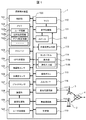
- FIG. 1 is a block diagram illustrating an internal configuration of a mobile terminal device 1 according to a first embodiment.
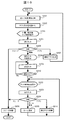
- the figure which shows the example of a display of the home screen in the setting of FIG. 3 is a flowchart illustrating the operation of the mobile terminal device 1 according to the first embodiment.
- FIG. 10 is a diagram illustrating an example in which a security level is set for each application in the second embodiment.
- the figure which shows the example of a display of the home screen in the setting of FIG. 9 is a flowchart showing the operation in the second embodiment.
- FIG. 10 is a diagram illustrating an example in which a security level is set for each application in the third embodiment.
- FIG. 10 is a diagram illustrating an example in which a security level is set for each application in the fourth embodiment.
- the figure which shows the example of a display of the home screen in the setting of FIG. 10 is a flowchart showing the operation in the fourth embodiment.
- FIG. 10 is a diagram illustrating an example in which a security level is set for each application in the fifth embodiment.
- the figure which shows the example of a display of the home screen in the setting of FIG. 10 is a flowchart showing the operation in the fifth embodiment.
- FIG. 10 is a diagram illustrating an example in which a security level is set for each application in the sixth embodiment.
- the figure which shows the example of a display of the home screen in the setting of FIG. 10 is a flowchart showing the operation in the sixth embodiment.
- FIG. 1 is a block diagram illustrating an internal configuration of the mobile terminal device 1 according to the first embodiment.
- the mobile terminal device 1 includes a control unit 101, a memory 102, a storage 103, a GPS (Global Positioning System) receiving unit 104, a geomagnetic sensor 105, an acceleration sensor 106, a gyro sensor 107, an imaging unit 108, an image processing unit 109, a microphone 110,
- the sound processing unit 111, the speaker 112, the external sound output unit 113, the touch panel 114, the operation buttons 115, the input / output I / F 116, the base station communication unit 117, the wireless communication unit 118, the time measuring unit 119, and the user recognition unit 120 are appropriately used.
- Each component is connected to each other via a bus 100.
- the control unit 101 is configured by a CPU (Central Processing Unit) or the like, and controls each component by executing a program stored in the memory 102 and executes various processes.
- a CPU Central Processing Unit
- the memory 102 is a flash memory or the like, and stores programs and data used by the control unit 101. Further, the memory 102 stores user information 102a such as a password and face information for user authentication, a telephone number, position information (position setting information) 102b frequently used for a mobile terminal device such as a home or work, and a position. Correspondingly, security level information (application setting information) 102c set for each application is stored. Furthermore, the portable terminal device 1 includes a storage 103 such as a memory card, and can store music, video, photo data, and the like.
- the GPS receiver 104 receives a signal from a GPS satellite in the sky. Thereby, the current position of the mobile terminal device 1 is detected.
- the geomagnetic sensor 105 detects the direction in which the mobile terminal device 1 is facing.
- the acceleration sensor 106 detects the acceleration of the mobile terminal device 1, and the gyro sensor 107 detects the angular velocity of the mobile terminal device 1. By these sensors, the tilt and movement of the mobile terminal device 1 can be detected in detail.
- the imaging unit 108 is a camera or the like, and the image processing unit 109 processes the video input from the imaging unit 108. Further, the image processing unit 109 processes an image displayed on the display unit 114 a of the touch panel 114.
- the microphone 110 inputs external sound, and the speaker 112 outputs sound to the outside.
- the external sound output unit 113 outputs sound by connecting an earphone (not shown), for example.
- the audio processing unit 111 processes input / output audio.
- the touch panel 114 includes a display unit 114a and an operation input unit 114b.
- the display unit 114a displays images and images such as an LCD, and has an operation input unit 114b on the display surface of the display unit 114a.
- the operation input unit 114b is a touch pad type input unit such as a capacitance type, and detects a touch operation with a finger or a touch pen as an operation input.
- an application icon or menu is displayed on the display unit 114a.
- an operation tap operation
- an application corresponding to the icon displayed at the tapped position is executed, or a process corresponding to the menu is executed.
- a process of switching the home screen is performed by performing an operation (swipe operation) in which the user presses the operation input unit 114b with a fingertip and slides in the left-right direction while the home screen is displayed.
- the operation button 115 is a push button switch or the like. When it is detected that the operation button 115 is pressed, the operation button 115 is notified to the control unit 101, and an operation corresponding to the operation button 115 is executed.
- the input / output I / F 116 is, for example, a USB (Universal Serial Bus) or the like, and is an interface for transmitting / receiving data to / from an external device.
- USB Universal Serial Bus
- the base station communication unit 117 is a communication interface that performs long-distance wireless communication with the base station 3 such as W-CDMA (Wideband Code Division Multiple Access) and LTE (Long Term Evolution).
- the wireless communication unit 118 is a communication interface that performs wireless communication with the wireless communication access point 2 through a wireless LAN such as IEEE802.11a / b / n. As a result, the base station 3 or the access point 2 is connected to the external network 4 to transmit / receive information.
- the base station communication unit 117 and the radio communication unit 118 are each configured with an antenna, a coding circuit, a decoding circuit, and the like.
- the clock unit 119 outputs current time information using, for example, an RTC (Real Time Clock) circuit, and automatically connects the time to the Internet time server via the base station communication unit 117 or the wireless communication unit 118.
- RTC Real Time Clock
- the user recognition unit 120 recognizes the user by comparing the user image captured from the imaging unit 108 and processed by the image processing unit 109 with the face information stored in the memory 102 as the user information 102a.
- the program or data stored in the memory 102 or the storage 103 is connected to the external network 4 via the base station 3 or the wireless router 2 by the base station communication unit 117 or the wireless communication unit 118 and downloaded from an external server (not shown) or the like. Can be updated and added at any time. It is also possible to connect to an external device such as a personal computer via the input / output I / F 116 to update or add data or programs.
- tablet personal computer has almost the same configuration as the smartphone shown in FIG.
- a security level is set for each application according to the position of the mobile terminal device 1.
- An application with a low security level can be executed quickly without performing an authentication process.
- an application having a high security level is characterized in that it can be executed after performing a predetermined authentication process.
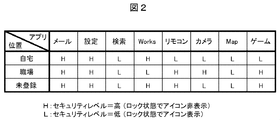
- FIG. 2 is a diagram showing an example in which the security level is set for each application according to the position.
- “home” and “workplace” are registered as positions (other positions are “unregistered”).
- the security level of each application such as “mail” and “setting” is set according to the position.
- the setting information is stored as position setting information 102b and application setting information 102c in the memory 102.
- Security level “H” is an application that has high security strength and causes problems when executed by other people. In this case, the application cannot be executed unless the lock is released. That is, the icon corresponding to the application is not displayed on the locked home screen, and the icon is displayed by unlocking.
- Security level “L” is an application that has a low security level and does not cause a problem even if executed by another person.
- the application can be executed even in a locked state. That is, an icon corresponding to the application is also displayed on the locked home screen.
- registration of the position is performed by the user himself / herself according to the use environment of the user, but a position with high execution frequency may be automatically registered from the history of the position where the application is executed.
- the security level for each application may be set by the user himself / herself according to the user's usage environment. However, the default value is set as an initial value for each application, and then the user's usage level is set according to the user's usage environment. May change the setting.
- the input screen for setting the above security level is not shown in particular, but it is incorporated into a part of the initial setting function of the conventional portable terminal device, and the map information (including the size of the setting area) and the application list are displayed on the screen. However, the user can set (or change the setting).
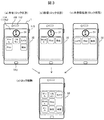
- FIG. 3 is a diagram showing a display example of the home screen in the setting of FIG. 2, (a) to (c) showing a locked state, and (d) showing a unlocked state.
- an imaging unit 108, a speaker 112, an operation button 115, and a microphone 110 are shown together with the touch panel 114 of the mobile terminal device 1.
- (A) is a home screen in a locked state at home, in which an unlock icon 31 and an application icon group 32 that can be executed even in the locked state are displayed.
- This screen is also called a “lock screen”.
- application icons of “game”, “remote control”, “camera”, “Map”, and “search” whose security level at home is set to “L” are displayed, and authentication information for unlocking is input. You can run without.
- (B) is a home screen in a locked state at the workplace, and icons “Works”, “Map”, and “Search” in which the security level at the workplace is set to “L” are displayed as an icon group 32 and executed without unlocking. can do.
- (C) is a locked home screen at an unregistered position other than home / work, and icons of “camera” and “search” applications whose security level is set to “L” are displayed as an icon group 32; Can be executed without unlocking.
- (D) is a home screen in a state where the lock is released by selecting the icon 31 and inputting authentication information, and an icon group 33 of applications that can be executed after the lock is released is displayed.
- an icon of an application whose security level is set to “H” that has not been displayed on the lock screens (a) to (c) is additionally displayed and can be executed.
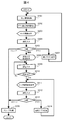
- FIG. 4 is a flowchart illustrating the operation of the mobile terminal device 1 according to the first embodiment. Here, an operation until sleep is canceled and a desired application is selected will be described. The sleep state is released by, for example, pressing the operation button 115, and a series of operations proceeds under the control of the control unit 101.
- the current position information of the mobile terminal device 1 is acquired.
- the position information received by the GPS receiving unit 104 is used.
- the position setting information 102b and the application setting information 102c in the memory 102 are referred to, and it is determined whether or not the acquired current position information is within the range of a pre-registered position such as home or work. Then, in accordance with the determined current position classification, an icon of an application set to the security level “L”, that is, an application that can be executed without unlocking is read.
- an icon group 32 of applications that can be executed without unlocking acquired in S202 and an icon 31 for unlocking are displayed on the display unit 114a of the touch panel 114 as a lock screen.
- S204 the user performs input by selecting the icon or menu displayed on the display unit 114a with the operation input unit 114b or pressing the operation button 115.
- S205 the following branch processing is performed according to the selection input of the user in S204.
- the process branches to “sleep” and proceeds to S206.
- the display on the display unit 114a of the touch panel 114 is turned off in order to reduce power consumption, and the process is terminated after shifting to the sleep state.
- the user inputs authentication information through the operation input unit 114b, and in S210, the input information is compared with the authentication information registered in the user information 102a to determine whether it is valid. If it is determined that it is not valid (No), the process returns to S209 and authentication information is input again.
- S212 the user performs an input such as selecting an icon or menu displayed on the display unit 114a with the operation input unit 114b or pressing the operation button 115 (sleep selection).
- branch processing is performed according to the selection input of the user in S212.
- the process branches to “sleep” and proceeds to S206, where the sleep process is performed and the process ends.
- the security level is set for each application according to the position. That is, an application with a low security level can be executed quickly without performing authentication processing even in a locked state. In addition, an application with a high security level is unlocked after execution of authentication processing and can be executed.
- a function for restricting the use of a specific application at a specific position is added. That is, different home screens are displayed for each position.
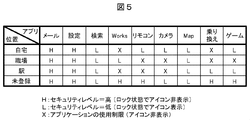
- FIG. 5 is a diagram showing an example in which the security level is set for each application according to the position.
- “home”, “workplace”, and “station” are registered as positions.
- the security level “H” has high security strength and cannot be executed unless the lock is released.
- the security level “L” has low security strength and can be executed even in a locked state.
- a security level “X” is provided that restricts the use of the application.
- the icon corresponding to the application set to the security level “X” is not displayed on the home screen even in the locked state and the unlocked state, thereby restricting the use of the application. For example, in “Home”, the application “Works” is set to the security level “X”, and the icon is not displayed on the home screen in “Home”, and use is restricted.
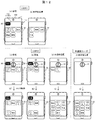
- FIG. 6 is a diagram showing a display example of the home screen in the setting of FIG. 5, (a) to (d) showing the locked state, and (e) to (h) showing the unlocked state.
- (c) and (g) are added when the position is “station” with respect to the first embodiment (FIG. 2).
- information 30 indicating which position corresponds to the home screen is displayed on each home screen.
- (a) is a lock screen of “home”, and an icon group 32 of “game”, “remote control”, “camera”, “Map”, and “search” whose security level is “L” is displayed.
- (e) is an unlock screen for “home”, and an icon group 33 to which “mail” and “setting” with a security level “H” are added and displayed.
- the “Works” icon set to the security level “X” is not displayed on any of the screens (a) and (e). Therefore, the use of the application “Works” is limited.
- (b) and (f) are home screens of “workplace”, and an icon of “Works” having a security level of “L” is displayed on any screen.
- icons such as “remote control” and “camera” whose security level is set to “X” are not displayed even when the lock is released. In this way, the home screen in the unlocked state varies depending on the position, and the use of a specific application is restricted depending on the position.
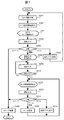
- FIG. 7 is a flowchart showing the operation in the second embodiment.
- application usage restrictions are added to the first embodiment (FIG. 4).
- the same step number is given to the same process as FIG. 4, and the overlapping part is demonstrated easily.
- the current position information of the mobile terminal device 1 is acquired.
- the position setting information 102b and the application setting information 102c in the memory 102 are referred to, and the icon of the application set to the security level “L” is read according to the current position classification.
- the application icon group 32 of the security level “L” acquired in S202 is displayed on the display unit 114a of the touch panel 114 as a lock screen corresponding to the current position. Further, the position information 30 of the home screen is displayed on the display unit 114a.
- S204 the user operates the touch panel 114 to select a desired operation.
- S205 a branching process corresponding to the user's selection input in S204 is performed.
- the user inputs authentication information through the operation input unit 114b, and in S210, it is determined whether the input information is valid as pre-registered authentication information. If it is determined that it is not valid (No), the process returns to S209 and authentication information is input again.
- the user selects an icon or menu displayed on the display unit 114a using the operation input unit 114b.
- the user presses the operation button 115 (sleep selection) or performs an input such as a swipe operation (home screen change).
- a branching process corresponding to the user's selection input in S223 is performed.
- the change of the home screen is permitted in the selection input in S223, but this may be prohibited.
- the use of a “camera” application for taking a photograph at a workplace can be prohibited, such as prohibiting the use of an application that causes a problem depending on the position.
- the second embodiment by setting a security level for each application according to the position, it is possible to provide a portable terminal device that ensures security and is user-friendly as in the first embodiment. Furthermore, in the second embodiment, since a function for restricting the use of a specific application according to the position is added, the security function is further improved.
- the security level for each application is switched and set according to the time.
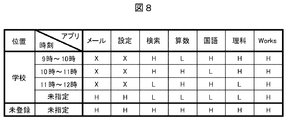
- FIG. 8 is a diagram showing an example in which a security level is set for each application according to the position and time.
- This setting information is registered in the application setting information 102 c in the memory 102.
- “school” is registered as the position, and the time between 9 o'clock and 12 o'clock is set by changing the security level according to the class timetable. That is, the security level of the application used for the subject of the lesson is set to “L” so that it can be executed even in the locked state.
- the security level of the other application is set to “H” or “X” so that it cannot be executed unless the lock is released or the use is restricted.
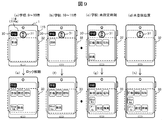
- FIG. 9 is a diagram showing a display example of the home screen in the setting of FIG. 8, (a) to (d) showing the locked state, and (e) to (h) showing the unlocked state.
- zone in a school is added.
- (A) and (b) are lock screens for school lesson hours, and icons 32 for applications such as “Math” and “Language” with security level set to “L” are displayed according to the subject of the lesson. Is done.
- (C) is a lock screen at a time other than the school lesson time zone, and icons of all subjects used in the lesson are displayed.
- (D) is a lock screen at an unregistered location other than school, where no application icon is displayed, and only the unlock icon 31 is displayed.
- (E) and (f) are screens for unlocking the school class time zone, which displays the icon group 33 of all subjects used in the class, but with the security level set to “X” “Mail” “Setting” "Is not displayed.
- (G) is a lock release screen at a time other than the school lesson time zone, and icon groups 33 of all applications are displayed.
- (H) is a lock release screen at an unregistered place other than the school, and the icon group 33 of all applications is displayed as in (g).
- FIG. 10 is a flowchart showing the operation in the third embodiment.
- control according to time information is added to the second embodiment (FIG. 7).
- the same steps as those in FIG. 7 are given the same step numbers, and description of overlapping parts is omitted or briefly described.
- the current position information and the current time information are acquired by the GPS receiving unit 104 and the time measuring unit 119 of the mobile terminal device 1.
- the icon group 32 of the application of the security level “L” acquired in S232 is displayed on the display unit 114a of the touch panel 114 as a lock screen corresponding to the current position and the current time. Further, the position information 30 of the home screen is displayed on the display unit 114a.
- Example 3 the security level for each application is set according to the position and time. From this, for example, by setting according to the timetable of class at school, it is possible to quickly select and execute the application corresponding to the class without unlocking, and limit the use of applications not related to class It becomes possible to do.
- the security level for each application is set according to the combination of position and time.
- the security level for each application can also be set according to “time” alone.
- the application security level is switched and set according to the user.
- FIG. 11 is a diagram showing an example in which a security level is set for each application in accordance with the user and the position.
- This setting information is registered in the application setting information 102 c in the memory 102.
- USR1 and USR2 are registered as users, and “Home” and “Workplace” are registered as positions.
- USR1 is intended for children, for example, “L” is the security level for “English” and “arithmetic” used in school classes, and “X” is the security level that restricts the use of “Mail” and “Setting”. is doing. Also, a security level “H” that can be executed by unlocking is not set.
- USE2 is assumed to be a company employee, for example, and “remote control” and “game” are set at a level “L” at home, but are set at a level “X” that restricts use at work.
- the location is also unregistered, and the security level of all applications is set to “H” regardless of the location.
- FIG. 12 is a diagram showing a display example of the home screen in the setting of FIG. 11, (a) and (b) are home screens for USR1, and (c) to (e) and (g) to (i) are for USR2. Home screens (f) and (j) are home screens for unregistered users.
- (A) and (b) are home screens at home and other positions relative to the USR1, and an icon group 32 of applications that can be executed without unlocking is displayed. Also, no unlock icon is displayed. Therefore, the applications that can use USR1 are limited to the icon group 32 only.
- (C) to (e) are lock screens at the home / workplace of USR2 and other positions, and an icon group 32 of applications that can be executed without unlocking at each position is displayed.
- the screen is switched to the home screen of (g) to (i), and the icon group 33 to which the application of the security level “H” is added is displayed.
- (F) is a locked home screen for an unregistered user, and no application icon is displayed regardless of the position.
- the screen is switched to the screen (j), and the icon group 33 of the security level “H” application is displayed.
- FIG. 13 is a flowchart showing the operation in the fourth embodiment.
- control according to the user is added to the second embodiment (FIG. 7).
- the same steps as those in FIG. 7X are given the same step numbers, and description of overlapping parts is omitted or briefly described.
- the user's face image is acquired by the imaging unit 108 of the mobile terminal device 1.
- the face image acquired by the user recognition unit 120 is collated with the face information of the user registered in the user information 102 a of the memory 102 to recognize which registered user.
- the application icon group 32 of the security level “L” acquired in S243 is displayed on the display unit 114a of the touch panel 114 as a lock screen corresponding to the user name and the current position.
- Example 4 the security level for each application is set according to the user and location.
- an application that can be executed by a child without unlocking is restricted, and further, the unlocking itself can be restricted.
- the security level for each application is set according to the combination of the user and the position, but it is also possible to set the security level for each application according to the “user” alone.
- a new security level is added to the function of the second embodiment, and the authentication method is changed according to the security level.
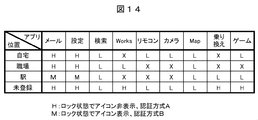
- FIG. 14 is a diagram illustrating an example in which a security level and an authentication method are set for each application.
- This setting information is registered in the application setting information 102 c in the memory 102.
- “home”, “workplace”, and “station” are registered as positions, and a security level “M” is added.
- the added security level “M” has the same high security strength as the security level “H”, and the application cannot be executed unless it is authenticated, but the authentication methods of both are different.
- the icon of the application with the security level “H” is not displayed on the locked home screen, but the icon is displayed after the lock is released by the authentication input.
- an application icon of security level “M” is also displayed on the locked home screen, but another authentication input is required for the user to select and execute this icon.
- an authentication method for example, an authentication method A using simple password authentication and an authentication method B using more confidential face authentication or fingerprint authentication are provided.
- the security level is “H”
- the authentication method A is used
- the security level is “M”
- the authentication method B is used.
- the security level “H” is set and the simple authentication method A is used.
- the security level is set to “M” and the authentication method B with high confidentiality is used. Use. In other words, security is ensured by using face authentication or fingerprint authentication in places where there is a high possibility of seeing password input.
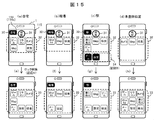
- FIG. 15 is a diagram showing a display example of the home screen in the setting of FIG. 14, wherein (a) to (d) show the locked state, and (e) to (h) show the unlocked state.
- the screen (c) at “station” has a security level of “L”, “transfer”, “Map”, “search”, and “game” icon group 32.
- An icon group 34 of “Mail” and “Setting” which is “M” is displayed. Note that the color or shape of the icon is changed so that the security levels of the two can be identified.
- authentication by an authentication method B such as face authentication is required.
- the screen is switched to the unlock screens (e) to (h), and the icon group 33 of the application whose security level is “H” is displayed. .
- FIG. 16 is a flowchart showing the operation in the fifth embodiment.
- the authentication method is changed by adding a security level “M” to the second embodiment (FIG. 7).
- the same steps as those in FIG. 7 are given the same step numbers, and description of overlapping parts is omitted or briefly described.
- S201 to S204 are the same as those in FIG. 7, but in S202, the application setting information 102c is referred to, and icons of applications set to the security levels “L” and “M” are read according to the classification of the current position.
- the icon groups 32 and 34 set to “L” and “M” read on the lock screen are displayed separately.
- the process proceeds to S252 and the authentication method B input screen is displayed.
- the authentication method B for example, face authentication by the user recognition unit 120 or fingerprint authentication by a fingerprint sensor (not shown) is used.
- the user inputs authentication information corresponding to the authentication method, and in S254, the input information is compared with the previously registered user information 102a to determine whether it is valid. If it is determined that it is not valid (No), the process returns to S253 and authentication information is input again. If it is determined to be valid (Yes), the process proceeds to S207, and after executing the process of the application corresponding to the selected icon, the process returns to S201.
- the process proceeds to S208, and a screen for inputting authentication information for unlocking is displayed.
- the authentication method A using a password or the like is used.
- the change of the home screen is deleted, but it may be added as in S225.
- the security level for each application is set according to the position, and the authentication method is changed according to the security level, so that the security strength at the time of authentication input can be increased according to the position.
- the unlocking authentication method is changed according to the position in the second embodiment.
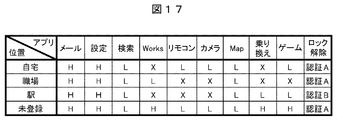
- FIG. 17 is a diagram showing an example in which a security level and an unlocking authentication method for each application are set according to the position.
- This setting information is registered in the application setting information 102 c in the memory 102.
- “home”, “workplace”, and “station” are registered as positions, and the authentication method at each position is switched. That is, the authentication method A by simple password authentication or the like is set at the positions “home”, “workplace”, or “unregistered”, and the authentication method by face authentication or fingerprint authentication with higher confidentiality at “station”. B is set.
- the security strength can be increased by using face authentication or fingerprint authentication.
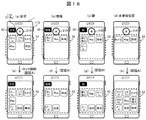
- FIG. 18 is a diagram showing a display example of the home screen in the setting of FIG. 17, in which (a) to (d) show the locked state, and (e) to (h) show the unlocked state.
- an unlock icon 31A by the authentication method A is displayed on the screen of the unregistered position at home, work, and other places.
- Icon 31B is displayed.
- the unlock icon has a different color or shape depending on the authentication method.
- the screen is switched to the lock release screens (e) to (h), and the security level is “H”.
- An icon group 33 to which an application has been added is displayed.
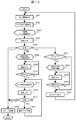
- FIG. 19 is a flowchart showing the operation in the sixth embodiment.
- the unlocking authentication method is changed according to the position with respect to the second embodiment (FIG. 7).
- the same steps as those in FIG. 7 are given the same step numbers, and description of overlapping parts is omitted or briefly described.
- S201 to S204 are the same as those in FIG. 7, and what is changed in the branch processing after S205 is after S261.
- the process proceeds to S261, and the authentication method for unlocking set according to the position is determined.
- an input screen corresponding to the authentication method A is displayed in S208.
- the user inputs authentication information corresponding to the authentication method A, and in S210, the input information is checked against user information 102a registered in advance to determine whether it is valid. If it is determined that it is not valid (No), the process returns to S209 and authentication information is input again. If it is determined to be valid (Yes), the process proceeds to S222 and the unlocked home screen is displayed.
- an input screen corresponding to the authentication method B is displayed in S262.
- the user inputs authentication information corresponding to the authentication method B, and in S264, the input information is compared with the previously registered user information 102a to determine whether it is valid. If it is determined that it is not valid (No), the process returns to S263 and authentication information is input again. If it is determined to be valid (Yes), the process proceeds to S222 and the unlocked home screen is displayed. The processing after S222 is the same as in FIG.
- the security strength can be increased according to the position to be used, as in the fifth embodiment.
- the position information is acquired by the GPS receiving unit 104.
- the position information is not limited to this, and the position information of the base station 3 is acquired via the base station communication unit 117, or via the wireless communication unit 118.
- the position information of the access point 2 for wireless communication may be acquired.
- time information may be acquired by connecting to an Internet time server as a current time acquisition method.
- two or three settings are provided as the security level of the application.
- the present invention is not limited to this, and three or more settings are provided.
- the password length may be changed or the authentication method may be changed.
- the icons of applications that are frequently used at the registered positions are displayed on the home screen in a locked state and an unlocked state. It is possible to quickly select and execute the application.
- the lock release icon is displayed and selected, but an operation button for unlocking may be provided separately.
- each of the above-described configurations, functions, processing units, processing means, and the like may be realized by hardware by designing a part or all of them with, for example, an integrated circuit.
- Each of the above-described configurations, functions, and the like may be realized by software by interpreting and executing a program that realizes each function by the processor. Information such as programs, tables, and files for realizing each function can be stored in the memory 102 or the storage 103.
- control lines and information lines indicate what is considered necessary for the explanation, and not all the control lines and information lines on the product are necessarily shown. Actually, it may be considered that almost all the components are connected to each other.
- DESCRIPTION OF SYMBOLS 1 ... Portable terminal device, 30 ... Position information, 31 ... Unlock icon, 32, 33, 34 ... Icon group, 101 ... Control part, 102 ... Memory, 102a ... User information, 102b ... Position setting information, 102c ... Application Setting information, 104: GPS receiving unit, 108: imaging unit, 114 ... touch panel, 114a ... display unit, 114b ... operation input unit, 115 ... operation button, 119 ... timing unit, 120 ... user recognition unit.
Landscapes
- Engineering & Computer Science (AREA)
- Computer Security & Cryptography (AREA)
- Computer Networks & Wireless Communication (AREA)
- Signal Processing (AREA)
- Theoretical Computer Science (AREA)
- Human Computer Interaction (AREA)
- Computer Hardware Design (AREA)
- Software Systems (AREA)
- Physics & Mathematics (AREA)
- General Engineering & Computer Science (AREA)
- General Physics & Mathematics (AREA)
- General Health & Medical Sciences (AREA)
- Bioethics (AREA)
- Health & Medical Sciences (AREA)
- Telephone Function (AREA)
- User Interface Of Digital Computer (AREA)
Abstract
Description
S222以降の処理は図7と同じである。
Claims (8)
- ユーザの選択によりアプリケーションを実行する携帯端末装置であって、
当該携帯端末装置の位置情報を取得する位置情報取得部と、
位置に応じてアプリケーション毎にセキュリティレベルを設定して記憶するセキュリティレベル設定記憶部と、
ユーザが選択可能なアプリケーションを表示する表示部と、
該表示部の表示を制御するとともに、ユーザにより選択されたアプリケーションを実行する制御部と、を備え、
前記セキュリティレベルは、当該携帯端末装置のロック状態及びロック解除状態において、アプリケーション毎に前記表示部に表示するか、また実行可能にするかを定めたものであり、
前記制御部は、前記セキュリティレベル設定記憶部に記憶されたセキュリティレベルを参照し、前記位置情報取得部にて取得した位置情報に応じて、前記表示部に表示するアプリケーションを決定し、ユーザにより選択されたアプリケーションを実行可能とすることを特徴とする携帯端末装置。 - 請求項1に記載の携帯端末装置であって、
前記セキュリティレベルには、当該携帯端末装置がロック状態及びロック解除状態のいずれにおいても、アプリケーションを前記表示部に表示せず、実行を制限するものを含むことを特徴とする携帯端末装置。 - 請求項1または2に記載の携帯端末装置であって、
現在の時刻情報を取得する時刻情報取得部を備え、
前記セキュリティレベル設定記憶部は、位置と時刻の組合せに応じてアプリケーション毎にセキュリティレベルを設定して記憶するものであって、
前記制御部は、前記セキュリティレベル設定記憶部に記憶されたセキュリティレベルを参照し、前記位置情報取得部にて取得した位置情報と前記時刻情報取得部にて取得した時刻情報の組合せに応じて、前記表示部に表示するアプリケーションを決定し、ユーザにより選択されたアプリケーションを実行可能とすることを特徴とする携帯端末装置。 - 請求項1または2に記載の携帯端末装置であって、
ユーザを認識するユーザ認識部を備え、
前記セキュリティレベル設定記憶部は、位置とユーザの組合せに応じてアプリケーション毎にセキュリティレベルを設定して記憶するものであって、
前記制御部は、前記セキュリティレベル設定記憶部に記憶されたセキュリティレベルを参照し、前記位置情報取得部にて取得した位置情報と前記ユーザ認識部にて認識したユーザの組合せに応じて、前記表示部に表示するアプリケーションを決定し、ユーザにより選択されたアプリケーションを実行可能とすることを特徴とする携帯端末装置。 - 請求項1ないし4のいずれか1項に記載の携帯端末装置であって、
前記制御部は、前記セキュリティレベル設定記憶部に記憶されたセキュリティレベルに基づいて、ロック解除のための認証方法、及びユーザに選択されたアプリケーションを実行可能にする認証方法を切り替えることを特徴とする携帯端末装置。 - 請求項1ないし4のいずれか1項に記載の携帯端末装置であって、
前記セキュリティレベル設定記憶部は、ロック解除するための認証方法を位置に応じて異なるように設定して記憶しており、
前記制御部は、前記セキュリティレベル設定記憶部に記憶された認証方法を参照し、前記位置情報取得部にて取得した位置情報に応じて、ロック解除のための認証方法を切り替えることを特徴とする携帯端末装置。 - ユーザの選択によりアプリケーションを実行する携帯端末装置であって、
現在の時刻情報を取得する時刻情報取得部と、
時刻に応じてアプリケーション毎にセキュリティレベルを設定して記憶するセキュリティレベル設定記憶部と、
ユーザが選択可能なアプリケーションを表示する表示部と、
該表示部の表示を制御するとともに、ユーザにより選択されたアプリケーションを実行する制御部と、を備え、
前記セキュリティレベルは、当該携帯端末装置のロック状態及びロック解除状態において、アプリケーション毎に前記表示部に表示するか、また実行可能にするかを定めたものであり、
前記制御部は、前記セキュリティレベル設定記憶部に記憶されたセキュリティレベルを参照し、前記時刻情報取得部にて取得した時刻情報に応じて、前記表示部に表示するアプリケーションを決定し、ユーザにより選択されたアプリケーションを実行可能とすることを特徴とする携帯端末装置。 - ユーザの選択によりアプリケーションを実行する携帯端末装置であって、
ユーザを認識するユーザ認識部と、
ユーザに応じてアプリケーション毎にセキュリティレベルを設定して記憶するセキュリティレベル設定記憶部と、
ユーザが選択可能なアプリケーションを表示する表示部と、
該表示部の表示を制御するとともに、ユーザにより選択されたアプリケーションを実行する制御部と、を備え、
前記セキュリティレベルは、当該携帯端末装置のロック状態及びロック解除状態において、アプリケーション毎に前記表示部に表示するか、また実行可能にするかを定めたものであり、
前記制御部は、前記セキュリティレベル設定記憶部に記憶されたセキュリティレベルを参照し、前記ユーザ認識部にて認識したユーザに応じて、前記表示部に表示するアプリケーションを決定し、ユーザにより選択されたアプリケーションを実行可能とすることを特徴とする携帯端末装置。
Priority Applications (8)
| Application Number | Priority Date | Filing Date | Title |
|---|---|---|---|
| JP2015559698A JP6393282B2 (ja) | 2014-01-31 | 2014-01-31 | 携帯端末装置 |
| US15/104,699 US10726159B2 (en) | 2014-01-31 | 2014-01-31 | Portable terminal device executing an application in accordance with a selection made by a user |
| PCT/JP2014/052290 WO2015114806A1 (ja) | 2014-01-31 | 2014-01-31 | 携帯端末装置 |
| CN201480068459.3A CN105830085B (zh) | 2014-01-31 | 2014-01-31 | 便携终端装置 |
| US16/919,288 US11461501B2 (en) | 2014-01-31 | 2020-07-02 | Portable terminal device |
| US17/956,010 US11899825B2 (en) | 2014-01-31 | 2022-09-29 | Portable terminal |
| US18/397,275 US12393735B2 (en) | 2014-01-31 | 2023-12-27 | Portable terminal |
| US19/269,881 US20250342280A1 (en) | 2014-01-31 | 2025-07-15 | Portable terminal |
Applications Claiming Priority (1)
| Application Number | Priority Date | Filing Date | Title |
|---|---|---|---|
| PCT/JP2014/052290 WO2015114806A1 (ja) | 2014-01-31 | 2014-01-31 | 携帯端末装置 |
Related Child Applications (2)
| Application Number | Title | Priority Date | Filing Date |
|---|---|---|---|
| US15/104,699 A-371-Of-International US10726159B2 (en) | 2014-01-31 | 2014-01-31 | Portable terminal device executing an application in accordance with a selection made by a user |
| US16/919,288 Continuation US11461501B2 (en) | 2014-01-31 | 2020-07-02 | Portable terminal device |
Publications (1)
| Publication Number | Publication Date |
|---|---|
| WO2015114806A1 true WO2015114806A1 (ja) | 2015-08-06 |
Family
ID=53756418
Family Applications (1)
| Application Number | Title | Priority Date | Filing Date |
|---|---|---|---|
| PCT/JP2014/052290 Ceased WO2015114806A1 (ja) | 2014-01-31 | 2014-01-31 | 携帯端末装置 |
Country Status (4)
| Country | Link |
|---|---|
| US (5) | US10726159B2 (ja) |
| JP (1) | JP6393282B2 (ja) |
| CN (1) | CN105830085B (ja) |
| WO (1) | WO2015114806A1 (ja) |
Cited By (8)
| Publication number | Priority date | Publication date | Assignee | Title |
|---|---|---|---|---|
| JP2017167225A (ja) * | 2016-03-14 | 2017-09-21 | 富士通株式会社 | 表示装置、表示制御装置、表示制御プログラム、及び表示制御方法 |
| JP2017195445A (ja) * | 2016-04-18 | 2017-10-26 | 京セラ株式会社 | 携帯電子機器、セキュリティ制御方法及びセキュリティ制御プログラム |
| JP2018537757A (ja) * | 2015-10-15 | 2018-12-20 | サムスン エレクトロニクス カンパニー リミテッド | タッチスクリーン付き移動デバイスのロック及びロック解除のための方法及び移動デバイス |
| JP2018206057A (ja) * | 2017-06-05 | 2018-12-27 | カシオ計算機株式会社 | 認証装置、認証方法及びプログラム |
| JP2019023820A (ja) * | 2017-07-24 | 2019-02-14 | 株式会社Nttドコモ | プログラムおよび情報処理装置の動作方法 |
| JP2021157823A (ja) * | 2020-05-28 | 2021-10-07 | 華為技術有限公司Huawei Technologies Co., Ltd. | アプリケーションの使用を制限する方法、および端末 |
| US11722494B2 (en) | 2016-03-22 | 2023-08-08 | Huawei Technologies Co., Ltd. | Method for limiting usage of application, and terminal |
| JP2024522701A (ja) * | 2021-11-22 | 2024-06-21 | ケーティー アンド ジー コーポレイション | ユーザ入力によりロックを解除する方法及び装置 |
Families Citing this family (15)
| Publication number | Priority date | Publication date | Assignee | Title |
|---|---|---|---|---|
| WO2015170473A1 (ja) * | 2014-05-09 | 2015-11-12 | 日本電気株式会社 | アプリケーション自動制御システム、アプリケーション自動制御方法およびプログラム記録媒体 |
| US10198594B2 (en) * | 2014-12-30 | 2019-02-05 | Xiaomi Inc. | Method and device for displaying notification information |
| US20160286032A1 (en) * | 2015-03-24 | 2016-09-29 | Lenovo Enterprise Solutions (Singapore) Pte. Ltd. | Modifying operation of a mobile communication device based on interest level in a geographic location |
| US10091188B2 (en) * | 2015-03-30 | 2018-10-02 | Qualcomm Incorporated | Accelerated passphrase verification |
| CN105205374A (zh) * | 2015-08-27 | 2015-12-30 | 广东欧珀移动通信有限公司 | 一种应用程序加密方法及用户终端 |
| CN114675771A (zh) * | 2015-10-29 | 2022-06-28 | 创新先进技术有限公司 | 一种服务调用方法及装置 |
| US10803400B2 (en) * | 2016-06-23 | 2020-10-13 | Intel Corporation | Self-adaptive security framework |
| GB2555569B (en) * | 2016-10-03 | 2019-06-12 | Haddad Elias | Enhanced computer objects security |
| CN107219976B (zh) * | 2017-05-31 | 2020-07-28 | Oppo广东移动通信有限公司 | 应用显示方法及相关产品 |
| US20190243536A1 (en) * | 2018-02-05 | 2019-08-08 | Alkymia | Method for interacting with one or more software applications using a touch sensitive display |
| US10984120B2 (en) * | 2018-05-10 | 2021-04-20 | Paypal, Inc. | Limiting device functionality based on data detection and processing |
| KR102749970B1 (ko) * | 2018-12-18 | 2025-01-03 | 삼성전자주식회사 | 위치 기반 동작 방법, 전자 장치 및 기록 매체 |
| US11599676B2 (en) * | 2019-03-07 | 2023-03-07 | Blackberry Limited | Method and system for container background unlock |
| US11904866B2 (en) * | 2019-07-31 | 2024-02-20 | Toyota Motor Engineering & Manufacturing North America, Inc. | Systems and methods for brain-machine interfaces and EEG-based driver identification |
| EP4350544A4 (en) * | 2021-06-29 | 2024-11-06 | Huawei Technologies Co., Ltd. | Access control method and related apparatus |
Citations (3)
| Publication number | Priority date | Publication date | Assignee | Title |
|---|---|---|---|---|
| US20120129496A1 (en) * | 2010-11-23 | 2012-05-24 | Jonghoon Park | Content control apparatus and method thereof |
| JP2013041378A (ja) * | 2011-08-12 | 2013-02-28 | Kyocera Corp | 携帯電子機器、制御方法、および、制御プログラム |
| JP2013164717A (ja) * | 2012-02-10 | 2013-08-22 | Fujitsu Broad Solution & Consulting Inc | 認証プログラム、認証方法および情報処理装置 |
Family Cites Families (17)
| Publication number | Priority date | Publication date | Assignee | Title |
|---|---|---|---|---|
| JP4136517B2 (ja) * | 2002-07-31 | 2008-08-20 | 株式会社日立製作所 | 移動端末 |
| JP2004118456A (ja) | 2002-09-25 | 2004-04-15 | Japan Science & Technology Corp | 位置情報を用いた移動端末の認証システム |
| JP4687045B2 (ja) | 2004-09-14 | 2011-05-25 | 凸版印刷株式会社 | 認証装置およびその方法 |
| WO2008050512A1 (en) * | 2006-09-29 | 2008-05-02 | Nec Corporation | Start control device, method, and program |
| US20100306705A1 (en) | 2009-05-27 | 2010-12-02 | Sony Ericsson Mobile Communications Ab | Lockscreen display |
| KR101701492B1 (ko) * | 2009-10-16 | 2017-02-14 | 삼성전자주식회사 | 데이터 표시 방법 및 그를 수행하는 단말기 |
| US8437742B2 (en) * | 2009-10-16 | 2013-05-07 | At&T Intellectual Property I, L.P. | Systems and methods for providing location-based application authentication using a location token service |
| KR20110111022A (ko) | 2010-04-02 | 2011-10-10 | 삼성전자주식회사 | 단말의 정보보호 방법 및 장치 |
| CN103348353B (zh) | 2010-10-06 | 2016-07-06 | 西里克斯系统公司 | 基于移动设备的物理位置对资源访问进行中介调节 |
| US20120137369A1 (en) * | 2010-11-29 | 2012-05-31 | Infosec Co., Ltd. | Mobile terminal with security functionality and method of implementing the same |
| KR101563150B1 (ko) | 2011-09-09 | 2015-10-28 | 주식회사 팬택 | 잠금 화면에서 단축 기능을 제공하는 방법 및 그를 이용한 휴대용 단말기 |
| JP2013074499A (ja) | 2011-09-28 | 2013-04-22 | Dainippon Printing Co Ltd | 情報処理端末、アイコン表示方法、プログラム、および記録媒体 |
| US20130305354A1 (en) | 2011-12-23 | 2013-11-14 | Microsoft Corporation | Restricted execution modes |
| JP5848971B2 (ja) | 2011-12-27 | 2016-01-27 | 京セラ株式会社 | 装置、方法、及びプログラム |
| CN102830932B (zh) * | 2012-08-17 | 2017-05-17 | 东莞宇龙通信科技有限公司 | 终端和终端自动切换解锁方式的方法 |
| KR20140043644A (ko) * | 2012-10-02 | 2014-04-10 | 엘지전자 주식회사 | 이동 단말기 및 그것의 제어방법 |
| KR102013940B1 (ko) * | 2012-12-24 | 2019-10-21 | 삼성전자주식회사 | 어플리케이션의 보안성 관리 방법 및 그 전자 장치 |
-
2014
- 2014-01-31 CN CN201480068459.3A patent/CN105830085B/zh active Active
- 2014-01-31 JP JP2015559698A patent/JP6393282B2/ja active Active
- 2014-01-31 WO PCT/JP2014/052290 patent/WO2015114806A1/ja not_active Ceased
- 2014-01-31 US US15/104,699 patent/US10726159B2/en active Active
-
2020
- 2020-07-02 US US16/919,288 patent/US11461501B2/en active Active
-
2022
- 2022-09-29 US US17/956,010 patent/US11899825B2/en active Active
-
2023
- 2023-12-27 US US18/397,275 patent/US12393735B2/en active Active
-
2025
- 2025-07-15 US US19/269,881 patent/US20250342280A1/en active Pending
Patent Citations (3)
| Publication number | Priority date | Publication date | Assignee | Title |
|---|---|---|---|---|
| US20120129496A1 (en) * | 2010-11-23 | 2012-05-24 | Jonghoon Park | Content control apparatus and method thereof |
| JP2013041378A (ja) * | 2011-08-12 | 2013-02-28 | Kyocera Corp | 携帯電子機器、制御方法、および、制御プログラム |
| JP2013164717A (ja) * | 2012-02-10 | 2013-08-22 | Fujitsu Broad Solution & Consulting Inc | 認証プログラム、認証方法および情報処理装置 |
Cited By (11)
| Publication number | Priority date | Publication date | Assignee | Title |
|---|---|---|---|---|
| JP2018537757A (ja) * | 2015-10-15 | 2018-12-20 | サムスン エレクトロニクス カンパニー リミテッド | タッチスクリーン付き移動デバイスのロック及びロック解除のための方法及び移動デバイス |
| JP2017167225A (ja) * | 2016-03-14 | 2017-09-21 | 富士通株式会社 | 表示装置、表示制御装置、表示制御プログラム、及び表示制御方法 |
| US11722494B2 (en) | 2016-03-22 | 2023-08-08 | Huawei Technologies Co., Ltd. | Method for limiting usage of application, and terminal |
| JP2017195445A (ja) * | 2016-04-18 | 2017-10-26 | 京セラ株式会社 | 携帯電子機器、セキュリティ制御方法及びセキュリティ制御プログラム |
| JP2018206057A (ja) * | 2017-06-05 | 2018-12-27 | カシオ計算機株式会社 | 認証装置、認証方法及びプログラム |
| JP2019023820A (ja) * | 2017-07-24 | 2019-02-14 | 株式会社Nttドコモ | プログラムおよび情報処理装置の動作方法 |
| JP2021157823A (ja) * | 2020-05-28 | 2021-10-07 | 華為技術有限公司Huawei Technologies Co., Ltd. | アプリケーションの使用を制限する方法、および端末 |
| JP2023093420A (ja) * | 2020-05-28 | 2023-07-04 | 華為技術有限公司 | アプリケーションの使用を制限する方法、および端末 |
| JP7590475B2 (ja) | 2020-05-28 | 2024-11-26 | ベイジン クンシ インテレクチュアル プロパティー マネージメント カンパニー リミテッド | アプリケーションの使用を制限する方法、および端末 |
| JP2024522701A (ja) * | 2021-11-22 | 2024-06-21 | ケーティー アンド ジー コーポレイション | ユーザ入力によりロックを解除する方法及び装置 |
| JP7766719B2 (ja) | 2021-11-22 | 2025-11-10 | ケーティー アンド ジー コーポレイション | ユーザ入力によりロックを解除する方法及び装置 |
Also Published As
| Publication number | Publication date |
|---|---|
| US11461501B2 (en) | 2022-10-04 |
| US20250342280A1 (en) | 2025-11-06 |
| JPWO2015114806A1 (ja) | 2017-03-23 |
| CN105830085B (zh) | 2020-06-16 |
| US20230024378A1 (en) | 2023-01-26 |
| CN105830085A (zh) | 2016-08-03 |
| US20200334368A1 (en) | 2020-10-22 |
| US11899825B2 (en) | 2024-02-13 |
| US12393735B2 (en) | 2025-08-19 |
| US10726159B2 (en) | 2020-07-28 |
| US20160314308A1 (en) | 2016-10-27 |
| JP6393282B2 (ja) | 2018-09-19 |
| US20240126926A1 (en) | 2024-04-18 |
Similar Documents
| Publication | Publication Date | Title |
|---|---|---|
| JP6393282B2 (ja) | 携帯端末装置 | |
| AU2011312743B2 (en) | Multiple-access-level lock screen | |
| KR101412764B1 (ko) | 대안적 잠금 해제 패턴 | |
| US20130324089A1 (en) | Method for providing fingerprint-based shortcut key, machine-readable storage medium, and portable terminal | |
| CN104798418A (zh) | 基于位置的无线外围设备选择 | |
| US20190313470A1 (en) | Authentication and pairing of devices using a machine readable code | |
| JP2015524954A (ja) | 複数の通信端末を使用する多重ディスプレイ方法、機械読み取り可能な格納媒体及び通信端末 | |
| KR20160148260A (ko) | 전자 장치 및 이의 제어 방법 | |
| EP2645290A2 (en) | Devices and methods for unlocking a lock mode | |
| US9426606B2 (en) | Electronic apparatus and method of pairing in electronic apparatus | |
| KR20160009878A (ko) | 모바일 디바이스 및 그 제어 방법 | |
| JPWO2013035744A1 (ja) | 端末装置、情報入力方法およびプログラム | |
| JP2019522277A (ja) | 端末機器のパスワードロック解除方法、装置および端末機器 | |
| CN103500065B (zh) | 用于移动终端的坐标变换方法和装置以及移动终端 | |
| CN106940770A (zh) | 一种屏幕锁定方法、装置和终端 | |
| JP6796662B2 (ja) | 携帯情報端末及びその発呼方法 | |
| CN106203018A (zh) | 多用户访问控制方法及装置 | |
| CN104765523A (zh) | 显示设备及其控制方法 | |
| US20150248545A1 (en) | Sign shortcut | |
| KR101844586B1 (ko) | 다수 메신저에서 수행된 대화목록을 통합하여 제공하는 방법 및 장치 | |
| US20140201680A1 (en) | Special character input method and electronic device therefor | |
| KR101844587B1 (ko) | 통합 메신저 어플리케이션에서 적합 메신저를 자동 선택하여 메시지를 전송하는 방법 및 장치 | |
| KR101844582B1 (ko) | 통합 인증 기반의 다중 메신저 실행 장치 및 방법 | |
| WO2025027692A1 (ja) | 情報処理装置及び方法 | |
| KR101215850B1 (ko) | 휴대용 통신 단말기 |
Legal Events
| Date | Code | Title | Description |
|---|---|---|---|
| 121 | Ep: the epo has been informed by wipo that ep was designated in this application |
Ref document number: 14881391 Country of ref document: EP Kind code of ref document: A1 |
|
| WWE | Wipo information: entry into national phase |
Ref document number: 15104699 Country of ref document: US |
|
| ENP | Entry into the national phase |
Ref document number: 2015559698 Country of ref document: JP Kind code of ref document: A |
|
| NENP | Non-entry into the national phase |
Ref country code: DE |
|
| 122 | Ep: pct application non-entry in european phase |
Ref document number: 14881391 Country of ref document: EP Kind code of ref document: A1 |