WO2015040772A1 - 情報処理装置および情報処理方法 - Google Patents
情報処理装置および情報処理方法 Download PDFInfo
- Publication number
- WO2015040772A1 WO2015040772A1 PCT/JP2014/002059 JP2014002059W WO2015040772A1 WO 2015040772 A1 WO2015040772 A1 WO 2015040772A1 JP 2014002059 W JP2014002059 W JP 2014002059W WO 2015040772 A1 WO2015040772 A1 WO 2015040772A1
- Authority
- WO
- WIPO (PCT)
- Prior art keywords
- page
- joystick
- display
- display area
- tilt
- Prior art date
- Legal status (The legal status is an assumption and is not a legal conclusion. Google has not performed a legal analysis and makes no representation as to the accuracy of the status listed.)
- Ceased
Links
Images



Classifications
-
- G—PHYSICS
- G06—COMPUTING OR CALCULATING; COUNTING
- G06F—ELECTRIC DIGITAL DATA PROCESSING
- G06F3/00—Input arrangements for transferring data to be processed into a form capable of being handled by the computer; Output arrangements for transferring data from processing unit to output unit, e.g. interface arrangements
- G06F3/01—Input arrangements or combined input and output arrangements for interaction between user and computer
- G06F3/048—Interaction techniques based on graphical user interfaces [GUI]
- G06F3/0481—Interaction techniques based on graphical user interfaces [GUI] based on specific properties of the displayed interaction object or a metaphor-based environment, e.g. interaction with desktop elements like windows or icons, or assisted by a cursor's changing behaviour or appearance
- G06F3/0483—Interaction with page-structured environments, e.g. book metaphor
-
- G—PHYSICS
- G06—COMPUTING OR CALCULATING; COUNTING
- G06F—ELECTRIC DIGITAL DATA PROCESSING
- G06F3/00—Input arrangements for transferring data to be processed into a form capable of being handled by the computer; Output arrangements for transferring data from processing unit to output unit, e.g. interface arrangements
- G06F3/01—Input arrangements or combined input and output arrangements for interaction between user and computer
- G06F3/03—Arrangements for converting the position or the displacement of a member into a coded form
- G06F3/033—Pointing devices displaced or positioned by the user, e.g. mice, trackballs, pens or joysticks; Accessories therefor
- G06F3/0338—Pointing devices displaced or positioned by the user, e.g. mice, trackballs, pens or joysticks; Accessories therefor with detection of limited linear or angular displacement of an operating part of the device from a neutral position, e.g. isotonic or isometric joysticks
-
- G—PHYSICS
- G06—COMPUTING OR CALCULATING; COUNTING
- G06F—ELECTRIC DIGITAL DATA PROCESSING
- G06F3/00—Input arrangements for transferring data to be processed into a form capable of being handled by the computer; Output arrangements for transferring data from processing unit to output unit, e.g. interface arrangements
- G06F3/01—Input arrangements or combined input and output arrangements for interaction between user and computer
- G06F3/048—Interaction techniques based on graphical user interfaces [GUI]
- G06F3/0484—Interaction techniques based on graphical user interfaces [GUI] for the control of specific functions or operations, e.g. selecting or manipulating an object, an image or a displayed text element, setting a parameter value or selecting a range
- G06F3/04845—Interaction techniques based on graphical user interfaces [GUI] for the control of specific functions or operations, e.g. selecting or manipulating an object, an image or a displayed text element, setting a parameter value or selecting a range for image manipulation, e.g. dragging, rotation, expansion or change of colour
-
- G—PHYSICS
- G06—COMPUTING OR CALCULATING; COUNTING
- G06F—ELECTRIC DIGITAL DATA PROCESSING
- G06F3/00—Input arrangements for transferring data to be processed into a form capable of being handled by the computer; Output arrangements for transferring data from processing unit to output unit, e.g. interface arrangements
- G06F3/01—Input arrangements or combined input and output arrangements for interaction between user and computer
- G06F3/048—Interaction techniques based on graphical user interfaces [GUI]
- G06F3/0484—Interaction techniques based on graphical user interfaces [GUI] for the control of specific functions or operations, e.g. selecting or manipulating an object, an image or a displayed text element, setting a parameter value or selecting a range
- G06F3/0485—Scrolling or panning
-
- G—PHYSICS
- G06—COMPUTING OR CALCULATING; COUNTING
- G06T—IMAGE DATA PROCESSING OR GENERATION, IN GENERAL
- G06T13/00—Animation
- G06T13/20—Three-dimensional [3D] animation
-
- G—PHYSICS
- G06—COMPUTING OR CALCULATING; COUNTING
- G06T—IMAGE DATA PROCESSING OR GENERATION, IN GENERAL
- G06T13/00—Animation
- G06T13/80—Two-dimensional [2D] animation, e.g. using sprites
-
- G—PHYSICS
- G09—EDUCATION; CRYPTOGRAPHY; DISPLAY; ADVERTISING; SEALS
- G09G—ARRANGEMENTS OR CIRCUITS FOR CONTROL OF INDICATING DEVICES USING STATIC MEANS TO PRESENT VARIABLE INFORMATION
- G09G5/00—Control arrangements or circuits for visual indicators common to cathode-ray tube indicators and other visual indicators
- G09G5/34—Control arrangements or circuits for visual indicators common to cathode-ray tube indicators and other visual indicators for rolling or scrolling
-
- G—PHYSICS
- G09—EDUCATION; CRYPTOGRAPHY; DISPLAY; ADVERTISING; SEALS
- G09G—ARRANGEMENTS OR CIRCUITS FOR CONTROL OF INDICATING DEVICES USING STATIC MEANS TO PRESENT VARIABLE INFORMATION
- G09G2354/00—Aspects of interface with display user
-
- G—PHYSICS
- G09—EDUCATION; CRYPTOGRAPHY; DISPLAY; ADVERTISING; SEALS
- G09G—ARRANGEMENTS OR CIRCUITS FOR CONTROL OF INDICATING DEVICES USING STATIC MEANS TO PRESENT VARIABLE INFORMATION
- G09G2380/00—Specific applications
- G09G2380/14—Electronic books and readers
Definitions
- Information processing devices such as portable game machines and PDAs (Personal Digital Assistants) are widely used.
- many information processing apparatuses are equipped with a communication function, and a multifunctional information processing apparatus in which functions of a mobile phone, a PDA, and the like are integrated into one has appeared, such as a smartphone.
- Such an information processing apparatus is equipped with a large-capacity memory and a high-speed processor, and a user can enjoy various applications by installing an application program (see, for example, Patent Document 1).
- An aspect of the present invention relates to an information processing apparatus.
- This information processing apparatus is an information processing apparatus that displays content composed of a plurality of pages in response to a user operation, and includes an operation reception unit that receives a joystick tilting operation, and a joystick tilting operation that is received by the operation reception unit.
- a display screen control unit that changes the display screen in the display device, and the display screen control unit changes the display screen according to the tilt direction of the joystick and the position of the display area in the page at that time. It is characterized by making it different.
- This information processing method is an information processing method performed by an information processing device that displays content consisting of a plurality of pages on a display device in response to a user operation, the step of receiving a tilt operation of a joystick, and the tilt operation of the received joystick And changing the display screen according to the direction of the joystick tilting and the position of the display area within the page at that time. It is characterized by making different.
- a triangle button 22a, a circle button 22b, a x button 22c, and a square button 22d are provided on the right side of the rhombus.
- operation buttons 22 are provided on the right side of the rhombus.
- an upper key 23a, a left key 23b, a lower key 23c, and a right key 23d are provided on the left side of 50.
- the user can input the eight directions of up / down / left / right and diagonal by operating the direction key 23.
- a left stick 24 a is provided below the direction key 23, and a right stick 24 b is provided below the operation button 22.
- the user tilts the left stick 24a or the right stick 24b (hereinafter collectively referred to as “joystick 24”) and inputs the direction and the amount of tilt.
- An L button 26a and an R button 26b are provided on the left and right tops of the housing.
- the operation button 22, the direction key 23, the joystick 24, the L button 26a, and the R button 26b constitute operation means operated by the user.
- a front camera 30 is provided in the vicinity of the operation button 22.
- a left speaker 25a and a right speaker 25b (hereinafter, collectively referred to as “speaker 25”) that output sound are provided, respectively.
- a HOME button 27 is provided below the left stick 24a, and a START button 28 and a SELECT button 29 are provided below the right stick 24b.
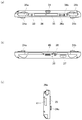
- FIG. 2A shows the upper surface of the information processing apparatus 10.
- the L button 26a and the R button 26b are provided on the left and right ends of the upper surface of the information processing apparatus 10, respectively.
- a power button 33 is provided on the right side of the L button 26 a, and the user turns the power on or off by pressing the power button 33.
- the information processing apparatus 10 has a power control function of transitioning to a suspended state when a time during which the operating means is not operated (no operation time) continues for a predetermined time. When the information processing apparatus 10 enters the suspended state, the user can return the information processing apparatus 10 from the suspended state to the awake state by pressing the power button 33.
- the game card slot 34 is an insertion slot for inserting a game card, and this figure shows a state where the game card slot 34 is covered with a slot cover.
- An LED lamp that blinks when the game card is being accessed may be provided in the vicinity of the game card slot 34.
- the accessory terminal 35 is a terminal for connecting a peripheral device (accessory), and this figure shows a state where the accessory terminal 35 is covered with a terminal cover. Between the accessory terminal 35 and the R button 26b, a-button 36a and a + button 36b for adjusting the volume are provided.
- FIG. 2B shows the lower surface of the information processing apparatus 10.
- the memory card slot 37 is an insertion slot for inserting a memory card, and this figure shows a state in which the memory card slot 37 is covered with a slot cover.
- an audio input / output terminal 38, a microphone 39, and a multi-use terminal 40 are provided on the lower surface of the information processing apparatus 10.
- the multi-use terminal 40 corresponds to USB (Universal Serial Bus) and can be connected to other devices via a USB cable.
- USB Universal Serial Bus
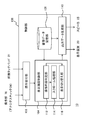
- FIG. 3 shows a circuit configuration of the information processing apparatus 10.
- the wireless communication module 71 is configured by a wireless LAN module compliant with a communication standard such as IEEE 802.11b / g, and is connected to an external network such as the Internet via a wireless access point.
- the wireless communication module 71 may have a Bluetooth (registered trademark) protocol communication function.
- the mobile phone module 72 corresponds to the third generation (3rd Generation) digital mobile phone system conforming to the IMT-2000 (International Mobile Telecommunication 2000) standard defined by the ITU (International Telecommunication Union). Connect to the telephone network 4.
- a SIM card 74 Into the SIM card slot 41, a SIM card 74 in which a unique ID number for specifying the telephone number of the mobile phone is recorded is inserted. By inserting the SIM card 74 into the SIM card slot 41, the mobile phone module 72 can communicate with the mobile phone network 4.
- the CPU (Central Processing Unit) 60 executes a program loaded in the main memory 64.
- a GPU (Graphics Processing Unit) 62 performs calculations necessary for image processing.
- the main memory 64 is composed of a RAM (Random Access Memory) or the like, and stores programs, data, and the like used by the CPU 60.
- the storage 66 is configured by a NAND flash memory (NAND-type flash memory) or the like, and is used as a built-in auxiliary storage device.
- the display device 20 is an organic EL display device and has a light emitting element that emits light by applying a voltage to the cathode and the anode. In the power saving mode, the voltage applied between the electrodes is made lower than usual, so that the display device 20 can be dimmed and power consumption can be suppressed.
- the display device 20 may be a liquid crystal panel display device provided with a backlight. In the power saving mode, by reducing the amount of light from the backlight, the liquid crystal panel display device can be in a dimmed state and power consumption can be suppressed.
- a game card 76 in which a game file is recorded is inserted.
- the game card 76 has a recording area in which data can be written.
- data is written / read by the media drive.
- a memory card 78 is inserted into the memory card slot 37.
- the multi-use terminal 40 can be used as a USB terminal, and is connected to a USB cable 80 to transmit / receive data to / from another USB device.
- a peripheral device is connected to the accessory terminal 35.
- the information processing apparatus 10 functions as a mobile terminal for enjoying various contents such as electronic books, videos, music, etc. in addition to games and communication functions.
- the electronic data of the content is downloaded from the content providing server via the network and stored in the storage 66. Alternatively, it is stored in a memory card 78 inserted into the memory card slot 37.
- the data is read according to the output request from the user, and is output from the display device 20 or the speaker 25 by appropriately performing a decoding process or the like.
- the present embodiment mainly focuses on a method of operating the display screen using the joystick 24 in the operation unit 70 when browsing an electronic book. Description of processing and configuration to which general techniques can be applied among display processing of an electronic book selection screen and a browsing screen will be omitted as appropriate.
- the content to be processed in this embodiment is not limited to an electronic book and may be a game, a web page, or the like as long as it includes a display of a document or image composed of multiple pages.
- the present invention can be applied not only to the completed content but also to the display of electronic data such as a document or image being created by the user.
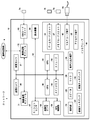
- FIG. 4 shows functional blocks of the information processing apparatus 10.
- Each functional block included in the control unit 100 can be configured by the CPU 60, the GPU 62, the main memory 64, the storage 66, and the like as described above in terms of hardware, and various functions in the information processing apparatus 10 can be defined in terms of software.
- This is realized by a program loaded into the main memory 64 from a storage device or a mounted recording medium. Therefore, it is understood by those skilled in the art that these functional blocks can be realized in various forms by hardware only, software only, or a combination thereof, and is not limited to any one.
- the control unit 100 includes an operation receiving unit 102 that receives information related to an operation input by a user, a book data storage unit 108 that stores electronic book data, a display screen control unit 104 that controls pages to be displayed and areas, display images and outputs An output data generation unit 110 that generates sound is included.
- the operation reception unit 102 receives a signal indicating the content of the operation performed by the user on the information processing apparatus 10 from an operation unit such as the operation unit 70 including the joystick 24 or the front touchpad 21, and sends it to the display screen control unit 104.
- the book data storage unit 108 stores electronic book data to be displayed in advance. For example, when the user performs an operation of selecting one book from the electronic book selection screen displayed on the display device 20 via the operation unit 70, the operation information is notified from the operation reception unit 102 to the display screen control unit 104. Then, the display screen control unit 104 recognizes the electronic book to be displayed. At this time, in terms of hardware, the electronic data is loaded from the storage 66 or memory card 78 of FIG.
- the electronic book data includes, for example, image data for each page and additional data such as bibliographic information.
- the display screen control unit 104 controls the display screen of each page of the electronic book according to the user operation received by the operation receiving unit 102.
- the function for realizing page switching and display area movement using the joystick 24 of the operation unit 70 is illustrated, but other operation means are appropriately used for user operations.
- the L button 26a and the R button 26b may be used for switching pages, and the front touchpad 21 may be used for moving the display area.
- the user can use the operation means properly according to the situation at that time and his / her preference.
- the display screen control unit 104 includes an operation content determination unit 112, a scroll processing unit 114, and a display switching unit 116.
- a single joystick 24 enables a plurality of operations such as free scrolling of the display screen, switching of pages and display areas, and turning of pages. Therefore, the operation content determination unit 112 determines the operation content intended by the user based on the tilting direction of the joystick 24 and the position of the displayed area within the page, and determines the subsequent processing.
- the scroll processing unit 114 derives a time change of the display area from the tilt direction and the tilt amount of the joystick 24. For example, the coordinates of the four corners of the display area in the two-dimensional space representing the page are obtained for each predetermined time step determined from the frame rate of the display device 20 or the like.
- the display area after switching is basically a continuous area before or after the display area before switching on the content of the book. For example, if the entire second page of the book is displayed before switching, the entire first page or the entire third page is displayed after switching. If the second half of the second page is displayed before switching, the first half of the second page or the first half of the third page is displayed after switching. By doing so, it is possible to read the content faster and to read the previous part faster than scrolling.
- the display switching unit 116 specifies the direction in which the content of the electronic book to be displayed advances from the data of the electronic book.
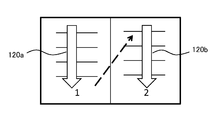
- FIG. 5 shows an example of the direction in which the contents of the electronic book advance specified by the display switching unit 116.
- the direction from the top to the bottom (arrow 120a) of the left page and from the top to the bottom (arrow 120b) of the right page is specified.
- the direction in which the content advances depends on the type of book and the language used. Therefore, the display switching unit 116 may read the information supplied as the additional data of the electronic book to obtain the direction, or register the information related to the direction in association with the book category and the like. You may make it select according to bibliographic information.
- Information finally specified by the display switching unit 116 based on the direction is the four-dimensional coordinates of the page after switching and the display area after switching in the two-dimensional space representing the page.
- the information related to the time change of the display area obtained by the scroll processing unit 114 and the information related to the page and area after switching specified by the display switching unit 116 are notified to the output data generation unit 110, respectively.
- the output data generation unit 110 reads out and decodes the image data of the display target page from the book data storage unit 108 as necessary based on the notified information, and generates a display image including the display area.
- a display image including the display area When two pages of spread are used as a basis for display, an image of each page is generated after connecting images on the left and right for every two pages, and then an image in the display area is extracted. Once decoded pages are stored in the internal memory and reused, quick display switching is possible.
- the output data generation unit 110 inserts an animation for turning the page during the page switching. At this time, a sound effect that turns the page in synchronization with the animation may be generated.
- the generated image and sound effect data By outputting the generated image and sound effect data to the display device 20 and the speaker 25 at an appropriate timing, it is possible to realize a mode in which an image changes or a sound effect sounds according to an operation.
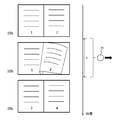
- FIG. 6 shows a change example of the electronic book browsing screen displayed in the present embodiment.
- two spread pages are displayed on one screen.
- the first page on the left side and the second page on the right side are simultaneously displayed.
- the page in the tilt direction is turned so that the previous or next two spread pages are displayed.
- the joystick 24 is tilted to the right while the two-page spread on the screen 150a is displayed, the right-side page is turned so that the third and fourth pages, which are the next two-page spread, are displayed.
- the shape of the joystick 24 as viewed from above is indicated by a circle, and the tilting direction as viewed from the user is indicated by a black arrow. The same applies to the subsequent drawings.
- the joystick 24 is tilted and the page is slightly turned, the joystick 24 is returned to the neutral state, that is, the tilt amount is set to 0, so that the page is completely turned as shown in the screen 150c.
- the third page and the fourth page which are two spread pages, are displayed.
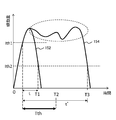
- tilting limit time a predetermined threshold
- the tilt limit time Tth is obtained by an experiment or the like so that the determination based on the user's intention is possible. For example, when 0.5 seconds or the like is set, the user himself / herself can control the validity / invalidity with a natural operation without being invalidated even if the operation is performed or without switching the display although the operation is desired to be invalidated.
- the amount of tilt below the first threshold value Ith1 as a dead zone that does not reflect the tilt on the display, it is possible to prevent an unintended page turning state from occurring.
- the first threshold value Ith1 is exceeded, the turning amount is changed according to the tilt amount. Thereby, it is possible to produce a sense of presence that the page is turned by a tilting operation.
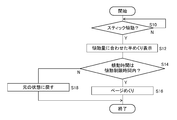
- FIG. 8 is a flowchart showing a processing procedure for realizing a page turning operation in the present embodiment.
- the operation content determination unit 112 acquires information related to the tilt amount and tilt direction of the joystick 24 from the operation accepting unit 102, and monitors whether the tilt amount exceeds the first threshold Ith1 (S10).
- the operation content determination unit 112 performs a scroll operation or a display region switching operation based on the position of the display region in the page and the tilt direction of the joystick 24. Whether or not is also determined. Since the flowchart of FIG. 8 shows a case where the entire two-page spread is displayed as shown in FIG. 6, such a determination process is omitted.
- the operation content determination unit 112 notifies the display switching unit 116 to that effect.
- the display switching unit 116 converts the tilt amount into the page turn amount, and requests the output data generation unit 110 to generate a half-turned image in which a page in the tilt direction is turned by the turn amount. .
- the angle range that can be determined as “left” and the angle range that can be determined as “right” are determined in consideration of some operation error. Set for the tilt direction of the joystick. The same applies to the determination in the vertical direction described later.
- an image is displayed so as to correspond to either the case where the information processing apparatus 10 is held in the horizontally long direction or the case where it is held in the vertically long direction. That is, the display image is rotated according to the gripping direction of the information processing device so that the top and bottom of the display device viewed from the user matches the top and bottom of the displayed page.
- the angle range on the information processing apparatus for determining that the tilting in each tilting direction such as “Left” or “Right” has been made so that the tilting direction of the joystick matches the vertical and horizontal directions seen from the user.
- the descriptions of “left side”, “right side”, “upper side”, and “lower side” relating to the tilting direction of the joystick 24 indicate directions viewed from the user. It means an angle range set for each direction in consideration of the gripping direction.
- the half-turned image can be generated by a general method such as texture mapping of the actual page to the curved page frame.
- Such model data for page drawing is stored in a memory in the output data generation unit 110 or the like.
- the operation content determination unit 112 monitors whether or not the tilt amount is equal to or smaller than the second threshold value Ith2 and the joystick 24 is returned to the neutral state. If the tilting time up to that time is within the tilting limit time Tth (Y in S14), the display switching unit 116 has completely turned the page that has been half-turned, and the next two spread pages are displayed. The output data generation unit 110 is requested to generate an animation image that appears. The output data generation unit 110 completes the page turning process by generating an image in which the page is turned in a predetermined time step until the next two spread pages are displayed and displaying the image on the display device 20 (S16). .
- the page that was in the half-turned state is returned to the original state (S18).
- this process changes the turning amount according to the tilt amount while the tilt is being performed, and the joystick 24 returns to the neutral state. When it is done, the display is restored.
- the page turning is enabled at Y in S14, it is determined that the page turning amount decreases with the decrease in the tilt amount in the process of returning the joystick to the neutral state before it is determined to be effective. The movement of the page becomes discontinuous and back and forth unnaturally.
- the tilt limit time elapses after the start of tilting is detected, only the increase in tilting amount may be reflected in the turning amount so that the turning amount does not decrease with respect to the decrease in tilting amount.
- the maximum tilt amount at that time is reflected in the turning amount.
- the reflection of the amount of tilt in the amount of turning up is roughly estimated for the minute time, You may always make it delay.
- this timing may be used as an end point of the tilting time, and compared with the tilting limit time to determine whether page turning is valid / invalid. Any or a combination of these methods prevents the page motion from becoming discontinuous or reciprocating.
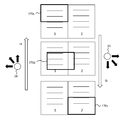
- FIG. 9 shows another change example of the electronic book browsing screen displayed in the present embodiment.
- This figure assumes that the information processing apparatus 10 is gripped in the vertically long direction. Of the two facing pages (the first page and the second page in the upper part of the figure), the areas 160a to 160c displayed on the display device 20 are indicated by bold lines.
- the operation content determination unit 112 acquires information to that effect from the motion sensor 67 and the like, and the screen configuration Is changed as shown in FIG.
- exactly one page of image is displayed on the screen in the portrait direction.
- the upper part of the figure shows a state where the entire first page, which is the left side of the spread, is displayed.
- the screen configuration when gripping in the vertically long direction is not limited to this.
- one page is displayed when the information processing apparatus 10 is gripped in the horizontally long direction.
- the aspect ratio of the page is different from the aspect ratio of the screen of the display device 20, it may be possible to display the entire page by providing margins on the left and right or top and bottom of the page, or to display only a part of the page. .
- processing is commonly performed according to the position of the display area within the page and the tilting direction of the joystick 24 regardless of the holding direction.
- the operation content determination unit 112 determines that this is a scroll operation.
- the display area moves to the right as in the transition of the arrow A, and the scrolling is stopped in a state where the second page that is the right side of the spread is displayed (display area 160b, 160c).
- the joystick 24 is tilted to the left in the state where the entire second page is the display area 160c as described above, there is room for scrolling in the tilting direction, and this is also determined as a scroll operation.
- the display area moves to the left as in the transition of the arrow B, and the scrolling is stopped in a state where the first page on the left side of the spread is displayed (display area 160b, 160a).
- the display area of the scroll start point and end point may be at an arbitrary position. That is, as long as there is room for scrolling in the tilt direction, the display area is moved in the tilt direction during the tilt period of the joystick.
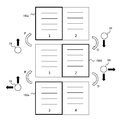
- FIG. 10 shows a change example of the electronic book browsing screen when the display area is switched in the same situation as FIG.
- the upper part of the figure is the same state as that shown in the upper part of FIG. 9 and shows a state in which the first page on the left side of the spread is displayed.
- the operation content determination unit 112 determines this as a display area switching operation.
- the display area is switched to the second page that is next to the first page on the contents of the book (display area 160d).
- the display area is switched in the reverse direction. That is, when the switching operation is performed by tilting the joystick 24 upward in the state of the display area 160e in the lower part of FIG. 10, the second page corresponding to the front of the third page on the contents of the book as indicated by the arrow E transition.
- the display area is switched to (display area 160d). Since the second page is not in the same spread page as the third page, the area of the second page of the first and second pages, which are the previous spread pages, is displayed.
- the display area is switched to the first page, which is the front of the second page on the contents of the book, as indicated by the arrow F (display area). 160a).
- the example of FIG. 10 is an example of a book that reads an article in a page from top to bottom, so when reading to the bottom of the page, the joystick 24 is tilted downward, that is, It can be understood intuitively that the continuation is displayed. Therefore, the tilting direction of the joystick 24 at the time of switching the display area is not limited to the top and bottom, but may be changed as appropriate according to how the book is bound and the direction in which the book is read.
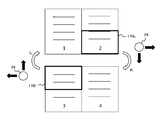
- FIGS. 12 and 13 show examples of changes in the electronic book browsing screen when a display area switching operation is performed in the same situation as in FIG.
- the upper part of FIG. 12 shows a state in which the lower half of the first page on the left side of the two-page spread is displayed. This state is a result of, for example, scrolling the display area 170a in the upper part of FIG. 11 by tilting the joystick 24 downward.
- the lower end of the display area coincides with the lower end of the page, there is no room for scrolling, so that the scrolling is stopped regardless of the tilt of the joystick 24.
- the operation content determination unit 112 determines that this is a display area switching operation.
- the display area is switched to the upper half of the second page, which is next to the first page on the contents of the book (display area 170e).
- This process is basically the same as that described in FIG. 10 except for the size of the display area. Therefore, the operation method and valid / invalid determination may be the same.
- the display area is moved slightly in the direction determined as the tilt direction of the joystick 24, in this example, the lower side.
- the display area is switched in the reverse direction. That is, when the joystick 24 is tilted upward in the state of the display area 170f in the lower part of FIG. 13 and the switching operation is performed, as shown by the transition of the arrow L, the lower part of the second page corresponding to the front of the third page on the contents of the book.
- the display area is switched to half (display area 170c). Since the second page is not in the same spread page as the third page, the lower half area of the second page of the first and second pages, which are the previous spread pages, is displayed. As described above, even when switching to a different page, the display area is slightly moved in the direction determined as the tilting direction of the joystick 24, that is, in the lower or upper direction, before determining that the switching is valid.
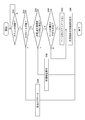
- the operation content determination unit 112 of the display screen control unit 104 acquires information related to the tilt amount and tilt direction of the joystick 24 from the operation receiving unit 102, and determines whether the tilt amount has exceeded a first threshold value Ith1.
- the start of tilting is detected by monitoring (S30). If tilting is not started, the system waits in that state (N in S30). On the other hand, if the start of tilting is detected (Y in S30), it is confirmed whether there is room for scrolling in the tilting direction (S32).
- the scroll processing unit 114 scrolls the screen in the same direction as the tilt direction (S34). As a result, the display area moves as shown in FIGS. At this time, the scroll speed may be changed according to the tilt amount.
- the display area switching unit 116 performs display area switching processing. Specifically, whether or not the current display area and the area before or after the current display area (shown as “next area” in the figure) are present in the spread page that is the display target at that time. Is confirmed (S36). When the corresponding area exists in the spread page (Y in S36), the display is switched to the area (S38).
- next area does not exist in the spread page (N in S36)
- a joystick capable of inputting a plurality of parameters such as a tilt direction, a tilt angle, and a tilt time by an easy operation are used.
- an operation rule that allows the user to intuitively understand the position of the display area in the page and the tilt direction of the joystick is provided to branch the process.
- the same operation can be performed using another operation means such as a touch pad, so that the user can select a suitable operation means according to his / her situation and preference.
- a touch pad arranged on the screen of the display device, it may be difficult to see the screen hidden by one's hand, or the touch pad may become dirty with fingerprints. Such a problem can be easily overcome by using a joystick.
- 10 information processing device 20 display device, 21 front touchpad, 24 joystick, 60 CPU, 62 GPU, 64 main memory, 66 storage, 67 motion sensor, 70 operation unit, 100 control unit, 102 operation reception unit, 104 display screen Control unit, 108 book data storage unit, 110 output data generation unit, 112 operation content determination unit, 114 scroll processing unit, 116 display switching unit.
- the present invention can be used for information processing apparatuses such as computers, information terminals, electronic book readers, and game machines.
Landscapes
- Engineering & Computer Science (AREA)
- Theoretical Computer Science (AREA)
- General Engineering & Computer Science (AREA)
- Physics & Mathematics (AREA)
- General Physics & Mathematics (AREA)
- Human Computer Interaction (AREA)
- Computer Hardware Design (AREA)
- User Interface Of Digital Computer (AREA)
- Controls And Circuits For Display Device (AREA)
Priority Applications (2)
| Application Number | Priority Date | Filing Date | Title |
|---|---|---|---|
| CN201480050128.7A CN105531648B (zh) | 2013-09-18 | 2014-04-09 | 信息处理设备和信息处理方法 |
| US14/915,985 US10891028B2 (en) | 2013-09-18 | 2014-04-09 | Information processing device and information processing method |
Applications Claiming Priority (2)
| Application Number | Priority Date | Filing Date | Title |
|---|---|---|---|
| JP2013192739A JP6086851B2 (ja) | 2013-09-18 | 2013-09-18 | 情報処理装置および情報処理方法 |
| JP2013-192739 | 2013-09-18 |
Publications (1)
| Publication Number | Publication Date |
|---|---|
| WO2015040772A1 true WO2015040772A1 (ja) | 2015-03-26 |
Family
ID=52688446
Family Applications (1)
| Application Number | Title | Priority Date | Filing Date |
|---|---|---|---|
| PCT/JP2014/002059 Ceased WO2015040772A1 (ja) | 2013-09-18 | 2014-04-09 | 情報処理装置および情報処理方法 |
Country Status (4)
| Country | Link |
|---|---|
| US (1) | US10891028B2 (enExample) |
| JP (1) | JP6086851B2 (enExample) |
| CN (1) | CN105531648B (enExample) |
| WO (1) | WO2015040772A1 (enExample) |
Cited By (1)
| Publication number | Priority date | Publication date | Assignee | Title |
|---|---|---|---|---|
| JP2020201675A (ja) * | 2019-06-07 | 2020-12-17 | 株式会社セルシス | 書籍表示プログラム及び書籍表示装置 |
Families Citing this family (9)
| Publication number | Priority date | Publication date | Assignee | Title |
|---|---|---|---|---|
| USD871420S1 (en) | 2014-11-26 | 2019-12-31 | Maria Francisca Jones | Display screen with animated graphical user interface |
| JP5869711B1 (ja) * | 2015-04-07 | 2016-02-24 | 株式会社メディアドゥ | コンテンツ表示装置、コンテンツ表示プログラム、コンテンツ表示方法 |
| US10691323B2 (en) * | 2015-04-10 | 2020-06-23 | Apple Inc. | Column fit document traversal for reader application |
| US9817511B1 (en) * | 2016-09-16 | 2017-11-14 | International Business Machines Corporation | Reaching any touch screen portion with one hand |
| US20190278450A1 (en) * | 2016-11-21 | 2019-09-12 | Shenzhen Royole Technologies Co., Ltd. | Electronic device and method for controlling display thereof |
| JP6821536B2 (ja) * | 2017-10-03 | 2021-01-27 | キヤノン株式会社 | 画像処理装置、制御方法及びプログラム |
| EP3783471A4 (en) * | 2018-05-21 | 2021-05-05 | Huawei Technologies Co., Ltd. | DISPLAY CONTROL METHOD AND TERMINAL DEVICE |
| EP3716037A1 (en) * | 2019-03-28 | 2020-09-30 | ABB Schweiz AG | Responsive auto-layouting of industrial process graphics |
| CN115016701B (zh) * | 2022-07-25 | 2024-12-20 | 北京字跳网络技术有限公司 | 一种页面的翻页方法、装置、计算机设备和存储介质 |
Citations (5)
| Publication number | Priority date | Publication date | Assignee | Title |
|---|---|---|---|---|
| JPS59180628A (ja) * | 1983-03-31 | 1984-10-13 | Toshiba Corp | 画像表示装置 |
| JP2005202062A (ja) * | 2004-01-14 | 2005-07-28 | Sony Computer Entertainment Inc | まんが表示装置、まんが表示方法、まんが編集装置およびまんが編集方法 |
| JP2010277456A (ja) * | 2009-05-29 | 2010-12-09 | Digitalmax Co Ltd | デジタルコンテンツ表示装置 |
| JP2012063940A (ja) * | 2010-09-15 | 2012-03-29 | Sony Computer Entertainment Inc | 画像処理装置、コンテンツ作成装置、画像処理方法、およびコンテンツファイルのデータ構造 |
| WO2013084522A1 (ja) * | 2011-12-08 | 2013-06-13 | シャープ株式会社 | 表示装置、表示装置の制御方法、制御プログラム、および記録媒体 |
Family Cites Families (50)
| Publication number | Priority date | Publication date | Assignee | Title |
|---|---|---|---|---|
| US7401286B1 (en) * | 1993-12-02 | 2008-07-15 | Discovery Communications, Inc. | Electronic book electronic links |
| GB9522791D0 (en) * | 1995-11-07 | 1996-01-10 | Cambridge Consultants | Information retrieval and display systems |
| GB2355143A (en) * | 1999-10-08 | 2001-04-11 | Nokia Mobile Phones Ltd | Fast scrolling through data by simultaneous depression and displacement of user input device |
| GB2355148B (en) * | 1999-10-08 | 2004-09-01 | Nokia Mobile Phones Ltd | Communication device |
| GB2355142A (en) * | 1999-10-08 | 2001-04-11 | Nokia Mobile Phones Ltd | Portable device having menu driven input |
| US7240291B2 (en) * | 2000-12-21 | 2007-07-03 | Xerox Corporation | Methods, systems, and computer program products for display of information relating to a virtual three-dimensional book |
| JP3626458B2 (ja) * | 2001-06-04 | 2005-03-09 | 株式会社ソニー・コンピュータエンタテインメント | ログ収集解析システム、ログ収集方法、コンピュータに実行させるためのログ収集プログラム、ログ解析方法、コンピュータに実行させるためのログ解析プログラム、ログ収集装置、ログ解析装置、ログ収集端末、ログサーバ |
| US7671845B2 (en) * | 2004-11-30 | 2010-03-02 | Microsoft Corporation | Directional input device and display orientation control |
| US8219374B1 (en) * | 2007-02-21 | 2012-07-10 | University Of Central Florida Research Foundation, Inc. | Symbolic switch/linear circuit simulator systems and methods |
| WO2009013634A2 (en) | 2007-06-28 | 2009-01-29 | Telefonaktiebolaget Lm Ericsson (Publ) | Improved navigation handling within web pages |
| JP2009026177A (ja) * | 2007-07-23 | 2009-02-05 | Clarion Co Ltd | 表示制御装置、表示制御方法および制御プログラム |
| US8209628B1 (en) * | 2008-04-11 | 2012-06-26 | Perceptive Pixel, Inc. | Pressure-sensitive manipulation of displayed objects |
| KR20100038688A (ko) * | 2008-10-06 | 2010-04-15 | 엘지전자 주식회사 | 이동 단말기 및 이동 단말기의 유저 인터페이스 |
| US9262063B2 (en) * | 2009-09-02 | 2016-02-16 | Amazon Technologies, Inc. | Touch-screen user interface |
| US8908003B2 (en) * | 2009-09-17 | 2014-12-09 | Nokia Corporation | Remote communication system and method |
| CN102640098B (zh) * | 2009-12-16 | 2016-09-07 | Abb股份有限公司 | 用于提供用于监视和控制过程的过程控制系统中的hmi的方法和系统 |
| US20110242007A1 (en) * | 2010-04-01 | 2011-10-06 | Gray Theodore W | E-Book with User-Manipulatable Graphical Objects |
| US8407608B1 (en) * | 2010-05-27 | 2013-03-26 | Amazon Technologies, Inc. | Touch input assist |
| KR20110138925A (ko) * | 2010-06-22 | 2011-12-28 | 삼성전자주식회사 | 디스플레이장치 및 그 제어방법 |
| US8812977B2 (en) * | 2010-08-12 | 2014-08-19 | Salesforce.Com, Inc. | Accessing multi-page data using a page index in a scrollbar |
| US8613061B2 (en) * | 2010-09-01 | 2013-12-17 | Blackberry Limited | Methods and apparatus to implement electronic book viewers |
| US20120066591A1 (en) * | 2010-09-10 | 2012-03-15 | Tina Hackwell | Virtual Page Turn and Page Flip via a Touch Sensitive Curved, Stepped, or Angled Surface Side Edge(s) of an Electronic Reading Device |
| US8434685B1 (en) * | 2010-09-14 | 2013-05-07 | Amazon Technologies, Inc. | Accessory devices configured to display supplemental content |
| JP2012083889A (ja) * | 2010-10-08 | 2012-04-26 | Sony Corp | 情報処理装置、情報処理方法、及びプログラム |
| US8861890B2 (en) * | 2010-11-24 | 2014-10-14 | Douglas Alan Lefler | System and method for assembling and displaying individual images as a continuous image |
| US9324240B2 (en) * | 2010-12-08 | 2016-04-26 | Age Of Learning, Inc. | Vertically integrated mobile educational system |
| US8797350B2 (en) * | 2010-12-20 | 2014-08-05 | Dr Systems, Inc. | Dynamic customizable human-computer interaction behavior |
| JP2012150566A (ja) * | 2011-01-17 | 2012-08-09 | Sharp Corp | 表示装置、表示方法、コンピュータプログラム、及び記録媒体 |
| KR20120084467A (ko) * | 2011-01-20 | 2012-07-30 | 삼성전자주식회사 | 전자책 단말기에서 페이지를 전환하는 방법 및 장치 |
| US8982062B2 (en) * | 2011-05-09 | 2015-03-17 | Blackberry Limited | Multi-modal user input device |
| US8870654B2 (en) | 2011-11-23 | 2014-10-28 | Sony Computer Entertainment America Llc | Gaming controller |
| WO2013115499A1 (en) * | 2012-01-31 | 2013-08-08 | Samsung Electronics Co., Ltd. | Method and apparatus for displaying page in terminal |
| KR20130100580A (ko) * | 2012-03-02 | 2013-09-11 | 삼성전자주식회사 | 단말기에서 페이지 넘김 방법 및 장치 |
| KR101945822B1 (ko) * | 2012-03-02 | 2019-02-11 | 삼성전자 주식회사 | 단말기에서 페이지 표시 방법 및 장치 |
| US20130250344A1 (en) * | 2012-03-20 | 2013-09-26 | Xerox Corporation | Method, system and apparatus for a graphical custom order with an interactive virtual representation for feature selection |
| KR101382928B1 (ko) * | 2012-04-09 | 2014-04-08 | 삼성전자주식회사 | 전자 서적의 책갈피 설정 방법 및 장치와 그 방법에 대한 프로그램 소스를 저장한 기록 매체 |
| CN102760301B (zh) | 2012-06-07 | 2015-09-30 | 武汉天目经纬科技有限公司 | 图像控制点交互编辑系统 |
| US9032335B2 (en) * | 2012-08-14 | 2015-05-12 | Christopher V. Beckman | User interface techniques reducing the impact of movements |
| KR20140025213A (ko) * | 2012-08-22 | 2014-03-04 | 삼성전자주식회사 | 휴대 단말기에서 전자책을 제어하는 장치 및 방법 |
| KR20140067755A (ko) * | 2012-11-27 | 2014-06-05 | 삼성전자주식회사 | 전자 기기 및 그의 페이지 이동 표시 방법 |
| US9082348B2 (en) * | 2012-12-07 | 2015-07-14 | Blackberry Limited | Methods and devices for scrolling a display page |
| US10620795B2 (en) * | 2013-03-14 | 2020-04-14 | RELX Inc. | Computer program products and methods for displaying digital looseleaf content |
| JP5851652B2 (ja) * | 2013-03-27 | 2016-02-03 | 株式会社東芝 | 電子機器、表示方法及びプログラム |
| JP2014197341A (ja) * | 2013-03-29 | 2014-10-16 | 富士フイルム株式会社 | 電子書籍制作装置、電子書籍システム、電子書籍制作方法及びプログラム |
| JP6185656B2 (ja) * | 2013-05-09 | 2017-08-23 | アマゾン テクノロジーズ インコーポレイテッド | モバイルデバイスインターフェース |
| US9804745B2 (en) * | 2013-06-09 | 2017-10-31 | Apple Inc. | Reordering content panes in a stacked tab view |
| US9400601B2 (en) * | 2013-06-21 | 2016-07-26 | Nook Digital, Llc | Techniques for paging through digital content on touch screen devices |
| KR20150002358A (ko) * | 2013-06-28 | 2015-01-07 | 삼성전자주식회사 | 전자 장치의 전자책 표시 방법 및 그 전자 장치 |
| US9733784B1 (en) * | 2013-09-03 | 2017-08-15 | Amazon Technologies, Inc. | Content preview for electronic devices |
| US20150149950A1 (en) * | 2013-11-22 | 2015-05-28 | Kobo Inc. | Computing device with touch-sensitive housing for detecting placeholder input in connection with a page turning action |
-
2013
- 2013-09-18 JP JP2013192739A patent/JP6086851B2/ja active Active
-
2014
- 2014-04-09 US US14/915,985 patent/US10891028B2/en active Active
- 2014-04-09 CN CN201480050128.7A patent/CN105531648B/zh active Active
- 2014-04-09 WO PCT/JP2014/002059 patent/WO2015040772A1/ja not_active Ceased
Patent Citations (5)
| Publication number | Priority date | Publication date | Assignee | Title |
|---|---|---|---|---|
| JPS59180628A (ja) * | 1983-03-31 | 1984-10-13 | Toshiba Corp | 画像表示装置 |
| JP2005202062A (ja) * | 2004-01-14 | 2005-07-28 | Sony Computer Entertainment Inc | まんが表示装置、まんが表示方法、まんが編集装置およびまんが編集方法 |
| JP2010277456A (ja) * | 2009-05-29 | 2010-12-09 | Digitalmax Co Ltd | デジタルコンテンツ表示装置 |
| JP2012063940A (ja) * | 2010-09-15 | 2012-03-29 | Sony Computer Entertainment Inc | 画像処理装置、コンテンツ作成装置、画像処理方法、およびコンテンツファイルのデータ構造 |
| WO2013084522A1 (ja) * | 2011-12-08 | 2013-06-13 | シャープ株式会社 | 表示装置、表示装置の制御方法、制御プログラム、および記録媒体 |
Cited By (2)
| Publication number | Priority date | Publication date | Assignee | Title |
|---|---|---|---|---|
| JP2020201675A (ja) * | 2019-06-07 | 2020-12-17 | 株式会社セルシス | 書籍表示プログラム及び書籍表示装置 |
| TWI714513B (zh) * | 2019-06-07 | 2020-12-21 | 日商Celsys股份有限公司 | 書籍顯示程式產品及書籍顯示裝置 |
Also Published As
| Publication number | Publication date |
|---|---|
| JP2015060350A (ja) | 2015-03-30 |
| JP6086851B2 (ja) | 2017-03-01 |
| US20160210004A1 (en) | 2016-07-21 |
| US10891028B2 (en) | 2021-01-12 |
| CN105531648A (zh) | 2016-04-27 |
| CN105531648B (zh) | 2019-04-05 |
Similar Documents
| Publication | Publication Date | Title |
|---|---|---|
| JP6086851B2 (ja) | 情報処理装置および情報処理方法 | |
| US10642486B2 (en) | Input device, input control method, and input control program | |
| JP5801656B2 (ja) | 情報処理装置および情報処理方法 | |
| CN108268187A (zh) | 智能终端的显示方法及装置 | |
| CN110727369A (zh) | 电子装置 | |
| EP3396519A1 (en) | Terminal and display control method | |
| JP5873182B2 (ja) | 情報処理装置および情報処理方法 | |
| JP6066602B2 (ja) | 処理装置 | |
| CN112148167A (zh) | 控件设置方法、装置和电子设备 | |
| CN114115691B (zh) | 电子设备及其交互方法、介质 | |
| US9019315B2 (en) | Method of controlling display | |
| US20130321469A1 (en) | Method of controlling display | |
| JP5930421B2 (ja) | 情報処理装置および情報処理方法 | |
| JP6322015B2 (ja) | 情報処理装置および情報処理方法 | |
| JP5959560B2 (ja) | 情報処理装置および情報処理方法 | |
| JP6197012B2 (ja) | 情報処理装置および情報処理方法 | |
| JP6110523B2 (ja) | 情報処理装置および情報処理方法 | |
| JP5930420B2 (ja) | 情報処理装置および情報処理方法 | |
| JP2024080011A (ja) | 電子機器及びプログラム | |
| JP5916033B2 (ja) | 電子機器、画像表示制御方法 | |
| CN120687184A (zh) | 应用管理方法、装置及电子设备 |
Legal Events
| Date | Code | Title | Description |
|---|---|---|---|
| WWE | Wipo information: entry into national phase |
Ref document number: 201480050128.7 Country of ref document: CN |
|
| 121 | Ep: the epo has been informed by wipo that ep was designated in this application |
Ref document number: 14846579 Country of ref document: EP Kind code of ref document: A1 |
|
| WWE | Wipo information: entry into national phase |
Ref document number: 14915985 Country of ref document: US |
|
| NENP | Non-entry into the national phase |
Ref country code: DE |
|
| 122 | Ep: pct application non-entry in european phase |
Ref document number: 14846579 Country of ref document: EP Kind code of ref document: A1 |