WO2014208706A1 - 電子装置、および、表示制御方法 - Google Patents
電子装置、および、表示制御方法 Download PDFInfo
- Publication number
- WO2014208706A1 WO2014208706A1 PCT/JP2014/067081 JP2014067081W WO2014208706A1 WO 2014208706 A1 WO2014208706 A1 WO 2014208706A1 JP 2014067081 W JP2014067081 W JP 2014067081W WO 2014208706 A1 WO2014208706 A1 WO 2014208706A1
- Authority
- WO
- WIPO (PCT)
- Prior art keywords
- unit
- scroll operation
- information
- display
- speed
- Prior art date
- Legal status (The legal status is an assumption and is not a legal conclusion. Google has not performed a legal analysis and makes no representation as to the accuracy of the status listed.)
- Ceased
Links
Images


Classifications
-
- G—PHYSICS
- G06—COMPUTING OR CALCULATING; COUNTING
- G06F—ELECTRIC DIGITAL DATA PROCESSING
- G06F3/00—Input arrangements for transferring data to be processed into a form capable of being handled by the computer; Output arrangements for transferring data from processing unit to output unit, e.g. interface arrangements
- G06F3/01—Input arrangements or combined input and output arrangements for interaction between user and computer
- G06F3/048—Interaction techniques based on graphical user interfaces [GUI]
- G06F3/0484—Interaction techniques based on graphical user interfaces [GUI] for the control of specific functions or operations, e.g. selecting or manipulating an object, an image or a displayed text element, setting a parameter value or selecting a range
- G06F3/0485—Scrolling or panning
-
- G—PHYSICS
- G06—COMPUTING OR CALCULATING; COUNTING
- G06F—ELECTRIC DIGITAL DATA PROCESSING
- G06F3/00—Input arrangements for transferring data to be processed into a form capable of being handled by the computer; Output arrangements for transferring data from processing unit to output unit, e.g. interface arrangements
- G06F3/01—Input arrangements or combined input and output arrangements for interaction between user and computer
- G06F3/03—Arrangements for converting the position or the displacement of a member into a coded form
- G06F3/041—Digitisers, e.g. for touch screens or touch pads, characterised by the transducing means
- G06F3/0412—Digitisers structurally integrated in a display
-
- G—PHYSICS
- G06—COMPUTING OR CALCULATING; COUNTING
- G06F—ELECTRIC DIGITAL DATA PROCESSING
- G06F3/00—Input arrangements for transferring data to be processed into a form capable of being handled by the computer; Output arrangements for transferring data from processing unit to output unit, e.g. interface arrangements
- G06F3/01—Input arrangements or combined input and output arrangements for interaction between user and computer
- G06F3/048—Interaction techniques based on graphical user interfaces [GUI]
- G06F3/0487—Interaction techniques based on graphical user interfaces [GUI] using specific features provided by the input device, e.g. functions controlled by the rotation of a mouse with dual sensing arrangements, or of the nature of the input device, e.g. tap gestures based on pressure sensed by a digitiser
- G06F3/0488—Interaction techniques based on graphical user interfaces [GUI] using specific features provided by the input device, e.g. functions controlled by the rotation of a mouse with dual sensing arrangements, or of the nature of the input device, e.g. tap gestures based on pressure sensed by a digitiser using a touch-screen or digitiser, e.g. input of commands through traced gestures
Definitions
- the present invention relates to an electronic device such as a mobile phone, a PDA (Personal Digital Assistant), a tablet PC (Tablet Personal Computer), an electronic book terminal, a portable game machine, and a display control method executed by the electronic device.
- an electronic device such as a mobile phone, a PDA (Personal Digital Assistant), a tablet PC (Tablet Personal Computer), an electronic book terminal, a portable game machine, and a display control method executed by the electronic device.
- the user may have to repeat the scroll operation a plurality of times in order to display desired information on the display.
- An electronic device includes a display unit including a display region, a storage unit that stores a plurality of pieces of information, a display control unit that displays the plurality of pieces of information in the display region, and an operation that receives a scroll operation And a determination unit that determines whether the scroll operation of the operation unit is a high-speed scroll operation faster than a predetermined speed, and determines a stop position based on a scroll start position and a speed of the scroll operation.
- the display control unit displays the plurality of information corresponding to the stop position determined by the determination unit, and the scroll operation is performed.
- the display control unit corrects the stop position determined by the determination unit. In response to displaying said plurality of information.
- the scroll operation is the high-speed scroll operation. If determined, the display control unit may display information indicating the classification corresponding to the correction stop position.
- the plurality of pieces of information may be address information including at least a name, and the division may be a division for each alphabet.
- the display area may display the division information indicating the division and the address information divided into the division side by side.
- information that becomes a break among the plurality of pieces of information may be displayed at the correction stop position.
- the display control method is executed in an electronic device that includes a display unit including a display area and a storage unit that stores a plurality of pieces of information.
- a first display step for displaying the plurality of information in the display area; a receiving step for receiving a scroll operation; and a first determination for determining whether the scroll operation of the operation unit is a high-speed scroll operation faster than a predetermined speed.
- FIG. 1A and 1B are external views of an electronic device.
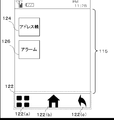
- FIG. 2 is a diagram illustrating an example of a screen displayed by the electronic device.
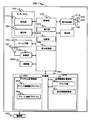
- FIG. 3 is a block configuration diagram mainly showing an electrical configuration of the electronic device.
- FIG. 4 is a diagram illustrating an example of a screen displayed by the electronic device.
- FIG. 5 is a diagram illustrating an example of a screen displayed by the electronic device.
- FIG. 6 is a diagram illustrating an example of a screen displayed by the electronic device.
- FIG. 7 is a flowchart of the address book control program 262 processed by the electronic device.
- FIG. 8 is a diagram illustrating an example of a screen displayed by the electronic device.
- FIG. 9 is a diagram illustrating an example of a screen displayed by the electronic device.
- FIG. 10 is a diagram illustrating an example of a screen displayed by the electronic device.
- FIG. 11 is a flowchart of the alarm control program 264 processed by the electronic device.
- the scroll stop position is changed based on the speed of the scroll operation received when a plurality of pieces of information arranged based on a predetermined rule are displayed in the display area. . Specifically, if the scroll operation is at a predetermined speed or more, the top information that is classified into predetermined classification information among a plurality of pieces of information is displayed at the upper end of the display area.
- a plurality of pieces of address information including at least a telephone number and name information included in the address book are displayed in alphabetical order based on the names included in the address information.
- the mobile terminal accepts a high-speed scroll operation when a plurality of address information is displayed.
- a high-speed scroll operation is received, based on the scroll start position and the speed of the scroll operation, one of the pieces of information (section information) including one alphabetic character is displayed at the upper end of the display area and is classified into the section information. That is, address information including a name beginning with an alphabet contained in the category information is displayed following the category information.
- the user can display the desired address information in the display area when a plurality of address information stored in the address book are displayed in alphabetical order based on the names included in the address information. Is updated, that is, a scroll operation is performed to scroll the display.
- a scroll operation is performed to scroll the display.
- the stored address information is large and arranged in alphabetical order
- the user when displaying address information including a name that starts with a letter after the alphabet (for example, X or Z), the user has to display multiple times. Scroll operation must be performed.
- Scroll operation must be performed.
- the user cannot confirm that the desired information is displayed because the scroll display is fast, and the user may perform an excessive scroll operation.
- An extra scroll operation must be performed to return the display to the position where is displayed.
- any sort information for sorting address information is displayed at the upper end of the display area. Therefore, when the user wants to display desired address information, a high-speed scroll operation is performed until the division information for dividing the desired address information is displayed, and the division information for dividing the desired name is displayed. Then, a low-speed scroll operation is performed to display address information indicated by a desired name. Therefore, desired address information can be easily displayed without performing an unnecessary scroll operation [Embodiment 1]
- FIGS. 1 an embodiment of the portable terminal of the present invention will be described in detail with reference to FIGS.
- FIG. 1 is an external view of the mobile terminal 100.
- 1A is a front view of the mobile terminal 100
- FIG. 1B is a rear view of the mobile terminal 100.
- FIG. A mobile terminal 100 illustrated in FIG. 1A includes a touch panel 105, a key input unit 130, a sound output unit 140, a sound input unit 150, and a light emitting unit 160.
- the touch panel 105 includes a display unit 110 and an operation unit 120.
- the touch panel is a capacitive touch panel, and an operation (hereinafter referred to as a touch operation) is performed based on a change in capacitance generated between a contact target such as a finger or a touch pen and an electrode provided on the display region 115. Judging.
- the display unit 110 includes a backlight type liquid crystal display that performs color display, and includes a liquid crystal panel and a backlight for irradiating the liquid crystal panel with light.
- the display unit 110 displays various information such as display objects such as icons and widgets and images based on control signals input from the control unit 230.
- the display unit 110 is not limited to a liquid crystal display, and may be, for example, an organic EL display or a display in which a plurality of LEDs are arranged on a matrix.
- the display unit 110 is a backlight type liquid crystal display, and an area in which information is displayed on the liquid crystal display is referred to as a display area 115.
- the operation unit 120 includes electrodes arranged on the display area 115 for detecting a touch operation.
- the operation unit 120 receives a touch operation and outputs an input signal based on the received touch operation to the control unit 230.
- the operation unit 120 detects the operation position where the touch operation is received, and outputs coordinate data for the detected operation position to the control unit 230. That is, the user inputs an operation position, an operation direction, and the like to the mobile phone 100 by performing a touch operation on the operation unit 120 with a touch target such as a finger or a touch pen.
- the operation unit 120 accepts various touch operations. Examples of the touch operation include a tap operation and a scroll operation.
- the tap operation is an operation of releasing the contact target from the operation unit 120 in a short time after the contact unit is brought into contact with the operation unit 120.
- the scroll operation is an operation of bringing the contact object into contact with the operation unit 120 and moving it in an arbitrary direction at a predetermined speed or more and then releasing it from the operation unit 120. That is, the scroll operation is a touch operation that involves movement of the touch position.
- the touch operation will be described more specifically. For example, after an input to a predetermined touch position on the operation unit 120 is detected, when no touch is detected within a predetermined first time, that is, when there is an operation of releasing the contact target from the operation unit 120
- the controller 230 determines that a tap operation has been performed.
- a scroll operation is performed by the control unit 230. Determined.
- the scroll operation as described above may be referred to as a flick operation.
- the operation unit 120 may be configured to determine that a scroll operation has been performed even when the touch position is not detected.
- the scroll operation will be described in more detail.
- the scroll display speed is the speed at which the display on the screen changes when scrolling.
- the user can determine the speed of the operation performed by the user by checking the display speed of the scroll.
- the scroll amount is the amount of movement of the information displayed in the display area 115 actually. Taking the case where the address information is displayed in the display area 115 as an example, it is the number of address information whose display moves (moves), in other words, the number of address information to be scrolled.
- the scroll stop position is a position where the scroll is determined based on the scroll start position and the scroll amount.
- Information displayed in the display area 115 is determined based on the scroll stop position.
- Scroll speed is determined by the distance of the touch position that moves within the second time described above. Specifically, it is determined that the scroll operation is fast when the distance is long and the scroll operation is slow when the distance is short. Note that the speed of the scroll operation may be determined from the time required to move the predetermined distance.
- FIG. 2 is an example of a screen (hereinafter referred to as a main screen) displayed on the display unit 110.
- the main touch key 122 in FIG. 2 executes various processes when a touch operation is received. For example, when a tap operation is accepted by the menu key 122 (a), a menu screen is displayed over the screen.
- the menu screen includes, for example, a button for displaying an address book, a button for executing alarm setting, and the like.
- the application execution screen displayed on the display unit 110 is terminated and the main screen shown in FIG. 5 is displayed on the display unit 110. .
- the screen that is currently displayed on the display unit 110 immediately before being displayed on the display unit 110 is displayed.
- the main screen includes an icon for executing a predetermined application.
- an address book icon 124 for displaying an address book and an alarm setting icon 126 for setting an alarm are arranged.
- the touch panel 105 may be a touch panel of another system such as a resistive film system, an infrared system, or an electromagnetic induction system.
- the touch operation is described. Specifically, when a voltage equal to or higher than a predetermined value is applied to the electrodes constituting the operation unit 120 provided on the surface of the display region 115, the detection sensitivity of the touch operation increases. When the detection sensitivity of the operation unit 120 is increased, it is possible to detect a change in electrostatic capacitance in a space spaced by several mm from the electrode. That is, a non-contact operation accompanying a change in capacitance can be detected. In the present embodiment, the touch operation including the non-contact operation described above is referred to.
- the key input unit 130 is composed of hard keys and accepts inputs to the hard keys.
- the input received by the key input unit 130 is output to the control unit 230 as an input signal.
- the key input unit 130 is assigned with an input for adjusting the volume and switching the power on and off.
- the sound output unit 140 is configured with a speaker or the like and has a function of outputting sound to the outside based on an analog signal output from the signal processing unit 210.
- the sound input unit 150 is composed of a microphone or the like, and has a function of converting an external sound such as a sound into an analog signal and outputting the analog signal to the signal processing unit 210.
- the light emitting unit 160 is configured by a light emitting element such as an LED.
- the light emitting unit 160 emits light to the outside according to a control signal output from the control unit 230.
- the light emitting unit 160 notifies the arrival of an incoming call, the reception of an e-mail, the arrival of an alarm date, etc. by irradiating light to the outside.
- FIG. 3 is a block configuration diagram of the mobile terminal 100.
- a mobile terminal 100 illustrated in FIG. 3 includes a touch panel 105, a display unit 110, an operation unit 120, a key input unit 130, a sound output unit 140, a sound input unit 150, a light emitting unit 160, an antenna unit 180, a radio unit 190, and a vibration unit 200.
- FIG. 3 The configuration illustrated in FIG. 3 will be described. The description of the same components as those shown in FIG. 1 is omitted.
- the antenna unit 180 receives an electromagnetic wave having a predetermined frequency and outputs it to the wireless unit 190 as a high-frequency signal.
- the high frequency signal output from the wireless unit 190 is output to the base station as an electromagnetic wave having a predetermined frequency.
- the wireless unit 190 performs wireless communication with other mobile terminals and base stations.
- the radio unit 190 performs demodulation processing and decoding processing on a predetermined high-frequency signal input from the antenna unit 180 to convert it into a digital audio signal.
- the radio unit 190 performs encoding processing and modulation processing on the digital audio signal input from the control unit 230, converts the digital audio signal into a high-frequency signal, and outputs the high-frequency signal to the antenna unit 180.
- the portable terminal 100 of this embodiment has a mail function, and transmits and receives mail with other electronic devices and the like via the wireless unit 190.
- the vibration unit 200 is constituted by a motor, and generates mechanical vibration by a control signal output from the control unit 230.
- the vibration unit 200 notifies, for example, an incoming call, an incoming mail, an alarm date and time, etc. by mechanical vibration.
- the signal processing unit 210 converts the digital signal output from the control unit 230 into an analog signal, and outputs the converted analog signal to the sound output unit 140. Further, the signal processing unit 210 converts the analog signal input from the sound input unit 150 into a digital signal and outputs the digital signal to the control unit 230.
- the power supply unit 220 is configured by a chargeable / dischargeable battery such as a lithium ion battery. Furthermore, the power supply unit 220 supplies power to each component provided in the mobile terminal 100.
- the control unit 230 includes a CPU and a DSP.
- the control unit 230 performs various functions by controlling each component provided in the mobile terminal 100 under the control of a Linux (registered trademark) -based OS such as Android (registered trademark) and REX, and other OSs. Execute. For example, the control unit 230 executes a function for setting an alarm based on an input received by the key input unit 130 or the operation unit 120, a mail transmission / reception function, a call function, and the like. Further, the control unit 230 executes the program stored in the storage unit 250.
- the storage unit 250 includes a ROM (Read Only Memory) and a RAM (Random Access Memory).
- the storage unit 250 stores a program executed on the mobile terminal 100, display information displayed on the display unit 110, and the like. The characteristic configuration of the storage unit 250 will be described below.
- the storage unit 250 includes a program storage area 260 and a processing information storage area 270.
- the program storage area 260 stores various types of information (described below) that are processed when the program is executed.
- the program storage area 260 stores, for example, a program for performing voice communication, a mail program for transmitting and receiving mail, and the like.
- the program storage area 260 stores an address book control program 262 and an alarm setting control program 264 described later as characteristic programs according to the present embodiment.
- the processing information storage area 270 includes an address book 272 and a display information storage unit 274.
- the address book 272 stores a plurality of pieces of address information input by user operations.
- the address information includes identification information such as names and nicknames indicating the owner names of other terminals, contact numbers such as telephone numbers and e-mail addresses set for the terminals, and memory numbers indicating numbers registered with address information, Group information indicating a group in the address book is included.
- the address information is rearranged based on the identification information and group information. Information rearranged based on these rearrangement rules is displayed separately for each category. For example, when the address information is rearranged based on the identification information, the address information is arranged in alphabetical order based on the name or nickname included in the identification information. In this case, the division is an alphabet (A, B, C%) Shown at the beginning of the name or nickname. That is, when the address information is rearranged based on the identification information, the address information is sorted and arranged for each alphabet. Similarly, when the address information is rearranged based on the group information, the address information is classified for each group included in the address information.
- the display information storage unit 274 stores information to be displayed in the display area 115 when the program stored in the program storage area 260 is executed by the control unit 230. Specifically, the screen information (FIGS. 4, 5, and 6) displayed in the display area 115 when the address book control program 262 is executed, and the display area when the alarm setting control program 264 is executed. The screen information displayed in 115 (FIGS. 8, 9, and 10) is stored.
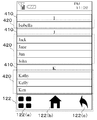
- FIG. 4 is a diagram illustrating a state where the address book control program 262 is executed by the control unit 230 and the address information 420 stored in the address book 272 is displayed in the display area 115.
- the address information 420 is displayed in alphabetical order. Between the address information 420, classification information 410 indicating one alphabetic character is displayed.
- 5 and 6 are diagrams showing a state in which the display scrolling is stopped after the display area 115 is scrolled and the display is scrolled.
- the operation unit 120 is configured to accept a low-speed scroll operation and a high-speed scroll operation as a scroll operation.
- the low-speed scroll is a scroll operation at a predetermined speed or less
- the high-speed scroll operation is a scroll operation exceeding the predetermined speed.
- the predetermined speed may be set based on the speed of a general scroll operation, and is set so that a faster scroll operation (high-speed scroll operation) than a normal scroll operation (low-speed scroll operation) can be determined. May be.
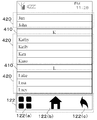
- FIG. 5 is a diagram illustrating a state in which when a low-speed scroll operation is received from the operation unit 120, the stop position is determined based on the speed of the scroll operation, the scroll is stopped, and information is displayed in the display area 115. is there.
- FIG. 5 shows a state in which a low-speed scroll operation is accepted and address information indicated by the name Jun is displayed at the upper end of the display area 115.
- the scroll stop position determined based on the speed of the scroll operation is defined as the first position.
- the first position is determined, and either the segment information 410 or the address information 420 corresponding to the first position is displayed in the display area 115.
- the first position is a position where the address information 420 indicated by Jun is displayed at the upper end of the display area 115.
- the second position for stopping the scroll is determined based on the scroll start position and the first position. That is, the division information 410 is set to be displayed at the second position, and the division information 410 is displayed at the upper end of the display area 115.
- the division information 410 is displayed at the upper end of the display area 115 based on the second position, and the address information 420 related to the division information 410 is displayed below the division information 410 (see FIG. 6).
- the scroll stop position (first position) is determined based on the speed of the scroll operation received from the operation unit 120, and the section information 410 included between the scroll start position and the first position is determined from the scroll start position.
- the division information 410 arranged farthest away is displayed at the upper end of the display area 115. In other words, among the segment information 410 included between the scroll start position and the first position, the segment information 410 closest to the first position is displayed at the upper end of the display area 115.
- FIG. 6 shows a state in which a high-speed scroll operation is accepted in the state of FIG. 4 and the scroll display is stopped.
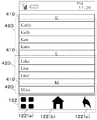
- K of the division information 410 is displayed at the upper end of the display area 115, and Kathy, Kelly, Ken, and Kuro are displayed side by side as the address information 420 divided into the division K.
- the address information positioned at the head of the section K is Kathy.
- the stop position (first position) determined based on the speed of the scroll operation is the position where the address information 420 indicated by Ken is displayed at the upper end of the display area 115.
- K which is the division information 410 including the address information 420 indicated by Ken
- K is displayed at the upper end of the display area 115 as shown in FIG. This is a state stopped at the position (second position). That is, if it is determined that the scroll operation is a high-speed scroll operation, the position where the scroll is originally stopped by the scroll operation (first position) is corrected based on the high-speed scroll start position and the first position. Is displayed at the upper end of the display area 115.
- the portable terminal 100 when a high-speed scroll operation is accepted, address information classified into desired classification information is displayed following the classification information. Therefore, the user can easily search for desired address information.
- the execution unit 302 executes various programs stored in the storage unit 250. Specifically, the execution unit 302 executes an address book control program 262 whose flowchart is shown in FIG. 7 and an alarm control program 264 described later.
- the determination unit 304 determines the type of the input signal input to the control unit 230.
- the input signal received by the control unit 230 includes, for example, an input signal based on the operation received by the operation unit 120.
- the determination unit 304 determines whether the operation received by the operation unit 120 is an operation for causing the display area 115 to display the address information 420 included in the address book 272 in the display area 115 or a scroll operation. Alternatively, it is determined whether or not the operation is a high-speed scroll operation.
- the display control unit 306 displays information stored in the storage unit 250 in the display area 115 based on a program executed by the execution unit 302. For example, the display control unit 306 causes the display area 115 to display the screens shown in FIGS.
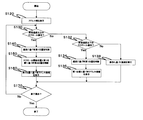
- the address book control program 262 executed by the execution unit 302 will be described with reference to the flowchart of FIG.
- the execution unit 302 executes the address book control program 262.
- the display control unit 306 displays information on the address book 272 in the display area 115 as shown in FIG. (S120).
- the determination unit 304 determines whether or not a high-speed scroll operation has been received from the operation unit 120 (S130).
- the scroll display stop position (first position) is determined based on the scroll start position and the speed of the scroll operation (S140). .
- the determination unit 304 determines the second position based on the classification information related to the first stop position. (S150).
- the display control unit 306 causes the display area 115 to display any one piece of the division information 410 determined by the second position and the address information 420 divided into the set division information 410 (S160).
- the determination unit 304 determines whether or not an operation for ending the display of information related to the address book 272 has been received from the operation unit 120 (S170).
- the display control unit 306 ends the display of the address book 272. On the other hand, when determining that it has not been received, the execution unit 302 executes the process of S130 again (S170: No).
- the determination unit 304 determines whether a low-speed scroll operation has been received (S132). On the other hand, when the determination unit 304 determines that a high-speed scroll operation is not received from the operation unit 120, the execution unit 302 executes processing based on the operation received from the operation unit 120 (S138).
- the determination unit 304 determines that a low-speed scroll operation has been received (S132: Yes)
- the determination unit 304 determines the first position based on the speed of the scroll operation (S134).
- the display control unit 306 displays the address information 420 in the display area 115 based on the first position (S136).
- any one of the division information 410 set to the scroll start position and the second position determined based on the first position is displayed in the display area 115. Is displayed at the top of. Therefore, the user can easily find desired address information.
- the alarm setting control program 350 is executed.
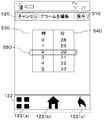
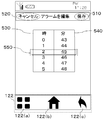
- FIG. 8 is a diagram showing an alarm setting screen displayed in the display area 115 when the alarm setting control program 350 is executed.
- the alarm setting screen is stored in the display information storage unit 274.
- the alarm setting screen includes a save button 510 for saving the alarm time setting in the storage unit 250, a cancel button 520 for canceling the alarm setting, and any one of 00 (12:00 or 24:00) to 23
- a time unit setting area 530 for setting a time unit number, a minute unit setting area 540 for any minute number from 00 to 59, and a setting area 550 for indicating a set time are included.
- the time displayed on the setting area 550 at the time of operation is stored in the storage unit 250 as an alarm time.
- FIG. 9 is a diagram illustrating a screen in which the scrolling is stopped at the stop position determined based on the scroll operation when a low-speed scroll operation is received from the operation unit 120 in the minute unit setting area 540.
- a low-speed scroll operation is accepted from the operation unit 120, any number from 00 to 59 set in the minute unit setting area 540 is displayed in the setting area 550.
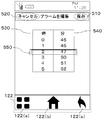
- FIG. 10 shows a screen in which scrolling is stopped at the scroll start position and the stop position determined based on the scroll operation when a high-speed scroll operation is received from the operation unit 120 for the minute unit setting area 540.
- FIG. 10 When a high-speed scroll operation is accepted, any multiple of 5 between 0 and 59 is displayed in the setting area 550.
- the minute unit is often set to a minute unit with a good delimiter such as a multiple of 5.
- a good delimiter such as a multiple of 5.
- the operation in the minute unit setting area 540 has been described as an example, but the same processing is executed for the operation in the hour unit setting area 530.
- a delimiter number that is, any multiple of 2 between 00 and 23 is displayed in the setting area 550.
- a number that is a multiple of 2 is not limited to being a delimiter number, and a good delimiter such as a multiple of 5 or a multiple of 10 may be used as the division information.
- processing may be applied to both the minute unit setting area 540 and the hour unit setting area 530, or may be applied to only one of the areas.
- the execution unit 302 executes the alarm control program 264 shown in the flowchart in FIG.
- the determination unit 304 determines whether the operation is an operation for starting the alarm setting, whether the operation is an operation for saving the alarm setting, or an operation for canceling the alarm setting.
- the display control unit 306 displays information stored in the storage unit 250 in the display area 115 based on a program executed by the execution unit 302. For example, the display control unit 306 displays the screens shown in FIGS.
- the alarm control program 362 will be described using the flowchart of FIG.
- the execution unit 302 executes the alarm control program 264.
- the display control unit 306 displays the alarm setting screen shown in FIG. (S220).
- the determination unit 304 determines whether or not the operation unit 120 has accepted a high-speed scroll operation for the hour unit setting area 530 or the minute unit setting area 540 (S230).
- the display control unit 306 receives the scroll operation.
- the display of either the hour unit setting area 530 or the minute unit setting area 540 is scrolled.
- a stop position (first position) at which the display scroll is stopped is determined (S240).
- the determination unit 304 determines the second position based on the scroll start position and the first position. (S250).
- the display control unit 306 causes the setting area 550 shown in FIG. 8 to display a delimiter number determined based on the second position (S260). Specifically, in S230, when a high-speed scroll operation for the hour unit setting area 530 is accepted, the delimiter number is a multiple of any two of 00-23. On the other hand, when a high-speed scroll operation for the minute unit setting area 540 is accepted, the delimiter number is a multiple of 5 of any one of 00 to 59.
- the determination unit 304 determines whether a save operation has been received from the operation unit 120 (S270).
- the save operation is a tap operation on the save button 510 shown in FIG.
- the execution unit 302 stores the alarm setting based on the time displayed in the setting area 550 at the time of the save operation. To save.
- the determination unit 304 determines whether a cancel operation has been received from the operation unit 120 (S272). ).
- the cancel operation is a tap operation on the cancel button 520 shown in FIG.
- the execution unit 302 ends the alarm setting without saving the input alarm time (S272: Yes).
- the determination unit 304 determines that a high-speed scroll operation has not been received from the operation unit 120 in the hour unit setting area 530 or the minute unit setting area 540 (S230: Yes), the determination unit 304 next selects a low speed It is determined whether or not a scroll operation is accepted (S232).
- the determination unit 304 determines that a low-speed scroll operation has been received from the operation unit 120 (S232: Yes).
- the determination unit 304 determines the first position based on the speed of the scroll operation (S234).
- the display control unit 306 causes the setting area 550 to display numbers corresponding to the hour unit setting area 530 or the minute unit display area 540 in the display area 115 based on the first position. Specifically, in S230, when a high-speed scroll operation for the hour unit setting area 530 is received from the operation unit 120, the display control unit 306 displays any number from 00 to 23 in the setting area 550. Display. On the other hand, when a scroll operation for the minute unit setting area 540 is received from the operation unit 120, the display control unit 306 displays any number from 00 to 59 in the setting area 550.
- the present invention is not limited to the straight-type mobile terminal 100 shown in FIG. 1, but may be applied to a foldable mobile terminal provided with the touch panel 170 or a slide-type mobile terminal.
- scroll operation for scrolling the display from top to bottom has been described as an example.
- present invention may be applied to a scroll operation for scrolling in the reverse direction, that is, from bottom to top.
- the division information 410 into which the address information is classified is displayed at the upper end of the display area 115 based on the name of the address information set at the first position determined based on the scroll operation. It is also good to do.
- the present invention is not limited to the case where the addresses are arranged in alphabetical order, and may be applied to the case where the address information 420 arranged in the order of group names is displayed based on the group information corresponding to each of the address information 410.
- the group information is displayed in the sorting information 410, and the address information sorted for each group name is displayed in alphabetical order.
- the present invention may be applied when the address information 420 is displayed side by side in the display area 115 based on the memory number corresponding to the address information 420.
- the division information 410 is a good number of memory numbers (for example, a multiple of 10 or a multiple of 20), and the address information 420 is displayed side by side in the order of the memory numbers.
- the program described in the present embodiment may be stored in the HDD of the data distribution server and distributed to the mobile terminal 100 via the network.
- a storage medium is sold or distributed in a state where a plurality of programs are stored in a storage medium such as an optical disk such as a CD, DVD, or BD (Blu-ray (registered trademark) Disc), a USB memory, or a memory card. May be.
- the present embodiment is not limited to the above-described embodiment, and may be applied to so-called smartphones, PDAs (Personal Digital Assistants), notebook PCs, and the like.
- Portable terminal 100 Touch panel 105 Display unit 110 Operation unit 120 Key input unit 130 Sound output unit 140 Sound input unit 150 Light emitting unit 160 Antenna unit 180 Radio unit 190 Vibration unit 200 Signal processor 210 Power supply unit 220 Storage unit 250 Control unit 300 Execution unit 302 Determination unit 304 Display control unit 306 Program storage area 260 Address book control program 262 Alarm control program 264 Processing information storage area 270 Address book 272 Display information storage unit 274
Landscapes
- Engineering & Computer Science (AREA)
- General Engineering & Computer Science (AREA)
- Theoretical Computer Science (AREA)
- Human Computer Interaction (AREA)
- Physics & Mathematics (AREA)
- General Physics & Mathematics (AREA)
- User Interface Of Digital Computer (AREA)
Abstract
スクロール操作の操作性を向上させる技術を提供する。電子装置は、表示領域を含む表示部と、複数の情報を記憶する記憶部と、前記複数の情報を前記表示領域に表示させる表示制御部と、スクロール操作を受け付ける操作部と前記操作部の前記スクロール操作が、所定速度より速い高速スクロール操作であるかを判断し、かつ、スクロール開始位置とスクロール操作の速度にもとづいて停止位置を判断する判断部と、を備え、前記スクロール操作が前記高速のスクロール操作ではないと判断された場合に、前記表示制御部は、前記停止位置に対応して前記複数の情報を表示し、前記スクロール操作が前記高速スクロール操作であると判断された場合に、前記表示制御部は、前記停止位置が補正された補正停止位置に対応して前記複数の情報を表示する。
Description
本発明は、携帯電話機やPDA(Personal Digital Assistant)、タブレットPC(Tablet Personal Computer)、電子書籍端末、携帯ゲーム機等の電子装置、および、電子装置で実行される表示制御方法に関するものである。
従来、タッチパネルを搭載した端末装置の一つである情報処理装置において、タッチパネルでスクロール操作が受け付けられると、ディスプレイに表示された情報がスクロールされ、ディスプレイに所望の情報が表示される技術がある。
しかしながら、従来技術では、ユーザは、ディスプレイ上に所望の情報を表示させるために複数回にわたりスクロール操作を繰り返さなければならない場合がある。
よって、スクロール操作の操作性を向上することが求められている。
本発明の実施例について説明する。本発明の一態様である電子装置は、表示領域を含む表示部と、複数の情報を記憶する記憶部と、前記複数の情報を前記表示領域に表示させる表示制御部と、スクロール操作を受け付ける操作部と、前記操作部の前記スクロール操作が、所定速度より速い高速スクロール操作であるかを判断し、かつ、スクロール開始位置とスクロール操作の速度にもとづいて停止位置を判断する判断部と、を備え、前記スクロール操作が前記高速スクロール操作ではないと判断された場合に、前記表示制御部は、前記判断部によって判断された前記停止位置に対応して前記複数の情報を表示し、前記スクロール操作が前記高速スクロール操作であると判断された場合に、前記表示制御部は、前記判断部によって判断された前記停止位置が補正された補正停止位置に対応して前記複数の情報を表示する。
本発明の一態様である電子装置において、表示制御部が、複数の情報と区分を所定の規則に基づいて前記表示領域に表示させている場合に、前記スクロール操作が前記高速スクロール操作であると判断されると、前記表示制御部は前記補正停止位置に対応して前記区分を示す情報を表示してもよい。
本発明の一態様である電子装置において、前記複数の情報は、少なくとも名前を含むアドレス情報であり、前記区分とは、アルファベットごとの区分であってもよい。
本発明の一態様である電子装置において、前記複数の情報は、少なくとも名前を含むアドレス情報であり、前記区分とは、アルファベットごとの区分であってもよい。
本発明の一態様である電子装置において、前記表示領域には、区分を示す区分情報と前記区分に区分される前記アドレス情報が並べて表示してもよい。
前記スクロール操作が前記高速スクロール操作であると判断された場合に、前記複数の情報のうち、区切りとなる情報を前記補正停止位置に表示してもよい。
本発明の一態様である表示制御方法は、表示領域を含む表示部と、複数の情報を記憶する記憶部とを有する電子装置において実行される。前記複数の情報を前記表示領域に表示させる第1表示ステップと、スクロール操作を受け付ける受付ステップと、前記操作部の前記スクロール操作が、所定速度より速い高速スクロール操作であるかを判断する第1判断ステップと、スクロール開始位置とスクロール操作の速度にもとづいて停止位置を判断する第2判断ステップと、前記第1判断ステップにおいて、前記スクロール操作が前記高速スクロール操作ではないと判断された場合に、前記第2判断ステップにおいて判断された前記停止位置に対応して前記複数の情報を表示する第2表示ステップと、前記第1判断ステップにおいて、前記スクロール操作が前記高速スクロール操作であると判断された場合に、前記第2判断ステップにおいて判断された前記停止位置が補正された補正停止位置に対応して前記複数の情報を表示する第3表示ステップと、を備える。
本発明の一態様によれば、スクロール操作の操作性を向上させる技術を提供することができる。
本発明の効果ないし意義は、以下に示す実施の説明により明らかとなろう。ただし以下の実施の形態は、あくまでも本発明を実施化する際の一つの例示であって、本発明は、以下の発明の実施の形態に記載されたものになんら制限を受けるものではない。
本発明の実施の形態に係る電子装置の概要を説明する。本発明の一実施例に係る携帯端末では、所定の規則に基づき並べられた複数の情報が表示領域に表示されている場合に受け付けたスクロール操作の速度に基づいて、スクロールの停止位置を異ならせる。具体的には、スクロール操作が所定速度以上であれば、複数の情報のうち予め定めた区分情報に区分される先頭の情報を、表示領域の上端に表示させる。アドレス帳に含まれる少なくとも電話番号と名前に関する情報で構成される複数のアドレス情報が、アドレス情報に含まれる名前に基づきアルファベット順で並べて表示されている場合を例に説明する。携帯端末は複数のアドレス情報が表示されている場合、高速のスクロール操作を受け付ける。高速のスクロール操作を受け付けると、スクロール開始位置と、スクロール操作の速度に基づき、アルファベット1文字が含まれる情報(区分情報)のいずれかが表示領域の上端に表示され、当該区分情報に区分される、つまり区分情報に含まれるアルファベットで始まる名前を含むアドレス情報が、区分情報に続けて表示される。
ユーザは、アドレス帳に記憶された複数のアドレス情報が、それそれアドレス情報に含まれる名前に基づいてアルファベット順で並べて表示されている場合において、所望のアドレス情報を表示領域に表示させるために表示を更新させる操作、つまり、表示をスクロールさせるスクロール操作を行う。その際、記憶されたアドレス情報が多く、アルファベット順で並べられている場合において、アルファベットの後ろの文字(例えば、XやZ)で始まる名前を含むアドレス情報を表示させるときは、ユーザは複数回スクロール操作を行わなければならない。また、連続して複数回のスクロール操作を行うと、ユーザは、スクロールの表示が速いために所望の情報が表示されたことを確認できず、過剰にスクロール操作を行う場合があり、所望の情報が表示された位置に表示を戻すために余分なスクロール操作を行わなければならない。
本発明の実施の形態にかかる電子装置では、高速のスクロール操作を受け付けた場合は、アドレス情報を区分するいずれかの区分情報が表示領域の上端に表示される。そのため、ユーザが所望のアドレス情報を表示させたい場合、所望のアドレス情報が区分される区分情報が表示されるまでは高速のスクロール操作を行い、所望の名前が区分される区分情報が表示されると、低速のスクロール操作を行い、所望の名前で示されるアドレス情報を表示させる。よって、不要なスクロール操作を行うことなく容易に所望のアドレス情報を表示させることができる
[実施例1]
以下では図1~図7を用いて、本発明の携帯端末の一態様について詳述する。
[実施例1]
以下では図1~図7を用いて、本発明の携帯端末の一態様について詳述する。
まず、図1~図3を用いて本発明の実施の一態様である携帯端末100が備える構成について説明する。
図1は、携帯端末100の外観図である。図1の(A)は携帯端末100の正面図であり、図1の(B)は携帯端末100の背面図である。図1の(A)に示す携帯端末100には、タッチパネル105、キー入力部130、音出力部140、音入力部150、発光部160が備えられている。
タッチパネル105は、表示部110と操作部120により構成される。タッチパネルは静電容量式にタッチパネルであって、指やタッチペンなどの接触対象と表示領域115上に備えられた電極との間に生じる静電容量の変化に基づき操作(以下タッチ操作という)の有無を判断する。
表示部110は、カラー表示を行うバックライト方式の液晶ディスプレイで構成され、液晶パネルと、当該液晶パネルに光を照射するためにバックライトを備える。表示部110は制御部230から入力された制御信号に基づきアイコンやウィジェットなどの表示オブジェクト、画像などの各種情報を表示する。なお、表示部110は液晶ディスプレイに限らず、例えば、有機ELディスプレイであってもよいし複数のLEDがマトリックス上に配列されたディスプレイであってもよい。以下では、説明のために表示部110はバックライト方式の液晶ディスプレイとして、液晶ディスプレイに情報が表示される領域を表示領域115ということにする。
操作部120は、表示領域115上に配されタッチ操作を検出するための電極を含む。操作部120は、タッチ操作を受け付け、受け付けたタッチ操作に基づく入力信号を制御部230に出力する。
操作部120は、タッチ操作を受け付けた操作位置を検出して、検出した操作位置に対する座標データを制御部230に出力する。つまり、ユーザは、操作部120に対して指やタッチペンなどの接触対象によりタッチ操作を行うことによって、操作位置や、操作方向などを携帯電話機100に入力する。
操作部120は各種のタッチ操作を受け付ける。タッチ操作の種類としては、タップ操作、スクロール操作等が挙げられる。タップ操作は、操作部120に接触対象を接触させた後、短時間のうちに操作部120より接触対象を離す操作である。スクロール操作は、操作部120に接触対象を接触させて任意の方向に所定速度以上で移動させた後、操作部120より離す操作である。つまり、スクロール操作は、タッチ位置の移動を伴うタッチ操作である。
タッチ操作についてより具体的に説明する。たとえば、操作部120に対する所定のタッチ位置への入力が検出された後、予め定めた第1時間以内にタッチが検出されなくなった場合、即ち、操作部120より接触対象を離す操作があった場合、制御部230によりタップ操作がなされたと判定される。操作部120に対する所定のタッチ位置への入力が検出され、予め定めた第2時間以内にタッチ位置が移動した後に、タッチ位置の入力が受け付けられなくなった場合、制御部230によりスクロール操作がなされたと判定される。なお、上記のようなスクロール操作を、フリック操作と言うこともある。なお、操作部120は、タッチ位置が検出されなかった場合でも、スクロール操作がなされたと判定するように構成されてもよい。
ここで、スクロール操作についてさらに詳述する。操作部120よりスクロール操作が受け付けられると、表示領域115に表示された情報がスクロールされる。その際、スクロール操作の速度に基づきスクロールの表示速度、スクロール量、及び、スクロール量に基づきスクロールの停止位置が判断される。スクロールの表示速度とは、スクロールされる際の画面の表示が変化する速度である。ユーザは、スクロールの表示速度を確認することで自身が行った操作の速度を判断することができる。
スクロール量とは、表示領域115に表示された情報が実際に移動量である。アドレス情報が表示領域115に表示された場合を例に挙げると、表示が動く(移動する)アドレス情報の数であり、言い換えると、スクロールされるアドレス情報の数である。
スクロール量とは、表示領域115に表示された情報が実際に移動量である。アドレス情報が表示領域115に表示された場合を例に挙げると、表示が動く(移動する)アドレス情報の数であり、言い換えると、スクロールされるアドレス情報の数である。
スクロールの停止位置は、スクロール開始位置とスクロール量とに基づき決定されるスクロールが停止する位置である。スクロールの停止位置に基づいて、表示領域115に表示される情報が判断される。
スクロール操作の速度とは、上記した第2時間以内に移動するタッチ位置の距離により判断される。具体的には、距離が長ければ速いスクロール操作であり、距離が短ければ遅いスクロール操作と判断される。なお、スクロール操作の速度は、所定の距離を移動するために要した時間から判断されても良い。
タッチ操作について、図2を用いてより詳細に説明する。図2は表示部110に表示される画面(以下メイン画面という)の一例である。図2のメインタッチキー122は、タッチ操作を受け付けると各種処理を実行する。たとえば、メニューキー122(a)にタップ操作が受け付けられると、画面に重ねてメニュー画面が表示される。メニュー画面には、例えば、アドレス帳を表示するボタン、アラーム設定を実行するボタンなどが含まれる。アプリケーションを起動中に、ホームキー122(b)にタップ操作が受け付けられると、表示部110に表示されたアプリケーションの実行画面を終了して、図5に示すメイン画面が表示部110に表示される。また、戻るキー122(c)にタップ操作が受け付けられると、現在、表示部110に表示されている直前に表示部110に表示されていた画面が表示される。またメイン画面には、所定のアプリケーションを実行するためのアイコンが含まれる。図2に示す画面には、アドレス帳を表示させるためのアドレス帳アイコン124と、アラームを設定するためのアラーム設定アイコン126が配置されている。
なお、タッチパネル105は、抵抗膜方式、赤外線方式、電磁誘導方式など他の方式のタッチパネルが採用されることとしてもよい。
なお、上記ではタッチ操作としたが、接触対象を操作部120に直接接触させる操作でなくともよい。具体的には、表示領域115の表面に備えられた操作部120を構成する電極に所定値以上の電圧が印加されると、タッチ操作の検出感度が上がる。操作部120の検出感度が上げられると、電極と数mm間隔をあけた空間での静電容量の変化が検出可能となる。つまり、静電容量の変化に伴う非接触の操作が検出可能となる。本実施例においては、上記した非接触の操作も含めてタッチ操作ということにする。
キー入力部130は、ハードキーで構成され、ハードキーに対する入力を受け付ける。キー入力部130が受け付けた入力は、入力信号として制御部230に出力される。キー入力部130には、例えば、音量の調整や電源のオンオフの切り替えを行うための入力が割り当てられている。
音出力部140は、スピーカなどで構成され信号処理部210から出力されたアナログ信号に基づき外部に音を出力する機能を有する。
音入力部150は、マイクなどで構成され音声などの外部からの音をアナログ信号に変換して信号処理部210に出力する機能を有する。
発光部160は、LEDなどの発光素子により構成される。発光部160は制御部230から出力された制御信号によって外部へ光を照射する。発光部160は、電話の着信、メールの受信、アラーム日時到来などを、外部へ光を照射することにより報知する。
図3は、携帯端末100のブロック構成図である。図3に示す携帯端末100は、タッチパネル105、表示部110、操作部120、キー入力部130、音出力部140、音入力部150、発光部160、アンテナ部180、無線部190、振動部200、信号処理部210、制御部230、記憶部250、電源部220により構成される。
図3に図示された構成について説明する。なお、図1に図示された構成と重複する構成については説明を省略する。
アンテナ部180は、所定の周波数の電磁波を受信して高周波信号として無線部190に出力する。また無線部190より出力された高周波信号を所定の周波数の電磁波として基地局へ出力する。
無線部190は、他携帯端末や基地局と無線通信を行う。無線部190はアンテナ部180から入力された所定の高周波信号に復調処理、及び、復号処理を施してデジタルの音声信号へと変換する。また、無線部190は、制御部230から入力されたデジタルの音声信号に符号化処理、及び、変調処理を行い高周波信号に変換してアンテナ部180へ出力する。さらに、本実施例の携帯端末100は、メール機能を有しており、無線部190を介して他の電子装置などとメールの送受信を行う。
振動部200は、モーターによって構成され、制御部230から出力された制御信号によって機械的振動を生じさせる。振動部200は、例えば、電話の着信、メールの受信、アラーム日時到来などを機械的振動によって報知する。
信号処理部210は、制御部230から出力されたデジタル信号をアナログ信号に変換して、変換したアナログ信号を音出力部140へ出力する。さらに、信号処理部210は音入力部150より入力されたアナログ信号をデジタル信号に変換して制御部230へ出力する。
電源部220は、リチウムイオン電池などの充放電可能な電池によって構成される。さらに電源部220は携帯端末100に備えられた各構成へ電力を供給する。
制御部230は、CPU及びDSPなどで構成される。制御部230は、Android(登録商標)およびREXなどのLinux(登録商標)ベースのOSや、その他のOSの制御の下、携帯端末100に備えられた各構成要素を制御することによって各種機能を実行する。例えば、制御部230は、キー入力部130、または、操作部120が受け付けた入力に基づいてアラームを設定する機能、メール送受信機能、通話機能などを実行する。さらに制御部230は、記憶部250に記憶されたプログラムを実行する。
記憶部250は、ROM(Read Only Memory)、及び、RAM(Random Access Memory)で構成される。記憶部250には、携帯端末100で実行されるプログラムや、表示部110に表示される表示情報などが記憶される。以下に記憶部250が有する特徴的な構成を説明する。
記憶部250には、プログラム記憶領域260と処理情報記憶領域270が備えられている。プログラム記憶領域260には、携帯端末100にて実行されるプログラムが記憶されている。処理情報記憶領域270には、プログラムが実行された場合に処理される各種情報(下記にて説明)が記憶される。以後、プログラム記憶領域260と処理情報記憶領域270を区別しない場合はまとめて「記憶部250」ということにする。プログラム記憶領域260には、例えば、音声通信を行うためのプログラム、メールの送受信を行うためのメールプログラム等が記憶されている。さらにプログラム記憶領域260には、本実施例に係る特徴的なプログラムとして、後述するアドレス帳制御プログラム262やアラーム設定制御プログラム264が記憶されている。
処理情報記憶領域270には、アドレス帳272や表示情報記憶部274が含まれる。
アドレス帳272には、ユーザからの操作により入力された複数のアドレス情報が記憶されている。アドレス情報には、他の端末の保有者名を示す名前やニックネームなどの識別情報や当該端末に設定された電話番号やメールアドレスなどの連絡先情報やアドレス情報を登録した番号を示すメモリ番号やアドレス帳のグループを示すグループ情報が含まれる。
アドレス情報が表示領域115に表示される場合、アドレス情報は識別情報やグループ情報に基づいて並び替えて表示される。これらの並び替えの規則に基づき並び替えられた情報は、それぞれ区分ごとに分けて表示される。例えば、アドレス情報が識別情報に基づき並び替えられる場合、識別情報に含まれる名前やニックネームに基づいて、アドレス情報がアルファベット順で並べられる。その場合、区分とは名前やニックネームの先頭に示されるアルファベット(A、B、C・・・)となる。つまり、アドレス情報が識別情報に基づき並び替えられると、アルファベットごとにアドレス情報が区分されて並べられることになる。同様に、アドレス情報がグループ情報に基づき並び替えられる場合は、アドレス情報に含まれるグループごとにアドレス情報が区分される。
表示情報記憶部274には、制御部230によりプログラム記憶領域260に記憶されたプログラムが実行された際に表示領域115に表示される情報が記憶されている。具体的には、アドレス帳制御プログラム262が実行された際に表示領域115に表示される画面情報(図4、図5、図6)や、アラーム設定制御プログラム264が実行された際に表示領域115に表示される画面情報(図8、図9、図10)が記憶されている。
図4は、制御部230によりアドレス帳制御プログラム262が実行され、アドレス帳272に記憶されたアドレス情報420が表示領域115に表示された状態を示す図である。図4では、アドレス情報420がアルファベット順に表示されており、アドレス情報420の間には、アルファベット1文字が示された区分情報410が表示される。
図5、図6は、表示領域115にスクロール操作が行われ、表示がスクロールされた後、表示のスクロールが停止した状態を示す図である。
操作部120は、スクロール操作として、低速のスクロール操作と高速のスクロール操作を受け付けるように構成されている。低速のスクロールは所定速度以下のスクロール操作であり、高速のスクロール操作は所定速度を超えるスクロール操作である。所定速度は、一般的なスクロール操作の速度に基いて設定されてもよく、通常のスクロール操作(低速のスクロール操作)より早いスクロール操作(高速のスクロール操作)を判断することができるように設定されてもよい。
図5は、操作部120より、低速のスクロール操作を受け付けた場合に、スクロール操作の速度に基づき停止位置が判断され、スクロールが停止され、表示領域115に情報が表示された状態を示す図である。図5では、低速のスクロール操作を受け付け、名前Junで示されるアドレス情報が表示領域115の上端に表示された状態が示されている。本実施例において、スクロール操作の速度に基づいて判断されるスクロール停止位置を第1位置と定義する。低速のスクロール操作が行われた場合、第1位置が判断され、第1位置に対応する区分情報410もしくはアドレス情報420のいずれかが表示領域115に表示される。図5において第1位置とは、Junで示されるアドレス情報420が、表示領域115の上端に表示される位置である。
操作部120より高速のスクロール操作を受け付けた場合には、スクロール開始位置と第1位置に基づきスクロールを停止させる第2位置が判断される。すなわち、区分情報410が第2位置に表示されるように設定されており、区分情報410は表示領域115の上端に表示される。高速のスクロール操作を受け付けた場合、第2位置に基づいて、表示領域115の上端に区分情報410が表示され、区分情報410の下に該区分情報410関連するアドレス情報420が表示される(図6)。
つまり、操作部120より受け付けたスクロール操作の速度に基づきスクロールの停止位置(第1位置)が判断され、スクロール開始位置と第1位置との間に含まれる区分情報410のうち、スクロール開始位置から最も離れて並べられた区分情報410が表示領域115の上端に表示される。換言すれば、スクロール開始位置と第1位置との間に含まれる区分情報410のうち、第1位置に最も近い区分情報410が表示領域115の上端に表示される。
より具体的に説明する。図6には、図4の状態で高速のスクロール操作を受け付け、スクロール表示が停止された状態を示す。表示領域115の上端に区分情報410のKが表示され、区分Kに区分されるアドレス情報420として、Kathy、Kelly、Ken、Kuroが並べて表示されている。ここで、区分Kの先頭に位置づけられるアドレス情報とはKathyである。スクロール操作の速度に基づき判断される停止位置(第1位置)は、Kenで示されるアドレス情報420が表示領域115の上端に表示される位置であった。しかし、操作部120より受け付けた操作が、高速のスクロール操作であったため、図6に示すようにKenで示されるアドレス情報420を含む区分情報410であるKが表示領域115の上端に表示される位置(第2位置)で停止された状態である。つまり、高速のスクロール操作であると判断された場合スクロール操作によりスクロールが本来停止される位置(第1位置)が、高速のスクロール開始位置と第1位置に基づいて補正され、区分情報410のいずれかが表示領域115の上端に表示されることになる。
本実施例にかかる携帯端末100では、高速のスクロール操作が受け付けられた場合に、所望の区分情報に区分されるアドレス情報が区分情報に続いて表示される。そのため、ユーザは所望のアドレス情報を容易に探すことができるようになる。
ここで、制御部230がプログラム記憶領域260に記憶されたプログラムを実行するために備える構成について説明する。
実行部302は、記憶部250に記憶された各種プログラムを実行する。具体的には実行部302は、図7にフローチャートを示すアドレス帳制御プログラム262や、後述するアラーム制御プログラム264を実行する。
判断部304は、制御部230へ入力された入力信号の種別を判断する。制御部230が受け付ける入力信号には、例えば、操作部120が受け付けた操作に基づく入力信号が含まれる。判断部304は、操作部120が受け付けた操作が、表示領域115にアドレス帳272に含まれるアドレス情報420を表示領域115に表示させる操作であるか否か、もしくは、スクロール操作であるか否か、もしくは、高速のスクロール操作であるか否かを判断する。
表示制御部306は、実行部302が実行するプログラムに基づき、記憶部250に記憶された情報を表示領域115に表示させる。例えば表示制御部306は、図2、図4~図6に示す画面を表示領域115に表示させる。
実行部302が実行するアドレス帳制御プログラム262について、図7のフローチャートに基づき説明する。
図2に示すメイン画面が表示領域115に表示された状態で、アドレス帳アイコン124に対するタップ操作が受け付けられた場合、実行部302によりアドレス帳制御プログラム262が実行される。
アドレス帳制御プログラム262が実行されると、表示制御部306は、図4に示すように、表示領域115にアドレス帳272に関する情報を表示させる。(S120)。
次に、判断部304は、操作部120より高速のスクロール操作を受け付けたか否かを判断する(S130)。
判断部304が、操作部120より高速のスクロール操作を受け付けたと判断した場合(S130:Yes)スクロール開始位置とスクロール操作の速度に基づきスクロール表示の停止位置(第1位置)を判断する(S140)。
次に判断部304は第1停止位置に関連する区分情報に基づいて、第2位置を判断する。(S150)。
そして、表示制御部306は、第2位置により定められるいずれかの区分情報410と、定められた区分情報410に区分されるアドレス情報420とを表示領域115に表示させる(S160)。
次に判断部304は、アドレス帳272に関する情報の表示を終了させる操作を操作部120より受け付けたか否かを判断する(S170)。
判断部304が、アドレス帳272に関する情報の表示を終了させる操作を受け付けたと判断した場合(S170:Yes)、表示制御部306はアドレス帳272の表示を終了させる。一方、受け付けていないと判断した場合、実行部302は再度S130の処理を実行する(S170:No)。
S130の処理の説明に戻る。判断部304が、操作部120より高速のスクロール操作を受け付けていないと判断した場合(S130:No)、次に判断部304は、低速のスクロール操作を受け付けたか否かを判断する(S132)。一方、判断部304が、操作部120より高速のスクロール操作を受け付けていないと判断した場合、実行部302は操作部120より受け付けた操作に基づく処理を実行する(S138)。
判断部304が、低速のスクロール操作を受け付けたと判断した場合(S132:Yes)、判断部304は、スクロール操作の速度に基づいて第1位置を判断する(S134)。
次に、表示制御部306は、第1位置に基づいて表示領域115にアドレス情報420を表示させる(S136)。
上記処理によれば、操作部120より高速のスクロール操作が受け付けられた場合、スクロール開始位置と、第1位置に基づき判断された第2位置に設定されたいずれかの区分情報410が表示領域115の上端に表示される。よって、ユーザは容易に所望のアドレス情報を見つけることができる。
[実施例2]
次に別の実施例として携帯端末100が実行するアラーム設定について説明する。なお、実施例1と同様の構成については説明を省略する。
次に別の実施例として携帯端末100が実行するアラーム設定について説明する。なお、実施例1と同様の構成については説明を省略する。
図2に示すメイン画面が表示領域115に表示されている場合に、操作部120よりアラーム設定アイコン126への操作を受け付けられると、アラーム設定制御プログラム350が実行される。
図8は、アラーム設定制御プログラム350が実行された際に、表示領域115に表示されるアラーム設定画面を示す図である。アラーム設定画面は表示情報記憶部274に記憶されている。アラーム設定画面には、アラーム時刻の設定を記憶部250に保存するための保存ボタン510とアラーム設定をキャンセルするためのキャンセルボタン520と、00(12時または24時)から23までのいずれかの時間単位の数字を設定する時単位設定領域530と、00から59までのいずれかの分単位の数字を分単位設定領域540と、設定された時刻を示す設定領域550が含まれる。
操作部120より保存ボタン510に対する操作(例えば、タップ操作)が受け付けられると、操作時点で設定領域550上に表示されている時刻がアラーム時刻として記憶部250に記憶される。
一方、操作部120よりキャンセルボタン520に対する操作(例えば、タップ操作)が受け付けられると、アラーム設定が終了される。
例えば、図8に示される画面中の時単位設定領域530に上または下へのスクロール操作が受け付けられると、表示がスクロールされ00から23までのいずれかの数字が設定領域550に表示される。一方、分単位設定領域540において、上または下へのスクロール操作が受け付けられた場合には、表示がスクロールされ、00から59までのいずれかの数字が設定領域550に表示される。
図9は、分単位設定領域540に対して、操作部120より低速のスクロール操作が受け付けられ場合に、スクロール操作に基づき判断された停止位置にてスクロールが停止された画面を示す図である。操作部120より低速のスクロール操作が受け付けられた場合、分単位設定領域540に設定された00から59までのいずれかの数字が設定領域550に表示される。
図10は、分単位設定領域540に対して、操作部120より高速のスクロール操作を受け付けた場合に、スクロール開始位置と、スクロール操作に基づき判断された停止位置にてスクロールが停止された画面を示す図である。高速のスクロール操作が受け付けられた場合は、0~59までの間のいずれかの5の倍数が設定領域550に表示される。
アラーム設定において分単位の設定は、例えば、5の倍数のような区切りのよい分単位の時刻が設定される場合が多い。上記の態様によれば、高速のスクロール操作が行われた場合に、スクロール開始位置とスクロール操作の速度に基づき判断される停止位置との間に含まれ、スクロール開始位置から最も離れた位置に並べられる区切りのよい数字(区切数字)が時刻設定領域550に表示されることとなる。本態様によれば、ユーザは、アラーム時刻の設定が容易になる効果を奏する。
上記では、分単位設定領域540における操作を例に説明したが、時単位設定領域530の操作についても同様の処理が実行される。具体的には、高速のスクロール操作が受け付けられた場合は、区切数字、つまり00~23までの間のいずれかの2の倍数が設定領域550に表示される。また、2の倍数の数字を区切数字とすることに限らず、5の倍数や10の倍数など区切りの良い数字が区分情報とされることとしてもよい。
なお、上記処理は分単位設定領域540および時単位設定領域530の両方に適用することとしてもよいし、いずれか一方の領域にのみ適用することとしてもよい。
アラーム制御プログラム264を実行するために制御部300が備える構成について図3を用いて説明する。
実行部302は、図11にフローチャートを示すアラーム制御プログラム264を実行する。
判断部304は、アラーム設定を開始する操作であるか否か、もしくは、アラーム設定を保存する操作であるか否か、もしくは、アラーム設定をキャンセルする操作であるか否かなどを判断する。
表示制御部306は、実行部302が実行するプログラムに基づき、記憶部250に記憶された情報を表示領域115に表示させる。例えば表示制御部306は、図8~図10に示す画面を表示領域115に表示させる。
アラーム制御プログラム362について、図11のフローチャートを使って説明する。
図2に示すメイン画面が表示領域115に表示された状態で、アラーム設定アイコン126に対するタップ操作が受け付けられた場合、実行部302によりアラーム制御プログラム264が実行される。
アラーム制御プログラム264が実行されると、表示制御部306は、表示領域115に図8に示すアラーム設定画面を表示させる。(S220)。
次に、判断部304は、操作部120が、時単位設定領域530、または、分単位設定領域540に対する高速のスクロール操作を受け付けたか否かを判断する(S230)。
判断部304により、操作部120が時単位設定領域530、または、分単位設定領域540に高速のスクロール操作を受け付けたと判断された場合(S230:Yes)、表示制御部306は、スクロール操作を受け付けた時単位設定領域530、または、分単位設定領域540のいずれかの領域の表示をスクロールさせる。そして、スクロール操作の速度に基づき表示のスクロールを停止させる停止位置(第1位置)を判断する(S240)。
次に、判断部304は、スクロール開始位置と第1位置に基づいて、第2位置を判断する。(S250)。
次に、表示制御部306は、図8に示す設定領域550に第2位置に基づき定められる区切数字を表示させる(S260)。具体的には、S230において、時単位設定領域530に対する高速のスクロール操作が受け付けられていた場合は、区切数字は00~23のうちのいずれかの2の倍数となる。一方、分単位設定領域540に対する高速のスクロール操作が受け付けられていた場合は、区切数字は00~59のうちのいずれかの5の倍数となる。
次に判断部304は、操作部120より保存操作を受け付けたか否かを判断する(S270)。保存操作とは、図8に示す保存ボタン510に対するタップ操作である。判断部304が、操作部120より保存操作を受け付けたと判断した場合、(S270:Yes)、実行部302は、保存操作時点で設定領域550に表示されている時刻に基づくアラーム設定を記憶部250に保存させる。
一方、判断部304が、操作部120より保存操作が受け付けられていないと判断した場合(S270:No)、判断部304は、操作部120よりキャンセル操作が受け付けられたか否かを判断する(S272)。キャンセル操作とは、図8に示すキャンセルボタン520に対するタップ操作である。判断部304がキャンセル操作を受け付けたと判断した場合、実行部302は、入力されたアラーム時刻を保存することなくアラーム設定を終了する(S272:Yes)。
S230の処理の説明に戻る。判断部304が、操作部120より時単位設定領域530、または、分単位設定領域540に高速のスクロール操作が受け付けられていないと判断した場合(S230:Yes)、次に判断部304は、低速のスクロール操作を受け付けたか否かを判断する(S232)。
判断部304が、操作部120より低速のスクロール操作が受け付けられたと判断した場合(S232:Yes)、判断部304は、スクロール操作の速度に基づいて第1位置を判断する(S234)。
次に、表示制御部306は、第1位置に基づいて表示領域115に時単位設定領域530、または、分単位表示領域540のそれぞれに対応する数字を設定領域550に表示させる。具体的には、S230において、操作部120より時単位設定領域530に対する高速のスクロール操作が受け付けられた場合は、表示制御部306は、00~23のうちのいずれかの数字を設定領域550に表示させる。一方、操作部120より分単位設定領域540に対するスクロール操作が受け付けられた場合、表示制御部306は、00~59のうちのいずれか数字を設定領域550に表示させる。
[その他の実施例]
その他の実施例について以下に説明する。
その他の実施例について以下に説明する。
本発明は、図1に示すストレート型の携帯端末100に限られず、タッチパネル170が備えられた折り畳み型の携帯端末やスライド型の携帯端末に適用することとしてもよい。
なお、表示を上から下へスクロールさせるスクロール操作を例に上げて説明した。しかしながら、本発明は逆方向、つまり、下から上へスクロールさせるスクロール操作に適用されることとしてもよい。
なお、高速のスクロール操作を受け付けると、スクロール操作に基づき判断される第1位置に設定されたアドレス情報の名前に基づき、当該アドレス情報が区分される区分情報410が表示領域115の上端に表示されることとしてもよい。
実施例1では、アドレス情報410がアルファベット順で並べて表示されている場合を例に挙げて説明した。しかしながら、アルファベット順で並べられた場合に限らず、アドレス情報410のそれぞれに対応するグループ情報に基づき、グループ名順で並べられたアドレス情報420が表示された場合に適用されることとしてもよい。そのような場合、区分情報410には、グループ名が表示され、グループ名ごとに区分されたアドレス情報はアルファベット順で並べて表示される。また、本発明は、アドレス情報420が、アドレス情報420に対応するメモリ番号に基づき表示領域115に並べて表示された場合に適用されることとしてもよい。そのような場合、区分情報410はメモリ番号の区切りのよい数(例えば、10の倍数や20の倍数)となり、アドレス情報420がメモリ番号順で並べて表示される。
また、本実施例で説明したプログラムは、データ配信用のサーバのHDDに記憶され、ネットワークを介して携帯端末100に配信されてもよい。また、CD,DVD,BD(Blu-ray(登録商標) Disc)などの光学ディスク、USBメモリおよびメモリカードなどの記憶媒体に複数のプログラムを記憶させた状態で、その記憶媒体が販売または配布されてもよい。そして、上記したサーバや記憶媒体などを通じてダウンロードされた、当該複数のプログラムが本実施例と同等の構成を備える電子文書端末にインストールされた場合、本実施例と同等の効果が得られる。
さらに本実施例は、上記実施例に限らず、いわゆるスマートフォンやPDA(Personal Digital Assistant)やノートブック型PCなどに適用されてもよい。
本出願は、2013年6月26日出願の日本特許出願・出願番号2013-134318 に基づくものであり、その内容はここに参照として取り込まれる。
携帯端末100
タッチパネル105
表示部110
操作部120
キー入力部130
音出力部140
音入力部150
発光部160
アンテナ部180
無線部190
振動部200
信号処理部210
電源部220
記憶部250
制御部300
実行部302
判断部304
表示制御部306
プログラム記憶領域260
アドレス帳制御プログラム262
アラーム制御プログラム264
処理情報記憶領域270
アドレス帳272
表示情報記憶部274
タッチパネル105
表示部110
操作部120
キー入力部130
音出力部140
音入力部150
発光部160
アンテナ部180
無線部190
振動部200
信号処理部210
電源部220
記憶部250
制御部300
実行部302
判断部304
表示制御部306
プログラム記憶領域260
アドレス帳制御プログラム262
アラーム制御プログラム264
処理情報記憶領域270
アドレス帳272
表示情報記憶部274
Claims (6)
- 表示領域を含む表示部と、
複数の情報を記憶する記憶部と、
前記複数の情報を前記表示領域に表示させる表示制御部と、
スクロール操作を受け付ける操作部と、
前記操作部の前記スクロール操作が、所定速度より速い高速スクロール操作であるかを判断し、かつ、スクロール開始位置とスクロール操作の速度にもとづいて停止位置を判断する判断部と、を備え、
前記スクロール操作が前記高速スクロール操作ではないと判断された場合に、前記表示制御部は、前記判断部によって判断された前記停止位置に対応して前記複数の情報を表示し、
前記スクロール操作が前記高速スクロール操作であると判断された場合に、前記表示制御部は、前記判断部によって判断された前記停止位置が補正された補正停止位置に対応して前記複数の情報を表示する、電子装置。 - 前記表示制御部が、複数の情報と区分を所定の規則に基づいて前記表示領域に表示させている場合に、前記スクロール操作が前記高速スクロール操作であると判断されると、前記表示制御部は前記補正停止位置に対応して前記区分を示す情報を表示させる請求項1に記載の電子装置。
- 前記複数の情報は、少なくとも名前を含むアドレス情報であり、前記区分とは、アルファベットごとの区分である請求項2に記載の電子装置。
- 前記表示領域には、区分を示す区分情報と前記区分に区分される前記アドレス情報が並べて表示される請求項3に記載の電子装置。
- 前記スクロール操作が前記高速スクロール操作であると判断された場合に、前記複数の情報のうち、区切りとなる情報を前記補正停止位置に表示する請求項1に記載の電子装置。
- 表示領域を含む表示部と、複数の情報を記憶する記憶部と、を有する電子装置の表示制御方法であって、
前記複数の情報を前記表示領域に表示させる第1表示ステップと、
スクロール操作を受け付ける受付ステップと
前記操作部の前記スクロール操作が、所定速度より速い高速スクロール操作であるかを判断する第1判断ステップと、
スクロール開始位置とスクロール操作の速度にもとづいて停止位置を判断する第2判断ステップと、
前記第1判断ステップにおいて、前記スクロール操作が前記高速スクロール操作ではないと判断された場合に、前記第2判断ステップにおいて判断された前記停止位置に対応して前記複数の情報を表示する第2表示ステップと、
前記第1判断ステップにおいて、前記スクロール操作が前記高速スクロール操作であると判断された場合に、前記第2判断ステップにおいて判断された前記停止位置が補正された補正停止位置に対応して前記複数の情報を表示する第3表示ステップと、
を備える、電子装置の表示制御方法。
Priority Applications (1)
| Application Number | Priority Date | Filing Date | Title |
|---|---|---|---|
| US14/757,734 US9841888B2 (en) | 2013-06-26 | 2015-12-23 | Electronic device and display control method |
Applications Claiming Priority (2)
| Application Number | Priority Date | Filing Date | Title |
|---|---|---|---|
| JP2013-134318 | 2013-06-26 | ||
| JP2013134318A JP6608576B2 (ja) | 2013-06-26 | 2013-06-26 | 電子装置、および、表示制御方法 |
Related Child Applications (1)
| Application Number | Title | Priority Date | Filing Date |
|---|---|---|---|
| US14/757,734 Continuation US9841888B2 (en) | 2013-06-26 | 2015-12-23 | Electronic device and display control method |
Publications (1)
| Publication Number | Publication Date |
|---|---|
| WO2014208706A1 true WO2014208706A1 (ja) | 2014-12-31 |
Family
ID=52142032
Family Applications (1)
| Application Number | Title | Priority Date | Filing Date |
|---|---|---|---|
| PCT/JP2014/067081 Ceased WO2014208706A1 (ja) | 2013-06-26 | 2014-06-26 | 電子装置、および、表示制御方法 |
Country Status (3)
| Country | Link |
|---|---|
| US (1) | US9841888B2 (ja) |
| JP (1) | JP6608576B2 (ja) |
| WO (1) | WO2014208706A1 (ja) |
Families Citing this family (3)
| Publication number | Priority date | Publication date | Assignee | Title |
|---|---|---|---|---|
| US10891044B1 (en) * | 2016-10-25 | 2021-01-12 | Twitter, Inc. | Automatic positioning of content items in a scrolling display for optimal viewing of the items |
| CN110457219B (zh) * | 2019-08-08 | 2021-06-22 | 中国建设银行股份有限公司 | 一种测试脚本录制时时间选择的方法和装置 |
| CN111427504A (zh) * | 2020-04-02 | 2020-07-17 | 北京达佳互联信息技术有限公司 | 内容获取方法、装置、电子设备及存储介质 |
Citations (3)
| Publication number | Priority date | Publication date | Assignee | Title |
|---|---|---|---|---|
| JP2005251008A (ja) * | 2004-03-05 | 2005-09-15 | Fuji Photo Film Co Ltd | 表示処理装置 |
| JP2010055417A (ja) * | 2008-08-28 | 2010-03-11 | Kyocera Corp | 携帯端末 |
| JP2013114338A (ja) * | 2011-11-25 | 2013-06-10 | Kyocera Document Solutions Inc | 操作装置及び操作方法 |
Family Cites Families (11)
| Publication number | Priority date | Publication date | Assignee | Title |
|---|---|---|---|---|
| KR100595926B1 (ko) | 1998-01-26 | 2006-07-05 | 웨인 웨스터만 | 수동 입력 통합 방법 및 장치 |
| US7698652B2 (en) | 2001-02-09 | 2010-04-13 | Koninklijke Philips Electronics N.V. | Rapid retrieval user interface designed around small displays and few buttons for searching long lists |
| US7958456B2 (en) * | 2005-12-23 | 2011-06-07 | Apple Inc. | Scrolling list with floating adjacent index symbols |
| US9304675B2 (en) * | 2006-09-06 | 2016-04-05 | Apple Inc. | Portable electronic device for instant messaging |
| JP2010262525A (ja) * | 2009-05-08 | 2010-11-18 | Alps Electric Co Ltd | 入力処理装置 |
| US8624925B2 (en) | 2009-10-16 | 2014-01-07 | Qualcomm Incorporated | Content boundary signaling techniques |
| US9058098B2 (en) * | 2011-02-14 | 2015-06-16 | Sony Corporation | Display control device |
| JP5817973B2 (ja) * | 2011-07-15 | 2015-11-18 | コニカミノルタ株式会社 | 表示制御装置、及び情報処理装置、画像処理装置 |
| JP5333537B2 (ja) | 2011-07-22 | 2013-11-06 | 村田機械株式会社 | 移動体システムと移動体の走行制御方法 |
| JP2013077239A (ja) * | 2011-09-30 | 2013-04-25 | Panasonic Corp | スクロール制御装置、スクロール制御方法、およびスクロール制御プログラム |
| JP5865039B2 (ja) | 2011-11-30 | 2016-02-17 | キヤノン株式会社 | 情報処理装置、情報処理装置の制御方法、及びプログラム |
-
2013
- 2013-06-26 JP JP2013134318A patent/JP6608576B2/ja active Active
-
2014
- 2014-06-26 WO PCT/JP2014/067081 patent/WO2014208706A1/ja not_active Ceased
-
2015
- 2015-12-23 US US14/757,734 patent/US9841888B2/en active Active
Patent Citations (3)
| Publication number | Priority date | Publication date | Assignee | Title |
|---|---|---|---|---|
| JP2005251008A (ja) * | 2004-03-05 | 2005-09-15 | Fuji Photo Film Co Ltd | 表示処理装置 |
| JP2010055417A (ja) * | 2008-08-28 | 2010-03-11 | Kyocera Corp | 携帯端末 |
| JP2013114338A (ja) * | 2011-11-25 | 2013-06-10 | Kyocera Document Solutions Inc | 操作装置及び操作方法 |
Also Published As
| Publication number | Publication date |
|---|---|
| JP6608576B2 (ja) | 2019-11-20 |
| JP2015011409A (ja) | 2015-01-19 |
| US9841888B2 (en) | 2017-12-12 |
| US20160124597A1 (en) | 2016-05-05 |
Similar Documents
| Publication | Publication Date | Title |
|---|---|---|
| US10757245B2 (en) | Message display method, user terminal, and graphical user interface | |
| JP5407731B2 (ja) | 電子機器、および、プログラム | |
| EP3654165A1 (en) | Method and apparatus for switching applications in split screen mode, and related device thereof | |
| US9703418B2 (en) | Mobile terminal and display control method | |
| US10372320B2 (en) | Device and method for operating on touch screen, and storage medium | |
| US20130050143A1 (en) | Method of providing of user interface in portable terminal and apparatus thereof | |
| CN106453829B (zh) | 一种跌落高度检测方法及装置 | |
| US20140287724A1 (en) | Mobile terminal and lock control method | |
| US20180188906A1 (en) | Dynamically generating a subset of actions | |
| KR20190100339A (ko) | 애플리케이션 스위칭 방법, 디바이스 및 그래픽 사용자 인터페이스 | |
| US9465446B2 (en) | Electronic device including mechanical keyboard having touch sensors for detecting touches and actuation of mechanical keys | |
| US10152224B2 (en) | Mobile terminal, non-transitory computer readable storage medium, and method for setting invalid area | |
| US9794385B2 (en) | Mobile communication terminal, recording medium, and incoming call control method | |
| KR102336329B1 (ko) | 전자 기기 및 전자 기기의 작동 방법 | |
| CA2846482A1 (en) | Method of providing of user interface in portable terminal and apparatus thereof | |
| US10159046B2 (en) | Mobile terminal device | |
| KR20190008949A (ko) | 터치 패널에서 사용하기 위한 터치 응답 방법 및 장치 및 그 단말 | |
| JP6608576B2 (ja) | 電子装置、および、表示制御方法 | |
| WO2014208310A1 (ja) | 携帯端末および判定時間設定方法 | |
| CN104169860A (zh) | 智能终端及用于显示其输入操作界面的方法 | |
| CN103530057A (zh) | 一种字符的输入方法、装置及终端设备 | |
| US20150042589A1 (en) | Method and electronic device for wireless connection | |
| WO2015070718A1 (en) | Communication number notification method and communication device | |
| WO2011105061A1 (ja) | 携帯端末、入力制御プログラム及び入力制御方法 | |
| JP5725903B2 (ja) | 電子機器、接触操作制御プログラムおよび接触操作制御方法 |
Legal Events
| Date | Code | Title | Description |
|---|---|---|---|
| 121 | Ep: the epo has been informed by wipo that ep was designated in this application |
Ref document number: 14817853 Country of ref document: EP Kind code of ref document: A1 |
|
| NENP | Non-entry into the national phase |
Ref country code: DE |
|
| 122 | Ep: pct application non-entry in european phase |
Ref document number: 14817853 Country of ref document: EP Kind code of ref document: A1 |