WO2013073680A1 - 人・ロボット間でタスクを共有可能なタスク共有システム - Google Patents
人・ロボット間でタスクを共有可能なタスク共有システム Download PDFInfo
- Publication number
- WO2013073680A1 WO2013073680A1 PCT/JP2012/079828 JP2012079828W WO2013073680A1 WO 2013073680 A1 WO2013073680 A1 WO 2013073680A1 JP 2012079828 W JP2012079828 W JP 2012079828W WO 2013073680 A1 WO2013073680 A1 WO 2013073680A1
- Authority
- WO
- WIPO (PCT)
- Prior art keywords
- task
- bot
- user
- execution
- todo
- Prior art date
- Legal status (The legal status is an assumption and is not a legal conclusion. Google has not performed a legal analysis and makes no representation as to the accuracy of the status listed.)
- Ceased
Links
Images





Classifications
-
- G—PHYSICS
- G06—COMPUTING OR CALCULATING; COUNTING
- G06Q—INFORMATION AND COMMUNICATION TECHNOLOGY [ICT] SPECIALLY ADAPTED FOR ADMINISTRATIVE, COMMERCIAL, FINANCIAL, MANAGERIAL OR SUPERVISORY PURPOSES; SYSTEMS OR METHODS SPECIALLY ADAPTED FOR ADMINISTRATIVE, COMMERCIAL, FINANCIAL, MANAGERIAL OR SUPERVISORY PURPOSES, NOT OTHERWISE PROVIDED FOR
- G06Q10/00—Administration; Management
- G06Q10/06—Resources, workflows, human or project management; Enterprise or organisation planning; Enterprise or organisation modelling
- G06Q10/063—Operations research, analysis or management
- G06Q10/0631—Resource planning, allocation, distributing or scheduling for enterprises or organisations
Definitions
- the present invention relates to a technology capable of sharing a task between a person and a robot and executing the task by cooperation of both.
- ToDo management system prevents a user from forgetting to execute a task by registering the task together with its execution deadline (or no deadline) and displaying the list. In addition, when the task deadline approaches or exceeds, the system side notifies the user of the task so as to more actively promote the execution of the task.
- Such task management systems include those targeting a single user and those sharing a task among a plurality of users.
- everyone in the group can refer to the task list, and therefore the progress of tasks to be performed as a group can be managed by all the groups.
- it is also possible to assign each task to an individual by making an individual task performer (or a person who can change the task status) a specific individual in the group.
- Robot technology has been developed, and robots are expected to play an active role in various places.
- Automatic vacuum cleaners Robots made by iRobot, etc.
- robots for cooking, selection, moving, monitoring, etc. have been proposed at the research stage.
- the user interface for giving instructions to the robot as described above is based on the premise that what the robot should do is clear, and how to accurately convey the instructions that the user is aware of to the robot. It is the subject of research.
- an object of the present invention is to provide a task sharing system capable of sharing tasks and division of work between a user and a bot.
- the task sharing system is a system that can share tasks between a user and a bot.
- a “bot” refers to a function realized by a computer executing a program (software).
- a “bot” need not have a physical entity other than a computer.
- the term “task” represents a process that the user desires to be executed, and has the same meaning as “to do”, “ToDo”, and the like. The task is not necessarily performed by the user himself, and may be performed by a person or device other than the user.
- the task sharing system includes one or a plurality of bots each associated with a task execution unit and a task management system.
- the task execution means refers to a device, a computer program, a social system, or the like that can execute any of the tasks registered by the user.
- a housework robot that performs housework (cleaning, washing, cooking, moving goods) and the like can be cited.
- Another example of task execution means is a server device of a service provider.
- a server device of a trader who performs mail order, a server device of a trader who provides housework services, and the like can be given.
- the task is executed through the person of the service provider. In either case, from the user's perspective, they can be regarded as executing tasks.
- robot in a narrow sense means a machine or apparatus that performs a predetermined operation, but in this specification, it means all entities that can perform a predetermined operation. Therefore, the “robot” includes a computer program, a company (for example, an electronic commerce company, a housekeeping agency, a delivery company) and the like in addition to machines and devices.
- a company for example, an electronic commerce company, a housekeeping agency, a delivery company
- the task management system includes a task input unit that receives a task input from a user, a task storage unit that stores information about the task, and a task information management unit that changes information about the task.
- the task input means is means for receiving an input of an action to be performed or a task whose result is expressed in a natural language from a user.
- the input of the task is preferably input in an easily understandable expression such as “cleaning” or “buying XX”. It is also preferable to add various accompanying information to the task. As an example, an execution deadline indicating when the task should be performed can be mentioned. Another example is information on how to perform a task. In addition, information indicating the priority of the task and whether the task has been executed or not can be given.
- the task information management means accepts an instruction to change information related to the task from the user and changes the information in the task storage means. For example, a change instruction for changing a task from unexecuted to executed is received from the user, and the task information is updated.
- the bot has a determination unit that determines whether or not the task input unit associated with the bot can execute the task input by the user. This determination is made by, for example, storing a keyword related to a task that can be executed by the bot, and when the task input by the user matches or relates to the stored keyword, the task execution means performs this task. Can be determined to be executable.
- the bot includes an output means for outputting a task execution instruction to the task execution means associated with the bot, and a task for changing the task state to complete when the task execution means completes the task. Editing means.
- the determination unit determines whether the task execution unit can execute the task. If it can be executed, the output means of the bot outputs an instruction to execute the task to the task execution means. When the task execution means completes the execution of the task, the task editing means of the bot outputs a task information change instruction to the task information management means of the task management system, and changes the task state to complete.
- the user Before the bot outputs an execution instruction to the task execution means, the user is notified of a message indicating the details of the task execution method, and after receiving a message from the user confirming the execution, this task Is preferably output to the task execution means.
- Message exchange between the bot and the user can be realized in any communication system.
- a message exchange system implemented in the task sharing system of the present invention may be used, or an email provided by an external system or a messaging service capable of more real-time exchange may be used.
- the task when a user inputs a task expressed in a natural language, the task can be executed on behalf of the user if the task execution means can execute the task. From the user's point of view, even if a task is registered without being aware of which task execution means is a task to be executed (or a task to be executed by itself), the task execution means can make a task at its own discretion. It will suggest the agency. If the user's confirmation is requested before the task execution instruction is actually output to the task execution means, it is possible to avoid the task execution means from executing the task that the user wants to perform by himself / herself.
- the bot can determine the details of the task execution method by the following method.
- One is a method of receiving a message describing a specific designation from a user. If the date is entered in this message, the bot determines that it is the execution date, if the location is executed, determines that it is the execution location or the target of the task, and if the number of times is input, determines that the task is executed You can do it.
- the details of the task execution method may be determined by referring to a history indicating how a task that has already been completed is performed. For example, when a robot (task execution means) has executed a task in the past, the details of the execution method at that time are adopted as information related to the task.
- the execution method may be determined by an arbitrary method such as adopting the method with the largest number of times.
- the bot determines the details of the task execution method according to the setting information.
- the bot inputs (creates) a task to the task management system. For example, if a task that has been instructed to be executed by the task execution means does not complete normally for some reason and the bot receives an error notification, a task for resolving this error can be registered.
- the case where the task execution means notifies an error means that an error that cannot be resolved by the task execution means itself has occurred.
- the user can be notified that an error has occurred.
- a bot registers this task when a predetermined period of time has passed without registration of a task that has been regularly registered and completed. If a task that has been executed regularly is not registered, it is assumed that the user has forgotten to register, so the bot can assist the user by registering the task instead.
- the bot may register the task on condition that any other event specified by the user has occurred. For example, when a product designated by the user (for example, a specific magazine or music by a specific musician) is released, a task of purchasing the product can be registered. There may also be a bot that only performs task registration. For example, there may be a bot that registers a task of purchasing a product every time a product satisfying the conditions specified by the user is released.
- the tasks registered by the bot do not necessarily have to be executed by the user.
- a task registered by a bot may be executed by another bot or the same bot. For example, if you receive an error notification that a cleaning robot part has been broken while performing a cleaning task, the bot associated with the cleaning robot registers the task “buy parts” and the shopping robot responds to it. The bots can purchase the parts.
- the present invention can be understood as a task sharing system including at least a part of the above means. It can also be understood as a task sharing method for performing these processes and a program for executing this method on a computer.
- tasks can be shared and divided between users and bots.
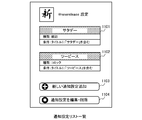
- Example screen of ToDo list Screen example of adding a new ToDo. Screen example of ToDo details.
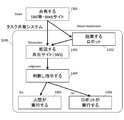
- the task sharing system 1300 of the present invention can determine who and how to execute a task through human-robot interaction, and can execute the task according to the determined method.
- a solid line square indicates an action mainly performed by a human user
- a double line square indicates an action mainly performed by a robot (bot).
- a user inputs a task to be shared to the task sharing system 1300 from an SNS or a website (1301).
- the input task is shared between the user and the robot.
- the robot proposes execution of the task to the user (1302).
- the user consults with the robot on the task sharing system 1300 to determine details of the task execution method (1303).
- the user determines and instructs who executes each task (1304), and the user or the robot executes the task according to this instruction (1305, 1306).
- tasks are basically executed by humans and robots, but each may be executed individually.
- the task sharing system of the present invention it is possible to consult and judge between the user and the robot based on the shared information and to execute the task by the interaction between the user and the robot as described above.
- the task sharing system of the present invention can be understood as a platform system for enabling interaction between a user and a robot shown in FIG.
- FIG. 1 is a diagram showing a system overview of a task sharing system that enables tasks to be shared and divided between users and bots (robots).
- the task sharing system includes a user terminal 10, a platform 20, bots 30a and 30b, and robots (task execution means) 40a and 40b.
- the platform 20 stores a task (ToDo) registered by a user or the like, issues a notification to the user terminal 10 or the bot 30 according to addition or change of a task, or provides a messaging function between the user and the bot. Or provide.
- the platform 20 provides a Web API for the bot 30.
- the Web API is an API that receives and processes an HTTP request.
- a Web API call is called Web Hook, and communication by Web Hook is possible between the platform 20 and the bot 30.
- the client application 10 is executed on the user terminal, and can register and change tasks, and exchange messages with bots and other users.
- the user terminal 10 includes an arbitrary information device such as a personal computer (stationary type, portable type) in addition to a portable information terminal such as a smartphone.
- Bot 30 is software that connects a robot that actually performs a task and a user, exchanges messages with the user, and outputs an execution instruction to the robot.
- a shopping bot 30a and a cleaning bot 30b are illustrated as bots.
- Robot is a physical entity that executes tasks on behalf of users.
- the robot corresponding to the shopping bot 30a is an online shopping service provider.
- the server 40a, the service provider, and the delivery company as a whole can be regarded as task execution means.
- the robot which cleans corresponding to the cleaning bot 30b is the cleaning robot 41b, it is regarded as a task execution means including the home server 40b for the cleaning bot 30b and the cleaning robot 41b to interact.
- FIG. 2 is a diagram showing functional blocks in the task sharing system of the present invention. Since each bot 30 has the same function, only one bot 30 is depicted in FIG.
- the client application 10 functions as the ToDo list registration editing unit 11, the ToDo registration editing unit 12, and the message exchange unit 13 when installed in an information device such as a smartphone and executed by the CPU.
- the user can register and edit the ToDo list and ToDo by the ToDo list registration editing unit 11 and the ToDo registration editing unit 12.
- the ToDo and ToDo lists are also referred to as tasks and task lists, respectively.
- the ToDo list is a grouping of a plurality of ToDo.
- the user can designate a bot or other user who shares the ToDo list. Users and bots sharing the ToDo list can refer to and edit the ToDo in the ToDo list.
- the message exchange unit 13 is a functional unit for exchanging messages with bots and other users, and transmits messages, receives messages, and notifies them.
- the platform 20 of the task sharing system can communicate with the client application 10 and the bot 30 via a network, and as its functional units, a ToDo list management unit 21, a ToDo management unit 22, a storage unit 23, an event notification unit 24, A messaging system 25;
- the platform 20 is realized by installing and executing a program on a computer.
- the platform 20 may be constructed on a distributed system including a plurality of computers, or may be constructed on a cloud computing system in which a computer that executes a program is not specified.
- the ToDo list management unit 21 is a functional unit that manages a ToDo list that is registered and edited by a user.
- the ToDo list management unit 21 stores the registration contents of the ToDo list in the storage unit 23, and performs Web Hook for the bot 30 that shares the ToDo list. Or the notification destination URL of the event notification by.
- the ToDo management unit 22 is a functional unit that manages ToDo registered and edited by a user or a bot, and stores the registered contents of ToDo in the storage unit 23.
- the event notification unit 24 is a functional unit that notifies a bot using Web Hook when any event occurs. Examples of types of events for which event notification is performed include sharing / unsharing of ToDo lists, creation / editing / deletion of ToDo items, posting of comments on ToDo items, and the like.
- the bot that is notified of the event is a bot that shares the ToDo list.
- the messaging system 25 is a functional unit for exchanging messages between users or between users and bots.
- users and bots can post comments on individual ToDos, and the messaging system 25 manages them.
- the messaging system 25 has a function of managing the posting of comments and notifying users who have posted comments. Note that the implementation for exchanging messages does not have a task sharing system, but may use electronic mail or other external messaging service (Twitter or instant messaging service).
- the bot 30 can communicate with the platform 20 and the robot 40 via a network, and as its function units, an execution instruction output unit 31, an execution availability determination unit 32, an execution method determination unit 33, a ToDo editing unit 34, a message exchange Part 35 and the like.
- the bot 30 is realized by installing and executing a program on a computer.
- the bot 30 may be constructed on a distributed system including a plurality of computers, or may be constructed on a cloud computing system in which a computer that executes a program is not specified.
- Bot 30 basically operates in response to an event notification by Web Hook from platform 20 or robot 40. Therefore, the bot 30 is required to implement processing corresponding to each event.
- the execution possibility determination unit 32 is a functional unit that determines whether the robot 40 can execute the ToDo when the ToDo is registered or edited by the user. Whether or not execution is possible can be determined as follows, for example. First, at least a title (for example, “cleaning”) is described in each ToDo, and further detailed description may be added.
- the feasibility determination unit 32 stores a keyword related to the executable ToDo (eg, “cleaning” and “tidy up”), and when the keyword is in the title or description of the ToDo, the ToDo can be executed. Judge that there is. Note that it is also preferable to determine that ToDo can be executed not only when the keyword matches exactly but also when a word or sentence similar to the keyword is in the title or description.
- the execution method determination unit 33 is a functional unit that determines the details of the execution method of ToDo that is determined to be executable. There are several methods for determining the execution method. For example, if there is a description related to the execution method in the description of ToDo, follow that. Further, when the user has registered in advance the execution method as setting information for the bot 30, it is followed. Further, the execution method of this time can be determined by referring to how the same ToDo has been executed in the past. The past execution method may be stored in the bot 30, acquired from the robot 40 when the robot 40 stores it, or from the platform 20 when the platform 20 stores it. You may get it.
- the execution date and time is also preferable to determine the execution date and time as one of the execution methods. For example, if it is ToDo performed at home such as “cleaning”, it is considered preferable that the user is away from home. If the bot 30 can access the scheduler application of the user, the scheduler application searches the scheduler application for the date and time when the user is not at home, and determines the execution date and time. On the contrary, if it is ToDo that should be performed when the user is at home, such a date is set as the execution date. In addition to the user's schedule, if a time zone to be performed for each ToDo is determined, it is preferable to perform the time zone.
- the execution method determination unit 33 determines the execution method of ToDo
- the execution method determination unit 33 presents the execution method of ToDo to the user via the message exchange unit 35.
- an execution method is designated by a message (comment posting) from the user, the designated execution method is adopted.
- the execution instruction output unit 31 is a functional unit that outputs a ToDo execution instruction to the robot 40.
- the execution instruction output unit 31 presents the details of the ToDo execution method to the user via the message exchange unit 35, and obtains a response to approve the execution of ToDo from the user. Outputs execution instructions.
- the bot 30 and the robot 40 communicate with each other using an HTTP request such as SOAP or other formats.
- the ToDo editing unit 34 is a functional unit that requests the platform 20 to add a new ToDo or edit an existing ToDo. For example, when the request instructed to be executed to the robot 40 ends normally, the ToDo state is changed to complete. Further, when an error occurs in ToDo instructed to the robot 40 and the process does not end normally, ToDo for eliminating the error can be newly added. In addition, the addition of new ToDo is not only due to the occurrence of an error, but, for example, ToDo that was regularly executed until then (eg, “cleaning”) was not registered as ToDo for a certain period of time. In this case, it is conceivable to add as a new ToDo.
- the robot 40 is a device / machine that can execute ToDo registered by the user, a contractor, and the like, and has an interface capable of communicating with the bot 30. Other configurations may be different for each robot.
- a service provider of an online shopping service has a server device for ordering / settlement of merchandise by communication with the bot 30, and the ordered merchandise is finally delivered by the delivery trader.
- a server device for communicating with the bot 30 is provided, and communication is performed with the bot 30 by an HTTP request or the like.
- the server device that has received the ToDo execution instruction from the bot 30 communicates with the Romba using the ROI (Roboba Open Interface) protocol via the serial port.
- ROI Robot Open Interface
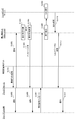
- FIG. 3 shows a series of flows in which a user creates a ToDo list, shares a ToDo list with a bot, creates a ToDo that “cleans”, and has a cleaning bot (cleaning robot) execute the ToDo.
- FIG. 3 shows a series of flows in which a user creates a ToDo list, shares a ToDo list with a bot, creates a ToDo that “cleans”, and has a cleaning bot (cleaning robot) execute the ToDo.
- the user logs in to the platform 20 and creates a ToDo list (S301).
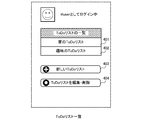
- the management of the ToDo list is performed using a screen as shown in FIG.
- FIG. 4 lists of ToDo lists that have already been created (here, “Home ToDo List” 401 and “Hobby ToDo List” 402) are displayed.
- the button 403 is selected.
- a button 404 is selected to edit or delete an existing ToDo list.
- the ToDo list is a group to which each ToDo belongs and can be arbitrarily created by the user.
- FIG. 5 is a screen for displaying and editing the shared members of the ToDo list.
- the ToDo list creator 501 user name @user
- members 502 to 503 user names @sharerom, @sharezon, @myfiend
- a button 505 may be selected to add a new shared member
- a delete button beside the user name may be selected to delete a shared member.
- the user who can share the ToDo list may be the bot 30 or another user.
- the platform 20 When the bot 30 is newly added as a shared member of the ToDo list, the platform 20 notifies the bot 30 that it has been added as a shared member by event notification (S303).
- the cleaning bot 30b Since the cleaning bot 30b needs to authenticate the user to access the home server 40b, the user inputs setting information to the bot 30b as necessary (S304). It is preferable that the setting items include not only authentication to the home server but also items that specify user preferences regarding a cleaning execution method, for example. In addition, since the user authentication is required for the shopping bot 30a to access the shopping server 40a and shop, the user performs the same setting for the shopping bot 30a. As for user authentication, in addition to providing the bot 30 with authentication information, the home server 40b or the shopping server 40a may be instructed to identify access from the bot 30 as the user's own access. .
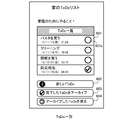
- FIG. 6 is a screen for managing one ToDo list.
- FIG. 6 shows a ToDo list 601 registered in the ToDo list. This display includes a ToDo title, creation date and time, and a completed / uncompleted check box. The user can change completion / non-completion of ToDo by selecting a check box 601a on this screen. The details can be referred to by selecting an existing ToDo (FIG. 8).
- the button 602 is selected.
- a button 603 is selected to archive the completed ToDo (delete from the ToDo list on the initial screen). The archived ToDo is deleted from the ToDo list on the initial screen, but the archived ToDo can be referred to by selecting the button 604.
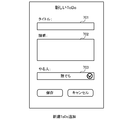
- FIG. 7 is a screen that appears when the button 602 is selected and a new ToDo is added.
- a new ToDo title 701, description 702, and ToDo executor 703 can be set.
- relatively short sentences (words) that can be understood by the user are input such as “cleaning”, “cleaning up the room”, “buying pasta”, and “milk”.
- additional information is input. For example, information on “spaghetti made by J company” is added to ToDo “to focus on living” for ToDo “to clean” or to ToDo “to buy pasta”.
- the description 702 may be blank.
- the executor 703 can designate a person who executes this ToDo, and can select one or a plurality of people from ToDo list sharers. If the executor 703 is “anyone”, anyone of the ToDo list sharer may execute it.
- FIG. 8 is a screen that displays the details of each ToDo.
- ToDo title 801, creation date 802, update date 803, creator 804, performer 805, and the like are displayed.
- a button 808 can change the contents of ToDo (title, executor, etc.).
- a comment field 809 is provided, and messages can be exchanged with a sharer of the ToDo list.
- users human beings
- bots can post messages. The user-bot interaction using the comment field will be described later.
- the platform 20 sends an event notification to the bot 30 sharing this ToDo list (S306).
- the bot 30 determines whether the ToDo determination unit 32 can execute this ToDo (S307).
- the determination of whether or not ToDo can be executed is determined by whether or not the bot 30 is designated as the ToDo executor and whether or not a keyword related to the bot 30 is included in the ToDo title. For example, when a ToDo that has a title of “cleaning” as shown in FIG. 8 and whose executor is “anyone” is added, the cleaning bot 30b determines that the ToDo can be executed. . This is because the performer includes himself / herself and the title includes a keyword related to the cleaning robot 40b.
- the shopping bot 30a determines that this ToDo cannot be executed. This is because the performer includes himself but does not include a keyword related to the shopping robot (shopping service) 40a in the title.
- the execution method determining unit 33 determines how to execute the ToDo next (S308). As described above, this determination method is determined by a method such as referring to the items described in the description field of ToDo, referring to a past execution method, or adopting an execution method specified as a setting item. Can do. As one of execution methods, the execution date and time can be determined. For example, a bot can access a user's scheduler and execute ToDo at a date and time when the user is not at home.
- the execution method determination unit 33 determines the execution method of ToDo, the execution method is notified to the user, and confirmation is made as to whether ToDo can be executed with this content (S309).
- This notification is notified to the client 10 by the message exchange unit 35 via the platform 20.
- the message exchange between the bot and the user is displayed in the comment field (reference numeral 809 in FIG. 8) on the screen showing the details of ToDo.
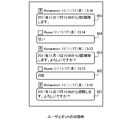
- FIG. 9 shows an example of message exchange between bot users.
- the cleaning bot 30b clearly indicates only the execution date of ToDo for ToDo, which “cleans”. “Cleaning from 15:00 on November 17, 2011. Are you sure?”
- a message 901 is notified to the user.
- the user can take the following three actions. The first is a response to accepting the proposal from the bot, for example, a response to reply a message indicating affirmation such as “Yes” or “OK”.
- the second is to allow the bot to execute ToDo, but to change the execution method. For example, the details of the execution method such as “focus on living” and “twice” are described. It corresponds to replying a message.
- the third response is a response that the bot refuses to execute ToDo, and does not explicitly reply to a message from the bot or a response that explicitly sends a negative message such as “No” or “NO”. The correspondence is included.
- the user notifies the message 902 indicating the execution method of “twice” (S310).
- the bot 30b is called by an event notification (S311).
- the bot 30b interprets the message sent by the user and determines that the execution method is specified, the bot 30b changes the details of the execution method according to the content (S312), and sends the message to the user again. (S313).
- the bot 30b transmits, for example, a message 903 “Cleaning is performed twice from 15:00 on November 17, 2011. Are you sure?”.
- a positive message “Yes” is transmitted as shown in message 904 in FIG. 9 (S314).
- the execution instruction output unit 31 outputs an execution instruction to the cleaning robot (home server) 40b (S315).
- the home server transmits a cleaning execution command to the cleaning robot body, and performs cleaning at the designated date and time (S316).
- a cleaning execution command may be transmitted again after the first cleaning is completed.
- the cleaning robot 40b notifies the execution result of ToDo to the cleaning bot 30b (S317). If the cleaning is completed normally, the bot 40b changes the status of this ToDo to “completed” for the platform 20 (S318). When the status of ToDo is changed, the user is notified of this (S319).
- the cleaning bot 40b newly adds ToDo for eliminating this error. For example, if the cause of the error is clear, ToDo such as “charge the battery of the cleaning robot” is added, and if the cause of the error is unknown, ToDo such as “check the cleaning robot” is added. As a result, the user can be notified that an error has occurred.
- the shopping bot 30a basically determines that the ToDo is “To buy OO” and can execute the ToDo.
- the shopping bot 30a accesses the shopping server 40a, searches for a product using a product name specified in ToDo, and notifies the user of the result in a comment column.
- the content of the comment may be arbitrary, but for example, a method of describing the product description of the top three items in the search result in the comment column is conceivable. If a product desired by the user does not exist, the user notifies a keyword for performing a narrow search, or notifies a keyword for performing a re-search. If there is a desired product in the search result suggested by the bot, the shopping bot 30a places an order with the shopping server by notifying the shopping bot 30a of the desired product. Note that the ordering of the product itself may be directly made by the user to the shopping server.
- FIG. 10 shows the processing performed by the bot 30 in the above-described series of processing in the form of a flowchart.
- the bot 30 actually proceeds with the event notification from the platform 20, but here, the processing content is represented by a flowchart for easy understanding of the explanation. Since it will be repeated, when a new ToDo is added by the user, detailed information on ToDo is acquired (S1001), and it is included in the ToDo executor, and the bot can execute ToDo. If this is the case (S1002-YES, S1003-YES), the ToDo execution method is determined (S1004), and the user is notified of a description of the ToDo execution method and a request for execution permission (S1006).
- step 1004 When a message for specifying an execution method is notified from the user, the processing from step 1004 is repeated. When there is a negative response from the user or when there is no response, no further processing is performed. If there is a message permitting execution from the user, the robot 40 is instructed to execute ToDo (S1007). If the robot 40 has successfully completed ToDo, the status of the ToDo is changed to “completed” (S1009), but if it has not been completed normally, a new ToDo is registered to resolve this error. (S1010).
- ⁇ Effect of this embodiment> when adding ToDo, ToDo can be added without being conscious of who will perform the ToDo, or whether it is performed by a person or a robot. If it is determined that the robot can execute it, even if it is not conscious of who should do it, the robot (bot) proposes to execute it. At this point, if the user determines that it is appropriate to leave it to the robot, the robot can execute this ToDo. If it is determined that it is appropriate to execute it by itself, the robot rejects the proposal. However, this ToDo can be executed by itself. Therefore, according to the present task sharing system, it is possible to perform proper division of ToDo by sharing the ToDo list between the user and the robot.
- the details of the ToDo execution method can be determined by exchanging messages between the user and the bot. Since this user-bot interaction can be performed asynchronously, the user issues an instruction at a timing that is convenient to him regardless of the timing when ToDo is actually executed or the timing of an inquiry from the bot. Can do.
- the robot can execute ToDo even if the user does not specify details of the execution method of ToDo. Even if the specification of ToDo is ambiguous and the robot cannot interpret the execution method, etc., the execution method can be determined by interaction with the user. Therefore, the user can determine ToDo in a format that can be interpreted by the bot (eg, command format). There is no need to describe it, and there is no problem even if ToDo is expressed in natural language so that the user can understand it.
- the user wants to specify the ToDo execution method in detail it is possible to give detailed instructions by utilizing the ToDo description column.
- this task sharing system it is possible to give detailed instructions or rough instructions, and it is possible to give instructions according to user preferences.
- the user does not need to be aware of whether the subject that actually performs each ToDo is a robot (machine) or a human. From the user's point of view, it is not an important difference whether the partner of the dialogue performed through the comment field is a person or a bot (software). If an appropriate dialogue is conducted through the comment section and the execution of ToDo is left to the bot (or a third party), the desired result recorded in ToDo is realized without being aware of the process of executing ToDo. The Therefore, the task sharing system according to the present embodiment realizes a desired result described in ToDo without making the user aware of whether the agent of ToDo is a robot or a human (for example, a housework agent). It can also be regarded as a system for
- the bot in the present invention has the authority to add a new ToDo.
- ToDo is added only when ToDo that has issued an execution instruction to the robot ends with an error
- ToDo may be added in other cases as well. For example, if there is a ToDo that has been periodically performed with reference to a past history and the ToDo has not been executed for a predetermined period, the bot may add the ToDo. This takes into account that the user may have forgotten to register ToDo to be performed periodically. In addition, since the case where a user cancels periodic execution is also considered, when ToDo which the bot added is deleted by the user, it is preferable not to add this ToDo after that.
- a bot for adding a new ToDo to the ToDo list without having a function for substituting ToDo.
- the bot automatically adds ToDo when this condition is satisfied.
- a bot release date notification bot
- FIG. 11 shows an example of a setting screen for such a bot. In this example, when a magazine or comic whose title includes a specific keyword is released, it is specified to register ToDo to buy it.
- FIG. 12 shows a sequence diagram of an operation in which bots cooperate with each other.
- ToDo is added to buy it (S1201).
- the addition of the new ToDo is notified to both the user and the shopping bot (S1202).
- the shopping bot determines whether the added ToDo can be executed (S1203). In this case, since it is ToDo that buys an item, it is determined that it is feasible.
- the shopping bot determines a method of executing ToDo (in this case, which product to buy) (S1204), and notifies the user of a message requesting the content and execution permission (S1205).
- the shopping bot places an order for the product with the shopping server by transmitting a message permitting execution (S1207).
- a message permitting execution S1207
- the user wants to purchase a product designated by ToDo himself / herself, it is not necessary to give permission to the ToDo agent by the bot.
- ToDo is automatically added even if the user does not monitor the timing to be registered as ToDo. Furthermore, since the robot can substitute the automatically added ToDo, the convenience for the user is improved.
Landscapes
- Business, Economics & Management (AREA)
- Human Resources & Organizations (AREA)
- Engineering & Computer Science (AREA)
- Strategic Management (AREA)
- Entrepreneurship & Innovation (AREA)
- Economics (AREA)
- Operations Research (AREA)
- Game Theory and Decision Science (AREA)
- Development Economics (AREA)
- Marketing (AREA)
- Educational Administration (AREA)
- Quality & Reliability (AREA)
- Tourism & Hospitality (AREA)
- Physics & Mathematics (AREA)
- General Business, Economics & Management (AREA)
- General Physics & Mathematics (AREA)
- Theoretical Computer Science (AREA)
- Management, Administration, Business Operations System, And Electronic Commerce (AREA)
- User Interface Of Digital Computer (AREA)
Abstract
タスク共有システムは、タスク実行手段と関連づけられたボットと、タスク管理システムとから構成される。ボットは、ユーザによって入力されたタスクをタスク実行手段が実行可能な場合に、このタスクの実行指示をタスク実行手段に出力し、タスク実行手段がこのタスクを完了した場合には、このタスクの状態を完了に変更する。タスク実行手段がタスクを実行可能な場合は、実行方法の詳細を説明し実行許可を求めるメッセージをユーザに通知することが好ましい。また、ボットが新しいタスクを追加できることも好ましい。例えば、タスク実行中にエラーが発生した場合や、定期的に登録/実行されていたタスクが登録されていなかった場合に、タスクを登録する。これにより、ユーザとボットとの間でタスクを共有および分業が可能となる。
Description
本発明は、人とロボットの間でタスクを共有し両者の協働によってタスクを実行可能な技術に関する。
コンピュータを用いてユーザが行うべきことの管理を行う技術が普及している。ユーザが行うべきことは、一般にタスクあるいはToDoと呼ばれる。このようなタスク管理システム(ToDo管理システム)は、ユーザがタスクをその実行期限(期限無しでも可)とともに登録して、一覧表示することでタスクの実行忘れを防げる。また、タスクの期限が接近あるいは超過した場合にシステム側からユーザに通知することで、タスクの実行をより積極的に促したりする。
このようなタスク管理システムには、一人のユーザを対象としたものの他に、複数のユーザを対象として、タスクを複数人で共有するものも存在する。このようなシステムでは、タスクリストをグループ内の全員が参照可能であり、したがってグループとして行うべきタスクの進捗状況をグループ全員で管理できる。なお、個々のタスクの実行者(あるいはタスクのステータスを変更できる人)をグループ内の特定の個人とすることで、個々のタスクを個人に割り当てることも可能である。
ところで、近年、ロボット技術が発達し、様々な場でロボットの活躍が期待されるようになってきた。一般家庭向けには自動掃除機(iRobot社製のRoombaなど)が販売され、研究段階では料理、選択、物の移動、監視などを行うロボットの提案が成されている。
これらのロボットが一般に普及するためには、その機能が充実することも重要であるが、ユーザとの間のインタフェース設計も重要である。ユーザにとって直感的で分かりやすい操作で、ユーザの意図を的確にロボットに伝えられるようなユーザインタフェースが求められる。このような研究として、ジョイスティックなどで明示的な指示を出すユーザインタフェースのほか、部屋の中に掃除などの操作内容を記したカードを置いたりするタスク指向のユーザインタフェースが提案されている。
上記のようなロボットに指示を与えるためのユーザインタフェースは、ロボットに何をさせるべきかが明確であるということを前提としており、ユーザが自覚している指示内容をいかにロボットに正確に伝えるかが研究対象となっている。
しかしながら、実際の生活にロボットが入ってきた時に、ロボットにできることの全てをユーザがロボットに任せるとは限らない。例えば、忙しい時にはロボットに掃除を頼むが、時間に余裕のある時には自分で掃除をしたいというニーズが考えられる。すなわち、人とロボットの間でどのようにタスクを分業するのかという問題も考慮したインタラクション設計が必要となる。
そこで、本発明は、ユーザとボットとの間でタスクを共有および分業が可能なタスク共有システムを提供することを目的とする。
本発明に係るタスク共有システムは、ユーザとボットとの間でタスクを共有可能なシステムである。まず、「ボット」という用語について説明する。「ボット」はコンピュータがプログラム(ソフトウェア)を実行することによって実現される機能を指す。「ボット」は、コンピュータ以外の物理的実体を有する必要はない。また、「タスク」という用語は、実行されることをユーザが望む処理を表し、「やるべきこと」「ToDo」などと同様の意味を持つ。なお、タスクは必ずしもユーザ自身によって行われる必要はなく、ユーザ以外の人や装置によって行われても構わない。
本発明に係るタスク共有システムは、それぞれがタスク実行手段と関連づけられた1つまたは複数のボットと、タスク管理システムとから構成される。なお、タスク実行手段とは、ユーザの登録するタスクのいずれかを実行することができる装置、コンピュータプログラム、社会システムなどを指す。タスク実行手段の例として、家事(掃除、洗濯、料理、物の移動)などを行う家事ロボットを挙げることができる。また、タスク実行手段の別の例として、サービス提供者のサーバ装置を挙げることができる。たとえば、通信販売を行う業者のサーバ装置や、家事サービスなどを提供する業者のサーバ装置などを挙げることができる。この場合、サービス業者の人間を介してタスクが実行されることになる。いずれの場合も、ユーザにとって見ればタスクを実行するものとして同列にみなすことができる。
なお、「ロボット」という用語は、狭義には、所定の動作を行う機械や装置を意味するが、本明細書においては、所定の動作を行うことができる実体全てを意味する。したがって、「ロボット」には、機械や装置以外にも、コンピュータプログラム、企業(例えば、電子商取引業者、家事代行業者、配送業者)などが含まれる。
タスク管理システムは、タスクの入力をユーザから受け付けるタスク入力手段と、タスクに関する情報を記憶するタスク記憶手段と、タスクに関する情報を変更するタスク情報管理手段とを有する。タスク入力手段は、行うべき行動またはその結果が自然言語で表されたタスクの入力をユーザから受け付ける手段である。タスクの入力は、例えば「掃除をする」、「○○を買う」などの、容易に理解可能な表現で入力されることが好ましい。タスクには、付随する様々な情報を付加されることも好ましい。一例として、そのタスクがいつまでに行われるべきであるかを示す実行期限を挙げることができる。また別の例として、タスクをどのように行うかなどに関する情報を挙げることができる。その他にも、そのタスクの優先度、タスクが未実行であるか実行済みであるかを示す情報を挙げることができる。タスク情報管理手段は、ユーザからのタスクに関する情報の変更指示を受け付けて、タスク記憶手段内の情報を変更する。例えば、タスクを未実行から実行済みに変更する変更指示をユーザから受け付けて、タスク情報を更新する。
ボットは、ユーザによって入力されたタスクを、ボットに関連づけられたタスク実行手段が実行可能であるか否かを判断する判断手段を有する。この判断は、例えば、ボットが実行可能なタスクに関連するキーワードを記憶しておき、ユーザによって入力されたタスクが記憶しているキーワードと一致するかあるいは関連する場合に、タスク実行手段がこのタスクを実行可能であると判断することができる。
ボットは、判断手段以外に、そのボットに関連づけられたタスク実行手段に対してタスクの実行指示を出力する出力手段と、タスク実行手段がタスクを完了した場合にタスクの状態を完了に変更するタスク編集手段とを有する。
このようなタスク管理システムとボットとの連携によって、ユーザがタスクを入力したら、このタスクをタスク実行手段が実行可能であるか判断手段が判断する。そして、実行可能であればボットの出力手段がタスク実行手段に対して、このタスクを実行する旨の指示を出力する。タスク実行手段がタスクの実行を完了した場合には、ボットのタスク編集手段がタスク管理システムのタスク情報管理手段にタスク情報の変更指示を出力して、タスクの状態を完了に変更する。
なお、ボットがタスク実行手段に実行指示を出力する前に、ユーザに対してタスクの実行方法の詳細を提示するメッセージを通知し、ユーザから実行を了承する旨のメッセージを受信した後に、このタスクの実行指示をタスク実行手段に出力することも好ましい。ボットとユーザとの間のメッセージ交換は、任意の通信システムで実現可能である。例えば、本発明のタスク共有システム内に実装されたメッセージ交換システムを利用してもよいし、外部システムが提供する電子メールあるいはよりリアルタイムなやりとりが可能なメッセージングサービスを利用してもよい。
本発明に係るタスク共有システムによれば、ユーザが自然言語によって表されたタスクを入力した場合に、そのタスクをタスク実行手段が実行可能であればユーザに代わってタスクを実行することができる。ユーザからの観点でみれば、どのタスク実行手段に実行させるタスクであるか(あるいは自分で実行するタスクであるか)を意識しないでタスクを登録しても、タスク実行手段が自らの判断でタスクの代行を提案してくれる。なお、タスクの実行指示を実際にタスク実行手段に出力する前にユーザの確認を求めるようにしておけば、ユーザが自ら行いたいタスクをタスク実行手段が勝手に実行することを避けられる。
本発明において、ボットはタスク実行方法の詳細を以下のような方法によって決定することができる。1つには、ユーザから具体的な指定が記載されたメッセージを受け取る方法がある。ボットは、このメッセージに日時が入力されていたら実行日時であると判断したり、場所が実行されていたら実行場所あるいはタスクの対象と判断したり、回数が入力されていたらタスクの実行回数と判断したりすることができる。
別の方法として、すでに完了済みのタスクがどのように行われたかを示す履歴を参照して、タスクの実行方法の詳細を決定してもよい。例えば、ロボット(タスク実行手段)が過去にタスクを実行していた場合には、そのときの実行方法の詳細をタスクに関連する情報として採用する。複数の実行において異なる実行方法が採用されていた場合は、最も回数の多い方法を採用するなど任意の方法によって実行方法を決定すればよい。
さらに別の方法として、タスクの実行方法の詳細を設定情報としてあらかじめユーザから受け取っておくことが考えられる。この場合ボットは設定情報にしたがって、タスクの実行方法の詳細を決定する。
また、本発明において、ボットがタスク管理システムにタスクを入力(作成)することも好ましい。たとえば、タスク実行手段に実行を指示したタスクが何らかの理由により正常に完了せず、エラー通知をボットが受け取った場合に、このエラーを解消するためのタスクを登録することが考えられる。タスク実行手段がエラーを通知する場合というのは、タスク実行手段自身では解消できないエラーが発生したことを意味する。ボットがタスクとして登録することで、エラーが発生したことをユーザに伝えることができる。
また、過去に完了されたタスクの履歴を参照して、定期的に登録され実行完了されてきたタスクが登録されずに所定期間経過した場合に、ボットがこのタスクを登録することも考えられる。定期的に実行されてきたタスクが登録されていない場合、ユーザが登録を忘れていることが想定されるので、ボットが代わりにタスクを登録することでユーザを支援することができる。
また、その他にユーザが指定する任意のイベントが発生したことを条件として、ボットがタスクを登録するようにしてもよい。例えば、ユーザによって指定された商品(例えば、特定の雑誌や、特定のミュージシャンによる音楽)が発売された場合に、この商品を買うというタスクを登録することもできる。また、ボットの中には、タスクの登録だけを行うボットが存在してもよい。例えば、ユーザによって指定された条件を満たす商品が発売される度に、その商品を買うというタスクを登録するボットがあっても良い。
このように、ボットからもタスクの登録を可能とすることで、タスク実行手段のエラーなどタスク代行によって生じたユーザが行うべきことを通知することができる。また、ユーザが自らタスクを登録しなくてもタスク管理システムにタスクが登録され、ユーザがタスクの登録を忘れることを防止したり、ユーザの手間を省いたりすることができる。
なお、ボットが登録したタスクは必ずしもユーザが実行する必要は無い。あるボットが登録したタスクを、別のボットあるいは同じボットが実行しても構わない。例えば、掃除タスクを実行中に掃除ロボットの部品が壊れたというエラー通知を受けた場合に、掃除ロボットに関連づけられたボットが「部品を買う」というタスクを登録し、それに応答して買い物ロボットがその部品を購入する、というボット間の連携が考えられる。
本発明は、上記手段の少なくとも一部を含むタスク共有システムとして捉えることができる。また、これらの処理を行うタスク共有方法および、この方法をコンピュータで実行するためのプログラムとして捉えることもできる。
本発明によれば、ユーザとボットとの間でタスクを共有および分業が可能となる。
以下、図面を参照しながら本発明のタスク共有システムについて説明する。
<システム概要>
図13を参照して、本発明のタスク共有システムの概要について説明する。本発明のタスク共有システム1300は、人間とロボットの対話によって、タスクを誰がどのように実行するかを決定でき、決定された方法にしたがってタスクを実行することを可能とする。なお、図13において、実線の四角は人間のユーザが主体となって行う行為を示し、二重線の四角はロボット(ボット)が主体となって行う行為を示す。
図13を参照して、本発明のタスク共有システムの概要について説明する。本発明のタスク共有システム1300は、人間とロボットの対話によって、タスクを誰がどのように実行するかを決定でき、決定された方法にしたがってタスクを実行することを可能とする。なお、図13において、実線の四角は人間のユーザが主体となって行う行為を示し、二重線の四角はロボット(ボット)が主体となって行う行為を示す。
タスクを共有するプロセスは、以下のような手順によって行われる。まず、ユーザがSNSやウェブサイトから、共有するタスクをタスク共有システム1300に対して入力する(1301)。入力されたタスクは、ユーザおよびロボットの間で共有される。ロボットは、自らが実行可能なタスクについては、タスクの実行をユーザに対して提案する(1302)。この提案を受けて、ユーザは、タスク共有システム1300上でロボットと相談をして、タスクの実行方法の詳細について決定する(1303)。ユーザは、各タスクについて誰がどのように実行するかを判断および指示し(1304)、この指示に従ってユーザやロボットがタスクを実行する(1305,1306)。なお、タスクの実行は人間とロボットが分担して行うことが基本であるが、それぞれが個々に実行してもよい。
本発明のタスク共有システムでは、上述のようなユーザとロボットの間のインタラクションによって、共有された情報に基づいてユーザとロボットの間で相談して判断し、タスクを実行に移すことを可能とする。本発明のタスク共有システムは、図13に示すユーザとロボットの間のインタラクションを可能とするためのプラットフォームシステムとして捉えることができる。
以下、本発明のタスク共有システムについて、より詳細に説明する。図1は、ユーザとボット(ロボット)との間でタスクを共有および分業が可能となるタスク共有システムのシステム概要を示す図である。図1に示すように、本タスク共有システムは、ユーザ端末10、プラットフォーム20、ボット30a,30b、ロボット(タスク実行手段)40a,40bから構成される。
プラットフォーム20は、ユーザなどから登録されるタスク(ToDo)を記憶したり、タスクの追加や変更などに応じてユーザ端末10やボット30に通知を出したり、ユーザとボットの間でのメッセージング機能を提供したりする。プラットフォーム20は、ボット30向けに、Web APIを提供している。Web APIは、HTTPリクエストを受け取って処理を行うAPIである。また、Web APIの呼び出しをWeb Hookといい、プラットフォーム20とボット30の間ではWeb Hookによる通信が可能である。
クライアントアプリケーション10はユーザ端末上で実行され、タスクの登録や変更を行ったり、ボットや他のユーザとの間でメッセージの交換を行ったりできる。なお、ユーザ端末10としては、スマートフォンなどの携帯情報端末の他に、パーソナルコンピュータ(据え置き型、持ち運び型)など任意の情報機器が含まれる。
ボット30は、実際にタスクを行うロボットとユーザとの間をつなぐソフトウェアであり、ユーザとの間でメッセージ交換を行ったり、ロボットに対して実行指示を出力したりする。この例では、ボットとして、買い物ボット30aと掃除ボット30bが例示されている。
ロボット(タスク実行手段)は、ユーザの代わりにタスクを実行する物理的エンティティである。買い物ボット30aに対応するロボットは、オンラインショッピングサービス提供業者である。図では、サービス提供業者のショッピングサーバ40aのみが示されているが、サーバ40aやサービス提供業者および配送業者の全体をタスク実行手段とみなすことができる。また、掃除ボット30bに対応して掃除を行うロボットは掃除ロボット41bであるが、掃除ボット30bと掃除ロボット41bとがインタラクションするための自宅サーバ40bも含めてタスク実行手段とみなす。
図2は、本発明のタスク共有システムにおける機能ブロックを示す図である。なお、ボット30はそれぞれ同様の機能を有するので、図2ではボット30は1つしか描かれていない。
クライアントアプリケーション10は、スマートフォンなどの情報機器にインストールされてCPUが実行することにより、ToDoリスト登録編集部11、ToDo登録編集部12、メッセージ交換部13として機能する。
ユーザは、ToDoリスト登録編集部11およびToDo登録編集部12によって、ToDoリストおよびToDoを登録したり編集したりできる。なお、ToDoおよびToDoリストは、それぞれ、タスクおよびタスクリストとも呼ばれる。ここで、ToDoリストとは、複数のToDoをグループ分けしたものである。ユーザは、ToDoリストごとに、そのToDoリストを共有するボットや他のユーザを指定できる。ToDoリストを共有しているユーザやボットは、そのToDoリスト内のToDoを参照したり編集したりすることができる。
メッセージ交換部13は、ボットや他のユーザとの間でメッセージの交換を行うための機能部であり、メッセージの送信と、メッセージの受信およびその通知を行う。
タスク共有システムのプラットフォーム20は、クライアントアプリケーション10およびボット30とネットワークを介した通信が可能であり、その機能部として、ToDoリスト管理部21、ToDo管理部22、記憶部23、イベント通知部24、メッセージングシステム25を有する。プラットフォーム20は、コンピュータにプログラムをインストールして実行することで実現される。ただし、プラットフォーム20は複数のコンピュータからなる分散システム上で構築されてもよいし、プログラムを実行するコンピュータが特定されないクラウドコンピューティングシステム上で構築されても構わない。
ToDoリスト管理部21は、ユーザから登録及び編集されるToDoリストを管理する機能部であり、ToDoリストの登録内容を記憶部23に格納すると共に、ToDoリストを共有するボット30に対してWeb Hookによるイベント通知の通知先URLを記憶したりする。
ToDo管理部22は、ユーザやボットから登録及び編集されるToDoを管理する機能部であり、ToDoの登録内容を記憶部23に格納する。
イベント通知部24は、何らかのイベントが起きると、Web Hookを用いてボットに対して通知を行う機能部である。イベント通知を行うイベントの種類としては、ToDoリストの共有・共有解除、ToDo項目の作成・編集・削除、ToDo項目へのコメント投稿などを挙げることができる。イベントが通知されるボットは、ToDoリストを共有しているボットである。
メッセージングシステム25は、ユーザ間あるいはユーザとボットの間でメッセージ交換を行うための機能部である。本タスク共有システムでは、個々のToDoに対してユーザ及びボットがコメント投稿を可能としており、その管理を行うのがメッセージングシステム25である。メッセージングシステム25は、コメントの投稿を管理したり、コメントの投稿があったユーザに通知する機能を有する。なお、メッセージ交換のための実装はタスク共有システムが有さずに、電子メールやその他外部のメッセージングサービス(Twitterやインスタントメッセージングサービス)を利用するようにしてもよい。
ボット30は、プラットフォーム20およびロボット40とネットワークを介した通信が可能であり、その機能部として、実行指示出力部31、実行可否判断部32、実行方法決定部33、ToDo編集部34、メッセージ交換部35などを有する。ボット30は、コンピュータにプログラムをインストールして実行することで実現される。ただし、ボット30は複数のコンピュータからなる分散システム上で構築されてもよいし、プログラムを実行するコンピュータが特定されないクラウドコンピューティングシステム上で構築されても構わない。
ボット30は、基本的に、プラットフォーム20やロボット40からのWeb Hookによるイベント通知に応じて動作する。したがって、ボット30では、各イベントに応じた処理を実装することが求められる。
実行可否判断部32は、ユーザによってToDoが登録されたり編集されたりした場合に、そのToDoをロボット40が実行可能であるか否か判断する機能部である。実行可能であるか否かは、例えば、次のようにして判断することができる。まず、ToDoのそれぞれには、少なくともタイトル(例:「掃除をする」)が記述されており、さらに詳細説明が加えられる場合がある。実行可否判断部32は、実行可能なToDoと関連するキーワード(例:「掃除」「片付ける」)を記憶しており、そのキーワードがToDoのタイトルや説明にある場合に、そのToDoを実行可能であると判断する。なお、キーワードとの完全一致だけでなく、キーワードと類似する単語や文章がタイトルや説明にある場合にも、ToDoを実行可能であると判断することも好ましい。
実行方法決定部33は、実行可能であると判断したToDoの実行方法の詳細を決定する機能部である。実行方法の決定の仕方にはいくつかの方法が考えられる。例えば、ToDoの説明に実行方法に関する記述がある場合には、それに従う。また、ユーザがボット30に対して実行方法を設定情報としてあらかじめ登録している場合には、それに従う。また、同様のToDoが過去においてどのように実行されたかを参照して、今回の実行方法を決定することもできる。過去の実行方法は、ボット30が記憶していてもよいし、ロボット40が記憶している場合にはロボット40から取得してもよいし、プラットフォーム20が記憶している場合にはプラットフォーム20から取得してもよい。
実行方法の一つとして、実行日時の決定を行うことも好ましい。例えば、「掃除をする」などのように家庭内で行われるToDoであれば、ユーザが家庭に不在の間にすることが好ましいと考えられる。ボット30がユーザのスケジューラー・アプリケーションにアクセス可能であれば、スケジューラー・アプリケーションからユーザが家庭にいない日時を探して、実行日時として決定する。逆に、ユーザが家庭にいる時に行うべきToDoであればそのような日時を実行日時とする。なお、ユーザのスケジュール以外にも、ToDoごとに行うべき時間帯が決定されているのであれば、その時間帯に行うことが好ましい。
実行方法決定部33は、ToDoの実行方法を決定した場合には、メッセージ交換部35を介して、ToDoの実行方法をユーザに提示する。ここで、ユーザからのメッセージ(コメント投稿)によって実行方法が指定された場合には、指定された実行方法を採用する。
実行指示出力部31は、ロボット40に対して、ToDoの実行指示を出力する機能部である。実行指示出力部31は、メッセージ交換部35を介してユーザにToDoの実行方法の詳細を提示し、それに対してユーザからToDoの実行を承認する旨の応答を得てから、ロボット40に対して実行指示を出力する。ボット30とロボット40は、SOAPなどのHTTPリクエストあるいはその他の形式で通信を行う。
ToDo編集部34は、プラットフォーム20に対して、新しいToDoの追加や既存ToDoの編集を依頼する機能部である。たとえば、ロボット40に対して実行指示した依頼が正常に終了した場合に、そのToDoの状態を完了に変更する。また、ロボット40に指示したToDoにエラーが生じて正常に終了しなかった場合には、そのエラーを解消するためのToDoを新しく追加したりすることができる。また、新規ToDoの追加は、エラー発生に伴う場合だけでなく、例えば、それまで定期的に実行されていたToDo(例:「掃除をする」)が、一定期間の間ToDoとして登録されなかった場合に、新規ToDoとして追加することが考えられる。
ロボット40は、ユーザによって登録されるToDoを実行可能な装置・機械や、業者などであり、ボット30と通信可能なインタフェースを持つ。それ以外の構成については、個々のロボットごとに異なっていてよい。
例えば、オンラインショッピングサービスのサービス提供業者は、ボット30との通信によって商品の発注・決済を行うためのサーバ装置を有し、注文された商品は最終的には配送業者が配送する。
また、掃除ロボットの場合には、ボット30と通信するためのサーバ装置を備えており、HTTPリクエスト等によってボット30との間で通信を行う。iRobot社製のRoombaを用いて掃除ロボットを実現した場合、ボット30からToDoの実行指示を受けたサーバ装置は、シリアルポート経由でROI(Roomba Open Interface)プロトコルを用いて、Roombaと通信を行う。
<処理詳細>
次に、ToDoリストを作成してから、ToDoを作成してロボットとそのToDoを共有する具体的な動作例にしたがって、本タスク共有システムの各機能について詳しく説明する。図3は、ユーザがToDoリストを作成し、ボットとToDoリストを共有し、「掃除をする」というToDoを作成して、掃除ボット(掃除ロボット)にそのToDoを実行してもらうという一連の流れを示したシーケンス図である。
次に、ToDoリストを作成してから、ToDoを作成してロボットとそのToDoを共有する具体的な動作例にしたがって、本タスク共有システムの各機能について詳しく説明する。図3は、ユーザがToDoリストを作成し、ボットとToDoリストを共有し、「掃除をする」というToDoを作成して、掃除ボット(掃除ロボット)にそのToDoを実行してもらうという一連の流れを示したシーケンス図である。
まず、ユーザはプラットフォーム20にログインして、ToDoリストを作成する(S301)。ToDoリストの管理は、図4に示すような画面によって行われる。なおここでは、ユーザ端末がタッチパネル入力方式の入出力インタフェースを備えているものとして説明する。図4には、すでに作成されているToDoリストの一覧(ここでは、「家のToDoリスト」401、「趣味のToDoリスト」402の2つ)が表示される。新しいToDoリストを追加するには、ボタン403を選択する。また、既存のToDoリストを編集したり削除するには、ボタン404を選択する。ToDoリストとは、個々のToDoが属するグループであり、ユーザが任意に作成することができる。
ユーザは、それぞれのToDoリストには、共有者を設定することができる(S302)。図5は、ToDoリストの共有メンバを表示・編集するための画面である。ここでは、ToDoリストの作成者501(ユーザ名@user)と、このToDoリストを共有しているメンバ502~503(ユーザ名@sharerom、@sharezon、@myfiend)を示している。新しい共有メンバを追加するにはボタン505を選択すれば良く、また共有メンバを削除するにはユーザ名の横にある削除ボタンを選択すれば良い。なお、ToDoリストを共有できるユーザは、ボット30であっても良いし、他のユーザであってもよい。
ボット30がToDoリストの共有メンバとして新しく追加された場合には、プラットフォーム20からイベント通知によって、ボット30に対して共有メンバとして追加されたことが通知される(S303)。
掃除ボット30bが自宅サーバ40bにアクセスするためにはユーザ認証等が必要になるので、必要に応じてユーザはボット30bに対して、設定情報を入力する(S304)。設定項目は、自宅サーバへの認証だけでなく、例えば、掃除の実行方法に関するユーザの好みなどを指定するものが含まれることも好ましい。また、買い物ボット30aがショッピングサーバ40aにアクセスして買い物するためにもユーザ認証が必要となるので、ユーザは買い物ボット30aに対しても同様の設定を行う。なお、ユーザ認証に関してはボット30に認証情報を持たせる以外に、自宅サーバ40bやショッピングサーバ40aに対して、ボット30からのアクセスをユーザ自らのアクセスと同一視するように指示しても構わない。
ToDoリストが作成されたら、ユーザはToDoリストに対してToDoの追加(作成)を行う(S305)。図6は、1つのToDoリストを管理するための画面である。図6には、ToDoリストに登録されている、ToDoの一覧601が表示されている。この表示は、ToDoのタイトルと、作成日時、および完了/未完了のチェックボックスである。ユーザはこの画面で、チェックボックス601aを選択することで、ToDoの完了/未完了を変更することができる。また、既存のToDoを選択することで、その詳細を参照することができる(図8)。新しいToDoを作成するには、ボタン602を選択する。完了したToDoをアーカイブ(初期画面のToDo一覧から削除)するにはボタン603を選択する。アーカイブされたToDoは初期画面のToDo一覧からは削除されるが、ボタン604を選択することでアーカイブされたToDoを参照することができる。
図7は、ボタン602を選択して、新しいToDoを追加する際に表れる画面である。ここでは、新しいToDoのタイトル701、説明702、およびToDoの実行者703を設定可能である。タイトル701には、例えば「掃除をする」「部屋を片付ける」「パスタを買う」「牛乳」などのように、ユーザが理解可能な比較的短い文章(単語)を入力する。説明702には、追加的な情報を入力する。たとえば、「掃除をする」というToDoに対して「リビングを重点的に」とか、「パスタを買う」というToDoに対して「J社製スパゲッティ」という情報を追加する。なお、説明702は空欄であっても構わない。実行者703は、このToDoを実行する人を指定可能であり、ToDoリスト共有者の中から一人または複数人を選択可能である。実行者703が「誰でも」であれば、ToDoリスト共有者の誰が実行しても構わない。
図8は、個々のToDoの詳細を表示する画面である。この画面では、ToDoのタイトル801、作成日時802、更新日時803、作成者804、実行者805などが表示される。この画面からスライドボタン806を操作して、ToDoの完了/未完了を更新可能である。ボタン808によって、ToDoの内容(タイトルや実行者など)を変更可能である。また、ToDo詳細には、コメント欄809が設けられており、ToDoリストの共有者とメッセージの交換が可能である。ここで、メッセージを投稿可能なのはユーザ(人間)だけでなく、ボットもメッセージを投稿可能である。コメント欄を用いたユーザとボットのインタラクションについては、後述する。
ユーザによって新しいToDoが追加されたら、プラットフォーム20は、このToDoリストを共有しているボット30に対してイベント通知を行う(S306)。ボット30は、ToDo追加のイベントを受けると実行可否判断部32が、このToDoを実行可能であるか否か判断する(S307)。ToDoを実行可能であるか否かの判断は、ToDoの実行者としてボット30が指定されているか否かと、ToDoのタイトルにボット30に関連するキーワードが含まれるか否かによって決定される。例えば、図8に示すような「掃除をする」というタイトルであり、実行者が「誰でも」となっているToDoが追加された場合には、掃除ボット30bはそのToDoを実行可能と判断する。実行者に自らが含まれており、かつ、タイトルに掃除ロボット40bに関連するキーワードが含まれるからである。一方、買い物ボット30aはこのToDoは実行不可能であると判断する。実行者に自らが含まれているが、タイトルに買い物ロボット(ショッピングサービス)40aに関連するキーワードが含まれていないからである。
追加されたToDoを実行可能であると判断すると、次にそのToDoをどのように実行するかを実行方法決定部33が決定する(S308)。この決定方法は、上述したように、ToDoの説明欄に記載されている事項を参照する、過去の実行方法を参照する、設定項目として指定された実行方法を採用するなどの方法によって決定することができる。また、実行方法の一つとして、実行日時を決定することもできる。例えば、ボットがユーザのスケジューラーにアクセスして、ユーザが家庭に居ない日時にToDoを実行するようにすることができる。
実行方法決定部33がToDoの実行方法を決定すると、その実行方法をユーザに通知して、この内容でToDoを実行してよいかの確認を求める(S309)。この通知は、メッセージ交換部35によって、プラットフォーム20を介してクライアント10へ通知される。本実施形態では、ボットとユーザの間のメッセージ交換は、ToDoの詳細を示す画面のコメント欄(図8の符号809)に表示される。図9にボットユーザの間のメッセージ交換の例を示す。
図9の例では、「掃除をする」というToDoに対して、掃除ボット30bがToDoの実行日時だけを明示した「2011年11月17日15:00から掃除します。よろしいですか?」というメッセージ901をユーザに通知する。この通知に対して、ユーザは以下の3つの対応が可能である。1つ目は、ボットからの提案を了承する対応であり、例えば「はい」「OK」などの肯定を意味するメッセージを返信する対応である。2つ目は、ボットがToDoを実行すること自体は認めるが、実行方法の変更を求める対応であり、例えば、「リビングを重点的に」や「2回」などの実行方法の詳細を記載したメッセージを返信する対応である。3つ目の対応は、ボットがToDoを実行することを拒否する対応であり、明示的に「いいえ」「NO」などの否定的なメッセージを送信する対応や、あるいはボットからのメッセージに返信しないという対応が含まれる。
図9の例では、ユーザは「2回」という実行方法を指示するメッセージ902を通知している(S310)。クライアント10のメッセージ交換部13からメッセージがプラットフォーム20に送信されると、イベント通知によってボット30bが呼び出される(S311)。ボット30bは、ユーザが送信したメッセージを解釈して、実行方法が指定されていることを判断すると、その内容に従って実行方法の詳細を変更して(S312)、再度ユーザに対してメッセージを送信する(S313)。ボット30bは、例えば、「2011年11月17日15:00から2回掃除します。よろしいですか?」というメッセージ903を送信する。
ユーザは、このメッセージを参照して、その内容で実行して欲しいと判断した場合には、図9のメッセージ904に示すように「はい」という肯定的なメッセージを送信する(S314)。掃除ボット30bがこのメッセージを受信すると、実行指示出力部31が掃除ロボット(自宅サーバ)40bに対して実行指示を出力し(S315)、コメント欄には「2011年11月17日15:00から2回掃除します。」などの確認のためのメッセージ905を投稿する。自宅サーバは、例えば、指定された時刻が到来したら掃除ロボット本体に対して掃除実行のコマンドを送信して、指定された日時に掃除を実行する(S316)。2回掃除を行うためには、1回目の掃除が完了した後に、再度掃除実行のコマンドを送信すればよい。
掃除ロボット40bはToDoの実行結果を掃除ボット30bに通知する(S317)。掃除が正常に完了した場合には、ボット40bはプラットフォーム20に対して、このToDoのステータスを「完了」に変更する(S318)。ToDoのステータスが変更された場合には、その旨がユーザにも通知される(S319)。
一方、掃除ロボット40bによる掃除が正常に完了せず異常が発生した場合には、掃除ボット40bは、このエラーを解消するためのToDoを新たに追加する。エラーの原因が明らかであれば、たとえば「掃除ロボットのバッテリを充電」などのToDoを追加し、エラー原因が不明であれば、「掃除ロボットを点検する」などのToDoを追加する。これによって、エラーが発生したことをユーザに通知することができる。
上記の説明では掃除ボット30bによる処理例のみを説明したので、ここでは買い物ボット30aが行う処理についても説明する。買い物ボット30aは、基本的に「○○を買う」というToDoを実行可能なToDoであると判断する。買い物ボット30aは、ショッピングサーバ40aにアクセスして、ToDoに指定されている商品名などで商品検索を行い、その結果をコメント欄でユーザに通知する。コメント内容は任意であって構わないが、例えば、検索結果のうち上位3件までの商品説明をコメント欄に記載する方法が考えられる。この中にユーザが望む商品が存在しなければ、ユーザは、絞り込み検索を行うキーワードを通知したり、再検索を行うキーワードを通知したりする。ボットが提案する検索結果に欲しい商品があったら、その商品を買い物ボット30aに通知することで、買い物ボット30aがショッピングサーバに発注する。なお、商品の発注自体はユーザがショッピングサーバに対して直接行うようにしても構わない。
図10は、上記の一連の処理のうち、ボット30が行う処理をフローチャートの形式で表したものである。ボット30は実際にはプラットフォーム20からのイベント通知によって処理を進めるが、ここでは説明の分かりやすさのためにフローチャートによって処理内容を表している。繰り返しになるので簡単に説明すると、ユーザによって新しいToDoが追加されると、ToDoに関する詳細情報を取得して(S1001)、自らがToDo実行者に含まれ、かつ、ボットがToDoを実行可能であれば(S1002-YES,S1003-YES)、ToDoの実行方法を決定して(S1004)、ToDoの実行方法の説明と実行許可を求めるメッセージをユーザに通知する(S1006)。ユーザから実行方法を指定するメッセージが通知された場合には、ステップ1004からの処理を繰り返す。ユーザから否定的な応答があった場合や、応答がない場合には、それ以上の処理を行わない。ユーザから実行を許可するメッセージがあった場合には、ロボット40に対してToDoの実行を指示する(S1007)。ロボット40がToDoを正常に完了した場合には、ToDoのステータスを「完了」に変更する(S1009)が、正常に完了しなかった場合には、このエラーを解消するためのToDoを新たに登録する(S1010)。
<本実施形態の効果>
本実施形態によれば、ToDoの追加時に、そのToDoを誰がやるのか、あるいは人が行うのかロボットが行うのかを意識しないでもToDoを追加することができる。誰が行うべきか意識していなくても、ロボット側で実行可能であると判断されれば、ロボット(ボット)が実行する旨の提案をしてくる。この時点で、ロボットに任せることが適切であるとユーザが判断すれば、このToDoをロボットに実行させることができるし、自分で実行することが適切であると判断すればロボットからの提案を拒否し自らこのToDoを実行できる。したがって、本タスク共有システムによれば、ToDoリストをユーザとロボットとで共有することで、ToDoの適切な分業を行うことが可能となる。
本実施形態によれば、ToDoの追加時に、そのToDoを誰がやるのか、あるいは人が行うのかロボットが行うのかを意識しないでもToDoを追加することができる。誰が行うべきか意識していなくても、ロボット側で実行可能であると判断されれば、ロボット(ボット)が実行する旨の提案をしてくる。この時点で、ロボットに任せることが適切であるとユーザが判断すれば、このToDoをロボットに実行させることができるし、自分で実行することが適切であると判断すればロボットからの提案を拒否し自らこのToDoを実行できる。したがって、本タスク共有システムによれば、ToDoリストをユーザとロボットとで共有することで、ToDoの適切な分業を行うことが可能となる。
さらに、ユーザとボットとの間のメッセージ交換によって、ToDoの実行方法の詳細を決定することができる。このユーザとボットとの対話は非同期に行うことができるので、ユーザは、ToDoが実際に実行されるタイミングや、ボットからの問合せのタイミングと関係なく、自分に都合のよいタイミングで指示を出すことができる。
また、本実施形態によるタスク共有システムでは、ユーザがToDoの実行方法の詳細などを指定しなくても、ロボットがToDoを実行することができる。仮にToDoの指定が曖昧でありロボットが実行方法等を解釈できない場合でも、ユーザとの対話によって実行方法を決定することができるので、ユーザはボットに解釈できる形式(たとえばコマンド形式など)によってToDoを記載する必要が無く、ユーザ自らが理解できるように自然言語でToDoを表現しても問題が生じない。なお、ユーザがToDoの実行方法を詳しく指定したい場合には、ToDoの説明欄を活用するなどして細かい指示を与えることも可能である。このように、本タスク共有システムでは、細かい指示を与えることも大まかな指示を与えることも可能であり、ユーザの好みに応じた指示が可能となる。
本実施形態にかかるタスク共有システムでは、個々のToDoを実際に行う主体がロボット(機械)であるのか人間であるのかをユーザは意識する必要は無い。ユーザから見れば、コメント欄を通じて行う対話の相手が、人間であるかボット(ソフトウェア)であるかも重要な違いではない。コメント欄を通じて適切な対話が行われ、ボット(または第三者)に対してToDoの実行を任せたならば、ToDoの実行過程を意識しなくてもToDoに記された望むべき結果が実現される。したがって、本実施形態のタスク共有システムは、ToDoの代行者がロボットであるか人間(例えば、家事代行業者)であるかをユーザに意識させずに、ToDoに記載された所望の結果を実現するためのシステムと捉えることもできる。
<変形例>
本発明におけるボットは新しいToDoを追加する権限を有している。上記の説明では、ロボットに実行指示を出したToDoがエラー終了した場合のみにToDoを追加するようにしているが、これ以外の場合にもToDoを追加するようにしても構わない。たとえば、過去の履歴を参照して定期的に行われていたToDoがあり、かつ、そのToDoが所定期間の間実行されていない場合には、ボットがそのToDoを追加することが考えられる。これは、定期的に行うべきToDoをユーザが登録し忘れたかもしれないことを考慮したものである。なお、ユーザが定期的な実行を取り止めた場合も考えられるので、ボットが追加したToDoをユーザによって削除された場合には、それ以降はこのToDoを追加しないようにすることが好ましい。
本発明におけるボットは新しいToDoを追加する権限を有している。上記の説明では、ロボットに実行指示を出したToDoがエラー終了した場合のみにToDoを追加するようにしているが、これ以外の場合にもToDoを追加するようにしても構わない。たとえば、過去の履歴を参照して定期的に行われていたToDoがあり、かつ、そのToDoが所定期間の間実行されていない場合には、ボットがそのToDoを追加することが考えられる。これは、定期的に行うべきToDoをユーザが登録し忘れたかもしれないことを考慮したものである。なお、ユーザが定期的な実行を取り止めた場合も考えられるので、ボットが追加したToDoをユーザによって削除された場合には、それ以降はこのToDoを追加しないようにすることが好ましい。
また、ToDoを代行するための機能を有さずに、ToDoリストに新しいToDoを追加させるためのボットが存在しても構わない。このようなボットをToDoリストの共有メンバに加えておき、ToDoを追加するための条件を設定することで、この条件を満たした時にボットがToDoを自動的に追加する。例えば、新商品(本、音楽など)の発売を監視して、ユーザによって指定された商品が新しく発売される場合に、その商品を買うというToDoを追加するボット(発売日通知ボット)が考えられる。図11にこのようなボットに対する設定画面の例を示す。この例では、特定のキーワードをタイトルに含む雑誌やコミックが発売された場合に、それを買うというToDoを登録するように指定している。
このようなToDoを追加するボットを用いることで、ボット同士の半自動的な連携も可能となる。図12に、ボット同士が連携する動作のシーケンス図を示す。上述のように、発売日通知ボットが、所定の商品が発売されることを検知すると、それを買うというToDoを追加する(S1201)。新規ToDoが追加されたことは、ユーザと買い物ボットの両方に通知される(S1202)。買い物ボットは、追加されたToDoを実行可能であるか判断する(S1203)。この場合は物を買うというToDoであるので、実行可能であると判断される。買い物ボットは、ToDoの実行方法(ここでは、どの商品を買うかなど)を決定し(S1204)、その内容と実行許可を求める旨のメッセージをユーザに通知する(S1205)。このメッセージを通知したユーザが、買い物ボットに商品購入を依頼したいのであれば、実行を許可するメッセージを送信する(S1207)ことで、買い物ボットがショッピングサーバに対して商品の発注を行う(S1208)。なお、ToDoに指定された商品をユーザが自ら購入したい場合などは、ボットによるToDo代行に対して許可を与えなければよい。
このように、ToDo追加のための専用ボットを採用することで、ToDoとして登録するべきタイミングの監視をユーザが行わなくても、自動的にToDoが追加される。さらに、自動的に追加されたToDoをロボットが代行可能なので、ユーザの利便性が向上する。
10 クライアントアプリケーション
11 ToDoリスト登録・編集部
12 ToDo登録・編集部
13 メッセージ交換部
20 タスク共有システムプラットフォーム
21 ToDoリスト管理部
22 ToDo管理部
23 記憶部
24 イベント通知部
25 メッセージングシステム
30 ボット
31 実行指示出力部
32 実行可否判断部
33 実行方法決定部
34 ToDo編集部
35 メッセージ交換部
11 ToDoリスト登録・編集部
12 ToDo登録・編集部
13 メッセージ交換部
20 タスク共有システムプラットフォーム
21 ToDoリスト管理部
22 ToDo管理部
23 記憶部
24 イベント通知部
25 メッセージングシステム
30 ボット
31 実行指示出力部
32 実行可否判断部
33 実行方法決定部
34 ToDo編集部
35 メッセージ交換部
Claims (16)
- それぞれがタスク実行手段と関連づけられた1つまたは複数のボットと、タスク管理システムとから構成され、ユーザとボットとの間でタスクを共有可能なタスク共有システムであって、
前記タスク管理システムは、
行うべき行動またはその結果が記されたタスクの入力をユーザから受け付けるタスク入力手段と、
タスク入力手段に入力されたタスクに関する情報を記憶するタスク記憶手段と、
入力されたタスクに関する情報の変更指示を受け付けて、前記タスク記憶手段内の当該タスクに関する情報を変更するタスク情報管理手段と、
を有し、
前記ボットのそれぞれは、
当該ボットに関連づけられたタスク実行手段がタスクを実行可能か否か判断する判断手段と、
タスク実行手段に対してタスクの実行指示を出力する出力手段と、
前記タスク情報管理手段にタスクに関する情報の変更指示を出力するタスク編集手段と、
を有し、
ユーザによって入力されたタスクをタスク実行手段が実行可能な場合に、当該タスクの実行指示を前記タスク実行手段に出力し、
前記タスク実行手段が前記タスクを完了した場合には、当該タスクの状態を完了に変更する変更指示を前記タスク情報管理手段に出力する、
タスク共有システム。 - 前記ボットの判断手段は、当該ボットに関連づけられたタスク実行手段が実行可能なタスクに関するキーワードを記憶しており、ユーザによって入力されたタスクに当該キーワードに関連するキーワードが含まれる場合に、前記タスク実行手段が当該タスクを実行可能であると判断する、
請求項1に記載のタスク共有システム。 - 前記タスク入力手段は、前記ユーザからタスクの入力を受け付ける際に、当該タスクの実行を許可するボットの指定の入力も受け付け、
前記ボットは、実行が許可されたタスクについて、実行可能か否かの判断およびタスク実行手段への実行指示を行う、
請求項1または2記載のタスク共有システム。 - 前記ボットは、
前記ユーザとの間でメッセージを交換する通信手段をさらに有し、
ユーザによって入力されたタスクをタスク実行手段が実行可能である場合に、前記ユーザに対して当該タスクの実行方法の詳細を提示するメッセージを通知し、前記ユーザから実行を了承する旨のメッセージを受信した後に、当該タスクの実行指示をタスク実行手段に出力する、
請求項1~3のいずれかに記載のタスク共有システム。 - 前記ボットは、
過去に行ったタスクの実行方法を記憶しておき、過去の実行方法に基づいて前記タスクの実行方法の詳細を決定する、
請求項4に記載のタスク共有システム。 - 前記ボットは、
前記ユーザから実行方法の詳細を記したメッセージが通知された場合には、当該メッセージに基づいて前記タスクの実行方法の詳細を変更して、変更後の実行方法の詳細を提示するメッセージを再度通知する、
請求項4または5に記載のタスク共有システム。 - 前記ボットは、前記ユーザのスケジューラー・アプリケーションにアクセス可能であり、
前記タスクを実行する場所にユーザがいる時間帯であるかいない時間帯であるかを考慮して、前記タスクの実行日時を決定する、
請求項4~6のいずれかに記載のタスク共有システム。 - 前記ボットは、タスクの登録を行うタスク登録手段をさらに有し、
前記タスク入力手段は、前記ボットのタスク登録手段からのタスクの入力も受け付ける、
請求項1~7のいずれかに記載のタスク共有システム。 - 前記ボットは、タスク実行手段に実行させたタスクに関するエラー通知を受けた場合に、このエラーを解消するためのタスクを登録する、
請求項8に記載のタスク共有システム。 - 前記ボットは、特定のタスクが所定期間実行されていない場合に、このタスクを登録する、
請求項8または9に記載のタスク共有システム。 - 前記ボットによって登録されたタスクが前記ユーザによって削除された場合には、前記ボットは、それ以降は当該タスクを追加しない、
請求項8~10のいずれかに記載のタスク共有システム。 - 前記ボットはユーザによって指定されたイベントが発生したことを条件として、タスクを登録する、
請求項8~11のいずれかに記載のタスク共有システム。 - 前記ボットは、ユーザによって指定された商品が新しく発売された場合に、当該商品を買うというタスクを登録する、
請求項12に記載のタスク共有システム。 - 前記タスク実行手段は、家事を実行する家事ロボットである、
請求項1~13のいずれかに記載のタスク共有システム。 - 前記タスク実行手段は、サービス提供者のサーバである、
請求項1~14のいずれかに記載のタスク共有システム。 - それぞれがタスク実行手段と関連づけられた1つまたは複数のボットと、タスク管理システムとから構成されたタスク共有システムにおいて、ユーザとボットとの間でタスクを共有するタスク共有方法であって、
タスク管理システムが、行うべき行動またはその結果が記されたタスクの入力をユーザから受け付けるステップと、
ボットが、当該ボットに関連づけられたタスク実行手段がユーザから入力されたタスクを実行可能か否か判断するステップと、
ユーザによって入力されたタスクをタスク実行手段が実行可能な場合に、ボットが当該タスクの実行指示を前記タスク実行手段に出力するステップと、
前記タスク実行手段が前記タスクを完了した場合に、当該タスクの状態を完了に変更するステップと、
を含む、タスク共有方法。
Applications Claiming Priority (2)
| Application Number | Priority Date | Filing Date | Title |
|---|---|---|---|
| JP2011-252678 | 2011-11-18 | ||
| JP2011252678A JP2015026092A (ja) | 2011-11-18 | 2011-11-18 | 人・ロボット間でタスクを共有可能なタスク共有システム |
Publications (1)
| Publication Number | Publication Date |
|---|---|
| WO2013073680A1 true WO2013073680A1 (ja) | 2013-05-23 |
Family
ID=48429733
Family Applications (1)
| Application Number | Title | Priority Date | Filing Date |
|---|---|---|---|
| PCT/JP2012/079828 Ceased WO2013073680A1 (ja) | 2011-11-18 | 2012-11-16 | 人・ロボット間でタスクを共有可能なタスク共有システム |
Country Status (2)
| Country | Link |
|---|---|
| JP (1) | JP2015026092A (ja) |
| WO (1) | WO2013073680A1 (ja) |
Cited By (8)
| Publication number | Priority date | Publication date | Assignee | Title |
|---|---|---|---|---|
| JP2014071844A (ja) * | 2012-10-01 | 2014-04-21 | Sharp Corp | 操作支援装置、操作支援方法、制御プログラム、および記録媒体 |
| JP2014098962A (ja) * | 2012-11-13 | 2014-05-29 | Sharp Corp | 行動制御装置、行動制御方法、および制御プログラム |
| CN104504555A (zh) * | 2014-11-26 | 2015-04-08 | 国家电网公司 | 一种工作任务监控方法和系统 |
| CN107230040A (zh) * | 2016-03-23 | 2017-10-03 | 卡西欧计算机株式会社 | 作业管理装置、作业管理方法以及计算机可读记录介质 |
| CN113679288A (zh) * | 2020-05-14 | 2021-11-23 | 大富科技(安徽)股份有限公司 | 一种共享扫地机器人及其控制方法 |
| JP2023156424A (ja) * | 2018-07-27 | 2023-10-24 | パナソニック インテレクチュアル プロパティ コーポレーション オブ アメリカ | 情報処理方法、情報処理装置及び情報処理プログラム |
| WO2023039420A3 (en) * | 2021-09-07 | 2024-04-04 | Yohana Llc | Systems and methods for integration of task management applications with task facilitation services |
| WO2025126257A1 (ja) * | 2023-12-11 | 2025-06-19 | ファナック株式会社 | 予防保全システム |
Families Citing this family (8)
| Publication number | Priority date | Publication date | Assignee | Title |
|---|---|---|---|---|
| JP6708112B2 (ja) * | 2016-03-23 | 2020-06-10 | カシオ計算機株式会社 | 作業管理装置及びプログラム |
| JP2018156608A (ja) * | 2017-03-21 | 2018-10-04 | 株式会社リコー | 情報処理システム、情報処理装置及びプログラム |
| JP6817152B2 (ja) | 2017-06-09 | 2021-01-20 | 本田技研工業株式会社 | サービス提供システム及びデータベース |
| JP7073888B2 (ja) * | 2018-04-25 | 2022-05-24 | 富士フイルムビジネスイノベーション株式会社 | メッセージ提供装置及びプログラム |
| JP7091856B2 (ja) | 2018-06-08 | 2022-06-28 | 富士フイルムビジネスイノベーション株式会社 | 情報処理装置及びプログラム |
| JP6489670B1 (ja) * | 2018-10-30 | 2019-03-27 | Jeインターナショナル株式会社 | チャットシステム、チャットボットサーバー装置、チャットボットid管理装置、チャット仲介サーバー装置、プログラム、チャット方法、およびチャット仲介方法 |
| JP7299126B2 (ja) * | 2019-09-30 | 2023-06-27 | シャープ株式会社 | 表示装置 |
| CN120858365A (zh) * | 2023-10-03 | 2025-10-28 | 松下知识产权经营株式会社 | 任务管理方法、程序以及任务管理系统 |
Citations (4)
| Publication number | Priority date | Publication date | Assignee | Title |
|---|---|---|---|---|
| JP2003291083A (ja) * | 2002-03-28 | 2003-10-14 | Toshiba Corp | ロボット装置、ロボット制御方法及びロボット配送システム |
| JP2005103679A (ja) * | 2003-09-29 | 2005-04-21 | Toshiba Corp | ロボット装置 |
| JP2006007341A (ja) * | 2004-06-23 | 2006-01-12 | Mitsubishi Heavy Ind Ltd | 通信方法、並びにロボットのタスク実行方法及び該システム |
| JP2007115275A (ja) * | 2007-01-12 | 2007-05-10 | Nippon Telegr & Teleph Corp <Ntt> | ロボット制御システム |
-
2011
- 2011-11-18 JP JP2011252678A patent/JP2015026092A/ja active Pending
-
2012
- 2012-11-16 WO PCT/JP2012/079828 patent/WO2013073680A1/ja not_active Ceased
Patent Citations (4)
| Publication number | Priority date | Publication date | Assignee | Title |
|---|---|---|---|---|
| JP2003291083A (ja) * | 2002-03-28 | 2003-10-14 | Toshiba Corp | ロボット装置、ロボット制御方法及びロボット配送システム |
| JP2005103679A (ja) * | 2003-09-29 | 2005-04-21 | Toshiba Corp | ロボット装置 |
| JP2006007341A (ja) * | 2004-06-23 | 2006-01-12 | Mitsubishi Heavy Ind Ltd | 通信方法、並びにロボットのタスク実行方法及び該システム |
| JP2007115275A (ja) * | 2007-01-12 | 2007-05-10 | Nippon Telegr & Teleph Corp <Ntt> | ロボット制御システム |
Cited By (14)
| Publication number | Priority date | Publication date | Assignee | Title |
|---|---|---|---|---|
| JP2014071844A (ja) * | 2012-10-01 | 2014-04-21 | Sharp Corp | 操作支援装置、操作支援方法、制御プログラム、および記録媒体 |
| JP2014098962A (ja) * | 2012-11-13 | 2014-05-29 | Sharp Corp | 行動制御装置、行動制御方法、および制御プログラム |
| CN104504555A (zh) * | 2014-11-26 | 2015-04-08 | 国家电网公司 | 一种工作任务监控方法和系统 |
| CN107230040A (zh) * | 2016-03-23 | 2017-10-03 | 卡西欧计算机株式会社 | 作业管理装置、作业管理方法以及计算机可读记录介质 |
| JP7653477B2 (ja) | 2018-07-27 | 2025-03-28 | パナソニック インテレクチュアル プロパティ コーポレーション オブ アメリカ | 情報処理方法、情報処理装置及び情報処理プログラム |
| JP2023156424A (ja) * | 2018-07-27 | 2023-10-24 | パナソニック インテレクチュアル プロパティ コーポレーション オブ アメリカ | 情報処理方法、情報処理装置及び情報処理プログラム |
| CN113679288A (zh) * | 2020-05-14 | 2021-11-23 | 大富科技(安徽)股份有限公司 | 一种共享扫地机器人及其控制方法 |
| WO2023039420A3 (en) * | 2021-09-07 | 2024-04-04 | Yohana Llc | Systems and methods for integration of task management applications with task facilitation services |
| US12217298B2 (en) | 2021-09-07 | 2025-02-04 | Yohana Llc | Systems and methods for integration of calendar applications with task facilitation services |
| US12321975B2 (en) | 2021-09-07 | 2025-06-03 | Yohana Llc | Systems and methods for data ingestion and generation of task recommendations in task facilitation services |
| EP4399663A4 (en) * | 2021-09-07 | 2025-06-11 | Yohana LLC | SYSTEMS AND METHODS FOR INTEGRATING TASK MANAGEMENT APPLICATIONS WITH TASK FACILITATION SERVICES |
| US12354150B2 (en) | 2021-09-07 | 2025-07-08 | Yohana Llc | Systems and methods for ingesting task data from a browser for task facilitation services |
| US12499479B2 (en) | 2021-09-07 | 2025-12-16 | Panasonic Well Llc | Systems and methods for integration of task management applications with task facilitation services |
| WO2025126257A1 (ja) * | 2023-12-11 | 2025-06-19 | ファナック株式会社 | 予防保全システム |
Also Published As
| Publication number | Publication date |
|---|---|
| JP2015026092A (ja) | 2015-02-05 |
Similar Documents
| Publication | Publication Date | Title |
|---|---|---|
| WO2013073680A1 (ja) | 人・ロボット間でタスクを共有可能なタスク共有システム | |
| JP6297008B2 (ja) | リアルタイム会話を基盤としたトランザクション処理方法およびシステム | |
| JP6067824B2 (ja) | コミュニケーション方法、コンテンツ表示方法、記録媒体、およびコンピュータプログラム | |
| US10902017B2 (en) | Synchronizing database data to a database cache | |
| Fleischmann et al. | Subject-oriented business process management | |
| JP2014517405A (ja) | 関連商品情報を表示する方法及びシステム | |
| US10825078B2 (en) | System and method for routing order lookups from retail systems | |
| JP2018517980A (ja) | 約束情報に基づいた集会場所推薦方法、システム、コンピュータプログラムおよび記録媒体 | |
| CN104025144A (zh) | 高吞吐量全球订单承诺系统 | |
| JP2001202405A (ja) | タスク関与者間のコミュニケーション機能を有するプロジェクト管理装置およびプロジェクト管理方法 | |
| JP5452313B2 (ja) | 電子商取引サーバ及び電子商取引方法 | |
| JP2015181034A (ja) | 特典付与装置、特典付与方法及び特典付与プログラム | |
| JP7529113B1 (ja) | サーバ装置、情報処理方法、およびプログラム | |
| JP6609025B1 (ja) | 人材仲介支援装置、人材仲介支援方法、及びプログラム | |
| Wolny | Prosumption-consumer creativity in e-business | |
| CN102375875A (zh) | 用于检测处理元素内的不允许的数据组合的方法和系统 | |
| JP6247727B1 (ja) | アドバイザによる提案を管理するためのシステム、方法、及びプログラム | |
| JP2018045703A (ja) | アドバイザによる提案を管理するためのシステム、方法、及びプログラム | |
| JP5752745B2 (ja) | 特典付与装置、特典付与方法及び特典付与プログラム | |
| JP2014210087A (ja) | ゲームサーバ、プログラム、及びゲームサーバの制御方法 | |
| JP2022080995A (ja) | ビジネス支援装置、ビジネス支援方法、及びビジネス支援プログラム | |
| JP7328648B1 (ja) | イベント管理サーバ、イベント管理方法及びイベント管理プログラム | |
| JP7730086B2 (ja) | 中古車売買仲介プログラム、中古車売買仲介方法および中古車売買仲介システム | |
| Liu et al. | Envisioning Alternative Futures for Delivery Work: Toward a Decentralized Network Built on the OpenCourier Protocol | |
| JP2024164912A (ja) | 計画調整システム、及び計画調整方法 |
Legal Events
| Date | Code | Title | Description |
|---|---|---|---|
| 121 | Ep: the epo has been informed by wipo that ep was designated in this application |
Ref document number: 12850548 Country of ref document: EP Kind code of ref document: A1 |
|
| NENP | Non-entry into the national phase |
Ref country code: DE |
|
| 122 | Ep: pct application non-entry in european phase |
Ref document number: 12850548 Country of ref document: EP Kind code of ref document: A1 |
|
| NENP | Non-entry into the national phase |
Ref country code: JP |