WO2012108342A1 - 入力装置 - Google Patents
入力装置 Download PDFInfo
- Publication number
- WO2012108342A1 WO2012108342A1 PCT/JP2012/052459 JP2012052459W WO2012108342A1 WO 2012108342 A1 WO2012108342 A1 WO 2012108342A1 JP 2012052459 W JP2012052459 W JP 2012052459W WO 2012108342 A1 WO2012108342 A1 WO 2012108342A1
- Authority
- WO
- WIPO (PCT)
- Prior art keywords
- touch
- input device
- touch position
- software keyboard
- specific
- Prior art date
- Legal status (The legal status is an assumption and is not a legal conclusion. Google has not performed a legal analysis and makes no representation as to the accuracy of the status listed.)
- Ceased
Links
Images

Classifications
-
- G—PHYSICS
- G06—COMPUTING OR CALCULATING; COUNTING
- G06F—ELECTRIC DIGITAL DATA PROCESSING
- G06F3/00—Input arrangements for transferring data to be processed into a form capable of being handled by the computer; Output arrangements for transferring data from processing unit to output unit, e.g. interface arrangements
- G06F3/01—Input arrangements or combined input and output arrangements for interaction between user and computer
- G06F3/048—Interaction techniques based on graphical user interfaces [GUI]
- G06F3/0487—Interaction techniques based on graphical user interfaces [GUI] using specific features provided by the input device, e.g. functions controlled by the rotation of a mouse with dual sensing arrangements, or of the nature of the input device, e.g. tap gestures based on pressure sensed by a digitiser
- G06F3/0488—Interaction techniques based on graphical user interfaces [GUI] using specific features provided by the input device, e.g. functions controlled by the rotation of a mouse with dual sensing arrangements, or of the nature of the input device, e.g. tap gestures based on pressure sensed by a digitiser using a touch-screen or digitiser, e.g. input of commands through traced gestures
- G06F3/04886—Interaction techniques based on graphical user interfaces [GUI] using specific features provided by the input device, e.g. functions controlled by the rotation of a mouse with dual sensing arrangements, or of the nature of the input device, e.g. tap gestures based on pressure sensed by a digitiser using a touch-screen or digitiser, e.g. input of commands through traced gestures by partitioning the display area of the touch-screen or the surface of the digitising tablet into independently controllable areas, e.g. virtual keyboards or menus
-
- G—PHYSICS
- G06—COMPUTING OR CALCULATING; COUNTING
- G06F—ELECTRIC DIGITAL DATA PROCESSING
- G06F3/00—Input arrangements for transferring data to be processed into a form capable of being handled by the computer; Output arrangements for transferring data from processing unit to output unit, e.g. interface arrangements
- G06F3/01—Input arrangements or combined input and output arrangements for interaction between user and computer
- G06F3/02—Input arrangements using manually operated switches, e.g. using keyboards or dials
- G06F3/023—Arrangements for converting discrete items of information into a coded form, e.g. arrangements for interpreting keyboard generated codes as alphanumeric codes, operand codes or instruction codes
- G06F3/0233—Character input methods
Definitions
- the present invention relates to an input device, and more particularly to an input device that displays a software keyboard and enables operation input to the software keyboard.
- a keyboard is used as a general operation input means for an information processing device such as a PC or a portable terminal device.
- a home position is usually set.
- the home position refers to a correct position where the finger is placed, for example, in so-called touch typing in which the user performs input without looking at the keyboard. In touch typing, it is necessary to always fix the position of the hand, and a fixed position on the keyboard is determined for each finger of the hand.
- a small protrusion is provided on the “F” key and the “J” key, and by touching the protrusion, the left index finger and the right index finger are respectively keyed. You can put on the top.
- a protrusion is provided on the key “5” so that the position of the home position can be known.
- a software keyboard is a software keyboard that implements input processing that is normally performed on the keyboard.
- the keyboard (character palette) displayed on the screen can be input with the finger of the user using a touch panel, or a mouse or pen can be used. Use to input each key.
- a protruding portion cannot be provided unlike the above-described physical keyboard.
- Patent Document 1 discloses information input / information for making it possible to use information by blind touch in input of information and grasp of display information while gazing at a work target.
- a display device is disclosed.
- a bundle of optical fibers is arranged on a covering portion that is in close contact with a touch display, the position and shape of an input section are determined from section information by the section recognition function of the covering control section, and an optical fiber corresponding to the position by an actuator. Control the length of As a result, unevenness is formed on the covering surface to provide areas having different tactile sensations, and blind touch can be used with the tactile sensations.
- Patent Document 2 discloses an information processing apparatus having a software keyboard for the purpose of performing high-speed input such as blind typing.
- This information processing apparatus is configured such that when a software keyboard is displayed on a liquid crystal display, a keyboard input auxiliary part with a protrusion is placed on the upper part of the part where the software keyboard is displayed.
- a sense of input can be felt by tactile sensation in the same way as with a normal keyboard to improve the user's sense of input and to perform high-speed input such as blind typing.
- the physical keyboard has a protrusion for checking the home position, but in the case of a general software keyboard, the home position cannot be confirmed by the protrusion, so the keyboard is It is necessary to perform an operation input while visually recognizing, which hinders workability.
- the software keyboard cannot be visually recognized, so that there is a problem that the operation input itself cannot be performed well.
- the device of the above-mentioned patent document 1 is configured to form unevenness on the covering surface of the touch display to provide areas having different tactile sensations.
- a keyboard input auxiliary unit with a protrusion is placed on the upper part of the part where the software keyboard is displayed. That is, in any case, in order to operate the software keyboard, physical irregularities are formed on the screen.
- such a configuration for forming physical irregularities cannot be handled only by processing by software, and requires a separate mechanical configuration for forming the irregularities, which complicates the configuration.
- the present invention has been made in view of the above-described circumstances, and performs key operations reliably and easily without visually recognizing the keyboard by operating the software keyboard displayed on the screen without giving physical unevenness.
- An object of the present invention is to provide a key input device that can be used.
- a first technical means of the present invention includes a touch panel including a display unit that displays a software keyboard having a predetermined key layout, and an input unit attached to the display unit, and the touch panel Based on the touch position of the user, the control unit determines that the touch position is at a specific position preset as the home position of the software keyboard; and when the touch position is at the specific position, the control And a notification unit that performs predetermined notification to the user according to control by the unit.
- a specific position preset as the home position is set as a specific key area displayed by the software keyboard, and the control unit touches the touch panel. From the locus of the position, it is determined whether the touch position is moving in the horizontal direction or the vertical direction of the display screen of the display unit, and when it is determined that the touch position is moving in the horizontal direction, It is determined that the touch position is in the specific position based on whether or not the touch position is in the horizontal range of the area targeted for the specific key, and the touch position moves in the vertical direction of the display screen. If it is determined that the touch position is in the vertical range of the area targeted for the specific key, the touch position is determined by the specific position. Is obtained by the determining means determines that there is one.
- the control unit selects a trajectory of a predetermined range from the trajectory of the touch position, and the horizontal movement component and the vertical direction of the selected trajectory.
- Direction in which the touch position is moving in a direction corresponding to the component with the larger amount of movement by comparing the extracted horizontal movement component and the vertical movement component. It is characterized by judging that it is.
- the fourth technical means is characterized in that, in the first technical means, the specific position set as the home position is a center position of a specific key displayed by the software keyboard.
- the specific position set as the home position includes an area for the specific key displayed by the software keyboard and an area for the specific key. It is a boundary position with an external area.
- the notification unit includes any one of a vibrator that performs notification by vibration, a light source that performs notification by light emission, and a speaker that performs notification by sound output. Or a plurality of such devices.
- a seventh technical means is the technical means according to any one of the first to sixth aspects, wherein the notification unit changes a notification state according to a distance between a user touch position on the touch panel and the specific position. It is characterized by changing.
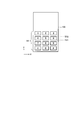
- FIG. 1 is a block diagram illustrating a configuration example of an input device according to the present invention.
- the input device 10 of this example includes a control unit 11, a storage unit 14, a notification unit 15, and a touch panel 16.
- the touch panel 16 includes a display unit 12 and an input unit 13.
- the storage unit 14 is a storage unit using various memories, HDDs, and the like, and stores various programs and data.
- software keyboard data 14a to be displayed on the display unit 12 is stored.
- the control unit 11 executes various programs stored in the storage unit 14 and controls each unit of the apparatus.
- the control unit 11 reads out the software keyboard data 14 a stored in the storage unit 14 and causes the display unit 12 to display the software keyboard data 14 a.
- the display unit 12 of the touch panel 16 displays a software keyboard by display means such as an LCD (Liquid Crystal Display).
- the input unit 13 is an input means such as a pressure-sensitive type provided on the surface of the display unit 12, thereby detecting a user's operation input.
- User operation input information for the input unit 13 is output to the control unit 11, and the control unit 11 can control the display state of the display unit 12 based on the operation input information.
- the control unit 11 determines that the touch position is at a specific position set in advance as the home position of the software keyboard. And when a touch position exists in a specific position, the alerting
- the notification unit 15 includes one or more of a vibrator that performs notification by vibration, a light source that performs notification by light emission, and a speaker that performs notification by audio output, and performs notification to the user by operating these. .
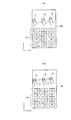
- FIG. 2 is a diagram for explaining an example of a determination process of an input operation in the input device according to the present invention.
- the display screen 100 shows an example of a screen displayed on the display unit 12 of FIG. 1, and here, a software keyboard 101 using a numeric keypad is displayed.
- the input unit 13 of the touch panel 16 is provided on the display screen of the display unit 12, and an operation input can be performed by a user's finger or the like.
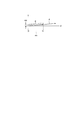
- FIG. 3 is a diagram for explaining a method for determining the moving direction based on the locus of the touch position on the touch panel.
- the locus d of the touch position with respect to the touch panel 16 is recorded from the left to the diagonally upward right direction.
- the control unit 11 analyzes the locus d of the touch position.
- a trajectory in a predetermined range is selected from the entire trajectory d, and a movement amount mx that is a component in the X direction of the trajectory d and a movement amount my that is a component in the Y direction are compared in the selected range.
- the predetermined range E is selected, and mx and my are compared.
- mx> my it is determined that the finger depicting the trajectory d has moved in the X direction.
- mx ⁇ my it can be determined that the finger depicting the locus d has moved in the Y direction.
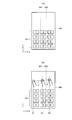
- FIG. 4 is a diagram for explaining an example of home position determination processing in the software keyboard.
- the control unit 11 of the input device 10 sets a specific position indicating the home position with respect to the display area (operation area) of the display screen 100.
- the specific position is set as an area having a certain range in the X direction and the Y direction.
- FIG. 4A shows a home position region in the X direction.
- the home position area in the X direction is a range of XH1 to XH2 including the key “5” of the software keyboard.
- the touch position is within the X direction region of the home position. Determine whether.
- the coordinate in the X direction of the touch position is x
- the touch position is determined to be in the home position region.
- FIG. 4B it is assumed that the coordinate in the X direction of the locus d of the touch position has advanced from X1 to X2 and further to X3.
- the touch position x is in the range of x ⁇ XH1
- it is determined that the touch position x is outside the area outside the home position area.
- the touch position of X1 is outside the region.
- the touch position x When the touch position x is in the range of XH1 ⁇ x ⁇ XH2, it is determined that the touch position x is at the home position. For example, the touch position of X2 is determined to be at the home position. When the touch position x is in the range of XH2 ⁇ x, the touch position x is outside the area outside the home position area. The touch position of X3 is out of the area.
- control unit 11 determines that the movement direction of the touch position is the X direction, whether the touch position is the home position in the X direction according to the touch position of the user on the touch panel 16, Alternatively, it can be determined whether the position is out of the home position range.
- the home position area in the Y direction is set to a range of YV1 to YV2. That is, here, when the control unit 11 determines that the traveling direction of the touch position locus d is the Y direction by the determination process of FIG. 3, the coordinate y in the Y direction of the touch position is in the range of y ⁇ YV1. Sometimes, it is determined that the touch position y is outside the area outside the home position area. When the touch position y is in the range of YV1 ⁇ y ⁇ YV2, it is determined that the touch position y is at the home position. Further, when the touch position y is in the range of YV2 ⁇ y, the touch position y is outside the area outside the home position area.
- the home position area setting as described above can be appropriately set according to the display state of the software keyboard.
- the X-direction and Y-direction areas corresponding to the key “5” are set as the home position areas.
- the area of the “F” key and the “J” key can be set as the home position area.
- the touch position determination process determines whether or not the user touches the area of the home position based on the x and y coordinates of the touch position without determining the moving direction of the touch position as described above. You may make it determine.
- the coordinate values of x and y that can determine the home position area are determined in advance. For example, the coordinate values of four corners of a rectangle on the display screen are set in advance, and the inside of the rectangle is determined to be a home position area.
- the control unit 11 determines whether the touch position is inside or outside the home position area.
- the notification unit 15 when the control unit 11 determines whether or not the touch position by the user is at the home position by the above processing, when the touch position is at the home position, the notification unit 15 performs a predetermined method. The user is notified.
- a vibrator is provided as the notification unit 15, and when the touch position is at the home position, the vibrator is operated to cause vibration. As a result, it is understood that the user is touching the home position while touching the input unit 13.
- a speaker is provided, and a predetermined sound is output to notify the user when the touch position is at the home position.
- a light emitting light source using an LED is provided, and the LED emits light when the touch position is at the home position.
- the light emission may be continuous light emission or blinking.
- the notification by light emission can be applied to a visually handicapped person who can visually recognize brightness, but is not suitable for a visually handicapped person who cannot recognize light emission at all. Any of the above examples can be applied to the notification means of the notification unit 15, or a plurality of these examples may be combined and operated simultaneously.
- a condition for notifying the notification unit 15 that the home position area is touched may be determined. For example, when it is determined that the user is touching the home position area, the notification section 15 may be operated at all times, or only when the home position area is touched for the first time. 15 may be operated.
- the first touch may be, for example, the first touch after the input device 10 is turned on.
- the touch panel is not touched for a predetermined time, the home position area is touched for the first time after the predetermined time elapses.
- the notification unit 15 may be operated when it is performed.
- the operation state of the notification unit 15 may be changed according to the distance between the touch position and the home position area.
- the control unit 11 of the input device 10 determines the distance between the preset home position region and the touch position based on the touch position detected by the input unit 13, and the notification unit 15 determines the distance according to the distance. Change the operating state. For example, as the distance between the touch position and the home position region is longer, the vibration is strengthened and a large vibration is applied, and the vibration is weakened as the distance is shortened.
- the light emission intensity of the LED may be controlled to increase the light emission intensity as the distance between the touch position and the home position region is longer.
- the volume of a predetermined audio output may be increased as the distance between the touch position and the home position area is longer, and the volume may be decreased as the distance is shorter.
- the moving direction of the user's touch position is determined, and the home position and the touch position are determined according to the determination result.
- the distance can be determined. For example, when the movement direction is the X direction, the distance between the X direction position of the touch position and the X direction boundary of the home position region is determined, and the operation state of the notification unit 15 is changed according to the distance. . In this case, since the moving direction cannot be determined unless the touch position moves to some extent, control for changing the operating state of the notification unit 15 may be performed when the moving direction can be determined.
- the distance from the home position area may be determined according to the coordinates of the touch position without determining the moving direction of the touch position.
- the distance with the shortest straight line distance between the coordinates of the touch position and the preset home position area is calculated as the distance between the touch position and the home position area.
- the home position area is determined in advance and a predetermined notification is given when the touch position is within the area.
- the center point of the target key may be determined as the notification target touch position.
- the center coordinate position of the “5” key of the software keyboard using the numeric keypad can be set as a home position notification target.
- a predetermined notification can be performed.
- the notification target touch position may be an area having a certain size with the center point of the predetermined key as the center.
- the boundary of the region set as the home position may be notified, and a predetermined notification may be performed when the touch position is on the boundary or when passing over the boundary. That is, the specific position to be notified is a boundary position between the area set as the home position and the area outside the set area.
- the home position area can be set for a plurality of keys such as “F” and “J” as described above.
- the center positions of a plurality of keys and the region boundaries of a plurality of home positions can be targeted for notification.
- the user can recognize which key is the notification target. May be.
Landscapes
- Engineering & Computer Science (AREA)
- General Engineering & Computer Science (AREA)
- Theoretical Computer Science (AREA)
- Human Computer Interaction (AREA)
- Physics & Mathematics (AREA)
- General Physics & Mathematics (AREA)
- Input From Keyboards Or The Like (AREA)
- Position Input By Displaying (AREA)
- User Interface Of Digital Computer (AREA)
Abstract
Description
記憶部14は、各種メモリやHDD等を用いた記憶手段で、各種プログラムやデータを記憶する。また、表示部12に表示させるソフトウェアキーボードデータ14aを記憶する。
制御部11は、記憶部14に記憶されている各種プログラムを実行して装置各部を制御する。また、制御部11は、記憶部14に記憶されているソフトウェアキーボードデータ14aを読み出して表示部12に表示させる。
報知部15は、振動により報知を行うバイブレータ、発光により報知を行う光源、および音声出力により報知を行うスピーカ、のいずれかまたは複数を有していて、これらを動作させることによってユーザに対する報知を行う。
制御部11は、このタッチ位置の軌跡dを解析する。ここでは軌跡dの全体のなかから、所定範囲の軌跡を選択し、その選択した範囲において軌跡dのX方向の成分である移動量mxとY方向の成分である移動量myとを比較する。図3の例では、所定範囲Eを選択し、mxとmyとを比較する。この結果、mx>myとなっているため、軌跡dを描いた指は、X方向へ移動したものと判断する。逆にmx<myであれば、軌跡dを描いた指はY方向へ移動したものと判断することができる。ここでmx=myの場合には、予めXまたはY方向のいずれかに移動したものと判断するように定めておけばよい。
図4(A)は、X方向におけるホームポジションの領域を示している。ここではX方向のホームポジションの領域は、ソフトウェアキーボードのキー「5」を含むXH1~XH2の範囲とされている。
例えば図4(B)に示すように、タッチ位置の軌跡dのX方向の座標がX1からX2、さらにX3へと進んだものとする。この場合、タッチ位置xがx<XH1の範囲にある場合には、そのタッチ位置xはホームポジションの領域から外れた領域外であると判定する。例えばX1のタッチ位置は領域外となる。
例えば、報知部15としてバイブレータを設け、タッチ位置がホームポジションにあるときにバイブレータを動作させて振動を起こさせる。これにより、ユーザは入力部13へのタッチ中にホームポジションをタッチしていることが分かるようになる。
また、報知部15の他の例としてLEDによる発光光源を設け、タッチ位置がホームポジションにあるときにLEDを発光させるようにする。発光は連続発光でもよく、点滅させるようなものでもよい。発光による報知の場合は、明るさを視認できる程度の視覚障害者には適用することができるが、全く発光を認識できない視覚障害者には不向きである。
報知部15の報知手段には上記の例のいずれかを適用することができ、またこれらの例の複数を組み合わせて同時に動作させるものであってもよい。
さらに他の例では、タッチ位置とホームポジションの領域との距離が長い程、所定の音声出力の音量を大きくし、距離が短くなるに従って音量を小さくするようにしてもよい。
Claims (7)
- 所定のキー配列を有するソフトウェアキーボードを表示する表示部及び該表示部に取り付けられた入力部とからなるタッチパネルと、
該タッチパネルに対するユーザのタッチ位置に基づいて、該タッチ位置が前記ソフトウェアキーボードのホームポジションとして予め設定した特定の位置にあることを判断する制御部と、
前記タッチ位置が前記特定の位置にあるときに、前記制御部による制御に従ってユーザに対して所定の報知を行う報知部と、を有することを特徴とする入力装置。 - 請求項1に記載の入力装置において、前記ホームポジションとして予め設定した特定の位置は、前記ソフトウェアキーボードによって表示される特定キーの領域として設定され、
前記制御部は、前記タッチパネルに対するタッチ位置の軌跡から、前記タッチ位置が前記表示部の表示画面の水平方向か垂直方向かのいずれの方向に向かって動いているかを判断し、前記水平方向に動いていると判断した場合には、前記特定のキーを対象とする領域の水平方向の範囲にタッチ位置があるか否かでタッチ位置が前記特定の位置にあるものと判定し、
前記タッチ位置が前記表示画面の垂直方向に動いていると判断した場合には、前記特定のキーを対象とする領域の垂直方向の範囲にタッチ位置があるか否かでタッチ位置が前記特定の位置にあるものと判定することを特徴とする入力装置。 - 請求項2に記載の入力装置において、
前記制御部は、前記タッチ位置の軌跡のうちの所定範囲の軌跡を選択し、該選択した軌跡の前記水平方向の動き成分と前記垂直方向の動き成分とを抽出し、該抽出した前記水平方向の動き成分と前記垂直方向の動き成分とを比較して、動き量が大きい方の成分に相当する方向を前記タッチ位置が動いている方向であるものと判断することを特徴とする入力装置。 - 請求項1に記載の入力装置において、前記ホームポジションとして設定した特定の位置は、前記ソフトウェアキーボードによって表示される特定キーの中心位置であることを特徴とする入力装置。
- 請求項1に記載の入力装置において、前記ホームポジションとして設定した特定の位置は、前記ソフトウェアキーボードによって表示される特定キーを対象とした領域と、該特定キーを対象とした領域の外部の領域との境界位置であることを特徴とする入力装置。
- 請求項1~5のいずれか1に記載の入力装置において、
前記報知手段は、振動により報知を行うバイブレータ、発光により報知を行う光源、および音声出力により報知を行うスピーカ、のいずれかまたは複数を有していることを特徴とする入力装置。 - 請求項1~6のいずれかに1に記載の入力装置において、
前記報知部は、前記タッチパネルに対するユーザのタッチ位置と、前記特定の位置との距離に応じて、報知の状態を変化させることを特徴とする入力装置。
Priority Applications (3)
| Application Number | Priority Date | Filing Date | Title |
|---|---|---|---|
| CN201280008137.0A CN103339585B (zh) | 2011-02-08 | 2012-02-03 | 输入装置 |
| JP2012556852A JP5551278B2 (ja) | 2011-02-08 | 2012-02-03 | 入力装置 |
| US13/980,983 US20130305181A1 (en) | 2011-02-08 | 2012-02-03 | Input device |
Applications Claiming Priority (2)
| Application Number | Priority Date | Filing Date | Title |
|---|---|---|---|
| JP2011-024993 | 2011-02-08 | ||
| JP2011024993 | 2011-02-08 |
Publications (1)
| Publication Number | Publication Date |
|---|---|
| WO2012108342A1 true WO2012108342A1 (ja) | 2012-08-16 |
Family
ID=46638558
Family Applications (1)
| Application Number | Title | Priority Date | Filing Date |
|---|---|---|---|
| PCT/JP2012/052459 Ceased WO2012108342A1 (ja) | 2011-02-08 | 2012-02-03 | 入力装置 |
Country Status (4)
| Country | Link |
|---|---|
| US (1) | US20130305181A1 (ja) |
| JP (1) | JP5551278B2 (ja) |
| CN (1) | CN103339585B (ja) |
| WO (1) | WO2012108342A1 (ja) |
Cited By (8)
| Publication number | Priority date | Publication date | Assignee | Title |
|---|---|---|---|---|
| JP2013250710A (ja) * | 2012-05-31 | 2013-12-12 | Kyocera Document Solutions Inc | 入力装置 |
| JP2014102819A (ja) * | 2012-11-20 | 2014-06-05 | Immersion Corp | ガイド及び静電的摩擦との協力のための触覚的な手がかり(HapticCues)を提供する方法及び装置 |
| JP2014204137A (ja) * | 2013-04-01 | 2014-10-27 | レノボ・シンガポール・プライベート・リミテッド | タッチ式ディスプレイの入力システムおよび入力パネルの表示方法 |
| JP2014225248A (ja) * | 2013-04-18 | 2014-12-04 | パナソニックIpマネジメント株式会社 | 情報を提示する方法および電子機器 |
| JP2015111479A (ja) * | 2015-03-25 | 2015-06-18 | 京セラドキュメントソリューションズ株式会社 | 入力装置 |
| JP2016214599A (ja) * | 2015-05-21 | 2016-12-22 | ニプロ株式会社 | 治療装置 |
| WO2018025513A1 (ja) * | 2016-08-05 | 2018-02-08 | ソニー株式会社 | 情報処理装置、情報処理方法、およびプログラム |
| JP2018206390A (ja) * | 2017-06-01 | 2018-12-27 | エルジー ディスプレイ カンパニー リミテッド | タッチ表示装置及びタッチパネル |
Families Citing this family (8)
| Publication number | Priority date | Publication date | Assignee | Title |
|---|---|---|---|---|
| JP6097268B2 (ja) * | 2014-12-02 | 2017-03-15 | レノボ・シンガポール・プライベート・リミテッド | 入力装置、そのソフトウェアキーボード表示方法、及びコンピュータが実行可能なプログラム |
| CN105955507B (zh) * | 2016-06-03 | 2018-11-02 | 珠海市魅族科技有限公司 | 一种软键盘的显示方法以及终端 |
| JP7231412B2 (ja) * | 2017-02-09 | 2023-03-01 | ソニーグループ株式会社 | 情報処理装置および情報処理方法 |
| JP2020135529A (ja) * | 2019-02-21 | 2020-08-31 | シャープ株式会社 | タッチパネル、複合機、プログラムおよびタッチパネルの制御方法 |
| CN114269671B (zh) * | 2019-08-28 | 2024-04-19 | 因温特奥股份公司 | 用于具有触敏的屏幕系统的电梯操纵装置的运行方法 |
| US12314472B2 (en) | 2021-03-31 | 2025-05-27 | Snap Inc. | Real-time communication interface with haptic and audio feedback response |
| US12050729B2 (en) * | 2021-03-31 | 2024-07-30 | Snap Inc. | Real-time communication interface with haptic and audio feedback response |
| KR20250164860A (ko) | 2021-03-31 | 2025-11-25 | 스냅 인코포레이티드 | 햅틱 피드백 응답을 갖는 가상 현실 인터페이스 |
Citations (2)
| Publication number | Priority date | Publication date | Assignee | Title |
|---|---|---|---|---|
| JP2004171512A (ja) * | 2002-10-30 | 2004-06-17 | Sony Corp | 入力装置およびその製造方法 |
| JP2009533762A (ja) * | 2006-04-10 | 2009-09-17 | イマーション コーポレーション | 触覚的に生成された基準キーを有するタッチパネル |
Family Cites Families (4)
| Publication number | Priority date | Publication date | Assignee | Title |
|---|---|---|---|---|
| US6882337B2 (en) * | 2002-04-18 | 2005-04-19 | Microsoft Corporation | Virtual keyboard for touch-typing using audio feedback |
| US7701445B2 (en) * | 2002-10-30 | 2010-04-20 | Sony Corporation | Input device and process for manufacturing the same, portable electronic apparatus comprising input device |
| US7616192B2 (en) * | 2005-07-28 | 2009-11-10 | Avago Technologies Ecbu Ip (Singapore) Pte. Ltd. | Touch device and method for providing tactile feedback |
| CN101937313B (zh) * | 2010-09-13 | 2019-11-12 | 中兴通讯股份有限公司 | 一种触摸键盘动态生成和输入的方法及装置 |
-
2012
- 2012-02-03 US US13/980,983 patent/US20130305181A1/en not_active Abandoned
- 2012-02-03 WO PCT/JP2012/052459 patent/WO2012108342A1/ja not_active Ceased
- 2012-02-03 CN CN201280008137.0A patent/CN103339585B/zh not_active Expired - Fee Related
- 2012-02-03 JP JP2012556852A patent/JP5551278B2/ja not_active Expired - Fee Related
Patent Citations (2)
| Publication number | Priority date | Publication date | Assignee | Title |
|---|---|---|---|---|
| JP2004171512A (ja) * | 2002-10-30 | 2004-06-17 | Sony Corp | 入力装置およびその製造方法 |
| JP2009533762A (ja) * | 2006-04-10 | 2009-09-17 | イマーション コーポレーション | 触覚的に生成された基準キーを有するタッチパネル |
Cited By (11)
| Publication number | Priority date | Publication date | Assignee | Title |
|---|---|---|---|---|
| JP2013250710A (ja) * | 2012-05-31 | 2013-12-12 | Kyocera Document Solutions Inc | 入力装置 |
| JP2014102819A (ja) * | 2012-11-20 | 2014-06-05 | Immersion Corp | ガイド及び静電的摩擦との協力のための触覚的な手がかり(HapticCues)を提供する方法及び装置 |
| US10078384B2 (en) | 2012-11-20 | 2018-09-18 | Immersion Corporation | Method and apparatus for providing haptic cues for guidance and alignment with electrostatic friction |
| JP2014204137A (ja) * | 2013-04-01 | 2014-10-27 | レノボ・シンガポール・プライベート・リミテッド | タッチ式ディスプレイの入力システムおよび入力パネルの表示方法 |
| JP2014225248A (ja) * | 2013-04-18 | 2014-12-04 | パナソニックIpマネジメント株式会社 | 情報を提示する方法および電子機器 |
| JP2015111479A (ja) * | 2015-03-25 | 2015-06-18 | 京セラドキュメントソリューションズ株式会社 | 入力装置 |
| JP2016214599A (ja) * | 2015-05-21 | 2016-12-22 | ニプロ株式会社 | 治療装置 |
| WO2018025513A1 (ja) * | 2016-08-05 | 2018-02-08 | ソニー株式会社 | 情報処理装置、情報処理方法、およびプログラム |
| JPWO2018025513A1 (ja) * | 2016-08-05 | 2019-05-30 | ソニー株式会社 | 情報処理装置、情報処理方法、およびプログラム |
| JP2018206390A (ja) * | 2017-06-01 | 2018-12-27 | エルジー ディスプレイ カンパニー リミテッド | タッチ表示装置及びタッチパネル |
| US11847274B2 (en) | 2017-06-01 | 2023-12-19 | Lg Display Co., Ltd. | Touch display device and touch panel |
Also Published As
| Publication number | Publication date |
|---|---|
| JP5551278B2 (ja) | 2014-07-16 |
| CN103339585B (zh) | 2017-05-31 |
| CN103339585A (zh) | 2013-10-02 |
| US20130305181A1 (en) | 2013-11-14 |
| JPWO2012108342A1 (ja) | 2014-07-03 |
Similar Documents
| Publication | Publication Date | Title |
|---|---|---|
| JP5551278B2 (ja) | 入力装置 | |
| KR101087479B1 (ko) | 멀티 디스플레이 장치 및 그 제어 방법 | |
| JP5350437B2 (ja) | タッチセンサシステム | |
| JP5661184B2 (ja) | タッチキーボードを動的に生成する方法及び装置 | |
| JP5580694B2 (ja) | 情報処理装置、その制御方法、プログラム及び記憶媒体 | |
| JP5730667B2 (ja) | デュアルスクリーン上のユーザジェスチャのための方法及びデュアルスクリーンデバイス | |
| JP4087879B2 (ja) | タッチパネルの文字認識方法及び文字入力方法 | |
| CN103488418B (zh) | 电子装置与多窗口触控指令的判断方法 | |
| US20100259482A1 (en) | Keyboard gesturing | |
| CN102981772B (zh) | 设置虚拟键盘的方法及装置 | |
| JP2014075130A (ja) | ユーザインタフェースにおける使用者の入力を管理するための方法、ユーザインタフェース及びコンピュータ可読媒体 | |
| CN104915017B (zh) | 指令输入设备与指令输入方法 | |
| US20110025718A1 (en) | Information input device and information input method | |
| JP2009276819A (ja) | ポインティング装置の制御方法およびポインティング装置、並びにコンピュータプログラム | |
| CN104679224B (zh) | 输入设备及输入管理系统 | |
| JP5507646B2 (ja) | 携帯端末装置における操作キー群のレイアウト方法および操作キー群レイアウト装置 | |
| JP2014081800A (ja) | 手書き入力装置及び機能制御プログラム | |
| KR20100095951A (ko) | 휴대 전자기기 및 그것의 제어방법 | |
| CN101546231B (zh) | 多物件方向触控选取方法及装置 | |
| CN104298456A (zh) | 电子装置及其虚拟键盘的显示方法 | |
| JP2013200836A (ja) | 操作支援方法及び操作支援プログラム | |
| CN109976652B (zh) | 信息处理方法及电子设备 | |
| JP2016218819A (ja) | ペン入力システム、タッチペン、及び、ペン入力方法 | |
| JP6220374B2 (ja) | 情報処理装置、出力文字コード判定方法、及びプログラム | |
| CN103870037A (zh) | 复合式触控键盘模块 |
Legal Events
| Date | Code | Title | Description |
|---|---|---|---|
| 121 | Ep: the epo has been informed by wipo that ep was designated in this application |
Ref document number: 12744618 Country of ref document: EP Kind code of ref document: A1 |
|
| DPE1 | Request for preliminary examination filed after expiration of 19th month from priority date (pct application filed from 20040101) | ||
| ENP | Entry into the national phase |
Ref document number: 2012556852 Country of ref document: JP Kind code of ref document: A |
|
| WWE | Wipo information: entry into national phase |
Ref document number: 13980983 Country of ref document: US |
|
| NENP | Non-entry into the national phase |
Ref country code: DE |
|
| 122 | Ep: pct application non-entry in european phase |
Ref document number: 12744618 Country of ref document: EP Kind code of ref document: A1 |