WO2010087325A1 - 動画再生装置、動画再生方法及び動画再生装置をコンピュータで実現するためのプログラムを記録した記録媒体 - Google Patents
動画再生装置、動画再生方法及び動画再生装置をコンピュータで実現するためのプログラムを記録した記録媒体 Download PDFInfo
- Publication number
- WO2010087325A1 WO2010087325A1 PCT/JP2010/050953 JP2010050953W WO2010087325A1 WO 2010087325 A1 WO2010087325 A1 WO 2010087325A1 JP 2010050953 W JP2010050953 W JP 2010050953W WO 2010087325 A1 WO2010087325 A1 WO 2010087325A1
- Authority
- WO
- WIPO (PCT)
- Prior art keywords
- moving image
- video
- information
- request
- display
- Prior art date
- Legal status (The legal status is an assumption and is not a legal conclusion. Google has not performed a legal analysis and makes no representation as to the accuracy of the status listed.)
- Ceased
Links
Images




Classifications
-
- H—ELECTRICITY
- H04—ELECTRIC COMMUNICATION TECHNIQUE
- H04N—PICTORIAL COMMUNICATION, e.g. TELEVISION
- H04N21/00—Selective content distribution, e.g. interactive television or video on demand [VOD]
- H04N21/80—Generation or processing of content or additional data by content creator independently of the distribution process; Content per se
- H04N21/85—Assembly of content; Generation of multimedia applications
- H04N21/858—Linking data to content, e.g. by linking an URL to a video object, by creating a hotspot
- H04N21/8586—Linking data to content, e.g. by linking an URL to a video object, by creating a hotspot by using a URL
-
- H—ELECTRICITY
- H04—ELECTRIC COMMUNICATION TECHNIQUE
- H04N—PICTORIAL COMMUNICATION, e.g. TELEVISION
- H04N21/00—Selective content distribution, e.g. interactive television or video on demand [VOD]
- H04N21/40—Client devices specifically adapted for the reception of or interaction with content, e.g. set-top-box [STB]; Operations thereof
- H04N21/43—Processing of content or additional data, e.g. demultiplexing additional data from a digital video stream; Elementary client operations, e.g. monitoring of home network or synchronising decoder's clock; Client middleware
- H04N21/431—Generation of visual interfaces for content selection or interaction; Content or additional data rendering
- H04N21/4312—Generation of visual interfaces for content selection or interaction; Content or additional data rendering involving specific graphical features, e.g. screen layout, special fonts or colors, blinking icons, highlights or animations
- H04N21/4314—Generation of visual interfaces for content selection or interaction; Content or additional data rendering involving specific graphical features, e.g. screen layout, special fonts or colors, blinking icons, highlights or animations for fitting data in a restricted space on the screen, e.g. EPG data in a rectangular grid
-
- H—ELECTRICITY
- H04—ELECTRIC COMMUNICATION TECHNIQUE
- H04N—PICTORIAL COMMUNICATION, e.g. TELEVISION
- H04N21/00—Selective content distribution, e.g. interactive television or video on demand [VOD]
- H04N21/40—Client devices specifically adapted for the reception of or interaction with content, e.g. set-top-box [STB]; Operations thereof
- H04N21/47—End-user applications
- H04N21/472—End-user interface for requesting content, additional data or services; End-user interface for interacting with content, e.g. for content reservation or setting reminders, for requesting event notification, for manipulating displayed content
- H04N21/47202—End-user interface for requesting content, additional data or services; End-user interface for interacting with content, e.g. for content reservation or setting reminders, for requesting event notification, for manipulating displayed content for requesting content on demand, e.g. video on demand
-
- H—ELECTRICITY
- H04—ELECTRIC COMMUNICATION TECHNIQUE
- H04N—PICTORIAL COMMUNICATION, e.g. TELEVISION
- H04N21/00—Selective content distribution, e.g. interactive television or video on demand [VOD]
- H04N21/40—Client devices specifically adapted for the reception of or interaction with content, e.g. set-top-box [STB]; Operations thereof
- H04N21/47—End-user applications
- H04N21/482—End-user interface for programme selection
-
- H—ELECTRICITY
- H04—ELECTRIC COMMUNICATION TECHNIQUE
- H04N—PICTORIAL COMMUNICATION, e.g. TELEVISION
- H04N9/00—Details of colour television systems
- H04N9/79—Processing of colour television signals in connection with recording
- H04N9/87—Regeneration of colour television signals
- H04N9/8715—Regeneration of colour television signals involving the mixing of the reproduced video signal with a non-recorded signal, e.g. a text signal
Definitions
- the present invention relates to a video playback technology for playing back video by acquiring video information, layout information, and link information via a network, and in particular, even if the layout of a screen including a video is changed,
- the present invention relates to a video playback technology that can continuously play back video.
- a link destination may be assigned to a button on a remote controller, and the screen may be changed and displayed according to a user's request.
- Japanese Patent Application Laid-Open No. 2008-113385 discloses a receiving apparatus that can dynamically provide a plurality of link destinations when reproducing a moving image.
- the receiving device disclosed in this document 1 is linked to an external device in response to an operation signal, and repeats the communication unit that receives moving image information and link information, and the link information received by the communication unit at a predetermined timing.
- an update unit for updating to the latest link information a synthesis unit for generating screen information for displaying video information and the latest link information on one screen, and an operation signal for specifying a link destination in the link information are received.
- a control unit that changes the link destination of the communication unit to the specified link destination.
- the control unit specifies one link destination assigned to the numeric key in the link information by receiving an operation signal from the numeric key of the remote controller.
- the link destination of the control unit is a URL (Uniform Resource Locators) or multicast address information.
- this receiving device When this receiving device is used, a video and link information associated therewith are acquired.
- selectable moving picture information is displayed on the moving picture, and when the link information is selected, the moving picture indicated by the selected link information is displayed.
- Actvila registered trademark
- the layout description can be described so that a moving image is reproduced by opening a window with a predetermined layout in the page.
- the pages are switched, even if the same moving image is reproduced, the newly laid out moving image is reproduced again from the beginning, and the continuity of the moving image reproduction is not guaranteed.
- an object of the present invention is a video playback device that displays a video provided and continues the video file even if the layout description is changed in order to improve the degree of freedom of expression of the provided content. It is intended to provide a moving image reproducing apparatus that can continue to be reproduced, an image forming apparatus including the same, a moving image reproducing method, and a recording medium on which a program for realizing the moving image reproducing apparatus by a computer is recorded.
- the moving image reproducing apparatus includes an acquisition means for acquiring data including moving image specifying information for specifying a moving image to be reproduced and continuation request information indicating a request for continuously reproducing the moving image.
- a display means for displaying an image including a moving picture, a user input receiving means for accepting a request for transition of a display input by the user, and a moving picture before and after the transition based on data acquired before the transition request.
- Storage means for storing identification information indicating that the video is requested to be continuously played back, video information specifying the video that is requested to be played back continuously, and the identification information is stored.
- the control means for continuously playing and displaying the moving image specified by the moving image specifying information based on the moving image information and the data acquired after the transition request.
- the moving image information here is not information indicating the content of the moving image (content) but information specifying the moving image.
- the control unit stores the identification information in the storage unit, and stores the moving image specifying information included in the data acquired before the transition request as the moving image information.
- the continuation request information is included in the data acquired after the transition request
- the identification information is stored in the storage means
- the moving image specifying information included in the data acquired after the transition request is stored in the storage means.
- the data can be configured to be described in a scalable vector graphics language, and the moving image specifying information and the moving image information can be configured to be described in a link format.
- the data can further include layout information that defines the playback mode of the moving image on the display means
- the display means can include means for displaying an image including the moving image in accordance with the layout information.
- the data further includes information for defining processing when a request for transition of display is input, and the control means is means for displaying an image including a moving image after the transition request on the display means according to the information.
- the control means is means for displaying an image including a moving image after the transition request on the display means according to the information.
- control means can be configured to include means for reproducing the moving picture specified by the moving picture specifying information acquired after the transition request from the beginning when the moving picture is not continuously displayed.
- the moving image reproducing method includes an acquisition step of acquiring data including moving image specifying information for specifying a moving image to be reproduced and continuation request information indicating a request to continuously reproduce the moving image, Based on the display step for displaying an image including the image, the user input acceptance step for accepting a request for transition of the display input by the user, and the data acquired before the transition request, the video is continuously reproduced before and after the transition.
- the recording medium on which the computer program according to the third aspect of the present invention is recorded records the computer program that causes the computer to function as a device that reproduces moving images.
- This program displays a computer including an acquisition unit for acquiring data including video specifying information for specifying a video to be played back and continuation request information indicating a request to continuously play back the video, and an image including the video Based on the data acquired before the transition request, based on the data acquired before the transition request, and the user input accepting means for accepting the request to transition the display input by the user Storage means for storing identification information indicating that the video is requested and video information specifying the video that is requested to be continuously played back, and if the identification information is stored, the video information And, based on the data acquired after the transition request, function as a control means for continuously playing and displaying the moving image specified by the moving image specifying information. That.
- Examples of the recording medium include a RAM (Random Access Memory), a ROM (Read-Only Memory), and a hard disk drive (HDD (Hard Disk) as an auxiliary storage device. Drive)) and the like.
- RAM Random Access Memory
- ROM Read-Only Memory
- HDD Hard Disk
- a program reading device may be provided as an external storage device of a computer, and a recording medium that can be read by being inserted into this device may be used.
- a CPU Central Processing Unit
- a CPU reads a computer program from a recording medium other than the main memory, and loads the read computer program into the main memory and executes it.
- the CPU comprehensively controls each part of the computer so as to perform predetermined processing according to the installed computer program.
- Recording media that can be read by the program reader include (1) tape systems such as magnetic tape and cassette tape, (2) magnetic disks such as flexible disk (FD) and hard disk (HD), or CD-ROM (Compact).
- Disc system such as Disc-Read Only Memory), MO (Magneto Optical Disk), MD (Mini Disk), DVD (Digital Versatile Disk), etc. (3) IC (Integrated Circuit) card including memory card, etc. (4) Mask ROM, EPROM (Erasable Programmable Read Only Memory), EEPROM (Electrica) ly Erasable Programmable Read Only Memory), can be exemplified medium or the like for recording fixedly programmed, including a semiconductor memory such as a flash memory.
- the computer may be configured to be connectable to a communication network including the Internet, and may be a medium that fluidly carries the program so as to download the computer program from the communication network.
- the download program may be stored in the computer in advance. Moreover, you may install from another recording medium.
- this moving image playback apparatus it is possible to continue to play back a moving image when the display is changed in response to a user request. That is, using a text file in XML (Extensible Markup Language) format using SVG (Scalable Vector Graphics), (A) the identification information is stored in the storage means, (B) depending on the data acquired after the transition request And when continuous playback of the video is requested, and (C) the information specifying the video before and after the transition is the same (continuing the same video), all three conditions are satisfied. To play the video. For this reason, it is possible to make adjustments by explicit instructions in the data before and after the transition in (A) and (B), safely without making any significant changes to the existing browser. The video is safe (because it is necessary and safe to use the same video).
- XML Extensible Markup Language
- SVG Scalable Vector Graphics
- FIG. 1 is a block diagram of a moving image playback system according to an embodiment of the present invention. It is a figure which shows the transmission process of the moving image which contains a still image in a part of layout. It is a display example in a moving image reproducing device, and is a diagram showing a state (screen display (1)) before layout switching. It is a display example in a moving image reproducing device, and shows a state after layout switching (screen display (2)). It is a figure which shows the structure of UI content.
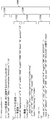
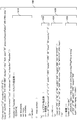
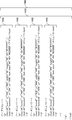
- FIG. 10 is a diagram (part 1) illustrating details of UI content corresponding to screen display (1). It is FIG. (2) which shows the content of UI content corresponding to screen display (1).
- FIG. 10 is a diagram (part 1) illustrating details of UI content corresponding to screen display (1). It is FIG. (2) which shows the content of UI content corresponding to screen display (1).
- FIG. 10 is a diagram (part 3) illustrating details of UI content corresponding to screen display (1); It is FIG. (1) which shows the content of UI content corresponding to a screen display (2). It is FIG. (2) which shows the content of UI content corresponding to a screen display (2). It is a flowchart which shows the control structure of the program performed with the UI content process part of FIG.
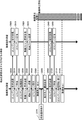
- FIG. 10 is a transition diagram when there is an instruction to continuously play a moving image. It is a transition diagram when there is no instruction to continuously play a moving image.
- FIG. 10 is a transition diagram when there is an instruction to continuously play a moving image but continuous playback is not possible.
- FIG. 1 is a control block diagram of a moving image playback system according to an embodiment of the present invention.
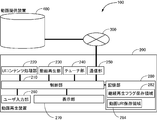
- the video playback system 100 includes a video playback device 200 and a video providing device 400, and the video playback device 200 and the video providing device 400 can communicate with each other via a network 300 such as the Internet. It is connected.
- the moving image reproducing device 200 reproduces a moving image according to the description of UI (User Interface or User Interaction) content.
- UI User Interface or User Interaction
- the UI content and the moving image file used in the moving image reproducing device 200 those obtained from the moving image providing device 400 may be used, or those stored in advance in the storage unit 280 of the moving image reproducing device 200 may be used.
- the UI content and the moving image file may be acquired from different moving image providing apparatuses 400.
- the moving image display position and display size in the moving image playback apparatus 200 are described in the UI content, and both can be freely specified.
- UI content is composed of a script description part, a link description part, and a layout description part.
- the script description part prescribes the processing to be performed mainly for the event that has occurred
- the link description part prescribes the link destination information of the UI content to be transitioned next
- the layout description part specifies the graphic to be drawn on the screen It defines the shape, display position and display size of moving images.
- the UI content is an XML format text file described using SVG.
- the video playback device 200 includes a control unit 210, a UI content processing unit 220, a video playback unit 230, a tuner unit 240, a communication unit 250, a user input unit 260, a display unit 270, and a storage unit 280. Including.
- the UI content processing unit 220 executes processing related to UI content (SVG file).
- the UI content processing unit 220 analyzes the contents of the script description part in the SVG file and executes a process according to the analysis result.
- the UI content processing unit 220 analyzes the SVG file and draws the analyzed content in a buffer (not shown) of the control unit 210.
- the UI content processing unit 220 analyzes the contents of the link description unit in the SVG file, instructs the communication unit 250 to acquire a link destination file (SVG file, moving image file, etc.), and instructs the storage unit 280. Instruct to memorize.
- the UI content processing unit 220 refers to the layout description unit in the SVG file and instructs the display unit 270 to display the advertisement information or the moving image file.
- the present invention is not limited to such a mode (a mode in which a file is acquired and stored and then played back), and the present invention can be applied even when playing back while acquiring data, such as streaming. Confirm that it is possible.
- the video reproduction unit 230 reproduces a video file acquired from the video providing device 400 via the communication unit 250 and stored in the storage unit 280 or a video reproduced from the video file originally stored in the storage unit 280. Are drawn in the buffer of the control unit 210.
- the tuner unit 240 draws an image obtained by decoding the received broadcast wave in the buffer of the control unit 210.
- the display unit 270 displays the video sent from the buffer of the control unit 210. The sending process will be described later.
- the control unit 210 executes processing based on a user instruction received from the user input unit 260.
- the control unit 210 includes a buffer in which the UI content processing unit 220 (mainly draws still images), the moving image playback unit 230 or the tuner unit 240 (mainly draws moving images).
- the control unit 210 periodically sends the drawn buffer contents to the display unit 270.
- the user input unit 260 receives a user operation by a button operation of the remote controller or the like, and transmits it to the control unit 210.
- the storage unit 280 stores information set by the user, stores the state of the continuous playback flag of the video in the continuous playback flag storage area 282, and stores the URI (Uniform Resource Identifier) of the video to be continuously played back as a video URI. Or stored in area 284.
- the storage unit 280 may store the content itself to be reproduced, such as an SVG file or a video file, and display the content itself on the display unit 270.
- the content acquired from the communication unit 250 may be temporarily stored. You may make it display on the display part 270 after preserve
- the communication unit 250 acquires an SVG file or a moving image file via the network 300. As described above, in a case where a moving image stored in the storage unit 280 is reproduced, the communication unit 250 may not be used for communication via the network 300.
- the moving image providing apparatus 400 includes a communication unit for communicating with an external device (typically, the moving image reproducing apparatus 200) via the network 300, a storage unit that stores UI content, moving image data, and the like transmitted to the moving image reproducing apparatus 200. And a control unit that controls the communication unit and the storage unit (these storage unit, communication unit, and control unit in the moving image providing apparatus 400 are not shown).
- the moving image providing apparatus 400 includes, based on the UI content and moving image file acquisition request received from the moving image reproducing apparatus 200, the UI content corresponding to the acquisition request from the moving image reproducing apparatus 200 in the information stored in the storage unit, and The moving image file is transmitted to the moving image reproducing device 200 via the network 300.
- the storage unit 280 of the moving image playback apparatus 200 includes a program for executing a general operation of the moving image playback apparatus 200 for playing back a moving image according to a user request, and UI content processing described later.
- a computer program for realizing (SVG display processing) is stored. This computer program may be provided from an external device via the network 300.
- the computer program may be provided by a recording medium such as a DVD on which the computer program is recorded. That is, a DVD as a computer program recording medium is loaded into a DVD drive (not shown) built in the moving image playback apparatus 200, and the program is read from the DVD and installed in the program storage area of the storage unit 280. May be.
- a control structure of a computer program for realizing UI content processing (SVG display processing) will be described later.
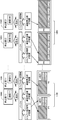
- FIG. 2 shows a process in the case where the video sent from the buffer of the control unit 210 is displayed on the display unit 270.
- the moving image is composed of 60 frames per second. This is based on a method of receiving and displaying a general broadcast (60 frames per second) by the tuner unit 240. In this method, the video received by the tuner unit 240 is once decoded and drawn using a buffer, and the video stored in the buffer is sequentially sent to the display unit 270.
- the moving image playback apparatus 200 displays a still image and a moving image with a set layout, and the predetermined condition is satisfied even if the layout or the still image is changed In this case, the video is continuously played back.
- the display unit 270 includes a screen 1000 including a moving image (1) and a still image (1), a moving image (2) and a still image (1) after 1/60 seconds have elapsed from the screen 1000.
- a screen 1060 composed of the moving image (60) and the still image (2) after elapses is continuously displayed.
- layout change processing is performed at 59/60 seconds, which is one second.
- the layout and still image are updated as the layout change processing. This update is a case where an explicit instruction such as transition to the next content is detected. Until then, the display content is continuously held. Therefore, the layout including the contents of the still image is maintained.
- the still image portion is drawn by the UI content processing unit 220 in the buffer of the control unit 210, and the still image (1) or the still image (2) is stored in the buffer of the control unit 210. Is drawn. As described above, since the layout change process is performed at 59/60 seconds, the UI content processing unit 220 draws the still image (2) on the screen 1059 in the buffer.
- the moving image portion is drawn by the moving image playback unit 230 in the buffer of the control unit 210, and the moving image (1) to the moving image (60) are drawn in the buffer of the control unit 210 for one second.
- the UI content processing unit 220 draws the still image portion area in the buffer and the moving image reproduction portion 230 draws the moving image portion area in the buffer, and the control unit 210 sends them to the display unit 270 for display.
- the control unit 210 sends them to the display unit 270 for display.
- the region of the moving image portion (a part of the buffer) is updated, and the transmission from the buffer to the display unit 270 is performed in the entire buffer (the transmission to the display unit 270 may be only the updated portion). Absent).
- ⁇ Display example> 3 and 4 show display examples of the video that is sent from the buffer of the control unit 210 and displayed on the display unit 270 as described above.
- 3 is a screen 1100 corresponding to the screen 1000 and the screen 1001 in FIG. 2
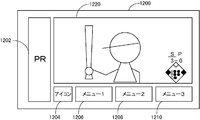
- FIG. 4 is a screen 1200 corresponding to the screen 1059 and the screen 1060 in FIG.
- the screen 1100 shown in FIG. 3 is composed of an advertisement area 1102 that is an advertisement for Bank A, a display area 1104 for “Menu 1”, a display area 1106 for “Menu 2”, and a display area 1108 for an advertisement “PR”. Includes drawing (1).
- the screen 1100 includes a moving image area 1120 in addition to these still images.
- the screen 1200 shown in FIG. 4 includes an advertisement “PR” display area 1202, an “icon” display area 1204, a “menu 1” display area 1206, a “menu 2” display area 1208, and a “menu 3” display area.
- the still image (2) composed of 1210 is included.
- the screen 1200 includes a moving image area 1220 in addition to these still images.
- the moving image area 1120 shown in FIG. 3 and the moving image area 1220 shown in FIG. 4 are continuous moving images of common contents so that the contents of the moving images can be understood from the contents of the moving images. Is a video with a strike count incremented by 1).
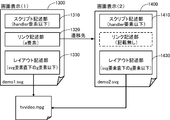
- FIG. 5 shows a schematic configuration of UI content used for realizing such display.
- demo1. Corresponding to the screen display (1) before the transition (this corresponds to the screen 1100).
- the svg file 1400 is described as an example.
- These SVG files basically have the same configuration, but, as shown in FIG. Unlike the svg file 1400, a link description part may not be provided.
- the svg file 1300 includes a script description unit 1310, a link description unit 1320, and a layout description unit 1330. demo2.
- the svg file 1400 includes a script description unit 1410 and a layout description unit 1430. Further, ID information (which constitutes a part of the URI) for identifying a moving image reproduced from both UI contents is “http://video-server.com/tvvideo.mpg”.
- the svg file 1300 includes a script description unit 1310, a link description unit 1320, and a layout description unit 1330.
- the script description unit 1310 includes a moving image continuous reproduction request instruction 1312 and a transition request instruction 1314.
- the moving image continuous reproduction request instruction 1312 defines an instruction to set a continuous reproduction flag (videoElem.setProperty ('prolong', 1)). If this instruction is specified, the current state of the continuous playback flag is set to “continue playback” by a program described later and stored in the continuous playback flag storage area 282 of the storage unit 280. Further, the value of the xlink: href attribute (http://video-server.com/tvvideo.mpg) of the video element having the ID information “tvvideo” specified by the above instruction is stored in the video URI storage area 284 of the storage unit 280. Is done.
- the transition request instruction 1314 defines a process when a user instruction “yellow button pressed” is input to the user input unit 260.
- the control unit 210 notifies the UI content processing unit 220 of an event.
- the UI content processing unit 220 that has received this event moves to the next transition destination (link destination), and demo1.
- a process for ending the svg display process is defined.
- the link description part 1320 includes demo1.
- the next transition destination URI http: //servername/demo2.svg) after the svg display processing is completed is defined.
- the layout description unit 1330 includes a background color specification 1332 that defines the background color, a video specification 1334 that defines the content, display position, and size of the moving image, and a display position, size, and content of the advertisement area that is an advertisement of Bank A.
- a display designation 1342 that defines the display position, size, and content of the display area of the advertisement “PR” is included.
- This demo1 In the svg file 1300, the SVG engine is initialized and the contents of the SVG file are analyzed. When analyzed, since the moving picture designation 1334 is described, confirmation processing of continuous reproduction of moving pictures is performed. Although details will be described later using a flowchart, when a moving image is reproduced, the following processing is performed.
- the svg file 1400 includes a script description unit 1410 and a layout description unit 1430.
- a background color designation 1432 that defines the background color
- a display designation 1434 that defines the display position, size, and content of the display area of the advertisement “PR”
- a content of the moving image, a display position, and a size are defined.
- Specified moving image 1436, Icon designation 1438 defining the display position, size and contents of the “icon” display area
- Menu designation 1440 defining the display position, size and contents of the “menu 1” display area
- “Menu” 2 ” includes a menu designation 1442 that defines the display position, size, and contents of the display area
- a menu designation 1444 that defines the display position, size, and contents of the display area“ menu 3 ”.
- This demo2 In the svg file 1400, the SVG engine is initialized and the contents of the SVG file are analyzed. When the analysis is performed, the moving image designation 1436 is described, so that the process for confirming the continuous reproduction of the moving image is performed. Although details will be described later using a flowchart, when continuous reproduction is performed, the following processing is performed.
- the state of the continuous playback flag stored in the continuous playback flag storage area 282 of the storage unit 280 is “continuous playback” (condition A), and the value of the xlink: href attribute of the video element of the video designation 1436 is used as identification information.
- the current state of the continuous playback flag is stored in the continuous playback flag storage area 282 of the storage unit 280 as “not to continue playback”.
- Other still images described in the SVG are drawn, a screen is displayed on the display unit 270, and the event loop is entered.
- FIG. 11 is a flowchart showing a control structure of a program executed by the UI content processing unit 220 of the video playback device 200 according to the present embodiment.
- a program executed by the UI content processing unit 220 will be described.
- This program is one of the programs executed in the UI content processing unit 220 and is also a process of the SVG display engine. Note that the present invention is not limited to the case where the UI content processing unit 220 executes the program, and the program may be executed by the control unit 210 of the video playback device 200.
- the continuous playback process when the continuous playback process is performed, a process for displaying the SVG file before the transition and the SVG file after the transition is performed, and two videos are displayed (the same video may be continuously played back). Different videos may be played). Further, the value of the continuous playback flag when the SVG display engine is started for the first time is “not continuously played”.
- the continuous playback flag storage area 282 one continuous playback flag is stored for each URI of one moving image. Since there is only one moving image in this case, only one continuous playback flag is stored. Similarly, only one URI is stored in the moving image URI storage area 284.
- step S the UI content processing unit 220 receives the UI content from the moving image providing apparatus 400 via the network 300, the communication unit 250, and the control unit 210.
- This UI content is the SVG file shown in FIG. 6 to FIG. 8 or FIG. 9 to FIG.
- the UI content processing unit 220 determines whether or not a moving image (video element) exists in the UI content. If it is determined that a moving image (video element) exists in the UI content (YES in S110), the process proceeds to S120. If not (NO in S110), the process proceeds to S210.
- UI content processing unit 220 determines whether or not the continuous playback flag stored in continuous playback flag storage area 282 of storage unit 280 is “continuous playback”. If it is determined that the continuous playback flag is “continuous playback”, condition A described above is satisfied (YES in S120), and the process proceeds to S130. If not (NO in S120), the process proceeds to S160.
- UI content processing unit 220 sends the moving image to the buffer of control unit 210 so that the moving image being played is continuously displayed. Thereafter, the process proceeds to S190.
- the UI content processing unit 220 determines whether there is a moving image that is continuously played back. If it is determined that there is a continuously played moving image (YES in S160), the process proceeds to S170. If not (NO in S160), the process proceeds to S180.
- UI content processing unit 220 stops the moving image being played.
- the UI content processing unit 220 determines whether or not there is an instruction to set a continuous playback flag in the received UI content. At this time, if “videoElem.setProperty ('prolong', 1)” is defined in the script description part in the UI content, the state of the continuous playback flag is set to “continue playback” so that the continuous playback flag is set. It is determined that there is an instruction (to change to a state). If there is an instruction to set the continuous reproduction flag (YES in S190), the process proceeds to S200. If not (NO in S190), the process proceeds to S210.
- UI content processing unit 220 stores the xlink: href attribute value (URI) of the video element having the ID information specified by this instruction in moving image URI storage area 284 of storage unit 280, and the current The state of the continuous reproduction flag is set to “continue reproduction” and is stored in the continuous reproduction flag storage area 282 of the storage unit 280. Thereafter, the process proceeds to S220.
- UI content processing unit 220 sets the current state of the continuous playback flag to “do not continue playback” and stores it in continuous playback flag storage area 282 of storage unit 280. Since the initial value of this flag is “no continuous playback”, if there is no instruction, the state of the continuous playback flag is stored in the continuous playback flag storage area 282 of the storage unit 280 as “no continuous playback”. .
- UI content processing unit 220 draws other drawing elements (still images including advertisement information, menu information, etc.) (sends if necessary to send to buffer of control unit 210).
- the UI content processing unit 220 determines whether the user instruction input from the user input unit 260 is a transition to the next page or an end of SVG display. If it is determined that the transition is to the next page or the display of SVG is terminated (YES in S230), the process proceeds to S240. If not (NO in S230), the process returns to S230 to enter a loop for detecting an event.
- UI content processing unit 220 determines whether or not the continuous playback flag stored in continuous playback flag storage area 282 of storage unit 280 is “not continued” and there is a video being played back. . If it is determined that the continuous playback flag is “not continued” and there is a video being played back (YES in S240), the process proceeds to S250. Otherwise (NO in S240), this process ends. In S250, UI content processing unit 220 ends the reproduction of the moving image. If the continuous reproduction flag is “continue”, the reproduction end process in S250 is not executed and the reproduced moving image is continuously reproduced.
- an instruction to set a continuous playback flag is defined in the video continuous playback request instruction 1312 as continuous request information (videoElem.setProperty ('prolong', 1)) (YES in S190), so The state of the continuous playback flag is set to “continue playback”, stored in the continuous playback flag storage area 282 of the storage unit 280, and further, the xlink: href attribute of the video element having the ID information “tvvideo” specified by the above instruction (Http://video-server.com/tvvideo.mpg) is stored in the moving image URI storage area 284 of the storage unit 280 (S200).
- the moving image providing apparatus 400 When transmitted to the moving image providing apparatus 400 (operation 2030), the moving image providing apparatus 400 receives a moving image file request (operation 3020), and the moving image file is transmitted from the moving image providing apparatus 400 to the moving image reproducing apparatus 200 (operation 3030).
- a moving image file request operation 3020
- the moving image file is transmitted from the moving image providing apparatus 400 to the moving image reproducing apparatus 200 (operation 3030).
- acquisition processing is continuously performed after transmission (operation 3030) and reception (operation 2040) of the moving image.
- the UI content processing unit 220 When the user presses the “yellow button”, the UI content processing unit 220 is notified as an event. demo1.
- the UI content processing unit 220 that has received this event transitions to the next page (http: //servername/demo2.svg), and demo1.
- a process for ending the svg display process is defined (YES in S230). Since the continuous reproduction flag is set (NO in S240), the moving image being reproduced is continuously reproduced (operation 2080). At this time, an image including a moving image is continuously displayed on the display unit 270 of the moving image reproducing device 200 (moving image reproducing process (1)).
- the video providing device 400 receives the UI content request (operation 3040), and the UI content is transferred from the video providing device 400 to the video reproducing device 200. (Operation 3050).
- the operation playback apparatus 200 receives the UI content from the video providing apparatus 400 (S100, operation 2100), and UI content processing (SVG display processing) is started (operation 2110).
- the UI contents at this time are demo2. Let it be svg.
- This demo2 There is a moving image (video element) in svg (YES in S110), and the state of the continuous playback flag stored in the continuous playback flag storage area 282 of the storage unit 280 is “continuous playback” (S120). YES), demo2.
- the moving image being reproduced is continued (S150). For this reason, as shown in FIG. 12, the same moving image is continuously reproduced in the operation 2120. Specifically, on the display unit 270, the moving image is continuously played even when the screen 1100 in FIG. 3 is switched to the screen 1200 in FIG. In this case, since the same video is continuously played, demo2. The moving image file corresponding to svg is not transmitted.
- the moving image providing device 400 receives the moving image file request (operation 3020), and the moving image file is transferred from the moving image providing device 400 to the moving image reproducing device 200. (Operation 3030).
- UI content other than the moving image is displayed (operation 2050), and reproduction and display of the moving image are disclosed (operation 2060).
- operation 2050 UI content other than the moving image
- operation 2060 reproduction and display of the moving image are disclosed.
- an image including a moving image starts to be displayed on the display unit 270 of the moving image reproducing device 200 (moving image reproducing process (1)).
- the UI content processing unit 220 When the user presses the “yellow button”, the UI content processing unit 220 is notified as an event. demo11.
- the UI content processing unit 220 that has received this event transitions to the next page (http: //servername/demo2.svg), and demo11.
- a process for ending the svg display process is defined (YES in S230).
- the continuous reproduction flag is not set (YES in S240)
- the reproduction of the moving image is ended (operation 2080).
- the moving image that has been continuously reproduced is terminated (moving image reproduction process (1) is completed corresponding to operation 2080).
- operation playback device 200 When the operation playback device 200 receives UI content from the video providing device 400 (S100, operation 2100), UI content processing (SVG display processing) is started (operation 2200).
- UI content processing SVG display processing
- This demo2 Although there is a moving image (video element) in svg (YES in S110), the state of the continuous playback flag stored in the continuous playback flag storage area 282 of the storage unit 280 is “no continuous playback” (in S120). NO), since there is no moving image being continuously played back (NO in S160), demo2. A new moving image is acquired and reproduced based on the URI defined in the moving image designation in the layout description portion of svg (S180, operations 2210 to 2240). For this reason, as shown in FIG. 13, a new moving image is played back corresponding to the operation 2240. Specifically, on the display unit 270, when the screen is switched from the screen 1100 of FIG. 3, a video that has not been continued is played back (video playback processing (2)).
- an instruction to set a continuous playback flag is defined in the video continuous playback request instruction 1312 (videoElem.setProperty ('prolong', 1)) (YES in S190), so the current state of the continuous playback flag Is set to “continue playback”, stored in the continuous playback flag storage area 282 of the storage unit 280, and the value of the xlink: href attribute (http :) of the video element having the ID information “tvvideo” specified by the above instruction. //Video-server.com/tvvideo.mpg) is stored in the moving image URI storage area 284 of the storage unit 280 (S200).
- the moving image providing device 400 receives the moving image file request (operation 3020), and the moving image file is transferred from the moving image providing device 400 to the moving image reproducing device 200. (Operation 3030).
- UI content other than the moving image is displayed (operation 2050), and reproduction and display of the moving image are disclosed (operation 2060).
- operation 2050 UI content other than the moving image
- operation 2060 reproduction and display of the moving image are disclosed.
- an image including a moving image starts to be displayed on the display unit 270 of the moving image reproducing device 200 (moving image reproducing process (1)).
- the UI content processing unit 220 When the user presses the “yellow button”, the UI content processing unit 220 is notified as an event. demo12.
- the UI content processing unit 220 that has received this event transitions to the next page (http: //servername/demo22.svg), and demo12.
- a process for ending the svg display process is defined (YES in S230).
- the continuous reproduction flag is set (NO in S240)
- the moving image being reproduced is continuously reproduced (operation 2080).
- an image including a moving image is continuously displayed on the display unit 270 of the moving image reproducing device 200 (moving image reproducing process (1)).
- the operation playback device 200 receives UI content from the video providing device 400 (S100, operation 2100), and UI content processing (SVG display processing) is started (operation 2300).
- the UI content at this time is demo22. Let it be svg.
- This demo22 There is a moving image (video element) in svg (YES in S110), and the state of the continuous playback flag stored in the continuous playback flag storage area 282 of the storage unit 280 is “continuous playback” (S120). YES), demo2.
- the video playback system in response to a user request, when a video is provided from the video providing device and the video is played back by the video playback device, an expression of the provided content is provided. Even if the layout description is changed in order to improve the degree of freedom, it is possible to continue playing the moving image file.
- the continuous playback request flag is set
- the video file is requested for continuous playback
- the video before and after the transition Since the video is played continuously when all three conditions that the files are the same are satisfied, the video can be played safely and safely without any significant changes to the existing browser. be able to.
- the present invention can be applied to a moving image reproduction system (digital television system) or the like that acquires moving image information, layout information, and link information via a network and reproduces the moving image.
- a moving image reproduction system digital television system
Landscapes
- Engineering & Computer Science (AREA)
- Multimedia (AREA)
- Signal Processing (AREA)
- Human Computer Interaction (AREA)
- Databases & Information Systems (AREA)
- Television Signal Processing For Recording (AREA)
- Two-Way Televisions, Distribution Of Moving Picture Or The Like (AREA)
- Processing Or Creating Images (AREA)
- Information Transfer Between Computers (AREA)
Abstract
Description
200 動画再生装置
210 制御部
220 UIコンテンツ処理部
230 動画再生部
240 チューナ部
250 通信部
260 ユーザ入力部
270 表示部
280 記憶部
282 継続再生フラグ保存領域
284 動画URI保存領域
300 ネットワーク
400 動画提供装置
図1に本発明の実施の形態に係る動画再生システムの制御ブロック図を示す。図1に示すように、この動画再生システム100は、動画再生装置200と、動画提供装置400とを含み、これらの動画再生装置200と動画提供装置400とはインターネット等のネットワーク300により通信可能に接続されている。
図2を参照して、レイアウトの一部に静止画を含む動画の送出処理を説明する。図2は、制御部210のバッファから送出された映像を表示部270で表示する場合の処理を示す。図2においては、動画は、1秒間60コマで構成されているものとする。これは、一般的な放送(秒間60コマ)をチューナ部240で受信して表示する方式に基づくものである。この方式は、チューナ部240で受信した映像を一旦バッファを用いてデコードして描画して、バッファに蓄えられた映像を表示部270に順次送出している。
このように、制御部210のバッファから送出されて表示部270で表示される映像の表示例を図3及び図4に示す。図3が図2の画面1000及び画面1001に対応する画面1100であって、図4が図2の画面1059及び画面1060に対応する画面1200である。
図5にこのような表示を実現させるために用いられるUIコンテンツの概略構成を示す。図5に示すように、遷移前の画面表示(1)(これは画面1100に相当)に対応するdemo1.svgファイル1300と、遷移後の画面表示(2)(これは画面1200に相当)に対応するdemo2.svgファイル1400とを一例として記載する。これらのSVGファイルは、基本的に同じ構成を備えるが、図5に示すように、次に遷移する先がない場合は、demo2.svgファイル1400のようにリンク記述部を備えなくてもよい。
図11は、本実施の形態にかかる動画再生装置200のUIコンテンツ処理部220で実行されるプログラムの制御構造を示すフローチャートである。これを参照して、UIコンテンツ処理部220で実行されるプログラムについて説明する。なお、このプログラムは、UIコンテンツ処理部220において実行されるプログラムの1つであって、SVG表示エンジンの処理でもある。なお、本発明はUIコンテンツ処理部220において実行される場合に限定されるものではなく、動画再生装置200の制御部210でこのプログラムが実行されても構わない。
以上のような構造及びフローチャートに基づく本実施の形態に係る動画再生システムの動作について、図12~図14を用いて説明する。なお、以下の動作の説明においては、同一の動作には同一の符号を付してある。それらの動作も同一である。したがって、それらについての詳細な説明は繰返さない。
図12に示すように、動作再生装置200からUIコンテンツ要求を動画提供装置400へ送信すると(動作2000)、動画提供装置400がUIコンテンツ要求を受信して(動作3000)、動画提供装置400からUIコンテンツが動画再生装置200へ送信される(動作3010)。動作再生装置200は動画提供装置400からUIコンテンツを受信して(S100、動作2010)、UIコンテンツ処理(SVG表示処理)が開始される(動作2020)。このときのUIコンテンツは、図6~図8に示したdemo1.svgであるとする。このdemo1.svgにおいては、継続要求情報として、動画継続再生要求指示1312に、継続再生フラグを立てる指示が規定されている(videoElem.setProperty(‘prolong’,1))ので(S190にてYES)、現在の継続再生フラグの状態が「継続再生する」にされて記憶部280の継続再生フラグ保存領域282に保存されて、さらに上記指示によって指定されたID情報「tvvideo」を持つvideo要素のxlink:href属性の値(http://video-server.com/tvvideo.mpg)が記憶部280の動画URI保存領域284に保存される(S200)。
図13に示すように、動作再生装置200が動画提供装置400からUIコンテンツを受信すると(S100、動作2010)、UIコンテンツ処理(SVG表示処理)が開始される(動作2020)。このときのUIコンテンツはdemo11.svgであるとする。このdemo11.svgは、demo1.svgと違って、継続再生フラグを立てる指示が規定されていない。demo11.svgには継続再生フラグを立てる指示が規定されていないので(S190にてNO)、現在の継続再生フラグの状態が「継続再生しない」にされて記憶部280の継続再生フラグ保存領域282に保存される(S210)。
図14に示すように、動作再生装置200が動画提供装置400からUIコンテンツを受信すると(S100、動作2010)、UIコンテンツ処理(SVG表示処理)が開始される(動作2020)。このときのUIコンテンツはdemo12.svgであるとする。このdemo12.svgは、demo1.svgと違って、次に遷移するSVGファイルのURIがdemo2.svgではなくdemo22.svg(このdemo22.svgは動画のURLが、http://video-server.com/tvvideo2.mpgであること以外はdemo2.svgと同じ)である。
Claims (9)
- 再生する動画を特定する動画特定情報と、継続して動画を再生する要求を示す継続要求情報とを含むデータを取得するための取得手段と、
動画を含む画像を表示するための表示手段と、
ユーザによって入力される表示を遷移させる要求を受け付けるためのユーザ入力受付手段と、
遷移要求前に取得したデータに基づいて、遷移の前後で動画を継続して再生するように要求されていることを示す識別情報と、継続して再生するように要求されている動画を特定する動画情報とを記憶するための記憶手段と、
前記識別情報が記憶されている場合、前記動画情報及び遷移要求後に取得したデータに基づいて、前記動画特定情報により特定される動画を継続して再生し表示させるための制御手段とを含む、動画再生装置。 - 前記制御手段は、
遷移要求前に取得したデータに継続要求情報が含まれると、前記識別情報を前記記憶手段に記憶させるとともに、遷移要求前に取得したデータに含まれる動画特定情報を前記動画情報として前記記憶手段に記憶させるための手段と、
遷移要求後に取得したデータに継続要求情報が含まれ、前記記憶手段に前記識別情報が記憶され、遷移要求後に取得したデータに含まれる動画特定情報と前記記憶手段に記憶された動画情報とが一致する場合に、前記動画特定情報により特定される動画を継続して再生し表示させるための手段とを含む、請求項1に記載の動画再生装置。 - 前記データは、スケーラブル・ベクター・グラフィックス言語により記述される、請求項1又は請求項2に記載の動画再生装置。
- 前記動画特定情報及び前記動画情報は、リンク形式で記述される、請求項1~請求項3のいずれかに記載の動画再生装置。
- 前記データには、前記表示手段における動画の再生態様を規定するレイアウト情報をさらに含み、
前記表示手段は、前記レイアウト情報に従って、動画を含む画像を表示するための手段を含む、請求項1~請求項4のいずれかに記載の動画再生装置。 - 前記データには、前記表示を遷移させる要求が入力された場合の処理を規定する情報をさらに含み、
前記制御手段は、前記情報に従って、遷移要求後の動画を含む画像を前記表示手段に表示するための手段を含む、請求項1~請求項4のいずれかに記載の動画再生装置。 - 前記制御手段は、動画を継続して表示させない場合、遷移要求後に取得した動画特定情報により特定される動画を最初から再生するための手段を含む、請求項1~請求項5のいずれかに記載の動画再生装置。
- 再生する動画を特定する動画特定情報と、継続して動画を再生する要求を示す継続要求情報とを含むデータを取得する取得ステップと、
動画を含む画像を表示する表示ステップと、
ユーザによって入力される表示を遷移させる要求を受け付けるユーザ入力受付ステップと、
遷移要求前に取得したデータに基づいて、遷移の前後で動画を継続して再生するように要求されていることを示す識別情報と、継続して再生するように要求されている動画を特定する動画情報とを記憶する記憶ステップと、
前記識別情報が記憶されている場合、前記動画情報及び遷移要求後に取得したデータに基づいて、前記動画特定情報により特定される動画を継続して再生し表示させる制御ステップとを含む、動画再生方法。 - 動画を再生する装置としてコンピュータを機能させるコンピュータプログラムを記録した記録媒体であって、前記コンピュータプログラムは、前記コンピュータにより実行されると、当該コンピュータを、
再生する動画を特定する動画特定情報と、継続して動画を再生する要求を示す継続要求情報とを含むデータを取得するための取得手段と、
動画を含む画像を表示するための表示手段と、
ユーザによって入力される表示を遷移させる要求を受け付けるためのユーザ入力受付手段と、
遷移要求前に取得したデータに基づいて、遷移の前後で動画を継続して再生するように要求されていることを示す識別情報と、継続して再生するように要求されている動画を特定する動画情報とを記憶するための記憶手段と、
前記識別情報が記憶されている場合、前記動画情報及び遷移要求後に取得したデータに基づいて、前記動画特定情報により特定される動画を継続して再生し表示させるための制御手段として動作させる、コンピュータが読取り可能な記録媒体。
Priority Applications (2)
| Application Number | Priority Date | Filing Date | Title |
|---|---|---|---|
| US13/146,422 US20110280550A1 (en) | 2009-01-28 | 2010-01-26 | Movie reproducing apparatus, movie reproducing method and recording medium recording program for computer-realization of the movie reproducing apparatus |
| CN2010800056971A CN102301699A (zh) | 2009-01-28 | 2010-01-26 | 动画再现装置、动画再现方法及记录了用于由计算机实现动画再现装置的程序的记录媒体 |
Applications Claiming Priority (2)
| Application Number | Priority Date | Filing Date | Title |
|---|---|---|---|
| JP2009017020A JP4528345B2 (ja) | 2009-01-28 | 2009-01-28 | 動画再生装置、動画再生方法、動画再生方法をコンピュータで実現するためのプログラム及びそのプログラムを記録した記録媒体 |
| JP2009-017020 | 2009-01-28 |
Publications (1)
| Publication Number | Publication Date |
|---|---|
| WO2010087325A1 true WO2010087325A1 (ja) | 2010-08-05 |
Family
ID=42395586
Family Applications (1)
| Application Number | Title | Priority Date | Filing Date |
|---|---|---|---|
| PCT/JP2010/050953 Ceased WO2010087325A1 (ja) | 2009-01-28 | 2010-01-26 | 動画再生装置、動画再生方法及び動画再生装置をコンピュータで実現するためのプログラムを記録した記録媒体 |
Country Status (4)
| Country | Link |
|---|---|
| US (1) | US20110280550A1 (ja) |
| JP (1) | JP4528345B2 (ja) |
| CN (1) | CN102301699A (ja) |
| WO (1) | WO2010087325A1 (ja) |
Cited By (16)
| Publication number | Priority date | Publication date | Assignee | Title |
|---|---|---|---|---|
| US11021737B2 (en) | 2011-12-22 | 2021-06-01 | President And Fellows Of Harvard College | Compositions and methods for analyte detection |
| US11078520B2 (en) | 2013-03-12 | 2021-08-03 | President And Fellows Of Harvard College | Method for generating a three-dimensional nucleic acid containing matrix |
| US11085072B2 (en) | 2016-08-31 | 2021-08-10 | President And Fellows Of Harvard College | Methods of generating libraries of nucleic acid sequences for detection via fluorescent in situ sequencing |
| US11118220B2 (en) | 2015-11-03 | 2021-09-14 | President And Fellows Of Harvard College | Method and apparatus for volumetric imaging of a three-dimensional nucleic acid containing matrix |
| US11193163B2 (en) | 2018-07-30 | 2021-12-07 | Readcoor, Llc | Methods and systems for sample processing or analysis |
| US11293054B2 (en) | 2011-12-22 | 2022-04-05 | President And Fellows Of Harvard College | Compositions and methods for analyte detection |
| US11312992B2 (en) | 2011-10-14 | 2022-04-26 | President And Fellows Of Harvard College | Sequencing by structure assembly |
| US11447807B2 (en) | 2016-08-31 | 2022-09-20 | President And Fellows Of Harvard College | Methods of combining the detection of biomolecules into a single assay using fluorescent in situ sequencing |
| US11473139B2 (en) | 2012-06-05 | 2022-10-18 | President And Fellows Of Harvard College | Spatial sequencing of nucleic acids using DNA origami probes |
| US11713485B2 (en) | 2016-04-25 | 2023-08-01 | President And Fellows Of Harvard College | Hybridization chain reaction methods for in situ molecular detection |
| US11981917B2 (en) | 2013-06-04 | 2024-05-14 | President And Fellows Of Harvard College | RNA-guided transcriptional regulation |
| US12098425B2 (en) | 2018-10-10 | 2024-09-24 | Readcoor, Llc | Three-dimensional spatial molecular indexing |
| US12203136B2 (en) | 2020-08-17 | 2025-01-21 | Readcoor, Llc | Methods and systems for spatial mapping of genetic variants |
| US12331347B2 (en) | 2014-07-11 | 2025-06-17 | President And Fellows Of Harvard College | Methods for high-throughput labelling and detection of biological features in situ using microscopy |
| US12559790B2 (en) | 2020-01-29 | 2026-02-24 | 10X Genomics, Inc. | Compositions and methods for analyte detection |
| US12618099B2 (en) | 2024-11-04 | 2026-05-05 | President And Fellows Of Harvard College | Compositions and methods for analyte detection |
Families Citing this family (4)
| Publication number | Priority date | Publication date | Assignee | Title |
|---|---|---|---|---|
| US9836284B2 (en) * | 2014-06-18 | 2017-12-05 | Vmware, Inc. | HTML5 graph layout for application topology |
| US9740792B2 (en) | 2014-06-18 | 2017-08-22 | Vmware, Inc. | Connection paths for application topology |
| US9852114B2 (en) | 2014-06-18 | 2017-12-26 | Vmware, Inc. | HTML5 graph overlays for application topology |
| JP6050396B2 (ja) * | 2015-01-29 | 2016-12-21 | ヤフー株式会社 | 配信装置、表示制御装置、表示制御方法および表示制御プログラム |
Citations (4)
| Publication number | Priority date | Publication date | Assignee | Title |
|---|---|---|---|---|
| JP2001057542A (ja) * | 1999-06-09 | 2001-02-27 | Matsushita Electric Ind Co Ltd | デジタル放送送信装置、デジタル放送受信装置及びデジタル放送システム並びにコンピュータ読み取り可能な記録媒体 |
| JP2007257755A (ja) * | 2006-03-24 | 2007-10-04 | Toshiba Corp | 情報再生装置及び再生方法 |
| JP2008113385A (ja) * | 2006-10-31 | 2008-05-15 | Toshiba Corp | 受信装置、受信システム及び通信方法 |
| JP2008262308A (ja) * | 2007-04-10 | 2008-10-30 | Sharp Corp | コンテンツ表示装置、コンテンツデータ提供装置、コンテンツデータ配信システム、コンテンツ表示方法、コンテンツデータ提供方法、データ構造、プログラム、および、記録媒体 |
Family Cites Families (2)
| Publication number | Priority date | Publication date | Assignee | Title |
|---|---|---|---|---|
| JP4235340B2 (ja) * | 2000-04-04 | 2009-03-11 | キヤノン株式会社 | 情報処理装置及び情報処理方法 |
| JP2007257756A (ja) * | 2006-03-24 | 2007-10-04 | Hoya Corp | 磁気ディスクの製造方法及び磁気ディスク |
-
2009
- 2009-01-28 JP JP2009017020A patent/JP4528345B2/ja active Active
-
2010
- 2010-01-26 US US13/146,422 patent/US20110280550A1/en not_active Abandoned
- 2010-01-26 CN CN2010800056971A patent/CN102301699A/zh active Pending
- 2010-01-26 WO PCT/JP2010/050953 patent/WO2010087325A1/ja not_active Ceased
Patent Citations (4)
| Publication number | Priority date | Publication date | Assignee | Title |
|---|---|---|---|---|
| JP2001057542A (ja) * | 1999-06-09 | 2001-02-27 | Matsushita Electric Ind Co Ltd | デジタル放送送信装置、デジタル放送受信装置及びデジタル放送システム並びにコンピュータ読み取り可能な記録媒体 |
| JP2007257755A (ja) * | 2006-03-24 | 2007-10-04 | Toshiba Corp | 情報再生装置及び再生方法 |
| JP2008113385A (ja) * | 2006-10-31 | 2008-05-15 | Toshiba Corp | 受信装置、受信システム及び通信方法 |
| JP2008262308A (ja) * | 2007-04-10 | 2008-10-30 | Sharp Corp | コンテンツ表示装置、コンテンツデータ提供装置、コンテンツデータ配信システム、コンテンツ表示方法、コンテンツデータ提供方法、データ構造、プログラム、および、記録媒体 |
Cited By (30)
| Publication number | Priority date | Publication date | Assignee | Title |
|---|---|---|---|---|
| US11312992B2 (en) | 2011-10-14 | 2022-04-26 | President And Fellows Of Harvard College | Sequencing by structure assembly |
| US12467086B2 (en) | 2011-10-14 | 2025-11-11 | President And Fellows Of Harvard College | Sequencing by structure assembly |
| US11549136B2 (en) | 2011-12-22 | 2023-01-10 | President And Fellows Of Harvard College | Compositions and methods for analyte detection |
| US11293054B2 (en) | 2011-12-22 | 2022-04-05 | President And Fellows Of Harvard College | Compositions and methods for analyte detection |
| US11639518B2 (en) | 2011-12-22 | 2023-05-02 | President And Fellows Of Harvard College | Compositions and methods for analyte detection |
| US11566276B2 (en) | 2011-12-22 | 2023-01-31 | President And Fellows Of Harvard College | Compositions and methods for analyte detection |
| US11566277B2 (en) | 2011-12-22 | 2023-01-31 | President And Fellows Of Harvard College | Compositions and methods for analyte detection |
| US11293052B2 (en) | 2011-12-22 | 2022-04-05 | President And Fellows Of Harvard College | Compositions and methods for analyte detection |
| US11293051B2 (en) | 2011-12-22 | 2022-04-05 | President And Fellows Of Harvard College | Compositions and methods for analyte detection |
| US11111521B2 (en) | 2011-12-22 | 2021-09-07 | President And Fellows Of Harvard College | Compositions and methods for analyte detection |
| US11976318B2 (en) | 2011-12-22 | 2024-05-07 | President And Fellows Of Harvard College | Compositions and methods for analyte detection |
| US11021737B2 (en) | 2011-12-22 | 2021-06-01 | President And Fellows Of Harvard College | Compositions and methods for analyte detection |
| US11473139B2 (en) | 2012-06-05 | 2022-10-18 | President And Fellows Of Harvard College | Spatial sequencing of nucleic acids using DNA origami probes |
| US12264358B2 (en) | 2013-03-12 | 2025-04-01 | President And Fellows Of Harvard College | Method of selectively sequencing amplicons in a biological sample |
| US11299767B2 (en) | 2013-03-12 | 2022-04-12 | President And Fellows Of Harvard College | Method for generating a three-dimensional nucleic acid containing matrix |
| US11078520B2 (en) | 2013-03-12 | 2021-08-03 | President And Fellows Of Harvard College | Method for generating a three-dimensional nucleic acid containing matrix |
| US11981917B2 (en) | 2013-06-04 | 2024-05-14 | President And Fellows Of Harvard College | RNA-guided transcriptional regulation |
| US12331347B2 (en) | 2014-07-11 | 2025-06-17 | President And Fellows Of Harvard College | Methods for high-throughput labelling and detection of biological features in situ using microscopy |
| US11118220B2 (en) | 2015-11-03 | 2021-09-14 | President And Fellows Of Harvard College | Method and apparatus for volumetric imaging of a three-dimensional nucleic acid containing matrix |
| US11542554B2 (en) | 2015-11-03 | 2023-01-03 | President And Fellows Of Harvard College | Method and apparatus for volumetric imaging |
| US11718874B2 (en) | 2016-04-25 | 2023-08-08 | President And Fellows Of Harvard College | Hybridization chain reaction methods for in situ molecular detection |
| US11713485B2 (en) | 2016-04-25 | 2023-08-01 | President And Fellows Of Harvard College | Hybridization chain reaction methods for in situ molecular detection |
| US11447807B2 (en) | 2016-08-31 | 2022-09-20 | President And Fellows Of Harvard College | Methods of combining the detection of biomolecules into a single assay using fluorescent in situ sequencing |
| US11085072B2 (en) | 2016-08-31 | 2021-08-10 | President And Fellows Of Harvard College | Methods of generating libraries of nucleic acid sequences for detection via fluorescent in situ sequencing |
| US12565671B2 (en) | 2016-08-31 | 2026-03-03 | President And Fellows Of Harvard College | Methods of combining the detection of biomolecules into a single assay using fluorescent in situ sequencing |
| US11193163B2 (en) | 2018-07-30 | 2021-12-07 | Readcoor, Llc | Methods and systems for sample processing or analysis |
| US12098425B2 (en) | 2018-10-10 | 2024-09-24 | Readcoor, Llc | Three-dimensional spatial molecular indexing |
| US12559790B2 (en) | 2020-01-29 | 2026-02-24 | 10X Genomics, Inc. | Compositions and methods for analyte detection |
| US12203136B2 (en) | 2020-08-17 | 2025-01-21 | Readcoor, Llc | Methods and systems for spatial mapping of genetic variants |
| US12618099B2 (en) | 2024-11-04 | 2026-05-05 | President And Fellows Of Harvard College | Compositions and methods for analyte detection |
Also Published As
| Publication number | Publication date |
|---|---|
| JP4528345B2 (ja) | 2010-08-18 |
| JP2010177915A (ja) | 2010-08-12 |
| CN102301699A (zh) | 2011-12-28 |
| US20110280550A1 (en) | 2011-11-17 |
Similar Documents
| Publication | Publication Date | Title |
|---|---|---|
| JP4528345B2 (ja) | 動画再生装置、動画再生方法、動画再生方法をコンピュータで実現するためのプログラム及びそのプログラムを記録した記録媒体 | |
| JP4655534B2 (ja) | 端末装置およびデータ処理方法、プログラム並びに記録媒体 | |
| CN101669364B (zh) | 电子设备、再现方法 | |
| US8134605B2 (en) | Apparatus for transmitting an HTML file with a captured or stored image to an electronic device over a network | |
| JP2004166253A (ja) | マルチメディアオブジェクトのための時間基準 | |
| EP2061241A1 (en) | Method and device for playing video data of high bit rate format by player suitable to play video data of low bit rate format | |
| JP2006523418A (ja) | インタラクティブコンテンツ同期化装置及び方法 | |
| US8270803B2 (en) | Image recording and reproducing apparatus, and image reproducing method | |
| US20100281500A1 (en) | Av device and ui display method | |
| KR20060039279A (ko) | A/v 네트워크 상의 컨텐츠를 수집하고 그 실행을제어하는 장치 및 방법 | |
| CN102027531A (zh) | 图像显示装置、图像显示方法、图像显示程序、重放装置、重放方法、重放程序以及记录介质 | |
| JP4970903B2 (ja) | マルチメディアコンテンツの再生方法及び装置 | |
| US8565579B2 (en) | Method of updating additional data and apparatus for reproducing the same | |
| WO2008108536A1 (en) | Method and apparatus for modifying text-based subtitles | |
| JP5129533B2 (ja) | 放送受信装置、その制御方法 | |
| KR101859766B1 (ko) | UPnP를 이용하여 문서 컨텐츠를 디스플레이하는 시스템 및 방법 | |
| JP2009135569A (ja) | コンテンツ再生装置、および、コンテンツ情報表示方法 | |
| JP4590464B2 (ja) | 放送受信装置及びその制御方法 | |
| KR101014665B1 (ko) | 프리로드 정보가 기록된 정보저장매체, 그 재생장치 및재생방법 | |
| JP4574566B2 (ja) | 放送受信装置およびその画面表示方法 | |
| KR101733358B1 (ko) | UPnP를 이용하여 문서 컨텐츠를 디스플레이하는 시스템 및 방법 | |
| JP4646791B2 (ja) | デジタルコンテンツ受信装置及び表示方法 | |
| JP2010028547A (ja) | 情報処理装置及び情報処理方法 | |
| JP2009111953A (ja) | データ受信再生装置、データ受信再生方法、データ送信装置、データ送信方法、及びデータ受信再生システム | |
| JP2007172550A (ja) | コンテンツ送信装置、コンテンツ受信装置及びコンテンツ送受信方法 |
Legal Events
| Date | Code | Title | Description |
|---|---|---|---|
| WWE | Wipo information: entry into national phase |
Ref document number: 201080005697.1 Country of ref document: CN |
|
| 121 | Ep: the epo has been informed by wipo that ep was designated in this application |
Ref document number: 10735793 Country of ref document: EP Kind code of ref document: A1 |
|
| WWE | Wipo information: entry into national phase |
Ref document number: 5371/CHENP/2011 Country of ref document: IN |
|
| WWE | Wipo information: entry into national phase |
Ref document number: 13146422 Country of ref document: US |
|
| NENP | Non-entry into the national phase |
Ref country code: DE |
|
| 122 | Ep: pct application non-entry in european phase |
Ref document number: 10735793 Country of ref document: EP Kind code of ref document: A1 |