WO2010082421A1 - 電子機器および情報処理方法 - Google Patents
電子機器および情報処理方法 Download PDFInfo
- Publication number
- WO2010082421A1 WO2010082421A1 PCT/JP2009/070808 JP2009070808W WO2010082421A1 WO 2010082421 A1 WO2010082421 A1 WO 2010082421A1 JP 2009070808 W JP2009070808 W JP 2009070808W WO 2010082421 A1 WO2010082421 A1 WO 2010082421A1
- Authority
- WO
- WIPO (PCT)
- Prior art keywords
- display
- item
- screen
- electronic device
- handwritten
- Prior art date
- Legal status (The legal status is an assumption and is not a legal conclusion. Google has not performed a legal analysis and makes no representation as to the accuracy of the status listed.)
- Ceased
Links
Images













Classifications
-
- G—PHYSICS
- G06—COMPUTING OR CALCULATING; COUNTING
- G06F—ELECTRIC DIGITAL DATA PROCESSING
- G06F40/00—Handling natural language data
- G06F40/20—Natural language analysis
- G06F40/237—Lexical tools
- G06F40/242—Dictionaries
-
- G—PHYSICS
- G06—COMPUTING OR CALCULATING; COUNTING
- G06F—ELECTRIC DIGITAL DATA PROCESSING
- G06F40/00—Handling natural language data
- G06F40/10—Text processing
- G06F40/166—Editing, e.g. inserting or deleting
- G06F40/169—Annotation, e.g. comment data or footnotes
Definitions
- the present invention relates to an electronic device and an information processing method using the electronic device.
- the present invention relates to an electronic device having an electronic dictionary function and an information processing method using the electronic device.
- the electronic dictionary or the electronic dictionary application stores contents, and displays an item selected from contents such as dictionary data registered in advance, based on a search instruction from the user.
- devices having an electronic dictionary and an electronic dictionary application function are collectively referred to simply as “electronic dictionary”.
- an electronic dictionary having a word book function is known.
- the wordbook function is a function of registering the entry word of the dictionary designated by the user and all or part of the explanation information corresponding to the entry word.
- an electronic dictionary having a marker function is also an electronic dictionary having a marker function.
- the marker function is a function of performing processing of changing the display mode such as hatching and underlining on the display character string specified by the user.
- Patent Document 1 discloses an electronic dictionary system which registers supplementary data such as an image and handwritten data in correspondence with a dictionary entry. This system displays an icon indicating that supplemental data is registered when a headword in which the corresponding supplemental data is registered is designated. This system displays the registered supplementary data when the icon is pressed. Furthermore, this system also sequentially outputs the supplementary data registered corresponding to the headword, and when the outputted supplementary data is selected, displays the headword corresponding to the selected supplementary data.
- Patent Document 2 discloses a portable information collection device including a CCD camera, a tablet integrated with an input display, and a flash memory.
- a CCD camera When an image is captured by a CCD camera, this device displays the captured image on the screen of the tablet with a margin on the screen.
- the user performs handwriting input on the screen on which the captured image is displayed.
- the apparatus stores the captured image data and ink data such as handwritten characters and line drawings at addresses of a flash memory associated with each other.
- the apparatus overwrites the image data with the ink data associated with the image data and redisplays the image data on the tablet.
- the image forming apparatus disclosed in Japanese Patent Laid-Open No. 2004-328451 (patent document 3) superimposes image data obtained from a scanner or the like and handwritten data and displays the superimposed data on a display unit. Further, the image forming apparatus outputs composite data obtained by combining the image data and the handwritten data to another information processing apparatus by fax, electronic mail, or the like.
- the user can not directly add information to the content as in the paper dictionary.
- the user has not been able to freely write, for example, circle important parts on a screen (hereinafter, referred to as a “one case display screen”) describing one item (entry word) of the dictionary.
- a screen hereinafter, referred to as a “one case display screen”
- the electronic dictionary system described in Patent Document 1 associates supplemental data with the one-event display screen, writing to the one-event display screen itself is not performed.
- Patent Documents 2 and 3 create an image obtained by combining handwriting with an image acquired by a camera or the like.
- these devices if simply applied to an electronic dictionary, can not associate handwriting on the single-item display screen with the item of content stored in advance in the device. Therefore, the electronic dictionary which simply applies the technology to these documents can not call up the display screen of one item of the handwritten item from the item of the dictionary, which is inconvenient.
- the present invention has been made to solve the problems as described above, and the user can perform handwriting input on one display of content and display one item on which handwriting is added. It is an object of the present invention to provide an electronic device capable of calling a screen from an item and a control method of the electronic device.
- an electronic device comprising a display and an input unit for receiving an instruction from the outside, the input unit including a handwriting input unit for receiving handwriting input, and including a plurality of items Storage unit for storing items, a search unit for searching for items based on an instruction, an item display unit for displaying an item display screen based on the searched items on the display, and a handwritten display corresponding to handwriting input on the item display screen
- a handwriting input unit for receiving handwriting input
- a plurality of items Storage unit for storing items
- a search unit for searching for items based on an instruction
- an item display unit for displaying an item display screen based on the searched items on the display
- a handwritten display corresponding to handwriting input on the item display screen When an item is selected based on an instruction, an item display screen corresponding to the selected item is stored in the storage unit, and a writing unit for overlappingly displaying on the display, a registration unit for storing the handwritten display in the storage unit, and And a calling unit for displaying the
- an electronic device comprising a display and an input unit for receiving an instruction from the outside, the input unit including a handwriting input unit for receiving handwriting input, and including a plurality of items Storage unit for storing items, a search unit for searching for items based on an instruction, an item display unit for displaying an item display screen based on the searched items on the display, and a handwritten display corresponding to handwriting input on the item display screen
- a writing unit for overlappingly displaying on the display, a registration unit for storing in the storage unit in correspondence with the identification information of the item corresponding to the item display screen on which the handwriting display is superimposed, and the identification information corresponding to the handwriting display It is displayed on the display in a selectable manner, and when the identification information is selected based on the instruction, the item display screen corresponding to the selected identification information and the storage unit are stored.
- a calling unit for displaying the handwritten on the display.
- the registration unit when the registration unit receives an instruction to store the handwritten display in the storage unit, the registration unit captures the screen displayed on the display, stores the captured screen in the storage unit, and the calling unit is configured to identify the identification information When is selected, the captured screen is displayed on the display.
- the writing unit causes an item display screen to be fixedly displayed on the display while displaying the handwritten display on the display.
- the registration unit further stores the item display screen in the storage unit in association with the searched item when the instruction is received, and the calling unit captures the screen when identification information is selected. And an item display screen superimposed and displayed on the display, and further comprising an editing unit that edits the captured screen based on an instruction.
- the identification information includes a heading attached to the item.
- the identification information includes a content name given to the content including the item.
- a clock unit for measuring time is further provided, and the registration unit stores the time as identification information in the storage unit when storing the handwritten display in the storage unit.
- the calling unit displays a preview of the handwritten display on the display in association with the identification information associated with the handwritten display.
- an information processing method using an electronic device having a display, a handwriting input unit for accepting handwriting input, a storage unit for storing content including a plurality of items, and an operation unit.
- a step of causing the computing unit to search for an item a step of causing the display to display an item display screen based on the searched item, and a step of causing the display to overlap the handwriting display corresponding to the handwriting input on the item display screen;
- an information processing method using an electronic device having a display, a handwriting input unit for accepting handwriting input, a storage unit for storing content including a plurality of items, and an operation unit.
- a step of causing the computing unit to search for an item a step of causing the display to display an item display screen based on the searched item, and a step of causing the display to overlap the handwriting display corresponding to the handwriting input on the item display screen;
- the identification information is selected based on the instruction, the item display screen corresponding to the selected identification information and the storage unit A pay handwritten displayed and a step of displaying on a display to be displayed on the display.
- the electronic device is capable of accepting handwriting input, and displays a handwriting display corresponding to the handwriting input superimposed on the item display screen. Further, the electronic device stores the handwritten display made on the item display screen in the storage device. Furthermore, the electronic device displays the item display screen selected based on the instruction and the handwriting display on the item display screen on the display. Therefore, according to the information processing method using the electronic device or the electronic device according to the present invention, the user can perform handwriting input on the display of one case of the content and the one case display screen on which the handwriting is added It can be called.
- FIG. 1 It is a figure which shows the hardware constitutions of an electronic device in a block diagram form. It is a perspective view of an electronic device. It is a figure which shows the components arrangement
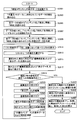
- FIG. 31 is a diagram showing, in a flowchart form, a flow of processing performed by handwritten memo processing unit 446 in registering a handwritten memo unrelated to an item. It is a figure showing typically screen transition concerning a 1st embodiment and a 2nd embodiment. It is a figure which shows typically the operation
- FIG. 1 is a block diagram showing the hardware configuration of electronic device 100 according to the present embodiment.
- electronic device 100 is described as a so-called electronic dictionary, that is, a device designed with an electronic dictionary function of displaying an item display screen corresponding to a searched item as a main function.
- the electronic device 100 is not limited to the electronic dictionary, and may be any device that has an electronic dictionary function and can receive handwriting input.
- the electronic device 100 may be a mobile terminal such as a mobile phone or a PDA (Personal digital assistant).
- the electronic device 100 may be a personal computer.
- electronic device 100 may be realized by a system including a terminal that can receive handwriting input and that has a display device, and a server that performs item search processing and the like according to an instruction input to the terminal.
- the electronic device 100 includes an input key 110, a touch panel 120, a display 130, a display controller 132, a speaker 140, an audio controller 142, a central processing unit (CPU) 150, and a RAM ( A random access memory (Random Access Memory) 160, a read only memory (ROM) 170, and a hard disk 180 are provided.
- a random access memory Random Access Memory
- ROM read only memory
- a signal corresponding to the input key 110 is output.
- the user inputs a keyword used for item search via the input key 110.
- the touch panel 120 detects a touch of an object (such as a stylus pen) on the surface of the touch panel 120, and outputs a signal according to the contact point between the touch panel 120 and the object. Further, it is assumed that the touch panel 120 is installed so as to overlap with a display panel that displays a screen according to the operation state of the electronic device 100. However, in the following, displaying the screen on the display panel may be referred to as displaying the screen on the touch panel 120. Note that a liquid crystal panel with a built-in light sensor can also be used as the touch panel 120. In this case, the display panel is unnecessary. Further, the touch panel 120 may receive a keyword input by performing character recognition from an input stroke by a stylus pen through a handwriting character recognition program or the like (not shown).
- the electronic device 100 may accept the keyword input by voice recognition through a voice input unit (not shown) (such as a microphone) and a voice recognition program.
- a voice input unit such as a microphone
- the display 130 displays a screen based on data in the electronic device 100.
- Display controller 132 controls the operation of display 130. In the present embodiment, it is assumed that the display 130 can display a plurality of colors.
- the display 130 is assumed to be a sensor-integrated display that can detect contact of an object (stylus pen) on the surface of the display 130.
- the display 130 displays the locus of the contact point. That is, the display 130 displays a handwriting display corresponding to the handwriting input made on the surface of the display 130.
- a display panel such as a liquid crystal panel or a light emitting diode (LED) and a touch panel may be stacked, or a liquid crystal panel with a built-in light sensor may be used.
- LED light emitting diode
- the speaker 140 outputs sound based on data in the electronic device 100.
- the audio controller 142 controls the operation of the speaker 140.
- the CPU 150 executes an operation for controlling the operation of the electronic device 100.
- the RAM 160 stores temporary information generated when the CPU 150 performs processing.
- the ROM 170 stores information such as the content database 172.
- the content database 172 is information related to content such as a dictionary stored in advance in the ROM 170. Details of the content database 172 will be described later.
- another storage device such as a flash memory may be used.
- the hard disk 180 stores information such as handwritten memo data 182.
- the handwritten memo data 182 the handwriting performed on the one-item display screen of the item of the content and the item are registered in association with each other. Details of the handwritten memo data 182 will be described later.
- the hard disk 180 is an example of a storage device capable of reading and writing data. Instead of the hard disk 180, a flash memory or the like may be used.
- FIG. 2 is a perspective view of the electronic device 100.
- FIG. 2 shows an example of the appearance of the electronic device 100, and the appearance of the electronic device 100 is not limited to that shown in FIG.
- electronic device 100 includes a first housing 210, a second housing 220, and a stylus pen 230.
- the display 130 is disposed in the first housing 210.
- the touch panel 120, the speaker 140, and the input key 110 are disposed in the second housing 220.
- the first housing 210 and the second housing 220 are connected openably and closably.
- FIG. 3 is a view showing the arrangement of components in the second housing 220.
- the arrangement of each key, the touch panel 120, and the speaker 140 of the electronic device 100 illustrated in FIG. 3 is an example, and the arrangement thereof is not limited to that illustrated in FIG.
- the keys arranged in the second housing 220 include a power key 300, a character key 302, a direction key 304, a search / determination key 306, a back key 308, a clear key 310, a back key 312, a heading movement key 316, voice There are a key 318, a volume key 320, a character size key 322, a memorandum key 330, a preview key 340, and a switching key 350.
- the character key 302 is used to input characters.
- the direction key 304 is used to move the cursor in the screen displayed on the display 130.
- the audio key 318 causes the speaker 140 to output audio.
- the volume key 320 and the character size key 322 are used to adjust the volume and the size of characters in the screen, respectively.
- it demonstrates suitably below.
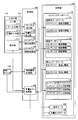
- FIG. 4 is a block diagram showing the functional configuration of the electronic device 100.
- the electronic device 100 includes an input / output unit 410, a clock counter 420, a storage unit 430, and a control unit 440.
- the input / output unit 410 includes an input unit 412 and a display unit 416.
- the input unit 412 receives an external instruction to the electronic device 100.
- the display unit 416 displays information in the electronic device 100 to the outside.
- the input unit 412 includes a key input unit 413 and a handwriting input unit 414.
- the key input unit 413 accepts key input.
- the handwriting input unit 414 receives a handwriting input, that is, a signal indicating a contact position of an external object on the surface of the display 130.
- the display 130 is a sensor integrated type and functions as the handwriting input unit 414.
- the function of the handwriting input unit 414 may be realized by another device such as a mouse or a tablet.
- the clock counter 420 has current time information. Also, the clock counter 420 provides time information to the part that has made a request according to the request from other parts.
- the storage unit 430 stores information.
- the RAM 160, the ROM 170, and the hard disk 180 correspond to the storage unit 430.
- the storage unit 430 stores a content database 172, display data 432 as a basis of a screen displayed on the display unit 416, and handwritten memo data 182.
- the content database 172 includes a search database 173, an explanation database 174, a heading database 175, and a content name database 176.
- storage unit 430 stores data on a plurality of types of content (content 1, content 2, content 3 ).
- the search database 173 includes search information for each content.
- the search information indicates the correspondence between the key input and the item included in the content.
- the search information is used when the user searches for an item of content. Note that there may be content without search information.
- the search information is unnecessary in a sentence list or the like that allows the user to select a sentence example from among a plurality of displayed sentence examples.
- the content 2 is a text example collection, and there is no search information for the content 2.
- the comment database 174 is composed of comment information on each content. Commentary information is information that describes each item of content. In the case of a dictionary or dictionary, detailed information on the entry word is commentary information.
- the comment information is data that the user intends to search using the electronic device 100, and exists for all contents.
- the headline database 175 includes headline information about each content.
- Heading information is a character string attached to each item of content and representing the content of each item.
- the headword corresponds to the heading information.
- Heading information is used by the user to search for desired items from contents such as a dictionary and a dictionary. Note that there may be content without headline information. For example, in a sentence collection, heading information may not be attached. In the case of the present embodiment, there is no heading information of the content 2.
- the content name database 176 includes content name information for each content.
- the content name information is a character string for identifying each content.
- the heading information and the content name information are used to identify a handwritten note made on an item included in the content. That is, electronic device 100 stores the index information and the content name information in storage unit 430 as handwritten memo data 182 in association with the registered handwritten memo. The electronic device 100 lists and displays the heading information and the content name information stored in association with the handwritten memo data 182 on the display 130. The list display will be specifically described later.
- the search information, the commentary information, the heading information, and the content name information will be specifically described with reference to FIGS.
- FIG. 5 is a diagram showing an example of search information for the content 1.
- content 1 is assumed to be a Japanese language dictionary.
- the numbers on the left side (No. 1, No. 2,...) are identification information assigned to each item of content.
- the letters W51 to W55 on the right side are key inputs corresponding to the items. For example, when the character W52 is key input, the electronic device 100 determines that the item No. 2 is selected.
- the characters W51 to W55 are in Japanese. More specifically, the characters W51 to W55 are hiragana characters.
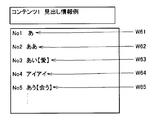
- FIG. 6 is a diagram showing an example of header information on the content 1.
- the heading information (characters W61 to W65) is stored in the storage unit 430 in association with the identification information.
- the electronic device 100 displays the respective heading information on the display 130, and considers that the item corresponding to the heading information selected from the displayed heading information is selected.
- the characters W61 to W65 are in Japanese. More specifically, the characters W61 and W62 are hiragana characters.
- the letter W64 is katakana.
- the characters W63 and W65 each include hiragana and kanji.
- FIG. 7 is a diagram showing an example of commentary information on the content 1.
- the character string on the left side in FIG. 7 is commentary information.
- the commentary information is stored in the storage unit 430 in association with the identification information.
- electronic device 100 causes display 130 to display commentary information corresponding to the selected item. For example, when the item No. 3 is selected, the electronic device 100 causes the display 130 to display “Heart for holding the other party”. Since the characters W61 to W65 are in Japanese, the commentary information is originally displayed in Japanese. However, in FIG. 7, in order to facilitate understanding, the explanations of the characters W61 to W65 are described in a language different from Japanese.
- FIG. 8 is a diagram showing an example of commentary information on the content 2. This is shown as an example of commentary information of content having neither search information nor heading information.
- the commentary information in FIG. 8 may be in Japanese.
- FIG. 9 is a diagram showing an example of the content name database.
- the name information of content 1, content 2 and content 3 is "Japanese language dictionary", “example sentence collection”, and “English-Japanese dictionary”, respectively.
- control unit 440 controls the operation of each unit of electronic device 100, that is, display unit 416, watch counter 420, and storage unit 430, based on an instruction received by input unit 412 or the like.
- Control unit 440 includes a key input receiving unit 441, a handwriting input receiving unit 442, a content display processing unit 443, a content search processing unit 444, a time management processing unit 445, and a handwritten memo processing unit 446.
- each function of control unit 440 is realized by CPU 150. However, these functions may be realized by hardware such as a dedicated circuit.
- the key input acceptance unit 441 converts an external instruction received by the key input unit 413 into a signal, and applies the signal to other parts of the control unit 440.
- the handwriting input accepting unit 442 integrates the instructions accepted by the handwriting input unit 414 within a predetermined period and gives the instructions as a handwriting input to the handwritten memo processing unit 446.
- the “predetermined period” is basically from the reception of an instruction to start the handwritten memo creation mode to be described later to the reception of an instruction to register a handwritten memo.
- the handwriting input acceptance unit 442 deletes the history of the instruction from the handwriting input unit 414 until the instruction is accepted.
- the content display processing unit 443 displays commentary information of the item of the content designated by the user on the display unit 416 based on the content database 172. Specifically, the content display processing unit 443 creates display data including commentary information of an item selected based on an external instruction based on the commentary database 174, and displays a screen based on the display data 432. Display on 416.
- the content search processing unit 444 searches the content database 172 for an item corresponding to the input by the user.
- the content search processing unit 444 searches the search database 173 and extracts an item corresponding to the received key input.
- the content search processing unit 444 not only items that completely match the received key input, but also items in which the input of a predetermined number or more ahead matches, or items in which an input of a predetermined number or more behind matches. It may be extracted as an item corresponding to the received key input.
- the content search processing unit 444 further causes the display unit 416 to display the extracted item so as to cause the user to select an item from among the extracted items. Specifically, display data 432 including heading information of the item corresponding to the received key input is created based on the heading database 175, and a screen based on the display data 432 is displayed on the display unit 416. When the content search processing unit 444 receives an instruction to select the displayed header information, the content search processing unit 444 gives the content display processing unit 443 an item corresponding to the selected header information.
- the time management processing unit 445 acquires time information of the clock counter 420.
- the time management processing unit 445 may correct the time information of the clock counter 420 based on an instruction from the user.
- the handwritten memo processing unit 446 creates the handwritten memo data 182 based on the handwriting input and the content database 172 and the display data 432, and stores the handwritten memo data 182 in the storage unit 430. Details of the operation of the handwritten note processing unit 446 will be described later.
- the electronic device 100 can add a handwritten memo to a screen (referred to as a one-shot display screen) that displays an explanation of an item of content.
- a screen referred to as a one-shot display screen
- FIGS. 10 to 20 show screens and transitions of screens displayed on the display 130 and the touch panel 120 by the electronic device 100.
- the electronic device 100 can add a handwritten memo to another one-item display screen by the same operation as the following description.
- FIG. 10 is a diagram for describing the start of creation of a handwritten memo (hereinafter, also referred to as “memo” or “handwritten memo” in the specification and the drawings).
- electronic device 100 causes display 130 to display one-image display screen 1010 shown in FIG.
- the 1-case display screen 1010 largely includes an information bar 1011 and an item display screen 1016.
- the sentence W101 is a sentence in which the entry word "among" is described in Japanese.
- the information bar 1011 displays information on the screen displayed on the display 130 and information on the electronic device 100 itself.
- the information bar 1011 includes characters indicating the type of display screen (here, “English-Japanese” and “headword”), a display 1012 of the remaining amount of a battery that drives the electronic device 100, a scroll arrow 1013, and a back icon 1014. , The phrase icon 1015 and.
- the scroll arrow 1013 is displayed when the item display screen 1016 can be scrolled without the commentary information appearing on the display 130.
- the scroll arrow 1013 in FIG. 10 is downward, and indicates that the item display screen 1016 can be scrolled down by the downward direction key 304.
- the electronic device 100 displays an initial screen (keyword input screen) of the English-Japanese dictionary on the display 130.
- the phrase icon 1015 is touched, the electronic device 100 activates the phrase application, retrieves a phrase including the displayed entry word, and displays the search result on the display 130.
- the item display screen 1016 displays commentary information of the item.
- the item display screen 1016 includes a voice icon 1017, an example icon 1018, and an explanation icon 1019.
- the voice icon 1017 When the voice icon 1017 is touched, the electronic device 100 reproduces the voice data associated with the entry word.
- the example icon 1018 is touched, the electronic device 100 displays an example sentence associated with the entry word on the display 130.
- the comment icon 1019 When the comment icon 1019 is touched, the electronic device 100 displays a comment (for example, a more detailed comment) not displayed on the item display screen 1016 on the display 130.
- Electronic device 100 changes the size of characters included in item display screen 1016 in response to pressing of character size key 322 or the like. Further, when the item display screen 1016 does not fit in the display area of the display 130, the electronic device 100 scrolls the item display screen 1016 in response to the pressing of the direction key 304.
- the screen 1020 is a screen displayed on the touch panel 120 when the electronic device 100 displays the one-shot screen display on the display 130.
- electronic device 100 starts the selected function.
- the electronic device 100 switches the operation mode to the creation mode of the handwritten memo, and displays the screen 1030 on the display 130.
- the screen 1030 includes an information bar 1031, an item display screen similar to the screen 1010, and a message frame 1032 displayed superimposed on the item display screen.
- the information bar 1031 indicates a character string "during handwritten memo creation” in response to activation of the memo creation mode.
- the message frame 1032 displays the notes at the time of handwritten memo creation.
- the electronic device 100 When the electronic device 100 receives any key input in a state where the screen 1030 is displayed, the electronic device 100 switches the screen displayed on the display 130 to a screen 1110 for creating a handwritten memo (see FIG. 11).
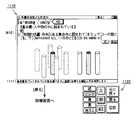
- FIG. 11 is a diagram for describing screens displayed on the display 130 and the touch panel 120 in the handwritten memo creation mode.
- the screen 1110 is a screen displayed on the display 130 in the handwritten memo creation mode.
- the screen 1120 is a screen displayed on the touch panel 120 in the handwritten memo creation mode.
- a screen 1110 is a screen for handwriting memo creation.
- the screen 1110 includes an item display screen 1016, an information bar, and a help bar 1111, which have been displayed on the display 130 at the start of the handwritten memo creation mode.
- electronic device 100 acquires display data 432 at the time of activation of the handwritten memo creation mode, and creates item display screen 1016 based on the acquired display data 432. That is, the item display screen 1016 included in the screen 1110 is a mere image. As a result, unlike when displaying the one-item display screen, scrolling, enlargement and reduction of the item display screen 1016 are prohibited. As a result, the electronic device 100 can hold the positional relationship between the item display screen 1016 and the handwriting display added to the item display screen 1016.
- the electronic device 100 may display the item display screen 1016 in a fixed manner by another method.
- the electronic device 100 may not accept scroll, enlargement, or reduction in the handwritten memo creation mode. Also in this case, the same effect as the above can be obtained.
- the electronic device 100 displays the item display screen 1016 set to be editable and the item display screen 1016 set to be non-editable in an overlapping manner. As will be understood later, as a result, editing of the handwritten display is facilitated.
- the screen 1120 is a screen displayed on the touch panel 120 in the handwritten memo creation mode.
- the electronic device 100 performs the setting of the handwriting color, the setting of the handwriting thickness, and the like according to the operation of the screen 1120.
- electronic device 100 causes display 130 to display an initial screen.
- the electronic device 100 superimposes the handwritten display according to the handwriting input by the stylus pen 230 or the like on the item display screen 1016 and displays it on the display 130.
- FIG. 12 shows a screen 1210 on which handwriting display is superimposed.
- the user can freely add information by handwriting to the selected item display screen.
- the electronic device 100 Since the item display screen 1016 is fixed as described above, the electronic device 100 does not have to manage the positional relationship with respect to the item display screen 1016 for handwriting display. However, if there is no scrolling of the item display screen, the electronic device 100 may be information relating only to handwriting display (a shape of handwriting display itself may be displayed or a scroll representing start point / end point, line thickness / color, etc. Information may be associated with the item and the item display screen.
- the electronic device 100 edits the editable item display screen 1016 according to the handwriting input.
- Electronic device 100 draws a line of a color and a thickness designated by touch panel 120 on item display screen 1016 in accordance with the handwriting input.
- the “eraser” of the touch panel 120 when the “eraser” of the touch panel 120 is selected, when the handwriting input is performed, the area where the handwriting input was performed and the image around it are deleted (colorized). Since the two item display screens 1016 are displayed, it appears to the user that only the handwritten display has been deleted. As described above, by using the two item display screens 1016, it is possible to easily delete the handwritten display.
- the electronic device 100 may display one item display screen 1016. In this case, when the user performs an incorrect handwriting input, the user returns to the screen before the handwriting input and performs an operation such as performing the handwriting input again.
- the user can add information to the one-item display screen of the content as if it were written in the paper dictionary.
- learning can be visually assisted by drawing a line or writing in a headword.
- the electronic device 100 When “registration” on the touch panel 120 is selected, the electronic device 100 captures image data of an item display screen on which handwriting input has been made on the screen 1210. Then, electronic device 100 associates the captured image data with the item selected and displayed at the start of the handwritten memo creation mode, and stores it in hard disk 180 as handwritten memo data 182.
- the item of the content can be associated with the handwritten information added to the item. This association can widen the range of utilization of handwritten information.
- electronic device 100 registers item heading information and content name information in handwritten memo data 182. Furthermore, the electronic device 100 stores the time information at the time of registration of the item in the handwritten memo data 182 in the handwritten memo data 182 in association with the item. Heading information, content information, and time information are used to facilitate identification of the registered handwritten memo data 182, as described later.
- the electronic device 100 registers the image data of the screen 1110 before handwriting in the handwritten memo data 182 in association with the item. This is to facilitate editing of the registered handwritten memo, as described later.
- the electronic device 100 displays a message frame 1220 indicating registration of the handwritten memo on the display 130. Thereafter, the electronic device 100 displays an initial screen on the display 130.
- the electronic device 100 displays a message frame 1230 for confirming whether the written content may be erased on the display. If the Y key is pressed while the message frame 1230 is displayed, the electronic device 100 displays the screen 1110 before handwriting on the display 130. When the N key is pressed while the message frame 1230 is displayed, the electronic device 100 displays the screen 1210 again.
- the electronic device 100 can call the registered screen with handwriting from the item in which the handwritten memo is registered.
- the call to the screen with handwriting is roughly divided into a call from a one-time display screen that displays an explanation of the item and a call from a list.
- calling of the screen with handwriting from the one-item display screen will be described.
- FIG. 13 is a diagram for explaining the calling of the screen with handwriting from the one-item display screen. The operation of the electronic device 100 when calling the screen with handwriting from the one-item display screen will be described with reference to FIG.
- the one case display screen 1310 is a one case display screen when the item for which the handwritten memo is registered is selected.
- the difference from the single-item display screen 1010 before registration of the handwritten memo is that an icon 1311 is present in the information bar 1011. On the icon 1311, characters such as “memo” are written so that it can be understood that the handwritten memo is registered.
- the electronic device 100 displays a screen 1320 with handwriting on the display 130 based on the image data stored in the handwritten memo data 182.
- the screen 1320 includes an item display screen on which handwriting is superimposed, an information bar 1321, and a help bar 1322.
- the item display screen on which the handwriting is superimposed is created by the electronic device 100 based on the image data associated with the item.
- the information bar 1321 includes characters such as “handwritten memo” so that it can be understood that the registered handwritten screen is called. Furthermore, it includes the characters "English-Japanese dictionary: among” so that it can be known to which item the called screen was made.
- electronic device 100 may create this display based on the heading information and the content name information registered in handwritten memo data 182. However, the electronic device 100 may search for heading information and content name information from the content database 172 to create this display.
- the electronic device 100 selectively displays identification information of each of the handwritten memos associated with the item, and displays a screen with a handwriting corresponding to the selected identification information. indicate.
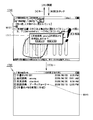
- FIG. 14 The display of the display 130 and the touch panel 120 when the memorandum key 330 is pressed is shown in FIG. Referring to FIG. 14, at this time, electronic device 100 displays list screen 1410 on display 130. Also, the electronic device 100 displays the screen 1420 on the touch panel 120.
- the screen 1420 has three areas of “new”, “edit”, and “delete”. When each area is touched, electronic device 100 performs an operation corresponding to each area. This operation will be described later.
- identification information information for identifying handwritten memos registered in the handwritten memo data 182
- an option for creating a new handwritten note (“Create a new handwritten note") is displayed.
- the second to fifth columns of the list correspond to the items for which the handwritten memo was created, as described above.
- the electronic device 100 displays the content name, the heading of the item, and the registration time as the identification information of the handwritten memo.
- the letter W 141 in the fifth column of the list is a noun representing an artichoke of the Asteraceae family.
- the first column of the list corresponds to a handwritten note that is unrelated to the item of content. How such a handwritten memo is created will be described later.
- the electronic device 100 displays, as identification information, the characters “handwritten memo 001” and the registration time of the memo.
- FIG. 14 is a screen when the electronic device 100 sorts handwritten memos in order of date.
- Electronic device 100 sequentially displays handwritten memos whose registration time is new from the top of the list.
- the electronic device 100 displays the new creation option in the bottom row of the list.
- the sorting order is not limited to this.
- electronic device 100 may display handwritten memos with old registration times sequentially from the top of the list.
- the electronic device 100 may display a newly created option in the top row of the list.
- Electronic device 100 sets one option in the list as a selection candidate.
- the electronic device 100 can change the selection candidate in response to pressing of the direction key 304 or the like.
- the electronic device 100 highlights the option that is the selection candidate.
- the options in the second column are selection candidates.
- FIG. 15 illustrates a screen displayed by the electronic device 100 on the display 130 and the touch panel 120 when the option corresponding to the handwritten memo is selected.
- electronic device 100 causes display 130 to display screen 1510 including an item display screen with handwriting.
- the screen 1510 includes a screen with handwriting corresponding to the selected option.
- the screen 1510 includes an item display screen on which handwriting is superimposed, an information bar, and a help bar.
- the item display screen on which the handwriting is superimposed is created by the electronic device 100 based on the image data associated with the item.
- the electronic device 100 displays the screen 1520 on the touch panel 120. Although the screen 1520 is similar to the screen 1420, it differs from the screen 1420 in that the "new" portion is displayed semi-transparently. In addition, the electronic device 100 does not respond to the touch on the “new” portion.
- the electronic device 100 When the screen 1320 is displayed, the electronic device 100 causes the list screen 1410 to be displayed again on the display 130 when “Return” on the touch panel 120 is touched or the clear key 310 is pressed.
- FIG. 16 is a diagram for describing an operation of the electronic device 100 in the editing mode of the handwritten memo.
- the electronic device 100 When “edit” is touched when the screen 1510 is displayed, the electronic device 100 causes the display 130 to display an editing screen such as the screen 1610 shown in FIG. Specifically, the electronic device 100 creates an image based on each of the image data of the display area of the item display screen registered in the handwritten memo data 182 and the screen data before performing handwriting, and superimposes two images. It is displayed on the display 130. At this time, the electronic device 100 displays the screen 1620 on the touch panel 120. Screen 1620 is the same as screen 1120 displayed on touch panel 120 in the handwritten memo creation mode, and the description thereof will not be repeated.
- the electronic device 100 displays the editing screen not only when the screen 1510 is displayed, but also when “edit” is touched on the display of the list screen 1410. In this case, the electronic device 100 displays an editing screen corresponding to the option selected as a selection candidate on the list screen 1410.
- the electronic device 100 superimposes a handwriting display corresponding to the handwriting input on the screen. Specifically, the electronic device 100 edits the image data of the display area of the item display screen according to the handwriting input. As in the case of the new registration of the handwritten memo, it is possible to delete the handwritten input already by superimposing the two images.
- the electronic device 100 When “registration” is touched when the screen 1610 is displayed, the electronic device 100 displays the screen 1630 on the display 130. In the screen 1630, a window 1631 for explaining the method of selecting the storage and registration method to the user is superimposed on the editing screen. Further, the help bar 1632 is for explaining to the user how to select the storage / registration method. Also, the electronic device 100 switches the display screen of the touch panel 120 to the screen 1640.
- the electronic device 100 When “overwrite save” in the screen 1640 is touched, the electronic device 100 overwrites the screen after editing with respect to the screen before editing in the handwritten memo data 182. In addition, the electronic device 100 overwrites and saves the registration time information. Then, electronic device 100 displays on display 130 a window 1650 indicating that the overwrite storage has been performed. After that, the electronic device 100 displays the list screen again.
- the electronic device 100 When “new registration” in the screen 1640 is touched, the electronic device 100 newly registers the edited screen in the handwritten memo data 182. Here, the information registered by the electronic device 100 is the same as that in the handwriting memo creation mode. Then, electronic device 100 causes display 130 to display window 1660 indicating that the new registration has been performed. After that, the electronic device 100 displays the list screen again.
- the electronic device 100 further warns the user that the handwritten memo can not be registered and prompts the user to delete unnecessary memos. It shall display a window.
- the electronic device 100 displays the screen 1610 at the time when the “registration” is touched again.
- FIG. 17 is a diagram for describing the operation of the electronic device 100 when deleting a handwritten memo.
- the electronic device 100 determines a handwritten memo corresponding to an option selected as a selection candidate on the list screen 1410 as a deletion candidate.
- the electronic device 100 displays a screen such as a screen 1710 illustrated in FIG. 17 on the display 130.
- the screen 1710 is a screen on which a window 1711 for confirming with the user whether or not the handwritten memo may be deleted is superimposed on a screen with handwriting corresponding to the option which is a selection candidate in the list screen 1410.
- the electronic device 100 displays the same screen as the screen 1710 even when “edit” is touched on the display of the screen 1510 in the edit mode, not when the list screen 1410 is displayed. In this case, the electronic device 100 determines the handwritten memo to be edited as a deletion candidate.
- the electronic device 100 cancels the setting of the deletion candidate. Also, the electronic device 100 displays the list screen 1410 again. When the screen 1510 is shifted to the screen 1710, the electronic device 100 displays the screen 1510 again.
- the electronic device 100 deletes the handwritten note of the deletion candidate. Then, electronic device 100 displays list screen 1720 after deletion of the handwritten memo. Compared with the list screen 1410 before deletion of the handwritten memo, it can be understood that the handwritten memo corresponding to the second column of the list screen 1410 is deleted in the list screen 1720.
- electronic device 100 creates such a handwritten memo when a predetermined instruction is received while the list screen is displayed.
- FIG. 18 is a diagram for describing an operation of the electronic device 100 when creating a handwritten memo unrelated to content.
- the screen for handwriting memo creation includes an information bar, a handwriting input reception area, and a help bar.
- the handwriting input acceptance area is initially plain (before handwriting input is made).
- electronic device 100 causes touch panel 120 to display a screen 1820 similar to that at the time of creation of the handwritten memo corresponding to the item.
- the operation of electronic device 100 in response to the touch on screen 1820 is the same as that at the time of creation of the handwritten memo corresponding to the item, and thus the details thereof will not be repeated.
- electronic device 100 When electronic device 100 receives a handwriting input to a handwriting input reception area by stylus pen 230 or the like, electronic device 100 displays a handwriting display corresponding to the handwriting input on the display.
- a screen 1810 illustrated in FIG. 18 is an example of a screen after handwriting input is performed.
- the electronic device 100 When “registration” is touched, the electronic device 100 captures image data of the handwriting reception area in the screen 1810. Then, the electronic device 100 registers the captured image data in the handwritten memo data 182.
- the electronic device 100 stores the identification information of the image data in the handwritten memo data 182 in association with the image data.
- the electronic device 100 associates “handwritten memo + (serial number)” and registration information with the image data as identification information of the handwritten memo not related to such content.
- the electronic device 100 gives “new handwritten memo 002” as identification information to the new handwritten memo.
- the electronic device 100 does not have to register the image data of the screen before the handwriting in the handwritten memo data 182. Since the screen before handwriting is plain, the display screen does not change even if the handwriting display and its surroundings are deleted.
- the electronic device 100 can also display a preview of the registered handwritten screen on the list screen.
- the operation of the electronic device 100 related to the preview display will be described with reference to FIGS. 19 and 20.
- preview key 340 when preview key 340 is pressed during display of a normal list screen 1910, electronic device 100 displays screen 1920 including the preview screen.
- the screen 1920 includes a reduced list screen 1921 and a preview screen 1922.
- the screen 1921 displays identification information of the handwritten memo registered in the handwritten memo data 182 or a part of the identification information. If the identification information does not fit on the screen 1921, the electronic device 100 displays the first few characters of the identification information and “...” indicating that the identification information is omitted on the screen 1921. Note that the electronic device 100 determines whether the identification information fits on the screen 1921 based on, for example, the number of characters of the identification information. As in the normal list screen, one option displayed on the screen 1921 is set as a selection candidate.
- the preview screen 1922 displays a part of the screen with handwriting corresponding to the option that is the selection candidate.
- the electronic device 100 displays the screen with handwriting whose right side is cut on the preview screen 1922.
- the arrangement of the preview screen 1922 is not limited to that shown in FIG.
- electronic device 100 may display a preview screen having the same width as display 130 below the screen.
- the electronic device 100 displays a screen with handwriting on which the lower side (or the upper side) is cut on the preview screen 1922.
- Electronic device 100 changes the display content of preview screen 1922 according to the change of the selection candidate on the list screen.
- FIG. 20 when screen 1920 is displayed, when the down key of direction key 304 is pressed, electronic device 100 changes the selection candidate to the second option, and the screen is displayed. Display 2010. That is, the electronic device 100 changes the position of highlight display on the list screen along with the change of the selection candidate. Furthermore, electronic device 100 displays a screen with handwriting corresponding to the new selection candidate on the preview screen.
- electronic device 100 When displaying the preview screen, electronic device 100 receives the pressing of search / determination key 306 or the touch of “display” displayed on touch panel 120, and displays the screen including the entire handwritten screen displayed in preview.
- FIG. 20 shows a screen 2020 displayed on the display when the search / decision key 306 is pressed or a touch of “display” is made when the screen 2010 is displayed. Further, FIG. 20 also shows a screen 2030 displayed on the touch panel 120 at this time. This state is the same as the state (state shown in FIG. 15) when one option is selected from the normal list screen. Therefore, the operation of electronic device 100 from this state is the same as that described above, and therefore will not be repeated.
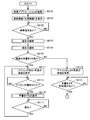
- FIG. 21 is a diagram showing, in a flowchart form, a flow of processing performed by control unit 440 with respect to display of a single-item display screen.
- control unit 440 activates a search application for searching an item from the content. More specifically, based on the instruction received by the input unit 412, the control unit 440 selects and activates a search application from among search applications corresponding to a plurality of types of content.
- search applications there are a dictionary application that performs entry word search of a dictionary, an example sentence application that searches example sentences from an example sentence collection, and the like.
- search applications there are a dictionary application that performs entry word search of a dictionary, an example sentence application that searches example sentences from an example sentence collection, and the like.
- the operation of the electronic device 100 when the dictionary application is activated will be mainly described.
- control unit 440 may always start the search application, and the process of step S2101 may be omitted.
- control unit 440 causes display 130 to display a search screen (initial screen) of the activated search application.
- the initial screen of the dictionary application is a screen prompting the user for key input.
- step S2105 the content search processing unit 444 included in the control unit 440 determines whether the input unit 412 receives an item search instruction. If the input unit 412 has not received a search instruction (NO in step S2105), the content search processing unit 444 repeats the process of step S2105. On the other hand, if the input unit 412 receives a search instruction (YES in step S2015), the content search processing unit 444 proceeds to the process of step S2107.
- step S2107 the content search processing unit 444 extracts an item from the content based on the key input until the reception of the search instruction. It is assumed that the content search processing unit 444 extracts an item that completely matches or is forwardly matched (or backwardly matched) with the received key input. Further, the content search processing unit 444 causes the display unit 416 to display the extracted item (strictly, item heading information of the item).
- step S2108 the content display processing unit 443 selects one of the items displayed on the display unit 416 based on the instruction received by the input unit 412.
- step S2105 the processing from step S2105 to step S2108 is not performed.
- the content display processing unit 443 selects an item based on the instruction received by the input unit 412.
- step S 2109 the content display processing unit 443 determines whether there is a handwritten memo of the selected item, that is, whether the selected item is registered in the handwritten memo data 182.
- step S2111 content display processing unit 443 displays a single-item display screen of the selected item to which an icon indicating that the handwritten memo is present is added. The display 130 is displayed.
- handwritten memo processing unit 446 included in control unit 440 determines whether or not input unit 412 has received an instruction to select an icon. If input unit 412 has not received an instruction to select an icon (NO in step S2113), handwritten memo processor 446 repeats the process of step S2113. If input unit 412 receives an instruction to select an icon (YES in step S2113), handwritten memo processor 446 proceeds to the process of step S2115.
- step S2115 the handwritten memo processing unit 446 causes the display 130 to display a handwritten screen corresponding to the selected item based on the handwritten memo data 182.
- handwritten memo processor 446 determines whether or not input unit 412 has received an instruction to return the display screen to the one-item display screen. When input unit 412 does not receive the instruction (NO in step S2117), handwritten memo processor 446 repeats the process of step S2117. If the input unit 412 receives an instruction (YES in step S2117), the handwritten memo processing unit 446 cancels the display of the screen with handwriting, and the control unit 440 returns to the process of step S2111.
- the content display processing unit 443 displays the one-item display screen of the selected item on the display 130 in step S2119. Let In this case, the content display processing unit 443 does not add an icon such as the one added to the one-item display screen at step S2111 to the one-item display screen.
- step S2121 the handwritten memo processing unit 446 included in the control unit 440 determines whether the input unit 412 has received an instruction to create a handwritten memo. If input unit 412 has not received a creation instruction of a handwritten memo (NO in step S 2121), handwritten memo processor 446 repeats the process of step S 2121. When input unit 412 receives an instruction to create a handwritten memo (YES in step S 2121), handwritten memo processor 446 starts the process of creating a handwritten memo (see FIG. 22 below).
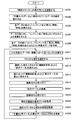
- FIG. 22 is a diagram showing, in a flowchart form, a flow of processing performed by handwritten memo processing unit 446 according to the first embodiment when creating a handwritten memo.
- step S2201 the handwritten memo processing unit 446 activates a handwritten memo creation mode.
- handwritten memo processor 446 stores the type of application operating at the time of activation of the creation mode in a predetermined storage area of storage unit 430. When there is only one type of application, the handwritten memo processing unit 446 may not perform this processing.
- handwritten memo processor 446 acquires display data of an item display screen (hereinafter also referred to as a screen before editing) displayed at the start of the creation mode, and stores the display data in a predetermined storage area of storage 430. Do.
- handwritten memo processor 446 causes display 130 to display a screen before editing. As described above, in the present embodiment, it is assumed that handwritten memo processor 446 superimposes the editable pre-edit screen and the non-editable pre-edit screen on display 130. This is to allow the user to easily delete handwritten input that has already been input.
- step S2209 the handwritten memo processing unit 446 receives the handwriting input, and causes the display 130 to display the handwritten display corresponding to the received handwriting input on the screen superimposed on the screen before editing. Specifically, the handwritten memo processing unit 446 adds the handwritten display to the editable pre-edit screen, and further superimposes the pre-edit screen to which the handwritten display is added and the unedited screen before the display. Display on 130.
- step S2211 the handwritten memo processing unit 446 receives an instruction to register a handwritten memo.
- handwritten memo processor 446 regards a touch of touch panel 120 on “registration” as a registration instruction of the handwritten memo.
- handwritten memo processor 446 acquires the image data of the item display screen displayed on display 130 when the registration instruction is received.
- the screen at the time of receiving the registration instruction and the image data may be referred to as a “current” screen and image data.
- handwritten memo processing unit 446 searches content name database 176, and acquires the content name of content handled by the application activated at the time of accepting registration instruction (hereinafter, also referred to as "current content"). Do.
- step S2217 the handwritten note processing unit 446 searches the header database 175 to determine whether the current content has header information.
- handwritten memo processing unit 446 acquires a display number for identifying a handwritten memo at the time of display in step S2219.
- the handwritten memo processing unit 446 gives a display number according to the registration order of the content to the content having no heading information. That is, the display number is a serial number. After that, the handwritten memo processing unit 446 proceeds to the process of step S2223.
- handwritten memo processing unit 446 acquires the header information of the current content in step S2221. After that, the handwritten memo processing unit 446 proceeds to the process of step S2223.
- step S2223 the handwritten memo processing unit 446 acquires the current time from the clock counter 420 as the registered time of the handwritten memo.
- handwritten memo processing unit 446 associates the screen before editing, the current display data, the content name, the heading information (or the display number), and the current time, and stores them as handwritten memo data 182 in storage unit 430. .
- step S2227 the handwritten memo processing unit 446 causes the display 130 to display the initial screen of the application of the type stored in step S2203, that is, the application operating at the time of activation of the creation mode of the handwritten memo. Exit create mode.
- FIG. 23 is a diagram showing, in a flowchart form, a flow of processing performed by handwritten memo processing unit 446 according to the first embodiment when creating a registered handwritten memo.
- step S2301 the handwritten memo processing unit 446 activates the memorandum display mode in accordance with the instruction received by the input unit 412.
- the handwritten memo processor 446 activates the memorandum display mode.
- step S2303 the handwritten memo processing unit 446 reads each of the data sets stored in the handwritten memo data 182 and associated with each other. Specifically, the handwritten memo processing unit 446 reads each combination of the screen before editing, the current display data, the content name, the heading information (or the display number), and the current time.
- step S2305 the handwritten memo processing unit 446 reads “content name”, “heading information”, and “time” from each data set, associates it with the identification information of the data set, and stores it in the storage unit 430 (preferably, the reading speed is fast Temporarily store in RAM 160).
- step S2307 the handwritten memo processing unit 446 gives an order of “content name” and “time” to each data set based on the read content name and time. It is assumed that the user can set which order the handwritten memo processing unit 446 gives.
- step S2309 the handwritten memo processing unit 446 creates list display data in which “content name”, “heading information”, and “time” are combined for each data set.
- step S2311 the handwritten memo processing unit 446 causes the display unit 416 to display a list in which the list display data is arranged in order.
- step S2313 the handwritten memo processing unit 446 selects an item (an option in the list) from the list based on the instruction received by the input unit 412.
- handwritten memo processor 446 reads the pre-edit screen and display data corresponding to the selected item from handwritten memo data 182.
- step S2317 the handwritten memo processing unit 446 superimposes the read pre-edit screen and display data and causes the display 130 to display them.
- handwritten memo processor 446 accepts an editing instruction from input unit 412. Then, the handwritten memo processing unit 446 shifts to the editing mode of the handwritten memo.
- step S2321 the handwritten memo processing unit 446 edits the display data read in step S2315 based on the input received by the input unit 412, in particular, the handwritten input.
- step S2323 the handwritten memo processing unit 446 receives a registration instruction of the handwritten memo from the input unit 412.
- registration instructions although there are overwrite registration and new registration, the flow of the large processing does not change for any instruction. Therefore, both cases will be described together.
- handwritten memo processor 446 obtains display data of the item display screen at the time of accepting the registration instruction in step S2323.
- step S2327 handwritten memo processor 446 obtains the current time from clock counter 420.
- handwritten memo processor 446 updates the display data and time of handwritten memo data 182 when the registration instruction is an overwrite registration instruction.
- the handwritten memo processing unit 446 associates the handwritten memo data 182 with the screen before editing, the current display data, the content name, the heading information (or the display number), and the current time. Add to For the screen before editing, the content name, and the heading information (or the display number), the handwritten memo processing unit 446 uses the data set that has been the editing target.
- FIG. 24 is a diagram showing, in a flowchart form, a flow of processing performed by handwritten memo processing unit 446 when deleting a registered handwritten memo.
- Steps S2401 to S2417 are similar to steps S2301 to S2317 described with reference to FIG. That is, by these processes, the handwritten memo processing unit 446 displays a list of registered handwritten memos, and selects one handwritten memo from the list. Furthermore, the handwritten memo processing unit 446 causes the display 130 to display a single-subject display screen on which handwriting is superimposed, which corresponds to the selected handwritten memo.
- handwritten memo processor 446 receives an instruction to delete the handwritten memo from input unit 412.
- step S 2421 handwritten memo processor 446 deletes the item selected in step S 2413 from handwritten memo data 182. Then, the handwritten memo processing unit 446 returns to the process of step S2411 and displays a list of handwritten memos. At this time, the deleted item is not displayed in the list.
- FIG. 25 is a diagram showing, in a flowchart form, a flow of processing performed by the handwritten memo processing unit 446 when registering a handwritten memo unrelated to an item.
- Steps S2501 to S2511 are the same as steps S2301 to S2311 described with reference to FIG. That is, by these processes, the handwritten memo processor 446 displays the registered handwritten memos in a list.
- handwritten memo processor 446 receives a new instruction to create a handwritten memo from input unit 412.
- handwritten memo processor 446 causes display 130 to display a screen for handwriting.
- the handwritten memo processing unit 446 creates a screen including an area where plain (blank) handwriting can be received as a handwriting screen.
- handwritten memo processor 446 accepts handwritten input from handwritten input unit 414.
- the handwritten memo processing unit 446 causes the display 130 to display handwritten display corresponding to the received handwritten input.
- handwritten memo processor 446 receives an instruction to register a handwritten memo from input unit 412.
- the touch on the “registration” of the touch panel 120 corresponds to the registration instruction.
- the registration instruction is not limited to this.
- step S 2521 handwritten memo processor 446 acquires display data of the screen displayed on display 130.
- step S 2523 handwritten memo processor 446 obtains the current time from clock counter 420.
- handwritten memo processor 446 associates the display data and time acquired in steps S 2521 and S 2523 with the time and adds them to handwritten memo data 182.
- the electronic device 100 returns to the initial screen of the application (a search screen in a dictionary application or the like) after the creation of the handwritten memo.
- the electronic device 100 according to the second embodiment returns to the one-event display screen displayed before the creation of the handwritten memo after creating the handwritten memo for the item of the content.
- FIG. 26 schematically shows screen transitions according to the first embodiment and the second embodiment.
- the electronic device 100 first displays the search screen 2610, and shifts from the search screen 2610 to the one-item display screen 2620 according to the search instruction. Further, the electronic device 100 shifts from the one case display screen 2620 to the editing screen 2630 in response to the memorizing memo creation instruction. When displaying the editing screen 2630, the electronic device 100 receives the registration instruction, registers the screen in the handwritten memo data, and returns to the search screen 2610.
- the single-item display screen displayed before the display of the edit screen is not displayed. There is a fear. In the present embodiment, such discomfort can be eliminated.
- the user may want to look again at the one-item display screen displayed in advance.
- the commentary screen is not displayed on the display 130, the user may want to confirm another location of the one-shot display screen that was viewed earlier. In the present embodiment, such needs of the user can be met.
- the electronic device 100 can move from the list screen to a screen on which handwriting is superimposed (referred to as a memo screen), and then move to the display screen of one registration source of the memo. .
- FIG. 27 schematically shows this operation.
- electronic device 100 receives the determination instruction during display of list screen 2710, electronic device 100 moves to memo screen 2720.
- the electronic device 100 receives a predetermined instruction while the memo screen 2720 is displayed, the electronic device 100 moves to the one-case display screen 2730 which is the memo registration source.
- the user can easily refer to the single-item display screen of the registration source from the memo screen.
- the hardware configuration and the functional configuration of the electronic device 100 according to the second embodiment are substantially similar to those of the first embodiment, and will not be repeated. However, the contents of processing performed by control unit 440 are different. The processing performed by the control unit 440 according to the second embodiment will be described below.
- control unit 440 when displaying the one-item display screen is the same as that described with reference to FIG. 21 in the first embodiment and will not be repeated.
- FIG. 28 is a diagram showing, in a flowchart form, a flow of processing performed by handwritten memo processing unit 446 according to the second embodiment when creating a handwritten memo.
- FIG. 28 differences from the processing described with reference to FIG. 22 in the first embodiment will be mainly described.
- step S2801 the handwritten memo processing unit 446 activates a handwritten memo creation mode.
- handwritten memo processing unit 446 stores the type of application operating at the time of activation of the creation mode and the displayed items in a predetermined storage area of storage unit 430. This embodiment differs from the first embodiment in that the displayed items are also stored.
- step S2805 to step S2823 are the same as the processes from step S2205 to step S2223 shown in FIG. 22, and the detailed description thereof will not be repeated.
- the handwritten memo processing unit 446 associates the application type and item at the time of activation of the handwritten memo creation mode, the screen before editing, the current display data, the content name, the heading information (or the display number) and the current time. , And is stored in the storage unit 430 as the handwritten memo data 182.
- the second embodiment differs from the first embodiment in that the application type and item acquired in step S2803 are also stored in the handwritten memo data 182.
- step S2827 the handwritten memo processing unit 446 ends the creation mode of the handwritten memo based on the application type and the item stored in step S2803, and returns to the state at the start of the creation mode of the handwritten memo.
- FIG. 29 is a diagram showing, in a flowchart form, a flow of processing performed by handwritten memo processing unit 446 according to the second embodiment when creating a registered handwritten memo.
- differences from the first embodiment will be mainly described.
- step S2901 to step S2917 are similar to the processes from step S2301 to step S2317 described with reference to FIG. 23 in the first embodiment, and thus the detailed description thereof will not be repeated.
- step S2919 the handwritten memo processing unit 446 determines whether there is an instruction to move the memo to the registration source item.
- the electronic device 100 creates, for example, an area corresponding to the movement instruction on the touch panel 120, and regards the touch of the area as the movement instruction.
- handwritten memo processor 446 executes the processing from step S2921 to step S2931, and returns to the processing in step S2911.
- the processing from step S2921 to step S2931 is the same as the processing from step S2317 to step S2329 in FIG. By these processes, the handwritten memo is edited, and the edited memo is registered.
- handwritten memo processor 446 acquires the application type at the time of registration of the selected memo in step S 2933. That is, the handwritten memo processing unit 446 acquires the application type at the start of the creation mode, which is stored in the handwritten memo data 182 in step S2825 in FIG.
- handwritten memo processor 446 acquires the item displayed before the creation of the memo. That is, the handwritten memo processing unit 446 acquires the item at the time of start of the creation mode, which is stored in the handwritten memo data 182 in step S2825 in FIG.
- handwritten memo processor 446 terminates the memorizing function, activates the application of the type acquired in step S2933, and causes display 130 to display a single-item display screen of the item acquired in step S2825.
- control unit 440 when displaying the one-item display screen is the same as that described with reference to FIG. 21 in the first embodiment and will not be repeated.
- FIG. 30 is a diagram showing, in a flowchart form, a flow of processing performed by the handwritten memo processing unit 446 according to the third embodiment when creating a handwritten memo.
- the handwritten memo processing unit 446 according to the third embodiment performs color management in addition to the processing performed by the handwritten memo processing unit 446 according to the second embodiment.
- differences from the processing described with reference to FIG. 28 in the second embodiment will be mainly described.
- step S3001 to step S3007 is the same as the process from step S2801 to step S2807 in FIG. 28, and the description thereof will not be repeated.
- step S3009 the handwritten memo processing unit 446 performs handwriting input on the screen before editing.
- the handwritten memo processing unit 446 acquires color information of the input handwriting input, and stores the acquired color information in a predetermined storage area of the storage unit 430.
- This point is different from the second embodiment. For example, when handwriting input is performed in red and blue, the handwritten memo processing unit 446 stores “red” and “blue” in the storage unit 430 as color information.
- step S3011 to step S3023 is the same as the processing from step S2811 to step S2823 in FIG. 28, and description thereof will not be repeated.
- step S3025 the handwritten memo processing unit 446 displays the application type and item at the time of activation of the handwritten memo creation mode, the screen before editing, the current display data, the color information, the content name, the heading information (or the display number) and the current time.
- the storage unit 430 As handwritten memo data 182 in association with each other.
- the second embodiment differs from the second embodiment in that the color information acquired in step S3009 is also stored in the handwritten memo data 182.
- step S3027 the handwritten memo processing unit 446 ends the creation mode of the handwritten memo based on the application type and the item stored in step S2803, and returns to the state at the start of the creation mode of the handwritten memo.
- FIG. 31 is a diagram showing, in a flowchart form, a flow of processing performed by the handwritten memo processing unit 446 according to the third embodiment when creating a registered handwritten memo.
- differences from the second embodiment will be mainly described.
- step S3101 the handwritten memo processing unit 446 activates the display mode of the memorandum in accordance with the instruction received by the input unit 412.
- step S3103 the handwritten memo processing unit 446 reads each of the data sets stored in the handwritten memo data 182 and associated with each other.
- step S3105 the handwritten memo processing unit 446 reads “content name”, “heading information”, “time”, and “color information” from each set of data, associates it with the identification information of the set of data, and stores it in the storage unit 430 (preferably, Temporarily store in the RAM 160) which has a high read speed.
- step S3107 the handwritten memo processing unit 446 assigns one of “content name”, “time” and “color information” to each set of data based on the read content name, time and color information. Give order. It is assumed that the user can set which order the handwritten memo processing unit 446 gives.
- the handwritten memo processing unit 446 rearranges the data set based on the color information to arrange the handwritten memo in the order of importance. It can be displayed as a list.
- the user can set how to rearrange the data set based on the color. For example, when the user performs important writing in “red”, the user may set data set having “red” as color information to be displayed preferentially.
- the sorting rules may be set in advance. For example, in the case of a setting in which a data set including “blue” is displayed preferentially, the user may perform important writing in blue.
- step S3109 to step S3119 are similar to the processes from step S2909 to step S2919 described with reference to FIG. 29 in the second embodiment, and thus the detailed description thereof will not be repeated.
- handwritten memo processor 446 executes the processing from step S3121 to step S3131, and returns to the processing in step S3111.
- the processing from step S3121 to step S3131 is substantially the same as the processing from step S2921 to step S2931 in FIG. By these processes, the handwritten memo is edited, and the edited memo is registered.
- handwritten memo processor 446 may be capable of editing display data for each color.
- the handwritten memo processing unit 446 may perform processing of deleting only a specific color.
- the handwritten memo processing unit 446 extracts a pixel of a designated color based on color data of each pixel of display data, and makes the extracted pixel transparent.
- handwritten memo processor 446 stores color information after editing of the display data in storage 430.
- the handwritten memo processing unit 446 changes color information when there is a handwriting input with a new color and when there is a deletion of the color of the handwriting input that has already been made.
- the handwritten memo processing unit 446 changes the color information of the handwritten memo data 182 when the handwritten memo overwrite process is performed in step S3131.
- the handwritten memo processing unit 446 newly registers the color information stored in the storage unit 430 in the handwritten memo data 182 in step S3123.
- handwritten memo processor 446 executes the processing from step S3133 to step S3137.
- the processing from step S3133 to step S3137 is substantially the same as the processing from step S2933 to step S2937 of FIG.
- the handwritten memo processing unit 446 terminates the memorizing memo function, and causes the display 130 to display a one-item display screen corresponding to the displayed memorandum.
- electronic device 100 may be configured to deliver handwritten memo data 182 to another device or receive handwritten memo data 182 from another device.
- the common handwritten memo data 182 can be used by a plurality of devices.
- 100 electronic devices 110 input keys, 120 touch panels, 130 displays, 132 display controllers, 140 speakers, 142 audio controllers, 172 content databases, 173 search databases, 174 commentary databases, 175 headline databases, 176 content name databases, 180 hard disks, 182 handwritten memo data, 210 first case, 220 second case, 230 stylus pen, 300 power key, 302 character key, 304 direction key, 306 decision key, 308 back key, 310 clear key, 312 backward key , 316 move keys, 318 voice keys, 320 volume keys, 322 character size keys, 330 memorandum keys, 340 preview keys 350 switching key, 410 input / output unit, 412 input unit, 413 key input unit, 414 handwriting input unit, 416 display unit, 420 clock counter, 430 storage unit, 432 display data, 440 control unit, 441 key input reception unit, 442 Handwriting input acceptance unit, 443 content display processing unit, 444 content search processing unit, 445 time management processing unit, 446 handwriting memo processing unit.
Landscapes
- Engineering & Computer Science (AREA)
- Theoretical Computer Science (AREA)
- Health & Medical Sciences (AREA)
- Artificial Intelligence (AREA)
- Audiology, Speech & Language Pathology (AREA)
- Computational Linguistics (AREA)
- General Health & Medical Sciences (AREA)
- Physics & Mathematics (AREA)
- General Engineering & Computer Science (AREA)
- General Physics & Mathematics (AREA)
- User Interface Of Digital Computer (AREA)
- Information Retrieval, Db Structures And Fs Structures Therefor (AREA)
Priority Applications (2)
| Application Number | Priority Date | Filing Date | Title |
|---|---|---|---|
| CN200980154530.9A CN102282554B (zh) | 2009-01-14 | 2009-12-14 | 电子设备和信息处理方法 |
| US13/144,423 US8553015B2 (en) | 2009-01-14 | 2009-12-14 | Electronic device and information processing method |
Applications Claiming Priority (2)
| Application Number | Priority Date | Filing Date | Title |
|---|---|---|---|
| JP2009005965A JP5531412B2 (ja) | 2009-01-14 | 2009-01-14 | 電子機器および情報処理方法 |
| JP2009-005965 | 2009-01-14 |
Publications (1)
| Publication Number | Publication Date |
|---|---|
| WO2010082421A1 true WO2010082421A1 (ja) | 2010-07-22 |
Family
ID=42339678
Family Applications (1)
| Application Number | Title | Priority Date | Filing Date |
|---|---|---|---|
| PCT/JP2009/070808 Ceased WO2010082421A1 (ja) | 2009-01-14 | 2009-12-14 | 電子機器および情報処理方法 |
Country Status (4)
| Country | Link |
|---|---|
| US (1) | US8553015B2 (https=) |
| JP (1) | JP5531412B2 (https=) |
| CN (1) | CN102282554B (https=) |
| WO (1) | WO2010082421A1 (https=) |
Cited By (3)
| Publication number | Priority date | Publication date | Assignee | Title |
|---|---|---|---|---|
| CN102693259A (zh) * | 2011-02-11 | 2012-09-26 | 三星电子株式会社 | 提供备忘录功能的方法和支持所述方法的便携式终端 |
| EP2527968A1 (en) * | 2011-05-24 | 2012-11-28 | LG Electronics Inc. | Mobile terminal |
| CN103167238A (zh) * | 2011-12-16 | 2013-06-19 | 三星电子株式会社 | 用于再现图像的方法和设备 |
Families Citing this family (24)
| Publication number | Priority date | Publication date | Assignee | Title |
|---|---|---|---|---|
| JP5295392B2 (ja) * | 2010-01-18 | 2013-09-18 | 三菱電機株式会社 | 入力装置 |
| EP2355472B1 (en) * | 2010-01-22 | 2020-03-04 | Samsung Electronics Co., Ltd. | Apparatus and method for transmitting and receiving handwriting animation message |
| JP5353872B2 (ja) * | 2010-12-21 | 2013-11-27 | カシオ計算機株式会社 | 情報表示装置及び情報表示プログラム |
| JP5418576B2 (ja) * | 2011-11-28 | 2014-02-19 | コニカミノルタ株式会社 | 情報閲覧装置及び表示制御プログラム |
| KR20130089486A (ko) * | 2012-02-02 | 2013-08-12 | 삼성전자주식회사 | 휴대단말기의 키 입력 방법 및 장치 |
| KR101880921B1 (ko) * | 2012-02-17 | 2018-08-16 | 삼성전자 주식회사 | 회전 기능의 선택적 운용 방법 및 이를 지원하는 단말기 |
| US9792038B2 (en) * | 2012-08-17 | 2017-10-17 | Microsoft Technology Licensing, Llc | Feedback via an input device and scribble recognition |
| KR102129374B1 (ko) * | 2012-08-27 | 2020-07-02 | 삼성전자주식회사 | 사용자 인터페이스 제공 방법 및 기계로 읽을 수 있는 저장 매체 및 휴대 단말 |
| KR102150289B1 (ko) * | 2012-08-30 | 2020-09-01 | 삼성전자주식회사 | 사용자 단말에서 사용자 인터페이스 장치 및 이를 지원하는 방법 |
| JP5716718B2 (ja) * | 2012-09-18 | 2015-05-13 | カシオ計算機株式会社 | 中国語表示制御装置、中国語表示制御プログラム及び中国語表示制御方法 |
| US10254952B2 (en) * | 2012-09-26 | 2019-04-09 | Google Llc | Progress display of handwriting input |
| KR102044460B1 (ko) | 2012-11-12 | 2019-11-13 | 엘지전자 주식회사 | 이동 단말기 및 이동 단말기의 제어 방법 |
| JP5757966B2 (ja) * | 2013-01-31 | 2015-08-05 | シャープ株式会社 | 入出力装置 |
| US9626008B2 (en) * | 2013-03-11 | 2017-04-18 | Barnes & Noble College Booksellers, Llc | Stylus-based remote wipe of lost device |
| KR102251834B1 (ko) * | 2013-07-10 | 2021-05-14 | 삼성전자주식회사 | 전자 장치의 디스플레이 방법 |
| EP2829962A3 (en) * | 2013-07-24 | 2015-05-27 | Kyocera Document Solutions Inc. | Retrieval device for retrieving data specific information used for identifying data of data group |
| JP6217274B2 (ja) * | 2013-09-20 | 2017-10-25 | カシオ計算機株式会社 | 携帯端末装置及びプログラム |
| KR102240279B1 (ko) * | 2014-04-21 | 2021-04-14 | 삼성전자주식회사 | 컨텐트 처리 방법 및 그 전자 장치 |
| KR20160034685A (ko) * | 2014-09-22 | 2016-03-30 | 삼성전자주식회사 | 전자장치에서 객체 입력 방법 및 장치 |
| JP6953692B2 (ja) * | 2016-09-01 | 2021-10-27 | セイコーエプソン株式会社 | 表示装置、及び、表示装置の制御方法 |
| JP7009904B2 (ja) * | 2017-10-17 | 2022-01-26 | 株式会社リコー | 端末装置、情報処理システム、情報処理方法及びプログラム |
| JP6868832B2 (ja) * | 2019-04-22 | 2021-05-12 | パナソニックIpマネジメント株式会社 | 情報配信システム、システム制御装置 |
| US20230095248A1 (en) * | 2020-02-19 | 2023-03-30 | Fanuc Corporation | Display system having item display transition function |
| JP2024055488A (ja) * | 2022-10-07 | 2024-04-18 | キヤノン株式会社 | 情報処理装置、印刷設定アプリケーション、情報処理装置の制御方法およびプログラム |
Citations (3)
| Publication number | Priority date | Publication date | Assignee | Title |
|---|---|---|---|---|
| JP2002082937A (ja) * | 2000-06-21 | 2002-03-22 | Microsoft Corp | インクの分類、係留、および変換 |
| JP2002207754A (ja) * | 2001-01-12 | 2002-07-26 | Casio Comput Co Ltd | 電子辞書システム及びその電子辞書システムプログラム |
| JP2006058917A (ja) * | 2004-07-23 | 2006-03-02 | Sharp Corp | 情報表示装置及び電子書籍装置 |
Family Cites Families (8)
| Publication number | Priority date | Publication date | Assignee | Title |
|---|---|---|---|---|
| JPH10312257A (ja) | 1997-03-12 | 1998-11-24 | Seiko Epson Corp | 携帯用情報収集装置およびその情報処理方法 |
| US7397949B2 (en) | 2000-06-21 | 2008-07-08 | Microsoft Corporation | Serial storage of ink and its properties |
| US7006711B2 (en) | 2000-06-21 | 2006-02-28 | Microsoft Corporation | Transform table for ink sizing and compression |
| US6956970B2 (en) | 2000-06-21 | 2005-10-18 | Microsoft Corporation | Information storage using tables and scope indices |
| US7009594B2 (en) * | 2002-10-31 | 2006-03-07 | Microsoft Corporation | Universal computing device |
| JP2004240597A (ja) * | 2003-02-05 | 2004-08-26 | Fuji Xerox Co Ltd | 表示制御方法、情報表示処理システム、クライアント端末、管理サーバ、プログラム |
| JP2004328451A (ja) | 2003-04-25 | 2004-11-18 | Kyocera Mita Corp | 画像形成装置 |
| US20050024346A1 (en) * | 2003-07-30 | 2005-02-03 | Jean-Luc Dupraz | Digital pen function control |
-
2009
- 2009-01-14 JP JP2009005965A patent/JP5531412B2/ja active Active
- 2009-12-14 WO PCT/JP2009/070808 patent/WO2010082421A1/ja not_active Ceased
- 2009-12-14 CN CN200980154530.9A patent/CN102282554B/zh not_active Expired - Fee Related
- 2009-12-14 US US13/144,423 patent/US8553015B2/en not_active Expired - Fee Related
Patent Citations (3)
| Publication number | Priority date | Publication date | Assignee | Title |
|---|---|---|---|---|
| JP2002082937A (ja) * | 2000-06-21 | 2002-03-22 | Microsoft Corp | インクの分類、係留、および変換 |
| JP2002207754A (ja) * | 2001-01-12 | 2002-07-26 | Casio Comput Co Ltd | 電子辞書システム及びその電子辞書システムプログラム |
| JP2006058917A (ja) * | 2004-07-23 | 2006-03-02 | Sharp Corp | 情報表示装置及び電子書籍装置 |
Cited By (6)
| Publication number | Priority date | Publication date | Assignee | Title |
|---|---|---|---|---|
| CN102693259A (zh) * | 2011-02-11 | 2012-09-26 | 三星电子株式会社 | 提供备忘录功能的方法和支持所述方法的便携式终端 |
| EP2527968A1 (en) * | 2011-05-24 | 2012-11-28 | LG Electronics Inc. | Mobile terminal |
| CN102855079A (zh) * | 2011-05-24 | 2013-01-02 | Lg电子株式会社 | 移动终端 |
| US8948819B2 (en) | 2011-05-24 | 2015-02-03 | Lg Electronics Inc. | Mobile terminal |
| US9600178B2 (en) | 2011-05-24 | 2017-03-21 | Lg Electronics Inc. | Mobile terminal |
| CN103167238A (zh) * | 2011-12-16 | 2013-06-19 | 三星电子株式会社 | 用于再现图像的方法和设备 |
Also Published As
| Publication number | Publication date |
|---|---|
| JP2010165119A (ja) | 2010-07-29 |
| US8553015B2 (en) | 2013-10-08 |
| JP5531412B2 (ja) | 2014-06-25 |
| CN102282554B (zh) | 2014-07-23 |
| CN102282554A (zh) | 2011-12-14 |
| US20120019487A1 (en) | 2012-01-26 |
Similar Documents
| Publication | Publication Date | Title |
|---|---|---|
| JP5531412B2 (ja) | 電子機器および情報処理方法 | |
| CN102165437B (zh) | 信息处理装置及信息处理方法 | |
| JP5501581B2 (ja) | 情報処理装置および情報処理方法 | |
| JP2009508230A (ja) | 電子文書に関するリーディングモード | |
| US10846467B2 (en) | Method and system for displaying and searching information in an electronic document | |
| US8897594B2 (en) | Image reader, mobile terminal apparatus, and non-transitory computer readable medium | |
| US20120030558A1 (en) | Electronic Book and Method for Displaying Annotation Thereof | |
| TW200422874A (en) | Graphical feedback for semantic interpretation of text and images | |
| JP5511161B2 (ja) | 情報処理装置および情報処理方法 | |
| JP5482223B2 (ja) | 情報処理装置、情報処理方法 | |
| JP2012168696A (ja) | 辞書情報表示装置およびプログラム | |
| JP2004199407A (ja) | 情報表示処理方法、情報表示処理システム、管理サーバ、クライアント端末、プログラム | |
| JP2020057213A (ja) | 電子辞書装置、電子辞書の検索方法及び制御プログラム | |
| WO2010010920A1 (ja) | 情報処理装置および情報処理方法 | |
| KR20180137845A (ko) | 이북과 스마트폰을 이용한 요약노트 작성 및 암기학습 시스템과 그 방법 | |
| JP6048601B2 (ja) | 情報表示装置、プログラムおよび単語情報表示方法 | |
| JP5471619B2 (ja) | 文法メモ入力装置およびプログラム | |
| Walter | EMAN, platform for the edition of manuscripts and digital archives | |
| JP2013058086A (ja) | 文章入力支援システム | |
| Carriço | A multimodal interface for digital talking books | |
| JP2006107261A (ja) | 翻訳支援システム | |
| JP2005309832A (ja) | 自動翻訳装置およびプログラム | |
| Bellini et al. | ECLAP | |
| CN108630032A (zh) | 一种英语教学辅助阅读装置及其使用方法 | |
| JPH0540754A (ja) | 日本語文章校正・推敲装置 |
Legal Events
| Date | Code | Title | Description |
|---|---|---|---|
| WWE | Wipo information: entry into national phase |
Ref document number: 200980154530.9 Country of ref document: CN |
|
| 121 | Ep: the epo has been informed by wipo that ep was designated in this application |
Ref document number: 09838386 Country of ref document: EP Kind code of ref document: A1 |
|
| WWE | Wipo information: entry into national phase |
Ref document number: 13144423 Country of ref document: US |
|
| NENP | Non-entry into the national phase |
Ref country code: DE |
|
| WWE | Wipo information: entry into national phase |
Ref document number: 5763/CHENP/2011 Country of ref document: IN |
|
| 122 | Ep: pct application non-entry in european phase |
Ref document number: 09838386 Country of ref document: EP Kind code of ref document: A1 |