EP4064153B1 - System, verfahren und programm zur geschäftsverwaltung - Google Patents
System, verfahren und programm zur geschäftsverwaltung Download PDFInfo
- Publication number
- EP4064153B1 EP4064153B1 EP20907591.0A EP20907591A EP4064153B1 EP 4064153 B1 EP4064153 B1 EP 4064153B1 EP 20907591 A EP20907591 A EP 20907591A EP 4064153 B1 EP4064153 B1 EP 4064153B1
- Authority
- EP
- European Patent Office
- Prior art keywords
- application
- user
- screen
- iris
- image
- Prior art date
- Legal status (The legal status is an assumption and is not a legal conclusion. Google has not performed a legal analysis and makes no representation as to the accuracy of the status listed.)
- Active
Links
Images




Classifications
-
- G—PHYSICS
- G06—COMPUTING OR CALCULATING; COUNTING
- G06Q—INFORMATION AND COMMUNICATION TECHNOLOGY [ICT] SPECIALLY ADAPTED FOR ADMINISTRATIVE, COMMERCIAL, FINANCIAL, MANAGERIAL OR SUPERVISORY PURPOSES; SYSTEMS OR METHODS SPECIALLY ADAPTED FOR ADMINISTRATIVE, COMMERCIAL, FINANCIAL, MANAGERIAL OR SUPERVISORY PURPOSES, NOT OTHERWISE PROVIDED FOR
- G06Q10/00—Administration; Management
- G06Q10/06—Resources, workflows, human or project management; Enterprise or organisation planning; Enterprise or organisation modelling
- G06Q10/063—Operations research, analysis or management
- G06Q10/0631—Resource planning, allocation, distributing or scheduling for enterprises or organisations
- G06Q10/06311—Scheduling, planning or task assignment for a person or group
- G06Q10/063114—Status monitoring or status determination for a person or group
-
- G—PHYSICS
- G06—COMPUTING OR CALCULATING; COUNTING
- G06F—ELECTRIC DIGITAL DATA PROCESSING
- G06F3/00—Input arrangements for transferring data to be processed into a form capable of being handled by the computer; Output arrangements for transferring data from processing unit to output unit, e.g. interface arrangements
- G06F3/01—Input arrangements or combined input and output arrangements for interaction between user and computer
- G06F3/011—Arrangements for interaction with the human body, e.g. for user immersion in virtual reality
- G06F3/013—Eye tracking input arrangements
-
- G—PHYSICS
- G06—COMPUTING OR CALCULATING; COUNTING
- G06Q—INFORMATION AND COMMUNICATION TECHNOLOGY [ICT] SPECIALLY ADAPTED FOR ADMINISTRATIVE, COMMERCIAL, FINANCIAL, MANAGERIAL OR SUPERVISORY PURPOSES; SYSTEMS OR METHODS SPECIALLY ADAPTED FOR ADMINISTRATIVE, COMMERCIAL, FINANCIAL, MANAGERIAL OR SUPERVISORY PURPOSES, NOT OTHERWISE PROVIDED FOR
- G06Q10/00—Administration; Management
- G06Q10/06—Resources, workflows, human or project management; Enterprise or organisation planning; Enterprise or organisation modelling
- G06Q10/063—Operations research, analysis or management
- G06Q10/0639—Performance analysis of employees; Performance analysis of enterprise or organisation operations
- G06Q10/06398—Performance of employee with respect to a job function
-
- G—PHYSICS
- G06—COMPUTING OR CALCULATING; COUNTING
- G06V—IMAGE OR VIDEO RECOGNITION OR UNDERSTANDING
- G06V40/00—Recognition of biometric, human-related or animal-related patterns in image or video data
- G06V40/10—Human or animal bodies, e.g. vehicle occupants or pedestrians; Body parts, e.g. hands
- G06V40/18—Eye characteristics, e.g. of the iris
Definitions
- the present invention relates to a business management system, a business management method, and a business management program, and more particularly, to a business management system, a business management method, and a business management program for acquiring an actual state of business of a worker who uses an application program(s) (hereinafter, simply referred to as an "application(s)").
- application(s) an application program
- Patent Literature 1 a remote work status monitoring system disclosed in Patent Literature 1 is intended to monitor a work status of a worker, based on an operating state of the worker's personal computer (PC).
- PC personal computer
- US 2015/097938 A1 discloses a method and an apparatus for reading behavior.
- JP 2012 063885 A discloses an apparatus for analyzing operation histories and biological information histories of an operator of a computer.
- EP 0 816 985 A2 discloses an apparatus, a method, systems and computer programs for assisting a user of display device to more quickly recover from a distraction causing the user to look away from the display device.
- WO 2017/152592 A1 discloses a mobile terminal application operation method and a mobile terminal for performing sight identification on a plurality of user pupil images to obtain a user sight comprising a gazing range and and sending the gazing range of the user sight to the mobile terminal application.
- Patent Literature 1 Japanese Unexamined Patent Application Publication No. 2000-48078
- Patent Literature 1 only monitors a non-job process, such as a game, or an operating state of a screen saver as an operating state of a PC, and therefore, there is a problem that it is difficult to acquire an actual state of business of the worker in detail.
- an object of the present invention is to provide a business management system, a business management method, and a business management program that are capable of acquiring an actual state of business of a worker using an application.
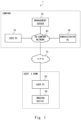
- Fig. 1 is a schematic diagram illustrating an example embodiment of a business management system 1 according to the present invention.
- the business management system 1 includes a user PC 10, a management server 20, an administrator PC 30, a user PC 50, and an imaging device 60.
- the user PC 10, the management server 20 and the administrator PC 30 can be installed in a place of work of a worker to be managed, for example, in a company or the like.
- the user PC 10, the management server 20, and the administrator PC 30 can communicate data with each other via an in-company network 40 such as a Local Area Network (LAN).
- LAN Local Area Network
- the user PC 10 is an information processing device implementing a remote desktop function that can be operated remotely. And a worker to be managed can use the user PC 50 to use an application or data of the user PC 10. Details of functions of the user PC 10 will be described later with reference to Fig. 2 .
- the management server 20 is an information processing device that uses information provided by the user PC 10 to calculate a usage time for each application, a non-business work time, and a time when a worker to be managed is leaving his/her seat. Details of functions of the management server 20 will be described later with reference to Fig. 3 .
- the administrator PC 30 is an information processing device to be used by an administrator of a worker to be managed.
- the administrator PC 30 requests the management server 20 for an image indicating the usage time for each application, the non-business work time, and the time when the worker to be managed is leaving his/her seat, and then displays the image acquired from the management server 20 on a display device of the administrator PC 30.
- the user PC 50 and the imaging device 60 are installed in a work space such as a home of a worker to be managed.
- the user PC 50 has a remote desktop function capable of remotely operating the user PC 10.
- the user PC 50 can access the user PC 10 in a company via a Virtual Private Network (VPN) 70 to use applications and data of the user PC 10.
- VPN Virtual Private Network
- the imaging device 60 is communicably connected to the user PC 50.
- the imaging device 60 is installed at a position where a face of a user of the user PC 50, in particular, eyes of the user can be imaged.
- the imaging device 60 executes imaging process at a predetermined time interval.
- the predetermined time interval may generally be a time (200 milliseconds, etc.) that a person is looking at one place for when reading a sentence.
- the imaging device 60 executes the imaging process to generate an image, it transmits the image to the user PC 50.
- an imaging device integrated with the user PC 50 may be used instead of the imaging device 60.
- the user PC 50 transmits, to the user PC 10 in the company via the VPN 70 and the in-company network 40, the image provided by the imaging device 60, coordinate information of a screen(s) that an application(s) used by a user who is a worker to be managed provides (hereinafter referred to as an "application screen"), and information indicating positions of application screens in front-back direction.
- the coordinate information of the application screen includes information indicating coordinates of the application screen displayed on a display device of the user PC 50, identification information of the application providing the application screen, and date and time information when the application screen is displayed.
- the information indicating the positions of application screens in front-back direction includes information indicating the positions of application screens in front-back direction displayed in a virtually overlapping manner, identification information of the application providing the application screen, and date and time information when the application screen is displayed.
- the user PC 50 can transmit these pieces of information to the user PC 10 at the predetermined time interval described above.
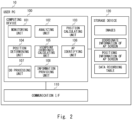
- Fig. 2 is a block diagram illustrating a detailed configuration of the user PC 10 according to an example embodiment of the present invention.
- the user PC 10 includes a computing device 100, a communication interface (I/F) 110, and a storage device 120.
- the computing device 100 is a computing device such as a central processing unit (CPU) or a micro processing unit (MPU).
- the computing device 100 executes a business management program according to an example embodiment of the present invention, thereby executing a business management method according to an example embodiment of the present invention.
- the program to be executed by the computing device 100 includes a monitoring unit 101, an analyzing unit 102, a position calculating unit 103, a position determining unit 104, a viewpoint coordinate calculating unit 105, an application (AP) identifying unit 106, a database (DB) processing unit 107, and an information providing unit 108.
- These program modules can be implemented as functions of a Unified Communications (UC) application.
- UC Unified Communications
- the monitoring unit 101 is a program module that determines whether an image, coordinate information of an application screen, and information indicating positions of application screens in front-back direction are received from the user PC 50. Upon receiving these pieces of information, the monitoring unit 101 stores them in the storage device 120.
- the analyzing unit 102 is a program module that analyzes an image stored in the storage device 120 to detect an iris of a user.
- the analyzing unit 102 acquires an image from the storage device 120 to determine whether the iris of the user is included in the image.
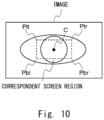
- the position calculating unit 103 is a program module that calculates a position of the iris of the user in the image. As illustrated in Fig. 10 , the position calculating unit 103 can calculate a center position C of the iris of the user, i.e., the center position of a pupil.
- the position determining unit 104 is a program module that determines whether the center position C of the iris of the user is present in a region corresponding to a display screen of the display device of the user PC 50 (hereinafter, referred to as "correspondent screen region"). As illustrated in Fig. 10 , an upper left end Ptl, a lower left end Pbl, an upper right end Ptr, and a lower right end Pbr of the correspondent screen region correspond to an upper right end, a lower right end, an upper left end, and a lower left end of the display screen of the display device of the user PC 50, respectively.
- the upper left end Ptl of the correspondent screen region is equivalent to the center position C of the iris when the user is looking at the upper right end of the display screen of the display device of the user PC 50.
- the lower left end Pbl of the correspondent screen region is equivalent to the center position C of the iris when the user is looking at the lower right end of the display screen.
- the upper right end Ptr of the correspondent screen region is equivalent to the center position C of the iris when the user is looking at the upper left end of the display screen.
- the lower right end Pbr of the correspondent screen region is equivalent to the center position C of the iris when the user is looking at the lower left end of the display screen.
- Each of the ends Ptl, Pbl, Ptr, and Pbr of the correspondent screen region can be determined by individually lighting each of the ends of the display screen of the display device of the user PC 50 and using each images when the user is looking at each of the ends of the display screen.
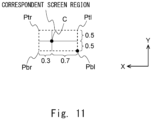
- the viewpoint coordinate calculating unit 105 is a program module that calculates viewpoint coordinates indicating a viewpoint of the user on the display screen of the display device of the user PC 50, based on the center position C of the iris of the user in the correspondent screen region. Specifically, as illustrated in Fig. 11 , when the lower left end of the display screen of the display device of the user PC 50 is set as an origin, the viewpoint coordinate calculating unit 105 calculates distances in X and Y directions from the lower right end Pbr of the correspondent screen region corresponding to the origin to the center position C. For example, when lengths of the correspondent screen region in the X direction and in the Y direction are each 1, the distances in the X direction and the Y direction of the center position C illustrated in Fig.
- the AP identifying unit 106 is a program module that uses coordinate information of an application screen displayed on the display screen of the user PC 50 and the viewpoint coordinates of the user to identify an application providing an application screen viewed by the user.
- the AP identifying unit 106 acquires the coordinate information of the application screen from the storage device 120 to determine whether the viewpoint coordinates of the user are included in a region defined by the coordinate information, i.e., in the application screen. When the viewpoint coordinates of the user are included in the application screen, the AP identifying unit 106 identifies the application providing the application screen.
- the AP identifying unit 106 acquires information indicating positions of application screens in front-back direction, in addition to the coordinate information of application screen from the storage device 120.
- the AP identifying unit 106 can identify an application that provides the frontmost application screen, based on the information indicating positions of application screens in front-back direction.
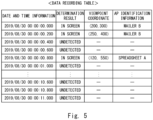
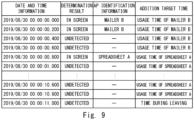
- the DB processing unit 107 is a program module that registers information, in response to a request from another program module, in a data storage table generated in the storage device 120. As illustrated in Fig. 5 , in the data storage table, date and time information indicating generation date and time of images, a determination result regarding the iris and the viewpoint of the user, the viewpoint coordinates, and the identification information of the application are registered.
- the determination result regarding the iris and the viewpoint of the user includes a determination result that the center position C of the iris of the user is within the correspondent screen region, a determination result that the center position C of the iris of the user is outside the correspondent screen region, and a determination result that the iris of the user has not been detected.
- the determination result that the center position C of the iris of the user is within the correspondent screen region means that the user is viewing the display screen of the display device of the user PC 50.
- the determination result that the center position C of the iris of the user is outside the correspondent screen region means that the user is viewing an area other than the display screen of the display device of the user PC 50.
- the identification information of application is identification information of the application providing the application screen viewed by the user.
- the determination result indicating so When the center position C of the iris of the user is within the correspondent screen region, the determination result indicating so, the viewpoint coordinates, and the identification information of the application are registered in association with the date and time information.
- the determination result indicating so is registered in association with the date and time information.
- the determination result indicating so is registered in association with the date and time information.
- the information providing unit 108 is a program module that provides information recorded in the data storage table to the management server 20.
- the information providing unit 108 can provide the information recorded in the data storage table to the management server 20 at an arbitrary timing, such as at the end of the user's business.
- the communication I/F 110 is a device that transmits and receives various data between the user PC 10 and the user PC 50 or the management server 20 via the in-company network 40 and the VPN 70.
- the storage device 120 is a storage device in which various types of information such as a program according to an example embodiment of the present invention, an image provided by the user PC 50, coordinate information of application screens, information indicating the positions of application screens in front-back direction, and a data recording table are stored.
- Fig. 3 is a block diagram illustrating a detailed configuration of the management server 20 according to an example embodiment of the present invention.
- the management server 20 includes a computing device 200, a communication interface (I/F) 210, and a storage device 220.
- I/F communication interface
- the computing device 200 is a computing device such as a CPU or an MPU.
- the computing device 200 executes a program according to an example embodiment of the present invention, thereby executing a method according to an example embodiment of the present invention.
- the program executed by the computing device 200 includes a monitoring unit 201, an application (AP) determining unit 202, a browsing determining unit 203, a time calculating unit 204, and a display image generating unit 205.
- AP application
- the monitoring unit 201 is a program module that determines whether information transmitted by the user PC 10 has been received. When the monitoring unit 201 receives the information, i.e. information recorded in the data storage table of the user PC 10, from the user PC 10, the monitoring unit 201 registers information in a data recording table of the storage device 220.
- the AP determining unit 202 is a program module that determines whether an application(s) in which identification information is registered in the data recording table of the storage device 220 is a predetermined application used by a user of the user PC 50 for business.
- the predetermined application can be determined in advance by a person or the like who manages the business of the user.
- the AP determining unit 202 determines whether the identification information of the application registered in the data recording table of the storage device 220 matches identification information of the predetermined application, thereby enabling to determine whether the application, the identification information of which is registered in the data recording table, is the predetermined application.
- the browsing determining unit 203 is a program module that determines whether the user of the user PC 50 has viewed the application screen in a past specific period based on a generation date and time of the image.
- the past specific period can be, for example, a period 10 seconds back from a time indicated by date and time information that is the generation date and time of the image.
- the browsing determining unit 203 refers to the data recording table of the storage device 220 to determine whether the identification information of the application is associated with the date and time information equivalent to the past specific period, thereby enabling to determine whether the user of the user PC 50 has viewed the application screen in the specific period.
- the time calculating unit 204 is a program module that calculates a usage time of the application by the user of the user PC 50, a non-business work time of the user, and a time during leaving a seat of the user.
- the time calculating unit 204 adds a predetermined time (e.g., 200 milliseconds) based on an execution cycle time of imaging process of the imaging device 60, thereby enabling to calculate the usage time of the application, the non-business work time, and the time during leaving the seat.
- the display image generating unit 205 is a program module that generates an image displaying at least one of the usage time for each application determined to be a predetermined application and a usage rate for each the application per unit time (e.g. working hours per day etc.), the non-business work time, and the time during leaving the seat.
- the usage rate of the application can be calculated based on the usage time of the application.
- the display image generating unit 205 generates the image in response to a request from the administrator PC 30 to provide the image to the administrator PC 30.
- An image as illustrated in Fig. 12 is displayed on the display device of the administrator PC 30.
- the image illustrated in Fig. 12 displays the usage time for each application, the non-business work time, and the time during leaving the seat.
- the communication I/F 210 is a device that transmits and receives various data between the management server 20 and the user PC 10 or the administrator PC 30 via the in-company network 40.
- the storage device 220 is a storage device that stores various types of information such as a program according to an example embodiment of the present invention and a data recording table.
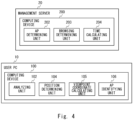
- Fig. 4 is a block diagram illustrating main components included in the user PC 10 and the management server 20 according to an example embodiment of the present invention.
- the user PC 10 includes an analyzing unit 102, a position determining unit 104, a viewpoint coordinate calculating unit 105, and an AP identifying unit 106.
- the management server 20 includes an AP determining unit 202, a browsing determining unit 203, and a time calculating unit 204.
- Fig. 6 is a flowchart illustrating an example of processing to be executed by the user PC 10 according to an example embodiment of the present invention.
- the user PC 10 executes the processing of Fig. 6 for all the images stored in the storage device 120.
- the analyzing unit 102 of the user PC 10 acquires an image provided by the user PC 50 from the storage device 120 to analyze the image.
- the analyzing unit 102 determines whether the iris of the user has been detected. When the iris of the user is not detected (NO), in step S103 the analyzing unit 102 uses the DB processing unit 107 to register the determination result indicating that the iris has not been detected in the data recording table, and the processing of Fig. 6 is ended.
- step S104 the position calculating unit 103 calculates the center position C of the iris of the user in the image.
- step S105 the position determining unit 104 determines whether the center position C of the iris is within the correspondent screen region.
- the position determining unit 104 uses the DB processing unit 107 to register the determination result that the center position C of the iris is outside the correspondent screen region in the data recording table, and the processing of Fig. 6 is ended.
- step S107 the viewpoint coordinate calculating unit 105 calculates viewpoint coordinates of the user on the display screen of the display device of the user PC 50 based on the center position C of the iris of the user in the correspondent screen region.
- step S108 the AP identifying unit 106 acquires, from the storage device 120, coordinate information of application screens displayed on the display device of the user PC 50 and information indicating the positions of application screens in front-back direction, which are associated to the image acquired in step S101.
- the AP identifying unit 106 can identify the coordinate information of the application screens associated to the image and the information indicating the positions of the application screens in front-back direction based on the generation date and time of the image and the date and time information on/at which the application screen is displayed.
- step S109 the AP identifying unit 106 identifies an application that provides the application screen viewed by the user based on the viewpoint coordinates of the user, the coordinate information of the application screens, and the information indicating the positions of application screens in front-back direction.
- step S 110 the AP identifying unit 106 uses the DB processing unit 107 to register the determination result that the center position C of the iris is within the correspondent screen region and the identification information of the application viewed by the user in the data recording table, and the processing of Fig. 6 is ended.
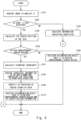
- Fig. 7 is a flowchart illustrating an example of processing to be executed by the management server 20 according to an example embodiment of the present invention.
- the AP determining unit 202 selects recording data associated to one time from the recording data stored in the storage device 220.
- the AP determining unit 202 branches the processing based on the determination result of the selected recording data. More specifically, when the determination result indicates that the center position C of the iris of the user is within the correspondent screen region, the processing is branched to step S203. When the determination result indicates that the center position C of the iris of the user is outside the correspondent screen region, the processing is branched to step S207. When the determination result indicates that the iris of the user has not been detected, the processing is branched to step S209.
- step S203 the AP determining unit 202 determines whether the application indicated by the AP identification information of the selected recording data is a predetermined application.
- the time calculating unit 204 adds a predetermined time to the usage time of the application in step S204.
- the time calculating unit 204 adds the predetermined time to the non-business work time in step S205.
- step S206 the AP determining unit 202 determines whether there are any recording data that have not yet been selected. When there are any recording data that have not been selected yet (YES), the processing returns to step S201, and the above-described processing is executed for the recording data associated to the next one time. On the other hand, when there is no recording data that have not been selected yet (NO), the processing of Fig. 7 is ended.
- step S207 the browsing determining unit 203 refers to the data recording table of the storage device 220, and determines whether the identification information of the application is associated with the date and time information indicating the date and time equivalent to the past specific period.
- the past specific period is a period based on the date and time indicated by the date and time information of the recording data being selected in step S201.
- the AP determining unit 202 determines whether the application is a predetermined application.
- the time calculating unit 204 adds a predetermined time to the usage time of the application. More specifically, the time calculating unit 204 adds the period in which the center position C of the iris of the user is outside the correspondent screen region to the usage time of the application determined to be the predetermined application.
- step S208 the time calculating unit 204 adds a predetermined time to the non-business work time, and the processing proceeds to step S206.
- step S209 When the determination result indicates that the iris of the user has not been detected in step S202, processing of step S209 is executed.
- the browsing determining unit 203 similarly to step S207, the browsing determining unit 203 refers to the data recording table of the storage device 220, and determines whether the identification information of the application is associated with the date and time information indicating the date and time equivalent to the past specific period.
- the processing is branched to step S203.
- the AP determining unit 202 determines whether the application is a predetermined application.
- the time calculating unit 204 adds a predetermined time to the usage time of the application. More specifically, the time calculating unit 204 adds a period during which the iris of the user has not been detected to the usage time of the application determined to be the predetermined application.
- step S210 the time calculating unit 204 adds a predetermined time to the time during leaving the seat, and the processing proceeds to step S206.
- the analyzing unit 102 of the user PC 10 analyzes the image generated by the imaging device 60 to determine whether the iris of the user has been detected.
- the position determining unit 104 determines whether the position of the iris of the user in the image is within the correspondent screen region to register the determination result in the data recording table.
- the viewpoint coordinate calculating unit 105 calculates viewpoint coordinates based on the position of the iris within the correspondent screen region to register the viewpoint coordinates in the data recording table.
- the AP identifying unit 106 uses the coordinate information and the viewpoint coordinates of the application screen displayed on the display screen to identify an application that provides the application screen viewed by the user to register the identification information of the application in the data recording table. Then, the information providing unit 108 transmits the information registered in the data recording table to the management server 20.
- the AP determining unit 202 determines whether the application indicated by the identification information included in the information is a predetermined application.
- the time calculating unit 204 calculates the usage time of the application determined to be a predetermined application. Thereby, the usage time of the application used in a business is calculated and the administrator can acquire the actual state of business of the worker who uses the application used in the business.
- the browsing determining unit 203 determines whether the user has viewed the screen of the application in the past specific period with reference to the generation date and time of the image.
- the AP determining unit 202 determines whether the application is a predetermined application.
- the time calculating unit 204 adds the period during which the iris of the user has not been detected to the usage time of the application.
- the period during which the iris has not been detected can be added to the usage time of the application as illustrated in Fig. 9 . Therefore, it is possible to accurately record the usage time of the application by the user, and it is possible for the administrator to accurately acquire the actual state of business of the worker to be managed.
- the browsing determining unit 203 determines whether the user has viewed the screen of the application in the past specific period with reference to the generation date and time of the image.
- the AP determining unit 202 determines whether the application is a predetermined application.
- the time calculating unit 204 adds the period in which the position of the iris of the user is outside the correspondent screen region to the usage time of the application.
- the period in which the position of the iris has been outside the correspondent screen region can be added to the usage time of the application. Therefore, it is possible to record the actual usage time of the application by the user, and it is possible for the administrator to accurately acquire the actual state of business of the worker to be managed.
- the display image generating unit 205 generates an image displaying for each application at least one of the usage time of an application determined to be a predetermined application and the usage rate of the application per unit time based on the usage time of the application.
- Non-transitory computer-readable media include various types of tangible storage media.
- Examples of the non-transitory computer-readable media include magnetic recording media (e.g., flexible disks, magnetic tape, hard disk drives), magneto-optical recording media (e.g., magneto-optical disks), CD-ROMs, CD-Rs, CD-Rs/Ws, semiconductor memories (e.g., mask ROMs, programmable ROMs (PROMs), erasable PROMs (EPROMs), flash ROMs, RAMs).
- the program may also be provided to the computer by various types of transitory computer-readable media. Examples of the transitory computer-readable media include electrical signals, optical signals, and electromagnetic waves.
- the transitory computer-readable medium can provide the program to the computer via wired or wireless communication paths, such as electrical wires and optical fibers.
- a virtual PC such as a virtual personal computer (VPC) may be mounted on an information processing device such as the management server 20.
- a single information processing device such as the management server 20 executes a program according to an example embodiment of the present invention including the above-described program modules included in the user PC 10 to execute a method according to an example embodiment of the present invention.
- the user PC 50 transmits the image, the coordinate information of application screens, and the information indicating the positions of application screens in front-back direction to the information processing device via the VPN 70 and the in-company network 40.
- a computing device included in the information processing device executes the processing illustrated in Figs. 6 to 8 .
- the user PC 10 may be provided with a face authentication function that identifies a worker to be managed.
- a face authentication function that identifies a worker to be managed.
- the management server 20 may be an external server installed in a place other than a work place of the worker to be managed. Further, the functions of the program modules included in the user PC 10 and the management server 20 may be achieved by a circuit such as a Field-Programmable Gate Array (FPGA) or an Application Specific Integrated Circuit (ASIC).
- FPGA Field-Programmable Gate Array
- ASIC Application Specific Integrated Circuit
Landscapes
- Business, Economics & Management (AREA)
- Engineering & Computer Science (AREA)
- Human Resources & Organizations (AREA)
- Theoretical Computer Science (AREA)
- Strategic Management (AREA)
- Entrepreneurship & Innovation (AREA)
- Economics (AREA)
- Physics & Mathematics (AREA)
- General Physics & Mathematics (AREA)
- Development Economics (AREA)
- Educational Administration (AREA)
- General Business, Economics & Management (AREA)
- Marketing (AREA)
- Operations Research (AREA)
- Quality & Reliability (AREA)
- Tourism & Hospitality (AREA)
- Game Theory and Decision Science (AREA)
- Human Computer Interaction (AREA)
- Health & Medical Sciences (AREA)
- Ophthalmology & Optometry (AREA)
- General Health & Medical Sciences (AREA)
- Multimedia (AREA)
- General Engineering & Computer Science (AREA)
- User Interface Of Digital Computer (AREA)
- Management, Administration, Business Operations System, And Electronic Commerce (AREA)
- Financial Or Insurance-Related Operations Such As Payment And Settlement (AREA)
Claims (13)
- Beschäftigungsmanagementsystem (1), umfassend:eine Analyseeinrichtung (102) zum Analysieren eines Bildes, um eine Iris eines Benutzers zu erfassen;eine Positionsbestimmungseinrichtung (104) zum Bestimmen, ob eine Position der Iris des Benutzers in dem Bild innerhalb eines entsprechenden Bildschirmbereichs liegt, der einem Anzeigebildschirm entspricht, auf dem ein Anwendungsbildschirm angezeigt wird, wenn die Iris des Benutzers erfasst wird;eine Blickpunktkoordinaten-Berechnungseinrichtung (105) zum Berechnen einer Blickpunktkoordinate, die einen Blickpunkt des Benutzers auf dem Anzeigeschirm anzeigt, basierend auf der Position der Iris des Benutzers, wenn die Position der Iris des Benutzers innerhalb des entsprechenden Bildschirmbereichs liegt;eine Anwendungsidentifizierungseinrichtung (106) zum Verwenden einer Koordinateninformation des Anwendungsbildschirms, der auf dem Anzeigeschirm angezeigt wird, und der Blickpunktkoordinate, um eine Anwendung zu identifizieren, die einen vom Benutzer betrachteten Anwendungsbildschirm bereitstellt;eine Anwendungsbestimmungseinrichtung (202) zum Bestimmen, ob die identifizierte Anwendung eine vorbestimmte Anwendung ist, die bei einer Beschäftigung zu verwenden ist;eine Zeitberechnungseinrichtung (204) zum Berechnen einer Nutzungszeit einer Anwendung, die als die vorbestimmte Anwendung bestimmt ist, wenn die identifizierte Anwendung als die vorbestimmte Anwendung bestimmt ist; undeine Browsing-Bestimmungseinrichtung (203) zum Bestimmen, ob der Benutzer einen Bildschirm der identifizierten Anwendung in einem vergangenen spezifischen Zeitraum betrachtet, unter Bezugnahme auf ein Bilderzeugungsdatum und eine Bilderzeugungszeit, wenn die Iris des Benutzers nicht erfasst wird, wobeidie Anwendungsbestimmungseinrichtung (202) bestimmt, ob die identifizierte Anwendung die vorbestimmte Anwendung ist, wenn bestimmt wird, dass der Benutzer einen Bildschirm der identifizierten Anwendung in dem vergangenen spezifischen Zeitraum betrachtet, unddie Zeitberechnungseinrichtung (204) einen Zeitraum, in dem keine Iris des Benutzers erfasst wird, zu einer Nutzungszeit einer Anwendung addiert, die als die vorbestimmte Anwendung bestimmt wird, wenn bestimmt wird, dass die identifizierte Anwendung die vorbestimmte Anwendung ist.
- Beschäftigungsmanagementsystem (1), umfassend:eine Analyseeinrichtung (102) zum Analysieren eines Bildes, um eine Iris eines Benutzers zu erfassen;eine Positionsbestimmungseinrichtung (104) zum Bestimmen, ob eine Position der Iris des Benutzers in dem Bild innerhalb eines entsprechenden Bildschirmbereichs liegt, der einem Anzeigebildschirm entspricht, auf dem ein Anwendungsbildschirm angezeigt wird, wenn die Iris des Benutzers erfasst wird;eine Blickpunktkoordinaten-Berechnungseinrichtung (105) zum Berechnen einer Blickpunktkoordinate, die einen Blickpunkt des Benutzers auf dem Anzeigeschirm anzeigt, basierend auf der Position der Iris des Benutzers, wenn die Position der Iris des Benutzers innerhalb des entsprechenden Bildschirmbereichs liegt;eine Anwendungsidentifizierungseinrichtung (106) zum Verwenden einer Koordinateninformation des Anwendungsbildschirms, der auf dem Anzeigeschirm angezeigt wird, und der Blickpunktkoordinate, um eine Anwendung zu identifizieren, die einen vom Benutzer betrachteten Anwendungsbildschirm bereitstellt;eine Anwendungsbestimmungseinrichtung (202) zum Bestimmen, ob die identifizierte Anwendung eine vorbestimmte Anwendung ist, die bei einer Beschäftigung zu verwenden ist;eine Zeitberechnungseinrichtung (204) zum Berechnen einer Nutzungszeit einer Anwendung, die als die vorbestimmte Anwendung bestimmt ist, wenn die identifizierte Anwendung als die vorbestimmte Anwendung bestimmt ist; undeine Browsing-Bestimmungseinrichtung (203) zum Bestimmen, ob der Benutzer einen Bildschirm der identifizierten Anwendung in einem vergangenen spezifischen Zeitraum betrachtet, unter Bezugnahme auf ein Bilderzeugungsdatum und eine Bilderzeugungszeit, wenn die Position der Iris des Benutzers außerhalb des entsprechenden Bildschirmbereichs liegt, wobeidie Anwendungsbestimmungseinrichtung (202) bestimmt, ob die identifizierte Anwendung die vorbestimmte Anwendung ist, wenn bestimmt wird, dass der Benutzer einen Bildschirm der identifizierten Anwendung in dem vergangenen spezifischen Zeitraum betrachtet, unddie Zeitberechnungseinrichtung (204) einen Zeitraum, in dem die Position der Iris des Benutzers außerhalb des entsprechenden Bildschirmbereichs liegt, zu einer Nutzungszeit einer Anwendung addiert, die als die vorbestimmte Anwendung bestimmt ist, wenn bestimmt wird, dass die identifizierte Anwendung die vorbestimmte Anwendung ist.
- Beschäftigungsmanagementsystem (1) nach Anspruch 1, wobeidie Browsing-Bestimmungseinrichtung (203) bestimmt, ob der Benutzer einen Bildschirm der identifizierten Anwendung in einem vergangenen spezifischen Zeitraum betrachtet, unter Bezugnahme auf ein Bilderzeugungsdatum und eine Bilderzeugungszeit, wenn die Position der Iris des Benutzers außerhalb des entsprechenden Bildschirmbereichs liegt,die Anwendungsbestimmungseinrichtung (202) bestimmt, ob die identifizierte Anwendung die vorbestimmte Anwendung ist, wenn bestimmt wird, dass der Benutzer einen Bildschirm der identifizierten Anwendung in dem vergangenen spezifischen Zeitraum betrachtet, unddie Zeitberechnungseinrichtung (204) einen Zeitraum, in dem die Position der Iris des Benutzers außerhalb des entsprechenden Bildschirmbereichs liegt, zu einer Nutzungszeit einer Anwendung addiert, die als die vorbestimmte Anwendung bestimmt ist, wenn bestimmt wird, dass die identifizierte Anwendung die vorbestimmte Anwendung ist.
- Beschäftigungsmanagementsystem (1) nach Anspruch 1, wobeidie Anwendungsidentifizierungseinrichtung (106) eine Identifikationsinformation der identifizierten Anwendung mit einer Datums- und Zeitinformation des Bildes verknüpft, wenn die Iris des Benutzers erfasst wird, und eine Identifikationsinformation der identifizierten Anwendung nicht mit einer Datums- und Zeitinformation des Bildes verknüpft, wenn keine Iris des Benutzers erfasst wird, unddie Browsing-Bestimmungseinrichtung (203) bestimmt, ob die Identifikationsinformation der identifizierten Anwendung mit der Datums- und Zeitinformation des Bildes entsprechend dem vergangenen spezifischen Zeitraum verknüpft ist, und dadurch bestimmt, ob der Benutzer einen Bildschirm der identifizierten Anwendung in dem vergangenen spezifischen Zeitraum betrachtet.
- Beschäftigungsmanagementsystem (1) nach Anspruch 2 oder 3, wobeidie Anwendungsidentifizierungseinrichtung (106) eine Identifikationsinformation der identifizierten Anwendung mit einer Datums- und Zeitinformation des Bildes verknüpft, wenn die Position der Iris des Benutzers innerhalb des entsprechenden Bildschirmbereichs liegt, und eine Identifikationsinformation der identifizierten Anwendung nicht mit einer Datums- und Zeitinformation des Bildes verknüpft, wenn die Position der Iris des Benutzers außerhalb des entsprechenden Bildschirmbereichs liegt, unddie Browsing-Bestimmungseinrichtung (203) bestimmt, ob die Identifikationsinformation der identifizierten Anwendung mit der Datums- und Zeitinformation des Bildes entsprechend dem vergangenen spezifischen Zeitraum verknüpft ist, und dadurch bestimmt, ob der Benutzer einen Bildschirm der identifizierten Anwendung in dem vergangenen spezifischen Zeitraum betrachtet.
- Beschäftigungsmanagementsystem (1) nach einem der Ansprüche 1 bis 5, ferner umfassend eine Anzeigebilderzeugungseinrichtung (205) zum Erzeugen eines Bildes, das für jede Anwendung zumindest eine Nutzungszeit einer Anwendung, die als die vorbestimmte Anwendung bestimmt ist, und eine Nutzungsrate der Anwendung pro Zeiteinheit auf der Grundlage der Nutzungszeit der Anwendung anzeigt.
- Beschäftigungsmanagementverfahren, das von einem Computer ausgeführt wird, umfassend:Erfassen einer Iris eines Benutzers durch Analysieren eines Bildes;Bestimmen, ob eine Position der Iris des Benutzers in dem Bild innerhalb eines entsprechenden Bildschirmbereichs liegt, der einem Anzeigebildschirm entspricht, auf dem ein Anwendungsbildschirm angezeigt wird, wenn die Iris des Benutzers erfasst wird;Berechnen einer Blickpunktkoordinate, die einen Blickpunkt des Benutzers auf dem Anzeigebildschirm anzeigt, basierend auf der Position der Iris des Benutzers, wenn die Position der Iris des Benutzers innerhalb des entsprechenden Bildschirmbereichs liegt;Verwenden einer Koordinateninformation des Anwendungsbildschirms, der auf dem Anzeigebildschirm angezeigt wird, und der Blickpunktkoordinate, um eine Anwendung zu identifizieren, die einen von dem Benutzer betrachteten Anwendungsbildschirm bereitstellt;Bestimmen, ob die identifizierte Anwendung eine vorbestimmte Anwendung ist, die bei einer Beschäftigung zu verwenden ist;Berechnen einer Nutzungszeit einer Anwendung, die als die vorbestimmte Anwendung bestimmt ist, wenn die identifizierte Anwendung als die vorbestimmte Anwendung bestimmt ist;Bestimmen, ob der Benutzer einen Bildschirm der identifizierten Anwendung in einem vergangenen spezifischen Zeitraum betrachtet, unter Bezugnahme auf ein Bilderzeugungsdatum und eine Bilderzeugungszeit, wenn keine Iris des Benutzers erfasst wird;Bestimmen, ob die identifizierte Anwendung die vorbestimmte Anwendung ist, wenn bestimmt wird, dass der Benutzer einen Bildschirm der identifizierten Anwendung in dem vergangenen spezifischen Zeitraum betrachtet; undAddieren eines Zeitraums, in dem keine Iris des Benutzers erfasst wird, zu einer Nutzungszeit einer Anwendung, die als die vorbestimmte Anwendung bestimmt ist, wenn bestimmt wird, dass die identifizierte Anwendung die vorbestimmte Anwendung ist.
- Beschäftigungsmanagementverfahren, das von einem Computer ausgeführt wird, umfassend:Erfassen einer Iris eines Benutzers durch Analysieren eines Bildes;Bestimmen, ob eine Position der Iris des Benutzers in dem Bild innerhalb eines entsprechenden Bildschirmbereichs liegt, der einem Anzeigebildschirm entspricht, auf dem ein Anwendungsbildschirm angezeigt wird, wenn die Iris des Benutzers erfasst wird;Berechnen einer Blickpunktkoordinate, die einen Blickpunkt des Benutzers auf dem Anzeigebildschirm anzeigt, basierend auf der Position der Iris des Benutzers, wenn die Position der Iris des Benutzers innerhalb des entsprechenden Bildschirmbereichs liegt;Verwenden einer Koordinateninformation des Anwendungsbildschirms, der auf dem Anzeigebildschirm angezeigt wird, und der Blickpunktkoordinate, um eine Anwendung zu identifizieren, die einen vom Benutzer betrachteten Anwendungsbildschirm bereitstellt;Bestimmen, ob die identifizierte Anwendung eine vorbestimmte Anwendung ist, die bei einer Beschäftigung zu verwendet ist;Berechnen einer Nutzungszeit einer Anwendung, die als die vorbestimmte Anwendung bestimmt ist, wenn die identifizierte Anwendung als die vorbestimmte Anwendung bestimmt wird;Bestimmen, ob der Benutzer einen Bildschirm der identifizierten Anwendung in einem vergangenen spezifischen Zeitraum betrachtet, unter Bezugnahme auf ein Bilderzeugungsdatum und eine Bilderzeugungszeit, wenn die Position der Iris des Benutzers außerhalb des entsprechenden Bildschirmbereichs liegt;Bestimmen, ob die identifizierte Anwendung die vorbestimmte Anwendung ist, wenn bestimmt wird, dass der Benutzer einen Bildschirm der identifizierten Anwendung in dem vergangenen spezifischen Zeitraum betrachtet; undAddieren eines Zeitraums, in dem die Position der Iris des Benutzers außerhalb des entsprechenden Bildschirmbereichs liegt, zu einer Nutzungszeit einer Anwendung, die als die vorbestimmte Anwendung bestimmt ist, wenn bestimmt wird, dass die identifizierte Anwendung die vorbestimmte Anwendung ist.
- Beschäftigungsmanagementverfahren nach Anspruch 7, ferner umfassend:Bestimmen, ob der Benutzer einen Bildschirm der identifizierten Anwendung in einem vergangenen spezifischen Zeitraum betrachtet, unter Bezugnahme auf ein Bilderzeugungsdatum und eine Bilderzeugungszeit, wenn die Position der Iris des Benutzers außerhalb des entsprechenden Bildschirmbereichs liegt;Bestimmen, ob die identifizierte Anwendung die vorbestimmte Anwendung ist, wenn bestimmt wird, dass der Benutzer einen Bildschirm der identifizierten Anwendung in dem vergangenen spezifischen Zeitraum betrachtet; undAddieren eines Zeitraums, in dem die Position der Iris des Benutzers außerhalb des entsprechenden Bildschirmbereichs liegt, zu einer Nutzungszeit einer Anwendung, die als die vorbestimmte Anwendung bestimmt ist, wenn bestimmt wird, dass die identifizierte Anwendung die vorbestimmte Anwendung ist.
- Beschäftigungsmanagementverfahren nach Anspruch 7, ferner umfassend:Verknüpfen einer Identifikationsinformation der identifizierten Anwendung mit einer Datums- und Zeitinformation des Bildes, wenn die Iris des Benutzers erfasst wird;Nicht-Verknüpfen einer Identifikationsinformation der identifizierten Anwendung mit einer Datums- und Zeitinformation des Bildes, wenn keine Iris des Benutzers erfasst wird; undBestimmen, ob die Identifikationsinformation der identifizierten Anwendung mit der Datums- und Zeitinformation des Bildes entsprechend dem vergangenen spezifischen Zeitraum verknüpft ist, und dadurch Bestimmen, ob der Benutzer einen Bildschirm der identifizierten Anwendung in dem vergangenen spezifischen Zeitraum betrachtet.
- Beschäftigungsmanagementverfahren nach Anspruch 8 oder 9, ferner umfassend:Verknüpfen einer Identifikationsinformation der identifizierten Anwendung mit einer Datums- und Zeitinformation des Bildes, wenn die Position der Iris des Benutzers innerhalb des entsprechenden Bildschirmbereichs liegt;Nicht-Verknüpfen einer Identifikationsinformation der identifizierten Anwendung mit einer Datums- und Zeitinformation des Bildes, wenn die Position der Iris des Benutzers außerhalb des entsprechenden Bildschirmbereichs liegt; undBestimmen, ob die Identifikationsinformation der identifizierten Anwendung mit der Datums- und Zeitinformation des Bildes entsprechend dem vergangenen spezifischen Zeitraum verknüpft ist, und dadurch Bestimmen, ob der Benutzer einen Bildschirm der identifizierten Anwendung in dem vergangenen spezifischen Zeitraum betrachtet.
- Beschäftigungsmanagementverfahren nach einem der Ansprüche 7 bis 11, ferner umfassend das Erzeugen, für jede Anwendung, eines Bildes, das zumindest eines aus Nutzungszeit einer Anwendung, die als die vorbestimmte Anwendung bestimmt ist, und Nutzungsrate der Anwendung pro Zeiteinheit auf der Grundlage der Nutzungszeit der Anwendung anzeigt.
- Beschäftigungsmanagementprogramm, das einen Computer veranlasst, das Beschäftigungsmanagementverfahren nach einem der Ansprüche 7 bis 12 durchzuführen.
Applications Claiming Priority (2)
| Application Number | Priority Date | Filing Date | Title |
|---|---|---|---|
| JP2019234345A JP6908297B2 (ja) | 2019-12-25 | 2019-12-25 | 業務管理システム、業務管理方法、及び業務管理プログラム |
| PCT/JP2020/043793 WO2021131465A1 (ja) | 2019-12-25 | 2020-11-25 | 業務管理システム、業務管理方法、及び業務管理プログラム |
Publications (4)
| Publication Number | Publication Date |
|---|---|
| EP4064153A1 EP4064153A1 (de) | 2022-09-28 |
| EP4064153A4 EP4064153A4 (de) | 2023-01-18 |
| EP4064153B1 true EP4064153B1 (de) | 2024-09-04 |
| EP4064153C0 EP4064153C0 (de) | 2024-09-04 |
Family
ID=76574332
Family Applications (1)
| Application Number | Title | Priority Date | Filing Date |
|---|---|---|---|
| EP20907591.0A Active EP4064153B1 (de) | 2019-12-25 | 2020-11-25 | System, verfahren und programm zur geschäftsverwaltung |
Country Status (7)
| Country | Link |
|---|---|
| US (1) | US20230025023A1 (de) |
| EP (1) | EP4064153B1 (de) |
| JP (1) | JP6908297B2 (de) |
| CN (1) | CN114846489B (de) |
| AU (1) | AU2020414584A1 (de) |
| CA (1) | CA3165931A1 (de) |
| WO (1) | WO2021131465A1 (de) |
Families Citing this family (1)
| Publication number | Priority date | Publication date | Assignee | Title |
|---|---|---|---|---|
| CN118886890B (zh) * | 2024-09-29 | 2025-02-11 | 武汉吧哒科技股份有限公司 | 设备安全管理方法、装置、电子设备及存储介质 |
Family Cites Families (15)
| Publication number | Priority date | Publication date | Assignee | Title |
|---|---|---|---|---|
| US5831594A (en) * | 1996-06-25 | 1998-11-03 | Sun Microsystems, Inc. | Method and apparatus for eyetrack derived backtrack |
| JP2000048078A (ja) | 1998-07-30 | 2000-02-18 | Hitachi Ltd | 遠隔作業状況監視システム |
| US8260008B2 (en) * | 2005-11-11 | 2012-09-04 | Eyelock, Inc. | Methods for performing biometric recognition of a human eye and corroboration of same |
| JP2009176131A (ja) * | 2008-01-25 | 2009-08-06 | Sky Co Ltd | クライアント端末監視システム |
| US20090317019A1 (en) * | 2008-06-19 | 2009-12-24 | Venkatesh Rangarajan Puliur | Placement of advertisements on electronic documents containing images |
| JP5616175B2 (ja) * | 2010-09-14 | 2014-10-29 | キヤノン電子株式会社 | 情報分析装置、情報分析方法、情報分析システムおよびプログラム |
| US9240011B2 (en) * | 2011-07-13 | 2016-01-19 | Visa International Service Association | Systems and methods to communicate with transaction terminals |
| TWI550438B (zh) * | 2013-10-04 | 2016-09-21 | 由田新技股份有限公司 | 記錄閱讀行爲的方法及裝置 |
| US20170142486A1 (en) * | 2014-07-18 | 2017-05-18 | Sony Corporation | Information processing device, display device, information processing method, program, and information processing system |
| US10139987B2 (en) * | 2014-07-18 | 2018-11-27 | Google Llc | Automated group recommendation |
| US9509825B2 (en) * | 2014-12-07 | 2016-11-29 | Chon Hock LEOW | System and method of secure personal identification |
| CN105843376A (zh) * | 2016-03-07 | 2016-08-10 | 乐视移动智能信息技术(北京)有限公司 | 一种移动终端应用操作方法及移动终端 |
| US10740409B2 (en) * | 2016-05-20 | 2020-08-11 | Magnet Forensics Inc. | Systems and methods for graphical exploration of forensic data |
| EP3447684A1 (de) * | 2017-08-22 | 2019-02-27 | Eyn Limited | Überprüfungsverfahren und system |
| KR102000342B1 (ko) * | 2017-08-31 | 2019-07-15 | 충남대학교산학협력단 | 사용자 단말, 화면 표시 모니터링 방법, 및 컴퓨터 판독가능 기록 매체 |
-
2019
- 2019-12-25 JP JP2019234345A patent/JP6908297B2/ja active Active
-
2020
- 2020-11-25 US US17/787,790 patent/US20230025023A1/en not_active Abandoned
- 2020-11-25 EP EP20907591.0A patent/EP4064153B1/de active Active
- 2020-11-25 CA CA3165931A patent/CA3165931A1/en active Pending
- 2020-11-25 CN CN202080090242.8A patent/CN114846489B/zh active Active
- 2020-11-25 WO PCT/JP2020/043793 patent/WO2021131465A1/ja not_active Ceased
- 2020-11-25 AU AU2020414584A patent/AU2020414584A1/en active Pending
Also Published As
| Publication number | Publication date |
|---|---|
| CN114846489A (zh) | 2022-08-02 |
| EP4064153A4 (de) | 2023-01-18 |
| EP4064153A1 (de) | 2022-09-28 |
| WO2021131465A1 (ja) | 2021-07-01 |
| US20230025023A1 (en) | 2023-01-26 |
| JP2021103425A (ja) | 2021-07-15 |
| JP6908297B2 (ja) | 2021-07-21 |
| CA3165931A1 (en) | 2021-07-01 |
| AU2020414584A1 (en) | 2022-06-16 |
| CN114846489B (zh) | 2025-05-02 |
| EP4064153C0 (de) | 2024-09-04 |
Similar Documents
| Publication | Publication Date | Title |
|---|---|---|
| US20190243333A1 (en) | Electronic apparatus for monitoring state of machine tool and control method thereof | |
| US11137600B2 (en) | Display device, display control method, and display system | |
| CN107004337B (zh) | 用于基于恐惧反应确定威胁评估的技术 | |
| US20190333633A1 (en) | Medical device information providing system, medical device information providing method, and program | |
| CN107533244B (zh) | 头戴式设备位置监测组件 | |
| CN108604346A (zh) | 一种交易方法、支付设备、验证设备和服务器 | |
| US20200143947A1 (en) | Device and method for measuring risk of dry eye, and computer program for executing method | |
| US10874342B2 (en) | Brain injury monitoring system | |
| WO2017034225A1 (en) | Electronic apparatus and method of transforming content thereof | |
| CN108833262A (zh) | 会话处理方法、装置、终端及存储介质 | |
| CN112231666A (zh) | 违规帐号的处理方法、装置、终端、服务器及存储介质 | |
| WO2020209618A1 (en) | Electronic device and method for providing information for stress relief by same | |
| JP2009159448A (ja) | 物体検出装置及び物体検出方法 | |
| EP4064153B1 (de) | System, verfahren und programm zur geschäftsverwaltung | |
| JP6270488B2 (ja) | オペレータ監視制御装置およびオペレータ監視制御方法 | |
| US10422812B2 (en) | Diagnostic method, information processing device, and storage medium | |
| US11586282B2 (en) | Method, device, and computer program product for monitoring user | |
| US11497455B2 (en) | Personalized monitoring of injury rehabilitation through mobile device imaging | |
| JP4716119B2 (ja) | インタラクション情報出力装置、インタラクション情報出力方法、及びプログラム | |
| CN111090570A (zh) | 一种终端屏幕响应时间测量方法、装置及终端设备 | |
| CN109446773A (zh) | 一种验证方式提示方法及终端设备 | |
| US20180293359A1 (en) | Monitoring an individual's condition based on models generated from e-textile based clothing | |
| CN111481177A (zh) | 头戴设备、投屏系统及方法、计算机可读的存储介质 | |
| JP2018163549A (ja) | ウェアラブル端末、安否確認システム、安否確認方法およびプログラム | |
| EP4564209A1 (de) | Systeme und verfahren zum ankündigen unbenutzter sicherheitsmerkmale an stolker |
Legal Events
| Date | Code | Title | Description |
|---|---|---|---|
| STAA | Information on the status of an ep patent application or granted ep patent |
Free format text: STATUS: THE INTERNATIONAL PUBLICATION HAS BEEN MADE |
|
| PUAI | Public reference made under article 153(3) epc to a published international application that has entered the european phase |
Free format text: ORIGINAL CODE: 0009012 |
|
| STAA | Information on the status of an ep patent application or granted ep patent |
Free format text: STATUS: REQUEST FOR EXAMINATION WAS MADE |
|
| 17P | Request for examination filed |
Effective date: 20220624 |
|
| AK | Designated contracting states |
Kind code of ref document: A1 Designated state(s): AL AT BE BG CH CY CZ DE DK EE ES FI FR GB GR HR HU IE IS IT LI LT LU LV MC MK MT NL NO PL PT RO RS SE SI SK SM TR |
|
| STAA | Information on the status of an ep patent application or granted ep patent |
Free format text: STATUS: EXAMINATION IS IN PROGRESS |
|
| A4 | Supplementary search report drawn up and despatched |
Effective date: 20221220 |
|
| RIC1 | Information provided on ipc code assigned before grant |
Ipc: G06F 3/01 20060101ALI20221214BHEP Ipc: G06Q 10/06 20120101AFI20221214BHEP |
|
| 17Q | First examination report despatched |
Effective date: 20230109 |
|
| DAV | Request for validation of the european patent (deleted) | ||
| DAX | Request for extension of the european patent (deleted) | ||
| REG | Reference to a national code |
Ref country code: DE Ref legal event code: R079 Free format text: PREVIOUS MAIN CLASS: G06Q0010060000 Ipc: G06Q0010063900 Ref country code: DE Ref legal event code: R079 Ref document number: 602020037336 Country of ref document: DE Free format text: PREVIOUS MAIN CLASS: G06Q0010060000 Ipc: G06Q0010063900 |
|
| GRAP | Despatch of communication of intention to grant a patent |
Free format text: ORIGINAL CODE: EPIDOSNIGR1 |
|
| STAA | Information on the status of an ep patent application or granted ep patent |
Free format text: STATUS: GRANT OF PATENT IS INTENDED |
|
| RIC1 | Information provided on ipc code assigned before grant |
Ipc: G06V 40/18 20220101ALI20240328BHEP Ipc: G06F 3/01 20060101ALI20240328BHEP Ipc: G06Q 10/0639 20230101AFI20240328BHEP |
|
| INTG | Intention to grant announced |
Effective date: 20240417 |
|
| GRAS | Grant fee paid |
Free format text: ORIGINAL CODE: EPIDOSNIGR3 |
|
| GRAA | (expected) grant |
Free format text: ORIGINAL CODE: 0009210 |
|
| STAA | Information on the status of an ep patent application or granted ep patent |
Free format text: STATUS: THE PATENT HAS BEEN GRANTED |
|
| AK | Designated contracting states |
Kind code of ref document: B1 Designated state(s): AL AT BE BG CH CY CZ DE DK EE ES FI FR GB GR HR HU IE IS IT LI LT LU LV MC MK MT NL NO PL PT RO RS SE SI SK SM TR |
|
| REG | Reference to a national code |
Ref country code: GB Ref legal event code: FG4D |
|
| REG | Reference to a national code |
Ref country code: CH Ref legal event code: EP |
|
| REG | Reference to a national code |
Ref country code: IE Ref legal event code: FG4D |
|
| REG | Reference to a national code |
Ref country code: DE Ref legal event code: R096 Ref document number: 602020037336 Country of ref document: DE |
|
| U01 | Request for unitary effect filed |
Effective date: 20240904 |
|
| U07 | Unitary effect registered |
Designated state(s): AT BE BG DE DK EE FI FR IT LT LU LV MT NL PT RO SE SI Effective date: 20240916 |
|
| U20 | Renewal fee for the european patent with unitary effect paid |
Year of fee payment: 5 Effective date: 20241126 |
|
| PG25 | Lapsed in a contracting state [announced via postgrant information from national office to epo] |
Ref country code: NO Free format text: LAPSE BECAUSE OF FAILURE TO SUBMIT A TRANSLATION OF THE DESCRIPTION OR TO PAY THE FEE WITHIN THE PRESCRIBED TIME-LIMIT Effective date: 20241204 |
|
| PG25 | Lapsed in a contracting state [announced via postgrant information from national office to epo] |
Ref country code: GR Free format text: LAPSE BECAUSE OF FAILURE TO SUBMIT A TRANSLATION OF THE DESCRIPTION OR TO PAY THE FEE WITHIN THE PRESCRIBED TIME-LIMIT Effective date: 20241205 Ref country code: PL Free format text: LAPSE BECAUSE OF FAILURE TO SUBMIT A TRANSLATION OF THE DESCRIPTION OR TO PAY THE FEE WITHIN THE PRESCRIBED TIME-LIMIT Effective date: 20240904 |
|
| PG25 | Lapsed in a contracting state [announced via postgrant information from national office to epo] |
Ref country code: HR Free format text: LAPSE BECAUSE OF FAILURE TO SUBMIT A TRANSLATION OF THE DESCRIPTION OR TO PAY THE FEE WITHIN THE PRESCRIBED TIME-LIMIT Effective date: 20240904 |
|
| PG25 | Lapsed in a contracting state [announced via postgrant information from national office to epo] |
Ref country code: ES Free format text: LAPSE BECAUSE OF FAILURE TO SUBMIT A TRANSLATION OF THE DESCRIPTION OR TO PAY THE FEE WITHIN THE PRESCRIBED TIME-LIMIT Effective date: 20240904 Ref country code: RS Free format text: LAPSE BECAUSE OF FAILURE TO SUBMIT A TRANSLATION OF THE DESCRIPTION OR TO PAY THE FEE WITHIN THE PRESCRIBED TIME-LIMIT Effective date: 20241204 |
|
| PG25 | Lapsed in a contracting state [announced via postgrant information from national office to epo] |
Ref country code: RS Free format text: LAPSE BECAUSE OF FAILURE TO SUBMIT A TRANSLATION OF THE DESCRIPTION OR TO PAY THE FEE WITHIN THE PRESCRIBED TIME-LIMIT Effective date: 20241204 Ref country code: PL Free format text: LAPSE BECAUSE OF FAILURE TO SUBMIT A TRANSLATION OF THE DESCRIPTION OR TO PAY THE FEE WITHIN THE PRESCRIBED TIME-LIMIT Effective date: 20240904 Ref country code: NO Free format text: LAPSE BECAUSE OF FAILURE TO SUBMIT A TRANSLATION OF THE DESCRIPTION OR TO PAY THE FEE WITHIN THE PRESCRIBED TIME-LIMIT Effective date: 20241204 Ref country code: HR Free format text: LAPSE BECAUSE OF FAILURE TO SUBMIT A TRANSLATION OF THE DESCRIPTION OR TO PAY THE FEE WITHIN THE PRESCRIBED TIME-LIMIT Effective date: 20240904 Ref country code: GR Free format text: LAPSE BECAUSE OF FAILURE TO SUBMIT A TRANSLATION OF THE DESCRIPTION OR TO PAY THE FEE WITHIN THE PRESCRIBED TIME-LIMIT Effective date: 20241205 Ref country code: ES Free format text: LAPSE BECAUSE OF FAILURE TO SUBMIT A TRANSLATION OF THE DESCRIPTION OR TO PAY THE FEE WITHIN THE PRESCRIBED TIME-LIMIT Effective date: 20240904 |
|
| PG25 | Lapsed in a contracting state [announced via postgrant information from national office to epo] |
Ref country code: IS Free format text: LAPSE BECAUSE OF FAILURE TO SUBMIT A TRANSLATION OF THE DESCRIPTION OR TO PAY THE FEE WITHIN THE PRESCRIBED TIME-LIMIT Effective date: 20250104 |
|
| PG25 | Lapsed in a contracting state [announced via postgrant information from national office to epo] |
Ref country code: SM Free format text: LAPSE BECAUSE OF FAILURE TO SUBMIT A TRANSLATION OF THE DESCRIPTION OR TO PAY THE FEE WITHIN THE PRESCRIBED TIME-LIMIT Effective date: 20240904 |
|
| PG25 | Lapsed in a contracting state [announced via postgrant information from national office to epo] |
Ref country code: CZ Free format text: LAPSE BECAUSE OF FAILURE TO SUBMIT A TRANSLATION OF THE DESCRIPTION OR TO PAY THE FEE WITHIN THE PRESCRIBED TIME-LIMIT Effective date: 20240904 |
|
| PG25 | Lapsed in a contracting state [announced via postgrant information from national office to epo] |
Ref country code: SK Free format text: LAPSE BECAUSE OF FAILURE TO SUBMIT A TRANSLATION OF THE DESCRIPTION OR TO PAY THE FEE WITHIN THE PRESCRIBED TIME-LIMIT Effective date: 20240904 |
|
| REG | Reference to a national code |
Ref country code: CH Ref legal event code: PL |
|
| PG25 | Lapsed in a contracting state [announced via postgrant information from national office to epo] |
Ref country code: MC Free format text: LAPSE BECAUSE OF FAILURE TO SUBMIT A TRANSLATION OF THE DESCRIPTION OR TO PAY THE FEE WITHIN THE PRESCRIBED TIME-LIMIT Effective date: 20240904 |
|
| PLBE | No opposition filed within time limit |
Free format text: ORIGINAL CODE: 0009261 |
|
| STAA | Information on the status of an ep patent application or granted ep patent |
Free format text: STATUS: NO OPPOSITION FILED WITHIN TIME LIMIT |
|
| REG | Reference to a national code |
Ref country code: CH Ref legal event code: PL |
|
| PG25 | Lapsed in a contracting state [announced via postgrant information from national office to epo] |
Ref country code: CH Free format text: LAPSE BECAUSE OF NON-PAYMENT OF DUE FEES Effective date: 20241130 |
|
| 26N | No opposition filed |
Effective date: 20250605 |
|
| PG25 | Lapsed in a contracting state [announced via postgrant information from national office to epo] |
Ref country code: IE Free format text: LAPSE BECAUSE OF NON-PAYMENT OF DUE FEES Effective date: 20241125 |
|
| U20 | Renewal fee for the european patent with unitary effect paid |
Year of fee payment: 6 Effective date: 20251127 |
|
| PGFP | Annual fee paid to national office [announced via postgrant information from national office to epo] |
Ref country code: GB Payment date: 20251121 Year of fee payment: 6 |