EP3518083B1 - Mehrsprachige zeicheneingabevorrichtung - Google Patents
Mehrsprachige zeicheneingabevorrichtung Download PDFInfo
- Publication number
- EP3518083B1 EP3518083B1 EP17853466.5A EP17853466A EP3518083B1 EP 3518083 B1 EP3518083 B1 EP 3518083B1 EP 17853466 A EP17853466 A EP 17853466A EP 3518083 B1 EP3518083 B1 EP 3518083B1
- Authority
- EP
- European Patent Office
- Prior art keywords
- keys
- key
- symbol
- pressed
- characters
- Prior art date
- Legal status (The legal status is an assumption and is not a legal conclusion. Google has not performed a legal analysis and makes no representation as to the accuracy of the status listed.)
- Active
Links
Images




Classifications
-
- G—PHYSICS
- G06—COMPUTING OR CALCULATING; COUNTING
- G06F—ELECTRIC DIGITAL DATA PROCESSING
- G06F3/00—Input arrangements for transferring data to be processed into a form capable of being handled by the computer; Output arrangements for transferring data from processing unit to output unit, e.g. interface arrangements
- G06F3/01—Input arrangements or combined input and output arrangements for interaction between user and computer
-
- G—PHYSICS
- G06—COMPUTING OR CALCULATING; COUNTING
- G06F—ELECTRIC DIGITAL DATA PROCESSING
- G06F3/00—Input arrangements for transferring data to be processed into a form capable of being handled by the computer; Output arrangements for transferring data from processing unit to output unit, e.g. interface arrangements
- G06F3/01—Input arrangements or combined input and output arrangements for interaction between user and computer
- G06F3/018—Input/output arrangements for oriental characters
-
- G—PHYSICS
- G06—COMPUTING OR CALCULATING; COUNTING
- G06F—ELECTRIC DIGITAL DATA PROCESSING
- G06F3/00—Input arrangements for transferring data to be processed into a form capable of being handled by the computer; Output arrangements for transferring data from processing unit to output unit, e.g. interface arrangements
- G06F3/01—Input arrangements or combined input and output arrangements for interaction between user and computer
- G06F3/02—Input arrangements using manually operated switches, e.g. using keyboards or dials
-
- G—PHYSICS
- G06—COMPUTING OR CALCULATING; COUNTING
- G06F—ELECTRIC DIGITAL DATA PROCESSING
- G06F3/00—Input arrangements for transferring data to be processed into a form capable of being handled by the computer; Output arrangements for transferring data from processing unit to output unit, e.g. interface arrangements
- G06F3/01—Input arrangements or combined input and output arrangements for interaction between user and computer
- G06F3/02—Input arrangements using manually operated switches, e.g. using keyboards or dials
- G06F3/0202—Constructional details or processes of manufacture of the input device
- G06F3/0219—Special purpose keyboards
-
- G—PHYSICS
- G06—COMPUTING OR CALCULATING; COUNTING
- G06F—ELECTRIC DIGITAL DATA PROCESSING
- G06F3/00—Input arrangements for transferring data to be processed into a form capable of being handled by the computer; Output arrangements for transferring data from processing unit to output unit, e.g. interface arrangements
- G06F3/01—Input arrangements or combined input and output arrangements for interaction between user and computer
- G06F3/02—Input arrangements using manually operated switches, e.g. using keyboards or dials
- G06F3/023—Arrangements for converting discrete items of information into a coded form, e.g. arrangements for interpreting keyboard generated codes as alphanumeric codes, operand codes or instruction codes
-
- G—PHYSICS
- G06—COMPUTING OR CALCULATING; COUNTING
- G06F—ELECTRIC DIGITAL DATA PROCESSING
- G06F3/00—Input arrangements for transferring data to be processed into a form capable of being handled by the computer; Output arrangements for transferring data from processing unit to output unit, e.g. interface arrangements
- G06F3/01—Input arrangements or combined input and output arrangements for interaction between user and computer
- G06F3/02—Input arrangements using manually operated switches, e.g. using keyboards or dials
- G06F3/023—Arrangements for converting discrete items of information into a coded form, e.g. arrangements for interpreting keyboard generated codes as alphanumeric codes, operand codes or instruction codes
- G06F3/0233—Character input methods
-
- G—PHYSICS
- G06—COMPUTING OR CALCULATING; COUNTING
- G06F—ELECTRIC DIGITAL DATA PROCESSING
- G06F3/00—Input arrangements for transferring data to be processed into a form capable of being handled by the computer; Output arrangements for transferring data from processing unit to output unit, e.g. interface arrangements
- G06F3/01—Input arrangements or combined input and output arrangements for interaction between user and computer
- G06F3/02—Input arrangements using manually operated switches, e.g. using keyboards or dials
- G06F3/023—Arrangements for converting discrete items of information into a coded form, e.g. arrangements for interpreting keyboard generated codes as alphanumeric codes, operand codes or instruction codes
- G06F3/0233—Character input methods
- G06F3/0235—Character input methods using chord techniques
-
- G—PHYSICS
- G06—COMPUTING OR CALCULATING; COUNTING
- G06F—ELECTRIC DIGITAL DATA PROCESSING
- G06F3/00—Input arrangements for transferring data to be processed into a form capable of being handled by the computer; Output arrangements for transferring data from processing unit to output unit, e.g. interface arrangements
- G06F3/01—Input arrangements or combined input and output arrangements for interaction between user and computer
- G06F3/02—Input arrangements using manually operated switches, e.g. using keyboards or dials
- G06F3/023—Arrangements for converting discrete items of information into a coded form, e.g. arrangements for interpreting keyboard generated codes as alphanumeric codes, operand codes or instruction codes
- G06F3/0233—Character input methods
- G06F3/0236—Character input methods using selection techniques to select from displayed items
-
- G—PHYSICS
- G06—COMPUTING OR CALCULATING; COUNTING
- G06F—ELECTRIC DIGITAL DATA PROCESSING
- G06F3/00—Input arrangements for transferring data to be processed into a form capable of being handled by the computer; Output arrangements for transferring data from processing unit to output unit, e.g. interface arrangements
- G06F3/01—Input arrangements or combined input and output arrangements for interaction between user and computer
- G06F3/02—Input arrangements using manually operated switches, e.g. using keyboards or dials
- G06F3/023—Arrangements for converting discrete items of information into a coded form, e.g. arrangements for interpreting keyboard generated codes as alphanumeric codes, operand codes or instruction codes
- G06F3/0238—Programmable keyboards
-
- G—PHYSICS
- G06—COMPUTING OR CALCULATING; COUNTING
- G06F—ELECTRIC DIGITAL DATA PROCESSING
- G06F3/00—Input arrangements for transferring data to be processed into a form capable of being handled by the computer; Output arrangements for transferring data from processing unit to output unit, e.g. interface arrangements
- G06F3/01—Input arrangements or combined input and output arrangements for interaction between user and computer
- G06F3/048—Interaction techniques based on graphical user interfaces [GUI]
- G06F3/0487—Interaction techniques based on graphical user interfaces [GUI] using specific features provided by the input device, e.g. functions controlled by the rotation of a mouse with dual sensing arrangements, or of the nature of the input device, e.g. tap gestures based on pressure sensed by a digitiser
- G06F3/0488—Interaction techniques based on graphical user interfaces [GUI] using specific features provided by the input device, e.g. functions controlled by the rotation of a mouse with dual sensing arrangements, or of the nature of the input device, e.g. tap gestures based on pressure sensed by a digitiser using a touch-screen or digitiser, e.g. input of commands through traced gestures
- G06F3/04886—Interaction techniques based on graphical user interfaces [GUI] using specific features provided by the input device, e.g. functions controlled by the rotation of a mouse with dual sensing arrangements, or of the nature of the input device, e.g. tap gestures based on pressure sensed by a digitiser using a touch-screen or digitiser, e.g. input of commands through traced gestures by partitioning the display area of the touch-screen or the surface of the digitising tablet into independently controllable areas, e.g. virtual keyboards or menus
-
- G—PHYSICS
- G06—COMPUTING OR CALCULATING; COUNTING
- G06F—ELECTRIC DIGITAL DATA PROCESSING
- G06F40/00—Handling natural language data
- G06F40/40—Processing or translation of natural language
Definitions
- the present invention relates to a multilingual character input device, and more particularly, to a character input device which enables inputting characters of each language in a convenient and efficient manner by converting a keyboard in terms of software to display all phonemes of respective languages.
- a related-art printed character input device In a related-art printed character input device, one or two languages are fixedly printed on a keyboard, and it is difficult to enter characters of a language which is not printed on the keyboard.
- all the basic characters and variant characters of each language may not be displayed on a keyboard and thus, in order to fully input characters of each language, basic characters, variant characters, and special characters which are not printed on the keyboard, need to be input using a push-switching function key such as a Shift or an Alt key, etc. Accordingly, there is a problem in that the flow of the input of characters is broken and typing errors occur, thereby lowering the speed and efficiency of inputting characters.
- the number of phonemes of Romanized languages is 26 to 46 which is obtained by adding the variant characters to 26 basic letters, while Cyrillic languages have 30 to 42 phonemes as shown in Table 2.
- Table 3 describes other languages including 24 to 76 phonemes.
- a related-art character button unit includes 26 letter keys and 7 code keys, totaling 33 keys.
- the number of keys is not sufficient to display linguistic characters of each country.
- the present invention is intended to provide a multilingual character input device which ensures convenient and efficient input for any language in the world through regularity and scalability in software.
- the invention is directed to the multilingual character input device of claim 1.
- Advantageous embodiments are set out in the dependent claims.
- the present invention enables to display both basic characters and variant characters for languages of each country on one keyboard, thus enabling rapid and complete input of characters of each language without converting by pressing the conventional Shift key or an Alt key, etc.
- FIG. 2 shows a block diagram of a multilingual character input device according to this invention, which includes a keyboard unit 10 for converting characters to character phonemes by software-selected languages, displaying the character phonemes on keys, and selectively receiving the input of the displayed character phonemes, a display unit 20 for displaying the received input character on a display, a storage unit 30 for storing program and a data, and a control unit 40 for controlling the keyboard unit, the storage unit and the display unit.
- a keyboard unit 10 for converting characters to character phonemes by software-selected languages, displaying the character phonemes on keys, and selectively receiving the input of the displayed character phonemes
- a display unit 20 for displaying the received input character on a display
- a storage unit 30 for storing program and a data
- a control unit 40 for controlling the keyboard unit, the storage unit and the display unit.
- the word 'software' means that it is programmed so that the character phonemes of each language can be displayed corresponding to the individual keys of the keyboard, and then it is displayed on the corresponding key in response to the command from the control unit by the operation of the conversion key, or means a preset function that can edit a list or a function such as register or delete, etc.
- FIGS. 3A and 3B show the keyboard unit 10 according to this invention and correspond to the left section (A) of FIG. 1 .
- the keyboard unit includes a numeric/symbol keys section 110, F keys section 120, U keys section 123, character keys section 130, and functional keys section 140.
- the character keys section 130 may include an additional keys section 131.
- Keys in this invention may be partitioned areas on the touch display or buttons with a liquid crystal display (LCD), a light emitting diode (LED), an organic LED (OLED) or optical fiber to display character phonemes.
- LCD liquid crystal display
- LED light emitting diode
- OLED organic LED
- the features of the present invention which make the present invention distinctive over the related-art keyboard layout are that the F keys section 120 which is located between the character keys section 130 and the numeric/symbol keys section 110, and the additional keys section 131 composed of multiple additional keys is located within the character keys section 130.
- Such layout enables the display of all character phonemes of any language by adding characters or functions to the F keys section or additional keys section as each of languages has a different number of phonemes.
- the multilingual character input device in this invention is referred to as CEI(Convenient keyboard to express an idea and information diversely and freely).
- FIG. 4A shows examples of a keyboard for Korean version 100 according to an embodiment 1 of this invention.
- FIG. 4B shows examples of a keyboard for English version 101 according to an embodiment 2 of this invention.
- FIG. 4C shows examples of a keyboard for Korean-English version 102 according to an embodiment 3 of this invention.
- FIG. 5 shows the language conversion key 150 and the language list display according to an embodiment of this invention.
- the language list display 151 is displayed on the display unit 20 when the language conversion key is pressed and held for over 0.2 seconds or pressed repeatedly (e.g., a double click, etc.).
- the language list display may include a user-defined language list 152 and a worldwide language list 153.
- Languages may be registered in the user-defined language list by the manufacturer at the time of production or the user can register or delete a desired language directly in the list.
- Language is registered in the user-defined language list, when a desired language in the worldwide language list is selected and the Register(Save) button 154 is pressed.
- Language is deleted from the the user-defined language list, when a desired language to delete in the user-defined list is selected and the Delete button 155 is pressed.
- Preset function enables quick and easy conversion to a preset language to be displayed on the keyboard unit without searching the language one by one in the worldwide language list.
- the character phonemes of the selected languages are displayed on the keyboard unit.
- one or more languages may be selected for activation on the keyboard unit among the languages registered in the user-defined language list.
- the characters(language phonemes) corresponding to the selected languages are converted in predetermined order and displayed on the keyboard unit.
- Korean, English, Chinese and German are selected among the languages registered in the user-defined language list.
- the language displayed on the keyboard unit is Korean.
- English will be displayed on the keyboard unit.
- Chinese will be displayed on the keyboard unit.
- German will be displayed on the keyboard unit.
- Korean will be displayed on the keyboard unit again.
- Korean and English can be displayed on the keyboard unit simultaneously as shown in FIG. 4C when Korean-English is selected in the user-defined language list in FIG. 5 .
- This invention features a preset function to increase or decrease the number of F keys or additional keys. It is desirable to set the number of keys of the additional keys section 131 and the F keys section 120 enough for integrally inputting the languages of the world.
- a keyboard layout is presented to which 6 additional keys and 4 more F keys from F13 to F16 are added along with the existing F keys from F1 through F 12.
- F keys from F1 through F12 may feature the same function as the original function, and additional F keys from F13 to F16 can be used by adding new functions.
- the number of additional keys and F keys may be increased or decreased depending on the situation and use, and the position in which the keys are arranged can also be changed.
- F keys section includes the F+ ⁇ key 121 and multiple F keys.
- F keys When F+ ⁇ key is not activated as the F+ ⁇ key is not pressed, F keys display original set functions. In addition, it is possible to convert sequentially the characters or functions displayed on the multiple F keys by pressing the F+ ⁇ key. For example, when the F+ ⁇ key is pressed once, variant characters, special characters or symbols of a displayed language on the keys section may be displayed on the F keys, when the F+ ⁇ key is pressed twice, the secondary functions may be displayed on the F keys, and when the F+ ⁇ key is pressed three times, another variant characters, special characters or symbols may be displayed to be inputted on the F keys.
- the F key setting display 122 is displayed on the display unit when the F+ ⁇ key is pressed and held down for over 0.2 seconds. On the F key setting display, it is possible to increase or decrease the number of times to press the F+ ⁇ key. On the F key setting display, it is possible to register or delete which character or function is displayed on each of the F keys according to the number of times the F+ ⁇ key is pressed. On the F key setting display, data can be registered when a position to be registered in each key is selected and the data stored in the storage unit is imported, or when inputted directly by user.
- FIG. 6A shows the number of times the F+ ⁇ key is pressed and a corresponding example of setting F keys on the F key settings display according to an embodiment of this invention.
- F keys it is possible to add one or more F keys to the F keys section. It is also possible to assign a character or function to an F key added. For example, it is possible to use it as a shortcut key for a frequently used function such as translation, dictionary, taking photo or video recording etc. Alternatively, it is possible to link the added F key directly to a symbol, user-registered boilerplate, emoticon, emoji, character image, photo or memo. It is also possible to link it to a desired function such as saving files and organize it to a user folder.
- the F keys section is activated in predetermined order, and the F key section which the order of pressing the F+ ⁇ key is not determined is deactivated and is not displayed.
- FIG. 6B shows an example of F keys is activated according to the number of times the F+ ⁇ key is pressed. If the user designates the number of times to press the F+ ⁇ key as shown in FIG. 6B , more specifically, 0 time to the 1st line, 2 times to the 3rd line, and 1 time to the 4th line, F keys of the 1st line will be displayed on the F keys and operated as an original function key, when the F+ ⁇ key is not pressed, or F keys of the 4th line will be activated and displayed on the F keys when the F+ ⁇ key is pressed once, and F keys of the 3rd line will be activated and displayed when the F+ ⁇ key is pressed twice. In this case, as no numeric value is assigned to the 2nd line of the F+ ⁇ key, F keys of the 2nd line are deactivated and are not displayed on the F keys while converting the F keys by pressing the F+ ⁇ key.
- the keyboard of this invention may be used as a user-oriented one which is optimized for the needs of each user.
- Ctrl+C activates the function of Copy
- Ctrl+S activates the function of Save
- Ctrl+V activates the function of Paste
- Ctrl+X activates the function of Cut
- Ctrl+z activates the function of Undo.
- FIG. 4B shows a layout of additional keys to which edit functions are assigned according to an embodiment of this invention.
- an additional key for Ctrl+a (132) can activate the Select All function
- Ctrl+C (133) can activate the Copy function
- Ctrl+S (134) can activate the Save function
- Ctrl+V (135) can activate the Paste function
- Ctrl+X(136) can activate the Cut function
- Ctrl+Z (137) can activate the Undo function.
- Activating an edit function without pressing the Ctrl key may be assigned not only to any of the aforementioned additional keys but to any key of the keyboard unit as appropriate.
- Another function may be executed when the additional key or any key performing an edit function is pressed and held down for over 0.2 seconds.
- a character or symbol is assigned to a key that activates one of the edit functions directly without the combination of the Ctrl key depicted in FIG. 4A , the assigned character or symbol is inputted when the key is pressed once and the assigned edit function is executed directly when the key is pressed and held down for over 0.2 seconds without Ctrl key is pressed.
- U keys user-defined keys 123
- U keys user-defined keys 123
- added F keys in the F keys section and multiple keys in the numeric/symbol keys section to which no number is assigned are referred to as U keys section 123.
- Data may be registered to the U keys section as the user desires and these data may be changed or modified.
- the aforementioned data includes everything that the user wants to input through keyboard, including characters, symbols, marks, photos, boilerplates, formula, emoticons, or image characters etc.
- FIG. 7A shows the U keys section setting display according to an embodiment of this invention.
- the user can preset frequently used data according to the professional job or function to use them whenever they are needed rather than fixing specific symbols to the U keys section, and such settings may be changed and modified as desired. Therefore, this invention ensures a user-oriented and optimized keyboard.
- the U keys section setting display 124 will be displayed on the display unit, on which the user can register or delete a multiple number of data in or from each of the U keys.
- data can be registered when a position to be registered in each key is selected and the data stored in the storage unit is imported, or when inputted directly by user. Although it is desirable to register 10 to 20 data in each key, over 20 data may be registered.
- data is displayed on the U keys section when one of the U keys section is pressed and held down for over 0.2 seconds, and a plurality of pre-registered data are converted and displayed on each key in predetermined order at a predetermined time interval until when pressed key is released, and when pressed key is released, corresponding data is displayed on each key.
- the aforementioned predetermined time interval could be 0.3 to 1 second, desirably.
- a multiple number of keys in the numeric/symbol keys section to which no number is assigned may be operated as a part of U keys section even when the F+ ⁇ key is activated.
- a data may be registered in each of the keys in the numeric/symbol keys section to which no number is assigned, or two data may be registered top and bottom of each of the aforementioned key. If two data are to be registered in the top and bottom of a single key, the data to be assigned to the top may be input by pressing the Shift key. The same data may be pre-registered in all the U keys or more data or different data may be registered to each of the keys as desired.
- symbols displayed on the entire numeric/symbol keys of the numeric/symbol keys section are converted to numbers, or numbers displayed on the entire numeric/symbol keys of the numeric/symbol keys section are converted to symbols, when any of the keys among the numeric/symbol keys section which contains 10 numeric/symbol keys numbers from 0 to 9 and symbols placed top and bottom is pressed and held down for over 0.2 seconds.
- the user can input a number or a symbol with a single keystroke without pressing the Shift or Alt key, etc. according to the intent of this invention.
- a number from 0 to 9 is located at the bottom and a symbol is located at the top for the numeric/symbol keys section, the numbers can be directly inputted when corresponding key is pressed, and the symbols can be inputted when Shift key which is push-switching function key is pressed.
- the positions of the number and the symbol on a key will be switched across 10 numeric/symbol keys as shown in (2) of FIG. 7B , in which the numeric value is located at the top and the symbol is located at the bottom when any of 10 numeric/symbol keys is pressed and held down for over 0.2 seconds. Then, the user can input a symbol with a single keystroke without pressing the Shift or Alt key, etc.
- This function can also be applied to a keyboard layout in which numbers, symbols or characters are fixedly printed on the numeric/symbol keys section. For example, even if a symbol or character is fixedly printed on each key of upper part of the numeric/symbol keys section and a number is fixedly printed on each key of lower part of the numeric/symbol keys section, if any key of 10 numeric/symbol keys is pressed and held down for over 0.2 seconds, the positions of the number and symbol will be switched internally to let the user input a desired symbol directly without pressing the Shift key or Alt key, etc. And number can be inputted with a single stroke when any key of 10 numeric/symbol keys is pressed and held down for over 0.2 seconds again.
- numeric/symbol conversion key 125 in addition in the numeric/symbol keys section to enable to enter a number, symbol or character without pressing the function key such as Shift or Alt key, etc.
- a symbol or character is disposed at the upper part and a number is disposed at the lower part of the 10 numeric/symbol keys, and a number is inputted directly with a single stroke, and symbol or character is inputted with pressing Shift key together.
- the keyboard for Korean has a layout for 33 keys consisting of 19 Korean consonants which are ' ' and 14 Korean vowels which are ' '.
- This layout is designed in consideration of the order of consonants and vowels, their resemblance, and frequency of use to let anyone understand the key locations of consonants and vowels in Hangul intuitively without memorizing the keyboard and enable user to input characters efficiently.
- Korean double consonants such as ' ' and Korean complex vowel such as ' ' are laid out separately on the keyboard, the user can enter those keys directly without pressing the Shift key or other function key together.
- the aforementioned keyboard unit has a total of 33 keys comprising 19 Korean consonants and 14 Korean vowels, and their layout may be modified as the user desires.
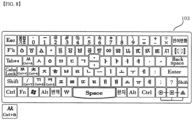
- FIG. 8 shows a keyboard layout for Korean (Hunminjeongum) version 103 according to this invention.
- a total of 33 characters including 19 consonants and 14 vowels of Hangul are displayed on the character keys section, and archaic Hangul characters including 4 Hunminjeougeum characters of ' ' are displayed on the F keys section, when the language conversion key is pressed and 'Hangul (Hunminjeongum)' is selected.
- the archaic Hangul character is converted and displayed on the F keys section in predetermined order when the F+ ⁇ key is pressed, so that all Korean characters could be inputted in an efficient way.
- any layout can be applied in a variety of ways, such as laying out alphabetic consonants and vowels of the language in a QWERTY format, or laying out alphabetic consonants and vowels of the language in a sequential order, or laying out it as desired by the user on the keyboard unit.
- FIGS. 9A and 9D shows a keyboard of respective countries using a Romanized language according to an embodiment of this invention.
- FIG. 9A shows a keyboard layout for French.
- Keyboard for French version 1 lays out variant characters in the F keys section and additional keys for each editing functions in the additional keys section.
- Keyboard for French version 2 lays out some of variant characters in the additional keys section and the rest of the variant keys and symbols in the F keys section.
- Both version of keyboard layouts don't require pressing the function key such as Shift key or Alt key, etc. when entering any French character and can input every French character with single stroke efficiently.
- FIG. 9B shows an example of a keyboard layout for Portuguese version 1 (1) and Portuguese version 2 (2).
- FIG. 9C shows an example of a keyboard layout for German version 1 (1) and German version 2 (2).
- FIG. 9D shows an example of a keyboard layout for Spanish version 1 (1) and Spanish version 2 (2). The operation of each version is performed in the same way as the keyboard for French version 1 (1) and French version 2 (2).
- the characters of a certain language can't be fully covered with the character keys section, F keys section and additional keys section, press F+a key to convert the F keys section and assign the remaining characters.
- the user can layout characters with high frequency on the default page of the F keys section and the remaining characters with low frequency on the following pages which are displayed on the F keys when the F+ ⁇ key is pressed.
- the user can layout the characters constituting the language in the the character keys section in a conventional way, in an alphabetical order or in the existing QWERTY format depending on the user's preference.
- FIG. 10A and 10B show a keyboard layout for a non-Romanized language such as Cyrillic, Greek, or Japanese, etc. according to an embodiment of this invention.
- FIG. 10A shows a keyboard layout for Russian version (1) and Greek version (2).
- FIG. 10B shows a keyboard layout for Chinese Pingying version (China) (1), Chinese Pingying version (Taiwan) (2) and Japanese version (3).
- Period ⁇ .' and comma ',' are essentially used when composing a sentence in almost all languages in the world.
- the user has to move his right hand off the 2nd line of the character keys section which is default location to reach his finger to these marks which is located at the lower part of the keyboard and inputs period ⁇ .' and comma ⁇ ,', and then return his right hand to the original position to continue typing.
- the users take their eyes off the monitor and look at the keyboard, so the flow of input is interrupted.
- FIG. 4A shows an example of a keyboard layout according to an embodiment of this invention, in which the period ⁇ .' and comma ',' are located at the middle keys 160, 161 in the 1st line of the character keys section.
- the case conversion is made using the upper/lower case shift key 170.
- the user enters lowercase letters by default and needs to press the upper/lower case shift key to enter an uppercase letter as necessary.
- Caps Lock key As in the conventional way for case conversion. While typing in lowercase letters, when the Caps Lock key is pressed, all the characters laid out on the keyboard are converted to uppercase letters and uppercase letters is inputted. To input lowercase letters again, press the Caps Lock key to convert the letters on the keyboard to lowercase letters and continue typing.
- the upper/lower case shift key 170 it is not necessary to press the Caps Lock or Shift key for case conversion, and even it doesn't need to convert all the keys in the character keys section into upper case or lower case.
- the user can convert the lower case to upper case or upper case to lower case of a required letter or word while typing letters. It is possible to input characters very efficiently without interrupting the flow of inputting characters..
- FIGS. 11A and 11B show examples of using the upper/lower case shift key on a keyboard according to an embodiment of this invention.
- the way of using the existing Caps Lock key is, when typing a phrase 'The New Science of Exercise', the user has to press the Caps Lock key whenever the case is converted. More specifically, the user has to press the Caps Lock key once to switch to uppercase input state and type 'T', then press the Caps Lock key again to switch to lowercase input state and type 'he'. Next, he has to press the Caps Lock key again to switch to uppercase input state and type 'N', and then press the Caps Lock key once again to switch to lowercase input state and type 'ew'. In this way, the user has to press the Caps Lock key before and after typing 'S' and 'E'. Therefore, the user has to press the Caps Lock key 8 times in total in this case.
- the upper/lower case shift key only affects a letter or word typed after a space is inserted and does not affect what is typed before a space is entered and it remains in lowercase. Then type 'ew' and 's' and when the upper/lower case shift key is pressed once again and the letter's' will be case converted to 'S'. Type 'cience of and 'e', and when the upper/lower case shift key is pressed once again, the case of the letter 'e' is converted to 'E'. Finally, type 'xercise' and typing will be completed. So, in this method, the user only needs to press the upper/lower case shift key four times while typing the aforementioned phrase.
- the upper/lower case shift key can reduce the number of times of pressing the key by half compared to the number of times of pressing the Caps Lock key, which demonstrates that the upper/lower case shift key is more efficient.
- the process of inputting characters only necessary characters are changed to uppercase, and the flow of character input can be continued without interruption.
- this method can convert the case of the entire letters or word at once regardless of the number of letters, it makes easier to convert between uppercase and lowercase.
- Another feature of this invention relates to the integrated parenthesis key 180 for easily inputting various parenthesis symbols.
- an open parenthesis symbol '(' and a closed parenthesis symbol ')' are placed separately in the two keys.
- the open parenthesis symbol ⁇ (' key has to be pressed while the Shift key is held down, and then the closed parenthesis symbol ⁇ )' key has to be pressed while the Shift key is held down, respectively.
- various integrated parenthesis symbol including the open parenthesis symbol '(' and closed parenthesis symbol ')' are assigned to the integrated parenthesis key 1 180 to ensure efficient use of space on the keyboard and enable inputting parenthesis symbols without pressing the Shift key.
- FIG. 12A shows an example of entering a parenthesis symbol by pressing the integrated parenthesis key 1 on a keyboard according to an embodiment of this invention.
- FIG. 12B shows an example of entering parenthesis symbols consecutively by pressing the integrated parenthesis key 1 on a keyboard according to an embodiment of this invention.
- the integrated parenthesis key 2 181 may be used as an easy way to enter various parenthesis symbols.
- the integrated parenthesis key 2 comprises the following 4 parenthesis keys; '( )', ' ⁇ ⁇ ', '[ ]' and ' ⁇ >'.
- '( )', ' ⁇ ⁇ ', '[ ]' and ' ⁇ >' When each parenthesis key is pressed once, the corresponding open parenthesis symbol will be inputted. When the each parenthesis key is pressed once again, a corresponding closed parenthesis symbol will be inputted.
- FIG. 12C shows an example of entering a parenthesis symbol by pressing the integrated parenthesis key 2 on the keyboard according to an embodiment of this invention.
- 4 parenthesis keys may be laid out vertically or horizontally as shown in FIG. 12C or may be modified and laid in a different way.
- the parenthesis symbol '( )' will be illustrated as follows. When the '( )' key is pressed once and an open parenthesis symbol '(' will be entered. When the '( )' key is pressed again after 'Good morning' letter is entered after the open parenthesis symbol, a closed parenthesis symbol ')' will be entered.
- Using the remaining 3 keys of ⁇ ⁇ ', '[ ]', and ⁇ >' in the integrated parenthesis key 2 follows the same procedures as stated above.
- FIG. 12D shows an example of entering parenthesis symbols consecutively by pressing the integrated parenthesis key 2 on a keyboard according to an embodiment of this invention.
- Parenthesis symbols of '[', ']', ' ⁇ ', ' ⁇ ', ' ⁇ ' and '>' are printed on different keys on a conventional keyboard. If the user wants to insert ' ⁇ ', ' ⁇ ', ' ⁇ ' or '>', the user has to press the applicable key in combination with the Shift key. Moreover, to enter a parenthesis not printed on the keyboard, the user has to search the desired symbol in the special character table and select the open parenthesis symbol to input, and after typing letters, the user has to search the desired symbol in the special character table and select the closed parenthesis symbol to input again, which is quite cumbersome and inconvenient.
- parenthesis symbols Like the parenthesis '( )', a lot of parenthesis symbols consist of an open parenthesis symbol and a closed parenthesis symbol as a pair.
- several parenthesis symbols may be integrated into the integrated parenthesis key 1 180 or integrated parenthesis key 2 181. This makes it easier to find various parenthesis symbols and insert them without pressing the Shift key, which also ensures efficient use of space on the keyboard.
- a parenthesis symbols display 182 with various parenthesis symbols is displayed on the display unit.
- pressing the integrated parenthesis key 2 refers to pressing any of the '( )', ' ⁇ ⁇ ', '[ ]' and ' ⁇ >' keys.
- a number of pairs of open symbols and closed symbols may be displayed on the parenthesis symbols display.
- the open symbol of the selected parenthesis is inserted.
- the pair of parenthesis symbols is numbered, when the number is entered, the open symbol of the selected parenthesis is inserted.
- FIGS. 13A and 13B show examples of entering various parenthesis symbols by pressing the integrated parenthesis key 1 or the integrated parenthesis key 2 on a keyboard according to an embodiment of this invention.
- FIG. 13A shows an example of displaying a parenthesis symbols display on the display unit when the integrated parenthesis key 1 or the integrated parenthesis key 2 is pressed and held down for over 0.2 seconds to input a certain parenthesis symbol. For example, when ' ' is pressed, the open symbol of ' ' is inserted. After letters or words to be entered between the parenthesis symbol ' ' is entered, to complete the closed parenthesis symbol ' ', press the integrated parenthesis key 1 or the integrated parenthesis key 2.
- FIG. 13B shows an example of inserting the closed symbol ' ' , when the integrated parenthesis key 1 or the integrated parenthesis key 2 is pressed.
- This invention lets the user insert another parenthesis symbol in a parenthesis symbol.
- the integrated parenthesis key 1 or the integrated parenthesis key 2 is pressed and held down for over 0.2 seconds, displays a parenthesis symbols display on the display unit.
- the first pair of parenthesis symbols to be inserted is pressed, and the applicable open symbol will be inserted.
- the second pair of parenthesis symbols to be inserted is pressed, the applicable open symbol will be inserted.
- the user can insert the open symbol of a certain parenthesis by pressing the applicable pair of parenthesis symbols.
- FIGS. 14A and 14B show examples of entering various parenthesis symbols consecutively by the integrated parenthesis key 1 or the integrated parenthesis key 2 on a keyboard according to an embodiment of this invention.
- the parenthesis symbols display is displayed on the display unit.
- a parenthesis symbol on the parenthesis symbols display is left clicked with a mouse or touched with a finger or electronic pen device to drag it out of the parenthesis symbols display, and then, when the clicked or touched parenthesis symbol is released, generates a complete parenthesis with open and closed parenthesis symbols and inputs the complete parenthesis on the display unit.
- Another feature of this invention relates to its functionality to insert various symbols in an efficient manner.
- this invention features an integrated symbol key 190 on the keyboard unit.
- a symbols display 191 is displayed on the display unit.
- the symbols display includes a list of symbol categories 192 and multiple number of symbols corresponding to the list of symbol categories to make it easier and faster for the user to select and insert a desired symbol.
- FIG. 15 shows the symbols display displayed on the display unit when the integrated symbol key is pressed on the keyboard according to an embodiment of this invention.
- a unit symbol is selected in the list of symbol categories and various units symbols corresponding to the selected unit symbol category are displayed. Therefore, the user can select a unit symbol directly and input on the display unit..
- the corresponding symbols are changed and displayed, so that the user can easily select and input various symbols.
- the user can select and input various symbols, special characters, shapes, unit symbols, arrows, punctuation marks and circled characters directly.
- the present invention can easily input the currency symbol (currency unit) of each country.
- the keyboard according to an embodiment of this invention features an integrated currency key 200 in the keyboard unit.
- the integrated currency key When a language is selected by pressing the language conversion key, the corresponding currency to the selected language is displayed on the integrated currency key.
- the integrated currency key is pressed once, the user can insert the currency unit.
- a currency unit display 201 which lists all currency units will be displayed on the display unit, on which the user can select a desired currency unit to insert.
- FIG. 16 shows the currency unit display on a keyboard according to an embodiment of this invention.
- This invention features a translation key 210 on the keyboard unit. After entering a letter and selecting a range to be translated such as a word, sentence, paragraph or page, etc. and then when the translation key is pressed, the language will be translated to another language.
- translation key setting display 211 When the translation key is pressed and held down for predetermined period, translation key setting display 211 will be displayed on the display unit.
- the translation key setting display may feature the source language, target language and a worldwide languages list. In the source language field, the language currently set for the keyboard is displayed. In the target language field, the language to be translated will be displayed if the translation key is pressed. The user can select a language in the worldwide languages list and register in or delete from the target language field. When the user first registers the language to be translated and then presses the translation key, the current language is translated into the language to be translated.
- FIG. 17A shows the translation key setting display and an example of translation when the translation key is pressed according to an embodiment of this invention.
- the present invention can input characters and simultaneously translate them into languages of various countries at the same time. This function is useful to a person who is learning multiple languages or is useful to a person who translate simultaneously in different languages at the same time.
- the translated characters After registering several languages in the target language field on the translation key setting display, when the user select a range to be translated after inputting characters and when the translation key is pressed, the translated characters are displayed in a plurality of languages in the display unit. At this time, the translation is performed in the order registered in the target language.
- FIG. 17B shows an example of translation into multiple languages simultaneously by pressing the translation key.
- This invention lays out the circle (o) key 221, square ( ⁇ ) key 222 and triangle ( ⁇ ) key 223 on the keyboard unit (hereinafter referred to as Won-Bang-Gak keys which can be defined as a shape extension key).
- Won-Bang-Gak keys which can be defined as a shape extension key.
- various data may be categorized into Won-Bang-Gak keys and be displayed on the data display by category.
- professional medical terms may be stored in the Won-Bang-Gak keys and the user can select and input a desired one among them without inputting it manually.
- Music notes, symbols, forte and piano symbols may be listed in the Won-Bang-Gak keys.
- cooking recipes or the periodic table which is often used in chemistry may be stored in the Won-Bang-Gak keys and can be selected and inputted by user.
- the user can register data in the Won-Bang-Gak keys as follows. Press any of the Won-Bang-Gak keys, and the data display 224 will be displayed on the display unit, on which a data list, data titles and corresponding data are displayed. To register data in a certain data title, the user can import data from stored data in the storage unit or user can input it directly and register.
- the user can categorize them into either activated or deactivated.
- the data titles along with corresponding data in the activated category is converted and displayed in predetermined order.
- FIG. 18B shows an example of data display prompted when the square ( ⁇ ) key is pressed.
- physics formulas, chemical formulas and the periodic table are registered as activated among data list. Therefore, when the square ( ⁇ ) key is pressed once, the data display for physics formulas is displayed, and when the square ( ⁇ ) key is pressed once again, the data display for chemical formulas is displayed, and when the square ( ⁇ ) key is pressed once again, the data display for the periodic table is displayed, and when the square ( ⁇ ) key is pressed once again, the data display for physical formulas is displayed again.
- the circle key and the triangle key will also apply to the circle key and the triangle key.
- the user also can register desired data or link a function through the combination of pressing 2 keys simultaneously, such as circle (o) key plus square ( ⁇ ) key, square ( ⁇ ) key plus triangle ( ⁇ ) key or circle (o) key plus triangle ( ⁇ ) key, or the combination of pressing 3 keys simultaneously (( ⁇ )+( ⁇ )+( ⁇ )).
- desired data or link a function through the combination of pressing 2 keys simultaneously, such as circle (o) key plus square ( ⁇ ) key, square ( ⁇ ) key plus triangle ( ⁇ ) key or circle (o) key plus triangle ( ⁇ ) key, or the combination of pressing 3 keys simultaneously (( ⁇ )+( ⁇ )+( ⁇ )).
- FIG. 18C when the circle (o) key and the square ( ⁇ ) key is pressed simultaneously, a data display for video clips is displayed.
- a data display for music files may be displayed. Then, the user can play the music file directly without going through various paths.
- a data display for photos is displayed and photo can be used directly.
- this invention when inputting Chinese, this invention features a traditional-simplified Chinese shift key 230 on the keyboard unit.
- the traditional-simplified Chinese shift key When the traditional-simplified Chinese shift key is pressed after a traditional Chinese character is inputted and a cursor is placed after the inputted character, the one or more characters before the cursor are converted from traditional Chinese characters to simplified Chinese characters.
- the traditional-simplified Chinese shift key is pressed after a simplified Chinese character is inputted and a cursor is placed after the inputted character, the one or more characters before the cursor are converted from simplified Chinese characters to traditional Chinese characters.
- the traditional-simplified Chinese shift key is pressed, the entire contents inputted can be converted from traditional Chinese characters to simplified Chinese characters, or converted from simplified Chinese characters to traditional Chinese characters.
- FIG. 19 shows an example of the traditional-simplified Chinese shift key when inputting Chinese on the keyboard according to an embodiment of this invention. If the traditional-simplified Chinese shift key is set to 'traditional Chinese', the letter will be typed in traditional Chinese. If the traditional-simplified Chinese shift key is set to 'simplified Chinese', the letter will be typed in simplified Chinese.
- the user can register the secondary data or function desired by the user to each key in the keyboard unit in advance, and when the each key is pressed and held down for predetermined period, the secondary data or function is inputted or executed.
- 'U' is selected in the keyboard setting display, and '(1) (2) (3)01.mp3 (4)01.jpg (5)01.AVI (6) Internet connection (7) Open Inbox (8) Take photo (9) Dictionary (10) Voice recording' is registered in the second setting.
- 'U' key is pressed once, and a letter 'U' will be entered.
- 'U' key is pressed and held down for predetermined period, ' ' registered in the (1) spot will be entered.
- such function may be used on a keyboard for which the language conversion key is deactivated and one language is fixed or two languages are fixed and converted.
- This invention can be used as a multilingual character input device which assigns software-based regularity and scalability, and may be used as a convenient and efficient multilingual character input device for worldwide languages.
- the present invention can be used as a user-customized keyboard in which a user can change his / her desired character or symbol and register or delete the desired character or symbol.
Landscapes
- Engineering & Computer Science (AREA)
- Theoretical Computer Science (AREA)
- General Engineering & Computer Science (AREA)
- Physics & Mathematics (AREA)
- General Physics & Mathematics (AREA)
- Human Computer Interaction (AREA)
- Health & Medical Sciences (AREA)
- Artificial Intelligence (AREA)
- Audiology, Speech & Language Pathology (AREA)
- Computational Linguistics (AREA)
- General Health & Medical Sciences (AREA)
- Input From Keyboards Or The Like (AREA)
- User Interface Of Digital Computer (AREA)
- Document Processing Apparatus (AREA)
Claims (12)
- Mehrsprachige Zeicheneingabevorrichtung, aufweisend:eine Tastatureinheit (10) zum Anzeigen eines Tastaturlayouts einer Mehrzahl von Sprachen, wobei das Tastaturlayout Tasten eines Ziffern-/Symboltastenabschnitts (110), eines F-Tastenabschnitts (120), eines Zeichentastenabschnitts (130) jeder der Sprachen, eines Funktionstastenabschnitts (140), und eine Sprachumstelltaste (150) aufweist;eine Anzeigeeinheit (20) zum Anzeigen eines durch Zeichentasten eingegebenen Zeichens auf einer Anzeige;eine Speichereinheit (30) zum Speichern von Zeichen, einer Datenliste und eines Programms; undeine Steuereinheit (40) zum Steuern der Tastatureinheit, der Anzeigeeinheit und der Speichereinheit, wobei der Ziffern-/Symboltastenabschnitt (110) Zahlen, die in einem unteren Teil der Ziffern-/Symboltasten angeordnet sind, und Symbole, die in einem oberen Teil der Ziffern-/Symboltasten angeordnet sind, aufweist;wobei der F-Tastenabschnitt (120) unterhalb des Ziffern-/Symboltastenabschnitts (110) angeordnet ist und eine F+α-Taste (121) und mehrere F-Tasten aufweist, die mindestens eines von F-Funktionen, Zeichen, und voreingestellten Funktionen anzeigen;wobei der Zeichentastenabschnitt (130) unterhalb des F-Tastenabschnitts (120) angeordnet ist und Zeichenphonemtasten aufweist, die Basis-Phonemtasten und Varianten-Phonemtasten aufweisen,wobei das Tastaturlayout einer Sprache durch Drücken der Sprachumstelltaste (150) der Tastatureinheit (10) in das Tastaturlayout einer anderen Sprache umgewandelt wird,die Steuereinheit so ausgebildet ist, dass jedes Mal, wenn die Sprachumstelltaste (150) gedrückt wird, Zeichen, die ausgewählten Sprachen entsprechen, in einer vorgegebenen Reihenfolge umgewandelt und auf dem Tastaturlayout der Tastatureinheit (10) angezeigt werden,wobei der F-Tastenabschnitt dazu ausgebildet ist, wenn die F+α-Taste (121) nicht gedrückt wird, da die F+a-Taste (121) nicht aktiviert wird, einen ursprünglichen Funktionssatz anzuzeigen, so dass die mindestens eine von den F-Funktionen, den Zeichen und den voreingestellten Funktionen auf den mehreren F-Tasten angezeigt werden, und wobei die Steuereinheit dazu ausgebildet ist, jedes Mal, wenn die F+α-Taste gedrückt wird, Zeichen/Funktionen sequentiell umzuwandeln, so dass die mehreren F-Tasten einen anderen Tastensatz anzeigen, der andere Variantenzeichen, Sonderzeichen oder Symbole der mindestens einen der F-Funktionen, der voreingestellten Funktion und der Zeichen aufweist.
- Mehrsprachige Zeicheneingabevorrichtung nach Anspruch 1,
wobei die Steuereinheit (40) dazu ausgebildet ist, wenn die Sprachumstelltaste (150) der Tastatureinheit (10) gedrückt und für einen vorgegebenen Zeitraum gedrückt gehalten oder wiederholt gedrückt wird, die Anzeigeeinheit (20) eine Sprachenliste (151) anzeigen zu lassen, in der eine Mehrzahl von Sprachen in einer vorgegebenen Reihenfolge aufgelistet sind, und die Sprachenliste durch Registrieren und Löschen der Sprachen editierbar ist. - Mehrsprachige Zeicheneingabevorrichtung nach Anspruch 1 oder 2,wobei die Steuereinheit dazu ausgebildet ist, wenn die Taste F+α (121) gedrückt und für einen vorgegebenen Zeitraum gedrückt gehalten wird, die Anzeigeeinheit eine F-Tasteneinstellungsanzeige (122) zum Einstellen des F-Tastenabschnitts (120) anzeigen zu lassen,wobei die F-Tasteneinstellungsanzeige (122) dazu ausgebildet ist, eine Mehrzahl von Sätzen des F-Tastenabschnitts anzuzeigen, wobei jeder Satz durch Registrieren und Löschen von mindestens einer der F-Funktion, der voreingestellten Funktion und der Zeichen editierbar ist.
- Mehrsprachige Zeicheneingabevorrichtung nach Anspruch 1,
wobei der Ziffern-/Symboltastenabschnitt (110) eine Ziffern-/Symbolumstelltaste (125) mit einer Umschaltfunktion zum Umwandeln der im unteren Teil der Ziffern-/Symboltasten angeordneten Zahlen und der im oberen Teil der Ziffern-/Symboltasten angeordneten Symbole in die im oberen Teil der Ziffern-/Symboltasten angeordneten Zahlen und die im unteren Teil der Ziffern-/Symboltasten angeordneten Symbole aufweist. - Mehrsprachige Zeicheneingabevorrichtung nach Anspruch 1,wobei der F-Tastenabschnitt (120) und der Ziffern-/Symboltastenabschnitt (110) ferner eine oder mehrere benutzerdefinierte Tasten, U-Tasten, (123) mit benutzerdefinierten Funktionen umfassen, die sich von den F-Tasten und den Ziffern-/Symboltasten unterscheiden, undwobei die U-Tasten (123) Funktionen zum Eingeben von mindestens einem von Zeichen, Symbolen, Markierungen, Fotos, Standardtexten, Formeln, Emoticons und Bildzeichen, die im Voraus registriert wurden, aufweisen.
- Mehrsprachige Zeicheneingabevorrichtung nach Anspruch 5,wobei die Steuereinheit dazu ausgebildet ist, wenn zwei der U-Tasten (123) gleichzeitig gedrückt werden, dass die Anzeigeeinheit eine U-Tastenabschnitt-Einstellungsanzeige (124) anzeigen zu lassen, die eine Mehrzahl von Tasten aufweist, die im F-Tastenabschnitt (120) und im Ziffern-/Symboltastenabschnitt (110) anzuordnen sind,wobei die U-Tastenabschnitt-Einstellungsanzeige (124) die Mehrzahl von Tasten aufweist, die den einen oder mehreren U-Tasten (123) entsprechen, und jede Taste eine Funktion hat, die durch Registrieren und Löschen von mindestens einem von Zeichen, Symbolen, Markierungen, Fotos, Standardtexten, Formeln, Emoticons und Bildzeichen definiert ist, undwobei die Steuereinheit dazu ausgebildet ist, wenn eine der einen oder mehreren U-Tasten (123) gedrückt und für einen vorgegebenen Zeitraum gedrückt gehalten wird, die Funktion der einen oder mehreren U-Tasten in eine andere Funktion der vorab registrierten Funktion der Mehrzahl von Tasten umzuwandeln und die eine oder die mehreren U-Tasten die umgewandelte Funktion auf jeder der einen oder mehreren Tasten in vorgegebener Reihenfolge in einem vorgegebenen Zeitintervall anzeigen zu lassen, und die Steuereinheit dazu ausgebildet ist, wenn dann die gedrückte Taste losgelassen wird, jede der einen oder mehreren U-Tasten die zum Zeitpunkt des Loslassens angezeigte Funktion eingestellt zu haben.
- Mehrsprachige Zeicheneingabevorrichtung nach Anspruch 1,wobei sich ein Punkt und ein Komma in der Mitte der ersten Reihe der Tastatureinheit (10) befinden,wobei der Punkt und das Komma vertikal oder horizontal auf zwei aufeinanderfolgenden Tasten angeordnet sind,wobei der Punkt und das Komma vertikal oder horizontal auf einer einzelnen Taste angeordnet sind, oderwobei der Punkt oder das Komma auf einer einzelnen Taste angeordnet sind.
- Mehrsprachige Zeicheneingabevorrichtung nach Anspruch 1,wobei die Tastatureinheit (10) eine Umschalttaste (170) für Groß-/Kleinschreibung aufweist, und wobei, wenn das Zeichen oder das Wort in Kleinbuchstaben eingegeben wird, oder umgekehrt, wobei sich ein Cursor am Ende des Zeichens oder Wortes befindet, und dann die Umschalttaste für Groß-/Kleinschreibung gedrückt wird, das zwischen dem Cursor und einem Leerzeichen eingegebene Zeichen oder Wort ausgebildet ist, in Großbuchstaben umgewandelt zu werden, oder umgekehrt, undwobei, wenn ein Umwandlungsbereich ausgewählt wird und dann die Umschalttaste für Groß-/Kleinschreibung gedrückt wird, ein in Kleinbuchstaben, oder umgekehrt, eingegebenes Zeichen oder Wort im ausgewählten Bereich ausgebildet ist, in Großbuchstaben umgewandelt zu werden, oder umgekehrt.
- Mehrsprachige Zeicheneingabevorrichtung nach Anspruch 1,wobei die Tastatureinheit (10) eine integrierte Klammertaste (180) zum Ausführen einer Funktion für öffnende Klammern und einer Funktion für schließende Klammern aufweist,wobei, wenn die integrierte Klammertaste einmal gedrückt wird, ein Symbol für öffnende Klammern zur Eingabe ausgebildet ist, und wenn die integrierte Klammertaste erneut gedrückt wird, dann ein Symbol für schließende Klammern entsprechend dem Symbol für öffnende Klammern zur Eingabe ausgebildet ist.
- Mehrsprachige Zeicheneingabevorrichtung nach Anspruch 9,
wobei, wenn die integrierte Klammertaste (180) wiederholt gedrückt wird, aufeinanderfolgende Symbole für öffnende Klammern zur Eingabe ausgebildet sind, und dann jedes Mal, wenn die integrierte Klammertaste gedrückt wird, das Symbol für schließende Klammern in umgekehrter Reihenfolge zur Eingabe ausgebildet ist, um den aufeinanderfolgenden Symbolen für öffnende Klammern zu entsprechen. - Mehrsprachige Zeicheneingabevorrichtung nach Anspruch 1,
wobei die Tastatureinheit (10) eine Übersetzungstaste (210) zum Übersetzen einer Sprache in eine andere Sprache, wenn ein oder mehrere Zeichen eingegeben und dann ein zu übersetzender Bereich ausgewählt wird, aufweist. - Mehrsprachige Zeicheneingabevorrichtung nach Anspruch 1,wobei jeder Taste der Tastatureinheit (10) im Voraus sekundäre Daten oder Funktionen zugewiesen sind, undwobei, wenn die Taste gedrückt und für eine vorgegebene Dauer gedrückt gehalten wird, die sekundären Daten oder Funktionen aktiviert werden.
Applications Claiming Priority (2)
| Application Number | Priority Date | Filing Date | Title |
|---|---|---|---|
| KR20160121855 | 2016-09-23 | ||
| PCT/KR2017/010473 WO2018056752A1 (ko) | 2016-09-23 | 2017-09-22 | 다개국어 문자 입력장치 |
Publications (4)
| Publication Number | Publication Date |
|---|---|
| EP3518083A1 EP3518083A1 (de) | 2019-07-31 |
| EP3518083A4 EP3518083A4 (de) | 2020-08-19 |
| EP3518083B1 true EP3518083B1 (de) | 2024-11-27 |
| EP3518083C0 EP3518083C0 (de) | 2024-11-27 |
Family
ID=60301648
Family Applications (1)
| Application Number | Title | Priority Date | Filing Date |
|---|---|---|---|
| EP17853466.5A Active EP3518083B1 (de) | 2016-09-23 | 2017-09-22 | Mehrsprachige zeicheneingabevorrichtung |
Country Status (27)
| Country | Link |
|---|---|
| US (2) | US10503272B2 (de) |
| EP (1) | EP3518083B1 (de) |
| JP (1) | JP6667049B2 (de) |
| KR (1) | KR101791929B1 (de) |
| CN (1) | CN109844696B (de) |
| AU (2) | AU2017330138B2 (de) |
| BR (1) | BR112019004974B1 (de) |
| CA (1) | CA3036952C (de) |
| CL (1) | CL2019000657A1 (de) |
| CO (1) | CO2019002367A2 (de) |
| DO (1) | DOP2019000065A (de) |
| EA (1) | EA201990727A1 (de) |
| EC (1) | ECSP19018298A (de) |
| ES (1) | ES2997370T3 (de) |
| IL (1) | IL265395B (de) |
| JO (1) | JOP20190047A1 (de) |
| MA (1) | MA46289A (de) |
| MX (1) | MX2019003014A (de) |
| NI (1) | NI201900022A (de) |
| NZ (1) | NZ751190A (de) |
| PE (1) | PE20191226A1 (de) |
| PH (1) | PH12019500539A1 (de) |
| SA (1) | SA519401325B1 (de) |
| SG (1) | SG11201901952PA (de) |
| TN (1) | TN2019000090A1 (de) |
| WO (1) | WO2018056752A1 (de) |
| ZA (1) | ZA201901707B (de) |
Families Citing this family (15)
| Publication number | Priority date | Publication date | Assignee | Title |
|---|---|---|---|---|
| USD890755S1 (en) * | 2018-06-05 | 2020-07-21 | Razer (Asia-Pacific) Pte. Ltd. | Keyboard |
| USD881190S1 (en) * | 2018-06-05 | 2020-04-14 | Razer (Asia-Pacific) Pte. Ltd. | Keyboard |
| US10885273B2 (en) | 2018-08-06 | 2021-01-05 | Samsung Electronics Co., Ltd. | Method and system simplifying the input of symbols used as a pair within a user interface |
| CN109582157A (zh) * | 2018-12-04 | 2019-04-05 | 陈功 | 快捷键控制方法及终端 |
| US10955877B2 (en) * | 2018-12-11 | 2021-03-23 | Intel Corporation | Physical keyboards for multi-display computing devices |
| US11567584B2 (en) * | 2019-10-25 | 2023-01-31 | John I. M. Choate | Powered communication system for treatment of carpal tunnel syndrome |
| CN111124148B (zh) * | 2019-11-22 | 2023-08-15 | 海信视像科技股份有限公司 | 输入法中大写输入模式的切换控制方法及显示设备 |
| US11705115B2 (en) * | 2020-06-29 | 2023-07-18 | William KROSSNER | Phonetic keyboard and system to facilitate communication in English |
| US12079562B1 (en) * | 2020-06-29 | 2024-09-03 | Matthew R. Gamble | Mathematical symbols keyboard for mathematical applications |
| CN111831128B (zh) * | 2020-07-01 | 2021-11-09 | 黑龙江数米科技有限公司 | 扩展键盘 |
| USD1070858S1 (en) | 2020-09-02 | 2025-04-15 | Razer (Asia-Pacific) Pte. Ltd. | Keyboard |
| USD1053886S1 (en) | 2020-09-02 | 2024-12-10 | Razer (Asia-Pacific) Pte. Ltd. | Keyboard |
| CN113126774B (zh) * | 2021-03-17 | 2023-03-28 | 华能秦煤瑞金发电有限责任公司 | 一种按键内容可改变的键盘及键盘接口 |
| CN113076011B (zh) * | 2021-03-31 | 2025-02-28 | 北京搜狗科技发展有限公司 | 按键处理方法、装置和介质 |
| WO2025221122A1 (ko) * | 2024-09-24 | 2025-10-23 | 백운성 | 알파벳 쿼티 미니 케이 키보드 |
Citations (1)
| Publication number | Priority date | Publication date | Assignee | Title |
|---|---|---|---|---|
| EP0508563A1 (de) * | 1991-01-29 | 1992-10-14 | Nokia Mobile Phones Ltd. | Tastatur mit beleuchteten Tasten |
Family Cites Families (33)
| Publication number | Priority date | Publication date | Assignee | Title |
|---|---|---|---|---|
| US5210689A (en) * | 1990-12-28 | 1993-05-11 | Semantic Compaction Systems | System and method for automatically selecting among a plurality of input modes |
| JPH0625919U (ja) * | 1992-08-28 | 1994-04-08 | 東芝エンジニアリング株式会社 | データ入力装置 |
| US5867149A (en) * | 1995-08-14 | 1999-02-02 | Intertactile Technologies Corporation | Switch key image display and operator/circuit interface |
| US5661476A (en) * | 1996-02-23 | 1997-08-26 | General Wireless Communications, Inc. | Keyboard for personal information device |
| US5818361A (en) * | 1996-11-07 | 1998-10-06 | Acevedo; Elkin | Display keyboard |
| KR100390361B1 (ko) | 2000-09-22 | 2003-07-07 | 안, 매튜 와이. | 한글 키보드 시스템 |
| KR200298234Y1 (ko) * | 2002-09-14 | 2002-12-20 | 김민정 | 다국어용 키보드 |
| KR200299428Y1 (ko) | 2002-10-05 | 2002-12-31 | 김종득 | 키버튼에 액정표시장치를 탑재한 키보드 |
| US20150261429A1 (en) * | 2014-01-02 | 2015-09-17 | Benjamin Firooz Ghassabian | Systems to enhance data entry in mobile and fixed environment |
| CN1645297A (zh) * | 2003-04-25 | 2005-07-27 | 张阳 | 实现日语平假名、片假名和汉字混合输入的系统 |
| JP2007514247A (ja) * | 2003-12-15 | 2007-05-31 | イシャコフ,マーク | 入出力装置用の汎用多機能キー |
| FR2891928B1 (fr) * | 2005-10-11 | 2008-12-19 | Abderrahim Ennadi | Clavier a ecran tactile universel multilingue et multifonction |
| JP2009527041A (ja) * | 2006-02-16 | 2009-07-23 | エフティーケー テクノロジーズ エルティーディー. | コンピューティングシステムにデータを入力するシステム及び方法 |
| US7477165B2 (en) * | 2006-04-06 | 2009-01-13 | Research In Motion Limited | Handheld electronic device and method for learning contextual data during disambiguation of text input |
| CN101093417B (zh) * | 2006-06-22 | 2010-05-12 | 舒从如 | 中文标准键盘及千字文置换输入法 |
| US9329753B2 (en) * | 2006-11-10 | 2016-05-03 | Blackberry Limited | Handheld electronic device having selectable language indicator and menus for language selection and method therefor |
| US20080165035A1 (en) * | 2007-01-10 | 2008-07-10 | Bhella Kenneth S | Method and System for Customizing Keyboard Map Variants |
| KR100874010B1 (ko) * | 2007-03-12 | 2008-12-17 | 한국전자통신연구원 | 자모 할당 방법 및 이를 이용한 입력 장치 |
| KR100878191B1 (ko) * | 2007-10-27 | 2009-01-13 | 주식회사 자코드 | 통신단말기의 문자/숫자 입력장치 및 입력방법 |
| US9176665B2 (en) * | 2008-01-30 | 2015-11-03 | Hewlett-Packard Development Company, L.P. | Flexible user input device system |
| CN101419503A (zh) * | 2008-11-18 | 2009-04-29 | 任文 | 一种计算机键盘新式布局法 |
| KR100961390B1 (ko) * | 2009-08-14 | 2010-06-07 | 박현일 | 다중 문자용 키보드 장치와 그 시각 표시 절환 방법 |
| KR200448924Y1 (ko) | 2009-08-17 | 2010-06-07 | 이일영 | 다언어 입력이 가능한 키보드 |
| WO2011103342A1 (en) * | 2010-02-18 | 2011-08-25 | Sulaiman Alkazi | Configurable multilingual keyboard |
| KR101599227B1 (ko) | 2010-11-22 | 2016-03-03 | 서경대학교 산학협력단 | 한글과 영문 등의 문자 입력이 용이한 터치 스크린용 면촉 자판 |
| KR20130006861A (ko) | 2011-06-24 | 2013-01-18 | (주)세컨커머셜 | 게임 내 광고를 제공하는 방법, 게임 서버 및 기록매체 |
| KR20130006861U (ko) | 2012-05-21 | 2013-11-29 | 강태영 | 노인 및 장애우들을 위한 쉽게 조작하는 키보드 |
| KR101373552B1 (ko) * | 2013-02-14 | 2014-03-12 | 주식회사 한국스테노 | 터치스크린을 구비한 속기 장치 |
| CN105431809B (zh) * | 2013-03-15 | 2018-12-18 | 谷歌有限责任公司 | 用于国际语言的虚拟键盘输入 |
| KR102006231B1 (ko) * | 2013-11-20 | 2019-08-01 | 서숙희 | 영문자와 같은 다른 언어, 옛한글, 기호, 부호들을 자판 모드 변환 없이 바로 입력할 수 있는 키보드 |
| KR20150083173A (ko) | 2014-01-08 | 2015-07-17 | 한국전자통신연구원 | 휴대 단말의 텍스트 편집 장치 및 그 방법 |
| KR102182672B1 (ko) * | 2014-01-11 | 2020-11-24 | (주)네온베리 | 다국어 통합 자음 패턴 검색 방법 및 그 장치 |
| FR3023394B1 (fr) * | 2014-07-02 | 2017-12-29 | Adn Access Data Networks | Dispositif permettant de faciliter l'enseignement de la langue amharique et d'en normaliser l'ecriture |
-
2017
- 2017-01-18 KR KR1020170008893A patent/KR101791929B1/ko active Active
- 2017-06-16 JO JOP/2019/0047A patent/JOP20190047A1/ar unknown
- 2017-09-22 EP EP17853466.5A patent/EP3518083B1/de active Active
- 2017-09-22 EA EA201990727A patent/EA201990727A1/ru unknown
- 2017-09-22 MA MA046289A patent/MA46289A/fr unknown
- 2017-09-22 CN CN201780057098.6A patent/CN109844696B/zh active Active
- 2017-09-22 PE PE2019000531A patent/PE20191226A1/es unknown
- 2017-09-22 JP JP2019517287A patent/JP6667049B2/ja active Active
- 2017-09-22 NZ NZ751190A patent/NZ751190A/en unknown
- 2017-09-22 AU AU2017330138A patent/AU2017330138B2/en not_active Ceased
- 2017-09-22 CA CA3036952A patent/CA3036952C/en active Active
- 2017-09-22 WO PCT/KR2017/010473 patent/WO2018056752A1/ko not_active Ceased
- 2017-09-22 TN TNP/2019/000090A patent/TN2019000090A1/en unknown
- 2017-09-22 MX MX2019003014A patent/MX2019003014A/es unknown
- 2017-09-22 US US16/332,337 patent/US10503272B2/en active Active
- 2017-09-22 BR BR112019004974-6A patent/BR112019004974B1/pt active IP Right Grant
- 2017-09-22 ES ES17853466T patent/ES2997370T3/es active Active
- 2017-09-22 SG SG11201901952PA patent/SG11201901952PA/en unknown
-
2019
- 2019-03-13 PH PH12019500539A patent/PH12019500539A1/en unknown
- 2019-03-14 EC ECSENADI201918298A patent/ECSP19018298A/es unknown
- 2019-03-14 CL CL2019000657A patent/CL2019000657A1/es unknown
- 2019-03-14 IL IL265395A patent/IL265395B/en unknown
- 2019-03-14 DO DO2019000065A patent/DOP2019000065A/es unknown
- 2019-03-14 NI NI201900022A patent/NI201900022A/es unknown
- 2019-03-14 SA SA519401325A patent/SA519401325B1/ar unknown
- 2019-03-14 CO CONC2019/0002367A patent/CO2019002367A2/es unknown
- 2019-03-19 ZA ZA2019/01707A patent/ZA201901707B/en unknown
- 2019-07-03 AU AU2019204790A patent/AU2019204790B2/en active Active
- 2019-10-24 US US16/663,103 patent/US10990192B2/en active Active
Patent Citations (1)
| Publication number | Priority date | Publication date | Assignee | Title |
|---|---|---|---|---|
| EP0508563A1 (de) * | 1991-01-29 | 1992-10-14 | Nokia Mobile Phones Ltd. | Tastatur mit beleuchteten Tasten |
Also Published As
Similar Documents
| Publication | Publication Date | Title |
|---|---|---|
| EP3518083B1 (de) | Mehrsprachige zeicheneingabevorrichtung | |
| KR101186061B1 (ko) | 다언어 환경을 갖는 장치를 위한 입력 방법 | |
| KR101290071B1 (ko) | 사용자의 입력을 실시간 예상하는 사용자-기계 인터페이스 | |
| JP2000035857A (ja) | 画面表示式キー入力装置 | |
| CN109844695B (zh) | 字符输入装置 | |
| CN103488426B (zh) | 一种基于触摸屏的虚拟键盘及输入法 | |
| WO2017086396A1 (ja) | タッチ操作による文字入力装置・方法・プログラム | |
| HK40002105A (en) | Multilingual character input device | |
| KR20100025628A (ko) | 전기전자기기의 버튼효율 증대방법 | |
| JP6467732B1 (ja) | 鍵盤入力電子機器の入力方式 | |
| TW201428550A (zh) | 螢幕軟體鍵盤之漢字輸入方法及其軟體鍵盤 | |
| KR20090119184A (ko) | 전기전자기기의 버튼효율 증대방법 | |
| HK40002103B (zh) | 字符输入装置 | |
| NZ751167B2 (en) | Character input device | |
| WO2004012071A1 (fr) | Procede et appareil de saisie pour texte syllabique ayant plus de trois caracteres | |
| BR102016020408A2 (pt) | Teclado e método de operação do mesmo | |
| KR20080101696A (ko) | 전기전자기기의 버튼효율 증대방법 |
Legal Events
| Date | Code | Title | Description |
|---|---|---|---|
| STAA | Information on the status of an ep patent application or granted ep patent |
Free format text: STATUS: THE INTERNATIONAL PUBLICATION HAS BEEN MADE |
|
| PUAI | Public reference made under article 153(3) epc to a published international application that has entered the european phase |
Free format text: ORIGINAL CODE: 0009012 |
|
| STAA | Information on the status of an ep patent application or granted ep patent |
Free format text: STATUS: REQUEST FOR EXAMINATION WAS MADE |
|
| 17P | Request for examination filed |
Effective date: 20190311 |
|
| AK | Designated contracting states |
Kind code of ref document: A1 Designated state(s): AL AT BE BG CH CY CZ DE DK EE ES FI FR GB GR HR HU IE IS IT LI LT LU LV MC MK MT NL NO PL PT RO RS SE SI SK SM TR |
|
| AX | Request for extension of the european patent |
Extension state: BA ME |
|
| RIC1 | Information provided on ipc code assigned before grant |
Ipc: G06F 3/0488 20130101ALI20200407BHEP Ipc: G06F 3/023 20060101AFI20200407BHEP |
|
| A4 | Supplementary search report drawn up and despatched |
Effective date: 20200717 |
|
| RIC1 | Information provided on ipc code assigned before grant |
Ipc: G06F 3/0488 20130101ALI20200713BHEP Ipc: G06F 3/023 20060101AFI20200713BHEP |
|
| STAA | Information on the status of an ep patent application or granted ep patent |
Free format text: STATUS: EXAMINATION IS IN PROGRESS |
|
| 17Q | First examination report despatched |
Effective date: 20211223 |
|
| REG | Reference to a national code |
Ref country code: DE Ref legal event code: R079 Free format text: PREVIOUS MAIN CLASS: G06F0003023000 Ipc: G06F0003048860 Ref country code: DE Ref legal event code: R079 Ref document number: 602017086444 Country of ref document: DE Free format text: PREVIOUS MAIN CLASS: G06F0003023000 Ipc: G06F0003048860 |
|
| GRAP | Despatch of communication of intention to grant a patent |
Free format text: ORIGINAL CODE: EPIDOSNIGR1 |
|
| STAA | Information on the status of an ep patent application or granted ep patent |
Free format text: STATUS: GRANT OF PATENT IS INTENDED |
|
| RIC1 | Information provided on ipc code assigned before grant |
Ipc: G06F 3/023 20060101ALI20240607BHEP Ipc: G06F 3/04886 20220101AFI20240607BHEP |
|
| INTG | Intention to grant announced |
Effective date: 20240627 |
|
| GRAS | Grant fee paid |
Free format text: ORIGINAL CODE: EPIDOSNIGR3 |
|
| GRAA | (expected) grant |
Free format text: ORIGINAL CODE: 0009210 |
|
| STAA | Information on the status of an ep patent application or granted ep patent |
Free format text: STATUS: THE PATENT HAS BEEN GRANTED |
|
| AK | Designated contracting states |
Kind code of ref document: B1 Designated state(s): AL AT BE BG CH CY CZ DE DK EE ES FI FR GB GR HR HU IE IS IT LI LT LU LV MC MK MT NL NO PL PT RO RS SE SI SK SM TR |
|
| REG | Reference to a national code |
Ref country code: GB Ref legal event code: FG4D |
|
| REG | Reference to a national code |
Ref country code: CH Ref legal event code: EP |
|
| REG | Reference to a national code |
Ref country code: DE Ref legal event code: R096 Ref document number: 602017086444 Country of ref document: DE |
|
| REG | Reference to a national code |
Ref country code: IE Ref legal event code: FG4D |
|
| U01 | Request for unitary effect filed |
Effective date: 20241127 |
|
| U07 | Unitary effect registered |
Designated state(s): AT BE BG DE DK EE FI FR IT LT LU LV MT NL PT RO SE SI Effective date: 20241203 |
|
| REG | Reference to a national code |
Ref country code: ES Ref legal event code: FG2A Ref document number: 2997370 Country of ref document: ES Kind code of ref document: T3 Effective date: 20250217 |
|
| PG25 | Lapsed in a contracting state [announced via postgrant information from national office to epo] |
Ref country code: HR Free format text: LAPSE BECAUSE OF FAILURE TO SUBMIT A TRANSLATION OF THE DESCRIPTION OR TO PAY THE FEE WITHIN THE PRESCRIBED TIME-LIMIT Effective date: 20241127 Ref country code: IS Free format text: LAPSE BECAUSE OF FAILURE TO SUBMIT A TRANSLATION OF THE DESCRIPTION OR TO PAY THE FEE WITHIN THE PRESCRIBED TIME-LIMIT Effective date: 20250327 |
|
| PG25 | Lapsed in a contracting state [announced via postgrant information from national office to epo] |
Ref country code: NO Free format text: LAPSE BECAUSE OF FAILURE TO SUBMIT A TRANSLATION OF THE DESCRIPTION OR TO PAY THE FEE WITHIN THE PRESCRIBED TIME-LIMIT Effective date: 20250227 |
|
| PG25 | Lapsed in a contracting state [announced via postgrant information from national office to epo] |
Ref country code: GR Free format text: LAPSE BECAUSE OF FAILURE TO SUBMIT A TRANSLATION OF THE DESCRIPTION OR TO PAY THE FEE WITHIN THE PRESCRIBED TIME-LIMIT Effective date: 20250228 |
|
| PG25 | Lapsed in a contracting state [announced via postgrant information from national office to epo] |
Ref country code: PL Free format text: LAPSE BECAUSE OF FAILURE TO SUBMIT A TRANSLATION OF THE DESCRIPTION OR TO PAY THE FEE WITHIN THE PRESCRIBED TIME-LIMIT Effective date: 20241127 |
|
| PG25 | Lapsed in a contracting state [announced via postgrant information from national office to epo] |
Ref country code: RS Free format text: LAPSE BECAUSE OF FAILURE TO SUBMIT A TRANSLATION OF THE DESCRIPTION OR TO PAY THE FEE WITHIN THE PRESCRIBED TIME-LIMIT Effective date: 20250227 |
|
| PG25 | Lapsed in a contracting state [announced via postgrant information from national office to epo] |
Ref country code: SM Free format text: LAPSE BECAUSE OF FAILURE TO SUBMIT A TRANSLATION OF THE DESCRIPTION OR TO PAY THE FEE WITHIN THE PRESCRIBED TIME-LIMIT Effective date: 20241127 |
|
| VS25 | Lapsed in a validation state [announced via postgrant information from nat. office to epo] |
Ref country code: MD Free format text: LAPSE BECAUSE OF FAILURE TO SUBMIT A TRANSLATION OF THE DESCRIPTION OR TO PAY THE FEE WITHIN THE PRESCRIBED TIME-LIMIT Effective date: 20241127 |
|
| PG25 | Lapsed in a contracting state [announced via postgrant information from national office to epo] |
Ref country code: SK Free format text: LAPSE BECAUSE OF FAILURE TO SUBMIT A TRANSLATION OF THE DESCRIPTION OR TO PAY THE FEE WITHIN THE PRESCRIBED TIME-LIMIT Effective date: 20241127 |
|
| PG25 | Lapsed in a contracting state [announced via postgrant information from national office to epo] |
Ref country code: CZ Free format text: LAPSE BECAUSE OF FAILURE TO SUBMIT A TRANSLATION OF THE DESCRIPTION OR TO PAY THE FEE WITHIN THE PRESCRIBED TIME-LIMIT Effective date: 20241127 |
|
| U20 | Renewal fee for the european patent with unitary effect paid |
Year of fee payment: 9 Effective date: 20250821 |
|
| PLBE | No opposition filed within time limit |
Free format text: ORIGINAL CODE: 0009261 |
|
| STAA | Information on the status of an ep patent application or granted ep patent |
Free format text: STATUS: NO OPPOSITION FILED WITHIN TIME LIMIT |
|
| PGFP | Annual fee paid to national office [announced via postgrant information from national office to epo] |
Ref country code: GB Payment date: 20250923 Year of fee payment: 9 |
|
| 26N | No opposition filed |
Effective date: 20250828 |
|
| PGFP | Annual fee paid to national office [announced via postgrant information from national office to epo] |
Ref country code: ES Payment date: 20251020 Year of fee payment: 9 |