EP2960780B1 - Bilderzeugungsvorrichtung und bilderzeugungsverfahren - Google Patents
Bilderzeugungsvorrichtung und bilderzeugungsverfahren Download PDFInfo
- Publication number
- EP2960780B1 EP2960780B1 EP15173998.4A EP15173998A EP2960780B1 EP 2960780 B1 EP2960780 B1 EP 2960780B1 EP 15173998 A EP15173998 A EP 15173998A EP 2960780 B1 EP2960780 B1 EP 2960780B1
- Authority
- EP
- European Patent Office
- Prior art keywords
- paper
- pattern
- packaging
- dimensional object
- image
- Prior art date
- Legal status (The legal status is an assumption and is not a legal conclusion. Google has not performed a legal analysis and makes no representation as to the accuracy of the status listed.)
- Active
Links
Images







Classifications
-
- G—PHYSICS
- G06—COMPUTING OR CALCULATING; COUNTING
- G06F—ELECTRIC DIGITAL DATA PROCESSING
- G06F3/00—Input arrangements for transferring data to be processed into a form capable of being handled by the computer; Output arrangements for transferring data from processing unit to output unit, e.g. interface arrangements
- G06F3/12—Digital output to print unit, e.g. line printer, chain printer
- G06F3/1201—Dedicated interfaces to print systems
- G06F3/1202—Dedicated interfaces to print systems specifically adapted to achieve a particular effect
- G06F3/1203—Improving or facilitating administration, e.g. print management
- G06F3/1208—Improving or facilitating administration, e.g. print management resulting in improved quality of the output result, e.g. print layout, colours, workflows, print preview
-
- H—ELECTRICITY
- H04—ELECTRIC COMMUNICATION TECHNIQUE
- H04N—PICTORIAL COMMUNICATION, e.g. TELEVISION
- H04N1/00—Scanning, transmission or reproduction of documents or the like, e.g. facsimile transmission; Details thereof
- H04N1/23—Reproducing arrangements
- H04N1/2307—Circuits or arrangements for the control thereof, e.g. using a programmed control device, according to a measured quantity
- H04N1/2323—Circuits or arrangements for the control thereof, e.g. using a programmed control device, according to a measured quantity according to characteristics of the reproducing medium, e.g. type, size or availability
-
- B—PERFORMING OPERATIONS; TRANSPORTING
- B41—PRINTING; LINING MACHINES; TYPEWRITERS; STAMPS
- B41F—PRINTING MACHINES OR PRESSES
- B41F33/00—Indicating, counting, warning, control or safety devices
- B41F33/16—Programming systems for automatic control of sequence of operations
-
- B—PERFORMING OPERATIONS; TRANSPORTING
- B65—CONVEYING; PACKING; STORING; HANDLING THIN OR FILAMENTARY MATERIAL
- B65B—MACHINES, APPARATUS OR DEVICES FOR, OR METHODS OF, PACKAGING ARTICLES OR MATERIALS; UNPACKING
- B65B11/00—Wrapping, e.g. partially or wholly enclosing, articles or quantities of material, in strips, sheets or blanks, of flexible material
- B65B11/004—Wrapping, e.g. partially or wholly enclosing, articles or quantities of material, in strips, sheets or blanks, of flexible material in blanks, e.g. sheets precut and creased for folding
-
- B—PERFORMING OPERATIONS; TRANSPORTING
- B65—CONVEYING; PACKING; STORING; HANDLING THIN OR FILAMENTARY MATERIAL
- B65B—MACHINES, APPARATUS OR DEVICES FOR, OR METHODS OF, PACKAGING ARTICLES OR MATERIALS; UNPACKING
- B65B61/00—Auxiliary devices, not otherwise provided for, for operating on sheets, blanks, webs, binding material, containers or packages
- B65B61/02—Auxiliary devices, not otherwise provided for, for operating on sheets, blanks, webs, binding material, containers or packages for perforating, scoring, slitting, or applying code or date marks on material prior to packaging
- B65B61/025—Auxiliary devices, not otherwise provided for, for operating on sheets, blanks, webs, binding material, containers or packages for perforating, scoring, slitting, or applying code or date marks on material prior to packaging for applying, e.g. printing, code or date marks on material prior to packaging
-
- G—PHYSICS
- G06—COMPUTING OR CALCULATING; COUNTING
- G06F—ELECTRIC DIGITAL DATA PROCESSING
- G06F3/00—Input arrangements for transferring data to be processed into a form capable of being handled by the computer; Output arrangements for transferring data from processing unit to output unit, e.g. interface arrangements
- G06F3/12—Digital output to print unit, e.g. line printer, chain printer
- G06F3/1201—Dedicated interfaces to print systems
- G06F3/1223—Dedicated interfaces to print systems specifically adapted to use a particular technique
- G06F3/1237—Print job management
- G06F3/1253—Configuration of print job parameters, e.g. using UI at the client
- G06F3/1256—User feedback, e.g. print preview, test print, proofing, pre-flight checks
-
- G—PHYSICS
- G06—COMPUTING OR CALCULATING; COUNTING
- G06F—ELECTRIC DIGITAL DATA PROCESSING
- G06F3/00—Input arrangements for transferring data to be processed into a form capable of being handled by the computer; Output arrangements for transferring data from processing unit to output unit, e.g. interface arrangements
- G06F3/12—Digital output to print unit, e.g. line printer, chain printer
- G06F3/1201—Dedicated interfaces to print systems
- G06F3/1223—Dedicated interfaces to print systems specifically adapted to use a particular technique
- G06F3/1237—Print job management
- G06F3/1253—Configuration of print job parameters, e.g. using UI at the client
- G06F3/1258—Configuration of print job parameters, e.g. using UI at the client by updating job settings at the printer
-
- G—PHYSICS
- G06—COMPUTING OR CALCULATING; COUNTING
- G06F—ELECTRIC DIGITAL DATA PROCESSING
- G06F3/00—Input arrangements for transferring data to be processed into a form capable of being handled by the computer; Output arrangements for transferring data from processing unit to output unit, e.g. interface arrangements
- G06F3/12—Digital output to print unit, e.g. line printer, chain printer
- G06F3/1201—Dedicated interfaces to print systems
- G06F3/1278—Dedicated interfaces to print systems specifically adapted to adopt a particular infrastructure
- G06F3/1285—Remote printer device, e.g. being remote from client or server
-
- H—ELECTRICITY
- H04—ELECTRIC COMMUNICATION TECHNIQUE
- H04N—PICTORIAL COMMUNICATION, e.g. TELEVISION
- H04N1/00—Scanning, transmission or reproduction of documents or the like, e.g. facsimile transmission; Details thereof
- H04N1/0035—User-machine interface; Control console
- H04N1/00405—Output means
- H04N1/00408—Display of information to the user, e.g. menus
-
- H—ELECTRICITY
- H04—ELECTRIC COMMUNICATION TECHNIQUE
- H04N—PICTORIAL COMMUNICATION, e.g. TELEVISION
- H04N1/00—Scanning, transmission or reproduction of documents or the like, e.g. facsimile transmission; Details thereof
- H04N1/23—Reproducing arrangements
- H04N1/2307—Circuits or arrangements for the control thereof, e.g. using a programmed control device, according to a measured quantity
- H04N1/2353—Selecting a particular reproducing medium from amongst a plurality of media or from a particular tray, e.g. paper or transparency
-
- B—PERFORMING OPERATIONS; TRANSPORTING
- B65—CONVEYING; PACKING; STORING; HANDLING THIN OR FILAMENTARY MATERIAL
- B65B—MACHINES, APPARATUS OR DEVICES FOR, OR METHODS OF, PACKAGING ARTICLES OR MATERIALS; UNPACKING
- B65B2210/00—Specific aspects of the packaging machine
- B65B2210/04—Customised on demand packaging by determining a specific characteristic, e.g. shape or height, of articles or material to be packaged and selecting, creating or adapting a packaging accordingly, e.g. making a carton starting from web material
-
- H—ELECTRICITY
- H04—ELECTRIC COMMUNICATION TECHNIQUE
- H04N—PICTORIAL COMMUNICATION, e.g. TELEVISION
- H04N2201/00—Indexing scheme relating to scanning, transmission or reproduction of documents or the like, and to details thereof
- H04N2201/0077—Types of the still picture apparatus
- H04N2201/0094—Multifunctional device, i.e. a device capable of all of reading, reproducing, copying, facsimile transception, file transception
Definitions
- the present disclosure relates to an image forming apparatus and an image forming method, and particularly relates to an image forming apparatus having a capability of printing a wrapping paper for packaging a three-dimensional object, and an image forming method using the same capability.
- image forming apparatuses such as printers, copying machines, and multifunctional peripherals
- image forming apparatuses have been installed not only in offices, and the like, but also in shops, such as convenience stores, where many and unspecified persons come in and out.
- services including printing out of photographs or electronic data, resident's cards, and various tickets, in addition to copying service.
- an image forming apparatus which is capable of printing a wrapping paper as one of such services.
- a development view of a wrapping paper for packaging the printed matters is printed.
- an image forming apparatus having a capability of printing a wrapping paper for packaging a three-dimensional object, comprising: an image reading part, acquiring an image of an object matter placed on a document table, a dimension acquisition part, acquiring dimensions of the three-dimensional object on the basis of the image of one face of the three-dimensional object, and the image of another face, crossing the one face of the three-dimensional object, the images having been acquired by the image reading part, a paper selection part, selecting a paper capable of packaging the three-dimensional object on the basis of the dimensions of the three-dimensional object, the dimensions having been acquired by the dimension acquisition part, and an image forming part, outputting a wrapping paper, having been printed with an image on the paper, the paper having been selected by the paper selection part, characterized by a packaging mode selection part, requesting a user to select a packaging mode for the three-dimensional object; a pattern selection part, requesting a user to select a pattern to be printed on the paper, a preview display part operable to display a preview
- an image forming method being implemented by an image forming apparatus having a capability of printing a wrapping paper for packaging a three-dimensional object, the method comprising: acquiring an image of an object matter placed on a document table, acquiring dimensions of the three-dimensional object on the basis of the acquired image of one face of the three-dimensional object, and the acquired image of another face, crossing the one face of the three-dimensional, selecting a paper capable of packaging the three-dimensional object on the basis of the acquired dimensions of the three-dimensional object, characterized by requesting a user to select a packaging mode for the three-dimensional object; accepting a selection of the packaging mode; requesting a user to select a pattern to be printed on the paper; accepting a selection of the pattern; displaying a preview of an overlapped portion of the wrapping paper that will occur after the packaging, with the selected pattern shown thereon, based on the selected packaging mode and the selected pattern, wherein the preview shows whether a component of the pattern will be hidden under the overlapped portion; receiving instructions
- FIG. 1 is a schematic configuration figure showing one example of the entire configuration of the digital multifunctional peripheral in the present embodiment.
- a multifunctional peripheral 100 is provided with a main body 101 and a platen cover 102, which is mounted above the main body 101.
- the main body 101 includes an image reading part 120 and an image forming part 140.
- a document table 103 which is formed of a transparent plate, such as a contact glass.
- the document table 103 can be opened and closed by operating the platen cover 102.
- an operation panel 171 is provided on the front face of the multifunctional peripheral 100.
- the operation panel 171 is used for a user to give an instruction for starting of copying, and other instructions.
- the operation panel 171 also allows the user to confirm the conditions of the multifunctional peripheral 100 or the settings.
- an image reading part 120 is provided in the upper portion of the main body 101.
- the image reading part 120 reads an image of a document, using a scanning optical system 121.
- the image reading part 120 generates image data, which is digital data of the image.
- the image forming part 140 prints the image data on a paper. This image data is generated by the image reading part 120, or is received from another apparatus through a network (not shown).
- the image forming part 140 feeds a paper to a transfer part 155 from a manual feed tray 151, or a paper feeding cassette 152, 153, 154.
- a transfer part 155 transfers a toner image.
- the paper on which the toner image has been transferred in the transfer part 155 is delivered to a delivery tray 149.
- FIG. 2 is a hardware configuration diagram for a control system in the multifunctional peripheral.
- a CPU Central Processing Unit
- an RAM Random Access Memory
- ROM Read Only Memory
- HDD Hard Disk Drive
- the driver 205 corresponds to the respective parts of the image forming part 140.
- the ROM 203, the HDD 204, and the like, store programs.
- the CPU 201 controls the multifunctional peripheral 100 in accordance with a command of the control program. For example, the CPU 201 utilizes the RAM 202 as a working area.
- the CPU 201 controls the operation of the driver 20 by giving and receiving data or a command from/to the driver 205.
- the HDD 204 is also used for accumulation of image data. This image data is obtained by the image reading part 120, or is received from another apparatus through the network.
- an operation panel 171 and various sensors 207 are connected to the internal bus 206.
- the operation panel 171 accepts operation of the user.
- the operation panel 171 supplies a signal based on the operation to the CPU 201.
- the operation panel 171 displays an operation screen on a touch panel display provided therefor.
- the sensor 207 includes various sensors. Those various sensors are a sensor for detection of opening/closing the platen cover 102; a sensor for detection of a document on the document table; a temperature sensor for a fixing unit; a sensor for detection of a paper or document conveyed.
- the CPU 201 implements each of the following means (functional blocks) by executing a program stored in, for example, the ROM 203. In addition, the CPU 201 controls the operation of each means in response to a signal from these sensors.
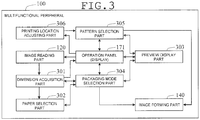
- FIG. 3 is a functional block diagram for the multifunctional peripheral of the present embodiment.
- the multifunctional peripheral 100 includes a dimension acquisition part 301, a paper selection part 302, a preview display part 303, and a packaging mode selection part 304.
- the dimension acquisition part 301 acquires dimensions of a three-dimensional object on the basis of images of two faces constituting the three-dimensional object that have been acquired by the image reading part 120.
- the reading object faces of a three-dimensional object as a packaging object on the document table 103 in turn, the images of the two faces are read by the image reading part 120.
- the two faces refer to a first face and another face (hereinafter, referred to as a second face) that crosses the first face.
- the first face is a bottom face
- the second face is any one of the side faces.
- the dimension acquisition part 301 measures the dimensions of, for example, "length” and "breadth" from the image of the first face.
- an image of the first face is referred to as a bottom face image.
- the dimension acquisition part 301 measures the dimension of "height" from the image of the second face.
- an image of the second face is referred to as a side face image.
- the three-dimensional object is preferably a rectangle parallelepiped.
- the three-dimensional object may be any three-dimensional object, for example, a truncated square pyramid, if it has an outer shape that allows packaging it practically as a rectangle parallelepiped.
- the dimension acquisition part 301 acquires the lengths of the two sides of a rectangle circumscribing the first face in the bottom face image. In addition, of the sides constituting a rectangle circumscribing the second face in the side face image, the dimension acquisition part 301 acquires the length of the side that does not constitute the circumscribing rectangle of the first face.
- the paper selection part 302 selects a paper capable of packaging the three-dimensional object on the basis of the dimensions of the three-dimensional object that have been acquired by the dimension acquisition part 301. Such dimensions are "length”, “breadth”, and “height”.
- the paper selection part 302 selects a minimum size of paper capable of packaging the three-dimensional object on the basis of the sizes of papers disposed on the manual feed tray 151 and the paper feeding cassettes 152, 153, and 154; a development view according to a later-described packaging mode; and the dimensions of the three-dimensional object.
- the paper selection part 302 selects a minimum size of paper allowing printing of a development view according to the dimensions of the three-dimensional object and the packaging mode.
- a prescribed image is printed in the image forming part 140. Then, the paper is outputted as a wrapping paper.
- folding lines a development view for packaging the three-dimensional object are printed.
- a later-described decorative pattern is printed on the other face of the paper.
- the preview display part 303 displays an appearance after packaging. This appearance after packaging is based on the dimensions of the three-dimensional object that have been acquired by the dimension acquisition part 301, and the information about the paper (the paper size) that has been selected by the paper selection part 302.
- the preview display part 303 displays the appearance after packaging on the touch panel display of the operation panel 171.
- the multifunctional peripheral 100 in the present embodiment is configured to allow a packaging mode to be selected as described later. Therefore, the packaging mode that has been selected by the user is reflected to the preview display.
- the packaging mode selection part 304 requests the user to select a packaging mode for the three-dimensional object.
- the packaging mode selection part 304 requests the user to select a packaging mode through the touch panel display of the operation panel 171.
- the packaging mode selection part 304 displays the appearances of the packaging modes on the touch panel display with selection buttons, and the like, and accepts selection by the user.
- the multifunctional peripheral 100 of the present embodiment is provided with a pattern selection part 305 and a printing location adjusting part 306.
- the pattern selection part 305 requests the user to select a decorative pattern to be printed on the paper that has been selected by the paper selection part 302.
- the pattern selection part 305 requests the user to select a packaging mode through the touch panel display of the operation panel 171.
- the pattern selection part 305 displays the appearances of the patterns on the touch panel display with selection buttons, and the like, and accepts selection by the user.
- the user can also select pattern-less printing.
- the printing location adjusting part 306 adjusts the printing location for a pattern on the paper. For example, the printing location adjusting part 306 displays an appearance including an overlapped portion of a wrapping paper on the touch panel display of the operation panel 171, and accepts adjustment of the location of the pattern in the overlapped portion, or the like, by the user.
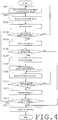
- FIG. 4 is a flow chart giving one example of wrapping paper printing procedure that is taken with the multifunctional peripheral 100.
- the user inputs an instruction for starting the wrapping paper mode to print a wrapping paper through the operation panel 171.
- the wrapping paper printing procedure is started by, for example, inputting this starting instruction as a trigger.
- the dimension acquisition part 301 requests the user to acquire a bottom face image and a side face image (step S401).
- the dimension acquisition part 301 displays a guidance screen for acquisition of a bottom face image and a side face image on the touch panel display of the operation panel 171. This guidance screen is not particularly limited.
- FIG. 5 and FIG. 6 are figures each giving one example of guidance screen that is displayed on the touch panel display 500 at this time.
- a text of "Scan bottom face” and a figure showing the bottom face of a three-dimensional object are displayed on the bottom face image acquisition guidance screen 501.
- a text of "Scan side face” and a figure showing the side face of a three-dimensional object are displayed on the side face image acquisition guidance screen 601.
- the dimension acquisition part 301 When acquisition of the bottom face image and the side face image is completed, the dimension acquisition part 301 will notify the fact to the packaging mode selection part 304.
- the packaging mode selection part 304 upon having received the notification, will request the user to select a packaging mode (step S402).
- FIG. 7 is a figure giving one example of packaging mode selection screen that the packaging mode selection part 304 displays on the touch panel display 500 at this time.
- the packaging mode selection screen 701 provides a packaging mode selection field 702 and a "Selection" button 703, which is used for confirming the selection.
- the packaging mode selection field 702 includes figures showing the appearances of "jointed wrapping", “Furoshiki wrapping", and “diagonal wrapping", and radio buttons for selecting one of these.
- FIG. 7 shows a state in which "jointed wrapping" has been selected as a default. With any one of the packaging modes having been selected, the user clicking the "Selection" button 703 will cause the selected packaging mode to be inputted to the packaging mode selection part 304.
- the packaging mode selection part 304 will notify the fact to the paper selection part 302.
- the paper selection part 302 upon having received the notification, will select a paper capable of packaging the three-dimensional object on the basis of the above-described technique (step S403). If the paper capable of packaging is not available, the paper selection part 302 will notify the user of the fact through the touch panel display of the operation panel 171, or the like.
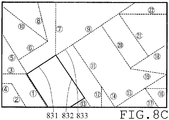
- FIG. 8A , FIG. 8B , and FIG. 8C are figures showing a development view of each of the packaging modes given as examples in FIG. 7 .
- FIG. 8A corresponds to "jointed wrapping”.
- FIG. 8B corresponds to "Furoshiki wrapping”.
- a cutoff line which indicates an unnecessary portion of the wrapping paper to be cut off, is also displayed.
- FIG. 8C corresponds to "diagonal wrapping”.
- the paper selection part 302 selects a paper by applying the "length”, “breadth”, and “height" acquired by the dimension acquisition part 301 to the development view of the packaging mode selected by the user.
- the thick lines indicate the portion where the bottom face of the three-dimensional object is to be disposed.
- the "length”, “breadth”, and “height” are, for example, sides 811, 812, and 813 (and sides opposed to these), respectively.
- the “length”, “breadth”, and “height” are, for example, sides 821, 822, and 823 (and sides opposed to these), respectively.
- the “length”, “breadth”, and “height” are, for example, sides 831, 832, and 833 (and sides opposed to these), respectively.
- the paper selection part 302 upon having selected a paper capable of packaging, will notify the fact to the packaging mode selection part 304.
- the packaging mode selection part 304 upon having received the notification, will display the information including the dimensions of the three-dimensional object that have been acquired by the dimension acquisition part 301, and the packaging mode selected by the user on the touch panel display of the operation panel 171. This is not particularly limited. Then, the user will be inquired of whether the settings are as desired (step S404).
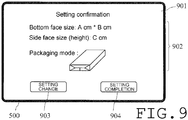
- FIG. 9 is a figure giving one example of setting confirmation screen that the packaging mode selection part 304 will display on the touch panel display 500 at this time.
- the setting confirmation screen 901 includes a setting display field 902, a "Setting change” button 903, which is used for changing the setting, and a “Setting completion” button 904, which is used for establishing the setting.
- the setting display field 902 includes the "length" and “breadth” acquired from the bottom face image, the "height" acquired from the side face image, and the packaging mode selected in the packaging mode selection screen 701.
- the packaging mode selection part 304 will notify the fact to the dimension acquisition part 301.
- the dimension acquisition part 301 will request the user to acquire a bottom face image and a side face image (S401, through No at step S404) .
- the packaging mode selection part 304 will input the information including the dimensions of the three-dimensional object acquired by the dimension acquisition part 301, the information about paper (the paper size) selected by the paper selection part 302, and the packaging mode selected by the user to the preview display part 303.
- the preview display part 303 will display the appearance after packaging on the touch panel display 500 of the operation panel 171 (S405, through Yes at step S404) .
- FIG. 10 is a figure giving one example of pattern providing screen that the preview display part 303 displays on the touch panel display 500 at this time.
- the pattern providing screen 1001 includes a preview display field 1002, a "Yes" button 1003, which is used to provide a pattern, and a "No” button 1004, which is used when no pattern is to be provided.
- the preview display part 1002 an appearance after packaging that the preview display part 303 has created on the basis of the dimensions of the three-dimensional object, the paper size, and the packaging mode that have been inputted will be displayed.
- the preview display part 303 will notify the fact to the pattern selection part 305.
- the pattern selection part 305 will request the user to select a pattern that is to be printed on the paper selected by the paper selection part 302 (S407, through Yes at step S406) .
- the pertinent pattern is a decorative pattern that is to be printed on the front face of the wrapping paper.
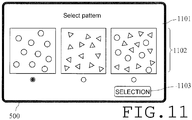
- FIG. 11 is a figure giving one example of pattern selection screen that the pattern selection part 305 will display on the touch panel display 500 at this time.
- the pattern selection screen 1101 includes a pattern selection field 1102 and a "Selection" button 1103, which is used for confirming the selection.
- the pattern selection field 1102 is comprised of figures showing a pattern in which there are disposed a plurality of characters A, which are indicated with circle marks for convenience in the figure, a pattern in which there are disposed a plurality of characters B, which are indicated with triangle marks for convenience in the figure, and a pattern in which there are disposed a plurality of characters A and characters B, and radio buttons for selecting one of these.
- FIG. 11 shows a state in which the pattern of "characters A" is selected as a default. With any one of the patterns having been selected, the user clicking the "Selection" button 1103 will cause the selected pattern to be inputted to the pattern selection part 305.
- the pattern selection part 305 will input the information about the selected pattern to the preview display part 303.
- the preview display part 303 will display the appearance of an overlapped portion for the packaging mode selected by the user with the selected pattern being provided therefor (step S408).
- FIG. 12 is a figure giving one example of pattern location adjusting screen that the preview display part 303 displays on the touch panel display 500 at this time.
- the pattern location adjusting screen 1201 includes a preview display field 1202 and a "Completion" button 1203, which is used for establishing the pattern.
- the preview display field 1202 the appearance that has been created by the preview display part 303 with the pattern being provided will be displayed.
- the state of the pattern in a portion where an overlap will occur in the paper after packaging will be preview-displayed.
- the state of the faces with which both ends of the paper overlap one upon another in the "jointed wrapping" is displayed.
- the pattern 1211 is hidden under the upper-layer paper.
- the user employs, for example, his own finger or a touch pen to drag the pattern 1211 on the touch panel display 500 to shift it to a location 1212 where the entire pattern is not hidden (step S409).
- the shifting operation is recognized by the printing location adjusting part 306, and is inputted to the preview display part 303 through the pattern selection part 305.
- the preview display field 1202 a preview display to which the pattern shifting operation by the user has been reflected is given.
- the decorative pattern and the folding lines are printed on different faces of the paper.
- the pattern location can be adjusted on the basis of the state after packaging, as described above. With such a configuration, the user can obtain a desired disposition of a pattern with extreme ease.
- the characters as the components of a pattern are disposed in a state in which each of them can be individually recognized.
- a particular component of a pattern rather than the entire pattern can be shifted independently of the others.
- a scheme in which, in a face with which both ends of the paper overlap one upon another, the location of a particular component of a pattern is shifted has been used as an example.
- a scheme that allows the user to optionally select a face in which a particular component of a pattern is to be shifted can be adopted.
- Pattern component shifting as described above can be performed until the user clicks the "Completion” button 1203 (in other words, the path from No at S410 to Yes at step S409 can be followed as many times as required) .
- the preview display part 303 will display the appearance including the pattern after packaging on the touch panel display of the operation panel 171.
- the preview display part 303 will inquire the user of whether to execute printing or not (Yes or No at step S412).
- FIG. 13 is a figure giving one example of final confirmation screen that the preview display part 303 will display on the touch panel display 500 at this time.
- the final confirmation screen 1301 includes a preview display field 1302, a "Print” button 1303, which is used for executing printing, and a "Setting change” button 1304, which is used for changing the setting that has been inputted.
- the preview display field 1302 the dimensions of the three-dimensional object, the paper size, the packaging mode, and the appearance after packaging that have been inputted will be displayed. The appearance after packaging will be created by the preview display part 303 on the basis of the selected pattern.
- the user clicking the "Print” button 1303 will cause the preview display part 303 to notify the fact to the packaging mode selection part 304 and the pattern selection part 305 (No at step S412).
- the packaging mode selection part 304 and the pattern selection part 305 will instruct the image forming part 140 to print a wrapping paper under the conditions set. Thereby, in the image forming part 140, the wrapping paper will be printed (step S413).
- a development view shown in FIG. 8 in other words, folding lines for packaging the three-dimensional object are printed.
- the numbers that indicate the order of folding in packaging are printed, and thus the user can easily package the three-dimensional object.
- the user clicking the "Setting change” button 1304 will cause the preview display part 303 to notify the fact to the packaging mode selection part 304.
- the packaging mode selection part 304 will display the packaging mode selection screen 701 on the touch panel display 500.
- the packaging mode selection part 304 will request the user to select a packaging mode (S402, through Yes step S412). Thereby, the user can execute resetting, starting from selection of a packaging mode.
- the user clicking the "No" button 1004 will cause the preview display part 303 to notify the fact to the packaging mode selection part 304.
- the packaging mode selection part 304 will instruct the image forming part 140 to print a wrapping paper (S413, through No at step S406).
- the multifunctional peripheral 100 uses the image reading part 120 to acquire the dimensions of a three-dimensional object. Thereby, the multifunctional peripheral 100 can prepare a wrapping paper for packaging the three-dimensional object. Therefore, the user can easily obtain a desired wrapping paper by acquiring images of two faces constituting the three-dimensional object.
- the multifunctional peripheral 100 is provided with the preview display part 303. Therefore, the user can easily comprehend the state of after packaging. Further, the packaging mode selection part 304 is provided, whereby a desired packaging mode can be selected.
- the pattern selection part 305 and the printing location adjusting part 306 are provided. Therefore, in an overlapping location of the packaging paper, or the like, the location of a decorative pattern can be freely adjusted.
- the applications for wrapping papers are not limited to packaging of printed matters as contemplated by the typical art. From the viewpoint of amount of demand, it can be supposed that the amount of demand for packaging of three-dimensional objects is larger than that for packaging of printed matters.
- the application that is contemplated by the typical art is printing of wrapping papers for use with printed matters. Therefore, the typical art cannot accommodate printing of wrapping papers for use with three-dimensional objects.
- the image forming apparatus of the present disclosure can easily print wrapping papers for packaging three-dimensional objects.
- an image forming apparatus that is not provided with these components can easily print a wrapping paper for packaging a three-dimensional object in a specific packaging mode.
- a configuration in which folding lines for packaging a three-dimensional object are printed on one face of a wrapping paper has been supposed.
- the wrapping paper is printed only with lines indicating the location where a three-dimensional object is to be disposed and a part of the folding lines, it can function as a wrapping paper.
- the flow chart shown in FIG. 4 can be altered in the order of the respective steps as appropriate, provided that an equivalent function is obtained.
- the preview display step S405 can be performed before the setting completion confirmation step S404.
- step S412 which inquires the user of whether to execute printing or not, clicking the "Setting change" button 1304 allows the user to make resetting, starting from selecting a packaging mode.
- step S406 the location where resetting is to be started may be specified to be a step, such as that for selecting providing of a pattern (step S406), rather than that for selecting a packaging mode.
- the present disclosure has been implemented as a digital multifunctional peripheral.
- the present disclosure is applicable to any image forming apparatuses, such as printers and copying machines.
- a wrapping paper for packaging a three-dimensional object can be easily printed. Therefore, the image forming apparatus of the present disclosure is extremely useful as an image forming apparatus.
Landscapes
- Engineering & Computer Science (AREA)
- Theoretical Computer Science (AREA)
- Human Computer Interaction (AREA)
- General Physics & Mathematics (AREA)
- Physics & Mathematics (AREA)
- General Engineering & Computer Science (AREA)
- Mechanical Engineering (AREA)
- Signal Processing (AREA)
- Multimedia (AREA)
- Quality & Reliability (AREA)
- Record Information Processing For Printing (AREA)
- Facsimiles In General (AREA)
- Accessory Devices And Overall Control Thereof (AREA)
Claims (5)
- Bilderzeugungsvorrichtung mit der Fähigkeit zum Bedrucken von Einschlagpapier zum Verpacken eines dreidimensionalen Objekts, die Folgendes umfasst:einen Bildleseteil (120) zum Erfassen eines Bildes eines auf einem Dokumententisch liegenden Objekts,einen Abmessungserfassungsteil (301) zum Erfassen von Abmessungen des dreidimensionalen Objekts auf der Basis des Bildes von einer Fläche des dreidimensionalen Objekts und des Bildes einer anderen Fläche, die die eine Fläche des dreidimensionalen Objekts kreuzt, wobei die Bilder vom Bildleseteil (120) erfasst wurden,einen Papierauswahlteil (302) zum Auswählen von Papier, mit dem das dreidimensionale Objekt verpackt werden kann, auf der Basis der Abmessungen des dreidimensionalen Objekts, wobei die Abmessungen vom Bilderfassungsteil (301) erfasst wurden, undeinen Bilderzeugungsteil (140) zum Ausgeben eines Einschlagpapiers, das mit einem Bild auf dem Papier bedruckt ist, wobei das Papier vom Papierauswahlteil (302) ausgewählt wurde,gekennzeichnet durcheinen Verpackungsmodusauswahlteil (304), der einen Benutzer auffordert, einen Verpackungsmodus für das dreidimensionale Objekt auszuwählen;einen Musterauswahlteil (305) zum Auffordern eines Benutzers, ein auf das Papier zu druckendes Muster auszuwählen,einen Voransichtsanzeigeteil (303) mit der Aufgabe, in einem Touchpanel-Display (500) eine Voransicht eines überlappten Abschnitts des Einschlagpapiers anzuzeigen, der nach dem Verpacken auftreten wird, mit dem darauf gezeigten ausgewählten Muster, auf der Basis des gewählten Verpackungsmodus und des gewählten Musters, wobei die Voransicht zeigt, ob eine Komponente des Musters unter dem überlappten Abschnitt verborgen sein wird; undeinen Druckpositionsjustierteil (306) mit der Aufgabe, eine Druckposition des Musters auf dem Papier durch Ziehen des Musters im Touchpanel-Display (500) und Verschieben zu justieren, wobei das Ergebnis der genannten Justierung in der genannten Voransicht reflektiert ist.
- Bilderzeugungsvorrichtung nach Anspruch 1, wobei
der Bilderzeugungsteil (140) Faltlinien zum Verpacken des dreidimensionalen Objekts auf eine Fläche eines Papiers druckt. - Bilderzeugungsvorrichtung nach Anspruch 1 oder 2, das ferner Folgendes umfasst:
den Voransichtsanzeigeteil (303) zum Anzeigen eines Aussehens nach dem Verpacken auf der Basis der Abmessungen des dreidimensionalen Objekts, wobei die Abmessungen vom Abmessungserfassungsteil (301) erfasst wurden, und einer Information über das Papier nach dem Auswählen durch den Papierauswählteil (302). - Bilderzeugungsvorrichtung nach einem der Ansprüche 1 bis 3, wobei das dreidimensionale Objekt ein rechteckiges Parallelepiped ist.
- Verfahren zur Bilderzeugung, implementiert durch eine Bilderzeugungsvorrichtung mit der Fähigkeit, ein Einschlagpapier zum Verpacken eines dreidimensionalen Objekts zu bedrucken, wobei das Verfahren Folgendes beinhaltet:Erfassen eines Bildes eines auf einem Dokumententisch liegenden Objekts,Erfassen von Abmessungen des dreidimensionalen Objekts auf der Basis des erfassten Bildes von einer Fläche des dreidimensionalen Objekts und des erfassten Bildes einer anderen Fläche, die die eine Fläche des dreidimensionalen Objekts kreuzt,Auswählen eines Papiers, mit dem das dreidimensionale Objekt verpackt werden kann, auf der Basis der erfassten Abmessungen des dreidimensionalen Objekts, gekennzeichnet durchAuffordern eines Benutzers, einen Verpackungsmodus für das dreidimensionale Objekt auszuwählen;Akzeptieren einer Auswahl des Verpackungsmodus;Auffordern eines Benutzers, ein auf das Papier zu druckendes Muster auszuwählen;Akzeptieren einer Auswahl des Musters;Anzeigen einer Voransicht eines überlappten Abschnitts des Einschlagpapiers, der nach dem Verpacken auftreten wird, mit dem darauf gezeigten gewählten Muster, auf der Basis des gewählten Verpackungsmodus und des gewählten Musters, wobei die Voransicht zeigt, ob eine Komponente des Musters unter dem überlappten Abschnitt verborgen sein wird;Empfangen von Befehlen vom Benutzer zum Justieren einer Druckposition der Komponente des Musters auf dem Papier durch Ziehen des Musters und Verschieben;Anzeigen einer Voransicht des Ergebnisses der genannten Justierung; undAusgeben eines Einschlagpapiers nach dem Aufdrucken eines Bildes auf das gewählte Papier.
Applications Claiming Priority (1)
| Application Number | Priority Date | Filing Date | Title |
|---|---|---|---|
| JP2014132454A JP6331767B2 (ja) | 2014-06-27 | 2014-06-27 | 画像形成装置 |
Publications (2)
| Publication Number | Publication Date |
|---|---|
| EP2960780A1 EP2960780A1 (de) | 2015-12-30 |
| EP2960780B1 true EP2960780B1 (de) | 2020-05-20 |
Family
ID=53757959
Family Applications (1)
| Application Number | Title | Priority Date | Filing Date |
|---|---|---|---|
| EP15173998.4A Active EP2960780B1 (de) | 2014-06-27 | 2015-06-26 | Bilderzeugungsvorrichtung und bilderzeugungsverfahren |
Country Status (4)
| Country | Link |
|---|---|
| US (1) | US20150375496A1 (de) |
| EP (1) | EP2960780B1 (de) |
| JP (1) | JP6331767B2 (de) |
| CN (1) | CN105227798B (de) |
Families Citing this family (8)
| Publication number | Priority date | Publication date | Assignee | Title |
|---|---|---|---|---|
| US10158767B2 (en) | 2015-06-09 | 2018-12-18 | Ricoh Company, Ltd. | Image capturing apparatus, image forming apparatus, distance measuring method, and computer-readable recording medium |
| US20180072448A1 (en) * | 2016-09-09 | 2018-03-15 | Fuji Xerox Co., Ltd. | Development view information generation device and wrapping sheet output apparatus |
| JP6693463B2 (ja) * | 2017-04-21 | 2020-05-13 | 京セラドキュメントソリューションズ株式会社 | 画像形成装置 |
| JP7167738B2 (ja) * | 2019-01-31 | 2022-11-09 | コニカミノルタ株式会社 | 印刷装置、制御方法及びコンピュータープログラム |
| JP7242367B2 (ja) * | 2019-03-22 | 2023-03-20 | キヤノン株式会社 | 包装材データ算出装置および包装材データ算出方法 |
| JP7479141B2 (ja) * | 2019-12-12 | 2024-05-08 | 東芝テック株式会社 | 画像形成装置 |
| CN111498166B (zh) * | 2020-03-16 | 2022-05-20 | 长沙世通纸塑箸业有限公司 | 一种改进的筷子包装方法 |
| JP2024053340A (ja) * | 2022-10-03 | 2024-04-15 | セイコーエプソン株式会社 | 画像処理装置、印刷システムおよび画像処理プログラム |
Family Cites Families (12)
| Publication number | Priority date | Publication date | Assignee | Title |
|---|---|---|---|---|
| US4796201A (en) * | 1985-04-30 | 1989-01-03 | Wake Warren K | Stored program controlled system for creating and printing graphics bearing packaging |
| JP2002211072A (ja) * | 2000-10-03 | 2002-07-31 | Yasuhiro Yoshida | 包装紙作成装置、包装紙作成システム、及び包装紙 |
| US6470232B2 (en) * | 2001-01-18 | 2002-10-22 | Hewlett-Packard Company | Customized wrapping paper kiosk |
| US20030166443A1 (en) * | 2002-02-14 | 2003-09-04 | Eastman Kodak Company | Method of producing a package wrapper |
| US7396320B2 (en) * | 2003-10-16 | 2008-07-08 | Steven Tchira | Pre-folded and pre-glued flower wrap sheets and methods for making |
| US7530210B2 (en) * | 2007-06-21 | 2009-05-12 | Xerox Corporation | Custom package wrap |
| JP2010189038A (ja) * | 2009-02-18 | 2010-09-02 | Ricoh Co Ltd | 情報処理装置、画像形成装置、折り方情報生成方法、折り方情報生成プログラム及び記録媒体 |
| US8261983B2 (en) * | 2009-12-17 | 2012-09-11 | Amazon Technologies, Inc. | Generating customized packaging |
| JP2012040850A (ja) * | 2010-08-23 | 2012-03-01 | Canon Inc | 印刷装置、印刷方法、および、プログラム |
| JP5672048B2 (ja) * | 2011-02-18 | 2015-02-18 | 富士ゼロックス株式会社 | 包装紙印刷装置及びプログラム |
| JP2013065196A (ja) * | 2011-09-16 | 2013-04-11 | Fuji Xerox Co Ltd | 包装支援装置、包装支援プログラム及び包装材 |
| JP2013241213A (ja) * | 2012-05-18 | 2013-12-05 | Masachika Yaguchi | 折る部位と順番を記したプラスチック製買い物袋 |
-
2014
- 2014-06-27 JP JP2014132454A patent/JP6331767B2/ja not_active Expired - Fee Related
-
2015
- 2015-06-25 CN CN201510358728.6A patent/CN105227798B/zh not_active Expired - Fee Related
- 2015-06-26 EP EP15173998.4A patent/EP2960780B1/de active Active
- 2015-06-27 US US14/752,877 patent/US20150375496A1/en not_active Abandoned
Non-Patent Citations (1)
| Title |
|---|
| None * |
Also Published As
| Publication number | Publication date |
|---|---|
| JP6331767B2 (ja) | 2018-05-30 |
| CN105227798A (zh) | 2016-01-06 |
| CN105227798B (zh) | 2018-06-05 |
| US20150375496A1 (en) | 2015-12-31 |
| JP2016010872A (ja) | 2016-01-21 |
| EP2960780A1 (de) | 2015-12-30 |
Similar Documents
| Publication | Publication Date | Title |
|---|---|---|
| EP2960780B1 (de) | Bilderzeugungsvorrichtung und bilderzeugungsverfahren | |
| CA2048754C (en) | Touch screen user interface with expanding touch locations for a reprographic machine | |
| US10063722B2 (en) | Image forming apparatus configured to display function setting buttons and switch display mode between first display mode and second display mode and image recording medium | |
| US8365077B2 (en) | Help menu display processing with reference to provisional and definitive user selections | |
| JP4443596B2 (ja) | 画像形成装置 | |
| US20060120616A1 (en) | Equipment and image forming system | |
| CN104135587B (zh) | 电子设备和印刷预览方法 | |
| US10063724B2 (en) | User interface for modifying a control's appearance to reflect a device's configuration | |
| JP2009098966A (ja) | 原稿読取装置 | |
| JP7279737B2 (ja) | 情報処理装置、画像形成装置、プログラム、および、システム | |
| JP6213418B2 (ja) | 画像形成装置 | |
| US12106000B2 (en) | Printed material production system, printing method, and non-transitory computer-readable storage medium storing printed material production program | |
| JP5547134B2 (ja) | 画像形成システム及び画像形成システムの設定条件入力方法 | |
| US20130057914A1 (en) | Image forming apparatus and non-transitory computer readable recording medium stored with control program for image forming apparatus | |
| JP2005117080A (ja) | 表示装置、これを備えた画像形成装置及び入力受付装置 | |
| JP6552156B2 (ja) | データ処理装置、操作受付方法およびコンテンツ表示プログラム | |
| JP2012114877A (ja) | 画像読取制御装置、画像形成装置および画像読取方法 | |
| JP4870474B2 (ja) | パーツカタログ表示システムおよびその制御方法 | |
| US20130188220A1 (en) | Image forming apparatus and computer | |
| JP6447539B2 (ja) | 電子機器 | |
| JP5838179B2 (ja) | 印刷プレビュープログラムおよび電子機器 | |
| US20100066699A1 (en) | Image Displaying Device | |
| US20170061264A1 (en) | Image forming apparatus | |
| JP2019068442A (ja) | 情報処理装置及びプログラム | |
| KR20070000803A (ko) | 디지털 복사기 및 그 디스플레이 제어방법 |
Legal Events
| Date | Code | Title | Description |
|---|---|---|---|
| PUAI | Public reference made under article 153(3) epc to a published international application that has entered the european phase |
Free format text: ORIGINAL CODE: 0009012 |
|
| 17P | Request for examination filed |
Effective date: 20150626 |
|
| AK | Designated contracting states |
Kind code of ref document: A1 Designated state(s): AL AT BE BG CH CY CZ DE DK EE ES FI FR GB GR HR HU IE IS IT LI LT LU LV MC MK MT NL NO PL PT RO RS SE SI SK SM TR |
|
| AX | Request for extension of the european patent |
Extension state: BA ME |
|
| RBV | Designated contracting states (corrected) |
Designated state(s): AL AT BE BG CH CY CZ DE DK EE ES FI FR GB GR HR HU IE IS IT LI LT LU LV MC MK MT NL NO PL PT RO RS SE SI SK SM TR |
|
| STAA | Information on the status of an ep patent application or granted ep patent |
Free format text: STATUS: EXAMINATION IS IN PROGRESS |
|
| 17Q | First examination report despatched |
Effective date: 20181206 |
|
| GRAP | Despatch of communication of intention to grant a patent |
Free format text: ORIGINAL CODE: EPIDOSNIGR1 |
|
| STAA | Information on the status of an ep patent application or granted ep patent |
Free format text: STATUS: GRANT OF PATENT IS INTENDED |
|
| INTG | Intention to grant announced |
Effective date: 20191212 |
|
| GRAS | Grant fee paid |
Free format text: ORIGINAL CODE: EPIDOSNIGR3 |
|
| GRAA | (expected) grant |
Free format text: ORIGINAL CODE: 0009210 |
|
| STAA | Information on the status of an ep patent application or granted ep patent |
Free format text: STATUS: THE PATENT HAS BEEN GRANTED |
|
| AK | Designated contracting states |
Kind code of ref document: B1 Designated state(s): AL AT BE BG CH CY CZ DE DK EE ES FI FR GB GR HR HU IE IS IT LI LT LU LV MC MK MT NL NO PL PT RO RS SE SI SK SM TR |
|
| REG | Reference to a national code |
Ref country code: GB Ref legal event code: FG4D |
|
| REG | Reference to a national code |
Ref country code: CH Ref legal event code: EP |
|
| REG | Reference to a national code |
Ref country code: DE Ref legal event code: R096 Ref document number: 602015052980 Country of ref document: DE |
|
| REG | Reference to a national code |
Ref country code: AT Ref legal event code: REF Ref document number: 1273030 Country of ref document: AT Kind code of ref document: T Effective date: 20200615 |
|
| REG | Reference to a national code |
Ref country code: LT Ref legal event code: MG4D |
|
| REG | Reference to a national code |
Ref country code: NL Ref legal event code: MP Effective date: 20200520 |
|
| PG25 | Lapsed in a contracting state [announced via postgrant information from national office to epo] |
Ref country code: LT Free format text: LAPSE BECAUSE OF FAILURE TO SUBMIT A TRANSLATION OF THE DESCRIPTION OR TO PAY THE FEE WITHIN THE PRESCRIBED TIME-LIMIT Effective date: 20200520 Ref country code: GR Free format text: LAPSE BECAUSE OF FAILURE TO SUBMIT A TRANSLATION OF THE DESCRIPTION OR TO PAY THE FEE WITHIN THE PRESCRIBED TIME-LIMIT Effective date: 20200821 Ref country code: SE Free format text: LAPSE BECAUSE OF FAILURE TO SUBMIT A TRANSLATION OF THE DESCRIPTION OR TO PAY THE FEE WITHIN THE PRESCRIBED TIME-LIMIT Effective date: 20200520 Ref country code: NO Free format text: LAPSE BECAUSE OF FAILURE TO SUBMIT A TRANSLATION OF THE DESCRIPTION OR TO PAY THE FEE WITHIN THE PRESCRIBED TIME-LIMIT Effective date: 20200820 Ref country code: FI Free format text: LAPSE BECAUSE OF FAILURE TO SUBMIT A TRANSLATION OF THE DESCRIPTION OR TO PAY THE FEE WITHIN THE PRESCRIBED TIME-LIMIT Effective date: 20200520 Ref country code: IS Free format text: LAPSE BECAUSE OF FAILURE TO SUBMIT A TRANSLATION OF THE DESCRIPTION OR TO PAY THE FEE WITHIN THE PRESCRIBED TIME-LIMIT Effective date: 20200920 Ref country code: PT Free format text: LAPSE BECAUSE OF FAILURE TO SUBMIT A TRANSLATION OF THE DESCRIPTION OR TO PAY THE FEE WITHIN THE PRESCRIBED TIME-LIMIT Effective date: 20200921 |
|
| PG25 | Lapsed in a contracting state [announced via postgrant information from national office to epo] |
Ref country code: HR Free format text: LAPSE BECAUSE OF FAILURE TO SUBMIT A TRANSLATION OF THE DESCRIPTION OR TO PAY THE FEE WITHIN THE PRESCRIBED TIME-LIMIT Effective date: 20200520 Ref country code: RS Free format text: LAPSE BECAUSE OF FAILURE TO SUBMIT A TRANSLATION OF THE DESCRIPTION OR TO PAY THE FEE WITHIN THE PRESCRIBED TIME-LIMIT Effective date: 20200520 Ref country code: BG Free format text: LAPSE BECAUSE OF FAILURE TO SUBMIT A TRANSLATION OF THE DESCRIPTION OR TO PAY THE FEE WITHIN THE PRESCRIBED TIME-LIMIT Effective date: 20200820 Ref country code: LV Free format text: LAPSE BECAUSE OF FAILURE TO SUBMIT A TRANSLATION OF THE DESCRIPTION OR TO PAY THE FEE WITHIN THE PRESCRIBED TIME-LIMIT Effective date: 20200520 |
|
| REG | Reference to a national code |
Ref country code: AT Ref legal event code: MK05 Ref document number: 1273030 Country of ref document: AT Kind code of ref document: T Effective date: 20200520 |
|
| PG25 | Lapsed in a contracting state [announced via postgrant information from national office to epo] |
Ref country code: NL Free format text: LAPSE BECAUSE OF FAILURE TO SUBMIT A TRANSLATION OF THE DESCRIPTION OR TO PAY THE FEE WITHIN THE PRESCRIBED TIME-LIMIT Effective date: 20200520 Ref country code: AL Free format text: LAPSE BECAUSE OF FAILURE TO SUBMIT A TRANSLATION OF THE DESCRIPTION OR TO PAY THE FEE WITHIN THE PRESCRIBED TIME-LIMIT Effective date: 20200520 |
|
| PG25 | Lapsed in a contracting state [announced via postgrant information from national office to epo] |
Ref country code: IT Free format text: LAPSE BECAUSE OF FAILURE TO SUBMIT A TRANSLATION OF THE DESCRIPTION OR TO PAY THE FEE WITHIN THE PRESCRIBED TIME-LIMIT Effective date: 20200520 Ref country code: DK Free format text: LAPSE BECAUSE OF FAILURE TO SUBMIT A TRANSLATION OF THE DESCRIPTION OR TO PAY THE FEE WITHIN THE PRESCRIBED TIME-LIMIT Effective date: 20200520 Ref country code: SM Free format text: LAPSE BECAUSE OF FAILURE TO SUBMIT A TRANSLATION OF THE DESCRIPTION OR TO PAY THE FEE WITHIN THE PRESCRIBED TIME-LIMIT Effective date: 20200520 Ref country code: AT Free format text: LAPSE BECAUSE OF FAILURE TO SUBMIT A TRANSLATION OF THE DESCRIPTION OR TO PAY THE FEE WITHIN THE PRESCRIBED TIME-LIMIT Effective date: 20200520 Ref country code: EE Free format text: LAPSE BECAUSE OF FAILURE TO SUBMIT A TRANSLATION OF THE DESCRIPTION OR TO PAY THE FEE WITHIN THE PRESCRIBED TIME-LIMIT Effective date: 20200520 Ref country code: RO Free format text: LAPSE BECAUSE OF FAILURE TO SUBMIT A TRANSLATION OF THE DESCRIPTION OR TO PAY THE FEE WITHIN THE PRESCRIBED TIME-LIMIT Effective date: 20200520 Ref country code: CZ Free format text: LAPSE BECAUSE OF FAILURE TO SUBMIT A TRANSLATION OF THE DESCRIPTION OR TO PAY THE FEE WITHIN THE PRESCRIBED TIME-LIMIT Effective date: 20200520 Ref country code: ES Free format text: LAPSE BECAUSE OF FAILURE TO SUBMIT A TRANSLATION OF THE DESCRIPTION OR TO PAY THE FEE WITHIN THE PRESCRIBED TIME-LIMIT Effective date: 20200520 |
|
| REG | Reference to a national code |
Ref country code: CH Ref legal event code: PL |
|
| REG | Reference to a national code |
Ref country code: DE Ref legal event code: R097 Ref document number: 602015052980 Country of ref document: DE |
|
| PG25 | Lapsed in a contracting state [announced via postgrant information from national office to epo] |
Ref country code: MC Free format text: LAPSE BECAUSE OF FAILURE TO SUBMIT A TRANSLATION OF THE DESCRIPTION OR TO PAY THE FEE WITHIN THE PRESCRIBED TIME-LIMIT Effective date: 20200520 Ref country code: SK Free format text: LAPSE BECAUSE OF FAILURE TO SUBMIT A TRANSLATION OF THE DESCRIPTION OR TO PAY THE FEE WITHIN THE PRESCRIBED TIME-LIMIT Effective date: 20200520 Ref country code: PL Free format text: LAPSE BECAUSE OF FAILURE TO SUBMIT A TRANSLATION OF THE DESCRIPTION OR TO PAY THE FEE WITHIN THE PRESCRIBED TIME-LIMIT Effective date: 20200520 |
|
| PLBE | No opposition filed within time limit |
Free format text: ORIGINAL CODE: 0009261 |
|
| STAA | Information on the status of an ep patent application or granted ep patent |
Free format text: STATUS: NO OPPOSITION FILED WITHIN TIME LIMIT |
|
| PG25 | Lapsed in a contracting state [announced via postgrant information from national office to epo] |
Ref country code: LU Free format text: LAPSE BECAUSE OF NON-PAYMENT OF DUE FEES Effective date: 20200626 |
|
| REG | Reference to a national code |
Ref country code: BE Ref legal event code: MM Effective date: 20200630 |
|
| 26N | No opposition filed |
Effective date: 20210223 |
|
| PG25 | Lapsed in a contracting state [announced via postgrant information from national office to epo] |
Ref country code: LI Free format text: LAPSE BECAUSE OF NON-PAYMENT OF DUE FEES Effective date: 20200630 Ref country code: IE Free format text: LAPSE BECAUSE OF NON-PAYMENT OF DUE FEES Effective date: 20200626 Ref country code: CH Free format text: LAPSE BECAUSE OF NON-PAYMENT OF DUE FEES Effective date: 20200630 |
|
| PG25 | Lapsed in a contracting state [announced via postgrant information from national office to epo] |
Ref country code: BE Free format text: LAPSE BECAUSE OF NON-PAYMENT OF DUE FEES Effective date: 20200630 Ref country code: SI Free format text: LAPSE BECAUSE OF FAILURE TO SUBMIT A TRANSLATION OF THE DESCRIPTION OR TO PAY THE FEE WITHIN THE PRESCRIBED TIME-LIMIT Effective date: 20200520 |
|
| PG25 | Lapsed in a contracting state [announced via postgrant information from national office to epo] |
Ref country code: TR Free format text: LAPSE BECAUSE OF FAILURE TO SUBMIT A TRANSLATION OF THE DESCRIPTION OR TO PAY THE FEE WITHIN THE PRESCRIBED TIME-LIMIT Effective date: 20200520 Ref country code: MT Free format text: LAPSE BECAUSE OF FAILURE TO SUBMIT A TRANSLATION OF THE DESCRIPTION OR TO PAY THE FEE WITHIN THE PRESCRIBED TIME-LIMIT Effective date: 20200520 Ref country code: CY Free format text: LAPSE BECAUSE OF FAILURE TO SUBMIT A TRANSLATION OF THE DESCRIPTION OR TO PAY THE FEE WITHIN THE PRESCRIBED TIME-LIMIT Effective date: 20200520 |
|
| PG25 | Lapsed in a contracting state [announced via postgrant information from national office to epo] |
Ref country code: MK Free format text: LAPSE BECAUSE OF FAILURE TO SUBMIT A TRANSLATION OF THE DESCRIPTION OR TO PAY THE FEE WITHIN THE PRESCRIBED TIME-LIMIT Effective date: 20200520 |
|
| PGFP | Annual fee paid to national office [announced via postgrant information from national office to epo] |
Ref country code: GB Payment date: 20220506 Year of fee payment: 8 Ref country code: FR Payment date: 20220510 Year of fee payment: 8 Ref country code: DE Payment date: 20220505 Year of fee payment: 8 |
|
| P01 | Opt-out of the competence of the unified patent court (upc) registered |
Effective date: 20230420 |
|
| REG | Reference to a national code |
Ref country code: DE Ref legal event code: R119 Ref document number: 602015052980 Country of ref document: DE |
|
| GBPC | Gb: european patent ceased through non-payment of renewal fee |
Effective date: 20230626 |
|
| PG25 | Lapsed in a contracting state [announced via postgrant information from national office to epo] |
Ref country code: DE Free format text: LAPSE BECAUSE OF NON-PAYMENT OF DUE FEES Effective date: 20240103 Ref country code: GB Free format text: LAPSE BECAUSE OF NON-PAYMENT OF DUE FEES Effective date: 20230626 |
|
| PG25 | Lapsed in a contracting state [announced via postgrant information from national office to epo] |
Ref country code: FR Free format text: LAPSE BECAUSE OF NON-PAYMENT OF DUE FEES Effective date: 20230630 |