EP2937780A1 - Device and method for limiting background data transmission - Google Patents
Device and method for limiting background data transmission Download PDFInfo
- Publication number
- EP2937780A1 EP2937780A1 EP15165018.1A EP15165018A EP2937780A1 EP 2937780 A1 EP2937780 A1 EP 2937780A1 EP 15165018 A EP15165018 A EP 15165018A EP 2937780 A1 EP2937780 A1 EP 2937780A1
- Authority
- EP
- European Patent Office
- Prior art keywords
- information processing
- processing terminal
- web browser
- setting
- web application
- Prior art date
- Legal status (The legal status is an assumption and is not a legal conclusion. Google has not performed a legal analysis and makes no representation as to the accuracy of the status listed.)
- Withdrawn
Links
Images





Classifications
-
- H—ELECTRICITY
- H04—ELECTRIC COMMUNICATION TECHNIQUE
- H04L—TRANSMISSION OF DIGITAL INFORMATION, e.g. TELEGRAPHIC COMMUNICATION
- H04L43/00—Arrangements for monitoring or testing data switching networks
- H04L43/08—Monitoring or testing based on specific metrics, e.g. QoS, energy consumption or environmental parameters
- H04L43/0805—Monitoring or testing based on specific metrics, e.g. QoS, energy consumption or environmental parameters by checking availability
- H04L43/0811—Monitoring or testing based on specific metrics, e.g. QoS, energy consumption or environmental parameters by checking availability by checking connectivity
-
- G—PHYSICS
- G06—COMPUTING OR CALCULATING; COUNTING
- G06F—ELECTRIC DIGITAL DATA PROCESSING
- G06F16/00—Information retrieval; Database structures therefor; File system structures therefor
- G06F16/20—Information retrieval; Database structures therefor; File system structures therefor of structured data, e.g. relational data
- G06F16/22—Indexing; Data structures therefor; Storage structures
-
- G—PHYSICS
- G06—COMPUTING OR CALCULATING; COUNTING
- G06F—ELECTRIC DIGITAL DATA PROCESSING
- G06F9/00—Arrangements for program control, e.g. control units
- G06F9/06—Arrangements for program control, e.g. control units using stored programs, i.e. using an internal store of processing equipment to receive or retain programs
- G06F9/44—Arrangements for executing specific programs
- G06F9/445—Program loading or initiating
- G06F9/44505—Configuring for program initiating, e.g. using registry, configuration files
-
- H—ELECTRICITY
- H04—ELECTRIC COMMUNICATION TECHNIQUE
- H04L—TRANSMISSION OF DIGITAL INFORMATION, e.g. TELEGRAPHIC COMMUNICATION
- H04L67/00—Network arrangements or protocols for supporting network services or applications
- H04L67/01—Protocols
- H04L67/02—Protocols based on web technology, e.g. hypertext transfer protocol [HTTP]
-
- H—ELECTRICITY
- H04—ELECTRIC COMMUNICATION TECHNIQUE
- H04L—TRANSMISSION OF DIGITAL INFORMATION, e.g. TELEGRAPHIC COMMUNICATION
- H04L67/00—Network arrangements or protocols for supporting network services or applications
- H04L67/01—Protocols
- H04L67/10—Protocols in which an application is distributed across nodes in the network
- H04L67/104—Peer-to-peer [P2P] networks
- H04L67/1044—Group management mechanisms
- H04L67/1053—Group management mechanisms with pre-configuration of logical or physical connections with a determined number of other peers
- H04L67/1055—Group management mechanisms with pre-configuration of logical or physical connections with a determined number of other peers involving connection limits
-
- H—ELECTRICITY
- H04—ELECTRIC COMMUNICATION TECHNIQUE
- H04M—TELEPHONIC COMMUNICATION
- H04M1/00—Substation equipment, e.g. for use by subscribers
- H04M1/72—Mobile telephones; Cordless telephones, i.e. devices for establishing wireless links to base stations without route selection
- H04M1/724—User interfaces specially adapted for cordless or mobile telephones
- H04M1/72403—User interfaces specially adapted for cordless or mobile telephones with means for local support of applications that increase the functionality
- H04M1/72445—User interfaces specially adapted for cordless or mobile telephones with means for local support of applications that increase the functionality for supporting Internet browser applications
-
- H—ELECTRICITY
- H04—ELECTRIC COMMUNICATION TECHNIQUE
- H04M—TELEPHONIC COMMUNICATION
- H04M1/00—Substation equipment, e.g. for use by subscribers
- H04M1/72—Mobile telephones; Cordless telephones, i.e. devices for establishing wireless links to base stations without route selection
- H04M1/724—User interfaces specially adapted for cordless or mobile telephones
- H04M1/72448—User interfaces specially adapted for cordless or mobile telephones with means for adapting the functionality of the device according to specific conditions
- H04M1/72463—User interfaces specially adapted for cordless or mobile telephones with means for adapting the functionality of the device according to specific conditions to restrict the functionality of the device
-
- H—ELECTRICITY
- H04—ELECTRIC COMMUNICATION TECHNIQUE
- H04M—TELEPHONIC COMMUNICATION
- H04M2250/00—Details of telephonic subscriber devices
- H04M2250/06—Details of telephonic subscriber devices including a wireless LAN interface
-
- H—ELECTRICITY
- H04—ELECTRIC COMMUNICATION TECHNIQUE
- H04W—WIRELESS COMMUNICATION NETWORKS
- H04W52/00—Power management, e.g. Transmission Power Control [TPC] or power classes
- H04W52/02—Power saving arrangements
- H04W52/0209—Power saving arrangements in terminal devices
- H04W52/0261—Power saving arrangements in terminal devices managing power supply demand, e.g. depending on battery level
-
- Y—GENERAL TAGGING OF NEW TECHNOLOGICAL DEVELOPMENTS; GENERAL TAGGING OF CROSS-SECTIONAL TECHNOLOGIES SPANNING OVER SEVERAL SECTIONS OF THE IPC; TECHNICAL SUBJECTS COVERED BY FORMER USPC CROSS-REFERENCE ART COLLECTIONS [XRACs] AND DIGESTS
- Y02—TECHNOLOGIES OR APPLICATIONS FOR MITIGATION OR ADAPTATION AGAINST CLIMATE CHANGE
- Y02D—CLIMATE CHANGE MITIGATION TECHNOLOGIES IN INFORMATION AND COMMUNICATION TECHNOLOGIES [ICT], I.E. INFORMATION AND COMMUNICATION TECHNOLOGIES AIMING AT THE REDUCTION OF THEIR OWN ENERGY USE
- Y02D30/00—Reducing energy consumption in communication networks
- Y02D30/70—Reducing energy consumption in communication networks in wireless communication networks
Definitions
- the present invention relates to a technique for providing a new mechanism of a data storage for a web browser in Hyper Text markup Language (HTML) 5.
- HTML Hyper Text markup Language
- HTML5 HyperText Markup Language
- extended functions in HTML5 have been developed in response to advancement of functions of a web application.
- extended functions have been provided for operating the web application offline, due to the widespread use of information processing terminals such as smartphones and tablets.
- Examples of such an extended function include an application cache function of caching a file on a web server, in a storage area for a web browser, functions such as WebStorage and IndexedDB for storing data in the storage area for the web browser, and functions such as File System API for operating a file in the storage area for the web browser. Furthermore, a mechanism has been proposed for managing a connection status (online/offline) of an information processing terminal on which the web browser operates, to a network in such a manner that the connection status can be referred to by a web application, and notifying the web application of changes in the status.
- the mechanism for storing files and data in the storage area (local storage) for the web browser, including the extended functions described above, is referred to as a local storage function below.
- a conventional method of connecting an information processing terminal to a network includes a technique discussed in Japanese Patent Application Laid-Open No. 2007-181178 .
- an information processing terminal connects to a wireless local area network (LAN) and displays a screen for recommending connection through the mobile communications, in accordance with the remaining battery.
- LAN wireless local area network
- a communication terminal executes a predetermined power saving operation when the remaining amount of the battery is small.
- the local storage function and the function of referring to and providing notification of the connection status to the network as the extended functions of the web browser described above, are used for supporting an operation of the web application (or website) when the information processing terminal is "offline" and thus is not connected to the network.
- a display related to the web application is controlled in the web browser, as in the status where the connection to the network is established, by using data and files stored in the local storage in advance, even when the information processing terminal is offline.
- the web application transmits data stored in the local storage to the web server providing the web application on the network (synchronization).
- the type of the communications, performed in the network connection when the information processing terminal is online is not taken into consideration.
- the data might be automatically transmitted to the web server even when the type of communications performed in the connection in the online status is mobile communications involving usage based rate or communications with an upper limit amount.
- Communication control might not be performed just as the user has desired in such a case.
- the present invention is directed to a mechanism for achieving appropriate control corresponding to a connection status, while fully considering the user's will represented by a communication type and the like for using the functions of a web browser described above.
- the present invention in its first aspect provides an information processing terminal as specified in claims 1 to 9.
- the present invention in a second aspect provides a control method for a web browser as specified in claims 10 to 18.
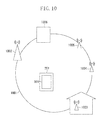
- Fig. 10 illustrates an example of a network structure that can be provided by the present invention.
- Fig. 10 illustrates an information processing terminal 201 as a smartphone, a tablet, or the like, a web browser 101 that operates on the terminal, an Internet network 1001, and a base station 1002 for mobile communications with 3G, Long Term Evolution (LTE) or the like.
- the information processing terminal 201 connects to the Internet network 1001 through the base station 1002 to perform mobile communications.
- Access points 1003, 1004, and 1005 are Wireless Fidelity (WiFi) access points.
- the access point 1003 is a WiFi access point in a home of an owner of the information processing terminal 201. Both the access points 1004 and 1005 are public WiFi access points.
- the access point 1004 involves charging based on a communication amount.
- the access point 1005 can be used for free or with flat-rate pricing unrelated to the communication amount.
- the information processing terminal 201 connects to the Internet network 1001 through the access points 1003 to 1005 to perform WiFi communications.
- a web server 1006 provides a web application (or website).
- the web browser 101 connects to the web server 1006 on the Internet network 1001 through the base station 1002 for the mobile communications or the WiFi access points 1003 to 1005.
- Fig. 1 is a block diagram illustrating an example of a hardware configuration of the information processing terminal 201 on which the web browser 101 can operate.
- the information processing terminal 201 includes an application processor (AP) 202, a read only memory (ROM) 203, a random access memory (RAM) 204, a storage device 205 formed of a Flash solid state drive (SSD), and the like.
- the AP 202 executes software stored in the ROM 203 or the storage device 205, and performs overall control on the devices connected to the AP 202.
- the RAM 204 functions as a main memory or a work area for the AP 202.
- the storage device 205 includes a flash memory and the like, and stores an operating system (OS), various applications such as a web browser, a database, a user file, and the like.
- a touchscreen controller 206 controls a touchscreen 207 connected thereto.
- a wireless LAN control unit 208, a mobile communication control unit 209, and a near field communication control unit 210 respectively control wireless LAN communications such as WiFi communications and the like, mobile communications, and near field communications.
- a power source control unit 211 performs charge control, remaining battery management, and the like for a rechargeable battery 212.
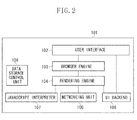
- Fig. 2 is a block diagram illustrating an example of a configuration of the web browser 101.
- a user interface (UI) 102 controls setting of the web browser 101, and a display and an operation for a control button, uniform resource locator (URL), and the like.
- a rendering engine 104 displays a requested content. When an HTML content is requested, the rendering engine 104 analyzes the HTML and cascading style sheets (CSS), and displays the resultant content on a screen.
- a browser engine 103 adjusts processing executed between the UI 102 and the rendering engine 104.
- a networking unit 105 is used for a Hypertext Transfer Protocol (HTTP) request and the like for calling a network.
- a UI backend 106 is used for drawing basic widgets such as a combo box and a window.
- the UI backend 106 provides a general interface that does not depend on a platform, and calls a drawing method unique to an OS based on the interface.
- a JavaScript (registered trademark) interpreter (JS interpreter) 107 is used for analyzing and executing a JavaScript (registered trademark) code.
- the interpreter 107 includes a JavaScript (registered trademark) executing unit that does not depend on a platform and a unit that accesses network information, including positional information and online information and the like.
- a data storage control means 108 performs control for storing in the storage device 205 a file and data based on a specification of a storage function as a result of extension for a cookie and HTML5.
- the data based on the specification of the storage function includes local storage data such as localStorage, file system, and IndexedDB and an application cache.
- the data storage control means 108 stores data, instructed from the website side, in a predetermined storage area in the storage device 205, prepared for the web browser 101. Specifically, data storage control starts when the web browser 101 requests a page provided by a website. Before starting to store the data, the web browser 101 may issue a notification to check with the user. Now, a mechanism for storing the data, from the website side, by the web browser 101 is described.
- the JavaScript (registered trademark) code is executed by the JS interpreter 107, when the web application is used through the web browser 101.
- the JavaScript (registered trademark) code is executed, data downloaded from the web server 1006 providing the website, is stored by the data storage control means 108. The data thus stored can be used through the web browser 101 or may have the value edited and stored again, even when the information processing terminal 201 goes offline.
- the JavaScript (registered trademark) code includes a command related to synchronization, the data, including the value edited while the information processing terminal 201 is offline, is transmitted from the web browser 101 to the web server 1006 when the information processing terminal 201 goes online.
- the web browser 101 attempts to acquire required files and data, from the web server 1006, and store the files and data in a storage area for the web browser 101 in accordance with the description of a manifest file prepared by the web application (website side).
- the manifest file is downloaded by the web browser 101 when the website is called (when a page is requested).
- the manifest file includes information clearly designating a resource stored in the storage area of the web browser 101 after the manifest file is downloaded through the first access to the website, and further includes information designating a resource that requires connection to the web server 1006 and the like.
- the web application can be executed by using cache data managed by the web browser 101.
- Work data generated when the terminal is offline, is synchronized with data on the web server 1006 on reconnection to the network.
- Fig. 3A is a flowchart illustrating processing of storing the local storage data and the application cache, executed by the web browser 101 in accordance with an operation of the web application.
- step S301 When an operation through the UI 102 of the web browser 101 is detected in step S301 (Yes in step S301), the web application receives an input of the UI operation in step S302. Then, in step S303, the web application updates internal data in accordance with the UI operation.
- step S304 the web application determines the connection status of the information processing terminal 201 to the network through the web browser 101. The processing proceeds to step S305 when the status is an offline status (No is step S304), and proceeds to step S306 when the status is an online status (Yes in step S304).
- step S305 the web application performs control so that the update data, obtained in step S303, is stored in the storage area for the web browser 101. Specifically, the data storage control means 108 stores the update data in the area saved for localStorage and the like.
- step S306 the web browser 101 transmits the update data to the web server 1006 in accordance with the instruction from the web application.
- the web application operating on the web browser 101 can register processing to be called when the connection status changes from the offline status to the online status, in the web browser 101.
- Fig. 3B is a flowchart illustrating an example of the processing registered in the web browser 101 by the web application.
- the processing to be called when the connection status changes to the online status is processing of synchronizing the update data, as a result of the editing through the offline work, with the web server 1006.
- step S310 the web application determines whether the connection status has changed to the online status.
- the web application transmits the local storage data to the web server 1006 through the web browser 101.
- the update data related to the work in the offline status may be transmitted.
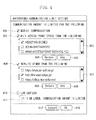
- Fig. 4 illustrates an example of a setting screen provided by the web browser 101.
- setting can be performed that is related to transmission of data, through background communications, to an external server (web server 1006 and the like) in response to the change of the connection status to the network described in Fig. 3 .
- a setting item 401 is a check box for performing setting for limiting the background communications when the mobile communications are performed.
- the web browser 101 limits the background communications when the mobile communications with LTE or 3G are performed in the online status. Specifically, the web application does not transmit the update data to the web server as described above with reference to Fig. 3 .
- a setting item 402 is a check box for performing setting for limiting the background communications in accordance with the wireless network, that is, in accordance with the WiFi access point in particular.
- the web browser 101 limits the background communications when the WiFi communications are performed by connecting to an access point other than an access point that is not on a list 403.
- a delete button 404 is used for deleting a checked access point from the list 403.
- An add button 405 is used for additionally registering an access point to the list 403.
- the web browser 101 displays a screen (not illustrated) for inputting a name of an access point, and adds the input access point to the list 403.
- the setting method described above is merely an example, and the access points for which the background communications are limited may be managed and set with the list.
- a setting item 406 is a checkbox for performing setting for limiting the background communications in accordance with a URL of the web application.
- the web browser 101 does not limit the background communications relative to a web application when the web application that is executing has a URL starting with any piece of information related to URLs on a list 407.
- a delete button 408 is used for deleting a checked URL from the list 407.
- An add button 409 is used for adding and registering a URL to the list 407.
- the web browser 101 displays a screen (not illustrated) for inputting the URL to be registered, and adds the input URL to the list 407.
- the setting method described above is merely an example.
- the URL for which the background communications are limited may be managed and set with the list.
- the web browser 101 may perform setting for not limiting the background communications for the settings related to the setting items 402 and 406 even when the background communications should be limited due to conditions of other setting items. Specifically, the limitation control described below with reference to Figs. 5 and 6 is not performed, only when the user is using a web application (website) corresponding to the URL on the list 407.
- a setting item 410 is a check box for performing setting for limiting the background communications when the remaining amount of the battery of the information processing terminal 201 on which the web browser 101 operates, drops below a designated value.
- the web browser 101 limits the background communications, if the remaining level of the battery 212, with which the information processing terminal 201 is driven, drops below the remaining battery level designated with an input box 411.
- a cancel button 412 is used for abandoning the setting values modified on the screen. Upon detecting that the cancel button 412 is pressed, the web browser 101 closes the screen without executing any processing.
- An OK button 413 is used for storing the setting values modified on the screen. Upon detecting that the OK button 413 is pressed, the web browser 101 stores the setting values on the screen in the storage device 205, and reflects the setting values on an operation setting of the web browser 101 currently under operation. Upon being started, the web browser 101 reads the setting values stored in the storage device 205 and limits the background communications in accordance with the setting values.
- Setting items other than those in Fig. 4 may be prepared.
- a setting item may be prepared for performing setting for limiting the background communications in the case of a communication type and a topology related to communications involving charging or with an upper limit communication amount.
- the web browser 101 determines that the communication involves charging or a communication amount with an upper limit, and then limits the background communications through processing described below.
- Fig. 5 is a flowchart illustrating processing executed by the web browser 101 to limit the background communications.
- the web browser 101 generates an instance of the interpreter 107 and starts the instance, when reading a webpage of a website designated with the UI 102 and the like.
- step S501 the interpreter 107 determines whether the current status of the information processing terminal 201 satisfies a condition for limiting the background communications (hereinafter, referred to as a limitation condition) in accordance with a content of the setting performed through the screen illustrated in Fig. 4 .
- a limitation condition a condition for limiting the background communications
- the processing in this step is described below in detail with reference to Fig. 6 .
- the interpreter 107 sets a true or false value to a variable window.navigator.onLine (variable onLine in the figure) in accordance with the result of determination processing in Fig. 6 . Specifically, "false" is set to the variable window.navigator.onLine when the limitation condition is satisfied.
- step S502 the interpreter 107 waits for change of the limitation condition as a result of setting change on the screen illustrated in Fig. 4 , or change of the connection status of the information processing terminal 201 to the network.
- the processing proceeds to step S503, when any one of the changes is detected.
- step S503 the interpreter 107 executes the determination processing illustrated in Fig. 6 based on the current connection status of the information processing terminal 201 and the limitation condition, and sets a resultant value to a temporary variable onLine' (variable onLine' in the figure). A true or false value is set to the temporary variable onLine' in accordance with whether the limitation condition is satisfied as in step S501.
- step S504 the interpreter 107 compares the value of the temporary variable onLine' with the value of the window.navigator.onLine.
- the processing proceeds to step S502 when the result of the comparison indicates that the values are the same (Yes in step S504), and proceeds to step S505 when the result of the comparison indicates that the values are different (No in step S504).
- step S505 the interpreter 107 substitutes the value of the window.navigator.onLine with the value of the temporary variable onLine'.
- step S506 the interpreter 107 checks whether an EventListener has been registered for the window.navigator.onLine.
- the EventListener is a JavaScript (registered trademark) program for referring to and controlling the value of the window.navigator.onLine.
- the EventListener is registered by the web application (website) operating on the web browser 101.
- the processing proceeds to step S502.
- the interpreter 107 sequentially calls the registered EventListeners in step S507, and then the processing proceeds to step S502.
- the processing corresponding to the EventListener is processing of transmitting the local storage data to the web server 1006 when the connection status changes to the online status from the offline status.
- it is determined that the connection status has changed to the online status from the offline status when the value of the window.navigator.onLine is substituted with the value true in step S505, and the transmission processing for the web server 1006 is executed in accordance with the EventListener called in step S507.
- the web browser 101 limits the background communications by controlling the value of the window.navigator.onLine, whereby the processing of limiting the background communications is implemented.
- JavaScript registered trademark
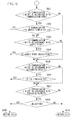
- Fig. 6 is a flowchart illustrating the determination processing executed by the web browser 101 in steps S501 and S503. The value of the variable used for implementing the limiting processing for the background communications is determined with this processing.
- step S601 the interpreter 107 determines whether the setting item 401 illustrated in Fig. 4 is enabled.
- the setting item 401 is merely an example. In this step, whether the setting for limiting the background communications in accordance with the communication type related to the network connection of the information processing terminal 201 is activated, is determined.
- the processing proceeds to step S602 when the setting is enabled (Yes in step S601) and proceeds to step S603 when the setting is disabled (No in step S601).
- step S602 the interpreter 107 determines whether the communication type related to the network connection of the information processing terminal 201 is the mobile communications.
- the processing proceeds to step S609 when the communication type is the mobile communications (Yes in step S602), and proceeds to step S603 when the communication type is not the mobile communications (No in step S602).
- the interpreter 107 determines whether the current communications are the mobile communications in a physical layer of an OSI reference model.
- step S603 the interpreter 107 determines whether the setting item 402 illustrated in Fig. 4 is enabled.
- the setting item 402 is used for performing setting for limiting the background communications based on a designated WiFi access point.
- the processing proceeds to step S604 when the setting is enabled (Yes in step S603), and proceeds to step S605 when the setting is disabled (No in step S603).
- step S604 the interpreter 107 determines whether the WiFi access point, currently accessed by the information processing terminal 201, is registered on the list 403. The processing proceeds to step S609 when the result of the determination indicates that the WiFi access point is unregistered (Yes in step S604), and proceeds to step S605 when the result indicates otherwise (No in step S604). This determination is made when the type of communications, currently performed by the information processing terminal 201, is the WiFi communications in a physical layer.
- step S605 the interpreter 107 determines whether the setting item 406 illustrated in Fig. 4 is enabled.
- the setting item 406 is used for performing setting for limiting the background communications based on a designated website.
- the processing proceeds to step S606 when the setting item 406 is enabled (Yes in step S605), and proceeds to step S607 when the setting item 406 is in disabled (No in step S605).
- step S606 the interpreter 107 determines whether a URL character string corresponding to the currently executed web application starts from any one of a group of URLs registered on the list 407. The processing proceeds to step S609 when the result of the determination indicates that the URL character string is unregistered on the list 407 (Yes in step S606), and proceeds to step S607 when the result indicates otherwise (No in step S606).
- step S607 the interpreter 107 determines whether the setting item 410 illustrated in Fig. 4 is enabled.
- the setting item 410 is used for performing setting for limiting the background communications in accordance with the remaining battery level.
- the processing proceeds to step S608 when the setting item 410 is enabled (Yes in step S607), and proceeds to step S610 when the setting item 410 is disabled (No in step S607) or when the interpreter 107 determines that the information processing terminal 201 is not driven by the rechargeable battery 212.
- step S608 the interpreter 107 compares the current remaining level of the rechargeable battery 212 with a threshold designated in the input box 411 in Fig. 4 .
- the processing proceeds to step S609 when the current remaining amount of the battery is equal to or lower than a threshold, i.e., the current remaining amount of the battery is small (Yes in step S608), and proceeds to step S610 when the current remaining amount of the battery is not equal to or lower than the threshold (No in step S608).
- step S609 the interpreter 107 returns false, that is, sets false to the value of the variable window.navigator.onLine, and terminates the processing.
- the JavaScript (registered trademark) program referring to the value of the variable, limits the background communications.
- step S610 the interpreter 107 returns true and terminates the processing.
- the determination processing in steps S603 and S604 or in steps S605 and S606 may be executed first in the processing of the flowchart in accordance with the setting in the web browser 101, and the processing may proceed to step S610 when the result of the determination processing in step S604 or S606 is "No".
- the processing of synchronizing the local storage data through the background communications can be executed in accordance with the information managed on the list 403 or the list 407, regardless of the communication type and the remaining amount of the battery.
- step S604 or step S606 may be executed when the result of the determination processing in step S602 or S608 is "Yes", and the processing may proceed to step S610 when the result of the determination processing in step S604 or step S606 is "No".
- a feature of a second embodiment lies in the following function. Specifically, the setting for limiting the background communications is changed through a display (UI 102) for the web browser 101 different from that in the first embodiment.
- the control functions according to the first and the second embodiments may be provided for a single web browser.
- Figs. 7A and 7B illustrate examples of an icon representing the value of the variable window.navigator.onLine (hereinafter, referred to as variable onLine) currently set on the UI 102 of the web browser 101.
- variable onLine the variable window.navigator.onLine
- a state display icon 701 in Fig. 7A indicates that true is the value of the variable onLine by the web browser 101
- a state display icon 702 in Fig. 7B indicates that false is the value of the variable onLine.
- Figs. 8A and 8B illustrate examples of a menu displayed when the user presses the state display icons 701 and 702 in Figs. 7A and 7B , respectively.
- a menu item 801 in Fig. 8A is used for performing setting for limiting the background communications on the URL corresponding to the currently accessed web application (or website).
- the web browser 101 displays the menu item 801 to be selectable when the following condition is satisfied.
- Condition 1 The currently performed communications are the mobile communications in the physical layer, the setting item 406 illustrated in Fig. 4 is enabled, and the URL corresponding to the currently accessed web application (or website) starts from any one of the URLs registered on the list 407.
- the web browser 101 Upon detecting that the menu item 801 is selected, the web browser 101 deletes the corresponding URL from the list 407.
- a menu item 802 in Fig. 8A is used for performing setting for limiting the background communications through a current access point.
- the web browser 101 displays the menu item 802 to be selectable when the current value of the variable onLine is true, and when any one of the following conditions is satisfied.
- Condition 1 The setting item 402 illustrated in Fig. 4 is disabled.
- Condition 2 The setting item 402 illustrated in Fig. 4 is enabled, the current communications are the WiFi communications in the physical layer, and the current access point is on the list 403.
- the web browser 101 enables the setting item 402 when the setting item 402 is disabled, and deletes information on the corresponding current access point from the list 403.
- a menu item 803 in Fig. 8A is used for opening the setting screen illustrated in Fig. 4 .
- the web browser 101 opens the setting screen illustrated in Fig. 4 .
- a menu item 804 in Fig. 8B is used for performing setting to permit the background communications on the URL corresponding to the currently accessed web application (or website).
- the web browser 101 displays the menu item 804 to be selectable when the following condition is satisfied.
- Condition 1 The current communications are the mobile communications in the physical layer, the setting item 406 in Fig. 4 is enabled, and the URL corresponding to the currently accessed web application (or website) does not start from any of the URLs registered on the list 407.
- the web browser 101 opens a screen ( Fig. 9 ) for registering the URL of the current website on the list 407.
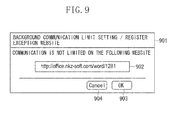
- Fig. 9 illustrates an example of a screen for newly adding a URL to the list 407.
- the web browser 101 displays a registration screen 901 upon detecting that the menu item 804 illustrated in Fig. 8B is selected.
- a text box 902 information on the URL to be registered is input.
- An initial value in the text box 902 is the URL of the website currently displayed by the web browser 101 or the like.
- the user can delete part of the information (latter part of the information), that is, edit the information, to input the desired information.
- the web browser 101 Upon detecting that a button 903 is pressed, the web browser 101 additionally registers the information on the URL input in the textbox 902 in the list 407, and closes the screen 901. Upon detecting that a button 904 is pressed, the web browser 101 closes the screen 901 without registering any information.
- a menu item 805 in Fig. 8B is used for performing setting for permitting the background communications through the current access point.
- the web browser 101 displays the menu item 805 to be selectable when the following condition is satisfied.
- Condition 1 the current value of the variable onLine is false, the current communications are the WiFi communications in the physical layer, and the current access point is not on the list 403.
- the web browser 101 adds the current access point to the list 403.
- the present invention includes an apparatus or a system formed by appropriately combining the embodiments described above, or a method of using the apparatus or the system.
- Embodiments of the present invention can also be realized by a computer of a system or apparatus that reads out and executes computer executable instructions recorded on a storage medium (e.g., non-transitory computer-readable storage medium) to perform the functions of one or more of the above-described embodiment(s) of the present invention, and by a method performed by the computer of the system or apparatus by, for example, reading out and executing the computer executable instructions from the storage medium to perform the functions of one or more of the above-described embodiment(s).
- the computer may comprise one or more of a central processing unit (CPU), micro processing unit (MPU), or other circuitry, and may include a network of separate computers or separate computer processors.
- the computer executable instructions may be provided to the computer, for example, from a network or the storage medium.
- the storage medium may include, for example, one or more of a hard disk, a random-access memory (RAM), a read only memory (ROM), a storage of distributed computing systems, an optical disk (such as a compact disc (CD), digital versatile disc (DVD), or Blu-ray Disc (BD)TM), a flash memory device, a memory card, and the like.
Landscapes
- Engineering & Computer Science (AREA)
- Theoretical Computer Science (AREA)
- Software Systems (AREA)
- Signal Processing (AREA)
- Computer Networks & Wireless Communication (AREA)
- Physics & Mathematics (AREA)
- General Engineering & Computer Science (AREA)
- General Physics & Mathematics (AREA)
- Human Computer Interaction (AREA)
- Data Mining & Analysis (AREA)
- Databases & Information Systems (AREA)
- Environmental & Geological Engineering (AREA)
- Computing Systems (AREA)
- Mathematical Physics (AREA)
- Information Transfer Between Computers (AREA)
- Computer Security & Cryptography (AREA)
- Mobile Radio Communication Systems (AREA)
Applications Claiming Priority (1)
| Application Number | Priority Date | Filing Date | Title |
|---|---|---|---|
| JP2014091809A JP6399794B2 (ja) | 2014-04-25 | 2014-04-25 | 情報処理端末、制御方法及びプログラム |
Publications (1)
| Publication Number | Publication Date |
|---|---|
| EP2937780A1 true EP2937780A1 (en) | 2015-10-28 |
Family
ID=53275961
Family Applications (1)
| Application Number | Title | Priority Date | Filing Date |
|---|---|---|---|
| EP15165018.1A Withdrawn EP2937780A1 (en) | 2014-04-25 | 2015-04-24 | Device and method for limiting background data transmission |
Country Status (4)
| Country | Link |
|---|---|
| US (2) | US10491492B2 (enExample) |
| EP (1) | EP2937780A1 (enExample) |
| JP (1) | JP6399794B2 (enExample) |
| KR (1) | KR101761107B1 (enExample) |
Cited By (1)
| Publication number | Priority date | Publication date | Assignee | Title |
|---|---|---|---|---|
| WO2019051323A1 (en) | 2017-09-07 | 2019-03-14 | Paypal, Inc. | HIDING AND PROVIDING DATA TO A DEVICE BASED ON AVAILABLE RESOURCES |
Families Citing this family (3)
| Publication number | Priority date | Publication date | Assignee | Title |
|---|---|---|---|---|
| JP6093055B1 (ja) * | 2016-02-04 | 2017-03-08 | 京セラ株式会社 | 通信装置、通信制御方法、及びプログラム |
| JP6761304B2 (ja) * | 2016-08-26 | 2020-09-23 | キヤノン株式会社 | 情報処理システム、情報処理装置及びその制御方法、及びプログラム |
| CN114116731B (zh) * | 2022-01-24 | 2022-04-22 | 北京智象信息技术有限公司 | 一种基于indexedDB存储的数据分离存储展示方法及装置 |
Citations (3)
| Publication number | Priority date | Publication date | Assignee | Title |
|---|---|---|---|---|
| JP2007181178A (ja) | 2005-11-30 | 2007-07-12 | Casio Hitachi Mobile Communications Co Ltd | 移動体通信端末、および、プログラム |
| WO2012112404A2 (en) * | 2011-02-14 | 2012-08-23 | Microsoft Corporation | Background transfer service for applications on mobile devices |
| WO2014024917A1 (ja) * | 2012-08-10 | 2014-02-13 | 京セラ株式会社 | 携帯端末装置および携帯端末装置の制御方法 |
Family Cites Families (20)
| Publication number | Priority date | Publication date | Assignee | Title |
|---|---|---|---|---|
| JP2000155710A (ja) * | 1998-11-20 | 2000-06-06 | Toshiba Corp | ネットワークコンピュータおよびそのネットワークコンピュータにおける同期処理方法 |
| JP4891108B2 (ja) * | 2007-02-07 | 2012-03-07 | Necカシオモバイルコミュニケーションズ株式会社 | 携帯端末装置及びプログラム |
| US8452853B2 (en) * | 2007-03-05 | 2013-05-28 | International Business Machines Corporation | Browser with offline web-application architecture |
| US8352580B2 (en) * | 2008-11-21 | 2013-01-08 | Samsung Electronics Co., Ltd. | Server and method for providing mobile web service |
| WO2012015006A1 (ja) * | 2010-07-28 | 2012-02-02 | 京セラ株式会社 | 携帯電子機器、画面制御方法および付加表示プログラム |
| US9417754B2 (en) * | 2011-08-05 | 2016-08-16 | P4tents1, LLC | User interface system, method, and computer program product |
| US20150138300A1 (en) * | 2011-09-02 | 2015-05-21 | Microsoft Technology Licensing, Llc | Mobile Video Calls |
| WO2013099466A1 (ja) * | 2011-12-27 | 2013-07-04 | Necカシオモバイルコミュニケーションズ株式会社 | 無線通信装置 |
| US8897762B2 (en) * | 2012-02-28 | 2014-11-25 | Qualcomm Incorporated | Optimizing signaling load overhead and battery consumption for background applications |
| EP2880849A4 (en) * | 2012-08-03 | 2016-03-30 | Nec Corp | MOBILE TERMINAL, COMMUNICATION METHOD, COMMUNICATION SYSTEM, PROGRAM, DATA PROCESSING APPARATUS, SERVICE RENDERING METHOD, AND DISTRIBUTION SERVER |
| JP6074190B2 (ja) * | 2012-08-10 | 2017-02-01 | 京セラ株式会社 | 端末装置および端末装置の制御方法 |
| US20180343174A1 (en) * | 2012-10-09 | 2018-11-29 | Google Inc. | Rule based page processing and network request processing in browsers |
| JP6042699B2 (ja) | 2012-11-06 | 2016-12-14 | 三井化学株式会社 | ポリイソシアネート組成物およびポリウレタン樹脂 |
| US20140173707A1 (en) * | 2012-12-14 | 2014-06-19 | Alan Roy Hollander | Disabling Unauthorized Access To Online Services |
| US10187430B2 (en) * | 2013-06-07 | 2019-01-22 | Apple Inc. | Smart management of background network connections |
| US9229522B1 (en) * | 2013-08-27 | 2016-01-05 | Symantec Corporation | Mobile battery performance by identifying apps that disproportionally run background tasks that prevent mobile devices from sleeping |
| US9485206B2 (en) * | 2013-12-19 | 2016-11-01 | Websafety, Inc. | Devices and methods for improving web safety and deterrence of cyberbullying |
| US9619756B2 (en) * | 2014-01-14 | 2017-04-11 | Apple Inc. | Methods and systems for managing and automating user customization of a device based on observed user behavior |
| US9462054B2 (en) * | 2014-02-27 | 2016-10-04 | Dropbox, Inc. | Systems and methods for providing a user with a set of interactivity features locally on a user device |
| US9998914B2 (en) * | 2014-04-16 | 2018-06-12 | Jamf Software, Llc | Using a mobile device to restrict focus and perform operations at another mobile device |
-
2014
- 2014-04-25 JP JP2014091809A patent/JP6399794B2/ja not_active Expired - Fee Related
-
2015
- 2015-04-21 KR KR1020150055654A patent/KR101761107B1/ko not_active Expired - Fee Related
- 2015-04-22 US US14/693,371 patent/US10491492B2/en active Active
- 2015-04-24 EP EP15165018.1A patent/EP2937780A1/en not_active Withdrawn
-
2019
- 2019-10-28 US US16/666,244 patent/US11502925B2/en active Active
Patent Citations (3)
| Publication number | Priority date | Publication date | Assignee | Title |
|---|---|---|---|---|
| JP2007181178A (ja) | 2005-11-30 | 2007-07-12 | Casio Hitachi Mobile Communications Co Ltd | 移動体通信端末、および、プログラム |
| WO2012112404A2 (en) * | 2011-02-14 | 2012-08-23 | Microsoft Corporation | Background transfer service for applications on mobile devices |
| WO2014024917A1 (ja) * | 2012-08-10 | 2014-02-13 | 京セラ株式会社 | 携帯端末装置および携帯端末装置の制御方法 |
Cited By (6)
| Publication number | Priority date | Publication date | Assignee | Title |
|---|---|---|---|---|
| WO2019051323A1 (en) | 2017-09-07 | 2019-03-14 | Paypal, Inc. | HIDING AND PROVIDING DATA TO A DEVICE BASED ON AVAILABLE RESOURCES |
| CN111316691A (zh) * | 2017-09-07 | 2020-06-19 | 贝宝公司 | 基于可用资源向设备缓存和提供数据 |
| EP3679739A4 (en) * | 2017-09-07 | 2021-06-09 | PayPal, Inc. | INTERMEDIATE STORAGE AND PROVISION OF DATA TO A DEVICE BASED ON AVAILABLE RESOURCES |
| US11716650B2 (en) | 2017-09-07 | 2023-08-01 | Paypal, Inc. | Caching and providing data to a device based on available resources |
| EP4221311A1 (en) * | 2017-09-07 | 2023-08-02 | PayPal, Inc. | Caching and providing data to a device based on available resources |
| CN111316691B (zh) * | 2017-09-07 | 2023-12-12 | 贝宝公司 | 基于可用资源向设备缓存和提供数据 |
Also Published As
| Publication number | Publication date |
|---|---|
| JP6399794B2 (ja) | 2018-10-03 |
| KR101761107B1 (ko) | 2017-07-25 |
| KR20150123722A (ko) | 2015-11-04 |
| JP2015210663A (ja) | 2015-11-24 |
| US20200067803A1 (en) | 2020-02-27 |
| US20150312122A1 (en) | 2015-10-29 |
| US10491492B2 (en) | 2019-11-26 |
| US11502925B2 (en) | 2022-11-15 |
Similar Documents
| Publication | Publication Date | Title |
|---|---|---|
| US20240168616A1 (en) | Information processing terminal and control method | |
| US11502925B2 (en) | Information processing terminal and control method | |
| US11611633B2 (en) | Systems and methods for platform-independent application publishing to a front-end interface | |
| US20160330266A1 (en) | Remotely controlling a device via a web browser | |
| US20170103047A1 (en) | Mechanisms to Compose, Execute, Save, and Retrieve Hyperlink Pipelines in Web Browsers | |
| JP6338453B2 (ja) | 情報端末、制御方法及びプログラム | |
| CN107391768B (zh) | 网页数据处理方法、装置、设备及计算机可读存储介质 | |
| KR101985990B1 (ko) | 정보 처리 단말, 방법 및 저장 매체 | |
| CN104168667A (zh) | 数据获取的方法、装置及系统 | |
| CN105205072A (zh) | 网页信息的展示方法和系统 | |
| JP2017085485A (ja) | 携帯端末装置、画像形成装置、その制御方法、及びプログラム | |
| US9626726B2 (en) | Location based social networking system and method | |
| KR102815742B1 (ko) | 정보 처리 장치, 저장 매체, 및 제어 방법 | |
| US10193950B2 (en) | Network system and control method | |
| US20150222712A1 (en) | Information processing terminal and control method | |
| CN103324540B (zh) | 电子系统与无缝分享方法 | |
| US9998520B2 (en) | Information processing terminal and method | |
| CN105224579A (zh) | 一种历史页面导航方法和装置 | |
| US20160127446A1 (en) | Information processing apparatus and method | |
| CN118708541A (zh) | 富文本格式设置方法、清除方法、装置、存储介质及电子设备 | |
| CN106899422A (zh) | 对终端进行设置的方法和设备 | |
| KR20140108966A (ko) | 전자 장치에서 전송 정보를 관리하기 위한 방법 및 장치 |
Legal Events
| Date | Code | Title | Description |
|---|---|---|---|
| PUAI | Public reference made under article 153(3) epc to a published international application that has entered the european phase |
Free format text: ORIGINAL CODE: 0009012 |
|
| AK | Designated contracting states |
Kind code of ref document: A1 Designated state(s): AL AT BE BG CH CY CZ DE DK EE ES FI FR GB GR HR HU IE IS IT LI LT LU LV MC MK MT NL NO PL PT RO RS SE SI SK SM TR |
|
| AX | Request for extension of the european patent |
Extension state: BA ME |
|
| 17P | Request for examination filed |
Effective date: 20160428 |
|
| RBV | Designated contracting states (corrected) |
Designated state(s): AL AT BE BG CH CY CZ DE DK EE ES FI FR GB GR HR HU IE IS IT LI LT LU LV MC MK MT NL NO PL PT RO RS SE SI SK SM TR |
|
| 17Q | First examination report despatched |
Effective date: 20160909 |
|
| STAA | Information on the status of an ep patent application or granted ep patent |
Free format text: STATUS: EXAMINATION IS IN PROGRESS |
|
| STAA | Information on the status of an ep patent application or granted ep patent |
Free format text: STATUS: THE APPLICATION HAS BEEN WITHDRAWN |
|
| 18W | Application withdrawn |
Effective date: 20210429 |